",
13 | "license": "MIT",
14 | "dependencies": {
15 | "immutability-helper": "^3.0.1",
16 | "prop-types": "^15.7.2",
17 | "web-animations-js": "2.3.2"
18 | },
19 | "peerDependencies": {
20 | "react": "^16.8",
21 | "react-dom": "^16.8",
22 | "react-router-dom": "^5.0.1"
23 | },
24 | "devDependencies": {
25 | "@babel/core": "^7.8.7",
26 | "@babel/plugin-proposal-class-properties": "^7.8.3",
27 | "@babel/preset-env": "^7.8.7",
28 | "@babel/preset-flow": "^7.8.3",
29 | "@babel/preset-react": "^7.8.3",
30 | "@rollup/plugin-commonjs": "^11.0.2",
31 | "@rollup/plugin-node-resolve": "^7.1.1",
32 | "babel-eslint": "^10.1.0",
33 | "babel-loader": "^8.0.6",
34 | "eslint": "^6.1.0",
35 | "eslint-config-airbnb": "^18.0.1",
36 | "eslint-plugin-import": "^2.20.1",
37 | "eslint-plugin-jsx-a11y": "^6.2.3",
38 | "eslint-plugin-react": "^7.19.0",
39 | "eslint-plugin-react-hooks": "^1.7.0",
40 | "react": "^16.8",
41 | "react-dom": "^16.8",
42 | "react-router-dom": "^5.0.1",
43 | "rollup-plugin-babel": "^4.4.0",
44 | "rollup-plugin-peer-deps-external": "^2.2.2",
45 | "webpack": "^4.42.0",
46 | "webpack-cli": "^3.3.11",
47 | "webpack-dev-server": "^3.10.3"
48 | },
49 | "files": [
50 | "dist"
51 | ],
52 | "keywords": [
53 | "react",
54 | "framer",
55 | "motion",
56 | "router",
57 | "animation",
58 | "transition",
59 | "hero"
60 | ]
61 | }
62 |
--------------------------------------------------------------------------------
/README.md:
--------------------------------------------------------------------------------
1 |
2 |
4 |
5 | Motion Layout
6 |
7 |
8 |
14 |
15 |
16 | Create beautiful immersive React hero animations using shared components.
17 |
18 |
20 |
21 | ___
22 |
23 | ## Docs
24 | [React Motion Layout Docs](http://motion-layout.com)
25 |
26 | ## About
27 |
28 | #### Motivation
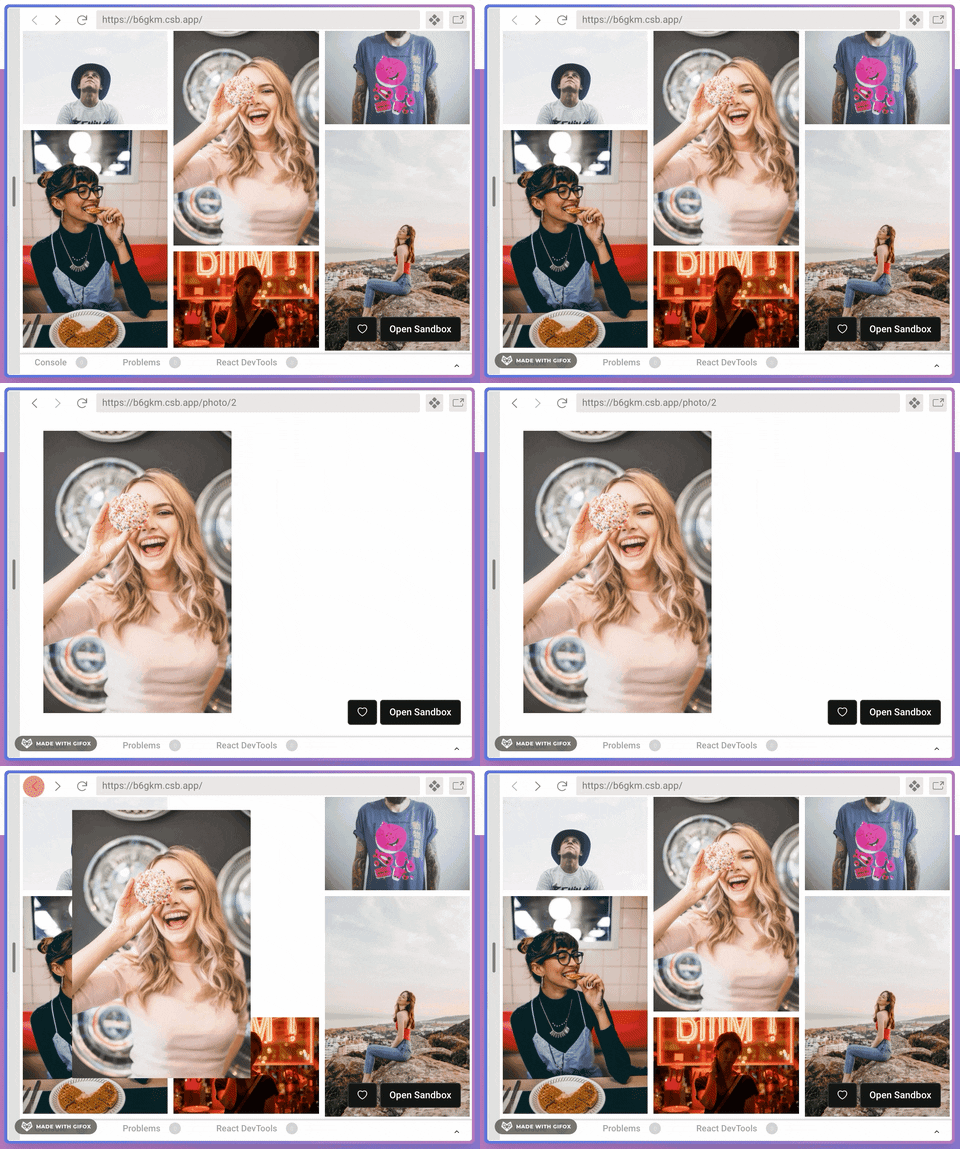
29 | There are amazing libraries like framer-motion that help you create animations when mounting or unmounting components. But, if two routes have the same image in different positions and sizes, they cannot be animated together. With Motion Layout, you can link components together to animate them when changing views.
30 |
31 | #### Browser support
32 | Supported on modern versions of all major browsers including:
33 |
34 | - Chrome 56+
35 | - Firefox 27+
36 | - IE10+ (including Edge)
37 | - Safari (iOS) 7.1+
38 | - Safari (Mac) 9+
39 | - Firefox Mobile
40 | - Chrome for Android
41 | - Android Webview
42 |
43 | #### Declarative
44 | Easy as wraping your text or images with our SharedElement component.
45 |
46 | #### Isolated
47 | It doesn't require external state management libs.
48 |
49 | #### Router Ready
50 | Dispatch animations when changing routes using our React-Router Link component.
51 |
--------------------------------------------------------------------------------
/src/components/Elements/BaseElement.jsx:
--------------------------------------------------------------------------------
1 | import React, { useContext, useMemo, useCallback, useRef } from 'react';
2 |
3 | import computeStyles from '../../utils/computeStyles';
4 |
5 | import actions from '../../state/actions';
6 |
7 | import GlobalContext from '../../utils/globalContext';
8 | import { SceneContext } from '../MotionScene';
9 | import { ScreenContext } from '../MotionScreen';
10 |
11 | /**
12 | * Computes styles and adds the element to te animation stack
13 | */
14 | export default function BaseElement({
15 | animationKey, children, settings, type,
16 | }) {
17 | const mounted = useRef(false);
18 | const { sceneName, easing } = useContext(SceneContext);
19 | const { dispatch, store } = useContext(GlobalContext) || {};
20 | const { screenName } = useContext(ScreenContext);
21 |
22 | const isRegistered = useMemo(() => (
23 | store && store.exitView === sceneName
24 | && store.scenes[sceneName]
25 | && store.scenes[sceneName].sources[animationKey]
26 | ), [animationKey, sceneName, store]);
27 |
28 | const attachRef = useCallback((ref) => {
29 | if (ref && !mounted.current) {
30 | mounted.current = true;
31 |
32 | if (!animationKey) {
33 | console.warn('No animation key provided for component', children, 'it will be skipped');
34 | return;
35 | }
36 |
37 | if (!sceneName) {
38 | console.warn('Skipping SharedElement registration, MotionScene is invalid');
39 | return;
40 | }
41 |
42 | const actionType = isRegistered ? actions.view.registerTarget : actions.view.registerSource;
43 | const { width, height, x, y } = ref.getBoundingClientRect();
44 |
45 | const component = {
46 | ref,
47 | rect: { width, height, x, y },
48 | styles: computeStyles(type, ref, settings),
49 | component: children,
50 | type,
51 | settings,
52 | };
53 |
54 | dispatch({
55 | type: actionType,
56 | animationKey,
57 | component,
58 | sceneName,
59 | screenName,
60 | });
61 | }
62 | }, [animationKey, sceneName, settings, isRegistered, type, children, dispatch, screenName]);
63 |
64 | return React.cloneElement(children, { ...children.props, ref: attachRef, easing });
65 | }
66 |
--------------------------------------------------------------------------------
/website/src/css/custom.css:
--------------------------------------------------------------------------------
1 | /* stylelint-disable docusaurus/copyright-header */
2 | /**
3 | * Any CSS included here will be global. The classic template
4 | * bundles Infima by default. Infima is a CSS framework designed to
5 | * work well for content-centric websites.
6 | */
7 |
8 | /* You can override the default Infima variables here. */
9 | :root {
10 | --ifm-color-primary: #d53f8c;
11 | --ifm-color-primary-dark: #cc2d7e;
12 | --ifm-color-primary-darker: #c02a77;
13 | --ifm-color-primary-darkest: #9f2362;
14 | --ifm-color-primary-light: #da569a;
15 | --ifm-color-primary-lighter: #dc61a0;
16 | --ifm-color-primary-lightest: #e483b5;
17 | --ifm-code-font-size: 95%;
18 | }
19 |
20 | .docusaurus-highlight-code-line {
21 | background-color: rgb(72, 77, 91);
22 | display: block;
23 | margin: 0 calc(-1 * var(--ifm-pre-padding));
24 | padding: 0 var(--ifm-pre-padding);
25 | }
26 |
27 | .baloo {
28 | font-family: 'Baloo Chettan 2'
29 | }
30 |
31 | .primary {
32 | color: #ed64a6;
33 | }
34 |
35 | .button_pink:hover {
36 | text-decoration: none;
37 | }
38 |
39 | .navbar__title {
40 | font-family: 'Baloo Chettan 2';
41 | color: #ed64a6;
42 | }
43 |
44 | .mouse {
45 | left: 50%;
46 | transform: translateX(-50%);
47 | position: absolute;
48 | bottom: 40px;
49 | }
50 |
51 | .mouse-icon {
52 | width: 25px;
53 | height: 45px;
54 | border: 2px solid #a0aec0;
55 | border-radius: 15px;
56 | cursor: pointer;
57 | position: relative;
58 | text-align: center;
59 | }
60 |
61 | .mouse-wheel {
62 | height: 6px;
63 | margin: 2px auto 0;
64 | display: block;
65 | width: 3px;
66 | background-color: #a0aec0;
67 | border-radius: 50%;
68 | -webkit-animation: 1.6s ease infinite wheel-up-down;
69 | -moz-animation: 1.6s ease infinite wheel-up-down;
70 | animation: 1.6s ease infinite wheel-up-down;
71 | }
72 |
73 | @-webkit-keyframes wheel-up-down {
74 | 0% {
75 | margin-top: 2px;
76 | opacity: 0;
77 | }
78 |
79 | 30% {
80 | opacity: 1;
81 | }
82 |
83 | 100% {
84 | margin-top: 20px;
85 | opacity: 0;
86 | }
87 | }
88 |
89 | @-moz-keyframes wheel-up-down {
90 | 0% {
91 | margin-top: 2px;
92 | opacity: 0;
93 | }
94 |
95 | 30% {
96 | opacity: 1;
97 | }
98 |
99 | 100% {
100 | margin-top: 20px;
101 | opacity: 0;
102 | }
103 | }
104 |
105 | @keyframes wheel-up-down {
106 | 0% {
107 | margin-top: 2px;
108 | opacity: 0;
109 | }
110 |
111 | 30% {
112 | opacity: 1;
113 | }
114 |
115 | 100% {
116 | margin-top: 20px;
117 | opacity: 0;
118 | }
119 | }
120 |
121 | .chat-bg {
122 | background: #4568DC; /* fallback for old browsers */
123 | background: -webkit-linear-gradient(to right, #B06AB3, #4568DC); /* Chrome 10-25, Safari 5.1-6 */
124 | background: linear-gradient(to right, #B06AB3, #4568DC); /* W3C, IE 10+/ Edge, Firefox 16+, Chrome 26+, Opera 12+, Safari 7+ */
125 | }
126 |
127 | .border-box-1 {
128 | padding: 4px;
129 | background: #4568DC; /* fallback for old browsers */
130 | background: -webkit-linear-gradient(to left, #B06AB3, #4568DC); /* Chrome 10-25, Safari 5.1-6 */
131 | background: linear-gradient(to left, #B06AB3, #4568DC);
132 | }
133 |
134 | @media (min-width: 640px) {
135 | .demo-box {
136 | width: 100%;
137 | height: 500px;
138 | }
139 | }
140 |
141 | @media (min-width: 1280px) {
142 | .demo-box {
143 | width: 500px;
144 | height: 500px;
145 | }
146 | }
--------------------------------------------------------------------------------
/CODE_OF_CONDUCT.md:
--------------------------------------------------------------------------------
1 | # Contributor Covenant Code of Conduct
2 |
3 | ## Our Pledge
4 |
5 | In the interest of fostering an open and welcoming environment, we as
6 | contributors and maintainers pledge to making participation in our project and
7 | our community a harassment-free experience for everyone, regardless of age, body
8 | size, disability, ethnicity, sex characteristics, gender identity and expression,
9 | level of experience, education, socio-economic status, nationality, personal
10 | appearance, race, religion, or sexual identity and orientation.
11 |
12 | ## Our Standards
13 |
14 | Examples of behavior that contributes to creating a positive environment
15 | include:
16 |
17 | * Using welcoming and inclusive language
18 | * Being respectful of differing viewpoints and experiences
19 | * Gracefully accepting constructive criticism
20 | * Focusing on what is best for the community
21 | * Showing empathy towards other community members
22 |
23 | Examples of unacceptable behavior by participants include:
24 |
25 | * The use of sexualized language or imagery and unwelcome sexual attention or
26 | advances
27 | * Trolling, insulting/derogatory comments, and personal or political attacks
28 | * Public or private harassment
29 | * Publishing others' private information, such as a physical or electronic
30 | address, without explicit permission
31 | * Other conduct which could reasonably be considered inappropriate in a
32 | professional setting
33 |
34 | ## Our Responsibilities
35 |
36 | Project maintainers are responsible for clarifying the standards of acceptable
37 | behavior and are expected to take appropriate and fair corrective action in
38 | response to any instances of unacceptable behavior.
39 |
40 | Project maintainers have the right and responsibility to remove, edit, or
41 | reject comments, commits, code, wiki edits, issues, and other contributions
42 | that are not aligned to this Code of Conduct, or to ban temporarily or
43 | permanently any contributor for other behaviors that they deem inappropriate,
44 | threatening, offensive, or harmful.
45 |
46 | ## Scope
47 |
48 | This Code of Conduct applies both within project spaces and in public spaces
49 | when an individual is representing the project or its community. Examples of
50 | representing a project or community include using an official project e-mail
51 | address, posting via an official social media account, or acting as an appointed
52 | representative at an online or offline event. Representation of a project may be
53 | further defined and clarified by project maintainers.
54 |
55 | ## Enforcement
56 |
57 | Instances of abusive, harassing, or otherwise unacceptable behavior may be
58 | reported by contacting the project team at jeffersonlicet@gmail.com. All
59 | complaints will be reviewed and investigated and will result in a response that
60 | is deemed necessary and appropriate to the circumstances. The project team is
61 | obligated to maintain confidentiality with regard to the reporter of an incident.
62 | Further details of specific enforcement policies may be posted separately.
63 |
64 | Project maintainers who do not follow or enforce the Code of Conduct in good
65 | faith may face temporary or permanent repercussions as determined by other
66 | members of the project's leadership.
67 |
68 | ## Attribution
69 |
70 | This Code of Conduct is adapted from the [Contributor Covenant][homepage], version 1.4,
71 | available at https://www.contributor-covenant.org/version/1/4/code-of-conduct.html
72 |
73 | [homepage]: https://www.contributor-covenant.org
74 |
75 | For answers to common questions about this code of conduct, see
76 | https://www.contributor-covenant.org/faq
77 |
--------------------------------------------------------------------------------
/website/docusaurus.config.js:
--------------------------------------------------------------------------------
1 | module.exports = {
2 | title: 'React Motion Layout',
3 | tagline: 'Beautiful React hero animations.',
4 | url: 'http://motion-layout.com/reacto-motion-layout',
5 | baseUrl: '/',
6 | favicon: 'img/favicon.ico',
7 | organizationName: 'jeffersonlicet', // Usually your GitHub org/user name.
8 | projectName: 'React Motion Layout', // Usually your repo name.
9 | themeConfig: {
10 | colorMode: {
11 | disableSwitch: true,
12 | },
13 | algolia: {
14 | apiKey: '60e4ce389d11f9291daed91bfbb0b51a',
15 | indexName: 'azurewebsites_motion-layout',
16 | },
17 | announcementBar: {
18 | id: 'supportus-new',
19 | content:
20 | '⭐️ If you like Motion Layout, give it a star on GitHub ! ⭐️ ',
21 | },
22 | googleAnalytics: {
23 | trackingID: 'UA-56940433-12',
24 | },
25 | prism: {
26 | theme: require('prism-react-renderer/themes/dracula'),
27 | },
28 | navbar: {
29 | title: 'Motion Layout',
30 | logo: {
31 | alt: 'Motion Layout',
32 | src: 'img/logo.png',
33 | },
34 | links: [
35 | {
36 | to: 'docs/installation',
37 | activeBasePath: 'docs',
38 | label: 'Docs',
39 | position: 'left',
40 | },
41 | {
42 | href: 'https://github.com/jeffersonlicet/react-motion-layout',
43 | label: 'GitHub',
44 | position: 'right',
45 | },
46 | ],
47 | },
48 | footer: {
49 | style: 'dark',
50 | links: [
51 | {
52 | title: 'Docs',
53 | items: [
54 | {
55 | label: 'Installation',
56 | to: 'docs/installation',
57 | },
58 | {
59 | label: 'Animating components',
60 | to: 'docs/animating',
61 | },
62 | ],
63 | },
64 | {
65 | title: 'Community',
66 | items: [
67 | {
68 | label: 'Credits',
69 | href: 'credits',
70 | },
71 | {
72 | label: 'Stack Overflow',
73 | href: 'https://stackoverflow.com/questions/tagged/react-motion-layout',
74 | },
75 | ],
76 | },
77 | {
78 | title: 'Social',
79 | items: [
80 | {
81 | label: 'GitHub',
82 | href: 'https://github.com/jeffersonlicet/react-motion-layout',
83 | },
84 | {
85 | label: 'Twitter',
86 | href: 'https://twitter.com/jeffersonlicet',
87 | },
88 | ],
89 | },
90 | ],
91 | copyright: `Copyright © ${new Date().getFullYear()} Jefferson Licet. Built with Docusaurus.`,
92 | },
93 | },
94 | presets: [
95 | [
96 | '@docusaurus/preset-classic',
97 | {
98 | docs: {
99 | sidebarPath: require.resolve('./sidebars.js'),
100 | editUrl:
101 | 'https://github.com/facebook/docusaurus/edit/master/website/',
102 | },
103 | theme: {
104 | customCss: require.resolve('./src/css/custom.css'),
105 | },
106 | },
107 | ],
108 | ],
109 | stylesheets: [
110 | 'https://unpkg.com/tailwindcss@^1.0/dist/tailwind.min.css',
111 | 'https://fonts.googleapis.com/css?family=Baloo+Chettan+2:400,700&display=swap',
112 | ],
113 | plugins: ['@docusaurus/plugin-google-analytics'],
114 | };
115 |
--------------------------------------------------------------------------------
/src/state/reducer.js:
--------------------------------------------------------------------------------
1 | import update from 'immutability-helper';
2 | import actions from './actions';
3 |
4 | export const initialState = {
5 | exitView: null,
6 | scenes: {},
7 | screen: null,
8 | onEnter: true,
9 | onExit: true,
10 | exitScroll: null,
11 | };
12 |
13 | const initialView = {
14 | targets: {},
15 | sources: {},
16 | screenName: null,
17 | };
18 |
19 | export const reducer = (state, action) => {
20 | switch (action.type) {
21 | case actions.view.updateSourceRect:
22 | return update(state, {
23 | scenes: {
24 | [action.sceneName]: {
25 | sources: {
26 | [action.animationKey]: {
27 | rect: { $set: action.rect },
28 | },
29 | },
30 | },
31 | },
32 | });
33 | case actions.view.setExitView:
34 | return update(state, {
35 | exitView: { $set: action.sceneName },
36 | });
37 | case actions.view.setScreen:
38 | return update(state, {
39 | screen: { $set: action.screen },
40 | onEnter: { $set: action.onEnter },
41 | onExit: { $set: action.onExit },
42 | });
43 | case actions.view.setExitScroll:
44 | return update(state, {
45 | exitScroll: { $set: action.exitScroll },
46 | });
47 |
48 | case actions.view.register:
49 | return update(state, {
50 | scenes: { [action.sceneName]: { $set: { ...initialView, screenName: action.screenName } } },
51 | });
52 | case actions.view.updateViewScreen:
53 | return update(state, {
54 | scenes: {
55 | [action.sceneName]: {
56 | screenName: { $set: action.screenName },
57 | },
58 | },
59 | });
60 |
61 | case actions.view.remove:
62 | return update(state, {
63 | scenes: { $unset: [action.sceneName] },
64 | });
65 |
66 | case actions.view.registerSource: {
67 | if (state.scenes[action.sceneName]) {
68 | return update(state, {
69 | scenes: {
70 | [action.sceneName]: {
71 | screenName: { $set: action.screenName },
72 | sources: {
73 | [action.animationKey]: { $set: action.component },
74 | },
75 | },
76 | },
77 | });
78 | }
79 |
80 | return update(state, {
81 | scenes: {
82 | [action.sceneName]: {
83 | $set: {
84 | ...initialView,
85 | screenName: action.screenName,
86 | sources: {
87 | [action.animationKey]: action.component,
88 | },
89 | },
90 | },
91 | },
92 | });
93 | }
94 | case actions.view.registerTarget:
95 | return update(state, {
96 | scenes: {
97 | [action.sceneName]: {
98 | targets: {
99 | [action.animationKey]: { $set: action.component },
100 | },
101 | },
102 | },
103 | });
104 |
105 | case actions.view.deleteTarget:
106 | return update(state, {
107 | scenes: {
108 | [action.sceneName]: {
109 | targets: { $unset: [action.animationKey] },
110 | },
111 | },
112 | });
113 | case actions.view.deleteSource:
114 | return update(state, {
115 | scenes: {
116 | [action.sceneName]: {
117 | sources: { $unset: [action.animationKey] },
118 | },
119 | },
120 | });
121 | case actions.view.clearScenes: {
122 | const toRemove = Object.keys(state.scenes)
123 | .filter((scene) => state.scenes[scene].screenName !== action.keep);
124 | return update(state, {
125 | scenes: { $unset: toRemove },
126 | });
127 | }
128 | default:
129 | throw new Error();
130 | }
131 | };
132 |
--------------------------------------------------------------------------------
/website/docs/animating.md:
--------------------------------------------------------------------------------
1 | ---
2 | id: animating
3 | title: Animating Components
4 | ---
5 |
6 | Let's build together an example of how to use Motion Layout.
7 | We are going to build a simple feed and a story view using react router.
8 |
9 | ### 1 Use the Motion Layout Provider
10 | Motion Layout Provider is responsible for providing the state management.
11 | ```jsx {6,15}
12 | // app.js
13 | ...
14 | import { MotionLayoutProvider } from 'react-motion-layout';
15 |
16 | ReactDOM.render(
17 |
18 |
19 |
20 |
22 |
23 |
25 |
26 | ,
27 | document.getElementById("root")
28 | );
29 | ```
30 |
31 | ### 2 Create some placeholder stories
32 | ```jsx
33 | // stories.js
34 | export const items = [
35 | {
36 | id: 1,
37 | text: 'Hello world',
38 | image: 'https://images.unsplash.com/photo-1506824959579-0a01750f66de?ixlib=rb-1.2.1&auto=format&fit=crop&w=300&q=100',
39 | },
40 | {
41 | id: 2,
42 | text: 'Hello world',
43 | image: 'https://images.unsplash.com/photo-1506824959579-0a01750f66de?ixlib=rb-1.2.1&auto=format&fit=crop&w=300&q=100',
44 | },
45 | ];
46 | ```
47 |
48 | ### 3 Create the Feed View
49 | Since this is an individual screen, we wrap it using MotionScreen to clean registered elements when
50 | abandoning this screen.
51 | ```jsx
52 | // feed.jsx
53 | ...
54 | import { MotionScreen } from 'react-motion-layout';
55 | import { items } from './stories';
56 | import Item from './Item';
57 |
58 | export default function Feed() {
59 | return (
60 |
61 | {items.map((data, i) =>
63 | );
64 | }
65 | ```
66 |
67 | ### 4 Create the Item View
68 | Each item will be wrapped with a **MotionScene**.
69 | A **MotionScene** is a component that contains **SharedElements**.
70 |
71 | **SharedElements** are the components that we will animate. They must have an unique key called *animationKey*, we use that key to find a matching SharedElement when changing the views.
72 | ___
73 | **MotionScene** accepts an onClick property, in this case we are using the **withTransition** hook, that will trigger the animation
74 | and then will change the route using the history hook provided by react-router-dom.
75 |
76 | > You can also use the withTransition hook to animate route changes and state changes, for example, if you render two different components based on some condition.
77 |
78 | ```jsx {8,12-17}
79 | // item.jsx
80 | import React, { useCallback } from 'react';
81 | import { useHistory } from 'react-router-dom';
82 | import { SharedElement, MotionScene, useMotion } from 'react-motion-layout';
83 |
84 | export default function Item({ data }) {
85 | const history = useHistory();
86 | const withTransition = useMotion(`story-${data.id}`);
87 | const callback = useCallback(() => history.push(`/story/${id}`));
88 |
89 | return (
90 |
91 |
93 | {data.text}
94 |
95 |
96 | );
97 | }
98 | ```
99 |
100 | ### 5 Create the Story View
101 | The Story View is wrapped by a MotionScene as well, when navigating, those scenes will match and the declared SharedComponents will perform the animation.
102 |
103 | ```jsx {0}
104 | // story.jsx
105 | import React from 'react';
106 | import { useParams } from 'react-router-dom';
107 | import { SharedElement, MotionScene, MotionScreen } from 'react-motion-layout';
108 |
109 | import { items } from './stories';
110 |
111 | export default function Story() {
112 | const { storyId } = useParams();
113 | const { image, text } = items[storyId];
114 |
115 | return (
116 |
117 |
118 |
119 | {text}
120 |
121 |
123 |
124 | );
125 | }
126 | ```
127 |
128 | ## And that's it
129 | Now when you click on any item of the feed it should animate using the shared components we'd just defined.
130 |
131 | > Motion Layout will automatically detect the target and source properties to create a smooth animation.
132 |
133 | ## See more examples:
134 |
135 | [Chat Example](https://codesandbox.io/s/chat-example-dyyy1)
136 |
137 | [Gallery Example](https://codesandbox.io/s/instagram-example-b6gkm)
--------------------------------------------------------------------------------
/src/components/MotionScene.Targets.jsx:
--------------------------------------------------------------------------------
1 | import React, {
2 | useRef,
3 | useCallback,
4 | useContext,
5 | useEffect,
6 | useLayoutEffect,
7 | } from 'react';
8 |
9 | import ReactDOM from 'react-dom';
10 | import actions from '../state/actions';
11 |
12 | import { ScreenContext } from './MotionScreen';
13 | import GlobalContext from '../utils/globalContext';
14 |
15 | export default function RenderTarget({ name, children, onClick, easing }) {
16 | const mounted = useRef(false);
17 | const animatedComponentsCount = useRef(0);
18 | const animated = useRef(false);
19 | const ref = useRef(null);
20 |
21 | const { screenName, onExit, onEnter } = useContext(ScreenContext);
22 | const { store, dispatch, portal } = useContext(GlobalContext);
23 |
24 | const { sources, targets } = store.scenes[name];
25 |
26 | const getPoints = useCallback((sourceRect, targetRect) => ({
27 | source: {
28 | x: sourceRect.x + store.exitScroll.x,
29 | y: sourceRect.y + store.exitScroll.y,
30 | },
31 | dest: {
32 | x: targetRect.x + window.scrollX,
33 | y: targetRect.y + window.scrollY,
34 | },
35 | }), [store]);
36 |
37 | /**
38 | * Clear all scenes, switch back to SourceMode and clear portal
39 | */
40 | const cleanUp = useCallback(() => {
41 | Object.keys(sources).forEach((animationKey) => {
42 | dispatch({
43 | type: actions.view.deleteTarget,
44 | sceneName: name,
45 | animationKey,
46 | });
47 |
48 | dispatch({
49 | type: actions.view.deleteSource,
50 | sceneName: name,
51 | animationKey,
52 | });
53 |
54 | const target = targets[animationKey];
55 | target.ref.style.opacity = 1;
56 |
57 | dispatch({
58 | type: actions.view.registerSource,
59 | component: target,
60 | sceneName: name,
61 | animationKey,
62 | screenName,
63 | });
64 | });
65 |
66 | if (onExit) {
67 | dispatch({ type: actions.view.clearScenes, keep: screenName });
68 | } else {
69 | dispatch({ type: actions.view.setExitView, exitView: null });
70 | }
71 |
72 | ReactDOM.render(null, portal);
73 | }, [dispatch, name, portal, screenName, sources, targets, onExit]);
74 |
75 | /**
76 | * If the animations are all done, we reset the animation stack
77 | */
78 | const onAnimationComplete = useCallback(() => {
79 | animatedComponentsCount.current += 1;
80 |
81 | if (animatedComponentsCount.current === Object.keys(sources).length && mounted) {
82 | cleanUp();
83 | }
84 | }, [cleanUp, sources]);
85 |
86 | const tween = useCallback(() => {
87 | if (!onEnter) {
88 | cleanUp();
89 | return;
90 | }
91 |
92 | animated.current = true;
93 |
94 | ref.current.animate([
95 | { opacity: 0 },
96 | { opacity: 1 },
97 | ], {
98 | easing: 'linear',
99 | duration: 400,
100 | fill: 'forwards',
101 | });
102 |
103 | const AnimationComponents = Object.keys(sources).map((key) => {
104 | const source = sources[key];
105 | const target = targets[key];
106 |
107 | const { rect, styles } = source;
108 | const targetRect = target.ref.getBoundingClientRect();
109 |
110 | const points = getPoints(rect, targetRect);
111 |
112 | const style = {
113 | top: 0,
114 | left: 0,
115 | bottom: 0,
116 | position: 'absolute',
117 | pointerEvents: 'none',
118 | marginTop: '0px !important',
119 | marginLeft: '0px !important',
120 | marginRight: '0px !important',
121 | marginBottom: '0px !important',
122 | };
123 |
124 | target.ref.style.opacity = 0;
125 |
126 | // TODO: define and spread those props using type.
127 | const props = {
128 | style,
129 | tween: {
130 | start: {
131 | width: `${rect.width}px`,
132 | height: `${rect.height}px`,
133 | transform: `translate3d(${points.source.x}px, ${points.source.y}px, 0)`,
134 | fontSize: styles.fontSize,
135 | color: styles.color,
136 | backgroundColor: styles.backgroundColor,
137 | background: styles.background,
138 | boxShadow: styles.boxShadow,
139 | borderRadius: styles.borderRadius,
140 | },
141 | end: {
142 | width: `${targetRect.width}px`,
143 | height: `${targetRect.height}px`,
144 | transform: `translate3d(${points.dest.x}px, ${points.dest.y}px, 0)`,
145 | fontSize: target.styles.fontSize,
146 | color: target.styles.color,
147 | background: target.styles.background,
148 | backgroundColor: target.styles.backgroundColor,
149 | boxShadow: target.styles.boxShadow,
150 | borderRadius: target.styles.borderRadius,
151 | },
152 | },
153 | animate: true,
154 | onAnimationComplete,
155 | };
156 |
157 | const finalProps = {
158 | ...props,
159 | easing,
160 | key,
161 | style: { ...source.component.props.style, ...props.style, ...props.tween.start },
162 | };
163 |
164 | return React.cloneElement(source.component, finalProps);
165 | });
166 |
167 | ReactDOM.render(AnimationComponents, portal);
168 | }, [sources, portal, targets, getPoints, onAnimationComplete, easing]);
169 |
170 |
171 | /**
172 | * If all SharedElements are ready, dispatch the animation
173 | */
174 | useLayoutEffect(() => {
175 | mounted.current = true;
176 | if ((Object.keys(sources).length === Object.keys(targets).length)
177 | && !animated.current && ref.current) {
178 | tween();
179 | }
180 | }, [sources, targets, tween, animated]);
181 |
182 | /**
183 | * Track if the component is mounted
184 | */
185 | useEffect(() => {
186 | mounted.current = true;
187 |
188 | return () => {
189 | mounted.current = null;
190 | };
191 | }, [dispatch, name, portal]);
192 |
193 | return React.createElement('div', { ref, onClick }, children);
194 | }
195 |
--------------------------------------------------------------------------------
/website/src/pages/components/HomeDemo.jsx:
--------------------------------------------------------------------------------
1 | import React, { useState, useCallback } from 'react';
2 | import {
3 | MotionScreen, MotionScene, SharedElement, useMotion,
4 | } from 'react-motion-layout';
5 | import { FiArrowLeft, FiPlay } from 'react-icons/fi';
6 |
7 | export default function HomeDemo() {
8 | const [animated, setAnimated] = useState(false);
9 | const [blocked, setBlocked] = useState(false);
10 | const withTransition = useMotion('story-0');
11 |
12 | const animate = useCallback(() => {
13 | if (blocked) {
14 | return;
15 | }
16 |
17 | setBlocked(true);
18 | withTransition(() => {
19 | setAnimated(!animated);
20 | setBlocked(false);
21 | })();
22 | },
23 | [withTransition, animated, blocked]);
24 |
25 | return (
26 | <>
27 |
28 | { !animated
29 | && (
30 |
31 |
32 |
33 |
34 |
39 |
40 |
41 | Patricia
42 |
43 |
44 | a minute ago
45 |
46 |
47 |
48 |
49 |
50 | Hey guys, as I promised here is my collection of vintage pictures. I hope you like it.
51 |
52 |
53 |
54 |
58 |
59 |
65 |
69 |
70 |
71 |
72 |
73 |
77 |
78 |
82 |
83 |
87 |
88 |
+1801
89 |
90 |
91 |
93 |
94 | )}
95 | { animated
96 | && (
97 |
98 |
99 |
100 |
101 |
107 |
108 |
109 |
110 |
111 | Patricia
112 |
113 |
114 |
115 |
116 | Hey guys, as I promised here is my collection of vintage pictures. I hope you like it.
117 |
118 |
119 |
120 |
125 |
126 |
127 |
131 |
132 |
136 |
137 |
141 |
142 |
143 |
144 |
146 |
147 | )}
148 |
150 |
151 | {animated ?
:
}
152 |
153 | {animated ? 'Go back' : 'Run animation'}
154 |
155 |
156 |
29 | Easy as wraping your text or images with our SharedElement component.
30 |
31 | ),
32 | },
33 | {
34 | title: 'Isolated',
35 | icon:
38 | It does not require external state management libs.
39 |
40 | ),
41 | },
42 | {
43 | title: 'Router Ready',
44 | icon:
47 | Dispatch animations when changing routes using our React-Router Link component.
48 |
49 | ),
50 | },
51 | ];
52 |
53 | function Feature({ title, description, icon }) {
54 | return (
55 |
56 |
57 | { icon }
58 |
59 |
{title}
60 |
{description}
61 |
72 |
73 |
74 |
75 |
76 |
Motion Layout
77 |
78 | Create beautiful immersive hero animations using shared components.
79 |
80 |
81 |
82 | Get Started
83 |
84 |
85 |
86 |
87 |
89 |
96 |
97 | {features && features.length && (
98 |
99 |
100 |
101 | {features.map((props, idx) => (
102 | // eslint-disable-next-line react/no-array-index-key
103 |
106 |
108 | )}
109 |
110 |
What?
111 |
112 |
113 | There are amazing libraries like framer-motion that help you create animations when mounting or
114 | unmounting components. But, if two views have the same image in different positions and sizes,
115 | they cannot be animated together. With Motion Layout, you can link components together to animate
116 | them when changing views.
117 |
118 |
119 |
120 |
121 | Get Started
122 |
123 |
124 |
125 | Or scroll down to see it in action
126 |
127 |
130 |
131 |
134 |
135 |
136 |
Gallery
137 |
138 | This example shows you how MotionLayout animate
139 | images
140 | using React Router.
141 |
142 |
Click on any image to navigate and dispatch the animation.
143 |
144 |
145 |
146 | View code on Sandbox
147 |
148 |
149 |
150 |
151 |
152 |
153 |
154 |
Chat
155 |
156 | This example shows you how MotionLayout animate
157 | images
158 | and
159 | text
160 | using React Router.
161 |
162 |
Click on any message to navigate and dispatch the animation.
163 |
164 |
165 |
166 | View code on Sandbox
167 |
168 |
169 |
170 |
171 |
174 |
175 |
176 |
177 |
180 |
181 |
182 |
Friends
183 |
184 | This example shows you how MotionLayout animate
185 | divs
186 | using React Router.
187 |
188 |
Click on any item to navigate and dispatch the animation.
189 |
190 |
191 |
192 | View code on Sandbox
193 |
194 |
195 |
196 |
197 |
198 |
199 |
200 |
202 |
203 |
204 | );
205 | }
206 |
207 | export default Home;
208 |
--------------------------------------------------------------------------------
 3 |
3 |  9 |
9 | 


 19 |
19 |  58 |
58 |  69 |
70 |
69 |
70 |  77 |
78 |
77 |
78 |  82 |
83 |
82 |
83 |  87 |
88 |
87 |
88 |  131 |
132 |
131 |
132 |  136 |
137 |
136 |
137 |  141 |
142 |
141 |
142 |