├── assets
├── images
│ └── strapql.png
└── gif
│ ├── singleImageUpload.gif
│ ├── multipleImageUpload.gif
│ └── uploadSingleImageToSeveralFields.gif
├── mutations
├── register
│ └── register.graphql
├── password
│ ├── forgotPassword.graphql
│ └── resetPassword.graphql
├── DELETE
│ ├── deleteUser.graphql
│ ├── deleteSingleFile.graphql
│ └── DeleteSingleJuventusPlayer.graphql
├── UPDATE
│ ├── updateUser.graphql
│ └── UpdateSingleJuventusPlayer.graphql
├── login
│ └── login.graphql
├── upload
│ ├── singleImageUpload.graphql
│ ├── multipleImageUpload.graphql
│ └── uploadSingleImageToSeveralFields.graphql
└── CREATE
│ ├── AddSingleJuventusPlayer.graphql
│ └── createUser.graphql
├── queries
├── me
│ └── me.graphql
├── users
│ ├── fetchSingleUser.graphql
│ └── fetchUsers.graphql
├── files
│ └── fetchFiles.graphql
├── juventus
│ ├── FetchAllJuventusPlayers.graphql
│ └── FetchSingleJuventusPlayer.graphql
└── roles
│ ├── fetchRoles.graphql
│ └── fetchSingleRole.graphql
├── LICENSE
└── README.md
/assets/images/strapql.png:
--------------------------------------------------------------------------------
https://raw.githubusercontent.com/kevinadhiguna/strapi-graphql-documentation/HEAD/assets/images/strapql.png
--------------------------------------------------------------------------------
/assets/gif/singleImageUpload.gif:
--------------------------------------------------------------------------------
https://raw.githubusercontent.com/kevinadhiguna/strapi-graphql-documentation/HEAD/assets/gif/singleImageUpload.gif
--------------------------------------------------------------------------------
/assets/gif/multipleImageUpload.gif:
--------------------------------------------------------------------------------
https://raw.githubusercontent.com/kevinadhiguna/strapi-graphql-documentation/HEAD/assets/gif/multipleImageUpload.gif
--------------------------------------------------------------------------------
/assets/gif/uploadSingleImageToSeveralFields.gif:
--------------------------------------------------------------------------------
https://raw.githubusercontent.com/kevinadhiguna/strapi-graphql-documentation/HEAD/assets/gif/uploadSingleImageToSeveralFields.gif
--------------------------------------------------------------------------------
/mutations/register/register.graphql:
--------------------------------------------------------------------------------
1 | mutation Register($input: UsersPermissionsRegisterInput!) {
2 | register(input: $input) {
3 | jwt
4 | user {
5 | username
6 | email
7 | }
8 | }
9 | }
10 |
--------------------------------------------------------------------------------
/queries/me/me.graphql:
--------------------------------------------------------------------------------
1 | query MeQuery {
2 | me {
3 | id
4 | username
5 | email
6 | confirmed
7 | blocked
8 | role {
9 | id
10 | name
11 | description
12 | type
13 | }
14 | }
15 | }
16 |
--------------------------------------------------------------------------------
/mutations/password/forgotPassword.graphql:
--------------------------------------------------------------------------------
1 | # Currently not working, need a review
2 | mutation ForgotPassword($email: String!) {
3 | forgotPassword(email: $email) {
4 | ok
5 | }
6 | }
7 |
8 | ## Variables :
9 | #{
10 | # "email": "YOUR_USER_EMAIL"
11 | #}
--------------------------------------------------------------------------------
/queries/users/fetchSingleUser.graphql:
--------------------------------------------------------------------------------
1 | query FetchSingleUser($id: ID!) {
2 | user(id: $id) {
3 | id
4 | createdAt
5 | updatedAt
6 | username
7 | email
8 | provider
9 | confirmed
10 | blocked
11 | role {
12 | name
13 | }
14 | }
15 | }
16 |
--------------------------------------------------------------------------------
/queries/files/fetchFiles.graphql:
--------------------------------------------------------------------------------
1 | query FetchFiles {
2 | files {
3 | id
4 | createdAt
5 | updatedAt
6 | name
7 | alternativeText
8 | caption
9 | width
10 | height
11 | formats
12 | hash
13 | ext
14 | mime
15 | size
16 | url
17 | }
18 | }
19 |
--------------------------------------------------------------------------------
/mutations/DELETE/deleteUser.graphql:
--------------------------------------------------------------------------------
1 | mutation deleteUser($input: deleteUserInput) {
2 | deleteUser(input: $input) {
3 | user {
4 | id
5 | createdAt
6 | updatedAt
7 | username
8 | email
9 | provider
10 | confirmed
11 | blocked
12 | role {
13 | name
14 | }
15 | }
16 | }
17 | }
18 |
--------------------------------------------------------------------------------
/mutations/UPDATE/updateUser.graphql:
--------------------------------------------------------------------------------
1 | mutation UpdateUser($input: updateUserInput) {
2 | updateUser(input: $input) {
3 | user {
4 | id
5 | createdAt
6 | updatedAt
7 | username
8 | email
9 | provider
10 | confirmed
11 | blocked
12 | role {
13 | name
14 | }
15 | }
16 | }
17 | }
18 |
--------------------------------------------------------------------------------
/mutations/login/login.graphql:
--------------------------------------------------------------------------------
1 | mutation Login($input: UsersPermissionsLoginInput!) {
2 | login(input: $input) {
3 | jwt
4 | user {
5 | id
6 | username
7 | email
8 | confirmed
9 | blocked
10 | role {
11 | id
12 | name
13 | description
14 | type
15 | }
16 | }
17 | }
18 | }
19 |
--------------------------------------------------------------------------------
/mutations/DELETE/deleteSingleFile.graphql:
--------------------------------------------------------------------------------
1 | mutation DeleteSingleFile($input: deleteFileInput) {
2 | deleteFile(input: $input) {
3 | file {
4 | id
5 | createdAt
6 | updatedAt
7 | name
8 | alternativeText
9 | caption
10 | width
11 | height
12 | formats
13 | hash
14 | ext
15 | mime
16 | size
17 | url
18 | }
19 | }
20 | }
21 |
--------------------------------------------------------------------------------
/queries/juventus/FetchAllJuventusPlayers.graphql:
--------------------------------------------------------------------------------
1 | query FetchAllJuventusPlayers {
2 | juventuses {
3 | id
4 | _id
5 | createdAt
6 | updatedAt
7 | name
8 | number
9 | age
10 | country
11 | appearences
12 | goals
13 | minutesPlayed
14 | position
15 | profpic {
16 | name
17 | url
18 | provider
19 | }
20 | published_at
21 | }
22 | }
23 |
--------------------------------------------------------------------------------
/mutations/upload/singleImageUpload.graphql:
--------------------------------------------------------------------------------
1 | mutation SingleImageUpload($refId: ID, $ref: String, $field: String, $file: Upload!) {
2 | upload(refId: $refId, ref: $ref, field: $field, file: $file) {
3 | id
4 | createdAt
5 | updatedAt
6 | name
7 | alternativeText
8 | caption
9 | width
10 | height
11 | formats
12 | hash
13 | ext
14 | mime
15 | size
16 | url
17 | }
18 | }
19 |
--------------------------------------------------------------------------------
/queries/juventus/FetchSingleJuventusPlayer.graphql:
--------------------------------------------------------------------------------
1 | query FetchSingleJuventusPlayer($id: ID!) {
2 | juventus(id: $id) {
3 | id
4 | _id
5 | createdAt
6 | updatedAt
7 | name
8 | number
9 | age
10 | country
11 | appearences
12 | goals
13 | minutesPlayed
14 | position
15 | profpic {
16 | name
17 | url
18 | provider
19 | }
20 | published_at
21 | }
22 | }
23 |
--------------------------------------------------------------------------------
/mutations/CREATE/AddSingleJuventusPlayer.graphql:
--------------------------------------------------------------------------------
1 | mutation AddSingleJuventusPlayer($input: createJuventusInput) {
2 | createJuventus(input: $input) {
3 | juventus {
4 | id
5 | _id
6 | createdAt
7 | updatedAt
8 | name
9 | number
10 | age
11 | country
12 | appearences
13 | goals
14 | minutesPlayed
15 | position
16 | published_at
17 | }
18 | }
19 | }
20 |
--------------------------------------------------------------------------------
/mutations/upload/multipleImageUpload.graphql:
--------------------------------------------------------------------------------
1 | mutation MultipleImageUpload(
2 | $refId: ID
3 | $ref: String
4 | $field: String
5 | $files: [Upload]!
6 | ) {
7 | multipleUpload(refId: $refId, ref: $ref, field: $field, files: $files) {
8 | id
9 | createdAt
10 | updatedAt
11 | name
12 | alternativeText
13 | caption
14 | width
15 | height
16 | formats
17 | hash
18 | ext
19 | mime
20 | size
21 | url
22 | }
23 | }
24 |
--------------------------------------------------------------------------------
/mutations/UPDATE/UpdateSingleJuventusPlayer.graphql:
--------------------------------------------------------------------------------
1 | mutation UpdateSingleJuventusPlayer($input: updateJuventusInput) {
2 | updateJuventus(input: $input) {
3 | juventus {
4 | id
5 | _id
6 | createdAt
7 | updatedAt
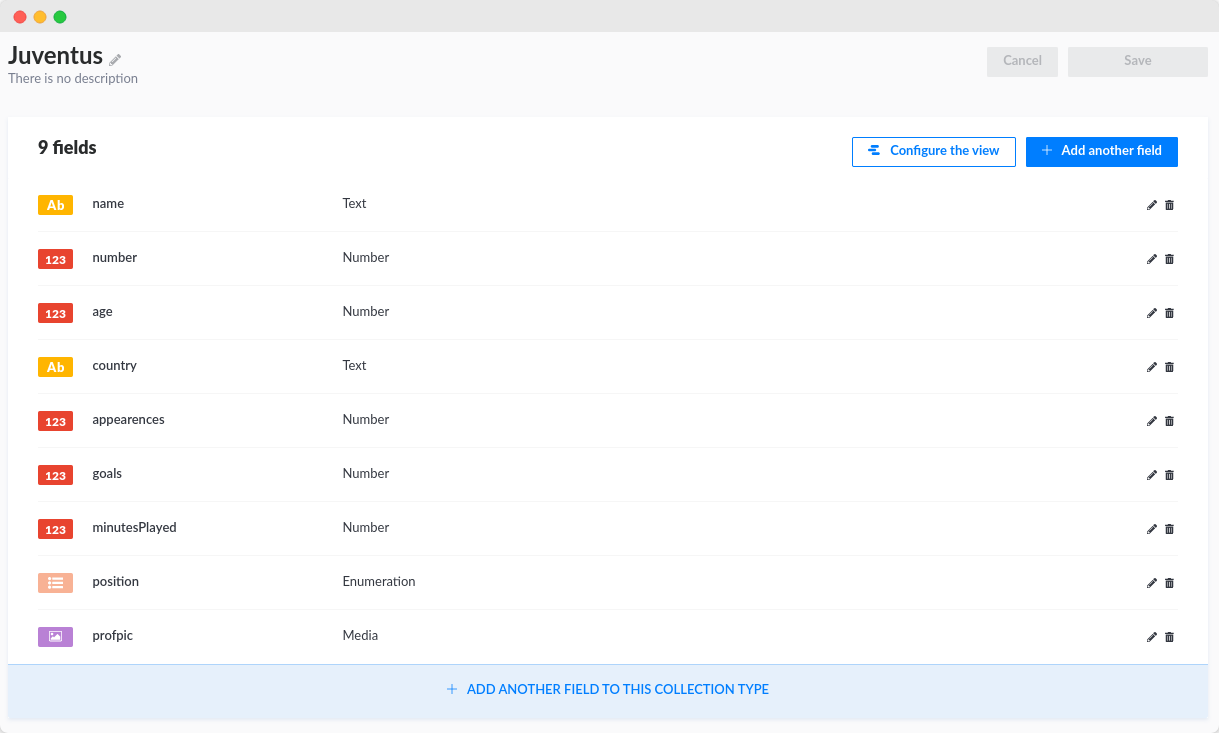
8 | name
9 | number
10 | age
11 | country
12 | appearences
13 | goals
14 | minutesPlayed
15 | position
16 | profpic {
17 | name
18 | url
19 | provider
20 | }
21 | published_at
22 | }
23 | }
24 | }
25 |
--------------------------------------------------------------------------------
/queries/roles/fetchRoles.graphql:
--------------------------------------------------------------------------------
1 | query FetchRoles {
2 | roles {
3 | id
4 | name
5 | description
6 | type
7 | permissions {
8 | id
9 | type
10 | controller
11 | action
12 | enabled
13 | policy
14 | role {
15 | name
16 | }
17 | }
18 | users {
19 | id
20 | createdAt
21 | updatedAt
22 | username
23 | email
24 | provider
25 | confirmed
26 | blocked
27 | role {
28 | name
29 | }
30 | }
31 | }
32 | }
33 |
--------------------------------------------------------------------------------
/mutations/DELETE/DeleteSingleJuventusPlayer.graphql:
--------------------------------------------------------------------------------
1 | mutation DeleteSingleJuventusPlayer($input: deleteJuventusInput) {
2 | deleteJuventus(input: $input) {
3 | juventus {
4 | id
5 | _id
6 | createdAt
7 | updatedAt
8 | name
9 | number
10 | age
11 | country
12 | appearences
13 | goals
14 | minutesPlayed
15 | minutesPlayed
16 | position
17 | profpic {
18 | name
19 | url
20 | provider
21 | }
22 | published_at
23 | }
24 | }
25 | }
26 |
--------------------------------------------------------------------------------
/queries/roles/fetchSingleRole.graphql:
--------------------------------------------------------------------------------
1 | query fetchSingleRole($id: ID!) {
2 | role(id: $id) {
3 | id
4 | name
5 | description
6 | type
7 | permissions {
8 | id
9 | type
10 | controller
11 | action
12 | enabled
13 | policy
14 | role {
15 | name
16 | }
17 | }
18 | users {
19 | id
20 | createdAt
21 | updatedAt
22 | username
23 | email
24 | provider
25 | confirmed
26 | blocked
27 | role {
28 | name
29 | }
30 | }
31 | }
32 | }
33 |
--------------------------------------------------------------------------------
/mutations/CREATE/createUser.graphql:
--------------------------------------------------------------------------------
1 | mutation CreateUser($input: createUserInput) {
2 | createUser(input: $input) {
3 | user {
4 | id
5 | createdAt
6 | updatedAt
7 | username
8 | email
9 | provider
10 | confirmed
11 | blocked
12 | role {
13 | id
14 | name
15 | description
16 | type
17 | permissions {
18 | type
19 | controller
20 | action
21 | enabled
22 | policy
23 | role {
24 | name
25 | }
26 | }
27 | users {
28 | username
29 | }
30 | }
31 | }
32 | }
33 | }
34 |
--------------------------------------------------------------------------------
/mutations/password/resetPassword.graphql:
--------------------------------------------------------------------------------
1 | # Currently not working, need a review
2 | mutation ResetPassword(
3 | $password: String!
4 | $passwordConfirmation: String!
5 | $code: String!
6 | ) {
7 | resetPassword(
8 | password: $password
9 | passwordConfirmation: $passwordConfirmation
10 | code: $code
11 | ) {
12 | jwt
13 | user {
14 | id
15 | username
16 | email
17 | confirmed
18 | blocked
19 | role {
20 | name
21 | }
22 | }
23 | }
24 | }
25 |
26 | ## Variables :
27 | #{
28 | # "password": "YOUR_USER_PASSWORD",
29 | # "passwordConfirmation": "YOUR_USER_PASSWORD",
30 | # "code": "YOUR_URL_CODE"
31 | #}
32 |
--------------------------------------------------------------------------------
/queries/users/fetchUsers.graphql:
--------------------------------------------------------------------------------
1 | query FetchUsers {
2 | users {
3 | id
4 | createdAt
5 | updatedAt
6 | username
7 | email
8 | provider
9 | confirmed
10 | blocked
11 | role {
12 | id
13 | name
14 | description
15 | type
16 | permissions {
17 | id
18 | type
19 | controller
20 | action
21 | enabled
22 | policy
23 | role {
24 | id
25 | name
26 | description
27 | type
28 | permissions {
29 | id
30 | controller
31 | action
32 | enabled
33 | policy
34 | }
35 | }
36 | }
37 | }
38 | }
39 | }
40 |
--------------------------------------------------------------------------------
/LICENSE:
--------------------------------------------------------------------------------
1 | MIT License
2 |
3 | Copyright (c) 2021 Kevin Adhiguna
4 |
5 | Permission is hereby granted, free of charge, to any person obtaining a copy
6 | of this software and associated documentation files (the "Software"), to deal
7 | in the Software without restriction, including without limitation the rights
8 | to use, copy, modify, merge, publish, distribute, sublicense, and/or sell
9 | copies of the Software, and to permit persons to whom the Software is
10 | furnished to do so, subject to the following conditions:
11 |
12 | The above copyright notice and this permission notice shall be included in all
13 | copies or substantial portions of the Software.
14 |
15 | THE SOFTWARE IS PROVIDED "AS IS", WITHOUT WARRANTY OF ANY KIND, EXPRESS OR
16 | IMPLIED, INCLUDING BUT NOT LIMITED TO THE WARRANTIES OF MERCHANTABILITY,
17 | FITNESS FOR A PARTICULAR PURPOSE AND NONINFRINGEMENT. IN NO EVENT SHALL THE
18 | AUTHORS OR COPYRIGHT HOLDERS BE LIABLE FOR ANY CLAIM, DAMAGES OR OTHER
19 | LIABILITY, WHETHER IN AN ACTION OF CONTRACT, TORT OR OTHERWISE, ARISING FROM,
20 | OUT OF OR IN CONNECTION WITH THE SOFTWARE OR THE USE OR OTHER DEALINGS IN THE
21 | SOFTWARE.
22 |
--------------------------------------------------------------------------------
/mutations/upload/uploadSingleImageToSeveralFields.graphql:
--------------------------------------------------------------------------------
1 | mutation UploadSingleImageToSeveralFields(
2 | $ref: String
3 | $refId: ID
4 | $cardImage: Upload!
5 | $facePhoto: Upload!
6 | $personWithCardPhoto: Upload!
7 | ) {
8 | cardImage: upload(
9 | ref: $ref
10 | refId: $refId
11 | field: "cardImage"
12 | file: $cardImage
13 | ) {
14 | id
15 | createdAt
16 | updatedAt
17 | name
18 | alternativeText
19 | caption
20 | width
21 | height
22 | formats
23 | hash
24 | ext
25 | mime
26 | size
27 | url
28 | }
29 | facePhoto: upload(
30 | ref: $ref
31 | refId: $refId
32 | field: "facePhoto"
33 | file: $facePhoto
34 | ) {
35 | id
36 | createdAt
37 | updatedAt
38 | name
39 | alternativeText
40 | caption
41 | width
42 | height
43 | formats
44 | hash
45 | ext
46 | mime
47 | size
48 | url
49 | }
50 | personWithCardPhoto: upload(
51 | ref: $ref
52 | refId: $refId
53 | field: "personWithCardPhoto"
54 | file: $personWithCardPhoto
55 | ) {
56 | id
57 | createdAt
58 | updatedAt
59 | name
60 | alternativeText
61 | caption
62 | width
63 | height
64 | formats
65 | hash
66 | ext
67 | mime
68 | size
69 | url
70 | }
71 | }
72 |
--------------------------------------------------------------------------------
/README.md:
--------------------------------------------------------------------------------
1 |
2 |

3 |
Strapi GraphQL API Documentation
4 |
5 |
6 | Collections of GraphQL queries and mutations that power your Strapi app!
7 |
8 | Explore the docs »
9 |
10 |
11 | Report Bug
12 | ·
13 | Request Feature
14 |
15 |
16 |
17 |
18 |
19 | ## 📚 Table of Contents
20 |
21 | 1. [About Strapql](#-about-strapql)
22 | 2. [Queries and Mutations](#-queries-and-mutations)
23 | - [Register](#%EF%B8%8F-register)
24 | - [Login](#-login)
25 | - [Me Query](#-me-query)
26 | - [How to attach JWT in headers](#-how-to-attach-jwt-in-headers-)
27 | - [Create a user in Users](#-create-a-user-in-users-a-collection-type-that-comes-default-in-strapi-app)
28 | - [How to get Superadmin's JWT](#-how-to-get-superadmins-jwt)
29 | - [Retrieve/Fetch a single User](#-retrievefetch-a-single-user)
30 | - [Retrieve/Fetch all Users](#-retrievefetch-all-users)
31 | - [Update a User](#-update-a-user)
32 | - [Delete/Remove a User](#-deleteremove-a-user)
33 | - [Create an Entry in a Collection Type](#-create-an-entry-in-a-collection-type)
34 | - [Fetch/Retrieve a single entry in collection type](#-fetchretrieve-a-single-entry-in-collection-type)
35 | - [Fetch/Retrieve all entries in collection type](#-fetchretrieve-all-entries-in-collection-type)
36 | - [Update an entry in collection type](#-update-an-entry-in-collection-type)
37 | - [Delete/Remove an entry in collection type](#-deleteremove-an-entry-in-collection-type)
38 | - [Upload a single image](#-%EF%B8%8F-upload-a-single-image)
39 | - [Upload multiple images in a single field](#-%EF%B8%8F-upload-multiple-images-in-a-single-field)
40 | - [Upload a single image in separate fields](#-%EF%B8%8F-upload-a-single-image-in-separate-fields)
41 | - [How does `UploadSingleImageToSeveralFields` mutation work ?](#-how-does-uploadsingleimagetoseveralfields-mutation-work-)
42 | - [Get all files](#-get-all-files)
43 | - [Fetch a single role](#-fetch-a-single-role)
44 | - [Fetch all roles](#---fetch-all-roles)
45 | 3. [Contributing](#-contributing)
46 | 4. [Contact](#-contact)
47 | 5. [Acknowledgements](#-acknowledgements)
48 |
49 |
62 |
63 | ## 🌟 About Strapql
64 |
65 | Hello there, welcome to Strapi GraphQL API documentation! This contains some of queries and mutations that hopefully helps you if you are using GraphQL API in your Strapi project :)
66 |
67 | ## 🌈 Queries and Mutations
68 |
69 | - Queries are used to read or fetch values (`READ`/`RETRIEVE`).
70 | - Mutations modify data in the data store and returns a value. It can be used to insert, update, or delete data (`CREATE`, `UPDATE`, and `DELETE`).
71 |
(Source : [TutorialsPoint](https://www.tutorialspoint.com/graphql/index.htm))
72 |
73 | ## ®️ Register
74 | Just like any other applications that requires you to create an account, you have to sign up first to create a user in `users` collection type that comes default in Strapi. Here is how to register an account :
75 | ```graphql
76 | mutation Register($input: UsersPermissionsRegisterInput!) {
77 | register(input: $input) {
78 | jwt
79 | user {
80 | username
81 | email
82 | }
83 | }
84 | }
85 | ```
86 |
87 | Next, put your `username`, `email`, and `password` as variables :
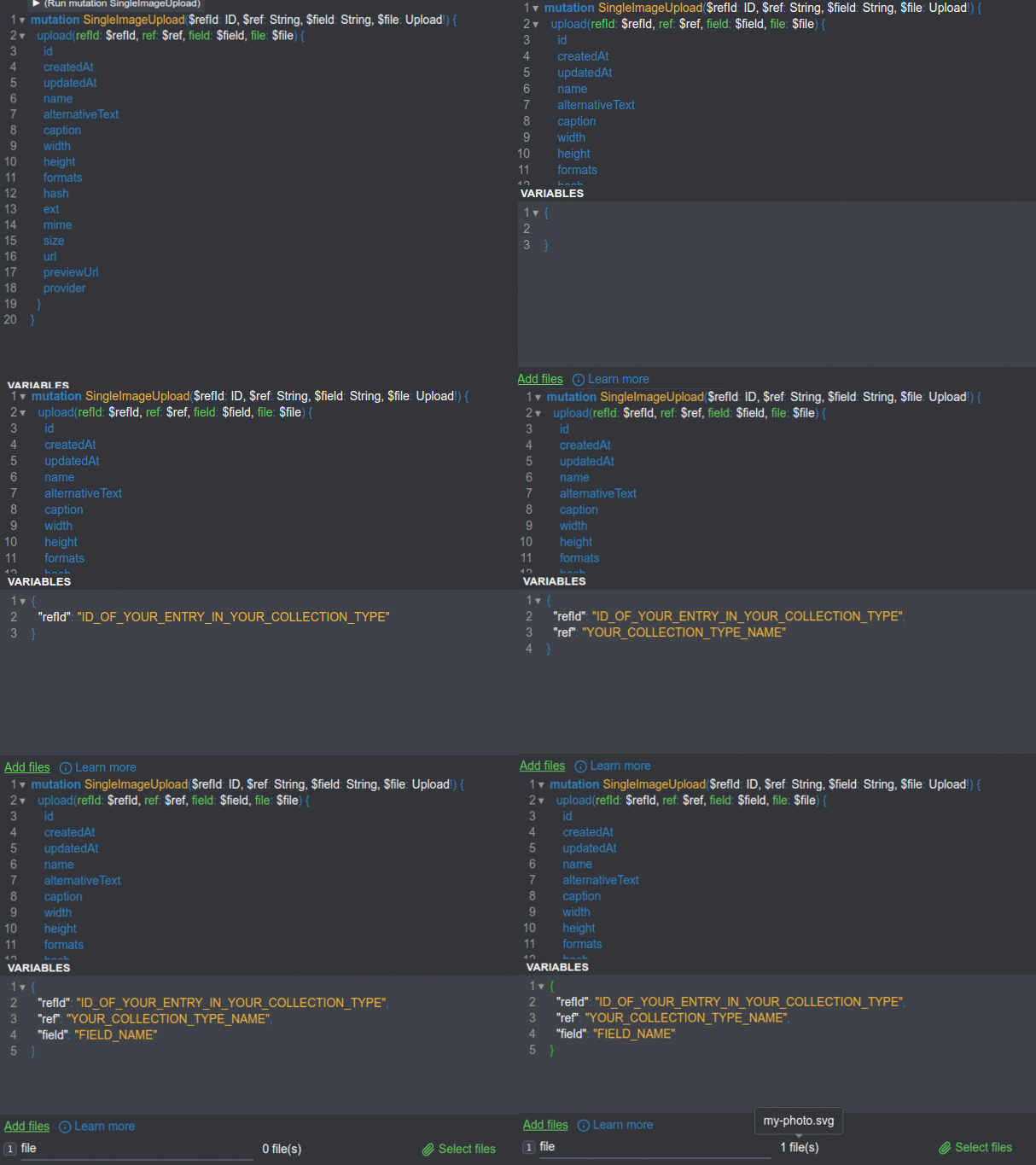
88 | ```json
89 | {
90 | "input": {
91 | "username": "YOUR_USERNAME",
92 | "email": "YOUR_EMAIL",
93 | "password": "YOUR_PASSWORD"
94 | }
95 | }
96 | ```
97 | Finally, a JWT shows in response.
98 |
99 |
**[⬆ back to top](#-table-of-contents)**
100 |
101 | ## 🔒 Login
102 | ```graphql
103 | mutation Login($input: UsersPermissionsLoginInput!) {
104 | login(input: $input) {
105 | jwt
106 | user {
107 | username
108 | email
109 | confirmed
110 | blocked
111 | role {
112 | id
113 | name
114 | description
115 | type
116 | }
117 | }
118 | }
119 | }
120 | ```
121 |
122 | Then enter your `identifier` and `password` as variables :
123 | ```json
124 | {
125 | "input": {
126 | "identifier": "YOUR_USERNAME OR YOUR EMAIL",
127 | "password": "YOUR_PASSWORD"
128 | }
129 | }
130 | ```
131 | Eventually, you will get JWT in response.
132 |
133 |
**[⬆ back to top](#-table-of-contents)**
134 |
135 | ## 🙋 Me Query
136 |
137 | To identify current user, you can use `me` query, like this :
138 | ```graphql
139 | query MeQuery {
140 | me {
141 | id
142 | username
143 | email
144 | confirmed
145 | blocked
146 | role {
147 | id
148 | name
149 | description
150 | type
151 | }
152 | }
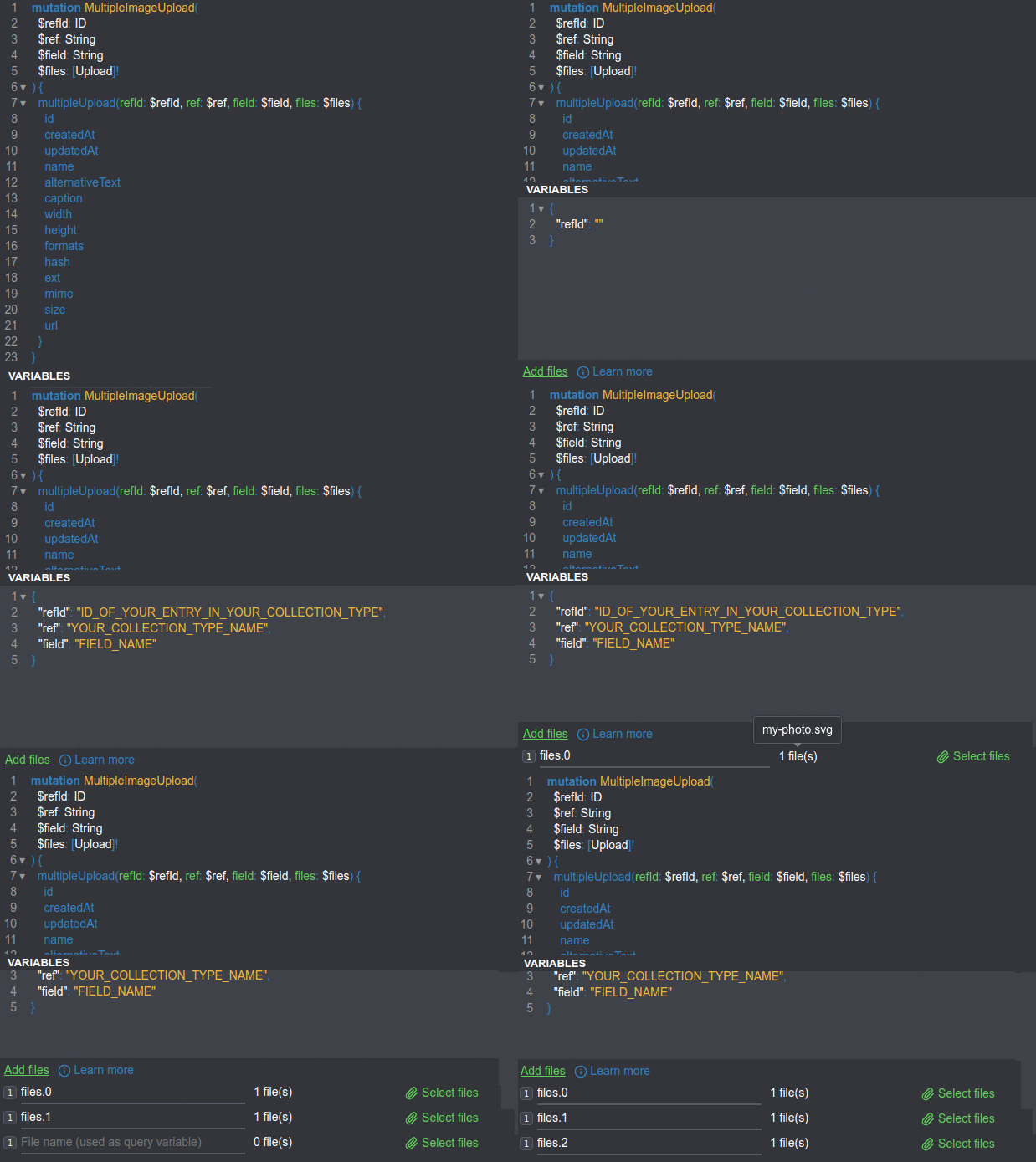
153 | }
154 | ```
155 | Note : `me` query requires JWT attached in headers!
156 |
157 | ### 📎 How to attach JWT in headers :
158 | `authorization : Bearer YOUR_TOKEN`
159 |
160 |
**[⬆ back to top](#-table-of-contents)**
161 |
162 | ## 🆕 Create a User in Users (a collection type that comes default in Strapi app)
163 | >What? Create a User? Did I just create a User using `Registration` mutation above?
164 |
165 | Sure, here is some notable points :
166 | | | `Create User` mutation | `Registration` mutation |
167 | |:------------------------------------------:|:----------------------------------------------------:|:-------------------------------------------------------------------------------------------:|
168 | | Needs JWT attached in Headers? | Yes, usually you must be `superadmin` role in Strapi | No |
169 | | Is created user `authenticated` initially? | No | Yes, users that are created with `Registration` mutation is already authenticated initially |
170 |
171 | ```graphql
172 | mutation CreateUser($input: createUserInput) {
173 | createUser(input: $input) {
174 | user {
175 | id
176 | createdAt
177 | updatedAt
178 | username
179 | email
180 | provider
181 | confirmed
182 | blocked
183 | role {
184 | id
185 | name
186 | description
187 | type
188 | permissions {
189 | type
190 | controller
191 | action
192 | enabled
193 | policy
194 | role {
195 | name
196 | }
197 | }
198 | users {
199 | username
200 | }
201 | }
202 | }
203 | }
204 | }
205 | ```
206 |
207 | Pass these variables :
208 | ```json
209 | {
210 | "input": {
211 | "data": {
212 | "username": "YOUR_USERNAME",
213 | "email": "YOUR_EMAIL",
214 | "password": "YOUR_PASSWORD"
215 | }
216 | }
217 | }
218 | ```
219 | Note : Please attach a JWT in Headers, usually Superadmin's JWT.
220 |
221 |
**[⬆ back to top](#-table-of-contents)**
222 |
223 | ### 🔑 How to get Superadmin's JWT
224 |
225 | Go to `Documentation` in the menu on the left side -> Copy the token in `Retrieve your jwt token`.
226 |
227 |
**[⬆ back to top](#-table-of-contents)**
228 |
229 | ## 🧑 Retrieve/Fetch a single User
230 |
231 | Previously, we created a new user. To retrieve a specific user inside User collection type, you can make use of this query :
232 | ```graphql
233 | query FetchSingleUser($id: ID!) {
234 | user(id: $id) {
235 | id
236 | createdAt
237 | updatedAt
238 | username
239 | email
240 | provider
241 | confirmed
242 | blocked
243 | role {
244 | name
245 | }
246 | }
247 | }
248 | ```
249 |
250 | Variables :
251 | ```json
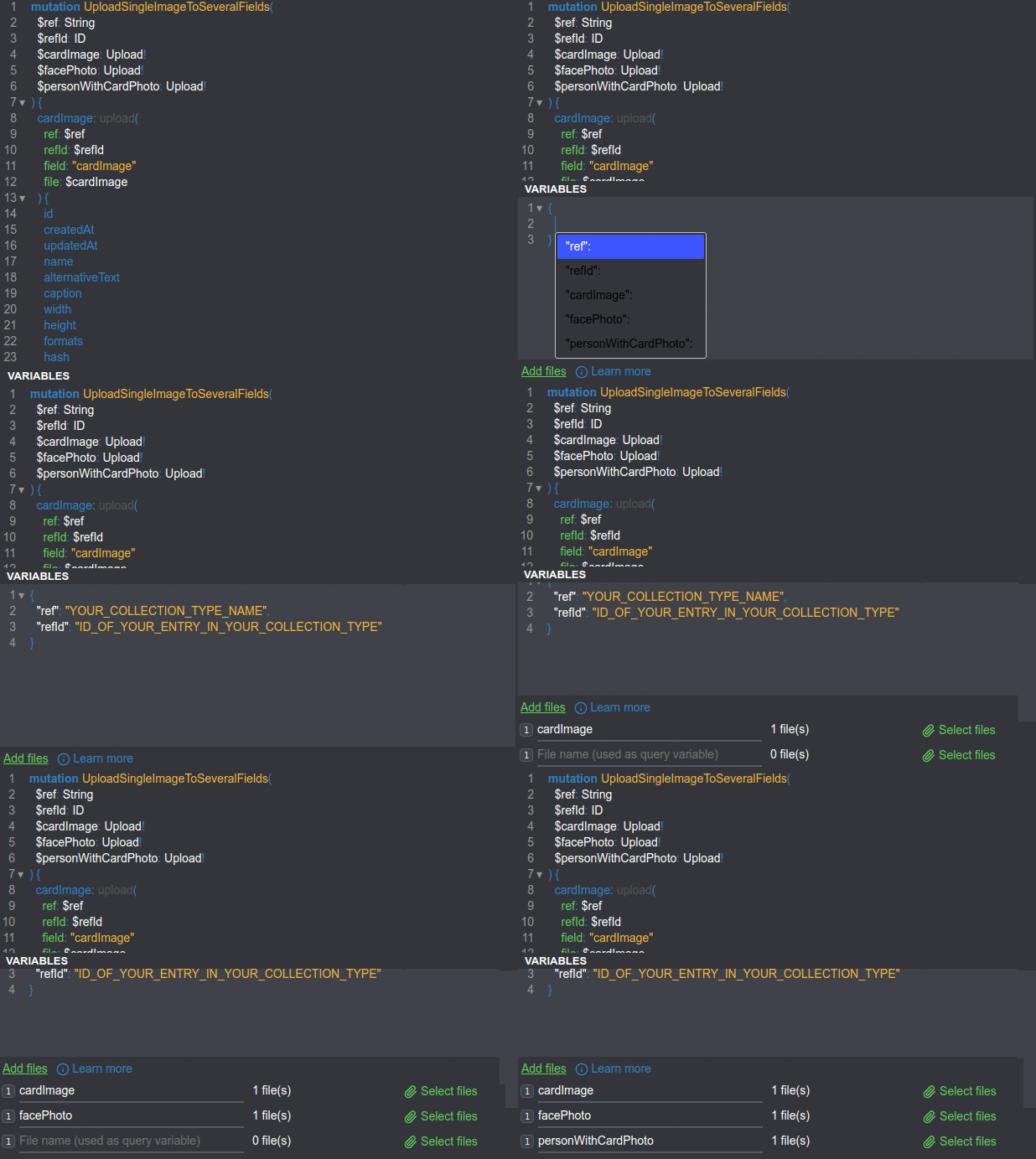
252 | {
253 | "id": "YOUR_USER_ID"
254 | }
255 | ```
256 |
257 |
**[⬆ back to top](#-table-of-contents)**
258 |
259 | ## 👥 Retrieve/Fetch all Users
260 |
261 | If you want to get all users in your Strapi app, this is the query you are looking for :
262 | ```graphql
263 | query FetchUsers {
264 | users {
265 | id
266 | createdAt
267 | updatedAt
268 | username
269 | email
270 | provider
271 | confirmed
272 | blocked
273 | role {
274 | name
275 | }
276 | }
277 | }
278 | ```
279 |
280 | You do not have to pass any variables but you may need to attach JWT in your headers (depends on your Strapi app's roles & permissions).
281 |
282 |
**[⬆ back to top](#-table-of-contents)**
283 |
284 | ## 🔄 Update a User
285 |
286 | Imagine you want to change a user's email. To do such things, you should use a mutation which updates the user's data. Here is an example to change a user's email :
287 | ```graphql
288 | mutation UpdateUser($input: updateUserInput) {
289 | updateUser(input: $input) {
290 | user {
291 | id
292 | createdAt
293 | updatedAt
294 | username
295 | email
296 | provider
297 | confirmed
298 | blocked
299 | role {
300 | name
301 | }
302 | }
303 | }
304 | }
305 | ```
306 |
307 | Then pass some variables that you would like to change (in this case, `email` field) :
308 | ```json
309 | {
310 | "input": {
311 | "where": {
312 | "id": "YOUR_USER_ID"
313 | },
314 | "data": {
315 | "email": "YOUR_USER_EMAIL"
316 | }
317 | }
318 | }
319 | ```
320 |
321 | If you want to change fields other than `email`, just replace the `email` variable.
322 |
323 |
**[⬆ back to top](#-table-of-contents)**
324 |
325 | ## ❌ Delete/Remove a User
326 |
327 | >A user decided to no longer use my app. How do I remove him/her?
328 |
329 | Here is a mutation that might do the task :
330 | ```graphql
331 | mutation deleteUser($input: deleteUserInput) {
332 | deleteUser(input: $input) {
333 | user {
334 | id
335 | createdAt
336 | updatedAt
337 | username
338 | email
339 | provider
340 | confirmed
341 | blocked
342 | role {
343 | name
344 | }
345 | }
346 | }
347 | }
348 | ```
349 |
350 | Place the user ID of the user you want to remove as a variable :
351 | ```json
352 | {
353 | "input": {
354 | "where": {
355 | "id": "YOUR_USER_ID"
356 | }
357 | }
358 | }
359 | ```
360 |
361 | Note : Please carefully control which roles are able to conduct `delete` operation as it is sensitive.
362 |
363 |
**[⬆ back to top](#-table-of-contents)**
364 |
365 |
366 |
367 | ## 👨💻 Let's practice CRUD operations using GraphQL !
368 |
369 | You can think collection-type as an API generated by Strapi. Let's imagine Juventus FC, an Italian football club, as a `Juventus` collection-type. This is how it looks :
370 |
371 | 
372 |
373 | 📁 The Strapi app with the `Juventus` content-type above that can be used within this docs is here : [Strapi Dockerize](https://github.com/kevinadhiguna/strapi-dockerize).
374 | Feel free to clone or fork it !
375 |
376 | The `position` has enumeration data type but this is how the auto-generated GraphQL schema (only for the `Juventus` content-type data) looks :
377 | ```graphql
378 | enum ENUM_JUVENTUS_POSITION {
379 | GK
380 | DF
381 | MF
382 | FW
383 | }
384 |
385 | type Juventus {
386 | id: ID!
387 | _id: ID!
388 | createdAt: DateTime!
389 | updatedAt: DateTime!
390 | name: String
391 | number: Int
392 | age: Int
393 | country: String
394 | appearences: Int
395 | goals: Int
396 | minutesPlayed: Int
397 | position: ENUM_JUVENTUS_POSITION
398 | profpic: UploadFile
399 | published_at: DateTime
400 | }
401 | ```
402 |
403 | Now, it is clear that available options for `position` are : `GK`. `DF`, `MF`, `FW`.
404 |
405 | ## 🆕 Create an Entry in a Collection Type
406 |
407 | For example, Juventus FC buys a new player. Here is how you can add a new record inside it :
408 | ```graphql
409 | mutation AddSingleJuventusPlayer($input: createJuventusInput) {
410 | createJuventus(input: $input) {
411 | juventus {
412 | id
413 | _id
414 | createdAt
415 | updatedAt
416 | name
417 | number
418 | age
419 | country
420 | appearences
421 | goals
422 | minutesPlayed
423 | position
424 | published_at
425 | }
426 | }
427 | }
428 | ```
429 |
430 | Here are variables you should pass :
431 | ```json
432 | {
433 | "input": {
434 | "data": {
435 | "name": "",
436 | "number": ,
437 | "age": ,
438 | "country": "",
439 | "appearences": ,
440 | "goals": ,
441 | "minutesPlayed": ,
442 | "position": ""
443 | }
444 | }
445 | }
446 | ```
447 |
448 | For instance :
449 | ```json
450 | {
451 | "input": {
452 | "data": {
453 | "name": "Radu Dragusin",
454 | "number": 37,
455 | "age": 19,
456 | "country": "Romania",
457 | "appearences": 14,
458 | "goals": 1,
459 | "minutesPlayed": 1111,
460 | "position": "DF"
461 | }
462 | }
463 | }
464 | ```
465 |
466 | You will see a response like this if successful:
467 | ```json
468 | {
469 | "data": {
470 | "createJuventus": {
471 | "juventus": {
472 | "id": "60df54f39bc9f96f94bd7db5",
473 | "_id": "60df54f39bc9f96f94bd7db5",
474 | "createdAt": "2021-02-02T18:03:31.447Z",
475 | "updatedAt": "2021-02-02T18:03:31.447Z",
476 | "name": "Radu Dragusin",
477 | "number": 37,
478 | "age": 19,
479 | "country": "Romania",
480 | "appearences": 14,
481 | "goals": 1,
482 | "minutesPlayed": 1111,
483 | "position": "DF",
484 | "published_at": "2021-02-02T18:03:31.427Z"
485 | }
486 | }
487 | }
488 | }
489 | ```
490 |
491 |
**[⬆ back to top](#-table-of-contents)**
492 |
493 | ## 📮 Fetch/Retrieve a single entry in collection type
494 |
495 | To fetch an entry in your collection type, this query is probably able help you :
496 | ```graphql
497 | query FetchSingleJuventusPlayer($id: ID!) {
498 | juventus(id: $id) {
499 | id
500 | _id
501 | createdAt
502 | updatedAt
503 | name
504 | number
505 | age
506 | country
507 | appearences
508 | goals
509 | minutesPlayed
510 | position
511 | profpic {
512 | name
513 | url
514 | provider
515 | }
516 | published_at
517 | }
518 | }
519 |
520 | ```
521 |
522 | Pass the ID of the record/entry you want to fetch :
523 | ```json
524 | {
525 | "id": "ID_OF_ENTRY"
526 | }
527 | ```
528 |
529 | To illustrate :
530 | ```json
531 | {
532 | "id": "60df54f39bc9f96f94bd7db5"
533 | }
534 | ```
535 |
536 | The response would be like :
537 | ```json
538 | {
539 | "data": {
540 | "juventus": {
541 | "id": "60df54f39bc9f96f94bd7db5",
542 | "_id": "60df54f39bc9f96f94bd7db5",
543 | "createdAt": "2021-02-02T18:03:31.447Z",
544 | "updatedAt": "2021-02-02T18:26:53.923Z",
545 | "name": "Radu Dragusin",
546 | "number": 37,
547 | "age": 19,
548 | "country": "Romania",
549 | "appearences": 14,
550 | "goals": 1,
551 | "minutesPlayed": 1111,
552 | "position": "DF",
553 | "profpic": {
554 | "name": "dragusin.png",
555 | "url": "https://res.cloudinary.com/djmhwsmks/image/upload/v1625250418/dragusin_c28d444a3b.jpg",
556 | "provider": "cloudinary"
557 | },
558 | "published_at": "2021-02-02T18:03:31.427Z"
559 | }
560 | }
561 | }
562 | ```
563 |
564 | 📝 Note: To be able to see `profpic` in response, you should [upload a picture](#-%EF%B8%8F-upload-a-single-image) to the field. Otherwise it is null. Here, Cloudinary is the upload provider but you can use other options such as AWS S3 too.
565 |
566 |
**[⬆ back to top](#-table-of-contents)**
567 |
568 | ## 📒 Fetch/Retrieve all entries in collection type
569 |
570 | This may get you all the entries in your collection type :
571 | ```graphql
572 | query FetchAllJuventusPlayers {
573 | juventuses {
574 | id
575 | _id
576 | createdAt
577 | updatedAt
578 | name
579 | number
580 | age
581 | country
582 | appearences
583 | goals
584 | minutesPlayed
585 | position
586 | profpic {
587 | name
588 | url
589 | provider
590 | }
591 | published_at
592 | }
593 | }
594 | ```
595 |
596 | You do not pass any variables.
597 |
598 |
**[⬆ back to top](#-table-of-contents)**
599 |
600 | ## 🔄 Update an entry in collection type
601 |
602 | ```graphql
603 | mutation UpdateSingleJuventusPlayer($input: updateJuventusInput) {
604 | updateJuventus(input: $input) {
605 | juventus {
606 | id
607 | _id
608 | createdAt
609 | updatedAt
610 | name
611 | number
612 | age
613 | country
614 | appearences
615 | goals
616 | minutesPlayed
617 | position
618 | profpic {
619 | name
620 | url
621 | provider
622 | }
623 | published_at
624 | }
625 | }
626 | }
627 | ```
628 |
629 | You may change the variable like this :
630 | ```json
631 | {
632 | "input": {
633 | "where": {
634 | "id": "ID_OF_ENTRY"
635 | },
636 | "data": {
637 | "FIELD_1_TO_CHANGE": "NEW_VALUE_OF_FIELD_1",
638 | "FIELD_2_TO_CHANGE": "NEW_VALUE_OF_FIELD_2",
639 | "FIELD_3_TO_CHANGE": "NEW_VALUE_OF_FIELD_3"
640 | }
641 | }
642 | }
643 | ```
644 |
645 | In the example above, you are changing three fields. However, you can change only one field as well.
646 |
647 | Pretend that a player scored 3 goals in 17 appearences throughout a season. With that being said, minutes the player has played raised to 1381 minutes. You may want to do :
648 | ```json
649 | {
650 | "input": {
651 | "where": {
652 | "id": "60df54f39bc9f96f94bd7db5"
653 | },
654 | "data": {
655 | "appearences": 17,
656 | "goals": 3,
657 | "minutesPlayed": 1381
658 | }
659 | }
660 | }
661 | ```
662 |
663 | The response should include the fields with the updated value :
664 | ```json
665 | {
666 | "data": {
667 | "updateJuventus": {
668 | "juventus": {
669 | "id": "60df54f39bc9f96f94bd7db5",
670 | "_id": "60df54f39bc9f96f94bd7db5",
671 | "createdAt": "2021-02-02T18:03:31.447Z",
672 | "updatedAt": "2021-02-02T18:08:19.204Z",
673 | "name": "Radu Dragusin",
674 | "number": 37,
675 | "age": 19,
676 | "country": "Romania",
677 | "appearences": 17,
678 | "goals": 3,
679 | "minutesPlayed": 1381,
680 | "position": "DF",
681 | "profpic": {
682 | "name": "dragusin.png",
683 | "url": "https://res.cloudinary.com/djmhwsmks/image/upload/v1625250418/dragusin_c28d444a3b.jpg",
684 | "provider": "cloudinary"
685 | },
686 | "published_at": "2021-02-02T18:03:31.427Z"
687 | }
688 | }
689 | }
690 | }
691 | ```
692 |
693 |
**[⬆ back to top](#-table-of-contents)**
694 |
695 | ## ❌ Delete/Remove an entry in collection type
696 |
697 | ```graphql
698 | mutation removeSingleJuventusPlayer($input: deleteJuventusInput) {
699 | deleteJuventus(input: $input) {
700 | juventus {
701 | id
702 | _id
703 | createdAt
704 | updatedAt
705 | name
706 | number
707 | age
708 | country
709 | appearences
710 | goals
711 | minutesPlayed
712 | minutesPlayed
713 | position
714 | profpic {
715 | name
716 | url
717 | provider
718 | }
719 | published_at
720 | }
721 | }
722 | }
723 | ```
724 |
725 | Variables :
726 | ```json
727 | {
728 | "input": {
729 | "where": {
730 | "id": "ID_OF_ENTRY"
731 | }
732 | }
733 | }
734 | ```
735 |
736 | To give you an idea, let's say a player is transferred to another football club. We pass the player's id as a variable this :
737 | ```json
738 | {
739 | "input": {
740 | "where": {
741 | "id": "60df54f39bc9f96f94bd7db5"
742 | }
743 | }
744 | }
745 | ```
746 |
747 | After removed the player successfully, Strapi will send a response like this:
748 | ```json
749 | {
750 | "data": {
751 | "deleteJuventus": {
752 | "juventus": {
753 | "id": "60df54f39bc9f96f94bd7db5",
754 | "_id": "60df54f39bc9f96f94bd7db5",
755 | "createdAt": "2021-02-02T18:03:31.447Z",
756 | "updatedAt": "2021-02-02T18:26:53.923Z",
757 | "name": "Radu Dragusin",
758 | "number": 37,
759 | "age": 19,
760 | "country": "Romania",
761 | "appearences": 17,
762 | "goals": 3,
763 | "minutesPlayed": 1381,
764 | "position": "DF",
765 | "profpic": {
766 | "name": "dragusin.png",
767 | "url": "https://res.cloudinary.com/djmhwsmks/image/upload/v1625250418/dragusin_c28d444a3b.jpg",
768 | "provider": "cloudinary"
769 | },
770 | "published_at": "2021-02-02T18:03:31.427Z"
771 | }
772 | }
773 | }
774 | }
775 | ```
776 |
777 |
**[⬆ back to top](#-table-of-contents)**
778 |
779 |
780 |
781 | ## 📤 🖼️ Upload a single image
782 |
783 | ### ⚠️ Warning : Currently Strapi's GraphQL Playground does not support file/image upload. You can use other GraphQL client to test your GraphQL upload mutation.
784 | One of the GraphQL clients alternaive is Altair. You can download it here : https://altair.sirmuel.design/#download
785 |
786 | Please create a new entry in your collection type API first ! Otherwise this will not be attached to your entry.
787 | Note : the `refId` is the ID of the entry you create in your collection type API.
788 | ```graphql
789 | mutation SingleImageUpload($refId: ID, $ref: String, $field: String, $file: Upload!) {
790 | upload(refId: $refId, ref: $ref, field: $field, file: $file) {
791 | id
792 | createdAt
793 | updatedAt
794 | name
795 | alternativeText
796 | caption
797 | width
798 | height
799 | formats
800 | hash
801 | ext
802 | mime
803 | size
804 | url
805 | }
806 | }
807 | ```
808 |
809 | Variables :
810 | ```json
811 | {
812 | "refId": "ID_OF_YOUR_ENTRY_IN_YOUR_COLLECTION_TYPE",
813 | "ref": "YOUR_COLLECTION_TYPE_NAME",
814 | "field": "FIELD_NAME"
815 | }
816 | ```
817 |
818 | Here is an example :
819 |
820 |
821 |
**[⬆ back to top](#-table-of-contents)**
822 |
823 | ## 📤 🖼️ Upload multiple images in a single field
824 | ```graphql
825 | mutation MultipleImageUpload(
826 | $refId: ID
827 | $ref: String
828 | $field: String
829 | $files: [Upload]!
830 | ) {
831 | multipleUpload(refId: $refId, ref: $ref, field: $field, files: $files) {
832 | id
833 | createdAt
834 | updatedAt
835 | name
836 | alternativeText
837 | caption
838 | width
839 | height
840 | formats
841 | hash
842 | ext
843 | mime
844 | size
845 | url
846 | }
847 | }
848 | ```
849 |
850 | Variables :
851 | ```json
852 | {
853 | "refId": "ID_OF_YOUR_ENTRY_IN_YOUR_COLLECTION_TYPE",
854 | "ref": "YOUR_COLLECTION_TYPE_NAME",
855 | "field": "FIELD_NAME"
856 | }
857 | ```
858 |
859 | Note : In this case, I attached images with name `files.0`, `files.1`, ... , `files.n` as variables' names until the number of image you want to upload (n).
860 |
861 | Here is an example :
862 |
863 |
864 |
**[⬆ back to top](#-table-of-contents)**
865 |
866 | ## 📤 🖼️ Upload a single image in separate fields
867 | >Hmm... but how do I upload a single image to several fields in a single request?
868 |
869 | All right, imagine you created a collection type which has several fields, including `cardImage`, `facePhoto`, and `personWithCardPhoto`. Otherwise, just replace those fields with yours. Ok, here we go :
870 | ```graphql
871 | mutation UploadSingleImageToSeveralFields(
872 | $ref: String
873 | $refId: ID
874 | $cardImage: Upload!
875 | $facePhoto: Upload!
876 | $personWithCardPhoto: Upload!
877 | ) {
878 | cardImage: upload(
879 | ref: $ref
880 | refId: $refId
881 | field: "cardImage"
882 | file: $cardImage
883 | ) {
884 | id
885 | createdAt
886 | updatedAt
887 | name
888 | alternativeText
889 | caption
890 | width
891 | height
892 | formats
893 | hash
894 | ext
895 | mime
896 | size
897 | url
898 | }
899 | facePhoto: upload(
900 | ref: $ref
901 | refId: $refId
902 | field: "facePhoto"
903 | file: $facePhoto
904 | ) {
905 | id
906 | createdAt
907 | updatedAt
908 | name
909 | alternativeText
910 | caption
911 | width
912 | height
913 | formats
914 | hash
915 | ext
916 | mime
917 | size
918 | url
919 | }
920 | personWithCardPhoto: upload(
921 | ref: $ref
922 | refId: $refId
923 | field: "personWithCardPhoto"
924 | file: $personWithCardPhoto
925 | ) {
926 | id
927 | createdAt
928 | updatedAt
929 | name
930 | alternativeText
931 | caption
932 | width
933 | height
934 | formats
935 | hash
936 | ext
937 | mime
938 | size
939 | url
940 | }
941 | }
942 | ```
943 |
944 | Variables :
945 | ```json
946 | {
947 | "ref": "YOUR_COLLECTION_TYPE_NAME",
948 | "refId": "ID_OF_YOUR_ENTRY_IN_YOUR_COLLECTION_TYPE"
949 | }
950 | ```
951 |
952 | Please do not forget to attach your files with variables' names.
953 | Note: In this case, the variables' names are `cardImage`, `facePhoto`, and `personWithCardPhoto`.
954 |
955 | Here is an example :
956 |
957 |
958 |
**[⬆ back to top](#-table-of-contents)**
959 |
960 | ### 🚀 How does `UploadSingleImageToSeveralFields` mutation work ?
961 |
962 | In the `UploadSingleImageToSeveralFields` mutation above, you still need `ref`, `refId`, and field name. However you are sending a request to a collection type and are trying to attach images in a single record inside the collection type. So, you are able to set `ref` and `refId` as variables. The field name ? You should name it statically as you want to upload an image in different fields. Hopefully this approach helps :)
963 |
964 |
**[⬆ back to top](#-table-of-contents)**
965 |
966 | ## 📂 Get all files
967 | >All right, I got images and files uploaded to my Strapi app but how do I know what files did I upload ?
968 |
969 | To get all the files uploaded to database within your Strapi app, here is the query :
970 | ```graphql
971 | query FetchFiles {
972 | files {
973 | id
974 | createdAt
975 | updatedAt
976 | name
977 | alternativeText
978 | caption
979 | width
980 | height
981 | formats
982 | hash
983 | ext
984 | mime
985 | size
986 | url
987 | }
988 | }
989 | ```
990 |
991 | Unfortunately, currently Strapi does not provide a query to fetch a single file.
992 |
993 |
**[⬆ back to top](#-table-of-contents)**
994 |
995 | ## 👨💻 Fetch a single role
996 |
997 | Here is the query to display a single role :
998 | ```graphql
999 | query fetchSingleRole($id: ID!) {
1000 | role(id: $id) {
1001 | id
1002 | name
1003 | description
1004 | type
1005 | permissions {
1006 | id
1007 | type
1008 | controller
1009 | action
1010 | enabled
1011 | policy
1012 | role {
1013 | name
1014 | }
1015 | }
1016 | users {
1017 | id
1018 | createdAt
1019 | updatedAt
1020 | username
1021 | email
1022 | provider
1023 | confirmed
1024 | blocked
1025 | role {
1026 | name
1027 | }
1028 | }
1029 | }
1030 | }
1031 | ```
1032 |
1033 | Variable :
1034 | ```json
1035 | {
1036 | "id": "ROLE_ID"
1037 | }
1038 | ```
1039 |
1040 |
**[⬆ back to top](#-table-of-contents)**
1041 |
1042 | ## 👨💻 👨💼 🧑🔧 Fetch all roles
1043 |
1044 | Below is the query to get all roles :
1045 | ```graphql
1046 | query FetchRoles {
1047 | roles {
1048 | id
1049 | name
1050 | description
1051 | type
1052 | permissions {
1053 | id
1054 | type
1055 | controller
1056 | action
1057 | enabled
1058 | policy
1059 | role {
1060 | name
1061 | }
1062 | }
1063 | users {
1064 | id
1065 | createdAt
1066 | updatedAt
1067 | username
1068 | email
1069 | provider
1070 | confirmed
1071 | blocked
1072 | role {
1073 | name
1074 | }
1075 | }
1076 | }
1077 | }
1078 | ```
1079 |
1080 |
**[⬆ back to top](#-table-of-contents)**
1081 |
1082 | ## 🖊 Contributing
1083 |
1084 | Contributions are what make the open source community such an amazing place to be learn, inspire, and create. Any contributions you make are **greatly appreciated**.
1085 |
1086 | 1. Fork the Project
1087 | 2. Create your Feature Branch (`git checkout -b feature/AmazingFeature`)
1088 | 3. Commit your Changes (`git commit -m 'Add some Amazing Queries or Mutations'`)
1089 | 4. Push to the Branch (`git push origin feature/AmazingFeature`)
1090 | 5. Open a Pull Request
1091 |
1092 |
**[⬆ back to top](#-table-of-contents)**
1093 |
1105 | ## 🎉 Acknowledgements
1106 | * [Strapi](https://github.com/strapi/strapi)
1107 | * [Best-README-Template](https://github.com/othneildrew/Best-README-Template)
1108 |
1109 |
**[⬆ back to top](#-table-of-contents)**
1110 |
1111 |
1112 | 
1113 |
--------------------------------------------------------------------------------