 5 |
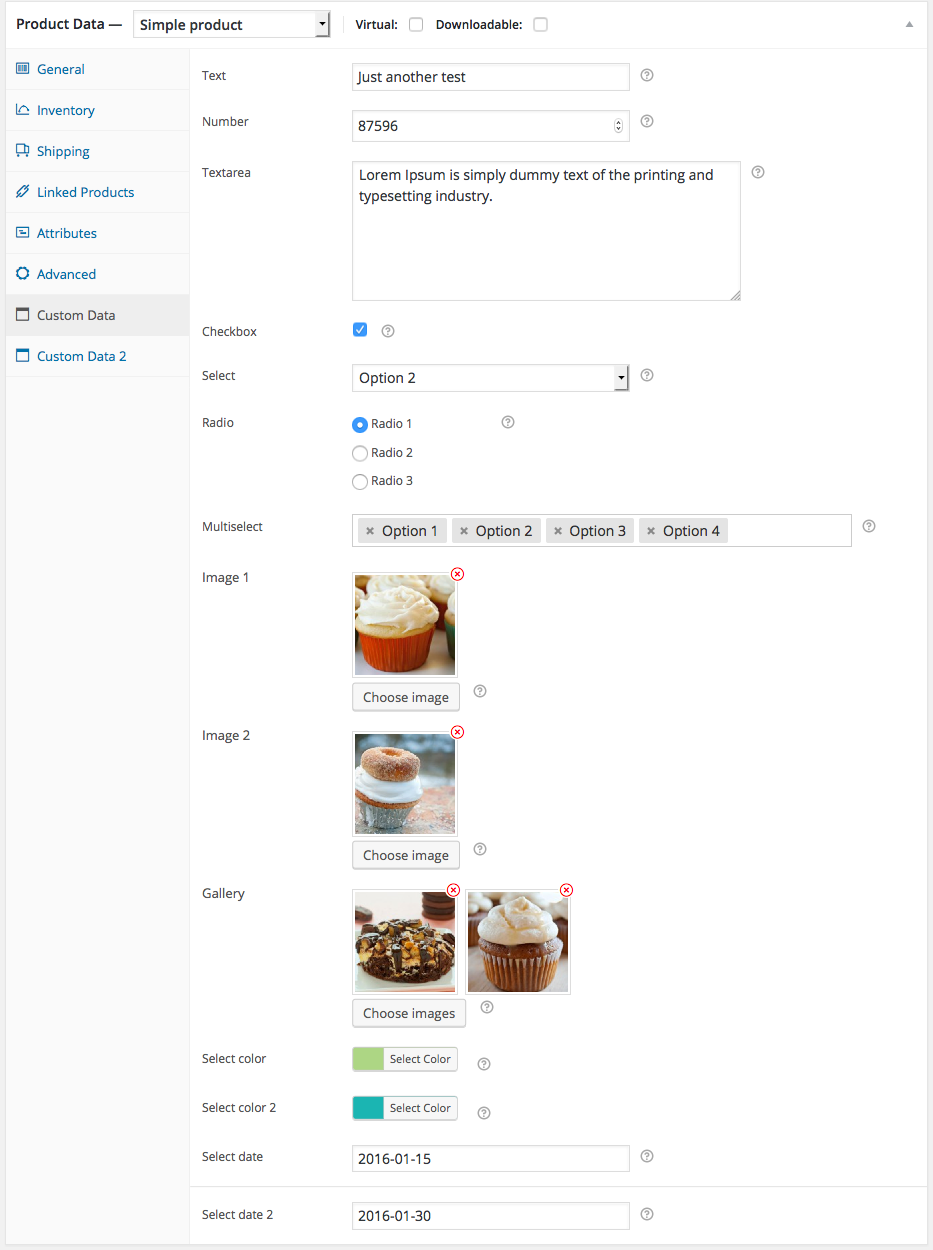
6 | WooCommerce Custom Product Data Fields is a simple framework which will help you to build extra product data fields, e.g. secondary product title, vendor info, custom message for individual product, etc.
7 |
8 | You can use this framework as a library of your ‘brand-new’ WooCommerce Extension.
9 |
10 | [Download]: http://wordpress.org/plugins/woocommerce-custom-product-data-fields/
11 |
12 | [Download][] stable version from WordPress.org plugin repository.
13 |
14 |
15 | ## Installation
16 |
17 | 1. Upload this plugin to the /wp-content/plugins/ directory.
18 | 2. Activate the plugin through the Plugins menu in WordPress.
19 | 3. Define your custom product data fields in your theme `functions.php` file. See `fields-init.php` inside this plugin folder.
20 |
21 |
22 | ## Available Fields
23 |
24 | At the very first release, supported fields are:
25 |
26 | * text
27 | * number
28 | * textarea
29 | * checkbox
30 | * select
31 | * radio
32 | * hidden
33 | * multiselect
34 | * image
35 | * gallery
36 | * colorpicker
37 | * datepicker
38 | * devider
39 |
40 | ## Defining Your Fields
41 |
42 | To make your own fields (as seen on the screenshot above), put this example fields in functions.php of your theme.
43 |
44 | ```
45 | /**
46 | * WooCommerce product data tab definition
47 | *
48 | * @return array
49 | */
50 |
51 | add_action('wc_cpdf_init', 'prefix_custom_product_data_tab_init', 10, 0);
52 | if(!function_exists('prefix_custom_product_data_tab_init')) :
53 |
54 | function prefix_custom_product_data_tab_init(){
55 |
56 |
57 | $custom_product_data_fields = array();
58 |
59 |
60 | /** First product data tab starts **/
61 | /** ===================================== */
62 |
63 | $custom_product_data_fields['custom_data_1'] = array(
64 |
65 | array(
66 | 'tab_name' => __('Custom Data', 'wc_cpdf'),
67 | ),
68 |
69 | array(
70 | 'id' => '_mytext',
71 | 'type' => 'text',
72 | 'label' => __('Text', 'wc_cpdf'),
73 | 'placeholder' => __('A placeholder text goes here.', 'wc_cpdf'),
74 | 'class' => 'large',
75 | 'description' => __('Field description.', 'wc_cpdf'),
76 | 'desc_tip' => true,
77 | ),
78 |
79 | array(
80 | 'id' => '_mynumber',
81 | 'type' => 'number',
82 | 'label' => __('Number', 'wc_cpdf'),
83 | 'placeholder' => __('Number.', 'wc_cpdf'),
84 | 'class' => 'short',
85 | 'description' => __('Field description.', 'wc_cpdf'),
86 | 'desc_tip' => true,
87 | ),
88 |
89 | array(
90 | 'id' => '_mytextarea',
91 | 'type' => 'textarea',
92 | 'label' => __('Textarea', 'wc_cpdf'),
93 | 'placeholder' => __('A placeholder text goes here.', 'wc_cpdf'),
94 | 'style' => 'width:70%;height:140px;',
95 | 'description' => __('Field description.', 'wc_cpdf'),
96 | 'desc_tip' => true,
97 | ),
98 |
99 | array(
100 | 'id' => '_mycheckbox',
101 | 'type' => 'checkbox',
102 | 'label' => __('Checkbox', 'wc_cpdf'),
103 | 'description' => __('Field description.', 'wc_cpdf'),
104 | 'desc_tip' => true,
105 | ),
106 |
107 | array(
108 | 'id' => '_myselect',
109 | 'type' => 'select',
110 | 'label' => __('Select', 'wc_cpdf'),
111 | 'options' => array(
112 | 'option_1' => 'Option 1',
113 | 'option_2' => 'Option 2',
114 | 'option_3' => 'Option 3'
115 | ),
116 | 'description' => __('Field description.', 'wc_cpdf'),
117 | 'desc_tip' => true,
118 | ),
119 |
120 | array(
121 | 'id' => '_myradio',
122 | 'type' => 'radio',
123 | 'label' => __('Radio', 'wc_cpdf'),
124 | 'options' => array(
125 | 'radio_1' => 'Radio 1',
126 | 'radio_2' => 'Radio 2',
127 | 'radio_3' => 'Radio 3'
128 | ),
129 | 'description' => __('Field description.', 'wc_cpdf'),
130 | 'desc_tip' => true,
131 | ),
132 |
133 | array(
134 | 'id' => '_myhidden',
135 | 'type' => 'hidden',
136 | 'value' => 'Hidden Value',
137 | ),
138 |
139 | array(
140 | 'id' => '_mymultiselect',
141 | 'type' => 'multiselect',
142 | 'label' => __('Multiselect', 'wc_cpdf'),
143 | 'placeholder' => __('Multiselect maan!', 'wc_cpdf'),
144 | 'options' => array(
145 | 'option_1' => 'Option 1',
146 | 'option_2' => 'Option 2',
147 | 'option_3' => 'Option 3',
148 | 'option_4' => 'Option 4',
149 | 'option_5' => 'Option 5'
150 | ),
151 | 'description' => __('Field description.', 'wc_cpdf'),
152 | 'desc_tip' => true,
153 | 'class' => 'medium'
154 | ),
155 |
156 | // image
157 | array(
158 | 'id' => '_myimage',
159 | 'type' => 'image',
160 | 'label' => __('Image 1', 'wc_cpdf'),
161 | 'description' => __('Field description.', 'wc_cpdf'),
162 | 'desc_tip' => true,
163 | ),
164 |
165 | array(
166 | 'id' => '_mygallery',
167 | 'type' => 'gallery',
168 | 'label' => __('Gallery', 'wc_cpdf'),
169 | 'description' => __('Field description.', 'wc_cpdf'),
170 | 'desc_tip' => true,
171 | ),
172 |
173 | // Color
174 | array(
175 | 'id' => '_mycolor',
176 | 'type' => 'color',
177 | 'label' => __('Select color', 'wc_cpdf'),
178 | 'placeholder' => __('A placeholder text goes here.', 'wc_cpdf'),
179 | 'class' => 'large',
180 | 'description' => __('Field description.', 'wc_cpdf'),
181 | 'desc_tip' => true,
182 | ),
183 |
184 | // Datepicker
185 |
186 | array(
187 | 'id' => '_mydatepicker',
188 | 'type' => 'datepicker',
189 | 'label' => __('Select date', 'wc_cpdf'),
190 | 'placeholder' => __('A placeholder text goes here.', 'wc_cpdf'),
191 | 'class' => 'large',
192 | 'description' => __('Field description.', 'wc_cpdf'),
193 | 'desc_tip' => true,
194 | ),
195 |
196 | array(
197 | 'type' => 'divider'
198 | )
199 |
200 | );
201 |
202 | /** First product data tab ends **/
203 | /** ===================================== */
204 |
205 |
206 | /** Second product data tab starts **/
207 | /** ===================================== */
208 |
209 | $custom_product_data_fields['custom_data_2'] = array(
210 |
211 | array(
212 | 'tab_name' => __('Custom Data 2', 'wc_cpdf'),
213 | ),
214 |
215 | array(
216 | 'id' => '_mytext_2',
217 | 'type' => 'text',
218 | 'label' => __('Text ABCD', 'wc_cpdf'),
219 | 'placeholder' => __('A placeholder text goes here.', 'wc_cpdf'),
220 | 'class' => 'large',
221 | 'description' => __('Field description.', 'wc_cpdf'),
222 | 'desc_tip' => true,
223 | )
224 |
225 | );
226 |
227 | return $custom_product_data_fields;
228 |
229 | }
230 |
231 | endif;
232 |
233 | ```
234 |
235 |
236 | ## Getting The Field Value
237 |
238 | ```
239 | /**
240 | *
241 | * $wc_cpdf->get_value($post_id, $field_id);
242 | * $post_id = (integer) post ID
243 | * $field_id = (string) unique field ID
244 | *
245 | */
246 |
247 | global $wc_cpdf;
248 | echo $wc_cpdf->get_value(get_the_ID(), '_mytext');
249 | ```
250 |
251 | **Getting multiselect value**
252 |
253 | ```
254 | global $wc_cpdf;
255 | $multiselect = $wc_cpdf->get_value($post->ID, '_mymultiselect');
256 | foreach ($multiselect as $value) {
257 | echo $value;
258 | }
259 | ```
260 |
261 | **Getting image value**
262 |
263 | ```
264 | global $wc_cpdf;
265 | $image_id = $wc_cpdf->get_value($post->ID, '_myimage');
266 | $size = 'thumbnail';
267 | $image_attachment = wp_get_attachment_image($image_id, $size);
268 | echo $image_attachment;
269 | ```
270 |
271 | **Getting gallery value**
272 |
273 | ```
274 | global $wc_cpdf;
275 | $gallery = $wc_cpdf->get_value($post->ID, '_mygallery');
276 | foreach ($gallery as $image_id) {
277 |
278 | $image_id = $wc_cpdf->get_value($post->ID, '_mygallery');
279 | $size = 'thumbnail';
280 | $image_attachment = wp_get_attachment_image($image_id, $size);
281 |
282 | echo $image_attachment;
283 |
284 | }
285 | ```
286 |
287 | ## License
288 |
289 | [GNU General Public License v3.0]: http://www.gnu.org/licenses/gpl-3.0.html
290 |
291 | [GNU General Public License v3.0][]
292 |
293 |
294 | ## More Info
295 |
296 | [kharisulistiyo(at)gmail(dot)com]: mailto:kharisulistiyo@gmail.com
297 | [@kharissulistiyo]: http://twitter.com/kharissulistiyo
298 |
299 | Contact me:
300 |
301 | * Mail: [kharisulistiyo(at)gmail(dot)com][]
302 | * Twitter: [@kharissulistiyo][]
303 |
--------------------------------------------------------------------------------
/readme.txt:
--------------------------------------------------------------------------------
1 | === WooCommerce Custom Product Data Fields ===
2 | Contributors: kharisblank
3 | Tags: ecommerce, e-commerce, commerce, woocommerce, extension, product, tab, framework
4 | Donate link: https://www.paypal.com/cgi-bin/webscr?cmd=_s-xclick&hosted_button_id=ACYNA5XNUGBUL
5 | Requires at least: 3.1
6 | Tested up to: 3.9.1
7 | Stable tag: 1.1
8 | License: GPLv3
9 | License URI: http://www.gnu.org/licenses/gpl-3.0.html
10 |
11 | WooCommerce extension which will help you to build extra product data fields easily.
12 |
13 | == Description ==
14 |
15 | WooCommerce Custom Product Data Fields is a simple framework which will help you to build extra product data fields easily, e.g. secondary product title, vendor info, custom message for individual product, etc.
16 |
17 | You can use this plugin as a library of your ‘brand-new’ WooCommerce Extension.
18 |
19 | = Available Fields =
20 |
21 | * text
22 | * number
23 | * textarea
24 | * checkbox
25 | * select
26 | * radio
27 | * hidden
28 | * multiselect
29 | * image
30 | * gallery
31 | * colorpicker
32 | * datepicker
33 | * devider
34 |
35 | = Defining Your Fields =
36 |
37 |
5 |
6 | WooCommerce Custom Product Data Fields is a simple framework which will help you to build extra product data fields, e.g. secondary product title, vendor info, custom message for individual product, etc.
7 |
8 | You can use this framework as a library of your ‘brand-new’ WooCommerce Extension.
9 |
10 | [Download]: http://wordpress.org/plugins/woocommerce-custom-product-data-fields/
11 |
12 | [Download][] stable version from WordPress.org plugin repository.
13 |
14 |
15 | ## Installation
16 |
17 | 1. Upload this plugin to the /wp-content/plugins/ directory.
18 | 2. Activate the plugin through the Plugins menu in WordPress.
19 | 3. Define your custom product data fields in your theme `functions.php` file. See `fields-init.php` inside this plugin folder.
20 |
21 |
22 | ## Available Fields
23 |
24 | At the very first release, supported fields are:
25 |
26 | * text
27 | * number
28 | * textarea
29 | * checkbox
30 | * select
31 | * radio
32 | * hidden
33 | * multiselect
34 | * image
35 | * gallery
36 | * colorpicker
37 | * datepicker
38 | * devider
39 |
40 | ## Defining Your Fields
41 |
42 | To make your own fields (as seen on the screenshot above), put this example fields in functions.php of your theme.
43 |
44 | ```
45 | /**
46 | * WooCommerce product data tab definition
47 | *
48 | * @return array
49 | */
50 |
51 | add_action('wc_cpdf_init', 'prefix_custom_product_data_tab_init', 10, 0);
52 | if(!function_exists('prefix_custom_product_data_tab_init')) :
53 |
54 | function prefix_custom_product_data_tab_init(){
55 |
56 |
57 | $custom_product_data_fields = array();
58 |
59 |
60 | /** First product data tab starts **/
61 | /** ===================================== */
62 |
63 | $custom_product_data_fields['custom_data_1'] = array(
64 |
65 | array(
66 | 'tab_name' => __('Custom Data', 'wc_cpdf'),
67 | ),
68 |
69 | array(
70 | 'id' => '_mytext',
71 | 'type' => 'text',
72 | 'label' => __('Text', 'wc_cpdf'),
73 | 'placeholder' => __('A placeholder text goes here.', 'wc_cpdf'),
74 | 'class' => 'large',
75 | 'description' => __('Field description.', 'wc_cpdf'),
76 | 'desc_tip' => true,
77 | ),
78 |
79 | array(
80 | 'id' => '_mynumber',
81 | 'type' => 'number',
82 | 'label' => __('Number', 'wc_cpdf'),
83 | 'placeholder' => __('Number.', 'wc_cpdf'),
84 | 'class' => 'short',
85 | 'description' => __('Field description.', 'wc_cpdf'),
86 | 'desc_tip' => true,
87 | ),
88 |
89 | array(
90 | 'id' => '_mytextarea',
91 | 'type' => 'textarea',
92 | 'label' => __('Textarea', 'wc_cpdf'),
93 | 'placeholder' => __('A placeholder text goes here.', 'wc_cpdf'),
94 | 'style' => 'width:70%;height:140px;',
95 | 'description' => __('Field description.', 'wc_cpdf'),
96 | 'desc_tip' => true,
97 | ),
98 |
99 | array(
100 | 'id' => '_mycheckbox',
101 | 'type' => 'checkbox',
102 | 'label' => __('Checkbox', 'wc_cpdf'),
103 | 'description' => __('Field description.', 'wc_cpdf'),
104 | 'desc_tip' => true,
105 | ),
106 |
107 | array(
108 | 'id' => '_myselect',
109 | 'type' => 'select',
110 | 'label' => __('Select', 'wc_cpdf'),
111 | 'options' => array(
112 | 'option_1' => 'Option 1',
113 | 'option_2' => 'Option 2',
114 | 'option_3' => 'Option 3'
115 | ),
116 | 'description' => __('Field description.', 'wc_cpdf'),
117 | 'desc_tip' => true,
118 | ),
119 |
120 | array(
121 | 'id' => '_myradio',
122 | 'type' => 'radio',
123 | 'label' => __('Radio', 'wc_cpdf'),
124 | 'options' => array(
125 | 'radio_1' => 'Radio 1',
126 | 'radio_2' => 'Radio 2',
127 | 'radio_3' => 'Radio 3'
128 | ),
129 | 'description' => __('Field description.', 'wc_cpdf'),
130 | 'desc_tip' => true,
131 | ),
132 |
133 | array(
134 | 'id' => '_myhidden',
135 | 'type' => 'hidden',
136 | 'value' => 'Hidden Value',
137 | ),
138 |
139 | array(
140 | 'id' => '_mymultiselect',
141 | 'type' => 'multiselect',
142 | 'label' => __('Multiselect', 'wc_cpdf'),
143 | 'placeholder' => __('Multiselect maan!', 'wc_cpdf'),
144 | 'options' => array(
145 | 'option_1' => 'Option 1',
146 | 'option_2' => 'Option 2',
147 | 'option_3' => 'Option 3',
148 | 'option_4' => 'Option 4',
149 | 'option_5' => 'Option 5'
150 | ),
151 | 'description' => __('Field description.', 'wc_cpdf'),
152 | 'desc_tip' => true,
153 | 'class' => 'medium'
154 | ),
155 |
156 | // image
157 | array(
158 | 'id' => '_myimage',
159 | 'type' => 'image',
160 | 'label' => __('Image 1', 'wc_cpdf'),
161 | 'description' => __('Field description.', 'wc_cpdf'),
162 | 'desc_tip' => true,
163 | ),
164 |
165 | array(
166 | 'id' => '_mygallery',
167 | 'type' => 'gallery',
168 | 'label' => __('Gallery', 'wc_cpdf'),
169 | 'description' => __('Field description.', 'wc_cpdf'),
170 | 'desc_tip' => true,
171 | ),
172 |
173 | // Color
174 | array(
175 | 'id' => '_mycolor',
176 | 'type' => 'color',
177 | 'label' => __('Select color', 'wc_cpdf'),
178 | 'placeholder' => __('A placeholder text goes here.', 'wc_cpdf'),
179 | 'class' => 'large',
180 | 'description' => __('Field description.', 'wc_cpdf'),
181 | 'desc_tip' => true,
182 | ),
183 |
184 | // Datepicker
185 |
186 | array(
187 | 'id' => '_mydatepicker',
188 | 'type' => 'datepicker',
189 | 'label' => __('Select date', 'wc_cpdf'),
190 | 'placeholder' => __('A placeholder text goes here.', 'wc_cpdf'),
191 | 'class' => 'large',
192 | 'description' => __('Field description.', 'wc_cpdf'),
193 | 'desc_tip' => true,
194 | ),
195 |
196 | array(
197 | 'type' => 'divider'
198 | )
199 |
200 | );
201 |
202 | /** First product data tab ends **/
203 | /** ===================================== */
204 |
205 |
206 | /** Second product data tab starts **/
207 | /** ===================================== */
208 |
209 | $custom_product_data_fields['custom_data_2'] = array(
210 |
211 | array(
212 | 'tab_name' => __('Custom Data 2', 'wc_cpdf'),
213 | ),
214 |
215 | array(
216 | 'id' => '_mytext_2',
217 | 'type' => 'text',
218 | 'label' => __('Text ABCD', 'wc_cpdf'),
219 | 'placeholder' => __('A placeholder text goes here.', 'wc_cpdf'),
220 | 'class' => 'large',
221 | 'description' => __('Field description.', 'wc_cpdf'),
222 | 'desc_tip' => true,
223 | )
224 |
225 | );
226 |
227 | return $custom_product_data_fields;
228 |
229 | }
230 |
231 | endif;
232 |
233 | ```
234 |
235 |
236 | ## Getting The Field Value
237 |
238 | ```
239 | /**
240 | *
241 | * $wc_cpdf->get_value($post_id, $field_id);
242 | * $post_id = (integer) post ID
243 | * $field_id = (string) unique field ID
244 | *
245 | */
246 |
247 | global $wc_cpdf;
248 | echo $wc_cpdf->get_value(get_the_ID(), '_mytext');
249 | ```
250 |
251 | **Getting multiselect value**
252 |
253 | ```
254 | global $wc_cpdf;
255 | $multiselect = $wc_cpdf->get_value($post->ID, '_mymultiselect');
256 | foreach ($multiselect as $value) {
257 | echo $value;
258 | }
259 | ```
260 |
261 | **Getting image value**
262 |
263 | ```
264 | global $wc_cpdf;
265 | $image_id = $wc_cpdf->get_value($post->ID, '_myimage');
266 | $size = 'thumbnail';
267 | $image_attachment = wp_get_attachment_image($image_id, $size);
268 | echo $image_attachment;
269 | ```
270 |
271 | **Getting gallery value**
272 |
273 | ```
274 | global $wc_cpdf;
275 | $gallery = $wc_cpdf->get_value($post->ID, '_mygallery');
276 | foreach ($gallery as $image_id) {
277 |
278 | $image_id = $wc_cpdf->get_value($post->ID, '_mygallery');
279 | $size = 'thumbnail';
280 | $image_attachment = wp_get_attachment_image($image_id, $size);
281 |
282 | echo $image_attachment;
283 |
284 | }
285 | ```
286 |
287 | ## License
288 |
289 | [GNU General Public License v3.0]: http://www.gnu.org/licenses/gpl-3.0.html
290 |
291 | [GNU General Public License v3.0][]
292 |
293 |
294 | ## More Info
295 |
296 | [kharisulistiyo(at)gmail(dot)com]: mailto:kharisulistiyo@gmail.com
297 | [@kharissulistiyo]: http://twitter.com/kharissulistiyo
298 |
299 | Contact me:
300 |
301 | * Mail: [kharisulistiyo(at)gmail(dot)com][]
302 | * Twitter: [@kharissulistiyo][]
303 |
--------------------------------------------------------------------------------
/readme.txt:
--------------------------------------------------------------------------------
1 | === WooCommerce Custom Product Data Fields ===
2 | Contributors: kharisblank
3 | Tags: ecommerce, e-commerce, commerce, woocommerce, extension, product, tab, framework
4 | Donate link: https://www.paypal.com/cgi-bin/webscr?cmd=_s-xclick&hosted_button_id=ACYNA5XNUGBUL
5 | Requires at least: 3.1
6 | Tested up to: 3.9.1
7 | Stable tag: 1.1
8 | License: GPLv3
9 | License URI: http://www.gnu.org/licenses/gpl-3.0.html
10 |
11 | WooCommerce extension which will help you to build extra product data fields easily.
12 |
13 | == Description ==
14 |
15 | WooCommerce Custom Product Data Fields is a simple framework which will help you to build extra product data fields easily, e.g. secondary product title, vendor info, custom message for individual product, etc.
16 |
17 | You can use this plugin as a library of your ‘brand-new’ WooCommerce Extension.
18 |
19 | = Available Fields =
20 |
21 | * text
22 | * number
23 | * textarea
24 | * checkbox
25 | * select
26 | * radio
27 | * hidden
28 | * multiselect
29 | * image
30 | * gallery
31 | * colorpicker
32 | * datepicker
33 | * devider
34 |
35 | = Defining Your Fields =
36 |
37 |
 38 | /**
 39 |  * WooCommerce product data tab definition
 40 |  *
 41 |  * @return array
 42 |  */
 43 |
 44 | add_action('wc_cpdf_init', 'prefix_custom_product_data_tab_init', 10, 0);
 45 | if(!function_exists('prefix_custom_product_data_tab_init')) :
 46 |
 47 |    function prefix_custom_product_data_tab_init(){
 48 |
 49 |
 50 |      $custom_product_data_fields = array();
 51 |
 52 |
 53 |      /** First product data tab starts **/
 54 |      /** ===================================== */
 55 |
 56 |      $custom_product_data_fields['custom_data_1'] = array(
 57 |
 58 |        array(
 59 |              'tab_name'    => __('Custom Data', 'wc_cpdf'),
 60 |        ),
 61 |
 62 |        array(
 63 |              'id'          => '_mytext',
 64 |              'type'        => 'text',
 65 |              'label'       => __('Text', 'wc_cpdf'),
 66 |              'placeholder' => __('A placeholder text goes here.', 'wc_cpdf'),
 67 |              'class'       => 'large',
 68 |              'description' => __('Field description.', 'wc_cpdf'),
 69 |              'desc_tip'    => true,
 70 |        ),
 71 |
 72 |        array(
 73 |              'id'          => '_mynumber',
 74 |              'type'        => 'number',
 75 |              'label'       => __('Number', 'wc_cpdf'),
 76 |              'placeholder' => __('Number.', 'wc_cpdf'),
 77 |              'class'       => 'short',
 78 |              'description' => __('Field description.', 'wc_cpdf'),
 79 |              'desc_tip'    => true,
 80 |        ),
 81 |
 82 |        array(
 83 |              'id'          => '_mytextarea',
 84 |              'type'        => 'textarea',
 85 |              'label'       => __('Textarea', 'wc_cpdf'),
 86 |              'placeholder' => __('A placeholder text goes here.', 'wc_cpdf'),
 87 |              'style'       => 'width:70%;height:140px;',
 88 |              'description' => __('Field description.', 'wc_cpdf'),
 89 |              'desc_tip'    => true,
 90 |        ),
 91 |
 92 |        array(
 93 |              'id'          => '_mycheckbox',
 94 |              'type'        => 'checkbox',
 95 |              'label'       => __('Checkbox', 'wc_cpdf'),
 96 |              'description' => __('Field description.', 'wc_cpdf'),
 97 |              'desc_tip'    => true,
 98 |        ),
 99 |
100 |        array(
101 |              'id'          => '_myselect',
102 |              'type'        => 'select',
103 |              'label'       => __('Select', 'wc_cpdf'),
104 |              'options'     => array(
105 |                  'option_1'  => 'Option 1',
106 |                  'option_2'  => 'Option 2',
107 |                  'option_3'  => 'Option 3'
108 |              ),
109 |              'description' => __('Field description.', 'wc_cpdf'),
110 |              'desc_tip'    => true,
111 |        ),
112 |
113 |        array(
114 |              'id'          => '_myradio',
115 |              'type'        => 'radio',
116 |              'label'       => __('Radio', 'wc_cpdf'),
117 |              'options'     => array(
118 |                    'radio_1' => 'Radio 1',
119 |                    'radio_2' => 'Radio 2',
120 |                    'radio_3' => 'Radio 3'
121 |              ),
122 |              'description' => __('Field description.', 'wc_cpdf'),
123 |              'desc_tip'    => true,
124 |        ),
125 |
126 |        array(
127 |              'id'         => '_myhidden',
128 |              'type'       => 'hidden',
129 |              'value'      => 'Hidden Value',
130 |        ),
131 |
132 |        array(
133 |              'id'         => '_mymultiselect',
134 |              'type'       => 'multiselect',
135 |              'label'      => __('Multiselect', 'wc_cpdf'),
136 |              'placeholder' => __('Multiselect maan!', 'wc_cpdf'),
137 |              'options'     => array(
138 |                    'option_1' => 'Option 1',
139 |                    'option_2' => 'Option 2',
140 |                    'option_3' => 'Option 3',
141 |                    'option_4' => 'Option 4',
142 |                    'option_5' => 'Option 5'
143 |              ),
144 |              'description' => __('Field description.', 'wc_cpdf'),
145 |              'desc_tip'    => true,
146 |              'class'       => 'medium'
147 |        ),
148 |
149 |        // image
150 |        array(
151 |              'id'         => '_myimage',
152 |              'type'       => 'image',
153 |              'label'      => __('Image 1', 'wc_cpdf'),
154 |              'description' => __('Field description.', 'wc_cpdf'),
155 |              'desc_tip'    => true,
156 |        ),
157 |
158 |        array(
159 |              'id'         => '_mygallery',
160 |              'type'       => 'gallery',
161 |              'label'      => __('Gallery', 'wc_cpdf'),
162 |              'description' => __('Field description.', 'wc_cpdf'),
163 |              'desc_tip'    => true,
164 |        ),
165 |
166 |        // Color
167 |        array(
168 |              'id'          => '_mycolor',
169 |              'type'        => 'color',
170 |              'label'       => __('Select color', 'wc_cpdf'),
171 |              'placeholder' => __('A placeholder text goes here.', 'wc_cpdf'),
172 |              'class'       => 'large',
173 |              'description' => __('Field description.', 'wc_cpdf'),
174 |              'desc_tip'    => true,
175 |        ),
176 |
177 |        // Datepicker
178 |
179 |        array(
180 |              'id'          => '_mydatepicker',
181 |              'type'        => 'datepicker',
182 |              'label'       => __('Select date', 'wc_cpdf'),
183 |              'placeholder' => __('A placeholder text goes here.', 'wc_cpdf'),
184 |              'class'       => 'large',
185 |              'description' => __('Field description.', 'wc_cpdf'),
186 |              'desc_tip'    => true,
187 |        ),
188 |
189 |        array(
190 |              'type'        => 'divider'
191 |        )
192 |
193 |      );
194 |
195 |      /** First product data tab ends **/
196 |      /** ===================================== */
197 |
198 |
199 |      /** Second product data tab starts **/
200 |      /** ===================================== */
201 |
202 |      $custom_product_data_fields['custom_data_2'] = array(
203 |
204 |        array(
205 |              'tab_name'    => __('Custom Data 2', 'wc_cpdf'),
206 |        ),
207 |
208 |        array(
209 |              'id'          => '_mytext_2',
210 |              'type'        => 'text',
211 |              'label'       => __('Text ABCD', 'wc_cpdf'),
212 |              'placeholder' => __('A placeholder text goes here.', 'wc_cpdf'),
213 |              'class'       => 'large',
214 |              'description' => __('Field description.', 'wc_cpdf'),
215 |              'desc_tip'    => true,
216 |        )
217 |
218 |      );
219 |
220 |      return $custom_product_data_fields;
221 |
222 |    }
223 |
224 | endif;
225 |
226 |
227 |
228 |
229 | = Getting The Field Value =
230 |
231 |
232 | /**
233 |   *
234 |   * $wc_cpdf->get_value($post_id, $field_id);
235 |   * $post_id = (integer) post ID
236 |   * $field_id = (string) unique field ID
237 |   *
238 |  */
239 |
240 | global $wc_cpdf;
241 | echo $wc_cpdf->get_value(get_the_ID(), '_mytext');
242 |
243 |
244 |
245 | Retrieving multiselect value
246 |
247 |
248 | global $wc_cpdf;
249 | $multiselect = $wc_cpdf->get_value($post->ID, '_mymultiselect');
250 | foreach ($multiselect as $value) {
251 |   echo $value;
252 | }
253 |
254 |
255 | Retrieving image value
256 |
257 | 258 | global $wc_cpdf; 259 | $image_id = $wc_cpdf->get_value($post->ID, '_myimage'); 260 | $size = 'thumbnail'; 261 | $image_attachment = wp_get_attachment_image($image_id, $size); 262 | echo $image_attachment; 263 |264 | 265 | Retrieving gallery value 266 | 267 |
268 | global $wc_cpdf;
269 | $gallery = $wc_cpdf->get_value($post->ID, '_mygallery');
270 | foreach ($gallery as $image_id) {
271 |
272 |   $image_id = $wc_cpdf->get_value($post->ID, '_mygallery');
273 |   $size = 'thumbnail';
274 |   $image_attachment = wp_get_attachment_image($image_id, $size);
275 |
276 |   echo $image_attachment;
277 |
278 | }
279 |
280 |
281 |
282 | This project is also available on [Github](https://github.com/kharissulistiyo/WooCommerce-Custom-Product-Data-Fields).
283 |
284 | = More info =
285 |
286 | Send me your question to my contacts below:
287 |
288 | Mail: [kharisulistiyo(at)gmail(dot)com](mailto:kharisulistiyo@gmail.com)
289 | Twitter: [@kharissulistiyo](http://twitter.com/kharissulistiyo)
290 |
291 | P.S: Don't be worry, I always reply. :)
292 |
293 |
294 | == Installation ==
295 |
296 | 1. Upload this plugin to the /wp-content/plugins/ directory.
297 | 2. Activate the plugin through the Plugins menu in WordPress.
298 | 3. Define your custom product data fields in your theme `functions.php` file. See `fields-init.php` inside this plugin folder.
299 |
300 | == Screenshots ==
301 |
302 | 1. WooCommerce Custom Product Data Fields
303 |
304 | == Changelog ==
305 |
306 | = 1.0.2 =
307 | * Fix some bugs
308 | * Add multiselect field
309 | * Add image field
310 | * Add image field
311 | * Add gallery field
312 | * Add colorpicker field
313 | * Add datepicker field
314 | * Add devider
315 | * Allow multiple data tabs definition
316 | * Update fields definition function (via hook)
317 |
318 | = 1.0 =
319 | * Initial release
320 |
--------------------------------------------------------------------------------
/class-wc-product-data-fields.php:
--------------------------------------------------------------------------------
1 | wc_cpdf_fields();
101 |
102 | if($fields == null){
103 | return;
104 | }
105 |
106 | foreach ($fields as $key => $fields_array){
107 |
108 | foreach ($fields_array as $field) {
109 | if(isset($field['tab_name']) && $field['tab_name'] != ''){
110 | $href = "#".$key;
111 | echo " ';
206 |
207 | if ( ! empty( $field['description'] ) ) {
208 |
209 | if ( isset( $field['desc_tip'] ) && false !== $field['desc_tip'] ) {
210 | echo '->plugin_url() ) . '/assets/images/help.png) ';
211 | } else {
212 | echo '' . wp_kses_post( $field['description'] ) . '';
213 | }
214 |
215 | }
216 |
217 | echo '
';
211 | } else {
212 | echo '' . wp_kses_post( $field['description'] ) . '';
213 | }
214 |
215 | }
216 |
217 | echo '
';
232 |
233 | if ( ! empty( $field['description'] ) ) {
234 |
235 | if ( isset( $field['desc_tip'] ) && false !== $field['desc_tip'] ) {
236 | echo '';
237 | } else {
238 | echo '' . wp_kses_post( $field['description'] ) . '';
239 | }
240 |
241 | }
242 |
243 | echo '
';
255 |
256 | if ( ! empty( $field['description'] ) ) {
257 |
258 | if ( isset( $field['desc_tip'] ) && false !== $field['desc_tip'] ) {
259 | echo '';
260 | } else {
261 | echo '' . wp_kses_post( $field['description'] ) . '';
262 | }
263 |
264 | }
265 |
266 | echo '
';
279 |
280 | if ( ! empty( $field['description'] ) ) {
281 |
282 | if ( isset( $field['desc_tip'] ) && false !== $field['desc_tip'] ) {
283 | echo '';
284 | } else {
285 | echo '' . wp_kses_post( $field['description'] ) . '';
286 | }
287 |
288 | }
289 |
290 | echo '
';
308 |
309 | if ( ! empty( $field['description'] ) ) {
310 |
311 | if ( isset( $field['desc_tip'] ) && false !== $field['desc_tip'] ) {
312 | echo '';
313 | } else {
314 | echo '' . wp_kses_post( $field['description'] ) . '';
315 | }
316 |
317 | }
318 | echo '
';
380 |
381 | $html .= '';
382 |
383 | $html .= '';
394 |
395 | if ( ! empty( $field['description'] ) ) {
396 |
397 | if ( isset( $field['desc_tip'] ) && false !== $field['desc_tip'] ) {
398 | $html .= '';
399 | } else {
400 | $html .= '' . wp_kses_post( $field['description'] ) . '';
401 | }
402 |
403 | }
404 |
405 | $html .= '
';
542 |
543 | if ( ! empty( $field['description'] ) ) {
544 |
545 | if ( isset( $field['desc_tip'] ) && false !== $field['desc_tip'] ) {
546 | echo '';
547 | } else {
548 | echo '' . wp_kses_post( $field['description'] ) . '';
549 | }
550 |
551 | }
552 |
553 | echo '
';
571 |
572 | if ( ! empty( $field['description'] ) ) {
573 |
574 | if ( isset( $field['desc_tip'] ) && false !== $field['desc_tip'] ) {
575 | echo '';
576 | } else {
577 | echo '' . wp_kses_post( $field['description'] ) . '';
578 | }
579 |
580 | }
581 |
582 | echo '