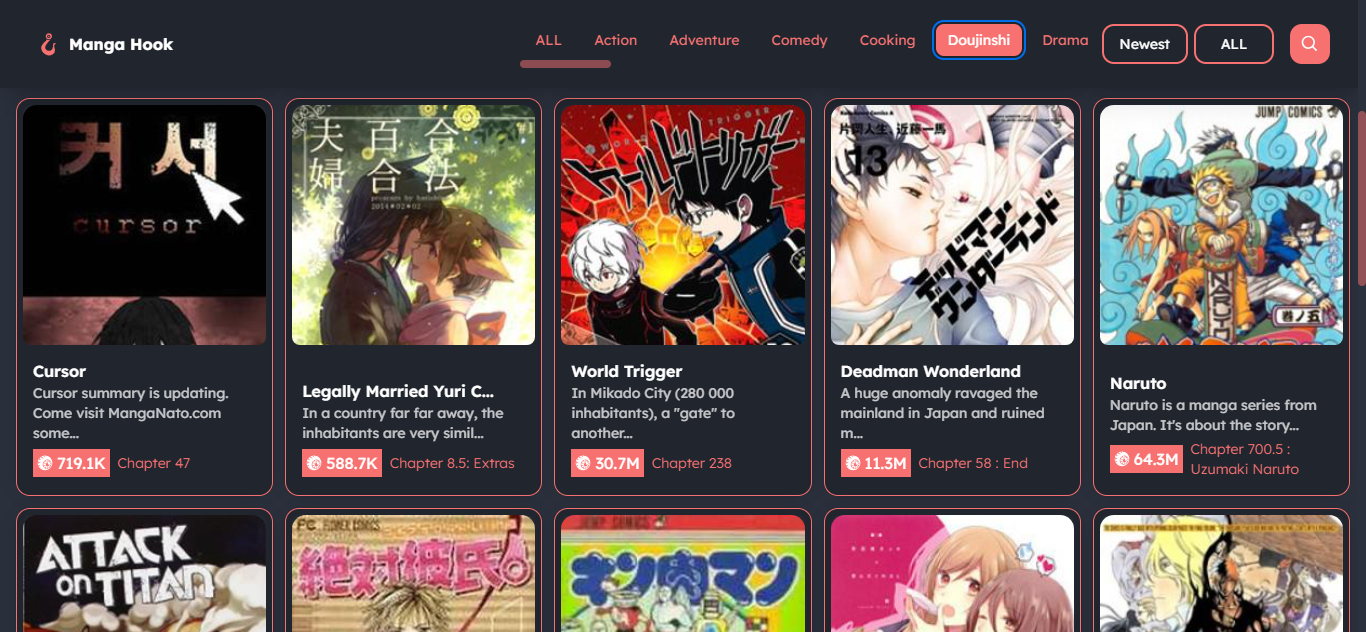
├── docs ├── README.md ├── tsconfig.json ├── public │ ├── googlec12a4a3751ca9da9.html │ ├── robots.txt │ ├── screenshot │ │ ├── list.png │ │ ├── chapter.png │ │ ├── detail.png │ │ └── search.png │ └── favicon.svg ├── src │ ├── env.d.ts │ ├── content │ │ ├── docs │ │ │ ├── houston.webp │ │ │ ├── index.mdx │ │ │ ├── search.md │ │ │ ├── installation.md │ │ │ ├── example.md │ │ │ ├── introduction.md │ │ │ ├── singlemanga.md │ │ │ ├── hooks.md │ │ │ ├── quick-start.md │ │ │ └── mangalist.md │ │ └── config.ts │ └── assets │ │ └── style.css ├── .gitignore ├── package.json └── astro.config.mjs ├── server ├── README.md ├── .env ├── middleware │ ├── apiKeyMiddleware.js │ ├── mangaList │ │ ├── dataValidationMiddleware.js │ │ ├── pageValidationMiddleware.js │ │ └── dataCollectorMiddleware.js │ ├── manga │ │ ├── chapterList.js │ │ ├── mangaExistMiddleware.js │ │ └── chapterExistMiddleware.js │ └── search │ │ └── searchPageValidationMiddleware.js ├── routes │ ├── mangaSearch.js │ ├── mangaListRouter.js │ └── mangaRouter.js ├── .gitignore ├── app.js ├── package.json └── controllers │ ├── mangaController.js │ ├── searchMangaController.js │ ├── chapterController.js │ └── ListMangaController.js ├── next exemple ├── .env ├── public │ ├── loading.gif │ └── fonts │ │ └── Lexend.ttf ├── postcss.config.js ├── hooks │ ├── utils │ │ ├── jsonToUrl.js │ │ ├── truncateString.js │ │ ├── redirectUrlGenerator.js │ │ └── queryToJson.js │ └── manga │ │ ├── useManga.js │ │ ├── useMangaChapter.js │ │ ├── useMangaList.js │ │ └── useMangaSearch.js ├── next.config.js ├── components │ ├── providers │ │ └── NextProvider.jsx │ ├── Manga │ │ ├── ZoomImages.jsx │ │ ├── ChaptersGridList.jsx │ │ ├── ScalableArea.jsx │ │ ├── PagesGridList.jsx │ │ └── MangaLayout.jsx │ ├── MainLyout.jsx │ ├── MangaList │ │ ├── Card.jsx │ │ ├── GridList.jsx │ │ └── Category.jsx │ ├── search │ │ └── GridList.jsx │ └── Navbar.jsx ├── app │ ├── layout.jsx │ ├── loading.jsx │ ├── page.jsx │ ├── manga │ │ └── [id] │ │ │ ├── [ch] │ │ │ └── page.jsx │ │ │ ├── page.jsx │ │ │ └── layout.jsx │ └── search │ │ └── [id] │ │ └── page.jsx ├── tailwind.config.js ├── .gitignore ├── styles │ └── globals.css ├── tsconfig.json ├── package.json └── README.md ├── types ├── manga.ts └── mangaList.ts └── README.md /docs/README.md: -------------------------------------------------------------------------------- 1 | -------------------------------------------------------------------------------- /server/README.md: -------------------------------------------------------------------------------- 1 | "# mangahook-api" 2 | -------------------------------------------------------------------------------- /next exemple/.env: -------------------------------------------------------------------------------- 1 | API_URL = "http://localhost:3000" -------------------------------------------------------------------------------- /docs/tsconfig.json: -------------------------------------------------------------------------------- 1 | { 2 | "extends": "astro/tsconfigs/base" 3 | } 4 | -------------------------------------------------------------------------------- /server/.env: -------------------------------------------------------------------------------- 1 | DATAPROVIDER_URL=https://ww6.mangakakalot.tv/ 2 | PORT=3000 -------------------------------------------------------------------------------- /docs/public/googlec12a4a3751ca9da9.html: -------------------------------------------------------------------------------- 1 | google-site-verification: googlec12a4a3751ca9da9.html -------------------------------------------------------------------------------- /docs/src/env.d.ts: -------------------------------------------------------------------------------- 1 | /// 2 | /// 3 | -------------------------------------------------------------------------------- /docs/public/robots.txt: -------------------------------------------------------------------------------- 1 | User-agent: * 2 | Allow: / 3 | 4 | Sitemap: https://mangahook-api.vercel.app/sitemap-index.xml -------------------------------------------------------------------------------- /docs/public/screenshot/list.png: -------------------------------------------------------------------------------- https://raw.githubusercontent.com/kiraaziz/mangahook-api/HEAD/docs/public/screenshot/list.png -------------------------------------------------------------------------------- /next exemple/public/loading.gif: -------------------------------------------------------------------------------- https://raw.githubusercontent.com/kiraaziz/mangahook-api/HEAD/next exemple/public/loading.gif -------------------------------------------------------------------------------- /docs/public/screenshot/chapter.png: -------------------------------------------------------------------------------- https://raw.githubusercontent.com/kiraaziz/mangahook-api/HEAD/docs/public/screenshot/chapter.png -------------------------------------------------------------------------------- /docs/public/screenshot/detail.png: -------------------------------------------------------------------------------- https://raw.githubusercontent.com/kiraaziz/mangahook-api/HEAD/docs/public/screenshot/detail.png -------------------------------------------------------------------------------- /docs/public/screenshot/search.png: -------------------------------------------------------------------------------- https://raw.githubusercontent.com/kiraaziz/mangahook-api/HEAD/docs/public/screenshot/search.png -------------------------------------------------------------------------------- /docs/src/content/docs/houston.webp: -------------------------------------------------------------------------------- https://raw.githubusercontent.com/kiraaziz/mangahook-api/HEAD/docs/src/content/docs/houston.webp -------------------------------------------------------------------------------- /next exemple/public/fonts/Lexend.ttf: -------------------------------------------------------------------------------- https://raw.githubusercontent.com/kiraaziz/mangahook-api/HEAD/next exemple/public/fonts/Lexend.ttf -------------------------------------------------------------------------------- /next exemple/postcss.config.js: -------------------------------------------------------------------------------- 1 | module.exports = { 2 | plugins: { 3 | tailwindcss: {}, 4 | autoprefixer: {}, 5 | }, 6 | } 7 | -------------------------------------------------------------------------------- /next exemple/hooks/utils/jsonToUrl.js: -------------------------------------------------------------------------------- 1 | export const jsonToUrl =(obj)=> { 2 | return '?' + Object.keys(obj).map(key => `${key}=${obj[key]}`).join('&') 3 | } -------------------------------------------------------------------------------- /next exemple/next.config.js: -------------------------------------------------------------------------------- 1 | /** @type {import('next').NextConfig} */ 2 | 3 | const nextConfig = { 4 | experimental: { 5 | serverActions: true, 6 | }, 7 | } 8 | 9 | module.exports = nextConfig 10 | -------------------------------------------------------------------------------- /next exemple/hooks/utils/truncateString.js: -------------------------------------------------------------------------------- 1 | export const truncateString = (str, maxLength) => { 2 | 3 | if (str.length <= maxLength) { 4 | return str 5 | } 6 | 7 | const truncatedString = str.slice(0, maxLength - 3) + '...' 8 | return truncatedString 9 | } 10 | -------------------------------------------------------------------------------- /next exemple/components/providers/NextProvider.jsx: -------------------------------------------------------------------------------- 1 | 'use client' 2 | import { NextUIProvider } from '@nextui-org/react' 3 | 4 | export default function Providers({ children }) { 5 | return ( 6 | 7 | {children} 8 | 9 | ) 10 | } -------------------------------------------------------------------------------- /next exemple/app/layout.jsx: -------------------------------------------------------------------------------- 1 | import MainLayout from "@/components/MainLyout" 2 | import "@/styles/globals.css" 3 | 4 | const Layout = ({ children }) => { 5 | 6 | return ( 7 | 8 | {children} 9 | 10 | ) 11 | } 12 | 13 | export default Layout -------------------------------------------------------------------------------- /docs/src/content/config.ts: -------------------------------------------------------------------------------- 1 | import { defineCollection } from 'astro:content'; 2 | import { docsSchema, i18nSchema } from '@astrojs/starlight/schema'; 3 | 4 | export const collections = { 5 | docs: defineCollection({ schema: docsSchema() }), 6 | i18n: defineCollection({ type: 'data', schema: i18nSchema() }), 7 | }; 8 | -------------------------------------------------------------------------------- /next exemple/hooks/manga/useManga.js: -------------------------------------------------------------------------------- 1 | "use server" 2 | 3 | const useManga = async(id) => { 4 | 5 | const url = `${process.env.API_URL}/api/manga/${id}` 6 | 7 | const reqData = await fetch(url) 8 | const data = await reqData.json() 9 | 10 | return data 11 | } 12 | 13 | export default useManga -------------------------------------------------------------------------------- /next exemple/hooks/manga/useMangaChapter.js: -------------------------------------------------------------------------------- 1 | "use server" 2 | 3 | const useManga = async(id, ch) => { 4 | 5 | const url = `${process.env.API_URL}/api/manga/${id}/${ch}` 6 | 7 | const reqData = await fetch(url) 8 | const data = await reqData.json() 9 | 10 | return data 11 | } 12 | 13 | export default useManga -------------------------------------------------------------------------------- /server/middleware/apiKeyMiddleware.js: -------------------------------------------------------------------------------- 1 | const ApiKey = (req, res, next) => { 2 | 3 | const key = 123 4 | 5 | if (false && (Number(req.headers.apikey) !== key) || false) { 6 | res.status(401).send("401 Unauthorized Access") 7 | } else { 8 | next() 9 | } 10 | } 11 | 12 | module.exports = ApiKey -------------------------------------------------------------------------------- /next exemple/hooks/manga/useMangaList.js: -------------------------------------------------------------------------------- 1 | "use server" 2 | 3 | const useMangaList = async(params) => { 4 | 5 | const url = process.env.API_URL+ "/api/mangalist" + params 6 | 7 | 8 | const reqData = await fetch(url) 9 | const data = await reqData.json() 10 | 11 | return data 12 | } 13 | 14 | export default useMangaList -------------------------------------------------------------------------------- /docs/.gitignore: -------------------------------------------------------------------------------- 1 | # build output 2 | dist/ 3 | # generated types 4 | .astro/ 5 | 6 | # dependencies 7 | node_modules/ 8 | 9 | # logs 10 | npm-debug.log* 11 | yarn-debug.log* 12 | yarn-error.log* 13 | pnpm-debug.log* 14 | 15 | 16 | # environment variables 17 | .env 18 | .env.production 19 | 20 | # macOS-specific files 21 | .DS_Store 22 | -------------------------------------------------------------------------------- /next exemple/hooks/manga/useMangaSearch.js: -------------------------------------------------------------------------------- 1 | "use server" 2 | 3 | const useMangaSearch = async(params) => { 4 | 5 | const url = process.env.API_URL+ "/api/search/" + params 6 | 7 | 8 | const reqData = await fetch(url) 9 | const data = await reqData.json() 10 | 11 | return data 12 | } 13 | 14 | export default useMangaSearch -------------------------------------------------------------------------------- /next exemple/app/loading.jsx: -------------------------------------------------------------------------------- 1 | const LoadingPage = () => { 2 | 3 | return ( 4 |
5 | 6 |
7 | ) 8 | } 9 | 10 | export default LoadingPage -------------------------------------------------------------------------------- /server/routes/mangaSearch.js: -------------------------------------------------------------------------------- 1 | const SearchManga = require("../controllers/searchMangaController") 2 | const pageValidation = require("../middleware/search/searchPageValidationMiddleware") 3 | 4 | const mangaSearch = require("express").Router() 5 | 6 | mangaSearch.get("/:id", 7 | pageValidation, 8 | SearchManga 9 | ) 10 | 11 | module.exports = mangaSearch -------------------------------------------------------------------------------- /types/manga.ts: -------------------------------------------------------------------------------- 1 | interface manga { 2 | imageUrl: string, 3 | name: string, 4 | author: string, 5 | status: string, 6 | updated: string, 7 | view: string, 8 | genres: [string], 9 | chapterList: [ 10 | { 11 | id: string, 12 | path: string, 13 | name: string, 14 | view: string, 15 | createdAt: string 16 | } 17 | ] 18 | } -------------------------------------------------------------------------------- /server/middleware/mangaList/dataValidationMiddleware.js: -------------------------------------------------------------------------------- 1 | const dataValidation = (req, res, next) => { 2 | 3 | ["category", "type", "state"].map((val) => { 4 | 5 | const test = (req.query[val] && req.metaData[val].map((value) => { return value.name }).includes(req.query[val])) 6 | req.query[val] = test ? req.query[val] : req.metaData[val][0].name 7 | }) 8 | 9 | next() 10 | } 11 | 12 | module.exports = dataValidation -------------------------------------------------------------------------------- /next exemple/app/page.jsx: -------------------------------------------------------------------------------- 1 | import useMangaList from "@/hooks/manga/useMangaList" 2 | import GridList from "@/components/search/GridList" 3 | 4 | const MangaList = async () => { 5 | 6 | const mangaData = await useMangaList("") 7 | 8 | return ( 9 | 13 | ) 14 | } 15 | 16 | export default MangaList 17 | 18 | -------------------------------------------------------------------------------- /next exemple/hooks/utils/redirectUrlGenerator.js: -------------------------------------------------------------------------------- 1 | import { jsonToUrl } from "@/hooks/utils/jsonToUrl" 2 | import { queryToJson } from "@/hooks/utils/queryToJson" 3 | 4 | export const redirectUrlGenerator = (searchParams, metaData, f, e) => { 5 | const lastQuery = queryToJson(searchParams, metaData) 6 | if(f && e){ 7 | lastQuery[f] = e 8 | } 9 | 10 | const url = `/${jsonToUrl(lastQuery)}` 11 | 12 | return url 13 | } -------------------------------------------------------------------------------- /next exemple/app/manga/[id]/[ch]/page.jsx: -------------------------------------------------------------------------------- 1 | import PagesGridList from "@/components/Manga/pagesGridList" 2 | import useMangaChapter from "@/hooks/manga/useMangaChapter" 3 | 4 | const MangaPage = async ({ params }) => { 5 | 6 | const mangaPages = await useMangaChapter(params.id, params.ch) 7 | 8 | return ( 9 | 10 | ) 11 | 12 | } 13 | 14 | export default MangaPage -------------------------------------------------------------------------------- /next exemple/app/search/[id]/page.jsx: -------------------------------------------------------------------------------- 1 | import useMangaSearch from "@/hooks/manga/useMangaSearch" 2 | import GridList from "@/components/MangaList/GridList" 3 | 4 | const MangaList = async ({ params }) => { 5 | 6 | const mangaData = await useMangaSearch(params.id) 7 | 8 | return ( 9 | 14 | ) 15 | } 16 | 17 | export default MangaList 18 | 19 | -------------------------------------------------------------------------------- /docs/package.json: -------------------------------------------------------------------------------- 1 | { 2 | "name": "growing-gravity", 3 | "type": "module", 4 | "version": "0.0.1", 5 | "private": false, 6 | "scripts": { 7 | "dev": "astro dev", 8 | "start": "astro dev", 9 | "build": "astro build", 10 | "preview": "astro preview", 11 | "astro": "astro" 12 | }, 13 | "dependencies": { 14 | "@astrojs/sitemap": "^3.0.5", 15 | "@astrojs/starlight": "^0.15.4", 16 | "@astrojs/vercel": "^6.1.0", 17 | "astro": "^4.0.5", 18 | "sharp": "^0.32.6" 19 | } 20 | } 21 | -------------------------------------------------------------------------------- /next exemple/components/Manga/ZoomImages.jsx: -------------------------------------------------------------------------------- 1 | "use client" 2 | import { TransformWrapper, TransformComponent } from "react-zoom-pan-pinch" 3 | 4 | export default function ZoomImages({images}) { 5 | return ( 6 | 7 | 8 | {images.map((val) => ( 9 | {val.title} 10 | ))} 11 | 12 | 13 | ) 14 | } 15 | -------------------------------------------------------------------------------- /next exemple/tailwind.config.js: -------------------------------------------------------------------------------- 1 | const {nextui} = require("@nextui-org/react") 2 | 3 | /** @type {import('tailwindcss').Config} */ 4 | module.exports = { 5 | content: [ 6 | './pages/**/*.{js,ts,jsx,tsx,mdx}', 7 | './components/**/*.{js,ts,jsx,tsx,mdx}', 8 | './app/**/*.{js,ts,jsx,tsx,mdx}', 9 | "!./node_modules", 10 | "./node_modules/@nextui-org/theme/dist/**/*.{js,ts,jsx,tsx}" 11 | ], 12 | theme: { 13 | extend: { 14 | }, 15 | }, 16 | darkMode: "class", 17 | plugins: [nextui(), require("daisyui")] 18 | } 19 | -------------------------------------------------------------------------------- /server/.gitignore: -------------------------------------------------------------------------------- 1 | # See https://help.github.com/articles/ignoring-files/ for more about ignoring files. 2 | 3 | # dependencies 4 | /node_modules 5 | /.pnp 6 | .pnp.js 7 | 8 | # testing 9 | /coverage 10 | 11 | # next.js 12 | /.next/ 13 | /out/ 14 | 15 | # production 16 | /build 17 | 18 | # misc 19 | .DS_Store 20 | *.pem 21 | 22 | # debug 23 | npm-debug.log* 24 | yarn-debug.log* 25 | yarn-error.log* 26 | 27 | # local env files 28 | #.env*.local 29 | 30 | # vercel 31 | .vercel 32 | 33 | # typescript 34 | *.tsbuildinfo 35 | next-env.d.ts 36 | -------------------------------------------------------------------------------- /next exemple/.gitignore: -------------------------------------------------------------------------------- 1 | # See https://help.github.com/articles/ignoring-files/ for more about ignoring files. 2 | 3 | # dependencies 4 | /node_modules 5 | /.pnp 6 | .pnp.js 7 | 8 | # testing 9 | /coverage 10 | 11 | # next.js 12 | /.next/ 13 | /out/ 14 | 15 | # production 16 | /build 17 | 18 | # misc 19 | .DS_Store 20 | *.pem 21 | 22 | # debug 23 | npm-debug.log* 24 | yarn-debug.log* 25 | yarn-error.log* 26 | 27 | # local env files 28 | .env*.local 29 | 30 | # vercel 31 | .vercel 32 | 33 | # typescript 34 | *.tsbuildinfo 35 | next-env.d.ts 36 | -------------------------------------------------------------------------------- /server/routes/mangaListRouter.js: -------------------------------------------------------------------------------- 1 | const dataCollector = require("../middleware/mangaList/dataCollectorMiddleware") 2 | const dataValidation = require("../middleware/mangaList/dataValidationMiddleware") 3 | const pageValidation = require("../middleware/mangaList/pageValidationMiddleware") 4 | const mangaListController = require("../controllers/ListMangaController") 5 | 6 | const mangaList = require("express").Router() 7 | 8 | mangaList.get("/", 9 | dataCollector, 10 | dataValidation, 11 | pageValidation, 12 | mangaListController 13 | ) 14 | 15 | module.exports = mangaList -------------------------------------------------------------------------------- /next exemple/styles/globals.css: -------------------------------------------------------------------------------- 1 | @tailwind base; 2 | @tailwind components; 3 | @tailwind utilities; 4 | 5 | @font-face { 6 | font-family: Lexend; 7 | src: url(/fonts/Lexend.ttf); 8 | } 9 | 10 | body { 11 | font-family: Lexend; 12 | height: 100% 13 | } 14 | 15 | ::-webkit-scrollbar { 16 | background-color: transparent; 17 | width: 8px; 18 | height: 8px; 19 | } 20 | 21 | ::-webkit-scrollbar-thumb { 22 | border-radius: 100px; 23 | @apply bg-red-400/50 hover:bg-red-400 ease-in-out duration-200 24 | } 25 | 26 | .firebase-emulator-warning{ 27 | display: none; 28 | } 29 | -------------------------------------------------------------------------------- /server/routes/mangaRouter.js: -------------------------------------------------------------------------------- 1 | const mangaExist = require("../middleware/manga/mangaExistMiddleware") 2 | const mangaController = require("../controllers/mangaController") 3 | const chapterList = require("../middleware/manga/chapterList") 4 | const chapterController = require("../controllers/chapterController") 5 | const chapterExist = require("../middleware/manga/chapterExistMiddleware") 6 | 7 | const manga = require("express").Router() 8 | 9 | manga.get("/:id", 10 | mangaExist, 11 | chapterList, 12 | mangaController 13 | ) 14 | 15 | manga.get("/:id/:ch", 16 | chapterExist, 17 | chapterController 18 | ) 19 | 20 | module.exports = manga -------------------------------------------------------------------------------- /server/app.js: -------------------------------------------------------------------------------- 1 | const ApiKey = require("./middleware/apiKeyMiddleware") 2 | const app = require("express")() 3 | const bodyParser = require("body-parser") 4 | const mangaRouter = require("./routes/mangaRouter") 5 | const mangaListRouter = require("./routes/mangaListRouter") 6 | const mangaSearch = require("./routes/mangaSearch") 7 | 8 | app.use(bodyParser.json()) 9 | require('dotenv').config() 10 | 11 | app.use(ApiKey) 12 | app.use("/api/manga", mangaRouter) 13 | app.use("/api/mangaList", mangaListRouter) 14 | app.use("/api/search", mangaSearch) 15 | 16 | app.listen(process.env.PORT, ()=>{ 17 | console.log(`Server Start On Port ${process.env.PORT} 🎉✨ `) 18 | }) -------------------------------------------------------------------------------- /next exemple/app/manga/[id]/page.jsx: -------------------------------------------------------------------------------- 1 | import useManga from "@/hooks/manga/useManga" 2 | import ChapterGridList from "@/components/Manga/ChaptersGridList" 3 | 4 | export const generateMetadata = async ({ params }) => { 5 | 6 | const mangaData = await useManga(params.id) 7 | 8 | return { 9 | title: mangaData.name 10 | } 11 | } 12 | 13 | const MangaPage = async ({ params }) => { 14 | 15 | const mangaData = await useManga(params.id) 16 | 17 | return ( 18 | 22 | ) 23 | } 24 | 25 | export default MangaPage -------------------------------------------------------------------------------- /next exemple/components/Manga/ChaptersGridList.jsx: -------------------------------------------------------------------------------- 1 | "use client" 2 | 3 | import Link from "next/link" 4 | 5 | const ChapterGridList = ({ chapterList, id, ch }) => { 6 | 7 | 8 | return ( 9 |
10 | {chapterList.map((val) => ( 11 | 14 | {val.name} 15 | 16 | ))} 17 |
18 | ) 19 | } 20 | 21 | export default ChapterGridList -------------------------------------------------------------------------------- /next exemple/hooks/utils/queryToJson.js: -------------------------------------------------------------------------------- 1 | export const queryToJson = (query, metaData) => { 2 | 3 | let params = { 4 | category: query.get("category"), 5 | type: query.get("type"), 6 | state: query.get("state"), 7 | } 8 | 9 | Object.keys(params).map((val) => { 10 | const possibleFilel = metaData[val].map((val) => { return val.id }) 11 | if (!possibleFilel.includes(params[val])) { 12 | delete params[val] 13 | } 14 | }) 15 | 16 | if(query.get("page")){params = { 17 | ...params, 18 | page: query.get("page") 19 | }} 20 | 21 | if (!params.pages || params.pages > metaData.totalPages) { 22 | delete params.pages 23 | } 24 | 25 | return params 26 | } 27 | -------------------------------------------------------------------------------- /next exemple/tsconfig.json: -------------------------------------------------------------------------------- 1 | { 2 | "compilerOptions": { 3 | "target": "es5", 4 | "lib": ["dom", "dom.iterable", "esnext"], 5 | "allowJs": true, 6 | "skipLibCheck": true, 7 | "strict": true, 8 | "forceConsistentCasingInFileNames": true, 9 | "noEmit": true, 10 | "esModuleInterop": true, 11 | "module": "esnext", 12 | "moduleResolution": "node", 13 | "resolveJsonModule": true, 14 | "isolatedModules": true, 15 | "jsx": "preserve", 16 | "incremental": true, 17 | "plugins": [ 18 | { 19 | "name": "next" 20 | } 21 | ], 22 | "paths": { 23 | "@/*": ["./*"] 24 | } 25 | }, 26 | "include": ["next-env.d.ts", "**/*.ts", "**/*.tsx", ".next/types/**/*.ts"], 27 | "exclude": ["node_modules"] 28 | } 29 | -------------------------------------------------------------------------------- /server/package.json: -------------------------------------------------------------------------------- 1 | { 2 | "name": "backendtutorial", 3 | "version": 2, 4 | "builds": [ 5 | { 6 | "src": "index.js", 7 | "use": "@now/node" 8 | } 9 | ], 10 | "private": true, 11 | "scripts": { 12 | "start": "nodemon --experimental-modules --es-module-specifier-resolution=node app.js" 13 | }, 14 | "dependencies": { 15 | "@prisma/client": "^5.3.1", 16 | "bcryptjs": "^2.4.3", 17 | "body-parser": "^1.20.2", 18 | "cheerio": "^1.0.0-rc.12", 19 | "cors": "^2.8.5", 20 | "dotenv": "^16.0.3", 21 | "express": "^4.18.2", 22 | "jsonwebtoken": "^9.0.0", 23 | "mongoose": "^6.10.0", 24 | "multer": "^1.4.5-lts.1", 25 | "nodemon": "^2.0.22", 26 | "prisma": "^5.3.1", 27 | "request-promise": "^4.2.6" 28 | } 29 | } -------------------------------------------------------------------------------- /server/middleware/manga/chapterList.js: -------------------------------------------------------------------------------- 1 | const cheerio = require("cheerio") 2 | 3 | const chapterList = (req, res, next) => { 4 | 5 | const mangaChaptersList = [] 6 | const $ = cheerio.load(req.html) 7 | 8 | $(".chapter-list .row").map((index, val) => { 9 | 10 | const target = $(val) 11 | 12 | mangaChaptersList[index] = { 13 | id: target.find("span a").attr("href").split("/")[3], 14 | path: target.find("span a").attr("href"), 15 | name: target.find("span a").text().trim(), 16 | view: target.find("span:eq(1)").text().trim(), 17 | createdAt: target.find("span:eq(2)").text().trim(), 18 | } 19 | }) 20 | 21 | req.chapterList = mangaChaptersList 22 | next() 23 | } 24 | 25 | module.exports = chapterList -------------------------------------------------------------------------------- /types/mangaList.ts: -------------------------------------------------------------------------------- 1 | interface mangaList { 2 | mangaList: [ 3 | { 4 | id: string, 5 | imafge: string, 6 | title: string, 7 | chapter: string, 8 | view: string, 9 | description: string 10 | } 11 | ], 12 | metaData: { 13 | totalStories: number, 14 | totalPages: number, 15 | type: [ 16 | { 17 | id: string, 18 | type: string 19 | } 20 | ], 21 | state: [ 22 | { 23 | id: string, 24 | type: string 25 | } 26 | ], 27 | category: [ 28 | { 29 | id: string, 30 | type: string 31 | } 32 | ], 33 | } 34 | } -------------------------------------------------------------------------------- /next exemple/package.json: -------------------------------------------------------------------------------- 1 | { 2 | "name": "FRN_stack", 3 | "version": "0.1.0", 4 | "private": true, 5 | "scripts": { 6 | "dev": "next dev", 7 | "build": "next build", 8 | "start": "next start -p 3001", 9 | "lint": "next lint" 10 | }, 11 | "dependencies": { 12 | "@nextui-org/react": "^2.2.9", 13 | "@types/node": "20.2.1", 14 | "@types/react": "18.2.6", 15 | "@types/react-dom": "18.2.4", 16 | "autoprefixer": "10.4.14", 17 | "concurrently": "^8.0.1", 18 | "daisyui": "^2.51.6", 19 | "framer-motion": "^10.16.16", 20 | "next": "13.4.3", 21 | "postcss": "8.4.23", 22 | "react": "18.2.0", 23 | "react-dom": "18.2.0", 24 | "react-icons": "^4.8.0", 25 | "react-zoom-pan-pinch": "^3.3.0", 26 | "tailwindcss": "3.3.2", 27 | "typescript": "5.0.4" 28 | } 29 | } 30 | -------------------------------------------------------------------------------- /next exemple/app/manga/[id]/layout.jsx: -------------------------------------------------------------------------------- 1 | import useManga from "@/hooks/manga/useManga" 2 | import ChapterGridList from "@/components/Manga/ChaptersGridList" 3 | import MangaLayout from "@/components/Manga/MangaLayout" 4 | 5 | export const generateMetadata=async({params})=>{ 6 | 7 | const mangaData = await useManga(params.id) 8 | 9 | return{ 10 | title: mangaData.name 11 | } 12 | } 13 | 14 | const MangaPage = async ({ params, children }) => { 15 | 16 | const mangaData = await useManga(params.id) 17 | 18 | return ( 19 | 26 | {children} 27 | 28 | ) 29 | } 30 | 31 | export default MangaPage -------------------------------------------------------------------------------- /next exemple/components/Manga/ScalableArea.jsx: -------------------------------------------------------------------------------- 1 | "use client" 2 | 3 | import { useState } from "react" 4 | 5 | const ScalableArea = ({ children }) => { 6 | 7 | const [marge, setMarge] = useState(-150) 8 | 9 | return ( 10 |
11 |
12 | {children} 13 |
14 |
15 | setMarge(e.target.value)} 21 | className="range range-xs w-full " /> 22 | 23 |
24 |
25 | ) 26 | } 27 | 28 | export default ScalableArea -------------------------------------------------------------------------------- /server/middleware/manga/mangaExistMiddleware.js: -------------------------------------------------------------------------------- 1 | const httpReq = require("request-promise") 2 | const url = "https://ww6.mangakakalot.tv" 3 | 4 | const mangaExist = (req, res, next) => { 5 | 6 | const mangaUrl = `${url}/manga/${req.params.id}` 7 | 8 | httpReq(mangaUrl) 9 | .then((html) => { 10 | const httpState = false //Todo : if there is 404 text 11 | 12 | if (httpState) { 13 | res.status(404).json({ 14 | state: 404, 15 | message: "Manga Not Exist" 16 | }) 17 | } else { 18 | req.html = html 19 | next() 20 | } 21 | }) 22 | .catch((e) => { 23 | res.status(500).json({ 24 | state: 500, 25 | message: "Something goes wrong" 26 | }) 27 | }) 28 | } 29 | 30 | module.exports = mangaExist -------------------------------------------------------------------------------- /server/middleware/manga/chapterExistMiddleware.js: -------------------------------------------------------------------------------- 1 | const httpReq = require("request-promise") 2 | const url = "https://ww6.mangakakalot.tv" 3 | 4 | const mangaExist = (req, res, next) => { 5 | 6 | const mangaUrl = `${url}/chapter/${req.params.id}/${req.params.ch}` 7 | 8 | httpReq(mangaUrl) 9 | .then((html) => { 10 | const httpState = false //Todo : if there is 404 text 11 | 12 | if (httpState) { 13 | res.status(404).json({ 14 | state: 404, 15 | message: "Manga Not Exist" 16 | }) 17 | } else { 18 | req.html = html 19 | next() 20 | } 21 | }) 22 | .catch((e) => { 23 | res.status(500).json({ 24 | state: 500, 25 | message: "Something goes wrong" 26 | }) 27 | }) 28 | } 29 | 30 | module.exports = mangaExist -------------------------------------------------------------------------------- /docs/src/assets/style.css: -------------------------------------------------------------------------------- 1 | @import url('https://fonts.googleapis.com/css?family=Verdana'); 2 | 3 | /* Dark mode colors. */ 4 | :root { 5 | --sl-color-accent-low: #391818; 6 | --sl-color-accent: #b2393e; 7 | --sl-color-accent-high: #e9bcb9; 8 | --sl-color-white: #ffffff; 9 | --sl-color-gray-1: #ebeef3; 10 | --sl-color-gray-2: #bfc2c8; 11 | --sl-color-gray-3: #858c97; 12 | --sl-color-gray-4: #535863; 13 | --sl-color-gray-5: #333842; 14 | --sl-color-gray-6: #222730; 15 | --sl-color-black: #16181c; 16 | } 17 | /* Light mode colors. */ 18 | :root[data-theme='light'] { 19 | --sl-color-accent-low: #f0cdcb; 20 | --sl-color-accent: #b53b40; 21 | --sl-color-accent-high: #531f1f; 22 | --sl-color-white: #16181c; 23 | --sl-color-gray-1: #222730; 24 | --sl-color-gray-2: #333842; 25 | --sl-color-gray-3: #535863; 26 | --sl-color-gray-4: #858c97; 27 | --sl-color-gray-5: #bfc2c8; 28 | --sl-color-gray-6: #ebeef3; 29 | --sl-color-gray-7: #f5f6f9; 30 | --sl-color-black: #ffffff; 31 | } -------------------------------------------------------------------------------- /docs/public/favicon.svg: -------------------------------------------------------------------------------- 1 | -------------------------------------------------------------------------------- /next exemple/components/MainLyout.jsx: -------------------------------------------------------------------------------- 1 | "use client" 2 | import NextProvider from "@/components/providers/NextProvider" 3 | import Category from "@/components/MangaList/Category" 4 | import NavbarComponent from "@/components/Navbar" 5 | 6 | const MainLayout = ({ children }) => { 7 | 8 | 9 | return ( 10 | 11 | 12 | 13 | 14 | 15 | 16 |
17 | 18 | 19 | 20 | {children} 21 |
22 |
23 | 24 | 25 | ) 26 | } 27 | 28 | export default MainLayout -------------------------------------------------------------------------------- /next exemple/components/Manga/PagesGridList.jsx: -------------------------------------------------------------------------------- 1 | import Link from "next/link" 2 | import ZoomImages from "@/components/Manga/ZoomImages" 3 | 4 | const PagesGridList = ({ chapterList, id, ch }) => { 5 | 6 | return ( 7 |
8 |
9 | {chapterList.chapterListIds.reverse().map((val) => ( 10 | 13 | {val.name} 14 | 15 | ))} 16 |
17 |
18 | 19 |
20 |
21 | ) 22 | } 23 | 24 | export default PagesGridList -------------------------------------------------------------------------------- /server/controllers/mangaController.js: -------------------------------------------------------------------------------- 1 | const cheerio = require("cheerio") 2 | 3 | const mangaController = (req, res) => { 4 | 5 | const $ = cheerio.load(req.html) 6 | const target = $(".manga-info-top") 7 | 8 | const metaData = { 9 | imageUrl: "https://ww6.mangakakalot.tv/" + target.find(".manga-info-pic img").attr("src"), 10 | name: target.find(".manga-info-text li:eq(0) h1").text(), 11 | author: target.find(".manga-info-text li:eq(1) a").text(), 12 | status: target.find(".manga-info-text li:eq(2)").text().split(":")[1].trim(), 13 | updated: target.find(".manga-info-text li:eq(3)").text().split(":")[1].trim(), 14 | view: target.find(".manga-info-text li:eq(5)").text().split(":")[1].trim(), 15 | genres: target.find(".manga-info-text li:eq(6)").text().split(":")[1].trim().split(",").map((val)=>{ 16 | return (val.trim()) 17 | }).filter((val)=> { return val }), 18 | } 19 | res.json({ 20 | ...metaData, 21 | chapterList: req.chapterList 22 | }) 23 | } 24 | 25 | module.exports = mangaController -------------------------------------------------------------------------------- /server/middleware/search/searchPageValidationMiddleware.js: -------------------------------------------------------------------------------- 1 | const urlLink = "https://ww6.mangakakalot.tv" 2 | const httpReq = require("request-promise") 3 | const cheerio = require("cheerio") 4 | 5 | const pagesValidation = (req, res, next) => { 6 | 7 | req.query.page = Number(req.query.page) ? req.query.page : 1 8 | 9 | httpReq(`${urlLink}/search/${req.params.id}`) 10 | .then((html) => { 11 | 12 | const $ = cheerio.load(html) 13 | const totalPages = $(".panel_page_number .group_page .page_last").text().match(/Last\((\d+)\)/) 14 | 15 | req.metaData = { 16 | totalPages: totalPages ? Number(totalPages[1]) : $(".panel_page_number .group_page .page_last").text(), 17 | } 18 | 19 | req.query.page = req.query.page > 0 ? req.query.page : 1 20 | req.query.page = req.query.page <= req.metaData.totalPages ? req.query.page : req.metaData.totalPages 21 | 22 | next() 23 | }) 24 | .catch((e) => { 25 | 26 | res.status(500).json({ error: e }) 27 | }) 28 | } 29 | 30 | module.exports = pagesValidation -------------------------------------------------------------------------------- /server/controllers/searchMangaController.js: -------------------------------------------------------------------------------- 1 | const httpReq = require("request-promise") 2 | const cheerio = require("cheerio") 3 | const urlLink = "https://ww6.mangakakalot.tv" 4 | 5 | const SearchManga = (req, res) => { 6 | 7 | const page = req.query.page 8 | 9 | const query = `${req.params.id}?page=${page}` 10 | const url = `${urlLink}/search/${query}` 11 | 12 | httpReq(url) 13 | .then((html) => { 14 | 15 | const $ = cheerio.load(html) 16 | const mangaList = [] 17 | 18 | 19 | $(".panel_story_list .story_item").map((index, val) => { 20 | 21 | const target = $(val) 22 | mangaList[index] = { 23 | id: target.find("a:first").attr("href").split("/")[2].trim(), 24 | image: target.find("a:first img").attr("src"), 25 | title: target.find("h3 a").text() 26 | } 27 | }) 28 | 29 | res.json({ 30 | mangaList: [...mangaList], 31 | metaData: req.metaData, 32 | }) 33 | }) 34 | .catch((e) => { 35 | res.status(500).json({ error: e }) 36 | }) 37 | } 38 | 39 | module.exports = SearchManga -------------------------------------------------------------------------------- /next exemple/README.md: -------------------------------------------------------------------------------- 1 | This is a [Next.js](https://nextjs.org/) project bootstrapped with [`create-next-app`](https://github.com/vercel/next.js/tree/canary/packages/create-next-app). 2 | 3 | ## Getting Started 4 | 5 | First, run the development server: 6 | 7 | ```bash 8 | npm run dev 9 | # or 10 | yarn dev 11 | # or 12 | pnpm dev 13 | ``` 14 | 15 | Open [http://localhost:3000](http://localhost:3000) with your browser to see the result. 16 | 17 | You can start editing the page by modifying `app/page.tsx`. The page auto-updates as you edit the file. 18 | 19 | This project uses [`next/font`](https://nextjs.org/docs/basic-features/font-optimization) to automatically optimize and load Inter, a custom Google Font. 20 | 21 | ## Learn More 22 | 23 | To learn more about Next.js, take a look at the following resources: 24 | 25 | - [Next.js Documentation](https://nextjs.org/docs) - learn about Next.js features and API. 26 | - [Learn Next.js](https://nextjs.org/learn) - an interactive Next.js tutorial. 27 | 28 | You can check out [the Next.js GitHub repository](https://github.com/vercel/next.js/) - your feedback and contributions are welcome! 29 | 30 | ## Deploy on Vercel 31 | 32 | The easiest way to deploy your Next.js app is to use the [Vercel Platform](https://vercel.com/new?utm_medium=default-template&filter=next.js&utm_source=create-next-app&utm_campaign=create-next-app-readme) from the creators of Next.js. 33 | 34 | Check out our [Next.js deployment documentation](https://nextjs.org/docs/deployment) for more details. 35 | -------------------------------------------------------------------------------- /docs/astro.config.mjs: -------------------------------------------------------------------------------- 1 | import { defineConfig } from 'astro/config'; 2 | import starlight from '@astrojs/starlight'; 3 | import vercelStatic from '@astrojs/vercel/static'; 4 | // https://astro.build/config 5 | export default defineConfig({ 6 | site: "https://mangahook-api.vercel.app", 7 | integrations: [ 8 | starlight({ 9 | title: 'Manga Hook', 10 | social: { 11 | github: 'https://github.com/kiraaziz/mangahook-api', 12 | }, 13 | customCss: [ 14 | "/src/assets/style.css" 15 | ], 16 | sidebar: [ 17 | { 18 | label: 'Getting Started', 19 | items: [ 20 | { label: 'Introduction', link: 'introduction' }, 21 | { label: 'Quick Start Guide', link: 'quick-start' } 22 | ], 23 | }, 24 | { 25 | label: 'API References', 26 | items: [ 27 | { label: 'Installation', link: 'installation' }, 28 | { label: 'Manga List', link: 'mangalist' }, 29 | { label: 'Get Manga Detail', link: 'singlemanga' }, 30 | { label: 'Search', link: 'search' }, 31 | ], 32 | }, 33 | { 34 | label: 'Showcase', 35 | items: [ 36 | { label: 'Example (Nextjs)', link: 'example' }, 37 | { label: 'Web Hook', link: 'hooks' }, 38 | ], 39 | } 40 | ], 41 | }), 42 | ], 43 | output: 'static', 44 | adapter: vercelStatic({ 45 | webAnalytics: { 46 | enabled: true, 47 | }, 48 | speedInsights: { 49 | enabled: true, 50 | }, 51 | }), 52 | }); -------------------------------------------------------------------------------- /docs/src/content/docs/index.mdx: -------------------------------------------------------------------------------- 1 | --- 2 | title: Welcome to Manga Hook API 3 | description: Welcome to Manga Hook API ( manga api )– your premier gateway to a vast repository of manga data. Seamlessly integrate and explore the world of manga with our user-friendly API. Access comprehensive documentation, contribute to our open-source GitHub repository, and kickstart your journey with easy-to-follow guides. Empower your projects with Manga Hook API and unlock endless possibilities for manga enthusiasts and developers alike. 4 | template: splash 5 | hero: 6 | tagline: your go-to manga API for accessing a vast repository of manga data freely. 7 | image: 8 | file: ./houston.webp 9 | actions: 10 | - text: Read Docs 11 | link: /introduction 12 | icon: right-arrow 13 | variant: primary 14 | - text: Github repo 15 | link: https://github.com/kiraaziz/mangahook-api 16 | icon: github 17 | variant: secondary 18 | --- 19 | export const prerender = true; 20 | import { Card, CardGrid } from '@astrojs/starlight/components'; 21 | 22 | ## About 23 | 24 | 25 | Discover manga effortlessly with our API. Get a full list in one request and delve into single manga details easily. 26 | 27 | 28 | 29 | Enable quick and efficient manga searches with advanced features, ensuring users find their favorites effortlessly. 30 | 31 | 32 | 33 | Seamlessly integrate our manga API with Next.js for dynamic and responsive web applications. 34 | 35 | 36 | -------------------------------------------------------------------------------- /server/middleware/mangaList/pageValidationMiddleware.js: -------------------------------------------------------------------------------- 1 | const urlLink = "https://ww6.mangakakalot.tv" 2 | const httpReq = require("request-promise") 3 | const cheerio = require("cheerio") 4 | 5 | const pagesValidation = (req, res, next) => { 6 | 7 | req.query.page = Number(req.query.page) ? req.query.page : 1 8 | 9 | const type = req.query.type.replace("Top read", "topview").toLowerCase() 10 | const state = req.query.state 11 | const categoryId = req.metaData.category.filter((val)=> {return val.name === req.query.category})[0].id 12 | httpReq(`${urlLink}/manga_list?type=${type}&category=${categoryId}&state=${state}&page=99999999`) 13 | .then((html) => { 14 | 15 | const $ = cheerio.load(html) 16 | const totalStories = $(".panel_page_number .group_qty .page_blue").text().match(/Total:\s*([\d,]+)\s+stories/)[1] 17 | const totalPages = $(".panel_page_number .group_page .page_last").text().match(/Last\((\d+)\)/) 18 | 19 | req.metaData = { 20 | totalStories: Number(totalStories.replace(",", "")) , 21 | totalPages: totalPages ? Number(totalPages[1]) : $(".panel_page_number .group_page .page_last").text(), 22 | ...req.metaData 23 | } 24 | 25 | req.query.page = req.query.page > 0 ? req.query.page : 1 26 | req.query.page = req.query.page <= req.metaData.totalPages ? req.query.page : req.metaData.totalPages 27 | 28 | next() 29 | }) 30 | .catch((e) => { 31 | res.status(500).json({ error: e }) 32 | }) 33 | } 34 | 35 | module.exports = pagesValidation -------------------------------------------------------------------------------- /server/controllers/chapterController.js: -------------------------------------------------------------------------------- 1 | const cheerio = require("cheerio") 2 | 3 | const chapterController = (req, res) => { 4 | 5 | const $ = cheerio.load(req.html) 6 | const target = $(".trang-doc") 7 | 8 | const assets = { 9 | title: target.find(".breadcrumb .rdfa-breadcrumb").text().replace("\n", "").trim().split("»").map((val) => { 10 | return (val.trim()) 11 | }).filter((val) => { return val })[3], 12 | currentChapter: target.find(".breadcrumb .rdfa-breadcrumb").text().replace("\n", "").trim().split("»").map((val) => { 13 | return (val.trim()) 14 | }).filter((val) => { return val })[4], 15 | chapterListIds: 16 | target.find(".option_wrap #c_chapter option").map(function () { 17 | return { 18 | id: $(this).attr("value"), 19 | name: $(this).text() 20 | } 21 | }).get() 22 | , 23 | images: target.find(".vung-doc img").map(function () { 24 | return { 25 | title: $(this).attr("title"), 26 | image: $(this).attr("data-src"), 27 | } 28 | }).get() 29 | } 30 | 31 | res.json(assets) 32 | } 33 | 34 | module.exports = chapterController 35 | 36 | /* 37 | name: , 38 | currentchapter: { 39 | id: , 40 | name: "", 41 | path: "" 42 | }, 43 | prevChater: { 44 | id: "", 45 | name: "", 46 | path: "" 47 | }, 48 | nextChater: { 49 | id: "", 50 | name: "", 51 | path: "" 52 | }, 53 | 54 | */ -------------------------------------------------------------------------------- /next exemple/components/MangaList/Card.jsx: -------------------------------------------------------------------------------- 1 | import Link from "next/link" 2 | import { GiEyeball } from "react-icons/gi" 3 | import { truncateString } from "@/hooks/utils/truncateString" 4 | import { Card, CardHeader, CardBody, Image } from "@nextui-org/react"; 5 | const CardUi = ({ val, index }) => { 6 | 7 | return ( 8 | 9 | 10 | 11 |
12 | Card background 19 |
20 |
21 | 22 |

23 | {truncateString(val.title, 25)} 24 |

25 | {val.description && <>

{truncateString(val.description, 60)}

26 |
27 | 28 | {val.view} 29 | 30 |

{val.chapter}

31 |
} 32 |
33 |
34 | 35 | ) 36 | } 37 | 38 | export default CardUi -------------------------------------------------------------------------------- /server/controllers/ListMangaController.js: -------------------------------------------------------------------------------- 1 | const httpReq = require("request-promise") 2 | const cheerio = require("cheerio") 3 | const urlLink = "https://ww6.mangakakalot.tv" 4 | 5 | const ListManga = (req, res) => { 6 | 7 | const categoryId = req.metaData.category.filter((val) => { return val.name === req.query.category })[0].id 8 | const page = req.query.page 9 | const type = req.query.type.replace("Top read", "topview").toLowerCase() 10 | const state = req.query.state 11 | 12 | const query = `?type=${type}&category=${categoryId}&state=${state}&page=${page}` 13 | const url = `${urlLink}/manga_list${query}` 14 | 15 | console.log(url) 16 | 17 | httpReq(url) 18 | .then((html) => { 19 | 20 | const $ = cheerio.load(html) 21 | const mangaList = [] 22 | 23 | $(".truyen-list .list-truyen-item-wrap").map((index, val) => { 24 | 25 | const target = $(val) 26 | mangaList[index] = { 27 | id: target.find("a:first").attr("href").split("/")[2].trim(), 28 | image: urlLink + target.find("a:first img").attr("data-src"), 29 | title: target.find("h3 a").text(), 30 | chapter: target.find(".list-story-item-wrap-chapter").text() , 31 | view: target.find(".aye_icon").text(), 32 | description: target.find("p").text().replace("More.\n", " ... \n").trim() 33 | } 34 | }) 35 | 36 | res.json({ 37 | mangaList: [...mangaList], 38 | metaData: req.metaData, 39 | }) 40 | }) 41 | .catch((e) => { 42 | res.status(500).json({ error: e }) 43 | }) 44 | } 45 | 46 | module.exports = ListManga -------------------------------------------------------------------------------- /next exemple/components/Manga/MangaLayout.jsx: -------------------------------------------------------------------------------- 1 | import Link from "next/link" 2 | import { GiEyeball } from "react-icons/gi" 3 | 4 | const MangaLayout = ({ children, name, imageUrl, author, view, genres}) => { 5 | 6 | 7 | return ( 8 |
9 |

{name}

10 |
11 |
12 | 13 |
14 |

{name}

15 |

author: {author}

16 |

17 | 18 | {view} Views 19 |

20 |
21 | {genres.map((val) => ( 22 | 23 | {val} 24 | 25 | ))} 26 |
27 |
28 |
29 |
30 | {children} 31 |
32 | ) 33 | } 34 | 35 | export default MangaLayout -------------------------------------------------------------------------------- /server/middleware/mangaList/dataCollectorMiddleware.js: -------------------------------------------------------------------------------- 1 | const httpReq = require("request-promise") 2 | const url = require('url') 3 | const cheerio = require("cheerio") 4 | const urlLink = "https://ww6.mangakakalot.tv" 5 | 6 | const dataCollector = (req, res, next) => { 7 | 8 | httpReq(`${urlLink}/manga_list?type=latest&category=None&state=None&page=1000000`) 9 | .then((html) => { 10 | 11 | 12 | const $ = cheerio.load(html) 13 | const category = [] 14 | const type = [] 15 | const state = [] 16 | 17 | $(".truyen-list .tag:eq(0) li a").map((index, val) => { 18 | 19 | const target = $(val) 20 | 21 | const id = url.parse(target.attr("href"), true).query.category 22 | 23 | category[index] = { 24 | id: id, 25 | name: target.text() 26 | } 27 | }) 28 | 29 | $(".truyen-list .tag:eq(1) li a").map((index, val) => { 30 | 31 | 32 | const target = $(val) 33 | const id = url.parse(target.attr("href"), true).query.type 34 | 35 | type[index] = { 36 | id: id, 37 | name: target.text() 38 | } 39 | }) 40 | 41 | $(".truyen-list .tag:eq(2) li a").map((index, val) => { 42 | 43 | const target = $(val) 44 | const id = url.parse(target.attr("href"), true).query.state 45 | 46 | state[index] = { 47 | id: id, 48 | name: target.text() 49 | } 50 | }) 51 | 52 | req.metaData = { 53 | type: type, 54 | state: state, 55 | category: category 56 | } 57 | 58 | next() 59 | }) 60 | .catch((e) => { 61 | res.status(500).json({ error: e }) 62 | }) 63 | } 64 | 65 | 66 | module.exports = dataCollector -------------------------------------------------------------------------------- /next exemple/components/search/GridList.jsx: -------------------------------------------------------------------------------- 1 | "use client" 2 | import { useRouter, useSearchParams } from "next/navigation" 3 | import useMangaList from "@/hooks/manga/useMangaList" 4 | import { useLayoutEffect, useState } from "react" 5 | import { redirectUrlGenerator } from "@/hooks/utils/redirectUrlGenerator" 6 | import Card from "./../MangaList/Card" 7 | import { Pagination } from "@nextui-org/react" 8 | import useMangaSearch from "@/hooks/manga/useMangaSearch" 9 | 10 | const List = ({ dataList, metaData }) => { 11 | 12 | 13 | const [loading, setLoading] = useState(false) 14 | const [totalMangaPages, setTotalMangaPages] = useState(metaData ? metaData.totalPages : 0) 15 | const [mangeList, setMangaList] = useState(dataList) 16 | 17 | const handleRedirect = async(e) => { 18 | setLoading(true) 19 | try { 20 | 21 | const data = await useMangaSearch(`/${id}?page=${e}`) 22 | setMangaList(data.mangaList) 23 | 24 | } catch (e) { 25 | alert("Something go wrong " + e) 26 | } 27 | setLoading(false) 28 | } 29 | 30 | return ( 31 | <> 32 |
33 | {mangeList && mangeList.map((val, index) => ())} 34 |
35 | handleRedirect(e)} /> 40 |
41 |
42 | {loading && 43 |
44 | 45 |
46 | } 47 | 48 | ) 49 | } 50 | 51 | export default List -------------------------------------------------------------------------------- /docs/src/content/docs/search.md: -------------------------------------------------------------------------------- 1 | --- 2 | title: Search 3 | description: Refine your manga discovery with the Search API endpoint /api/search/:query. Utilize this powerful tool to search for manga titles based on specific queries. Make GET requests with encoded search queries like attack%20on%20titan?page=1 and receive a response containing a curated list of manga entries with images and titles. Leverage the metaData section for insights into the total number of pages available for search results. Enhance your application's search functionality and offer users relevant manga suggestions effortlessly using this dynamic API feature. 4 | --- 5 | #### Endpoint: `/api/search/:query` 6 | 7 | The `/api/search/:query` endpoint allows you to search for manga based on a specific query. Use this endpoint to discover manga titles related to your search. 8 | 9 | #### Example 10 | 11 | ```http 12 | GET http://localhost:3000/api/search/attack%20on%20titan?page=1 13 | ``` 14 | 15 | #### Response 16 | 17 | ```json 18 | { 19 | "mangaList": [ 20 | { 21 | "id": "manga-oa952283", 22 | "image": "https://avt.mkklcdnv6temp.com/34/b/1-1583465037.jpg", 23 | "title": "Attack On Titan" 24 | }, 25 | { 26 | "id": "manga-fv982830", 27 | "image": "https://avt.mkklcdnv6temp.com/15/y/19-1583499712.jpg", 28 | "title": "Attack On Titan Anthology" 29 | }, 30 | { 31 | "id": "manga-cs980075", 32 | "image": "https://avt.mkklcdnv6temp.com/15/d/17-1583495808.jpg", 33 | "title": "Attack On Titan: Junior High" 34 | }, 35 | // ... other manga entries 36 | ], 37 | "metaData": { 38 | "totalPages": 39 39 | } 40 | } 41 | ``` 42 | 43 | ### Notes 44 | 45 | - The `:query` parameter in the endpoint represents the search query. Make sure to encode the query string properly. 46 | - Use the `page` query parameter to navigate through different pages of the search results. 47 | - The response includes a list of manga entries with their respective IDs, images, and titles. 48 | - The `metaData` section provides information about the total number of pages available for the search results. 49 | 50 | Feel free to use this endpoint to enhance the search functionality in your application and provide users with relevant manga suggestions based on their queries. 51 | -------------------------------------------------------------------------------- /next exemple/components/MangaList/GridList.jsx: -------------------------------------------------------------------------------- 1 | "use client" 2 | import { useRouter, useSearchParams } from "next/navigation" 3 | import useMangaList from "@/hooks/manga/useMangaList" 4 | import { useLayoutEffect, useState } from "react" 5 | import { redirectUrlGenerator } from "@/hooks/utils/redirectUrlGenerator" 6 | import Card from "./Card" 7 | import { Pagination } from "@nextui-org/react" 8 | 9 | const List = ({ dataList, metaData }) => { 10 | 11 | const searchParams = useSearchParams() 12 | const router = useRouter() 13 | 14 | const [loading, setLoading] = useState(false) 15 | const [totalMangaPages, setTotalMangaPages] = useState(metaData.totalPages) 16 | const [mangeList, setMangaList] = useState(dataList) 17 | 18 | const loadData = async () => { 19 | setLoading(true) 20 | try { 21 | 22 | const data = await useMangaList(redirectUrlGenerator(searchParams, metaData, "", "")) 23 | setTotalMangaPages(data.metaData.totalPages) 24 | setMangaList(data.mangaList) 25 | 26 | } catch (e) { 27 | alert("Something go wrong " + e) 28 | } 29 | setLoading(false) 30 | } 31 | 32 | const handleRedirect = (f, e) => { 33 | 34 | router.push(redirectUrlGenerator(searchParams, metaData, f, e)) 35 | } 36 | 37 | // useLayoutEffect(() => { 38 | // loadData() 39 | // }, [searchParams]) 40 | 41 | return ( 42 | <> 43 |
44 | {mangeList && mangeList.map((val, index) => ())} 45 |
46 | handleRedirect("page", e)} /> 51 |
52 |
53 | {loading && 54 |
55 | 56 |
57 | } 58 | 59 | ) 60 | } 61 | 62 | export default List -------------------------------------------------------------------------------- /docs/src/content/docs/installation.md: -------------------------------------------------------------------------------- 1 | --- 2 | title: Installation 3 | description: Effortlessly set up Manga Hook API and Next.js client on your local machine with our step-by-step guide. Clone the repository, install dependencies, and start the Express server for Manga Hook. Move to the Next.js client directory, install dependencies, and run the development server. For production, build the Next.js app and start the server. Explore Manga Hook API and Next.js client to access manga data and enhance your applications. Happy coding! 4 | --- 5 | Follow these detailed steps to set up the Manga Hook API and Next.js client application on your local machine. This guide assumes you have Git, Node.js, and npm installed. 6 | 7 | ## 1. Clone the Repository: 8 | 9 | Open your terminal and run the following command to clone the Manga Hook repository: 10 | 11 | ```bash 12 | git clone https://github.com/kiraaziz/mangahook-api 13 | ``` 14 | 15 | ## 2. Set Up the Server: 16 | 17 | Navigate to the server directory and install dependencies: 18 | 19 | ```bash 20 | cd server 21 | npm install 22 | ``` 23 | 24 | #### Start the Express Server: 25 | 26 | Launch the Manga Hook server by running: 27 | 28 | ```bash 29 | npm run start 30 | ``` 31 | 32 | This will start the server on port 3000. 33 | 34 | ## 3. Set Up the Client (Next.js App): 35 | 36 | Navigate to the client directory and install dependencies: 37 | 38 | ```bash 39 | cd client 40 | npm install 41 | ``` 42 | 43 | #### Run the Development Server: 44 | 45 | Start the Next.js development server with Tailwind CSS: 46 | 47 | ```bash 48 | npm run dev 49 | ``` 50 | 51 | This will open the client application on [http://localhost:3001](http://localhost:3001) by default. 52 | 53 | ## 4. Production Deployment for Next.js App: 54 | 55 | For production deployment, follow these additional steps: 56 | 57 | #### Build the Next.js App: 58 | 59 | Generate a production build of the Next.js app: 60 | 61 | ```bash 62 | npm run build 63 | ``` 64 | 65 | #### Start the Production Server: 66 | 67 | Run the built app in production mode: 68 | 69 | ```bash 70 | npm start 71 | ``` 72 | 73 | Now, your Next.js app is running in production mode. 74 | 75 | ## Summary: 76 | 77 | - Manga Hook server is running on [http://localhost:3000](http://localhost:3000). 78 | - Next.js client app is running on [http://localhost:3001](http://localhost:3001) during development. 79 | - In production, the Next.js app is built using `npm run build` and started with `npm start`. 80 | 81 | Feel free to explore the Manga Hook API and Next.js client app to access manga data and enhance your manga-related applications. Happy coding! -------------------------------------------------------------------------------- /next exemple/components/Navbar.jsx: -------------------------------------------------------------------------------- 1 | "use client" 2 | import { GiHook } from "react-icons/gi" 3 | import { BiSearch } from "react-icons/bi" 4 | import { Navbar, NavbarContent, NavbarItem, Link, Button, Modal, ModalContent, ModalHeader, ModalBody, ModalFooter, useDisclosure, Input } from "@nextui-org/react"; 5 | import { useState } from "react"; 6 | import { useRouter } from "next/navigation"; 7 | 8 | const NavbarComponent = ({ children }) => { 9 | return ( 10 | 11 |
12 | 13 | Manga Hook 14 |
15 | 16 | {children} 17 | 18 | 19 | 20 | 21 |
22 | ); 23 | } 24 | 25 | const SearchBox = () => { 26 | const { isOpen, onOpen, onOpenChange } = useDisclosure(); 27 | const [value, setValue] = useState("") 28 | const router = useRouter() 29 | 30 | return ( 31 | <> 32 | 35 | 36 | 37 | {(onClose) => ( 38 | <> 39 | 40 |

Search

41 |
42 | setValue(e.target.value)} placeholder="tap something ..." className="input flex-1" /> 43 | 49 |
50 |
51 | 52 | )} 53 |
54 |
55 | 56 | ); 57 | } 58 | 59 | 60 | 61 | export default NavbarComponent -------------------------------------------------------------------------------- /docs/src/content/docs/example.md: -------------------------------------------------------------------------------- 1 | --- 2 | title: MangaHook Website Example 3 | description: Experience the MangaHook website example, a dynamic platform crafted with Next.js, Tailwind CSS, and Next UI components. Seamlessly interacting with the MangaHook API, the website offers users a captivating manga reading experience. Explore key features, including the Home Screen with a curated list of manga titles, Manga Details Page showcasing detailed information, Chapter Details Page for immersive reading, and a powerful Search Functionality. Check out the example website at https://lmangahook.vercel.app to navigate the home screen, delve into manga details, read chapters, and effortlessly search for favorite titles. Witness how MangaHook combines technologies to create a user-friendly and engaging manga reading platform. 4 | --- 5 | 6 | MangaHook has created a user-friendly website using Next.js, Tailwind CSS, and Next UI components. The website interacts with the MangaHook API to provide users with a seamless manga reading experience. Let's explore the main features: 7 | 8 | ## 1. Home Screen 9 | 10 | - The home screen displays a list of manga titles obtained from the `/api/mangaList` endpoint. 11 | - Each manga entry on the home screen includes the manga's cover image, title, and other relevant information. 12 | - Users can click on a manga title to navigate to the manga details page. 13 | 14 | ![Home Screen](/screenshot/list.png) 15 | ## 2. Manga Details Page 16 | 17 | - When a user clicks on a manga title, it opens the manga details page, utilizing the `/api/manga/:id` endpoint. 18 | - The manga details page showcases the cover image, title, author, status, genres, view count, and a list of chapters. 19 | - Users can click on a specific chapter to navigate to the chapter details page. 20 | 21 | ![Detail](/screenshot/detail.png) 22 | ## 3. Chapter Details Page 23 | 24 | - Upon selecting a chapter, the website uses the `/api/manga/:id/:ch` endpoint to fetch details about the selected chapter. 25 | - The chapter details page presents the chapter title, a list of other chapter titles, and individual images for each page of the chapter. 26 | - Users can navigate through the pages and enjoy reading the manga. 27 | 28 | ![Chapter](/screenshot/chapter.png) 29 | ## 4. Search Functionality 30 | 31 | - The website features a search button that allows users to search for manga titles using the `/api/search/:query` endpoint. 32 | - Users can enter a search query, and the website displays a list of manga titles related to the search term. 33 | - Clicking on a search result takes users to the manga details page. 34 | 35 | ![Search](/screenshot/search.png) 36 | ## Example Website 37 | 38 | - The MangaHook website is hosted at [https://lmangahook.vercel.app](https://lmangahook.vercel.app). 39 | - Users can explore the home screen, view manga details, read chapters, and search for their favorite manga titles. 40 | 41 | This example demonstrates how MangaHook combines the power of Next.js, Tailwind CSS, and the MangaHook API to create a dynamic and engaging manga reading platform. 42 | -------------------------------------------------------------------------------- /docs/src/content/docs/introduction.md: -------------------------------------------------------------------------------- 1 | --- 2 | title: Introduction 3 | description: Welcome to Manga Hook, your go-to API for accessing a vast repository of manga data freely. Manga Hook is designed to streamline the process of retrieving manga information, offering features such as search, fetching all manga, fetching a single manga, retrieving manga chapters, and obtaining images from a specific chapter. Powered by Node.js, Express, WebScraping with Cheerio, and handling asynchronous requests with Request-Promise, Manga Hook provides a robust and efficient solution for developers and enthusiasts alike. 4 | --- 5 | Welcome to Manga Hook, your go-to API for accessing a vast repository of manga data freely. Manga Hook is designed to streamline the process of retrieving manga information, offering features such as search, fetching all manga, fetching a single manga, retrieving manga chapters, and obtaining images from a specific chapter. Powered by Node.js, Express, WebScraping with Cheerio, and handling asynchronous requests with Request-Promise, Manga Hook provides a robust and efficient solution for developers and enthusiasts alike. 6 | 7 | ## Technology Stack 8 | 9 | Manga Hook leverages a cutting-edge technology stack to ensure seamless functionality and performance. The key technologies used in this API include: 10 | 11 | 1. **Node.js:** The server-side JavaScript runtime that powers Manga Hook, ensuring high-speed and efficient execution of code. 12 | 13 | 2. **Express:** A minimal and flexible Node.js web application framework that facilitates the development of robust APIs with ease. 14 | 15 | 3. **WebScraping with Cheerio:** A fast, flexible, and lightweight jQuery-like library for parsing HTML. Cheerio is employed to scrape data efficiently from the manga source. 16 | 17 | 4. **Request-Promise:** A simplified HTTP request client for Node.js that simplifies handling asynchronous requests, contributing to Manga Hook's responsiveness. 18 | 19 | ## Source 20 | 21 | Manga Hook fetches its manga data from the popular manga website, [https://ww6.mangakakalot.tv/](https://ww6.mangakakalot.tv/). This source is chosen for its extensive collection of manga, providing users with access to a wide variety of titles. However, it's essential to note that the source website contains advertisements. Manga Hook optimizes the data retrieval process while taking into account the presence of ads, ensuring a smooth experience for API users. 22 | 23 | ## Philosophy 24 | 25 | Manga Hook operates on the philosophy of empowering users to access manga data freely and conveniently. The API employs web scraping techniques to extract relevant information from [https://ww6.mangakakalot.tv/](https://ww6.mangakakalot.tv/) and reconstructs it into a self-hosted API. This approach enables users to host the API independently, reducing reliance on external sources and providing more control over the data retrieval process. 26 | 27 | In summary, Manga Hook is a powerful and versatile API designed for manga enthusiasts and developers seeking a seamless solution to access manga data. With a robust technology stack, a comprehensive set of features, and a self-hosting philosophy, Manga Hook is your gateway to a world of manga information. 28 | -------------------------------------------------------------------------------- /docs/src/content/docs/singlemanga.md: -------------------------------------------------------------------------------- 1 | --- 2 | title: Get Manga Detail 3 | description: Unlock detailed insights into specific manga and chapters with the Manga Detail API endpoints. Utilize /api/manga/:id to retrieve comprehensive details about a particular manga using its unique identifier. Access chapter-specific information through /api/manga/:id/:ch, providing details on chapter titles, associated images, and more. Seamlessly integrate these endpoints into your applications to elevate the manga reading experience for your users. Dive into the world of manga effortlessly by exploring and utilizing these powerful API features. 4 | --- 5 | 6 | #### Endpoint: `/api/manga/:id` 7 | 8 | The `/api/manga/:id` endpoint provides detailed information about a specific manga. Use the manga ID obtained from the Manga List endpoint to access manga details. 9 | 10 | #### Example 11 | 12 | ```http 13 | GET http://localhost:3000/api/manga/manga-oa952283 14 | ``` 15 | 16 | #### Response 17 | 18 | ```json 19 | { 20 | "imageUrl": "https://ww6.mangakakalot.tv//mangaimage/manga-oa952283.jpg", 21 | "name": "Attack On Titan", 22 | "author": "Isayama Hajime", 23 | "status": "Ongoing", 24 | "updated": "Apr 22,2022 - 19", 25 | "view": "105.8M", 26 | "genres": [ 27 | "Action", 28 | "Adventure", 29 | // ... other genres 30 | ], 31 | "chapterList": [ 32 | { 33 | "id": "chapter-139", 34 | "path": "/chapter/manga-oa952283/chapter-139", 35 | "name": "Vol.34 Chapter 139: Moving Toward That Tree On The Hill", 36 | "view": "353.2K", 37 | "createdAt": "Apr 22,22" 38 | } 39 | // ... other chapters 40 | ] 41 | } 42 | ``` 43 | 44 | ## Get Chapter Details 45 | 46 | #### Endpoint: `/api/manga/:id/:ch` 47 | 48 | The `/api/manga/:id/:ch` endpoint provides details about a specific chapter of a manga. Use the manga ID and chapter ID obtained from the Manga Details endpoint to access chapter details. 49 | 50 | #### Example 51 | 52 | ```http 53 | GET http://localhost:3000/api/manga/manga-oa952283/chapter-136 54 | ``` 55 | 56 | #### Response 57 | 58 | ```json 59 | { 60 | "title": "Attack On Titan", 61 | "currentChapter": "Vol.34 Chapter 136: Offer Your Hearts", 62 | "chapterListIds": [ 63 | { 64 | "id": "chapter-139", 65 | "name": "Vol.34 Chapter 139: Moving Toward That Tree On The Hill" 66 | }, 67 | // ... other chapter IDs 68 | ], 69 | "images": [ 70 | { 71 | "title": "Attack On Titan Vol.34 Chapter 136: Offer Your Hearts page 1 - Mangakakalot", 72 | "image": "https://cm.blazefast.co/7d/9b/7d9b48e08f2f3d39d96ef17ada153901.jpg" 73 | } 74 | // ... other images 75 | ] 76 | } 77 | ``` 78 | 79 | ## Notes 80 | 81 | - The `:id` parameter in the endpoint represents the unique identifier for a specific manga, and `:ch` represents the unique identifier for a specific chapter. 82 | - Use the manga ID and chapter ID obtained from the Manga List and Manga Details endpoints to access specific manga and chapter information. 83 | - The response provides detailed information about the manga, including its status, genres, view count, and a list of chapters. 84 | - Chapter details include the chapter title, list of chapter IDs, and links to individual chapter images. 85 | 86 | Feel free to explore and integrate these endpoints into your applications to enhance the manga reading experience for your users. 87 | -------------------------------------------------------------------------------- /docs/src/content/docs/hooks.md: -------------------------------------------------------------------------------- 1 | --- 2 | title: Web Hooks For Next 3 | description: Effortlessly integrate MangaHook API into your Next.js applications with a set of custom hooks. Simplify data retrieval with useMangaList for fetching a list of manga titles, useManga for detailed manga information, useMangaChapter for specific chapter details, and useMangaSearch for searching manga titles. Customize parameters as needed, seamlessly incorporating these hooks to enhance your components. Dive into the world of manga effortlessly, managing and displaying data according to your application's unique requirements. 4 | --- 5 | MangaHook provides a set of custom hooks to simplify the integration of the MangaHook API into Next.js applications. These hooks facilitate the retrieval of manga data for various purposes. Here's a detailed documentation for each hook: 6 | 7 | ## 1. `useMangaList` 8 | 9 | ### Purpose 10 | 11 | This hook is designed to fetch a list of manga titles with associated metadata using the `/api/mangalist` endpoint. 12 | 13 | ### Parameters 14 | 15 | - `params` (optional): Additional parameters to customize the manga list request. 16 | 17 | ### Usage 18 | 19 | ```jsx 20 | import useMangaList from 'path/to/useMangaList'; 21 | 22 | const ExampleComponent = async () => { 23 | const params = "?page=1&type=newest"; // Customize parameters as needed 24 | const mangaListData = await useMangaList(params); 25 | 26 | // Use mangaListData in your component 27 | }; 28 | ``` 29 | 30 | ## 2. `useManga` 31 | 32 | ### Purpose 33 | 34 | This hook fetches detailed information about a specific manga using the `/api/manga/:id` endpoint. 35 | 36 | ### Parameters 37 | 38 | - `id`: Unique identifier for the desired manga. 39 | 40 | ### Usage 41 | 42 | ```jsx 43 | import useManga from 'path/to/useManga'; 44 | 45 | const ExampleComponent = async () => { 46 | const mangaId = "manga-oa952283"; // Replace with the desired manga ID 47 | const mangaData = await useManga(mangaId); 48 | 49 | // Use mangaData in your component 50 | }; 51 | ``` 52 | 53 | ## 3. `useMangaChapter` 54 | 55 | ### Purpose 56 | 57 | This hook fetches details about a specific chapter of a manga using the `/api/manga/:id/:ch` endpoint. 58 | 59 | ### Parameters 60 | 61 | - `id`: Unique identifier for the manga. 62 | - `ch`: Unique identifier for the desired chapter. 63 | 64 | ### Usage 65 | 66 | ```jsx 67 | import useMangaChapter from 'path/to/useMangaChapter'; 68 | 69 | const ExampleComponent = async () => { 70 | const mangaId = "manga-oa952283"; // Replace with the desired manga ID 71 | const chapterId = "chapter-139"; // Replace with the desired chapter ID 72 | const chapterData = await useMangaChapter(mangaId, chapterId); 73 | 74 | // Use chapterData in your component 75 | }; 76 | ``` 77 | 78 | ## 4. `useMangaSearch` 79 | 80 | ### Purpose 81 | 82 | This hook allows users to search for manga titles using the `/api/search/:query` endpoint. 83 | 84 | ### Parameters 85 | 86 | - `params`: The search query string. 87 | 88 | ### Usage 89 | 90 | ```jsx 91 | import useMangaSearch from 'path/to/useMangaSearch'; 92 | 93 | const ExampleComponent = async () => { 94 | const searchQuery = "attack on titan"; // Replace with the desired search query 95 | const searchResults = await useMangaSearch(searchQuery); 96 | 97 | // Use searchResults in your component 98 | }; 99 | ``` 100 | 101 | These custom hooks can be seamlessly integrated into Next.js applications, making it easy to retrieve and manage manga data within your components. Customize parameters and handle the returned data according to your application's needs. 102 | -------------------------------------------------------------------------------- /next exemple/components/MangaList/Category.jsx: -------------------------------------------------------------------------------- 1 | "use client" 2 | import { useEffect, useState } from "react" 3 | import { useSearchParams, useRouter } from "next/navigation" 4 | import { redirectUrlGenerator } from "@/hooks/utils/redirectUrlGenerator" 5 | import { NavbarItem, Dropdown, DropdownTrigger, DropdownMenu, DropdownItem, Button, Tabs, Tab } from "@nextui-org/react"; 6 | import useMangaList from "@/hooks/manga/useMangaList"; 7 | 8 | const Category = () => { 9 | 10 | const searchParams = useSearchParams() 11 | const router = useRouter() 12 | 13 | const [searchParamsStates, setSearchParamsState] = useState({ 14 | category: searchParams.get("category"), 15 | type: searchParams.get("type"), 16 | state: searchParams.get("state"), 17 | }) 18 | const [metaData, setMetaData] = useState() 19 | 20 | const handleRedirect = (f, e) => { 21 | 22 | setSearchParamsState((pre) => { 23 | return { 24 | ...pre, 25 | [f]: e 26 | } 27 | }) 28 | router.push(redirectUrlGenerator(searchParams, metaData, f, e)) 29 | } 30 | 31 | const loadData = async () => { 32 | const mangaDataReq = await useMangaList("") 33 | setMetaData(mangaDataReq.metaData) 34 | console.log(mangaDataReq.metaData) 35 | 36 | } 37 | 38 | useEffect(() => { 39 | loadData() 40 | }, []) 41 | 42 | return ( 43 | metaData && 44 |
45 | handleRedirect("category", e)} 47 | classNames={{ 48 | cursor: "w-full bg-red-400", 49 | tabContent: "group-data-[selected=true]:text-white text-red-400" 50 | }} variant="light" items={metaData.category} aria-label="Options"> 51 | {metaData.category.map((val) => ( 52 | 53 | ))} 54 | 55 |
56 | 57 | 58 | 63 | 64 | handleRedirect("type", e)} 66 | > 67 | {metaData.type.map((val, index) => ( 68 | {val.name} 69 | ))} 70 | 71 | 72 | 73 | 74 | 79 | 80 | handleRedirect("state", e)} 82 | > 83 | {metaData.state.map((val, index) => ( 84 | {val.name} 85 | ))} 86 | 87 | 88 |
89 | ) 90 | } 91 | 92 | export default Category -------------------------------------------------------------------------------- /docs/src/content/docs/quick-start.md: -------------------------------------------------------------------------------- 1 | --- 2 | title: Getting Started 3 | description: Get started with Manga Hook API in just a few simple steps. Clone the repository, navigate to the server directory, install dependencies, and start the Express server. Once set up, explore and integrate Manga Hook seamlessly into your projects, accessing a vast repository of manga data through provided API endpoints. Enhance your manga-related applications effortlessly with Manga Hook. 4 | --- 5 | 6 | Follow these simple steps to get Manga Hook up and running on your local machine: 7 | 8 | ### 1. **Clone the Repository:** 9 | 10 | Open your terminal and run the following command to clone the Manga Hook repository: 11 | 12 | ```bash 13 | git clone https://github.com/kiraaziz/mangahook-api 14 | ``` 15 | 16 | ### 2. **Navigate to the Server Directory:** 17 | 18 | Change your working directory to the server folder: 19 | 20 | ```bash 21 | cd server 22 | ``` 23 | 24 | ### 3. **Install Dependencies:** 25 | 26 | Install the required dependencies using npm: 27 | 28 | ```bash 29 | npm install 30 | ``` 31 | 32 | ### 4. **Start the Express Server:** 33 | 34 | Launch the Manga Hook server by running the following command: 35 | 36 | ```bash 37 | npm run start 38 | ``` 39 | 40 | This will start the server on port 3000. 41 | 42 | Now that Manga Hook is running, let's explore how to retrieve manga data. 43 | 44 | ## List Manga 45 | 46 | To list available manga, make a GET request to the following endpoint using a tool like Postman or Insomnia: 47 | 48 | - **Endpoint:** 49 | 50 | ```http 51 | GET http://localhost:3000/api/mangaList 52 | ``` 53 | - **Example Response:** 54 | 55 | ```json 56 | { 57 | "mangaList": [ 58 | { 59 | "id": "1manga-oa952283", 60 | "image": "https://ww6.mangakakalot.tv//mangaimage/manga-oa952283.jpg", 61 | "title": "Attack On Titan", 62 | "chapter": "chapter-139", 63 | "view": "105.8M", 64 | "description": "..." 65 | 66 | } 67 | // ... other manga entries 68 | ], 69 | "metaData": { 70 | "totalStories": 10, 71 | "totalPages": 100, 72 | "type": [ 73 | { 74 | "id": "newest", 75 | "type": "Newest" 76 | } 77 | // ... other types 78 | ], 79 | "state": [ 80 | { 81 | "id": "Completed", 82 | "type": "Completed" 83 | } 84 | // ... other states 85 | ], 86 | "category": [ 87 | { 88 | "id": "all", 89 | "type": "ALL" 90 | } 91 | // ... 40 other categories 92 | ] 93 | } 94 | } 95 | ``` 96 | 97 | Now you're ready to explore and integrate Manga Hook into your projects. Feel free to use the provided API endpoints to access manga data and enhance your manga-related applications! 98 | 99 | - **Response Format:** 100 | The API will respond with data structured as follows: 101 | 102 | ```typescript 103 | interface MangaList { 104 | mangaList: [ 105 | { 106 | id: String, 107 | image: String, 108 | title: String, 109 | chapter: String, 110 | view: String, 111 | description: String 112 | } 113 | ], 114 | metaData: { 115 | totalStories: Number, 116 | totalPages: Number, 117 | type: [ 118 | { 119 | id: String, 120 | type: String 121 | } 122 | ], 123 | state: [ 124 | { 125 | id: String, 126 | type: String 127 | } 128 | ], 129 | category: [ 130 | { 131 | id: String, 132 | type: String 133 | } 134 | ], 135 | } 136 | } 137 | ``` 138 | -------------------------------------------------------------------------------- /README.md: -------------------------------------------------------------------------------- 1 | 2 |
3 |

4 | Welcome to Manga Hook, your own manga API.
5 |

6 |

7 | Welcome to Manga Hook, your go-to API for accessing a vast repository of manga data freely. Manga Hook is designed to streamline the process of retrieving manga information, offering features such as search, fetching all manga, fetching a single manga, retrieving manga chapters, and obtaining images from a specific chapter. 8 |

9 |
10 | 11 |
12 |

13 | Demo | 14 | Documentation 15 |

16 | 17 | 18 | 19 | Manga Hook 20 | 21 | 22 | 23 | ## Features 24 | 25 | -📚 get all manga
26 | -ℹ️ get single manga detail
27 | -📖 get chapter list including images
28 | -🔍 search support
29 | -🔥 Nextjs exemple with ready to use hooks
30 | 31 | ## Quick start 32 | 33 | Follow these simple steps to get Manga Hook up and running on your local machine: 34 | 35 | ### 1. **Clone the Repository:** 36 | 37 | Open your terminal and run the following command to clone the Manga Hook repository: 38 | 39 | Terminal window 40 | 41 | ```bash 42 | git clone https://github.com/kiraaziz/mangahook-api 43 | ``` 44 | 45 | ### 2. **Navigate to the Server Directory:** 46 | 47 | Change your working directory to the server folder: 48 | 49 | Terminal window 50 | 51 | ```bash 52 | cd server 53 | ``` 54 | 55 | ### 3. **Install Dependencies:** 56 | 57 | Install the required dependencies using npm: 58 | 59 | Terminal window 60 | 61 | ```bash 62 | npm install 63 | ``` 64 | 65 | ### 4. **Start the Express Server:** 66 | 67 | Launch the Manga Hook server by running the following command: 68 | 69 | Terminal window 70 | 71 | ```bash 72 | npm run start 73 | ``` 74 | 75 | This will start the server on port 3000. 76 | 77 | Now that Manga Hook is running, let’s explore how to retrieve manga data. 78 | 79 | ## List Manga 80 | 81 | To list available manga, make a GET request to the following endpoint using a tool like Postman or Insomnia: 82 | 83 | - **Endpoint:** 84 | 85 | ```http 86 | GET http://localhost:3000/api/mangaList 87 | ``` 88 | 89 | - **Example Response:** 90 | 91 | ```json 92 | { 93 | "mangaList": [ 94 | { 95 | "id": "1manga-oa952283", 96 | "image": "https://ww6.mangakakalot.tv//mangaimage/manga-oa952283.jpg", 97 | "title": "Attack On Titan", 98 | "chapter": "chapter-139", 99 | "view": "105.8M", 100 | "description": "..." 101 | 102 | } 103 | // ... other manga entries 104 | ], 105 | "metaData": { 106 | "totalStories": 10, 107 | "totalPages": 100, 108 | "type": [ 109 | { 110 | "id": "newest", 111 | "type": "Newest" 112 | } 113 | // ... other types 114 | ], 115 | "state": [ 116 | { 117 | "id": "Completed", 118 | "type": "Completed" 119 | } 120 | // ... other states 121 | ], 122 | "category": [ 123 | { 124 | "id": "all", 125 | "type": "ALL" 126 | } 127 | // ... 40 other categories 128 | ] 129 | } 130 | } 131 | ``` 132 | 133 | Now you're ready to explore and integrate Manga Hook into your projects. Feel free to use the provided API endpoints to access manga data and enhance your manga-related applications! 134 | 135 | - **Response Format:** 136 | The API will respond with data structured as follows: 137 | 138 | ```typescript 139 | interface MangaList { 140 | mangaList: [ 141 | { 142 | id: String, 143 | image: String, 144 | title: String, 145 | chapter: String, 146 | view: String, 147 | description: String 148 | } 149 | ], 150 | metaData: { 151 | totalStories: Number, 152 | totalPages: Number, 153 | type: [ 154 | { 155 | id: String, 156 | type: String 157 | } 158 | ], 159 | state: [ 160 | { 161 | id: String, 162 | type: String 163 | } 164 | ], 165 | category: [ 166 | { 167 | id: String, 168 | type: String 169 | } 170 | ], 171 | } 172 | } 173 | ``` 174 | -------------------------------------------------------------------------------- /docs/src/content/docs/mangalist.md: -------------------------------------------------------------------------------- 1 | --- 2 | title: Manga List 3 | description: Explore the Manga List API endpoint /api/mangaList with detailed steps for making GET requests and understanding the responses. Fetch a comprehensive list of manga with associated metadata using your preferred API testing tool or HTTP client library. Optionally, delve into pagination, filter by manga category, type, or state with specified query parameters. Review the JSON response structure, and use the provided TypeScript interface. Start integrating and tailoring manga data to enhance your applications and dive into the diverse world of manga effortlessly! 4 | --- 5 | #### Endpoint: `/api/mangaList` 6 | 7 | The `/api/mangaList` endpoint provides a list of manga with associated metadata. Follow the steps below to make a request and understand the response. 8 | 9 | ## Simple Fetch 10 | 11 | Use your preferred API testing tool (e.g., Postman, Insomnia) or any HTTP client library to make a GET request to the following endpoint: 12 | 13 | - **Method:** GET 14 | - **Endpoint:** `http://localhost:3000/api/mangaList` 15 | 16 | ##### Example 17 | 18 | ```http 19 | GET http://localhost:3000/api/mangaList 20 | ``` 21 | 22 | ##### Response 23 | 24 | ```json 25 | { 26 | "mangaList": [ 27 | { 28 | "id": "1manga-oa952283", 29 | "image": "https://ww6.mangakakalot.tv//mangaimage/manga-oa952283.jpg", 30 | "title": "Attack On Titan", 31 | "chapter": "chapter-139", 32 | "view": "105.8M", 33 | "description": "..." 34 | 35 | } 36 | // ... other manga entries 37 | ], 38 | "metaData": { 39 | "totalStories": 10, 40 | "totalPages": 100, 41 | "type": [ 42 | { 43 | "id": "newest", 44 | "type": "Newest" 45 | } 46 | // ... other types 47 | ], 48 | "state": [ 49 | { 50 | "id": "Completed", 51 | "type": "Completed" 52 | } 53 | // ... other states 54 | ], 55 | "category": [ 56 | { 57 | "id": "all", 58 | "type": "ALL" 59 | } 60 | // ... 40 other categories 61 | ] 62 | } 63 | } 64 | ``` 65 | 66 | ## Explore Pagination (Optional) 67 | 68 | ##### Query Parameter: `page` 69 | 70 | - To fetch a specific page, use the `page` query parameter. 71 | - Example: `http://localhost:3000/api/mangaList?page=2` 72 | 73 | ##### Example 74 | 75 | ```http 76 | GET http://localhost:3000/api/mangaList?page=2 77 | ``` 78 | 79 | ## Filter by Manga Category (Optional) 80 | 81 | ##### Query Parameter: `category` 82 | 83 | - Filter manga by category using the `category` query parameter. 84 | - Possible values: `all`, `Action`, `Adventure`, `Comedy`, `Cooking`, `Doujinshi`, `Drama`, and more. 85 | - Example: `http://localhost:3000/api/mangaList?category=Action` 86 | 87 | ##### Example 88 | 89 | ``` 90 | http://localhost:3000/api/mangaList?category=Action 91 | ``` 92 | 93 | ## Filter by Manga Type (Optional) 94 | 95 | ##### Query Parameter: `type` 96 | 97 | - Filter manga by type using the `type` query parameter. 98 | - Possible values: `newest`, `latest`, `topview`. 99 | - Example: `http://localhost:3000/api/mangaList?type=newest` 100 | 101 | ##### Example 102 | 103 | ```http 104 | GET http://localhost:3000/api/mangaList?type=newest 105 | ``` 106 | 107 | ## Filter by Manga State (Optional) 108 | 109 | ##### Query Parameter: `state` 110 | 111 | - Filter manga by state (status) using the `state` query parameter. 112 | - Possible values: `all`, `Completed`, `Ongoing`, `drop`, `unknown`. 113 | - Example: `http://localhost:3000/api/mangaList?state=Ongoing` 114 | 115 | ##### Example 116 | 117 | ```http 118 | GET http://localhost:3000/api/mangaList?state=Ongoing 119 | ``` 120 | 121 | ## Review Response 122 | 123 | The API responds with a JSON object containing a `mangaList` array and `metaData`. Inspect the structure and data to understand the manga entries and associated metadata. 124 | 125 | #### Response Structure 126 | 127 | ```typescript 128 | interface MangaList { 129 | mangaList: [ 130 | { 131 | id: String, 132 | image: String, 133 | title: String, 134 | chapter: String, 135 | view: String, 136 | description: String 137 | } 138 | ], 139 | metaData: { 140 | totalStories: Number, 141 | totalPages: Number, 142 | type: [ 143 | { 144 | id: String, 145 | type: String 146 | } 147 | ], 148 | state: [ 149 | { 150 | id: String, 151 | type: String 152 | } 153 | ], 154 | category: [ 155 | { 156 | id: String, 157 | type: String 158 | } 159 | ], 160 | } 161 | } 162 | ``` 163 | 164 | ## Explore and Integrate 165 | 166 | Now that you've successfully fetched manga data, explore the various filtering options provided by the `/api/mangaList` endpoint to tailor the manga list to your specific requirements. Integrate this data into your applications and enjoy the world of manga at your fingertips! 167 | --------------------------------------------------------------------------------