TabDB data window. We're only using this tab's title to store data. You probably want to be on the tab that's displaying some UI (the 'root' tab) instead of here. If you've lost your root tab, try clicking here
.";
6 | }
7 | forceRoot(e: any) {
8 | e.preventDefault();
9 | window.name = '';
10 | window.location.reload();
11 | }
12 | reroot({ textAreaText, tabs }: { textAreaText: string; tabs: Window[] }) {
13 | console.log("rerooting - new tabs = ", tabs);
14 | const textArea = window.document.getElementById('sqlTextArea') as HTMLTextAreaElement
15 | textArea.value = textAreaText;
16 | window.document.body.style.display = 'black';
17 | (window.windowManager = new RootWindowManager(tabs))
18 | window.windowManager.run();
19 | }
20 | submitSQL() {
21 | console.log("submitSQL is a no-op on data pages (UI should be hidden anyway)");
22 | }
23 | }
24 |
--------------------------------------------------------------------------------
/README.md:
--------------------------------------------------------------------------------
1 | # TabDB
2 |
3 | If you feel like you use your browser tabs as a database, why not make it official?
4 |
5 | 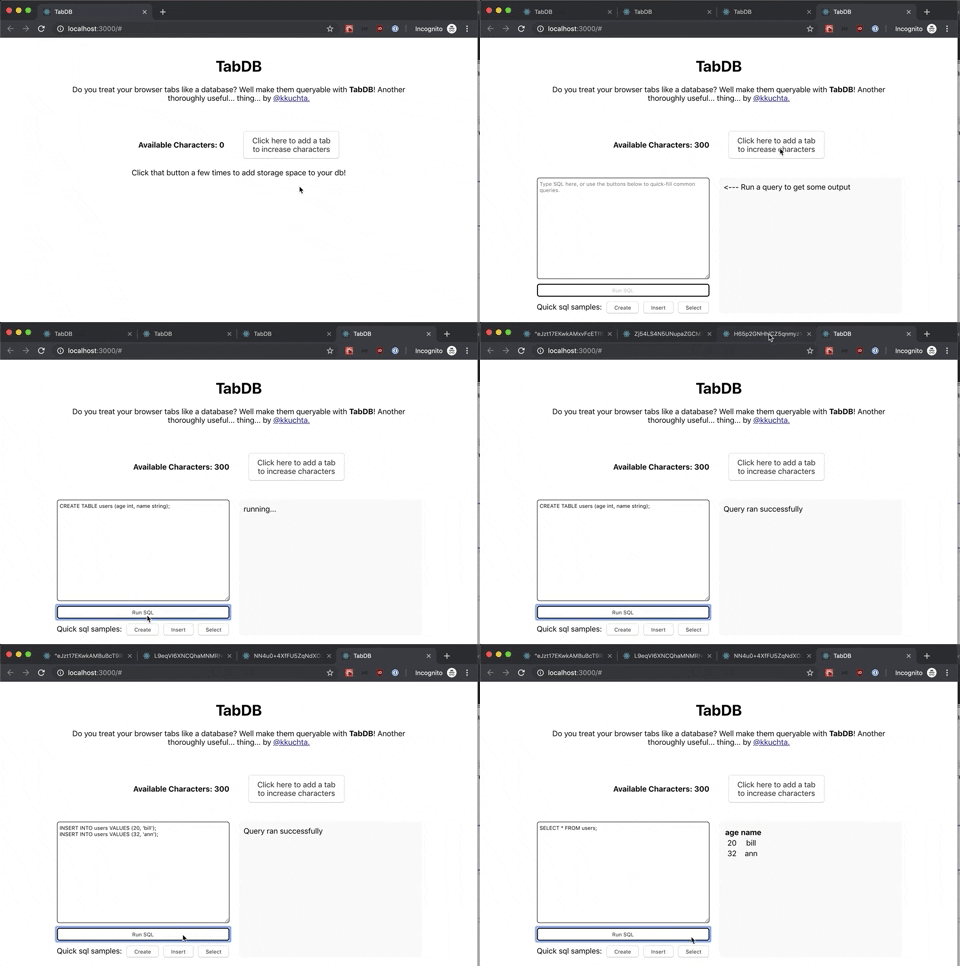
6 |
7 | This is an in-browser database that uses tab titles for storage.
8 |
9 | Every time you run an SQL query, it grabs all the data stored in the neighboring tabs' titles, concatenates it, unzips it, and loads it into an in-memory sqlite database. It then runs the command, dumps the db state to a string, zips it up, and spreads it out across the available tabs.
10 |
11 | Play with it live at [tabdb.io](https://tabdb.io).
12 |
13 | [](http://www.poorlydrawnlines.com/comic/an-idea/)
14 |
15 | The code is awful- I hacked together the first version (which was ugly enough), then glued it onto typescript + react for fun. I didn't go so far as to properly integrate the raw JS logic with react (eg via redux or something), so it's a mishmash of global variables, commented-out code, and TODO comments. If this were production code, I'd deserve to be tarred and feathered. Since it's just a silly one-off thing, I hope you won't judge it too harshly.
16 |
--------------------------------------------------------------------------------
/src/components/SQLControl.css:
--------------------------------------------------------------------------------
1 | .SQLControl {
2 | /*border: 1px solid green;*/
3 | display: flex;
4 | padding: 20px;
5 | }
6 | .SQLControl * {
7 | display: flex;
8 | }
9 |
10 | .SQLControl button {
11 | border-radius: 5px;
12 | justify-content: center;
13 | }
14 | .input {
15 | flex-direction: column;
16 | width: 50%;
17 | margin-right: 10px;
18 | flex-grow: 1;
19 | flex-basis: 0;
20 | }
21 |
22 | .queryOutput {
23 | margin-left: 10px;
24 | background-color: #f5f5f5;
25 | border-radius: 5px;
26 | padding: 10px;
27 | overflow: scroll;
28 | flex-grow: 1;
29 | flex-basis: 0;
30 | }
31 | .queryOutput table {
32 | display: table;
33 | }
34 | .queryOutput td {
35 | display: table-cell;
36 | }
37 | .queryOutput tr {
38 | display: table-row;
39 | }
40 | .queryOutput th {
41 | display: table-cell;
42 | }
43 | .queryOutput thead {
44 | display: table-header-group;
45 | }
46 | .queryOutput tbody {
47 | display: table-row-group;
48 | }
49 |
50 | textArea {
51 | height: 200px;
52 | padding: 5px;
53 | border-radius: 5px;
54 | }
55 |
56 | .runSQL {
57 | margin-top: 10px;
58 | padding: 5px;
59 | border: 2px solid black;
60 | }
61 |
62 | .prefillButtons {
63 | margin-top: 10px;
64 | justify-content: space-between;
65 | align-items: baseline;
66 | }
67 | .prefillButtons button {
68 | padding: 5px 15px;
69 | }
70 |
71 | @media (max-width: 600px) {
72 | .prefillButtons {
73 | flex-direction: column;
74 | }
75 | .prefillButtons button {
76 | margin-top: 10px;
77 | width:100%;
78 | }
79 | }
80 |
--------------------------------------------------------------------------------
/src/lib/TabManager.ts:
--------------------------------------------------------------------------------
1 | const MAX_TAB_CHARS = 100;
2 |
3 | // Reads and writes data from a list of tabs
4 | export default class TabManager {
5 | tabs: Window[]
6 | constructor(tabs = []) {
7 | this.tabs = tabs;
8 | }
9 |
10 | setTabs(tabs: Window[]) {
11 | this.tabs = tabs;
12 | }
13 | canFit(data: any) {
14 | return this.requiredCharacters(data) < this.availableCharacters();
15 | }
16 |
17 | requiredCharacters(data: any) { return JSON.stringify(data).length }
18 | availableCharacters() { return this.tabs.length * MAX_TAB_CHARS }
19 |
20 | write(data: any) {
21 | let dataString = JSON.stringify(data);
22 |
23 | // Split data into to N chunks, as evenly as possible.
24 | const length = dataString.length;
25 | const chunks = this.tabs.length;
26 | const shortChunkSize = Math.floor(length / chunks);
27 | let longChunks = length % chunks;
28 | for (let i = 0; i < chunks; i++) {
29 | const chunkLength = longChunks > 0 ? shortChunkSize + 1 : shortChunkSize;
30 | longChunks--;
31 | const chunk = dataString.slice(0, chunkLength);
32 | dataString = dataString.slice(chunkLength);
33 | this.tabs[i].document.title = chunk === "" ? document.title : chunk;
34 | }
35 | }
36 |
37 | read() {
38 | // Filter out empty dbs
39 | const dataStrings = this.tabs
40 | .filter((tab) => tab.document.title !== window.document.title)
41 | .map((tab) => tab.document.title);
42 | if (dataStrings.length === 0) { return null }
43 | const json = dataStrings.join('');
44 | console.log("json=", json);
45 | return JSON.parse(json);
46 | }
47 |
48 | }
49 |
--------------------------------------------------------------------------------
/public/index.html:
--------------------------------------------------------------------------------
1 |
2 |
3 |
4 |
5 |
6 |
7 |
8 |
12 |
13 |
22 | TabDB
23 |
24 |
25 |
26 |
27 |
37 |
38 |
39 |
--------------------------------------------------------------------------------
/src/logo.svg:
--------------------------------------------------------------------------------
1 |
8 |
--------------------------------------------------------------------------------
/src/lib/RootWindowManager.ts:
--------------------------------------------------------------------------------
1 | import TabManager from './TabManager'
2 | import Database, { QueryResult } from './Database'
3 | import DataWindowManager from './DataWindowManager'
4 |
5 | const WINDOW_NAME_PREFIX = "tab_db_data_window_";
6 | export const WINDOW_ROOT_NAME = WINDOW_NAME_PREFIX + 'root';
7 |
8 | export default class RootWindowManager{
9 | tabManager: any;
10 | database: any;
11 | tabs: any;
12 | constructor(tabList = [] as Window[]) {
13 | console.log("constructing with ", tabList);
14 | this.tabManager = new TabManager();
15 | this.database = new Database(this.tabManager);
16 | this.setTabList(tabList);
17 | }
18 | run() {
19 | console.log("running");
20 | if (this.tabs == null) this.setTabList([]);
21 | }
22 | submitSQL(sql: string): QueryResult {
23 | //const sqlArea = document.getElementById('sqlTextArea') as HTMLTextAreaElement
24 | let result: QueryResult;
25 | try {
26 | result = this.database.runQuery(sql);
27 | } catch(err) {
28 | result = { error: err.message };
29 | }
30 | //if (result.rows == 0) return {};
31 | //let resultText = result[0].columns.join("\t") + "\n";
32 | //resultText += result[0].values.map((row: string[]) => row.join("\t")).join("\n");
33 | //console.log(resultText);
34 |
35 | //document.getElementById('sqlTextArea').value = resultText;
36 |
37 | console.log("result=", result);
38 | return result;
39 | }
40 | recoverTabs() {
41 | console.log("recovering tabs");
42 | let win = window;
43 | const recoveredTabs = [];
44 | while((win = win.opener) != null) {
45 | console.log("win = ", win.name);
46 | recoveredTabs.unshift(win);
47 | }
48 | console.log("recovered ", recoveredTabs);
49 | this.setTabList(recoveredTabs);
50 | //this.tabs = recoveredTabs;
51 | }
52 | setTabList(tabList: Window[]) {
53 | this.tabs = tabList;
54 | this.tabManager.setTabs(tabList);
55 | }
56 |
57 | createNewTab() {
58 | console.log("this.tabs = ", this.tabs);
59 | const newWindow = window.open('#', WINDOW_NAME_PREFIX + this.tabs.length);
60 | if (newWindow == null) {
61 | alert("Couldn't open new tab for some reason?");
62 | return;
63 | }
64 |
65 | const sqlTextArea = document.getElementsByTagName('textarea')[0]
66 | const sqlTextAreaText = sqlTextArea == null ? '' : sqlTextArea.value;
67 |
68 | // TODO: handle tab closing - remove from tabarray and update stats
69 | // TODO: do we actually need to pass tabs here? Could just always recover
70 | // tabs.
71 | newWindow.lastWindowData = {
72 | textAreaText: sqlTextAreaText,
73 | }
74 | window.name = newWindow.name;
75 | newWindow.name = WINDOW_ROOT_NAME;
76 | // This window is now a data window.
77 | (window.windowManager = new DataWindowManager()).run();
78 | }
79 | }
80 |
--------------------------------------------------------------------------------
/src/components/FAQ.tsx:
--------------------------------------------------------------------------------
1 | import React from 'react';
2 | import './FAQ.css';
3 |
4 | class FAQ extends React.Component {
5 | state = {
6 | showing: false
7 | }
8 | toggleVisibility = () => {
9 | this.setState({ showing: !this.state.showing });
10 | }
11 | renderFAQ() {
12 | return (
13 |
14 |
15 | How dare you?
16 | I guess that is technically a question I get frequently.
17 |
18 |
19 | Ok, what's it actually doing?
20 | Every time you run an SQL query, it grabs all the data stored in the neighboring tabs' titles, concatenates it, unzips it, and loads it into an in-memory sqlite database. It then runs the command, dumps the db state to a string, zips it up, and spreads it out across the available tabs.
21 |
27 | Ok, so why is this a good idea?
28 | A what?
29 |
30 |
31 | Like, when would you use this in real life?
32 | I don't understand the question.
33 |
34 |
35 | Ok, so how'd you open tabs in the background reliably?
36 | I didn't. Browsers *really* frown on pop-unders. Instead, we open a new tab in the foreground, copy over the UI to it, then ditch the UI to the current tab (which is now in the background).
37 |
38 |
39 | How are the tabs communicating with each other?
40 | The "root" tab was always opened by the most recent "data" tab, so the root tab can grab a reference to that tab with window.opener. Likewise, we can get the next data tab with window.opener.opener, and so on to get all data tabs.
41 |
42 |
43 | I think I actually have a legitimate use case for this
44 | Please reevaluate your life choices.
45 |
46 |
47 | Who's responsible for this nonsense?
48 | Blame @kkuchta. The source code (not appropriate for small children) is on Github.
49 |