├── cover.jpg
├── author_icon.png
├── package_icon.png
├── src
├── index.ts
├── developer_template.tsx
├── setting.tsx
└── docx_generator.tsx
├── widget.config.json
├── .gitignore
├── package.json
├── LICENSE
├── tsconfig.json
└── README.md
/cover.jpg:
--------------------------------------------------------------------------------
https://raw.githubusercontent.com/kwp-lab/vikadata-widget-docx-generator/HEAD/cover.jpg
--------------------------------------------------------------------------------
/author_icon.png:
--------------------------------------------------------------------------------
https://raw.githubusercontent.com/kwp-lab/vikadata-widget-docx-generator/HEAD/author_icon.png
--------------------------------------------------------------------------------
/package_icon.png:
--------------------------------------------------------------------------------
https://raw.githubusercontent.com/kwp-lab/vikadata-widget-docx-generator/HEAD/package_icon.png
--------------------------------------------------------------------------------
/src/index.ts:
--------------------------------------------------------------------------------
1 | import { initializeWidget } from '@vikadata/widget-sdk';
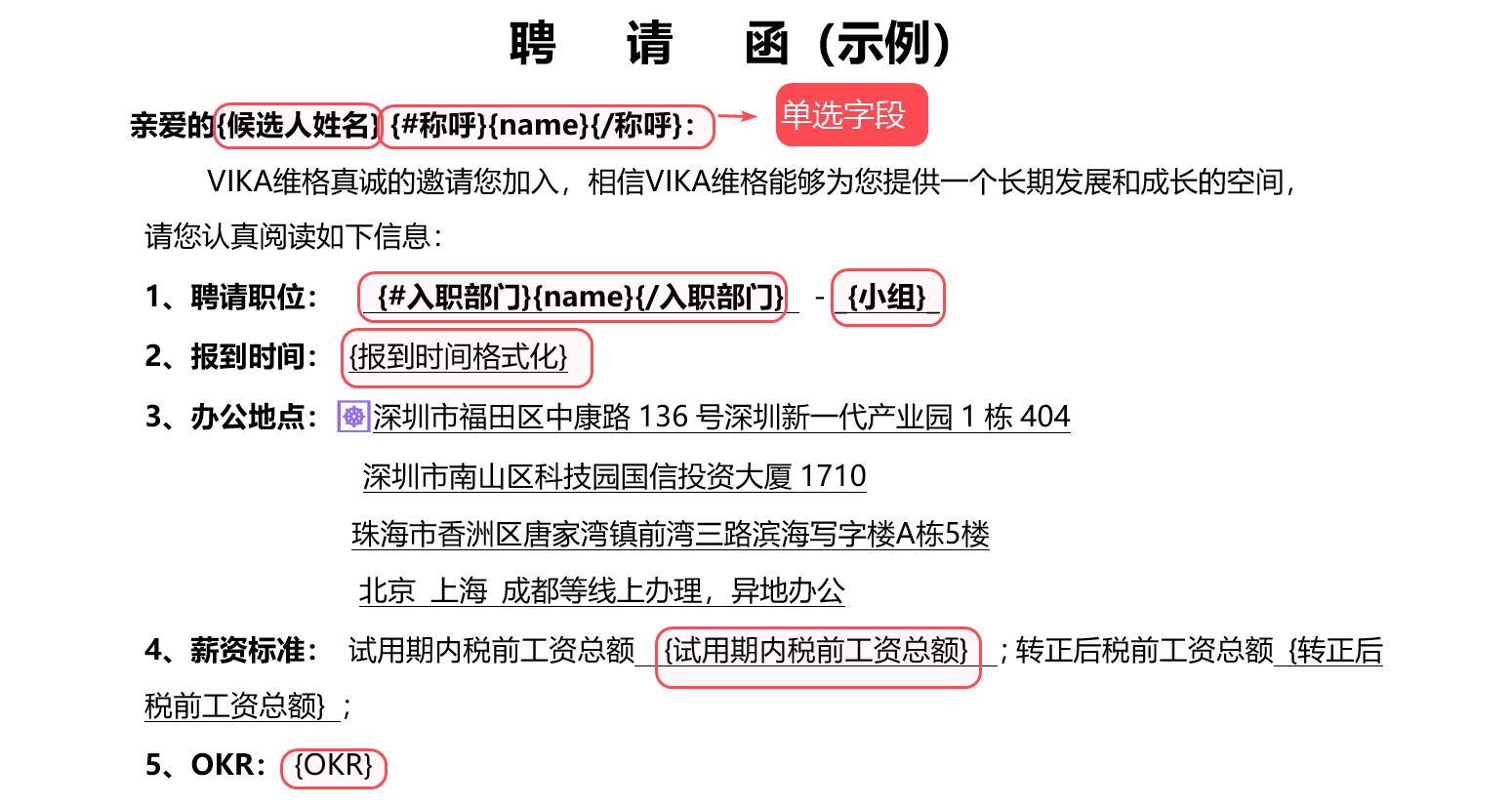
2 | import { WidgetDeveloperTemplate } from './developer_template';
3 |
4 | initializeWidget(WidgetDeveloperTemplate, process.env.WIDGET_PACKAGE_ID!);
5 |
--------------------------------------------------------------------------------
/widget.config.json:
--------------------------------------------------------------------------------
1 | {
2 | "packageId": "wpksQCY82kXTP",
3 | "spaceId": "spcBcZN1UZZJz",
4 | "entry": "./src/index.ts",
5 | "name": {
6 | "zh-CN": "Word文档生成器",
7 | "en-US": "Word Document Generator"
8 | },
9 | "icon": "./package_icon.png",
10 | "cover": "./cover.jpg",
11 | "authorName": "vika实验室",
12 | "authorIcon": "./author_icon.png",
13 | "authorLink": "vika.cn",
14 | "authorEmail": "panjiawen@vikadata.com",
15 | "description": {
16 | "zh-CN": "根据docx模板,一键批量填充字段并合成新的word文档",
17 | "en-US": "Create docx file with specified fields"
18 | },
19 | "website": "https://bbs.vika.cn/article/111",
20 | "globalPackageId": "wpkIXaCPTCI8A",
21 | "sandbox": true
22 | }
--------------------------------------------------------------------------------
/src/developer_template.tsx:
--------------------------------------------------------------------------------
1 | import React from 'react';
2 | import { useDatasheet } from '@vikadata/widget-sdk';
3 | import { DocxGenerator } from './docx_generator';
4 | import { Setting } from './setting';
5 |
6 | export const WidgetDeveloperTemplate: React.FC = () => {
7 |
8 | const datasheet = useDatasheet()
9 |
10 | // 校验用户是否有新增记录的权限,从而判断用户对表格是否只读权限
11 | const permission = datasheet?.checkPermissionsForAddRecord()
12 |
13 | return (
14 |
15 |
16 |
17 |
18 | {permission?.acceptable &&
}
19 |
20 |
21 | );
22 | };
23 |
--------------------------------------------------------------------------------
/.gitignore:
--------------------------------------------------------------------------------
1 | # See https://help.github.com/articles/ignoring-files/ for more about ignoring files.
2 | .idea
3 |
4 | dist
5 | .doc
6 | .build.env
7 |
8 | /blueprint-templates
9 |
10 | # dependencies
11 | **/node_modules
12 | /.pnp
13 | .pnp.js
14 |
15 | # testing
16 | /packages/*/coverage
17 |
18 | # production
19 | /packages/*/build
20 |
21 | # misc
22 | .DS_Store
23 | .env.local
24 | .env.development.local
25 | .env.test.local
26 | .env.production.local
27 |
28 | npm-debug.log*
29 | yarn-debug.log*
30 | yarn-error.log*
31 | lerna-debug.log*
32 |
33 | # yarn cache
34 | .yarn/cache/
35 | .yarn/build-state.yml
36 | .yarn/install-state.gz
37 | .yarn/unplugged
38 |
39 | # vika yml will store your api token, so you need to ignore it
40 | .vika.yml*
41 |
42 | # ignore packed files
43 | *.zip
44 |
45 | yarn.lock
46 | widget.config_*
47 | package-lock.json
48 | /.vika_*
49 | widget.config.json
50 |
--------------------------------------------------------------------------------
/package.json:
--------------------------------------------------------------------------------
1 | {
2 | "version": "0.1.22",
3 | "description": "a vika widget",
4 | "engines": {
5 | "node": ">=8.x"
6 | },
7 | "keywords": [
8 | "vika",
9 | "widgets",
10 | "vika widgets"
11 | ],
12 | "main": "./dist/index",
13 | "module": "./dist/index",
14 | "types": "./dist/index.d.ts",
15 | "files": [
16 | "dist"
17 | ],
18 | "license": "MIT",
19 | "scripts": {
20 | "start": "widget-cli start",
21 | "release": "widget-cli release"
22 | },
23 | "peerDependencies": {
24 | "react": "*",
25 | "react-dom": "*"
26 | },
27 | "dependencies": {
28 | "@types/react": "^16.9.43",
29 | "@types/react-dom": "^16.9.8",
30 | "@vikadata/components": "0.0.4",
31 | "@vikadata/icons": "0.0.1",
32 | "@vikadata/widget-sdk": "0.0.7",
33 | "docxtemplater": "^3.23.2",
34 | "file-saver": "^2.0.5",
35 | "pizzip": "^3.1.1",
36 | "react-hotkeys-hook": "^3.4.7",
37 | "typescript": "4.1.2"
38 | },
39 | "devDependencies": {
40 | "@types/node": "^16.4.10"
41 | }
42 | }
43 |
--------------------------------------------------------------------------------
/LICENSE:
--------------------------------------------------------------------------------
1 | MIT License
2 |
3 | Copyright (c) 2022 KelvinP
4 |
5 | Permission is hereby granted, free of charge, to any person obtaining a copy
6 | of this software and associated documentation files (the "Software"), to deal
7 | in the Software without restriction, including without limitation the rights
8 | to use, copy, modify, merge, publish, distribute, sublicense, and/or sell
9 | copies of the Software, and to permit persons to whom the Software is
10 | furnished to do so, subject to the following conditions:
11 |
12 | The above copyright notice and this permission notice shall be included in all
13 | copies or substantial portions of the Software.
14 |
15 | THE SOFTWARE IS PROVIDED "AS IS", WITHOUT WARRANTY OF ANY KIND, EXPRESS OR
16 | IMPLIED, INCLUDING BUT NOT LIMITED TO THE WARRANTIES OF MERCHANTABILITY,
17 | FITNESS FOR A PARTICULAR PURPOSE AND NONINFRINGEMENT. IN NO EVENT SHALL THE
18 | AUTHORS OR COPYRIGHT HOLDERS BE LIABLE FOR ANY CLAIM, DAMAGES OR OTHER
19 | LIABILITY, WHETHER IN AN ACTION OF CONTRACT, TORT OR OTHERWISE, ARISING FROM,
20 | OUT OF OR IN CONNECTION WITH THE SOFTWARE OR THE USE OR OTHER DEALINGS IN THE
21 | SOFTWARE.
22 |
--------------------------------------------------------------------------------
/tsconfig.json:
--------------------------------------------------------------------------------
1 | {
2 | "compilerOptions": {
3 | "target": "ES5",
4 | "skipLibCheck": true,
5 | "esModuleInterop": true,
6 | "allowSyntheticDefaultImports": true,
7 | "strict": true,
8 | "declaration": true,
9 | "declarationMap": true,
10 | "forceConsistentCasingInFileNames": true,
11 | "strictNullChecks": true,
12 | "noImplicitReturns": true,
13 | "noImplicitThis": true,
14 | "noImplicitAny": false,
15 | "suppressImplicitAnyIndexErrors": true,
16 | "noUnusedLocals": true,
17 | "downlevelIteration": true,
18 | "experimentalDecorators": true,
19 | "emitDecoratorMetadata": true,
20 | "module": "ES6",
21 | "moduleResolution": "node",
22 | "resolveJsonModule": true,
23 | "jsx": "react",
24 | "outDir": "dist",
25 | "baseUrl": "src",
26 | "lib": ["dom", "dom.iterable", "esnext"],
27 | "plugins": [
28 | { "transform": "@zerollup/ts-transform-paths" }, // 修复绝对路径引用,在 build 成 js 后,没有转化成相对路径。
29 | {
30 | "transform": "typescript-plugin-styled-components",
31 | "type": "config"
32 | }
33 | ]
34 | },
35 | "include": ["./"],
36 | "exclude": [
37 | "node_modules",
38 | ]
39 | }
40 |
--------------------------------------------------------------------------------
/src/setting.tsx:
--------------------------------------------------------------------------------
1 | import React from 'react';
2 | import { useSettingsButton, useCloudStorage, FieldPicker, useActiveViewId, useFields, useViewIds, FieldType } from '@vikadata/widget-sdk';
3 | import { ISwitchProps, Switch } from '@vikadata/components';
4 | import { InformationSmallOutlined } from '@vikadata/icons';
5 |
6 | export const Setting: React.FC = () => {
7 | const [isShowingSettings] = useSettingsButton()
8 |
9 | const viewIds = useViewIds()
10 | const activeViewId = useActiveViewId()
11 | const fields = useFields(activeViewId?activeViewId:viewIds[0])
12 | const [fieldId, setFieldId] = useCloudStorage('selectedAttachmentFieldId', fields[0].id)
13 | const [keepFormat, setKeepFormat] = useCloudStorage('keepFormat', true)
14 |
15 | const checkAndUpdateSelectedAttachmentField = function(selectedFieldId:string){
16 | fields.forEach(field => {
17 | if(field.id == selectedFieldId){
18 | if(field.type == 'Attachment'){
19 | setFieldId(selectedFieldId)
20 | }else{
21 | alert("请选择一个附件类型的字段!")
22 | }
23 | }
24 | })
25 | }
26 |
27 | const keepFormatSwitchProps:ISwitchProps = {
28 | onChange: (value) => setKeepFormat(value)
29 | }
30 |
31 | if(keepFormat) keepFormatSwitchProps.checked = true;
32 |
33 | return isShowingSettings ? (
34 |
35 |
41 |
42 |
43 |
44 | checkAndUpdateSelectedAttachmentField(option.value)}
48 | allowedTypes={[FieldType.Attachment]}
49 | />
50 |
51 |
52 |
53 |
54 |
55 |
56 |
64 | 输出到word文档里的内容,会保持跟表格里看到的一致,以货币类型举例:
65 | 开启前:1200
66 | 开启后:"$1,200.00"
67 | 本配置项仅对货币,数字,百分比,日期列类型生效
68 |
69 |
70 |
71 |
72 | ) : null;
73 | };
74 |
--------------------------------------------------------------------------------
/README.md:
--------------------------------------------------------------------------------
1 | # 维格小程序 - Word文档生成器
2 |
3 | 根据提供的docx模板,一键批量填充字段并合成新的word文档
4 |
5 | 
6 |
7 |
8 | ## 🎨 介绍
9 |
10 | 本小程序可以将每一行数据填充到 Word 模板里面,从而形成一份新的 Word 文档。同时选中多行记录,即可实现批量导出 Word 文档。
11 |
12 | 例如一份《录取通知书》。在日常工作中,公司HR一天可能会发送多份《录取通知书》,里面的格式都是一样的,只是“岗位”,“部门”,“候选人姓名”,“通知日期”等等这些信息要素会有所不同,但HR却需要手工重复性地复制粘贴、复制粘贴...
13 |
14 | 使用本小程序后,只需要提前制作一次 Word 模板,往后的工作就只需要点一点手指头,小程序来帮你填充关键信息要素,并生成新的《录取通知书》!
15 |
16 |
17 | ## 🚀 快速上手(现成模板)
18 |
19 | 为了让大家可以快速体验到这款小程序的用途,这里已经提前做好了一个维格表模板,包含两个例子,浏览器打开即可体验:
20 |
21 | > 体验地址:https://vika.cn/share/shrws2voRW3hGRYffBCbc
22 |
23 |
24 |
25 | **如何修改模板**
26 |
27 | “聘请函模板”是一个附件字段,将单元格里的模板文件下载到本地,然后用word打开并进行编辑,编辑完成后重新上传覆盖单元格里的旧模板即可。
28 |
29 | 下图是《入职邀请函》模板里的内容节选。红色高亮的花括号是表格里的字段名称,表示将表格里的对应字段值填充到当前位置。有用过维格表智能公式的用户应该比较好理解。
30 |
31 | 
32 |
33 |
34 |
35 | **读取「神奇关联」字段的值**
36 |
37 | 神奇关联需要用“开始标签”和“结束标签”组合起来读取。
38 |
39 | 开始标签:{#字段名字}
40 |
41 | 结束标签:{/字段的名字}
42 |
43 |
44 |
45 | 在开始标签和结束标标签中间,需要使用如下两个标签读取值:
46 |
47 | 循环读取关联记录的标题名称: {#字段名字}{title}{/字段的名字}
48 |
49 | 循环读取关联记录的id:{#字段名字}{recordId}{/字段的名字}
50 |
51 |
52 |
53 | **读取「神奇引用」字段的值**
54 |
55 | 在word模板里读取「神奇引用」字段的方式与「神奇关联」类似。但由于被引用的字段类型是多种多样的,具体如何适配,请通过console打印调试。
56 |
57 |
58 |
59 |
60 | **成员字段如何取值?**
61 |
62 | 成员字段的获取方式跟「神奇关联」类似:
63 |
64 | 循环读取成员字段的成员姓名 {#字段名字}{name}{/字段的名字}
65 |
66 |
67 |
68 | **单/多选字段如何取值?**
69 |
70 | 单选字段直接用括号即可取值,例如:```{类目}```
71 | 多选字段的取值方式,跟成员字段略有不同,```{#字段名字}{.}{/字段的名字}```
72 |
73 |
74 | ## 🙋♂️ 常见问题
75 |
76 | **word模板修改完毕后需要重新上传,是每一行都要上传一次吗?**
77 |
78 | 是的。一行数据代表着独立的一份word文档,需要单独配置一个模板。tips:你可以拖动单元格右下角的“把手(小方块)”,进行快速的填充模板附件。
79 |
80 |
81 |
82 | **如何将「word文档生成器」小程序添加到自己空间站的其他表格里?**
83 |
84 | 「word文档生成器」已经上架到小程序中心,你可以直接安装。
85 |
86 |
87 |
88 | **使用Mac系统的Safari浏览器访问小程序,无法进行word文件的批量下载?**
89 |
90 | safari的浏览器拦截了,暂不支持进行批量下载,只能一个一个下载。在Mac系统里维格表客户端同样存在这个问题。如果需要批量下载,请使用Chrome或者Edge浏览器。
91 |
92 |
93 |
94 | ## 🥂 讨论交流
95 |
96 | 在日常使用中或者二次开发过程中有疑问或者新想法,欢迎前往官方社区的小程序主页留言评论给我~
97 |
98 | 👉 [点我跳转「Word文档生成器」的主页](https://bbs.vika.cn/article/111)
99 |
100 |
101 |
102 | ## 🎯 更新日志
103 | v0.1.20 - 2022年6月30日
104 | - 【新增】批量导出功能升级,支持将多个docx文件打包成一个zip文件再下载,突破浏览器单次最多只可下载10个附件的限制
105 |
106 | v0.1.19 - 2022年5月25日
107 | - 【新增】支持维格表深色主题
108 |
109 | v0.1.16 - 2022年4月29日
110 | - 【优化】增加空文件的判断提醒。
111 |
112 | v0.1.14 - 2022年4月28日
113 | - 【调整】简化单选字段的取值方式,改为跟普通文本字段一样的语法```{字段名称}```
114 |
115 | v0.1.13 - 2022年4月27日
116 | - 【修复】无法读取多选字段内容的BUG
117 |
118 | v0.1.10 - 2022年3月22日
119 | - 【优化】增加“教程”超链接
120 | - 【优化】调整部分交互逻辑
121 | - 【优化】加上docx文件格式校验
122 |
123 | v0.1.7 - 2022年2月21日
124 | - 【新增】条件标签 \$isFirst,用于判断当前循环项是否数组的第一个元素,如果“是”,返回True,格式为 ```{#$isFirst}...{/$isFirst}```
125 | - 【新增】条件标签 \$isLast,用于判断当前循环项是否数组的最后一个元素,如果“是”,返回True,格式为 ```{#$isLast}...{/$isLast}```
126 | - 【新增】三元表达式的标签语法,格式为 ```{gender==male ? 男 : 女}```
127 | - 【新增】条件标签函数 find(), 用于查找数组(只支持一维数组)中是否存在某个元素,找到对应元素返回True,反之返回False,格式为 ```{#fieldName|find(xxx)}...{/}```,注意"|"两边不能有空格
128 |
129 | v0.1.5 - 2022年1月12日
130 | - 【修复】loop index无法正常显示的问题
131 |
132 | v0.1.4 - 2022年1月11日
133 | - 【修复】修复因为useEffect的参数相同导致无法刷新record的问题
134 |
135 | v0.1.3 - 2022年1月11日
136 | - 【调整】鼠标点击空白地方后,仍会保留上次已选中的记录(如果没有选中记录,则无法导出word)
137 |
138 | v0.1.2 - 2021年12月29日
139 | - 【优化】更新icon远程图片
140 | - 【调整】小程序的背景颜色
141 |
142 | v0.1.0 - 2021年12月16日
143 |
144 | - 【新增】发布首个版本,当用户在维格视图下选中任意行的时候可以快速导入行数据并依据字段名(```{字段名}```)一一对应替换,生成word文档。
145 |
146 |
147 |
148 | ## 😍 更多有趣的维格小程序
149 | 如果你喜欢学习、折腾各种维格小程序,可以看看维格官方的宝藏库,里面收集有大量的小程序项目、vika API项目:
150 |
151 | 👉 [awesome-vikadata](https://github.com/vikadata/awesome-vikadata)
152 |
--------------------------------------------------------------------------------
/src/docx_generator.tsx:
--------------------------------------------------------------------------------
1 | import { useRecords, useFields, useActiveViewId, useSelection, useCloudStorage, useSettingsButton, useViewport, useField, Field, Record, IAttachmentValue, usePrimaryField, FieldType, useDatasheet } from '@vikadata/widget-sdk';
2 | import { Button, IButtonProps } from '@vikadata/components';
3 | import { InformationSmallOutlined } from '@vikadata/icons';
4 | import React, { useEffect, useState } from 'react';
5 | import Docxtemplater from 'docxtemplater';
6 | import {DXT} from 'docxtemplater';
7 | import PizZip from 'pizzip';
8 | import PizZipUtils from 'pizzip/utils/index.js';
9 | import { saveAs } from 'file-saver';
10 | import { useHotkeys } from 'react-hotkeys-hook'
11 |
12 |
13 | const userToken = ""
14 |
15 | /**
16 | * 通过URL读取文件内容
17 | */
18 | function loadFile(url: String, callback) {
19 | PizZipUtils.getBinaryContent(url, callback);
20 | }
21 |
22 | function replaceErrors(key: String, value: any) {
23 | if (value instanceof Error) {
24 | return Object.getOwnPropertyNames(value).reduce(function (
25 | error,
26 | key
27 | ) {
28 | error[key] = value[key];
29 | return error;
30 | },
31 | {});
32 | }
33 | return value;
34 | }
35 |
36 | /**
37 | * 将 Blob 文件对象作为附件上传到指定的表格
38 | * @param activeDatasheetId 当前表格的ID
39 | * @param fileBlob 待上传的文件对象
40 | */
41 | async function uploadAttachment(activeDatasheetId: String, fileBlob: Blob) {
42 | console.log("uploadAttachment", activeDatasheetId)
43 |
44 | const url = `https://api.vika.cn/fusion/v1/datasheets/${activeDatasheetId}/attachments`
45 | let formData = new FormData()
46 | let file = new File([fileBlob], "tag-example.docx", { "type": "'application/vnd.openxmlformats-officedocument.wordprocessingml.document'" })
47 | formData.append('file', file);
48 |
49 | return await fetch(url, {
50 | method: "POST",
51 | body: formData,
52 | headers: {
53 | 'Authorization': `Bearer ${userToken}`
54 | }
55 | }).then(res => res.json())
56 | }
57 |
58 | /**
59 | * 文档生成的异常处理
60 | * @param error
61 | */
62 | function throwError(error: any) {
63 | console.log("模板解析错误", JSON.stringify({ error: error }, replaceErrors));
64 |
65 | if (error.properties && error.properties.errors instanceof Array) {
66 | const errorMessages = error.properties.errors
67 | .map(function (error) {
68 | return error.properties.explanation;
69 | })
70 | .join('\n');
71 | console.log('errorMessages', errorMessages);
72 | }
73 | throw error;
74 | }
75 |
76 | /**
77 | * 遍历已选择的多条 record ,从中获取数据并生成 word 文档
78 | */
79 | async function generateDocuments(selectedRecords: Record[], fields: Field[], selectedAttachmentField: Field, primaryField: Field, keepFormat: boolean) {
80 | const outputZip = new PizZip();
81 |
82 | // 鼠标只选择了一行
83 | const single = selectedRecords.length>1 ? false : true;
84 | var outputs = []
85 |
86 | for (let index = 0; index < selectedRecords.length; index++) {
87 | const record = selectedRecords[index]
88 | const row = {}
89 | const filename = record.getCellValueString(primaryField.id) || "未命名"
90 |
91 | fields.forEach(field => {
92 | console.log({
93 | "name": field.name,
94 | "cellValue": record.getCellValue(field.id) || "",
95 | "cellValueString": record.getCellValueString(field.id) || ""
96 | })
97 |
98 | row[field.name] = record.getCellValue(field.id) || ""
99 |
100 | if (field.type == FieldType.MagicLink) {
101 | // TODO
102 | } else if (field.type == FieldType.MultiSelect) {
103 | row[field.name] = record.getCellValue(field.id) || []
104 | row[field.name] = row[field.name].map(item => {
105 | return item.name
106 | })
107 | } else if (field.type == FieldType.SingleSelect) {
108 | const selectOption = record.getCellValue(field.id)
109 | row[field.name] = selectOption ? selectOption.name : ""
110 | } else if (keepFormat && [FieldType.Number, FieldType.Currency, FieldType.Percent, FieldType.DateTime].includes(field.type)) {
111 | row[field.name] = record.getCellValueString(field.id) || ""
112 | }
113 | })
114 |
115 | const attachements = record.getCellValue(selectedAttachmentField.id)
116 | if (!attachements) {
117 | alert(`在指定的附件字段中找不到word模板,请上传。record:[${filename}]`)
118 | break
119 | }
120 | const attachmentName = attachements[0].name
121 |
122 | const prefix = attachmentName.substr(0, attachmentName.lastIndexOf("."))
123 | const suffix = attachmentName.substr(attachmentName.lastIndexOf(".")).toLowerCase()
124 |
125 | if(suffix !== ".docx"){
126 | alert(`只支持.docx格式的word模板(当前模板:${attachmentName})`)
127 | break
128 | }
129 |
130 | console.log({ row, attachements, prefix, suffix })
131 |
132 | if(attachements) {
133 | await generateDocument(row, attachements[0], prefix + "-" + filename, outputs)
134 | }
135 | }
136 |
137 | console.log("outputs", outputs)
138 | if(outputs.length>0){
139 | let existedFilenames:Array = []
140 | const outputFileName = !single ? `documents.zip` : (outputs[0] as any).filename + ".docx"
141 |
142 | if(!single){
143 | for (let index = 0; index < outputs.length; index++) {
144 | const docxItem:any = outputs[index];
145 | const uniqueFilename = getUniqueFilename(existedFilenames, docxItem.filename)
146 | existedFilenames.push(uniqueFilename)
147 | outputZip.file(uniqueFilename + ".docx", docxItem.content)
148 | }
149 | const content = outputZip.generate({ type: "blob" })
150 | saveAs(content, outputFileName)
151 | } else {
152 | const outputZip = new PizZip((outputs[0] as any).content)
153 | saveAs(outputZip.generate({ type: "blob" }), outputFileName)
154 | }
155 |
156 | }
157 |
158 | }
159 |
160 | const getUniqueFilename = (existedFilenames, newFilename) => {
161 | let targetFileName = newFilename
162 | if (existedFilenames.indexOf(newFilename)>-1) {
163 | for(var i=1; i<9999; i++){
164 | targetFileName = newFilename + "_" + i
165 | if (existedFilenames.indexOf(targetFileName) == -1) {
166 | break;
167 | }
168 | }
169 | }
170 | return targetFileName
171 | }
172 |
173 | /**
174 | * Docxtemplater 自定义标签解析器
175 | * @param tag 标签名称,eg: {产品名称}
176 | * @returns
177 | */
178 | const customParser = (tag) => {
179 | const isTernaryReg = new RegExp(/(.*)\?(.*)\:(.*)/)
180 |
181 | // 这是一个三元表达式
182 | const TernaryResult = isTernaryReg.exec(tag)
183 | var data1 = "";
184 | var data2 = "";
185 | if(TernaryResult !== null){
186 | tag = TernaryResult[1]
187 | data1 = TernaryResult[2]
188 | data2 = TernaryResult[3]
189 | }
190 |
191 | return {
192 | get(scope, context: DXT.ParserContext) {
193 | console.log({ tag, scope, context, TernaryResult })
194 |
195 | if (tag === ".") {
196 | return (typeof scope == "string") ? scope : JSON.stringify(scope)
197 | }
198 |
199 | if (["$index", "$序号"].includes(tag)) {
200 | const indexes = context.scopePathItem
201 | return indexes[indexes.length - 1] + 1
202 | } else if(tag === "$isLast"){
203 | const totalLength = context.scopePathLength[context.scopePathLength.length - 1]
204 | const index = context.scopePathItem[context.scopePathItem.length - 1]
205 | return index === totalLength - 1
206 |
207 | } else if(tag == "$isFirst"){
208 | const index = context.scopePathItem[context.scopePathItem.length - 1]
209 | return index === 0
210 |
211 | } else if(tag.match(/(.*)\|find\((.*)\)/) !== null) {
212 | let [, fieldName, valueToFind] = tag.match(/(.*)\|find\((.*)\)/)
213 | fieldName = fieldName.trim()
214 | valueToFind = valueToFind.trim()
215 | console.log("detect find()", [fieldName, valueToFind, scope])
216 | if(fieldName && valueToFind && scope[fieldName] && Array.isArray(scope[fieldName])){
217 | const result =scope[fieldName].find(arrayItem => {
218 | if(typeof arrayItem == "string"){
219 | return (arrayItem==valueToFind) ? true : false
220 | }
221 | return false
222 | })
223 | return result ? true : false
224 | }
225 | } else if( tag.indexOf("==")>0 ){
226 |
227 | let [leftVal, rightVal] = tag.split("==")
228 | leftVal = leftVal.trim()
229 | rightVal = rightVal.trim().replace(/(“|”|’|‘|"|')/g, '')
230 | console.log("比较", {tag, leftVal, rightVal, scopeLeftVal: scope[leftVal], TernaryResult})
231 | if(TernaryResult !== null){
232 | return (scope[leftVal] === rightVal) ? TernaryResult[2] : TernaryResult[3]
233 | }else{
234 | return (scope[leftVal] == rightVal) ? scope[leftVal] : ""
235 | }
236 | }
237 | return scope[tag]
238 | }
239 | }
240 | }
241 |
242 | /**
243 | * 调用第三方库,生成word文档并调起浏览器附件下载事件
244 | */
245 | async function generateDocument(row: any, selectedAttachment: IAttachmentValue, filename: string, outputs: any) {
246 | return new Promise((resolve, reject) => {
247 | loadFile(selectedAttachment.url, function (error, content: ArrayBuffer) {
248 | if (error) {
249 | throw error
250 | }
251 |
252 | if (0 == content.byteLength) {
253 | return alert("Word模板文件的内容为空,请按照教程语法提前填写。")
254 | }
255 |
256 | const zip = new PizZip(content)
257 |
258 | try {
259 |
260 | const doc = new Docxtemplater(zip, {
261 | paragraphLoop: true,
262 | linebreaks: true,
263 | parser: customParser,
264 | })
265 |
266 | try {
267 | doc.setData({...row}).render();
268 | } catch (error: any) {
269 | throwError(error)
270 | }
271 |
272 | const out = doc.getZip().generate({
273 | type: 'arraybuffer',
274 | mimeType:
275 | 'application/vnd.openxmlformats-officedocument.wordprocessingml.document'
276 | });
277 |
278 | outputs.push({
279 | "content": out,
280 | "filename": filename
281 | })
282 |
283 | //saveAs(out, filename + ".docx")
284 | resolve()
285 | } catch (error) {
286 | console.log("错误信息", error)
287 | alert(`文件 ${selectedAttachment.name} 的模板语法不正确,请检查`)
288 | reject()
289 | }
290 | })
291 | })
292 | }
293 |
294 | /**
295 | * 小程序展开状态下,显示 Readme 信息
296 | */
297 | function showReadmeInfo() {
298 | const wrapperStyle: React.CSSProperties = {
299 | width: "100%",
300 | padding: "10px 20px",
301 | display: "flex",
302 | alignItems: "center",
303 | height: "100%",
304 | justifyContent: "center",
305 | flexDirection: "column"
306 | }
307 |
308 | return (
309 |
310 |
不支持在小程序展开状态下导出word文档
311 |
318 |
319 | )
320 | }
321 |
322 | export const DocxGenerator: React.FC = () => {
323 | const { isFullscreen, toggleFullscreen } = useViewport()
324 | const [isShowingSettings, toggleSettings] = useSettingsButton()
325 |
326 | const activeViewId = useActiveViewId()
327 | const selection = useSelection()
328 | const selectionRecords = useRecords(activeViewId, { ids: selection?.recordIds })
329 | const fields = useFields(activeViewId)
330 | const primaryField = usePrimaryField() || fields[0]
331 |
332 | const datasheet = useDatasheet()
333 |
334 | // 校验用户是否有新增记录的权限,从而判断用户对表格是否只读权限
335 | const permission = datasheet?.checkPermissionsForAddRecord()
336 |
337 |
338 | // 读取配置
339 | const [keepFormat] = useCloudStorage('keepFormat', true)
340 | const [fieldId] = useCloudStorage('selectedAttachmentFieldId')
341 | const selectedAttachmentField = useField(fieldId)
342 |
343 | const [selectedRecords, setSelectedRecords] = useState([])
344 | const [processing, setProcessing] = useState(false)
345 |
346 | const recordIds = selectionRecords.map((record: Record)=>{
347 | return record.recordId
348 | }).join(",")
349 |
350 | console.log("selectionRecords", selectionRecords)
351 |
352 | useEffect(() => {
353 | console.log({selectionRecords})
354 | if(Array.isArray(selectionRecords) && selectionRecords.length>0){
355 | setSelectedRecords(selectionRecords)
356 | }
357 | }, [selectionRecords.length, recordIds])
358 |
359 | const openSettingArea = function () {
360 | if(permission?.acceptable){
361 | !isFullscreen && toggleFullscreen()
362 | !isShowingSettings && toggleSettings()
363 | }else{
364 | alert("抱歉,只读权限无法进行此操作")
365 | }
366 | }
367 |
368 | if (isFullscreen) {
369 | return showReadmeInfo()
370 | }
371 |
372 | const style1 = {
373 | display: 'flex',
374 | alignContent: 'center',
375 | justifyContent: 'center',
376 | alignItems: 'center',
377 | height: '100%'
378 | }
379 |
380 | const helpLink = (
381 |
382 |
383 | 教程
384 |
385 | )
386 |
387 | let btnProps:IButtonProps = {
388 | variant: "fill",
389 | color: "primary",
390 | size:"small"
391 | }
392 |
393 | if(processing) btnProps.disabled = true;
394 |
395 | return (
396 |
397 | {helpLink}
398 |
399 | {selectedAttachmentField &&
400 |
401 |
408 |

409 |
410 |
411 |
412 | {(selectedRecords.length > 0) &&
已选中 {selectedRecords.length} 条记录
}
413 |
414 |
415 |
416 | {
417 | (selectedRecords.length > 0) ?
418 | :
428 | "请点击表格任意单元格"
429 | }
430 |
431 |
432 | }
433 |
434 | {!selectedAttachmentField &&
435 |
436 |
443 |

444 |
445 |
请设置一个存储word模板的附件字段
446 |
447 |
448 |
449 |
450 |
451 | }
452 |
453 | );
454 | };
455 |
--------------------------------------------------------------------------------