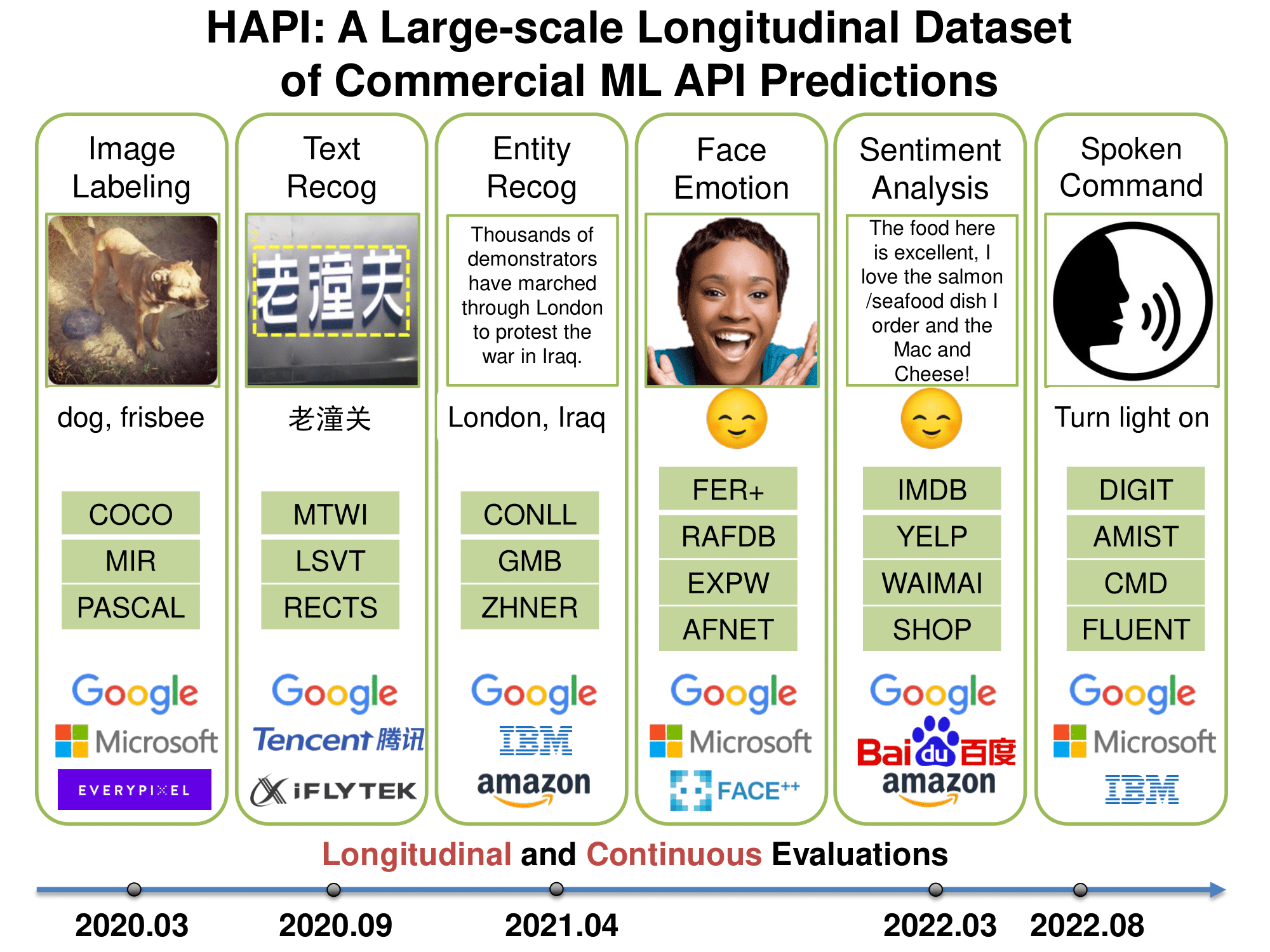
27 |
28 | History of APIs (HAPI) is a large-scale, longitudinal database of commercial ML API predictions. It contains 1.7 million predictions collected from 2020 to 2022 and spanning APIs from Amazon, Google, IBM, and Microsoft. The database include diverse machine learning tasks including image tagging, speech recognition and text mining.
29 |
30 |
31 |
32 | ## ⚡️ Quickstart
33 | We provide a lightweight python package for getting started with HAPI.
34 |
35 | Read the guide below or follow along in Google Colab:
36 |
37 | [](https://colab.research.google.com/github/lchen001/HAPI/blob/main/examples/01_hapi_intro.ipynb)
38 |
39 | ```bash
40 | pip install "hapi @ git+https://github.com/lchen001/hapi@main"
41 | ```
42 |
43 | Import the library and download the data, optionally specifying the directory for the
44 | the download. If the directory is not specified, the data will be downloaded to `~/.hapi`.
45 |
46 |
47 | ```python
48 | >> import hapi
49 |
50 | >> hapi.config.data_dir = "/path/to/data/dir"
51 |
52 | >> hapi.download()
53 | ```
54 |
55 | > You can permanently set the data directory by adding the variable `HAPI_DATA_DIR` to your environment.
56 |
57 | Once we've downloaded the database, we can list the available APIs, datasets, and tasks with `hapi.summary()`. This returns a [Pandas DataFrame](https://pandas.pydata.org/pandas-docs/stable/reference/api/pandas.DataFrame.html) with columns `task, dataset, api, date, path, cost_per_10k`.
58 | ```python
59 | >> df = hapi.summary()
60 | ```
61 |
62 | To load the predictions into memory we use `hapi.get_predictions()`. The keyword arguments allow us to load predictions for a subset of tasks, datasets, apis and/or dates.
63 | ```python
64 | >> predictions = hapi.get_predictions(task="mic", dataset="pascal", api=["google_mic", "ibm_mic"])
65 | ```
66 |
67 | The predictions are returned as a dictionary mapping from `"{task}/{dataset}/{api}/{date}"` to lists of dictionaries, each with keys `"example_id"`, `"predicted_label"`, and `"confidence"`. For example:
68 | ```python
69 | {
70 | "mic/pascal/google_mic/20-10-28": [
71 | {
72 | 'confidence': 0.9798267782,
73 | 'example_id': '2011_000494',
74 | 'predicted_label': ['bird', 'bird']
75 | },
76 | ...
77 | ],
78 | "mic/pascal/microsoft_mic/20-10-28": [...],
79 | ...
80 | }
81 | ```
82 |
83 | To load the labels into memory we use `hapi.get_labels()`. The keyword arguments allow us to load labels for a subset of tasks and datasets.
84 | ```python
85 | >> labels = hapi.get_labels(task="mic", dataset="pascal")
86 | ```
87 |
88 | The labels are returned as a dictionary mapping from `"{task}/{dataset}"` to lists of dictionaries, each with keys `"example_id"` and `"true_label"`.
89 |
90 |
91 | ## 💾 Manual Downloading
92 | In this section, we discuss how to download the database without the HAPI Python API.
93 |
94 | The database is stored in a GCP bucket named [`hapi-data`](https://console.cloud.google.com/storage/browser/hapi-data). All model predictions are stored in [`hapi.tar.gz`](https://storage.googleapis.com/hapi-data/hapi.tar.gz) (Compressed size: `205.3MB`, Full size: `1.2GB`).
95 |
96 | From the command line, you can download and extract the predictions with:
97 | ```bash
98 | wget https://storage.googleapis.com/hapi-data/hapi.tar.gz && tar -xzvf hapi.tar.gz
99 | ```
100 | However, we recommend downloading using the Python API as described above.
101 |
102 |
103 | ## 🌍 Datasets
104 | In this section, we discuss how to download the benchmark datasets used in HAPI.
105 |
106 | The predictions in HAPI are made on benchmark datasets from across the machine learning community. For example, HAPI includes predictions on [PASCAL](http://host.robots.ox.ac.uk/pascal/VOC/), a popular object detection dataset. Unfortunately, we lack the permissions required to redistribute these datasets, so we do not include the raw data in the download described above.
107 |
108 | We provide instructions on how to download each of the datasets and, for a growing number of them, we provide automated scripts that can download the dataset. These scripts are implemented in the [Meerkat Dataset Registry](https://meerkat.readthedocs.io/en/dev/datasets/datasets.html) – a registry of machine learning datasets (similar to [Torchvision Datasets](https://pytorch.org/vision/stable/datasets.html)).
109 |
110 | To download a dataset and load it into memory, use `hapi.get_dataset()`:
111 | ```python
112 | >> import hapi
113 | >> dp = hapi.get_dataset("pascal")
114 | ```
115 | This returns a [Meerkat DataPanel](https://meerkat.readthedocs.io/en/latest/guide/data_structures.html#datapanel) – a DataFrame-like object that houses the dataset. See the Meerkat [User Guide](https://meerkat.readthedocs.io/en/latest/guide/guide.html) for more information. The DataPanel will have an "example_id" column that corresponds to the "example_id" key in the outputs of `hapi.get_predictions()` and `hapi.get_labels()`.
116 |
117 | If the dataset is not yet available through the Meerkat Dataset Registry, a `ValueError` will be raised containing instructions for manually downloading the dataset. For example:
118 |
119 | ```python
120 | >> dp = hapi.get_dataset("cmd")
121 |
122 | ValueError: Data download for 'cmd' not yet available for download through the HAPI Python API. Please download manually following the instructions below:
123 |
124 | CMD is a spoken command recognition dataset.
125 |
126 | It can be downloaded here: https://pyroomacoustics.readthedocs.io/en/pypi-release/pyroomacoustics.datasets.google_speech_commands.html.
127 | ```
128 |
129 | ## ✉️ About
130 | `HAPI` was developed at Stanford in the Zou Group. Reach out to Lingjiao Chen (lingjiao [at] stanford [dot] edu) and Sabri Eyuboglu (eyuboglu [at] stanford [dot] edu) if you would like to get involved!
131 |
--------------------------------------------------------------------------------
/CONTRIBUTING.md:
--------------------------------------------------------------------------------
1 | # Contributing to hapi
2 |
3 | We welcome contributions of all kinds: code, documentation, feedback and support. If
4 | you use hapi in your work (blogs posts, research, company) and find it
5 | useful, spread the word!
6 |
7 | This contribution borrows from and is heavily inspired by [Huggingface transformers](https://github.com/huggingface/transformers).
8 |
9 | ## How to contribute
10 |
11 | There are 4 ways you can contribute:
12 | * Issues: raising bugs, suggesting new features
13 | * Fixes: resolving outstanding bugs
14 | * Features: contributing new features
15 | * Documentation: contributing documentation or examples
16 |
17 | ## Submitting a new issue or feature request
18 |
19 | Do your best to follow these guidelines when submitting an issue or a feature
20 | request. It will make it easier for us to give feedback and move your request forward.
21 |
22 | ### Bugs
23 |
24 | First, we would really appreciate it if you could **make sure the bug was not
25 | already reported** (use the search bar on Github under Issues).
26 |
27 | If you didn't find anything, please use the bug issue template to file a Github issue.
28 |
29 |
30 | ### Features
31 |
32 | A world-class feature request addresses the following points:
33 |
34 | 1. Motivation first:
35 | * Is it related to a problem/frustration with the library? If so, please explain
36 | why. Providing a code snippet that demonstrates the problem is best.
37 | * Is it related to something you would need for a project? We'd love to hear
38 | about it!
39 | * Is it something you worked on and think could benefit the community?
40 | Awesome! Tell us what problem it solved for you.
41 | 2. Write a *full paragraph* describing the feature;
42 | 3. Provide a **code snippet** that demonstrates its future use;
43 | 4. In case this is related to a paper, please attach a link;
44 | 5. Attach any additional information (drawings, screenshots, etc.) you think may help.
45 |
46 | If your issue is well written we're already 80% of the way there by the time you
47 | post it.
48 |
49 | ## Contributing (Pull Requests)
50 |
51 | Before writing code, we strongly advise you to search through the existing PRs or
52 | issues to make sure that nobody is already working on the same thing. If you are
53 | unsure, it is always a good idea to open an issue to get some feedback.
54 |
55 | You will need basic `git` proficiency to be able to contribute to
56 | `hapi`. `git` is not the easiest tool to use but it has the greatest
57 | manual. Type `git --help` in a shell and enjoy. If you prefer books, [Pro
58 | Git](https://git-scm.com/book/en/v2) is a very good reference.
59 |
60 | Follow these steps to start contributing:
61 |
62 | 1. Fork the [repository](https://github.com/lchen001/hapi) by
63 | clicking on the 'Fork' button on the repository's page.
64 | This creates a copy of the code under your GitHub user account.
65 |
66 | 2. Clone your fork to your local disk, and add the base repository as a remote:
67 |
68 | ```bash
69 | $ git clone git@github.com:/hapi.git
70 | $ cd hapi
71 | $ git remote add upstream https://github.com/lchen001/hapi.git
72 | ```
73 |
74 | 3. Create a new branch to hold your development changes:
75 |
76 | ```bash
77 | $ git checkout -b a-descriptive-name-for-my-changes
78 | ```
79 |
80 | **Do not** work on the `main` branch.
81 |
82 | 4. hapi manages dependencies using [`poetry`](https://python-poetry.org).
83 | Set up a development environment with `poetry` by running the following command in
84 | a virtual environment:
85 |
86 | ```bash
87 | $ pip install poetry
88 | $ poetry install
89 | ```
90 | Note: in order to pass the full test suite (step 5), you'll need to install all extra in addition.
91 | ```bash
92 | $ poetry install --extras "adversarial augmentation summarization text vision"
93 | ```
94 | 5. Develop features on your branch.
95 |
96 | As you work on the features, you should make sure that the test suite
97 | passes:
98 |
99 | ```bash
100 | $ pytest
101 | ```
102 |
103 | hapi relies on `black` and `isort` to format its source code
104 | consistently. After you make changes, autoformat them with:
105 |
106 | ```bash
107 | $ make autoformat
108 | ```
109 |
110 | hapi also uses `flake8` to check for coding mistakes. Quality control
111 | runs in CI, however you should also run the same checks with:
112 |
113 | ```bash
114 | $ make lint
115 | ```
116 |
117 | If you're modifying documents under `docs/source`, make sure to validate that
118 | they can still be built. This check also runs in CI. To run a local check
119 | make sure you have installed the documentation builder requirements, by
120 | running `pip install -r docs/requirements.txt` from the root of this repository
121 | and then run:
122 |
123 | ```bash
124 | $ make docs
125 | ```
126 |
127 | Once you're happy with your changes, add changed files using `git add` and
128 | make a commit with `git commit` to record your changes locally:
129 |
130 | ```bash
131 | $ git add modified_file.py
132 | $ git commit
133 | ```
134 |
135 | Please write [good commit messages](https://chris.beams.io/posts/git-commit/).
136 |
137 | It is a good idea to sync your copy of the code with the original
138 | repository regularly. This way you can quickly account for changes:
139 |
140 | ```bash
141 | $ git fetch upstream
142 | $ git rebase upstream/main
143 | ```
144 |
145 | Push the changes to your account using:
146 |
147 | ```bash
148 | $ git push -u origin a-descriptive-name-for-my-changes
149 | ```
150 |
151 | You can use `pre-commit` to make sure you don't forget to format your code properly,
152 | the dependency should already be made available by `poetry`.
153 |
154 | Just install `pre-commit` for the `hapi` directory,
155 |
156 | ```bash
157 | $ pre-commit install
158 | ```
159 |
160 | 6. Once you are satisfied (**and the checklist below is happy too**), go to the
161 | webpage of your fork on GitHub. Click on 'Pull request' to send your changes
162 | to the project maintainers for review.
163 |
164 | 7. It's ok if maintainers ask you for changes. It happens to core contributors
165 | too! So everyone can see the changes in the Pull request, work in your local
166 | branch and push the changes to your fork. They will automatically appear in
167 | the pull request.
168 |
169 | 8. We follow a one-commit-per-PR policy. Before your PR can be merged, you will have to
170 | `git rebase` to squash your changes into a single commit.
171 |
172 | ### Checklist
173 |
174 | 0. One commit per PR.
175 | 1. The title of your pull request should be a summary of its contribution;
176 | 2. If your pull request addresses an issue, please mention the issue number in
177 | the pull request description to make sure they are linked (and people
178 | consulting the issue know you are working on it);
179 | 3. To indicate a work in progress please prefix the title with `[WIP]`. These
180 | are useful to avoid duplicated work, and to differentiate it from PRs ready
181 | to be merged;
182 | 4. Make sure existing tests pass;
183 | 5. Add high-coverage tests. No quality testing = no merge.
184 | 6. All public methods must have informative docstrings that work nicely with sphinx.
185 |
186 |
187 | ### Tests
188 |
189 | A test suite is included to test the library behavior.
190 | Library tests can be found in the
191 | [tests folder](https://github.com/lchen001hapi/tree/main/tests).
192 |
193 | From the root of the
194 | repository, here's how to run tests with `pytest` for the library:
195 |
196 | ```bash
197 | $ make test
198 | ```
199 |
200 | You can specify a smaller set of tests in order to test only the feature
201 | you're working on.
202 |
203 | Per the checklist above, all PRs should include high-coverage tests.
204 | To produce a code coverage report, run the following `pytest`
205 | ```
206 | pytest --cov-report term-missing,html --cov=hapi .
207 | ```
208 | This will populate a directory `htmlcov` with an HTML report.
209 | Open `htmlcov/index.html` in a browser to view the report.
210 |
211 |
212 | ### Style guide
213 |
214 | For documentation strings, hapi follows the
215 | [google style](https://google.github.io/styleguide/pyguide.html).
--------------------------------------------------------------------------------
/hapi/dataset.py:
--------------------------------------------------------------------------------
1 | from typing import TYPE_CHECKING
2 | import os
3 |
4 | if TYPE_CHECKING:
5 | import meerkat as mk
6 |
7 | DATASET_INFO = {
8 | "gmb": "GMB is a named entity recognition dataset. \n\nWe only focus on three types of entities: person, location, and organization.\n\nAll texts are in English. \n\nOne can get access directly from the original source: https://www.kaggle.com/datasets/shoumikgoswami/annotated-gmb-corpus.\n\n\n\n",
9 | "mtwi": "MTWI is a scene text recognition dataset. \n\nIt was originally from the ICPR MTWI 2018 Challenge. We only adopted the fully annotated images.\n\nSince we cannot release the raw image content, one can get access directly from the original source: https://tianchi.aliyun.com/competition/entrance/231651/information.\n\nWe use the 2014 train/val split.\n\n\n",
10 | "cmd": "CMD is a spoken command recognition dataset. \n\nIt can be downloaded here: https://pyroomacoustics.readthedocs.io/en/pypi-release/pyroomacoustics.datasets.google_speech_commands.html.\n\nThe label map is as follows.\n\n\n0: zero\n1: one\n2: two\n3: three\n4: four\n5: five\n6: six\n7: seven\n8: eight\n9: nine\n10: bed\n11: bird\n12: cat\n13: dog\n14: down\n15: go\n16: happy\n17: house\n18: left\n19: marvin\n20: no\n21: off\n22: on\n23: right\n24: sheila\n25: stop\n26: tree\n27: up\n28: wow\n29: yes\n30: ' '\n",
11 | "pascal": "PASCAL is an image recognition dataset. \n\nSince we cannot release the raw image content, one can get access directly from the original source: http://host.robots.ox.ac.uk/pascal/VOC/voc2012/.\n\n",
12 | "waimai": "WAIMAI.zip contains delivery reviews from https://github.com/SophonPlus/ChineseNlpCorpus/tree/master/datasets/waimai_10k. \n\n\n0: positive \n1: negative",
13 | "rafdb": "RAFDB is a facial emotion recognition dataset. \n\nSince we cannot release the raw image content, one can get access directly from the original source: http://www.whdeng.cn/raf/model1.html.\n\nWe only use its single-label subset, which contains 15339 face images.\n\n\nThe label map is as follows.\n\n\n\n0: anger\n1: fear\n2: disgusting\n3: happy\n4: sad\n5: surprise\n6: natural",
14 | "fluent": "FLUENT is a spoken command recognition dataset. \n\nIt can be downloaded here: https://fluent.ai/fluent-speech-commands-a-dataset-for-spoken-language-understanding-research/.\n\n",
15 | "conll": "CONLL is a named entity recognition dataset. \n\nWe only focus on three types of entities: person, location, and organization.\n\nOne can get access directly from the original source: https://www.kaggle.com/datasets/alaakhaled/conll003-englishversion.\n\n\n\n",
16 | "shop": "SHOP.zip contains delivery reviews from https://github.com/SophonPlus/ChineseNlpCorpus/tree/master/datasets/online_shopping_10_cats.\n\n\n0: positive \n1: negative",
17 | "yelp": "YELP20K_raw.zip contains 20,000 samples from the original YELP Challenge. \n\n\n0: positive \n1: negative",
18 | "afnet": "AFNET is a facial emotion recognition dataset. \n\nSince we cannot release the raw image content, one can get access directly from the original source: http://mohammadmahoor.com/affectnet/.\n\nWe only use the subset with basic emotions. \n\nThe label map is as follows.\n\n\n0: anger\n1: fear\n2: disgusting\n3: happy\n4: sad\n5: surprise\n6: natural",
19 | "coco": "COCO is an image recognition dataset. \n\nSince we cannot release the raw image content, one can get access directly from the original source: https://cocodataset.org/#download.\n\nWe use the 2014 train/val split.\n\n\n",
20 | "lsvt": "LSVT is an scene text recognition dataset. \n\nIt was originally from the ICDAR2019 Robust Reading Challenge on Large-scale Street View Text. We only adopted the fully annotated images, which contained 30,000 images.\n\nSince we cannot release the raw image content, one can get access directly from the original source: https://rrc.cvc.uab.es/?ch=16.\n\nWe use the 2014 train/val split.\n\n\n",
21 | "imdb": "IMDB25K_raw.zip contains 25,000 samples from the original IMDB review dataset. \n\n\n0: positive \n1: negative",
22 | "zhner": "ZHNER is a named entity recognition dataset. \n\nWe only focus on three types of entities: person, location, and organization.\n\nAll texts are in Chinese. \n\nOne can get access directly from the original source: https://github.com/zjy-ucas/ChineseNER/tree/master/data.\n\n\n\n",
23 | "rects": "ReCTS is an scene text recognition dataset. \n\nIt was originally from the ICDAR 2019 Robust Reading Challenge on Reading Chinese Text on Signboard.\n\nSince we cannot release the raw image content, one can get access directly from the original source: https://rrc.cvc.uab.es/?ch=12.\n\nWe use the 2014 train/val split.\n\n\n",
24 | "mir": "MIR is an image recognition dataset. \n\nIt was originally from the MIRFLICKR-25000 dataset, which contains 25,000 images.\n\nSince we cannot release the raw image content, one can get access directly from the original source: https://press.liacs.nl/mirflickr/.\n\nWe use the 2014 train/val split.\n\n\n",
25 | "ferplus": "FER+ is a facial emotion recognition dataset. \nThe labels can be found here: https://github.com/microsoft/FERPlus\nThe raw images can be found here: https://www.kaggle.com/c/challenges-in-representation-learning-facial-expression-recognition-challenge/data \n\nThe label map is as follows.\n\n0: anger\n1: fear\n2: disgusting\n3: happy\n4: sad\n5: surprise\n6: natural",
26 | "expw": "EXPW (Expression in-the-Wild) is a facial emotion recognition dataset. \n\nSince we cannot release the raw image content, one can get access directly from the original source: http://mmlab.ie.cuhk.edu.hk/projects/socialrelation/index.html.\n\nThe label map is as follows.\n\n\n\n0: anger\n1: fear\n2: disgusting\n3: happy\n4: sad\n5: surprise\n6: natural",
27 | "digit": "DIGIT is a spoken digit recognition dataset. \n\nIt can be downloaded here: https://github.com/Jakobovski/free-spoken-digit-dataset.\n\nWhen we downloaded it, only data produced by four speakers were avaiable. This led to 2000 samples in our experiments.\n\nThe label map is as follows.\n\n\n0: zero\n1: one\n2: two\n3: three\n4: four\n5: five\n6: six\n7: seven\n8: eight\n9: nine",
28 | "amnist": "AMNIST is a spoken digit recognition dataset. \n\nIt can be downloaded here: https://github.com/soerenab/AudioMNIST.\n\nThe label map is as follows.\n\n\n0: zero\n1: one\n2: two\n3: three\n4: four\n5: five\n6: six\n7: seven\n8: eight\n9: nine",
29 | }
30 |
31 |
32 | def get_dataset(
33 | dataset: str,
34 | ) -> "mk.DataPanel":
35 | """ Load a dataset from the Meerkat registry. If the dataset is not yet downloaded,
36 | it will be downloaded automatically. Not all datasets in HAPI are supported:
37 | if the dataset is not yet available through the Meerkat Dataset Registry, a `
38 | ValueError` will be raised containing instructions for manually downloading the
39 | dataset. For example:
40 |
41 | .. code-block:: python
42 |
43 | >> dp = hapi.get_dataset("cmd")
44 |
45 | ValueError: Data download for 'cmd' not yet available for download through the HAPI Python API. Please download manually following the instructions below:
46 |
47 | CMD is a spoken command recognition dataset.
48 |
49 | It can be downloaded here: https://pyroomacoustics.readthedocs.io/en/...
50 |
51 | Args:
52 | dataset (str): The name of the dataset.
53 |
54 | Raises:
55 | ValueError: If the dataset is not yet included in the registry. The ValueError
56 | will contain instructions for manually downloading the dataset.
57 |
58 | Returns:
59 | mk.DataPanel: A Meerkat DataPanel holding the dataset. A Meerkat DataPanel is a
60 | DataFrame-like object that houses the dataset. See the Meerkat User Guide
61 | for more information. The DataPanel will have an "example_id" column that
62 | corresponds to the "example_id" key in the outputs of
63 | `hapi.get_predictions()` and `hapi.get_labels()`.
64 | """
65 |
66 | import meerkat as mk
67 |
68 | if dataset == "expw":
69 | dp = mk.get("expw")
70 |
71 | # remove file extension and add the face_id
72 | dp["example_id"] = (
73 | dp["image_name"].str.replace(".jpg", "", regex=False)
74 | + "_"
75 | + dp["face_id_in_image"].astype(str)
76 | )
77 |
78 | return dp
79 |
80 | elif dataset == "pascal":
81 | dp = mk.get("pascal")
82 | dp["example_id"] = dp["id"]
83 | dp.remove_column("id")
84 | return dp
85 |
86 | elif dataset == "coco":
87 | dp = mk.get("coco")
88 | dp["example_id"] = dp["coco_url"].apply(
89 | lambda x: os.path.splitext(os.path.basename(x))[0]
90 | )
91 | dp.remove_column("id")
92 | return dp
93 |
94 | elif dataset == "mir":
95 | dp = mk.get("mirflickr")
96 | dp["example_id"] = dp["id"]
97 | dp.remove_column("id")
98 | return dp
99 |
100 | elif dataset in DATASET_INFO:
101 | raise ValueError(
102 | f"Data download for '{dataset}' not yet available for download through the "
103 | " HAPI Python API. Please download manually following the instructions "
104 | "below: \n \n"
105 | f"{DATASET_INFO[dataset]}"
106 | )
107 | else:
108 | raise ValueError(
109 | f"Unknown dataset '{dataset}'. Please pass one of the following: "
110 | f"{list(DATASET_INFO.keys())}"
111 | )
112 |
--------------------------------------------------------------------------------
/hapi/convert.py:
--------------------------------------------------------------------------------
1 | import os
2 | import tarfile
3 | import pandas as pd
4 | import json
5 | import meerkat as mk
6 | import re
7 | from google.cloud import storage
8 | from pyrsistent import l
9 | from tqdm import tqdm
10 |
11 | DATASET_TO_TASK = {
12 | "coco": "mic",
13 | "mir": "mic",
14 | "pascal": "mic",
15 | "gmb": "ner",
16 | "conll": "ner",
17 | "zhner": "ner",
18 | "lsvt": "str",
19 | "rects": "str",
20 | "mtwi": "str",
21 | "expw": "fer",
22 | "ferplus": "fer",
23 | "rafdb": "fer",
24 | "afnet": "fer",
25 | "imdb": "sa",
26 | "waimai": "sa",
27 | "yelp": "sa",
28 | "shop": "sa",
29 | "digit": "scr",
30 | "command": "scr",
31 | "amnist": "scr",
32 | "fluent": "scr",
33 | }
34 |
35 |
36 | DATA_DIR = "/Users/eyubogln/code/hapi/data/legacy"
37 |
38 | DST_DIR = "/Users/eyubogln/code/hapi/data/tasks"
39 |
40 | BUCKET_NAME = "hapi-data"
41 |
42 |
43 | def get_structured_predictions(
44 | predictions_dir: str, model: str, include_original: bool = False
45 | ):
46 |
47 | # regex pattern for converting from came
48 | pattern = re.compile(r"(? str:
55 | """Download the HAPI database.
56 |
57 | The database is stored in a GCP bucket named hapi-data. All model predictions are
58 | stored in hapi.tar.gz (Compressed size: 205.3MB, Full size: 1.2GB). This function
59 | downloads the archive and extracts it.
60 |
61 | Args:
62 | data_dir (str, optional): Directory to download. Defaults to None, in which case
63 | `config.data_dir` is used. If `config.data_dir` is not set, then the default
64 | directory is used: `~/.hapi`.
65 |
66 | Returns:
67 | str: The path to the downloaded data.
68 | """
69 | if data_dir is None:
70 | data_dir = config._data_dir
71 |
72 | os.makedirs(data_dir, exist_ok=True)
73 |
74 | urlretrieve(
75 | DATA_URL,
76 | os.path.join(data_dir, "hapi.tar.gz"),
77 | )
78 |
79 | # extract the tarball
80 | import tarfile
81 |
82 | with tarfile.open(os.path.join(data_dir, "hapi.tar.gz")) as tar:
83 | tar.extractall(data_dir)
84 |
85 | return data_dir
86 |
87 |
88 | def get_predictions(
89 | task: Union[str, List[str]] = None,
90 | dataset: Union[str, List[str]] = None,
91 | api: Union[str, List[str]] = None,
92 | date: Union[str, List[str]] = None,
93 | include_dataset: bool = None,
94 | ) -> Dict[str, List[Dict]]:
95 | """Load API predictions into memory.
96 |
97 | Use the `task`, `dataset`, `api`, and `date` parameters to filter to a subset of
98 | the database. If more than one of these parameters is specified, the results will
99 | be filtered to include only those rows that match all of the specified filters
100 | (i.e. we apply AND logic).
101 |
102 | Args:
103 | task (Union[str, List[str]]): The task(s) to include. If None, all tasks are
104 | loaded. Default is None. Use ``hapi.summary()["task"].unique()`` to see
105 | options.
106 | dataset (Union[str, List[str]]): The dataset(s) to include. If None, all
107 | datasets are loaded. Default is None. Use
108 | ``hapi.summary()["dataset"].unique()`` to see options.
109 | api (Union[str, List[str]]): The API(s) to include. If None, all APIs are
110 | loaded. Default is None. Use ``hapi.summary()["api"].unique()`` to see
111 | options.
112 | date (Union[str, List[str]]): The date(s) to include in format "y-m-d". For
113 | example, "20-03-29". If None, all dates are loaded. Default is None.
114 | include_dataset (bool, optional): If True, the raw dataset is downloaded and
115 | loaded using `hapi.get_dataset()`. The dataset is then merged with the
116 | predictions on the "example_id" column. Default is False.
117 |
118 | Returns:
119 | Dict[str, List[Dict]]: A dictionary mapping keys in the format
120 | "{task}/{dataset}/{api)/{date}" (e.g. "scr/command/google_scr/20-03-29") to a
121 | list of dictionaries, each representing one prediction. These dictionaries
122 | include keys "confidence", "predicted_label", and "example_id". For example,
123 |
124 | .. code-block:: python
125 |
126 | {
127 | "scr/command/google_scr/20-03-29": [
128 | {
129 | 'confidence': 0.9128385782,
130 | 'predicted_label': 0,
131 | 'example_id': 'COMMAND_004ae714_nohash_0.wav'
132 | },
133 | ],
134 | ...
135 | }
136 | """
137 | df = summary()
138 | if task is not None:
139 | if isinstance(task, str):
140 | df = df[df["task"] == task]
141 | else:
142 | df = df[df["task"].isin(task)]
143 |
144 | if dataset is not None:
145 | if isinstance(dataset, str):
146 | df = df[df["dataset"] == dataset]
147 | else:
148 | df = df[df["dataset"].isin(dataset)]
149 |
150 | if api is not None:
151 | if isinstance(api, str):
152 | df = df[df["api"] == api]
153 | else:
154 | df = df[df["api"].isin(api)]
155 |
156 | if date is not None:
157 | if isinstance(date, str):
158 | df = df[df["date"] == date]
159 | else:
160 | df = df[df["date"].isin(date)]
161 |
162 | if include_dataset:
163 | dataset_to_data = {
164 | dataset: get_dataset(dataset)
165 | for dataset in ([dataset] if isinstance(dataset, str) else dataset)
166 | }
167 |
168 | path_to_preds = {}
169 | for _, row in tqdm(df.iterrows(), total=len(df)):
170 | path = row["path"]
171 | preds = json.load(open(os.path.join(config.data_dir, "tasks", path)))
172 |
173 | if include_dataset:
174 | import meerkat as mk
175 |
176 | preds = mk.DataPanel(preds).merge(
177 | dataset_to_data[row["dataset"]], on="example_id"
178 | )
179 |
180 | path_to_preds[os.path.splitext(path)[0]] = preds
181 |
182 | return path_to_preds
183 |
184 |
185 | def get_labels(
186 | task: Union[str, List[str]] = None,
187 | dataset: Union[str, List[str]] = None,
188 | ) -> Dict[str, List[Dict]]:
189 | """Load labels into memory.
190 |
191 | Use the `task` and `dataset` parameters to filter to a subset of the database.
192 | If more than one of these parameters is specified, the results will be filtered
193 | to include only those rows that match all of the specified filters (i.e. we apply
194 | AND logic).
195 |
196 | Args:
197 | task (Union[str, List[str]]): The task(s) to include. If None, all tasks are
198 | loaded. Default is None. Use ``hapi.summary()["task"].unique()`` to see
199 | options.
200 | dataset (Union[str, List[str]]): The dataset(s) to include. If None, all
201 | datasets are loaded. Default is None. Use
202 | ``hapi.summary()["dataset"].unique()`` to see options.
203 |
204 | Returns:
205 | Dict[str, List[Dict]]: A dictionary mapping keys in the format
206 | "{task}/{dataset}" (e.g. "scr/command") to a
207 | list of dictionaries, each representing one label. These dictionaries
208 | include keys "label", "example_id", and "confidence". For example,
209 |
210 | .. code-block:: python
211 |
212 | {
213 | "scr/command": [
214 | {
215 | 'true_label': 0,
216 | 'example_id': 'COMMAND_004ae714_nohash_0.wav',
217 | },
218 | ],
219 | ...
220 | }
221 | """
222 | df = summary()
223 | df = df[["task", "dataset"]].drop_duplicates()
224 | if task is not None:
225 | if isinstance(task, str):
226 | df = df[df["task"] == task]
227 | else:
228 | df = df[df["task"].isin(task)]
229 |
230 | if dataset is not None:
231 | if isinstance(dataset, str):
232 | df = df[df["dataset"] == dataset]
233 | else:
234 | df = df[df["dataset"].isin(dataset)]
235 |
236 | path_to_labels = {}
237 | for _, row in tqdm(df.iterrows(), total=len(df)):
238 | path = os.path.join(row["task"], row["dataset"])
239 | labels = json.load(
240 | open(os.path.join(config.data_dir, "tasks", path, "labels.json"))
241 | )
242 | path_to_labels[path] = labels
243 | return path_to_labels
244 |
245 |
246 | def summary() -> pd.DataFrame:
247 | """Summarize the HAPI database.
248 |
249 | Returns:
250 | pd.DataFrame: A dataframe where each row corresponds to one instance of API
251 | predictions (i.e. predictions from a single api on a single dataset on a
252 | single date). The dataframe contains the following columns: "task",
253 | "dataset", "api", "date", "path", and "cost_per_10k".
254 | """
255 | df = pd.read_csv(os.path.join(config.data_dir, "tasks", "meta.csv"))
256 | return df
257 |
--------------------------------------------------------------------------------
/LICENSE:
--------------------------------------------------------------------------------
1 | Apache License
2 | Version 2.0, January 2004
3 | http://www.apache.org/licenses/
4 |
5 | TERMS AND CONDITIONS FOR USE, REPRODUCTION, AND DISTRIBUTION
6 |
7 | 1. Definitions.
8 |
9 | "License" shall mean the terms and conditions for use, reproduction,
10 | and distribution as defined by Sections 1 through 9 of this document.
11 |
12 | "Licensor" shall mean the copyright owner or entity authorized by
13 | the copyright owner that is granting the License.
14 |
15 | "Legal Entity" shall mean the union of the acting entity and all
16 | other entities that control, are controlled by, or are under common
17 | control with that entity. For the purposes of this definition,
18 | "control" means (i) the power, direct or indirect, to cause the
19 | direction or management of such entity, whether by contract or
20 | otherwise, or (ii) ownership of fifty percent (50%) or more of the
21 | outstanding shares, or (iii) beneficial ownership of such entity.
22 |
23 | "You" (or "Your") shall mean an individual or Legal Entity
24 | exercising permissions granted by this License.
25 |
26 | "Source" form shall mean the preferred form for making modifications,
27 | including but not limited to software source code, documentation
28 | source, and configuration files.
29 |
30 | "Object" form shall mean any form resulting from mechanical
31 | transformation or translation of a Source form, including but
32 | not limited to compiled object code, generated documentation,
33 | and conversions to other media types.
34 |
35 | "Work" shall mean the work of authorship, whether in Source or
36 | Object form, made available under the License, as indicated by a
37 | copyright notice that is included in or attached to the work
38 | (an example is provided in the Appendix below).
39 |
40 | "Derivative Works" shall mean any work, whether in Source or Object
41 | form, that is based on (or derived from) the Work and for which the
42 | editorial revisions, annotations, elaborations, or other modifications
43 | represent, as a whole, an original work of authorship. For the purposes
44 | of this License, Derivative Works shall not include works that remain
45 | separable from, or merely link (or bind by name) to the interfaces of,
46 | the Work and Derivative Works thereof.
47 |
48 | "Contribution" shall mean any work of authorship, including
49 | the original version of the Work and any modifications or additions
50 | to that Work or Derivative Works thereof, that is intentionally
51 | submitted to Licensor for inclusion in the Work by the copyright owner
52 | or by an individual or Legal Entity authorized to submit on behalf of
53 | the copyright owner. For the purposes of this definition, "submitted"
54 | means any form of electronic, verbal, or written communication sent
55 | to the Licensor or its representatives, including but not limited to
56 | communication on electronic mailing lists, source code control systems,
57 | and issue tracking systems that are managed by, or on behalf of, the
58 | Licensor for the purpose of discussing and improving the Work, but
59 | excluding communication that is conspicuously marked or otherwise
60 | designated in writing by the copyright owner as "Not a Contribution."
61 |
62 | "Contributor" shall mean Licensor and any individual or Legal Entity
63 | on behalf of whom a Contribution has been received by Licensor and
64 | subsequently incorporated within the Work.
65 |
66 | 2. Grant of Copyright License. Subject to the terms and conditions of
67 | this License, each Contributor hereby grants to You a perpetual,
68 | worldwide, non-exclusive, no-charge, royalty-free, irrevocable
69 | copyright license to reproduce, prepare Derivative Works of,
70 | publicly display, publicly perform, sublicense, and distribute the
71 | Work and such Derivative Works in Source or Object form.
72 |
73 | 3. Grant of Patent License. Subject to the terms and conditions of
74 | this License, each Contributor hereby grants to You a perpetual,
75 | worldwide, non-exclusive, no-charge, royalty-free, irrevocable
76 | (except as stated in this section) patent license to make, have made,
77 | use, offer to sell, sell, import, and otherwise transfer the Work,
78 | where such license applies only to those patent claims licensable
79 | by such Contributor that are necessarily infringed by their
80 | Contribution(s) alone or by combination of their Contribution(s)
81 | with the Work to which such Contribution(s) was submitted. If You
82 | institute patent litigation against any entity (including a
83 | cross-claim or counterclaim in a lawsuit) alleging that the Work
84 | or a Contribution incorporated within the Work constitutes direct
85 | or contributory patent infringement, then any patent licenses
86 | granted to You under this License for that Work shall terminate
87 | as of the date such litigation is filed.
88 |
89 | 4. Redistribution. You may reproduce and distribute copies of the
90 | Work or Derivative Works thereof in any medium, with or without
91 | modifications, and in Source or Object form, provided that You
92 | meet the following conditions:
93 |
94 | (a) You must give any other recipients of the Work or
95 | Derivative Works a copy of this License; and
96 |
97 | (b) You must cause any modified files to carry prominent notices
98 | stating that You changed the files; and
99 |
100 | (c) You must retain, in the Source form of any Derivative Works
101 | that You distribute, all copyright, patent, trademark, and
102 | attribution notices from the Source form of the Work,
103 | excluding those notices that do not pertain to any part of
104 | the Derivative Works; and
105 |
106 | (d) If the Work includes a "NOTICE" text file as part of its
107 | distribution, then any Derivative Works that You distribute must
108 | include a readable copy of the attribution notices contained
109 | within such NOTICE file, excluding those notices that do not
110 | pertain to any part of the Derivative Works, in at least one
111 | of the following places: within a NOTICE text file distributed
112 | as part of the Derivative Works; within the Source form or
113 | documentation, if provided along with the Derivative Works; or,
114 | within a display generated by the Derivative Works, if and
115 | wherever such third-party notices normally appear. The contents
116 | of the NOTICE file are for informational purposes only and
117 | do not modify the License. You may add Your own attribution
118 | notices within Derivative Works that You distribute, alongside
119 | or as an addendum to the NOTICE text from the Work, provided
120 | that such additional attribution notices cannot be construed
121 | as modifying the License.
122 |
123 | You may add Your own copyright statement to Your modifications and
124 | may provide additional or different license terms and conditions
125 | for use, reproduction, or distribution of Your modifications, or
126 | for any such Derivative Works as a whole, provided Your use,
127 | reproduction, and distribution of the Work otherwise complies with
128 | the conditions stated in this License.
129 |
130 | 5. Submission of Contributions. Unless You explicitly state otherwise,
131 | any Contribution intentionally submitted for inclusion in the Work
132 | by You to the Licensor shall be under the terms and conditions of
133 | this License, without any additional terms or conditions.
134 | Notwithstanding the above, nothing herein shall supersede or modify
135 | the terms of any separate license agreement you may have executed
136 | with Licensor regarding such Contributions.
137 |
138 | 6. Trademarks. This License does not grant permission to use the trade
139 | names, trademarks, service marks, or product names of the Licensor,
140 | except as required for reasonable and customary use in describing the
141 | origin of the Work and reproducing the content of the NOTICE file.
142 |
143 | 7. Disclaimer of Warranty. Unless required by applicable law or
144 | agreed to in writing, Licensor provides the Work (and each
145 | Contributor provides its Contributions) on an "AS IS" BASIS,
146 | WITHOUT WARRANTIES OR CONDITIONS OF ANY KIND, either express or
147 | implied, including, without limitation, any warranties or conditions
148 | of TITLE, NON-INFRINGEMENT, MERCHANTABILITY, or FITNESS FOR A
149 | PARTICULAR PURPOSE. You are solely responsible for determining the
150 | appropriateness of using or redistributing the Work and assume any
151 | risks associated with Your exercise of permissions under this License.
152 |
153 | 8. Limitation of Liability. In no event and under no legal theory,
154 | whether in tort (including negligence), contract, or otherwise,
155 | unless required by applicable law (such as deliberate and grossly
156 | negligent acts) or agreed to in writing, shall any Contributor be
157 | liable to You for damages, including any direct, indirect, special,
158 | incidental, or consequential damages of any character arising as a
159 | result of this License or out of the use or inability to use the
160 | Work (including but not limited to damages for loss of goodwill,
161 | work stoppage, computer failure or malfunction, or any and all
162 | other commercial damages or losses), even if such Contributor
163 | has been advised of the possibility of such damages.
164 |
165 | 9. Accepting Warranty or Additional Liability. While redistributing
166 | the Work or Derivative Works thereof, You may choose to offer,
167 | and charge a fee for, acceptance of support, warranty, indemnity,
168 | or other liability obligations and/or rights consistent with this
169 | License. However, in accepting such obligations, You may act only
170 | on Your own behalf and on Your sole responsibility, not on behalf
171 | of any other Contributor, and only if You agree to indemnify,
172 | defend, and hold each Contributor harmless for any liability
173 | incurred by, or claims asserted against, such Contributor by reason
174 | of your accepting any such warranty or additional liability.
175 |
176 | END OF TERMS AND CONDITIONS
177 |
178 | APPENDIX: How to apply the Apache License to your work.
179 |
180 | To apply the Apache License to your work, attach the following
181 | boilerplate notice, with the fields enclosed by brackets "[]"
182 | replaced with your own identifying information. (Don't include
183 | the brackets!) The text should be enclosed in the appropriate
184 | comment syntax for the file format. We also recommend that a
185 | file or class name and description of purpose be included on the
186 | same "printed page" as the copyright notice for easier
187 | identification within third-party archives.
188 |
189 | Copyright [yyyy] [name of copyright owner]
190 |
191 | Licensed under the Apache License, Version 2.0 (the "License");
192 | you may not use this file except in compliance with the License.
193 | You may obtain a copy of the License at
194 |
195 | http://www.apache.org/licenses/LICENSE-2.0
196 |
197 | Unless required by applicable law or agreed to in writing, software
198 | distributed under the License is distributed on an "AS IS" BASIS,
199 | WITHOUT WARRANTIES OR CONDITIONS OF ANY KIND, either express or implied.
200 | See the License for the specific language governing permissions and
201 | limitations under the License.
202 |
--------------------------------------------------------------------------------
/examples/01_hapi_intro.ipynb:
--------------------------------------------------------------------------------
1 | {
2 | "nbformat": 4,
3 | "nbformat_minor": 0,
4 | "metadata": {
5 | "colab": {
6 | "name": "try-HAPI.ipynb",
7 | "provenance": [],
8 | "collapsed_sections": []
9 | },
10 | "kernelspec": {
11 | "name": "python3",
12 | "display_name": "Python 3"
13 | },
14 | "language_info": {
15 | "name": "python"
16 | },
17 | "widgets": {
18 | "application/vnd.jupyter.widget-state+json": {
19 | "40e82a15b15f4de5afdb78193332d6d6": {
20 | "model_module": "@jupyter-widgets/controls",
21 | "model_name": "HBoxModel",
22 | "model_module_version": "1.5.0",
23 | "state": {
24 | "_dom_classes": [],
25 | "_model_module": "@jupyter-widgets/controls",
26 | "_model_module_version": "1.5.0",
27 | "_model_name": "HBoxModel",
28 | "_view_count": null,
29 | "_view_module": "@jupyter-widgets/controls",
30 | "_view_module_version": "1.5.0",
31 | "_view_name": "HBoxView",
32 | "box_style": "",
33 | "children": [
34 | "IPY_MODEL_a0963e575f104ad280db8f98704aaaa7",
35 | "IPY_MODEL_9fa0f34d1a7c4f5e8a6f0e438b32bec0",
36 | "IPY_MODEL_3b66832981354857925b58f87e509734"
37 | ],
38 | "layout": "IPY_MODEL_ff2536158a1048ecaba0a6a0d14ba47a"
39 | }
40 | },
41 | "a0963e575f104ad280db8f98704aaaa7": {
42 | "model_module": "@jupyter-widgets/controls",
43 | "model_name": "HTMLModel",
44 | "model_module_version": "1.5.0",
45 | "state": {
46 | "_dom_classes": [],
47 | "_model_module": "@jupyter-widgets/controls",
48 | "_model_module_version": "1.5.0",
49 | "_model_name": "HTMLModel",
50 | "_view_count": null,
51 | "_view_module": "@jupyter-widgets/controls",
52 | "_view_module_version": "1.5.0",
53 | "_view_name": "HTMLView",
54 | "description": "",
55 | "description_tooltip": null,
56 | "layout": "IPY_MODEL_e359003626b345068482112b93d09212",
57 | "placeholder": "",
58 | "style": "IPY_MODEL_de72432d9c114c8d86e92eb3b771f305",
59 | "value": "100%"
60 | }
61 | },
62 | "9fa0f34d1a7c4f5e8a6f0e438b32bec0": {
63 | "model_module": "@jupyter-widgets/controls",
64 | "model_name": "FloatProgressModel",
65 | "model_module_version": "1.5.0",
66 | "state": {
67 | "_dom_classes": [],
68 | "_model_module": "@jupyter-widgets/controls",
69 | "_model_module_version": "1.5.0",
70 | "_model_name": "FloatProgressModel",
71 | "_view_count": null,
72 | "_view_module": "@jupyter-widgets/controls",
73 | "_view_module_version": "1.5.0",
74 | "_view_name": "ProgressView",
75 | "bar_style": "success",
76 | "description": "",
77 | "description_tooltip": null,
78 | "layout": "IPY_MODEL_e0f153a65f6348bd846a9d27b1314db6",
79 | "max": 4,
80 | "min": 0,
81 | "orientation": "horizontal",
82 | "style": "IPY_MODEL_9d402dca42ab4e138bd6354c687443f3",
83 | "value": 4
84 | }
85 | },
86 | "3b66832981354857925b58f87e509734": {
87 | "model_module": "@jupyter-widgets/controls",
88 | "model_name": "HTMLModel",
89 | "model_module_version": "1.5.0",
90 | "state": {
91 | "_dom_classes": [],
92 | "_model_module": "@jupyter-widgets/controls",
93 | "_model_module_version": "1.5.0",
94 | "_model_name": "HTMLModel",
95 | "_view_count": null,
96 | "_view_module": "@jupyter-widgets/controls",
97 | "_view_module_version": "1.5.0",
98 | "_view_name": "HTMLView",
99 | "description": "",
100 | "description_tooltip": null,
101 | "layout": "IPY_MODEL_173824c85c264b90837f16ec27fa0889",
102 | "placeholder": "",
103 | "style": "IPY_MODEL_8d25f5cb44a24c759ada87eb3f3ae1b8",
104 | "value": " 4/4 [00:02<00:00, 1.52it/s]"
105 | }
106 | },
107 | "ff2536158a1048ecaba0a6a0d14ba47a": {
108 | "model_module": "@jupyter-widgets/base",
109 | "model_name": "LayoutModel",
110 | "model_module_version": "1.2.0",
111 | "state": {
112 | "_model_module": "@jupyter-widgets/base",
113 | "_model_module_version": "1.2.0",
114 | "_model_name": "LayoutModel",
115 | "_view_count": null,
116 | "_view_module": "@jupyter-widgets/base",
117 | "_view_module_version": "1.2.0",
118 | "_view_name": "LayoutView",
119 | "align_content": null,
120 | "align_items": null,
121 | "align_self": null,
122 | "border": null,
123 | "bottom": null,
124 | "display": null,
125 | "flex": null,
126 | "flex_flow": null,
127 | "grid_area": null,
128 | "grid_auto_columns": null,
129 | "grid_auto_flow": null,
130 | "grid_auto_rows": null,
131 | "grid_column": null,
132 | "grid_gap": null,
133 | "grid_row": null,
134 | "grid_template_areas": null,
135 | "grid_template_columns": null,
136 | "grid_template_rows": null,
137 | "height": null,
138 | "justify_content": null,
139 | "justify_items": null,
140 | "left": null,
141 | "margin": null,
142 | "max_height": null,
143 | "max_width": null,
144 | "min_height": null,
145 | "min_width": null,
146 | "object_fit": null,
147 | "object_position": null,
148 | "order": null,
149 | "overflow": null,
150 | "overflow_x": null,
151 | "overflow_y": null,
152 | "padding": null,
153 | "right": null,
154 | "top": null,
155 | "visibility": null,
156 | "width": null
157 | }
158 | },
159 | "e359003626b345068482112b93d09212": {
160 | "model_module": "@jupyter-widgets/base",
161 | "model_name": "LayoutModel",
162 | "model_module_version": "1.2.0",
163 | "state": {
164 | "_model_module": "@jupyter-widgets/base",
165 | "_model_module_version": "1.2.0",
166 | "_model_name": "LayoutModel",
167 | "_view_count": null,
168 | "_view_module": "@jupyter-widgets/base",
169 | "_view_module_version": "1.2.0",
170 | "_view_name": "LayoutView",
171 | "align_content": null,
172 | "align_items": null,
173 | "align_self": null,
174 | "border": null,
175 | "bottom": null,
176 | "display": null,
177 | "flex": null,
178 | "flex_flow": null,
179 | "grid_area": null,
180 | "grid_auto_columns": null,
181 | "grid_auto_flow": null,
182 | "grid_auto_rows": null,
183 | "grid_column": null,
184 | "grid_gap": null,
185 | "grid_row": null,
186 | "grid_template_areas": null,
187 | "grid_template_columns": null,
188 | "grid_template_rows": null,
189 | "height": null,
190 | "justify_content": null,
191 | "justify_items": null,
192 | "left": null,
193 | "margin": null,
194 | "max_height": null,
195 | "max_width": null,
196 | "min_height": null,
197 | "min_width": null,
198 | "object_fit": null,
199 | "object_position": null,
200 | "order": null,
201 | "overflow": null,
202 | "overflow_x": null,
203 | "overflow_y": null,
204 | "padding": null,
205 | "right": null,
206 | "top": null,
207 | "visibility": null,
208 | "width": null
209 | }
210 | },
211 | "de72432d9c114c8d86e92eb3b771f305": {
212 | "model_module": "@jupyter-widgets/controls",
213 | "model_name": "DescriptionStyleModel",
214 | "model_module_version": "1.5.0",
215 | "state": {
216 | "_model_module": "@jupyter-widgets/controls",
217 | "_model_module_version": "1.5.0",
218 | "_model_name": "DescriptionStyleModel",
219 | "_view_count": null,
220 | "_view_module": "@jupyter-widgets/base",
221 | "_view_module_version": "1.2.0",
222 | "_view_name": "StyleView",
223 | "description_width": ""
224 | }
225 | },
226 | "e0f153a65f6348bd846a9d27b1314db6": {
227 | "model_module": "@jupyter-widgets/base",
228 | "model_name": "LayoutModel",
229 | "model_module_version": "1.2.0",
230 | "state": {
231 | "_model_module": "@jupyter-widgets/base",
232 | "_model_module_version": "1.2.0",
233 | "_model_name": "LayoutModel",
234 | "_view_count": null,
235 | "_view_module": "@jupyter-widgets/base",
236 | "_view_module_version": "1.2.0",
237 | "_view_name": "LayoutView",
238 | "align_content": null,
239 | "align_items": null,
240 | "align_self": null,
241 | "border": null,
242 | "bottom": null,
243 | "display": null,
244 | "flex": null,
245 | "flex_flow": null,
246 | "grid_area": null,
247 | "grid_auto_columns": null,
248 | "grid_auto_flow": null,
249 | "grid_auto_rows": null,
250 | "grid_column": null,
251 | "grid_gap": null,
252 | "grid_row": null,
253 | "grid_template_areas": null,
254 | "grid_template_columns": null,
255 | "grid_template_rows": null,
256 | "height": null,
257 | "justify_content": null,
258 | "justify_items": null,
259 | "left": null,
260 | "margin": null,
261 | "max_height": null,
262 | "max_width": null,
263 | "min_height": null,
264 | "min_width": null,
265 | "object_fit": null,
266 | "object_position": null,
267 | "order": null,
268 | "overflow": null,
269 | "overflow_x": null,
270 | "overflow_y": null,
271 | "padding": null,
272 | "right": null,
273 | "top": null,
274 | "visibility": null,
275 | "width": null
276 | }
277 | },
278 | "9d402dca42ab4e138bd6354c687443f3": {
279 | "model_module": "@jupyter-widgets/controls",
280 | "model_name": "ProgressStyleModel",
281 | "model_module_version": "1.5.0",
282 | "state": {
283 | "_model_module": "@jupyter-widgets/controls",
284 | "_model_module_version": "1.5.0",
285 | "_model_name": "ProgressStyleModel",
286 | "_view_count": null,
287 | "_view_module": "@jupyter-widgets/base",
288 | "_view_module_version": "1.2.0",
289 | "_view_name": "StyleView",
290 | "bar_color": null,
291 | "description_width": ""
292 | }
293 | },
294 | "173824c85c264b90837f16ec27fa0889": {
295 | "model_module": "@jupyter-widgets/base",
296 | "model_name": "LayoutModel",
297 | "model_module_version": "1.2.0",
298 | "state": {
299 | "_model_module": "@jupyter-widgets/base",
300 | "_model_module_version": "1.2.0",
301 | "_model_name": "LayoutModel",
302 | "_view_count": null,
303 | "_view_module": "@jupyter-widgets/base",
304 | "_view_module_version": "1.2.0",
305 | "_view_name": "LayoutView",
306 | "align_content": null,
307 | "align_items": null,
308 | "align_self": null,
309 | "border": null,
310 | "bottom": null,
311 | "display": null,
312 | "flex": null,
313 | "flex_flow": null,
314 | "grid_area": null,
315 | "grid_auto_columns": null,
316 | "grid_auto_flow": null,
317 | "grid_auto_rows": null,
318 | "grid_column": null,
319 | "grid_gap": null,
320 | "grid_row": null,
321 | "grid_template_areas": null,
322 | "grid_template_columns": null,
323 | "grid_template_rows": null,
324 | "height": null,
325 | "justify_content": null,
326 | "justify_items": null,
327 | "left": null,
328 | "margin": null,
329 | "max_height": null,
330 | "max_width": null,
331 | "min_height": null,
332 | "min_width": null,
333 | "object_fit": null,
334 | "object_position": null,
335 | "order": null,
336 | "overflow": null,
337 | "overflow_x": null,
338 | "overflow_y": null,
339 | "padding": null,
340 | "right": null,
341 | "top": null,
342 | "visibility": null,
343 | "width": null
344 | }
345 | },
346 | "8d25f5cb44a24c759ada87eb3f3ae1b8": {
347 | "model_module": "@jupyter-widgets/controls",
348 | "model_name": "DescriptionStyleModel",
349 | "model_module_version": "1.5.0",
350 | "state": {
351 | "_model_module": "@jupyter-widgets/controls",
352 | "_model_module_version": "1.5.0",
353 | "_model_name": "DescriptionStyleModel",
354 | "_view_count": null,
355 | "_view_module": "@jupyter-widgets/base",
356 | "_view_module_version": "1.2.0",
357 | "_view_name": "StyleView",
358 | "description_width": ""
359 | }
360 | },
361 | "e3bbee1863bc4f169e4c509d0c20eb56": {
362 | "model_module": "@jupyter-widgets/controls",
363 | "model_name": "HBoxModel",
364 | "model_module_version": "1.5.0",
365 | "state": {
366 | "_dom_classes": [],
367 | "_model_module": "@jupyter-widgets/controls",
368 | "_model_module_version": "1.5.0",
369 | "_model_name": "HBoxModel",
370 | "_view_count": null,
371 | "_view_module": "@jupyter-widgets/controls",
372 | "_view_module_version": "1.5.0",
373 | "_view_name": "HBoxView",
374 | "box_style": "",
375 | "children": [
376 | "IPY_MODEL_1762b9b0efd84effb037585d65b56396",
377 | "IPY_MODEL_9317f9d225324c41a069bedc3c19afd8",
378 | "IPY_MODEL_758b16ef3e6a4963b278205ff7ad940a"
379 | ],
380 | "layout": "IPY_MODEL_afa7f4cb07534a389a9566954fd85b06"
381 | }
382 | },
383 | "1762b9b0efd84effb037585d65b56396": {
384 | "model_module": "@jupyter-widgets/controls",
385 | "model_name": "HTMLModel",
386 | "model_module_version": "1.5.0",
387 | "state": {
388 | "_dom_classes": [],
389 | "_model_module": "@jupyter-widgets/controls",
390 | "_model_module_version": "1.5.0",
391 | "_model_name": "HTMLModel",
392 | "_view_count": null,
393 | "_view_module": "@jupyter-widgets/controls",
394 | "_view_module_version": "1.5.0",
395 | "_view_name": "HTMLView",
396 | "description": "",
397 | "description_tooltip": null,
398 | "layout": "IPY_MODEL_a797eb02975d46af85212bd56b869983",
399 | "placeholder": "",
400 | "style": "IPY_MODEL_3900af1d46724aa48414c6989246a65f",
401 | "value": "100%"
402 | }
403 | },
404 | "9317f9d225324c41a069bedc3c19afd8": {
405 | "model_module": "@jupyter-widgets/controls",
406 | "model_name": "FloatProgressModel",
407 | "model_module_version": "1.5.0",
408 | "state": {
409 | "_dom_classes": [],
410 | "_model_module": "@jupyter-widgets/controls",
411 | "_model_module_version": "1.5.0",
412 | "_model_name": "FloatProgressModel",
413 | "_view_count": null,
414 | "_view_module": "@jupyter-widgets/controls",
415 | "_view_module_version": "1.5.0",
416 | "_view_name": "ProgressView",
417 | "bar_style": "success",
418 | "description": "",
419 | "description_tooltip": null,
420 | "layout": "IPY_MODEL_4b3c658455a94bb0a713da5ee54eeb80",
421 | "max": 1,
422 | "min": 0,
423 | "orientation": "horizontal",
424 | "style": "IPY_MODEL_ebe6f3d7f6a34feb8b4763d5a36de8b2",
425 | "value": 1
426 | }
427 | },
428 | "758b16ef3e6a4963b278205ff7ad940a": {
429 | "model_module": "@jupyter-widgets/controls",
430 | "model_name": "HTMLModel",
431 | "model_module_version": "1.5.0",
432 | "state": {
433 | "_dom_classes": [],
434 | "_model_module": "@jupyter-widgets/controls",
435 | "_model_module_version": "1.5.0",
436 | "_model_name": "HTMLModel",
437 | "_view_count": null,
438 | "_view_module": "@jupyter-widgets/controls",
439 | "_view_module_version": "1.5.0",
440 | "_view_name": "HTMLView",
441 | "description": "",
442 | "description_tooltip": null,
443 | "layout": "IPY_MODEL_5259a4379a97456b8f26c15b6207fd79",
444 | "placeholder": "",
445 | "style": "IPY_MODEL_98bd390eb7df48af9ce7b3b5818ac797",
446 | "value": " 1/1 [00:00<00:00, 2.39it/s]"
447 | }
448 | },
449 | "afa7f4cb07534a389a9566954fd85b06": {
450 | "model_module": "@jupyter-widgets/base",
451 | "model_name": "LayoutModel",
452 | "model_module_version": "1.2.0",
453 | "state": {
454 | "_model_module": "@jupyter-widgets/base",
455 | "_model_module_version": "1.2.0",
456 | "_model_name": "LayoutModel",
457 | "_view_count": null,
458 | "_view_module": "@jupyter-widgets/base",
459 | "_view_module_version": "1.2.0",
460 | "_view_name": "LayoutView",
461 | "align_content": null,
462 | "align_items": null,
463 | "align_self": null,
464 | "border": null,
465 | "bottom": null,
466 | "display": null,
467 | "flex": null,
468 | "flex_flow": null,
469 | "grid_area": null,
470 | "grid_auto_columns": null,
471 | "grid_auto_flow": null,
472 | "grid_auto_rows": null,
473 | "grid_column": null,
474 | "grid_gap": null,
475 | "grid_row": null,
476 | "grid_template_areas": null,
477 | "grid_template_columns": null,
478 | "grid_template_rows": null,
479 | "height": null,
480 | "justify_content": null,
481 | "justify_items": null,
482 | "left": null,
483 | "margin": null,
484 | "max_height": null,
485 | "max_width": null,
486 | "min_height": null,
487 | "min_width": null,
488 | "object_fit": null,
489 | "object_position": null,
490 | "order": null,
491 | "overflow": null,
492 | "overflow_x": null,
493 | "overflow_y": null,
494 | "padding": null,
495 | "right": null,
496 | "top": null,
497 | "visibility": null,
498 | "width": null
499 | }
500 | },
501 | "a797eb02975d46af85212bd56b869983": {
502 | "model_module": "@jupyter-widgets/base",
503 | "model_name": "LayoutModel",
504 | "model_module_version": "1.2.0",
505 | "state": {
506 | "_model_module": "@jupyter-widgets/base",
507 | "_model_module_version": "1.2.0",
508 | "_model_name": "LayoutModel",
509 | "_view_count": null,
510 | "_view_module": "@jupyter-widgets/base",
511 | "_view_module_version": "1.2.0",
512 | "_view_name": "LayoutView",
513 | "align_content": null,
514 | "align_items": null,
515 | "align_self": null,
516 | "border": null,
517 | "bottom": null,
518 | "display": null,
519 | "flex": null,
520 | "flex_flow": null,
521 | "grid_area": null,
522 | "grid_auto_columns": null,
523 | "grid_auto_flow": null,
524 | "grid_auto_rows": null,
525 | "grid_column": null,
526 | "grid_gap": null,
527 | "grid_row": null,
528 | "grid_template_areas": null,
529 | "grid_template_columns": null,
530 | "grid_template_rows": null,
531 | "height": null,
532 | "justify_content": null,
533 | "justify_items": null,
534 | "left": null,
535 | "margin": null,
536 | "max_height": null,
537 | "max_width": null,
538 | "min_height": null,
539 | "min_width": null,
540 | "object_fit": null,
541 | "object_position": null,
542 | "order": null,
543 | "overflow": null,
544 | "overflow_x": null,
545 | "overflow_y": null,
546 | "padding": null,
547 | "right": null,
548 | "top": null,
549 | "visibility": null,
550 | "width": null
551 | }
552 | },
553 | "3900af1d46724aa48414c6989246a65f": {
554 | "model_module": "@jupyter-widgets/controls",
555 | "model_name": "DescriptionStyleModel",
556 | "model_module_version": "1.5.0",
557 | "state": {
558 | "_model_module": "@jupyter-widgets/controls",
559 | "_model_module_version": "1.5.0",
560 | "_model_name": "DescriptionStyleModel",
561 | "_view_count": null,
562 | "_view_module": "@jupyter-widgets/base",
563 | "_view_module_version": "1.2.0",
564 | "_view_name": "StyleView",
565 | "description_width": ""
566 | }
567 | },
568 | "4b3c658455a94bb0a713da5ee54eeb80": {
569 | "model_module": "@jupyter-widgets/base",
570 | "model_name": "LayoutModel",
571 | "model_module_version": "1.2.0",
572 | "state": {
573 | "_model_module": "@jupyter-widgets/base",
574 | "_model_module_version": "1.2.0",
575 | "_model_name": "LayoutModel",
576 | "_view_count": null,
577 | "_view_module": "@jupyter-widgets/base",
578 | "_view_module_version": "1.2.0",
579 | "_view_name": "LayoutView",
580 | "align_content": null,
581 | "align_items": null,
582 | "align_self": null,
583 | "border": null,
584 | "bottom": null,
585 | "display": null,
586 | "flex": null,
587 | "flex_flow": null,
588 | "grid_area": null,
589 | "grid_auto_columns": null,
590 | "grid_auto_flow": null,
591 | "grid_auto_rows": null,
592 | "grid_column": null,
593 | "grid_gap": null,
594 | "grid_row": null,
595 | "grid_template_areas": null,
596 | "grid_template_columns": null,
597 | "grid_template_rows": null,
598 | "height": null,
599 | "justify_content": null,
600 | "justify_items": null,
601 | "left": null,
602 | "margin": null,
603 | "max_height": null,
604 | "max_width": null,
605 | "min_height": null,
606 | "min_width": null,
607 | "object_fit": null,
608 | "object_position": null,
609 | "order": null,
610 | "overflow": null,
611 | "overflow_x": null,
612 | "overflow_y": null,
613 | "padding": null,
614 | "right": null,
615 | "top": null,
616 | "visibility": null,
617 | "width": null
618 | }
619 | },
620 | "ebe6f3d7f6a34feb8b4763d5a36de8b2": {
621 | "model_module": "@jupyter-widgets/controls",
622 | "model_name": "ProgressStyleModel",
623 | "model_module_version": "1.5.0",
624 | "state": {
625 | "_model_module": "@jupyter-widgets/controls",
626 | "_model_module_version": "1.5.0",
627 | "_model_name": "ProgressStyleModel",
628 | "_view_count": null,
629 | "_view_module": "@jupyter-widgets/base",
630 | "_view_module_version": "1.2.0",
631 | "_view_name": "StyleView",
632 | "bar_color": null,
633 | "description_width": ""
634 | }
635 | },
636 | "5259a4379a97456b8f26c15b6207fd79": {
637 | "model_module": "@jupyter-widgets/base",
638 | "model_name": "LayoutModel",
639 | "model_module_version": "1.2.0",
640 | "state": {
641 | "_model_module": "@jupyter-widgets/base",
642 | "_model_module_version": "1.2.0",
643 | "_model_name": "LayoutModel",
644 | "_view_count": null,
645 | "_view_module": "@jupyter-widgets/base",
646 | "_view_module_version": "1.2.0",
647 | "_view_name": "LayoutView",
648 | "align_content": null,
649 | "align_items": null,
650 | "align_self": null,
651 | "border": null,
652 | "bottom": null,
653 | "display": null,
654 | "flex": null,
655 | "flex_flow": null,
656 | "grid_area": null,
657 | "grid_auto_columns": null,
658 | "grid_auto_flow": null,
659 | "grid_auto_rows": null,
660 | "grid_column": null,
661 | "grid_gap": null,
662 | "grid_row": null,
663 | "grid_template_areas": null,
664 | "grid_template_columns": null,
665 | "grid_template_rows": null,
666 | "height": null,
667 | "justify_content": null,
668 | "justify_items": null,
669 | "left": null,
670 | "margin": null,
671 | "max_height": null,
672 | "max_width": null,
673 | "min_height": null,
674 | "min_width": null,
675 | "object_fit": null,
676 | "object_position": null,
677 | "order": null,
678 | "overflow": null,
679 | "overflow_x": null,
680 | "overflow_y": null,
681 | "padding": null,
682 | "right": null,
683 | "top": null,
684 | "visibility": null,
685 | "width": null
686 | }
687 | },
688 | "98bd390eb7df48af9ce7b3b5818ac797": {
689 | "model_module": "@jupyter-widgets/controls",
690 | "model_name": "DescriptionStyleModel",
691 | "model_module_version": "1.5.0",
692 | "state": {
693 | "_model_module": "@jupyter-widgets/controls",
694 | "_model_module_version": "1.5.0",
695 | "_model_name": "DescriptionStyleModel",
696 | "_view_count": null,
697 | "_view_module": "@jupyter-widgets/base",
698 | "_view_module_version": "1.2.0",
699 | "_view_name": "StyleView",
700 | "description_width": ""
701 | }
702 | }
703 | }
704 | }
705 | },
706 | "cells": [
707 | {
708 | "cell_type": "markdown",
709 | "source": [
710 | "\n",
711 | "\n",
712 | "History of APIs (HAPI) is a large-scale, longitudinal database of commercial ML API predictions. It contains 1.7 million predictions collected from 2020 to 2022 and spanning APIs from Amazon, Google, IBM, and Microsoft. The database include diverse machine learning tasks including image tagging, speech recognition and text mining.\n",
713 | "\n",
714 | "This notebook will demonstrate how to get started with the database. "
715 | ],
716 | "metadata": {
717 | "id": "pafhshHp5Eoq"
718 | }
719 | },
720 | {
721 | "cell_type": "markdown",
722 | "source": [
723 | "We provide a lightweight Python package for getting started with HAPI. Let's install it with pip: "
724 | ],
725 | "metadata": {
726 | "id": "2lCXGKl44rrH"
727 | }
728 | },
729 | {
730 | "cell_type": "code",
731 | "execution_count": null,
732 | "metadata": {
733 | "id": "V_BsBipBb9lD"
734 | },
735 | "outputs": [],
736 | "source": [
737 | "!pip install \"hapi@git+https://github.com/lchen001/hapi@main\""
738 | ]
739 | },
740 | {
741 | "cell_type": "markdown",
742 | "source": [
743 | "Import the library and download the data, optionally specifying the directory for the the download. \n",
744 | "\n",
745 | "If the directory is not specified, the data will be downloaded to `~/.hapi`.\n",
746 | "\n",
747 | "> You can permanently set the data directory by adding the variable `HAPI_DATA_DIR` to your environment. "
748 | ],
749 | "metadata": {
750 | "id": "zSTSHm-C5ySy"
751 | }
752 | },
753 | {
754 | "cell_type": "code",
755 | "source": [
756 | "import hapi\n",
757 | "hapi.config.data_dir = \".\" \n",
758 | "hapi.download();"
759 | ],
760 | "metadata": {
761 | "id": "TLepmJA3cFp_"
762 | },
763 | "execution_count": 5,
764 | "outputs": []
765 | },
766 | {
767 | "cell_type": "markdown",
768 | "source": [
769 | "Once we've downloaded the database, we can list the available APIs, datasets, and tasks with `hapi.summary()`. This returns a [Pandas DataFrame](https://pandas.pydata.org/pandas-docs/stable/reference/api/pandas.DataFrame.html) with columns `task, dataset, api, date, path, cost_per_10k`. "
770 | ],
771 | "metadata": {
772 | "id": "nVmIrTD-59hp"
773 | }
774 | },
775 | {
776 | "cell_type": "code",
777 | "source": [
778 | "hapi.summary()"
779 | ],
780 | "metadata": {
781 | "colab": {
782 | "base_uri": "https://localhost:8080/",
783 | "height": 655
784 | },
785 | "id": "wW17vea2cs-F",
786 | "outputId": "1fc99b1e-84b3-4f38-f140-a2820f0704dd"
787 | },
788 | "execution_count": 6,
789 | "outputs": [
790 | {
791 | "output_type": "execute_result",
792 | "data": {
793 | "text/plain": [
794 | " task dataset api date \\\n",
795 | "0 scr command google_scr 20-03-29 \n",
796 | "1 scr command ibm_scr 20-03-29 \n",
797 | "2 scr command deepspeech_lib_scr 20-03-29 \n",
798 | "3 scr command microsoft_scr 20-03-29 \n",
799 | "4 scr command ibm_scr 22-05-23 \n",
800 | ".. ... ... ... ... \n",
801 | "171 fer ferplus facepp_fer 22-05-23 \n",
802 | "172 fer ferplus google_fer 22-05-23 \n",
803 | "173 sa imdb baidu_sa 21-02-21 \n",
804 | "174 sa imdb amazon_sa 21-02-21 \n",
805 | "175 sa imdb google_sa 21-02-21 \n",
806 | "\n",
807 | " path cost_per_10k \n",
808 | "0 scr/command/google_scr/20-03-29.json 60.00 \n",
809 | "1 scr/command/ibm_scr/20-03-29.json 25.00 \n",
810 | "2 scr/command/deepspeech_lib_scr/20-03-29.json 0.02 \n",
811 | "3 scr/command/microsoft_scr/20-03-29.json 41.00 \n",
812 | "4 scr/command/ibm_scr/22-05-23.json 25.00 \n",
813 | ".. ... ... \n",
814 | "171 fer/ferplus/facepp_fer/22-05-23.json 5.00 \n",
815 | "172 fer/ferplus/google_fer/22-05-23.json 15.00 \n",
816 | "173 sa/imdb/baidu_sa/21-02-21.json 3.50 \n",
817 | "174 sa/imdb/amazon_sa/21-02-21.json 0.75 \n",
818 | "175 sa/imdb/google_sa/21-02-21.json 2.50 \n",
819 | "\n",
820 | "[176 rows x 6 columns]"
821 | ],
822 | "text/html": [
823 | "\n",
824 | "
 4 |
5 | -----
6 |
7 |
8 | [](https://github.com/pre-commit/pre-commit)
9 | [](https://github.com/RichardLitt/standard-readme)
10 | [](https://arxiv.org/abs/2209.08443)
11 | [](LICENSE)
12 | []()
13 |
14 |
15 | A longitudinal database of ML API predictions.
16 |
17 | [**Getting Started**](#%EF%B8%8F-quickstart)
18 | | [**Website**](http://hapi.stanford.edu/)
19 | | [**Contributing**](CONTRIBUTING.md)
20 | | [**About**](#%EF%B8%8F-about)
21 |
4 |
5 | -----
6 |
7 |
8 | [](https://github.com/pre-commit/pre-commit)
9 | [](https://github.com/RichardLitt/standard-readme)
10 | [](https://arxiv.org/abs/2209.08443)
11 | [](LICENSE)
12 | []()
13 |
14 |
15 | A longitudinal database of ML API predictions.
16 |
17 | [**Getting Started**](#%EF%B8%8F-quickstart)
18 | | [**Website**](http://hapi.stanford.edu/)
19 | | [**Contributing**](CONTRIBUTING.md)
20 | | [**About**](#%EF%B8%8F-about)
21 |