 14 |
14 |
14 |
14 | 45 | Andy needs your help! 46 |
47 | 48 | 49 | 50 | 51 | 52 | -------------------------------------------------------------------------------- /db.json: -------------------------------------------------------------------------------- 1 | { 2 | "toys": [ 3 | { 4 | "id": 1, 5 | "name": "Woody", 6 | "image": "http://www.pngmart.com/files/3/Toy-Story-Woody-PNG-Photos.png", 7 | "likes": 5 8 | }, 9 | { 10 | "id": 2, 11 | "name": "Buzz Lightyear", 12 | "image": "http://www.pngmart.com/files/6/Buzz-Lightyear-PNG-Transparent-Picture.png", 13 | "likes": 8 14 | }, 15 | { 16 | "id": 3, 17 | "name": "Mr. Potato Head", 18 | "image": "https://vignette.wikia.nocookie.net/universe-of-smash-bros-lawl/images/d/d8/Mr-potato-head-toy-story.gif/revision/latest?cb=20151129131217", 19 | "likes": 3 20 | }, 21 | { 22 | "id": 4, 23 | "name": "Slinky Dog", 24 | "image": "https://www.freeiconspng.com/uploads/slinky-png-transparent-1.png", 25 | "likes": 4 26 | }, 27 | { 28 | "id": 5, 29 | "name": "Rex", 30 | "image": "https://static.wikia.nocookie.net/disney/images/5/56/Profile_-_Rex.jpeg/revision/latest?cb=20190313050619", 31 | "likes": 1 32 | }, 33 | { 34 | "id": 6, 35 | "name": "Bo Peep", 36 | "image": "http://4.bp.blogspot.com/_OZHbJ8c71OM/Sog43CMFX2I/AAAAAAAADEs/0AKX0XslD4g/s400/bo.png", 37 | "likes": 2 38 | }, 39 | { 40 | "id": 7, 41 | "name": "Hamm", 42 | "image": "https://cdn140.picsart.com/244090226021212.png?r1024x1024", 43 | "likes": 0 44 | }, 45 | { 46 | "id": 8, 47 | "name": "Little Green Men", 48 | "image": "http://www.pngmart.com/files/3/Toy-Story-Alien-PNG-File.png", 49 | "likes": 1 50 | } 51 | ] 52 | } -------------------------------------------------------------------------------- /index.css: -------------------------------------------------------------------------------- 1 | body { 2 | margin: 0; 3 | font-family: monospace; 4 | } 5 | 6 | #toy-header { 7 | display: flex; 8 | justify-content: center; 9 | background: #515DA2; 10 | opacity: .8; 11 | height: 7rem; 12 | padding: 1rem; 13 | } 14 | 15 | #toy-header img { 16 | height: 6rem; 17 | width: auto; 18 | } 19 | 20 | #toy-collection { 21 | margin: 2rem; 22 | } 23 | 24 | .card { 25 | text-align: center; 26 | border: grey solid 1px; 27 | padding: 1rem; 28 | width: 15rem; 29 | height: 25rem; 30 | display: inline-grid; 31 | margin: 1rem 2rem; 32 | box-shadow: 3px 4px #e04b52 33 | } 34 | 35 | .toy-avatar { 36 | justify-self: center; 37 | height: 12rem; 38 | width: auto; 39 | } 40 | 41 | button { 42 | position: relative; 43 | background-color: #e04b52; 44 | border: none; 45 | border-radius: 5px; 46 | height: 3rem; 47 | width: max-content; 48 | color: whitesmoke; 49 | font-size: 18px; 50 | justify-self: center; 51 | } 52 | 53 | button:hover { 54 | background-color: whitesmoke; 55 | border: #e04b52 solid 1px; 56 | color: #e04b52; 57 | } 58 | 59 | .container { 60 | padding: 1rem; 61 | width: stretch; 62 | height: auto; 63 | display: none; 64 | background: #515DA2; 65 | opacity: .8; 66 | } 67 | 68 | .add-toy-form { 69 | width: 80% 70 | } 71 | 72 | .submit { 73 | position: relative; 74 | background-color: #e04b52; 75 | border-radius: 5px; 76 | height: 2rem; 77 | width: max-content; 78 | color: whitesmoke; 79 | font-size: 18px; 80 | justify-self: center; 81 | font-family: monospace; 82 | margin: 3px; 83 | } 84 | 85 | .submit:hover { 86 | background-color: whitesmoke; 87 | border: #e04b52 solid 1px; 88 | color: #e04b52; 89 | } 90 | 91 | 92 | .input-text { 93 | border-radius: 5px; 94 | height: 2rem; 95 | width: 60%; 96 | font-size: 18px; 97 | font-family: monospace; 98 | margin: 3px; 99 | } 100 | -------------------------------------------------------------------------------- /README.md: -------------------------------------------------------------------------------- 1 | # Toy Tale 2 | 3 | ## Learning Goals 4 | 5 | - Set up event listeners to respond to user events 6 | - Use `fetch()` to make a "GET" request, then render the returned toys to the 7 | DOM 8 | - Use `fetch()` to make a "POST" request to create a new toy, then add it to the 9 | DOM 10 | - Use `fetch()` to make a "PATCH" request that updates an existing toy, then 11 | render the updated information to the DOM 12 | 13 | ## Introduction 14 | 15 | You've got a friend in need! Your friend Andy recently misplaced all his toys! 16 | Let's write an app that helps Andy keep track of them. For this lab, you will 17 | need to pull together everything you've learned about manipulating the DOM, 18 | responding to events, and communicating with the server. Specifically, you will 19 | need to: 20 | 21 | 1. Access the list of toys from an API (mocked using JSON Server) and render 22 | each of them in a "card" on the page 23 | 2. Hook up a form that enables users to add new toys. Create an event listener 24 | so that, when the form is submitted, the new toy is persisted to the database 25 | and a new card showing the toy is added to the DOM 26 | 3. Create an event listener that gives users the ability to click a button to 27 | "like" a toy. When the button is clicked, the number of likes should be 28 | updated in the database and the updated information should be rendered to the 29 | DOM 30 | 31 | The final product should look like this: 32 | 33 | 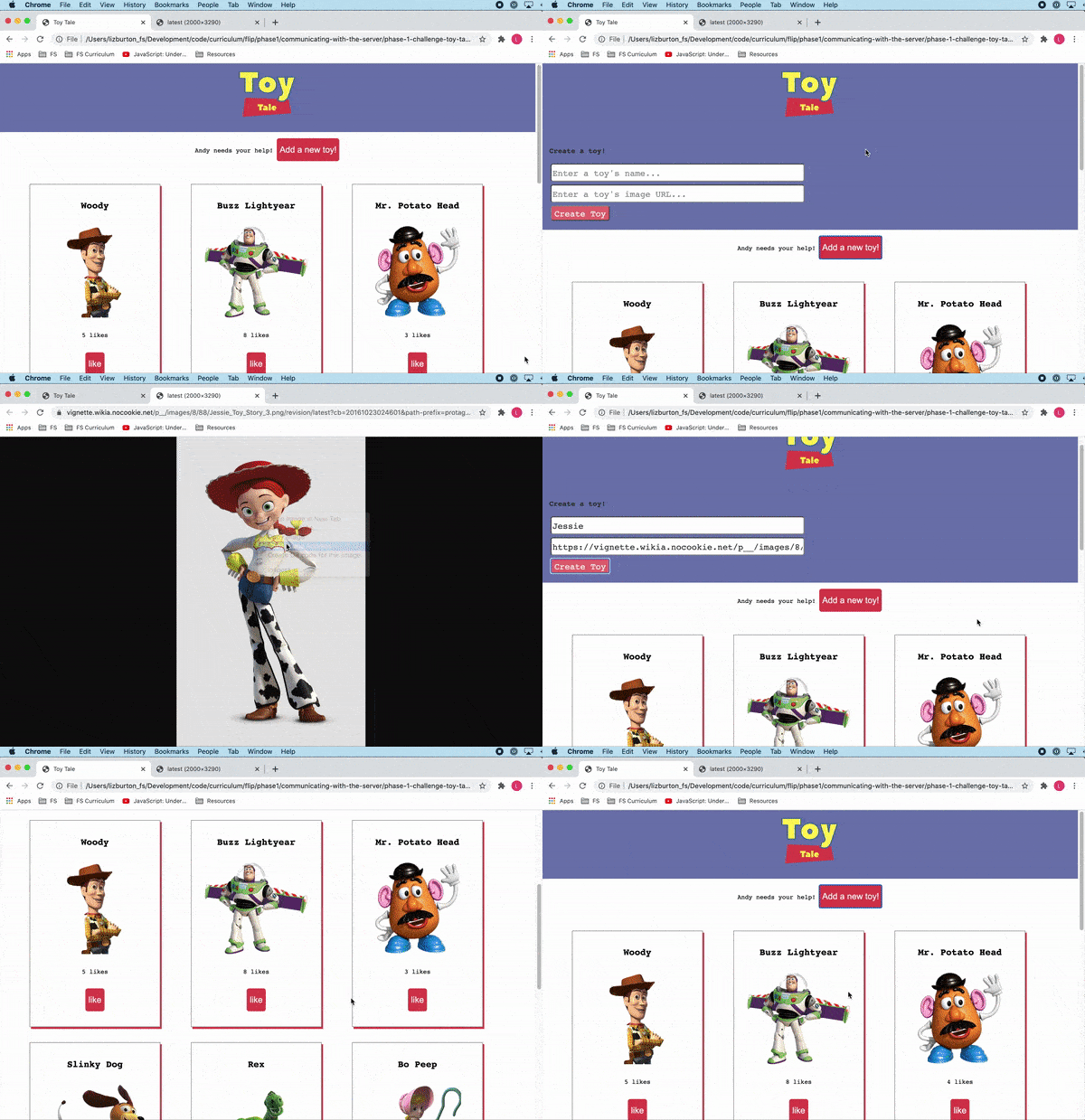 34 | 35 | Note that this lab **does not contain tests**. You will be working from the 36 | requirements described below and verifying that your code is working correctly 37 | in the browser. 38 | 39 | Once you're done, be sure to commit and push your code up to GitHub, then submit 40 | the assignment using CodeGrade. Even though this practice lab does not have 41 | tests, it must still be submitted through CodeGrade in order to be marked as 42 | complete in Canvas. 43 | 44 | ## Start Up the Server 45 | 46 | All of the toy data is stored in the `db.json` file. You'll want to access this 47 | data using a JSON server. Run `json-server --watch db.json` to start the server. 48 | 49 | > **Note**: For users of the [Live Server VSCode extension][live-server], if the 50 | > page is reloading when you initiate a fetch request, you'll need to set up 51 | > some additional configuration for Live Server to play nicely with 52 | > `json-server`. Follow the steps in [this gist][live-server settings] (you'll 53 | > only need to do this once), then come back to this lesson. 54 | 55 | [live-server]: 56 | https://marketplace.visualstudio.com/items?itemName=ritwickdey.LiveServer 57 | [live-server settings]: 58 | https://gist.github.com/ihollander/cc5f36c6447d15dea6a16f68d82aacf7 59 | 60 | This will create a server storing all of our lost toy data with restful routes 61 | at `http://localhost:3000/toys`. You can also check out the information for each 62 | individual toy at `http://localhost:3000/toys/:id`. 63 | 64 | > **Note:** we are using `:id` here as a variable value that indicates the path 65 | > to a specific toy. To navigate (or send a request) to that path, the `id` 66 | > number will be inserted into the URL in place of `:id`, e.g., 67 | > `http://localhost:3000/toys/1` 68 | 69 | Open a second tab in the terminal then open `index.html` in the browser and take 70 | a look at the page. The CSS has all been provided for you so that, when you 71 | create the cards to display each toy, you just need to add a CSS class to style 72 | them. 73 | 74 | If you click on the "Add a new toy!" button, you'll see that it exposes a form 75 | where the user can submit information for a new toy. To re-hide the form, click 76 | the button a second time. If you take a look inside `index.js`, you'll see that 77 | the code implementing that functionality has been provided for you. You will be 78 | writing the code to wire up the "Create Toy" button. 79 | 80 | ## Instructions 81 | 82 | ### Fetch Andy's Toys 83 | 84 | On the `index.html` page, there is a `div` with the `id` "toy-collection." 85 | 86 | When the page loads, make a 'GET' request to fetch all the toy objects. With the 87 | response data, make a `4 Likes
108 | 109 |