├── ScreenCapture
└── screen.gif
├── apk
└── StickyScrollViewSample.apk
├── sample
├── res
│ ├── drawable-hdpi
│ │ └── ic_launcher.png
│ ├── drawable-mdpi
│ │ └── ic_launcher.png
│ ├── drawable-xhdpi
│ │ └── ic_launcher.png
│ ├── values
│ │ ├── id.xml
│ │ ├── dimens.xml
│ │ ├── colors.xml
│ │ ├── strings.xml
│ │ └── styles.xml
│ └── layout
│ │ └── activity_main.xml
├── .classpath
├── project.properties
├── proguard-project.txt
├── AndroidManifest.xml
├── .project
└── src
│ └── com
│ └── likebamboo
│ └── stickyscrollview
│ └── sample
│ └── MainActivity.java
├── libarary
├── AndroidManifest.xml
├── .classpath
├── project.properties
├── proguard-project.txt
├── src
│ └── com
│ │ └── likebamboo
│ │ └── stickyscrollview
│ │ ├── StickyScrollViewGlobalLayoutListener.java
│ │ ├── animation
│ │ ├── ViewHelper.java
│ │ └── AnimatorProxy.java
│ │ ├── StickyScrollView.java
│ │ └── StickyScrollViewCallbacks.java
└── .project
├── .gitignore
└── README.md
/ScreenCapture/screen.gif:
--------------------------------------------------------------------------------
https://raw.githubusercontent.com/likebamboo/StickyScrollView/HEAD/ScreenCapture/screen.gif
--------------------------------------------------------------------------------
/apk/StickyScrollViewSample.apk:
--------------------------------------------------------------------------------
https://raw.githubusercontent.com/likebamboo/StickyScrollView/HEAD/apk/StickyScrollViewSample.apk
--------------------------------------------------------------------------------
/sample/res/drawable-hdpi/ic_launcher.png:
--------------------------------------------------------------------------------
https://raw.githubusercontent.com/likebamboo/StickyScrollView/HEAD/sample/res/drawable-hdpi/ic_launcher.png
--------------------------------------------------------------------------------
/sample/res/drawable-mdpi/ic_launcher.png:
--------------------------------------------------------------------------------
https://raw.githubusercontent.com/likebamboo/StickyScrollView/HEAD/sample/res/drawable-mdpi/ic_launcher.png
--------------------------------------------------------------------------------
/sample/res/drawable-xhdpi/ic_launcher.png:
--------------------------------------------------------------------------------
https://raw.githubusercontent.com/likebamboo/StickyScrollView/HEAD/sample/res/drawable-xhdpi/ic_launcher.png
--------------------------------------------------------------------------------
/sample/res/values/id.xml:
--------------------------------------------------------------------------------
1 |
2 |
3 |
4 |
21 | * 自定义的ScrollView
22 | *
23 | * 通过监听ScrollView的滚动事件执行特定的回调方法【动态改变可浮动View的位置】
24 | *
25 | * @author likebamboo
26 | */
27 | public class StickyScrollView extends ScrollView {
28 | private List mCallbacks;
29 |
30 | // 滑动距离及坐标
31 | private float xDistance, yDistance, xLast, yLast;
32 |
33 | /**
34 | *
35 | * 复写onInterceptTouchEvent是用来解决ScrollView与ViewPager之前滚动事件冲突的,
36 | *
37 | * 实际项目可根据需要选择是否需要这段代码
38 | */
39 | @Override
40 | public boolean onInterceptTouchEvent(MotionEvent ev) {
41 | switch (ev.getAction()) {
42 | case MotionEvent.ACTION_DOWN:
43 | xDistance = yDistance = 0f;
44 | xLast = ev.getX();
45 | yLast = ev.getY();
46 | break;
47 | case MotionEvent.ACTION_MOVE:
48 | final float curX = ev.getX();
49 | final float curY = ev.getY();
50 |
51 | xDistance += Math.abs(curX - xLast);
52 | yDistance += Math.abs(curY - yLast);
53 | xLast = curX;
54 | yLast = curY;
55 |
56 | if (xDistance > yDistance) {
57 | return false;
58 | }
59 | }
60 | return super.onInterceptTouchEvent(ev);
61 | }
62 |
63 | public StickyScrollView(Context context, AttributeSet attrs) {
64 | super(context, attrs);
65 | }
66 |
67 | @Override
68 | protected void onScrollChanged(int l, int t, int oldl, int oldt) {
69 | super.onScrollChanged(l, t, oldl, oldt);
70 | // 滚动时回调
71 | if (mCallbacks != null && mCallbacks.size() != 0) {
72 | for (Callbacks item : mCallbacks) {
73 | item.onScrollChanged();
74 | }
75 | }
76 | }
77 |
78 | @Override
79 | public int computeVerticalScrollRange() {
80 | return super.computeVerticalScrollRange();
81 | }
82 |
83 | public void addCallbacks(Callbacks listener) {
84 | if (mCallbacks == null) {
85 | mCallbacks = new ArrayList();
86 | }
87 | mCallbacks.add(listener);
88 | }
89 |
90 | public static interface Callbacks {
91 | public void onScrollChanged();
92 | }
93 | }
94 |
--------------------------------------------------------------------------------
/sample/src/com/likebamboo/stickyscrollview/sample/MainActivity.java:
--------------------------------------------------------------------------------
1 |
2 | package com.likebamboo.stickyscrollview.sample;
3 |
4 | import android.app.Activity;
5 | import android.os.Bundle;
6 | import android.view.View;
7 | import android.widget.TextView;
8 | import android.widget.Toast;
9 |
10 | import com.likebamboo.stickyscrollview.StickyScrollView;
11 | import com.likebamboo.stickyscrollview.StickyScrollViewCallbacks;
12 | import com.likebamboo.stickyscrollview.StickyScrollViewGlobalLayoutListener;
13 |
14 | /**
15 | * @author likebamboo
16 | */
17 | public class MainActivity extends Activity {
18 | private TextView mStickyView;
19 |
20 | private View mPlaceholderView;
21 |
22 | private StickyScrollView mStickyScrollView;
23 |
24 | private StickyScrollViewCallbacks mCallbacks;
25 |
26 | private View mStickyView2;
27 |
28 | private View mPlaceholderView2;
29 |
30 | private StickyScrollViewCallbacks mCallbacks2;
31 |
32 | @Override
33 | public void onCreate(Bundle savedInstanceState) {
34 | super.onCreate(savedInstanceState);
35 | setContentView(R.layout.activity_main);
36 | mStickyScrollView = (StickyScrollView)findViewById(R.id.scroll_view);
37 | mStickyView = (TextView)findViewById(R.id.sticky);
38 | mPlaceholderView = findViewById(R.id.placeholder);
39 |
40 | mStickyView2 = findViewById(R.id.sticky2);
41 | mPlaceholderView2 = findViewById(R.id.placeholder2);
42 |
43 | mCallbacks = new StickyScrollViewCallbacks(mStickyView, mPlaceholderView,
44 | mPlaceholderView2, mStickyScrollView);
45 |
46 | mStickyView.setOnClickListener(new View.OnClickListener() {
47 | @Override
48 | public void onClick(View v) {
49 | boolean enableSticky = mCallbacks.getEnableSticky();
50 | mCallbacks.setEnableSticky(!enableSticky);
51 | if (enableSticky) {
52 | mStickyView.setText(R.string.start_sticky);
53 | } else {
54 | mStickyView.setText(R.string.stop_sticky);
55 | }
56 | }
57 | });
58 |
59 | mStickyScrollView.addCallbacks(mCallbacks);
60 |
61 | mStickyScrollView.getViewTreeObserver().addOnGlobalLayoutListener(
62 | new StickyScrollViewGlobalLayoutListener(mCallbacks));
63 |
64 | mCallbacks2 = new StickyScrollViewCallbacks(mStickyView2, mPlaceholderView2,
65 | mStickyScrollView);
66 |
67 | mStickyView2.setOnClickListener(new View.OnClickListener() {
68 | @Override
69 | public void onClick(View v) {
70 | Toast.makeText(MainActivity.this, R.string.app_name, Toast.LENGTH_SHORT).show();
71 | }
72 | });
73 |
74 | mStickyScrollView.addCallbacks(mCallbacks2);
75 | mStickyScrollView.getViewTreeObserver().addOnGlobalLayoutListener(
76 | new StickyScrollViewGlobalLayoutListener(mCallbacks2));
77 | }
78 | }
79 |
--------------------------------------------------------------------------------
/README.md:
--------------------------------------------------------------------------------
1 | StickyScrollView
2 | ========================
3 | 相信大家都知道有很多让ListView分组Header浮动悬停的开源控件,比如:**[StickyListHeaders](https://github.com/emilsjolander/StickyListHeaders)**、**[pinned-section-listview](https://github.com/beworker/pinned-section-listview)**,而本项目就是要在ScrollView中实现类似的功能。
4 | StickyScrollView 是一个让ScrollView同样支持浮动悬停的控件(该控件支持android2.2(api level 8)及以上的版本)。
5 | 效果图如下(gif屏幕录制,有点卡顿,实际使用不会的):
6 | 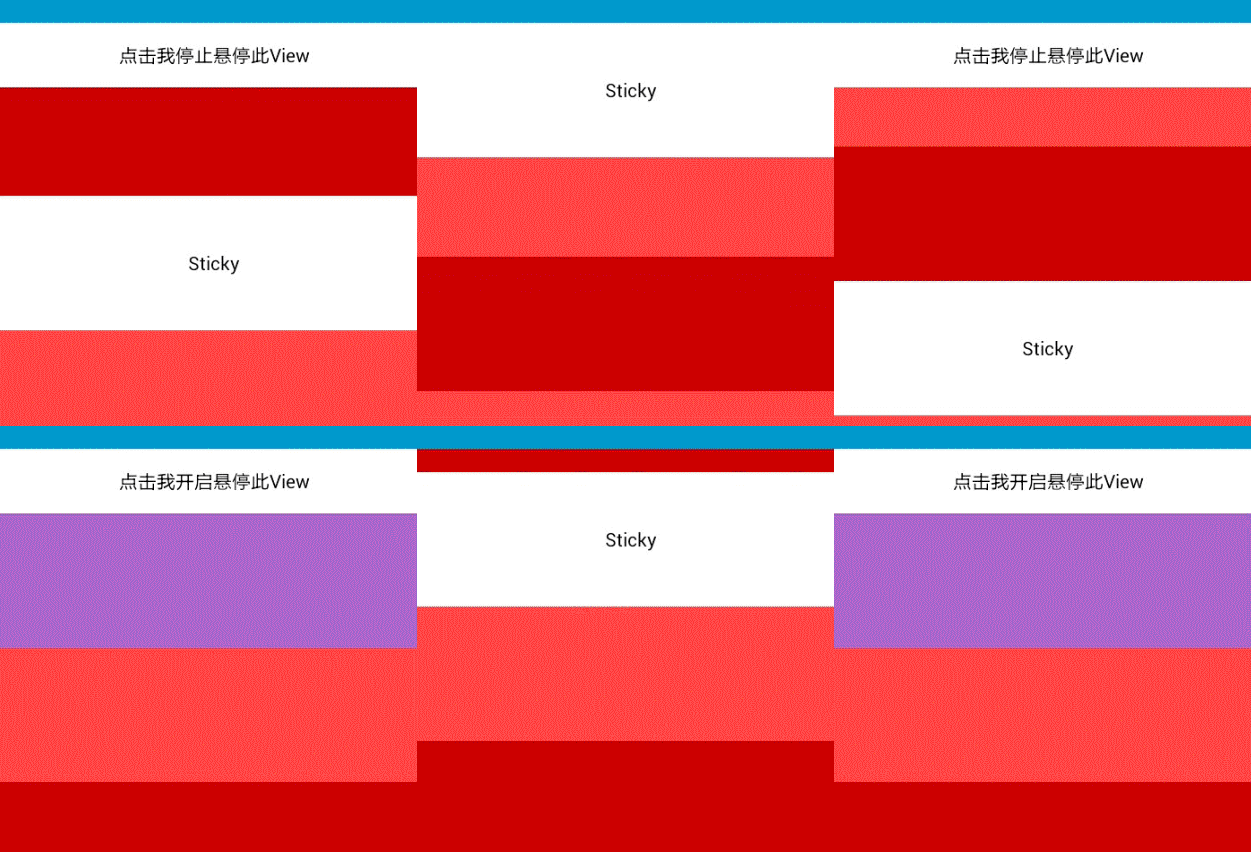
7 |
8 | 构建
9 | ----
10 | 该项目基于Eclipse构建。如果你使用的IDE是Eclipse,请:
11 | * 在Eclipse中菜单栏中选择 **File, Import, Existing projects into workspace...**
12 | * 选中你clone下来的repository的根目录,然后点击"import"导入项目(包括StickyScorllView 库项目和 StickyScrollViewSample示例项目)。
13 | * 导入之后如果有错误,请使用菜单栏中的 **Project - Clean** 清理下项目。
14 | * 在apk目录下有示例程序的[安装包](https://github.com/likebamboo/StickyScrollView/tree/master/apk),你也可以先下载安装到手机看下效果。
15 |
16 | 使用方法
17 | ---------
18 |
19 | #### 布局文件:
20 |
21 | ``` xml
22 |
25 |
26 |
30 |
31 |
35 |
36 |
40 |
41 |
44 |
45 |
48 |
49 |
50 |
51 |
52 |
56 |
57 |
58 |
59 |
60 |
61 |
62 |
63 |
64 |
65 |
66 |
67 |
75 |
76 |
77 |
85 |
86 | ```
87 |
88 |
89 | #### Activity
90 |
91 | ``` java
92 | // 初始化控件
93 | mStickyScrollView = (StickyScrollView)findViewById(R.id.scroll_view);
94 | mStickyView = (TextView)findViewById(R.id.sticky);
95 | mPlaceholderView = findViewById(R.id.placeholder);
96 |
97 |
98 | mCallbacks = new StickyScrollViewCallbacks(mStickyView, mPlaceholderView,
99 | mPlaceholderView2, mStickyScrollView);
100 |
101 | mStickyScrollView.addCallbacks(mCallbacks);
102 |
103 | mStickyScrollView.getViewTreeObserver().addOnGlobalLayoutListener(
104 | new StickyScrollViewGlobalLayoutListener(mCallbacks));
105 |
106 | ```
107 |
108 | 其他
109 | ------
110 | 在 [这里](https://github.com/emilsjolander/StickyScrollViewItems) 你可以找到与本项目具有相似功能的开源项目[StickyScrollViewItems](https://github.com/emilsjolander/StickyScrollViewItems)。
111 | 两个项目实现的功能是一样的,相比而言:
112 | * 本项目在使用的时候相对比较复杂,要写的代码会比较多,[StickyScrollViewItems](https://github.com/emilsjolander/StickyScrollViewItems) 项目使用起来比较简单。
113 | * 本项目支持子控件可悬停状态的动态切换,你可以在代码中通过设置``mCallbacks.setEnableSticky(!enableSticky);``来动态控制某个View是否悬停并且不影响其他子控件的悬停状态。
114 | * 本项目中可以方便的控制悬停控件的悬停范围,可控制悬停控件从哪个View到哪个View之前悬停,具体可参照 StickyScrollViewCallbacks 的第二个构造函数:
115 | ``` java
116 | // 不设置endView将一直悬停,直到ScrollView滚动到最底部
117 | public StickyScrollViewCallbacks(View stickyView, View placeholderView, View endView,StickyScrollView observableScrollView)
118 | ```
119 | * 其他
120 |
121 | 总之,两个项目各有优缺点,大家可以根据自己的喜好选择啦。
122 |
--------------------------------------------------------------------------------
/libarary/src/com/likebamboo/stickyscrollview/animation/AnimatorProxy.java:
--------------------------------------------------------------------------------
1 | package com.likebamboo.stickyscrollview.animation;
2 |
3 | import android.graphics.Camera;
4 | import android.graphics.Matrix;
5 | import android.graphics.RectF;
6 | import android.os.Build;
7 | import android.view.View;
8 | import android.view.animation.Animation;
9 | import android.view.animation.Transformation;
10 |
11 | import java.lang.ref.WeakReference;
12 | import java.util.WeakHashMap;
13 |
14 | /**
15 | * A proxy class to allow for modifying post-3.0 view properties on all pre-3.0
16 | * platforms. DO NOT wrap your views with this class if you
17 | * are using {@code ObjectAnimator} as it will handle that itself.
18 | */
19 | public final class AnimatorProxy extends Animation {
20 | /** Whether or not the current running platform needs to be proxied. */
21 | public static final boolean NEEDS_PROXY = Build.VERSION.SDK_INT < Build.VERSION_CODES.HONEYCOMB;
22 |
23 | private static final WeakHashMap PROXIES = new WeakHashMap();
24 |
25 | /**
26 | * Create a proxy to allow for modifying post-3.0 view properties on all
27 | * pre-3.0 platforms. DO NOT wrap your views if you are
28 | * using {@code ObjectAnimator} as it will handle that itself.
29 | *
30 | * @param view View to wrap.
31 | * @return Proxy to post-3.0 properties.
32 | */
33 | public static AnimatorProxy wrap(View view) {
34 | AnimatorProxy proxy = PROXIES.get(view);
35 | // This checks if the proxy already exists and whether it still is the animation of the given view
36 | if (proxy == null || proxy != view.getAnimation()) {
37 | proxy = new AnimatorProxy(view);
38 | PROXIES.put(view, proxy);
39 | }
40 | return proxy;
41 | }
42 |
43 | private final WeakReference mView;
44 | private final Camera mCamera = new Camera();
45 | private boolean mHasPivot;
46 |
47 | private float mAlpha = 1;
48 | private float mPivotX;
49 | private float mPivotY;
50 | private float mRotationX;
51 | private float mRotationY;
52 | private float mRotationZ;
53 | private float mScaleX = 1;
54 | private float mScaleY = 1;
55 | private float mTranslationX;
56 | private float mTranslationY;
57 |
58 | private final RectF mBefore = new RectF();
59 | private final RectF mAfter = new RectF();
60 | private final Matrix mTempMatrix = new Matrix();
61 |
62 | private AnimatorProxy(View view) {
63 | setDuration(0); //perform transformation immediately
64 | setFillAfter(true); //persist transformation beyond duration
65 | view.setAnimation(this);
66 | mView = new WeakReference(view);
67 | }
68 |
69 | public float getTranslationY() {
70 | return mTranslationY;
71 | }
72 | public void setTranslationY(float translationY) {
73 | if (mTranslationY != translationY) {
74 | prepareForUpdate();
75 | mTranslationY = translationY;
76 | invalidateAfterUpdate();
77 | }
78 | }
79 |
80 | private void prepareForUpdate() {
81 | View view = mView.get();
82 | if (view != null) {
83 | computeRect(mBefore, view);
84 | }
85 | }
86 | private void invalidateAfterUpdate() {
87 | View view = mView.get();
88 | if (view == null || view.getParent() == null) {
89 | return;
90 | }
91 |
92 | final RectF after = mAfter;
93 | computeRect(after, view);
94 | after.union(mBefore);
95 |
96 | ((View)view.getParent()).invalidate(
97 | (int) Math.floor(after.left),
98 | (int) Math.floor(after.top),
99 | (int) Math.ceil(after.right),
100 | (int) Math.ceil(after.bottom));
101 | }
102 |
103 | private void computeRect(final RectF r, View view) {
104 | // compute current rectangle according to matrix transformation
105 | final float w = view.getWidth();
106 | final float h = view.getHeight();
107 |
108 | // use a rectangle at 0,0 to make sure we don't run into issues with scaling
109 | r.set(0, 0, w, h);
110 |
111 | final Matrix m = mTempMatrix;
112 | m.reset();
113 | transformMatrix(m, view);
114 | mTempMatrix.mapRect(r);
115 |
116 | r.offset(view.getLeft(), view.getTop());
117 |
118 | // Straighten coords if rotations flipped them
119 | if (r.right < r.left) {
120 | final float f = r.right;
121 | r.right = r.left;
122 | r.left = f;
123 | }
124 | if (r.bottom < r.top) {
125 | final float f = r.top;
126 | r.top = r.bottom;
127 | r.bottom = f;
128 | }
129 | }
130 |
131 | private void transformMatrix(Matrix m, View view) {
132 | final float w = view.getWidth();
133 | final float h = view.getHeight();
134 | final boolean hasPivot = mHasPivot;
135 | final float pX = hasPivot ? mPivotX : w / 2f;
136 | final float pY = hasPivot ? mPivotY : h / 2f;
137 |
138 | final float rX = mRotationX;
139 | final float rY = mRotationY;
140 | final float rZ = mRotationZ;
141 | if ((rX != 0) || (rY != 0) || (rZ != 0)) {
142 | final Camera camera = mCamera;
143 | camera.save();
144 | camera.rotateX(rX);
145 | camera.rotateY(rY);
146 | camera.rotateZ(-rZ);
147 | camera.getMatrix(m);
148 | camera.restore();
149 | m.preTranslate(-pX, -pY);
150 | m.postTranslate(pX, pY);
151 | }
152 |
153 | final float sX = mScaleX;
154 | final float sY = mScaleY;
155 | if ((sX != 1.0f) || (sY != 1.0f)) {
156 | m.postScale(sX, sY);
157 | final float sPX = -(pX / w) * ((sX * w) - w);
158 | final float sPY = -(pY / h) * ((sY * h) - h);
159 | m.postTranslate(sPX, sPY);
160 | }
161 |
162 | m.postTranslate(mTranslationX, mTranslationY);
163 | }
164 |
165 | @Override
166 | protected void applyTransformation(float interpolatedTime, Transformation t) {
167 | View view = mView.get();
168 | if (view != null) {
169 | t.setAlpha(mAlpha);
170 | transformMatrix(t.getMatrix(), view);
171 | }
172 | }
173 | }
174 |
--------------------------------------------------------------------------------
/libarary/src/com/likebamboo/stickyscrollview/StickyScrollViewCallbacks.java:
--------------------------------------------------------------------------------
1 | /**
2 | * StickyScrollViewCallbacks.java
3 | * StickyScrollView
4 | *
5 | * Created by likebamboo on 2014-4-21
6 | * Copyright (c) 1998-2014 https://github.com/likebamboo All rights reserved.
7 | */
8 |
9 | package com.likebamboo.stickyscrollview;
10 |
11 | import android.view.MotionEvent;
12 | import android.view.View;
13 |
14 | import com.likebamboo.stickyscrollview.animation.AnimatorProxy;
15 | import com.likebamboo.stickyscrollview.animation.ViewHelper;
16 |
17 | /**
18 | *
19 | * ScrollView滚动时的回调接口,
20 | *
21 | * 通过计算ScrollView滚动时悬停控件应该绘制的位置来绘制相应的View
22 | *
23 | * @author likebamboo
24 | */
25 | public class StickyScrollViewCallbacks implements StickyScrollView.Callbacks {
26 | private static final float CLICK_DISTANCE = 3;
27 |
28 | /**
29 | * 悬停的View
30 | */
31 | private View mStickyView = null;
32 |
33 | /**
34 | * 当mStickyView不处于悬浮状态时的停靠的View
35 | */
36 | private View mPlaceholderView = null;
37 |
38 | /**
39 | * ScrollView控件
40 | */
41 | private StickyScrollView mObservableScrollView = null;
42 |
43 | /**
44 | * 悬停控件的临界控件【非必须】,如果设置了该控件,当ScrollView滚动到该控件时,悬停控件会被这个控件顶出界面。
45 | */
46 | private View mEndSticyView;
47 |
48 | /**
49 | *
50 | */
51 | private boolean mEnableSticky = true;
52 |
53 | /**
54 | * touchDown时ScrollView滚动的坐标
55 | */
56 | private float mTouchDownY = Float.MIN_VALUE;
57 |
58 | /**
59 | * 从touchDown到touchUp,ScrollView滚动的距离
60 | */
61 | private float mScrollDistanceY = 0F;
62 |
63 | public StickyScrollViewCallbacks(View stickyView, View placeholderView,
64 | StickyScrollView observableScrollView) {
65 | this(stickyView, placeholderView, null, observableScrollView);
66 | }
67 |
68 | public StickyScrollViewCallbacks(View stickyView, View placeholderView, View endView,
69 | StickyScrollView observableScrollView) {
70 | this.mStickyView = stickyView;
71 | this.mPlaceholderView = placeholderView;
72 | this.mObservableScrollView = observableScrollView;
73 | this.mEndSticyView = endView;
74 | // 监听onTouch事件有两方面的考虑,scrollView的滚动与点击事件
75 | mStickyView.setOnTouchListener(new View.OnTouchListener() {
76 | @Override
77 | public boolean onTouch(View v, MotionEvent event) {
78 | switch (event.getAction()) {
79 | case MotionEvent.ACTION_DOWN:// 记录下当前的滚动位置
80 | mTouchDownY = mObservableScrollView.getScrollY();
81 | break;
82 | case MotionEvent.ACTION_MOVE:// ScrollView滚动的过程中,记录滚动的差值
83 | float disY = Math.abs(mObservableScrollView.getScrollY() - mTouchDownY);
84 | // 如果当前差值大于之前记录差值,将差值替换
85 | if (disY > mScrollDistanceY) {
86 | mScrollDistanceY = disY;
87 | }
88 | break;
89 | }
90 |
91 | float translateY = ViewHelper.getTranslationY(mStickyView);
92 | if (AnimatorProxy.NEEDS_PROXY) {
93 | translateY = getTop(mStickyView);
94 | }
95 |
96 | // touch的坐标都是相对于本控件的,所以需要做一次转换
97 | // 构建一个新的MotionEvent事件
98 | MotionEvent newEvent = MotionEvent.obtain(event);
99 | newEvent.setLocation(newEvent.getX(), newEvent.getY() + translateY);
100 | mObservableScrollView.dispatchTouchEvent(newEvent);
101 | if (newEvent != null) {
102 | newEvent.recycle();
103 | }
104 |
105 | // 如果是滚动,那么不让其触发onClick 事件
106 | if (mScrollDistanceY > CLICK_DISTANCE && event.getAction() == MotionEvent.ACTION_UP) {
107 | mScrollDistanceY = 0F;
108 | return true;
109 | }
110 | return false;
111 | }
112 | });
113 | }
114 |
115 | @Override
116 | public void onScrollChanged() {
117 | // 首先计算移动的距离
118 | int translationY = calTranslationY(mEnableSticky);
119 | // 移动
120 | translateY(translationY);
121 | }
122 |
123 | /**
124 | * 计算需要移动的位置
125 | *
126 | * @return
127 | */
128 | private int calTranslationY(boolean enableSticky) {
129 | // 如果不能浮动,那么固定在placeHolderView所在的位置
130 | if (!enableSticky) {
131 | return getTop(mPlaceholderView) - mObservableScrollView.getScrollY();
132 | }
133 | int translationY = Math.max(0,
134 | getTop(mPlaceholderView) - mObservableScrollView.getScrollY());
135 | if (mEndSticyView != null) {
136 | /**
137 | * 如果有滚动的临界区域 ,当滚动到指定的临界控件{mEndStricyView}之后,临界的控件将浮动顶上去(仿IOS效果)
138 | */
139 | if (mObservableScrollView.getScrollY() + mStickyView.getHeight() > getTop(mEndSticyView)) {
140 | // 如果临界控件已经将浮动控件完全顶出ScrollView,那么就让View固定在屏幕的上面
141 | if (mObservableScrollView.getScrollY() > getTop(mEndSticyView)) {
142 | translationY = -mStickyView.getHeight();
143 | } else {
144 | // 否则临界控件将其顶上去
145 | translationY = getTop(mEndSticyView) - mObservableScrollView.getScrollY()
146 | - mStickyView.getHeight();
147 | }
148 | }
149 | }
150 | return translationY;
151 | }
152 |
153 | /**
154 | * 获取控件顶部的坐标
155 | *
156 | * @return
157 | */
158 | private int getTop(View v) {
159 | return v.getTop();
160 | }
161 |
162 | /**
163 | * 设置是否允许悬停
164 | */
165 | public void setEnableSticky(boolean enable) {
166 | mEnableSticky = enable;
167 | onScrollChanged();
168 | }
169 |
170 | /**
171 | * 获取是否允许悬停
172 | */
173 | public boolean getEnableSticky() {
174 | return mEnableSticky;
175 | }
176 |
177 | /**
178 | * 将View移动到 position位置
179 | *
180 | * @param position
181 | */
182 | private void translateY(int position) {
183 | /**
184 | *
185 |          * 针对2.3及以下版本,直接用layout方法改变其位置
186 |          * 也许有人说,可以用[NineOldAndroids](https://github.com/JakeWharton/NineOldAndroids)兼容动画啊。
187 |          * 可惜用NineOldAndroids动画执行后,控件的可点击区域还是在原来的地方啊【2.3及以下版本】。
188 |          * github上好多人都报告了这个问题,但是没办法解决。这是android2.3及以下版本的系统问题,不是NineOldAndroids开源控件的问题
189 |          * (之前我就是这么做的,发现不行后,才使用了layout方法,感兴趣的可以尝试下。)
190 |          */
191 |         if (AnimatorProxy.NEEDS_PROXY) {
192 |             int l = mStickyView.getLeft();
193 |             int r = mStickyView.getRight();
194 |             mStickyView.layout(l, position, r, position + mStickyView.getHeight());
195 |         } else {
196 |             ViewHelper.setTranslationY(mStickyView, position);
197 |         }
198 |     }
199 | }
200 |


--------------------------------------------------------------------------------