The JupyterInstruct Python package is designed for INSTRUCTORS to organize and adjust course curriculum. Each assignment is given it's own jupyter notebook and all student reading, videos, images are included in the notebook. Each notebook also contains notes for instructors that will be automatically removed. The main design goals for this project include:
5 |
6 |
Tools to help instructors maintain course materials all in one place including instructor notes and answers.
7 |
Tools to help migrate curriculum form one semester to the next.
8 |
Tools to automatically generate websites and ebooks from notebooks.
9 |
Notebook validation tools to identify common problems with links, images and accessibility.
10 |
Tools to interface nbgrader with the MSU jupyterhub servers and MSU Desire2Learn course management systems.
11 |
12 |
Installation
13 |
This package is currently under development and is not avaliable via pipy. To install use the following command:
Many of the core jupyterinstruct tools have a command line interface option. These include:
19 |
20 |
jupyterinstruct - list of all of the command line tools.
21 |
validatenb NOTEBOOKNAME - Validate a notebook for errors.
22 |
publishnb -o OUTPUTFOLDER NOTEBOOKNAME - Publish notebook to a website.
23 |
renamenb OLDFILENAME NEWFILENAME - Rename a notebook
24 |
makestudentnb -o OUTPUTFOLDER NOTEBOOKNAME - Make a student version of the notebook
25 |
26 |
NOTE: The MSU jupyterhub server terminal currently defaults to tcsh. To best utilize these tools type 'bash' at the command prompt when starting a terminal.
27 |
```
28 |
29 |
bash
30 | jupyterinstruct
31 | ```
32 |
33 |
Package UML dependancies
34 |
35 |
Usage
36 |
Please check out the Example.ipynb for some instructions on how to use Jupyterinstruct.
These toosl as developed to help instructors maintain and share course curriculum with students using jupyter notebooks.
33 |
These tools were specificially developed to help the department of Computational Mathematics Science and Engineering at Michigan State University but should generalize as well.
"""
 43 | # Welcome to JupyterInstruct!
 44 | ### Written by Dirk colbry
 45 | ### Last updated December 2020
 46 | ### [Link to Github Repository](https://github.com/colbrydi/jupyterinstruct)
 47 |
 48 | These toosl as developed to help instructors maintain and share course curriculum with students using jupyter notebooks.
 49 |
 50 | These tools were specificially developed to help the department of Computational Mathematics Science and Engineering at Michigan State University but should generalize as well.
 51 |
 52 |
 53 | **NOTE:** Currently under development.
 54 |
 55 | To install type:
 56 |
 57 | ```
 58 | pip install git+https://github.com/colbrydi/jupyterinstruct
 59 | ```
 60 |
 61 | """
 62 | __version__ = '0.01dev'
The base notebook class object.
71 | Instuctor notebooks have extra content intended only for instructors. This class manages the extra content and enables …
Interface between InstructorNotebooks and a non standard nbgrader installation.
80 | These tools help put the files in the right place so that instructors …
A class designed to standardise notebook filenames.
85 | Filenames have infomration about assignments being in-class, pre-class, INSTRUCTOR versions, …
Tools for generating course websites from course folder.
95 |
96 |
97 |
98 |
99 |
100 |
101 |
102 |
103 |
104 |
105 |
130 |
131 |
134 |
135 |
--------------------------------------------------------------------------------
/docs/Examples.ipynb:
--------------------------------------------------------------------------------
1 | {
2 | "cells": [
3 | {
4 | "cell_type": "markdown",
5 | "metadata": {},
6 | "source": [
7 | "[Link to this notebook](https://raw.githubusercontent.com/colbrydi/jupyterinstruct/master/Examples.ipynb)"
8 | ]
9 | },
10 | {
11 | "cell_type": "markdown",
12 | "metadata": {},
13 | "source": [
14 | "# Examples\n",
15 | "\n",
16 | "This notebook contains simple examples for using the JupyterInstruct python package. Not all features are included but some basic ones are hear to help get people started."
17 | ]
18 | },
19 | {
20 | "cell_type": "markdown",
21 | "metadata": {},
22 | "source": [
23 | "# 1. Validating Notebooks\n",
24 | "\n",
25 | "Run the following code to validate a notebook. This python file has the least amount of internal dependances and should be easy to use on it's own. "
26 | ]
27 | },
28 | {
29 | "cell_type": "code",
30 | "execution_count": null,
31 | "metadata": {},
32 | "outputs": [],
33 | "source": [
34 | "from jupyterinstruct.nbvalidate import validate\n",
35 | "validate(\"Accessable_Jupyter_content_for_INSTRUCTORS.ipynb\")"
36 | ]
37 | },
38 | {
39 | "cell_type": "markdown",
40 | "metadata": {},
41 | "source": [
42 | "# 2. Answer Cells\n",
43 | "\n",
44 | "One key aspect of Instructor notebooks is the use of ANSWER cells. These are cells that are avaliable in the instructor version but are deleted entirely from the student version. An answer cell is any cell containing the \\#\\#ANSWER\\#\\# hashtag. For clarity the hashtag is included at the beginning and end of each ANSWER cell to make it clear to future readers what will NOT be included. For example:"
45 | ]
46 | },
47 | {
48 | "cell_type": "markdown",
49 | "metadata": {},
50 | "source": [
51 | "To convert from the Instructor notebook to the student notebook and strip out the ANSWER cells use the following command:"
52 | ]
53 | },
54 | {
55 | "cell_type": "code",
56 | "execution_count": null,
57 | "metadata": {},
58 | "outputs": [],
59 | "source": [
60 | "filename=\"Examples.ipynb\"\n",
61 | "\n",
62 | "from jupyterinstruct.InstructorNotebook import makestudent\n",
63 | "makestudent(filename, studentfolder='./docs/')"
64 | ]
65 | },
66 | {
67 | "cell_type": "markdown",
68 | "metadata": {},
69 | "source": [
70 | "**_CAUTION__** Make sure you save your notebook file before trying to generate the student version. "
71 | ]
72 | },
73 | {
74 | "cell_type": "markdown",
75 | "metadata": {},
76 | "source": [
77 | "# 3. Content tags\n",
78 | "\n",
79 | "Some content often changes semester to semester. to help facilitate content that changes a tag based merge option is include. Tags are just dictionaries with key values that are strings representing the tag name and values representing the content to be incerted inside the tag. Here is an example tag dictionary:"
80 | ]
81 | },
82 | {
83 | "cell_type": "code",
84 | "execution_count": null,
85 | "metadata": {},
86 | "outputs": [],
87 | "source": [
88 | "tags = {'YEAR': '2021', \n",
89 | " 'Semester': 'Spring',\n",
90 | " 'Instructor':'Dirk Colbry',\n",
91 | " 'Classroom':'On-Line'}"
92 | ]
93 | },
94 | {
95 | "cell_type": "markdown",
96 | "metadata": {},
97 | "source": [
98 | "Tags are denoted inside a jupyter notebook document using three has tags (\\#\\#\\#) followed by the tag name and then three more hash tags (\\#\\#\\#). For example:\n",
99 | "\n",
100 | "### Welcome to Spring semester 2021 of CMSE101. \n",
101 | "Your instructor is Dirk Colbry and you will be meeting On-Line."
102 | ]
103 | },
104 | {
105 | "cell_type": "code",
106 | "execution_count": null,
107 | "metadata": {},
108 | "outputs": [],
109 | "source": [
110 | "filename=\"Examples.ipynb\"\n",
111 | "\n",
112 | "from jupyterinstruct.InstructorNotebook import makestudent\n",
113 | "makestudent(filename, './docs/', tags)"
114 | ]
115 | },
116 | {
117 | "cell_type": "markdown",
118 | "metadata": {},
119 | "source": [
120 | "### Special Tags\n",
121 | "\n",
122 | "There are a few special tags that can be included in notebooks these include:\n",
123 | "\n",
124 | "- Empty Tags including **ENDHEADER** and **STARTFOOTER**. These tages typically have an empty string as a value and just get deleted from the student version. They are used as placeholders or other features.\n",
125 | "- YEAR tag - As shown above the year tag can help create a long form of data which include days of the week. This allows notebooks to be stored in a MMDD (Month, Day) prefix format.\n",
126 | "- The **LINKS** tag is the only tage to store a list instead of a string. The list allows common links to be grouped together.\n",
127 | "- The **NEW_ASSIGNMENT** is the name of the student file.\n",
128 | "\n",
129 | "For example:"
130 | ]
131 | },
132 | {
133 | "cell_type": "code",
134 | "execution_count": null,
135 | "metadata": {},
136 | "outputs": [],
137 | "source": [
138 | "tags = {'YEAR': '2021', \n",
139 | " 'Semester': 'Spring',\n",
140 | " 'Instructor':'Dirk Colbry',\n",
141 | " 'Classroom':'On-Line',\n",
142 | " 'LINKS': ['Website', 'GitHub', 'Instructor_Website'],\n",
143 | " 'Website': 'https://colbrydi.github.io/jupyterinstruct/',\n",
144 | " 'GitHub': 'https://github.com/colbrydi/jupyterinstruct',\n",
145 | " 'Instructor_Website': 'http://www.dirk.colbry.com/',\n",
146 | " 'ENDHEADER': '',\n",
147 | " 'STARTFOOTER': ''}"
148 | ]
149 | },
150 | {
151 | "cell_type": "markdown",
152 | "metadata": {},
153 | "source": [
154 | "This file is called Examples.ipynb\n",
155 | "\n",
156 | "Here are some important links:\n",
157 | "\n",
158 | "\n",
159 | " - [Website](https://colbrydi.github.io/jupyterinstruct/)\n",
160 | " - [GitHub](https://github.com/colbrydi/jupyterinstruct)\n",
161 | " - [Instructor_Website](http://www.dirk.colbry.com/)\n",
162 | "\n"
163 | ]
164 | },
165 | {
166 | "cell_type": "code",
167 | "execution_count": null,
168 | "metadata": {},
169 | "outputs": [],
170 | "source": [
171 | "filename=\"Examples.ipynb\"\n",
172 | "\n",
173 | "from jupyterinstruct.InstructorNotebook import makestudent\n",
174 | "makestudent(filename, './docs/', tags)"
175 | ]
176 | },
177 | {
178 | "cell_type": "markdown",
179 | "metadata": {},
180 | "source": [
181 | "### Course Tag files\n",
182 | "\n",
183 | "Typically tags used for a course are stored in a course tag file. this way all the notebooks can access the same file and changes only need to be made in one location. Typically this file is stored in the main course directory and has the name ```thiscourse.py```. An example file is as follows"
184 | ]
185 | },
186 | {
187 | "cell_type": "code",
188 | "execution_count": null,
189 | "metadata": {},
190 | "outputs": [],
191 | "source": [
192 | "%%writefile thiscourse.py\n",
193 | "def tags():\n",
194 | " tags=dict()\n",
195 | " tags['COURSE_CODE']='CMSE401'\n",
196 | " tags['YEAR']='2021'\n",
197 | " tags['LINKS']=['Website','GitHub']\n",
198 | " tags['TOC']=''\n",
199 | " tags['TODO']=''\n",
200 | " tags['Syllabus']=''\n",
201 | " tags['Schedule']=''\n",
202 | " tags['D2L']=''\n",
203 | " tags['ZOOM']=''\n",
204 | " tags['SLACK']=''\n",
205 | " tags['LinkText']='Link to this document\\'s Jupyter Notebook'\n",
206 | " tags['LINKURL']='https://raw.githubusercontent.com/colbrydi/jupyterinstruct/master/'\n",
207 | " tags['Website']='https://colbrydi.github.io/jupyterinstruct/'\n",
208 | " tags['GitHub'] = 'https://github.com/colbrydi/jupyterinstruct'\n",
209 | " tags['ENDHEADER']=''\n",
210 | " tags['STARTFOOTER']=''\n",
211 | " tags['Semester']='Spring'\n",
212 | " tags['Instructor']='Dirk Colbry'\n",
213 | " tags['Classroom']='On-Line'\n",
214 | " return tags\n"
215 | ]
216 | },
217 | {
218 | "cell_type": "markdown",
219 | "metadata": {},
220 | "source": [
221 | "To use these tags the notebook only needs to import the course file"
222 | ]
223 | },
224 | {
225 | "cell_type": "code",
226 | "execution_count": null,
227 | "metadata": {},
228 | "outputs": [],
229 | "source": [
230 | "import thiscourse\n",
231 | "tags = thiscourse.tags()\n",
232 | "tags"
233 | ]
234 | },
235 | {
236 | "cell_type": "markdown",
237 | "metadata": {},
238 | "source": [
239 | "# 4. Automatic Grading system\n",
240 | "\n",
241 | "Michigan State University (MSU) has a jupyterhub server with nbgrader parcially installed. Since the hub does not included shared file systems, many of the nbgrader features are not avaliable. To get around this problem the ```jupyterinstruct``` package has some functions inside ```hubgrader``` designed to help instructors. \n",
242 | "\n",
243 | "## Step 1: Use the right server\n",
244 | "\n",
245 | "In order to use nbgrader at MSU you need to log onto the http://jupyter-grader.msu.edu server. This is the only one with nbgrader installed.\n",
246 | "\n",
247 | "## Step 2: Convert the INSTRUCTOR notebook to an \"assignment\"\n",
248 | "\n",
249 | "In the jupyter menu select \"View-->Cell Toolbar--Assignment\" This will add the assignment options to the current notebook's cells. Modify the cells for grading and autograding following the nbgrader tutorials. \n",
250 | "\n",
251 | "## Step 3: Generate and verify the student version of the notebook\n",
252 | "\n",
253 | "Generate the student version of the INSTRUCTOR notebook and verify it is written as expected. \n",
254 | "\n",
255 | "## Step 4: Import student version into NBGrader system\n",
256 | "\n",
257 | "Run the following cell which takes the student version filename and imports it into the nbgrader database. \n",
258 | "\n",
259 | "\n",
260 | "```python\n",
261 | "from jupyterinstruct import hubgrader \n",
262 | "output = hubgrader.importnb(studentfile)\n",
263 | "```"
264 | ]
265 | },
266 | {
267 | "cell_type": "markdown",
268 | "metadata": {},
269 | "source": [
270 | "## Step 5: Publish notebook to D2L (or wherever)\n",
271 | "\n",
272 | "Click on the generated link to download the released version of the notebook"
273 | ]
274 | },
275 | {
276 | "cell_type": "markdown",
277 | "metadata": {},
278 | "source": [
279 | "---\n",
280 | "\n",
281 | "# 5. Self Referncing Files\n",
282 | "\n",
283 | "Jupyter instruct often will work best as commands included inside the instructor notebooks. This allows instructors to easily publish a notebook the are working on from within the notebook. the trick to make this work is that the notebook needs to know the file name. This requires running some embedded javascript inside the notebook. fortunately, just loading the library will run that command and store the current notebook in a variable called ```this_notebook``` (You can also just use the ```InstructorNotebook.getname()``` function). \n",
284 | "\n",
285 | "**_WARNING_** Since this function uses javascript you need to get the name in a different cell and wait to use the name.\n",
286 | "\n",
287 | "**_WARNING #2_** These Javascript functions will NOT work in Jupyterlab without some extensions installed. "
288 | ]
289 | },
290 | {
291 | "cell_type": "markdown",
292 | "metadata": {},
293 | "source": [
294 | "It is recommended that the following cells be added to the footer of each INSTRUCTOR notebook (The third cell is only for autograder assignments). This will provide the instructor flexibility when submitting files. "
295 | ]
296 | },
297 | {
298 | "cell_type": "markdown",
299 | "metadata": {},
300 | "source": [
301 | "----\n",
302 | "\n",
303 | "Written by Dr. Dirk Colbry, Michigan State University\n",
304 | " This work is licensed under a Creative Commons Attribution-NonCommercial 4.0 International License."
305 | ]
306 | },
307 | {
308 | "cell_type": "markdown",
309 | "metadata": {},
310 | "source": [
311 | "---"
312 | ]
313 | }
314 | ],
315 | "metadata": {
316 | "kernelspec": {
317 | "display_name": "Python 3",
318 | "language": "python",
319 | "name": "python3"
320 | },
321 | "language_info": {
322 | "codemirror_mode": {
323 | "name": "ipython",
324 | "version": 3
325 | },
326 | "file_extension": ".py",
327 | "mimetype": "text/x-python",
328 | "name": "python",
329 | "nbconvert_exporter": "python",
330 | "pygments_lexer": "ipython3",
331 | "version": "3.7.6"
332 | }
333 | },
334 | "nbformat": 4,
335 | "nbformat_minor": 4
336 | }
--------------------------------------------------------------------------------
/Examples.ipynb:
--------------------------------------------------------------------------------
1 | {
2 | "cells": [
3 | {
4 | "cell_type": "markdown",
5 | "metadata": {},
6 | "source": [
7 | "[Link to this notebook](https://raw.githubusercontent.com/colbrydi/jupyterinstruct/master/Examples.ipynb)"
8 | ]
9 | },
10 | {
11 | "cell_type": "markdown",
12 | "metadata": {},
13 | "source": [
14 | "# Examples\n",
15 | "\n",
16 | "This notebook contains simple examples for using the JupyterInstruct python package. Not all features are included but some basic ones are hear to help get people started."
17 | ]
18 | },
19 | {
20 | "cell_type": "markdown",
21 | "metadata": {},
22 | "source": [
23 | "# 1. Validating Notebooks\n",
24 | "\n",
25 | "Run the following code to validate a notebook. This python file has the least amount of internal dependances and should be easy to use on it's own. "
26 | ]
27 | },
28 | {
29 | "cell_type": "code",
30 | "execution_count": null,
31 | "metadata": {},
32 | "outputs": [],
33 | "source": [
34 | "from jupyterinstruct.nbvalidate import validate\n",
35 | "validate(\"Accessable_Jupyter_content_for_INSTRUCTORS.ipynb\")"
36 | ]
37 | },
38 | {
39 | "cell_type": "markdown",
40 | "metadata": {},
41 | "source": [
42 | "# 2. Answer Cells\n",
43 | "\n",
44 | "One key aspect of Instructor notebooks is the use of ANSWER cells. These are cells that are avaliable in the instructor version but are deleted entirely from the student version. An answer cell is any cell containing the \\#\\#ANSWER\\#\\# hashtag. For clarity the hashtag is included at the beginning and end of each ANSWER cell to make it clear to future readers what will NOT be included. For example:"
45 | ]
46 | },
47 | {
48 | "cell_type": "code",
49 | "execution_count": null,
50 | "metadata": {},
51 | "outputs": [],
52 | "source": [
53 | "##ANSWER##\n",
54 | "\n",
55 | "print(\"this is an example code cell which will not be included in the student version\")\n",
56 | "\n",
57 | "##ANSWER##"
58 | ]
59 | },
60 | {
61 | "cell_type": "markdown",
62 | "metadata": {},
63 | "source": [
64 | "##ANSWER##\n",
65 | "\n",
66 | "Here is an example markdown cell that will not be included in the student version.\n",
67 | "\n",
68 | "##ANSWER##"
69 | ]
70 | },
71 | {
72 | "cell_type": "markdown",
73 | "metadata": {},
74 | "source": [
75 | "To convert from the Instructor notebook to the student notebook and strip out the ANSWER cells use the following command:"
76 | ]
77 | },
78 | {
79 | "cell_type": "code",
80 | "execution_count": null,
81 | "metadata": {},
82 | "outputs": [],
83 | "source": [
84 | "filename=\"Examples.ipynb\"\n",
85 | "\n",
86 | "from jupyterinstruct.InstructorNotebook import makestudent\n",
87 | "makestudent(filename, studentfolder='./docs/')"
88 | ]
89 | },
90 | {
91 | "cell_type": "markdown",
92 | "metadata": {},
93 | "source": [
94 | "**_CAUTION__** Make sure you save your notebook file before trying to generate the student version. "
95 | ]
96 | },
97 | {
98 | "cell_type": "markdown",
99 | "metadata": {},
100 | "source": [
101 | "# 3. Content tags\n",
102 | "\n",
103 | "Some content often changes semester to semester. to help facilitate content that changes a tag based merge option is include. Tags are just dictionaries with key values that are strings representing the tag name and values representing the content to be incerted inside the tag. Here is an example tag dictionary:"
104 | ]
105 | },
106 | {
107 | "cell_type": "code",
108 | "execution_count": null,
109 | "metadata": {},
110 | "outputs": [],
111 | "source": [
112 | "tags = {'YEAR': '2021', \n",
113 | " 'Semester': 'Spring',\n",
114 | " 'Instructor':'Dirk Colbry',\n",
115 | " 'Classroom':'On-Line'}"
116 | ]
117 | },
118 | {
119 | "cell_type": "markdown",
120 | "metadata": {},
121 | "source": [
122 | "Tags are denoted inside a jupyter notebook document using three has tags (\\#\\#\\#) followed by the tag name and then three more hash tags (\\#\\#\\#). For example:\n",
123 | "\n",
124 | "### Welcome to ###Semester### semester ###YEAR### of CMSE101. \n",
125 | "Your instructor is ###Instructor### and you will be meeting ###Classroom###."
126 | ]
127 | },
128 | {
129 | "cell_type": "code",
130 | "execution_count": null,
131 | "metadata": {},
132 | "outputs": [],
133 | "source": [
134 | "filename=\"Examples.ipynb\"\n",
135 | "\n",
136 | "from jupyterinstruct.InstructorNotebook import makestudent\n",
137 | "makestudent(filename, './docs/', tags)"
138 | ]
139 | },
140 | {
141 | "cell_type": "markdown",
142 | "metadata": {},
143 | "source": [
144 | "### Special Tags\n",
145 | "\n",
146 | "There are a few special tags that can be included in notebooks these include:\n",
147 | "\n",
148 | "- Empty Tags including **ENDHEADER** and **STARTFOOTER**. These tages typically have an empty string as a value and just get deleted from the student version. They are used as placeholders or other features.\n",
149 | "- YEAR tag - As shown above the year tag can help create a long form of data which include days of the week. This allows notebooks to be stored in a MMDD (Month, Day) prefix format.\n",
150 | "- The **LINKS** tag is the only tage to store a list instead of a string. The list allows common links to be grouped together.\n",
151 | "- The **NEW_ASSIGNMENT** is the name of the student file.\n",
152 | "\n",
153 | "For example:"
154 | ]
155 | },
156 | {
157 | "cell_type": "code",
158 | "execution_count": null,
159 | "metadata": {},
160 | "outputs": [],
161 | "source": [
162 | "tags = {'YEAR': '2021', \n",
163 | " 'Semester': 'Spring',\n",
164 | " 'Instructor':'Dirk Colbry',\n",
165 | " 'Classroom':'On-Line',\n",
166 | " 'LINKS': ['Website', 'GitHub', 'Instructor_Website'],\n",
167 | " 'Website': 'https://colbrydi.github.io/jupyterinstruct/',\n",
168 | " 'GitHub': 'https://github.com/colbrydi/jupyterinstruct',\n",
169 | " 'Instructor_Website': 'http://www.dirk.colbry.com/',\n",
170 | " 'ENDHEADER': '',\n",
171 | " 'STARTFOOTER': ''}"
172 | ]
173 | },
174 | {
175 | "cell_type": "markdown",
176 | "metadata": {},
177 | "source": [
178 | "This file is called ###NEW_ASSIGNMENT###\n",
179 | "\n",
180 | "Here are some important links:\n",
181 | "\n",
182 | "###LINKS###"
183 | ]
184 | },
185 | {
186 | "cell_type": "code",
187 | "execution_count": null,
188 | "metadata": {},
189 | "outputs": [],
190 | "source": [
191 | "filename=\"Examples.ipynb\"\n",
192 | "\n",
193 | "from jupyterinstruct.InstructorNotebook import makestudent\n",
194 | "makestudent(filename, './docs/', tags)"
195 | ]
196 | },
197 | {
198 | "cell_type": "markdown",
199 | "metadata": {},
200 | "source": [
201 | "### Course Tag files\n",
202 | "\n",
203 | "Typically tags used for a course are stored in a course tag file. this way all the notebooks can access the same file and changes only need to be made in one location. Typically this file is stored in the main course directory and has the name ```thiscourse.py```. An example file is as follows"
204 | ]
205 | },
206 | {
207 | "cell_type": "code",
208 | "execution_count": null,
209 | "metadata": {},
210 | "outputs": [],
211 | "source": [
212 | "%%writefile thiscourse.py\n",
213 | "def tags():\n",
214 | " tags=dict()\n",
215 | " tags['COURSE_CODE']='CMSE401'\n",
216 | " tags['YEAR']='2021'\n",
217 | " tags['LINKS']=['Website','GitHub']\n",
218 | " tags['TOC']=''\n",
219 | " tags['TODO']=''\n",
220 | " tags['Syllabus']=''\n",
221 | " tags['Schedule']=''\n",
222 | " tags['D2L']=''\n",
223 | " tags['ZOOM']=''\n",
224 | " tags['SLACK']=''\n",
225 | " tags['LinkText']='Link to this document\\'s Jupyter Notebook'\n",
226 | " tags['LINKURL']='https://raw.githubusercontent.com/colbrydi/jupyterinstruct/master/'\n",
227 | " tags['Website']='https://colbrydi.github.io/jupyterinstruct/'\n",
228 | " tags['GitHub'] = 'https://github.com/colbrydi/jupyterinstruct'\n",
229 | " tags['ENDHEADER']=''\n",
230 | " tags['STARTFOOTER']=''\n",
231 | " tags['Semester']='Spring'\n",
232 | " tags['Instructor']='Dirk Colbry'\n",
233 | " tags['Classroom']='On-Line'\n",
234 | " return tags\n"
235 | ]
236 | },
237 | {
238 | "cell_type": "markdown",
239 | "metadata": {},
240 | "source": [
241 | "To use these tags the notebook only needs to import the course file"
242 | ]
243 | },
244 | {
245 | "cell_type": "code",
246 | "execution_count": null,
247 | "metadata": {},
248 | "outputs": [],
249 | "source": [
250 | "import thiscourse\n",
251 | "tags = thiscourse.tags()\n",
252 | "tags"
253 | ]
254 | },
255 | {
256 | "cell_type": "markdown",
257 | "metadata": {},
258 | "source": [
259 | "# 4. Automatic Grading system\n",
260 | "\n",
261 | "Michigan State University (MSU) has a jupyterhub server with nbgrader parcially installed. Since the hub does not included shared file systems, many of the nbgrader features are not avaliable. To get around this problem the ```jupyterinstruct``` package has some functions inside ```hubgrader``` designed to help instructors. \n",
262 | "\n",
263 | "## Step 1: Use the right server\n",
264 | "\n",
265 | "In order to use nbgrader at MSU you need to log onto the http://jupyter-grader.msu.edu server. This is the only one with nbgrader installed.\n",
266 | "\n",
267 | "## Step 2: Convert the INSTRUCTOR notebook to an \"assignment\"\n",
268 | "\n",
269 | "In the jupyter menu select \"View-->Cell Toolbar--Assignment\" This will add the assignment options to the current notebook's cells. Modify the cells for grading and autograding following the nbgrader tutorials. \n",
270 | "\n",
271 | "## Step 3: Generate and verify the student version of the notebook\n",
272 | "\n",
273 | "Generate the student version of the INSTRUCTOR notebook and verify it is written as expected. \n",
274 | "\n",
275 | "## Step 4: Import student version into NBGrader system\n",
276 | "\n",
277 | "Run the following cell which takes the student version filename and imports it into the nbgrader database. \n",
278 | "\n",
279 | "\n",
280 | "```python\n",
281 | "from jupyterinstruct import hubgrader \n",
282 | "output = hubgrader.importnb(studentfile)\n",
283 | "```"
284 | ]
285 | },
286 | {
287 | "cell_type": "markdown",
288 | "metadata": {},
289 | "source": [
290 | "## Step 5: Publish notebook to D2L (or wherever)\n",
291 | "\n",
292 | "Click on the generated link to download the released version of the notebook"
293 | ]
294 | },
295 | {
296 | "cell_type": "markdown",
297 | "metadata": {},
298 | "source": [
299 | "---\n",
300 | "\n",
301 | "# 5. Self Referncing Files\n",
302 | "\n",
303 | "Jupyter instruct often will work best as commands included inside the instructor notebooks. This allows instructors to easily publish a notebook the are working on from within the notebook. the trick to make this work is that the notebook needs to know the file name. This requires running some embedded javascript inside the notebook. fortunately, just loading the library will run that command and store the current notebook in a variable called ```this_notebook``` (You can also just use the ```InstructorNotebook.getname()``` function). \n",
304 | "\n",
305 | "**_WARNING_** Since this function uses javascript you need to get the name in a different cell and wait to use the name.\n",
306 | "\n",
307 | "**_WARNING #2_** These Javascript functions will NOT work in Jupyterlab without some extensions installed. "
308 | ]
309 | },
310 | {
311 | "cell_type": "markdown",
312 | "metadata": {},
313 | "source": [
314 | "It is recommended that the following cells be added to the footer of each INSTRUCTOR notebook (The third cell is only for autograder assignments). This will provide the instructor flexibility when submitting files. "
315 | ]
316 | },
317 | {
318 | "cell_type": "code",
319 | "execution_count": null,
320 | "metadata": {},
321 | "outputs": [],
322 | "source": [
323 | "##ANSWER## \n",
324 | "#this cell gets the name of the current notebook.\n",
325 | "from jupyterinstruct import InstructorNotebook\n",
326 | "\n",
327 | "import thiscourse\n",
328 | "tags = thiscourse.tags()\n",
329 | "##ANSWER## "
330 | ]
331 | },
332 | {
333 | "cell_type": "code",
334 | "execution_count": null,
335 | "metadata": {},
336 | "outputs": [],
337 | "source": [
338 | "##ANSWER## \n",
339 | "#This cell runs the converter which removes ANSWER feilds, renames the notebook and cleans out output fields. \n",
340 | "studentnotebook = InstructorNotebook.makestudent(this_notebook, \"./docs/\", tags)\n",
341 | "InstructorNotebook.validate(studentnotebook)\n",
342 | "##ANSWER## "
343 | ]
344 | },
345 | {
346 | "cell_type": "code",
347 | "execution_count": null,
348 | "metadata": {},
349 | "outputs": [],
350 | "source": [
351 | "##ANSWER##\n",
352 | "from jupyterinstruct import hubgrader \n",
353 | "output = hubgrader.importnb(studentfile)\n",
354 | "##ANSWER##"
355 | ]
356 | },
357 | {
358 | "cell_type": "markdown",
359 | "metadata": {},
360 | "source": [
361 | "----\n",
362 | "\n",
363 | "Written by Dr. Dirk Colbry, Michigan State University\n",
364 | " This work is licensed under a Creative Commons Attribution-NonCommercial 4.0 International License."
365 | ]
366 | },
367 | {
368 | "cell_type": "markdown",
369 | "metadata": {},
370 | "source": [
371 | "---"
372 | ]
373 | }
374 | ],
375 | "metadata": {
376 | "kernelspec": {
377 | "display_name": "Python 3",
378 | "language": "python",
379 | "name": "python3"
380 | },
381 | "language_info": {
382 | "codemirror_mode": {
383 | "name": "ipython",
384 | "version": 3
385 | },
386 | "file_extension": ".py",
387 | "mimetype": "text/x-python",
388 | "name": "python",
389 | "nbconvert_exporter": "python",
390 | "pygments_lexer": "ipython3",
391 | "version": "3.7.6"
392 | }
393 | },
394 | "nbformat": 4,
395 | "nbformat_minor": 4
396 | }
397 |
--------------------------------------------------------------------------------
/Tutorials/Jupyter_Getting_Started_Guide-INSTRUCTOR.ipynb:
--------------------------------------------------------------------------------
1 | {
2 | "cells": [
3 | {
4 | "cell_type": "markdown",
5 | "metadata": {},
6 | "source": [
7 | "[###LinkText###](###LINKURL######NEW_ASSIGNMENT###)"
8 | ]
9 | },
10 | {
11 | "cell_type": "markdown",
12 | "metadata": {},
13 | "source": [
14 | "# Jupyter Getting Started Guide\n",
15 | "\n",
16 | "This guide is designed to help students new to Jupyter notebooks get started. \n",
17 | "\n",
18 | "\n",
19 | "\n",
20 | "> The Jupyter Notebook is an open-source web application that allows you to create and share documents that contain live code, equations, visualizations and narrative text. Uses include: data cleaning and transformation, numerical simulation, statistical modeling, data visualization, machine learning, and much more.\n",
21 | "From: https://jupyter.org/\n",
22 | "\n",
23 | "Jupyter works best as a communication tool. Notebooks will be used throughout this class as a way for instructors to communicate with students and for students to communicate with instructors. We will use Jupyter notebooks extensively for pre-class assignments, in-class assignments, homework and Exams. "
24 | ]
25 | },
26 | {
27 | "cell_type": "markdown",
28 | "metadata": {},
29 | "source": [
30 | "# Getting Jupyter Working\n",
31 | "\n",
32 | "The first thing you will need to do is to get Jupyter running. There are two basic methods we will be using Jupyter in class. The first is to install it on your computer using Anaconda Python distribution and the second is to use the Web based [JupyterHub](http://jupyterhub.egr.msu.edu) server put together for the class. The following instructions can help you get started. We recommend learning how to use both methods for class in case there is a problem on one of the systems. \n",
33 | "\n",
34 | "## Instructions for downloading Anaconda (Python 3.x.x):\n",
35 | "\n",
36 | "(These instructions are also available via YouTube video: https://youtu.be/3BiLPXAGINA)\n",
37 | "\n",
38 | "1. Go to the Anaconda Download web page: https://www.continuum.io/downloads\n",
39 | "2. Use the “Jump to: Windows | OS X | Linux” to pick your operating system.\n",
40 | "3. Download the Python 3.x version (64 bit recommended).\n",
41 | "4. Follow the directions at the bottom of the page to install Python on your specific operating system.\n",
42 | "5. Open the command line program on your computer\n",
43 | "\n",
44 | " - On windows, type CMD in the run box in the Start menu.\n",
45 | " - On Mac, type “terminal” and hit enter in the Finder window\n",
46 | " - On Linux, open up the console application\n",
47 | " \n",
48 | "6. Type ```jupyter notebook``` in the command line and hit enter\n",
49 | "\n",
50 | "If everything goes correctly, a browser window should open up with the Jupyter interface running. If things do not work, do not worry; we will help you get started.\n",
51 | "\n",
52 | "## Instructions for connecting to the engineering JupyterHub server:\n",
53 | "\n",
54 | "(These instructions are also available via a YouTube video)\n",
55 | "\n",
56 | "\n",
57 | "\n",
58 | "Every student enrolled in this class will be given an engineering computing account. If this is your first time using your Engineering account you will need to activate the account by going to the following website:\n",
59 | "\n",
60 | "https://www.egr.msu.edu/decs/myaccount/?page=activate\n",
61 | "\n",
62 | "Enter your MSU NetID. The initial password will be your APID with an @ on the end (example: A12345678@) and then they have to set a password that meets the requirements listed on the page. Verify the password. Then agree to the terms and Activate.\n",
63 | "\n",
64 | "- Once your account is activated you can access the classroom Jupyterhub server using the following instructions:\n",
65 | " 1. Open up a web browser and go to the following URL: https://jupyterhub.egr.msu.edu\n",
66 | " 2. Type your engineering login name. This will be your MSU NetID.\n",
67 | " 3. Your engineering password.\n",
68 | "\n",
69 | "If everything is working properly you will see the main “Files” windows in the Jupyter interface.\n",
70 | "\n",
71 | "\n",
72 | "## Instructions for getting Jupyter notebook files into Jupyter:\n",
73 | "\n",
74 | "Once you have Jupyter running you will need a notebook file to try out. Jupyter notebooks (also referred to as iPython notebooks) are files that end with the .ipynb extension. We will give you these files for all of your assignments, you will edit them and turn in the edited files in using the course website.\n",
75 | "\n",
76 | "You can download the ipynb assignment files from the course website (http://d2l.msu.edu). Once you have an ipynb file you can load it into Jupyter using the “upload” button on the main “Files” tab in the Jupyter web interface. Hitting this button will cause a file browser window to open. Just navigate to your ipynb file, select it and hit the open button.\n",
77 | "\n",
78 | "Once you see your filename in the jupyter window you can just click on that name to start using that file. "
79 | ]
80 | },
81 | {
82 | "cell_type": "markdown",
83 | "metadata": {},
84 | "source": [
85 | "**✅ DO THIS:** This tutorial was originally written as a Jupyter notebook and saved to a pdf. If you are reading this in a pdf, go to the course webpage and download the file titled \"00-Getting-Started-Guide.ipynb\" and run it in Jupyter before continuing on to the next section. "
86 | ]
87 | },
88 | {
89 | "cell_type": "markdown",
90 | "metadata": {},
91 | "source": [
92 | "# Example running python code in Jupyter Notebooks\n",
93 | "\n",
94 | "One of the most unique and defining features of Jupyter notebooks is the ability to run code inside of this notebook. This ability makes Jupyter Notebooks especially useful in classes that teach or use programming concepts. \n",
95 | "\n",
96 | "Jupyter notebooks are separated into different types of \"cells\". The two major types of cells are; Markdown cells and code cells. Markdown cells (such as this one) consist of formated text, images and equations much like your \n",
97 | "favorite word processor. \n",
98 | "\n",
99 | "The following are two code cells written in the Python programming language. This simple code is a tool to make it easy to search your jupyter notebooks which can be handy if you are looking for something from a previous class. The example searches for an exact string in your notebook files in the current directory and displays links to the files as output. \n",
100 | "\n",
101 | "To run the code, first select the code cell with your mouse and then hold down the \"Shift\" key while hitting the \"enter\" key. You will have to hit the enter key twice to run both cells."
102 | ]
103 | },
104 | {
105 | "cell_type": "code",
106 | "execution_count": 1,
107 | "metadata": {},
108 | "outputs": [],
109 | "source": [
110 | "#Search string\n",
111 | "search_string = \"Videos\"\n",
112 | "\n",
113 | "#Search current directory\n",
114 | "directory ='.'"
115 | ]
116 | },
117 | {
118 | "cell_type": "markdown",
119 | "metadata": {},
120 | "source": [
121 | "##ANSWER##\n",
122 | "\n",
123 | "On a windows machine we got the following error when running this code:\n",
124 | "\n",
125 | " UnicodeDecodeError: 'charmap' codec can't decode byte 0x9d in position 1989: character maps to \n",
126 | "\n",
127 | "Error was easily fixed by adding ```encoding=\"mbcs``` on line 12:\n",
128 | " \n",
129 | " with open(fn,'r', encoding=\"mbcs\") as fp:\n",
130 | "\n",
131 | "Unfortunatly, adding the encoding breaks it on jupyterhub so I am not exactly sure what is wrong. This should probably be debugged.\n",
132 | "\n",
133 | "##ANSWER##"
134 | ]
135 | },
136 | {
137 | "cell_type": "code",
138 | "execution_count": null,
139 | "metadata": {},
140 | "outputs": [],
141 | "source": [
142 | "import os \n",
143 | "import os.path\n",
144 | "from IPython.core.display import display, HTML\n",
145 | "\n",
146 | "search_string = search_string.lower()\n",
147 | "links=[]\n",
148 | "\n",
149 | "files = os.listdir(directory)\n",
150 | "files.sort()\n",
151 | "for fn in files:\n",
152 | " if 'ipynb' in fn:\n",
153 | " if os.path.isfile(fn):\n",
154 | " found = False\n",
155 | " with open(fn,'r') as fp:\n",
156 | " for line in fp:\n",
157 | " line = line.lower()\n",
158 | " if search_string in line:\n",
159 | " links.append(\"\"+fn+\"\")\n",
160 | " break\n",
161 | "if links:\n",
162 | " display(HTML(' '.join(links)))\n",
163 | "else:\n",
164 | " print('string ('+search_string+') not found.')\n",
165 | " "
166 | ]
167 | },
168 | {
169 | "cell_type": "markdown",
170 | "metadata": {},
171 | "source": [
172 | "# Video review of Python, IPython, and IPython notebooks\n",
173 | "\n",
174 | "Much of this course will be taught in a \"flipped\" style. This means we give you notebooks to review outside of class and we use in-class time to work on meaningful problems. Many of our pre-class assignments notebooks use videos to help communicate ideas (in lieu of lecture time in class). \n",
175 | "\n",
176 | "The following two cells will embed the lectures in the notebooks. Run the cells using the \"Shift-Enter\" key combination described above. Once the video appears just click on the \"Play\" triangle. \n",
177 | "\n",
178 | "These videos explain Python and Jupyter in more detail. \n",
179 | "\n",
180 | "* Direct link to \"**Python, iPython, Jupyter**\" video: https://youtu.be/L03BzGmLUUE\n",
181 | "* Alternative Link: https://mediaspace.msu.edu/media/t/0_wxpceyi6"
182 | ]
183 | },
184 | {
185 | "cell_type": "code",
186 | "execution_count": null,
187 | "metadata": {},
188 | "outputs": [],
189 | "source": [
190 | "# The command below this comment actually displays a specific YouTube video, \n",
191 | "# with a given width and height. You can watch the video in full-screen (much higher\n",
192 | "# resolution) mode by clicking the little box in the bottom-right corner of the video.\n",
193 | "from IPython.display import YouTubeVideo\n",
194 | "YouTubeVideo(\"L03BzGmLUUE\",width=640,height=360, cc_load_policy=True)"
195 | ]
196 | },
197 | {
198 | "cell_type": "markdown",
199 | "metadata": {},
200 | "source": [
201 | "* Direct link to \"**Working with Jupyter and ipynb files**\" video: https://youtu.be/5WSQnGmz3IA. \n",
202 | "* Alternative Link: https://mediaspace.msu.edu/media/t/0_hkqjufix\n",
203 | "\n",
204 | "Note that the download URL in this video is a little out of date. See the next video or google \"Anaconda Python Download\"\n"
205 | ]
206 | },
207 | {
208 | "cell_type": "code",
209 | "execution_count": null,
210 | "metadata": {},
211 | "outputs": [],
212 | "source": [
213 | "#Python code to display embeded video in jupyter notebook\n",
214 | "from IPython.display import YouTubeVideo\n",
215 | "YouTubeVideo(\"5WSQnGmz3IA\",width=640,height=360, cc_load_policy=True)"
216 | ]
217 | },
218 | {
219 | "cell_type": "markdown",
220 | "metadata": {},
221 | "source": [
222 | "# Installing Anaconda Python\n",
223 | "The following video will introduce you to install Anaconda Python on your personal computer. For this class, make sure you install the latest version (the version in the video is probably old). Also the websites may have been updated. Hopefully that will not be confusing. \n",
224 | "\n",
225 | "* Direct link to \"**Install Anaconda**\" video: https://youtu.be/3BiLPXAGINA\n",
226 | "* Alternative Link: "
227 | ]
228 | },
229 | {
230 | "cell_type": "code",
231 | "execution_count": null,
232 | "metadata": {},
233 | "outputs": [],
234 | "source": [
235 | "#Python code to display embeded video in jupyter notebook\n",
236 | "from IPython.display import YouTubeVideo\n",
237 | "YouTubeVideo(\"3BiLPXAGINA\",width=640,height=360, cc_load_policy=True)"
238 | ]
239 | },
240 | {
241 | "cell_type": "markdown",
242 | "metadata": {},
243 | "source": [
244 | "# Introduction to the Engineering Jupyter Account\n",
245 | "The following video will introduce you to the Engineering JupyterHub Interface. Please watch this video and answer the questions. Log onto the engineering JupyterHub account using the following link: \n",
246 | "\n",
247 | " - http://jupyterhub.egr.msu.edu\n",
248 | "\n",
249 | "* Direct link to \"**MSU Engineering Jupyterhub Server**\" video: https://youtu.be/l7mhi4ww6tY\n",
250 | "* Alternative Link: https://mediaspace.msu.edu/media/t/0_brafne0e"
251 | ]
252 | },
253 | {
254 | "cell_type": "code",
255 | "execution_count": null,
256 | "metadata": {},
257 | "outputs": [],
258 | "source": [
259 | "#Python code to display embeded video in jupyter notebook\n",
260 | "from IPython.display import YouTubeVideo\n",
261 | "YouTubeVideo(\"l7mhi4ww6tY\",width=640,height=360, cc_load_policy=True)"
262 | ]
263 | },
264 | {
265 | "cell_type": "markdown",
266 | "metadata": {},
267 | "source": [
268 | "\n",
269 | "# More Information\n",
270 | "\n",
271 | "There are lots of resources on the web for using Python and Jupyter notebooks. The following are some recommended websites for getting more information. If these sites do not work consider using your favorite search engine.\n",
272 | "\n",
273 | "- https://software-carpentry.org/lessons/\n",
274 | "- https://docs.python.org/3/tutorial/\n",
275 | "- http://pythontutor.com/\n"
276 | ]
277 | },
278 | {
279 | "cell_type": "code",
280 | "execution_count": null,
281 | "metadata": {},
282 | "outputs": [],
283 | "source": [
284 | "##ANSWER## \n",
285 | "#this cell gets the name of the current notebook.\n",
286 | "from jupyterinstruct import makestudent \n",
287 | "makestudent.getname()\n",
288 | "\n",
289 | "import thiscourse\n",
290 | "tags = thiscourse.tags()\n",
291 | "\n",
292 | "##ANSWER## "
293 | ]
294 | },
295 | {
296 | "cell_type": "code",
297 | "execution_count": null,
298 | "metadata": {},
299 | "outputs": [],
300 | "source": [
301 | "##ANSWER## \n",
302 | "#This cell runs the converter which removes ANSWER feilds, renames the notebook and cleans out output fields. \n",
303 | "makestudent.merge(this_notebook, \"./\"+tags['COURSE_CODE']+\"/\", tags)\n",
304 | "##ANSWER## "
305 | ]
306 | },
307 | {
308 | "cell_type": "markdown",
309 | "metadata": {},
310 | "source": [
311 | "Writen by Dirk Colbry, Michigan State University\n",
312 | " This work is licensed under a Creative Commons Attribution-NonCommercial 4.0 International License."
313 | ]
314 | }
315 | ],
316 | "metadata": {
317 | "anaconda-cloud": {},
318 | "kernelspec": {
319 | "display_name": "Python 3",
320 | "language": "python",
321 | "name": "python3"
322 | },
323 | "language_info": {
324 | "codemirror_mode": {
325 | "name": "ipython",
326 | "version": 3
327 | },
328 | "file_extension": ".py",
329 | "mimetype": "text/x-python",
330 | "name": "python",
331 | "nbconvert_exporter": "python",
332 | "pygments_lexer": "ipython3",
333 | "version": "3.7.3"
334 | }
335 | },
336 | "nbformat": 4,
337 | "nbformat_minor": 2
338 | }
339 |
--------------------------------------------------------------------------------
/docs/jupyterinstruct/console_commands.html:
--------------------------------------------------------------------------------
1 |
2 |
3 |
4 |
5 |
6 |
7 | jupyterinstruct.console_commands API documentation
8 |
9 |
10 |
11 |
12 |
13 |
14 |
15 |
16 |
17 |
18 |
19 |
20 |
21 |
22 |
Module jupyterinstruct.console_commands
23 |
24 |
25 |
Command line tools for workign with jupyter notebooks.
26 |
27 |
jupyterinstruct - list of all of the command line tools.
28 |
validatenb NOTEBOOKNAME - Validate a notebook for errors.
29 |
publishnb -o OUTPUTFOLDER NOTEBOOKNAME - Publish notebook to a website.
30 |
renamenb OLDFILENAME NEWFILENAME - Rename a notebook
31 |
makestudentnb -o OUTPUTFOLDER NOTEBOOKNAME - Make a student version of the notebook
32 |
33 |
34 |
35 | Expand source code
36 |
37 |
"""
 38 | Command line tools for workign with jupyter notebooks.
 39 |
 40 | - jupyterinstruct - list of all of the command line tools.
 41 | - validatenb NOTEBOOKNAME - Validate a notebook for errors.
 42 | - publishnb -o OUTPUTFOLDER NOTEBOOKNAME - Publish notebook to a website.
 43 | - renamenb OLDFILENAME NEWFILENAME - Rename a notebook
 44 | - makestudentnb -o OUTPUTFOLDER NOTEBOOKNAME - Make a student version of the notebook
 45 |
 46 |
 47 | """
 48 | import argparse
 49 | import sys
 50 |
 51 | def renamenb():
 52 |     """Rename Instructor notebook using git and fix all
 53 |     student links in files."""
 54 |     from jupyterinstruct.InstructorNotebook import renamefile
 55 |
 56 |     parser = argparse.ArgumentParser(description='rename notebook')
 57 |
 58 |     parser.add_argument('input', help=' input filenames')
 59 |     parser.add_argument('output', help=' output filename', nargs='*')
 60 |
 61 |     args = parser.parse_args()
 62 |
 63 |     print('\n\n')
 64 |     print(args)
 65 |     print('\n\n')
 66 |
 67 |     renamefile(args.input, args.output)
 68 |
 69 | def makestudentnb():
 70 |     """Make a student version of an instructor notebook. """
 71 |     from jupyterinstruct.InstructorNotebook import makestudent
 72 |
 73 |     parser = argparse.ArgumentParser(description='Make a student version.')
 74 |
 75 |     parser.add_argument('-outputfolder', '-w', metavar='outputfolder',
 76 |                         default='./',
 77 |                         help=' Name of the destination Folder')
 78 |     parser.add_argument('files', help=' inputfilenames', nargs='+')
 79 | #     parser.add_argument('-coursefile', '-c', metavar='coursefile',
 80 | #                         default='thiscourse.py',
 81 | #                         help=' Course file which creates tags')
 82 |
 83 |     try:
 84 |         import thiscourse.py
 85 |         tags = thiscourse.tags
 86 |     except:
 87 |         print('thiscourse not found')
 88 |         tags = {}
 89 |
 90 |     args = parser.parse_args()
 91 |
 92 |     for filename in args.files:
 93 |         makestudent(filename, studentfolder=args.outputfolder, tags=tags)
 94 |
 95 | def publishnb():
 96 |     """ Publish jupyter notebook as html file.
 97 |     """
 98 |     from jupyterinstruct.webtools import publish
 99 |
100 |     parser = argparse.ArgumentParser(description='Publish notebook to folder.')
101 |
102 |     parser.add_argument('-webfolder', '-w', metavar='webfolder',
103 |                         default='./',
104 |                         help=' Name of the destination Folder')
105 |     parser.add_argument('files', help=' inputfilenames', nargs='+')
106 |
107 |     args = parser.parse_args()
108 |
109 |     for filename in args.files:
110 |         publish(filename,outfolder=args.webfolder)
111 |
112 | def validatenb():
113 |     """Run Validator on jupyter notebook."""
114 |     from jupyterinstruct.nbvalidate import validate
115 |
116 |     parser = argparse.ArgumentParser(description='validate notebook file')
117 |
118 |     parser.add_argument('files', help=' inputfilenames', nargs='+')
119 |
120 |     args = parser.parse_args()
121 |
122 |     for filename in args.files:
123 |         validate(filename)
124 |
125 | def listcommands():
126 |     print(__doc__)
127 |
128 | if __name__ == "__main__":
129 |     listcommands()
130 |     makestudentnb()
269 |
270 |
271 |
272 |
273 |
295 |
296 |
299 |
300 |
--------------------------------------------------------------------------------
/jupyterinstruct/InstructorNotebook.py:
--------------------------------------------------------------------------------
1 | '''The base notebook class object.
2 | Instuctor notebooks have extra content intended only for instructors. This class manages the extra content and enables instructors to generate student versions of the notebooks.
3 | '''
4 | import IPython.core.display as IP
5 | import IPython.core.display as display
6 | from IPython.core.display import Javascript, HTML
7 |
8 | from nbconvert import HTMLExporter
9 | from bs4 import BeautifulSoup
10 | import datetime
11 | import calendar
12 | import re
13 |
14 | from pathlib import Path
15 | import os
16 | import io
17 | from sys import platform
18 |
19 |
20 |
21 | import nbformat
22 |
23 | from jupyterinstruct.nbvalidate import validate
24 | from jupyterinstruct.nbfilename import nbfilename
25 |
26 |
27 | def renamefile(oldname, newname, MAKE_CHANGES=False, force=False):
28 | """Function to rename a file using git and updates all links to the file and checks.
29 |
30 | Parameters
31 | ----------
32 | oldname : string
33 | Current name of the file
34 | newname : string
35 | New name for file
36 | MAKE_CHANGES : boolean
37 | Dry run name change to see what files are affected.
38 | force : boolean
39 | Ignore warnings and force the copy
40 | """
41 |
42 | old_nbfile = nbfilename(oldname)
43 | if not oldname == str(old_nbfile):
44 | print(f"WARNING: old file {oldname} does not conform to naming standard")
45 | if not force:
46 | print(f" Set force=True to change anyway")
47 | return
48 | oldstudentversion = f"{oldname[:-17]}"
49 | else:
50 | old_nbfile.isInstructor = False
51 | oldstudentversion = str(old_nbfile)
52 |
53 | new_nbfile = nbfilename(newname)
54 | if not newname == str(new_nbfile):
55 | print(f"ERROR: new file {newname} does not conform to naming standard")
56 | print(f" using {str(new_nbfile)}")
57 |
58 | #STEP 1. Move instructor file to new name
59 | cmd = f"git mv {oldname} {str(new_nbfile)} "
60 | if MAKE_CHANGES:
61 | os.system(cmd)
62 | else:
63 | print(f"TEST: {cmd}")
64 |
65 | #Forcing new file to conform to the file standard
66 | new_nbfile.isInstructor = False
67 | newstudentversion = str(new_nbfile)
68 |
69 | print(f" Replaceing {oldstudentversion} with {newstudentversion}")
70 |
71 | directory = Path('.')
72 | for file in directory.glob('*.ipynb'):
73 | temp_np_file = nbfilename(str(file))
74 | if temp_np_file.isInstructor:
75 | with open(file, encoding="utf-8") as f:
76 | s = f.read()
77 | if oldstudentversion in s:
78 | s = s.replace(oldstudentversion, newstudentversion)
79 | if MAKE_CHANGES:
80 | print("writing changed file")
81 | with open(file, "w", encoding="utf-8") as f:
82 | f.write(s)
83 | else:
84 | print(f"TEST: Student File Reference in {file}")
85 |
86 |
87 | def changeprefix(filename, datestr, MAKE_CHANGES=False, force=False):
88 | """Migrate a notebook from the filename to the new four digit date string
89 |
90 | Parameters
91 | ----------
92 | filename : string
93 | Current name of the Instructor notebook with the date prefix
94 | datestring : string
95 | New Datestring of the form MMDD (MONTH, DAY)
96 | MAKE_CHANGES : boolean
97 | Dry run name change to see what files are affected.
98 | force : boolean
99 | Ignore warnings and force the copy
100 | """
101 |
102 | nbfile = nbfilename(filename)
103 | if not nbfile.isDate:
104 | print("ERROR: file not formated as a date file")
105 | return
106 |
107 | directory = Path('.')
108 | files = directory.glob('*.ipynb')
109 | if not Path(filename).exists():
110 | print(f"ERROR: File {filename} not found in directory")
111 | return
112 | oldname = filename
113 | newname = f"{datestr}{oldname[4:]}"
114 | renamefile(oldname, newname, MAKE_CHANGES, force)
115 |
116 |
117 | def makestudent(filename, studentfolder='./', tags={}):
118 | """Make a student from an instructor noatebook
119 |
120 | Parameters
121 | ----------
122 | filename : string
123 | Current name of the Instructor notebook with the date prefix
124 | studentfolder : string
125 | Name of folder to save the student notebook
126 | tags: dictionary
127 | Dictionary of Tag values (key) and replacment text (values).
128 | """
129 | IP.display(IP.Javascript("IPython.notebook.save_notebook()"),
130 | include=['application/javascript'])
131 |
132 | nb = InstructorNB(filename=filename)
133 |
134 | studentfile = nb.makestudent(tags=tags, studentfolder=studentfolder)
135 |
136 | nb.writenotebook(studentfile)
137 |
138 | return studentfile
139 |
140 |
141 | def getname():
142 | """Get the current notebook's name. This is actually a javascript command and
143 | requires some time before the name is stored in the global namespace as ```this_notebook```
144 | """
145 | # TODO: Save the contents of the current notebook
146 | IP.display(IP.Javascript(
147 | 'Jupyter.notebook.kernel.execute("this_notebook = " + "\'"+Jupyter.notebook.notebook_name+"\'");'))
148 |
149 | IP.display(IP.Javascript("IPython.notebook.save_notebook()"),
150 | include=['application/javascript'])
151 |
152 |
153 | def cleanNsave():
154 | """Run javascript in the current notebook to clear all output and save the notebook."""
155 | IP.display(IP.Javascript("IPython.notebook.clear_all_output()"),
156 | include=['application/javascript'])
157 | IP.display(IP.Javascript("IPython.notebook.save_notebook()"),
158 | include=['application/javascript'])
159 |
160 |
161 | getname()
162 |
163 |
164 | def nb2html(nb):
165 | """Helper function to convert a notebook to html for parsing
166 |
167 | Parameters
168 | ----------
169 | nb : InstructorNotebook
170 | Input Notebook
171 | Returns
172 | -------
173 | (string, string)
174 | body and resurcers from teh html_export file
175 | """
176 | html_exporter = HTMLExporter()
177 |
178 | html_exporter.template_name = 'classic'
179 | (body, resources) = html_exporter.from_notebook_node(nb.contents)
180 | return (body, resources)
181 |
182 |
183 | def generateTOCfromHTML(body):
184 | """Generate the Table of Contents from html headers
185 |
186 | Parameters
187 | ----------
188 | body : string
189 | html input string
190 | """
191 | headerlist = []
192 | toc = []
193 | body = body.replace(r'¶', '')
194 | tree = BeautifulSoup(body)
195 | index = 0
196 | for header in tree.find_all(name='h1'):
197 | contents = header.prettify()
198 | if contents:
199 | name = re.match(r'[0-9]\.[^\s]*', header['id'])
200 | if name:
201 | index = index + 1
202 | name = name.string[3:]
203 | text = name.replace('-', ' ')
204 | toc.append(f"{index}. [{text}](#{name})")
205 | headerlist.append((name, text))
206 | print(toc[-1])
207 |
208 | index = 0
209 | for name, text in headerlist:
210 | print("\n\n")
211 | index = index + 1
212 | print(f"---\n\n# {index}. {text}")
213 |
214 | return toc, headerlist
215 |
216 |
217 | def makeTOC(nb):
218 | """Make an index from markdown headers in a notebook"""
219 | htmltext = nb2html(nb)
220 | html = generateTOCfromHTML(htmltext[0])
221 |
222 |
223 | def readnotebook(filename):
224 | """Reads in a notebook and returns as a nbformat object"""
225 | if platform == "win32":
226 | # Windows
227 | print('Executing windows version, assumes utf-8 encoding')
228 | with open(filename,encoding="utf8") as file:
229 | text = file.read()
230 | nb = nbformat.reads(text, as_version=4)
231 | else:
232 | with open(filename) as file:
233 | text = file.read()
234 | nb = nbformat.reads(text, as_version=4)
235 | return nb
236 |
237 |
238 | def writenotebook(filename, nb):
239 | """Writes out the notebook object"""
240 | with open(filename, 'w', encoding='utf-8') as file:
241 | nbformat.write(nb, file)
242 |
243 | def header_footer(filename=None,
244 | headerfile="Header.ipynb",
245 | footerfile="Footer.ipynb",
246 | nb=None):
247 | """Adds a header and footer to a notebook"""
248 | header_nb = readnotebook(headerfile)
249 | footer_nb = readnotebook(footerfile)
250 | if nb == None:
251 | nb = readnotebook(filename)
252 |
253 | if header_nb.cells[0] == nb.cells[0]:
254 | print('header seems to be the same. Aborting...')
255 | print(header_nb.cells[0])
256 | return
257 |
258 | nb.cells = header_nb.cells + nb.cells + footer_nb.cells
259 |
260 | return nb
261 |
262 |
263 | def init_thiscourse():
264 | """Generate a thiscourse.py file"""
265 | return
266 |
267 |
268 | class InstructorNB():
269 | """Class for instructor notebooks. Allows instructors to make student versions"""
270 |
271 | def checklinks(self):
272 | pass
273 |
274 | def maketaglist(self):
275 | tags = {}
276 | for cell in self.contents.cells:
277 | sttring = cell['source']
278 | taglist = re.findall(r'###[^\n #]*###', cell['source'])
279 | for tag in taglist:
280 | tags[tag[3:-3]] = ''
281 | return tags
282 |
283 | def gen_thiscourse_py(self):
284 | tags = self.maketaglist()
285 | codestring = "def tags():\n"
286 | codestring += " tags = {}\n"
287 | for tag in tags:
288 | codestring += f" tags['{tag}']='{tags[tag]}'\n"
289 | codestring += " return tags\n\n"
290 | return codestring
291 |
292 | def __init__(self,
293 | filename,
294 | studnet_folder=None,
295 | Autograder_folder=None,
296 | thiscourse=None):
297 |
298 | self.filename = ""
299 |
300 | if filename:
301 | self.filename = filename
302 |
303 | print(f"Myfilename {self.filename}")
304 |
305 | if filename:
306 | self.contents = readnotebook(self.filename)
307 | else:
308 | contents = None
309 |
310 | def writenotebook(self, filename=None):
311 | """Write this notebook to a file"""
312 | if not filename:
313 | filename = self.filename
314 | writenotebook(filename, self.contents)
315 |
316 | def removeoutputerror(self):
317 | '''Loop though output cells and delete any with 'error' status'''
318 | for cell in self.contents.cells:
319 | if 'outputs' in cell:
320 | for output in cell['outputs']:
321 | if output['output_type'] == 'error':
322 | cell['outputs'] = []
323 |
324 | def removecells(self, searchstring="#ANSWER#", verbose=True):
325 | """Remove with ```searchstring``` keyword (default #ANSWER#)"""
326 | newcells = []
327 | for cell in self.contents.cells:
328 | if searchstring in cell['source']:
329 | if verbose:
330 | print(f"\nREMOVING {cell['source']}\n")
331 | else:
332 | newcells.append(cell)
333 | self.contents.cells = newcells
334 |
335 | def removebefore(self, searchstring="#ENDHEADER#"):
336 | """Remove all cells efore cell with ```searchstring``` keyword (default #END_HEADER#)"""
337 | index = 0
338 | found = -1
339 | for cell in self.contents.cells:
340 | if searchstring in cell['source']:
341 | found = index
342 | index = index+1
343 | if found >= 0:
344 | self.contents.cells = self.contents.cells[found+1:]
345 | return
346 |
347 | def removeafter(self, searchstring="#STARTFOOTER#"):
348 | """Remove all cells efore cell with ```searchstring``` keyword (default #START_FOOTER#)"""
349 | index = 0
350 | for cell in self.contents.cells:
351 | if searchstring in cell['source']:
352 | self.contents.cells = self.contents.cells[:index]
353 | return
354 | index = index+1
355 |
356 |
357 | def incertbefore(self, searchstring="###STARTHEADER###", notebook="", verbose=True):
358 | """Incert cells from notebook before all cells that have ```searchstring``` keyword"""
359 | incertbook = readnotebook(notebook)
360 | newcells = []
361 | for cell in self.contents.cells:
362 | if searchstring in cell['source']:
363 | if verbose:
364 | print(f"\incerting {cell['source']}\n")
365 | newcells = newcells + incertbook.cells
366 | newcells.append(cell)
367 | self.contents.cells = newcells
368 |
369 | def incertafter(self, searchstring="###ENDHEADER###", notebook="", verbose=True):
370 | """Incert cells from notebook after all cells that have ```searchstring``` keyword"""
371 | incertbook = readnotebook(notebook)
372 | newcells = []
373 | for cell in self.contents.cells:
374 | newcells.append(cell)
375 | if searchstring in cell['source']:
376 | if verbose:
377 | print(f"\nincerting {cell['source']}\n")
378 | newcells = newcells + incertbook.cells
379 | self.contents.cells = newcells
380 |
381 | def replacecell(self, searchstring="###TOC###", cellfile="Footer.ipynb"):
382 | """Replace a cell based on a search string with the contents of a file"""
383 | nb_cells = readnotebook(cellfile)
384 | newcells = []
385 | for cell in self.contents.cells:
386 | if searchstring in cell['source']:
387 | print(f"\nREMOVING {cell['source']}\n")
388 | newcells.append(nb_cells)
389 | else:
390 | newcells.append(cell)
391 | self.contents.cells = newcells
392 |
393 | def stripoutput(self):
394 | for cell in self.contents.cells:
395 | if cell['cell_type'] == 'code':
396 | cell['outputs'] = []
397 | cell['execution_count'] = None
398 |
399 | def headerfooter(self, headerfile="Header.ipynb", footerfile="Footer.ipynb", ):
400 | """Append Header and Footer files to the current notebook"""
401 | header_footer(headerfile=headerfile,
402 | footerfile=footerfile, nb=self.contents)
403 |
404 | def makeTOC(self):
405 | """Print out an index for the current notebook. Currently this can be cut and pasted into the notebook"""
406 | makeTOC(self)
407 |
408 | def mergetags(self, tags={}):
409 | """Function to replace tags in the entire document"""
410 | for cell in self.contents.cells:
411 | source_string = cell['source']
412 | for key in tags:
413 | if (key in source_string):
414 | if key == 'LINKS':
415 | linkstr = '\n'
416 | for link in tags[key]:
417 | linkstr = linkstr+f' - [{link}]({tags[link]})\n'
418 | linkstr = linkstr+f'\n'
419 | source_string = source_string.replace(
420 | f"###{key}###", linkstr)
421 | else:
422 | source_string = source_string.replace(
423 | f"###{key}###", tags[key])
424 | cell['source'] = source_string
425 |
426 | def makestudent(self, tags=None, studentfolder=''):
427 | """Make a Student Version of the notebook"""
428 |
429 | instructor_fn = self.filename
430 |
431 | instructorfile = nbfilename(instructor_fn)
432 |
433 | # TODO: check all links in the directory for name change.
434 | if not str(instructorfile) == instructor_fn:
435 | print(f"WARNING: Instructor file name is wrong {instructorfile} != {instructor_fn}")
436 |
437 |
438 | IP.display(IP.Javascript("IPython.notebook.save_notebook()"),
439 | include=['application/javascript'])
440 |
441 | studentfile = nbfilename(instructor_fn)
442 |
443 | if studentfile.isDate:
444 | tags['DUE_DATE'] = studentfile.getlongdate()
445 | tags['MMDD'] = studentfile.prefix
446 |
447 | self.removecells(searchstring="#ANSWER#",verbose=False)
448 | self.stripoutput()
449 |
450 | # Remove INSTRUCTOR from name
451 | studentfile.isInstructor = False
452 | self.filename = str(studentfile)
453 |
454 | tags['NEW_ASSIGNMENT'] = str(studentfile)
455 | print(tags['NEW_ASSIGNMENT'])
456 | self.mergetags(tags)
457 |
458 | student_fn = f"{studentfolder}{studentfile}"
459 |
460 |
461 | if Path(instructor_fn) == Path(student_fn):
462 | print("ERROR: student file will overrite instructor. Aborting")
463 | print(f" {instructor_fn} --> {student_fn}")
464 | return
465 |
466 | # Make a link for review
467 | IP.display(HTML(f"{student_fn}"))
468 |
469 | return student_fn
470 |
--------------------------------------------------------------------------------
/Tutorials/Accessable_Jupyter_content_for_instructors.ipynb:
--------------------------------------------------------------------------------
1 | {
2 | "cells": [
3 | {
4 | "cell_type": "markdown",
5 | "metadata": {},
6 | "source": [
7 | "# Creating Assessable Content in Jupyter Notebooks\n",
8 | "By Dirk Colbry\n",
9 | "\n",
10 | "\n",
11 | "\n",
12 | "Image From: [Building Web Accessibility Barriers Guidelines Standards](https://www.outsystems.com/blog/posts/building-web-accessibility-barriers-guidelines-standards/)\n",
13 | "\n",
14 | "Jupyter notebooks are an amazing communication tool. They allow rich and editable multimedia content and is an intersection between a word processor, a multimedia webpage, and LaTeX. It can even run code!. This mutliple means of engagement and representations is highlighted as a major goal of [Universal Design for Learning](http://www.cast.org/our-work/about-udl.html). Jupyter notebooks use an opensource format and are easily shared making them a robust tool that is not limited by paltform. However, as with any communication tool some time and effort should be put into making the content as assessable to the audience as possible. \n",
15 | "\n",
16 | "\n",
17 | "This notebook provides some examples of the best ways I know to make content in jupyter notebooks Assessable. Feel free to use this notebook as a template for your own accessable content. "
18 | ]
19 | },
20 | {
21 | "cell_type": "markdown",
22 | "metadata": {},
23 | "source": [
24 | "### Table of Contents\n",
25 | "\n",
26 | "1. [Using Headers to organize content](#Using_Headers_to_organize_content)\n",
27 | "1. [Generating a Table of Contents](#Generating_Table_of_Contents)\n",
28 | "1. [Using Images](#Using_Images)\n",
29 | "1. [Emphasizing Text](#Emphasizing_Text)\n",
30 | "1. [Adding videos to pre-class assignments](#Adding_videos_to_pre-class_assignments)\n",
31 | "1. [Equations in notebooks](#Equations_in_notebooks)\n",
32 | "1. [Writing code inside of notebooks](#Writing_code_inside_of_notebooks)\n"
33 | ]
34 | },
35 | {
36 | "cell_type": "markdown",
37 | "metadata": {},
38 | "source": [
39 | "----\n",
40 | "\n",
41 | "\n",
42 | "# 1. Using Headers to organize content\n",
43 | "\n",
44 | "It is important for section headers to be vidually identifiable to make navigating the douument easier. The correct way to do this is to use the header hashtag (#) in the jupyter markdown cells. One hashtag creates a level 1 header, two hashtags a level 2 etc. \n",
45 | "\n",
46 | " # Level 1 header\n",
47 | " ## Level 2 header\n",
48 | " ### Level 3 header\n",
49 | "\n",
50 | "By using the hashtags you not only get the desiared visual seperation but the levels will be readable by screen readers. "
51 | ]
52 | },
53 | {
54 | "cell_type": "markdown",
55 | "metadata": {},
56 | "source": [
57 | "----\n",
58 | "\n",
59 | "\n",
60 | "# 2. Generating a Table of Contents\n",
61 | "\n",
62 | "In all of my notebooks I try to provide a summary of what topics and activites are included in the notebook. To really help all readers these should be in the form of links. To make a links work inside the notebook requires something called \"anchor tags\". I generally put these tags right before the major headers and the tage name is basically the same as the header with underscores in place of spaces. Then the link can go directly to the anchor using a hashtag (#) followed by the tag name. \n",
63 | "\n",
64 | "Put this right before a header:\n",
65 | "\n",
66 | " ``````\n",
67 | " \n",
68 | "Put the following code in your table of contents at the beginning of the notebook\n",
69 | "\n",
70 | " [Writing code inside of notebooks](#Writing_code_inside_of_notebooks)\n",
71 | " \n",
72 | "For ecample: [Writing code inside of notebooks](#Writing_code_inside_of_notebooks)\n"
73 | ]
74 | },
75 | {
76 | "cell_type": "markdown",
77 | "metadata": {},
78 | "source": [
79 | "----\n",
80 | "\n",
81 | "\n",
82 | "# 3. Using Images\n",
83 | "\n",
84 | "There are three two ways to include images inside of jupyter notebooks. In both cases it is important that alternative text is included to help readers with different visual abilities. The following is a description of each method:\n",
85 | "\n",
86 | "## a. Image in Jupyter Markdown\n",
87 | "\n",
88 | "Probably the easiest method is to include images using the markdown format as follows:\n",
89 | "\n",
90 | " \n",
91 | "\n",
92 | "\n",
93 | "\n",
94 | "The main problem with this approach is that the author has little control over the size and shape of the image.\n"
95 | ]
96 | },
97 | {
98 | "cell_type": "markdown",
99 | "metadata": {},
100 | "source": [
101 | "## b. Images using HTML text\n",
102 | "\n",
103 | "A second method is to use the ```img``` html tag in a markdown cell as follows:\n",
104 | "\n",
105 | " \n",
106 | "\n",
107 | " \n",
108 | "\n",
109 | "\n",
110 | "\n",
111 | "The nice thing about using HTML tags is that there is a lot more control over the image sizes. Keep in mind that readers may be accessing content on multiple platforms. It is generally better to adjust image size based on a percentage rather than a fixed pixel size. \n",
112 | "\n"
113 | ]
114 | },
115 | {
116 | "cell_type": "markdown",
117 | "metadata": {},
118 | "source": [
119 | "\n",
120 | "\n",
121 | "## Image data locations\n",
122 | "\n",
123 | "For images to work they need to be stored in a location that is accessible to jupyter. There are basically three options:\n",
124 | "\n",
125 | "* **Option 1:** Access the data from an image stored on the internet using it's URL (like above). This is by far the eaiest method but does require both the authors and the readers to have internet access.\n",
126 | "* **Option 2:** Put the image in a local file such as ./myimage.jpg. The problem with this approach is that reader will need to also download copies of each image to see them. This is a terrible barrier to their use.\n",
127 | "* **Option 3:** Embed the image data using a HEX format similar to the following. This nicely puts all of the information inside of the notebook but can be difficult to generate, makes the notebooks really big and unreadable. \n",
128 | "\n",
129 | "\n",
130 | "\n",
131 | "\n",
132 | "### Instructor generated content\n",
133 | "Considering the three options above, **Option 1** is generally the esiest. However, finding a place to post instructor generated images on the internet can be tricky. I found a quick an easy way to post images is to use a google form. For each class I create a googe form like the following:\n",
134 | "\n",
135 | "- [Example Google Form](https://docs.google.com/forms/d/1kvIzk22Levf-4uIOjMWfoKHk88lZICZXccqoEL8zaCY/edit)\n",
136 | "\n",
137 | "When I need to include a new image, I add a new question to the google form and give it a figure. Then I switch to [view mode](https://docs.google.com/forms/d/e/1FAIpQLSfho721WeXC_jl8cznl1lGkuhkCK6cUE7pw3l3gYDs7aIkqcQ/viewform), right click on the image and get it's URL to use in the jupyter notebook. \n",
138 | "\n",
139 | "\n",
140 | "\n",
141 | "\n",
142 | "There are clearly other ways to store images online but I have found this method to work for my needs. "
143 | ]
144 | },
145 | {
146 | "cell_type": "markdown",
147 | "metadata": {},
148 | "source": [
149 | "----\n",
150 | "\n",
151 | "# 4. Emphasizing Text\n",
152 | "\n",
153 | "When emphasizing text always use two forms of emphasis. The traditional example is bold and italics but for some reason that dosn't always seem to work in jupyter notebooks. I typically use bold and color and I pick the color red using the html font tag and the double star (\\*\\*) syntax:\n",
154 | "\n",
155 | " **QUESTION:** Question here.\n",
156 | "\n",
157 | "**QUESTION:** Question here.\n",
158 | "\n",
159 | "_**Testing**_\n",
160 | "\n",
161 | "\n",
162 | "Since jupyter notebooks are interactive documents, it is very important that all parts of the notebook where the reader is expected ot interact with the notebook are emphasized in some way.\n",
163 | "\n",
164 | "I also like to add a special charicter such as ✅ which should be read correctly by screen readers (unverified). I suggest to the reader that they delete the speacial charicter when after they complete a section. It is then easy to search for the special charicter (either visually or with the search option) to make sure all sections are complete before moving on. "
165 | ]
166 | },
167 | {
168 | "cell_type": "markdown",
169 | "metadata": {},
170 | "source": [
171 | "-----\n",
172 | "\n",
173 | "# 5. Adding videos to pre-class assignments\n",
174 | "\n",
175 | "\n",
176 | "Often we want to include video content in hotebooks. These videos can be embeded inside of a notebook using the ```IPython.display.YouTubeVideo``` function as follows. Some things to note:\n",
177 | "\n",
178 | "- Always include the ```from IPython.display import YouTubeVideo``` in each cell when including videos. Although, in theory, each notebook only needs to import something once, readers often skip ahead to videos or close/open the notebook and start where they left off. By including the include statements readers can just start where they left off and do not need to always start from the beginning. We use this tip quite a lot to help adjust to different student learning paces.\n",
179 | "- Short videos are better than long ones. I recommend trying to keep videos to around 5 minutes each (topping out at 10 minutes). Sometimes longer videos can not be avoided but try to break them up as best you can (see note about parameter's below).\n",
180 | "- Always turn close captioning on by default and make sure the videos have captioning. Although most readers do not \"need\" close captioning, up to 70% of students have used closed captioning and by turning it on by default we hope to improve focus and understanding (the reader still has the option for turning it off.\n",
181 | "- There are other helpful [parameters](https://developers.google.com/youtube/player_parameters#Parameters) you can use to make things better for the students. In particular the ```start```, ```stop``` options to shorten the video. \n",
182 | "- This only works with youtube videos. You need to include the videos tag which is the very last part of it's URL. For example the following video has the full URL of: https://www.youtube.com/watch?time_continue=1&v=xE8oqYoUFBQ. Notice the tag after the ```v=``` is the same as the tag in the function below. \n",
183 | "- Note that not all videos are setup to play outside of youtube. Many companies post videos that only let them be played from the youtube website.\n"
184 | ]
185 | },
186 | {
187 | "cell_type": "markdown",
188 | "metadata": {},
189 | "source": [
190 | "## Adding Subtitles to YouTube videos\n",
191 | "\n",
192 | "When adding videos it is also helpful to include a direct link to YouTube which can make watching the video easier in some formats. \n",
193 | "\n",
194 | "[Direct Link to Video](https://www.youtube.com/watch?time_continue=1&v=bDvKnY0g6e4)"
195 | ]
196 | },
197 | {
198 | "cell_type": "code",
199 | "execution_count": null,
200 | "metadata": {
201 | "scrolled": false
202 | },
203 | "outputs": [],
204 | "source": [
205 | "from IPython.display import YouTubeVideo\n",
206 | "YouTubeVideo(\"bDvKnY0g6e4\",width=640,height=360, cc_load_policy=True)"
207 | ]
208 | },
209 | {
210 | "cell_type": "markdown",
211 | "metadata": {},
212 | "source": [
213 | "\n",
214 | "Note: You may also be able to add Youtube videos using an embeded iframe as follows. This code can be copied and pasted by pressing the share link in the youtube video and clicking on embeded.\n",
215 | "\n",
216 | "\n",
217 | "\n",
218 | "However, I have found that embeded iframes do not always work well in all jupyter installations. I havne't fully debugged why but this would be something that would need to be investigated. (For example, the notebook where I am developing this code currently doesn't work in my notebook."
219 | ]
220 | },
221 | {
222 | "cell_type": "markdown",
223 | "metadata": {},
224 | "source": [
225 | "---\n",
226 | "\n",
227 | "\n",
228 | "# 6. Equations in notebooks\n",
229 | "\n",
230 | "Jupyter notebooks are compatible with $\\LaTeX$ math syntax and generate equations using [MathJax](https://www.mathjax.org/). Currently this method of showing equations in web browsers is the most compatible with screen readers. \n",
231 | "\n",
232 | "**DO NOT** show equations as images unless there is sufficient alternative text to explain what is shown in the image.\n",
233 | "\n",
234 | "There are two ways to render equations. The first is inline using single dollar sign (```$```) to escape the equation such as $y=mx+b$ or the instructor can use two dollar signs (```$$```) which will display the equation, centered on it's own line:\n",
235 | "\n",
236 | "$$a^2+b^2=c^2$$\n"
237 | ]
238 | },
239 | {
240 | "cell_type": "markdown",
241 | "metadata": {},
242 | "source": [
243 | "----\n",
244 | "\n",
245 | "\n",
246 | "# 7. Writing code inside of notebooks\n",
247 | "\n"
248 | ]
249 | },
250 | {
251 | "cell_type": "markdown",
252 | "metadata": {},
253 | "source": [
254 | "----\n",
255 | "\n",
256 | "\n",
257 | "# 9. Things to avoid\n"
258 | ]
259 | },
260 | {
261 | "cell_type": "markdown",
262 | "metadata": {},
263 | "source": [
264 | "---\n",
265 | "\n",
266 | "# 10. Other Resources\n",
267 | "\n",
268 | "- [Universal Design for Learning](http://www.cast.org/our-work/about-udl.html)\n",
269 | "\n",
270 | "- [Jupyter notebook example guild](https://jupyter-notebook.readthedocs.io/en/stable/examples/Notebook/examples_index.html)"
271 | ]
272 | },
273 | {
274 | "cell_type": "markdown",
275 | "metadata": {},
276 | "source": [
277 | "Written by Dr. Dirk Colbry, Michigan State University\n",
278 | " This work is licensed under a Creative Commons Attribution-NonCommercial 4.0 International License."
279 | ]
280 | },
281 | {
282 | "cell_type": "markdown",
283 | "metadata": {},
284 | "source": [
285 | "----"
286 | ]
287 | }
288 | ],
289 | "metadata": {
290 | "anaconda-cloud": {},
291 | "kernelspec": {
292 | "display_name": "Python 3",
293 | "language": "python",
294 | "name": "python3"
295 | },
296 | "language_info": {
297 | "codemirror_mode": {
298 | "name": "ipython",
299 | "version": 3
300 | },
301 | "file_extension": ".py",
302 | "mimetype": "text/x-python",
303 | "name": "python",
304 | "nbconvert_exporter": "python",
305 | "pygments_lexer": "ipython3",
306 | "version": "3.7.3"
307 | }
308 | },
309 | "nbformat": 4,
310 | "nbformat_minor": 2
311 | }
312 |
--------------------------------------------------------------------------------
/docs/jupyterinstruct/nbvalidate.html:
--------------------------------------------------------------------------------
1 |
2 |
3 |
4 |
5 |
6 |
7 | jupyterinstruct.nbvalidate API documentation
8 |
10 |
11 |
12 |
13 |
14 |
15 |
16 |
17 |
18 |
19 |
20 |
21 |
22 |
23 |
Module jupyterinstruct.nbvalidate
24 |
25 |
26 |
Jupyter notebook validator.
27 | These functions check for common errors in student notebooks including:
28 |
29 |
Extra Tags of the from ###TAG### (used by jupyterinstruct)
30 |
Link to URL errors
31 |
Link to file errors
32 |
Empty Links
33 |
Missing anchor links (#) in notebook
34 |
Valid iframe links (for youtube videos)
35 |
Image Link error
36 |
Image alt text empty
37 |
Image missing alt text
38 |
39 |
Usage
40 |
from jupyterinstruct.nbvalidate import validate
41 | validate(filename="Accessable_Jupyter_content_for_INSTRUCTORS.ipynb")
42 |
43 |
44 | Expand source code
45 |
46 |
''' Jupyter notebook validator.  These functions check for common errors in student notebooks including:
 47 |
 48 | - Extra Tags of the from ###TAG### (used by jupyterinstruct)
 49 | - Link to URL errors
 50 | - Link to file errors
 51 | - Empty Links
 52 | - Missing anchor links (#) in notebook
 53 | - Valid iframe links (for youtube videos)
 54 | - Image Link error
 55 | - Image alt text empty
 56 | - Image missing alt text
 57 |
 58 | Usage
 59 | =====
 60 |
 61 | from jupyterinstruct.nbvalidate import validate
 62 | validate(filename="Accessable_Jupyter_content_for_INSTRUCTORS.ipynb")
 63 | '''
 64 |
 65 | import re
 66 | import os
 67 | import requests
 68 | import nbformat
 69 | from bs4 import BeautifulSoup
 70 | from nbconvert import HTMLExporter
 71 | from pathlib import Path
 72 | from nbconvert.preprocessors import ExecutePreprocessor
 73 |
 74 |
 75 | def checkurl(url):
 76 |     '''Check if url is a valid link. timeout 5 seconds'''
 77 |     try:
 78 |         request = requests.get(url, timeout=5)
 79 |     except Exception as e:
 80 |         return 1
 81 |
 82 |     output = 0
 83 |     if not request.status_code < 400:
 84 |         output = 1
 85 |     return output
 86 |
 87 | def truncate_string(data, depth=75):
 88 |     info = (data[:depth] + '..') if len(data) > depth else data
 89 |     return info
 90 |
 91 | def validate(filename):
 92 |     '''Function to validate links and content of a IPYNB'''
 93 |     print(f"Validating Notebook {filename}")
 94 |
 95 |     errorcount = 0
 96 |
 97 |     parts = Path(filename)
 98 |     foldername = parts.parent
 99 |
100 |     # Read in the file
101 |     with open(filename, 'r') as file:
102 |         text = file.read()
103 |
104 |     # TODO: check for ###NAME### triple hash
105 |     extra_tags = set(re.findall('#\w+#', text))
106 |     for tag in extra_tags:
107 |         print(f"   - ERROR: Extra Tag {tag}")
108 |         errorcount += 1
109 |
110 |     wrong_emphasis = set(re.findall(r'\<[^\>\/]*\>\*\*', text))
111 |     for emphasis in wrong_emphasis:
112 |         print(f"   - ERROR: Wrong emphasis- {emphasis} ** should be first")
113 |         errorcount += 1
114 |
115 |     nb = nbformat.reads(text, as_version=4)  # ipynb version 4
116 |
117 |     # may be needed for video verification
118 |     try:
119 |         ep = ExecutePreprocessor(timeout=10,
120 |                                  kernel_name='python3',
121 |                                  allow_errors=True)
122 |         ep.preprocess(nb)
123 |     except Exception as e:
124 |         print(truncate_string(f"   WARNING: Notebook preprocess Timeout (check for long running code)\n {e}"))
125 |         errorcount += 1
126 |
127 |     # Process the notebook we loaded earlier
128 |     (body, resources) = HTMLExporter().from_notebook_node(nb)
129 |
130 |     # print(body)
131 |     soup = BeautifulSoup(body, 'html.parser')
132 |
133 |     #Make a dictionary of in-file anchors for checking later.
134 |     anchorlist = dict()
135 |     links = soup.find_all('a', href=False)
136 |     for link in links:
137 |         if link.has_attr('name'):
138 |             anchorlist[link['name']] = False
139 |         else:
140 |             print(truncate_string(f"   ERROR: Missing 'name' attribute in link {link}"))
141 |             errorcount += 1
142 |
143 |
144 |     # check all hyperlinks
145 |     links = soup.find_all('a', href=True)
146 |     for link in links:
147 |         href = link['href']
148 |         try:
149 |             if len(href) > 0:
150 |                 if href[0] == "#":
151 |                     anchorlist[href[1:]] = True
152 |                 else:
153 |                     if href[0:4] == "http":
154 |                         error = checkurl(href)
155 |                         if error:
156 |                             print(f'   ERROR: Link not found - {href}')
157 |                             errorcount += error
158 |                     else:
159 |                         if not os.path.isfile(f'{foldername}/{href}'):
160 |                             print(f'   ERROR: File Doesn\'t Exist - {href}')
161 |                             errorcount += 1
162 |             else:
163 |                 print(f"   Empty Link - {link}")
164 |                 errorcount += 1
165 |         except Exception as e:
166 |             print(truncate_string(f"   WARNING: Timeout checking for link {link}\n {e}"))
167 |             errorcount += 1
168 |
169 |     #Verify hyperlinks to infile anchors
170 |     for anchor in anchorlist:
171 |         if not anchorlist[anchor]:
172 |             print(f"   ERROR: Missing anchor for {anchor}")
173 |             errorcount += 1
174 |
175 |     # Verify video links
176 |     iframes = soup.find_all('iframe')
177 |     for frame in iframes:
178 |         error = checkurl(frame['src'])
179 |         if error:
180 |             print(f'   ERROR: Iframe LINK not found - {href}')
181 |             errorcount += error
182 |
183 |     # Verify img links and alt text
184 |     images = soup.find_all('img')
185 |     for img in images:
186 |         image = img['src']
187 |         if not image[0:4] == 'data':
188 |             error = checkurl(img['src'])
189 |             if error:
190 |                 print(f'   ERROR: Image LINK not found - {href}')
191 |                 errorcount += error
192 |
193 |         # Check the image alt text is present and valid.
194 |         if img.has_attr('alt'):
195 |             if img['alt'] == "":
196 |                 print(truncate_string(f'   ERROR: Empty Alt text in image - {href}'))
197 |                 errorcount += 1
198 |         else:
199 |             print(truncate_string(f'   ERROR: No Alt text in image - {img["src"]}'))
200 |             errorcount += 1
201 |
202 |     return errorcount
203 |
204 |
205 |
206 | if __name__ == "__main__":
207 |     import sys
208 |     errors = 0
209 |     for filename in sys.argv[1:]:
210 |         errors += validate(filename)
211 |
212 |
213 |
214 |
215 |
216 |
217 |
218 |
Functions
219 |
220 |
221 | def checkurl(url)
222 |
223 |
224 |
Check if url is a valid link. timeout 5 seconds
225 |
226 |
227 | Expand source code
228 |
229 |
def checkurl(url):
230 |     '''Check if url is a valid link. timeout 5 seconds'''
231 |     try:
232 |         request = requests.get(url, timeout=5)
233 |     except Exception as e:
234 |         return 1
235 |
236 |     output = 0
237 |     if not request.status_code < 400:
238 |         output = 1
239 |     return output
Interface between InstructorNotebooks and a non standard nbgrader installation.
27 | These tools help put the files in the right place so that instructors can use the nbgrader installation on jupyterhub.erg.mus.edu.
28 |
Usage
29 |
from jupyterinstruct import hubgrader
30 | output = hubgrader.importnb(studentfile)
31 |
32 |
33 | Expand source code
34 |
35 |
"""Interface between InstructorNotebooks and a non standard nbgrader installation.  These tools help put the files in the right place so that instructors can use the nbgrader installation on jupyterhub.erg.mus.edu.
 36 |
 37 | Usage
 38 | -----
 39 |
 40 | from jupyterinstruct import hubgrader
 41 | output = hubgrader.importnb(studentfile)
 42 |
 43 | """
 44 |
 45 |
 46 |
 47 | from jupyterinstruct.nbfilename import nbfilename
 48 | from pathlib import Path
 49 | from IPython.core.display import Javascript, HTML
 50 | import subprocess
 51 | import shutil
 52 | import time
 53 | import pathlib
 54 |
 55 | class gradernames():
 56 |     """Create a class of names that follow the nbgrader naming convention:
 57 |
 58 |     The typical nbgrader folder sturcture is as follows:
 59 |
 60 |        grading_folder
 61 |        |
 62 |        |--source_folder
 63 |          |
 64 |          |--core_assignment_name
 65 |            |
 66 |            |--Student_file.ipynb
 67 |        |--release_folder
 68 |          |
 69 |          |--core_assignment_name
 70 |            |
 71 |            |--Student_file.ipynb
 72 |        |--submittedfolder
 73 |          |
 74 |          |--Student_Name
 75 |            |
 76 |            |--core_assignment_name
 77 |              |
 78 |              |--Student_file.ipynb
 79 |        |--autograded_folder
 80 |          |
 81 |          |--Student_Name
 82 |            |
 83 |            |--core_assignment_name
 84 |              |
 85 |              |--Student_file.ipynb
 86 |        |--feedback_folder
 87 |          |
 88 |          |--Student_Name
 89 |            |
 90 |            |--core_assignment_name
 91 |              |
 92 |              |--Student_file.html
 93 |     """
 94 |
 95 |     def __init__(self, filename, grading_folder='./AutoGrader'):
 96 |
 97 |         nbfile = nbfilename(filename)
 98 |         if nbfile.isInstructor:
 99 |             raise Exception("Instructor file error: Input student version filename not the instructor version.")
100 |
101 |         corefile = Path(filename)
102 |
103 |         if not corefile.exists():
104 |             raise FileNotFoundError(errno.ENOENT, os.strerror(errno.ENOENT), this_notebook)
105 |
106 |         self.core_assignment_name = corefile.stem
107 |
108 |         self.grading_folder = Path(grading_folder)
109 |
110 |         self.source_folder = Path(self.grading_folder, 'source', self.core_assignment_name)
111 |         self.source_file = Path(self.source_folder, f'{self.core_assignment_name}-STUDENT.ipynb')
112 |
113 |         self.release_folder = Path(self.grading_folder, 'release', self.core_assignment_name)
114 |         self.release_file = Path(self.release_folder, f'{self.core_assignment_name}-STUDENT.ipynb')
115 |
116 |         #Give OS time to make folders (Helps bugs on some systems)
117 |         time.sleep(2)
118 |
119 |
120 | def importnb(this_notebook):
121 |     """ Import a student ipynb file into the current instructorsnbgrading system.
122 |     The file should be marked as an assignment by nbgrader."""
123 |
124 |     print(f"IMPORTING {this_notebook}")
125 |
126 |     if not Path(this_notebook).exists():
127 |         raise FileNotFoundError(errno.ENOENT, os.strerror(errno.ENOENT), this_notebook)
128 |
129 |     gname = gradernames(this_notebook)
130 |
131 |     #Make folder paths
132 |     gname.grading_folder.mkdir(parents=True, exist_ok=True)
133 |     gname.source_folder.mkdir(parents=True, exist_ok=True)
134 |     gname.release_folder.mkdir(parents=True, exist_ok=True)
135 |
136 |     shutil.move(this_notebook, gname.source_file)
137 |
138 |     command = f'cd {gname.grading_folder}; nbgrader db assignment add {gname.core_assignment_name}'
139 |     print(command)
140 |     returned_output = subprocess.check_output(command, shell=True)
141 |     print(f"Output: {returned_output.decode('utf-8')}")
142 |
143 |     command = f'cd {gname.grading_folder}; nbgrader generate_assignment --force {gname.core_assignment_name}'
144 |     print(command)
145 |     returned_output = subprocess.check_output(command, shell=True)
146 |     print(f"Output: {returned_output.decode('utf-8')}")
147 |
148 |     command = f'cd {gname.grading_folder}; nbgrader validate {gname.core_assignment_name}'
149 |     print(command)
150 |     returned_output = subprocess.check_output(command, shell=True)
151 |     print(f"Output: {returned_output.decode('utf-8')}")
152 |
153 |     # Make a link for review
154 |     display(
155 |         HTML(f"<a href={gname.release_file} target=\"blank\">{gname.release_file}</a>"))
156 |     return gname.release_file
157 |
158 |
159 | def unpackD2L(filename, this_notebook, coursefolder='./', destination='upziptemp'):
160 |     print("unpackD2L will be deprecated in the future and moved to a different package (See documentation for updates)")
161 |     warnings.warn(
162 |         "unpackD2L will be deprecated in the future and moved to a different package (See documentation for updates)",
163 |         DeprecationWarning
164 |     )
165 |
166 |     from pathlib import Path
167 |     from urllib.request import urlretrieve
168 |     import zipfile
169 |     import pathlib
170 |
171 |     ind = this_notebook.index("INST")-1
172 |     assignment = this_notebook[:ind]
173 |
174 |     zfile = Path(filename)
175 |
176 |     print(f"Unzipping {filename}")
177 |     with zipfile.ZipFile(filename, 'r') as zip_ref:
178 |         zip_ref.extractall(f"./{coursefolder}/{destination}")
179 |
180 |     files = glob.glob(f'./{coursefolder}/{destination}/*.ipynb')
181 |
182 |     SUBMITTED_ASSIGNMENT = f'./{coursefolder}/submitted/'
183 |     for f in files:
184 |         name = f.split(' - ')
185 |         [first, last] = name[1].split(' ')
186 |         directory = name[1].replace(' ', '_')
187 |
188 |         command = f"cd {coursefolder}; nbgrader db student add {directory} --last-name=${last} --first-name=${first}"
189 |         print(command)
190 |         returned_output = subprocess.check_output(command, shell=True)
191 |
192 |         myfolder = SUBMITTED_ASSIGNMENT+directory+'/'+assignment
193 |         pathlib.Path(myfolder).mkdir(parents=True, exist_ok=True)
194 |         pathlib.os.rename(f, f"{myfolder}/{assignment}_STUDENT.ipynb")
195 |
196 | #     command=f"cd {coursefolder}; ../upgrade.sh"
197 | #     print(command)
198 | #     returned_output = subprocess.check_output(command, shell=True)
199 |
200 | #     command=f"cd {coursefolder}; nbgrader autograde {assignment}"
201 | #     print(command)
202 | #     returned_output = subprocess.check_output(command, shell=True)
203 |
204 | #            echo "folder name is ${d}"
205 | #    name=`echo $d | cut -d '/' -f3`
206 | #    first=`echo $name | cut -d '_' -f1`
207 | #    last=`echo $name | cut -d '_' -f2`
208 | #    echo nbgrader db student add ${name} --last-name=${last} --first-name=${first}
209 | #    nbgrader db student add ${name} --last-name=${last} --first-name=${first}
210 |
211 |
212 |
213 |
214 |
215 |
216 |
217 |
Functions
218 |
219 |
220 | def importnb(this_notebook)
221 |
222 |
223 |
Import a student ipynb file into the current instructorsnbgrading system.
224 | The file should be marked as an assignment by nbgrader.
 5 |
6 | The JupyterInstruct Python package is designed for INSTRUCTORS to organize and adjust course curriculum. Each assignment is given it's own jupyter notebook and all student reading, videos, images are included in the notebook. Each notebook also contains notes for instructors that will be automatically removed. The main design goals for this project include:
7 |
8 | - Tools to help instructors maintain course materials all in one place including instructor notes and answers.
9 | - Tools to help migrate curriculum form one semester to the next.
10 | - Tools to automatically generate websites and ebooks from notebooks.
11 | - Notebook validation tools to identify common problems with links, images and accessibility.
12 | - Tools to interface nbgrader with the MSU jupyterhub servers and MSU Desire2Learn course management systems.
13 |
14 | ## Installation
15 |
16 | This package is currently under development and is not available via pipy. to install use the following command:
17 |
18 | ```pip install git+https://github.com/colbrydi/jupyterinstruct```
19 |
20 | To install as a user on Jupyterhub try the following instead:
21 |
22 | ```pip install -user git+https://github.com/colbrydi/jupyterinstruct```
23 |
24 | ## Command line tools
25 |
26 | Many of the core jupyterinstruct tools have a command line interface option. These include:
27 |
28 | - ```jupyterinstruct``` - list of all of the command line tools.
29 | - ```validatenb NOTEBOOKNAME``` - Validate a notebook for errors.
30 | - ```publishnb -o OUTPUTFOLDER NOTEBOOKNAME``` - Publish notebook to a website.
31 | - ```renamenb OLDFILENAME NEWFILENAME``` - Rename a notebook
32 | - ```makestudentnb -o OUTPUTFOLDER NOTEBOOKNAME``` - Make a student version of the notebook
33 |
34 | **_NOTE_**: The MSU jupyterhub server terminal currently defaults to tcsh. To best utilize these tools type 'bash' at the command prompt when starting a terminal.
35 |
36 | ```
37 | > bash
38 | > jupyterinstruct
39 | ```
40 |
41 |
42 | ## Package UML dependancies
43 |
44 |
5 |
6 | The JupyterInstruct Python package is designed for INSTRUCTORS to organize and adjust course curriculum. Each assignment is given it's own jupyter notebook and all student reading, videos, images are included in the notebook. Each notebook also contains notes for instructors that will be automatically removed. The main design goals for this project include:
7 |
8 | - Tools to help instructors maintain course materials all in one place including instructor notes and answers.
9 | - Tools to help migrate curriculum form one semester to the next.
10 | - Tools to automatically generate websites and ebooks from notebooks.
11 | - Notebook validation tools to identify common problems with links, images and accessibility.
12 | - Tools to interface nbgrader with the MSU jupyterhub servers and MSU Desire2Learn course management systems.
13 |
14 | ## Installation
15 |
16 | This package is currently under development and is not available via pipy. to install use the following command:
17 |
18 | ```pip install git+https://github.com/colbrydi/jupyterinstruct```
19 |
20 | To install as a user on Jupyterhub try the following instead:
21 |
22 | ```pip install -user git+https://github.com/colbrydi/jupyterinstruct```
23 |
24 | ## Command line tools
25 |
26 | Many of the core jupyterinstruct tools have a command line interface option. These include:
27 |
28 | - ```jupyterinstruct``` - list of all of the command line tools.
29 | - ```validatenb NOTEBOOKNAME``` - Validate a notebook for errors.
30 | - ```publishnb -o OUTPUTFOLDER NOTEBOOKNAME``` - Publish notebook to a website.
31 | - ```renamenb OLDFILENAME NEWFILENAME``` - Rename a notebook
32 | - ```makestudentnb -o OUTPUTFOLDER NOTEBOOKNAME``` - Make a student version of the notebook
33 |
34 | **_NOTE_**: The MSU jupyterhub server terminal currently defaults to tcsh. To best utilize these tools type 'bash' at the command prompt when starting a terminal.
35 |
36 | ```
37 | > bash
38 | > jupyterinstruct
39 | ```
40 |
41 |
42 | ## Package UML dependancies
43 |
44 | 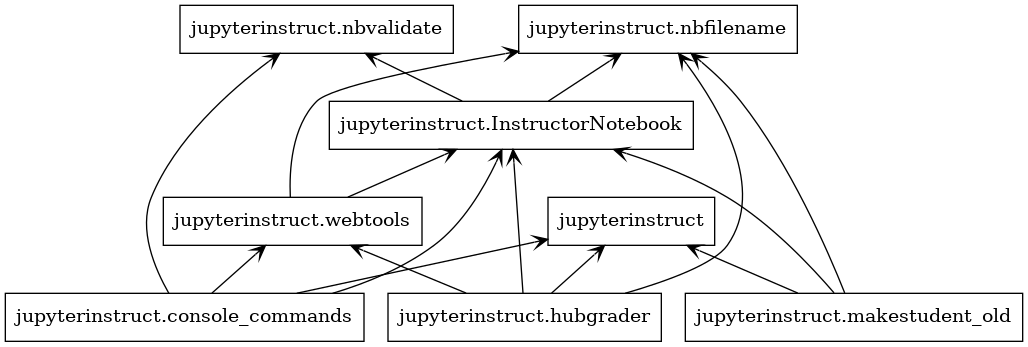 45 |
46 |
47 | ## Usage
48 |
49 | Please check out the [Example.ipynb](https://colbrydi.github.io/jupyterinstruct/Examples) for some instructions on how to use Jupyterinstruct.
50 |
51 | [Click here for package documentation](https://colbrydi.github.io/jupyterinstruct/jupyterinstruct/index.html)
52 |
53 | ## Accessible Jupyter Content
54 |
55 | Also included in this git repository is a notebook demonstrating best practices for generating accessible content in Jupyter notebooks.
56 |
57 | - [Accessible Jupyter Content](Accessable_Jupyter_content_for_INSTRUCTORS) Warning: Link broken, check with Dirk to fix this.
58 |
--------------------------------------------------------------------------------
/docs/index.html:
--------------------------------------------------------------------------------
1 |
45 |
46 |
47 | ## Usage
48 |
49 | Please check out the [Example.ipynb](https://colbrydi.github.io/jupyterinstruct/Examples) for some instructions on how to use Jupyterinstruct.
50 |
51 | [Click here for package documentation](https://colbrydi.github.io/jupyterinstruct/jupyterinstruct/index.html)
52 |
53 | ## Accessible Jupyter Content
54 |
55 | Also included in this git repository is a notebook demonstrating best practices for generating accessible content in Jupyter notebooks.
56 |
57 | - [Accessible Jupyter Content](Accessable_Jupyter_content_for_INSTRUCTORS) Warning: Link broken, check with Dirk to fix this.
58 |
--------------------------------------------------------------------------------
/docs/index.html:
--------------------------------------------------------------------------------
1 | 
 \n",
19 | "\n",
20 | "> The Jupyter Notebook is an open-source web application that allows you to create and share documents that contain live code, equations, visualizations and narrative text. Uses include: data cleaning and transformation, numerical simulation, statistical modeling, data visualization, machine learning, and much more.\n",
21 | "From:
\n",
19 | "\n",
20 | "> The Jupyter Notebook is an open-source web application that allows you to create and share documents that contain live code, equations, visualizations and narrative text. Uses include: data cleaning and transformation, numerical simulation, statistical modeling, data visualization, machine learning, and much more.\n",
21 | "From:  \n",
11 | "\n",
12 | "Image From: [Building Web Accessibility Barriers Guidelines Standards](https://www.outsystems.com/blog/posts/building-web-accessibility-barriers-guidelines-standards/)\n",
13 | "\n",
14 | "Jupyter notebooks are an amazing communication tool. They allow rich and editable multimedia content and is an intersection between a word processor, a multimedia webpage, and LaTeX. It can even run code!. This mutliple means of engagement and representations is highlighted as a major goal of [Universal Design for Learning](http://www.cast.org/our-work/about-udl.html). Jupyter notebooks use an opensource format and are easily shared making them a robust tool that is not limited by paltform. However, as with any communication tool some time and effort should be put into making the content as assessable to the audience as possible. \n",
15 | "\n",
16 | "\n",
17 | "This notebook provides some examples of the best ways I know to make content in jupyter notebooks Assessable. Feel free to use this notebook as a template for your own accessable content. "
18 | ]
19 | },
20 | {
21 | "cell_type": "markdown",
22 | "metadata": {},
23 | "source": [
24 | "### Table of Contents\n",
25 | "\n",
26 | "1. [Using Headers to organize content](#Using_Headers_to_organize_content)\n",
27 | "1. [Generating a Table of Contents](#Generating_Table_of_Contents)\n",
28 | "1. [Using Images](#Using_Images)\n",
29 | "1. [Emphasizing Text](#Emphasizing_Text)\n",
30 | "1. [Adding videos to pre-class assignments](#Adding_videos_to_pre-class_assignments)\n",
31 | "1. [Equations in notebooks](#Equations_in_notebooks)\n",
32 | "1. [Writing code inside of notebooks](#Writing_code_inside_of_notebooks)\n"
33 | ]
34 | },
35 | {
36 | "cell_type": "markdown",
37 | "metadata": {},
38 | "source": [
39 | "----\n",
40 | "
\n",
11 | "\n",
12 | "Image From: [Building Web Accessibility Barriers Guidelines Standards](https://www.outsystems.com/blog/posts/building-web-accessibility-barriers-guidelines-standards/)\n",
13 | "\n",
14 | "Jupyter notebooks are an amazing communication tool. They allow rich and editable multimedia content and is an intersection between a word processor, a multimedia webpage, and LaTeX. It can even run code!. This mutliple means of engagement and representations is highlighted as a major goal of [Universal Design for Learning](http://www.cast.org/our-work/about-udl.html). Jupyter notebooks use an opensource format and are easily shared making them a robust tool that is not limited by paltform. However, as with any communication tool some time and effort should be put into making the content as assessable to the audience as possible. \n",
15 | "\n",
16 | "\n",
17 | "This notebook provides some examples of the best ways I know to make content in jupyter notebooks Assessable. Feel free to use this notebook as a template for your own accessable content. "
18 | ]
19 | },
20 | {
21 | "cell_type": "markdown",
22 | "metadata": {},
23 | "source": [
24 | "### Table of Contents\n",
25 | "\n",
26 | "1. [Using Headers to organize content](#Using_Headers_to_organize_content)\n",
27 | "1. [Generating a Table of Contents](#Generating_Table_of_Contents)\n",
28 | "1. [Using Images](#Using_Images)\n",
29 | "1. [Emphasizing Text](#Emphasizing_Text)\n",
30 | "1. [Adding videos to pre-class assignments](#Adding_videos_to_pre-class_assignments)\n",
31 | "1. [Equations in notebooks](#Equations_in_notebooks)\n",
32 | "1. [Writing code inside of notebooks](#Writing_code_inside_of_notebooks)\n"
33 | ]
34 | },
35 | {
36 | "cell_type": "markdown",
37 | "metadata": {},
38 | "source": [
39 | "----\n",
40 | " \n",
106 | "\n",
107 | " \n",
108 | "
\n",
106 | "\n",
107 | " \n",
108 | "