14 |
15 |
16 |
26 |
27 |
41 |
--------------------------------------------------------------------------------
/server/database.js:
--------------------------------------------------------------------------------
1 | class Language {
2 | constructor(id, name, frameworksById) {
3 | this.id = id
4 | this.name = name
5 | this.frameworksById = frameworksById
6 | }
7 |
8 | frameworks() {
9 | return this.frameworksById.map(id => frameworks.find(y => y.id === id))
10 | }
11 | }
12 |
13 | class Framework {
14 | constructor(id, name) {
15 | this.id = id
16 | this.name = name
17 | }
18 | }
19 |
20 |
21 | const frameworks = [
22 | new Framework(1, 'Vue'),
23 | new Framework(2, 'React'),
24 | new Framework(3, 'Ember'),
25 | new Framework(4, 'Angular'),
26 | new Framework(5, 'Preact'),
27 |
28 | new Framework(6, 'Rails'),
29 | new Framework(7, 'Phoenix'),
30 | new Framework(8, 'Laravel'),
31 | ]
32 |
33 | const languages = [
34 | new Language(1, 'JavaScript', [1, 2, 3, 4, 5]),
35 | new Language(2, 'Ruby', [6]),
36 | new Language(3, 'Elixir', [7]),
37 | new Language(4, 'PHP', [8]),
38 | ]
39 |
40 | module.exports = {
41 | Language,
42 | Framework,
43 | languages,
44 | frameworks,
45 | }
46 |
--------------------------------------------------------------------------------
/package.json:
--------------------------------------------------------------------------------
1 | {
2 | "name": "apollo-vuex-graphql",
3 | "version": "0.1.0",
4 | "private": true,
5 | "scripts": {
6 | "serve": "vue-cli-service serve --open",
7 | "build": "vue-cli-service build",
8 | "lint": "vue-cli-service lint"
9 | },
10 | "dependencies": {
11 | "apollo-boost": "^0.1.4",
12 | "apollo-server-express": "^1.3.4",
13 | "body-parser": "^1.18.2",
14 | "cors": "^2.8.4",
15 | "express": "^4.16.3",
16 | "graphql": "^0.13.2",
17 | "graphql-tag": "^2.8.0",
18 | "graphql-tools": "^2.23.1",
19 | "vue": "^2.5.13",
20 | "vue-router": "^3.0.1",
21 | "vuex": "^3.0.1"
22 | },
23 | "devDependencies": {
24 | "@vue/cli-plugin-babel": "^3.0.0-beta.6",
25 | "@vue/cli-plugin-eslint": "^3.0.0-beta.6",
26 | "@vue/cli-service": "^3.0.0-beta.6",
27 | "vue-template-compiler": "^2.5.13"
28 | },
29 | "babel": {
30 | "presets": [
31 | "@vue/app"
32 | ]
33 | },
34 | "eslintConfig": {
35 | "root": true,
36 | "extends": [
37 | "plugin:vue/essential",
38 | "eslint:recommended"
39 | ]
40 | },
41 | "postcss": {
42 | "plugins": {
43 | "autoprefixer": {}
44 | }
45 | },
46 | "browserslist": [
47 | "> 1%",
48 | "last 2 versions",
49 | "not ie <= 8"
50 | ]
51 | }
52 |
--------------------------------------------------------------------------------
/server/index.js:
--------------------------------------------------------------------------------
1 | // modules
2 | const express = require('express')
3 | const cors = require('cors')
4 | const bodyParser = require('body-parser')
5 | const { graphqlExpress, graphiqlExpress } = require('apollo-server-express')
6 | const { makeExecutableSchema } = require('graphql-tools')
7 |
8 | // the mock data and classes
9 | const { Language, Framework, languages, frameworks } = require('./database')
10 |
11 | const typeDefs = `
12 | type Query {
13 | languages: [Language]
14 | getLanguage(id: ID!): Language
15 | }
16 |
17 | type Language {
18 | id: ID!
19 | name: String!
20 | frameworks: [Framework]
21 | }
22 |
23 | type Framework {
24 | id: ID!
25 | name: String
26 | }
27 | `
28 |
29 | const delay = () => new Promise(res => {
30 | setTimeout(() => {
31 | res(true)
32 | }, 1000)
33 | })
34 |
35 | const resolvers = {
36 | Query: {
37 | languages: async () => {
38 | await delay()
39 | return languages
40 | },
41 |
42 | getLanguage: async (_, { id }) => {
43 | await delay()
44 | const language = languages.find(x => x.id === parseInt(id))
45 | return language
46 | },
47 | }
48 | }
49 |
50 | const schema = makeExecutableSchema({
51 | typeDefs,
52 | resolvers,
53 | })
54 |
55 | const app = express()
56 | app.use(cors())
57 |
58 | // actual graphql endpoint
59 | app.use('/graphql', bodyParser.json(), graphqlExpress({ schema }))
60 |
61 | // use graphiql as well
62 | app.use('/graphiql', graphiqlExpress({ endpointURL: 'graphql' }))
63 |
64 | app.listen(5000, () => 'Listening on port 5000')
65 |
--------------------------------------------------------------------------------
/src/store.js:
--------------------------------------------------------------------------------
1 | import Vue from 'vue'
2 | import Vuex from 'vuex'
3 | import gql from 'graphql-tag'
4 | import apollo from './apolloClient'
5 |
6 | Vue.use(Vuex)
7 |
8 | const state = {
9 | languageIds: [],
10 | languages: {}
11 | }
12 |
13 | const mutations = {
14 | UPDATE_LANGUAGE(state, { id, data }) {
15 | if (!state.languageIds.includes(id)) {
16 | state.languageIds.push(id)
17 | }
18 | state.languages = {...state.languages, [id]: {...data}}
19 | },
20 |
21 | SET_LANGUAGES (state, { languages }) {
22 | const ids = languages.map(x => x.id)
23 | for (let id in ids) {
24 | if (!state.languageIds.includes(ids[id])) {
25 | state.languageIds.push(ids[id])
26 | }
27 | }
28 |
29 | for (let l in languages) {
30 | const language = languages[l]
31 | state.languages = {
32 | ...state.languages,
33 | [language.id]: {
34 | ...state.languages[language.id],
35 | ...language
36 | },
37 | }
38 | }
39 | },
40 | }
41 |
42 | const actions = {
43 | async getLanguage({ commit }, id) {
44 | console.time(`getLangById ${id}`)
45 |
46 | const query = gql`
47 | query GetLanguage($id: ID!) {
48 | getLanguage(id: $id) {
49 | id
50 | name
51 | frameworks {
52 | id
53 | name
54 | }
55 | }
56 | }`
57 |
58 | const variables = {
59 | id: id
60 | }
61 |
62 | const response = await apollo.query({
63 | query, variables
64 | })
65 |
66 | console.log(response.data.getLanguage)
67 | commit('UPDATE_LANGUAGE', { id, data: response.data.getLanguage })
68 |
69 | console.timeEnd(`getLangById ${id}`)
70 | },
71 |
72 | async getLanguages({ commit }) {
73 | console.time('getLanguages')
74 |
75 | const response = await apollo.query({
76 | query: gql`
77 | query Languages {
78 | languages {
79 | id
80 | name
81 | }
82 | }
83 | `
84 | })
85 |
86 | const { languages } = response.data
87 | commit('SET_LANGUAGES', { languages })
88 |
89 | console.timeEnd('getLanguages')
90 | }
91 | }
92 |
93 | export default new Vuex.Store({
94 | state, mutations, actions
95 | })
96 |
--------------------------------------------------------------------------------
/README.md:
--------------------------------------------------------------------------------
1 | # From GraphQL to Apollo
2 |
3 | My previous article discussed how to setup a simple GraphQL server and query it from a Vue frontend. For my personal projects, I believe this is adequate, however a more common solution in complex, production applications is a framework to bring some structure and extra features to your stack. Apollo is one such framework.
4 |
5 | To demonstrate how to use Apollo with Vue and Vuex, we will be building the following app:
6 |
7 | 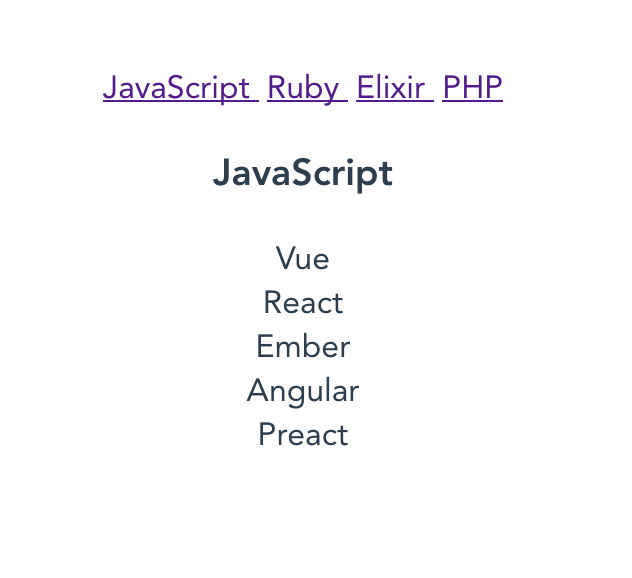
8 |
9 | The app shows a list of programming languages, and fetches the frameworks for each when selected. I will be building both the GraphQL backend and Vue frontend, using Apollo on both the server and client.
10 |
11 | The link to the source code for this project is [here](https://raw.githubusercontent.com/lmiller1990/vue-apollo-graphql).
12 |
13 | ## What is Apollo?
14 |
15 | Apollo actual refers to a few things.
16 |
17 | __The Apollo Platform__, or just Apollo for short: a family of technologies that you can incrementally add to your stack, including:
18 |
19 | - Apollo Client: a client side framework to help manage GraphQL queries, their resulting data, and other related features such as caching
20 | - Apollo Engine: Analytics and more for your Apollo-based applications
21 | - Apollo Server: a server side framework for building GraphQL servers
22 |
23 | If you are new to GraphQL, you should try __without__ Apollo first. Frameworks are a great way to boost productivity, but I believe it is critical to understand the underlying infrastructure. Learning Apollo without at least a basic understanding of GraphQL would be like learning Vue or React without learning some HTML and JavaAScript first.
24 |
25 | With that out of the way, let's get started. I will cover the following topics:
26 |
27 | - A simple backend using Apollo Server (and constrast it to a regular GraphQL backend)
28 | - Use Apollo Client in a Vue app, to fetch and display data from the GraphQL backend
29 | - How to integrate Apollo into existing apps using Vuex
30 | - Look at some of the basic merits to using Apollo (primarily, caching)
31 |
32 | One thing I will not be doing is using the VueApollo library. Apollo Client bills itself as having integration with all the popular frontends, but I think it's good to see what it looks like without the integration. This makes the benefits of libraries like VueApollo more apparently when you use them.
33 |
34 | ## Building the server
35 |
36 | Let's build a simple server. The server will show a bunch of programming languages, and let us view frameworks built with them in detail.
37 |
38 | ### Installation:
39 |
40 | We will be using the vue-cli to bootstrap a Vue app. Install that, and initialize a new project:
41 |
42 | ```
43 | vue create apollo-vuex-graphql
44 | ```
45 |
46 | `cd` in there, and install the server side packages.
47 |
48 | ```
49 | npm install apollo-server-express body-parser cors express graphql-tools
50 | ```
51 |
52 | This is what each package does:
53 | - apollo-server-express: Apollo Server + integration with express
54 | - body-parser: so express can parse the request body
55 | - cors: will let our Vue app query the backend from a different port
56 | - graphql: dependency of apollo-server-express
57 | - graphql-tools: some utilities to build GraphQL schemas, often used with Apollo Server. Maintained by the Apollo team.
58 |
59 | Next, create a folder for the server called `server`, and create `server/index.js`. This is where the server will go. We also need some data, which I will save in `server/database.js`, so create that too, so create that too. Here is some nice mock data, which should be put in `server/database.js`.
60 |
61 | ```js
62 | class Language {
63 | constructor(id, name, frameworksById) {
64 | this.id = id
65 | this.name = name
66 | this.frameworksById = frameworksById
67 | }
68 | }
69 |
70 | class Framework {
71 | constructor(id, name) {
72 | this.id = id
73 | this.name = name
74 | }
75 | }
76 |
77 |
78 | const frameworks = [
79 | new Framework(1, 'Vue'),
80 | new Framework(2, 'React'),
81 | new Framework(3, 'Ember'),
82 | new Framework(4, 'Angular'),
83 | new Framework(5, 'Preact'),
84 |
85 | new Framework(6, 'Rails'),
86 | new Framework(7, 'Phoenix'),
87 | new Framework(8, 'Laravel'),
88 | ]
89 |
90 | const languages = [
91 | new Language(1, 'JavaScript', [1, 2, 3, 4, 5]),
92 | new Language(2, 'Ruby', [6]),
93 | new Language(3, 'Elixir', [7]),
94 | new Language(4, 'PHP', [8]),
95 | ]
96 |
97 | module.exports = {
98 | Language,
99 | Framework,
100 | languages,
101 | frameworks,
102 | }
103 | ```
104 |
105 | Great. Time to get started on the server. Open `server/index.js` and `require` the necessary packages:
106 |
107 | ```js
108 | // modules
109 | const express = require('express')
110 | const cors = require('cors')
111 | const bodyParser = require('body-parser')
112 | const { graphqlExpress, graphiqlExpress } = require('apollo-server-express')
113 | const { makeExecutableSchema } = require('graphql-tools')
114 |
115 | // the mock data and classes
116 | const { Language, Framework, languages, frameworks } = require('./database')
117 | ```
118 |
119 | Now we have required the necessary packages. Building the server involves:
120 |
121 | - defining the queries and types, (called `typeDefs` by Apollo)
122 | - implementing the queries (called `resolvers` by Apollo)
123 | - starting the app with some middleware and listening
124 |
125 | ### Defining the type and queries
126 |
127 | Queries and types are defined in the same structure, called `typeDefs`. Let's start of with a single query, to make sure everything is working:
128 |
129 | ```js
130 | const typeDefs = `
131 | type Query {
132 | languages: [Language]
133 | }
134 |
135 | type Language {
136 | id: ID!
137 | name: String!
138 | }
139 | `
140 | ```
141 |
142 | This is usually done using `buildSchema` when using `graphql.js`, without Apollo.
143 |
144 | ### Implementing the resolvers
145 |
146 | We have to implement a resolver for the `languages` query. This is done in a `resolvers` object. If you have used `graphql.js`, this is the `rootValue` object.
147 |
148 | ```js
149 | const resolvers = {
150 | Query: {
151 | languages: () => languages
152 | }
153 | }
154 | ```
155 |
156 | We just return the `languages` array, which we required from `database.js`.
157 |
158 |
159 | ### Create the schema
160 |
161 | We use `makeExecutableSchema` from the `graphql-tools` module to pull everything together. This is `graphqlHTTP` in `graphql.js,` but can do a [whole bunch of other things](https://www.apollographql.com/docs/graphql-tools/generate-schema.html#makeExecutableSchema). We will just use the basic options.
162 |
163 | ```js
164 | const schema = makeExecutableSchema({
165 | typeDefs,
166 | resolvers,
167 | })
168 | ```
169 |
170 | ### Start the server
171 |
172 | Now we just need to start the server. We use `cors` to let us make requets from another port (the Vue app will be running on port 8080). We also want to enable graphliql, so we can test queries easily.
173 |
174 | ```js
175 | const app = express()
176 | app.use(cors())
177 |
178 | // actual graphql endpoint
179 | app.use('/graphql', bodyParser.json(), graphqlExpress({ schema }))
180 |
181 | // use graphiql as well
182 | app.use('/graphiql', graphiqlExpress({ endpointURL: 'graphql' }))
183 |
184 | app.listen(5000, () => 'Listening on port 5000')
185 | ```
186 |
187 | Now run `node server`. If you typed everything correctly, visiting `localhost:5000/graphiql` should show:
188 |
189 | 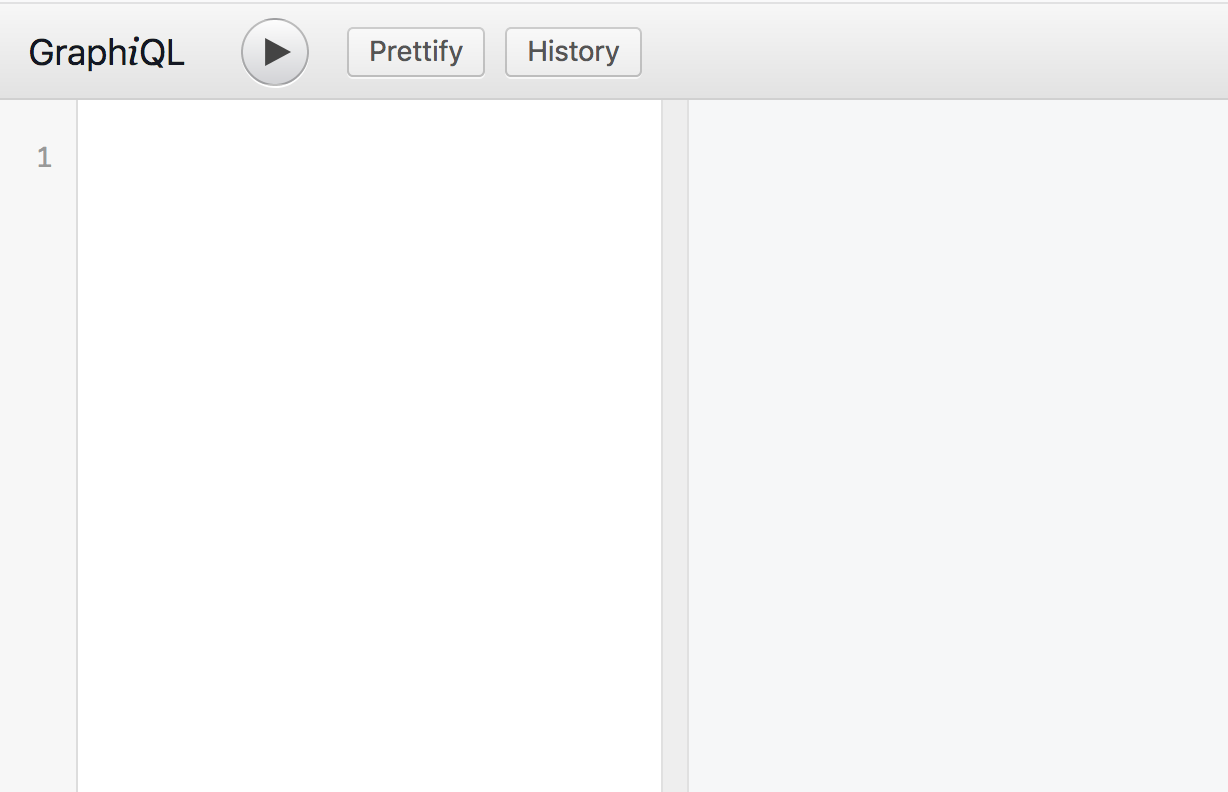
190 |
191 | Try executing the query:
192 |
193 | 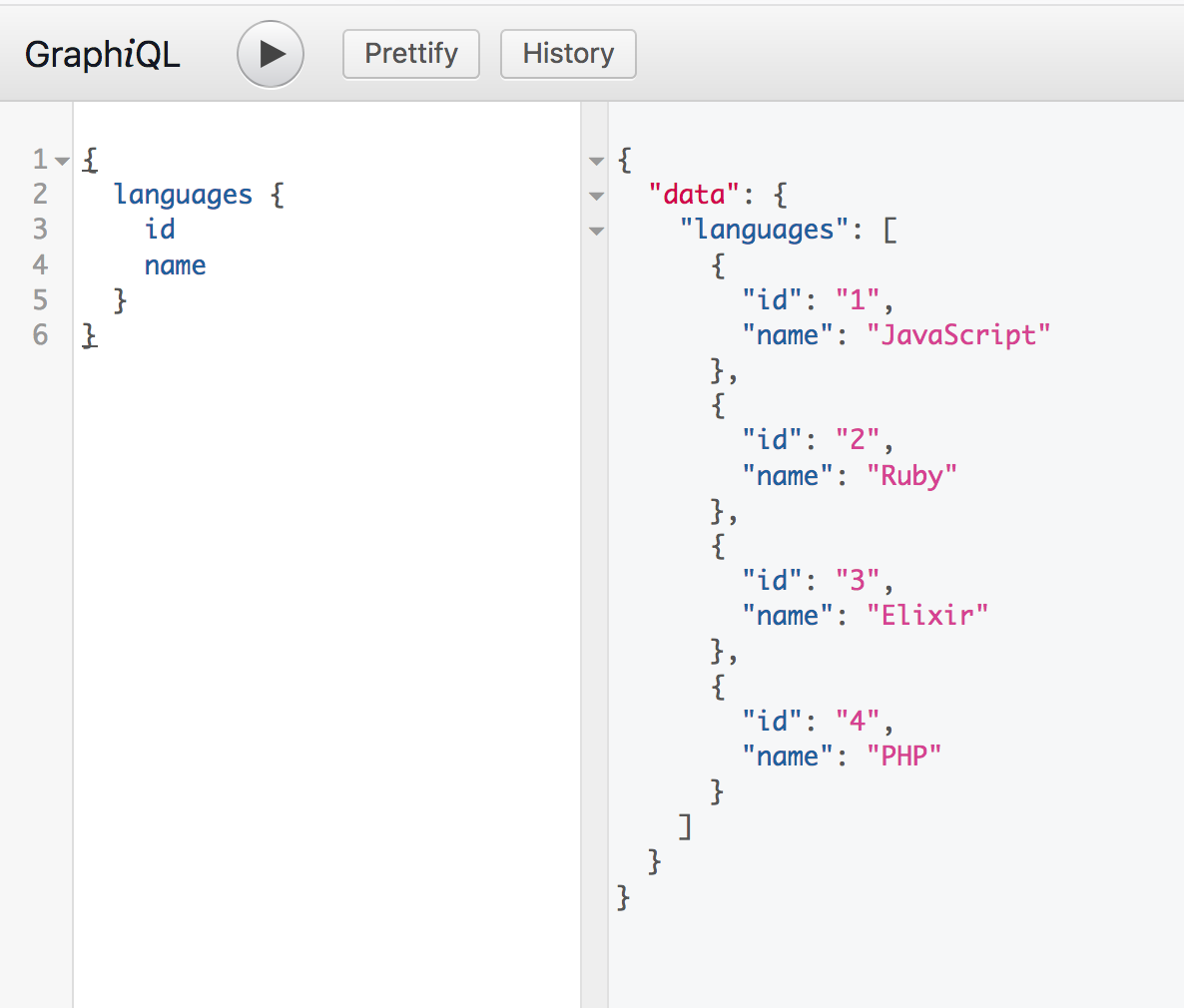
194 |
195 | Okay, looking good. We will come back and implement two more queries, `getLanguage(id)` and `getFramework(id)` soon. First, let's see how to access the data using Apollo Client.
196 |
197 | ## Apollo Client
198 |
199 | Apollo Client will let us easily query the server we just built. You can customize the Apollo Client in a number of ways. To let people get started quickly, the team provides a preconfigured client called `apollo-boost`. It includes a number of packages, such as:
200 |
201 | - apollo-client: "Where all the magic happens"
202 | - apollo-cache-inmemory: the recommended cache
203 | - graphql-tag: a package to assist in writing and parseing GraphQL queries
204 |
205 | Read the full details [here](https://www.npmjs.com/package/apollo-boost).
206 |
207 | We will also install Vue Router and Vuex, which we will be using. Install these packages by runnning:
208 |
209 | ```sh
210 | npm install apollo-boost vuex vue-router
211 | ```
212 |
213 | First, we need to create a new `ApolloClient`. Make a file inside `src` called `apolloClient.js` and add the following:
214 |
215 | ```js
216 | import ApolloClient from 'apollo-boost'
217 |
218 | export default new ApolloClient({
219 | uri: 'http://localhost:5000/graphql'
220 | })
221 | ```
222 |
223 | There are many options you can provide, for now we are just telling ApolloClient which endpoint to query. For convinience, we will attach the `ApolloClient` instance to the `Vue` prototype. Head over to `src/main.js`, and add the following:
224 |
225 | ```js
226 | import Vue from 'vue'
227 | import App from './App.vue'
228 | import apollo from './apolloClient'
229 |
230 | Vue.config.productionTip = false
231 | Vue.prototype.$apollo = apollo
232 |
233 | new Vue({
234 | render: h => h(App)
235 | }).$mount('#app')
236 | ```
237 |
238 | Now we can perform queries anywhere by running `this.$apollo.query(...)`. Let's try it out in `src/App.vue`:
239 |
240 | ```js
241 | // script section of App.vue
242 | import gql from 'graphql-tag'
243 |
244 | export default {
245 | name: 'app',
246 |
247 | async created() {
248 | const response = await this.$apollo.query({
249 | query: gql`
250 | query Languages {
251 | languages {
252 | id
253 | name
254 | }
255 | }`
256 | })
257 | console.log(response.data.languages)
258 | }
259 | }
260 | ```
261 |
262 | Next, we import `graphql` as `gql`. This makes writing GraphQL queries a bit nicer - see the syntax without `gql` in my previous article. We can now simply copy paste the test query from graphiql, and `console.log` the response.
263 |
264 | Start the Vue app by running `npm run serve` and visit `localhost:8080`. If everything went well, you can open the console and see:
265 |
266 | 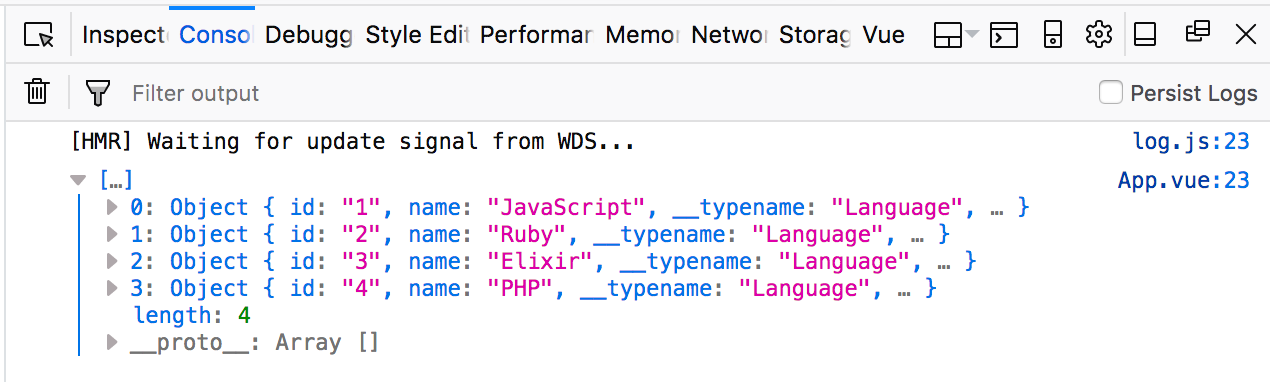
267 |
268 | So everything is working - but we haven't seen anything different or exciting yet. We could have achieved this without Apollo. Let's take a look at what Apollo can do for us.
269 |
270 | ### Caching requests
271 |
272 | To see this in action, let's add some delay to our server response intentionally. This will simulate a slow connection.
273 |
274 | In `server/index.js`, add the following function:
275 |
276 | ```js
277 | const delay = () => new Promise(res => {
278 | setTimeout(() => {
279 | res(true)
280 | }, 1000)
281 | })
282 | ```
283 |
284 | Calling `await delay()` will cause the server to wait. Update `resolvers` to use `delay`:
285 |
286 | ```js
287 | const resolvers = {
288 | Query: {
289 | languages: async () => {
290 | await delay()
291 | return languages
292 | }
293 | }
294 | }
295 | ```
296 |
297 | It will be beneficial to see just how much time passes when `getLanguages` is called. Move the query from `created` to a method called `getLanguages`. We will also add a button that will manually trigger `getLanguages`. Update `src/App.vue`:
298 |
299 | ```html
300 |
301 |
302 |
303 |
304 |
305 |
306 |
334 | ```
335 |
336 | The console should now output the time:
337 |
338 | 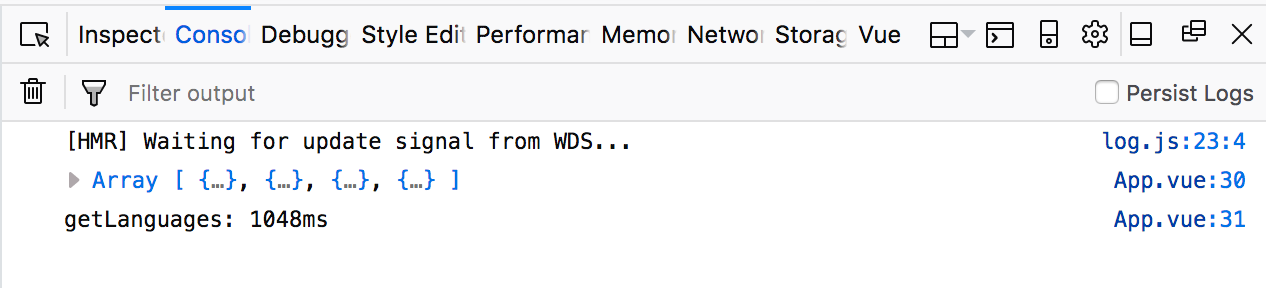
339 |
340 | It took 1048ms. 1000ms was from `delay`. Try clicking the button a few more times. You should see:
341 |
342 | 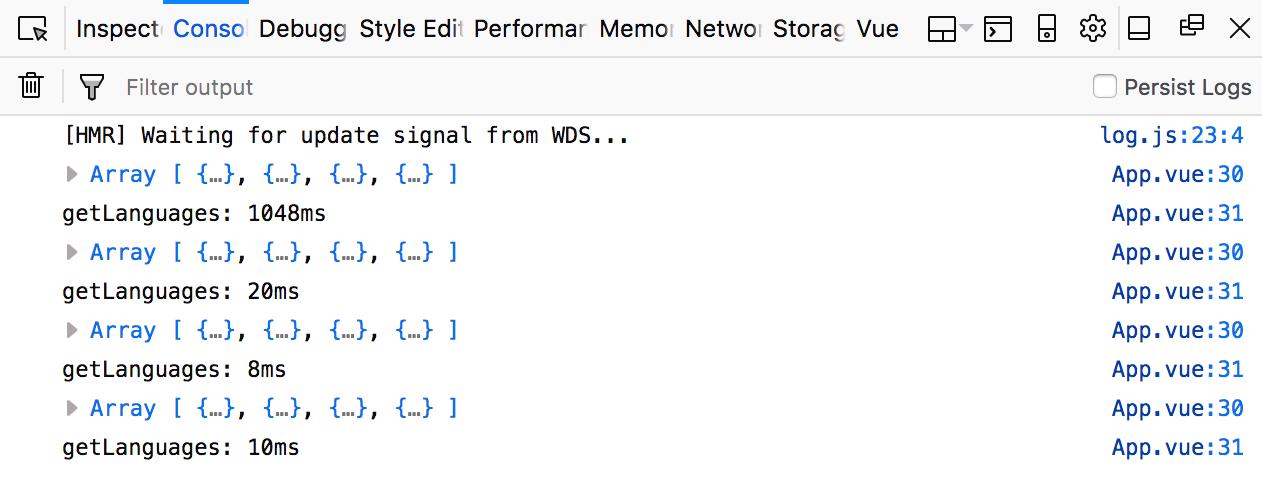
343 |
344 | Every call to `getLanguages` after the first completes in around 10ms - almost immediately. This is ApolloClient's __cache__ in action. Apollo remembers you executed `getLanguages` once already, and instead of making another request to the server, it responds with the previous result, that was cached.
345 |
346 | Try adding `this.$apollo.resetStore()` after `console.timeEnd()`, and clicking the button a bunch more times.
347 |
348 | 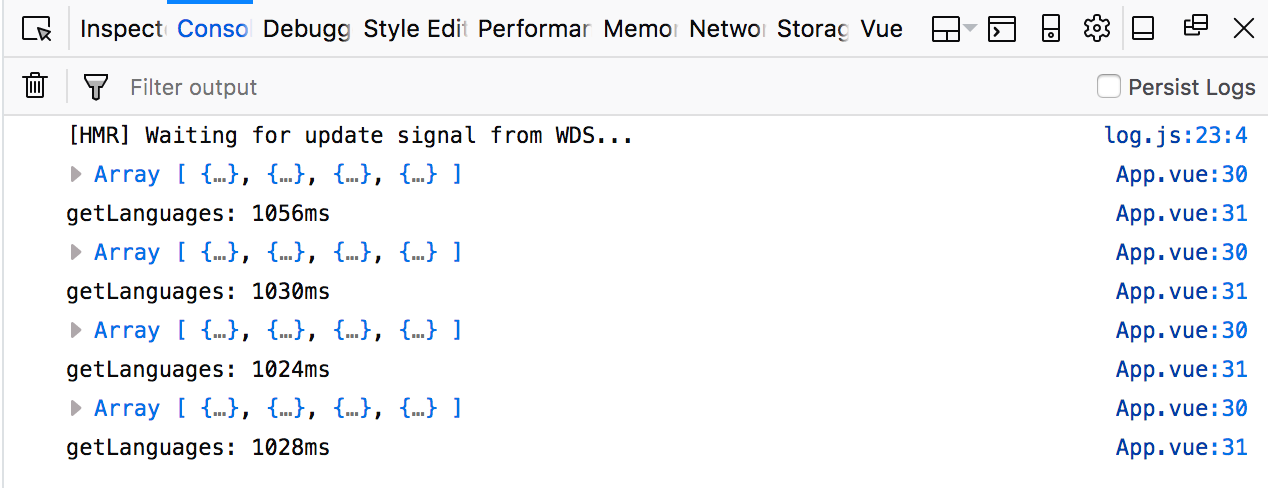
349 |
350 | `resetStore` clears Apollo's store and cache, which is where the result of the queries executed are saved by default. Sinc we are clearing the store, Apollo is now executing the query and hitting the server each time you click the button.
351 |
352 | `resetStore` can be useful in situations such as when a user logs out, and you want to clear all the data related to that user.
353 |
354 | ## Another global store?
355 |
356 | Now we have two ways to store data in large apps - Vuex/Redux, and Apollo's cache optimized store. This brings up the question: __Where does global state belong?__
357 |
358 | If you have been working with Vue or React, you are probably used to storing data in a Vuex or Redux store. Now we are introducing Apollo, we have _two_ stores. You can view the Apollo store by doing:
359 |
360 | ```js
361 | console.log(this.$apollo.store)
362 | ```
363 |
364 | 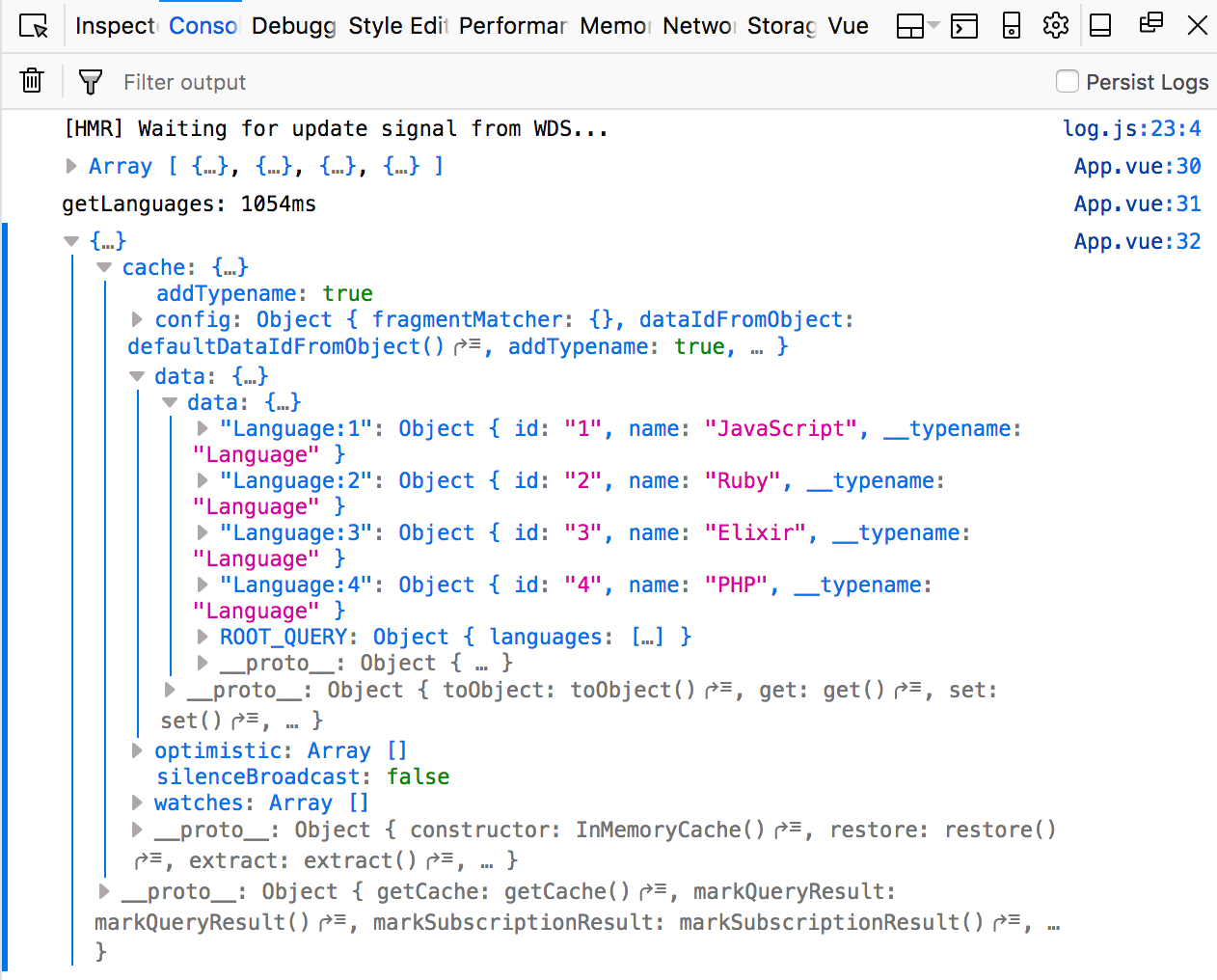
365 |
366 | Interesting enough, Apollo's store and cache are __reactive__, much like Vue and React's reactivity. If a query or mutation modifies some data, all other references to it will be automatically updated in the Apollo store.
367 |
368 | To connect the Apollo store to your frontend, and receive reactive updates to your UI, you can use [React Apollo](https://raw.githubusercontent.com/apollographql/react-apollo) or [VueApollo](https://raw.githubusercontent.com/Akryum/vue-apollo). VueApollo programmatically defines reactive properties using Vue's reactivity system, based on the result of ApolloClient query and mutation results. ReactApollo likely does the same thing, and actually used Redux internally until version 2.
369 |
370 | Basically, the client implementations provide some utilties to integrate Apollo's cache/store with the UI framework's reactivity system - a __reactive, global store__, sort of similar to Vuex and Redux. There is a library called [Apollo link state](https://raw.githubusercontent.com/apollographql/apollo-link-state), which lets you query the state, similar to what Vuex getters are used for.
371 |
372 | I still like the Flux architecture lays out, and how clean the separation of data and UI becomes, as well as how easy it is to test mutations/reducers. I also like the benefits of Apollo (optimized GraphQL queries, automatically caching). Let's try and establish a simple pattern, that will let you integrate Apollo into your existing Vue/Vuex apps gradually, without ditching your existing Vuex store. Then I will talk about how to can use Apollo entirely, as a replacement for a global state store.
373 |
374 | ### Creating the Vuex store
375 |
376 | Create a new file for the Vuex store: `src/store.js`, and add the following:
377 |
378 | ```js
379 | import Vue from 'vue'
380 | import Vuex from 'vuex'
381 | import gql from 'graphql-tag'
382 | import apollo from './apolloClient'
383 |
384 | Vue.use(Vuex)
385 |
386 | const state = {
387 | languageIds: [],
388 | languages: {}
389 | }
390 |
391 | const mutations = {
392 | SET_LANGUAGES (state, { languages }) {
393 | const ids = languages.map(x => x.id)
394 | for (let id in ids) {
395 | if (!state.languageIds.includes(ids[id])) {
396 | state.languageIds.push(ids[id])
397 | }
398 | }
399 |
400 | for (let l in languages) {
401 | const language = languages[l]
402 | state.languages = {
403 | ...state.languages,
404 | [language.id]: {
405 | ...state.languages[language.id],
406 | ...language
407 | },
408 | }
409 | }
410 | },
411 | }
412 |
413 | const actions = {
414 | async getLanguages({ commit }) {
415 | console.time('getLanguages')
416 |
417 | const response = await apollo.query({
418 | query: gql`
419 | query Languages {
420 | languages {
421 | id
422 | name
423 | }
424 | }
425 | `
426 | })
427 |
428 | const { languages } = response.data
429 | commit('SET_LANGUAGES', { languages })
430 |
431 | console.timeEnd('getLanguages')
432 | }
433 | }
434 |
435 | export default new Vuex.Store({
436 | state, mutations, actions
437 | })
438 | ```
439 |
440 | This is pretty standard Vuex. We import `apollo` from './apolloClient', and just moved the query into an action. We also added mutation, `SET_LANGUAGES`, to add the data to the store's `state`.
441 |
442 | ### Adding Vue Router
443 |
444 | We will also add Vue Router, which we will use soon. Create `src/router.js`, and inside add the following:
445 |
446 | ```js
447 | import Vue from 'vue'
448 | import VueRouter from 'vue-router'
449 | Vue.use(VueRouter)
450 |
451 | export default new VueRouter({
452 | })
453 | ```
454 |
455 | We will add some routes soon. Import the router and store in `src/main.js`:
456 |
457 | ```js
458 | import Vue from 'vue'
459 | import App from './App.vue'
460 | import apollo from './apolloClient'
461 | import store from './store'
462 | import router from './router'
463 |
464 | Vue.config.productionTip = false
465 | Vue.prototype.$apollo = apollo
466 |
467 | new Vue({
468 | store,
469 | router,
470 | render: h => h(App)
471 | }).$mount('#app')
472 | ```
473 |
474 | Lastly, update `src/App.vue`:
475 |
476 |
477 | ```html
478 |
479 |
490 |
491 |
492 |
502 | ```
503 |
504 | We are now rendering the languages in ``, which currently go nowehere. We are also no longer writing the data fetching logic in the component. Now we can easily test the component by mocking the `dispatch`.
505 |
506 | You should see this:
507 |
508 | 
509 |
510 | Now we get ApolloClient's caching, with the usual Vuex flow. We are completely ignoring some of Apollo's great features, like the reactive store, though. More on this later.
511 |
512 | ### Adding a query with variables
513 |
514 | Let's add some more queries to the server, which will let us see Apollo in action a bit more. Update `server/index.js`:
515 |
516 |
517 | ```js
518 | const typeDefs = `
519 | type Query {
520 | languages: [Language]
521 | getLanguage(id: ID!): Language
522 | }
523 |
524 | // ...
525 | }
526 |
527 | const resolvers = {
528 | Query: {
529 | // ...
530 | getLanguage: async (_, { id }) => {
531 | await delay()
532 | return languages.find(x => x.id === parseInt(id))
533 | }
534 | }
535 | }
536 | ```
537 |
538 | You are probably wondering what the `_` argument is. Read more [here](https://www.apollographql.com/docs/graphql-tools/resolvers.html#Resolver-function-signature). It is the `rootValue` object from the `graphql.js` API - it is not used that often. There are actually a few more arguments received by resolvers:
539 |
540 | - `obj` - the `rootValue` object
541 | - `data` - the data passed to the query. In our case, `id`, which we destructure
542 | - `context` - the context object, which can be used to hold information like authentication and so forth
543 | - `info` - I am not sure what this does, the documentation says it is only used in advanced cases
544 |
545 | Let's try the new query in graphiql:
546 |
547 | 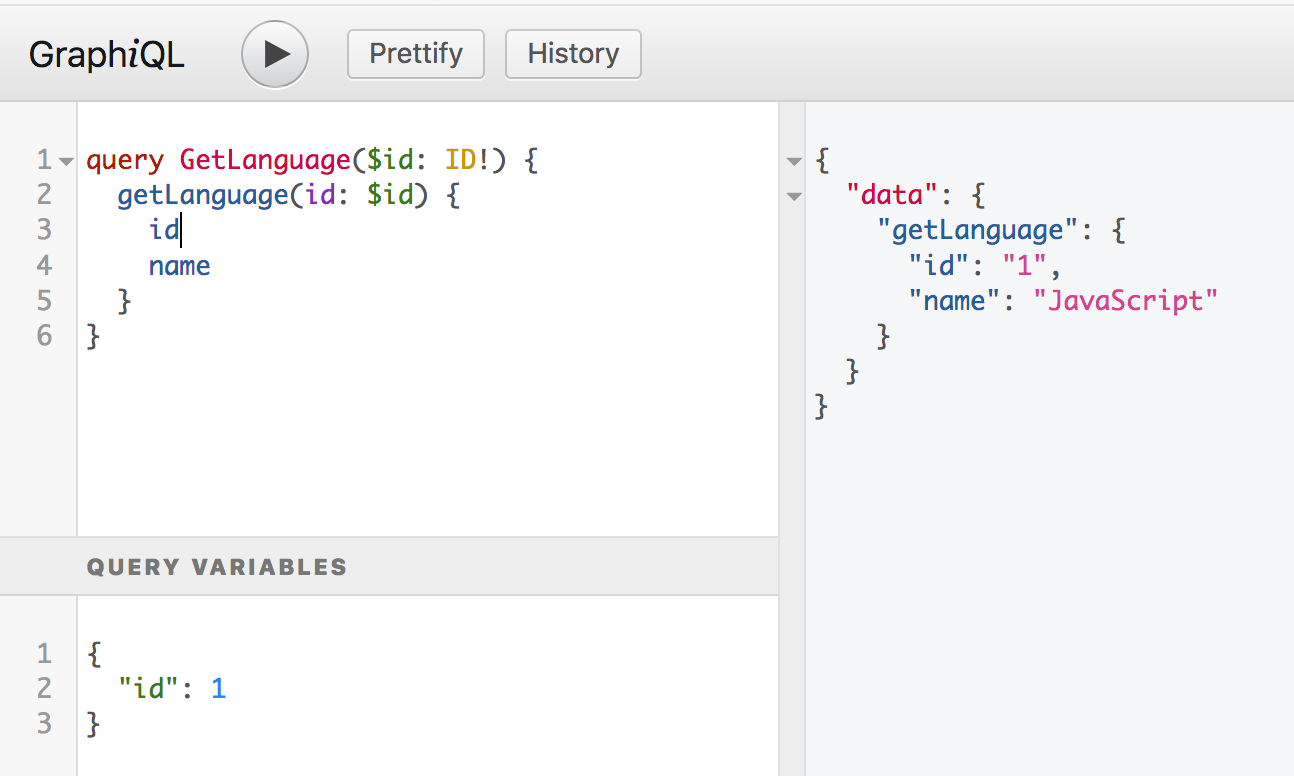
548 |
549 | Finally, a Vuex action to fetch the data:
550 |
551 | ```js
552 | async getLanguage({ commit }, id) {
553 | console.time(`getLangById ${id}`)
554 |
555 | const query = gql`
556 | query GetLanguage($id: ID!) {
557 | getLanguage(id: $id) {
558 | id
559 | name
560 | }
561 | }`
562 |
563 | const variables = {
564 | id: id
565 | }
566 |
567 | const response = await apollo.query({
568 | query, variables
569 | })
570 |
571 | commit('UPDATE_LANGUAGE', { id, data: response.data.getLanguage })
572 |
573 | console.log(response.data.getLanguage)
574 | console.timeEnd(`getLangById ${id}`)
575 | },
576 | ```
577 |
578 | Make sure the `variables` object is defined outside the `gql` query. I was trying to include it in the `gql` tag and couldn't figure out why it wouldn't work. `gql` only parses __queries__, not variables.
579 |
580 | Here is the matching mutation to save the result of `getLanguage`:
581 |
582 | ```
583 | UPDATE_LANGUAGE(state, { id, data }) {
584 | if (!state.languageIds.includes(id)) {
585 | state.languageIds.push(id)
586 | }
587 | state.languages = {...state.languages, [id]: {...data}}
588 | }
589 | ```
590 |
591 | ### Adding another route component
592 |
593 | To see this new query in action, we will add a `` component, which will handle fetching the frameworks for each language. Create a ` component in `src`: `src/LanguageContainer.vue`. Then enter the following:
594 |
595 |
596 | ```html
597 |
598 |
599 |
{{ language.name }}
600 |
601 |
602 |
603 |
623 | ```
624 |
625 | We will add the route in `routes.js` in a moment. We are using `watch` to dispatch the `getLanguage` action we made earlier. We can also add `immediate: true` to dispatch as soon as we visit the route, as well as each time it changes. The `id` will be taken from the `$route`, which was set up earlier when we wrote `
723 |
{{ language.name }}
724 |
728 | {{ framework.name }}
729 |
730 |
731 |
732 | ```
733 |
734 | 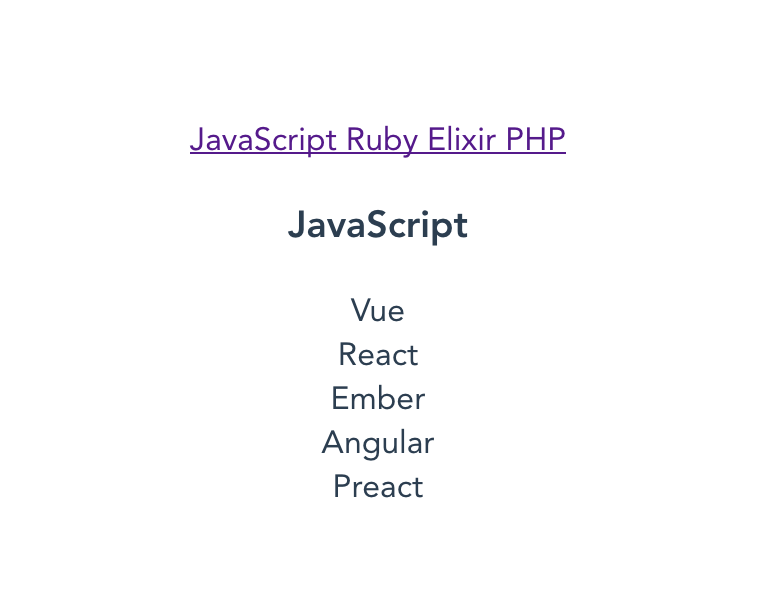
735 |
736 | ### More on Apollo caching
737 |
738 | The above demonstrates Apollo's smart caching again. Try clicking the link for a language. It should take a second to show the frameworks, due to the artificial delay we added. Try changing between languages - when you visit the link for a language you previously visited, the frameworks should display immediately. This is because Apollo cached the data, and instead of hitting the endpoint again, used the previous result.
739 |
740 | 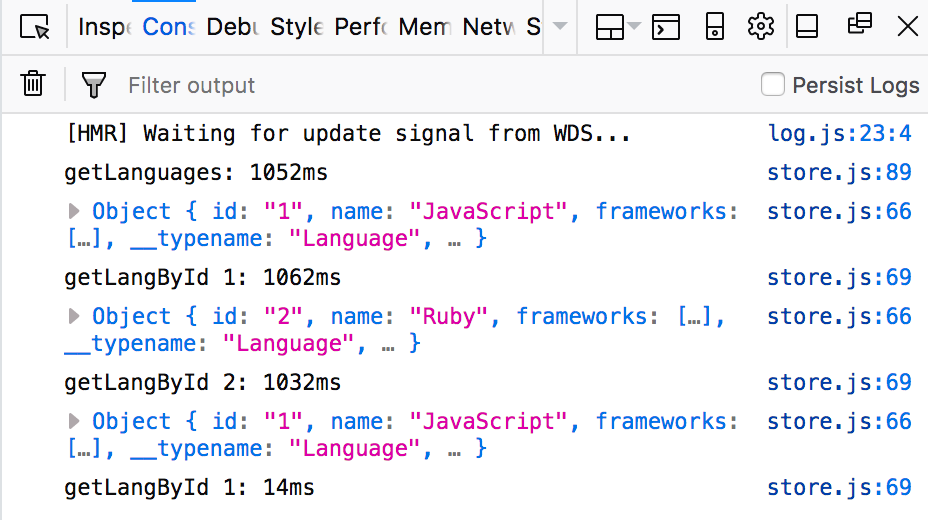
741 |
742 | See how the first `getLangById` call took 1062ms, but the second only 14ms?
743 |
744 | ### Thoughts on Vuex with Apollo
745 |
746 | While we get Apollo's convinient caching, we are ignoring a number of features, namely it's own reative store, and how it normalizes data in the store, to optimize performance. We had to write the usual Vuex boilerplate action -> mutation.
747 |
748 | There is an alternative. Apollo has a library called [link state](https://raw.githubusercontent.com/apollographql/apollo-link-state).
749 |
750 | The idea of link state is to let Apollo automatically store the result of the queries, and instead of using something like Vuex modules to structure the data, and getters/computed properties to get the data you want from the store, you simply query the Apollo data store for what you want.
751 |
752 | Basically, instead of thinking about how to structure you Vuex store, you simply let Apollo figure how out to structure the data. Then you simply write GraphQL queries (perhaps in `methods`, for example) and ask Apollo for whatever data you want.
753 |
754 | While Apollo's store is reactive internally, because Vue does not have knowledge of the Apollo store, you cannot simply use `computed` properties to watch the Apollo store. To integrate Apollo with Vue, you can use [VueApollo](https://raw.githubusercontent.com/Akryum/vue-apollo). There is [integration for most popular frameworks](https://www.apollographql.com/docs/react/integrations.html).
755 |
756 | Now I have an understanding of how Apollo works, I would like to try out VueApollo soon. The idea of leaving the store to Apollo and simply querying for the data I want is appealing. I think that approach might be great for new applications, but if you want to slowly integrate Apollo to an existing app that is using Vuex, perhaps the way presented in this article is a good way to get started. It allows since you to take advantage of Apollo's caching, and move from an existing (probably REST) API to a GraphQL API without changing you application's structure significantly.
757 |
758 | The link to the source code for this project is [here](https://raw.githubusercontent.com/lmiller1990/vue-apollo-graphql).
759 |
--------------------------------------------------------------------------------