├── pytorch
├── pytorch_basic.md
├── samples
│ ├── linear_regression.py
│ ├── TwoLayerFCSample.py
│ ├── ResNetFinetune.py
│ ├── MnistClassification.py
│ └── FashionMNIST_FusionMatrix_TensorBoard.ipynb
└── tutorial-60mins
│ ├── 1.tensor_tutorial.ipynb
│ ├── 3.neural_networks_tutorial.ipynb
│ └── 2.autograd_tutorial.ipynb
├── img
├── colab128.png
├── colab32.png
├── colab64.png
├── github32.png
├── github64.png
├── reddit32.png
├── reddit64.png
├── weibo120.png
├── weibo32.png
├── weibo64.png
├── weixin32.png
├── weixin64.png
├── zhihu128.png
├── zhihu32.png
├── zhihu64.png
├── bilibili128.png
├── bilibili32.png
├── bilibili64.png
├── github120.png
├── reddit128.png
└── weixin128.png
├── cython
├── cpython_demo.py
├── python_demo.py
├── setup.py
└── benchmark.py
├── math
├── img
│ ├── Hessian-1.png
│ ├── Jacobians-demo-1.png
│ ├── Jacobians-demo-2.png
│ ├── Eigenbasis-example.png
│ ├── matrix-determinant.png
│ ├── Jacobians-intuition-2.png
│ ├── Jacobians-intuition-3.png
│ ├── Jacobians-intuition.png
│ ├── matrix-transformation.png
│ ├── multivariate-taylor.png
│ ├── vector-change-basis.png
│ ├── vector-projection-r-s.png
│ ├── matrix-reflecting-in-a-plane.png
│ ├── projection-onto-1d-subspace.png
│ ├── projection-onto-2d-subspace.png
│ ├── eigenvector-eigenvalues-example.png
│ ├── derivative-chain-rule-explanation.png
│ ├── transformation-in-a-changed-basis.png
│ └── derivative-product-rule-explanation.png
├── README.md
└── linear-algebra.md
├── machine-learning
├── img
│ ├── svm-f1.png
│ ├── DBSCAN-Illustration.png
│ ├── DBSCAN-density-data.png
│ ├── neural-network-backpropagation-alg.png
│ └── gradient-descent-learning-rate-alpha-effect.png
├── summary.md
├── README.md
├── photo-ocr.md
├── machine-learning-intro.md
├── large-scale-machine-learning.md
├── dimension-reduction.md
└── clustering.md
├── deep-learning
├── img
│ ├── cnn-backprop-1.png
│ ├── bias.vs.variance.jpg
│ ├── cnn-backprop-pooling-layer.png
│ ├── dl-basic-summary-of-gradient-descent.png
│ ├── properties-of-word-embeddings-example-1.png
│ └── properties-of-word-embeddings-example-2.png
├── 6.few-shot-learning.md
├── 6.meta-learning.md
└── README.md
├── models
└── image-segmentation
│ └── code
│ ├── manu-2013.jpg
│ └── image-segmentation.py
├── python
├── Sklearn
│ ├── Scikit_Learn_Cheat_Sheet_Python.pdf
│ └── README.md
├── python-basic
│ ├── subprocess
│ │ ├── callee.py
│ │ └── caller.py
│ └── README.md
├── Matplotlib
│ └── README.md
├── pandas
│ └── README.md
└── numpy
│ └── README.md
├── .gitignore
├── tensorflow
├── README.md
├── code
│ ├── tensorflow.cpu.vs.gpu.benchmark.py
│ ├── tensorflow-2.0-Alpha0-helloworld.py
│ ├── tensorflow.keras.mnist.classifier.py
│ └── tensorflow.keras.save.load.model.py
└── introduction-to-tensorflow-for-AI-ML-DL
│ ├── Exercise_1_Question.ipynb
│ ├── Exercise_3_Question.ipynb
│ ├── Exercise_2_Question.ipynb
│ └── Exercise_4_Question.ipynb
├── competitions
└── kaggle.md
├── tools
└── github_formula_conversion.html
└── README.md
/pytorch/pytorch_basic.md:
--------------------------------------------------------------------------------
1 |
--------------------------------------------------------------------------------
/img/colab128.png:
--------------------------------------------------------------------------------
https://raw.githubusercontent.com/loveunk/machine-learning-deep-learning-notes/HEAD/img/colab128.png
--------------------------------------------------------------------------------
/img/colab32.png:
--------------------------------------------------------------------------------
https://raw.githubusercontent.com/loveunk/machine-learning-deep-learning-notes/HEAD/img/colab32.png
--------------------------------------------------------------------------------
/img/colab64.png:
--------------------------------------------------------------------------------
https://raw.githubusercontent.com/loveunk/machine-learning-deep-learning-notes/HEAD/img/colab64.png
--------------------------------------------------------------------------------
/img/github32.png:
--------------------------------------------------------------------------------
https://raw.githubusercontent.com/loveunk/machine-learning-deep-learning-notes/HEAD/img/github32.png
--------------------------------------------------------------------------------
/img/github64.png:
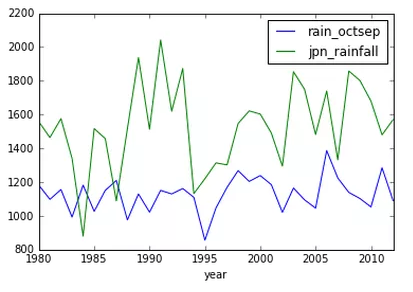
--------------------------------------------------------------------------------
https://raw.githubusercontent.com/loveunk/machine-learning-deep-learning-notes/HEAD/img/github64.png
--------------------------------------------------------------------------------
/img/reddit32.png:
--------------------------------------------------------------------------------
https://raw.githubusercontent.com/loveunk/machine-learning-deep-learning-notes/HEAD/img/reddit32.png
--------------------------------------------------------------------------------
/img/reddit64.png:
--------------------------------------------------------------------------------
https://raw.githubusercontent.com/loveunk/machine-learning-deep-learning-notes/HEAD/img/reddit64.png
--------------------------------------------------------------------------------
/img/weibo120.png:
--------------------------------------------------------------------------------
https://raw.githubusercontent.com/loveunk/machine-learning-deep-learning-notes/HEAD/img/weibo120.png
--------------------------------------------------------------------------------
/img/weibo32.png:
--------------------------------------------------------------------------------
https://raw.githubusercontent.com/loveunk/machine-learning-deep-learning-notes/HEAD/img/weibo32.png
--------------------------------------------------------------------------------
/img/weibo64.png:
--------------------------------------------------------------------------------
https://raw.githubusercontent.com/loveunk/machine-learning-deep-learning-notes/HEAD/img/weibo64.png
--------------------------------------------------------------------------------
/img/weixin32.png:
--------------------------------------------------------------------------------
https://raw.githubusercontent.com/loveunk/machine-learning-deep-learning-notes/HEAD/img/weixin32.png
--------------------------------------------------------------------------------
/img/weixin64.png:
--------------------------------------------------------------------------------
https://raw.githubusercontent.com/loveunk/machine-learning-deep-learning-notes/HEAD/img/weixin64.png
--------------------------------------------------------------------------------
/img/zhihu128.png:
--------------------------------------------------------------------------------
https://raw.githubusercontent.com/loveunk/machine-learning-deep-learning-notes/HEAD/img/zhihu128.png
--------------------------------------------------------------------------------
/img/zhihu32.png:
--------------------------------------------------------------------------------
https://raw.githubusercontent.com/loveunk/machine-learning-deep-learning-notes/HEAD/img/zhihu32.png
--------------------------------------------------------------------------------
/img/zhihu64.png:
--------------------------------------------------------------------------------
https://raw.githubusercontent.com/loveunk/machine-learning-deep-learning-notes/HEAD/img/zhihu64.png
--------------------------------------------------------------------------------
/cython/cpython_demo.py:
--------------------------------------------------------------------------------
1 | def sum(to):
2 | ans = 0
3 | for i in range(to):
4 | ans += i
5 | return ans
--------------------------------------------------------------------------------
/cython/python_demo.py:
--------------------------------------------------------------------------------
1 | def sum(to):
2 | ans = 0
3 | for i in range(to):
4 | ans += i
5 | return ans
--------------------------------------------------------------------------------
/img/bilibili128.png:
--------------------------------------------------------------------------------
https://raw.githubusercontent.com/loveunk/machine-learning-deep-learning-notes/HEAD/img/bilibili128.png
--------------------------------------------------------------------------------
/img/bilibili32.png:
--------------------------------------------------------------------------------
https://raw.githubusercontent.com/loveunk/machine-learning-deep-learning-notes/HEAD/img/bilibili32.png
--------------------------------------------------------------------------------
/img/bilibili64.png:
--------------------------------------------------------------------------------
https://raw.githubusercontent.com/loveunk/machine-learning-deep-learning-notes/HEAD/img/bilibili64.png
--------------------------------------------------------------------------------
/img/github120.png:
--------------------------------------------------------------------------------
https://raw.githubusercontent.com/loveunk/machine-learning-deep-learning-notes/HEAD/img/github120.png
--------------------------------------------------------------------------------
/img/reddit128.png:
--------------------------------------------------------------------------------
https://raw.githubusercontent.com/loveunk/machine-learning-deep-learning-notes/HEAD/img/reddit128.png
--------------------------------------------------------------------------------
/img/weixin128.png:
--------------------------------------------------------------------------------
https://raw.githubusercontent.com/loveunk/machine-learning-deep-learning-notes/HEAD/img/weixin128.png
--------------------------------------------------------------------------------
/math/img/Hessian-1.png:
--------------------------------------------------------------------------------
https://raw.githubusercontent.com/loveunk/machine-learning-deep-learning-notes/HEAD/math/img/Hessian-1.png
--------------------------------------------------------------------------------
/math/img/Jacobians-demo-1.png:
--------------------------------------------------------------------------------
https://raw.githubusercontent.com/loveunk/machine-learning-deep-learning-notes/HEAD/math/img/Jacobians-demo-1.png
--------------------------------------------------------------------------------
/math/img/Jacobians-demo-2.png:
--------------------------------------------------------------------------------
https://raw.githubusercontent.com/loveunk/machine-learning-deep-learning-notes/HEAD/math/img/Jacobians-demo-2.png
--------------------------------------------------------------------------------
/machine-learning/img/svm-f1.png:
--------------------------------------------------------------------------------
https://raw.githubusercontent.com/loveunk/machine-learning-deep-learning-notes/HEAD/machine-learning/img/svm-f1.png
--------------------------------------------------------------------------------
/math/img/Eigenbasis-example.png:
--------------------------------------------------------------------------------
https://raw.githubusercontent.com/loveunk/machine-learning-deep-learning-notes/HEAD/math/img/Eigenbasis-example.png
--------------------------------------------------------------------------------
/math/img/matrix-determinant.png:
--------------------------------------------------------------------------------
https://raw.githubusercontent.com/loveunk/machine-learning-deep-learning-notes/HEAD/math/img/matrix-determinant.png
--------------------------------------------------------------------------------
/cython/setup.py:
--------------------------------------------------------------------------------
1 | from distutils.core import setup
2 | from Cython.Build import cythonize
3 | setup(ext_modules = cythonize('cpython_demo.py'))
4 |
--------------------------------------------------------------------------------
/math/img/Jacobians-intuition-2.png:
--------------------------------------------------------------------------------
https://raw.githubusercontent.com/loveunk/machine-learning-deep-learning-notes/HEAD/math/img/Jacobians-intuition-2.png
--------------------------------------------------------------------------------
/math/img/Jacobians-intuition-3.png:
--------------------------------------------------------------------------------
https://raw.githubusercontent.com/loveunk/machine-learning-deep-learning-notes/HEAD/math/img/Jacobians-intuition-3.png
--------------------------------------------------------------------------------
/math/img/Jacobians-intuition.png:
--------------------------------------------------------------------------------
https://raw.githubusercontent.com/loveunk/machine-learning-deep-learning-notes/HEAD/math/img/Jacobians-intuition.png
--------------------------------------------------------------------------------
/math/img/matrix-transformation.png:
--------------------------------------------------------------------------------
https://raw.githubusercontent.com/loveunk/machine-learning-deep-learning-notes/HEAD/math/img/matrix-transformation.png
--------------------------------------------------------------------------------
/math/img/multivariate-taylor.png:
--------------------------------------------------------------------------------
https://raw.githubusercontent.com/loveunk/machine-learning-deep-learning-notes/HEAD/math/img/multivariate-taylor.png
--------------------------------------------------------------------------------
/math/img/vector-change-basis.png:
--------------------------------------------------------------------------------
https://raw.githubusercontent.com/loveunk/machine-learning-deep-learning-notes/HEAD/math/img/vector-change-basis.png
--------------------------------------------------------------------------------
/math/img/vector-projection-r-s.png:
--------------------------------------------------------------------------------
https://raw.githubusercontent.com/loveunk/machine-learning-deep-learning-notes/HEAD/math/img/vector-projection-r-s.png
--------------------------------------------------------------------------------
/deep-learning/img/cnn-backprop-1.png:
--------------------------------------------------------------------------------
https://raw.githubusercontent.com/loveunk/machine-learning-deep-learning-notes/HEAD/deep-learning/img/cnn-backprop-1.png
--------------------------------------------------------------------------------
/deep-learning/img/bias.vs.variance.jpg:
--------------------------------------------------------------------------------
https://raw.githubusercontent.com/loveunk/machine-learning-deep-learning-notes/HEAD/deep-learning/img/bias.vs.variance.jpg
--------------------------------------------------------------------------------
/math/img/matrix-reflecting-in-a-plane.png:
--------------------------------------------------------------------------------
https://raw.githubusercontent.com/loveunk/machine-learning-deep-learning-notes/HEAD/math/img/matrix-reflecting-in-a-plane.png
--------------------------------------------------------------------------------
/math/img/projection-onto-1d-subspace.png:
--------------------------------------------------------------------------------
https://raw.githubusercontent.com/loveunk/machine-learning-deep-learning-notes/HEAD/math/img/projection-onto-1d-subspace.png
--------------------------------------------------------------------------------
/math/img/projection-onto-2d-subspace.png:
--------------------------------------------------------------------------------
https://raw.githubusercontent.com/loveunk/machine-learning-deep-learning-notes/HEAD/math/img/projection-onto-2d-subspace.png
--------------------------------------------------------------------------------
/machine-learning/img/DBSCAN-Illustration.png:
--------------------------------------------------------------------------------
https://raw.githubusercontent.com/loveunk/machine-learning-deep-learning-notes/HEAD/machine-learning/img/DBSCAN-Illustration.png
--------------------------------------------------------------------------------
/machine-learning/img/DBSCAN-density-data.png:
--------------------------------------------------------------------------------
https://raw.githubusercontent.com/loveunk/machine-learning-deep-learning-notes/HEAD/machine-learning/img/DBSCAN-density-data.png
--------------------------------------------------------------------------------
/math/img/eigenvector-eigenvalues-example.png:
--------------------------------------------------------------------------------
https://raw.githubusercontent.com/loveunk/machine-learning-deep-learning-notes/HEAD/math/img/eigenvector-eigenvalues-example.png
--------------------------------------------------------------------------------
/models/image-segmentation/code/manu-2013.jpg:
--------------------------------------------------------------------------------
https://raw.githubusercontent.com/loveunk/machine-learning-deep-learning-notes/HEAD/models/image-segmentation/code/manu-2013.jpg
--------------------------------------------------------------------------------
/math/img/derivative-chain-rule-explanation.png:
--------------------------------------------------------------------------------
https://raw.githubusercontent.com/loveunk/machine-learning-deep-learning-notes/HEAD/math/img/derivative-chain-rule-explanation.png
--------------------------------------------------------------------------------
/math/img/transformation-in-a-changed-basis.png:
--------------------------------------------------------------------------------
https://raw.githubusercontent.com/loveunk/machine-learning-deep-learning-notes/HEAD/math/img/transformation-in-a-changed-basis.png
--------------------------------------------------------------------------------
/deep-learning/img/cnn-backprop-pooling-layer.png:
--------------------------------------------------------------------------------
https://raw.githubusercontent.com/loveunk/machine-learning-deep-learning-notes/HEAD/deep-learning/img/cnn-backprop-pooling-layer.png
--------------------------------------------------------------------------------
/math/img/derivative-product-rule-explanation.png:
--------------------------------------------------------------------------------
https://raw.githubusercontent.com/loveunk/machine-learning-deep-learning-notes/HEAD/math/img/derivative-product-rule-explanation.png
--------------------------------------------------------------------------------
/python/Sklearn/Scikit_Learn_Cheat_Sheet_Python.pdf:
--------------------------------------------------------------------------------
https://raw.githubusercontent.com/loveunk/machine-learning-deep-learning-notes/HEAD/python/Sklearn/Scikit_Learn_Cheat_Sheet_Python.pdf
--------------------------------------------------------------------------------
/deep-learning/img/dl-basic-summary-of-gradient-descent.png:
--------------------------------------------------------------------------------
https://raw.githubusercontent.com/loveunk/machine-learning-deep-learning-notes/HEAD/deep-learning/img/dl-basic-summary-of-gradient-descent.png
--------------------------------------------------------------------------------
/machine-learning/img/neural-network-backpropagation-alg.png:
--------------------------------------------------------------------------------
https://raw.githubusercontent.com/loveunk/machine-learning-deep-learning-notes/HEAD/machine-learning/img/neural-network-backpropagation-alg.png
--------------------------------------------------------------------------------
/deep-learning/img/properties-of-word-embeddings-example-1.png:
--------------------------------------------------------------------------------
https://raw.githubusercontent.com/loveunk/machine-learning-deep-learning-notes/HEAD/deep-learning/img/properties-of-word-embeddings-example-1.png
--------------------------------------------------------------------------------
/deep-learning/img/properties-of-word-embeddings-example-2.png:
--------------------------------------------------------------------------------
https://raw.githubusercontent.com/loveunk/machine-learning-deep-learning-notes/HEAD/deep-learning/img/properties-of-word-embeddings-example-2.png
--------------------------------------------------------------------------------
/deep-learning/6.few-shot-learning.md:
--------------------------------------------------------------------------------
1 | # 小样本学习
2 |
3 | 小样本学习(Few-shot learning),顾名思义,解决在train set很小的情况的小的学习问题。
4 |
5 | > 这部分将一边Survey一边整理
6 |
7 | * [一篇阿里团队关于Few-shot learning的综述](https://zhuanlan.zhihu.com/p/61215293)
--------------------------------------------------------------------------------
/machine-learning/img/gradient-descent-learning-rate-alpha-effect.png:
--------------------------------------------------------------------------------
https://raw.githubusercontent.com/loveunk/machine-learning-deep-learning-notes/HEAD/machine-learning/img/gradient-descent-learning-rate-alpha-effect.png
--------------------------------------------------------------------------------
/python/python-basic/subprocess/callee.py:
--------------------------------------------------------------------------------
1 | import argparse
2 |
3 | parser = argparse.ArgumentParser()
4 | parser.add_argument("--callee_path", type=str)
5 | args = parser.parse_args()
6 |
7 | print('callee: {}'.format(args.callee_path))
--------------------------------------------------------------------------------
/deep-learning/6.meta-learning.md:
--------------------------------------------------------------------------------
1 | # 元学习
2 |
3 | 元学习(Meta learning / learning to learn) 在《Automatic Machine Learning: Methods, Systems, Challenges》一书中给了明确的定义:通过系统地观察不同的机器学习方法在广泛的学习任务中的不同表现,从而通过学习这些经验(experience)或元数据(meta data),以便在新的学习任务中可以更快的学习。
4 |
5 |
--------------------------------------------------------------------------------
/math/README.md:
--------------------------------------------------------------------------------
1 | # 数学基础
2 |
3 | 微积分和线性代数的基础是必须要掌握的,不然对于理解学习算法的原理会有困难。
4 | 如果已经有一定的数学基础,可以先跳过这一部分,需要的时候再回来补。
5 | 这里的Notes是基于Coursera中Mathematics for Machine Learning专题做的总结。
6 |
7 | * [Calculus 微积分](calculus.md)
8 | * [Linear Algebra 线性代数](linear-algebra.md)
9 | * [PCA 主成分分析](pca.md)
10 |
11 | [回到首页](../)
12 |
--------------------------------------------------------------------------------
/.gitignore:
--------------------------------------------------------------------------------
1 | __pycache__
2 | .idea
3 | *.h5
4 | .ipynb_checkpoints
5 | .vscode
6 | tensorflow/introduction-to-tensorflow-for-AI-ML-DL/h-or-s/
7 | tensorflow/introduction-to-tensorflow-for-AI-ML-DL/*.zip
8 | tensorflow/introduction-to-tensorflow-for-AI-ML-DL/cats-v-dogs
9 | tensorflow/introduction-to-tensorflow-for-AI-ML-DL/sign-language-mnist
10 | pytorch/samples/data
11 | pytorch/samples/runs
12 |
--------------------------------------------------------------------------------
/cython/benchmark.py:
--------------------------------------------------------------------------------
1 | import cpython_demo, python_demo, time
2 |
3 | to = 100000000
4 | start = time.time()
5 | python_demo.sum(to)
6 | end = time.time()
7 | py_time = end - start
8 | print("Python time = {}".format(py_time))
9 |
10 | start = time.time()
11 | cpython_demo.sum(to)
12 | end = time.time()
13 | cy_time = end - start
14 | print("Cython time = {}".format(cy_time))
15 | print("Speedup = {}".format(py_time / cy_time))
16 |
--------------------------------------------------------------------------------
/python/python-basic/subprocess/caller.py:
--------------------------------------------------------------------------------
1 | import sys
2 | import argparse
3 | import subprocess
4 |
5 | def parse_args():
6 | parser = argparse.ArgumentParser()
7 | parser.add_argument("--path", type=str)
8 | args = parser.parse_args()
9 | return args
10 |
11 | if __name__ == "__main__":
12 | args = parse_args()
13 | print('caller: {} {}'.format(__file__, args.path))
14 |
15 | theproc0 = subprocess.Popen([sys.executable, "-u", "callee.py", "--callee_path", "000"])
16 | theproc1 = subprocess.Popen([sys.executable, "-u", "callee.py", "--callee_path", "111"])
17 | theproc0.communicate()
18 | theproc0.communicate()
19 |
--------------------------------------------------------------------------------
/pytorch/samples/linear_regression.py:
--------------------------------------------------------------------------------
1 | import torch
2 |
3 | X = torch.tensor([[0.],[1.],[2.],[3.]])
4 | Y = torch.tensor([[0.],[1.],[2.],[3.]])
5 |
6 | w = torch.tensor([[0.0]], requires_grad=True)
7 | b = torch.tensor([[0.0]], requires_grad=True)
8 |
9 | for i in range(1000):
10 | preds = torch.mm(X, w)
11 | preds = torch.add(preds, b)
12 | preds = torch.nn.functional.relu(preds)
13 |
14 | # loss
15 | loss = torch.nn.functional.mse_loss(preds, Y)
16 | print('epoch: {}, loss: {}'.format(i, loss.item()))
17 |
18 | loss.backward()
19 |
20 | # grad
21 | with torch.no_grad():
22 | w -= 0.01 * w.grad
23 | b -= 0.01 * b.grad
24 |
25 | w.grad.zero_()
26 | b.grad.zero_()
27 |
28 | print('w: {}, b: {}'.format(w.item(), b.item()))
29 |
--------------------------------------------------------------------------------
/tensorflow/README.md:
--------------------------------------------------------------------------------
1 | # TensorFlow的几个完整例子
2 |
3 | 1. [tensorflow.keras.mnist.classifier.py](code/tensorflow.keras.mnist.classifier.py):一个完整的mnist分类demo,其中涉及的技术点包括:
4 | 1. TensorFlow dataset minist的加载
5 | 2. 数据直方图打印
6 | 3. 数据归一化
7 | 4. label数据的 one hot vectors转换
8 | 5. 数据集切分(train、test)
9 | 6. CNN 模型创建
10 | 7. 保存模型图片
11 | 8. 图片数据增强
12 | 9. 绘制训练集和验证集的loss和accuracy曲线
13 | 10. 使用TensorBoard
14 | 11. 对测试集做预测
15 | 12. 对prediction的one-hot vector转换为数字
16 | 13. 计算Precision、recall、F1等
17 | 2. [tensorflow.keras.save.load.model.py](code/tensorflow.keras.save.load.model.py):讲述利用Keras api保存和加载model。
18 | 其中涉及的技术点包括:
19 | 1. 保存一个模型到存储
20 | 2. 加载已有模型
21 | 3. 使用已有的模型做分类
22 | 3. [tensorflow-2.0-Alpha0-helloworld.py](code/tensorflow-2.0-Alpha0-helloworld.py):基于TensorFlow2.0版本的2个完整的mnist分类demo。涉及:
23 | 1. TensorFlow dataset minist的加载
24 | 2. 创建自定义Model
25 | 3. 对测试集做预测
26 |
27 |
--------------------------------------------------------------------------------
/models/image-segmentation/code/image-segmentation.py:
--------------------------------------------------------------------------------
1 | """
2 | Author: Kevin
3 | Github: github.com/loveunk
4 |
5 | 这是一个image segmentation的例子,使用
6 | Felzenszwalb, Pedro F., and Daniel P. Huttenlocher.
7 | "Efficient graph-based image segmentation."
8 | International journal of computer vision 59.2 (2004): 167-181.
9 | 中介绍的方法。
10 |
11 | 关键API:skimage.segmentation.felzenszwalb()
12 | """
13 |
14 | import scipy
15 | import skimage.segmentation
16 | from matplotlib import pyplot as plt
17 |
18 | img2 = scipy.misc.imread("manu-2013.jpg", mode="L")
19 | segment_mask1 = skimage.segmentation.felzenszwalb(img2, scale=100)
20 | segment_mask2 = skimage.segmentation.felzenszwalb(img2, scale=1000)
21 |
22 | fig = plt.figure(figsize=(12, 5))
23 | ax1 = fig.add_subplot(121)
24 | ax2 = fig.add_subplot(122)
25 | ax1.imshow(segment_mask1); ax1.set_xlabel("k=100")
26 | ax2.imshow(segment_mask2); ax2.set_xlabel("k=1000")
27 | fig.suptitle("Felsenszwalb's efficient graph based image segmentation")
28 | plt.tight_layout()
29 | plt.show()
--------------------------------------------------------------------------------
/competitions/kaggle.md:
--------------------------------------------------------------------------------
1 | # Kaggle
2 |
3 | ## 简介
4 |
5 | Kaggle是一个数据建模和数据分析竞赛平台。
6 | * 企业和研究者可在其上发布数据
7 | * 统计学者和数据挖掘专家可在其上进行竞赛以产生最好的模型。
8 |
9 |
10 |
11 |
12 |
13 | 这一众包模式依赖于有众多策略可以用于解决几乎所有预测建模的问题,而研究者不可能在一开始就了解什么方法对于特定问题是最为有效的。
14 |
15 | Kaggle的目标则是试图通过众包的形式来解决这一难题,进而使数据科学成为一场运动。2017年3月8日谷歌官方博客宣布收购Kaggle。
16 |
17 | ## 加入进来
18 |
19 | [Kaggle为什么重要](https://zhuanlan.zhihu.com/p/25686876)(主要是介绍参加Kaggle的背景,及参加Kaggle一些好处)
20 |
21 | [特征工程 Feature Engineering](https://www.zhihu.com/question/29316149)(特征工程的详细解读,其实大部分都在机器学习里讲过)
22 |
23 | [Kaggle入门指南 - 技术讲解](https://zhuanlan.zhihu.com/p/25742261)(介绍了很多数据分析的技巧)
24 |
25 | [Kaggle案例 - Digit Recognition](https://fsight.qq.com/insight/excellentInfo/10005152d0f2649e06ac6f6a889d3b6d1ec2daad.html)
26 | (整体思路可以参考,但是对于数字识别案例来说,还是需要使用深度学习CNN的方法才会取得比较好的结果)
27 |
28 | ## 取得好的成绩
29 | [如何在Kaggle排行榜取得好成绩——Kaggle新人参加Digit Recognition的经历](https://zhuanlan.zhihu.com/p/58199302)
30 |
--------------------------------------------------------------------------------
/pytorch/samples/TwoLayerFCSample.py:
--------------------------------------------------------------------------------
1 | import torch
2 |
3 | N = 100
4 | lr = 1e-3
5 | epochs = 1000
6 |
7 | D_in, H, D_out = 100, 500, 100
8 | x = torch.randn(N, D_in).cuda()
9 | y = torch.randn(N, D_out).cuda()
10 |
11 |
12 | class TwoLayerNet(torch.nn.Module):
13 | def __init__(self, D_in, H, D_out):
14 | super(TwoLayerNet, self).__init__()
15 | self.l1 = torch.nn.Linear(D_in, H)
16 | self.l2 = torch.nn.ReLU()
17 | self.l3 = torch.nn.Linear(H, D_out)
18 |
19 | def forward(self, x):
20 | x = self.l1(x)
21 | x = self.l2(x)
22 | x = self.l3(x)
23 | return x
24 |
25 | # torch.nn.init.normal_(model[0].weight)
26 | # torch.nn.init.normal_(model[2].weight)
27 |
28 |
29 | model = TwoLayerNet(D_in, H, D_out).cuda()
30 |
31 | loss_fn = torch.nn.MSELoss(reduction="sum")
32 | optimizer = torch.optim.Adam(model.parameters(), lr=lr)
33 | for it in range(epochs):
34 | # forward pass
35 | y_pred = model(x).cuda()
36 |
37 | # calc loss
38 | loss = loss_fn(y_pred, y)
39 | print(it, loss.cpu().item())
40 |
41 | optimizer.zero_grad()
42 |
43 | # backward pass
44 | loss.backward()
45 |
46 | # update weights
47 | optimizer.step()
48 |
--------------------------------------------------------------------------------
/deep-learning/README.md:
--------------------------------------------------------------------------------
1 | # 深度学习
2 |
3 | 如果已经学过前面[机器学习](../macine-learning/)相关的内容,很好,因为这些内容对理解深度学习将会非常有帮助。
4 | 本质上来讲,深度学习是机器学习的一个子领域。
5 | 更狭隘一点讲,深度学习是基于机器学习里的神经网络、后向传播(Backpropagation)等原理。
6 |
7 | 这部分内容主要是基于Andrew Ng在Coursera上的《Deep Learning》、Ian Goodfellow《Deep Learning》(花书),也参考了周志华的《机器学习》和网络资源(Wikipedia、GitHub等)。
8 | 同时,为避免重复,深度学习这部分将略去在前面机器学习里已经介绍过的内容。
9 |
10 | 计划的内容划分:
11 | 1. [深度学习基础](1.deep-learning-basic.md)
12 | 2. 深度神经网络调参和优化
13 | 1. [深度学习的实践层面](2.improving-deep-neural-networks-1.practical-aspects.md)
14 | 2. [深度学习优化算法](2.improving-deep-neural-networks-2.optimization-algorithms.md)
15 | 3. [超参数调试、批量正则化和程序框架](2.improving-deep-neural-networks-3.pyperparameter-tuning.md)
16 | 3. 深度学习的工程实践
17 | 1. [机器学习策略(1)](3.structuring-machine-learning-1.ml-strategy.md)
18 | 2. [机器学习策略(2)](3.structuring-machine-learning-2.ml-strategy.md)
19 | 4. 卷积神经网络(CNN)
20 | 1. [卷积神经网络](4.convolutional-neural-network-1.foundations-of-cnn.md)
21 | 2. [深度卷积网络:实例探究](4.convolutional-neural-network-2.deep-convolutional-models.md)
22 | 3. [目标检测](4.convolutional-neural-network-3.object-detection.md)
23 | 4. [特殊应用:人脸识别和神经风格转换](4.convolutional-neural-network-4.face-recognition-and-neural-style-transfer.md)
24 | 5. 序列模型(RNN、LSTM)
25 | 1. [循环序列模型(RNN)](5.sequence-model-1.recurrent-neural-netoworks.md)
26 | 2. [自然语言处理与词嵌入](5.sequence-model-2.nlp-and-word-embeddings.md)
27 | 3. [序列模型和注意力机制](5.sequence-model-3.sequence-models-and-attention-machanism.md)
28 | 6. 进阶讨论(待补充)
29 |
--------------------------------------------------------------------------------
/machine-learning/summary.md:
--------------------------------------------------------------------------------
1 | # 总结
2 |
3 | 涉及到的内容包括:
4 |
5 | 一、`监督学习算法`。适用于具有带标签的数据和样本的,例如:
6 | * `线性回归`(Linear Regression)
7 | * `逻辑回归`(Logistics Regression)
8 | * `神经网络`(Neural Network)
9 | * `支持向量机(SVM)`
10 |
11 | 二、`无监督学习`。例如
12 | * 聚类算法
13 | * `K-Means`
14 | * `DBScan`
15 | * 数据降维
16 | * `主成分分析(PCA)`
17 | * `异常检测算法`:适用于只有无标签数据 _x(i) _ 时
18 |
19 | 三、机器学习特别的话题
20 | * `推荐系统`
21 | * `大规模机器学习系统`,包括
22 | * `MapReduce`和`并行系统`
23 | * 特别的应用
24 | * `滑动窗口分类算法`:用于CV技术
25 |
26 | 四、关于构建机器学习系统的实用建议
27 | * 理解机器学习算法是否正常工作的原因
28 | * `偏差`(Bias)和`方差`(Variance)
29 | * `正则化`(Generalization)
30 | * 怎样决定接下来怎么做的问题
31 | * 也就是说当你在开发一个机器学习系统时,什么工作才是接下来应该优先考虑的问题。
32 |
33 | * 学习算法的评价法。比如:
34 | * `混淆矩阵`(Confusion Matrix)
35 | * `查准率`(Precision rate)
36 | * `召回率`(Recall rate)
37 | * `F1分数`(F1 Score)
38 | * 数据集合划分
39 | * `训练集`(Training Set)
40 | * `交叉验证集`(Valiadtion Set)
41 | * `测试集`(Test Set)
42 | * 学习算法的调试,一些诊断法,比如
43 | * `学习曲线`(Learning Rate)
44 | * `误差分析`(Error Analysis)
45 | * `天花板分析`(Ceiling Analysis)
46 |
47 | 所有这些工具都能有效地指引你决定接下来应该怎样做,让你把时间用在刀刃上。
48 |
49 |
50 | ---
51 | 以下来自Andrew Ng的原话,送给你:
52 | > 如果你跟着课程一路走来,到现在,你应该已经感觉到自己已经成为机器学习方面的专家了吧?
53 | >
54 | > 机器学习是一门对科技、工业产生深远影响的重要学科,而现在,你已经完全具备了应用这些机器学习工具来创造伟大成就的能力。希望你能在相应的领域,应用所学的机器学习工具,构建出完美的机器学习系统,开发出无与伦比的产品和应用。
55 | 并且也希望你通过应用机器学习,不仅仅改变自己的生活,有朝一日,还要让更多的人生活得更加美好!
56 | >
57 | > 希望你们能从机器学习的学习中有所收获!
58 |
59 | ---
60 | 如果这里的内容有帮到你,欢迎在GitHub代码库点赞;如果有发现错误,亦请在Github直接提交Issue或Pull Request,谢谢。
61 | * GitHub: [https://github.com/loveunk/machine-learning-deep-learning-notes/](https://github.com/loveunk/machine-learning-deep-learning-notes/)
62 |
--------------------------------------------------------------------------------
/tensorflow/code/tensorflow.cpu.vs.gpu.benchmark.py:
--------------------------------------------------------------------------------
1 | """
2 | Author: Kevin
3 | Github: github.com/loveunk
4 |
5 | 使用一个简单的conv2d网络测试CPU & GPU的性能对比
6 |
7 | 测试环境:TensorFlow:1.13.1
8 | """
9 |
10 | import tensorflow as tf
11 | import timeit
12 | import os
13 | os.environ['TF_CPP_MIN_LOG_LEVEL'] = '2'
14 |
15 | # See https://www.tensorflow.org/tutorials/using_gpu#allowing_gpu_memory_growth
16 | config = tf.ConfigProto()
17 | config.gpu_options.allow_growth = True
18 |
19 | with tf.device('/cpu:0'):
20 | random_image_cpu = tf.random_normal((100, 1000, 100, 3))
21 | net_cpu = tf.layers.conv2d(random_image_cpu, 32, 7)
22 | net_cpu = tf.reduce_sum(net_cpu)
23 |
24 | with tf.device('/gpu:0'):
25 | random_image_gpu = tf.random_normal((100, 1000, 100, 3))
26 | net_gpu = tf.layers.conv2d(random_image_gpu, 32, 7)
27 | net_gpu = tf.reduce_sum(net_gpu)
28 |
29 | sess = tf.Session(config=config)
30 |
31 | # Test execution once to detect errors early.
32 | try:
33 | sess.run(tf.global_variables_initializer())
34 | except tf.errors.InvalidArgumentError:
35 | print(
36 | '如果出了这个Error表示GPU配置不成功!\n\n')
37 | raise
38 |
39 |
40 | def cpu():
41 | sess.run(net_cpu)
42 |
43 |
44 | def gpu():
45 | sess.run(net_gpu)
46 |
47 |
48 | # Runs the op several times.
49 | print('Time (s) to convolve 32x7x7x3 filter over random 100x1000x100x3 images '
50 | '(batch x height x width x channel). Sum of ten runs.')
51 | print('CPU (s):')
52 | cpu_time = timeit.timeit('cpu()', number=10, setup="from __main__ import cpu")
53 | print(cpu_time)
54 | print('GPU (s):')
55 | gpu_time = timeit.timeit('gpu()', number=10, setup="from __main__ import gpu")
56 | print(gpu_time)
57 | print('GPU speedup over CPU: {}x'.format(int(cpu_time / gpu_time)))
58 |
59 | sess.close()
60 |
--------------------------------------------------------------------------------
/python/Matplotlib/README.md:
--------------------------------------------------------------------------------
1 | # Matplotlib
2 |
3 | _Matplotlib_ 是一个 _Python_ 2D绘图库,可以生成各种硬拷贝格式和跨平台交互式环境的出版物质量数据。Matplotlib可用于 _Python_ 脚本,_Python_ 和 _IPython_ shell,_Jupyter_ 笔记本,Web应用程序服务器和四个图形用户界面工具包。
4 |
5 |
6 |
7 | - [Matplotlib](#matplotlib)
8 | - [画图基本说明](#画图基本说明)
9 | - [简单的例子](#简单的例子)
10 | - [多个子图](#多个子图)
11 | - [关于画图的一点意见](#关于画图的一点意见)
12 | - [Reference](#reference)
13 |
14 |
15 |
16 | ## 画图基本说明
17 | 这张图说明了图的各个部分
18 |
19 |
20 |
21 |
22 | ## 简单的例子
23 | ``` python
24 | import matplotlib.pyplot as plt
25 | import numpy as np
26 |
27 | x = np.linspace(0, 2, 100)
28 |
29 | plt.plot(x, x, label='linear')
30 | plt.plot(x, x**2, label='quadratic')
31 | plt.plot(x, x**3, label='cubic')
32 |
33 | plt.xlabel('x label')
34 | plt.ylabel('y label')
35 |
36 | plt.title("Simple Plot")
37 | plt.legend()
38 | plt.show()
39 | ```
40 |
41 |
42 |
43 |
44 | ## 多个子图
45 | ``` python
46 | def my_plotter(ax, data1, data2, param_dict):
47 | out = ax.plot(data1, data2, **param_dict)
48 | return out
49 |
50 | fig, (ax1, ax2) = plt.subplots(1, 2)
51 | my_plotter(ax1, data1, data2, {'marker': 'x'})
52 | my_plotter(ax2, data3, data4, {'marker': 'o'})
53 | ```
54 |
55 |
56 |
57 |
58 |
59 | ## 关于画图的一点意见
60 | 这里并未总结很多画图的知识点,因为对于画图,个人认为初期不用花时间系统的学习所有画图技巧。只用对各种图的类型有一个概念或印象,在有需求的时候再查资料学习不迟。结合我自身的经验,几年前因为发论文的需要,有大量各种的图需要制作,而彼时我对MATLAB画图是一点不懂,也是遇到问题就Google、查资料各个击破。当然最终论文发表是没问题的,甚至被同学讲画的很Fancy。
61 |
62 | ## Reference
63 | * [Matplotlib官方文档](https://matplotlib.org/tutorials/index.html)
64 | * [Matplotlib中文文档](https://www.matplotlib.org.cn/)
65 |
66 | [回到目录](#matplotlib)
67 |
--------------------------------------------------------------------------------
/tensorflow/introduction-to-tensorflow-for-AI-ML-DL/Exercise_1_Question.ipynb:
--------------------------------------------------------------------------------
1 | {
2 | "nbformat": 4,
3 | "nbformat_minor": 0,
4 | "metadata": {
5 | "colab": {
6 | "name": "Exercise 1 - House Prices - Question.ipynb",
7 | "version": "0.3.2",
8 | "provenance": []
9 | },
10 | "kernelspec": {
11 | "name": "python3",
12 | "display_name": "Python 3"
13 | }
14 | },
15 | "cells": [
16 | {
17 | "cell_type": "markdown",
18 | "metadata": {
19 | "id": "mw2VBrBcgvGa",
20 | "colab_type": "text"
21 | },
22 | "source": [
23 | "In this exercise you'll try to build a neural network that predicts the price of a house according to a simple formula.\n",
24 | "\n",
25 | "So, imagine if house pricing was as easy as a house costs 50k + 50k per bedroom, so that a 1 bedroom house costs 100k, a 2 bedroom house costs 150k etc.\n",
26 | "\n",
27 | "How would you create a neural network that learns this relationship so that it would predict a 7 bedroom house as costing close to 400k etc.\n",
28 | "\n",
29 | "Hint: Your network might work better if you scale the house price down. You don't have to give the answer 400...it might be better to create something that predicts the number 4, and then your answer is in the 'hundreds of thousands' etc."
30 | ]
31 | },
32 | {
33 | "cell_type": "code",
34 | "metadata": {
35 | "id": "PUNO2E6SeURH",
36 | "colab_type": "code",
37 | "colab": {}
38 | },
39 | "source": [
40 | "import tensorflow as tf\n",
41 | "import numpy as np\n",
42 | "from tensorflow import keras\n",
43 | "model = tf.keras.Sequential([keras.layers.Dense(units=1, input_shape=[1])])\n",
44 | "model.compile(optimizer='sgd', loss='mean_squared_error')\n",
45 | "xs = np.array([1.0, 2.0, 3.0, 4.0, 5.0, 6.0], dtype=float)\n",
46 | "ys = np.array([1.0, 1.5, 2.0, 2.5, 3.0, 3.5], dtype=float)\n",
47 | "model.fit(xs, ys, epochs=1000)\n",
48 | "print(model.predict([7.0]))"
49 | ],
50 | "execution_count": 0,
51 | "outputs": []
52 | }
53 | ]
54 | }
--------------------------------------------------------------------------------
/machine-learning/README.md:
--------------------------------------------------------------------------------
1 | # 机器学习
2 |
3 | 内容主要参考吴恩达(Andrew Ng)的Machine Learning以及周志华的西瓜书、网络资源(如Wikipedia、GitHub)等。
4 |
5 | 如发现错误或有需要补充的内容,请在GitHub直接提交Issue或Pull Request,谢谢。
6 | * GitHub:[https://github.com/loveunk/machine-learning-deep-learning-notes/](https://github.com/loveunk/machine-learning-deep-learning-notes/)
7 | * 配套的练习(Jupyter Notebook/Python)地址:https://github.com/loveunk/ml-ipynb
8 |
9 | 内容目录结构:
10 |
11 | ## [绪论](machine-learning-intro.md)
12 | - 绪论
13 | - 机器学习技术的分类
14 | - 学习类问题的分类
15 | - 定义
16 | - 专有名词
17 | - 机器学习案例
18 | - 数据挖掘
19 | - 计算机视觉
20 | - 自然语言处理
21 | - 语音识别
22 | - 机器决策
23 | - 几点建议
24 | - 学习路径
25 | - 学习原则
26 |
27 | ## [线性回归](linear-regression.md)
28 | - 单变量线性回归 (Linear Regression with One Variable)
29 | - 模型表示
30 | - 代价函数
31 | - 梯度下降
32 | - 梯度下降的直观理解
33 | - 梯度下降的线性回归
34 | - 多变量线性回归 (Linear Regression with Multiple Variables)
35 | - 多维特征
36 | - 多变量梯度下降
37 | - 梯度下降法实践1 - 特征缩放
38 | - 数据的标准化 (Normalization)
39 | - 梯度下降法实践2 - 学习率 (Learning Rate)
40 | - 特征和多项式回归
41 | - 正规方程 Normal Equations
42 | - 对比梯度下降和正规方程
43 | - 正规方程及不可逆性
44 |
45 | ## [逻辑回归](logistic-regression.md)
46 | - Hypothesis 表示
47 | - 边界判定
48 | - 代价函数
49 | - 梯度下降算法
50 | - 多类别分类:一对多
51 | - 正则化 Regularization
52 | - 过拟合的问题
53 | - 代价函数
54 | - 正则化线性回归
55 | - 正则化与逆矩阵
56 | - 正则化的逻辑回归模型
57 |
58 | ## [神经网络](neural-networks.md)
59 | - 背景介绍
60 | - 为什么需要神经网络
61 | - 神经元和大脑
62 | - 模型表示
63 | - 神经元模型:逻辑单元
64 | - 前向传播
65 | - 神经网络架构
66 | - 神经网络应用
67 | - 神经网络解决多分类问题
68 | - 反向传播 Backpropagation
69 | - 代价函数 Cost Function
70 | - 反向传播算法
71 | - 反向传播算法的直观理解
72 | - 梯度检验 Gradient Checking
73 | - 随机初始化
74 | - 总结
75 | - 网络结构
76 | - 训练神经网络
77 | - 自动驾驶的例子
78 |
79 | ## [打造实用的机器学习系统](advice-for-appying-and-system-design.md)
80 | - 应用机器学习算法的建议
81 | - 评估一个假设函数 Evaluating a Hypothesis
82 | - 模型选择和交叉验证集 Model Selection
83 | - 偏差(Bias)和方差(Variance)
84 | - 正则化和偏差/方差
85 | - 学习曲线
86 | - 总结:决定下一步做什么
87 | - 机器学习系统设计
88 | - 误差分析 Error Analysis
89 | - 类偏斜的误差度量
90 | - 查准率和查全率之间的权衡
91 | - 机器学习的数据
92 |
93 | ## [支持向量机 SVM](svm.md)
94 | - 优化目标
95 | - 大边界
96 | - 大边界分类背后的数学
97 | - 核函数
98 | - 使用SVM
99 | - 什么时候使用SVM
100 |
101 | ## [聚类算法](clustering.md)
102 | - K-Means聚类
103 | - 优化目标
104 | - 随机初始化
105 | - 选择聚类数
106 | - DBScan聚类
107 | - 复杂度
108 | - 优点
109 | - 距离计算
110 |
111 | ## [数据降维](dimension-reduction.md)
112 | - 数据降维的动机
113 | - 数据降维
114 | - 数据可视化
115 | - PCA 主成分分析问题
116 | - 从压缩数据中恢复
117 | - 选择主成分的数量
118 | - PCA应用建议
119 |
120 | ## [异常检测](anomaly-detection.md)
121 | - 高斯分布
122 | - 基于高斯分布的异常检测算法
123 | - 开发和评价异常检测系统
124 | - 异常检测与监督学习对比
125 | - 选择特征
126 | - 误差分析
127 | - 异常检测误差分析
128 | - 多元高斯分布
129 | - 使用多元高斯分布进行异常检测
130 |
131 | ## [推荐系统](recommender-system.md)
132 | - 问题描述
133 | - 基于内容的推荐系统
134 | - 代价函数
135 | - 协同过滤
136 | - 协同过滤算法
137 | - 向量化:低秩矩阵分解
138 | - 均值归一化
139 |
140 | ## [大规模机器学习](large-scale-machine-learning.md)
141 | - 大型数据集的学习
142 | - 确认大规模的训练集是否必要
143 | - 随机梯度下降法 Stochastic Gradient Descent (SGD)
144 | - 小批量梯度下降 Mini-Batch Gradient Descent
145 | - 随机梯度下降收敛
146 | - 在线学习 Online Learning
147 | - MapReduce和数据并行
148 |
149 | ## [应用案例照片文字识别](photo-ocr.md)
150 | - 图片文字识别
151 | - 滑动窗口
152 | - 获取更多数据
153 | - 天花板分析:你最该关注哪部分子任务
154 |
155 | ## [总结](summary.md)
156 |
157 | [回到顶部](#机器学习)
158 |
--------------------------------------------------------------------------------
/machine-learning/photo-ocr.md:
--------------------------------------------------------------------------------
1 | # 综合案例:照片文字识别
2 |
3 |
4 |
5 | - [综合案例:照片文字识别](#综合案例照片文字识别)
6 | - [图片文字识别](#图片文字识别)
7 | - [滑动窗口](#滑动窗口)
8 | - [获取更多数据](#获取更多数据)
9 | - [天花板分析:你最该关注哪部分子任务](#天花板分析你最该关注哪部分子任务)
10 |
11 |
12 |
13 | ## 图片文字识别
14 | 从图像中提取文字是一个很常见的应用场景,比如Google此前发起的纸质书籍电子化的项目。
15 |
16 | 具体来讲,图像文字识别应用是指,从一张给定的图片中识别文字。
17 | 这比从一份扫描文档中识别文字要复杂的多。
18 |
19 | 如下图,是从一张街拍照片里提取店铺名等信息:
20 |
21 |
22 |
23 |
24 | 思路如下:
25 |
26 | 1. **文字侦测(Text detection)**:将图片上的文字与其他环境对象分离开来
27 |
28 | 2. **字符切分(Character segmentation)**:将文字分割成一个个单一的字符
29 |
30 | 3. **字符分类(Character classification)**:确定每一个字符是什么。
31 |
32 | 可以用任务流程图(pipeline)来拆分问题,每一项子任务可以由一个单独的小队来负责解决:
33 |
34 |
35 |
36 |
37 |
38 | ## 滑动窗口
39 | 滑动窗口是用来从图像中提取对象的技术。
40 |
41 | 假使需要在一张图片中识别行人,主要步骤包括:
42 | 1. **训练模型**:用大量固定尺寸的图片(训练集)训练能够准确识别行人的模型。
43 | 2. **裁剪目标图像,并识别**:依据训练集的图片尺寸,在要做行人识别的图片上进行剪裁(设定一个窗口),然后将剪裁得到的切片交给模型,让模型判断是否为行人,然后在图片上滑动窗口重新进行剪裁,将新剪裁的切片也交给模型进行判断,如此循环直至将图片全部检测完。
44 | 3. **缩放窗口,重复上一步**:按比例放大剪裁的区域,再以新的尺寸对图片进行剪裁,将新剪裁的切片按比例缩小至模型所采纳的尺寸,交给模型进行判断,如此循环。
45 |
46 |
47 |
48 |
49 |
50 | 滑动窗口技术也被用于文字识别:
51 |
52 | **一、提取文字区域**
53 | 1. **训练模型**:训练模型能够区分字符与非字符
54 | 2. **滑动窗口识别字符,拼接字符区域并扩展**:用滑动窗口技术识别字符,一旦完成了字符的识别,将识别得出的区域进行扩展,然后将重叠的区域进行合并。
55 | 3. 以宽高比作为过滤条件,过滤掉高度比宽度更大的区域(认为单词的长度通常比高度要大)。
56 |
57 | 下图中绿色的区域是经过这些步骤后被认为是文字的区域,而红色的区域是被忽略的。
58 |
59 |
60 |
61 |
62 | **二、分割字符**
63 |
64 | 1. 训练一个模型来完成将文字分割成一个个字符的任务,需要的训练集由单个字符的图片和两个相连字符之间的图片来训练模型。
65 | 2. 使用滑动窗口技术来进行字符识别。
66 |
67 |
68 |
69 |
70 |
71 |
72 |
73 |
74 | **三、字符分类阶段**
75 |
76 | 1. 利用神经网络、支持向量机或者逻辑回归算法训练一个分类器即可
77 |
78 |
79 | ## 获取更多数据
80 |
81 | 如果模型是低方差的,那获得更多的数据用于训练模型,是能够有更好的效果的。那怎样获得数据?
82 |
83 | 一、人工地制造
84 |
85 | * 以文字识别应用为例,可以在字体网站下载各种字体,然后利用这些不同的字体配上各种不同的随机背景图片创造出一些用于训练的实例,这能够获得一个无限大的训练集。这是从零开始创造实例。
86 |
87 | 二、利用已有的数据,然后对其进行修改:
88 |
89 | * 例如将已有的字符图片进行**扭曲、旋转、模糊**处理。
90 | * 只要认为实际数据有可能和经过这样处理后的数据类似,便可以用这样的方法来创造大量的数据。
91 |
92 | 总结获得更多数据的几种方法:
93 | * 人工数据合成
94 | * 人工地制造
95 | * 扩展已有数据(例如图片的扭曲旋转模糊等)
96 | * 手动收集、标记数据
97 | * 众包(Crowdsourcing)
98 |
99 | ## 天花板分析:你最该关注哪部分子任务
100 |
101 | 在机器学习的应用中,通常需要通过几个步骤才能进行最终的预测。
102 | 如何知道哪一部分最值得花时间和精力去改善呢?
103 | 这个问题可以通过**天花板分析**来回答。
104 |
105 | 回到文字识别应用中,**任务流程图**如下:
106 |
107 |
108 |
109 |
110 | 流程图中每一部分的输出都是下一部分的输入。
111 |
112 | 在**天花板分析**中,选取一部分,手工提供100%正确的输出结果,然后看应用的整体效果提升了多少。假使例子中总体效果为72%的正确率。
113 |
114 | 如果令 `Text Detection`部分输出的结果100%正确,发现系统的总体效果从72%提高到了89%。这意味着很可能会希望投入时间精力来提高 `Text Detection`部分。
115 |
116 | 接着手动选择数据,让`Character Segmentation`输出的结果100%正确,发现系统的总体效果只提升了1%,这意味着,`Text Detection`部分可能已经足够好了。
117 |
118 | 最后手工选择数据,让`Character Recognition`输出的结果100%正确,系统的总体效果又提升了10%,这意味着可能也会应该投入更多的时间和精力来提高应用的总体表现。
119 |
120 |
121 |
122 |
123 |
124 | 总的思想是,确定哪个子模块对整体的性能影响最大。花最多的时间和人力在这个模块上。然后是下一个最值得投入的模块,依次类推。
125 |
126 | [回到顶部](#综合案例:照片文字识别)
127 |
--------------------------------------------------------------------------------
/python/Sklearn/README.md:
--------------------------------------------------------------------------------
1 | # Scikit-learn
2 |
3 |
4 | - [Scikit-learn](#scikit-learn)
5 | - [学习类问题的分类](#学习类问题的分类)
6 | - [开始使用 Scikit-learn](#开始使用-scikit-learn)
7 | - [加载示例数据集](#加载示例数据集)
8 | - [学习和预测](#学习和预测)
9 | - [构建估计器](#构建估计器)
10 | - [选择模型参数](#选择模型参数)
11 | - [训练模型](#训练模型)
12 | - [预测未知数据](#预测未知数据)
13 | - [保存模型](#保存模型)
14 | - [约定](#约定)
15 | - [类型转换](#类型转换)
16 | - [再次训练和更新参数](#再次训练和更新参数)
17 | - [多分类与多标签拟合](#多分类与多标签拟合)
18 | - [更多推荐阅读](#更多推荐阅读)
19 |
20 |
21 |
22 | **Scikit-learn**(简称`sklearn`)是开源的 _Python_ 机器学习库,它基于`Numpy`和`Scipy`,包含大量数据挖掘和分析的工具,例如数据预处理、交叉验证、算法与可视化算法等。
23 |
24 | 从功能上来讲,Sklearn基本功能被分为分类,回归,聚类,数据降维,模型选择,数据预处理。
25 |
26 | 从机器学习任务的步骤来讲,Sklearn可以独立完成机器学习的六个步骤:
27 | * **选择数据**:将数据分成三组,分别是训练数据、验证数据和测试数据。
28 | * **模拟数据**:使用训练数据来构建使用相关特征的模型。
29 | * **验证模型**:使用验证数据接入模型。
30 | * **测试模型**:使用测试数据检查被验证的模型的表现。
31 | * **使用模型**:使用完全训练好的模型在新数据上做预测。
32 | * **调优模型**:使用更多数据、不同的特征或调整过的参数来提升算法的性能表现。
33 |
34 | ## 开始使用 Scikit-learn
35 | 用于导入`Scikit-learn`库的名称是`sklearn`:
36 | ``` python
37 | import sklearn
38 | ```
39 |
40 | ### 加载示例数据集
41 | 这里我们通过手写数字的识别作为例子,先加载数据:
42 | ``` python
43 | from sklearn import datasets
44 | digits = datasets.load_digits()
45 | ```
46 |
47 | 看看数据的大小:共1797行,每个数字图片是8*8的,所以有64列:
48 | ``` python
49 | print(digits.data.shape) # => (1797, 64)
50 | print(digits.target.shape) # => (1797,)
51 | ```
52 |
53 | ### 学习和预测
54 | **问题描述**:对输入的图像,预测其表示的数字。
55 | **解决方案**:输入训练集合,训练集合包括 10 个可能类别(数字 0 到 9)的样本,在这些类别上拟合一个 _估计器_ (`estimator`),预测未知样本所属的类别。
56 |
57 | #### 构建估计器
58 | 选择不同的估计器,就好比选择了不同的解决方案。估计器的一个例子是`sklearn.svm.SVC()`,它实现了支持向量分类。例子如下:
59 | ``` python
60 | from sklearn import svm
61 | clf = svm.SVC(gamma=0.001, C=100.)
62 | ```
63 |
64 | #### 选择模型参数
65 | 在上面的代码里,我们手动给定了模型参数,实际上可以使用 **网络搜索**和**交叉验证** 等工具来寻找比较好的值。
66 |
67 | #### 训练模型
68 |
69 | ``` python
70 | clf.fit(digits.data[:-1], digits.target[:-1])
71 | ```
72 |
73 | #### 预测未知数据
74 | ``` python
75 | clf.predict(digits.data[-1:]) # => array([8])
76 | ```
77 |
78 | 打印最后一张出来看看
79 | ``` python
80 | import matplotlib.pyplot as plt
81 | plt.gray()
82 | plt.matshow(digits.images[0])
83 | plt.show()
84 | ```
85 |
86 |
87 |
88 |
89 | ### 保存模型
90 | Python 的内置的持久化模块joblib将模型保存:
91 | ``` python
92 | from joblib import dump, load
93 | s = dumps(clf, "filename.joblib") # 保持此前fit的模型
94 | clf2 = load(s) # 加载之前存的模型
95 | clf2.predict(X[0:1]) # 做预测
96 | ```
97 |
98 | ### 约定
99 | #### 类型转换
100 | 除非特别指定,输入将被转换为 float64
101 |
102 | #### 再次训练和更新参数
103 | ``` python
104 | import numpy as np
105 | from sklearn.svm import SVC
106 |
107 | rng = np.random.RandomState(0)
108 | X = rng.rand(100, 10)
109 | y = rng.binomial(1, 0.5, 100)
110 | X_test = rng.rand(5, 10)
111 |
112 | clf = SVC()
113 | clf.set_params(kernel='linear').fit(X, y) # 默认内核 rbf 被改为 linear
114 | clf.predict(X_test)
115 |
116 | clf.set_params(kernel='rbf', gamma='scale').fit(X, y) # 改回到 rbf 重新训练
117 | clf.predict(X_test)
118 | ```
119 |
120 | #### 多分类与多标签拟合
121 | ``` python
122 | from sklearn.svm import SVC
123 | from sklearn.multiclass import OneVsRestClassifier
124 | from sklearn.preprocessing import MultiLabelBinarizer
125 |
126 | X = [[1, 2], [2, 4], [4, 5], [3, 2], [3, 1]]
127 | y = [[0, 1], [0, 2], [1, 3], [0, 2, 3], [2, 4]]
128 | y = MultiLabelBinarizer().fit_transform(y)
129 |
130 | classif = OneVsRestClassifier(estimator=SVC(gamma='scale',
131 | random_state=0))
132 | print(classif.fit(X, y).predict(X))
133 | ```
134 | 上述将输出
135 | ```
136 | [[1 1 0 0 0]
137 | [1 0 1 0 0]
138 | [0 1 0 1 0]
139 | [1 0 1 0 0]
140 | [1 0 1 0 0]]
141 | ```
142 |
143 | ## 更多推荐阅读
144 | * [Scikit-learn速查表](Scikit_Learn_Cheat_Sheet_Python.pdf)
145 | * [Scikit-learn官方文档(英文)](https://scikit-learn.org/stable/documentation.html)
146 | * [Scikit-learn中文文档](https://www.kancloud.cn/luponu/sklearn-doc-zh/889724)
147 | * [Scikit-learn与TensorFlow机器学习实战](https://hand2st.apachecn.org/)
148 |
149 | [回到目录](#scikit-learn)
150 |
--------------------------------------------------------------------------------
/pytorch/samples/ResNetFinetune.py:
--------------------------------------------------------------------------------
1 | import torch
2 | from torchvision import models, datasets, transforms
3 | import copy
4 |
5 |
6 | def set_parameter_requires_grad(model, feature_extract):
7 | for param in model.parameters():
8 | param.requires_grad = feature_extract
9 |
10 |
11 | def initialize_model(model_name, num_classes, feature_extract,
12 | use_pretrained=True):
13 | if model_name == 'resnet':
14 | model_ft = models.resnet18(pretrained=use_pretrained)
15 | set_parameter_requires_grad(model_ft, feature_extract)
16 | num_ftrs = model_ft.fc.in_features
17 | model_ft.fc = torch.nn.Linear(num_ftrs, num_classes)
18 | input_size = 224
19 | return model_ft, input_size
20 | else:
21 | raise NotImplementedError
22 |
23 |
24 | def dataloader(batch_size):
25 | kwargs = {'num_workers': 1, 'pin_memory': True} \
26 | if torch.cuda.is_available() else {}
27 |
28 | train_loader = torch.utils.data.DataLoader(
29 | datasets.MNIST('./data', train=True, download=True,
30 | transform=transforms.Compose([
31 | transforms.ToTensor(),
32 | transforms.Normalize((0.1307,), (0.3081,))
33 | ])),
34 | batch_size=batch_size, shuffle=True, **kwargs)
35 | test_loader = torch.utils.data.DataLoader(
36 | datasets.MNIST('./data', train=False, download=True,
37 | transform=transforms.Compose([
38 | transforms.ToTensor(),
39 | transforms.Normalize((0.1307,), (0.3081,))
40 | ])),
41 | batch_size=batch_size, shuffle=True, **kwargs)
42 |
43 | return {'train': train_loader, 'test': test_loader}
44 |
45 |
46 | def train_model(model, epochs, batch_size, loss_fn, optimizer, device,
47 | dataloaders):
48 | val_acc_history = []
49 | best_model_wts = copy.deepcopy(model.state_dict())
50 | best_acc = 0
51 |
52 | for epoch in range(epochs):
53 | for phase in ['train', 'test']:
54 | running_loss, running_corrects = 0., 0.
55 | if phase == 'train':
56 | model.train()
57 | else:
58 | model.eval()
59 |
60 | for data, target in dataloaders[phase]:
61 | data, targets = data.to(device), target.to(device)
62 | # resnet accepts images with 3 channels
63 | data = data.repeat(1, 3, 1, 1)
64 |
65 | with torch.autograd.set_grad_enabled(phase == 'train'):
66 | outputs = model(data)
67 | loss = loss_fn(outputs, targets)
68 |
69 | preds = outputs.argmax(dim=1)
70 | if phase == 'train':
71 | optimizer.zero_grad()
72 | loss.backward()
73 | optimizer.step()
74 | running_loss += loss.item() * data.size(0)
75 | cnt = torch.sum(preds.cpu().view(-1) == targets.cpu().view(-1))
76 | running_corrects += cnt
77 |
78 | epoch_loss = running_loss / len(dataloaders[phase].dataset)
79 | epoch_acc = running_corrects / len(dataloaders[phase].dataset)
80 |
81 | print('Epoch: {}, phase: {}, loss: {}, acc: {}'.format(
82 | epoch, phase, epoch_loss, epoch_acc))
83 |
84 | if phase == 'val' and epoch_acc > best_acc:
85 | best_acc = epoch_acc
86 | best_model_wts = copy.deepcopy(model.state_dict())
87 | if phase == 'val':
88 | val_acc_history.append(epoch_acc)
89 | model.load_state_dict(best_model_wts)
90 | return model, val_acc_history
91 |
92 |
93 | def main():
94 | classes = 10
95 | epochs = 10
96 | batch_size = 32
97 | device = torch.device('cuda' if torch.cuda.is_available() else 'cpu')
98 |
99 | model_ft, input_size = initialize_model('resnet', classes,
100 | feature_extract=True,
101 | use_pretrained=True)
102 | # print(model_ft.fc.weight.requires_grad)
103 |
104 | dataloaders = dataloader(batch_size)
105 | optimizer = torch.optim.SGD(filter(lambda p: p.requires_grad,
106 | model_ft.parameters()),
107 | lr=0.01,
108 | momentum=0.9)
109 | loss_fn = torch.nn.CrossEntropyLoss()
110 |
111 | train_model(model_ft.to(device), epochs, batch_size,
112 | loss_fn, optimizer, device, dataloaders)
113 |
114 |
115 | if __name__ == "__main__":
116 | main()
117 |
--------------------------------------------------------------------------------
/tensorflow/code/tensorflow-2.0-Alpha0-helloworld.py:
--------------------------------------------------------------------------------
1 | """
2 | Author: Kevin
3 | Github: github.com/loveunk
4 |
5 | 这是基于TensorFlow2.0版本的2个完整的mnist分类demo,涉及:
6 | 1. TensorFlow dataset minist的加载
7 | 2. 创建自定义Model
8 | 3. 对测试集做预测
9 |
10 | 可以作为入门TensorFlow 2.0的例子。
11 | 测试环境:TensorFlow:2.0.0-alpha0
12 | """
13 |
14 | import tensorflow as tf
15 | import tensorflow_datasets as tfds
16 | from tensorflow.keras.layers import Dense, Flatten, Conv2D
17 | from tensorflow.keras import Model
18 |
19 |
20 | def tf2_helloworld_for_beginner():
21 | mnist = tf.keras.datasets.mnist
22 | (x_train, y_train), (x_test, y_test) = mnist.load_data()
23 | x_train, x_test = x_train / 255.0, x_test / 255.0
24 | model = tf.keras.models.Sequential([
25 | tf.keras.layers.Flatten(input_shape=(28, 28)),
26 | tf.keras.layers.Dense(128, activation='relu'),
27 | tf.keras.layers.Dropout(0.2),
28 | tf.keras.layers.Dense(10, activation='softmax')
29 | ])
30 |
31 | model.compile(optimizer='adam',
32 | loss='sparse_categorical_crossentropy',
33 | metrics=['accuracy'])
34 | model.fit(x_train, y_train, epochs=5)
35 |
36 | model.evaluate(x_test, y_test)
37 |
38 |
39 | # https://colab.research.google.com/github/tensorflow/docs/blob/master/site/en/r2/tutorials/quickstart/advanced.ipynb
40 | def tf2_helloworld_for_advanced():
41 | # Load and prepare the MNIST dataset.
42 | # Convert the samples from integers to floating-point numbers:
43 | dataset, info = tfds.load('mnist', with_info=True, as_supervised=True)
44 | mnist_train, mnist_test = dataset['train'], dataset['test']
45 |
46 | def convert_types(image, label):
47 | image = tf.cast(image, tf.float32)
48 | image /= 255
49 | return image, label
50 |
51 | mnist_train = mnist_train.map(convert_types).shuffle(10000).batch(32)
52 | mnist_test = mnist_test.map(convert_types).batch(32)
53 |
54 | # Build the tf.keras model using the Keras model subclassing API
55 | class MyModel(Model):
56 | def __init__(self):
57 | super(MyModel, self).__init__()
58 | self.conv1 = Conv2D(32, 3, activation='relu')
59 | self.flatten = Flatten()
60 | self.d1 = Dense(128, activation='relu')
61 | self.d2 = Dense(10, activation='softmax')
62 |
63 | def call(self, x):
64 | x = self.conv1(x)
65 | x = self.flatten(x)
66 | x = self.d1(x)
67 | return self.d2(x)
68 |
69 | model = MyModel()
70 |
71 | # Choose an optimizer and loss function for training:
72 | loss_object = tf.keras.losses.SparseCategoricalCrossentropy()
73 | optimizer = tf.keras.optimizers.Adam()
74 |
75 | # Select metrics to measure the loss and the accuracy of the model.
76 | # These metrics accumulate the values over epochs and then print the overall result.
77 | train_loss = tf.keras.metrics.Mean(name='train_loss')
78 | train_accuracy = tf.keras.metrics.SparseCategoricalAccuracy(name='train_accuracy')
79 |
80 | test_loss = tf.keras.metrics.Mean(name='test_loss')
81 | test_accuracy = tf.keras.metrics.SparseCategoricalAccuracy(name='test_accuracy')
82 |
83 | # Train the model using tf.GradientTape:
84 | @tf.function
85 | def train_step(image, label):
86 | with tf.GradientTape() as tape:
87 | predictions = model(image)
88 | loss = loss_object(label, predictions)
89 | gradients = tape.gradient(loss, model.trainable_variables)
90 | optimizer.apply_gradients(zip(gradients, model.trainable_variables))
91 |
92 | train_loss(loss)
93 | train_accuracy(label, predictions)
94 |
95 | # Now test the model:
96 | @tf.function
97 | def test_step(image, label):
98 | predictions = model(image)
99 | t_loss = loss_object(label, predictions)
100 |
101 | test_loss(t_loss)
102 | test_accuracy(label, predictions)
103 |
104 | EPOCHS = 5
105 |
106 | for epoch in range(EPOCHS):
107 | for image, label in mnist_train:
108 | train_step(image, label)
109 |
110 | for test_image, test_label in mnist_test:
111 | test_step(test_image, test_label)
112 |
113 | template = 'Epoch {}, Loss: {}, Accuracy: {}, Test Loss: {}, Test Accuracy: {}'
114 | print(template.format(epoch + 1,
115 | train_loss.result(),
116 | train_accuracy.result() * 100,
117 | test_loss.result(),
118 | test_accuracy.result() * 100))
119 |
120 | # The image classifier is now trained to ~98% accuracy on this dataset.
121 |
122 | print(tf.__version__)
123 |
124 | tf2_helloworld_for_beginner()
125 | # tf2_helloworld_for_advanced()
126 |
127 |
--------------------------------------------------------------------------------
/python/pandas/README.md:
--------------------------------------------------------------------------------
1 | # Pandas
2 |
3 | Pandas是Python中用于数据处理和分析的库,尤其对于大数据行业的数据清洗很有帮助。
4 |
5 | 通过带有标签的列和索引,Pandas 使我们可以以一种所有人都能理解的方式来处理数据。它可以让我们毫不费力地从诸如 csv 类型的文件中导入数据。我们可以用它快速地对数据进行复杂的转换和过滤等操作。
6 |
7 |
8 |
9 | - [Pandas](#pandas)
10 | - [开始使用Pandas](#开始使用pandas)
11 | - [数据类型 Data types](#数据类型-data-types)
12 | - [文件操作](#文件操作)
13 | - [从文件导入数据](#从文件导入数据)
14 | - [保存数据](#保存数据)
15 | - [数据操作](#数据操作)
16 | - [列操作 Column operations](#列操作-column-operations)
17 | - [行操作 Row operations](#行操作-row-operations)
18 | - [单元格操作 Cell operations](#单元格操作-cell-operations)
19 | - [数据筛选](#数据筛选)
20 | - [索引 Index](#索引-index)
21 | - [排序 Sort](#排序-sort)
22 | - [对数据集应用函数](#对数据集应用函数)
23 | - [操作数据集的结构](#操作数据集的结构)
24 | - [合并数据集](#合并数据集)
25 | - [快速画图](#快速画图)
26 | - [References](#references)
27 |
28 |
29 |
30 | ## 开始使用Pandas
31 | 对于使用 _Python_ 库,第一步必然是`import`:
32 | ``` python
33 | import pandas as pd
34 | ```
35 |
36 | ## 数据类型 Data types
37 | Pandas 基于两种数据类型,`series` 和 `dataframe`。
38 | * **`series`** 是一种一维的数据类型,其中的每个元素都有各自的标签。可以当作一个由带标签的元素组成的 numpy 数组。标签可以是数字或者字符。
39 | * **`dataframe`** 是一个二维的、表格型的数据结构。`Pandas` 的 `dataframe` 可以储存许多不同类型的数据,并且每个轴都有标签。你可以把它当作一个 `series` 的字典。
40 |
41 | ## 文件操作
42 | ### 从文件导入数据
43 | * `read_csv()`:读取csv文件为`dataframe`
44 | ``` python
45 | # Reading a csv into Pandas.
46 | df = pd.read_csv('uk_rain_2014.csv', header=0)
47 | ```
48 | * `read_excel()`:用法类似`read_csv()`,用来读取Excel文件
49 | * `df.head()`:查看前5行数据
50 | * `df.tail()`:查看前最后5行数据
51 |
52 | ### 保存数据
53 | * `to_csv()`:`dataframe`存入csv文件
54 | ``` python
55 | # Reading a csv into Pandas.
56 | df.to_csv('new.csv')
57 | ```
58 |
59 | ## 数据操作
60 | ### 列操作 Column operations
61 | * 获取一列,返回的是`series`:
62 | * `df['rain_octsep']`
63 | * `df.rain_octsep`:也像访问属性一样访问列
64 | * 获取多列:`df[['water_year', 'rain_octsep']]`
65 | * Change Column labels 改变列标签
66 | ``` python
67 | df.columns = ['water_year','rain_octsep', 'outflow_octsep',
68 | 'rain_decfeb', 'outflow_decfeb',
69 | 'rain_junaug', 'outflow_junaug']
70 | ```
71 |
72 | ### 行操作 Row operations
73 | * `len(df)`:返回数据集的总行数
74 |
75 | ### 单元格操作 Cell operations
76 | * `df.ix[i, j]`:返回`i`行`j`列的单元格数据,`i`、`j`可以是`index`或者`label`
77 | * `df.ix[i0:i1, j0:j1]`:支持`slicing`,返回一个sub-dataframe
78 | * `df.['label'].unique()`:获得唯一的值列表
79 |
80 | ### 数据筛选
81 | * 根据column范围筛选数据(`布尔过滤 boolean masking`):
82 | * **注意**:条件里不能用 and 关键字,因为会引发操作顺序的问题。必须用 & 和圆括号。
83 | * 当使用字符串过滤时,需要用`.str.[string method]`,而不能直接在字符串上调用字符方法。
84 | ``` python
85 | df1 = df[df['Released'] >= 1980] # 年份大于1980的所有数据
86 | df[(df.rain_octsep < 1000) & (df.outflow_octsep < 4000)]
87 | df[df.water_year.str.startswith('199')] # 使用字符串过滤
88 | ```
89 |
90 | ### 索引 Index
91 | 可以根据索引来获取某一行,而且获取行数据的方法是根据标签的类型变化而变化的。
92 |
93 | * 如果标签是数字型的,可以通过 iloc 来引用:
94 | ``` python
95 | df.iloc[30] # 获得index是30的行数据
96 | ```
97 | * 也许数据集中有年份或者年龄的列,可能想通过年份或年龄来引用行,这时候就可以设置一个(或者多个)新的索引:
98 | ``` python
99 | df = df.set_index(['water_year'])
100 | df.head(5)
101 | ```
102 | * 上面的代码仅将 `water_year` 列设置为索引。如果想设置多个索引,只需要在`list`中加入多个列的名字即可。
103 | ``` python
104 | df.loc['2000/01']
105 | ```
106 | * 还有一个引用列的常用常用方法 `ix` 。`loc` 是基于标签的,而 `iloc` 是基于数字的,而 `ix` 是基于标签的查询方法,但它同时也支持数字型索引作为备选。**注意**:`ix` 具有轻微的不可预测性,它所支持的数字型索引只是备选,可能会导致 `ix` 产生一些奇怪的结果,比如将一个数字解释为一个位置。而使用 `iloc` 和 `loc` 会很安全、可预测。但 `ix` 比 `iloc` 和 `loc` 要快一些。
107 |
108 | #### 排序 Sort
109 | 将索引排序通常会很有用,在 Pandas 中,我们可以对 dataframe 调用 sort_index 方法进行排序。
110 | ``` python
111 | df.sort_index(ascending=False)
112 | ```
113 |
114 | 当将一列设置为索引的时候,它就不再是数据的一部分了。如果你想将索引恢复为数据,调用`set_index` 相反的方法 `reset_index` 即可:
115 |
116 | ### 对数据集应用函数
117 | 有时你想对数据集中的数据进行改变或者某种操作。比方说,你有一列年份的数据,你需要新的一列来表示这些年份对应的年代。_Pandas_ 中有两个非常有用的函数, `apply` 和 `applymap` 。
118 | ``` python
119 | def base_year(year):
120 | base_year = year[:4]
121 | base_year= pd.to_datetime(base_year).year
122 | return base_year
123 |
124 | df['year'] = df.water_year.apply(base_year)
125 | df.head(5)
126 | ```
127 |
128 | ### 操作数据集的结构
129 | * groupby()
130 | * max() 、 min() 、mean()
131 | * unstack()
132 | * pivot():旋转
133 |
134 | ### 合并数据集
135 | 将有两个相关联的数据集放在一起:
136 | ``` python
137 | rain_jpn = pd.read_csv('jpn_rain.csv')
138 | rain_jpn.columns = ['year', 'jpn_rainfall']
139 | uk_jpn_rain = df.merge(rain_jpn, on='year')
140 | uk_jpn_rain.head(5)
141 | ```
142 |
143 | 需要通过 on 关键字来指定需要合并的列。通常你可以省略这个参数,Pandas 将会自动选择要合并的列。
144 |
145 | ## 快速画图
146 | Matplotlib 很棒,但是想要绘制出还算不错的图表却要写不少代码,而有时你只是想粗略的做个图来探索下数据,搞清楚数据的含义。Pandas 通过 plot 来解决这个问题:
147 | ``` python
148 | uk_jpn_rain.plot(x='year', y=['rain_octsep', 'jpn_rainfall'])
149 | ```
150 |
151 |
152 |
153 |
154 | ## References
155 | * [An Introduction to Scientific Python – Pandas](http://www.datadependence.com/2016/05/scientific-python-pandas/)
156 | * [Pandas中文文档](https://www.pypandas.cn/)
157 |
158 | [回到目录](#pandas)
159 |
--------------------------------------------------------------------------------
/tensorflow/introduction-to-tensorflow-for-AI-ML-DL/Exercise_3_Question.ipynb:
--------------------------------------------------------------------------------
1 | {
2 | "nbformat": 4,
3 | "nbformat_minor": 0,
4 | "metadata": {
5 | "colab": {
6 | "name": "Exercise 3 - Question.ipynb",
7 | "version": "0.3.2",
8 | "provenance": [],
9 | "collapsed_sections": []
10 | },
11 | "kernelspec": {
12 | "name": "python3",
13 | "display_name": "Python 3"
14 | }
15 | },
16 | "cells": [
17 | {
18 | "cell_type": "markdown",
19 | "metadata": {
20 | "id": "iQjHqsmTAVLU",
21 | "colab_type": "text"
22 | },
23 | "source": [
24 | "## Exercise 3\n",
25 | "In the videos you looked at how you would improve Fashion MNIST using Convolutions. For your exercise see if you can improve MNIST to 99.8% accuracy or more using only a single convolutional layer and a single MaxPooling 2D. You should stop training once the accuracy goes above this amount. It should happen in less than 20 epochs, so it's ok to hard code the number of epochs for training, but your training must end once it hits the above metric. If it doesn't, then you'll need to redesign your layers.\n",
26 | "\n",
27 | "I've started the code for you -- you need to finish it!\n",
28 | "\n",
29 | "When 99.8% accuracy has been hit, you should print out the string \"Reached 99.8% accuracy so cancelling training!\"\n"
30 | ]
31 | },
32 | {
33 | "cell_type": "code",
34 | "metadata": {
35 | "id": "sfQRyaJWAIdg",
36 | "colab_type": "code",
37 | "colab": {
38 | "base_uri": "https://localhost:8080/",
39 | "height": 120
40 | },
41 | "outputId": "036ef8ad-0e8f-4232-a17b-776484f5482f"
42 | },
43 | "source": [
44 | "import tensorflow as tf\n",
45 | "\n",
46 | "# YOUR CODE STARTS HERE\n",
47 | "class MyCallback(tf.keras.callbacks.Callback):\n",
48 | " def on_epoch_end(self, epoch, logs={}):\n",
49 | " if (logs.get('acc') > 0.98):\n",
50 | " print(\"\\nReached 99.8% accuracy so cancelling training!\")\n",
51 | " self.model.stop_training = True\n",
52 | "# YOUR CODE ENDS HERE\n",
53 | "\n",
54 | "mnist = tf.keras.datasets.mnist\n",
55 | "(training_images, training_labels), (test_images, test_labels) = mnist.load_data()\n",
56 | "\n",
57 | "# YOUR CODE STARTS HERE\n",
58 | "training_images = training_images/255.0\n",
59 | "training_images = training_images.reshape(60000, 28, 28, 1)\n",
60 | "test_images = test_images/255.0\n",
61 | "test_images = test_images.reshape(10000, 28, 28, 1)\n",
62 | "# YOUR CODE ENDS HERE\n",
63 | "\n",
64 | "model = tf.keras.models.Sequential([\n",
65 | " # YOUR CODE STARTS HERE\n",
66 | " tf.keras.layers.Conv2D(32, (3,3), activation='relu', input_shape=(28,28,1)),\n",
67 | " tf.keras.layers.MaxPooling2D(2,2),\n",
68 | " tf.keras.layers.Flatten(),\n",
69 | " tf.keras.layers.Dense(128, activation=tf.nn.relu),\n",
70 | " tf.keras.layers.Dense(10, activation=tf.nn.softmax)\n",
71 | " # YOUR CODE ENDS HERE\n",
72 | "])\n",
73 | "\n",
74 | "# YOUR CODE STARTS HERE\n",
75 | "callback = MyCallback()\n",
76 | "model.compile(optimizer='adam', loss='sparse_categorical_crossentropy', metrics=['accuracy'])\n",
77 | "model.fit(training_images, training_labels, epochs=20, callbacks=[callback])\n",
78 | "# YOUR CODE ENDS HERE\n",
79 | "\n"
80 | ],
81 | "execution_count": 6,
82 | "outputs": [
83 | {
84 | "output_type": "stream",
85 | "text": [
86 | "Epoch 1/20\n",
87 | "60000/60000 [==============================] - 65s 1ms/sample - loss: 0.1496 - acc: 0.9547\n",
88 | "Epoch 2/20\n",
89 | "59968/60000 [============================>.] - ETA: 0s - loss: 0.0512 - acc: 0.9842Reached 99.8% accuracy so cancelling training!\n",
90 | "60000/60000 [==============================] - 66s 1ms/sample - loss: 0.0513 - acc: 0.9842\n"
91 | ],
92 | "name": "stdout"
93 | },
94 | {
95 | "output_type": "execute_result",
96 | "data": {
97 | "text/plain": [
98 | ""
99 | ]
100 | },
101 | "metadata": {
102 | "tags": []
103 | },
104 | "execution_count": 6
105 | }
106 | ]
107 | },
108 | {
109 | "cell_type": "code",
110 | "metadata": {
111 | "id": "wGfYAULpjzil",
112 | "colab_type": "code",
113 | "colab": {}
114 | },
115 | "source": [
116 | ""
117 | ],
118 | "execution_count": 0,
119 | "outputs": []
120 | }
121 | ]
122 | }
--------------------------------------------------------------------------------
/tensorflow/introduction-to-tensorflow-for-AI-ML-DL/Exercise_2_Question.ipynb:
--------------------------------------------------------------------------------
1 | {
2 | "nbformat": 4,
3 | "nbformat_minor": 0,
4 | "metadata": {
5 | "colab": {
6 | "name": "Exercise2-Question.ipynb",
7 | "version": "0.3.2",
8 | "provenance": [],
9 | "collapsed_sections": []
10 | },
11 | "kernelspec": {
12 | "name": "python3",
13 | "display_name": "Python 3"
14 | },
15 | "accelerator": "GPU"
16 | },
17 | "cells": [
18 | {
19 | "cell_type": "markdown",
20 | "metadata": {
21 | "id": "tOoyQ70H00_s",
22 | "colab_type": "text"
23 | },
24 | "source": [
25 | "## Exercise 2\n",
26 | "In the course you learned how to do classification using Fashion MNIST, a data set containing items of clothing. There's another, similar dataset called MNIST which has items of handwriting -- the digits 0 through 9.\n",
27 | "\n",
28 | "Write an MNIST classifier that trains to 99% accuracy or above, and does it without a fixed number of epochs -- i.e. you should stop training once you reach that level of accuracy.\n",
29 | "\n",
30 | "Some notes:\n",
31 | "1. It should succeed in less than 10 epochs, so it is okay to change epochs to 10, but nothing larger\n",
32 | "2. When it reaches 99% or greater it should print out the string \"Reached 99% accuracy so cancelling training!\"\n",
33 | "3. If you add any additional variables, make sure you use the same names as the ones used in the class\n",
34 | "\n",
35 | "I've started the code for you below -- how would you finish it? "
36 | ]
37 | },
38 | {
39 | "cell_type": "code",
40 | "metadata": {
41 | "id": "9rvXQGAA0ssC",
42 | "colab_type": "code",
43 | "colab": {
44 | "base_uri": "https://localhost:8080/",
45 | "height": 223
46 | },
47 | "outputId": "d2b5a9ac-e2d5-4c4c-c1f9-5a099cfb5fc7"
48 | },
49 | "source": [
50 | "import tensorflow as tf\n",
51 | "mnist = tf.keras.datasets.mnist\n",
52 | "\n",
53 | "# YOUR CODE SHOULD START HERE\n",
54 | "class ModelFitCallback(tf.keras.callbacks.Callback):\n",
55 | " def on_epoch_end(self, epoch, logs={}):\n",
56 | " if (logs.get('acc') > 0.99):\n",
57 | " print(\"Reached 99% accuracy so cancelling training!\")\n",
58 | " self.model.stop_training = True\n",
59 | "# YOUR CODE SHOULD END HERE\n",
60 | "\n",
61 | "\n",
62 | "(x_train, y_train),(x_test, y_test) = mnist.load_data()\n",
63 | "# YOUR CODE SHOULD START HERE\n",
64 | "x_train = x_train/255.0\n",
65 | "x_test = x_test/255.0\n",
66 | "# YOUR CODE SHOULD END HERE\n",
67 | "\n",
68 | "model = tf.keras.models.Sequential([\n",
69 | "# YOUR CODE SHOULD START HERE\n",
70 | " tf.keras.layers.Flatten(),\n",
71 | " tf.keras.layers.Dense(512, activation=tf.nn.relu),\n",
72 | " tf.keras.layers.Dense(10, activation=tf.nn.softmax)\n",
73 | "# YOUR CODE SHOULD END HERE\n",
74 | "])\n",
75 | "\n",
76 | "model.compile(optimizer='adam',\n",
77 | " loss='sparse_categorical_crossentropy',\n",
78 | " metrics=['accuracy'])\n",
79 | "\n",
80 | "# YOUR CODE SHOULD START HERE\n",
81 | "callback = ModelFitCallback()\n",
82 | "model.fit(x_train, y_train, epochs=10, callbacks=[callback])\n",
83 | "# YOUR CODE SHOULD END HERE"
84 | ],
85 | "execution_count": 7,
86 | "outputs": [
87 | {
88 | "output_type": "stream",
89 | "text": [
90 | "Epoch 1/10\n",
91 | "60000/60000 [==============================] - 5s 86us/sample - loss: 0.2000 - acc: 0.9413\n",
92 | "Epoch 2/10\n",
93 | "60000/60000 [==============================] - 5s 83us/sample - loss: 0.0796 - acc: 0.9760\n",
94 | "Epoch 3/10\n",
95 | "60000/60000 [==============================] - 5s 83us/sample - loss: 0.0531 - acc: 0.9836\n",
96 | "Epoch 4/10\n",
97 | "60000/60000 [==============================] - 5s 83us/sample - loss: 0.0366 - acc: 0.9888\n",
98 | "Epoch 5/10\n",
99 | "59392/60000 [============================>.] - ETA: 0s - loss: 0.0294 - acc: 0.9905Reached 99% accuracy so cancelling training!\n",
100 | "60000/60000 [==============================] - 5s 83us/sample - loss: 0.0294 - acc: 0.9905\n"
101 | ],
102 | "name": "stdout"
103 | },
104 | {
105 | "output_type": "execute_result",
106 | "data": {
107 | "text/plain": [
108 | ""
109 | ]
110 | },
111 | "metadata": {
112 | "tags": []
113 | },
114 | "execution_count": 7
115 | }
116 | ]
117 | }
118 | ]
119 | }
--------------------------------------------------------------------------------
/machine-learning/machine-learning-intro.md:
--------------------------------------------------------------------------------
1 | # 机器学习
2 |
3 |
4 | - [机器学习](#机器学习)
5 | - [绪论](#绪论)
6 | - [机器学习技术的分类](#机器学习技术的分类)
7 | - [学习类问题的分类](#学习类问题的分类)
8 | - [定义](#定义)
9 | - [专有名词](#专有名词)
10 | - [机器学习案例](#机器学习案例)
11 | - [数据挖掘](#数据挖掘)
12 | - [计算机视觉](#计算机视觉)
13 | - [自然语言处理](#自然语言处理)
14 | - [语音识别](#语音识别)
15 | - [机器决策](#机器决策)
16 | - [几点建议](#几点建议)
17 | - [学习路径](#学习路径)
18 | - [学习原则](#学习原则)
19 |
20 |
21 | ## 绪论
22 | ### 机器学习技术的分类
23 | 人工智能主要包括**感知智能**(比如图像识别、语言识别和手势识别等)和**认知智能**(主要是语言理解知识和推理)。它的核心是数据驱动来提升生产力、提升生产效率。
24 |
25 | 机器学习相关技术属于人工智能的一个分支。其理论主要分为如下三个方面:
26 | 1. **传统的机器学习**:包括线性回归、逻辑回归、决策树、SVM、贝叶斯模型、神经网络等等。
27 | 2. **深度学习**(Deep Learning):基于对数据进行表征学习的算法。好处是用非监督式或半监督式的特征学习和分层特征提取高效算法来替代手工获取特征。
28 | 3. **强化学习**(Reinforcement Learning):强调如何基于环境而行动,以取得最大化的预期利益。其灵感来源于心理学中的行为主义理论,即有机体如何在环境给予的奖励或惩罚的刺激下,逐步形成对刺激的预期,产生能获得最大利益的习惯性行为。和标准的监督式学习之间的区别在于,它并不需要出现正确的输入/输出对,也不需要精确校正次优化的行为。强化学习更加专注于在线规划,需要在探索(在未知的领域)和遵从(现有知识)之间找到平衡。
29 |
30 | 在现实生活中,机器学习技术主要体现在以下几个部分:
31 | * **数据挖掘**(Data Mining):发现数据间的关系
32 | * **计算机视觉**(CV - Computer Vision):让机器看懂世界
33 | * **自然语言处理**(NLP):让机器读懂文字
34 | * **语音识别**(Speech Recognition):让机器听懂
35 | * **机器决策**(Decision Making):让机器做决定,比如无人驾驶中的汽车控制决策
36 |
37 | ### 学习类问题的分类
38 | * **监督学习**:训练数据中有我们想要预测的属性,也就是说对每一组 _输入_ 数据,都有对应的 _输出_。问题可以分为两类:
39 | * **分类问题**:数据属于有限多个类别,希望从已标记数据中学习如何预测未标记数据的类别。
40 | * 例子:手写数字的识别(0-9共10个类别)。
41 | * **回归问题**:每组数据对应的输出是一个或多个连续变量。
42 | * 例子:是根据鲑鱼长度作为其年龄和体重。
43 | * **无监督学习**:训练数据无对应的输出值。
44 | * 例子:数据聚类、降维。
45 | * **弱监督学习/半监督学习**:
46 | * 弱监督:标签里的数据存在质量低的情况;目的是将数据标签映射会更强的标签。
47 | * 半监督:训练数据有部分没有标签。基本思想是利用数据分布上的模型假设, 建立学习器对未标签样本进行标签。比如样本存在聚类结构,同一个聚类中的标签应该相同;相邻样本的标签应该相同。
48 |
49 | ### 定义
50 | 科学家们的定义:
51 | * 机器学习是不显示编程地赋予计算机能力的研究领域。—— Arthur Samuel
52 | * 机器学习研究的是从数据中产生模型(model)的算法。—— 周志华《西瓜书》
53 |
54 | 更通俗的理解:
55 | * 根据已知的数据,学习一个数学函数(决策函数),使其可以对未知的数据做出响应(预测或判断)。
56 |
57 | #### 专有名词
58 | * 数据集(data set):为机器学习准备一组记录集合
59 | * 样本(sample)或示例(instance):数据集中记录的关于一个事件或对象的记录
60 | * 模型(model)
61 | * 特征(feature)或属性(attribute)
62 | * 样本空间(sample space)或属性空间(attribute space):属性张成的空间
63 | * 特征向量(feature vector)
64 | * 维数(dimensionality)
65 | * 训练数据(training data)
66 | * 训练集(training set)
67 | * 训练样本(training sample)
68 | * 假设(hypothesis)
69 | * 真相(ground-truth)
70 | * 标记(label)
71 | * 分类(classification)
72 | * 回归(regression)
73 | * 正类(positive class)
74 | * 反类(negative class)
75 | * 多分类(multi-class classification)
76 | * 测试(testing)
77 | * 测试样本(testing sample)
78 | * 监督学习(supervised learning):训练数据有标记信息
79 | * 无监督学习(unsupervised learning):训练数据无标记信息
80 | * 泛化(generalization):学得模型适用于新样本的能力称为泛化能力
81 | * 分布(distribution)
82 | * 独立同分布(independent and indentically distributed):每个样本都是独立地从一个分布上个采样获得的
83 | * 归纳(induction):从具体事实归纳出一般规律
84 | * 演绎(deduction):从一般到特化
85 |
86 | ### 机器学习案例
87 | #### 数据挖掘
88 | * 血糖值预测:根据性别、年龄、血液各种参数(血小板、白蛋白等等)预测血糖值
89 | * 有无糖料病预测:根据性别、年龄、血液各种参数预测有无糖尿病
90 |
91 | #### 计算机视觉
92 | * 图像分类
93 | * 根据输入的手写数字图片,预测数字。或者我们数据库中有很多种动物,训练一种模型,能根据不同动物的图片预测其所属种类。
94 | * 一个应用场景是手写支票的文字识别。
95 | ```
96 | 原始图像 --> 机器学习模型 --> 类别
97 | ```
98 |
99 |
100 |
101 | * 目标检测
102 | * 目标检测比图像分类更进一步,模型的输入是一副图像,输出是物体(Object)在图中的区域和类型。
103 | * 比较典型的应用场景是无人驾驶领域。
104 | ```
105 | 原始图像 --> 机器学习模型 --> 标签(包括区域信息和类别)
106 | ```
107 |
108 |
109 |
110 | * 语义分割
111 | * 可以理解为是一个分类问题,从检测到的目标图像中,分割出和检测物体相关的像素点信息。
112 | ```
113 | 原始图像 --> 机器学习模型 --> 标签(包括区域信息、类别和物体包括的像素信息)
114 | ```
115 |
116 |
117 |
118 | * 场景理解
119 | * 将图片中不同区域的图像分解为不同的区域和场景。
120 | * 典型的案例还是无人驾驶,根据识别的场景,从而规划可行的路线。
121 |
122 |
123 |
124 |
125 | #### 自然语言处理
126 | * 文本分类
127 | * 输入新闻稿件,得到新闻所属的类别。
128 | * 典型的案例是Google或百度的新闻自动聚合。
129 | * 机器翻译
130 | * 从一种语言文字翻译为另外一种语言文字。例如常用的Google翻译。
131 | * 生成文章摘要
132 | * 输入文章,生成文字摘要(abstract)
133 | * 情感分析 (sentiment analysis)
134 | * 包括情感分类(sentiment classification)、观点抽取(opinion extraction)、观点问答和观点摘要等。
135 | * 应用案例:通过对微博文字的情感分析,获取客户对企业品牌的评价、分析营销活动的影响、民意调查等
136 | * 问答系统
137 | * 问答系统能够准确地理解以自然语言形式描述的用户提问,并通过检索异构语料库或问答知识库返回简洁、精确的匹配答案。当然除了NLP的技术外还涉及知识图谱等相关技术。
138 | * 例如Apple Siri也是先将文字转换为文本,然后输入到问答系统。
139 | * 人机系统
140 | * 类似问答系统,不同的是人机系统不以获取答案为目的,甚至可以闲聊。例如微软小冰。
141 | * 图像描述(image captioning)
142 | * 输入图像,输出图像对应的文字描述。需要计算机视觉里的场景理解作为前提。
143 |
144 | #### 语音识别
145 | * 输入是语音数据,输出文本数据
146 | * 比较常见应用的是语音输入法,现在几乎所有的手机都有类似功能。
147 |
148 | #### 机器决策
149 | * 自动驾驶(Autopilot):有一种端到端学习(End-to-End Learning)的技术。输入为图像和雷达数据,输出为车辆控制信号。
150 | * 游戏AI:比如AlphaStar可以根据游戏屏幕数据操作键盘和鼠标,控制游戏里的角色。最新的消息是AlphaStar已经可以打败星际争霸2顶级职业玩家。
151 | * 机器人:循环输入摄像头数据,输出机械臂等控制信号,以协助机械臂执行相应操作。可以应用在比如家用服务机器人、救援机器人、工业机器人手臂等。
152 |
153 | 上述几类问题大多需要**深度学习+强化学习**来解决。
154 |
155 | ## 几点建议
156 | ### 学习路径
157 | ```
158 | 传统机器学习算法 -> 深度学习 -> LLM(语言大模型) -> VLM(视觉和语言多模态)
159 | ```
160 |
161 | ### 学习原则
162 | ```
163 | 循序渐进、系统掌握、有所专长
164 | ```
165 |
166 |
167 | [回到顶部](#机器学习)
168 |
--------------------------------------------------------------------------------
/pytorch/samples/MnistClassification.py:
--------------------------------------------------------------------------------
1 | import torch
2 | import torch.nn as nn
3 | import torch.nn.functional as F
4 | from torchvision import datasets, transforms
5 | from torch.utils.tensorboard import SummaryWriter
6 | # from DynamicRELU import DYReLU2
7 |
8 | tensorboard_on = False
9 | if tensorboard_on:
10 | writer = SummaryWriter()
11 |
12 |
13 | class MyConvNet(nn.Module):
14 | def __init__(self, relu, relustr, **kwargs):
15 | super(MyConvNet, self).__init__()
16 | self.conv1 = nn.Conv2d(1, 20, 5, 1)
17 | self.conv2 = nn.Conv2d(20, 50, 5, 1)
18 | self.fc1 = nn.Linear(4*4*50, 500)
19 | self.fc2 = nn.Linear(500, 10)
20 | if relustr == 'dyrelu':
21 | self.relu1 = relu(20, 20)
22 | self.relu2 = relu(50, 50)
23 | self.relu3 = relu(500, 500)
24 | else:
25 | self.relu1 = relu()
26 | self.relu2 = relu()
27 | self.relu3 = relu()
28 |
29 | def forward(self, x):
30 | x = self.conv1(x) # 28x28x1 -> 24x24x20
31 | x = self.relu1(x) # 24x24x20
32 | x = F.max_pool2d(x, 2, 2) # 24x24x20 -> 12x12x20
33 | x = self.conv2(x) # 12x12x20 -> 8x8x50
34 | x = self.relu2(x) # 8x8x50
35 | x = F.max_pool2d(x, 2, 2) # 8x8x50 -> 4x4x50
36 | x = torch.flatten(x, 1) # 4x4x50 -> 4*4*50
37 | x = self.fc1(x) # 4*4*50 -> 500
38 | # x = self.relu3(x) # 500 -> 500
39 | x = self.fc2(x) # 500 -> 10
40 | return F.log_softmax(x, dim=1)
41 |
42 |
43 | def train(model, device, train_loader, optimizer, epoch):
44 | model.train()
45 | for batch_idx, (data, target) in enumerate(train_loader):
46 | data, target = data.to(device), target.to(device)
47 |
48 | pred = model(data)
49 | loss = F.nll_loss(pred, target)
50 |
51 | # SGD
52 | optimizer.zero_grad()
53 | loss.backward()
54 | optimizer.step()
55 |
56 | if tensorboard_on:
57 | writer.add_scalar('Loss/train',
58 | loss.item(),
59 | epoch * len(train_loader) + batch_idx)
60 |
61 | # if batch_idx % 100 == 0:
62 | print("Epoch: {}, train loss: {}, ".format(epoch, loss.item()), end='')
63 |
64 |
65 | def test(model, device, test_loader, epoch):
66 | model.eval()
67 | total_loss = 0
68 | correct = 0.
69 | with torch.no_grad():
70 | for data, target in test_loader:
71 | data, target = data.to(device), target.to(device)
72 | output = model(data)
73 | total_loss += F.nll_loss(output, target, reduction="sum").item()
74 | pred = output.argmax(dim=1, keepdim=True)
75 | correct += pred.eq(target.view_as(pred)).sum().item()
76 |
77 | total_loss /= len(test_loader.dataset)
78 | acc = correct / len(test_loader.dataset) * 100.
79 | print("test loss: {}, accuracy: {}".format(total_loss, acc))
80 |
81 | if tensorboard_on:
82 | writer.add_scalar('Loss/test', total_loss, epoch)
83 | writer.add_scalar('Accuracy/test', acc, epoch)
84 |
85 |
86 | def main():
87 | batch_size = 128
88 | lr = 0.01
89 | momentum = 0.9
90 | epochs = 15
91 | schd_step = 7
92 | relus = {'relu': nn.ReLU,
93 | 'lrelu': nn.LeakyReLU,
94 | 'rrelu': nn.RReLU,
95 | 'prelu': nn.PReLU,
96 | 'relu6': nn.ReLU6,
97 | 'elu': nn.ELU,
98 | 'selu': nn.SELU,
99 | # dyrelu': DYReLU2
100 | }
101 | relu_kwargs = [{}, {}, {}, {}, {}, {}, {}, {}]
102 |
103 | device = torch.device('cuda' if torch.cuda.is_available() else 'cpu')
104 | kwargs = {'num_workers': 1, 'pin_memory': True} \
105 | if torch.cuda.is_available() else {}
106 | train_dataloader = torch.utils.data.DataLoader(
107 | datasets.MNIST(
108 | './data', train=True, download=True,
109 | transform=transforms.Compose([
110 | transforms.ToTensor(),
111 | transforms.Normalize((0.1307,), (0.3081,))
112 | ])),
113 | batch_size=batch_size, shuffle=True, **kwargs)
114 | test_dataloader = torch.utils.data.DataLoader(
115 | datasets.MNIST(
116 | './data', train=False, download=True,
117 | transform=transforms.Compose([
118 | transforms.ToTensor(),
119 | transforms.Normalize((0.1307,), (0.3081,))
120 | ])),
121 | batch_size=batch_size, shuffle=True, **kwargs)
122 |
123 | for i, (relustr, relu) in enumerate(relus.items()):
124 | print('--------------------- {} ---------------------'.format(relustr))
125 | model = MyConvNet(relu, relustr, **relu_kwargs[i]).to(device)
126 | optimizer = torch.optim.SGD(
127 | model.parameters(), lr=lr, momentum=momentum)
128 | scheduler = torch.optim.lr_scheduler.StepLR(optimizer, schd_step)
129 |
130 | for epoch in range(epochs):
131 | train(model, device, train_dataloader, optimizer, epoch)
132 | test(model, device, test_dataloader, epoch)
133 | scheduler.step()
134 |
135 | # torch.save(model.state_dict(), 'mnist_cnn.pt')
136 |
137 |
138 | if __name__ == '__main__':
139 | main()
140 |
141 | if tensorboard_on:
142 | writer.close()
143 |
--------------------------------------------------------------------------------
/tensorflow/introduction-to-tensorflow-for-AI-ML-DL/Exercise_4_Question.ipynb:
--------------------------------------------------------------------------------
1 | {
2 | "cells": [
3 | {
4 | "cell_type": "markdown",
5 | "metadata": {
6 | "colab_type": "text",
7 | "id": "UncprnB0ymAE"
8 | },
9 | "source": [
10 | "Below is code with a link to a happy or sad dataset which contains 80 images, 40 happy and 40 sad. \n",
11 | "Create a convolutional neural network that trains to 100% accuracy on these images, which cancels training upon hitting training accuracy of >.999\n",
12 | "\n",
13 | "Hint -- it will work best with 3 convolutional layers."
14 | ]
15 | },
16 | {
17 | "cell_type": "code",
18 | "execution_count": null,
19 | "metadata": {
20 | "colab": {
21 | "base_uri": "https://localhost:8080/",
22 | "height": 210
23 | },
24 | "colab_type": "code",
25 | "id": "7Vti6p3PxmpS",
26 | "outputId": "5120cb68-d553-4dce-b25b-7b2b56fbb54c"
27 | },
28 | "outputs": [],
29 | "source": [
30 | "import tensorflow as tf\n",
31 | "import os\n",
32 | "import zipfile\n",
33 | "\n",
34 | "\n",
35 | "DESIRED_ACCURACY = 0.999\n",
36 | "\n",
37 | "!wget --no-check-certificate \\\n",
38 | " \"https://storage.googleapis.com/laurencemoroney-blog.appspot.com/happy-or-sad.zip\" \\\n",
39 | " -O \"happy-or-sad.zip\"\n",
40 | "\n",
41 | "zip_ref = zipfile.ZipFile(\"happy-or-sad.zip\", 'r')\n",
42 | "zip_ref.extractall(\"h-or-s\")\n",
43 | "zip_ref.close()\n",
44 | "\n",
45 | "class myCallback(tf.keras.callbacks.Callback):\n",
46 | " # Your Code\n",
47 | " def on_epoch_end(self, epoch, logs={}):\n",
48 | " if (logs.get('acc') > 0.999):\n",
49 | " print(\"\\nReached 99.9% accuracy so cancelling training!\")\n",
50 | " self.model.stop_training = True\n",
51 | "\n",
52 | "callback = myCallback()"
53 | ]
54 | },
55 | {
56 | "cell_type": "code",
57 | "execution_count": null,
58 | "metadata": {
59 | "colab": {
60 | "base_uri": "https://localhost:8080/",
61 | "height": 90
62 | },
63 | "colab_type": "code",
64 | "id": "6DLGbXXI1j_V",
65 | "outputId": "be72bf85-ac7f-4a89-ed51-62e680405abc"
66 | },
67 | "outputs": [],
68 | "source": [
69 | "# This Code Block should Define and Compile the Model\n",
70 | "model = tf.keras.models.Sequential([\n",
71 | " # Your Code Here\n",
72 | " tf.keras.layers.Conv2D(32, (3,3), activation=\"relu\", input_shape=(150, 150, 3)),\n",
73 | " tf.keras.layers.MaxPooling2D(2, 2),\n",
74 | " tf.keras.layers.Conv2D(64, (3,3), activation=\"relu\"),\n",
75 | " tf.keras.layers.MaxPooling2D(2, 2),\n",
76 | " tf.keras.layers.Conv2D(64, (3,3), activation=\"relu\"),\n",
77 | " tf.keras.layers.MaxPooling2D(2, 2),\n",
78 | " tf.keras.layers.Conv2D(64, (3,3), activation=\"relu\"),\n",
79 | " tf.keras.layers.MaxPooling2D(2, 2),\n",
80 | " tf.keras.layers.Flatten(),\n",
81 | " tf.keras.layers.Dense(1024, activation=\"relu\"),\n",
82 | " tf.keras.layers.Dense(1, activation=\"sigmoid\")\n",
83 | "])\n",
84 | "\n",
85 | "from tensorflow.keras.optimizers import RMSprop\n",
86 | "\n",
87 | "model.compile(loss=\"binary_crossentropy\", optimizer=RMSprop(lr=0.001), metrics=['acc'])"
88 | ]
89 | },
90 | {
91 | "cell_type": "code",
92 | "execution_count": null,
93 | "metadata": {
94 | "colab": {
95 | "base_uri": "https://localhost:8080/",
96 | "height": 34
97 | },
98 | "colab_type": "code",
99 | "id": "4Ap9fUJE1vVu",
100 | "outputId": "9720fbf7-d145-4e2f-d65a-d75a3eec794b"
101 | },
102 | "outputs": [],
103 | "source": [
104 | "# This code block should create an instance of an ImageDataGenerator called train_datagen \n",
105 | "# And a train_generator by calling train_datagen.flow_from_directory\n",
106 | "\n",
107 | "from tensorflow.keras.preprocessing.image import ImageDataGenerator\n",
108 | "\n",
109 | "train_datagen = ImageDataGenerator(rescale=1/255.0) # Your Code Here\n",
110 | "\n",
111 | "train_generator = train_datagen.flow_from_directory(\n",
112 | " 'h-or-s/',\n",
113 | " target_size=(150, 150),\n",
114 | " batch_size=32,\n",
115 | " class_mode='binary')\n",
116 | "\n",
117 | "# Expected output: 'Found 80 images belonging to 2 classes'"
118 | ]
119 | },
120 | {
121 | "cell_type": "code",
122 | "execution_count": null,
123 | "metadata": {
124 | "colab": {
125 | "base_uri": "https://localhost:8080/",
126 | "height": 688
127 | },
128 | "colab_type": "code",
129 | "id": "48dLm13U1-Le",
130 | "outputId": "341c817b-b32f-469d-f986-64b8997889d8"
131 | },
132 | "outputs": [],
133 | "source": [
134 | "# This code block should call model.fit_generator and train for\n",
135 | "# a number of epochs. \n",
136 | "history = model.fit_generator(train_generator, steps_per_epoch=2, epochs=30, verbose=1, callbacks=[callback])\n",
137 | " \n",
138 | "# Expected output: \"Reached 99.9% accuracy so cancelling training!\""
139 | ]
140 | },
141 | {
142 | "cell_type": "code",
143 | "execution_count": null,
144 | "metadata": {
145 | "colab": {},
146 | "colab_type": "code",
147 | "id": "INRbfQJTlcnK"
148 | },
149 | "outputs": [],
150 | "source": []
151 | }
152 | ],
153 | "metadata": {
154 | "accelerator": "GPU",
155 | "colab": {
156 | "name": "Exercise4-Question.ipynb",
157 | "provenance": [],
158 | "version": "0.3.2"
159 | },
160 | "kernelspec": {
161 | "display_name": "Python (Python 3.6)",
162 | "language": "python",
163 | "name": "python36"
164 | },
165 | "language_info": {
166 | "codemirror_mode": {
167 | "name": "ipython",
168 | "version": 3
169 | },
170 | "file_extension": ".py",
171 | "mimetype": "text/x-python",
172 | "name": "python",
173 | "nbconvert_exporter": "python",
174 | "pygments_lexer": "ipython3",
175 | "version": "3.6.8"
176 | }
177 | },
178 | "nbformat": 4,
179 | "nbformat_minor": 1
180 | }
181 |
--------------------------------------------------------------------------------
/machine-learning/large-scale-machine-learning.md:
--------------------------------------------------------------------------------
1 | # 大规模机器学习
2 |
3 |
4 | - [大规模机器学习](#大规模机器学习)
5 | - [大型数据集的学习](#大型数据集的学习)
6 | - [确认大规模的训练集是否必要](#确认大规模的训练集是否必要)
7 | - [随机梯度下降法 Stochastic Gradient Descent (SGD)](#随机梯度下降法-stochastic-gradient-descent-sgd)
8 | - [小批量梯度下降 Mini-Batch Gradient Descent](#小批量梯度下降-mini-batch-gradient-descent)
9 | - [随机梯度下降收敛](#随机梯度下降收敛)
10 | - [在线学习 Online Learning](#在线学习-online-learning)
11 | - [MapReduce和数据并行](#MapReduce和数据并行)
12 |
13 |
14 | ## 大型数据集的学习
15 |
16 | 一个例子:现在有一个低方差(Low Variance)模型,增加数据集的规模可以帮助你获得更好的结果。应该怎样应对一个有100万条记录的训练集?
17 |
18 | 以线性回归模型为例,每次梯度下降迭代,都需要计算训练集的误差的平方和,如果学习算法需要20次迭代,将带来是很大的计算代价。
19 |
20 | ### 确认大规模的训练集是否必要
21 |
22 | 也许只用1000个samples也能获得好的效果,可以绘制学习曲线来帮助判断。
23 |
24 |
25 |
26 |
27 |
28 | * 上图左,体现了高方差(variance),增加数据是有用的。
29 | * 上图右,体现了高偏差(bias),通常再增加单纯的数据帮助不大。需要增加特征,或者换模型了。
30 |
31 | ## 随机梯度下降法 Stochastic Gradient Descent (SGD)
32 | 在随机梯度下降法中,定义代价函数为一个单一训练实例的代价:
33 |
34 |
35 |
36 |
37 | 随机梯度下降算法为:首先对训练集随机洗牌(Shuffle)
38 |
39 | `for i = 1:m, repeat`
40 |
41 |
42 |
43 |
44 | 随机梯度下降算法在每一次计算之后便更新参数 _θ_ ,而不需要先将所有的训练集求和。
45 | 梯度下降算法还没有完成一次迭代时,随机梯度下降算法便已走出了很远。
46 | 但是这样的算法存在的问题是,不是每一步都是朝着“正确”的方向。
47 | 因此算法虽然会逐渐走向全局最小值的位置,但可能无法到最小值的那一点,而在最小值点附近徘徊。
48 |
49 |
50 |
51 |
52 |
53 | ## 小批量梯度下降 Mini-Batch Gradient Descent
54 | 小批量梯度下降算法(Mini-Batch Gradient Descent)是介于批量梯度下降算法(Gradient Descent)和随机梯度下降算法(SGD)之间的算法。
55 |
56 | 每计算常数 _b_ 次训练实例,便更新一次参数 _θ_ 。
57 |
58 | ```
59 | for i = 1: m, repeat
60 | for i = 1:b, repeat
61 | ```
62 |
63 |
64 |
65 |
66 | ```
67 | i += b
68 | ```
69 |
70 | 通常会令 _b_ 在`2-512`之间(2的倍数)。
71 | 好处是,可以用向量化的方式循环 _b_ 个训练实例,如果用的线性代数函数库比较好,能够支持平行处理,那么算法的总体表现将不受影响(与随机梯度下降相同)。
72 |
73 | 关于Batch Size的取值可以参考[这篇文章](https://software.intel.com/en-us/articles/cifar-10-classification-using-intel-optimization-for-tensorflow)。当然还要结合GPU显存大小来综合考虑。通常小Batch size可以提高网络的泛化能力。
74 |
75 | ## 随机梯度下降收敛
76 | 关于随机梯度下降算法(SGD)的调试,以及学习率 _α_ 的选取。
77 |
78 | 在批量梯度下降中,可以令代价函数 _J_ 为迭代次数的函数,绘制图表,根据图表来判断梯度下降是否收敛。
79 | 但是,在大规模的训练集的情况下,这是不现实的,因为计算代价太大了。
80 |
81 | 在随机梯度下降中,在每一次更新 _θ_ 之前都计算一次代价,然后每 _x_ 次迭代后,求出这 _x_ 次对训练实例计算代价的平均值,然后绘制这些平均值与 _x_ 次迭代的次数之间的函数图表。
82 |
83 |
84 |
85 |
86 |
87 | 当绘制这样的图时,可能会得到一个颠簸不平但不会明显减少的函数图像(如上面左下图中蓝线所示)。
88 | * 可以增加 _α_ 来使得函数更加平缓,也许便能看出下降的趋势了(如上面左下图中红线所示);
89 | * 或者可能函数图表仍然是颠簸不平且不下降的(如左下图洋红色线所示),那么模型本身可能存在一些错误。
90 |
91 | 如果曲线如右下方所示,不断上升,那么可能会需要选择一个较小的学习率 _α_。
92 |
93 | 也可以令学习率随着迭代次数的增加而减小,例如令:
94 |
95 | _α = (const1/(iterationNumber + const2))_
96 |
97 | 随着不断地靠近全局最小值,通过减小学习率,迫使算法收敛而非在最小值附近徘徊。但是通常不需要这样做便能有非常好的效果。
98 |
99 |
100 |
101 |
102 |
103 | ## 在线学习 Online Learning
104 | 许多大型网站,使用不同版本的在线学习机算法,从大批的涌入又离开网站的用户身上进行学习。特别是,如果有一个由连续的用户流引发的连续的数据流,你能做的是使用一个在线学习机制,从数据流中学习用户的偏好,然后使用这些信息来优化一些关于网站的决策。
105 |
106 | 假定你有一个提供运输服务的公司,用户们来向你询问把包裹从A地运到B地的服务,同时假定你有一个网站,让用户们可多次登陆,然后他们告诉你,他们想从哪里寄出包裹,以及包裹要寄到哪里去,也就是出发地与目的地,然后你的网站开出运输包裹的的服务价格。比如,我会收取50来运输你的包裹,我会收取20之类的,然后根据你开给用户的这个价格,用户有时会接受这个运输服务,那么这就是个正样本,有时他们会走掉,然后他们拒绝购买你的运输服务,所以,假定想要一个学习算法来帮助,优化给用户开出的价格。
107 |
108 | 一个算法来从中学习的时候来模型化问题在线学习算法指的是对数据流而非离线的静态数据集的学习。许多在线网站都有持续不断的用户流,对于每一个用户,网站希望能在不将数据存储到数据库中便顺利地进行算法学习。
109 |
110 | 假使正在经营一家物流公司,每当一个用户询问从地点A至地点B的快递费用时,给用户一个报价,该用户可能选择接受( _y=1_ )或不接受( _y=0_ )。
111 |
112 | 现在,希望构建一个模型,来预测用户接受报价使用物流服务的可能性。因此报价是一个特征,其他特征为距离,起始地点,目标地点以及特定的用户数据。模型的输出是: _p(y=1)_ 。
113 |
114 | 在线学习的算法与随机梯度下降算法有些类似,对单一的实例进行学习,而非对一个提前定义的训练集进行循环。
115 |
116 | 不断重复:
117 |
118 | * _θj := θj - α(hθ (x) - y) xj _, (for _j=0:n_ )
119 |
120 | 一旦对一个数据的学习完成了,便可以丢弃该数据,不需要再存储它了。
121 | 这种方式的好处在于,算法可以很好的适应用户的倾向性,可以针对用户的当前行为不断地更新模型以适应该用户。
122 |
123 | 每次交互事件并不只产生一个数据集,例如,一次给用户提供3个物流选项,用户选择2项,实际上可以获得3个新的训练实例,因而算法可以一次从3个实例中学习并更新模型。
124 |
125 | 这些问题中的任何一个都可以被归类到标准的,拥有一个固定的样本集的机器学习问题中。
126 | 或许,你可以运行一个你自己的网站,尝试运行几天,然后保存一个数据集,一个固定的数据集,然后对其运行一个学习算法。
127 | 但是这些是实际的问题,在这些问题里,你会看到大公司会获取如此多的数据,真的没有必要来保存一个固定的数据集,取而代之的是可以使用一个在线学习算法来连续学习,从这些用户不断产生的数据中来学习。
128 |
129 | 这就是在线学习机制,所使用的这个算法与随机梯度下降算法非常类似,唯一的区别的是,不会使用一个固定的数据集,会做的是获取一个用户样本,从那个样本中学习,然后丢弃那个样本并继续下去,而且如果你对某一种应用有一个连续的数据流,这样的算法可能会非常值得考虑。
130 |
131 | 当然,在线学习的一个优点就是,如果有一个变化的用户群,又或者你在尝试预测的事情,在缓慢变化,就像你的用户的品味在缓慢变化,这个在线学习算法,可以慢慢地调试你所学习到的假设,将其调节更新到最新的用户行为。
132 |
133 | ## MapReduce和数据并行
134 | 映射化简和数据并行对于大规模机器学习问题而言是非常重要的概念。之前提到,如果用批量梯度下降算法来求解大规模数据集的最优解,需要对整个训练集进行循环,计算偏导数和代价,再求和,计算代价非常大。
135 |
136 | 如果能够将数据集分配给少量数台计算机,让每一台计算机处理数据集的一个子集,然后将计所的结果汇总在求和。这样的方法叫做`映射简化`(MapReduce)。
137 |
138 | 具体而言,如果任何学习算法能够表达为,对训练集的函数的求和,那么便能将这个任务分配给多台计算机(或者同一台计算机的不同CPU 核心),以达到加速处理的目的。
139 |
140 | 例如,有400个训练实例,可以将批量梯度下降的求和任务分配给4台计算机进行处理:
141 |
142 |
143 |
144 |
145 |
146 | 很多高级的线性代数函数库已经能够利用多核CPU的多个核心来并行地处理矩阵运算,这也是算法的向量化实现如此重要的缘故(比调用循环快)。
147 |
148 | [回到顶部](#大规模机器学习)
149 |
--------------------------------------------------------------------------------
/tensorflow/code/tensorflow.keras.mnist.classifier.py:
--------------------------------------------------------------------------------
1 | """
2 | Author: Kevin
3 | Github: github.com/loveunk
4 |
5 | 这是一个完整的mnist分类demo,其中涉及的技术点包括:
6 | 1. TensorFlow dataset minist的加载
7 | 2. 数据直方图打印
8 | 3. 数据归一化
9 | 4. label数据的 one hot vectors转换
10 | 5. 数据集切分(train、test)
11 | 6. CNN 模型创建
12 | 7. 保存模型图片
13 | 8. 图片数据增强
14 | 9. 绘制训练集和验证集的loss和accuracy曲线
15 | 10. 使用TensorBoard
16 | 11. 对测试集做预测
17 | 12. 对prediction的one-hot vector转换为数字
18 | 13. 计算Precision、recall、F1等
19 |
20 | 可以作为入门TensorFlow/Keras的例子。
21 | 测试环境:TensorFlow:1.13.1
22 | """
23 |
24 | import numpy as np
25 | import tensorflow as tf
26 | from sklearn.model_selection import train_test_split
27 | from sklearn.metrics import accuracy_score, f1_score, precision_score, recall_score
28 | import matplotlib.pyplot as plt
29 | import matplotlib.image as mpimg
30 | import seaborn as sns
31 |
32 | np.random.seed(13)
33 | sns.set(style='white', context='talk', palette='deep')
34 |
35 | (X_train, Y_train), (X_test, Y_test) = tf.keras.datasets.mnist.load_data()
36 |
37 | # 看看数据的shape
38 | print(X_train.shape)
39 | print(Y_train.shape)
40 |
41 | # 画一个数据集的例子来看看
42 | plt.imshow(X_train[0][:,:])
43 | plt.show()
44 |
45 | # 打印数据的直方图
46 | sns.countplot(Y_train)
47 | plt.show()
48 |
49 | # 归一化数据,让CNN更快
50 | X_train = X_train / 255.0
51 | X_test = X_test / 255.0
52 |
53 | X_train = X_train.reshape(-1, 28, 28, 1)
54 | X_test = X_test.reshape(-1, 28, 28, 1)
55 |
56 | # 把label转换为one hot vectors (ex : 2 -> [0,0,1,0,0,0,0,0,0,0])
57 | Y_train = tf.keras.utils.to_categorical(Y_train, num_classes=10)
58 |
59 | X_train, X_val, Y_train, Y_val = train_test_split(X_train,
60 | Y_train,
61 | test_size=0.1,
62 | random_state=2)
63 |
64 |
65 | # 创建CNN model
66 | # 模型:
67 | """
68 | [[Conv2D->relu]*2 -> BatchNormalization -> MaxPool2D -> Dropout]*2 ->
69 | [Conv2D->relu]*2 -> BatchNormalization -> Dropout ->
70 | Flatten -> Dense -> BatchNormalization -> Dropout -> Out
71 | """
72 | model = tf.keras.Sequential()
73 |
74 | model.add(tf.keras.layers.Conv2D(filters=64, kernel_size=(5,5), padding='Same', activation='relu', input_shape = (28,28,1)))
75 | model.add(tf.keras.layers.BatchNormalization())
76 |
77 | model.add(tf.keras.layers.Conv2D(filters=64, kernel_size=(5,5), padding='Same', activation='relu'))
78 | model.add(tf.keras.layers.BatchNormalization())
79 |
80 | model.add(tf.keras.layers.MaxPool2D(pool_size=(2,2)))
81 | model.add(tf.keras.layers.Dropout(0.25))
82 |
83 | model.add(tf.keras.layers.Conv2D(filters=64, kernel_size=(3,3),padding='Same', activation='relu'))
84 | model.add(tf.keras.layers.BatchNormalization())
85 |
86 | model.add(tf.keras.layers.Conv2D(filters=64, kernel_size=(3,3),padding='Same', activation='relu'))
87 | model.add(tf.keras.layers.BatchNormalization())
88 | model.add(tf.keras.layers.MaxPool2D(pool_size=(2,2), strides=(2,2)))
89 | model.add(tf.keras.layers.Dropout(0.25))
90 |
91 | model.add(tf.keras.layers.Conv2D(filters=64, kernel_size=(3,3), padding='Same', activation='relu'))
92 | model.add(tf.keras.layers.BatchNormalization())
93 | model.add(tf.keras.layers.Dropout(0.25))
94 |
95 | model.add(tf.keras.layers.Flatten())
96 | model.add(tf.keras.layers.Dense(256, activation="relu"))
97 | model.add(tf.keras.layers.BatchNormalization())
98 | model.add(tf.keras.layers.Dropout(0.25))
99 |
100 | model.add(tf.keras.layers.Dense(10, activation="softmax"))
101 |
102 | # 打印出model 看看
103 | tf.keras.utils.plot_model(model, to_file='model.png', show_shapes=True, show_layer_names=True)
104 | plt.imshow(mpimg.imread('model.png'))
105 | plt.show()
106 |
107 | # 定义Optimizer
108 | optimizer = tf.keras.optimizers.RMSprop(lr=0.001, rho=0.9, epsilon=1e-08, decay=0.0)
109 |
110 | # 编译model
111 | model.compile(optimizer=optimizer, loss="categorical_crossentropy", metrics=["accuracy"])
112 |
113 | # 设置学习率的动态调整
114 | learning_rate_reduction = tf.keras.callbacks.ReduceLROnPlateau(monitor='val_acc',
115 | patience=3,
116 | verbose=1,
117 | factor=0.5,
118 | min_lr=0.00001)
119 |
120 | # should add early_stopping to the model training callbacks later
121 | early_stopping = tf.keras.callbacks.EarlyStopping(monitor='val_loss', restore_best_weights=True)
122 |
123 | # 设置epochs和batch size
124 | epochs = 20
125 | batch_size = 128
126 |
127 | # 通过数据增强来防止过度拟合
128 | datagen = tf.keras.preprocessing.image.ImageDataGenerator(
129 | featurewise_center=False, # set input mean to 0 over the dataset
130 | samplewise_center=False, # set each sample mean to 0
131 | featurewise_std_normalization=False, # divide inputs by std of the dataset
132 | samplewise_std_normalization=False, # divide each input by its std
133 | zca_whitening=False, # apply ZCA whitening
134 | rotation_range=10, # randomly rotate images in the range (degrees, 0 to 180)
135 | zoom_range = 0.1, # Randomly zoom image
136 | width_shift_range=0.1, # randomly shift images horizontally (fraction of total width)
137 | height_shift_range=0.1, # randomly shift images vertically (fraction of total height)
138 | horizontal_flip=False, # randomly flip images
139 | vertical_flip=False) # randomly flip images
140 | datagen.fit(X_train)
141 |
142 | # 训练模型
143 | history = model.fit_generator(datagen.flow(X_train, Y_train, batch_size=batch_size),
144 | epochs=epochs,
145 | validation_data=(X_val, Y_val),
146 | verbose=2,
147 | steps_per_epoch=X_train.shape[0] // batch_size,
148 | callbacks=[learning_rate_reduction, early_stopping, tf.keras.callbacks.TensorBoard(log_dir='./log_dir')])
149 |
150 | # 画训练集和验证集的loss和accuracy曲线。可以判断是否欠拟合或过拟合
151 | fig, ax = plt.subplots(2, 1)
152 | ax[0].plot(history.history['loss'], color='b', label="Training loss")
153 | ax[0].plot(history.history['val_loss'], color='r', label="validation loss", axes =ax[0])
154 | legend = ax[0].legend(loc='best', shadow=True)
155 |
156 | ax[1].plot(history.history['acc'], color='b', label="Training accuracy")
157 | ax[1].plot(history.history['val_acc'], color='r',label="Validation accuracy")
158 | legend = ax[1].legend(loc='best', shadow=True)
159 | plt.show()
160 |
161 | # 对测试集做预测
162 | results = model.predict(X_test)
163 |
164 | # 把one-hot vector转换为数字
165 | Y_pred = np.argmax(results, axis=1)
166 |
167 | print("precision = ", precision_score(Y_test, Y_pred, average="macro"))
168 | print("recall = ", recall_score(Y_test, Y_pred, average="macro"))
169 | print("f1_score = ", f1_score(Y_test, Y_pred, average="macro"))
170 | print("accuracy = ", accuracy_score(Y_test, Y_pred))
171 |
--------------------------------------------------------------------------------
/tensorflow/code/tensorflow.keras.save.load.model.py:
--------------------------------------------------------------------------------
1 | """
2 | Author: Kevin
3 | Github: github.com/loveunk
4 |
5 | 这个例子用来讲述利用Keras api保存和加载model。
6 | 其中涉及的技术点包括:
7 | 1. 保存一个模型到存储
8 | 2. 加载已有模型
9 | 3. 使用已有的模型做分类
10 | """
11 |
12 | import numpy as np
13 | import tensorflow.keras as k
14 | import tensorflow.keras.layers as layers
15 | from sklearn.model_selection import train_test_split
16 | from sklearn.metrics import accuracy_score, f1_score, precision_score, recall_score
17 | import matplotlib.pyplot as plt
18 | import matplotlib.image as mpimg
19 | import seaborn as sns
20 |
21 | np.random.seed(13)
22 | sns.set(style='white', context='talk', palette='deep')
23 |
24 | (X_train, Y_train), (X_test, Y_test) = k.datasets.mnist.load_data()
25 |
26 | # 看看数据的shape
27 | print(X_train.shape)
28 | print(Y_train.shape)
29 |
30 | # 画一个数据集的例子来看看
31 | plt.imshow(X_train[0][:,:])
32 | plt.show()
33 |
34 | # 打印数据的直方图
35 | sns.countplot(Y_train)
36 | plt.show()
37 |
38 | # 归一化数据,让CNN更快
39 | X_train = X_train / 255.0
40 | X_test = X_test / 255.0
41 |
42 | X_train = X_train.reshape(-1, 28, 28, 1)
43 | X_test = X_test.reshape(-1, 28, 28, 1)
44 |
45 | # 把label转换为one hot vectors (ex : 2 -> [0,0,1,0,0,0,0,0,0,0])
46 | Y_train = k.utils.to_categorical(Y_train, num_classes=10)
47 |
48 | X_train, X_val, Y_train, Y_val = train_test_split(X_train,
49 | Y_train,
50 | test_size=0.1,
51 | random_state=2)
52 |
53 |
54 | # 创建一个图片分类的CNN模型
55 | def create_model():
56 | # 创建CNN model
57 | # 模型:
58 | """
59 | [[Conv2D->relu]*2 -> BatchNormalization -> MaxPool2D -> Dropout]*2 ->
60 | [Conv2D->relu]*2 -> BatchNormalization -> Dropout ->
61 | Flatten -> Dense -> BatchNormalization -> Dropout -> Out
62 | """
63 | model = k.Sequential()
64 |
65 | model.add(layers.Conv2D(filters=64, kernel_size=(5,5), padding='Same', activation='relu', input_shape = (28,28,1)))
66 | model.add(layers.BatchNormalization())
67 |
68 | model.add(layers.Conv2D(filters=64, kernel_size=(5,5), padding='Same', activation='relu'))
69 | model.add(layers.BatchNormalization())
70 |
71 | model.add(layers.MaxPool2D(pool_size=(2,2)))
72 | model.add(layers.Dropout(0.25))
73 |
74 | model.add(layers.Conv2D(filters=64, kernel_size=(3,3),padding='Same', activation='relu'))
75 | model.add(layers.BatchNormalization())
76 |
77 | model.add(layers.Conv2D(filters=64, kernel_size=(3,3),padding='Same', activation='relu'))
78 | model.add(layers.BatchNormalization())
79 | model.add(layers.MaxPool2D(pool_size=(2,2), strides=(2,2)))
80 | model.add(layers.Dropout(0.25))
81 |
82 | model.add(layers.Conv2D(filters=64, kernel_size=(3,3), padding='Same', activation='relu'))
83 | model.add(layers.BatchNormalization())
84 | model.add(layers.Dropout(0.25))
85 |
86 | model.add(layers.Flatten())
87 | model.add(layers.Dense(256, activation="relu"))
88 | model.add(layers.BatchNormalization())
89 | model.add(layers.Dropout(0.25))
90 |
91 | model.add(layers.Dense(10, activation="softmax"))
92 |
93 | # 打印出model 看看
94 | k.utils.plot_model(model, to_file='model.png', show_shapes=True, show_layer_names=True)
95 | plt.imshow(mpimg.imread('model.png'))
96 | plt.show()
97 |
98 | # 定义Optimizer
99 | optimizer = k.optimizers.RMSprop(lr=0.001, rho=0.9, epsilon=1e-08, decay=0.0)
100 |
101 | # 编译model
102 | model.compile(optimizer=optimizer, loss="categorical_crossentropy", metrics=["accuracy"])
103 |
104 | # 设置学习率的动态调整
105 | learning_rate_reduction = k.callbacks.ReduceLROnPlateau(monitor='val_acc',
106 | patience=3,
107 | verbose=1,
108 | factor=0.5,
109 | min_lr=0.00001)
110 |
111 | epochs = 20
112 | batch_size = 128
113 |
114 | # 通过数据增强来防止过度拟合
115 | datagen = k.preprocessing.image.ImageDataGenerator(
116 | featurewise_center=False, # set input mean to 0 over the dataset
117 | samplewise_center=False, # set each sample mean to 0
118 | featurewise_std_normalization=False, # divide inputs by std of the dataset
119 | samplewise_std_normalization=False, # divide each input by its std
120 | zca_whitening=False, # apply ZCA whitening
121 | rotation_range=10, # randomly rotate images in the range (degrees, 0 to 180)
122 | zoom_range = 0.1, # Randomly zoom image
123 | width_shift_range=0.1, # randomly shift images horizontally (fraction of total width)
124 | height_shift_range=0.1, # randomly shift images vertically (fraction of total height)
125 | horizontal_flip=False, # randomly flip images
126 | vertical_flip=False) # randomly flip images
127 | datagen.fit(X_train)
128 |
129 | # 训练模型
130 | history = model.fit_generator(datagen.flow(X_train, Y_train, batch_size=batch_size),
131 | epochs=epochs,
132 | validation_data=(X_val, Y_val),
133 | verbose=2,
134 | steps_per_epoch=X_train.shape[0] // batch_size,
135 | callbacks=[learning_rate_reduction])
136 |
137 | # 画训练集和验证集的loss和accuracy曲线。可以判断是否欠拟合或过拟合
138 | fig, ax = plt.subplots(2,1)
139 | ax[0].plot(history.history['loss'], color='b', label="Training loss")
140 | ax[0].plot(history.history['val_loss'], color='r', label="validation loss", axes=ax[0])
141 | ax[0].legend(loc='best', shadow=True)
142 |
143 | ax[1].plot(history.history['acc'], color='b', label="Training accuracy")
144 | ax[1].plot(history.history['val_acc'], color='r', label="Validation accuracy")
145 | ax[1].legend(loc='best', shadow=True)
146 | plt.show()
147 | return model
148 |
149 |
150 | def predict_results(model):
151 | # 对测试集做预测
152 | results = model.predict(X_test)
153 |
154 | # 把one-hot vector转换为数字
155 | y_pred = np.argmax(results, axis=1)
156 |
157 | print("precision = ", precision_score(Y_test, y_pred, average="macro"))
158 | print("recall = ", recall_score(Y_test, y_pred, average="macro"))
159 | print("f1_score = ", f1_score(Y_test, y_pred, average="macro"))
160 | print("accuracy = ", accuracy_score(Y_test, y_pred))
161 |
162 |
163 | # 保存模型
164 | def save_model(model):
165 | model = create_model()
166 | model.save('keras.classifier.h5')
167 |
168 |
169 | # ################## Section 1 ####################
170 | # 创建和保存模型的
171 | model = create_model()
172 | save_model(model)
173 |
174 | # ################## Section 2 ####################
175 | # 加载已有的模型并做预测
176 | model = k.models.load_model('keras.classifier.h5')
177 | predict_results(model)
178 |
179 |
--------------------------------------------------------------------------------
/machine-learning/dimension-reduction.md:
--------------------------------------------------------------------------------
1 | # 数据降维
2 |
3 |
4 |
5 | - [数据降维](#数据降维)
6 | - [数据降维的动机](#数据降维的动机)
7 | - [数据降维](#数据降维)
8 | - [数据可视化](#数据可视化)
9 | - [PCA 主成分分析问题](#pca-主成分分析问题)
10 | - [从压缩数据中恢复](#从压缩数据中恢复)
11 | - [选择主成分的数量](#选择主成分的数量)
12 | - [PCA应用建议](#pca应用建议)
13 |
14 |
15 |
16 | ## 数据降维的动机
17 |
18 | ### 数据降维
19 | 数据降维主要有两点好处:
20 | 1. 数据压缩,因而使用更少的内存或存储空间
21 | 2. 加速学习算法
22 |
23 | 一个简单的例子如下,把二维( _x1 _, _x2 _)映射到图中直线上,因而可以用一维数据来表示:
24 |
25 |
26 |
27 |
28 |
29 | 稍微复杂点的例子,把三位数据映射到一个平面上,因而可以用二维坐标来表示:
30 |
31 |
32 |
33 |
34 |
35 | 类似的处理过程可以用来把任何维度 (_m_) 的数据降到任何想要的维度 (_n_),例如将1000维的特征降至100维。
36 |
37 | ### 数据可视化
38 | 如果我们能将数据可视化,降维可以帮助我们:
39 |
40 | 例如有许多国家的数据,每一个特征向量都有50个特征(如GDP,人均GDP,平均寿命等)。如果要将50维数据可视化是不现实的。
41 |
42 |
43 |
44 |
45 | 而使用降维的方法将其降至2维,我们便可以将其可视化了。
46 |
47 |
48 |
49 |
50 | ## PCA 主成分分析问题
51 | 上面介绍了降维,那如何降维是合理的了?
52 |
53 | PCA是其中一个很常见的方法。
54 |
55 | 原理是当把所有的数据都投射到新的方向向量上时,希望投射平均均方误差(MSE) 尽可能小。
56 | 方向向量是一个经过原点的向量,而投射误差是从特征向量向该方向向量作垂线的长度。如下图中蓝色线段所示:
57 |
58 |
59 |
60 |
61 |
62 | **问题描述:**
63 | 将 _n_ 维数据降至 _k_ 维,目标是找到向量 _u(1) _ , _u(2) _ ,..., _u(k) _ 以最小化总体投射误差(MSE)。
64 |
65 | 对于上图的例子,看起来是不是很像线性回归?
66 | 但PCA和线性回归是不同的算法。PCA最小化的是投射误差(Projected Error),而线性回归最小化的是预测误差。线性回归的目的是预测结果,而主成分分析不作任何预测。下左图是线性回归的误差(垂直于横轴投影),下右图是PCA的误差(垂直于红线投影):
67 |
68 |
69 |
70 |
71 |
72 | PCA将 _n_ 个特征降维到 _k_ 个,可以用来数据压缩,如果100维的向量最后用10维来表示,那么压缩率为90%。同样图像处理领域的KL变换使用PCA做图像压缩。但PCA要保证降维后,还要保证数据的特性损失最小。
73 |
74 | PCA的一大好处是**对数据进行降维**。可以对新求出的“主元”向量的重要性进行排序,根据需要取前面最重要的部分,将后面的维数省去,可以达到降维从而简化模型或是对数据进行压缩的效果。同时最大程度的保持了原有数据的信息。
75 |
76 | 此外,**PCA是完全无参数限制的**。在PCA的计算过程中不需要人为设定参数或是根据任何经验模型对计算进行干预,最后的结果只与数据相关,与用户是独立的。
77 | > 但,这点同时也是缺点。如果用户对观测对象有一定的先验知识,例如掌握了数据的一些特征,却无法通过参数化等方法对处理过程进行干预,可能无法得到预期的效果。
78 |
79 | PCA减少 _n_ 维到 _k_ 维:
80 |
81 | 1. 均值归一化(Mean Normalization)。
82 | 计算所有特征的均值 _μj _,令 _xj =xj - μj _ 。
83 | 如果特征是在不同的数量级上,我们还需要将其除以_sj _,可以是最大最小值只差(_xmax - xmin _),或是标准差 _σ_ 。
84 |
85 |
86 |
87 |
88 | 2. 计算协方差矩阵(covariance matrix) _Σ_ :
89 |
90 |
91 |
92 |
93 | 3. 计算协方差矩阵 _Σ_ 的特征向量(eigenvectors):
94 |
95 | * `[U, S, V] = svd(Sigma)`
96 |
97 | 在`Python`里我们可以利用 **奇异值分解(singular value decomposition)** 来求解:
98 |
99 | ``` python
100 | import numpy as np
101 | a = np.diag((1, 2, 3))
102 | U, S, vh = np.linalg.svd(a) # ((3, 3), (3,), (3, 3))
103 | ```
104 |
105 | 其中 _U_ 是特征向量、 _S_ 是特征值。其实 _S_ 只有对角线上有值,是按照特征值从大到小排序的,U的每一列 _uj _ 与对应位置的 _sj _ 对应的特征向量。其中 _UT U = I_。
106 |
107 |
108 |
109 |
110 |
111 | 所以,如果要把数据从 _n_ 维映射到 _k_ 维,只需要取特征向量 _U_ 的前 _k_ 维度列向量,构成映射矩阵 _Ureduce = U[:, k]_。
112 |
113 | * _z = UT reduce * x_ 即为映射后的数据,其中 _x_ 为原始数据。
114 |
115 | ### 从压缩数据中恢复
116 | 给定 _z(i) _,可能是100维,怎么得到到原来的表示 _x(i) _ ,也许本来是1000维的数组。
117 |
118 | 在压缩过数据后,可以采用如下方法近似地获得原有的特征:
119 |
120 | xapprox =Ureduce z
121 |
122 |
123 | 因为从 _x_ 得到 _z_ 的过程可以看做是 _x_ 在空间 _UT reduce _ 上的映射。
124 | 而从 _z_ 得到 _xapprox _ 的过程可以看做反向的映射,也就是在空间 _(UT reduce )-1 = Ureduce _ (A的逆矩阵)上的映射。
125 |
126 | 下图中为一个恢复的例子:
127 |
128 |
129 |
130 |
131 | **关于PCA更多的推导和证明:**请见[这里](../../math/pca.md)
132 |
133 | ### 选择主成分的数量
134 |
135 | 主要成分分析是减少投射的平均均方误差 MSE。
136 |
137 |
138 |
139 |
140 | 训练集的方差(Variance)为:
141 |
142 |
143 |
144 |
145 | 通常是选择 _k_ 值,使 MSE 与 Variance 的比例尽可能小的情况下选择尽可能小:
146 |
147 |
148 |
149 |
150 | 这个阈值(threshold)通常取值 0.01 (1%)。
151 |
152 | 如果希望比例小于1%,意味着原本数据的偏差有99%都保留下来了,如果选择保留95%的偏差,便能非常显著地降低模型中特征的维度了。
153 |
154 | 可以先令 _k=1_ ,然后执行PCA,获得 _Ureduce _ 和 _z_ ,然后计算比例是否小于1%。如果不是的话再令 _k=2_ ,如此类推,直到找到可以使得比例小于1%的最小 _k_ 值。
155 |
156 | 还有一些更好的方式来选择 _k_ ,当使用 `numpy.linalg.svd()` 函数时,将获得三个参数:
157 | ```U,S,V = numpy.linalg.svd(sigma)```。
158 |
159 | 其中的 _S_ 是一个 _n×n_ 的矩阵,只有对角线上有值,而其它单元都是0(如下图)。
160 |
161 |
162 |
163 |
164 | 可以用这个矩阵来计算平均均方误差与训练集方差的比例:
165 |
166 |
167 |
168 |
169 | 即:
170 |
171 |
172 |
173 |
174 | 通过`svd()`得到的 _sii _ 来计算上面的MSE与Variance比例很很方便的。
175 |
176 |
177 | ### PCA应用建议
178 | 假使正在针对一张100×100像素的图片做CV的机器学习,总共10000个特征。
179 |
180 | * 第一步是运用主要成分分析将数据压缩至1000个特征
181 | * 然后对训练集运行学习算法
182 | * 在预测时,采用之前学习而来的 _Ureduce _ 将输入的特征 _x_ 转换成特征 _z_ ,然后再进行预测
183 |
184 | 注:如果我们有交叉验证集合测试集,也采用对训练集学习而来的 _Ureduce _ 。
185 |
186 | 错误的PCA用法:
187 |
188 | * 将其用于减少过拟合(减少了特征的数量)。
189 | 非常不好,不如尝试正则化处理。原因在于PCA只是近似地丢弃掉一些特征,它并不考虑任何与结果变量有关的信息,因此可能会丢失非常重要的特征。然而当我们进行正则化处理时,会考虑到结果变量,不会丢掉重要的数据。
190 | * 默认地将PCA作为学习过程中的一部分,虽然PCA很多时候有效果,最好是从所有原始特征开始,只在有必要的时候(算法运行太慢或者用太多内存)才考虑采用PCA。
191 |
192 | ## Jupyter Notebook编程练习
193 |
194 | - 推荐访问Google Drive的共享,直接在Google Colab在线运行ipynb文件:
195 | - [Google Drive: 7.kmeans_and_PCA](https://drive.google.com/drive/folders/1VNdwdcxeRGViyg9lsz8TyOVq39VhjiYg?usp=sharing)
196 | - 不能翻墙的朋友,可以访问GitHub下载:
197 | - [GitHub: 7.kmeans_and_PCA](https://github.com/loveunk/ml-ipynb/tree/master/7.kmeans_and_PCA)
198 |
199 |
200 | [回到顶部](#数据降维)
201 |
--------------------------------------------------------------------------------
/machine-learning/clustering.md:
--------------------------------------------------------------------------------
1 | # 聚类算法
2 |
3 |
4 |
5 | - [聚类算法](#聚类算法)
6 | - [K-Means](#k-means)
7 | - [优化目标](#优化目标)
8 | - [随机初始化](#随机初始化)
9 | - [选择聚类数](#选择聚类数)
10 | - [DBScan](#dbscan)
11 | - [复杂度](#复杂度)
12 | - [优点](#优点)
13 | - [距离计算](#距离计算)
14 |
15 |
16 |
17 | 在机器学习绪论中讲过,聚类算法属于无监督算法。
18 | 聚类算法在工作中比较常见。其中比较基础的算法包括K-Means,DBScan等等。
19 |
20 | ## K-Means
21 |
22 | K-Means(K-均值)是很普及的一种的聚类算法,算法接受一个未标记的数据集,然后将数据聚类成多个不同的组。
23 |
24 | K-Means是一个迭代算法,假设我们想要将数据聚类成 _n_ 个组,其方法为:
25 | 1. 首先选择 _K_ 个随机的点,称为聚类中心(Cluster centroids);
26 | 2. 对于数据集中的每一个数据,分别计算其与 _K_ 个中心点的距离,选择距离最近的中心点。将该数据与此中心点关联起来。所有与同一个中心点关联的所有点聚成一类。
27 | 3. 计算每一组的平均值,将该组所关联的中心点移动到平均值的位置。
28 |
29 | 重复上述步骤2-3直到中心点不再变化。
30 |
31 | 下面几幅图是一个示例。
32 |
33 | 第一步,随机选择三个初始点(蓝色叉的位置),并依次计算每个数据点距离哪个初始点的位置最近。其实被聚类的数据分别标识红色绿色和蓝色:
34 |
35 |
36 |
37 |
38 | 重新计算了一次中心点,并且重新对每个数据划分类之后,再次计算了中心点。结果如下图:
39 |
40 |
41 |
42 |
43 | 之后,再次对每个数据计算其所属分类,并重新计算中心点,重复这个过程两次后就得到下图的结果。可以看到分类效果还是不错的。
44 |
45 |
46 |
47 |
48 | 下面,将算法用代码表示:
49 | 用 _μ1 _ , _μ2 _ ,..., _μk _ 来表示聚类中心,用 _c(1) _ , _c(2) _ ,..., _c(m) _ 来存储与第 _i_ 个实例数据最近的聚类中心的索引,K-均值算法的伪代码如下:
50 |
51 | ```
52 | Repeat {
53 | for i = 1 to m
54 | c(i) := index (from 1 to K) of cluster centroid closest to x(i)
55 |
56 | for k = 1 to K
57 | mu_k := average (mean) of points assigned to cluster k
58 | }
59 | ```
60 |
61 | 算法分为两个步骤
62 | 1. 第一个`for`循环是赋值步骤,即:
63 | * 对于每一个样例 _i_ ,计算其应该属于的类
64 | 2. 第二个for循环是聚类中心的移动,即:
65 | * 对于每一个类 _K_ ,重新计算该类的质心
66 |
67 |
68 | ### 优化目标
69 | K-Means优化目标是最小化所有的数据点与其关联的聚类中心点之间的距离之和,因此K-Means的代价函数(又称畸变函数 Distortion function)为:
70 |
71 |
72 |
73 |
74 |
75 | 其中 _μc(i) _ 代表与 _x(i) _ 最近的聚类中心点。
76 |
77 | 优化目标是找出使得代价函数最小的 _c(1) _ , _c(2) _ ,..., _c(m) _ 和 _μ1 _ , _μ2 _ ,..., _μk _。
78 |
79 | K-Means算法,第一个循环是用于减小 _c(i) _ 引起的代价,而第二个循环则是用于减小 _μi _ 引起的代价。迭代的过程一定会是每一次迭代都在减小代价函数,不然便是出现了错误。
80 |
81 | ### 随机初始化
82 |
83 | 在运行K-Means算法之前,首先要随机初始化所有的聚类中心:
84 | 1. 我们应该选择 _K < m_ ,即聚类中心点的个数要小于所有训练集实例的数量
85 | 2. 随机选择 _K_ 个训练实例,然后令 _K_ 个聚类中心分别与这 _K_ 个训练实例相等
86 |
87 | K-Means的一个问题在于,它有可能会停留在一个局部最小值处,而这取决于初始化的情况。例如下图的情况:
88 |
89 |
90 |
91 |
92 | 为了解决 局部最小化 的问题,通常需要多次运行K-Means算法,每次都重新进行随机初始化,最后再比较多次运行K-Means的结果,选择代价函数最小的结果。
93 | 这种方法在 _K_ 较小的时候(2-10)还是可行的,但是**如果 _K_ 较大,这么做也可能不会有明显地改善**。
94 |
95 | ### 选择聚类数
96 |
97 | 没有最好的选择聚类数的方法,通常是需要根据不同的问题,人工进行选择。
98 |
99 | 选择的时候思考运用K-Means算法聚类的动机是什么,然后选择能最好服务于该目的标聚类数。
100 |
101 | 一个可能的方法叫作“肘部法则(Elbow method)”:
102 | 主要过程是改变 _K_ 值。运行 _K_ 个聚类的方法。
103 |
104 | 意味着,所有的数据都会分到*K*聚类里,然后计算成本函数或者计算畸变函数 _J_ 。 _K_ 代表聚类数字。
105 |
106 |
107 |
108 |
109 |
110 | 应用这种方法,可能会得到一条类似于左上图这样的曲线。像一个人的肘部。
111 | 这种模式,它的畸变值会迅速下降,从1到2,从2到3之后,你会在3的时候达到一个肘点。
112 | 在此之后,畸变值下降的非常慢,看起来使用3个cluster来聚类是正确的,因为那个点是曲线的肘点,畸变值下降得很快, _K=3_ 之后就下降得很慢。
113 |
114 | 当应用“肘部法则”时,如果得到了一个像上图左图,那是一种用来选择聚类个数的合理方法。
115 |
116 | 更多的时候划分为多少个Clusters,取决于实际的应用场景:
117 | > 制造T-恤的例子中,要将用户按照身材聚类,可以分成3个尺寸: _S,M,L_ ,也可以分成5个尺寸 _XS,S,M,L,XL_ ,这样的选择是建立在“聚类后制造的T-恤是否能较好地适合客户”这个问题的基础上。
118 |
119 | ## DBScan
120 | > DBScan部分内容主要来源于 https://zh.wikipedia.org/wiki/DBSCAN
121 |
122 | 如K-Means不同的是,DBScan算法以密度分析为基础:
123 | * 给定某空间里的一个点集合,DBScan能把附近的点分成一组(有很多相邻点的点),并标记出位于低密度区域的局外点(最接近它的点也十分远)。
124 | * DBSCAN 是最常用的聚类分析算法之一,也是科学文章中最常引用的聚类分析算法之一。
125 |
126 | 考虑在某空间里将被聚类的点集合,为了进行 DBSCAN 聚类,所有的点被分为 _核心点_,_(密度)可达点_ 及 _局外点_ ,详请如下:
127 |
128 | * 如果一个点 _p_ 在距离 _ε_ 范围内有至少 _minPts_ 个点(包括自己),则这个点被称为**核心点**,那些 _ε_ 范围内的则被称为由 p **直接可达**的。
129 | * 同时定义,没有任何点是由非核心点直接可达的。
130 | * 如果存在一条道路 _p1, ..., pn_ ,有 _p1 = p_和_pn = q_, 且每个 _pi+1_ 都是由 _pi_ 直接可达的(道路上除了 _q_ 以外所有点都一定是核心点),则称 _q_ 是由 _p_ 可达的。
131 | * 所有不由任何点可达的点都被称为**局外点**。
132 | * 如果 _p_ 是核心点,则它与所有由它可达的点(包括核心点和非核心点)形成一个聚类,每个聚类拥有最少一个核心点,非核心点也可以是聚类的一部分,但它是在聚类的“边缘”位置,因为它不能达至更多的点。
133 |
134 |
135 |
136 |
137 | 在上面的图中,minPts = 4,点 A 和其他红色点是核心点,因为它们的 ε-邻域(图中红色圆圈)里包含最少 4 个点(包括自己),由于它们之间相互相可达,它们形成了一个聚类。点 B 和点 C 不是核心点,但它们可由 A 经其他核心点可达,所以也属于同一个聚类。点 N 是局外点,它既不是核心点,又不由其他点可达。
138 |
139 | 伪代码如下
140 | ```
141 | DBSCAN(DB, distFunc, eps, minPts) {
142 | C = 0 /* 类别计数 */
143 | for each point P in database DB {
144 | if label(P) ≠ undefined then continue /* 此前已经标记过 */
145 | Neighbors N = RangeQuery(DB, distFunc, P, eps) /* 计算可达点集合 */
146 | if |N| < minPts then { /* 检查密度 */
147 | label(P) = Noise /* 标记为 局外点 */
148 | continue
149 | }
150 | C = C + 1 /* 下一个聚类标签 */
151 | label(P) = C /* 标记起始点 */
152 | Seed set S = N \ {P} /* 扩展可达点 */
153 | for each point Q in S { /* 处理每个可达点 */
154 | if label(Q) = Noise then label(Q) = C /* 把局外点归为此类 */
155 | if label(Q) ≠ undefined then continue /* 此前已经标记过 */
156 | label(Q) = C /* 标记可达点 */
157 | Neighbors N = RangeQuery(DB, distFunc, Q, eps) /* 计算可达点集合 */
158 | if |N| ≥ minPts then { /* 检查密度 */
159 | S = S ∪ N /* 扩展可达点 */
160 | }
161 | }
162 | }
163 | }
164 | ```
165 | ### 复杂度
166 | DBScan的时间复杂度主要受RegionQuery 的调用次数影响,DBSCAN 对每点都进行刚好一次调用,且如果使用了特别的编号结构,则总平均时间复杂度为 O(n log n) ,最差时间复杂度则为 O(n^2) 。可以使用 O(n^2) 空间复杂度的距离矩阵以避免重复计算距离,但若不使用距离矩阵,DBSCAN 的空间复杂度为 O(n)。
167 |
168 | ### 优点
169 | 1. 相比 K-平均算法,DBSCAN 不需要预先声明聚类数量。
170 | 2. DBSCAN 可以找出任何形状的聚类,甚至能找出一个聚类,它包围但不连接另一个聚类,另外,由于 MinPts 参数,single-link effect (不同聚类以一点或极幼的线相连而被当成一个聚类)能有效地被避免。
171 | 3. DBSCAN 能分辨噪音(局外点)。
172 | 4. DBSCAN 只需两个参数,且对数据库内的点的次序几乎不敏感(两个聚类之间边缘的点有机会受次序的影响被分到不同的聚类,另外聚类的次序会受点的次序的影响)。
173 | 5. DBSCAN 被设计成能配合可加速范围访问的数据库结构,例如 R*树。
174 | 6. 如果对资料有足够的了解,可以选择适当的参数以获得最佳的分类。
175 |
176 | 下图展示 DBSCAN 分辨非线性可分聚类的能力,上图所示的资料点不能被 K-平均算法 或 Gaussian Mixture EM clustering 正确或足够好地分类。
177 |
178 |
179 |
180 |
181 |
182 | ## 距离计算
183 |
184 | (1). 闵可夫斯基距离Minkowski/(其中欧式距离:_p = 2_)
185 |
186 |
187 |
188 |
189 | (2). 杰卡德相似系数(Jaccard):
190 |
191 |
192 |
193 |
194 |
195 | (3). 余弦相似度(cosine similarity):
196 | _n_ 维向量 _x_ 和 _y_ 的夹角记做 _θ_ ,根据余弦定理,其余弦值为:
197 |
198 |
199 |
200 |
201 |
202 | (4). Pearson皮尔逊相关系数:
203 |
204 |
205 |
206 |
207 |
208 | Pearson相关系数即将 _x_ 、 _y_ 坐标向量各自平移到原点后的夹角余弦。
209 |
210 | ## Jupyter Notebook编程练习
211 |
212 | - 推荐访问Google Drive的共享,直接在Google Colab在线运行ipynb文件:
213 | - [Google Drive: 7.kmeans_and_PCA](https://drive.google.com/drive/folders/1VNdwdcxeRGViyg9lsz8TyOVq39VhjiYg?usp=sharing)
214 | - 不能翻墙的朋友,可以访问GitHub下载:
215 | - [GitHub: 7.kmeans_and_PCA](https://github.com/loveunk/ml-ipynb/tree/master/7.kmeans_and_PCA)
216 |
217 | ## 更多阅读
218 | * [Three Popular Clustering Methods and When to Use Each](https://medium.com/predict/three-popular-clustering-methods-and-when-to-use-each-4227c80ba2b6)
219 |
220 | [回到顶部](#聚类算法)
--------------------------------------------------------------------------------
/python/numpy/README.md:
--------------------------------------------------------------------------------
1 | # NumPy
2 |
3 | NumPy 是一个运行速度非常快的 Python 数学库,主要用于数组计算。
4 | 这里总结一些常用的功能,供查阅。
5 |
6 |
7 |
8 | - [NumPy](#numpy)
9 | - [开始使用NumPy](#开始使用numpy)
10 | - [Numpy Array 数组](#numpy-array-数组)
11 | - [创建数组](#创建数组)
12 | - [访问数组](#访问数组)
13 | - [基本操作](#基本操作)
14 | - [`ndarray` 和一个数字运算](#ndarray-和一个数字运算)
15 | - [两个`ndarray`间的运算](#两个ndarray间的运算)
16 | - [统计函数](#统计函数)
17 | - [全局函数 `universal functions`](#全局函数-universal-functions)
18 | - [操作形状](#操作形状)
19 | - [拼接数组](#拼接数组)
20 | - [拆分数组](#拆分数组)
21 | - [拷贝和 视图 (Views)](#拷贝和-视图-views)
22 | - [函数和方法总结](#函数和方法总结)
23 | - [NumPy进阶](#numpy进阶)
24 | - [广播 Broadcasting](#广播-broadcasting)
25 | - [高级索引](#高级索引)
26 | - [用索引数组索引](#用索引数组索引)
27 | - [用布尔数组索引](#用布尔数组索引)
28 | - [线性代数](#线性代数)
29 | - [一些技巧](#一些技巧)
30 | - [自动塑形](#自动塑形)
31 | - [直方图 Histgram](#直方图-histgram)
32 | - [Reference](#reference)
33 |
34 |
35 |
36 | ## 开始使用NumPy
37 | 对于使用 _Python_ 库,第一步必然是`import`:
38 | ``` python
39 | import numpy as np
40 | ```
41 |
42 | ## Numpy Array 数组
43 | _NumPy_ 的核心是数组 (`arrays`)。具体来说是多维数组 (`ndarrays`)。其中几个常用的属性和方法:
44 | * `ndarray.ndim`:数组维度
45 | * `ndarray.shape`:数组形状
46 | * `ndarray.size`:所有元素的个数
47 |
48 | ### 创建数组
49 | * 可以使用 `array` 函数从一个常规的 _Python_ 列表或元组创建一个数组。创建的数组类型是从原始序列中的元素推断出来的。
50 | ``` python
51 | np.array([1,2,3,4])
52 | ```
53 | * array 将序列转化成高维数组
54 | ``` python
55 | np.array([(1.5,2,3), (4,5,6)])
56 | ```
57 | * 数组的类型也能够在创建时具体指定
58 | ``` python
59 | np.array( [ [1,2], [3,4] ], dtype=complex )
60 | ```
61 | * 使用函数创建
62 | * `zeros(shape)` 函数创建一个全是 0 的数组
63 | * `ones(shape)` 函数创建全是 1 的数组
64 | * `empty(shape)` 创建一个随机的数组。默认创建数组的类型是 float64
65 | * `arange(start, end, step)` 为了创建数字序列,返回一个数组而不是列表
66 | * `linspace(start, end, num)` 类似`arange()`,但它接收元素数量而不是步长作为参数
67 |
68 | ### 访问数组
69 | * _indexing_ 索引
70 | * `nparray[i]`
71 | * _slicing_ 切片
72 | * `nparray[i:j]`
73 |
74 |
75 |
76 | * 三个点(...) 用来表示数组访问所需的剩余所有冒号,例如
77 | * `x[1,2,...]` 等同 `x[1,2,:,:,:]`
78 | * `x[...,3]` 等同 `x[:,:,:,:,3]`
79 | * `x[4,...,5,:]` 等同 `x[4,:,:,5,:]`
80 | * _iterating_ 迭代
81 | ``` python
82 | for row in b: # loop 每行
83 | print(row)
84 | for element in b.flat: # loop 每个元素
85 | print(element)
86 | ```
87 |
88 | ### 基本操作
89 | #### `ndarray` 和一个数字运算
90 | * `+` `-` `*` `/`:将每个元素和数字相加、相减、相乘、相除
91 | * `** n`:将每个元素求n次方
92 |
93 | #### 两个`ndarray`间的运算
94 | * `*` :按照元素位置相乘 (elmentwise multiply)
95 | * `@` :同`.dot()`,求向量点积、矩阵相乘
96 |
97 | #### 统计函数
98 | 数组所有元素的和的一元操作。通过指定 axis 参数可以将操作应用于数组的某一具体 axis 。
99 | * `ndarray.mean()`
100 | * `ndarray.sum()`
101 | * `ndarray.min()`
102 | * `ndarray.max()`
103 |
104 | #### 全局函数 `universal functions`
105 | 全局函数操作数组中每个元素,输出一个数组。
106 | * `ndarray.sin()`
107 |
108 | ## 操作形状
109 | `ndarray.reshape(shape)`
110 | * 根据数组里的数据,返回一个数组,其形状为shape
111 |
112 | `ndarray.resize(shape)`
113 | * 类似`reshape`,但它直接修改`ndarray`本身
114 |
115 | `ndarray.T`
116 | * 转置矩阵
117 |
118 | ### 拼接数组
119 | * `vstack()`:垂直拼接
120 | * `hstack()`:水平拼接
121 | 数组可以通过不同的 axes 组合起来。
122 | ``` python
123 | >>> a = np.floor(10*np.random.random((2,2)))
124 | >>> a
125 | array([[ 8., 8.],
126 | [ 0., 0.]])
127 | >>> b = np.floor(10*np.random.random((2,2)))
128 | >>> b
129 | array([[ 1., 8.],
130 | [ 0., 4.]])
131 | >>> np.vstack((a,b))
132 | array([[ 8., 8.],
133 | [ 0., 0.],
134 | [ 1., 8.],
135 | [ 0., 4.]])
136 | >>> np.hstack((a,b))
137 | array([[ 8., 8., 1., 8.],
138 | [ 0., 0., 0., 4.]])
139 | ```
140 |
141 | ### 拆分数组
142 | * `vsplit()`:垂直拆分
143 | * `hsplit()`:水平拆分
144 | ``` python
145 | >>> a = np.floor(10*np.random.random((2,12)))
146 | >>> a
147 | array([[ 9., 5., 6., 3., 6., 8., 0., 7., 9., 7., 2., 7.],
148 | [ 1., 4., 9., 2., 2., 1., 0., 6., 2., 2., 4., 0.]])
149 | >>> np.hsplit(a,3) # 水平拆分为3个数组
150 | [array([[ 9., 5., 6., 3.],
151 | [ 1., 4., 9., 2.]]),
152 | array([[ 6., 8., 0., 7.],
153 | [ 2., 1., 0., 6.]]),
154 | array([[ 9., 7., 2., 7.],
155 | [ 2., 2., 4., 0.]])]
156 | ```
157 |
158 | ## 拷贝和 视图 (Views)
159 | 在操作数组的时候,数据有时拷贝到新的数组,有时候又不拷贝。
160 | * 不拷贝
161 | * 简单的赋值不会拷贝任何数组对象和它们的数据。
162 | * _Python_ 将可变对象作为引用传递,函数调用不会产生拷贝。
163 | * 视图(Views) 和浅拷贝(Shaow Copy)
164 | * 不同的数组对象可以分享相同的数据。`view` 方法创建了一个相同数据的新数组对象。
165 | * 切片数组返回一个 `view`
166 | ``` python
167 | >>> c = a.view()
168 | >>> c is a
169 | False
170 | >>> c.base is a # c is a view of the data owned by a
171 | True
172 | >>> c.flags.owndata
173 | False
174 | >>>
175 | >>> c.shape = 2,6 # a's shape doesn't change
176 | >>> a.shape
177 | (3, 4)
178 | >>> c[0,4] = 1234 # a's data changes
179 | ```
180 | * 深拷贝 (Deep Copy)
181 | * `copy` 方法完全拷贝数组。
182 | ``` python
183 | >>> d = a.copy() # a new array object with new data is created
184 | >>> d is a
185 | False
186 | >>> d.base is a # d doesn't share anything with a
187 | False
188 | ```
189 |
190 | ## 函数和方法总结
191 | * 数组创建 Array Creation
192 | * arange, array, copy, empty, empty_like, eye, fromfile, fromfunction, identity, linspace, logspace, mgrid, ogrid, ones, ones_like, r, zeros, zeros_like
193 |
194 | * 转换 Conversions
195 | * ndarray.astype, atleast_1d, atleast_2d, atleast_3d, mat
196 |
197 | * 操作 Manipulations
198 | * array_split, column_stack, concatenate, diagonal, dsplit, dstack, hsplit, hstack, ndarray.item, newaxis, ravel, repeat, reshape, resize, squeeze, swapaxes, take, transpose, vsplit, vstack
199 |
200 | * 探测 Questions
201 | * all, any, nonzero, where
202 |
203 | * 排序 Ordering
204 | * argmax, argmin, argsort, max, min, ptp, searchsorted, sort
205 |
206 | * 运算 Operations
207 | * choose, compress, cumprod, cumsum, inner, ndarray.fill, imag, prod, put, putmask, real, sum
208 |
209 | * 基本统计 Basic Statistics
210 | * cov, mean, std, var
211 |
212 | * 基本线性代数 Basic Linear Algebra
213 | * cross, dot, outer, linalg.svd, vdot
214 |
215 | ## NumPy进阶
216 | ### 广播 Broadcasting
217 | 广播允许全局函数 (`universal functions`) 输入不相同的形状的数组。
218 | * 输入数组向维度(`ndim`)最大的看齐,对于小于`max(ndim)`的数组,在其shape前面补1
219 | * 输出数组的shape是输入数组shape的各个轴上的最大值
220 | * 如果输入数组的某个轴和输出数组的对应轴的长度相同或者其长度为1时,这个数组能够用来计算,否则出错
221 | * 当输入数组的某个轴的长度为1时,沿着此轴运算时都用此轴上的第一组值
222 | ```
223 | Image (3d array): 256 x 256 x 3
224 | Scale (1d array): 3
225 | Result (3d array): 256 x 256 x 3
226 |
227 | A (4d array): 8 x 1 x 6 x 1
228 | B (3d array): 7 x 1 x 5
229 | Result (4d array): 8 x 7 x 6 x 5
230 |
231 | A (2d array): 5 x 4
232 | B (1d array): 1
233 | Result (2d array): 5 x 4
234 |
235 | A (2d array): 15 x 3 x 5
236 | B (1d array): 15 x 1 x 5
237 | Result (2d array): 15 x 3 x 5
238 | ```
239 |
240 | 下面是 _NumPy_ 官方的几个说明图:
241 |
242 |
243 |
244 |
245 |
246 |
247 |
248 | ## 高级索引
249 | ### 用索引数组索引
250 | ``` python
251 | >>> a = np.arange(12)**2
252 | >>> i = np.array([1,1,3,8,5]) # an array of indices
253 | >>> a[i]
254 | array([ 1, 1, 9, 64, 25])
255 | >>>
256 | >>> j = np.array([[3,4],
257 | [9,7]])
258 | >>> a[j]
259 | array([[ 9, 16],
260 | [81, 49]])
261 | >>> a = np.arange(12).reshape(3,4)
262 | >>> a
263 | array([[0, 1, 2, 3],
264 | [ 4, 5, 6, 7],
265 | [ 8, 9, 10, 11]])
266 | >>> i = np.array([[0,1], # indices for the first dim of a
267 | ... [1,2]])
268 | >>> j = np.array([[2,1], # indices for the second dim
269 | ... [3,3]])
270 | >>>
271 | >>> a[i,j] # i and j must have equal shape
272 | array([[ 2, 5],
273 | [ 7, 11]])
274 | ```
275 |
276 | 使用索引数组对数组赋值:
277 | ``` python
278 | >>> a = np.arange(5)
279 | >>> a
280 | array([0, 1, 2, 3, 4])
281 | >>> a[[1,3,4]] = 0
282 | >>> a
283 | array([0, 0, 2, 0, 0])
284 | ```
285 |
286 | ### 用布尔数组索引
287 | 我们可以通过一个布尔数组来索引目标数组,以此找出与布尔数组中值为True的对应的目标数组中的数据。
288 | 布尔数组的长度必须与目标数组对应的轴的长度一致。
289 | ``` python
290 | >>> a = np.arange(12).reshape(3,4)
291 | >>> b = a > 4
292 | >>> b
293 | array([[False, False, False, False],
294 | [False, True, True, True],
295 | [ True, True, True, True]], dtype=bool)
296 | >>> a[b]
297 | array([ 5, 6, 7, 8, 9, 10, 11])
298 | ```
299 |
300 | 选择性赋值:
301 | ``` python
302 | >>> a[b] = 0
303 | >>> a
304 | array([[0, 1, 2, 3],
305 | [4, 0, 0, 0],
306 | [0, 0, 0, 0]])
307 | ```
308 |
309 | ## 线性代数
310 | _NumPy_ 可以实现大量的矩阵操作,例如:
311 | * `transpose(a)` :返回矩阵转置
312 | * `eye(n)`:创建单位矩阵
313 | * `dot(a, b)`:求点积
314 | * `trace(a)`:求对角线元素的和
315 |
316 | `linalg`中的常用函数:
317 | * `linalg.inv(a)`:求逆矩阵
318 | * `linalg.det(a)`:求矩阵求行列式(标量)
319 | * `linalg.norm(a)`:求矩阵范数(默认L2)
320 | * `linalg.eig(a)`:求矩阵特征值和特征向量
321 | * `linalg.solve(a, b)`:解线性方程
322 |
323 | ## 一些技巧
324 | ### 自动塑形
325 | 为了改变数组的维度,你可以省略一个可以自动被推算出来的大小的参数。
326 | ``` python
327 | >>> a = np.arange(30)
328 | >>> a.shape = 2,-1,3 # -1 means "whatever is needed"
329 | >>> a.shape
330 | (2, 5, 3)
331 | ```
332 |
333 | ### 直方图 Histgram
334 | _NumPy_ 的 `histogram` 函数应用于数组,返回两个`vector`:数组的柱状图和 bins 的`vector`
335 | ``` python
336 | (n, bins) = np.histogram(v, bins=50, density=True) # NumPy version (no plot)
337 | plt.plot(.5*(bins[1:]+bins[:-1]), n)
338 | plt.show()
339 | ```
340 |
341 |
342 |
343 |
344 | ## Reference
345 | * [NumPy官方入门教程](https://docs.scipy.org/doc/numpy/user/quickstart.html)
346 | * [Numpy与MATLAB的区别——写给Matlab用户](https://docs.scipy.org/doc/numpy/user/numpy-for-matlab-users.html)
347 | * [Numpy中文文档](https://www.numpy.org.cn/index.html)
348 |
349 | [回到目录](#numpy)
350 |
--------------------------------------------------------------------------------
/tools/github_formula_conversion.html:
--------------------------------------------------------------------------------
1 |
2 |
3 |
17 |
19 |
274 |
275 |
276 |
277 |
278 |
279 |
280 | Convert LaTeX formulas to Markdown format
281 | Convert Python code to Markdown format
282 | Convert GitHub image url to referable url
283 | Wrap up img tag with <p align=“>”
284 |
285 |
286 |
287 |
288 |
289 |
290 |
Converted formulas:
291 |
292 |
293 |
294 |
295 | Clear
296 | Convert
297 |
298 |
299 |
302 |
303 |
304 |
--------------------------------------------------------------------------------
/pytorch/tutorial-60mins/1.tensor_tutorial.ipynb:
--------------------------------------------------------------------------------
1 | {
2 | "cells": [
3 | {
4 | "cell_type": "code",
5 | "execution_count": null,
6 | "metadata": {},
7 | "outputs": [],
8 | "source": [
9 | "%matplotlib inline"
10 | ]
11 | },
12 | {
13 | "cell_type": "markdown",
14 | "metadata": {},
15 | "source": [
16 | "\n",
17 | "What is PyTorch?\n",
18 | "================\n",
19 | "\n",
20 | "It’s a Python-based scientific computing package targeted at two sets of\n",
21 | "audiences:\n",
22 | "\n",
23 | "- A replacement for NumPy to use the power of GPUs\n",
24 | "- a deep learning research platform that provides maximum flexibility\n",
25 | " and speed\n",
26 | "\n",
27 | "Getting Started\n",
28 | "---------------\n",
29 | "\n",
30 | "Tensors\n",
31 | "^^^^^^^\n",
32 | "\n",
33 | "Tensors are similar to NumPy’s ndarrays, with the addition being that\n",
34 | "Tensors can also be used on a GPU to accelerate computing.\n",
35 | "\n"
36 | ]
37 | },
38 | {
39 | "cell_type": "code",
40 | "execution_count": null,
41 | "metadata": {},
42 | "outputs": [],
43 | "source": [
44 | "from __future__ import print_function\n",
45 | "import torch"
46 | ]
47 | },
48 | {
49 | "cell_type": "markdown",
50 | "metadata": {},
51 | "source": [
52 | "Construct a 5x3 matrix, uninitialized:\n",
53 | "\n"
54 | ]
55 | },
56 | {
57 | "cell_type": "code",
58 | "execution_count": null,
59 | "metadata": {},
60 | "outputs": [],
61 | "source": [
62 | "x = torch.empty(5, 3)\n",
63 | "print(x)"
64 | ]
65 | },
66 | {
67 | "cell_type": "markdown",
68 | "metadata": {},
69 | "source": [
70 | "Construct a randomly initialized matrix:\n",
71 | "\n"
72 | ]
73 | },
74 | {
75 | "cell_type": "code",
76 | "execution_count": null,
77 | "metadata": {},
78 | "outputs": [],
79 | "source": [
80 | "x = torch.rand(5, 3)\n",
81 | "print(x)"
82 | ]
83 | },
84 | {
85 | "cell_type": "markdown",
86 | "metadata": {},
87 | "source": [
88 | "Construct a matrix filled zeros and of dtype long:\n",
89 | "\n"
90 | ]
91 | },
92 | {
93 | "cell_type": "code",
94 | "execution_count": null,
95 | "metadata": {},
96 | "outputs": [],
97 | "source": [
98 | "x = torch.zeros(5, 3, dtype=torch.long)\n",
99 | "print(x)"
100 | ]
101 | },
102 | {
103 | "cell_type": "markdown",
104 | "metadata": {},
105 | "source": [
106 | "Construct a tensor directly from data:\n",
107 | "\n"
108 | ]
109 | },
110 | {
111 | "cell_type": "code",
112 | "execution_count": null,
113 | "metadata": {},
114 | "outputs": [],
115 | "source": [
116 | "x = torch.tensor([5.5, 3])\n",
117 | "print(x)"
118 | ]
119 | },
120 | {
121 | "cell_type": "markdown",
122 | "metadata": {},
123 | "source": [
124 | "or create a tensor based on an existing tensor. These methods\n",
125 | "will reuse properties of the input tensor, e.g. dtype, unless\n",
126 | "new values are provided by user\n",
127 | "\n"
128 | ]
129 | },
130 | {
131 | "cell_type": "code",
132 | "execution_count": null,
133 | "metadata": {},
134 | "outputs": [],
135 | "source": [
136 | "x = x.new_ones(5, 3, dtype=torch.double) # new_* methods take in sizes\n",
137 | "print(x)\n",
138 | "\n",
139 | "x = torch.randn_like(x, dtype=torch.float) # override dtype!\n",
140 | "print(x) # result has the same size"
141 | ]
142 | },
143 | {
144 | "cell_type": "markdown",
145 | "metadata": {},
146 | "source": [
147 | "Get its size:\n",
148 | "\n"
149 | ]
150 | },
151 | {
152 | "cell_type": "code",
153 | "execution_count": null,
154 | "metadata": {},
155 | "outputs": [],
156 | "source": [
157 | "print(x.size())"
158 | ]
159 | },
160 | {
161 | "cell_type": "markdown",
162 | "metadata": {},
163 | "source": [
164 | "Note ``torch.Size`` is in fact a tuple, so it supports all tuple operations.
\n",
165 | "\n",
166 | "Operations\n",
167 | "^^^^^^^^^^\n",
168 | "There are multiple syntaxes for operations. In the following\n",
169 | "example, we will take a look at the addition operation.\n",
170 | "\n",
171 | "Addition: syntax 1\n",
172 | "\n"
173 | ]
174 | },
175 | {
176 | "cell_type": "code",
177 | "execution_count": null,
178 | "metadata": {},
179 | "outputs": [],
180 | "source": [
181 | "y = torch.rand(5, 3)\n",
182 | "print(x + y)"
183 | ]
184 | },
185 | {
186 | "cell_type": "markdown",
187 | "metadata": {},
188 | "source": [
189 | "Addition: syntax 2\n",
190 | "\n"
191 | ]
192 | },
193 | {
194 | "cell_type": "code",
195 | "execution_count": null,
196 | "metadata": {},
197 | "outputs": [],
198 | "source": [
199 | "print(torch.add(x, y))"
200 | ]
201 | },
202 | {
203 | "cell_type": "markdown",
204 | "metadata": {},
205 | "source": [
206 | "Addition: providing an output tensor as argument\n",
207 | "\n"
208 | ]
209 | },
210 | {
211 | "cell_type": "code",
212 | "execution_count": null,
213 | "metadata": {},
214 | "outputs": [],
215 | "source": [
216 | "result = torch.empty(5, 3)\n",
217 | "torch.add(x, y, out=result)\n",
218 | "print(result)"
219 | ]
220 | },
221 | {
222 | "cell_type": "markdown",
223 | "metadata": {},
224 | "source": [
225 | "Addition: in-place\n",
226 | "\n"
227 | ]
228 | },
229 | {
230 | "cell_type": "code",
231 | "execution_count": null,
232 | "metadata": {},
233 | "outputs": [],
234 | "source": [
235 | "# adds x to y\n",
236 | "y.add_(x)\n",
237 | "print(y)"
238 | ]
239 | },
240 | {
241 | "cell_type": "markdown",
242 | "metadata": {},
243 | "source": [
244 | "Note Any operation that mutates a tensor in-place is post-fixed with an ``_``.\n",
245 | " For example: ``x.copy_(y)``, ``x.t_()``, will change ``x``.
\n",
246 | "\n",
247 | "You can use standard NumPy-like indexing with all bells and whistles!\n",
248 | "\n"
249 | ]
250 | },
251 | {
252 | "cell_type": "code",
253 | "execution_count": null,
254 | "metadata": {},
255 | "outputs": [],
256 | "source": [
257 | "print(x[:, 1])"
258 | ]
259 | },
260 | {
261 | "cell_type": "markdown",
262 | "metadata": {},
263 | "source": [
264 | "Resizing: If you want to resize/reshape tensor, you can use ``torch.view``:\n",
265 | "\n"
266 | ]
267 | },
268 | {
269 | "cell_type": "code",
270 | "execution_count": null,
271 | "metadata": {},
272 | "outputs": [],
273 | "source": [
274 | "x = torch.randn(4, 4)\n",
275 | "y = x.view(16)\n",
276 | "z = x.view(-1, 8) # the size -1 is inferred from other dimensions\n",
277 | "print(x.size(), y.size(), z.size())"
278 | ]
279 | },
280 | {
281 | "cell_type": "markdown",
282 | "metadata": {},
283 | "source": [
284 | "If you have a one element tensor, use ``.item()`` to get the value as a\n",
285 | "Python number\n",
286 | "\n"
287 | ]
288 | },
289 | {
290 | "cell_type": "code",
291 | "execution_count": null,
292 | "metadata": {},
293 | "outputs": [],
294 | "source": [
295 | "x = torch.randn(1)\n",
296 | "print(x)\n",
297 | "print(x.item())"
298 | ]
299 | },
300 | {
301 | "cell_type": "markdown",
302 | "metadata": {},
303 | "source": [
304 | "**Read later:**\n",
305 | "\n",
306 | "\n",
307 | " 100+ Tensor operations, including transposing, indexing, slicing,\n",
308 | " mathematical operations, linear algebra, random numbers, etc.,\n",
309 | " are described\n",
310 | " `here `_.\n",
311 | "\n",
312 | "NumPy Bridge\n",
313 | "------------\n",
314 | "\n",
315 | "Converting a Torch Tensor to a NumPy array and vice versa is a breeze.\n",
316 | "\n",
317 | "The Torch Tensor and NumPy array will share their underlying memory\n",
318 | "locations, and changing one will change the other.\n",
319 | "\n",
320 | "Converting a Torch Tensor to a NumPy Array\n",
321 | "^^^^^^^^^^^^^^^^^^^^^^^^^^^^^^^^^^^^^^^^^^\n",
322 | "\n"
323 | ]
324 | },
325 | {
326 | "cell_type": "code",
327 | "execution_count": null,
328 | "metadata": {},
329 | "outputs": [],
330 | "source": [
331 | "a = torch.ones(5)\n",
332 | "print(a)"
333 | ]
334 | },
335 | {
336 | "cell_type": "code",
337 | "execution_count": null,
338 | "metadata": {},
339 | "outputs": [],
340 | "source": [
341 | "b = a.numpy()\n",
342 | "print(b)"
343 | ]
344 | },
345 | {
346 | "cell_type": "markdown",
347 | "metadata": {},
348 | "source": [
349 | "See how the numpy array changed in value.\n",
350 | "\n"
351 | ]
352 | },
353 | {
354 | "cell_type": "code",
355 | "execution_count": null,
356 | "metadata": {},
357 | "outputs": [],
358 | "source": [
359 | "a.add_(1)\n",
360 | "print(a)\n",
361 | "print(b)"
362 | ]
363 | },
364 | {
365 | "cell_type": "markdown",
366 | "metadata": {},
367 | "source": [
368 | "Converting NumPy Array to Torch Tensor\n",
369 | "^^^^^^^^^^^^^^^^^^^^^^^^^^^^^^^^^^^^^^\n",
370 | "See how changing the np array changed the Torch Tensor automatically\n",
371 | "\n"
372 | ]
373 | },
374 | {
375 | "cell_type": "code",
376 | "execution_count": null,
377 | "metadata": {},
378 | "outputs": [],
379 | "source": [
380 | "import numpy as np\n",
381 | "a = np.ones(5)\n",
382 | "b = torch.from_numpy(a)\n",
383 | "np.add(a, 1, out=a)\n",
384 | "print(a)\n",
385 | "print(b)"
386 | ]
387 | },
388 | {
389 | "cell_type": "markdown",
390 | "metadata": {},
391 | "source": [
392 | "All the Tensors on the CPU except a CharTensor support converting to\n",
393 | "NumPy and back.\n",
394 | "\n",
395 | "CUDA Tensors\n",
396 | "------------\n",
397 | "\n",
398 | "Tensors can be moved onto any device using the ``.to`` method.\n",
399 | "\n"
400 | ]
401 | },
402 | {
403 | "cell_type": "code",
404 | "execution_count": null,
405 | "metadata": {},
406 | "outputs": [],
407 | "source": [
408 | "# let us run this cell only if CUDA is available\n",
409 | "# We will use ``torch.device`` objects to move tensors in and out of GPU\n",
410 | "if torch.cuda.is_available():\n",
411 | " device = torch.device(\"cuda\") # a CUDA device object\n",
412 | " y = torch.ones_like(x, device=device) # directly create a tensor on GPU\n",
413 | " x = x.to(device) # or just use strings ``.to(\"cuda\")``\n",
414 | " z = x + y\n",
415 | " print(z)\n",
416 | " print(z.to(\"cpu\", torch.double)) # ``.to`` can also change dtype together!"
417 | ]
418 | },
419 | {
420 | "cell_type": "code",
421 | "execution_count": null,
422 | "metadata": {},
423 | "outputs": [],
424 | "source": []
425 | }
426 | ],
427 | "metadata": {
428 | "kernelspec": {
429 | "display_name": "Python (Python 3.6)",
430 | "language": "python",
431 | "name": "python36"
432 | },
433 | "language_info": {
434 | "codemirror_mode": {
435 | "name": "ipython",
436 | "version": 3
437 | },
438 | "file_extension": ".py",
439 | "mimetype": "text/x-python",
440 | "name": "python",
441 | "nbconvert_exporter": "python",
442 | "pygments_lexer": "ipython3",
443 | "version": "3.6.8"
444 | }
445 | },
446 | "nbformat": 4,
447 | "nbformat_minor": 1
448 | }
449 |
--------------------------------------------------------------------------------
/pytorch/tutorial-60mins/3.neural_networks_tutorial.ipynb:
--------------------------------------------------------------------------------
1 | {
2 | "cells": [
3 | {
4 | "cell_type": "code",
5 | "execution_count": null,
6 | "metadata": {
7 | "collapsed": false
8 | },
9 | "outputs": [],
10 | "source": [
11 | "%matplotlib inline"
12 | ]
13 | },
14 | {
15 | "cell_type": "markdown",
16 | "metadata": {},
17 | "source": [
18 | "\nNeural Networks\n===============\n\nNeural networks can be constructed using the ``torch.nn`` package.\n\nNow that you had a glimpse of ``autograd``, ``nn`` depends on\n``autograd`` to define models and differentiate them.\nAn ``nn.Module`` contains layers, and a method ``forward(input)``\\ that\nreturns the ``output``.\n\nFor example, look at this network that classifies digit images:\n\n.. figure:: /_static/img/mnist.png\n :alt: convnet\n\n convnet\n\nIt is a simple feed-forward network. It takes the input, feeds it\nthrough several layers one after the other, and then finally gives the\noutput.\n\nA typical training procedure for a neural network is as follows:\n\n- Define the neural network that has some learnable parameters (or\n weights)\n- Iterate over a dataset of inputs\n- Process input through the network\n- Compute the loss (how far is the output from being correct)\n- Propagate gradients back into the network\u2019s parameters\n- Update the weights of the network, typically using a simple update rule:\n ``weight = weight - learning_rate * gradient``\n\nDefine the network\n------------------\n\nLet\u2019s define this network:\n\n"
19 | ]
20 | },
21 | {
22 | "cell_type": "code",
23 | "execution_count": null,
24 | "metadata": {
25 | "collapsed": false
26 | },
27 | "outputs": [],
28 | "source": [
29 | "import torch\nimport torch.nn as nn\nimport torch.nn.functional as F\n\n\nclass Net(nn.Module):\n\n def __init__(self):\n super(Net, self).__init__()\n # 1 input image channel, 6 output channels, 5x5 square convolution\n # kernel\n self.conv1 = nn.Conv2d(1, 6, 5)\n self.conv2 = nn.Conv2d(6, 16, 5)\n # an affine operation: y = Wx + b\n self.fc1 = nn.Linear(16 * 5 * 5, 120)\n self.fc2 = nn.Linear(120, 84)\n self.fc3 = nn.Linear(84, 10)\n\n def forward(self, x):\n # Max pooling over a (2, 2) window\n x = F.max_pool2d(F.relu(self.conv1(x)), (2, 2))\n # If the size is a square you can only specify a single number\n x = F.max_pool2d(F.relu(self.conv2(x)), 2)\n x = x.view(-1, self.num_flat_features(x))\n x = F.relu(self.fc1(x))\n x = F.relu(self.fc2(x))\n x = self.fc3(x)\n return x\n\n def num_flat_features(self, x):\n size = x.size()[1:] # all dimensions except the batch dimension\n num_features = 1\n for s in size:\n num_features *= s\n return num_features\n\n\nnet = Net()\nprint(net)"
30 | ]
31 | },
32 | {
33 | "cell_type": "markdown",
34 | "metadata": {},
35 | "source": [
36 | "You just have to define the ``forward`` function, and the ``backward``\nfunction (where gradients are computed) is automatically defined for you\nusing ``autograd``.\nYou can use any of the Tensor operations in the ``forward`` function.\n\nThe learnable parameters of a model are returned by ``net.parameters()``\n\n"
37 | ]
38 | },
39 | {
40 | "cell_type": "code",
41 | "execution_count": null,
42 | "metadata": {
43 | "collapsed": false
44 | },
45 | "outputs": [],
46 | "source": [
47 | "params = list(net.parameters())\nprint(len(params))\nprint(params[0].size()) # conv1's .weight"
48 | ]
49 | },
50 | {
51 | "cell_type": "markdown",
52 | "metadata": {},
53 | "source": [
54 | "Let try a random 32x32 input.\nNote: expected input size of this net (LeNet) is 32x32. To use this net on\nMNIST dataset, please resize the images from the dataset to 32x32.\n\n"
55 | ]
56 | },
57 | {
58 | "cell_type": "code",
59 | "execution_count": null,
60 | "metadata": {
61 | "collapsed": false
62 | },
63 | "outputs": [],
64 | "source": [
65 | "input = torch.randn(1, 1, 32, 32)\nout = net(input)\nprint(out)"
66 | ]
67 | },
68 | {
69 | "cell_type": "markdown",
70 | "metadata": {},
71 | "source": [
72 | "Zero the gradient buffers of all parameters and backprops with random\ngradients:\n\n"
73 | ]
74 | },
75 | {
76 | "cell_type": "code",
77 | "execution_count": null,
78 | "metadata": {
79 | "collapsed": false
80 | },
81 | "outputs": [],
82 | "source": [
83 | "net.zero_grad()\nout.backward(torch.randn(1, 10))"
84 | ]
85 | },
86 | {
87 | "cell_type": "markdown",
88 | "metadata": {},
89 | "source": [
90 | "Note ``torch.nn`` only supports mini-batches. The entire ``torch.nn``\n package only supports inputs that are a mini-batch of samples, and not\n a single sample.\n\n For example, ``nn.Conv2d`` will take in a 4D Tensor of\n ``nSamples x nChannels x Height x Width``.\n\n If you have a single sample, just use ``input.unsqueeze(0)`` to add\n a fake batch dimension.
\n\nBefore proceeding further, let's recap all the classes you\u2019ve seen so far.\n\n**Recap:**\n - ``torch.Tensor`` - A *multi-dimensional array* with support for autograd\n operations like ``backward()``. Also *holds the gradient* w.r.t. the\n tensor.\n - ``nn.Module`` - Neural network module. *Convenient way of\n encapsulating parameters*, with helpers for moving them to GPU,\n exporting, loading, etc.\n - ``nn.Parameter`` - A kind of Tensor, that is *automatically\n registered as a parameter when assigned as an attribute to a*\n ``Module``.\n - ``autograd.Function`` - Implements *forward and backward definitions\n of an autograd operation*. Every ``Tensor`` operation creates at\n least a single ``Function`` node that connects to functions that\n created a ``Tensor`` and *encodes its history*.\n\n**At this point, we covered:**\n - Defining a neural network\n - Processing inputs and calling backward\n\n**Still Left:**\n - Computing the loss\n - Updating the weights of the network\n\nLoss Function\n-------------\nA loss function takes the (output, target) pair of inputs, and computes a\nvalue that estimates how far away the output is from the target.\n\nThere are several different\n`loss functions `_ under the\nnn package .\nA simple loss is: ``nn.MSELoss`` which computes the mean-squared error\nbetween the input and the target.\n\nFor example:\n\n"
91 | ]
92 | },
93 | {
94 | "cell_type": "code",
95 | "execution_count": null,
96 | "metadata": {
97 | "collapsed": false
98 | },
99 | "outputs": [],
100 | "source": [
101 | "output = net(input)\ntarget = torch.randn(10) # a dummy target, for example\ntarget = target.view(1, -1) # make it the same shape as output\ncriterion = nn.MSELoss()\n\nloss = criterion(output, target)\nprint(loss)"
102 | ]
103 | },
104 | {
105 | "cell_type": "markdown",
106 | "metadata": {},
107 | "source": [
108 | "Now, if you follow ``loss`` in the backward direction, using its\n``.grad_fn`` attribute, you will see a graph of computations that looks\nlike this:\n\n::\n\n input -> conv2d -> relu -> maxpool2d -> conv2d -> relu -> maxpool2d\n -> view -> linear -> relu -> linear -> relu -> linear\n -> MSELoss\n -> loss\n\nSo, when we call ``loss.backward()``, the whole graph is differentiated\nw.r.t. the loss, and all Tensors in the graph that has ``requires_grad=True``\nwill have their ``.grad`` Tensor accumulated with the gradient.\n\nFor illustration, let us follow a few steps backward:\n\n"
109 | ]
110 | },
111 | {
112 | "cell_type": "code",
113 | "execution_count": null,
114 | "metadata": {
115 | "collapsed": false
116 | },
117 | "outputs": [],
118 | "source": [
119 | "print(loss.grad_fn) # MSELoss\nprint(loss.grad_fn.next_functions[0][0]) # Linear\nprint(loss.grad_fn.next_functions[0][0].next_functions[0][0]) # ReLU"
120 | ]
121 | },
122 | {
123 | "cell_type": "markdown",
124 | "metadata": {},
125 | "source": [
126 | "Backprop\n--------\nTo backpropagate the error all we have to do is to ``loss.backward()``.\nYou need to clear the existing gradients though, else gradients will be\naccumulated to existing gradients.\n\n\nNow we shall call ``loss.backward()``, and have a look at conv1's bias\ngradients before and after the backward.\n\n"
127 | ]
128 | },
129 | {
130 | "cell_type": "code",
131 | "execution_count": null,
132 | "metadata": {
133 | "collapsed": false
134 | },
135 | "outputs": [],
136 | "source": [
137 | "net.zero_grad() # zeroes the gradient buffers of all parameters\n\nprint('conv1.bias.grad before backward')\nprint(net.conv1.bias.grad)\n\nloss.backward()\n\nprint('conv1.bias.grad after backward')\nprint(net.conv1.bias.grad)"
138 | ]
139 | },
140 | {
141 | "cell_type": "markdown",
142 | "metadata": {},
143 | "source": [
144 | "Now, we have seen how to use loss functions.\n\n**Read Later:**\n\n The neural network package contains various modules and loss functions\n that form the building blocks of deep neural networks. A full list with\n documentation is `here `_.\n\n**The only thing left to learn is:**\n\n - Updating the weights of the network\n\nUpdate the weights\n------------------\nThe simplest update rule used in practice is the Stochastic Gradient\nDescent (SGD):\n\n ``weight = weight - learning_rate * gradient``\n\nWe can implement this using simple python code:\n\n.. code:: python\n\n learning_rate = 0.01\n for f in net.parameters():\n f.data.sub_(f.grad.data * learning_rate)\n\nHowever, as you use neural networks, you want to use various different\nupdate rules such as SGD, Nesterov-SGD, Adam, RMSProp, etc.\nTo enable this, we built a small package: ``torch.optim`` that\nimplements all these methods. Using it is very simple:\n\n"
145 | ]
146 | },
147 | {
148 | "cell_type": "code",
149 | "execution_count": null,
150 | "metadata": {
151 | "collapsed": false
152 | },
153 | "outputs": [],
154 | "source": [
155 | "import torch.optim as optim\n\n# create your optimizer\noptimizer = optim.SGD(net.parameters(), lr=0.01)\n\n# in your training loop:\noptimizer.zero_grad() # zero the gradient buffers\noutput = net(input)\nloss = criterion(output, target)\nloss.backward()\noptimizer.step() # Does the update"
156 | ]
157 | },
158 | {
159 | "cell_type": "markdown",
160 | "metadata": {},
161 | "source": [
162 | ".. Note::\n\n Observe how gradient buffers had to be manually set to zero using\n ``optimizer.zero_grad()``. This is because gradients are accumulated\n as explained in `Backprop`_ section.\n\n"
163 | ]
164 | }
165 | ],
166 | "metadata": {
167 | "kernelspec": {
168 | "display_name": "Python 3",
169 | "language": "python",
170 | "name": "python3"
171 | },
172 | "language_info": {
173 | "codemirror_mode": {
174 | "name": "ipython",
175 | "version": 3
176 | },
177 | "file_extension": ".py",
178 | "mimetype": "text/x-python",
179 | "name": "python",
180 | "nbconvert_exporter": "python",
181 | "pygments_lexer": "ipython3",
182 | "version": "3.6.8"
183 | }
184 | },
185 | "nbformat": 4,
186 | "nbformat_minor": 0
187 | }
--------------------------------------------------------------------------------
/math/linear-algebra.md:
--------------------------------------------------------------------------------
1 | # 线性代数 Linear Algebra
2 | 这一章节总结了线性代数的一些基础知识,包括向量、矩阵及其属性和计算方法。
3 |
4 |
5 |
6 | - [线性代数 Linear Algebra](#线性代数-linear-algebra)
7 | - [向量 Vectors](#向量-vectors)
8 | - [性质 Basic rules](#性质-basic-rules)
9 | - [向量点积 Cosine rule](#向量点积-cosine-rule)
10 | - [投影 Projection](#投影-projection)
11 | - [标量投影 Scalar projection](#标量投影-scalar-projection)
12 | - [向量投影 Vector projection](#向量投影-vector-projection)
13 | - [转换参考系](#转换参考系)
14 | - [向量基变更 Vector change basis](#向量基变更-vector-change-basis)
15 | - [计算 _r_ 的Python 代码](#计算-r-的python-代码)
16 | - [Linear independent 线性无关](#linear-independent-线性无关)
17 | - [Matrices 矩阵](#matrices-矩阵)
18 | - [Transformation 矩阵变换](#transformation-矩阵变换)
19 | - [矩阵与旋转角度 _θ_ 之间的关系](#矩阵与旋转角度-之间的关系)
20 | - [矩阵秩 Matrix Rank](#矩阵秩-matrix-rank)
21 | - [逆矩阵 Matrix inverse](#逆矩阵-matrix-inverse)
22 | - [高斯消元法到找到逆矩阵](#高斯消元法到找到逆矩阵)
23 | - [行列式 Determinant](#行列式-determinant)
24 | - [矩阵乘法 Matrix multiplication](#矩阵乘法-matrix-multiplication)
25 | - [矩阵基变更 Matrices changing basis](#矩阵基变更-matrices-changing-basis)
26 | - [正交矩阵 Orthogonal matrices](#正交矩阵-orthogonal-matrices)
27 | - [格拉姆-施密特正交化 The Gram–Schmidt process](#格拉姆-施密特正交化-the-gramschmidt-process)
28 | - [Reflecting in a plane](#reflecting-in-a-plane)
29 | - [特征向量和特征值 Eigenvectors and Eigenvalues](#特征向量和特征值-eigenvectors-and-eigenvalues)
30 | - [改变特征 Changing the Eigenbasis](#改变特征-changing-the-eigenbasis)
31 | - [特征值的属性](#特征值的属性)
32 | - [推荐阅读](#推荐阅读)
33 |
34 |
35 |
36 | ## 向量 Vectors
37 | ### 性质 Basic rules
38 | * _r + s = s + r_
39 | * _r · s = s · r_
40 | * _r · (s + t)=r · s + r · t_
41 |
42 | #### 向量点积 Cosine rule
43 | _(r - s)2 = r2 + s2 - 2r · s · cosθ_
44 |
45 | #### 投影 Projection
46 | ##### 标量投影 Scalar projection
47 | _r · s =|r| × |s| × cosθ_
48 |
49 |
50 |
51 | >
52 |
53 | > 可以通过向量点乘的原理的来理解这一点,假设 _r_ 是在坐标系 _i_ 上的向量( _rj =0_ )。那么 _r · s = ri si + rj sj = ri si = |r|si _ ,其中 _si = |s| · cosθ_ ,所以 _r · s =|r| · |s| · cosθ_
54 |
55 | ##### 向量投影 Vector projection
56 | _s_ 往 _r_ 上的投影向量如下,同样可以用上图来0解释
57 |
58 |
59 |
60 |
61 |
62 | ### 转换参考系
63 | #### 向量基变更 Vector change basis
64 | 对于在坐标系 _(e1 , e2 )_ 上的向量 _r_,把它的坐标点映射到 _(b1 ,b2 )_ ,_r_ 在新的坐标系中的坐标点是
65 |
66 |
67 |
68 |
69 |
70 | >
71 |
72 | > 在上面的例子中,$r = \begin{bmatrix} 2 \\ 0.5 \end{bmatrix}$.
73 |
74 | ##### 计算 _r_ 的Python 代码
75 | ``` python
76 | import numpy as np;
77 | def change_basis(v, b1, b2):
78 | return [np.dot(v, b1)/np.inner(b1,b1), (np.dot(v, b2)/np.inner(b2,b2))]
79 |
80 | v, b1, b2 = np.array([1, 1]), np.array([1, 0]), np.array([0, 2])
81 |
82 | change_basis(v, b1, b2)
83 | ```
84 |
85 | ### Linear independent 线性无关
86 | 如果 _r_ 和 _s_ 是线性无关的,对于任何 _α_, _r ≠ α · s_。
87 |
88 | ## Matrices 矩阵
89 | ### Transformation 矩阵变换
90 | 矩阵 _E=[e1 e2 ]_ 和一个向量 _v_ 相乘可以理解为把 _v_ 在 _e1 , e2 _ 的坐标系上重新投影
91 |
92 |
93 |
94 |
95 |
96 | >
97 |
98 | #### 矩阵与旋转角度 _θ_ 之间的关系
99 | 转换矩阵为
100 |
101 |
102 |
103 |
104 | ### 矩阵秩 Matrix Rank
105 | 矩阵 _A_ 的列秩是 _A_ 的线性无关的纵列的极大数目。行秩是 _A_ 的线性无关的横行的极大数目。其列秩和行秩总是相等的,称作矩阵 _A_ 的秩。通常表示为 r(_A_)或rank(_A_)。
106 |
107 | ### 逆矩阵 Matrix inverse
108 | #### 高斯消元法到找到逆矩阵
109 | $$A^{-1}A = I$$
110 |
111 | ### 行列式 Determinant
112 | 矩阵 _A_ 的行列式表示为 _det(A)_ 或 _|A|_ .
113 |
114 | 对于矩阵 _|A|=a d-c d_
115 |
116 | >
117 |
118 | >一个矩阵的行列式就是一个平行多面体的(定向的)体积,这个多面体的每条边对应着对应矩阵的列。 ------ 俄国数学家阿诺尔德(Vladimir Arnold)《论数学教育》
119 |
120 | 行列式 _det(A) = 0_ 的方阵一定是不可逆的。
121 |
122 | ### 矩阵乘法 Matrix multiplication
123 |
124 |
125 |
126 |
127 |
128 |
129 |
130 |
131 | ### 矩阵基变更 Matrices changing basis
132 | 对于矩阵 _A_ 和 _B_ , _A · B_ 可以认为是把 _B_ 的坐标系变换到 _A_ 中。
133 |
134 | Transform (rotate) _R_ in _B_'s coordinates: _B-1 RB_
135 | >
136 |
137 | ### 正交矩阵 Orthogonal matrices
138 | **正交矩阵**是一个方块矩阵 _A_,其元素为实数,而且行向量与列向量皆为正交的单位向量,使得该矩阵的转置矩阵为其逆矩阵。
139 |
140 | 如果 _A_ 是正交矩阵,那么 _AAT =I_ , _AT =A-1 _ 。
141 |
142 | ### 格拉姆-施密特正交化 The Gram–Schmidt process
143 | 如果内积空间上的一组向量能够组成一个子空间,那么这一组向量就称为这个子空间的一个基。Gram-Schmidt正交化提供了一种方法,能够通过这一子空间上的一个基得出子空间的一个正交基,并可进一步求出对应的标准正交基。
144 |
145 |
146 |
147 |
148 |
149 | 经过上述过程后,对于任何 _i, j_ , _βi βj = 0_ 。
150 |
151 | ### Reflecting in a plane
152 |
153 |
154 |
155 |
156 | Where $E$ is calculated via the gram-schmidt process, $T_E$ is the transformation matrix in the basic plane. $E^{-1} \cdot r$ stands for coverting $r$ to $E$'s plane, $T_E \cdot E^{-1} \cdot r$ stands for doing $T_E$ transformation in $E$'s plane. Finally, $E$ goes back to the original plane.
157 |
158 |
159 | ### 特征向量和特征值 Eigenvectors and Eigenvalues
160 | 对于一个给定的方阵 _A_,它的特征向量(eigenvector)_v_ 经过这个线性变换之后,得到的新向量仍然与原来的 _v_ 保持在同一条直线上,但其长度或方向也许会改变。
161 | 它们满足: _**A**v = **λ**v_。
162 |
163 | **λ** 为标量,即特征向量的长度在该线性变换下缩放的比例,称 **λ** 为其特征值。
164 |
165 | >
166 | > 在上面这个图像变换的例子中,红色箭头改变方向,但蓝色箭头不改变方向。蓝色箭头是此剪切映射的特征向量,因为它不会改变方向,并且由于其长度不变,因此其特征值为1。
167 |
168 | 根据线性方程组理论,为了使这个方程有非零解,矩阵 _A_ 的行列式 _det(A - λI)=0_ 必须是零。
169 |
170 | 例如,矩阵 _A_ 为 ,那么
171 |
172 |
173 |
174 |
175 | _λ2 -(a+d)λ+ad-bc=0_ ,得到 _λ_ 并计算特征向量。
176 |
177 | #### 改变特征 Changing the Eigenbasis
178 |
179 |
180 |
181 |
182 |
183 | 其中,_C_ 是**特征向量**(eigenvectors),$D$由**特征值**(eigenvalues)构成.
184 |
185 | 一个例子:
186 |
187 |
188 |
189 |
190 | #### 特征值的属性
191 | 如 _λ_ 为 _A_ 的特征值, _x_ 是 _A_ 的属于 _λ_ 的特征向量:
192 | * _λ_ 也是 _AT _ 的特征值;
193 | * _λm _ 也是 _Am _ 的特征值(m是任意常数);
194 | * _A_ 可逆时,_λ-1 _ 是 _A-1 _ 的特征值;
195 |
196 | ## 推荐阅读
197 | 1. [Mathematics for Machine Learning: Linear Algebra](https://www.coursera.org/learn/linear-algebra-machine-learning/)。
198 |
199 | 2. [矩阵的特征:特征值,特征向量,行列式,trace](https://zhuanlan.zhihu.com/p/25955676)
200 |
201 | 3. [理解矩阵](https://blog.csdn.net/myan/article/details/647511)
202 |
203 | 4. [强大的矩阵奇异值分解(SVD)及其应用](https://www.cnblogs.com/LeftNotEasy/archive/2011/01/19/svd-and-applications.html)
204 |
205 | [回到顶部](#linear-algebra-线性代数)
206 |
--------------------------------------------------------------------------------
/pytorch/samples/FashionMNIST_FusionMatrix_TensorBoard.ipynb:
--------------------------------------------------------------------------------
1 | {
2 | "cells": [
3 | {
4 | "cell_type": "code",
5 | "execution_count": 8,
6 | "metadata": {},
7 | "outputs": [],
8 | "source": [
9 | "import torch\n",
10 | "import torch.nn as nn\n",
11 | "import torch.nn.functional as F\n",
12 | "import torch.optim as optim\n",
13 | "\n",
14 | "from torchvision import datasets\n",
15 | "import torchvision.transforms as transforms\n",
16 | "import mmcv\n",
17 | "from itertools import product"
18 | ]
19 | },
20 | {
21 | "cell_type": "code",
22 | "execution_count": 9,
23 | "metadata": {},
24 | "outputs": [],
25 | "source": [
26 | "torch.manual_seed(7)\n",
27 | "device = 'cuda:0'"
28 | ]
29 | },
30 | {
31 | "cell_type": "code",
32 | "execution_count": 10,
33 | "metadata": {},
34 | "outputs": [],
35 | "source": [
36 | "class Network(nn.Module):\n",
37 | " def __init__(self):\n",
38 | " super(Network, self).__init__()\n",
39 | " self.conv1 = nn.Conv2d(in_channels=1, out_channels=6, kernel_size=5)\n",
40 | " self.conv2 = nn.Conv2d(in_channels=6, out_channels=12, kernel_size=5)\n",
41 | " \n",
42 | " self.fc1 = nn.Linear(in_features=12*4*4, out_features=120)\n",
43 | " self.fc2 = nn.Linear(in_features=120, out_features=60)\n",
44 | " self.out = nn.Linear(in_features=60, out_features=10)\n",
45 | " \n",
46 | " def forward(self, x):\n",
47 | " x = self.conv1(x)\n",
48 | " x = F.relu(x)\n",
49 | " x = F.max_pool2d(x, kernel_size=2, stride=2)\n",
50 | "\n",
51 | " x = self.conv2(x)\n",
52 | " x = F.relu(x)\n",
53 | " x = F.max_pool2d(x, kernel_size=2, stride=2)\n",
54 | "\n",
55 | " x = torch.flatten(x, start_dim=1)\n",
56 | " x = self.fc1(x)\n",
57 | " x = self.fc2(x)\n",
58 | " x = self.out(x)\n",
59 | "\n",
60 | " return x"
61 | ]
62 | },
63 | {
64 | "cell_type": "code",
65 | "execution_count": 11,
66 | "metadata": {},
67 | "outputs": [],
68 | "source": [
69 | "train_set = datasets.FashionMNIST(root='./data', train=True, download=True, transform=transforms.Compose([transforms.ToTensor()]))\n",
70 | "val_set = datasets.FashionMNIST(root='./data', train=False,download=True, transform=transforms.Compose([transforms.ToTensor()]))"
71 | ]
72 | },
73 | {
74 | "cell_type": "code",
75 | "execution_count": 12,
76 | "metadata": {},
77 | "outputs": [
78 | {
79 | "data": {
80 | "text/plain": [
81 | "[[512, 1024, 8192], [0.01, 0.001, 0.0001, 1e-05], [True, False]]"
82 | ]
83 | },
84 | "execution_count": 12,
85 | "metadata": {},
86 | "output_type": "execute_result"
87 | }
88 | ],
89 | "source": [
90 | "# enable tensorboard\n",
91 | "from torch.utils.tensorboard import SummaryWriter\n",
92 | "\n",
93 | "parameters = dict(\n",
94 | " batch_size_list = [512, 1024, 1024*8],\n",
95 | " lr_list = [.01, .001, .0001, .00001],\n",
96 | " shuffle = [True, False]\n",
97 | ")\n",
98 | "param_values = [v for v in parameters.values()]\n",
99 | "param_values"
100 | ]
101 | },
102 | {
103 | "cell_type": "code",
104 | "execution_count": 13,
105 | "metadata": {},
106 | "outputs": [
107 | {
108 | "name": "stdout",
109 | "output_type": "stream",
110 | "text": [
111 | "[>>>>>>>>>>>>>>>>>>>>>>>>>>>>>>>>>>>>>>>>>>>>>>>>>>] 10/10, 0.2 task/s, elapsed: 58s, ETA: 0s\n",
112 | "[>>>>>>>>>>>>>>>>>>>>>>>>>>>>>>>>>>>>>>>>>>>>>>>>>>] 10/10, 0.2 task/s, elapsed: 59s, ETA: 0s\n",
113 | "[>>>>>>>>>>>>>>>>>>>>>>>>>>>>>>>>>>>>>>>>>>>>>>>>>>] 10/10, 0.2 task/s, elapsed: 59s, ETA: 0s\n",
114 | "[>>>>>>>>>>>>>>>>>>>>>>>>>>>>>>>>>>>>>>>>>>>>>>>>>>] 10/10, 0.2 task/s, elapsed: 59s, ETA: 0s\n",
115 | "[>>>>>>>>>>>>>>>>>>>>>>>>>>>>>>>>>>>>>>>>>>>>>>>>>>] 10/10, 0.2 task/s, elapsed: 59s, ETA: 0s\n",
116 | "[>>>>>>>>>>>>>>>>>>>>>>>>>>>>>>>>>>>>>>>>>>>>>>>>>>] 10/10, 0.2 task/s, elapsed: 59s, ETA: 0s\n",
117 | "[>>>>>>>>>>>>>>>>>>>>>>>>>>>>>>>>>>>>>>>>>>>>>>>>>>] 10/10, 0.2 task/s, elapsed: 60s, ETA: 0s\n",
118 | "[>>>>>>>>>>>>>>>>>>>>>>>>>>>>>>>>>>>>>>>>>>>>>>>>>>] 10/10, 0.2 task/s, elapsed: 59s, ETA: 0s\n",
119 | "[>>>>>>>>>>>>>>>>>>>>>>>>>>>>>>>>>>>>>>>>>>>>>>>>>>] 10/10, 0.2 task/s, elapsed: 56s, ETA: 0s\n",
120 | "[>>>>>>>>>>>>>>>>>>>>>>>>>>>>>>>>>>>>>>>>>>>>>>>>>>] 10/10, 0.2 task/s, elapsed: 56s, ETA: 0s\n",
121 | "[>>>>>>>>>>>>>>>>>>>>>>>>>>>>>>>>>>>>>>>>>>>>>>>>>>] 10/10, 0.2 task/s, elapsed: 55s, ETA: 0s\n",
122 | "[>>>>>>>>>>>>>>>>>>>>>>>>>>>>>>>>>>>>>>>>>>>>>>>>>>] 10/10, 0.2 task/s, elapsed: 55s, ETA: 0s\n",
123 | "[>>>>>>>>>>>>>>>>>>>>>>>>>>>>>>>>>>>>>>>>>>>>>>>>>>] 10/10, 0.2 task/s, elapsed: 55s, ETA: 0s\n",
124 | "[>>>>>>>>>>>>>>>>>>>>>>>>>>>>>>>>>>>>>>>>>>>>>>>>>>] 10/10, 0.2 task/s, elapsed: 55s, ETA: 0s\n",
125 | "[>>>>>>>>>>>>>>>>>>>>>>>>>>>>>>>>>>>>>>>>>>>>>>>>>>] 10/10, 0.2 task/s, elapsed: 55s, ETA: 0s\n",
126 | "[>>>>>>>>>>>>>>>>>>>>>>>>>>>>>>>>>>>>>>>>>>>>>>>>>>] 10/10, 0.2 task/s, elapsed: 55s, ETA: 0s\n",
127 | "[>>>>>>>>>>>>>>>>>>>>>>>>>>>>>>>>>>>>>>>>>>>>>>>>>>] 10/10, 0.2 task/s, elapsed: 53s, ETA: 0s\n",
128 | "[>>>>>>>>>>>>>>>>>>>>>>>>>>>>>>>>>>>>>>>>>>>>>>>>>>] 10/10, 0.2 task/s, elapsed: 53s, ETA: 0s\n",
129 | "[>>>>>>>>>>>>>>>>>>>>>>>>>>>>>>>>>>>>>>>>>>>>>>>>>>] 10/10, 0.2 task/s, elapsed: 52s, ETA: 0s\n",
130 | "[>>>>>>>>>>>>>>>>>>>>>>>>>>>>>>>>>>>>>>>>>>>>>>>>>>] 10/10, 0.2 task/s, elapsed: 53s, ETA: 0s\n",
131 | "[>>>>>>>>>>>>>>>>>>>>>>>>>>>>>>>>>>>>>>>>>>>>>>>>>>] 10/10, 0.2 task/s, elapsed: 53s, ETA: 0s\n",
132 | "[>>>>>>>>>>>>>>>>>>>>>>>>>>>>>>>>>>>>>>>>>>>>>>>>>>] 10/10, 0.2 task/s, elapsed: 53s, ETA: 0s\n",
133 | "[>>>>>>>>>>>>>>>>>>>>>>>>>>>>>>>>>>>>>>>>>>>>>>>>>>] 10/10, 0.2 task/s, elapsed: 53s, ETA: 0s\n",
134 | "[>>>>>>>>>>>>>>>>>>>>>>>>>>>>>>>>>>>>>>>>>>>>>>>>>>] 10/10, 0.2 task/s, elapsed: 53s, ETA: 0s\n"
135 | ]
136 | }
137 | ],
138 | "source": [
139 | "epochs = 10\n",
140 | "\n",
141 | "for batch_size, lr, shuffle in product(*param_values):\n",
142 | " model = Network().to(device)\n",
143 | " \n",
144 | " train_loader = torch.utils.data.DataLoader(train_set, batch_size=batch_size)\n",
145 | " val_loader = torch.utils.data.DataLoader(val_set, batch_size=batch_size)\n",
146 | " optimizer = optim.Adam(model.parameters(), lr=lr)\n",
147 | " \n",
148 | " comment = f'_batch_size={batch_size}_lr={lr}_shuffle={shuffle}'\n",
149 | " writer = SummaryWriter(comment=comment)\n",
150 | " \n",
151 | " for epoch in mmcv.track_iter_progress(range(epochs)):\n",
152 | " correct_train, loss_train = 0., 0.\n",
153 | " for images, labels in (train_loader):\n",
154 | " images, labels = images.to(device), labels.to(device)\n",
155 | " preds = model(images)\n",
156 | " loss = F.cross_entropy(preds, labels)\n",
157 | " loss_train += loss.item()\n",
158 | " correct_train += (preds.argmax(dim=1) == labels).sum()\n",
159 | "\n",
160 | " optimizer.zero_grad()\n",
161 | " loss.backward()\n",
162 | " optimizer.step()\n",
163 | "\n",
164 | " correct_val, loss_val = 0., 0.\n",
165 | " with torch.no_grad():\n",
166 | " for images, labels in (val_loader):\n",
167 | " images, labels = images.to(device), labels.to(device)\n",
168 | " preds = model(images)\n",
169 | " loss = F.cross_entropy(preds, labels)\n",
170 | " loss_val += loss.item()\n",
171 | " correct_val += (preds.argmax(dim=1) == labels).sum()\n",
172 | "\n",
173 | " acc_train = correct_train/len(train_set)\n",
174 | " acc_val = correct_val/len(val_set)\n",
175 | "\n",
176 | " writer.add_scalar('Loss/train', loss_train, epoch)\n",
177 | " writer.add_scalar('Loss/test', loss_val, epoch)\n",
178 | " writer.add_scalar('Accuracy/train', acc_train, epoch)\n",
179 | " writer.add_scalar('Accuracy/test', acc_val, epoch)\n",
180 | " \n",
181 | " writer.close()"
182 | ]
183 | },
184 | {
185 | "cell_type": "code",
186 | "execution_count": 16,
187 | "metadata": {},
188 | "outputs": [],
189 | "source": [
190 | "val_preds = torch.tensor([], dtype=torch.long).to(device)\n",
191 | "val_labels = torch.tensor([], dtype=torch.long).to(device)\n",
192 | "\n",
193 | "with torch.no_grad():\n",
194 | " for images, labels in (val_loader):\n",
195 | " images, labels = images.to(device), labels.to(device)\n",
196 | " preds = model(images).argmax(dim=1)\n",
197 | " val_preds = torch.cat((val_preds, preds.type(torch.long)), dim=0)\n",
198 | " val_labels = torch.cat((val_labels, labels.type(torch.long)), dim=0)"
199 | ]
200 | },
201 | {
202 | "cell_type": "code",
203 | "execution_count": 17,
204 | "metadata": {},
205 | "outputs": [],
206 | "source": [
207 | "val_preds = val_preds.cpu()\n",
208 | "val_labels = val_labels.cpu()"
209 | ]
210 | },
211 | {
212 | "cell_type": "code",
213 | "execution_count": 18,
214 | "metadata": {},
215 | "outputs": [
216 | {
217 | "name": "stdout",
218 | "output_type": "stream",
219 | "text": [
220 | "tensor([[ 0, 736, 0, 0, 0, 264, 0, 0, 0, 0],\n",
221 | " [ 0, 747, 0, 0, 0, 253, 0, 0, 0, 0],\n",
222 | " [ 0, 633, 0, 0, 0, 367, 0, 0, 0, 0],\n",
223 | " [ 0, 780, 0, 0, 0, 220, 0, 0, 0, 0],\n",
224 | " [ 0, 836, 0, 0, 0, 164, 0, 0, 0, 0],\n",
225 | " [ 0, 48, 0, 0, 0, 952, 0, 0, 0, 0],\n",
226 | " [ 0, 613, 0, 0, 0, 387, 0, 0, 0, 0],\n",
227 | " [ 0, 269, 0, 0, 0, 731, 0, 0, 0, 0],\n",
228 | " [ 0, 545, 0, 0, 0, 455, 0, 0, 0, 0],\n",
229 | " [ 0, 98, 0, 0, 0, 902, 0, 0, 0, 0]])\n"
230 | ]
231 | }
232 | ],
233 | "source": [
234 | "def confusion_matrix(preds, labels):\n",
235 | " stacked = torch.stack((val_labels, val_preds), dim=1)\n",
236 | "\n",
237 | " cmt = torch.zeros(10, 10, dtype=torch.int64)\n",
238 | " for p in stacked:\n",
239 | " j, k = p.tolist()\n",
240 | " cmt[j, k] += 1\n",
241 | " return cmt\n",
242 | "\n",
243 | "cmt = confusion_matrix(val_preds, val_labels)\n",
244 | "print(cmt)"
245 | ]
246 | },
247 | {
248 | "cell_type": "code",
249 | "execution_count": 31,
250 | "metadata": {},
251 | "outputs": [],
252 | "source": [
253 | "from plot_confusion_matrix import plot_confusion_matrix"
254 | ]
255 | },
256 | {
257 | "cell_type": "code",
258 | "execution_count": null,
259 | "metadata": {},
260 | "outputs": [],
261 | "source": [
262 | "names = ('T-shirt/top' ,'Trouser' ,'Pullover' ,'Dress' ,'Coat' ,'Sandal' ,'Shirt' ,'Sneaker' ,'Bag' ,'Ankle boot')\n",
263 | "\n",
264 | "plot_confusion_matrix2(cmt, names, normalize=True)"
265 | ]
266 | }
267 | ],
268 | "metadata": {
269 | "kernelspec": {
270 | "display_name": "open-mmlab",
271 | "language": "python",
272 | "name": "open-mmlab"
273 | },
274 | "language_info": {
275 | "codemirror_mode": {
276 | "name": "ipython",
277 | "version": 3
278 | },
279 | "file_extension": ".py",
280 | "mimetype": "text/x-python",
281 | "name": "python",
282 | "nbconvert_exporter": "python",
283 | "pygments_lexer": "ipython3",
284 | "version": "3.7.5"
285 | }
286 | },
287 | "nbformat": 4,
288 | "nbformat_minor": 4
289 | }
290 |
--------------------------------------------------------------------------------
/python/python-basic/README.md:
--------------------------------------------------------------------------------
1 | # Python基础
2 |
3 | 本文为Python的一些基础知识总结,基于Python 3。
4 |
5 |
6 | - [Python基础](#python基础)
7 | - [Types 类型](#types-类型)
8 | - [Basic Types 基础变量类型](#basic-types-基础变量类型)
9 | - [Type conversion 类型转换](#type-conversion-类型转换)
10 | - [Grammar 基本语法](#grammar-基本语法)
11 | - [Expression 表达式](#expression-表达式)
12 | - [Mathematical Operations 数学运算](#mathematical-operations-数学运算)
13 | - [String operations 字符串操作](#string-operations-字符串操作)
14 | - [Define a string 定义字符串](#define-a-string-定义字符串)
15 | - [String slicing 字符串切片](#string-slicing-字符串切片)
16 | - [String Concatenation 字符串连接](#string-concatenation-字符串连接)
17 | - [String replication 字符串复制](#string-replication-字符串复制)
18 | - [String is immutable 字符串的值是不可变的](#string-is-immutable-字符串的值是不可变的)
19 | - [String functions 字符串常用函数](#string-functions-字符串常用函数)
20 | - [Lists and Tuple 列表和元组](#lists-and-tuple-列表和元组)
21 | - [Tuple 元组](#tuple-元组)
22 | - [Tuple properties 元组属性](#tuple-properties-元组属性)
23 | - [Tuple Nesting 元组嵌套](#tuple-nesting-元组嵌套)
24 | - [List 列表](#list-列表)
25 | - [List properties 列表属性](#list-properties-列表属性)
26 | - [Covert String to List 转换字符串到列表](#covert-string-to-list-转换字符串到列表)
27 | - [List Aliasing 列表别名](#list-aliasing-列表别名)
28 | - [List Clone 列表复制](#list-clone-列表复制)
29 | - [Dictionary 字典](#dictionary-字典)
30 | - [Sets 集合](#sets-集合)
31 | - [Conditions and Branching 条件和分支](#conditions-and-branching-条件和分支)
32 | - [Conditions 条件](#conditions-条件)
33 | - [Branching 分支](#branching-分支)
34 | - [Loops 循环](#loops-循环)
35 | - [Functions 函数](#functions-函数)
36 | - [Build in functions 内置函数](#build-in-functions-内置函数)
37 | - [Collecting arguments 多参数](#collecting-arguments-多参数)
38 | - [Scope 作用域](#scope-作用域)
39 | - [Objects and Classes 对象和类](#objects-and-classes-对象和类)
40 | - [File IO 文件操作](#file-io-文件操作)
41 | - [File open and close 文件打开关闭](#file-open-and-close-文件打开关闭)
42 | - [Reading Files 读文件](#reading-files-读文件)
43 | - [Writting Files 写文件](#writting-files-写文件)
44 | - [Delete a File or Folder 删除文件或目录](#delete-a-file-or-folder-删除文件或目录)
45 | - [函数变量](#函数变量)
46 | - [局部变量和全局变量](#局部变量和全局变量)
47 | - [模块导入变量](#模块导入变量)
48 | - [Reference](#reference)
49 |
50 |
51 |
52 | ## Types 类型
53 | ### Basic Types 基础变量类型
54 | * int
55 | * float
56 | * str
57 | * bool
58 |
59 | ### Type conversion 类型转换
60 | 使用 _type(*)_ 用来获得变量类型,_help(*)_ 可以获得帮助说明。
61 | ``` python
62 | float(7) # => 7.0
63 | int(7.24) # => 7
64 | int('A') # error, 不能强转非数字的字符
65 | str(2) # => "2"
66 | bool(1) # => True
67 | ```
68 |
69 | ## Grammar 基本语法
70 | ### Expression 表达式
71 | #### Mathematical Operations 数学运算
72 | Python 3中,**/** 和 **//** 代表的除法含义不同:
73 | * **/** 表示浮点数除法
74 | * **//** 为除法后的结果向下取整
75 | ``` python
76 | f1 = 3 / 2 # => 1.5
77 | f2 = 3 // 2 # => 1
78 | ```
79 |
80 | ### String operations 字符串操作
81 | #### Define a string 定义字符串
82 | * 对于简单字符串,可以使用单引号或双引号来表示 **""**, **''**
83 | * 对于字符串中出现的相同引号,需要用 **\\** 来转义
84 | * 可以使用三重引号来避免转义
85 |
86 | ``` python
87 | s1 = "Kevin"
88 | s2 = 'Kevin' # s2 同 s1
89 |
90 | S3 = """Kevin and "K.K".""" # => Kevin and "K.K".
91 | ```
92 | * 三重引号也可以用来实现多行注释
93 | ``` python
94 | def add(x, y):
95 | '''Add two object(x, y) --> object(x + y)
96 | Return two var to one var
97 | '''
98 | return x + y
99 | ```
100 |
101 | ``` python
102 | name[0] # => 'K'
103 | name
104 | ```
105 |
106 | #### String slicing 字符串切片
107 | Python `string`的语法定义为 `string[start:end:step]`,其中`start`默认为`0`,`end`默认为`len(string)`,`step`默认为`1`。
108 |
109 | 使用 `str[i:j]` 的方式来获取子字符串,其表示从索引`i`开始截止到(不含)索引`j`的字符
110 | * `i >= -len(str)`
111 | * `j > i`
112 | ``` python
113 | s1 = "Kevin"
114 | s1[0:2] # => "Ke"
115 |
116 | s2 = "012345678"
117 | s2[:5] # => "01234"
118 | s2[2:] # => "2345678"
119 | s2[2:5] # => "234"
120 | s2[2:7:2] # => "246"
121 | ```
122 |
123 | List的slicing:
124 | ``` python
125 | a = [1, 2, 3]
126 | a[1:] # => [2, 3]
127 | a[1:2] # => [2] 注意这是取一个sub-list
128 | a[1] # => 2 而这是取一个元素
129 | ```
130 |
131 | #### String Concatenation 字符串连接
132 | 可以用`str0 + str1`的方式连接字符
133 | ``` python
134 | s0 = "I am "
135 | s1 = "Kevin"
136 | s2 = s0 + s1 # => "I am Kevin"
137 | ```
138 | #### String replication 字符串复制
139 | `num * string`的方式复制字符串为多次
140 | ``` python
141 | s1 = "Kevin "
142 | s2 = 3 * s1 # => "Kevin Kevin Kevin "
143 | ```
144 |
145 | #### String is immutable 字符串的值是不可变的
146 | 不能改变一个字符串里的值,但可以对变量重新赋值。
147 | ``` python
148 | s1 = "Kevin "
149 | s1[0] = 'K' # ERROR!!!
150 | s1 = "Wen" # OK
151 | ```
152 |
153 | #### String functions 字符串常用函数
154 | * `str.upper()`
155 | * `str.replace(from_str, to_str)`
156 | * `str.find(sub_str)`,返回第一次出现的`index`,没找到返回`-1`
157 |
158 | ## Lists and Tuple 列表和元组
159 | ### Tuple 元组
160 | * Tuple是有序的序列
161 | * Tuple可以含有不同的基本类型,例如`string`、`int`、`float`、`bool`等
162 | * 使用圆括号 `(*, *)`
163 | * Tuple里可以只包含一个元素,但此时逗号不可以省略
164 | ```python
165 | t = ('Kevin',) # 此时t是元组
166 | s = ('Kevin') # 此时s是字符串,相当于 s = 'Kevin'
167 | ```
168 |
169 | #### Tuple properties 元组属性
170 | * 可以使用索引的方式访问`tuple[i]`
171 | * 合并:`tuple3 = tuple1 + tuple2`
172 | * 支持`slicing`
173 | * 同样`immutable`
174 |
175 | #### Tuple Nesting 元组嵌套
176 | `Tuple`的一个`item`可以是`Tuple`
177 | ``` python
178 | tuple0 = (1, 2, ("pop", "rock"), (3, 4))
179 | tuple0[2] # => ("pop", "rock")
180 | tuple0[2][1] # => "rock"`
181 | ```
182 |
183 | ### List 列表
184 | * List是有序的序列
185 | * List可以含有不同的基本类型,例如`string`、`int`、`float`、`bool`等
186 | * 使用方括号 `[*, *]`
187 |
188 | #### List properties 列表属性
189 | * 支持索引访问
190 | * 合并:`list3 = list1 + list2`
191 | * 等于`list3 = list1`, `list3.extend(list2)`
192 | * **注意**:`append`与`extend`不同,被`append`的`item`是作为一个整体追加到`list`末尾,例如`L.append(["pop", 10])`后,`L`中多了一个元素`["pop", 10]`
193 | * 支持`slicing`
194 | * 支持Nesting 嵌套
195 | * **`mutable`**,元素可被修改
196 | * 对某个元素重新赋值:`L[0] = 0`
197 | * `del(L[0])`即可删除某个`item`
198 |
199 | #### Covert String to List 转换字符串到列表
200 | `string.split()`:按照空格拆分字符串
201 | ``` python
202 | "Kaikai is a dog".split() # => ['Kaikai', 'is', 'a', 'dog']
203 | "Kaikai,is,a,dog".split(",") # => ['Kaikai', 'is', 'a', 'dog']
204 | ```
205 |
206 | #### List Aliasing 列表别名
207 | 如果一个变量`B`指向另一个变量`A` `(B = A)`,那么`B`是`A`的别名。对`A`的任何改动,`B`都可以访问到。
208 | ```python
209 | l1 = [1, 2, 3]
210 | l2 = l1
211 | l1[0] = 0
212 | print(l1) # [0, 2, 3]
213 | print(l2) # [0, 2, 3]
214 | ```
215 |
216 | #### List Clone 列表复制
217 | 复制一个列表通过 `B = A[:]`的方式,`A`和`B`相互不影响
218 | ```python
219 | l1 = [1, 2, 3]
220 | l2 = l1[:]
221 | l1[0] = 0
222 | print(l1) # [0, 2, 3]
223 | print(l2) # [1, 2, 3]
224 | ```
225 |
226 | ## Dictionary 字典
227 | `Dictionary`中的每个元素由`(key, value)`的键值对组成。
228 | * 使用花括号来表示`{}`来表示。
229 | * `Key`是唯一的,并且不可修改
230 | * `value`可以是可修改的/不可修改的,可重复的
231 | * 每个`item`之间用逗号隔开
232 | * 访问
233 | * 使用`dict[key]`的方式来访问`value`
234 | * 新增
235 | * 直接对一个`dict[key]`赋值
236 | * 删除
237 | * `del(dict[key])`
238 | * 获取所有keys或values
239 | * `dict.keys()`
240 | * `dict.values()`
241 |
242 | ```python
243 | dic = {"k1":1, "k2":"2", "k3":[3,3], "k4":(4,4), ('k5'):5}
244 | ```
245 |
246 | ## Sets 集合
247 | `Sets` 是类似`list`和`tuple`的集合,可以包含任意元素。
248 | * 使用花括号来表示`{}`来表示。
249 | * **Unordered**:Sets是无序的
250 | * **Unique**:Sets里的元素值是唯一的
251 | * 创建
252 | * 通过类型转换:`set(a_list)`
253 | * 新增
254 | * `s.add(item)`
255 | * 删除
256 | * `s.remove(item)`
257 | * 两个集合的交集
258 | * `s0 & s2`
259 | * 两个集合的合集
260 | * `s0`
261 | * 测试是否包含某个元素
262 | * `item in s`
263 | * 测试是否是子集
264 | * `s0.issubset(s1)`
265 |
266 | ## Conditions and Branching 条件和分支
267 | ### Conditions 条件
268 | * `==, <=, >=, >, <, !=`
269 | * 比较int、float、double、string、list等都可以
270 | * 尤其是`==`可用来比较值/元素是否相同
271 | * `or` / `and`
272 |
273 | ### Branching 分支
274 | * `if (...), elif(...), else`:
275 |
276 | ## Loops 循环
277 | `range([start], end, [step])`
278 | * 产生从`0`开始的一个序列直到`end -1`,每个值之间相差`step`, `step`可省略,默认为`1`,
279 |
280 | `for i in range(N):`
281 | * 循环`0, 1, ..., N-1`
282 |
283 | `for i in range(1, 10, 2):`
284 | * `1, 3, 5, 7, 9`
285 |
286 | `while (condition):`
287 |
288 | ## Functions 函数
289 | 函数是有输入和输出的代码集合,主要目的是为了复用,同时让代码结构更清晰。 _Python_ 中函数的定义使用关键词`def function_name():`
290 |
291 | ### Build in functions 内置函数
292 | * `len()`: 长度、元素个数
293 | * `sum()`:元素求和
294 | * `sorted()`:将collection的元素排序的结果返回,原collection不受影响
295 |
296 | ### Collecting arguments 多参数
297 | 参数前可以有1个或2个星号,这两种用法其实都是用来将任意个数的参数导入到python函数中。
298 | * `def foo(param1, *agrs):`:
299 | * 将所以参数以元组(tuple)的形式导入
300 | ``` python
301 | def foo(param1, *param2):
302 | print(param1) # => 1
303 | print(param2) # => (2, 3, 4, 5)
304 | foo(1,2,3,4,5)
305 | ```
306 | * `def bar(param1, **kwargs):`:
307 | * 将参数以字典的形式导入
308 | ``` python
309 | def bar(param1, **param2):
310 | print(param1) # => 1
311 | print(param2) # => {'a': 2, 'b': 3}
312 | bar(1, a=2, b=3)
313 | ```
314 |
315 | ### Scope 作用域
316 | _Python_ 中变量区分局部和全局作用域,同 _C++_ / _Java_ 之类的语言。
317 | 如果在函数中希望定义全局变量,可以在变量前加关键字`global`,以便在全局可被访问。
318 |
319 | ## Objects and Classes 对象和类
320 | * **类(Class)**: 用来描述具有相同的属性(Data attributes)和方法(methods)的对象的集合。
321 | * 定义:
322 | * `class ClassName ([ParentClassName]):`
323 | * 构造函数或初始化方法:
324 | * `def __init__(self, name, salary):`
325 | * **对象(Object)**:通过类定义的数据结构实例。对象包括两个数据成员(类变量和实例变量)和方法。
326 | * 创建:
327 | * `varName = ClassName ([parameters])`
328 | * **方法(Method)**:类中定义的函数
329 |
330 | 可以用`dir(object)`的方式列出类的属性。
331 |
332 | ## File IO 文件操作
333 | ### File open and close 文件打开关闭
334 | 1. 读写格式
335 | * `FileObject = open(file_path, mode)`
336 | * 创建:`"x"`,如果文件存在则返回失败
337 | * 只读:`"r"`
338 | * 覆写:`"w"`
339 | * 追加:`"a"`
340 | * 文本:`"t"` ,为默认值
341 | * 二进制:`"b"` ,例如读写图片
342 |
343 | 2. 关闭文件
344 | * `file.close()`
345 | * 推荐用`with open(path, mode) as file:`,在执行完with的作用域时自动调用`file.close()`。
346 |
347 | ### Reading Files 读文件
348 | * `file.read([n_characters])`:
349 | * `n_characters == 0`: 读整个文件
350 | * 读`n_characters`个字符的内容
351 | * `file.readline()` :读一行
352 | * `file.readlines()` :读所有的行
353 |
354 | ``` python
355 | with open("example.txt", "r") as file:
356 | content = file.read()
357 | print(content)
358 | ```
359 |
360 | ### Writting Files 写文件
361 | * `file.write(string)`:
362 | * 写入一行内容
363 |
364 | ``` python
365 | with open("example.txt", "w") as file:
366 | file.write("a line")
367 | ```
368 |
369 | ### Delete a File or Folder 删除文件或目录
370 | * 删除一个文件或目录:
371 | * `os.remove("filename_or_foldername")`
372 |
373 | ## 函数变量
374 |
375 | ### 局部变量和全局变量
376 |
377 | 有其他语言经验的朋友对这两点一定很容易理解这两点。只是想提醒一下,避免`global`的全部变量,毕竟让code很难维护。下面说说模块导入变量。
378 |
379 | ### 模块导入变量
380 |
381 | 核心思想是把同一个全局模块的内容组织到一个py文件中,通过模块导入的方式共享到相同模块的代码中:
382 |
383 | 看例子,在`main.py`中:
384 |
385 | ```python
386 | import global_abc
387 | import another
388 |
389 | def print_variables():
390 | print(global_abc.GLOBAL_A + ", " + global_abc.GLOBAL_B)
391 |
392 | if __name__ == '__main__':
393 | print_variables() # Hello, Python
394 |
395 | global_abc.print_name() # Kevin
396 | global_abc.modify_name()# change Kevin --> GoGo
397 | global_abc.print_name() # GoGo
398 | another.print_name_in_3rd_module() # GoGo
399 | ```
400 |
401 | 在`global_abc.py`中:
402 |
403 | ```python
404 | GLOBAL_A = 'Hello'
405 | GLOBAL_B = 'Python'
406 |
407 | name = 'Kevin'
408 |
409 | def modify_name():
410 | global name
411 | name = 'GoGo'
412 |
413 | def print_name():
414 | print(name)
415 | ```
416 |
417 | 在`another.py`中:
418 |
419 | ```python
420 | import global_abc
421 |
422 | def print_name_in_3rd_module():
423 | global_abc.print_name()
424 | ```
425 |
426 | 通过这种方式,可以在多个不同的文件间组织和共享变量。
427 |
428 | > 这部分的内容的组织方式自参考了文章[2]。
429 |
430 | ## 其他
431 |
432 | ### Python 参数传递
433 |
434 | Python函数参数前面单星号(*)和双星号(**)的区别
435 |
436 | ```python
437 | '''单星号(*):*agrs:将所以参数以元组(tuple)的形式导入'''
438 | def foo(param1, *param2):
439 | print(param1, param2)
440 |
441 | '''双星号(**):**kwargs:将参数以字典的形式导入'''
442 | def bar(param1, **param2):
443 | print(param1, param2)
444 |
445 | foo(1,2,3,4,5)
446 | # output: 1 (2, 3, 4, 5)
447 |
448 | bar(1,a=2,b=3)
449 | # output: 1 {'a': 2, 'b': 3}
450 | ```
451 |
452 |
453 |
454 | ## Reference
455 |
456 | 1. [Python 3 官方文档](https://docs.python.org/zh-cn/3/)
457 | 2. https://blog.csdn.net/Eastmount/article/details/48766861
458 |
459 | [回到目录](#python基础)
460 |
--------------------------------------------------------------------------------
/pytorch/tutorial-60mins/2.autograd_tutorial.ipynb:
--------------------------------------------------------------------------------
1 | {
2 | "cells": [
3 | {
4 | "cell_type": "code",
5 | "execution_count": null,
6 | "metadata": {},
7 | "outputs": [],
8 | "source": [
9 | "%matplotlib inline"
10 | ]
11 | },
12 | {
13 | "cell_type": "markdown",
14 | "metadata": {},
15 | "source": [
16 | "\n",
17 | "Autograd: Automatic Differentiation\n",
18 | "===================================\n",
19 | "\n",
20 | "Central to all neural networks in PyTorch is the ``autograd`` package.\n",
21 | "Let’s first briefly visit this, and we will then go to training our\n",
22 | "first neural network.\n",
23 | "\n",
24 | "\n",
25 | "The ``autograd`` package provides automatic differentiation for all operations\n",
26 | "on Tensors. It is a define-by-run framework, which means that your backprop is\n",
27 | "defined by how your code is run, and that every single iteration can be\n",
28 | "different.\n",
29 | "\n",
30 | "Let us see this in more simple terms with some examples.\n",
31 | "\n",
32 | "Tensor\n",
33 | "--------\n",
34 | "\n",
35 | "``torch.Tensor`` is the central class of the package. If you set its attribute\n",
36 | "``.requires_grad`` as ``True``, it starts to track all operations on it. When\n",
37 | "you finish your computation you can call ``.backward()`` and have all the\n",
38 | "gradients computed automatically. The gradient for this tensor will be\n",
39 | "accumulated into ``.grad`` attribute.\n",
40 | "\n",
41 | "To stop a tensor from tracking history, you can call ``.detach()`` to detach\n",
42 | "it from the computation history, and to prevent future computation from being\n",
43 | "tracked.\n",
44 | "\n",
45 | "To prevent tracking history (and using memory), you can also wrap the code block\n",
46 | "in ``with torch.no_grad():``. This can be particularly helpful when evaluating a\n",
47 | "model because the model may have trainable parameters with\n",
48 | "``requires_grad=True``, but for which we don't need the gradients.\n",
49 | "\n",
50 | "There’s one more class which is very important for autograd\n",
51 | "implementation - a ``Function``.\n",
52 | "\n",
53 | "``Tensor`` and ``Function`` are interconnected and build up an acyclic\n",
54 | "graph, that encodes a complete history of computation. Each tensor has\n",
55 | "a ``.grad_fn`` attribute that references a ``Function`` that has created\n",
56 | "the ``Tensor`` (except for Tensors created by the user - their\n",
57 | "``grad_fn is None``).\n",
58 | "\n",
59 | "If you want to compute the derivatives, you can call ``.backward()`` on\n",
60 | "a ``Tensor``. If ``Tensor`` is a scalar (i.e. it holds a one element\n",
61 | "data), you don’t need to specify any arguments to ``backward()``,\n",
62 | "however if it has more elements, you need to specify a ``gradient``\n",
63 | "argument that is a tensor of matching shape.\n",
64 | "\n"
65 | ]
66 | },
67 | {
68 | "cell_type": "code",
69 | "execution_count": null,
70 | "metadata": {},
71 | "outputs": [],
72 | "source": [
73 | "import torch"
74 | ]
75 | },
76 | {
77 | "cell_type": "markdown",
78 | "metadata": {},
79 | "source": [
80 | "Create a tensor and set ``requires_grad=True`` to track computation with it\n",
81 | "\n"
82 | ]
83 | },
84 | {
85 | "cell_type": "code",
86 | "execution_count": null,
87 | "metadata": {},
88 | "outputs": [],
89 | "source": [
90 | "x = torch.ones(2, 2, requires_grad=True)\n",
91 | "print(x)"
92 | ]
93 | },
94 | {
95 | "cell_type": "markdown",
96 | "metadata": {},
97 | "source": [
98 | "Do a tensor operation:\n",
99 | "\n"
100 | ]
101 | },
102 | {
103 | "cell_type": "code",
104 | "execution_count": null,
105 | "metadata": {},
106 | "outputs": [],
107 | "source": [
108 | "y = x + 2\n",
109 | "print(y)"
110 | ]
111 | },
112 | {
113 | "cell_type": "markdown",
114 | "metadata": {},
115 | "source": [
116 | "``y`` was created as a result of an operation, so it has a ``grad_fn``.\n",
117 | "\n"
118 | ]
119 | },
120 | {
121 | "cell_type": "code",
122 | "execution_count": null,
123 | "metadata": {},
124 | "outputs": [],
125 | "source": [
126 | "print(y.grad_fn)"
127 | ]
128 | },
129 | {
130 | "cell_type": "markdown",
131 | "metadata": {},
132 | "source": [
133 | "Do more operations on ``y``\n",
134 | "\n"
135 | ]
136 | },
137 | {
138 | "cell_type": "code",
139 | "execution_count": null,
140 | "metadata": {},
141 | "outputs": [],
142 | "source": [
143 | "z = y * y * 3\n",
144 | "out = z.mean()\n",
145 | "\n",
146 | "print(z, out)"
147 | ]
148 | },
149 | {
150 | "cell_type": "markdown",
151 | "metadata": {},
152 | "source": [
153 | "``.requires_grad_( ... )`` changes an existing Tensor's ``requires_grad``\n",
154 | "flag in-place. The input flag defaults to ``False`` if not given.\n",
155 | "\n"
156 | ]
157 | },
158 | {
159 | "cell_type": "code",
160 | "execution_count": null,
161 | "metadata": {},
162 | "outputs": [],
163 | "source": [
164 | "a = torch.randn(2, 2)\n",
165 | "a = ((a * 3) / (a - 1))\n",
166 | "print(a.requires_grad)\n",
167 | "a.requires_grad_(True)\n",
168 | "print(a.requires_grad)\n",
169 | "b = (a * a).sum()\n",
170 | "print(b.grad_fn)"
171 | ]
172 | },
173 | {
174 | "cell_type": "markdown",
175 | "metadata": {},
176 | "source": [
177 | "Gradients\n",
178 | "---------\n",
179 | "Let's backprop now.\n",
180 | "Because ``out`` contains a single scalar, ``out.backward()`` is\n",
181 | "equivalent to ``out.backward(torch.tensor(1.))``.\n",
182 | "\n"
183 | ]
184 | },
185 | {
186 | "cell_type": "code",
187 | "execution_count": null,
188 | "metadata": {},
189 | "outputs": [],
190 | "source": [
191 | "out.backward()"
192 | ]
193 | },
194 | {
195 | "cell_type": "markdown",
196 | "metadata": {},
197 | "source": [
198 | "Print gradients d(out)/dx\n",
199 | "\n",
200 | "\n"
201 | ]
202 | },
203 | {
204 | "cell_type": "code",
205 | "execution_count": null,
206 | "metadata": {},
207 | "outputs": [],
208 | "source": [
209 | "print(x.grad)"
210 | ]
211 | },
212 | {
213 | "cell_type": "markdown",
214 | "metadata": {},
215 | "source": [
216 | "You should have got a matrix of ``4.5``. Let’s call the ``out``\n",
217 | "*Tensor* “$o$”.\n",
218 | "We have that $o = \\frac{1}{4}\\sum_i z_i$,\n",
219 | "$z_i = 3(x_i+2)^2$ and $z_i\\bigr\\rvert_{x_i=1} = 27$.\n",
220 | "Therefore,\n",
221 | "$\\frac{\\partial o}{\\partial x_i} = \\frac{3}{2}(x_i+2)$, hence\n",
222 | "$\\frac{\\partial o}{\\partial x_i}\\bigr\\rvert_{x_i=1} = \\frac{9}{2} = 4.5$.\n",
223 | "\n"
224 | ]
225 | },
226 | {
227 | "cell_type": "markdown",
228 | "metadata": {},
229 | "source": [
230 | "Mathematically, if you have a vector valued function $\\vec{y}=f(\\vec{x})$,\n",
231 | "then the gradient of $\\vec{y}$ with respect to $\\vec{x}$\n",
232 | "is a Jacobian matrix:\n",
233 | "\n",
234 | "\\begin{align}J=\\left(\\begin{array}{ccc}\n",
235 | " \\frac{\\partial y_{1}}{\\partial x_{1}} & \\cdots & \\frac{\\partial y_{1}}{\\partial x_{n}}\\\\\n",
236 | " \\vdots & \\ddots & \\vdots\\\\\n",
237 | " \\frac{\\partial y_{m}}{\\partial x_{1}} & \\cdots & \\frac{\\partial y_{m}}{\\partial x_{n}}\n",
238 | " \\end{array}\\right)\\end{align}\n",
239 | "\n",
240 | "Generally speaking, ``torch.autograd`` is an engine for computing\n",
241 | "vector-Jacobian product. That is, given any vector\n",
242 | "$v=\\left(\\begin{array}{cccc} v_{1} & v_{2} & \\cdots & v_{m}\\end{array}\\right)^{T}$,\n",
243 | "compute the product $v^{T}\\cdot J$. If $v$ happens to be\n",
244 | "the gradient of a scalar function $l=g\\left(\\vec{y}\\right)$,\n",
245 | "that is,\n",
246 | "$v=\\left(\\begin{array}{ccc}\\frac{\\partial l}{\\partial y_{1}} & \\cdots & \\frac{\\partial l}{\\partial y_{m}}\\end{array}\\right)^{T}$,\n",
247 | "then by the chain rule, the vector-Jacobian product would be the\n",
248 | "gradient of $l$ with respect to $\\vec{x}$:\n",
249 | "\n",
250 | "\\begin{align}J^{T}\\cdot v=\\left(\\begin{array}{ccc}\n",
251 | " \\frac{\\partial y_{1}}{\\partial x_{1}} & \\cdots & \\frac{\\partial y_{m}}{\\partial x_{1}}\\\\\n",
252 | " \\vdots & \\ddots & \\vdots\\\\\n",
253 | " \\frac{\\partial y_{1}}{\\partial x_{n}} & \\cdots & \\frac{\\partial y_{m}}{\\partial x_{n}}\n",
254 | " \\end{array}\\right)\\left(\\begin{array}{c}\n",
255 | " \\frac{\\partial l}{\\partial y_{1}}\\\\\n",
256 | " \\vdots\\\\\n",
257 | " \\frac{\\partial l}{\\partial y_{m}}\n",
258 | " \\end{array}\\right)=\\left(\\begin{array}{c}\n",
259 | " \\frac{\\partial l}{\\partial x_{1}}\\\\\n",
260 | " \\vdots\\\\\n",
261 | " \\frac{\\partial l}{\\partial x_{n}}\n",
262 | " \\end{array}\\right)\\end{align}\n",
263 | "\n",
264 | "(Note that $v^{T}\\cdot J$ gives a row vector which can be\n",
265 | "treated as a column vector by taking $J^{T}\\cdot v$.)\n",
266 | "\n",
267 | "This characteristic of vector-Jacobian product makes it very\n",
268 | "convenient to feed external gradients into a model that has\n",
269 | "non-scalar output.\n",
270 | "\n"
271 | ]
272 | },
273 | {
274 | "cell_type": "markdown",
275 | "metadata": {},
276 | "source": [
277 | "Now let's take a look at an example of vector-Jacobian product:\n",
278 | "\n"
279 | ]
280 | },
281 | {
282 | "cell_type": "code",
283 | "execution_count": null,
284 | "metadata": {},
285 | "outputs": [],
286 | "source": [
287 | "x = torch.randn(3, requires_grad=True)\n",
288 | "\n",
289 | "y = x * 2\n",
290 | "while y.data.norm() < 1000:\n",
291 | " y = y * 2\n",
292 | "\n",
293 | "print(y)"
294 | ]
295 | },
296 | {
297 | "cell_type": "markdown",
298 | "metadata": {},
299 | "source": [
300 | "Now in this case ``y`` is no longer a scalar. ``torch.autograd``\n",
301 | "could not compute the full Jacobian directly, but if we just\n",
302 | "want the vector-Jacobian product, simply pass the vector to\n",
303 | "``backward`` as argument:\n",
304 | "\n"
305 | ]
306 | },
307 | {
308 | "cell_type": "code",
309 | "execution_count": null,
310 | "metadata": {},
311 | "outputs": [],
312 | "source": [
313 | "v = torch.tensor([0.1, 1.0, 0.0001], dtype=torch.float)\n",
314 | "y.backward(v)\n",
315 | "\n",
316 | "print(x.grad)"
317 | ]
318 | },
319 | {
320 | "cell_type": "markdown",
321 | "metadata": {},
322 | "source": [
323 | "You can also stop autograd from tracking history on Tensors\n",
324 | "with ``.requires_grad=True`` by wrapping the code block in\n",
325 | "``with torch.no_grad():``\n",
326 | "\n"
327 | ]
328 | },
329 | {
330 | "cell_type": "code",
331 | "execution_count": null,
332 | "metadata": {},
333 | "outputs": [],
334 | "source": [
335 | "print(x.requires_grad)\n",
336 | "print((x ** 2).requires_grad)\n",
337 | "\n",
338 | "with torch.no_grad():\n",
339 | "\tprint((x ** 2).requires_grad)"
340 | ]
341 | },
342 | {
343 | "cell_type": "markdown",
344 | "metadata": {},
345 | "source": [
346 | "**Read Later:**\n",
347 | "\n",
348 | "Documentation of ``autograd`` and ``Function`` is at\n",
349 | "https://pytorch.org/docs/autograd\n",
350 | "\n"
351 | ]
352 | }
353 | ],
354 | "metadata": {
355 | "kernelspec": {
356 | "display_name": "Python 3",
357 | "language": "python",
358 | "name": "python3"
359 | },
360 | "language_info": {
361 | "codemirror_mode": {
362 | "name": "ipython",
363 | "version": 3
364 | },
365 | "file_extension": ".py",
366 | "mimetype": "text/x-python",
367 | "name": "python",
368 | "nbconvert_exporter": "python",
369 | "pygments_lexer": "ipython3",
370 | "version": "3.7.2"
371 | }
372 | },
373 | "nbformat": 4,
374 | "nbformat_minor": 1
375 | }
376 |
--------------------------------------------------------------------------------
/README.md:
--------------------------------------------------------------------------------
1 | # 深度学习(DL/ML)学习路径
2 |
3 | 最近几年,尤其是自从2016年Alpha Go打败李世石事件后,人工智能技术受到了各行业极大关注。其中以机器学习技术中深度学习最受瞩目。主要原因是这些技术在科研领域和工业界的应用效果非常好,大幅提升了算法效率、降低了成本。因而市场对相关技术有了如此大的需求。
4 |
5 | 我在思考传统行业与这些新兴技术结合并转型的过程中,亦系统的回顾了深度学习及其相关技术。本文正是我在学习过程中所作的总结。我将按照我所理解的学习路径来呈现各部分内容,希望对你亦有帮助。欢迎一起交流。
6 |
7 | 主要分为如下几个部分:
8 | * **数学基础**:包括微积分、线性代数、概率论等对理解机器学习算法有帮助的基本数学。
9 | * **Python**:`Python`提供了非常丰富的工具包,非常适合学习者实现算法,也可以作为工业环境完成项目。主流的深度学习框架,例如当前最流行的两个AI框架`TensorFlow`、`PyTorch`都以Python作为首选语言。此外,主流的在线课程(比如Andrew Ng在Coursera的深度学习系列课程)用Python作为练习项目的语言。在这部分,我将介绍包括Python语言基础和机器学习常用的几个Library,包括`Numpy`、`Pandas`、`matplotlib`、`Scikit-Learn`等。
10 | * **机器学习**:介绍主流的机器学习算法,比如线性回归、逻辑回归、神经网络、SVM、PCA、聚类算法等等。
11 | * **深度学习**:介绍原理和常见的模型(比如`CNN`、`RNN`、`LSTM`、`GAN`等)和深度学习的框架(`TensorFlow`、`Keras`、`PyTorch`)。
12 | * **强化学习**:介绍强化学习的简单原理和实例。
13 | * **实践项目**:这里将结合几个实际的项目来做比较完整的讲解。此外结合`Kaggle`、`阿里云天池`比赛来做讲解。
14 | * **阅读论文**:如果你追求更高和更深入的研究时,看深度学习各细分领域的论文是非常必要的。
15 |
16 | > 内容持续更新中,未完成的部分标识有TBD (To be done)。
17 | > 文中涉及的公式部分是用[CodeCogs](https://codecogs.com/latex/eqneditor.php)的在线LaTeX渲染,如果公式未正确加载,可以尝试多刷新几次。
18 |
19 | ## 绪论
20 | [机器学习绪论](machine-learning/machine-learning-intro.md)一文中总结了机器学习领域和其解决的问题介绍,建议先读此文,以便有一个系统认知。
21 |
22 | ## 数学基础
23 | 微积分和线性代数的基础是必须要掌握的,不然对于理解学习算法的原理会有困难。如果已经有一定的数学基础,可以先跳过这一部分,需要的时候再回来补。这里的Notes是基于Coursera中Mathematics for Machine Learning专题做的总结。
24 | * [Calculus 微积分](math/calculus.md)
25 | * [Linear Algebra 线性代数](math/linear-algebra.md)
26 | * 概率论 (TBD)
27 | * [PCA 主成分分析](math/pca.md)
28 |
29 | ## Python
30 | 如果有比较好的Python和机器学习相关Library的知识,对于学习算法过程中的代码可以快速理解和调试,一方面节省时间,另一方面也可以更聚焦在算法和模型本身上。
31 | * [Python](python/python-basic)
32 | * [Pandas](python/pandas)
33 | * [NumPy](python/numpy)
34 | * [Matplotlib](python/Matplotlib)
35 | * [Scikit-Learn](python/Sklearn)
36 |
37 | ## 机器学习算法
38 | 主要基于Machine Learning (Coursera, Andrew Ng) 的课程内容。
39 | * [机器学习算法系列](machine-learning/README.md)
40 | * 内容参考包括:吴恩达Coursera系列、周志华《机器学习》、密西根大学Applied Machine Learning in Python
41 | * 每章节配套的[ Jupyter Notebook练习](https://github.com/loveunk/ml-ipynb) 参考网络内容修订
42 | * 目录结构:
43 | 1. [绪论](machine-learning/machine-learning-intro.md)
44 | 1. [线性回归](machine-learning/linear-regression.md)
45 | 1. [逻辑回归](machine-learning/logistic-regression.md)
46 | 1. [神经网络](machine-learning/neural-networks.md)
47 | 1. [打造实用的机器学习系统](machine-learning/advice-for-appying-and-system-design.md)
48 | 1. [支持向量机 SVM](machine-learning/svm.md)
49 | 1. [聚类算法](machine-learning/clustering.md)
50 | 1. [数据降维](machine-learning/dimension-reduction.md)
51 | 1. [异常检测](machine-learning/anomaly-detection.md)
52 | 1. [推荐系统](machine-learning/recommender-system.md)
53 | 1. [大规模机器学习](machine-learning/large-scale-machine-learning.md)
54 | 1. [应用案例照片文字识别](machine-learning/photo-ocr.md)
55 | 1. [总结](machine-learning/ssummary.md)
56 |
57 | ## 深度学习
58 | ### Deep Learning 专题课程
59 | 主要基于Deep Learning (Coursera, Andrew Ng) 的专题课程 ,介绍深度学习的各种模型的原理。
60 | * [深度学习](deep-learning/README.md)
61 | 1. 深度学习基础
62 | - [深度学习基础](deep-learning/1.deep-learning-basic.md)
63 | 2. 深度神经网络调参和优化
64 | - [深度学习的实践层面](deep-learning/2.improving-deep-neural-networks-1.practical-aspects.md)
65 | - [深度学习优化算法](deep-learning/2.improving-deep-neural-networks-2.optimization-algorithms.md)
66 | - [超参数调试、批量正则化和程序框架](deep-learning/2.improving-deep-neural-networks-3.pyperparameter-tuning.md)
67 | 3. 深度学习的工程实践
68 | - [机器学习策略(1)](deep-learning/3.structuring-machine-learning-1.ml-strategy.md)
69 | - [机器学习策略(2)](deep-learning/3.structuring-machine-learning-2.ml-strategy.md)
70 | 4. 卷积神经网络(CNN)
71 | - [卷积神经网络](deep-learning/4.convolutional-neural-network-1.foundations-of-cnn.md)
72 | - [深度卷积网络:实例探究](deep-learning/4.convolutional-neural-network-2.deep-convolutional-models.md)
73 | - [目标检测](deep-learning/4.convolutional-neural-network-3.object-detection.md)
74 | - [特殊应用:人脸识别和神经风格转换](deep-learning/4.convolutional-neural-network-4.face-recognition-and-neural-style-transfer.md)
75 | 5. 序列模型(RNN、LSTM)
76 | - [循环序列模型(RNN)](deep-learning/5.sequence-model-1.recurrent-neural-netoworks.md)
77 | - [自然语言处理与词嵌入](deep-learning/5.sequence-model-2.nlp-and-word-embeddings.md)
78 | - [序列模型和注意力机制](deep-learning/5.sequence-model-3.sequence-models-and-attention-machanism.md)
79 | 6. 更多讨论(待补充)
80 | 1. [元学习(Meta learning)](deep-learning/6.meta-learning.md)
81 | 2. [Few-shot / Zero-shot learning](deep-learning/6.few-shot-learning.md)
82 | 3. 网络压缩
83 | 4. [GAN网络](https://www.bilibili.com/video/BV1rb4y187vD)
84 | 5. [Transformer](https://www.bilibili.com/video/BV1pu411o7BE)
85 | 6. [对比学习](https://www.bilibili.com/video/BV19S4y1M7hm)
86 |
87 | ### 深度学习框架:PyTorch
88 | 修订这段文字的时候已经是2023年,PyTorch无论是在工业界还是学术界,都已经碾压了其他的框架,例如TensorFlow、Keras。如果是入坑不久的朋友,我建议你直接学PyTorch就好了。其他框架基本上可以仅follow up即可。
89 | * [ PyTorch视频集合(32集)](https://www.bilibili.com/video/BV197411Z7CE/)
90 | * [ PyTorch的安装与Tutorial](https://zhuanlan.zhihu.com/p/60526007)
91 | * [ PyTorch 中文手册](https://github.com/zergtant/pytorch-handbook)
92 | * [PyTorch 官网的Tutorial](https://pytorch.org/tutorials/)
93 |
94 | ### 分布式训练
95 | * [ 《分布式训练》](https://zhuanlan.zhihu.com/p/129912419)
96 |
97 |
98 | ## 大模型
99 | 综述:[ 2022 年中回顾 | 大模型技术最新进展](https://zhuanlan.zhihu.com/p/545709881?theme=dark)
100 |
101 | ### LLM 语言大模型
102 | 语言大模型(LLM)可以通过学习大量的语料来模拟人类语言处理的能力,如文本生成、翻译、问答等。相比普通的模型,LLM具有更高的准确性和更强的适用性。在最近几年,LLM取得了长足的发展,并在各种应用中取得了显著成果。LLM的发展有许多关键节点,下面列举几个重要的节点:
103 |
104 | * 2014年,Google提出了Word2Vec模型,它能够将单词映射到一个低维向量空间中,并且能够在这个空间中表示单词之间的语义关系。这个模型为深度学习语言模型的发展奠定了基础。
105 | * 2015年,Microsoft提出了LSTM(长短时记忆网络),这个模型具有记忆能力,能够处理长文本序列。
106 | * 2016年,OpenAI提出了GPT(Generative Pre-training Transformer)模型,这是一个预训练的语言模型,能够在大量语料上进行预训练,并且能够很好地解决各种语言任务。 [GPT,GPT-2,GPT-3 论文精读](https://www.bilibili.com/video/BV1AF411b7xQ)
107 | * 2018年,Google提出了BERT(Bidirectional Encoder Representations from Transformer)模型,这个模型能够同时利用上下文来理解词语,这个模型在NLP任务上取得了很好的效果。 [BERT论文精读](https://www.bilibili.com/video/BV1PL411M7eQ/)
108 | * 2020年, GPT-3 (Generative Pre-training Transformer 3)模型发布, 它是一个预训练语言模型,具有175B参数, 能够完成各种复杂的语言任务。 [GPT,GPT-2,GPT-3 论文精读](https://www.bilibili.com/video/BV1AF411b7xQ)
109 | * 2022年,3月,推出了InstructGPT,是基于人工的对话样本对GPT-3做了微调后的模型。同时引入了reward模型,能给生成回复打分,利用强化学习对模型进一步微调,得到了一个13亿参数的模型,同时比GPT-3的性能更优秀。 [InstructGPT论文精读](https://www.bilibili.com/video/BV1hd4y187CR/)
110 | * 2022年,11月,OpenAI推出[ChatGPT](https://chat.openai.com/chat),直接出圈引爆了行业内外对大模型的关注。ChatGPT是基于GPT3.5,目前还没发布论文,据称其核心技术是和InstructGPT类似。
111 |
112 | * [语言大模型介绍 ](https://www.bilibili.com/video/BV1Hj41177fb), by Andrej Karpathy
113 |
114 | ### LVM 视觉大模型
115 | * DINO-v2
116 | * SAM (Segment-Anything)
117 |
118 | ### 多模态 (MLLM/VLM)
119 | 随着语言大模型的发展,图文多模态领域从23年开始也获得了巨大的突破。其中BLIP-2架构 巧妙的利用冻结的LLM和ViT,仅训练Adapter层的架构,成为后来图文多模态领域的主流。
120 | * [ BLIP-2](https://github.com/salesforce/LAVIS/tree/main/projects/blip2) (2023年1月发布)
121 | * [ InstructBLIP](https://github.com/salesforce/LAVIS/tree/main/projects/instructblip)(2023年5月发布)
122 | * [ Next-GPT](https://github.com/NExT-GPT/NExT-GPT) (2023年9月发布)
123 | * [ CogVLM](https://github.com/THUDM/CogVLM) (2023年10月发布)
124 | * [ LLaVA-1.5](https://github.com/haotian-liu/LLaVA/) (2023年10月发布)
125 | * [ Unified-IO 2](https://github.com/allenai/unified-io-2/)(2023年12月发布)
126 |
127 | ### 大模型微调
128 | - [ 微调 Mixtral-8x7b, QLoRA, 数据集ultrachat](https://colab.research.google.com/drive/1VDa0lIfqiwm16hBlIlEaabGVTNB3dN1A)
129 | - [ 微调LLaMA-2, LoRA, 数据集guanaco-llama2-1k](https://colab.research.google.com/drive/1PEQyJO1-f6j0S_XJ8DV50NkpzasXkrzd)
130 |
131 | ## 其他主题
132 |
133 | ### 视频理解
134 | * [视频理解论文串讲(上)【论文精读】](https://www.bilibili.com/video/BV1fL4y157yA)
135 | * [视频理解论文串讲(下)【论文精读】](https://www.bilibili.com/video/BV11Y411P7ep)
136 | * [双流网络:视频理解开山之作【论文精读】](https://www.bilibili.com/video/BV1mq4y1x7RU)
137 | * [I3D:3D卷积网络【论文精读】](https://www.bilibili.com/video/BV1tY4y1p7hq)
138 |
139 | ### 强化学习
140 | * Reinforcement learning (RL) is a type of machine learning, in which an agent explores an environment to learn how to perform desired tasks by taking actions with good outcomes and avoiding actions with bad outcomes.
141 | A reinforcement learning model will learn from its experience and over time will be able to identify which actions lead to the best rewards.
142 |
143 | ## 工欲善其事,必先利其器
144 | ### 推荐的书
145 |
146 | * 《机器学习》(别名《西瓜书》周志华)
147 | * 《Deepleanrning》(别名《花书》作者Ian Goodfellow)
148 | * 《Hands on Machine Learning with Scikit Learn Keras and TensorFlow》(已经出了第二版,作者Aurélien Géron)
149 | * 非常推荐购买纸质书,关于电子版可参考这个的Repo:[ 机器学习/深度学习/Data Science相关的书籍](https://github.com/loveunk/Deep-learning-books)
150 |
151 | ### 推荐的实践环境
152 | * Anaconda:[ Anaconda/Tensorflow-GPU安装总结](https://zhuanlan.zhihu.com/p/58607298)
153 | * IDE:VS Code(推荐)、PyCharm等:[ 参考阅读《Python的几款IDE》](https://zhuanlan.zhihu.com/p/58178996)。
154 | * Online Editor: [GitHub Codespaces](https://github.com/features/codespaces)(60 hours free)、[Gitpod](https://www.gitpod.io/) (50 hours free)
155 |
156 | ### 一些相关工具
157 | * Jupyter环境:[Google Colab](https://colab.research.google.com):可参考[ 一篇介绍Google Colab的总结](https://zhuanlan.zhihu.com/p/57759598)
158 | * 科学上网:[《科学上网》](https://github.com/haoel/haoel.github.io)
159 |
160 |
161 | ## 项目和竞赛
162 | ### 竞赛
163 | * [Kaggle](competitions/kaggle.md)(全球赛、推荐的平台)
164 | * [天池](https://tianchi.aliyun.com) - 阿里云(中国)
165 |
166 |
167 | ## 相关论文
168 |
169 | 对于一些问题的深入研究,最终是离不开阅读优秀论文,推荐如下GitHub:
170 |
171 | * [ 深度学习论文的阅读路径](https://github.com/floodsung/Deep-Learning-Papers-Reading-Roadmap):适合深度学习领域新人,循序渐进带你读论文
172 |
173 | * [ Papers with code](https://github.com/zziz/pwc):总结了近 10 年来顶会(包括NIPS/CVPR/ECCV/ICML)优秀论文和复现代码
174 |
175 |
176 | ## 写在最后
177 |
178 | ### 一点建议
179 | 对于此前不是机器学习/深度学习这个领域的朋友,不管此前在其他领域有多深的积累,还请以一个敬畏之心来对待。
180 |
181 | * 持续的投入:三天打鱼两天晒网的故事,我们从小便知,不多说了;
182 | * 系统的学习:一个学科,知识是一个体系,系统的学习才可以避免死角,或者黑洞;
183 | * 大量的练习:毕竟机器学习/深度学习属于Engineering & Science的范畴,是用来解决实际的问题的。单纯的理论研究,如果没有实际的项目(包括研究项目)经验做支撑,理论可能不会有很大突破。
184 |
185 | ### 欢迎反馈
186 | * 如果发现内容的错误,欢迎在GitHub提交Issue或者Pull Request
187 | * 个人精力有限,欢迎感兴趣的朋友一起来完善和补充内容
188 | * 欢迎 :star: Star :star: 和Share 此Repository
189 |
190 | ## Backup
191 |
192 |
193 | 以下内容是之前撰写的,目前已经不推荐
194 | ### TensorFlow
195 | * 推荐吴恩达DeepLearning.ai和Coursera推出的系列TensoFlow课程。每门课均包括四周内容,Exercise基于Google Colab平台,讲师是来自Google Brain团队的Laurence Moroney:
196 | 1. 《[Introduction to TensorFlow for Artificial Intelligence, Machine Learning, and Deep Learning](https://www.coursera.org/learn/introduction-tensorflow)》:TF入门
197 | 2. 《[Convolutional Neural Networks in TensorFlow](https://www.coursera.org/learn/convolutional-neural-networks-tensorflow)》:CNN, Transfer Learning
198 | 3. 《[Natural Language Processing in TensorFlow](https://www.coursera.org/learn/natural-language-processing-tensorflow)》:构建NLP系统,涉及RNN, GRU, and LSTM等
199 | 4. 《[Sequences, Time Series and Prediction](https://www.coursera.org/learn/tensorflow-sequences-time-series-and-prediction)》:用RNNs/ConvNets/WaveNet解决时序和预测问题
200 | * 关于TensorFlow 2.0,推荐阅读[ 《TensorFlow Dev Summit 2019》](https://zhuanlan.zhihu.com/p/60077966)以便对TensorFlow体系有个完整认知。
201 | * [TensorFlow/Keras的例子](tensorflow)
202 | * [Inside TensorFlow](https://www.youtube.com/playlist?list=PLQY2H8rRoyvzIuB8rZXs7pfyjiSUs8Vza) (TensorFlow团队对TF内部原理做的一系列视频)
203 |
204 |
205 | [回到顶部](#深度学习机器学习学习路径)
206 |
--------------------------------------------------------------------------------