├── hotbox_designer
├── designer
│ ├── __init__.py
│ ├── highlighter.py
│ ├── menu.py
│ ├── editarea.py
│ └── application.py
├── vendor
│ └── __init__.py
├── resources
│ ├── icons
│ │ ├── new.png
│ │ ├── addbg.png
│ │ ├── copy.png
│ │ ├── edit.png
│ │ ├── link.png
│ │ ├── ontop.png
│ │ ├── open.png
│ │ ├── paste.png
│ │ ├── play.png
│ │ ├── redo.png
│ │ ├── save.png
│ │ ├── snap.png
│ │ ├── touch.png
│ │ ├── undo.png
│ │ ├── addtext.png
│ │ ├── center.png
│ │ ├── delete.png
│ │ ├── movedown.png
│ │ ├── moveup.png
│ │ ├── onbottom.png
│ │ ├── picker.png
│ │ ├── reload.png
│ │ ├── unlink.png
│ │ ├── addbutton.png
│ │ ├── manager-edit.png
│ │ ├── manager-new.png
│ │ ├── manager-delete.png
│ │ ├── manager-export.png
│ │ └── manager-import.png
│ └── templates
│ │ ├── marking1.json
│ │ ├── marking2.json
│ │ ├── actions.json
│ │ ├── context.json
│ │ └── circles.json
├── __init__.py
├── commands.py
├── qtutils.py
├── arrayutils.py
├── languages.py
├── data.py
├── templates.py
├── painting.py
├── interactive.py
├── widgets.py
├── dialog.py
├── colorwheel.py
├── reader.py
├── applications.py
└── geometry.py
├── .gitignore
├── documentation
├── hotbox.gif
├── heditor.jpg
└── manager2.jpg
├── LICENSE
├── TODO
└── readme.md
/hotbox_designer/designer/__init__.py:
--------------------------------------------------------------------------------
1 |
--------------------------------------------------------------------------------
/hotbox_designer/vendor/__init__.py:
--------------------------------------------------------------------------------
1 |
--------------------------------------------------------------------------------
/.gitignore:
--------------------------------------------------------------------------------
1 | *.pyc
2 | __pycache__
3 | .vscode/.ropeproject/config.py
4 | .vscode/
5 |
--------------------------------------------------------------------------------
/documentation/hotbox.gif:
--------------------------------------------------------------------------------
https://raw.githubusercontent.com/luckylyk/hotbox_designer/HEAD/documentation/hotbox.gif
--------------------------------------------------------------------------------
/documentation/heditor.jpg:
--------------------------------------------------------------------------------
https://raw.githubusercontent.com/luckylyk/hotbox_designer/HEAD/documentation/heditor.jpg
--------------------------------------------------------------------------------
/documentation/manager2.jpg:
--------------------------------------------------------------------------------
https://raw.githubusercontent.com/luckylyk/hotbox_designer/HEAD/documentation/manager2.jpg
--------------------------------------------------------------------------------
/hotbox_designer/resources/icons/new.png:
--------------------------------------------------------------------------------
https://raw.githubusercontent.com/luckylyk/hotbox_designer/HEAD/hotbox_designer/resources/icons/new.png
--------------------------------------------------------------------------------
/hotbox_designer/resources/icons/addbg.png:
--------------------------------------------------------------------------------
https://raw.githubusercontent.com/luckylyk/hotbox_designer/HEAD/hotbox_designer/resources/icons/addbg.png
--------------------------------------------------------------------------------
/hotbox_designer/resources/icons/copy.png:
--------------------------------------------------------------------------------
https://raw.githubusercontent.com/luckylyk/hotbox_designer/HEAD/hotbox_designer/resources/icons/copy.png
--------------------------------------------------------------------------------
/hotbox_designer/resources/icons/edit.png:
--------------------------------------------------------------------------------
https://raw.githubusercontent.com/luckylyk/hotbox_designer/HEAD/hotbox_designer/resources/icons/edit.png
--------------------------------------------------------------------------------
/hotbox_designer/resources/icons/link.png:
--------------------------------------------------------------------------------
https://raw.githubusercontent.com/luckylyk/hotbox_designer/HEAD/hotbox_designer/resources/icons/link.png
--------------------------------------------------------------------------------
/hotbox_designer/resources/icons/ontop.png:
--------------------------------------------------------------------------------
https://raw.githubusercontent.com/luckylyk/hotbox_designer/HEAD/hotbox_designer/resources/icons/ontop.png
--------------------------------------------------------------------------------
/hotbox_designer/resources/icons/open.png:
--------------------------------------------------------------------------------
https://raw.githubusercontent.com/luckylyk/hotbox_designer/HEAD/hotbox_designer/resources/icons/open.png
--------------------------------------------------------------------------------
/hotbox_designer/resources/icons/paste.png:
--------------------------------------------------------------------------------
https://raw.githubusercontent.com/luckylyk/hotbox_designer/HEAD/hotbox_designer/resources/icons/paste.png
--------------------------------------------------------------------------------
/hotbox_designer/resources/icons/play.png:
--------------------------------------------------------------------------------
https://raw.githubusercontent.com/luckylyk/hotbox_designer/HEAD/hotbox_designer/resources/icons/play.png
--------------------------------------------------------------------------------
/hotbox_designer/resources/icons/redo.png:
--------------------------------------------------------------------------------
https://raw.githubusercontent.com/luckylyk/hotbox_designer/HEAD/hotbox_designer/resources/icons/redo.png
--------------------------------------------------------------------------------
/hotbox_designer/resources/icons/save.png:
--------------------------------------------------------------------------------
https://raw.githubusercontent.com/luckylyk/hotbox_designer/HEAD/hotbox_designer/resources/icons/save.png
--------------------------------------------------------------------------------
/hotbox_designer/resources/icons/snap.png:
--------------------------------------------------------------------------------
https://raw.githubusercontent.com/luckylyk/hotbox_designer/HEAD/hotbox_designer/resources/icons/snap.png
--------------------------------------------------------------------------------
/hotbox_designer/resources/icons/touch.png:
--------------------------------------------------------------------------------
https://raw.githubusercontent.com/luckylyk/hotbox_designer/HEAD/hotbox_designer/resources/icons/touch.png
--------------------------------------------------------------------------------
/hotbox_designer/resources/icons/undo.png:
--------------------------------------------------------------------------------
https://raw.githubusercontent.com/luckylyk/hotbox_designer/HEAD/hotbox_designer/resources/icons/undo.png
--------------------------------------------------------------------------------
/hotbox_designer/resources/icons/addtext.png:
--------------------------------------------------------------------------------
https://raw.githubusercontent.com/luckylyk/hotbox_designer/HEAD/hotbox_designer/resources/icons/addtext.png
--------------------------------------------------------------------------------
/hotbox_designer/resources/icons/center.png:
--------------------------------------------------------------------------------
https://raw.githubusercontent.com/luckylyk/hotbox_designer/HEAD/hotbox_designer/resources/icons/center.png
--------------------------------------------------------------------------------
/hotbox_designer/resources/icons/delete.png:
--------------------------------------------------------------------------------
https://raw.githubusercontent.com/luckylyk/hotbox_designer/HEAD/hotbox_designer/resources/icons/delete.png
--------------------------------------------------------------------------------
/hotbox_designer/resources/icons/movedown.png:
--------------------------------------------------------------------------------
https://raw.githubusercontent.com/luckylyk/hotbox_designer/HEAD/hotbox_designer/resources/icons/movedown.png
--------------------------------------------------------------------------------
/hotbox_designer/resources/icons/moveup.png:
--------------------------------------------------------------------------------
https://raw.githubusercontent.com/luckylyk/hotbox_designer/HEAD/hotbox_designer/resources/icons/moveup.png
--------------------------------------------------------------------------------
/hotbox_designer/resources/icons/onbottom.png:
--------------------------------------------------------------------------------
https://raw.githubusercontent.com/luckylyk/hotbox_designer/HEAD/hotbox_designer/resources/icons/onbottom.png
--------------------------------------------------------------------------------
/hotbox_designer/resources/icons/picker.png:
--------------------------------------------------------------------------------
https://raw.githubusercontent.com/luckylyk/hotbox_designer/HEAD/hotbox_designer/resources/icons/picker.png
--------------------------------------------------------------------------------
/hotbox_designer/resources/icons/reload.png:
--------------------------------------------------------------------------------
https://raw.githubusercontent.com/luckylyk/hotbox_designer/HEAD/hotbox_designer/resources/icons/reload.png
--------------------------------------------------------------------------------
/hotbox_designer/resources/icons/unlink.png:
--------------------------------------------------------------------------------
https://raw.githubusercontent.com/luckylyk/hotbox_designer/HEAD/hotbox_designer/resources/icons/unlink.png
--------------------------------------------------------------------------------
/hotbox_designer/resources/icons/addbutton.png:
--------------------------------------------------------------------------------
https://raw.githubusercontent.com/luckylyk/hotbox_designer/HEAD/hotbox_designer/resources/icons/addbutton.png
--------------------------------------------------------------------------------
/hotbox_designer/resources/icons/manager-edit.png:
--------------------------------------------------------------------------------
https://raw.githubusercontent.com/luckylyk/hotbox_designer/HEAD/hotbox_designer/resources/icons/manager-edit.png
--------------------------------------------------------------------------------
/hotbox_designer/resources/icons/manager-new.png:
--------------------------------------------------------------------------------
https://raw.githubusercontent.com/luckylyk/hotbox_designer/HEAD/hotbox_designer/resources/icons/manager-new.png
--------------------------------------------------------------------------------
/hotbox_designer/resources/icons/manager-delete.png:
--------------------------------------------------------------------------------
https://raw.githubusercontent.com/luckylyk/hotbox_designer/HEAD/hotbox_designer/resources/icons/manager-delete.png
--------------------------------------------------------------------------------
/hotbox_designer/resources/icons/manager-export.png:
--------------------------------------------------------------------------------
https://raw.githubusercontent.com/luckylyk/hotbox_designer/HEAD/hotbox_designer/resources/icons/manager-export.png
--------------------------------------------------------------------------------
/hotbox_designer/resources/icons/manager-import.png:
--------------------------------------------------------------------------------
https://raw.githubusercontent.com/luckylyk/hotbox_designer/HEAD/hotbox_designer/resources/icons/manager-import.png
--------------------------------------------------------------------------------
/hotbox_designer/__init__.py:
--------------------------------------------------------------------------------
1 | import os
2 | import json
3 | from hotbox_designer.reader import HotboxWidget
4 | from hotbox_designer.data import load_templates, load_json
5 | from hotbox_designer.manager import (
6 | launch_manager, initialize, show, hide, switch, load_hotboxes)
--------------------------------------------------------------------------------
/hotbox_designer/commands.py:
--------------------------------------------------------------------------------
1 |
2 | OPEN_COMMAND = """\
3 | import hotbox_designer
4 | from hotbox_designer import applications
5 | hotbox_designer.initialize(applications.{application}())
6 | hotbox_designer.show('{name}')
7 | """
8 |
9 | CLOSE_COMMAND = """\
10 | import hotbox_designer
11 | hotbox_designer.hide('{name}')
12 | """
13 |
14 | SWITCH_COMMAND = """\
15 | import hotbox_designer
16 | from hotbox_designer import applications
17 | hotbox_designer.initialize(applications.{application}())
18 | hotbox_designer.switch('{name}')
19 | """
20 |
--------------------------------------------------------------------------------
/hotbox_designer/qtutils.py:
--------------------------------------------------------------------------------
1 | import os
2 | from hotbox_designer.vendor.Qt import QtGui, QtWidgets, QtCore
3 |
4 |
5 | VALIGNS = {
6 | 'top': QtCore.Qt.AlignTop,
7 | 'center': QtCore.Qt.AlignVCenter,
8 | 'bottom': QtCore.Qt.AlignBottom}
9 | HALIGNS = {
10 | 'left': QtCore.Qt.AlignLeft,
11 | 'center': QtCore.Qt.AlignHCenter,
12 | 'right': QtCore.Qt.AlignRight}
13 | ICONDIR = os.path.dirname(__file__)
14 |
15 |
16 | def icon(filename):
17 | return QtGui.QIcon(os.path.join(ICONDIR, 'resources', 'icons', filename))
18 |
19 |
20 | def get_cursor(widget):
21 | return widget.mapFromGlobal(QtGui.QCursor.pos())
22 |
23 |
24 | def set_shortcut(keysequence, parent, method):
25 | shortcut = QtWidgets.QShortcut(QtGui.QKeySequence(keysequence), parent)
26 | shortcut.activated.connect(method)
27 |
--------------------------------------------------------------------------------
/hotbox_designer/arrayutils.py:
--------------------------------------------------------------------------------
1 |
2 | def move_elements_to_array_end(array, elements):
3 | return [e for e in array if e not in elements] + [e for e in elements]
4 |
5 |
6 | def move_elements_to_array_begin(array, elements):
7 | return [e for e in elements] + [e for e in array if e not in elements]
8 |
9 |
10 | def move_up_array_elements(array, elements):
11 | for element in reversed(array):
12 | if element not in elements:
13 | continue
14 | index = array.index(element)
15 | if index == len(array):
16 | continue
17 | array.insert(index + 2, element)
18 | array.pop(index)
19 |
20 |
21 | def move_down_array_elements(array, elements):
22 | for shape in array:
23 | if shape not in elements:
24 | continue
25 | index = array.index(shape)
26 | if index == 0:
27 | continue
28 | array.pop(index)
29 | array.insert(index - 1, shape)
30 |
--------------------------------------------------------------------------------
/hotbox_designer/languages.py:
--------------------------------------------------------------------------------
1 |
2 | PYTHON = 'python'
3 | MEL = 'mel'
4 | NUKE_TCL = 'nuke tcl'
5 | NUKE_EXPRESSION = 'nuke expression'
6 | HSCRIPT = 'houdini script'
7 | RUMBA_SCRIPT = 'rumba script'
8 |
9 |
10 | def execute_code(language, code):
11 | return EXECUTORS[language](code)
12 |
13 |
14 | def execute_python(code):
15 | exec(code, globals())
16 |
17 |
18 | def execute_mel(code):
19 | from maya import mel
20 | mel.eval(code.replace(u'\u2029', '\n'))
21 |
22 |
23 | def execute_nuke_tcl(code):
24 | import nuke
25 | nuke.tcl(code)
26 |
27 |
28 | def execute_nuke_expression(code):
29 | import nuke
30 | nuke.expression(code)
31 |
32 |
33 | def execute_hscript(code):
34 | import hou
35 | hou.hscript(code)
36 |
37 | def execute_rumba_script(code):
38 | import script
39 | script.script_interpreter.exec_script(code, globals())
40 |
41 |
42 | EXECUTORS = {
43 | PYTHON: execute_python,
44 | MEL: execute_mel,
45 | NUKE_TCL: execute_nuke_tcl,
46 | NUKE_EXPRESSION: execute_nuke_expression,
47 | HSCRIPT: execute_hscript,
48 | RUMBA_SCRIPT: execute_rumba_script
49 | }
50 |
--------------------------------------------------------------------------------
/LICENSE:
--------------------------------------------------------------------------------
1 | The Clear BSD License
2 |
3 | Copyright (c) 2018 Lionel Brouyere
4 | All rights reserved.
5 |
6 | Redistribution and use in source and binary forms, with or without
7 | modification, are permitted (subject to the limitations in the disclaimer
8 | below) provided that the following conditions are met:
9 |
10 | * Redistributions of source code must retain the above copyright notice,
11 | this list of conditions and the following disclaimer.
12 |
13 | * Redistributions in binary form must reproduce the above copyright
14 | notice, this list of conditions and the following disclaimer in the
15 | documentation and/or other materials provided with the distribution.
16 |
17 | * Neither the name of the copyright holder nor the names of its
18 | contributors may be used to endorse or promote products derived from this
19 | software without specific prior written permission.
20 |
21 | NO EXPRESS OR IMPLIED LICENSES TO ANY PARTY'S PATENT RIGHTS ARE GRANTED BY
22 | THIS LICENSE. THIS SOFTWARE IS PROVIDED BY THE COPYRIGHT HOLDERS AND
23 | CONTRIBUTORS "AS IS" AND ANY EXPRESS OR IMPLIED WARRANTIES, INCLUDING, BUT NOT
24 | LIMITED TO, THE IMPLIED WARRANTIES OF MERCHANTABILITY AND FITNESS FOR A
25 | PARTICULAR PURPOSE ARE DISCLAIMED. IN NO EVENT SHALL THE COPYRIGHT HOLDER OR
26 | CONTRIBUTORS BE LIABLE FOR ANY DIRECT, INDIRECT, INCIDENTAL, SPECIAL,
27 | EXEMPLARY, OR CONSEQUENTIAL DAMAGES (INCLUDING, BUT NOT LIMITED TO,
28 | PROCUREMENT OF SUBSTITUTE GOODS OR SERVICES; LOSS OF USE, DATA, OR PROFITS; OR
29 | BUSINESS INTERRUPTION) HOWEVER CAUSED AND ON ANY THEORY OF LIABILITY, WHETHER
30 | IN CONTRACT, STRICT LIABILITY, OR TORT (INCLUDING NEGLIGENCE OR OTHERWISE)
31 | ARISING IN ANY WAY OUT OF THE USE OF THIS SOFTWARE, EVEN IF ADVISED OF THE
32 | POSSIBILITY OF SUCH DAMAGE.
33 |
--------------------------------------------------------------------------------
/TODO:
--------------------------------------------------------------------------------
1 |
2 | - Write documentation in modules and Api examples and TD Documentation
3 |
4 | FEATURES TODO
5 | - editor: set attribute editor disabled when no item is selected
6 | - manager: think about a solution for name clashes issues
7 | - manager: manage relative image path or mass repath image on import
8 | - misc: compatible with PySide 1 for old maya and natron
9 | - editor: put edit area in a qscrollarea
10 | - editor: Make color wheel bigger
11 | - editor: Add shape outliner (as listview)
12 | - misc: Put transparency value in % or between 0 and 1 instead of a 255 values
13 | - misc: Tool tip for buttons
14 | - editor: Switchable auto-save/manual-save
15 | - misc: Create better icons
16 | - misc: Allow python command for the button dynamic label
17 | - misc: Create software context for Blender, 3dsMax and Houdini
18 |
19 | FEATURES DONE
20 | - api: add a reader widget for API usages
21 | - reader: close on leave option added
22 | - reader: close with esc button
23 | - manager: play button added to command button
24 | - editor: basic higlighting added for python and mel
25 | - manager: add a "no hotbox selected" dialog
26 | - manager: add a shortcut setter
27 | - editor: add ctrl + a to select all
28 | - editor: add ctrl + i to invert selection
29 | - editor: invert Ctrl and Shift for selection behavior
30 | - manager: implement a hotbox referencing system for studio environment
31 | - misc: Retro compatibility data implemented
32 | - manager: Submenu management
33 | - editor: Copy Paste in editor
34 | - manager: Export / Import System
35 | - reader: Improve aiming system
36 | - misc: Create software context for Nuke
37 | - editor: Ctrl + D in editor
38 | - editor: Improve item selection ergonomy in editor
39 |
40 | TO FIX
41 | - nothing currently
42 |
43 | FIXED
44 | - Aiming system improved and fixed (aiming pop too)
45 | - Undo stack
46 | - allow multiple key shortcut for maya
47 | - Debug delete
48 | - Fixe right clic issue
49 | - Fixe language selection
50 | - Debug auto-save issue
51 | - color wheel
52 | - undo stack
53 | - close exec_
54 | - remove 'on close' and rename 'both' as triggering method
55 | - mel exec_
56 | - Remove the editor window modality
57 | - Image not shown
58 |
--------------------------------------------------------------------------------
/hotbox_designer/data.py:
--------------------------------------------------------------------------------
1 |
2 | import os
3 | import json
4 | from hotbox_designer.templates import HOTBOX
5 |
6 |
7 | DEFAULT_NAME = 'MyHotbox_{}'
8 | TRIGGERING_TYPES = 'click only', 'click or close'
9 | HOTBOX_REPRESENTATION = """\
10 | Name {name}
11 | Submenu {submenu}
12 | Triggering {triggering}
13 | Aiming {aiming}
14 | Close on leave {leaveclose}
15 | """
16 |
17 |
18 | def get_new_hotbox(hotboxes):
19 | options = HOTBOX.copy()
20 | options.update({'name': get_valid_name(hotboxes)})
21 | return {
22 | 'general': options,
23 | 'shapes': []}
24 |
25 |
26 | def get_valid_name(hotboxes, proposal=None):
27 | names = [hotbox['general']['name'] for hotbox in hotboxes]
28 | index = 0
29 | name = proposal or DEFAULT_NAME.format(str(index).zfill(2))
30 | while name in names:
31 | if proposal:
32 | name = proposal + "_" + str(index).zfill(2)
33 | else:
34 | name = DEFAULT_NAME.format(str(index).zfill(2))
35 | index += 1
36 | return name
37 |
38 |
39 | def load_hotboxes_datas(filename):
40 | datas = load_json(filename, default=[])
41 | return [ensure_old_data_compatible(data) for data in datas]
42 |
43 |
44 | def load_json(filename, default=None):
45 | if not os.path.exists(filename):
46 | return default
47 | with open(filename, 'r') as f:
48 | return json.load(f)
49 |
50 |
51 | def save_datas(filename, hotboxes_data):
52 | with open(filename, 'w') as f:
53 | json.dump(hotboxes_data, f, indent=2)
54 |
55 |
56 | def copy_hotbox_data(data):
57 | copied = {}
58 | copied['general'] = data['general'].copy()
59 | copied['shapes'] = [shape.copy() for shape in data['shapes']]
60 | return copied
61 |
62 |
63 | def ensure_old_data_compatible(data):
64 | """
65 | Tests and update datas done with old version of the script
66 | This function contain all the data structure history to convertion
67 | """
68 | try:
69 | del data['submenu']
70 | except:
71 | pass
72 | try:
73 | data['general']['submenu']
74 | except KeyError:
75 | data['general']['submenu'] = False
76 | try:
77 | data['general']['leaveclose']
78 | except KeyError:
79 | data['general']['leaveclose'] = False
80 |
81 | return data
82 |
83 |
84 | def load_templates():
85 | path = os.path.join(os.path.dirname(__file__), 'resources', 'templates')
86 | files = os.listdir(path)
87 | templates = []
88 | for file_ in files:
89 | filepath = os.path.join(path, file_)
90 | with open(filepath, 'r') as f:
91 | templates.append(json.load(f))
92 | return templates
93 |
94 |
95 | def hotbox_data_to_html(data):
96 | return HOTBOX_REPRESENTATION.format(
97 | name=data['general']['name'],
98 | submenu=data['general']['submenu'],
99 | triggering=data['general']['triggering'],
100 | aiming=data['general']['aiming'],
101 | leaveclose=data['general']['leaveclose'])
102 |
--------------------------------------------------------------------------------
/hotbox_designer/templates.py:
--------------------------------------------------------------------------------
1 | SQUARE_BUTTON = {
2 | 'shape': 'square', # or round
3 | 'shape.left': 0.0,
4 | 'shape.top': 0.0,
5 | 'shape.width': 120.0,
6 | 'shape.height': 25.0,
7 | 'border': True,
8 | 'borderwidth.normal': 1.0,
9 | 'borderwidth.hovered': 1.25,
10 | 'borderwidth.clicked': 2,
11 | 'bordercolor.normal': '#000000',
12 | 'bordercolor.hovered': '#393939',
13 | 'bordercolor.clicked': '#FFFFFF',
14 | 'bordercolor.transparency': 0,
15 | 'bgcolor.normal': '#888888',
16 | 'bgcolor.hovered': '#AAAAAA',
17 | 'bgcolor.clicked': '#DDDDDD',
18 | 'bgcolor.transparency': 0,
19 | 'text.content': 'Button',
20 | 'text.size': 12,
21 | 'text.bold': False,
22 | 'text.italic': False,
23 | 'text.color': '#FFFFFF',
24 | 'text.valign': 'center', # or 'top' or bottom
25 | 'text.halign': 'center', # or 'left' or 'right'
26 | 'action.left': True,
27 | 'action.left.close': False,
28 | 'action.left.language': 'python', # or mel
29 | 'action.left.command': '',
30 | 'action.right': False,
31 | 'action.right.close': False,
32 | 'action.right.language': 'python', # or mel
33 | 'action.right.command': '',
34 | 'image.path': '',
35 | 'image.fit': True,
36 | 'image.height': 32,
37 | 'image.width': 32}
38 |
39 |
40 | TEXT = {
41 | 'shape': 'square', # or round
42 | 'shape.left': 0.0,
43 | 'shape.top': 0.0,
44 | 'shape.width': 200.0,
45 | 'shape.height': 50.0,
46 | 'border': False,
47 | 'borderwidth.normal': 0,
48 | 'borderwidth.hovered': 0,
49 | 'borderwidth.clicked': 0,
50 | 'bordercolor.normal': '#000000',
51 | 'bordercolor.hovered': '#393939',
52 | 'bordercolor.clicked': '#FFFFFF',
53 | 'bordercolor.transparency': 0,
54 | 'bgcolor.normal': '#888888',
55 | 'bgcolor.hovered': '#AAAAAA',
56 | 'bgcolor.clicked': '#DDDDDD',
57 | 'bgcolor.transparency': 255,
58 | 'text.content': 'Text',
59 | 'text.size': 16,
60 | 'text.bold': True,
61 | 'text.italic': False,
62 | 'text.color': '#FFFFFF',
63 | 'text.valign': 'top', # or 'top' or bottom
64 | 'text.halign': 'left', # or 'left' or 'right'
65 | 'action.left': False,
66 | 'action.left.close': False,
67 | 'action.left.language': 'python', # or mel
68 | 'action.left.command': '',
69 | 'action.right': False,
70 | 'action.right.close': False,
71 | 'action.right.language': 'python', # or mel
72 | 'action.right.command': '',
73 | 'image.path': '',
74 | 'image.fit': False,
75 | 'image.height': 32,
76 | 'image.width': 32}
77 |
78 |
79 | BACKGROUND = {
80 | 'shape': 'square', # or round
81 | 'shape.left': 0.0,
82 | 'shape.top': 0.0,
83 | 'shape.width': 400.0,
84 | 'shape.height': 400.0,
85 | 'border': False,
86 | 'borderwidth.normal': 0,
87 | 'borderwidth.hovered': 0,
88 | 'borderwidth.clicked': 0,
89 | 'bordercolor.normal': '#888888',
90 | 'bordercolor.hovered': '#888888',
91 | 'bordercolor.clicked': '#888888',
92 | 'bordercolor.transparency': 0,
93 | 'bgcolor.normal': '#888888',
94 | 'bgcolor.hovered': '#888888',
95 | 'bgcolor.clicked': '#888888',
96 | 'bgcolor.transparency': 0,
97 | 'text.content': '',
98 | 'text.size': 12,
99 | 'text.bold': False,
100 | 'text.italic': False,
101 | 'text.color': '#FFFFFF',
102 | 'text.valign': 'center', # or 'top' or bottom
103 | 'text.halign': 'center', # or 'left' or 'right'
104 | 'action.left': False,
105 | 'action.left.close': False,
106 | 'action.left.language': 'python', # or mel
107 | 'action.left.command': '',
108 | 'action.right': False,
109 | 'action.right.close': False,
110 | 'action.right.language': 'python', # or mel
111 | 'action.right.command': '',
112 | 'image.path': '',
113 | 'image.fit': False,
114 | 'image.height': 32,
115 | 'image.width': 32}
116 |
117 |
118 | HOTBOX = {
119 | 'name': '',
120 | 'triggering': 'click only', # or 'click or close',
121 | 'aiming': False,
122 | 'centerx': 450,
123 | 'centery': 300,
124 | 'width': 900,
125 | 'height': 600,
126 | 'submenu': False,
127 | 'leaveclose': False
128 | }
129 |
130 |
--------------------------------------------------------------------------------
/hotbox_designer/designer/highlighter.py:
--------------------------------------------------------------------------------
1 | import keyword
2 | from hotbox_designer.vendor.Qt import QtGui, QtCore
3 | from hotbox_designer.languages import PYTHON, MEL, RUMBA_SCRIPT
4 |
5 |
6 |
7 | MELKEYWORDS = [
8 | 'if', 'else', 'int', 'float', 'double', 'string', 'array'
9 | 'var', 'return', 'case', 'then', 'continue', 'break', 'global', 'proc']
10 |
11 | TEXT_STYLES = {
12 | 'keyword': {
13 | 'color': 'white',
14 | 'bold': True,
15 | 'italic': False},
16 | 'number': {
17 | 'color': 'cyan',
18 | 'bold': False,
19 | 'italic': False},
20 | 'comment': {
21 | 'color': (0.7, 0.5, 0.5),
22 | 'bold': False,
23 | 'italic': False},
24 | 'function': {
25 | 'color': '#ff0571',
26 | 'bold': False,
27 | 'italic': True},
28 | 'string': {
29 | 'color': 'yellow',
30 | 'bold': False,
31 | 'italic': False},
32 | 'boolean': {
33 | 'color': '#a18852',
34 | 'bold': True,
35 | 'italic': False}}
36 |
37 |
38 | PATTERNS = {
39 | PYTHON: {
40 | 'keyword': r'\b|'.join(keyword.kwlist),
41 | 'number': r'\b[+-]?[0-9]+[lL]?\b',
42 | 'comment': r'#[^\n]*',
43 | 'function': r'\b[A-Za-z0-9_]+(?=\()',
44 | 'string': r'".*"|\'.*\'',
45 | 'boolean': r'\bTrue\b|\bFalse\b'},
46 | MEL: {
47 | 'keyword': r'\b|'.join(MELKEYWORDS),
48 | 'number': r'\b[+-]?[0-9]+[lL]?\b',
49 | 'comment': r'//[^\n]*',
50 | 'function': r'\b[A-Za-z0-9_]+(?=\()',
51 | 'string': r'".*"|\'.*\'',
52 | 'boolean': r'\btrue\b|\bfalse\b'},
53 | RUMBA_SCRIPT: {
54 | 'keyword': r'\b|'.join(keyword.kwlist),
55 | 'number': r'\b[+-]?[0-9]+[lL]?\b',
56 | 'comment': r'#[^\n]*',
57 | 'function': r'\b[A-Za-z0-9_]+(?=\()',
58 | 'string': r'".*"|\'.*\'',
59 | 'boolean': r'\bTrue\b|\bFalse\b'},
60 | }
61 |
62 |
63 | class Highlighter(QtGui.QSyntaxHighlighter):
64 | PATTERNS = []
65 |
66 | def __init__(self, parent=None):
67 | super(Highlighter, self).__init__(parent)
68 | self.rules = []
69 | for name, properties in TEXT_STYLES.items():
70 | if name not in self.PATTERNS:
71 | continue
72 | text_format = create_textcharformat(
73 | color=properties['color'],
74 | bold=properties['bold'],
75 | italic=properties['italic'])
76 | self.rules.append(
77 | (QtCore.QRegExp(self.PATTERNS[name]), text_format))
78 |
79 | def highlightBlock(self, text):
80 | for pattern, format_ in self.rules:
81 | if hasattr(pattern, 'globalMatch'):
82 | # PySide6 with QRegularExpression
83 | match_iter = pattern.globalMatch(text)
84 | while match_iter.hasNext():
85 | match = match_iter.next()
86 | start = match.capturedStart()
87 | length = match.capturedLength()
88 | self.setFormat(start, length, format_)
89 | else:
90 | # PySide2 with QRegExp
91 | index = pattern.indexIn(text)
92 | while index >= 0:
93 | length = pattern.matchedLength()
94 | self.setFormat(index, length, format_)
95 | index = pattern.indexIn(text, index + length)
96 |
97 |
98 | class PythonHighlighter(Highlighter):
99 | PATTERNS = PATTERNS[PYTHON]
100 |
101 |
102 | class MelHighlighter(Highlighter):
103 | PATTERNS = PATTERNS[MEL]
104 |
105 | class RumbaScriptHighlighter(Highlighter):
106 | PATTERNS = PATTERNS[RUMBA_SCRIPT]
107 |
108 | HIGHLIGHTERS = {
109 | PYTHON: PythonHighlighter,
110 | MEL: MelHighlighter,
111 | RUMBA_SCRIPT: RumbaScriptHighlighter
112 | }
113 |
114 |
115 | def get_highlighter(language):
116 | return HIGHLIGHTERS.get(language, Highlighter)
117 |
118 |
119 | def create_textcharformat(color, bold=False, italic=False):
120 | char_format = QtGui.QTextCharFormat()
121 | qcolor = QtGui.QColor()
122 | if isinstance(color, str):
123 | qcolor.setNamedColor(color)
124 | else:
125 | r, g, b = color
126 | qcolor.setRgbF(r, g, b)
127 | char_format.setForeground(qcolor)
128 | if bold:
129 | char_format.setFontWeight(QtGui.QFont.Bold)
130 | if italic:
131 | char_format.setFontItalic(True)
132 | return char_format
133 |
--------------------------------------------------------------------------------
/hotbox_designer/resources/templates/marking1.json:
--------------------------------------------------------------------------------
1 | {
2 | "shapes": [
3 | {
4 | "bgcolor.normal": "#424242",
5 | "borderwidth.hovered": 1.25,
6 | "borderwidth.normal": 1.0,
7 | "image.width": 32,
8 | "bordercolor.transparency": 0,
9 | "shape": "square",
10 | "borderwidth.clicked": 2,
11 | "action.right.close": false,
12 | "border": true,
13 | "action.right": false,
14 | "text.valign": "center",
15 | "bordercolor.hovered": "#000000",
16 | "image.path": "",
17 | "action.left": true,
18 | "image.height": 32,
19 | "action.left.command": "",
20 | "text.content": "Action 2",
21 | "bordercolor.normal": "#000000",
22 | "action.left.close": true,
23 | "shape.height": 21.5,
24 | "text.bold": false,
25 | "bgcolor.clicked": "#65aae6",
26 | "action.left.language": "python",
27 | "shape.width": 170.0,
28 | "action.right.command": "",
29 | "bordercolor.clicked": "#000000",
30 | "image.fit": true,
31 | "shape.top": 303.0,
32 | "bgcolor.hovered": "#65aae6",
33 | "text.italic": false,
34 | "bgcolor.transparency": 0,
35 | "action.right.language": "python",
36 | "text.color": "#FFFFFF",
37 | "text.size": 12,
38 | "text.halign": "center",
39 | "shape.left": 228.0
40 | },
41 | {
42 | "bgcolor.normal": "#424242",
43 | "borderwidth.hovered": 1.25,
44 | "borderwidth.normal": 1.0,
45 | "image.width": 32,
46 | "bordercolor.transparency": 0,
47 | "shape": "square",
48 | "borderwidth.clicked": 2,
49 | "action.right.close": false,
50 | "border": true,
51 | "action.right": false,
52 | "text.valign": "center",
53 | "bordercolor.hovered": "#000000",
54 | "image.path": "",
55 | "action.left": true,
56 | "image.height": 32,
57 | "action.left.command": "",
58 | "text.content": "Action 1",
59 | "bordercolor.normal": "#000000",
60 | "action.left.close": true,
61 | "shape.height": 21.5,
62 | "text.bold": false,
63 | "bgcolor.clicked": "#65aae6",
64 | "action.left.language": "python",
65 | "shape.width": 170.0,
66 | "action.right.command": "",
67 | "bordercolor.clicked": "#000000",
68 | "image.fit": true,
69 | "shape.top": 245.0,
70 | "bgcolor.hovered": "#65aae6",
71 | "text.italic": false,
72 | "bgcolor.transparency": 0,
73 | "action.right.language": "python",
74 | "text.color": "#FFFFFF",
75 | "text.size": 12,
76 | "text.halign": "center",
77 | "shape.left": 364.0
78 | },
79 | {
80 | "bgcolor.normal": "#424242",
81 | "borderwidth.hovered": 1.25,
82 | "borderwidth.normal": 1.0,
83 | "image.width": 32,
84 | "bordercolor.transparency": 0,
85 | "shape": "square",
86 | "borderwidth.clicked": 2,
87 | "action.right.close": false,
88 | "border": true,
89 | "action.right": false,
90 | "text.valign": "center",
91 | "bordercolor.hovered": "#000000",
92 | "image.path": "",
93 | "action.left": true,
94 | "image.height": 32,
95 | "action.left.command": "",
96 | "text.content": "Action 3",
97 | "bordercolor.normal": "#000000",
98 | "action.left.close": true,
99 | "shape.height": 21.5,
100 | "text.bold": false,
101 | "bgcolor.clicked": "#65aae6",
102 | "action.left.language": "python",
103 | "shape.width": 170.0,
104 | "action.right.command": "",
105 | "bordercolor.clicked": "#000000",
106 | "image.fit": true,
107 | "shape.top": 301.0,
108 | "bgcolor.hovered": "#65aae6",
109 | "text.italic": false,
110 | "bgcolor.transparency": 0,
111 | "action.right.language": "python",
112 | "text.color": "#FFFFFF",
113 | "text.size": 12,
114 | "text.halign": "center",
115 | "shape.left": 503.0
116 | },
117 | {
118 | "bgcolor.normal": "#424242",
119 | "borderwidth.hovered": 1.25,
120 | "borderwidth.normal": 1.0,
121 | "image.width": 32,
122 | "bordercolor.transparency": 0,
123 | "shape": "square",
124 | "borderwidth.clicked": 2,
125 | "action.right.close": false,
126 | "border": true,
127 | "action.right": false,
128 | "text.valign": "center",
129 | "bordercolor.hovered": "#000000",
130 | "image.path": "",
131 | "action.left": true,
132 | "image.height": 32,
133 | "action.left.command": "",
134 | "text.content": "Action 4",
135 | "bordercolor.normal": "#000000",
136 | "action.left.close": true,
137 | "shape.height": 21.5,
138 | "text.bold": false,
139 | "bgcolor.clicked": "#65aae6",
140 | "action.left.language": "python",
141 | "shape.width": 170.0,
142 | "action.right.command": "",
143 | "bordercolor.clicked": "#000000",
144 | "image.fit": true,
145 | "shape.top": 367.0,
146 | "bgcolor.hovered": "#65aae6",
147 | "text.italic": false,
148 | "bgcolor.transparency": 0,
149 | "action.right.language": "python",
150 | "text.color": "#FFFFFF",
151 | "text.size": 12,
152 | "text.halign": "center",
153 | "shape.left": 363.0
154 | }
155 | ],
156 | "general": {
157 | "submenu": false,
158 | "name": "Marking_Menu_4_Actions",
159 | "height": 600,
160 | "width": 900,
161 | "centerx": 451,
162 | "centery": 314,
163 | "aiming": true,
164 | "leaveclose": true,
165 | "triggering": "click only",
166 | "leaveclose": false
167 | }
168 | }
--------------------------------------------------------------------------------
/hotbox_designer/painting.py:
--------------------------------------------------------------------------------
1 | from hotbox_designer.vendor.Qt import QtCore, QtGui
2 | from hotbox_designer.qtutils import VALIGNS, HALIGNS
3 | from hotbox_designer.geometry import grow_rect
4 |
5 |
6 | MANIPULATOR_BORDER = 5
7 | SELECTION_COLOR = '#3388FF'
8 |
9 |
10 | def draw_editor(painter, rect, snap=None):
11 | # draw border
12 | pen = QtGui.QPen(QtGui.QColor('#333333'))
13 | pen.setStyle(QtCore.Qt.DashDotLine)
14 | pen.setWidth(3)
15 | brush = QtGui.QBrush(QtGui.QColor(255, 255, 255, 25))
16 | painter.setPen(pen)
17 | painter.setBrush(brush)
18 | painter.drawRect(rect)
19 |
20 | if snap is None:
21 | return
22 | # draw snap grid
23 | pen = QtGui.QPen(QtGui.QColor('red'))
24 | painter.setPen(pen)
25 | x = 0
26 | y = 0
27 | while y < rect.bottom():
28 | painter.drawPoint(x, y)
29 | x += snap[0]
30 | if x > rect.right():
31 | x = 0
32 | y += snap[1]
33 |
34 |
35 | def draw_editor_center(painter, rect, point):
36 | color = QtGui.QColor(200, 200, 200, 125)
37 | painter.setPen(QtGui.QPen(color))
38 | painter.setBrush(QtGui.QBrush(color))
39 | painter.drawRect(rect)
40 |
41 | path = get_center_path(QtCore.QPoint(*point))
42 | pen = QtGui.QPen(QtGui.QColor(50, 125, 255))
43 | pen.setWidth(2)
44 | painter.setPen(pen)
45 | painter.drawPath(path)
46 |
47 |
48 | def get_center_path(point):
49 | ext = 12
50 | int_ = 5
51 | path = QtGui.QPainterPath(point)
52 | path.moveTo(QtCore.QPoint(point.x() - ext, point.y()))
53 | path.lineTo(QtCore.QPoint(point.x() - int_, point.y()))
54 | path.moveTo(QtCore.QPoint(point.x() + int_, point.y()))
55 | path.lineTo(QtCore.QPoint(point.x() + ext, point.y()))
56 | path.moveTo(QtCore.QPoint(point.x(), point.y() - ext))
57 | path.lineTo(QtCore.QPoint(point.x(), point.y() - int_))
58 | path.moveTo(QtCore.QPoint(point.x(), point.y() + int_))
59 | path.lineTo(QtCore.QPoint(point.x(), point.y() + ext))
60 | path.addEllipse(point, 1, 1)
61 | return path
62 |
63 |
64 | def draw_shape(painter, shape):
65 | options = shape.options
66 | content_rect = shape.content_rect()
67 | if shape.clicked:
68 | bordercolor = QtGui.QColor(options['bordercolor.clicked'])
69 | backgroundcolor = QtGui.QColor(options['bgcolor.clicked'])
70 | bordersize = options['borderwidth.clicked']
71 | elif shape.hovered:
72 | bordercolor = QtGui.QColor(options['bordercolor.hovered'])
73 | backgroundcolor = QtGui.QColor(options['bgcolor.hovered'])
74 | bordersize = options['borderwidth.hovered']
75 | else:
76 | bordercolor = QtGui.QColor(options['bordercolor.normal'])
77 | backgroundcolor = QtGui.QColor(options['bgcolor.normal'])
78 | bordersize = options['borderwidth.normal']
79 | textcolor = QtGui.QColor(options['text.color'])
80 | alpha = options['bordercolor.transparency'] if options['border'] else 255
81 | bordercolor.setAlpha(255 - alpha)
82 | backgroundcolor.setAlpha(255 - options['bgcolor.transparency'])
83 |
84 | pen = QtGui.QPen(bordercolor)
85 | pen.setStyle(QtCore.Qt.SolidLine)
86 | pen.setWidthF(bordersize)
87 | painter.setPen(pen)
88 | painter.setBrush(QtGui.QBrush(backgroundcolor))
89 | if options['shape'] == 'square':
90 | painter.drawRect(shape.rect)
91 | else:
92 | painter.drawEllipse(shape.rect)
93 |
94 | if shape.pixmap is not None:
95 | rect = shape.image_rect or content_rect
96 | painter.drawPixmap(rect, shape.pixmap)
97 |
98 | painter.setPen(QtGui.QPen(textcolor))
99 | painter.setBrush(QtGui.QBrush(textcolor))
100 | option = QtGui.QTextOption()
101 | flags = VALIGNS[options['text.valign']] | HALIGNS[options['text.halign']]
102 | option.setAlignment(flags)
103 | font = QtGui.QFont()
104 | font.setBold(options['text.bold'])
105 | font.setItalic(options['text.italic'])
106 | font.setPixelSize(options['text.size'])
107 | painter.setFont(font)
108 | text = options['text.content']
109 | painter.drawText(QtCore.QRectF(content_rect), flags, text)
110 |
111 |
112 | def draw_selection_square(painter, rect):
113 | bordercolor = QtGui.QColor(SELECTION_COLOR)
114 | backgroundcolor = QtGui.QColor(SELECTION_COLOR)
115 | backgroundcolor.setAlpha(85)
116 | painter.setPen(QtGui.QPen(bordercolor))
117 | painter.setBrush(QtGui.QBrush(backgroundcolor))
118 | painter.drawRect(rect)
119 |
120 |
121 | def draw_manipulator(painter, manipulator, cursor):
122 | hovered = manipulator.hovered_rects(cursor)
123 |
124 | if manipulator.rect in hovered:
125 | pen = QtGui.QPen(QtGui.QColor(0, 0, 0, 0))
126 | brush = QtGui.QBrush(QtGui.QColor(125, 125, 125))
127 | brush.setStyle(QtCore.Qt.FDiagPattern)
128 | painter.setPen(pen)
129 | painter.setBrush(brush)
130 | painter.drawPath(manipulator.hovered_path)
131 |
132 | pen = QtGui.QPen(QtGui.QColor('black'))
133 | brush = QtGui.QBrush(QtGui.QColor('white'))
134 | painter.setBrush(brush)
135 | for rect in manipulator.handler_rects():
136 | pen.setWidth(3 if rect in hovered else 1)
137 | painter.setPen(pen)
138 | painter.drawEllipse(rect)
139 |
140 | pen.setWidth(1)
141 | pen.setStyle(QtCore.Qt.DashLine) # if not moving else QtCore.Qt.SolidLine)
142 | painter.setPen(pen)
143 | painter.setBrush(QtGui.QBrush(QtGui.QColor(0, 0, 0, 0)))
144 | painter.drawRect(manipulator.rect)
145 |
146 |
147 | def draw_aiming_background(painter, rect):
148 | pen = QtGui.QPen(QtGui.QColor(0, 0, 0, 0))
149 | brush = QtGui.QBrush(QtGui.QColor(0, 0, 0, 1))
150 | painter.setPen(pen)
151 | painter.setBrush(brush)
152 | painter.drawRect(rect)
153 |
154 |
155 | def draw_aiming(painter, center, target):
156 | pen = QtGui.QPen(QtGui.QColor(35, 35, 35))
157 | pen.setWidth(3)
158 | painter.setPen(pen)
159 | painter.setBrush(QtGui.QColor(0, 0, 0, 0))
160 | painter.drawLine(center, target)
161 |
162 |
163 | def get_hovered_path(rect):
164 | path = QtGui.QPainterPath()
165 | path.addRect(rect)
166 | path.addRect(grow_rect(rect, MANIPULATOR_BORDER))
167 | return path
--------------------------------------------------------------------------------
/hotbox_designer/interactive.py:
--------------------------------------------------------------------------------
1 | from hotbox_designer.vendor.Qt import QtCore, QtGui
2 |
3 | from hotbox_designer.geometry import (
4 | DIRECTIONS, get_topleft_rect, get_bottomleft_rect, get_topright_rect,
5 | get_bottomright_rect, get_left_side_rect, get_right_side_rect,
6 | get_top_side_rect, get_bottom_side_rect, proportional_rect)
7 | from hotbox_designer.painting import (
8 | draw_selection_square, draw_manipulator, get_hovered_path, draw_shape)
9 | from hotbox_designer.languages import execute_code
10 |
11 |
12 | class SelectionSquare():
13 | def __init__(self):
14 | self.rect = None
15 | self.handeling = False
16 |
17 | def clicked(self, cursor):
18 | self.handeling = True
19 | self.rect = QtCore.QRectF(cursor, cursor)
20 |
21 | def handle(self, cursor):
22 | self.rect.setBottomRight(cursor)
23 |
24 | def release(self):
25 | self.handeling = False
26 | self.rect = None
27 |
28 | def draw(self, painter):
29 | if self.rect is None:
30 | return
31 | draw_selection_square(painter, self.rect)
32 |
33 |
34 | class Manipulator():
35 | def __init__(self):
36 | self.rect = None
37 | self._is_hovered = False
38 |
39 | self._tl_corner_rect = None
40 | self._bl_corner_rect = None
41 | self._tr_corner_rect = None
42 | self._br_corner_rect = None
43 | self._l_side_rect = None
44 | self._r_side_rect = None
45 | self._t_side_rect = None
46 | self._b_side_rect = None
47 |
48 | self.hovered_path = None
49 |
50 | def handler_rects(self):
51 | return [
52 | self._tl_corner_rect, self._bl_corner_rect, self._tr_corner_rect,
53 | self._br_corner_rect, self._l_side_rect, self._r_side_rect,
54 | self._t_side_rect, self._b_side_rect]
55 |
56 | def get_direction(self, cursor):
57 | if self.rect is None:
58 | return None
59 | for i, rect in enumerate(self.handler_rects()):
60 | if rect.contains(cursor):
61 | return DIRECTIONS[i]
62 |
63 | def hovered_rects(self, cursor):
64 | rects = []
65 | for rect in self.handler_rects() + [self.rect]:
66 | if not rect:
67 | continue
68 | if rect.contains(cursor):
69 | rects.append(rect)
70 | return rects
71 |
72 | def set_rect(self, rect):
73 | self.rect = rect
74 | self.update_geometries()
75 |
76 | def update_geometries(self):
77 | rect = self.rect
78 | self._tl_corner_rect = get_topleft_rect(rect) if rect else None
79 | self._bl_corner_rect = get_bottomleft_rect(rect) if rect else None
80 | self._tr_corner_rect = get_topright_rect(rect) if rect else None
81 | self._br_corner_rect = get_bottomright_rect(rect) if rect else None
82 | self._l_side_rect = get_left_side_rect(rect) if rect else None
83 | self._r_side_rect = get_right_side_rect(rect) if rect else None
84 | self._t_side_rect = get_top_side_rect(rect) if rect else None
85 | self._b_side_rect = get_bottom_side_rect(rect) if rect else None
86 | self.hovered_path = get_hovered_path(rect) if rect else None
87 |
88 | def draw(self, painter, cursor):
89 | if self.rect is not None and all(self.handler_rects()):
90 | draw_manipulator(painter, self, cursor)
91 |
92 |
93 | def get_shape_rect_from_options(options):
94 | return QtCore.QRectF(
95 | options['shape.left'],
96 | options['shape.top'],
97 | options['shape.width'],
98 | options['shape.height'])
99 |
100 |
101 | class Shape():
102 | def __init__(self, options):
103 | self.hovered = False
104 | self.clicked = False
105 | self.options = options
106 | self.rect = get_shape_rect_from_options(options)
107 | self.pixmap = None
108 | self.image_rect = None
109 | self.synchronize_image()
110 |
111 | def set_hovered(self, cursor):
112 | self.hovered = self.rect.contains(cursor)
113 |
114 | def set_clicked(self, cursor):
115 | self.clicked = self.rect.contains(cursor)
116 |
117 | def release(self, cursor):
118 | self.clicked = False
119 | self.hovered = self.rect.contains(cursor)
120 |
121 | def draw(self, painter):
122 | draw_shape(painter, self)
123 |
124 | def synchronize_rect(self):
125 | self.options['shape.left'] = self.rect.left()
126 | self.options['shape.top'] = self.rect.top()
127 | self.options['shape.width'] = self.rect.width()
128 | self.options['shape.height'] = self.rect.height()
129 |
130 | def content_rect(self):
131 | if self.options['shape'] == 'round':
132 | return proportional_rect(self.rect.toRect(), 70)
133 | return self.rect.toRect()
134 |
135 | def execute(self, left=False, right=False):
136 | side = 'left' if left else 'right' if right else None
137 | if not side or not self.options['action.' + side]:
138 | return
139 | code = self.options['action.{}.command'.format(side)]
140 | language = self.options['action.{}.language'.format(side)]
141 | execute_code(language, code)
142 |
143 | def is_interactive(self):
144 | return any([self.options['action.right'], self.options['action.left']])
145 |
146 | def autoclose(self, left=False, right=False):
147 | if left is True and right is False:
148 | return self.options['action.left.close']
149 | elif left is False and right is True:
150 | return self.options['action.right.close']
151 | elif left is True and right is True:
152 | r_close = self.options['action.right.close']
153 | l_close = self.options['action.left.close']
154 | return r_close or l_close
155 | return False
156 |
157 | def synchronize_image(self):
158 | self.pixmap = QtGui.QPixmap(self.options['image.path'])
159 | if self.options['image.fit'] is True:
160 | self.image_rect = None
161 | return
162 | self.image_rect = QtCore.QRect(
163 | self.rect.left(),
164 | self.rect.top(),
165 | self.options['image.width'],
166 | self.options['image.height'])
167 | self.image_rect.moveCenter(self.rect.center().toPoint())
168 |
--------------------------------------------------------------------------------
/readme.md:
--------------------------------------------------------------------------------
1 |
2 | # Hotbox Designer
3 | Python plug-in for CGI Softwares.
4 | It provide simple tools to create visually a hotbox menus, simply manage them and use them in the main software.
5 |
6 | 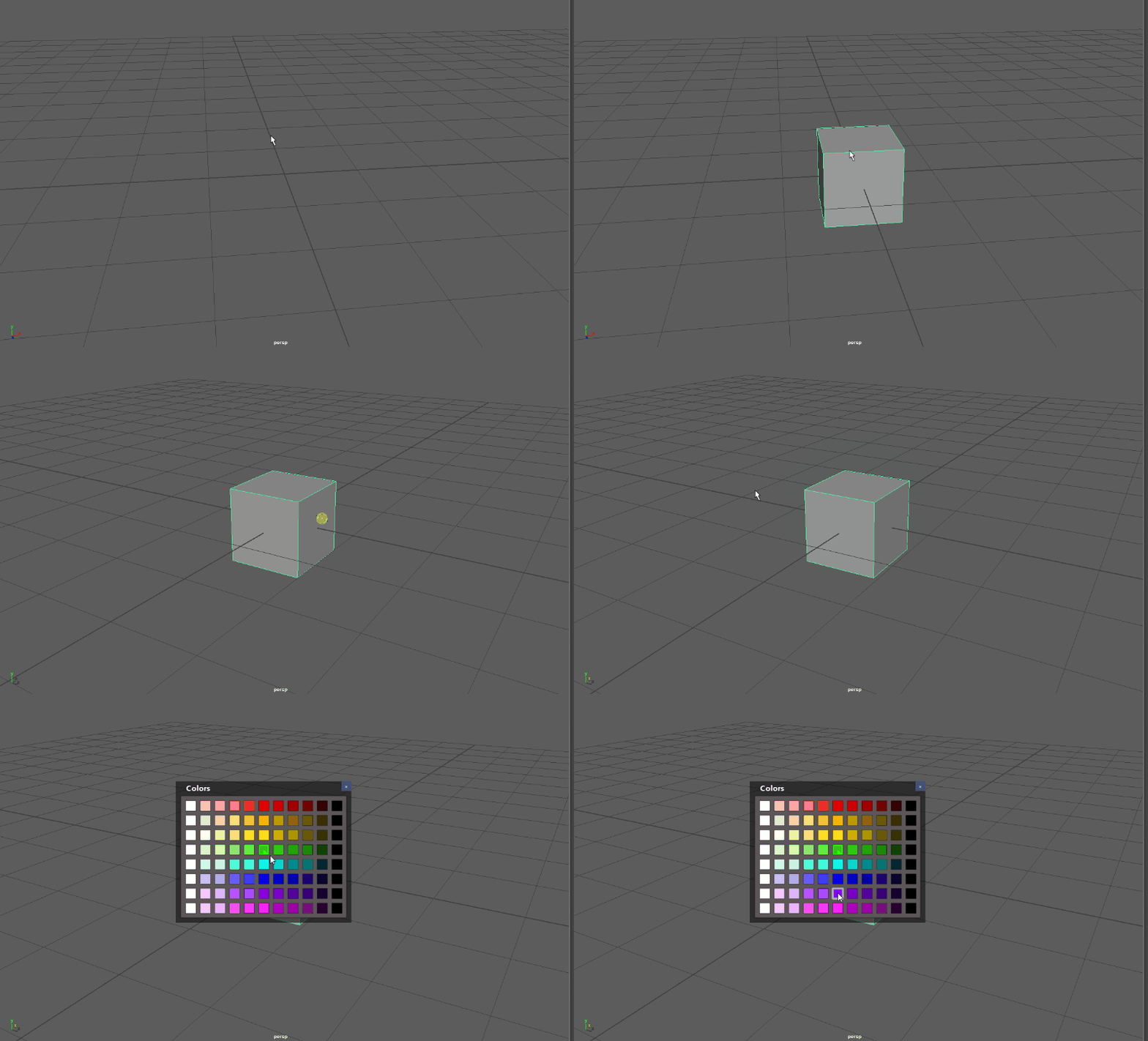 7 |
8 | ### Table of contents
9 | * [Credits](#credits)
10 | * [Implementation](#implementation)
11 | * [Installation](#installation)
12 | * [Maya](#autodesk-maya)
13 | * [Nuke](#nuke)
14 | * [Houdini](#houdini)
15 | * [Rumba](#rumba)
16 | * [Tutorials](#tutorials)
17 | * [Code samples](#code-samples)
18 | * [Launch manager](#launch-manager)
19 | * [Create custom widget](#create-custom-widget)
20 | * [Basic widget](#basic-widget)
21 | * [Advanced widget](#advanced-widget)
22 | * [Tools](#tools)
23 | * [Designer](#designer)
24 | * [Manager](#manager)
25 | * [Reader](#reader)
26 |
27 | ### Credits
28 | main coder: Lionel Brouyère, Herizo Ran
29 | contributor: Vincent Girès
30 | tester: David Vincze, Vincent Girès
31 | ### Implementation
32 | | Software | Implementation state | Application as string | Hotkey setter |
33 | | ------ | ------ | ------ | ----- |
34 | | Autodesk Maya | done | 'maya' | available |
35 | | Foundry Nuke | done | 'nuke' | available |
36 | | Autodesk 3dsMax| planned | undefined | Not available |
37 | | SideFX Houdini | done | 'houdini' | Not available |
38 | | Rumba Animation| done | 'rumba' | available |
39 |
40 | For each software who provide python and support PySide2/PyQt5, the implementation should be easy.
41 |
42 | ### Installation
43 | #### Autodesk Maya
44 |
45 | place the "hotbox_designer" folder into the maya script folder
46 |
47 | | os | path |
48 | | ------ | ------ |
49 | | linux | ~/< username >/maya |
50 | | windows | \Users\\Documents\maya |
51 | | mac os x | ~/Library/Preferences/Autodesk/maya |
52 |
53 | #### Nuke
54 | Place the _"hotbox_designer"_ folder into _~/.nuke_ or make it available in PYTHONPATH
7 |
8 | ### Table of contents
9 | * [Credits](#credits)
10 | * [Implementation](#implementation)
11 | * [Installation](#installation)
12 | * [Maya](#autodesk-maya)
13 | * [Nuke](#nuke)
14 | * [Houdini](#houdini)
15 | * [Rumba](#rumba)
16 | * [Tutorials](#tutorials)
17 | * [Code samples](#code-samples)
18 | * [Launch manager](#launch-manager)
19 | * [Create custom widget](#create-custom-widget)
20 | * [Basic widget](#basic-widget)
21 | * [Advanced widget](#advanced-widget)
22 | * [Tools](#tools)
23 | * [Designer](#designer)
24 | * [Manager](#manager)
25 | * [Reader](#reader)
26 |
27 | ### Credits
28 | main coder: Lionel Brouyère, Herizo Ran
29 | contributor: Vincent Girès
30 | tester: David Vincze, Vincent Girès
31 | ### Implementation
32 | | Software | Implementation state | Application as string | Hotkey setter |
33 | | ------ | ------ | ------ | ----- |
34 | | Autodesk Maya | done | 'maya' | available |
35 | | Foundry Nuke | done | 'nuke' | available |
36 | | Autodesk 3dsMax| planned | undefined | Not available |
37 | | SideFX Houdini | done | 'houdini' | Not available |
38 | | Rumba Animation| done | 'rumba' | available |
39 |
40 | For each software who provide python and support PySide2/PyQt5, the implementation should be easy.
41 |
42 | ### Installation
43 | #### Autodesk Maya
44 |
45 | place the "hotbox_designer" folder into the maya script folder
46 |
47 | | os | path |
48 | | ------ | ------ |
49 | | linux | ~/< username >/maya |
50 | | windows | \Users\\Documents\maya |
51 | | mac os x | ~/Library/Preferences/Autodesk/maya |
52 |
53 | #### Nuke
54 | Place the _"hotbox_designer"_ folder into _~/.nuke_ or make it available in PYTHONPATH
55 | Add this script to menu.py or make it available in NUKE_PATH:
56 | ```python
57 | import nuke
58 | import hotbox_designer
59 | from hotbox_designer.applications import Nuke
60 | from hotbox_designer.manager import HotboxManager
61 |
62 | nuke_app = Nuke()
63 | hotbox_manager = HotboxManager(nuke_app)
64 |
65 | nuke_menu = nuke.menu('Nuke')
66 | menu = nuke_menu.addMenu('Hotbox Designer')
67 | menu.addCommand(
68 | name='Manager',
69 | command=hotbox_manager.show)
70 | nuke_app.create_menus()
71 | ```
72 | Hotkeys are saved in _~/.nuke/hotbox_hotkey.json_.
73 | To delete it, right now, the only way is to delete it in the file.
74 |
75 | Important:
76 | A bug appear on some windows version. Nuke execute the init file before to create his guy, which fail the hotbox designer execution. This initialization has to be delayed later. Then read this page to find the actual solution found:
77 | https://github.com/luckylyk/hotbox_designer/issues/10
78 |
79 | #### Houdini
80 | soon
81 | #### Rumba
82 | Locate the _"hotbox_designer"_ folder and make it available in
83 | RUMBA_USER_PLUGINS environment variable.
84 | Add this script in a python file _menu.py_ and make it available in
85 | RUMBA_USER_PLUGINS environment variable.
86 | ```python
87 | """Hotbox Designer integration for Rumba."""
88 |
89 | import rumbapy
90 | from PySide2 import QtCore
91 | from rumbapy.WidgetPlugins import register_ui, UIPluginOptions
92 |
93 |
94 | class HotboxDesigner(QtCore.QObject):
95 |
96 | def __init__(self, parent=None):
97 | super(HotboxDesigner, self).__init__(parent)
98 | from hotbox_designer.applications import Rumba
99 | rumba_app = Rumba()
100 | rumba_app.create_menus()
101 |
102 |
103 | register_ui(HotboxDesigner, "Hotbox Designer", UIPluginOptions(
104 | auto_create=True))
105 | ```
106 | Hotkeys are saved in ~/.rumba/hotbox_hotkey.json.
107 |
108 | ### Tutorials
109 | * [My first hotbox](https://vimeo.com/304248049)
110 | * [Create a submenu](https://vimeo.com/304252379)
111 | ### Code Samples
112 | #### Launch manager
113 | ```python
114 | import hotbox_designer
115 | hotbox_designer.launch_manager('maya') # or any other available application name as string
116 | ```
117 | #### Create custom widget
118 | * ##### Basic widget
119 | ```python
120 | from hotbox_designer import load_json, HotboxWidget
121 | # it can be integrated in a layout of an parent widget
122 | widget = HotboxWidget()
123 | # That can be changed interactively
124 | hotbox_data = load_json(r"your exported hotbox as json filepath")
125 | widget.set_hotbox_data(hotbox_data)
126 | ```
127 | * ##### Advanced widget
128 | Example of an template explorer
129 |
130 | ```python
131 | from hotbox_designer import HotboxWidget, load_templates
132 | from PySide2 import QtWidgets, QtCore
133 |
134 | class HotboxTemplateNavigator(QtWidgets.QWidget):
135 | def __init__(self, *args, **kwargs):
136 | super(HotboxTemplateNavigator, self).__init__(*args, **kwargs)
137 | self.templates = load_templates()
138 | items = [d['general']['name'] for d in self.templates]
139 | self.combo = QtWidgets.QComboBox()
140 | self.combo.addItems(items)
141 | self.combo.currentIndexChanged.connect(self.combo_index_changed)
142 | self.hotbox_widget = HotboxWidget()
143 |
144 | self.layout = QtWidgets.QVBoxLayout(self)
145 | self.layout.addWidget(self.combo)
146 | self.layout.addWidget(self.hotbox_widget)
147 | self.layout.addStretch(1)
148 |
149 | def combo_index_changed(self):
150 | index = self.combo.currentIndex()
151 | data = self.templates[index]
152 | self.hotbox_widget.set_hotbox_data(data)
153 | size = QtCore.QSize(data["general"]["width"], data["general"]["height"])
154 | self.hotbox_widget.setFixedSize(size)
155 | self.adjustSize()
156 |
157 |
158 | hotbox_template_navigator = HotboxTemplateNavigator(None, QtCore.Qt.Window)
159 | hotbox_template_navigator.show()
160 | ```
161 |
162 | ### Tools
163 | The application is separated in three parts:
164 | - ##### Designer
165 | this is the hotbox design part. It look like a simple version of QtDesigner
166 | 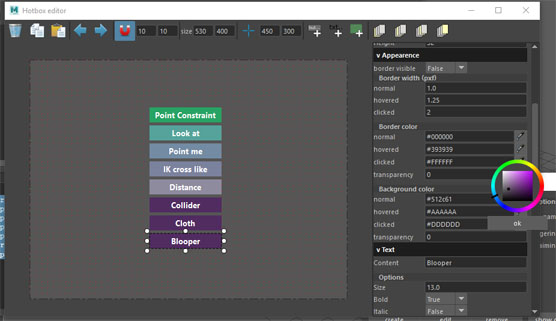
167 | - ##### Manager
168 | its a simple ui who let manage multiple hotboxes and save them
169 | 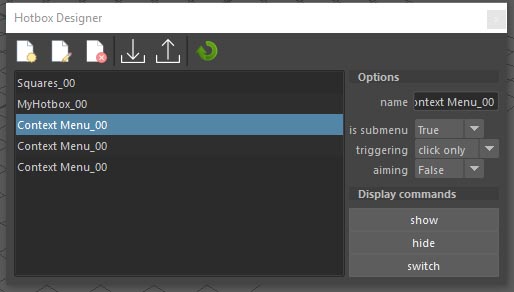
170 | - ##### Reader
171 | this contains the final hotbox widget. That's what is called when you use your menu as final product.
172 |
--------------------------------------------------------------------------------
/hotbox_designer/widgets.py:
--------------------------------------------------------------------------------
1 | from hotbox_designer.vendor.Qt import QtGui, QtCore, QtWidgets
2 | from hotbox_designer.qtutils import icon
3 | from hotbox_designer.colorwheel import ColorDialog
4 |
5 |
6 | # don't use style sheet like that, find better design
7 | TOGGLER_STYLESHEET = (
8 | 'background: rgb(0, 0, 0, 75); text-align: left; font: bold')
9 |
10 |
11 | class BoolCombo(QtWidgets.QComboBox):
12 | valueSet = QtCore.Signal(bool)
13 |
14 | def __init__(self, state=True, parent=None):
15 | super(BoolCombo, self).__init__(parent)
16 | self.addItem('True')
17 | self.addItem('False')
18 | self.setCurrentText(str(state))
19 | self.currentIndexChanged.connect(self.current_index_changed)
20 |
21 | def state(self):
22 | return self.currentText() == 'True'
23 |
24 | def current_index_changed(self):
25 | self.valueSet.emit(self.state())
26 |
27 |
28 | class BrowseEdit(QtWidgets.QWidget):
29 | valueSet = QtCore.Signal(str)
30 |
31 | def __init__(self, parent=None):
32 | super(BrowseEdit, self).__init__(parent)
33 |
34 | self.text = QtWidgets.QLineEdit()
35 | self.text.returnPressed.connect(self.apply)
36 | self.button = QtWidgets.QPushButton('B')
37 | self.button.setFixedSize(21, 21)
38 | self.button.released.connect(self.browse)
39 |
40 | self.layout = QtWidgets.QHBoxLayout(self)
41 | self.layout.setContentsMargins(0, 0, 0, 0)
42 | self.layout.setSpacing(0)
43 | self.layout.addWidget(self.text)
44 | self.layout.addWidget(self.button)
45 |
46 | self._value = self.value()
47 |
48 | def browse(self):
49 | dialog = QtWidgets.QFileDialog.getOpenFileName(self, 'select image')
50 | self.text.setText(dialog[0])
51 | self.apply()
52 |
53 | def apply(self):
54 | self.valueSet.emit(self.text.text())
55 |
56 | def value(self):
57 | value = self.text.text()
58 | return value if value != '' else None
59 |
60 | def set_value(self, value):
61 | self.text.setText(value)
62 |
63 |
64 | class WidgetToggler(QtWidgets.QPushButton):
65 | def __init__(self, label, widget, parent=None):
66 | super(WidgetToggler, self).__init__(parent)
67 | self.setStyleSheet(TOGGLER_STYLESHEET)
68 | self.setText(' v ' + label)
69 | self.widget = widget
70 | self.setCheckable(True)
71 | self.setChecked(True)
72 | self.toggled.connect(self._call_toggled)
73 |
74 | def _call_toggled(self, state):
75 | if state is True:
76 | self.widget.show()
77 | self.setText(self.text().replace('>', 'v'))
78 | else:
79 | self.widget.hide()
80 | self.setText(self.text().replace('v', '>'))
81 |
82 |
83 | class ColorEdit(QtWidgets.QWidget):
84 | valueSet = QtCore.Signal(str)
85 |
86 | def __init__(self, parent=None):
87 | super(ColorEdit, self).__init__(parent)
88 |
89 | self.text = QtWidgets.QLineEdit()
90 | self.text.returnPressed.connect(self.apply)
91 | self.button = QtWidgets.QPushButton(icon('picker.png'), '')
92 | self.button.setFixedSize(21, 21)
93 | self.button.released.connect(self.pick_color)
94 |
95 | self.layout = QtWidgets.QHBoxLayout(self)
96 | self.layout.setContentsMargins(0, 0, 0, 0)
97 | self.layout.setSpacing(0)
98 | self.layout.addWidget(self.text)
99 | self.layout.addWidget(self.button)
100 |
101 | self._value = self.value()
102 |
103 | def focusInEvent(self, event):
104 | self._value = self.value()
105 | return super(ColorEdit, self).focusInEvent(event)
106 |
107 | def focusOutEvent(self, event):
108 | self.apply()
109 | return super(ColorEdit, self).focusOutEvent(event)
110 |
111 | def pick_color(self):
112 | color = self.text.text() if self.text.text() else None
113 | dialog = ColorDialog(color)
114 | result = dialog.exec_()
115 | if result == QtWidgets.QDialog.Accepted:
116 | self.text.setText(dialog.colorname())
117 | self.apply()
118 |
119 | def apply(self):
120 | if self._value != self.value():
121 | self.valueSet.emit(self.value())
122 | self._value = self.value()
123 |
124 | def value(self):
125 | value = self.text.text()
126 | return value if value != '' else None
127 |
128 | def set_color(self, color):
129 | self.text.setText(color)
130 |
131 |
132 | class FloatEdit(QtWidgets.QLineEdit):
133 | valueSet = QtCore.Signal(float)
134 |
135 | def __init__(self, minimum=None, maximum=None, parent=None):
136 | super(FloatEdit, self).__init__(parent)
137 | self.validator = QtGui.QDoubleValidator()
138 | if minimum is not None:
139 | self.validator.setBottom(minimum)
140 | if maximum is not None:
141 | self.validator.setTop(maximum)
142 | self.setValidator(self.validator)
143 | self._value = self.value()
144 | self.returnPressed.connect(self.apply)
145 |
146 | def focusInEvent(self, event):
147 | self._value = self.value()
148 | return super(FloatEdit, self).focusInEvent(event)
149 |
150 | def focusOutEvent(self, event):
151 | self.apply()
152 | return super(FloatEdit, self).focusOutEvent(event)
153 |
154 | def apply(self):
155 | if self._value != self.value():
156 | self.valueSet.emit(self.value())
157 | self._value = self.value()
158 |
159 | def value(self):
160 | if self.text() == '':
161 | return None
162 | return float(self.text().replace(',', '.'))
163 |
164 |
165 | class Title(QtWidgets.QLabel):
166 | def __init__(self, title, parent=None):
167 | super(Title, self).__init__(parent)
168 | self.setFixedHeight(20)
169 | self.setStyleSheet('background: rgb(0, 0, 0, 25)')
170 | self.setText(' ' + title)
171 |
172 |
173 | class TouchEdit(QtWidgets.QLineEdit):
174 | def keyPressEvent(self, event):
175 | self.setText(QtGui.QKeySequence(event.key()).toString().lower())
176 | self.textEdited.emit(self.text())
177 |
178 |
179 | class CommandButton(QtWidgets.QWidget):
180 | released = QtCore.Signal()
181 | playReleased = QtCore.Signal()
182 | def __init__(self, label, parent=None):
183 | super(CommandButton, self).__init__(parent)
184 | self.mainbutton = QtWidgets.QPushButton(label)
185 | self.mainbutton.released.connect(self.released.emit)
186 | self.playbutton = QtWidgets.QPushButton(icon('play.png'), '')
187 | self.playbutton.released.connect(self.playReleased.emit)
188 | self.playbutton.setFixedSize(22, 22)
189 | self.layout = QtWidgets.QHBoxLayout(self)
190 | self.layout.setContentsMargins(0, 0, 0, 0)
191 | self.layout.setSpacing(2)
192 | self.layout.addWidget(self.mainbutton)
193 | self.layout.addWidget(self.playbutton)
--------------------------------------------------------------------------------
/hotbox_designer/dialog.py:
--------------------------------------------------------------------------------
1 | import os
2 | import json
3 | from hotbox_designer.vendor.Qt import QtWidgets
4 | from hotbox_designer.data import (
5 | get_new_hotbox, get_valid_name, copy_hotbox_data, load_templates,
6 | ensure_old_data_compatible)
7 | from hotbox_designer.widgets import TouchEdit, BoolCombo
8 |
9 |
10 | def warning(title, message, parent=None):
11 | return QtWidgets.QMessageBox.warning(
12 | parent,
13 | title,
14 | message,
15 | QtWidgets.QMessageBox.Ok,
16 | QtWidgets.QMessageBox.Ok)
17 |
18 |
19 | def import_hotbox():
20 | try:
21 | filenames = QtWidgets.QFileDialog.getOpenFileName(
22 | None, caption='Import hotbox', directory=os.path.expanduser("~"),
23 | filter='*.json')
24 | except AttributeError:
25 | # 'dir' argument is for PySide6 module
26 | filenames = QtWidgets.QFileDialog.getOpenFileName(
27 | None, caption='Import hotbox', dir=os.path.expanduser("~"),
28 | filter='*.json')
29 | if not filenames[0]:
30 | return
31 | with open(filenames[0], 'r') as f:
32 | return ensure_old_data_compatible(json.load(f))
33 |
34 |
35 | def import_hotbox_link():
36 | filenames = QtWidgets.QFileDialog.getOpenFileName(
37 | None, caption='Import hotbox', directory=os.path.expanduser("~"),
38 | filter='*.json')
39 | if filenames:
40 | return filenames[0]
41 | return None
42 |
43 |
44 | def export_hotbox(hotbox):
45 | filenames = QtWidgets.QFileDialog.getSaveFileName(
46 | None, 'Export hotbox', os.path.expanduser("~"),
47 | '*.json')
48 | filename = filenames[0]
49 | if not filename:
50 | return
51 | if not filename.lower().endswith('.json'):
52 | filename += '.json'
53 | with open(filename, 'w') as f:
54 | json.dump(hotbox, f, indent=2)
55 |
56 |
57 | class CreateHotboxDialog(QtWidgets.QDialog):
58 | def __init__(self, hotboxes, parent=None):
59 | super(CreateHotboxDialog, self).__init__(parent)
60 | self.setWindowTitle("Create new hotbox")
61 | self.hotboxes = hotboxes
62 |
63 | self.new = QtWidgets.QRadioButton("empty hotbox")
64 | self.duplicate = QtWidgets.QRadioButton("duplicate existing hotbox")
65 | self.duplicate.setEnabled(bool(self.hotboxes))
66 | self.template = QtWidgets.QRadioButton("from template")
67 | self.groupbutton = QtWidgets.QButtonGroup()
68 | self.groupbutton.addButton(self.new, 0)
69 | self.groupbutton.addButton(self.duplicate, 1)
70 | self.groupbutton.addButton(self.template, 2)
71 | self.new.setChecked(True)
72 |
73 | self.existing = QtWidgets.QComboBox()
74 | self.existing.addItems([hb['general']['name'] for hb in self.hotboxes])
75 | self.template_combo = QtWidgets.QComboBox()
76 | items = [hb['general']['name'] for hb in load_templates()]
77 | self.template_combo.addItems(items)
78 |
79 | self.up_layout = QtWidgets.QGridLayout()
80 | self.up_layout.setContentsMargins(0, 0, 0, 0)
81 | self.up_layout.setSpacing(0)
82 | self.up_layout.addWidget(self.new, 0, 0)
83 | self.up_layout.addWidget(self.duplicate, 1, 0)
84 | self.up_layout.addWidget(self.existing, 1, 1)
85 | self.up_layout.addWidget(self.template, 2, 0)
86 | self.up_layout.addWidget(self.template_combo, 2, 1)
87 |
88 | self.ok = QtWidgets.QPushButton('ok')
89 | self.ok.released.connect(self.accept)
90 | self.cancel = QtWidgets.QPushButton('cancel')
91 | self.cancel.released.connect(self.reject)
92 |
93 | self.down_layout = QtWidgets.QHBoxLayout()
94 | self.down_layout.setContentsMargins(0, 0, 0, 0)
95 | self.down_layout.addStretch(1)
96 | self.down_layout.addWidget(self.ok)
97 | self.down_layout.addWidget(self.cancel)
98 |
99 | self.layout = QtWidgets.QVBoxLayout(self)
100 | self.layout.setSpacing(12)
101 | self.layout.addLayout(self.up_layout)
102 | self.layout.addLayout(self.down_layout)
103 |
104 | def hotbox(self):
105 | if self.groupbutton.checkedId() == 0:
106 | return get_new_hotbox(self.hotboxes)
107 | elif self.groupbutton.checkedId() == 1:
108 | name = self.existing.currentText()
109 | hotboxes = self.hotboxes
110 | elif self.groupbutton.checkedId() == 2:
111 | name = self.template_combo.currentText()
112 | hotboxes = load_templates()
113 | hotbox = [hb for hb in hotboxes if hb['general']['name'] == name][0]
114 | hotbox = copy_hotbox_data(hotbox)
115 | name = get_valid_name(hotboxes, hotbox['general']['name'])
116 | hotbox['general']['name'] = name
117 | return hotbox
118 |
119 |
120 | class CommandDisplayDialog(QtWidgets.QDialog):
121 | def __init__(self, command, parent=None):
122 | super(CommandDisplayDialog, self).__init__(parent)
123 | self.setWindowTitle("Command")
124 | self.text = QtWidgets.QTextEdit()
125 | self.text.setReadOnly(True)
126 | self.text.setPlainText(command)
127 | self.ok = QtWidgets.QPushButton('ok')
128 | self.ok.released.connect(self.accept)
129 |
130 | self.button_layout = QtWidgets.QHBoxLayout()
131 | self.button_layout.setContentsMargins(0, 0, 0, 0)
132 | self.button_layout.addStretch(1)
133 | self.button_layout.addWidget(self.ok)
134 |
135 | self.layout = QtWidgets.QVBoxLayout(self)
136 | self.layout.addWidget(self.text)
137 | self.layout.addLayout(self.button_layout)
138 |
139 |
140 | class HotkeySetter(QtWidgets.QDialog):
141 | def __init__(self, modes, parent=None):
142 | super(HotkeySetter, self).__init__(parent)
143 | self.setWindowTitle("Set hotkey")
144 | self.ctrl = BoolCombo(False)
145 | self.alt = BoolCombo(False)
146 | self.shift = BoolCombo(False)
147 | self.touch = TouchEdit()
148 | self.hotkeytype = QtWidgets.QComboBox()
149 | self.hotkeytype.addItems(modes)
150 |
151 | self.options_layout = QtWidgets.QFormLayout()
152 | self.options_layout.setContentsMargins(0, 0, 0, 0)
153 | self.options_layout.setVerticalSpacing(0)
154 | self.options_layout.addRow("Ctrl", self.ctrl)
155 | self.options_layout.addRow("Alt", self.alt)
156 | self.options_layout.addRow("Shift", self.shift)
157 | self.options_layout.addRow("Touch", self.touch)
158 | self.options_layout.addRow("Hotkey event", self.hotkeytype)
159 |
160 | self.ok = QtWidgets.QPushButton("ok")
161 | self.ok.released.connect(self.accept)
162 | self.cancel = QtWidgets.QPushButton("cancel")
163 | self.cancel.released.connect(self.reject)
164 |
165 | self.button_layout = QtWidgets.QHBoxLayout()
166 | self.button_layout.setContentsMargins(0, 0, 0, 0)
167 | self.button_layout.addStretch(1)
168 | self.button_layout.addWidget(self.ok)
169 | self.button_layout.addWidget(self.cancel)
170 |
171 | self.layout = QtWidgets.QVBoxLayout(self)
172 | self.layout.addLayout(self.options_layout)
173 | self.layout.addLayout(self.button_layout)
174 |
175 | def get_key_sequence(self):
176 | sequence = ''
177 | if self.ctrl.state() is True:
178 | sequence += "Ctrl+"
179 | if self.alt.state() is True:
180 | sequence += "Alt+"
181 | if self.shift.state() is True:
182 | sequence += "Shift+"
183 | sequence += self.touch.text()
184 | return sequence
185 |
186 | def mode(self):
187 | return self.hotkeytype.currentText()
188 |
--------------------------------------------------------------------------------
/hotbox_designer/designer/menu.py:
--------------------------------------------------------------------------------
1 | from hotbox_designer.vendor.Qt import QtGui, QtWidgets, QtCore
2 | from hotbox_designer.qtutils import icon
3 |
4 |
5 | class MenuWidget(QtWidgets.QWidget):
6 | deleteRequested = QtCore.Signal()
7 | copyRequested = QtCore.Signal()
8 | pasteRequested = QtCore.Signal()
9 | undoRequested = QtCore.Signal()
10 | redoRequested = QtCore.Signal()
11 | sizeChanged = QtCore.Signal()
12 | useSnapToggled = QtCore.Signal(bool)
13 | snapValuesChanged = QtCore.Signal()
14 | editCenterToggled = QtCore.Signal(bool)
15 | centerValuesChanged = QtCore.Signal(int, int)
16 | addButtonRequested = QtCore.Signal()
17 | addTextRequested = QtCore.Signal()
18 | addBackgroundRequested = QtCore.Signal()
19 | onBottomRequested = QtCore.Signal()
20 | moveDownRequested = QtCore.Signal()
21 | moveUpRequested = QtCore.Signal()
22 | onTopRequested = QtCore.Signal()
23 |
24 | def __init__(self, parent=None):
25 | super(MenuWidget, self).__init__(parent=parent)
26 | self.delete = QtWidgets.QAction(icon('delete.png'), '', self)
27 | self.delete.setToolTip('Delete selection')
28 | self.delete.triggered.connect(self.deleteRequested.emit)
29 | self.copy = QtWidgets.QAction(icon('copy.png'), '', self)
30 | self.copy.setToolTip('Copy selection')
31 | self.copy.triggered.connect(self.copyRequested.emit)
32 | self.paste = QtWidgets.QAction(icon('paste.png'), '', self)
33 | self.paste.setToolTip('Paste')
34 | self.paste.triggered.connect(self.pasteRequested.emit)
35 |
36 | self.undo = QtWidgets.QAction(icon('undo.png'), '', self)
37 | self.undo.setToolTip('Undo')
38 | self.undo.triggered.connect(self.undoRequested.emit)
39 | self.redo = QtWidgets.QAction(icon('redo.png'), '', self)
40 | self.redo.setToolTip('Redo')
41 | self.redo.triggered.connect(self.redoRequested.emit)
42 |
43 | validator = QtGui.QIntValidator()
44 | self.hbwidth = QtWidgets.QLineEdit('600')
45 | self.hbwidth.setFixedWidth(35)
46 | self.hbwidth.setValidator(validator)
47 | self.hbwidth.textEdited.connect(self.size_changed)
48 | self.hbheight = QtWidgets.QLineEdit('300')
49 | self.hbheight.setFixedWidth(35)
50 | self.hbheight.setValidator(validator)
51 | self.hbheight.textEdited.connect(self.size_changed)
52 |
53 | icon_ = icon('center.png')
54 | self.editcenter = QtWidgets.QAction(icon_, '', self)
55 | self.editcenter.setToolTip('Edit center')
56 | self.editcenter.setCheckable(True)
57 | self.editcenter.triggered.connect(self.edit_center_toggled)
58 | validator = QtGui.QIntValidator()
59 | self.editcenterx = QtWidgets.QLineEdit('10')
60 | self.editcenterx.setFixedWidth(35)
61 | self.editcenterx.setValidator(validator)
62 | self.editcenterx.textEdited.connect(self.center_values_changed)
63 | self.editcentery = QtWidgets.QLineEdit('10')
64 | self.editcentery.setFixedWidth(35)
65 | self.editcentery.setValidator(validator)
66 | self.editcentery.textEdited.connect(self.center_values_changed)
67 |
68 | self.snap = QtWidgets.QAction(icon('snap.png'), '', self)
69 | self.snap.setToolTip('Snap grid enable')
70 | self.snap.setCheckable(True)
71 | self.snap.triggered.connect(self.snap_toggled)
72 | validator = QtGui.QIntValidator(5, 150)
73 | self.snapx = QtWidgets.QLineEdit('10')
74 | self.snapx.setFixedWidth(35)
75 | self.snapx.setValidator(validator)
76 | self.snapx.setEnabled(False)
77 | self.snapx.textEdited.connect(self.snap_value_changed)
78 | self.snapy = QtWidgets.QLineEdit('10')
79 | self.snapy.setFixedWidth(35)
80 | self.snapy.setValidator(validator)
81 | self.snapy.setEnabled(False)
82 | self.snapy.textEdited.connect(self.snap_value_changed)
83 | self.snap.toggled.connect(self.snapx.setEnabled)
84 | self.snap.toggled.connect(self.snapy.setEnabled)
85 |
86 | icon_ = icon('addbutton.png')
87 | self.addbutton = QtWidgets.QAction(icon_, '', self)
88 | self.addbutton.setToolTip('Add button')
89 | self.addbutton.triggered.connect(self.addButtonRequested.emit)
90 | self.addtext = QtWidgets.QAction(icon('addtext.png'), '', self)
91 | self.addtext.setToolTip('Add text')
92 | self.addtext.triggered.connect(self.addTextRequested.emit)
93 | self.addbg = QtWidgets.QAction(icon('addbg.png'), '', self)
94 | self.addbg.setToolTip('Add background shape')
95 | self.addbg.triggered.connect(self.addBackgroundRequested.emit)
96 |
97 | icon_ = icon('onbottom.png')
98 | self.onbottom = QtWidgets.QAction(icon_, '', self)
99 | self.onbottom.setToolTip('Set selected shapes on bottom')
100 | self.onbottom.triggered.connect(self.onBottomRequested.emit)
101 | icon_ = icon('movedown.png')
102 | self.movedown = QtWidgets.QAction(icon_, '', self)
103 | self.movedown.setToolTip('Move down selected shapes')
104 | self.movedown.triggered.connect(self.moveDownRequested.emit)
105 | self.moveup = QtWidgets.QAction(icon('moveup.png'), '', self)
106 | self.moveup.setToolTip('Move up selected shapes')
107 | self.moveup.triggered.connect(self.moveUpRequested.emit)
108 | self.ontop = QtWidgets.QAction(icon('ontop.png'), '', self)
109 | self.ontop.setToolTip('Set selected shapes on top')
110 | self.ontop.triggered.connect(self.onTopRequested.emit)
111 |
112 | self.toolbar = QtWidgets.QToolBar()
113 | self.toolbar.addAction(self.delete)
114 | self.toolbar.addAction(self.copy)
115 | self.toolbar.addAction(self.paste)
116 | self.toolbar.addSeparator()
117 | self.toolbar.addAction(self.undo)
118 | self.toolbar.addAction(self.redo)
119 | self.toolbar.addSeparator()
120 | self.toolbar.addAction(self.snap)
121 | self.toolbar.addWidget(self.snapx)
122 | self.toolbar.addWidget(self.snapy)
123 | self.toolbar.addSeparator()
124 | self.toolbar.addWidget(QtWidgets.QLabel('size'))
125 | self.toolbar.addWidget(self.hbwidth)
126 | self.toolbar.addWidget(self.hbheight)
127 | self.toolbar.addSeparator()
128 | self.toolbar.addAction(self.editcenter)
129 | self.toolbar.addWidget(self.editcenterx)
130 | self.toolbar.addWidget(self.editcentery)
131 | self.toolbar.addSeparator()
132 | self.toolbar.addAction(self.addbutton)
133 | self.toolbar.addAction(self.addtext)
134 | self.toolbar.addAction(self.addbg)
135 | self.toolbar.addSeparator()
136 | self.toolbar.addAction(self.onbottom)
137 | self.toolbar.addAction(self.movedown)
138 | self.toolbar.addAction(self.moveup)
139 | self.toolbar.addAction(self.ontop)
140 |
141 | self.layout = QtWidgets.QVBoxLayout(self)
142 | self.layout.setContentsMargins(0, 0, 10, 0)
143 | self.layout.addWidget(self.toolbar)
144 |
145 | def size_changed(self, *_):
146 | self.sizeChanged.emit()
147 |
148 | def edit_center_toggled(self):
149 | self.editCenterToggled.emit(self.editcenter.isChecked())
150 |
151 | def snap_toggled(self):
152 | self.useSnapToggled.emit(self.snap.isChecked())
153 |
154 | def snap_values(self):
155 | x = int(self.snapx.text()) if self.snapx.text() else 1
156 | y = int(self.snapy.text()) if self.snapy.text() else 1
157 | x = x if x > 0 else 1
158 | y = y if y > 0 else 1
159 | return x, y
160 |
161 | def snap_value_changed(self, _):
162 | self.snapValuesChanged.emit()
163 |
164 | def set_center_values(self, x, y):
165 | self.editcenterx.setText(str(x))
166 | self.editcentery.setText(str(y))
167 |
168 | def center_values_changed(self, _):
169 | x = int(self.editcenterx.text()) if self.editcenterx.text() else 0
170 | y = int(self.editcentery.text()) if self.editcentery.text() else 0
171 | self.centerValuesChanged.emit(x, y)
172 |
173 | def set_size_values(self, width, height):
174 | self.hbwidth.setText(str(width))
175 | self.hbheight.setText(str(height))
176 | self.sizeChanged.emit()
177 |
178 | def get_size(self):
179 | width = int(self.hbwidth.text()) if self.hbwidth.text() else 1
180 | height = int(self.hbheight.text()) if self.hbheight.text() else 1
181 | return QtCore.QSize(width, height)
182 |
--------------------------------------------------------------------------------
/hotbox_designer/designer/editarea.py:
--------------------------------------------------------------------------------
1 |
2 | from hotbox_designer.vendor.Qt import QtCore, QtGui, QtWidgets
3 |
4 | from hotbox_designer.interactive import Manipulator, SelectionSquare
5 | from hotbox_designer.geometry import Transform, snap, get_combined_rects
6 | from hotbox_designer.painting import draw_editor, draw_editor_center
7 | from hotbox_designer.qtutils import get_cursor
8 |
9 |
10 | class ShapeEditArea(QtWidgets.QWidget):
11 | selectedShapesChanged = QtCore.Signal()
12 | increaseUndoStackRequested = QtCore.Signal()
13 | centerMoved = QtCore.Signal(int, int)
14 |
15 | def __init__(self, options, parent=None):
16 | super(ShapeEditArea, self).__init__(parent)
17 | self.setFixedSize(750, 550)
18 | self.setMouseTracking(True)
19 | self.options = options
20 |
21 | self.selection = Selection()
22 | self.selection_square = SelectionSquare()
23 | self.manipulator = Manipulator()
24 | self.transform = Transform()
25 |
26 | self.shapes = []
27 | self.clicked_shape = None
28 | self.clicked = False
29 | self.handeling = False
30 | self.manipulator_moved = False
31 | self.edit_center_mode = False
32 | self.increase_undo_on_release = False
33 |
34 | self.ctrl_pressed = False
35 | self.shit_pressed = False
36 |
37 | def mouseMoveEvent(self, _):
38 | cursor = get_cursor(self)
39 | if self.edit_center_mode is True:
40 | if self.clicked is False:
41 | return
42 | if self.transform.snap:
43 | x, y = snap(cursor.x(), cursor.y(), self.transform.snap)
44 | else:
45 | x, y = cursor.x(), cursor.y()
46 | self.centerMoved.emit(x, y)
47 | self.increase_undo_on_release = True
48 | self.repaint()
49 | return
50 |
51 | for shape in self.shapes:
52 | shape.set_hovered(cursor)
53 |
54 | if self.selection_square.handeling:
55 | self.selection_square.handle(cursor)
56 |
57 | if self.handeling is False:
58 | return self.repaint()
59 |
60 | self.manipulator_moved = True
61 | rect = self.manipulator.rect
62 | if self.transform.direction:
63 | self.transform.resize([s.rect for s in self.selection], cursor)
64 | self.manipulator.update_geometries()
65 | elif rect is not None and rect.contains(cursor):
66 | self.transform.move([s.rect for s in self.selection], cursor)
67 | self.manipulator.update_geometries()
68 | for shape in self.shapes:
69 | shape.synchronize_rect()
70 | shape.synchronize_image()
71 | self.increase_undo_on_release = True
72 | self.selectedShapesChanged.emit()
73 | self.repaint()
74 |
75 | def mousePressEvent(self, _):
76 | self.setFocus(QtCore.Qt.MouseFocusReason)
77 | cursor = get_cursor(self)
78 | direction = self.manipulator.get_direction(cursor)
79 | self.clicked = True
80 | self.transform.direction = direction
81 |
82 | self.manipulator_moved = False
83 | rect = self.manipulator.rect
84 | if rect is not None:
85 | self.transform.set_rect(rect)
86 | self.transform.reference_rect = QtCore.QRectF(rect)
87 |
88 | self.clicked_shape = None
89 | for shape in reversed(self.shapes):
90 | if shape.rect.contains(cursor):
91 | self.clicked_shape = shape
92 | break
93 |
94 | if rect and rect.contains(cursor):
95 | self.transform.set_reference_point(cursor)
96 | handeling = bool(direction or rect.contains(cursor) if rect else False)
97 |
98 | self.handeling = handeling
99 | if not self.handeling:
100 | self.selection_square.clicked(cursor)
101 |
102 | self.repaint()
103 |
104 | def mouseReleaseEvent(self, _):
105 | if self.edit_center_mode is True:
106 | self.clicked = False
107 | return
108 |
109 | shape = self.clicked_shape
110 | selection_update_conditions = (
111 | self.handeling is False
112 | or shape not in self.selection
113 | and self.manipulator_moved is False)
114 | if selection_update_conditions:
115 | self.selection.set([shape] if shape else None)
116 | self.update_selection()
117 |
118 | if self.selection_square.handeling:
119 | shapes = [
120 | s for s in self.shapes
121 | if s.rect.intersects(self.selection_square.rect)]
122 | if shapes:
123 | self.selection.set(shapes)
124 | rects = [shape.rect for shape in self.selection]
125 | self.manipulator.set_rect(get_combined_rects(rects))
126 | self.selectedShapesChanged.emit()
127 | self.selection_square.release()
128 |
129 | if self.increase_undo_on_release:
130 | self.increaseUndoStackRequested.emit()
131 | self.increase_undo_on_release = False
132 |
133 | self.clicked = False
134 | self.handeling = False
135 | self.repaint()
136 |
137 | def keyPressEvent(self, event):
138 | if event.key() == QtCore.Qt.Key_Shift:
139 | self.transform.square = True
140 | self.shit_pressed = True
141 |
142 | if event.key() == QtCore.Qt.Key_Control:
143 | self.ctrl_pressed = True
144 |
145 | self.selection.mode = get_selection_mode(
146 | shift=self.shit_pressed,
147 | ctrl=self.ctrl_pressed)
148 |
149 | self.repaint()
150 |
151 | def keyReleaseEvent(self, event):
152 | if event.key() == QtCore.Qt.Key_Shift:
153 | self.transform.square = False
154 | self.shit_pressed = False
155 |
156 | if event.key() == QtCore.Qt.Key_Control:
157 | self.ctrl_pressed = False
158 |
159 | self.selection.mode = get_selection_mode(
160 | shift=self.shit_pressed,
161 | ctrl=self.ctrl_pressed)
162 |
163 | self.repaint()
164 |
165 | def update_selection(self):
166 | rects = [shape.rect for shape in self.selection]
167 | self.manipulator.set_rect(get_combined_rects(rects))
168 | self.selectedShapesChanged.emit()
169 |
170 | def paintEvent(self, _):
171 | painter = QtGui.QPainter()
172 | painter.begin(self)
173 | self.paint(painter)
174 | painter.end()
175 |
176 | def paint(self, painter):
177 | painter.setRenderHint(QtGui.QPainter.Antialiasing)
178 | draw_editor(painter, self.rect(), snap=self.transform.snap)
179 | for shape in self.shapes:
180 | shape.draw(painter)
181 | self.manipulator.draw(painter, get_cursor(self))
182 | self.selection_square.draw(painter)
183 | if self.edit_center_mode is True:
184 | point = self.options['centerx'], self.options['centery']
185 | draw_editor_center(painter, self.rect(), point)
186 |
187 |
188 | class Selection():
189 | def __init__(self):
190 | self.shapes = []
191 | self.mode = 'replace'
192 |
193 | def set(self, shapes):
194 | if self.mode == 'add':
195 | if shapes is None:
196 | return
197 | return self.add(shapes)
198 | elif self.mode == 'replace':
199 | if shapes is None:
200 | return self.clear()
201 | return self.replace(shapes)
202 | elif self.mode == 'invert':
203 | if shapes is None:
204 | return
205 | return self.invert(shapes)
206 | elif self.mode == 'remove':
207 | if shapes is None:
208 | return
209 | for shape in shapes:
210 | if shape in self.shapes:
211 | self.remove(shape)
212 |
213 | def replace(self, shapes):
214 | self.shapes = shapes
215 |
216 | def add(self, shapes):
217 | self.shapes.extend([s for s in shapes if s not in self])
218 |
219 | def remove(self, shape):
220 | self.shapes.remove(shape)
221 |
222 | def invert(self, shapes):
223 | for shape in shapes:
224 | if shape not in self.shapes:
225 | self.add([shape])
226 | else:
227 | self.remove(shape)
228 |
229 | def clear(self):
230 | self.shapes = []
231 |
232 | def __iter__(self):
233 | return self.shapes.__iter__()
234 |
235 |
236 | def get_selection_mode(ctrl, shift):
237 | if not ctrl and not shift:
238 | return 'replace'
239 | elif ctrl and shift:
240 | return 'invert'
241 | elif shift and not ctrl:
242 | return 'add'
243 | elif ctrl and not shift:
244 | return 'remove'
245 |
--------------------------------------------------------------------------------
/hotbox_designer/resources/templates/marking2.json:
--------------------------------------------------------------------------------
1 | {
2 | "shapes": [
3 | {
4 | "bgcolor.normal": "#424242",
5 | "borderwidth.hovered": 1.25,
6 | "borderwidth.normal": 1.0,
7 | "image.width": 32,
8 | "bordercolor.transparency": 0,
9 | "shape": "square",
10 | "borderwidth.clicked": 2,
11 | "action.right.close": false,
12 | "border": true,
13 | "action.right": false,
14 | "text.valign": "center",
15 | "bordercolor.hovered": "#000000",
16 | "image.path": "",
17 | "action.left": true,
18 | "image.height": 32,
19 | "bordercolor.clicked": "#000000",
20 | "text.content": "Action 1",
21 | "action.left.close": true,
22 | "bordercolor.normal": "#000000",
23 | "shape.height": 21.5,
24 | "text.bold": false,
25 | "bgcolor.clicked": "#65aae6",
26 | "action.left.language": "python",
27 | "shape.width": 170.0,
28 | "action.right.command": "",
29 | "action.left.command": "",
30 | "image.fit": true,
31 | "shape.top": 320.0,
32 | "bgcolor.hovered": "#65aae6",
33 | "text.italic": false,
34 | "bgcolor.transparency": 0,
35 | "action.right.language": "python",
36 | "text.color": "#FFFFFF",
37 | "text.size": 12,
38 | "text.halign": "center",
39 | "shape.left": 150.0
40 | },
41 | {
42 | "bgcolor.normal": "#424242",
43 | "borderwidth.hovered": 1.25,
44 | "borderwidth.normal": 1.0,
45 | "image.width": 32,
46 | "bordercolor.transparency": 0,
47 | "shape": "square",
48 | "borderwidth.clicked": 2,
49 | "action.right.close": false,
50 | "border": true,
51 | "action.right": false,
52 | "text.valign": "center",
53 | "bordercolor.hovered": "#000000",
54 | "image.path": "",
55 | "action.left": true,
56 | "image.height": 32,
57 | "bordercolor.clicked": "#000000",
58 | "text.content": "Action 2",
59 | "action.left.close": true,
60 | "bordercolor.normal": "#000000",
61 | "shape.height": 21.5,
62 | "text.bold": false,
63 | "bgcolor.clicked": "#65aae6",
64 | "action.left.language": "python",
65 | "shape.width": 170.0,
66 | "action.right.command": "",
67 | "action.left.command": "",
68 | "image.fit": true,
69 | "shape.top": 240.0,
70 | "bgcolor.hovered": "#65aae6",
71 | "text.italic": false,
72 | "bgcolor.transparency": 0,
73 | "action.right.language": "python",
74 | "text.color": "#FFFFFF",
75 | "text.size": 12,
76 | "text.halign": "center",
77 | "shape.left": 190.0
78 | },
79 | {
80 | "bgcolor.normal": "#424242",
81 | "borderwidth.hovered": 1.25,
82 | "borderwidth.normal": 1.0,
83 | "image.width": 32,
84 | "bordercolor.transparency": 0,
85 | "shape": "square",
86 | "borderwidth.clicked": 2,
87 | "action.right.close": false,
88 | "border": true,
89 | "action.right": false,
90 | "text.valign": "center",
91 | "bordercolor.hovered": "#000000",
92 | "image.path": "",
93 | "action.left": true,
94 | "image.height": 32,
95 | "bordercolor.clicked": "#000000",
96 | "text.content": "Action 3",
97 | "action.left.close": true,
98 | "bordercolor.normal": "#000000",
99 | "shape.height": 21.5,
100 | "text.bold": false,
101 | "bgcolor.clicked": "#65aae6",
102 | "action.left.language": "python",
103 | "shape.width": 170.0,
104 | "action.right.command": "",
105 | "action.left.command": "",
106 | "image.fit": true,
107 | "shape.top": 160.0,
108 | "bgcolor.hovered": "#65aae6",
109 | "text.italic": false,
110 | "bgcolor.transparency": 0,
111 | "action.right.language": "python",
112 | "text.color": "#FFFFFF",
113 | "text.size": 12,
114 | "text.halign": "center",
115 | "shape.left": 340.0
116 | },
117 | {
118 | "bgcolor.normal": "#424242",
119 | "borderwidth.hovered": 1.25,
120 | "borderwidth.normal": 1.0,
121 | "image.width": 32,
122 | "bordercolor.transparency": 0,
123 | "shape": "square",
124 | "borderwidth.clicked": 2,
125 | "action.right.close": false,
126 | "border": true,
127 | "action.right": false,
128 | "text.valign": "center",
129 | "bordercolor.hovered": "#000000",
130 | "image.path": "",
131 | "action.left": true,
132 | "image.height": 32,
133 | "bordercolor.clicked": "#000000",
134 | "text.content": "Action 7",
135 | "action.left.close": true,
136 | "bordercolor.normal": "#000000",
137 | "shape.height": 21.5,
138 | "text.bold": false,
139 | "bgcolor.clicked": "#65aae6",
140 | "action.left.language": "python",
141 | "shape.width": 170.0,
142 | "action.right.command": "",
143 | "action.left.command": "",
144 | "image.fit": true,
145 | "shape.top": 417.0,
146 | "bgcolor.hovered": "#65aae6",
147 | "text.italic": false,
148 | "bgcolor.transparency": 0,
149 | "action.right.language": "python",
150 | "text.color": "#FFFFFF",
151 | "text.size": 12,
152 | "text.halign": "center",
153 | "shape.left": 240.0
154 | },
155 | {
156 | "bgcolor.normal": "#424242",
157 | "borderwidth.hovered": 1.25,
158 | "borderwidth.normal": 1.0,
159 | "image.width": 32,
160 | "bordercolor.transparency": 0,
161 | "shape": "square",
162 | "borderwidth.clicked": 2,
163 | "action.right.close": false,
164 | "border": true,
165 | "action.right": false,
166 | "text.valign": "center",
167 | "bordercolor.hovered": "#000000",
168 | "image.path": "",
169 | "action.left": true,
170 | "image.height": 32,
171 | "bordercolor.clicked": "#000000",
172 | "text.content": "Action 4",
173 | "action.left.close": true,
174 | "bordercolor.normal": "#000000",
175 | "shape.height": 21.5,
176 | "text.bold": false,
177 | "bgcolor.clicked": "#65aae6",
178 | "action.left.language": "python",
179 | "shape.width": 170.0,
180 | "action.right.command": "",
181 | "action.left.command": "",
182 | "image.fit": true,
183 | "shape.top": 240.0,
184 | "bgcolor.hovered": "#65aae6",
185 | "text.italic": false,
186 | "bgcolor.transparency": 0,
187 | "action.right.language": "python",
188 | "text.color": "#FFFFFF",
189 | "text.size": 12,
190 | "text.halign": "center",
191 | "shape.left": 480.0
192 | },
193 | {
194 | "bgcolor.normal": "#424242",
195 | "borderwidth.hovered": 1.25,
196 | "borderwidth.normal": 1.0,
197 | "image.width": 32,
198 | "bordercolor.transparency": 0,
199 | "shape": "square",
200 | "borderwidth.clicked": 2,
201 | "action.right.close": false,
202 | "border": true,
203 | "action.right": false,
204 | "text.valign": "center",
205 | "bordercolor.hovered": "#000000",
206 | "image.path": "",
207 | "action.left": true,
208 | "image.height": 32,
209 | "bordercolor.clicked": "#000000",
210 | "text.content": "Action 5",
211 | "action.left.close": true,
212 | "bordercolor.normal": "#000000",
213 | "shape.height": 21.5,
214 | "text.bold": false,
215 | "bgcolor.clicked": "#65aae6",
216 | "action.left.language": "python",
217 | "shape.width": 170.0,
218 | "action.right.command": "",
219 | "action.left.command": "",
220 | "image.fit": true,
221 | "shape.top": 320.0,
222 | "bgcolor.hovered": "#65aae6",
223 | "text.italic": false,
224 | "bgcolor.transparency": 0,
225 | "action.right.language": "python",
226 | "text.color": "#FFFFFF",
227 | "text.size": 12,
228 | "text.halign": "center",
229 | "shape.left": 530.0
230 | },
231 | {
232 | "bgcolor.normal": "#424242",
233 | "borderwidth.hovered": 1.25,
234 | "borderwidth.normal": 1.0,
235 | "image.width": 32,
236 | "bordercolor.transparency": 0,
237 | "shape": "square",
238 | "borderwidth.clicked": 2,
239 | "action.right.close": false,
240 | "border": true,
241 | "action.right": false,
242 | "text.valign": "center",
243 | "bordercolor.hovered": "#000000",
244 | "image.path": "",
245 | "action.left": true,
246 | "image.height": 32,
247 | "bordercolor.clicked": "#000000",
248 | "text.content": "Action 6",
249 | "action.left.close": true,
250 | "bordercolor.normal": "#000000",
251 | "shape.height": 21.5,
252 | "text.bold": false,
253 | "bgcolor.clicked": "#65aae6",
254 | "action.left.language": "python",
255 | "shape.width": 170.0,
256 | "action.right.command": "",
257 | "action.left.command": "",
258 | "image.fit": true,
259 | "shape.top": 417.0,
260 | "bgcolor.hovered": "#65aae6",
261 | "text.italic": false,
262 | "bgcolor.transparency": 0,
263 | "action.right.language": "python",
264 | "text.color": "#FFFFFF",
265 | "text.size": 12,
266 | "text.halign": "center",
267 | "shape.left": 443.0
268 | }
269 | ],
270 | "general": {
271 | "submenu": false,
272 | "name": "Markin_Menu_7_Actions",
273 | "height": 600,
274 | "width": 900,
275 | "centerx": 430,
276 | "centery": 310,
277 | "aiming": true,
278 | "leaveclose": true,
279 | "triggering": "click only",
280 | "leaveclose": false
281 | }
282 | }
--------------------------------------------------------------------------------
/hotbox_designer/colorwheel.py:
--------------------------------------------------------------------------------
1 | import math
2 | from hotbox_designer.vendor.Qt import QtWidgets, QtGui, QtCore
3 | from hotbox_designer.qtutils import get_cursor
4 | from hotbox_designer.geometry import (
5 | get_relative_point, get_point_on_line, get_absolute_angle_c)
6 |
7 |
8 | CONICAL_GRADIENT = (
9 | (0.0, (0, 255, 255)),
10 | (0.16, (0, 0, 255)),
11 | (0.33, (255, 0, 255)),
12 | (0.5, (255, 0, 0)),
13 | (0.66, (255, 255, 0)),
14 | (0.83, (0, 255, 0)),
15 | (1.0, (0, 255, 255)))
16 | TRANSPARENT = 0, 0, 0, 0
17 | BLACK = 'black'
18 | WHITE = 'white'
19 |
20 |
21 | class ColorDialog(QtWidgets.QDialog):
22 | def __init__(self, hexacolor, parent=None):
23 | super(ColorDialog, self).__init__(parent)
24 | self.setWindowFlags(QtCore.Qt.FramelessWindowHint)
25 | self.setAttribute(QtCore.Qt.WA_TranslucentBackground)
26 | self.colorwheel = ColorWheel()
27 | self.colorwheel.set_current_color(QtGui.QColor(hexacolor))
28 | self.ok = QtWidgets.QPushButton('ok')
29 | self.ok.released.connect(self.accept)
30 |
31 | self.layout = QtWidgets.QVBoxLayout(self)
32 | self.layout.setContentsMargins(0, 0, 0, 0)
33 | self.layout.setSpacing(0)
34 | self.layout.addWidget(self.colorwheel)
35 | self.layout.addWidget(self.ok)
36 |
37 | def colorname(self):
38 | return self.colorwheel.current_color().name()
39 |
40 | def exec_(self):
41 | point = get_cursor(self)
42 | point.setX(point.x() - 50)
43 | point.setY(point.y() - 75)
44 | self.move(point)
45 | result = super(ColorDialog, self).exec_()
46 | return result
47 |
48 |
49 | class ColorWheel(QtWidgets.QWidget):
50 | currentColorChanged = QtCore.Signal(QtGui.QColor)
51 |
52 | def __init__(self, parent=None):
53 | super(ColorWheel, self).__init__(parent)
54 | self._is_clicked = False
55 | self._rect = QtCore.QRect(25, 25, 50, 50)
56 | self._current_color = QtGui.QColor(WHITE)
57 | self._color_point = QtCore.QPoint(150, 50)
58 | self._current_tool = None
59 | self._angle = 180
60 | self.setFixedSize(100, 100)
61 | self.initUI()
62 |
63 | def initUI(self):
64 | self._conicalGradient = QtGui.QConicalGradient(
65 | self.width() / 2, self.height() / 2, 180)
66 | for pos, (r, g, b) in CONICAL_GRADIENT:
67 | self._conicalGradient.setColorAt(pos, QtGui.QColor(r, g, b))
68 |
69 | top = self._rect.top()
70 | bottom = self._rect.top() + self._rect.height()
71 | self._vertical_gradient = QtGui.QLinearGradient(0, top, 0, bottom)
72 | self._vertical_gradient.setColorAt(0.0, QtGui.QColor(*TRANSPARENT))
73 | self._vertical_gradient.setColorAt(1.0, QtGui.QColor(BLACK))
74 |
75 | left = self._rect.left()
76 | right = self._rect.left() + self._rect.width()
77 | self._horizontal_gradient = QtGui.QLinearGradient(left, 0, right, 0)
78 | self._horizontal_gradient.setColorAt(0.0, QtGui.QColor(WHITE))
79 |
80 | def paintEvent(self, _):
81 | painter = QtGui.QPainter()
82 | painter.begin(self)
83 | self.paint(painter)
84 | painter.end()
85 |
86 | def mousePressEvent(self, event):
87 | if self._rect.contains(event.pos()):
88 | self._current_tool = 'rect'
89 | else:
90 | self._current_tool = 'wheel'
91 | self.mouse_update(event)
92 |
93 | def mouseMoveEvent(self, event):
94 | self._is_clicked = True
95 | self.mouse_update(event)
96 |
97 | def mouse_update(self, event):
98 | if self._current_tool == 'rect':
99 | self.color_point = event.pos()
100 | else:
101 | center = self._get_center()
102 | a = QtCore.QPoint(event.pos().x(), center.y())
103 | self._angle = get_absolute_angle_c(a=a, b=event.pos(), c=center)
104 |
105 | self.repaint()
106 | self.currentColorChanged.emit(self.current_color())
107 |
108 | def mouseReleaseEvent(self, event):
109 | self._is_clicked = False
110 |
111 | def paint(self, painter):
112 | painter.setRenderHint(QtGui.QPainter.Antialiasing)
113 |
114 | pen = QtGui.QPen(QtGui.QColor(0, 0, 0, 0))
115 | pen.setWidth(0)
116 | pen.setJoinStyle(QtCore.Qt.MiterJoin)
117 |
118 | painter.setBrush(self._conicalGradient)
119 | painter.setPen(pen)
120 | painter.drawRoundedRect(
121 | 6, 6, (self.width() - 12), (self.height() - 12),
122 | self.width(), self.height())
123 |
124 | painter.setBrush(self.palette().color(QtGui.QPalette.Background))
125 | painter.drawRoundedRect(
126 | 12.5, 12.5, (self.width() - 25), (self.height() - 25),
127 | self.width(), self.height())
128 |
129 | self._horizontal_gradient.setColorAt(
130 | 1.0, self._get_current_wheel_color())
131 | painter.setBrush(self._horizontal_gradient)
132 | painter.drawRect(self._rect)
133 |
134 | painter.setBrush(self._vertical_gradient)
135 | painter.drawRect(self._rect)
136 |
137 | pen.setColor(QtGui.QColor(BLACK))
138 | pen.setWidth(3)
139 | painter.setPen(pen)
140 |
141 | angle = math.radians(self._angle)
142 | painter.drawLine(
143 | get_point_on_line(angle, 37),
144 | get_point_on_line(angle, 46))
145 |
146 | pen.setWidth(5)
147 | pen.setCapStyle(QtCore.Qt.RoundCap)
148 | painter.setPen(pen)
149 | painter.drawPoint(self._color_point)
150 |
151 | @property
152 | def color_point(self):
153 | return self._color_point
154 |
155 | @color_point.setter
156 | def color_point(self, point):
157 | if point.x() < self._rect.left():
158 | x = self._rect.left()
159 | elif point.x() > self._rect.left() + self._rect.width():
160 | x = self._rect.left() + self._rect.width()
161 | else:
162 | x = point.x()
163 |
164 | if point.y() < self._rect.top():
165 | y = self._rect.top()
166 | elif point.y() > self._rect.top() + self._rect.height():
167 | y = self._rect.top() + self._rect.height()
168 | else:
169 | y = point.y()
170 |
171 | self._color_point = QtCore.QPoint(x, y)
172 |
173 | def _get_current_wheel_color(self):
174 | degree = 360 - self._angle
175 | return QtGui.QColor(*degree_to_color(degree))
176 |
177 | def _get_center(self):
178 | return QtCore.QPoint(self.width() / 2, self.height() / 2)
179 |
180 | def current_color(self):
181 | point = get_relative_point(self._rect, self.color_point)
182 | x_factor = 1.0 - (float(point.x()) / self._rect.width())
183 | y_factor = 1.0 - (float(point.y()) / self._rect.height())
184 | r, g, b, _ = self._get_current_wheel_color().getRgb()
185 |
186 | # fade to white
187 | differences = 255.0 - r, 255.0 - g, 255.0 - b
188 | r += round(differences[0] * x_factor)
189 | g += round(differences[1] * x_factor)
190 | b += round(differences[2] * x_factor)
191 |
192 | # fade to black
193 | r = round(r * y_factor)
194 | g = round(g * y_factor)
195 | b = round(b * y_factor)
196 |
197 | return QtGui.QColor(r, g, b)
198 |
199 | def set_current_color(self, color):
200 | [r, g, b] = color.getRgb()[:3]
201 | self._angle = 360.0 - (QtGui.QColor(r, g, b).getHslF()[0] * 360.0)
202 | self._angle = self._angle if self._angle != 720.0 else 0
203 |
204 | x = ((((
205 | sorted([r, g, b], reverse=True)[0] -
206 | sorted([r, g, b])[0]) / 255.0) * self._rect.width()) +
207 | self._rect.left())
208 |
209 | y = ((((
210 | 255 - (sorted([r, g, b], reverse=True)[0])) / 255.0) *
211 | self._rect.height()) + self._rect.top())
212 |
213 | self._current_color = color
214 | self._color_point = QtCore.QPoint(x, y)
215 | self.repaint()
216 |
217 |
218 | def degree_to_color(degree):
219 | if degree is None:
220 | return None
221 | degree = degree / 360.0
222 |
223 | r, g, b = 255.0, 255.0, 255.0
224 | contain_red = (
225 | (degree >= 0.0 and degree <= 0.33)
226 | or (degree >= 0.66 and degree <= 1.0))
227 |
228 | if contain_red:
229 | if degree >= 0.66 and degree <= 0.83:
230 | factor = degree - 0.66
231 | r = round(255 * (factor / .16))
232 | if (degree > 0.0 and degree < 0.16) or (degree > 0.83 and degree < 1.0):
233 | r = 255
234 | elif degree >= 0.16 and degree <= 0.33:
235 | factor = degree - 0.16
236 | r = 255 - round(255 * (factor / .16))
237 | else:
238 | r = 0
239 | r = r if r <= 255 else 255
240 | r = r if r >= 0 else 0
241 |
242 | # GREEN
243 | if degree >= 0.0 and degree <= 0.66:
244 | if degree >= 0.0 and degree <= 0.16:
245 | g = round(255.0 * (degree / .16))
246 | elif degree > 0.16 and degree < 0.5:
247 | g = 255
248 | if degree >= 0.5 and degree <= 0.66:
249 | factor = degree - 0.5
250 | g = 255 - round(255.0 * (factor / .16))
251 | else:
252 | g = 0
253 | g = g if g <= 255.0 else 255.0
254 | g = g if g >= 0 else 0
255 |
256 | # BLUE
257 | if degree >= 0.33 and degree <= 1.0:
258 | if degree >= 0.33 and degree <= 0.5:
259 | factor = degree - 0.33
260 | b = round(255 * (factor / .16))
261 | elif degree > 0.5 and degree < 0.83:
262 | b = 255.0
263 | if degree >= 0.83 and degree <= 1.0:
264 | factor = degree - 0.83
265 | b = 255.0 - round(255.0 * (factor / .16))
266 | else:
267 | b = 0
268 | b = b if b <= 255 else 255
269 | b = b if b >= 0 else 0
270 | return r, g, b
271 |
--------------------------------------------------------------------------------
/hotbox_designer/reader.py:
--------------------------------------------------------------------------------
1 | from hotbox_designer.vendor.Qt import QtWidgets, QtCore, QtGui
2 | from hotbox_designer.interactive import Shape
3 | from hotbox_designer.qtutils import get_cursor
4 | from hotbox_designer.painting import draw_aiming, draw_aiming_background
5 | from hotbox_designer.geometry import distance, segment_cross_rect
6 |
7 |
8 | class HotboxWidget(QtWidgets.QWidget):
9 | def __init__(self, *args, **kwargs):
10 | super(HotboxWidget, self).__init__(*args, **kwargs)
11 | self.setMouseTracking(True)
12 | self.shapes = []
13 | self.interactive_shapes = []
14 | self.left_clicked = False
15 | self.right_clicked = False
16 |
17 | def set_hotbox_data(self, hotbox_data):
18 | self.shapes = [Shape(shape) for shape in hotbox_data['shapes']]
19 | self.interactive_shapes = [
20 | s for s in self.shapes if s.is_interactive()]
21 | self.repaint()
22 |
23 | def clear(self):
24 | self.shapes = []
25 | self.interactive_shapes = []
26 | self.repaint()
27 |
28 | @property
29 | def clicked(self):
30 | return self.right_clicked or self.left_clicked
31 |
32 | def mouseMoveEvent(self, _):
33 | shapes = self.interactive_shapes
34 | set_shapes_hovered(shapes, get_cursor(self), self.clicked)
35 | self.repaint()
36 |
37 | def leaveEvent(self, _):
38 | shapes = self.interactive_shapes
39 | set_shapes_hovered(shapes, get_cursor(self), self.clicked)
40 | self.repaint()
41 |
42 | def mousePressEvent(self, event):
43 | if event.button() == QtCore.Qt.RightButton:
44 | self.right_clicked = True
45 | elif event.button() == QtCore.Qt.LeftButton:
46 | self.left_clicked = True
47 | for shape in self.shapes:
48 | if shape.is_interactive():
49 | if shape.hovered and self.clicked:
50 | shape.clicked = True
51 | else:
52 | shape.clicked = False
53 | self.repaint()
54 |
55 | def mouseReleaseEvent(self, event):
56 | execute_hovered_shape(
57 | self.shapes, self.left_clicked, self.right_clicked)
58 |
59 | if event.button() == QtCore.Qt.RightButton:
60 | self.right_clicked = False
61 | elif event.button() == QtCore.Qt.LeftButton:
62 | self.left_clicked = False
63 |
64 | for shape in self.shapes:
65 | if shape.is_interactive():
66 | shape.clicked = bool(shape.hovered and self.clicked)
67 | self.repaint()
68 |
69 | def paintEvent(self, _):
70 | painter = QtGui.QPainter()
71 | painter.begin(self)
72 | painter.setRenderHint(QtGui.QPainter.Antialiasing)
73 | for shape in self.shapes:
74 | shape.draw(painter)
75 | painter.end()
76 |
77 |
78 | class HotboxReader(QtWidgets.QWidget):
79 | hideSubmenusRequested = QtCore.Signal()
80 |
81 | def __init__(self, hotbox_data, parent=None):
82 | super(HotboxReader, self).__init__(parent)
83 | f = (QtCore.Qt.WindowStaysOnTopHint | QtCore.Qt.FramelessWindowHint)
84 | self.setWindowFlags(f)
85 | self.setAttribute(QtCore.Qt.WA_TranslucentBackground)
86 | self.setMouseTracking(True)
87 |
88 | settings = hotbox_data['general']
89 | self.triggering = settings['triggering']
90 | self.aiming = settings['aiming']
91 | self.is_submenu = settings['submenu']
92 | self.center = QtCore.QPoint(settings['centerx'], settings['centery'])
93 | self.setFixedSize(settings['width'], settings['height'])
94 | self.shapes = [Shape(data) for data in hotbox_data['shapes']]
95 | self.close_on_leave = settings['leaveclose']
96 | self.interactive_shapes = [
97 | s for s in self.shapes if s.is_interactive()]
98 |
99 | self.left_clicked = False
100 | self.right_clicked = False
101 |
102 | def mouseMoveEvent(self, _):
103 | self.set_hovered_shapes()
104 |
105 | def leaveEvent(self, _):
106 | shapes = self.interactive_shapes
107 | if self.aiming is True:
108 | set_crossed_shapes_hovered(
109 | self.center, get_cursor(self), shapes, get_cursor(self))
110 | else:
111 | set_shapes_hovered(shapes, get_cursor(self), self.clicked)
112 | if self.close_on_leave is True:
113 | self.hide()
114 | self.repaint()
115 |
116 | @property
117 | def clicked(self):
118 | return self.right_clicked or self.left_clicked
119 |
120 | def keyPressEvent(self, event):
121 | if event.key() == QtCore.Qt.Key_Escape:
122 | self.hide()
123 |
124 | parent = self.parent()
125 | if parent is not None:
126 | return parent.keyPressEvent(event)
127 |
128 | def mousePressEvent(self, event):
129 | if event.button() == QtCore.Qt.RightButton:
130 | self.right_clicked = True
131 | elif event.button() == QtCore.Qt.LeftButton:
132 | self.left_clicked = True
133 | for shape in self.shapes:
134 | if shape.is_interactive():
135 | if shape.hovered and self.clicked:
136 | shape.clicked = True
137 | else:
138 | shape.clicked = False
139 | self.repaint()
140 |
141 | def mouseReleaseEvent(self, event):
142 | close = execute_hovered_shape(
143 | self.shapes, self.left_clicked, self.right_clicked)
144 |
145 | if event.button() == QtCore.Qt.RightButton:
146 | self.right_clicked = False
147 | elif event.button() == QtCore.Qt.LeftButton:
148 | self.left_clicked = False
149 |
150 | for shape in self.shapes:
151 | if shape.is_interactive():
152 | shape.clicked = bool(shape.hovered and self.clicked)
153 |
154 | if close is True:
155 | self.hide()
156 | self.repaint()
157 |
158 | def paintEvent(self, _):
159 | painter = QtGui.QPainter()
160 | painter.begin(self)
161 | painter.setRenderHint(QtGui.QPainter.Antialiasing)
162 | # this is a workaround because a fully transparent widget doesn't
163 | # execute the mouseMove event when the cursor is hover a
164 | # transparent of the widget. This draw the reader rect has black
165 | # rect with a 1/255 transparency value
166 | draw_aiming_background(painter, self.rect())
167 |
168 | for shape in self.shapes:
169 | shape.draw(painter)
170 | if self.aiming:
171 | draw_aiming(painter, self.center, get_cursor(self))
172 | painter.end()
173 |
174 | def show(self):
175 | self.move(QtGui.QCursor.pos() - self.center)
176 | super(HotboxReader, self).show()
177 | self.set_hovered_shapes()
178 | self.setFocus()
179 |
180 | def hide(self):
181 | if not self.isVisible():
182 | return
183 |
184 | if self.triggering == 'click or close':
185 | execute_hovered_shape(self.shapes, left=True)
186 | if self.is_submenu is False:
187 | self.hideSubmenusRequested.emit()
188 |
189 | # the shape states for the next hotbox appearance
190 | for shape in self.interactive_shapes:
191 | shape.hovered = False
192 | shape.clicked = False
193 | # clean the aiming shape before close
194 | self.clear_aiming()
195 | super(HotboxReader, self).hide()
196 |
197 | def set_hovered_shapes(self):
198 | shapes = self.interactive_shapes
199 | if self.aiming is True:
200 | set_crossed_shapes_hovered(
201 | self.center, get_cursor(self), shapes, get_cursor(self))
202 | else:
203 | set_shapes_hovered(shapes, get_cursor(self), self.clicked)
204 | self.repaint()
205 |
206 | def clear_aiming(self):
207 | '''
208 | this method is a workaround because Qt seem optimize to keep a paint
209 | when a widget is hidden. The aiming shape have to been cleaned before
210 | the widget is hidden. In case of it's cleaned after, the shape can pop
211 | on the next hotbox opening.
212 | '''
213 | if self.aiming is False:
214 | return
215 | self.aiming = False
216 | self.repaint()
217 | self.aiming = True
218 |
219 | def set_shapes_hovered(shapes, cursor, clicked):
220 | """
221 | this function all the given shapes.
222 | It set hovered the shape if his rect contains the cursor.
223 | """
224 | for shape in shapes:
225 | if shape.is_interactive():
226 | shape.set_hovered(cursor)
227 | shape.clicked = shape.hovered and clicked
228 |
229 |
230 | def set_crossed_shapes_hovered(point1, point2, shapes, cursor):
231 | """
232 | this is the function to set the hovered shape using the aiming system.
233 | It filter all shapes crossed by the given line and set the closest to the.
234 | cursor hovered.
235 | """
236 | # reset hovered shape
237 | for shape in shapes:
238 | shape.hovered = False
239 | # check first if a shape rect contain the cursor
240 | for shape in shapes:
241 | if shape.rect.contains(cursor):
242 | shape.hovered = True
243 | return
244 | # filter all shapes crossed by a virtual line who joins the
245 | # hotspot and the cursor
246 | cshapes = [s for s in shapes if segment_cross_rect(point1, point2, s.rect)]
247 | if not cshapes:
248 | return
249 | # process distance between all shape crossed and
250 | # set the closest to the cursor hovered
251 | shapedistances = {
252 | distance(shape.rect.center(), cursor): shape
253 | for shape in cshapes}
254 | shapedistances[min(shapedistances.keys())].hovered = True
255 |
256 |
257 | def execute_hovered_shape(shapes, left=False, right=False):
258 | for shape in shapes:
259 | if shape.is_interactive() and shape.hovered:
260 | shape.execute(left=left, right=right)
261 | return shape.autoclose(left=left, right=right)
262 | return False
263 |
--------------------------------------------------------------------------------
/hotbox_designer/applications.py:
--------------------------------------------------------------------------------
1 | import os
2 | import json
3 | from hotbox_designer.vendor.Qt import QtWidgets
4 | from hotbox_designer.dialog import warning
5 | from hotbox_designer.languages import (
6 | MEL, PYTHON, NUKE_TCL, NUKE_EXPRESSION, HSCRIPT, RUMBA_SCRIPT)
7 |
8 |
9 | HOTBOXES_FILENAME = 'hotboxes.json'
10 | SHARED_HOTBOXES_FILENAME = 'shared_hotboxes.json'
11 | SETMODE_PRESS_RELEASE = 'open on press | close on release'
12 | SETMODE_SWITCH_ON_PRESS = 'switch on press'
13 |
14 |
15 | def execute(command):
16 | exec(command)
17 |
18 |
19 | class AbstractApplication(object):
20 |
21 | def __init__(self):
22 | self.name = type(self).__name__
23 | folder = self.get_data_folder()
24 | self.local_file = os.path.join(folder, HOTBOXES_FILENAME)
25 | self.shared_file = os.path.join(folder, SHARED_HOTBOXES_FILENAME)
26 | self.main_window = self.get_main_window()
27 | self.reader_parent = self.get_reader_parent()
28 | self.available_languages = self.get_available_languages()
29 | self.available_set_hotkey_modes = self.get_available_set_hotkey_modes()
30 |
31 | @staticmethod
32 | def get_data_folder():
33 | raise NotImplementedError
34 |
35 | @staticmethod
36 | def get_reader_parent():
37 | raise NotImplementedError
38 |
39 | @staticmethod
40 | def get_main_window():
41 | raise NotImplementedError
42 |
43 | @staticmethod
44 | def get_available_languages():
45 | raise NotImplementedError
46 |
47 | @staticmethod
48 | def get_available_set_hotkey_modes():
49 | raise NotImplementedError
50 |
51 | @staticmethod
52 | def update_hotkeys():
53 | # Do not use 'raise NotImplementedError' in case other DCCs don't
54 | # have that feature
55 | pass
56 |
57 | def set_hotkey(self, mode, sequence, open_cmd, close_cmd, switch_cmd):
58 | raise NotImplementedError
59 |
60 |
61 | class Maya(AbstractApplication):
62 |
63 | @staticmethod
64 | def get_data_folder():
65 | from maya import cmds
66 | return cmds.internalVar(userPrefDir=True)
67 |
68 | @staticmethod
69 | def get_main_window():
70 | """Get the main window for maya.
71 |
72 | Returns:
73 | shiboken2.wrapInstance: The pointer to the maya main window.
74 | """
75 | import maya.OpenMayaUI as omui
76 | try:
77 | import shiboken2 as shiboken
78 | except ImportError:
79 | import shiboken6 as shiboken
80 | if os.name == 'posix':
81 | return None
82 | ptr = omui.MQtUtil.mainWindow()
83 | if ptr is not None:
84 | return shiboken.wrapInstance(int(ptr), QtWidgets.QWidget)
85 |
86 | @staticmethod
87 | def get_reader_parent():
88 | return None
89 |
90 | @staticmethod
91 | def get_available_languages():
92 | return [MEL, PYTHON]
93 |
94 | @staticmethod
95 | def get_available_set_hotkey_modes():
96 | return [SETMODE_PRESS_RELEASE, SETMODE_SWITCH_ON_PRESS]
97 |
98 | def set_hotkey(
99 | self, name, mode, sequence, open_cmd, close_cmd, switch_cmd):
100 | from maya import cmds, mel
101 | current_hotkey_set = cmds.hotkeySet(current=True, query=True)
102 | if current_hotkey_set == 'Maya_Default':
103 | msg = (
104 | 'The current hotkey set is locked,'
105 | 'change in the hotkey editor')
106 | warning('Hotbox designer', msg)
107 | return mel.eval("hotkeyEditorWindow;")
108 |
109 | use_alt = 'Alt' in sequence
110 | use_ctrl = 'Ctrl' in sequence
111 | use_shift = 'Shift' in sequence
112 | touch = sequence.split("+")[-1]
113 | show_name = 'showHotbox_' + name
114 | hide_name = 'hideHotbox_' + name
115 | switch_name = 'switchHotbox_' + name
116 | if mode == SETMODE_PRESS_RELEASE:
117 | cmds.nameCommand(
118 | show_name,
119 | annotation='show ' + name + ' hotbox',
120 | command=format_command_for_mel(open_cmd),
121 | sourceType="python")
122 | cmds.nameCommand(
123 | hide_name,
124 | annotation='hide ' + name + ' hotbox',
125 | command=format_command_for_mel(close_cmd),
126 | sourceType="python")
127 | cmds.hotkey(
128 | keyShortcut=touch,
129 | altModifier=use_alt,
130 | ctrlModifier=use_ctrl,
131 | shiftModifier=use_shift,
132 | name=show_name,
133 | releaseName=hide_name)
134 | else:
135 | cmds.nameCommand(
136 | switch_name,
137 | annotation='switch ' + name + ' hotbox',
138 | command=format_command_for_mel(switch_cmd),
139 | sourceType="python")
140 | cmds.hotkey(
141 | keyShortcut=touch,
142 | altModifier=use_alt,
143 | ctrlModifier=use_ctrl,
144 | shiftModifier=use_shift,
145 | name=switch_name)
146 |
147 |
148 | def format_command_for_mel(command):
149 | '''
150 | cause cmds.nameCommand fail to set python command, this method
151 | embed the given command to a mel command callin "python" function.
152 | It put everylines in a single one cause mel is not supporting multi-lines
153 | strings. Hopefully Autodesk gonna fixe this soon.
154 | '''
155 | command = command.replace("\n", ";")
156 | command = 'python("{}")'.format(command)
157 | return command
158 |
159 |
160 | class Nuke(AbstractApplication):
161 |
162 | @staticmethod
163 | def get_data_folder():
164 | return os.path.expanduser('~/.nuke')
165 |
166 | @staticmethod
167 | def get_main_window():
168 | for widget in QtWidgets.QApplication.instance().topLevelWidgets():
169 | if widget.inherits('QMainWindow'):
170 | return widget
171 |
172 | @staticmethod
173 | def get_reader_parent():
174 | return None
175 |
176 | @staticmethod
177 | def get_available_languages():
178 | return PYTHON, NUKE_TCL, NUKE_EXPRESSION
179 |
180 | @staticmethod
181 | def get_available_set_hotkey_modes():
182 | return [SETMODE_SWITCH_ON_PRESS]
183 |
184 | def set_hotkey(
185 | self, name, mode, sequence, open_cmd, close_cmd, switch_cmd):
186 | self.save_hotkey(name, sequence, switch_cmd)
187 | self.create_menus()
188 |
189 | def get_hotkey_file(self):
190 | hotkey_file = os.path.join(
191 | self.get_data_folder(), 'hotbox_hotkey.json')
192 | return hotkey_file
193 |
194 | def load_hotkey(self):
195 | hotkey_file = self.get_hotkey_file()
196 | if not os.path.exists(hotkey_file):
197 | return {}
198 | with open(hotkey_file, 'r') as f:
199 | return json.load(f)
200 |
201 | def save_hotkey(self, name, sequence, command):
202 | data = self.load_hotkey()
203 | data[name] = {
204 | 'sequence': sequence,
205 | 'command': command}
206 | with open(str(self.get_hotkey_file()), 'w+') as f:
207 | json.dump(data, f, indent=2)
208 |
209 | def create_menus(self):
210 | import nuke
211 | nuke_menu = nuke.menu('Nuke')
212 | menu = nuke_menu.addMenu('Hotbox Designer')
213 | hotkey_data = self.load_hotkey()
214 | for name, value in hotkey_data.items():
215 | menu.addCommand(
216 | name='Hotboxes/{name}'.format(name=name),
217 | command=str(value['command']), shortcut=value['sequence'])
218 |
219 |
220 | class Houdini(AbstractApplication):
221 |
222 | @staticmethod
223 | def get_data_folder():
224 | return os.path.expanduser('~/houdini17.0')
225 |
226 | @staticmethod
227 | def get_main_window():
228 | import hou
229 | return hou.qt.mainWindow()
230 |
231 | @staticmethod
232 | def get_reader_parent():
233 | return None
234 |
235 | @staticmethod
236 | def get_available_languages():
237 | return [PYTHON, HSCRIPT]
238 |
239 | @staticmethod
240 | def get_available_set_hotkey_modes():
241 | return [SETMODE_SWITCH_ON_PRESS]
242 |
243 | def set_hotkey(
244 | self, name, mode, sequence, open_cmd, close_cmd, switch_cmd):
245 | from hotbox_designer.qtutils import set_shortcut
246 | from functools import partial
247 | set_shortcut(sequence, self.main_window, partial(execute, switch_cmd))
248 |
249 | class Rumba(AbstractApplication):
250 |
251 | @staticmethod
252 | def get_data_folder():
253 | return os.path.expanduser('~/.rumba')
254 |
255 | @staticmethod
256 | def get_main_window():
257 | import rumbapy
258 | return rumbapy.widget("MainWindow")
259 |
260 | @staticmethod
261 | def get_reader_parent():
262 | return None
263 |
264 | @staticmethod
265 | def get_available_languages():
266 | return [RUMBA_SCRIPT, PYTHON]
267 |
268 | @staticmethod
269 | def get_available_set_hotkey_modes():
270 | return [SETMODE_SWITCH_ON_PRESS]
271 |
272 | def set_hotkey(
273 | self, name, mode, sequence, open_cmd, close_cmd, switch_cmd):
274 | self.save_hotkey(name, sequence, switch_cmd)
275 | self.create_menus(reload=True)
276 |
277 | def update_hotkeys(self):
278 | hotkey_file = self.get_hotkey_file()
279 | updated_hotkeys = self.remove_hotbox_item(
280 | self.load_hotboxes(), self.load_hotkey()
281 | )
282 | with open(hotkey_file, 'w') as f:
283 | json.dump(updated_hotkeys, f, indent=2)
284 |
285 | def get_hotboxes_file(self):
286 | hotboxes_file = os.path.join(
287 | self.get_data_folder(), HOTBOXES_FILENAME)
288 | return hotboxes_file
289 |
290 | def get_hotkey_file(self):
291 | hotkey_file = os.path.join(
292 | self.get_data_folder(), 'hotbox_hotkey.json')
293 | return hotkey_file
294 |
295 | def load_hotboxes(self):
296 | hotboxes_file = self.get_hotboxes_file()
297 | if not os.path.exists(hotboxes_file):
298 | return []
299 | with open(hotboxes_file, 'r') as f:
300 | return json.load(f)
301 |
302 | def load_hotkey(self):
303 | hotkey_file = self.get_hotkey_file()
304 | if not os.path.exists(hotkey_file):
305 | return {}
306 | with open(hotkey_file, 'r') as f:
307 | return json.load(f)
308 |
309 | def save_hotkey(self, name, sequence, command):
310 | hotkey_data = self.load_hotkey()
311 | updated_hotkey_data = self.remove_hotbox_item(self.load_hotboxes(), hotkey_data)
312 | updated_hotkey_data[name] = {
313 | 'sequence': sequence,
314 | 'command': command}
315 | with open(str(self.get_hotkey_file()), 'w') as f:
316 | json.dump(updated_hotkey_data, f, indent=2)
317 |
318 | def delete_menu(self, menu_bar: QtWidgets.QMenuBar, menu_title: str):
319 | """Find and delete a menu with a specific title from the menu bar."""
320 | menus = menu_bar.actions()
321 | for menu in menus:
322 | if menu.menu() and menu.text() == menu_title:
323 | menu_bar.removeAction(menu)
324 |
325 | def create_menus(self, reload=False):
326 | """Create the Hotbox Designer menu in Rumba's menu bar."""
327 | import rumbapy
328 | from functools import partial
329 |
330 | main_window = rumbapy.widget("MainWindow")
331 | menu_bar = main_window.menubar
332 | menu_title = "&Hotbox Designer"
333 |
334 | if reload:
335 | self.delete_menu(menu_bar, menu_title)
336 |
337 | hotbox_menu = menu_bar.addMenu(menu_title)
338 |
339 | hotkey_data = self.load_hotkey()
340 |
341 | for name, value in hotkey_data.items():
342 | action = rumbapy.action.new(
343 | name=name,
344 | widget=main_window,
345 | trigger=partial(lambda cmd: exec(cmd), value['command']),
346 | icon=None,
347 | shortcut=value["sequence"]
348 | )
349 | hotbox_menu.addAction(action)
350 |
351 | def remove_hotbox_item(self, hotboxes, hotbox_hotkey):
352 | """
353 | Remove hotbox items that are not present in the current hotboxes
354 | """
355 | hotbox_items = {item.get("general", {}).get("name") for item in hotboxes}
356 |
357 | updated_hotkey = {
358 | key: value for key, value in hotbox_hotkey.items()
359 | if key in hotbox_items
360 | }
361 |
362 | return updated_hotkey
363 |
--------------------------------------------------------------------------------
/hotbox_designer/designer/application.py:
--------------------------------------------------------------------------------
1 |
2 | from functools import partial
3 | from hotbox_designer.vendor.Qt import QtWidgets, QtCore
4 |
5 | from hotbox_designer.templates import SQUARE_BUTTON, TEXT, BACKGROUND
6 | from hotbox_designer.interactive import Shape
7 | from hotbox_designer.geometry import get_combined_rects
8 | from hotbox_designer.qtutils import set_shortcut
9 | from hotbox_designer.data import copy_hotbox_data
10 | from hotbox_designer.arrayutils import (
11 | move_elements_to_array_end, move_elements_to_array_begin,
12 | move_up_array_elements, move_down_array_elements)
13 |
14 | from .editarea import ShapeEditArea
15 | from .menu import MenuWidget
16 | from .attributes import AttributeEditor
17 |
18 |
19 | class HotboxEditor(QtWidgets.QWidget):
20 | hotboxDataModified = QtCore.Signal(object)
21 |
22 | def __init__(self, hotbox_data, application, parent=None):
23 | super(HotboxEditor, self).__init__(parent, QtCore.Qt.Window)
24 | self.setWindowTitle("Hotbox editor")
25 | self.options = hotbox_data['general']
26 | self.application = application
27 | self.clipboard = []
28 | self.undo_manager = UndoManager(hotbox_data)
29 |
30 | self.shape_editor = ShapeEditArea(self.options)
31 | self.set_hotbox_data(hotbox_data)
32 | self.shape_editor.selectedShapesChanged.connect(self.selection_changed)
33 | self.shape_editor.centerMoved.connect(self.move_center)
34 | method = self.set_data_modified
35 | self.shape_editor.increaseUndoStackRequested.connect(method)
36 |
37 | self.menu = MenuWidget()
38 | self.menu.copyRequested.connect(self.copy)
39 | self.menu.pasteRequested.connect(self.paste)
40 | self.menu.deleteRequested.connect(self.delete_selection)
41 | self.menu.sizeChanged.connect(self.editor_size_changed)
42 | self.menu.editCenterToggled.connect(self.edit_center_mode_changed)
43 | self.menu.useSnapToggled.connect(self.use_snap)
44 | self.menu.snapValuesChanged.connect(self.snap_value_changed)
45 | self.menu.centerValuesChanged.connect(self.move_center)
46 | width, height = self.options['width'], self.options['height']
47 | self.menu.set_size_values(width, height)
48 | x, y = self.options['centerx'], self.options['centery']
49 | self.menu.set_center_values(x, y)
50 | self.menu.undoRequested.connect(self.undo)
51 | self.menu.redoRequested.connect(self.redo)
52 | method = partial(self.create_shape, SQUARE_BUTTON)
53 | self.menu.addButtonRequested.connect(method)
54 | method = partial(self.create_shape, TEXT)
55 | self.menu.addTextRequested.connect(method)
56 | method = partial(self.create_shape, BACKGROUND, before=True)
57 | self.menu.addBackgroundRequested.connect(method)
58 | method = self.set_selection_move_down
59 | self.menu.moveDownRequested.connect(method)
60 | method = self.set_selection_move_up
61 | self.menu.moveUpRequested.connect(method)
62 | method = self.set_selection_on_top
63 | self.menu.onTopRequested.connect(method)
64 | method = self.set_selection_on_bottom
65 | self.menu.onBottomRequested.connect(method)
66 |
67 | set_shortcut("Ctrl+Z", self.shape_editor, self.undo)
68 | set_shortcut("Ctrl+Y", self.shape_editor, self.redo)
69 | set_shortcut("Ctrl+C", self.shape_editor, self.copy)
70 | set_shortcut("Ctrl+V", self.shape_editor, self.paste)
71 | set_shortcut("del", self.shape_editor, self.delete_selection)
72 | set_shortcut("Ctrl+D", self.shape_editor, self.deselect_all)
73 | set_shortcut("Ctrl+A", self.shape_editor, self.select_all)
74 | set_shortcut("Ctrl+I", self.shape_editor, self.invert_selection)
75 |
76 | self.attribute_editor = AttributeEditor(self.application)
77 | self.attribute_editor.optionSet.connect(self.option_set)
78 | self.attribute_editor.rectModified.connect(self.rect_modified)
79 | self.attribute_editor.imageModified.connect(self.image_modified)
80 |
81 | self.hlayout = QtWidgets.QHBoxLayout()
82 | self.hlayout.setContentsMargins(0, 0, 0, 0)
83 | self.hlayout.addStretch(1)
84 | self.hlayout.addWidget(self.shape_editor)
85 | self.hlayout.addStretch(1)
86 | self.hlayout.addWidget(self.attribute_editor)
87 |
88 | self.vlayout = QtWidgets.QVBoxLayout(self)
89 | self.vlayout.setContentsMargins(0, 0, 0, 0)
90 | self.vlayout.setSpacing(0)
91 | self.vlayout.addWidget(self.menu)
92 | self.vlayout.addLayout(self.hlayout)
93 |
94 | def copy(self):
95 | self.clipboard = [
96 | s.options.copy() for s in self.shape_editor.selection]
97 |
98 | def paste(self):
99 | clipboad_copy = [s.copy() for s in self.clipboard]
100 | shape_datas = self.hotbox_data()['shapes'][:] + clipboad_copy
101 | hotbox_data = {
102 | 'general': self.options,
103 | 'shapes': shape_datas}
104 | self.set_hotbox_data(hotbox_data)
105 | self.undo_manager.set_data_modified(hotbox_data)
106 | self.hotboxDataModified.emit(hotbox_data)
107 | # select new shapes
108 | shapes = self.shape_editor.shapes [-len(self.clipboard):]
109 | self.shape_editor.selection.replace(shapes)
110 | self.shape_editor.update_selection()
111 | self.shape_editor.repaint()
112 |
113 | def undo(self):
114 | result = self.undo_manager.undo()
115 | if result is False:
116 | return
117 | data = self.undo_manager.data
118 | self.set_hotbox_data(data)
119 | self.hotboxDataModified.emit(self.hotbox_data())
120 |
121 | def redo(self):
122 | self.undo_manager.redo()
123 | data = self.undo_manager.data
124 | self.set_hotbox_data(data)
125 | self.hotboxDataModified.emit(self.hotbox_data())
126 |
127 | def deselect_all(self):
128 | self.shape_editor.selection.clear()
129 | self.shape_editor.update_selection()
130 | self.shape_editor.repaint()
131 |
132 | def select_all(self):
133 | self.shape_editor.selection.add(self.shape_editor.shapes)
134 | self.shape_editor.update_selection()
135 | self.shape_editor.repaint()
136 |
137 | def invert_selection(self):
138 | self.shape_editor.selection.invert(self.shape_editor.shapes)
139 | self.shape_editor.update_selection()
140 | self.shape_editor.repaint()
141 |
142 | def set_data_modified(self):
143 | self.undo_manager.set_data_modified(self.hotbox_data())
144 | self.hotboxDataModified.emit(self.hotbox_data())
145 |
146 | def use_snap(self, state):
147 | snap = self.menu.snap_values() if state else None
148 | self.shape_editor.transform.snap = snap
149 | self.shape_editor.repaint()
150 |
151 | def snap_value_changed(self):
152 | self.shape_editor.transform.snap = self.menu.snap_values()
153 | self.set_data_modified()
154 | self.shape_editor.repaint()
155 |
156 | def edit_center_mode_changed(self, state):
157 | self.shape_editor.edit_center_mode = state
158 | self.shape_editor.repaint()
159 |
160 | def option_set(self, option, value):
161 | for shape in self.shape_editor.selection:
162 | shape.options[option] = value
163 | self.shape_editor.repaint()
164 | self.set_data_modified()
165 |
166 | def editor_size_changed(self):
167 | size = self.menu.get_size()
168 | self.shape_editor.setFixedSize(size)
169 | self.options['width'] = size.width()
170 | self.options['height'] = size.height()
171 | self.set_data_modified()
172 |
173 | def move_center(self, x, y):
174 | self.options['centerx'] = x
175 | self.options['centery'] = y
176 | self.menu.set_center_values(x, y)
177 | self.shape_editor.repaint()
178 | self.set_data_modified()
179 |
180 | def rect_modified(self, option, value):
181 | shapes = self.shape_editor.selection
182 | for shape in shapes:
183 | shape.options[option] = value
184 | if option == 'shape.height':
185 | shape.rect.setHeight(value)
186 | continue
187 | elif option == 'shape.width':
188 | shape.rect.setWidth(value)
189 | continue
190 |
191 | width = shape.rect.width()
192 | height = shape.rect.height()
193 | if option == 'shape.left':
194 | shape.rect.setLeft(value)
195 | else:
196 | shape.rect.setTop(value)
197 | shape.rect.setWidth(width)
198 | shape.rect.setHeight(height)
199 |
200 | rects = [shape.rect for shape in self.shape_editor.selection]
201 | rect = get_combined_rects(rects)
202 | self.shape_editor.manipulator.set_rect(rect)
203 | self.shape_editor.repaint()
204 |
205 | def selection_changed(self):
206 | shapes = self.shape_editor.selection
207 | options = [shape.options for shape in shapes]
208 | self.attribute_editor.set_options(options)
209 |
210 | def create_shape(self, template, before=False):
211 | options = template.copy()
212 | shape = Shape(options)
213 | shape.rect.moveCenter(self.shape_editor.rect().center())
214 | shape.synchronize_rect()
215 | if before is True:
216 | self.shape_editor.shapes.insert(0, shape)
217 | else:
218 | self.shape_editor.shapes.append(shape)
219 | self.shape_editor.repaint()
220 | self.set_data_modified()
221 |
222 | def image_modified(self):
223 | for shape in self.shape_editor.selection:
224 | shape.synchronize_image()
225 | self.shape_editor.repaint()
226 |
227 | def set_selection_move_down(self):
228 | array = self.shape_editor.shapes
229 | elements = self.shape_editor.selection
230 | move_down_array_elements(array, elements)
231 | self.shape_editor.repaint()
232 | self.set_data_modified()
233 |
234 | def set_selection_move_up(self):
235 | array = self.shape_editor.shapes
236 | elements = self.shape_editor.selection
237 | move_up_array_elements(array, elements)
238 | self.shape_editor.repaint()
239 | self.set_data_modified()
240 |
241 | def set_selection_on_top(self):
242 | array = self.shape_editor.shapes
243 | elements = self.shape_editor.selection
244 | self.shape_editor.shapes = move_elements_to_array_end(array, elements)
245 | self.shape_editor.repaint()
246 | self.set_data_modified()
247 |
248 | def set_selection_on_bottom(self):
249 | array = self.shape_editor.shapes
250 | elements = self.shape_editor.selection
251 | shapes = move_elements_to_array_begin(array, elements)
252 | self.shape_editor.shapes = shapes
253 | self.shape_editor.repaint()
254 | self.set_data_modified()
255 |
256 | def delete_selection(self):
257 | for shape in reversed(self.shape_editor.selection.shapes):
258 | self.shape_editor.shapes.remove(shape)
259 | self.shape_editor.selection.remove(shape)
260 | rects = [shape.rect for shape in self.shape_editor.selection]
261 | rect = get_combined_rects(rects)
262 | self.shape_editor.manipulator.set_rect(rect)
263 | self.shape_editor.repaint()
264 | self.set_data_modified()
265 |
266 | def hotbox_data(self):
267 | return {
268 | 'general': self.options,
269 | 'shapes': [shape.options for shape in self.shape_editor.shapes]}
270 |
271 | def set_hotbox_data(self, hotbox_data, reset_stacks=False):
272 | self.options = hotbox_data['general']
273 | self.shape_editor.options = self.options
274 | shapes = [Shape(options) for options in hotbox_data['shapes']]
275 | self.shape_editor.shapes = shapes
276 | self.shape_editor.manipulator.rect = None
277 | self.shape_editor.repaint()
278 | if reset_stacks is True:
279 | self.undo_manager.reset_stacks()
280 |
281 |
282 | class UndoManager():
283 | def __init__(self, data):
284 | self._current_state = data
285 | self._modified = False
286 | self._undo_stack = []
287 | self._redo_stack = []
288 |
289 | @property
290 | def data(self):
291 | return copy_hotbox_data(self._current_state)
292 |
293 | def undo(self):
294 | if not self._undo_stack:
295 | print ('no undostack')
296 | return False
297 | self._redo_stack.append(copy_hotbox_data(self._current_state))
298 | self._current_state = copy_hotbox_data(self._undo_stack[-1])
299 | del self._undo_stack[-1]
300 | return True
301 |
302 | def redo(self):
303 | if not self._redo_stack:
304 | return False
305 |
306 | self._undo_stack.append(copy_hotbox_data(self._current_state))
307 | self._current_state = copy_hotbox_data(self._redo_stack[-1])
308 | del self._redo_stack[-1]
309 | return True
310 |
311 | def set_data_modified(self, data):
312 | self._redo_stack = []
313 | self._undo_stack.append(copy_hotbox_data(self._current_state))
314 | self._current_state = copy_hotbox_data(data)
315 | self._modified = True
316 |
317 | def set_data_saved(self):
318 | self._modified = False
319 |
320 | @property
321 | def data_saved(self):
322 | return not self._modified
323 |
324 | def reset_stacks(self):
325 | self._undo_stack = []
326 | self._redo_stack = []
327 |
--------------------------------------------------------------------------------
/hotbox_designer/geometry.py:
--------------------------------------------------------------------------------
1 | import math
2 | from hotbox_designer.vendor.Qt import QtCore
3 |
4 | POINT_RADIUS = 8
5 | POINT_OFFSET = 4
6 | DIRECTIONS = [
7 | 'top_left',
8 | 'bottom_left',
9 | 'top_right',
10 | 'bottom_right',
11 | 'left',
12 | 'right',
13 | 'top',
14 | 'bottom']
15 |
16 |
17 | def get_topleft_rect(rect):
18 | """
19 | this function return a manipulator rect for the transform
20 | handler.
21 | *__________________________
22 | | |
23 | | |
24 | |________________________|
25 | """
26 | if not rect:
27 | return None
28 | point = rect.topLeft()
29 | return QtCore.QRectF(
30 | point.x() - (POINT_RADIUS / 2.0) - POINT_OFFSET,
31 | point.y() - (POINT_RADIUS / 2.0) - POINT_OFFSET,
32 | POINT_RADIUS, POINT_RADIUS)
33 |
34 |
35 | def get_bottomleft_rect(rect):
36 | """
37 | this function return a manipulator rect for the transform
38 | handler.
39 | __________________________
40 | | |
41 | | |
42 | |________________________|
43 | *
44 | """
45 | if not rect:
46 | return None
47 | point = rect.bottomLeft()
48 | return QtCore.QRectF(
49 | point.x() - (POINT_RADIUS / 2.0) - POINT_OFFSET,
50 | point.y() + (POINT_RADIUS / 2.0) - POINT_OFFSET,
51 | POINT_RADIUS, POINT_RADIUS)
52 |
53 |
54 | def get_topright_rect(rect):
55 | """
56 | this function return a manipulator rect for the transform
57 | handler.
58 | __________________________*
59 | | |
60 | | |
61 | |________________________|
62 | """
63 | if not rect:
64 | return None
65 | point = rect.topRight()
66 | return QtCore.QRectF(
67 | point.x() + (POINT_RADIUS / 2.0) - POINT_OFFSET,
68 | point.y() - (POINT_RADIUS / 2.0) - POINT_OFFSET,
69 | POINT_RADIUS, POINT_RADIUS)
70 |
71 |
72 | def get_bottomright_rect(rect):
73 | """
74 | this function return a manipulator rect for the transform
75 | handler.
76 | __________________________
77 | | |
78 | | |
79 | |________________________|
80 | *
81 | """
82 | if not rect:
83 | return None
84 | point = rect.bottomRight()
85 | return QtCore.QRectF(
86 | point.x() + (POINT_RADIUS / 2.0) - POINT_OFFSET,
87 | point.y() + (POINT_RADIUS / 2.0) - POINT_OFFSET,
88 | POINT_RADIUS, POINT_RADIUS)
89 |
90 |
91 | def get_left_side_rect(rect):
92 | """
93 | this function return a manipulator rect for the transform
94 | handler.
95 | __________________________
96 | | |
97 | *| |
98 | |________________________|
99 | """
100 | if not rect:
101 | return None
102 | top = rect.top() + (rect.height() / 2.0)
103 | return QtCore.QRectF(
104 | rect.left() - (POINT_RADIUS / 2.0) - POINT_OFFSET,
105 | top - (POINT_RADIUS / 2.0),
106 | POINT_RADIUS, POINT_RADIUS)
107 |
108 |
109 | def get_right_side_rect(rect):
110 | """
111 | this function return a manipulator rect for the transform
112 | handler.
113 | __________________________
114 | | |
115 | | |*
116 | |________________________|
117 | """
118 | if not rect:
119 | return None
120 | top = rect.top() + (rect.height() / 2.0)
121 | return QtCore.QRectF(
122 | rect.right() + (POINT_RADIUS / 2.0) - POINT_OFFSET,
123 | top - (POINT_RADIUS / 2.0) ,
124 | POINT_RADIUS, POINT_RADIUS)
125 |
126 |
127 | def get_top_side_rect(rect):
128 | """
129 | this function return a manipulator rect for the transform
130 | handler.
131 | _____________*____________
132 | | |
133 | | |
134 | |________________________|
135 | """
136 | if not rect:
137 | return None
138 | return QtCore.QRectF(
139 | rect.left() + (rect.width() / 2.0) - (POINT_RADIUS / 2.0),
140 | rect.top() - (POINT_RADIUS / 2.0) - POINT_OFFSET,
141 | POINT_RADIUS, POINT_RADIUS)
142 |
143 |
144 | def get_bottom_side_rect(rect):
145 | """
146 | this function return a manipulator rect for the transform
147 | handler.
148 | __________________________
149 | | |
150 | | |
151 | |________________________|
152 | *
153 | """
154 | if not rect:
155 | return None
156 | return QtCore.QRectF(
157 | rect.left() + (rect.width() / 2.0) - (POINT_RADIUS / 2.0),
158 | rect.bottom() + (POINT_RADIUS / 2.0) - POINT_OFFSET,
159 | POINT_RADIUS, POINT_RADIUS)
160 |
161 |
162 | def grow_rect(rect, value):
163 | if not rect:
164 | return None
165 | return QtCore.QRectF(
166 | rect.left() - value,
167 | rect.top() - value,
168 | rect.width() + (value * 2),
169 | rect.height() + (value * 2))
170 |
171 |
172 | def relative(value, in_min, in_max, out_min, out_max):
173 | """
174 | this function resolve simple equation and return the unknown value
175 | in between two values.
176 | a, a" = in_min, out_min
177 | b, b " = out_max, out_max
178 | c = value
179 | ? is the unknown processed by function.
180 | a --------- c --------- b
181 | a" --------------- ? ---------------- b"
182 | """
183 | factor = (value - in_min) / (in_max - in_min)
184 | width = out_max - out_min
185 | return out_min + (width * (factor))
186 |
187 |
188 | def distance(a, b):
189 | """ return distance between two points """
190 | x = (b.x() - a.x())**2
191 | y = (b.y() - a.y())**2
192 | return math.sqrt(abs(x + y))
193 |
194 |
195 | def get_relative_point(rect, point):
196 | x = point.x() - rect.left()
197 | y = point.y() - rect.top()
198 | return QtCore.QPoint(x, y)
199 |
200 |
201 | def get_quarter(a, b, c):
202 | quarter = None
203 | if b.y() <= a.y() and b.x() < c.x():
204 | quarter = 0
205 | elif b.y() < a.y() and b.x() >= c.x():
206 | quarter = 1
207 | elif b.y() >= a.y() and b.x() > c.x():
208 | quarter = 2
209 | elif b.y() >= a.y() and b.x() <= c.x():
210 | quarter = 3
211 | return quarter
212 |
213 |
214 | def get_point_on_line(angle, ray):
215 | x = 50 + ray * math.cos(float(angle))
216 | y = 50 + ray * math.sin(float(angle))
217 | return QtCore.QPoint(x, y)
218 |
219 |
220 | def get_angle_c(a, b, c):
221 | return math.degrees(math.atan(distance(a, b) / distance(a, c)))
222 |
223 |
224 | def get_absolute_angle_c(a, b, c):
225 | quarter = get_quarter(a, b, c)
226 | try:
227 | angle_c = get_angle_c(a, b, c)
228 | except ZeroDivisionError:
229 | return 360 - (90 * quarter)
230 |
231 | if quarter == 0:
232 | return round(180.0 + angle_c, 1)
233 | elif quarter == 1:
234 | return round(270.0 + (90 - angle_c), 1)
235 | elif quarter == 2:
236 | return round(angle_c, 1)
237 | elif quarter == 3:
238 | return math.fabs(round(90.0 + (90 - angle_c), 1))
239 |
240 |
241 | def segment_cross_rect(p1, p2, rect):
242 | return (
243 | segment_cross_segment(p1, p2, rect.topLeft(), rect.topRight()) or
244 | segment_cross_segment(p1, p2, rect.topRight(), rect.bottomRight()) or
245 | segment_cross_segment(p1, p2, rect.bottomRight(), rect.bottomLeft()) or
246 | segment_cross_segment(p1, p2, rect.bottomLeft(), rect.topLeft()))
247 |
248 |
249 | def segment_cross_segment(p1, p2, p3, p4):
250 | """ first is True and second is False
251 | \ p1 \ p1
252 | \ \
253 | p3-----------p4 p3 ------- p4 \
254 | \ \
255 | \ p2 \ p2
256 | """
257 | dx1, dy1 = p2.x() - p1.x(), p2.y() - p1.y()
258 | dx2, dy2 = p4.x() - p3.x(), p4.y() - p3.y()
259 | dx3, dy3 = p1.x() - p3.x(), p1.y() - p3.y()
260 | d = dx1 * dy2 - dy1 * dx2
261 | if d == 0:
262 | return False
263 |
264 | t1 = (dx2 * dy3 - dy2 * dx3) / d
265 | if t1 < 0 or t1 > 1:
266 | return False
267 |
268 | t2 = (dx1 * dy3 - dy1 * dx3) /d
269 | if t2 < 0 or t2 > 1:
270 | return False
271 | return True
272 |
273 |
274 | def proportional_rect(rect, percent=None):
275 | """ return a scaled rect with a percentage """
276 | factor = float(percent) / 100
277 | width = rect.width() * factor
278 | height = rect.height() * factor
279 | left = rect.left() + round((rect.width() - width) / 2)
280 | top = rect.top() + round((rect.height() - height) / 2)
281 | return QtCore.QRect(left, top, width, height)
282 |
283 |
284 | def resize_rect_with_reference(rect, in_reference_rect, out_reference_rect):
285 | """
286 | __________________________________ B
287 | | ________________ A |
288 | | | | |
289 | | |_______________| |
290 | | |
291 | |________________________________|
292 | __________________________ C
293 | | ? |
294 | | |
295 | |________________________|
296 | A = rect given
297 | B = in_reference_rect
298 | C = out_reference_rect
299 | the function process the fourth rect,
300 | it scale the A rect using the B, C scales as reference
301 | """
302 |
303 | left = relative(
304 | value=rect.left(),
305 | in_min=in_reference_rect.left(),
306 | in_max=in_reference_rect.right(),
307 | out_min=out_reference_rect.left(),
308 | out_max=out_reference_rect.right())
309 | top = relative(
310 | value=rect.top(),
311 | in_min=in_reference_rect.top(),
312 | in_max=in_reference_rect.bottom(),
313 | out_min=out_reference_rect.top(),
314 | out_max=out_reference_rect.bottom())
315 | right = relative(
316 | value=rect.right(),
317 | in_min=in_reference_rect.left(),
318 | in_max=in_reference_rect.right(),
319 | out_min=out_reference_rect.left(),
320 | out_max=out_reference_rect.right())
321 | bottom = relative(
322 | value=rect.bottom(),
323 | in_min=in_reference_rect.top(),
324 | in_max=in_reference_rect.bottom(),
325 | out_min=out_reference_rect.top(),
326 | out_max=out_reference_rect.bottom())
327 | rect.setCoords(left, top, right, bottom)
328 |
329 |
330 | def resize_rect_with_direction(rect, cursor, direction, force_square=False):
331 | if direction == 'top_left':
332 | if cursor.x() < rect.right():
333 | if cursor.y() < rect.bottom():
334 | rect.setTopLeft(cursor)
335 | if force_square:
336 | left = rect.right() - rect.height()
337 | rect.setLeft(left)
338 |
339 | elif direction == 'bottom_left':
340 | if cursor.x() < rect.right():
341 | if cursor.y() > rect.top():
342 | rect.setBottomLeft(cursor)
343 | if force_square:
344 | rect.setHeight(rect.width())
345 |
346 | elif direction == 'top_right':
347 | if cursor.x() > rect.left():
348 | if cursor.y() < rect.bottom():
349 | rect.setTopRight(cursor)
350 | if force_square:
351 | rect.setWidth(rect.height())
352 |
353 | elif direction == 'bottom_right':
354 | if cursor.x() > rect.left():
355 | if cursor.y() > rect.top():
356 | rect.setBottomRight(cursor)
357 | if force_square:
358 | rect.setHeight(rect.width())
359 |
360 | elif direction == 'left':
361 | if cursor.x() < rect.right():
362 | rect.setLeft(cursor.x())
363 | if force_square:
364 | rect.setHeight(rect.width())
365 |
366 | elif direction == 'right':
367 | if cursor.x() > rect.left():
368 | rect.setRight(cursor.x())
369 | if force_square:
370 | rect.setHeight(rect.width())
371 |
372 | elif direction == 'top':
373 | if cursor.y() < rect.bottom():
374 | rect.setTop(cursor.y())
375 | if force_square:
376 | rect.setWidth(rect.height())
377 |
378 | elif direction == 'bottom':
379 | if cursor.y() > rect.top():
380 | rect.setBottom(cursor.y())
381 | if force_square:
382 | rect.setWidth(rect.height())
383 |
384 |
385 | class Transform():
386 | def __init__(self):
387 | self.snap = None
388 | self.direction = None
389 | self.rect = None
390 | self.mode = None
391 | self.square = False
392 | self.reference_x = None
393 | self.reference_y = None
394 | self.reference_rect = None
395 |
396 | def set_rect(self, rect):
397 | self.rect = rect
398 | if rect is None:
399 | self.reference_x = None
400 | self.reference_y = None
401 | return
402 |
403 | def set_reference_point(self, cursor):
404 | self.reference_x = cursor.x() - self.rect.left()
405 | self.reference_y = cursor.y() - self.rect.top()
406 |
407 | def resize(self, rects, cursor):
408 | if self.snap is not None:
409 | x, y = snap(cursor.x(), cursor.y(), self.snap)
410 | cursor.setX(x)
411 | cursor.setY(y)
412 | resize_rect_with_direction(
413 | self.rect, cursor, self.direction, force_square=self.square)
414 | self.apply_relative_transformation(rects)
415 |
416 | def apply_relative_transformation(self, rects):
417 | for rect in rects:
418 | resize_rect_with_reference(
419 | rect, self.reference_rect, self.rect)
420 |
421 | self.reference_rect = QtCore.QRectF(
422 | self.rect.topLeft(), self.rect.bottomRight())
423 |
424 | def move(self, rects, cursor):
425 | x = cursor.x() - self.reference_x
426 | y = cursor.y() - self.reference_y
427 | if self.snap is not None:
428 | x, y = snap(x, y, self.snap)
429 | width = self.rect.width()
430 | height = self.rect.height()
431 | self.rect.setTopLeft(QtCore.QPointF(x, y))
432 | self.rect.setWidth(width)
433 | self.rect.setHeight(height)
434 | self.apply_relative_transformation(rects)
435 |
436 |
437 | def snap(x, y, snap):
438 | x = snap[0] * round(x / snap[0])
439 | y = snap[1] * round(y / snap[1])
440 | return x, y
441 |
442 |
443 | def get_combined_rects(rects):
444 | """
445 | this function analyse list of rects and return
446 | a rect with the smaller top and left and highest right and bottom
447 | __________________________________ ?
448 | | | A |
449 | | | |
450 | |______________| ___________| B
451 | | | |
452 | |_____________________|__________|
453 | """
454 | if not rects:
455 | return None
456 | left = min([rect.left() for rect in rects])
457 | right = max([rect.right() for rect in rects])
458 | top = min([rect.top() for rect in rects])
459 | bottom = max([rect.bottom() for rect in rects])
460 | return QtCore.QRectF(left, top, right - left, bottom - top)
461 |
--------------------------------------------------------------------------------
/hotbox_designer/resources/templates/actions.json:
--------------------------------------------------------------------------------
1 |
2 | {
3 | "shapes": [
4 | {
5 | "bgcolor.normal": "#888888",
6 | "borderwidth.hovered": 0,
7 | "borderwidth.normal": 0,
8 | "image.width": 32,
9 | "bordercolor.transparency": 125.0,
10 | "shape": "square",
11 | "borderwidth.clicked": 0,
12 | "action.right.close": false,
13 | "border": false,
14 | "action.right": false,
15 | "text.valign": "center",
16 | "bordercolor.hovered": "#888888",
17 | "image.path": "",
18 | "action.left": false,
19 | "image.height": 32,
20 | "action.left.command": "",
21 | "text.content": "",
22 | "bordercolor.normal": "#888888",
23 | "action.left.close": false,
24 | "shape.height": 380.0,
25 | "text.bold": false,
26 | "bgcolor.clicked": "#888888",
27 | "action.left.language": "python",
28 | "shape.width": 150.0,
29 | "action.right.command": "",
30 | "bordercolor.clicked": "#888888",
31 | "image.fit": false,
32 | "shape.top": 20.0,
33 | "bgcolor.hovered": "#888888",
34 | "text.italic": false,
35 | "bgcolor.transparency": 0,
36 | "action.right.language": "python",
37 | "text.color": "#FFFFFF",
38 | "text.size": 12,
39 | "text.halign": "center",
40 | "shape.left": 0.0
41 | },
42 | {
43 | "bgcolor.normal": "#575757",
44 | "borderwidth.hovered": 0,
45 | "borderwidth.normal": 0,
46 | "image.width": 32,
47 | "bordercolor.transparency": 0,
48 | "shape": "square",
49 | "borderwidth.clicked": 0,
50 | "action.right.close": false,
51 | "border": false,
52 | "action.right": false,
53 | "text.valign": "center",
54 | "bordercolor.hovered": "#888888",
55 | "image.path": "",
56 | "action.left": false,
57 | "image.height": 32,
58 | "action.left.command": "",
59 | "text.content": "",
60 | "bordercolor.normal": "#888888",
61 | "action.left.close": false,
62 | "shape.height": 20.0,
63 | "text.bold": false,
64 | "bgcolor.clicked": "#575757",
65 | "action.left.language": "python",
66 | "shape.width": 370.0,
67 | "action.right.command": "",
68 | "bordercolor.clicked": "#888888",
69 | "image.fit": false,
70 | "shape.top": 0.0,
71 | "bgcolor.hovered": "#575757",
72 | "text.italic": false,
73 | "bgcolor.transparency": 0,
74 | "action.right.language": "python",
75 | "text.color": "#FFFFFF",
76 | "text.size": 12,
77 | "text.halign": "center",
78 | "shape.left": 0.0
79 | },
80 | {
81 | "bgcolor.normal": "#888888",
82 | "borderwidth.hovered": 0,
83 | "borderwidth.normal": 0,
84 | "image.width": 32,
85 | "bordercolor.transparency": 0,
86 | "shape": "square",
87 | "borderwidth.clicked": 0,
88 | "action.right.close": false,
89 | "border": false,
90 | "action.right": false,
91 | "text.valign": "top",
92 | "bordercolor.hovered": "#393939",
93 | "image.path": "",
94 | "action.left": false,
95 | "image.height": 32,
96 | "action.left.command": "",
97 | "text.content": "Title",
98 | "bordercolor.normal": "#000000",
99 | "action.left.close": false,
100 | "shape.height": 20.0,
101 | "text.bold": true,
102 | "bgcolor.clicked": "#DDDDDD",
103 | "action.left.language": "python",
104 | "shape.width": 65.0,
105 | "action.right.command": "",
106 | "bordercolor.clicked": "#FFFFFF",
107 | "image.fit": false,
108 | "shape.top": 0.0,
109 | "bgcolor.hovered": "#AAAAAA",
110 | "text.italic": false,
111 | "bgcolor.transparency": 255,
112 | "action.right.language": "python",
113 | "text.color": "#FFFFFF",
114 | "text.size": 16,
115 | "text.halign": "left",
116 | "shape.left": 5.0
117 | },
118 | {
119 | "bgcolor.normal": "#b34444",
120 | "borderwidth.hovered": 1.25,
121 | "borderwidth.normal": 1.0,
122 | "image.width": 32,
123 | "bordercolor.transparency": 0,
124 | "shape": "square",
125 | "borderwidth.clicked": 2,
126 | "action.right.close": false,
127 | "border": false,
128 | "action.right": false,
129 | "text.valign": "center",
130 | "bordercolor.hovered": "#393939",
131 | "image.path": "",
132 | "action.left": true,
133 | "image.height": 32,
134 | "action.left.command": "",
135 | "text.content": "x",
136 | "bordercolor.normal": "#000000",
137 | "action.left.close": true,
138 | "shape.height": 20.0,
139 | "text.bold": true,
140 | "bgcolor.clicked": "#DDDDDD",
141 | "action.left.language": "python",
142 | "shape.width": 20.0,
143 | "action.right.command": "",
144 | "bordercolor.clicked": "#FFFFFF",
145 | "image.fit": true,
146 | "shape.top": 0.0,
147 | "bgcolor.hovered": "#045dc2",
148 | "text.italic": false,
149 | "bgcolor.transparency": 0,
150 | "action.right.language": "python",
151 | "text.color": "#FFFFFF",
152 | "text.size": 12,
153 | "text.halign": "center",
154 | "shape.left": 130.0
155 | },
156 | {
157 | "bgcolor.normal": "#888888",
158 | "borderwidth.hovered": 1.25,
159 | "borderwidth.normal": 1.0,
160 | "image.width": 32,
161 | "bordercolor.transparency": 0,
162 | "shape": "square",
163 | "borderwidth.clicked": 2,
164 | "action.right.close": false,
165 | "border": true,
166 | "action.right": false,
167 | "text.valign": "center",
168 | "bordercolor.hovered": "#393939",
169 | "image.path": "",
170 | "action.left": true,
171 | "image.height": 32,
172 | "action.left.command": "",
173 | "text.content": "Button",
174 | "bordercolor.normal": "#000000",
175 | "action.left.close": false,
176 | "shape.height": 20.0,
177 | "text.bold": false,
178 | "bgcolor.clicked": "#DDDDDD",
179 | "action.left.language": "python",
180 | "shape.width": 140.0,
181 | "action.right.command": "",
182 | "bordercolor.clicked": "#FFFFFF",
183 | "image.fit": true,
184 | "shape.top": 25.0,
185 | "bgcolor.hovered": "#AAAAAA",
186 | "text.italic": false,
187 | "bgcolor.transparency": 0,
188 | "action.right.language": "python",
189 | "text.color": "#FFFFFF",
190 | "text.size": 12,
191 | "text.halign": "center",
192 | "shape.left": 5.0
193 | },
194 | {
195 | "bgcolor.normal": "#888888",
196 | "borderwidth.hovered": 1.25,
197 | "borderwidth.normal": 1.0,
198 | "image.width": 32,
199 | "bordercolor.transparency": 0,
200 | "shape": "square",
201 | "borderwidth.clicked": 2,
202 | "action.right.close": false,
203 | "border": true,
204 | "action.right": false,
205 | "text.valign": "center",
206 | "bordercolor.hovered": "#393939",
207 | "image.path": "",
208 | "action.left": true,
209 | "image.height": 32,
210 | "action.left.command": "",
211 | "text.content": "Button",
212 | "bordercolor.normal": "#000000",
213 | "action.left.close": false,
214 | "shape.height": 20.0,
215 | "text.bold": false,
216 | "bgcolor.clicked": "#DDDDDD",
217 | "action.left.language": "python",
218 | "shape.width": 140.0,
219 | "action.right.command": "",
220 | "bordercolor.clicked": "#FFFFFF",
221 | "image.fit": true,
222 | "shape.top": 50.0,
223 | "bgcolor.hovered": "#AAAAAA",
224 | "text.italic": false,
225 | "bgcolor.transparency": 0,
226 | "action.right.language": "python",
227 | "text.color": "#FFFFFF",
228 | "text.size": 12,
229 | "text.halign": "center",
230 | "shape.left": 5.0
231 | },
232 | {
233 | "bgcolor.normal": "#888888",
234 | "borderwidth.hovered": 1.25,
235 | "borderwidth.normal": 1.0,
236 | "image.width": 32,
237 | "bordercolor.transparency": 0,
238 | "shape": "square",
239 | "borderwidth.clicked": 2,
240 | "action.right.close": false,
241 | "border": true,
242 | "action.right": false,
243 | "text.valign": "center",
244 | "bordercolor.hovered": "#393939",
245 | "image.path": "",
246 | "action.left": true,
247 | "image.height": 32,
248 | "action.left.command": "",
249 | "text.content": "Button",
250 | "bordercolor.normal": "#000000",
251 | "action.left.close": false,
252 | "shape.height": 20.0,
253 | "text.bold": false,
254 | "bgcolor.clicked": "#DDDDDD",
255 | "action.left.language": "python",
256 | "shape.width": 140.0,
257 | "action.right.command": "",
258 | "bordercolor.clicked": "#FFFFFF",
259 | "image.fit": true,
260 | "shape.top": 75.0,
261 | "bgcolor.hovered": "#AAAAAA",
262 | "text.italic": false,
263 | "bgcolor.transparency": 0,
264 | "action.right.language": "python",
265 | "text.color": "#FFFFFF",
266 | "text.size": 12,
267 | "text.halign": "center",
268 | "shape.left": 5.0
269 | },
270 | {
271 | "bgcolor.normal": "#888888",
272 | "borderwidth.hovered": 1.25,
273 | "borderwidth.normal": 1.0,
274 | "image.width": 32,
275 | "bordercolor.transparency": 0,
276 | "shape": "square",
277 | "borderwidth.clicked": 2,
278 | "action.right.close": false,
279 | "border": true,
280 | "action.right": false,
281 | "text.valign": "center",
282 | "bordercolor.hovered": "#393939",
283 | "image.path": "",
284 | "action.left": true,
285 | "image.height": 32,
286 | "action.left.command": "",
287 | "text.content": "Button",
288 | "bordercolor.normal": "#000000",
289 | "action.left.close": false,
290 | "shape.height": 20.0,
291 | "text.bold": false,
292 | "bgcolor.clicked": "#DDDDDD",
293 | "action.left.language": "python",
294 | "shape.width": 140.0,
295 | "action.right.command": "",
296 | "bordercolor.clicked": "#FFFFFF",
297 | "image.fit": true,
298 | "shape.top": 150.0,
299 | "bgcolor.hovered": "#AAAAAA",
300 | "text.italic": false,
301 | "bgcolor.transparency": 0,
302 | "action.right.language": "python",
303 | "text.color": "#FFFFFF",
304 | "text.size": 12,
305 | "text.halign": "center",
306 | "shape.left": 5.0
307 | },
308 | {
309 | "bgcolor.normal": "#888888",
310 | "borderwidth.hovered": 1.25,
311 | "borderwidth.normal": 1.0,
312 | "image.width": 32,
313 | "bordercolor.transparency": 0,
314 | "shape": "square",
315 | "borderwidth.clicked": 2,
316 | "action.right.close": false,
317 | "border": true,
318 | "action.right": false,
319 | "text.valign": "center",
320 | "bordercolor.hovered": "#393939",
321 | "image.path": "",
322 | "action.left": true,
323 | "image.height": 32,
324 | "action.left.command": "",
325 | "text.content": "Button",
326 | "bordercolor.normal": "#000000",
327 | "action.left.close": false,
328 | "shape.height": 20.0,
329 | "text.bold": false,
330 | "bgcolor.clicked": "#DDDDDD",
331 | "action.left.language": "python",
332 | "shape.width": 140.0,
333 | "action.right.command": "",
334 | "bordercolor.clicked": "#FFFFFF",
335 | "image.fit": true,
336 | "shape.top": 125.0,
337 | "bgcolor.hovered": "#AAAAAA",
338 | "text.italic": false,
339 | "bgcolor.transparency": 0,
340 | "action.right.language": "python",
341 | "text.color": "#FFFFFF",
342 | "text.size": 12,
343 | "text.halign": "center",
344 | "shape.left": 5.0
345 | },
346 | {
347 | "bgcolor.normal": "#888888",
348 | "borderwidth.hovered": 1.25,
349 | "borderwidth.normal": 1.0,
350 | "image.width": 32,
351 | "bordercolor.transparency": 0,
352 | "shape": "square",
353 | "borderwidth.clicked": 2,
354 | "action.right.close": false,
355 | "border": true,
356 | "action.right": false,
357 | "text.valign": "center",
358 | "bordercolor.hovered": "#393939",
359 | "image.path": "",
360 | "action.left": true,
361 | "image.height": 32,
362 | "action.left.command": "",
363 | "text.content": "Button",
364 | "bordercolor.normal": "#000000",
365 | "action.left.close": false,
366 | "shape.height": 20.0,
367 | "text.bold": false,
368 | "bgcolor.clicked": "#DDDDDD",
369 | "action.left.language": "python",
370 | "shape.width": 140.0,
371 | "action.right.command": "",
372 | "bordercolor.clicked": "#FFFFFF",
373 | "image.fit": true,
374 | "shape.top": 100.0,
375 | "bgcolor.hovered": "#AAAAAA",
376 | "text.italic": false,
377 | "bgcolor.transparency": 0,
378 | "action.right.language": "python",
379 | "text.color": "#FFFFFF",
380 | "text.size": 12,
381 | "text.halign": "center",
382 | "shape.left": 5.0
383 | },
384 | {
385 | "bgcolor.normal": "#888888",
386 | "borderwidth.hovered": 1.25,
387 | "borderwidth.normal": 1.0,
388 | "image.width": 32,
389 | "bordercolor.transparency": 0,
390 | "shape": "square",
391 | "borderwidth.clicked": 2,
392 | "action.right.close": false,
393 | "border": true,
394 | "action.right": false,
395 | "text.valign": "center",
396 | "bordercolor.hovered": "#393939",
397 | "image.path": "",
398 | "action.left": true,
399 | "image.height": 32,
400 | "action.left.command": "",
401 | "text.content": "Button",
402 | "bordercolor.normal": "#000000",
403 | "action.left.close": false,
404 | "shape.height": 20.0,
405 | "text.bold": false,
406 | "bgcolor.clicked": "#DDDDDD",
407 | "action.left.language": "python",
408 | "shape.width": 140.0,
409 | "action.right.command": "",
410 | "bordercolor.clicked": "#FFFFFF",
411 | "image.fit": true,
412 | "shape.top": 225.0,
413 | "bgcolor.hovered": "#AAAAAA",
414 | "text.italic": false,
415 | "bgcolor.transparency": 0,
416 | "action.right.language": "python",
417 | "text.color": "#FFFFFF",
418 | "text.size": 12,
419 | "text.halign": "center",
420 | "shape.left": 5.0
421 | },
422 | {
423 | "bgcolor.normal": "#888888",
424 | "borderwidth.hovered": 1.25,
425 | "borderwidth.normal": 1.0,
426 | "image.width": 32,
427 | "bordercolor.transparency": 0,
428 | "shape": "square",
429 | "borderwidth.clicked": 2,
430 | "action.right.close": false,
431 | "border": true,
432 | "action.right": false,
433 | "text.valign": "center",
434 | "bordercolor.hovered": "#393939",
435 | "image.path": "",
436 | "action.left": true,
437 | "image.height": 32,
438 | "action.left.command": "",
439 | "text.content": "Button",
440 | "bordercolor.normal": "#000000",
441 | "action.left.close": false,
442 | "shape.height": 20.0,
443 | "text.bold": false,
444 | "bgcolor.clicked": "#DDDDDD",
445 | "action.left.language": "python",
446 | "shape.width": 140.0,
447 | "action.right.command": "",
448 | "bordercolor.clicked": "#FFFFFF",
449 | "image.fit": true,
450 | "shape.top": 200.0,
451 | "bgcolor.hovered": "#AAAAAA",
452 | "text.italic": false,
453 | "bgcolor.transparency": 0,
454 | "action.right.language": "python",
455 | "text.color": "#FFFFFF",
456 | "text.size": 12,
457 | "text.halign": "center",
458 | "shape.left": 5.0
459 | },
460 | {
461 | "bgcolor.normal": "#888888",
462 | "borderwidth.hovered": 1.25,
463 | "borderwidth.normal": 1.0,
464 | "image.width": 32,
465 | "bordercolor.transparency": 0,
466 | "shape": "square",
467 | "borderwidth.clicked": 2,
468 | "action.right.close": false,
469 | "border": true,
470 | "action.right": false,
471 | "text.valign": "center",
472 | "bordercolor.hovered": "#393939",
473 | "image.path": "",
474 | "action.left": true,
475 | "image.height": 32,
476 | "action.left.command": "",
477 | "text.content": "Button",
478 | "bordercolor.normal": "#000000",
479 | "action.left.close": false,
480 | "shape.height": 20.0,
481 | "text.bold": false,
482 | "bgcolor.clicked": "#DDDDDD",
483 | "action.left.language": "python",
484 | "shape.width": 140.0,
485 | "action.right.command": "",
486 | "bordercolor.clicked": "#FFFFFF",
487 | "image.fit": true,
488 | "shape.top": 175.0,
489 | "bgcolor.hovered": "#AAAAAA",
490 | "text.italic": false,
491 | "bgcolor.transparency": 0,
492 | "action.right.language": "python",
493 | "text.color": "#FFFFFF",
494 | "text.size": 12,
495 | "text.halign": "center",
496 | "shape.left": 5.0
497 | },
498 | {
499 | "bgcolor.normal": "#888888",
500 | "borderwidth.hovered": 1.25,
501 | "borderwidth.normal": 1.0,
502 | "image.width": 32,
503 | "bordercolor.transparency": 0,
504 | "shape": "square",
505 | "borderwidth.clicked": 2,
506 | "action.right.close": false,
507 | "border": true,
508 | "action.right": false,
509 | "text.valign": "center",
510 | "bordercolor.hovered": "#393939",
511 | "image.path": "",
512 | "action.left": true,
513 | "image.height": 32,
514 | "action.left.command": "",
515 | "text.content": "Button",
516 | "bordercolor.normal": "#000000",
517 | "action.left.close": false,
518 | "shape.height": 20.0,
519 | "text.bold": false,
520 | "bgcolor.clicked": "#DDDDDD",
521 | "action.left.language": "python",
522 | "shape.width": 140.0,
523 | "action.right.command": "",
524 | "bordercolor.clicked": "#FFFFFF",
525 | "image.fit": true,
526 | "shape.top": 250.0,
527 | "bgcolor.hovered": "#AAAAAA",
528 | "text.italic": false,
529 | "bgcolor.transparency": 0,
530 | "action.right.language": "python",
531 | "text.color": "#FFFFFF",
532 | "text.size": 12,
533 | "text.halign": "center",
534 | "shape.left": 5.0
535 | }
536 | ],
537 | "general": {
538 | "control": false,
539 | "name": "Action_Menu",
540 | "height": 275,
541 | "width": 150,
542 | "centerx": 80,
543 | "centery": 60,
544 | "touch": "",
545 | "alt": true,
546 | "aiming": false,
547 | "triggering": "click",
548 | "submenu": true,
549 | "leaveclose": false
550 | }
551 | }
--------------------------------------------------------------------------------
/hotbox_designer/resources/templates/context.json:
--------------------------------------------------------------------------------
1 | {
2 | "shapes": [
3 | {
4 | "bgcolor.normal": "#888888",
5 | "borderwidth.hovered": 0,
6 | "borderwidth.normal": 0,
7 | "image.width": 32,
8 | "bordercolor.transparency": 0,
9 | "shape": "square",
10 | "borderwidth.clicked": 0,
11 | "action.right.close": false,
12 | "border": true,
13 | "action.right": false,
14 | "text.valign": "center",
15 | "bordercolor.hovered": "#000000",
16 | "image.path": "",
17 | "action.left": false,
18 | "image.height": 32,
19 | "action.left.command": "",
20 | "text.content": "",
21 | "bordercolor.normal": "#000000",
22 | "action.left.close": false,
23 | "shape.height": 260.0,
24 | "text.bold": false,
25 | "bgcolor.clicked": "#888888",
26 | "action.left.language": "python",
27 | "shape.width": 190.0,
28 | "action.right.command": "",
29 | "bordercolor.clicked": "#000000",
30 | "image.fit": false,
31 | "shape.top": 90.0,
32 | "bgcolor.hovered": "#888888",
33 | "text.italic": false,
34 | "bgcolor.transparency": 0,
35 | "action.right.language": "python",
36 | "text.color": "#FFFFFF",
37 | "text.size": 12,
38 | "text.halign": "center",
39 | "shape.left": 100.0
40 | },
41 | {
42 | "bgcolor.normal": "#424242",
43 | "borderwidth.hovered": 1.25,
44 | "borderwidth.normal": 1.0,
45 | "image.width": 32,
46 | "bordercolor.transparency": 0,
47 | "shape": "square",
48 | "borderwidth.clicked": 2,
49 | "action.right.close": false,
50 | "border": false,
51 | "action.right": false,
52 | "text.valign": "center",
53 | "bordercolor.hovered": "#4384a8",
54 | "image.path": "",
55 | "action.left": true,
56 | "image.height": 32,
57 | "action.left.command": "",
58 | "text.content": " Action 1",
59 | "bordercolor.normal": "#000000",
60 | "action.left.close": true,
61 | "shape.height": 20.5,
62 | "text.bold": false,
63 | "bgcolor.clicked": "#65aae6",
64 | "action.left.language": "python",
65 | "shape.width": 190.0,
66 | "action.right.command": "",
67 | "bordercolor.clicked": "#FFFFFF",
68 | "image.fit": true,
69 | "shape.top": 90.0,
70 | "bgcolor.hovered": "#65aae6",
71 | "text.italic": false,
72 | "bgcolor.transparency": 0,
73 | "action.right.language": "python",
74 | "text.color": "#FFFFFF",
75 | "text.size": 12,
76 | "text.halign": "left",
77 | "shape.left": 100.0
78 | },
79 | {
80 | "bgcolor.normal": "#424242",
81 | "borderwidth.hovered": 1.25,
82 | "borderwidth.normal": 1.0,
83 | "image.width": 32,
84 | "bordercolor.transparency": 0,
85 | "shape": "square",
86 | "borderwidth.clicked": 2,
87 | "action.right.close": false,
88 | "border": false,
89 | "action.right": false,
90 | "text.valign": "center",
91 | "bordercolor.hovered": "#4384a8",
92 | "image.path": "",
93 | "action.left": true,
94 | "image.height": 32,
95 | "action.left.command": "",
96 | "text.content": " Action 2",
97 | "bordercolor.normal": "#000000",
98 | "action.left.close": true,
99 | "shape.height": 20.5,
100 | "text.bold": false,
101 | "bgcolor.clicked": "#65aae6",
102 | "action.left.language": "python",
103 | "shape.width": 190.0,
104 | "action.right.command": "",
105 | "bordercolor.clicked": "#FFFFFF",
106 | "image.fit": true,
107 | "shape.top": 110.0,
108 | "bgcolor.hovered": "#65aae6",
109 | "text.italic": false,
110 | "bgcolor.transparency": 0,
111 | "action.right.language": "python",
112 | "text.color": "#FFFFFF",
113 | "text.size": 12,
114 | "text.halign": "left",
115 | "shape.left": 100.0
116 | },
117 | {
118 | "bgcolor.normal": "#424242",
119 | "borderwidth.hovered": 1.25,
120 | "borderwidth.normal": 1.0,
121 | "image.width": 32,
122 | "bordercolor.transparency": 0,
123 | "shape": "square",
124 | "borderwidth.clicked": 2,
125 | "action.right.close": false,
126 | "border": false,
127 | "action.right": false,
128 | "text.valign": "center",
129 | "bordercolor.hovered": "#4384a8",
130 | "image.path": "",
131 | "action.left": true,
132 | "image.height": 32,
133 | "action.left.command": "",
134 | "text.content": " Action 3",
135 | "bordercolor.normal": "#000000",
136 | "action.left.close": true,
137 | "shape.height": 20.5,
138 | "text.bold": false,
139 | "bgcolor.clicked": "#65aae6",
140 | "action.left.language": "python",
141 | "shape.width": 190.0,
142 | "action.right.command": "",
143 | "bordercolor.clicked": "#FFFFFF",
144 | "image.fit": true,
145 | "shape.top": 130.0,
146 | "bgcolor.hovered": "#65aae6",
147 | "text.italic": false,
148 | "bgcolor.transparency": 0,
149 | "action.right.language": "python",
150 | "text.color": "#FFFFFF",
151 | "text.size": 12,
152 | "text.halign": "left",
153 | "shape.left": 100.0
154 | },
155 | {
156 | "bgcolor.normal": "#424242",
157 | "borderwidth.hovered": 1.25,
158 | "borderwidth.normal": 1.0,
159 | "image.width": 32,
160 | "bordercolor.transparency": 0,
161 | "shape": "square",
162 | "borderwidth.clicked": 2,
163 | "action.right.close": false,
164 | "border": false,
165 | "action.right": false,
166 | "text.valign": "center",
167 | "bordercolor.hovered": "#4384a8",
168 | "image.path": "",
169 | "action.left": true,
170 | "image.height": 32,
171 | "action.left.command": "",
172 | "text.content": " Action 4",
173 | "bordercolor.normal": "#000000",
174 | "action.left.close": true,
175 | "shape.height": 20.5,
176 | "text.bold": false,
177 | "bgcolor.clicked": "#65aae6",
178 | "action.left.language": "python",
179 | "shape.width": 190.0,
180 | "action.right.command": "",
181 | "bordercolor.clicked": "#FFFFFF",
182 | "image.fit": true,
183 | "shape.top": 150.0,
184 | "bgcolor.hovered": "#65aae6",
185 | "text.italic": false,
186 | "bgcolor.transparency": 0,
187 | "action.right.language": "python",
188 | "text.color": "#FFFFFF",
189 | "text.size": 12,
190 | "text.halign": "left",
191 | "shape.left": 100.0
192 | },
193 | {
194 | "bgcolor.normal": "#424242",
195 | "borderwidth.hovered": 1.25,
196 | "borderwidth.normal": 1.0,
197 | "image.width": 32,
198 | "bordercolor.transparency": 0,
199 | "shape": "square",
200 | "borderwidth.clicked": 2,
201 | "action.right.close": false,
202 | "border": false,
203 | "action.right": false,
204 | "text.valign": "center",
205 | "bordercolor.hovered": "#4384a8",
206 | "image.path": "",
207 | "action.left": true,
208 | "image.height": 32,
209 | "action.left.command": "",
210 | "text.content": " Action 5",
211 | "bordercolor.normal": "#000000",
212 | "action.left.close": true,
213 | "shape.height": 20.5,
214 | "text.bold": false,
215 | "bgcolor.clicked": "#65aae6",
216 | "action.left.language": "python",
217 | "shape.width": 190.0,
218 | "action.right.command": "",
219 | "bordercolor.clicked": "#FFFFFF",
220 | "image.fit": true,
221 | "shape.top": 170.0,
222 | "bgcolor.hovered": "#65aae6",
223 | "text.italic": false,
224 | "bgcolor.transparency": 0,
225 | "action.right.language": "python",
226 | "text.color": "#FFFFFF",
227 | "text.size": 12,
228 | "text.halign": "left",
229 | "shape.left": 100.0
230 | },
231 | {
232 | "bgcolor.normal": "#424242",
233 | "borderwidth.hovered": 1.25,
234 | "borderwidth.normal": 1.0,
235 | "image.width": 32,
236 | "bordercolor.transparency": 0,
237 | "shape": "square",
238 | "borderwidth.clicked": 2,
239 | "action.right.close": false,
240 | "border": false,
241 | "action.right": false,
242 | "text.valign": "center",
243 | "bordercolor.hovered": "#4384a8",
244 | "image.path": "",
245 | "action.left": true,
246 | "image.height": 32,
247 | "action.left.command": "",
248 | "text.content": " Action 6",
249 | "bordercolor.normal": "#000000",
250 | "action.left.close": true,
251 | "shape.height": 20.5,
252 | "text.bold": false,
253 | "bgcolor.clicked": "#65aae6",
254 | "action.left.language": "python",
255 | "shape.width": 190.0,
256 | "action.right.command": "",
257 | "bordercolor.clicked": "#FFFFFF",
258 | "image.fit": true,
259 | "shape.top": 190.0,
260 | "bgcolor.hovered": "#65aae6",
261 | "text.italic": false,
262 | "bgcolor.transparency": 0,
263 | "action.right.language": "python",
264 | "text.color": "#FFFFFF",
265 | "text.size": 12,
266 | "text.halign": "left",
267 | "shape.left": 100.0
268 | },
269 | {
270 | "bgcolor.normal": "#424242",
271 | "borderwidth.hovered": 1.25,
272 | "borderwidth.normal": 1.0,
273 | "image.width": 32,
274 | "bordercolor.transparency": 0,
275 | "shape": "square",
276 | "borderwidth.clicked": 2,
277 | "action.right.close": false,
278 | "border": false,
279 | "action.right": false,
280 | "text.valign": "center",
281 | "bordercolor.hovered": "#4384a8",
282 | "image.path": "",
283 | "action.left": true,
284 | "image.height": 32,
285 | "action.left.command": "",
286 | "text.content": " Action 7",
287 | "bordercolor.normal": "#000000",
288 | "action.left.close": true,
289 | "shape.height": 20.5,
290 | "text.bold": false,
291 | "bgcolor.clicked": "#65aae6",
292 | "action.left.language": "python",
293 | "shape.width": 190.0,
294 | "action.right.command": "",
295 | "bordercolor.clicked": "#FFFFFF",
296 | "image.fit": true,
297 | "shape.top": 210.0,
298 | "bgcolor.hovered": "#65aae6",
299 | "text.italic": false,
300 | "bgcolor.transparency": 0,
301 | "action.right.language": "python",
302 | "text.color": "#FFFFFF",
303 | "text.size": 12,
304 | "text.halign": "left",
305 | "shape.left": 100.0
306 | },
307 | {
308 | "bgcolor.normal": "#424242",
309 | "borderwidth.hovered": 1.25,
310 | "borderwidth.normal": 1.0,
311 | "image.width": 32,
312 | "bordercolor.transparency": 0,
313 | "shape": "square",
314 | "borderwidth.clicked": 2,
315 | "action.right.close": false,
316 | "border": false,
317 | "action.right": false,
318 | "text.valign": "center",
319 | "bordercolor.hovered": "#4384a8",
320 | "image.path": "",
321 | "action.left": true,
322 | "image.height": 32,
323 | "action.left.command": "",
324 | "text.content": " Action 8",
325 | "bordercolor.normal": "#000000",
326 | "action.left.close": true,
327 | "shape.height": 20.5,
328 | "text.bold": false,
329 | "bgcolor.clicked": "#65aae6",
330 | "action.left.language": "python",
331 | "shape.width": 190.0,
332 | "action.right.command": "",
333 | "bordercolor.clicked": "#FFFFFF",
334 | "image.fit": true,
335 | "shape.top": 230.0,
336 | "bgcolor.hovered": "#65aae6",
337 | "text.italic": false,
338 | "bgcolor.transparency": 0,
339 | "action.right.language": "python",
340 | "text.color": "#FFFFFF",
341 | "text.size": 12,
342 | "text.halign": "left",
343 | "shape.left": 100.0
344 | },
345 | {
346 | "bgcolor.normal": "#424242",
347 | "borderwidth.hovered": 1.25,
348 | "borderwidth.normal": 1.0,
349 | "image.width": 32,
350 | "bordercolor.transparency": 0,
351 | "shape": "square",
352 | "borderwidth.clicked": 2,
353 | "action.right.close": false,
354 | "border": false,
355 | "action.right": false,
356 | "text.valign": "center",
357 | "bordercolor.hovered": "#4384a8",
358 | "image.path": "",
359 | "action.left": true,
360 | "image.height": 32,
361 | "action.left.command": "",
362 | "text.content": " Action 9",
363 | "bordercolor.normal": "#000000",
364 | "action.left.close": true,
365 | "shape.height": 20.5,
366 | "text.bold": false,
367 | "bgcolor.clicked": "#65aae6",
368 | "action.left.language": "python",
369 | "shape.width": 190.0,
370 | "action.right.command": "",
371 | "bordercolor.clicked": "#FFFFFF",
372 | "image.fit": true,
373 | "shape.top": 250.0,
374 | "bgcolor.hovered": "#65aae6",
375 | "text.italic": false,
376 | "bgcolor.transparency": 0,
377 | "action.right.language": "python",
378 | "text.color": "#FFFFFF",
379 | "text.size": 12,
380 | "text.halign": "left",
381 | "shape.left": 100.0
382 | },
383 | {
384 | "bgcolor.normal": "#424242",
385 | "borderwidth.hovered": 1.25,
386 | "borderwidth.normal": 1.0,
387 | "image.width": 32,
388 | "bordercolor.transparency": 0,
389 | "shape": "square",
390 | "borderwidth.clicked": 2,
391 | "action.right.close": false,
392 | "border": false,
393 | "action.right": false,
394 | "text.valign": "center",
395 | "bordercolor.hovered": "#4384a8",
396 | "image.path": "",
397 | "action.left": true,
398 | "image.height": 32,
399 | "action.left.command": "",
400 | "text.content": " Action 10",
401 | "bordercolor.normal": "#000000",
402 | "action.left.close": true,
403 | "shape.height": 20.5,
404 | "text.bold": false,
405 | "bgcolor.clicked": "#65aae6",
406 | "action.left.language": "python",
407 | "shape.width": 190.0,
408 | "action.right.command": "",
409 | "bordercolor.clicked": "#FFFFFF",
410 | "image.fit": true,
411 | "shape.top": 270.0,
412 | "bgcolor.hovered": "#65aae6",
413 | "text.italic": false,
414 | "bgcolor.transparency": 0,
415 | "action.right.language": "python",
416 | "text.color": "#FFFFFF",
417 | "text.size": 12,
418 | "text.halign": "left",
419 | "shape.left": 100.0
420 | },
421 | {
422 | "bgcolor.normal": "#424242",
423 | "borderwidth.hovered": 1.25,
424 | "borderwidth.normal": 1.0,
425 | "image.width": 32,
426 | "bordercolor.transparency": 0,
427 | "shape": "square",
428 | "borderwidth.clicked": 2,
429 | "action.right.close": false,
430 | "border": false,
431 | "action.right": false,
432 | "text.valign": "center",
433 | "bordercolor.hovered": "#4384a8",
434 | "image.path": "",
435 | "action.left": true,
436 | "image.height": 32,
437 | "action.left.command": "",
438 | "text.content": " Action 11",
439 | "bordercolor.normal": "#000000",
440 | "action.left.close": true,
441 | "shape.height": 20.5,
442 | "text.bold": false,
443 | "bgcolor.clicked": "#65aae6",
444 | "action.left.language": "python",
445 | "shape.width": 190.0,
446 | "action.right.command": "",
447 | "bordercolor.clicked": "#FFFFFF",
448 | "image.fit": true,
449 | "shape.top": 290.0,
450 | "bgcolor.hovered": "#65aae6",
451 | "text.italic": false,
452 | "bgcolor.transparency": 0,
453 | "action.right.language": "python",
454 | "text.color": "#FFFFFF",
455 | "text.size": 12,
456 | "text.halign": "left",
457 | "shape.left": 100.0
458 | },
459 | {
460 | "bgcolor.normal": "#424242",
461 | "borderwidth.hovered": 1.25,
462 | "borderwidth.normal": 1.0,
463 | "image.width": 32,
464 | "bordercolor.transparency": 0,
465 | "shape": "square",
466 | "borderwidth.clicked": 2,
467 | "action.right.close": false,
468 | "border": false,
469 | "action.right": false,
470 | "text.valign": "center",
471 | "bordercolor.hovered": "#4384a8",
472 | "image.path": "",
473 | "action.left": true,
474 | "image.height": 32,
475 | "action.left.command": "",
476 | "text.content": " Action 12",
477 | "bordercolor.normal": "#000000",
478 | "action.left.close": true,
479 | "shape.height": 20.5,
480 | "text.bold": false,
481 | "bgcolor.clicked": "#65aae6",
482 | "action.left.language": "python",
483 | "shape.width": 190.0,
484 | "action.right.command": "",
485 | "bordercolor.clicked": "#FFFFFF",
486 | "image.fit": true,
487 | "shape.top": 310.0,
488 | "bgcolor.hovered": "#65aae6",
489 | "text.italic": false,
490 | "bgcolor.transparency": 0,
491 | "action.right.language": "python",
492 | "text.color": "#FFFFFF",
493 | "text.size": 12,
494 | "text.halign": "left",
495 | "shape.left": 100.0
496 | },
497 | {
498 | "bgcolor.normal": "#424242",
499 | "borderwidth.hovered": 1.25,
500 | "borderwidth.normal": 1.0,
501 | "image.width": 32,
502 | "bordercolor.transparency": 0,
503 | "shape": "square",
504 | "borderwidth.clicked": 2,
505 | "action.right.close": false,
506 | "border": false,
507 | "action.right": false,
508 | "text.valign": "center",
509 | "bordercolor.hovered": "#4384a8",
510 | "image.path": "",
511 | "action.left": true,
512 | "image.height": 32,
513 | "action.left.command": "",
514 | "text.content": " Action 13 (the lucky one)",
515 | "bordercolor.normal": "#000000",
516 | "action.left.close": true,
517 | "shape.height": 20.5,
518 | "text.bold": false,
519 | "bgcolor.clicked": "#65aae6",
520 | "action.left.language": "python",
521 | "shape.width": 190.0,
522 | "action.right.command": "",
523 | "bordercolor.clicked": "#FFFFFF",
524 | "image.fit": true,
525 | "shape.top": 330.0,
526 | "bgcolor.hovered": "#65aae6",
527 | "text.italic": false,
528 | "bgcolor.transparency": 0,
529 | "action.right.language": "python",
530 | "text.color": "#FFFFFF",
531 | "text.size": 12,
532 | "text.halign": "left",
533 | "shape.left": 100.0
534 | },
535 | {
536 | "bgcolor.normal": "black",
537 | "borderwidth.hovered": 0,
538 | "borderwidth.normal": 0,
539 | "image.width": 32,
540 | "bordercolor.transparency": 0,
541 | "shape": "square",
542 | "borderwidth.clicked": 0,
543 | "action.right.close": false,
544 | "border": false,
545 | "action.right": false,
546 | "text.valign": "center",
547 | "bordercolor.hovered": "#888888",
548 | "image.path": "",
549 | "action.left": false,
550 | "image.height": 32,
551 | "action.left.command": "",
552 | "text.content": "",
553 | "bordercolor.normal": "black",
554 | "action.left.close": false,
555 | "shape.height": 260.0,
556 | "text.bold": false,
557 | "bgcolor.clicked": "black",
558 | "action.left.language": "python",
559 | "shape.width": 20.0,
560 | "action.right.command": "",
561 | "bordercolor.clicked": "#888888",
562 | "image.fit": false,
563 | "shape.top": 90.0,
564 | "bgcolor.hovered": "black",
565 | "text.italic": false,
566 | "bgcolor.transparency": 200.0,
567 | "action.right.language": "python",
568 | "text.color": "#FFFFFF",
569 | "text.size": 12,
570 | "text.halign": "center",
571 | "shape.left": 100.0
572 | }
573 | ],
574 | "general": {
575 | "submenu": true,
576 | "name": "Context_Menu",
577 | "height": 450,
578 | "width": 400,
579 | "centerx": 100,
580 | "centery": 90,
581 | "aiming": false,
582 | "leaveclose": false,
583 | "triggering": "click only",
584 | "leaveclose": false
585 | }
586 | }
--------------------------------------------------------------------------------
/hotbox_designer/resources/templates/circles.json:
--------------------------------------------------------------------------------
1 |
2 | {
3 | "shapes": [
4 | {
5 | "bgcolor.normal": "#888888",
6 | "borderwidth.hovered": 1.25,
7 | "borderwidth.normal": 1.0,
8 | "image.width": 32,
9 | "bordercolor.transparency": 0,
10 | "shape": "round",
11 | "borderwidth.clicked": 2,
12 | "action.right.close": false,
13 | "border": false,
14 | "action.right": false,
15 | "text.valign": "center",
16 | "bordercolor.hovered": "#393939",
17 | "image.path": "",
18 | "action.left": true,
19 | "image.height": 32,
20 | "action.left.command": "",
21 | "text.content": "",
22 | "bordercolor.normal": "#000000",
23 | "action.left.close": false,
24 | "shape.height": 101.0,
25 | "text.bold": false,
26 | "bgcolor.clicked": "#DDDDDD",
27 | "action.left.language": "python",
28 | "shape.width": 101.0,
29 | "action.right.command": "",
30 | "bordercolor.clicked": "#FFFFFF",
31 | "image.fit": true,
32 | "shape.top": 180.0,
33 | "bgcolor.hovered": "#AAAAAA",
34 | "text.italic": false,
35 | "bgcolor.transparency": 0,
36 | "action.right.language": "python",
37 | "text.color": "#FFFFFF",
38 | "text.size": 12,
39 | "text.halign": "center",
40 | "shape.left": 180.0
41 | },
42 | {
43 | "bgcolor.normal": "#888888",
44 | "borderwidth.hovered": 1.25,
45 | "borderwidth.normal": 1.0,
46 | "image.width": 32,
47 | "bordercolor.transparency": 0,
48 | "shape": "round",
49 | "borderwidth.clicked": 2,
50 | "action.right.close": false,
51 | "border": false,
52 | "action.right": false,
53 | "text.valign": "center",
54 | "bordercolor.hovered": "#393939",
55 | "image.path": "",
56 | "action.left": true,
57 | "image.height": 32,
58 | "action.left.command": "",
59 | "text.content": "",
60 | "bordercolor.normal": "#000000",
61 | "action.left.close": false,
62 | "shape.height": 40.0,
63 | "text.bold": false,
64 | "bgcolor.clicked": "#DDDDDD",
65 | "action.left.language": "python",
66 | "shape.width": 40.0,
67 | "action.right.command": "",
68 | "bordercolor.clicked": "#FFFFFF",
69 | "image.fit": true,
70 | "shape.top": 210.0,
71 | "bgcolor.hovered": "#AAAAAA",
72 | "text.italic": false,
73 | "bgcolor.transparency": 0,
74 | "action.right.language": "python",
75 | "text.color": "#FFFFFF",
76 | "text.size": 12,
77 | "text.halign": "center",
78 | "shape.left": 120.0
79 | },
80 | {
81 | "bgcolor.normal": "#888888",
82 | "borderwidth.hovered": 1.25,
83 | "borderwidth.normal": 1.0,
84 | "image.width": 32,
85 | "bordercolor.transparency": 0,
86 | "shape": "round",
87 | "borderwidth.clicked": 2,
88 | "action.right.close": false,
89 | "border": false,
90 | "action.right": false,
91 | "text.valign": "center",
92 | "bordercolor.hovered": "#393939",
93 | "image.path": "",
94 | "action.left": true,
95 | "image.height": 32,
96 | "action.left.command": "",
97 | "text.content": "",
98 | "bordercolor.normal": "#000000",
99 | "action.left.close": false,
100 | "shape.height": 40.0,
101 | "text.bold": false,
102 | "bgcolor.clicked": "#DDDDDD",
103 | "action.left.language": "python",
104 | "shape.width": 40.0,
105 | "action.right.command": "",
106 | "bordercolor.clicked": "#FFFFFF",
107 | "image.fit": true,
108 | "shape.top": 120.0,
109 | "bgcolor.hovered": "#AAAAAA",
110 | "text.italic": false,
111 | "bgcolor.transparency": 0,
112 | "action.right.language": "python",
113 | "text.color": "#FFFFFF",
114 | "text.size": 12,
115 | "text.halign": "center",
116 | "shape.left": 210.0
117 | },
118 | {
119 | "bgcolor.normal": "#888888",
120 | "borderwidth.hovered": 1.25,
121 | "borderwidth.normal": 1.0,
122 | "image.width": 32,
123 | "bordercolor.transparency": 0,
124 | "shape": "round",
125 | "borderwidth.clicked": 2,
126 | "action.right.close": false,
127 | "border": false,
128 | "action.right": false,
129 | "text.valign": "center",
130 | "bordercolor.hovered": "#393939",
131 | "image.path": "",
132 | "action.left": true,
133 | "image.height": 32,
134 | "action.left.command": "",
135 | "text.content": "",
136 | "bordercolor.normal": "#000000",
137 | "action.left.close": false,
138 | "shape.height": 40.0,
139 | "text.bold": false,
140 | "bgcolor.clicked": "#DDDDDD",
141 | "action.left.language": "python",
142 | "shape.width": 40.0,
143 | "action.right.command": "",
144 | "bordercolor.clicked": "#FFFFFF",
145 | "image.fit": true,
146 | "shape.top": 210.0,
147 | "bgcolor.hovered": "#AAAAAA",
148 | "text.italic": false,
149 | "bgcolor.transparency": 0,
150 | "action.right.language": "python",
151 | "text.color": "#FFFFFF",
152 | "text.size": 12,
153 | "text.halign": "center",
154 | "shape.left": 300.0
155 | },
156 | {
157 | "bgcolor.normal": "#888888",
158 | "borderwidth.hovered": 1.25,
159 | "borderwidth.normal": 1.0,
160 | "image.width": 32,
161 | "bordercolor.transparency": 0,
162 | "shape": "round",
163 | "borderwidth.clicked": 2,
164 | "action.right.close": false,
165 | "border": false,
166 | "action.right": false,
167 | "text.valign": "center",
168 | "bordercolor.hovered": "#393939",
169 | "image.path": "",
170 | "action.left": true,
171 | "image.height": 32,
172 | "action.left.command": "",
173 | "text.content": "",
174 | "bordercolor.normal": "#000000",
175 | "action.left.close": false,
176 | "shape.height": 40.0,
177 | "text.bold": false,
178 | "bgcolor.clicked": "#DDDDDD",
179 | "action.left.language": "python",
180 | "shape.width": 40.0,
181 | "action.right.command": "",
182 | "bordercolor.clicked": "#FFFFFF",
183 | "image.fit": true,
184 | "shape.top": 300.0,
185 | "bgcolor.hovered": "#AAAAAA",
186 | "text.italic": false,
187 | "bgcolor.transparency": 0,
188 | "action.right.language": "python",
189 | "text.color": "#FFFFFF",
190 | "text.size": 12,
191 | "text.halign": "center",
192 | "shape.left": 210.0
193 | },
194 | {
195 | "bgcolor.normal": "#888888",
196 | "borderwidth.hovered": 1.25,
197 | "borderwidth.normal": 1.0,
198 | "image.width": 32,
199 | "bordercolor.transparency": 0,
200 | "shape": "round",
201 | "borderwidth.clicked": 2,
202 | "action.right.close": false,
203 | "border": false,
204 | "action.right": false,
205 | "text.valign": "center",
206 | "bordercolor.hovered": "#393939",
207 | "image.path": "",
208 | "action.left": true,
209 | "image.height": 32,
210 | "action.left.command": "",
211 | "text.content": "",
212 | "bordercolor.normal": "#000000",
213 | "action.left.close": false,
214 | "shape.height": 40.0,
215 | "text.bold": false,
216 | "bgcolor.clicked": "#DDDDDD",
217 | "action.left.language": "python",
218 | "shape.width": 40.0,
219 | "action.right.command": "",
220 | "bordercolor.clicked": "#FFFFFF",
221 | "image.fit": true,
222 | "shape.top": 280.0,
223 | "bgcolor.hovered": "#AAAAAA",
224 | "text.italic": false,
225 | "bgcolor.transparency": 0,
226 | "action.right.language": "python",
227 | "text.color": "#FFFFFF",
228 | "text.size": 12,
229 | "text.halign": "center",
230 | "shape.left": 140.0
231 | },
232 | {
233 | "bgcolor.normal": "#888888",
234 | "borderwidth.hovered": 1.25,
235 | "borderwidth.normal": 1.0,
236 | "image.width": 32,
237 | "bordercolor.transparency": 0,
238 | "shape": "round",
239 | "borderwidth.clicked": 2,
240 | "action.right.close": false,
241 | "border": false,
242 | "action.right": false,
243 | "text.valign": "center",
244 | "bordercolor.hovered": "#393939",
245 | "image.path": "",
246 | "action.left": true,
247 | "image.height": 32,
248 | "action.left.command": "",
249 | "text.content": "",
250 | "bordercolor.normal": "#000000",
251 | "action.left.close": false,
252 | "shape.height": 40.0,
253 | "text.bold": false,
254 | "bgcolor.clicked": "#DDDDDD",
255 | "action.left.language": "python",
256 | "shape.width": 40.0,
257 | "action.right.command": "",
258 | "bordercolor.clicked": "#FFFFFF",
259 | "image.fit": true,
260 | "shape.top": 140.0,
261 | "bgcolor.hovered": "#AAAAAA",
262 | "text.italic": false,
263 | "bgcolor.transparency": 0,
264 | "action.right.language": "python",
265 | "text.color": "#FFFFFF",
266 | "text.size": 12,
267 | "text.halign": "center",
268 | "shape.left": 140.0
269 | },
270 | {
271 | "bgcolor.normal": "#888888",
272 | "borderwidth.hovered": 1.25,
273 | "borderwidth.normal": 1.0,
274 | "image.width": 32,
275 | "bordercolor.transparency": 0,
276 | "shape": "round",
277 | "borderwidth.clicked": 2,
278 | "action.right.close": false,
279 | "border": false,
280 | "action.right": false,
281 | "text.valign": "center",
282 | "bordercolor.hovered": "#393939",
283 | "image.path": "",
284 | "action.left": true,
285 | "image.height": 32,
286 | "action.left.command": "",
287 | "text.content": "",
288 | "bordercolor.normal": "#000000",
289 | "action.left.close": false,
290 | "shape.height": 40.0,
291 | "text.bold": false,
292 | "bgcolor.clicked": "#DDDDDD",
293 | "action.left.language": "python",
294 | "shape.width": 40.0,
295 | "action.right.command": "",
296 | "bordercolor.clicked": "#FFFFFF",
297 | "image.fit": true,
298 | "shape.top": 140.0,
299 | "bgcolor.hovered": "#AAAAAA",
300 | "text.italic": false,
301 | "bgcolor.transparency": 0,
302 | "action.right.language": "python",
303 | "text.color": "#FFFFFF",
304 | "text.size": 12,
305 | "text.halign": "center",
306 | "shape.left": 280.0
307 | },
308 | {
309 | "bgcolor.normal": "#888888",
310 | "borderwidth.hovered": 1.25,
311 | "borderwidth.normal": 1.0,
312 | "image.width": 32,
313 | "bordercolor.transparency": 0,
314 | "shape": "round",
315 | "borderwidth.clicked": 2,
316 | "action.right.close": false,
317 | "border": false,
318 | "action.right": false,
319 | "text.valign": "center",
320 | "bordercolor.hovered": "#393939",
321 | "image.path": "",
322 | "action.left": true,
323 | "image.height": 32,
324 | "action.left.command": "",
325 | "text.content": "",
326 | "bordercolor.normal": "#000000",
327 | "action.left.close": false,
328 | "shape.height": 40.0,
329 | "text.bold": false,
330 | "bgcolor.clicked": "#DDDDDD",
331 | "action.left.language": "python",
332 | "shape.width": 40.0,
333 | "action.right.command": "",
334 | "bordercolor.clicked": "#FFFFFF",
335 | "image.fit": true,
336 | "shape.top": 280.0,
337 | "bgcolor.hovered": "#AAAAAA",
338 | "text.italic": false,
339 | "bgcolor.transparency": 0,
340 | "action.right.language": "python",
341 | "text.color": "#FFFFFF",
342 | "text.size": 12,
343 | "text.halign": "center",
344 | "shape.left": 280.0
345 | },
346 | {
347 | "bgcolor.normal": "#888888",
348 | "borderwidth.hovered": 1.25,
349 | "borderwidth.normal": 1.0,
350 | "image.width": 32,
351 | "bordercolor.transparency": 0,
352 | "shape": "round",
353 | "borderwidth.clicked": 2,
354 | "action.right.close": false,
355 | "border": false,
356 | "action.right": false,
357 | "text.valign": "center",
358 | "bordercolor.hovered": "#393939",
359 | "image.path": "",
360 | "action.left": true,
361 | "image.height": 32,
362 | "action.left.command": "",
363 | "text.content": "",
364 | "bordercolor.normal": "#000000",
365 | "action.left.close": false,
366 | "shape.height": 40.0,
367 | "text.bold": false,
368 | "bgcolor.clicked": "#DDDDDD",
369 | "action.left.language": "python",
370 | "shape.width": 40.0,
371 | "action.right.command": "",
372 | "bordercolor.clicked": "#FFFFFF",
373 | "image.fit": true,
374 | "shape.top": 90.0,
375 | "bgcolor.hovered": "#AAAAAA",
376 | "text.italic": false,
377 | "bgcolor.transparency": 0,
378 | "action.right.language": "python",
379 | "text.color": "#FFFFFF",
380 | "text.size": 12,
381 | "text.halign": "center",
382 | "shape.left": 160.0
383 | },
384 | {
385 | "bgcolor.normal": "#888888",
386 | "borderwidth.hovered": 1.25,
387 | "borderwidth.normal": 1.0,
388 | "image.width": 32,
389 | "bordercolor.transparency": 0,
390 | "shape": "round",
391 | "borderwidth.clicked": 2,
392 | "action.right.close": false,
393 | "border": false,
394 | "action.right": false,
395 | "text.valign": "center",
396 | "bordercolor.hovered": "#393939",
397 | "image.path": "",
398 | "action.left": true,
399 | "image.height": 32,
400 | "action.left.command": "",
401 | "text.content": "",
402 | "bordercolor.normal": "#000000",
403 | "action.left.close": false,
404 | "shape.height": 40.0,
405 | "text.bold": false,
406 | "bgcolor.clicked": "#DDDDDD",
407 | "action.left.language": "python",
408 | "shape.width": 40.0,
409 | "action.right.command": "",
410 | "bordercolor.clicked": "#FFFFFF",
411 | "image.fit": true,
412 | "shape.top": 90.0,
413 | "bgcolor.hovered": "#AAAAAA",
414 | "text.italic": false,
415 | "bgcolor.transparency": 0,
416 | "action.right.language": "python",
417 | "text.color": "#FFFFFF",
418 | "text.size": 12,
419 | "text.halign": "center",
420 | "shape.left": 260.0
421 | },
422 | {
423 | "bgcolor.normal": "#888888",
424 | "borderwidth.hovered": 1.25,
425 | "borderwidth.normal": 1.0,
426 | "image.width": 32,
427 | "bordercolor.transparency": 0,
428 | "shape": "round",
429 | "borderwidth.clicked": 2,
430 | "action.right.close": false,
431 | "border": false,
432 | "action.right": false,
433 | "text.valign": "center",
434 | "bordercolor.hovered": "#393939",
435 | "image.path": "",
436 | "action.left": true,
437 | "image.height": 32,
438 | "action.left.command": "",
439 | "text.content": "",
440 | "bordercolor.normal": "#000000",
441 | "action.left.close": false,
442 | "shape.height": 40.0,
443 | "text.bold": false,
444 | "bgcolor.clicked": "#DDDDDD",
445 | "action.left.language": "python",
446 | "shape.width": 40.0,
447 | "action.right.command": "",
448 | "bordercolor.clicked": "#FFFFFF",
449 | "image.fit": true,
450 | "shape.top": 330.0,
451 | "bgcolor.hovered": "#AAAAAA",
452 | "text.italic": false,
453 | "bgcolor.transparency": 0,
454 | "action.right.language": "python",
455 | "text.color": "#FFFFFF",
456 | "text.size": 12,
457 | "text.halign": "center",
458 | "shape.left": 160.0
459 | },
460 | {
461 | "bgcolor.normal": "#888888",
462 | "borderwidth.hovered": 1.25,
463 | "borderwidth.normal": 1.0,
464 | "image.width": 32,
465 | "bordercolor.transparency": 0,
466 | "shape": "round",
467 | "borderwidth.clicked": 2,
468 | "action.right.close": false,
469 | "border": false,
470 | "action.right": false,
471 | "text.valign": "center",
472 | "bordercolor.hovered": "#393939",
473 | "image.path": "",
474 | "action.left": true,
475 | "image.height": 32,
476 | "action.left.command": "",
477 | "text.content": "",
478 | "bordercolor.normal": "#000000",
479 | "action.left.close": false,
480 | "shape.height": 40.0,
481 | "text.bold": false,
482 | "bgcolor.clicked": "#DDDDDD",
483 | "action.left.language": "python",
484 | "shape.width": 40.0,
485 | "action.right.command": "",
486 | "bordercolor.clicked": "#FFFFFF",
487 | "image.fit": true,
488 | "shape.top": 330.0,
489 | "bgcolor.hovered": "#AAAAAA",
490 | "text.italic": false,
491 | "bgcolor.transparency": 0,
492 | "action.right.language": "python",
493 | "text.color": "#FFFFFF",
494 | "text.size": 12,
495 | "text.halign": "center",
496 | "shape.left": 260.0
497 | },
498 | {
499 | "bgcolor.normal": "#888888",
500 | "borderwidth.hovered": 1.25,
501 | "borderwidth.normal": 1.0,
502 | "image.width": 32,
503 | "bordercolor.transparency": 0,
504 | "shape": "round",
505 | "borderwidth.clicked": 2,
506 | "action.right.close": false,
507 | "border": false,
508 | "action.right": false,
509 | "text.valign": "center",
510 | "bordercolor.hovered": "#393939",
511 | "image.path": "",
512 | "action.left": true,
513 | "image.height": 32,
514 | "action.left.command": "",
515 | "text.content": "",
516 | "bordercolor.normal": "#000000",
517 | "action.left.close": false,
518 | "shape.height": 40.0,
519 | "text.bold": false,
520 | "bgcolor.clicked": "#DDDDDD",
521 | "action.left.language": "python",
522 | "shape.width": 40.0,
523 | "action.right.command": "",
524 | "bordercolor.clicked": "#FFFFFF",
525 | "image.fit": true,
526 | "shape.top": 160.0,
527 | "bgcolor.hovered": "#AAAAAA",
528 | "text.italic": false,
529 | "bgcolor.transparency": 0,
530 | "action.right.language": "python",
531 | "text.color": "#FFFFFF",
532 | "text.size": 12,
533 | "text.halign": "center",
534 | "shape.left": 90.0
535 | },
536 | {
537 | "bgcolor.normal": "#888888",
538 | "borderwidth.hovered": 1.25,
539 | "borderwidth.normal": 1.0,
540 | "image.width": 32,
541 | "bordercolor.transparency": 0,
542 | "shape": "round",
543 | "borderwidth.clicked": 2,
544 | "action.right.close": false,
545 | "border": false,
546 | "action.right": false,
547 | "text.valign": "center",
548 | "bordercolor.hovered": "#393939",
549 | "image.path": "",
550 | "action.left": true,
551 | "image.height": 32,
552 | "action.left.command": "",
553 | "text.content": "",
554 | "bordercolor.normal": "#000000",
555 | "action.left.close": false,
556 | "shape.height": 40.0,
557 | "text.bold": false,
558 | "bgcolor.clicked": "#DDDDDD",
559 | "action.left.language": "python",
560 | "shape.width": 40.0,
561 | "action.right.command": "",
562 | "bordercolor.clicked": "#FFFFFF",
563 | "image.fit": true,
564 | "shape.top": 260.0,
565 | "bgcolor.hovered": "#AAAAAA",
566 | "text.italic": false,
567 | "bgcolor.transparency": 0,
568 | "action.right.language": "python",
569 | "text.color": "#FFFFFF",
570 | "text.size": 12,
571 | "text.halign": "center",
572 | "shape.left": 90.0
573 | },
574 | {
575 | "bgcolor.normal": "#888888",
576 | "borderwidth.hovered": 1.25,
577 | "borderwidth.normal": 1.0,
578 | "image.width": 32,
579 | "bordercolor.transparency": 0,
580 | "shape": "round",
581 | "borderwidth.clicked": 2,
582 | "action.right.close": false,
583 | "border": false,
584 | "action.right": false,
585 | "text.valign": "center",
586 | "bordercolor.hovered": "#393939",
587 | "image.path": "",
588 | "action.left": true,
589 | "image.height": 32,
590 | "action.left.command": "",
591 | "text.content": "",
592 | "bordercolor.normal": "#000000",
593 | "action.left.close": false,
594 | "shape.height": 40.0,
595 | "text.bold": false,
596 | "bgcolor.clicked": "#DDDDDD",
597 | "action.left.language": "python",
598 | "shape.width": 40.0,
599 | "action.right.command": "",
600 | "bordercolor.clicked": "#FFFFFF",
601 | "image.fit": true,
602 | "shape.top": 160.0,
603 | "bgcolor.hovered": "#AAAAAA",
604 | "text.italic": false,
605 | "bgcolor.transparency": 0,
606 | "action.right.language": "python",
607 | "text.color": "#FFFFFF",
608 | "text.size": 12,
609 | "text.halign": "center",
610 | "shape.left": 330.0
611 | },
612 | {
613 | "bgcolor.normal": "#888888",
614 | "borderwidth.hovered": 1.25,
615 | "borderwidth.normal": 1.0,
616 | "image.width": 32,
617 | "bordercolor.transparency": 0,
618 | "shape": "round",
619 | "borderwidth.clicked": 2,
620 | "action.right.close": false,
621 | "border": false,
622 | "action.right": false,
623 | "text.valign": "center",
624 | "bordercolor.hovered": "#393939",
625 | "image.path": "",
626 | "action.left": true,
627 | "image.height": 32,
628 | "action.left.command": "",
629 | "text.content": "",
630 | "bordercolor.normal": "#000000",
631 | "action.left.close": false,
632 | "shape.height": 40.0,
633 | "text.bold": false,
634 | "bgcolor.clicked": "#DDDDDD",
635 | "action.left.language": "python",
636 | "shape.width": 40.0,
637 | "action.right.command": "",
638 | "bordercolor.clicked": "#FFFFFF",
639 | "image.fit": true,
640 | "shape.top": 260.0,
641 | "bgcolor.hovered": "#AAAAAA",
642 | "text.italic": false,
643 | "bgcolor.transparency": 0,
644 | "action.right.language": "python",
645 | "text.color": "#FFFFFF",
646 | "text.size": 12,
647 | "text.halign": "center",
648 | "shape.left": 330.0
649 | }
650 | ],
651 | "general": {
652 | "control": true,
653 | "name": "Circles",
654 | "height": 460,
655 | "width": 460,
656 | "centerx": 230,
657 | "centery": 230,
658 | "touch": "e",
659 | "alt": true,
660 | "aiming": false,
661 | "triggering": "on click",
662 | "submenu": false,
663 | "leaveclose": false
664 | }
665 | }
--------------------------------------------------------------------------------