├── .gitignore
├── examples
├── react-redux-test
│ ├── mock
│ │ └── .gitkeep
│ ├── .webpackrc
│ ├── .eslintrc
│ ├── .roadhogrc.mock.js
│ ├── src
│ │ ├── index.css
│ │ ├── assets
│ │ │ └── yay.jpg
│ │ ├── services
│ │ │ └── example.js
│ │ ├── components
│ │ │ └── Example.js
│ │ ├── index.js
│ │ ├── router.js
│ │ ├── models
│ │ │ └── example.js
│ │ ├── routes
│ │ │ ├── Count.js
│ │ │ ├── IndexPage.css
│ │ │ └── IndexPage.js
│ │ └── utils
│ │ │ └── request.js
│ ├── .gitignore
│ ├── .editorconfig
│ ├── public
│ │ └── index.html
│ └── package.json
├── chrome-extension
│ ├── icon.png
│ ├── manifest.json
│ ├── js
│ │ ├── content.js
│ │ └── popup.js
│ └── popup.html
├── chrome-plugin-demo-master
│ ├── demo
│ │ ├── img
│ │ │ ├── icon.png
│ │ │ └── sds.png
│ │ ├── _locales
│ │ │ ├── zh_CN
│ │ │ │ └── messages.json
│ │ │ └── en
│ │ │ │ └── messages.json
│ │ ├── devtools.html
│ │ ├── js
│ │ │ ├── show-image-content-size.js
│ │ │ ├── devtools.js
│ │ │ ├── inject.js
│ │ │ ├── options.js
│ │ │ ├── mypanel.js
│ │ │ ├── background.js
│ │ │ ├── content-script.js
│ │ │ └── popup.js
│ │ ├── sidebar.html
│ │ ├── background.html
│ │ ├── newtab.html
│ │ ├── options.html
│ │ ├── mypanel.html
│ │ ├── css
│ │ │ └── custom.css
│ │ ├── popup.html
│ │ └── manifest.json
│ └── page-action-demo
│ │ ├── img
│ │ └── icon.png
│ │ ├── popup.html
│ │ ├── js
│ │ └── background.js
│ │ └── manifest.json
└── BaiduAdBlock-master
│ └── BaiduAdBlock
│ ├── images
│ ├── icon16.png
│ └── icon48.png
│ ├── scripts
│ ├── background.js
│ └── content.js
│ ├── index.html
│ └── manifest.json
├── imgs
├── dep1.png
├── dep2.png
├── webs
│ ├── p
│ ├── ckxt.png
│ ├── h5.jpg
│ ├── pm.jpg
│ ├── web1.png
│ ├── webs.jpg
│ ├── wy.gif
│ ├── arch-1.gif
│ ├── arch-2.gif
│ ├── arch-3.gif
│ ├── fenli.png
│ ├── nodejs.png
│ ├── web2.JPEG
│ ├── web3.JPEG
│ ├── arch-cs.gif
│ ├── browser.png
│ ├── jineng1.PNG
│ ├── jineng2.JPEG
│ ├── jineng3.JPEG
│ ├── javascript.jpg
│ ├── xiaochengxu.jpg
│ └── xiaochengxu.png
├── 事件.png
├── 事件.xmind
├── anquan.png
├── event.png
├── logjs.png
├── popup.png
├── yewai.jpeg
├── anquan
│ ├── bg.jpg
│ ├── fb.jpg
│ ├── huazhu.jpg
│ └── 20161111165019365
├── anquan1.png
├── choujiang.png
├── console.png
├── reactDom.png
├── setState.png
├── xiaodao.jpeg
├── animation1.gif
├── animation2.gif
├── breakPoint.png
├── fiber-tree.png
└── setState.xmind
├── reactDom.xmind
├── src
├── npm木马.pptx
├── 大前端简介.pptx
├── 你不知道的js-上册.md
├── 前端面试题精选.md
├── react和vue对比.md
├── git回滚.md
├── nodejs加载机制.md
├── vscode路径别名问题.md
├── BFC.md
├── react16-setState流程.md
├── 黑科技-react如何获取父元素.md
├── js编写动画的方式.md
├── 黑科技-react如何从dom上获取fiber实例.md
├── 图片串行加载.md
├── redux插件原理详解.md
├── react16-事件系统分析.md
├── react源码分析-reactDom.render.md
├── 我是如何从你的网站盗取银行卡和密码的.md
├── 如何开发chrome-extension.md
├── 大前端简介.md
├── 如何阻止我从您的网站收集信用卡号码和密码.md
└── 自问自答.md
├── react-test
├── src
│ ├── index.css
│ ├── index.js
│ ├── App.test.js
│ ├── App.js
│ ├── App.css
│ ├── logo.svg
│ └── registerServiceWorker.js
├── public
│ ├── favicon.ico
│ ├── manifest.json
│ └── index.html
├── .gitignore
└── package.json
├── package.json
├── event-loop.md
├── README.md
└── the-super-tiny-compiler.js
/.gitignore:
--------------------------------------------------------------------------------
1 | node_modules
--------------------------------------------------------------------------------
/examples/react-redux-test/mock/.gitkeep:
--------------------------------------------------------------------------------
1 |
--------------------------------------------------------------------------------
/examples/react-redux-test/.webpackrc:
--------------------------------------------------------------------------------
1 | {
2 | }
3 |
--------------------------------------------------------------------------------
/examples/react-redux-test/.eslintrc:
--------------------------------------------------------------------------------
1 | {
2 | "extends": "umi"
3 | }
4 |
--------------------------------------------------------------------------------
/examples/react-redux-test/.roadhogrc.mock.js:
--------------------------------------------------------------------------------
1 |
2 | export default {
3 | };
4 |
--------------------------------------------------------------------------------
/imgs/dep1.png:
--------------------------------------------------------------------------------
https://raw.githubusercontent.com/luke93h/git-blog/HEAD/imgs/dep1.png
--------------------------------------------------------------------------------
/imgs/dep2.png:
--------------------------------------------------------------------------------
https://raw.githubusercontent.com/luke93h/git-blog/HEAD/imgs/dep2.png
--------------------------------------------------------------------------------
/imgs/webs/p:
--------------------------------------------------------------------------------
https://raw.githubusercontent.com/luke93h/git-blog/HEAD/imgs/webs/p
--------------------------------------------------------------------------------
/imgs/事件.png:
--------------------------------------------------------------------------------
https://raw.githubusercontent.com/luke93h/git-blog/HEAD/imgs/事件.png
--------------------------------------------------------------------------------
/imgs/事件.xmind:
--------------------------------------------------------------------------------
https://raw.githubusercontent.com/luke93h/git-blog/HEAD/imgs/事件.xmind
--------------------------------------------------------------------------------
/imgs/anquan.png:
--------------------------------------------------------------------------------
https://raw.githubusercontent.com/luke93h/git-blog/HEAD/imgs/anquan.png
--------------------------------------------------------------------------------
/imgs/event.png:
--------------------------------------------------------------------------------
https://raw.githubusercontent.com/luke93h/git-blog/HEAD/imgs/event.png
--------------------------------------------------------------------------------
/imgs/logjs.png:
--------------------------------------------------------------------------------
https://raw.githubusercontent.com/luke93h/git-blog/HEAD/imgs/logjs.png
--------------------------------------------------------------------------------
/imgs/popup.png:
--------------------------------------------------------------------------------
https://raw.githubusercontent.com/luke93h/git-blog/HEAD/imgs/popup.png
--------------------------------------------------------------------------------
/imgs/yewai.jpeg:
--------------------------------------------------------------------------------
https://raw.githubusercontent.com/luke93h/git-blog/HEAD/imgs/yewai.jpeg
--------------------------------------------------------------------------------
/reactDom.xmind:
--------------------------------------------------------------------------------
https://raw.githubusercontent.com/luke93h/git-blog/HEAD/reactDom.xmind
--------------------------------------------------------------------------------
/src/npm木马.pptx:
--------------------------------------------------------------------------------
https://raw.githubusercontent.com/luke93h/git-blog/HEAD/src/npm木马.pptx
--------------------------------------------------------------------------------
/src/大前端简介.pptx:
--------------------------------------------------------------------------------
https://raw.githubusercontent.com/luke93h/git-blog/HEAD/src/大前端简介.pptx
--------------------------------------------------------------------------------
/imgs/anquan/bg.jpg:
--------------------------------------------------------------------------------
https://raw.githubusercontent.com/luke93h/git-blog/HEAD/imgs/anquan/bg.jpg
--------------------------------------------------------------------------------
/imgs/anquan/fb.jpg:
--------------------------------------------------------------------------------
https://raw.githubusercontent.com/luke93h/git-blog/HEAD/imgs/anquan/fb.jpg
--------------------------------------------------------------------------------
/imgs/anquan1.png:
--------------------------------------------------------------------------------
https://raw.githubusercontent.com/luke93h/git-blog/HEAD/imgs/anquan1.png
--------------------------------------------------------------------------------
/imgs/choujiang.png:
--------------------------------------------------------------------------------
https://raw.githubusercontent.com/luke93h/git-blog/HEAD/imgs/choujiang.png
--------------------------------------------------------------------------------
/imgs/console.png:
--------------------------------------------------------------------------------
https://raw.githubusercontent.com/luke93h/git-blog/HEAD/imgs/console.png
--------------------------------------------------------------------------------
/imgs/reactDom.png:
--------------------------------------------------------------------------------
https://raw.githubusercontent.com/luke93h/git-blog/HEAD/imgs/reactDom.png
--------------------------------------------------------------------------------
/imgs/setState.png:
--------------------------------------------------------------------------------
https://raw.githubusercontent.com/luke93h/git-blog/HEAD/imgs/setState.png
--------------------------------------------------------------------------------
/imgs/webs/ckxt.png:
--------------------------------------------------------------------------------
https://raw.githubusercontent.com/luke93h/git-blog/HEAD/imgs/webs/ckxt.png
--------------------------------------------------------------------------------
/imgs/webs/h5.jpg:
--------------------------------------------------------------------------------
https://raw.githubusercontent.com/luke93h/git-blog/HEAD/imgs/webs/h5.jpg
--------------------------------------------------------------------------------
/imgs/webs/pm.jpg:
--------------------------------------------------------------------------------
https://raw.githubusercontent.com/luke93h/git-blog/HEAD/imgs/webs/pm.jpg
--------------------------------------------------------------------------------
/imgs/webs/web1.png:
--------------------------------------------------------------------------------
https://raw.githubusercontent.com/luke93h/git-blog/HEAD/imgs/webs/web1.png
--------------------------------------------------------------------------------
/imgs/webs/webs.jpg:
--------------------------------------------------------------------------------
https://raw.githubusercontent.com/luke93h/git-blog/HEAD/imgs/webs/webs.jpg
--------------------------------------------------------------------------------
/imgs/webs/wy.gif:
--------------------------------------------------------------------------------
https://raw.githubusercontent.com/luke93h/git-blog/HEAD/imgs/webs/wy.gif
--------------------------------------------------------------------------------
/imgs/xiaodao.jpeg:
--------------------------------------------------------------------------------
https://raw.githubusercontent.com/luke93h/git-blog/HEAD/imgs/xiaodao.jpeg
--------------------------------------------------------------------------------
/imgs/animation1.gif:
--------------------------------------------------------------------------------
https://raw.githubusercontent.com/luke93h/git-blog/HEAD/imgs/animation1.gif
--------------------------------------------------------------------------------
/imgs/animation2.gif:
--------------------------------------------------------------------------------
https://raw.githubusercontent.com/luke93h/git-blog/HEAD/imgs/animation2.gif
--------------------------------------------------------------------------------
/imgs/breakPoint.png:
--------------------------------------------------------------------------------
https://raw.githubusercontent.com/luke93h/git-blog/HEAD/imgs/breakPoint.png
--------------------------------------------------------------------------------
/imgs/fiber-tree.png:
--------------------------------------------------------------------------------
https://raw.githubusercontent.com/luke93h/git-blog/HEAD/imgs/fiber-tree.png
--------------------------------------------------------------------------------
/imgs/setState.xmind:
--------------------------------------------------------------------------------
https://raw.githubusercontent.com/luke93h/git-blog/HEAD/imgs/setState.xmind
--------------------------------------------------------------------------------
/imgs/webs/arch-1.gif:
--------------------------------------------------------------------------------
https://raw.githubusercontent.com/luke93h/git-blog/HEAD/imgs/webs/arch-1.gif
--------------------------------------------------------------------------------
/imgs/webs/arch-2.gif:
--------------------------------------------------------------------------------
https://raw.githubusercontent.com/luke93h/git-blog/HEAD/imgs/webs/arch-2.gif
--------------------------------------------------------------------------------
/imgs/webs/arch-3.gif:
--------------------------------------------------------------------------------
https://raw.githubusercontent.com/luke93h/git-blog/HEAD/imgs/webs/arch-3.gif
--------------------------------------------------------------------------------
/imgs/webs/fenli.png:
--------------------------------------------------------------------------------
https://raw.githubusercontent.com/luke93h/git-blog/HEAD/imgs/webs/fenli.png
--------------------------------------------------------------------------------
/imgs/webs/nodejs.png:
--------------------------------------------------------------------------------
https://raw.githubusercontent.com/luke93h/git-blog/HEAD/imgs/webs/nodejs.png
--------------------------------------------------------------------------------
/imgs/webs/web2.JPEG:
--------------------------------------------------------------------------------
https://raw.githubusercontent.com/luke93h/git-blog/HEAD/imgs/webs/web2.JPEG
--------------------------------------------------------------------------------
/imgs/webs/web3.JPEG:
--------------------------------------------------------------------------------
https://raw.githubusercontent.com/luke93h/git-blog/HEAD/imgs/webs/web3.JPEG
--------------------------------------------------------------------------------
/imgs/anquan/huazhu.jpg:
--------------------------------------------------------------------------------
https://raw.githubusercontent.com/luke93h/git-blog/HEAD/imgs/anquan/huazhu.jpg
--------------------------------------------------------------------------------
/imgs/webs/arch-cs.gif:
--------------------------------------------------------------------------------
https://raw.githubusercontent.com/luke93h/git-blog/HEAD/imgs/webs/arch-cs.gif
--------------------------------------------------------------------------------
/imgs/webs/browser.png:
--------------------------------------------------------------------------------
https://raw.githubusercontent.com/luke93h/git-blog/HEAD/imgs/webs/browser.png
--------------------------------------------------------------------------------
/imgs/webs/jineng1.PNG:
--------------------------------------------------------------------------------
https://raw.githubusercontent.com/luke93h/git-blog/HEAD/imgs/webs/jineng1.PNG
--------------------------------------------------------------------------------
/imgs/webs/jineng2.JPEG:
--------------------------------------------------------------------------------
https://raw.githubusercontent.com/luke93h/git-blog/HEAD/imgs/webs/jineng2.JPEG
--------------------------------------------------------------------------------
/imgs/webs/jineng3.JPEG:
--------------------------------------------------------------------------------
https://raw.githubusercontent.com/luke93h/git-blog/HEAD/imgs/webs/jineng3.JPEG
--------------------------------------------------------------------------------
/imgs/webs/javascript.jpg:
--------------------------------------------------------------------------------
https://raw.githubusercontent.com/luke93h/git-blog/HEAD/imgs/webs/javascript.jpg
--------------------------------------------------------------------------------
/imgs/webs/xiaochengxu.jpg:
--------------------------------------------------------------------------------
https://raw.githubusercontent.com/luke93h/git-blog/HEAD/imgs/webs/xiaochengxu.jpg
--------------------------------------------------------------------------------
/imgs/webs/xiaochengxu.png:
--------------------------------------------------------------------------------
https://raw.githubusercontent.com/luke93h/git-blog/HEAD/imgs/webs/xiaochengxu.png
--------------------------------------------------------------------------------
/examples/react-redux-test/src/index.css:
--------------------------------------------------------------------------------
1 |
2 | html, body, :global(#root) {
3 | height: 100%;
4 | }
5 |
6 |
--------------------------------------------------------------------------------
/react-test/src/index.css:
--------------------------------------------------------------------------------
1 | body {
2 | margin: 0;
3 | padding: 0;
4 | font-family: sans-serif;
5 | }
6 |
--------------------------------------------------------------------------------
/imgs/anquan/20161111165019365:
--------------------------------------------------------------------------------
https://raw.githubusercontent.com/luke93h/git-blog/HEAD/imgs/anquan/20161111165019365
--------------------------------------------------------------------------------
/react-test/public/favicon.ico:
--------------------------------------------------------------------------------
https://raw.githubusercontent.com/luke93h/git-blog/HEAD/react-test/public/favicon.ico
--------------------------------------------------------------------------------
/examples/chrome-extension/icon.png:
--------------------------------------------------------------------------------
https://raw.githubusercontent.com/luke93h/git-blog/HEAD/examples/chrome-extension/icon.png
--------------------------------------------------------------------------------
/examples/react-redux-test/src/assets/yay.jpg:
--------------------------------------------------------------------------------
https://raw.githubusercontent.com/luke93h/git-blog/HEAD/examples/react-redux-test/src/assets/yay.jpg
--------------------------------------------------------------------------------
/examples/chrome-plugin-demo-master/demo/img/icon.png:
--------------------------------------------------------------------------------
https://raw.githubusercontent.com/luke93h/git-blog/HEAD/examples/chrome-plugin-demo-master/demo/img/icon.png
--------------------------------------------------------------------------------
/examples/chrome-plugin-demo-master/demo/img/sds.png:
--------------------------------------------------------------------------------
https://raw.githubusercontent.com/luke93h/git-blog/HEAD/examples/chrome-plugin-demo-master/demo/img/sds.png
--------------------------------------------------------------------------------
/examples/BaiduAdBlock-master/BaiduAdBlock/images/icon16.png:
--------------------------------------------------------------------------------
https://raw.githubusercontent.com/luke93h/git-blog/HEAD/examples/BaiduAdBlock-master/BaiduAdBlock/images/icon16.png
--------------------------------------------------------------------------------
/examples/BaiduAdBlock-master/BaiduAdBlock/images/icon48.png:
--------------------------------------------------------------------------------
https://raw.githubusercontent.com/luke93h/git-blog/HEAD/examples/BaiduAdBlock-master/BaiduAdBlock/images/icon48.png
--------------------------------------------------------------------------------
/examples/chrome-plugin-demo-master/demo/_locales/zh_CN/messages.json:
--------------------------------------------------------------------------------
1 | {
2 | "pluginDesc": {"message": "一个简单的Chrome插件demo"},
3 | "helloWorld": {"message": "你好啊,世界!"}
4 | }
--------------------------------------------------------------------------------
/examples/react-redux-test/src/services/example.js:
--------------------------------------------------------------------------------
1 | import request from '../utils/request';
2 |
3 | export function query() {
4 | return request('/api/users');
5 | }
6 |
--------------------------------------------------------------------------------
/examples/chrome-plugin-demo-master/page-action-demo/img/icon.png:
--------------------------------------------------------------------------------
https://raw.githubusercontent.com/luke93h/git-blog/HEAD/examples/chrome-plugin-demo-master/page-action-demo/img/icon.png
--------------------------------------------------------------------------------
/src/你不知道的js-上册.md:
--------------------------------------------------------------------------------
1 | # 你不知道德js-上册-读书笔记
2 |
3 | ## 目录
4 | - [第一章、作用域是什么](#作用域)
5 |
6 | ## 作用域
7 | js在执行前会经历三个步骤:
8 | 1. 词法分析:将字符串拆分为词法单元;
9 | 2. 语法分析:由词法单元生成抽象语法树
10 | 3. 代码生成
--------------------------------------------------------------------------------
/examples/chrome-plugin-demo-master/demo/_locales/en/messages.json:
--------------------------------------------------------------------------------
1 | {
2 | "pluginDesc": {"message": "A simple chrome extension demo"},
3 | "helloWorld": {"message": "Hello World!"}
4 | }
--------------------------------------------------------------------------------
/examples/chrome-plugin-demo-master/demo/devtools.html:
--------------------------------------------------------------------------------
1 |
2 |
3 |
4 |
5 |
6 |
7 |
--------------------------------------------------------------------------------
/examples/react-redux-test/.gitignore:
--------------------------------------------------------------------------------
1 | # See https://help.github.com/articles/ignoring-files/ for more about ignoring files.
2 |
3 | # dependencies
4 | /node_modules
5 |
6 | # production
7 | /dist
8 |
9 | # misc
10 | .DS_Store
11 | npm-debug.log*
12 |
--------------------------------------------------------------------------------
/examples/react-redux-test/src/components/Example.js:
--------------------------------------------------------------------------------
1 | import React from 'react';
2 |
3 | const Example = () => {
4 | return (
5 |
6 | Example
7 |
8 | );
9 | };
10 |
11 | Example.propTypes = {
12 | };
13 |
14 | export default Example;
15 |
--------------------------------------------------------------------------------
/react-test/src/index.js:
--------------------------------------------------------------------------------
1 | import React from 'react';
2 | import ReactDOM from 'react-dom';
3 | import './index.css';
4 | import App from './App';
5 | import registerServiceWorker from './registerServiceWorker';
6 |
7 | ReactDOM.render(, document.getElementById('root'));
8 | registerServiceWorker();
9 |
--------------------------------------------------------------------------------
/react-test/src/App.test.js:
--------------------------------------------------------------------------------
1 | import React from 'react';
2 | import ReactDOM from 'react-dom';
3 | import App from './App';
4 |
5 | it('renders without crashing', () => {
6 | const div = document.createElement('div');
7 | ReactDOM.render(, div);
8 | ReactDOM.unmountComponentAtNode(div);
9 | });
10 |
--------------------------------------------------------------------------------
/src/前端面试题精选.md:
--------------------------------------------------------------------------------
1 | # 前端面试题精选
2 |
3 | 该文章用于记录,比较好的面试题,并尝试给出最佳答案
4 |
5 | ### 怎么去设计一个组件封装
6 |
7 | 组件封装的目的是为了更好的复用,提高工作效率,设计一个优秀的组件可以从以下几方面考虑:
8 | 1. 单元测试。单元测试是用来对一个模块、一个函数或者一个类来进行正确性检验的测试工作。
9 |
10 | * 从短期来看,单元测试会导致工作量大幅增加,降低开发效率;长期来看单元测试有利于项目的维护,升级,重构;
11 | * 使用频率高的模块,核心模块,开源组件应该写单元测试
12 |
13 | 2. 解耦。解耦是为了更加广阔的
14 |
15 |
--------------------------------------------------------------------------------
/examples/chrome-plugin-demo-master/demo/js/show-image-content-size.js:
--------------------------------------------------------------------------------
1 | // 鉴于浏览器默认不会显示图片的体积大小,每次都需要保存到本地才能查看到大小
2 | // 故通过插件的方式强行修改图片页的标题
3 | fetch(location.href).then(resp => resp.blob()).then(blob => {
4 | var size = blob.size;
5 | size = (size / 1024).toFixed(2) + ' kb';
6 | document.title = '(' + size + ')' + document.title;
7 | console.log(size);
8 | });
9 |
--------------------------------------------------------------------------------
/examples/react-redux-test/.editorconfig:
--------------------------------------------------------------------------------
1 | # http://editorconfig.org
2 | root = true
3 |
4 | [*]
5 | indent_style = space
6 | indent_size = 2
7 | end_of_line = lf
8 | charset = utf-8
9 | trim_trailing_whitespace = true
10 | insert_final_newline = true
11 |
12 | [*.md]
13 | trim_trailing_whitespace = false
14 |
15 | [Makefile]
16 | indent_style = tab
17 |
--------------------------------------------------------------------------------
/examples/react-redux-test/src/index.js:
--------------------------------------------------------------------------------
1 | import dva from 'dva';
2 | import './index.css';
3 |
4 | // 1. Initialize
5 | const app = dva();
6 |
7 | // 2. Plugins
8 | // app.use({});
9 |
10 | // 3. Model
11 | app.model(require('./models/example').default);
12 |
13 | // 4. Router
14 | app.router(require('./router').default);
15 |
16 | // 5. Start
17 | app.start('#root');
18 |
--------------------------------------------------------------------------------
/src/react和vue对比.md:
--------------------------------------------------------------------------------
1 | Vue的优势是:
2 | 1. 模板和渲染函数的弹性选择
3 | 2. 简单的语法和项目配置
4 | 3. 更快的渲染速度和更小的体积
5 |
6 | React的优势是:
7 | 1. 更适合大型应用和更好的可测试性
8 | 2. Web端和移动端原生APP通吃
9 | 3. 更大的生态系统,更多的支持和好用的工具
10 |
11 | 共通的优点:
12 | 1. 用虚拟DOM实现快速渲染
13 | 2. 轻量级
14 | 3. 响应式组件
15 | 4. 服务端渲染
16 | 5. 集成路由工具,打包工具,状态管理工具的难度低
17 | 6. 优秀的支持和社区
18 |
19 | 综上所述,vue适用于小公司(招人方便),小项目(开发快),react适合大型的复杂项目。
--------------------------------------------------------------------------------
/react-test/.gitignore:
--------------------------------------------------------------------------------
1 | # See https://help.github.com/ignore-files/ for more about ignoring files.
2 |
3 | # dependencies
4 | /node_modules
5 |
6 | # testing
7 | /coverage
8 |
9 | # production
10 | /build
11 |
12 | # misc
13 | .DS_Store
14 | .env.local
15 | .env.development.local
16 | .env.test.local
17 | .env.production.local
18 |
19 | npm-debug.log*
20 | yarn-debug.log*
21 | yarn-error.log*
22 |
--------------------------------------------------------------------------------
/examples/react-redux-test/public/index.html:
--------------------------------------------------------------------------------
1 |
2 |
3 |
4 |
5 |
6 | Dva Demo
7 |
8 |
9 |
10 |
11 |
12 |
13 |
14 |
15 |
16 |
--------------------------------------------------------------------------------
/react-test/public/manifest.json:
--------------------------------------------------------------------------------
1 | {
2 | "short_name": "React App",
3 | "name": "Create React App Sample",
4 | "icons": [
5 | {
6 | "src": "favicon.ico",
7 | "sizes": "64x64 32x32 24x24 16x16",
8 | "type": "image/x-icon"
9 | }
10 | ],
11 | "start_url": "./index.html",
12 | "display": "standalone",
13 | "theme_color": "#000000",
14 | "background_color": "#ffffff"
15 | }
16 |
--------------------------------------------------------------------------------
/src/git回滚.md:
--------------------------------------------------------------------------------
1 | ## git回滚
2 |
3 | 最近看到一个问题,虽然没遇到过使用场景,但觉得以后说不定能用上,此处记录一下。问题如下:
4 |
5 | 如果线上代码出了问题,需要代码回滚到之前的某次提交,应该如何操作?
6 |
7 | 方法一,revert:
8 | ```bash
9 | git revert HEAD
10 | git push origin master
11 | ```
12 |
13 | 方法二,reset:
14 | ```bash
15 | git reset --hard HEAD^
16 | git push origin master -f
17 | ```
18 |
19 | 方法三:回滚某次提交
20 |
21 | ```bash
22 | # 找到要回滚的commitID
23 | git log
24 | git revert commitID
25 | ```
--------------------------------------------------------------------------------
/src/nodejs加载机制.md:
--------------------------------------------------------------------------------
1 | 几种模块互用 nodejs加载机制 webpack HMR原理 几个加载器的实现 promise 顺序处理 js 序列化 http2 ant design 表单校验 react/vue 是如何转小程序的 面试了一天 除
2 | 还有一个如何实现直播间几万弹幕发送 送礼物 互不影响啥的 乱七八糟的 根本没明白什么需求
3 |
4 | nodejs模块引用机制
5 |
6 | 在node中已入模块时,需要经历三个步骤:
7 | 1. 路径分析
8 | 2. 文件定位
9 | 3. 编译执行
10 |
11 | 模块分类:
12 | 1. 核心模块
13 | 2. 文件模块
14 |
15 | 优先级:
16 |
17 | 缓存模块 > 核心模块 > 用户模块
18 |
19 | .js > .json > .node
20 |
21 | 自定义模块的路径查找
--------------------------------------------------------------------------------
/react-test/package.json:
--------------------------------------------------------------------------------
1 | {
2 | "name": "react-test",
3 | "version": "0.1.0",
4 | "private": true,
5 | "dependencies": {
6 | "react": "^16.4.1",
7 | "react-dom": "^16.4.1",
8 | "react-scripts": "1.1.4"
9 | },
10 | "scripts": {
11 | "start": "react-scripts start",
12 | "build": "react-scripts build",
13 | "test": "react-scripts test --env=jsdom",
14 | "eject": "react-scripts eject"
15 | }
16 | }
--------------------------------------------------------------------------------
/examples/react-redux-test/src/router.js:
--------------------------------------------------------------------------------
1 | import React from 'react';
2 | import { Router, Route, Switch } from 'dva/router';
3 | import IndexPage from './routes/IndexPage';
4 |
5 | function RouterConfig({ history }) {
6 | return (
7 |
8 |
9 |
10 |
11 |
12 | );
13 | }
14 |
15 | export default RouterConfig;
16 |
--------------------------------------------------------------------------------
/examples/react-redux-test/src/models/example.js:
--------------------------------------------------------------------------------
1 |
2 | export default {
3 |
4 | namespace: 'example',
5 |
6 | state: {
7 | count: 0
8 | },
9 |
10 |
11 | effects: {
12 | *fetch({ payload }, { call, put }) { // eslint-disable-line
13 | yield put({ type: 'save' });
14 | },
15 | },
16 |
17 | reducers: {
18 | add(state, action) {
19 | return { ...state, count: ++state.count};
20 | },
21 | },
22 |
23 | };
24 |
--------------------------------------------------------------------------------
/examples/react-redux-test/src/routes/Count.js:
--------------------------------------------------------------------------------
1 | import React from 'react';
2 | import { connect } from 'dva';
3 | let i = 0
4 | class Count extends React.Component {
5 | render(){
6 | console.log('from Count', ++i)
7 | return (
8 |
9 | {this.props.example.count}
10 |
11 | {this.props.count}
12 |
13 | );
14 | }
15 | }
16 |
17 | export default connect(state => ({
18 | example: state.example
19 | }))(Count);
--------------------------------------------------------------------------------
/examples/BaiduAdBlock-master/BaiduAdBlock/scripts/background.js:
--------------------------------------------------------------------------------
1 | chrome.runtime.onMessage.addListener(
2 | function (count, sender, sendResponse) {
3 | chrome.browserAction.setBadgeBackgroundColor({
4 | color: '#F00'
5 | });
6 |
7 | chrome.browserAction.setBadgeText({
8 | text: count.toString()
9 | });
10 |
11 | chrome.browserAction.setTitle({
12 | title: '已为您清除' + count + '了条广告'
13 | });
14 | }
15 | );
--------------------------------------------------------------------------------
/src/vscode路径别名问题.md:
--------------------------------------------------------------------------------
1 | ## vscode路径别名问题
2 |
3 | 最近在开发时遇到了这样一个问题,vscode是有模块跳转的功能的(一般为ctrl+左击或alt+左击),但是在设置了webpack的路径别名之后这个功能失效了。
4 |
5 | 网上查了资料后,找到了解决方式如下:
6 |
7 | 1. 在项目根位置创建一个jsconfig.json
8 | 2. 配置jsconfig.json
9 | ```jsx
10 | {
11 | "include": [
12 | "./src/**/*"
13 | ],
14 | "compilerOptions": {
15 | "baseUrl": ".",
16 | "paths": {
17 | "components/*": ["src/components/*"],
18 | "utils": ["src/utils/utils.js"],
19 | },
20 | }
21 | }
22 | ```
23 | 3. 重启ide,搞定!
--------------------------------------------------------------------------------
/examples/chrome-plugin-demo-master/page-action-demo/popup.html:
--------------------------------------------------------------------------------
1 |
2 |
3 |
4 | popup页
5 |
6 |
7 |
15 |
16 |
17 | pageAction演示
18 | 打开百度pageAction会点亮,打开其它页面pageAction会变灰。
19 |
20 |
--------------------------------------------------------------------------------
/react-test/src/App.js:
--------------------------------------------------------------------------------
1 | import React, { Component } from 'react';
2 | import logo from './logo.svg';
3 | import './App.css';
4 |
5 | class App extends Component {
6 | state = {
7 | a: 1,
8 | }
9 | onClick = () => {
10 | this.setState({
11 | a: this.state.a + 1
12 | })
13 | }
14 | render() {
15 | return (
16 |
17 |
18 | {this.state.a}
19 |
20 |
16 |
21 |
22 |
23 | );
24 | }
25 | }
26 |
27 | export default connect(state => ({
28 | example: state.example
29 | }))(IndexPage);
30 |
--------------------------------------------------------------------------------
/examples/BaiduAdBlock-master/BaiduAdBlock/index.html:
--------------------------------------------------------------------------------
1 |
2 | 百度搜索广告过滤
3 |
4 |
5 |
6 |
7 |
8 |
9 |
10 |
11 |
百度搜索广告过滤
12 |
13 |
14 |
15 |
16 | 项目源代码
17 |
18 |
19 |
20 |
21 | 老九 2018/9
22 |
23 |
简单的配置页
13 | (功能很无聊,纯属演示功能)
14 |
15 |
16 |
23 |
24 |
25 |
26 |
27 | 保存配置
28 |
29 |
30 |
31 |
32 |
--------------------------------------------------------------------------------
/examples/chrome-plugin-demo-master/demo/js/options.js:
--------------------------------------------------------------------------------
1 | document.addEventListener('DOMContentLoaded', function() {
2 | var defaultConfig = {color: 'white', showImage: true}; // 默认配置
3 | // 读取数据,第一个参数是指定要读取的key以及设置默认值
4 | chrome.storage.sync.get(defaultConfig, function(items) {
5 | document.getElementById('color').value = items.color;
6 | document.getElementById('show_image').checked = items.showImage;
7 | });
8 | });
9 |
10 | document.getElementById('save').addEventListener('click', function() {
11 | var color = document.getElementById('color').value;
12 | var showImage = document.getElementById('show_image').checked;
13 | // 这里貌似会存在刷新不及时的问题
14 | chrome.extension.getBackgroundPage().showImage = showImage; // 让background即使生效
15 | chrome.storage.sync.set({color: color, showImage: showImage}, function() {
16 | // 注意新版的options页面alert不生效!
17 | // alert('保存成功!');
18 | document.getElementById('status').textContent = '保存成功!';
19 | setTimeout(() => {document.getElementById('status').textContent = '';}, 800);
20 | });
21 | });
--------------------------------------------------------------------------------
/event-loop.md:
--------------------------------------------------------------------------------
1 | # Event Loop
2 | 虽说目前chrome已经支持worker,js可以多线程运行了,但webworker仅仅能进行计算任务,不能操作DOM,所以本质上还是单线程。
3 |
4 | ## 线程
5 | 1. js运作在浏览器中,是单线程的,即js代码始终在一个线程上执行,这个线程称为js引擎线程。
6 | 2. 浏览器是多线程的,除了js引擎线程,它还有: UI渲染线程、浏览器事件触发线程、http请求线程、EventLoop轮询的处理线程...
7 | 3. 多线程之间会共享运行资源,浏览器端的js会操作dom,多个线程必然会带来同步的问题,所有js核心选择了单线程来避免处理这个麻烦。js可以操作dom,影响渲染,所以js引擎线程和UI线程是互斥的。这也就解释了js执行时会阻塞页面的渲染。
8 | ## 同步任务
9 | 在主线程排队支持的任务,前一个任务执行完毕后,执行后一个任务,形成一个执行栈,线程执行时在内存形成的空间为栈,进程形成堆结构,这是内存的结构。
10 | ## 异步任务
11 | 异步任务会被主线程挂起,不会进入主线程,而是进入消息队列,而且必须指定回调函数,只有消息队列通知主线程,并且执行栈为空时,该消息对应的任务才会进入执行栈获得执行的机会。
12 | ## js运行机制
13 | 1. 所有同步任务都在主线程上执行,形成一个执行栈。
14 | 2. 主线程之外,还存在一个”任务队列”。只要异步任务有了运行结果,就在”任务队列”之中放置一个事件。
15 | 3. 一旦”执行栈”中的所有同步任务执行完毕,系统就会读取”任务队列”,看看里面有哪些事件。那些对应的异步任务,于是结束等待状态,进入执行栈,开始执行。
16 | 4. 主线程不断重复上面的第三步。
17 | ## Event Loop
18 | 主线程从”任务队列”中读取事件,这个过程是循环不断的,所以整个的这种运行机制又称为Event Loop(事件循环)。
19 |
20 | 简单说,浏览器的两个线程:一个负责程序本身的运行,称为”主线程”;另一个负责主线程与其他进程(主要是各种I/O操作)的通信,被称为”Event Loop线程”(可以译为”消息线程”)。
21 | ## Task和Microtask
22 | * Task:是严格按照时间顺序压栈和执行的,所以浏览器能够使得 JavaScript 内部任务与 DOM 任务能够有序的执行。
23 | * Microtask 通常来说就是需要在当前 task 执行结束后立即执行的任务
24 |
25 |
--------------------------------------------------------------------------------
/examples/chrome-plugin-demo-master/demo/mypanel.html:
--------------------------------------------------------------------------------
1 |
2 |
3 |
4 | 新标签页
5 |
6 |
27 |
28 |
29 |
30 |
36 |
37 |
38 |
--------------------------------------------------------------------------------
/examples/BaiduAdBlock-master/BaiduAdBlock/scripts/content.js:
--------------------------------------------------------------------------------
1 | ;
2 | (function () {
3 | var counter = new function () {
4 | var _count = 0;
5 | var _hwdn = 0;
6 |
7 | function delay(handler, delay) {
8 | if (_hwdn) clearTimeout(_hwdn);
9 | _hwdn = setTimeout(handler, delay);
10 | };
11 |
12 | this.add = function (count) {
13 | _count = _count + count;
14 | delay(function () {
15 | _count = 0;
16 | }, 1000);
17 | return _count;
18 | };
19 |
20 | $(function () {
21 | $('[type="submit"]').click(function () {
22 | _count = 0;
23 | });
24 | });
25 | }
26 |
27 | function clearBaiduAd() {
28 | return $("#content_left div[data-click] span:contains('广告')")
29 | .parents("#content_left div[data-click]")
30 | .remove()
31 | .length;
32 | }
33 |
34 | $(document).bind("DOMNodeInserted", function (e) {
35 | var length = clearBaiduAd();
36 | var count = counter.add(length);
37 | chrome.runtime.sendMessage(count);
38 | });
39 | })();
--------------------------------------------------------------------------------
/README.md:
--------------------------------------------------------------------------------
1 | # [Blog](https://github.com/luke93h/git-blog/issues)
2 |
3 | * [react-redux源码分析](https://github.com/luke93h/git-blog/issues/2)
4 | * [redux-saga源码分析](https://github.com/luke93h/git-blog/issues/3)
5 | * [redux源码分析](https://github.com/luke93h/git-blog/issues/4)
6 | * [the-super-tiny-compiler.js中文翻译](https://github.com/luke93h/git-blog/blob/master/the-super-tiny-compiler.js)/[源码地址](https://github.com/jamiebuilds/the-super-tiny-compiler)
7 | * [javascript之toFixed踩坑记录](https://github.com/luke93h/git-blog/issues/5)
8 | * [js线程](https://github.com/luke93h/git-blog/issues/6)
9 | * [react架构分析](https://github.com/luke93h/git-blog/issues/7)
10 | * [react事件系统分析](https://github.com/luke93h/git-blog/issues/10)
11 | * [reactsetState分析](https://github.com/luke93h/git-blog/issues/11)
12 | * [自问自答](https://github.com/luke93h/git-blog/issues/9)
13 | * [vscode路径别名问题](https://github.com/luke93h/git-blog/issues/12)
14 | * [git回滚 ](https://github.com/luke93h/git-blog/issues/13)
15 | * [黑科技-react如何获取父元素](https://github.com/luke93h/git-blog/issues/14)
16 | * [黑科技-react如何从dom上获取fiber实例](https://github.com/luke93h/git-blog/issues/15)
17 | * [redux插件原理详解](https://github.com/luke93h/git-blog/issues/16)
18 |
19 | > 文章保存在issue中
--------------------------------------------------------------------------------
/src/黑科技-react如何获取父元素.md:
--------------------------------------------------------------------------------
1 | ## 黑科技-react如何获取父元素
2 |
3 | 前段时间再学习react的源码,解决了自己的一些疑惑,也发现了一些黑科技操作方法,此处分享给大家。
4 |
5 | 通常父组件获得子组件的实例可以通过ref获取,那子组件如何获取父组件的实例呢?
6 |
7 | 这里提供一种黑科技思路供大家玩耍
8 | ```jsx
9 | import React from "react";
10 | import ReactDOM from "react-dom";
11 |
12 | import "./styles.css";
13 |
14 |
15 | class App extends React.Component {
16 | constructor(props){
17 | super(props)
18 | this.state={
19 | a: 1
20 | }
21 | }
22 | add = () => {
23 | this.setState({
24 | a: this.state.a + 1
25 | })
26 | }
27 | render() {
28 | return
29 |
{this.state.a}
30 |
31 |
26 |
{this.state.a}
27 |
28 |
这是一个popup页面!
18 | background
19 |
26 | 窗口操作演示
27 |
34 | 标签操作演示
35 |
41 | popup与content-script交互
42 |
46 | DOM交互演示
47 |
51 | 国际化演示
52 |
53 |
(另外请到插件列表页查看描述的变化)
54 |
其它
56 |
62 | 更多
63 |
64 | 百度广告,右键菜单,omnibox,图片大小演示,devtools演示,sidebar演示,
65 |
66 |
67 |
68 |
69 |
--------------------------------------------------------------------------------
/examples/chrome-extension/popup.html:
--------------------------------------------------------------------------------
1 |
2 |
3 |
4 |
5 |
6 |
7 | Getting Started Extension's Popup
8 |
50 |
51 |
52 |
53 |
54 | 自动查询库存量
55 |
56 |
57 | 商品码:
58 |
59 |
60 |
61 | 数量:
62 |
63 |
64 |
68 |
69 | 结果
70 |
71 |
72 |
73 | |
74 | 商品名
75 | |
76 |
77 | 最新库存量
78 | |
79 |
80 | 更新事件
81 | |
82 |
83 |
84 |
85 |
86 |
87 |
88 |
89 |
90 |
71 |
72 | `;
73 | document.body.appendChild(panel);
74 | }
75 |
76 | // 向页面注入JS
77 | function injectCustomJs(jsPath)
78 | {
79 | jsPath = jsPath || 'js/inject.js';
80 | var temp = document.createElement('script');
81 | temp.setAttribute('type', 'text/javascript');
82 | // 获得的地址类似:chrome-extension://ihcokhadfjfchaeagdoclpnjdiokfakg/js/inject.js
83 | temp.src = chrome.extension.getURL(jsPath);
84 | temp.onload = function()
85 | {
86 | // 放在页面不好看,执行完后移除掉
87 | this.parentNode.removeChild(this);
88 | };
89 | document.body.appendChild(temp);
90 | }
91 |
92 | // 接收来自后台的消息
93 | chrome.runtime.onMessage.addListener(function(request, sender, sendResponse)
94 | {
95 | console.log('收到来自 ' + (sender.tab ? "content-script(" + sender.tab.url + ")" : "popup或者background") + ' 的消息:', request);
96 | if(request.cmd == 'update_font_size') {
97 | var ele = document.createElement('style');
98 | ele.innerHTML = `* {font-size: ${request.size}px !important;}`;
99 | document.head.appendChild(ele);
100 | }
101 | else {
102 | tip(JSON.stringify(request));
103 | sendResponse('我收到你的消息了:'+JSON.stringify(request));
104 | }
105 | });
106 |
107 | // 主动发送消息给后台
108 | // 要演示此功能,请打开控制台主动执行sendMessageToBackground()
109 | function sendMessageToBackground(message) {
110 | chrome.runtime.sendMessage({greeting: message || '你好,我是content-script呀,我主动发消息给后台!'}, function(response) {
111 | tip('收到来自后台的回复:' + response);
112 | });
113 | }
114 |
115 | // 监听长连接
116 | chrome.runtime.onConnect.addListener(function(port) {
117 | console.log(port);
118 | if(port.name == 'test-connect') {
119 | port.onMessage.addListener(function(msg) {
120 | console.log('收到长连接消息:', msg);
121 | tip('收到长连接消息:' + JSON.stringify(msg));
122 | if(msg.question == '你是谁啊?') port.postMessage({answer: '我是你爸!'});
123 | });
124 | }
125 | });
126 |
127 | window.addEventListener("message", function(e)
128 | {
129 | console.log('收到消息:', e.data);
130 | if(e.data && e.data.cmd == 'invoke') {
131 | eval('('+e.data.code+')');
132 | }
133 | else if(e.data && e.data.cmd == 'message') {
134 | tip(e.data.data);
135 | }
136 | }, false);
137 |
138 |
139 | function initCustomEventListen() {
140 | var hiddenDiv = document.getElementById('myCustomEventDiv');
141 | if(!hiddenDiv) {
142 | hiddenDiv = document.createElement('div');
143 | hiddenDiv.style.display = 'none';
144 | hiddenDiv.id = 'myCustomEventDiv';
145 | document.body.appendChild(hiddenDiv);
146 | }
147 | hiddenDiv.addEventListener('myCustomEvent', function() {
148 | var eventData = document.getElementById('myCustomEventDiv').innerText;
149 | tip('收到自定义事件:' + eventData);
150 | });
151 | }
152 |
153 | var tipCount = 0;
154 | // 简单的消息通知
155 | function tip(info) {
156 | info = info || '';
157 | var ele = document.createElement('div');
158 | ele.className = 'chrome-plugin-simple-tip slideInLeft';
159 | ele.style.top = tipCount * 70 + 20 + 'px';
160 | ele.innerHTML = `${info}
`;
161 | document.body.appendChild(ele);
162 | ele.classList.add('animated');
163 | tipCount++;
164 | setTimeout(() => {
165 | ele.style.top = '-100px';
166 | setTimeout(() => {
167 | ele.remove();
168 | tipCount--;
169 | }, 400);
170 | }, 3000);
171 | }
--------------------------------------------------------------------------------
/src/react源码分析-reactDom.render.md:
--------------------------------------------------------------------------------
1 | # react源码分析-ReactDom.render流程总览
2 | 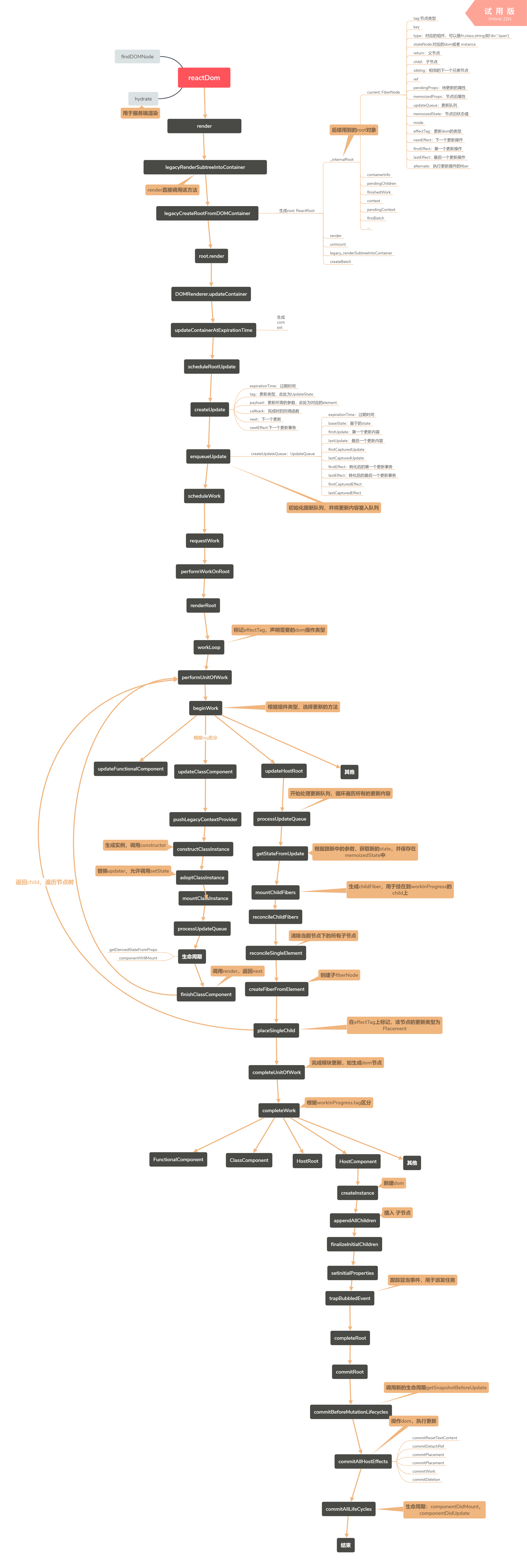
3 |
4 | ## 目录
5 | - 前言
6 | - [背景](#背景)
7 | - [优化内容](#优化内容)
8 | - [初始阶段](#初始阶段)
9 | - [jsx](#jsx)
10 | - [ReactDom.render](#ReactDom.render)
11 | - [legacyCreateRootFromDOMContainer](#legacyCreateRootFromDOMContainer)
12 | - [Fiber](#Fiber)
13 | - [规划阶段](#规划阶段-scheduleWork)
14 | - [ExpirationTime](#ExpirationTime)
15 | - [priority](#priority)
16 | - [调和阶段](#调和-reconciliation)
17 | - [workLoop](#workLoop)
18 | - [beginWork](#beginWork)
19 | - [completeWork](#completeWork)
20 | - [更新阶段](#更新阶段)
21 | - [commitRoot](#commitRoot)
22 |
23 | - [小技巧](#小技巧)
24 | - [参考](#参考)
25 | - [后续](#后续)
26 |
27 | ## 背景
28 |
29 | 距离react16发布已经过去很久了,facebook开发团队耗时2年多,究竟做了什么呢。从下面两张图中可以很直观的看出,react16带来的性能优化
30 | 
31 |
32 | 
33 |
34 | 造成这样的现象主要是因为:单个网页由js、UI渲染线程、浏览器事件触发线程、http请求线程、EventLoop轮询的处理线程等线程组成,其中js引擎线程和ui渲染线程是互斥的,也就是说在处理js任务时,页面将停止渲染,一旦js占用时间过长,造成页面每秒渲染的帧数过低,就会给用造成很明显的卡顿感。
35 |
36 | ## 优化内容
37 |
38 | 1. 新增了Portals、Fragments的组件类型,新增了componentDidCatch、static getDerivedStateFromProps、getSnapshotBeforeUpdate声明周期,componentWillMount、componentWillReceiveProps、componentWillUpdate将会在未来被移除,支持自定义的dom属性,扩展了render函数可返回的类型
39 |
40 | 2. 引入异步架构,优化了包括动画,布局和手势的性能。
41 | - 把可中断的工作拆分成小任务
42 | - 对正在做的工作调整优先次序、重做、复用上次(做了一半的)成果
43 |
44 | 3. 项目体积大幅度缩小,相比前一个大版本,react + react-dom的体积从161.kb(49.8kb gzipped)缩减到了109kb(34.8 kb gzipped),优化幅度高达30%。
45 |
46 | ## jsx
47 |
48 | 编译前:
49 |
50 | ```jsx
51 | Hello, world!
52 | ```
53 |
54 | 编译后:
55 |
56 | ```jsx
57 | React.createElement("h1", {color: "red"}, "Hello, world!")
58 | ```
59 |
60 | ## ReactDom.render
61 |
62 | 将react元素渲染到真实dom中。
63 |
64 | ```jsx
65 | ReactDOM.render(
66 | element,
67 | container,
68 | [callback]
69 | )
70 | ```
71 | [在线尝试](https://codesandbox.io/s/v629p1y197)
72 |
73 | ## legacyRenderSubtreeIntoContainer
74 |
75 | 这个方法除主要做了两件事:
76 | 1. 清除dom容器元素的子元素
77 | ```jsx
78 | while ((rootSibling = container.lastChild)) {
79 | container.removeChild(rootSibling);
80 | }
81 | ```
82 | 2. 创建ReactRoot对象
83 |
84 | ## Fiber
85 |
86 | react在进行组件渲染时,从setState开始到渲染完成整个过程是同步的(“一气呵成”)。
87 | 如果需要渲染的组件比较庞大,js执行会占据主线程时间较长,会导致页面响应度变差,使得react在动画、手势等应用中效果比较差。
88 | 为了解决这个问题,react团队经过两年的工作,重写了react中核心算法——reconciliation。
89 |
90 |
91 | ## 规划阶段-scheduleWork
92 |
93 | 规划更新的过期时间和优先级
94 |
95 | ## ExpirationTime
96 |
97 | 在react16中,随处可见expirationTime这个值,这个值的含义是:
98 | - 所谓的到期时间(ExpirationTime),是相对于调度器初始调用的起始时间而言的一个时间段;调度器初始调用后的某一段时间内,需要调度完成这项更新,这个时间段长度值就是到期时间值。
99 | - 目前react16的异步更新和优先级更新尚未完善,因此本文对此功能将暂不做深究。
100 |
101 | ## priority
102 |
103 | 组件更新的优先级,react16暂未启用,不做深究。
104 |
105 | ## 调和-reconciliation
106 |
107 | React算法,用于计算新旧树上需要更新的部分
108 |
109 | ## workLoop
110 |
111 | 生成FiberTree
112 | 
113 |
114 | ## beginWork
115 |
116 | 根据fiber.tag类型,更新不同的fiber节点。
117 | 节点类型如下:
118 | ```jsx
119 | switch (workInProgress.tag) {
120 | case IndeterminateComponent:
121 | return mountIndeterminateComponent(current, workInProgress, renderExpirationTime);
122 | case FunctionalComponent:
123 | return updateFunctionalComponent(current, workInProgress);
124 | case ClassComponent:
125 | return updateClassComponent(current, workInProgress, renderExpirationTime);
126 | case HostRoot:
127 | return updateHostRoot(current, workInProgress, renderExpirationTime);
128 | case HostComponent:
129 | return updateHostComponent(current, workInProgress, renderExpirationTime);
130 | case HostText:
131 | return updateHostText(current, workInProgress);
132 | case TimeoutComponent:
133 | return updateTimeoutComponent(current, workInProgress, renderExpirationTime);
134 | case HostPortal:
135 | return updatePortalComponent(current, workInProgress, renderExpirationTime);
136 | case ForwardRef:
137 | return updateForwardRef(current, workInProgress);
138 | case Fragment:
139 | return updateFragment(current, workInProgress);
140 | case Mode:
141 | return updateMode(current, workInProgress);
142 | case Profiler:
143 | return updateProfiler(current, workInProgress);
144 | case ContextProvider:
145 | return updateContextProvider(current, workInProgress, renderExpirationTime);
146 | case ContextConsumer:
147 | return updateContextConsumer(current, workInProgress, renderExpirationTime);
148 | default:
149 | invariant_1(false, 'Unknown unit of work tag. This error is likely caused by a bug in React. Please file an issue.');
150 | }
151 | ```
152 |
153 | ## completeWork
154 |
155 | 创建dom节点,初始化dom属性
156 |
157 | ## 更新阶段
158 |
159 | 根据前面计算出来的更新类型,在真实dom树上执行对应的操作
160 |
161 | ## commitRoot
162 |
163 | 执行更新操作,分三次递归
164 | 1. commitBeforeMutationLifecycles:调用getSnapshotBeforeUpdate声明周期
165 | 2. commitAllHostEffects:执行所有会产生副作用的操作,插入、更新、移除、ref的unmount
166 | 3. commitAllLifeCycles:生命周期
167 |
168 | ## 小技巧
169 |
170 | - 阅读源码时,可以在本地用create-react-app新建一下小demo项目,然后直接在node_modules中的react-dom.development.js和react.development.js两个文件里的对应方法打断点。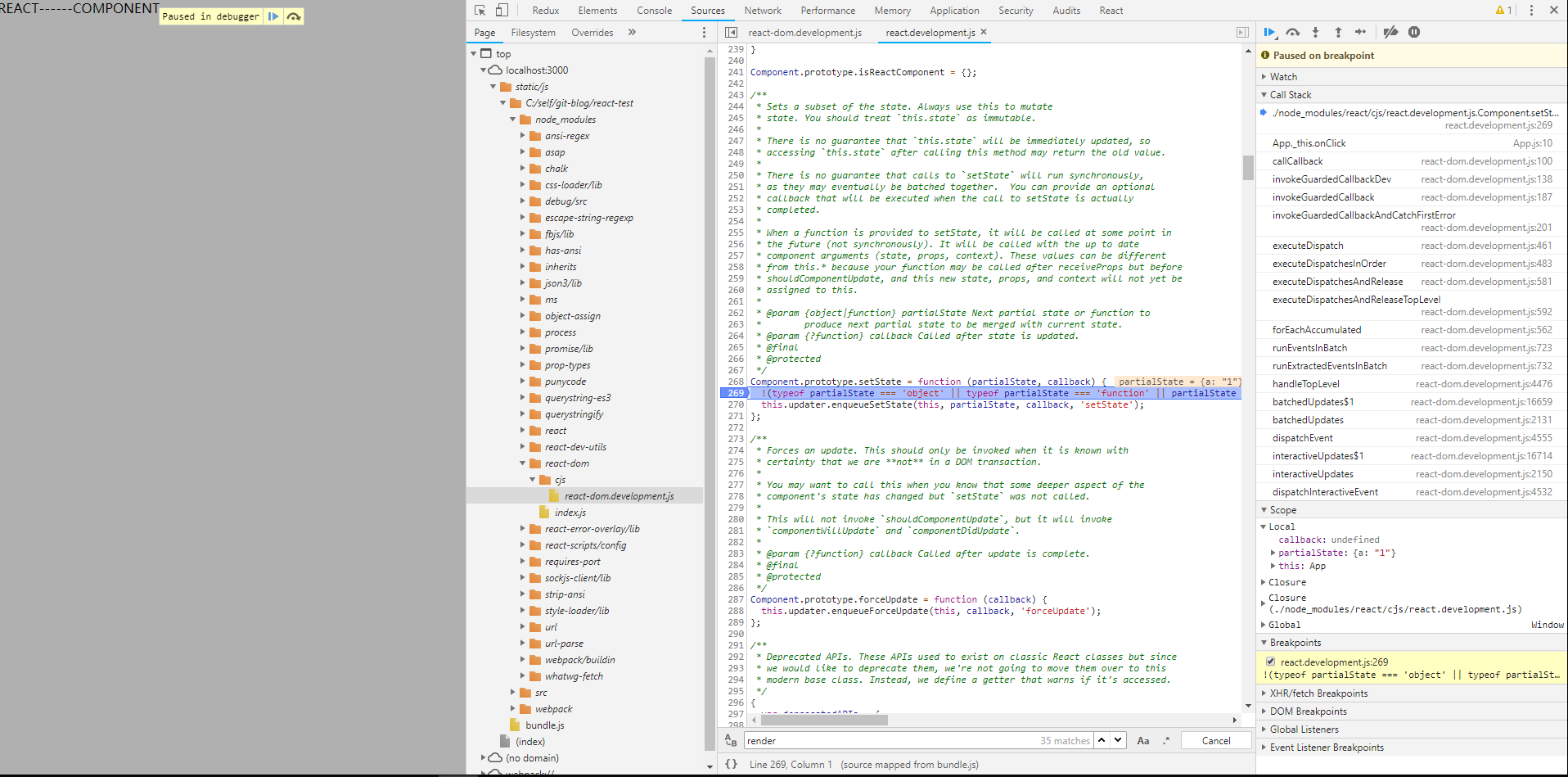
171 |
172 | ## 参考
173 |
174 | - [React16.2源码解析](https://juejin.im/post/5b1b4daff265da6e0f70b5a9)
175 | - [React 16 Fiber源码速览](http://zxc0328.github.io/2017/09/28/react-16-source/)
176 | - [react官方文档](https://reactjs.org/docs/react-dom.html)
177 | - [React Fiber](https://juejin.im/post/5ab7b3a2f265da2378403e57)
178 | - [React Fiber初探](http://blog.codingplayboy.com/2017/12/02/react_fiber/#alternate_fiber)
179 | - [React Fiber Architecture](https://github.com/acdlite/react-fiber-architecture)
180 |
181 | # 后续
182 |
183 | - [事件系统分析](https://github.com/luke93h/git-blog/issues/10)
184 | - [setState分析](https://github.com/luke93h/git-blog/issues/11)
--------------------------------------------------------------------------------
/examples/chrome-plugin-demo-master/demo/js/popup.js:
--------------------------------------------------------------------------------
1 | $(function() {
2 | // 加载设置
3 | var defaultConfig = {color: 'white'}; // 默认配置
4 | chrome.storage.sync.get(defaultConfig, function(items) {
5 | document.body.style.backgroundColor = items.color;
6 | });
7 |
8 | // 初始化国际化
9 | $('#test_i18n').html(chrome.i18n.getMessage("helloWorld"));
10 |
11 |
12 | });
13 |
14 | // 打开后台页
15 | $('#open_background').click(e => {
16 | window.open(chrome.extension.getURL('background.html'));
17 | });
18 |
19 | // 调用后台JS
20 | $('#invoke_background_js').click(e => {
21 | var bg = chrome.extension.getBackgroundPage();
22 | bg.testBackground();
23 | });
24 |
25 | // 获取后台页标题
26 | $('#get_background_title').click(e => {
27 | var bg = chrome.extension.getBackgroundPage();
28 | alert(bg.document.title);
29 | });
30 |
31 | // 设置后台页标题
32 | $('#set_background_title').click(e => {
33 | var title = prompt('请输入background的新标题:', '这是新标题');
34 | var bg = chrome.extension.getBackgroundPage();
35 | bg.document.title = title;
36 | alert('修改成功!');
37 | });
38 |
39 | // 自定义窗体大小
40 | $('#custom_window_size').click(() => {
41 | chrome.windows.getCurrent({}, (currentWindow) => {
42 | var startLeft = 10;
43 | chrome.windows.update(currentWindow.id,
44 | {
45 | left: startLeft * 10,
46 | top: 100,
47 | width: 800,
48 | height: 600
49 | });
50 | var inteval = setInterval(() => {
51 | if(startLeft >= 40) clearInterval(inteval);
52 | chrome.windows.update(currentWindow.id, {left: (++startLeft) * 10});
53 | }, 50);
54 | });
55 | });
56 |
57 | // 最大化窗口
58 | $('#max_current_window').click(() => {
59 | chrome.windows.getCurrent({}, (currentWindow) => {
60 | // state: 可选 'minimized', 'maximized' and 'fullscreen'
61 | chrome.windows.update(currentWindow.id, {state: 'maximized'});
62 | });
63 | });
64 |
65 |
66 | // 最小化窗口
67 | $('#min_current_window').click(() => {
68 | chrome.windows.getCurrent({}, (currentWindow) => {
69 | // state: 可选 'minimized', 'maximized' and 'fullscreen'
70 | chrome.windows.update(currentWindow.id, {state: 'minimized'});
71 | });
72 | });
73 |
74 | // 打开新窗口
75 | $('#open_new_window').click(() => {
76 | chrome.windows.create({state: 'maximized'});
77 | });
78 |
79 | // 关闭全部
80 | $('#close_current_window').click(() => {
81 | chrome.windows.getCurrent({}, (currentWindow) => {
82 | chrome.windows.remove(currentWindow.id);
83 | });
84 | });
85 |
86 | // 新标签打开网页
87 | $('#open_url_new_tab').click(() => {
88 | chrome.tabs.create({url: 'https://www.baidu.com'});
89 | });
90 |
91 | // 当前标签打开网页
92 | $('#open_url_current_tab').click(() => {
93 | getCurrentTabId(tabId => {
94 | chrome.tabs.update(tabId, {url: 'http://www.so.com'});
95 | });
96 | });
97 |
98 | // 获取当前标签ID
99 | $('#get_current_tab_id').click(() => {
100 | getCurrentTabId(tabId => {
101 | alert('当前标签ID:' + tabId);
102 | });
103 | });
104 |
105 | // 高亮tab
106 | $('#highlight_tab').click(() => {
107 | chrome.tabs.highlight({tabs: 0});
108 | });
109 |
110 | // popup主动发消息给content-script
111 | $('#send_message_to_content_script').click(() => {
112 | sendMessageToContentScript('你好,我是popup!', (response) => {
113 | if(response) alert('收到来自content-script的回复:'+response);
114 | });
115 | });
116 |
117 | // 监听来自content-script的消息
118 | chrome.runtime.onMessage.addListener(function(request, sender, sendResponse)
119 | {
120 | console.log('收到来自content-script的消息:');
121 | console.log(request, sender, sendResponse);
122 | sendResponse('我是popup,我已收到你的消息:' + JSON.stringify(request));
123 | });
124 |
125 | // popup与content-script建立长连接
126 | $('#connect_to_content_script').click(() => {
127 | getCurrentTabId((tabId) => {
128 | var port = chrome.tabs.connect(tabId, {name: 'test-connect'});
129 | port.postMessage({question: '你是谁啊?'});
130 | port.onMessage.addListener(function(msg) {
131 | alert('收到长连接消息:'+msg.answer);
132 | if(msg.answer && msg.answer.startsWith('我是'))
133 | {
134 | port.postMessage({question: '哦,原来是你啊!'});
135 | }
136 | });
137 | });
138 | });
139 |
140 | // 获取当前选项卡ID
141 | function getCurrentTabId(callback)
142 | {
143 | chrome.tabs.query({active: true, currentWindow: true}, function(tabs)
144 | {
145 | if(callback) callback(tabs.length ? tabs[0].id: null);
146 | });
147 | }
148 |
149 | // 这2个获取当前选项卡id的方法大部分时候效果都一致,只有少部分时候会不一样
150 | function getCurrentTabId2()
151 | {
152 | chrome.windows.getCurrent(function(currentWindow)
153 | {
154 | chrome.tabs.query({active: true, windowId: currentWindow.id}, function(tabs)
155 | {
156 | if(callback) callback(tabs.length ? tabs[0].id: null);
157 | });
158 | });
159 | }
160 |
161 | // 向content-script主动发送消息
162 | function sendMessageToContentScript(message, callback)
163 | {
164 | getCurrentTabId((tabId) =>
165 | {
166 | chrome.tabs.sendMessage(tabId, message, function(response)
167 | {
168 | if(callback) callback(response);
169 | });
170 | });
171 | }
172 |
173 | // 向content-script注入JS片段
174 | function executeScriptToCurrentTab(code)
175 | {
176 | getCurrentTabId((tabId) =>
177 | {
178 | chrome.tabs.executeScript(tabId, {code: code});
179 | });
180 | }
181 |
182 |
183 | // 演示2种方式操作DOM
184 |
185 | // 修改背景色
186 | $('#update_bg_color').click(() => {
187 | executeScriptToCurrentTab('document.body.style.backgroundColor="red";')
188 | });
189 |
190 | // 修改字体大小
191 | $('#update_font_size').click(() => {
192 | sendMessageToContentScript({cmd:'update_font_size', size: 42}, function(response){});
193 | });
194 |
195 | // 显示badge
196 | $('#show_badge').click(() => {
197 | chrome.browserAction.setBadgeText({text: 'New'});
198 | chrome.browserAction.setBadgeBackgroundColor({color: [255, 0, 0, 255]});
199 | });
200 |
201 | // 隐藏badge
202 | $('#hide_badge').click(() => {
203 | chrome.browserAction.setBadgeText({text: ''});
204 | chrome.browserAction.setBadgeBackgroundColor({color: [0, 0, 0, 0]});
205 | });
206 |
207 | // 显示桌面通知
208 | $('#show_notification').click(e => {
209 | chrome.notifications.create(null, {
210 | type: 'image',
211 | iconUrl: 'img/icon.png',
212 | title: '祝福',
213 | message: '骚年,祝你圣诞快乐!Merry christmas!',
214 | imageUrl: 'img/sds.png'
215 | });
216 | });
217 |
218 | $('#check_media').click(e => {
219 | alert('即将打开一个有视频的网站,届时将自动检测是否存在视频!');
220 | chrome.tabs.create({url: 'http://www.w3school.com.cn/tiy/t.asp?f=html5_video'});
221 | });
--------------------------------------------------------------------------------
/src/我是如何从你的网站盗取银行卡和密码的.md:
--------------------------------------------------------------------------------
1 | # 我是如何从你的网站盗取银行卡和密码的
2 | > 译者:本文翻译自[hackermoon上的文章](https://hackernoon.com/im-harvesting-credit-card-numbers-and-passwords-from-your-site-here-s-how-9a8cb347c5b5),希望本文能唤起广大前端工作者的安全意识,以下为正文:
3 |
4 | ***
5 |
6 | > 以下是一个真实的故事。或者它可能只是基于一个真实的故事。也许这根本不是真的。
7 |
8 | 这周是一个安全恐慌周——似乎每天都有一个新的漏洞被发现。当家里人询问我相关的事情时,我需要假装我很懂行,这真的让我感到很煎熬。
9 |
10 | 看到与我亲近的人都在忧虑“网络安全”,这确实让我有所感触。
11 |
12 | 所以,我怀着沉重的心情,决定干净利落地告诉你,我过去几年是如何偷你的网站上的用户名,密码和信用卡号码。
13 |
14 | ***
15 |
16 | 恶意代码本身非常简单,当它在满足以下条件的页面上运行时,它就能发挥作用:
17 |
18 | * 该页面有一个\ ', `${script}`);
342 | }
343 |
344 | express.response.send.call(this, indexHtml);
345 | } else {
346 | originalResponseSendFile.call(this, path, options, callback);
347 | }
348 | };
349 | ```
350 |
351 | 当注入的脚本进入浏览器时,它将从邪恶的服务器加载一些(可能有针对性的)恶意JavaScript(可以因为CSP说它没问题),然后删除它自己的所有痕迹。
352 |
353 | 上面的要点本身并没有实际用处(正如眼尖的读者发现的那样),真正的黑客可能不会像这样使用Express。我只是为了说明了你的服务器是很简陋的,并且那里运行的任何东西都有机会窃取用户在浏览器中输入的数据。
354 |
355 | (如果您是软件包作者,可以考虑使用Object.freeze或Object.defineProperty中的writable: false以锁定您的内容。)
356 |
357 | ***
358 |
359 | 实际上,认为有Node模块做出与出站请求相关的事情可能有点牵强 - 对我而言,这太容易被发现了。
360 |
361 | 我们的目的是创建一个不包含任何第三方代码的程序,但这里又给了第三方代码修改代码的机会。真的要这样做吗?这取决于你。
362 |
363 | 我的建议是从静态文件服务器提供这些“安全”文件,或者干脆不要做任何事。
364 |
365 | ## 2.发送到静态文件服务器
366 |
367 | 是的,标题既是我们要做的是,也是漏洞的名称。
368 |
369 | 我是Firebase静态托管的忠实粉丝,因为它能提供你所能期待的最高速度了,而且部署很容易。
370 |
371 | 只需从npm安装firebase-tools和...哦!天啊!我正在使用npm包来避免npm包。
372 |
373 | 好吧,深呼吸David,也许这是那些美丽的零依赖包之一。
374 |
375 | 正在安装......安装......
376 |
377 | 
378 |
379 | 天啊!640个依赖包!
380 |
381 | 好的,我放弃提出建议,你只能靠你自己了。只能以某种方式将HTML文件放到服务器上。在某些时候,我们需要信任陌生人编写的代码。
382 |
383 | 有趣的事实:写这篇文章需要几个星期的时间。我正在进行最终草案,我刚刚再次安装了Firebase工具,以检查我的数字是否正确...
384 |
385 | 
386 |
387 | 我想知道这七个新包的作用是什么?我想知道管理Firebase开发者是否知道这七个新软件包的作用是什么?我想知道是否有人知道他们的包装需要什么依赖?
388 |
389 | ## 3. Webpack
390 |
391 | 您可能已经注意到我没有建议您将“安全”HTML文件添加到构建通道中(例如,共享CSS),即使这样可以解决代码重复问题。
392 |
393 | 这是因为即使是最简单的Webpack构建,也会涉及数百个包,其中的任何一个都可能会修改构建过程的输出。Webpack本身需要367个包。像css-loader这样良性的loader会增加246 个。为了放入正确的CSS文件,您会使用优秀html-webpack-plugin,但它将添加156个包。
394 |
395 | 尽管,我认为这些包中的任意一个都不会将脚本注入到您压缩后的代码中。但是,如果花费巨大的精力去制作一个原始的,手写的,人类可读的仓鼠友好的HTML文件是错误的,只是在睡觉前用几百个杜宾犬处理它。
396 |
397 | ## 4.无能的攻击
398 |
399 | 最后要防范的,也是最危险的事。这些东西可以修改你编写的任何代码,并清除你提出的任何安全防范:就像一个6岁大的孩子一样,不知道他们在做什么。
400 |
401 | 这实际上是最难防范的事情之一。我能想到的唯一解决方案是各种“单元测试”,确保在任何这些“安全”文件中都没有外部脚本。
402 |
403 | ```js
404 | const fs = require('fs');
405 | const path = require('path');
406 | const { JSDOM } = require('jsdom');
407 |
408 | it('should not contain any external scripts, ask David why', () => {
409 | const creditCardForm = fs.readFileSync(path.resolve(__dirname, '../public/credit-card-form.html'), 'utf8');
410 |
411 | const dom = new JSDOM(
412 | creditCardForm,
413 | { runScripts: 'dangerously' },
414 | );
415 |
416 | const scriptElementWithSource = dom.window.document.querySelector('script[src]');
417 | expect(scriptElementWithSource).toBe(null);
418 | });
419 | ```
420 |
421 | 我允许\