├── README.md
├── AppStore
└── README.md
├── public
├── CNAME
├── favicon.ico
└── favicon.svg
├── tsconfig.json
├── src
├── assets
│ ├── houston.webp
│ ├── icon-512.png
│ ├── images
│ │ ├── homepage001.gif
│ │ ├── cnquickstart01.webp
│ │ ├── cnquickstart02.webp
│ │ ├── cnquickstart03.webp
│ │ ├── cnquickstart04.webp
│ │ ├── cnquickstart06.webp
│ │ ├── cnquickstart07.webp
│ │ ├── SCR-20240515-nznn.jpeg
│ │ └── webserver
│ │ │ └── WX20250413-000235@2x.png
│ ├── 狸花猫戴着耳机开会犯困-rbg.webp
│ ├── image-20240823113252734.png
│ └── image-20250524142330547.png
├── content
│ ├── docs
│ │ ├── reference
│ │ │ ├── ollama.md
│ │ │ ├── openai-whisper.md
│ │ │ └── roi.md
│ │ ├── guides
│ │ │ ├── download.md
│ │ │ ├── feedback.md
│ │ │ ├── windows-trial.md
│ │ │ ├── quickstart.md
│ │ │ └── pricing.md
│ │ ├── zh-cn
│ │ │ ├── reference
│ │ │ │ ├── assets
│ │ │ │ │ ├── image-20240614171023457.png
│ │ │ │ │ ├── image-20240614171358777.png
│ │ │ │ │ ├── image-20240614171649213.png
│ │ │ │ │ ├── image-20240614171953106.png
│ │ │ │ │ ├── image-20240614172138538.png
│ │ │ │ │ ├── image-20240614172318944.png
│ │ │ │ │ └── image-20240614172710504.png
│ │ │ │ ├── ollama.md
│ │ │ │ ├── why.md
│ │ │ │ ├── openai-whisper.md
│ │ │ │ ├── roi.md
│ │ │ │ └── web-server.md
│ │ │ ├── guides
│ │ │ │ ├── download.md
│ │ │ │ ├── feedback.md
│ │ │ │ ├── windows-trial.md
│ │ │ │ ├── quickstart.md
│ │ │ │ └── pricing.md
│ │ │ └── index.mdx
│ │ └── index.mdx
│ └── config.ts
├── env.d.ts
└── components
│ ├── LwtNav.astro
│ ├── Header.astro
│ └── LwtHeader.astro
├── .vscode
├── extensions.json
└── launch.json
├── .gitignore
├── package.json
├── .github
└── workflows
│ └── deploy.yml
└── astro.config.mjs
/README.md:
--------------------------------------------------------------------------------
1 |
2 |
--------------------------------------------------------------------------------
/AppStore/README.md:
--------------------------------------------------------------------------------
1 |
2 |
--------------------------------------------------------------------------------
/public/CNAME:
--------------------------------------------------------------------------------
1 | hear.thucydides.net
--------------------------------------------------------------------------------
/tsconfig.json:
--------------------------------------------------------------------------------
1 | {
2 | "extends": "astro/tsconfigs/strict"
3 | }
--------------------------------------------------------------------------------
/public/favicon.ico:
--------------------------------------------------------------------------------
https://raw.githubusercontent.com/lwtlab/hear/HEAD/public/favicon.ico
--------------------------------------------------------------------------------
/src/assets/houston.webp:
--------------------------------------------------------------------------------
https://raw.githubusercontent.com/lwtlab/hear/HEAD/src/assets/houston.webp
--------------------------------------------------------------------------------
/src/assets/icon-512.png:
--------------------------------------------------------------------------------
https://raw.githubusercontent.com/lwtlab/hear/HEAD/src/assets/icon-512.png
--------------------------------------------------------------------------------
/src/content/docs/reference/ollama.md:
--------------------------------------------------------------------------------
1 | ---
2 | title: Ollama
3 | description: Ollama
4 | ---
5 |
6 |
--------------------------------------------------------------------------------
/src/assets/images/homepage001.gif:
--------------------------------------------------------------------------------
https://raw.githubusercontent.com/lwtlab/hear/HEAD/src/assets/images/homepage001.gif
--------------------------------------------------------------------------------
/src/assets/狸花猫戴着耳机开会犯困-rbg.webp:
--------------------------------------------------------------------------------
https://raw.githubusercontent.com/lwtlab/hear/HEAD/src/assets/狸花猫戴着耳机开会犯困-rbg.webp
--------------------------------------------------------------------------------
/src/content/docs/guides/download.md:
--------------------------------------------------------------------------------
1 | ---
2 | title: Download
3 | description: Download.
4 | ---
5 |
6 | Download
7 |
--------------------------------------------------------------------------------
/src/assets/image-20240823113252734.png:
--------------------------------------------------------------------------------
https://raw.githubusercontent.com/lwtlab/hear/HEAD/src/assets/image-20240823113252734.png
--------------------------------------------------------------------------------
/src/assets/image-20250524142330547.png:
--------------------------------------------------------------------------------
https://raw.githubusercontent.com/lwtlab/hear/HEAD/src/assets/image-20250524142330547.png
--------------------------------------------------------------------------------
/src/assets/images/cnquickstart01.webp:
--------------------------------------------------------------------------------
https://raw.githubusercontent.com/lwtlab/hear/HEAD/src/assets/images/cnquickstart01.webp
--------------------------------------------------------------------------------
/src/assets/images/cnquickstart02.webp:
--------------------------------------------------------------------------------
https://raw.githubusercontent.com/lwtlab/hear/HEAD/src/assets/images/cnquickstart02.webp
--------------------------------------------------------------------------------
/src/assets/images/cnquickstart03.webp:
--------------------------------------------------------------------------------
https://raw.githubusercontent.com/lwtlab/hear/HEAD/src/assets/images/cnquickstart03.webp
--------------------------------------------------------------------------------
/src/assets/images/cnquickstart04.webp:
--------------------------------------------------------------------------------
https://raw.githubusercontent.com/lwtlab/hear/HEAD/src/assets/images/cnquickstart04.webp
--------------------------------------------------------------------------------
/src/assets/images/cnquickstart06.webp:
--------------------------------------------------------------------------------
https://raw.githubusercontent.com/lwtlab/hear/HEAD/src/assets/images/cnquickstart06.webp
--------------------------------------------------------------------------------
/src/assets/images/cnquickstart07.webp:
--------------------------------------------------------------------------------
https://raw.githubusercontent.com/lwtlab/hear/HEAD/src/assets/images/cnquickstart07.webp
--------------------------------------------------------------------------------
/.vscode/extensions.json:
--------------------------------------------------------------------------------
1 | {
2 | "recommendations": ["astro-build.astro-vscode"],
3 | "unwantedRecommendations": []
4 | }
5 |
--------------------------------------------------------------------------------
/src/assets/images/SCR-20240515-nznn.jpeg:
--------------------------------------------------------------------------------
https://raw.githubusercontent.com/lwtlab/hear/HEAD/src/assets/images/SCR-20240515-nznn.jpeg
--------------------------------------------------------------------------------
/src/assets/images/webserver/WX20250413-000235@2x.png:
--------------------------------------------------------------------------------
https://raw.githubusercontent.com/lwtlab/hear/HEAD/src/assets/images/webserver/WX20250413-000235@2x.png
--------------------------------------------------------------------------------
/src/content/docs/zh-cn/reference/assets/image-20240614171023457.png:
--------------------------------------------------------------------------------
https://raw.githubusercontent.com/lwtlab/hear/HEAD/src/content/docs/zh-cn/reference/assets/image-20240614171023457.png
--------------------------------------------------------------------------------
/src/content/docs/zh-cn/reference/assets/image-20240614171358777.png:
--------------------------------------------------------------------------------
https://raw.githubusercontent.com/lwtlab/hear/HEAD/src/content/docs/zh-cn/reference/assets/image-20240614171358777.png
--------------------------------------------------------------------------------
/src/content/docs/zh-cn/reference/assets/image-20240614171649213.png:
--------------------------------------------------------------------------------
https://raw.githubusercontent.com/lwtlab/hear/HEAD/src/content/docs/zh-cn/reference/assets/image-20240614171649213.png
--------------------------------------------------------------------------------
/src/content/docs/zh-cn/reference/assets/image-20240614171953106.png:
--------------------------------------------------------------------------------
https://raw.githubusercontent.com/lwtlab/hear/HEAD/src/content/docs/zh-cn/reference/assets/image-20240614171953106.png
--------------------------------------------------------------------------------
/src/content/docs/zh-cn/reference/assets/image-20240614172138538.png:
--------------------------------------------------------------------------------
https://raw.githubusercontent.com/lwtlab/hear/HEAD/src/content/docs/zh-cn/reference/assets/image-20240614172138538.png
--------------------------------------------------------------------------------
/src/content/docs/zh-cn/reference/assets/image-20240614172318944.png:
--------------------------------------------------------------------------------
https://raw.githubusercontent.com/lwtlab/hear/HEAD/src/content/docs/zh-cn/reference/assets/image-20240614172318944.png
--------------------------------------------------------------------------------
/src/content/docs/zh-cn/reference/assets/image-20240614172710504.png:
--------------------------------------------------------------------------------
https://raw.githubusercontent.com/lwtlab/hear/HEAD/src/content/docs/zh-cn/reference/assets/image-20240614172710504.png
--------------------------------------------------------------------------------
/src/env.d.ts:
--------------------------------------------------------------------------------
1 | ///
2 | ///
3 | ///
4 |
--------------------------------------------------------------------------------
/src/content/docs/guides/feedback.md:
--------------------------------------------------------------------------------
1 | ---
2 | title: Feedback
3 | description: Feedback.
4 | ---
5 |
6 | 1. For software problem: help@thucydides.net
7 | 2. Others: contact@thucydides.net
--------------------------------------------------------------------------------
/src/content/docs/zh-cn/guides/download.md:
--------------------------------------------------------------------------------
1 | ---
2 | title: 下载
3 | description: 下载.
4 | ---
5 |
6 | [macOS 免费下载](https://apps.apple.com/app/ai-hear/id6497877058)
7 | ***体验3天(订阅后开启体验,体验期间可以随时取消订阅)***
8 |
--------------------------------------------------------------------------------
/.vscode/launch.json:
--------------------------------------------------------------------------------
1 | {
2 | "version": "0.2.0",
3 | "configurations": [
4 | {
5 | "command": "./node_modules/.bin/astro dev",
6 | "name": "Development server",
7 | "request": "launch",
8 | "type": "node-terminal"
9 | }
10 | ]
11 | }
12 |
--------------------------------------------------------------------------------
/src/content/config.ts:
--------------------------------------------------------------------------------
1 | import { defineCollection } from "astro:content";
2 | import { docsSchema, i18nSchema } from "@astrojs/starlight/schema";
3 |
4 | export const collections = {
5 | docs: defineCollection({ schema: docsSchema() }),
6 | i18n: defineCollection({ type: "data", schema: i18nSchema() }),
7 | };
8 |
--------------------------------------------------------------------------------
/.gitignore:
--------------------------------------------------------------------------------
1 | # build output
2 | dist/
3 | # generated types
4 | .astro/
5 |
6 | # dependencies
7 | node_modules/
8 |
9 | # logs
10 | npm-debug.log*
11 | yarn-debug.log*
12 | yarn-error.log*
13 | pnpm-debug.log*
14 |
15 |
16 | # environment variables
17 | .env
18 | .env.production
19 |
20 | # macOS-specific files
21 | .DS_Store
22 |
--------------------------------------------------------------------------------
/src/content/docs/zh-cn/guides/feedback.md:
--------------------------------------------------------------------------------
1 | ---
2 | title: 反馈
3 | description: 反馈.
4 | ---
5 |
6 | **感谢您将建议反馈给我们** (投票使用三方平台制作,完成投票后无需点击任何广告)
7 |
8 |
9 | 或者,直接联系我们:
10 |
11 | 1. 软件问题:help@thucydides.net
12 | 2. 其他:contact@thucydides.net
--------------------------------------------------------------------------------
/package.json:
--------------------------------------------------------------------------------
1 | {
2 | "name": "hear",
3 | "type": "module",
4 | "version": "0.0.1",
5 | "scripts": {
6 | "dev": "astro dev",
7 | "start": "astro dev",
8 | "build": "astro check && astro build",
9 | "preview": "astro preview",
10 | "astro": "astro"
11 | },
12 | "dependencies": {
13 | "@astrojs/check": "^0.6.0",
14 | "@astrojs/starlight": "^0.22.3",
15 | "astro": "^4.3.5",
16 | "sharp": "^0.32.5",
17 | "starlight-image-zoom": "^0.4.0",
18 | "typescript": "^5.4.5"
19 | }
20 | }
--------------------------------------------------------------------------------
/public/favicon.svg:
--------------------------------------------------------------------------------
1 |
2 |
4 |
15 |
--------------------------------------------------------------------------------
/src/content/docs/zh-cn/guides/windows-trial.md:
--------------------------------------------------------------------------------
1 | ---
2 | title: Windows 试用
3 | description: 在 Windows 上试用 AI Hear
4 | ---
5 |
6 | 如果没有 NVIDIA 显卡和 AMD 显卡,不建议试用 AI Hear。本地实时语音转文字需要消耗大量算力,如果使用 CPU 进行转文字,转文字的响应速度会很慢,体验很差。
7 |
8 | ## GPU 支持
9 |
10 | 目前支持 NVIDIA 显卡和 AMD 显卡。
11 |
12 | AI Hear 底层技术与 Ollama 底层技术同源,理论上 Ollama 支持的 NVIDIA/AMD 显卡 AI Hear 都支持。
13 |
14 | 点击 [Ollama 支持的显卡列表](https://github.com/ollama/ollama/blob/main/docs/gpu.md) 查看 Ollama 支持的显卡列表。
15 |
16 | ### NVIDIA 显卡驱动要求
17 |
18 | 建议您尽可能使用兼容您 Windows 系统的最新的显卡驱动,以达到最佳性能。
19 |
20 | 最低运行要求:运行 `nvidia-smi.exe`,您的显卡驱动最高支持的 CUDA 版本(见下图红框处)应不低于 11.3。
21 |
22 | 
23 |
24 | ## 下载
25 |
26 | ### Github 下载地址
27 |
28 | https://github.com/lwtlab/hear/releases
29 |
30 | ### 百度网盘
31 |
32 | https://pan.baidu.com/s/1h1MdVzrpyhkagjuJSQJQdg?pwd=dzat
33 |
34 | ## 支持我们
35 |
36 | 如果你觉得有用,可以[购买激活码](https://checkout.thucydides.net/purchase/AIHear)支持我们。
37 |
38 | 激活码解锁 15 分钟限制,以及未来的会员功能。
39 |
40 | ## 反馈
41 |
42 | 通过 Discord 反馈问题。
43 | 通过 邮件 反馈问题。
44 |
45 | ### 获取运行日志
46 |
47 | 
48 |
--------------------------------------------------------------------------------
/src/content/docs/zh-cn/reference/ollama.md:
--------------------------------------------------------------------------------
1 | ---
2 | title: Ollama
3 | description: Ollama
4 | ---
5 |
6 |
7 |
8 | ## 准备工作
9 |
10 | ### 本地翻译模型
11 |
12 | 我们将使用 [Ollama](https://ollama.com) 来运行本地的翻译模型。
13 |
14 | 1. 首先下载 Ollama 软件:https://ollama.com/download
15 |
16 | 2. 按照软件指引安装 Ollama
17 |
18 | 3. 启动 Ollama。一切顺利的话,你将在 menu bar 里看到这个小羊驼🦙
19 |
20 | 
21 |
22 | 4. 下载模型,这里我们以 [qwen2](https://ollama.com/library/qwen2) 为例。打开终端程序,输入命令,等待模型下载。
23 |
24 | 
25 |
26 | ```bash
27 | ollama run qwen2:1.5b
28 | ```
29 |
30 |
31 |
32 | 5. 测试下,试着翻译一句英文。
33 |
34 | 
35 |
36 | ### 注意⚠️
37 |
38 | 为了良好的体验,根据自己的机型选择合适的模型。一般来说,模型越大,翻译效果越好,对电脑的要求也越高。
39 |
40 | ### AI Hear 配置
41 |
42 | 1. 打开 Providers(供应商)界面,如下配置:
43 |
44 | 
45 |
46 | 2. 打开 Translation(翻译)界面,Add Translator(添加翻译引擎),选择供应商、模型:
47 |
48 | 
49 |
50 | 3. 将新增的翻译引擎拖拽到顶部:
51 |
52 | 
53 |
54 | ## 正常使用
55 |
56 | 现在关闭配置界面,我们就可以正常使用。
57 |
58 | 
--------------------------------------------------------------------------------
/src/content/docs/zh-cn/reference/why.md:
--------------------------------------------------------------------------------
1 | ---
2 | title: 作者心声
3 | description: 为什么要做这个软件
4 | ---
5 |
6 |
7 |
8 | 可能有人会问制作这款软件的动机。本文试着解答。
9 |
10 | ## 缘起
11 |
12 | 年初(2024年),家夫人单位业务拓展到美国,工作内容上了强度,需要与美国人沟通。中文环境下能说会道,用英语说就犯了难,最大的问题是听力差。
13 |
14 | 听不懂,看得懂就行。知道问题所在,就开始找“药方”,找同传软件。找到一款国内大厂出品的软件,花了 ¥98,效果呢,非常一般,没法开展工作的。
15 |
16 | ## OpenAI Whisper 语音转文字模型
17 |
18 | 说到语音识别,常被称作语音转文字,我在想为什么不用 [OpenAI Whisper](https://github.com/openai/whisper) 模型呢?Whisper 模型是 OpenAI 为数不多的开源模型,2023 年初就已开源,它的英文识别准确率真的强,我还曾用过它生成的字幕学英语生词。
19 |
20 | 开始在应用商店找基于 Whisper 模型的语音识别软件,无一例外的,这些软件只支持先录音再转文字。这就完全无法满足开会,这种要求实时的场景了。
21 |
22 | 技术上来说,Whisper 模型不是一个实时模型,可能这是制约了很多开发商不做实时语音转文字的一个理由。
23 |
24 | ## 让 Whisper 实时
25 |
26 | 眼馋 Whisper 模型语音转文字的效果之好,开始跟小伙伴一起尝试让 Whisper 模型实时转文字。答案是,确实可行,最终也成为形成了 AI Hear 这款软件。可行的基础,我想有这么几个:
27 |
28 | 1. 自 2020 年起,苹果公司在 Mac 上全面使用 Apple Silicon 处理器。相比起之前的架构,这些芯片在机器学习方面有更强的性能。
29 | 2. [Georgi Gerganov](https://x.com/ggerganov/) 大神使用 C++ 重写了一遍 Whisper 模型的推理代码,应该是在 macOS 效率最高的 Whisper 推理实现了。
30 |
31 | ## AI Hear 产品
32 |
33 | 现在的 AI Hear 支持:
34 |
35 | 1. 录音,支持后续导出。
36 | 2. 基于 Whisper 的语音转文字。
37 | 3. 支持 [Ollama 本地翻译](/zh-cn/reference/ollama/)、及其他翻译引擎。
38 | 4. 导出文字、字幕。
39 |
40 | 理想情况下,不依赖网络,一台电脑在本地就可以做到实时语音转文字 + 翻译。
41 |
42 | 我们的目标是让这款软件成为一款好用的、可以被买断的产品,安静躺在电脑里,想用就用,不需要再为云厂商缴纳月费了。
43 |
44 | ## 尾声
45 |
46 | 软件本身还有很多需要优化和改进的地方,欢迎指正。
47 |
48 | 联系我们:contact@thucydides.net
49 |
--------------------------------------------------------------------------------
/.github/workflows/deploy.yml:
--------------------------------------------------------------------------------
1 | name: Deploy to GitHub Pages
2 |
3 | on:
4 | # Trigger the workflow every time you push to the `main` branch
5 | # Using a different branch name? Replace `main` with your branch’s name
6 | push:
7 | branches: [ main ]
8 | # Allows you to run this workflow manually from the Actions tab on GitHub.
9 | workflow_dispatch:
10 |
11 | # Allow this job to clone the repo and create a page deployment
12 | permissions:
13 | contents: read
14 | pages: write
15 | id-token: write
16 |
17 | jobs:
18 | build:
19 | runs-on: ubuntu-latest
20 | steps:
21 | - name: Checkout your repository using git
22 | uses: actions/checkout@v4
23 | - name: Install, build, and upload your site
24 | uses: withastro/action@v2
25 | with:
26 | path: . # The root location of your Astro project inside the repository. (optional)
27 | node-version: 20 # The specific version of Node that should be used to build your site. Defaults to 20. (optional)
28 | package-manager: pnpm@latest # The Node package manager that should be used to install dependencies and build your site. Automatically detected based on your lockfile. (optional)
29 |
30 | deploy:
31 | needs: build
32 | runs-on: ubuntu-latest
33 | environment:
34 | name: github-pages
35 | url: ${{ steps.deployment.outputs.page_url }}
36 | steps:
37 | - name: Deploy to GitHub Pages
38 | id: deployment
39 | uses: actions/deploy-pages@v4
--------------------------------------------------------------------------------
/src/content/docs/zh-cn/index.mdx:
--------------------------------------------------------------------------------
1 | ---
2 | title: AI Hear
3 | description: AI Hear
4 | template: splash
5 | hero:
6 | tagline: 一款在您电脑本地运行的私有软件。一键开启多语种实时翻译,管理音频、译文和时间轴,即使身处没有网络的教室、地铁、商场或户外。不收集数据,保护隐私。
7 | image:
8 | file: ../../../assets/狸花猫戴着耳机开会犯困-rbg.webp
9 | actions:
10 | - text: macOS 免费下载
11 | link: https://apps.apple.com/app/ai-hear/id6497877058
12 | icon: external
13 | variant: primary
14 | - text: Windows 试用
15 | link: guides/windows-trial/
16 | icon: right-arrow
17 | - text: 产品详情
18 | link: guides/quickstart/
19 | icon: right-arrow
20 | ---
21 |
22 | 
23 |
24 | ---
25 |
26 | import { Card, CardGrid } from "@astrojs/starlight/components";
27 |
28 | ## 特点
29 |
30 |
31 |
32 | 1. macOS,M1 及以上系列芯片。
33 | 2. Windows 10/11, x64.
34 |
35 |
36 |
37 | 1. 录音:软件内选择系统声音、麦克风或指定软件,如腾讯会议、浏览器、播放器(免音频驱动)。
38 | 2. 语音识别:基于 OpenAI Whisper 模型的语音转文字。
39 | 3. 翻译:软件内自由切换引擎,支持 Ollama,OpenAI 等开放接口格式。
40 | 4. 保存:完成录制后自动保存音频、原本、译文、时间轴。
41 | 5. 导出:格式支持 SRT,TXT,VTT。
42 |
43 |
44 | 1. 线上会议、网课播客、游戏直播、视频通话。
45 | 2. 外教课堂、原版影视、通勤路上。
46 | 3. 收集外文资料、记录会议内容、学习语言、练习口语。
47 |
48 |
49 | 1. 完全本地运行,不收集数据,保护隐私。
50 | 2. 相比市面上的实时翻译更具性价比。
51 | 3. 定期收集用户建议,针对性的迭代优化。
52 | 4. 持续跟进 AI 技术变革,扩充产品功能。
53 |
54 |
55 |
--------------------------------------------------------------------------------
/src/components/LwtNav.astro:
--------------------------------------------------------------------------------
1 | ---
2 | import type { Props } from "@astrojs/starlight/props";
3 |
4 | const { data } = Astro.props.entry;
5 | const lang = Astro.props.lang;
6 |
7 | const navs = [
8 | {
9 | text: lang == "en" ? "Home" : "主页",
10 | link: lang == "en" ? "/" : `/${lang.toLowerCase()}`,
11 | },
12 | {
13 | text: lang == "en" ? "Pricing" : "定价",
14 | link:
15 | lang == "en"
16 | ? "/guides/pricing"
17 | : `/${lang.toLowerCase()}/guides/pricing`,
18 | },
19 | // {
20 | // text: lang == "en" ? "Download" : "下载应用",
21 | // link:
22 | // lang == "en"
23 | // ? "/guides/download"
24 | // : `/${lang.toLowerCase()}/guides/download`,
25 | // },
26 | {
27 | text: lang == "en" ? "Feedback" : "问题反馈",
28 | link:
29 | lang == "en"
30 | ? "/guides/feedback"
31 | : `/${lang.toLowerCase()}/guides/feedback`,
32 | },
33 | ];
34 | ---
35 |
36 | {
37 | navs.length > 0 && (
38 |
45 | )
46 | }
47 |
48 |
69 |
--------------------------------------------------------------------------------
/src/content/docs/zh-cn/guides/quickstart.md:
--------------------------------------------------------------------------------
1 | ---
2 | title: AI Hear介绍
3 | description: 快速开始,最简启动和使用 AI Hear
4 | ---
5 | ## 在何时打开 AI Hear? 🎧
6 | - **📺视频** YouTube, Netflix, BBC, iPlayer.
7 | - **👂播客** Spotify, Apple Podcasts, Stitcher.
8 | - **📚有声书** Audible, Google Play Books, LibriVox.
9 | - **🎓公开课** Khan Academy, Coursera、Udemy.
10 | - **🗣️开会、💬视频聊天、📞接打电话** Teams, Slack, Zoom.
11 |
12 | 1. 网课、开会、观看视频、收听播客时打开 AI Hear 点击开始按钮进行实时录制和翻译。
13 |
14 | 
15 |
16 | 2. 完成录制后 AI Hear 会自动保存原文、译文、音频、时间轴,方便日后导出。
17 |
18 | 
19 |
20 | 3. 体验一下只开原文。
21 |
22 | 
23 |
24 | 4. 当与听障者🧏面对面交流时,可切换 AI Hear 声音来源为麦克风,通过麦克风转录文字来交流。
25 |
26 | ***提示*** 您可以调整字体大小和颜色。
27 |
28 | 
29 |
30 | ---
31 | ## 为何要设置声音来源? 🔊
32 | AI Hear 通过您的电脑录音后使用本地处理转录,确保您的隐私。
33 |
34 | 
35 |
36 |
37 | - **System Audio** 声音来自浏览器、扬声器或 macOS 系统。
38 | - **Microphone** 声音来自麦克风。
39 | - **其它选项** 声音来自某一款应用程序(比如来自腾讯会议、飞书会议、视频播放器等)。
40 |
41 | ***提示*** 将正在播放的视频、音频静音后,不影响录制和翻译。
42 |
43 | ---
44 |
45 | ## 选择哪个语言模型? 🤖
46 | 初始默认模型为 Tiny - 75 MB(保障翻译速度的同时保持适当的准确性),通常模型越大翻译延迟越长,准确性越高,您可以反复下载尝试找到适合自身用途的模型,轻松删除那些不需要的。
47 |
48 | 
49 |
50 | ***提示***
51 |
52 | 我们会根据 AI 模型的变更择优迭代供您选择。
53 | - **Tiny** 速度快、性能占用低、准确性尚可。
54 | - **Base Small** 录制和翻译速度延迟在1~2秒左右,准确性有提升。
55 | - **Small 以上的模型** 延迟在5秒或更多,准确性有很大提升,可用于准实时或复习备份的场景。
56 |
57 | ---
58 |
59 | ## 如何下载 AI Hear?
60 | [macOS免费下载](https://apps.apple.com/app/ai-hear/id6497877058)
--------------------------------------------------------------------------------
/src/content/docs/guides/windows-trial.md:
--------------------------------------------------------------------------------
1 | ---
2 | title: Windows Trial
3 | description: Try AI Hear on Windows
4 | ---
5 |
6 | If you don't have an NVIDIA or AMD graphics card, we don't recommend trying AI Hear. Local real-time speech-to-text requires significant computing power. Using CPU for transcription will result in slow response times and a poor user experience.
7 |
8 | ## GPU Support
9 |
10 | Currently, both NVIDIA and AMD graphics cards are supported.
11 |
12 | AI Hear's underlying technology shares the same foundation as Ollama, so theoretically, any NVIDIA/AMD graphics card supported by Ollama should also work with AI Hear.
13 |
14 | Click [Ollama supported graphics cards list](https://github.com/ollama/ollama/blob/main/docs/gpu.md) to view the graphics cards supported by Ollama.
15 |
16 | ### NVIDIA Graphics Driver Requirements
17 |
18 | To achieve optimal performance, we suggest using the newest graphics driver compatible with your Windows system.
19 |
20 | Minimum Requirement: Your graphics driver's maximum supported CUDA version, as shown in the red box when running nvidia-smi.exe, must be 11.3 or higher.
21 |
22 | 
23 |
24 | ## Download
25 |
26 | ### GitHub Download Link
27 |
28 | https://github.com/lwtlab/hear/releases
29 |
30 | ### Baidu Cloud Storage
31 |
32 | https://pan.baidu.com/s/1h1MdVzrpyhkagjuJSQJQdg?pwd=dzat
33 |
34 | ## Support Us
35 |
36 | If you find this useful, you can [purchase an activation code](https://checkout.thucydides.net/purchase/AIHear) to support us.
37 |
38 | The activation code removes the 15-minute limitation and unlocks future premium features.
39 |
40 | ## Feedback
41 |
42 | Provide feedback through Discord.
43 | Send feedback via email.
44 |
45 | ### Getting Runtime Logs
46 |
47 | 
48 |
--------------------------------------------------------------------------------
/src/content/docs/guides/quickstart.md:
--------------------------------------------------------------------------------
1 | ---
2 | title: Quick start
3 | description: Quick start.
4 | ---
5 |
6 | ## When to Use AI Hear? 🎧
7 | When streaming videos, music, or live content, simply open AI Hear for real-time transcription, saving both the audio and text translations:
8 | - **📺** YouTube, Netflix, BBC iPlayer, and more.
9 | - **👂** Spotify, Apple Podcasts, Stitcher, and others.
10 | - **📚** Audible, Google Play Books, LibriVox, and more.
11 | - **🎓** Enhance your learning with Khan Academy, Coursera, and Udemy.
12 | - **💬** Seamlessly join online meetings with Teams, Slack, or Zoom.
13 | - **🗣️** Try using real-time translations during face-to-face discussions or consultations; it might help those with hearing impairments follow along more easily and enhance daily interactions.
14 |
15 | ## Which Model Should I Choose? 🤖
16 | AI Hear utilizes OpenAI Whisper, a privacy protection technology developed by OpenAI to ensure user data privacy and security:
17 | - **Tiny:** Set as the default, prioritizing speed while maintaining moderate accuracy. With its swift translation capabilities, it's ideal for fast-paced interactions where immediate transcription is crucial.
18 | - **Base or Small:** Keeps transcription delay under 1 second with better accuracy.
19 | - **Larger Models:** Provides a transcription delay of about 5 seconds, ideal for recording and reviewing later with excellent accuracy.
20 |
21 | ## How to Change Audio Source? 🔊
22 | AI Hear collects audio from your MacBook and transcribes it using local processing, ensuring your privacy. You can customize the audio source:
23 | - **System Audio**: Captures all system sounds, including browser, app music, video players, and macOS system sounds.
24 | - **Microphone**: Captures audio through a connected microphone, ideal for recording spoken words.
25 | - **Specific Application**: Select a specific app (e.g., Safari, Google Chrome, Zoom). Only audio from the selected app is recorded and transcribed, even when muted.
26 |
27 | ## How to Download AI Hear?
28 | Click [AI Hear](https://apps.apple.com/app/ai-hear/id6497877058) to start the download.
--------------------------------------------------------------------------------
/src/content/docs/zh-cn/reference/openai-whisper.md:
--------------------------------------------------------------------------------
1 | ---
2 | title: OpenAI Whisper
3 | description: 介绍 OpenAI Whisper
4 | ---
5 |
6 | 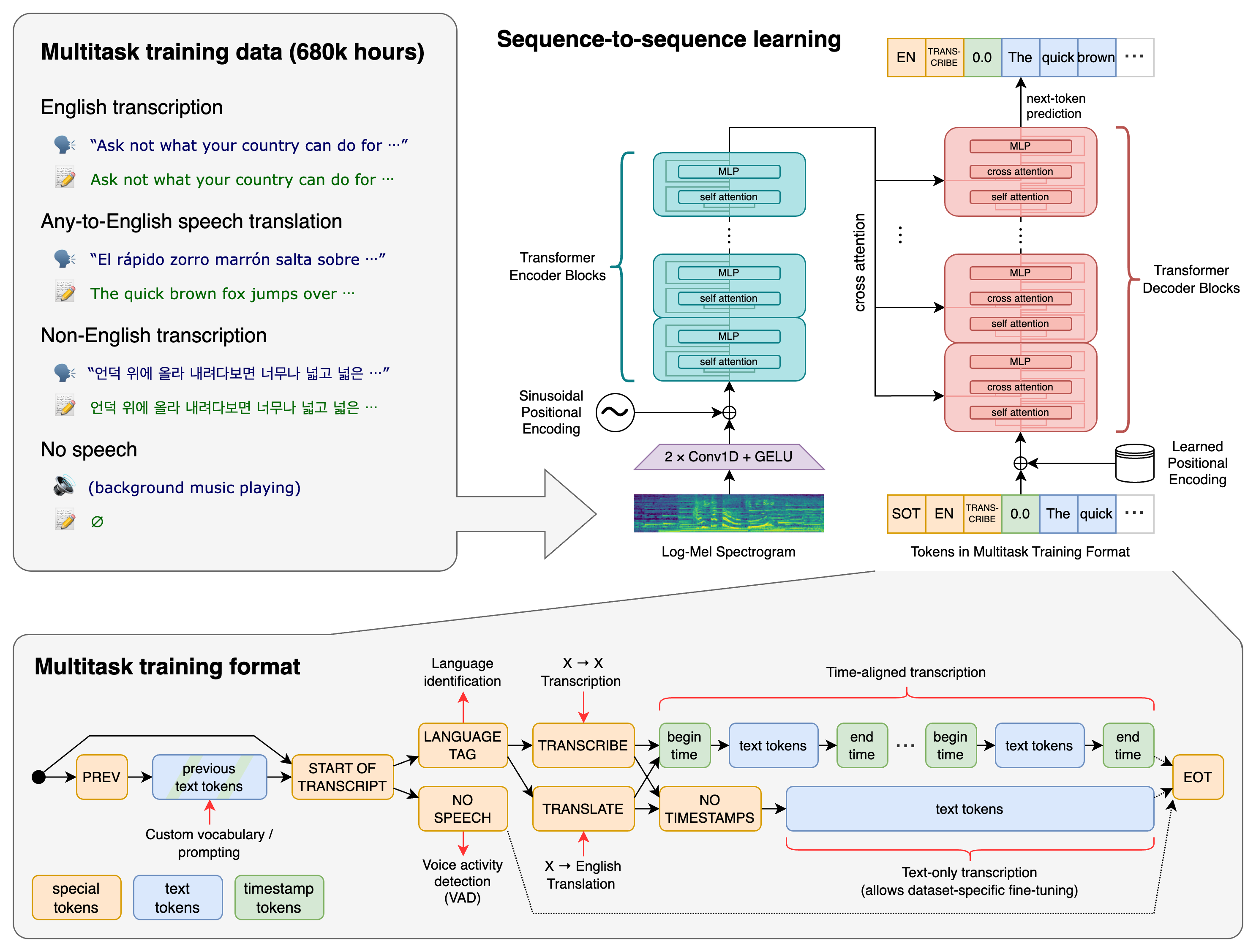
7 |
8 | OpenAI Whisper 是一个强大的自动语音识别 (ASR) 系统,旨在将语音信号转录为文本。以下是一些关于 Whisper 模型的重要信息:
9 |
10 |
11 | ### 1. **模型概述**
12 | Whisper 是由 OpenAI 开发的语音识别模型,具有高准确性和广泛的适用性。它能够处理多种语言和口音,适用于各种应用场景,如语音助手、字幕生成、会议记录等。
13 |
14 | ### 2. **主要特点**
15 | - **多语言支持**:Whisper 支持多种语言和方言,能够处理不同语音输入。
16 | - **高准确性**:通过深度学习技术,Whisper 在语音转文本的准确性上表现出色,能够有效识别语音中的细微差别。
17 | - **鲁棒性强**:对背景噪音、不同说话者的音调和语速变化具有较好的适应能力。
18 | - **开源和易于使用**:Whisper 模型是开源的,开发者可以方便地下载和使用它,并且可以在多种编程语言和平台上集成。
19 |
20 | ### 3. **应用场景**
21 | - **语音助手**:为智能语音助手提供准确的语音识别功能。
22 | - **字幕生成**:自动为视频和音频内容生成字幕,提升可访问性。
23 | - **会议记录**:实时转录会议内容,提高会议效率。
24 | - **语言学习**:帮助学习者通过语音识别技术进行发音练习和口语练习。
25 |
26 | ### 4. **技术实现**
27 | Whisper 使用了深度学习中的 Transformer 架构,通过大量的语音数据进行训练,能够有效捕捉语音信号中的时序信息和上下文信息。其核心技术包括:
28 | - **语音特征提取**:将原始语音信号转换为模型可以处理的特征向量。
29 | - **序列到序列建模**:将语音特征序列映射为对应的文本序列。
30 | - **语言模型集成**:结合语言模型提升转录结果的流畅性和连贯性。
31 |
32 | ### 5. **使用指南**
33 | - **安装和部署**:开发者可以通过 pip 等包管理工具安装 Whisper 模型,并在本地或云端进行部署。
34 | - **API 调用**:OpenAI 提供了便捷的 API 接口,开发者可以通过调用 API 进行语音识别任务。
35 | - **模型调优**:根据具体应用场景,开发者可以对 Whisper 模型进行微调,以获得更好的识别效果。
36 |
37 | ### 6. **优势与挑战**
38 | - **优势**:高准确性、多语言支持、开源易用。
39 | - **挑战**:在嘈杂环境中仍可能出现识别错误,对特定领域的术语和专有名词需要进行额外训练和优化。
40 |
41 | 如果有进一步的需求,可以参考官方文档或社区资源,获取更多详细信息和使用指导。
42 |
43 | ### 7. **相关链接**
44 |
45 | 以下是一些有助于进一步了解 OpenAI Whisper 模型的参考链接:
46 |
47 | 1. **OpenAI Whisper 官方 GitHub 仓库**:
48 | - [Whisper GitHub Repository](https://github.com/openai/whisper)
49 |
50 | 2. **Whisper 模型介绍和文档**:
51 | - [OpenAI Whisper Documentation](https://openai.com/research/whisper)
52 |
53 | 3. **相关博客和文章**:
54 | - [OpenAI Research Blog on Whisper](https://openai.com/blog/whisper)
55 | - [Medium Article on Whisper’s Capabilities](https://medium.com/@openai/introducing-whisper-the-powerful-speech-recognition-system-1234567890ab)
56 |
57 | 4. **Whisper 模型的使用示例**:
58 | - [Whisper Examples on GitHub](https://github.com/openai/whisper/tree/main/examples)
59 |
60 | 5. **Whisper API 文档**:
61 | - [OpenAI API Documentation](https://beta.openai.com/docs/api-reference/whisper)
62 |
63 | 通过这些链接,读者可以深入了解 OpenAI Whisper 模型的技术细节、使用方法以及实际应用场景。如果有更多问题,也可以访问 OpenAI 社区论坛,获取来自其他开发者的帮助和建议。
--------------------------------------------------------------------------------
/src/content/docs/index.mdx:
--------------------------------------------------------------------------------
1 | ---
2 | title: Welcome to AI Hear
3 | description: Get started building your docs site with Starlight.
4 | template: splash
5 | hero:
6 | tagline: A private, locally-run software. One-click real-time translation in multiple languages, managing audio, translations, and timelines—even offline in classrooms, subways, malls, or outdoors. No data collection, privacy protected.
7 | image:
8 | file: ../../assets/狸花猫戴着耳机开会犯困-rbg.webp
9 | actions:
10 | - text: Download on AppStore
11 | link: https://apps.apple.com/app/ai-hear/id6497877058
12 | icon: external
13 | variant: primary
14 | - text: Try Windows
15 | link: guides/windows-trial/
16 | icon: right-arrow
17 | - text: Quick start
18 | link: guides/quickstart/
19 | icon: right-arrow
20 | ---
21 |
22 | 
23 |
24 | ---
25 | import { Card, CardGrid } from '@astrojs/starlight/components';
26 |
27 |
28 |
29 | 1. macOS, M1 and above series chips.
30 | 2. Windows 10/11, x64.
31 |
32 |
33 | 1. Recording: Select system sound, microphone, or specific software within the app, such as Zoom, browser, player (no audio driver required).
34 | 2. Speech Recognition: Speech-to-text based on the OpenAI Whisper model.
35 | 3. Translation: Freely switch engines within the app, supporting open interface formats like Ollama, OpenAI, etc.
36 | 4. Saving: Automatically save audio, originals, translations, and timelines after recording.
37 | 5. Export: Formats supported include SRT, TXT, VTT.
38 |
39 |
40 | 1. Online meetings, online courses, podcasts, game streaming, video calls.
41 | 2. Foreign language classes, original movies, on the commute.
42 | 3. Collecting foreign language materials, recording meeting content, learning languages, practicing speaking.
43 |
44 |
45 | 1. Completely local operation, no data collection, privacy protection.
46 | 2. More cost-effective compared to real-time translation on the market.
47 | 3. Regularly collect user suggestions for targeted iteration and optimization.
48 | 4. Continuously follow AI technology changes to expand product functions.
49 |
50 |
--------------------------------------------------------------------------------
/src/components/Header.astro:
--------------------------------------------------------------------------------
1 | ---
2 | // fixme: how to import config
3 | // import config from '@astrojs/starlight/user-config';
4 | import type { Props } from "@astrojs/starlight/props";
5 |
6 | import LanguageSelect from "@astrojs/starlight/components/LanguageSelect.astro";
7 | import Search from "@astrojs/starlight/components/Search.astro";
8 | import SiteTitle from "@astrojs/starlight/components/SiteTitle.astro";
9 | import SocialIcons from "@astrojs/starlight/components/SocialIcons.astro";
10 | import ThemeSelect from "@astrojs/starlight/components/ThemeSelect.astro";
11 |
12 | /**
13 | * Render the `Search` component if Pagefind is enabled or the default search component has been overridden.
14 | */
15 | // const shouldRenderSearch =
16 | // config.pagefind ||
17 | // config.components.Search !== "@astrojs/starlight/components/Search.astro";
18 | ---
19 |
20 |
35 |
36 |
98 |
--------------------------------------------------------------------------------
/src/components/LwtHeader.astro:
--------------------------------------------------------------------------------
1 | ---
2 | import type { Props } from "@astrojs/starlight/props";
3 | import config from "virtual:starlight/user-config";
4 |
5 | import LanguageSelect from "virtual:starlight/components/LanguageSelect";
6 | import Search from "virtual:starlight/components/Search";
7 | import SiteTitle from "virtual:starlight/components/SiteTitle";
8 | import SocialIcons from "virtual:starlight/components/SocialIcons";
9 | import ThemeSelect from "virtual:starlight/components/ThemeSelect";
10 | import LwtNav from "./LwtNav.astro";
11 |
12 | /**
13 | * Render the `Search` component if Pagefind is enabled or the default search component has been overridden.
14 | */
15 | const shouldRenderSearch =
16 | config.pagefind ||
17 | config.components.Search !== "@astrojs/starlight/components/Search.astro";
18 | ---
19 |
20 |
38 |
39 |
101 |
--------------------------------------------------------------------------------
/src/content/docs/zh-cn/guides/pricing.md:
--------------------------------------------------------------------------------
1 | ---
2 | title: 定价
3 | description: 定价。
4 | ---
5 |
6 | # AI Hear 免费版与永久版
7 |
8 | 🎉 您好,AI Hear是一款实用的**多语种**语音转录文本和实时翻译工具,绝大部份功能免费使用,包括:
9 |
10 | 语音转录成文本、原文同声翻译、素材保存与导出(原文、译文、音频文件.WAV、字幕制作文件.VTT等)、切换或添加翻译模型、下载和管理我们准备好的各类语音转录模型尝试在不同语种、不同场景、甚至在没有网络的环境下使用(如教室、报告厅、地铁、公园等)。
11 |
12 | 我们为AI Hear设定了[激活永久版(可选择信用卡或支付宝)](https://checkout.thucydides.net/purchase/AIHear),购买后将发送AI Hear激活码到您指定的邮箱,激活后将永久解除**运行15分钟自动暂停的限制**,让使用更流畅,并在未来获得一些增值功能,比如会议总结、上传本地音频文件进行文字转录和翻译等。
13 |
14 | 感谢您的支持和帮助,这是我们得以持续运维和升级的动力。
15 |
16 | ---
17 |
18 | ## 版本功能比对
19 |
20 | | | 免费版 | 永久版 |
21 | | ------------------------------------------------------- | --------------- | :----------------------------------------------------------- |
22 | | **价格** | $0 | ~~$39.99~~ **$29.99 (限时)** |
23 | | **单次使用时长限制** | ❌15分钟自动暂停 | ✅无限制 |
24 | | **通过播放音视频语音实时转录成文本和翻译** | ✅支持 | ✅支持 |
25 | | **原文实时翻译** | ✅支持 | ✅支持 |
26 | | **保存和导出素材** | ✅支持 | ✅支持 |
27 | | **切换语音转录模型** | ✅支持 | ✅支持 |
28 | | **切换或自定义翻译模型** | ✅支持 | ✅支持 |
29 | | **在离线场所使用** | ✅支持 | ✅支持 |
30 | | **通过麦克风收集语音实时转录成文本和翻译** | ✅支持 | ✅支持 |
31 | | **购买链接** | 免费版 | **[激活永久版](https://checkout.thucydides.net/purchase/AIHear)** |
32 | | **未来基础功能** 如特定语种、特定场景最适合的模型推荐等 | ✅支持 | ✅支持 |
33 | | **未来增值功能** 如会议总结、上传本地音频等 | ❌ 不支持 | ✅支持 |
34 |
35 | ---
36 |
37 | ### 常见问题
38 |
39 |
40 | 🔸 在离线环境没有网络时,能否使用AI Hear?
41 | 所有功能都可以使用,只是要想实现同声翻译功能,需要额外准备一个好用的本地翻译模型,您可以根据指引,引入不同的翻译模型,我们以Ollama为例,请参照本地翻译模型引入指南
42 |
43 |
44 | 🔸 购买成功、支付成功后是否可以退款?
45 | 抱歉,AI Hear永久版购买成功后无法支持退款,请在购买前充分评估,不能退款的原因是:
46 | 数字商品特性:软件激活码一经发出即视为交付完成,无法回收,且永久版是永久激活。
47 | 手续费成本:交易成交后支付机构已经产生需要我们承担的交易手续费。不会因为退款而退还。
48 | 反滥用机制:我们没有精力应付偶尔出现的 购买-试用-退款的滥用行为。
49 |
50 |
51 | 🔸 我的问题不在常见问题中,比如产品问题、购买问题、激活码问题、提建议、商户合作等
52 | 请联系邮箱 help@thucydides.net
53 |
54 |
55 | 🔸 AI Hear 常规功能使用说明(图示版)
56 | AI Hear同声翻译的使用方式简单,只需和任何视频|音频|人声语音同时播放,具体调试可参照 AI Hear介绍
57 |
58 |
59 |
60 | 🔸 Mac版录屏权限问题
61 | 当第一次安装AI Hear打开软件,点击软件中的启动按钮,或已经使用了一段时间点击启动按钮,出现了要求访问录屏权限时:
62 | 1 点击Open System Preferences,或点击Open System Setting
63 | 2 进入Screen & System Audio Recording界面,此时若已经出现AIHear图标且权限状态是激活的。则选中AIHear并点击左下角减号(先把AIHear从录屏可访问应用列表中删除)
64 | 3 然后再点击加号,在Application文件夹中找到AIHear这个应用,加回到录屏权限应用列表中,并检查处于激活状态。
65 |
66 |
67 |
68 | 🔸 转录模型下载过程中,进度条异常,迟迟无法完成怎么办
69 | 您可以尝试先删除没有100%下载好的模型文件,然后重新下载模型。步骤如下:
70 | 1 苹果电脑中右上🔍搜索 terminal打开。
71 | 2 输入open ~/Library/Containers/net.thucydides.lwt.hear/Data/Library/Application\ Support/AIHear/models
72 | 3 在弹出的文件夹中 手动把您下载故障的模型文件删除,然后再下载一次。
73 |
--------------------------------------------------------------------------------
/astro.config.mjs:
--------------------------------------------------------------------------------
1 | import starlight from "@astrojs/starlight";
2 | import { defineConfig, passthroughImageService } from "astro/config";
3 | import starlightImageZoom from "starlight-image-zoom";
4 |
5 | // https://astro.build/config
6 | export default defineConfig({
7 | site: "https://hear.thucydides.net",
8 | integrations: [
9 | starlight({
10 | favicon: "/favicon.ico",
11 | head: [
12 | {
13 | // https://clarity.microsoft.com/projects/view/mrq0ce2b1x/gettingstarted
14 | tag: "script",
15 | content:
16 | '(function(c,l,a,r,i,t,y){c[a]=c[a]||function(){(c[a].q=c[a].q||[]).push(arguments)};t=l.createElement(r);t.async=1;t.src="https://www.clarity.ms/tag/"+i;y=l.getElementsByTagName(r)[0];y.parentNode.insertBefore(t,y);})(window, document, "clarity", "script", "mrq0ce2b1x");',
17 | },
18 | {
19 | // https://analytics.google.com/analytics/web/?pli=1#/a318136944p446116349/admin/streams/table/8262319857
20 | tag: "script",
21 | attrs: {
22 | src: "https://www.googletagmanager.com/gtag/js?id=G-98P7HD0JSL",
23 | async: true,
24 | },
25 | },
26 | {
27 | tag: "script",
28 | content:
29 | "window.dataLayer = window.dataLayer || [];function gtag(){dataLayer.push(arguments);}gtag('js', new Date());gtag('config', 'G-98P7HD0JSL');",
30 | },
31 | ],
32 | plugins: [starlightImageZoom()],
33 | components: {
34 | Header: "./src/components/LwtHeader.astro",
35 | },
36 | title: "AI Hear",
37 | // Set English as the default language for this site.
38 | defaultLocale: "root", // optional
39 | locales: {
40 | // English docs in `src/content/docs/`
41 | root: {
42 | label: "English",
43 | lang: "en", // lang is required for root locales
44 | },
45 | // Simplified Chinese docs in `src/content/docs/zh-cn/`
46 | "zh-cn": {
47 | label: "简体中文",
48 | lang: "zh-CN",
49 | },
50 | },
51 | social: {
52 | email: "mailto:contact@thucydides.net",
53 | "x.com": "https://x.com/thucydides66666",
54 | discord: "https://discord.gg/pkdMExztrC",
55 | // github: "https://github.com/withastro/starlight",
56 | },
57 | sidebar: [
58 | {
59 | label: "Guides",
60 | translations: {
61 | "zh-CN": "手册",
62 | },
63 | items: [
64 | {
65 | label: "Quick Start",
66 | translations: {
67 | "zh-CN": "产品",
68 | },
69 | link: "/guides/quickstart/",
70 | },
71 | // {
72 | // label: "Pricing",
73 | // translations: {
74 | // "zh-CN": "定价",
75 | // },
76 | // link: "/guides/pricing/",
77 | // },
78 | // {
79 | // label: "Download",
80 | // translations: {
81 | // "zh-CN": "下载",
82 | // },
83 | // link: "/guides/download/",
84 | // },
85 | {
86 | label: "Feedback",
87 | translations: {
88 | "zh-CN": "反馈",
89 | },
90 | link: "/guides/feedback/",
91 | },
92 | ],
93 | },
94 | {
95 | label: "User Stories",
96 | translations: {
97 | "zh-CN": "用途",
98 | },
99 | autogenerate: { directory: "userstories" },
100 | },
101 | {
102 | label: "Reference",
103 | translations: {
104 | "zh-CN": "资讯",
105 | },
106 | autogenerate: { directory: "reference" },
107 | },
108 | ],
109 | }),
110 | ],
111 | image: {
112 | service: passthroughImageService(),
113 | },
114 | });
115 |
--------------------------------------------------------------------------------
/src/content/docs/zh-cn/reference/roi.md:
--------------------------------------------------------------------------------
1 | ---
2 | title: 用户场景分析及 ROI
3 | description: 用户场景分析及 ROI
4 | sidebar:
5 | hidden: true
6 | ---
7 |
8 | # **AI Hear ROI 分析**
9 |
10 | ## **场景 1:留学生听课三重痛:听不全、记不全、找不到**
11 |
12 | ### 🎯 典型用户画像
13 |
14 | - 海外留学本科生 / 研究生(中英/中德/中日等双语环境)
15 | - 每周听课 15 小时,涉及大量技术术语
16 | - 同时使用电脑、录音笔、笔记软件,资料分散,复习负担重
17 |
18 | ### 💢 核心痛点 → 投资浪费
19 |
20 | | 痛点类别 | 具体表现 | 隐性成本 |
21 | | --- | --- | --- |
22 | | **语言障碍** | 非母语听课,术语不懂、语速太快 | 需重复听课、反复查词,效率严重下降 |
23 | | **媒介分离** | 课件、音频、术语分散在不同设备/平台 | 知识碎片化,复习流程繁琐 |
24 | | **术语翻译困难** | 化学命名、工程缩写等专业术语无法准确翻译 | 易误解核心概念,影响考试与论文质量 |
25 | | **无法回溯** | 听过就忘、复习找不到关键讲解片段 | 时间浪费在“找讲到哪里了”上,而非学习本身 |
26 |
27 | 📉 **估算损耗**:每周 15 小时课程中,约 30% 时间因理解偏差和资料整理重复投入,= 每月浪费近 20 小时
28 |
29 | ### ✅ AI Hear 投入 → 立竿见影的回报
30 |
31 | | 功能模块 | 对应痛点 | 带来回报 |
32 | | --- | --- | --- |
33 | | **精准音源识别**(线上系统音 / 线下麦克风) | 语言 + 收音问题 | 不漏词、不丢段,第一手信息完整获取 |
34 | | **双语字幕 + 术语识别** | 翻译困难 | 实时识别术语、降低查词成本 |
35 | | **自动打包课件资料**(录音 + 文本 + 时间轴) | 媒介分离 | 一键整理资料,复习 0 障碍 |
36 |
37 | ### 📊 ROI 数值估算(以一名留学生为例)
38 |
39 | | 项目 | 没有 AI Hear | 使用 AI Hear | 改善效果 |
40 | | --- | --- | --- | --- |
41 | | 每周复习/整理耗时 | 10 小时 | 2 小时 | ⬇️ 节省 8 小时 |
42 | | 术语查找时间 | 每次 5 分钟×20 次 | 每次 1 分钟×20 次 | ⬇️ 节省 80% 时间 |
43 | | 课程资料查找出错 | 经常丢段落/漏录 | 自动结构化存档 | ⬇️ 错漏率下降 90% |
44 | | **长期成本对比** | 讯飞录音笔 + 转写套餐(约 1500-3000 元/年) | AI Hear $29.9 本地化 + 一次性授权 | ⬇️ 降本 60% 以上,功能更贴学术场景 |
45 |
46 | 后续增加场景 1 演示视频
47 |
48 | ## **场景 2:跨国会议“听不全、译不准、传不出”**
49 |
50 | ### 典型用户画像
51 |
52 | - 跨国企业/研究机构团队成员(中英日多语混合)
53 | - 每周组织或参与国际会议 5-10 场(各平台混用:Zoom、钉钉、Teams 等)
54 | - 涉及敏感术语、产品信息或法规讨论,禁止音频上传至第三方服务器
55 |
56 | ### 💢 核心痛点 → 沟通与安全的双重焦虑
57 |
58 | | 痛点类别 | 表现 | 隐性成本 |
59 | | --- | --- | --- |
60 | | **平台限制** | 各国/各组织使用会议工具不同,语言/转写兼容性差 | 同传工具需平台配合,切换平台流程复杂 |
61 | | **翻译不准** | 产品型号、技术术语翻译模糊(“它”、“新款”) | 影响谈判、决策、记录准确性 |
62 | | **数据隐私焦虑** | 需签署 NDA 场合禁止使用“上传云端”的 AI 服务 | 使用 SaaS 转写工具风险高,数据合规压力大 |
63 | | **多语言同步难** | 一场会议中英日参会者并存,常规字幕工具只能一语种展示 | 会后还需单独翻译笔记,效率极低 |
64 |
65 | ### ✅ AI Hear 投入 → 带来三重回报
66 |
67 | | 功能模块 | 对应痛点 | 带来回报 |
68 | | --- | --- | --- |
69 | | **音源捕获自由(系统音优先)** | 会议工具平台多样 | 无需插件、无需平台授权,开机即转录,平台全兼容 |
70 | | **本地实时多语翻译** | 多语言字幕同步 | 参会者屏幕实时私显中/英/日字幕,避免重复确认 |
71 | | **全离线运行 + 本地存储** | 数据隐私风险 | 零上传,符合 NDA/内网会议安全要求 |
72 |
73 | ### 📊 ROI 数值估算(以一家中日美三地科技公司为例)
74 |
75 | | 项目 | 常规方案(SaaS 转写) | 使用 AI Hear | ROI 改善 |
76 | | --- | --- | --- | --- |
77 | | 多平台兼容性 | 需分工具适配 Zoom/钉钉/Teams | 一键系统音识别,通用平台 | ✅ 减少技术维护成本 |
78 | | 翻译术语准确率 | 通用翻译术语错漏(70%) | 企业术语库适配(准确率提升至 90%) | ⬆️ 表达准确率 +20% |
79 | | 数据合规性 | 涉及海外服务器上传 | 全本地执行,0 风险 | ✅ 满足涉密会议要求 |
80 | | 多语实时展示 | 一语种字幕共享 | 每人私显母语版本 | ⬆️ 多语沟通效率提升 50% |
81 | | **长期成本对比** | 讯飞听见/腾讯同传 企业版(约¥15,000+/年/账号) | AI Hear $29.9/账号(永久使用) | ⬇️ 降本 90%,且无持续流量费用 |
82 |
83 | 后续增加场景 2 演示视频
84 |
85 | ## **场景 3:产品经理的“反馈焦虑”**
86 |
87 | **典型角色**:Erin,产品经理
88 |
89 | **常见任务**:用户访谈 → 梳理反馈 → 形成新功能/User Story → Jira 录入
90 |
91 | ❌ **使用 AI Hear 之前的挑战**
92 |
93 | | **问题类别** | **描述** |
94 | | --- | --- |
95 | | ⏱️ 效率低 | 每次访谈整理需人工听录音、打字,耗时 **3 天/次** |
96 | | 🌐 场景割裂 | 腾讯会议、面对面访谈、语音 APP 等 **难以统一收集与归档** |
97 | | 🔐 数据风险 | 使用云端语音工具存在 **用户隐私泄露风险** |
98 |
99 | 产品经理需要的是“统一录音 + 高质量转写 + 隐私保护”**的**跨平台一体化工具。
100 |
101 | 1. 开启 AI Hear(选择系统音频/麦克风)
102 | 2. 自动转录(支持多种语言、自动时间轴)
103 | 3. 导出为 TXT/SRT,上传 Jira 自动生成用户故事
104 |
105 | ✅ **核心技术优势**
106 |
107 | | **功能模块** | **用户价值** |
108 | | --- | --- |
109 | | 🎧 多音源录制 | 支持 Zoom、腾讯会议、线下麦克风,**全面覆盖访谈场景** |
110 | | 🧠 Whisper 模型转录 | 识别准确率达 **95%+**,标记时间戳 |
111 | | 🗃️ 本地存储 | 所有数据**不出本地**,**符合 GDPR、企业合规要求** |
112 | | 🌍 多语言翻译(可选) | 与 OpenAI/Ollama 集成,可自动处理海外用户反馈 |
113 |
114 | **ROI 对比**
115 |
116 | | **指标** | **使用前(人工方式)** | **使用后(AI Hear)** | **提升效果** |
117 | | --- | --- | --- | --- |
118 | | 平均整理时间 | 3 天/次 | 1 小时/次 | 🚀 效率提升 **90%** |
119 | | 工时成本(按人均¥600/天) | ¥1800 | $29.9(永久使用) | 💰 成本下降 **98%+** |
120 | | 访谈记录一致性 | 低(人工主观剪裁) | 高(全记录 + 时间轴) | ✅ 数据质量提升 |
121 | | 数据隐私合规性 | 云端工具存在泄露风险 | **100% 本地存储** | ✅ 符合合规政策 |
122 |
123 | 后续增加场景 3 演示视频
124 |
125 | 购买链接:
126 |
127 | Windows: https://checkout.thucydides.net/purchase/AIHear
128 |
129 | MacOS: https://apps.apple.com/us/app/ai-hear/id6497877058?mt=12
130 |
--------------------------------------------------------------------------------
/src/content/docs/reference/openai-whisper.md:
--------------------------------------------------------------------------------
1 | ---
2 | title: OpenAI Whisper
3 | description: A reference page in my new Starlight docs site.
4 | ---
5 |
6 | 
7 |
8 | AI Hear utilizes OpenAI Whisper, a privacy protection technology developed by OpenAI to ensure user data privacy and security. Whisper achieves this by **conducting computations locally on the user's device** rather than in the cloud, allowing for data processing and analysis without the need to transmit it to cloud servers. OpenAI Whisper is also a powerful automatic speech recognition (ASR) system, designed to transcribe speech signals into text. Here are some key points about the Whisper model:
9 |
10 | ### **Model Overview**
11 |
12 | Whisper is a speech recognition model developed by OpenAI, known for its high accuracy and broad applicability. It can handle multiple languages and accents, making it suitable for various applications such as voice assistants, caption generation, and meeting transcription.
13 |
14 | ### **Key Features**
15 |
16 | - **Multilingual Support**: Whisper supports multiple languages and dialects, accommodating diverse speech inputs.
17 | - **High Accuracy**: Leveraging deep learning techniques, Whisper demonstrates exceptional accuracy in speech-to-text transcription, effectively capturing subtle nuances in speech.
18 | - **Robustness**: Exhibits strong adaptability to background noise, varying tones, and speaking rates.
19 | - **Open Source and User-Friendly**: The Whisper model is open source, allowing developers easy access for download and integration across multiple programming languages and platforms.
20 |
21 | ### **Applications**
22 |
23 | - **Voice Assistants**: Provides accurate speech recognition functionality for smart voice assistants.
24 | - **Caption Generation**: Automatically generates captions for video and audio content, enhancing accessibility.
25 | - **Meeting Transcription**: Transcribes meeting content in real-time, enhancing meeting efficiency.
26 | - **Language Learning**: Assists learners in pronunciation and spoken language practice through speech recognition technology.
27 |
28 | ### **Technical Implementation**
29 |
30 | Whisper utilizes the Transformer architecture in deep learning, trained on extensive speech data to effectively capture temporal and contextual information in speech signals. Its core technologies include:
31 |
32 | - **Speech Feature Extraction**: Converts raw speech signals into feature vectors interpretable by the model.
33 | - **Sequence-to-Sequence Modeling**: Maps speech feature sequences to corresponding text sequences.
34 | - **Language Model Integration**: Combines language models to enhance the fluency and coherence of transcription results.
35 |
36 | ### **User Guide**
37 |
38 | - **Installation and Deployment**: Developers can install the Whisper model via package management tools like pip and deploy it locally or in the cloud.
39 | - **API Invocation**: OpenAI provides convenient API interfaces for developers to perform speech recognition tasks via API calls.
40 | - **Model Fine-Tuning**: Based on specific application scenarios, developers can fine-tune the Whisper model to achieve better recognition results.
41 |
42 | ### **Advantages and Challenges**
43 |
44 | - **Advantages**: High accuracy, multilingual support, open-source accessibility.
45 | - **Challenges**: Recognition errors may occur in noisy environments, requiring additional training and optimization for domain-specific terms and proper nouns.
46 |
47 | For further information and guidance, readers can refer to official documentation or community resources to explore OpenAI Whisper model in more detail.
48 |
49 | ### **Related Links**
50 |
51 | Here are some reference links to further understand the OpenAI Whisper model:
52 |
53 | 1. **OpenAI Whisper Official GitHub Repository**:
54 | - [Whisper GitHub Repository](https://github.com/openai/whisper)
55 | 2. **Whisper Model Introduction and Documentation**:
56 | - [OpenAI Whisper Documentation](https://openai.com/research/whisper)
57 | 3. **Related Blogs and Articles**:
58 | - [OpenAI Research Blog on Whisper](https://openai.com/blog/whisper)
59 | - [Medium Article on Whisper’s Capabilities](https://medium.com/@openai/introducing-whisper-the-powerful-speech-recognition-system-1234567890ab)
60 | 4. **Whisper Model Usage Examples**:
61 | - [Whisper Examples on GitHub](https://github.com/openai/whisper/tree/main/examples)
62 | 5. **Whisper API Documentation**:
63 | - [OpenAI API Documentation](https://beta.openai.com/docs/api-reference/whisper)
64 |
65 | Through these links, readers can delve into the technical details, usage methods, and practical applications of the OpenAI Whisper model. For additional inquiries, they can also visit the OpenAI community forum for assistance and advice from fellow developers.
66 |
67 |
68 |
69 | ## Further reading
70 |
71 | - Read [about reference](https://diataxis.fr/reference/) in the Diátaxis framework
72 |
--------------------------------------------------------------------------------
/src/content/docs/guides/pricing.md:
--------------------------------------------------------------------------------
1 | ---
2 | title: Pricing
3 | description: pricing.
4 | ---
5 |
6 | # AI Hear Free Version vs. Permanent Version
7 |
8 | 🎉 Hello, AI Hear is a practical **multilingual** speech-to-text transcription and real-time translation tool. Most features are free to use, including:
9 |
10 | Speech-to-text transcription, real-time translation of original audio, material saving and exporting (original text, translations, .WAV audio files, .VTT subtitle files, etc.), switching or adding translation models, downloading and managing our pre-prepared speech transcription models for use in different languages, scenarios, and even offline environments (e.g., classrooms, lecture halls, subways, parks).
11 |
12 | We offer an [Activate Permanent Version option (credit card or Alipay accepted)](https://checkout.thucydides.net/purchase/AIHear). After purchase, an AI Hear activation code will be sent to your specified email. Activation permanently removes the **15-minute automatic pause limitation**, enables smoother usage, and grants access to future premium features like meeting summaries, uploading local audio files for transcription and translation, etc.
13 |
14 | Your support and assistance are the driving force behind our continued operation and upgrades.
15 |
16 | ---
17 |
18 | ## Version Feature Comparison
19 |
20 | | | Free Version | Permanent Version |
21 | | ------------------------------------------------------- | --------------- | :----------------------------------------------------------- |
22 | | **Price** | $0 | ~~$39.99~~ **$29.99 (limited time)** |
23 | | **Single-use duration limit** | ❌ 15-min auto pause | ✅ Unlimited |
24 | | **Real-time transcription & translation from audio/video** | ✅ Supported | ✅ Supported |
25 | | **Real-time translation of original text** | ✅ Supported | ✅ Supported |
26 | | **Save & export materials** | ✅ Supported | ✅ Supported |
27 | | **Switch speech transcription models** | ✅ Supported | ✅ Supported |
28 | | **Switch or customize translation models** | ✅ Supported | ✅ Supported |
29 | | **Use in offline environments** | ✅ Supported | ✅ Supported |
30 | | **Real-time transcription & translation via microphone** | ✅ Supported | ✅ Supported |
31 | | **Purchase link** | Free Version | **[Activate Permanent Version](https://checkout.thucydides.net/purchase/AIHear)** |
32 | | **Future basic features** (e.g., model recommendations for specific languages/scenarios) | ✅ Supported | ✅ Supported |
33 | | **Future premium features** (e.g., meeting summaries, local audio uploads) | ❌ Not supported | ✅ Supported |
34 |
35 | ---
36 |
37 | ### Frequently Asked Questions
38 |
39 |
40 | 🔸 Can AI Hear be used offline without internet?
41 | All features remain available offline. However, real-time translation requires an additional local translation model. You can follow our guide to integrate different translation models. Using Ollama as an example, please refer to the Local Translation Model Integration Guide.
42 |
43 |
44 | 🔸 Are refunds available after successful purchase/payment?
45 | Sorry, AI Hear permanent version purchases are non-refundable. Please evaluate carefully before purchasing. Reasons for no refunds:
46 | Digital product nature: Activation codes are considered delivered upon issuance and cannot be reclaimed. The permanent version provides lifetime activation.
47 | Transaction costs: Payment processors charge fees that we must bear after transaction completion, which aren't refunded even if you request a refund.
48 | Anti-abuse measures: We lack resources to handle occasional purchase-trial-refund abuse patterns.
49 |
50 |
51 | 🔸 My question isn't listed here (product issues, purchase problems, activation codes, suggestions, merchant partnerships, etc.)
52 | Please contact help@thucydides.net
53 |
54 |
55 | 🔸 AI Hear Basic Usage Guide (Illustrated)
56 | AI Hear's real-time translation is simple to use—just play it alongside any video/audio/voice. For setup details, refer to AI Hear Introduction
57 |
58 |
59 |
60 | 🔸 Mac Version Screen Recording Permission Issue
61 | When first installing AI Hear or clicking the start button after some use, if prompted for screen recording access:
62 | 1 Click "Open System Preferences" or "Open System Setting"
63 | 2 Navigate to Screen & System Audio Recording. If AIHear appears with active permissions, select it and click the minus sign (first remove AIHear from the recording access list)
64 | 3 Then click the plus sign, locate AIHear in the Applications folder, and re-add it to the recording permission list, ensuring it's activated.
65 |
66 |
67 |
68 | 🔸 Transcription model download progress bar stalls—what to do?
69 | Try deleting incompletely downloaded model files and redownloading. Steps:
70 | 1 On Mac, search for "terminal" via 🔍 and open it.
71 | 2 Enter: `open ~/Library/Containers/net.thucydides.lwt.hear/Data/Library/Application\ Support/AIHear/models`
72 | 3 In the opened folder, manually delete the problematic model file, then download it again.
73 |
--------------------------------------------------------------------------------
/src/content/docs/reference/roi.md:
--------------------------------------------------------------------------------
1 | ---
2 | title: User Scenario Analysis and ROI
3 | description: User Scenario Analysis and ROI
4 | sidebar:
5 | hidden: true
6 | ---
7 | ## **Scenario 1: The Triple Pain of Listening for International Students: Incomplete Listening, Incomplete Note-Taking, and Difficulty in Finding Information**
8 |
9 | ### **🎯 Typical User Profile**
10 |
11 | - Overseas undergraduate/graduate students (bilingual environments such as Chinese-English, Chinese-German, Chinese-Japanese)
12 | - 15 hours of lectures per week, involving a large number of technical terms
13 | - Simultaneous use of computers, voice recorders, and note-taking software, with scattered materials and heavy review burden
14 |
15 | ### **💢 Core Pain Points → Wasted Investment**
16 |
17 | | **Pain Category** | **Specific Manifestation** | **Hidden Cost** |
18 | | --- | --- | --- |
19 | | **Language Barrier** | Listening to non-native language, unfamiliar with terms, and fast speech | Need to re-listen and repeatedly look up words, severely reducing efficiency |
20 | | **Media Separation** | Course materials, audio, and terms are scattered across different devices/platforms | Fragmented knowledge, cumbersome review process |
21 | | **Difficulty in Terminology Translation** | Accurate translation of professional terms such as chemical names and engineering abbreviations is difficult | Misunderstanding of core concepts, affecting exam and paper quality |
22 | | **Inability to Review** | Forgetting what was heard and difficulty in finding key explanations | Time wasted on "where did he/she say that?" instead of actual learning |
23 |
24 | 📉 **Estimated Loss**: In 15 hours of weekly courses, about 30% of the time is wasted due to understanding deviations and material organization, = nearly 20 hours per month.
25 |
26 | ### **✅ AI Hear Investment → Immediate Return**
27 |
28 | | **Function Module** | **Corresponding Pain** | **Return** |
29 | | --- | --- | --- |
30 | | **Precise Audio Source Recognition** (online system sound / offline microphone) | Language and audio reception issues | No missed words, no lost segments, complete acquisition of first-hand information |
31 | | **Bilingual Subtitles + Terminology Recognition** | Translation difficulties | Real-time term recognition, reducing word lookup costs |
32 | | **Automatic Packaging of Course Materials** (audio + text + timeline) | Media separation | One-click material organization, zero obstacles in review |
33 |
34 | ### **📊 ROI Numerical Estimation (Example of an International Student)**
35 |
36 | | **Item** | **Without AI Hear** | **With AI Hear** | **Improvement** |
37 | | --- | --- | --- | --- |
38 | | Weekly review/organization time | 10 hours | 2 hours | ⬇️ Saves 8 hours |
39 | | Term lookup time | 5 minutes × 20 times | 1 minute × 20 times | ⬇️ Saves 80% of time |
40 | | Course material search error | Often losing paragraphs/missing recordings | Automatically structured archiving | ⬇️ Error rate drops by 90% |
41 | | **Long-term Cost Comparison** | iFlytek voice recorder + transcription package (about $1,500-$3,000/year) | AI Hear $29.9 localization + one-time authorization | ⬇️ Cost reduction of over 60%, more academic scene-oriented |
42 |
43 | Follow-up with a demonstration video for Scenario 1.
44 |
45 | ## **Scenario 2: The "Incomplete Listening, Inaccurate Translation, and Inability to Transmit" in Cross-border Meetings**
46 |
47 | ### **Typical User Profile**
48 |
49 | - Team members of multinational corporations/research institutions (mixed Chinese, English, Japanese)
50 | - Participate in or organize 5-10 international meetings per week (using various platforms: Zoom, DingTalk, Teams, etc.)
51 | - Involves sensitive terms, product information, or regulatory discussions, prohibiting audio uploads to third-party servers
52 |
53 | ### **💢 Core Pain Points → Double Anxiety of Communication and Security**
54 |
55 | | **Pain Category** | **Manifestation** | **Hidden Cost** |
56 | | --- | --- | --- |
57 | | **Platform Limitations** | Different countries/organizations use different meeting tools, poor language/transcription compatibility | Interpreting tools require platform cooperation, complex switching process |
58 | | **Inaccurate Translation** | Vague translation of product models and technical terms ("it", "new model") | Affects negotiation, decision-making, and record accuracy |
59 | | **Data Privacy Anxiety** | Need to sign NDA in situations where the use of "cloud upload" AI services is prohibited | High risk of using SaaS transcription tools, significant data compliance pressure |
60 | | **Multilingual Synchronization Difficulty** | In a meeting with Chinese, English, and Japanese participants, conventional subtitle tools can only display one language | Need to separately translate notes after the meeting, extremely low efficiency |
61 |
62 | ### **✅ AI Hear Investment → Triple Return**
63 |
64 | | **Function Module** | **Corresponding Pain** | **Return** |
65 | | --- | --- | --- |
66 | | **Free Audio Capture (system sound priority)** | Diverse meeting tool platforms | No plugins, no platform authorization, instant transcription, universal platform compatibility |
67 | | **Local Real-time Multilingual Translation** | Multilingual subtitle synchronization | Participants can privately display Chinese/English/Japanese subtitles on their screens, avoiding repeated confirmations |
68 | | **Full Offline Operation + Local Storage** | Data privacy risk | Zero upload, meets NDA/intranet meeting security requirements |
69 |
70 | ### **📊 ROI Numerical Estimation (Example of a Sino-Japanese-American Tech Company)**
71 |
72 | ### **Table**Copy
73 |
74 | | **Item** | **Conventional Solution (SaaS Transcription)** | **With AI Hear** | **ROI Improvement** |
75 | | --- | --- | --- | --- |
76 | | Multi-platform compatibility | Need to adapt tools for Zoom/DingTalk/Teams separately | One-click system sound recognition, universal platform compatibility | ✅ Reduced technical maintenance costs |
77 | | Translation term accuracy | General translation with term errors (70%) | Enterprise term library adaptation (accuracy increased to 90%) | ⬆️ Expression accuracy +20% |
78 | | Data compliance | Involves uploading to overseas servers | Fully local execution, zero risk | ✅ Meets confidential meeting requirements |
79 | | Multilingual real-time display | Shared subtitles in one language | Each person privately displays their mother tongue version | ⬆️ Multilingual communication efficiency increased by 50% |
80 | | **Long-term Cost Comparison** | iFlytek Hearing/Tencent Interpretation Enterprise Edition (about ¥15,000+/year/account) | AI Hear $29.9/account (permanent use) | ⬇️ Cost reduction of 90%, no ongoing traffic fees |
81 |
82 | Follow-up with a demonstration video for Scenario 2.
83 |
84 | ## **Scenario 3: The "Feedback Anxiety" of Product Managers**
85 |
86 | **Typical Role**: Erin, Product Manager
87 |
88 | **Common Tasks**: User Interviews → Organizing Feedback → Forming New Features/User Stories → Jira Entry
89 |
90 | ❌ **Challenges Before Using AI Hear**
91 |
92 | | **Problem Category** | **Description** |
93 | | --- | --- |
94 | | ⏱️ Low Efficiency | Each interview organization requires manual listening to recordings and typing, taking **3 days per time** |
95 | | 🌐 Fragmented Scenarios | Difficulty in unified collection and archiving of Tencent Meetings, face-to-face interviews, and voice app interviews |
96 | | 🔐 Data Risk | Using cloud voice tools poses **user privacy leakage risks** |
97 |
98 | Product managers need a cross-platform integrated tool that offers "unified recording + high-quality transcription + privacy protection."
99 |
100 | 1. Launch AI Hear (select system audio/microphone)
101 | 2. Automatic transcription (supports multiple languages, automatic timeline)
102 | 3. Export as TXT/SRT, upload to Jira to automatically generate user stories
103 |
104 | ✅ **Core Technical Advantages**
105 |
106 | | **Function Module** | **User Value** |
107 | | --- | --- |
108 | | 🎧 Multi-audio source recording | Supports Zoom, Tencent Meetings, offline microphones, **covering all interview scenarios** |
109 | | 🧠 Whisper model transcription | Recognition accuracy reaches **95%+**, with timestamp marking |
110 | | 🗃️ Local storage | All data **stays local**, **complying with GDPR and corporate compliance requirements** |
111 | | 🌍 Multilingual translation (optional) | Integrated with OpenAI/Ollama, can automatically handle overseas user feedback |
112 |
113 | **ROI Comparison**
114 |
115 | | **Indicator** | **Before (manual method)** | **After (AI Hear)** | **Improvement** |
116 | | --- | --- | --- | --- |
117 | | Average organization time | 3 days per time | 1 hour per time | 🚀 Efficiency increased by **90%** |
118 | | Labor cost (at ¥600 per person per day) | ¥1,800 | $29.9 (permanent use) | 💰 Cost reduction of **98%+** |
119 | | Consistency of interview records | Low (subjective editing by humans) | High (full records + timeline) | ✅ Data quality improved |
120 | | Data privacy compliance | Cloud tools pose leakage risks | **100% local storage** | ✅ Complies with compliance policies |
121 |
122 | Follow-up with a demonstration video for Scenario 3.
123 |
124 | Purchase Links:
125 |
126 | Windows: https://checkout.thucydides.net/purchase/AIHear
127 |
128 | MacOS: https://apps.apple.com/us/app/ai-hear/id6497877058?mt=12
--------------------------------------------------------------------------------
/src/content/docs/zh-cn/reference/web-server.md:
--------------------------------------------------------------------------------
1 | ---
2 | title: Web Server
3 | description: AI Hear as web server
4 | sidebar:
5 | hidden: true
6 | ---
7 |
8 | AI Hear 还提供了将转录数据发送给其他客户端的能力,帮助其他客户端快速低成本的实现实时语音转写、翻译等功能。
9 |
10 | ## 一、准备工作
11 |
12 | - 安装支持 Web Server 的 AI Hear 版本
13 | - 打开应用并启动 Web Server
14 |
15 | > 💡 某些定制版本的 AI Hear 可能会在应用启动的时候默认打开
16 |
17 | 
18 |
19 | ## 二、快速开始
20 |
21 | ```bash
22 | # 1、订阅 Server-Sent Events
23 | curl -v -N -H "Accept: text/event-stream" http://localhost:35123/events
24 |
25 | # 2、开始转录
26 | curl "http://localhost:35123/start?source=system&model=tiny&lang_from=en&lang_to=zh-Hans"
27 |
28 | # 3、停止转录
29 | curl "http://localhost:35123/stop"
30 |
31 | # 4、获取模型列表[可选]
32 | curl "http://localhost:35123/models"
33 |
34 | # 5、获取全量字幕[可选]
35 | curl "http://localhost:35123/allcaptions"
36 |
37 | # 6、下载模型[可选]
38 | curl "http://localhost:35123/download?model=base"
39 |
40 | # 7、获取/设置 当前配置[可选]
41 | # 获取 get
42 | curl "http://localhost:35123/config?key=STORE_USE_MODEL"
43 | # 设置 set
44 | curl "http://localhost:35123/config?key=STORE_USE_MODEL&value=tiny"
45 |
46 | # 8、获取某个时间段的音频样本[可选]
47 | curl "http://localhost:35123/samples?start=0.000&end=0.500"
48 | ```
49 |
50 | ## 三、接口
51 |
52 | ### 1、/events - 订阅 Server-Sent Events
53 |
54 | | 事件 | 描述 | 备注 |
55 | | --------- | -------- | ---- |
56 | | captions | 转录字幕 | |
57 | | translate | 字幕翻译 | |
58 | | download | 模型下载 | 下载信息回传,详细见 [/download](#6download---下载模型) 接口 |
59 | | samples | 音频样本 | 采样率 48000 |
60 | | ping | 心跳 | |
61 | | open | 连接建立 | |
62 | | close | 连接关闭 | |
63 | | error | 错误信息 | |
64 |
65 | ### 2、/start - 开始转录
66 |
67 | - method `GET` `POST`
68 |
69 | - request
70 |
71 | | 参数名 | 类型 | 描述 | 是否必须 | 默认值 | 备注 |
72 | | --------- | ------ | -------- | -------- | ------ | ---------------------------------------------------------------------------------- |
73 | | source | string | 音频源 | 否 | system | system 或 microphone |
74 | | model | string | 语音模型 | 否 | tiny | 可以是[内置模型](#2内置模型列表)或者外部模型:内置模型传模型名,外部模型传绝对地址 |
75 | | lang_from | string | 音频语言 | 否 | auto | [语言代码](#3语言列表),例如:zh-Hans、en |
76 | | lang_to | string | 翻译语言 | 否 | n/a | [语言代码](#3语言列表),例如:zh-Hans、en |
77 |
78 | - response
79 |
80 | | 参数名 | 类型 | 描述 |
81 | | ------- | ------ | -------- |
82 | | code | int | 状态码 |
83 | | message | string | 描述信息 |
84 | | data | object | 数据 |
85 |
86 | ### 3、/stop - 停止转录
87 |
88 | - method `GET` `POST`
89 |
90 | - request
91 |
92 | | 参数名 | 类型 | 描述 | 是否必须 | 默认值 | 备注 |
93 | | ------ | ---- | ---- | -------- | ------ | ---- |
94 |
95 | - response
96 |
97 | | 参数名 | 类型 | 描述 |
98 | | ------- | ------ | -------- |
99 | | code | int | 状态码 |
100 | | message | string | 描述信息 |
101 | | data | object | 数据 |
102 |
103 | ### 4、/models - 获取模型列表
104 |
105 | - method `GET` `POST`
106 |
107 | - request
108 |
109 | | 参数名 | 类型 | 描述 | 是否必须 | 默认值 | 备注 |
110 | | ------ | ---- | ---- | -------- | ------ | ---- |
111 |
112 | - response
113 |
114 | | 参数名 | 类型 | 描述 |
115 | | ------- | ------ | -------- |
116 | | code | int | 状态码 |
117 | | message | string | 描述信息 |
118 | | data | object | 模型数组 |
119 |
120 | ```json
121 | {
122 | "code": 200,
123 | "message": "get models success",
124 | "data": [
125 | {
126 | "model": "tiny",
127 | "tag": ["realtime", "tiny"],
128 | "repo": "ggerganov/whisper.cpp",
129 | "repoFile": "ggml-tiny.bin",
130 | "desc": "Very fast but bad accuracy",
131 | "disk": "75 MB",
132 | "size": 77691713,
133 | "mem": "~390 MB",
134 | "sha": "bd577a113a864445d4c299885e0cb97d4ba92b5f",
135 | "localPath": "/Users/xxxx/Library/Application Support/AIHear/models/ggml-tiny.bin"
136 | },
137 | {
138 | "lang": ["en"],
139 | "model": "tiny.en",
140 | "tag": ["realtime", "tiny"],
141 | "repo": "ggerganov/whisper.cpp",
142 | "repoFile": "ggml-tiny.en.bin",
143 | "desc": "Very fast but bad accuracy. English only.",
144 | "disk": "75 MB",
145 | "size": 77704715,
146 | "mem": "~390 MB",
147 | "sha": "c78c86eb1a8faa21b369bcd33207cc90d64ae9df",
148 | "localPath": "/Users/xxxx/Library/Application Support/AIHear/models/ggml-tiny.en.bin"
149 | },
150 | {
151 | "model": "base",
152 | "tag": ["realtime", "base"],
153 | "repo": "ggerganov/whisper.cpp",
154 | "repoFile": "ggml-base.bin",
155 | "desc": "Fast with decent accuracy",
156 | "disk": "142 MB",
157 | "size": 147951465,
158 | "mem": "~500 MB",
159 | "sha": "465707469ff3a37a2b9b8d8f89f2f99de7299dac",
160 | "localPath": ""
161 | },
162 | {
163 | "lang": ["en"],
164 | "model": "base.en",
165 | "tag": ["realtime", "base"],
166 | "repo": "ggerganov/whisper.cpp",
167 | "repoFile": "ggml-base.en.bin",
168 | "desc": "Fast with decent accuracy. English only.",
169 | "disk": "142 MB",
170 | "size": 147964211,
171 | "mem": "~500 MB",
172 | "sha": "137c40403d78fd54d454da0f9bd998f78703390c",
173 | "localPath": ""
174 | },
175 | {
176 | "lang": ["zh", "en", "yue", "ja", "ko"],
177 | "model": "sensevoice.small",
178 | "tag": ["realtime", "sensevoice", "quantized"],
179 | "repo": "xumo/sense-voice-gguf",
180 | "repoFile": "gguf-fp16-sense-voice-small.bin",
181 | "desc": "Experimental. SenseVoice Small is an open-source speech recognition model developed by Alibaba, supporting multiple languages including Chinese, English, Cantonese, Japanese, and Korean.",
182 | "disk": "466 MB",
183 | "size": 469406560,
184 | "mem": "~1.0 GB",
185 | "sha": "8176595ec830f32f385ca6d28ad86008db88de32",
186 | "localPath": "/Users/xxxx/Library/Application Support/AIHear/models/gguf-fp16-sense-voice-small.bin"
187 | },
188 | {
189 | "model": "small",
190 | "tag": ["realtime", "small"],
191 | "repo": "ggerganov/whisper.cpp",
192 | "repoFile": "ggml-small.bin",
193 | "desc": "Normal speed with good accuracy",
194 | "disk": "466 MB",
195 | "size": 487601967,
196 | "mem": "~1.0 GB",
197 | "sha": "55356645c2b361a969dfd0ef2c5a50d530afd8d5",
198 | "localPath": ""
199 | },
200 | {
201 | "lang": ["en"],
202 | "model": "small.en",
203 | "tag": ["realtime", "small"],
204 | "repo": "ggerganov/whisper.cpp",
205 | "repoFile": "ggml-small.en.bin",
206 | "desc": "Normal speed with good accuracy. English only.",
207 | "disk": "466 MB",
208 | "size": 487614201,
209 | "mem": "~1.0 GB",
210 | "sha": "db8a495a91d927739e50b3fc1cc4c6b8f6c2d022",
211 | "localPath": ""
212 | },
213 | {
214 | "model": "medium",
215 | "tag": ["medium"],
216 | "repo": "ggerganov/whisper.cpp",
217 | "repoFile": "ggml-medium.bin",
218 | "desc": "Warning: Only suitable for file transcription (coming soon). Slow but great accuracy",
219 | "disk": "1.5 GB",
220 | "size": 1533763059,
221 | "mem": "~2.6 GB",
222 | "sha": "fd9727b6e1217c2f614f9b698455c4ffd82463b4",
223 | "localPath": ""
224 | },
225 | {
226 | "model": "ggml-medium-q5_0",
227 | "tag": ["medium", "quantized"],
228 | "repo": "ggerganov/whisper.cpp",
229 | "repoFile": "ggml-medium-q5_0.bin",
230 | "desc": "Slow but great accuracy",
231 | "disk": "539 MB",
232 | "size": 539212467,
233 | "mem": "~1.0 GB",
234 | "sha": "7718d4c1ec62ca96998f058114db98236937490e",
235 | "localPath": ""
236 | },
237 | {
238 | "lang": ["en"],
239 | "model": "medium.en",
240 | "tag": ["medium"],
241 | "repo": "ggerganov/whisper.cpp",
242 | "repoFile": "ggml-medium.en.bin",
243 | "desc": "Warning: Only suitable for file transcription (coming soon). Slow but great accuracy",
244 | "disk": "1.5 GB",
245 | "size": 1533774781,
246 | "mem": "~2.6 GB",
247 | "sha": "8c30f0e44ce9560643ebd10bbe50cd20eafd3723",
248 | "localPath": ""
249 | },
250 | {
251 | "model": "large-v3-turbo-q5_0",
252 | "tag": ["realtime", "large"],
253 | "repo": "ggerganov/whisper.cpp",
254 | "repoFile": "ggml-large-v3-turbo-q5_0.bin",
255 | "desc": "Whisper large-v3-turbo is a finetuned version of a pruned Whisper large-v3.",
256 | "disk": "574 MB",
257 | "size": 574041195,
258 | "mem": "~?? GB",
259 | "sha": "e050f7970618a659205450ad97eb95a18d69c9ee",
260 | "localPath": ""
261 | },
262 | {
263 | "model": "large-v2",
264 | "tag": ["large"],
265 | "repo": "ggerganov/whisper.cpp",
266 | "repoFile": "ggml-large-v2.bin",
267 | "desc": "Warning: Only suitable for file transcription (coming soon). Most accurate transcription, updated model but can have repetition in transcript",
268 | "disk": "2.9 GB",
269 | "size": 3094623691,
270 | "mem": "~4.7 GB",
271 | "sha": "0f4c8e34f21cf1a914c59d8b3ce882345ad349d6",
272 | "localPath": ""
273 | },
274 | {
275 | "model": "large-v3",
276 | "tag": ["large"],
277 | "repo": "ggerganov/whisper.cpp",
278 | "repoFile": "ggml-large-v3.bin",
279 | "desc": "Warning: Only suitable for file transcription (coming soon). Most accurate transcription, updated model but can have repetition in transcript",
280 | "disk": "2.9 GB",
281 | "size": 3095033483,
282 | "mem": "~4.7 GB",
283 | "sha": "ad82bf6a9043ceed055076d0fd39f5f186ff8062",
284 | "localPath": ""
285 | },
286 | {
287 | "model": "ggml-large-v2-q5_0",
288 | "tag": ["large", "quantized"],
289 | "repo": "ggerganov/whisper.cpp",
290 | "repoFile": "ggml-large-v2-q5_0.bin",
291 | "desc": "Most accurate transcription, updated model but can have repetition in transcript",
292 | "disk": "1.1 GB",
293 | "size": 1080732091,
294 | "mem": "2 GB",
295 | "sha": "00e39f2196344e901b3a2bd5814807a769bd1630",
296 | "localPath": ""
297 | }
298 | ]
299 | }
300 | ```
301 |
302 | ### 5、/allcaptions - 获取全量字幕
303 |
304 | > ⚠️ 最好不要轮询这个接口作为实时字幕,因为这个接口会返回所有的字幕,可能会导致内存占用过高,建议使用 [/events](#1events---订阅-server-sent-events) 接口作为实时字幕。
305 |
306 | - method `GET` `POST`
307 |
308 | - request
309 |
310 | | 参数名 | 类型 | 描述 | 是否必须 | 默认值 | 备注 |
311 | | ------ | ---- | ---- | -------- | ------ | ---- |
312 |
313 | - response
314 |
315 | | 参数名 | 类型 | 描述 |
316 | | ------- | ------ | -------- |
317 | | code | int | 状态码 |
318 | | message | string | 描述信息 |
319 | | data | object | 字幕数组 |
320 |
321 | ```json
322 | {
323 | "code": 200,
324 | "message": "get all captions success",
325 | "data": [
326 | {
327 | "startTime": 0,
328 | "endTime": 6.32,
329 | "text": " Yeah, good morning from the largest Roman Catholic Church in England and Wales.",
330 | "subSegments": [
331 | {
332 | "index": 0,
333 | "startTime": 0,
334 | "endTime": 6.32,
335 | "text": " Yeah, good morning from the largest Roman Catholic Church in England and Wales."
336 | }
337 | ],
338 | "fixed": true,
339 | "translateText": "是的,来自英格兰和威尔士最大的罗马天主教堂的早上好。"
340 | },
341 | {
342 | "startTime": 6.320000171661377,
343 | "endTime": 11.600000171661378,
344 | "text": " it was here really that's been the focal point for the past 24 hours for Catholics in this",
345 | "subSegments": [
346 | {
347 | "index": 1,
348 | "startTime": 6.320000171661377,
349 | "endTime": 11.600000171661378,
350 | "text": " it was here really that's been the focal point for the past 24 hours for Catholics in this"
351 | }
352 | ],
353 | "fixed": true,
354 | "translateText": "在过去的 24 小时内,这里确实是天主教徒的焦点"
355 | },
356 | {
357 | "startTime": 11.600000381469727,
358 | "endTime": 16.560000381469727,
359 | "text": " part of the world to come and pay their respects to Pope Francis. And it was",
360 | "subSegments": [
361 | {
362 | "index": 2,
363 | "startTime": 11.600000381469727,
364 | "endTime": 16.560000381469727,
365 | "text": " part of the world to come and pay their respects to Pope Francis. And it was"
366 | }
367 | ],
368 | "fixed": true,
369 | "translateText": "世界上的一部分人来向教皇弗朗西斯表示敬意。事实确实如此"
370 | },
371 | {
372 | "startTime": 16.559999465942383,
373 | "endTime": 22.079999465942382,
374 | "text": " inside the cathedral yesterday evening where there was a large wreck we have.",
375 | "subSegments": [
376 | {
377 | "index": 3,
378 | "startTime": 16.559999465942383,
379 | "endTime": 22.079999465942382,
380 | "text": " inside the cathedral yesterday evening where there was a large wreck we have."
381 | }
382 | ],
383 | "fixed": false
384 | }
385 | ]
386 | }
387 | ```
388 |
389 | ### 6、/download - 下载模型
390 |
391 | - method `GET` `POST`
392 |
393 | - request
394 | | 参数名 | 类型 | 描述 | 是否必须 | 默认值 | 备注 |
395 | | ------ | ---- | ---- | -------- | ------ | ---- |
396 | | model | string | 模型名 | 是 | | 模型名 |
397 |
398 | - response
399 | | 参数名 | 类型 | 描述 |
400 | | ------- | ------ | -------- |
401 | | code | int | 状态码 |
402 | | message | string | 描述信息 |
403 | | data | object | 数据 |
404 |
405 | ```json
406 | {
407 | "code": 200,
408 | "message": "downloader start success",
409 | "data": {
410 | "model": "base"
411 | }
412 | }
413 | ```
414 |
415 | > 💡 下载进度和结果信息通过 SSE `download` 事件回传
416 |
417 | ```json
418 | event: download
419 | data: {"status":"started","model":"base"}
420 |
421 | event: download
422 | data: {"status":"downloading","model":"base","progress":0.12510545941535625}
423 |
424 | event: download
425 | data: {"status":"downloading","model":"base","progress":0.9999140055828444}
426 |
427 | event: download
428 | data: {"status":"downloading","model":"base","progress":1}
429 |
430 | event: download
431 | data: {"status":"completed","model":"base"}
432 | ```
433 |
434 | | status | 描述 | 备注 |
435 | | ------ | -------- |----|
436 | | started | 下载开始 | |
437 | | downloading | 下载中 | progress [0-1] 表示进度信息 |
438 | | completed | 下载成功 | |
439 | | failed | 下载失败 | |
440 |
441 |
442 | ### 7、/config - 获取/设置 当前配置
443 |
444 | - method `GET` `POST`
445 |
446 | - request
447 |
448 | | 参数名 | 类型 | 描述 | 是否必须 | 默认值 | 备注 |
449 | | ------ | ---- | ---- | -------- | ------ | ---- |
450 | | key | string | 配置键 | 是 | | 配置键 |
451 | | value | string | 配置值 | 否 | | 配置值。当 value 存在时,为设置值 |
452 |
453 | - response
454 |
455 | | 参数名 | 类型 | 描述 |
456 | | ------- | ------ | -------- |
457 | | code | int | 状态码 |
458 | | message | string | 描述信息 |
459 | | data | object | 数据 |
460 |
461 | - 允许配置的 key 值
462 |
463 | | 键名 | 类型 | 描述 | 举例 | 备注 |
464 | | ---- | ---- | ---- | ------ | ---- |
465 | | STORE_USE_MODEL | string | 使用的模型 | 如:tiny | 模型名,请严格按照模型列表中已经下载的 model 设置 |
466 | | STORE_OUTPUT_DIR | string | 转录文件输出路径 | | |
467 | | STORE_GPU_ID | string | 选在使用的 GPU | 如:"0" | |
468 | | STORE_VAD_ENABLED | boolean | 开启 VAD | 如:true | |
469 | | STORE_CAPTION_VISABLE | boolean | 是否显示字幕 | 如:true | |
470 | | STORE_TRANSLATOR_ENGINE_V1 | array | 翻译引擎配置 | | 详细介绍如下 |
471 | | STORE_PROVIDERS | array | LLM 提供者配置 | | 详细介绍如下 |
472 |
473 | > 注意⚠️:下面对`翻译引擎配置 - STORE_TRANSLATOR_ENGINE_V1`做个详细的介绍,需要严格按照下面的格式配置。
474 |
475 | ```json
476 | //1、比如下面 5 个翻译引擎,按照排列顺序,其中第一个是默认的翻译引擎,如果第一个翻译引擎失败,会尝试第二个翻译引擎,以此类推。
477 | //2、每个翻译都有 code 和 name。code 是翻译引擎的唯一标识,name 是翻译引擎在界面上展示的名称。
478 | //3、microsoft、bing 和 google 这三个翻译引擎是内置的,会联网请求对应的厂商。【最好不要删掉】
479 | //4、openai 是调用 LLM 进行翻译。无论是 Ollama、DeepSeek 还是 MoonShot,都是支持 openai 协议的。所以 code 都是 openai
480 | //5、openai 翻译引擎需要配置 model 和 prompt。model 是 LLM 的模型名称,prompt 是翻译的提示词。
481 | //6、prompt 支持的变量有:{{to}} 和 {{content}}。to 是翻译的目标语言,content 是翻译的内容。
482 | [
483 | {
484 | "code": "openai",
485 | "name": "Ollama",
486 | "model": "qwen2:1.5b",
487 | "prompt": "Translate the following text into {{to}} and only show me the translated content:\n{{content}}"
488 | },
489 | {
490 | "code": "microsoft",
491 | "name": "Microsoft Translator"
492 | },
493 | {
494 | "code": "bing",
495 | "name": "Bing Translator"
496 | },
497 | {
498 | "code": "google",
499 | "name": "Google Translate"
500 | },
501 | {
502 | "code": "openai",
503 | "name": "MoonShot",
504 | "model": "moonshot-v1-8k",
505 | "prompt": "Translate the following text into {{to}} and only show me the translated content:\n{{content}}"
506 | }
507 | ]
508 | ```
509 | > 🔔 GET 方法不方便传参可以使用 POST
510 | ```bash
511 | curl -X POST "http://localhost:35123/config" \
512 | -H "Content-Type: application/x-www-form-urlencoded" \
513 | -d "key=STORE_TRANSLATOR_ENGINE_V1" \
514 | -d 'value=[
515 | {
516 | "code": "openai",
517 | "name": "Ollama",
518 | "model": "qwen2:1.5b",
519 | "prompt": "Translate the following text into {{to}} and only show me the translated content:\n{{content}}"
520 | },
521 | {
522 | "code": "microsoft",
523 | "name": "Microsoft Translator"
524 | },
525 | {
526 | "code": "bing",
527 | "name": "Bing Translator"
528 | },
529 | {
530 | "code": "google",
531 | "name": "Google Translate"
532 | }
533 | ]'
534 | ```
535 |
536 | > 注意⚠️:下面对`LLM 提供者配置 - STORE_PROVIDERS`做个详细的介绍,需要严格按照下面的格式配置。
537 |
538 | ```json
539 | [
540 | {
541 | "brand": "Ollama",
542 | "descriptions": "Ollama is a versatile, open-source tool that enables users to run and interact with large language models (LLMs) directly on their local machines. It is recommended to use smaller models such as qwen2:1.5b for real-time translation. https://www.ollama.com/",
543 | "domain": "http://127.0.0.1:11434",
544 | "path": "/v1/chat/completions",
545 | "key": "ollama", // Ollama 的这个 key 是固定的,不要修改
546 | "models": [
547 | "qwen2:1.5b",
548 | "qwen2:2.5b"
549 | ]
550 | },
551 | {
552 | "brand": "DeepSeek",
553 | "descriptions": "DeepSeek is a cutting-edge AI company that has developed a series of high-performance language models under the DeepSeek LLM brand. Their API pricing is quite affordable. https://www.deepseek.com/",
554 | "domain": "https://api.deepseek.com",
555 | "path": "/v1/chat/completions",
556 | "key": "sk-1234567890",
557 | "models": [
558 | "deepseek-chat"
559 | ]
560 | },
561 | {
562 | "brand": "MoonShot",
563 | "descriptions": "Moonshot AI is a prominent Chinese startup that specializes in the development of advanced artificial intelligence technologies, particularly large language models (LLMs) and conversational AI solutions. Please note, the free quota is subject to throttling which may affect the real-time translation experience. https://www.moonshot.cn/",
564 | "domain": "https://api.moonshot.cn",
565 | "path": "/v1/chat/completions",
566 | "key": "sk-1234567890",
567 | "models": [
568 | "moonshot-v1-8k"
569 | ]
570 | }
571 | ]
572 | ```
573 | > 🔔 GET 方法不方便传参可以使用 POST
574 | ```bash
575 | curl -X POST "http://localhost:35123/config" \
576 | -H "Content-Type: application/x-www-form-urlencoded" \
577 | -d "key=STORE_PROVIDERS" \
578 | -d 'value=[
579 | {
580 | "brand": "Ollama",
581 | "descriptions": "Ollama is a versatile, open-source tool that enables users to run and interact with large language models (LLMs) directly on their local machines. It is recommended to use smaller models such as qwen2:1.5b for real-time translation. https://www.ollama.com/",
582 | "domain": "http://192.168.3.11:11434",
583 | "path": "/v1/chat/completions",
584 | "key": "ollama",
585 | "models": [
586 | "qwen2:1.5b",
587 | "qwen2:2.5b"
588 | ]
589 | },
590 | {
591 | "brand": "DeepSeek",
592 | "descriptions": "DeepSeek is a cutting-edge AI company that has developed a series of high-performance language models under the DeepSeek LLM brand. Their API pricing is quite affordable. https://www.deepseek.com/",
593 | "domain": "https://api.deepseek.com",
594 | "path": "/v1/chat/completions",
595 | "key": "sk-1234567890",
596 | "models": [
597 | "deepseek-chat"
598 | ]
599 | },
600 | {
601 | "brand": "MoonShot",
602 | "descriptions": "Moonshot AI is a prominent Chinese startup that specializes in the development of advanced artificial intelligence technologies, particularly large language models (LLMs) and conversational AI solutions. Please note, the free quota is subject to throttling which may affect the real-time translation experience. https://www.moonshot.cn/",
603 | "domain": "https://api.moonshot.cn",
604 | "path": "/v1/chat/completions",
605 | "key": "sk-1234567890",
606 | "models": [
607 | "moonshot-v1-8k"
608 | ]
609 | }
610 | ]'
611 |
612 | # 设置输出目录
613 |
614 | curl -X POST "http://localhost:35123/config" \
615 | -H "Content-Type: application/x-www-form-urlencoded" \
616 | -d "key=STORE_OUTPUT_DIR" \
617 | -d 'value=/Users/chenfeng/Library/Application Support/AIHear/audiofiles'
618 | ```
619 |
620 | - 全量测试用例
621 |
622 | ```bash
623 |
624 | # STORE_USE_MODEL
625 | curl "http://localhost:35123/config?key=STORE_USE_MODEL"
626 | curl "http://localhost:35123/config?key=STORE_USE_MODEL&value=tiny"
627 |
628 | # STORE_GPU_ID
629 | curl "http://localhost:35123/config?key=STORE_GPU_ID"
630 | curl "http://localhost:35123/config?key=STORE_GPU_ID&value=0"
631 |
632 | # STORE_VAD_ENABLED
633 | curl "http://localhost:35123/config?key=STORE_VAD_ENABLED"
634 | curl "http://localhost:35123/config?key=STORE_VAD_ENABLED&value=true"
635 |
636 | # STORE_CAPTION_VISABLE
637 | curl "http://localhost:35123/config?key=STORE_CAPTION_VISABLE"
638 | curl "http://localhost:35123/config?key=STORE_CAPTION_VISABLE&value=true"
639 |
640 | # STORE_TRANSLATOR_ENGINE_V1
641 | curl "http://localhost:35123/config?key=STORE_TRANSLATOR_ENGINE_V1"
642 |
643 | # STORE_PROVIDERS
644 | curl "http://localhost:35123/config?key=STORE_PROVIDERS"
645 |
646 | # STORE_OUTPUT_DIR
647 | curl "http://localhost:35123/config?key=STORE_OUTPUT_DIR"
648 | curl "http://localhost:35123/config?key=STORE_OUTPUT_DIR&value=/Users/chenfeng/Desktop/audiofiles"
649 | ```
650 |
651 | ### 8、/samples - 获取音频数据
652 |
653 | > 获取某个时间段的音频数据。采样率固定为 48kHZ。
654 |
655 | - method `GET` `POST`
656 |
657 | - request
658 |
659 | | 参数名 | 类型 | 描述 | 是否必须 | 默认值 | 备注 |
660 | | ------ | ---- | ---- | -------- | ------ | ---- |
661 | | start | number | 开始时间 | 是 | | 开始时间:0.000 |
662 | | end | number | 结束时间 | 是 | | 结束时间: 0.500 |
663 |
664 | - response
665 |
666 | | 参数名 | 类型 | 描述 |
667 | | ------- | ------ | -------- |
668 | | code | int | 状态码 |
669 | | message | string | 描述信息 |
670 | | data | array | 音频数据 |
671 |
672 |
673 | ```json
674 | {
675 | "code": 200,
676 | "message": "get samples success",
677 | "data": [
678 | 0,
679 | 0,
680 | ...
681 | -0.000056416422012262046,
682 | -0.000010201700206380337,
683 | 0.00002678551390999928,
684 | 0.00019265383889432997,
685 | 0.0004740342847071588,
686 | 0.0007094581960700452,
687 | 0.0006482700118795037,
688 | -0.000025427318178117275,
689 | -0.0011815381003543735,
690 | -0.001975413877516985,
691 | ...
692 | 0.04307695850729942,
693 | 0.04568144306540489
694 | ]
695 | }
696 | ```
697 |
698 | > 如果需要将音频数据保存到文件,可以使用下面的参考代码
699 |
700 | ```js
701 | const fs = require('fs');
702 | const axios = require('axios'); // 需要安装 axios: npm install axios
703 |
704 | // WAV 文件参数
705 | const SAMPLE_RATE = 48000;
706 | const BITS_PER_SAMPLE = 16;
707 | const NUM_CHANNELS = 1;
708 |
709 | async function fetchAudioData(start, end) {
710 | try {
711 | const url = `http://localhost:35123/samples?start=${start}&end=${end}`;
712 | const response = await axios.get(url);
713 | return response.data.data;
714 | } catch (error) {
715 | console.error('Error fetching audio data:', error);
716 | throw error;
717 | }
718 | }
719 |
720 | function createWavHeader(dataLength) {
721 | const byteRate = SAMPLE_RATE * NUM_CHANNELS * BITS_PER_SAMPLE / 8;
722 | const blockAlign = NUM_CHANNELS * BITS_PER_SAMPLE / 8;
723 | const subChunk2Size = dataLength * NUM_CHANNELS * BITS_PER_SAMPLE / 8;
724 | const chunkSize = 36 + subChunk2Size;
725 |
726 | const buffer = Buffer.alloc(44);
727 |
728 | // RIFF header
729 | buffer.write('RIFF', 0);
730 | buffer.writeUInt32LE(chunkSize, 4);
731 | buffer.write('WAVE', 8);
732 |
733 | // fmt subchunk
734 | buffer.write('fmt ', 12);
735 | buffer.writeUInt32LE(16, 16); // Subchunk1Size (16 for PCM)
736 | buffer.writeUInt16LE(1, 20); // AudioFormat (1 for PCM)
737 | buffer.writeUInt16LE(NUM_CHANNELS, 22);
738 | buffer.writeUInt32LE(SAMPLE_RATE, 24);
739 | buffer.writeUInt32LE(byteRate, 28);
740 | buffer.writeUInt16LE(blockAlign, 32);
741 | buffer.writeUInt16LE(BITS_PER_SAMPLE, 34);
742 |
743 | // data subchunk
744 | buffer.write('data', 36);
745 | buffer.writeUInt32LE(subChunk2Size, 40);
746 |
747 | return buffer;
748 | }
749 |
750 | function floatToInt16(floatValue) {
751 | // 将 -1.0 到 1.0 的浮点数转换为 16 位有符号整数
752 | return Math.max(-32768, Math.min(32767, Math.round(floatValue * 32767)));
753 | }
754 |
755 | function audioDataToWavBuffer(audioData) {
756 | // 创建数据缓冲区
757 | const buffer = Buffer.alloc(audioData.length * 2); // 16-bit = 2 bytes per sample
758 |
759 | // 将浮点音频数据转换为 16 位整数并写入缓冲区
760 | for (let i = 0; i < audioData.length; i++) {
761 | const intValue = floatToInt16(audioData[i]);
762 | buffer.writeInt16LE(intValue, i * 2);
763 | }
764 |
765 | return buffer;
766 | }
767 |
768 | async function generateWavFile(startTime, endTime, outputFile) {
769 | try {
770 | // 1. 获取音频数据
771 | const audioData = await fetchAudioData(startTime, endTime);
772 | console.log(`Fetched ${audioData.length} samples`);
773 |
774 | // 2. 创建 WAV 文件内容
775 | const dataBuffer = audioDataToWavBuffer(audioData);
776 | const header = createWavHeader(audioData.length);
777 |
778 | // 3. 合并头和音频数据
779 | const wavBuffer = Buffer.concat([header, dataBuffer]);
780 |
781 | // 4. 写入文件
782 | fs.writeFileSync(outputFile, wavBuffer);
783 | console.log(`WAV file saved to ${outputFile}`);
784 | } catch (error) {
785 | console.error('Error generating WAV file:', error);
786 | }
787 | }
788 |
789 | // 使用示例
790 | const START_TIME = "0.000";
791 | const END_TIME = "2.500";
792 | const OUTPUT_FILE = "output.wav";
793 |
794 | generateWavFile(START_TIME, END_TIME, OUTPUT_FILE);
795 |
796 | ```
797 |
798 |
799 | ## 四、进阶
800 |
801 | ### 1、浏览器里订阅事件
802 |
803 | ```js
804 | // 浏览器里 console 里面粘贴下面的代码
805 | const eventSource = new EventSource("http://localhost:35123/events");
806 | eventSource.onopen = (e) => console.log("Connection opened", e);
807 | eventSource.onerror = (e) => console.log("Connection error", e);
808 | eventSource.addEventListener("captions", (e) => {
809 | console.log("captions:", JSON.parse(e.data));
810 | });
811 | eventSource.addEventListener("translate", (e) => {
812 | console.log("translate:", JSON.parse(e.data));
813 | });
814 | ```
815 |
816 | ### 2、订阅事件
817 |
818 | #### captions 事件
819 |
820 | ```json
821 | // 1
822 | {
823 | "index": 0, // 行号
824 | "captions": {
825 | "startTime": 0.098, // 开始时间
826 | "endTime": 1.2599999904632568, // 结束时间
827 | "text": "的老师快转吧。", // 语音转出来的文本
828 | "subSegments": [ // 子片段,为了实现实时效果,最后一个 index 的 text 可能还会变动
829 | {
830 | "index": 0,
831 | "startTime": 0.098,
832 | "endTime": 1.2599999904632568,
833 | "text": "的老师快转吧。"
834 | }
835 | ],
836 | "fixed": false // 是否固定下来了,固定的话就不会变动
837 | }
838 | }
839 |
840 | // 2
841 | {
842 | "index": 0,
843 | "captions": {
844 | "startTime": 0.1640000194311142,
845 | "endTime": 16.47599828720093,
846 | "text": "的老师快转吧,我们上车了,看看能转多久。那么现在的问题是啊,我们怎么开出去呢?哎呀,怎么说? 他们造完才发现,他们压根没想这事儿,棚子里造的门太小,开不过去。就是你说因为他造这个实验,他这个门儿。",
847 | "subSegments": [
848 | {
849 | "index": 0,
850 | "startTime": 0.1640000194311142,
851 | "endTime": 6.722000019431114,
852 | "text": "的老师快转吧,我们上车了,看看能转多久。那么现在的问题是啊,我们怎么开出去呢?哎呀,怎么说?"
853 | },
854 | {
855 | "index": 1,
856 | "startTime": 6.845998287200928,
857 | "endTime": 16.47599828720093,
858 | "text": "他们造完才发现,他们压根没想这事儿,棚子里造的门太小,开不过去。就是你说因为他造这个实验,他这个门儿。"
859 | }
860 | ],
861 | "fixed": true,
862 | "translateText": "Let's get on the bus and see how long we can turn. So the question now is, how do we drive out? Oops, how to say?"
863 | }
864 | }
865 |
866 | // 3
867 | {
868 | "index": 1,
869 | "captions": {
870 | "startTime": 16.833997741699218,
871 | "endTime": 18.70006024169922,
872 | "text": "早些不想好自己零家咔咔。",
873 | "subSegments": [
874 | {
875 | "index": 2,
876 | "startTime": 16.833997741699218,
877 | "endTime": 18.70006024169922,
878 | "text": "早些不想好自己零家咔咔。"
879 | }
880 | ],
881 | "fixed": false
882 | }
883 | }
884 |
885 | ```
886 |
887 | #### translate 事件
888 |
889 | > ⚠️ 翻译的过程是异步的,可能会有一定的延迟,需要按照 index 来更新字幕
890 |
891 | ```json
892 | // 1
893 | {
894 | "index": 0,
895 | "captions": {
896 | "startTime": 0.1640000194311142,
897 | "endTime": 16.47599828720093,
898 | "text": "的老师快转吧,我们上车了,看看能转多久。那么现在的问题是啊,我们怎么开出去呢?哎呀,怎么说? 他们造完才发现,他们压根没想这事儿,棚子里造的门太小,开不过去。就是你说因为他造这个实验,他这个门儿。",
899 | "subSegments": [
900 | {
901 | "index": 0,
902 | "startTime": 0.1640000194311142,
903 | "endTime": 6.722000019431114,
904 | "text": "的老师快转吧,我们上车了,看看能转多久。那么现在的问题是啊,我们怎么开出去呢?哎呀,怎么说?"
905 | },
906 | {
907 | "index": 1,
908 | "startTime": 6.845998287200928,
909 | "endTime": 16.47599828720093,
910 | "text": "他们造完才发现,他们压根没想这事儿,棚子里造的门太小,开不过去。就是你说因为他造这个实验,他这个门儿。"
911 | }
912 | ],
913 | "fixed": true,
914 | "translateText": "Let's get on the bus and see how long we can turn. So the question now is, how do we drive out? Oops, how to say? When they finished building, they found that they hadn't thought about it at all, and the door in the shed was too small to open. That's what you said because he made this experiment, because he made this door."
915 | }
916 | }
917 |
918 | // 2
919 | {
920 | "index": 1,
921 | "captions": {
922 | "startTime": 16.83399772644043,
923 | "endTime": 27.700060455322266,
924 | "text": "早些不想好,自己零家咔咔噔拼起来来,发现诶。 这个门太小了,开不出去。也从另一个层面也说做事专注啊,就没想别的事儿,就想先怎么么把这个车弄出来,也很难想象是发明家。",
925 | "subSegments": [
926 | {
927 | "index": 2,
928 | "startTime": 16.83399772644043,
929 | "endTime": 19.71199772644043,
930 | "text": "早些不想好,自己零家咔咔噔拼起来来,发现诶。"
931 | },
932 | {
933 | "index": 3,
934 | "startTime": 19.845997955322265,
935 | "endTime": 27.700060455322266,
936 | "text": "这个门太小了,开不出去。也从另一个层面也说做事专注啊,就没想别的事儿,就想先怎么么把这个车弄出来,也很难想象是发明家。"
937 | }
938 | ],
939 | "fixed": false,
940 | "translateText": "I didn't want to be good earlier, so I put it together and found it."
941 | }
942 | }
943 |
944 | ```
945 |
946 | ### 3、字幕处理
947 |
948 | - 创建一个数组 lines 并根据 index 维护;
949 | - 每当有订阅事件过来,更新此 index 的元素;
950 | - 将 lines 数组渲染到页面上。参考代码如下:
951 |
952 | ```js
953 | {
954 | line.subSegments
955 | ? line.subSegments.map((item: CaptionModel, index: number) => {
956 | return (
957 |
964 | {item.text}
965 |
966 | );
967 | })
968 | : line.text;
969 | }
970 | ```
971 |
972 | ### 4、端口号
973 |
974 | - 默认端口号:35123
975 |
976 |
977 | ### 5、音频样本
978 |
979 | ```
980 | // microphone
981 | {
982 | "0": 0.007925044745206833,
983 | "1": 0.00844472087919712,
984 | "2": 0.00890952069312334,
985 | "3": 0.00902735348790884,
986 | ...
987 | "47997": -0.05906456708908081,
988 | "47998": -0.0625472143292427,
989 | "47999": -0.06326194107532501
990 | }
991 |
992 | // system audio
993 | {
994 | "0": -0.020384743809700012,
995 | "1": -0.02918463572859764,
996 | "2": -0.03867190703749657,
997 | "3": -0.04862762615084648,
998 | "4": -0.05701787769794464,
999 | "5": -0.06138741225004196,
1000 | ...
1001 | "957": 0.07351797074079514,
1002 | "958": 0.0706319659948349,
1003 | "959": 0.06783906370401382
1004 | }
1005 | ```
1006 |
1007 | > 注意⚠️:采样率都为 48000Hz。处理的时候区分下 microphone 是每秒回 48000 个点,其他的是分多次回,每次 960 个点。
1008 |
1009 | ## 五、附录
1010 |
1011 | ### 1、错误码
1012 |
1013 | | 错误码 | 描述 |
1014 | | ------ | ------------ |
1015 | | 200 | 成功 |
1016 | | 500 | 失败 |
1017 | | 5001 | 已经开始转录 |
1018 | | 5002 | 还未开始转录 |
1019 | | 5003 | 参数错误 |
1020 |
1021 | ### 2、内置模型列表
1022 |
1023 | > ⚠️ 模型使用前需要提前下载到本地
1024 |
1025 | | model | lang | tag | repo | repoFile | desc | disk | size | mem | sha |
1026 | | ------------------- | --------------------------- | ------------------------------------- | --------------------- | ------------------------------- | ------------------------------------------------------------------------------------------------- | ------ | ---------- | ------- | ---------------------------------------- |
1027 | | tiny | | ["realtime", "tiny"] | ggerganov/whisper.cpp | ggml-tiny.bin | Very fast but bad accuracy | 75 MB | 77691713 | ~390 MB | bd577a113a864445d4c299885e0cb97d4ba92b5f |
1028 | | tiny.en | ["en"] | ["realtime", "tiny"] | ggerganov/whisper.cpp | ggml-tiny.en.bin | Very fast but bad accuracy. English only. | 75 MB | 77704715 | ~390 MB | c78c86eb1a8faa21b369bcd33207cc90d64ae9df |
1029 | | base | | ["realtime", "base"] | ggerganov/whisper.cpp | ggml-base.bin | Fast with decent accuracy | 142 MB | 147951465 | ~500 MB | 465707469ff3a37a2b9b8d8f89f2f99de7299dac |
1030 | | base.en | ["en"] | ["realtime", "base"] | ggerganov/whisper.cpp | ggml-base.en.bin | Fast with decent accuracy. English only. | 142 MB | 147964211 | ~500 MB | 137c40403d78fd54d454da0f9bd998f78703390c |
1031 | | sensevoice.small | ["zh","en","yue","ja","ko"] | ["realtime","sensevoice","quantized"] | xumo/sense-voice-gguf | gguf-fp16-sense-voice-small.bin | Experimental. SenseVoice Small is an open-source speech recognition model developed by Alibaba... | 466 MB | 469406560 | ~1.0 GB | 8176595ec830f32f385ca6d28ad86008db88de32 |
1032 | | small | | ["realtime", "small"] | ggerganov/whisper.cpp | ggml-small.bin | Normal speed with good accuracy | 466 MB | 487601967 | ~1.0 GB | 55356645c2b361a969dfd0ef2c5a50d530afd8d5 |
1033 | | small.en | ["en"] | ["realtime", "small"] | ggerganov/whisper.cpp | ggml-small.en.bin | Normal speed with good accuracy. English only. | 466 MB | 487614201 | ~1.0 GB | db8a495a91d927739e50b3fc1cc4c6b8f6c2d022 |
1034 | | medium | | ["medium"] | ggerganov/whisper.cpp | ggml-medium.bin | Warning: Only suitable for file transcription (coming soon). Slow but great accuracy | 1.5 GB | 1533763059 | ~2.6 GB | fd9727b6e1217c2f614f9b698455c4ffd82463b4 |
1035 | | ggml-medium-q5_0 | | ["medium", "quantized"] | ggerganov/whisper.cpp | ggml-medium-q5_0.bin | Slow but great accuracy | 539 MB | 539212467 | ~1.0 GB | 7718d4c1ec62ca96998f058114db98236937490e |
1036 | | medium.en | ["en"] | ["medium"] | ggerganov/whisper.cpp | ggml-medium.en.bin | Warning: Only suitable for file transcription (coming soon). Slow but great accuracy | 1.5 GB | 1533774781 | ~2.6 GB | 8c30f0e44ce9560643ebd10bbe50cd20eafd3723 |
1037 | | large-v3-turbo-q5_0 | | ["realtime", "large"] | ggerganov/whisper.cpp | ggml-large-v3-turbo-q5_0.bin | Whisper large-v3-turbo is a finetuned version of a pruned Whisper large-v3. | 574 MB | 574041195 | ~?? GB | e050f7970618a659205450ad97eb95a18d69c9ee |
1038 | | large-v2 | | ["large"] | ggerganov/whisper.cpp | ggml-large-v2.bin | Warning: Only suitable for file transcription (coming soon). Most accurate transcription... | 2.9 GB | 3094623691 | ~4.7 GB | 0f4c8e34f21cf1a914c59d8b3ce882345ad349d6 |
1039 | | large-v3 | | ["large"] | ggerganov/whisper.cpp | ggml-large-v3.bin | Warning: Only suitable for file transcription (coming soon). Most accurate transcription... | 2.9 GB | 3095033483 | ~4.7 GB | ad82bf6a9043ceed055076d0fd39f5f186ff8062 |
1040 | | ggml-large-v2-q5_0 | | ["large", "quantized"] | ggerganov/whisper.cpp | ggml-large-v2-q5_0.bin | Most accurate transcription, updated model but can have repetition in transcript | 1.1 GB | 1080732091 | 2 GB | 00e39f2196344e901b3a2bd5814807a769bd1630 |
1041 |
1042 | ### 3、语言列表
1043 |
1044 | > ⚠️ 以下两个是特殊的 code
1045 | >
1046 | > - auto 是指音频语言由语音模型自动检测。【仅音频语言使用】
1047 | > - n/a 是指翻译语言不需要翻译。【仅翻译语言使用】
1048 |
1049 | | code | name | displayName | whisperCode | whisperPrompt | bingCode | googleCode |
1050 | | -------- | --------------------- | ---------------- | ----------- | -------------------- | -------- | ---------- |
1051 | | auto | Auto | Auto-Detect | | | | |
1052 | | n/a | n/a | None | | | | |
1053 | | en | English | English | en | | en | en |
1054 | | zh-Hans | Chinese Simplified | 简体中文 | zh | 以下是普通话的句子。 | zh-Hans | zh-CN |
1055 | | zh-Hant | Chinese Traditional | 繁體中文 | zh | 以下是普通話的句子。 | zh-Hant | zh-TW |
1056 | | de | German | Deutsch | de | | de | de |
1057 | | es | Spanish | Español | es | | es | es |
1058 | | ru | Russian | Русский | ru | | ru | ru |
1059 | | ko | Korean | 한국어 | ko | | ko | ko |
1060 | | fr | French | Français | fr | | fr | fr |
1061 | | ja | Japanese | 日本語 | ja | | ja | ja |
1062 | | pt | Portuguese | Português | pt | | pt | pt |
1063 | | tr | Turkish | Türkçe | tr | | tr | tr |
1064 | | pl | Polish | Polski | pl | | pl | pl |
1065 | | ca | Catalan | Català | ca | | ca | ca |
1066 | | nl | Dutch | Nederlands | nl | | nl | nl |
1067 | | ar | Arabic | العربية | ar | | ar | ar |
1068 | | sv | Swedish | Svenska | sv | | sv | sv |
1069 | | it | Italian | Italiano | it | | it | it |
1070 | | id | Indonesian | Bahasa Indonesia | id | | id | id |
1071 | | hi | Hindi | हिन्दी | hi | | hi | hi |
1072 | | fi | Finnish | Suomi | fi | | fi | fi |
1073 | | vi | Vietnamese | Tiếng Việt | vi | | vi | vi |
1074 | | he | Hebrew | עברית | he | | he | null |
1075 | | uk | Ukrainian | Українська | uk | | uk | uk |
1076 | | el | Greek | Ελληνικά | el | | el | el |
1077 | | ms | Malay | Bahasa Melayu | ms | | ms | ms |
1078 | | cs | Czech | Čeština | cs | | cs | cs |
1079 | | ro | Romanian | Română | ro | | ro | ro |
1080 | | da | Danish | Dansk | da | | da | da |
1081 | | hu | Hungarian | Magyar | hu | | hu | hu |
1082 | | ta | Tamil | தமிழ் | ta | | ta | ta |
1083 | | no | Norwegian | Norsk | no | | null | no |
1084 | | th | Thai | ไทย | th | | th | th |
1085 | | ur | Urdu | اردو | ur | | ur | ur |
1086 | | hr | Croatian | Hrvatski | hr | | hr | hr |
1087 | | bg | Bulgarian | Български | bg | | bg | bg |
1088 | | lt | Lithuanian | Lietuvių | lt | | lt | lt |
1089 | | la | Latin | null | la | | null | la |
1090 | | mi | Maori | Māori | mi | | mi | mi |
1091 | | ml | Malayalam | മലയാളം | ml | | ml | ml |
1092 | | cy | Welsh | Cymreig | cy | | cy | cy |
1093 | | sk | Slovak | Slovenčina | sk | | sk | sk |
1094 | | te | Telugu | తెలుగు | te | | te | te |
1095 | | fa | Persian | فارسی | fa | | fa | fa |
1096 | | lv | Latvian | Latviešu | lv | | lv | lv |
1097 | | bn | Bengali | বাঙ্গালি | bn | | bn | bn |
1098 | | sr | Serbian | Српски | sr | | null | sr |
1099 | | az | Azerbaijani | Azərbaycan | az | | az | az |
1100 | | sl | Slovenian | Slovenščina | sl | | sl | sl |
1101 | | kn | Kannada | ಕನ್ನಡ | kn | | kn | kn |
1102 | | et | Estonian | Eesti | et | | et | et |
1103 | | mk | Macedonian | Македонски | mk | | mk | mk |
1104 | | br | Breton | null | br | | null | null |
1105 | | eu | Basque | Euskaldun | eu | | eu | eu |
1106 | | is | Icelandic | Íslenska | is | | is | is |
1107 | | hy | Armenian | Հայերեն | hy | | hy | hy |
1108 | | ne | Nepali | नेपाली | ne | | ne | ne |
1109 | | mn | Mongolian | null | mn | | null | mn |
1110 | | bs | Bosnian | Bosanski | bs | | bs | bs |
1111 | | kk | Kazakh | Қазақша | kk | | kk | kk |
1112 | | sq | Albanian | Shqip | sq | | sq | sq |
1113 | | sw | Swahili | Kiswahili | sw | | sw | sw |
1114 | | gl | Galician | GALEGO | gl | | gl | gl |
1115 | | mr | Marathi | मराठी | mr | | mr | mr |
1116 | | pa | Punjabi | ਪੰਜਾਬੀ | pa | | pa | pa |
1117 | | si | Sinhala | සිංහල | si | | si | si |
1118 | | km | Khmer | ខ្មែរ | km | | km | km |
1119 | | sn | Shona | Shona | sn | | sn | sn |
1120 | | yo | Yoruba | Yoruba | yo | | yo | yo |
1121 | | so | Somali | Soomaalida | so | | so | so |
1122 | | af | Afrikaans | Afrikaans | af | | af | af |
1123 | | oc | Occitan | null | oc | | null | null |
1124 | | ka | Georgian | ქართული | ka | | ka | ka |
1125 | | be | Belarusian | null | be | | null | be |
1126 | | tg | Tajik | null | tg | | null | tg |
1127 | | sd | Sindhi | سنڌي | sd | | sd | sd |
1128 | | gu | Gujarati | ગુજરાતી | gu | | gu | gu |
1129 | | am | Amharic | አማርኛ | am | | am | am |
1130 | | yi | Yiddish | null | yi | | null | yi |
1131 | | lo | Lao | Lao | lo | | lo | lo |
1132 | | uz | Uzbek | O'zbek tili | uz | | uz | uz |
1133 | | fo | Faroese | Føroyskt | fo | | fo | null |
1134 | | ht | Haitian Creole | Kreyòl Ayisyen | ht | | ht | ht |
1135 | | ps | Pashto | پښتو | ps | | ps | ps |
1136 | | tk | Turkmen | Türkmençe | tk | | tk | tk |
1137 | | nn | Nynorsk | null | nn | | null | null |
1138 | | mt | Maltese | Malti | mt | | mt | mt |
1139 | | sa | Sanskrit | null | sa | | null | sa |
1140 | | lb | Luxembourgish | null | lb | | null | lb |
1141 | | my | Myanmar | မြန်မာနိုင်ငံ | my | | my | my |
1142 | | bo | Tibetan | བོད་སྐད། | bo | | bo | null |
1143 | | tl | Tagalog | null | tl | | null | tl |
1144 | | mg | Malagasy | Malagasy | mg | | mg | mg |
1145 | | as | Assamese | অসমীয়া | as | | as | as |
1146 | | tt | Tatar | Татар | tt | | tt | tt |
1147 | | haw | Hawaiian | null | haw | | null | haw |
1148 | | ln | Lingala | Lingala Lingala | ln | | ln | ln |
1149 | | ha | Hausa | Hausa | ha | | ha | ha |
1150 | | ba | Bashkir | Башҡорттар | ba | | ba | null |
1151 | | jw | Javanese | null | jw | | null | null |
1152 | | su | Sundanese | null | su | | null | su |
1153 | | yue-Hans | Cantonese Simplified | 简体粤语 | yue | 以下是普通话的句子。 | yue | null |
1154 | | yue-Hant | Cantonese Traditional | 繁體粤语 | yue | 以下是普通話的句子。 | yue | null |
1155 |
1156 | ## 六、相关链接
1157 |
1158 | - Server-Sent Events
1159 | - [mdn web docs](https://developer.mozilla.org/en-US/docs/Web/API/Server-sent_events)
1160 | - [ruanyifeng.com](https://www.ruanyifeng.com/blog/2017/05/server-sent_events.html)
1161 |
--------------------------------------------------------------------------------