28 |
29 |
30 |
31 |
32 |
33 |
--------------------------------------------------------------------------------
/manifest.json:
--------------------------------------------------------------------------------
1 | {
2 | "manifest_version": 3,
3 | "name": "GPTPromptMaster",
4 | "version": "1.0.5",
5 | "description": "Create custom Pre and Postprompts for ChatGPT",
6 | "action": {
7 | "default_popup": "popup.html"
8 | },
9 | "permissions": [
10 | "storage"
11 | ],
12 | "browser_specific_settings": {
13 | "gecko": {
14 | "id": "GPTPromptMaster@mcfrank.com"
15 | }
16 | },
17 | "content_scripts": [
18 | {
19 | "matches": [
20 | "https://chat.openai.com/*"
21 | ],
22 | "css": [
23 | "content.css"
24 | ],
25 | "js": [
26 | "content.js"
27 | ]
28 | }
29 | ],
30 | "content_security_policy": {
31 | "extension_pages": "script-src 'self'; object-src 'self'"
32 | },
33 | "icons": {
34 | "16": "icons/icon_16.png",
35 | "32": "icons/icon_32.png",
36 | "48": "icons/icon_48.png",
37 | "128": "icons/icon_128.png"
38 | }
39 | }
--------------------------------------------------------------------------------
/popup.js:
--------------------------------------------------------------------------------
1 | document.addEventListener('DOMContentLoaded', function () {
2 | var settingsButton = document.getElementById('settings-button');
3 | var aboutButton = document.getElementById('about-button');
4 |
5 | settingsButton.addEventListener('click', function () {
6 | chrome.tabs.create({ url: chrome.runtime.getURL('settings.html') });
7 | });
8 |
9 | aboutButton.addEventListener('click', function () {
10 | window.open('https://github.com/m-c-frank/GPTPromptMaster', '_blank');
11 | });
12 | });
13 |
14 |
15 | const clearSelectionToggle = document.getElementById("clear-selection-toggle");
16 | clearSelectionToggle.addEventListener("change", function () {
17 | chrome.storage.local.set({ "clearSelection": clearSelectionToggle.checked });
18 | });
19 |
20 | chrome.storage.local.get("clearSelection", function (data) {
21 | if (data.clearSelection) {
22 | clearSelectionToggle.checked = true;
23 | } else {
24 | clearSelectionToggle.checked = false;
25 | }
26 | });
--------------------------------------------------------------------------------
/LICENSE:
--------------------------------------------------------------------------------
1 | MIT License
2 |
3 | Copyright (c) 2023 Martin Christoph Frank
4 |
5 | Permission is hereby granted, free of charge, to any person obtaining a copy
6 | of this software and associated documentation files (the "Software"), to deal
7 | in the Software without restriction, including without limitation the rights
8 | to use, copy, modify, merge, publish, distribute, sublicense, and/or sell
9 | copies of the Software, and to permit persons to whom the Software is
10 | furnished to do so, subject to the following conditions:
11 |
12 | The above copyright notice and this permission notice shall be included in all
13 | copies or substantial portions of the Software.
14 |
15 | THE SOFTWARE IS PROVIDED "AS IS", WITHOUT WARRANTY OF ANY KIND, EXPRESS OR
16 | IMPLIED, INCLUDING BUT NOT LIMITED TO THE WARRANTIES OF MERCHANTABILITY,
17 | FITNESS FOR A PARTICULAR PURPOSE AND NONINFRINGEMENT. IN NO EVENT SHALL THE
18 | AUTHORS OR COPYRIGHT HOLDERS BE LIABLE FOR ANY CLAIM, DAMAGES OR OTHER
19 | LIABILITY, WHETHER IN AN ACTION OF CONTRACT, TORT OR OTHERWISE, ARISING FROM,
20 | OUT OF OR IN CONNECTION WITH THE SOFTWARE OR THE USE OR OTHER DEALINGS IN THE
21 | SOFTWARE.
22 |
--------------------------------------------------------------------------------
/popup.css:
--------------------------------------------------------------------------------
1 | .popup-button {
2 | display: block;
3 | width: 100%;
4 | padding: 12px 24px;
5 | border: none;
6 | border-radius: 4px;
7 | background-color: #4CAF50;
8 | color: white;
9 | font-size: 18px;
10 | font-weight: bold;
11 | text-align: center;
12 | text-decoration: none;
13 | margin: 6px 0;
14 | transition: background-color 0.3s;
15 | }
16 |
17 | .popup-button:hover {
18 | background-color: #3e8e41;
19 | }
20 |
21 | .button-container {
22 | display: flex;
23 | justify-content: center;
24 | }
25 |
26 | /* The switch - the box around the slider */
27 | .switch {
28 | position: relative;
29 | display: inline-block;
30 | width: 60px;
31 | height: 34px;
32 | }
33 |
34 | /* Hide default HTML checkbox */
35 | .switch input {
36 | opacity: 0;
37 | width: 0;
38 | height: 0;
39 | }
40 |
41 | /* The slider */
42 | .slider {
43 | position: absolute;
44 | cursor: pointer;
45 | top: 0;
46 | left: 0;
47 | right: 0;
48 | bottom: 0;
49 | background-color: #ccc;
50 | -webkit-transition: .4s;
51 | transition: .4s;
52 | }
53 |
54 | .slider:before {
55 | position: absolute;
56 | content: "";
57 | height: 26px;
58 | width: 26px;
59 | left: 4px;
60 | bottom: 4px;
61 | background-color: white;
62 | -webkit-transition: .4s;
63 | transition: .4s;
64 | }
65 |
66 | input:checked+.slider {
67 | background-color: #2196F3;
68 | }
69 |
70 | input:focus+.slider {
71 | box-shadow: 0 0 1px #2196F3;
72 | }
73 |
74 | input:checked+.slider:before {
75 | -webkit-transform: translateX(26px);
76 | -ms-transform: translateX(26px);
77 | transform: translateX(26px);
78 | }
79 |
80 | /* Rounded sliders */
81 | .slider.round {
82 | border-radius: 34px;
83 | }
84 |
85 | .slider.round:before {
86 | border-radius: 50%;
87 | }
88 |
89 | .toggle-container {
90 | display: flex;
91 | align-items: center;
92 | justify-content: flex-end;
93 | margin-top: 10px;
94 | }
95 |
96 | .toggle-text {
97 | margin-right: 10px;
98 | flex-grow: 1;
99 | text-align: left;
100 | }
--------------------------------------------------------------------------------
/settings.css:
--------------------------------------------------------------------------------
1 | body {
2 | font-family: Arial, sans-serif;
3 | }
4 |
5 | h1 {
6 | font-size: 24px;
7 | margin-top: 0;
8 | }
9 |
10 | label {
11 | display: block;
12 | margin-bottom: 6px;
13 | font-weight: bold;
14 | }
15 |
16 | select,
17 | textarea,
18 | input[type="text"] {
19 | display: block;
20 | width: 100%;
21 | margin-bottom: 12px;
22 | border: 1px solid #ccc;
23 | border-radius: 4px;
24 | padding: 6px;
25 | font-size: 16px;
26 | }
27 |
28 | textarea {
29 | min-height: 128px;
30 | }
31 |
32 | button {
33 | display: block;
34 | margin-top: 12px;
35 | padding: 6px 12px;
36 | border: 0;
37 | border-radius: 4px;
38 | background-color: #4285f4;
39 | color: #fff;
40 | font-size: 16px;
41 | cursor: pointer;
42 | }
43 |
44 | button:hover {
45 | background-color: #3367d6;
46 | }
47 |
48 | .prompt-section {
49 | margin-bottom: 24px;
50 | }
51 |
52 | .toggle-switch-wrapper {
53 | display: flex;
54 | justify-content: space-between;
55 | align-items: center;
56 | margin-bottom: 20px;
57 | }
58 |
59 | .toggle-label-left {
60 | order: 0;
61 | }
62 |
63 | .toggle-label-right {
64 | order: 2;
65 | }
66 |
67 | .switch {
68 | display: inline-block;
69 | height: 30px;
70 | position: relative;
71 | width: 60px;
72 | }
73 |
74 | .switch input {
75 | display: none;
76 | }
77 |
78 | .slider {
79 | background-color: #4CAF50;
80 | border-radius: 30px;
81 | bottom: 0;
82 | cursor: pointer;
83 | left: 0;
84 | position: absolute;
85 | right: 0;
86 | top: 0;
87 | transition: .4s;
88 | }
89 |
90 | .slider:before {
91 | background-color: #fff;
92 | border-radius: 50%;
93 | bottom: 4px;
94 | content: "";
95 | height: 22px;
96 | left: 4px;
97 | position: absolute;
98 | transition: .4s;
99 | width: 22px;
100 | }
101 |
102 | input:checked+.slider {
103 | background-color: #2196F3;
104 | }
105 |
106 | input:checked+.slider:before {
107 | transform: translateX(30px);
108 | }
109 |
110 | .wrapper {
111 | max-width: 800px;
112 | margin: 0 auto;
113 | padding: 20px;
114 | }
115 |
116 | .toggle-switch-wrapper {
117 | display: flex;
118 | justify-content: space-between;
119 | max-width: 512px;
120 | align-items: center;
121 | margin-bottom: 20px;
122 | margin: 0 auto;
123 | }
124 |
125 | .button-container {
126 | display: flex;
127 | flex-direction: row;
128 | justify-content: left;
129 | margin-top: 8px;
130 | }
131 |
132 | .settings-button {
133 | margin-right: 8px;
134 | }
135 |
136 | .prompt-buttons {
137 | position: absolute;
138 | top: 10px;
139 | right: 10px;
140 | }
141 |
142 | .import-button {
143 | margin-left: auto;
144 | }
145 |
146 |
147 | .export-button {
148 | margin-right: 0;
149 | }
150 |
151 | .reset-button {
152 | position: fixed;
153 | bottom: 10px;
154 | left: 10px;
155 | }
--------------------------------------------------------------------------------
/README.md:
--------------------------------------------------------------------------------
1 | # ARCHIVED
2 | This extension is replaced by chatgpt plugins.
3 |
4 | # GPTPromptMaster
5 | This is a browser extension that allows you to define your own pre and post prompts that are added to the chatGPT prompt.
6 | See below for how to install it in chrome and firefox!
7 |
8 | ## Chrome Installation
9 | Link to Chrome Extension: [chrome.google.com/gptpromptmaster](https://chrome.google.com/webstore/detail/gptpromptmaster/oaiidilobjckieciljhmienhjbninfib)
10 |
11 | ## Firefox Installation
12 | Link to Firefox Add On: [addons.mozilla.org/gptpromptmaster](https://addons.mozilla.org/firefox/addon/gptpromptmaster/)
13 |
14 | ## Installation from source
15 | See at the bottom of the page :)
16 |
17 | ## Click on this image to get to the youtube video:
18 |
19 | [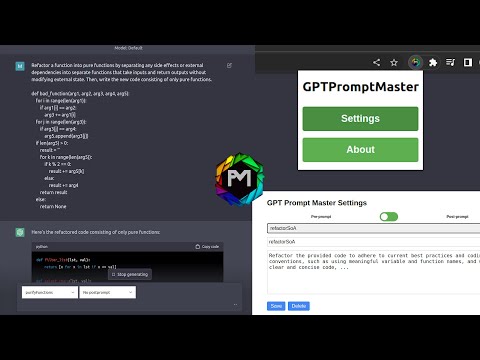](https://www.youtube.com/watch?v=MKMO05k7cfU)
20 |
21 |
22 | ## Define Pre and Post Prompts
23 | To define your own pre and post prompts, go to the extension options and click `Settings`:
24 |
25 |
26 |
27 |
28 |
29 |
30 | In the settings, you can define your own pre and post prompts:
31 |
32 |
33 |
34 |
35 |
36 |
37 |
38 |
39 |
40 |
41 | ## Use Pre and Post Prompts
42 | To use your pre and post prompts, go to the chatGPT website and select the created promtpts directly in the text field:
43 |
44 |
45 |
46 |
47 |
48 |
49 |
50 |
51 |
52 | The pre and post prompts are added to the prompt only if you submit the prompt with the button in the textarea.
53 |
54 |
55 |
56 |
57 |
58 | # Installation from Source
59 |
60 | ## Chrome
61 | To install the extension from source, you need to clone the repository and load the extension into your browser.
62 |
63 | In chrome open the extensions page by typing
64 |
65 | ```
66 | chrome://extensions
67 | ```
68 |
69 | in the address bar.
70 |
71 | Then enable the developer mode in the top right corner and click `Load unpacked`.
72 |
73 | Then select the folder of the cloned repository and the extension should be loaded.
74 |
75 |
76 | ## Firefox
77 | To install the extension from source, you need to clone the repository and load the extension into your browser.
78 |
79 | In firefox open the extensions page and click on the `Debug Add-ons` button in the top right corner.
80 |
81 | Then click on `Load Temporary Add-on` and select the `manifest.json` file in the cloned repository.
82 |
83 | The extension should be loaded.
84 |
85 | Now go to chat.openai.com and you should see the extension in the top right corner.
86 | Change the setting to enable this extension to always work on the website.
87 |
--------------------------------------------------------------------------------
/content.js:
--------------------------------------------------------------------------------
1 | const targetNode = document.querySelector('#__next');
2 |
3 | const observer = new MutationObserver(mutations => {
4 | mutations.forEach(mutation => {
5 | if (mutation.type === 'childList' && mutation.addedNodes?.length > 0) {
6 | updatePrompts();
7 | }
8 | });
9 | });
10 |
11 | const config = { attributes: true, childList: true, characterData: true };
12 |
13 | observer.observe(targetNode, config);
14 |
15 | const getTextArea = () => {
16 | const textarea = document.querySelector('textarea');
17 | return textarea ?? null;
18 | };
19 |
20 | const createPromptSelect = (promptList, promptType) => {
21 | const promptSelect = document.createElement('select');
22 | promptSelect.classList.add(`${promptType}-select`, 'prompt-select');
23 | promptSelect.innerHTML = ``;
24 |
25 | promptList.forEach(({ text, name }) => {
26 | const option = document.createElement('option');
27 | option.value = text;
28 | option.text = name;
29 | promptSelect.appendChild(option);
30 | });
31 |
32 | return promptSelect;
33 | };
34 |
35 | const attachSelector = (promptList, promptType) => {
36 | let promptContainer = document.querySelector(`.${promptType}-container`);
37 |
38 | if (promptContainer) {
39 | const promptSelect = createPromptSelect(promptList, promptType);
40 | promptContainer.replaceChild(promptSelect, promptContainer.firstChild);
41 | } else {
42 | promptContainer = document.createElement('div');
43 | const promptSelect = createPromptSelect(promptList, promptType);
44 | promptContainer.classList.add(`${promptType}-container`);
45 | promptContainer.appendChild(promptSelect);
46 | }
47 |
48 | return promptContainer;
49 | };
50 |
51 | const injectPrompts = textarea => {
52 | const form = textarea.closest('form');
53 | const prepromptSelector = form.querySelector('.preprompt-select');
54 | const postpromptSelector = form.querySelector('.postprompt-select');
55 | textarea.value = `${prepromptSelector?.value ?? ''}\n\n${textarea.value}\n\n${postpromptSelector?.value ?? ''}`;
56 | textarea.value = textarea.value.trim();
57 | };
58 |
59 | const clearSelections = () => {
60 | chrome.storage.local.get("clearSelection", function (data) {
61 | console.log(data)
62 | if (data.clearSelection) {
63 | const prepromptSelector = document.querySelector('.preprompt-select');
64 | const postpromptSelector = document.querySelector('.postprompt-select');
65 | prepromptSelector.selectedIndex = 0;
66 | postpromptSelector.selectedIndex = 0;
67 | }
68 | });
69 | };
70 |
71 | const updatePrompts = async () => {
72 | const textarea = getTextArea();
73 |
74 | const { preprompts = [], postprompts = [] } = await chrome.storage.local.get(['preprompts', 'postprompts']);
75 |
76 | const promptContainerWrapper = document.createElement('div');
77 | promptContainerWrapper.classList.add('prompt-container-wrapper');
78 |
79 | const prepromptSelector = attachSelector(preprompts, 'preprompt');
80 | const postpromptSelector = attachSelector(postprompts, 'postprompt');
81 |
82 | promptContainerWrapper.appendChild(prepromptSelector);
83 | promptContainerWrapper.appendChild(postpromptSelector);
84 |
85 | textarea.parentNode.insertBefore(promptContainerWrapper, textarea);
86 |
87 | const form = textarea.closest('form');
88 |
89 | const originalSubmitHandler = form.onsubmit;
90 |
91 | const submitHandler = event => {
92 | event.preventDefault();
93 | injectPrompts(textarea);
94 |
95 | clearSelections();
96 |
97 | if (originalSubmitHandler) {
98 | originalSubmitHandler.call(form, event);
99 | }
100 | };
101 |
102 | form.onsubmit = submitHandler;
103 |
104 | textarea.addEventListener("keydown", event => {
105 | if (event.key === "Enter" && !event.shiftKey) {
106 | event.preventDefault();
107 | submitHandler(event);
108 | }
109 | });
110 | };
111 |
112 | updatePrompts();
113 |
--------------------------------------------------------------------------------
/settings.js:
--------------------------------------------------------------------------------
1 | CSVSEPARATOR = "\t";
2 | // Get the prompt toggle switch and prompt section
3 | const promptToggle = document.querySelector('.prompt-toggle');
4 | const promptSection = document.querySelector('#prompt-section');
5 | const resetButton = document.querySelector('#reset-button');
6 |
7 | resetButton.addEventListener('click', () => {
8 | if (confirm('Are you sure you want to reset all settings?')) {
9 | chrome.storage.local.clear();
10 | location.reload();
11 | }
12 | });
13 |
14 | // Listen for changes to the prompt toggle switch
15 | promptToggle.addEventListener('change', () => {
16 | // Check the toggle switch position and set the prompt type accordingly
17 | const promptType = promptToggle.checked ? 'post' : 'pre';
18 |
19 | // Get the prompts from storage and render them in the prompt section
20 | chrome.storage.local.get(promptType + 'prompts', function (data) {
21 | const prompts = data[promptType + 'prompts'] || [];
22 | renderPrompts(prompts, promptType);
23 | });
24 | });
25 |
26 | function clearPromptSection() {
27 | promptSection.innerHTML = '';
28 | }
29 |
30 | function createPromptSelect(prompts, promptType) {
31 | const promptSelect = document.createElement('select');
32 | promptSelect.classList.add('prompt-select');
33 | promptSelect.innerHTML = ``;
34 |
35 | prompts.forEach(prompt => {
36 | const option = document.createElement('option');
37 | option.value = prompt.name;
38 | option.text = prompt.name;
39 | promptSelect.appendChild(option);
40 | });
41 |
42 | return promptSelect;
43 | }
44 |
45 | function createPromptNameInput() {
46 | const promptNameInput = document.createElement('input');
47 | promptNameInput.classList.add('prompt-name-input');
48 | promptNameInput.type = 'text';
49 | promptNameInput.placeholder = 'Enter a name for your prompt';
50 |
51 | return promptNameInput;
52 | }
53 |
54 | function createPromptTextInput(promptType) {
55 | const promptTextInput = document.createElement('textarea');
56 | promptTextInput.classList.add('prompt-text-input');
57 | promptTextInput.placeholder = `Enter your ${promptType}prompt text`;
58 |
59 | return promptTextInput;
60 | }
61 |
62 | function createButtonContainer() {
63 | const buttonContainer = document.createElement('div');
64 | buttonContainer.classList.add('button-container');
65 |
66 | return buttonContainer;
67 | }
68 |
69 | function createSaveButton(promptNameInput, promptTextInput, promptType, prompts) {
70 | const saveButton = document.createElement('button');
71 | saveButton.classList.add('save-button');
72 | saveButton.classList.add('settings-button');
73 | saveButton.textContent = 'Save';
74 | saveButton.addEventListener('click', () => {
75 | const name = promptNameInput.value;
76 | const text = promptTextInput.value;
77 |
78 | if (name.trim() === '' || text.trim() === '') {
79 | alert('Please enter a name and text for your prompt.');
80 | return;
81 | }
82 |
83 | savePrompt({ name, text }, promptType);
84 | renderPrompts(prompts, promptType);
85 |
86 | promptNameInput.value = '';
87 | promptTextInput.value = '';
88 | });
89 |
90 | return saveButton;
91 | }
92 |
93 | function createDeleteButton(promptNameInput, promptTextInput, promptType, prompts) {
94 | const deleteButton = document.createElement('button');
95 | deleteButton.classList.add('delete-button');
96 | deleteButton.classList.add('settings-button');
97 | deleteButton.textContent = 'Delete';
98 | deleteButton.addEventListener('click', () => {
99 | const name = promptNameInput.value;
100 |
101 | deletePrompt(name, promptType);
102 | renderPrompts(prompts, promptType);
103 |
104 | promptNameInput.value = '';
105 | promptTextInput.value = '';
106 | });
107 |
108 |
109 | return deleteButton;
110 | }
111 |
112 |
113 | function createImportButton(promptType, prompts) {
114 | const importButton = document.createElement('button');
115 | importButton.classList.add('import-button');
116 | importButton.classList.add('settings-button');
117 | importButton.textContent = 'Import';
118 | importButton.addEventListener('click', () => {
119 | const separator = prompt('Please enter the separator for the file (e.g. default is ";"):', ';');
120 | const fileInput = document.createElement('input');
121 | fileInput.type = 'file';
122 | fileInput.accept = '.txt,.csv';
123 |
124 | fileInput.addEventListener('change', event => {
125 | const file = event.target.files[0];
126 | const reader = new FileReader();
127 | reader.onload = () => {
128 | const importedPrompts = parsePrompts(reader.result, separator);
129 | mergePrompts(importedPrompts, promptType, prompts);
130 | };
131 | reader.readAsText(file);
132 | });
133 |
134 | fileInput.click();
135 | });
136 |
137 | return importButton;
138 | }
139 |
140 | function parsePrompts(fileContents, separator) {
141 | if (!fileContents.trim()) {
142 | alert("File is empty.");
143 | return [];
144 | }
145 |
146 | if (typeof separator !== "string" || separator.trim().length === 0) {
147 | alert("Invalid separator.");
148 | return [];
149 | }
150 |
151 | const lines = fileContents.split('\n');
152 | const prompts = [];
153 |
154 | for (let i = 0; i < lines.length; i++) {
155 | const line = lines[i].trim();
156 |
157 | if (line) {
158 | const splitted = line.split(separator);
159 | if (splitted.length !== 2) {
160 | alert(`Invalid line ${i + 1}: ${line}\nAborting import...`);
161 | return [];
162 | }
163 | const name = splitted[0];
164 | const text = splitted[1];
165 | prompts.push({ name: name.trim(), text: text.trim() });
166 | }
167 | }
168 |
169 | return prompts;
170 | }
171 |
172 |
173 | function mergePrompts(importedPrompts, promptType, prompts) {
174 | const mergedPrompts = [...prompts];
175 |
176 | for (let i = 0; i < importedPrompts.length; i++) {
177 | const importedPrompt = importedPrompts[i];
178 | const existingPromptIndex = mergedPrompts.findIndex(p => p.name === importedPrompt.name);
179 |
180 | if (existingPromptIndex !== -1) {
181 | mergedPrompts[existingPromptIndex].text = importedPrompt.text;
182 | } else {
183 | mergedPrompts.push(importedPrompt);
184 | }
185 | }
186 |
187 | chrome.storage.local.set({ [promptType + 'prompts']: mergedPrompts }, function () {
188 | renderPrompts(mergedPrompts, promptType);
189 | });
190 | }
191 |
192 | function createExportButton(promptType, prompts) {
193 | const exportButton = document.createElement('button');
194 | exportButton.classList.add('export-button');
195 | exportButton.classList.add('settings-button');
196 | exportButton.textContent = 'Export';
197 | exportButton.addEventListener('click', () => {
198 | const separator = prompt('Please enter the separator for the file (e.g. default is ";"):', ';');
199 | const promptsString = stringifyPrompts(prompts, separator);
200 | const filename = promptType + 'prompts.csv';
201 | download(promptsString, filename, 'text/csv');
202 | });
203 |
204 | return exportButton;
205 | }
206 |
207 | function stringifyPrompts(prompts, separator) {
208 | let promptsString = '';
209 |
210 | for (let i = 0; i < prompts.length; i++) {
211 | const prompt = prompts[i];
212 | promptsString += `${prompt.name}${separator}${prompt.text}\n`;
213 | }
214 |
215 | return promptsString;
216 | }
217 |
218 | function download(data, filename, type) {
219 | const file = new Blob([data], { type: type });
220 | const a = document.createElement('a');
221 | const url = URL.createObjectURL(file);
222 | a.href = url;
223 | a.download = filename;
224 | document.body.appendChild(a);
225 | a.click();
226 | setTimeout(() => {
227 | document.body.removeChild(a);
228 | window.URL.revokeObjectURL(url);
229 | }, 0);
230 | }
231 |
232 | function addElementsToPromptSection(promptSelect, promptNameInput, promptTextInput, buttonContainer, promptType, prompts) {
233 | promptSection.appendChild(promptSelect);
234 | promptSection.appendChild(promptNameInput);
235 | promptSection.appendChild(promptTextInput);
236 | promptSection.appendChild(buttonContainer);
237 | buttonContainer.appendChild(createSaveButton(promptNameInput, promptTextInput, promptType, prompts));
238 | buttonContainer.appendChild(createDeleteButton(promptNameInput, promptTextInput, promptType, prompts));
239 | buttonContainer.appendChild(createImportButton(promptType, prompts));
240 | buttonContainer.appendChild(createExportButton(promptType, prompts));
241 | }
242 |
243 | function renderPrompts(prompts, promptType) {
244 | clearPromptSection();
245 |
246 | const promptSelect = createPromptSelect(prompts, promptType);
247 | const promptNameInput = createPromptNameInput();
248 | const promptTextInput = createPromptTextInput(promptType);
249 | const buttonContainer = createButtonContainer();
250 |
251 | addElementsToPromptSection(promptSelect, promptNameInput, promptTextInput, buttonContainer, promptType, prompts);
252 |
253 | promptSelect.addEventListener('change', () => {
254 | const name = promptSelect.value;
255 | const prompt = prompts.find(prompt => prompt.name === name);
256 |
257 | if (prompt) {
258 | promptNameInput.value = prompt.name;
259 | promptTextInput.value = prompt.text;
260 | } else {
261 | promptNameInput.value = '';
262 | promptTextInput.value = '';
263 | }
264 | });
265 | }
266 |
267 | // Function to save a prompt to storage
268 | function savePrompt(prompt, promptType) {
269 | chrome.storage.local.get(promptType + 'prompts', function (data) {
270 | const prompts = data[promptType + 'prompts'] || [];
271 |
272 | // Check if the prompt already exists, and if so, update it
273 | const existingPromptIndex = prompts.findIndex(p => p.name === prompt.name);
274 | if (existingPromptIndex !== -1) {
275 | prompts[existingPromptIndex].text = prompt.text;
276 | } else {
277 | // Otherwise, add a new prompt to the array
278 | prompts.push(prompt);
279 | }
280 |
281 | // Save the updated prompts to storage and re-render the prompt section
282 | chrome.storage.local.set({ [promptType + 'prompts']: prompts }, function () {
283 | renderPrompts(prompts, promptType);
284 | });
285 | });
286 | }
287 |
288 | // Function to delete a prompt from storage
289 | function deletePrompt(promptName, promptType) {
290 | chrome.storage.local.get(promptType + 'prompts', function (data) {
291 | const prompts = data[promptType + 'prompts'] || [];
292 |
293 | // Find the index of the prompt to delete
294 | const promptIndex = prompts.findIndex(p => p.name === promptName);
295 |
296 | // Delete the prompt and save the updated prompts to storage
297 | if (promptIndex !== -1) {
298 | prompts.splice(promptIndex, 1);
299 | chrome.storage.local.set({ [promptType + 'prompts']: prompts }, function () {
300 | renderPrompts(prompts, promptType);
301 | });
302 | }
303 | });
304 | }
305 |
306 | // Initialize the prompt section with the pre-prompts
307 | chrome.storage.local.get('preprompts', function (data) {
308 | const prompts = data.preprompts || [];
309 | renderPrompts(prompts, 'pre');
310 | });
--------------------------------------------------------------------------------