├── ApexDebugger.png
├── synebo_logins.webp
├── Change Set Turbo.jpg
├── LICENSE
└── README.md
/ApexDebugger.png:
--------------------------------------------------------------------------------
https://raw.githubusercontent.com/mailtoharshit/awesome-browser-extensions-for-salesforce/HEAD/ApexDebugger.png
--------------------------------------------------------------------------------
/synebo_logins.webp:
--------------------------------------------------------------------------------
https://raw.githubusercontent.com/mailtoharshit/awesome-browser-extensions-for-salesforce/HEAD/synebo_logins.webp
--------------------------------------------------------------------------------
/Change Set Turbo.jpg:
--------------------------------------------------------------------------------
https://raw.githubusercontent.com/mailtoharshit/awesome-browser-extensions-for-salesforce/HEAD/Change Set Turbo.jpg
--------------------------------------------------------------------------------
/LICENSE:
--------------------------------------------------------------------------------
1 | The MIT License (MIT)
2 |
3 | Copyright (c) 2015 Harshit Pandey
4 |
5 | Permission is hereby granted, free of charge, to any person obtaining a copy
6 | of this software and associated documentation files (the "Software"), to deal
7 | in the Software without restriction, including without limitation the rights
8 | to use, copy, modify, merge, publish, distribute, sublicense, and/or sell
9 | copies of the Software, and to permit persons to whom the Software is
10 | furnished to do so, subject to the following conditions:
11 |
12 | The above copyright notice and this permission notice shall be included in all
13 | copies or substantial portions of the Software.
14 |
15 | THE SOFTWARE IS PROVIDED "AS IS", WITHOUT WARRANTY OF ANY KIND, EXPRESS OR
16 | IMPLIED, INCLUDING BUT NOT LIMITED TO THE WARRANTIES OF MERCHANTABILITY,
17 | FITNESS FOR A PARTICULAR PURPOSE AND NONINFRINGEMENT. IN NO EVENT SHALL THE
18 | AUTHORS OR COPYRIGHT HOLDERS BE LIABLE FOR ANY CLAIM, DAMAGES OR OTHER
19 | LIABILITY, WHETHER IN AN ACTION OF CONTRACT, TORT OR OTHERWISE, ARISING FROM,
20 | OUT OF OR IN CONNECTION WITH THE SOFTWARE OR THE USE OR OTHER DEALINGS IN THE
21 | SOFTWARE.
22 |
23 |
--------------------------------------------------------------------------------
/README.md:
--------------------------------------------------------------------------------
1 | # Awesome browser extensions for Salesforce [](https://github.com/mailtoharshit/awesome-salesforce)
2 |
3 | [](https://gitter.im/mailtoharshit/awesome-salesforce?utm_source=badge&utm_medium=badge&utm_campaign=pr-badge&utm_content=badge)
4 |
5 |
6 | > A collection of awesome browser extensions for Salesforce. Read complete list of [awesome-salesforce resources](https://github.com/mailtoharshit/awesome-salesforce).
7 |
8 |
9 | ## Toggle it - Turn Developer mode On/Off with click [ ](https://chrome.google.com/webstore/detail/toggle-it-by-oyecode/cjpcmpioceijmelkgknddeiljogoakbl?hl=en)
10 |
11 | To debug javascript on visualforce page in Salesforce.com, quite often user have to turn off 'Development Mode' on and off. This application will let you toggle on/off in one click in and no time and makes life easy for your debug JavaScript on pages. The objective is to make life easy for developer and make a handy tool
12 |
13 | [
](https://chrome.google.com/webstore/detail/toggle-it-by-oyecode/cjpcmpioceijmelkgknddeiljogoakbl?hl=en)
10 |
11 | To debug javascript on visualforce page in Salesforce.com, quite often user have to turn off 'Development Mode' on and off. This application will let you toggle on/off in one click in and no time and makes life easy for your debug JavaScript on pages. The objective is to make life easy for developer and make a handy tool
12 |
13 | [ ](https://chrome.google.com/webstore/detail/toggle-it-by-oyecode/cjpcmpioceijmelkgknddeiljogoakbl?hl=en)
14 |
15 | ## Force.com Login [](https://chrome.google.com/webstore/detail/forcecom-logins/ldjbglicecgnpkpdhpbogkednmmbebec?hl=en) [
](https://chrome.google.com/webstore/detail/toggle-it-by-oyecode/cjpcmpioceijmelkgknddeiljogoakbl?hl=en)
14 |
15 | ## Force.com Login [](https://chrome.google.com/webstore/detail/forcecom-logins/ldjbglicecgnpkpdhpbogkednmmbebec?hl=en) [ ](https://addons.mozilla.org/en-us/firefox/addon/salesforce-login/)
16 |
17 | This extension manages your salesforce.com login information and lets you quickly login. Most of the Force.com developers have multiple accounts, and they are tired of entering username and password every time they move from an account to the other
18 |
19 | [
](https://addons.mozilla.org/en-us/firefox/addon/salesforce-login/)
16 |
17 | This extension manages your salesforce.com login information and lets you quickly login. Most of the Force.com developers have multiple accounts, and they are tired of entering username and password every time they move from an account to the other
18 |
19 | [ ](https://chrome.google.com/webstore/detail/toggle-it-by-oyecode/cjpcmpioceijmelkgknddeiljogoakbl?hl=en)
20 |
21 | ## Salesforce Navigator [](https://chrome.google.com/webstore/detail/salesforce-navigator/ecjmdlggbilopfkkhggmgebbmbiklcdo?hl=en)
22 |
23 | Using this extension, you can navigate to any Salesforce setup page just by hitting a configurable keyboard shortcut, then enter some search text. The best thing about this extension is that it comes up on your browser like Apple’s spotlight and you don’t need to navigate to any other page.
24 |
25 | [
](https://chrome.google.com/webstore/detail/toggle-it-by-oyecode/cjpcmpioceijmelkgknddeiljogoakbl?hl=en)
20 |
21 | ## Salesforce Navigator [](https://chrome.google.com/webstore/detail/salesforce-navigator/ecjmdlggbilopfkkhggmgebbmbiklcdo?hl=en)
22 |
23 | Using this extension, you can navigate to any Salesforce setup page just by hitting a configurable keyboard shortcut, then enter some search text. The best thing about this extension is that it comes up on your browser like Apple’s spotlight and you don’t need to navigate to any other page.
24 |
25 | [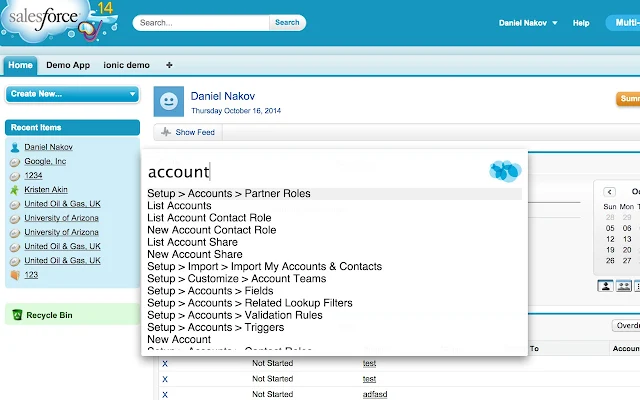 ](https://chrome.google.com/webstore/detail/salesforce-navigator/ecjmdlggbilopfkkhggmgebbmbiklcdo?utm_source=chrome-app-launcher-info-dialog)
26 |
27 | ## Salesforce advanced Code searcher [](https://chrome.google.com/webstore/detail/salesforce-advanced-code/lnkgcmpjkkkeffambkllliefdpjdklmi?hl=en)
28 |
29 | Use this extension to search of Code modules, shows up on your Setup page
30 |
31 | [
](https://chrome.google.com/webstore/detail/salesforce-navigator/ecjmdlggbilopfkkhggmgebbmbiklcdo?utm_source=chrome-app-launcher-info-dialog)
26 |
27 | ## Salesforce advanced Code searcher [](https://chrome.google.com/webstore/detail/salesforce-advanced-code/lnkgcmpjkkkeffambkllliefdpjdklmi?hl=en)
28 |
29 | Use this extension to search of Code modules, shows up on your Setup page
30 |
31 | [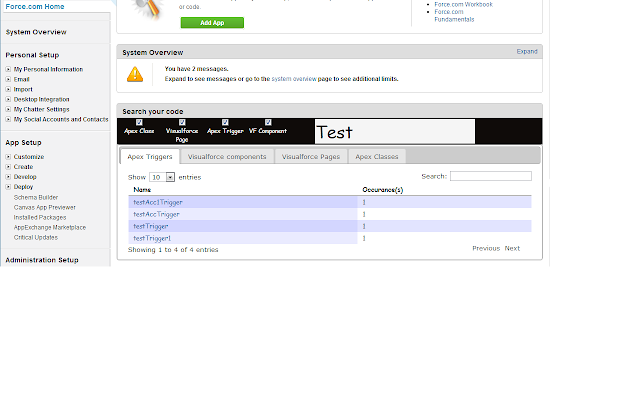 ](https://chrome.google.com/webstore/detail/salesforce-advanced-code/lnkgcmpjkkkeffambkllliefdpjdklmi?utm_source=chrome-app-launcher-info-dialog)
32 |
33 | ## Salesforce Developer Tool Suite [](https://chrome.google.com/webstore/detail/salesforce-developer-tool/fiaakhiohminpblhmlihfcdhclmphjcd?utm_source=chrome-app-launcher-info-dialog)
34 |
35 | Very useful extension for viewing and managing your logs without leaving your current Salesforce tab. It also has other great features like adding a log request for the current user, filtering logs, and log options
36 |
37 | [
](https://chrome.google.com/webstore/detail/salesforce-advanced-code/lnkgcmpjkkkeffambkllliefdpjdklmi?utm_source=chrome-app-launcher-info-dialog)
32 |
33 | ## Salesforce Developer Tool Suite [](https://chrome.google.com/webstore/detail/salesforce-developer-tool/fiaakhiohminpblhmlihfcdhclmphjcd?utm_source=chrome-app-launcher-info-dialog)
34 |
35 | Very useful extension for viewing and managing your logs without leaving your current Salesforce tab. It also has other great features like adding a log request for the current user, filtering logs, and log options
36 |
37 | [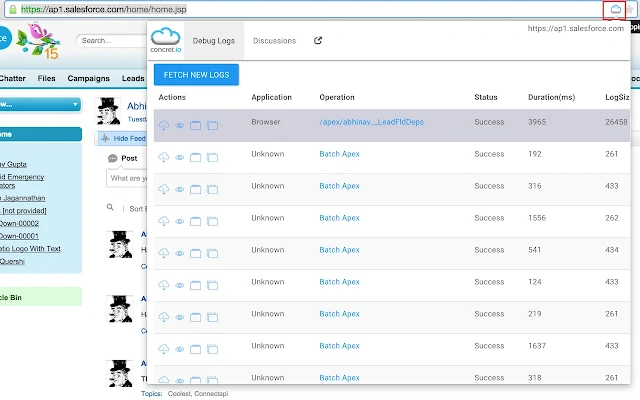 ](https://chrome.google.com/webstore/detail/salesforce-developer-tool/fiaakhiohminpblhmlihfcdhclmphjcd?utm_source=chrome-app-launcher-info-dialog)
38 |
39 | ## Salesforce API Fieldnames [](https://chrome.google.com/webstore/detail/salesforce-api-fieldnames/oghajcjpbolpfoikoccffglngkphjgbo?hl=en)
40 |
41 | This simple yet usefull extension replaces all field labels of an object detail page (standard layout) with the corresponding API names.
42 |
43 | [
](https://chrome.google.com/webstore/detail/salesforce-developer-tool/fiaakhiohminpblhmlihfcdhclmphjcd?utm_source=chrome-app-launcher-info-dialog)
38 |
39 | ## Salesforce API Fieldnames [](https://chrome.google.com/webstore/detail/salesforce-api-fieldnames/oghajcjpbolpfoikoccffglngkphjgbo?hl=en)
40 |
41 | This simple yet usefull extension replaces all field labels of an object detail page (standard layout) with the corresponding API names.
42 |
43 | [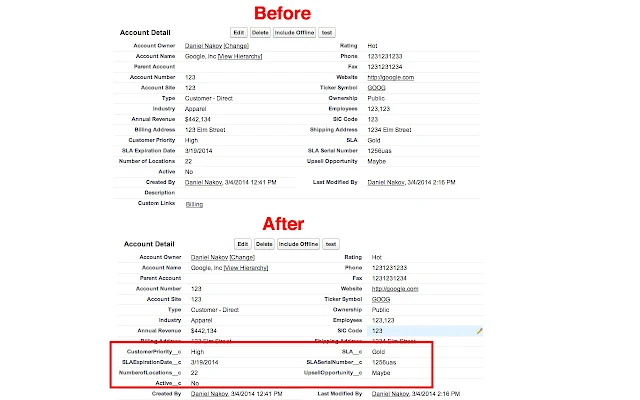 ](https://chrome.google.com/webstore/detail/salesforce-api-fieldnames/oghajcjpbolpfoikoccffglngkphjgbo?utm_source=chrome-app-launcher-info-dialog)
44 |
45 | ## Salesforce.con ID Converter [](https://chrome.google.com/webstore/detail/salesforcecom-id-converte/kiagkehielelkabjcakhpekplnelkaol?hl=en)
46 |
47 | Quick Salesforce ID converter from 15 to 18 digit format.
48 |
49 | [
](https://chrome.google.com/webstore/detail/salesforce-api-fieldnames/oghajcjpbolpfoikoccffglngkphjgbo?utm_source=chrome-app-launcher-info-dialog)
44 |
45 | ## Salesforce.con ID Converter [](https://chrome.google.com/webstore/detail/salesforcecom-id-converte/kiagkehielelkabjcakhpekplnelkaol?hl=en)
46 |
47 | Quick Salesforce ID converter from 15 to 18 digit format.
48 |
49 | [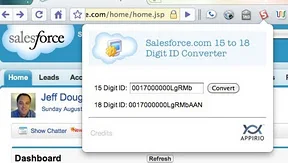 ](https://chrome.google.com/webstore/detail/salesforcecom-id-converte/kiagkehielelkabjcakhpekplnelkaol?utm_source=chrome-app-launcher-info-dialog)
50 |
51 |
52 | ## Salesforce Lighting Components Inspector [](https://chrome.google.com/webstore/detail/salesforce-lightning-insp/pcpmcffcomlcjgpcheokdfcjipanjdpc)
53 |
54 | Chrome Developer Tools Extension for inspecting Salesforce Lightning Component apps
55 |
56 | [
](https://chrome.google.com/webstore/detail/salesforcecom-id-converte/kiagkehielelkabjcakhpekplnelkaol?utm_source=chrome-app-launcher-info-dialog)
50 |
51 |
52 | ## Salesforce Lighting Components Inspector [](https://chrome.google.com/webstore/detail/salesforce-lightning-insp/pcpmcffcomlcjgpcheokdfcjipanjdpc)
53 |
54 | Chrome Developer Tools Extension for inspecting Salesforce Lightning Component apps
55 |
56 | [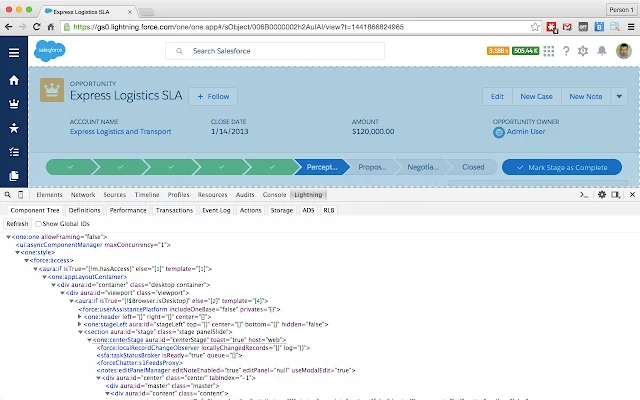 ](https://chrome.google.com/webstore/detail/salesforce-lightning-insp/pcpmcffcomlcjgpcheokdfcjipanjdpc)
57 |
58 |
59 | ## Salesforce ORGanizer [](https://chrome.google.com/webstore/detail/salesforce-organizer/lojdmgdchjcfnmkmodggbaafecagllnh)
60 |
61 | Useful tools for developers and administrators
62 |
63 | [
](https://chrome.google.com/webstore/detail/salesforce-lightning-insp/pcpmcffcomlcjgpcheokdfcjipanjdpc)
57 |
58 |
59 | ## Salesforce ORGanizer [](https://chrome.google.com/webstore/detail/salesforce-organizer/lojdmgdchjcfnmkmodggbaafecagllnh)
60 |
61 | Useful tools for developers and administrators
62 |
63 | [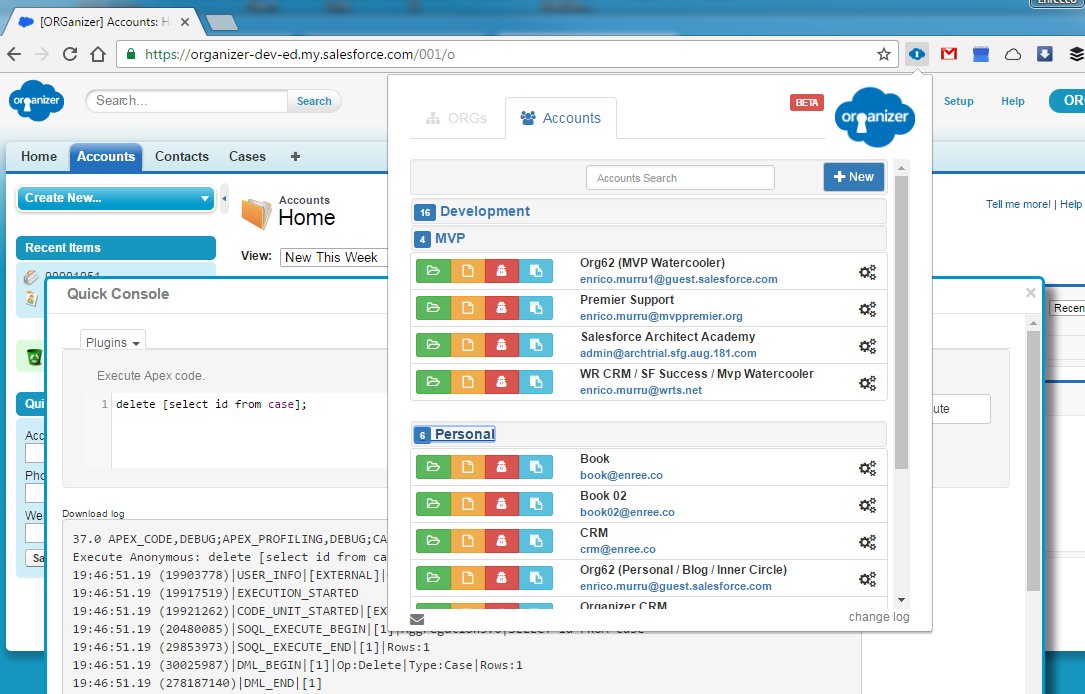 ](https://chrome.google.com/webstore/detail/salesforce-organizer/lojdmgdchjcfnmkmodggbaafecagllnh)
64 |
65 |
66 | ## Salesforce Dev Tools [](https://chrome.google.com/webstore/detail/salesforce-dev-tools/ehgmhinnhggigkogkbhnbodhbfjgncjf)
67 |
68 | Salesforce Dev Tools is a simple but powerful chrome extension for doing the below things:
](https://chrome.google.com/webstore/detail/salesforce-organizer/lojdmgdchjcfnmkmodggbaafecagllnh)
64 |
65 |
66 | ## Salesforce Dev Tools [](https://chrome.google.com/webstore/detail/salesforce-dev-tools/ehgmhinnhggigkogkbhnbodhbfjgncjf)
67 |
68 | Salesforce Dev Tools is a simple but powerful chrome extension for doing the below things:
69 | ・Export objects api documents (Excel).
70 | ・Show fields api name on Salesforce object detail page.
71 | ・Generate apex code for unit test coding.
72 | ・Quick access to new record page, list page and object setting page.
73 |
74 | [ ](https://chrome.google.com/webstore/detail/salesforce-dev-tools/ehgmhinnhggigkogkbhnbodhbfjgncjf)
75 |
76 | ## Salesforce Mass Editor [](https://chrome.google.com/webstore/detail/salesforce-mass-editor/mnmlmkmjjhpbfemhmhpcpfkdlgadbigf)
77 |
78 | Salesforce Mass Editor is a chrome extension supports to mass insert, clone, update, delete records, export data to csv and copy&paste from excel with multiple rows and cells, it works on any Salesforce list view.
79 |
80 | [
](https://chrome.google.com/webstore/detail/salesforce-dev-tools/ehgmhinnhggigkogkbhnbodhbfjgncjf)
75 |
76 | ## Salesforce Mass Editor [](https://chrome.google.com/webstore/detail/salesforce-mass-editor/mnmlmkmjjhpbfemhmhpcpfkdlgadbigf)
77 |
78 | Salesforce Mass Editor is a chrome extension supports to mass insert, clone, update, delete records, export data to csv and copy&paste from excel with multiple rows and cells, it works on any Salesforce list view.
79 |
80 | [ ](https://chrome.google.com/webstore/detail/salesforce-mass-editor/mnmlmkmjjhpbfemhmhpcpfkdlgadbigf)
81 |
82 | ## Ebsta For Salesforce [](https://chrome.google.com/webstore/detail/ebsta-for-salesforce/gemcgnkghpnfbmlfimdbdgfepcgenphf)
83 |
84 | The extension automatically cross-references Salesforce based on the web page you’re looking at and gives you 1-click access to view the Salesforce record without leaving the page. You can also edit and update records, manage tasks, Chatter and heaps more - it’s like a pocket sized SFDC inside every website you visit.
85 |
86 |
87 | ## Salesforce Logins by Synebo [](https://chrome.google.com/webstore/detail/salesforce-logins-by-syne/mhpbcjokcjoldhjcapkcmfkkkgepapgm?hl=en)
88 |
89 | Free extension to manage salesforce credentials. Supports Custom Domains, Comunity, Sandbox e.t.c.
90 | Easy import and export. Automatically share credentials through google account by signing into chrome.
91 |
92 |
93 | ## Apex Debugger [](https://chrome.google.com/webstore/detail/apex-debugger/mpckkbblhbfngaininanfjpdfjhbncjo)
94 |
95 | Improved view of debug logs.
96 | Press Shift+d from any salesforce page to open Debug Logs and start tracking current user.
97 |
98 | • Improved view of logs (select from available themes).
99 | • Search string in latest logs
100 | • Click any Id in logs to go to Object (Class, Trigger, Validation Rule e.t.c).
101 | • Indent User Debug (sObject, List, XML or JSON)
102 |
103 | [
](https://chrome.google.com/webstore/detail/salesforce-mass-editor/mnmlmkmjjhpbfemhmhpcpfkdlgadbigf)
81 |
82 | ## Ebsta For Salesforce [](https://chrome.google.com/webstore/detail/ebsta-for-salesforce/gemcgnkghpnfbmlfimdbdgfepcgenphf)
83 |
84 | The extension automatically cross-references Salesforce based on the web page you’re looking at and gives you 1-click access to view the Salesforce record without leaving the page. You can also edit and update records, manage tasks, Chatter and heaps more - it’s like a pocket sized SFDC inside every website you visit.
85 |
86 |
87 | ## Salesforce Logins by Synebo [](https://chrome.google.com/webstore/detail/salesforce-logins-by-syne/mhpbcjokcjoldhjcapkcmfkkkgepapgm?hl=en)
88 |
89 | Free extension to manage salesforce credentials. Supports Custom Domains, Comunity, Sandbox e.t.c.
90 | Easy import and export. Automatically share credentials through google account by signing into chrome.
91 |
92 |
93 | ## Apex Debugger [](https://chrome.google.com/webstore/detail/apex-debugger/mpckkbblhbfngaininanfjpdfjhbncjo)
94 |
95 | Improved view of debug logs.
96 | Press Shift+d from any salesforce page to open Debug Logs and start tracking current user.
97 |
98 | • Improved view of logs (select from available themes).
99 | • Search string in latest logs
100 | • Click any Id in logs to go to Object (Class, Trigger, Validation Rule e.t.c).
101 | • Indent User Debug (sObject, List, XML or JSON)
102 |
103 | [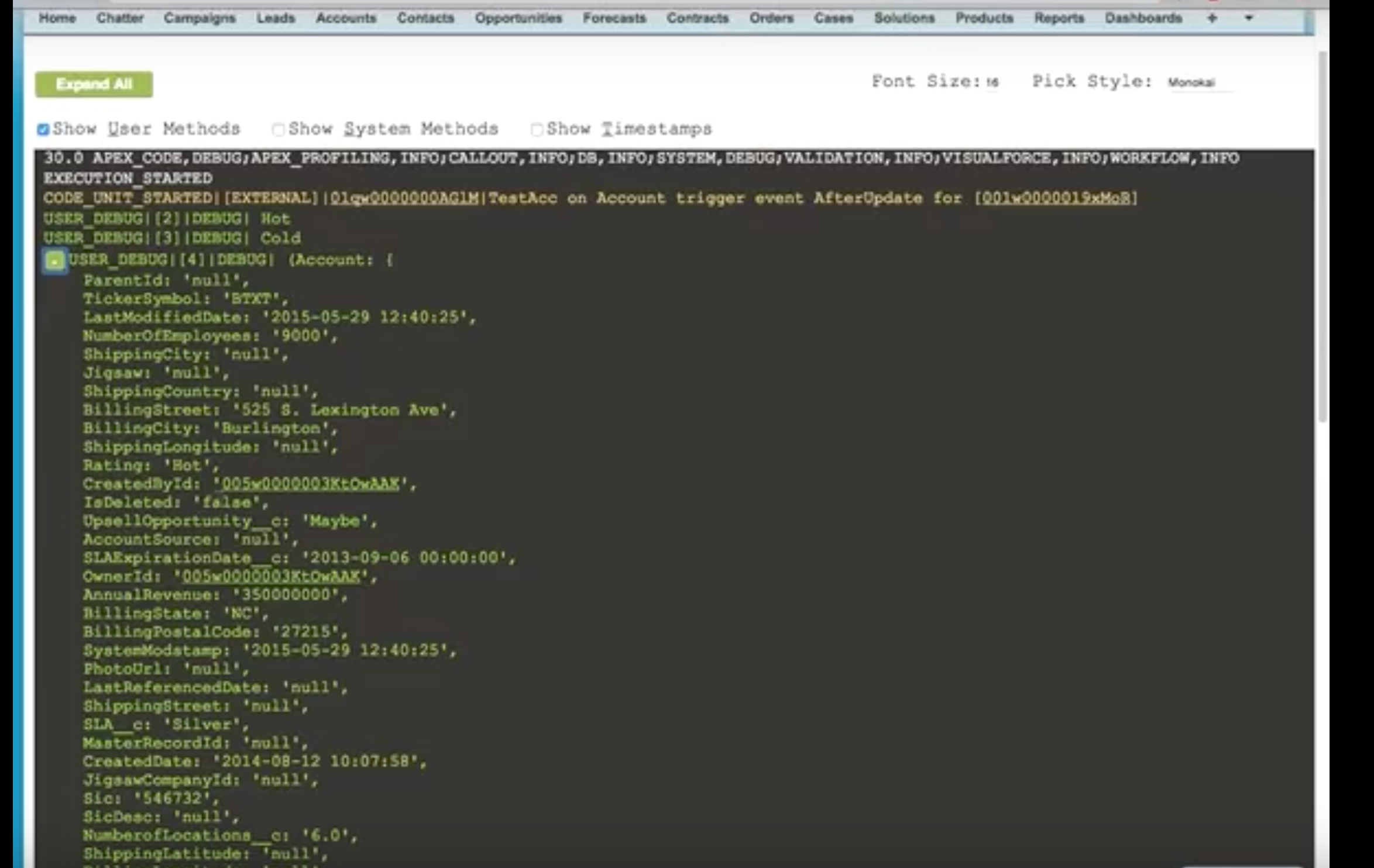 ](https://chrome.google.com/webstore/detail/apex-debugger/mpckkbblhbfngaininanfjpdfjhbncjo)
104 |
105 |
106 | ## Salesforce Change Set Turbo [](https://chrome.google.com/webstore/detail/salesforce-change-set-tur/dlcjllapchpeedkecmhfnpfenpbglioo)
107 |
108 | Creates change sets faster.
109 | Page does not reload for adding or removing components in the change set.
110 |
111 | * "View" and "Edit" mode for removing/ adding components respectively from a single screen without reloading.
112 | * View last modified date, last modified by, report folder name.
113 | * Remove multiple components by selecting manually or uploading CSV.
114 |
115 | [
](https://chrome.google.com/webstore/detail/apex-debugger/mpckkbblhbfngaininanfjpdfjhbncjo)
104 |
105 |
106 | ## Salesforce Change Set Turbo [](https://chrome.google.com/webstore/detail/salesforce-change-set-tur/dlcjllapchpeedkecmhfnpfenpbglioo)
107 |
108 | Creates change sets faster.
109 | Page does not reload for adding or removing components in the change set.
110 |
111 | * "View" and "Edit" mode for removing/ adding components respectively from a single screen without reloading.
112 | * View last modified date, last modified by, report folder name.
113 | * Remove multiple components by selecting manually or uploading CSV.
114 |
115 | [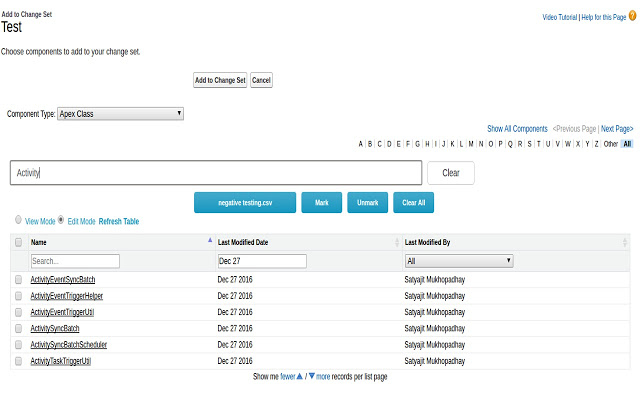 ](https://chrome.google.com/webstore/detail/salesforce-change-set-tur/dlcjllapchpeedkecmhfnpfenpbglioo)
116 |
117 |
118 | ## Salesforce Inpector [](https://chrome.google.com/webstore/detail/salesforce-inspector/aodjmnfhjibkcdimpodiifdjnnncaafh)
119 |
120 | Productivity tools for Salesforce administrators and developers to inspect data and metadata directly from the Salesforce UI.
121 |
122 | * Quickly view field information directly from a record detail page, edit page or Visualforce page.
123 | * Quickly view and edit all data for a record, even data that is not on the page layout.
124 | * Perform quick one-off data exports and imports directly from within Salesforce. Data can be easily copied to and from Excel. No need to log in again when you are already logged in with your browser.
125 |
126 | [
](https://chrome.google.com/webstore/detail/salesforce-change-set-tur/dlcjllapchpeedkecmhfnpfenpbglioo)
116 |
117 |
118 | ## Salesforce Inpector [](https://chrome.google.com/webstore/detail/salesforce-inspector/aodjmnfhjibkcdimpodiifdjnnncaafh)
119 |
120 | Productivity tools for Salesforce administrators and developers to inspect data and metadata directly from the Salesforce UI.
121 |
122 | * Quickly view field information directly from a record detail page, edit page or Visualforce page.
123 | * Quickly view and edit all data for a record, even data that is not on the page layout.
124 | * Perform quick one-off data exports and imports directly from within Salesforce. Data can be easily copied to and from Excel. No need to log in again when you are already logged in with your browser.
125 |
126 | [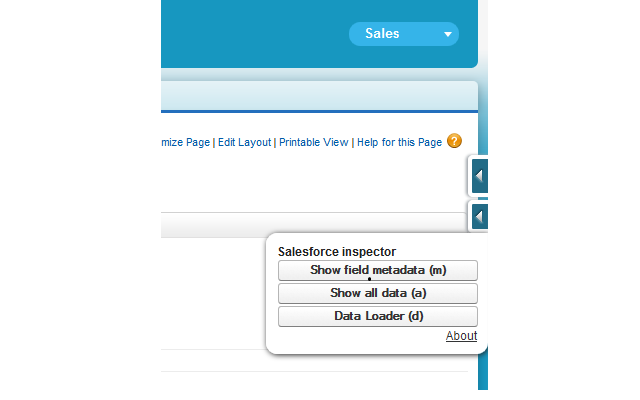 ](https://chrome.google.com/webstore/detail/salesforce-inspector/aodjmnfhjibkcdimpodiifdjnnncaafh)
127 |
128 |
129 | ## WIPDeveloper.com Tools [](https://chrome.google.com/webstore/detail/wipdevelopercom-tools/njghjhclaneaggenfghkdlgepmllflgm) [](https://addons.mozilla.org/en-US/firefox/addon/wipdeveloper-com-tools/)
130 |
131 | Collection of tools developed for use with Salesforce.com from WIPDeveloper.com.
132 | It provides shortcuts to
133 | - Duplicate a Tab
134 | - Fix the developer.salesforce.com/forums Showing All Questions issue
135 | - Open Classic Setup
136 | - Open Lighting Setup,
137 | - Open the Developer Console.
138 | - Open Org Playground
139 | - Open Org Component Library
140 | - Open Org Lighting Web Component Documents
141 |
142 | [](https://lh3.googleusercontent.com/j9mc6CzOB9uoJAmwJluhoVflxU7349hSgXkafNAmXYV2ZXA8XmUIY3j6F7S9UQ3nOSwSX1qyAQ=w640-h400-e365)
143 |
--------------------------------------------------------------------------------
](https://chrome.google.com/webstore/detail/salesforce-inspector/aodjmnfhjibkcdimpodiifdjnnncaafh)
127 |
128 |
129 | ## WIPDeveloper.com Tools [](https://chrome.google.com/webstore/detail/wipdevelopercom-tools/njghjhclaneaggenfghkdlgepmllflgm) [](https://addons.mozilla.org/en-US/firefox/addon/wipdeveloper-com-tools/)
130 |
131 | Collection of tools developed for use with Salesforce.com from WIPDeveloper.com.
132 | It provides shortcuts to
133 | - Duplicate a Tab
134 | - Fix the developer.salesforce.com/forums Showing All Questions issue
135 | - Open Classic Setup
136 | - Open Lighting Setup,
137 | - Open the Developer Console.
138 | - Open Org Playground
139 | - Open Org Component Library
140 | - Open Org Lighting Web Component Documents
141 |
142 | [](https://lh3.googleusercontent.com/j9mc6CzOB9uoJAmwJluhoVflxU7349hSgXkafNAmXYV2ZXA8XmUIY3j6F7S9UQ3nOSwSX1qyAQ=w640-h400-e365)
143 |
--------------------------------------------------------------------------------