) {
15 | return t.title;
16 | }
17 |
18 | iCareAboutTitle({title: 'hoho'}) // no error even if description is missing
19 | ```
20 |
--------------------------------------------------------------------------------
/textualContent/content/Archive-2/116.md:
--------------------------------------------------------------------------------
1 | ## Oracle SQL - Pagination
2 |
3 | ```
4 | -- getting first n rows orederd
5 | select * from (
6 | -- your query
7 | ) where rnum <= n;
8 |
9 | ```
10 |
11 |
12 | oracle 12 and above
13 |
14 | ```
15 | select * from table_1 order by date desc
16 | fetch first 5 rows only;
17 | ```
18 |
19 | ```
20 | SELECT *
21 | FROM (SELECT A.*, rownum rn
22 | FROM (SELECT *
23 | FROM your_table
24 | ORDER BY col) A
25 | WHERE rownum <= :limit)
26 | WHERE rn >= :offset
27 | ```
28 |
--------------------------------------------------------------------------------
/textualContent/content/Archive-2/148.md:
--------------------------------------------------------------------------------
1 | html - editable content
2 |
3 | In HTML, any element can be editable. By using some JavaScript event handlers, you can transform your web page into a full and fast rich text editor.
4 |
5 | Editing page content
6 |
7 |
8 | You can edit me...and add as much ye wish!
9 |
10 |
11 | Check out this article to find out more on how to create rich text editor.
12 | https://developer.mozilla.org/en-US/docs/Web/Guide/HTML/Editable_content
13 |
--------------------------------------------------------------------------------
/textualContent/content/Archive-2/112.md:
--------------------------------------------------------------------------------
1 | ## Secure Coding ⚡⚡️
2 | ### Beware while allowing a zip file upload for your projects.
3 |
4 | **A zip bomb**, also known as a zip of death or decompression bomb, is a malicious archive file designed to crash or render useless the program or system reading it. It is often employed to disable antivirus software, in order to create an opening for more traditional viruses.
5 |
6 | #### Always employ some tools to scan the files before processing any zipped file uploads.
7 |
8 | > #113
9 |
--------------------------------------------------------------------------------
/textualContent/content/Archive-1/47.md:
--------------------------------------------------------------------------------
1 | ## Cache Buster ⚡️⚡️
2 | ### That Tip
3 |
4 | If you are a web develper, the worst thing that could happen is wasting your whole day refreshing your browser wanting to see the changes. _I understand_
5 |
6 | This little tip can save your precious time and money. Yeah you can buy me a coffee sometime.
7 |
8 | 
9 |
10 | Check the _disable cache_ option in chrome network tab.
11 |
12 | >#47
--------------------------------------------------------------------------------
/textualContent/content/Archive-2/133.md:
--------------------------------------------------------------------------------
1 | ## Javascript Jazz ⚡⚡️
2 | ### May be a better way to write functions with lots of parameters
3 |
4 | #### Bad:
5 | ```
6 | function createMenu(title, body, buttonText, cancellable) {
7 | // ...
8 | }
9 | ```
10 |
11 | #### Good:
12 |
13 | ```
14 | function createMenu({ title, body, buttonText, cancellable }) {
15 | // ...
16 | }
17 |
18 | createMenu({
19 | title: "Foo",
20 | body: "Bar",
21 | buttonText: "Baz",
22 | cancellable: true
23 | });
24 | ```
25 | > #133
26 |
--------------------------------------------------------------------------------
/textualContent/content/Archive-2/140.md:
--------------------------------------------------------------------------------
1 | Javascript Jazz ⚡⚡️
2 | ### Private class fields (Stage 3 proposal)
3 | #### Similar feature is already available in Typescript.
4 |
5 | ```js
6 | class incrementCounter {
7 | #count = 0;
8 | increment() {
9 | this.#count++;
10 | }
11 | }
12 | ```
13 |
14 | **Notice the # in front of _count_? It denotes that count is a private field**
15 |
16 | ```js
17 | incrementCounter.#count // -> syntax error
18 | ```
19 |
20 | Similarly, private class methods can also be created.
21 |
22 | > #140
23 |
--------------------------------------------------------------------------------
/textualContent/content/174.md:
--------------------------------------------------------------------------------
1 | Record #
2 | Constructs a type with a set of properties K of "type" T. This utility can be used to map the properties of a type to another type.
3 |
4 | ```
5 | interface PageInfo {
6 | title: string;
7 | }
8 |
9 | type Page = 'home' | 'about' | 'contact';
10 |
11 | const x: Record = { // create an object with keys only 'home', 'about', 'contact'
12 | about: { title: 'about' },
13 | contact: { title: 'contact' },
14 | home: { title: 'home' },
15 | };
16 |
17 | ```
18 |
--------------------------------------------------------------------------------
/textualContent/content/Archive-2/145.md:
--------------------------------------------------------------------------------
1 | ## Linux - head and tail command ⚡⚡️
2 | ### Usage
3 |
4 | - Get top 4 directories/ files in the path
5 | ``` ls -l | head -n4 ```
6 |
7 | - Get top 4 lines in the file
8 | ``` head -n4 largefile.txt ```
9 |
10 | - Get last 4 directories/ files in the path
11 | ``` ls -l | tail -n4 ```
12 |
13 | - Get last 4 lines in the file
14 | ``` tail -n4 largefile.txt ```
15 |
16 | ### There are a plethora of options you can check out for these commands!! Try
17 | ``` man head ``` ``` man tail ```
18 |
19 | > #145
20 |
--------------------------------------------------------------------------------
/textualContent/content/Archive-1/72.md:
--------------------------------------------------------------------------------
1 | ## Javascript Gym ⚡⚡️
2 | ### Property Descriptors - Getter and Setter (ES6)
3 |
4 | I personally do not use getter-setters but this example is quite relatable and useful.
5 |
6 | ```javascript
7 | const obj = {
8 | realAge: 0,
9 | get age() {
10 | return this.realAge
11 | },
12 | set age(value) {
13 | this.realAge = Number(value) // changing the string to number to realAge
14 | }
15 | }
16 |
17 | console.log(obj.age) // 0
18 | obj.age = '32'
19 | console.log(obj.age) // 32
20 | ```
21 |
22 | > #72
--------------------------------------------------------------------------------
/textualContent/content/Archive-1/97.md:
--------------------------------------------------------------------------------
1 | ## Recommended Secure coding - Preventing SQL injections
2 |
3 | ### A classic example of bad code practices. When using a traditional SQL Db
4 |
5 | TL'DR, here are the few things to watch out for
6 | 1. Always use Prepared Statment
7 | 2. Use parameter query to execute your queries
8 | 3. Do some kind of sanitation checks before passing as parameter
9 | 4. Java specific: Use character array for storing password
10 |
11 | [source](https://wiki.sei.cmu.edu/confluence/display/java/IDS00-J.+Prevent+SQL+injection)
12 |
--------------------------------------------------------------------------------
/textualContent/content/Archive-1/87.md:
--------------------------------------------------------------------------------
1 | ## All-New Web API
2 |
3 | New API to Bring Augmented Reality to the Web
4 |
5 | We’re entering a new phase of work on JavaScript APIs here at Mozilla, that will help everyone create and share virtual reality (VR) and augmented reality (AR) projects on the open web.
6 |
7 | Experimentation continues with a new JavaScript API called the [WebXR Device API](https://immersive-web.github.io/webxr/).
8 |
9 | [source](https://hacks.mozilla.org/2018/09/webxr/?utm_source=dev-newsletter&utm_medium=email&utm_campaign=sept13-2018&utm_content=webxr)
--------------------------------------------------------------------------------
/textualContent/content/Archive-2/142.md:
--------------------------------------------------------------------------------
1 | javascript - Intl (all new)
2 |
3 | Intl.relativeTimeFormat
4 |
5 | ```
6 | const rtf = new Intl.RelativeTimeFormat('en', {numeric: 'auto'})
7 |
8 | rtf.format(-1, 'day')
9 | ```
10 |
11 | Intl.ListFormat
12 |
13 | ```
14 | const lfFormat = Intl.ListFormat('en');
15 | lfFormat.format(['hello', 'hi'])
16 |
17 | // result -> hello, hi
18 | ```
19 |
20 | ```
21 | const ldFormat = Intl.ListFormat('en', {type: 'disjuction'});
22 | lfFormat.format(['hello', 'hi', 'hey']);
23 |
24 | // result -> hello, hi or hey
25 | ```
26 |
27 |
--------------------------------------------------------------------------------
/textualContent/content/Archive-1/53.md:
--------------------------------------------------------------------------------
1 | ## Javascript Gym ⚡️⚡️
2 | ## Implementing *none* utility function
3 |
4 | Returns true if the provided predicate function returns false for all elements in a collection, false otherwise.
5 |
6 | Use Array.some() to test if any elements in the collection return true based on fn. Omit the second argument, fn, to use Boolean as a default.
7 |
8 | ```javascript
9 | const none = (arr, fn = Boolean) => !arr.some(fn);
10 |
11 | // examples:
12 | // none([0, 1, 3, 0], x => x == 2); true
13 | // none([0, 0, 0]); true
14 | ```
15 |
16 |
--------------------------------------------------------------------------------
/textualContent/content/Archive-1/68.md:
--------------------------------------------------------------------------------
1 | ## Javascript Gym ⚡️⚡️
2 | ### Performance on Javascript(ES6)
3 | While one can add as many dynamically named properties to an Object as they like, for performance and security reasons it’s better to use a **Map**
4 |
5 | Since objects as “complex” key/value stores, Each property has meta information tied to it, interactions require lookups in the prototype chain, etc. These each have performance considerations and may not be beneficial to your particular situation which is again why a **Map** is often better for dynamic collections of data.
6 |
7 | > #68
--------------------------------------------------------------------------------
/textualContent/content/Archive-1/64.md:
--------------------------------------------------------------------------------
1 | ## Browser Blast ⚡️⚡️
2 | ### Why you have to make write async programs ?
3 |
4 | In case of intensive applications, Once your browser starts processing so many tasks in the Call Stack, Since javascript is a single threaded.
5 | It may stop being responsive for quite a long time.
6 |
7 | And **most browsers take action by raising an error**, asking you whether you want to terminate the web page.
8 |
9 | 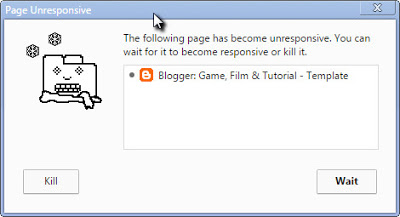
10 |
11 | > #64
--------------------------------------------------------------------------------
/textualContent/content/Archive-2/128.md:
--------------------------------------------------------------------------------
1 | ## Oracle - Handling files ⚡ ⚡️
2 |
3 | For the applications where it is not feasible to store LOBs in the database, you can use BFILES.
4 | A BFILE is a data type whose metadata is stored in the database, but whose actual content is stored in
5 | operating system files outside of the database.
6 |
7 | In essence, a BFILE object is a pointer to an operating system file.
8 |
9 | This is a great resource to understand how to work with BFILE or LOBs in general:
10 | https://docs.oracle.com/cd/B28359_01/java.111/b31224/oralob.htm
11 |
12 | > #128
13 |
--------------------------------------------------------------------------------
/textualContent/content/Archive-2/104.md:
--------------------------------------------------------------------------------
1 | ## Javascript Jazz ⚡⚡️
2 | ### Creating a simple **generator** in JS
3 |
4 | Generator functions are a special kind of function in JavaScript which is declared with the _function*_ syntax. Generator functions are used to create iterator objects (ones with a .next() method) but in a much clearer and more concise way.
5 |
6 | Below is a finite generator that creates an equivalent iterator:
7 |
8 | ```javascript
9 | const createIterator = function* () {
10 | let x = 0;
11 | while (x < 4) {
12 | yield x;
13 | x += 1;
14 | }
15 | };
16 | ```
17 |
18 | > #104
19 |
--------------------------------------------------------------------------------
/textualContent/content/151.md:
--------------------------------------------------------------------------------
1 | tion, Spring provides the @Component annotation. Applying this annotation to class informs Spring that the class is a component and an object of this class can be instantiated and injected into another component. The @Component interface is applied to a class in the following manner:
2 |
3 | ```java
4 |
5 | @Component
6 | public class FooComponent {}
7 |
8 | ```
9 | lthough the @Component annotation suffices to inform Spring of the injectability of a bean; Spring also provides specialized annotations that can be used to create components with more meaningful contextual information.
10 |
11 |
--------------------------------------------------------------------------------
/textualContent/content/152.md:
--------------------------------------------------------------------------------
1 | n general, the concept of service in enterprise applications is vague, but in the context of a Spring application, a service is any class that provides methods to interact with domain logic or external components without maintaining state that changes the overall behavior of the service. For example, a service may act on behalf of an application to obtain documents from a database or obtain data from an external REST API.
2 |
3 | ```java
4 | @Service
5 | public class FooService {}
6 | ```
7 |
8 | In practice, @Service and @Component are often used interchangeably due to the all-encompassing definition of a service.
9 |
--------------------------------------------------------------------------------
/textualContent/content/Archive-1/66.md:
--------------------------------------------------------------------------------
1 | ## Audio On Web ⚡️⚡️
2 | ### Creating your HTMLAudioElement entirely in javascript
3 |
4 | ```javascript
5 | var flush = new Audio('toilet_flush.wav');
6 | flush.play();
7 | ```
8 |
9 | Some of the more commonly used properties of the audio element includes
10 | **src, currentTime, duration, paused, muted and volume**.
11 |
12 | ```javascript
13 | var flush = new Audio('toilet_flush.wav');
14 | flush.addEventListener('loadeddata',() => {
15 | var duration = flush.duration; // the duration variable now holds the duration (in seconds) of the audio clip
16 | })
17 | ```
18 |
19 | > #66
--------------------------------------------------------------------------------
/textualContent/content/153.md:
--------------------------------------------------------------------------------
1 |
2 | i/ start few async tasks with varying prmework treats beans annotated with @Repository with special exception processing. To maintain a consistent data interface, Spring can translate the exceptions thrown by native repositories — such as SQL or Hibernate implementations — into general exceptions that can be handled uniformly. To include exception translation for classes annotated with @Repository, we instantiate a bean of type PersistenceExceptionTranslationPostProcessorocessing times, two last with callback handlers
3 |
4 |
5 | https://dzone.com/articles/5-spring-annotations-every-java-developer-should-k
6 |
--------------------------------------------------------------------------------
/textualContent/content/Archive-2/143.md:
--------------------------------------------------------------------------------
1 | ```js
2 | function range(left, right) {
3 | return {
4 | [Symbol.iterator]: () => {
5 | let x = left;
6 | return {
7 | next: () => {
8 | if(x <= right) {
9 | return {done: false, value: x++}
10 | } else {
11 |
12 | return {done: true}
13 | }
14 | }
15 | }
16 | }
17 | }
18 | }
19 |
20 |
21 | for(let x of range(10, 1500)) {
22 | console.log(x)
23 | }
24 |
25 | ```
26 |
27 | Getter getters abstraction. JS detects that there is symbola and it returns object awith next. it calls next for every iteration. that allows us to use for of loop
28 |
29 |
--------------------------------------------------------------------------------
/textualContent/content/Archive-1/92.md:
--------------------------------------------------------------------------------
1 | ## Riddle Me ⚡⚡️
2 | ### Return in a finally Block
3 |
4 | Consider this java code snippet, what is the output?
5 |
6 | ```java
7 | public String doSomething() {
8 | String name = "David";
9 | try {
10 | throw new IOException();
11 | } finally {
12 | return name;
13 | }
14 | }
15 | ```
16 |
17 | In this case, even though the try block throws a new IOException, we use return in the finally block, ending it abruptly. This causes the try block to end abruptly due to the return statement, and not the IOException, essentially dropping the exception in the process.
18 |
19 | > #92
20 |
--------------------------------------------------------------------------------
/textualContent/content/161.md:
--------------------------------------------------------------------------------
1 | Example class implemenation conforming encapsulation
2 | notice setters and getters
3 | ```
4 | public class MyClass {
5 | private final List myStrings = new ArrayList<>();
6 | public void setMyStrings(Collection s) {
7 | this.myStrings.clear();
8 | if (s != null) {
9 | this.myStrings.addAll(s);
10 | }
11 | }
12 | public List getMyStrings() {
13 | return new ArrayList<>(this.myStrings);
14 | }
15 | public void addString(String s) {
16 | this.myStrings.add(s);
17 | }
18 | public void removeString(String s) {
19 | this.myStrings.remove(s);
20 | }
21 | // And maybe a few more helpful methods...
22 | }``
23 |
24 | ```
25 |
--------------------------------------------------------------------------------
/textualContent/content_old/1_week/3_1_frameworks.txt:
--------------------------------------------------------------------------------
1 | ##### Approximations for GZipped versions
2 |
3 | Name | Size
4 | ------------- | -------------
5 | Ember 2.2.0 | 111K
6 | Ember 1.13.8 | 123K
7 | Angular 2 | 111K
8 | Angular 2 + Rx | **143K**
9 | Angular 1.4.5 | 51K
10 | React 0.14.5 + React DOM | 40K
11 | React 0.14.5 + React DOM + Redux | 42K
12 | React 15.3.0 + React DOM | 43K
13 | React 16.2.0 + React DOM | 31.8K
14 | Vue 2.4.2 | **20.9K**
15 | Inferno 1.2.2 | 20K
16 | Preact 7.2.0 | **4kb**
17 | Aurelia 1.0.2 | 63K
18 |
19 | ---
20 |
21 | Also take a look at this awesome tool https://cost-of-modules.herokuapp.com created by @pastelsky
--------------------------------------------------------------------------------
/textualContent/content/Archive-2/136.md:
--------------------------------------------------------------------------------
1 | ## Java 8 ⚡⚡️
2 | ### Use Java.util.StringJoiner to join string intuitively
3 |
4 | #### Example 1
5 | ```java
6 | StringJoiner sj = new StringJoiner(',');
7 | sj.add('one').add('two');
8 | sj.toString()
9 |
10 | // output - one, two
11 | ```
12 | No need to use for loop and remove the last delimiter
13 |
14 | #### Example 2
15 | ```java
16 | StringJoiner myDate = new StringJoiner("-", "{", "}");
17 | myDate.add("1985");
18 | myDate.add("11");
19 | myDate.add("22");
20 | String birthDate = myDate.toString();
21 | log("2. StringJoiner with Prefix and Suffix: " + birthDate);
22 | // output - {1985-11-22}
23 | ```
24 |
25 | > #136
26 |
--------------------------------------------------------------------------------
/textualContent/content/Archive-1/56.md:
--------------------------------------------------------------------------------
1 | ## That Thing ⚡️⚡️
2 | ### Introducing Android 9 Pie 🐷
3 |
4 | The silence is broken, Andriod P is officially called Andriod Pie.
5 |
6 | Here are the top features,
7 | 1. Adaptive Battery
8 | 2. Slices
9 | - Slices can help users perform tasks faster by enabling engagement outside of the fullscreen app experience.
10 | 3. App Actions
11 | - App Actions is a new way to raise the visibility of your app and drive engagement.
12 | 4. Text Classifier and Smart Linkify (_this is helpful_) and many more...
13 |
14 | For complete details visit the official blog post [post](https://android-developers.googleblog.com/2018/08/introducing-android-9-pie.html)
15 |
16 | >#56
--------------------------------------------------------------------------------
/textualContent/content/Archive-1/54.md:
--------------------------------------------------------------------------------
1 | ## Web API's ⚡️⚡️
2 | ### Page Visibility API
3 | ```javascript
4 | function handleVisibilityChange() {
5 | if (document.hidden) {
6 | pauseSimulation();
7 | } else {
8 | startSimulation();
9 | }
10 | }
11 |
12 | document.addEventListener("visibilitychange", handleVisibilityChange, false);
13 | ```
14 |
15 | ## Use cases
16 | 1. An application showing a dashboard of information doesn't want to poll the server for updates when the page isn't visible
17 | 2. A page wants to detect when it is being prerendered so it can keep accurate count of page views
18 | 3. A site wants to switch off sounds when a device is in standby mode (user pushes power button to turn screen off)
19 |
20 | >#54
--------------------------------------------------------------------------------
/textualContent/content/Archive-1/86.md:
--------------------------------------------------------------------------------
1 | ## Javascript Gym ⚡⚡️ - Riddle
2 |
3 | ### Implement Animal in such a way that regardless of if Animal is invoked with the new keyword, it’ll still works
4 |
5 | ```javascript
6 | var animal_normal = new Animal()
7 | var animal_abnormal = Animal()
8 |
9 | console.log(animal_normal instanceof Animal); // true
10 | console.log(animal_abnormal instanceof Animal); // true
11 | ```
12 |
13 | > #85
14 |
15 |
16 | ```javascript
17 | function Animal (name, energy) {
18 | if (this instanceof Animal === false) {
19 | return new Animal(name, energy)
20 | }
21 |
22 | this.name = name
23 | this.energy = energy
24 | }
25 | ```
26 |
27 | Now regardless of if Animal is invoked with the new keyword, it’ll still work properly.
--------------------------------------------------------------------------------
/README.md:
--------------------------------------------------------------------------------
1 |
2 | A-Little-Better-Than-Yesterday 😇
3 |
4 | A new way to subscribe on [Little-Better-Than-Yesterday](https://github.com/makaravind/LBTY) to get great curated, mini treats daily of developer news, updates, best practices and everything in between. Updates come as [GitHub notifications].
5 |
6 | #### Direct Links
7 | - [Daily Mini Treats](https://github.com/makaravind/ALBTY/issues/1) 🍬 🍭
8 |
9 | #### okay I'm intrigued ! How can I get treats straight to my mail ? 📣
10 | 
11 |
12 |
--------------------------------------------------------------------------------
/textualContent/content/Archive-1/88.md:
--------------------------------------------------------------------------------
1 | ## Java Jam
2 |
3 | ### Check out this code snippet!
4 |
5 | ```java
6 | public File getFile(String url) throws FileNotFoundException {
7 | // some code
8 | throw new FileNotFoundException();
9 | }
10 | ```
11 |
12 | No return ? still a valid java code! here is how...
13 |
14 | We are required to mark our method signature with a throws clause. A method can add as many exceptions as needed in its throws clause, and can throw them later on in the code, but doesn't have to. This method doesn't require a return statement, even though it defines a return type. This is because it throws an exception by default, which ends the flow of the method abruptly. The return statement, therefore, would be unreachable and cause a compilation error.
15 |
16 | > #89
--------------------------------------------------------------------------------
/textualContent/content/Archive-2/137.md.skipped:
--------------------------------------------------------------------------------
1 | But that doesn’t work now, because $watch is looking for the watched property inside the $scope,
2 | and you don’t directly bind that property to $scope. Instead watched property is binded to this.
3 | The correct way to do it now is as shown in the following example:
4 |
5 | app.controller('Ctrl', function ($scope) {
6 | this.name = 'name';
7 |
8 | $scope.$watch(function () {
9 | return this.title
10 | }.bind(this), function (newVal, oldVal) {
11 |
12 | });
13 | });
14 | Alternative is using angular.bind:
15 |
16 | app.controller('Ctrl', function ($scope) {
17 | this.name = 'name';
18 |
19 | $scope.$watch(angular.bind(function () {
20 | return this.title
21 | }), function (newVal, oldVal) {
22 |
23 | });
24 | });
25 |
--------------------------------------------------------------------------------
/textualContent/content/Archive-1/73.md:
--------------------------------------------------------------------------------
1 | ## Javascript Gym ⚡⚡️
2 | ### Types of property descriptors
3 |
4 | A particular property descriptor needs to be either an Accessor Property or a Data Property, they can’t be combined
5 |
6 | ```javascript
7 | const obj1 = {
8 | a: 1
9 | }
10 |
11 | console.log(Object
12 | .getOwnPropertyDescriptor(obj1, 'a'))
13 |
14 | {
15 | value: 1,
16 | writable: true,
17 | enumerable: true,
18 | configurable: true
19 | } // (e.g. Data Property)
20 | ```
21 |
22 |
23 | ```javascript
24 | const obj2 = {
25 | get b() { }
26 | }
27 |
28 | console.log(Object
29 | .getOwnPropertyDescriptor(obj2, 'b'))
30 |
31 | {
32 | get: Function,
33 | set: undefined,
34 | enumerable: true,
35 | configurable: true
36 | } // (e.g. Accessor Property)
37 |
38 | ```
39 |
40 | > #73
--------------------------------------------------------------------------------
/textualContent/content/Archive-1/82.md:
--------------------------------------------------------------------------------
1 | ## Stylish CSS ⚡⚡️
2 | ### Specificity
3 |
4 | ```css
5 | p {
6 | color: red
7 | }
8 |
9 | p {
10 | color: blue
11 | }
12 | ```
13 |
14 | Since the CSS sheet is read from top to bottom. Only the second style is applied. All the P elements gets blue color.
15 |
16 | This behaviour can be modified by adding more specific selectors like classes and Ids.
17 |
18 | ```css
19 | p.specificClass {
20 | color: red
21 | }
22 |
23 | p {
24 | color: blue
25 | }
26 | ```
27 |
28 | Now, The P with 'specificClass' class gets the red color and rest blue color. This property if called specificity.
29 |
30 | Following the increasing order of specificity
31 |
32 | ```javascript
33 | /*
34 | *[wild-card] (0) < tag selector(1) < class(10) < ID(100) < inline-styles(1000)
35 | */
36 | ```
37 | > #81
--------------------------------------------------------------------------------
/textualContent/content/Archive-1/65.md:
--------------------------------------------------------------------------------
1 | ## Browser Blast ⚡️⚡️
2 |
3 | ### This is a list of popular projects that are implementing a JavaScript engine:
4 |
5 | V8 — open source, developed by Google, written in C++
6 | Rhino — managed by the Mozilla Foundation, open source, developed entirely in Java
7 | SpiderMonkey — the first JavaScript engine, which back in the days powered Netscape Navigator, and today powers Firefox
8 | JavaScriptCore — open source, marketed as Nitro and developed by Apple for Safari
9 | KJS — KDE’s engine originally developed by Harri Porten for the KDE project’s Konqueror web browser
10 | Chakra (JScript9) — Internet Explorer
11 | Chakra (JavaScript) — Microsoft Edge
12 | Nashorn, open source as part of OpenJDK, written by Oracle Java Languages and Tool Group
13 | JerryScript — is a lightweight engine for the Internet of Things.
14 |
15 | > #65
--------------------------------------------------------------------------------
/textualContent/content/Archive-1/99.md:
--------------------------------------------------------------------------------
1 | ## Recommended Secure coding - Canonicalize path names before validating them
2 |
3 | The user can specify a file outside the intended directory by entering an argument that contains ../ sequences. Which is a valid path in a directory in linux.
4 |
5 | File.getCanonicalPath() method, introduced in Java 2, which fully resolves the argument and constructs a canonicalized path. Special file names such as dot dot (..) are also removed so that the input is reduced to a canonicalized form before validation is carried out. An attacker cannot use ../ sequences to break out of the specified directory when the validate() method is present.
6 |
7 | For example, the path /img/../etc/passwd resolves to /etc/passwd.
8 |
9 | [source](https://wiki.sei.cmu.edu/confluence/display/java/FIO16-J.+Canonicalize+path+names+before+validating+them)
10 |
--------------------------------------------------------------------------------
/textualContent/content/Archive-1/89.md:
--------------------------------------------------------------------------------
1 |
2 | ```java
3 | public String readFirstLine(String url) throws FileNotFoundException {
4 | try {
5 | Scanner scanner = new Scanner(new File(url));
6 | return scanner.nextLine();
7 | } catch(FileNotFoundException ex) {
8 | throw ex;
9 | }
10 | }
11 | ```
12 | try-with-resources Statement
13 | The previously complex and verbose block can be substituted with:
14 |
15 |
16 | ```java
17 |
18 | static String readFirstLineFromFile(String path) throws IOException {
19 | try(BufferedReader br = new BufferedReader(new FileReader(path))) {
20 | return br.readLine();
21 | }
22 | }
23 | ```
24 |
25 | This way, you don't have to concern yourself with closing the resources yourself, as the try-with-resources block ensures that the resources will be closed upon the end of the statement.
--------------------------------------------------------------------------------
/textualContent/content/Archive-1/84.md:
--------------------------------------------------------------------------------
1 | ## Immediately Invoked Async Function Expressions
2 |
3 | ### Sometimes, it’d be nice if you could use await at the top level of a module or script. Alas, it’s only available inside async functions. You therefore have several options.
4 |
5 | You can either create an async function main() and call it immediately afterwards:
6 |
7 | ```javascript
8 |
9 | async function main() {
10 | console.log(await asyncFunction());
11 | }
12 | main();
13 | ```
14 |
15 | Or you can use an Immediately Invoked Async Function Expression:
16 |
17 | ```javascript
18 | (async function () {
19 | console.log(await asyncFunction());
20 | })();
21 | ```
22 |
23 | Another option is an Immediately Invoked Async Arrow Function:
24 |
25 | ```javascript
26 | (async () => {
27 | console.log(await asyncFunction());
28 | })();
29 | ```
30 |
31 | > #84
--------------------------------------------------------------------------------
/textualContent/content/Archive-1/98.md:
--------------------------------------------------------------------------------
1 | Recommended Secure coding - Normalize strings before validating them
2 |
3 | first things first, is Normalization different form validations? Yes
4 |
5 | "Normalization is important because in Unicode, the same string can have many different representations. According to the Unicode Standard [Davis 2008], annex #15"
6 |
7 | "...The most suitable normalization form for performing input validation on arbitrarily encoded strings is KC (NFKC) ."
8 |
9 | For example in Java, The Normalizer.normalize() method transforms Unicode text into the standard normalization forms described in Unicode Standard Annex #15 Unicode Normalization Forms.
10 | ```java
11 |
12 | // Normalize
13 | s = Normalizer.normalize(s, Form.NFKC);
14 |
15 | ```
16 | [source](https://wiki.sei.cmu.edu/confluence/display/java/IDS01-J.+Normalize+strings+before+validating+them )
17 |
18 | > #98
19 |
--------------------------------------------------------------------------------
/textualContent/content/165.md:
--------------------------------------------------------------------------------
1 | Minimalism — The most undervalued development skill
2 |
3 | onerror is a special browser event that fires whenever an uncaught JavaScript error has been thrown. It’s one of the easiest ways to log client-side errors and report them to your servers. It’s also one of the major mechanisms by which Sentry’s client JavaScript integration (raven-js) works.
4 |
5 | ```
6 | window.onerror = function(msg, _path, line, column, error) {
7 | fetch('/errors', {
8 | error: error ? error.stack : '',
9 | column: column,
10 | line: line,
11 | msg: msg
12 | })
13 | return false
14 | }
15 |
16 | ```
17 | This is all we need. Works perfectly and gets the job done.
18 |
19 | note: It is does not work in chrome console.
20 | source : https://volument.com/blog/minimalism-the-most-undervalued-development-skill
21 | https://blog.sentry.io/2016/01/04/client-javascript-reporting-window-onerror
22 |
--------------------------------------------------------------------------------
/textualContent/content/177.md:
--------------------------------------------------------------------------------
1 | reduce alternative code
2 | more readable
3 |
4 | # example 1
5 | ```
6 | numbers.reduce(
7 | (max, number) => Math.max(max, number),
8 | 0
9 | )
10 |
11 | // alternative
12 | Math.max(...numbers);
13 | ```
14 |
15 | #example 2
16 | ```
17 | const graph =
18 | edges.reduce((g, edge) => {
19 | const [u, v] = edge;
20 | if(!g.has(u)) g.set(u, []);
21 | if(!g.has(v)) g.set(v, []);
22 | g.get(u).push(v);
23 | return g;
24 | }, new Map());
25 |
26 | // alternative - just use loop - more readable
27 | const g = new Map();
28 | for(const [u,v] in edges) {
29 | if(!g.has(u)) g.set(u, []);
30 | if(!g.has(v)) g.set(v, []);
31 | g.get(u).push(v);
32 | }
33 | ```
34 |
35 | # example 3
36 | ```
37 | arr.reduce((final, ele) => {
38 | if(Array.isArray(ele))
39 | return [...final, ...ele];
40 | return [...final, ele]
41 | }, []);
42 |
43 | // alternative
44 | arr.flat();
45 | ```
46 |
47 |
48 |
49 |
50 |
--------------------------------------------------------------------------------
/textualContent/content/Archive-1/71.md:
--------------------------------------------------------------------------------
1 | ## Javascript Gym ⚡️⚡️
2 | ### Property descriptors - Writable and Configurable
3 |
4 | While value and enumerable deal with reading properties, writable and configurable deal with writing properties
5 |
6 | If a property has writable set to false then that property’s value cannot be reassigned another value.
7 |
8 | If a property has configurable set to false then it cannot be deleted and it cannot have its property descriptor changed again.
9 |
10 |
11 | ```javascript
12 | const obj = Object.defineProperty({}, 'foo', {
13 | value: 'hello',
14 | writable: false, // reassignable?
15 | configurable: false // deletable/redefinable?
16 | })
17 | obj.foo = 'bye'
18 | console.log(obj.foo) // 'hello'
19 | delete obj.foo
20 | console.log(obj.foo) // 'hello'
21 | Object.defineProperty(obj, 'foo', {
22 | value: 1
23 | }) // TypeError: Cannot redefine property: foo
24 |
25 | ```
26 |
27 | > #71
--------------------------------------------------------------------------------
/textualContent/content/Archive-1/74.md:
--------------------------------------------------------------------------------
1 | ## Javascript Gym ⚡⚡️
2 | ### Solve this riddle
3 |
4 | ```javascript
5 | // What code could lead to this outcome?
6 | if (typeof obj.p === 'number' && obj.p > 10) {
7 | console.log(obj.p) // outputs the string 'lies!'
8 | }
9 | ```
10 |
11 | ### wait for the answer tomorrow
12 | > #74
13 |
14 | answer:
15 |
16 | ```javascript
17 | let accesses = 0
18 | const obj = Object.defineProperty({}, 'p', {
19 | get: () => {
20 | if (accesses++ >= 2) {
21 | return 'lies!'
22 | }
23 | return 12
24 | }
25 | })
26 | ```
27 |
28 | This situation can be prevented by reading the value from the object a single time, assigning the result of that read to an intermediary value
29 |
30 | ```javascript
31 |
32 | const p = obj.p // read object properties once
33 | if (typeof p === 'number' && p > 10) {
34 | console.log(p) // 12
35 | }
36 | ```
37 |
38 |
39 |
40 |
41 |
--------------------------------------------------------------------------------
/textualContent/content/166.md:
--------------------------------------------------------------------------------
1 | this is a very interesting read on how bioinformatics and AI is evolving.
2 | http://www.wiringthebrain.com/2020/01/how-much-innate-knowledge-can-genome.html
3 | snippets from article:
4 | "In a recent debate between Gary Marcus and Yoshua Bengio about the future of Artificial Intelligence, the question came up of how much information the genome can encode. This relates to the idea of how much innate or prior “knowledge” human beings are really born with, versus what we learn through experience. This is a hot topic in AI these days as people debate how much prior knowledge needs to be pre-wired into AI systems, in order to get them to achieve something more akin to natural intelligence."
5 | " Being amazed that you can make a human with only 20,000 genes is thus like being amazed that Shakespeare could write all those plays with only 26 letters. It’s totally missing where the actual, meaningful information is and how it is decoded. "
6 |
7 |
8 |
9 |
--------------------------------------------------------------------------------
/textualContent/content/Archive-1/69.md:
--------------------------------------------------------------------------------
1 | ## Javascript Gym ⚡️⚡️
2 | ### Property Descriptors
3 |
4 | _property descriptors let you lie_
5 |
6 | ```javascript
7 | Object.defineProperty(
8 | obj,
9 | propertyName,
10 | descriptors
11 | )
12 | ```
13 |
14 | In this example, obj is an Object which you want to define a property on. propertyName is a string name of the property. Finally, descriptors is an object describing the property descriptors. Let’s now take a look at the different types of descriptors which can be set.
15 |
16 | example:
17 | ```javascript
18 | const obj = {}
19 | Object.defineProperty(obj, 'foo', {
20 | value: 'hello', // the property value
21 | enumerable: false // property will not be listed
22 | })
23 | console.log(obj) // {}
24 | console.log(obj.foo) // 'hello'
25 | console.log(Object.keys(obj)) // []
26 | console.log(Reflect.ownKeys(obj)) // [ 'foo' ]
27 | console.log('foo' in obj) // true
28 | ```
29 |
30 | > #69
31 |
32 |
--------------------------------------------------------------------------------
/textualContent/content/Archive-1/94.md:
--------------------------------------------------------------------------------
1 | ## Javascript Gym
2 |
3 | ## Create React App 2.0
4 | It brings a year’s worth of improvements in a single dependency update. Here’s a short summary of what’s new in this release:
5 | • More styling options: you can use Sass and CSS Modules out of the box.
6 | • Updated to Babel 7, including support for the React fragment syntax and many bugfixes.
7 | • Updated to webpack 4, which automatically splits JS bundles more intelligently.
8 | • Updated to Jest 23, which includes an interactive mode for reviewing snapshots.
9 | • Added PostCSS so you can use new CSS features in old browsers.
10 | • You can use Apollo, Relay Modern, MDX, and other third-party Babel Macros transforms.
11 | • You can now import an SVG as a React component, and use it in JSX.
12 | • You can try the experimental Yarn Plug’n’Play mode that removes node_modules.
13 | • You can now plug your own proxy implementation in development to match your backend API.
14 | source : reactjs.org
15 |
16 | > #94
17 |
--------------------------------------------------------------------------------
/textualContent/content/Archive-1/43.md:
--------------------------------------------------------------------------------
1 | ## Cache Buster ⚡️⚡️
2 | ### What is server-side caching?
3 |
4 | 
5 |
6 | In the image above, A caching proxy is a server that stores the static files that are used to respond to common requests. A caching proxy will intercept common requests and quickly deliver a response. It prevents those requests from stressing your main web servers.
7 |
8 | The caching proxy will have different files that have been cached at different times, and it needs to decide whether it should still serve these files. This will depend on your _caching policy_.
9 |
10 | Whole bunch of these situated across the world forms, what's called as **CDN**
11 |
12 | Some common CDN providers include **Rackspace, Akamai, and Amazon Web Services.**
13 |
14 | [source](https://dev.to/kbk0125/web-caching-explained-by-buying-milk-at-the-supermarket-9k4?utm_source=mybridge&utm_medium=blog&utm_campaign=read_more)
15 |
16 | > #43
--------------------------------------------------------------------------------
/textualContent/content/Archive-1/90.md:
--------------------------------------------------------------------------------
1 | ## Clean Code ⚡⚡️
2 | ### Best Exception Handling Practices - 1
3 |
4 | Avoid Exceptional Conditions
5 | Sometimes, by using simple checks, we can avoid an exception forming altogether:
6 |
7 | ```java
8 | public Employee getEmployee(int i) {
9 | Employee[] employeeArray = {new Employee("David"), new Employee("Rhett"), new
10 | Employee("Scott")};
11 |
12 | if(i >= employeeArray.length) {
13 | System.out.println("Index is too high!");
14 | return null;
15 | } else {
16 | System.out.println("Employee found: " + employeeArray[i].name);
17 | return employeeArray[i];
18 | }
19 | }
20 | }
21 |
22 | ```
23 | Calling this method with a valid index would result in:
24 |
25 | Employee found: Scott
26 | But calling this method with an index that's out of bounds would result in:
27 |
28 | Index is too high!
29 | In any case, even though the index is too high, the offending line of code will not execute and no exception will arise.
30 |
31 | > #90
32 |
--------------------------------------------------------------------------------
/textualContent/content/Archive-1/63.md:
--------------------------------------------------------------------------------
1 | ## Hot HTML ⚡️⚡️
2 |
3 | ```javascript
4 |
9 | ...
10 |
11 | ```
12 |
13 | HTML5 is designed with extensibility in mind for data that should be associated with a particular element but need not have any defined meaning. data-* attributes allow us to store extra information on standard,
14 |
15 | to get a data attribute through the dataset object, get the property by the part of the attribute name after data- (note that dashes are converted to camelCase).
16 |
17 | ### Issues
18 | 1. The main issues to consider are Internet Explorer support and performance. Internet Explorer 11+ provides support for the standard, but all earlier versions do not support dataset. To support IE 10 and under you need to access data attributes with getAttribute() instead.
19 | 2. Also, the performance of reading data-attributes compared to storing this data in a regular JS object is poor.
20 |
21 | > #63
22 |
--------------------------------------------------------------------------------
/textualContent/content/Archive-1/75.md:
--------------------------------------------------------------------------------
1 | ## Javascript Gym ⚡⚡️
2 |
3 | ### Whenever you have a method that is specific to a class itself, but doesn’t need to be shared across instances of that class, you can add it as a static property of the class.
4 |
5 | ```javascript
6 | class Animal {
7 | constructor(name, energy) {
8 | this.name = name
9 | this.energy = energy
10 | }
11 | eat(amount) {
12 | console.log(`${this.name} is eating.`)
13 | this.energy += amount
14 | }
15 | sleep() {
16 | console.log(`${this.name} is sleeping.`)
17 | this.energy += length
18 | }
19 | play() {
20 | console.log(`${this.name} is playing.`)
21 | this.energy -= length
22 | }
23 | static nextToEat(animals) {
24 | const sortedByLeastEnergy = animals.sort((a,b) => {
25 | return a.energy - b.energy
26 | })
27 |
28 | return sortedByLeastEnergy[0].name
29 | }
30 | }
31 | ```
32 |
33 | Now, because we added nextToEat as a static property on the class, it lives on the Animal class itself (not its prototype)
34 |
35 | > #75
--------------------------------------------------------------------------------
/textualContent/content/167.md:
--------------------------------------------------------------------------------
1 | java Nested Class
2 | A nested class refers to the idea of defining one class inside another class. The scope of the nested class is bounded by the scope of the enclosing classes. That means if Pearl is a class defined within, say, the Oyster class, the object of Pearl cannot exist without the existence of an Oyster object and the class within the class, Pearl, can access all the members of the Oyster class, including private members. But, the external class, such as Oyster, cannot access the members of Pearl class.
3 | 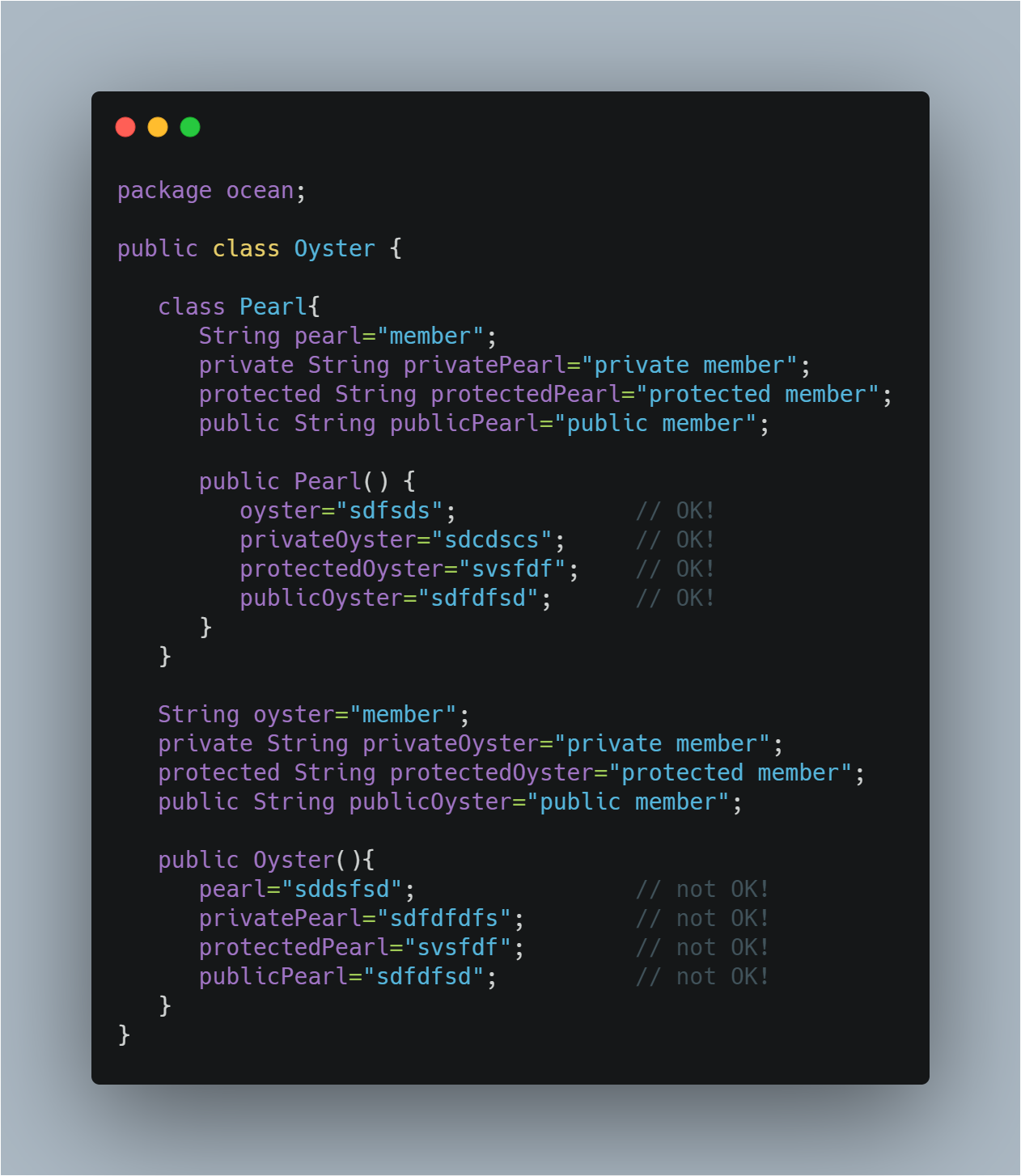
4 |
5 | Now, the nested class can be of two types, a static nested class and a non-static nested class. A nested class, Pearl, which is declared static with the static modifier, cannot access the members of the enclosing class Oyster directly because the nested class Pearl is now static. As a result, it needs an object of the Oyster class to access the members of its enclosing class. Static nested classes are very rarely used.
6 |
--------------------------------------------------------------------------------
/textualContent/content/Archive-2/144.md:
--------------------------------------------------------------------------------
1 | Database Sharding ⚡⚡️
2 | Temporal sharding of relation DBs
3 | Sharding is taking a single logical data model and partitioning it into disjoint subsets, ideally so that relationships between records in the data model do not span a single "shard".
4 |
5 | In practice, a shard is often an independent database instance. A simple example would be sharding a database of people by the last name such that names that start with "a" are on shard 1, "b" are on shard 2, etc.
6 |
7 | Distributed hash tables are a special case of sharding; all records can be sharded but there will be no common relationship between records on a particular shard.
8 |
9 | Flaws:
10 | Load balancing - Most of the old machines didn't get any traffic because people are interested in what is happening now, especially with Twitter. If data is sharded on poor fields.
11 | Expensive - They filled up one machine, with all its replication slaves, every three weeks, which is an expensive setup.
12 | Logistically complicated - Building a whole new cluster every three weeks is a pain for the DBA team.
13 |
--------------------------------------------------------------------------------
/LICENSE:
--------------------------------------------------------------------------------
1 | MIT License
2 |
3 | Copyright (c) 2018 aravind m
4 |
5 | Permission is hereby granted, free of charge, to any person obtaining a copy
6 | of this software and associated documentation files (the "Software"), to deal
7 | in the Software without restriction, including without limitation the rights
8 | to use, copy, modify, merge, publish, distribute, sublicense, and/or sell
9 | copies of the Software, and to permit persons to whom the Software is
10 | furnished to do so, subject to the following conditions:
11 |
12 | The above copyright notice and this permission notice shall be included in all
13 | copies or substantial portions of the Software.
14 |
15 | THE SOFTWARE IS PROVIDED "AS IS", WITHOUT WARRANTY OF ANY KIND, EXPRESS OR
16 | IMPLIED, INCLUDING BUT NOT LIMITED TO THE WARRANTIES OF MERCHANTABILITY,
17 | FITNESS FOR A PARTICULAR PURPOSE AND NONINFRINGEMENT. IN NO EVENT SHALL THE
18 | AUTHORS OR COPYRIGHT HOLDERS BE LIABLE FOR ANY CLAIM, DAMAGES OR OTHER
19 | LIABILITY, WHETHER IN AN ACTION OF CONTRACT, TORT OR OTHERWISE, ARISING FROM,
20 | OUT OF OR IN CONNECTION WITH THE SOFTWARE OR THE USE OR OTHER DEALINGS IN THE
21 | SOFTWARE.
22 |
--------------------------------------------------------------------------------
/textualContent/content/Archive-1/44.md:
--------------------------------------------------------------------------------
1 | ## Cache Buster ⚡️⚡️
2 | ### Client-Side Caching - browser
3 |
4 | People across the country (or the world) can get responses quickly through CDN. There’s just one issue — they have no way to store it. Your customers still need to request for the resources incase of refresh.
5 |
6 | The solution? Client-Side Caching
7 |
8 | 
9 |
10 | Separate location for storing static assets since it is on the client-side, or on the same computer as the browser.
11 |
12 | This is great for sites like Facebook or Amazon that you might frequently visit. It’s great for their server costs too, since they can reduce the number of requests they need to handle.
13 |
14 | How does your browser know when to request new files from the server? Otherwise, you would never experience updated versions of these local files. Well, just like milk producers put a date on their milk packaging, servers will add some sort of identifier within the HTTP response header.
15 |
16 | [source](https://dev.to/kbk0125/web-caching-explained-by-buying-milk-at-the-supermarket-9k4?utm_source=mybridge&utm_medium=blog&utm_campaign=read_more)
17 |
18 | > #44
--------------------------------------------------------------------------------
/textualContent/content/Archive-2/129.md:
--------------------------------------------------------------------------------
1 | ```java
2 |
3 | Observable ints =
4 | Observable.create(subscriber -> {
5 | log("Create");
6 | subscriber.onNext(42);
7 | subscriber.onCompleted();
8 | }
9 | );
10 | log("Starting");
11 | ints.subscribe(i -> log("Element A: " + i));
12 | ints.subscribe(i -> log("Element B: " + i));
13 | log("Exit");
14 |
15 | /*
16 | main: Starting
17 | main: Create
18 | main: Element A: 42
19 | main: Create
20 | main: Element B: 42
21 | main: Exit
22 | */
23 | ```
24 |
25 | cache() does is stand between subscribe() and our custom Observable. When the first subscriber appears, cache() delegates subscription to the underlying Observable and forwards all notifications (events, completions, or errors) downstream. However, at the same time, it keeps a copy of all notifications internally. When a subsequent subscriber wants to receive pushed notifications, cache() no longer delegates to the underlying Observable but instead feeds cached values. With caching, the output for two Subscribers is quite different:
26 |
27 | ```java
28 | main: Starting
29 | main: Create
30 | main: Element A: 42
31 | main: Element B: 42
32 | main: Exit
33 | ```
34 |
--------------------------------------------------------------------------------
/textualContent/content/Archive-1/100.md:
--------------------------------------------------------------------------------
1 | ## Recommended Secure coding - Specify an appropriate locale when comparing locale-dependent data
2 |
3 | consider the following java code snippet
4 |
5 | ```java
6 |
7 | public static void processTag(String tag) {
8 | if (tag.toUpperCase().equals("SCRIPT")) {
9 | return;
10 | }
11 | // Process tag
12 | }
13 |
14 |
15 | ```
16 |
17 | This noncompliant code example uses the locale-dependent String.toUpperCase() method to convert an HTML tag to uppercase to check it for further processing. The code must ignore 