├── .github └── FUNDING.yml ├── Hype_world.hype.zip ├── Hype iOS drop files ├── Hype WKWebView - Single View App.xctemplate │ ├── TemplateIcon.png │ ├── TemplateIcon@2x.png │ ├── IDETemplateMacros.plist │ ├── Hype_world.html │ ├── Main.storyboard │ ├── ___VARIABLE_rootClassName___.swift │ ├── ___VARIABLE_rootClassNameWithNoMediaReqUserActionPlayback___.swift │ └── TemplateInfo.plist └── Hype WKWebView - PostMessage Example App.xctemplate │ ├── TemplateIcon.png │ ├── TemplateIcon@2x.png │ ├── Hype_world.hyperesources │ ├── blank.gif │ ├── 5A95C7-restorable.plist │ ├── hypeworld_hype_generated_script.js │ ├── PIE.htc │ └── HYPE-598.thin.min.js │ ├── Main.storyboard │ ├── Hype_world.html │ ├── TemplateInfo.plist │ └── ___VARIABLE_HypeTestClassName___.swift ├── LICENSE └── README.md /.github/FUNDING.yml: -------------------------------------------------------------------------------- 1 | # These are supported funding model platforms 2 | 3 | github: markhunte 4 | -------------------------------------------------------------------------------- /Hype_world.hype.zip: -------------------------------------------------------------------------------- https://raw.githubusercontent.com/markhunte/Xcode-Build-Templates-for-Hype-html/HEAD/Hype_world.hype.zip -------------------------------------------------------------------------------- /Hype iOS drop files/Hype WKWebView - Single View App.xctemplate/TemplateIcon.png: -------------------------------------------------------------------------------- https://raw.githubusercontent.com/markhunte/Xcode-Build-Templates-for-Hype-html/HEAD/Hype iOS drop files/Hype WKWebView - Single View App.xctemplate/TemplateIcon.png -------------------------------------------------------------------------------- /Hype iOS drop files/Hype WKWebView - Single View App.xctemplate/TemplateIcon@2x.png: -------------------------------------------------------------------------------- https://raw.githubusercontent.com/markhunte/Xcode-Build-Templates-for-Hype-html/HEAD/Hype iOS drop files/Hype WKWebView - Single View App.xctemplate/TemplateIcon@2x.png -------------------------------------------------------------------------------- /Hype iOS drop files/Hype WKWebView - PostMessage Example App.xctemplate/TemplateIcon.png: -------------------------------------------------------------------------------- https://raw.githubusercontent.com/markhunte/Xcode-Build-Templates-for-Hype-html/HEAD/Hype iOS drop files/Hype WKWebView - PostMessage Example App.xctemplate/TemplateIcon.png -------------------------------------------------------------------------------- /Hype iOS drop files/Hype WKWebView - PostMessage Example App.xctemplate/TemplateIcon@2x.png: -------------------------------------------------------------------------------- https://raw.githubusercontent.com/markhunte/Xcode-Build-Templates-for-Hype-html/HEAD/Hype iOS drop files/Hype WKWebView - PostMessage Example App.xctemplate/TemplateIcon@2x.png -------------------------------------------------------------------------------- /Hype iOS drop files/Hype WKWebView - PostMessage Example App.xctemplate/Hype_world.hyperesources/blank.gif: -------------------------------------------------------------------------------- https://raw.githubusercontent.com/markhunte/Xcode-Build-Templates-for-Hype-html/HEAD/Hype iOS drop files/Hype WKWebView - PostMessage Example App.xctemplate/Hype_world.hyperesources/blank.gif -------------------------------------------------------------------------------- /Hype iOS drop files/Hype WKWebView - PostMessage Example App.xctemplate/Hype_world.hyperesources/5A95C7-restorable.plist: -------------------------------------------------------------------------------- https://raw.githubusercontent.com/markhunte/Xcode-Build-Templates-for-Hype-html/HEAD/Hype iOS drop files/Hype WKWebView - PostMessage Example App.xctemplate/Hype_world.hyperesources/5A95C7-restorable.plist -------------------------------------------------------------------------------- /Hype iOS drop files/Hype WKWebView - Single View App.xctemplate/IDETemplateMacros.plist: -------------------------------------------------------------------------------- 1 | 2 | 3 | 4 | 5 | ALLOWSINLINEMEDIAPLAYBACK 6 | wconfiguration.allowsInlineMediaPlayback = true 7 | 8 | 9 | -------------------------------------------------------------------------------- /LICENSE: -------------------------------------------------------------------------------- 1 | MIT License 2 | 3 | Copyright (c) 2019 markhunte 4 | 5 | Permission is hereby granted, free of charge, to any person obtaining a copy 6 | of this software and associated documentation files (the "Software"), to deal 7 | in the Software without restriction, including without limitation the rights 8 | to use, copy, modify, merge, publish, distribute, sublicense, and/or sell 9 | copies of the Software, and to permit persons to whom the Software is 10 | furnished to do so, subject to the following conditions: 11 | 12 | The above copyright notice and this permission notice shall be included in all 13 | copies or substantial portions of the Software. 14 | 15 | THE SOFTWARE IS PROVIDED "AS IS", WITHOUT WARRANTY OF ANY KIND, EXPRESS OR 16 | IMPLIED, INCLUDING BUT NOT LIMITED TO THE WARRANTIES OF MERCHANTABILITY, 17 | FITNESS FOR A PARTICULAR PURPOSE AND NONINFRINGEMENT. IN NO EVENT SHALL THE 18 | AUTHORS OR COPYRIGHT HOLDERS BE LIABLE FOR ANY CLAIM, DAMAGES OR OTHER 19 | LIABILITY, WHETHER IN AN ACTION OF CONTRACT, TORT OR OTHERWISE, ARISING FROM, 20 | OUT OF OR IN CONNECTION WITH THE SOFTWARE OR THE USE OR OTHER DEALINGS IN THE 21 | SOFTWARE. 22 | -------------------------------------------------------------------------------- /Hype iOS drop files/Hype WKWebView - Single View App.xctemplate/Hype_world.html: -------------------------------------------------------------------------------- 1 | 2 | 3 | 4 | 5 | 6 | Hype_world 7 | 17 | 18 | 19 | 20 | 21 | 22 | 23 | 24 | 25 | 26 |
27 | 28 |
29 | 30 | 31 | 32 | 33 | 34 | 35 | 36 | 44 | 45 | 46 | 47 | 48 | 49 | -------------------------------------------------------------------------------- /Hype iOS drop files/Hype WKWebView - Single View App.xctemplate/Main.storyboard: -------------------------------------------------------------------------------- 1 | 2 | 3 | 4 | 5 | 6 | 7 | 8 | 9 | 10 | 11 | 12 | 13 | 14 | 15 | 16 | 17 | 18 | 19 | 20 | 21 | 22 | 23 | 24 | 25 | 26 | 27 | 28 | 29 | -------------------------------------------------------------------------------- /Hype iOS drop files/Hype WKWebView - PostMessage Example App.xctemplate/Main.storyboard: -------------------------------------------------------------------------------- 1 | 2 | 3 | 4 | 5 | 6 | 7 | 8 | 9 | 10 | 11 | 12 | 13 | 14 | 15 | 16 | 17 | 18 | 19 | 20 | 21 | 22 | 23 | 24 | 25 | 26 | 27 | 28 | 29 | -------------------------------------------------------------------------------- /Hype iOS drop files/Hype WKWebView - PostMessage Example App.xctemplate/Hype_world.html: -------------------------------------------------------------------------------- 1 | 2 | 3 | 4 | 5 | 6 | Hype_world 7 | 17 | 18 | 19 | 20 | 21 | 22 | 23 | 24 | 25 | 26 |
27 | 28 |
29 | 30 | 31 | 32 | 33 | 34 | 35 | 36 | 64 | 65 | 66 | 67 | 68 | 69 | -------------------------------------------------------------------------------- /Hype iOS drop files/Hype WKWebView - Single View App.xctemplate/___VARIABLE_rootClassName___.swift: -------------------------------------------------------------------------------- 1 | //___FILEHEADER___ 2 | 3 | import UIKit 4 | import WebKit 5 | import AVFoundation 6 | 7 | 8 | class FullScreenWKWebView: WKWebView { 9 | override var safeAreaInsets: UIEdgeInsets { 10 | return UIEdgeInsets(top: 0, left: 0, bottom: 0, right: 0) 11 | } 12 | } 13 | 14 | class ___VARIABLE_rootClassName___: UIViewController, WKNavigationDelegate ,WKScriptMessageHandler { 15 | 16 | 17 | // MARK: Declare a WKWebView 18 | var webView: WKWebView! 19 | 20 | 21 | // MARK: - WKUserContentController: -> webkit Posted messages handler delegate //-- handles messages from hype page 22 | 23 | func userContentController(_ userContentController: WKUserContentController, didReceive message: WKScriptMessage) { 24 | /* UN-COMMENT FOR HYPE AND APP POSTMESSAGE COMMUNICATION 25 | 26 | //-- Posted messages from Hype page code here 27 | 28 | if message.name == messageName { 29 | 30 | //-- Get the message passed to app 31 | var mbody = message.body as! String 32 | 33 | } 34 | */ 35 | } 36 | 37 | 38 | override func viewDidLoad() { 39 | 40 | super.viewDidLoad() 41 | 42 | 43 | // MARK: init config and controller 44 | let wconfiguration = WKWebViewConfiguration() 45 | 46 | 47 | /* MARK: Media playbac 48 | false = Play Media playback with native device player ; true = inline */ 49 | wconfiguration.allowsInlineMediaPlayback = false 50 | 51 | 52 | /* UN-COMMENT FOR HYPE AND APP POSTMESSAGE COMMUNICATION 53 | 54 | 55 | // MARK: WKUserContentController Init : 56 | // We must add the webkit scripts Posted messages we expect to get from the Hype Page to the controller 57 | 58 | let wcontroller = WKUserContentController() 59 | wcontroller.add(self, name: "foo") 60 | 61 | // attach controller, config to WKWebview 62 | wconfiguration.userContentController = wcontroller; 63 | 64 | */ 65 | 66 | 67 | /* MARK: Configure the WKWebView */ 68 | webView = FullScreenWKWebView(frame: .zero, configuration: wconfiguration) 69 | 70 | /* MARK: Config Load HTML: */ 71 | let theFileName = ("___VARIABLE_hypeFileName___" as NSString).lastPathComponent 72 | let htmlPath = Bundle.main.path(forResource: theFileName, ofType: "html") 73 | 74 | let folderPath = Bundle.main.bundlePath 75 | 76 | let baseUrl = URL(fileURLWithPath: folderPath, isDirectory: true) 77 | 78 | do { 79 | 80 | let htmlString = try NSString(contentsOfFile: htmlPath!, encoding: String.Encoding.utf8.rawValue) 81 | 82 | webView.loadHTMLString(htmlString as String, baseURL: baseUrl) 83 | 84 | } catch { 85 | 86 | // catch error 87 | 88 | } 89 | 90 | webView.navigationDelegate = self 91 | 92 | webView.scrollView.bounces = false 93 | webView.scrollView.isScrollEnabled = false 94 | webView.isOpaque = false 95 | webView.isHidden = false 96 | 97 | view = webView 98 | 99 | } 100 | 101 | 102 | 103 | 104 | } 105 | 106 | -------------------------------------------------------------------------------- /Hype iOS drop files/Hype WKWebView - Single View App.xctemplate/___VARIABLE_rootClassNameWithNoMediaReqUserActionPlayback___.swift: -------------------------------------------------------------------------------- 1 | //___FILEHEADER___ 2 | 3 | import UIKit 4 | import WebKit 5 | 6 | 7 | class FullScreenWKWebView: WKWebView { 8 | override var safeAreaInsets: UIEdgeInsets { 9 | return UIEdgeInsets(top: 0, left: 0, bottom: 0, right: 0) 10 | } 11 | } 12 | 13 | class ___VARIABLE_rootClassName___: UIViewController, WKNavigationDelegate ,WKScriptMessageHandler { 14 | 15 | 16 | // MARK: Declare a WKWebView 17 | var webView: WKWebView! 18 | 19 | // MARK: - WKUserContentController: -> webkit Posted messages handler delegate //-- handles messages from hype page 20 | 21 | func userContentController(_ userContentController: WKUserContentController, didReceive message: WKScriptMessage) { 22 | /* UN-COMMENT FOR HYPE AND APP POSTMESSAGE COMMUNICATION 23 | 24 | //-- Posted messages from Hype page code here 25 | 26 | if message.name == messageName { 27 | 28 | //-- Get the message passed to app 29 | var mbody = message.body as! String 30 | 31 | } 32 | */ 33 | } 34 | 35 | 36 | override func viewDidLoad() { 37 | 38 | super.viewDidLoad() 39 | 40 | 41 | // MARK: Init config and controller 42 | let wconfiguration = WKWebViewConfiguration() 43 | 44 | 45 | 46 | /*MARK: Media playback 47 | false = Play Media playback with native device player ; true = inline */ 48 | wconfiguration.allowsInlineMediaPlayback = false 49 | 50 | /* UN-COMMENT FOR HYPE AND APP POSTMESSAGE COMMUNICATION 51 | // MARK: WKUserContentController Init : 52 | // We must add the webkit scripts Posted messages we expect to get from the Hype Page to the controller 53 | 54 | let wcontroller = WKUserContentController() 55 | wcontroller.add(self, name: "foo") 56 | 57 | // attach controller, config to WKWebview 58 | wconfiguration.userContentController = wcontroller; 59 | */ 60 | 61 | 62 | /* MARK: Does not require user interaction for .ie sound auto playback */ 63 | 64 | wconfiguration.mediaTypesRequiringUserActionForPlayback = [] 65 | 66 | 67 | /* MARK: Configure the WKWebView */ 68 | 69 | webView = FullScreenWKWebView(frame: .zero, configuration: wconfiguration) 70 | 71 | 72 | /* MARK: Config Load HTML: */ 73 | let theFileName = ("___VARIABLE_hypeFileName___" as NSString).lastPathComponent 74 | let htmlPath = Bundle.main.path(forResource: theFileName, ofType: "html") 75 | 76 | let folderPath = Bundle.main.bundlePath 77 | 78 | let baseUrl = URL(fileURLWithPath: folderPath, isDirectory: true) 79 | 80 | do { 81 | 82 | let htmlString = try NSString(contentsOfFile: htmlPath!, encoding: String.Encoding.utf8.rawValue) 83 | 84 | webView.loadHTMLString(htmlString as String, baseURL: baseUrl) 85 | 86 | } catch { 87 | 88 | // catch error 89 | 90 | } 91 | 92 | webView.navigationDelegate = self 93 | 94 | webView.scrollView.bounces = false 95 | webView.scrollView.isScrollEnabled = false 96 | webView.isOpaque = false 97 | webView.isHidden = false 98 | 99 | view = webView 100 | 101 | } 102 | 103 | 104 | 105 | 106 | } 107 | 108 | -------------------------------------------------------------------------------- /Hype iOS drop files/Hype WKWebView - PostMessage Example App.xctemplate/TemplateInfo.plist: -------------------------------------------------------------------------------- 1 | 2 | 3 | 4 | 5 | Kind 6 | Xcode.Xcode3.ProjectTemplateUnitKind 7 | Identifier 8 | com.apple.dt.unit.HypeExampleWKWebView.singleViewApplication 9 | Ancestors 10 | 11 | com.apple.dt.unit.storyboardApplication 12 | com.apple.dt.unit.coreDataCocoaTouchApplication 13 | 14 | Concrete 15 | 16 | Description 17 | This template provides a starting point for an application that uses a WKWebView in single view with postMessage examples. It provides a view controller to manage the view, and a storyboard or nib file that contains the view. 18 | 19 | SortOrder 20 | 1 21 | Options 22 | 23 | 24 | Identifier 25 | Template un offical1 26 | Name 27 | * NOTE: THIS IS AN UN-OFFICIAL TEMPLATE 28 | NotPersisted 29 | 30 | Description 31 | THIS IS NOT AN OFFICIAL TUMULT HYPE TEMPLATE 32 | Default 33 | 34 | Type 35 | static 36 | 37 | 38 | Identifier 39 | Template un offical 40 | Name 41 | FOR TUMULT HYPE * 42 | NotPersisted 43 | 44 | Description 45 | THIS IS NOT AN OFFICIAL TUMULT HYPE TEMPLATE 46 | Default 47 | 48 | Type 49 | static 50 | 51 | 52 | Identifier 53 | TestHypeProject 54 | Name 55 | Hype Test Project (Hype_world ) 56 | Description 57 | Test Hype Project 58 | Default 59 | true 60 | Units 61 | 62 | true 63 | 64 | 65 | Nodes 66 | 67 | ___VARIABLE_rootClassName___.swift 68 | Hype_world.html 69 | Hype_world.hyperesources 70 | 71 | RequiredOptions 72 | 73 | languageChoice 74 | Swift 75 | 76 | Definitions 77 | 78 | Base.lproj/Main.storyboard 79 | 80 | Path 81 | Main.storyboard 82 | SortOrder 83 | 99 84 | 85 | ___VARIABLE_rootClassName___.swift 86 | 87 | Path 88 | ___VARIABLE_HypeTestClassName___.swift 89 | 90 | Hype_world.hyperesources 91 | 92 | SortOrder 93 | 100 94 | Path 95 | Hype_world.hyperesources 96 | 97 | Hype_world.html 98 | 99 | Path 100 | Hype_world.html 101 | 102 | 103 | 104 | 105 | 106 | 107 | 108 | Default 109 | WKWebViewController 110 | Type 111 | text 112 | Description 113 | Class Name of root view controller 114 | Name 115 | Root View Controller 116 | Required 117 | 118 | Identifier 119 | rootClassName 120 | 121 | 122 | 123 | 124 | -------------------------------------------------------------------------------- /Hype iOS drop files/Hype WKWebView - PostMessage Example App.xctemplate/___VARIABLE_HypeTestClassName___.swift: -------------------------------------------------------------------------------- 1 | //___FILEHEADER___ 2 | 3 | 4 | import UIKit 5 | import WebKit 6 | import AVFoundation 7 | 8 | 9 | class FullScreenWKWebView: WKWebView { 10 | override var safeAreaInsets: UIEdgeInsets { 11 | return UIEdgeInsets(top: 0, left: 0, bottom: 0, right: 0) 12 | } 13 | } 14 | 15 | 16 | class ___VARIABLE_rootClassName___: UIViewController, WKNavigationDelegate ,WKScriptMessageHandler { 17 | 18 | 19 | //-- declare a WKWebView 20 | var webView: WKWebView! 21 | 22 | //-- declare a any vars 23 | var hello :String = "" 24 | 25 | //-- declare a message name to use later 26 | let messageName = "helloWorld" 27 | 28 | //-- declare a your html file name to use later ( do not include the .html ) 29 | let htmlName = "Hype_world" 30 | 31 | 32 | 33 | 34 | 35 | // MARK: - WKUserContentController: -> webkit Posted messages handler delegate //-- handles messages from hype page 36 | func userContentController(_ userContentController: WKUserContentController, didReceive message: WKScriptMessage) { 37 | 38 | 39 | 40 | 41 | //-- Posted messages from Hype page 42 | if message.name == messageName { 43 | 44 | //-- Get the message passed to app 45 | hello = message.body as! String 46 | 47 | 48 | //-- Speak name 49 | let utterance = AVSpeechUtterance(string:"Hello \( hello)") 50 | utterance.voice = AVSpeechSynthesisVoice(language: "en-US") 51 | 52 | let synth = AVSpeechSynthesizer() 53 | synth.speak(utterance) 54 | 55 | } 56 | 57 | 58 | 59 | } 60 | 61 | 62 | 63 | override func viewDidLoad() { 64 | 65 | super.viewDidLoad() 66 | 67 | 68 | //-- configure the WKWebView 69 | 70 | //-- init config and controller 71 | let wconfiguration = WKWebViewConfiguration() 72 | let wcontroller = WKUserContentController() 73 | 74 | //MARK: WKUserContentController Init : We must add the webkit scripts Posted messages we expect to get from the Hype Page to the controller 75 | wcontroller.add(self, name: messageName ) 76 | 77 | //-- attach controller, config to WKWebview 78 | wconfiguration.userContentController = wcontroller; 79 | 80 | 81 | wconfiguration.allowsInlineMediaPlayback = true 82 | wconfiguration.mediaTypesRequiringUserActionForPlayback = [] 83 | 84 | 85 | webView = FullScreenWKWebView(frame: .zero, configuration: wconfiguration) 86 | 87 | 88 | let theFileName = (htmlName as NSString).lastPathComponent 89 | let htmlPath = Bundle.main.path(forResource: theFileName, ofType: "html") 90 | 91 | let folderPath = Bundle.main.bundlePath 92 | 93 | let baseUrl = URL(fileURLWithPath: folderPath, isDirectory: true) 94 | 95 | do { 96 | 97 | let htmlString = try NSString(contentsOfFile: htmlPath!, encoding: String.Encoding.utf8.rawValue) 98 | 99 | webView.loadHTMLString(htmlString as String, baseURL: baseUrl) 100 | 101 | } catch { 102 | 103 | // catch error 104 | 105 | } 106 | 107 | webView.navigationDelegate = self 108 | 109 | webView.scrollView.bounces = false 110 | webView.scrollView.isScrollEnabled = false 111 | webView.isOpaque = false 112 | webView.isHidden = false 113 | 114 | view = webView 115 | 116 | } 117 | 118 | 119 | // MARK: Action for the App to send message to Hype 120 | @objc func selectorX(_ sender: UIBarButtonItem) { 121 | 122 | webView!.evaluateJavaScript("HYPE.documents['\(htmlName)'].showSceneNamed('\(sender.title!)', HYPE.documents['\(htmlName)'].kSceneTransitionCrossfade, 0.2);", completionHandler:nil ) 123 | 124 | sender.title = ( sender.title == "Scene 2" ? "Scene 1" : "Scene 2") 125 | 126 | 127 | } 128 | 129 | // MARK: Add navigationBar and buttons programmatically 130 | override func viewWillLayoutSubviews() { 131 | 132 | let startingYPos = view.window?.windowScene?.statusBarManager?.statusBarFrame.height ?? 0 133 | 134 | 135 | let width = self.view.frame.width 136 | let navigationBar: UINavigationBar = UINavigationBar(frame: CGRect(x: 0, y: startingYPos, width: width, height: 44)) 137 | self.view.addSubview(navigationBar); 138 | let navigationItem = UINavigationItem(title: "Navigation bar") 139 | let doneBtn = UIBarButtonItem(title: "Scene 2", style: UIBarButtonItem.Style.plain, target: nil, action: #selector(selectorX)) 140 | 141 | navigationItem.rightBarButtonItem = doneBtn 142 | navigationBar.setItems([navigationItem], animated: false) 143 | } 144 | 145 | 146 | 147 | 148 | } 149 | 150 | -------------------------------------------------------------------------------- /Hype iOS drop files/Hype WKWebView - Single View App.xctemplate/TemplateInfo.plist: -------------------------------------------------------------------------------- 1 | 2 | 3 | 4 | 5 | Kind 6 | Xcode.Xcode3.ProjectTemplateUnitKind 7 | Identifier 8 | com.apple.dt.unit.HypeWKWebView.singleViewApplication 9 | Ancestors 10 | 11 | com.apple.dt.unit.storyboardApplication 12 | com.apple.dt.unit.coreDataCocoaTouchApplication 13 | 14 | Concrete 15 | 16 | Description 17 | This template provides a starting point for an application that uses a WKWebView in single view. It provides a view controller to manage the view, and a storyboard or nib file that contains the view. 18 | SortOrder 19 | 1 20 | Options 21 | 22 | 23 | Identifier 24 | Template un offical1 25 | Name 26 | * NOTE: THIS IS AN UN-OFFICIAL TEMPLATE 27 | NotPersisted 28 | 29 | Description 30 | THIS IS NOT AN OFFICIAL TUMULT HYPE TEMPLATE 31 | Default 32 | 33 | Type 34 | static 35 | 36 | 37 | Identifier 38 | Template un offical 39 | Name 40 | FOR TUMULT HYPE * 41 | NotPersisted 42 | 43 | Description 44 | THIS IS NOT AN OFFICIAL TUMULT HYPE TEMPLATE 45 | Default 46 | 47 | Type 48 | static 49 | 50 | 51 | Default 52 | foo 53 | Type 54 | text 55 | Description 56 | Name of your Hype's html file (without the .html) 57 | Name 58 | Name of your Hype HTML file (without the .html) 59 | Required 60 | 61 | Identifier 62 | hypeFileName 63 | 64 | 65 | Identifier 66 | YourHypeProject 67 | Name 68 | Your Hype Project 69 | Description 70 | Your Hype Project 71 | Default 72 | false 73 | Units 74 | 75 | false 76 | 77 | 78 | Nodes 79 | 80 | ___VARIABLE_rootClassName___.swift 81 | 82 | Definitions 83 | 84 | ___VARIABLE_hypeFileName___ 85 | 86 | Path 87 | ___VARIABLE_hypeFileName___ 88 | 89 | Base.lproj/Main.storyboard 90 | 91 | Path 92 | Main.storyboard 93 | SortOrder 94 | 99 95 | 96 | ___VARIABLE_rootClassName___.swift 97 | 98 | Path 99 | ___VARIABLE_rootClassName___.swift 100 | 101 | 102 | 103 | 104 | 105 | 106 | 107 | Default 108 | WKWebViewController 109 | Type 110 | text 111 | Description 112 | Class Name of root view controller 113 | Name 114 | Class Name of Root View Controller 115 | Required 116 | 117 | Identifier 118 | rootClassName 119 | 120 | 121 | Identifier 122 | withNoMediaReqUserActionPlayback 123 | Name 124 | Allows Media Auto Play 125 | Description 126 | Media Types Requiring User Action For Playback 127 | Type 128 | checkbox 129 | Default 130 | false 131 | Units 132 | 133 | false 134 | 135 | 136 | Nodes 137 | 138 | ___VARIABLE_rootClassName___.swift 139 | 140 | RequiredOptions 141 | 142 | languageChoice 143 | Swift 144 | 145 | Definitions 146 | 147 | ___VARIABLE_rootClassName___.swift 148 | 149 | Path 150 | ___VARIABLE_rootClassName___.swift 151 | 152 | 153 | 154 | 155 | true 156 | 157 | 158 | Nodes 159 | 160 | ___VARIABLE_rootClassName___.swift 161 | 162 | Definitions 163 | 164 | ___VARIABLE_rootClassName___.swift 165 | 166 | Path 167 | ___VARIABLE_rootClassNameWithNoMediaReqUserActionPlayback___.swift 168 | 169 | 170 | 171 | 172 | 173 | 174 | 175 | 176 | 177 | -------------------------------------------------------------------------------- /Hype iOS drop files/Hype WKWebView - PostMessage Example App.xctemplate/Hype_world.hyperesources/hypeworld_hype_generated_script.js: -------------------------------------------------------------------------------- 1 | // HYPE.documents["Hype_world"] 2 | 3 | (function(){(function k(){function l(a,b,d){var c=!1;null==window[a]&&(null==window[b]?(window[b]=[],window[b].push(k),a=document.getElementsByTagName("head")[0],b=document.createElement("script"),c=h,false==!0&&(c=""),b.type="text/javascript",b.src=c+"/"+d,a.appendChild(b)):window[b].push(k),c=!0);return c}var h="Hype_world.hyperesources",c="Hype_world",e="hypeworld_hype_container";if(false==!1)try{for(var f=document.getElementsByTagName("script"), 4 | a=0;aa||false==!0)?"HYPE-598.full.min.js":"HYPE-598.thin.min.js"),false==!0&&(a=a||l("HYPE_w_598","HYPE_wdtl_598","HYPE-598.waypoints.min.js")),a))return;f=window.HYPE.documents; 5 | if(null!=f[c]){b=1;a=c;do c=""+a+"-"+b++;while(null!=f[c]);d=document.getElementsByTagName("div");b=!1;for(a=0;afunction say(hypeDocument, element, event) {\n\n

\n\nvar name = hypeDocument.getElementById(' name ').value;\n

\nwindow.webkit.messageHandlers.helloWorld.postMessage(name);

\n\n}",aI:12,j:"absolute",x:"visible",k:"div",y:"preserve",aJ:12,z:8,aS:8,aK:12,aT:8,a:5,aL:12,b:285},"45":{c:382,d:0,I:"Solid",J:"Solid",K:"Solid",g:"#E8EBED",L:"Solid",M:1,N:1,A:"#D8DDE4",x:"visible",j:"absolute",B:"#D8DDE4",P:1,k:"div",C:"#D8DDE4",z:9,O:1,D:"#D8DDE4",a:-4,b:514},"40":{c:153,d:27,I:"None",J:"None",K:"None",L:"None",M:0,i:"form_",w:"\t
\n\n
\n \n
",N:0,A:"#D8DDE4",x:"visible",j:"absolute",B:"#D8DDE4",k:"div",O:0,C:"#D8DDE4",z:2,P:0,D:"#D8DDE4",a:112,b:131},"43":{aV:8,w:"This function posts the name Value to the App.
The App then speaks the Name
",x:"visible",a:7,Z:"break-word",b:456,y:"preserve",j:"absolute",z:5,k:"div",s:"Helvetica,Arial,Sans-Serif",aT:8,d:36,c:346,aS:8,t:16,G:"#000000",aU:8,r:"inline"},"38":{aV:8,w:"Type Your Name",x:"visible",a:120,Z:"break-word",b:88,y:"preserve",j:"absolute",z:3,yy:"nowrap",s:"Helvetica,Arial,Sans-Serif",aT:8,k:"div",aS:8,t:16,r:"inline",aU:8,G:"#000000"},"46":{G:"#000000",aU:8,c:346,aV:8,d:36,r:"inline",s:"Helvetica,Arial,Sans-Serif",t:16,Z:"break-word",w:"Now Click the Scene Button in the Apps Navigation Bar
",j:"absolute",x:"visible",k:"div",y:"preserve",z:6,aS:8,aT:8,a:7,F:"center",b:553},"41":{aV:8,w:"The Say Hello Button runs a Hype Function",x:"visible",a:26,Z:"break-word",b:224,y:"preserve",j:"absolute",z:4,yy:"nowrap",s:"Helvetica,Arial,Sans-Serif",aT:8,k:"div",aS:8,t:16,r:"inline",aU:8,G:"#000000"},"44":{G:"#000000",aU:8,c:254,aV:8,d:20,r:"inline",s:"Helvetica,Arial,Sans-Serif",t:16,Z:"break-word",v:"bold",w:"Hype -> Xcode App messaging
",j:"absolute",x:"visible",k:"div",y:"preserve",z:7,aS:8,aT:8,a:53,b:51}}},{o:"31",p:"600px",cA:false,Y:375,Z:667,L:[],c:"#FFFFFF",bY:1,d:375,U:{},T:{kTimelineDefaultIdentifier:{i:"kTimelineDefaultIdentifier",n:"Main Timeline",z:0,b:[],a:[],f:30}},bZ:180,O:["48","47","50","49"],n:"Untitled Layout","_":1,v:{"49":{G:"#000000",aU:8,c:351,d:69,aV:8,r:"inline",s:"Helvetica,Arial,Sans-Serif",t:14,g:"#E8EBED",Z:"break-word",w:"

webView!.evaluateJavaScript(\"HYPE.documents['Hype_world'].showSceneNamed('scene2', HYPE.documents['Hype_world'].kSceneTransitionCrossfade, 0.2);\", completionHandler:nil )

",aI:12,j:"absolute",x:"visible",k:"div",y:"preserve",aJ:12,z:3,aS:8,aK:12,aT:8,a:5,aL:12,b:302},"50":{G:"#000000",aU:8,c:351,d:13,aV:8,r:"inline",s:"Helvetica,Arial,Sans-Serif",t:14,g:"#E8EBED",Z:"break-word",w:"Example code in an IBAction or #Selector Action",aI:12,j:"absolute",x:"visible",k:"div",y:"preserve",aJ:12,z:2,aS:8,aK:12,aT:8,a:6,aL:12,b:264},"48":{G:"#000000",aU:8,c:238,aV:8,d:20,r:"inline",s:"Helvetica,Arial,Sans-Serif",t:16,Z:"break-word",v:"bold",w:"Xcode App -> Hype messaging ",j:"absolute",x:"visible",k:"div",y:"preserve",z:4,aS:8,aT:8,a:58,b:51},"47":{G:"#000000",aU:8,c:351,d:39,aV:8,r:"inline",s:"Helvetica,Arial,Sans-Serif",t:14,g:"#E8EBED",Z:"break-word",w:"We reached this scene via a message being posted to Hype from the App",aI:12,j:"absolute",x:"visible",k:"div",y:"preserve",aJ:12,z:1,aS:8,aK:12,aT:8,a:5,aL:12,b:158}}}],{},g,{},null,false,true,-1,true,true,false,true);f[c]=a.API;document.getElementById(e).setAttribute("HYP_dn", 7 | c);a.z_o(this.body)})();})(); 8 | -------------------------------------------------------------------------------- /README.md: -------------------------------------------------------------------------------- 1 | # Xcode-Build-Templates-for-Hype-html 2 | 3 |
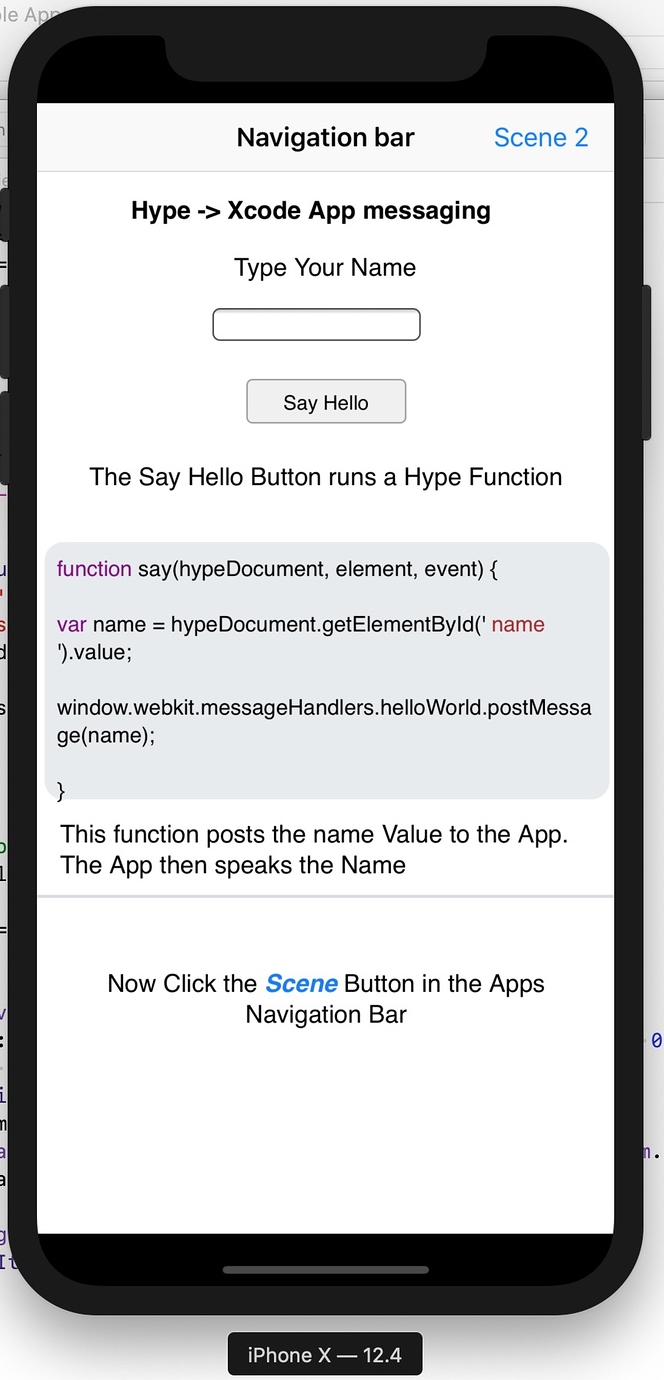
4 |
Thank You for your kind donation:
5 | djon1 6 | 7 |

8 | 9 | 10 | 11 | 12 | 13 | Xcode Build Templates to drag n drop your [Tumult Hype](https://tumult.com/ ) - HTML into for App creation 14 | 15 | 16 | 17 | 18 | **Xcode Templates ** 19 | 20 | 21 | Xcode templates are what you normally use to start a new Xcode project. 22 | 23 | As shown here with the standard template builds. 24 | 25 | 26 | ![](https://forums.tumult.com/uploads/db2156/original/3X/6/6/66730525048e6caf93e9c4c2cff83f18ca15dca4.jpeg) 27 | 28 | But it is possible to create you own Custom Templates. Sadly it is not massively documented on how to do this in Xcode. 29 | 30 | Most info you can find on web derives from people examining the official Apple templates inside the Xcode App’s package contents. Pretty much what I also did after reading some of them. 31 | 32 | There are a few example on the web that can help anyone to get started in their investigation and it will be just that trust me.. 33 | 34 | For now this post is not about how to create them but mainly how to use the ones I have created. Doing otherwise would be very in-depth and my brain and yours may melt if I try to go over it all… 35 | 36 | .. ok I am back. I just had to go and put my head in the fridge just thinking about it. 37 | 38 | What we do have here for this post is a couple of Templates I created that allows you to add your html exports to an Xcode project with some of the base Swift code already written. 39 | 40 | It is by no means the be all and end all and likely in a part two I will go over some basics on how to edit a template to customise it with your own code. 41 | 42 | --- 43 | 44 | 45 | **Installing the templates.** 46 | 47 | Installing the template is very simple. 48 | 49 | Un zip the templates. from your download You should have a new folder called **Hype iOS drop files** 50 | 51 | The open a new finder window and navigate to 52 | 53 | **~/Library/Developer/Xcode/** 54 | 55 | Inside the **~/Library/Developer/Xcode/** folder if you do not have a folder named **Templates** then add a new folder and name it **Templates** 56 | 57 | Drag and Drop the newly unzipped **Hype iOS drop files** folder into it. 58 | 59 | If Xcode is running quit and relaunch it. 60 | 61 | --- 62 | 63 | Our custom templates should now be in the *iOS* **Xcode Choose Template dialogue** likely at the bottom. 64 | 65 | ![](https://forums.tumult.com/uploads/db2156/original/3X/f/f/ff59e4db6a243919acc6413eeaa69a6eb90b9446.jpeg) 66 | 67 | Both templates are based on an iOS Single View App and use a **WKWebView** , created and linked programatically and not via IB. 68 | 69 | **Important note: Although you see the lovely Tumult Hype Icons. These are NOT official Tumult Hype templates.** 70 | 71 | *Tumult kindly allowed me to use their icons but that is where any hand in their creation ends and they hold no responsibility for their use or any support of them.* 72 | 73 | *As usual with things like this, these are offered as is and you use them at your own discretion/risk.* 74 | 75 | *You are responsible for using them.* 76 | 77 | *I may or may not help anyone out whom is trying to do something with them but needs further help.* 78 | 79 | --- 80 | 81 | A quick walk through using the templates. 82 | 83 | The first template. **Hype WKWebView - Single View App** . 84 | 85 | This is a very basic template. Once chosen and it’s options completed, you simply just drop you exported Hype project into the new Xcode project.. 86 | 87 | ![49|690x499](https://forums.tumult.com/uploads/db2156/optimized/3X/4/c/4c678a66a908db5a46e910ac83ada51e360d6bb6_2_1380x998.jpeg)  88 | 89 | You will need to fill in the usual suspects. 90 | 91 | Product Name 92 | 93 | Team 94 | 95 | Organization Name 96 | 97 | Organization Ident. 98 | 99 | * **Language** must = **Swift** 100 | 101 | * **Name of your Hype HTML file ( without the .html )** 102 | 103 | When you export to folder from hype you will get a html file. 104 | 105 | The **Name of your Hype HTML file** text field must hold this name but without the extension. 106 | 107 | So if we have a file name *foo.html* 108 | 109 | we enter **foo** into the text field. 110 | 111 | The generated Xcode project will use this name to reference the Hype exported files you will drag and drop into it later on. 112 | 113 | * **Class Name of Root View Controller** 114 | 115 | This is the ViewController that will be created and which holds the code for the WKWebView 116 | 117 | The default name is **WKWebViewController** but you can name it what ever you want. 118 | 119 | * **Allows Media Auto Play** 120 | 121 | I put this in as a convenience. 122 | 123 | If checked /ticked your media, like sound files should be able to play in the App without user interaction. 124 | 125 | Like if you have a sound playing on a Scene’s *On scene load* in your hype project. 126 | 127 | The rest of the options are standard to Xcode. 128 | 129 | Once the options are completed you simple hit **next** 130 | 131 | Now just drag and drop you hype exported **foo.html** and **foo.hyperesouces** folder into the Xcode project Navigator. 132 | 133 | Make sure you select **Copy items if needed** in the dialogue that shows. 134 | 135 | ![12|690x316](https://forums.tumult.com/uploads/db2156/optimized/3X/e/f/ef10bbbf6d5c0879ce279412f10a02750b85179b_2_1380x632.jpeg)  136 | 137 | You should end up with the files in your Xcode project. 138 | 139 | ![28|690x185,50%](https://forums.tumult.com/uploads/db2156/optimized/3X/3/b/3b2156bec7fba8d16d1e731609299856af65f403_2_690x184.jpeg)  140 | 141 | If you select the *WKWebViewController.swift* file in the Xcode project Navigator, you will see the templated code auto populates the **WKWebview** to use your html file. 142 | 143 | And also code for **Allows Media Auto Play** if it was checked. 144 | 145 | ![17|690x372](https://forums.tumult.com/uploads/db2156/optimized/3X/0/6/063e2f0c76b556f8b719cd0edc2625f4ad40709f_2_1380x744.jpeg)  146 | 147 | **Build and run.** 148 | 149 | --- 150 | 151 | **Template two.** 152 | 153 | **Hype WKWebView - Postmessage.** / **WKScriptMessageHandler** 154 | 155 | Only has the extra option for the **Class Name of Root View Controller** 156 | 157 | This template is more complex. The idea behind this is to give you a start and example of how to communicate back and forth between the Native swift App and the Hype project that it is using it. 158 | 159 | Being able to do this will expand what you can do with your app 160 | 161 | This example holds Xcode and a hype project that shows this interaction. 162 | 163 | When you build and run this template it will demonstrate the above. 164 | 165 | ![29|332x690](https://forums.tumult.com/uploads/db2156/optimized/3X/d/0/d06a87aed416d5d1e83d53c174cb57d543b0e449_2_664x1380.jpeg)  166 | 167 | I am including the Actual Hype project used so you can see how simple it is and what you need in the Hype project’s side. 168 | 169 | 170 | 171 | I have posted other posts going over this before. So it is worth reading them. 172 | 173 | Once you get you head around it you can substitute the included Hype project for you own. 174 | 175 | 176 | I have also included the post message base code in the other template but commented out. 177 | 178 | --- 179 | 180 | One point about these templates is that you yourself can customise them yourself to match you own type of common builds. 181 | 182 | I will be posting a part two to this post and break down the templates construction as I have made them. It will be very basic though as I do not wish to give full Swift Xcode tutorials. 183 | 184 | This hopefully will let some of you add some of your own base code to your copies of the templates if needed. 185 | 186 | -------------------------------------------------------------------------------- /Hype iOS drop files/Hype WKWebView - PostMessage Example App.xctemplate/Hype_world.hyperesources/PIE.htc: -------------------------------------------------------------------------------- 1 | 7 | 8 | 9 | 10 | 11 | 12 | 13 | 96 | 97 | -------------------------------------------------------------------------------- /Hype iOS drop files/Hype WKWebView - PostMessage Example App.xctemplate/Hype_world.hyperesources/HYPE-598.thin.min.js: -------------------------------------------------------------------------------- 1 | (function(){var aa=void 0,g=!0,j=null,k=!1,ba=encodeURIComponent,n=window,q=document,z=Math,fa=navigator,ha=parseInt,ia=parseFloat;function ka(T,y){return T.width=y}function la(T,y){return T.innerHTML=y}function ma(T,y){return T.loop=y}function na(T,y){return T.zIndex=y}function pa(T,y){return T.length=y}function qa(T,y){return T.className=y}function ra(T,y){return T.MozPerspective=y}function ta(T,y){return T.display=y}function ua(T,y){return T.height=y} 2 | var A="appendChild",D="push",va="direction",Aa="lastPosition",Ba="clearTimeout",Ca="width",Da="round",Ea="slice",Fa="replace",Ga="ceil",Ha="getElementById",Ja="offsetWidth",Ka="charAt",La="preventDefault",Ma="button",Qa="indexOf",Ua="opera",Va="createElement",Wa="addEventListener",Xa="setAttribute",Ya="play",cb="type",db="attachEvent",eb="source",fb="changedTouches",gb="zIndex",hb="getElementsByTagName",mb="clientX",nb="clientY",L="length",ob="className",pb="setTimeout",qb="removeEventListener",rb= 3 | "ctrlKey",sb="duration",tb="userAgent",ub="location",M="hasOwnProperty",Bb="touches",P="style",Cb="pause",Db="body",Eb="removeChild",Fb="search",Gb="options",Hb="start",Ib="getAttribute",Jb="detachEvent",Kb="element",Lb="startTime",Rb="removeAttribute",Y="parentNode",Sb="display",Tb="height",Ub="splice",Vb="event",$="",Wb="\n",Xb=" ",Yb=" -webkit-gradient(linear,left top,left bottom,from(transparent),color-stop(",Zb=" : ",$b=" rotate(",ac=" rotateX(",bc=" rotateY(",cc=" scaleX(",dc=" scaleY(",ec= 4 | " translateX(",fc=" translateY(",gc=" translateZ(",hc="#",ic="%",jc="%27",Ac="&",Bc=" ",Cc="')",Dc="(",Ec=")",Fc=") ",Gc=",",Hc=",transparent),to(rgba(255,255,255,.5)))",Ic="-bottom",Jc="-moz-",Kc="-moz-perspective",Lc="-ms-transform",Mc="-ms-transform-origin",gd="-o-",hd="-webkit-",id="-webkit-perspective",jd="-webkit-tap-highlight-color",kd="-webkit-transform",ld=".HYPE_element{-webkit-transform:rotateY(0);}video.HYPE_element{-webkit-transform:none;}^{color:#000;`size:16px;`weight:normal;`family:Helvetica,Arial,Sans-Serif;`weight:normal;`style:normal;`variant:normal;text-decoration:none;text-align:left;text-transform:none;text-indent:0;text-shadow:none;line-height:normal;letter-spacing:normal;white-space:normal;word-spacing:normal;@:baseline;border:none;background-color:transparent;background-image:none;-webkit-`smoothing:antialiased;-moz-backface-visibility:hidden;}", 5 | md=".HYPE_scene ",nd="/",od="0",pd="0.0",qd="0123456789ABCDEF",rd="1",sd="1.0",td="100%",ud="600px",vd=": ",wd="",xd="",yd="
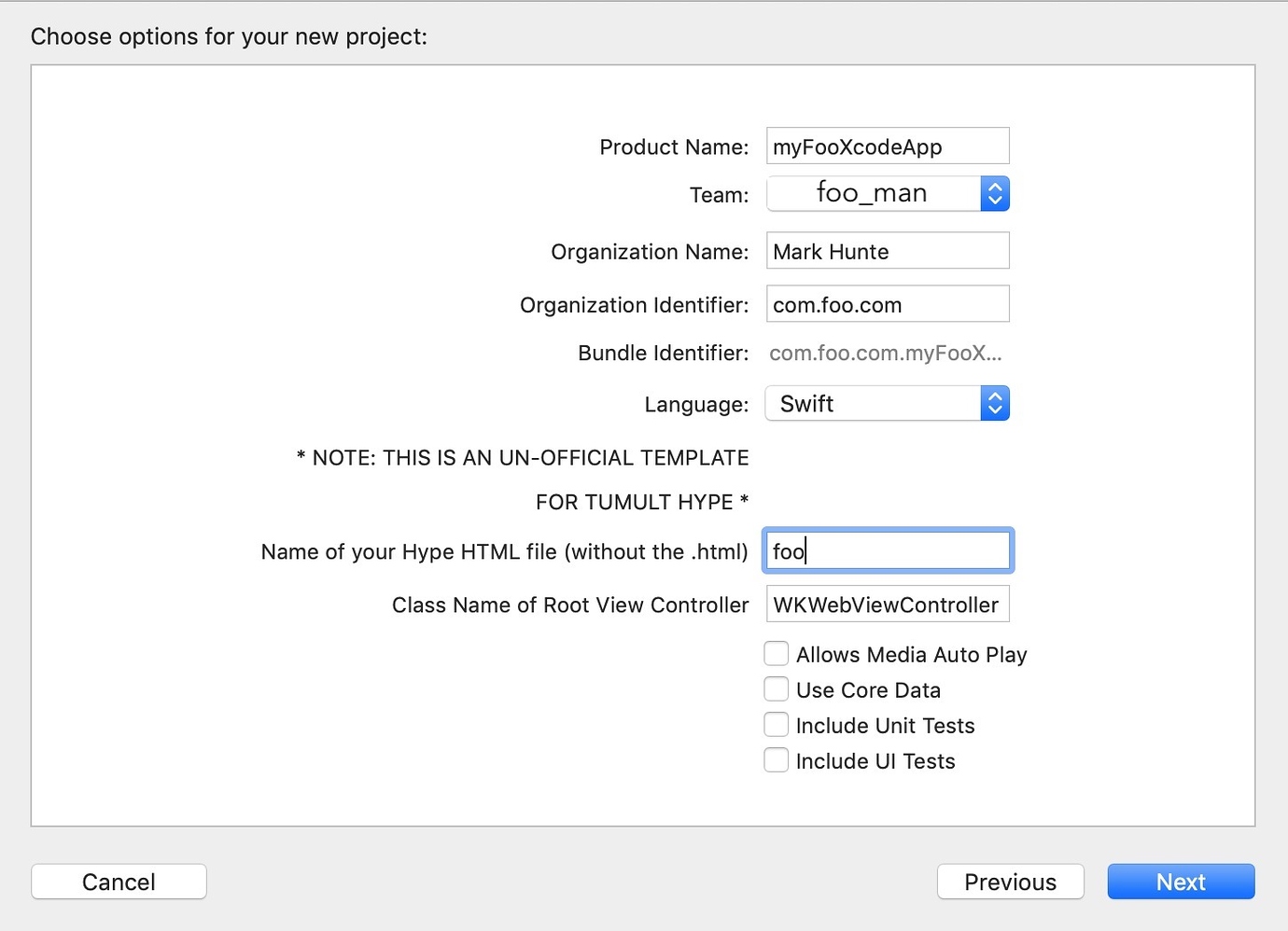
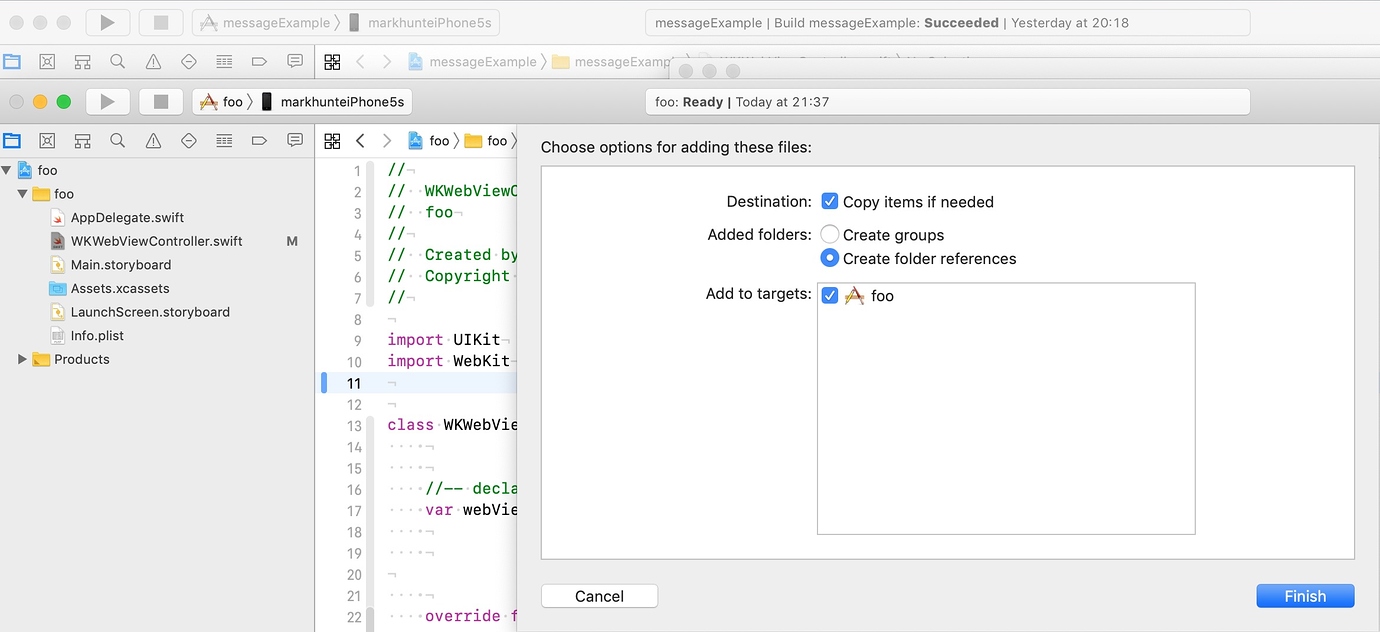
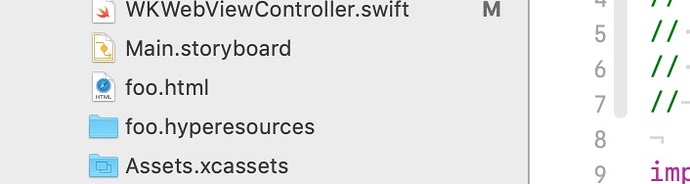
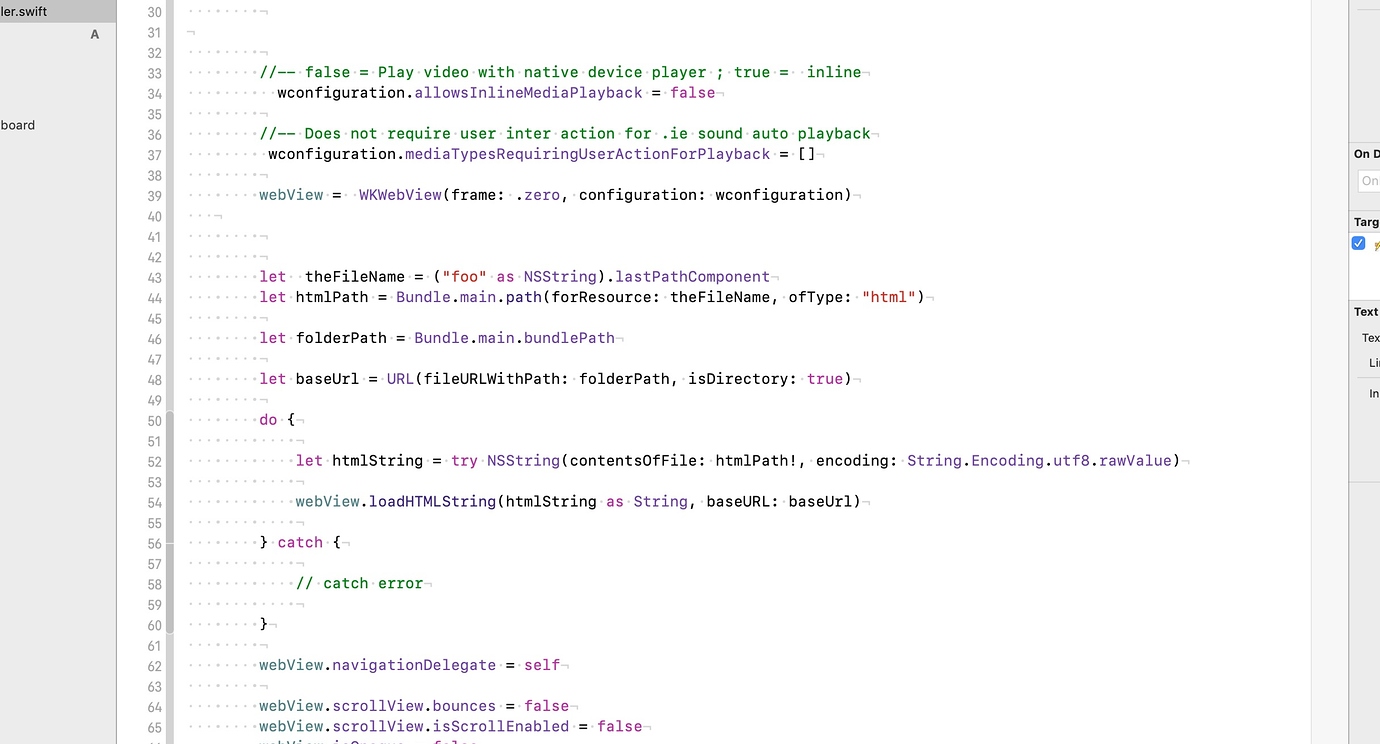
",zd="",Ad='