,
13 | document.getElementById('root')
14 | );
15 | ```
16 |
17 | ## [React | 2. Introducing JSX](https://reactjs.org/docs/introducing-jsx.html)
18 |
19 | You can see JSX as a new type. Now you can store in a variable a JSX as you would store a number for example.
20 |
21 | Be careful in JSX, self closing tag, such as `img`, must be ended by `/>`.
22 |
23 | ```jsx
24 | const element = ;
25 | ```
26 |
27 |
30 |
31 |
32 | ## [React | 3. Rendering Elements](https://reactjs.org/docs/rendering-elements.html)
33 |
34 | The only thing to remember here is that `ReactDOM.render()` is a function we will use once in the future and that will display our React applciation.
35 |
36 |
--------------------------------------------------------------------------------
/labs/lab-axios-functional-programming/starter-code/index.html:
--------------------------------------------------------------------------------
1 |
2 |
3 |
4 |
5 |
6 |
7 | Document
8 |
9 |
10 |
34 | )
35 | }
36 | }
37 | ```
38 |
39 |
40 | ### Exercise
41 |
42 | Redo the exercise where you need to display detail about cities, by using a loop this time.
43 |
44 | The pen is available [here](https://codepen.io/maxencebouret/pen/zaayEZ?editors=0010) and you can use the following `CityDetail` Component.
45 |
46 | ```jsx
47 | class CityDetail extends React.Component {
48 | render(){
49 | return (
50 |
51 |
52 |
{this.props.name}
53 |
{this.props.description}
54 |
55 | )
56 | }
57 | }
58 | ```
59 |
60 |
61 | You will find a solution here, but look at it only when you are done: https://codepen.io/maxencebouret/pen/YvvdjO?editors=0010
62 |
63 |
64 |
--------------------------------------------------------------------------------
/labs-solutions/lab-react-data-binding/solution-code/public/index.html:
--------------------------------------------------------------------------------
1 |
2 |
3 |
4 |
5 |
6 |
7 |
11 |
12 |
13 |
22 | React App
23 |
24 |
25 |
28 |
29 |
39 |
40 |
41 |
--------------------------------------------------------------------------------
/labs-solutions/lab-react-ironcontacts/solution-code/public/index.html:
--------------------------------------------------------------------------------
1 |
2 |
3 |
4 |
5 |
6 |
7 |
11 |
12 |
13 |
22 | React App
23 |
24 |
25 |
28 |
29 |
39 |
40 |
41 |
--------------------------------------------------------------------------------
/labs-solutions/lab-react-ironcontacts/solution-code-2018-07-04/public/index.html:
--------------------------------------------------------------------------------
1 |
2 |
3 |
4 |
5 |
6 |
7 |
11 |
12 |
13 |
22 | React App
23 |
24 |
25 |
28 |
29 |
39 |
40 |
41 |
--------------------------------------------------------------------------------
/labs/lab-axios-functional-programming/starter-code/api.js:
--------------------------------------------------------------------------------
1 | let service = axios.create({
2 | baseURL: "https://raw.githubusercontent.com/mc100s/module-3-react/master/labs/lab-axios-functional-programming/"
3 | })
4 |
5 | function displayDataInTheConsole(page) {
6 | return service.get(`result-${page}.json`)
7 | .then(response => {
8 | console.log('response.data ==> ', response.data);
9 | })
10 | }
11 |
12 | function getTotalResults(page) {
13 | return service.get(`page-${page}.json`)
14 | .then(response => {
15 | // TODO: Iteration 1
16 | // Update that function so it only displays the value of "total_results" (18966)
17 | return response.data // You should write it "response.data.something"
18 | })
19 | }
20 |
21 | function getFirstResultName(page) {
22 | return service.get(`page-${page}.json`)
23 | .then(response => {
24 | // TODO: Iteration 2
25 | // Update that function so it only displays the name of the first actor
26 | return response.data
27 | })
28 | }
29 |
30 | function getNames(page) {
31 | return service.get(`page-${page}.json`)
32 | .then(response => {
33 | // TODO: Iteration 3
34 | })
35 | }
36 |
37 | function getIdsAndNames(page) {
38 | return service.get(`page-${page}.json`)
39 | .then(response => {
40 | // TODO: Iteration 4
41 | })
42 | }
43 |
44 | function getSortedNames(page) {
45 | return service.get(`page-${page}.json`)
46 | .then(response => {
47 | // TODO: Iteration 5
48 | })
49 | }
50 |
51 | function getNamesFiltered(page, searchTerm) {
52 | return service.get(`page-${page}.json`)
53 | .then(response => {
54 | // TODO: Iteration 6
55 | })
56 | }
57 |
58 |
59 | function getActorNamesWithTheirKnownForMovies(page) {
60 | return service.get(`page-${page}.json`)
61 | .then(response => {
62 | // TODO: Iteration 7
63 | })
64 | }
--------------------------------------------------------------------------------
/lessons/2-1-react-state-and-lifecycle.md:
--------------------------------------------------------------------------------
1 | 
2 |
3 | # React | State and Lifecycle
4 |
5 |
6 | ## [React | 5. State and Lifecycle](https://reactjs.org/docs/state-and-lifecycle.html)
7 |
8 | ### About the state
9 |
10 | ```jsx
11 | // You can initialize the state in the Component's constructor
12 | this.state = { firstname: 'Maxence', age: 25 }
13 |
14 | // You can get a state value with "this.state" property
15 | this.state.firstname
16 |
17 | // You MUST set some state value with "this.setState" method
18 | // Be careful, this opereation might be asynchronous
19 | this.setState({firstname: 'Mickaël'})
20 | ```
21 |
22 | ### About React Lifecycle
23 |
24 | Mounting:
25 | - [`constructor(props)`](https://reactjs.org/docs/react-component.html#constructor): Should starts with `super(props)`; Perfect to initialize the state and binding methods
26 | - [`render()`](https://reactjs.org/docs/react-component.html#render): Return the JSX to display
27 | - [`componentDidMount()`](https://reactjs.org/docs/react-component.html#componentdidmount): Perfect place to call APIs and set up any subscriptions.
28 |
29 | Updating:
30 | - [`componentWillUpdate(nextProps, nextState)`](https://reactjs.org/docs/react-component.html#componentwillupdate)
31 | - [`render()`](https://reactjs.org/docs/react-component.html#render)
32 | - [`componentDidUpdate(prevProps, prevState)`](https://reactjs.org/docs/react-component.html#componentdidupdate)
33 |
34 | Unmounting:
35 | - [`componentWillUnmount()`](https://reactjs.org/docs/react-component.html#componentwillunmount)
36 |
37 | Error Handling:
38 | - [`componentDidCatch()`](https://reactjs.org/docs/react-component.html#componentdidcatch)
39 |
40 | ### Exercise
41 |
42 | [On this Codepen](https://codepen.io/maxencebouret/pen/bKKzwp?editors=0010), by using `axios`, display in the `App` component the information from this API: `https://ih-crud-api.herokuapp.com/characters/1`
43 |
44 |
--------------------------------------------------------------------------------
/labs-solutions/lab-axios-functional-programming/solution-code/api.js:
--------------------------------------------------------------------------------
1 | let service = axios.create({
2 | baseURL: "https://raw.githubusercontent.com/mc100s/module-3-react/master/labs/lab-axios-functional-programming/"
3 | })
4 |
5 | function displayDataInTheConsole(page) {
6 | return service.get(`page-${page}.json`)
7 | .then(response => {
8 | console.log('response.data ==> ', response.data);
9 | })
10 | }
11 |
12 | function getTotalResults(page) {
13 | return service.get(`page-${page}.json`)
14 | .then(response => {
15 | return response.data.total_results
16 | })
17 | }
18 |
19 | function getFirstResultName(page) {
20 | return service.get(`page-${page}.json`)
21 | .then(response => {
22 | return response.data.results[0].name
23 | })
24 | }
25 |
26 | function getNames(page) {
27 | return service.get(`page-${page}.json`)
28 | .then(response => {
29 | return response.data.results.map(x => x.name)
30 | })
31 | }
32 |
33 | function getIdsAndNames(page) {
34 | return service.get(`page-${page}.json`)
35 | .then(response => {
36 | return response.data.results.map(x => `#${x.id} ${x.name}`)
37 | })
38 | }
39 |
40 | function getSortedNames(page) {
41 | return service.get(`page-${page}.json`)
42 | .then(response => {
43 | return response.data.results
44 | .map(x => x.name)
45 | .sort()
46 | })
47 | }
48 |
49 | function getNamesFiltered(page, searchTerm) {
50 | return service.get(`page-${page}.json`)
51 | .then(response => {
52 | return response.data.results
53 | .map(x => x.name)
54 | .filter(name => name.toUpperCase().includes(searchTerm.toUpperCase()))
55 | })
56 | }
57 |
58 |
59 | function getActorNamesWithTheirKnownForMovies(page) {
60 | return service.get(`page-${page}.json`)
61 | .then(response => {
62 | return response.data.results
63 | .map(x => {
64 | let titles = x.known_for.map(movie => movie.title)
65 | return x.name + " ("+titles.join(", ")+")"
66 | })
67 | })
68 | }
--------------------------------------------------------------------------------
/lessons/6-2-react-express-route-guards.md:
--------------------------------------------------------------------------------
1 | 
2 |
3 | # React & Express | Route guards
4 |
5 | ## Introduction
6 |
7 | In this course, we are going to update the project IronTodos. We will add a role to users, `ADMIN` and `USER`, and only the `ADMIN` will be able to delete the todo item.
8 |
9 | ## Set up the project
10 |
11 | ```sh
12 | $ git clone https://github.com/mc100s/react-iron-todos.git
13 | $ cd react-iron-todos
14 | $ npm install
15 |
16 | # In 2 different terminals
17 | $ npm run dev:server
18 | $ npm run dev:client
19 | ```
20 |
21 |
22 |
23 | ## Files to modify
24 |
25 |
26 | ```js
27 | // server/models/user.js
28 | role: {type: String, enum: ['ADMIN', 'USER'], default: 'USER'}
29 | ```
30 |
31 |
32 | ```js
33 | // server/routes/todos.js
34 |
35 | // OPTION 1
36 | function checkRole(role) {
37 | return [
38 | passport.authenticate("jwt", config.jwtSession),
39 | (req,res,next) => {
40 | console.log('DEBUG req.user', req.user);
41 | if (req.user.role === role)
42 | next();
43 | else
44 | next("You don't have the rights")
45 | }
46 | ]
47 | }
48 | router.delete('/:id', checkRole('ADMIN'), (req, res, next) => {
49 | console.log('DEBUG req.user', req.user);
50 | Todo.findByIdAndRemove(req.params.id)
51 | .then(todo=>{
52 | res.json({success: true, todo})
53 | })
54 | .catch(error=>next(error))
55 | });
56 |
57 | // OR
58 |
59 | // OPTION 2
60 | router.delete('/:id', passport.authenticate("jwt", config.jwtSession), (req, res, next) => {
61 | if (req,user.role !== 'ADMIN') {
62 | res.json({success: false, message: "You don't have the rights"})
63 | return;
64 | }
65 | Todo.findByIdAndRemove(req.params.id)
66 | .then(todo=>{
67 | res.json({success: true, todo})
68 | })
69 | .catch(error=>next(error))
70 | });
71 | ```
72 |
73 | ```js
74 | // client/src/api.js
75 |
76 | loadRole() {
77 | let user = this.loadUser()
78 | if (!user || !user.role) return false
79 | return user.role
80 | },
81 | +
82 |
83 | ```
84 |
85 | ```js
86 | // client/src/components/Home.js
87 |
88 | import api from '../api';
89 |
90 | // ...
91 | {api.loadRole() === "ADMIN" &&
;
22 |
23 | }
24 | }
25 | ```
26 |
27 | When a component only have a `render` method, you can write it like this:
28 |
29 | ```jsx
30 | function Welcome(props) {
31 | return
51 | );
52 | }
53 | }
54 |
55 | ReactDOM.render(
56 | ,
57 | document.getElementById('root')
58 | );
59 | ```
60 |
61 |
62 | ### Exercise
63 |
64 | Create a React Component `CityDetail` that will render a `div` similar to this:
65 |
66 | ```html
67 |
68 |
69 |
Berlin
70 |
Berlin is the capital and the largest city of Germany, as well as one of its 16 constituent states
71 |
72 | ```
73 |
74 | Be careful in that example, in JSX you will need to close the `img` tag and change `class` into `className`
75 |
76 |
77 | Then you will need to reuse this Component three times to display information from this array:
78 |
79 | ```js
80 | let cities = [{
81 | name: "Berlin",
82 | description: "Berlin is the capital and the largest city of Germany, as well as one of its 16 constituent states",
83 | imgUrl: "https://i.imgur.com/v7vGkhm.jpg"
84 | },{
85 | name: "Paris",
86 | description: "Paris is the capital and most populous city of France, with an area of 105 square kilometres (41 square miles) and a population of 2,206,488",
87 | imgUrl: "https://i.imgur.com/TVZKjza.jpg"
88 | },{
89 | name: "Madrid",
90 | description: "Madrid is the capital of Spain and the largest municipality in both the Community of Madrid and Spain as a whole",
91 | imgUrl: "https://i.imgur.com/4Eno2jp.jpg"
92 | }]
93 | ```
94 |
95 |
96 | You can rely on this Pen for this exercise: https://codepen.io/maxencebouret/pen/zaayEZ?editors=0010
97 |
98 |
--------------------------------------------------------------------------------
/labs-solutions/lab-react-ironcontacts/solution-code/src/index.js:
--------------------------------------------------------------------------------
1 | import React from 'react';
2 | import ReactDOM from 'react-dom';
3 |
4 | import './index.css';
5 | import contacts from './contacts.json'
6 |
7 | class AddRandomContactButton extends React.Component {
8 | render() {
9 | return (
10 |
11 | );
12 | }
13 | }
14 |
15 | class SortButton extends React.Component {
16 | render() {
17 | return (
18 |
19 | );
20 | }
21 | }
22 |
23 | class ContactRow extends React.Component {
24 | render() {
25 | return (
26 |
105 | );
106 | }
107 | }
108 |
109 | ReactDOM.render(
110 | ,
111 | document.getElementById('root')
112 | );
113 |
114 |
115 |
--------------------------------------------------------------------------------
/labs/lab-react-wiki-countries/README.md:
--------------------------------------------------------------------------------
1 | 
2 |
3 | # React | WikiCountries
4 |
5 | ## Introduction
6 |
7 | After spending too much time on GitHub, you found a [JSON database of countries](https://github.com/mledoze/countries/blob/master/countries.json) and you decide to use it to create your Wikipedia for countries!
8 |
9 | 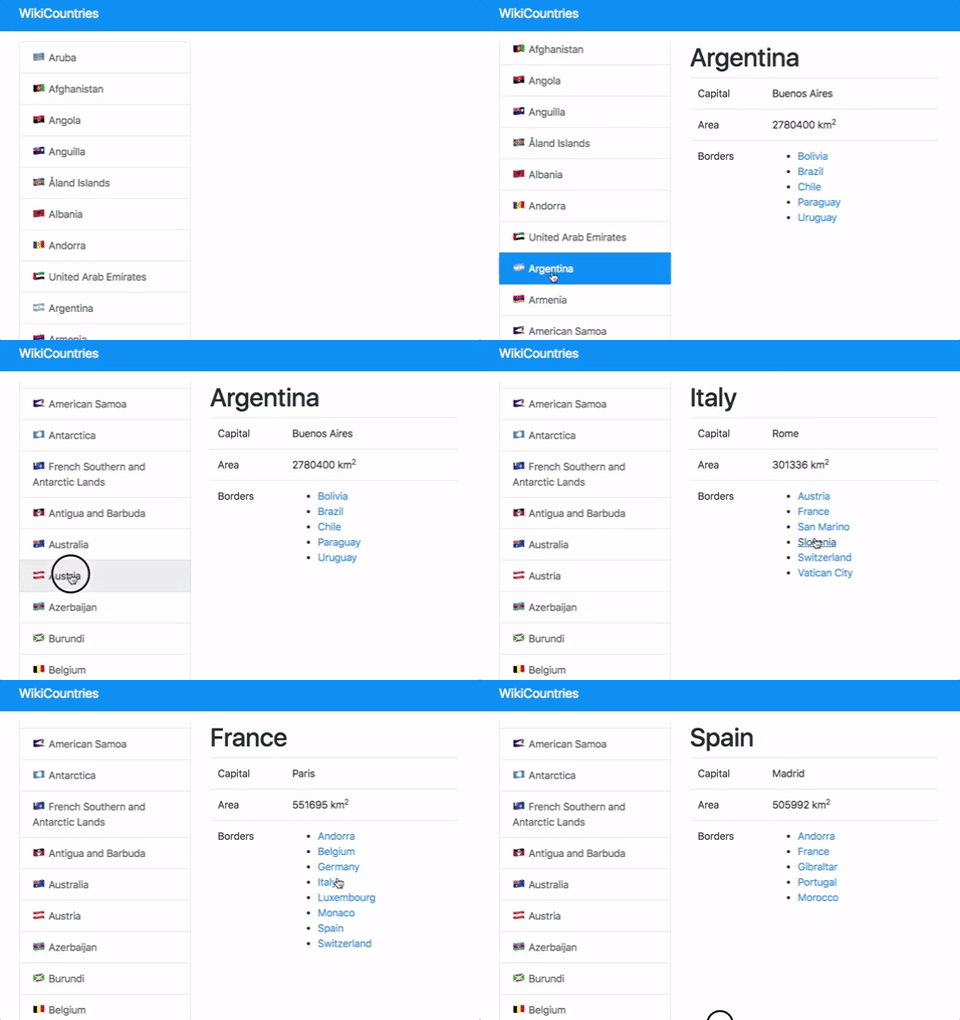
10 |
11 |
12 | ## Installation
13 |
14 | ### Setup a basic project
15 | Commands to launch
16 | ```sh
17 | $ npm install -g create-react-app # Install globally the `create-react-app` command
18 | $ create-react-app my-app # Create a React project folder "my-app"
19 | $ cd my-app
20 | $ npm install --save react-router-dom
21 | $ rm -f src/*
22 | $ touch src/index.js src/style.css # Create 2 files
23 | ```
24 |
25 | Your `src/index.js` file
26 | ```javascript
27 | import React from 'react';
28 | import ReactDOM from 'react-dom';
29 | import { BrowserRouter } from 'react-router-dom'
30 | import './style.css';
31 |
32 | class App extends React.Component {
33 | render() {
34 | return (
35 |
36 | {/* Your application code */}
37 |
38 | );
39 | }
40 | }
41 |
42 | ReactDOM.render((
43 |
44 |
45 |
46 | ),
47 | document.getElementById('root')
48 | );
49 |
50 | ```
51 |
52 | To help you, we gave you an example of page inside [`example.html`](example.html)
53 |
54 | ### Bootstrap installation
55 |
56 | We will use [Twitter Bootstrap V4](https://getbootstrap.com/) for the design :)
57 |
58 | ```sh
59 | $ npm install bootstrap --save
60 | ```
61 |
62 | ```javascript
63 | // src/index.js
64 | import 'bootstrap/dist/css/bootstrap.css';
65 | ```
66 |
67 |
68 | ## Instructions
69 |
70 | ### Iteration 1 | Create the components
71 |
72 | In this iteration, we will focus on general layout. You will create at least 2 components:
73 | - `App`: For the general layout
74 | - `CountryDetail`: A component that will receive `cca3` as a props, that is going to respresent the id of the country (example: `ESP` for Spain, `FRA` for France).
75 |
76 | To help you, you can use:
77 | - `example.html`: An example of what you can render
78 | - `countries.json`: The JSON database of countries. It's an array of object where each object represents a country and the property `cca3` is unique and will be used as the key to navigate.
79 |
80 |
81 | As a reminder with Twitter Bootstrap:
82 | ```html
83 |
84 |
106 | )
107 | }
108 | }
109 | ```
110 |
111 |
--------------------------------------------------------------------------------
/labs/lab-react-data-binding/README.md:
--------------------------------------------------------------------------------
1 | 
2 |
3 | # React | IronNutrition
4 |
5 | ## Introduction
6 |
7 | Since the beginning of the bootcamp, you just realized that your diet is not healthy and it may have an impact on your health (and productivity) and the long term.
8 |
9 | To take care about the food you eat, you decided to create a nutrition app that will track everything you eat!
10 |
11 |
12 | 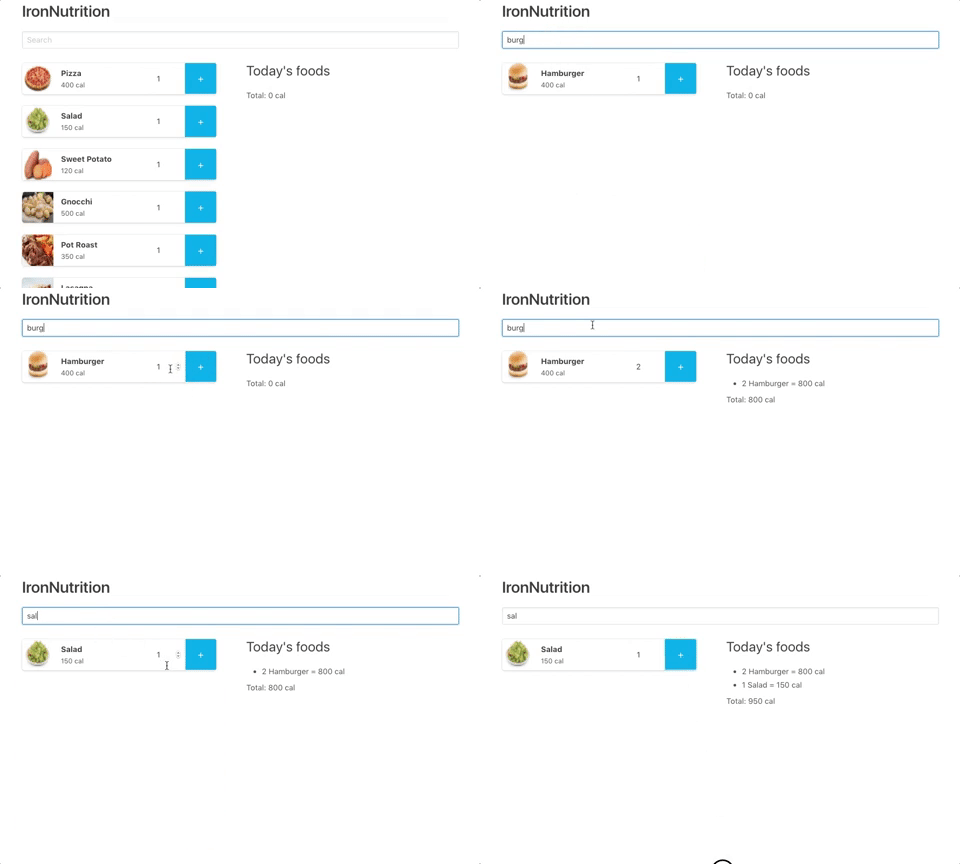
13 |
14 | ## Installation
15 |
16 | ### Launch the starter-code
17 |
18 | ```
19 | $ cd starter-code
20 | $ npm install
21 | $ npm start
22 | ```
23 |
24 |
25 | ### Bulma installation
26 |
27 | We will use [Bulma](https://bulma.io/) for the design :)
28 |
29 | ```sh
30 | $ npm install bulma --save
31 | ```
32 |
33 | ```javascript
34 | // src/index.js
35 | import 'bulma/css/bulma.css';
36 | ```
37 |
38 |
39 |
40 | ### Import a JSON
41 |
42 | You will need to save into the variable `foods` the result of `./foods.json`
43 | ```js
44 | import foods from './foods.json'
45 | ```
46 |
47 |
48 | ## About the design
49 |
50 | If you struggle with the design, you can find a static example of what is expected inside [example.html](example.html)
51 |
52 |
53 | ## Instructions
54 |
55 | ### Iteration 1 | Create `FoodBox` component
56 |
57 | Create a `FoodBox` component that takes at least `food` as a prop and display a box with all information about an ingredient.
58 |
59 | We recommand to use that HTML to display properly the `FoodBox`:
60 |
61 | ```html
62 |
63 |
64 |
65 |
66 |
67 |
68 |
69 |
70 |
71 |
72 | Pizza
73 | 400 cal
74 |
75 |
76 |
77 |
78 |
79 |
80 |
85 |
86 |
87 |
90 |
91 |
92 |
93 |
94 |
95 | ```
96 |
97 | 
98 |
99 |
100 | ### Iteration 2 | Display food
101 |
102 | In your `App` component (your main component), display as many `FoodBox` as elements inside the variable `foods`.
103 |
104 |
105 | 
106 |
107 |
108 | ### Iteration 3 | Implement search bar
109 |
110 | Create a `Search` component to perform a search that updates the list of all meal.
111 |
112 | 
113 |
114 |
115 |
116 | ### Iteration 4 | Create add buttons
117 |
118 | On your `FoodBox`, you have an input an "+" button. Use them so that when a user click on the button, it adds them on a list on the right called "*Today's foods*".
119 |
120 | You will also need to display the total amount of calories at the bottom of the list as a recap.
121 |
122 | 
123 |
124 | If you don't remember how to create responsive columns with Bulma, you can check the [documentation](https://bulma.io/documentation/columns/basics/).
125 |
126 |
127 | ### Iteration 5 | Bonus | Group ingredients
128 |
129 | You made an awesome application, but you have found a little problem in the UX. For example, if you click twice on "Pizza", it will display 2 lines "*1 Pizza = 400 cal*" instead of 1 line "*2 Pizza = 800 cal*". Fix that problem.
130 |
131 |
132 | ### Iteration 6 | Bonus | Allow the user to remove an ingredient
133 |
134 | On the "*Today's food*", add a trash icon to let users removing one of their item.
135 |
136 |
137 |
138 | ## Solution
139 |
140 | You will find the solution here: https://github.com/mc100s/training-labs-react/blob/master/src/lab-react-data-binding/solution.js
141 |
--------------------------------------------------------------------------------
/labs/lab-axios-functional-programming/starter-code/expectations.html:
--------------------------------------------------------------------------------
1 |
2 |
3 |
4 |
5 | Document
6 |
7 |
8 |
[
 97 |   "Chris Pratt (Guardians of the Galaxy, Jurassic World, Guardians of the Galaxy Vol. 2)",
 98 |   "Bryce Dallas Howard (Jurassic World, Spider-Man 3, The Twilight Saga: Eclipse)",
 99 |   "Rose Byrne (X-Men: First Class, X-Men: Apocalypse, Star Wars: Episode II - Attack of the Clones)",
100 |   "Henry Cavill (Batman v Superman: Dawn of Justice, Man of Steel, Justice League)",
101 |   "Chris Hemsworth (The Avengers, Avengers: Age of Ultron, Thor)",
102 |   "Carla Gugino (Batman v Superman: Dawn of Justice, Man of Steel, Night at the Museum)",
103 |   "Alicia Vikander (Ex Machina, Jason Bourne, The Man from U.N.C.L.E.)",
104 |   "Jennifer Lawrence (The Hunger Games, The Hunger Games: Catching Fire, X-Men: Days of Future Past)",
105 |   "Robert Downey Jr. (The Avengers, Iron Man, Iron Man 3)",
106 |   "Jeff Goldblum (Guardians of the Galaxy Vol. 2, Jurassic Park, Thor: Ragnarok)",
107 |   "Sean Bean (The Lord of the Rings: The Fellowship of the Ring, The Lord of the Rings: The Return of the King, The Lord of the Rings: The Two Towers)",
108 |   "Dwayne Johnson (Fast & Furious 6, Furious 7, The Fate of the Furious)",
109 |   "Jennifer Jason Leigh (The Hateful Eight, Annihilation, The Machinist)",
110 |   "Alexandra Daddario (San Andreas, Baywatch, Percy Jackson & the Olympians: The Lightning Thief)",
111 |   "Scarlett Johansson (The Avengers, Captain America: Civil War, Avengers: Age of Ultron)",
112 |   "Margot Robbie (Suicide Squad, The Wolf of Wall Street, The Big Short)",
113 |   "Beyoncé Knowles (Epic, Austin Powers in Goldmember, The Pink Panther)",
114 |   "Gina Gershon (Face/Off, P.S. I Love You, LOL)",
115 |   "Josh Brolin (Guardians of the Galaxy, Avengers: Age of Ultron, Men in Black 3)",
116 |   "Bradley Cooper (Guardians of the Galaxy, Guardians of the Galaxy Vol. 2, The Hangover)"
117 | ]
[
 97 |   "Chris Pratt (Guardians of the Galaxy, Jurassic World, Guardians of the Galaxy Vol. 2)",
 98 |   "Bryce Dallas Howard (Jurassic World, Spider-Man 3, The Twilight Saga: Eclipse)",
 99 |   "Rose Byrne (X-Men: First Class, X-Men: Apocalypse, Star Wars: Episode II - Attack of the Clones)",
100 |   "Henry Cavill (Batman v Superman: Dawn of Justice, Man of Steel, Justice League)",
101 |   "Chris Hemsworth (The Avengers, Avengers: Age of Ultron, Thor)",
102 |   "Carla Gugino (Batman v Superman: Dawn of Justice, Man of Steel, Night at the Museum)",
103 |   "Alicia Vikander (Ex Machina, Jason Bourne, The Man from U.N.C.L.E.)",
104 |   "Jennifer Lawrence (The Hunger Games, The Hunger Games: Catching Fire, X-Men: Days of Future Past)",
105 |   "Robert Downey Jr. (The Avengers, Iron Man, Iron Man 3)",
106 |   "Jeff Goldblum (Guardians of the Galaxy Vol. 2, Jurassic Park, Thor: Ragnarok)",
107 |   "Sean Bean (The Lord of the Rings: The Fellowship of the Ring, The Lord of the Rings: The Return of the King, The Lord of the Rings: The Two Towers)",
108 |   "Dwayne Johnson (Fast & Furious 6, Furious 7, The Fate of the Furious)",
109 |   "Jennifer Jason Leigh (The Hateful Eight, Annihilation, The Machinist)",
110 |   "Alexandra Daddario (San Andreas, Baywatch, Percy Jackson & the Olympians: The Lightning Thief)",
111 |   "Scarlett Johansson (The Avengers, Captain America: Civil War, Avengers: Age of Ultron)",
112 |   "Margot Robbie (Suicide Squad, The Wolf of Wall Street, The Big Short)",
113 |   "Beyoncé Knowles (Epic, Austin Powers in Goldmember, The Pink Panther)",
114 |   "Gina Gershon (Face/Off, P.S. I Love You, LOL)",
115 |   "Josh Brolin (Guardians of the Galaxy, Avengers: Age of Ultron, Men in Black 3)",
116 |   "Bradley Cooper (Guardians of the Galaxy, Guardians of the Galaxy Vol. 2, The Hangover)"
117 | ]
140 | Total: {this.displaySelectedFoodsTotCal()} cal
141 |
142 |
143 |
144 | );
145 | }
146 | }
147 |
148 | ReactDOM.render(
149 | ,
150 | document.getElementById('root')
151 | );
--------------------------------------------------------------------------------
/lessons/5-2-react-express-integration.md:
--------------------------------------------------------------------------------
1 | 
2 |
3 | # React & Express | Frontend Backend Integration
4 |
5 | ## [Summary of the previous course](http://learn.ironhack.com/#/learning_unit/2507)
6 |
7 | In the previous course, we've created our own REST API. For that, we've created an Express project where we:
8 | - Removed everything related to the views to sent JSON instead
9 | - Added `cors`
10 |
11 | In term of routes, we have:
12 | - `GET /api/phones`
13 | - `POST /api/phones`
14 | - `GET /api/phones/:id`
15 | - `PUT /api/phones/:id`
16 | - `DELETE /api/phones/:id`
17 |
18 | ## Add of React in the project
19 |
20 | In our Express app, we will insert the React code in a folder `/client`
21 |
22 | For that, generate the React app inside the Express app directory:
23 | ```sh
24 | $ create-react-app client
25 | $ npm install --save axios
26 | ```
27 |
28 | ## Modify the React app
29 |
30 |
31 |
32 | We will create a `client/src/api.js`
33 |
34 | ```js
35 | // client/src/api.js
36 | import axios from 'axios';
37 |
38 | const service = axios.create({
39 | baseURL: `http://localhost:3000/api/`
40 | });
41 |
42 | const errHandler = err => {
43 | console.error(err.response.data);
44 | throw err.response.data;
45 | };
46 |
47 | export default {
48 | service: service,
49 |
50 | getPhones() {
51 | return service.get('phones')
52 | .then(res => res.data)
53 | .catch(errHandler);
54 | },
55 |
56 | getPhoneDetail(id) {
57 | return service.get('phones/' + id)
58 | .then(res => res.data)
59 | .catch(errHandler);
60 | },
61 |
62 | addPhone(data) {
63 | return service.post('phones', data)
64 | .then(res => res.data)
65 | .catch(errHandler);
66 | },
67 |
68 | modifyPhone(id, data) {
69 | return service.post('phones/'+id, data)
70 | .then(res => res.data)
71 | .catch(errHandler);
72 | },
73 |
74 | deletePhone(id) {
75 | return service.delete('phones/' + id)
76 | .then(res => res.data)
77 | .catch(errHandler);
78 | },
79 | };
80 | ```
81 |
82 | Then, we can for example use `getPhones()` like this:
83 |
84 | ```js
85 | import api from './api'
86 |
87 | api.getPhones()
88 | .then(data => {
89 | console.log("This is my data:", data)
90 | })
91 | ```
92 |
93 | ## Test the application
94 |
95 | To test the application, you should have 2 terminals opened
96 | ```sh
97 | # Terminal 1
98 | $ npm start # or npm run dev
99 | ```
100 |
101 | ```sh
102 | # Terminal 2
103 | $ cd client
104 | $ npm start
105 | ```
106 |
107 | ## Example of a `ListPhones` component
108 |
109 | ```js
110 | import React, { Component } from 'react'
111 | import api from './api'
112 |
113 | class ListPhones extends Component {
114 | constructor(props) {
115 | super(props)
116 | this.state = {
117 | phones: []
118 | }
119 | }
120 | componentDidMount() {
121 | api.getPhones()
122 | .then(data => {
123 | this.setState({
124 | phones: data
125 | })
126 | })
127 | }
128 | render() {
129 | return (
130 |
131 |
132 | {this.state.phones.map(phone =>
{phone.name}
)}
133 |
134 |
135 | )
136 | }
137 | }
138 |
139 | export default ListPhones
140 | ```
141 |
142 |
143 | #### Exercise
144 |
145 | Create a component with an number input that displays the phone with the id precised in the input.
146 |
147 |
148 | ## Package the app
149 |
150 |
151 | First, inside the `client` folder, let's run the following command:
152 | ```sh
153 | $ npm run build
154 | ```
155 |
156 | It has just created a folder `client/build` that contains some HTML, CSS and JS files readable by a browser.
157 |
158 |
159 | ## Configure the Express server
160 |
161 | Now that we have our client application bundled in the `/client/build` folder we can move it into a static folder of our back-end app. We want our Express server to serve the entire client application.
162 |
163 |
164 | For that, we should add the following line in `app.js`
165 |
166 | ```js
167 | app.use(express.static(path.join(__dirname, 'client/build')));
168 |
169 | // ...
170 | // The routes for the API
171 | // ...
172 |
173 | // This will be the default route is nothing else is caught
174 | app.use(function(req, res) {
175 | res.sendfile(__dirname + '/client/build/index.html');
176 | });
177 | ```
178 |
179 | ## Summary
180 |
181 | In this lesson we have learned how to run a full-stack application, how to consume a REST API using Rest, and how to build an application for release.
182 |
--------------------------------------------------------------------------------
/labs/lab-react-ironcontacts/README.md:
--------------------------------------------------------------------------------
1 | 
2 |
3 | # IronContacts
4 |
5 | ## Introduction
6 |
7 | After Ironhack, you have decided to work in the movie industry and you've found a job where you need to manage the contacts of a famous producer.
8 |
9 | We are going to create contact management app with React for this producer.
10 |
11 | You can find the starter code in the starter code folder of this Github repo.
12 |
13 | ## Installation
14 |
15 | ```
16 | $ cd starter-code
17 | $ npm install
18 | $ npm start
19 | ```
20 |
21 |
22 | ## Instructions
23 |
24 | ### Iteration 1 | Display 5 Contacts
25 |
26 | Let's take a look at the starter code.
27 |
28 | There is a JSON file with the producer contacts, named `contacts.json`. Import it and display only the 5 first contacts in a `
` and display the `picture`, `name`, and `popularity` of each contact.
29 |
30 | To import it, in the `src/index.js`, you can simply write:
31 | ```js
32 | import contacts from './contacts.json'
33 | ```
34 |
35 | At the end of this iteration, your application should look like this:
36 |
37 | 
38 |
39 |
40 | ### Iteration 2 | Add New Random Contacts
41 |
42 | In your application, create a "*Add Random Contact*, so that every time you click on this button, it adds a new random actor.
43 |
44 | At the end of this iteration, your website will probably look like this:
45 |
46 | 
47 |
48 |
49 | ### Iteration 3 | Sort Contacts By Name And Popularity
50 |
51 | The producer asked you to add two new buttons to help him sorting his contacts. Create them so that when you click on it, it sorts the table on the `name` or `popularity` field.
52 |
53 | This is what you may have at the end of this iteration:
54 |
55 | 
56 |
57 |
58 | ### Iteration 4 | Remove Contacts
59 |
60 | The producer also would like to have the opportunity to remove some of its contacts. Implement a "*Delete*" button on each row of your `
` that will let the user remove some contacts.
61 |
62 | At the end of this iteration, your web page may look like this after playing a little bit with the "*Delete*" buttons.
63 |
64 | 
65 |
66 |
67 | ### Iteration 5 | Bonus | Styling
68 |
69 | Unfortunately, this contacts list isn't really production ready. So make it fancy!
70 |
71 |
72 |
73 | ## Hints
74 |
75 | Have a look at hints only if you are stuck for several minutes. All the code is encoded in Base64 and can be decoded here: https://www.base64decode.org/
76 |
77 | ### Iteration 1 | Display 5 Contacts
78 |
79 | To display the first 5 contacts, first you can set a `contacts` state that will contain the list of all displayed contacts. Then you will need to loop on the variable `this.state.contacts` with a specific function
80 |
81 | ```
82 | Y2xhc3MgQXBwIGV4dGVuZHMgUmVhY3QuQ29tcG9uZW50IHsNCiAgY29uc3RydWN0b3IocHJvcHMpIHsNCiAgICBzdXBlcihwcm9wcyk7DQogICAgdGhpcy5zdGF0ZSA9IHsNCiAgICAgIGNvbnRhY3RzOiBjb250YWN0cy5zbGljZSgwLDUpDQogICAgfQ0KICB9DQogIA0KICBkaXNwbGF5Q29udGFjdHMoKSB7DQogICAgbGV0IHJlc3VsdCA9IFtdOw0KICAgIGZvciAobGV0IGkgPSAwOyBpIDwgdGhpcy5zdGF0ZS5jb250YWN0cy5sZW5ndGg7IGkrKykgew0KICAgICAgcmVzdWx0LnB1c2goDQogICAgICAgIDxDb250YWN0Um93DQogICAgICAgICAga2V5PXtpfSANCiAgICAgICAgICBjb250YWN0PXt0aGlzLnN0YXRlLmNvbnRhY3RzW2ldfSANCiAgICAgICAgLz4NCiAgICAgICkNCiAgICB9DQogICAgcmV0dXJuIHJlc3VsdDsNCiAgfQ0KDQogIHJlbmRlcigpIHsNCiAgICByZXR1cm4gKA0KICAgICAgPGRpdj4NCiAgICAgICAgPCEtLSAuLi4gLS0+DQogICAgICAgICAge3RoaXMuZGlzcGxheUNvbnRhY3RzKCl9DQogICAgICAgIDwhLS0gLi4uIC0tPg0KICAgICAgPC9kaXY+DQogICAgKTsNCiAgfQ0KfQ0KDQovLyBEb24ndCBmb3JnZXQgdG8gY3JlYXRlIGEgIkNvbnRhY3RSb3ciIGNvbXBvbmVudA==
83 | ```
84 |
85 | ### Iteration 2 | Add New Random Contacts
86 |
87 | For this iteration, you will need to create a function `addRandomContact` that will update the state (with the method `this.setState`). In the following example, we decided to create a `AddRandomContactButton` component.
88 |
89 | ```js
90 | Y2xhc3MgQWRkUmFuZG9tQ29udGFjdEJ1dHRvbiBleHRlbmRzIFJlYWN0LkNvbXBvbmVudCB7DQogIHJlbmRlcigpIHsNCiAgICByZXR1cm4gKA0KICAgICAgPGJ1dHRvbiBvbkNsaWNrPXt0aGlzLnByb3BzLm9uQ2xpY2t9PkFkZCBSYW5kb20gQ29udGFjdDwvYnV0dG9uPg0KICAgICk7DQogIH0NCn0NCg0KY2xhc3MgQXBwIGV4dGVuZHMgUmVhY3QuQ29tcG9uZW50IHsNCiAgLy8gLi4uDQoNCiAgYWRkUmFuZG9tQ29udGFjdCgpIHsNCiAgICBsZXQgbmV3Q29udGFjdHMgPSB0aGlzLnN0YXRlLmNvbnRhY3RzLnNsaWNlKCk7DQogICAgbmV3Q29udGFjdHMucHVzaChjb250YWN0c1tNYXRoLmZsb29yKE1hdGgucmFuZG9tKCkqY29udGFjdHMubGVuZ3RoKV0pDQogICAgdGhpcy5zZXRTdGF0ZSh7DQogICAgICBjb250YWN0czogbmV3Q29udGFjdHMNCiAgICB9KQ0KICB9DQoNCiAgcmVuZGVyKCkgew0KICAgIHJldHVybiAoDQogICAgICAgIHsvKiAuLi4gKi99DQogICAgICAgIHsvKiBXaXRob3V0IGEgQ29tcG9uZW50ICovfQ0KICAgICAgICA8YnV0dG9uIG9uQ2xpY2s9eygpID0+IHt0aGlzLmFkZFJhbmRvbUNvbnRhY3QoKX19PkFkZCBSYW5kb20gQ29udGFjdDwvYnV0dG9uPg0KICAgICAgICB7LyogT1Igd2l0aCBhIENvbXBvbmVudCAqL30NCiAgICAgICAgPEFkZFJhbmRvbUNvbnRhY3RCdXR0b24gb25DbGljaz17KCkgPT4ge3RoaXMuYWRkUmFuZG9tQ29udGFjdCgpfX0gLz4NCiAgICAgICAgey8qIC4uLiAqL30NCiAgICApOw0KICB9DQp9
91 | ```
--------------------------------------------------------------------------------
/lessons/6-1-react-express-file-upload.md:
--------------------------------------------------------------------------------
1 | 
2 |
3 | # React & Express | File Upload
4 |
5 | ## Introduction
6 |
7 | During that course, we will learn how to upload a file with the MERN stack and Cloudinary.
8 |
9 | ## Example with the MERN boilerplate
10 |
11 | ### Set up the backend
12 |
13 | Add your Cloudinary credentials. The values are accessible on https://cloudinary.com/console.
14 |
15 | **`server/.env`**
16 | ```
17 | CLOUDINARY_CLOUD_NAME=...........
18 | CLOUDINARY_API_KEY=...........
19 | CLOUDINARY_API_SECRET=...........
20 | ```
21 |
22 | Make sure you configured correctly Cloudinary (but it should be already good).
23 |
24 | **`server/configs/cloudinary.js`**
25 | ```js
26 | cloudinary.config({
27 | cloud_name: process.env.CLOUDINARY_CLOUD_NAME,
28 | api_key: process.env.CLOUDINARY_API_KEY,
29 | api_secret: process.env.CLOUDINARY_API_SECRET
30 | });
31 | ```
32 |
33 | Make sure you require the `server/configs/cloudinary.js` inside **`server/app.js`** (but it should be the case).
34 | ```js
35 | // ...
36 | require('./configs/cloudinary');
37 | // ...
38 | ```
39 |
40 | In the file **`server/routes/users.js`**, you should see a `POST /api/users/first-user/pictures` route:
41 | ```js
42 | router.post('/first-user/pictures', parser.single('picture'), (req, res, next) => {
43 | User.findOneAndUpdate({}, { pictureUrl: req.file.url })
44 | .then(() => {
45 | res.json({
46 | success: true,
47 | pictureUrl: req.file.url
48 | })
49 | })
50 | });
51 | ```
52 |
53 | This enpoint is able to receive an input `picture` that is a file,
54 |
55 |
56 |
57 | ### Test with Postman
58 |
59 | This is the request you can do with Postman. After doing it, you should see a success JSON and you would be able to see with Mongo Compass that the first user of your database (probably `fullstack-countries`) has a pictureUrl.
60 |
61 | 
62 |
63 |
64 | On Postman, if you click on *Code* (just bellow *Save*) and select *JavaScript > JavaScript Jqurey AJAX*, you will see an JavaScript example to simulate the same request.
65 |
66 | 
67 |
68 | With Axios it would be very similar. The most important part is the begining, we are going to reuse in React:
69 |
70 | ```js
71 | let form = new FormData();
72 | form.append("picture", /* the file */);
73 | ```
74 |
75 |
76 | ### Test with React
77 |
78 | Add a method in your `client/src/api.js` that will look like this:
79 |
80 | ```js
81 | addPicture(file) {
82 | const formData = new FormData();
83 | formData.append("picture", file)
84 | console.log('DEBUG formData', formData.get("picture"));
85 | return service
86 | .post('/users/first-user/pictures', formData, {
87 | headers: {
88 | 'Content-Type': 'multipart/form-data',
89 | },
90 | })
91 | .then(res => res.data)
92 | .catch(errHandler);
93 | },
94 | ```
95 |
96 | Then, to test it in the Home Component, you can change the `client/src/components/Home.js` file:
97 |
98 | ```js
99 | import React, { Component } from 'react';
100 | import api from '../api';
101 |
102 | class Home extends Component {
103 | constructor(props) {
104 | super(props)
105 | this.state = {
106 | file: null
107 | }
108 | }
109 | handleChange(e) {
110 | console.log('handleChange');
111 | console.log('DEBUG e.target.files[0]', e.target.files[0]);
112 | this.setState({
113 | file: e.target.files[0]
114 | })
115 | }
116 | handleSubmit(e) {
117 | e.preventDefault()
118 | api.addPicture(this.state.file)
119 | }
120 | render() {
121 | return (
122 |
123 |
Home
124 |
This is a sample project with the MERN stack
125 |
126 |
130 |
131 | );
132 | }
133 | }
134 |
135 | export default Home;
136 | ```
137 |
138 | Now, try the form with your React application.
139 |
140 | You should see on *Network* tab of Chrome that the request was succesful.
141 |
142 | 
143 |
144 | You should also see on your database that the first user has a field `pictureUrl`.
145 | 
146 |
147 | ## Exercise
148 |
149 | Create a `/profile` page in React with:
150 | - The basic information about the user: name, email and pictureUrl
151 | - A form to upload a new profile picture
152 |
153 | For that, you will need to create
154 | - A `Profile` component
155 | - A new route `POST /api/users/picture`
156 |
157 |
158 | ## Code sample
159 |
160 | ### Generic signup form with a file
161 |
162 | ```js
163 | export default {
164 | // ...
165 | signup(userInfo) {
166 | const formData = new FormData();
167 | Object.keys(userInfo).forEach(key => formData.append(key, userInfo[key]));
168 | return service
169 | .post('/signup', formData, {
170 | headers: {
171 | 'Content-Type': 'multipart/form-data',
172 | },
173 | })
174 | .then(res => res.data)
175 | .catch(errHandler);
176 | },
177 | // ...
178 | }
179 | ```
--------------------------------------------------------------------------------
/labs-solutions/lab-axios-functional-programming/README.md:
--------------------------------------------------------------------------------
1 | 
2 |
3 | # Axios and functional programming
4 |
5 | ## Introduction
6 |
7 | The goal of this exercise is to play with the data given by a fake REST API about actors.
8 |
9 | ### The API
10 |
11 | We will play with a fake API that gives infromation about actors.
12 |
13 | This API has only 3 endpoints:
14 | - `GET /page-1.json`
15 | - `GET /page-2.json`
16 | - `GET /page-3.json`
17 |
18 | The base URL of this API is: https://raw.githubusercontent.com/mc100s/training-labs-react/master/src/lab-axios-functional-programming
19 |
20 |
21 | ### The files `api.js` and `dom-manipulation.js`
22 |
23 | `api.js` is the file where you will need to code your calls to the API.
24 |
25 | `dom-maninpulation.js` is the file that use `api.js` to manipulate the API. The only thing you can change in this file is the variable `page` at the top.
26 |
27 |
28 | ### Expectations
29 |
30 | You will find the example of what you should have in the file [`expectations.html`](starter-code/expectations.html)
31 |
32 | 
33 |
34 | ## Instructions
35 |
36 | ### Iteration 1
37 |
38 | Let's do this iteration together :)
39 |
40 | The goal is to code the function `getTotalResults` from the file `api.js`. This function is reused in `dom-manipulation.js`.
41 |
42 | First, understand what this function is doing.
43 |
44 | ```js
45 | // From api.js
46 | let service = axios.create({
47 | baseURL: "https://raw.githubusercontent.com/mc100s/module-3-react/master/labs/lab-axios-functional-programming/"
48 | })
49 |
50 | // From api.js
51 | function getTotalResults(page) {
52 | return service.get(`page-${page}.json`)
53 | .then(response => {
54 | // TODO: Iteration 1
55 | return response.data
56 | })
57 | }
58 |
59 | // From dom-manipulation.js
60 | let page = 1
61 |
62 | // From dom-manipulation.js
63 | getTotalResults(page)
64 | .then(updateTheDom("getTotalResults"))
65 |
66 | // From dom-manipulation.js
67 | function updateTheDom(elementId) {
68 | return (result) => {
69 | document.getElementById(elementId).innerHTML = JSON.stringify(result, null, 2)
70 | }
71 | }
72 | ```
73 |
74 | If we replace `updateTheDom` by its return value, this is what we have:
75 | ```js
76 | let service = axios.create({
77 | baseURL: "https://raw.githubusercontent.com/mc100s/module-3-react/master/labs/lab-axios-functional-programming/"
78 | })
79 |
80 | function getTotalResults(page) {
81 | return service.get(`page-${page}.json`)
82 | .then(response => {
83 | return response.data
84 | })
85 | }
86 |
87 | let page = 1
88 |
89 | getTotalResults(page)
90 | .then(result => {
91 | document.getElementById("getTotalResults").innerHTML = JSON.stringify(result, null, 2)
92 | }
93 | })
94 | ```
95 |
96 | Now, if we replace `getTotalResults` by its return value, this is what we have:
97 | ```js
98 | let service = axios.create({
99 | baseURL: "https://raw.githubusercontent.com/mc100s/module-3-react/master/labs/lab-axios-functional-programming/"
100 | })
101 |
102 | let page = 1
103 |
104 | service.get(`page-${page}.json`)
105 | .then(response => {
106 | return response.data
107 | })
108 | .then(result => {
109 | document.getElementById("getTotalResults").innerHTML = JSON.stringify(result, null, 2)
110 | })
111 | ```
112 |
113 | Now it's easier to understand:
114 | 1. We use the API by calling `GET page-1.json` (you can do the same with your browser by going [here](https://raw.githubusercontent.com/mc100s/module-3-react/master/labs/lab-axios-functional-programming/page-1.json))
115 | 2. We give to the next promise the value `response.data`, that represents the JSON sent by the API
116 | 3. We select the DOM element with the ID `getTotalResults` and we set its content to the value we have.
117 |
118 | That's why if you haven't modified the code yet, you should see the all JSON on the `index.html` page.
119 |
120 | 
121 |
122 |
123 | Here, the only part that we want to display is the property `total_results` from the JSON.
124 |
125 | That's why we can code the `getTotalResults` like this:
126 |
127 | ```js
128 | function getTotalResults(page) {
129 | return service.get(`page-${page}.json`)
130 | .then(response => {
131 | return response.data.total_results
132 | })
133 | }
134 | ```
135 |
136 | ### Iteration 2
137 |
138 | In `api.js`, modify the code of `getFirstResultName` so it gives a promise with the name of the first actor.
139 |
140 | 
141 |
142 |
143 |
144 | ### Iteration 3
145 |
146 | In `api.js`, modify the code of `getNames` so it gives a promise with the array of names of the actors. For that we recommand you to use a `map`.
147 |
148 | 
149 |
150 |
151 |
152 | ### Iteration 4
153 |
154 | In `api.js`, modify the code of `getIdsAndNames` so it gives a promise with the array of "ids and names" like in the following example.
155 |
156 | 
157 |
158 |
159 |
160 | ### Iteration 5
161 |
162 | In `api.js`, modify the code of `getSortedNames` so it gives a promise with the array of names sorted by lexicographical order.
163 |
164 | 
165 |
166 |
167 | ### Iteration 6
168 |
169 | In `api.js`, modify the code of `getNamesFiltered` so it gives a promise with the array of names that contains a `searchTerm`. Be careful, the search should be case insensitive.
170 |
171 | 
172 |
173 | ### Iteration 7 (bonus)
174 |
175 | In `api.js`, modify the code of `getActorNamesWithTheirKnownForMovies` so it gives a promise with the array of "actor names and their know_for movies".
176 |
177 | 
178 |
179 |
180 | ### Iteration 8 (bonus)
181 |
182 | In `api.js`, create from scratch a function `getKnownForMovies` that will get all the `know_for` movies and find a way to display it in your HTML page.
--------------------------------------------------------------------------------
/labs/lab-react-bulma-components/README.md:
--------------------------------------------------------------------------------
1 | 
2 |
3 | # React Components & Bulma
4 |
5 | ## Introduction
6 |
7 | Do you know [Bulma](https://bulma.io), a very nice alternative to Bootstrap as a CSS framework? We are going to create a simple website with Bulma and React!
8 |
9 |
10 | You can find the starter code in the starter code folder of this Github repo.
11 |
12 |
13 | ## Installation
14 |
15 | ### Setup a basic project
16 | Commands to launch
17 | ```sh
18 | $ npm install -g create-react-app # Install globally the `create-react-app` command
19 | $ create-react-app starter-code # Create a React project folder "starter-code"
20 | $ cd starter-code
21 | $ rm -f src/*
22 | $ touch src/index.js src/index.css # Create 2 files
23 | ```
24 |
25 | Your `src/index.js` file
26 | ```javascript
27 | import React from 'react';
28 | import ReactDOM from 'react-dom';
29 | import './index.css';
30 |
31 | class App extends React.Component {
32 | render() {
33 | return (
34 |
 52 |
52 |  69 |
69 |  67 |
67 |