├── .gitignore
├── media
├── icons
│ ├── ICONS
│ ├── quote_black.svg
│ ├── quote_white.svg
│ ├── italic_black.svg
│ ├── italic_white.svg
│ ├── code_black.svg
│ ├── code_white.svg
│ ├── image_black.svg
│ ├── image_white.svg
│ ├── check_black.svg
│ ├── check_white.svg
│ ├── number_black.svg
│ ├── number_white.svg
│ ├── grid_black.svg
│ ├── grid_white.svg
│ ├── link_black.svg
│ ├── link_white.svg
│ ├── bold_black.svg
│ ├── bold_white.svg
│ ├── bullet_black.svg
│ ├── bullet_white.svg
│ ├── strikethrough_black.svg
│ └── strikethrough_white.svg
├── demo
│ ├── urls.gif
│ ├── bullets.gif
│ ├── shortcut_menu.png
│ └── table_with_header.gif
└── images
│ └── markdown-shortcuts-512x512.png
├── typings
├── node.d.ts
└── vscode-typings.d.ts
├── .vscode
├── settings.json
└── launch.json
├── gifs
├── urls.gif
└── bullets.gif
├── resources
└── markdown-shortcuts.psd
├── .vscodeignore
├── jsconfig.json
├── lib
├── env.js
├── tables.js
├── editorHelpers.js
└── commands.js
├── test
├── index.js
└── extension.test.js
├── LICENSE
├── extension.js
├── README.md
├── CHANGELOG.md
└── package.json
/.gitignore:
--------------------------------------------------------------------------------
1 | .vscode-test
2 | node_modules
--------------------------------------------------------------------------------
/media/icons/ICONS:
--------------------------------------------------------------------------------
1 | All icons taken from material.io
--------------------------------------------------------------------------------
/typings/node.d.ts:
--------------------------------------------------------------------------------
1 | ///
--------------------------------------------------------------------------------
/.vscode/settings.json:
--------------------------------------------------------------------------------
1 | {
2 | "prettier.tabWidth": 4,
3 | "editor.tabSize": 4
4 | }
5 |
--------------------------------------------------------------------------------
/gifs/urls.gif:
--------------------------------------------------------------------------------
https://raw.githubusercontent.com/mdickin/vscode-markdown-shortcuts/HEAD/gifs/urls.gif
--------------------------------------------------------------------------------
/gifs/bullets.gif:
--------------------------------------------------------------------------------
https://raw.githubusercontent.com/mdickin/vscode-markdown-shortcuts/HEAD/gifs/bullets.gif
--------------------------------------------------------------------------------
/typings/vscode-typings.d.ts:
--------------------------------------------------------------------------------
1 | ///
2 |
--------------------------------------------------------------------------------
/media/demo/urls.gif:
--------------------------------------------------------------------------------
https://raw.githubusercontent.com/mdickin/vscode-markdown-shortcuts/HEAD/media/demo/urls.gif
--------------------------------------------------------------------------------
/media/demo/bullets.gif:
--------------------------------------------------------------------------------
https://raw.githubusercontent.com/mdickin/vscode-markdown-shortcuts/HEAD/media/demo/bullets.gif
--------------------------------------------------------------------------------
/media/demo/shortcut_menu.png:
--------------------------------------------------------------------------------
https://raw.githubusercontent.com/mdickin/vscode-markdown-shortcuts/HEAD/media/demo/shortcut_menu.png
--------------------------------------------------------------------------------
/media/demo/table_with_header.gif:
--------------------------------------------------------------------------------
https://raw.githubusercontent.com/mdickin/vscode-markdown-shortcuts/HEAD/media/demo/table_with_header.gif
--------------------------------------------------------------------------------
/resources/markdown-shortcuts.psd:
--------------------------------------------------------------------------------
https://raw.githubusercontent.com/mdickin/vscode-markdown-shortcuts/HEAD/resources/markdown-shortcuts.psd
--------------------------------------------------------------------------------
/.vscodeignore:
--------------------------------------------------------------------------------
1 | .vscode/**
2 | typings/**
3 | test/**
4 | gifs/**
5 | resources/**
6 | .gitignore
7 | jsconfig.json
8 | vsc-extension-quickstart.md
9 |
--------------------------------------------------------------------------------
/media/images/markdown-shortcuts-512x512.png:
--------------------------------------------------------------------------------
https://raw.githubusercontent.com/mdickin/vscode-markdown-shortcuts/HEAD/media/images/markdown-shortcuts-512x512.png
--------------------------------------------------------------------------------
/jsconfig.json:
--------------------------------------------------------------------------------
1 | {
2 | "compilerOptions": {
3 | "module": "commonjs",
4 | "target": "ES5",
5 | "noLib": true
6 | },
7 | "exclude": [
8 | "node_modules"
9 | ]
10 | }
--------------------------------------------------------------------------------
/media/icons/quote_black.svg:
--------------------------------------------------------------------------------
1 |
--------------------------------------------------------------------------------
/media/icons/quote_white.svg:
--------------------------------------------------------------------------------
1 |
--------------------------------------------------------------------------------
/media/icons/italic_black.svg:
--------------------------------------------------------------------------------
1 |
--------------------------------------------------------------------------------
/media/icons/italic_white.svg:
--------------------------------------------------------------------------------
1 |
--------------------------------------------------------------------------------
/media/icons/code_black.svg:
--------------------------------------------------------------------------------
1 |
--------------------------------------------------------------------------------
/media/icons/code_white.svg:
--------------------------------------------------------------------------------
1 |
--------------------------------------------------------------------------------
/media/icons/image_black.svg:
--------------------------------------------------------------------------------
1 |
--------------------------------------------------------------------------------
/media/icons/image_white.svg:
--------------------------------------------------------------------------------
1 |
--------------------------------------------------------------------------------
/media/icons/check_black.svg:
--------------------------------------------------------------------------------
1 |
--------------------------------------------------------------------------------
/media/icons/check_white.svg:
--------------------------------------------------------------------------------
1 |
--------------------------------------------------------------------------------
/media/icons/number_black.svg:
--------------------------------------------------------------------------------
1 |
--------------------------------------------------------------------------------
/media/icons/number_white.svg:
--------------------------------------------------------------------------------
1 |
--------------------------------------------------------------------------------
/media/icons/grid_black.svg:
--------------------------------------------------------------------------------
1 |
--------------------------------------------------------------------------------
/media/icons/grid_white.svg:
--------------------------------------------------------------------------------
1 |
--------------------------------------------------------------------------------
/media/icons/link_black.svg:
--------------------------------------------------------------------------------
1 |
--------------------------------------------------------------------------------
/media/icons/link_white.svg:
--------------------------------------------------------------------------------
1 |
--------------------------------------------------------------------------------
/lib/env.js:
--------------------------------------------------------------------------------
1 | const os = require('os');
2 | const vscode = require('vscode');
3 |
4 | function getEol() {
5 | const newLineSetting = vscode.workspace.getConfiguration('files', null).get('eol');
6 | let newLine = os.EOL;
7 | if (newLineSetting === '\n' || newLineSetting === '\r\n') newLine = newLineSetting;
8 |
9 | return newLine;
10 | }
11 |
12 | module.exports = {
13 | getEol: getEol
14 | }
--------------------------------------------------------------------------------
/media/icons/bold_black.svg:
--------------------------------------------------------------------------------
1 |
--------------------------------------------------------------------------------
/media/icons/bold_white.svg:
--------------------------------------------------------------------------------
1 |
--------------------------------------------------------------------------------
/media/icons/bullet_black.svg:
--------------------------------------------------------------------------------
1 |
--------------------------------------------------------------------------------
/media/icons/bullet_white.svg:
--------------------------------------------------------------------------------
1 |
--------------------------------------------------------------------------------
/.vscode/launch.json:
--------------------------------------------------------------------------------
1 | // A launch configuration that launches the extension inside a new window
2 | {
3 | "version": "0.1.0",
4 | "configurations": [
5 | {
6 | "name": "Launch Extension",
7 | "type": "extensionHost",
8 | "request": "launch",
9 | "runtimeExecutable": "${execPath}",
10 | "args": ["--extensionDevelopmentPath=${workspaceRoot}" ],
11 | "stopOnEntry": false
12 | },
13 | {
14 | "name": "Launch Tests",
15 | "type": "extensionHost",
16 | "request": "launch",
17 | "runtimeExecutable": "${execPath}",
18 | "args": ["--extensionDevelopmentPath=${workspaceRoot}", "--extensionTestsPath=${workspaceRoot}/test" ],
19 | "stopOnEntry": false
20 | }
21 | ]
22 | }
--------------------------------------------------------------------------------
/test/index.js:
--------------------------------------------------------------------------------
1 | //
2 | // PLEASE DO NOT MODIFY / DELETE UNLESS YOU KNOW WHAT YOU ARE DOING
3 | //
4 | // This file is providing the test runner to use when running extension tests.
5 | // By default the test runner in use is Mocha based.
6 | //
7 | // You can provide your own test runner if you want to override it by exporting
8 | // a function run(testRoot: string, clb: (error:Error) => void) that the extension
9 | // host can call to run the tests. The test runner is expected to use console.log
10 | // to report the results back to the caller. When the tests are finished, return
11 | // a possible error to the callback or null if none.
12 |
13 | var testRunner = require('vscode/lib/testrunner');
14 |
15 | // You can directly control Mocha options by uncommenting the following lines
16 | // See https://github.com/mochajs/mocha/wiki/Using-mocha-programmatically#set-options for more info
17 | testRunner.configure({
18 | ui: 'tdd', // the TDD UI is being used in extension.test.js (suite, test, etc.)
19 | useColors: true // colored output from test results
20 | });
21 |
22 | module.exports = testRunner;
--------------------------------------------------------------------------------
/LICENSE:
--------------------------------------------------------------------------------
1 | The MIT License (MIT)
2 |
3 | Copyright (c) 2016 Matt Dickinson
4 |
5 | Permission is hereby granted, free of charge, to any person obtaining a copy
6 | of this software and associated documentation files (the "Software"), to deal
7 | in the Software without restriction, including without limitation the rights
8 | to use, copy, modify, merge, publish, distribute, sublicense, and/or sell
9 | copies of the Software, and to permit persons to whom the Software is
10 | furnished to do so, subject to the following conditions:
11 |
12 | The above copyright notice and this permission notice shall be included in all
13 | copies or substantial portions of the Software.
14 |
15 | THE SOFTWARE IS PROVIDED "AS IS", WITHOUT WARRANTY OF ANY KIND, EXPRESS OR
16 | IMPLIED, INCLUDING BUT NOT LIMITED TO THE WARRANTIES OF MERCHANTABILITY,
17 | FITNESS FOR A PARTICULAR PURPOSE AND NONINFRINGEMENT. IN NO EVENT SHALL THE
18 | AUTHORS OR COPYRIGHT HOLDERS BE LIABLE FOR ANY CLAIM, DAMAGES OR OTHER
19 | LIABILITY, WHETHER IN AN ACTION OF CONTRACT, TORT OR OTHERWISE, ARISING FROM,
20 | OUT OF OR IN CONNECTION WITH THE SOFTWARE OR THE USE OR OTHER DEALINGS IN THE
21 | SOFTWARE.
--------------------------------------------------------------------------------
/media/icons/strikethrough_black.svg:
--------------------------------------------------------------------------------
1 |
--------------------------------------------------------------------------------
/media/icons/strikethrough_white.svg:
--------------------------------------------------------------------------------
1 |
--------------------------------------------------------------------------------
/lib/tables.js:
--------------------------------------------------------------------------------
1 | var vscode = require("vscode");
2 | var editorHelpers = require("./editorHelpers");
3 |
4 | module.exports = {
5 | addTable: () => addTable(false),
6 | addTableWithHeader: () => addTable(true)
7 | };
8 |
9 | var sampleTable = [
10 | "",
11 | "Column A | Column B | Column C",
12 | "---------|----------|---------",
13 | " A1 | B1 | C1",
14 | " A2 | B2 | C2",
15 | " A3 | B3 | C3"
16 | ].join("\n");
17 |
18 | function addTable(addHeader) {
19 | var editFunc;
20 | if (!editorHelpers.isAnythingSelected()) {
21 | editFunc = () => sampleTable;
22 | }
23 | else if (addHeader) {
24 | editFunc = convertToTableWithHeader;
25 | }
26 | else {
27 | editFunc = convertToTableWithoutHeader;
28 | }
29 | editorHelpers.replaceBlockSelection(editFunc);
30 | }
31 |
32 | var tableColumnSeparator = /([ ]{2,}|[\t])/gi;
33 | function convertToTableWithoutHeader(text) {
34 | var firstRow = text.match(/.+/);
35 |
36 | var columnSeparators = firstRow == null ? null : firstRow[0].match(tableColumnSeparator);
37 | var columnCount = columnSeparators == null ? 0 : columnSeparators.length;
38 | var line1 = [];
39 | for (var i = 0; i < columnCount + 1; i++) {
40 | line1.push("column" + i);
41 | }
42 | var tableHeader = line1.join(" | ") + "\n";
43 | tableHeader = tableHeader + tableHeader.replace(/[a-z0-9]/gi, "-");
44 |
45 | return tableHeader + text.replace(tableColumnSeparator, " | ");
46 | }
47 |
48 | function convertToTableWithHeader(text) {
49 | var textAsTable = text.replace(tableColumnSeparator, " | ");
50 |
51 | var firstRow = textAsTable.match(/.+/)[0];
52 |
53 | var headerLine = firstRow.replace(/[^\|]/gi, "-");
54 |
55 | return firstRow + "\n" + headerLine + textAsTable.substring(firstRow.length);
56 | }
--------------------------------------------------------------------------------
/extension.js:
--------------------------------------------------------------------------------
1 | var vscode = require('vscode');
2 | var commands = require('./lib/commands');
3 |
4 | function activate(context) {
5 | function buildLanguageRegex() {
6 | const languageArray = vscode.workspace
7 | .getConfiguration('markdownShortcuts')
8 | .get('languages');
9 | return new RegExp('(' + languageArray.join('|') + ')');
10 | }
11 |
12 | function toggleMarkdownShortcuts(langId) {
13 | vscode.commands.executeCommand(
14 | 'setContext',
15 | 'markdownShortcuts:enabled',
16 | languageRegex.test(langId)
17 | );
18 | }
19 |
20 | // Execute on activate
21 | let languageRegex = buildLanguageRegex();
22 | let activeEditor = vscode.window.activeTextEditor;
23 | if (activeEditor) {
24 | toggleMarkdownShortcuts(activeEditor.document.languageId);
25 | }
26 |
27 | // Update languageRegex if the configuration changes
28 | vscode.workspace.onDidChangeConfiguration(
29 | configChange => {
30 | if (
31 | configChange.affectsConfiguration('markdownShortcuts.languages')
32 | ) {
33 | languageRegex = buildLanguageRegex();
34 | }
35 | },
36 | null,
37 | context.subscriptions
38 | );
39 |
40 | // Enable/disable markdownShortcuts
41 | vscode.window.onDidChangeActiveTextEditor(
42 | editor => {
43 | activeEditor = editor;
44 | if (activeEditor) {
45 | toggleMarkdownShortcuts(activeEditor.document.languageId);
46 | }
47 | },
48 | null,
49 | context.subscriptions
50 | );
51 |
52 | // Triggered with language id change
53 | vscode.workspace.onDidOpenTextDocument(
54 | document => {
55 | if (activeEditor && activeEditor.document === document) {
56 | toggleMarkdownShortcuts(activeEditor.document.languageId);
57 | }
58 | },
59 | null,
60 | context.subscriptions
61 | );
62 |
63 | commands.register(context);
64 | }
65 | exports.activate = activate;
66 |
67 | function deactivate() {}
68 | exports.deactivate = deactivate;
69 |
--------------------------------------------------------------------------------
/README.md:
--------------------------------------------------------------------------------
1 |
2 | Handy shortcuts for editing Markdown (`.md`, `.markdown`) files. You can also use markdown formats in any other file (see configuration settings)
3 |
4 | **Quickly toggle bullet points**
5 |
6 | 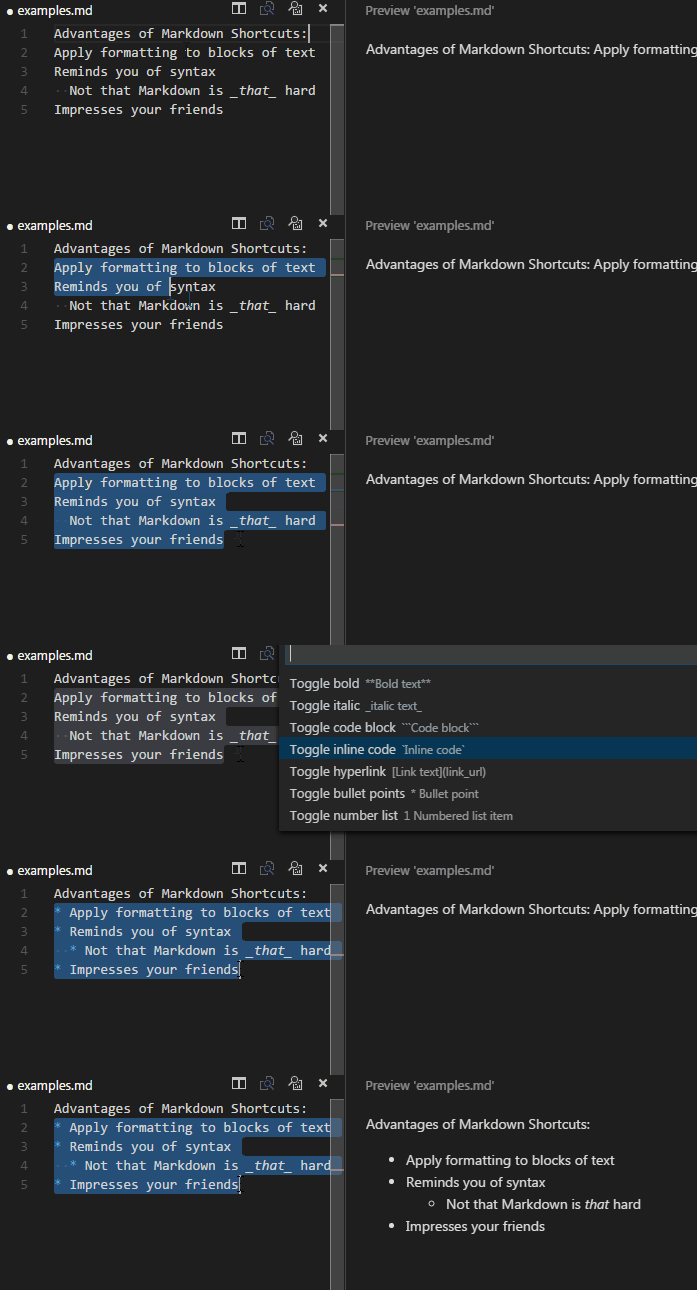
7 |
8 | **Easily generate URLs**
9 |
10 | 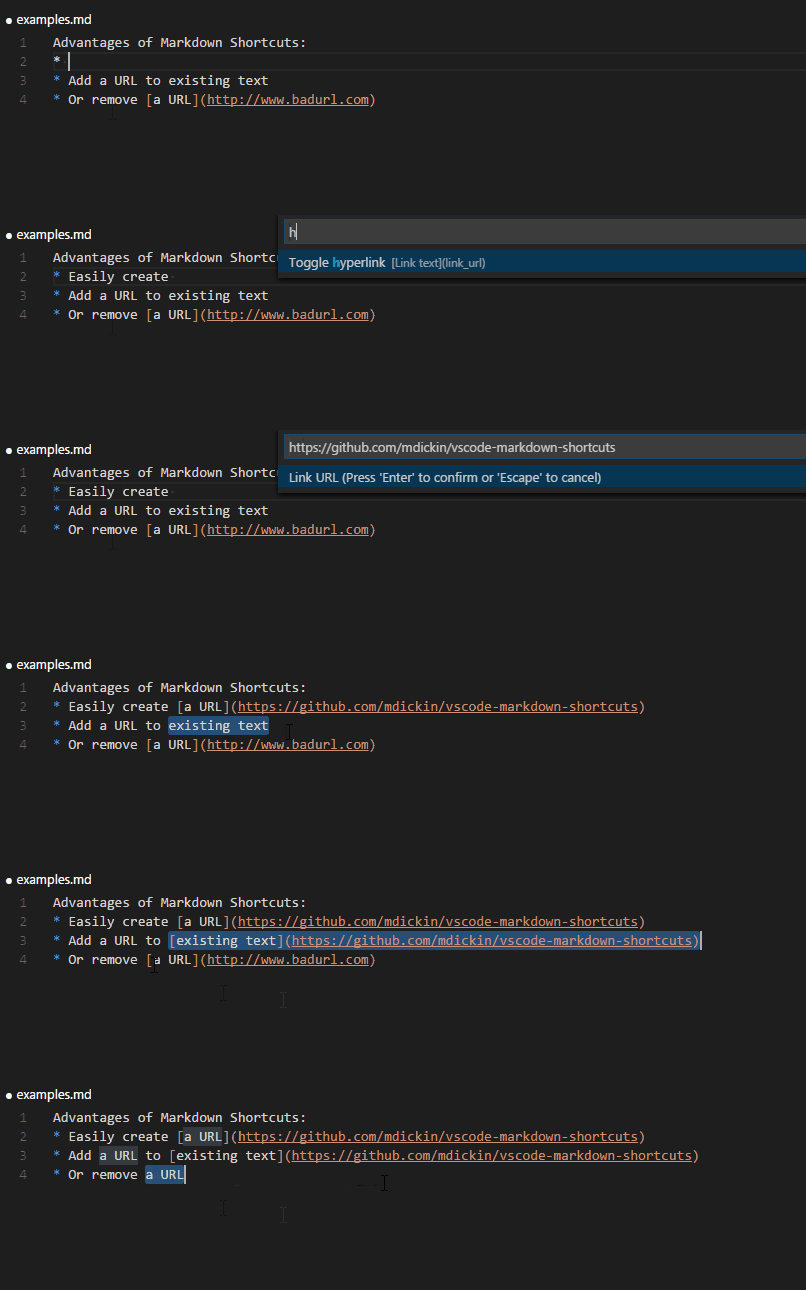
11 |
12 | **Convert tabular data to tables**
13 |
14 | 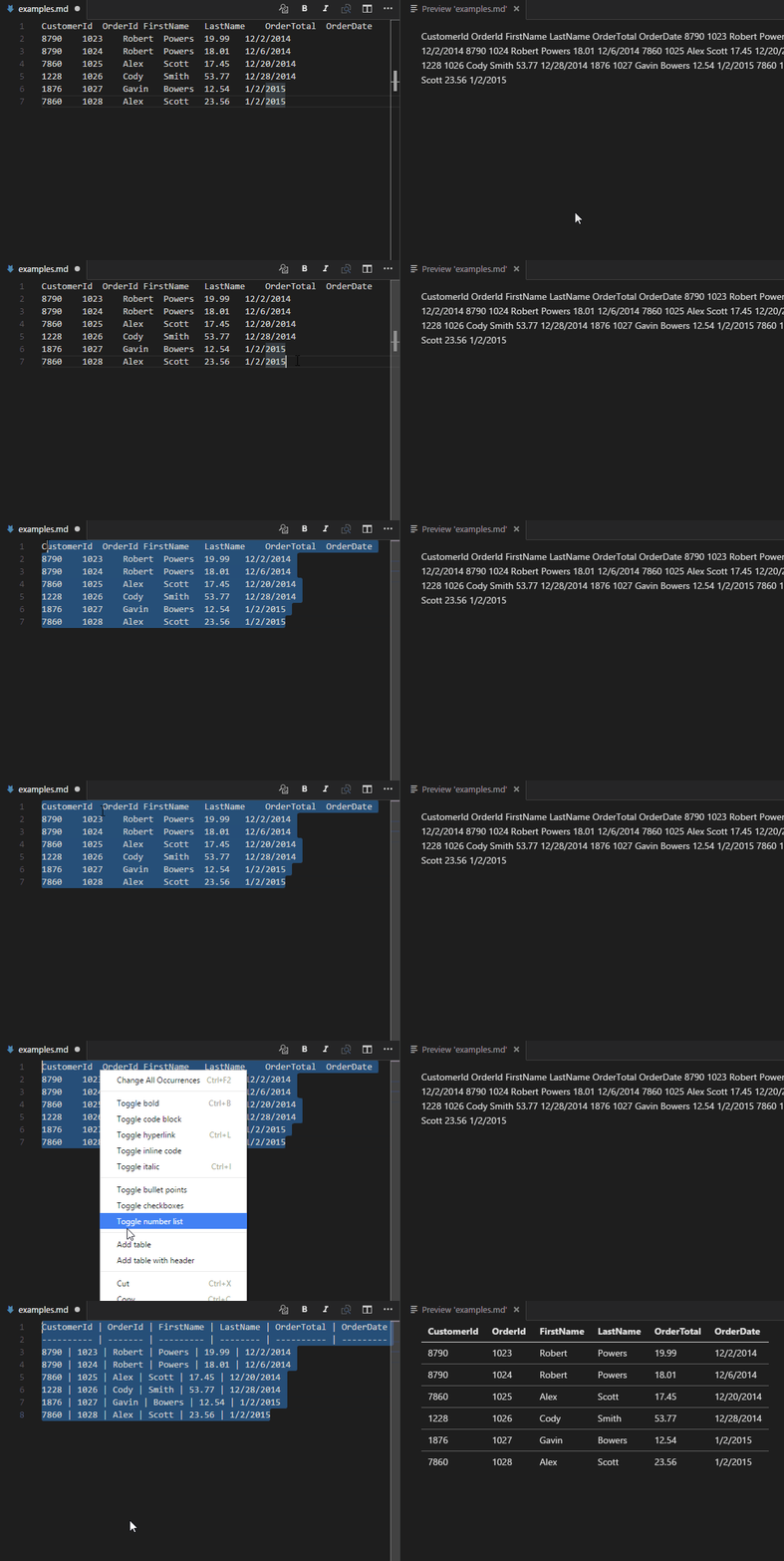
15 |
16 | **Context and title menu integration**
17 |
18 | 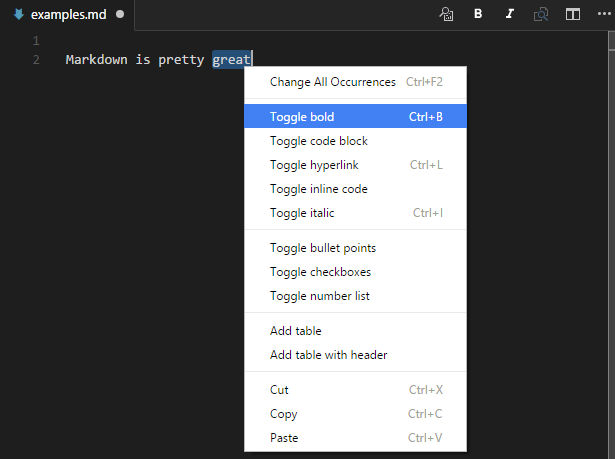
19 |
20 | You can show and hide icons in the title bar with the `markdownShortcuts.icons.*` config settings.
21 |
22 | ## Exposed Commands
23 |
24 | | Name | Description | Default key binding |
25 | | ---- | ----------- | ------------------- |
26 | | md-shortcut.showCommandPalette | Display all commands | ctrl+M ctrl+M |
27 | | md-shortcut.toggleBold | Make \*\*bold\*\* | ctrl+B |
28 | | md-shortcut.toggleItalic | Make \_italic\_ | ctrl+I |
29 | | md-shortcut.toggleStrikethrough | Make \~\~strikethrough\~\~ | |
30 | | md-shortcut.toggleLink | Make [a hyperlink]\(www.example.org) | ctrl+L |
31 | | md-shortcut.toggleImage | Make an image ![]\(image_url.png) | ctrl+shift+L |
32 | | md-shortcut.toggleCodeBlock | Make \`\`\`a code block\`\`\` | ctrl+M ctrl+C |
33 | | md-shortcut.toggleInlineCode | Make \`inline code\` | ctrl+M ctrl+I |
34 | | md-shortcut.toggleBullets | Make * bullet point | ctrl+M ctrl+B |
35 | | md-shortcut.toggleNumbers | Make 1. numbered list | ctrl+M ctrl+1 |
36 | | md-shortcut.toggleCheckboxes | Make - [ ] check list (GitHub flavored markdown) | ctrl+M ctrl+X |
37 | | md-shortcut.toggleTitleH1 | Toggle # H1 title | |
38 | | md-shortcut.toggleTitleH2 | Toggle ## H2 title | |
39 | | md-shortcut.toggleTitleH3 | Toggle ### H3 title | |
40 | | md-shortcut.toggleTitleH4 | Toggle #### H4 title | |
41 | | md-shortcut.toggleTitleH5 | Toggle ##### H5 title | |
42 | | md-shortcut.toggleTitleH6 | Toggle ###### H6 title | |
43 | | md-shortcut.addTable | Add Tabular values | |
44 | | md-shortcut.addTableWithHeader | Add Tabular values with header | |
45 |
--------------------------------------------------------------------------------
/CHANGELOG.md:
--------------------------------------------------------------------------------
1 | ## Version History
2 |
3 | ## v0.12.0 (November 10, 2019)
4 |
5 | * Added toolbar button for adding citations. Thanks to [@axiqia](https://github.com/axiqia) for the enhancement!
6 | * This button is hidden by default, so go to the settings to enable it
7 |
8 | ## v0.11.0 (February 10, 2019)
9 |
10 | * Added configuration item to use underscores for bold markers (defaults to asterisks). Thanks to [@zachvalenta](https://github.com/zachvalenta) for the recommendation!
11 |
12 | ## v0.10.1 (February 3, 2019)
13 |
14 | * Fixed minor issue with document events. Thank you [@gama11](https://github.com/gama11) for the fix!
15 |
16 | ## v0.10.0 (February 3, 2019)
17 |
18 | * Added configuration item to allow Markdown Shortcuts to be used on other file types
19 | * Fixed issue where blank lines were not being marked as citations when selecting blocks of text
20 | * Fixed issue with "auto" being inserted as newline
21 |
22 | Thank you to [@raulrpearson](https://github.com/raulrpearson) for their contribution in supporting other file types!
23 |
24 | ## v0.9.0 (November 5, 2018)
25 |
26 | * Added configuration item to use asterisks for italics markers (defaults to underscore)
27 | * Added configuration item to use dashes or plus signs for bullet point markers (defaults to asterisks)
28 | * Added shortcut for citations
29 |
30 | Thank you to [@FFengIll](https://github.com/FFengIll) for their contributions for citations and configurable bullet points!
31 |
32 | ## v0.8.1 (May 2, 2017)
33 |
34 | * Fixed word selection for words with unicode characters
35 |
36 | ## v0.8.0 (March 25, 2017)
37 |
38 | * Added "surrounding word" feature for commands. This means that you can now place your cursor on a word and toggle bold, italic, etc. No need to highlight the whole word!
39 | * Fixed issue with newlines in block code command
40 | * Added missing H1-H6 commands to VS Code command palette
41 |
42 | Huge thank you to [@mlewand](https://github.com/mlewand) for their contributions and excellent [unit test library](https://www.npmjs.com/package/vscode-test-content).
43 |
44 | ## v0.7.1 (March 12, 2017)
45 |
46 | * Fixed bug with image shortcut where hitting Escape on the prompts would not cancel
47 | * Added support for optional alt tags in images
48 |
49 | ## v0.7.0 (March 11, 2017)
50 |
51 | * Added image shortcut (ctrl+shift+L). Thanks to [@ngtrian](https://github.com/ngtrian) for the recommendation!
52 | * Added configuration settings to show/hide icons in the title bar
53 |
54 | ## v0.6.1 (February 11, 2017)
55 |
56 | * Fixed issue with Changelog not displaying in Visual Studio Extensions gallery
57 |
58 | ## v0.6.0 (February 11, 2017)
59 |
60 | * Added icon. Thanks to [@LaChRiZ](https://github.com/LaChRiZ) for the contribution!
61 | * Modified link shortcut (ctrl+L) to surround URLs with angle brackets. Thanks to [@StephD](https://github.com/StephD)
62 | for the recommendation!
63 |
64 | ## v0.5.0 (December 3, 2016)
65 |
66 | * Added strikethrough shortcut. Thanks to [@seanmft](https://github.com/seanmft) for the contribution!
67 | * Added support for block selection. This allows you to select a subset of a block of text,
68 | and it will automatically find the start and end of the block. This applies to:
69 | * Bullet, number, and checkbox lists
70 | * Code blocks
71 | * Tables
72 | * Fixed bug where numbered list was adding "1" twice
73 |
74 | ## v0.4.1 (November 17, 2016)
75 |
76 | * Added bullets icon to title menu
77 | * Improved ordering of menu items
78 |
79 | ## v0.4.0 (November 7, 2016)
80 |
81 | * Added title and context menu shortcuts. Menu icons taken from
82 | * Added checkbox and table commands. Thanks to [@wenbaofu](https://github.com/wenbaofu) for the recommendations!
83 |
84 | ## v0.3.0 (August 12, 2016)
85 |
86 | * Added header shortcuts. Thanks to [@alebaffa](https://github.com/alebaffa) for the contribution!
--------------------------------------------------------------------------------
/lib/editorHelpers.js:
--------------------------------------------------------------------------------
1 | var vscode = require("vscode");
2 |
3 | module.exports = {
4 | isAnythingSelected: isAnythingSelected,
5 | replaceSelection: replaceSelection,
6 | replaceBlockSelection: replaceBlockSelection,
7 | surroundSelection: surroundSelection,
8 | surroundBlockSelection: surroundBlockSelection,
9 | getSurroundingWord: getSurroundingWord,
10 | isMatch: isMatch,
11 | isBlockMatch: isBlockMatch,
12 | prefixLines: prefixLines
13 | }
14 |
15 | function replaceSelection(replaceFunc) {
16 | var editor = vscode.window.activeTextEditor;
17 | var selection = editor.selection;
18 |
19 | var newText = replaceFunc(editor.document.getText(selection));
20 | return editor.edit(edit => edit.replace(selection, newText));
21 | }
22 |
23 | function replaceBlockSelection(replaceFunc) {
24 | var editor = vscode.window.activeTextEditor;
25 | var selection = getBlockSelection();
26 |
27 | var newText = replaceFunc(editor.document.getText(selection));
28 | return editor.edit(edit => edit.replace(selection, newText));
29 | }
30 |
31 | function isAnythingSelected() {
32 | return !vscode.window.activeTextEditor.selection.isEmpty;
33 | }
34 |
35 | function surroundSelection(startPattern, endPattern, wordPattern)
36 | {
37 | if (endPattern == undefined || endPattern == null) endPattern = startPattern;
38 |
39 | var editor = vscode.window.activeTextEditor;
40 | var selection = editor.selection;
41 |
42 | if (!isAnythingSelected())
43 | {
44 | var withSurroundingWord = getSurroundingWord(editor, selection, wordPattern);
45 |
46 | if (withSurroundingWord != null) {
47 | selection = editor.selection = withSurroundingWord;
48 | }
49 | }
50 |
51 | // Note, even though we're expanding selection, there's still a potential chance
52 | // for collapsed, e.g. empty file, or just an empty line.
53 | if ( !isAnythingSelected()) {
54 | var position = selection.active;
55 | var newPosition = position.with(position.line, position.character + startPattern.length)
56 | return editor.edit((edit) => {
57 | edit.insert(selection.start, startPattern + endPattern);
58 | } ).then(() => {
59 | editor.selection = new vscode.Selection(newPosition, newPosition)
60 | } )
61 | } else if (isSelectionMatch(selection, startPattern, endPattern)) {
62 | return replaceSelection((text) => text.substr(startPattern.length, text.length - startPattern.length - endPattern.length))
63 | }
64 | else {
65 | return replaceSelection((text) => startPattern + text + endPattern)
66 | }
67 | }
68 |
69 | function getSurroundingWord(editor, selection, wordPattern) {
70 | var range = editor.document.getWordRangeAtPosition(selection.active, wordPattern);
71 |
72 | return range == null
73 | ? null
74 | : new vscode.Selection(range.start, range.end);
75 | }
76 |
77 | function surroundBlockSelection(startPattern, endPattern, wordPattern)
78 | {
79 | if (endPattern == undefined || endPattern == null) endPattern = startPattern;
80 |
81 | var editor = vscode.window.activeTextEditor;
82 | var selection = getBlockSelection();
83 |
84 | if (!isAnythingSelected()) {
85 | var withSurroundingWord = getSurroundingWord(editor, selection, wordPattern);
86 |
87 | if (withSurroundingWord != null) {
88 | selection = editor.selection = withSurroundingWord;
89 | }
90 | }
91 |
92 | if (!isAnythingSelected()) {
93 | var position = selection.active;
94 | var newPosition = position.with(position.line + 1, 0)
95 | return editor.edit(edit => edit.insert(selection.start, startPattern + endPattern))
96 | .then(() => {
97 | editor.selection = new vscode.Selection(newPosition, newPosition)
98 | })
99 | }
100 | else {
101 | if (isSelectionMatch(selection, startPattern, endPattern)) {
102 | return replaceBlockSelection((text) => text.substr(startPattern.length, text.length - startPattern.length - endPattern.length))
103 | }
104 | else {
105 | return replaceBlockSelection((text) => startPattern + text + endPattern)
106 | }
107 | }
108 | }
109 |
110 | function getBlockSelection() {
111 | var selection = vscode.window.activeTextEditor.selection;
112 |
113 | if ( selection.isEmpty ) {
114 | return selection;
115 | }
116 |
117 | return selection
118 | .with(selection.start.with(undefined, 0),
119 | selection.end.with(selection.end.line + 1, 0));
120 | }
121 |
122 | function isBlockMatch(startPattern, endPattern) {
123 | return isSelectionMatch(getBlockSelection(), startPattern, endPattern);
124 | }
125 |
126 | function isMatch(startPattern, endPattern) {
127 | return isSelectionMatch(vscode.window.activeTextEditor.selection, startPattern, endPattern);
128 | }
129 |
130 | function isSelectionMatch(selection, startPattern, endPattern) {
131 | var editor = vscode.window.activeTextEditor;
132 | var text = editor.document.getText(selection)
133 | if (startPattern.constructor === RegExp) {
134 | return startPattern.test(text);
135 | }
136 |
137 | return text.startsWith(startPattern) && text.endsWith(endPattern)
138 | }
139 |
140 | function prefixLines(text) {
141 | var selection = vscode.window.activeTextEditor.selection;
142 |
143 | return vscode.window.activeTextEditor.edit(builder => {
144 | for (let line = selection.start.line; line <= selection.end.line; line++) {
145 | builder.insert(selection.start.with(line, 0), text);
146 | }
147 | }
148 | );
149 | }
--------------------------------------------------------------------------------
/lib/commands.js:
--------------------------------------------------------------------------------
1 | var vscode = require("vscode");
2 | var env = require('./env');
3 | var editorHelpers = require("./editorHelpers");
4 | var tables = require("./tables");
5 |
6 | module.exports = {
7 | register: register
8 | }
9 |
10 | var _commands = [
11 | new Command('toggleCitations', toggleCitations, 'Toggle Citations', '> Citations', true),
12 | new Command('toggleStrikethrough', toggleStrikethrough, 'Toggle Strikethrough', '~~Strikethrough text~~', true),
13 | new Command('showCommandPalette', showCommandPalette),
14 | new Command('toggleBold', toggleBold, 'Toggle bold', '**Bold text**', true),
15 | new Command('toggleItalic', toggleItalic, 'Toggle italic', '_italic text_', true),
16 | new Command('toggleCodeBlock', toggleCodeBlock, 'Toggle code block', '```Code block```', true),
17 | new Command('toggleInlineCode', toggleInlineCode, 'Toggle inline code', '`Inline code`', true),
18 | new Command('toggleLink', toggleLink, 'Toggle hyperlink', '[Link text](link_url)', true),
19 | new Command('toggleImage', toggleImage, 'Toggle image', '', true),
20 | new Command('toggleBullets', toggleBullets, 'Toggle bullet points', '* Bullet point', true),
21 | new Command('toggleNumbers', toggleNumberList, 'Toggle number list', '1 Numbered list item', true),
22 | new Command('toggleTitleH1', toggleTitleH1, 'Toggle title H1', '# Title', true),
23 | new Command('toggleTitleH2', toggleTitleH2, 'Toggle title H2', '## Title', true),
24 | new Command('toggleTitleH3', toggleTitleH3, 'Toggle title H3', '### Title', true),
25 | new Command('toggleTitleH4', toggleTitleH4, 'Toggle title H4', '#### Title', true),
26 | new Command('toggleTitleH5', toggleTitleH5, 'Toggle title H5', '##### Title', true),
27 | new Command('toggleTitleH6', toggleTitleH6, 'Toggle title H6', '###### Title', true),
28 | new Command('toggleCheckboxes', toggleCheckboxes, 'Toggle checkboxes', '- [x] Checkbox item', true),
29 | new Command('addTable', tables.addTable, 'Add table', 'Tabular | values', true),
30 | new Command('addTableWithHeader', tables.addTableWithHeader, 'Add table (with header)', 'Tabular | values', true)
31 | ]
32 |
33 | function register(context) {
34 |
35 | _commands.map((cmd) => {
36 | context.subscriptions.push(vscode.commands.registerCommand('md-shortcut.' + cmd.command, cmd.callback))
37 | })
38 | }
39 |
40 | function showCommandPalette() {
41 | vscode.window.showQuickPick(_commands.filter((cmd) => cmd.showInCommandPalette), {
42 | matchOnDescription: true
43 | })
44 | .then((cmd) => {
45 | if (!cmd) return;
46 |
47 | cmd.callback();
48 | })
49 | }
50 |
51 | const wordMatch = '[A-Za-z\\u00C0-\\u017F]';
52 |
53 | const toggleBoldExpressions = {
54 | '**': new RegExp('\\*{2}' + wordMatch + '*\\*{2}|' + wordMatch + '+'),
55 | '__': new RegExp('_{2}' + wordMatch + '*_{2}|' + wordMatch + '+')
56 | };
57 | function toggleBold() {
58 | const marker = vscode.workspace.getConfiguration('markdownShortcuts.bold').get('marker');
59 |
60 | return editorHelpers.surroundSelection(marker, marker, toggleBoldExpressions[marker]);
61 | }
62 |
63 | function toggleItalic() {
64 | const marker = vscode.workspace.getConfiguration('markdownShortcuts.italics').get('marker');
65 |
66 | const pattern = new RegExp('\\'+marker+'?' + wordMatch + '*'+'\\'+marker+'?');
67 |
68 | return editorHelpers.surroundSelection(marker, marker, pattern);
69 | }
70 |
71 | const toggleStrikethroughPattern = new RegExp('~{2}' + wordMatch + '*~{2}|' + wordMatch + '+');
72 | function toggleStrikethrough() {
73 | return editorHelpers.surroundSelection('~~', '~~', toggleStrikethroughPattern);
74 | }
75 |
76 | let newLine = env.getEol();
77 |
78 | var startingBlock = '```' + newLine;
79 | var endingBlock = newLine + '```';
80 | var codeBlockWordPattern = new RegExp(startingBlock + '.+' + endingBlock + '|.+', 'gm');
81 | function toggleCodeBlock() {
82 | return editorHelpers.surroundBlockSelection(startingBlock, endingBlock, codeBlockWordPattern)
83 | }
84 |
85 | const toggleInlineCodePattern = new RegExp('`' + wordMatch + '*`|' + wordMatch + '+')
86 | function toggleInlineCode() {
87 | return editorHelpers.surroundSelection('`', '`', toggleInlineCodePattern);
88 | }
89 |
90 | const headerWordPattern = /#{1,6} .+|.+/;
91 | function toggleTitleH1() {
92 | return editorHelpers.surroundSelection('# ','', headerWordPattern);
93 | }
94 |
95 | function toggleTitleH2() {
96 | return editorHelpers.surroundSelection('## ','', headerWordPattern)
97 | }
98 |
99 | function toggleTitleH3() {
100 | return editorHelpers.surroundSelection('### ','', headerWordPattern)
101 | }
102 |
103 | function toggleTitleH4() {
104 | return editorHelpers.surroundSelection('#### ','', headerWordPattern)
105 | }
106 |
107 | function toggleTitleH5() {
108 | return editorHelpers.surroundSelection('##### ','', headerWordPattern)
109 | }
110 |
111 | function toggleTitleH6() {
112 | return editorHelpers.surroundSelection('###### ','', headerWordPattern)
113 | }
114 |
115 | var AddBullets = /^(\s*)(.+)$/gm
116 | function toggleBullets() {
117 |
118 | var marker = vscode.workspace.getConfiguration('markdownShortcuts.bullets').get('marker');
119 |
120 | if (!editorHelpers.isAnythingSelected()) {
121 | return editorHelpers.surroundSelection(marker + " ", "", new RegExp("\\"+marker+" .+|.+"))
122 | }
123 |
124 | var hasBullets = new RegExp("^(\\s*)\\"+marker+" (.*)$", "gm");
125 |
126 | if (editorHelpers.isBlockMatch(hasBullets)) {
127 | return editorHelpers.replaceBlockSelection((text) => text.replace(hasBullets, "$1$2"))
128 | }
129 | else {
130 | return editorHelpers.replaceBlockSelection((text) => text.replace(AddBullets, "$1"+marker+" $2"))
131 | }
132 | }
133 |
134 | var HasNumbers = /^(\s*)[0-9]\.+ (.*)$/gm
135 | var AddNumbers = /^(\n?)(\s*)(.+)$/gm
136 | function toggleNumberList() {
137 |
138 | if (!editorHelpers.isAnythingSelected()) {
139 | return editorHelpers.surroundSelection("1. ", "")
140 | }
141 |
142 | if (editorHelpers.isBlockMatch(HasNumbers)) {
143 | return editorHelpers.replaceBlockSelection((text) => text.replace(HasNumbers, "$1$2"))
144 | }
145 | else {
146 | var lineNums = {};
147 | return editorHelpers.replaceBlockSelection((text) => text.replace(AddNumbers, (match, newline, whitespace, line) => {
148 | if (!lineNums[whitespace]) {
149 | lineNums[whitespace] = 1
150 | }
151 | return newline + whitespace + lineNums[whitespace]++ + ". " + line
152 | }))
153 | }
154 | }
155 |
156 | var HasCheckboxes = /^(\s*)- \[[ x]{1}\] (.*)$/gmi
157 | var AddCheckboxes = /^(\s*)(.+)$/gm
158 | function toggleCheckboxes() {
159 |
160 | if (!editorHelpers.isAnythingSelected()) {
161 | return editorHelpers.surroundSelection("- [ ] ", "", /- \[[ x]{1}\] .+|.+/gi);
162 | }
163 |
164 | if (editorHelpers.isBlockMatch(HasCheckboxes)) {
165 | return editorHelpers.replaceBlockSelection((text) => text.replace(HasCheckboxes, "$1$2"))
166 | }
167 | else {
168 | return editorHelpers.replaceBlockSelection((text) => text.replace(AddCheckboxes, "$1- [ ] $2"))
169 | }
170 | }
171 |
172 | var HasCitations = /^(\s*)> (.*)$/gmi
173 | var AddCitations = /^(\s*)(.*)$/gm
174 | function toggleCitations() {
175 |
176 | if (!editorHelpers.isAnythingSelected()) {
177 | return editorHelpers.surroundSelection("> ", "", /> .+|.+/gi);
178 | }
179 |
180 | if (editorHelpers.isBlockMatch(HasCitations)) {
181 | return editorHelpers.replaceBlockSelection((text) => text.replace(HasCitations, "$1$2"))
182 | }
183 | else {
184 | return editorHelpers.prefixLines("> ");
185 | return editorHelpers.replaceBlockSelection((text) => text.replace(AddCitations, "$1> $2"))
186 | }
187 | }
188 |
189 | const MarkdownLinkRegex = /^\[.+\]\(.+\)$/;
190 | const UrlRegex = /^(http[s]?:\/\/.+|)$/;
191 | const MarkdownLinkWordPattern = new RegExp('[.+\]\(.+\)|' + wordMatch + '+');
192 | function toggleLink() {
193 |
194 | var editor = vscode.window.activeTextEditor;
195 | var selection = editor.selection;
196 |
197 | if (!editorHelpers.isAnythingSelected())
198 | {
199 | var withSurroundingWord = editorHelpers.getSurroundingWord(editor, selection, MarkdownLinkWordPattern);
200 |
201 | if (withSurroundingWord != null) {
202 | selection = editor.selection = withSurroundingWord;
203 | }
204 | }
205 |
206 | if (editorHelpers.isAnythingSelected()) {
207 | if (editorHelpers.isMatch(MarkdownLinkRegex)) {
208 | //Selection is a MD link, replace it with the link text
209 | return editorHelpers.replaceSelection((text) => text.match(/\[(.+)\]/)[1]);
210 | }
211 |
212 | if (editorHelpers.isMatch(UrlRegex)) {
213 | //Selection is a URL, surround it with angle brackets
214 | return editorHelpers.surroundSelection('<', '>');
215 | }
216 | }
217 |
218 | return getLinkText()
219 | .then(getLinkUrl)
220 | .then(addTags);
221 |
222 | function getLinkText() {
223 | if (selection.isEmpty) {
224 | return vscode.window.showInputBox({
225 | prompt: "Link text"
226 | })
227 | }
228 |
229 | return Promise.resolve("")
230 | }
231 |
232 | function getLinkUrl(linkText) {
233 | if (linkText == null || linkText == undefined) return;
234 |
235 | return vscode.window.showInputBox({
236 | prompt: "Link URL"
237 | })
238 | .then((url) => {
239 | return { text: linkText, url: url}
240 | })
241 | }
242 |
243 | function addTags(options) {
244 | if (!options || options.url == undefined) return;
245 |
246 | return editorHelpers.surroundSelection("[" + options.text, "](" + options.url + ")");
247 | }
248 | }
249 |
250 |
251 | const MarkdownImageRegex = /!\[.*\]\((.+)\)/;
252 | function toggleImage() {
253 |
254 | var editor = vscode.window.activeTextEditor;
255 | var selection = editor.selection;
256 |
257 | if (editorHelpers.isAnythingSelected()) {
258 | if (editorHelpers.isMatch(MarkdownImageRegex)) {
259 | //Selection is a MD link, replace it with the link text
260 | return editorHelpers.replaceSelection((text) => text.match(MarkdownImageRegex)[1]);
261 | }
262 |
263 | if (editorHelpers.isMatch(UrlRegex)) {
264 | return vscode.window.showInputBox({
265 | prompt: "Image alt text"
266 | })
267 | .then(text => {
268 | if (text == null) return;
269 | editorHelpers.replaceSelection((url) => ";
270 | });
271 | }
272 | }
273 |
274 | var editor = vscode.window.activeTextEditor;
275 | var selection = editor.selection;
276 |
277 | return getLinkText()
278 | .then(getLinkUrl)
279 | .then(addTags);
280 |
281 | function getLinkText() {
282 | if (selection.isEmpty) {
283 | return vscode.window.showInputBox({
284 | prompt: "Image alt text"
285 | })
286 | }
287 |
288 | return Promise.resolve("")
289 | }
290 |
291 | function getLinkUrl(linkText) {
292 | if (linkText == null || linkText == undefined) return;
293 |
294 | return vscode.window.showInputBox({
295 | prompt: "Image URL"
296 | })
297 | .then((url) => {
298 | return { text: linkText, url: url}
299 | })
300 | }
301 |
302 | function addTags(options) {
303 | if (!options || !options.url) return;
304 |
305 | return editorHelpers.surroundSelection(";
306 | }
307 | }
308 |
309 |
310 | function Command(command, callback, label, description, showInCommandPalette) {
311 | this.command = command;
312 | this.callback = callback;
313 | this.label = label;
314 | this.description = description;
315 | this.showInCommandPalette = showInCommandPalette ? showInCommandPalette : false;
316 | }
--------------------------------------------------------------------------------
/test/extension.test.js:
--------------------------------------------------------------------------------
1 | /* global suite, test */
2 |
3 | var assert = require( 'assert' );
4 | var vscode = require( 'vscode' );
5 | var vscodeTestContent = require( 'vscode-test-content' );
6 | var env = require('../lib/env');
7 |
8 | suite( "Bold", function() {
9 | test( "Ranged selection", function() {
10 | return TestCommand( 'toggleBold', 'Lets make a [bold} text!', 'Lets make a [**bold**} text!' );
11 | } );
12 |
13 | test( "Collapsed selection", function() {
14 | // This is likely to be changed with #5.
15 | return TestCommand( 'toggleBold', 'Lets make a bo^ld text!', 'Lets make a [**bold**} text!' );
16 | } );
17 |
18 | test( "Collapsed selection with unicode characters", function() {
19 | // This is likely to be changed with #5.
20 | return TestCommand( 'toggleBold', 'Lets make a bÔ^ld text!', 'Lets make a [**bÔld**} text!' );
21 | } );
22 |
23 | test( "Collapsed selection empty editor", function() {
24 | // make sure nothing wrong happens when the editor is totally empty.
25 | return TestCommand( 'toggleBold', '^', '**^**' );
26 | } );
27 |
28 | test( "Collapsed selection empty surround editor", function() {
29 | // make sure nothing wrong happens when the editor is surrounded by bold.
30 | return TestCommand( 'toggleBold', '**^**', '^' );
31 | } );
32 |
33 | test( "Toggles with collapsed selection", function() {
34 | return TestCommand( 'toggleBold', 'Time to **unbo^ld** this statement', 'Time to [unbold} this statement' );
35 | } );
36 |
37 | test( "Toggles with ranged selection", function() {
38 | return TestCommand( 'toggleBold', 'Time to [**unbold**} this statement', 'Time to [unbold} this statement' );
39 | } );
40 | } );
41 |
42 | suite( "Italic", function() {
43 | test( "Ranged selection", function() {
44 | return TestCommand( 'toggleItalic', 'Lets make a [fancy} text!', 'Lets make a [_fancy_} text!' );
45 | } );
46 |
47 | test( "Collapsed selection", function() {
48 | // This is likely to be changed with #5.
49 | return TestCommand( 'toggleItalic', 'Lets make a fan^cy text!', 'Lets make a [_fancy_} text!' );
50 | } );
51 |
52 | test( "Collapsed selection with unicode characters", function() {
53 | // This is likely to be changed with #5.
54 | return TestCommand( 'toggleItalic', 'Lets make a fÄn^cy text!', 'Lets make a [_fÄncy_} text!' );
55 | } );
56 |
57 | test( "Toggles with collapsed selection", function() {
58 | return TestCommand( 'toggleItalic', 'Lets make less _fan^cy_ text', 'Lets make less [fancy} text' );
59 | } );
60 |
61 | test( "Toggles with ranged selection", function() {
62 | return TestCommand( 'toggleItalic', 'Lets make less [_fancy_} text', 'Lets make less [fancy} text' );
63 | } );
64 | } );
65 |
66 | suite( "Strike through", function() {
67 | test( "Ranged selection", function() {
68 | return TestCommand( 'toggleStrikethrough', 'Lets make a [fancy} text!', 'Lets make a [~~fancy~~} text!' );
69 | } );
70 |
71 | test( "Collapsed selection", function() {
72 | // This is likely to be changed with #5.
73 | return TestCommand( 'toggleStrikethrough', 'Lets make a fan^cy text!', 'Lets make a [~~fancy~~} text!' );
74 | } );
75 |
76 | test( "Collapsed selection with unicode characters", function() {
77 | // This is likely to be changed with #5.
78 | return TestCommand( 'toggleStrikethrough', 'Lets make a fÄn^cy text!', 'Lets make a [~~fÄncy~~} text!' );
79 | } );
80 |
81 | test( "Toggles with collapsed selection", function() {
82 | return TestCommand( 'toggleStrikethrough', 'Lets make less ~~fan^cy~~ text', 'Lets make less [fancy} text' );
83 | } );
84 |
85 | test( "Toggles with ranged selection", function() {
86 | return TestCommand( 'toggleStrikethrough', 'Lets make less [~~fancy~~} text', 'Lets make less [fancy} text' );
87 | } );
88 | } );
89 |
90 | suite( "Inline code", function() {
91 | test( "Ranged selection", function() {
92 | return TestCommand( 'toggleInlineCode', 'Lets make a [fancy} text!', 'Lets make a [`fancy`} text!' );
93 | } );
94 |
95 | test( "Collapsed selection", function() {
96 | // This is likely to be changed with #5.
97 | return TestCommand( 'toggleInlineCode', 'Lets make a fan^cy text!', 'Lets make a [`fancy`} text!' );
98 | } );
99 |
100 | test( "Collapsed selection with unicode selection", function() {
101 | // This is likely to be changed with #5.
102 | return TestCommand( 'toggleInlineCode', 'Lets make a fÄn^cy text!', 'Lets make a [`fÄncy`} text!' );
103 | } );
104 |
105 | test( "Toggles with collapsed selection", function() {
106 | return TestCommand( 'toggleInlineCode', 'Lets make less `fa^ncy` text', 'Lets make less [fancy} text' );
107 | } );
108 |
109 | test( "Toggles with ranged selection", function() {
110 | return TestCommand( 'toggleInlineCode', 'Lets make less [`fancy`} text', 'Lets make less [fancy} text' );
111 | } );
112 | } );
113 |
114 | suite( "Headers", function() {
115 | // For headers we'll generate the tests, so that this test suite doesn't get too bloat.
116 | for ( let i = 1; i <= 6; i++ ) {
117 | suite( 'Level ' + i, function() {
118 | var headerMarker = '#'.repeat( i );
119 |
120 | test( "Ranged selection", function() {
121 | return TestCommand( `toggleTitleH${i}`, 'Lets make a [fancy} text!', `Lets make a [${headerMarker} fancy} text!` );
122 | } );
123 |
124 | test( "Collapsed selection", function() {
125 | // This is likely to be changed with #5.
126 | return TestCommand( `toggleTitleH${i}`, 'Lets make a fan^cy text!', `[${headerMarker} Lets make a fancy text!}` );
127 | } );
128 |
129 | test( "Collapsed selection with newline", function() {
130 | // This is likely to be changed with #5.
131 | return TestCommand( `toggleTitleH${i}`, 'Lets make a fan^cy text!\nAnother line', `[${headerMarker} Lets make a fancy text!}\nAnother line` );
132 | } );
133 |
134 | test( "Toggles with ranged selection", function() {
135 | return TestCommand( `toggleTitleH${i}`, `[${headerMarker} Lets make less fancy text}`, '[Lets make less fancy text}' );
136 | } );
137 |
138 | test( "Toggles with collapsed selection", function() {
139 | return TestCommand( `toggleTitleH${i}`, `${headerMarker} Lets make ^less fancy text`, '[Lets make less fancy text}' );
140 | } );
141 | } );
142 | }
143 | } );
144 |
145 | var newLine = env.getEol();
146 | suite( "Block code", function() {
147 | test( "Ranged selection", function() {
148 | return TestCommand(
149 | 'toggleCodeBlock',
150 | '[some code}',
151 | '[```\nsome code\n```}' );
152 | } );
153 |
154 | test( "Multiline ranged selection", function() {
155 | return TestCommand(
156 | 'toggleCodeBlock',
157 | '[some code' + newLine + 'more code}',
158 | '[```\nsome code\nmore code\n```}' );
159 | } );
160 |
161 | test( "Multiline ranged selection with extra newline", function() {
162 | return TestCommand(
163 | 'toggleCodeBlock',
164 | '[some code' + newLine + 'more code}' + newLine,
165 | '[```\nsome code\nmore code\n```}');
166 | } );
167 |
168 | test( "Multiline ranged selection while selecting extra newline", function() {
169 | return TestCommand(
170 | 'toggleCodeBlock',
171 | '[some code' + newLine + 'more code' + newLine + '}',
172 | '[```\nsome code\nmore code\n\n```}');
173 | } );
174 |
175 | test( "Collapsed selection", function() {
176 | return TestCommand(
177 | 'toggleCodeBlock',
178 | 'Some code^',
179 | '[```\nSome code\n```}' );
180 | } );
181 |
182 | test( "Toggles with ranged selection", function() {
183 | return TestCommand(
184 | 'toggleCodeBlock',
185 | '[```\nsome code\n```}',
186 | '[some code}' );
187 | } );
188 |
189 | test( "Toggles with multi-line ranged selection", function() {
190 | return TestCommand(
191 | 'toggleCodeBlock',
192 | '[```' + newLine + 'some code' + newLine + 'more code' + newLine + '```}',
193 | '[some code\nmore code}' );
194 | } );
195 |
196 | //TODO: are these possible?
197 | // test( "Toggles with collapsed selection", function() {
198 | // return TestCommand( 'toggleCodeBlock', '```' + newLine + 'some^ code' + newLine + '```', '[some code}' );
199 | // } );
200 |
201 | // test( "Toggles with multiline collapsed selection", function() {
202 | // return TestCommand( 'toggleCodeBlock', '```' + newLine + 'some^ code' + newLine + 'more code' + newLine + '```', '[some code\nmore code}' );
203 | // } );
204 | } );
205 |
206 | suite("Bullets", function () {
207 | // beforeEach(() => {
208 | // });
209 |
210 | test("Collapsed selection", function () {
211 | return TestCommand( 'toggleBullets',
212 | 'A line for bul^lets',
213 | '[* A line for bullets}');
214 | })
215 |
216 | test("Ranged selection", function () {
217 | return TestCommand( 'toggleBullets',
218 | 'A li[st\nOf Ite}ms',
219 | '* A [list\n* Of} Items');
220 | })
221 |
222 | test("Toggles with collapsed selection", function () {
223 | return TestCommand( 'toggleBullets',
224 | '* A line for bul^lets',
225 | '[A line for bullets}');
226 | })
227 |
228 | test("Toggles with ranged selection", function () {
229 | return TestCommand( 'toggleBullets',
230 | '* A bullet[ed li}st',
231 | 'A bulleted[ list}');
232 | })
233 |
234 | test("Toggles with multi-line ranged selection", function () {
235 | return TestCommand( 'toggleBullets',
236 | '* A li[st\n* Of Ite}ms',
237 | 'A list[\nOf Items}');
238 | })
239 | });
240 |
241 | suite("Citations", function () {
242 |
243 | test("Collapsed selection", function () {
244 | return TestCommand(
245 | 'toggleCitations',
246 | 'A line for ci^tation',
247 | '[> A line for citation}');
248 | })
249 |
250 | test("Ranged selection", function () {
251 | return TestCommand(
252 | 'toggleCitations',
253 | 'A li[st\nOf Citatio}ns',
254 | '> A li[st\n> Of Citatio}ns');
255 | })
256 |
257 | test("Ranged selection with blank lines", function () {
258 | return TestCommand(
259 | 'toggleCitations',
260 | 'A li[st\n\n\nOf Citatio}ns',
261 | '> A li[st\n> \n> \n> Of Citatio}ns');
262 | })
263 |
264 | test("Toggles with collapsed selection", function () {
265 | return TestCommand(
266 | 'toggleCitations',
267 | '> A line for ci^tation',
268 | '[A line for citation}');
269 | })
270 |
271 | test("Toggles with ranged selection", function () {
272 | return TestCommand(
273 | 'toggleCitations',
274 | '> A norm[al citatio}n',
275 | 'A normal[ citation}');
276 | })
277 |
278 | test("Toggles with multi-line ranged selection", function () {
279 | return TestCommand(
280 | 'toggleCitations',
281 | '> A li[st\n> Of Citatio}ns',
282 | 'A list[\nOf Citations}');
283 | })
284 | });
285 |
286 | suite( "URLs", function() {
287 | //TODO: figure out how to mock the input selections to generate links
288 |
289 | //TODO: need to be able to escape URL brackets to avoid them being interpreted as selections
290 | // test( "Toggles with collapsed selection", function() {
291 | // return TestCommand( 'toggleLink', 'A [nice url](http://www.g^oogle.com) here', 'A [nice url} here', customMarkers );
292 | // } );
293 |
294 | // test( "Toggles with ranged selection", function() {
295 | // return TestCommand( 'toggleLink', 'A [\[nice url\](http://www.google.com)} here', 'A [nice url} here', customMarkers );
296 | // } );
297 | } );
298 |
299 | // A helper function that generates test case functions.
300 | // Both inputContent and expectedContent can include selection string representation.
301 | // Returns a promise resolving to Promise.
302 | function TestCommand( command, inputContent, expectedContent ) {
303 | return vscodeTestContent.setWithSelection( inputContent )
304 | .then( editor => {
305 | return vscode.commands.executeCommand( 'md-shortcut.' + command )
306 | .then(() => assert.strictEqual( vscodeTestContent.getWithSelection( editor ), expectedContent ) )
307 | .then(() => editor );
308 | } );
309 | }
--------------------------------------------------------------------------------
/package.json:
--------------------------------------------------------------------------------
1 | {
2 | "name": "markdown-shortcuts",
3 | "displayName": "Markdown Shortcuts",
4 | "description": "Shortcuts for Markdown editing",
5 | "icon": "media/images/markdown-shortcuts-512x512.png",
6 | "version": "0.12.0",
7 | "publisher": "mdickin",
8 | "engines": {
9 | "vscode": "^1.9.0"
10 | },
11 | "categories": [
12 | "Other"
13 | ],
14 | "keywords": [
15 | "markdown",
16 | "shortcut",
17 | "tool",
18 | "helper"
19 | ],
20 | "main": "./extension",
21 | "activationEvents": [
22 | "*"
23 | ],
24 | "contributes": {
25 | "configuration": {
26 | "type": "object",
27 | "title": "Markdown Shortcuts",
28 | "properties": {
29 | "markdownShortcuts.icons.bold": {
30 | "type": "boolean",
31 | "default": true,
32 | "description": "Show bold icon in title bar"
33 | },
34 | "markdownShortcuts.icons.italic": {
35 | "type": "boolean",
36 | "default": true,
37 | "description": "Show italic icon in title bar"
38 | },
39 | "markdownShortcuts.icons.strikethrough": {
40 | "type": "boolean",
41 | "default": true,
42 | "description": "Show strikethrough icon in title bar"
43 | },
44 | "markdownShortcuts.icons.bullets": {
45 | "type": "boolean",
46 | "default": true,
47 | "description": "Show bullets icon in title bar"
48 | },
49 | "markdownShortcuts.icons.link": {
50 | "type": "boolean",
51 | "default": false,
52 | "description": "Show link icon in title bar"
53 | },
54 | "markdownShortcuts.icons.image": {
55 | "type": "boolean",
56 | "default": false,
57 | "description": "Show image icon in title bar"
58 | },
59 | "markdownShortcuts.icons.citations": {
60 | "type": "boolean",
61 | "default": false,
62 | "description": "Show citations icon in title bar"
63 | },
64 | "markdownShortcuts.bold.marker": {
65 | "type": "string",
66 | "default": "**",
67 | "description": "Bold marker",
68 | "enum": [
69 | "__",
70 | "**"
71 | ]
72 | },
73 | "markdownShortcuts.bullets.marker": {
74 | "type": "string",
75 | "default": "*",
76 | "description": "Bullets marker",
77 | "enum": [
78 | "-",
79 | "*",
80 | "+"
81 | ]
82 | },
83 | "markdownShortcuts.italics.marker": {
84 | "type": "string",
85 | "default": "_",
86 | "description": "Italics marker",
87 | "enum": [
88 | "_",
89 | "*"
90 | ]
91 | },
92 | "markdownShortcuts.languages": {
93 | "type": "array",
94 | "default": [
95 | "markdown"
96 | ],
97 | "description": "Array of languages for which shortcuts will be available"
98 | }
99 | }
100 | },
101 | "commands": [
102 | {
103 | "command": "md-shortcut.toggleCitations",
104 | "title": "Toggle citations",
105 | "icon": {
106 | "dark": "./media/icons/quote_white.svg",
107 | "light": "./media/icons/quote_black.svg"
108 | },
109 | "category": "Markdown Shortcuts"
110 | },
111 | {
112 | "command": "md-shortcut.toggleBold",
113 | "title": "Toggle bold",
114 | "icon": {
115 | "dark": "./media/icons/bold_white.svg",
116 | "light": "./media/icons/bold_black.svg"
117 | },
118 | "category": "Markdown Shortcuts"
119 | },
120 | {
121 | "command": "md-shortcut.toggleItalic",
122 | "title": "Toggle italic",
123 | "icon": {
124 | "dark": "./media/icons/italic_white.svg",
125 | "light": "./media/icons/italic_black.svg"
126 | },
127 | "category": "Markdown Shortcuts"
128 | },
129 | {
130 | "command": "md-shortcut.toggleStrikethrough",
131 | "title": "Toggle strikethrough",
132 | "icon": {
133 | "dark": "./media/icons/strikethrough_white.svg",
134 | "light": "./media/icons/strikethrough_black.svg"
135 | },
136 | "category": "Markdown Shortcuts"
137 | },
138 | {
139 | "command": "md-shortcut.toggleCodeBlock",
140 | "title": "Toggle code block",
141 | "icon": {
142 | "dark": "./media/icons/code_white.svg",
143 | "light": "./media/icons/code_black.svg"
144 | },
145 | "category": "Markdown Shortcuts"
146 | },
147 | {
148 | "command": "md-shortcut.toggleInlineCode",
149 | "title": "Toggle inline code",
150 | "category": "Markdown Shortcuts"
151 | },
152 | {
153 | "command": "md-shortcut.toggleLink",
154 | "title": "Toggle hyperlink",
155 | "icon": {
156 | "dark": "./media/icons/link_white.svg",
157 | "light": "./media/icons/link_black.svg"
158 | },
159 | "category": "Markdown Shortcuts"
160 | },
161 | {
162 | "command": "md-shortcut.toggleImage",
163 | "title": "Toggle image",
164 | "icon": {
165 | "dark": "./media/icons/image_white.svg",
166 | "light": "./media/icons/image_black.svg"
167 | },
168 | "category": "Markdown Shortcuts"
169 | },
170 | {
171 | "command": "md-shortcut.toggleBullets",
172 | "title": "Toggle bullet points",
173 | "icon": {
174 | "dark": "./media/icons/bullet_white.svg",
175 | "light": "./media/icons/bullet_black.svg"
176 | },
177 | "category": "Markdown Shortcuts"
178 | },
179 | {
180 | "command": "md-shortcut.toggleNumbers",
181 | "title": "Toggle number list",
182 | "icon": {
183 | "dark": "./media/icons/number_white.svg",
184 | "light": "./media/icons/number_black.svg"
185 | },
186 | "category": "Markdown Shortcuts"
187 | },
188 | {
189 | "command": "md-shortcut.toggleCheckboxes",
190 | "title": "Toggle checkboxes",
191 | "icon": {
192 | "dark": "./media/icons/check_white.svg",
193 | "light": "./media/icons/check_black.svg"
194 | },
195 | "category": "Markdown Shortcuts"
196 | },
197 | {
198 | "command": "md-shortcut.addTable",
199 | "title": "Add table",
200 | "icon": {
201 | "dark": "./media/icons/grid_white.svg",
202 | "light": "./media/icons/grid_black.svg"
203 | },
204 | "category": "Markdown Shortcuts"
205 | },
206 | {
207 | "command": "md-shortcut.addTableWithHeader",
208 | "title": "Add table with header",
209 | "icon": {
210 | "dark": "./media/icons/grid_white.svg",
211 | "light": "./media/icons/grid_black.svg"
212 | },
213 | "category": "Markdown Shortcuts"
214 | },
215 | {
216 | "command": "md-shortcut.toggleTitleH1",
217 | "title": "Toggle Header Level 1",
218 | "category": "Markdown Shortcuts"
219 | },
220 | {
221 | "command": "md-shortcut.toggleTitleH2",
222 | "title": "Toggle Header Level 2",
223 | "category": "Markdown Shortcuts"
224 | },
225 | {
226 | "command": "md-shortcut.toggleTitleH3",
227 | "title": "Toggle Header Level 3",
228 | "category": "Markdown Shortcuts"
229 | },
230 | {
231 | "command": "md-shortcut.toggleTitleH4",
232 | "title": "Toggle Header Level 4",
233 | "category": "Markdown Shortcuts"
234 | },
235 | {
236 | "command": "md-shortcut.toggleTitleH5",
237 | "title": "Toggle Header Level 5",
238 | "category": "Markdown Shortcuts"
239 | },
240 | {
241 | "command": "md-shortcut.toggleTitleH6",
242 | "title": "Toggle Header Level 6",
243 | "category": "Markdown Shortcuts"
244 | }
245 | ],
246 | "keybindings": [
247 | {
248 | "command": "md-shortcut.showCommandPalette",
249 | "key": "ctrl+m ctrl+m",
250 | "when": "editorTextFocus && markdownShortcuts:enabled"
251 | },
252 | {
253 | "command": "md-shortcut.toggleBold",
254 | "key": "ctrl+b",
255 | "when": "editorTextFocus && markdownShortcuts:enabled"
256 | },
257 | {
258 | "command": "md-shortcut.toggleItalic",
259 | "key": "ctrl+i",
260 | "when": "editorTextFocus && markdownShortcuts:enabled"
261 | },
262 | {
263 | "command": "md-shortcut.toggleLink",
264 | "key": "ctrl+l",
265 | "when": "editorTextFocus && markdownShortcuts:enabled"
266 | },
267 | {
268 | "command": "md-shortcut.toggleImage",
269 | "key": "ctrl+shift+l",
270 | "when": "editorTextFocus && markdownShortcuts:enabled"
271 | },
272 | {
273 | "command": "md-shortcut.toggleCodeBlock",
274 | "key": "ctrl+m ctrl+c",
275 | "when": "editorTextFocus && markdownShortcuts:enabled"
276 | },
277 | {
278 | "command": "md-shortcut.toggleInlineCode",
279 | "key": "ctrl+m ctrl+i",
280 | "when": "editorTextFocus && markdownShortcuts:enabled"
281 | },
282 | {
283 | "command": "md-shortcut.toggleBullets",
284 | "key": "ctrl+m ctrl+b",
285 | "when": "editorTextFocus && markdownShortcuts:enabled"
286 | },
287 | {
288 | "command": "md-shortcut.toggleNumbers",
289 | "key": "ctrl+m ctrl+1",
290 | "when": "editorTextFocus && markdownShortcuts:enabled"
291 | },
292 | {
293 | "command": "md-shortcut.toggleCheckboxes",
294 | "key": "ctrl+m ctrl+x",
295 | "when": "editorTextFocus && markdownShortcuts:enabled"
296 | }
297 | ],
298 | "menus": {
299 | "editor/context": [
300 | {
301 | "command": "md-shortcut.toggleBold",
302 | "when": "markdownShortcuts:enabled",
303 | "group": "2_markdown_1@1"
304 | },
305 | {
306 | "command": "md-shortcut.toggleItalic",
307 | "when": "markdownShortcuts:enabled",
308 | "group": "2_markdown_1@2"
309 | },
310 | {
311 | "command": "md-shortcut.toggleStrikethrough",
312 | "when": "markdownShortcuts:enabled",
313 | "group": "2_markdown_1@3"
314 | },
315 | {
316 | "command": "md-shortcut.toggleLink",
317 | "when": "markdownShortcuts:enabled",
318 | "group": "2_markdown_1@4"
319 | },
320 | {
321 | "command": "md-shortcut.toggleImage",
322 | "when": "markdownShortcuts:enabled",
323 | "group": "2_markdown_1@5"
324 | },
325 | {
326 | "command": "md-shortcut.toggleCodeBlock",
327 | "when": "markdownShortcuts:enabled",
328 | "group": "2_markdown_1@6"
329 | },
330 | {
331 | "command": "md-shortcut.toggleInlineCode",
332 | "when": "markdownShortcuts:enabled",
333 | "group": "2_markdown_1@7"
334 | },
335 | {
336 | "command": "md-shortcut.toggleCitations",
337 | "when": "markdownShortcuts:enabled",
338 | "group": "2_markdown_1@8"
339 | },
340 | {
341 | "command": "md-shortcut.toggleBullets",
342 | "when": "markdownShortcuts:enabled",
343 | "group": "2_markdown_2@1"
344 | },
345 | {
346 | "command": "md-shortcut.toggleNumbers",
347 | "when": "markdownShortcuts:enabled",
348 | "group": "2_markdown_2@2"
349 | },
350 | {
351 | "command": "md-shortcut.toggleCheckboxes",
352 | "when": "markdownShortcuts:enabled",
353 | "group": "2_markdown_2@3"
354 | },
355 | {
356 | "command": "md-shortcut.toggleCitations",
357 | "when": "markdownShortcuts:enabled",
358 | "group": "2_markdown_2@4"
359 | },
360 | {
361 | "command": "md-shortcut.addTable",
362 | "when": "markdownShortcuts:enabled",
363 | "group": "2_markdown_3@1"
364 | },
365 | {
366 | "command": "md-shortcut.addTableWithHeader",
367 | "when": "markdownShortcuts:enabled",
368 | "group": "2_markdown_3@2"
369 | }
370 | ],
371 | "editor/title": [
372 | {
373 | "command": "md-shortcut.toggleBold",
374 | "when": "markdownShortcuts:enabled && config.markdownShortcuts.icons.bold",
375 | "group": "navigation@1"
376 | },
377 | {
378 | "command": "md-shortcut.toggleItalic",
379 | "when": "markdownShortcuts:enabled && config.markdownShortcuts.icons.italic",
380 | "group": "navigation@2"
381 | },
382 | {
383 | "command": "md-shortcut.toggleStrikethrough",
384 | "when": "markdownShortcuts:enabled && config.markdownShortcuts.icons.strikethrough",
385 | "group": "navigation@3"
386 | },
387 | {
388 | "command": "md-shortcut.toggleBullets",
389 | "when": "markdownShortcuts:enabled && config.markdownShortcuts.icons.bullets",
390 | "group": "navigation@4"
391 | },
392 | {
393 | "command": "md-shortcut.toggleLink",
394 | "when": "markdownShortcuts:enabled && config.markdownShortcuts.icons.link",
395 | "group": "navigation@5"
396 | },
397 | {
398 | "command": "md-shortcut.toggleImage",
399 | "when": "markdownShortcuts:enabled && config.markdownShortcuts.icons.image",
400 | "group": "navigation@6"
401 | }, {
402 | "command": "md-shortcut.toggleCitations",
403 | "when": "markdownShortcuts:enabled && config.markdownShortcuts.icons.citations",
404 | "group": "navigation@7"
405 | }
406 | ]
407 | }
408 | },
409 | "scripts": {
410 | "postinstall": "node ./node_modules/vscode/bin/install",
411 | "test": "node ./node_modules/vscode/bin/test"
412 | },
413 | "devDependencies": {
414 | "vscode": "^1.0.0",
415 | "vscode-test-content": "^1.1.0"
416 | },
417 | "homepage": "https://github.com/mdickin/vscode-markdown-shortcuts",
418 | "repository": {
419 | "type": "git",
420 | "url": "https://github.com/mdickin/vscode-markdown-shortcuts.git"
421 | }
422 | }
423 |
--------------------------------------------------------------------------------