├── .gitignore
├── .gitattributes
├── sample.gif
├── package.json
├── main.js
├── index.html
├── LICENSE
├── README.md
└── src
├── electron-tooltip.js
├── electron-tooltip.html
└── tooltip-events.js
/.gitignore:
--------------------------------------------------------------------------------
1 | node_modules
2 |
--------------------------------------------------------------------------------
/.gitattributes:
--------------------------------------------------------------------------------
1 | # Auto detect text files and perform LF normalization
2 | * text=auto
--------------------------------------------------------------------------------
/sample.gif:
--------------------------------------------------------------------------------
https://raw.githubusercontent.com/mdings/electron-tooltip/HEAD/sample.gif
--------------------------------------------------------------------------------
/package.json:
--------------------------------------------------------------------------------
1 | {
2 | "name": "electron-tooltip",
3 | "description": "Free your tooltips from their window bounds",
4 | "homepage": "https://github.com/mdings/electron-tooltip",
5 | "repository": {
6 | "type": "git",
7 | "url": "https://github.com/mdings/electron-tooltip"
8 | },
9 | "version": "1.1.4",
10 | "main": "./src/electron-tooltip.js",
11 | "scripts": {
12 | "start": "electron main.js",
13 | "test": "echo \"Error: no test specified\" && exit 1"
14 | },
15 | "author": "Maarten Dings",
16 | "license": "ISC",
17 | "devDependencies": {
18 | "electron": "^1.6.11"
19 | }
20 | }
21 |
--------------------------------------------------------------------------------
/main.js:
--------------------------------------------------------------------------------
1 | const electron = require('electron')
2 | const app = electron.app
3 | const BrowserWindow = electron.BrowserWindow
4 |
5 | const path = require('path')
6 | const url = require('url')
7 |
8 | let mainWindow
9 |
10 | function createWindow () {
11 | mainWindow = new BrowserWindow({width: 800, height: 600})
12 |
13 | mainWindow.loadURL(url.format({
14 | pathname: path.join(__dirname, 'index.html'),
15 | protocol: 'file:',
16 | slashes: true
17 | }))
18 |
19 | // Emitted when the window is closed.
20 | mainWindow.on('closed', function () {
21 | mainWindow = null
22 | })
23 | }
24 |
25 | app.on('ready', createWindow)
26 |
27 | // Quit when all windows are closed.
28 | app.on('window-all-closed', function () {
29 | if (process.platform !== 'darwin') {
30 | app.quit()
31 | }
32 | })
33 |
34 | app.on('activate', function () {
35 | if (mainWindow === null) {
36 | createWindow()
37 | }
38 | })
--------------------------------------------------------------------------------
/index.html:
--------------------------------------------------------------------------------
1 |
2 |
3 |
4 |
15 |
16 |
17 |
18 | hallo tooltip
19 |
20 |
23 |
24 | hallo tooltip
25 |
26 |
27 |
31 |
32 |
--------------------------------------------------------------------------------
/LICENSE:
--------------------------------------------------------------------------------
1 | MIT License
2 |
3 | Copyright (c) 2017 Maarten Dings
4 |
5 | Permission is hereby granted, free of charge, to any person obtaining a copy
6 | of this software and associated documentation files (the "Software"), to deal
7 | in the Software without restriction, including without limitation the rights
8 | to use, copy, modify, merge, publish, distribute, sublicense, and/or sell
9 | copies of the Software, and to permit persons to whom the Software is
10 | furnished to do so, subject to the following conditions:
11 |
12 | The above copyright notice and this permission notice shall be included in all
13 | copies or substantial portions of the Software.
14 |
15 | THE SOFTWARE IS PROVIDED "AS IS", WITHOUT WARRANTY OF ANY KIND, EXPRESS OR
16 | IMPLIED, INCLUDING BUT NOT LIMITED TO THE WARRANTIES OF MERCHANTABILITY,
17 | FITNESS FOR A PARTICULAR PURPOSE AND NONINFRINGEMENT. IN NO EVENT SHALL THE
18 | AUTHORS OR COPYRIGHT HOLDERS BE LIABLE FOR ANY CLAIM, DAMAGES OR OTHER
19 | LIABILITY, WHETHER IN AN ACTION OF CONTRACT, TORT OR OTHERWISE, ARISING FROM,
20 | OUT OF OR IN CONNECTION WITH THE SOFTWARE OR THE USE OR OTHER DEALINGS IN THE
21 | SOFTWARE.
--------------------------------------------------------------------------------
/README.md:
--------------------------------------------------------------------------------
1 | # Electron tooltip
2 |
3 | ## Description
4 |
5 | This module is intended to be used in [Electron applications](https://electron.atom.io/). It allows for tooltips to flow outside the window bounds they're called from.
6 |
7 | 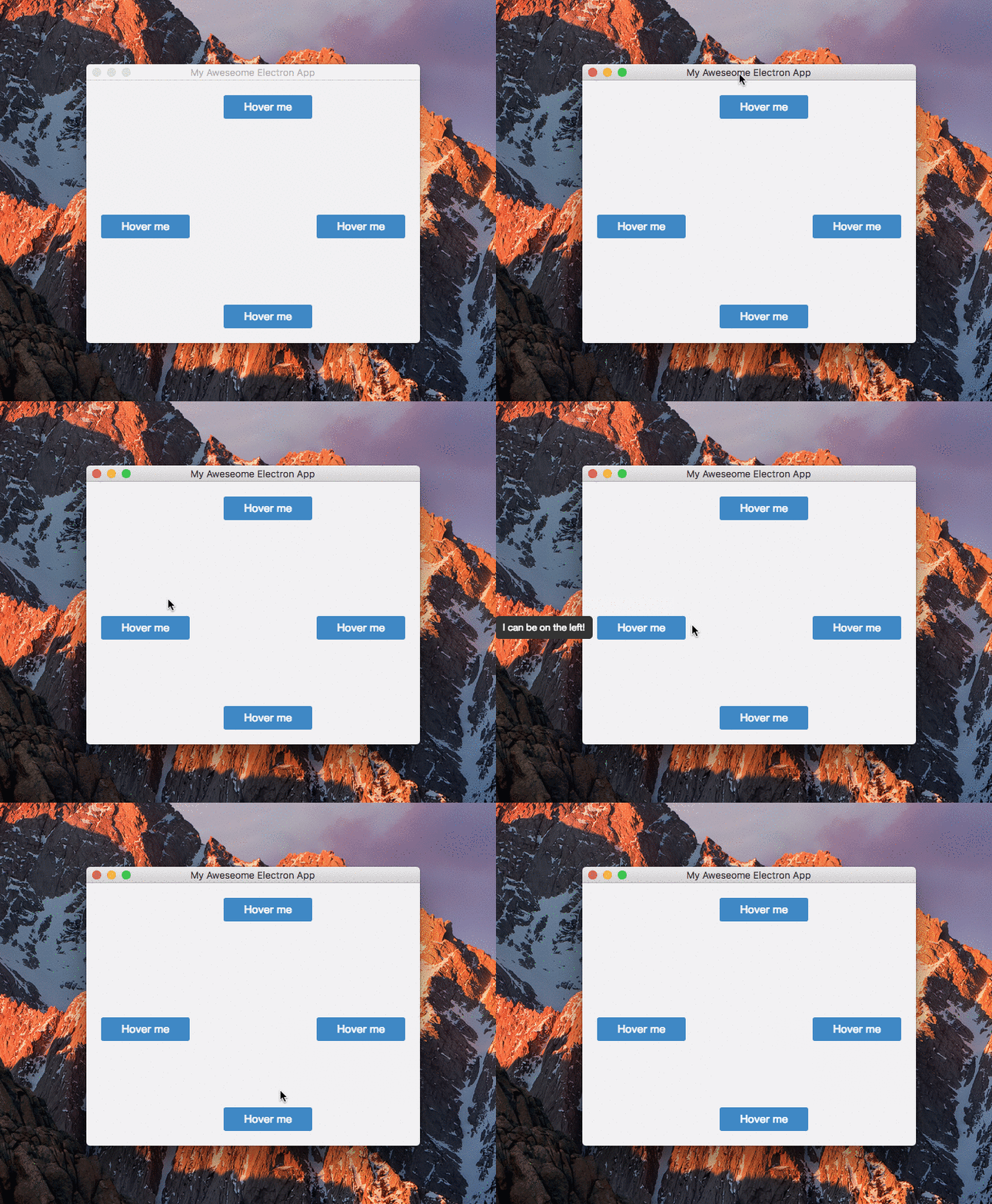 8 |
9 | ## Installation
10 |
11 | ```javascript
12 | npm install --save-dev electron-tooltip
13 | ```
14 |
15 | ## Usage
16 | After importing the module, it will search for elements that have the data-tooltip attribute attached. A configuration object can be passed in when calling the tooltip function.
17 |
18 | ```javascript
19 | // in the render process..
20 | const tt = require('electron-tooltip')
21 | tt({
22 | // config properties
23 | })
24 | ```
25 | Position, width and offset options can be overriden on a per element basis by using the data-tooltip-{option} attribute.
26 |
27 | ```html
28 |
29 |
30 | ```
31 |
32 | ### Configuration options
33 |
34 | |option|description|default|values|
35 | |---|---|---|---|
36 | |position|Tooltip direction|top|left, top, right, bottom|
37 | |width|Width of the tooltip. If width is set to auto, the tooltip will not wrap content|auto|> 0|
38 | |offset|Offset from the element to the tooltip|0|> 0|
39 | |style|Object for overwriting default styles|{}||
40 | |customContent|Function that will be called each time the tooltip is shown. Takes two arguments: the element on which it was called, and the current value of `data-tooltip`. It should return a string which will be used instead of the `data-tooltip` value|undefined||
41 |
42 | ```javascript
43 | // example
44 | // in the render process..
45 | const tt = require('electron-tooltip')
46 | tt({
47 | position: 'bottom',
48 | width: 200,
49 | style: {
50 | backgroundColor: '#f2f3f4',
51 | borderRadius: '4px'
52 | }
53 | })
54 |
--------------------------------------------------------------------------------
/src/electron-tooltip.js:
--------------------------------------------------------------------------------
1 | module.exports = ((params = {}) => {
2 |
3 | // Extend the default configuration
4 | const config = Object.assign({
5 | offset: '0',
6 | position: 'top',
7 | width: 'auto',
8 | style: {}
9 | }, params)
10 |
11 | const electron = require('electron')
12 | const {BrowserWindow, app} = electron.remote
13 | const {ipcRenderer} = electron
14 | const win = electron.remote.getCurrentWindow()
15 |
16 | const path = require('path')
17 | const url = require('url')
18 |
19 | let tooltipWin = new BrowserWindow({
20 | resizable: false,
21 | alwaysOnTop: true,
22 | focusable: false,
23 | frame: false,
24 | show: false,
25 | hasShadow: false,
26 | transparent: true
27 | })
28 |
29 | tooltipWin.loadURL(url.format({
30 | pathname: path.join(__dirname, 'electron-tooltip.html'),
31 | protocol: 'file:',
32 | slashes: true
33 | }))
34 |
35 | // Remove the tooltip window object when the host window is being closed or reloaded.
36 | // Cannot win.on('close') here since the BW was created in the render process using remote.
37 | // See: https://github.com/electron/electron/issues/8196
38 | window.onbeforeunload = e => {
39 | tooltipWin.destroy()
40 | tooltipWin = null
41 | }
42 |
43 | tooltipWin.webContents.on('did-finish-load', () => {
44 |
45 | tooltipWin.webContents.send('set-styling', config.style)
46 |
47 | const tooltips = document.querySelectorAll('[data-tooltip]')
48 | Array.prototype.forEach.call(tooltips, tooltip => {
49 | tooltip.addEventListener('mouseenter', e => {
50 | const dimensions = e.target.getBoundingClientRect()
51 | const localConfig = {
52 | offset: e.target.getAttribute('data-tooltip-offset') || config.offset,
53 | width: e.target.getAttribute('data-tooltip-width') || config.width,
54 | position: e.target.getAttribute('data-tooltip-position') || config.position
55 | }
56 | let content = e.target.getAttribute('data-tooltip')
57 | if (typeof config.customContent === "function")
58 | content = config.customContent(e.target, content)
59 |
60 | tooltipWin.webContents.send('set-content', {
61 | config: localConfig,
62 | content: content,
63 | elmDimensions: dimensions,
64 | originalWinBounds: win.getContentBounds()
65 | })
66 | })
67 |
68 | tooltip.addEventListener('mouseleave', e => {
69 | tooltipWin.webContents.send('reset-content')
70 | })
71 | })
72 | })
73 |
74 | })
75 |
--------------------------------------------------------------------------------
/src/electron-tooltip.html:
--------------------------------------------------------------------------------
1 |
2 |
3 |
4 |
97 |
98 |
99 |
100 |
103 |
104 |
105 |
--------------------------------------------------------------------------------
/src/tooltip-events.js:
--------------------------------------------------------------------------------
1 | const electron = require('electron')
2 | const {BrowserWindow, app} = electron.remote
3 | const {ipcRenderer, ipcMain} = electron
4 | const tooltipWindow = electron.remote.getCurrentWindow()
5 | const elm = document.getElementById('electron-tooltip')
6 |
7 | elm.addEventListener('transitionend', e => {
8 |
9 | if (e.target.style.opacity == 0) {
10 | elm.innerHTML = ''
11 | tooltipWindow.hide()
12 | }
13 | })
14 |
15 | // Inherits styling from the element as defined in the host window
16 | ipcRenderer.on('set-styling', (e, props) => {
17 |
18 | for (let key in props) {
19 |
20 | elm.style[key] = props[key]
21 | }
22 | })
23 |
24 | ipcRenderer.on('reset-content', e => {
25 |
26 | elm.style.transform = 'scale3d(.4,.4,1)'
27 | elm.style.opacity = 0;
28 | elm.removeAttribute('class')
29 | })
30 |
31 | ipcRenderer.on('set-content', (e, details) => {
32 |
33 | const {config, content, elmDimensions, originalWinBounds} = details
34 |
35 | // Set the input for the tooltip and resize the window to match the contents
36 | if (parseInt(config.width) > 0) {
37 |
38 | elm.style.maxWidth = `${parseInt(config.width)}px`
39 | elm.style.whiteSpace = 'normal'
40 |
41 | } else {
42 |
43 | elm.style.maxWidth = 'none'
44 | elm.style.whiteSpace = 'nowrap'
45 | }
46 |
47 | elm.style.opacity = 1;
48 | elm.style.transform = 'scale3d(1, 1, 1)'
49 | elm.classList.add(`position-${config.position}`)
50 | elm.innerHTML = content
51 |
52 | // 12 = the margins on boths sides
53 | tooltipWindow.setContentSize(elm.clientWidth + 12, elm.clientHeight + 12)
54 |
55 | // Calculate the position of the element on the screen. Below consts return the topleft position of the element that should hold the tooltip
56 | var elmOffsetLeft = Math.round(originalWinBounds.x + elmDimensions.left)
57 | var elmOffsetTop = Math.round(originalWinBounds.y + elmDimensions.top)
58 |
59 | let positions = {
60 | top() {
61 | const top = elmOffsetTop - tooltipWindow.getContentSize()[1] - Math.max(0, config.offset)
62 | return [this.horizontalCenter(), top]
63 | },
64 |
65 | bottom() {
66 | const top = elmOffsetTop + elmDimensions.height + Math.max(0, config.offset)
67 | return [this.horizontalCenter(), top]
68 | },
69 |
70 | left() {
71 | const left = elmOffsetLeft - tooltipWindow.getContentSize()[0] - Math.max(0, config.offset)
72 | return [left, this.verticalCenter()]
73 | },
74 |
75 | right() {
76 | const left = elmOffsetLeft + Math.round(elmDimensions.width) + Math.max(0, config.offset)
77 | return [left, this.verticalCenter()]
78 | },
79 |
80 | horizontalCenter() {
81 | return elmOffsetLeft - (Math.round((tooltipWindow.getContentSize()[0] - elmDimensions.width) / 2))
82 | },
83 |
84 | verticalCenter() {
85 | return elmOffsetTop - (Math.round((tooltipWindow.getContentSize()[1] - elmDimensions.height) / 2))
86 | }
87 | }
88 |
89 | // Position the tooltip
90 | const getPosition = positions[config.position]()
91 | tooltipWindow.setPosition(...getPosition)
92 |
93 | // Show it as inactive
94 | process.nextTick(() => {
95 | tooltipWindow.showInactive()
96 | })
97 | })
98 |
--------------------------------------------------------------------------------
8 |
9 | ## Installation
10 |
11 | ```javascript
12 | npm install --save-dev electron-tooltip
13 | ```
14 |
15 | ## Usage
16 | After importing the module, it will search for elements that have the data-tooltip attribute attached. A configuration object can be passed in when calling the tooltip function.
17 |
18 | ```javascript
19 | // in the render process..
20 | const tt = require('electron-tooltip')
21 | tt({
22 | // config properties
23 | })
24 | ```
25 | Position, width and offset options can be overriden on a per element basis by using the data-tooltip-{option} attribute.
26 |
27 | ```html
28 |
29 |
30 | ```
31 |
32 | ### Configuration options
33 |
34 | |option|description|default|values|
35 | |---|---|---|---|
36 | |position|Tooltip direction|top|left, top, right, bottom|
37 | |width|Width of the tooltip. If width is set to auto, the tooltip will not wrap content|auto|> 0|
38 | |offset|Offset from the element to the tooltip|0|> 0|
39 | |style|Object for overwriting default styles|{}||
40 | |customContent|Function that will be called each time the tooltip is shown. Takes two arguments: the element on which it was called, and the current value of `data-tooltip`. It should return a string which will be used instead of the `data-tooltip` value|undefined||
41 |
42 | ```javascript
43 | // example
44 | // in the render process..
45 | const tt = require('electron-tooltip')
46 | tt({
47 | position: 'bottom',
48 | width: 200,
49 | style: {
50 | backgroundColor: '#f2f3f4',
51 | borderRadius: '4px'
52 | }
53 | })
54 |
--------------------------------------------------------------------------------
/src/electron-tooltip.js:
--------------------------------------------------------------------------------
1 | module.exports = ((params = {}) => {
2 |
3 | // Extend the default configuration
4 | const config = Object.assign({
5 | offset: '0',
6 | position: 'top',
7 | width: 'auto',
8 | style: {}
9 | }, params)
10 |
11 | const electron = require('electron')
12 | const {BrowserWindow, app} = electron.remote
13 | const {ipcRenderer} = electron
14 | const win = electron.remote.getCurrentWindow()
15 |
16 | const path = require('path')
17 | const url = require('url')
18 |
19 | let tooltipWin = new BrowserWindow({
20 | resizable: false,
21 | alwaysOnTop: true,
22 | focusable: false,
23 | frame: false,
24 | show: false,
25 | hasShadow: false,
26 | transparent: true
27 | })
28 |
29 | tooltipWin.loadURL(url.format({
30 | pathname: path.join(__dirname, 'electron-tooltip.html'),
31 | protocol: 'file:',
32 | slashes: true
33 | }))
34 |
35 | // Remove the tooltip window object when the host window is being closed or reloaded.
36 | // Cannot win.on('close') here since the BW was created in the render process using remote.
37 | // See: https://github.com/electron/electron/issues/8196
38 | window.onbeforeunload = e => {
39 | tooltipWin.destroy()
40 | tooltipWin = null
41 | }
42 |
43 | tooltipWin.webContents.on('did-finish-load', () => {
44 |
45 | tooltipWin.webContents.send('set-styling', config.style)
46 |
47 | const tooltips = document.querySelectorAll('[data-tooltip]')
48 | Array.prototype.forEach.call(tooltips, tooltip => {
49 | tooltip.addEventListener('mouseenter', e => {
50 | const dimensions = e.target.getBoundingClientRect()
51 | const localConfig = {
52 | offset: e.target.getAttribute('data-tooltip-offset') || config.offset,
53 | width: e.target.getAttribute('data-tooltip-width') || config.width,
54 | position: e.target.getAttribute('data-tooltip-position') || config.position
55 | }
56 | let content = e.target.getAttribute('data-tooltip')
57 | if (typeof config.customContent === "function")
58 | content = config.customContent(e.target, content)
59 |
60 | tooltipWin.webContents.send('set-content', {
61 | config: localConfig,
62 | content: content,
63 | elmDimensions: dimensions,
64 | originalWinBounds: win.getContentBounds()
65 | })
66 | })
67 |
68 | tooltip.addEventListener('mouseleave', e => {
69 | tooltipWin.webContents.send('reset-content')
70 | })
71 | })
72 | })
73 |
74 | })
75 |
--------------------------------------------------------------------------------
/src/electron-tooltip.html:
--------------------------------------------------------------------------------
1 |
2 |
3 |
4 |
97 |
98 |
99 |
100 |
103 |
104 |
105 |
--------------------------------------------------------------------------------
/src/tooltip-events.js:
--------------------------------------------------------------------------------
1 | const electron = require('electron')
2 | const {BrowserWindow, app} = electron.remote
3 | const {ipcRenderer, ipcMain} = electron
4 | const tooltipWindow = electron.remote.getCurrentWindow()
5 | const elm = document.getElementById('electron-tooltip')
6 |
7 | elm.addEventListener('transitionend', e => {
8 |
9 | if (e.target.style.opacity == 0) {
10 | elm.innerHTML = ''
11 | tooltipWindow.hide()
12 | }
13 | })
14 |
15 | // Inherits styling from the element as defined in the host window
16 | ipcRenderer.on('set-styling', (e, props) => {
17 |
18 | for (let key in props) {
19 |
20 | elm.style[key] = props[key]
21 | }
22 | })
23 |
24 | ipcRenderer.on('reset-content', e => {
25 |
26 | elm.style.transform = 'scale3d(.4,.4,1)'
27 | elm.style.opacity = 0;
28 | elm.removeAttribute('class')
29 | })
30 |
31 | ipcRenderer.on('set-content', (e, details) => {
32 |
33 | const {config, content, elmDimensions, originalWinBounds} = details
34 |
35 | // Set the input for the tooltip and resize the window to match the contents
36 | if (parseInt(config.width) > 0) {
37 |
38 | elm.style.maxWidth = `${parseInt(config.width)}px`
39 | elm.style.whiteSpace = 'normal'
40 |
41 | } else {
42 |
43 | elm.style.maxWidth = 'none'
44 | elm.style.whiteSpace = 'nowrap'
45 | }
46 |
47 | elm.style.opacity = 1;
48 | elm.style.transform = 'scale3d(1, 1, 1)'
49 | elm.classList.add(`position-${config.position}`)
50 | elm.innerHTML = content
51 |
52 | // 12 = the margins on boths sides
53 | tooltipWindow.setContentSize(elm.clientWidth + 12, elm.clientHeight + 12)
54 |
55 | // Calculate the position of the element on the screen. Below consts return the topleft position of the element that should hold the tooltip
56 | var elmOffsetLeft = Math.round(originalWinBounds.x + elmDimensions.left)
57 | var elmOffsetTop = Math.round(originalWinBounds.y + elmDimensions.top)
58 |
59 | let positions = {
60 | top() {
61 | const top = elmOffsetTop - tooltipWindow.getContentSize()[1] - Math.max(0, config.offset)
62 | return [this.horizontalCenter(), top]
63 | },
64 |
65 | bottom() {
66 | const top = elmOffsetTop + elmDimensions.height + Math.max(0, config.offset)
67 | return [this.horizontalCenter(), top]
68 | },
69 |
70 | left() {
71 | const left = elmOffsetLeft - tooltipWindow.getContentSize()[0] - Math.max(0, config.offset)
72 | return [left, this.verticalCenter()]
73 | },
74 |
75 | right() {
76 | const left = elmOffsetLeft + Math.round(elmDimensions.width) + Math.max(0, config.offset)
77 | return [left, this.verticalCenter()]
78 | },
79 |
80 | horizontalCenter() {
81 | return elmOffsetLeft - (Math.round((tooltipWindow.getContentSize()[0] - elmDimensions.width) / 2))
82 | },
83 |
84 | verticalCenter() {
85 | return elmOffsetTop - (Math.round((tooltipWindow.getContentSize()[1] - elmDimensions.height) / 2))
86 | }
87 | }
88 |
89 | // Position the tooltip
90 | const getPosition = positions[config.position]()
91 | tooltipWindow.setPosition(...getPosition)
92 |
93 | // Show it as inactive
94 | process.nextTick(() => {
95 | tooltipWindow.showInactive()
96 | })
97 | })
98 |
--------------------------------------------------------------------------------