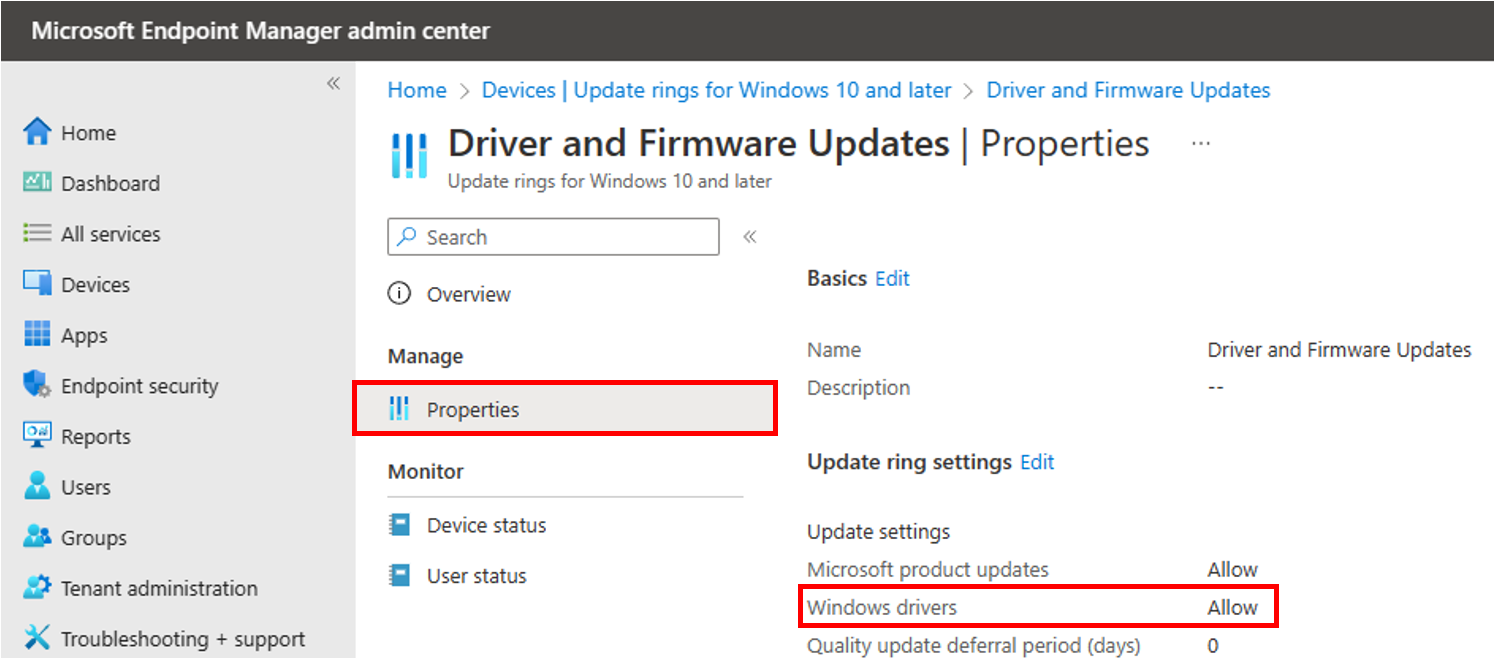
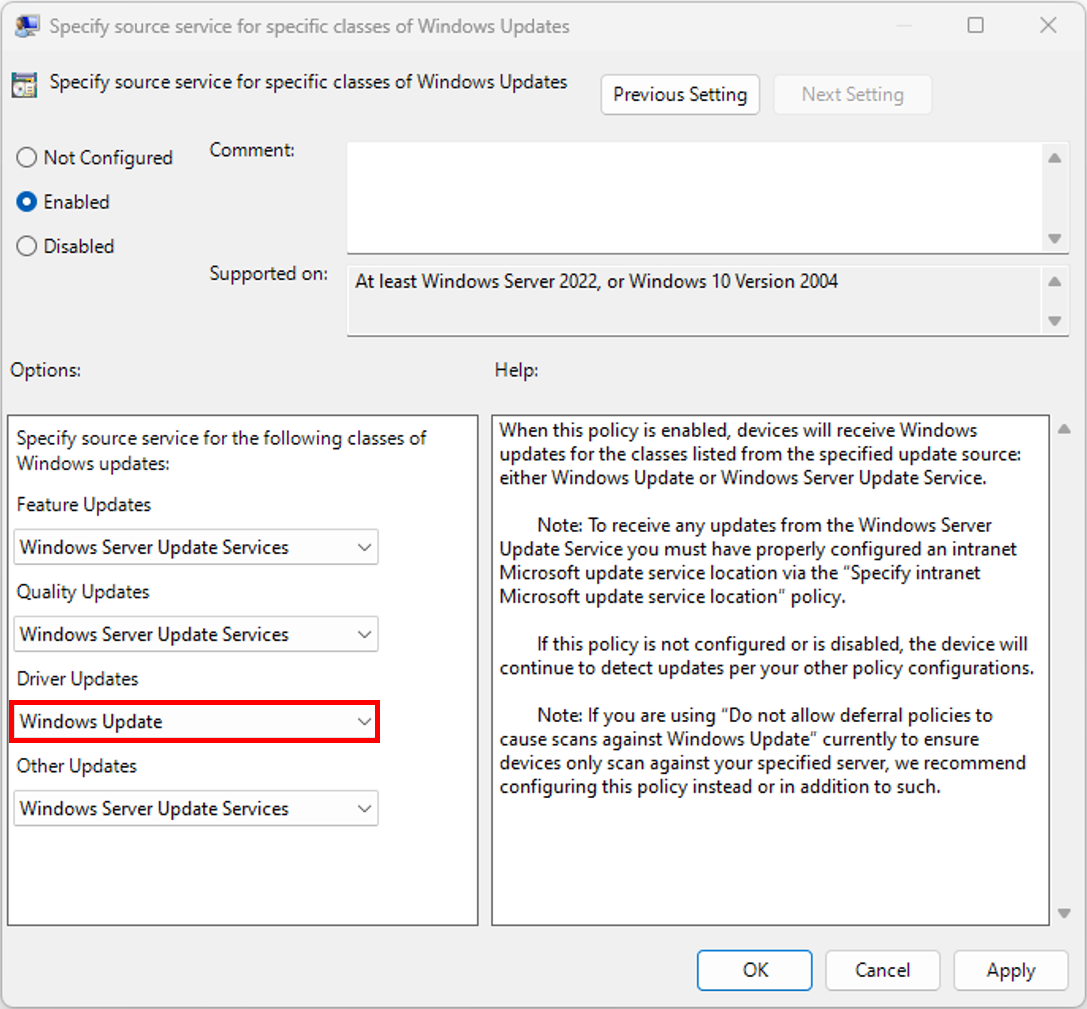
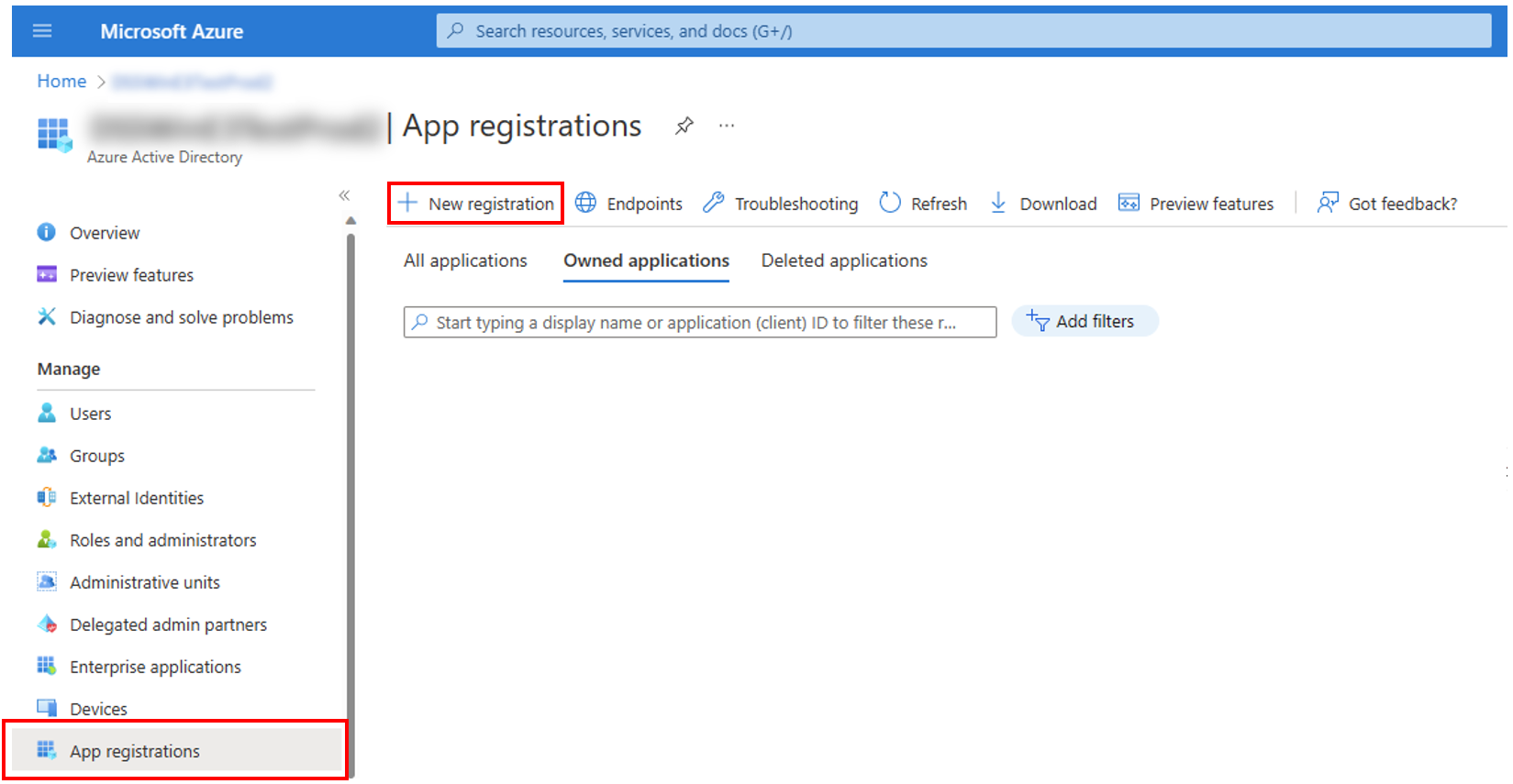
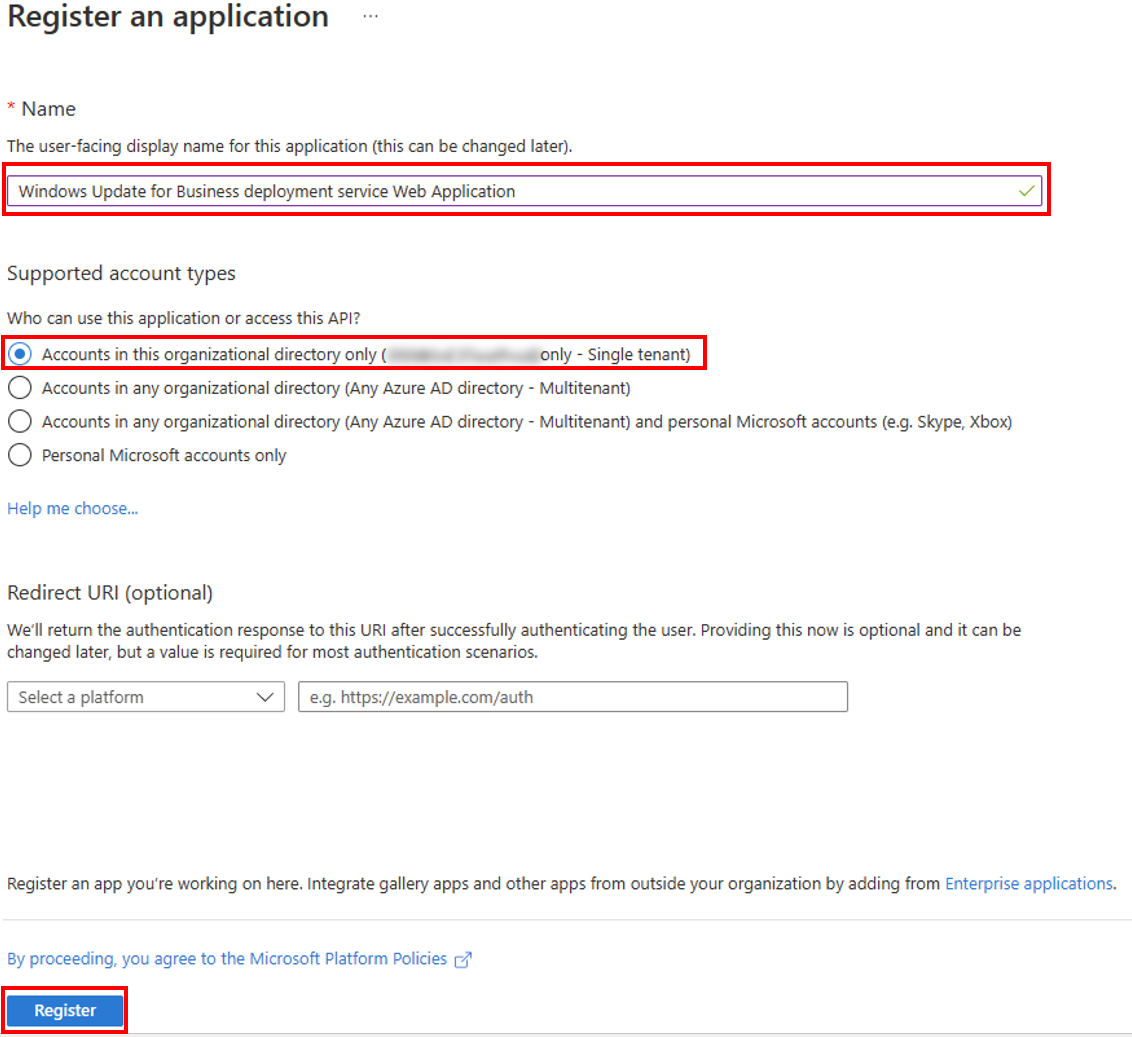
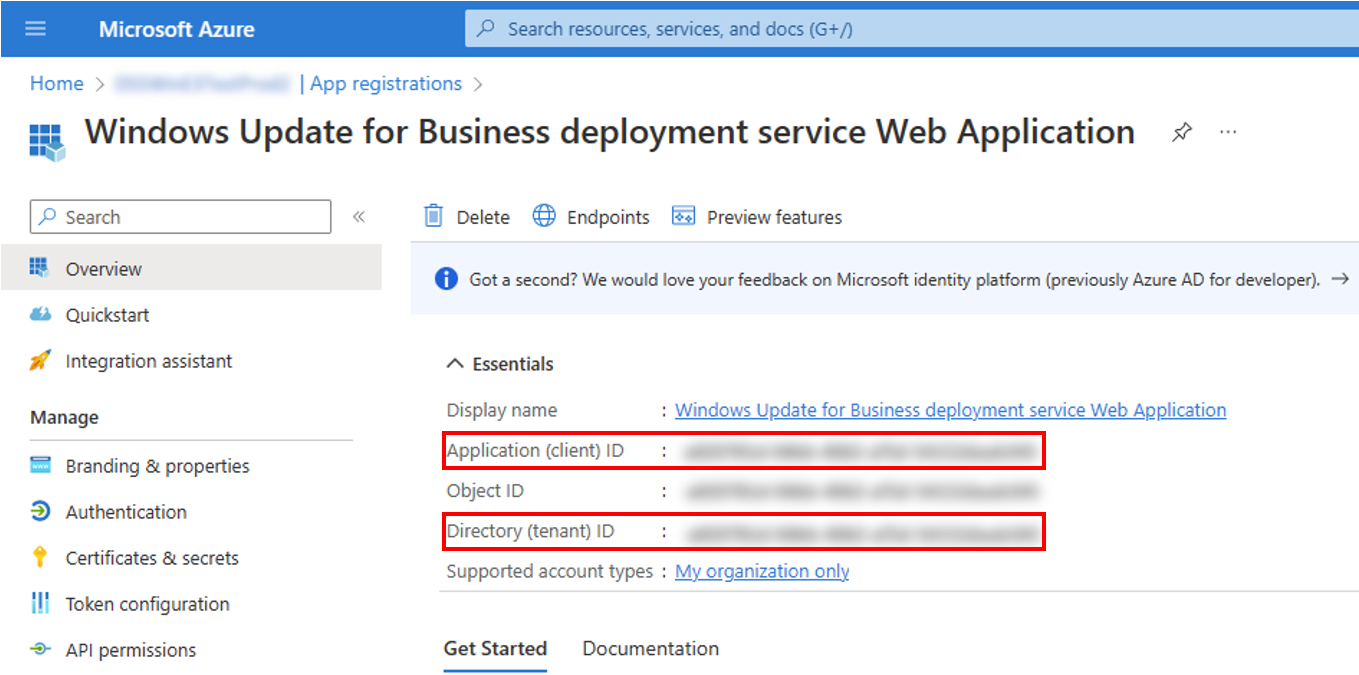
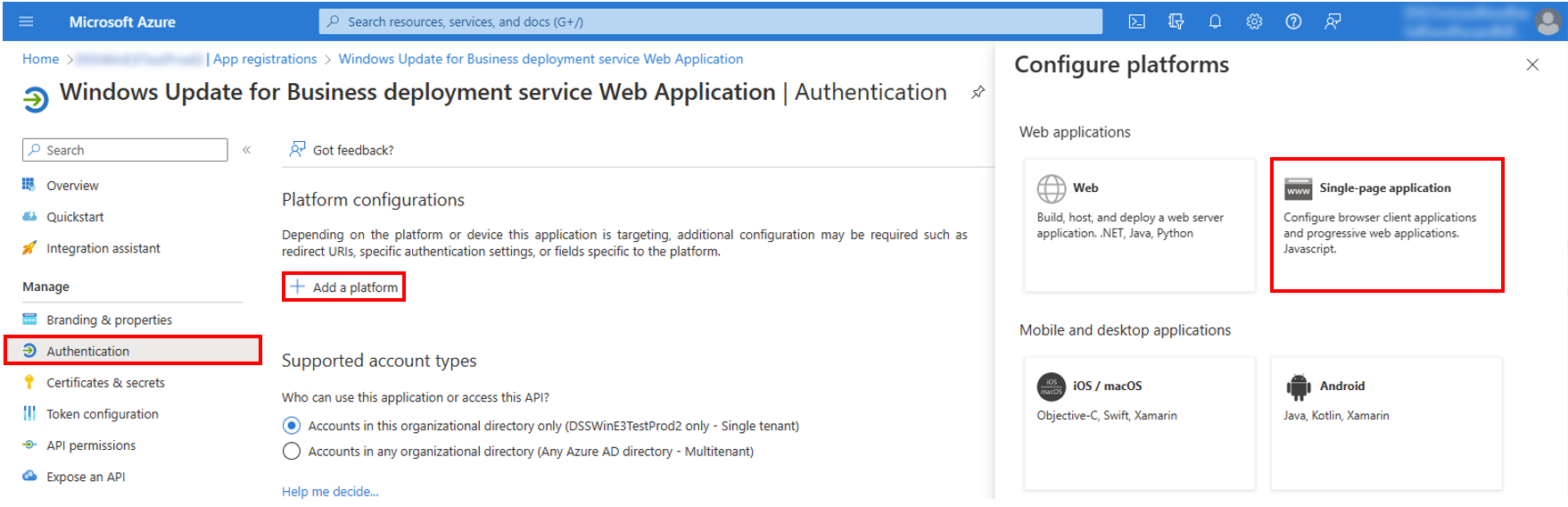
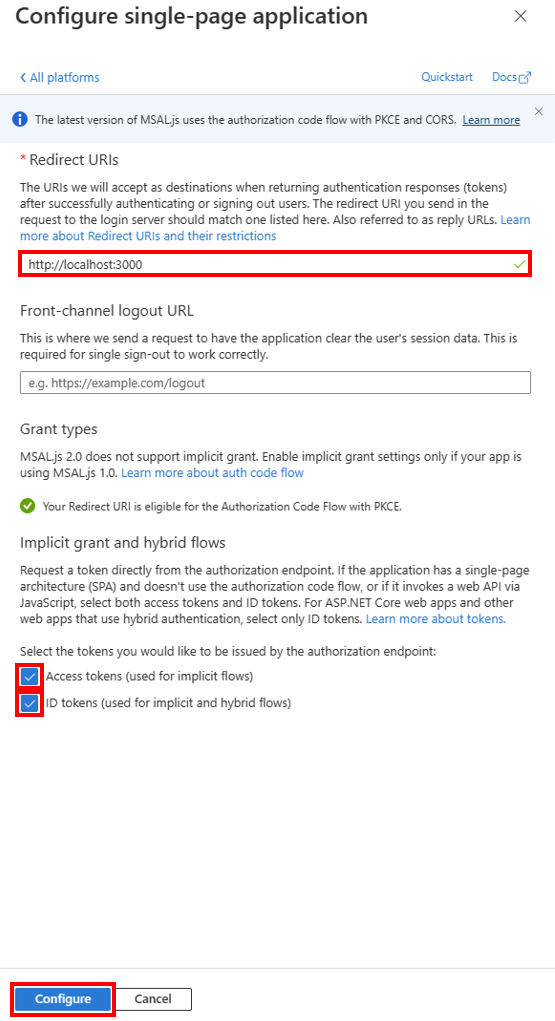
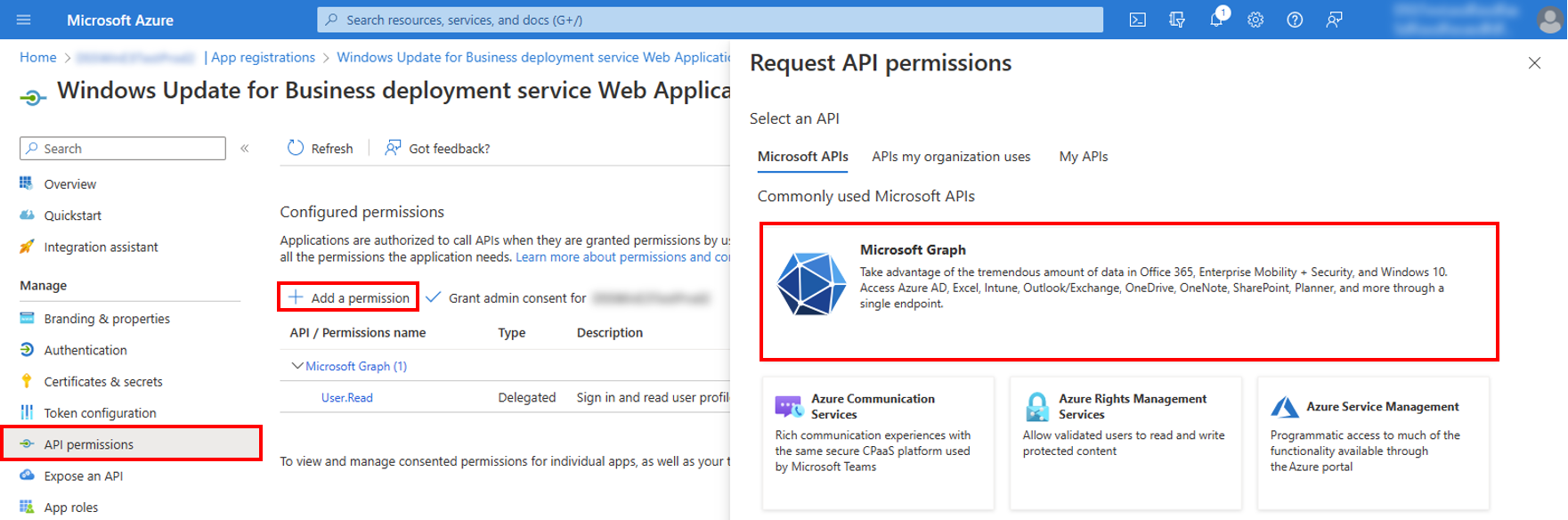
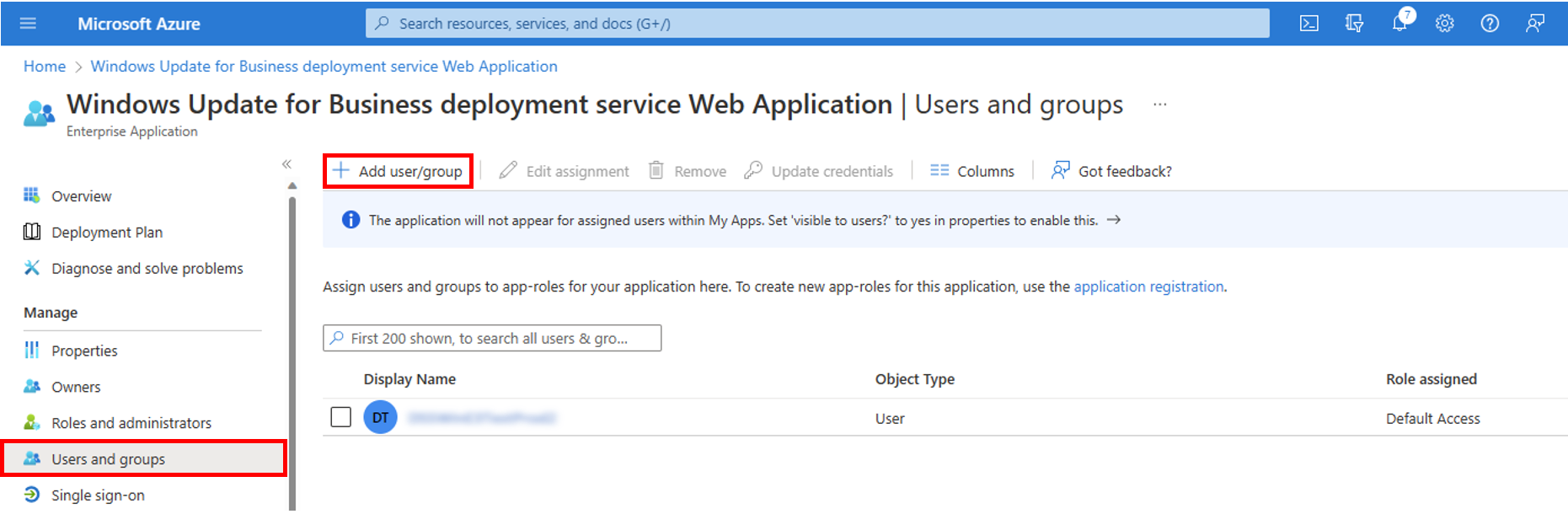
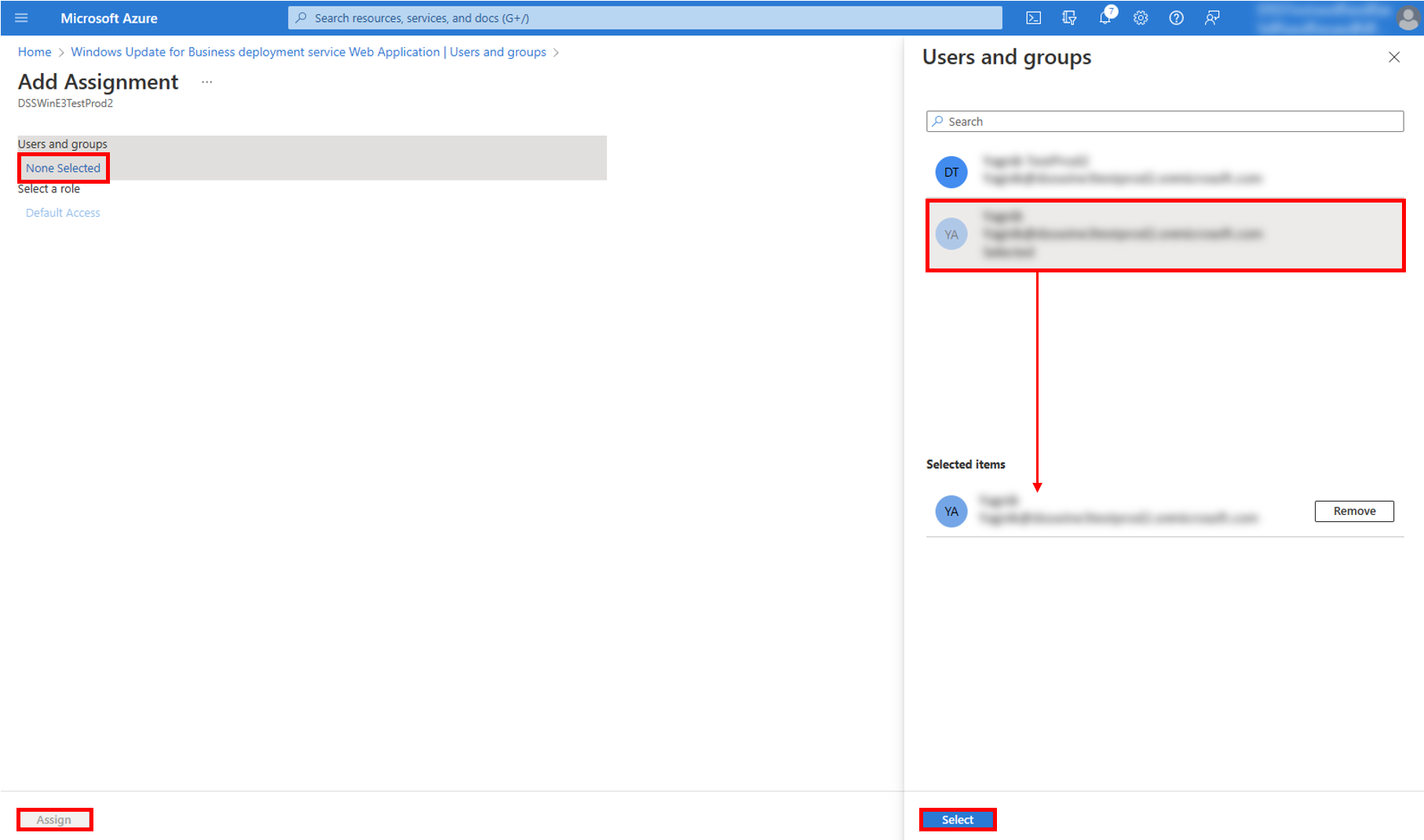
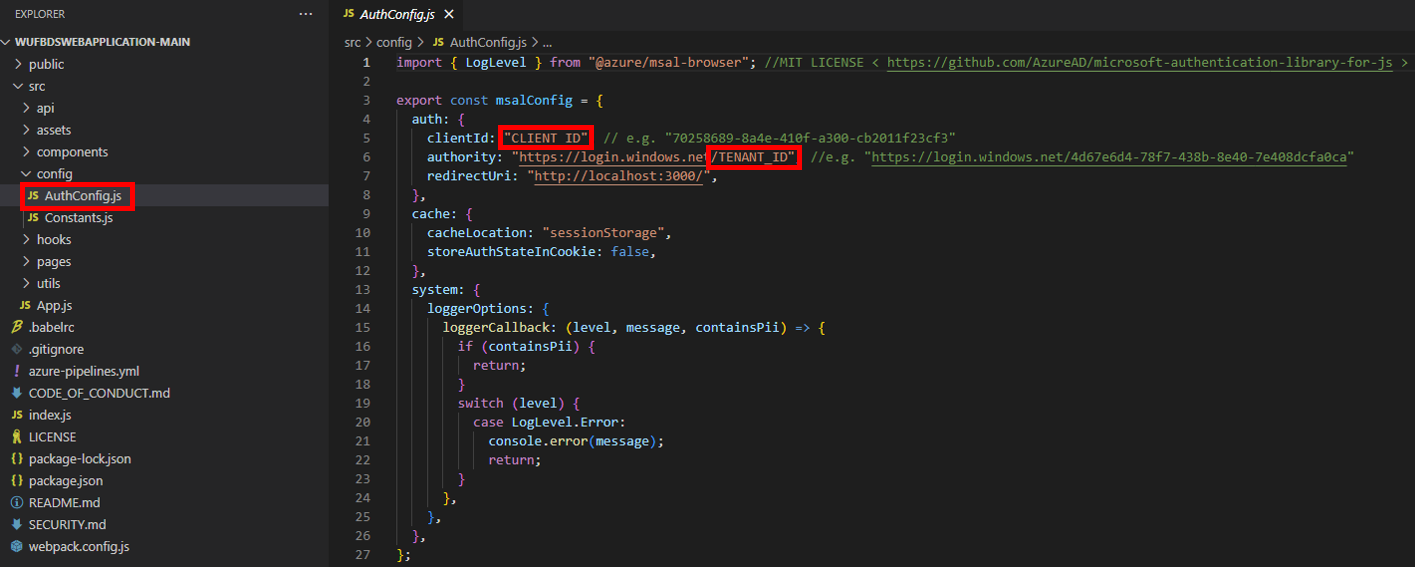
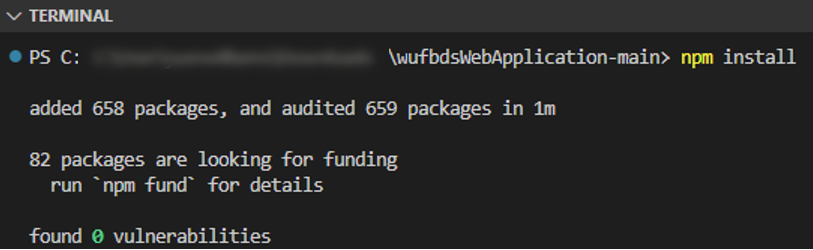
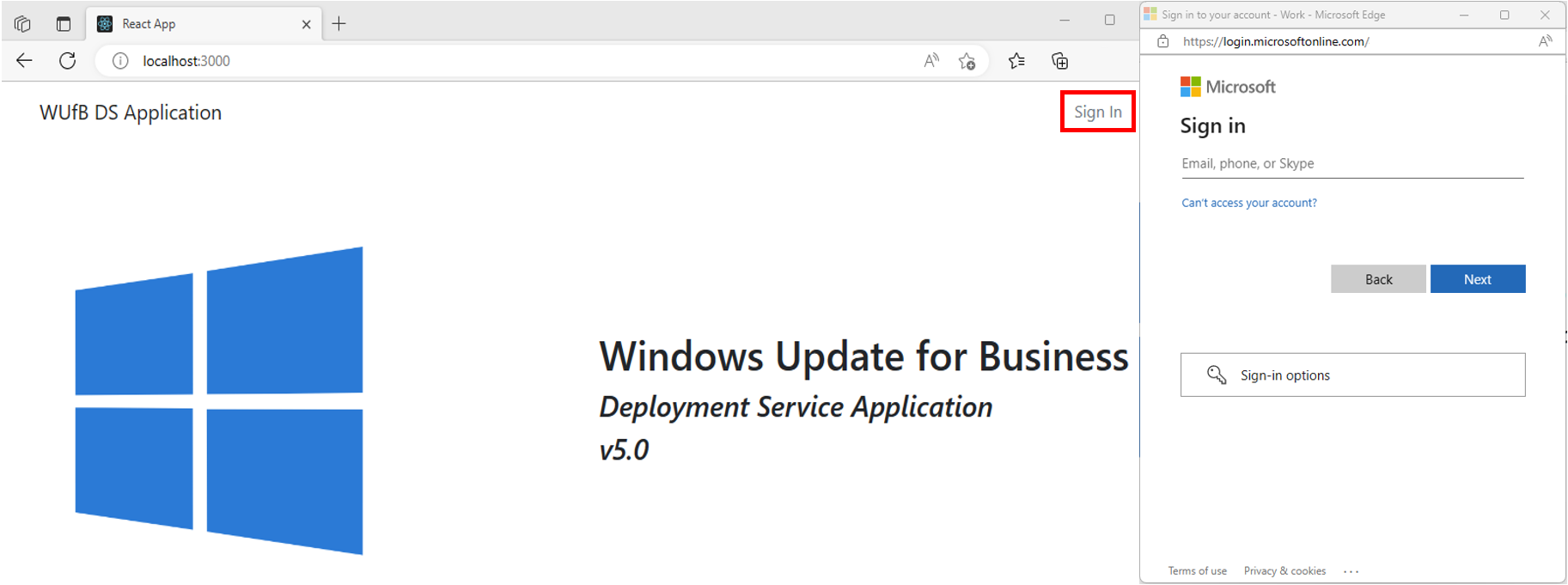
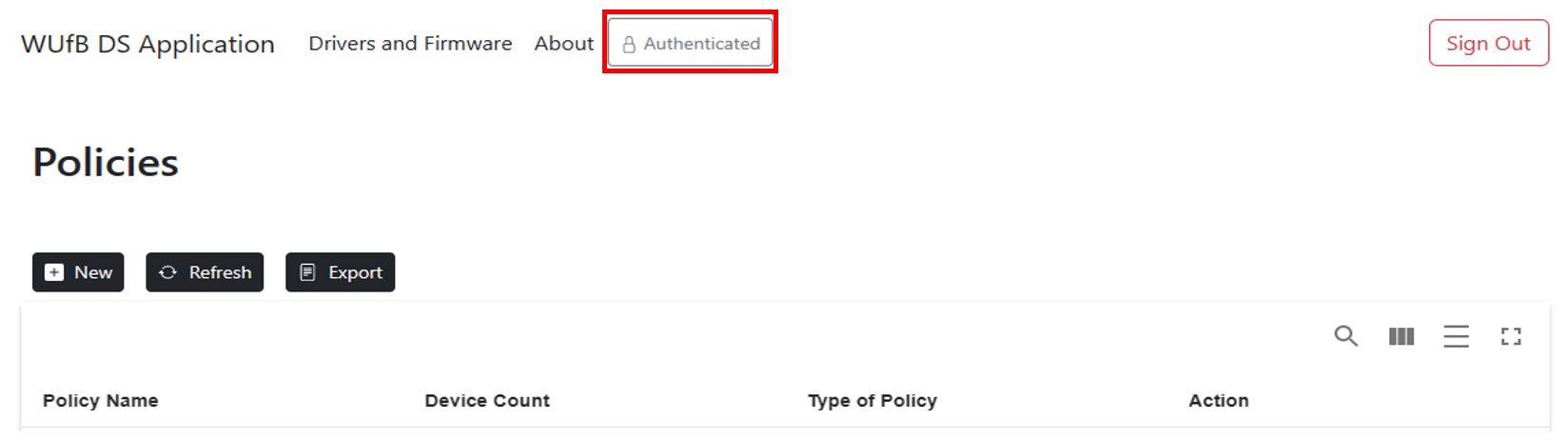
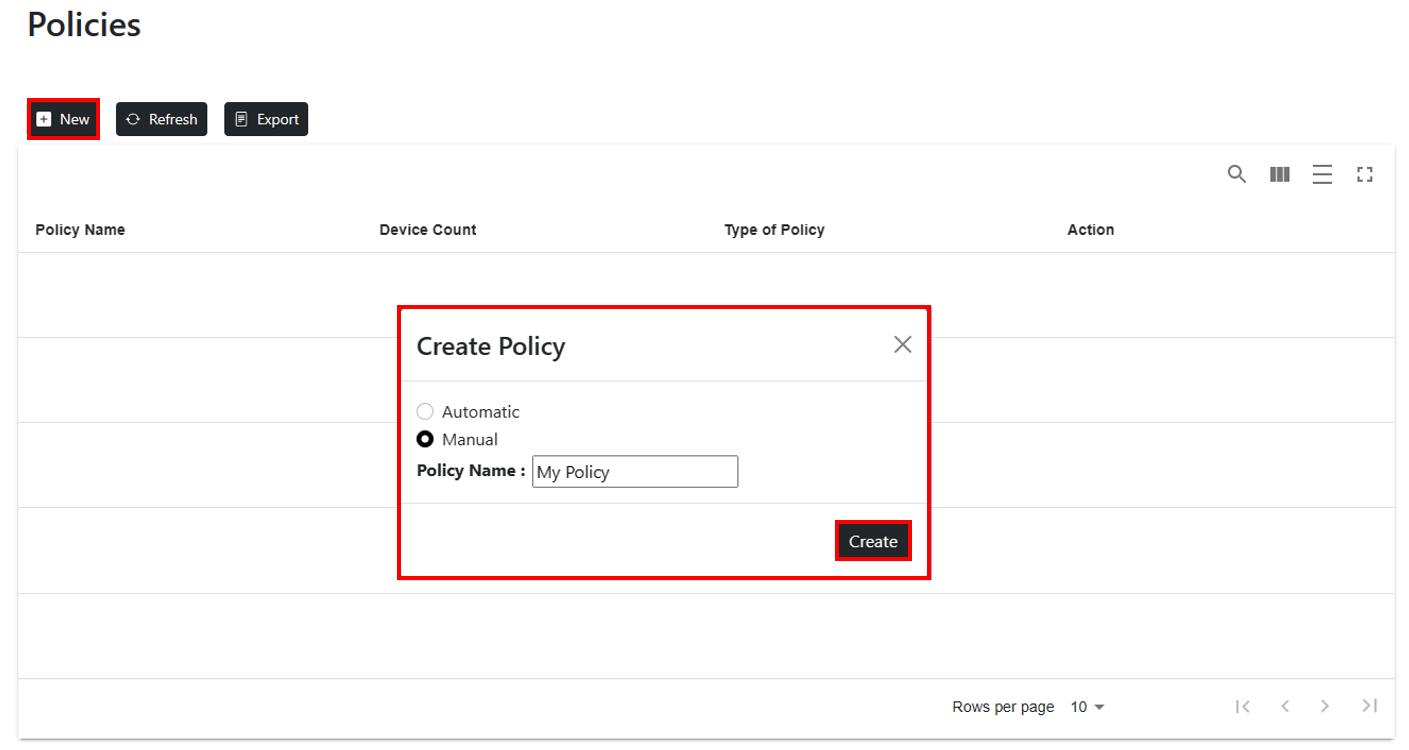
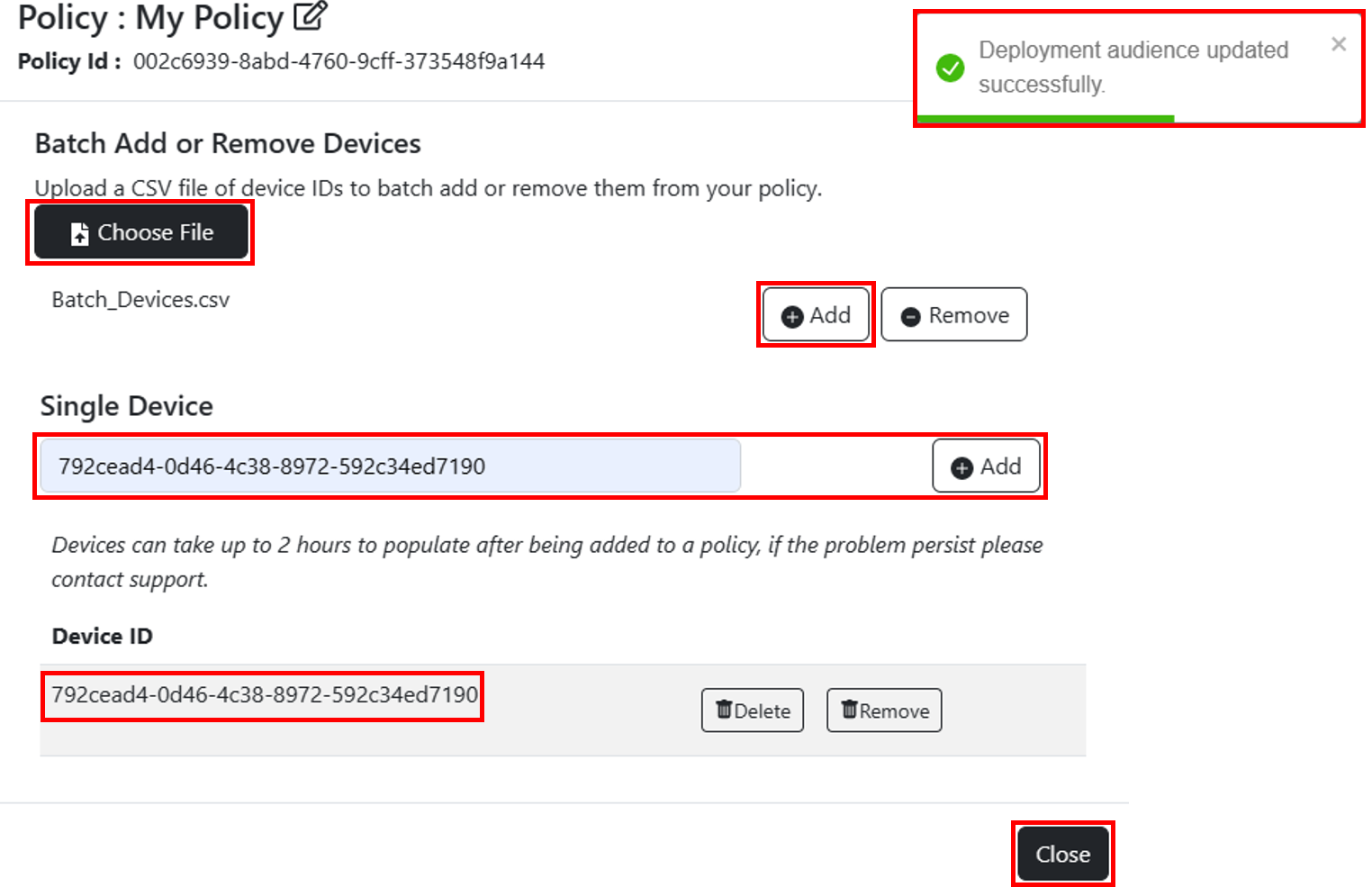
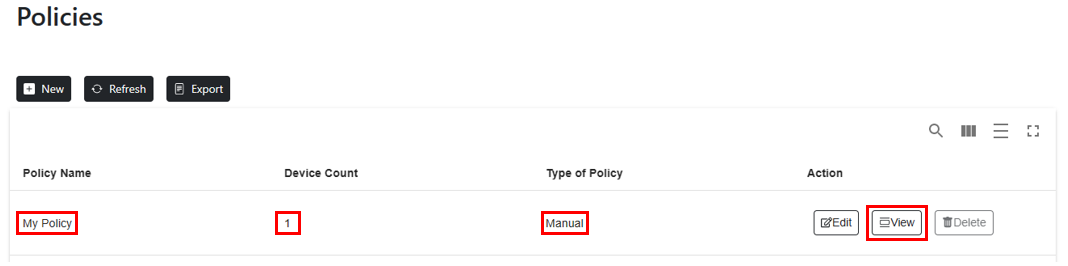
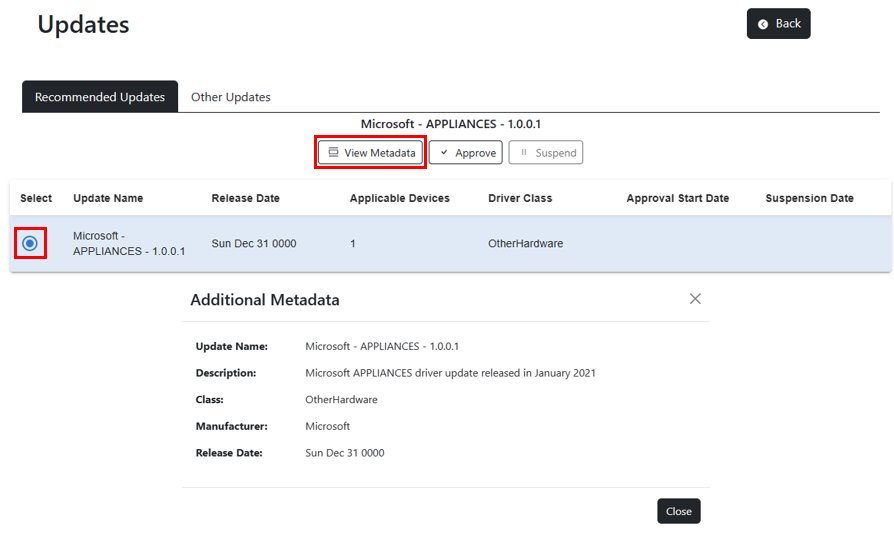
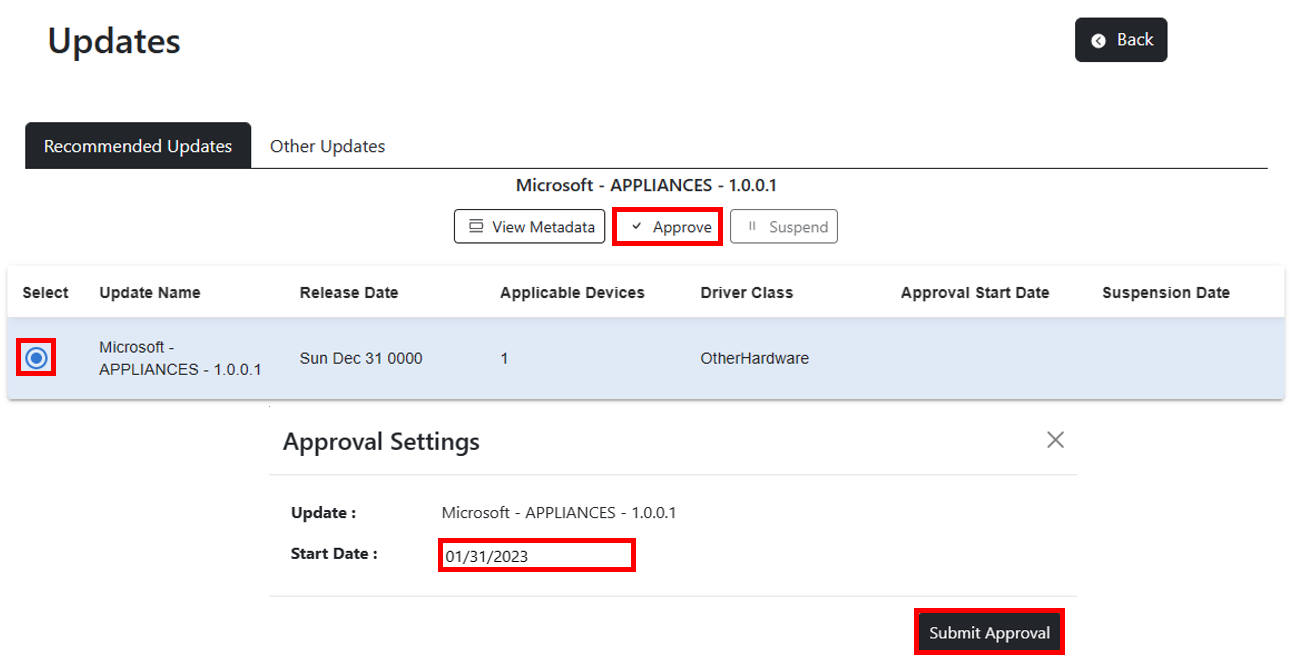
├── public ├── robots.txt ├── favicon.ico ├── logo192.png ├── logo512.png ├── manifest.json └── index.html ├── .babelrc ├── src ├── assets │ ├── adequate.PNG │ ├── inadequate.PNG │ ├── WindowsLogo.png │ ├── csvFileFormat.PNG │ ├── RequestPermissions.png │ ├── WindowsUpdatesRW.png │ └── demoUpdates.json ├── components │ ├── modal │ │ ├── modalWindow.css │ │ ├── suspendModal.js │ │ ├── deleteModal.js │ │ ├── confirmationModal.js │ │ ├── metaDataModal.js │ │ ├── contentApproveModal.js │ │ ├── createPolicyModal.js │ │ └── editPolicyModel.js │ ├── SpinnerCommon.js │ ├── buttons │ │ ├── SignOutButton.js │ │ ├── SingInButton.js │ │ └── iconButton.js │ ├── AuthRoleIndicator.js │ ├── navigation │ │ └── NavigationBar.js │ └── table │ │ ├── memberTable.js │ │ ├── paginatedTable.js │ │ └── UpdatesTable.js ├── pages │ ├── LandingPage │ │ ├── LandingPage.css │ │ └── LandingPage.js │ ├── UpdatePage │ │ ├── UpdatePage.css │ │ └── UpdatePage.js │ ├── AboutPage │ │ └── AboutPage.js │ └── DriversAndFirmwarePage │ │ └── DriversAndFirmwarePage.js ├── utils │ ├── notify.js │ ├── fetchHelper.js │ └── exportPoliciesToCsv.js ├── config │ ├── Constants.js │ └── AuthConfig.js ├── api │ ├── getPolicies.js │ ├── deletePolicy.js │ ├── updateDeploymentAuidence.js │ ├── suspendApproval.js │ ├── getMembers.js │ ├── removeDeviceFromService.js │ ├── createApproval.js │ ├── createPolicy.js │ └── getUpdates.js ├── App.js └── hooks │ ├── useFetch.js │ ├── useUpdateData.js │ └── usePolicyData.js ├── .gitignore ├── CODE_OF_CONDUCT.md ├── index.js ├── azure-pipelines.yml ├── CONTRIBUTING.md ├── LICENSE ├── webpack.config.js ├── package.json ├── SECURITY.md └── README.md /public/robots.txt: -------------------------------------------------------------------------------- 1 | # https://www.robotstxt.org/robotstxt.html 2 | User-agent: * 3 | Disallow: 4 | -------------------------------------------------------------------------------- /.babelrc: -------------------------------------------------------------------------------- 1 | { 2 | "presets": ["@babel/preset-env",["@babel/preset-react",{"runtime": "automatic"}]] 3 | } -------------------------------------------------------------------------------- /public/favicon.ico: -------------------------------------------------------------------------------- https://raw.githubusercontent.com/microsoftgraph/windowsupdates-webapplication-sample/HEAD/public/favicon.ico -------------------------------------------------------------------------------- /public/logo192.png: -------------------------------------------------------------------------------- https://raw.githubusercontent.com/microsoftgraph/windowsupdates-webapplication-sample/HEAD/public/logo192.png -------------------------------------------------------------------------------- /public/logo512.png: -------------------------------------------------------------------------------- https://raw.githubusercontent.com/microsoftgraph/windowsupdates-webapplication-sample/HEAD/public/logo512.png -------------------------------------------------------------------------------- /src/assets/adequate.PNG: -------------------------------------------------------------------------------- https://raw.githubusercontent.com/microsoftgraph/windowsupdates-webapplication-sample/HEAD/src/assets/adequate.PNG -------------------------------------------------------------------------------- /src/assets/inadequate.PNG: -------------------------------------------------------------------------------- https://raw.githubusercontent.com/microsoftgraph/windowsupdates-webapplication-sample/HEAD/src/assets/inadequate.PNG -------------------------------------------------------------------------------- /src/assets/WindowsLogo.png: -------------------------------------------------------------------------------- https://raw.githubusercontent.com/microsoftgraph/windowsupdates-webapplication-sample/HEAD/src/assets/WindowsLogo.png -------------------------------------------------------------------------------- /src/assets/csvFileFormat.PNG: -------------------------------------------------------------------------------- https://raw.githubusercontent.com/microsoftgraph/windowsupdates-webapplication-sample/HEAD/src/assets/csvFileFormat.PNG -------------------------------------------------------------------------------- /src/assets/RequestPermissions.png: -------------------------------------------------------------------------------- https://raw.githubusercontent.com/microsoftgraph/windowsupdates-webapplication-sample/HEAD/src/assets/RequestPermissions.png -------------------------------------------------------------------------------- /src/assets/WindowsUpdatesRW.png: -------------------------------------------------------------------------------- https://raw.githubusercontent.com/microsoftgraph/windowsupdates-webapplication-sample/HEAD/src/assets/WindowsUpdatesRW.png -------------------------------------------------------------------------------- /src/components/modal/modalWindow.css: -------------------------------------------------------------------------------- 1 | /* TODO: We can add this in main css file so that It can applicaple to whole website */ 2 | /* override react-bootstrap radio button color to black */ 3 | .form-check-input:checked { 4 | background-color: black; 5 | border-color: black; 6 | } -------------------------------------------------------------------------------- /src/pages/LandingPage/LandingPage.css: -------------------------------------------------------------------------------- 1 | .va-content { 2 | min-height: 80vh; 3 | display: flex; 4 | justify-content: center; 5 | align-items: center; 6 | } 7 | 8 | .logo { 9 | margin-left: 80px; 10 | } 11 | 12 | .text-content { 13 | align-self: center; 14 | } 15 | -------------------------------------------------------------------------------- /src/utils/notify.js: -------------------------------------------------------------------------------- 1 | import { toast } from "react-toastify"; 2 | 3 | export const notify = (text, type) => { 4 | if (type === "error") 5 | return toast.error(text, {position: toast.POSITION.TOP_RIGHT}); 6 | else { 7 | return toast.success(text, {position: toast.POSITION.TOP_RIGHT}); 8 | } 9 | }; 10 | -------------------------------------------------------------------------------- /src/config/Constants.js: -------------------------------------------------------------------------------- 1 | export const graphConfig = { 2 | graphMeEndpoint: "https://graph.microsoft.com/v1.0/me", 3 | }; 4 | 5 | export const dssEndpoint = 6 | "https://graph.microsoft.com/beta/admin/windows/updates"; 7 | 8 | export const entityType = "#microsoft.graph.windowsUpdates"; 9 | 10 | export const UPDATE_POLICIES_ENDPOINT = "/updatePolicies?$expand=audience"; 11 | -------------------------------------------------------------------------------- /.gitignore: -------------------------------------------------------------------------------- 1 | # See https://help.github.com/articles/ignoring-files/ for more about ignoring files. 2 | 3 | # dependencies 4 | /node_modules 5 | /.pnp 6 | .pnp.js 7 | 8 | # testing 9 | /coverage 10 | 11 | # production 12 | /build 13 | 14 | # misc 15 | .DS_Store 16 | .env.local 17 | .env.development.local 18 | .env.test.local 19 | .env.production.local 20 | 21 | npm-debug.log* 22 | yarn-debug.log* 23 | yarn-error.log* 24 | 25 | .vscode/ -------------------------------------------------------------------------------- /CODE_OF_CONDUCT.md: -------------------------------------------------------------------------------- 1 | # Microsoft Open Source Code of Conduct 2 | 3 | This project has adopted the [Microsoft Open Source Code of Conduct](https://opensource.microsoft.com/codeofconduct/). 4 | 5 | Resources: 6 | 7 | - [Microsoft Open Source Code of Conduct](https://opensource.microsoft.com/codeofconduct/) 8 | - [Microsoft Code of Conduct FAQ](https://opensource.microsoft.com/codeofconduct/faq/) 9 | - Contact [opencode@microsoft.com](mailto:opencode@microsoft.com) with questions or concerns 10 | -------------------------------------------------------------------------------- /src/components/SpinnerCommon.js: -------------------------------------------------------------------------------- 1 | import React from "react"; 2 | import { Spinner } from "react-bootstrap"; 3 | 4 | var stylingObj = { 5 | display: "block", 6 | position: "fixed", 7 | zIndex: 9999, 8 | top: "50%", 9 | right: "50%", 10 | }; 11 | 12 | function SpinnerCommon() { 13 | return ( 14 |
15 | 16 |
17 | ); 18 | } 19 | 20 | export default SpinnerCommon; 21 | -------------------------------------------------------------------------------- /src/pages/UpdatePage/UpdatePage.css: -------------------------------------------------------------------------------- 1 | /* Tabs formatting */ 2 | .nav-link{ 3 | color: #212529; 4 | } 5 | 6 | .nav-tabs{ 7 | border-bottom: 1px solid #212529; 8 | } 9 | 10 | .nav-link:hover{ 11 | border-color: #212529; 12 | color: #212529; 13 | } 14 | 15 | .nav-link .active{ 16 | background-color: #212529; 17 | border-color: #212529 #212529 #fff; 18 | color: white; 19 | } 20 | 21 | .nav-tabs .nav-link.active{ 22 | color: #fff; 23 | background-color: #212529; 24 | border-color: #212529; 25 | } 26 | 27 | 28 | 29 | -------------------------------------------------------------------------------- /public/manifest.json: -------------------------------------------------------------------------------- 1 | { 2 | "short_name": "React App", 3 | "name": "Create React App Sample", 4 | "icons": [ 5 | { 6 | "src": "favicon.ico", 7 | "sizes": "64x64 32x32 24x24 16x16", 8 | "type": "image/x-icon" 9 | }, 10 | { 11 | "src": "logo192.png", 12 | "type": "image/png", 13 | "sizes": "192x192" 14 | }, 15 | { 16 | "src": "logo512.png", 17 | "type": "image/png", 18 | "sizes": "512x512" 19 | } 20 | ], 21 | "start_url": ".", 22 | "display": "standalone", 23 | "theme_color": "#000000", 24 | "background_color": "#ffffff" 25 | } 26 | -------------------------------------------------------------------------------- /src/api/getPolicies.js: -------------------------------------------------------------------------------- 1 | import axios from "axios"; 2 | import { dssEndpoint, UPDATE_POLICIES_ENDPOINT } from "../config/Constants"; 3 | import { GetHeaders } from "../utils/fetchHelper"; 4 | 5 | // GET: All Policies based on the tenant ID 6 | export async function getPolicies() { 7 | try { 8 | let apiConfig = { 9 | headers: GetHeaders(), // Attach the Tenant Id in the Header for retriving policies 10 | }; 11 | const result = await axios.get( 12 | dssEndpoint + UPDATE_POLICIES_ENDPOINT, 13 | apiConfig 14 | ); 15 | return result.data.value; 16 | } catch (err) { 17 | console.log(err); 18 | return false; 19 | } 20 | } 21 | -------------------------------------------------------------------------------- /src/utils/fetchHelper.js: -------------------------------------------------------------------------------- 1 | import { wufbRequest } from "../config/AuthConfig"; 2 | 3 | export const GetHeaders = () => { 4 | return { 5 | Authorization: `Bearer ${sessionStorage.getItem("Access Token")}`, 6 | "Content-Type": "application/json", 7 | tid: sessionStorage.getItem("Tenant ID"), 8 | }; 9 | }; 10 | 11 | export const GetToken = (instance, accounts) => { 12 | instance 13 | .acquireTokenSilent({ 14 | ...wufbRequest, 15 | account: accounts[0], 16 | }) 17 | .then((response) => { 18 | sessionStorage.setItem("Access Token", response.accessToken); 19 | sessionStorage.setItem("Tenant ID", response.tenantId); 20 | }); 21 | }; 22 | -------------------------------------------------------------------------------- /src/components/buttons/SignOutButton.js: -------------------------------------------------------------------------------- 1 | import React from "react"; //MIT LICENSE < https://github.com/facebook/react/ > 2 | import { useMsal } from "@azure/msal-react"; //MIT LICENSE < https://github.com/AzureAD/microsoft-authentication-library-for-js > 3 | import Button from "react-bootstrap/Button"; //MIT LICENSE < https://github.com/react-bootstrap/react-bootstrap > 4 | 5 | export const SignOutButton = () => { 6 | const { instance } = useMsal(); 7 | return ( 8 | 17 | ); 18 | }; 19 | -------------------------------------------------------------------------------- /src/api/deletePolicy.js: -------------------------------------------------------------------------------- 1 | import { dssEndpoint } from "../config/Constants"; 2 | import { GetHeaders } from "../utils/fetchHelper"; 3 | import { toast } from "react-toastify"; 4 | import axios from "axios"; 5 | import { notify } from "../utils/notify"; 6 | 7 | // Delete Policy based on the PolicyID 8 | export async function deletePolicy(policyId) { 9 | console.log("Delete policyId: " + policyId); 10 | await axios 11 | .delete(`${dssEndpoint}/updatePolicies('${policyId}')`, { 12 | headers: GetHeaders(), 13 | }) 14 | .then((res) => { 15 | notify("Policy Deleted Successfully", "success"); 16 | }) 17 | .catch((err) => { 18 | console.log(err); 19 | notify("Policy failed to delete with error: " + err, "error"); 20 | }); 21 | } 22 | -------------------------------------------------------------------------------- /index.js: -------------------------------------------------------------------------------- 1 | import React from "react"; 2 | import ReactDOM from "react-dom"; 3 | import { PublicClientApplication } from "@azure/msal-browser"; //MIT LICENSE < https://www.npmjs.com/package/@azure/msal-browser > 4 | import { MsalProvider } from "@azure/msal-react"; //MIT LICENSE < https://github.com/AzureAD/microsoft-authentication-library-for-js > 5 | import { msalConfig } from "./src/config/AuthConfig"; //LOCAL FILE 6 | 7 | import App from "./src/App"; 8 | import "bootstrap/dist/css/bootstrap.min.css"; //MIT LICENSE < https://github.com/react-bootstrap/react-bootstrap > 9 | 10 | const msalInstance = new PublicClientApplication(msalConfig); 11 | ReactDOM.render( 12 | 13 | 14 | 15 | 16 | , 17 | document.getElementById("root") 18 | ); 19 | -------------------------------------------------------------------------------- /azure-pipelines.yml: -------------------------------------------------------------------------------- 1 | # Node.js 2 | # Build a general Node.js project with npm. 3 | # Add steps that analyze code, save build artifacts, deploy, and more: 4 | # https://docs.microsoft.com/azure/devops/pipelines/languages/javascript 5 | 6 | trigger: 7 | - main 8 | 9 | pool: 10 | vmImage: "windows-latest" 11 | 12 | steps: 13 | - task: NodeTool@0 14 | inputs: 15 | versionSpec: "18.x" 16 | displayName: "Install Node.js" 17 | 18 | - task: ComponentGovernanceComponentDetection@0 19 | displayName: Component Governance 20 | inputs: 21 | scanType: "Register" 22 | verbosity: "Verbose" 23 | alertWarningLevel: "High" 24 | 25 | - script: | 26 | npm i -g npm@latest 27 | npm i npm@latest 28 | npm install 29 | npm run build 30 | displayName: "npm install and build" 31 | -------------------------------------------------------------------------------- /src/api/updateDeploymentAuidence.js: -------------------------------------------------------------------------------- 1 | import axios from "axios"; 2 | import { dssEndpoint } from "../config/Constants"; 3 | import { GetHeaders } from "../utils/fetchHelper"; 4 | import { notify } from "../utils/notify"; 5 | 6 | // POST: Update Audience for adding members or removing 7 | export async function updateDeploymentAudience(requestBody, audienceId) { 8 | let apiConfig = { 9 | headers: GetHeaders(), 10 | }; 11 | const url = `${dssEndpoint}/deploymentAudiences('${audienceId}')/updateAudience`; 12 | try { 13 | let res = await axios.post(url, requestBody, apiConfig); 14 | notify("Deployment audience updated successfully.", "success"); 15 | return res; 16 | } catch (err) { 17 | notify( 18 | "Failed to update deployment audience with error: " + 19 | err?.response?.data?.error?.message, 20 | "error" 21 | ); 22 | return err; 23 | } 24 | } 25 | -------------------------------------------------------------------------------- /src/pages/LandingPage/LandingPage.js: -------------------------------------------------------------------------------- 1 | import React from "react"; //MIT LICENSE < https://github.com/facebook/react/ > 2 | import { Container, Row, Col, Image } from "react-bootstrap"; //MIT LICENSE < https://github.com/react-bootstrap/react-bootstrap > 3 | import logo from "../../assets/WindowsLogo.png"; //LOCAL FILE 4 | 5 | import "./LandingPage.css"; 6 | 7 | export default function LandingPage() { 8 | return ( 9 |
10 | 11 | 12 | 13 | 14 | 15 |

Windows Update for Business

16 |

17 | Deployment Service Application 18 |

19 |

20 | v5.0 21 |

22 | 23 |
24 |
25 | ); 26 | } 27 | -------------------------------------------------------------------------------- /src/api/suspendApproval.js: -------------------------------------------------------------------------------- 1 | import axios from "axios"; 2 | import { dssEndpoint, entityType } from "../config/Constants"; 3 | import { notify } from "../utils/notify"; 4 | import { GetHeaders } from "../utils/fetchHelper"; 5 | 6 | // Suspend Apporval based on the compliancechanges id and policyId 7 | export async function suspendApproval(id, policyId) { 8 | const url = `${dssEndpoint}/updatePolicies('${policyId}')/complianceChanges('${id}')`; 9 | const patchBody = JSON.stringify({ 10 | "@odata.type": entityType + ".contentApproval", 11 | isRevoked: true, 12 | }); 13 | 14 | let apiConfig = { 15 | headers: GetHeaders(), 16 | }; 17 | try { 18 | await axios.patch(url, patchBody, apiConfig).then(() => { 19 | console.log("Successfully suspended approval "); 20 | notify("Approval Suspended Successfully", "success"); 21 | }); 22 | } catch (ex) { 23 | notify("Failed to suspend the approval with error " + ex, "error"); 24 | } 25 | } 26 | -------------------------------------------------------------------------------- /CONTRIBUTING.md: -------------------------------------------------------------------------------- 1 | # Contributing 2 | 3 | This project welcomes contributions and suggestions. Most contributions require you to 4 | agree to a Contributor License Agreement (CLA) declaring that you have the right to, 5 | and actually do, grant us the rights to use your contribution. For details, visit 6 | https://cla.microsoft.com. 7 | 8 | When you submit a pull request, a CLA-bot will automatically determine whether you need 9 | to provide a CLA and decorate the PR appropriately (e.g., label, comment). Simply follow the 10 | instructions provided by the bot. You will only need to do this once across all repositories using our CLA. 11 | 12 | This project has adopted the [Microsoft Open Source Code of Conduct](https://opensource.microsoft.com/codeofconduct/). 13 | For more information see the [Code of Conduct FAQ](https://opensource.microsoft.com/codeofconduct/faq/) 14 | or contact [opencode@microsoft.com](mailto:opencode@microsoft.com) with any additional questions or comments. 15 | -------------------------------------------------------------------------------- /src/api/getMembers.js: -------------------------------------------------------------------------------- 1 | import axios from "axios"; 2 | import { dssEndpoint } from "../config/Constants"; 3 | import { GetHeaders } from "../utils/fetchHelper"; 4 | 5 | // GET: members using Audience ID using api call 6 | export async function getMembersFromAudienceId(audienceId) { 7 | if (!audienceId) { 8 | return []; 9 | } else { 10 | let apiConfig = { 11 | headers: GetHeaders(), 12 | }; 13 | const url = `${dssEndpoint}/deploymentAudiences('${audienceId}')/members`; 14 | try { 15 | let res = await axios.get(url, apiConfig); 16 | if (res.status === 200) { 17 | return res.data.value; 18 | } else { 19 | console.log("Failed to get successfully members call"); 20 | console.log(res.status); 21 | return []; 22 | } 23 | } catch (err) { 24 | console.log( 25 | "Error fetching members for audience : " + audienceId + " " + err 26 | ); 27 | return []; 28 | } 29 | } 30 | } 31 | -------------------------------------------------------------------------------- /src/api/removeDeviceFromService.js: -------------------------------------------------------------------------------- 1 | import { dssEndpoint } from "../config/Constants"; 2 | import { GetHeaders } from "../utils/fetchHelper"; 3 | import { toast } from "react-toastify"; 4 | import axios from "axios"; 5 | import { notify } from "../utils/notify"; 6 | 7 | // Delete Policy based on the PolicyID 8 | export async function removeDeviceFromService(deviceId) { 9 | let body = { 10 | updateCategory: "driver", 11 | assets: [ 12 | { 13 | "@odata.type": "#microsoft.graph.windowsUpdates.azureADDevice", 14 | id: deviceId, 15 | }, 16 | ], 17 | }; 18 | 19 | let apiConfig = { 20 | headers: GetHeaders(), 21 | }; 22 | 23 | await axios 24 | .post(`${dssEndpoint}/updatableAssets/unenrollAssets`, body, apiConfig) 25 | .then((res) => { 26 | notify("Device removed Successfully", "success"); 27 | }) 28 | .catch((err) => { 29 | console.log(err); 30 | notify("Device failed to remove with error: " + err, "error"); 31 | }); 32 | } 33 | -------------------------------------------------------------------------------- /src/components/buttons/SingInButton.js: -------------------------------------------------------------------------------- 1 | import React from "react"; //MIT LICENSE < https://github.com/facebook/react/ > 2 | import { useMsal } from "@azure/msal-react"; //MIT LICENSE < https://github.com/AzureAD/microsoft-authentication-library-for-js > 3 | import { wufbRequest } from "../../config/AuthConfig"; //LOCAL FILE 4 | import { Button } from "react-bootstrap"; //MIT LICENSE < https://github.com/react-bootstrap/react-bootstrap > 5 | 6 | export const SignInButton = () => { 7 | const { instance } = useMsal(); 8 | const handleLogin = () => { 9 | instance 10 | .loginPopup(wufbRequest) 11 | .then((res) => { 12 | sessionStorage.setItem("Access Token", res.accessToken); 13 | sessionStorage.setItem("Tenant ID", res.tenantId); 14 | }) 15 | .catch((e) => { 16 | console.log(e); 17 | }); 18 | }; 19 | return ( 20 | 29 | ); 30 | }; 31 | -------------------------------------------------------------------------------- /src/utils/exportPoliciesToCsv.js: -------------------------------------------------------------------------------- 1 | export const exportPoliciesToCsv = (policies) => { 2 | // headers 3 | const policiesData = policies.map((policy) => { 4 | return { 5 | policyId: policy.id, 6 | policyName: policy.Name, 7 | deviceCount: policy.members?.length ?? 0, 8 | policyType: 9 | policy.complianceChangeRules.length === 0 ? "Manual" : "Automatic", 10 | }; 11 | }); 12 | const csvRows = []; 13 | const headers = Object.keys(policiesData[0]); 14 | csvRows.push(headers.join(",")); 15 | // rows 16 | for (const row of policiesData) { 17 | const values = headers.map((header) => { 18 | const escaped = ("" + row[header]).replace(/"/g, '\\"'); 19 | return `"${escaped}"`; 20 | }); 21 | csvRows.push(values.join(",")); 22 | } 23 | // download 24 | const csvString = csvRows.join("\n"); 25 | const a = document.createElement("a"); 26 | a.href = "data:text/csv;charset=utf-8," + encodeURIComponent(csvString); 27 | a.setAttribute("download", "policies.csv"); 28 | document.body.appendChild(a); 29 | a.click(); 30 | document.body.removeChild(a); 31 | }; 32 | -------------------------------------------------------------------------------- /src/config/AuthConfig.js: -------------------------------------------------------------------------------- 1 | import { LogLevel } from "@azure/msal-browser"; //MIT LICENSE < https://github.com/AzureAD/microsoft-authentication-library-for-js > 2 | 3 | export const msalConfig = { 4 | auth: { 5 | clientId: "CLIENT ID", // e.g. "70258689-8a4e-410f-a300-cb2011f23cf3" 6 | authority: "https://login.windows.net/TENANT_ID", //e.g. "https://login.windows.net/4d67e6d4-78f7-438b-8e40-7e408dcfa0ca" 7 | redirectUri: "http://localhost:3000/", 8 | }, 9 | cache: { 10 | cacheLocation: "sessionStorage", 11 | storeAuthStateInCookie: false, 12 | }, 13 | system: { 14 | loggerOptions: { 15 | loggerCallback: (level, message, containsPii) => { 16 | if (containsPii) { 17 | return; 18 | } 19 | switch (level) { 20 | case LogLevel.Error: 21 | console.error(message); 22 | return; 23 | } 24 | }, 25 | }, 26 | }, 27 | }; 28 | 29 | export const wufbRequest = { 30 | scopes: [ 31 | "00000003-0000-0000-c000-000000000000/WindowsUpdates.ReadWrite.All", 32 | "User.Read", 33 | ], 34 | }; 35 | 36 | export const userFeedbackRequest = { 37 | scopes: ["User.Read"], 38 | }; 39 | -------------------------------------------------------------------------------- /LICENSE: -------------------------------------------------------------------------------- 1 | MIT License 2 | 3 | Copyright (c) Microsoft Corporation. 4 | 5 | Permission is hereby granted, free of charge, to any person obtaining a copy 6 | of this software and associated documentation files (the "Software"), to deal 7 | in the Software without restriction, including without limitation the rights 8 | to use, copy, modify, merge, publish, distribute, sublicense, and/or sell 9 | copies of the Software, and to permit persons to whom the Software is 10 | furnished to do so, subject to the following conditions: 11 | 12 | The above copyright notice and this permission notice shall be included in all 13 | copies or substantial portions of the Software. 14 | 15 | THE SOFTWARE IS PROVIDED "AS IS", WITHOUT WARRANTY OF ANY KIND, EXPRESS OR 16 | IMPLIED, INCLUDING BUT NOT LIMITED TO THE WARRANTIES OF MERCHANTABILITY, 17 | FITNESS FOR A PARTICULAR PURPOSE AND NONINFRINGEMENT. IN NO EVENT SHALL THE 18 | AUTHORS OR COPYRIGHT HOLDERS BE LIABLE FOR ANY CLAIM, DAMAGES OR OTHER 19 | LIABILITY, WHETHER IN AN ACTION OF CONTRACT, TORT OR OTHERWISE, ARISING FROM, 20 | OUT OF OR IN CONNECTION WITH THE SOFTWARE OR THE USE OR OTHER DEALINGS IN THE 21 | SOFTWARE 22 | -------------------------------------------------------------------------------- /webpack.config.js: -------------------------------------------------------------------------------- 1 | const HtmlWebpackPlugin = require("html-webpack-plugin"); 2 | const path = require("path"); 3 | 4 | module.exports = { 5 | entry: "./index.js", 6 | mode: "development", 7 | output: { 8 | path: path.resolve(__dirname, "./dist"), 9 | filename: "index_bundle.js", 10 | }, 11 | target: "web", 12 | devServer: { 13 | port: "3000", 14 | static: { 15 | directory: path.join(__dirname, "public"), 16 | }, 17 | historyApiFallback: true, 18 | open: true, 19 | hot: true, 20 | liveReload: true, 21 | }, 22 | resolve: { 23 | extensions: [".js", ".jsx", ".json"], 24 | }, 25 | module: { 26 | rules: [ 27 | { 28 | test: /\.(js|jsx)$/, 29 | exclude: /node_modules/, 30 | use: "babel-loader", 31 | }, 32 | { 33 | test: /\.css$/, 34 | use: ["style-loader", "css-loader"], 35 | }, 36 | { 37 | test: /\.(png|jpe?g|gif)$/i, 38 | use: ["file-loader?name=[name].[ext]"], 39 | }, 40 | ], 41 | }, 42 | plugins: [ 43 | new HtmlWebpackPlugin({ 44 | template: path.join(__dirname, "public", "index.html"), 45 | }), 46 | ], 47 | }; 48 | -------------------------------------------------------------------------------- /src/components/modal/suspendModal.js: -------------------------------------------------------------------------------- 1 | import { Modal } from "react-bootstrap"; 2 | import { useParams } from "react-router-dom"; 3 | import { suspendApproval } from "../../api/suspendApproval"; 4 | 5 | const SuspendModal = ({ 6 | isOpen, 7 | toggleModal, 8 | updateInfo, 9 | catalogIdToApprovals, 10 | refreshUpdatesData, 11 | }) => { 12 | const { id } = useParams(); 13 | 14 | const handleSuspendClick = async () => { 15 | for (let approval of catalogIdToApprovals[updateInfo.catalogEntryId]) { 16 | await suspendApproval(approval.id, id); 17 | } 18 | await refreshUpdatesData(); 19 | }; 20 | 21 | return ( 22 | 23 | 24 | Suspend Update 25 | 26 | 27 | Are you sure you want to suspend this update? 28 |
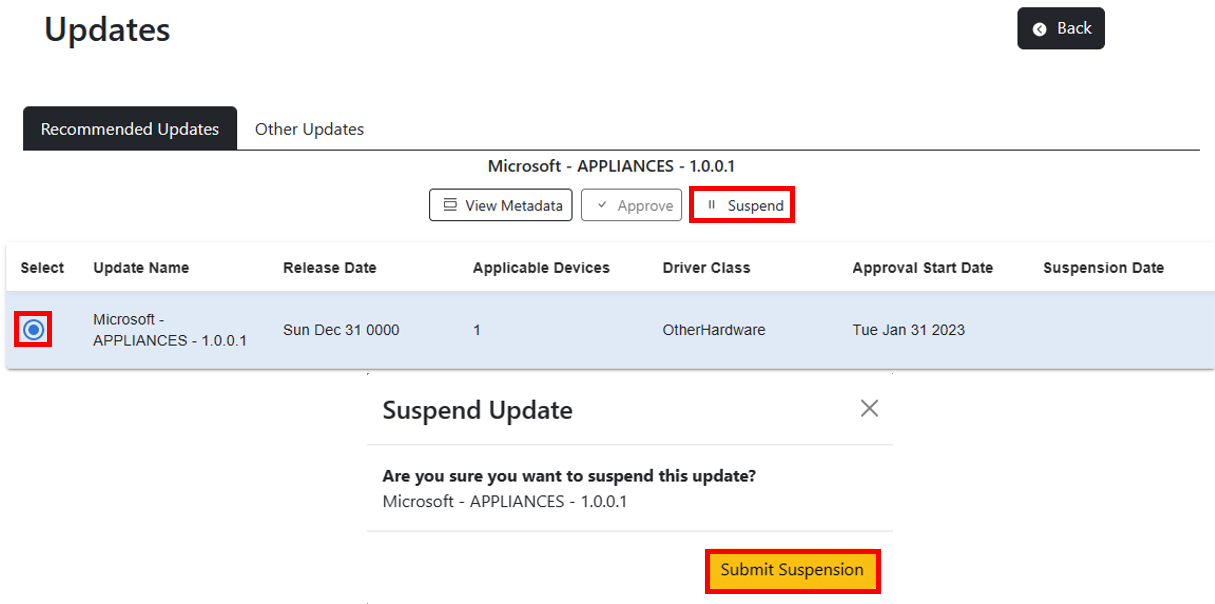
29 | {updateInfo?.updateName} 30 |
31 | 32 | 35 | 36 |
37 | ); 38 | }; 39 | 40 | export default SuspendModal; 41 | -------------------------------------------------------------------------------- /src/App.js: -------------------------------------------------------------------------------- 1 | import React from "react"; //MIT LICENSE < https://github.com/facebook/react/ > 2 | import { 3 | AuthenticatedTemplate, 4 | UnauthenticatedTemplate, 5 | } from "@azure/msal-react"; //MIT LICENSE < https://github.com/AzureAD/microsoft-authentication-library-for-js > 6 | import { BrowserRouter, Routes, Route } from "react-router-dom"; //MIT LICENSE < https://github.com/ReactTraining/react-router#readme > 7 | 8 | import LandingPage from "./pages/LandingPage/LandingPage"; 9 | import NavigationBar from "./components/navigation/NavigationBar"; 10 | import { About } from "./pages/AboutPage/AboutPage"; 11 | import DriversAndFirmwarePage from "./pages/DriversAndFirmwarePage/DriversAndFirmwarePage"; 12 | import UpdatePage from "./pages/UpdatePage/UpdatePage"; 13 | 14 | export default function App() { 15 | return ( 16 | 17 | 18 | 19 | 20 | } /> 21 | } /> 22 | {/*} />*/} 23 | } /> 24 | {/* */} 25 | 26 | 27 | 28 | 29 | 30 | 31 | 32 | 33 | ); 34 | } 35 | -------------------------------------------------------------------------------- /src/components/AuthRoleIndicator.js: -------------------------------------------------------------------------------- 1 | import React, { useEffect, useState } from "react"; //MIT LICENSE < https://github.com/facebook/react/ > 2 | import Button from "react-bootstrap/Button"; //MIT LICENSE < https://github.com/react-bootstrap/react-bootstrap > 3 | import { BsAlarm, BsCheck, BsExclamation, BsLock } from "react-icons/bs"; //MIT LICENSE < https://github.com/twbs/icons > 4 | import { AiOutlineWarning } from "react-icons/ai"; //MIT LICENSE < https://github.com/twbs/icons > 5 | import jwt_decode from "jwt-decode"; //MIT LICENSE < https://github.com/auth0/jwt-decode > 6 | 7 | export const AuthRoleIndicator = () => { 8 | const [isIntuneAdmin, setIsIntuneAdmin] = useState(false); 9 | const [isGlobalAdmin, setIsGlobalAdmin] = useState(false); 10 | 11 | const determineRoles = async () => { 12 | var decodedToken = jwt_decode(sessionStorage.getItem("Access Token")); 13 | setIsIntuneAdmin( 14 | decodedToken.wids.includes("3a2c62db-5318-420d-8d74-23affee5d9d5") 15 | ); //INTUNE ADMIN ROLE (AZURE AD) 16 | setIsGlobalAdmin( 17 | decodedToken.wids.includes("62e90394-69f5-4237-9190-012177145e10") 18 | ); //GLOBAL ADMIN ROLE (AZURE AD) 19 | }; 20 | 21 | useEffect(() => { 22 | setTimeout(() => determineRoles(), 1500); 23 | }, []); 24 | 25 | return ( 26 | <> 27 | {isIntuneAdmin || isGlobalAdmin ? ( 28 | 31 | ) : ( 32 | 35 | )} 36 | 37 | ); 38 | }; 39 | -------------------------------------------------------------------------------- /src/api/createApproval.js: -------------------------------------------------------------------------------- 1 | import axios from "axios"; 2 | import { notify } from "../utils/notify"; 3 | import { dssEndpoint, entityType } from "../config/Constants"; 4 | import { GetHeaders } from "../utils/fetchHelper"; 5 | 6 | // Post CreateApporval API 7 | export async function createApproval( 8 | startDate, 9 | isRecommendedUpdate, 10 | id, 11 | policyId 12 | ) { 13 | // URL to submit the POST request 14 | const url = `${dssEndpoint}/updatePolicies('${policyId}')/complianceChanges`; 15 | 16 | let body = { 17 | "@odata.type": entityType + ".contentApproval", 18 | deploymentSettings: { 19 | "@odata.type": entityType + ".deploymentSettings", 20 | schedule: { 21 | startDateTime: startDate.toISOString(), 22 | }, 23 | }, 24 | content: { 25 | "@odata.type": entityType + ".catalogContent", 26 | catalogEntry: { 27 | "@odata.type": entityType + ".driverUpdateCatalogEntry", 28 | id: id, 29 | }, 30 | }, 31 | }; 32 | 33 | let apiConfig = { 34 | headers: GetHeaders(), 35 | }; 36 | 37 | if (isRecommendedUpdate) { 38 | body.deploymentSettings["contentApplicability"] = { 39 | "@odata.type": entityType + ".contentApplicabilitySettings", 40 | offerWhileRecommendedBy: ["microsoft"], 41 | }; 42 | } 43 | try { 44 | await axios.post(url, body, apiConfig).then(() => { 45 | console.log("Crated approval for the given content"); 46 | notify("Content Approved!", "success"); 47 | return true; 48 | }); 49 | } catch (ex) { 50 | console.log("Failed to create approval " + ex); 51 | notify("Failed to approve content : " + ex, "error"); 52 | return false; 53 | } 54 | } 55 | -------------------------------------------------------------------------------- /src/components/modal/deleteModal.js: -------------------------------------------------------------------------------- 1 | import React, { useState } from "react"; 2 | import PropTypes from "prop-types"; 3 | import { deletePolicy } from "../../api/deletePolicy"; 4 | import SpinnerCommon from "../SpinnerCommon"; 5 | import { Modal } from "react-bootstrap"; 6 | 7 | function DeleteModal(props) { 8 | const { policyId, isDeleteModalOpen, toggleModal, refreshPolicyData } = props; 9 | const [spinner, setSpinner] = useState(false); 10 | 11 | return ( 12 | <> 13 | {spinner ? : null} 14 | 21 | 22 | Delete Policy? 23 | 24 | 25 | Are you sure you want to delete this policy? This cannot be undone. 26 |
27 |
28 | {policyId} 29 |
30 | 31 | 34 | 46 | 47 |
48 | 49 | ); 50 | } 51 | 52 | DeleteModal.propTypes = {}; 53 | 54 | export default DeleteModal; 55 | -------------------------------------------------------------------------------- /src/components/buttons/iconButton.js: -------------------------------------------------------------------------------- 1 | import { Button, OverlayTrigger, Tooltip } from "react-bootstrap"; 2 | 3 | export const IconButton = (props) => { 4 | const { 5 | text, 6 | icon, 7 | isDark, 8 | onClick, 9 | toolTipMessage = "", 10 | isDisabled = false, 11 | } = props; 12 | 13 | return ( 14 | <> 15 | {toolTipMessage ? ( 16 | ( 19 | 20 | {toolTipMessage} 21 | 22 | )} 23 | > 24 | {isDisabled ? ( 25 | 26 | 36 | 37 | ) : ( 38 | 46 | )} 47 | 48 | ) : ( 49 | 57 | )} 58 | 59 | ); 60 | }; 61 | -------------------------------------------------------------------------------- /package.json: -------------------------------------------------------------------------------- 1 | { 2 | "name": "wufbdswebapp", 3 | "version": "0.1.0", 4 | "private": true, 5 | "dependencies": { 6 | "@azure/msal-browser": "2.32.0", 7 | "@azure/msal-react": "1.5.0", 8 | "@emotion/react": "11.10.5", 9 | "@emotion/styled": "11.10.5", 10 | "@mui/icons-material": "5.11.0", 11 | "@mui/material": "5.11.5", 12 | "@mui/styled-engine-sc": "5.11.0", 13 | "@mui/styles": "5.11.2", 14 | "@mui/x-data-grid": "5.17.16", 15 | "axios": "^1.6.7", 16 | "bootstrap": "5.2.3", 17 | "jwt-decode": "3.1.2", 18 | "material-react-table": "1.5.9", 19 | "react": "17.0.2", 20 | "react-bootstrap": "2.6.0", 21 | "react-datepicker": "4.8.0", 22 | "react-dom": "17.0.2", 23 | "react-icons": "4.7.1", 24 | "react-router-dom": "6.4.4", 25 | "react-toastify": "9.1.1", 26 | "styled-components": "5.3.6", 27 | "xlsx": "0.18.5" 28 | }, 29 | "scripts": { 30 | "start": "webpack-dev-server .", 31 | "build": "webpack ." 32 | }, 33 | "eslintConfig": { 34 | "extends": [ 35 | "react-app" 36 | ] 37 | }, 38 | "browserslist": { 39 | "production": [ 40 | ">0.2%", 41 | "not dead", 42 | "not op_mini all" 43 | ], 44 | "development": [ 45 | "last 1 chrome version", 46 | "last 1 firefox version", 47 | "last 1 safari version" 48 | ] 49 | }, 50 | "devDependencies": { 51 | "@babel/cli": "^7.20.7", 52 | "@babel/core": "^7.20.12", 53 | "@babel/preset-env": "^7.20.2", 54 | "@babel/preset-react": "^7.18.6", 55 | "babel-loader": "^9.1.2", 56 | "css-loader": "^6.7.3", 57 | "file-loader": "^6.2.0", 58 | "html-webpack-plugin": "^5.5.0", 59 | "style-loader": "^3.3.1", 60 | "webpack": "^5.75.0", 61 | "webpack-cli": "^5.0.1", 62 | "webpack-dev-server": "^4.11.1" 63 | } 64 | } 65 | -------------------------------------------------------------------------------- /src/components/modal/confirmationModal.js: -------------------------------------------------------------------------------- 1 | import Modal from "react-bootstrap/Modal"; 2 | import { Button } from "react-bootstrap"; 3 | import SpinnerCommon from "../SpinnerCommon"; 4 | import { useState } from "react"; 5 | import { removeDeviceFromService } from "../../api/removeDeviceFromService"; 6 | 7 | const ConfirmModal = ({ 8 | isOpen, 9 | toggleModal, 10 | deviceId, 11 | policyId, 12 | messageToDisplay, 13 | refreshPolicy, 14 | }) => { 15 | const [showSpinner, setShowSpinner] = useState(false); 16 | 17 | return ( 18 | <> 19 | {showSpinner ? ( 20 | 21 | ) : ( 22 | 29 | 30 | Are you sure? Please confirm. 31 | 32 | {messageToDisplay} 33 | 34 | 46 | 54 | 55 | 56 | )} 57 | 58 | ); 59 | }; 60 | 61 | export default ConfirmModal; 62 | -------------------------------------------------------------------------------- /src/components/navigation/NavigationBar.js: -------------------------------------------------------------------------------- 1 | import React from "react"; //MIT LICENSE < https://github.com/facebook/react/ > 2 | import Navbar from "react-bootstrap/Navbar"; //MIT LICENSE < https://github.com/react-bootstrap/react-bootstrap > 3 | import { Nav, NavDropdown, Container } from "react-bootstrap"; //MIT LICENSE < https://github.com/react-bootstrap/react-bootstrap > 4 | import { useIsAuthenticated } from "@azure/msal-react"; //MIT LICENSE < https://github.com/AzureAD/microsoft-authentication-library-for-js > 5 | import { SignInButton } from "../buttons/SingInButton"; //LOCAL FILE 6 | import { SignOutButton } from "../buttons/SignOutButton"; //LOCAL FILE 7 | import { AuthRoleIndicator } from "../AuthRoleIndicator"; //LOCAL FILE 8 | import "bootstrap/dist/css/bootstrap.min.css"; //MIT LICENSE < https://github.com/react-bootstrap/react-bootstrap > 9 | 10 | const NavigationBar = (props) => { 11 | const isAuthenticated = useIsAuthenticated(); 12 | return ( 13 | <> 14 | 15 | 16 | WUfB DS Application 17 | 18 | 19 | {isAuthenticated ? ( 20 | <> 21 | 26 | 29 | 30 | ) : ( 31 | 32 | )} 33 | 34 | 35 | 36 | {props.children} 37 | 38 | ); 39 | }; 40 | 41 | export default NavigationBar; 42 | -------------------------------------------------------------------------------- /src/components/modal/metaDataModal.js: -------------------------------------------------------------------------------- 1 | import Modal from "react-bootstrap/Modal"; 2 | import { Table } from "react-bootstrap"; 3 | const MetadataDataModal = ({ isOpen, toggleModal, updateInfo }) => { 4 | return ( 5 | 12 | 13 | Additional Metadata 14 | 15 | 16 | 17 | 18 | 19 | 22 | 23 | 24 | 25 | 28 | 29 | 30 | 31 | 34 | 35 | 36 | 37 | 40 | 41 | 42 | 43 | 46 | 47 | 48 | 49 |
20 | Update Name: 21 | {updateInfo?.updateName}
26 | Description: 27 | {updateInfo?.description}
32 | Class: 33 | {updateInfo?.driverClass}
38 | Manufacturer: 39 | {updateInfo?.manufacturer}
44 | Release Date: 45 | {updateInfo?.releaseDateTime}
50 |
51 | 52 | 60 | 61 |
62 | ); 63 | }; 64 | 65 | export default MetadataDataModal; 66 | -------------------------------------------------------------------------------- /public/index.html: -------------------------------------------------------------------------------- 1 | 2 | 3 | 4 | 5 | 6 | 7 | 8 | 12 | 13 | 17 | 18 | 22 | 23 | 32 | React App 33 | 34 | 35 | 36 |
37 | 47 | 48 | 49 | -------------------------------------------------------------------------------- /src/components/modal/contentApproveModal.js: -------------------------------------------------------------------------------- 1 | import { Col, Modal, Row } from "react-bootstrap"; 2 | import DatePicker from "react-datepicker"; 3 | import "react-datepicker/dist/react-datepicker.css"; 4 | import { useState } from "react"; 5 | import { useParams } from "react-router-dom"; 6 | import { createApproval } from "../../api/createApproval"; 7 | 8 | const ContentApproveModal = ({ 9 | isOpen, 10 | toggleModal, 11 | updateInfo, 12 | catalogIdToRevokedContentApproval, 13 | isRecommendedUpdates, 14 | refreshUpdatesData, 15 | }) => { 16 | const [startDate, setStartDate] = useState(new Date()); 17 | const { id } = useParams(); 18 | 19 | const handleApproveClick = async () => { 20 | console.log(updateInfo); 21 | await createApproval( 22 | startDate, 23 | !!isRecommendedUpdates, 24 | updateInfo.catalogEntryId, 25 | id 26 | ); 27 | await refreshUpdatesData(); 28 | }; 29 | 30 | return ( 31 | 38 | 39 | Approval Settings 40 | 41 | 42 | 43 | 44 | Update :  
45 | 46 | 47 | {updateInfo?.updateName}
48 | 49 |
50 | 51 | 52 | Start Date : 53 | 54 | 55 | setStartDate(data)} 58 | /> 59 | 60 | 61 |
62 | 63 | 66 | 67 |
68 | ); 69 | }; 70 | 71 | export default ContentApproveModal; 72 | -------------------------------------------------------------------------------- /src/hooks/useFetch.js: -------------------------------------------------------------------------------- 1 | import { useState, useEffect } from "react"; 2 | import { dssEndpoint } from "../config/Constants"; 3 | import axios from "axios"; 4 | import { useMsal } from "@azure/msal-react"; 5 | import { wufbRequest } from "../config/AuthConfig"; 6 | 7 | const useFetch = (url) => { 8 | const [data, setData] = useState(undefined); 9 | const [error, setError] = useState(); 10 | const [loadingStatus, setLoadingStatus] = useState(true); 11 | 12 | // TOKEN VARIABLES 13 | const { instance, accounts } = useMsal(); 14 | 15 | function getHeaders() { 16 | return { 17 | Authorization: `Bearer ${sessionStorage.getItem("Access Token")}`, 18 | "Content-Type": "application/json", 19 | tid: sessionStorage.getItem("Tenant ID"), 20 | }; 21 | } 22 | 23 | function GetToken() { 24 | instance 25 | .acquireTokenSilent({ 26 | ...wufbRequest, 27 | account: accounts[0], 28 | }) 29 | .then((response) => { 30 | sessionStorage.setItem("Access Token", response.accessToken); 31 | sessionStorage.setItem("Tenant ID", response.tenantId); 32 | }); 33 | } 34 | 35 | async function refreshData() { 36 | setLoadingStatus(true); 37 | try { 38 | let apiConfig = { 39 | headers: getHeaders(), 40 | }; 41 | setLoadingStatus(true); 42 | const results = await axios.get(dssEndpoint + url, apiConfig); 43 | setData(results.data.value); 44 | setLoadingStatus(false); 45 | } catch (e) { 46 | setError(e); 47 | setLoadingStatus(false); 48 | } 49 | } 50 | 51 | useEffect(() => { 52 | GetToken(); 53 | async function getData() { 54 | setLoadingStatus(true); 55 | try { 56 | let apiConfig = { 57 | headers: getHeaders(), 58 | }; 59 | setLoadingStatus(true); 60 | const results = await axios.get(dssEndpoint + url, apiConfig); 61 | setData(results.data.value); 62 | setLoadingStatus(false); 63 | } catch (e) { 64 | setError(e); 65 | setLoadingStatus(false); 66 | } 67 | } 68 | getData(); 69 | }, []); 70 | 71 | return [data, loadingStatus, error, refreshData]; 72 | }; 73 | 74 | export default useFetch; 75 | -------------------------------------------------------------------------------- /src/api/createPolicy.js: -------------------------------------------------------------------------------- 1 | import axios from "axios"; 2 | import { dssEndpoint, entityType } from "../config/Constants"; 3 | import { toast } from "react-toastify"; 4 | import "react-toastify/dist/ReactToastify.css"; 5 | import { GetHeaders } from "../utils/fetchHelper"; 6 | import { notify } from "../utils/notify"; 7 | 8 | // Create Policy helper function which creates the audience first and then create policy 9 | export async function CreatePolicy(policyName, type) { 10 | let apiConfig = { 11 | headers: GetHeaders(), 12 | }; 13 | 14 | const url = `${dssEndpoint}/deploymentAudiences`; 15 | let res = await axios 16 | .post(url, {}, apiConfig) 17 | .catch((err) => { 18 | console.log("Error creating audience : " + err); 19 | notify("Error creating audience: " + err, "error"); 20 | return false; 21 | }) 22 | .finally(() => { 23 | console.log("Toaster should send"); 24 | notify("Policy created succefully.", "success"); 25 | return true; 26 | }); 27 | 28 | let audienceId = res.data.id; 29 | const policyId = await createPolicyWithAudienceID( 30 | policyName, 31 | audienceId, 32 | type 33 | ); 34 | 35 | return { audienceId, policyId }; 36 | } 37 | 38 | // POST: create policy api 39 | async function createPolicyWithAudienceID(policyName, audienceId, type) { 40 | let apiConfig = { 41 | headers: GetHeaders(), 42 | }; 43 | 44 | const url = `${dssEndpoint}/updatePolicies`; 45 | let body = { 46 | audience: { 47 | id: audienceId, 48 | }, 49 | autoEnrollmentUpdateCategories: ["driver"], 50 | }; 51 | if (type === "automatic") { 52 | body["complianceChangeRules"] = [ 53 | { 54 | "@odata.type": entityType + ".contentApprovalRule", 55 | contentFilter: { 56 | "@odata.type": entityType + ".driverUpdateFilter", 57 | }, 58 | }, 59 | ]; 60 | 61 | body["deploymentSettings"] = { 62 | "@odata.type": entityType + ".deploymentSettings", 63 | contentApplicability: { 64 | "@odata.type": entityType + ".contentApplicabilitySettings", 65 | offerWhileRecommendedBy: ["microsoft"], 66 | }, 67 | }; 68 | } 69 | 70 | let res = await axios.post(url, body, apiConfig).catch((err) => { 71 | console.log("Error creating policy : " + err); 72 | return null; 73 | }); 74 | 75 | let policyId = res.data.id; 76 | localStorage.setItem(policyId, policyName); 77 | return policyId; 78 | } 79 | -------------------------------------------------------------------------------- /src/components/modal/createPolicyModal.js: -------------------------------------------------------------------------------- 1 | import { Form, Button, Spinner } from "react-bootstrap"; 2 | import React, { useState } from "react"; 3 | import Modal from "react-bootstrap/Modal"; 4 | import "./modalWindow.css"; 5 | import SpinnerCommon from "../SpinnerCommon"; 6 | import EditPolicyModal from "./editPolicyModel"; 7 | // TODO: Need to change look and feel of modal window 8 | 9 | const CreatePolicyModal = (props) => { 10 | let policyType = "manual"; 11 | let policyName = ""; 12 | 13 | const { isModelWindowOpen, handleCreatePolicy, toggleModal, spinner } = props; 14 | const [showDeleteModal, setShowDeleteModal] = useState(false); 15 | const [selectedPolicyToDelete, setSelectedPolicyToDelete] = useState([]); 16 | const [selectedPolicy, setSelectedPolicy] = useState([]); 17 | 18 | return ( 19 | <> 20 | {spinner ? : null} 21 | 28 | 29 | Create Policy 30 | 31 |
{ 33 | e.preventDefault(); 34 | handleCreatePolicy(policyName, policyType); 35 | }} 36 | > 37 | 38 | { 45 | policyType = event.target.value; 46 | }} 47 | /> 48 | { 56 | policyType = event.target.value; 57 | }} 58 | /> 59 | 68 | 69 | 70 | 71 | 74 | 75 |
76 |
77 | 78 | ); 79 | }; 80 | 81 | export default CreatePolicyModal; 82 | -------------------------------------------------------------------------------- /SECURITY.md: -------------------------------------------------------------------------------- 1 | 2 | 3 | ## Security 4 | 5 | Microsoft takes the security of our software products and services seriously, which includes all source code repositories managed through our GitHub organizations, which include [Microsoft](https://github.com/Microsoft), [Azure](https://github.com/Azure), [DotNet](https://github.com/dotnet), [AspNet](https://github.com/aspnet), [Xamarin](https://github.com/xamarin), and [our GitHub organizations](https://opensource.microsoft.com/). 6 | 7 | If you believe you have found a security vulnerability in any Microsoft-owned repository that meets [Microsoft's definition of a security vulnerability](https://docs.microsoft.com/en-us/previous-versions/tn-archive/cc751383(v=technet.10)), please report it to us as described below. 8 | 9 | ## Reporting Security Issues 10 | 11 | **Please do not report security vulnerabilities through public GitHub issues.** 12 | 13 | Instead, please report them to the Microsoft Security Response Center (MSRC) at [https://msrc.microsoft.com/create-report](https://msrc.microsoft.com/create-report). 14 | 15 | If you prefer to submit without logging in, send email to [secure@microsoft.com](mailto:secure@microsoft.com). If possible, encrypt your message with our PGP key; please download it from the [Microsoft Security Response Center PGP Key page](https://www.microsoft.com/en-us/msrc/pgp-key-msrc). 16 | 17 | You should receive a response within 24 hours. If for some reason you do not, please follow up via email to ensure we received your original message. Additional information can be found at [microsoft.com/msrc](https://www.microsoft.com/msrc). 18 | 19 | Please include the requested information listed below (as much as you can provide) to help us better understand the nature and scope of the possible issue: 20 | 21 | * Type of issue (e.g. buffer overflow, SQL injection, cross-site scripting, etc.) 22 | * Full paths of source file(s) related to the manifestation of the issue 23 | * The location of the affected source code (tag/branch/commit or direct URL) 24 | * Any special configuration required to reproduce the issue 25 | * Step-by-step instructions to reproduce the issue 26 | * Proof-of-concept or exploit code (if possible) 27 | * Impact of the issue, including how an attacker might exploit the issue 28 | 29 | This information will help us triage your report more quickly. 30 | 31 | If you are reporting for a bug bounty, more complete reports can contribute to a higher bounty award. Please visit our [Microsoft Bug Bounty Program](https://microsoft.com/msrc/bounty) page for more details about our active programs. 32 | 33 | ## Preferred Languages 34 | 35 | We prefer all communications to be in English. 36 | 37 | ## Policy 38 | 39 | Microsoft follows the principle of [Coordinated Vulnerability Disclosure](https://www.microsoft.com/en-us/msrc/cvd). 40 | 41 | -------------------------------------------------------------------------------- /src/hooks/useUpdateData.js: -------------------------------------------------------------------------------- 1 | import { useEffect, useState } from "react"; 2 | import { getUpdates } from "../api/getUpdates"; 3 | 4 | export function useUpdateData(id) { 5 | const [updatesInfoData, setUpdatesInfoData] = useState([]); 6 | const [isLoading, setIsLoading] = useState(true); 7 | const [isAutomaticPolicy, setIsAutomaticPolicy] = useState(false); 8 | const [catalogIdToApprovals, setCatalogIdToApprovals] = useState({}); 9 | const [ 10 | catalogIdToRevokedContentApproval, 11 | setCatalogIdToRevokedContentApproval, 12 | ] = useState({}); 13 | const [ 14 | catalogIdToApprovedContentApproval, 15 | setCatalogIdToApprovedContentApproval, 16 | ] = useState({}); 17 | 18 | async function refreshUpdatesData() { 19 | setIsLoading(true); 20 | const updates = await getUpdates(id); 21 | setIsAutomaticPolicy(updates?.isAutomatic); 22 | setCatalogIdToApprovals(updates?.catalogIdToApprovals); 23 | setCatalogIdToApprovedContentApproval( 24 | updates?.catalogIdToApprovedContentApproval 25 | ); 26 | setCatalogIdToRevokedContentApproval( 27 | updates?.catalogIdToRevokedContentApproval 28 | ); 29 | let updatesInfoData = []; 30 | for (let update of updates.categoryValues) { 31 | let updateInfo = { 32 | updateName: update.catalogEntry.displayName, 33 | releaseDateTime: new Date( 34 | update.catalogEntry.releaseDateTime 35 | ).toDateString(), 36 | applicableDeviceCount: update.matchedDevices.length, 37 | driverClass: update.catalogEntry.driverClass, 38 | approvalDate: update.approvalDate ?? "-", 39 | suspensionDate: update.suspensionDate ?? "-", 40 | description: update.catalogEntry.description, 41 | manufacturer: update.catalogEntry.manufacturer, 42 | matchedDevices: update.matchedDevices, 43 | catalogEntryId: update.catalogEntry.id, 44 | }; 45 | updatesInfoData.push(updateInfo); 46 | } 47 | setUpdatesInfoData(updatesInfoData); 48 | setIsLoading(false); 49 | } 50 | 51 | useEffect(() => { 52 | async function fetchUpdateData() { 53 | setIsLoading(true); 54 | const updates = await getUpdates(id); 55 | setIsAutomaticPolicy(updates?.isAutomatic); 56 | setCatalogIdToApprovals(updates?.catalogIdToApprovals); 57 | setCatalogIdToApprovedContentApproval( 58 | updates?.catalogIdToApprovedContentApproval 59 | ); 60 | setCatalogIdToRevokedContentApproval( 61 | updates?.catalogIdToRevokedContentApproval 62 | ); 63 | let updatesInfoData = []; 64 | if (updates != null) { 65 | for (let update of updates.categoryValues) { 66 | let updateInfo = { 67 | updateName: update.catalogEntry.displayName, 68 | releaseDateTime: new Date( 69 | update.catalogEntry.releaseDateTime 70 | ).toDateString(), 71 | applicableDeviceCount: update.matchedDevices.length, 72 | driverClass: update.catalogEntry.driverClass, 73 | approvalDate: update.approvalDate ?? "-", 74 | suspensionDate: update.suspensionDate ?? "-", 75 | description: update.catalogEntry.description, 76 | manufacturer: update.catalogEntry.manufacturer, 77 | matchedDevices: update.matchedDevices, 78 | catalogEntryId: update.catalogEntry.id, 79 | }; 80 | updatesInfoData.push(updateInfo); 81 | } 82 | } 83 | setUpdatesInfoData(updatesInfoData); 84 | setIsLoading(false); 85 | } 86 | 87 | fetchUpdateData(); 88 | }, []); 89 | 90 | return [ 91 | updatesInfoData, 92 | isAutomaticPolicy, 93 | catalogIdToApprovals, 94 | catalogIdToRevokedContentApproval, 95 | catalogIdToApprovedContentApproval, 96 | isLoading, 97 | refreshUpdatesData, 98 | ]; 99 | } 100 | -------------------------------------------------------------------------------- /src/pages/AboutPage/AboutPage.js: -------------------------------------------------------------------------------- 1 | import React from "react"; //MIT LICENSE < https://github.com/facebook/react/ > 2 | import { Container, Col, Row, ListGroup, Image } from "react-bootstrap"; //MIT LICENSE < https://github.com/react-bootstrap/react-bootstrap > 3 | import fileFormat from "../../assets/csvFileFormat.PNG"; //LOCAL IMAGE FILE 4 | 5 | const About = () => { 6 | return ( 7 | 8 | 9 | 10 |

11 |

About

12 |

13 | 14 |
15 | 16 |

Functionality

17 |

18 |

    19 |
  • 20 | Create manual and automatic cloud-managed driver update policies 21 |
  • 22 |
  • 23 | Add/remove Azure AD devices to your policies 24 |
  • 25 |
  • 26 | Browse driver and firmware updates that are available for your devices 27 |
  • 28 |
  • 29 | Approve and schedule driver updates 30 |
  • 31 |
  • 32 | Suspensions of approvals 33 |
  • 34 |
  • 35 | Unenroll devices from driver management 36 |
  • 37 |
38 |

39 | 40 |

41 | 42 |

Known Issues for Web Application

43 |

44 | "Refresh" required after large batch device add/remove to accurately 45 | portray device count 46 |

47 | 48 |

49 | 50 |

Batch Device Add/Remove CSV File Format

51 |

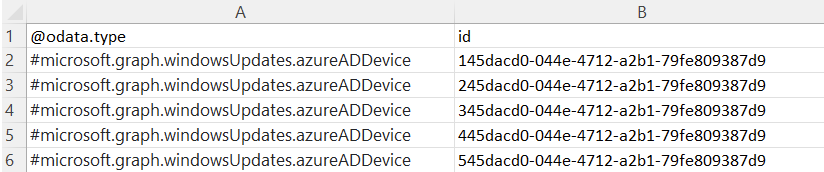
52 | Easily create a list of devices in Excel using the following format 53 |

54 |

55 |

    56 |
  • 57 | All fields need to be included (@odata.type, id, #microsoft.graph.windowsUpdates.azureADDevice) 58 |
  • 59 |
  • 60 | Add Azure AD device Ids - all values are case sensitive 61 |
  • 62 |
  • 63 | Save file as CSV - only CSV files can be uploaded for batch changes 64 |
  • 65 |
  • 66 | Limit each CSV to less than 200 devices - create multiple files if needed 67 |
  • 68 |
69 |

70 | 71 | 72 |

73 | 74 |

Support

75 |

76 | For issues, please send email to wufbdrivers@microsoft.com with 77 | the following information: 78 |

79 |

80 |

    81 |
  1. 82 | Description of the issue 83 |
  2. 84 |
  3. 85 | AAD Device ID (this can be found by issuing this 86 | command locally through PowerShell: dsregcmd /status) 87 |
  4. 88 |
  5. 89 | After checking for updates in Windows Update, 90 | please attach the log generated by the  91 | Windows Update Log Collection Tool 92 | 93 | . These logs contain information that will allow us to search for 94 | related service events and device settings. 95 |
  6. 96 |
  7. 97 | Policy ID created in the web application 98 |
  8. 99 |
  9. 100 | Screenshots relevant to the issue 101 |
  10. 102 |
103 |

104 | 105 |
106 | ); 107 | }; 108 | 109 | export { About }; 110 | -------------------------------------------------------------------------------- /src/components/table/memberTable.js: -------------------------------------------------------------------------------- 1 | import React, { useRef, useState } from "react"; 2 | import { Button, OverlayTrigger, Table, Tooltip } from "react-bootstrap"; 3 | import { BsFillTrashFill } from "react-icons/bs"; 4 | import { removeDeviceFromService } from "../../api/removeDeviceFromService"; 5 | import { updateDeploymentAudience } from "../../api/updateDeploymentAuidence"; 6 | import { entityType } from "../../config/Constants"; 7 | import { IconButton } from "../buttons/iconButton"; 8 | import ConfirmModal from "../modal/confirmationModal"; 9 | import SpinnerCommon from "../SpinnerCommon"; 10 | 11 | export default function MemberTable(props) { 12 | const { policy, policyMembers, spinner, setSpinner, refreshPolicy } = props; 13 | const [showConfirmModal, setShowConfirmModal] = useState(false); 14 | const [selectedDeviceId, setSelectedDeviceId] = useState(null); 15 | const [selectedPolicyId, setSelectedPolicyId] = useState(null); 16 | 17 | async function handleRemoveMembers(deviceId, audienceId, policyId) { 18 | setSpinner(true); 19 | let requestBody = JSON.stringify({ 20 | removeMembers: [ 21 | { 22 | "@odata.type": entityType + ".azureADDevice", 23 | id: deviceId, 24 | }, 25 | ], 26 | }); 27 | await updateDeploymentAudience(requestBody, audienceId); 28 | setSpinner(false); 29 | await refreshPolicy(policyId); 30 | } 31 | 32 | async function handleRemoveMemberFromService(deviceId, policyId) { 33 | console.log("Removing from service"); 34 | setSelectedDeviceId(deviceId); 35 | setSelectedPolicyId(policyId); 36 | setShowConfirmModal(true); 37 | } 38 | 39 | return ( 40 | <> 41 | {spinner ? : null} 42 |
43 |

44 | Devices can take up to 2 hours to populate after being added to a 45 | policy, if the problem persist please contact support. 46 |

47 | 48 | 49 | 50 | 51 | 52 | 53 | 54 | 55 | {policyMembers?.map((member) => ( 56 | 57 | 58 | 84 | 85 | ))} 86 | 87 |
Device ID
{member.id} 59 | } 65 | onClick={() => 66 | handleRemoveMembers( 67 | member?.id, 68 | policy?.audience?.id, 69 | policy?.id 70 | ) 71 | } 72 | /> 73 | 74 | } 78 | toolTipMessage={"Remove Device from Service"} 79 | onClick={() => 80 | handleRemoveMemberFromService(member?.id, policy?.id) 81 | } 82 | /> 83 |
88 | setShowConfirmModal(false)} 91 | deviceId={selectedDeviceId} 92 | policyId={selectedPolicyId} 93 | refreshPolicy={refreshPolicy} 94 | messageToDisplay="This action will remove the device from the service entirely. If it 95 | was added to other Drivers policies it will be removed from them as 96 | well." 97 | /> 98 |
99 | 100 | ); 101 | } 102 | -------------------------------------------------------------------------------- /src/pages/UpdatePage/UpdatePage.js: -------------------------------------------------------------------------------- 1 | import { Button, Col, Container, Nav, Row } from "react-bootstrap"; 2 | import { IoChevronBackCircleSharp } from "react-icons/io5"; 3 | import "./UpdatePage.css"; 4 | 5 | import React, { useEffect, useState } from "react"; 6 | import { UpdatesTable } from "../../components/table/UpdatesTable"; 7 | import { useUpdateData } from "../../hooks/useUpdateData"; 8 | import { useParams } from "react-router-dom"; 9 | import SpinnerCommon from "../../components/SpinnerCommon"; 10 | import { BsFileBreak } from "react-icons/bs"; 11 | import { ToastContainer } from "react-toastify"; 12 | export default function UpdatePage() { 13 | const { id } = useParams(); 14 | const [ 15 | updatesInfoData, 16 | isAutomaticPolicy, 17 | catalogIdToApprovals, 18 | catalogIdToRevokedContentApproval, 19 | catalogIdToApprovedContentApproval, 20 | isLoading, 21 | refreshUpdatesData, 22 | ] = useUpdateData(id); 23 | const [driversUpdates, setDriversUpdates] = useState([]); 24 | const [isRecommendedUpdatesSelected, setIsRecommendedUpdatesSelected] = 25 | useState(false); 26 | 27 | const handleNavigationClick = (isRecommendedUpdates) => { 28 | const recommendedUpdates = []; 29 | const otherUpdates = []; 30 | // filter out the updates that are recommended by Microsoft 31 | for (let i = 0; i < updatesInfoData.length; i++) { 32 | if (updatesInfoData[i].matchedDevices.length > 0) { 33 | if ( 34 | updatesInfoData[i].matchedDevices[0].recommendedBy.includes( 35 | "Microsoft" 36 | ) 37 | ) { 38 | recommendedUpdates.push(updatesInfoData[i]); 39 | } else { 40 | otherUpdates.push(updatesInfoData[i]); 41 | } 42 | } else { 43 | otherUpdates.push(updatesInfoData[i]); 44 | } 45 | } 46 | setIsRecommendedUpdatesSelected(isRecommendedUpdates); 47 | setDriversUpdates(isRecommendedUpdates ? recommendedUpdates : otherUpdates); 48 | }; 49 | 50 | useEffect(() => { 51 | // When the page is loaded, the recommended updates are selected by default 52 | handleNavigationClick(true); 53 | }, [updatesInfoData]); 54 | 55 | if (isLoading) { 56 | return ; 57 | } 58 | 59 | return ( 60 | 61 | {/* First row contain the title and back button */} 62 | 63 | 64 |

Updates

65 | 66 | 67 | 75 | 76 |
77 | 78 | {/* navbar with tabs */} 79 | 98 | 99 | {!isLoading && driversUpdates.length !== 0 ? ( 100 | 112 | ) : ( 113 |
114 | {" "} 115 | No Updates Available 116 |
117 | )} 118 |
119 | 120 |
121 | ); 122 | } 123 | -------------------------------------------------------------------------------- /src/hooks/usePolicyData.js: -------------------------------------------------------------------------------- 1 | import React, { useEffect, useState } from "react"; 2 | import { getMembersFromAudienceId } from "../api/getMembers"; 3 | import { getPolicies } from "../api/getPolicies"; 4 | import { dssEndpoint } from "../config/Constants"; 5 | import { GetHeaders, GetToken } from "../utils/fetchHelper"; 6 | 7 | import { useMsal } from "@azure/msal-react"; 8 | 9 | // Move to constants file 10 | const UPDATE_POLICIES_ENDPOINT = "/updatePolicies?$expand=audience"; 11 | const GET_MEMBERS_ENDPOINT = "/deploymentAudiences"; 12 | 13 | function usePolicyData() { 14 | const [policies, setPolicies] = useState([]); 15 | const [isLoading, setIsLoading] = useState(true); 16 | const [policyToMembers, setPolicyToMembers] = useState([]); 17 | // TOKEN VARIABLES 18 | const { instance, accounts } = useMsal(); 19 | 20 | // Helper funcion for retriving name from local storage 21 | function getPolicyNameFromLocalStrage(id) { 22 | if (localStorage.getItem(id) != null) { 23 | return localStorage.getItem(id); 24 | } else { 25 | localStorage.setItem(id, id); 26 | return id; 27 | } 28 | } 29 | 30 | // Set up policies data to add members and locally stored policy name 31 | // To do: Later version of graph API will have policy name stored so no need to store on local 32 | async function setPoliciesData(policies) { 33 | const tmpPolicies = policies.map(async (policy) => { 34 | policy.Name = getPolicyNameFromLocalStrage(policy.id); 35 | try { 36 | policy.members = 37 | policy.audience && policy.audience.id 38 | ? await getMembersFromAudienceId(policy.audience.id) 39 | : []; 40 | } catch (err) { 41 | console.error("Error: " + err); 42 | } 43 | return policy; 44 | }); 45 | return Promise.all(tmpPolicies); 46 | } 47 | 48 | function setPolicyToMemebersData(policies) { 49 | // Set policyToMembers state 50 | const tmpPolicyToMembers = {}; 51 | for (let i = 0; i < policies.length; i++) { 52 | let item = policies[i]; 53 | tmpPolicyToMembers[item.id] = item.members; 54 | } 55 | setPolicyToMembers(tmpPolicyToMembers); 56 | } 57 | 58 | async function refreshPolicy(policyToRefresh) { 59 | // Set time out because we want to wait some time before refreshing data using api calls. E.g. After delete call, might as well wait 1 second for bakcend to be updated. 60 | setTimeout(async () => { 61 | let tmpPolicy = [...policies]; 62 | let newMembers = []; 63 | tmpPolicy.map(async (policy) => { 64 | // Refresh only policy of interest 65 | if (policy.id == policyToRefresh) { 66 | policy.Name = getPolicyNameFromLocalStrage(policy.id); 67 | try { 68 | policy.members = 69 | policy.audience && policy.audience.id 70 | ? await getMembersFromAudienceId(policy.audience.id) 71 | : []; 72 | newMembers = policy.members; 73 | } catch (err) { 74 | console.error("Error: " + err); 75 | } 76 | setPolicyToMembers({ 77 | ...policyToMembers, 78 | [policyToRefresh]: newMembers, 79 | }); 80 | } 81 | return policy; 82 | }); 83 | 84 | await Promise.all(tmpPolicy).then(() => { 85 | setPolicies(tmpPolicy); 86 | }); 87 | }, 500); 88 | } 89 | 90 | // Refresh policy data 91 | async function refreshPolicyData() { 92 | setIsLoading(true); 93 | GetToken(instance, accounts); 94 | const retrivedPolicies = await getPolicies(); 95 | const policiesData = await setPoliciesData(retrivedPolicies); 96 | setPolicyToMemebersData(policiesData); 97 | setPolicies(policiesData); 98 | setIsLoading(false); 99 | } 100 | 101 | useEffect(() => { 102 | async function prepareData() { 103 | setIsLoading(true); 104 | GetToken(instance, accounts); 105 | const retrivedPolicies = await getPolicies(); 106 | const policiesData = await setPoliciesData(retrivedPolicies); 107 | setPolicyToMemebersData(policiesData); 108 | setPolicies(policiesData); 109 | setIsLoading(false); 110 | } 111 | prepareData(); 112 | return () => { 113 | setPolicies([]); 114 | setPolicyToMembers([]); 115 | }; 116 | }, []); 117 | 118 | return [ 119 | policies, 120 | isLoading, 121 | refreshPolicyData, 122 | refreshPolicy, 123 | policyToMembers, 124 | ]; 125 | } 126 | 127 | export default usePolicyData; 128 | -------------------------------------------------------------------------------- /src/components/table/paginatedTable.js: -------------------------------------------------------------------------------- 1 | import React, { useEffect, useMemo, useState } from "react"; 2 | import { BsFillTrashFill, BsViewList } from "react-icons/bs"; 3 | import { FaRegEdit } from "react-icons/fa"; 4 | import { useNavigate } from "react-router-dom"; 5 | import { IconButton } from "../buttons/iconButton"; 6 | import DeleteModal from "../modal/deleteModal"; 7 | import MaterialReactTable from "material-react-table"; 8 | 9 | export const PaginatedTable = (props) => { 10 | const policiesColumns = useMemo( 11 | () => [ 12 | { header: "Policy ID", accessorKey: "policyId" }, 13 | { header: "Audience Id", accessorKey: "audienceId" }, 14 | { header: "Policy Name", accessorKey: "policyName" }, 15 | { header: "Device Count", accessorKey: "deviceCount" }, 16 | { header: "Type of Policy", accessorKey: "policyType" }, 17 | { header: "Action", accessorKey: "action" }, 18 | ], 19 | [] 20 | ); 21 | 22 | const navigate = useNavigate(); 23 | const { 24 | policies, 25 | isLoading, 26 | refreshPolicyData, 27 | setShowEditModal, 28 | setPolicyToEditId, 29 | setAudienceCreatedId, 30 | } = props; 31 | const [spinner, setSpinner] = useState(false); 32 | const [policyTableData, setPolicyTableData] = useState([]); 33 | const [selectedPolicyToDelete, setSelectedPolicyToDelete] = useState(null); 34 | const [showDeleteModal, setShowDeleteModal] = useState(false); 35 | const actionsButtons = [ 36 | { 37 | text: "Edit", 38 | icon: , 39 | onClick: (policy, audienceId) => { 40 | setAudienceCreatedId(policy.audience?.id); 41 | setPolicyToEditId(policy.id); 42 | setShowEditModal(true); 43 | }, 44 | }, 45 | { 46 | text: "View", 47 | icon: , 48 | onClick: (policy) => { 49 | navigate("policy/" + policy.id); 50 | }, 51 | }, 52 | ]; 53 | 54 | const handleToggleDeleteModal = () => { 55 | setShowDeleteModal(!showDeleteModal); 56 | }; 57 | 58 | const getPolicyTableData = (policies) => { 59 | return policies 60 | .map((policy) => { 61 | return { 62 | policyId: policy.id, 63 | audienceId: policy.audience?.id, 64 | policyName: policy.Name, 65 | deviceCount: policy.members?.length ?? 0, 66 | policyType: 67 | policy.complianceChangeRules.length === 0 ? "Manual" : "Automatic", 68 | action: ( 69 |
70 | {actionsButtons.map((btn) => ( 71 | btn.onClick(policy)} 76 | /> 77 | ))} 78 | {policy.members?.length == 0 ? ( 79 | } 83 | onClick={() => { 84 | setSelectedPolicyToDelete(policy.id); 85 | setShowDeleteModal(true); 86 | }} 87 | /> 88 | ) : ( 89 | } 93 | toolTipMessage="Device Count must be 0" 94 | isDisabled={true} 95 | /> 96 | )} 97 |
98 | ), 99 | }; 100 | }) 101 | .reverse(); 102 | }; 103 | 104 | useEffect(() => { 105 | setPolicyTableData(getPolicyTableData(policies)); 106 | }, [policies]); 107 | 108 | if (isLoading) { 109 | return
Loading
; 110 | } 111 | 112 | return ( 113 | <> 114 | 127 | 128 | 134 | 135 | ); 136 | }; 137 | -------------------------------------------------------------------------------- /src/pages/DriversAndFirmwarePage/DriversAndFirmwarePage.js: -------------------------------------------------------------------------------- 1 | import React, { useState } from "react"; 2 | import usePolicyData from "../../hooks/usePolicyData"; 3 | 4 | import { Col, Container, Row } from "react-bootstrap"; //MIT LICENSE < https://github.com/react-bootstrap/react-bootstrap > 5 | import { 6 | BsArrowRepeat, 7 | BsFileText, 8 | BsFillPlusSquareFill, 9 | } from "react-icons/bs"; //MIT LICENSE < https://github.com/twbs/icons > 10 | import { IconButton } from "../../components/buttons/iconButton"; 11 | import "../../components/table/paginatedTable"; 12 | import { PaginatedTable } from "../../components/table/paginatedTable"; 13 | import CreatePolicyModal from "../../components/modal/createPolicyModal"; 14 | import { CreatePolicy } from "../../api/createPolicy"; 15 | import { exportPoliciesToCsv } from "../../utils/exportPoliciesToCsv"; 16 | import SpinnerCommon from "../../components/SpinnerCommon"; 17 | import EditModalWindow from "../../components/modal/editPolicyModel"; 18 | import { updateDeploymentAudience } from "../../api/updateDeploymentAuidence"; 19 | 20 | export default function DriversAndFirmwarePage() { 21 | const [ 22 | policies, 23 | isLoading, 24 | refreshPolicyData, 25 | refreshPolicy, 26 | policyToMembers, 27 | ] = usePolicyData(); 28 | const [spinner, setSpinner] = useState(false); 29 | const [showCreateModal, setShowCreateModal] = useState(false); 30 | const [showEditModal, setShowEditModal] = useState(false); 31 | const [audienceCreatedId, setAudienceCreatedId] = useState(null); 32 | const [policyToEditId, setPolicyToEditId] = useState(null); 33 | 34 | async function handleCreateAudienceAndPolicy(policyName, type) { 35 | setSpinner(true); 36 | let data = await CreatePolicy(policyName, type); 37 | console.log(data); 38 | setAudienceCreatedId(data.audienceId); 39 | setPolicyToEditId(data.policyId); 40 | setShowCreateModal(false); 41 | setSpinner(false); 42 | setShowEditModal(true); 43 | await refreshPolicyData(); 44 | } 45 | 46 | const policyButtons = [ 47 | { 48 | text: "New", 49 | icon: , 50 | onClick: () => setShowCreateModal(true), 51 | }, 52 | { 53 | text: "Refresh", 54 | icon: , 55 | onClick: async () => { 56 | await refreshPolicyData(); 57 | }, 58 | }, 59 | { 60 | text: "Export", 61 | icon: , 62 | onClick: () => { 63 | exportPoliciesToCsv(policies); 64 | }, 65 | }, 66 | ]; 67 | 68 | async function handleUpdateDeploymentAudience(payload, audienceId) { 69 | setSpinner(true); 70 | await updateDeploymentAudience(payload, audienceId); 71 | setSpinner(false); 72 | } 73 | 74 | const handleToggleEditModal = async () => { 75 | setShowEditModal(!showEditModal); 76 | await refreshPolicyData(); 77 | }; 78 | 79 | if (isLoading) { 80 | return ; 81 | } 82 | 83 | return ( 84 | <> 85 | 86 | 87 | 88 |

Policies

89 | 90 | {/* policy create, refresh and export buttons */} 91 | 92 | {policyButtons.map((btn) => ( 93 | 100 | ))} 101 | 102 | 103 | 104 |
105 | 106 | {/* Table with Pagination */} 107 | 115 | 116 | {/* Modal Window for creating Policy*/} 117 | setShowCreateModal(!showCreateModal)} 121 | spinner={spinner} 122 | /> 123 | 124 | 134 |
135 | 136 | ); 137 | } 138 | -------------------------------------------------------------------------------- /src/components/table/UpdatesTable.js: -------------------------------------------------------------------------------- 1 | import { Button } from "react-bootstrap"; 2 | import { BsCheck, BsPause, BsViewList } from "react-icons/bs"; 3 | import MetadataDataModal from "../modal/metaDataModal"; 4 | import ContentApproveModal from "../modal/contentApproveModal"; 5 | import SuspendModal from "../modal/suspendModal"; 6 | import { useMemo, useState } from "react"; 7 | import MaterialReactTable from "material-react-table"; 8 | 9 | export function UpdatesTable({ 10 | updatesInfoData, 11 | catalogIdToApprovals, 12 | catalogIdToRevokedContentApproval, 13 | catalogIdToApprovedContentApproval, 14 | isRecommendedUpdates, 15 | refreshUpdatesData, 16 | }) { 17 | const updateInfoColumns = useMemo( 18 | () => [ 19 | { header: "Update Name", accessorKey: "updateName" }, 20 | { header: "Release Date", accessorKey: "releaseDateTime" }, 21 | { header: "Applicable Devices", accessorKey: "applicableDeviceCount" }, 22 | { header: "Driver Class", accessorKey: "driverClass" }, 23 | { header: "Approval Start Date", accessorKey: "approvalDate" }, 24 | { header: "Suspension Date", accessorKey: "suspensionDate" }, 25 | ], 26 | [] 27 | ); 28 | 29 | const [showMetadataModal, setShowMetadataModal] = useState(false); 30 | const [showApproveModal, setShowApproveModal] = useState(false); 31 | const [showSuspendModal, setShowSuspendModal] = useState(false); 32 | const [rowSelection, setRowSelection] = useState({}); 33 | 34 | let selectedUpdate = Object.keys(rowSelection)[0]; 35 | return ( 36 |
37 |
38 | {updatesInfoData[selectedUpdate]?.updateName} 39 |
40 |
41 |
42 | 52 |
53 |
54 | 68 |
69 |
70 | 86 |
87 |
88 |
89 | 104 |
105 | 106 | setShowMetadataModal(false)} 110 | /> 111 | 112 | setShowApproveModal(false)} 118 | refreshUpdatesData={refreshUpdatesData} 119 | /> 120 | 121 | setShowSuspendModal(false)} 126 | refreshUpdatesData={refreshUpdatesData} 127 | /> 128 |
129 | ); 130 | } 131 | -------------------------------------------------------------------------------- /src/api/getUpdates.js: -------------------------------------------------------------------------------- 1 | import { GetHeaders } from "../utils/fetchHelper"; 2 | import { dssEndpoint } from "../config/Constants"; 3 | import axios from "axios"; 4 | 5 | // helper function to extract the start date time 6 | function extractStartDateTime(complianceChange) { 7 | let depSettings = complianceChange.deploymentSettings; 8 | if ( 9 | depSettings != null && 10 | depSettings.schedule != null && 11 | depSettings.schedule.startDateTime != null 12 | ) { 13 | return new Date(depSettings.schedule.startDateTime); 14 | } else { 15 | return null; 16 | } 17 | } 18 | 19 | // get Updates based on the policyid 20 | export async function getUpdates(policyId) { 21 | let localCatalogIdToApprovals = {}; 22 | let localCatalogIdToRevokedContentApproval = {}; 23 | let localCatalogIdToApprovedContentApproval = {}; 24 | const categoryValues = []; 25 | try { 26 | const expandAudienceResponse = await axios.get( 27 | `${dssEndpoint}/updatePolicies('${policyId}')?$expand=audience`, 28 | { headers: GetHeaders() } 29 | ); 30 | if (!expandAudienceResponse?.data?.audience?.id) { 31 | console.log("No audience defined, thus no updates."); 32 | return null; 33 | } 34 | const catalogEntryResponse = await axios.get( 35 | `${dssEndpoint}/deploymentAudiences('${expandAudienceResponse.data.audience.id}')/applicableContent?$expand=catalogEntry`, 36 | { headers: GetHeaders() } 37 | ); 38 | 39 | // this call is required to get suspend and approval data 40 | const complianceChangesResponse = await axios.get( 41 | `${dssEndpoint}/updatePolicies('${policyId}')/complianceChanges`, 42 | { headers: GetHeaders() } 43 | ); 44 | 45 | // Need to find latest compliance change from the all apporvals 46 | for (let complianceChange of complianceChangesResponse.data.value) { 47 | let contentId = complianceChange.content.catalogEntry.id; 48 | if (complianceChange.isRevoked) { 49 | if (contentId in localCatalogIdToRevokedContentApproval) { 50 | let currRevokedDateTime = new Date(complianceChange.revokedDateTime); 51 | let otherRevokedDateTime = new Date( 52 | localCatalogIdToRevokedContentApproval[contentId].revokedDateTime 53 | ); 54 | if (currRevokedDateTime > otherRevokedDateTime) { 55 | localCatalogIdToRevokedContentApproval[contentId] = 56 | complianceChange; 57 | } 58 | } else { 59 | localCatalogIdToRevokedContentApproval[contentId] = complianceChange; 60 | } 61 | } else { 62 | // Setup all approvals associated with a contentId in case of revoke. 63 | if (contentId in localCatalogIdToApprovals) { 64 | localCatalogIdToApprovals[contentId].push(complianceChange); 65 | } else { 66 | localCatalogIdToApprovals[contentId] = [complianceChange]; 67 | } 68 | 69 | if (contentId in localCatalogIdToApprovedContentApproval) { 70 | let currStartDateTime = extractStartDateTime(complianceChange); 71 | let otherStartDateTime = extractStartDateTime( 72 | localCatalogIdToApprovedContentApproval[contentId] 73 | ); 74 | if ( 75 | otherStartDateTime != null && 76 | (currStartDateTime == null || 77 | currStartDateTime < otherStartDateTime) 78 | ) { 79 | localCatalogIdToApprovedContentApproval[contentId] = 80 | complianceChange; 81 | } 82 | } else { 83 | localCatalogIdToApprovedContentApproval[contentId] = complianceChange; 84 | } 85 | } 86 | } 87 | for (let i = 0; i < catalogEntryResponse.data.value.length; i++) { 88 | let driverUpdate = catalogEntryResponse.data.value[i]; 89 | let catEntryId = driverUpdate.catalogEntry.id; 90 | if (catEntryId in localCatalogIdToApprovedContentApproval) { 91 | let approvalDate = extractStartDateTime( 92 | localCatalogIdToApprovedContentApproval[catEntryId] 93 | ); 94 | driverUpdate.approvalDate = 95 | approvalDate != null ? approvalDate.toDateString() : "Immediate"; 96 | driverUpdate.suspensionDate = ""; 97 | } else if (catEntryId in localCatalogIdToRevokedContentApproval) { 98 | driverUpdate.suspensionDate = new Date( 99 | localCatalogIdToRevokedContentApproval[catEntryId].revokedDateTime 100 | ).toDateString(); 101 | driverUpdate.approvalDate = ""; 102 | } 103 | categoryValues.push(driverUpdate); 104 | } 105 | 106 | return { 107 | catalogIdToApprovals: localCatalogIdToApprovals, 108 | catalogIdToRevokedContentApproval: localCatalogIdToRevokedContentApproval, 109 | catalogIdToApprovedContentApproval: 110 | localCatalogIdToApprovedContentApproval, 111 | categoryValues: categoryValues, 112 | isAutomatic: 113 | expandAudienceResponse.data.complianceChangeRules.length !== 0, 114 | }; 115 | 116 | // return catalogEntryResponse.data.value; 117 | } catch (e) { 118 | handleError(e); 119 | } 120 | } 121 | 122 | let handleError = (error) => { 123 | console.log(error); 124 | }; 125 | -------------------------------------------------------------------------------- /src/assets/demoUpdates.json: -------------------------------------------------------------------------------- 1 | { 2 | "@odata.context": "https://deploymentscheduler.microsoft.com/v3/$metadata#Collection(microsoft.wufb.deployments.applicableUpdateDriver)", 3 | "value": [ 4 | { 5 | "applicableDeviceCount": 7, 6 | "installedDeviceCount": 0, 7 | "recommendedBy": ["Microsoft"], 8 | "approvalDate": "", 9 | "suspensionDate": "", 10 | "catalogEntry": { 11 | "catalogEntryId": "823cf7ee72d9b30f15d0b43fc258299baa7367eebfb2f4d3245eadd53fbad484", 12 | "displayName": "Hewlett-Packard - USB - 6/1/2018 12:00:00 AM - 46.2.2631.18152", 13 | "releaseDate": "2018-06-01T00:00:00Z", 14 | "description": "Hewlett-Packard USB driver update released in June 2018", 15 | "driverClass": "OtherHardware", 16 | "provider": "Hewlett-Packard", 17 | "manufacturer": "Hewlett-Packard", 18 | "version": "12947857691068136" 19 | } 20 | }, 21 | { 22 | "applicableDeviceCount": 5, 23 | "installedDeviceCount": 0, 24 | "recommendedBy": [], 25 | "approvalDate": "", 26 | "suspensionDate": "", 27 | "catalogEntry": { 28 | "catalogEntryId": "8dc320f0e2b4bda62db14f638a2f03b2e1c85d6e72330c4c8ec455f7e620d692", 29 | "displayName": "Surface - System - 2/23/2018 12:00:00 AM - 3.16.136.0", 30 | "releaseDate": "2018-02-23T00:00:00Z", 31 | "description": "Surface System driver update released in February 2018", 32 | "driverClass": "OtherHardware", 33 | "provider": "Surface", 34 | "manufacturer": "Surface", 35 | "version": "844493658521600" 36 | } 37 | }, 38 | { 39 | "applicableDeviceCount": 7, 40 | "installedDeviceCount": 0, 41 | "recommendedBy": ["Microsoft"], 42 | "approvalDate": "", 43 | "suspensionDate": "", 44 | "catalogEntry": { 45 | "catalogEntryId": "546f43d291c7b42a097555c840eeb53abcf48f6e2569c6e5ff13dd29f2c280f4", 46 | "displayName": "Intel - System - 4/27/2018 12:00:00 AM - 8.4.11000.6436", 47 | "releaseDate": "2018-04-27T00:00:00Z", 48 | "description": "Intel System driver update released in April 2018", 49 | "driverClass": null, 50 | "provider": "Intel", 51 | "manufacturer": "Intel", 52 | "version": "2251817714456868" 53 | } 54 | }, 55 | { 56 | "applicableDeviceCount": 2, 57 | "installedDeviceCount": 0, 58 | "recommendedBy": ["Microsoft"], 59 | "approvalDate": "", 60 | "suspensionDate": "", 61 | "catalogEntry": { 62 | "catalogEntryId": "f7ddae2a792c0d90eacd0a23bfc66aa165b3b41c358a741d3c9f82b767fb8baf", 63 | "displayName": "Surface - SCSIAdapter - 3/29/2017 12:00:00 AM - 11.0.4.0", 64 | "releaseDate": "2017-03-29T00:00:00Z", 65 | "description": "Surface SCSIAdapter driver update released in March 2017", 66 | "driverClass": "OtherHardware", 67 | "provider": "Surface", 68 | "manufacturer": "Surface", 69 | "version": "3096224744079360" 70 | } 71 | }, 72 | { 73 | "applicableDeviceCount": 1, 74 | "installedDeviceCount": 0, 75 | "recommendedBy": ["Microsoft"], 76 | "approvalDate": "", 77 | "suspensionDate": "", 78 | "catalogEntry": { 79 | "catalogEntryId": "35d74912c7e9cda960a595e66d4b61f33b88337cef47d2f492b488db7deb535a", 80 | "displayName": "INTEL - System - 7/18/1968 12:00:00 AM - 10.1.5.1", 81 | "releaseDate": "1968-07-18T00:00:00Z", 82 | "description": "INTEL System driver update released in July 1968", 83 | "driverClass": "OtherHardware", 84 | "provider": "INTEL", 85 | "manufacturer": "INTEL", 86 | "version": "2814754062401537" 87 | } 88 | }, 89 | { 90 | "applicableDeviceCount": 3, 91 | "installedDeviceCount": 0, 92 | "recommendedBy": ["Microsoft"], 93 | "approvalDate": "", 94 | "suspensionDate": "", 95 | "catalogEntry": { 96 | "catalogEntryId": "4beaba5132700cf3da1f906c71c00c01b59f9b5483a34bc4483b45cb57eeb773", 97 | "displayName": "Surface - System - 7/26/2018 12:00:00 AM - 3.21.139.0", 98 | "releaseDate": "2018-07-26T00:00:00Z", 99 | "description": "Surface System driver update released in July 2018", 100 | "driverClass": null, 101 | "provider": "Surface", 102 | "manufacturer": "Surface", 103 | "version": "844515133554688" 104 | } 105 | }, 106 | { 107 | "applicableDeviceCount": 1, 108 | "installedDeviceCount": 0, 109 | "recommendedBy": [], 110 | "approvalDate": "", 111 | "suspensionDate": "", 112 | "catalogEntry": { 113 | "catalogEntryId": "86b9c4d3214ede99ab727089d258dbe673209273686d64b3e256eedf360e25b5", 114 | "displayName": "Intel Corporation - HIDClass - 11/10/2017 12:00:00 AM - 1.2.0.100", 115 | "releaseDate": "2017-11-10T00:00:00Z", 116 | "description": "Intel Corporation HIDClass driver update released in November 2017", 117 | "driverClass": "OtherHardware", 118 | "provider": "Intel Corporation", 119 | "manufacturer": "Intel Corporation", 120 | "version": "281483566645348" 121 | } 122 | } 123 | ] 124 | } -------------------------------------------------------------------------------- /src/components/modal/editPolicyModel.js: -------------------------------------------------------------------------------- 1 | import "./modalWindow.css"; 2 | 3 | import { AiFillMinusCircle } from "react-icons/ai"; 4 | 5 | import { 6 | Button, 7 | Col, 8 | Container, 9 | Form, 10 | Modal, 11 | OverlayTrigger, 12 | Row, 13 | Tooltip, 14 | } from "react-bootstrap"; 15 | 16 | import { useEffect, useRef, useState } from "react"; 17 | import { BsFillPlusCircleFill } from "react-icons/bs"; //MIT LICENSE < https://github.com/twbs/icons > 18 | import { FaFileUpload, FaRegEdit, FaRegSave } from "react-icons/fa"; 19 | 20 | import { ToastContainer } from "react-toastify"; 21 | import "react-toastify/dist/ReactToastify.css"; 22 | import { updateDeploymentAudience } from "../../api/updateDeploymentAuidence"; 23 | import SpinnerCommon from "../SpinnerCommon"; 24 | import { entityType } from "../../config/Constants"; 25 | import MemberTable from "../table/memberTable"; 26 | import { gridColumnVisibilityModelSelector } from "@mui/x-data-grid"; 27 | 28 | const EditPolicyModal = (props) => { 29 | let policyType = "manual"; 30 | let policyName = ""; 31 | const [spinner, setSpinner] = useState(false); 32 | const [showEditPolicyName, setShowEditPolicyName] = useState(false); 33 | const [fileChosen, setFileChosen] = useState(false); 34 | const [selectedPolicyName, setSelectedPolicyName] = useState(null); 35 | const [selectedFileName, setSelectedFileName] = useState(null); 36 | const [batchMembers, setBatchMembers] = useState(""); 37 | const [batchMembersRemove, setBatchMembersRemove] = useState(""); 38 | const [policyToEdit, setPolicyToEdit] = useState([]); 39 | 40 | const fileInput = useRef(null); 41 | const { 42 | policies, 43 | isModelWindowOpen, 44 | onSubmit, 45 | toggleModal, 46 | policyToEditId, 47 | audienceId, 48 | refreshPolicy, 49 | policyToMembers, 50 | } = props; 51 | 52 | function csvJSON(csv) { 53 | const lines = csv.split(`\r\n`); 54 | const result = []; 55 | const headers = lines[0].split(","); 56 | for (let i = 1; i < lines.length - 1; i++) { 57 | const obj = {}; 58 | const currentLine = lines[i].split(","); 59 | for (let j = 0; j < headers.length; j++) { 60 | obj[headers[j]] = currentLine[j]; 61 | } 62 | result.push(obj); 63 | } 64 | const resultAdd = { addMembers: result }; 65 | const resultRemove = { removeMembers: result }; 66 | setBatchMembers(JSON.stringify(resultAdd)); 67 | setBatchMembersRemove(JSON.stringify(resultRemove)); 68 | } 69 | 70 | async function handleAddDevice(deviceId, audienceId, policyId) { 71 | let requestBody = JSON.stringify({ 72 | addMembers: [ 73 | { 74 | "@odata.type": entityType + ".azureADDevice", 75 | id: deviceId, 76 | }, 77 | ], 78 | }); 79 | await updateDeploymentAudience(requestBody, audienceId); 80 | refreshPolicy(policyId); 81 | } 82 | 83 | async function addBatchDeviceToAudience() { 84 | // Adding or removing up to 200 devices at a time with batch is an illustration of how to utilize the API and not a limitation. 85 | await updateDeploymentAudience(batchMembers, audienceId); 86 | } 87 | 88 | async function removeBatchDeviceFromAudience() { 89 | // Adding or removing up to 200 devices at a time with batch is an illustration of how to utilize the API and not a limitation. 90 | await updateDeploymentAudience(batchMembersRemove, audienceId); 91 | } 92 | 93 | useEffect(() => { 94 | policies.forEach((policy) => { 95 | if (policy.id == policyToEditId) { 96 | setPolicyToEdit(policy); 97 | } 98 | }); 99 | }, [policies]); 100 | 101 | return ( 102 |
103 | {spinner ? : null} 104 | 113 | 114 | 115 | {showEditPolicyName === true ? ( 116 | 117 | Policy Settings for  118 | 119 | 122 | Save Policy Name 123 | 124 | } 125 | placement="right" 126 | delay={{ show: 250, hide: 400 }} 127 | > 128 | 129 | { 132 | let suggestedName = 133 | document.getElementById("policyNameInput").value; 134 | if (Boolean(suggestedName)) { 135 | localStorage.setItem(policyToEditId, suggestedName); 136 | } else { 137 | suggestedName = localStorage.getItem(policyToEditId); 138 | } 139 | setSelectedPolicyName(suggestedName); 140 | setShowEditPolicyName(false); 141 | }} 142 | > 143 | 144 | 145 | 146 | ) : ( 147 | 148 | Policy :  149 | {localStorage.getItem(policyToEditId)} 150 |   151 | ( 153 | 154 | Edit Policy Name 155 | 156 | )} 157 | placement="right" 158 | delay={{ show: 250, hide: 400 }} 159 | > 160 | 161 | { 165 | setShowEditPolicyName(true); 166 | }} 167 | > 168 | 169 | 170 | 171 | )} 172 | 173 |
174 | Policy Id :  {policyToEditId} 175 |
176 |
177 | 178 |
179 | 180 | 181 |
Batch Add or Remove Devices
182 |
{ 184 | e.preventDefault(); 185 | // Adding or removing up to 200 devices at a time with batch is an illustration of how to utilize the API and not a limitation. 186 | onSubmit(policyName, policyType); 187 | }} 188 | > 189 | 193 | 194 | 195 | ( 197 | 198 | Upload CSV file with devices guid list 199 | 200 | )} 201 | placement="right" 202 | delay={{ show: 250, hide: 400 }} 203 | > 204 | 214 | 215 | { 221 | var file = event.target.files[0]; 222 | var reader = new FileReader(); 223 | reader.onload = function (event) { 224 | csvJSON(event.target.result); 225 | }; 226 | reader.readAsText(file); 227 | setFileChosen(true); 228 | setSelectedFileName(event.target.files[0].name); 229 | }} 230 | /> 231 | {fileChosen === true ? ( 232 | 233 | 234 | {selectedFileName} 235 | 236 |
237 | 238 | 245 | 251 | 252 |
253 | 254 |
255 |
256 | ) : null} 257 |
258 |
259 |
260 |
261 |
{ 263 | event.preventDefault(); 264 | setSpinner(true); 265 | await handleAddDevice( 266 | event.target.deviceId.value, 267 | audienceId, 268 | policyToEditId 269 | ); 270 | setSpinner(false); 271 | }} 272 | > 273 |
274 | 275 |
Single Device
276 |
277 | 278 | 279 | 280 | 287 | 288 | 289 | 290 |
291 | 292 | ( 294 | 295 | Add single device to policy 296 | 297 | )} 298 | placement="right" 299 | delay={{ show: 250, hide: 400 }} 300 | > 301 | 308 | 309 | 310 |
311 | 312 |
313 |
314 | 315 | 322 |
323 | 324 | 327 | 328 |
329 | 330 |
331 | ); 332 | }; 333 | 334 | export default EditPolicyModal; 335 | -------------------------------------------------------------------------------- /README.md: -------------------------------------------------------------------------------- 1 | 2 | # [Archived] Windows Update for Business Deployment Service Web App 3 | # Important 4 | **This sample has been archived and is no longer being maintained. As part of the archival process, we're closing all open issues and pull requests.** 5 | 6 | # Introduction 7 | Welcome to the Windows Update for Business deployment service Web Application. The Web Application was designed to teach you how to interact with our API and is meant to be a sample implementation for driver management. We chose to use React for our implementation but it can be done in many ways, please note that we do not support using React to integrate with our API. The Web Application also provides an opportunity to help you manage cloud-based updates for enterprise devices. 8 | 9 | Current functionality includes: 10 | - Create manual and automatic cloud-managed driver update policies 11 | - Add/remove Azure AD devices to your policies 12 | - Browse driver and firmware updates that are available for your devices 13 | - Approve and schedule driver updates 14 | - Suspensions of approvals 15 | - Unenroll devices from driver management 16 | 17 | ## Prerequisites 18 | 19 | 1. Download and install Node.js LTS package [here](https://nodejs.org/en/download/) 20 | 21 | > **Note** 22 | > **Ensure that the LTS version is selected** 23 | ![image](https://user-images.githubusercontent.com/103447364/216180778-37b1c102-82c4-420e-a2f9-c216a2eb1cf8.png) 24 | 25 | 2. Download and install code editor of your choice (We recommend Visual Studio Code, free download link [here](https://code.visualstudio.com/download)) 26 | 3. To work with the deployment service, devices must meet all these requirements: 27 | - Devices must be [Azure AD joined](https://learn.microsoft.com/en-us/azure/active-directory/devices/concept-azure-ad-join) or [hybrid Azure AD joined](https://learn.microsoft.com/en-us/azure/active-directory/devices/concept-azure-ad-join-hybrid) 28 | - Run one of the following operating systems: 29 | - Windows 11, verify supported versions [here](https://learn.microsoft.com/en-us/windows/release-health/windows11-release-information). 30 | - Windows 10, verify supported versions [here](https://learn.microsoft.com/en-us/windows/release-health/release-information). 31 | - Have one of the following Windows 10 or Windows 11 editions installed: 32 | - Pro 33 | - Enterprise 34 | - Education 35 | - Pro Education 36 | - Pro for Workstations 37 | - Additionally, your organization must have one of the following subscriptions: 38 | - Windows 10/11 Enterprise E3 or E5 (included in Microsoft 365 F3, E3, or E5) 39 | - Windows 10/11 Education A3 or A5 (included in Microsoft 365 A3 or A5) 40 | - Windows Virtual Desktop Access E3 or E5 Microsoft 365 Business Premium 41 | 42 | ## Resources 43 | 44 | - API Reference Docs can be found [here](https://learn.microsoft.com/en-us/graph/api/resources/adminwindowsupdates?view=graph-rest-beta) and conceptual documents [here](https://learn.microsoft.com/en-us/graph/windowsupdates-concept-overview) 45 | 46 | - Conceptual overview of [driver management](https://learn.microsoft.com/en-us/graph/windowsupdates-manage-driver-update) utilizing our API in Microsoft Graph 47 | 48 | - Code examples for how the Web Application integrates with our API in Microsoft Graph can be found in the src > api folder 49 | - createPolicy.js - Create an [update policy](https://learn.microsoft.com/en-us/graph/api/resources/windowsupdates-updatepolicy?view=graph-rest-beta) 50 | - getMembers.js - Get members of a [deployment audience](https://learn.microsoft.com/en-us/graph/api/resources/windowsupdates-deploymentaudience?view=graph-rest-beta) 51 | - getPolices.js - Get a [list of all policies](https://learn.microsoft.com/en-us/graph/api/adminwindowsupdates-list-updatepolicies?view=graph-rest-beta) 52 | - getUpdates.js - Get all [driver updates available](https://learn.microsoft.com/en-us/graph/windowsupdates-manage-driver-update#get-inventory-of-driver-updates) for devices in a policy. 53 | - updateDeploymentAudience.js [Add or remove members](https://learn.microsoft.com/en-us/graph/api/windowsupdates-deploymentaudience-updateaudience?view=graph-rest-beta) from a deployment audience. 54 | - createApproval.js - Create an [content approval](https://learn.microsoft.com/en-us/graph/api/windowsupdates-updatepolicy-post-compliancechanges-contentapproval?view=graph-rest-beta) for devices in a deployment audience. 55 | - suspendApproval.js - [Suspend Approval](https://learn.microsoft.com/en-us/graph/windowsupdates-manage-driver-update#during-a-driver-deployment) for a driver deployment. 56 | - deletePolicy.js - [Delete an update policy](https://learn.microsoft.com/en-us/graph/api/windowsupdates-updatepolicy-delete?view=graph-rest-beta). 57 | - removeDeviceFromService.js - [Unenroll](https://learn.microsoft.com/en-us/graph/api/windowsupdates-updatableasset-unenrollassets?view=graph-rest-beta) a device from driver management 58 | 59 | - Driver Deployment workbook in Windows Update for Business Reports - Track the status and progress of all your driver deployments through our new workbook. Find out more and how you can get started by [enrolling in Windows Update for Business Reports](http://aka.ms/wufbreportsGA). 60 | 61 | ### Troubleshooting and Tips 62 | > **Note** 63 | > **Ensure devices are first enrolled in driver management before making policy changes** 64 | 65 | - **Approved content not installing on my device** 66 | 67 | It is possible for the service to receive scan events from Windows Update, make an approval, but the content not get installed on the device because of a Group Policy or Registry setting on a Windows 10 device with version 1607 and later. 68 | - Group Policy setting: If *Computer Configuration\Administrative Templates\Windows Components\Windows update\Do not include drivers with Windows Updates* is set to enabled, driver updates will be dropped by the device. 69 | - Registry key: Under path *HKEY_LOCAL_MACHINE\Software\Policies\Microsoft\Windows\WindowsUpdate\ExcludeWUDriversInQualityUpdate* with a REG_DWORD set to 1 will also drop driver updates offered by Windows Update. 70 | - Intune policy setting under *Devices | Update rings for Windows 10 and later* controls the above registry value. Make sure that Windows drivers is set to Allow for approved driver and firmware content to be installed on your devices. 71 | ![image](https://user-images.githubusercontent.com/103447364/218349845-1922723b-ba51-4c28-b084-f558e03c47c0.png) 72 | 73 | - **Getting drivers and firmware from Windows Update for Business deployment service while using WSUS** 74 | 75 | Windows update [scan source policy](https://learn.microsoft.com/en-us/windows/deployment/update/wufb-wsus) enables you to choose what types of updates to get from either WSUS or Windows Update for Business service. The scan source policy allows you to specify whether your device gets updates from Windows Update or WSUS for each update type (Feature updates, Quality updates, Driver and Firmware Updates, and Other Microsoft product updates). To enable the deployment service to control the driver content offered to your devices, Driver Updates must be set to Windows Update. This policy can be configured using two methods: 76 | - Group Policy Path: Computer Configuration\Administrative Templates\Windows Components\Windows Update\Manage updates offered from Windows Server Update Service\Specify source service for specific classes of Windows Updates 77 | ![image](https://user-images.githubusercontent.com/103447364/218352002-6377c60a-42ff-454a-98bb-6597cabecdfe.png) 78 | 79 | - Configuration Service Provider (CSP) Policies: [SetPolicyDrivenUpdateSourceForDriverUpdates](https://learn.microsoft.com/en-us/windows/client-management/mdm/policy-csp-update#setpolicydrivenupdatesourcefordriverupdates) to 0 80 | 81 | > **Note** 82 | > **Once a device is enrolled in drivers management through the Windows Update for Business deployment service, enabling this policy and choosing to receive Driver updates through Windows Update achieves the same results as turning off driver updates. The service will not offer any driver content unless approved and you have the benefit of browsing applicable driver content that is available to your managed devices.** 83 | 84 | ### Support 85 | 86 | This sample is no longer being maintained and supported. 87 | 88 | ## Application Onboarding 89 | 90 | ### Azure App Registration 91 | This section walks through the one time registration process with Azure in order to generate an Application (client) ID and Directory (tenant) ID needed during the installation of the web application. Global admin role is required to complete these steps. 92 | 93 | 1. Sign in to the [Azure portal](https://portal.azure.com/) using an account with administrator permission. You must use an account in the same Microsoft 365 subscription (tenant) as you intend to register the app with. 94 | 95 | 96 | 2. Select Azure Active Directory. 97 | 98 | ![image](https://user-images.githubusercontent.com/103447364/215695642-c6f02bef-6f13-492b-8142-d993e8283fef.png) 99 | 100 | 101 | 3. Under Manage, select App registrations > New registration 102 | 103 | ![image](https://user-images.githubusercontent.com/103447364/215695783-2c36499b-4b9d-4052-9701-3dfa946f6318.png) 104 | 105 | 106 | 4. Register an application 107 | - Provide the user-facing display name for this application. 108 | - For Supported account types, select Accounts in this organization directory only. 109 | - Select Register. 110 | 111 | ![image](https://user-images.githubusercontent.com/103447364/215721460-c0f64a0a-127e-4034-82f1-0a63a6d87f13.png) 112 | 113 | 114 | 5. After registering a new application, you can find the application (client) ID and Directory (tenant) ID from the overview menu option. **Make a note of the values for use later.** 115 | 116 | ![image](https://user-images.githubusercontent.com/103447364/215696590-91cf78b3-529a-4674-bdf9-be31a65778c7.png) 117 | 118 | 119 | ### Configure Authentication and Permissions 120 | This section is for a one time configuration of the redirect URI and tokens for the web application. It will also walk you through granting consent and authorizing permissions to access our API in Microsoft Graph. 121 | 122 | 1. Under Mange, select Authentication > Add a platform> Single-page-application 123 | ![image](https://user-images.githubusercontent.com/103447364/215696843-80f05ca7-73c0-4baa-b109-a7c59e035062.png) 124 | 125 | 126 | 2. Configure Single-page application 127 | - For Redirect URIs enter http://localhost:3000. 128 | - Check Access tokens and ID tokens. 129 | - Select Configure. 130 | 131 | ![image](https://user-images.githubusercontent.com/103447364/215697271-129e2500-9c2e-4d0e-a280-bb137a3c9015.png) 132 | 133 | 134 | 3. Under Mange, select API permissions > Add a permission > Microsoft Graph 135 | 136 | ![image](https://user-images.githubusercontent.com/103447364/215697423-55d0d893-14be-4af2-9f5a-e4468b86d626.png) 137 | 138 | 139 | 4. Request API permissions 140 | - Select Delegated permissions. 141 | - For Select permissions, enter Windows. 142 | - Select arrow next to WindowsUpdates (1). 143 | - Check WindowsUpdates.ReadWrite.All. 144 | - Select Add permissions. 145 | 146 | ![image](https://user-images.githubusercontent.com/103447364/215697907-57d0ef41-0191-4daf-a60a-cad2ed612b0b.png) 147 | 148 | 149 | 5. Grand admin consent 150 | - Select Grand admin consent for 151 | - In the Grant admin consent confirmation pop up, select Yes 152 | 153 | ![image](https://user-images.githubusercontent.com/103447364/215698171-701db319-a746-41f2-954f-8a32d5fe60ba.png) 154 | 155 | 156 | ### Access Control 157 | This section is where you configure the web application to only allow access to assigned users and select users or groups that will have access. Follow steps 3 and 4 for continued management of user access to the web application. 158 | 159 | 1. Navigate to your web app resource > Overview > select the hyperlink next to Managed application in local directory. 160 | 161 | ![image](https://user-images.githubusercontent.com/103447364/215698627-b9f6dc8a-e02c-4573-b28c-4b287aacfcbe.png) 162 | 163 | 164 | 2. Under manage, select Properties, select Yes next to Assignment required, and save. 165 | 166 | ![image](https://user-images.githubusercontent.com/103447364/215700919-d577ab21-9dbd-41f8-b0dd-e811e17a1441.png) 167 | 168 | 169 | 3. Under manage, select Users and groups > Add user/group 170 | 171 | ![image](https://user-images.githubusercontent.com/103447364/215712475-c567cc93-5e19-4c16-bee7-abf1aecfabe2.png) 172 | 173 | 174 | 4. Select None Selected > select users for access to the Web Application (users should have either Intune Admin role or Global Admin role which can be set in Azure AD) > users will be added to the Selected Items > Select Select > Select Assign 175 | 176 | ![image](https://user-images.githubusercontent.com/103447364/215716979-1eb88c7f-c33a-4157-95ec-597c0868a6f2.png) 177 | 178 | 179 | ## Installing and Running the Web Application 180 | This section covers modifying the Web Application to use your application (client) ID and Directory (tenant) ID, how to install the Web Application, and then how to run it. 181 | 182 | 1. Download this code repo as a ZIP file 183 | 2. Extract ZIP 184 | 3. Open root folder in your code editor (e.g. Visual Studio Code) 185 | 3. Navigate to src > config > and open authConfig.js. Replace placeholders under msalConfig with your Application (client) Id and Directory (tenant) Id from your Azure App Registration 186 | ![image](https://user-images.githubusercontent.com/103447364/216246287-5be8ab5f-19ce-480c-9ccd-f5de2ba8fd2c.png) 187 | 188 | 4. Open terminal and navigate to your root folder (if using VS Code, you can do this by easily clicking View > Terminal in the top-left menu bar) 189 | 5. Once in terminal, run `npm install`. 190 | ![image](https://user-images.githubusercontent.com/103447364/216247944-a78508fe-45c9-40b9-85d9-07e2dfe679f7.png) 191 | 192 | 6. Once install is completed, run `npm start`. 193 | 7. An Edge window will automatically open to http://localhost:3000. Sign In to begin using the web app 194 | 195 | *After this initial onboarding, simply navigate to your root folder and run `npm start` to use the app* 196 | 197 | ## How To Use the the Web Application 198 | This section walks through using the web application to manage driver updates along with some insights on how it is integrating with our API. It will provide an explanation of some of the terminology and nuanced behavior going on behind the scenes. 199 | 200 | ### Sign In 201 | 202 | The Windows Update for Business deployment service Web Application loads into a browser at URL localhost:3000. At the top right, select Sign in and provide credentials for a user that has been granted access to the web application. 203 | 204 | 205 | ![image](https://user-images.githubusercontent.com/103447364/216250739-def8dd7d-cc12-48be-8655-6693ec9489ce.png) 206 | 207 | 208 | On the Polices page, you can verify that that the credentials have been authenticated and the user has access to utilize the Microsoft Graph API. 209 | 210 | ![image](https://user-images.githubusercontent.com/103447364/215753453-f53300f9-32fb-4c47-828a-d021f5f84e1e.png) 211 | 212 | 213 | ### Create a driver update policy 214 | 215 | To create a driver policy, select New. A Create Policy modal will appear allowing you to create an Automatic or Manual policy. Enter a friendly name for the policy and select Create. Friendly names are stored in the browser cache on the device where the policy was created. The policy Id GUID will be shown instead of the friendly name if the Web Application is accessed on another device or the browser cache is cleared. During policy creation, the web application first creates a deployment audience and then creates the update policy with the newly created deployment audience assigned to the policy. 216 | - Manual policy - All driver updates require manual approval. 217 | - Automatic policy - Recommended drivers are automatically approved. 218 | 219 | > **Note** 220 | > **A recommended driver means that it is the highest ranking driver that was published as Automatic** 221 | 222 | ![image](https://user-images.githubusercontent.com/103447364/215753746-45ef64da-6196-4bfe-829b-8574cb112d17.png) 223 | 224 | 225 | ### Adding Devices to a policy and enrolling them driver management 226 | At the top of the modal, the Policy's friendly name is displayed and right below that is the Policy Id created in the previous step. Devices can be added to a policy either with Batch Add or Single Device. The deployment audience is updated with the Azure Active Directory device Id of each device, a window will appear at the top right of the screen notifying users that the deployment audience was updated successfully or it will return an error if the request was not successful. Once the device is added to the deployment audience it will be added to the list of devices under Device ID near the bottom of the modal. Select close at the bottom right of the modal once all devices have been added to the policy. 227 | 228 | When devices are added to a driver policy for the first time, the web application automatically calls the enrollment API to enroll that device in the service for driver management. We have documented [explicit enrollment](https://learn.microsoft.com/en-us/graph/windowsupdates-manage-driver-update#step-1:enroll-devices-in-driver-management) but the web application performs this implicitly today. We recommend using explicit enrollment for implementing enrollment capabilities with our API. 229 | 230 | - Batch Add: A CSV file (formatting requirements are documented in the about section of the web application for easy reference) with up to 200 devices can be used by selecting Choose File > select the CSV file > select Add. Create multiple files if more than 200 devices need to be added. A refresh is required after large batch device adds to accurately portray devices and device counts. 231 | 232 | **Formatting Requirements:** 233 | - All fields need to be included: @odata.type, id, #microsoft.graph.windowsUpdates.azureADDevice 234 | - Add Azure AD device Ids - all values are case sensitive 235 | - Save file as CSV - only CSV files can be uploaded for batch changes 236 | - Limit each CSV to less than 200 devices - create multiple files if needed 237 | > **Note** 238 | > **Adding or removing up to 200 devices at a time with batch is an illustration of how to utilize the API and not a limitation** 239 | 240 | ![image](https://user-images.githubusercontent.com/103447364/219080543-975d89a1-6aa1-41c3-bc0e-5fab561c9e25.png) 241 | 242 | - Single Device: Individual devices can be added one at a time by entering the Azure Active Directory device Id and selecting Add. 243 | 244 | ![image](https://user-images.githubusercontent.com/103447364/215831431-4cfdfed4-c406-4f9f-b2bf-09ce50248b73.png) 245 | > **Note** 246 | > **Devices can take up to 2 hours to populate after being added to a policy** 247 | 248 | ### Browse driver content 249 | From the Policies page, the web application shows the Policy Name, Device Count, and the Type of Policy that was created. To edit the Policy name or add/remove devices, select Edit under the Action column. Once devices are added to the policies deployment audience, the Windows Update for Business deployment service will start collecting scan results from Windows Update to build a catalog of applicable drivers to be browsed, approved, and scheduled for deployment. To browse drivers that are available for the devices in a policy, select View. 250 | 251 | ![image](https://user-images.githubusercontent.com/103447364/215848166-b848bf1a-35ca-48aa-818e-aac2855561f2.png) 252 | 253 | 254 | Drivers are displayed in two different tabs, Recommended Updates and Other Updates. Only drivers that are better than what is currently installed on devices in the policy will be cataloged to browse. The web application shows the Update Name of the driver, its Release Date, the number devices in the policy that the driver is applicable for, and the Driver Class. 255 | 256 | - Recommended Updates: Only the highest ranking drivers that are published as Automatic will be shown in the Recommended Updates tab. Microsoft recommends that content only be approved for drivers in the recommended tab unless you have a good reason to approve a driver in the Other Updates tab. See the Drivers 101 content at [aka.ms/drivers-as-a-service](https://aka.ms/drivers-as-a-service) for more information about driver publishing. Automatic policies automatically approve all drivers from the Recommended Updates tab. 257 | - Other Updates: All lower ranking drivers that are published as Automatic and all drivers that are published as manual will be cataloged in the Other Updates tab. 258 | 259 | >**Note** 260 | > **The Other Updates tab is grayed out in an Automatic Policy. To make approvals on drivers in the Other Updates tab a manual policy is required.** 261 | 262 | To see more information about each driver, select the driver and then select View MetaData. This modal provides additional information provided by the drivers publisher, including driver Description and Manufacturer. 263 | 264 | ![image](https://user-images.githubusercontent.com/103447364/215847516-6c63251d-11a8-4194-9203-533547444483.png) 265 | 266 | 267 | ### Approving a driver update 268 | 269 | Select a driver to approve and then select Approve. In the Approval Settings modal, enter the date you want the service to start offering the driver to devices and then select Submit Approval. Drivers approved in the Recommended Updates tab will only be offered to devices where the driver is seen as recommended. Drivers approved from the Other Updates tab will be offered to any applicable device in the policy and be auto promoted so devices will automatically install the update when the driver is offered. 270 | 271 | ![image](https://user-images.githubusercontent.com/103447364/215849596-b9e05cfe-693d-4f40-9f8f-8a8fe2c57924.png) 272 | 273 | Drivers that have been approved will show the Approval Start Date in the Updates page for as long as there are devices in the policy that the driver is applicable for. Once all applicable devices have received the driver update, the approval will no longer be visible in either Updates tab. A record of all content approvals is kept in the complianceChanges document for the driver policy. For easy navigation back to the Policies page, select the back button. 274 | 275 | ![image](https://user-images.githubusercontent.com/103447364/215854876-686dc673-80e1-4e1d-9c71-2b8a14067841.png) 276 | 277 | ### Suspending a driver approval 278 | 279 | While a deployment is in progress, you can prevent the content from being offered to devices if they haven't already received the update by suspending the approval. Select the driver you want to suspect, then select Suspend. In the Suspend Update modal, confirm the suspension by selecting Submit Suspension. The web application is setting the the [isRevoked](https://learn.microsoft.com/en-us/graph/windowsupdates-manage-driver-update#during-a-driver-deployment) property to true in the content approval. This is the auditable way to pause a deployment and will automatically populate the revokedBy and revokedDateTime properties. To resume offering the content, a new approval will need to be created. 280 | 281 | ![image](https://user-images.githubusercontent.com/103447364/215876346-43c414d2-1a86-49f3-a084-356822190d57.png) 282 | 283 | 284 | ### Deleting devices from a Policy and Unenrolling devices from driver management 285 | 286 | Select Edit from the Policies page to make changes to the devices. Selecting Delete next to a Device ID will remove that device from the policy, the deployment audience associated to that policy, and any deployments created for that device in the policy. This will not impact any other policy the device is a member of. Selecting Remove will unenroll the device from driver management in the service. The device is no longer managed by the deployment service and may start receiving other updates from Windows Update based on its policy configuration. The unenrolled device is removed from **all** audiences and deployments that contains driver content. The device remains registered with the service and is still enrolled and receiving content for other update categories (if applicable). 287 | 288 | 289 | 290 | ### Trademarks 291 | 292 | Trademarks This project may contain trademarks or logos for projects, products, or services. Authorized use of Microsoft trademarks or logos is subject to and must follow [Microsoft’s Trademark & Brand Guidelines](https://www.microsoft.com/en-us/legal/intellectualproperty/trademarks/usage/general). Use of Microsoft trademarks or logos in modified versions of this project must not cause confusion or imply Microsoft sponsorship. Any use of third-party trademarks or logos are subject to those third-party’s policies. 293 | --------------------------------------------------------------------------------