├── .gitignore
├── ✔ 선택한 글의 한국어 맞춤법 검사하기.workflow
└── Contents
│ ├── Info.plist
│ ├── checker.sh
│ ├── script.js
│ ├── document.wflow
│ └── style.css
├── LICENSE
├── README.md
└── CHANGELOG.md
/.gitignore:
--------------------------------------------------------------------------------
1 | .DS_Store
2 | QuickLook
3 |
--------------------------------------------------------------------------------
/✔ 선택한 글의 한국어 맞춤법 검사하기.workflow/Contents/Info.plist:
--------------------------------------------------------------------------------
1 |
2 |
3 |
4 |
5 | NSServices
6 |
7 |
8 | NSBackgroundColorName
9 | background
10 | NSIconName
11 | NSTouchBarCheck
12 | NSMenuItem
13 |
14 | default
15 | ✔ 선택한 글의 한국어 맞춤법 검사하기
16 |
17 | NSMessage
18 | runWorkflowAsService
19 | NSSendTypes
20 |
21 | public.utf8-plain-text
22 |
23 |
24 |
25 |
26 |
27 |
--------------------------------------------------------------------------------
/✔ 선택한 글의 한국어 맞춤법 검사하기.workflow/Contents/checker.sh:
--------------------------------------------------------------------------------
1 | #!/bin/zsh
2 | INPUT_TEXT=$(tee)
3 | BASE_URL=http://speller.cs.pusan.ac.kr
4 | CHECK_URL=$BASE_URL/results
5 | KSC_PATH="$(pwd)/Library/Services/✔\ 선택한\ 글의\ 한국어\ 맞춤법\ 검사하기.workflow/Contents"
6 | SCRIPT_PATH=$KSC_PATH/script.js
7 | STYLE_PATH=$KSC_PATH/style.css
8 | UPDATE=2019-03-17
9 | UPDATE_STATUS=$(curl -s -o /dev/null -I -w "%{http_code}" -m 3 https://appletree.or.kr/automator/$UPDATE.txt)
10 | curl --data-urlencode "text1=$INPUT_TEXT" $CHECK_URL -o .korean-spelling-checker-result.html && sed -i -e "s|\.\./|$BASE_URL/|g" .korean-spelling-checker-result.html && sed -E -i -e "s (css|js)/ $BASE_URL/\1/ g" .korean-spelling-checker-result.html && sed -i -e "s| 키보드 > 단축키 > 서비스 창의 Text 항목에서 단축키를 지정**하면 더 간편하게 맞춤법 검사를 실행할 수 있습니다.
12 |
13 | 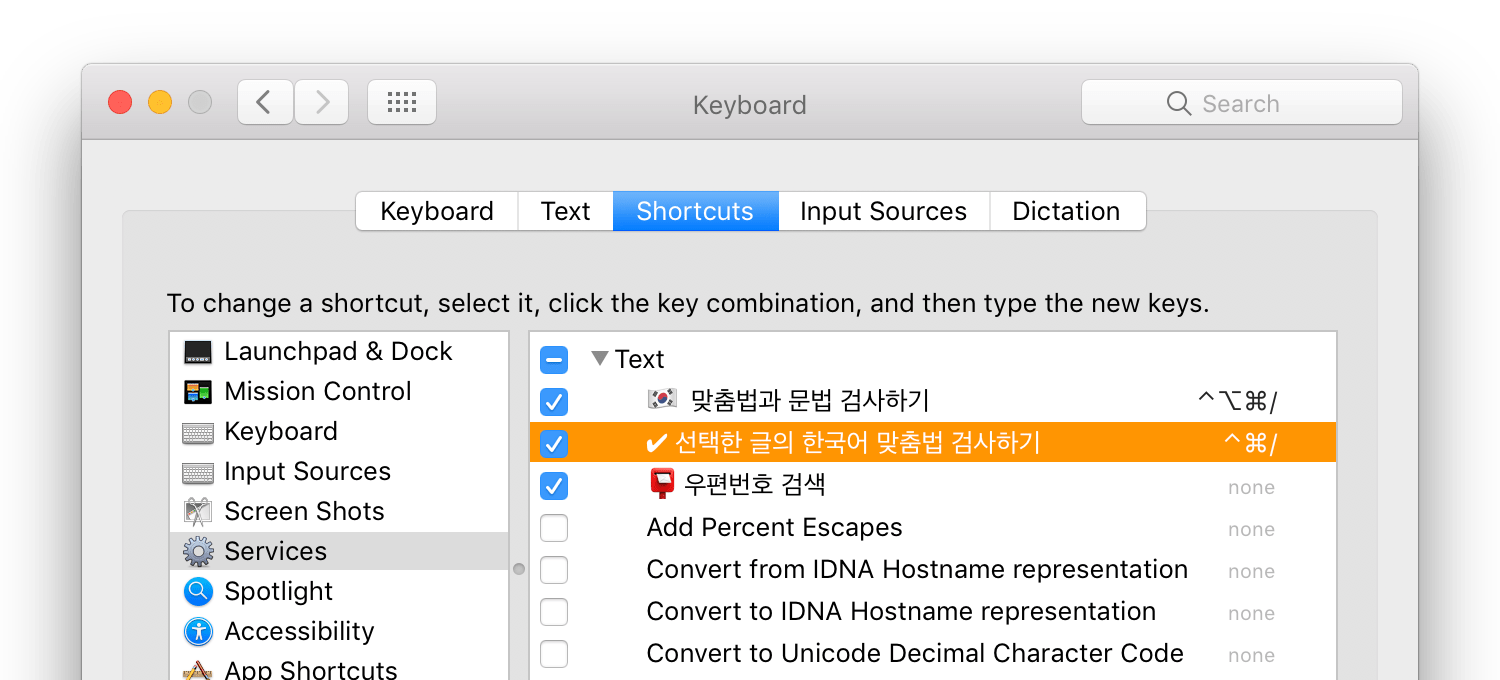
14 |
15 | ***
16 |
17 |  혹시, [PopClip](http://pilotmoon.com/popclip/)을 쓰고 계시나요? 그럼 클릭만으로 맞춤법 검사를 실행할 수 있는 아래의 PopClip extension도 함께 설치해 보세요.
18 |
19 | 
20 |
21 | [한국어 맞춤법 검사기 workflow 전용 PopClip extension 내려받기 ↓](https://appletree.or.kr/popclip/KoreanSpellingCheckerWorkflow.popclipextz)
22 |
23 | ## [갱신 기록](CHANGELOG.md)
24 | ## [라이센스](LICENSE)
25 |
--------------------------------------------------------------------------------
/CHANGELOG.md:
--------------------------------------------------------------------------------
1 | # 1.7.6 - 2019-03-17
2 |
3 | - 온라인 한국어 맞춤법/문법 검사기 개편에 맞추어 정상 작동하도록 고침
4 |
5 | # 1.7.5 - 2018-12-12
6 |
7 | - 틀린 단어를 클릭해서 올바른 대치어로 교체하려고 할 때, 해당 단어가 문장에서 사라지는 문제를 고침
8 |
9 | # 1.7.4 - 2018-05-09
10 |
11 | - 온라인 한국어 맞춤법/문법 검사기의 검사 요청 URL이 또 바뀌어서 이에 대응하도록 고침
12 |
13 | # 1.7.3 - 2018-05-02
14 |
15 | - 온라인 한국어 맞춤법/문법 검사기의 검사 요청 URL이 바뀜에 따라 이에 대응하도록 고침
16 |
17 | # 1.7.2 - 2017-08-10
18 |
19 | - 맞춤법 검사기의 홈페이지 서버에 문제가 있을 때 새로운 버전을 확인하느라 검사기 작동이 한없이 지연될 수 있는 문제를 방지함.
20 |
21 | # 1.7.1 - 2016-12-30
22 |
23 | - 교정문단 윗부분에 가끔 불필요하게 넓은 여백이 생기는 부작용을 초래한 기존 스크롤 바 관련 스타일 수정.
24 |
25 | # 1.7.0 - 2016-12-09
26 |
27 | - 2016년 11월 30일 갱신된 한국어 맞춤법/문법 검사기를 이용해서 검사를 수행하도록 고침.
28 | - 긴 글의 교정문을 스크롤 할 때 이전 진행막대 대신 브라우저 기본 스크롤 바가 제대로 표시되도록 고침.
29 |
30 | # 1.6.0 - 2016-02-20
31 |
32 | - 2016년 2월 16일 갱신된 한국어 맞춤법/문법 검사기(v5.7)를 이용해서 검사를 수행하도록 고침.
33 | - 불필요한 UI 요소를 감추고 정리해서 검사기 창의 크기를 조금 줄임.
34 |
35 | # 1.5.0 - 2016-02-10
36 |
37 | - 틀린 글자가 대치어로 치환될 때 보여주는 애니메이션 효과를 추가함.
38 | - 새로운 버전을 알려주는 링크를 눌렀을 때 자동으로 Safari에서 한국어 맞춤법 검사기 workflow의 홈페이지를 열어주는 기능을 추가함.
39 |
40 | # 1.4.1 - 2015-10-09
41 |
42 | - 틀린 단어 위에 마우스를 가져가면 오른쪽 교정표에 있는 해당 단어 관련 교정 내용의 테이블 배경색을 도드라지게 하는 효과를 추가함.
43 |
44 | # 1.4.0 - 2015-10-06
45 |
46 | - 틀린 단어의 띄어쓰기/붙여쓰기 관련 오류를 해당 위치에 교정 기호로 표시해주는 기능을 추가함.
47 | - 원문 표시 부분의 스타일 수정.
48 |
49 | # 1.3.0 - 2015-10-02
50 |
51 | - 새로 바뀐 한국어 맞춤법/문법 검사기의 사용자 인터페이스에서도 제대로 작동하도록 고침.
52 | - 새로 고친 버전이 있음을 알려주는 귀퉁이에 있는 메시지 글이 더 눈에 잘 띄도록 스타일 수정.
53 |
54 | # 1.2.1 - 2015-07-16
55 |
56 | - 검사 글의 내용이 원문 표시 영역보다 길 경우 당연히 표시되어야 할 스크롤 바가 검사창에선 전혀 표시되지 않는 문제로, 대신 스크롤의 진행 정도를 표시하는 상태 바를 보여주도록 함.
57 | - 약간의 스타일 수정.
58 |
59 | # 1.2.0 - 2015-07-12
60 |
61 | - 단어들 사이의 마침표나 쉼표 사용법이 연이어서 틀렸을 경우, 부산대 검사기가 틀린 단어들 사이의 영역을 제대로 구분하지 못하고 전체를 하나로 합쳐서 표시해주면서, 맨 처음 틀린 부분을 교정했을 때 나머지 틀린 부분이 아예 원문에서 사라져버리는 문제를 고침.
62 | - 대치어 목록 정보 상자(tooltip)에 포함된 말 줄임표(…)를 일반 점 세 개(...)와 구분하기 쉽게 가운뎃줄 형태의 말 줄임표(⋯)로 표시되도록 고침. (교정된 글이 복사될 땐 말 줄임표는 원래의 형태(…)를 그대로 유지함.)
63 | - 검사 글의 내용이 300어절이 넘었을 경우, 화살표 모양의 다음 혹은 이전 결과 버튼을 눌렀을 때 해당 검사 결과 페이지로 이동하지 못했던 문제를 고침.
64 |
65 | # 1.1.1 - 2015-07-07
66 |
67 | - 맞춤법 검사기를 실행하면 뜨는 창이 자동으로 focus 되도록 해서, 교정 작업을 하려고 할 때마다 항상 창을 먼저 클릭해야 했던 은근 성가셨던 문제를 고침.
68 |
69 | # 1.1.0 - 2015-07-06
70 |
71 | - 틀린 단어에 맞는 적당한 대치어가 없을 땐, 틀린 단어를 클릭하더라도 불필요하게 "대치어 없음"이란 제시어로 바뀌지 않도록 함.
72 | - 본문에 있는 틀린 단어 중 중복된 것들은 그중 하나만 클릭해도 나머지 단어들도 모두 자동으로 대치되도록 고침.
73 |
74 | # 1.0.0 - 2015-07-05
75 |
76 | - 원문의 틀린 단어를 교정 대치어로 바꿔줄 때, 원문의 줄 바꿈 형태가 생략되지 않고 그대로 보존되도록 고침.
77 | - 원문의 틀린 단어를 탭(Tab) 키를 눌러서 번갈아 선택할 수 있으며, 단어가 선택된 상태에서 리턴키나 스페이스 바를 누르면 해당 대치어로 바꿔주는 기능을 추가함.
78 | - 교정표의 스타일을 보기 편하게 바꿈.
79 | - 틀린 단어 위에 마우스를 갖다 대면 보여주는 대치어 목록 정보 상자(tooltip)를 지체 없이 바로 표시되는 것으로 교체함.
80 | - 교정한 원문을 자동으로 클립보드로 복사하기 위한 사전의 원문 선택 작업을 검사기 창 닫기 직전에만 수행하도록 고침.
81 | - 검사 페이지에 삽입되서 사용되는 JavaScript와 CSS를 독립된 파일 형태로 따로 빼놓아서 코드 수정이 수월하도록 고치고, 처음 JavaScript가 실행될 때의 지연 시간을 줄임.
82 | - 새로 고친 한국어 맞춤법 검사기 workflow를 인식해서 알려주는 기능을 추가함.
83 |
84 | # 0.5.0 - 2015-06-29
85 |
86 | - 틀린 단어 위에 마우스를 갖다 대면 대치어 목록을 담은 정보 상자(tooltip)가 보이도록 하는 기능을 추가함.
87 |
88 | # 0.4.0 - 2015-06-28
89 |
90 | - Flash를 사용하는 "원문 복사" 버튼이 workflow에선 제대로 작동하지 않는 관계로, 대신 교정한 원문이 선택된 상태에서 맞춤법 검사기 창을 닫으면 자동으로 교정한 원문의 내용이 클립보드에 복사되도록 하는 기능을 추가함.
91 |
92 | # 0.3.1 - 2015-06-27
93 |
94 | - 원문에 표시된 틀린 단어 위에 마우스를 가져갈 때마다 보여주는 원형 모양의 애니메이션 효과가 서로 이웃한 틀린 단어끼리의 클릭 이벤트에 간섭해서 정확한 마우스 클릭이 어려웠던 문제를 고침.
95 |
96 | # 0.3.0 - 2015-06-26
97 |
98 | - 원문에 있는 틀린 단어 위에 마우스를 갖다 대면 교정표 쪽에 있는 해당 대치어 테이블이 자동으로 스크롤 돼서 비교/참고를 쉽도록 하였으며, 틀린 단어를 클릭하면 제시된 대치어로 바로 바꿔주는 기능을 추가함.
99 |
100 | **원문에서 발견한 오류의 색깔별 구분 규칙입니다.**
101 |
102 | - **빨간색과 베이지색** - 오류와 대치어가 확실하여 항상 고치는 오용어.
103 | - **녹색** - 규칙을 통해 문맥을 살펴서 교정하는 의미/문체 오류.
104 | - **보라색** - 통계정보를 이용한 붙여쓰기.
105 | - **파란색** - 분석에 실패하여 여러 방법으로 맞는 말을 만들어 봄.
106 |
107 | [새로 고친 한국어 맞춤법 검사기 workflow 시연 동영상](https://youtu.be/_yWgkaKLO0U)
108 |
109 | # 0.2.0 - 2015-06-21
110 |
111 | - 검사 결과 페이지에 표시되는 기본 글꼴을 돋움체(Apple SD Gothic Neo)로 바꾸고 크기도 약간 더 키움(14px).
112 | - 검사 결과 페이지에 있는 "입력 내용"이나 "대치어" 단어를 누르면 오류 페이지를 보여주던 문제를 고쳐서, 본문의 틀린 단어 자동 대치 기능을 제대로 쓸 수 있도록 함.
113 |
114 | # 0.1.0 - 2015-06-04
115 |
116 | ✨ 첫 공개 배포.
117 |
--------------------------------------------------------------------------------
/✔ 선택한 글의 한국어 맞춤법 검사하기.workflow/Contents/script.js:
--------------------------------------------------------------------------------
1 | window.setTimeout(function () {
2 | // fix local links.
3 | var dontFollowLinks = document.querySelectorAll('a[href="#"], a[href="#link"]');
4 | [].forEach.call(dontFollowLinks, function (link) {
5 | link.removeAttribute('href');
6 | });
7 |
8 | var correctionWords = document.querySelectorAll('#divLeft1 font.ul');
9 |
10 | // fix malformed correction words
11 | var userInputElementsForCorrectionWord = document.querySelectorAll('#divCorrectionTableBox1st .tdErrWord a');
12 | var noOfWordsWeShouldBreakApart = userInputElementsForCorrectionWord.length - correctionWords.length;
13 |
14 | var targetElement, ID, counter = 0;
15 | while (noOfWordsWeShouldBreakApart > 0) {
16 | targetElement = document.querySelectorAll('#divLeft1 font.ul')[counter++];
17 | ID = targetElement.id.replace('ul_', '');
18 | checkWordBreakErrorsAndFixIt(targetElement, ID);
19 | }
20 |
21 | function checkWordBreakErrorsAndFixIt(target, ID) {
22 | var targetText = target.textContent.replace(/\n/g, '');
23 | var ID_Number = parseInt(ID, 10);
24 | var userInputText = userInputElementsForCorrectionWord[ID_Number].textContent;
25 | userInputText = userInputText.replace(/\n/g, '');
26 | if (targetText !== userInputText) {
27 | var HTMLToReplace = userInputText.concat(constructAndReturnWordBreakDelimiter(ID_Number));
28 | target.parentElement.innerHTML = target.parentElement.innerHTML.replace(userInputText, HTMLToReplace);
29 | --noOfWordsWeShouldBreakApart;
30 | }
31 | }
32 |
33 | function constructAndReturnWordBreakDelimiter(ID_Number) {
34 | var userInputElement = userInputElementsForCorrectionWord[ID_Number], userInputErrorColor;
35 | switch (window.getComputedStyle(userInputElement).getPropertyValue('color')) {
36 | case 'rgb(255, 0, 0)':
37 | userInputErrorColor = 'red';
38 | break;
39 | case 'rgb(0, 0, 255)':
40 | userInputErrorColor = 'blue';
41 | break;
42 | case 'rgb(0, 128, 0)':
43 | userInputErrorColor = 'green';
44 | break;
45 | case 'rgb(128, 128, 0)':
46 | userInputErrorColor = 'Olive';
47 | break;
48 | default:
49 | userInputErrorColor = '';
50 | }
51 | return '';
52 | }
53 |
54 | var scrollDiv = document.getElementById('divLeft1');
55 |
56 | // prepare tooltips and style the correction words
57 | correctionWords = document.querySelectorAll('#divLeft1 font.ul');
58 | [].forEach.call(correctionWords, function (word) {
59 | var ID = word.id.replace('ul_', '');
60 | var wordCandidates = [];
61 | var wordCandidateElements = document.querySelector('#tdReplaceWord_' + ID).querySelectorAll('li:not(.liUserInputCandidate) a');
62 | [].forEach.call(wordCandidateElements, function (element) {
63 | wordCandidates.push(element.textContent);
64 | });
65 | word.dataset.kscWordCandidates = wordCandidates.join(';');
66 | word.tabIndex = 1; // make focusable using the tab key.
67 | word.addEventListener('mouseover', showCorrections, false);
68 | word.addEventListener('mouseout', hideTooltip, false);
69 | word.addEventListener('focus', showCorrections, false);
70 | word.addEventListener('blur', hideTooltip, false);
71 | word.addEventListener('click', swapWord, false);
72 | word.addEventListener('keydown', handleKeyDown, false);
73 | word.style.borderBottomColor = word.getAttribute('color');
74 | word.removeAttribute('onclick'); // remove defective click event
75 |
76 | markSpacingErrors(word, wordCandidates[0]);
77 | });
78 |
79 | function showCorrections(event) {
80 | var correctionID = event.target.id.replace('ul_', '');
81 | var correctionTable = document.querySelector('#tableErr_' + correctionID);
82 | correctionTable.style.backgroundColor = '#ffffcc';
83 | correctionTable.scrollIntoView();
84 | [].forEach.call(correctionWords, function (word) {
85 | word.style.backgroundColor = 'inherit';
86 | });
87 | event.target.style.backgroundColor = '#ffdc00';
88 | showTooltip(event);
89 | }
90 |
91 | // inject tooltip span
92 | var tooltip = document.createElement('span');
93 | tooltip.setAttribute('id', 'tooltip');
94 | document.getElementById('tableResult').appendChild(tooltip);
95 |
96 | // fill the tooltip content and display it
97 | function showTooltip(event) {
98 | var wordGotAttention = event.target;
99 | var wordCandidates = wordGotAttention.dataset.kscWordCandidates.split(';');
100 | if (wordCandidates[0] !== '') {
101 | updateTooltip(wordCandidates);
102 | tooltip.style.bottom = wordGotAttention.offsetParent.offsetHeight + scrollDiv.scrollTop - wordGotAttention.offsetTop + 10 + 'px';
103 | tooltip.style.left = wordGotAttention.offsetLeft + 'px';
104 | tooltip.classList.add('is-shown');
105 | }
106 | }
107 |
108 | function updateTooltip(wordCandidates) {
109 | if (wordCandidates.length !== 0) {
110 | var firstCandidate = '↓ ' + wordCandidates.shift();
111 | wordCandidates.unshift(firstCandidate);
112 | tooltip.innerHTML = wordCandidates.reverse().join('
');
113 | tooltip.innerHTML = tooltip.innerHTML.replace(/…/g, '⋯');
114 | } else {
115 | hideTooltip(event);
116 | }
117 | }
118 |
119 | function hideTooltip(event) {
120 | var correctionID = event.target.id.replace('ul_', '');
121 | document.querySelector('#tableErr_' + correctionID).style.backgroundColor = 'transparent';
122 | var tooltipClass = tooltip.classList;
123 | if (tooltipClass.contains('is-shown')) {
124 | tooltipClass.remove('is-shown');
125 | }
126 | }
127 |
128 | // swap animations
129 | var animationNames = ['bounce', 'pulse', 'swing', 'tada', 'bounceIn', 'bounceInDown', 'fadeInDown', 'flipInX', 'flipInY', 'rotateIn', 'rotateInDownLeft', 'zoomIn', 'zoomInDown'];
130 | var animationName = animationNames[getRandomInt(0, animationNames.length)];
131 |
132 | function getRandomInt(min, max) {
133 | return Math.floor(Math.random() * (max - min)) + min;
134 | }
135 |
136 | function swapWord(event) {
137 | var wordGotAttention = event.target;
138 | var wordGotAttentionText = wordGotAttention.innerText;
139 | var wordCandidates = wordGotAttention.dataset.kscWordCandidates.split(';');
140 | var correctWord = wordCandidates.shift();
141 | if (correctWord !== '' && correctWord !== '대치어 없음') {
142 | wordGotAttention.innerHTML = '' + correctWord + '';
143 | wordGotAttention.childNodes[0].className = 'animated ' + animationName;
144 | wordGotAttention.dataset.kscWordCandidates = wordCandidates.join(';');
145 | wordGotAttention.classList.add('corrected');
146 | updateTooltip(wordCandidates);
147 | // correct duplicates of the wrong word at once
148 | [].forEach.call(correctionWords, function (word) {
149 | if (word.innerText === wordGotAttentionText && word !== event.target) {
150 | wordCandidates = word.dataset.kscWordCandidates.split(';');
151 | word.innerHTML = '' + wordCandidates.shift() + '';
152 | word.childNodes[0].className = 'animated ' + animationName;
153 | word.dataset.kscWordCandidates = wordCandidates.join(';');
154 | word.classList.add('corrected');
155 | }
156 | });
157 | } else {
158 | hideTooltip(event);
159 | }
160 | event.stopImmediatePropagation();
161 | }
162 |
163 | function handleKeyDown(event) {
164 | if ((event.keycode === 13) || (event.keycode === 32) || (event.which === 13) || (event.which === 32)) { // enter or space
165 | event.target.click();
166 | }
167 | }
168 |
169 | function markSpacingErrors(word, candidate) {
170 | var wordText = word.innerText;
171 | if (hasSameOrderOfCharacters(wordText, candidate)) {
172 | var wordComponents = wordText.split(' '),
173 | candidateComponents = candidate.split(' '),
174 | wordCompsLength = wordComponents.length,
175 | candidateCompsLength = candidateComponents.length,
176 | textToReplace, noOfErrorsToFix;
177 | if (wordCompsLength > candidateCompsLength) {
178 | noOfErrorsToFix = wordCompsLength - candidateCompsLength;
179 | while (noOfErrorsToFix > 0) {
180 | textToReplace = wordComponents.pop();
181 | if (textToReplace !== candidateComponents.pop()) { // check if it's not spaced correctly
182 | wordText = wordText.replace(new RegExp(textToReplace + '$'), '' + textToReplace + '');
183 | --noOfErrorsToFix;
184 | } else {
185 | continue;
186 | }
187 | }
188 | } else {
189 | noOfErrorsToFix = candidateCompsLength - wordCompsLength;
190 | while (noOfErrorsToFix > 0) {
191 | textToReplace = candidateComponents.pop();
192 | if (textToReplace !== wordComponents.pop()) {
193 | wordText = wordText.replace(textToReplace, '' + textToReplace + '');
194 | --noOfErrorsToFix;
195 | } else {
196 | continue;
197 | }
198 | }
199 | }
200 | word.innerHTML = wordText;
201 | }
202 | }
203 |
204 | function hasSameOrderOfCharacters(word1, word2) {
205 | return word1.split(' ').join('') === word2.split(' ').join('');
206 | }
207 |
208 | // select the proofread text to copy the content to clipboard before closing the window.
209 | var selectProofreadText = function () {
210 | window.getSelection().selectAllChildren(document.getElementById('tdCorrection1stBox'));
211 | };
212 | document.getElementById('tableTail').addEventListener('mouseover', selectProofreadText, false);
213 |
214 | var removeSelection = function () {
215 | window.getSelection().removeAllRanges();
216 | };
217 | document.getElementById('tdBody').addEventListener('mouseenter', removeSelection, false);
218 |
219 | // if new updates available, show the notice.
220 | if (document.getElementById('ksc').dataset.updateStatus == '404') {
221 | var kscUpdateDiv = document.createElement('div');
222 | var kscUpdateLink = document.createElement('a');
223 | var kscUpdateLinkContent = document.createTextNode('새로운 버전!');
224 | kscUpdateLink.href = 'https://appletree.or.kr/automator/';
225 | kscUpdateLink.title = '오른쪽 클릭 후 주소를 복사하고 웹 브라우저에서 새로운 버전을 내려받으세요!';
226 | kscUpdateLink.appendChild(kscUpdateLinkContent);
227 | kscUpdateDiv.appendChild(kscUpdateLink);
228 | kscUpdateDiv.id = 'newVersion';
229 | document.getElementById('tdHead').appendChild(kscUpdateDiv);
230 | var kscSparkleDiv = document.createElement('div');
231 | kscSparkleDiv.id = 'sparkleDiv';
232 | document.getElementById('tdHead').appendChild(kscSparkleDiv);
233 | document.getElementById('sparkleDiv').innerHTML = '';
234 | }
235 | }, 300);
--------------------------------------------------------------------------------
/✔ 선택한 글의 한국어 맞춤법 검사하기.workflow/Contents/document.wflow:
--------------------------------------------------------------------------------
1 |
2 |
3 |
4 |
5 | AMApplicationBuild
6 | 444.39
7 | AMApplicationVersion
8 | 2.9
9 | AMDocumentVersion
10 | 2
11 | actions
12 |
13 |
14 | action
15 |
16 | AMAccepts
17 |
18 | Container
19 | List
20 | Optional
21 |
22 | Types
23 |
24 | com.apple.cocoa.string
25 |
26 |
27 | AMActionVersion
28 | 2.0.3
29 | AMApplication
30 |
31 | Automator
32 |
33 | AMParameterProperties
34 |
35 | COMMAND_STRING
36 |
37 | CheckedForUserDefaultShell
38 |
39 | inputMethod
40 |
41 | shell
42 |
43 | source
44 |
45 |
46 | AMProvides
47 |
48 | Container
49 | List
50 | Types
51 |
52 | com.apple.cocoa.string
53 |
54 |
55 | ActionBundlePath
56 | /System/Library/Automator/Run Shell Script.action
57 | ActionName
58 | Run Shell Script
59 | ActionParameters
60 |
61 | COMMAND_STRING
62 | sh $(pwd)/Library/Services/✔\ 선택한\ 글의\ 한국어\ 맞춤법\ 검사하기.workflow/Contents/checker.sh
63 | CheckedForUserDefaultShell
64 |
65 | inputMethod
66 | 0
67 | shell
68 | /bin/zsh
69 | source
70 |
71 |
72 | BundleIdentifier
73 | com.apple.RunShellScript
74 | CFBundleVersion
75 | 2.0.3
76 | CanShowSelectedItemsWhenRun
77 |
78 | CanShowWhenRun
79 |
80 | Category
81 |
82 | AMCategoryUtilities
83 |
84 | Class Name
85 | RunShellScriptAction
86 | InputUUID
87 | C9A8EFEF-E154-4844-8B90-B7469038AD3C
88 | Keywords
89 |
90 | Shell
91 | Script
92 | Command
93 | Run
94 | Unix
95 |
96 | OutputUUID
97 | 4EE6D638-A469-41D1-8A38-8C1346220FDA
98 | UUID
99 | C657C251-C7D7-42DE-9B3C-9A6F476546D5
100 | UnlocalizedApplications
101 |
102 | Automator
103 |
104 | arguments
105 |
106 | 0
107 |
108 | default value
109 | 0
110 | name
111 | inputMethod
112 | required
113 | 0
114 | type
115 | 0
116 | uuid
117 | 0
118 |
119 | 1
120 |
121 | default value
122 |
123 | name
124 | source
125 | required
126 | 0
127 | type
128 | 0
129 | uuid
130 | 1
131 |
132 | 2
133 |
134 | default value
135 |
136 | name
137 | CheckedForUserDefaultShell
138 | required
139 | 0
140 | type
141 | 0
142 | uuid
143 | 2
144 |
145 | 3
146 |
147 | default value
148 |
149 | name
150 | COMMAND_STRING
151 | required
152 | 0
153 | type
154 | 0
155 | uuid
156 | 3
157 |
158 | 4
159 |
160 | default value
161 | /bin/sh
162 | name
163 | shell
164 | required
165 | 0
166 | type
167 | 0
168 | uuid
169 | 4
170 |
171 |
172 | isViewVisible
173 |
174 | location
175 | 513.500000:671.000000
176 | nibPath
177 | /System/Library/Automator/Run Shell Script.action/Contents/Resources/Base.lproj/main.nib
178 |
179 | isViewVisible
180 |
181 |
182 |
183 | action
184 |
185 | AMAccepts
186 |
187 | Container
188 | List
189 | Optional
190 |
191 | Types
192 |
193 | com.apple.applescript.object
194 |
195 |
196 | AMActionVersion
197 | 1.0.2
198 | AMApplication
199 |
200 | Automator
201 |
202 | AMParameterProperties
203 |
204 | source
205 |
206 |
207 | AMProvides
208 |
209 | Container
210 | List
211 | Types
212 |
213 | com.apple.applescript.object
214 |
215 |
216 | ActionBundlePath
217 | /System/Library/Automator/Run AppleScript.action
218 | ActionName
219 | Run AppleScript
220 | ActionParameters
221 |
222 | source
223 | activate
return "~/.korean-spelling-checker-result.html"
224 |
225 | BundleIdentifier
226 | com.apple.Automator.RunScript
227 | CFBundleVersion
228 | 1.0.2
229 | CanShowSelectedItemsWhenRun
230 |
231 | CanShowWhenRun
232 |
233 | Category
234 |
235 | AMCategoryUtilities
236 |
237 | Class Name
238 | RunScriptAction
239 | InputUUID
240 | 996AE406-1144-401A-9C18-8297D3A35D5C
241 | Keywords
242 |
243 | Run
244 |
245 | OutputUUID
246 | 8E7DE8AC-A3B7-480F-B16C-F9E74EBA77C2
247 | UUID
248 | FA70C623-5521-4F12-BDC2-EAA8754F12F2
249 | UnlocalizedApplications
250 |
251 | Automator
252 |
253 | arguments
254 |
255 | 0
256 |
257 | default value
258 | on run {input, parameters}
259 |
260 | (* Your script goes here *)
261 |
262 | return input
263 | end run
264 | name
265 | source
266 | required
267 | 0
268 | type
269 | 0
270 | uuid
271 | 0
272 |
273 |
274 | isViewVisible
275 |
276 | location
277 | 513.500000:916.000000
278 | nibPath
279 | /System/Library/Automator/Run AppleScript.action/Contents/Resources/Base.lproj/main.nib
280 |
281 | isViewVisible
282 |
283 |
284 |
285 | action
286 |
287 | AMAccepts
288 |
289 | Container
290 | List
291 | Optional
292 |
293 | Types
294 |
295 | com.apple.cocoa.url
296 |
297 |
298 | AMActionVersion
299 | 2.0.1
300 | AMApplication
301 |
302 | Safari
303 |
304 | AMParameterProperties
305 |
306 | outputTypeTag
307 |
308 | positionTag
309 |
310 | sizeFormatTag
311 |
312 | targetSizeX
313 |
314 | targetSizeY
315 |
316 | userAgentTag
317 |
318 |
319 | AMProvides
320 |
321 | Container
322 | List
323 | Types
324 |
325 | com.apple.cocoa.string
326 |
327 |
328 | ActionBundlePath
329 | /System/Library/Automator/Website Popup.action
330 | ActionName
331 | Website Popup
332 | ActionParameters
333 |
334 | outputTypeTag
335 | 0
336 | positionTag
337 | 0
338 | sizeFormatTag
339 | 99
340 | targetSizeX
341 | 825
342 | targetSizeY
343 | 633
344 | userAgentTag
345 | 0
346 |
347 | BundleIdentifier
348 | com.apple.Automator.WebsitePopup
349 | CFBundleVersion
350 | 2.0.1
351 | CanShowSelectedItemsWhenRun
352 |
353 | CanShowWhenRun
354 |
355 | Category
356 |
357 | AMCategoryInternet
358 |
359 | Class Name
360 | AMWebsitePoppupAction
361 | InputUUID
362 | BB64BD04-C3FE-435D-BBFB-458D5819461E
363 | Keywords
364 |
365 | OutputUUID
366 | B1C15B07-6EAB-444B-A812-EE45E079C4D9
367 | ShowWhenRun
368 |
369 | UUID
370 | A383693E-041B-4167-87B6-880984093A75
371 | UnlocalizedApplications
372 |
373 | Safari
374 |
375 | arguments
376 |
377 | 0
378 |
379 | default value
380 | 0
381 | name
382 | userAgentTag
383 | required
384 | 0
385 | type
386 | 0
387 | uuid
388 | 0
389 |
390 | 1
391 |
392 | default value
393 | 0
394 | name
395 | positionTag
396 | required
397 | 0
398 | type
399 | 0
400 | uuid
401 | 1
402 |
403 | 2
404 |
405 | default value
406 | 0
407 | name
408 | sizeFormatTag
409 | required
410 | 0
411 | type
412 | 0
413 | uuid
414 | 2
415 |
416 | 3
417 |
418 | default value
419 | 0.0
420 | name
421 | targetSizeY
422 | required
423 | 0
424 | type
425 | 0
426 | uuid
427 | 3
428 |
429 | 4
430 |
431 | default value
432 | 0
433 | name
434 | outputTypeTag
435 | required
436 | 0
437 | type
438 | 0
439 | uuid
440 | 4
441 |
442 | 5
443 |
444 | default value
445 | 0.0
446 | name
447 | targetSizeX
448 | required
449 | 0
450 | type
451 | 0
452 | uuid
453 | 5
454 |
455 |
456 | isViewVisible
457 |
458 | location
459 | 513.500000:1062.000000
460 | nibPath
461 | /System/Library/Automator/Website Popup.action/Contents/Resources/Base.lproj/main.nib
462 |
463 | isViewVisible
464 |
465 |
466 |
467 | action
468 |
469 | AMAccepts
470 |
471 | Container
472 | List
473 | Optional
474 |
475 | Types
476 |
477 | com.apple.cocoa.attributed-string
478 |
479 |
480 | AMActionVersion
481 | 1.2.1
482 | AMApplication
483 |
484 | System
485 |
486 | AMParameterProperties
487 |
488 | AMProvides
489 |
490 | Container
491 | List
492 | Optional
493 |
494 | Types
495 |
496 | com.apple.cocoa.attributed-string
497 |
498 |
499 | ActionBundlePath
500 | /System/Library/Automator/Copy to Clipboard.action
501 | ActionName
502 | Copy to Clipboard
503 | ActionParameters
504 |
505 | BundleIdentifier
506 | com.apple.Automator.CopyToClipboard
507 | CFBundleVersion
508 | 1.2.1
509 | CanShowSelectedItemsWhenRun
510 |
511 | CanShowWhenRun
512 |
513 | Category
514 |
515 | AMCategoryUtilities
516 |
517 | Class Name
518 | AMCopyToClipboardAction
519 | InputUUID
520 | 8F238FF8-3AC7-4BB3-81E9-3C8B36772195
521 | Keywords
522 |
523 | Copy
524 |
525 | OutputUUID
526 | D2ABE814-1E44-48FA-9CC9-076AB9795BD7
527 | UUID
528 | 157E60AD-BDC2-47BA-AC49-DBB1238843FE
529 | UnlocalizedApplications
530 |
531 | System
532 |
533 | arguments
534 |
535 |
536 |
537 |
538 | action
539 |
540 | AMAccepts
541 |
542 | Container
543 | List
544 | Optional
545 |
546 | Types
547 |
548 | com.apple.cocoa.string
549 |
550 |
551 | AMActionVersion
552 | 2.0.3
553 | AMApplication
554 |
555 | Automator
556 |
557 | AMParameterProperties
558 |
559 | COMMAND_STRING
560 |
561 | CheckedForUserDefaultShell
562 |
563 | inputMethod
564 |
565 | shell
566 |
567 | source
568 |
569 |
570 | AMProvides
571 |
572 | Container
573 | List
574 | Types
575 |
576 | com.apple.cocoa.string
577 |
578 |
579 | ActionBundlePath
580 | /System/Library/Automator/Run Shell Script.action
581 | ActionName
582 | Run Shell Script
583 | ActionParameters
584 |
585 | COMMAND_STRING
586 | rm -f .korean-spelling-checker-result.html && rm -f .korean-spelling-checker-result.html-e
587 | CheckedForUserDefaultShell
588 |
589 | inputMethod
590 | 0
591 | shell
592 | /bin/zsh
593 | source
594 |
595 |
596 | BundleIdentifier
597 | com.apple.RunShellScript
598 | CFBundleVersion
599 | 2.0.3
600 | CanShowSelectedItemsWhenRun
601 |
602 | CanShowWhenRun
603 |
604 | Category
605 |
606 | AMCategoryUtilities
607 |
608 | Class Name
609 | RunShellScriptAction
610 | IgnoresInput
611 |
612 | InputUUID
613 | F630C69A-5B52-4D2D-B1FD-A7D4E0068BE4
614 | Keywords
615 |
616 | Shell
617 | Script
618 | Command
619 | Run
620 | Unix
621 |
622 | OutputUUID
623 | 6B62531D-2331-486B-A415-90F93827A175
624 | UUID
625 | 1B0DE756-2B2A-4CAB-904A-4DD0698C5BDD
626 | UnlocalizedApplications
627 |
628 | Automator
629 |
630 | arguments
631 |
632 | 0
633 |
634 | default value
635 | 0
636 | name
637 | inputMethod
638 | required
639 | 0
640 | type
641 | 0
642 | uuid
643 | 0
644 |
645 | 1
646 |
647 | default value
648 |
649 | name
650 | source
651 | required
652 | 0
653 | type
654 | 0
655 | uuid
656 | 1
657 |
658 | 2
659 |
660 | default value
661 |
662 | name
663 | CheckedForUserDefaultShell
664 | required
665 | 0
666 | type
667 | 0
668 | uuid
669 | 2
670 |
671 | 3
672 |
673 | default value
674 |
675 | name
676 | COMMAND_STRING
677 | required
678 | 0
679 | type
680 | 0
681 | uuid
682 | 3
683 |
684 | 4
685 |
686 | default value
687 | /bin/sh
688 | name
689 | shell
690 | required
691 | 0
692 | type
693 | 0
694 | uuid
695 | 4
696 |
697 |
698 | isViewVisible
699 |
700 | location
701 | 513.500000:1309.000000
702 | nibPath
703 | /System/Library/Automator/Run Shell Script.action/Contents/Resources/Base.lproj/main.nib
704 |
705 | isViewVisible
706 |
707 |
708 |
709 | connectors
710 |
711 | 27EA45F4-A039-4543-A85F-95725D1E1AE3
712 |
713 | from
714 | 157E60AD-BDC2-47BA-AC49-DBB1238843FE - 157E60AD-BDC2-47BA-AC49-DBB1238843FE
715 | to
716 | 1B0DE756-2B2A-4CAB-904A-4DD0698C5BDD - 1B0DE756-2B2A-4CAB-904A-4DD0698C5BDD
717 |
718 | 3A88B8D5-2EA8-4AD0-8B08-D920123ABC07
719 |
720 | from
721 | C657C251-C7D7-42DE-9B3C-9A6F476546D5 - C657C251-C7D7-42DE-9B3C-9A6F476546D5
722 | to
723 | FA70C623-5521-4F12-BDC2-EAA8754F12F2 - FA70C623-5521-4F12-BDC2-EAA8754F12F2
724 |
725 | 84760B9D-F4FD-4044-8B4F-FD86945A974C
726 |
727 | from
728 | FA70C623-5521-4F12-BDC2-EAA8754F12F2 - FA70C623-5521-4F12-BDC2-EAA8754F12F2
729 | to
730 | A383693E-041B-4167-87B6-880984093A75 - A383693E-041B-4167-87B6-880984093A75
731 |
732 | E58EEAB3-6A14-4C35-A49B-742AB9C13120
733 |
734 | from
735 | A383693E-041B-4167-87B6-880984093A75 - A383693E-041B-4167-87B6-880984093A75
736 | to
737 | 157E60AD-BDC2-47BA-AC49-DBB1238843FE - 157E60AD-BDC2-47BA-AC49-DBB1238843FE
738 |
739 |
740 | workflowMetaData
741 |
742 | applicationBundleIDsByPath
743 |
744 | applicationPaths
745 |
746 | inputTypeIdentifier
747 | com.apple.Automator.text
748 | outputTypeIdentifier
749 | com.apple.Automator.nothing
750 | presentationMode
751 | 11
752 | processesInput
753 | 0
754 | serviceInputTypeIdentifier
755 | com.apple.Automator.text
756 | serviceOutputTypeIdentifier
757 | com.apple.Automator.nothing
758 | serviceProcessesInput
759 | 0
760 | systemImageName
761 | NSTouchBarCheck
762 | useAutomaticInputType
763 | 0
764 | workflowTypeIdentifier
765 | com.apple.Automator.servicesMenu
766 |
767 |
768 |
769 |
--------------------------------------------------------------------------------
/✔ 선택한 글의 한국어 맞춤법 검사하기.workflow/Contents/style.css:
--------------------------------------------------------------------------------
1 | body {
2 | overflow: hidden;
3 | }
4 |
5 | #tableMain {
6 | height: 635px;
7 | }
8 |
9 | #tdBody {
10 | height: 470px;
11 | }
12 |
13 | #divCorrectionTableBox1st {
14 | height: 467px;
15 | }
16 |
17 | #divCorrectionTableBox1st table {
18 | width: 425px;
19 | }
20 |
21 | #tableResult {
22 | left: 10px;
23 | }
24 |
25 | #tableResult::before {
26 | content: '';
27 | position: fixed;
28 | width: 100%;
29 | height: 100%;
30 | z-index: -1;
31 | pointer-events: none;
32 | }
33 |
34 | #tableResult td,
35 | #tdCorrectionTable1st td a {
36 | font-size: 14px;
37 | font-family: -apple-system, 'Apple SD Gothic Neo', sans-serif;
38 | }
39 |
40 | #tableResult td::selection {
41 | background: rgba(255, 209, 129, .6);
42 | }
43 |
44 | #divLeft1,
45 | #divCorrectionTableBox1st {
46 | border-color: #d5d7d9;
47 | }
48 |
49 | #tdCorrection1stBox {
50 | word-break: keep-all;
51 | }
52 |
53 | #divLeft1 td {
54 | line-height: 2;
55 | }
56 |
57 | #tdForResultLTitle3 {
58 | background-color: #d5d7d9;
59 | }
60 |
61 | #pResultLTitle3 {
62 | padding: 0;
63 | font-size: 12px;
64 | line-height: normal;
65 | }
66 |
67 | font.ul {
68 | display: inline !important;
69 | padding-bottom: 2px;
70 | border-bottom-width: 1px !important;
71 | border-bottom-style: solid;
72 | color: black !important;
73 | text-decoration: none;
74 | font-weight: bold;
75 | }
76 |
77 | font.ul:focus {
78 | outline: none;
79 | background-color: #ffdc00;
80 | }
81 |
82 | font.ul.corrected {
83 | border-bottom: thin dotted black !important;
84 | font-weight: normal;
85 | }
86 |
87 | .spaceError,
88 | .tieError {
89 | position: relative;
90 | font-style: normal;
91 | pointer-events: none;
92 | }
93 |
94 | .spaceError::before,
95 | .tieError::before {
96 | position: absolute;
97 | color: #c1392b;
98 | }
99 |
100 | .spaceError::before {
101 | top: -0.9em;
102 | left: -0.15em;
103 | content: '˅';
104 | font-size: 1.6em;
105 | }
106 |
107 | .tieError::before {
108 | top: -0.7em;
109 | left: -0.55em;
110 | content: '⁀';
111 | font-size: 1em;
112 | }
113 |
114 | .correction {
115 | display: none;
116 | }
117 |
118 | #tableLeft1 font {
119 | position: relative;
120 | }
121 |
122 | .tableErrCorrect {
123 | margin-bottom: 0 !important;
124 | -webkit-transition: background-color 0.6s ease-out;
125 | transition: background-color 0.6s ease-out;
126 | }
127 |
128 | .tableErrCorrect tbody tr:first-child .tdLT {
129 | padding-top: 10px;
130 | }
131 |
132 | .tdLT {
133 | padding-right: 8px;
134 | text-align: right;
135 | }
136 |
137 | .tdErrWord {
138 | padding-top: 5px;
139 | }
140 |
141 | .btnUserReplace {
142 | color: #555;
143 | }
144 |
145 | .btnUserReplace:hover,
146 | .btnUserReplace:focus {
147 | background-color: #B8E0F1;
148 | font-weight: bold;
149 | }
150 |
151 | .nav>li,
152 | .tdETNor {
153 | padding: 5px 8px 10px;
154 | text-align: left;
155 | }
156 |
157 | .ui-button,
158 | #tdHead>a,
159 | #tableResult>tbody>tr:first-child,
160 | #tableButton,
161 | #divCorrectionTableBox1st td br:first-of-type,
162 | #divCorrectionTableBox1st table~br,
163 | .tableErrCorrect tr:nth-child(n+5),
164 | .tdETNor br:nth-last-of-type(2n),
165 | #divPopupBackground {
166 | display: none;
167 | }
168 |
169 | #tdHead {
170 | font-size: 0;
171 | }
172 |
173 | .tdMainFrame {
174 | padding-bottom: 3px;
175 | }
176 |
177 | #tooltip,
178 | #tooltip::after {
179 | position: absolute;
180 | visibility: hidden;
181 | opacity: 0;
182 | -webkit-transition: opacity .1s;
183 | transition: opacity .1s;
184 | }
185 |
186 | #tooltip.is-shown,
187 | #tooltip.is-shown::after {
188 | visibility: visible;
189 | opacity: 1;
190 | }
191 |
192 | #tooltip {
193 | display: inline-block;
194 | padding: 4px 10px;
195 | border-radius: 4px;
196 | background-color: #d7d7d7;
197 | -webkit-box-shadow: 0 0 2px gray;
198 | box-shadow: 0 0 2px gray;
199 | color: black;
200 | text-align: right;
201 | font: normal 14px sans-serif;
202 | line-height: 1.7;
203 | }
204 |
205 | #tooltip::after {
206 | top: 100%;
207 | left: 10%;
208 | width: 0;
209 | height: 0;
210 | border-top: 8px solid #d7d7d7;
211 | border-right: 8px solid transparent;
212 | border-left: 8px solid transparent;
213 | content: '';
214 | }
215 |
216 | #newVersion {
217 | position: absolute;
218 | top: 0;
219 | right: 0;
220 | overflow: hidden;
221 | width: 92px;
222 | height: 80px;
223 | text-shadow: 0 0 1px #999;
224 | font: bold 13px sans-serif;
225 | }
226 |
227 | #newVersion a {
228 | position: absolute;
229 | top: 20px;
230 | padding: 3px 10px;
231 | width: 100px;
232 | border: 2px solid yellow;
233 | background: -webkit-gradient(linear, left top, right top, from(#b20000), to(#dd0000));
234 | background: linear-gradient(to right, #b20000, #dd0000);
235 | -webkit-box-shadow: 0 0 4px rgba(0, 0, 0, 0.4), inset 0 2px 6px rgba(255, 255, 255, 0.4);
236 | box-shadow: 0 0 4px rgba(0, 0, 0, 0.4), inset 0 2px 6px rgba(255, 255, 255, 0.4);
237 | color: white;
238 | text-align: center;
239 | text-decoration: none;
240 | -webkit-transform: rotate(45deg);
241 | transform: rotate(45deg);
242 | cursor: help;
243 | }
244 |
245 | #newVersion a:hover,
246 | #newVersion a:focus {
247 | color: #ffdc00;
248 | -webkit-transition: color .4s ease-out;
249 | transition: color .4s ease-out;
250 | }
251 |
252 | .sparkle {
253 | position: absolute;
254 | top: 0;
255 | right: -10px;
256 | opacity: 1;
257 | -webkit-transition: opacity .6s;
258 | transition: opacity .6s;
259 | -webkit-animation: flyTo 2.8s ease-in-out;
260 | animation: flyTo 2.8s ease-in-out;
261 | pointer-events: none;
262 | }
263 |
264 | @-webkit-keyframes flyTo {
265 | from {
266 | -webkit-transform: translate(-500px, 20px);
267 | }
268 |
269 | 80% {
270 | -webkit-transform: translate(-20px, -10px);
271 | }
272 |
273 | to {
274 | -webkit-transform: none;
275 | }
276 | }
277 |
278 | @keyframes flyTo {
279 | from {
280 | -webkit-transform: translate(-500px, 20px);
281 | transform: translate(-500px, 20px);
282 | }
283 |
284 | 80% {
285 | -webkit-transform: translate(-20px, -10px);
286 | transform: translate(-20px, -10px);
287 | }
288 |
289 | to {
290 | -webkit-transform: none;
291 | transform: none;
292 | }
293 | }
294 |
295 | #newVersion:hover~#sparkleDiv .sparkle {
296 | opacity: 0;
297 | }
298 |
299 | .sparkle__group {
300 | -webkit-transform: translate(42.5px, 42.5px);
301 | transform: translate(42.5px, 42.5px);
302 | }
303 |
304 | .sparkle path {
305 | -webkit-transform: translate(-42.50px, -42.50px);
306 | transform: translate(-42.50px, -42.50px);
307 | }
308 |
309 | .sparkle__large {
310 | -webkit-animation: large 2.5s infinite;
311 | animation: large 2.5s infinite;
312 | }
313 |
314 | .sparkle__large-2 {
315 | -webkit-animation: large-2 2.5s infinite;
316 | animation: large-2 2.5s infinite;
317 | }
318 |
319 | .sparkle__small {
320 | -webkit-animation: small 2.5s infinite;
321 | animation: small 2.5s infinite;
322 | }
323 |
324 | @-webkit-keyframes large {
325 | from {
326 | opacity: 0;
327 | -webkit-transform: rotate(0deg) scale(0);
328 | }
329 |
330 | 50% {
331 | opacity: 1;
332 | }
333 |
334 | to {
335 | opacity: 0;
336 | -webkit-transform: rotate(360deg) scale(1.5);
337 | }
338 | }
339 |
340 | @keyframes large {
341 | from {
342 | opacity: 0;
343 | -webkit-transform: rotate(0deg) scale(0);
344 | transform: rotate(0deg) scale(0);
345 | }
346 |
347 | 50% {
348 | opacity: 1;
349 | }
350 |
351 | to {
352 | opacity: 0;
353 | -webkit-transform: rotate(360deg) scale(1.5);
354 | transform: rotate(360deg) scale(1.5);
355 | }
356 | }
357 |
358 | @-webkit-keyframes large-2 {
359 | from {
360 | opacity: 0;
361 | -webkit-transform: rotate(45deg) scale(0);
362 | }
363 |
364 | 50% {
365 | opacity: 1;
366 | }
367 |
368 | to {
369 | opacity: 0;
370 | -webkit-transform: rotate(405deg) scale(1.1);
371 | }
372 | }
373 |
374 | @keyframes large-2 {
375 | from {
376 | opacity: 0;
377 | -webkit-transform: rotate(45deg) scale(0);
378 | transform: rotate(45deg) scale(0);
379 | }
380 |
381 | 50% {
382 | opacity: 1;
383 | }
384 |
385 | to {
386 | opacity: 0;
387 | -webkit-transform: rotate(405deg) scale(1.1);
388 | transform: rotate(405deg) scale(1.1);
389 | }
390 | }
391 |
392 | @-webkit-keyframes small {
393 | from {
394 | opacity: 0;
395 | -webkit-transform: rotate(0deg) scale(0);
396 | }
397 |
398 | 50% {
399 | opacity: 1;
400 | }
401 |
402 | to {
403 | opacity: 0;
404 | -webkit-transform: rotate(-360deg) scale(1);
405 | }
406 | }
407 |
408 | @keyframes small {
409 | from {
410 | opacity: 0;
411 | -webkit-transform: rotate(0deg) scale(0);
412 | transform: rotate(0deg) scale(0);
413 | }
414 |
415 | 50% {
416 | opacity: 1;
417 | }
418 |
419 | to {
420 | opacity: 0;
421 | -webkit-transform: rotate(-360deg) scale(1.5);
422 | transform: rotate(-360deg) scale(1.5);
423 | }
424 | }
425 |
426 | /* CSS animations from Animate.css - https://daneden.github.io/animate.css/ */
427 |
428 | .animated {
429 | -webkit-animation-duration: .8s;
430 | animation-duration: .8s;
431 | -webkit-animation-fill-mode: both;
432 | animation-fill-mode: both;
433 | display: inline-block;
434 | pointer-events: none;
435 | }
436 |
437 | @-webkit-keyframes bounce {
438 | from,
439 | 20%,
440 | 53%,
441 | 80%,
442 | to {
443 | -webkit-animation-timing-function: cubic-bezier(0.215, 0.610, 0.355, 1.000);
444 | -webkit-transform: translate3d(0, 0, 0);
445 | }
446 |
447 | 40%,
448 | 43% {
449 | -webkit-animation-timing-function: cubic-bezier(0.755, 0.050, 0.855, 0.060);
450 | -webkit-transform: translate3d(0, -8px, 0);
451 | }
452 |
453 | 70% {
454 | -webkit-animation-timing-function: cubic-bezier(0.755, 0.050, 0.855, 0.060);
455 | -webkit-transform: translate3d(0, -4px, 0);
456 | }
457 |
458 | 90% {
459 | -webkit-transform: translate3d(0, -1px, 0);
460 | }
461 | }
462 |
463 | @keyframes bounce {
464 | from,
465 | 20%,
466 | 53%,
467 | 80%,
468 | to {
469 | -webkit-animation-timing-function: cubic-bezier(0.215, 0.610, 0.355, 1.000);
470 | animation-timing-function: cubic-bezier(0.215, 0.610, 0.355, 1.000);
471 | -webkit-transform: translate3d(0, 0, 0);
472 | transform: translate3d(0, 0, 0);
473 | }
474 |
475 | 40%,
476 | 43% {
477 | -webkit-animation-timing-function: cubic-bezier(0.755, 0.050, 0.855, 0.060);
478 | animation-timing-function: cubic-bezier(0.755, 0.050, 0.855, 0.060);
479 | -webkit-transform: translate3d(0, -8px, 0);
480 | transform: translate3d(0, -8px, 0);
481 | }
482 |
483 | 70% {
484 | -webkit-animation-timing-function: cubic-bezier(0.755, 0.050, 0.855, 0.060);
485 | animation-timing-function: cubic-bezier(0.755, 0.050, 0.855, 0.060);
486 | -webkit-transform: translate3d(0, -4px, 0);
487 | transform: translate3d(0, -4px, 0);
488 | }
489 |
490 | 90% {
491 | -webkit-transform: translate3d(0, -1px, 0);
492 | transform: translate3d(0, -1px, 0);
493 | }
494 | }
495 |
496 | .bounce {
497 | -webkit-animation-name: bounce;
498 | animation-name: bounce;
499 | -webkit-transform-origin: center bottom;
500 | transform-origin: center bottom;
501 | }
502 |
503 | @-webkit-keyframes pulse {
504 | from {
505 | -webkit-transform: scale3d(1, 1, 1);
506 | }
507 |
508 | 50% {
509 | -webkit-transform: scale3d(1.08, 1.08, 1.08);
510 | }
511 |
512 | to {
513 | -webkit-transform: scale3d(1, 1, 1);
514 | }
515 | }
516 |
517 | @keyframes pulse {
518 | from {
519 | -webkit-transform: scale3d(1, 1, 1);
520 | transform: scale3d(1, 1, 1);
521 | }
522 |
523 | 50% {
524 | -webkit-transform: scale3d(1.08, 1.08, 1.08);
525 | transform: scale3d(1.08, 1.08, 1.08);
526 | }
527 |
528 | to {
529 | -webkit-transform: scale3d(1, 1, 1);
530 | transform: scale3d(1, 1, 1);
531 | }
532 | }
533 |
534 | .pulse {
535 | -webkit-animation-name: pulse;
536 | animation-name: pulse;
537 | }
538 |
539 | @-webkit-keyframes swing {
540 | 20% {
541 | -webkit-transform: rotate3d(0, 0, 1, 15deg);
542 | }
543 |
544 | 40% {
545 | -webkit-transform: rotate3d(0, 0, 1, -10deg);
546 | }
547 |
548 | 60% {
549 | -webkit-transform: rotate3d(0, 0, 1, 5deg);
550 | }
551 |
552 | 80% {
553 | -webkit-transform: rotate3d(0, 0, 1, -5deg);
554 | }
555 |
556 | to {
557 | -webkit-transform: rotate3d(0, 0, 1, 0deg);
558 | }
559 | }
560 |
561 | @keyframes swing {
562 | 20% {
563 | -webkit-transform: rotate3d(0, 0, 1, 15deg);
564 | transform: rotate3d(0, 0, 1, 15deg);
565 | }
566 |
567 | 40% {
568 | -webkit-transform: rotate3d(0, 0, 1, -10deg);
569 | transform: rotate3d(0, 0, 1, -10deg);
570 | }
571 |
572 | 60% {
573 | -webkit-transform: rotate3d(0, 0, 1, 5deg);
574 | transform: rotate3d(0, 0, 1, 5deg);
575 | }
576 |
577 | 80% {
578 | -webkit-transform: rotate3d(0, 0, 1, -5deg);
579 | transform: rotate3d(0, 0, 1, -5deg);
580 | }
581 |
582 | to {
583 | -webkit-transform: rotate3d(0, 0, 1, 0deg);
584 | transform: rotate3d(0, 0, 1, 0deg);
585 | }
586 | }
587 |
588 | .swing {
589 | -webkit-transform-origin: top center;
590 | transform-origin: top center;
591 | -webkit-animation-name: swing;
592 | animation-name: swing;
593 | }
594 |
595 | @-webkit-keyframes tada {
596 | from {
597 | -webkit-transform: scale3d(1, 1, 1);
598 | }
599 |
600 | 10%,
601 | 20% {
602 | -webkit-transform: scale3d(.9, .9, .9) rotate3d(0, 0, 1, -3deg);
603 | }
604 |
605 | 30%,
606 | 50%,
607 | 70%,
608 | 90% {
609 | -webkit-transform: scale3d(1.1, 1.1, 1.1) rotate3d(0, 0, 1, 3deg);
610 | }
611 |
612 | 40%,
613 | 60%,
614 | 80% {
615 | -webkit-transform: scale3d(1.1, 1.1, 1.1) rotate3d(0, 0, 1, -3deg);
616 | }
617 |
618 | to {
619 | -webkit-transform: scale3d(1, 1, 1);
620 | }
621 | }
622 |
623 | @keyframes tada {
624 | from {
625 | -webkit-transform: scale3d(1, 1, 1);
626 | transform: scale3d(1, 1, 1);
627 | }
628 |
629 | 10%,
630 | 20% {
631 | -webkit-transform: scale3d(.9, .9, .9) rotate3d(0, 0, 1, -3deg);
632 | transform: scale3d(.9, .9, .9) rotate3d(0, 0, 1, -3deg);
633 | }
634 |
635 | 30%,
636 | 50%,
637 | 70%,
638 | 90% {
639 | -webkit-transform: scale3d(1.1, 1.1, 1.1) rotate3d(0, 0, 1, 3deg);
640 | transform: scale3d(1.1, 1.1, 1.1) rotate3d(0, 0, 1, 3deg);
641 | }
642 |
643 | 40%,
644 | 60%,
645 | 80% {
646 | -webkit-transform: scale3d(1.1, 1.1, 1.1) rotate3d(0, 0, 1, -3deg);
647 | transform: scale3d(1.1, 1.1, 1.1) rotate3d(0, 0, 1, -3deg);
648 | }
649 |
650 | to {
651 | -webkit-transform: scale3d(1, 1, 1);
652 | transform: scale3d(1, 1, 1);
653 | }
654 | }
655 |
656 | .tada {
657 | -webkit-animation-name: tada;
658 | animation-name: tada;
659 | }
660 |
661 | @-webkit-keyframes bounceIn {
662 | from,
663 | 20%,
664 | 40%,
665 | 60%,
666 | 80%,
667 | to {
668 | -webkit-animation-timing-function: cubic-bezier(0.215, 0.610, 0.355, 1.000);
669 | animation-timing-function: cubic-bezier(0.215, 0.610, 0.355, 1.000);
670 | }
671 |
672 | from {
673 | opacity: 0;
674 | -webkit-transform: scale3d(.3, .3, .3);
675 | }
676 |
677 | 20% {
678 | -webkit-transform: scale3d(1.1, 1.1, 1.1);
679 | }
680 |
681 | 40% {
682 | -webkit-transform: scale3d(.9, .9, .9);
683 | }
684 |
685 | 60% {
686 | opacity: 1;
687 | -webkit-transform: scale3d(1.03, 1.03, 1.03);
688 | }
689 |
690 | 80% {
691 | -webkit-transform: scale3d(.97, .97, .97);
692 | }
693 |
694 | to {
695 | opacity: 1;
696 | -webkit-transform: scale3d(1, 1, 1);
697 | }
698 | }
699 |
700 | @keyframes bounceIn {
701 | from,
702 | 20%,
703 | 40%,
704 | 60%,
705 | 80%,
706 | to {
707 | -webkit-animation-timing-function: cubic-bezier(0.215, 0.610, 0.355, 1.000);
708 | animation-timing-function: cubic-bezier(0.215, 0.610, 0.355, 1.000);
709 | }
710 |
711 | from {
712 | opacity: 0;
713 | -webkit-transform: scale3d(.3, .3, .3);
714 | transform: scale3d(.3, .3, .3);
715 | }
716 |
717 | 20% {
718 | -webkit-transform: scale3d(1.1, 1.1, 1.1);
719 | transform: scale3d(1.1, 1.1, 1.1);
720 | }
721 |
722 | 40% {
723 | -webkit-transform: scale3d(.9, .9, .9);
724 | transform: scale3d(.9, .9, .9);
725 | }
726 |
727 | 60% {
728 | opacity: 1;
729 | -webkit-transform: scale3d(1.03, 1.03, 1.03);
730 | transform: scale3d(1.03, 1.03, 1.03);
731 | }
732 |
733 | 80% {
734 | -webkit-transform: scale3d(.97, .97, .97);
735 | transform: scale3d(.97, .97, .97);
736 | }
737 |
738 | to {
739 | opacity: 1;
740 | -webkit-transform: scale3d(1, 1, 1);
741 | transform: scale3d(1, 1, 1);
742 | }
743 | }
744 |
745 | .animated.bounceIn {
746 | -webkit-animation-duration: .75s;
747 | animation-duration: .75s;
748 | }
749 |
750 | .bounceIn {
751 | -webkit-animation-name: bounceIn;
752 | animation-name: bounceIn;
753 | }
754 |
755 | @-webkit-keyframes bounceInDown {
756 | from,
757 | 60%,
758 | 75%,
759 | 90%,
760 | to {
761 | -webkit-animation-timing-function: cubic-bezier(0.215, 0.610, 0.355, 1.000);
762 | }
763 |
764 | from {
765 | opacity: 0;
766 | -webkit-transform: translate3d(0, -3000px, 0);
767 | }
768 |
769 | 60% {
770 | opacity: 1;
771 | -webkit-transform: translate3d(0, 25px, 0);
772 | }
773 |
774 | 75% {
775 | -webkit-transform: translate3d(0, -10px, 0);
776 | }
777 |
778 | 90% {
779 | -webkit-transform: translate3d(0, 5px, 0);
780 | }
781 |
782 | to {
783 | -webkit-transform: none;
784 | }
785 | }
786 |
787 | @keyframes bounceInDown {
788 | from,
789 | 60%,
790 | 75%,
791 | 90%,
792 | to {
793 | -webkit-animation-timing-function: cubic-bezier(0.215, 0.610, 0.355, 1.000);
794 | animation-timing-function: cubic-bezier(0.215, 0.610, 0.355, 1.000);
795 | }
796 |
797 | from {
798 | opacity: 0;
799 | -webkit-transform: translate3d(0, -3000px, 0);
800 | transform: translate3d(0, -3000px, 0);
801 | }
802 |
803 | 60% {
804 | opacity: 1;
805 | -webkit-transform: translate3d(0, 25px, 0);
806 | transform: translate3d(0, 25px, 0);
807 | }
808 |
809 | 75% {
810 | -webkit-transform: translate3d(0, -10px, 0);
811 | transform: translate3d(0, -10px, 0);
812 | }
813 |
814 | 90% {
815 | -webkit-transform: translate3d(0, 5px, 0);
816 | transform: translate3d(0, 5px, 0);
817 | }
818 |
819 | to {
820 | -webkit-transform: none;
821 | transform: none;
822 | }
823 | }
824 |
825 | .bounceInDown {
826 | -webkit-animation-name: bounceInDown;
827 | animation-name: bounceInDown;
828 | }
829 |
830 | @-webkit-keyframes fadeInDown {
831 | from {
832 | opacity: 0;
833 | -webkit-transform: translate3d(0, -100%, 0);
834 | }
835 |
836 | to {
837 | opacity: 1;
838 | -webkit-transform: none;
839 | }
840 | }
841 |
842 | @keyframes fadeInDown {
843 | from {
844 | opacity: 0;
845 | -webkit-transform: translate3d(0, -100%, 0);
846 | transform: translate3d(0, -100%, 0);
847 | }
848 |
849 | to {
850 | opacity: 1;
851 | -webkit-transform: none;
852 | transform: none;
853 | }
854 | }
855 |
856 | .fadeInDown {
857 | -webkit-animation-name: fadeInDown;
858 | animation-name: fadeInDown;
859 | }
860 |
861 | @-webkit-keyframes flipInX {
862 | from {
863 | -webkit-transform: perspective(400px) rotate3d(1, 0, 0, 90deg);
864 | -webkit-animation-timing-function: ease-in;
865 | opacity: 0;
866 | }
867 |
868 | 40% {
869 | -webkit-transform: perspective(400px) rotate3d(1, 0, 0, -20deg);
870 | -webkit-animation-timing-function: ease-in;
871 | }
872 |
873 | 60% {
874 | -webkit-transform: perspective(400px) rotate3d(1, 0, 0, 10deg);
875 | opacity: 1;
876 | }
877 |
878 | 80% {
879 | -webkit-transform: perspective(400px) rotate3d(1, 0, 0, -5deg);
880 | }
881 |
882 | to {
883 | -webkit-transform: perspective(400px);
884 | }
885 | }
886 |
887 | @keyframes flipInX {
888 | from {
889 | -webkit-transform: perspective(400px) rotate3d(1, 0, 0, 90deg);
890 | transform: perspective(400px) rotate3d(1, 0, 0, 90deg);
891 | -webkit-animation-timing-function: ease-in;
892 | animation-timing-function: ease-in;
893 | opacity: 0;
894 | }
895 |
896 | 40% {
897 | -webkit-transform: perspective(400px) rotate3d(1, 0, 0, -20deg);
898 | transform: perspective(400px) rotate3d(1, 0, 0, -20deg);
899 | -webkit-animation-timing-function: ease-in;
900 | animation-timing-function: ease-in;
901 | }
902 |
903 | 60% {
904 | -webkit-transform: perspective(400px) rotate3d(1, 0, 0, 10deg);
905 | transform: perspective(400px) rotate3d(1, 0, 0, 10deg);
906 | opacity: 1;
907 | }
908 |
909 | 80% {
910 | -webkit-transform: perspective(400px) rotate3d(1, 0, 0, -5deg);
911 | transform: perspective(400px) rotate3d(1, 0, 0, -5deg);
912 | }
913 |
914 | to {
915 | -webkit-transform: perspective(400px);
916 | transform: perspective(400px);
917 | }
918 | }
919 |
920 | .flipInX {
921 | -webkit-backface-visibility: visible !important;
922 | backface-visibility: visible !important;
923 | -webkit-animation-name: flipInX;
924 | animation-name: flipInX;
925 | }
926 |
927 | @-webkit-keyframes flipInY {
928 | from {
929 | -webkit-transform: perspective(400px) rotate3d(0, 1, 0, 90deg);
930 | -webkit-animation-timing-function: ease-in;
931 | opacity: 0;
932 | }
933 |
934 | 40% {
935 | -webkit-transform: perspective(400px) rotate3d(0, 1, 0, -20deg);
936 | -webkit-animation-timing-function: ease-in;
937 | }
938 |
939 | 60% {
940 | -webkit-transform: perspective(400px) rotate3d(0, 1, 0, 10deg);
941 | opacity: 1;
942 | }
943 |
944 | 80% {
945 | -webkit-transform: perspective(400px) rotate3d(0, 1, 0, -5deg);
946 | }
947 |
948 | to {
949 | -webkit-transform: perspective(400px);
950 | }
951 | }
952 |
953 | @keyframes flipInY {
954 | from {
955 | -webkit-transform: perspective(400px) rotate3d(0, 1, 0, 90deg);
956 | transform: perspective(400px) rotate3d(0, 1, 0, 90deg);
957 | -webkit-animation-timing-function: ease-in;
958 | animation-timing-function: ease-in;
959 | opacity: 0;
960 | }
961 |
962 | 40% {
963 | -webkit-transform: perspective(400px) rotate3d(0, 1, 0, -20deg);
964 | transform: perspective(400px) rotate3d(0, 1, 0, -20deg);
965 | -webkit-animation-timing-function: ease-in;
966 | animation-timing-function: ease-in;
967 | }
968 |
969 | 60% {
970 | -webkit-transform: perspective(400px) rotate3d(0, 1, 0, 10deg);
971 | transform: perspective(400px) rotate3d(0, 1, 0, 10deg);
972 | opacity: 1;
973 | }
974 |
975 | 80% {
976 | -webkit-transform: perspective(400px) rotate3d(0, 1, 0, -5deg);
977 | transform: perspective(400px) rotate3d(0, 1, 0, -5deg);
978 | }
979 |
980 | to {
981 | -webkit-transform: perspective(400px);
982 | transform: perspective(400px);
983 | }
984 | }
985 |
986 | .flipInY {
987 | -webkit-backface-visibility: visible !important;
988 | backface-visibility: visible !important;
989 | -webkit-animation-name: flipInY;
990 | animation-name: flipInY;
991 | }
992 |
993 | @-webkit-keyframes rotateIn {
994 | from {
995 | -webkit-transform-origin: center;
996 | -webkit-transform: rotate3d(0, 0, 1, -200deg);
997 | opacity: 0;
998 | }
999 |
1000 | to {
1001 | -webkit-transform-origin: center;
1002 | -webkit-transform: none;
1003 | opacity: 1;
1004 | }
1005 | }
1006 |
1007 | @keyframes rotateIn {
1008 | from {
1009 | -webkit-transform-origin: center;
1010 | transform-origin: center;
1011 | -webkit-transform: rotate3d(0, 0, 1, -200deg);
1012 | transform: rotate3d(0, 0, 1, -200deg);
1013 | opacity: 0;
1014 | }
1015 |
1016 | to {
1017 | -webkit-transform-origin: center;
1018 | transform-origin: center;
1019 | -webkit-transform: none;
1020 | transform: none;
1021 | opacity: 1;
1022 | }
1023 | }
1024 |
1025 | .rotateIn {
1026 | -webkit-animation-name: rotateIn;
1027 | animation-name: rotateIn;
1028 | }
1029 |
1030 | @-webkit-keyframes rotateInDownLeft {
1031 | from {
1032 | -webkit-transform-origin: left bottom;
1033 | -webkit-transform: rotate3d(0, 0, 1, -45deg);
1034 | opacity: 0;
1035 | }
1036 |
1037 | to {
1038 | -webkit-transform-origin: left bottom;
1039 | -webkit-transform: none;
1040 | opacity: 1;
1041 | }
1042 | }
1043 |
1044 | @keyframes rotateInDownLeft {
1045 | from {
1046 | -webkit-transform-origin: left bottom;
1047 | transform-origin: left bottom;
1048 | -webkit-transform: rotate3d(0, 0, 1, -45deg);
1049 | transform: rotate3d(0, 0, 1, -45deg);
1050 | opacity: 0;
1051 | }
1052 |
1053 | to {
1054 | -webkit-transform-origin: left bottom;
1055 | transform-origin: left bottom;
1056 | -webkit-transform: none;
1057 | transform: none;
1058 | opacity: 1;
1059 | }
1060 | }
1061 |
1062 | .rotateInDownLeft {
1063 | -webkit-animation-name: rotateInDownLeft;
1064 | animation-name: rotateInDownLeft;
1065 | }
1066 |
1067 | @-webkit-keyframes zoomIn {
1068 | from {
1069 | opacity: 0;
1070 | -webkit-transform: scale3d(.3, .3, .3);
1071 | }
1072 |
1073 | 50% {
1074 | opacity: 1;
1075 | }
1076 | }
1077 |
1078 | @keyframes zoomIn {
1079 | from {
1080 | opacity: 0;
1081 | -webkit-transform: scale3d(.3, .3, .3);
1082 | transform: scale3d(.3, .3, .3);
1083 | }
1084 |
1085 | 50% {
1086 | opacity: 1;
1087 | }
1088 | }
1089 |
1090 | .zoomIn {
1091 | -webkit-animation-name: zoomIn;
1092 | animation-name: zoomIn;
1093 | }
1094 |
1095 | @-webkit-keyframes zoomInDown {
1096 | from {
1097 | opacity: 0;
1098 | -webkit-transform: scale3d(.1, .1, .1) translate3d(0, -1000px, 0);
1099 | -webkit-animation-timing-function: cubic-bezier(0.550, 0.055, 0.675, 0.190);
1100 | }
1101 |
1102 | 60% {
1103 | opacity: 1;
1104 | -webkit-transform: scale3d(.475, .475, .475) translate3d(0, 30px, 0);
1105 | -webkit-animation-timing-function: cubic-bezier(0.175, 0.885, 0.320, 1);
1106 | }
1107 | }
1108 |
1109 | @keyframes zoomInDown {
1110 | from {
1111 | opacity: 0;
1112 | -webkit-transform: scale3d(.1, .1, .1) translate3d(0, -1000px, 0);
1113 | transform: scale3d(.1, .1, .1) translate3d(0, -1000px, 0);
1114 | -webkit-animation-timing-function: cubic-bezier(0.550, 0.055, 0.675, 0.190);
1115 | animation-timing-function: cubic-bezier(0.550, 0.055, 0.675, 0.190);
1116 | }
1117 |
1118 | 60% {
1119 | opacity: 1;
1120 | -webkit-transform: scale3d(.475, .475, .475) translate3d(0, 30px, 0);
1121 | transform: scale3d(.475, .475, .475) translate3d(0, 30px, 0);
1122 | -webkit-animation-timing-function: cubic-bezier(0.175, 0.885, 0.320, 1);
1123 | animation-timing-function: cubic-bezier(0.175, 0.885, 0.320, 1);
1124 | }
1125 | }
1126 |
1127 | .zoomInDown {
1128 | -webkit-animation-name: zoomInDown;
1129 | animation-name: zoomInDown;
1130 | }
--------------------------------------------------------------------------------