├── .gitignore
├── .github
└── FUNDING.yml
├── LICENSE
├── README.md
├── scripts.js
└── index.html
/.gitignore:
--------------------------------------------------------------------------------
1 | /.idea
2 |
--------------------------------------------------------------------------------
/.github/FUNDING.yml:
--------------------------------------------------------------------------------
1 | github: null
2 | patreon: null
3 | open_collective: null
4 | ko_fi: null
5 | tidelift: null
6 | community_bridge: null
7 | liberapay: null
8 | issuehunt: null
9 | otechie: null
10 | custom: 'https://paypal.me/PayNitin'
11 |
--------------------------------------------------------------------------------
/LICENSE:
--------------------------------------------------------------------------------
1 | MIT License
2 |
3 | Copyright (c) 2019 Nitin Patel
4 |
5 | Permission is hereby granted, free of charge, to any person obtaining a copy
6 | of this software and associated documentation files (the "Software"), to deal
7 | in the Software without restriction, including without limitation the rights
8 | to use, copy, modify, merge, publish, distribute, sublicense, and/or sell
9 | copies of the Software, and to permit persons to whom the Software is
10 | furnished to do so, subject to the following conditions:
11 |
12 | The above copyright notice and this permission notice shall be included in all
13 | copies or substantial portions of the Software.
14 |
15 | THE SOFTWARE IS PROVIDED "AS IS", WITHOUT WARRANTY OF ANY KIND, EXPRESS OR
16 | IMPLIED, INCLUDING BUT NOT LIMITED TO THE WARRANTIES OF MERCHANTABILITY,
17 | FITNESS FOR A PARTICULAR PURPOSE AND NONINFRINGEMENT. IN NO EVENT SHALL THE
18 | AUTHORS OR COPYRIGHT HOLDERS BE LIABLE FOR ANY CLAIM, DAMAGES OR OTHER
19 | LIABILITY, WHETHER IN AN ACTION OF CONTRACT, TORT OR OTHERWISE, ARISING FROM,
20 | OUT OF OR IN CONNECTION WITH THE SOFTWARE OR THE USE OR OTHER DEALINGS IN THE
21 | SOFTWARE.
22 |
--------------------------------------------------------------------------------
/README.md:
--------------------------------------------------------------------------------
1 | # Calendar with Pure JavaScript and HTML
2 |
3 | The program uses `Date()` function to build a simple calendar with Pure JavaScript and HTML.
4 | Here's the final implementation of it - http://iamnitinpatel.com/projects/calendar
5 |
6 | 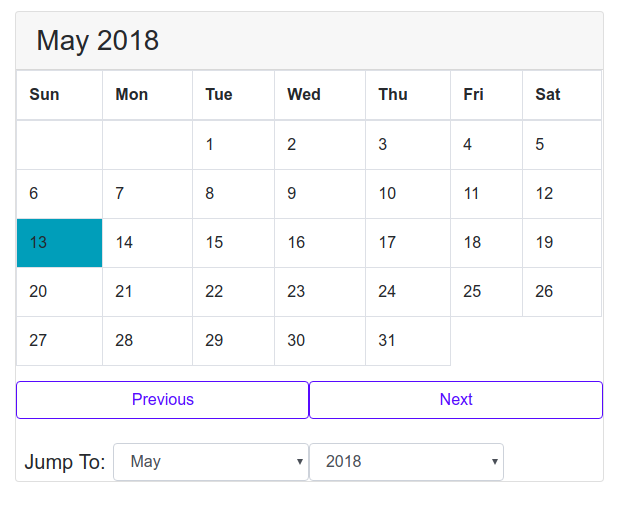
7 |
8 | **Explanation-** When the program is started, the function `showCalendar()` is with arguments `currentMonth` and `currentYear`.
9 | This function populates the table with dates at the correct places.
10 |
11 | The buttons "previous", "next" and dropdown "jump" control the functions, `previous()`, `next()` and `jump()`.
12 | These function update the `currentMonth` and `currentYear` variable.
13 |
14 | **How showCalendar Works-**
15 |
16 | `showCalendar(month, year)` function which takes in two parameters, month and year. Once, the function is called, it dynamically generates a calendar in HTML and appends it into our table. Here’s my approach.
17 |
18 | Get the starting day of the month, we’ll use -
19 |
20 | ```js
21 | let firstDay = (new Date(year, month)).getDay();
22 | ```
23 |
24 | Next, get the number of days in that month. We can achieve this too using date function.
25 |
26 | ```js
27 | let daysInMonth = 32 - new Date(year, month, 32).getDate();
28 | ```
29 |
30 | Explanation, the function `new Date(year, month, 32)` returns the 32nd day after the month started. If we subtract that date from 32, we get the final day of that month. Example, If we pass feb 2018 as an argument, its ‘32nd’ day will be 4th of march, subtract 32 from 4 and we get 28, final day of the month of feb 2018.
31 |
32 | Once we have the two things ready, we populate the table with numbers 1 to [last day of month] on appropriate places. For example, if the starting of that month is Thursday and Ending date is 28, we’ll put the number 1 below thursday, 2 below, friday, 3 below saturday and so on. When we reach 28, we break out of the loop.
33 |
34 | Here, we use a nested for loop because we have upto 6 rows and 7 columns.
35 |
36 | In the outer loop, we create a new “tr” element, ie, table row, up to 6 times. (maximum number of rows we need to create the calendar), then run the inner loop to create elements in each rows, then append those rows into our table.
37 |
38 | In the inner loop, we populate each row with “td” elements in it. We keep track of the date using variable “date” in it.There are three if conditions at each iteration:
39 |
40 | If we’re at first row and we have not yet reached first yet, create td element and leave it blank.
41 |
42 | If “date” is higher than max days in that month, we break out of the loop because we have finished creating the table.
43 |
44 | Else, we create the “td” element and print the “date” in it.
45 |
--------------------------------------------------------------------------------
/scripts.js:
--------------------------------------------------------------------------------
1 | let today = new Date();
2 | let currentMonth = today.getMonth();
3 | let currentYear = today.getFullYear();
4 | let selectYear = document.getElementById("year");
5 | let selectMonth = document.getElementById("month");
6 |
7 | let months = ["Jan", "Feb", "Mar", "Apr", "May", "Jun", "Jul", "Aug", "Sep", "Oct", "Nov", "Dec"];
8 |
9 | let monthAndYear = document.getElementById("monthAndYear");
10 | showCalendar(currentMonth, currentYear);
11 |
12 |
13 | function next() {
14 | currentYear = (currentMonth === 11) ? currentYear + 1 : currentYear;
15 | currentMonth = (currentMonth + 1) % 12;
16 | showCalendar(currentMonth, currentYear);
17 | }
18 |
19 | function previous() {
20 | currentYear = (currentMonth === 0) ? currentYear - 1 : currentYear;
21 | currentMonth = (currentMonth === 0) ? 11 : currentMonth - 1;
22 | showCalendar(currentMonth, currentYear);
23 | }
24 |
25 | function jump() {
26 | currentYear = parseInt(selectYear.value);
27 | currentMonth = parseInt(selectMonth.value);
28 | showCalendar(currentMonth, currentYear);
29 | }
30 |
31 | function showCalendar(month, year) {
32 |
33 | let firstDay = (new Date(year, month)).getDay();
34 | let daysInMonth = 32 - new Date(year, month, 32).getDate();
35 |
36 | let tbl = document.getElementById("calendar-body"); // body of the calendar
37 |
38 | // clearing all previous cells
39 | tbl.innerHTML = "";
40 |
41 | // filing data about month and in the page via DOM.
42 | monthAndYear.innerHTML = months[month] + " " + year;
43 | selectYear.value = year;
44 | selectMonth.value = month;
45 |
46 | // creating all cells
47 | let date = 1;
48 | for (let i = 0; i < 6; i++) {
49 | // creates a table row
50 | let row = document.createElement("tr");
51 |
52 | //creating individual cells, filing them up with data.
53 | for (let j = 0; j < 7; j++) {
54 | if (i === 0 && j < firstDay) {
55 | let cell = document.createElement("td");
56 | let cellText = document.createTextNode("");
57 | cell.appendChild(cellText);
58 | row.appendChild(cell);
59 | }
60 | else if (date > daysInMonth) {
61 | break;
62 | }
63 |
64 | else {
65 | let cell = document.createElement("td");
66 | let cellText = document.createTextNode(date);
67 | if (date === today.getDate() && year === today.getFullYear() && month === today.getMonth()) {
68 | cell.classList.add("bg-info");
69 | } // color today's date
70 | cell.appendChild(cellText);
71 | row.appendChild(cell);
72 | date++;
73 | }
74 |
75 |
76 | }
77 |
78 | tbl.appendChild(row); // appending each row into calendar body.
79 | }
80 |
81 | }
--------------------------------------------------------------------------------
/index.html:
--------------------------------------------------------------------------------
1 |
2 |
3 |
4 |
5 | Calendar
6 |
7 |
8 |
9 |
11 |
12 |
13 |
14 |