├── resource
└── wall_follower
├── wall_follower
├── __init__.py
├── params.yaml
├── np_encrypt.py
├── visualization_tools.py
├── viz_example.py
├── wall_follower.py
└── test_wall_follower.py
├── .gitignore
├── wall_follower.gif
├── wall_follower_loss.png
├── wall_follower_score.png
├── setup.cfg
├── launch
├── wall_follower.launch.xml
├── launch_test_sim.launch.py
└── launch_test.launch.py
├── package.xml
├── setup.py
└── README.md
/resource/wall_follower:
--------------------------------------------------------------------------------
1 |
--------------------------------------------------------------------------------
/wall_follower/__init__.py:
--------------------------------------------------------------------------------
1 |
--------------------------------------------------------------------------------
/.gitignore:
--------------------------------------------------------------------------------
1 | *.sw*
2 | *.pyc
3 | *.npz
4 |
--------------------------------------------------------------------------------
/wall_follower.gif:
--------------------------------------------------------------------------------
https://raw.githubusercontent.com/mit-rss/wall_follower_sim/HEAD/wall_follower.gif
--------------------------------------------------------------------------------
/wall_follower_loss.png:
--------------------------------------------------------------------------------
https://raw.githubusercontent.com/mit-rss/wall_follower_sim/HEAD/wall_follower_loss.png
--------------------------------------------------------------------------------
/wall_follower_score.png:
--------------------------------------------------------------------------------
https://raw.githubusercontent.com/mit-rss/wall_follower_sim/HEAD/wall_follower_score.png
--------------------------------------------------------------------------------
/setup.cfg:
--------------------------------------------------------------------------------
1 | [develop]
2 | script-dir=$base/lib/wall_follower
3 | [install]
4 | install-scripts=$base/lib/wall_follower
--------------------------------------------------------------------------------
/wall_follower/params.yaml:
--------------------------------------------------------------------------------
1 | wall_follower:
2 | ros__parameters:
3 | scan_topic: "/scan"
4 | drive_topic: "/drive"
5 | side: -1
6 | velocity: 1.0
7 | desired_distance: 1.
8 |
--------------------------------------------------------------------------------
/launch/wall_follower.launch.xml:
--------------------------------------------------------------------------------
1 |
2 |
3 |
4 |
5 |
6 |
7 |
--------------------------------------------------------------------------------
/wall_follower/np_encrypt.py:
--------------------------------------------------------------------------------
1 | """
2 | DO NOT MODIFY THIS FILE.
3 |
4 | This encrypts/decrypts your numpy arrays for grading purposes.
5 | """
6 |
7 | import numpy as np
8 |
9 | # http://www.brianveitch.com/cryptography/generate_rsa_keys.php
10 | public_key = 1305295067
11 | private_key = 3070545323
12 | modulus = 7366846427
13 |
14 | pow_modulo = np.frompyfunc(pow, 3, 1)
15 |
16 | def encode(array):
17 | array_int = array.astype(np.float32).view(np.uint32).astype(np.uint64)
18 | array_int_enc = pow_modulo(array_int, public_key, modulus)
19 | return array_int_enc
20 |
21 | def decode(array):
22 | array_int = array.astype(np.uint64)
23 | array_int_dec = pow_modulo(array_int, private_key, modulus)
24 | array_dec = array_int_dec.astype(np.uint32).view(np.float32)
25 | return array_dec
26 |
--------------------------------------------------------------------------------
/package.xml:
--------------------------------------------------------------------------------
1 |
2 |
3 | wall_follower
4 | 1.0.0
5 | A wall follower for the racecar.
6 | racecar@mit.edu
7 |
8 | MIT
9 |
10 | ament_python
11 |
12 | ackermann_msgs
13 | geometry_msgs
14 | rclpy
15 | sensor_msgs
16 | std_msgs
17 | visualization_msgs
18 |
19 |
20 | ament_python
21 | ackermann_msgs
22 | geometry_msgs
23 | rclpy
24 | sensor_msgs
25 | std_msgs
26 | visualization_msgs
27 |
28 |
--------------------------------------------------------------------------------
/setup.py:
--------------------------------------------------------------------------------
1 | import glob
2 | import os
3 | from setuptools import find_packages
4 | from setuptools import setup
5 |
6 | package_name = 'wall_follower'
7 |
8 | setup(
9 | name=package_name,
10 | version='0.0.0',
11 | packages=find_packages(exclude=['test']),
12 | data_files=[
13 | ('share/'+package_name, ['package.xml', "wall_follower/params.yaml"]),
14 | ('share/ament_index/resource_index/packages',
15 | ['resource/' + package_name]),
16 | ('share/wall_follower/launch', glob.glob(os.path.join('launch', '*launch.xml'))),
17 | ('share/wall_follower/launch', glob.glob(os.path.join('launch', '*launch.py')))],
18 |
19 | install_requires=['setuptools'],
20 | zip_safe=True,
21 | maintainer='Sebastian',
22 | maintainer_email='sebastianag2002@gmail.com',
23 | description='Wall Follower ROS2 Package',
24 | license='Apache License, Version 2.0',
25 | tests_require=['pytest'],
26 | entry_points={
27 | 'console_scripts': [
28 | 'wall_follower = wall_follower.wall_follower:main',
29 | 'viz_example = wall_follower.viz_example:main',
30 | 'test_wall_follower = wall_follower.test_wall_follower:main',
31 | ],
32 | },
33 | )
--------------------------------------------------------------------------------
/wall_follower/visualization_tools.py:
--------------------------------------------------------------------------------
1 | from geometry_msgs.msg import Point
2 | from visualization_msgs.msg import Marker
3 |
4 | class VisualizationTools:
5 |
6 | @staticmethod
7 | def plot_line(x, y, publisher, color = (1., 0., 0.), frame = "/base_link"):
8 | """
9 | Publishes the points (x, y) to publisher
10 | so they can be visualized in rviz as
11 | connected line segments.
12 | Args:
13 | x, y: The x and y values. These arrays
14 | must be of the same length.
15 | publisher: the publisher to publish to. The
16 | publisher must be of type Marker from the
17 | visualization_msgs.msg class.
18 | color: the RGB color of the plot.
19 | frame: the transformation frame to plot in.
20 | """
21 | # Construct a line
22 | line_strip = Marker()
23 | line_strip.type = Marker.LINE_STRIP
24 | line_strip.header.frame_id = frame
25 |
26 | # Set the size and color
27 | line_strip.scale.x = 0.1
28 | line_strip.scale.y = 0.1
29 | line_strip.color.a = 1.
30 | line_strip.color.r = color[0]
31 | line_strip.color.g = color[1]
32 | line_strip.color.g = color[2]
33 |
34 | # Fill the line with the desired values
35 | for xi, yi in zip(x, y):
36 | p = Point()
37 | p.x = xi
38 | p.y = yi
39 | line_strip.points.append(p)
40 |
41 | # Publish the line
42 | publisher.publish(line_strip)
--------------------------------------------------------------------------------
/wall_follower/viz_example.py:
--------------------------------------------------------------------------------
1 | #!/usr/bin/env python3
2 |
3 | """
4 | This is an example of how to use the VisualizationTools class to publish a line
5 | to the /wall topic.
6 |
7 | You do not need this for your wall follower!
8 | """
9 |
10 | import rclpy
11 | import numpy as np
12 | from rclpy.node import Node
13 | from sensor_msgs.msg import LaserScan
14 | from visualization_msgs.msg import Marker
15 | from wall_follower.visualization_tools import VisualizationTools # Assuming VisualizationTools is a class in visualization_tools module
16 |
17 | class LinePublisher(Node):
18 |
19 |
20 | # the topics to publish and subscribe to
21 | WALL_TOPIC = "/wall"
22 |
23 | def __init__(self):
24 | super().__init__('line_publisher')
25 |
26 | self.declare_parameter('wall_follower/scan_topic', '/scan')
27 | self.SCAN_TOPIC = self.get_parameter('wall_follower/scan_topic').get_parameter_value().string_value
28 |
29 | # a publisher for our line marker
30 | self.line_pub = self.create_publisher(Marker, self.WALL_TOPIC, 1)
31 |
32 | # a subscriber to get the laserscan data
33 | self.create_subscription(LaserScan, self.SCAN_TOPIC, self.laser_callback, 10)
34 |
35 | def laser_callback(self, laser_scan):
36 | # x and y should be points on your detected wall
37 | # here we are just plotting a parabola as a demo
38 | x = np.linspace(-2., 2., num=20)
39 | y = np.square(x)
40 | VisualizationTools.plot_line(x, y, self.line_pub, frame="/laser")
41 |
42 |
43 | def main(args=None):
44 | rclpy.init(args=args)
45 | line_publisher = LinePublisher()
46 | rclpy.spin(line_publisher)
47 | line_publisher.destroy_node()
48 | rclpy.shutdown()
49 |
50 |
51 | if __name__ == '__main__':
52 | main()
--------------------------------------------------------------------------------
/launch/launch_test_sim.launch.py:
--------------------------------------------------------------------------------
1 | from launch import LaunchDescription
2 | from launch_ros.actions import Node
3 | from launch.actions import IncludeLaunchDescription
4 | from launch_xml.launch_description_sources import XMLLaunchDescriptionSource
5 | import os
6 | from ament_index_python.packages import get_package_share_directory
7 |
8 |
9 |
10 | def generate_launch_description():
11 | ld = LaunchDescription()
12 |
13 | building_yaml = os.path.join(
14 | get_package_share_directory('racecar_simulator'),
15 | 'maps',
16 | 'building_31.yaml'
17 | )
18 |
19 | map_server = Node(
20 | package="nav2_map_server",
21 | executable="map_server",
22 | name='map_server',
23 | output="screen",
24 | parameters=[{
25 | "yaml_filename": building_yaml}]
26 | )
27 |
28 | lifecycle_manager = Node(
29 | package="nav2_lifecycle_manager",
30 | executable="lifecycle_manager",
31 | name='lifecycle_manager',
32 | output="screen",
33 | parameters=[{
34 | "autostart": True,
35 | "node_names": ['map_server']}]
36 | )
37 |
38 | racecar_model = IncludeLaunchDescription(
39 | XMLLaunchDescriptionSource([os.path.join(
40 | get_package_share_directory('racecar_simulator'), 'launch'),
41 | '/racecar_model.launch.xml'])
42 | )
43 |
44 | config = os.path.join(
45 | get_package_share_directory('racecar_simulator'),
46 | 'params.yaml'
47 | )
48 |
49 | racecar_simulator = Node(
50 | package="racecar_simulator",
51 | executable="simulate",
52 | name='racecar_simulator',
53 | output="screen",
54 | parameters=[config]
55 | )
56 |
57 |
58 | ld.add_action(map_server)
59 | ld.add_action(lifecycle_manager)
60 | ld.add_action(racecar_model)
61 | ld.add_action(racecar_simulator)
62 |
63 |
64 | return ld
--------------------------------------------------------------------------------
/wall_follower/wall_follower.py:
--------------------------------------------------------------------------------
1 | #!/usr/bin/env python3
2 | import numpy as np
3 | import rclpy
4 | from rclpy.node import Node
5 | from sensor_msgs.msg import LaserScan
6 | from ackermann_msgs.msg import AckermannDriveStamped
7 | from visualization_msgs.msg import Marker
8 | from rcl_interfaces.msg import SetParametersResult
9 |
10 | from wall_follower.visualization_tools import VisualizationTools
11 |
12 |
13 | class WallFollower(Node):
14 |
15 | def __init__(self):
16 | super().__init__("wall_follower")
17 | # Declare parameters to make them available for use
18 | # DO NOT MODIFY THIS!
19 | self.declare_parameter("scan_topic", "default")
20 | self.declare_parameter("drive_topic", "default")
21 | self.declare_parameter("side", "default")
22 | self.declare_parameter("velocity", "default")
23 | self.declare_parameter("desired_distance", "default")
24 |
25 | # Fetch constants from the ROS parameter server
26 | # DO NOT MODIFY THIS! This is necessary for the tests to be able to test varying parameters!
27 | self.SCAN_TOPIC = self.get_parameter('scan_topic').get_parameter_value().string_value
28 | self.DRIVE_TOPIC = self.get_parameter('drive_topic').get_parameter_value().string_value
29 | self.SIDE = self.get_parameter('side').get_parameter_value().integer_value
30 | self.VELOCITY = self.get_parameter('velocity').get_parameter_value().double_value
31 | self.DESIRED_DISTANCE = self.get_parameter('desired_distance').get_parameter_value().double_value
32 |
33 | # This activates the parameters_callback function so that the tests are able
34 | # to change the parameters during testing.
35 | # DO NOT MODIFY THIS!
36 | self.add_on_set_parameters_callback(self.parameters_callback)
37 |
38 | # TODO: Initialize your publishers and subscribers here
39 |
40 | # TODO: Write your callback functions here
41 |
42 | def parameters_callback(self, params):
43 | """
44 | DO NOT MODIFY THIS CALLBACK FUNCTION!
45 |
46 | This is used by the test cases to modify the parameters during testing.
47 | It's called whenever a parameter is set via 'ros2 param set'.
48 | """
49 | for param in params:
50 | if param.name == 'side':
51 | self.SIDE = param.value
52 | self.get_logger().info(f"Updated side to {self.SIDE}")
53 | elif param.name == 'velocity':
54 | self.VELOCITY = param.value
55 | self.get_logger().info(f"Updated velocity to {self.VELOCITY}")
56 | elif param.name == 'desired_distance':
57 | self.DESIRED_DISTANCE = param.value
58 | self.get_logger().info(f"Updated desired_distance to {self.DESIRED_DISTANCE}")
59 | return SetParametersResult(successful=True)
60 |
61 |
62 | def main():
63 | rclpy.init()
64 | wall_follower = WallFollower()
65 | rclpy.spin(wall_follower)
66 | wall_follower.destroy_node()
67 | rclpy.shutdown()
68 |
69 |
70 | if __name__ == '__main__':
71 | main()
72 |
--------------------------------------------------------------------------------
/wall_follower/test_wall_follower.py:
--------------------------------------------------------------------------------
1 | #!/usr/bin/env python3
2 | import numpy as np
3 | import time as pythontime
4 | import rclpy
5 | import tf2_ros
6 | import tf_transformations
7 |
8 | from rclpy.node import Node
9 | from sensor_msgs.msg import LaserScan
10 | from geometry_msgs.msg import PoseStamped
11 | from geometry_msgs.msg import Pose
12 | from ackermann_msgs.msg import AckermannDriveStamped
13 | from visualization_msgs.msg import Marker
14 | from wall_follower.np_encrypt import encode, decode
15 | from tf2_ros import TransformException
16 | from tf2_ros.buffer import Buffer
17 | from tf2_ros.transform_listener import TransformListener
18 |
19 |
20 | class WallTest(Node):
21 | def __init__(self):
22 | super().__init__("test_wall_follower")
23 | # Declare parameters to make them available for use
24 | self.declare_parameter("scan_topic", "/scan")
25 | self.declare_parameter("drive_topic", "/drive")
26 | self.declare_parameter("pose_topic", "/pose")
27 |
28 | self.declare_parameter("side", 1)
29 | self.declare_parameter("velocity", 1.)
30 | self.declare_parameter("desired_distance", 1)
31 | self.declare_parameter("start_x", -4.)
32 | self.declare_parameter("start_y", -5.4)
33 | self.declare_parameter("start_z", 0)
34 | self.declare_parameter("end_x", 5.)
35 | self.declare_parameter("end_y", -5.)
36 | self.declare_parameter("name", "default")
37 |
38 |
39 | # Fetch constants from the ROS parameter server
40 | self.TEST_NAME = self.get_parameter('name').get_parameter_value().string_value
41 | self.SCAN_TOPIC = self.get_parameter('scan_topic').get_parameter_value().string_value
42 | self.POSE_TOPIC = self.get_parameter('pose_topic').get_parameter_value().string_value
43 | self.DRIVE_TOPIC = self.get_parameter('drive_topic').get_parameter_value().string_value
44 |
45 | self.SIDE = self.get_parameter('side').get_parameter_value().integer_value
46 | self.VELOCITY = self.get_parameter('velocity').get_parameter_value().double_value
47 | self.DESIRED_DISTANCE = self.get_parameter('desired_distance').get_parameter_value().double_value
48 | self.START_x = self.get_parameter('start_x').get_parameter_value().double_value
49 | self.START_y = self.get_parameter('start_y').get_parameter_value().double_value
50 | self.START_z = self.get_parameter('start_z').get_parameter_value().double_value
51 | self.END_x = self.get_parameter('end_x').get_parameter_value().double_value
52 | self.END_y = self.get_parameter('end_y').get_parameter_value().double_value
53 | self.NAME = self.get_parameter('name').get_parameter_value().string_value
54 |
55 | self.get_logger().info('Test Name %s' % (self.TEST_NAME))
56 |
57 |
58 | self.max_time_per_test = 120
59 | self.end_threshold = 1.0
60 |
61 | self.positions = []
62 | self.dist_to_end = np.infty
63 | self.saves = {}
64 |
65 | self.tf_buffer = Buffer()
66 | self.tf_listener = TransformListener(self.tf_buffer, self)
67 |
68 | self.start_time = self.get_clock().now()
69 |
70 | # A publisher for navigation commands
71 | self.pose_pub = self.create_publisher(Pose, "pose" , 1)
72 | self.drive_pub = self.create_publisher(AckermannDriveStamped, self.DRIVE_TOPIC, 1)
73 |
74 | # A publisher for the end position marker
75 | self.marker_pub = self.create_publisher(Marker, '/end_position_marker', 1)
76 |
77 | # A subscriber to laser scans
78 | self.create_subscription(LaserScan, self.SCAN_TOPIC, self.laser_callback, 1)
79 |
80 | self.START_POSE = [self.START_x, self.START_y, self.START_z]
81 | self.END_POSE = [self.END_x, self.END_y]
82 |
83 | self.buffer_count = 0
84 | self.place_car(self.START_POSE)
85 |
86 | self.moved = False
87 |
88 | def place_car(self, pose):
89 | p = Pose()
90 |
91 | p.position.x = pose[0]
92 | p.position.y = pose[1]
93 |
94 | # Convert theta to a quaternion
95 | quaternion = tf_transformations.quaternion_from_euler(0, 0, pose[2])
96 | p.orientation.y = quaternion[1]
97 | p.orientation.z = quaternion[2]
98 | p.orientation.w = quaternion[3]
99 |
100 | self.pose_pub.publish(p)
101 | pythontime.sleep(0.05)
102 |
103 |
104 | def publish_end_position_marker(self):
105 | """ Visualize the end position of the test """
106 | marker = Marker()
107 | marker.header.frame_id = "map"
108 | marker.header.stamp = self.get_clock().now().to_msg()
109 | marker.ns = "end_position"
110 | marker.id = 0
111 | marker.type = Marker.SPHERE
112 | marker.action = Marker.ADD
113 | marker.pose.position.x = self.END_x
114 | marker.pose.position.y = self.END_y
115 | marker.pose.position.z = 0.0
116 | marker.scale.x = 0.5
117 | marker.scale.y = 0.5
118 | marker.scale.z = 0.5
119 | marker.color.a = 1.0 # Alpha
120 | marker.color.r = 0.0 # Red
121 | marker.color.g = 1.0 # Green
122 | marker.color.b = 0.0 # Blue
123 |
124 | self.marker_pub.publish(marker)
125 |
126 |
127 | def laser_callback(self, laser_scan):
128 | self.publish_end_position_marker()
129 |
130 | # Give buffer time for controller to begin working before letting the car go
131 | if self.buffer_count < 100:
132 | self.place_car(self.START_POSE)
133 | self.buffer_count += 1
134 | if self.buffer_count == 30:
135 | self.get_logger().info(f"Placed Car: {self.START_POSE[0]}, {self.START_POSE[1]}")
136 | return
137 |
138 | from_frame_rel = 'base_link'
139 | to_frame_rel = 'map'
140 |
141 | try:
142 | t = self.tf_buffer.lookup_transform(
143 | to_frame_rel,
144 | from_frame_rel,
145 | rclpy.time.Time())
146 | except TransformException as ex:
147 | self.get_logger().info(
148 | f'Could not transform {to_frame_rel} to {from_frame_rel}: {ex}')
149 | return
150 |
151 | if not self.moved:
152 | diff = np.linalg.norm(np.array([self.START_x, self.START_y]) - np.array([t.transform.translation.x, t.transform.translation.y]))
153 | if 0.3 < (diff):
154 | self.place_car(self.START_POSE)
155 | self.get_logger().info(
156 | f'Not at start {self.START_x-t.transform.translation.x}, {self.START_y-t.transform.translation.y}, diff {diff}')
157 | return
158 | else:
159 | self.moved = True
160 | # self.get_logger().info('Moved: %s' % (self.moved))
161 | self.start_time = self.get_clock().now()
162 |
163 |
164 | ranges = np.array(laser_scan.ranges, dtype='float32')
165 |
166 | angles = np.linspace(
167 | laser_scan.angle_min,
168 | laser_scan.angle_max,
169 | num = ranges.shape[0])
170 |
171 | # Convert the ranges to Cartesian coordinates.
172 | # Consider the robot to be facing in the positive x direction.
173 | x = ranges * np.cos(angles)
174 | y = ranges * np.sin(angles)
175 |
176 | # Filter out values that are out of range
177 | # and values on the wrong side
178 | valid_points = self.SIDE * y > 0
179 | valid_points = np.logical_and(
180 | valid_points,
181 | x < 1.5)
182 | valid_points = np.logical_and(
183 | valid_points,
184 | x > 0.)
185 |
186 | # Compute the average distance
187 | dists = np.abs(y[valid_points])
188 | dist = np.sum(dists)/dists.shape[0]
189 | # self.get_logger().info('Avg dist: %f' % (dist))
190 |
191 | pos = [t.transform.translation.x, t.transform.translation.y]
192 |
193 | time = self.get_clock().now() - self.start_time
194 | time_d = time.nanoseconds * 1e-9
195 | self.positions.append([time_d] + pos + [dist])
196 | self.dist_to_end = np.linalg.norm(np.array(pos) - np.array(self.END_POSE))
197 | # self.get_logger().info(
198 | # f'Time: {time_d}, Max time: {self.max_time_per_test}')
199 |
200 | if time_d > self.max_time_per_test:
201 | self.get_logger().error("\n\n\n\n\nERROR: Test timed out! Your car was not able to reach the target end position.\n\n\n\n\n")
202 | # Send a message of zero
203 | stop = AckermannDriveStamped()
204 | stop.drive.speed = 0.
205 | stop.drive.steering_angle = 0.
206 | self.drive_pub.publish(stop)
207 | self.saves[self.TEST_NAME] = encode(np.array(self.positions))
208 | np.savez_compressed(self.TEST_NAME+"_log", **self.saves)
209 | raise SystemExit
210 | if self.dist_to_end < self.end_threshold:
211 | self.get_logger().info("\n\n\n\n\nReached end of the test w/ Avg dist from wall = %f!\n\n\n\n\n" % (dist))
212 | stop = AckermannDriveStamped()
213 | stop.drive.speed = 0.
214 | stop.drive.steering_angle = 0.
215 | self.drive_pub.publish(stop)
216 | self.saves[self.TEST_NAME] = encode(np.array(self.positions))
217 | np.savez_compressed(self.TEST_NAME+"_log", **self.saves)
218 | raise SystemExit
219 |
220 |
221 | def main():
222 | rclpy.init()
223 | wall_follower_test = WallTest()
224 | try:
225 | rclpy.spin(wall_follower_test)
226 | except SystemExit:
227 | rclpy.logging.get_logger("Quitting").info('Done')
228 | wall_follower_test.destroy_node()
229 | rclpy.shutdown()
230 |
231 |
232 | if __name__ == '__main__':
233 | main()
234 |
235 |
--------------------------------------------------------------------------------
/README.md:
--------------------------------------------------------------------------------
1 | | **Deliverable** | **Due Date** |
2 | |---------------|----------------------------------------------------------------------------|
3 | | 6x `TEST_NAME_log.npz` files on [Gradescope](https://www.gradescope.com/courses/973988) | Wednesday, February 26th at 1:00PM EST |
4 |
5 |
6 | # Lab 2: Wall Following in Simulation
7 |
8 | ## Table of Contents
9 | - [Introduction](https://github.com/mit-rss/wall_follower_sim#introduction)
10 | - [Downloading](https://github.com/mit-rss/wall_follower_sim#download-this-repository)
11 | - [Running](https://github.com/mit-rss/wall_follower_sim#running)
12 | - [1. Running the Simulator](https://github.com/mit-rss/wall_follower_sim#1-running-the-simulator)
13 | - [2. Running your Wall Follower](https://github.com/mit-rss/wall_follower_sim#2-running-your-wall-follower)
14 | - [3. Running the Tests](https://github.com/mit-rss/wall_follower_sim#3-running-the-tests)
15 | - [Lab Overview](https://github.com/mit-rss/wall_follower_sim#lab-overview)
16 | - [Steps to Success](https://github.com/mit-rss/wall_follower_sim#steps-to-success)
17 | - [Submission](https://github.com/mit-rss/wall_follower_sim#submission)
18 | - [Troubleshooting and Other Notes](https://github.com/mit-rss/wall_follower_sim#troubleshooting-and-other-notes)
19 | - [Frequently Used Instructions](https://github.com/mit-rss/frequently_used_instructions)
20 |
21 |
22 |
23 |
24 | ## Introduction
25 |
26 | [[Link to Lab Slides]](https://docs.google.com/presentation/d/1PAG9HPgg0wHRsm3TJ2rP1a3a17MZg4Sk/edit?usp=sharing&ouid=106827498769638621680&rtpof=true&sd=true)
27 |
28 | In this lab, you will be implementing a wall follower on a simulated racecar. Your goal is to make an autonomous controller that drives the racecar forwards while maintaining a constant distance from a wall on either its left or right (chosen on the fly). It should be robust to uneven surfaces and small errors in the LIDAR data, and it should be able to recover from deviations from the desired state; being too far, too close, or too angled.
29 |
30 |  31 |
32 | This lab should be done individually. In the next lab, you will join your team to get your wall follower working on the real racecar. You may reuse code you write for this lab so make sure it is clean and presentable to your teammates!
33 |
34 | We have made a series of tests to evaluate the performance of your wall follower. In order to test your code properly you must start with the template starter code. The template is still very sparse and you have plenty of freedom to implement any algorithm you'd like so long as the inputs and outputs are the same.
35 |
36 |
31 |
32 | This lab should be done individually. In the next lab, you will join your team to get your wall follower working on the real racecar. You may reuse code you write for this lab so make sure it is clean and presentable to your teammates!
33 |
34 | We have made a series of tests to evaluate the performance of your wall follower. In order to test your code properly you must start with the template starter code. The template is still very sparse and you have plenty of freedom to implement any algorithm you'd like so long as the inputs and outputs are the same.
35 |
36 |
37 |
38 | ## Download this Repository
39 |
40 | Clone this repository into your colcon workspace:
41 |
42 | cd ~/racecar_ws/src
43 | git clone https://github.com/mit-rss/wall_follower_sim.git
44 |
45 | Then rebuild your workspace with `colcon build`:
46 |
47 | cd ~/racecar_ws
48 | colcon build --symlink-install
49 | source install/setup.bash
50 |
51 | We ask that you use the starter code contained in this repo and do not tweak its original structure. Make sure that your wall follower lives in the ROS node initialized in the Python script at:
52 |
53 | wall_follower/wall_follower.py
54 |
55 | However, feel free to add more Python files to keep your code organized.
56 |
57 |
58 |
59 |
60 | ## Running
61 |
62 | ### 1. Running the Simulator
63 |
64 | First, open [`rviz`](http://wiki.ros.org/rviz) using the right-click menu in the NoVNC browser graphical interface (which can be accessed at http://localhost:6080/vnc.html?resize=remote after the docker container is started).
65 |
66 | Launch the [racecar simulator](https://github.com/mit-racecar/racecar_simulator) by running (from any directory):
67 |
68 | ros2 launch racecar_simulator simulate.launch.xml
69 |
70 | Note that you must open `rviz` ***before*** you launch the racecar simulator for the map to appear (since the map only is published once when the simulator is started).
71 |
72 | You should see a car in a map (walls are black, empty space is grey) and colorful points on that map representing lidar detections.
73 |
74 | 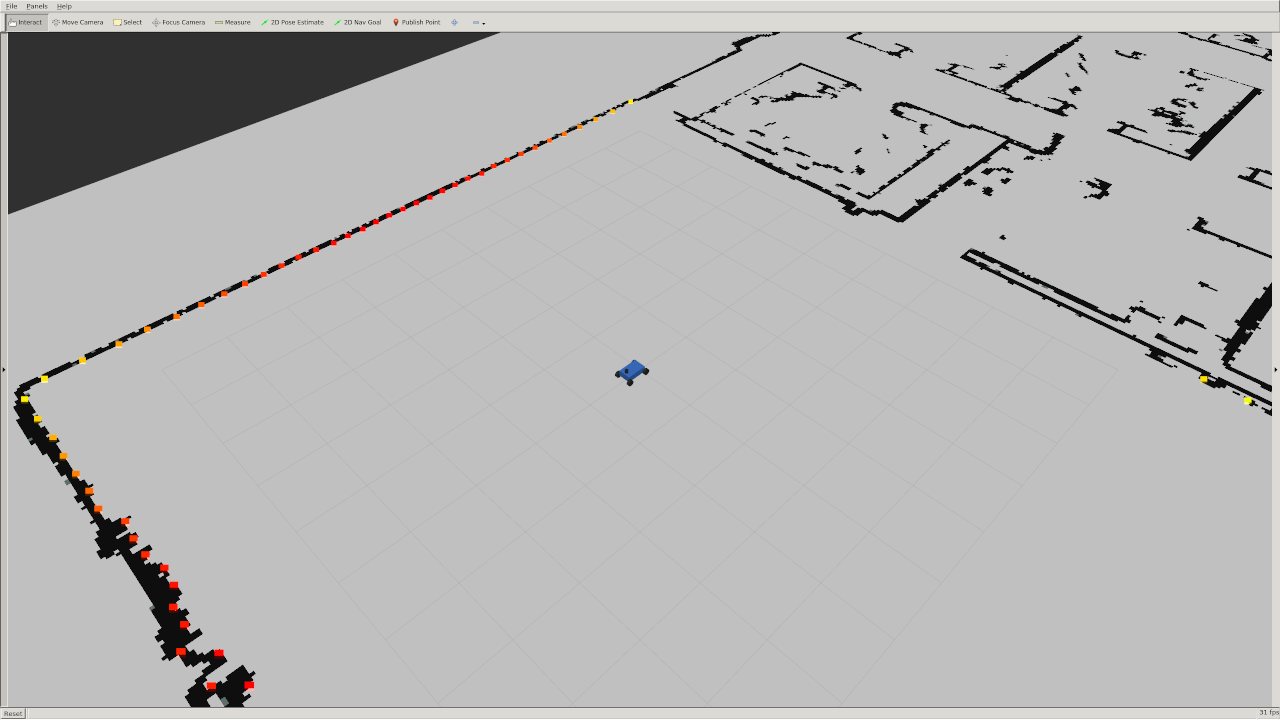
75 |
76 | You can change the position of the robot by clicking the "2D Pose Estimate" button on top of rviz and placing the arrow somewhere on the map.
77 |
78 |
79 | ### 2. Running your Wall Follower
80 |
81 | ros2 launch wall_follower wall_follower.launch.xml
82 |
83 | ***Note that you can modify and rerun your wall follower without needing to restart the simulator. Run the simulator once... and leave it running.***
84 |
85 | ### 3. Running the Tests
86 |
87 | There are 6 test cases, with varying start and end positions, velocities, wall-side, and desired distances.
88 |
89 | You will run your tests locally and submit the log.npz files that the tests generate.
90 |
91 | First, launch the test simulator:
92 |
93 | ros2 launch wall_follower launch_test_sim.launch.py
94 |
95 | Then, launch the tests (which will automatically launch your wall follower as well):
96 |
97 | ros2 launch wall_follower launch_test.launch.py
98 |
99 | You can view the tests running in `rviz`. Note that you can visualize the target end position by adding the "/end_position_marker" topic to rviz.
100 |
101 | For an example of how the tests should look when running, see [this video](https://youtu.be/r7ygU1zlTjU).
102 |
103 | If you're curious, the tester code is in `/wall_follower_sim/wall_follower/test_wall_follower.py`
104 |
105 | **Note that, while the simulator does not simulate collisions, the autograder will check that your car has not crashed.**
106 |
107 |
108 |
109 | ## Lab Overview
110 |
111 | All instructions detailed here should happen in your docker container.
112 |
113 | ### 1. Send Drive Commands
114 |
115 | To make the car drive, publish messages of type [`AckermannDriveStamped`](http://docs.ros.org/jade/api/ackermann_msgs/html/msg/AckermannDriveStamped.html) to the `/drive` topic.
116 |
117 | Import the `AckermannDriveStamped` type like this in your `wall_follower.py` file:
118 |
119 | from ackermann_msgs.msg import AckermannDriveStamped
120 |
121 | ### 2. Read LIDAR Data
122 |
123 | The racecar has a 2D LIDAR sensor that measures distances from the racecar to its surroundings. All LIDAR data is published to the `/scan` topic by the simulator (so you should only need to subscribe to this topic).
124 |
125 | The data is of type [`LaserScan`](http://docs.ros.org/api/sensor_msgs/html/msg/LaserScan.html). You can import the type in python using:
126 |
127 | from sensor_msgs.msg import LaserScan
128 |
129 | The `ranges` entry in the `LaserScan` message is an array of the distances from the lidar sensor to the nearest obstacle. The measurements are taken at regular angular intervals of `angle_increment` radians, from the angle `angle_min` to `angle_max`.
130 |
131 | The rainbow points in this image below are the laser scan as visualized in `rviz`. The color corresponds to the intensity of the scan. In the simulator this is simply the distance, but on the actual lidar it gives you an indication of how reflective the object you are scanning is. Note that there is no data in the quadrant behind the car because the LIDAR sensor does not scan the full 360 degree range.
132 |
133 | 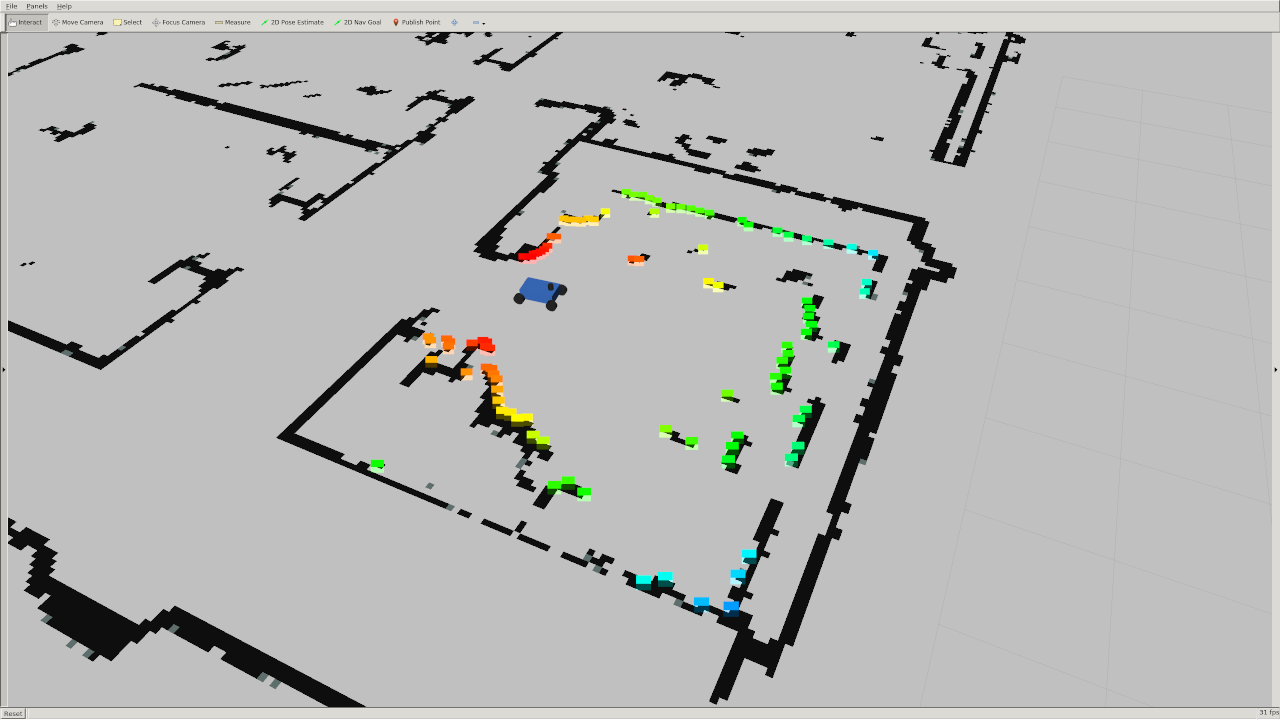
134 |
135 | ### 3. Use the Simulator Parameters
136 |
137 | There is a [params.yaml](https://github.com/mit-rss/wall_follower_sim/blob/master/wall_follower/params.yaml) file that defines a few parameters for your wall-follower. Most notably:
138 |
139 | * `desired_distance`: distance that the racecar should maintain from the wall
140 | * `velocity`: speed the racecar should move in meters per second
141 | * `side`: The side the wall is following represented as an integer. +1 represents the left wall and -1 represents the right wall. We chose this convention because typically we will assume the car is pointing in the positive _x_ direction. That means the left side of the car will point to the positive _y_ axis and the right side will point to the negative _y_ axis.
142 |
143 | Not only is this param file useful for efficiently testing different configurations, **it is NECESSARY for the autograder**! Therefore, your wall follower must fetch and use these parameters so that the autograder can test the various test cases.
144 |
145 | (Note: the `scan_topic` and `drive_topic` parameters are optional, though defining topic names in a param file is generally good practice).
146 |
147 |
148 |
149 | ## Steps to Success
150 | How you implement the wall follower is entirely up to you. However, these are some key tips we compiled that will set you in the right direction:
151 |
152 | * __One step at a time__: Begin by setting up your wall follower node so that it subscribes to laser messages and publishes steering commands. Make sure you can move the racecar at a constant speed and turning angle before working on your controller.
153 | * __Slice up the scan__: Only a subset of the laserscan points will be useful to you -- how you filter these points will ***significantly*** impact your wall follower's performance. Think carefully about which laserscan points matter -- should you threshold by angle? by distance? by x- and y- coordinate (relative to the `base_link` frame)? Seriously, draw it out (based on the test cases) and think it through. When filtering the laserscan points, Try to use [```numpy```](https://numpy.org/) operations rather than for loops in your code. [Multidimensional slicing](https://docs.scipy.org/doc/numpy-1.13.0/reference/arrays.indexing.html) and [broadcasting](https://docs.scipy.org/doc/numpy-1.13.0/user/basics.broadcasting.html) can make your code cleaner and much more efficient.
154 | * __Find the wall__: In a perfect world, you might be able to detect the wall by fitting a line to 2 samples of the LIDAR data. However with noisy data and uneven surfaces this might not be enough. A [least squares regression](https://en.wikipedia.org/wiki/Simple_linear_regression) is an easy way to account for more noise. The [RANSAC](https://en.wikipedia.org/wiki/Random_sample_consensus) outlier-rejection algorithm can further “upgrade” an existing model (like least squares). _Note: Attempt RANSAC only if you've already built a functional wall follower. It is probably overkill._
155 | * __Use PD or PID control__: There are multiple ways to implement your control logic; for example, PID control can be used to stabilize your robot to a fixed distance from a wall, while Pure Pursuit with Ackermann dynamics can be used to follow a path defined by the wall. While both methods work, PD/PID control is more well-known for handling disturbances like curved walls and corners. Simple P (proportional) control is often not enough to create a responsive and stable system. Tuning the constants of this system can be done through empirical observations or more [systematically](https://www.crossco.com/resources/technical/how-to-tune-pid-loops/).
156 | * __Use the visualization code__: We provided an example Python script in `wall_follower` that plots a line in Rviz. You can write something similar to this in order to make sure your code (e.g. wall detection) is working!
157 |
158 |
159 | ## Submission
160 |
161 | Running the tests (see [[3. Running the Tests]](https://github.com/mit-rss/wall_follower_sim#3-running-the-tests)) will generate 6 log files that will appear in your ROS2 workspace home: `racecar_docker/home/racecar_ws/TEST_NAME_log.npz` Submit all 6 test files to the [gradescope assignment](https://www.gradescope.com/courses/728544).
162 |
163 | (If you have not generated all the files because you have not passed all the tests, you can still get partial points from submitting whatever files you do have.)
164 |
165 |
166 |
167 |
168 | ## Troubleshooting and Other Notes
169 |
170 | #### When in doubt:
171 |
172 | Try restarting both the simulator and your wall follower node. We've seen strange issues where the laser scan publisher seems to stop working... a simple restart of the simulator node fixes this.
173 |
174 |
175 | #### Simulator Parameters
176 |
177 | You may have noticed that the simulator has a few parameters defined in [params.yaml](https://github.com/mit-racecar/racecar_simulator/blob/master/params.yaml):
178 |
179 | - `max_speed`: 4 meters/second
180 | - `max_steering_angle`: 0.34 radians
181 |
182 | You generally should not modify these; they will be reset by the autograder.
183 |
184 |
185 |
186 |
187 | #### If you don't see the car appearing in the rviz simulation:
188 | Firstly, confirm that the simulator (`ros2 launch racecar_simulator simulate.launch.xml`) is running successfully.
189 |
190 | If so, if you're using the [racecar docker image](https://github.com/mit-racecar/racecar_docker), Rviz will already be configured to visualize the simulator. But if not, in the left panel on the bottom click the "Add" button, and then in the "By display type" tab click "RobotModel". You should see a small blue car appear. Then click "Add" again and in the "By topic" tab click add the "/map" topic. Repeat once more to add the laser scan topic. Under the dropdown menu of your LaserScan there should be a field called "Size (m)". Change this to 0.1 so you can see the laser scan more clearly. The checkboxes turn on and off display types, which may be useful as you add topics to visualize.
191 |
192 | 
193 |
--------------------------------------------------------------------------------
/launch/launch_test.launch.py:
--------------------------------------------------------------------------------
1 | from launch import LaunchDescription
2 | from launch.actions import RegisterEventHandler
3 | from launch_ros.actions import Node
4 | from launch.event_handlers import (OnExecutionComplete, OnProcessExit,
5 | OnProcessIO, OnProcessStart, OnShutdown)
6 | from launch.actions import (ExecuteProcess,
7 | LogInfo, RegisterEventHandler, TimerAction)
8 | from launch.substitutions import FindExecutable
9 |
10 | import os
11 | from ament_index_python.packages import get_package_share_directory
12 | import numpy as np
13 |
14 |
15 | def generate_launch_description():
16 | ############################################################################
17 | ### Define test nodes and all their parameters
18 | ############################################################################
19 | test1 = Node(
20 | package="wall_follower",
21 | executable="test_wall_follower",
22 | namespace='test1',
23 | parameters=[
24 | {"scan_topic": "/scan",
25 | "drive_topic": "/drive",
26 | "pose_topic": "/pose",
27 | "velocity": 1.,
28 | "desired_distance": 1.,
29 | "side": -1,
30 | "start_x": -4.,
31 | "start_y": -5.4,
32 | "start_z": 0,
33 | "end_x": 5.,
34 | "end_y": -5.,
35 | "name": "short_right_close"}],
36 | name='test_wall_follower',
37 | remappings=[
38 | ('/test1/pose', '/pose'),
39 | ('/test1/map', '/map'),
40 | ('/test1/base_link', '/base_link'),
41 | ('/test1/tf', '/tf'),
42 | ('/test1/tf_static', '/tf_static'),
43 | ]
44 | )
45 |
46 | test2 = Node(
47 | package="wall_follower",
48 | executable="test_wall_follower",
49 | namespace='test2',
50 | parameters=[
51 | {"scan_topic": "/scan",
52 | "drive_topic": "/drive",
53 | "pose_topic": "/pose",
54 | "velocity": 1.,
55 | "desired_distance": 1.,
56 | "side": 1,
57 | "start_x": 5.,
58 | "start_y": -4.4,
59 | "start_z": np.pi - 0.001,
60 | "end_x": -4.,
61 | "end_y": -5.,
62 | "name": "short_left_far"}],
63 | name='test_wall_follower',
64 | remappings=[
65 | ('/test2/pose', '/pose'),
66 | ('/test2/map', '/map'),
67 | ('/test2/base_link', '/base_link'),
68 | ('/test2/tf', '/tf'),
69 | ('/test2/tf_static', '/tf_static'),
70 | ]
71 | )
72 |
73 | test3 = Node(
74 | package="wall_follower",
75 | executable="test_wall_follower",
76 | namespace='test3',
77 | parameters=[
78 | {"scan_topic": "/scan",
79 | "drive_topic": "/drive",
80 | "pose_topic": "/pose",
81 | "velocity": 2.,
82 | "desired_distance": 1.,
83 | "side": -1,
84 | "start_x": -4.,
85 | "start_y": -5.,
86 | "start_z": -np.pi/4,
87 | "end_x": 5.,
88 | "end_y": -5.,
89 | "name": "short_right_angled"}],
90 | name='test_wall_follower',
91 | remappings=[
92 | ('/test3/pose', '/pose'),
93 | ('/test3/map', '/map'),
94 | ('/test3/base_link', '/base_link'),
95 | ('/test3/tf', '/tf'),
96 | ('/test3/tf_static', '/tf_static'),
97 | ]
98 | )
99 |
100 | test4 = Node(
101 | package="wall_follower",
102 | executable="test_wall_follower",
103 | namespace='test4',
104 | parameters=[
105 | {"scan_topic": "/scan",
106 | "drive_topic": "/drive",
107 | "pose_topic": "/pose",
108 | "velocity": 2.,
109 | "desired_distance": 1.,
110 | "side": 1,
111 | "start_x": 5.,
112 | "start_y": -4.,
113 | "start_z": 3*np.pi/4.,
114 | "end_x": -4.,
115 | "end_y": -5.,
116 | "name": "short_left_far_angled"}],
117 | name='test_wall_follower',
118 | remappings=[
119 | ('/test4/pose', '/pose'),
120 | ('/test4/map', '/map'),
121 | ('/test4/base_link', '/base_link'),
122 | ('/test4/tf', '/tf'),
123 | ('/test4/tf_static', '/tf_static'),
124 | ]
125 | )
126 |
127 | test5 = Node(
128 | package="wall_follower",
129 | executable="test_wall_follower",
130 | namespace='test5',
131 | parameters=[
132 | {"scan_topic": "/scan",
133 | "drive_topic": "/drive",
134 | "pose_topic": "/pose",
135 | "velocity": 2.,
136 | "desired_distance": 1.,
137 | "side": -1,
138 | "start_x": -4.,
139 | "start_y": -5.4,
140 | "start_z": -np.pi/6.,
141 | "end_x": -3.5,
142 | "end_y": 17.6,
143 | "name": "long_right"}],
144 | name='test_wall_follower',
145 | remappings=[
146 | ('/test5/pose', '/pose'),
147 | ('/test5/map', '/map'),
148 | ('/test5/base_link', '/base_link'),
149 | ('/test5/tf', '/tf'),
150 | ('/test5/tf_static', '/tf_static'),
151 | ]
152 | )
153 |
154 | test6 = Node(
155 | package="wall_follower",
156 | executable="test_wall_follower",
157 | namespace='test6',
158 | parameters=[
159 | {"scan_topic": "/scan",
160 | "drive_topic": "/drive",
161 | "pose_topic": "/pose",
162 | "velocity": 3.,
163 | "desired_distance": 0.72,
164 | "side": 1,
165 | "start_x": -7.,
166 | "start_y": 10.6,
167 | "start_z": 0.,
168 | "end_x": -4.,
169 | "end_y": -5.,
170 | "name": "long_left"}],
171 | name='test_wall_follower',
172 | remappings=[
173 | ('/test6/pose', '/pose'),
174 | ('/test6/map', '/map'),
175 | ('/test6/base_link', '/base_link'),
176 | ('/test6/tf', '/tf'),
177 | ('/test6/tf_static', '/tf_static'),
178 | ]
179 | )
180 |
181 |
182 | ############################################################################
183 | ### Define wall follower node
184 | ############################################################################
185 | wall_follower = Node(
186 | package="wall_follower",
187 | executable="wall_follower",
188 | namespace='wall_follower_ns',
189 | parameters=[
190 | {"scan_topic": "/scan",
191 | "drive_topic": "/drive",
192 | "velocity": 1.,
193 | "desired_distance": 1.,
194 | "side": -1}],
195 | name='wall_follower',
196 | remappings=[
197 | ('/wall_follower_ns/pose', '/pose'),
198 | ('/wall_follower_ns/map', '/map'),
199 | ('/wall_follower_ns/base_link', '/base_link'),
200 | ('/wall_follower_ns/tf', '/tf'),
201 | ('/wall_follower_ns/tf_static', '/tf_static'),
202 | ]
203 | )
204 |
205 |
206 | ############################################################################
207 | ### Define commands to change parameters of the wall_follower node
208 | ############################################################################
209 | setup_side2_1 = ExecuteProcess(
210 | cmd=[[
211 | FindExecutable(name='ros2'),
212 | ' param set ',
213 | '/wall_follower_ns/wall_follower ',
214 | 'side ',
215 | '1'
216 | ]],
217 | shell=True
218 | )
219 | setup_side2_2 = ExecuteProcess(
220 | cmd=[[
221 | FindExecutable(name='ros2'),
222 | ' param set ',
223 | '/wall_follower_ns/wall_follower ',
224 | 'side ',
225 | '1'
226 | ]],
227 | shell=True
228 | )
229 | setup_side2_3 = ExecuteProcess(
230 | cmd=[[
231 | FindExecutable(name='ros2'),
232 | ' param set ',
233 | '/wall_follower_ns/wall_follower ',
234 | 'side ',
235 | '1'
236 | ]],
237 | shell=True
238 | )
239 |
240 | setup_side3_1 = ExecuteProcess(
241 | cmd=[[
242 | FindExecutable(name='ros2'),
243 | ' param set ',
244 | '/wall_follower_ns/wall_follower ',
245 | 'side ',
246 | '-1'
247 | ]],
248 | shell=True
249 | )
250 | setup_side3_2 = ExecuteProcess(
251 | cmd=[[
252 | FindExecutable(name='ros2'),
253 | ' param set ',
254 | '/wall_follower_ns/wall_follower ',
255 | 'side ',
256 | '-1'
257 | ]],
258 | shell=True
259 | )
260 | setup_side3_3 = ExecuteProcess(
261 | cmd=[[
262 | FindExecutable(name='ros2'),
263 | ' param set ',
264 | '/wall_follower_ns/wall_follower ',
265 | 'side ',
266 | '-1'
267 | ]],
268 | shell=True
269 | )
270 |
271 | setup_v3_1 = ExecuteProcess(
272 | cmd=[[
273 | FindExecutable(name='ros2'),
274 | ' param set ',
275 | '/wall_follower_ns/wall_follower ',
276 | 'velocity ',
277 | '2.'
278 | ]],
279 | shell=True
280 | )
281 | setup_v3_2 = ExecuteProcess(
282 | cmd=[[
283 | FindExecutable(name='ros2'),
284 | ' param set ',
285 | '/wall_follower_ns/wall_follower ',
286 | 'velocity ',
287 | '2.'
288 | ]],
289 | shell=True
290 | )
291 | setup_v3_3 = ExecuteProcess(
292 | cmd=[[
293 | FindExecutable(name='ros2'),
294 | ' param set ',
295 | '/wall_follower_ns/wall_follower ',
296 | 'velocity ',
297 | '2.'
298 | ]],
299 | shell=True
300 | )
301 |
302 | setup_side4_1 = ExecuteProcess(
303 | cmd=[[
304 | FindExecutable(name='ros2'),
305 | ' param set ',
306 | '/wall_follower_ns/wall_follower ',
307 | 'side ',
308 | '1'
309 | ]],
310 | shell=True
311 | )
312 | setup_side4_2 = ExecuteProcess(
313 | cmd=[[
314 | FindExecutable(name='ros2'),
315 | ' param set ',
316 | '/wall_follower_ns/wall_follower ',
317 | 'side ',
318 | '1'
319 | ]],
320 | shell=True
321 | )
322 | setup_side4_3 = ExecuteProcess(
323 | cmd=[[
324 | FindExecutable(name='ros2'),
325 | ' param set ',
326 | '/wall_follower_ns/wall_follower ',
327 | 'side ',
328 | '1'
329 | ]],
330 | shell=True
331 | )
332 |
333 | setup_side5_1 = ExecuteProcess(
334 | cmd=[[
335 | FindExecutable(name='ros2'),
336 | ' param set ',
337 | '/wall_follower_ns/wall_follower ',
338 | 'side ',
339 | '-1'
340 | ]],
341 | shell=True
342 | )
343 | setup_side5_2 = ExecuteProcess(
344 | cmd=[[
345 | FindExecutable(name='ros2'),
346 | ' param set ',
347 | '/wall_follower_ns/wall_follower ',
348 | 'side ',
349 | '-1'
350 | ]],
351 | shell=True
352 | )
353 | setup_side5_3 = ExecuteProcess(
354 | cmd=[[
355 | FindExecutable(name='ros2'),
356 | ' param set ',
357 | '/wall_follower_ns/wall_follower ',
358 | 'side ',
359 | '-1'
360 | ]],
361 | shell=True
362 | )
363 |
364 | setup_side6_1 = ExecuteProcess(
365 | cmd=[[
366 | FindExecutable(name='ros2'),
367 | ' param set ',
368 | '/wall_follower_ns/wall_follower ',
369 | 'side ',
370 | '1'
371 | ]],
372 | shell=True
373 | )
374 | setup_side6_2 = ExecuteProcess(
375 | cmd=[[
376 | FindExecutable(name='ros2'),
377 | ' param set ',
378 | '/wall_follower_ns/wall_follower ',
379 | 'side ',
380 | '1'
381 | ]],
382 | shell=True
383 | )
384 | setup_side6_3 = ExecuteProcess(
385 | cmd=[[
386 | FindExecutable(name='ros2'),
387 | ' param set ',
388 | '/wall_follower_ns/wall_follower ',
389 | 'side ',
390 | '1'
391 | ]],
392 | shell=True
393 | )
394 |
395 | setup_v6_1 = ExecuteProcess(
396 | cmd=[[
397 | FindExecutable(name='ros2'),
398 | ' param set ',
399 | '/wall_follower_ns/wall_follower ',
400 | 'velocity ',
401 | '3.'
402 | ]],
403 | shell=True
404 | )
405 | setup_v6_2 = ExecuteProcess(
406 | cmd=[[
407 | FindExecutable(name='ros2'),
408 | ' param set ',
409 | '/wall_follower_ns/wall_follower ',
410 | 'velocity ',
411 | '3.'
412 | ]],
413 | shell=True
414 | )
415 | setup_v6_3 = ExecuteProcess(
416 | cmd=[[
417 | FindExecutable(name='ros2'),
418 | ' param set ',
419 | '/wall_follower_ns/wall_follower ',
420 | 'velocity ',
421 | '3.'
422 | ]],
423 | shell=True
424 | )
425 |
426 | setup_d6_1 = ExecuteProcess(
427 | cmd=[[
428 | FindExecutable(name='ros2'),
429 | ' param set ',
430 | '/wall_follower_ns/wall_follower ',
431 | 'desired_distance ',
432 | '0.72'
433 | ]],
434 | shell=True
435 | )
436 | setup_d6_2 = ExecuteProcess(
437 | cmd=[[
438 | FindExecutable(name='ros2'),
439 | ' param set ',
440 | '/wall_follower_ns/wall_follower ',
441 | 'desired_distance ',
442 | '0.72'
443 | ]],
444 | shell=True
445 | )
446 | setup_d6_3 = ExecuteProcess(
447 | cmd=[[
448 | FindExecutable(name='ros2'),
449 | ' param set ',
450 | '/wall_follower_ns/wall_follower ',
451 | 'desired_distance ',
452 | '0.72'
453 | ]],
454 | shell=True
455 | )
456 |
457 |
458 | ############################################################################
459 | ### Define launch description
460 | ############################################################################
461 | return LaunchDescription([
462 | test1,
463 |
464 | # Start wall follower at beginning of the test (wall follower node is only spun up once)
465 | RegisterEventHandler(
466 | OnProcessStart(
467 | target_action=test1,
468 | on_start=[
469 | LogInfo(msg='Test 1 started, starting wall follower'),
470 | TimerAction(
471 | period=1.0,
472 | actions=[wall_follower],
473 | )
474 | ]
475 | )
476 | ),
477 |
478 | # Start test 2 after test 1 finishes
479 | RegisterEventHandler(
480 | OnProcessExit(
481 | target_action=test1,
482 | on_exit=[
483 | LogInfo(msg='Test 1 finished, Starting Test 2'),
484 | test2,
485 | setup_side2_1,
486 | TimerAction( # Wait 1 second, then run setup_side2 again (trying to increase reliability)
487 | period=1.0,
488 | actions=[setup_side2_2],
489 | ),
490 | TimerAction( # Wait 4 seconds, then run setup_side2 again (trying to increase reliability)
491 | period=4.0,
492 | actions=[setup_side2_3],
493 | )
494 | ]
495 | )
496 | ),
497 |
498 | # Start test 3 after test 2 finishes
499 | RegisterEventHandler(
500 | OnProcessExit(
501 | target_action=test2,
502 | on_exit=[
503 | LogInfo(msg='Test 2 finished, Starting Test 3'),
504 | test3,
505 | setup_side3_1,
506 | setup_v3_1,
507 | TimerAction( # Wait 1 second, then run setup_side3 again (trying to increase reliability)
508 | period=1.0,
509 | actions=[setup_side3_2],
510 | ),
511 | TimerAction( # Wait 1 second, then run setup_v3 again (trying to increase reliability)
512 | period=1.0,
513 | actions=[setup_v3_2],
514 | ),
515 | TimerAction( # Wait 4 seconds, then run setup_side3 again (trying to increase reliability)
516 | period=4.0,
517 | actions=[setup_side3_3],
518 | ),
519 | TimerAction( # Wait 4 seconds, then run setup_v3 again (trying to increase reliability)
520 | period=4.0,
521 | actions=[setup_v3_3],
522 | )
523 | ]
524 | )
525 | ),
526 |
527 | # Start test 4 after test 3 finishes
528 | RegisterEventHandler(
529 | OnProcessExit(
530 | target_action=test3,
531 | on_exit=[
532 | LogInfo(msg='Test 3 finished, Starting Test 4'),
533 | test4,
534 | setup_side4_1,
535 | TimerAction( # Wait 1 second, then run setup_side4 again (trying to increase reliability)
536 | period=1.0,
537 | actions=[setup_side4_2],
538 | ),
539 | TimerAction( # Wait 4 seconds, then run setup_side4 again (trying to increase reliability)
540 | period=4.0,
541 | actions=[setup_side4_3],
542 | )
543 | ]
544 | )
545 | ),
546 |
547 | # Start test 5 after test 4 finishes
548 | RegisterEventHandler(
549 | OnProcessExit(
550 | target_action=test4,
551 | on_exit=[
552 | LogInfo(msg='Test 4 finished, Starting Test 5'),
553 | test5,
554 | setup_side5_1,
555 | TimerAction( # Wait 1 second, then run setup_side5 again (trying to increase reliability)
556 | period=1.0,
557 | actions=[setup_side5_2],
558 | ),
559 | TimerAction( # Wait 4 seconds, then run setup_side5 again (trying to increase reliability)
560 | period=4.0,
561 | actions=[setup_side5_3],
562 | )
563 | ]
564 | )
565 | ),
566 |
567 | # Start test 6 after test 5 finishes
568 | RegisterEventHandler(
569 | OnProcessExit(
570 | target_action=test5,
571 | on_exit=[
572 | LogInfo(msg='Test 5 finished, Starting Test 6'),
573 | test6,
574 | setup_side6_1,
575 | setup_v6_1,
576 | setup_d6_1,
577 | TimerAction( # Wait 1 second, then run setup_side6 again (trying to increase reliability)
578 | period=1.0,
579 | actions=[setup_side6_2],
580 | ),
581 | TimerAction( # Wait 1 second, then run setup_v6 again (trying to increase reliability)
582 | period=1.0,
583 | actions=[setup_v6_2],
584 | ),
585 | TimerAction( # Wait 1 second, then run setup_d6 again (trying to increase reliability)
586 | period=1.0,
587 | actions=[setup_d6_2],
588 | ),
589 | TimerAction( # Wait 4 seconds, then run setup_side6 again (trying to increase reliability)
590 | period=4.0,
591 | actions=[setup_side6_3],
592 | ),
593 | TimerAction( # Wait 4 seconds, then run setup_v6 again (trying to increase reliability)
594 | period=4.0,
595 | actions=[setup_v6_3],
596 | ),
597 | TimerAction( # Wait 1 second, then run setup_d6 again (trying to increase reliability)
598 | period=4.0,
599 | actions=[setup_d6_3],
600 | )
601 | ]
602 | )
603 | ),
604 | ])
605 |
--------------------------------------------------------------------------------