7 | {paragraphTheme.maxWidth && paragraphTheme.maxWidth.map((maxWidth, m) => (
8 |
9 |
{fontSize}px + {maxWidth}
10 |
19 | Short Text Example
20 |
21 |
30 | Medium length text example where it's a few lines of wrapping
31 | text but not a full paragraph.
32 |
33 |
42 | Lorem ipsum dolor sit amet, consectetur adipiscing elit, sed do eiusmod tempor incididunt ut labore et dolore magna aliqua. Ut enim ad minim veniam, quis nostrud exercitation ullamco laboris nisi ut aliquip ex ea commodo consequat. Duis aute irure dolor in reprehenderit in voluptate velit esse cillum dolore eu fugiat nulla pariatur. Excepteur sint occaecat cupidatat non proident, sunt in culpa qui officia deserunt mollit anim id est laborum.
43 |
44 |
45 | ))}
46 |
47 | ))}
48 |
49 | ))}
50 |
--------------------------------------------------------------------------------
/examples/src/registerServiceWorker.js:
--------------------------------------------------------------------------------
1 | // In production, we register a service worker to serve assets from local cache.
2 |
3 | // This lets the app load faster on subsequent visits in production, and gives
4 | // it offline capabilities. However, it also means that developers (and users)
5 | // will only see deployed updates on the "N+1" visit to a page, since previously
6 | // cached resources are updated in the background.
7 |
8 | // To learn more about the benefits of this model, read https://goo.gl/KwvDNy.
9 | // This link also includes instructions on opting out of this behavior.
10 |
11 | const isLocalhost = Boolean(
12 | window.location.hostname === 'localhost' ||
13 | // [::1] is the IPv6 localhost address.
14 | window.location.hostname === '[::1]' ||
15 | // 127.0.0.1/8 is considered localhost for IPv4.
16 | window.location.hostname.match(
17 | /^127(?:\.(?:25[0-5]|2[0-4][0-9]|[01]?[0-9][0-9]?)){3}$/
18 | )
19 | );
20 |
21 | export default function register() {
22 | if (process.env.NODE_ENV === 'production' && 'serviceWorker' in navigator) {
23 | // The URL constructor is available in all browsers that support SW.
24 | const publicUrl = new URL(process.env.PUBLIC_URL, window.location);
25 | if (publicUrl.origin !== window.location.origin) {
26 | // Our service worker won't work if PUBLIC_URL is on a different origin
27 | // from what our page is served on. This might happen if a CDN is used to
28 | // serve assets; see https://github.com/facebookincubator/create-react-app/issues/2374
29 | return;
30 | }
31 |
32 | window.addEventListener('load', () => {
33 | const swUrl = `${process.env.PUBLIC_URL}/service-worker.js`;
34 |
35 | if (!isLocalhost) {
36 | // Is not local host. Just register service worker
37 | registerValidSW(swUrl);
38 | } else {
39 | // This is running on localhost. Lets check if a service worker still exists or not.
40 | checkValidServiceWorker(swUrl);
41 | }
42 | });
43 | }
44 | }
45 |
46 | function registerValidSW(swUrl) {
47 | navigator.serviceWorker
48 | .register(swUrl)
49 | .then(registration => {
50 | registration.onupdatefound = () => {
51 | const installingWorker = registration.installing;
52 | installingWorker.onstatechange = () => {
53 | if (installingWorker.state === 'installed') {
54 | if (navigator.serviceWorker.controller) {
55 | // At this point, the old content will have been purged and
56 | // the fresh content will have been added to the cache.
57 | // It's the perfect time to display a "New content is
58 | // available; please refresh." message in your web app.
59 | console.log('New content is available; please refresh.');
60 | } else {
61 | // At this point, everything has been precached.
62 | // It's the perfect time to display a
63 | // "Content is cached for offline use." message.
64 | console.log('Content is cached for offline use.');
65 | }
66 | }
67 | };
68 | };
69 | })
70 | .catch(error => {
71 | console.error('Error during service worker registration:', error);
72 | });
73 | }
74 |
75 | function checkValidServiceWorker(swUrl) {
76 | // Check if the service worker can be found. If it can't reload the page.
77 | fetch(swUrl)
78 | .then(response => {
79 | // Ensure service worker exists, and that we really are getting a JS file.
80 | if (
81 | response.status === 404 ||
82 | response.headers.get('content-type').indexOf('javascript') === -1
83 | ) {
84 | // No service worker found. Probably a different app. Reload the page.
85 | navigator.serviceWorker.ready.then(registration => {
86 | registration.unregister().then(() => {
87 | window.location.reload();
88 | });
89 | });
90 | } else {
91 | // Service worker found. Proceed as normal.
92 | registerValidSW(swUrl);
93 | }
94 | })
95 | .catch(() => {
96 | console.log(
97 | 'No internet connection found. App is running in offline mode.'
98 | );
99 | });
100 | }
101 |
102 | export function unregister() {
103 | if ('serviceWorker' in navigator) {
104 | navigator.serviceWorker.ready.then(registration => {
105 | registration.unregister();
106 | });
107 | }
108 | }
109 |
--------------------------------------------------------------------------------
/examples/src/Buttons.js:
--------------------------------------------------------------------------------
1 | import React, { Component } from 'react';
2 | import logo from './logo.svg';
3 | import './App.css';
4 | import glamorous from 'glamorous'
5 | import theme from './theme'
6 | import buttonTheme from './buttonTheme'
7 |
8 | const Box = glamorous.button({
9 | display: 'inline-block',
10 | fontFamily: theme.fonts[0]
11 | })
12 |
13 | const Header = glamorous.div({
14 | borderBottom: '1px solid black',
15 | padding: '.5rem 1rem',
16 | display: 'flex',
17 | justifyContent: 'space-between',
18 | alignItems: 'center'
19 | })
20 |
21 | const Div = glamorous.div({})
22 |
23 | class App extends Component {
24 | render() {
25 | return (
26 |
387 | );
388 | }
389 | }
390 |
391 | export default App;
392 |
--------------------------------------------------------------------------------
/README.md:
--------------------------------------------------------------------------------
1 | **
2 | This is a write up of work in progress talk I gave at the Web London meetup last year.
3 | **
4 |
5 | # Component Styling API
6 |
7 | I read a book one time called 'Refactoring your wetware'. There was an
8 | interesting part about thinking about a problem as if you were looking at it
9 | from 10 thousand feet up in the air.
10 |
11 | I was driving in Sunday morning traffic one time. I was on my way from San
12 | Francisco to a flea market. The GPS in my car told me there was an exit coming
13 | up I should take and that I should get into one of the two lanes on the right.
14 | About a dozen blinkers turned on at the exact same time and cars started to
15 | merge into the right two lanes. From 10k feet up i bet that looks pretty wild.
16 | You hear an automated voice. All cars put on their blinker at the same time to
17 | break off from the highway to head to the same destination.
18 |
19 |
20 | *Two completely different view points*
21 |
22 |
23 |
24 | I'm here to talk about Design systems, Css, Js and of course Css in Js.
25 | And what does that look like if we as a community try to think at 10,000 feet?
26 |
27 | When I say 10,000 feet I don't just mean think abstractly. I mean actually do
28 | it. You should visualize yourself being far above something. But what is the
29 | thing? One thing I meditate on is looking at a timeline of history from very
30 | far away. And if we look at a timeline of how humans have designed and built
31 | things throughout history...how do the problems and the process in which we
32 | solve them evolve? Particularly since we started styling digital ui with css?
33 |
34 | A guy I collaborate with that goes by the name John Otander [(@johno)](https://github.com/johno) is pretty
35 | good at thinking at 10,000 feet. He comes up with *wild* ideas. Last year he decided to
36 | download the css for top million websites, in 1 month intervals, dating back to
37 | 2005 (if available).
38 |
39 | My first thought was - that's pretty neat. We can show people their css graphed
40 | out over time.
41 |
42 |
43 |
44 |
45 |
46 |
47 | You can learn a bunch just by analyzing your own site. *But, what does it look
48 | like to see this at 10,000 feet?*
49 |
50 | [Ask Audience]
51 | What do you think you could learn by analyzing this data? What kind of tools could you build with it?
52 |
53 | Some possibilities that come to mind for me:
54 | - Can analyze values and look for trends
55 | - Find most common property value rules for given components with common class names
56 | - Identify pattern outliers
57 | - Find common mistakes and try to build automated tools to solve them
58 | - Could overlay other data: Browser usage, timeline of introduction of various technologies (frameworks, addiitons to the spec, etc.)
59 | - We can visualize the history of design systems. We can animate them and watch how they evolve over time!
60 | - Given an array of urls, you could visualize the intersection of common values
61 | for things like: type scale, colors, background colors, font-family. This can
62 | help show how consistently your brand is implmented across a number of
63 | different front-end code bases. Most companies have different code bases
64 | for: their marketing site, their blog, their app, docs, external status
65 | page, and potentially a number of other micro sites. Having a feedback
66 | loop of common values can be helpful when trying to standardize an
67 | existing palette, or creating a feedback loop moving forward to see if you
68 | are becoming more or less consistent.
69 |
70 | [Harley Turan](https://twitter.com/hturan), scraped a bunch of data and did exactly this. Here is a collection of color
71 | palettes pulled from multiple sites that belong to the same company visualized from 2009 through 2017.
72 |
73 |
74 |
75 | Now those are just a few half-baked ideas around what you can do to analyze static
76 | files. And I'd love to do nothing else then to sit and chat about what we can do with
77 | all of this data but that's a different story for a different time.
78 |
79 | Below is a list of css properties. I often think of css as the styling api for
80 | html. At first glance it's a lot of stuff. Especially if you're a beginner.
81 |
82 | But you can build a lot of pretty neat UI without worrying about a lot of these
83 | properties and how they work. When I am a beginner one of the most difficult
84 | things is figuring out what *to* worry about and what *not to*. I can confidently
85 | say, when styling a button, I've never needed to set caption-side. Or
86 | counter-increment, counter-reset, or volume for that matter. This doesn't mean you
87 | should never use them, but they aren't common properties attached to button
88 | styles.
89 |
90 | Can we use this pattern to potentially make front-end code more accessible for new people?
91 |
92 | Components could, essentially have all of the necessary visual styling properties
93 | exposed, where a designer can configure the values they want to pass in.
94 |
95 | Instead of a blank slate, they could discover common things to account for
96 | within different components. The pseudo state :focus would be a tough thing to
97 | intuitively account for if you've never worked on the web before. Offering it
98 | in configuration can at the very least, offer guidance around what to research.
99 |
100 |
101 | *List of Css properties*
102 | ```
103 | accelerator
104 | azimuth
105 | background
106 | background-attachment
107 | background-color
108 | background-image
109 | background-position
110 | background-position-x
111 | background-position-y
112 | background-repeat
113 | behavior
114 | border
115 | border-bottom
116 | border-bottom-color
117 | border-bottom-style
118 | border-bottom-width
119 | border-collapse
120 | border-color
121 | border-left
122 | border-left-color
123 | border-left-style
124 | border-left-width
125 | border-right
126 | border-right-color
127 | border-right-style
128 | border-right-width
129 | border-spacing
130 | border-style
131 | border-top
132 | border-top-color
133 | border-top-style
134 | border-top-width
135 | border-width
136 | bottom
137 | caption-side
138 | clear
139 | clip
140 | color
141 | content
142 | counter-increment
143 | counter-reset
144 | cue
145 | cue-after
146 | cue-before
147 | cursor
148 | direction
149 | display
150 | elevation
151 | empty-cells
152 | filter
153 | float
154 | font
155 | font-family
156 | font-size
157 | font-size-adjust
158 | font-stretch
159 | font-style
160 | font-variant
161 | font-weight
162 | height
163 | ime-mode
164 | include-source
165 | layer-background-color
166 | layer-background-image
167 | layout-flow
168 | layout-grid
169 | layout-grid-char
170 | layout-grid-char-spacing
171 | layout-grid-line
172 | layout-grid-mode
173 | layout-grid-type
174 | left
175 | letter-spacing
176 | line-break
177 | line-height
178 | list-style
179 | list-style-image
180 | list-style-position
181 | list-style-type
182 | margin
183 | margin-bottom
184 | margin-left
185 | margin-right
186 | margin-top
187 | marker-offset
188 | marks
189 | max-height
190 | max-width
191 | min-height
192 | min-width
193 | orphans
194 | outline
195 | outline-color
196 | outline-style
197 | outline-width
198 | overflow
199 | overflow-X
200 | overflow-Y
201 | padding
202 | padding-bottom
203 | padding-left
204 | padding-right
205 | padding-top
206 | page
207 | page-break-after
208 | page-break-before
209 | page-break-inside
210 | pause
211 | pause-after
212 | pause-before
213 | pitch
214 | pitch-range
215 | play-during
216 | position
217 | quotes
218 | -replace
219 | richness
220 | right
221 | ruby-align
222 | ruby-overhang
223 | ruby-position
224 | -set-link-source
225 | size
226 | speak
227 | speak-header
228 | speak-numeral
229 | speak-punctuation
230 | speech-rate
231 | stress
232 | scrollbar-arrow-color
233 | scrollbar-base-color
234 | scrollbar-dark-shadow-color
235 | scrollbar-face-color
236 | scrollbar-highlight-color
237 | scrollbar-shadow-color
238 | scrollbar-3d-light-color
239 | scrollbar-track-color
240 | table-layout
241 | text-align
242 | text-align-last
243 | text-decoration
244 | text-indent
245 | text-justify
246 | text-overflow
247 | text-shadow
248 | text-transform
249 | text-autospace
250 | text-kashida-space
251 | text-underline-position
252 | top
253 | unicode-bidi
254 | -use-link-source
255 | vertical-align
256 | visibility
257 | voice-family
258 | volume
259 | white-space
260 | widows
261 | width
262 | word-break
263 | word-spacing
264 | word-wrap
265 | writing-mode
266 | z-index
267 | zoom
268 | ```
269 |
270 | Some people [jxnblk](http://jxnblk.com) have told me that Component Styling API is a
271 | horrible name for this concept and he's likely correct. Regardless, I think the
272 | following descriptions, from a website called wikipedia, are interesting to
273 | consider.
274 |
275 | *API: Application programming interface*
276 |
277 | > "In general terms, it is a set of clearly defined methods of communication between various software components."
278 |
279 | > "By abstracting the underlying implementation and only exposing objects or actions the developer needs, an API simplifies programming."
280 |
281 | > "Thus, the design of an API attempts to provide only the tools a user would expect."
282 |
283 | [https://en.wikipedia.org/wiki/Application_programming_interface](https://en.wikipedia.org/wiki/Application_programming_interface)
284 |
285 | When I'm styling a button, I don't expect to use volume. Or page-break. Or a
286 | number of other properties. The goal though is not to eliminate options, it's
287 | to narrow focus on the essential, allowing for expansion and exploration if
288 | necessary. But this idea defining a component API has benefits extending beyond
289 | this.
290 |
291 | The most influential tip on how to think about designing a component I've ever
292 | seen is from Nicole Sullivan's excellent article [The media object saves
293 | hundreds of lines of
294 | code](http://www.stubbornella.org/content/2010/06/25/the-media-object-saves-hundreds-of-lines-of-code/)
295 |
296 | > "When I’m building a new object, the first thing I do is to figure out which parts are reusable components, and define what I know and do not know about them."
297 | > "For example: Can be nested, Optional right button, Must clearfix"
298 | - [Nicole Sullivan](http://stubbornella.org)
299 |
300 | I can't recommend this process for designing and developing components enough.
301 | One of the things I like about react and css in js, is that it's easy to work
302 | within this mental model. It's helpful to actively think and sketch out what
303 | you know and what you don't know. This can help you build components that are
304 | more resiliant, flexible, and reusable.
305 |
306 | So, say we defined some scales, or options to work with for the following
307 | properties.
308 |
309 | #### Typography
310 | - Font-family
311 | - Line-height
312 | - Type-scale
313 | - Measure (max line length)
314 | - Font Weights
315 | - Text Transform
316 |
317 | #### Layout
318 | - Spacing
319 | - Width
320 |
321 | #### Theme
322 | - Colors
323 | - Border Widths
324 | - Border Colors
325 | - Border Radii
326 | - Box Shadows
327 |
328 | #### Motion
329 | - Animation speed
330 | - Easing Functions
331 | - Movement patterns
332 |
333 | Maybe this would look something like this
334 |
335 | ```
336 | const theme = {
337 | breakpoints: [
338 | 36, 48, 64
339 | ],
340 | fontFamily:[ '"Gotham", "Avenir Next", "Proxima Nova", "Helvetica"' ],
341 | fontSize: [
342 | 12, 14, 16, 20, 24, 32, 48, 64, 96, 128
343 | ],
344 | fontWeight: [ 400, 600, 700 ],
345 | lineHeight: [ 1, 1.25, 1.5 ],
346 | colors: [
347 | { text: "#000", bg: "#fff" },
348 | { text: "#374047", bg: "#f8f9f9" },
349 | { text: "#7f8a93", bg: "#f8f9f9" },
350 | { text: "#0077cc", bg: "#f8f9f9" },
351 | { text: "#005da0", bg: "#f8f9f9" },
352 | { text: "#00365d", bg: "#f8f9f9" },
353 | { text: "#00a243", bg: "#fff" },
354 | ],
355 | borderStyle: [
356 | 'solid',
357 | 'double',
358 | 'dotted'
359 | ],
360 | borderWidth: [ 0, 1, 2, 4 ],
361 | borderDirection: [
362 | 'all',
363 | 'top',
364 | 'bottom'
365 | ],
366 | radii: [
367 | 0, 3, 5, 17, 9999
368 | ],
369 | space: [
370 | 0, 2, 4, 8, 16, 32, 64, 128, 256, 512
371 | ],
372 | measure: [ '20em', '30em', '34em' ],
373 | boxShadow: [ '0 0 16px rgba(0,0,0,.2)' ],
374 | }
375 |
376 | export default theme
377 | ```
378 |
379 | Some of you might have already seen a file like this before. Maybe it was a js
380 | file, maybe it was a sass, less, or stylus file. This is pretty boring and
381 | there isn't anything new about it. It's just a theme.
382 |
383 | Thinking about the previous quote by Nicole Sullivan... What if I had to
384 | design a button and I wanted it to use values from our design system. We could
385 | define the styling API for a button. (People love buttons.) Potentially, we
386 | could define a template for a button styling API. So we'd need to think about
387 | which properties we *always* want exposed. I think it's safe to say that people
388 | should be able to set the background color on a button. The default color isn't
389 | perfect or anything. It's reasonable for a well designed interface to have buttons with
390 | different background colors. As a section in the button API we'd also want to
391 | declare which properties should be available to style on hover. I believe it's reasonable
392 | to change the background color on hover. So I think that should also be a part of the
393 | API. Returning to the base part of the button API, it would be seemingly
394 | reasonable to be able to set the font-weight to something other than the
395 | default. In all my years of browsing the web I've never hovered on a button and
396 | seen the font-weight change and thought "This is so nice." My first thought is
397 | generally "Well this must be a bug." So here we could choose to leave font-weight out of
398 | the hover, focus, and active sections in the API.
399 |
400 | A generic template for a button styling API might look like this:
401 |
402 | ```
403 | import theme from './theme'
404 |
405 | const buttonThemeTemplate = {
406 |
407 | // Typography
408 | fontFamily: [ ],
409 | fontSize: [ ],
410 | fontWeight: [ ],
411 | textTransform: [ ],
412 |
413 | // Palette
414 | colors: [ ],
415 | backgroundColors: [ ],
416 |
417 | // Borders
418 | borderColors: [ ]
419 | borderRadius: [ ],
420 | borderStyle: [ ],
421 | borderWidth: [ ],
422 | borderDirections: [ ],
423 |
424 | // Spacing
425 | paddingTop: [],
426 | paddingLeft: [],
427 | paddingBottom: [],
428 | paddingRight: [],
429 |
430 | // Hover states
431 | hoverColor: [ ],
432 | hoverBg: [ ],
433 | hoverBoxShadow: [ ],
434 | hoverBorderColor: [ ],
435 | hoverSize: [ ],
436 |
437 | // Focus states
438 | focusColor: [ ],
439 | focusBg: [ ],
440 | focusBorderColor: [ ],
441 | focusBoxShadow: [ ],
442 | focusSize: [ ],
443 |
444 | // Focus states
445 | activeColor: [ ],
446 | activeBg: [ ],
447 | activeBorderColor: [ ],
448 | activeBoxShadow: [ ],
449 | activeSize: [ ],
450 |
451 | transitionProperty: [ ],
452 | transitionDuration: [ ],
453 | transitionTimingFunction: [ ],
454 | }
455 |
456 | export default buttonThemeTemplate
457 | ```
458 |
459 | Then we could define what values we want to pass in. We might pass in an entire
460 | array, declare literal values, pass in a filtered array. We have javascript. We
461 | can do whatever we want!
462 |
463 | ```
464 | import theme from './theme'
465 |
466 | const buttonTheme = {
467 | radii: theme.radii, // Entire scale
468 | space: [
469 | // Explicit steps from the scale
470 | theme.space[3],
471 | theme.space[4],
472 | ],
473 | fontSize: theme.fontSize.slice(0,-8), // Everything but the last 8 steps in the scale
474 | fontFamily: theme.fontFamily[0], // An explicit step in the scale
475 | borderStyle: [
476 | theme.borderStyle[0],
477 | theme.borderStyle[1]
478 | ],
479 | borderWidth: theme.borderWidth,
480 | fontWeight: theme.fontWeight,
481 | colors: theme.colors,
482 | backgroundColors: theme.colors,
483 |
484 | // hover, focus, active states
485 |
486 | hoverColor: [
487 | theme.colors[0].text,
488 | theme.colors[1].text
489 | ],
490 | hoverBgColor: [
491 | theme.colors[0].bg,
492 | theme.colors[0].bg
493 | ],
494 | focusColor: [
495 | theme.colors[1].text,
496 | theme.colors[1].bg
497 | ],
498 | textTransform: ['uppercase', 'capitalized'],
499 | transitionProperty: ['opacity', 'color', 'background-color'],
500 | transitionDuration: ['.25s'],
501 | transitionTimingFunction: ['ease-out'],
502 | }
503 |
504 | export default buttonTheme
505 | ```
506 |
507 | As a design community, we could make boilerplate config files for common ui components.
508 | Over time we could reinvent fewer and fewer wheels. This would allow us to go deeper on
509 | other areas that haven't been explored as much as button styles.
510 |
511 | This is where I think it gets *really* interesting.
512 |
513 | Now we have a system.
514 | We can use combinational logic to generate all possible combinations of buttons
515 | given the input provided by a theme file. We could also use this pattern to
516 | create a finite state machine, and visualize transitions between any discrete
517 | state a given component can be in.
518 |
519 | A simple config file like this generates thousands and thousands of button designs.
520 | Here is an example of generating avatars and buttons.
521 |
522 | https://examples-jchwaftrgo.now.sh
523 |
524 | Or we can make this a finite state machine and animate between the options. You
525 | know, if you don't like scrolling for days and days and days. (Again, animation
526 | created & provided by the one and only Harley Turan).
527 |
528 | https://examples-wrjcynrjhj.now.sh
529 |
530 | *Let's step back and think at ten thousand feet again.*
531 |
532 | - We can show how many options a design system can generate. This can be
533 | helpful because some people feel they might be constrained by working with
534 | defined scales. This can help show how varied their visual designs can still
535 | be. A lot of people still haven't worked with scales and as a creative person
536 | constraint can be scary at first.
537 | - We can quickly identify desirable regions, which can help us quickly discover
538 | patterns of inputs needed for a desired output. This can expose properties
539 | you might want to couple together and set rules for. Sense of proportion can
540 | change dramatically at each end of the scale.
541 | - Could automatically a/b test design options with real user metrics
542 | - Wire up options to an interface that allows for collaborative voting on which
543 | component variations feel most on brand. You could even hook this voting up
544 | to a neural network.
545 | - One of if not the most difficult part about image classification is coming up with the training data.
546 | The generated data could help train an image classifier which will in turn
547 | help audit existing UI on websites. Imagine being able to input a url and
548 | query the design with questions lke:
549 | - "Show me all of the buttons."
550 | - "Show me all of the orange buttons."
551 | - "Show me all of the buttons that have inaccessible color combinations."
552 |
553 | This is an exciting reality to live in. We can more quickly generate lots of design
554 | options to test with real users. We can shorten the feedback loop around discovering
555 | what matters and what doesn't. This is a stark contrast to our current reality, which is that
556 | most designs we ship have not been validated with real users. We don't design multiple options in
557 | parallel. We end up designing a single option that is optimized for getting stakeholder signoff in a series
558 | of status meetings.
559 |
560 | But at the very least this concept is exciting to me because I'm very lazy and
561 | I don't want to design buttons anymore.
562 |
--------------------------------------------------------------------------------
/examples/README.md:
--------------------------------------------------------------------------------
1 | This project was bootstrapped with [Create React App](https://github.com/facebookincubator/create-react-app).
2 |
3 | Below you will find some information on how to perform common tasks.
4 | You can find the most recent version of this guide [here](https://github.com/facebookincubator/create-react-app/blob/master/packages/react-scripts/template/README.md).
5 |
6 | ## Table of Contents
7 |
8 | - [Updating to New Releases](#updating-to-new-releases)
9 | - [Sending Feedback](#sending-feedback)
10 | - [Folder Structure](#folder-structure)
11 | - [Available Scripts](#available-scripts)
12 | - [npm start](#npm-start)
13 | - [npm test](#npm-test)
14 | - [npm run build](#npm-run-build)
15 | - [npm run eject](#npm-run-eject)
16 | - [Supported Language Features and Polyfills](#supported-language-features-and-polyfills)
17 | - [Syntax Highlighting in the Editor](#syntax-highlighting-in-the-editor)
18 | - [Displaying Lint Output in the Editor](#displaying-lint-output-in-the-editor)
19 | - [Debugging in the Editor](#debugging-in-the-editor)
20 | - [Formatting Code Automatically](#formatting-code-automatically)
21 | - [Changing the Page ``](#changing-the-page-title)
22 | - [Installing a Dependency](#installing-a-dependency)
23 | - [Importing a Component](#importing-a-component)
24 | - [Code Splitting](#code-splitting)
25 | - [Adding a Stylesheet](#adding-a-stylesheet)
26 | - [Post-Processing CSS](#post-processing-css)
27 | - [Adding a CSS Preprocessor (Sass, Less etc.)](#adding-a-css-preprocessor-sass-less-etc)
28 | - [Adding Images, Fonts, and Files](#adding-images-fonts-and-files)
29 | - [Using the `public` Folder](#using-the-public-folder)
30 | - [Changing the HTML](#changing-the-html)
31 | - [Adding Assets Outside of the Module System](#adding-assets-outside-of-the-module-system)
32 | - [When to Use the `public` Folder](#when-to-use-the-public-folder)
33 | - [Using Global Variables](#using-global-variables)
34 | - [Adding Bootstrap](#adding-bootstrap)
35 | - [Using a Custom Theme](#using-a-custom-theme)
36 | - [Adding Flow](#adding-flow)
37 | - [Adding Custom Environment Variables](#adding-custom-environment-variables)
38 | - [Referencing Environment Variables in the HTML](#referencing-environment-variables-in-the-html)
39 | - [Adding Temporary Environment Variables In Your Shell](#adding-temporary-environment-variables-in-your-shell)
40 | - [Adding Development Environment Variables In `.env`](#adding-development-environment-variables-in-env)
41 | - [Can I Use Decorators?](#can-i-use-decorators)
42 | - [Integrating with an API Backend](#integrating-with-an-api-backend)
43 | - [Node](#node)
44 | - [Ruby on Rails](#ruby-on-rails)
45 | - [Proxying API Requests in Development](#proxying-api-requests-in-development)
46 | - ["Invalid Host Header" Errors After Configuring Proxy](#invalid-host-header-errors-after-configuring-proxy)
47 | - [Configuring the Proxy Manually](#configuring-the-proxy-manually)
48 | - [Configuring a WebSocket Proxy](#configuring-a-websocket-proxy)
49 | - [Using HTTPS in Development](#using-https-in-development)
50 | - [Generating Dynamic `<meta>` Tags on the Server](#generating-dynamic-meta-tags-on-the-server)
51 | - [Pre-Rendering into Static HTML Files](#pre-rendering-into-static-html-files)
52 | - [Injecting Data from the Server into the Page](#injecting-data-from-the-server-into-the-page)
53 | - [Running Tests](#running-tests)
54 | - [Filename Conventions](#filename-conventions)
55 | - [Command Line Interface](#command-line-interface)
56 | - [Version Control Integration](#version-control-integration)
57 | - [Writing Tests](#writing-tests)
58 | - [Testing Components](#testing-components)
59 | - [Using Third Party Assertion Libraries](#using-third-party-assertion-libraries)
60 | - [Initializing Test Environment](#initializing-test-environment)
61 | - [Focusing and Excluding Tests](#focusing-and-excluding-tests)
62 | - [Coverage Reporting](#coverage-reporting)
63 | - [Continuous Integration](#continuous-integration)
64 | - [Disabling jsdom](#disabling-jsdom)
65 | - [Snapshot Testing](#snapshot-testing)
66 | - [Editor Integration](#editor-integration)
67 | - [Developing Components in Isolation](#developing-components-in-isolation)
68 | - [Getting Started with Storybook](#getting-started-with-storybook)
69 | - [Getting Started with Styleguidist](#getting-started-with-styleguidist)
70 | - [Making a Progressive Web App](#making-a-progressive-web-app)
71 | - [Opting Out of Caching](#opting-out-of-caching)
72 | - [Offline-First Considerations](#offline-first-considerations)
73 | - [Progressive Web App Metadata](#progressive-web-app-metadata)
74 | - [Analyzing the Bundle Size](#analyzing-the-bundle-size)
75 | - [Deployment](#deployment)
76 | - [Static Server](#static-server)
77 | - [Other Solutions](#other-solutions)
78 | - [Serving Apps with Client-Side Routing](#serving-apps-with-client-side-routing)
79 | - [Building for Relative Paths](#building-for-relative-paths)
80 | - [Azure](#azure)
81 | - [Firebase](#firebase)
82 | - [GitHub Pages](#github-pages)
83 | - [Heroku](#heroku)
84 | - [Netlify](#netlify)
85 | - [Now](#now)
86 | - [S3 and CloudFront](#s3-and-cloudfront)
87 | - [Surge](#surge)
88 | - [Advanced Configuration](#advanced-configuration)
89 | - [Troubleshooting](#troubleshooting)
90 | - [`npm start` doesn’t detect changes](#npm-start-doesnt-detect-changes)
91 | - [`npm test` hangs on macOS Sierra](#npm-test-hangs-on-macos-sierra)
92 | - [`npm run build` exits too early](#npm-run-build-exits-too-early)
93 | - [`npm run build` fails on Heroku](#npm-run-build-fails-on-heroku)
94 | - [`npm run build` fails to minify](#npm-run-build-fails-to-minify)
95 | - [Moment.js locales are missing](#momentjs-locales-are-missing)
96 | - [Something Missing?](#something-missing)
97 |
98 | ## Updating to New Releases
99 |
100 | Create React App is divided into two packages:
101 |
102 | * `create-react-app` is a global command-line utility that you use to create new projects.
103 | * `react-scripts` is a development dependency in the generated projects (including this one).
104 |
105 | You almost never need to update `create-react-app` itself: it delegates all the setup to `react-scripts`.
106 |
107 | When you run `create-react-app`, it always creates the project with the latest version of `react-scripts` so you’ll get all the new features and improvements in newly created apps automatically.
108 |
109 | To update an existing project to a new version of `react-scripts`, [open the changelog](https://github.com/facebookincubator/create-react-app/blob/master/CHANGELOG.md), find the version you’re currently on (check `package.json` in this folder if you’re not sure), and apply the migration instructions for the newer versions.
110 |
111 | In most cases bumping the `react-scripts` version in `package.json` and running `npm install` in this folder should be enough, but it’s good to consult the [changelog](https://github.com/facebookincubator/create-react-app/blob/master/CHANGELOG.md) for potential breaking changes.
112 |
113 | We commit to keeping the breaking changes minimal so you can upgrade `react-scripts` painlessly.
114 |
115 | ## Sending Feedback
116 |
117 | We are always open to [your feedback](https://github.com/facebookincubator/create-react-app/issues).
118 |
119 | ## Folder Structure
120 |
121 | After creation, your project should look like this:
122 |
123 | ```
124 | my-app/
125 | README.md
126 | node_modules/
127 | package.json
128 | public/
129 | index.html
130 | favicon.ico
131 | src/
132 | App.css
133 | App.js
134 | App.test.js
135 | index.css
136 | index.js
137 | logo.svg
138 | ```
139 |
140 | For the project to build, **these files must exist with exact filenames**:
141 |
142 | * `public/index.html` is the page template;
143 | * `src/index.js` is the JavaScript entry point.
144 |
145 | You can delete or rename the other files.
146 |
147 | You may create subdirectories inside `src`. For faster rebuilds, only files inside `src` are processed by Webpack.<br>
148 | You need to **put any JS and CSS files inside `src`**, otherwise Webpack won’t see them.
149 |
150 | Only files inside `public` can be used from `public/index.html`.<br>
151 | Read instructions below for using assets from JavaScript and HTML.
152 |
153 | You can, however, create more top-level directories.<br>
154 | They will not be included in the production build so you can use them for things like documentation.
155 |
156 | ## Available Scripts
157 |
158 | In the project directory, you can run:
159 |
160 | ### `npm start`
161 |
162 | Runs the app in the development mode.<br>
163 | Open [http://localhost:3000](http://localhost:3000) to view it in the browser.
164 |
165 | The page will reload if you make edits.<br>
166 | You will also see any lint errors in the console.
167 |
168 | ### `npm test`
169 |
170 | Launches the test runner in the interactive watch mode.<br>
171 | See the section about [running tests](#running-tests) for more information.
172 |
173 | ### `npm run build`
174 |
175 | Builds the app for production to the `build` folder.<br>
176 | It correctly bundles React in production mode and optimizes the build for the best performance.
177 |
178 | The build is minified and the filenames include the hashes.<br>
179 | Your app is ready to be deployed!
180 |
181 | See the section about [deployment](#deployment) for more information.
182 |
183 | ### `npm run eject`
184 |
185 | **Note: this is a one-way operation. Once you `eject`, you can’t go back!**
186 |
187 | If you aren’t satisfied with the build tool and configuration choices, you can `eject` at any time. This command will remove the single build dependency from your project.
188 |
189 | Instead, it will copy all the configuration files and the transitive dependencies (Webpack, Babel, ESLint, etc) right into your project so you have full control over them. All of the commands except `eject` will still work, but they will point to the copied scripts so you can tweak them. At this point you’re on your own.
190 |
191 | You don’t have to ever use `eject`. The curated feature set is suitable for small and middle deployments, and you shouldn’t feel obligated to use this feature. However we understand that this tool wouldn’t be useful if you couldn’t customize it when you are ready for it.
192 |
193 | ## Supported Language Features and Polyfills
194 |
195 | This project supports a superset of the latest JavaScript standard.<br>
196 | In addition to [ES6](https://github.com/lukehoban/es6features) syntax features, it also supports:
197 |
198 | * [Exponentiation Operator](https://github.com/rwaldron/exponentiation-operator) (ES2016).
199 | * [Async/await](https://github.com/tc39/ecmascript-asyncawait) (ES2017).
200 | * [Object Rest/Spread Properties](https://github.com/sebmarkbage/ecmascript-rest-spread) (stage 3 proposal).
201 | * [Dynamic import()](https://github.com/tc39/proposal-dynamic-import) (stage 3 proposal)
202 | * [Class Fields and Static Properties](https://github.com/tc39/proposal-class-public-fields) (part of stage 3 proposal).
203 | * [JSX](https://facebook.github.io/react/docs/introducing-jsx.html) and [Flow](https://flowtype.org/) syntax.
204 |
205 | Learn more about [different proposal stages](https://babeljs.io/docs/plugins/#presets-stage-x-experimental-presets-).
206 |
207 | While we recommend to use experimental proposals with some caution, Facebook heavily uses these features in the product code, so we intend to provide [codemods](https://medium.com/@cpojer/effective-javascript-codemods-5a6686bb46fb) if any of these proposals change in the future.
208 |
209 | Note that **the project only includes a few ES6 [polyfills](https://en.wikipedia.org/wiki/Polyfill)**:
210 |
211 | * [`Object.assign()`](https://developer.mozilla.org/en/docs/Web/JavaScript/Reference/Global_Objects/Object/assign) via [`object-assign`](https://github.com/sindresorhus/object-assign).
212 | * [`Promise`](https://developer.mozilla.org/en-US/docs/Web/JavaScript/Reference/Global_Objects/Promise) via [`promise`](https://github.com/then/promise).
213 | * [`fetch()`](https://developer.mozilla.org/en/docs/Web/API/Fetch_API) via [`whatwg-fetch`](https://github.com/github/fetch).
214 |
215 | If you use any other ES6+ features that need **runtime support** (such as `Array.from()` or `Symbol`), make sure you are including the appropriate polyfills manually, or that the browsers you are targeting already support them.
216 |
217 | ## Syntax Highlighting in the Editor
218 |
219 | To configure the syntax highlighting in your favorite text editor, head to the [relevant Babel documentation page](https://babeljs.io/docs/editors) and follow the instructions. Some of the most popular editors are covered.
220 |
221 | ## Displaying Lint Output in the Editor
222 |
223 | >Note: this feature is available with `react-scripts@0.2.0` and higher.<br>
224 | >It also only works with npm 3 or higher.
225 |
226 | Some editors, including Sublime Text, Atom, and Visual Studio Code, provide plugins for ESLint.
227 |
228 | They are not required for linting. You should see the linter output right in your terminal as well as the browser console. However, if you prefer the lint results to appear right in your editor, there are some extra steps you can do.
229 |
230 | You would need to install an ESLint plugin for your editor first. Then, add a file called `.eslintrc` to the project root:
231 |
232 | ```js
233 | {
234 | "extends": "react-app"
235 | }
236 | ```
237 |
238 | Now your editor should report the linting warnings.
239 |
240 | Note that even if you edit your `.eslintrc` file further, these changes will **only affect the editor integration**. They won’t affect the terminal and in-browser lint output. This is because Create React App intentionally provides a minimal set of rules that find common mistakes.
241 |
242 | If you want to enforce a coding style for your project, consider using [Prettier](https://github.com/jlongster/prettier) instead of ESLint style rules.
243 |
244 | ## Debugging in the Editor
245 |
246 | **This feature is currently only supported by [Visual Studio Code](https://code.visualstudio.com) and [WebStorm](https://www.jetbrains.com/webstorm/).**
247 |
248 | Visual Studio Code and WebStorm support debugging out of the box with Create React App. This enables you as a developer to write and debug your React code without leaving the editor, and most importantly it enables you to have a continuous development workflow, where context switching is minimal, as you don’t have to switch between tools.
249 |
250 | ### Visual Studio Code
251 |
252 | You would need to have the latest version of [VS Code](https://code.visualstudio.com) and VS Code [Chrome Debugger Extension](https://marketplace.visualstudio.com/items?itemName=msjsdiag.debugger-for-chrome) installed.
253 |
254 | Then add the block below to your `launch.json` file and put it inside the `.vscode` folder in your app’s root directory.
255 |
256 | ```json
257 | {
258 | "version": "0.2.0",
259 | "configurations": [{
260 | "name": "Chrome",
261 | "type": "chrome",
262 | "request": "launch",
263 | "url": "http://localhost:3000",
264 | "webRoot": "${workspaceRoot}/src",
265 | "userDataDir": "${workspaceRoot}/.vscode/chrome",
266 | "sourceMapPathOverrides": {
267 | "webpack:///src/*": "${webRoot}/*"
268 | }
269 | }]
270 | }
271 | ```
272 | >Note: the URL may be different if you've made adjustments via the [HOST or PORT environment variables](#advanced-configuration).
273 |
274 | Start your app by running `npm start`, and start debugging in VS Code by pressing `F5` or by clicking the green debug icon. You can now write code, set breakpoints, make changes to the code, and debug your newly modified code—all from your editor.
275 |
276 | ### WebStorm
277 |
278 | You would need to have [WebStorm](https://www.jetbrains.com/webstorm/) and [JetBrains IDE Support](https://chrome.google.com/webstore/detail/jetbrains-ide-support/hmhgeddbohgjknpmjagkdomcpobmllji) Chrome extension installed.
279 |
280 | In the WebStorm menu `Run` select `Edit Configurations...`. Then click `+` and select `JavaScript Debug`. Paste `http://localhost:3000` into the URL field and save the configuration.
281 |
282 | >Note: the URL may be different if you've made adjustments via the [HOST or PORT environment variables](#advanced-configuration).
283 |
284 | Start your app by running `npm start`, then press `^D` on macOS or `F9` on Windows and Linux or click the green debug icon to start debugging in WebStorm.
285 |
286 | The same way you can debug your application in IntelliJ IDEA Ultimate, PhpStorm, PyCharm Pro, and RubyMine.
287 |
288 | ## Formatting Code Automatically
289 |
290 | Prettier is an opinionated code formatter with support for JavaScript, CSS and JSON. With Prettier you can format the code you write automatically to ensure a code style within your project. See the [Prettier's GitHub page](https://github.com/prettier/prettier) for more information, and look at this [page to see it in action](https://prettier.github.io/prettier/).
291 |
292 | To format our code whenever we make a commit in git, we need to install the following dependencies:
293 |
294 | ```sh
295 | npm install --save husky lint-staged prettier
296 | ```
297 |
298 | Alternatively you may use `yarn`:
299 |
300 | ```sh
301 | yarn add husky lint-staged prettier
302 | ```
303 |
304 | * `husky` makes it easy to use githooks as if they are npm scripts.
305 | * `lint-staged` allows us to run scripts on staged files in git. See this [blog post about lint-staged to learn more about it](https://medium.com/@okonetchnikov/make-linting-great-again-f3890e1ad6b8).
306 | * `prettier` is the JavaScript formatter we will run before commits.
307 |
308 | Now we can make sure every file is formatted correctly by adding a few lines to the `package.json` in the project root.
309 |
310 | Add the following line to `scripts` section:
311 |
312 | ```diff
313 | "scripts": {
314 | + "precommit": "lint-staged",
315 | "start": "react-scripts start",
316 | "build": "react-scripts build",
317 | ```
318 |
319 | Next we add a 'lint-staged' field to the `package.json`, for example:
320 |
321 | ```diff
322 | "dependencies": {
323 | // ...
324 | },
325 | + "lint-staged": {
326 | + "src/**/*.{js,jsx,json,css}": [
327 | + "prettier --single-quote --write",
328 | + "git add"
329 | + ]
330 | + },
331 | "scripts": {
332 | ```
333 |
334 | Now, whenever you make a commit, Prettier will format the changed files automatically. You can also run `./node_modules/.bin/prettier --single-quote --write "src/**/*.{js,jsx}"` to format your entire project for the first time.
335 |
336 | Next you might want to integrate Prettier in your favorite editor. Read the section on [Editor Integration](https://github.com/prettier/prettier#editor-integration) on the Prettier GitHub page.
337 |
338 | ## Changing the Page `<title>`
339 |
340 | You can find the source HTML file in the `public` folder of the generated project. You may edit the `<title>` tag in it to change the title from “React App” to anything else.
341 |
342 | Note that normally you wouldn’t edit files in the `public` folder very often. For example, [adding a stylesheet](#adding-a-stylesheet) is done without touching the HTML.
343 |
344 | If you need to dynamically update the page title based on the content, you can use the browser [`document.title`](https://developer.mozilla.org/en-US/docs/Web/API/Document/title) API. For more complex scenarios when you want to change the title from React components, you can use [React Helmet](https://github.com/nfl/react-helmet), a third party library.
345 |
346 | If you use a custom server for your app in production and want to modify the title before it gets sent to the browser, you can follow advice in [this section](#generating-dynamic-meta-tags-on-the-server). Alternatively, you can pre-build each page as a static HTML file which then loads the JavaScript bundle, which is covered [here](#pre-rendering-into-static-html-files).
347 |
348 | ## Installing a Dependency
349 |
350 | The generated project includes React and ReactDOM as dependencies. It also includes a set of scripts used by Create React App as a development dependency. You may install other dependencies (for example, React Router) with `npm`:
351 |
352 | ```sh
353 | npm install --save react-router
354 | ```
355 |
356 | Alternatively you may use `yarn`:
357 |
358 | ```sh
359 | yarn add react-router
360 | ```
361 |
362 | This works for any library, not just `react-router`.
363 |
364 | ## Importing a Component
365 |
366 | This project setup supports ES6 modules thanks to Babel.<br>
367 | While you can still use `require()` and `module.exports`, we encourage you to use [`import` and `export`](http://exploringjs.com/es6/ch_modules.html) instead.
368 |
369 | For example:
370 |
371 | ### `Button.js`
372 |
373 | ```js
374 | import React, { Component } from 'react';
375 |
376 | class Button extends Component {
377 | render() {
378 | // ...
379 | }
380 | }
381 |
382 | export default Button; // Don’t forget to use export default!
383 | ```
384 |
385 | ### `DangerButton.js`
386 |
387 |
388 | ```js
389 | import React, { Component } from 'react';
390 | import Button from './Button'; // Import a component from another file
391 |
392 | class DangerButton extends Component {
393 | render() {
394 | return <Button color="red" />;
395 | }
396 | }
397 |
398 | export default DangerButton;
399 | ```
400 |
401 | Be aware of the [difference between default and named exports](http://stackoverflow.com/questions/36795819/react-native-es-6-when-should-i-use-curly-braces-for-import/36796281#36796281). It is a common source of mistakes.
402 |
403 | We suggest that you stick to using default imports and exports when a module only exports a single thing (for example, a component). That’s what you get when you use `export default Button` and `import Button from './Button'`.
404 |
405 | Named exports are useful for utility modules that export several functions. A module may have at most one default export and as many named exports as you like.
406 |
407 | Learn more about ES6 modules:
408 |
409 | * [When to use the curly braces?](http://stackoverflow.com/questions/36795819/react-native-es-6-when-should-i-use-curly-braces-for-import/36796281#36796281)
410 | * [Exploring ES6: Modules](http://exploringjs.com/es6/ch_modules.html)
411 | * [Understanding ES6: Modules](https://leanpub.com/understandinges6/read#leanpub-auto-encapsulating-code-with-modules)
412 |
413 | ## Code Splitting
414 |
415 | Instead of downloading the entire app before users can use it, code splitting allows you to split your code into small chunks which you can then load on demand.
416 |
417 | This project setup supports code splitting via [dynamic `import()`](http://2ality.com/2017/01/import-operator.html#loading-code-on-demand). Its [proposal](https://github.com/tc39/proposal-dynamic-import) is in stage 3. The `import()` function-like form takes the module name as an argument and returns a [`Promise`](https://developer.mozilla.org/en-US/docs/Web/JavaScript/Reference/Global_Objects/Promise) which always resolves to the namespace object of the module.
418 |
419 | Here is an example:
420 |
421 | ### `moduleA.js`
422 |
423 | ```js
424 | const moduleA = 'Hello';
425 |
426 | export { moduleA };
427 | ```
428 | ### `App.js`
429 |
430 | ```js
431 | import React, { Component } from 'react';
432 |
433 | class App extends Component {
434 | handleClick = () => {
435 | import('./moduleA')
436 | .then(({ moduleA }) => {
437 | // Use moduleA
438 | })
439 | .catch(err => {
440 | // Handle failure
441 | });
442 | };
443 |
444 | render() {
445 | return (
446 | <div>
447 | <button onClick={this.handleClick}>Load</button>
448 | </div>
449 | );
450 | }
451 | }
452 |
453 | export default App;
454 | ```
455 |
456 | This will make `moduleA.js` and all its unique dependencies as a separate chunk that only loads after the user clicks the 'Load' button.
457 |
458 | You can also use it with `async` / `await` syntax if you prefer it.
459 |
460 | ### With React Router
461 |
462 | If you are using React Router check out [this tutorial](http://serverless-stack.com/chapters/code-splitting-in-create-react-app.html) on how to use code splitting with it. You can find the companion GitHub repository [here](https://github.com/AnomalyInnovations/serverless-stack-demo-client/tree/code-splitting-in-create-react-app).
463 |
464 | ## Adding a Stylesheet
465 |
466 | This project setup uses [Webpack](https://webpack.js.org/) for handling all assets. Webpack offers a custom way of “extending” the concept of `import` beyond JavaScript. To express that a JavaScript file depends on a CSS file, you need to **import the CSS from the JavaScript file**:
467 |
468 | ### `Button.css`
469 |
470 | ```css
471 | .Button {
472 | padding: 20px;
473 | }
474 | ```
475 |
476 | ### `Button.js`
477 |
478 | ```js
479 | import React, { Component } from 'react';
480 | import './Button.css'; // Tell Webpack that Button.js uses these styles
481 |
482 | class Button extends Component {
483 | render() {
484 | // You can use them as regular CSS styles
485 | return <div className="Button" />;
486 | }
487 | }
488 | ```
489 |
490 | **This is not required for React** but many people find this feature convenient. You can read about the benefits of this approach [here](https://medium.com/seek-ui-engineering/block-element-modifying-your-javascript-components-d7f99fcab52b). However you should be aware that this makes your code less portable to other build tools and environments than Webpack.
491 |
492 | In development, expressing dependencies this way allows your styles to be reloaded on the fly as you edit them. In production, all CSS files will be concatenated into a single minified `.css` file in the build output.
493 |
494 | If you are concerned about using Webpack-specific semantics, you can put all your CSS right into `src/index.css`. It would still be imported from `src/index.js`, but you could always remove that import if you later migrate to a different build tool.
495 |
496 | ## Post-Processing CSS
497 |
498 | This project setup minifies your CSS and adds vendor prefixes to it automatically through [Autoprefixer](https://github.com/postcss/autoprefixer) so you don’t need to worry about it.
499 |
500 | For example, this:
501 |
502 | ```css
503 | .App {
504 | display: flex;
505 | flex-direction: row;
506 | align-items: center;
507 | }
508 | ```
509 |
510 | becomes this:
511 |
512 | ```css
513 | .App {
514 | display: -webkit-box;
515 | display: -ms-flexbox;
516 | display: flex;
517 | -webkit-box-orient: horizontal;
518 | -webkit-box-direction: normal;
519 | -ms-flex-direction: row;
520 | flex-direction: row;
521 | -webkit-box-align: center;
522 | -ms-flex-align: center;
523 | align-items: center;
524 | }
525 | ```
526 |
527 | If you need to disable autoprefixing for some reason, [follow this section](https://github.com/postcss/autoprefixer#disabling).
528 |
529 | ## Adding a CSS Preprocessor (Sass, Less etc.)
530 |
531 | Generally, we recommend that you don’t reuse the same CSS classes across different components. For example, instead of using a `.Button` CSS class in `<AcceptButton>` and `<RejectButton>` components, we recommend creating a `<Button>` component with its own `.Button` styles, that both `<AcceptButton>` and `<RejectButton>` can render (but [not inherit](https://facebook.github.io/react/docs/composition-vs-inheritance.html)).
532 |
533 | Following this rule often makes CSS preprocessors less useful, as features like mixins and nesting are replaced by component composition. You can, however, integrate a CSS preprocessor if you find it valuable. In this walkthrough, we will be using Sass, but you can also use Less, or another alternative.
534 |
535 | First, let’s install the command-line interface for Sass:
536 |
537 | ```sh
538 | npm install --save node-sass-chokidar
539 | ```
540 |
541 | Alternatively you may use `yarn`:
542 |
543 | ```sh
544 | yarn add node-sass-chokidar
545 | ```
546 |
547 | Then in `package.json`, add the following lines to `scripts`:
548 |
549 | ```diff
550 | "scripts": {
551 | + "build-css": "node-sass-chokidar src/ -o src/",
552 | + "watch-css": "npm run build-css && node-sass-chokidar src/ -o src/ --watch --recursive",
553 | "start": "react-scripts start",
554 | "build": "react-scripts build",
555 | "test": "react-scripts test --env=jsdom",
556 | ```
557 |
558 | >Note: To use a different preprocessor, replace `build-css` and `watch-css` commands according to your preprocessor’s documentation.
559 |
560 | Now you can rename `src/App.css` to `src/App.scss` and run `npm run watch-css`. The watcher will find every Sass file in `src` subdirectories, and create a corresponding CSS file next to it, in our case overwriting `src/App.css`. Since `src/App.js` still imports `src/App.css`, the styles become a part of your application. You can now edit `src/App.scss`, and `src/App.css` will be regenerated.
561 |
562 | To share variables between Sass files, you can use Sass imports. For example, `src/App.scss` and other component style files could include `@import "./shared.scss";` with variable definitions.
563 |
564 | To enable importing files without using relative paths, you can add the `--include-path` option to the command in `package.json`.
565 |
566 | ```
567 | "build-css": "node-sass-chokidar --include-path ./src --include-path ./node_modules src/ -o src/",
568 | "watch-css": "npm run build-css && node-sass-chokidar --include-path ./src --include-path ./node_modules src/ -o src/ --watch --recursive",
569 | ```
570 |
571 | This will allow you to do imports like
572 |
573 | ```scss
574 | @import 'styles/_colors.scss'; // assuming a styles directory under src/
575 | @import 'nprogress/nprogress'; // importing a css file from the nprogress node module
576 | ```
577 |
578 | At this point you might want to remove all CSS files from the source control, and add `src/**/*.css` to your `.gitignore` file. It is generally a good practice to keep the build products outside of the source control.
579 |
580 | As a final step, you may find it convenient to run `watch-css` automatically with `npm start`, and run `build-css` as a part of `npm run build`. You can use the `&&` operator to execute two scripts sequentially. However, there is no cross-platform way to run two scripts in parallel, so we will install a package for this:
581 |
582 | ```sh
583 | npm install --save npm-run-all
584 | ```
585 |
586 | Alternatively you may use `yarn`:
587 |
588 | ```sh
589 | yarn add npm-run-all
590 | ```
591 |
592 | Then we can change `start` and `build` scripts to include the CSS preprocessor commands:
593 |
594 | ```diff
595 | "scripts": {
596 | "build-css": "node-sass-chokidar src/ -o src/",
597 | "watch-css": "npm run build-css && node-sass-chokidar src/ -o src/ --watch --recursive",
598 | - "start": "react-scripts start",
599 | - "build": "react-scripts build",
600 | + "start-js": "react-scripts start",
601 | + "start": "npm-run-all -p watch-css start-js",
602 | + "build": "npm run build-css && react-scripts build",
603 | "test": "react-scripts test --env=jsdom",
604 | "eject": "react-scripts eject"
605 | }
606 | ```
607 |
608 | Now running `npm start` and `npm run build` also builds Sass files.
609 |
610 | **Why `node-sass-chokidar`?**
611 |
612 | `node-sass` has been reported as having the following issues:
613 |
614 | - `node-sass --watch` has been reported to have *performance issues* in certain conditions when used in a virtual machine or with docker.
615 |
616 | - Infinite styles compiling [#1939](https://github.com/facebookincubator/create-react-app/issues/1939)
617 |
618 | - `node-sass` has been reported as having issues with detecting new files in a directory [#1891](https://github.com/sass/node-sass/issues/1891)
619 |
620 | `node-sass-chokidar` is used here as it addresses these issues.
621 |
622 | ## Adding Images, Fonts, and Files
623 |
624 | With Webpack, using static assets like images and fonts works similarly to CSS.
625 |
626 | You can **`import` a file right in a JavaScript module**. This tells Webpack to include that file in the bundle. Unlike CSS imports, importing a file gives you a string value. This value is the final path you can reference in your code, e.g. as the `src` attribute of an image or the `href` of a link to a PDF.
627 |
628 | To reduce the number of requests to the server, importing images that are less than 10,000 bytes returns a [data URI](https://developer.mozilla.org/en-US/docs/Web/HTTP/Basics_of_HTTP/Data_URIs) instead of a path. This applies to the following file extensions: bmp, gif, jpg, jpeg, and png. SVG files are excluded due to [#1153](https://github.com/facebookincubator/create-react-app/issues/1153).
629 |
630 | Here is an example:
631 |
632 | ```js
633 | import React from 'react';
634 | import logo from './logo.png'; // Tell Webpack this JS file uses this image
635 |
636 | console.log(logo); // /logo.84287d09.png
637 |
638 | function Header() {
639 | // Import result is the URL of your image
640 | return <img src={logo} alt="Logo" />;
641 | }
642 |
643 | export default Header;
644 | ```
645 |
646 | This ensures that when the project is built, Webpack will correctly move the images into the build folder, and provide us with correct paths.
647 |
648 | This works in CSS too:
649 |
650 | ```css
651 | .Logo {
652 | background-image: url(./logo.png);
653 | }
654 | ```
655 |
656 | Webpack finds all relative module references in CSS (they start with `./`) and replaces them with the final paths from the compiled bundle. If you make a typo or accidentally delete an important file, you will see a compilation error, just like when you import a non-existent JavaScript module. The final filenames in the compiled bundle are generated by Webpack from content hashes. If the file content changes in the future, Webpack will give it a different name in production so you don’t need to worry about long-term caching of assets.
657 |
658 | Please be advised that this is also a custom feature of Webpack.
659 |
660 | **It is not required for React** but many people enjoy it (and React Native uses a similar mechanism for images).<br>
661 | An alternative way of handling static assets is described in the next section.
662 |
663 | ## Using the `public` Folder
664 |
665 | >Note: this feature is available with `react-scripts@0.5.0` and higher.
666 |
667 | ### Changing the HTML
668 |
669 | The `public` folder contains the HTML file so you can tweak it, for example, to [set the page title](#changing-the-page-title).
670 | The `<script>` tag with the compiled code will be added to it automatically during the build process.
671 |
672 | ### Adding Assets Outside of the Module System
673 |
674 | You can also add other assets to the `public` folder.
675 |
676 | Note that we normally encourage you to `import` assets in JavaScript files instead.
677 | For example, see the sections on [adding a stylesheet](#adding-a-stylesheet) and [adding images and fonts](#adding-images-fonts-and-files).
678 | This mechanism provides a number of benefits:
679 |
680 | * Scripts and stylesheets get minified and bundled together to avoid extra network requests.
681 | * Missing files cause compilation errors instead of 404 errors for your users.
682 | * Result filenames include content hashes so you don’t need to worry about browsers caching their old versions.
683 |
684 | However there is an **escape hatch** that you can use to add an asset outside of the module system.
685 |
686 | If you put a file into the `public` folder, it will **not** be processed by Webpack. Instead it will be copied into the build folder untouched. To reference assets in the `public` folder, you need to use a special variable called `PUBLIC_URL`.
687 |
688 | Inside `index.html`, you can use it like this:
689 |
690 | ```html
691 | <link rel="shortcut icon" href="%PUBLIC_URL%/favicon.ico">
692 | ```
693 |
694 | Only files inside the `public` folder will be accessible by `%PUBLIC_URL%` prefix. If you need to use a file from `src` or `node_modules`, you’ll have to copy it there to explicitly specify your intention to make this file a part of the build.
695 |
696 | When you run `npm run build`, Create React App will substitute `%PUBLIC_URL%` with a correct absolute path so your project works even if you use client-side routing or host it at a non-root URL.
697 |
698 | In JavaScript code, you can use `process.env.PUBLIC_URL` for similar purposes:
699 |
700 | ```js
701 | render() {
702 | // Note: this is an escape hatch and should be used sparingly!
703 | // Normally we recommend using `import` for getting asset URLs
704 | // as described in “Adding Images and Fonts” above this section.
705 | return <img src={process.env.PUBLIC_URL + '/img/logo.png'} />;
706 | }
707 | ```
708 |
709 | Keep in mind the downsides of this approach:
710 |
711 | * None of the files in `public` folder get post-processed or minified.
712 | * Missing files will not be called at compilation time, and will cause 404 errors for your users.
713 | * Result filenames won’t include content hashes so you’ll need to add query arguments or rename them every time they change.
714 |
715 | ### When to Use the `public` Folder
716 |
717 | Normally we recommend importing [stylesheets](#adding-a-stylesheet), [images, and fonts](#adding-images-fonts-and-files) from JavaScript.
718 | The `public` folder is useful as a workaround for a number of less common cases:
719 |
720 | * You need a file with a specific name in the build output, such as [`manifest.webmanifest`](https://developer.mozilla.org/en-US/docs/Web/Manifest).
721 | * You have thousands of images and need to dynamically reference their paths.
722 | * You want to include a small script like [`pace.js`](http://github.hubspot.com/pace/docs/welcome/) outside of the bundled code.
723 | * Some library may be incompatible with Webpack and you have no other option but to include it as a `<script>` tag.
724 |
725 | Note that if you add a `<script>` that declares global variables, you also need to read the next section on using them.
726 |
727 | ## Using Global Variables
728 |
729 | When you include a script in the HTML file that defines global variables and try to use one of these variables in the code, the linter will complain because it cannot see the definition of the variable.
730 |
731 | You can avoid this by reading the global variable explicitly from the `window` object, for example:
732 |
733 | ```js
734 | const $ = window.$;
735 | ```
736 |
737 | This makes it obvious you are using a global variable intentionally rather than because of a typo.
738 |
739 | Alternatively, you can force the linter to ignore any line by adding `// eslint-disable-line` after it.
740 |
741 | ## Adding Bootstrap
742 |
743 | You don’t have to use [React Bootstrap](https://react-bootstrap.github.io) together with React but it is a popular library for integrating Bootstrap with React apps. If you need it, you can integrate it with Create React App by following these steps:
744 |
745 | Install React Bootstrap and Bootstrap from npm. React Bootstrap does not include Bootstrap CSS so this needs to be installed as well:
746 |
747 | ```sh
748 | npm install --save react-bootstrap bootstrap@3
749 | ```
750 |
751 | Alternatively you may use `yarn`:
752 |
753 | ```sh
754 | yarn add react-bootstrap bootstrap@3
755 | ```
756 |
757 | Import Bootstrap CSS and optionally Bootstrap theme CSS in the beginning of your ```src/index.js``` file:
758 |
759 | ```js
760 | import 'bootstrap/dist/css/bootstrap.css';
761 | import 'bootstrap/dist/css/bootstrap-theme.css';
762 | // Put any other imports below so that CSS from your
763 | // components takes precedence over default styles.
764 | ```
765 |
766 | Import required React Bootstrap components within ```src/App.js``` file or your custom component files:
767 |
768 | ```js
769 | import { Navbar, Jumbotron, Button } from 'react-bootstrap';
770 | ```
771 |
772 | Now you are ready to use the imported React Bootstrap components within your component hierarchy defined in the render method. Here is an example [`App.js`](https://gist.githubusercontent.com/gaearon/85d8c067f6af1e56277c82d19fd4da7b/raw/6158dd991b67284e9fc8d70b9d973efe87659d72/App.js) redone using React Bootstrap.
773 |
774 | ### Using a Custom Theme
775 |
776 | Sometimes you might need to tweak the visual styles of Bootstrap (or equivalent package).<br>
777 | We suggest the following approach:
778 |
779 | * Create a new package that depends on the package you wish to customize, e.g. Bootstrap.
780 | * Add the necessary build steps to tweak the theme, and publish your package on npm.
781 | * Install your own theme npm package as a dependency of your app.
782 |
783 | Here is an example of adding a [customized Bootstrap](https://medium.com/@tacomanator/customizing-create-react-app-aa9ffb88165) that follows these steps.
784 |
785 | ## Adding Flow
786 |
787 | Flow is a static type checker that helps you write code with fewer bugs. Check out this [introduction to using static types in JavaScript](https://medium.com/@preethikasireddy/why-use-static-types-in-javascript-part-1-8382da1e0adb) if you are new to this concept.
788 |
789 | Recent versions of [Flow](http://flowtype.org/) work with Create React App projects out of the box.
790 |
791 | To add Flow to a Create React App project, follow these steps:
792 |
793 | 1. Run `npm install --save flow-bin` (or `yarn add flow-bin`).
794 | 2. Add `"flow": "flow"` to the `scripts` section of your `package.json`.
795 | 3. Run `npm run flow init` (or `yarn flow init`) to create a [`.flowconfig` file](https://flowtype.org/docs/advanced-configuration.html) in the root directory.
796 | 4. Add `// @flow` to any files you want to type check (for example, to `src/App.js`).
797 |
798 | Now you can run `npm run flow` (or `yarn flow`) to check the files for type errors.
799 | You can optionally use an IDE like [Nuclide](https://nuclide.io/docs/languages/flow/) for a better integrated experience.
800 | In the future we plan to integrate it into Create React App even more closely.
801 |
802 | To learn more about Flow, check out [its documentation](https://flowtype.org/).
803 |
804 | ## Adding Custom Environment Variables
805 |
806 | >Note: this feature is available with `react-scripts@0.2.3` and higher.
807 |
808 | Your project can consume variables declared in your environment as if they were declared locally in your JS files. By
809 | default you will have `NODE_ENV` defined for you, and any other environment variables starting with
810 | `REACT_APP_`.
811 |
812 | **The environment variables are embedded during the build time**. Since Create React App produces a static HTML/CSS/JS bundle, it can’t possibly read them at runtime. To read them at runtime, you would need to load HTML into memory on the server and replace placeholders in runtime, just like [described here](#injecting-data-from-the-server-into-the-page). Alternatively you can rebuild the app on the server anytime you change them.
813 |
814 | >Note: You must create custom environment variables beginning with `REACT_APP_`. Any other variables except `NODE_ENV` will be ignored to avoid accidentally [exposing a private key on the machine that could have the same name](https://github.com/facebookincubator/create-react-app/issues/865#issuecomment-252199527). Changing any environment variables will require you to restart the development server if it is running.
815 |
816 | These environment variables will be defined for you on `process.env`. For example, having an environment
817 | variable named `REACT_APP_SECRET_CODE` will be exposed in your JS as `process.env.REACT_APP_SECRET_CODE`.
818 |
819 | There is also a special built-in environment variable called `NODE_ENV`. You can read it from `process.env.NODE_ENV`. When you run `npm start`, it is always equal to `'development'`, when you run `npm test` it is always equal to `'test'`, and when you run `npm run build` to make a production bundle, it is always equal to `'production'`. **You cannot override `NODE_ENV` manually.** This prevents developers from accidentally deploying a slow development build to production.
820 |
821 | These environment variables can be useful for displaying information conditionally based on where the project is
822 | deployed or consuming sensitive data that lives outside of version control.
823 |
824 | First, you need to have environment variables defined. For example, let’s say you wanted to consume a secret defined
825 | in the environment inside a `<form>`:
826 |
827 | ```jsx
828 | render() {
829 | return (
830 | <div>
831 | <small>You are running this application in <b>{process.env.NODE_ENV}</b> mode.</small>
832 | <form>
833 | <input type="hidden" defaultValue={process.env.REACT_APP_SECRET_CODE} />
834 | </form>
835 | </div>
836 | );
837 | }
838 | ```
839 |
840 | During the build, `process.env.REACT_APP_SECRET_CODE` will be replaced with the current value of the `REACT_APP_SECRET_CODE` environment variable. Remember that the `NODE_ENV` variable will be set for you automatically.
841 |
842 | When you load the app in the browser and inspect the `<input>`, you will see its value set to `abcdef`, and the bold text will show the environment provided when using `npm start`:
843 |
844 | ```html
845 | <div>
846 | <small>You are running this application in <b>development</b> mode.</small>
847 | <form>
848 | <input type="hidden" value="abcdef" />
849 | </form>
850 | </div>
851 | ```
852 |
853 | The above form is looking for a variable called `REACT_APP_SECRET_CODE` from the environment. In order to consume this
854 | value, we need to have it defined in the environment. This can be done using two ways: either in your shell or in
855 | a `.env` file. Both of these ways are described in the next few sections.
856 |
857 | Having access to the `NODE_ENV` is also useful for performing actions conditionally:
858 |
859 | ```js
860 | if (process.env.NODE_ENV !== 'production') {
861 | analytics.disable();
862 | }
863 | ```
864 |
865 | When you compile the app with `npm run build`, the minification step will strip out this condition, and the resulting bundle will be smaller.
866 |
867 | ### Referencing Environment Variables in the HTML
868 |
869 | >Note: this feature is available with `react-scripts@0.9.0` and higher.
870 |
871 | You can also access the environment variables starting with `REACT_APP_` in the `public/index.html`. For example:
872 |
873 | ```html
874 | <title>%REACT_APP_WEBSITE_NAME%
875 | ```
876 |
877 | Note that the caveats from the above section apply:
878 |
879 | * Apart from a few built-in variables (`NODE_ENV` and `PUBLIC_URL`), variable names must start with `REACT_APP_` to work.
880 | * The environment variables are injected at build time. If you need to inject them at runtime, [follow this approach instead](#generating-dynamic-meta-tags-on-the-server).
881 |
882 | ### Adding Temporary Environment Variables In Your Shell
883 |
884 | Defining environment variables can vary between OSes. It’s also important to know that this manner is temporary for the
885 | life of the shell session.
886 |
887 | #### Windows (cmd.exe)
888 |
889 | ```cmd
890 | set REACT_APP_SECRET_CODE=abcdef&&npm start
891 | ```
892 |
893 | (Note: the lack of whitespace is intentional.)
894 |
895 | #### Linux, macOS (Bash)
896 |
897 | ```bash
898 | REACT_APP_SECRET_CODE=abcdef npm start
899 | ```
900 |
901 | ### Adding Development Environment Variables In `.env`
902 |
903 | >Note: this feature is available with `react-scripts@0.5.0` and higher.
904 |
905 | To define permanent environment variables, create a file called `.env` in the root of your project:
906 |
907 | ```
908 | REACT_APP_SECRET_CODE=abcdef
909 | ```
910 |
911 | `.env` files **should be** checked into source control (with the exclusion of `.env*.local`).
912 |
913 | #### What other `.env` files are can be used?
914 |
915 | >Note: this feature is **available with `react-scripts@1.0.0` and higher**.
916 |
917 | * `.env`: Default.
918 | * `.env.local`: Local overrides. **This file is loaded for all environments except test.**
919 | * `.env.development`, `.env.test`, `.env.production`: Environment-specific settings.
920 | * `.env.development.local`, `.env.test.local`, `.env.production.local`: Local overrides of environment-specific settings.
921 |
922 | Files on the left have more priority than files on the right:
923 |
924 | * `npm start`: `.env.development.local`, `.env.development`, `.env.local`, `.env`
925 | * `npm run build`: `.env.production.local`, `.env.production`, `.env.local`, `.env`
926 | * `npm test`: `.env.test.local`, `.env.test`, `.env` (note `.env.local` is missing)
927 |
928 | These variables will act as the defaults if the machine does not explicitly set them.
929 | Please refer to the [dotenv documentation](https://github.com/motdotla/dotenv) for more details.
930 |
931 | >Note: If you are defining environment variables for development, your CI and/or hosting platform will most likely need
932 | these defined as well. Consult their documentation how to do this. For example, see the documentation for [Travis CI](https://docs.travis-ci.com/user/environment-variables/) or [Heroku](https://devcenter.heroku.com/articles/config-vars).
933 |
934 | ## Can I Use Decorators?
935 |
936 | Many popular libraries use [decorators](https://medium.com/google-developers/exploring-es7-decorators-76ecb65fb841) in their documentation.
937 | Create React App doesn’t support decorator syntax at the moment because:
938 |
939 | * It is an experimental proposal and is subject to change.
940 | * The current specification version is not officially supported by Babel.
941 | * If the specification changes, we won’t be able to write a codemod because we don’t use them internally at Facebook.
942 |
943 | However in many cases you can rewrite decorator-based code without decorators just as fine.
944 | Please refer to these two threads for reference:
945 |
946 | * [#214](https://github.com/facebookincubator/create-react-app/issues/214)
947 | * [#411](https://github.com/facebookincubator/create-react-app/issues/411)
948 |
949 | Create React App will add decorator support when the specification advances to a stable stage.
950 |
951 | ## Integrating with an API Backend
952 |
953 | These tutorials will help you to integrate your app with an API backend running on another port,
954 | using `fetch()` to access it.
955 |
956 | ### Node
957 | Check out [this tutorial](https://www.fullstackreact.com/articles/using-create-react-app-with-a-server/).
958 | You can find the companion GitHub repository [here](https://github.com/fullstackreact/food-lookup-demo).
959 |
960 | ### Ruby on Rails
961 |
962 | Check out [this tutorial](https://www.fullstackreact.com/articles/how-to-get-create-react-app-to-work-with-your-rails-api/).
963 | You can find the companion GitHub repository [here](https://github.com/fullstackreact/food-lookup-demo-rails).
964 |
965 | ## Proxying API Requests in Development
966 |
967 | >Note: this feature is available with `react-scripts@0.2.3` and higher.
968 |
969 | People often serve the front-end React app from the same host and port as their backend implementation.
970 | For example, a production setup might look like this after the app is deployed:
971 |
972 | ```
973 | / - static server returns index.html with React app
974 | /todos - static server returns index.html with React app
975 | /api/todos - server handles any /api/* requests using the backend implementation
976 | ```
977 |
978 | Such setup is **not** required. However, if you **do** have a setup like this, it is convenient to write requests like `fetch('/api/todos')` without worrying about redirecting them to another host or port during development.
979 |
980 | To tell the development server to proxy any unknown requests to your API server in development, add a `proxy` field to your `package.json`, for example:
981 |
982 | ```js
983 | "proxy": "http://localhost:4000",
984 | ```
985 |
986 | This way, when you `fetch('/api/todos')` in development, the development server will recognize that it’s not a static asset, and will proxy your request to `http://localhost:4000/api/todos` as a fallback. The development server will only attempt to send requests without a `text/html` accept header to the proxy.
987 |
988 | Conveniently, this avoids [CORS issues](http://stackoverflow.com/questions/21854516/understanding-ajax-cors-and-security-considerations) and error messages like this in development:
989 |
990 | ```
991 | Fetch API cannot load http://localhost:4000/api/todos. No 'Access-Control-Allow-Origin' header is present on the requested resource. Origin 'http://localhost:3000' is therefore not allowed access. If an opaque response serves your needs, set the request's mode to 'no-cors' to fetch the resource with CORS disabled.
992 | ```
993 |
994 | Keep in mind that `proxy` only has effect in development (with `npm start`), and it is up to you to ensure that URLs like `/api/todos` point to the right thing in production. You don’t have to use the `/api` prefix. Any unrecognized request without a `text/html` accept header will be redirected to the specified `proxy`.
995 |
996 | The `proxy` option supports HTTP, HTTPS and WebSocket connections.
997 | If the `proxy` option is **not** flexible enough for you, alternatively you can:
998 |
999 | * [Configure the proxy yourself](#configuring-the-proxy-manually)
1000 | * Enable CORS on your server ([here’s how to do it for Express](http://enable-cors.org/server_expressjs.html)).
1001 | * Use [environment variables](#adding-custom-environment-variables) to inject the right server host and port into your app.
1002 |
1003 | ### "Invalid Host Header" Errors After Configuring Proxy
1004 |
1005 | When you enable the `proxy` option, you opt into a more strict set of host checks. This is necessary because leaving the backend open to remote hosts makes your computer vulnerable to DNS rebinding attacks. The issue is explained in [this article](https://medium.com/webpack/webpack-dev-server-middleware-security-issues-1489d950874a) and [this issue](https://github.com/webpack/webpack-dev-server/issues/887).
1006 |
1007 | This shouldn’t affect you when developing on `localhost`, but if you develop remotely like [described here](https://github.com/facebookincubator/create-react-app/issues/2271), you will see this error in the browser after enabling the `proxy` option:
1008 |
1009 | >Invalid Host header
1010 |
1011 | To work around it, you can specify your public development host in a file called `.env.development` in the root of your project:
1012 |
1013 | ```
1014 | HOST=mypublicdevhost.com
1015 | ```
1016 |
1017 | If you restart the development server now and load the app from the specified host, it should work.
1018 |
1019 | If you are still having issues or if you’re using a more exotic environment like a cloud editor, you can bypass the host check completely by adding a line to `.env.development.local`. **Note that this is dangerous and exposes your machine to remote code execution from malicious websites:**
1020 |
1021 | ```
1022 | # NOTE: THIS IS DANGEROUS!
1023 | # It exposes your machine to attacks from the websites you visit.
1024 | DANGEROUSLY_DISABLE_HOST_CHECK=true
1025 | ```
1026 |
1027 | We don’t recommend this approach.
1028 |
1029 | ### Configuring the Proxy Manually
1030 |
1031 | >Note: this feature is available with `react-scripts@1.0.0` and higher.
1032 |
1033 | If the `proxy` option is **not** flexible enough for you, you can specify an object in the following form (in `package.json`).
1034 | You may also specify any configuration value [`http-proxy-middleware`](https://github.com/chimurai/http-proxy-middleware#options) or [`http-proxy`](https://github.com/nodejitsu/node-http-proxy#options) supports.
1035 | ```js
1036 | {
1037 | // ...
1038 | "proxy": {
1039 | "/api": {
1040 | "target": "",
1041 | "ws": true
1042 | // ...
1043 | }
1044 | }
1045 | // ...
1046 | }
1047 | ```
1048 |
1049 | All requests matching this path will be proxies, no exceptions. This includes requests for `text/html`, which the standard `proxy` option does not proxy.
1050 |
1051 | If you need to specify multiple proxies, you may do so by specifying additional entries.
1052 | You may also narrow down matches using `*` and/or `**`, to match the path exactly or any subpath.
1053 | ```js
1054 | {
1055 | // ...
1056 | "proxy": {
1057 | // Matches any request starting with /api
1058 | "/api": {
1059 | "target": "",
1060 | "ws": true
1061 | // ...
1062 | },
1063 | // Matches any request starting with /foo
1064 | "/foo": {
1065 | "target": "",
1066 | "ssl": true,
1067 | "pathRewrite": {
1068 | "^/foo": "/foo/beta"
1069 | }
1070 | // ...
1071 | },
1072 | // Matches /bar/abc.html but not /bar/sub/def.html
1073 | "/bar/*.html": {
1074 | "target": "",
1075 | // ...
1076 | },
1077 | // Matches /baz/abc.html and /baz/sub/def.html
1078 | "/baz/**/*.html": {
1079 | "target": ""
1080 | // ...
1081 | }
1082 | }
1083 | // ...
1084 | }
1085 | ```
1086 |
1087 | ### Configuring a WebSocket Proxy
1088 |
1089 | When setting up a WebSocket proxy, there are a some extra considerations to be aware of.
1090 |
1091 | If you’re using a WebSocket engine like [Socket.io](https://socket.io/), you must have a Socket.io server running that you can use as the proxy target. Socket.io will not work with a standard WebSocket server. Specifically, don't expect Socket.io to work with [the websocket.org echo test](http://websocket.org/echo.html).
1092 |
1093 | There’s some good documentation available for [setting up a Socket.io server](https://socket.io/docs/).
1094 |
1095 | Standard WebSockets **will** work with a standard WebSocket server as well as the websocket.org echo test. You can use libraries like [ws](https://github.com/websockets/ws) for the server, with [native WebSockets in the browser](https://developer.mozilla.org/en-US/docs/Web/API/WebSocket).
1096 |
1097 | Either way, you can proxy WebSocket requests manually in `package.json`:
1098 |
1099 | ```js
1100 | {
1101 | // ...
1102 | "proxy": {
1103 | "/socket": {
1104 | // Your compatible WebSocket server
1105 | "target": "ws://",
1106 | // Tell http-proxy-middleware that this is a WebSocket proxy.
1107 | // Also allows you to proxy WebSocket requests without an additional HTTP request
1108 | // https://github.com/chimurai/http-proxy-middleware#external-websocket-upgrade
1109 | "ws": true
1110 | // ...
1111 | }
1112 | }
1113 | // ...
1114 | }
1115 | ```
1116 |
1117 | ## Using HTTPS in Development
1118 |
1119 | >Note: this feature is available with `react-scripts@0.4.0` and higher.
1120 |
1121 | You may require the dev server to serve pages over HTTPS. One particular case where this could be useful is when using [the "proxy" feature](#proxying-api-requests-in-development) to proxy requests to an API server when that API server is itself serving HTTPS.
1122 |
1123 | To do this, set the `HTTPS` environment variable to `true`, then start the dev server as usual with `npm start`:
1124 |
1125 | #### Windows (cmd.exe)
1126 |
1127 | ```cmd
1128 | set HTTPS=true&&npm start
1129 | ```
1130 |
1131 | (Note: the lack of whitespace is intentional.)
1132 |
1133 | #### Linux, macOS (Bash)
1134 |
1135 | ```bash
1136 | HTTPS=true npm start
1137 | ```
1138 |
1139 | Note that the server will use a self-signed certificate, so your web browser will almost definitely display a warning upon accessing the page.
1140 |
1141 | ## Generating Dynamic `` Tags on the Server
1142 |
1143 | Since Create React App doesn’t support server rendering, you might be wondering how to make `` tags dynamic and reflect the current URL. To solve this, we recommend to add placeholders into the HTML, like this:
1144 |
1145 | ```html
1146 |
1147 |
1148 |
1149 |
1150 |
1151 | ```
1152 |
1153 | Then, on the server, regardless of the backend you use, you can read `index.html` into memory and replace `__OG_TITLE__`, `__OG_DESCRIPTION__`, and any other placeholders with values depending on the current URL. Just make sure to sanitize and escape the interpolated values so that they are safe to embed into HTML!
1154 |
1155 | If you use a Node server, you can even share the route matching logic between the client and the server. However duplicating it also works fine in simple cases.
1156 |
1157 | ## Pre-Rendering into Static HTML Files
1158 |
1159 | If you’re hosting your `build` with a static hosting provider you can use [react-snapshot](https://www.npmjs.com/package/react-snapshot) to generate HTML pages for each route, or relative link, in your application. These pages will then seamlessly become active, or “hydrated”, when the JavaScript bundle has loaded.
1160 |
1161 | There are also opportunities to use this outside of static hosting, to take the pressure off the server when generating and caching routes.
1162 |
1163 | The primary benefit of pre-rendering is that you get the core content of each page _with_ the HTML payload—regardless of whether or not your JavaScript bundle successfully downloads. It also increases the likelihood that each route of your application will be picked up by search engines.
1164 |
1165 | You can read more about [zero-configuration pre-rendering (also called snapshotting) here](https://medium.com/superhighfives/an-almost-static-stack-6df0a2791319).
1166 |
1167 | ## Injecting Data from the Server into the Page
1168 |
1169 | Similarly to the previous section, you can leave some placeholders in the HTML that inject global variables, for example:
1170 |
1171 | ```js
1172 |
1173 |
1174 |
1175 |
1178 | ```
1179 |
1180 | Then, on the server, you can replace `__SERVER_DATA__` with a JSON of real data right before sending the response. The client code can then read `window.SERVER_DATA` to use it. **Make sure to [sanitize the JSON before sending it to the client](https://medium.com/node-security/the-most-common-xss-vulnerability-in-react-js-applications-2bdffbcc1fa0) as it makes your app vulnerable to XSS attacks.**
1181 |
1182 | ## Running Tests
1183 |
1184 | >Note: this feature is available with `react-scripts@0.3.0` and higher.
1185 | >[Read the migration guide to learn how to enable it in older projects!](https://github.com/facebookincubator/create-react-app/blob/master/CHANGELOG.md#migrating-from-023-to-030)
1186 |
1187 | Create React App uses [Jest](https://facebook.github.io/jest/) as its test runner. To prepare for this integration, we did a [major revamp](https://facebook.github.io/jest/blog/2016/09/01/jest-15.html) of Jest so if you heard bad things about it years ago, give it another try.
1188 |
1189 | Jest is a Node-based runner. This means that the tests always run in a Node environment and not in a real browser. This lets us enable fast iteration speed and prevent flakiness.
1190 |
1191 | While Jest provides browser globals such as `window` thanks to [jsdom](https://github.com/tmpvar/jsdom), they are only approximations of the real browser behavior. Jest is intended to be used for unit tests of your logic and your components rather than the DOM quirks.
1192 |
1193 | We recommend that you use a separate tool for browser end-to-end tests if you need them. They are beyond the scope of Create React App.
1194 |
1195 | ### Filename Conventions
1196 |
1197 | Jest will look for test files with any of the following popular naming conventions:
1198 |
1199 | * Files with `.js` suffix in `__tests__` folders.
1200 | * Files with `.test.js` suffix.
1201 | * Files with `.spec.js` suffix.
1202 |
1203 | The `.test.js` / `.spec.js` files (or the `__tests__` folders) can be located at any depth under the `src` top level folder.
1204 |
1205 | We recommend to put the test files (or `__tests__` folders) next to the code they are testing so that relative imports appear shorter. For example, if `App.test.js` and `App.js` are in the same folder, the test just needs to `import App from './App'` instead of a long relative path. Colocation also helps find tests more quickly in larger projects.
1206 |
1207 | ### Command Line Interface
1208 |
1209 | When you run `npm test`, Jest will launch in the watch mode. Every time you save a file, it will re-run the tests, just like `npm start` recompiles the code.
1210 |
1211 | The watcher includes an interactive command-line interface with the ability to run all tests, or focus on a search pattern. It is designed this way so that you can keep it open and enjoy fast re-runs. You can learn the commands from the “Watch Usage” note that the watcher prints after every run:
1212 |
1213 | 
1214 |
1215 | ### Version Control Integration
1216 |
1217 | By default, when you run `npm test`, Jest will only run the tests related to files changed since the last commit. This is an optimization designed to make your tests run fast regardless of how many tests you have. However it assumes that you don’t often commit the code that doesn’t pass the tests.
1218 |
1219 | Jest will always explicitly mention that it only ran tests related to the files changed since the last commit. You can also press `a` in the watch mode to force Jest to run all tests.
1220 |
1221 | Jest will always run all tests on a [continuous integration](#continuous-integration) server or if the project is not inside a Git or Mercurial repository.
1222 |
1223 | ### Writing Tests
1224 |
1225 | To create tests, add `it()` (or `test()`) blocks with the name of the test and its code. You may optionally wrap them in `describe()` blocks for logical grouping but this is neither required nor recommended.
1226 |
1227 | Jest provides a built-in `expect()` global function for making assertions. A basic test could look like this:
1228 |
1229 | ```js
1230 | import sum from './sum';
1231 |
1232 | it('sums numbers', () => {
1233 | expect(sum(1, 2)).toEqual(3);
1234 | expect(sum(2, 2)).toEqual(4);
1235 | });
1236 | ```
1237 |
1238 | All `expect()` matchers supported by Jest are [extensively documented here](http://facebook.github.io/jest/docs/expect.html).
1239 | You can also use [`jest.fn()` and `expect(fn).toBeCalled()`](http://facebook.github.io/jest/docs/expect.html#tohavebeencalled) to create “spies” or mock functions.
1240 |
1241 | ### Testing Components
1242 |
1243 | There is a broad spectrum of component testing techniques. They range from a “smoke test” verifying that a component renders without throwing, to shallow rendering and testing some of the output, to full rendering and testing component lifecycle and state changes.
1244 |
1245 | Different projects choose different testing tradeoffs based on how often components change, and how much logic they contain. If you haven’t decided on a testing strategy yet, we recommend that you start with creating simple smoke tests for your components:
1246 |
1247 | ```js
1248 | import React from 'react';
1249 | import ReactDOM from 'react-dom';
1250 | import App from './App';
1251 |
1252 | it('renders without crashing', () => {
1253 | const div = document.createElement('div');
1254 | ReactDOM.render(, div);
1255 | });
1256 | ```
1257 |
1258 | This test mounts a component and makes sure that it didn’t throw during rendering. Tests like this provide a lot value with very little effort so they are great as a starting point, and this is the test you will find in `src/App.test.js`.
1259 |
1260 | When you encounter bugs caused by changing components, you will gain a deeper insight into which parts of them are worth testing in your application. This might be a good time to introduce more specific tests asserting specific expected output or behavior.
1261 |
1262 | If you’d like to test components in isolation from the child components they render, we recommend using [`shallow()` rendering API](http://airbnb.io/enzyme/docs/api/shallow.html) from [Enzyme](http://airbnb.io/enzyme/). To install it, run:
1263 |
1264 | ```sh
1265 | npm install --save enzyme react-test-renderer
1266 | ```
1267 |
1268 | Alternatively you may use `yarn`:
1269 |
1270 | ```sh
1271 | yarn add enzyme react-test-renderer
1272 | ```
1273 |
1274 | You can write a smoke test with it too:
1275 |
1276 | ```js
1277 | import React from 'react';
1278 | import { shallow } from 'enzyme';
1279 | import App from './App';
1280 |
1281 | it('renders without crashing', () => {
1282 | shallow();
1283 | });
1284 | ```
1285 |
1286 | Unlike the previous smoke test using `ReactDOM.render()`, this test only renders `` and doesn’t go deeper. For example, even if `` itself renders a `
 22 |
22 |  23 |
24 | I'm here to talk about Design systems, Css, Js and of course Css in Js.
25 | And what does that look like if we as a community try to think at 10,000 feet?
26 |
27 | When I say 10,000 feet I don't just mean think abstractly. I mean actually do
28 | it. You should visualize yourself being far above something. But what is the
29 | thing? One thing I meditate on is looking at a timeline of history from very
30 | far away. And if we look at a timeline of how humans have designed and built
31 | things throughout history...how do the problems and the process in which we
32 | solve them evolve? Particularly since we started styling digital ui with css?
33 |
34 | A guy I collaborate with that goes by the name John Otander [(@johno)](https://github.com/johno) is pretty
35 | good at thinking at 10,000 feet. He comes up with *wild* ideas. Last year he decided to
36 | download the css for top million websites, in 1 month intervals, dating back to
37 | 2005 (if available).
38 |
39 | My first thought was - that's pretty neat. We can show people their css graphed
40 | out over time.
41 |
42 |
23 |
24 | I'm here to talk about Design systems, Css, Js and of course Css in Js.
25 | And what does that look like if we as a community try to think at 10,000 feet?
26 |
27 | When I say 10,000 feet I don't just mean think abstractly. I mean actually do
28 | it. You should visualize yourself being far above something. But what is the
29 | thing? One thing I meditate on is looking at a timeline of history from very
30 | far away. And if we look at a timeline of how humans have designed and built
31 | things throughout history...how do the problems and the process in which we
32 | solve them evolve? Particularly since we started styling digital ui with css?
33 |
34 | A guy I collaborate with that goes by the name John Otander [(@johno)](https://github.com/johno) is pretty
35 | good at thinking at 10,000 feet. He comes up with *wild* ideas. Last year he decided to
36 | download the css for top million websites, in 1 month intervals, dating back to
37 | 2005 (if available).
38 |
39 | My first thought was - that's pretty neat. We can show people their css graphed
40 | out over time.
41 |
42 | 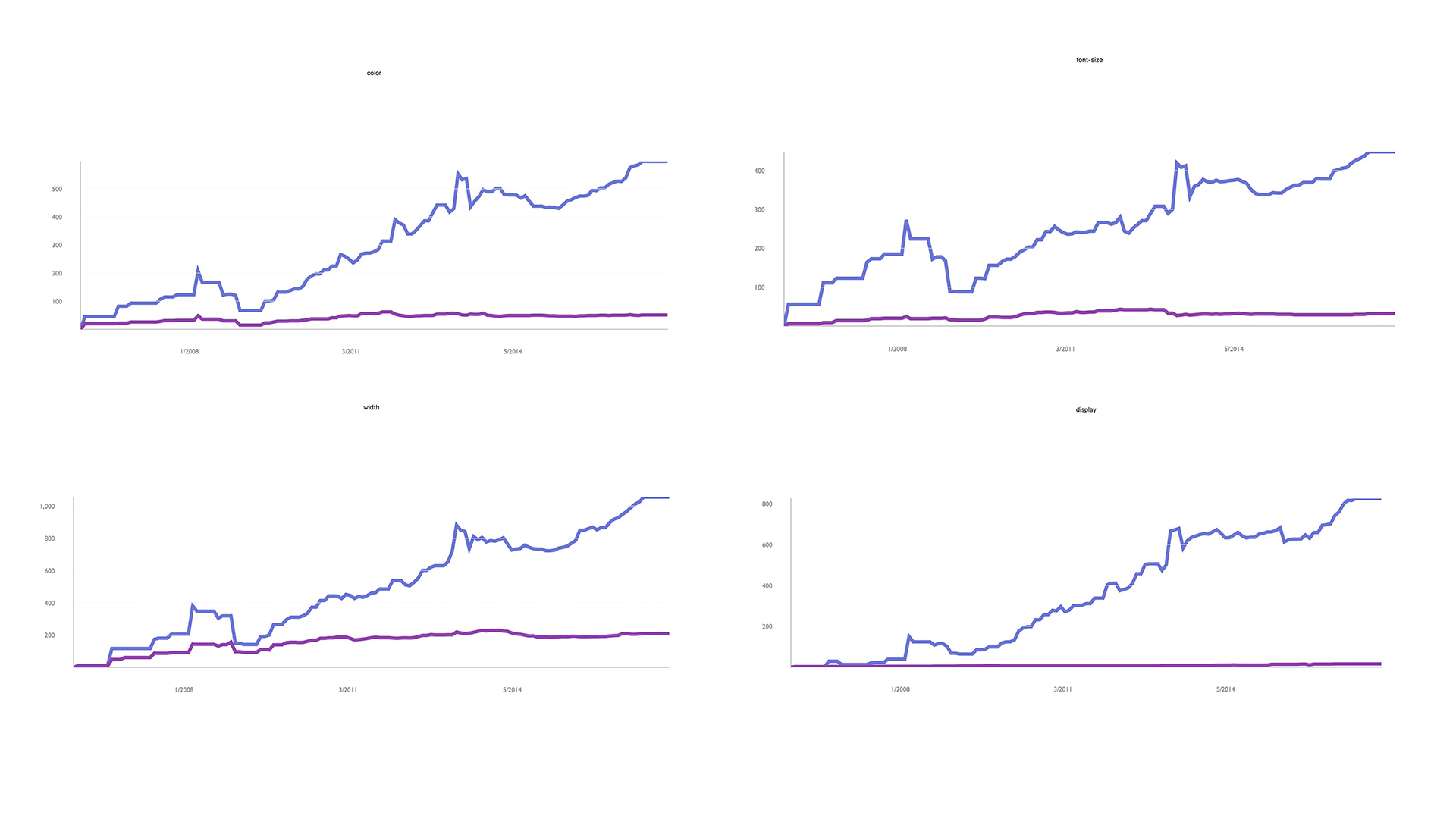 43 |
44 |
43 |
44 |  45 |
46 |
47 | You can learn a bunch just by analyzing your own site. *But, what does it look
48 | like to see this at 10,000 feet?*
49 |
50 | [Ask Audience]
51 | What do you think you could learn by analyzing this data? What kind of tools could you build with it?
52 |
53 | Some possibilities that come to mind for me:
54 | - Can analyze values and look for trends
55 | - Find most common property value rules for given components with common class names
56 | - Identify pattern outliers
57 | - Find common mistakes and try to build automated tools to solve them
58 | - Could overlay other data: Browser usage, timeline of introduction of various technologies (frameworks, addiitons to the spec, etc.)
59 | - We can visualize the history of design systems. We can animate them and watch how they evolve over time!
60 | - Given an array of urls, you could visualize the intersection of common values
61 | for things like: type scale, colors, background colors, font-family. This can
62 | help show how consistently your brand is implmented across a number of
63 | different front-end code bases. Most companies have different code bases
64 | for: their marketing site, their blog, their app, docs, external status
65 | page, and potentially a number of other micro sites. Having a feedback
66 | loop of common values can be helpful when trying to standardize an
67 | existing palette, or creating a feedback loop moving forward to see if you
68 | are becoming more or less consistent.
69 |
70 | [Harley Turan](https://twitter.com/hturan), scraped a bunch of data and did exactly this. Here is a collection of color
71 | palettes pulled from multiple sites that belong to the same company visualized from 2009 through 2017.
72 |
73 |
45 |
46 |
47 | You can learn a bunch just by analyzing your own site. *But, what does it look
48 | like to see this at 10,000 feet?*
49 |
50 | [Ask Audience]
51 | What do you think you could learn by analyzing this data? What kind of tools could you build with it?
52 |
53 | Some possibilities that come to mind for me:
54 | - Can analyze values and look for trends
55 | - Find most common property value rules for given components with common class names
56 | - Identify pattern outliers
57 | - Find common mistakes and try to build automated tools to solve them
58 | - Could overlay other data: Browser usage, timeline of introduction of various technologies (frameworks, addiitons to the spec, etc.)
59 | - We can visualize the history of design systems. We can animate them and watch how they evolve over time!
60 | - Given an array of urls, you could visualize the intersection of common values
61 | for things like: type scale, colors, background colors, font-family. This can
62 | help show how consistently your brand is implmented across a number of
63 | different front-end code bases. Most companies have different code bases
64 | for: their marketing site, their blog, their app, docs, external status
65 | page, and potentially a number of other micro sites. Having a feedback
66 | loop of common values can be helpful when trying to standardize an
67 | existing palette, or creating a feedback loop moving forward to see if you
68 | are becoming more or less consistent.
69 |
70 | [Harley Turan](https://twitter.com/hturan), scraped a bunch of data and did exactly this. Here is a collection of color
71 | palettes pulled from multiple sites that belong to the same company visualized from 2009 through 2017.
72 |
73 |  74 |
75 | Now those are just a few half-baked ideas around what you can do to analyze static
76 | files. And I'd love to do nothing else then to sit and chat about what we can do with
77 | all of this data but that's a different story for a different time.
78 |
79 | Below is a list of css properties. I often think of css as the styling api for
80 | html. At first glance it's a lot of stuff. Especially if you're a beginner.
81 |
82 | But you can build a lot of pretty neat UI without worrying about a lot of these
83 | properties and how they work. When I am a beginner one of the most difficult
84 | things is figuring out what *to* worry about and what *not to*. I can confidently
85 | say, when styling a button, I've never needed to set caption-side. Or
86 | counter-increment, counter-reset, or volume for that matter. This doesn't mean you
87 | should never use them, but they aren't common properties attached to button
88 | styles.
89 |
90 | Can we use this pattern to potentially make front-end code more accessible for new people?
91 |
92 | Components could, essentially have all of the necessary visual styling properties
93 | exposed, where a designer can configure the values they want to pass in.
94 |
95 | Instead of a blank slate, they could discover common things to account for
96 | within different components. The pseudo state :focus would be a tough thing to
97 | intuitively account for if you've never worked on the web before. Offering it
98 | in configuration can at the very least, offer guidance around what to research.
99 |
100 |
101 | *List of Css properties*
102 | ```
103 | accelerator
104 | azimuth
105 | background
106 | background-attachment
107 | background-color
108 | background-image
109 | background-position
110 | background-position-x
111 | background-position-y
112 | background-repeat
113 | behavior
114 | border
115 | border-bottom
116 | border-bottom-color
117 | border-bottom-style
118 | border-bottom-width
119 | border-collapse
120 | border-color
121 | border-left
122 | border-left-color
123 | border-left-style
124 | border-left-width
125 | border-right
126 | border-right-color
127 | border-right-style
128 | border-right-width
129 | border-spacing
130 | border-style
131 | border-top
132 | border-top-color
133 | border-top-style
134 | border-top-width
135 | border-width
136 | bottom
137 | caption-side
138 | clear
139 | clip
140 | color
141 | content
142 | counter-increment
143 | counter-reset
144 | cue
145 | cue-after
146 | cue-before
147 | cursor
148 | direction
149 | display
150 | elevation
151 | empty-cells
152 | filter
153 | float
154 | font
155 | font-family
156 | font-size
157 | font-size-adjust
158 | font-stretch
159 | font-style
160 | font-variant
161 | font-weight
162 | height
163 | ime-mode
164 | include-source
165 | layer-background-color
166 | layer-background-image
167 | layout-flow
168 | layout-grid
169 | layout-grid-char
170 | layout-grid-char-spacing
171 | layout-grid-line
172 | layout-grid-mode
173 | layout-grid-type
174 | left
175 | letter-spacing
176 | line-break
177 | line-height
178 | list-style
179 | list-style-image
180 | list-style-position
181 | list-style-type
182 | margin
183 | margin-bottom
184 | margin-left
185 | margin-right
186 | margin-top
187 | marker-offset
188 | marks
189 | max-height
190 | max-width
191 | min-height
192 | min-width
193 | orphans
194 | outline
195 | outline-color
196 | outline-style
197 | outline-width
198 | overflow
199 | overflow-X
200 | overflow-Y
201 | padding
202 | padding-bottom
203 | padding-left
204 | padding-right
205 | padding-top
206 | page
207 | page-break-after
208 | page-break-before
209 | page-break-inside
210 | pause
211 | pause-after
212 | pause-before
213 | pitch
214 | pitch-range
215 | play-during
216 | position
217 | quotes
218 | -replace
219 | richness
220 | right
221 | ruby-align
222 | ruby-overhang
223 | ruby-position
224 | -set-link-source
225 | size
226 | speak
227 | speak-header
228 | speak-numeral
229 | speak-punctuation
230 | speech-rate
231 | stress
232 | scrollbar-arrow-color
233 | scrollbar-base-color
234 | scrollbar-dark-shadow-color
235 | scrollbar-face-color
236 | scrollbar-highlight-color
237 | scrollbar-shadow-color
238 | scrollbar-3d-light-color
239 | scrollbar-track-color
240 | table-layout
241 | text-align
242 | text-align-last
243 | text-decoration
244 | text-indent
245 | text-justify
246 | text-overflow
247 | text-shadow
248 | text-transform
249 | text-autospace
250 | text-kashida-space
251 | text-underline-position
252 | top
253 | unicode-bidi
254 | -use-link-source
255 | vertical-align
256 | visibility
257 | voice-family
258 | volume
259 | white-space
260 | widows
261 | width
262 | word-break
263 | word-spacing
264 | word-wrap
265 | writing-mode
266 | z-index
267 | zoom
268 | ```
269 |
270 | Some people [jxnblk](http://jxnblk.com) have told me that Component Styling API is a
271 | horrible name for this concept and he's likely correct. Regardless, I think the
272 | following descriptions, from a website called wikipedia, are interesting to
273 | consider.
274 |
275 | *API: Application programming interface*
276 |
277 | > "In general terms, it is a set of clearly defined methods of communication between various software components."
278 |
279 | > "By abstracting the underlying implementation and only exposing objects or actions the developer needs, an API simplifies programming."
280 |
281 | > "Thus, the design of an API attempts to provide only the tools a user would expect."
282 |
283 | [https://en.wikipedia.org/wiki/Application_programming_interface](https://en.wikipedia.org/wiki/Application_programming_interface)
284 |
285 | When I'm styling a button, I don't expect to use volume. Or page-break. Or a
286 | number of other properties. The goal though is not to eliminate options, it's
287 | to narrow focus on the essential, allowing for expansion and exploration if
288 | necessary. But this idea defining a component API has benefits extending beyond
289 | this.
290 |
291 | The most influential tip on how to think about designing a component I've ever
292 | seen is from Nicole Sullivan's excellent article [The media object saves
293 | hundreds of lines of
294 | code](http://www.stubbornella.org/content/2010/06/25/the-media-object-saves-hundreds-of-lines-of-code/)
295 |
296 | > "When I’m building a new object, the first thing I do is to figure out which parts are reusable components, and define what I know and do not know about them."
297 | > "For example: Can be nested, Optional right button, Must clearfix"
298 | - [Nicole Sullivan](http://stubbornella.org)
299 |
300 | I can't recommend this process for designing and developing components enough.
301 | One of the things I like about react and css in js, is that it's easy to work
302 | within this mental model. It's helpful to actively think and sketch out what
303 | you know and what you don't know. This can help you build components that are
304 | more resiliant, flexible, and reusable.
305 |
306 | So, say we defined some scales, or options to work with for the following
307 | properties.
308 |
309 | #### Typography
310 | - Font-family
311 | - Line-height
312 | - Type-scale
313 | - Measure (max line length)
314 | - Font Weights
315 | - Text Transform
316 |
317 | #### Layout
318 | - Spacing
319 | - Width
320 |
321 | #### Theme
322 | - Colors
323 | - Border Widths
324 | - Border Colors
325 | - Border Radii
326 | - Box Shadows
327 |
328 | #### Motion
329 | - Animation speed
330 | - Easing Functions
331 | - Movement patterns
332 |
333 | Maybe this would look something like this
334 |
335 | ```
336 | const theme = {
337 | breakpoints: [
338 | 36, 48, 64
339 | ],
340 | fontFamily:[ '"Gotham", "Avenir Next", "Proxima Nova", "Helvetica"' ],
341 | fontSize: [
342 | 12, 14, 16, 20, 24, 32, 48, 64, 96, 128
343 | ],
344 | fontWeight: [ 400, 600, 700 ],
345 | lineHeight: [ 1, 1.25, 1.5 ],
346 | colors: [
347 | { text: "#000", bg: "#fff" },
348 | { text: "#374047", bg: "#f8f9f9" },
349 | { text: "#7f8a93", bg: "#f8f9f9" },
350 | { text: "#0077cc", bg: "#f8f9f9" },
351 | { text: "#005da0", bg: "#f8f9f9" },
352 | { text: "#00365d", bg: "#f8f9f9" },
353 | { text: "#00a243", bg: "#fff" },
354 | ],
355 | borderStyle: [
356 | 'solid',
357 | 'double',
358 | 'dotted'
359 | ],
360 | borderWidth: [ 0, 1, 2, 4 ],
361 | borderDirection: [
362 | 'all',
363 | 'top',
364 | 'bottom'
365 | ],
366 | radii: [
367 | 0, 3, 5, 17, 9999
368 | ],
369 | space: [
370 | 0, 2, 4, 8, 16, 32, 64, 128, 256, 512
371 | ],
372 | measure: [ '20em', '30em', '34em' ],
373 | boxShadow: [ '0 0 16px rgba(0,0,0,.2)' ],
374 | }
375 |
376 | export default theme
377 | ```
378 |
379 | Some of you might have already seen a file like this before. Maybe it was a js
380 | file, maybe it was a sass, less, or stylus file. This is pretty boring and
381 | there isn't anything new about it. It's just a theme.
382 |
383 | Thinking about the previous quote by Nicole Sullivan... What if I had to
384 | design a button and I wanted it to use values from our design system. We could
385 | define the styling API for a button. (People love buttons.) Potentially, we
386 | could define a template for a button styling API. So we'd need to think about
387 | which properties we *always* want exposed. I think it's safe to say that people
388 | should be able to set the background color on a button. The default color isn't
389 | perfect or anything. It's reasonable for a well designed interface to have buttons with
390 | different background colors. As a section in the button API we'd also want to
391 | declare which properties should be available to style on hover. I believe it's reasonable
392 | to change the background color on hover. So I think that should also be a part of the
393 | API. Returning to the base part of the button API, it would be seemingly
394 | reasonable to be able to set the font-weight to something other than the
395 | default. In all my years of browsing the web I've never hovered on a button and
396 | seen the font-weight change and thought "This is so nice." My first thought is
397 | generally "Well this must be a bug." So here we could choose to leave font-weight out of
398 | the hover, focus, and active sections in the API.
399 |
400 | A generic template for a button styling API might look like this:
401 |
402 | ```
403 | import theme from './theme'
404 |
405 | const buttonThemeTemplate = {
406 |
407 | // Typography
408 | fontFamily: [ ],
409 | fontSize: [ ],
410 | fontWeight: [ ],
411 | textTransform: [ ],
412 |
413 | // Palette
414 | colors: [ ],
415 | backgroundColors: [ ],
416 |
417 | // Borders
418 | borderColors: [ ]
419 | borderRadius: [ ],
420 | borderStyle: [ ],
421 | borderWidth: [ ],
422 | borderDirections: [ ],
423 |
424 | // Spacing
425 | paddingTop: [],
426 | paddingLeft: [],
427 | paddingBottom: [],
428 | paddingRight: [],
429 |
430 | // Hover states
431 | hoverColor: [ ],
432 | hoverBg: [ ],
433 | hoverBoxShadow: [ ],
434 | hoverBorderColor: [ ],
435 | hoverSize: [ ],
436 |
437 | // Focus states
438 | focusColor: [ ],
439 | focusBg: [ ],
440 | focusBorderColor: [ ],
441 | focusBoxShadow: [ ],
442 | focusSize: [ ],
443 |
444 | // Focus states
445 | activeColor: [ ],
446 | activeBg: [ ],
447 | activeBorderColor: [ ],
448 | activeBoxShadow: [ ],
449 | activeSize: [ ],
450 |
451 | transitionProperty: [ ],
452 | transitionDuration: [ ],
453 | transitionTimingFunction: [ ],
454 | }
455 |
456 | export default buttonThemeTemplate
457 | ```
458 |
459 | Then we could define what values we want to pass in. We might pass in an entire
460 | array, declare literal values, pass in a filtered array. We have javascript. We
461 | can do whatever we want!
462 |
463 | ```
464 | import theme from './theme'
465 |
466 | const buttonTheme = {
467 | radii: theme.radii, // Entire scale
468 | space: [
469 | // Explicit steps from the scale
470 | theme.space[3],
471 | theme.space[4],
472 | ],
473 | fontSize: theme.fontSize.slice(0,-8), // Everything but the last 8 steps in the scale
474 | fontFamily: theme.fontFamily[0], // An explicit step in the scale
475 | borderStyle: [
476 | theme.borderStyle[0],
477 | theme.borderStyle[1]
478 | ],
479 | borderWidth: theme.borderWidth,
480 | fontWeight: theme.fontWeight,
481 | colors: theme.colors,
482 | backgroundColors: theme.colors,
483 |
484 | // hover, focus, active states
485 |
486 | hoverColor: [
487 | theme.colors[0].text,
488 | theme.colors[1].text
489 | ],
490 | hoverBgColor: [
491 | theme.colors[0].bg,
492 | theme.colors[0].bg
493 | ],
494 | focusColor: [
495 | theme.colors[1].text,
496 | theme.colors[1].bg
497 | ],
498 | textTransform: ['uppercase', 'capitalized'],
499 | transitionProperty: ['opacity', 'color', 'background-color'],
500 | transitionDuration: ['.25s'],
501 | transitionTimingFunction: ['ease-out'],
502 | }
503 |
504 | export default buttonTheme
505 | ```
506 |
507 | As a design community, we could make boilerplate config files for common ui components.
508 | Over time we could reinvent fewer and fewer wheels. This would allow us to go deeper on
509 | other areas that haven't been explored as much as button styles.
510 |
511 | This is where I think it gets *really* interesting.
512 |
513 | Now we have a system.
514 | We can use combinational logic to generate all possible combinations of buttons
515 | given the input provided by a theme file. We could also use this pattern to
516 | create a finite state machine, and visualize transitions between any discrete
517 | state a given component can be in.
518 |
519 | A simple config file like this generates thousands and thousands of button designs.
520 | Here is an example of generating avatars and buttons.
521 |
522 | https://examples-jchwaftrgo.now.sh
523 |
524 | Or we can make this a finite state machine and animate between the options. You
525 | know, if you don't like scrolling for days and days and days. (Again, animation
526 | created & provided by the one and only Harley Turan).
527 |
528 | https://examples-wrjcynrjhj.now.sh
529 |
530 | *Let's step back and think at ten thousand feet again.*
531 |
532 | - We can show how many options a design system can generate. This can be
533 | helpful because some people feel they might be constrained by working with
534 | defined scales. This can help show how varied their visual designs can still
535 | be. A lot of people still haven't worked with scales and as a creative person
536 | constraint can be scary at first.
537 | - We can quickly identify desirable regions, which can help us quickly discover
538 | patterns of inputs needed for a desired output. This can expose properties
539 | you might want to couple together and set rules for. Sense of proportion can
540 | change dramatically at each end of the scale.
541 | - Could automatically a/b test design options with real user metrics
542 | - Wire up options to an interface that allows for collaborative voting on which
543 | component variations feel most on brand. You could even hook this voting up
544 | to a neural network.
545 | - One of if not the most difficult part about image classification is coming up with the training data.
546 | The generated data could help train an image classifier which will in turn
547 | help audit existing UI on websites. Imagine being able to input a url and
548 | query the design with questions lke:
549 | - "Show me all of the buttons."
550 | - "Show me all of the orange buttons."
551 | - "Show me all of the buttons that have inaccessible color combinations."
552 |
553 | This is an exciting reality to live in. We can more quickly generate lots of design
554 | options to test with real users. We can shorten the feedback loop around discovering
555 | what matters and what doesn't. This is a stark contrast to our current reality, which is that
556 | most designs we ship have not been validated with real users. We don't design multiple options in
557 | parallel. We end up designing a single option that is optimized for getting stakeholder signoff in a series
558 | of status meetings.
559 |
560 | But at the very least this concept is exciting to me because I'm very lazy and
561 | I don't want to design buttons anymore.
562 |
--------------------------------------------------------------------------------
/examples/README.md:
--------------------------------------------------------------------------------
1 | This project was bootstrapped with [Create React App](https://github.com/facebookincubator/create-react-app).
2 |
3 | Below you will find some information on how to perform common tasks.
74 |
75 | Now those are just a few half-baked ideas around what you can do to analyze static
76 | files. And I'd love to do nothing else then to sit and chat about what we can do with
77 | all of this data but that's a different story for a different time.
78 |
79 | Below is a list of css properties. I often think of css as the styling api for
80 | html. At first glance it's a lot of stuff. Especially if you're a beginner.
81 |
82 | But you can build a lot of pretty neat UI without worrying about a lot of these
83 | properties and how they work. When I am a beginner one of the most difficult
84 | things is figuring out what *to* worry about and what *not to*. I can confidently
85 | say, when styling a button, I've never needed to set caption-side. Or
86 | counter-increment, counter-reset, or volume for that matter. This doesn't mean you
87 | should never use them, but they aren't common properties attached to button
88 | styles.
89 |
90 | Can we use this pattern to potentially make front-end code more accessible for new people?
91 |
92 | Components could, essentially have all of the necessary visual styling properties
93 | exposed, where a designer can configure the values they want to pass in.
94 |
95 | Instead of a blank slate, they could discover common things to account for
96 | within different components. The pseudo state :focus would be a tough thing to
97 | intuitively account for if you've never worked on the web before. Offering it
98 | in configuration can at the very least, offer guidance around what to research.
99 |
100 |
101 | *List of Css properties*
102 | ```
103 | accelerator
104 | azimuth
105 | background
106 | background-attachment
107 | background-color
108 | background-image
109 | background-position
110 | background-position-x
111 | background-position-y
112 | background-repeat
113 | behavior
114 | border
115 | border-bottom
116 | border-bottom-color
117 | border-bottom-style
118 | border-bottom-width
119 | border-collapse
120 | border-color
121 | border-left
122 | border-left-color
123 | border-left-style
124 | border-left-width
125 | border-right
126 | border-right-color
127 | border-right-style
128 | border-right-width
129 | border-spacing
130 | border-style
131 | border-top
132 | border-top-color
133 | border-top-style
134 | border-top-width
135 | border-width
136 | bottom
137 | caption-side
138 | clear
139 | clip
140 | color
141 | content
142 | counter-increment
143 | counter-reset
144 | cue
145 | cue-after
146 | cue-before
147 | cursor
148 | direction
149 | display
150 | elevation
151 | empty-cells
152 | filter
153 | float
154 | font
155 | font-family
156 | font-size
157 | font-size-adjust
158 | font-stretch
159 | font-style
160 | font-variant
161 | font-weight
162 | height
163 | ime-mode
164 | include-source
165 | layer-background-color
166 | layer-background-image
167 | layout-flow
168 | layout-grid
169 | layout-grid-char
170 | layout-grid-char-spacing
171 | layout-grid-line
172 | layout-grid-mode
173 | layout-grid-type
174 | left
175 | letter-spacing
176 | line-break
177 | line-height
178 | list-style
179 | list-style-image
180 | list-style-position
181 | list-style-type
182 | margin
183 | margin-bottom
184 | margin-left
185 | margin-right
186 | margin-top
187 | marker-offset
188 | marks
189 | max-height
190 | max-width
191 | min-height
192 | min-width
193 | orphans
194 | outline
195 | outline-color
196 | outline-style
197 | outline-width
198 | overflow
199 | overflow-X
200 | overflow-Y
201 | padding
202 | padding-bottom
203 | padding-left
204 | padding-right
205 | padding-top
206 | page
207 | page-break-after
208 | page-break-before
209 | page-break-inside
210 | pause
211 | pause-after
212 | pause-before
213 | pitch
214 | pitch-range
215 | play-during
216 | position
217 | quotes
218 | -replace
219 | richness
220 | right
221 | ruby-align
222 | ruby-overhang
223 | ruby-position
224 | -set-link-source
225 | size
226 | speak
227 | speak-header
228 | speak-numeral
229 | speak-punctuation
230 | speech-rate
231 | stress
232 | scrollbar-arrow-color
233 | scrollbar-base-color
234 | scrollbar-dark-shadow-color
235 | scrollbar-face-color
236 | scrollbar-highlight-color
237 | scrollbar-shadow-color
238 | scrollbar-3d-light-color
239 | scrollbar-track-color
240 | table-layout
241 | text-align
242 | text-align-last
243 | text-decoration
244 | text-indent
245 | text-justify
246 | text-overflow
247 | text-shadow
248 | text-transform
249 | text-autospace
250 | text-kashida-space
251 | text-underline-position
252 | top
253 | unicode-bidi
254 | -use-link-source
255 | vertical-align
256 | visibility
257 | voice-family
258 | volume
259 | white-space
260 | widows
261 | width
262 | word-break
263 | word-spacing
264 | word-wrap
265 | writing-mode
266 | z-index
267 | zoom
268 | ```
269 |
270 | Some people [jxnblk](http://jxnblk.com) have told me that Component Styling API is a
271 | horrible name for this concept and he's likely correct. Regardless, I think the
272 | following descriptions, from a website called wikipedia, are interesting to
273 | consider.
274 |
275 | *API: Application programming interface*
276 |
277 | > "In general terms, it is a set of clearly defined methods of communication between various software components."
278 |
279 | > "By abstracting the underlying implementation and only exposing objects or actions the developer needs, an API simplifies programming."
280 |
281 | > "Thus, the design of an API attempts to provide only the tools a user would expect."
282 |
283 | [https://en.wikipedia.org/wiki/Application_programming_interface](https://en.wikipedia.org/wiki/Application_programming_interface)
284 |
285 | When I'm styling a button, I don't expect to use volume. Or page-break. Or a
286 | number of other properties. The goal though is not to eliminate options, it's
287 | to narrow focus on the essential, allowing for expansion and exploration if
288 | necessary. But this idea defining a component API has benefits extending beyond
289 | this.
290 |
291 | The most influential tip on how to think about designing a component I've ever
292 | seen is from Nicole Sullivan's excellent article [The media object saves
293 | hundreds of lines of
294 | code](http://www.stubbornella.org/content/2010/06/25/the-media-object-saves-hundreds-of-lines-of-code/)
295 |
296 | > "When I’m building a new object, the first thing I do is to figure out which parts are reusable components, and define what I know and do not know about them."
297 | > "For example: Can be nested, Optional right button, Must clearfix"
298 | - [Nicole Sullivan](http://stubbornella.org)
299 |
300 | I can't recommend this process for designing and developing components enough.
301 | One of the things I like about react and css in js, is that it's easy to work
302 | within this mental model. It's helpful to actively think and sketch out what
303 | you know and what you don't know. This can help you build components that are
304 | more resiliant, flexible, and reusable.
305 |
306 | So, say we defined some scales, or options to work with for the following
307 | properties.
308 |
309 | #### Typography
310 | - Font-family
311 | - Line-height
312 | - Type-scale
313 | - Measure (max line length)
314 | - Font Weights
315 | - Text Transform
316 |
317 | #### Layout
318 | - Spacing
319 | - Width
320 |
321 | #### Theme
322 | - Colors
323 | - Border Widths
324 | - Border Colors
325 | - Border Radii
326 | - Box Shadows
327 |
328 | #### Motion
329 | - Animation speed
330 | - Easing Functions
331 | - Movement patterns
332 |
333 | Maybe this would look something like this
334 |
335 | ```
336 | const theme = {
337 | breakpoints: [
338 | 36, 48, 64
339 | ],
340 | fontFamily:[ '"Gotham", "Avenir Next", "Proxima Nova", "Helvetica"' ],
341 | fontSize: [
342 | 12, 14, 16, 20, 24, 32, 48, 64, 96, 128
343 | ],
344 | fontWeight: [ 400, 600, 700 ],
345 | lineHeight: [ 1, 1.25, 1.5 ],
346 | colors: [
347 | { text: "#000", bg: "#fff" },
348 | { text: "#374047", bg: "#f8f9f9" },
349 | { text: "#7f8a93", bg: "#f8f9f9" },
350 | { text: "#0077cc", bg: "#f8f9f9" },
351 | { text: "#005da0", bg: "#f8f9f9" },
352 | { text: "#00365d", bg: "#f8f9f9" },
353 | { text: "#00a243", bg: "#fff" },
354 | ],
355 | borderStyle: [
356 | 'solid',
357 | 'double',
358 | 'dotted'
359 | ],
360 | borderWidth: [ 0, 1, 2, 4 ],
361 | borderDirection: [
362 | 'all',
363 | 'top',
364 | 'bottom'
365 | ],
366 | radii: [
367 | 0, 3, 5, 17, 9999
368 | ],
369 | space: [
370 | 0, 2, 4, 8, 16, 32, 64, 128, 256, 512
371 | ],
372 | measure: [ '20em', '30em', '34em' ],
373 | boxShadow: [ '0 0 16px rgba(0,0,0,.2)' ],
374 | }
375 |
376 | export default theme
377 | ```
378 |
379 | Some of you might have already seen a file like this before. Maybe it was a js
380 | file, maybe it was a sass, less, or stylus file. This is pretty boring and
381 | there isn't anything new about it. It's just a theme.
382 |
383 | Thinking about the previous quote by Nicole Sullivan... What if I had to
384 | design a button and I wanted it to use values from our design system. We could
385 | define the styling API for a button. (People love buttons.) Potentially, we
386 | could define a template for a button styling API. So we'd need to think about
387 | which properties we *always* want exposed. I think it's safe to say that people
388 | should be able to set the background color on a button. The default color isn't
389 | perfect or anything. It's reasonable for a well designed interface to have buttons with
390 | different background colors. As a section in the button API we'd also want to
391 | declare which properties should be available to style on hover. I believe it's reasonable
392 | to change the background color on hover. So I think that should also be a part of the
393 | API. Returning to the base part of the button API, it would be seemingly
394 | reasonable to be able to set the font-weight to something other than the
395 | default. In all my years of browsing the web I've never hovered on a button and
396 | seen the font-weight change and thought "This is so nice." My first thought is
397 | generally "Well this must be a bug." So here we could choose to leave font-weight out of
398 | the hover, focus, and active sections in the API.
399 |
400 | A generic template for a button styling API might look like this:
401 |
402 | ```
403 | import theme from './theme'
404 |
405 | const buttonThemeTemplate = {
406 |
407 | // Typography
408 | fontFamily: [ ],
409 | fontSize: [ ],
410 | fontWeight: [ ],
411 | textTransform: [ ],
412 |
413 | // Palette
414 | colors: [ ],
415 | backgroundColors: [ ],
416 |
417 | // Borders
418 | borderColors: [ ]
419 | borderRadius: [ ],
420 | borderStyle: [ ],
421 | borderWidth: [ ],
422 | borderDirections: [ ],
423 |
424 | // Spacing
425 | paddingTop: [],
426 | paddingLeft: [],
427 | paddingBottom: [],
428 | paddingRight: [],
429 |
430 | // Hover states
431 | hoverColor: [ ],
432 | hoverBg: [ ],
433 | hoverBoxShadow: [ ],
434 | hoverBorderColor: [ ],
435 | hoverSize: [ ],
436 |
437 | // Focus states
438 | focusColor: [ ],
439 | focusBg: [ ],
440 | focusBorderColor: [ ],
441 | focusBoxShadow: [ ],
442 | focusSize: [ ],
443 |
444 | // Focus states
445 | activeColor: [ ],
446 | activeBg: [ ],
447 | activeBorderColor: [ ],
448 | activeBoxShadow: [ ],
449 | activeSize: [ ],
450 |
451 | transitionProperty: [ ],
452 | transitionDuration: [ ],
453 | transitionTimingFunction: [ ],
454 | }
455 |
456 | export default buttonThemeTemplate
457 | ```
458 |
459 | Then we could define what values we want to pass in. We might pass in an entire
460 | array, declare literal values, pass in a filtered array. We have javascript. We
461 | can do whatever we want!
462 |
463 | ```
464 | import theme from './theme'
465 |
466 | const buttonTheme = {
467 | radii: theme.radii, // Entire scale
468 | space: [
469 | // Explicit steps from the scale
470 | theme.space[3],
471 | theme.space[4],
472 | ],
473 | fontSize: theme.fontSize.slice(0,-8), // Everything but the last 8 steps in the scale
474 | fontFamily: theme.fontFamily[0], // An explicit step in the scale
475 | borderStyle: [
476 | theme.borderStyle[0],
477 | theme.borderStyle[1]
478 | ],
479 | borderWidth: theme.borderWidth,
480 | fontWeight: theme.fontWeight,
481 | colors: theme.colors,
482 | backgroundColors: theme.colors,
483 |
484 | // hover, focus, active states
485 |
486 | hoverColor: [
487 | theme.colors[0].text,
488 | theme.colors[1].text
489 | ],
490 | hoverBgColor: [
491 | theme.colors[0].bg,
492 | theme.colors[0].bg
493 | ],
494 | focusColor: [
495 | theme.colors[1].text,
496 | theme.colors[1].bg
497 | ],
498 | textTransform: ['uppercase', 'capitalized'],
499 | transitionProperty: ['opacity', 'color', 'background-color'],
500 | transitionDuration: ['.25s'],
501 | transitionTimingFunction: ['ease-out'],
502 | }
503 |
504 | export default buttonTheme
505 | ```
506 |
507 | As a design community, we could make boilerplate config files for common ui components.
508 | Over time we could reinvent fewer and fewer wheels. This would allow us to go deeper on
509 | other areas that haven't been explored as much as button styles.
510 |
511 | This is where I think it gets *really* interesting.
512 |
513 | Now we have a system.
514 | We can use combinational logic to generate all possible combinations of buttons
515 | given the input provided by a theme file. We could also use this pattern to
516 | create a finite state machine, and visualize transitions between any discrete
517 | state a given component can be in.
518 |
519 | A simple config file like this generates thousands and thousands of button designs.
520 | Here is an example of generating avatars and buttons.
521 |
522 | https://examples-jchwaftrgo.now.sh
523 |
524 | Or we can make this a finite state machine and animate between the options. You
525 | know, if you don't like scrolling for days and days and days. (Again, animation
526 | created & provided by the one and only Harley Turan).
527 |
528 | https://examples-wrjcynrjhj.now.sh
529 |
530 | *Let's step back and think at ten thousand feet again.*
531 |
532 | - We can show how many options a design system can generate. This can be
533 | helpful because some people feel they might be constrained by working with
534 | defined scales. This can help show how varied their visual designs can still
535 | be. A lot of people still haven't worked with scales and as a creative person
536 | constraint can be scary at first.
537 | - We can quickly identify desirable regions, which can help us quickly discover
538 | patterns of inputs needed for a desired output. This can expose properties
539 | you might want to couple together and set rules for. Sense of proportion can
540 | change dramatically at each end of the scale.
541 | - Could automatically a/b test design options with real user metrics
542 | - Wire up options to an interface that allows for collaborative voting on which
543 | component variations feel most on brand. You could even hook this voting up
544 | to a neural network.
545 | - One of if not the most difficult part about image classification is coming up with the training data.
546 | The generated data could help train an image classifier which will in turn
547 | help audit existing UI on websites. Imagine being able to input a url and
548 | query the design with questions lke:
549 | - "Show me all of the buttons."
550 | - "Show me all of the orange buttons."
551 | - "Show me all of the buttons that have inaccessible color combinations."
552 |
553 | This is an exciting reality to live in. We can more quickly generate lots of design
554 | options to test with real users. We can shorten the feedback loop around discovering
555 | what matters and what doesn't. This is a stark contrast to our current reality, which is that
556 | most designs we ship have not been validated with real users. We don't design multiple options in
557 | parallel. We end up designing a single option that is optimized for getting stakeholder signoff in a series
558 | of status meetings.
559 |
560 | But at the very least this concept is exciting to me because I'm very lazy and
561 | I don't want to design buttons anymore.
562 |
--------------------------------------------------------------------------------
/examples/README.md:
--------------------------------------------------------------------------------
1 | This project was bootstrapped with [Create React App](https://github.com/facebookincubator/create-react-app).
2 |
3 | Below you will find some information on how to perform common tasks.