├── wall.jpg
├── point.png
├── favicon.ico
├── README.md
├── index.html
├── style.css
└── main.js
/wall.jpg:
--------------------------------------------------------------------------------
https://raw.githubusercontent.com/mtt3366/WebNavigation/HEAD/wall.jpg
--------------------------------------------------------------------------------
/point.png:
--------------------------------------------------------------------------------
https://raw.githubusercontent.com/mtt3366/WebNavigation/HEAD/point.png
--------------------------------------------------------------------------------
/favicon.ico:
--------------------------------------------------------------------------------
https://raw.githubusercontent.com/mtt3366/WebNavigation/HEAD/favicon.ico
--------------------------------------------------------------------------------
/README.md:
--------------------------------------------------------------------------------
1 | # WebNavigation
2 |
3 | 键盘样式的导航
4 | 预览图
5 | 
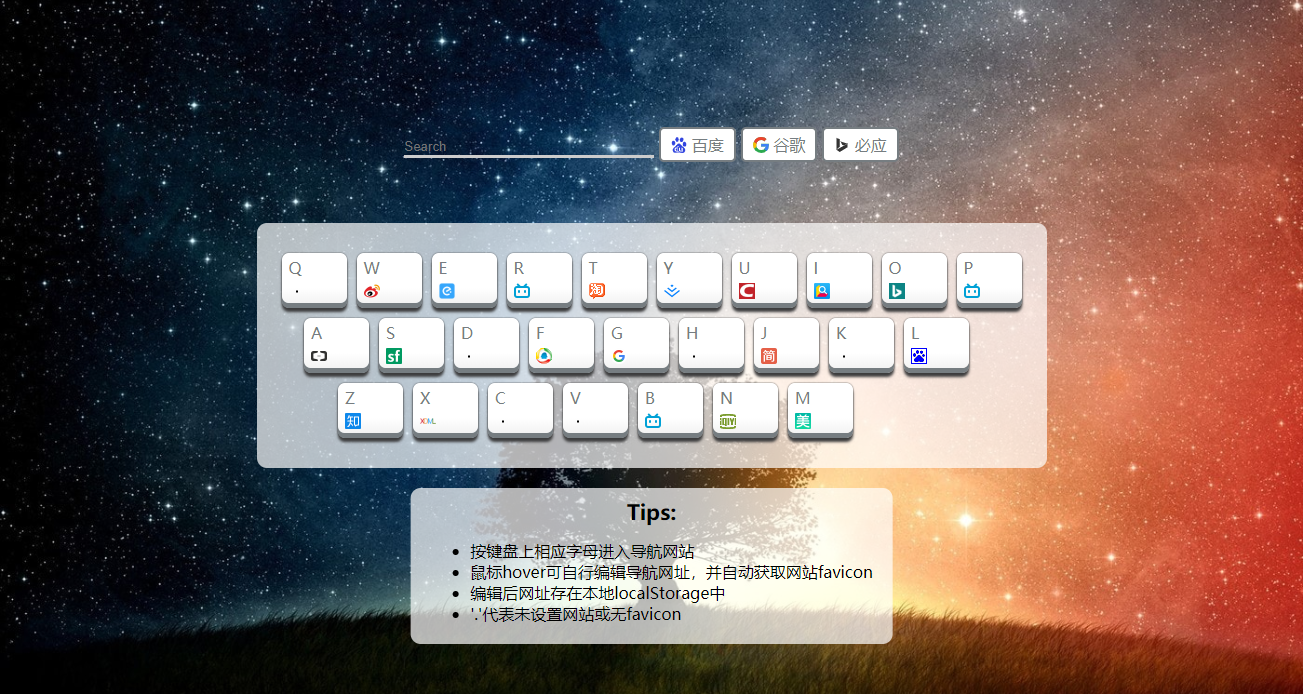
6 | ## 踩坑:
7 | [项目过程记录一](https://segmentfault.com/a/1190000014463632)
8 |
9 | [项目过程记录二](https://segmentfault.com/a/1190000014518824)
10 |
11 | - 当inut获取焦点的时候,如何停止键盘监听事件:具体做法是在input获得焦点的时候添加一个属性,键盘事件再判断是否有这哥属性
12 | - e.currentTarget和e.target的区别,捕获和冒泡
13 | - 点击编辑按钮,阻止事件冒泡
--------------------------------------------------------------------------------
/index.html:
--------------------------------------------------------------------------------
1 |
2 |
3 |
4 |
5 |
6 |
7 |
8 | 马涛涛|WebNavigation
9 |
10 |
11 |
20 |
21 |
22 |
23 |
24 |
25 |
26 |
29 | 百度
30 |
31 |
32 |
35 | 谷歌
36 |
37 |
38 |
41 | 必应
42 |
43 |
47 |
48 |
49 |
50 |
51 |
52 |
53 |
54 |
55 |
56 |
Tips:
57 |
58 |
59 |
60 | - 按键盘上相应字母进入导航网站
61 | - 鼠标hover可自行编辑导航网址,并自动获取网站favicon
62 | - 编辑后网址存在本地localStorage中
63 | - '.'代表未设置网站或无favicon
64 |
65 |
66 |
67 |
68 |
69 |
--------------------------------------------------------------------------------
/style.css:
--------------------------------------------------------------------------------
1 | *{
2 | margin: 0;
3 | border: 0;
4 | }
5 | a{
6 | text-decoration: none;
7 | }
8 | kbd{
9 | display: inline-block;
10 | /*kbd默认是inline属性*/
11 | border: 1px solid red;
12 | width: 4em;
13 | height: 4em;
14 | text-transform: uppercase;
15 | /*文本小写变大写*/
16 | position: relative;
17 |
18 | }
19 | kbd>button{
20 | position: absolute;
21 | right: 0;
22 | bottom: 0;
23 | display: none;
24 | /*绝对定位到右下角*/
25 |
26 | transition: all 0.3s;
27 | border-radius: 2px;
28 | }
29 | kbd:hover>button{
30 | display: inline-block;
31 | /*鼠标浮到kbd上才出现*/
32 | }
33 | kbd>button:hover{
34 | background: rgb(238, 152, 24);
35 | color:#fff;
36 | }
37 | #mainxxxx{
38 | display: inline-block;
39 |
40 | padding: 20px;
41 | background: rgba(255,255,255,0.7);
42 | border-radius: 10px;
43 | }
44 |
45 | body {
46 | /*background: linear-gradient(to bottom, #fff 0%,#888e94 100%);*/
47 | background: #ccc url("./wall.jpg") repeat center center scroll;
48 |
49 | background-size: cover;
50 | /*背景完全覆盖*/
51 |
52 | }
53 | main {
54 | margin: 0;
55 | text-align: center;
56 |
57 | /*绝对居中父元素上的三行代码*/
58 |
59 | display: flex;
60 | justify-content: center;
61 | align-items: center;
62 |
63 | height: 100vh;
64 |
65 | min-width: 800px;
66 | /*设置最小宽度,防止变形*/
67 |
68 | }
69 | /*mainxxx这个div居中*/
70 | #mainxxxx>div:nth-child(2){
71 | margin-left: -30px;
72 |
73 | }
74 | #mainxxxx>div:nth-child(3){
75 | margin-left: -112px;
76 | }
77 | /*美化按键*/
78 | /**/
79 | /*}*/
80 | .kbd{
81 | margin: 0;
82 | padding: 0;
83 | border:0;
84 | width: 65px;
85 | height: 50px;
86 |
87 | /*线性渐变:0-70白色,70-100,fff-f3f3f3渐变*/
88 | background: linear-gradient(to bottom, #fff 0%,#fff 70%,#f3f3f3 100%);
89 | border-radius: 7px;
90 |
91 | /*下方阴影,box-shadow5个最常用属性,分别是左偏移,右偏移,模糊,扩张,颜色*/
92 | box-shadow: 0 5px 0 0 #767d81;
93 | color: #767D81;
94 | font-family: Helvetical;
95 |
96 |
97 | vertical-align: top;
98 | position: relative;
99 | /*用flex布局居中文字*/
100 | /*display: inline-flex;*/
101 | /*align-items: center;*/
102 | /*justify-content: center;*/
103 | }
104 | .kbd_wrapper{
105 | display: inline-block;
106 | vertical-align: top;
107 | /*这两句一定要搭配使用!!!!*/
108 |
109 | width: 65px;
110 | height: 55px;
111 | /*border:1px solid #3C3C3D;*/
112 | border-radius: 7px;
113 | margin: 0 5px;
114 |
115 | /**/
116 | box-shadow: 0 4px 3px 0 #3C3C3D,0 0 1px 0 #3C3C3D;
117 | /*下,一圈*/
118 | }
119 | #mainxxxx>div{
120 | margin: 10px 0;
121 | }
122 |
123 | /*让html和body占满屏幕100%的方法*/
124 | /*方法一:!*html,body{*!*/
125 | /*height: 100%;*/
126 | /*}*/
127 | kbd img{
128 | width: 16px;
129 | height: 16px;
130 | position: absolute;
131 | left: 7px;
132 | bottom: 4px;
133 | }
134 | kbd .text{
135 | position: absolute;
136 | left: 7px;
137 | top: 4px;
138 | }
139 | .kbd_wrapper:hover {
140 | animation: shake 0.82s cubic-bezier(.36,.07,.19,.97) both;
141 | }
142 |
143 | .search{
144 | text-align: center;
145 | position: fixed;
146 | top: 130px;
147 | left: 50%;
148 | transform: translateX(-50%);
149 | min-width: 500px;
150 | }
151 | .search #searchInput{
152 | border: 0;
153 | background: transparent;
154 | color: white;
155 | border-bottom: 3px solid #ccc;
156 | outline: none;
157 | width: 250px;
158 | }
159 | .search .button{
160 | display: inline-block;
161 | background: #fff;
162 | border-radius: 5px;
163 | border: 2px solid #767D81;
164 | color: #767D81;
165 | padding: 5px 10px;
166 | cursor: pointer;
167 | user-select:none;
168 |
169 | transition: all .5s;
170 | }
171 | .search .button:hover{
172 | background: rgb(206, 206, 206);
173 | }
174 |
175 | .tips{
176 | position: fixed;
177 | bottom: 50px;
178 | left: 50%;
179 | transform: translateX(-50%);
180 |
181 | padding:20px;
182 | padding-top: 10px;
183 | background: rgba(255,255,255,0.7);
184 | border-radius: 10px;
185 |
186 | }
187 | .tips .title{
188 | text-align: center;
189 | font-weight: 600;
190 | font-size: 21px;
191 | margin-bottom: 15px;
192 | }
193 | @keyframes shake{
194 | 10%, 90% {
195 | transform: translate3d(-1px, 0, 0);
196 | }
197 | 20%, 80% {
198 | transform: translate3d(2px, 0, 0);
199 | }
200 |
201 | 30%, 50%, 70% {
202 | transform: translate3d(-4px, 0, 0);
203 | }
204 | 40%, 60% {
205 | transform: translate3d(4px, 0, 0);
206 | }
207 | }
208 |
209 |
--------------------------------------------------------------------------------
/main.js:
--------------------------------------------------------------------------------
1 | !function () {
2 | //1. 初始化变量
3 | var startHash = init();
4 | var keys = startHash.keys;
5 | var hash = startHash.hash;
6 |
7 | //2. 生成键盘
8 | generaetKeyboard(keys, hash);
9 |
10 | //3. 监听用户按键盘
11 | listenTiUser(hash);
12 |
13 | //3.2 百度和谷歌的搜索框
14 | createSearch()
15 |
16 |
17 |
18 | //4. 优化代码的函数
19 | function getFromLocalStorage(name) {
20 | return JSON.parse(localStorage.getItem(name) || 'null');
21 | }
22 |
23 | function tag(tagename) {
24 | return document.createElement(tagename);
25 | }
26 |
27 | function createSpan(textContent) {
28 | var span = tag("span");
29 | span.textContent = textContent;
30 | span.className = "text";
31 | return span;
32 | }
33 |
34 | function createButton(id) {
35 | //每一个kbd里面加入button
36 | var button = tag("button");
37 | button.textContent = "编辑";
38 | // 每一个button的id都是row[index2],即kbd里面的内容,以便区分
39 | button.id = id;
40 | //添加button点击事件
41 | button.addEventListener('click', function (jfglkhj) {
42 | //☆☆☆☆这里不能用this,也不能用buttonxx,因为buttonxx只是一个容器,每一次循环,里面放的东西都不一样
43 | // 最后他里面放的东西是最后那个createElement("button").所以不行
44 | //例如
45 | // console.log(button);
46 | // 不管按那个键,所有的打印出来的都是最后一个button
47 | //解决方法:使用 jfglkhj.target ,指的就是当前完整元素.
48 | // 例如:
49 | // console.log(jfglkhj);
50 | //console.log(jfglkhj.target);
51 | // console.log(jfglkhj.target.id);
52 |
53 | var key = jfglkhj.target.id;//比如说v
54 | //或者jfglkhj['target']['id'];
55 | var x = prompt('给我一个网址');//比如说mtt.com
56 |
57 | hash[key] = x;//赋值
58 |
59 | var button2 = jfglkhj.target;
60 | var img2 = button2.previousSibling;
61 |
62 | img2.src = 'http://' + x + '/favicon.ico';
63 | img2.onerror = function (ev) {
64 | ev.target.src = './point.png';
65 | };
66 |
67 |
68 | // 问题:刷新之后编辑的网址没有了
69 | // 解决方法:使用localStorage,只要变就备份,只要刷新就覆盖
70 | //如果hash变更,只要编辑了,我就存
71 | localStorage.setItem("zzz", JSON.stringify(hash));//JSON.stringify(hash)把hash变成字符串,存到zzz变量里备份
72 |
73 | //上面这句代码的作用:localStorage里有很多桶,吧hash存到zzz这个桶里
74 | //每一次编辑,就把新的hash存到 浏览器里
75 | //然后把这个浏览器里的hash覆盖原来的就可以了
76 | //熟悉原理:一变更就存档
77 |
78 | //每次点击编辑后,就把图标换一下
79 |
80 |
81 |
82 | //阻止事件冒泡
83 | event.stopPropagation();
84 | })
85 | return button;
86 | }
87 |
88 | function createImg(domain) {
89 | var img = tag("img");
90 | if (domain) {//判断这个是否存在
91 | img.src = 'http://' + domain + '/favicon.ico';
92 | //加http协议,不然会认为是路径
93 | } else {//undefined
94 | //如果src为空,就会进入当前的网址,导致图片显现不出来,所以给他一个存在的图片
95 | img.src = './point.png';
96 | }
97 | img.onerror = function (ev) {
98 | //onerror事件,监听img的get请求错误事件
99 | ev.target.src = './point.png';
100 | //把没有请求到的错误事件的src定为那个点
101 | };
102 | return img;
103 | }
104 |
105 | function init() {
106 | var keys = {
107 | '0': { 0: 'q', 1: 'w', 2: 'e', 3: 'r', 4: 't', 5: 'y', 6: 'u', 7: 'i', 8: 'o', 9: 'p', length: 10 },
108 | '1': ['a', 's', 'd', 'f', 'g', 'h', 'j', 'k', 'l'],
109 | '2': ['z', 'x', 'c', 'v', 'b', 'n', 'm'],
110 |
111 | 'length': 3
112 | };
113 | var hash = {
114 | 'q': 'qq.com',
115 | 'w': 'weibo.com',
116 | 'e': 'ele.me',
117 | 'r': 'bilibili.com',
118 | 't': 'taobao.com',
119 | 'y': 'juejin.im',
120 | 'u': 'blog.csdn.net',
121 | 'i': 'iciba.com',
122 | 'o': 'bing.com',
123 | 'p': 'bilibili.com',
124 | 'a': 'aliyun.com',
125 | 's': 'segmentfault.com',
126 | 'd': 'www.sohu.com',
127 | 'f': 'www.qq.com',
128 | 'g': 'google.com',
129 | 'h': undefined,
130 | 'j': 'jianshu.com',
131 | 'k': undefined,
132 | 'l': 'baidu.com',
133 | 'z': 'zhihu.com',
134 | 'x': 'xiedaimala.com',
135 | 'c': undefined,
136 | 'v': undefined,
137 | 'b': 'bilibili.com',
138 | 'n': 'iqiyi.com',
139 | 'm': 'meituan.com'
140 | };
141 |
142 | //把localStorage里hash,zzz拿出来
143 | var hashINLocalStorage = getFromLocalStorage('zzz');
144 | if (hashINLocalStorage) { //如果hashINLocalStorage不为空,第二次刷新就不为空了.
145 | hash = hashINLocalStorage;//覆盖hash
146 | }
147 | return {
148 | 'keys': keys,
149 | 'hash': hash
150 | }
151 | }
152 |
153 |
154 | function generaetKeyboard(keys, hash) {
155 | //遍历keys,生成kbd标签
156 | for (var index = 0; index < keys['length']; index++) {
157 |
158 | var div = tag('div');
159 | var main = document.getElementById('mainxxxx');
160 | main.appendChild(div);
161 |
162 | var row = keys[index];
163 | for (var index2 = 0; index2 < row.length; index2++) {
164 | var span = createSpan(row[index2]);
165 | var button = createButton(row[index2]);
166 | var img = createImg(hash[row[index2]]);
167 | var kbd = tag("kbd");
168 | kbd.className = 'kbd';
169 |
170 | if (hash[row[index2]] === undefined) {
171 | kbd.setAttribute('title', '未设置网站导航')
172 | } else {
173 | kbd.setAttribute('title', hash[row[index2]])
174 | }
175 |
176 | kbd.onclick = function (e) {
177 |
178 | var website = e.currentTarget.getAttribute('title');
179 | if (website === '未设置网站导航') {
180 | alert('请编辑此按键的网站再跳转')
181 | } else {
182 | window.open('http://' + website, "_blank");
183 | }
184 |
185 | }
186 |
187 | var kbd_wrapper = tag("div");
188 | kbd_wrapper.className = 'kbd_wrapper';
189 |
190 | kbd.appendChild(span);
191 | kbd.appendChild(img);
192 | kbd.appendChild(button);
193 |
194 | kbd_wrapper.appendChild(kbd);
195 |
196 | div.appendChild(kbd_wrapper);
197 | }
198 | }
199 | }
200 |
201 | function listenTiUser(hash) {
202 | document.onkeypress = function (sjdhfakdhjlsdka) {
203 | let searchInput = document.querySelector('#searchInput')
204 | if (!searchInput.getAttribute('alreadyFocus')) {//如果input没有聚焦
205 |
206 | //sjdhfakdhjlsdka这个参数 包含你想要知道的所有信息,是一个hash
207 | var key = sjdhfakdhjlsdka['key'];//得到用户的键
208 | var website = hash[key];//获取网站地址
209 |
210 | // location.href = 'http://'+website;//将键变成新的网站的地址
211 | //location.href当前地址栏.地址
212 | //
213 | if (website === undefined) {
214 | alert('请编辑此按键的网站再跳转')
215 | } else {
216 | window.open('http://' + website, "_blank");
217 | }
218 | //window.open 窗口.打开 "_blank"新窗口打开.
219 | }
220 | };
221 | }
222 |
223 | function createSearch(){
224 | var searchInput = document.querySelector('#searchInput')
225 | searchInput.addEventListener('focus', (e) => {
226 | searchInput.setAttribute("alreadyFocus", true)
227 | })
228 | searchInput.addEventListener('blur', (e) => {
229 | // e.target
230 | searchInput.removeAttribute("alreadyFocus")
231 | console.log(searchInput.value)
232 | })
233 |
234 | var buttonArr = document.querySelectorAll('.search .button')
235 |
236 | buttonArr.forEach(function (button) {
237 | button.addEventListener('click', (e) => {
238 | let inputValue = searchInput.value
239 | switch (e.currentTarget.getAttribute('searchEngine')) {
240 | case 'baidu': window.open(`https://www.baidu.com/s?wd=${inputValue}`)
241 | break;
242 | case "google": window.open(`https://www.google.com/search?q=${inputValue}`)
243 | break;
244 | case "bing": window.open(`https://www.bing.com/search?q=${inputValue}`)
245 | break;
246 | default: ;
247 | }
248 | }, true)
249 | })
250 | }
251 | }()
--------------------------------------------------------------------------------