Customize the letters used with the data-lettercrap-letters='ABC':
27 |
28 |
29 |
Randomly throw specific words into the mix using data-lettercrap-words='apple banana peach':
30 |
31 |
32 |
33 |
--------------------------------------------------------------------------------
/LICENSE:
--------------------------------------------------------------------------------
1 | MIT License
2 |
3 | Copyright (c) [year] [fullname]
4 |
5 | Permission is hereby granted, free of charge, to any person obtaining a copy
6 | of this software and associated documentation files (the "Software"), to deal
7 | in the Software without restriction, including without limitation the rights
8 | to use, copy, modify, merge, publish, distribute, sublicense, and/or sell
9 | copies of the Software, and to permit persons to whom the Software is
10 | furnished to do so, subject to the following conditions:
11 |
12 | The above copyright notice and this permission notice shall be included in all
13 | copies or substantial portions of the Software.
14 |
15 | THE SOFTWARE IS PROVIDED "AS IS", WITHOUT WARRANTY OF ANY KIND, EXPRESS OR
16 | IMPLIED, INCLUDING BUT NOT LIMITED TO THE WARRANTIES OF MERCHANTABILITY,
17 | FITNESS FOR A PARTICULAR PURPOSE AND NONINFRINGEMENT. IN NO EVENT SHALL THE
18 | AUTHORS OR COPYRIGHT HOLDERS BE LIABLE FOR ANY CLAIM, DAMAGES OR OTHER
19 | LIABILITY, WHETHER IN AN ACTION OF CONTRACT, TORT OR OTHERWISE, ARISING FROM,
20 | OUT OF OR IN CONNECTION WITH THE SOFTWARE OR THE USE OR OTHER DEALINGS IN THE
21 | SOFTWARE.
--------------------------------------------------------------------------------
/README.markdown:
--------------------------------------------------------------------------------
1 | # Lettercrap
2 |
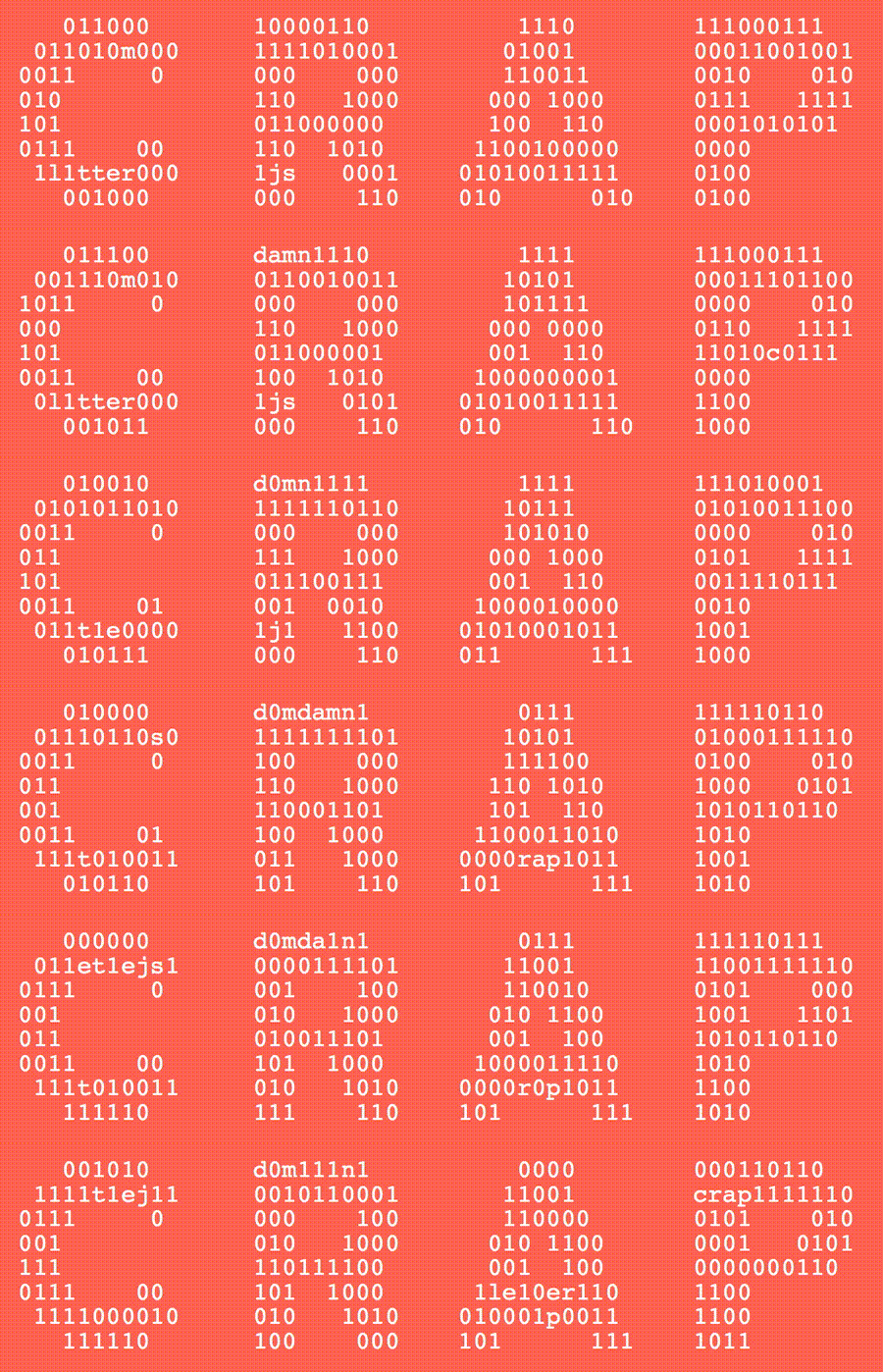
3 | _Lettercrap_ is a Javascript library that generates dynamic ascii art on the web, using an image mask. It looks like this:
4 |
5 |
6 |
7 | [Here's a live demo](https://nate-parrott.github.io/lettercrap)
8 |
9 | ## Usage
10 |
11 | To use _Lettercrap_, import `lettercrap.js` and `lettercrap.css`. Create a `div` with the `data-letter-crap` attribute with the source of a black-and-white image, which will serve as the shape of the generated ascii art:
12 |
13 |
14 |
15 | Make sure to set a height for your `div`. If you want to set a dynamic height based on the div's fluid width, you can specify an aspect ratio using the `data-lettercrap-aspect-ratio` attribute, and _Lettercrap_ will set the height of the `div` for you:
16 |
17 |
18 |
19 | By default, _Lettercrap_ uses `0`s, `1`s and the occasional `_` to fill in the shape of your image. You can change the set of letters used with the `data-lettercrap-letters` attribute:
20 |
21 |
22 |
23 | _Lettercrap_ can also throw the occasional _full word_ into the mix—specify the words to choose from using the `data-lettercrap-words` attribute:
24 |
25 |
26 |
27 | Check out the `examples/index.html` file to see exactly how this all fits together.
28 |
29 |
--------------------------------------------------------------------------------
/lettercrap.js:
--------------------------------------------------------------------------------
1 | (function() {
2 | var charWidth = 6;
3 | var charHeight = 10;
4 | var likelihoodOfReplacingWord = 0.05;
5 | var likelihoodOfChangingExistingText = 0.1;
6 |
7 | function randomChoice(x) {
8 | return x[Math.floor(Math.random() * x.length)];
9 | }
10 |
11 | function initElement(element) {
12 | var img = new Image();
13 | img.onload = function() {
14 | render(element, img, null);
15 | }
16 | img.src = element.getAttribute('data-letter-crap');
17 | }
18 |
19 | function getTextContentWithImageAtSize(image, width, height, existingText, words, letters) {
20 | existingText = existingText ? existingText.replace(/\r?\n|\r/g, '') : null;
21 | var shouldReplaceExisting = function() { return !existingText || Math.random() < likelihoodOfChangingExistingText };
22 |
23 | var canvas = document.createElement('canvas');
24 | canvas.width = parseInt(width / charWidth);
25 | canvas.height = parseInt(height / charHeight);
26 | canvas.getContext('2d').drawImage(image, 0, 0, canvas.width, canvas.height);
27 | var data = canvas.getContext('2d').getImageData(0, 0, canvas.width, canvas.height);
28 | var chars = "";
29 | var startOfFilledInSequence = 0;
30 | var i = 0;
31 | for (var y=0; y 0 && Math.random() < likelihoodOfReplacingWord && shouldReplaceExisting()) {
45 | var word = randomChoice(words);
46 | if (i + 1 - startOfFilledInSequence >= word.length) {
47 | chars = chars.substring(0, chars.length - word.length) + word;
48 | }
49 | }
50 | } else {
51 | chars += " ";
52 | startOfFilledInSequence = null;
53 | }
54 | i++;
55 | }
56 | chars += "\n";
57 | startOfFilledInSequence = null;
58 | }
59 | return chars
60 | }
61 |
62 | function render(element, image, prev) {
63 | if (element.hasAttribute('data-lettercrap-aspect-ratio')) {
64 | var aspect = parseFloat(element.getAttribute('data-lettercrap-aspect-ratio'));
65 | element.style.height = element.clientWidth * aspect + 'px';
66 | }
67 | var text;
68 | var words = element.hasAttribute('data-lettercrap-words') ? element.getAttribute('data-lettercrap-words').split(' ') : [];
69 | var letters = element.hasAttribute('data-lettercrap-letters') ? element.getAttribute('data-lettercrap-letters') : '0101010101_';
70 | if (prev && prev.width == element.clientWidth && prev.height == element.clientHeight) {
71 | text = getTextContentWithImageAtSize(image, element.clientWidth, element.clientHeight, prev.text, words, letters);
72 | } else {
73 | text = getTextContentWithImageAtSize(image, element.clientWidth, element.clientHeight, null, words, letters);
74 | }
75 | element.textContent = text;
76 | var data = {width: element.clientWidth, height: element.clientHeight, text: text};
77 | setTimeout(function() {
78 | render(element, image, data);
79 | }, 150);
80 | }
81 |
82 | document.addEventListener('DOMContentLoaded', function() {
83 | var elements = document.querySelectorAll('[data-letter-crap]');
84 | for (var i=0; i
 6 |
7 | [Here's a live demo](https://nate-parrott.github.io/lettercrap)
8 |
9 | ## Usage
10 |
11 | To use _Lettercrap_, import `lettercrap.js` and `lettercrap.css`. Create a `div` with the `data-letter-crap` attribute with the source of a black-and-white image, which will serve as the shape of the generated ascii art:
12 |
13 |
14 |
15 | Make sure to set a height for your `div`. If you want to set a dynamic height based on the div's fluid width, you can specify an aspect ratio using the `data-lettercrap-aspect-ratio` attribute, and _Lettercrap_ will set the height of the `div` for you:
16 |
17 |
18 |
19 | By default, _Lettercrap_ uses `0`s, `1`s and the occasional `_` to fill in the shape of your image. You can change the set of letters used with the `data-lettercrap-letters` attribute:
20 |
21 |
22 |
23 | _Lettercrap_ can also throw the occasional _full word_ into the mix—specify the words to choose from using the `data-lettercrap-words` attribute:
24 |
25 |
26 |
27 | Check out the `examples/index.html` file to see exactly how this all fits together.
28 |
29 |
--------------------------------------------------------------------------------
/lettercrap.js:
--------------------------------------------------------------------------------
1 | (function() {
2 | var charWidth = 6;
3 | var charHeight = 10;
4 | var likelihoodOfReplacingWord = 0.05;
5 | var likelihoodOfChangingExistingText = 0.1;
6 |
7 | function randomChoice(x) {
8 | return x[Math.floor(Math.random() * x.length)];
9 | }
10 |
11 | function initElement(element) {
12 | var img = new Image();
13 | img.onload = function() {
14 | render(element, img, null);
15 | }
16 | img.src = element.getAttribute('data-letter-crap');
17 | }
18 |
19 | function getTextContentWithImageAtSize(image, width, height, existingText, words, letters) {
20 | existingText = existingText ? existingText.replace(/\r?\n|\r/g, '') : null;
21 | var shouldReplaceExisting = function() { return !existingText || Math.random() < likelihoodOfChangingExistingText };
22 |
23 | var canvas = document.createElement('canvas');
24 | canvas.width = parseInt(width / charWidth);
25 | canvas.height = parseInt(height / charHeight);
26 | canvas.getContext('2d').drawImage(image, 0, 0, canvas.width, canvas.height);
27 | var data = canvas.getContext('2d').getImageData(0, 0, canvas.width, canvas.height);
28 | var chars = "";
29 | var startOfFilledInSequence = 0;
30 | var i = 0;
31 | for (var y=0; y
6 |
7 | [Here's a live demo](https://nate-parrott.github.io/lettercrap)
8 |
9 | ## Usage
10 |
11 | To use _Lettercrap_, import `lettercrap.js` and `lettercrap.css`. Create a `div` with the `data-letter-crap` attribute with the source of a black-and-white image, which will serve as the shape of the generated ascii art:
12 |
13 |
14 |
15 | Make sure to set a height for your `div`. If you want to set a dynamic height based on the div's fluid width, you can specify an aspect ratio using the `data-lettercrap-aspect-ratio` attribute, and _Lettercrap_ will set the height of the `div` for you:
16 |
17 |
18 |
19 | By default, _Lettercrap_ uses `0`s, `1`s and the occasional `_` to fill in the shape of your image. You can change the set of letters used with the `data-lettercrap-letters` attribute:
20 |
21 |
22 |
23 | _Lettercrap_ can also throw the occasional _full word_ into the mix—specify the words to choose from using the `data-lettercrap-words` attribute:
24 |
25 |
26 |
27 | Check out the `examples/index.html` file to see exactly how this all fits together.
28 |
29 |
--------------------------------------------------------------------------------
/lettercrap.js:
--------------------------------------------------------------------------------
1 | (function() {
2 | var charWidth = 6;
3 | var charHeight = 10;
4 | var likelihoodOfReplacingWord = 0.05;
5 | var likelihoodOfChangingExistingText = 0.1;
6 |
7 | function randomChoice(x) {
8 | return x[Math.floor(Math.random() * x.length)];
9 | }
10 |
11 | function initElement(element) {
12 | var img = new Image();
13 | img.onload = function() {
14 | render(element, img, null);
15 | }
16 | img.src = element.getAttribute('data-letter-crap');
17 | }
18 |
19 | function getTextContentWithImageAtSize(image, width, height, existingText, words, letters) {
20 | existingText = existingText ? existingText.replace(/\r?\n|\r/g, '') : null;
21 | var shouldReplaceExisting = function() { return !existingText || Math.random() < likelihoodOfChangingExistingText };
22 |
23 | var canvas = document.createElement('canvas');
24 | canvas.width = parseInt(width / charWidth);
25 | canvas.height = parseInt(height / charHeight);
26 | canvas.getContext('2d').drawImage(image, 0, 0, canvas.width, canvas.height);
27 | var data = canvas.getContext('2d').getImageData(0, 0, canvas.width, canvas.height);
28 | var chars = "";
29 | var startOfFilledInSequence = 0;
30 | var i = 0;
31 | for (var y=0; y