10 |
11 | );
12 | }
13 |
--------------------------------------------------------------------------------
/utils/global-data.js:
--------------------------------------------------------------------------------
1 | export const getGlobalData = () => {
2 | const name = process.env.BLOG_NAME
3 | ? decodeURI(process.env.BLOG_NAME)
4 | : 'Jay Doe';
5 | const blogTitle = process.env.BLOG_TITLE
6 | ? decodeURI(process.env.BLOG_TITLE)
7 | : 'Next.js Blog Theme';
8 | const footerText = process.env.BLOG_FOOTER_TEXT
9 | ? decodeURI(process.env.BLOG_FOOTER_TEXT)
10 | : 'All rights reserved.';
11 |
12 | return {
13 | name,
14 | blogTitle,
15 | footerText,
16 | };
17 | };
18 |
--------------------------------------------------------------------------------
/components/ArrowIcon.js:
--------------------------------------------------------------------------------
1 | export default function ArrowIcon({ className, color = 'text-primary' }) {
2 | return (
3 |
19 | );
20 | }
21 |
--------------------------------------------------------------------------------
/.gitignore:
--------------------------------------------------------------------------------
1 | # See https://help.github.com/articles/ignoring-files/ for more about ignoring files.
2 |
3 | # dependencies
4 | /node_modules
5 | /.pnp
6 | .pnp.js
7 |
8 | # Netlify Visual Editor (formerly Stackbit)
9 | .sourcebit-nextjs-cache.json
10 | .stackbit/cache
11 | .cache
12 |
13 | # testing
14 | /coverage
15 |
16 | # next.js
17 | /.next/
18 | /out/
19 |
20 | # production
21 | /build
22 |
23 | # misc
24 | .DS_Store
25 | *.pem
26 |
27 | # debug
28 | npm-debug.log*
29 | yarn-debug.log*
30 | yarn-error.log*
31 |
32 | # local env files
33 | .env.local
34 | .env.development.local
35 | .env.test.local
36 | .env.production.local
37 |
38 | # vercel
39 | .vercel
40 |
41 | # netlify
42 | .netlify
--------------------------------------------------------------------------------
/styles/globals.css:
--------------------------------------------------------------------------------
1 | @import 'tailwindcss';
2 | @plugin '@tailwindcss/typography';
3 |
4 | @theme static {
5 | --color-primary: var(--theme-primary);
6 | --color-gradient-1: var(--theme-gradient-1);
7 | --color-gradient-2: var(--theme-gradient-2);
8 | --color-gradient-3: var(--theme-gradient-3);
9 | --color-gradient-4: var(--theme-gradient-4);
10 | --font-primary: var(--theme-headings);
11 | --font-secondary: var(--theme-body);
12 | }
13 |
14 | @custom-variant dark (&:where(.dark, .dark *));
15 |
16 | @layer base {
17 | h1,
18 | h2,
19 | h3,
20 | h4,
21 | h5,
22 | h6 {
23 | font-family: var(--font-primary);
24 | }
25 |
26 | body {
27 | font-family: var(--font-secondary);
28 | }
29 | }
30 |
--------------------------------------------------------------------------------
/pages/_document.js:
--------------------------------------------------------------------------------
1 | import React from 'react';
2 | import Document, { Html, Head, Main, NextScript } from 'next/document';
3 | import { generateCssVariables } from '../utils/theme-utils';
4 |
5 | class MyDocument extends Document {
6 | render() {
7 | const cssVars = generateCssVariables();
8 |
9 | return (
10 |
11 |
12 |
13 |
14 |
17 |
18 |
19 |
20 |
21 | );
22 | }
23 | }
24 |
25 | export default MyDocument;
26 |
--------------------------------------------------------------------------------
/tsconfig.json:
--------------------------------------------------------------------------------
1 | {
2 | "compilerOptions": {
3 | "target": "es2019",
4 | "lib": [
5 | "dom",
6 | "dom.iterable",
7 | "esnext"
8 | ],
9 | "allowJs": true,
10 | "skipLibCheck": true,
11 | "strict": false,
12 | "forceConsistentCasingInFileNames": true,
13 | "noEmit": true,
14 | "esModuleInterop": true,
15 | "module": "esnext",
16 | "moduleResolution": "node",
17 | "resolveJsonModule": true,
18 | "isolatedModules": true,
19 | "jsx": "react-jsx",
20 | "incremental": true,
21 | "paths": {
22 | "@/*": [
23 | "./src/*"
24 | ]
25 | },
26 | "baseUrl": "."
27 | },
28 | "include": [
29 | "next-env.d.ts",
30 | "**/*.ts",
31 | "**/*.tsx"
32 | ],
33 | "exclude": [
34 | "node_modules"
35 | ]
36 | }
37 |
--------------------------------------------------------------------------------
/utils/theme-utils.js:
--------------------------------------------------------------------------------
1 | const { COLOR_THEMES, FONT_THEMES } = require('../themes');
2 |
3 | const THEME = process.env.BLOG_THEME || 'default';
4 | const FONT_HEADINGS = process.env.BLOG_FONT_HEADINGS || 'sans-serif';
5 | const FONT_BODY = process.env.BLOG_FONT_BODY || 'sans-serif';
6 |
7 | export function generateCssVariables() {
8 | const cssVars = {};
9 | const themeColors = COLOR_THEMES[THEME]?.colors || {};
10 | for (const [key, value] of Object.entries(themeColors)) {
11 | cssVars[`--theme-${key}`] = value;
12 | }
13 | cssVars['--theme-headings'] = FONT_THEMES[FONT_HEADINGS] || 'sans-serif';
14 | cssVars['--theme-body'] = FONT_THEMES[FONT_BODY] || 'sans-serif';
15 |
16 | const cssVarsString = Object.entries(cssVars)
17 | .map(([key, value]) => `${key}: ${value};`)
18 | .join('\n');
19 |
20 | return cssVarsString;
21 | }
22 |
--------------------------------------------------------------------------------
/posts/example-post-4.mdx:
--------------------------------------------------------------------------------
1 | ---
2 | type: Post
3 | title: Mental models for designers
4 | description: "Consider that for a moment: everything we see around us is assumed to have had a cause and is contingent upon."
5 | date: '2024-08-05'
6 | ---
7 |
8 | Mental models are frameworks people create in their minds to understand how something should work. They’re the expectations users carry with them when they encounter a new app, website, or product. For example, a user expects that clicking on a logo will take them back to the homepage, or that clicking a shopping cart icon will show them a list of items they’ve added.
9 |
10 | Mental models vary from user to user, depending on factors like cultural background, experience level, and personal habits. However, successful designs usually align with widely shared expectations, allowing for intuitive interactions.
11 |
12 | This is an example post. There's another one [here](/posts/example-post).
13 |
--------------------------------------------------------------------------------
/LICENSE:
--------------------------------------------------------------------------------
1 | MIT License
2 |
3 | Copyright (c) 2022 nextjs-blog-theme
4 |
5 | Permission is hereby granted, free of charge, to any person obtaining a copy
6 | of this software and associated documentation files (the "Software"), to deal
7 | in the Software without restriction, including without limitation the rights
8 | to use, copy, modify, merge, publish, distribute, sublicense, and/or sell
9 | copies of the Software, and to permit persons to whom the Software is
10 | furnished to do so, subject to the following conditions:
11 |
12 | The above copyright notice and this permission notice shall be included in all
13 | copies or substantial portions of the Software.
14 |
15 | THE SOFTWARE IS PROVIDED "AS IS", WITHOUT WARRANTY OF ANY KIND, EXPRESS OR
16 | IMPLIED, INCLUDING BUT NOT LIMITED TO THE WARRANTIES OF MERCHANTABILITY,
17 | FITNESS FOR A PARTICULAR PURPOSE AND NONINFRINGEMENT. IN NO EVENT SHALL THE
18 | AUTHORS OR COPYRIGHT HOLDERS BE LIABLE FOR ANY CLAIM, DAMAGES OR OTHER
19 | LIABILITY, WHETHER IN AN ACTION OF CONTRACT, TORT OR OTHERWISE, ARISING FROM,
20 | OUT OF OR IN CONNECTION WITH THE SOFTWARE OR THE USE OR OTHER DEALINGS IN THE
21 | SOFTWARE.
22 |
--------------------------------------------------------------------------------
/stackbit.config.ts:
--------------------------------------------------------------------------------
1 | // stackbit.config.ts
2 | import { defineStackbitConfig } from '@stackbit/types';
3 | import { GitContentSource } from '@stackbit/cms-git';
4 |
5 | export default defineStackbitConfig({
6 | stackbitVersion: '~0.6.0',
7 | ssgName: 'nextjs',
8 | nodeVersion: '18',
9 | contentSources: [
10 | new GitContentSource({
11 | rootPath: __dirname,
12 | contentDirs: ['posts'],
13 | models: [
14 | {
15 | name: "Post",
16 | type: "page",
17 | urlPath: "/posts/{slug}",
18 | filePath: "posts/{slug}.mdx",
19 | fields: [
20 | { name: "title", type: "string", required: true, default: 'Post Title' },
21 | { name: "description", type: "string", default: 'Post description goes here' },
22 | { name: "date", type: "date", required: true },
23 | ]
24 | }
25 | ],
26 | assetsConfig: {
27 | referenceType: 'static',
28 | staticDir: 'public',
29 | uploadDir: 'images',
30 | publicPath: '/'
31 | }
32 | })
33 | ]
34 | });
--------------------------------------------------------------------------------
/public/favicon.svg:
--------------------------------------------------------------------------------
1 |
31 |
--------------------------------------------------------------------------------
/posts/example-post-2.mdx:
--------------------------------------------------------------------------------
1 | ---
2 | type: Post
3 | title: Next.js and Netlify - The Perfect Duo for Modern Web Development
4 | description: >-
5 | Consider that for a moment: everything we see around us is assumed to have had
6 | a cause and is contingent upon.
7 | date: '2024-10-05'
8 | ---
9 |
10 | **This is an example post. There's another one [here](/posts/example-post-1).**
11 |
12 | Combining **Next.js** and **Netlify** offers a powerful solution for building and deploying modern web applications with ease. Next.js, known for its versatility in handling both static and dynamic content, is a favorite for developers who need a React-based framework that supports server-side rendering, static site generation, and API routes—all essential for dynamic, SEO-friendly sites.
13 |
14 | Pairing this with Netlify’s streamlined deployment workflow, continuous integration, and serverless functions provides a smooth, fast, and secure development-to-deployment process. Netlify’s built-in features for **automatic deployment** from Git, **CDN distribution**, and **edge functions** mean Next.js apps can scale easily while maintaining high performance.
15 |
16 | For UI designers and developers, this combo enables rapid iteration, easier A/B testing, and optimized performance without the DevOps overhead. Plus, the ability to leverage **dynamic routing and API integrations** means more control over design and functionality.
17 |
18 | ## Additional resources
19 |
20 | - [Next.js on Netlify](https://docs.netlify.com/frameworks/next-js/overview/)
21 | - [Use Visual Editor with Next.js](https://docs.netlify.com/visual-editor/frameworks/next/)
--------------------------------------------------------------------------------
/package.json:
--------------------------------------------------------------------------------
1 | {
2 | "name": "nextjs-blog-theme",
3 | "description": "A customizable Next.js and Tailwind blog starter. Designed by the Bejamas agency.",
4 | "author": "Bejamas and Netlify Inc.",
5 | "contributors": [
6 | "Charlie Gerard",
7 | "Prince Wilson",
8 | "Tara Manicsic",
9 | "Thom Krupa",
10 | "Tomas Bankauskas"
11 | ],
12 | "homepage": "https://github.com/netlify-templates/nextjs-blog-theme",
13 | "bugs": {
14 | "url": "https://github.com/netlify-templates/nextjs-blog-theme/issues"
15 | },
16 | "scripts": {
17 | "dev": "next",
18 | "dev:watch": "next-remote-watch ./posts",
19 | "build": "next build",
20 | "start": "next start",
21 | "export": "next build && next export",
22 | "lint": "next lint"
23 | },
24 | "dependencies": {
25 | "@mapbox/rehype-prism": "^0.9.0",
26 | "@tailwindcss/typography": "^0.5.19",
27 | "classnames": "^2.3.1",
28 | "gray-matter": "^4.0.3",
29 | "next": "^16.0.8",
30 | "next-mdx-remote": "^5.0.0",
31 | "next-remote-watch": "2.0.0",
32 | "prismjs": "^1.29.0",
33 | "react": "^19.2.1",
34 | "react-dom": "^19.2.1",
35 | "rehype-unwrap-images": "^1.0.0",
36 | "remark-gfm": "^4.0.0"
37 | },
38 | "devDependencies": {
39 | "@stackbit/cms-git": "^1.0.32",
40 | "@stackbit/types": "^2.0.1",
41 | "@tailwindcss/postcss": "^4.0.16",
42 | "eslint": "^9.0.0",
43 | "eslint-config-next": "^16.0.8",
44 | "eslint-config-prettier": "^9.1.0",
45 | "postcss": "^8.4.38",
46 | "tailwindcss": "^4.0.16",
47 | "typescript": "^5.1.3"
48 | },
49 | "license": "MIT"
50 | }
51 |
--------------------------------------------------------------------------------
/themes.js:
--------------------------------------------------------------------------------
1 | exports.COLOR_THEMES = {
2 | default: {
3 | colors: {
4 | primary: '#7D7AFF',
5 | 'gradient-1': '#7d7aff',
6 | 'gradient-2': '#2121e2',
7 | 'gradient-3': '#00fff0',
8 | 'gradient-4': '#8785FF',
9 | },
10 | },
11 | bejamas: {
12 | colors: {
13 | primary: '#FF8585',
14 | 'gradient-1': '#7d7aff',
15 | 'gradient-2': '#2121E2',
16 | 'gradient-3': '#FF76B8',
17 | 'gradient-4': '#001AFF',
18 | },
19 | },
20 | netlify: {
21 | colors: {
22 | primary: '#00A354',
23 | 'gradient-1': '#00F0FF',
24 | 'gradient-2': '#00F0FF',
25 | 'gradient-3': '#FAFF00',
26 | 'gradient-4': '#00F0FF',
27 | },
28 | },
29 | reddie: {
30 | colors: {
31 | primary: '#FF4D4D',
32 | 'gradient-1': '#FFC700',
33 | 'gradient-2': '#FF85DD',
34 | 'gradient-3': '#FF85DD',
35 | 'gradient-4': '#FF8585',
36 | },
37 | },
38 | greenie: {
39 | colors: {
40 | primary: '#C78500',
41 | 'gradient-1': '#FFCC81',
42 | 'gradient-2': '#00F37F',
43 | 'gradient-3': '#00F37F',
44 | 'gradient-4': '#FFCC81',
45 | },
46 | },
47 | };
48 |
49 | exports.FONT_THEMES = {
50 | 'sans-serif': `ui-sans-serif, system-ui, -apple-system, BlinkMacSystemFont, "Segoe UI", Roboto, "Helvetica Neue", Arial, "Noto Sans", sans-serif, "Apple Color Emoji", "Segoe UI Emoji", "Segoe UI Symbol", "Noto Color Emoji"`,
51 | serif: `ui-serif, Georgia, Cambria, "Times New Roman", Times, serif`,
52 | monospace: `ui-monospace, SFMono-Regular, Menlo, Monaco, Consolas, "Liberation Mono", "Courier New", monospace`,
53 | };
54 |
--------------------------------------------------------------------------------
/components/Layout.js:
--------------------------------------------------------------------------------
1 | import classNames from 'classnames';
2 | import { useEffect } from 'react';
3 | import styles from './Layout.module.css';
4 |
5 | export function GradientBackground({ variant, className }) {
6 | const classes = classNames(
7 | {
8 | [styles.colorBackground]: variant === 'large',
9 | [styles.colorBackgroundBottom]: variant === 'small',
10 | },
11 | className
12 | );
13 |
14 | return ;
15 | }
16 |
17 | export default function Layout({ children }) {
18 | const setAppTheme = () => {
19 | const darkMode = localStorage.getItem('theme') === 'dark';
20 | const lightMode = localStorage.getItem('theme') === 'light';
21 |
22 | if (darkMode) {
23 | document.documentElement.classList.add('dark');
24 | } else if (lightMode) {
25 | document.documentElement.classList.remove('dark');
26 | }
27 | return;
28 | };
29 |
30 | const handleSystemThemeChange = () => {
31 | var darkQuery = window.matchMedia('(prefers-color-scheme: dark)');
32 |
33 | darkQuery.onchange = (e) => {
34 | if (e.matches) {
35 | document.documentElement.classList.add('dark');
36 | localStorage.setItem('theme', 'dark');
37 | } else {
38 | document.documentElement.classList.remove('dark');
39 | localStorage.setItem('theme', 'light');
40 | }
41 | };
42 | };
43 |
44 | useEffect(() => {
45 | setAppTheme();
46 | }, []);
47 |
48 | useEffect(() => {
49 | handleSystemThemeChange();
50 | }, []);
51 |
52 | return (
53 |
54 |
55 | {children}
56 |
57 |
58 | );
59 | }
60 |
--------------------------------------------------------------------------------
/components/Layout.module.css:
--------------------------------------------------------------------------------
1 | .colorBackground {
2 | left: 50%;
3 | transform: translateX(-50%);
4 | background: radial-gradient(
5 | at 71% 77%,
6 | var(--color-gradient-1) 0,
7 | transparent 21%
8 | ),
9 | radial-gradient(at 36% 47%, var(--color-gradient-3) 0, transparent 50%),
10 | radial-gradient(at 54% 29%, var(--color-gradient-3) 0, transparent 28%),
11 | radial-gradient(at 45% 51%, var(--color-gradient-1) 0, transparent 53%),
12 | radial-gradient(at 73% 44%, var(--color-gradient-2) 0, transparent 54%),
13 | radial-gradient(at 24% 7%, var(--color-gradient-2) 0, transparent 40%),
14 | radial-gradient(at 76% 46%, var(--color-gradient-1) 0, transparent 50%);
15 | /* mix-blend-mode: normal; */
16 | max-height: 800px;
17 | height: 80vh;
18 | max-width: 1400px;
19 | width: 70vw;
20 | width: 100%;
21 | filter: blur(44px);
22 | z-index: -1;
23 | }
24 |
25 | .colorBackgroundBottom {
26 | left: 50%;
27 | transform: translateX(-50%) rotate(190deg);
28 | background: radial-gradient(
29 | at 83% 25%,
30 | var(--color-gradient-1) 0,
31 | transparent 21%
32 | ),
33 | radial-gradient(at 36% 47%, var(--color-gradient-3) 0, transparent 50%),
34 | radial-gradient(at 79% 45%, var(--color-gradient-3) 0, transparent 28%),
35 | radial-gradient(at 66% 38%, var(--color-gradient-1) 0, transparent 53%),
36 | radial-gradient(at 89% 13%, var(--color-gradient-2) 0, transparent 54%),
37 | radial-gradient(at 24% 7%, var(--color-gradient-2) 0, transparent 40%),
38 | radial-gradient(at 76% 46%, var(--color-gradient-1) 0, transparent 50%);
39 | /* mix-blend-mode: normal; */
40 | height: 600px;
41 | max-width: 900px;
42 | width: 55vw;
43 | width: 100%;
44 | filter: blur(44px);
45 | z-index: -1;
46 | }
47 |
--------------------------------------------------------------------------------
/posts/example-post-3.mdx:
--------------------------------------------------------------------------------
1 | ---
2 | type: Post
3 | title: Why Next.js Works Great with Netlify
4 | description: "If you're using Next.js and Netlify, you’re tapping into a powerhouse combination for fast, reliable, and scalable web applications."
5 | date: '2024-09-05'
6 | ---
7 |
8 | If you're using **Next.js** and **Netlify**, you’re tapping into a powerhouse combination for fast, reliable, and scalable web applications.
9 |
10 | **This is an example post. There's another one [here](/posts/example-post-1).**
11 |
12 | Here’s why they work so well together:
13 |
14 | 1. **Seamless Deployment**: With Netlify’s Git-based deployment, pushing updates to a Next.js site is automatic and effortless. Every change pushed to GitHub or GitLab triggers a fresh build and deploys your site without any manual effort, perfect for fast-paced projects.
15 |
16 | 2. **Static and Dynamic Content Flexibility**: Next.js shines by allowing both static generation (SSG) and server-side rendering (SSR), and Netlify makes deploying either easy. Static content is globally cached on Netlify’s CDN, making your site lightning-fast, while Netlify Functions handle any server-side needs with zero configuration.
17 |
18 | 3. **Serverless Functions**: Netlify’s serverless functions work beautifully with Next.js API routes, enabling dynamic features (like forms, authentication, and data fetching) without additional servers. This lets you build interactive, backend-supported sites with just front-end code.
19 |
20 | 4. **Edge Caching and CDNs**: Next.js’s pages are distributed across Netlify’s global CDN, ensuring that your users get a fast experience no matter where they are. This setup optimizes load times and enhances site performance.
21 |
22 | 5. **Developer-Friendly Workflow**: Both Next.js and Netlify focus on a developer-friendly experience. Local development, previews, and rollbacks are simple, so you can focus on building a better user experience without worrying about the infrastructure.
23 |
24 | For anyone building with Next.js, deploying on Netlify means you get the best of **speed, reliability, and ease**—all the ingredients needed to create high-performing, user-friendly web apps!
25 |
26 | ## Additional resources
27 |
28 | - [Next.js on Netlify](https://docs.netlify.com/frameworks/next-js/overview/)
29 | - [Use Visual Editor with Next.js](https://docs.netlify.com/visual-editor/frameworks/next/)
--------------------------------------------------------------------------------
/components/Footer.js:
--------------------------------------------------------------------------------
1 | const sunIcon = (
2 |
29 | );
30 |
31 | const moonIcon = (
32 |
48 | );
49 |
50 | const ThemeSwitcher = () => {
51 | return (
52 |
53 |
64 |
65 |
76 |
77 | );
78 | };
79 |
80 | export default function Footer({ copyrightText }) {
81 | return (
82 |
88 | );
89 | }
90 |
--------------------------------------------------------------------------------
/pages/index.js:
--------------------------------------------------------------------------------
1 | import Link from 'next/link';
2 | import { getPosts } from '../utils/mdx-utils';
3 |
4 | import Footer from '../components/Footer';
5 | import Header from '../components/Header';
6 | import Layout, { GradientBackground } from '../components/Layout';
7 | import ArrowIcon from '../components/ArrowIcon';
8 | import { getGlobalData } from '../utils/global-data';
9 | import SEO from '../components/SEO';
10 |
11 | export default function Index({ posts, globalData }) {
12 | return (
13 |
14 |
15 |
16 |
17 |
18 | {globalData.blogTitle}
19 |
20 |
21 | {posts.map((post) => (
22 |
27 |
32 | {post.data.date && (
33 |
37 | {post.data.date}
38 |
39 | )}
40 |
41 | {post.data.title}
42 |
43 | {post.data.description && (
44 |
48 | {post.data.description}
49 |
50 | )}
51 |
52 |
53 |
54 | ))}
55 |
56 |
57 |
58 |
62 |
66 |
67 | );
68 | }
69 |
70 | export function getStaticProps() {
71 | const posts = getPosts();
72 | const globalData = getGlobalData();
73 |
74 | return { props: { posts, globalData } };
75 | }
76 |
--------------------------------------------------------------------------------
/posts/example-post-5.mdx:
--------------------------------------------------------------------------------
1 | ---
2 | type: Post
3 | title: Why Sketch Remains the Ultimate Tool for UI Designers
4 | description: "While new design platforms continue to emerge, Sketch has held its ground as a go-to for UI designers, offering an impressive mix of simplicity, precision, and power."
5 | date: '2024-07-05'
6 | ---
7 |
8 | In the evolving world of UI design, a tool that has remained a steadfast favorite among designers is [Sketch](https://www.sketch.com/). Since its inception in 2010, Sketch has consistently proven to be a powerful, intuitive, and efficient platform for creating stunning, functional user interfaces. While many competitors have entered the market, Sketch continues to offer unique features that keep it in the toolkits of solo designers and design teams alike. Here’s why Sketch is still the ultimate tool for UI designers.
9 |
10 | **This is an example post. There's another one [here](/posts/example-post-1).**
11 |
12 | ## User-Friendly Interface
13 |
14 | Sketch is celebrated for its clean, minimalistic interface that feels welcoming to beginners and intuitive for seasoned designers. Unlike other platforms that may overwhelm with too many options or complex panels, Sketch offers a streamlined workspace that allows designers to focus on what matters: crafting excellent UI.
15 |
16 | ## Vector-Based Design for Scalability
17 |
18 | Vector-based design is essential in UI, where icons and graphics need to scale across various screen sizes. Sketch’s vector capabilities ensure that designs stay sharp and consistent, no matter the device or resolution. Designers can create everything from tiny icons to full-screen mockups without losing image quality.
19 |
20 | ## Symbols and Reusable Components
21 |
22 | One of Sketch’s most beloved features is its Symbols feature, which lets designers create reusable components. This is a game-changer for maintaining consistency across projects, as elements like buttons, icons, and navigation bars can be updated once and reflected throughout the design. The ability to nest Symbols and create overrides adds even more flexibility, enabling designers to craft complex design systems with ease.
23 |
24 | ## Powerful Plugins and Integrations
25 |
26 | Sketch’s extensive plugin library is unmatched, offering tools for everything from animations to code export. Tools like Anima, Stark, and Craft by InVision extend Sketch’s functionality, enabling designers to customize the tool to their workflow. The robust plugin ecosystem allows designers to stay in Sketch while integrating seamlessly with prototyping, developer handoff, and collaboration tools, making Sketch highly adaptable for varied design processes.
27 |
28 | ## Cloud Collaboration and Sharing
29 |
30 | Collaboration is critical in modern design workflows, and Sketch’s Cloud feature makes it easy to share work with clients, teammates, and developers. The ability to upload designs to the cloud allows for real-time feedback and streamlined developer handoff. Sketch Cloud supports commenting, version control, and asset exporting, making remote collaboration a breeze.
31 |
32 |
--------------------------------------------------------------------------------
/utils/mdx-utils.js:
--------------------------------------------------------------------------------
1 | import fs from 'fs';
2 | import path from 'path';
3 | import matter from 'gray-matter';
4 | import { serialize } from 'next-mdx-remote/serialize';
5 | import rehypePrism from '@mapbox/rehype-prism';
6 | import remarkGfm from 'remark-gfm';
7 | import rehypeUnwrapImages from 'rehype-unwrap-images';
8 |
9 | // POSTS_PATH is useful when you want to get the path to a specific file
10 | export const POSTS_PATH = path.join(process.cwd(), 'posts');
11 |
12 | // getPostFilePaths is the list of all mdx files inside the POSTS_PATH directory
13 | export const getPostFilePaths = () => {
14 | return (
15 | fs
16 | .readdirSync(POSTS_PATH)
17 | // Only include md(x) files
18 | .filter((path) => /\.mdx?$/.test(path))
19 | );
20 | };
21 |
22 | export const sortPostsByDate = (posts) => {
23 | return posts.sort((a, b) => {
24 | const aDate = new Date(a.data.date);
25 | const bDate = new Date(b.data.date);
26 | return bDate - aDate;
27 | });
28 | };
29 |
30 | export const getPosts = () => {
31 | let posts = getPostFilePaths().map((filePath) => {
32 | const source = fs.readFileSync(path.join(POSTS_PATH, filePath));
33 | const { content, data } = matter(source);
34 |
35 | return {
36 | content,
37 | data,
38 | filePath,
39 | };
40 | });
41 |
42 | posts = sortPostsByDate(posts);
43 |
44 | return posts;
45 | };
46 |
47 | export const getPostBySlug = async (slug) => {
48 | const postFilePath = path.join(POSTS_PATH, `${slug}.mdx`);
49 | const source = fs.readFileSync(postFilePath);
50 |
51 | const { content, data } = matter(source);
52 |
53 | const mdxSource = await serialize(content, {
54 | // Optionally pass remark/rehype plugins
55 | mdxOptions: {
56 | remarkPlugins: [remarkGfm],
57 | rehypePlugins: [rehypePrism, rehypeUnwrapImages],
58 | },
59 | scope: data,
60 | });
61 |
62 | return { mdxSource, data, postFilePath };
63 | };
64 |
65 | export const getNextPostBySlug = (slug) => {
66 | const posts = getPosts();
67 | const currentFileName = `${slug}.mdx`;
68 | const currentPost = posts.find((post) => post.filePath === currentFileName);
69 | const currentPostIndex = posts.indexOf(currentPost);
70 |
71 | const post = posts[currentPostIndex - 1];
72 | // no prev post found
73 | if (!post) return null;
74 |
75 | const nextPostSlug = post?.filePath.replace(/\.mdx?$/, '');
76 |
77 | return {
78 | title: post.data.title,
79 | slug: nextPostSlug,
80 | };
81 | };
82 |
83 | export const getPreviousPostBySlug = (slug) => {
84 | const posts = getPosts();
85 | const currentFileName = `${slug}.mdx`;
86 | const currentPost = posts.find((post) => post.filePath === currentFileName);
87 | const currentPostIndex = posts.indexOf(currentPost);
88 |
89 | const post = posts[currentPostIndex + 1];
90 | // no prev post found
91 | if (!post) return null;
92 |
93 | const previousPostSlug = post?.filePath.replace(/\.mdx?$/, '');
94 |
95 | return {
96 | title: post.data.title,
97 | slug: previousPostSlug,
98 | };
99 | };
100 |
--------------------------------------------------------------------------------
/public/images/nextjs.svg:
--------------------------------------------------------------------------------
1 |
--------------------------------------------------------------------------------
/posts/example-post-1.mdx:
--------------------------------------------------------------------------------
1 | ---
2 | type: Post
3 | title: Next.js Blog Theme Style Guide
4 | description: >-
5 | A style guide for a website is a set of design standards that define the look,
6 | feel, and behavior of a digital product, ensuring consistency and cohesion
7 | across all pages and elements.
8 | date: '2025-01-06'
9 | ---
10 | A style guide for a website is a set of design standards that define the look, feel, and behavior of a digital product, ensuring consistency and cohesion across all pages and elements. It typically includes guidelines for colors, typography, spacing, buttons, icons, and imagery, as well as instructions on voice and tone for content.
11 |
12 | # h1 Heading
13 |
14 | ## h2 Heading
15 |
16 | ### h3 Heading
17 |
18 | #### h4 Heading
19 |
20 | ##### h5 Heading
21 |
22 | ###### h6 Heading
23 |
24 | ## Horizontal Rules
25 |
26 | ***
27 |
28 | ## Emphasis
29 |
30 | **This is bold text**
31 |
32 | **This is bold text**
33 |
34 | *This is italic text*
35 |
36 | *This is italic text*
37 |
38 | ~~Strikethrough~~
39 |
40 | ## Blockquotes
41 |
42 | > Blockquotes can also be nested...
43 | >
44 | > > ...by using additional greater-than signs right next to each other...
45 | > >
46 | > > > ...or with spaces between arrows.
47 |
48 | ## Lists
49 |
50 | Unordered
51 |
52 | * Lorem ipsum dolor sit amet
53 | * Consectetur adipiscing elit
54 | * Integer molestie lorem at massa
55 |
56 | Ordered
57 |
58 | 1. Lorem ipsum dolor sit amet
59 | 2. Consectetur adipiscing elit
60 | 3. Integer molestie lorem at massa
61 |
62 | ## Code
63 |
64 | Inline `code`
65 |
66 | Block code
67 |
68 | ```
69 | npm install netlify-cli -g
70 | ```
71 |
72 | Syntax highlighting
73 |
74 | ```js
75 | var foo = function (bar) {
76 | return bar++;
77 | };
78 |
79 | console.log(foo(5));
80 | ```
81 |
82 | ## Tables
83 |
84 | | Option | Description |
85 | | ------ | ------------------------------------------------------------------------- |
86 | | data | path to data files to supply the data that will be passed into templates. |
87 | | engine | engine to be used for processing templates. Handlebars is the default. |
88 | | ext | extension to be used for dest files. |
89 |
90 | Right aligned columns
91 |
92 | | Option | Description |
93 | | -----: | ------------------------------------------------------------------------: |
94 | | data | path to data files to supply the data that will be passed into templates. |
95 | | engine | engine to be used for processing templates. Handlebars is the default. |
96 | | ext | extension to be used for dest files. |
97 |
98 | ## Links
99 |
100 | * [Next.js on Netlify](https://docs.netlify.com/frameworks/next-js/overview/)
101 | * [Use Visual Editor with Next.js](https://docs.netlify.com/visual-editor/frameworks/next/)
102 |
103 | ## Image
104 |
105 | Recommended image orientation is horizontal. You can adjust the image component to your needs in `components/CustomImage.js`.
106 |
107 | 
108 |
--------------------------------------------------------------------------------
/pages/posts/[slug].js:
--------------------------------------------------------------------------------
1 | import { getGlobalData } from '../../utils/global-data';
2 | import {
3 | getNextPostBySlug,
4 | getPostBySlug,
5 | getPreviousPostBySlug,
6 | getPostFilePaths,
7 | } from '../../utils/mdx-utils';
8 |
9 | import { MDXRemote } from 'next-mdx-remote';
10 | import Head from 'next/head';
11 | import Link from 'next/link';
12 | import ArrowIcon from '../../components/ArrowIcon';
13 | import CustomImage from '../../components/CustomImage';
14 | import CustomLink from '../../components/CustomLink';
15 | import Footer from '../../components/Footer';
16 | import Header from '../../components/Header';
17 | import Layout, { GradientBackground } from '../../components/Layout';
18 | import SEO from '../../components/SEO';
19 |
20 | // Custom components/renderers to pass to MDX.
21 | // Since the MDX files aren't loaded by webpack, they have no knowledge of how
22 | // to handle import statements. Instead, you must include components in scope
23 | // here.
24 | const components = {
25 | a: CustomLink,
26 | // It also works with dynamically-imported components, which is especially
27 | // useful for conditionally loading components for certain routes.
28 | // See the notes in README.md for more details.
29 | Head,
30 | img: CustomImage,
31 | };
32 |
33 | export default function PostPage({
34 | source,
35 | frontMatter,
36 | prevPost,
37 | nextPost,
38 | globalData,
39 | slug,
40 | }) {
41 | return (
42 |
43 |
47 |
48 |
49 |
50 |
54 | {frontMatter.title}
55 |
56 | {frontMatter.description && (
57 |
58 | {frontMatter.description}
59 |
60 | )}
61 |
62 |
63 |
67 |
68 |
69 |
70 |
71 | {prevPost && (
72 |
76 |
77 | Previous
78 |
79 |
80 | {prevPost.title}
81 |
82 |
83 |
84 | )}
85 | {nextPost && (
86 |
90 |
91 | Next
92 |
93 |
94 | {nextPost.title}
95 |
96 |
97 |
98 | )}
99 |
100 |
101 |
102 |
106 |
110 |
111 | );
112 | }
113 |
114 | export const getStaticProps = async ({ params }) => {
115 | const globalData = getGlobalData();
116 | const { mdxSource, data } = await getPostBySlug(params.slug);
117 | const prevPost = getPreviousPostBySlug(params.slug);
118 | const nextPost = getNextPostBySlug(params.slug);
119 |
120 | return {
121 | props: {
122 | globalData,
123 | source: mdxSource,
124 | frontMatter: data,
125 | slug: params.slug,
126 | prevPost,
127 | nextPost,
128 | },
129 | };
130 | };
131 |
132 | export const getStaticPaths = async () => {
133 | const paths = getPostFilePaths()
134 | // Remove file extensions for page paths
135 | .map((path) => path.replace(/\.mdx?$/, ''))
136 | // Map the path into the static paths object required by Next.js
137 | .map((slug) => ({ params: { slug } }));
138 |
139 | return {
140 | paths,
141 | fallback: false,
142 | };
143 | };
144 |
--------------------------------------------------------------------------------
/README.md:
--------------------------------------------------------------------------------
1 | 
2 |
3 |
4 | [](https://app.netlify.com/start/deploy?repository=https://github.com/netlify-templates/nextjs-blog-theme)
5 |
6 |
7 | A customizable blog starter using:
8 |
9 | - [Next.js](https://github.com/vercel/next.js) v15 (Pages Router)
10 | - [Tailwind](https://tailwindcss.com/) v4.x
11 | - [Netlify Visual Editor](https://docs.netlify.com/visual-editor/overview/)
12 | - Built-in [MDX](https://mdxjs.com/) support
13 | - Includes modern design with dark & light themes
14 |
15 | 
16 |
17 | [Take a gander at the demo.](https://bejamas-nextjs-blog.netlify.app)
18 |
19 | [Click here to watch the template walkthrough!](https://www.youtube.com/watch?v=63QZHs259dY)
20 |
21 | ## Table of Contents:
22 |
23 | - [Getting Started](#getting-started)
24 | - [Setting Up Locally](#setting-up-locally)
25 | - [Using the Wizard](#using-the-setup-wizard)
26 | - [Configuring the Blog](#configuring-the-blog)
27 | - [Adding New Posts](#adding-new-posts)
28 | - [Netlify Visual Editor](#netlify-visual-editor)
29 | - [Testing](#testing)
30 | - [Included Default Testing](#included-default-testing)
31 | - [Removing Renovate](#removing-renovate)
32 |
33 | ## Getting Started
34 |
35 | ---
36 |
37 | You can get started with this project in two ways: locally or using the [setup wizard](https://nextjs-wizard.netlify.app/).
38 |
39 | ### Setting Up Locally
40 |
41 | If you're doing it locally, start with clicking the [use this template](https://github.com/netlify-templates/nextjs-blog-theme/generate) button on GitHub. This will create a new repository with this template's files on your GitHub account. Once that is done, clone your new repository and navigate to it in your terminal.
42 |
43 | From there, you can install the project's dependencies by running:
44 |
45 | ```shell
46 | yarn install
47 | ```
48 |
49 | Finally, you can run your project locally with:
50 |
51 | ```shell
52 | yarn run dev
53 | ```
54 |
55 | Open your browser and visit , your project should be running!
56 |
57 | ### Using the Setup Wizard
58 |
59 | 
60 |
61 | Through the [setup wizard](https://nextjs-wizard.netlify.app/), you can create your blog in a few clicks and deploy to Netlify.
62 |
63 | ## Configuring the blog
64 |
65 | The config is based on environment variables to make it easy to integrate with any Jamstack platform, like Netlify.
66 |
67 | Here are the variables you can edit:
68 | | Variable | Description | Options
69 | | --- | --- | --- |
70 | | `BLOG_NAME` | the name of your blog, displayed below the avatar ||
71 | | `BLOG_TITLE` | the main header (`h1`) on the home page ||
72 | | `BLOG_FOOTER_TEXT`| the text in the footer ||
73 | | `BLOG_THEME` | the theme to pass to Tailwind | default |
74 | | `BLOG_FONT_HEADINGS` | the font-family for all HTML headings, from `h1` to `h6`| sans-serif (default), serif, monospace|
75 | | `BLOG_FONT_PARAGRAPHS` | the font-family for all other HTML elements | sans-serif (default), serif, monospace|
76 |
77 | All of the env variables can be configured through the [Wizard](https://nextjs-wizard.netlify.app/) or through setting the project's environment variables. You can do this in your Netlify dashaboard (Site settings/Build & deploy/Environment/Environment variables).
78 |
79 | https://user-images.githubusercontent.com/3611928/153997545-6dcdeef0-e570-49e7-93d6-ce0d393d16c9.mp4
80 |
81 | [alt: video walkthrough of editing env vars]
82 |
83 | If setting an environment variable isn't your cup of tea, the defaults can be changed in [`utils/global-data.js`](/utils/global-data.js). You can also remove the variables and hard code blog information where these variables are used in the code base.
84 |
85 | - `BLOG_THEME, BLOG_FONT_HEADINGS, & BLOG_FONT_PARAGRAPHS` are used in [`tailwind-preset.js`](tailwind-preset.js)
86 | - `BLOG_NAME, BLOG_TITLE, BLOG_FOOTER_TEXT` are used in [`pages/index.js`](pages/index.js) & [`pages/posts/[slug].js`](pages/posts/[slug].js) through the `globalData` object.
87 |
88 | ## Adding new posts
89 |
90 | All posts are stored in `/posts` directory. To make a new post, create a new file with the [`.mdx` extension](https://mdxjs.com/).
91 |
92 | Since the posts are written in `MDX` format you can pass props and components. That means you can use [React components](https://reactjs.org/docs/components-and-props.html) inside your posts to make them more interactive. Learn more about how to do so in the [MDX docs on content](https://mdxjs.com/docs/using-mdx/#components).
93 |
94 | https://user-images.githubusercontent.com/3611928/152727802-102ec296-41c8-446d-93ed-922d11187073.mp4
95 |
96 | [alt: video walkthrough of adding a new blog post]
97 |
98 | ## Netlify Visual Editor
99 |
100 | This template is configured to work with [visual editing](https://docs.netlify.com/visual-editor/overview/) and [Git Content Source](https://docs.netlify.com/create/content-sources/git/).
101 |
102 | ### Develop with Netlify Visual Editor Locally
103 |
104 | The typical development process is to begin by working locally. Clone this repository, then run `npm install` in its root directory.
105 |
106 | Run the Next.js development server:
107 |
108 | ```txt
109 | cd nextjs-blog-theme
110 | npm run dev
111 | ```
112 |
113 | Install the [Netlify Visual Editor CLI](https://www.npmjs.com/package/@stackbit/cli). Then open a new terminal window in the same project directory and run the Netlify visual editor dev server:
114 |
115 | ```txt
116 | npm install -g @stackbit/cli
117 | stackbit dev
118 | ```
119 |
120 | This outputs your own Netlify visual editor URL. Open this, register, or sign in, and you will be directed to Netlify's visual editor for your new project.
121 |
122 | 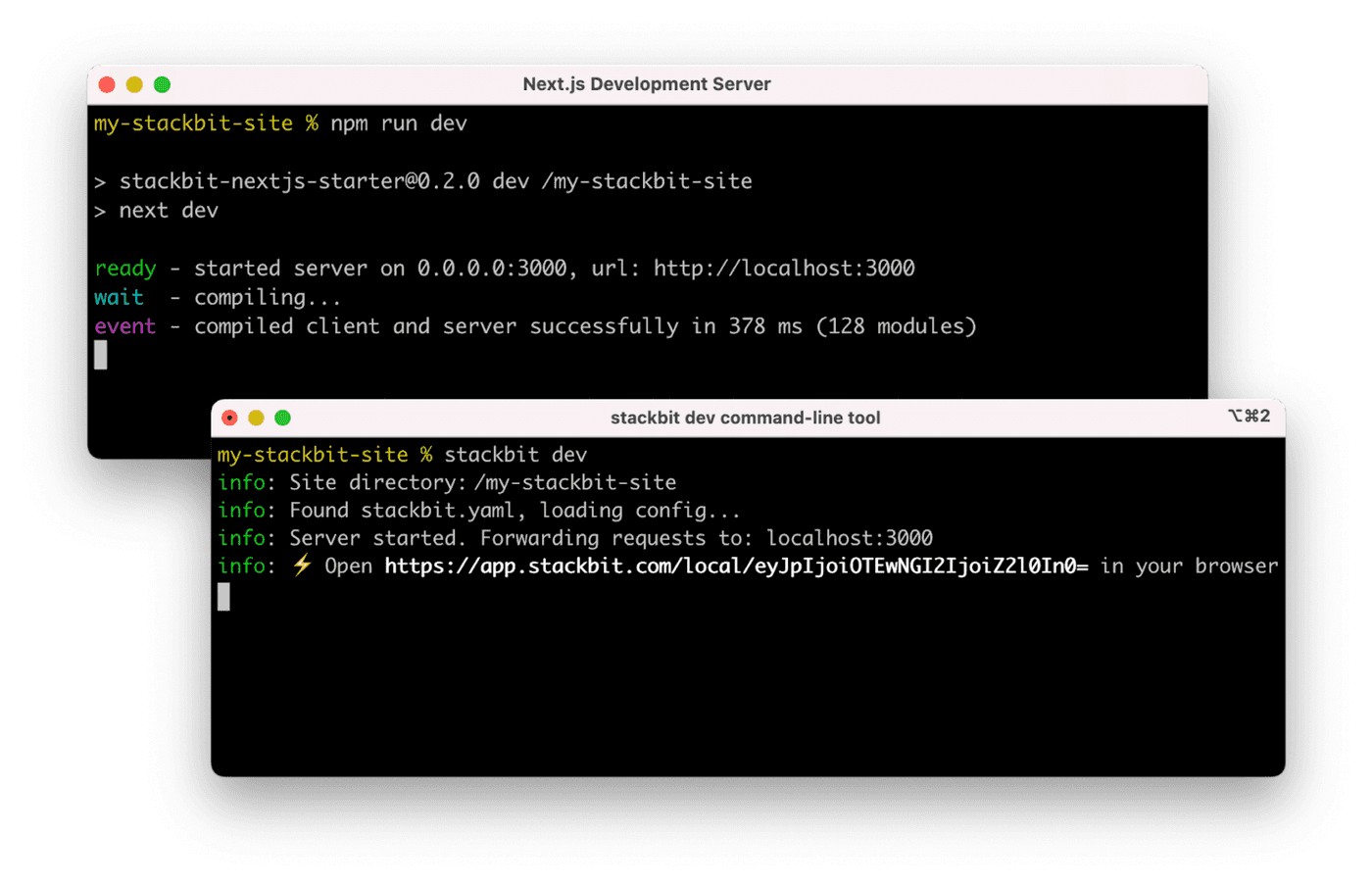
123 |
124 | ### Next Steps
125 |
126 | Here are a few suggestions on what to do next if you're new to Netlify Visual Editor:
127 |
128 | - Learn [Netlify visual editor overview](https://docs.netlify.com/visual-editor/visual-editing/)
129 | - Check [Netlify visual editor reference documentation](https://visual-editor-reference.netlify.com/)
130 |
131 | ## Testing
132 |
133 | ### Included Default Testing
134 |
135 | We’ve included some tooling that helps us maintain these templates. This template currently uses:
136 |
137 | - [Renovate](https://www.mend.io/free-developer-tools/renovate/) - to regularly update our dependencies
138 |
139 | If your team is not interested in this tooling, you can remove them with ease!
140 |
141 | ### Removing Renovate
142 |
143 | In order to keep our project up-to-date with dependencies we use a tool called [Renovate](https://github.com/marketplace/renovate). If you’re not interested in this tooling, delete the `renovate.json` file and commit that onto your main branch.
144 |
145 | ## Support
146 |
147 | If you get stuck along the way, get help in our [support forums](https://answers.netlify.com/).
148 |
--------------------------------------------------------------------------------
/github-banner.svg:
--------------------------------------------------------------------------------
1 |
31 |
--------------------------------------------------------------------------------