 5 |
5 |  6 |
6 | bash 3.2+で書かれたコマンドライン情報ツール
2 | 3 |
4 |
5 |
6 |
 9 |
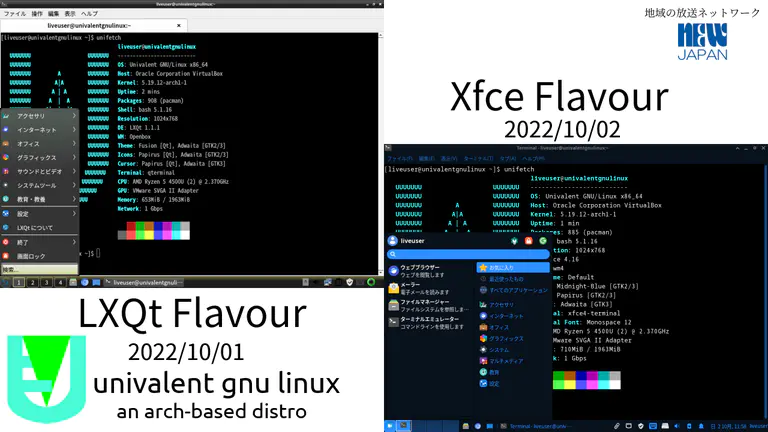
10 | UniFetchはNeofetchからフォークされた、`bash 3.2+`で書かれたコマンドライン上のシステム情報ツールである。君のOS、ソフトウェア、ハードウェアの情報を見た目にも美しい方法で表示するのだ。
11 |
12 | UniFetchの全体的な用途はシステムのスクリーンショットでの利用であり、他人が見たい情報を開示してくれる。なおシステム統計や診断に適切なツールは他にも存在する。
13 |
14 | 標準ではOSのロゴの横にシステム情報が表示される。構成を弄って、ロゴの代わりにお気に入りの画像とか別なアスキーアートとか壁紙とかを表示したり、或いは何も表示しなかったりできる。
15 |
16 | それから、必要な情報を正確に表示するように構成を弄るもよし。コマンドラインの引数と構成ファイルを用いると、既存の出力情報の変更とか、独自のカスタム情報の追加とかができる。
17 |
18 | UniFetchは約150もの様々なOSをサポートする。LinuxやWindowsは勿論、 Minix、AIX、HaikuなどのニッチなOSまで網羅している。まあ大半はNeofetchから引き継いだのだが。
19 | もしお気に入りのOSがサポートされていない場合は「Issue」や「Pull requests」から投稿してくれると嬉しいな。すぐにサポートを追加するのでね。
20 |
--------------------------------------------------------------------------------
/LICENSE.md:
--------------------------------------------------------------------------------
1 | The MIT License (MIT)
2 |
3 | Copyright (c) 2015-2021 Dylan Araps
4 |
5 | Copyright (c) 2022-2024 Nakamura Musical Industries/NIPPON RURITANIA
6 |
7 | Permission is hereby granted, free of charge, to any person obtaining a copy
8 | of this software and associated documentation files (the "Software"), to deal
9 | in the Software without restriction, including without limitation the rights
10 | to use, copy, modify, merge, publish, distribute, sublicense, and/or sell
11 | copies of the Software, and to permit persons to whom the Software is
12 | furnished to do so, subject to the following conditions:
13 |
14 | The above copyright notice and this permission notice shall be included in all
15 | copies or substantial portions of the Software.
16 |
17 | THE SOFTWARE IS PROVIDED "AS IS", WITHOUT WARRANTY OF ANY KIND, EXPRESS OR
18 | IMPLIED, INCLUDING BUT NOT LIMITED TO THE WARRANTIES OF MERCHANTABILITY,
19 | FITNESS FOR A PARTICULAR PURPOSE AND NONINFRINGEMENT. IN NO EVENT SHALL THE
20 | AUTHORS OR COPYRIGHT HOLDERS BE LIABLE FOR ANY CLAIM, DAMAGES OR OTHER
21 | LIABILITY, WHETHER IN AN ACTION OF CONTRACT, TORT OR OTHERWISE, ARISING FROM,
22 | OUT OF OR IN CONNECTION WITH THE SOFTWARE OR THE USE OR OTHER DEALINGS IN THE
23 | SOFTWARE.
24 |
--------------------------------------------------------------------------------
/README.md:
--------------------------------------------------------------------------------
1 |
9 |
10 | UniFetchはNeofetchからフォークされた、`bash 3.2+`で書かれたコマンドライン上のシステム情報ツールである。君のOS、ソフトウェア、ハードウェアの情報を見た目にも美しい方法で表示するのだ。
11 |
12 | UniFetchの全体的な用途はシステムのスクリーンショットでの利用であり、他人が見たい情報を開示してくれる。なおシステム統計や診断に適切なツールは他にも存在する。
13 |
14 | 標準ではOSのロゴの横にシステム情報が表示される。構成を弄って、ロゴの代わりにお気に入りの画像とか別なアスキーアートとか壁紙とかを表示したり、或いは何も表示しなかったりできる。
15 |
16 | それから、必要な情報を正確に表示するように構成を弄るもよし。コマンドラインの引数と構成ファイルを用いると、既存の出力情報の変更とか、独自のカスタム情報の追加とかができる。
17 |
18 | UniFetchは約150もの様々なOSをサポートする。LinuxやWindowsは勿論、 Minix、AIX、HaikuなどのニッチなOSまで網羅している。まあ大半はNeofetchから引き継いだのだが。
19 | もしお気に入りのOSがサポートされていない場合は「Issue」や「Pull requests」から投稿してくれると嬉しいな。すぐにサポートを追加するのでね。
20 |
--------------------------------------------------------------------------------
/LICENSE.md:
--------------------------------------------------------------------------------
1 | The MIT License (MIT)
2 |
3 | Copyright (c) 2015-2021 Dylan Araps
4 |
5 | Copyright (c) 2022-2024 Nakamura Musical Industries/NIPPON RURITANIA
6 |
7 | Permission is hereby granted, free of charge, to any person obtaining a copy
8 | of this software and associated documentation files (the "Software"), to deal
9 | in the Software without restriction, including without limitation the rights
10 | to use, copy, modify, merge, publish, distribute, sublicense, and/or sell
11 | copies of the Software, and to permit persons to whom the Software is
12 | furnished to do so, subject to the following conditions:
13 |
14 | The above copyright notice and this permission notice shall be included in all
15 | copies or substantial portions of the Software.
16 |
17 | THE SOFTWARE IS PROVIDED "AS IS", WITHOUT WARRANTY OF ANY KIND, EXPRESS OR
18 | IMPLIED, INCLUDING BUT NOT LIMITED TO THE WARRANTIES OF MERCHANTABILITY,
19 | FITNESS FOR A PARTICULAR PURPOSE AND NONINFRINGEMENT. IN NO EVENT SHALL THE
20 | AUTHORS OR COPYRIGHT HOLDERS BE LIABLE FOR ANY CLAIM, DAMAGES OR OTHER
21 | LIABILITY, WHETHER IN AN ACTION OF CONTRACT, TORT OR OTHERWISE, ARISING FROM,
22 | OUT OF OR IN CONNECTION WITH THE SOFTWARE OR THE USE OR OTHER DEALINGS IN THE
23 | SOFTWARE.
24 |
--------------------------------------------------------------------------------
/README.md:
--------------------------------------------------------------------------------
1 | A command-line system information tool written in bash 3.2+
2 | 3 |
4 |
5 |
6 |
 9 |
10 | UniFetch is a command-line system information tool written in `bash 3.2+`, forked from Neofetch. UniFetch displays information about your operating system, software and hardware in an aesthetic and visually pleasing way.
11 |
12 | The overall purpose of UniFetch is to be used in screen-shots of your system. UniFetch shows the information other people want to see. There are other tools available for proper system statistic/diagnostics.
13 |
14 | The information by default is displayed alongside your operating system's logo. You can further configure UniFetch to instead use an image, a custom ASCII file, your wallpaper or nothing at all.
15 |
16 | You can further configure UniFetch to display exactly what you want it to. Through the use of command-line flags and the configuration file you can change existing information outputs or add your own custom ones.
17 |
18 | UniFetch supports almost 150 different operating systems. From Linux to Windows, all the way to more obscure operating systems like Minix, AIX and Haiku. If your favourite operating system is unsupported: Open up an issue and support will be added.
19 |
20 |
21 |
--------------------------------------------------------------------------------
/CHANGELOG.md:
--------------------------------------------------------------------------------
1 | # 1.3.3
2 | * Add MainsailOS (dylanaraps#2407)
3 | * Fix Kubuntu recognised as Ubuntu (dylanaraps#2411)
4 | * Add Xray_OS (dylanaraps#2413)
5 | * Add Alis (own)
6 |
7 | # 1.3.2
8 | * get-model fix (njb-fm#37, from @nsavinda)
9 | * add AZOS (dylanaraps#2339)
10 | * add Windows 95 (dylanaraps#2346)
11 | * add EvolutionOS (dylanaraps#2350)
12 | * improve local IP detection (dylanaraps#2362)
13 | * add MOS (dylanaraps#2364)
14 | * add aerOS (dylanaraps#2360)
15 | * Changed the edges of the Ubuntu logo to make it rounder (dylanaraps#2378)
16 | * Add LainOS logo (dylanaraps#2382)
17 | * Updated AZOS logo for recent logo change (njb-fm#41, from @RedFireSoftwareEntertainment)
18 |
19 | # 1.3.1
20 | * fix typo of Ubuntu Unity logo (own)
21 | * fix pre-install-source hook (njb-fm#37)
22 | * Add Astra Linux (dylanaraps#2213)
23 | * Made sixel use -I (dylanaraps#2316)
24 |
25 | # 1.3
26 | * Fix typo of Ubuntu Unity logo (own)
27 | * Add open.Yellow.os logo (own)
28 | * Add RhaymOS logo (dylanaraps#2274)
29 | * Add support for displaying the ISA string on RISC-V CPUs (njb-fm#24, from @aaronfranke)
30 | * Add terminal gnome-console (dylanaraps#2277)
31 | * Add Floflis (dylanaraps#2289)
32 | * Simple improvements for Solaris (dylanaraps#2293)
33 | * Add Salient OS (dylanaraps#2301)
34 | * Fix Chrome OS (dylanaraps#2305)
35 | * Rename executable name (own)
36 |
37 | # 1.2
38 | * Update Makefile & CONTRIBUTING.md (dylanaraps#2245 & dylanaraps#2246)
39 | * Add Aster logo (dylanaraps#2251 +α)
40 | * Add UrukOS (dylanaraps#2258)
41 | * Make it available through the baz plugin manager (dylanaraps#2260 +α)
42 | * Add Project Sasanqua (dylanaraps#2264)
43 | * Add Ubuntu Unity (dylanaraps#2255)
44 | * Fix output collision with the prompt (dylanaraps#2195, dylanaraps#2263)
45 | * Add Moevalent logo (own)
46 |
47 | # 1.1.1
48 | * Add Hybrid Linux (dylanaraps#2239)
49 | * Revert 6462954 (own)
50 | * Add Kali small logo (dylanaraps#2242)
51 |
52 | # 1.1
53 | * Add VanillaOS (dylanaraps#2222)
54 | * Update Univalent' logo (own)
55 | * Fix display of $XDG_SESSION_TYPE (dylanaraps#2232)
56 | * Add Enso (dylanaraps#2232)
57 | * Add dwl to Wayland WMs (dylanaraps#2234)
58 | * Enhanced --memory_unit functionality (dylanaraps#2225) -> reverted
59 |
60 | # 1.0.2
61 | * Add Droidian (dylanaraps#2201)
62 | * Fix Univalent's colour (own update)
63 | * Add NNLinux (own update)
64 | * Add show_package_total option (dylanaraps#2212)
65 | * Add Cobalt Linux (dylanaraps#2213)
66 | * Add Garuda small (dylanaraps#2215)
67 | * Fix Kamuriki's logo (own update)
68 |
69 | # 1.0.1
70 | * Add HamoniKR (dylanaraps#2210)
71 | * Add Kamuriki (own update)
72 |
73 | # 1.0
74 | * Added the Univalent logo and modified the Makefile.
75 |
--------------------------------------------------------------------------------
/CONTRIBUTING.md:
--------------------------------------------------------------------------------
1 | # How to Contribute
2 |
3 |
4 |
5 | * [Coding Conventions](#coding-conventions)
6 | * [ShellCheck](#shellcheck)
7 | * [No no's](#no-nos)
8 | * [If Statements](#if-statements)
9 | * [Case Statements](#case-statements)
10 | * [Making changes to Unifetch](#making-changes-to-unifetch)
11 | * [Adding support for a new Operating System / Distribution.](#adding-support-for-a-new-operating-system--distribution)
12 |
13 |
14 |
15 |
16 | ## Coding Conventions
17 |
18 | - Use `bash` built-ins wherever possible.
19 | - Try not to pipe (`|`) at all.
20 | - Limit usage of external commands `$(cmd)`.
21 | - Indent 4 spaces.
22 | - Use [snake_case](https://en.wikipedia.org/wiki/Snake_case) for function
23 | and variable names.
24 | - Keep lines below `100` characters long.
25 | - Use `[[ ]]` for tests.
26 | - Quote **EVERYTHING**.
27 |
28 | ### ShellCheck
29 |
30 | For your contribution to be accepted, your changes need to pass
31 | ShellCheck.
32 |
33 | ```sh
34 | shellcheck unifetch
35 | ```
36 |
37 | **Note**: If you have trouble installing ShellCheck. You can open a pull
38 | request on the repo and our Travis.ci hook will run ShellCheck for you.
39 |
40 |
41 | ### No no's
42 |
43 | - Don’t use GNU conventions in commands.
44 | - Use POSIX arguments and flags.
45 | - Don’t use `cut`.
46 | - Use `bash`'s built-in [parameter expansion](http://wiki.bash-hackers.org/syntax/pe).
47 | - Don’t use `echo`.
48 | - Use `printf "%s\n"`
49 | - Don’t use `bc`.
50 | - Don’t use `sed`.
51 | - Use `bash`'s built-in [parameter expansion](http://wiki.bash-hackers.org/syntax/pe).
52 | - Don’t use `cat`.
53 | - Use `bash`'s built-in syntax (`file="$(< /path/to/file.txt)"`).
54 | - Don’t use `grep "pattern" | awk '{ printf }'`.
55 | - Use `awk '/pattern/ { printf }'`
56 | - Don’t use `wc`.
57 | - Use `${#var}` or `${#arr[@]}`.
58 |
59 |
60 | ### If Statements
61 |
62 | If the test only has one command inside of it; use the compact test
63 | syntax. Otherwise the normal `if`/`fi` is just fine.
64 |
65 | ```sh
66 | # Bad
67 | if [[ "$var" ]]; then
68 | printf "%s\n" "$var"
69 | fi
70 |
71 | # Good
72 | [[ "$var" ]] && printf "%s\n" "$var"
73 |
74 | # Also good (Use this for longer lines).
75 | [[ "$var" ]] && \
76 | printf "%s\n" "$var"
77 | ```
78 |
79 |
80 | ### Case Statements
81 |
82 | Case statements need to be formatted in a specific way.
83 |
84 | ```sh
85 | # Good example (Notice the indentation).
86 | case "$var" in
87 | 1) printf "%s\n" 1 ;;
88 | 2)
89 | printf "%s\n" "1"
90 | printf "%s\n" "2"
91 | ;;
92 |
93 | *)
94 | printf "%s\n" "1"
95 | printf "%s\n" "2"
96 | printf "%s\n" "3"
97 | ;;
98 | esac
99 | ```
100 |
101 | ## Making changes to Unifetch
102 |
103 | ### Adding support for a new Operating System / Distribution.
104 |
105 | Adding support for a new OS/Distro requires adding the Name, Logo and
106 | Colors of the OS/Distro to the `get_distro_ascii()` function.
107 |
108 | The function is located right at the bottom of the script, one function
109 | above `main()`. Inside this function you’ll find an alphabetical list of
110 | each OS/Distro.
111 |
112 | Find the spot in the list your new OS/Distro fits into and start
113 | implementing your changes.
114 |
115 | If your OS/Distro requires changes to the actual information gathering
116 | functions then you can make these changes in the `get_*` functions.
117 |
118 | **Syntax**:
119 |
120 | - You have to escape back-slashes (`\`). (eg `\\`)
121 | - You can use `${c1}` to `${c6}`to color the ascii.
122 | - These are evaluated *after* we read the file.
123 |
124 |
125 | **Example**:
126 |
127 | ```sh
128 | "CRUX"*)
129 | set_colors 4 5 7 6
130 | read -rd '' ascii_data <<'EOF'
131 | ${c1} odddd
132 | oddxkkkxxdoo
133 | ddcoddxxxdoool
134 | xdclodod olol
135 | xoc xdd olol
136 | xdc ${c2}k00${c1}Okdlol
137 | xxd${c2}kOKKKOkd${c1}ldd
138 | xdco${c2}xOkdlo${c1}dldd
139 | ddc:cl${c2}lll${c1}oooodo
140 | odxxdd${c3}xkO000kx${c1}ooxdo
141 | oxdd${c3}x0NMMMMMMWW0od${c1}kkxo
142 | oooxd${c3}0WMMMMMMMMMW0o${c1}dxkx
143 | docldkXW${c3}MMMMMMMWWN${c1}Odolco
144 | xx${c2}dx${c1}kxxOKN${c3}WMMWN${c1}0xdoxo::c
145 | ${c2}xOkkO${c1}0oo${c3}odOW${c2}WW${c1}XkdodOxc:l
146 | ${c2}dkkkxkkk${c3}OKX${c2}NNNX0Oxx${c1}xc:cd
147 | ${c2} odxxdx${c3}xllod${c2}ddooxx${c1}dc:ldo
148 | ${c2} lodd${c1}dolccc${c2}ccox${c1}xoloo
149 | EOF
150 | ;;
151 | ```
152 |
--------------------------------------------------------------------------------
/unifetch.1:
--------------------------------------------------------------------------------
1 | .\" DO NOT MODIFY THIS FILE! It was generated by help2man 1.49.3.
2 | .TH UNIFETCH "1" "December 2025" "UniFetch 1.3.3 == Neofetch 7.4.3.3" "User Commands"
3 | .SH NAME
4 | UniFetch \- A fast, highly customizable system info script
5 | .SH SYNOPSIS
6 | .B unifetch
7 | \fI\,func_name --option "value" --option "value"\/\fR
8 | .SH DESCRIPTION
9 | UniFetch is a CLI system information tool written in BASH, forked from Neofetch.
10 | UniFetch displays information about your system next to an image, your OS logo,
11 | or any ASCII file of your choice.
12 | .PP
13 | NOTE: Every launch flag has a config option.
14 | .SH OPTIONS
15 | .SS "INFO:"
16 | .TP
17 | func_name
18 | Specify a function name (second part of info() from config) to
19 | quickly display only that function's information.
20 | .IP
21 | Example: unifetch uptime \fB\-\-uptime_shorthand\fR tiny
22 | .IP
23 | Example: unifetch uptime disk wm memory
24 | .IP
25 | This can be used in bars and scripts like so:
26 | .IP
27 | memory="$(unifetch memory)"; memory="${memory##*: }"
28 | .IP
29 | For multiple outputs at once (each line of info in an array):
30 | .IP
31 | IFS=$'\en' read \fB\-d\fR "" \fB\-ra\fR info < <(unifetch memory uptime wm)
32 | .IP
33 | info=("${info[@]##*: }")
34 | .TP
35 | \fB\-\-disable\fR infoname
36 | Allows you to disable an info line from appearing
37 | in the output. 'infoname' is the function name from the
38 | \&'print_info()' function inside the config file.
39 | For example: 'info "Memory" memory' would be '\-\-disable memory'
40 | .IP
41 | NOTE: You can supply multiple args. eg. 'unifetch \fB\-\-disable\fR cpu gpu'
42 | .TP
43 | \fB\-\-title_fqdn\fR on/off
44 | Hide/Show Fully Qualified Domain Name in title.
45 | .TP
46 | \fB\-\-package_managers\fR on/off
47 | Hide/Show Package Manager names. (on, tiny, off)
48 | .HP
49 | \fB\-\-show_package_total\fR on/off Hide/Show Package Manager names . (on, tiny, off)
50 | .TP
51 | \fB\-\-os_arch\fR on/off
52 | Hide/Show OS architecture.
53 | .TP
54 | \fB\-\-speed_type\fR type
55 | Change the type of cpu speed to display.
56 | Possible values: current, min, max, bios,
57 | scaling_current, scaling_min, scaling_max
58 | .IP
59 | NOTE: This only supports Linux with cpufreq.
60 | .TP
61 | \fB\-\-speed_shorthand\fR on/off
62 | Whether or not to show decimals in CPU speed.
63 | .TP
64 | NOTE: This flag is not supported in systems with CPU speed less than
65 | 1 GHz.
66 | .TP
67 | \fB\-\-cpu_brand\fR on/off
68 | Enable/Disable CPU brand in output.
69 | .TP
70 | \fB\-\-cpu_cores\fR type
71 | Whether or not to display the number of CPU cores
72 | Possible values: logical, physical, off
73 | .IP
74 | NOTE: 'physical' doesn't work on BSD.
75 | .TP
76 | \fB\-\-cpu_speed\fR on/off
77 | Hide/Show cpu speed.
78 | .TP
79 | \fB\-\-cpu_temp\fR C/F/off
80 | Hide/Show cpu temperature.
81 | .IP
82 | NOTE: This only works on Linux and BSD.
83 | .TP
84 | NOTE: For FreeBSD and NetBSD\-based systems, you need to enable
85 | coretemp kernel module. This only supports newer Intel processors.
86 | .TP
87 | \fB\-\-distro_shorthand\fR on/off
88 | Shorten the output of distro (on, tiny, off)
89 | .IP
90 | NOTE: This option won't work in Windows (Cygwin)
91 | .TP
92 | \fB\-\-kernel_shorthand\fR on/off
93 | Shorten the output of kernel
94 | .IP
95 | NOTE: This option won't work in BSDs (except PacBSD and PC\-BSD)
96 | .TP
97 | \fB\-\-uptime_shorthand\fR on/off
98 | Shorten the output of uptime (on, tiny, off)
99 | .TP
100 | \fB\-\-refresh_rate\fR on/off
101 | Whether to display the refresh rate of each monitor
102 | Unsupported on Windows
103 | .TP
104 | \fB\-\-gpu_brand\fR on/off
105 | Enable/Disable GPU brand in output. (AMD/NVIDIA/Intel)
106 | .TP
107 | \fB\-\-gpu_type\fR type
108 | Which GPU to display. (all, dedicated, integrated)
109 | .IP
110 | NOTE: This only supports Linux.
111 | .TP
112 | \fB\-\-de_version\fR on/off
113 | Show/Hide Desktop Environment version
114 | .TP
115 | \fB\-\-gtk_shorthand\fR on/off
116 | Shorten output of gtk theme/icons
117 | .TP
118 | \fB\-\-gtk2\fR on/off
119 | Enable/Disable gtk2 theme/font/icons output
120 | .TP
121 | \fB\-\-gtk3\fR on/off
122 | Enable/Disable gtk3 theme/font/icons output
123 | .TP
124 | \fB\-\-shell_path\fR on/off
125 | Enable/Disable showing $SHELL path
126 | .TP
127 | \fB\-\-shell_version\fR on/off
128 | Enable/Disable showing $SHELL version
129 | .TP
130 | \fB\-\-disk_show\fR value
131 | Which disks to display.
132 | Possible values: '/', '/dev/sdXX', '/path/to/mount point'
133 | .IP
134 | NOTE: Multiple values can be given. (\fB\-\-disk_show\fR '/' '/dev/sdc1')
135 | .TP
136 | \fB\-\-disk_subtitle\fR type
137 | What information to append to the Disk subtitle.
138 | Takes: name, mount, dir, none
139 | .IP
140 | \&'name' shows the disk's name (sda1, sda2, etc)
141 | .IP
142 | \&'mount' shows the disk's mount point (/, \fI\,/mnt/Local\/\fP Disk, etc)
143 | .IP
144 | \&'dir' shows the basename of the disks's path. (/, Local Disk, etc)
145 | .IP
146 | \&'none' shows only 'Disk' or the configured title.
147 | .TP
148 | \fB\-\-disk_percent\fR on/off
149 | Hide/Show disk percent.
150 | .TP
151 | \fB\-\-ip_host\fR url
152 | URL to query for public IP
153 | .TP
154 | \fB\-\-ip_timeout\fR int
155 | Public IP timeout (in seconds).
156 | .TP
157 | \fB\-\-ip_interface\fR value
158 | Interface(s) to use for local IP
159 | .TP
160 | \fB\-\-song_format\fR format
161 | Print the song data in a specific format (see config file).
162 | .TP
163 | \fB\-\-song_shorthand\fR on/off
164 | Print the Artist/Album/Title on separate lines.
165 | .TP
166 | \fB\-\-memory_percent\fR on/off
167 | Display memory percentage.
168 | .TP
169 | \fB\-\-memory_unit\fR kib/mib/gib
170 | Memory output unit.
171 | .TP
172 | \fB\-\-memory_precision\fR integer
173 | Change memory output precision. (???0, default=2)
174 | .TP
175 | \fB\-\-music_player\fR player\-name
176 | Manually specify a player to use.
177 | Available values are listed in the config file
178 | .SS "TEXT FORMATTING:"
179 | .TP
180 | \fB\-\-colors\fR x x x x x x
181 | Changes the text colors in this order:
182 | title, @, underline, subtitle, colon, info
183 | .TP
184 | \fB\-\-underline\fR on/off
185 | Enable/Disable the underline.
186 | .TP
187 | \fB\-\-underline_char\fR char
188 | Character to use when underlining title
189 | .TP
190 | \fB\-\-bold\fR on/off
191 | Enable/Disable bold text
192 | .TP
193 | \fB\-\-separator\fR string
194 | Changes the default ':' separator to the specified string.
195 | .SS "COLOR BLOCKS:"
196 | .TP
197 | \fB\-\-color_blocks\fR on/off
198 | Enable/Disable the color blocks
199 | .TP
200 | \fB\-\-col_offset\fR auto/num
201 | Left\-padding of color blocks
202 | .TP
203 | \fB\-\-block_width\fR num
204 | Width of color blocks in spaces
205 | .TP
206 | \fB\-\-block_height\fR num
207 | Height of color blocks in lines
208 | .TP
209 | \fB\-\-block_range\fR num num
210 | Range of colors to print as blocks
211 | .SS "BARS:"
212 | .TP
213 | \fB\-\-bar_char\fR 'elapsed char' 'total char'
214 | Characters to use when drawing bars.
215 | .TP
216 | \fB\-\-bar_border\fR on/off
217 | Whether or not to surround the bar with '[]'
218 | .TP
219 | \fB\-\-bar_length\fR num
220 | Length in spaces to make the bars.
221 | .TP
222 | \fB\-\-bar_colors\fR num num
223 | Colors to make the bar.
224 | Set in this order: elapsed, total
225 | .TP
226 | \fB\-\-memory_display\fR mode
227 | Bar mode.
228 | Possible values: bar, infobar, barinfo, off
229 | .TP
230 | \fB\-\-battery_display\fR mode
231 | Bar mode.
232 | Possible values: bar, infobar, barinfo, off
233 | .TP
234 | \fB\-\-disk_display\fR mode
235 | Bar mode.
236 | Possible values: bar, infobar, barinfo, off
237 | .SS "IMAGE BACKEND:"
238 | .TP
239 | \fB\-\-backend\fR backend
240 | Which image backend to use.
241 | Possible values: 'ascii', 'caca', 'catimg', 'chafa', 'jp2a',
242 | \&'iterm2', 'off', 'sixel', 'tycat', 'w3m', 'kitty', 'viu'
243 | .TP
244 | \fB\-\-source\fR source
245 | Which image or ascii file to use.
246 | Possible values: 'auto', 'ascii', 'wallpaper', '/path/to/img',
247 | \&'/path/to/ascii', '/path/to/dir/', 'command output' [ascii]
248 | .TP
249 | \fB\-\-ascii\fR source
250 | Shortcut to use 'ascii' backend.
251 | .IP
252 | NEW: unifetch \fB\-\-ascii\fR "$(fortune | cowsay \fB\-W\fR 30)"
253 | .TP
254 | \fB\-\-caca\fR source
255 | Shortcut to use 'caca' backend.
256 | .TP
257 | \fB\-\-catimg\fR source
258 | Shortcut to use 'catimg' backend.
259 | .TP
260 | \fB\-\-chafa\fR source
261 | Shortcut to use 'chafa' backend.
262 | .TP
263 | \fB\-\-iterm2\fR source
264 | Shortcut to use 'iterm2' backend.
265 | .TP
266 | \fB\-\-jp2a\fR source
267 | Shortcut to use 'jp2a' backend.
268 | .TP
269 | \fB\-\-kitty\fR source
270 | Shortcut to use 'kitty' backend.
271 | .TP
272 | \fB\-\-pot\fR source
273 | Shortcut to use 'pot' backend.
274 | .TP
275 | \fB\-\-pixterm\fR source
276 | Shortcut to use 'pixterm' backend.
277 | .TP
278 | \fB\-\-sixel\fR source
279 | Shortcut to use 'sixel' backend.
280 | .TP
281 | \fB\-\-termpix\fR source
282 | Shortcut to use 'termpix' backend.
283 | .TP
284 | \fB\-\-tycat\fR source
285 | Shortcut to use 'tycat' backend.
286 | .TP
287 | \fB\-\-w3m\fR source
288 | Shortcut to use 'w3m' backend.
289 | .TP
290 | \fB\-\-ueberzug\fR source
291 | Shortcut to use 'ueberzug' backend
292 | .TP
293 | \fB\-\-viu\fR source
294 | Shortcut to use 'viu' backend
295 | .TP
296 | \fB\-\-off\fR
297 | Shortcut to use 'off' backend (Disable ascii art).
298 | .IP
299 | NOTE: 'source; can be any of the following: 'auto', 'ascii', 'wallpaper', '/path/to/img',
300 | \&'/path/to/ascii', '/path/to/dir/'
301 | .SS "ASCII:"
302 | .TP
303 | \fB\-\-ascii_colors\fR x x x x x x
304 | Colors to print the ascii art
305 | .TP
306 | \fB\-\-ascii_distro\fR distro
307 | Which Distro's ascii art to print
308 | .TP
309 | NOTE: aerOS, AIX, Alis, AlmaLinux, Alpine, Alter, Amazon, AmogOS, Anarchy, Android, Antergos, antiX,
310 | AOSC OS, AOSC OS/Retro, Aperio GNU/Linux, Apricity, Arch, ArchBox, Archcraft, ARCHlabs, ArchMerge,
311 | ArchStrike, ArcoLinux, Artix, Arya, Asahi, Aster, AsteroidOS, astOS, Astra Linux, AZOS, Bedrock, BigLinux, Bitrig,
312 | BlackArch, blackPanther, BLAG, BlankOn, BlueLight, Bodhi, bonsai, BSD, BunsenLabs, Cachy OS,
313 | Calculate, CalinixOS, Carbs, CBL\-Mariner, CelOS, Center, CentOS, Chakra, ChaletOS, Chapeau,
314 | ChonkySealOS, Chrom, Cleanjaro, Clear Linux OS, ClearOS, Clover, Cobalt Linux, Condres,
315 | Container Linux by CoreOS, CRUX, Crystal Linux, Cucumber, CutefishOS, CyberOS, dahlia, DarkOs, Darwin,
316 | Debian, Deepin, DesaOS, Devuan, DracOS, DragonFly, Drauger, Elementary, Elive, EncryptOS, EndeavourOS,
317 | Endless, Enso, EuroLinux, EvolutionOS, Exherbo, Exodia Predator OS, Fedora, Feren, Finnix, Floflis, FreeBSD,
318 | FreeMiNT, Frugalware, Funtoo, GalliumOS, Garuda, Gentoo, GhostBSD, glaucus, gNewSense, GNOME, GNU,
319 | GoboLinux, GrapheneOS, Grombyang, Guix, Haiku, HarDClanZ, Hash, Huayra, Hybrid, HydroOS, Hyperbola,
320 | iglunix, instantOS, IRIX, Itc, januslinux, Kaisen, Kali, Kamuriki, KaOS, KDE, Kibojoe, KLAE, Kogaion, Korora,
321 | KrassOS, KSLinux, Kubuntu, LainOS, LangitKetujuh, LaxerOS, LEDE, LibreELEC, Linspire, Linux, Linux Lite,
322 | Linux Mint, Linux Mint Old, Live Raizo, LMDE, Lubuntu, Lunar, mac, Mageia, MagpieOS, MainsailOS, Mandriva,
323 | Manjaro, MassOS, MatuusOS, Maui, Mer, Minix, MIRACLE LINUX, Moevalent, MOS, MX, Namib, Neptune, NetBSD, Netrunner,
324 | Nitrux, NixOS, NNLinux, NomadBSD, Nurunner, NuTyX, Obarun, OBRevenge, Open Source Media Center,
325 | OpenBSD, openEuler, OpenIndiana, openmamba, OpenMandriva, OpenStage, openSUSE, openSUSE Leap,
326 | Tumbleweed, OpenWrt, open.Yellow.os, OPNsense, Oracle, orchid, OS Elbrus, PacBSD, Parabola, parch,
327 | Pardus, Parrot, Parsix, PCBSD, PCLinuxOS, pearOS, Pengwin, Pentoo, Peppermint, Pisi, PNM Linux, Pop!_OS,
328 | Porteus, PostMarketOS, Profelis SambaBOX, Proxmox, PuffOS, Puppy, PureOS, Q4OS, Qubes, Qubyt,
329 | Quibian, Radix, Raspbian, ravynOS, Reborn OS, Red Star, Redcore, Redhat, Refracted Devuan, Regata,
330 | Regolith, RhaymOS, rocky, Rosa, Sabayon, sabotage, Sailfish, SalentOS, Salient OS, Sasanqua, Scientific, semc,
331 | Septor, Serene, SharkLinux, ShastraOS, Siduction, SkiffOS, Slackware, SliTaz, SmartOS, Soda, Solus,
332 | Source Mage, Sparky, Star, SteamOS, Sulin, SunOS, SwagArch, t2, Tails, TeArch, TorizonCore, Trisquel, Twister,
333 | Ubuntu, Ubuntu Budgie, Ubuntu Cinnamon, Ubuntu Kylin, Ubuntu MATE, Ubuntu Studio, Ubuntu Sway,
334 | Ubuntu Touch, Ubuntu Unity, Ubuntu\-GNOME, ubuntu_old02, Ultramarine Linux, Univalent, Univention, Uos,
335 | UrukOS, uwuntu, Vanilla, Venom, VNux, Void, VzLinux, wii\-linux\-ngx, Windows, Windows 10, Windows 11, Windows 95,
336 | XFerience, Xray_OS, Xubuntu, yiffOS, Zorin have ascii logos.
337 | .TP
338 | NOTE: arch, dragonfly, Fedora, LangitKetujuh, nixos, redhat, Ubuntu have 'old' logo variants, use
339 | {distro}_old to use them.
340 | .TP
341 | NOTE: alpine, android, aoscosretro, arch, arcolinux, artix, CalinixOS, centos, cleanjaro, crux,
342 | debian, dragonfly, elementary, fedora, freebsd, garuda, gentoo, guix, haiku, hyperbola, linuxlite,
343 | linuxmint, kali, mac, mageia, manjaro, mx, netbsd, nixos, openbsd, opensuse, orchid, parabola, popos,
344 | postmarketos, pureos, Raspbian, rocky, slackware, sunos, ubuntu, void have 'small' logo variants,
345 | use {distro}_small to use them.
346 | .TP
347 | \fB\-\-ascii_bold\fR on/off
348 | Whether or not to bold the ascii logo.
349 | .TP
350 | \fB\-L\fR, \fB\-\-logo\fR
351 | Hide the info text and only show the ascii logo.
352 | .SS "IMAGE:"
353 | .TP
354 | \fB\-\-loop\fR
355 | Redraw the image constantly until Ctrl+C is used. This fixes issues
356 | in some terminals emulators when using image mode.
357 | .TP
358 | \fB\-\-size\fR 00px | \fB\-\-size\fR 00%
359 | How to size the image.
360 | Possible values: auto, 00px, 00%, none
361 | .TP
362 | \fB\-\-catimg_size\fR 1/2
363 | Change the resolution of catimg.
364 | .TP
365 | \fB\-\-crop_mode\fR mode
366 | Which crop mode to use
367 | Takes the values: normal, fit, fill
368 | .TP
369 | \fB\-\-crop_offset\fR value
370 | Change the crop offset for normal mode.
371 | Possible values: northwest, north, northeast,
372 | west, center, east, southwest, south, southeast
373 | .TP
374 | \fB\-\-xoffset\fR px
375 | How close the image will be to the left edge of the
376 | window. This only works with w3m.
377 | .TP
378 | \fB\-\-yoffset\fR px
379 | How close the image will be to the top edge of the
380 | window. This only works with w3m.
381 | .TP
382 | \fB\-\-bg_color\fR color
383 | Background color to display behind transparent image.
384 | This only works with w3m.
385 | .TP
386 | \fB\-\-gap\fR num
387 | Gap between image and text.
388 | .TP
389 | NOTE: \fB\-\-gap\fR can take a negative value which will move the text
390 | closer to the left side.
391 | .TP
392 | \fB\-\-clean\fR
393 | Delete cached files and thumbnails.
394 | .SS "OTHER:"
395 | .TP
396 | \fB\-\-config\fR \fI\,/path/to/config\/\fP
397 | Specify a path to a custom config file
398 | .TP
399 | \fB\-\-config\fR none
400 | Launch the script without a config file
401 | .TP
402 | \fB\-\-no_config\fR
403 | Don't create the user config file.
404 | .TP
405 | \fB\-\-print_config\fR
406 | Print the default config file to stdout.
407 | .TP
408 | \fB\-\-stdout\fR
409 | Turn off all colors and disables any ASCII/image backend.
410 | .TP
411 | \fB\-\-help\fR
412 | Print this text and exit
413 | .TP
414 | \fB\-\-version\fR
415 | Show unifetch version
416 | .TP
417 | \fB\-v\fR
418 | Display error messages.
419 | .TP
420 | \fB\-vv\fR
421 | Display a verbose log for error reporting.
422 | .SS "DEVELOPER:"
423 | .TP
424 | \fB\-\-gen\-man\fR
425 | Generate a manpage for unifetch in your PWD. (Requires GNU help2man)
426 | .SH "REPORTING BUGS"
427 | Report bugs to https://github.com/jin\-asanami/unifetch/issues
428 |
--------------------------------------------------------------------------------
9 |
10 | UniFetch is a command-line system information tool written in `bash 3.2+`, forked from Neofetch. UniFetch displays information about your operating system, software and hardware in an aesthetic and visually pleasing way.
11 |
12 | The overall purpose of UniFetch is to be used in screen-shots of your system. UniFetch shows the information other people want to see. There are other tools available for proper system statistic/diagnostics.
13 |
14 | The information by default is displayed alongside your operating system's logo. You can further configure UniFetch to instead use an image, a custom ASCII file, your wallpaper or nothing at all.
15 |
16 | You can further configure UniFetch to display exactly what you want it to. Through the use of command-line flags and the configuration file you can change existing information outputs or add your own custom ones.
17 |
18 | UniFetch supports almost 150 different operating systems. From Linux to Windows, all the way to more obscure operating systems like Minix, AIX and Haiku. If your favourite operating system is unsupported: Open up an issue and support will be added.
19 |
20 |
21 |
--------------------------------------------------------------------------------
/CHANGELOG.md:
--------------------------------------------------------------------------------
1 | # 1.3.3
2 | * Add MainsailOS (dylanaraps#2407)
3 | * Fix Kubuntu recognised as Ubuntu (dylanaraps#2411)
4 | * Add Xray_OS (dylanaraps#2413)
5 | * Add Alis (own)
6 |
7 | # 1.3.2
8 | * get-model fix (njb-fm#37, from @nsavinda)
9 | * add AZOS (dylanaraps#2339)
10 | * add Windows 95 (dylanaraps#2346)
11 | * add EvolutionOS (dylanaraps#2350)
12 | * improve local IP detection (dylanaraps#2362)
13 | * add MOS (dylanaraps#2364)
14 | * add aerOS (dylanaraps#2360)
15 | * Changed the edges of the Ubuntu logo to make it rounder (dylanaraps#2378)
16 | * Add LainOS logo (dylanaraps#2382)
17 | * Updated AZOS logo for recent logo change (njb-fm#41, from @RedFireSoftwareEntertainment)
18 |
19 | # 1.3.1
20 | * fix typo of Ubuntu Unity logo (own)
21 | * fix pre-install-source hook (njb-fm#37)
22 | * Add Astra Linux (dylanaraps#2213)
23 | * Made sixel use -I (dylanaraps#2316)
24 |
25 | # 1.3
26 | * Fix typo of Ubuntu Unity logo (own)
27 | * Add open.Yellow.os logo (own)
28 | * Add RhaymOS logo (dylanaraps#2274)
29 | * Add support for displaying the ISA string on RISC-V CPUs (njb-fm#24, from @aaronfranke)
30 | * Add terminal gnome-console (dylanaraps#2277)
31 | * Add Floflis (dylanaraps#2289)
32 | * Simple improvements for Solaris (dylanaraps#2293)
33 | * Add Salient OS (dylanaraps#2301)
34 | * Fix Chrome OS (dylanaraps#2305)
35 | * Rename executable name (own)
36 |
37 | # 1.2
38 | * Update Makefile & CONTRIBUTING.md (dylanaraps#2245 & dylanaraps#2246)
39 | * Add Aster logo (dylanaraps#2251 +α)
40 | * Add UrukOS (dylanaraps#2258)
41 | * Make it available through the baz plugin manager (dylanaraps#2260 +α)
42 | * Add Project Sasanqua (dylanaraps#2264)
43 | * Add Ubuntu Unity (dylanaraps#2255)
44 | * Fix output collision with the prompt (dylanaraps#2195, dylanaraps#2263)
45 | * Add Moevalent logo (own)
46 |
47 | # 1.1.1
48 | * Add Hybrid Linux (dylanaraps#2239)
49 | * Revert 6462954 (own)
50 | * Add Kali small logo (dylanaraps#2242)
51 |
52 | # 1.1
53 | * Add VanillaOS (dylanaraps#2222)
54 | * Update Univalent' logo (own)
55 | * Fix display of $XDG_SESSION_TYPE (dylanaraps#2232)
56 | * Add Enso (dylanaraps#2232)
57 | * Add dwl to Wayland WMs (dylanaraps#2234)
58 | * Enhanced --memory_unit functionality (dylanaraps#2225) -> reverted
59 |
60 | # 1.0.2
61 | * Add Droidian (dylanaraps#2201)
62 | * Fix Univalent's colour (own update)
63 | * Add NNLinux (own update)
64 | * Add show_package_total option (dylanaraps#2212)
65 | * Add Cobalt Linux (dylanaraps#2213)
66 | * Add Garuda small (dylanaraps#2215)
67 | * Fix Kamuriki's logo (own update)
68 |
69 | # 1.0.1
70 | * Add HamoniKR (dylanaraps#2210)
71 | * Add Kamuriki (own update)
72 |
73 | # 1.0
74 | * Added the Univalent logo and modified the Makefile.
75 |
--------------------------------------------------------------------------------
/CONTRIBUTING.md:
--------------------------------------------------------------------------------
1 | # How to Contribute
2 |
3 |
4 |
5 | * [Coding Conventions](#coding-conventions)
6 | * [ShellCheck](#shellcheck)
7 | * [No no's](#no-nos)
8 | * [If Statements](#if-statements)
9 | * [Case Statements](#case-statements)
10 | * [Making changes to Unifetch](#making-changes-to-unifetch)
11 | * [Adding support for a new Operating System / Distribution.](#adding-support-for-a-new-operating-system--distribution)
12 |
13 |
14 |
15 |
16 | ## Coding Conventions
17 |
18 | - Use `bash` built-ins wherever possible.
19 | - Try not to pipe (`|`) at all.
20 | - Limit usage of external commands `$(cmd)`.
21 | - Indent 4 spaces.
22 | - Use [snake_case](https://en.wikipedia.org/wiki/Snake_case) for function
23 | and variable names.
24 | - Keep lines below `100` characters long.
25 | - Use `[[ ]]` for tests.
26 | - Quote **EVERYTHING**.
27 |
28 | ### ShellCheck
29 |
30 | For your contribution to be accepted, your changes need to pass
31 | ShellCheck.
32 |
33 | ```sh
34 | shellcheck unifetch
35 | ```
36 |
37 | **Note**: If you have trouble installing ShellCheck. You can open a pull
38 | request on the repo and our Travis.ci hook will run ShellCheck for you.
39 |
40 |
41 | ### No no's
42 |
43 | - Don’t use GNU conventions in commands.
44 | - Use POSIX arguments and flags.
45 | - Don’t use `cut`.
46 | - Use `bash`'s built-in [parameter expansion](http://wiki.bash-hackers.org/syntax/pe).
47 | - Don’t use `echo`.
48 | - Use `printf "%s\n"`
49 | - Don’t use `bc`.
50 | - Don’t use `sed`.
51 | - Use `bash`'s built-in [parameter expansion](http://wiki.bash-hackers.org/syntax/pe).
52 | - Don’t use `cat`.
53 | - Use `bash`'s built-in syntax (`file="$(< /path/to/file.txt)"`).
54 | - Don’t use `grep "pattern" | awk '{ printf }'`.
55 | - Use `awk '/pattern/ { printf }'`
56 | - Don’t use `wc`.
57 | - Use `${#var}` or `${#arr[@]}`.
58 |
59 |
60 | ### If Statements
61 |
62 | If the test only has one command inside of it; use the compact test
63 | syntax. Otherwise the normal `if`/`fi` is just fine.
64 |
65 | ```sh
66 | # Bad
67 | if [[ "$var" ]]; then
68 | printf "%s\n" "$var"
69 | fi
70 |
71 | # Good
72 | [[ "$var" ]] && printf "%s\n" "$var"
73 |
74 | # Also good (Use this for longer lines).
75 | [[ "$var" ]] && \
76 | printf "%s\n" "$var"
77 | ```
78 |
79 |
80 | ### Case Statements
81 |
82 | Case statements need to be formatted in a specific way.
83 |
84 | ```sh
85 | # Good example (Notice the indentation).
86 | case "$var" in
87 | 1) printf "%s\n" 1 ;;
88 | 2)
89 | printf "%s\n" "1"
90 | printf "%s\n" "2"
91 | ;;
92 |
93 | *)
94 | printf "%s\n" "1"
95 | printf "%s\n" "2"
96 | printf "%s\n" "3"
97 | ;;
98 | esac
99 | ```
100 |
101 | ## Making changes to Unifetch
102 |
103 | ### Adding support for a new Operating System / Distribution.
104 |
105 | Adding support for a new OS/Distro requires adding the Name, Logo and
106 | Colors of the OS/Distro to the `get_distro_ascii()` function.
107 |
108 | The function is located right at the bottom of the script, one function
109 | above `main()`. Inside this function you’ll find an alphabetical list of
110 | each OS/Distro.
111 |
112 | Find the spot in the list your new OS/Distro fits into and start
113 | implementing your changes.
114 |
115 | If your OS/Distro requires changes to the actual information gathering
116 | functions then you can make these changes in the `get_*` functions.
117 |
118 | **Syntax**:
119 |
120 | - You have to escape back-slashes (`\`). (eg `\\`)
121 | - You can use `${c1}` to `${c6}`to color the ascii.
122 | - These are evaluated *after* we read the file.
123 |
124 |
125 | **Example**:
126 |
127 | ```sh
128 | "CRUX"*)
129 | set_colors 4 5 7 6
130 | read -rd '' ascii_data <<'EOF'
131 | ${c1} odddd
132 | oddxkkkxxdoo
133 | ddcoddxxxdoool
134 | xdclodod olol
135 | xoc xdd olol
136 | xdc ${c2}k00${c1}Okdlol
137 | xxd${c2}kOKKKOkd${c1}ldd
138 | xdco${c2}xOkdlo${c1}dldd
139 | ddc:cl${c2}lll${c1}oooodo
140 | odxxdd${c3}xkO000kx${c1}ooxdo
141 | oxdd${c3}x0NMMMMMMWW0od${c1}kkxo
142 | oooxd${c3}0WMMMMMMMMMW0o${c1}dxkx
143 | docldkXW${c3}MMMMMMMWWN${c1}Odolco
144 | xx${c2}dx${c1}kxxOKN${c3}WMMWN${c1}0xdoxo::c
145 | ${c2}xOkkO${c1}0oo${c3}odOW${c2}WW${c1}XkdodOxc:l
146 | ${c2}dkkkxkkk${c3}OKX${c2}NNNX0Oxx${c1}xc:cd
147 | ${c2} odxxdx${c3}xllod${c2}ddooxx${c1}dc:ldo
148 | ${c2} lodd${c1}dolccc${c2}ccox${c1}xoloo
149 | EOF
150 | ;;
151 | ```
152 |
--------------------------------------------------------------------------------
/unifetch.1:
--------------------------------------------------------------------------------
1 | .\" DO NOT MODIFY THIS FILE! It was generated by help2man 1.49.3.
2 | .TH UNIFETCH "1" "December 2025" "UniFetch 1.3.3 == Neofetch 7.4.3.3" "User Commands"
3 | .SH NAME
4 | UniFetch \- A fast, highly customizable system info script
5 | .SH SYNOPSIS
6 | .B unifetch
7 | \fI\,func_name --option "value" --option "value"\/\fR
8 | .SH DESCRIPTION
9 | UniFetch is a CLI system information tool written in BASH, forked from Neofetch.
10 | UniFetch displays information about your system next to an image, your OS logo,
11 | or any ASCII file of your choice.
12 | .PP
13 | NOTE: Every launch flag has a config option.
14 | .SH OPTIONS
15 | .SS "INFO:"
16 | .TP
17 | func_name
18 | Specify a function name (second part of info() from config) to
19 | quickly display only that function's information.
20 | .IP
21 | Example: unifetch uptime \fB\-\-uptime_shorthand\fR tiny
22 | .IP
23 | Example: unifetch uptime disk wm memory
24 | .IP
25 | This can be used in bars and scripts like so:
26 | .IP
27 | memory="$(unifetch memory)"; memory="${memory##*: }"
28 | .IP
29 | For multiple outputs at once (each line of info in an array):
30 | .IP
31 | IFS=$'\en' read \fB\-d\fR "" \fB\-ra\fR info < <(unifetch memory uptime wm)
32 | .IP
33 | info=("${info[@]##*: }")
34 | .TP
35 | \fB\-\-disable\fR infoname
36 | Allows you to disable an info line from appearing
37 | in the output. 'infoname' is the function name from the
38 | \&'print_info()' function inside the config file.
39 | For example: 'info "Memory" memory' would be '\-\-disable memory'
40 | .IP
41 | NOTE: You can supply multiple args. eg. 'unifetch \fB\-\-disable\fR cpu gpu'
42 | .TP
43 | \fB\-\-title_fqdn\fR on/off
44 | Hide/Show Fully Qualified Domain Name in title.
45 | .TP
46 | \fB\-\-package_managers\fR on/off
47 | Hide/Show Package Manager names. (on, tiny, off)
48 | .HP
49 | \fB\-\-show_package_total\fR on/off Hide/Show Package Manager names . (on, tiny, off)
50 | .TP
51 | \fB\-\-os_arch\fR on/off
52 | Hide/Show OS architecture.
53 | .TP
54 | \fB\-\-speed_type\fR type
55 | Change the type of cpu speed to display.
56 | Possible values: current, min, max, bios,
57 | scaling_current, scaling_min, scaling_max
58 | .IP
59 | NOTE: This only supports Linux with cpufreq.
60 | .TP
61 | \fB\-\-speed_shorthand\fR on/off
62 | Whether or not to show decimals in CPU speed.
63 | .TP
64 | NOTE: This flag is not supported in systems with CPU speed less than
65 | 1 GHz.
66 | .TP
67 | \fB\-\-cpu_brand\fR on/off
68 | Enable/Disable CPU brand in output.
69 | .TP
70 | \fB\-\-cpu_cores\fR type
71 | Whether or not to display the number of CPU cores
72 | Possible values: logical, physical, off
73 | .IP
74 | NOTE: 'physical' doesn't work on BSD.
75 | .TP
76 | \fB\-\-cpu_speed\fR on/off
77 | Hide/Show cpu speed.
78 | .TP
79 | \fB\-\-cpu_temp\fR C/F/off
80 | Hide/Show cpu temperature.
81 | .IP
82 | NOTE: This only works on Linux and BSD.
83 | .TP
84 | NOTE: For FreeBSD and NetBSD\-based systems, you need to enable
85 | coretemp kernel module. This only supports newer Intel processors.
86 | .TP
87 | \fB\-\-distro_shorthand\fR on/off
88 | Shorten the output of distro (on, tiny, off)
89 | .IP
90 | NOTE: This option won't work in Windows (Cygwin)
91 | .TP
92 | \fB\-\-kernel_shorthand\fR on/off
93 | Shorten the output of kernel
94 | .IP
95 | NOTE: This option won't work in BSDs (except PacBSD and PC\-BSD)
96 | .TP
97 | \fB\-\-uptime_shorthand\fR on/off
98 | Shorten the output of uptime (on, tiny, off)
99 | .TP
100 | \fB\-\-refresh_rate\fR on/off
101 | Whether to display the refresh rate of each monitor
102 | Unsupported on Windows
103 | .TP
104 | \fB\-\-gpu_brand\fR on/off
105 | Enable/Disable GPU brand in output. (AMD/NVIDIA/Intel)
106 | .TP
107 | \fB\-\-gpu_type\fR type
108 | Which GPU to display. (all, dedicated, integrated)
109 | .IP
110 | NOTE: This only supports Linux.
111 | .TP
112 | \fB\-\-de_version\fR on/off
113 | Show/Hide Desktop Environment version
114 | .TP
115 | \fB\-\-gtk_shorthand\fR on/off
116 | Shorten output of gtk theme/icons
117 | .TP
118 | \fB\-\-gtk2\fR on/off
119 | Enable/Disable gtk2 theme/font/icons output
120 | .TP
121 | \fB\-\-gtk3\fR on/off
122 | Enable/Disable gtk3 theme/font/icons output
123 | .TP
124 | \fB\-\-shell_path\fR on/off
125 | Enable/Disable showing $SHELL path
126 | .TP
127 | \fB\-\-shell_version\fR on/off
128 | Enable/Disable showing $SHELL version
129 | .TP
130 | \fB\-\-disk_show\fR value
131 | Which disks to display.
132 | Possible values: '/', '/dev/sdXX', '/path/to/mount point'
133 | .IP
134 | NOTE: Multiple values can be given. (\fB\-\-disk_show\fR '/' '/dev/sdc1')
135 | .TP
136 | \fB\-\-disk_subtitle\fR type
137 | What information to append to the Disk subtitle.
138 | Takes: name, mount, dir, none
139 | .IP
140 | \&'name' shows the disk's name (sda1, sda2, etc)
141 | .IP
142 | \&'mount' shows the disk's mount point (/, \fI\,/mnt/Local\/\fP Disk, etc)
143 | .IP
144 | \&'dir' shows the basename of the disks's path. (/, Local Disk, etc)
145 | .IP
146 | \&'none' shows only 'Disk' or the configured title.
147 | .TP
148 | \fB\-\-disk_percent\fR on/off
149 | Hide/Show disk percent.
150 | .TP
151 | \fB\-\-ip_host\fR url
152 | URL to query for public IP
153 | .TP
154 | \fB\-\-ip_timeout\fR int
155 | Public IP timeout (in seconds).
156 | .TP
157 | \fB\-\-ip_interface\fR value
158 | Interface(s) to use for local IP
159 | .TP
160 | \fB\-\-song_format\fR format
161 | Print the song data in a specific format (see config file).
162 | .TP
163 | \fB\-\-song_shorthand\fR on/off
164 | Print the Artist/Album/Title on separate lines.
165 | .TP
166 | \fB\-\-memory_percent\fR on/off
167 | Display memory percentage.
168 | .TP
169 | \fB\-\-memory_unit\fR kib/mib/gib
170 | Memory output unit.
171 | .TP
172 | \fB\-\-memory_precision\fR integer
173 | Change memory output precision. (???0, default=2)
174 | .TP
175 | \fB\-\-music_player\fR player\-name
176 | Manually specify a player to use.
177 | Available values are listed in the config file
178 | .SS "TEXT FORMATTING:"
179 | .TP
180 | \fB\-\-colors\fR x x x x x x
181 | Changes the text colors in this order:
182 | title, @, underline, subtitle, colon, info
183 | .TP
184 | \fB\-\-underline\fR on/off
185 | Enable/Disable the underline.
186 | .TP
187 | \fB\-\-underline_char\fR char
188 | Character to use when underlining title
189 | .TP
190 | \fB\-\-bold\fR on/off
191 | Enable/Disable bold text
192 | .TP
193 | \fB\-\-separator\fR string
194 | Changes the default ':' separator to the specified string.
195 | .SS "COLOR BLOCKS:"
196 | .TP
197 | \fB\-\-color_blocks\fR on/off
198 | Enable/Disable the color blocks
199 | .TP
200 | \fB\-\-col_offset\fR auto/num
201 | Left\-padding of color blocks
202 | .TP
203 | \fB\-\-block_width\fR num
204 | Width of color blocks in spaces
205 | .TP
206 | \fB\-\-block_height\fR num
207 | Height of color blocks in lines
208 | .TP
209 | \fB\-\-block_range\fR num num
210 | Range of colors to print as blocks
211 | .SS "BARS:"
212 | .TP
213 | \fB\-\-bar_char\fR 'elapsed char' 'total char'
214 | Characters to use when drawing bars.
215 | .TP
216 | \fB\-\-bar_border\fR on/off
217 | Whether or not to surround the bar with '[]'
218 | .TP
219 | \fB\-\-bar_length\fR num
220 | Length in spaces to make the bars.
221 | .TP
222 | \fB\-\-bar_colors\fR num num
223 | Colors to make the bar.
224 | Set in this order: elapsed, total
225 | .TP
226 | \fB\-\-memory_display\fR mode
227 | Bar mode.
228 | Possible values: bar, infobar, barinfo, off
229 | .TP
230 | \fB\-\-battery_display\fR mode
231 | Bar mode.
232 | Possible values: bar, infobar, barinfo, off
233 | .TP
234 | \fB\-\-disk_display\fR mode
235 | Bar mode.
236 | Possible values: bar, infobar, barinfo, off
237 | .SS "IMAGE BACKEND:"
238 | .TP
239 | \fB\-\-backend\fR backend
240 | Which image backend to use.
241 | Possible values: 'ascii', 'caca', 'catimg', 'chafa', 'jp2a',
242 | \&'iterm2', 'off', 'sixel', 'tycat', 'w3m', 'kitty', 'viu'
243 | .TP
244 | \fB\-\-source\fR source
245 | Which image or ascii file to use.
246 | Possible values: 'auto', 'ascii', 'wallpaper', '/path/to/img',
247 | \&'/path/to/ascii', '/path/to/dir/', 'command output' [ascii]
248 | .TP
249 | \fB\-\-ascii\fR source
250 | Shortcut to use 'ascii' backend.
251 | .IP
252 | NEW: unifetch \fB\-\-ascii\fR "$(fortune | cowsay \fB\-W\fR 30)"
253 | .TP
254 | \fB\-\-caca\fR source
255 | Shortcut to use 'caca' backend.
256 | .TP
257 | \fB\-\-catimg\fR source
258 | Shortcut to use 'catimg' backend.
259 | .TP
260 | \fB\-\-chafa\fR source
261 | Shortcut to use 'chafa' backend.
262 | .TP
263 | \fB\-\-iterm2\fR source
264 | Shortcut to use 'iterm2' backend.
265 | .TP
266 | \fB\-\-jp2a\fR source
267 | Shortcut to use 'jp2a' backend.
268 | .TP
269 | \fB\-\-kitty\fR source
270 | Shortcut to use 'kitty' backend.
271 | .TP
272 | \fB\-\-pot\fR source
273 | Shortcut to use 'pot' backend.
274 | .TP
275 | \fB\-\-pixterm\fR source
276 | Shortcut to use 'pixterm' backend.
277 | .TP
278 | \fB\-\-sixel\fR source
279 | Shortcut to use 'sixel' backend.
280 | .TP
281 | \fB\-\-termpix\fR source
282 | Shortcut to use 'termpix' backend.
283 | .TP
284 | \fB\-\-tycat\fR source
285 | Shortcut to use 'tycat' backend.
286 | .TP
287 | \fB\-\-w3m\fR source
288 | Shortcut to use 'w3m' backend.
289 | .TP
290 | \fB\-\-ueberzug\fR source
291 | Shortcut to use 'ueberzug' backend
292 | .TP
293 | \fB\-\-viu\fR source
294 | Shortcut to use 'viu' backend
295 | .TP
296 | \fB\-\-off\fR
297 | Shortcut to use 'off' backend (Disable ascii art).
298 | .IP
299 | NOTE: 'source; can be any of the following: 'auto', 'ascii', 'wallpaper', '/path/to/img',
300 | \&'/path/to/ascii', '/path/to/dir/'
301 | .SS "ASCII:"
302 | .TP
303 | \fB\-\-ascii_colors\fR x x x x x x
304 | Colors to print the ascii art
305 | .TP
306 | \fB\-\-ascii_distro\fR distro
307 | Which Distro's ascii art to print
308 | .TP
309 | NOTE: aerOS, AIX, Alis, AlmaLinux, Alpine, Alter, Amazon, AmogOS, Anarchy, Android, Antergos, antiX,
310 | AOSC OS, AOSC OS/Retro, Aperio GNU/Linux, Apricity, Arch, ArchBox, Archcraft, ARCHlabs, ArchMerge,
311 | ArchStrike, ArcoLinux, Artix, Arya, Asahi, Aster, AsteroidOS, astOS, Astra Linux, AZOS, Bedrock, BigLinux, Bitrig,
312 | BlackArch, blackPanther, BLAG, BlankOn, BlueLight, Bodhi, bonsai, BSD, BunsenLabs, Cachy OS,
313 | Calculate, CalinixOS, Carbs, CBL\-Mariner, CelOS, Center, CentOS, Chakra, ChaletOS, Chapeau,
314 | ChonkySealOS, Chrom, Cleanjaro, Clear Linux OS, ClearOS, Clover, Cobalt Linux, Condres,
315 | Container Linux by CoreOS, CRUX, Crystal Linux, Cucumber, CutefishOS, CyberOS, dahlia, DarkOs, Darwin,
316 | Debian, Deepin, DesaOS, Devuan, DracOS, DragonFly, Drauger, Elementary, Elive, EncryptOS, EndeavourOS,
317 | Endless, Enso, EuroLinux, EvolutionOS, Exherbo, Exodia Predator OS, Fedora, Feren, Finnix, Floflis, FreeBSD,
318 | FreeMiNT, Frugalware, Funtoo, GalliumOS, Garuda, Gentoo, GhostBSD, glaucus, gNewSense, GNOME, GNU,
319 | GoboLinux, GrapheneOS, Grombyang, Guix, Haiku, HarDClanZ, Hash, Huayra, Hybrid, HydroOS, Hyperbola,
320 | iglunix, instantOS, IRIX, Itc, januslinux, Kaisen, Kali, Kamuriki, KaOS, KDE, Kibojoe, KLAE, Kogaion, Korora,
321 | KrassOS, KSLinux, Kubuntu, LainOS, LangitKetujuh, LaxerOS, LEDE, LibreELEC, Linspire, Linux, Linux Lite,
322 | Linux Mint, Linux Mint Old, Live Raizo, LMDE, Lubuntu, Lunar, mac, Mageia, MagpieOS, MainsailOS, Mandriva,
323 | Manjaro, MassOS, MatuusOS, Maui, Mer, Minix, MIRACLE LINUX, Moevalent, MOS, MX, Namib, Neptune, NetBSD, Netrunner,
324 | Nitrux, NixOS, NNLinux, NomadBSD, Nurunner, NuTyX, Obarun, OBRevenge, Open Source Media Center,
325 | OpenBSD, openEuler, OpenIndiana, openmamba, OpenMandriva, OpenStage, openSUSE, openSUSE Leap,
326 | Tumbleweed, OpenWrt, open.Yellow.os, OPNsense, Oracle, orchid, OS Elbrus, PacBSD, Parabola, parch,
327 | Pardus, Parrot, Parsix, PCBSD, PCLinuxOS, pearOS, Pengwin, Pentoo, Peppermint, Pisi, PNM Linux, Pop!_OS,
328 | Porteus, PostMarketOS, Profelis SambaBOX, Proxmox, PuffOS, Puppy, PureOS, Q4OS, Qubes, Qubyt,
329 | Quibian, Radix, Raspbian, ravynOS, Reborn OS, Red Star, Redcore, Redhat, Refracted Devuan, Regata,
330 | Regolith, RhaymOS, rocky, Rosa, Sabayon, sabotage, Sailfish, SalentOS, Salient OS, Sasanqua, Scientific, semc,
331 | Septor, Serene, SharkLinux, ShastraOS, Siduction, SkiffOS, Slackware, SliTaz, SmartOS, Soda, Solus,
332 | Source Mage, Sparky, Star, SteamOS, Sulin, SunOS, SwagArch, t2, Tails, TeArch, TorizonCore, Trisquel, Twister,
333 | Ubuntu, Ubuntu Budgie, Ubuntu Cinnamon, Ubuntu Kylin, Ubuntu MATE, Ubuntu Studio, Ubuntu Sway,
334 | Ubuntu Touch, Ubuntu Unity, Ubuntu\-GNOME, ubuntu_old02, Ultramarine Linux, Univalent, Univention, Uos,
335 | UrukOS, uwuntu, Vanilla, Venom, VNux, Void, VzLinux, wii\-linux\-ngx, Windows, Windows 10, Windows 11, Windows 95,
336 | XFerience, Xray_OS, Xubuntu, yiffOS, Zorin have ascii logos.
337 | .TP
338 | NOTE: arch, dragonfly, Fedora, LangitKetujuh, nixos, redhat, Ubuntu have 'old' logo variants, use
339 | {distro}_old to use them.
340 | .TP
341 | NOTE: alpine, android, aoscosretro, arch, arcolinux, artix, CalinixOS, centos, cleanjaro, crux,
342 | debian, dragonfly, elementary, fedora, freebsd, garuda, gentoo, guix, haiku, hyperbola, linuxlite,
343 | linuxmint, kali, mac, mageia, manjaro, mx, netbsd, nixos, openbsd, opensuse, orchid, parabola, popos,
344 | postmarketos, pureos, Raspbian, rocky, slackware, sunos, ubuntu, void have 'small' logo variants,
345 | use {distro}_small to use them.
346 | .TP
347 | \fB\-\-ascii_bold\fR on/off
348 | Whether or not to bold the ascii logo.
349 | .TP
350 | \fB\-L\fR, \fB\-\-logo\fR
351 | Hide the info text and only show the ascii logo.
352 | .SS "IMAGE:"
353 | .TP
354 | \fB\-\-loop\fR
355 | Redraw the image constantly until Ctrl+C is used. This fixes issues
356 | in some terminals emulators when using image mode.
357 | .TP
358 | \fB\-\-size\fR 00px | \fB\-\-size\fR 00%
359 | How to size the image.
360 | Possible values: auto, 00px, 00%, none
361 | .TP
362 | \fB\-\-catimg_size\fR 1/2
363 | Change the resolution of catimg.
364 | .TP
365 | \fB\-\-crop_mode\fR mode
366 | Which crop mode to use
367 | Takes the values: normal, fit, fill
368 | .TP
369 | \fB\-\-crop_offset\fR value
370 | Change the crop offset for normal mode.
371 | Possible values: northwest, north, northeast,
372 | west, center, east, southwest, south, southeast
373 | .TP
374 | \fB\-\-xoffset\fR px
375 | How close the image will be to the left edge of the
376 | window. This only works with w3m.
377 | .TP
378 | \fB\-\-yoffset\fR px
379 | How close the image will be to the top edge of the
380 | window. This only works with w3m.
381 | .TP
382 | \fB\-\-bg_color\fR color
383 | Background color to display behind transparent image.
384 | This only works with w3m.
385 | .TP
386 | \fB\-\-gap\fR num
387 | Gap between image and text.
388 | .TP
389 | NOTE: \fB\-\-gap\fR can take a negative value which will move the text
390 | closer to the left side.
391 | .TP
392 | \fB\-\-clean\fR
393 | Delete cached files and thumbnails.
394 | .SS "OTHER:"
395 | .TP
396 | \fB\-\-config\fR \fI\,/path/to/config\/\fP
397 | Specify a path to a custom config file
398 | .TP
399 | \fB\-\-config\fR none
400 | Launch the script without a config file
401 | .TP
402 | \fB\-\-no_config\fR
403 | Don't create the user config file.
404 | .TP
405 | \fB\-\-print_config\fR
406 | Print the default config file to stdout.
407 | .TP
408 | \fB\-\-stdout\fR
409 | Turn off all colors and disables any ASCII/image backend.
410 | .TP
411 | \fB\-\-help\fR
412 | Print this text and exit
413 | .TP
414 | \fB\-\-version\fR
415 | Show unifetch version
416 | .TP
417 | \fB\-v\fR
418 | Display error messages.
419 | .TP
420 | \fB\-vv\fR
421 | Display a verbose log for error reporting.
422 | .SS "DEVELOPER:"
423 | .TP
424 | \fB\-\-gen\-man\fR
425 | Generate a manpage for unifetch in your PWD. (Requires GNU help2man)
426 | .SH "REPORTING BUGS"
427 | Report bugs to https://github.com/jin\-asanami/unifetch/issues
428 |
--------------------------------------------------------------------------------