├── .jshintrc
├── .gitignore
├── icon.png
├── printcode.gif
├── .vscode
├── settings.json
├── extensions.json
└── launch.json
├── .vscodeignore
├── jsconfig.json
├── src
├── extension.js
├── funcs.js
├── command.js
├── config.js
├── webServer.js
└── content.js
├── .eslintrc.json
├── test
├── extension.test.js
└── index.js
├── LICENSE
├── CHANGELOG.md
├── vsc-extension-quickstart.md
├── README.ja.md
├── README.md
└── package.json
/.jshintrc:
--------------------------------------------------------------------------------
1 | {
2 | "esversion": 6
3 | }
--------------------------------------------------------------------------------
/.gitignore:
--------------------------------------------------------------------------------
1 | node_modules
2 | .vscode-test/
3 | .vsix
4 |
--------------------------------------------------------------------------------
/icon.png:
--------------------------------------------------------------------------------
https://raw.githubusercontent.com/nobuhito/vscode.printcode/HEAD/icon.png
--------------------------------------------------------------------------------
/printcode.gif:
--------------------------------------------------------------------------------
https://raw.githubusercontent.com/nobuhito/vscode.printcode/HEAD/printcode.gif
--------------------------------------------------------------------------------
/.vscode/settings.json:
--------------------------------------------------------------------------------
1 | // Place your settings in this file to overwrite default and user settings.
2 | {}
--------------------------------------------------------------------------------
/.vscodeignore:
--------------------------------------------------------------------------------
1 | .vscode/**
2 | .vscode-test/**
3 | test/**
4 | .gitignore
5 | jsconfig.json
6 | vsc-extension-quickstart.md
7 | .eslintrc.json
8 |
--------------------------------------------------------------------------------
/.vscode/extensions.json:
--------------------------------------------------------------------------------
1 | {
2 | // See https://go.microsoft.com/fwlink/?LinkId=733558
3 | // for the documentation about the extensions.json format
4 | "recommendations": [
5 | "dbaeumer.vscode-eslint"
6 | ]
7 | }
--------------------------------------------------------------------------------
/jsconfig.json:
--------------------------------------------------------------------------------
1 | {
2 | "compilerOptions": {
3 | "module": "commonjs",
4 | "target": "es6",
5 | "lib": [
6 | "es6"
7 | ]
8 | },
9 | "exclude": [
10 | "node_modules"
11 | ]
12 | }
--------------------------------------------------------------------------------
/src/extension.js:
--------------------------------------------------------------------------------
1 | const vscode = require("vscode");
2 | const command = require("./command.js");
3 | const config = require("./config").get();
4 |
5 | function activate(context) {
6 | let disposable = vscode.commands.registerCommand("extension.print", () => {
7 | console.log(command);
8 | console.log(config);
9 | command.print();
10 | });
11 |
12 | context.subscriptions.push(disposable);
13 | }
14 | exports.activate = activate;
15 |
16 | function deactivate() {}
17 | exports.deactivate = deactivate;
18 |
--------------------------------------------------------------------------------
/.eslintrc.json:
--------------------------------------------------------------------------------
1 | {
2 | "env": {
3 | "browser": false,
4 | "commonjs": true,
5 | "es6": true,
6 | "node": true
7 | },
8 | "parserOptions": {
9 | "ecmaFeatures": {
10 | "jsx": true
11 | },
12 | "sourceType": "module"
13 | },
14 | "rules": {
15 | "no-const-assign": "warn",
16 | "no-this-before-super": "warn",
17 | "no-undef": "warn",
18 | "no-unreachable": "warn",
19 | "no-unused-vars": "warn",
20 | "constructor-super": "warn",
21 | "valid-typeof": "warn"
22 | }
23 | }
--------------------------------------------------------------------------------
/src/funcs.js:
--------------------------------------------------------------------------------
1 | exports.resolveAliases = function(language) {
2 | const codemirror = require("codemirror/addon/runmode/runmode.node.js");
3 | require("codemirror/mode/meta.js");
4 |
5 | var table = {};
6 | var lines = codemirror.modeInfo;
7 | for (const line of lines) {
8 | var items = [];
9 | items.push(line.name);
10 | items.push(line.name.toLowerCase());
11 | items.push(line.mode);
12 | items = items.concat(line.ext);
13 | items = items.concat(line.alias);
14 | for (const item of items) {
15 | table[item] = line.mode;
16 | }
17 | }
18 | return table[language];
19 | };
20 |
--------------------------------------------------------------------------------
/.vscode/launch.json:
--------------------------------------------------------------------------------
1 | // A launch configuration that launches the extension inside a new window
2 | {
3 | "version": "0.1.0",
4 | "configurations": [
5 | {
6 | "name": "Launch Extension",
7 | "type": "extensionHost",
8 | "request": "launch",
9 | "runtimeExecutable": "${execPath}",
10 | "args": ["--extensionDevelopmentPath=${workspaceRoot}" ],
11 | "stopOnEntry": false
12 | },
13 | {
14 | "name": "Launch Tests",
15 | "type": "extensionHost",
16 | "request": "launch",
17 | "runtimeExecutable": "${execPath}",
18 | "args": ["--extensionDevelopmentPath=${workspaceRoot}", "--extensionTestsPath=${workspaceRoot}/test" ],
19 | "stopOnEntry": false
20 | }
21 | ]
22 | }
--------------------------------------------------------------------------------
/test/extension.test.js:
--------------------------------------------------------------------------------
1 | /* global suite, test */
2 |
3 | //
4 | // Note: This example test is leveraging the Mocha test framework.
5 | // Please refer to their documentation on https://mochajs.org/ for help.
6 | //
7 |
8 | // The module 'assert' provides assertion methods from node
9 | const assert = require('assert');
10 |
11 | // You can import and use all API from the 'vscode' module
12 | // as well as import your extension to test it
13 | const vscode = require('vscode');
14 | const myExtension = require('../extension');
15 |
16 | // Defines a Mocha test suite to group tests of similar kind together
17 | suite("Extension Tests", function() {
18 |
19 | // Defines a Mocha unit test
20 | test("Something 1", function() {
21 | assert.equal(-1, [1, 2, 3].indexOf(5));
22 | assert.equal(-1, [1, 2, 3].indexOf(0));
23 | });
24 | });
--------------------------------------------------------------------------------
/src/command.js:
--------------------------------------------------------------------------------
1 | const vscode = require("vscode");
2 | const child_process = require("child_process");
3 | const funcs = require("./funcs");
4 | const webServer = require("./webServer");
5 | const config = require("./config").get();
6 |
7 | exports.print = function() {
8 | webServer.run().then(() => {
9 | printIt();
10 | });
11 | };
12 |
13 | function printIt() {
14 | let editor = vscode.window.activeTextEditor;
15 | let language = editor.document.languageId;
16 | var mode = funcs.resolveAliases(language);
17 | let url = "http://localhost:" + config.webServerPort + "/?mode=" + mode;
18 |
19 | if (config.browserPath != "") {
20 | child_process.exec('"' + config.browserPath + '" ' + url);
21 | } else {
22 | let platform = process.platform;
23 | switch (platform) {
24 | case "darwin":
25 | child_process.exec("open " + url);
26 | break;
27 | case "linux":
28 | child_process.exec("xdg-open " + url);
29 | break;
30 | case "win32":
31 | child_process.exec("start " + url);
32 | break;
33 | }
34 | }
35 | }
36 |
--------------------------------------------------------------------------------
/test/index.js:
--------------------------------------------------------------------------------
1 | //
2 | // PLEASE DO NOT MODIFY / DELETE UNLESS YOU KNOW WHAT YOU ARE DOING
3 | //
4 | // This file is providing the test runner to use when running extension tests.
5 | // By default the test runner in use is Mocha based.
6 | //
7 | // You can provide your own test runner if you want to override it by exporting
8 | // a function run(testRoot: string, clb: (error:Error) => void) that the extension
9 | // host can call to run the tests. The test runner is expected to use console.log
10 | // to report the results back to the caller. When the tests are finished, return
11 | // a possible error to the callback or null if none.
12 |
13 | const testRunner = require('vscode/lib/testrunner');
14 |
15 | // You can directly control Mocha options by uncommenting the following lines
16 | // See https://github.com/mochajs/mocha/wiki/Using-mocha-programmatically#set-options for more info
17 | testRunner.configure({
18 | ui: 'tdd', // the TDD UI is being used in extension.test.js (suite, test, etc.)
19 | useColors: true // colored output from test results
20 | });
21 |
22 | module.exports = testRunner;
--------------------------------------------------------------------------------
/LICENSE:
--------------------------------------------------------------------------------
1 | MIT License
2 |
3 | Copyright (c) 2017 Nobuhito SATO
4 |
5 | Permission is hereby granted, free of charge, to any person obtaining a copy
6 | of this software and associated documentation files (the "Software"), to deal
7 | in the Software without restriction, including without limitation the rights
8 | to use, copy, modify, merge, publish, distribute, sublicense, and/or sell
9 | copies of the Software, and to permit persons to whom the Software is
10 | furnished to do so, subject to the following conditions:
11 |
12 | The above copyright notice and this permission notice shall be included in all
13 | copies or substantial portions of the Software.
14 |
15 | THE SOFTWARE IS PROVIDED "AS IS", WITHOUT WARRANTY OF ANY KIND, EXPRESS OR
16 | IMPLIED, INCLUDING BUT NOT LIMITED TO THE WARRANTIES OF MERCHANTABILITY,
17 | FITNESS FOR A PARTICULAR PURPOSE AND NONINFRINGEMENT. IN NO EVENT SHALL THE
18 | AUTHORS OR COPYRIGHT HOLDERS BE LIABLE FOR ANY CLAIM, DAMAGES OR OTHER
19 | LIABILITY, WHETHER IN AN ACTION OF CONTRACT, TORT OR OTHERWISE, ARISING FROM,
20 | OUT OF OR IN CONNECTION WITH THE SOFTWARE OR THE USE OR OTHER DEALINGS IN THE
21 | SOFTWARE.
22 |
--------------------------------------------------------------------------------
/CHANGELOG.md:
--------------------------------------------------------------------------------
1 | # Change Log
2 |
3 | All notable changes to the "printcode" extension will be documented in this file.
4 |
5 | Check [Keep a Changelog](http://keepachangelog.com/) for recommendations on how to structure this file.
6 |
7 | ## 3.0.0
8 |
9 | * Refactoring
10 | * Support for additional style sheet
11 | * Fix for size of letter and legal
12 |
13 | ## 2.3.1
14 |
15 | * Grouped CLike modes.
16 | * Updated modules.
17 |
18 | ## 2.3.0
19 |
20 | * Handle situations when webServerPort is not accessible #12 (Thank you @janilahti)
21 |
22 | ## 2.2.0
23 |
24 | * Print PHP files correctly. #8 (Thank you @janilahti)
25 | * Add more paper sizes (a3, a5, legal). #9 (Thank you @janilahti)
26 |
27 | ## 2.1.0
28 |
29 | * Added several options #6 (Thank you @janilahti)
30 | * paperSize, lineNumbers, printFilePath, disableTelemetry, autoPrint
31 | * Changed default port for web server to 4649
32 | * Updated Codemirror to v5.35
33 | * Fixed minor bugs and documents.
34 |
35 | ## 2.0.0
36 |
37 | * Added support for browserPath in settings.
38 | * Fixed for external CDN dependency.
39 | * Added Google Analytics.
40 |
41 | ## 1.0.0
42 |
43 | * Initial release
44 |
--------------------------------------------------------------------------------
/vsc-extension-quickstart.md:
--------------------------------------------------------------------------------
1 | # Welcome to your VS Code Extension
2 |
3 | ## What's in the folder
4 | * This folder contains all of the files necessary for your extension.
5 | * `package.json` - this is the manifest file in which you declare your extension and command.
6 | The sample plugin registers a command and defines its title and command name. With this information
7 | VS Code can show the command in the command palette. It doesn’t yet need to load the plugin.
8 | * `extension.js` - this is the main file where you will provide the implementation of your command.
9 | The file exports one function, `activate`, which is called the very first time your extension is
10 | activated (in this case by executing the command). Inside the `activate` function we call `registerCommand`.
11 | We pass the function containing the implementation of the command as the second parameter to
12 | `registerCommand`.
13 |
14 | ## Get up and running straight away
15 | * Press `F5` to open a new window with your extension loaded.
16 | * Run your command from the command palette by pressing (`Ctrl+Shift+P` or `Cmd+Shift+P` on Mac) and typing `Hello World`.
17 | * Set breakpoints in your code inside `extension.js` to debug your extension.
18 | * Find output from your extension in the debug console.
19 |
20 | ## Make changes
21 | * You can relaunch the extension from the debug toolbar after changing code in `extension.js`.
22 | * You can also reload (`Ctrl+R` or `Cmd+R` on Mac) the VS Code window with your extension to load your changes.
23 |
24 | ## Explore the API
25 | * You can open the full set of our API when you open the file `node_modules/vscode/vscode.d.ts`.
26 |
27 | ## Run tests
28 | * Open the debug viewlet (`Ctrl+Shift+D` or `Cmd+Shift+D` on Mac) and from the launch configuration dropdown pick `Launch Tests`.
29 | * Press `F5` to run the tests in a new window with your extension loaded.
30 | * See the output of the test result in the debug console.
31 | * Make changes to `test/extension.test.js` or create new test files inside the `test` folder.
32 | * By convention, the test runner will only consider files matching the name pattern `**.test.js`.
33 | * You can create folders inside the `test` folder to structure your tests any way you want.
34 |
--------------------------------------------------------------------------------
/src/config.js:
--------------------------------------------------------------------------------
1 | const vscode = require("vscode");
2 |
3 | exports.get = () => {
4 | let config = new Config();
5 | return config;
6 | };
7 |
8 | class Config {
9 | // these could be moved to package.json as configuration objects
10 | constructor() {
11 | this.paperSpecs = {
12 | a3: {
13 | name: "A3",
14 | width: "297mm"
15 | },
16 | a3Land: {
17 | name: "A3 landscape",
18 | width: "420mm"
19 | },
20 | a4: {
21 | name: "A4",
22 | width: "210mm"
23 | },
24 | a4Land: {
25 | name: "A4 landscape",
26 | width: "297mm"
27 | },
28 | a5: {
29 | name: "A5",
30 | width: "148mm"
31 | },
32 | a5Land: {
33 | name: "A5 landscape",
34 | width: "210mm"
35 | },
36 | letter: {
37 | name: "letter",
38 | width: "215mm"
39 | },
40 | letterLand: {
41 | name: "letter landscape",
42 | width: "279mm"
43 | },
44 | legal: {
45 | name: "legal",
46 | width: "215mm"
47 | },
48 | legalLand: {
49 | name: "legal landscape",
50 | width: "356mm"
51 | }
52 | };
53 |
54 | let myConfig = vscode.workspace.getConfiguration("printcode", null);
55 | let editorConfig = vscode.workspace.getConfiguration("editor", null);
56 |
57 | this.tabSize = myConfig.get("tabSize");
58 | this.fontSize = myConfig.get("fontSize");
59 | this.fontFamily = editorConfig.get("fontFamily");
60 |
61 | this.disableTelemetry = myConfig.get("disableTelemetry");
62 | this.printFilePath = myConfig.get("printFilePath");
63 | this.autoPrint = myConfig.get("autoPrint");
64 | this.printInfo = "vscode.printcode";
65 |
66 | this.paperSize = myConfig.get("paperSize");
67 | this.paperSize =
68 | this.paperSpecs[this.paperSize] === undefined ? "a4" : this.paperSize;
69 |
70 | let lineNumbers = myConfig.get("lineNumbers");
71 | this.lineNumbering = "true";
72 | if (
73 | lineNumbers === "off" ||
74 | (lineNumbers === "editor" && editorConfig.get("lineNumbers") === "off")
75 | ) {
76 | this.lineNumbering = "false";
77 | }
78 |
79 | this.browserPath = myConfig.get("browserPath");
80 |
81 | this.webServerPort = myConfig.get("webServerPort");
82 |
83 | this.additionalStyleSheet = myConfig.get("additionalStyleSheet");
84 | }
85 | }
86 |
--------------------------------------------------------------------------------
/README.ja.md:
--------------------------------------------------------------------------------
1 | 
2 | 
3 | 
4 | 
5 | 
6 | 
7 |
8 | # PrintCode - Extension of VS Code
9 |
10 | VS Code で印刷ができる!
11 |
12 | [Product page](https://printcode.launchaco.com/)
13 |
14 | [README for English](https://github.com/nobuhito/vscode.printcode/blob/master/README.ja.md)
15 |
16 | [日本語 Blog](https://blog.bulkus.net/tags/printcode/)
17 |
18 | 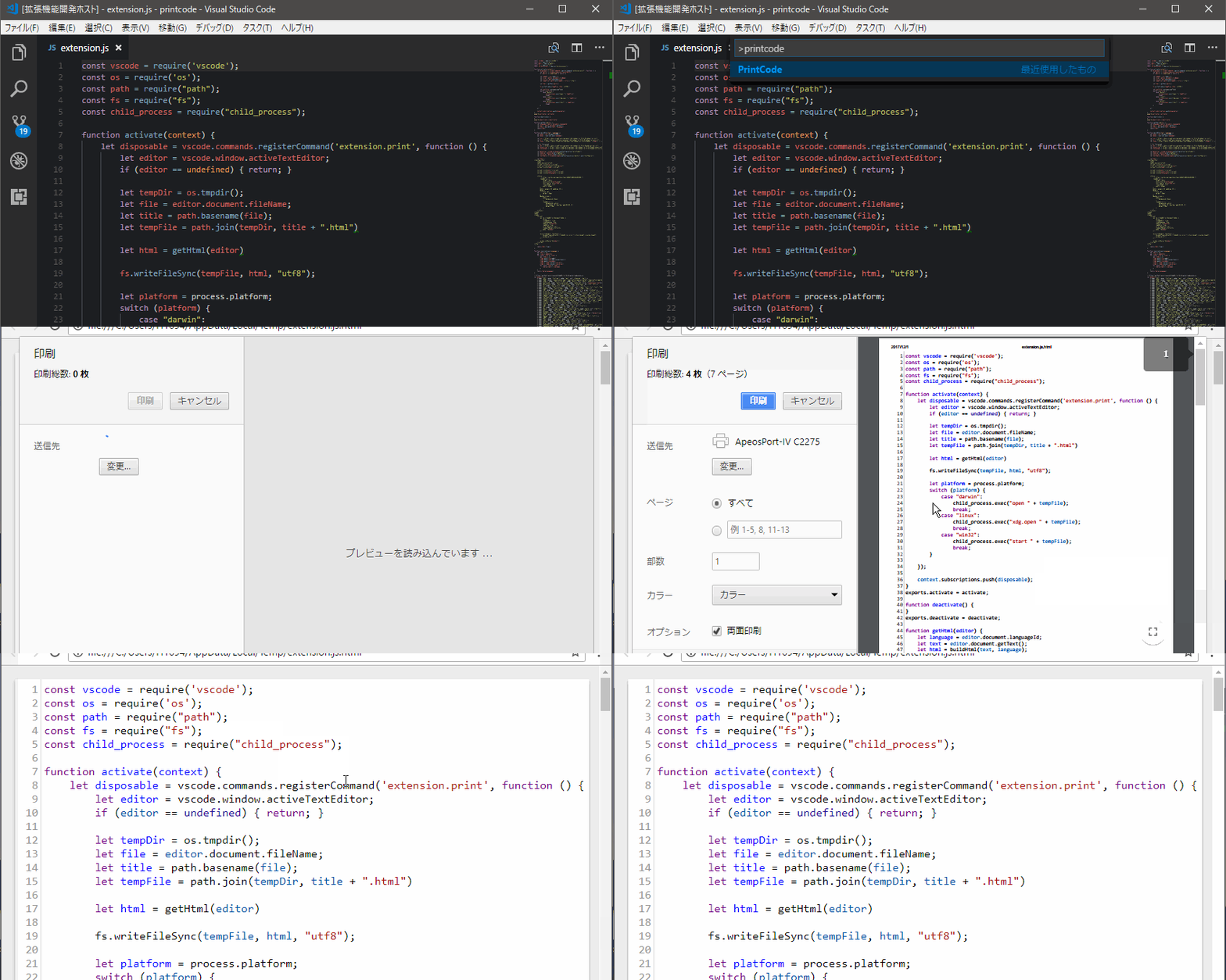
19 |
20 | ## Marketplace
21 |
22 | https://marketplace.visualstudio.com/items?itemName=nobuhito.printcode
23 |
24 | ## Features
25 |
26 | PrintCode は編集中のコードを HTML ファイルに変換し、ブラウザで表示して印刷します。。
27 |
28 | ## Usage
29 |
30 | 1. `F1` キーを押す
31 | 2. `PrintCode` を選択もしくは入力
32 | 3. ブラウザが立ち上がってコードを表示
33 | 4. 印刷ダイアログが開き印刷できる!
34 |
35 | ## Configuration Options
36 |
37 | | Key | Default | Description |
38 | | -------------------- | -------: | -------------------------------------- |
39 | | tabSize | 2 | タブの表示スペースサイズ |
40 | | fontSize | 12 | 印刷時のフォントサイズ |
41 | | paperSize | a4 | 用紙サイズと印刷方向 |
42 | | lineNumbers | on | 行番号の印刷 |
43 | | printFilePath | filename | 印刷ドキュメントのタイトルを指定 |
44 | | browserPath | none | デフォルトブラウザ以外で開く場合のパス |
45 | | webServerPort | 4649 | ローカル WebServer のポートナンバー |
46 | | disableTelemetry | false | Google Analytics コードを埋め込まない |
47 | | autoPrint | true | 印刷ダイアログの自動表示 |
48 | | additionalStyleSheet | none | 追加するスタイルシート |
49 |
50 | ## Release Notes
51 |
52 | See [Changelog](https://github.com/nobuhito/vscode.printcode/blob/master/CHANGELOG.md).
53 |
54 | ## Thank you
55 |
56 | @janilahti (#6, #7, #12)
57 |
58 | I like [osushi/お寿司](https://osushi.love/nobuhito) very much.
59 |
--------------------------------------------------------------------------------
/src/webServer.js:
--------------------------------------------------------------------------------
1 | const vscode = require("vscode");
2 | const http = require("http");
3 | const content = require("./content");
4 | const path = require("path");
5 | const fs = require("fs");
6 | const config = require("./config").get();
7 |
8 | let server = null;
9 | let portNumberInUse = null;
10 |
11 | exports.run = function() {
12 | return new Promise((resolve, reject) => {
13 | if (server !== null && config.port !== portNumberInUse) {
14 | server.close(function() {});
15 | server = null;
16 | }
17 |
18 | if (server == null) {
19 | server = http.createServer(requestHandler);
20 | server.on("error", function(err) {
21 | if (err) {
22 | if (err.code === "EADDRINUSE") {
23 | vscode.window.showInformationMessage(
24 | `Unable to print: Port ${config.port} is in use. \
25 | Please set different port number in User Settings: printcode.webServerPort \
26 | and Reload Window, or end the process reserving the port.`
27 | );
28 | } else if (err.code === "EACCES") {
29 | vscode.window.showInformationMessage(
30 | `Unable to print: No permission to use port ${config.port}. \
31 | Please set different port number in User Settings: printcode.webServerPort \
32 | and Reload Window.`
33 | );
34 | }
35 | server.close();
36 | server = null;
37 | portNumberInUse = null;
38 | reject();
39 | }
40 | });
41 |
42 | server.on("request", (request, response) => {
43 | response.on("finish", () => {
44 | request.socket.destroy();
45 | });
46 | });
47 |
48 | server.listen(config.webServerPort);
49 | }
50 |
51 | resolve();
52 | });
53 | };
54 |
55 | let requestHandler = (request, response) => {
56 | if (request.url.replace(/\?mode\=.*$/, "") == "/") {
57 | let editor = vscode.window.activeTextEditor;
58 | if (editor == undefined) {
59 | return;
60 | }
61 |
62 | let language = editor.document.languageId;
63 | let text = editor.document.getText();
64 | let html = content.build(text, language);
65 | response.end(html);
66 | } else if (/^\/_node_modules/.test(request.url)) {
67 | let file = path.join(
68 | __dirname,
69 | "..",
70 | request.url.replace("/_node_modules", "node_modules")
71 | );
72 | fs.readFile(file, "utf8", (err, text) => {
73 | if (err) {
74 | response.end(err.code + ": " + err.message);
75 | }
76 | response.end(text);
77 | });
78 | } else {
79 | response.end("");
80 | }
81 | };
82 |
--------------------------------------------------------------------------------
/README.md:
--------------------------------------------------------------------------------
1 | 
2 | 
3 | 
4 | 
5 | 
6 | 
7 |
8 | # PrintCode - Extension of VS Code
9 |
10 | You can print the code from VSCode!
11 |
12 | [Product page](https://printcode.launchaco.com/)
13 |
14 | [README for Japanese](https://github.com/nobuhito/vscode.printcode/blob/master/README.ja.md)
15 |
16 | [Blog for Japanese](https://blog.bulkus.net/tags/printcode/)
17 |
18 | 
19 |
20 | ## Marketplace
21 |
22 | https://marketplace.visualstudio.com/items?itemName=nobuhito.printcode
23 |
24 | ## Features
25 |
26 | PrintCode converts the code being edited into an HTML file, displays it by browser and prints it.
27 |
28 | ## Usage
29 |
30 | 1. Press the `F1` key
31 | 2. Select or type `PrintCode`
32 | 3. The browser launches and displays the code
33 | 4. A print dialog opens and you can print!!
34 |
35 | ## Configuration Options
36 |
37 | | Key | Default | Description |
38 | | -------------------- | -------: | -------------------------------------------- |
39 | | tabSize | 2 | The number of spaces a tab is equal to |
40 | | fontSize | 12 | Controls the font size in pixels |
41 | | paperSize | a4 | Paper size and orientation |
42 | | lineNumbers | on | Print line numbers |
43 | | printFilePath | filename | Amount of file's path info in document title |
44 | | browserPath | none | Open with your non-default browser |
45 | | webServerPort | 4649 | Port number for local WebServer. |
46 | | disableTelemetry | false | Dont't include Google Analytics code on page |
47 | | autoPrint | true | Pop up print dialog automatically |
48 | | additionalStyleSheet | none | Insert additional StyleSheet |
49 |
50 | ## Release Notes
51 |
52 | See [Changelog](https://github.com/nobuhito/vscode.printcode/blob/master/CHANGELOG.md).
53 |
54 | ## Thank you
55 |
56 | @janilahti (#6, #7, #12)
57 |
58 | I like [osushi/お寿司](https://osushi.love/nobuhito) very much.
59 |
--------------------------------------------------------------------------------
/package.json:
--------------------------------------------------------------------------------
1 | {
2 | "name": "printcode",
3 | "displayName": "PrintCode",
4 | "description": "Added printing function to VS Code!!",
5 | "version": "3.0.0",
6 | "author": {
7 | "name": "Nobuhito SATO",
8 | "email": "nobuhito.sato@gmail.com",
9 | "url": "https://bulkus.net/"
10 | },
11 | "publisher": "nobuhito",
12 | "engines": {
13 | "vscode": "^1.17.0"
14 | },
15 | "categories": [
16 | "Other"
17 | ],
18 | "repository": {
19 | "url": "https://github.com/nobuhito/vscode.printcode"
20 | },
21 | "activationEvents": [
22 | "onCommand:extension.print"
23 | ],
24 | "license": "SEE LICENSE IN LICENSE",
25 | "icon": "icon.png",
26 | "main": "./src/extension",
27 | "contributes": {
28 | "configuration": [
29 | {
30 | "title": "PrintCode Configuration",
31 | "properties": {
32 | "printcode.tabSize": {
33 | "type": "integer",
34 | "description": "The number of spaces a tab is equal to.",
35 | "default": 2
36 | },
37 | "printcode.fontSize": {
38 | "type": "integer",
39 | "description": "Controls the font size in pixels.",
40 | "default": 12
41 | },
42 | "printcode.paperSize": {
43 | "type": "string",
44 | "description": "Paper size and orientation.",
45 | "enum": [
46 | "a3",
47 | "a3Land",
48 | "a4",
49 | "a4Land",
50 | "a5",
51 | "a5Land",
52 | "letter",
53 | "letterLand",
54 | "legal",
55 | "legalLand"
56 | ],
57 | "default": "a4"
58 | },
59 | "printcode.lineNumbers": {
60 | "type": "string",
61 | "description": "Print line numbers.",
62 | "enum": [
63 | "on",
64 | "off",
65 | "editor"
66 | ],
67 | "default": "on"
68 | },
69 | "printcode.printFilePath": {
70 | "type": "string",
71 | "description": "Amount of file's path info in document title.",
72 | "default": "filename",
73 | "enum": [
74 | "none",
75 | "full",
76 | "relative",
77 | "filename"
78 | ]
79 | },
80 | "printcode.browserPath": {
81 | "type": "string",
82 | "description": "Path for opening in the specified WebBrowser."
83 | },
84 | "printcode.webServerPort": {
85 | "type": "integer",
86 | "description": "Port number for local WebServer.",
87 | "default": 4649
88 | },
89 | "printcode.disableTelemetry": {
90 | "type": "boolean",
91 | "description": "Dont't include Google Analytics code on page.",
92 | "default": false
93 | },
94 | "printcode.autoPrint": {
95 | "type": "boolean",
96 | "description": "Pop up print dialog automatically.",
97 | "default": true
98 | },
99 | "printcode.additionalStyleSheet": {
100 | "type": "string",
101 | "description": "Insert additional StyleSheet."
102 | }
103 | }
104 | }
105 | ],
106 | "commands": [
107 | {
108 | "command": "extension.print",
109 | "title": "PrintCode"
110 | }
111 | ]
112 | },
113 | "scripts": {
114 | "postinstall": "node ./node_modules/vscode/bin/install",
115 | "test": "node ./node_modules/vscode/bin/test"
116 | },
117 | "devDependencies": {
118 | "typescript": "^3.0.1",
119 | "vscode": "^1.1.21",
120 | "mocha": "^5.2.0",
121 | "eslint": "^5.4.0",
122 | "@types/node": "^10.7.1",
123 | "@types/mocha": "^5.2.5"
124 | },
125 | "dependencies": {
126 | "codemirror": "^5.39.2",
127 | "vsce": "^1.46.0"
128 | }
129 | }
130 |
--------------------------------------------------------------------------------
/src/content.js:
--------------------------------------------------------------------------------
1 | const vscode = require("vscode");
2 | const config = require("./config").get();
3 | const funcs = require("./funcs");
4 | const path = require("path");
5 |
6 | exports.build = function(text, language) {
7 | // https://qiita.com/qoAop/items/777c1e1e859097f7eb82#comment-22d9876ea23dfef952f9
8 | let body = escape(text);
9 |
10 | let mode = funcs.resolveAliases(language);
11 |
12 | let css = "/_node_modules/codemirror/lib/codemirror.css";
13 | let js = "/_node_modules/codemirror/lib/codemirror.js";
14 | let lang = "/_node_modules/codemirror/mode/" + mode + "/" + mode + ".js";
15 |
16 | // for htmlmixed
17 | let xml = "/_node_modules/codemirror/mode/xml/xml.js";
18 | let javascript = "/_node_modules/codemirror/mode/javascript/javascript.js";
19 | let stylesheet = "/_node_modules/codemirror/mode/css/css.js";
20 |
21 | // for htmlembedded
22 | let multiplex = "/_node_modules/codemirror/addon/mode/multiplex.js";
23 | let htmlmixed = "/_node_modules/codemirror/mode/htmlmixed/htmlmixed.js";
24 |
25 | // for clikes
26 | let clike = "/_node_modules/codemirror/mode/clike/clike.js";
27 |
28 | let folder = null;
29 | let resource = vscode.window.activeTextEditor.document.uri;
30 | let filePath = resource.fsPath || "";
31 | let folderPath = "";
32 |
33 | // better? https://github.com/cg-cnu/vscode-path-tools/blob/master/src/pathTools.ts
34 | if (resource.scheme === "file") {
35 | // file is an actual file on disk
36 | folder = vscode.workspace.getWorkspaceFolder(resource);
37 | if (folder) {
38 | // ...and is located inside workspace folder
39 | folderPath = folder.uri.fsPath;
40 | }
41 | }
42 |
43 | switch (config.printFilePath) {
44 | case "none":
45 | // show legacy document title
46 | break;
47 | case "full":
48 | config.printInfo = filePath;
49 | break;
50 | case "relative":
51 | case "pretty":
52 | // partial path relative to workspace root
53 | if (folder) {
54 | config.printInfo = filePath.replace(folderPath, "").substr(1);
55 | } else {
56 | // or should we show full path if no relative path available?
57 | config.printInfo = path.basename(filePath);
58 | }
59 | break;
60 | default:
61 | // default matches config default value "filename" and anything else
62 | config.printInfo = path.basename(filePath);
63 | }
64 | // skip HTML encoding of '&' and '<' since they're quite rare in filenames
65 |
66 | let printPopup = config.autoPrint ? `window.print();` : "";
67 |
68 | let googleAnalyticsSnipplet = config.disableTelemetry
69 | ? ""
70 | : `
71 |
72 |
73 |
80 | `;
81 |
82 | let additionalStyleSheet =
83 | config.additionalStyleSheet == ""
84 | ? ""
85 | : `
86 | `;
89 |
90 | let html = `
91 |
92 |
93 |
94 | ${config.printInfo}
95 |
96 |
97 |
98 |
99 |
124 | ${additionalStyleSheet}
125 | ${googleAnalyticsSnipplet}
126 |
127 |
128 |
129 |
130 |
131 |
180 |
181 |