├── README.md
├── 3_Creación_y_hosting_de_demos_de_machine_learning_con_Gradio_y_Hugging_Face.ipynb
└── 1_NLP_en_español:_Importando_un_modelo_y_tokenizando.ipynb
/README.md:
--------------------------------------------------------------------------------
1 | # Hugging-Face-101-ES
2 | Comienza en procesamiento del lenguaje natural usando [Hugging Face](https://huggingface.co/)!
3 |
4 | Aquí los temas hasta hoy.
5 |
6 | | | Tema | Dónde? |
7 | |---|-------------------------------------------------------|-----------------------------------------------------------------------------------------------------------------------|
8 | | 0 | Introducción a los Transformers | [link](https://github.com/omarespejel/Hugging-Face-101-ES/blob/main/0_Introducci%C3%B3n_a_los_Transformers.ipynb) |
9 | | 1 | NLP en español: Importando un modelo y tokenizando | [link](https://github.com/omarespejel/Hugging-Face-101-ES/blob/main/1_NLP_en_espa%C3%B1ol:_Importando_un_modelo_y_tokenizando.ipynb) |
10 | | 2 | NLP en español: Fine-tuning para clasificar tweets | [link](https://github.com/omarespejel/Hugging-Face-101-ES/blob/main/2_NLP_en_espa%C3%B1ol:_Fine-tuning_para_clasificar_tweets.ipynb) |
11 |
12 | ### Contribuye
13 | Una vez que haya terminado de trabajar algún tutorial, ¡tus comentarios serán muy apreciados!
14 |
15 | Y si tienes dificultades para seguir adelante, ¡háznolo saber! Este tutorial está destinado a ser lo más accesible posible; queremos saber si no es el caso.
16 |
17 | ¿Tienes una pregunta? Únete a nuestro [Discord](https://t.co/1n75wi976V?amp=1) y pregunta.
18 |
19 | Este proyecto se puede mejorar y evolucionará en las próximas semanas. ¡Sus contribuciones son bienvenidas! Aquí hay cosas que puede hacer para ayudar:
20 | - Corrija los errores si encuentra alguno.
21 | - Creemos nuevos tutoriales.
22 | - Tienes ideas sobre nuevos casos y ejercicios? Crea un issue o abre un pull request.
23 |
--------------------------------------------------------------------------------
/3_Creación_y_hosting_de_demos_de_machine_learning_con_Gradio_y_Hugging_Face.ipynb:
--------------------------------------------------------------------------------
1 | {
2 | "nbformat": 4,
3 | "nbformat_minor": 0,
4 | "metadata": {
5 | "colab": {
6 | "name": "Español - Creación y hosting de demos de machine learning con Gradio y Hugging Face",
7 | "provenance": [],
8 | "collapsed_sections": [],
9 | "include_colab_link": true
10 | },
11 | "kernelspec": {
12 | "name": "python3",
13 | "display_name": "Python 3"
14 | },
15 | "language_info": {
16 | "name": "python"
17 | }
18 | },
19 | "cells": [
20 | {
21 | "cell_type": "markdown",
22 | "metadata": {
23 | "id": "view-in-github",
24 | "colab_type": "text"
25 | },
26 | "source": [
27 | " "
28 | ]
29 | },
30 | {
31 | "cell_type": "markdown",
32 | "source": [
33 | "**Notebook original en inglés [aquí](https://colab.research.google.com/drive/1K5tP5NBWwtezBg3Kp4wpD5KI6JZ6oCg9).**"
34 | ],
35 | "metadata": {
36 | "id": "7M5cWHxEXS6U"
37 | }
38 | },
39 | {
40 | "cell_type": "markdown",
41 | "source": [
42 | "💡 **¡Bienvenidos!**\n",
43 | "\n",
44 | "Hemos reunido un conjunto de herramientas que los instructores universitarios pueden usar para preparar fácilmente laboratorios, tareas o clases. El contenido está diseñado de manera autónoma, de modo que se puede incorporar fácilmente al plan de estudios existente. Este contenido es gratuito y utiliza tecnologías Open Source ampliamente conocidas (`transformers`, `gradio`, etc).\n",
45 | "\n",
46 | "Alternativamente, puede solicitar que alguien del equipo de Hugging Face ejecute los tutoriales para su clase a través de la iniciativa [ML demo.cratization tour](https://huggingface2.notion.site/ML-Demo-cratization-tour-with-66847a294abd4e9785e85663f5239652)!\n",
47 | "\n",
48 | "Puede encontrar todos los tutoriales y recursos que hemos reunido [aquí](https://huggingface2.notion.site/Education-Toolkit-7b4a9a9d65ee4a6eb16178ec2a4f3599). "
49 | ],
50 | "metadata": {
51 | "id": "gh6QOr-qO4Ym"
52 | }
53 | },
54 | {
55 | "cell_type": "code",
56 | "source": [
57 | ""
58 | ],
59 | "metadata": {
60 | "id": "ucv3LzuNH73L"
61 | },
62 | "execution_count": null,
63 | "outputs": []
64 | },
65 | {
66 | "cell_type": "markdown",
67 | "source": [
68 | "# Tutorial: Cree y aloje demostraciones de aprendizaje automático con Gradio ⚡ & Hugging Face 🤗 "
69 | ],
70 | "metadata": {
71 | "id": "NkJmA-r5L0EB"
72 | }
73 | },
74 | {
75 | "cell_type": "markdown",
76 | "source": [
77 | "**Objetivos de aprendizajes:** \n",
78 | "1. Crear una demostración rápida para su modelo de machine learning en Python usando la libreria `gradio` \n",
79 | "2. Organizar las demostraciones de forma gratuita con Hugging Face Spaces\n",
80 | "3. Agregar su demostración a la organización Hugging Face para su clase o conferencia. Esto incluye:\n",
81 | " * Un paso de configuración para instructores (o organizadores de conferencias)\n",
82 | " * Subir instrucciones para los estudiantes (o participantes de conferencias)\n",
83 | "\n",
84 | "**Duración**: 20-40\n",
85 | " minutos\n",
86 | "\n",
87 | "**Rrequisitos previos:** Conocimiento de Python y familiaridad básica de machine learning \n",
88 | "\n",
89 | "\n",
90 | "**Autor**: [Abubakar Abid](https://twitter.com/abidlabs) (siéntase libre de enviarme un ping con cualquier pregunta sobre este tutorial) \n",
91 | "\n",
92 | "¡Todos estos pasos se pueden hacer gratis! Todo lo que necesita es un navegador de Internet y un lugar donde pueda escribir Python 👩💻"
93 | ],
94 | "metadata": {
95 | "id": "D_Iv1CJZPekG"
96 | }
97 | },
98 | {
99 | "cell_type": "markdown",
100 | "source": [
101 | "## ¿Por qué demostraciones?\n",
102 | "\n",
103 | "Las **demostraciones** de modelos de machine learning son una parte cada vez más importante de los _cursos_ y _conferencias_ de machine learning. Las demostraciones permiten:\n",
104 | "* desarrolladores de modelos para **presentar** fácilmente su trabajo a una amplia audiencia\n",
105 | "* aumentar la **reproducibilidad** de la investigación de machine learning\n",
106 | "* diversos usuarios para **identificar y depurar** más fácilmente los puntos de falla de los modelos\n",
107 | "\n",
108 | "\n",
109 | "Como un ejemplo rápido de lo que nos gustaría construir, echa un vistazo a [Keras Org on Hugging Face](https://huggingface.co/keras-io), que incluye una tarjeta de descripción y una colección de Modelos y Espacios construidos por la comunidad de Keras. Cualquier espacio se puede abrir en su navegador y puede usar el modelo inmediatamente como se muestra aquí:\n",
110 | "\n",
111 | "\n",
112 | "\n",
113 | "\n"
114 | ],
115 | "metadata": {
116 | "id": "PR9faV2NWTrG"
117 | }
118 | },
119 | {
120 | "cell_type": "markdown",
121 | "source": [
122 | "## 1. Cree demostraciones rápidas de ML en Python usando la libreria Gradio"
123 | ],
124 | "metadata": {
125 | "id": "g0KzbU4lQtv3"
126 | }
127 | },
128 | {
129 | "cell_type": "markdown",
130 | "source": [
131 | "`gradio` es una práctica librería de Python que le permite crear demostraciones web simplemente especificando la lista de componentes de entrada y salida que espera su modelo de machine learning.\n",
132 | "\n",
133 | "¿Qué quiero decir con componentes de entrada y salida? Gradio viene con un montón de componentes predefinidos para diferentes tipos de modelos de aprendizaje automático. Aquí hay unos ejemplos:\n",
134 | "\n",
135 | "* Para un **clasificador de imágenes**, el tipo de entrada esperado es una `Imagen` y el tipo de salida es una `Etiqueta`. \n",
136 | "* Para un **modelo de reconocimiento de voz**, el componente de entrada esperado es un 'Micrófono' (que permite a los usuarios grabar desde el navegador) o 'Audio' (que permite a los usuarios arrastrar y soltar archivos de audio), mientras que el tipo de salida es `Texto`.\n",
137 | "* Para un **modelo de respuesta a preguntas**, esperamos **2 entradas**: [`Texto`, `Texto`], un cuadro de texto para el párrafo y otro para la pregunta, y el tipo de salida es un solo `Texto` correspondiente a la respuesta. \n",
138 | "\n",
139 | "Tienes la idea... (para todos los componentes compatibles, [ver los documentos](https://gradio.app/docs/))\n",
140 | "\n",
141 | "Además de los tipos de entrada y salida, Gradio espera un tercer parámetro, que es la propia función de predicción. Este parámetro puede ser ***cualquier* función normal de Python** que tome los parámetros correspondientes a los componentes de entrada y devuelva los valores correspondientes a los componentes de salida.\n",
142 | "\n",
143 | "Basta de palabras. ¡Veamos algo de código!"
144 | ],
145 | "metadata": {
146 | "id": "rlSs72oUQ1VW"
147 | }
148 | },
149 | {
150 | "cell_type": "code",
151 | "source": [
152 | "# Primero, instale Gradio\n",
153 | "!pip install --quiet gradio"
154 | ],
155 | "metadata": {
156 | "colab": {
157 | "base_uri": "https://localhost:8080/"
158 | },
159 | "id": "p0MkPbbZbSiP",
160 | "outputId": "e143c5df-5b98-46c6-f2f7-7fc7abebd3d7"
161 | },
162 | "execution_count": null,
163 | "outputs": [
164 | {
165 | "output_type": "stream",
166 | "name": "stdout",
167 | "text": [
168 | "\u001b[K |████████████████████████████████| 871 kB 5.1 MB/s \n",
169 | "\u001b[K |████████████████████████████████| 2.0 MB 41.5 MB/s \n",
170 | "\u001b[K |████████████████████████████████| 52 kB 787 kB/s \n",
171 | "\u001b[K |████████████████████████████████| 1.1 MB 25.8 MB/s \n",
172 | "\u001b[K |████████████████████████████████| 52 kB 1.1 MB/s \n",
173 | "\u001b[K |████████████████████████████████| 210 kB 56.5 MB/s \n",
174 | "\u001b[K |████████████████████████████████| 94 kB 2.8 MB/s \n",
175 | "\u001b[K |████████████████████████████████| 271 kB 58.7 MB/s \n",
176 | "\u001b[K |████████████████████████████████| 144 kB 58.8 MB/s \n",
177 | "\u001b[K |████████████████████████████████| 10.9 MB 44.8 MB/s \n",
178 | "\u001b[K |████████████████████████████████| 58 kB 5.3 MB/s \n",
179 | "\u001b[K |████████████████████████████████| 79 kB 6.6 MB/s \n",
180 | "\u001b[K |████████████████████████████████| 856 kB 60.6 MB/s \n",
181 | "\u001b[K |████████████████████████████████| 61 kB 374 kB/s \n",
182 | "\u001b[K |████████████████████████████████| 3.6 MB 50.0 MB/s \n",
183 | "\u001b[K |████████████████████████████████| 58 kB 4.5 MB/s \n",
184 | "\u001b[?25h Building wheel for ffmpy (setup.py) ... \u001b[?25l\u001b[?25hdone\n",
185 | " Building wheel for python-multipart (setup.py) ... \u001b[?25l\u001b[?25hdone\n"
186 | ]
187 | }
188 | ]
189 | },
190 | {
191 | "cell_type": "code",
192 | "source": [
193 | "# Definir una función simple \"Hola mundo\"\n",
194 | "def greet(name):\n",
195 | " return \"Hello \" + name + \"!!\""
196 | ],
197 | "metadata": {
198 | "id": "SjTxhry8bWS7"
199 | },
200 | "execution_count": null,
201 | "outputs": []
202 | },
203 | {
204 | "cell_type": "code",
205 | "source": [
206 | "# Escriba 2 líneas de Python para crear una GUI simple\n",
207 | "import gradio as gr\n",
208 | "\n",
209 | "gr.Interface(fn=greet, inputs=\"text\", outputs=\"text\").launch();"
210 | ],
211 | "metadata": {
212 | "id": "OgqlIG2DbrJq"
213 | },
214 | "execution_count": null,
215 | "outputs": []
216 | },
217 | {
218 | "cell_type": "markdown",
219 | "source": [
220 | "Ejecutar el código anterior debería producir una GUI simple dentro de este cuaderno que le permita escribir entradas de ejemplo y ver el resultado devuelto por su función. \n",
221 | "\n",
222 | "Note que definimos una 'Interfaz' usando los 3 ingredientes mencionados anteriormente:\n",
223 | "* Una función\n",
224 | "* Componente(s) de entrada\n",
225 | "* Componente(s) de salida\n",
226 | "\n",
227 | "Este es un ejemplo simple para texto, pero el mismo principio es válido para cualquier otro tipo de tipo de datos. Por ejemplo, aquí hay una interfaz que genera un tono musical cuando se le proporcionan algunos parámetros diferentes (el código específico dentro de `generate_tone()` no es importante para el propósito de este tutorial):"
228 | ],
229 | "metadata": {
230 | "id": "0TyTGpSsb7bs"
231 | }
232 | },
233 | {
234 | "cell_type": "code",
235 | "source": [
236 | "import numpy as np\n",
237 | "import gradio as gr\n",
238 | "\n",
239 | "def generate_tone(note, octave, duration):\n",
240 | " sampling_rate = 48000\n",
241 | " a4_freq, tones_from_a4 = 440, 12 * (octave - 4) + (note - 9)\n",
242 | " frequency = a4_freq * 2 ** (tones_from_a4 / 12)\n",
243 | " audio = np.linspace(0, int(duration), int(duration) * sampling_rate)\n",
244 | " audio = (20000 * np.sin(audio * (2 * np.pi * frequency))).astype(np.int16)\n",
245 | " return sampling_rate, audio\n",
246 | "\n",
247 | "gr.Interface(\n",
248 | " generate_tone,\n",
249 | " [\n",
250 | " gr.inputs.Dropdown([\"C\", \"C#\", \"D\", \"D#\", \"E\", \"F\", \"F#\", \"G\", \"G#\", \"A\", \"A#\", \"B\"], type=\"index\"),\n",
251 | " gr.inputs.Slider(4, 6, step=1),\n",
252 | " gr.inputs.Textbox(type=\"number\", default=1, label=\"Duration in seconds\"),\n",
253 | " ],\n",
254 | " \"audio\",\n",
255 | " title=\"Generate a Musical Tone!\"\n",
256 | ").launch()"
257 | ],
258 | "metadata": {
259 | "id": "cHiZAO6ub6kA",
260 | "colab": {
261 | "base_uri": "https://localhost:8080/",
262 | "height": 643
263 | },
264 | "outputId": "ee9e8bfd-4b86-4ddf-c96d-d389cdc0730e"
265 | },
266 | "execution_count": null,
267 | "outputs": [
268 | {
269 | "output_type": "stream",
270 | "name": "stdout",
271 | "text": [
272 | "Colab notebook detected. To show errors in colab notebook, set `debug=True` in `launch()`\n",
273 | "Running on public URL: https://20619.gradio.app\n",
274 | "\n",
275 | "This share link expires in 72 hours. For free permanent hosting, check out Spaces (https://huggingface.co/spaces)\n"
276 | ]
277 | },
278 | {
279 | "output_type": "display_data",
280 | "data": {
281 | "text/html": [
282 | "\n",
283 | " \n",
290 | " "
291 | ],
292 | "text/plain": [
293 | ""
294 | ]
295 | },
296 | "metadata": {}
297 | },
298 | {
299 | "output_type": "execute_result",
300 | "data": {
301 | "text/plain": [
302 | "(,\n",
303 | " 'http://127.0.0.1:7860/',\n",
304 | " 'https://20619.gradio.app')"
305 | ]
306 | },
307 | "metadata": {},
308 | "execution_count": 3
309 | }
310 | ]
311 | },
312 | {
313 | "cell_type": "markdown",
314 | "source": [
315 | "**Desafío #1**: cree una demostración de Gradio que tome una imagen y aplique un *filtro sepia* en menos de 10 líneas de código Python. Puedes encontrar [\n",
316 | "este enlace útil](https://www.yabirgb.com/sepia_filter/). "
317 | ],
318 | "metadata": {
319 | "id": "23gD280-w-kT"
320 | }
321 | },
322 | {
323 | "cell_type": "markdown",
324 | "source": [
325 | "There are a lot more examples you can try in Gradio's [getting started page](https://gradio.app/getting_started/), which cover additional features such as:\n",
326 | "* Adding example inputs\n",
327 | "* Adding _state_ (e.g. for chatbots)\n",
328 | "* Sharing demos easily using one parameter called `share` (<-- this is pretty cool 😎)\n",
329 | "\n",
330 | "It is especially easy to demo a `transformers` model from Hugging Face's Model Hub, using the special `gr.Interface.load` method. For example, here is the code to build a demo for [GPT-J](https://huggingface.co/EleutherAI/gpt-j-6B), a large language model & add a couple of examples inputs:"
331 | ],
332 | "metadata": {
333 | "id": "DSE6TZF5e9Oz"
334 | }
335 | },
336 | {
337 | "cell_type": "code",
338 | "source": [
339 | "import gradio as gr\n",
340 | "\n",
341 | "examples = [[\"The Moon's orbit around Earth has\"], [\"There once was a pineapple\"]]\n",
342 | "\n",
343 | "gr.Interface.load(\"huggingface/EleutherAI/gpt-j-6B\", examples=examples).launch();"
344 | ],
345 | "metadata": {
346 | "colab": {
347 | "base_uri": "https://localhost:8080/",
348 | "height": 608
349 | },
350 | "id": "N_Cobhx8e8v9",
351 | "outputId": "2bac3837-feff-42ea-a577-60343f19535b"
352 | },
353 | "execution_count": null,
354 | "outputs": [
355 | {
356 | "output_type": "stream",
357 | "name": "stdout",
358 | "text": [
359 | "Fetching model from: https://huggingface.co/EleutherAI/gpt-j-6B\n",
360 | "Colab notebook detected. To show errors in colab notebook, set `debug=True` in `launch()`\n",
361 | "Running on public URL: https://30262.gradio.app\n",
362 | "\n",
363 | "This share link expires in 72 hours. For free permanent hosting, check out Spaces (https://huggingface.co/spaces)\n"
364 | ]
365 | },
366 | {
367 | "output_type": "display_data",
368 | "data": {
369 | "text/html": [
370 | "\n",
371 | " \n",
378 | " "
379 | ],
380 | "text/plain": [
381 | ""
382 | ]
383 | },
384 | "metadata": {}
385 | }
386 | ]
387 | },
388 | {
389 | "cell_type": "markdown",
390 | "source": [
391 | "**Challenge #2**: Go to the [Hugging Face Model Hub](https://huggingface.co/models), and pick a model that performs one of the other tasks supported in the `transformers` library (other than text generation). Create a Gradio demo for that model using `gr.Interface.load`."
392 | ],
393 | "metadata": {
394 | "id": "EoUYf0rYksA9"
395 | }
396 | },
397 | {
398 | "cell_type": "markdown",
399 | "source": [
400 | "## 2. Host the Demo (for free) on Hugging Face Spaces\n",
401 | "\n",
402 | "Once you made a Gradio demo, you can host it permanently on Hugging Spaces very easily:\n",
403 | "\n",
404 | "Here are the steps to that (shown in the GIF below):\n",
405 | "\n",
406 | "A. First, create a Hugging Face account if you do not already have one, by visiting https://huggingface.co/ and clicking \"Sign Up\"\n",
407 | "\n",
408 | "B. Once you are logged in, click on your profile picture and then click on \"New Space\" underneath it to get to this page: https://huggingface.co/new-space\n",
409 | "\n",
410 | "C. Give your Space a name and a license. Select \"Gradio\" as the Space SDK, and then choose \"Public\" if you are fine with everyone accessing your Space and the underlying code\n",
411 | "\n",
412 | "D. Then you will find a page that provides you instructions on how to upload your files into the Git repository for that Space. You may also need to add a `requirements.txt` file to specify any Python package dependencies.\n",
413 | "\n",
414 | "E. Once you have pushed your files, that's it! Spaces will automatically build your Gradio demo allowing you to share it with anyone, anywhere!\n",
415 | "\n",
416 | "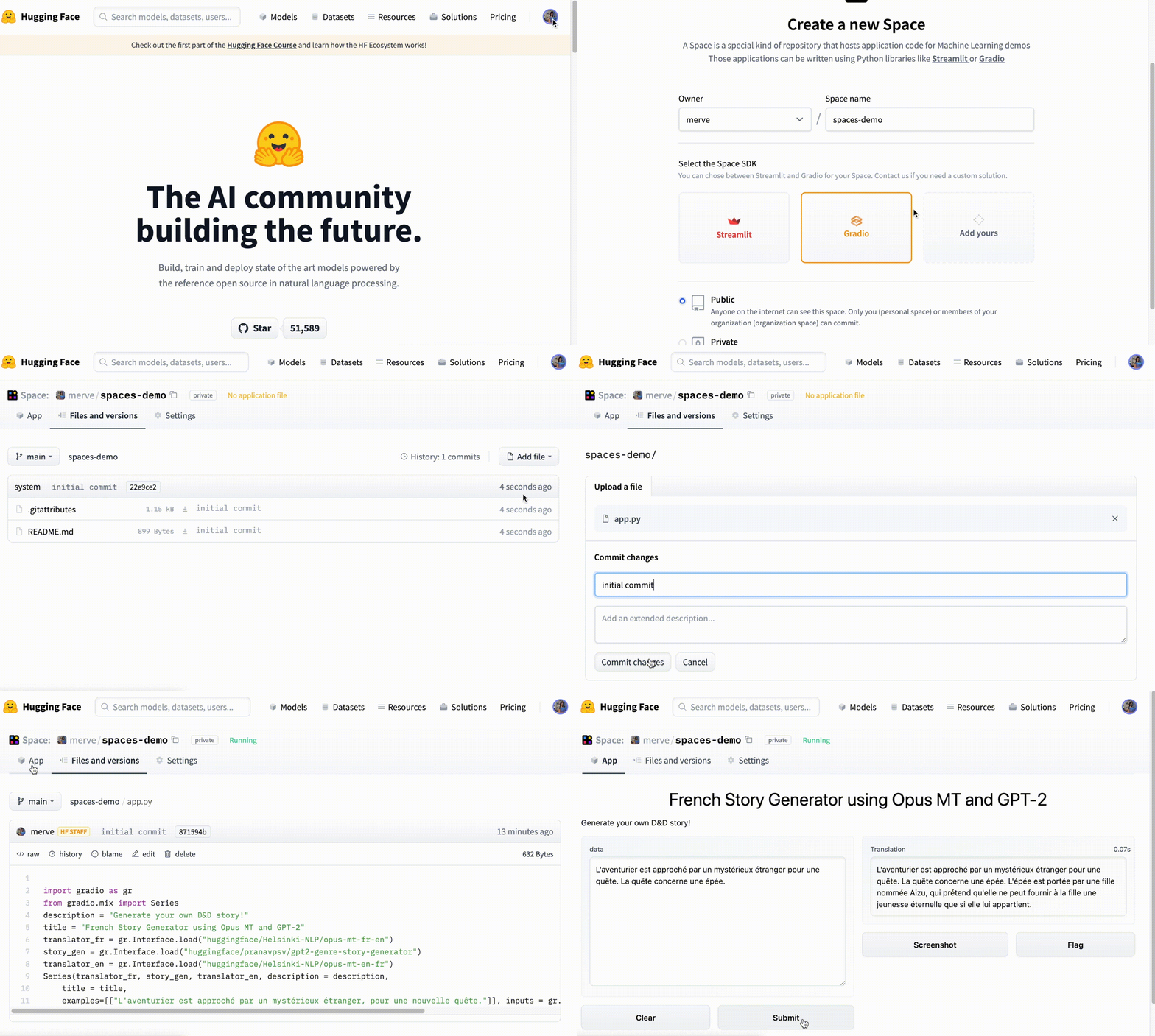\n",
417 | "\n",
418 | "\n",
419 | "\n"
420 | ],
421 | "metadata": {
422 | "id": "b6Ek7cORgDkQ"
423 | }
424 | },
425 | {
426 | "cell_type": "markdown",
427 | "source": [
428 | "You can even embed your Gradio demo on any website -- in a blog, a portfolio page, or even in a colab notebook, like I've done with a Pictionary sketch recognition model below:"
429 | ],
430 | "metadata": {
431 | "id": "d4XCmQ_RILoq"
432 | }
433 | },
434 | {
435 | "cell_type": "code",
436 | "execution_count": null,
437 | "metadata": {
438 | "id": "IwNP5DJOKUql"
439 | },
440 | "outputs": [],
441 | "source": [
442 | "from IPython.display import IFrame\n",
443 | "IFrame(src='https://hf.space/gradioiframe/abidlabs/Draw/+', width=1000, height=800)"
444 | ]
445 | },
446 | {
447 | "cell_type": "markdown",
448 | "source": [
449 | "**Challenge #3**: Upload your Gradio demo to Hugging Face Spaces and get a permanent URL for it. Share the permanent URL with someone (a colleague, a collaborator, a friend, a user, etc.) -- what kind of feedback do you get on your machine learning model?"
450 | ],
451 | "metadata": {
452 | "id": "Dw6H-iQAlF8I"
453 | }
454 | },
455 | {
456 | "cell_type": "markdown",
457 | "source": [
458 | "## 3. Add your demo to the Hugging Face org for your class or conference"
459 | ],
460 | "metadata": {
461 | "id": "MqD0O1PKIg3g"
462 | }
463 | },
464 | {
465 | "cell_type": "markdown",
466 | "source": [
467 | "#### **Setup** (for instructors or conference organizers)"
468 | ],
469 | "metadata": {
470 | "id": "DrMObQbwLOHm"
471 | }
472 | },
473 | {
474 | "cell_type": "markdown",
475 | "source": [
476 | "A. First, create a Hugging Face account if you do not already have one, by visiting https://huggingface.co/ and clicking \"Sign Up\"\n",
477 | "\n",
478 | "B. Once you are logged in, click on your profile picture and then click on \"New Organization\" underneath it to get to this page: https://huggingface.co/organizations/new\n",
479 | "\n",
480 | "C. Fill out the information for your class or conference. We recommend creating a separate organization each time that a class is taught (for example, \"Stanford-CS236g-20222\") and for each year of the conference.\n",
481 | "\n",
482 | "D. Your organization will be created and now now users will be able request adding themselves to your organizations by visiting the organization page.\n",
483 | "\n",
484 | "E. Optionally, you can change the settings by clicking on the \"Organization settings\" button. Typically, for classes and conferences, you will want to navigate to `Settings > Members` and set the \"Default role for new members\" to be \"write\", which allows them to submit Spaces but not change the settings. "
485 | ],
486 | "metadata": {
487 | "id": "_45C7MnXNbc0"
488 | }
489 | },
490 | {
491 | "cell_type": "markdown",
492 | "source": [
493 | "#### For students or conference participants"
494 | ],
495 | "metadata": {
496 | "id": "iSqzO-w8LY0R"
497 | }
498 | },
499 | {
500 | "cell_type": "markdown",
501 | "source": [
502 | "A. Ask your instructor / coneference organizer for the link to the Organization page if you do not already have it\n",
503 | "\n",
504 | "B. Visit the Organization page and click \"Request to join this org\" button, if you are not yet part of the org.\n",
505 | "\n",
506 | "C. Then, once you have been approved to join the organization (and built your Gradio Demo and uploaded it to Spaces -- see Sections 1 and 2), then simply go to your Space and go to `Settings > Rename or transfer this space` and then select the organization name under `New owner`. Click the button and the Space will now be added to your class or conference Space! "
507 | ],
508 | "metadata": {
509 | "id": "3x1Oyh4wOdOK"
510 | }
511 | }
512 | ]
513 | }
--------------------------------------------------------------------------------
/1_NLP_en_español:_Importando_un_modelo_y_tokenizando.ipynb:
--------------------------------------------------------------------------------
1 | {
2 | "nbformat": 4,
3 | "nbformat_minor": 0,
4 | "metadata": {
5 | "colab": {
6 | "name": "BETO_01_Importación_y_tokenizing.ipynb",
7 | "provenance": [],
8 | "collapsed_sections": [],
9 | "authorship_tag": "ABX9TyPiahwCRL5pOePnM4Yhfxrw",
10 | "include_colab_link": true
11 | },
12 | "kernelspec": {
13 | "name": "python3",
14 | "display_name": "Python 3"
15 | },
16 | "accelerator": "GPU",
17 | "widgets": {
18 | "application/vnd.jupyter.widget-state+json": {
19 | "2cad5596e0564aa9a3b904b7fa509f86": {
20 | "model_module": "@jupyter-widgets/controls",
21 | "model_name": "HBoxModel",
22 | "model_module_version": "1.5.0",
23 | "state": {
24 | "_view_name": "HBoxView",
25 | "_dom_classes": [],
26 | "_model_name": "HBoxModel",
27 | "_view_module": "@jupyter-widgets/controls",
28 | "_model_module_version": "1.5.0",
29 | "_view_count": null,
30 | "_view_module_version": "1.5.0",
31 | "box_style": "",
32 | "layout": "IPY_MODEL_b03632d2b45a433895f8fbac356c13b1",
33 | "_model_module": "@jupyter-widgets/controls",
34 | "children": [
35 | "IPY_MODEL_d97f1d5b9bb14437b4e12042dea6a611",
36 | "IPY_MODEL_30c0e08d86d641898f1bc6b4e34540f1",
37 | "IPY_MODEL_093bea9b14944f75a8f9009050767f23"
38 | ]
39 | }
40 | },
41 | "b03632d2b45a433895f8fbac356c13b1": {
42 | "model_module": "@jupyter-widgets/base",
43 | "model_name": "LayoutModel",
44 | "model_module_version": "1.2.0",
45 | "state": {
46 | "_view_name": "LayoutView",
47 | "grid_template_rows": null,
48 | "right": null,
49 | "justify_content": null,
50 | "_view_module": "@jupyter-widgets/base",
51 | "overflow": null,
52 | "_model_module_version": "1.2.0",
53 | "_view_count": null,
54 | "flex_flow": null,
55 | "width": null,
56 | "min_width": null,
57 | "border": null,
58 | "align_items": null,
59 | "bottom": null,
60 | "_model_module": "@jupyter-widgets/base",
61 | "top": null,
62 | "grid_column": null,
63 | "overflow_y": null,
64 | "overflow_x": null,
65 | "grid_auto_flow": null,
66 | "grid_area": null,
67 | "grid_template_columns": null,
68 | "flex": null,
69 | "_model_name": "LayoutModel",
70 | "justify_items": null,
71 | "grid_row": null,
72 | "max_height": null,
73 | "align_content": null,
74 | "visibility": null,
75 | "align_self": null,
76 | "height": null,
77 | "min_height": null,
78 | "padding": null,
79 | "grid_auto_rows": null,
80 | "grid_gap": null,
81 | "max_width": null,
82 | "order": null,
83 | "_view_module_version": "1.2.0",
84 | "grid_template_areas": null,
85 | "object_position": null,
86 | "object_fit": null,
87 | "grid_auto_columns": null,
88 | "margin": null,
89 | "display": null,
90 | "left": null
91 | }
92 | },
93 | "d97f1d5b9bb14437b4e12042dea6a611": {
94 | "model_module": "@jupyter-widgets/controls",
95 | "model_name": "HTMLModel",
96 | "model_module_version": "1.5.0",
97 | "state": {
98 | "_view_name": "HTMLView",
99 | "style": "IPY_MODEL_ce3c854a09224301a29e9052282a2d85",
100 | "_dom_classes": [],
101 | "description": "",
102 | "_model_name": "HTMLModel",
103 | "placeholder": "",
104 | "_view_module": "@jupyter-widgets/controls",
105 | "_model_module_version": "1.5.0",
106 | "value": "Downloading: 100%",
107 | "_view_count": null,
108 | "_view_module_version": "1.5.0",
109 | "description_tooltip": null,
110 | "_model_module": "@jupyter-widgets/controls",
111 | "layout": "IPY_MODEL_1a6555cae7ef45e9aa8d11ef34ea17ea"
112 | }
113 | },
114 | "30c0e08d86d641898f1bc6b4e34540f1": {
115 | "model_module": "@jupyter-widgets/controls",
116 | "model_name": "FloatProgressModel",
117 | "model_module_version": "1.5.0",
118 | "state": {
119 | "_view_name": "ProgressView",
120 | "style": "IPY_MODEL_9de2cfd3bee04f5a9e70420303510eaa",
121 | "_dom_classes": [],
122 | "description": "",
123 | "_model_name": "FloatProgressModel",
124 | "bar_style": "success",
125 | "max": 49,
126 | "_view_module": "@jupyter-widgets/controls",
127 | "_model_module_version": "1.5.0",
128 | "value": 49,
129 | "_view_count": null,
130 | "_view_module_version": "1.5.0",
131 | "orientation": "horizontal",
132 | "min": 0,
133 | "description_tooltip": null,
134 | "_model_module": "@jupyter-widgets/controls",
135 | "layout": "IPY_MODEL_8a7455bc521543fc942b0ae7553c2ac8"
136 | }
137 | },
138 | "093bea9b14944f75a8f9009050767f23": {
139 | "model_module": "@jupyter-widgets/controls",
140 | "model_name": "HTMLModel",
141 | "model_module_version": "1.5.0",
142 | "state": {
143 | "_view_name": "HTMLView",
144 | "style": "IPY_MODEL_944632a6a03f4986a01d4fed7d8567cc",
145 | "_dom_classes": [],
146 | "description": "",
147 | "_model_name": "HTMLModel",
148 | "placeholder": "",
149 | "_view_module": "@jupyter-widgets/controls",
150 | "_model_module_version": "1.5.0",
151 | "value": " 49.0/49.0 [00:00<00:00, 1.15kB/s]",
152 | "_view_count": null,
153 | "_view_module_version": "1.5.0",
154 | "description_tooltip": null,
155 | "_model_module": "@jupyter-widgets/controls",
156 | "layout": "IPY_MODEL_dc60cc41a4a340ac96d169213e6a4171"
157 | }
158 | },
159 | "ce3c854a09224301a29e9052282a2d85": {
160 | "model_module": "@jupyter-widgets/controls",
161 | "model_name": "DescriptionStyleModel",
162 | "model_module_version": "1.5.0",
163 | "state": {
164 | "_view_name": "StyleView",
165 | "_model_name": "DescriptionStyleModel",
166 | "description_width": "",
167 | "_view_module": "@jupyter-widgets/base",
168 | "_model_module_version": "1.5.0",
169 | "_view_count": null,
170 | "_view_module_version": "1.2.0",
171 | "_model_module": "@jupyter-widgets/controls"
172 | }
173 | },
174 | "1a6555cae7ef45e9aa8d11ef34ea17ea": {
175 | "model_module": "@jupyter-widgets/base",
176 | "model_name": "LayoutModel",
177 | "model_module_version": "1.2.0",
178 | "state": {
179 | "_view_name": "LayoutView",
180 | "grid_template_rows": null,
181 | "right": null,
182 | "justify_content": null,
183 | "_view_module": "@jupyter-widgets/base",
184 | "overflow": null,
185 | "_model_module_version": "1.2.0",
186 | "_view_count": null,
187 | "flex_flow": null,
188 | "width": null,
189 | "min_width": null,
190 | "border": null,
191 | "align_items": null,
192 | "bottom": null,
193 | "_model_module": "@jupyter-widgets/base",
194 | "top": null,
195 | "grid_column": null,
196 | "overflow_y": null,
197 | "overflow_x": null,
198 | "grid_auto_flow": null,
199 | "grid_area": null,
200 | "grid_template_columns": null,
201 | "flex": null,
202 | "_model_name": "LayoutModel",
203 | "justify_items": null,
204 | "grid_row": null,
205 | "max_height": null,
206 | "align_content": null,
207 | "visibility": null,
208 | "align_self": null,
209 | "height": null,
210 | "min_height": null,
211 | "padding": null,
212 | "grid_auto_rows": null,
213 | "grid_gap": null,
214 | "max_width": null,
215 | "order": null,
216 | "_view_module_version": "1.2.0",
217 | "grid_template_areas": null,
218 | "object_position": null,
219 | "object_fit": null,
220 | "grid_auto_columns": null,
221 | "margin": null,
222 | "display": null,
223 | "left": null
224 | }
225 | },
226 | "9de2cfd3bee04f5a9e70420303510eaa": {
227 | "model_module": "@jupyter-widgets/controls",
228 | "model_name": "ProgressStyleModel",
229 | "model_module_version": "1.5.0",
230 | "state": {
231 | "_view_name": "StyleView",
232 | "_model_name": "ProgressStyleModel",
233 | "description_width": "",
234 | "_view_module": "@jupyter-widgets/base",
235 | "_model_module_version": "1.5.0",
236 | "_view_count": null,
237 | "_view_module_version": "1.2.0",
238 | "bar_color": null,
239 | "_model_module": "@jupyter-widgets/controls"
240 | }
241 | },
242 | "8a7455bc521543fc942b0ae7553c2ac8": {
243 | "model_module": "@jupyter-widgets/base",
244 | "model_name": "LayoutModel",
245 | "model_module_version": "1.2.0",
246 | "state": {
247 | "_view_name": "LayoutView",
248 | "grid_template_rows": null,
249 | "right": null,
250 | "justify_content": null,
251 | "_view_module": "@jupyter-widgets/base",
252 | "overflow": null,
253 | "_model_module_version": "1.2.0",
254 | "_view_count": null,
255 | "flex_flow": null,
256 | "width": null,
257 | "min_width": null,
258 | "border": null,
259 | "align_items": null,
260 | "bottom": null,
261 | "_model_module": "@jupyter-widgets/base",
262 | "top": null,
263 | "grid_column": null,
264 | "overflow_y": null,
265 | "overflow_x": null,
266 | "grid_auto_flow": null,
267 | "grid_area": null,
268 | "grid_template_columns": null,
269 | "flex": null,
270 | "_model_name": "LayoutModel",
271 | "justify_items": null,
272 | "grid_row": null,
273 | "max_height": null,
274 | "align_content": null,
275 | "visibility": null,
276 | "align_self": null,
277 | "height": null,
278 | "min_height": null,
279 | "padding": null,
280 | "grid_auto_rows": null,
281 | "grid_gap": null,
282 | "max_width": null,
283 | "order": null,
284 | "_view_module_version": "1.2.0",
285 | "grid_template_areas": null,
286 | "object_position": null,
287 | "object_fit": null,
288 | "grid_auto_columns": null,
289 | "margin": null,
290 | "display": null,
291 | "left": null
292 | }
293 | },
294 | "944632a6a03f4986a01d4fed7d8567cc": {
295 | "model_module": "@jupyter-widgets/controls",
296 | "model_name": "DescriptionStyleModel",
297 | "model_module_version": "1.5.0",
298 | "state": {
299 | "_view_name": "StyleView",
300 | "_model_name": "DescriptionStyleModel",
301 | "description_width": "",
302 | "_view_module": "@jupyter-widgets/base",
303 | "_model_module_version": "1.5.0",
304 | "_view_count": null,
305 | "_view_module_version": "1.2.0",
306 | "_model_module": "@jupyter-widgets/controls"
307 | }
308 | },
309 | "dc60cc41a4a340ac96d169213e6a4171": {
310 | "model_module": "@jupyter-widgets/base",
311 | "model_name": "LayoutModel",
312 | "model_module_version": "1.2.0",
313 | "state": {
314 | "_view_name": "LayoutView",
315 | "grid_template_rows": null,
316 | "right": null,
317 | "justify_content": null,
318 | "_view_module": "@jupyter-widgets/base",
319 | "overflow": null,
320 | "_model_module_version": "1.2.0",
321 | "_view_count": null,
322 | "flex_flow": null,
323 | "width": null,
324 | "min_width": null,
325 | "border": null,
326 | "align_items": null,
327 | "bottom": null,
328 | "_model_module": "@jupyter-widgets/base",
329 | "top": null,
330 | "grid_column": null,
331 | "overflow_y": null,
332 | "overflow_x": null,
333 | "grid_auto_flow": null,
334 | "grid_area": null,
335 | "grid_template_columns": null,
336 | "flex": null,
337 | "_model_name": "LayoutModel",
338 | "justify_items": null,
339 | "grid_row": null,
340 | "max_height": null,
341 | "align_content": null,
342 | "visibility": null,
343 | "align_self": null,
344 | "height": null,
345 | "min_height": null,
346 | "padding": null,
347 | "grid_auto_rows": null,
348 | "grid_gap": null,
349 | "max_width": null,
350 | "order": null,
351 | "_view_module_version": "1.2.0",
352 | "grid_template_areas": null,
353 | "object_position": null,
354 | "object_fit": null,
355 | "grid_auto_columns": null,
356 | "margin": null,
357 | "display": null,
358 | "left": null
359 | }
360 | },
361 | "1eaaec71260344989d1b9e3a17238e97": {
362 | "model_module": "@jupyter-widgets/controls",
363 | "model_name": "HBoxModel",
364 | "model_module_version": "1.5.0",
365 | "state": {
366 | "_view_name": "HBoxView",
367 | "_dom_classes": [],
368 | "_model_name": "HBoxModel",
369 | "_view_module": "@jupyter-widgets/controls",
370 | "_model_module_version": "1.5.0",
371 | "_view_count": null,
372 | "_view_module_version": "1.5.0",
373 | "box_style": "",
374 | "layout": "IPY_MODEL_995414ca839949dd8be5ee9e9632a120",
375 | "_model_module": "@jupyter-widgets/controls",
376 | "children": [
377 | "IPY_MODEL_9263c88986d342d69d6ab0d4f7b2d139",
378 | "IPY_MODEL_1f3e916ed36c4d93ba510dee862d4f89",
379 | "IPY_MODEL_bd4fe767e2e34de9970e4d0391f86fa5"
380 | ]
381 | }
382 | },
383 | "995414ca839949dd8be5ee9e9632a120": {
384 | "model_module": "@jupyter-widgets/base",
385 | "model_name": "LayoutModel",
386 | "model_module_version": "1.2.0",
387 | "state": {
388 | "_view_name": "LayoutView",
389 | "grid_template_rows": null,
390 | "right": null,
391 | "justify_content": null,
392 | "_view_module": "@jupyter-widgets/base",
393 | "overflow": null,
394 | "_model_module_version": "1.2.0",
395 | "_view_count": null,
396 | "flex_flow": null,
397 | "width": null,
398 | "min_width": null,
399 | "border": null,
400 | "align_items": null,
401 | "bottom": null,
402 | "_model_module": "@jupyter-widgets/base",
403 | "top": null,
404 | "grid_column": null,
405 | "overflow_y": null,
406 | "overflow_x": null,
407 | "grid_auto_flow": null,
408 | "grid_area": null,
409 | "grid_template_columns": null,
410 | "flex": null,
411 | "_model_name": "LayoutModel",
412 | "justify_items": null,
413 | "grid_row": null,
414 | "max_height": null,
415 | "align_content": null,
416 | "visibility": null,
417 | "align_self": null,
418 | "height": null,
419 | "min_height": null,
420 | "padding": null,
421 | "grid_auto_rows": null,
422 | "grid_gap": null,
423 | "max_width": null,
424 | "order": null,
425 | "_view_module_version": "1.2.0",
426 | "grid_template_areas": null,
427 | "object_position": null,
428 | "object_fit": null,
429 | "grid_auto_columns": null,
430 | "margin": null,
431 | "display": null,
432 | "left": null
433 | }
434 | },
435 | "9263c88986d342d69d6ab0d4f7b2d139": {
436 | "model_module": "@jupyter-widgets/controls",
437 | "model_name": "HTMLModel",
438 | "model_module_version": "1.5.0",
439 | "state": {
440 | "_view_name": "HTMLView",
441 | "style": "IPY_MODEL_291d012ef60b47ca976852f123a3955d",
442 | "_dom_classes": [],
443 | "description": "",
444 | "_model_name": "HTMLModel",
445 | "placeholder": "",
446 | "_view_module": "@jupyter-widgets/controls",
447 | "_model_module_version": "1.5.0",
448 | "value": "Downloading: 100%",
449 | "_view_count": null,
450 | "_view_module_version": "1.5.0",
451 | "description_tooltip": null,
452 | "_model_module": "@jupyter-widgets/controls",
453 | "layout": "IPY_MODEL_9a1e26894210405f83c7a2b97ecd39a7"
454 | }
455 | },
456 | "1f3e916ed36c4d93ba510dee862d4f89": {
457 | "model_module": "@jupyter-widgets/controls",
458 | "model_name": "FloatProgressModel",
459 | "model_module_version": "1.5.0",
460 | "state": {
461 | "_view_name": "ProgressView",
462 | "style": "IPY_MODEL_42b91fad7f874e159c64d4a911291adf",
463 | "_dom_classes": [],
464 | "description": "",
465 | "_model_name": "FloatProgressModel",
466 | "bar_style": "success",
467 | "max": 173939,
468 | "_view_module": "@jupyter-widgets/controls",
469 | "_model_module_version": "1.5.0",
470 | "value": 173939,
471 | "_view_count": null,
472 | "_view_module_version": "1.5.0",
473 | "orientation": "horizontal",
474 | "min": 0,
475 | "description_tooltip": null,
476 | "_model_module": "@jupyter-widgets/controls",
477 | "layout": "IPY_MODEL_fd7d6eb0d8074e45bd89e3021fc1b3c1"
478 | }
479 | },
480 | "bd4fe767e2e34de9970e4d0391f86fa5": {
481 | "model_module": "@jupyter-widgets/controls",
482 | "model_name": "HTMLModel",
483 | "model_module_version": "1.5.0",
484 | "state": {
485 | "_view_name": "HTMLView",
486 | "style": "IPY_MODEL_8ce7fb4d121141ae87e0818d0267db70",
487 | "_dom_classes": [],
488 | "description": "",
489 | "_model_name": "HTMLModel",
490 | "placeholder": "",
491 | "_view_module": "@jupyter-widgets/controls",
492 | "_model_module_version": "1.5.0",
493 | "value": " 170k/170k [00:00<00:00, 734kB/s]",
494 | "_view_count": null,
495 | "_view_module_version": "1.5.0",
496 | "description_tooltip": null,
497 | "_model_module": "@jupyter-widgets/controls",
498 | "layout": "IPY_MODEL_97afc0425066448bb160899c9fec22f9"
499 | }
500 | },
501 | "291d012ef60b47ca976852f123a3955d": {
502 | "model_module": "@jupyter-widgets/controls",
503 | "model_name": "DescriptionStyleModel",
504 | "model_module_version": "1.5.0",
505 | "state": {
506 | "_view_name": "StyleView",
507 | "_model_name": "DescriptionStyleModel",
508 | "description_width": "",
509 | "_view_module": "@jupyter-widgets/base",
510 | "_model_module_version": "1.5.0",
511 | "_view_count": null,
512 | "_view_module_version": "1.2.0",
513 | "_model_module": "@jupyter-widgets/controls"
514 | }
515 | },
516 | "9a1e26894210405f83c7a2b97ecd39a7": {
517 | "model_module": "@jupyter-widgets/base",
518 | "model_name": "LayoutModel",
519 | "model_module_version": "1.2.0",
520 | "state": {
521 | "_view_name": "LayoutView",
522 | "grid_template_rows": null,
523 | "right": null,
524 | "justify_content": null,
525 | "_view_module": "@jupyter-widgets/base",
526 | "overflow": null,
527 | "_model_module_version": "1.2.0",
528 | "_view_count": null,
529 | "flex_flow": null,
530 | "width": null,
531 | "min_width": null,
532 | "border": null,
533 | "align_items": null,
534 | "bottom": null,
535 | "_model_module": "@jupyter-widgets/base",
536 | "top": null,
537 | "grid_column": null,
538 | "overflow_y": null,
539 | "overflow_x": null,
540 | "grid_auto_flow": null,
541 | "grid_area": null,
542 | "grid_template_columns": null,
543 | "flex": null,
544 | "_model_name": "LayoutModel",
545 | "justify_items": null,
546 | "grid_row": null,
547 | "max_height": null,
548 | "align_content": null,
549 | "visibility": null,
550 | "align_self": null,
551 | "height": null,
552 | "min_height": null,
553 | "padding": null,
554 | "grid_auto_rows": null,
555 | "grid_gap": null,
556 | "max_width": null,
557 | "order": null,
558 | "_view_module_version": "1.2.0",
559 | "grid_template_areas": null,
560 | "object_position": null,
561 | "object_fit": null,
562 | "grid_auto_columns": null,
563 | "margin": null,
564 | "display": null,
565 | "left": null
566 | }
567 | },
568 | "42b91fad7f874e159c64d4a911291adf": {
569 | "model_module": "@jupyter-widgets/controls",
570 | "model_name": "ProgressStyleModel",
571 | "model_module_version": "1.5.0",
572 | "state": {
573 | "_view_name": "StyleView",
574 | "_model_name": "ProgressStyleModel",
575 | "description_width": "",
576 | "_view_module": "@jupyter-widgets/base",
577 | "_model_module_version": "1.5.0",
578 | "_view_count": null,
579 | "_view_module_version": "1.2.0",
580 | "bar_color": null,
581 | "_model_module": "@jupyter-widgets/controls"
582 | }
583 | },
584 | "fd7d6eb0d8074e45bd89e3021fc1b3c1": {
585 | "model_module": "@jupyter-widgets/base",
586 | "model_name": "LayoutModel",
587 | "model_module_version": "1.2.0",
588 | "state": {
589 | "_view_name": "LayoutView",
590 | "grid_template_rows": null,
591 | "right": null,
592 | "justify_content": null,
593 | "_view_module": "@jupyter-widgets/base",
594 | "overflow": null,
595 | "_model_module_version": "1.2.0",
596 | "_view_count": null,
597 | "flex_flow": null,
598 | "width": null,
599 | "min_width": null,
600 | "border": null,
601 | "align_items": null,
602 | "bottom": null,
603 | "_model_module": "@jupyter-widgets/base",
604 | "top": null,
605 | "grid_column": null,
606 | "overflow_y": null,
607 | "overflow_x": null,
608 | "grid_auto_flow": null,
609 | "grid_area": null,
610 | "grid_template_columns": null,
611 | "flex": null,
612 | "_model_name": "LayoutModel",
613 | "justify_items": null,
614 | "grid_row": null,
615 | "max_height": null,
616 | "align_content": null,
617 | "visibility": null,
618 | "align_self": null,
619 | "height": null,
620 | "min_height": null,
621 | "padding": null,
622 | "grid_auto_rows": null,
623 | "grid_gap": null,
624 | "max_width": null,
625 | "order": null,
626 | "_view_module_version": "1.2.0",
627 | "grid_template_areas": null,
628 | "object_position": null,
629 | "object_fit": null,
630 | "grid_auto_columns": null,
631 | "margin": null,
632 | "display": null,
633 | "left": null
634 | }
635 | },
636 | "8ce7fb4d121141ae87e0818d0267db70": {
637 | "model_module": "@jupyter-widgets/controls",
638 | "model_name": "DescriptionStyleModel",
639 | "model_module_version": "1.5.0",
640 | "state": {
641 | "_view_name": "StyleView",
642 | "_model_name": "DescriptionStyleModel",
643 | "description_width": "",
644 | "_view_module": "@jupyter-widgets/base",
645 | "_model_module_version": "1.5.0",
646 | "_view_count": null,
647 | "_view_module_version": "1.2.0",
648 | "_model_module": "@jupyter-widgets/controls"
649 | }
650 | },
651 | "97afc0425066448bb160899c9fec22f9": {
652 | "model_module": "@jupyter-widgets/base",
653 | "model_name": "LayoutModel",
654 | "model_module_version": "1.2.0",
655 | "state": {
656 | "_view_name": "LayoutView",
657 | "grid_template_rows": null,
658 | "right": null,
659 | "justify_content": null,
660 | "_view_module": "@jupyter-widgets/base",
661 | "overflow": null,
662 | "_model_module_version": "1.2.0",
663 | "_view_count": null,
664 | "flex_flow": null,
665 | "width": null,
666 | "min_width": null,
667 | "border": null,
668 | "align_items": null,
669 | "bottom": null,
670 | "_model_module": "@jupyter-widgets/base",
671 | "top": null,
672 | "grid_column": null,
673 | "overflow_y": null,
674 | "overflow_x": null,
675 | "grid_auto_flow": null,
676 | "grid_area": null,
677 | "grid_template_columns": null,
678 | "flex": null,
679 | "_model_name": "LayoutModel",
680 | "justify_items": null,
681 | "grid_row": null,
682 | "max_height": null,
683 | "align_content": null,
684 | "visibility": null,
685 | "align_self": null,
686 | "height": null,
687 | "min_height": null,
688 | "padding": null,
689 | "grid_auto_rows": null,
690 | "grid_gap": null,
691 | "max_width": null,
692 | "order": null,
693 | "_view_module_version": "1.2.0",
694 | "grid_template_areas": null,
695 | "object_position": null,
696 | "object_fit": null,
697 | "grid_auto_columns": null,
698 | "margin": null,
699 | "display": null,
700 | "left": null
701 | }
702 | },
703 | "35c81717b8ab4eb8a60f74bb89f9b1b7": {
704 | "model_module": "@jupyter-widgets/controls",
705 | "model_name": "HBoxModel",
706 | "model_module_version": "1.5.0",
707 | "state": {
708 | "_view_name": "HBoxView",
709 | "_dom_classes": [],
710 | "_model_name": "HBoxModel",
711 | "_view_module": "@jupyter-widgets/controls",
712 | "_model_module_version": "1.5.0",
713 | "_view_count": null,
714 | "_view_module_version": "1.5.0",
715 | "box_style": "",
716 | "layout": "IPY_MODEL_6e8543777060456898b072129e61c502",
717 | "_model_module": "@jupyter-widgets/controls",
718 | "children": [
719 | "IPY_MODEL_33ec4c11db0b4e518fdac5dbfe0b1288",
720 | "IPY_MODEL_6f9c0a18747b4fdea96fb0a5e8e50cd3",
721 | "IPY_MODEL_58099e04bd4648dfbf9683b9aeb6ccd1"
722 | ]
723 | }
724 | },
725 | "6e8543777060456898b072129e61c502": {
726 | "model_module": "@jupyter-widgets/base",
727 | "model_name": "LayoutModel",
728 | "model_module_version": "1.2.0",
729 | "state": {
730 | "_view_name": "LayoutView",
731 | "grid_template_rows": null,
732 | "right": null,
733 | "justify_content": null,
734 | "_view_module": "@jupyter-widgets/base",
735 | "overflow": null,
736 | "_model_module_version": "1.2.0",
737 | "_view_count": null,
738 | "flex_flow": null,
739 | "width": null,
740 | "min_width": null,
741 | "border": null,
742 | "align_items": null,
743 | "bottom": null,
744 | "_model_module": "@jupyter-widgets/base",
745 | "top": null,
746 | "grid_column": null,
747 | "overflow_y": null,
748 | "overflow_x": null,
749 | "grid_auto_flow": null,
750 | "grid_area": null,
751 | "grid_template_columns": null,
752 | "flex": null,
753 | "_model_name": "LayoutModel",
754 | "justify_items": null,
755 | "grid_row": null,
756 | "max_height": null,
757 | "align_content": null,
758 | "visibility": null,
759 | "align_self": null,
760 | "height": null,
761 | "min_height": null,
762 | "padding": null,
763 | "grid_auto_rows": null,
764 | "grid_gap": null,
765 | "max_width": null,
766 | "order": null,
767 | "_view_module_version": "1.2.0",
768 | "grid_template_areas": null,
769 | "object_position": null,
770 | "object_fit": null,
771 | "grid_auto_columns": null,
772 | "margin": null,
773 | "display": null,
774 | "left": null
775 | }
776 | },
777 | "33ec4c11db0b4e518fdac5dbfe0b1288": {
778 | "model_module": "@jupyter-widgets/controls",
779 | "model_name": "HTMLModel",
780 | "model_module_version": "1.5.0",
781 | "state": {
782 | "_view_name": "HTMLView",
783 | "style": "IPY_MODEL_1f76e9aa1522496fa8b1b43d5dee7cfe",
784 | "_dom_classes": [],
785 | "description": "",
786 | "_model_name": "HTMLModel",
787 | "placeholder": "",
788 | "_view_module": "@jupyter-widgets/controls",
789 | "_model_module_version": "1.5.0",
790 | "value": "Downloading: 100%",
791 | "_view_count": null,
792 | "_view_module_version": "1.5.0",
793 | "description_tooltip": null,
794 | "_model_module": "@jupyter-widgets/controls",
795 | "layout": "IPY_MODEL_c1889085b5904c4b832bf3678f1c3485"
796 | }
797 | },
798 | "6f9c0a18747b4fdea96fb0a5e8e50cd3": {
799 | "model_module": "@jupyter-widgets/controls",
800 | "model_name": "FloatProgressModel",
801 | "model_module_version": "1.5.0",
802 | "state": {
803 | "_view_name": "ProgressView",
804 | "style": "IPY_MODEL_1db9391c853d42b5bc437602aceec89d",
805 | "_dom_classes": [],
806 | "description": "",
807 | "_model_name": "FloatProgressModel",
808 | "bar_style": "success",
809 | "max": 557,
810 | "_view_module": "@jupyter-widgets/controls",
811 | "_model_module_version": "1.5.0",
812 | "value": 557,
813 | "_view_count": null,
814 | "_view_module_version": "1.5.0",
815 | "orientation": "horizontal",
816 | "min": 0,
817 | "description_tooltip": null,
818 | "_model_module": "@jupyter-widgets/controls",
819 | "layout": "IPY_MODEL_658424a0485844f2bfead94ed92a97eb"
820 | }
821 | },
822 | "58099e04bd4648dfbf9683b9aeb6ccd1": {
823 | "model_module": "@jupyter-widgets/controls",
824 | "model_name": "HTMLModel",
825 | "model_module_version": "1.5.0",
826 | "state": {
827 | "_view_name": "HTMLView",
828 | "style": "IPY_MODEL_aa00831b890147f7ab4cf3b761edf9ad",
829 | "_dom_classes": [],
830 | "description": "",
831 | "_model_name": "HTMLModel",
832 | "placeholder": "",
833 | "_view_module": "@jupyter-widgets/controls",
834 | "_model_module_version": "1.5.0",
835 | "value": " 557/557 [00:00<00:00, 4.30kB/s]",
836 | "_view_count": null,
837 | "_view_module_version": "1.5.0",
838 | "description_tooltip": null,
839 | "_model_module": "@jupyter-widgets/controls",
840 | "layout": "IPY_MODEL_06de5d51762d44a1a3b44881371dd1d5"
841 | }
842 | },
843 | "1f76e9aa1522496fa8b1b43d5dee7cfe": {
844 | "model_module": "@jupyter-widgets/controls",
845 | "model_name": "DescriptionStyleModel",
846 | "model_module_version": "1.5.0",
847 | "state": {
848 | "_view_name": "StyleView",
849 | "_model_name": "DescriptionStyleModel",
850 | "description_width": "",
851 | "_view_module": "@jupyter-widgets/base",
852 | "_model_module_version": "1.5.0",
853 | "_view_count": null,
854 | "_view_module_version": "1.2.0",
855 | "_model_module": "@jupyter-widgets/controls"
856 | }
857 | },
858 | "c1889085b5904c4b832bf3678f1c3485": {
859 | "model_module": "@jupyter-widgets/base",
860 | "model_name": "LayoutModel",
861 | "model_module_version": "1.2.0",
862 | "state": {
863 | "_view_name": "LayoutView",
864 | "grid_template_rows": null,
865 | "right": null,
866 | "justify_content": null,
867 | "_view_module": "@jupyter-widgets/base",
868 | "overflow": null,
869 | "_model_module_version": "1.2.0",
870 | "_view_count": null,
871 | "flex_flow": null,
872 | "width": null,
873 | "min_width": null,
874 | "border": null,
875 | "align_items": null,
876 | "bottom": null,
877 | "_model_module": "@jupyter-widgets/base",
878 | "top": null,
879 | "grid_column": null,
880 | "overflow_y": null,
881 | "overflow_x": null,
882 | "grid_auto_flow": null,
883 | "grid_area": null,
884 | "grid_template_columns": null,
885 | "flex": null,
886 | "_model_name": "LayoutModel",
887 | "justify_items": null,
888 | "grid_row": null,
889 | "max_height": null,
890 | "align_content": null,
891 | "visibility": null,
892 | "align_self": null,
893 | "height": null,
894 | "min_height": null,
895 | "padding": null,
896 | "grid_auto_rows": null,
897 | "grid_gap": null,
898 | "max_width": null,
899 | "order": null,
900 | "_view_module_version": "1.2.0",
901 | "grid_template_areas": null,
902 | "object_position": null,
903 | "object_fit": null,
904 | "grid_auto_columns": null,
905 | "margin": null,
906 | "display": null,
907 | "left": null
908 | }
909 | },
910 | "1db9391c853d42b5bc437602aceec89d": {
911 | "model_module": "@jupyter-widgets/controls",
912 | "model_name": "ProgressStyleModel",
913 | "model_module_version": "1.5.0",
914 | "state": {
915 | "_view_name": "StyleView",
916 | "_model_name": "ProgressStyleModel",
917 | "description_width": "",
918 | "_view_module": "@jupyter-widgets/base",
919 | "_model_module_version": "1.5.0",
920 | "_view_count": null,
921 | "_view_module_version": "1.2.0",
922 | "bar_color": null,
923 | "_model_module": "@jupyter-widgets/controls"
924 | }
925 | },
926 | "658424a0485844f2bfead94ed92a97eb": {
927 | "model_module": "@jupyter-widgets/base",
928 | "model_name": "LayoutModel",
929 | "model_module_version": "1.2.0",
930 | "state": {
931 | "_view_name": "LayoutView",
932 | "grid_template_rows": null,
933 | "right": null,
934 | "justify_content": null,
935 | "_view_module": "@jupyter-widgets/base",
936 | "overflow": null,
937 | "_model_module_version": "1.2.0",
938 | "_view_count": null,
939 | "flex_flow": null,
940 | "width": null,
941 | "min_width": null,
942 | "border": null,
943 | "align_items": null,
944 | "bottom": null,
945 | "_model_module": "@jupyter-widgets/base",
946 | "top": null,
947 | "grid_column": null,
948 | "overflow_y": null,
949 | "overflow_x": null,
950 | "grid_auto_flow": null,
951 | "grid_area": null,
952 | "grid_template_columns": null,
953 | "flex": null,
954 | "_model_name": "LayoutModel",
955 | "justify_items": null,
956 | "grid_row": null,
957 | "max_height": null,
958 | "align_content": null,
959 | "visibility": null,
960 | "align_self": null,
961 | "height": null,
962 | "min_height": null,
963 | "padding": null,
964 | "grid_auto_rows": null,
965 | "grid_gap": null,
966 | "max_width": null,
967 | "order": null,
968 | "_view_module_version": "1.2.0",
969 | "grid_template_areas": null,
970 | "object_position": null,
971 | "object_fit": null,
972 | "grid_auto_columns": null,
973 | "margin": null,
974 | "display": null,
975 | "left": null
976 | }
977 | },
978 | "aa00831b890147f7ab4cf3b761edf9ad": {
979 | "model_module": "@jupyter-widgets/controls",
980 | "model_name": "DescriptionStyleModel",
981 | "model_module_version": "1.5.0",
982 | "state": {
983 | "_view_name": "StyleView",
984 | "_model_name": "DescriptionStyleModel",
985 | "description_width": "",
986 | "_view_module": "@jupyter-widgets/base",
987 | "_model_module_version": "1.5.0",
988 | "_view_count": null,
989 | "_view_module_version": "1.2.0",
990 | "_model_module": "@jupyter-widgets/controls"
991 | }
992 | },
993 | "06de5d51762d44a1a3b44881371dd1d5": {
994 | "model_module": "@jupyter-widgets/base",
995 | "model_name": "LayoutModel",
996 | "model_module_version": "1.2.0",
997 | "state": {
998 | "_view_name": "LayoutView",
999 | "grid_template_rows": null,
1000 | "right": null,
1001 | "justify_content": null,
1002 | "_view_module": "@jupyter-widgets/base",
1003 | "overflow": null,
1004 | "_model_module_version": "1.2.0",
1005 | "_view_count": null,
1006 | "flex_flow": null,
1007 | "width": null,
1008 | "min_width": null,
1009 | "border": null,
1010 | "align_items": null,
1011 | "bottom": null,
1012 | "_model_module": "@jupyter-widgets/base",
1013 | "top": null,
1014 | "grid_column": null,
1015 | "overflow_y": null,
1016 | "overflow_x": null,
1017 | "grid_auto_flow": null,
1018 | "grid_area": null,
1019 | "grid_template_columns": null,
1020 | "flex": null,
1021 | "_model_name": "LayoutModel",
1022 | "justify_items": null,
1023 | "grid_row": null,
1024 | "max_height": null,
1025 | "align_content": null,
1026 | "visibility": null,
1027 | "align_self": null,
1028 | "height": null,
1029 | "min_height": null,
1030 | "padding": null,
1031 | "grid_auto_rows": null,
1032 | "grid_gap": null,
1033 | "max_width": null,
1034 | "order": null,
1035 | "_view_module_version": "1.2.0",
1036 | "grid_template_areas": null,
1037 | "object_position": null,
1038 | "object_fit": null,
1039 | "grid_auto_columns": null,
1040 | "margin": null,
1041 | "display": null,
1042 | "left": null
1043 | }
1044 | }
1045 | }
1046 | }
1047 | },
1048 | "cells": [
1049 | {
1050 | "cell_type": "markdown",
1051 | "metadata": {
1052 | "id": "view-in-github",
1053 | "colab_type": "text"
1054 | },
1055 | "source": [
1056 | ""
1057 | ]
1058 | },
1059 | {
1060 | "cell_type": "markdown",
1061 | "metadata": {
1062 | "id": "uTzN6DAmobi6"
1063 | },
1064 | "source": [
1065 | "# 1. NLP en español: Importando un modelo y tokenizando\n",
1066 | "por Omar U. Espejel (Twitter: [@espejelomar](https://twitter.com/espejelomar))"
1067 | ]
1068 | },
1069 | {
1070 | "cell_type": "markdown",
1071 | "metadata": {
1072 | "id": "eGc-979e6jzu"
1073 | },
1074 | "source": [
1075 | "\n",
1076 | "- Puedes escribirme vía Twitter en [@espejelomar](https://twitter.com/espejelomar?lang=en) 🐣. \n",
1077 | "\n",
1078 | "- Únete al [Discord de Hugging Face](https://t.co/1n75wi976V?amp=1).\n",
1079 | " \n",
1080 | "- Checa el [diccionario inglés-español](https://www.notion.so/Ingl-s-para-la-programaci-n-bab11d9db5014f16b840bf8d22c23ac2) para programación."
1081 | ]
1082 | },
1083 | {
1084 | "cell_type": "markdown",
1085 | "metadata": {
1086 | "id": "mvf2lH6ZsOZB"
1087 | },
1088 | "source": [
1089 | "El material aquí presente está inspirado por el modelo BETO originalmente en el [repositorio del Departamento de Ciencias de la Computación de la Universidad de Chile](https://github.com/dccuchile).\n"
1090 | ]
1091 | },
1092 | {
1093 | "cell_type": "markdown",
1094 | "metadata": {
1095 | "id": "___PFxSo1o55"
1096 | },
1097 | "source": [
1098 | "## Instalación de BETO"
1099 | ]
1100 | },
1101 | {
1102 | "cell_type": "markdown",
1103 | "metadata": {
1104 | "id": "BRBRF6Ao0IRn"
1105 | },
1106 | "source": [
1107 | "Primero instalamos BETO desde HuggingFace Hub. El repositorio con mayor cantidad de modelos open source."
1108 | ]
1109 | },
1110 | {
1111 | "cell_type": "code",
1112 | "source": [
1113 | "%%capture\n",
1114 | "!pip install transformers"
1115 | ],
1116 | "metadata": {
1117 | "id": "Rp3MHoJdDNMG"
1118 | },
1119 | "execution_count": 3,
1120 | "outputs": []
1121 | },
1122 | {
1123 | "cell_type": "code",
1124 | "metadata": {
1125 | "id": "xQX4zfzfdsDf"
1126 | },
1127 | "source": [
1128 | "import torch\n",
1129 | "from transformers import BertForMaskedLM, BertTokenizer"
1130 | ],
1131 | "execution_count": 4,
1132 | "outputs": []
1133 | },
1134 | {
1135 | "cell_type": "markdown",
1136 | "metadata": {
1137 | "id": "G_ailqHm1wGf"
1138 | },
1139 | "source": [
1140 | "Observamos que en efecto los datos correspondientes a BETO se encuentran en la carpeta pytorch."
1141 | ]
1142 | },
1143 | {
1144 | "cell_type": "code",
1145 | "source": [
1146 | "!ls pytorch/"
1147 | ],
1148 | "metadata": {
1149 | "colab": {
1150 | "base_uri": "https://localhost:8080/"
1151 | },
1152 | "id": "z5X3bh0g_nFR",
1153 | "outputId": "34e3b179-e104-4b7e-b562-c03a32b3aaef"
1154 | },
1155 | "execution_count": 5,
1156 | "outputs": [
1157 | {
1158 | "output_type": "stream",
1159 | "name": "stdout",
1160 | "text": [
1161 | "ls: cannot access 'pytorch/': No such file or directory\n"
1162 | ]
1163 | }
1164 | ]
1165 | },
1166 | {
1167 | "cell_type": "markdown",
1168 | "metadata": {
1169 | "id": "YWWTF23U24np"
1170 | },
1171 | "source": [
1172 | "Si fueramos a utilizar el modelo BERT original, ya en la instalación de `transformers` que hicimos arriba, usaríamos el siguiente comando:"
1173 | ]
1174 | },
1175 | {
1176 | "cell_type": "code",
1177 | "metadata": {
1178 | "id": "vnZ3Qqbzf6rK"
1179 | },
1180 | "source": [
1181 | "# tokenizer_ingles = BertTokenizer.from_pretrained('bert-base-cased')"
1182 | ],
1183 | "execution_count": 6,
1184 | "outputs": []
1185 | },
1186 | {
1187 | "cell_type": "markdown",
1188 | "metadata": {
1189 | "id": "qPnW0QY-3Fvc"
1190 | },
1191 | "source": [
1192 | "Para utilizar BETO tenemos que importar los datos que deliberadamente guardamos en la carpeta pyorch de nuestro ambiente. El tokenizador lo dejamos con `do_lower_case` para que sí podamos aceptar palabras con mayúsculas."
1193 | ]
1194 | },
1195 | {
1196 | "cell_type": "code",
1197 | "metadata": {
1198 | "id": "lmwI3UYCdugq",
1199 | "colab": {
1200 | "base_uri": "https://localhost:8080/",
1201 | "height": 185,
1202 | "referenced_widgets": [
1203 | "2cad5596e0564aa9a3b904b7fa509f86",
1204 | "b03632d2b45a433895f8fbac356c13b1",
1205 | "d97f1d5b9bb14437b4e12042dea6a611",
1206 | "30c0e08d86d641898f1bc6b4e34540f1",
1207 | "093bea9b14944f75a8f9009050767f23",
1208 | "ce3c854a09224301a29e9052282a2d85",
1209 | "1a6555cae7ef45e9aa8d11ef34ea17ea",
1210 | "9de2cfd3bee04f5a9e70420303510eaa",
1211 | "8a7455bc521543fc942b0ae7553c2ac8",
1212 | "944632a6a03f4986a01d4fed7d8567cc",
1213 | "dc60cc41a4a340ac96d169213e6a4171",
1214 | "1eaaec71260344989d1b9e3a17238e97",
1215 | "995414ca839949dd8be5ee9e9632a120",
1216 | "9263c88986d342d69d6ab0d4f7b2d139",
1217 | "1f3e916ed36c4d93ba510dee862d4f89",
1218 | "bd4fe767e2e34de9970e4d0391f86fa5",
1219 | "291d012ef60b47ca976852f123a3955d",
1220 | "9a1e26894210405f83c7a2b97ecd39a7",
1221 | "42b91fad7f874e159c64d4a911291adf",
1222 | "fd7d6eb0d8074e45bd89e3021fc1b3c1",
1223 | "8ce7fb4d121141ae87e0818d0267db70",
1224 | "97afc0425066448bb160899c9fec22f9",
1225 | "35c81717b8ab4eb8a60f74bb89f9b1b7",
1226 | "6e8543777060456898b072129e61c502",
1227 | "33ec4c11db0b4e518fdac5dbfe0b1288",
1228 | "6f9c0a18747b4fdea96fb0a5e8e50cd3",
1229 | "58099e04bd4648dfbf9683b9aeb6ccd1",
1230 | "1f76e9aa1522496fa8b1b43d5dee7cfe",
1231 | "c1889085b5904c4b832bf3678f1c3485",
1232 | "1db9391c853d42b5bc437602aceec89d",
1233 | "658424a0485844f2bfead94ed92a97eb",
1234 | "aa00831b890147f7ab4cf3b761edf9ad",
1235 | "06de5d51762d44a1a3b44881371dd1d5"
1236 | ]
1237 | },
1238 | "outputId": "01564bb0-0300-46d3-e684-f7017909a8cf"
1239 | },
1240 | "source": [
1241 | "tokenizer_español = BertTokenizer.from_pretrained(\"dccuchile/bert-base-spanish-wwm-cased\", do_lower_case=False)"
1242 | ],
1243 | "execution_count": 7,
1244 | "outputs": [
1245 | {
1246 | "output_type": "display_data",
1247 | "data": {
1248 | "application/vnd.jupyter.widget-view+json": {
1249 | "model_id": "2cad5596e0564aa9a3b904b7fa509f86",
1250 | "version_minor": 0,
1251 | "version_major": 2
1252 | },
1253 | "text/plain": [
1254 | "Downloading: 0%| | 0.00/49.0 [00:00
"
28 | ]
29 | },
30 | {
31 | "cell_type": "markdown",
32 | "source": [
33 | "**Notebook original en inglés [aquí](https://colab.research.google.com/drive/1K5tP5NBWwtezBg3Kp4wpD5KI6JZ6oCg9).**"
34 | ],
35 | "metadata": {
36 | "id": "7M5cWHxEXS6U"
37 | }
38 | },
39 | {
40 | "cell_type": "markdown",
41 | "source": [
42 | "💡 **¡Bienvenidos!**\n",
43 | "\n",
44 | "Hemos reunido un conjunto de herramientas que los instructores universitarios pueden usar para preparar fácilmente laboratorios, tareas o clases. El contenido está diseñado de manera autónoma, de modo que se puede incorporar fácilmente al plan de estudios existente. Este contenido es gratuito y utiliza tecnologías Open Source ampliamente conocidas (`transformers`, `gradio`, etc).\n",
45 | "\n",
46 | "Alternativamente, puede solicitar que alguien del equipo de Hugging Face ejecute los tutoriales para su clase a través de la iniciativa [ML demo.cratization tour](https://huggingface2.notion.site/ML-Demo-cratization-tour-with-66847a294abd4e9785e85663f5239652)!\n",
47 | "\n",
48 | "Puede encontrar todos los tutoriales y recursos que hemos reunido [aquí](https://huggingface2.notion.site/Education-Toolkit-7b4a9a9d65ee4a6eb16178ec2a4f3599). "
49 | ],
50 | "metadata": {
51 | "id": "gh6QOr-qO4Ym"
52 | }
53 | },
54 | {
55 | "cell_type": "code",
56 | "source": [
57 | ""
58 | ],
59 | "metadata": {
60 | "id": "ucv3LzuNH73L"
61 | },
62 | "execution_count": null,
63 | "outputs": []
64 | },
65 | {
66 | "cell_type": "markdown",
67 | "source": [
68 | "# Tutorial: Cree y aloje demostraciones de aprendizaje automático con Gradio ⚡ & Hugging Face 🤗 "
69 | ],
70 | "metadata": {
71 | "id": "NkJmA-r5L0EB"
72 | }
73 | },
74 | {
75 | "cell_type": "markdown",
76 | "source": [
77 | "**Objetivos de aprendizajes:** \n",
78 | "1. Crear una demostración rápida para su modelo de machine learning en Python usando la libreria `gradio` \n",
79 | "2. Organizar las demostraciones de forma gratuita con Hugging Face Spaces\n",
80 | "3. Agregar su demostración a la organización Hugging Face para su clase o conferencia. Esto incluye:\n",
81 | " * Un paso de configuración para instructores (o organizadores de conferencias)\n",
82 | " * Subir instrucciones para los estudiantes (o participantes de conferencias)\n",
83 | "\n",
84 | "**Duración**: 20-40\n",
85 | " minutos\n",
86 | "\n",
87 | "**Rrequisitos previos:** Conocimiento de Python y familiaridad básica de machine learning \n",
88 | "\n",
89 | "\n",
90 | "**Autor**: [Abubakar Abid](https://twitter.com/abidlabs) (siéntase libre de enviarme un ping con cualquier pregunta sobre este tutorial) \n",
91 | "\n",
92 | "¡Todos estos pasos se pueden hacer gratis! Todo lo que necesita es un navegador de Internet y un lugar donde pueda escribir Python 👩💻"
93 | ],
94 | "metadata": {
95 | "id": "D_Iv1CJZPekG"
96 | }
97 | },
98 | {
99 | "cell_type": "markdown",
100 | "source": [
101 | "## ¿Por qué demostraciones?\n",
102 | "\n",
103 | "Las **demostraciones** de modelos de machine learning son una parte cada vez más importante de los _cursos_ y _conferencias_ de machine learning. Las demostraciones permiten:\n",
104 | "* desarrolladores de modelos para **presentar** fácilmente su trabajo a una amplia audiencia\n",
105 | "* aumentar la **reproducibilidad** de la investigación de machine learning\n",
106 | "* diversos usuarios para **identificar y depurar** más fácilmente los puntos de falla de los modelos\n",
107 | "\n",
108 | "\n",
109 | "Como un ejemplo rápido de lo que nos gustaría construir, echa un vistazo a [Keras Org on Hugging Face](https://huggingface.co/keras-io), que incluye una tarjeta de descripción y una colección de Modelos y Espacios construidos por la comunidad de Keras. Cualquier espacio se puede abrir en su navegador y puede usar el modelo inmediatamente como se muestra aquí:\n",
110 | "\n",
111 | "\n",
112 | "\n",
113 | "\n"
114 | ],
115 | "metadata": {
116 | "id": "PR9faV2NWTrG"
117 | }
118 | },
119 | {
120 | "cell_type": "markdown",
121 | "source": [
122 | "## 1. Cree demostraciones rápidas de ML en Python usando la libreria Gradio"
123 | ],
124 | "metadata": {
125 | "id": "g0KzbU4lQtv3"
126 | }
127 | },
128 | {
129 | "cell_type": "markdown",
130 | "source": [
131 | "`gradio` es una práctica librería de Python que le permite crear demostraciones web simplemente especificando la lista de componentes de entrada y salida que espera su modelo de machine learning.\n",
132 | "\n",
133 | "¿Qué quiero decir con componentes de entrada y salida? Gradio viene con un montón de componentes predefinidos para diferentes tipos de modelos de aprendizaje automático. Aquí hay unos ejemplos:\n",
134 | "\n",
135 | "* Para un **clasificador de imágenes**, el tipo de entrada esperado es una `Imagen` y el tipo de salida es una `Etiqueta`. \n",
136 | "* Para un **modelo de reconocimiento de voz**, el componente de entrada esperado es un 'Micrófono' (que permite a los usuarios grabar desde el navegador) o 'Audio' (que permite a los usuarios arrastrar y soltar archivos de audio), mientras que el tipo de salida es `Texto`.\n",
137 | "* Para un **modelo de respuesta a preguntas**, esperamos **2 entradas**: [`Texto`, `Texto`], un cuadro de texto para el párrafo y otro para la pregunta, y el tipo de salida es un solo `Texto` correspondiente a la respuesta. \n",
138 | "\n",
139 | "Tienes la idea... (para todos los componentes compatibles, [ver los documentos](https://gradio.app/docs/))\n",
140 | "\n",
141 | "Además de los tipos de entrada y salida, Gradio espera un tercer parámetro, que es la propia función de predicción. Este parámetro puede ser ***cualquier* función normal de Python** que tome los parámetros correspondientes a los componentes de entrada y devuelva los valores correspondientes a los componentes de salida.\n",
142 | "\n",
143 | "Basta de palabras. ¡Veamos algo de código!"
144 | ],
145 | "metadata": {
146 | "id": "rlSs72oUQ1VW"
147 | }
148 | },
149 | {
150 | "cell_type": "code",
151 | "source": [
152 | "# Primero, instale Gradio\n",
153 | "!pip install --quiet gradio"
154 | ],
155 | "metadata": {
156 | "colab": {
157 | "base_uri": "https://localhost:8080/"
158 | },
159 | "id": "p0MkPbbZbSiP",
160 | "outputId": "e143c5df-5b98-46c6-f2f7-7fc7abebd3d7"
161 | },
162 | "execution_count": null,
163 | "outputs": [
164 | {
165 | "output_type": "stream",
166 | "name": "stdout",
167 | "text": [
168 | "\u001b[K |████████████████████████████████| 871 kB 5.1 MB/s \n",
169 | "\u001b[K |████████████████████████████████| 2.0 MB 41.5 MB/s \n",
170 | "\u001b[K |████████████████████████████████| 52 kB 787 kB/s \n",
171 | "\u001b[K |████████████████████████████████| 1.1 MB 25.8 MB/s \n",
172 | "\u001b[K |████████████████████████████████| 52 kB 1.1 MB/s \n",
173 | "\u001b[K |████████████████████████████████| 210 kB 56.5 MB/s \n",
174 | "\u001b[K |████████████████████████████████| 94 kB 2.8 MB/s \n",
175 | "\u001b[K |████████████████████████████████| 271 kB 58.7 MB/s \n",
176 | "\u001b[K |████████████████████████████████| 144 kB 58.8 MB/s \n",
177 | "\u001b[K |████████████████████████████████| 10.9 MB 44.8 MB/s \n",
178 | "\u001b[K |████████████████████████████████| 58 kB 5.3 MB/s \n",
179 | "\u001b[K |████████████████████████████████| 79 kB 6.6 MB/s \n",
180 | "\u001b[K |████████████████████████████████| 856 kB 60.6 MB/s \n",
181 | "\u001b[K |████████████████████████████████| 61 kB 374 kB/s \n",
182 | "\u001b[K |████████████████████████████████| 3.6 MB 50.0 MB/s \n",
183 | "\u001b[K |████████████████████████████████| 58 kB 4.5 MB/s \n",
184 | "\u001b[?25h Building wheel for ffmpy (setup.py) ... \u001b[?25l\u001b[?25hdone\n",
185 | " Building wheel for python-multipart (setup.py) ... \u001b[?25l\u001b[?25hdone\n"
186 | ]
187 | }
188 | ]
189 | },
190 | {
191 | "cell_type": "code",
192 | "source": [
193 | "# Definir una función simple \"Hola mundo\"\n",
194 | "def greet(name):\n",
195 | " return \"Hello \" + name + \"!!\""
196 | ],
197 | "metadata": {
198 | "id": "SjTxhry8bWS7"
199 | },
200 | "execution_count": null,
201 | "outputs": []
202 | },
203 | {
204 | "cell_type": "code",
205 | "source": [
206 | "# Escriba 2 líneas de Python para crear una GUI simple\n",
207 | "import gradio as gr\n",
208 | "\n",
209 | "gr.Interface(fn=greet, inputs=\"text\", outputs=\"text\").launch();"
210 | ],
211 | "metadata": {
212 | "id": "OgqlIG2DbrJq"
213 | },
214 | "execution_count": null,
215 | "outputs": []
216 | },
217 | {
218 | "cell_type": "markdown",
219 | "source": [
220 | "Ejecutar el código anterior debería producir una GUI simple dentro de este cuaderno que le permita escribir entradas de ejemplo y ver el resultado devuelto por su función. \n",
221 | "\n",
222 | "Note que definimos una 'Interfaz' usando los 3 ingredientes mencionados anteriormente:\n",
223 | "* Una función\n",
224 | "* Componente(s) de entrada\n",
225 | "* Componente(s) de salida\n",
226 | "\n",
227 | "Este es un ejemplo simple para texto, pero el mismo principio es válido para cualquier otro tipo de tipo de datos. Por ejemplo, aquí hay una interfaz que genera un tono musical cuando se le proporcionan algunos parámetros diferentes (el código específico dentro de `generate_tone()` no es importante para el propósito de este tutorial):"
228 | ],
229 | "metadata": {
230 | "id": "0TyTGpSsb7bs"
231 | }
232 | },
233 | {
234 | "cell_type": "code",
235 | "source": [
236 | "import numpy as np\n",
237 | "import gradio as gr\n",
238 | "\n",
239 | "def generate_tone(note, octave, duration):\n",
240 | " sampling_rate = 48000\n",
241 | " a4_freq, tones_from_a4 = 440, 12 * (octave - 4) + (note - 9)\n",
242 | " frequency = a4_freq * 2 ** (tones_from_a4 / 12)\n",
243 | " audio = np.linspace(0, int(duration), int(duration) * sampling_rate)\n",
244 | " audio = (20000 * np.sin(audio * (2 * np.pi * frequency))).astype(np.int16)\n",
245 | " return sampling_rate, audio\n",
246 | "\n",
247 | "gr.Interface(\n",
248 | " generate_tone,\n",
249 | " [\n",
250 | " gr.inputs.Dropdown([\"C\", \"C#\", \"D\", \"D#\", \"E\", \"F\", \"F#\", \"G\", \"G#\", \"A\", \"A#\", \"B\"], type=\"index\"),\n",
251 | " gr.inputs.Slider(4, 6, step=1),\n",
252 | " gr.inputs.Textbox(type=\"number\", default=1, label=\"Duration in seconds\"),\n",
253 | " ],\n",
254 | " \"audio\",\n",
255 | " title=\"Generate a Musical Tone!\"\n",
256 | ").launch()"
257 | ],
258 | "metadata": {
259 | "id": "cHiZAO6ub6kA",
260 | "colab": {
261 | "base_uri": "https://localhost:8080/",
262 | "height": 643
263 | },
264 | "outputId": "ee9e8bfd-4b86-4ddf-c96d-d389cdc0730e"
265 | },
266 | "execution_count": null,
267 | "outputs": [
268 | {
269 | "output_type": "stream",
270 | "name": "stdout",
271 | "text": [
272 | "Colab notebook detected. To show errors in colab notebook, set `debug=True` in `launch()`\n",
273 | "Running on public URL: https://20619.gradio.app\n",
274 | "\n",
275 | "This share link expires in 72 hours. For free permanent hosting, check out Spaces (https://huggingface.co/spaces)\n"
276 | ]
277 | },
278 | {
279 | "output_type": "display_data",
280 | "data": {
281 | "text/html": [
282 | "\n",
283 | " \n",
290 | " "
291 | ],
292 | "text/plain": [
293 | ""
294 | ]
295 | },
296 | "metadata": {}
297 | },
298 | {
299 | "output_type": "execute_result",
300 | "data": {
301 | "text/plain": [
302 | "(,\n",
303 | " 'http://127.0.0.1:7860/',\n",
304 | " 'https://20619.gradio.app')"
305 | ]
306 | },
307 | "metadata": {},
308 | "execution_count": 3
309 | }
310 | ]
311 | },
312 | {
313 | "cell_type": "markdown",
314 | "source": [
315 | "**Desafío #1**: cree una demostración de Gradio que tome una imagen y aplique un *filtro sepia* en menos de 10 líneas de código Python. Puedes encontrar [\n",
316 | "este enlace útil](https://www.yabirgb.com/sepia_filter/). "
317 | ],
318 | "metadata": {
319 | "id": "23gD280-w-kT"
320 | }
321 | },
322 | {
323 | "cell_type": "markdown",
324 | "source": [
325 | "There are a lot more examples you can try in Gradio's [getting started page](https://gradio.app/getting_started/), which cover additional features such as:\n",
326 | "* Adding example inputs\n",
327 | "* Adding _state_ (e.g. for chatbots)\n",
328 | "* Sharing demos easily using one parameter called `share` (<-- this is pretty cool 😎)\n",
329 | "\n",
330 | "It is especially easy to demo a `transformers` model from Hugging Face's Model Hub, using the special `gr.Interface.load` method. For example, here is the code to build a demo for [GPT-J](https://huggingface.co/EleutherAI/gpt-j-6B), a large language model & add a couple of examples inputs:"
331 | ],
332 | "metadata": {
333 | "id": "DSE6TZF5e9Oz"
334 | }
335 | },
336 | {
337 | "cell_type": "code",
338 | "source": [
339 | "import gradio as gr\n",
340 | "\n",
341 | "examples = [[\"The Moon's orbit around Earth has\"], [\"There once was a pineapple\"]]\n",
342 | "\n",
343 | "gr.Interface.load(\"huggingface/EleutherAI/gpt-j-6B\", examples=examples).launch();"
344 | ],
345 | "metadata": {
346 | "colab": {
347 | "base_uri": "https://localhost:8080/",
348 | "height": 608
349 | },
350 | "id": "N_Cobhx8e8v9",
351 | "outputId": "2bac3837-feff-42ea-a577-60343f19535b"
352 | },
353 | "execution_count": null,
354 | "outputs": [
355 | {
356 | "output_type": "stream",
357 | "name": "stdout",
358 | "text": [
359 | "Fetching model from: https://huggingface.co/EleutherAI/gpt-j-6B\n",
360 | "Colab notebook detected. To show errors in colab notebook, set `debug=True` in `launch()`\n",
361 | "Running on public URL: https://30262.gradio.app\n",
362 | "\n",
363 | "This share link expires in 72 hours. For free permanent hosting, check out Spaces (https://huggingface.co/spaces)\n"
364 | ]
365 | },
366 | {
367 | "output_type": "display_data",
368 | "data": {
369 | "text/html": [
370 | "\n",
371 | " \n",
378 | " "
379 | ],
380 | "text/plain": [
381 | ""
382 | ]
383 | },
384 | "metadata": {}
385 | }
386 | ]
387 | },
388 | {
389 | "cell_type": "markdown",
390 | "source": [
391 | "**Challenge #2**: Go to the [Hugging Face Model Hub](https://huggingface.co/models), and pick a model that performs one of the other tasks supported in the `transformers` library (other than text generation). Create a Gradio demo for that model using `gr.Interface.load`."
392 | ],
393 | "metadata": {
394 | "id": "EoUYf0rYksA9"
395 | }
396 | },
397 | {
398 | "cell_type": "markdown",
399 | "source": [
400 | "## 2. Host the Demo (for free) on Hugging Face Spaces\n",
401 | "\n",
402 | "Once you made a Gradio demo, you can host it permanently on Hugging Spaces very easily:\n",
403 | "\n",
404 | "Here are the steps to that (shown in the GIF below):\n",
405 | "\n",
406 | "A. First, create a Hugging Face account if you do not already have one, by visiting https://huggingface.co/ and clicking \"Sign Up\"\n",
407 | "\n",
408 | "B. Once you are logged in, click on your profile picture and then click on \"New Space\" underneath it to get to this page: https://huggingface.co/new-space\n",
409 | "\n",
410 | "C. Give your Space a name and a license. Select \"Gradio\" as the Space SDK, and then choose \"Public\" if you are fine with everyone accessing your Space and the underlying code\n",
411 | "\n",
412 | "D. Then you will find a page that provides you instructions on how to upload your files into the Git repository for that Space. You may also need to add a `requirements.txt` file to specify any Python package dependencies.\n",
413 | "\n",
414 | "E. Once you have pushed your files, that's it! Spaces will automatically build your Gradio demo allowing you to share it with anyone, anywhere!\n",
415 | "\n",
416 | "\n",
417 | "\n",
418 | "\n",
419 | "\n"
420 | ],
421 | "metadata": {
422 | "id": "b6Ek7cORgDkQ"
423 | }
424 | },
425 | {
426 | "cell_type": "markdown",
427 | "source": [
428 | "You can even embed your Gradio demo on any website -- in a blog, a portfolio page, or even in a colab notebook, like I've done with a Pictionary sketch recognition model below:"
429 | ],
430 | "metadata": {
431 | "id": "d4XCmQ_RILoq"
432 | }
433 | },
434 | {
435 | "cell_type": "code",
436 | "execution_count": null,
437 | "metadata": {
438 | "id": "IwNP5DJOKUql"
439 | },
440 | "outputs": [],
441 | "source": [
442 | "from IPython.display import IFrame\n",
443 | "IFrame(src='https://hf.space/gradioiframe/abidlabs/Draw/+', width=1000, height=800)"
444 | ]
445 | },
446 | {
447 | "cell_type": "markdown",
448 | "source": [
449 | "**Challenge #3**: Upload your Gradio demo to Hugging Face Spaces and get a permanent URL for it. Share the permanent URL with someone (a colleague, a collaborator, a friend, a user, etc.) -- what kind of feedback do you get on your machine learning model?"
450 | ],
451 | "metadata": {
452 | "id": "Dw6H-iQAlF8I"
453 | }
454 | },
455 | {
456 | "cell_type": "markdown",
457 | "source": [
458 | "## 3. Add your demo to the Hugging Face org for your class or conference"
459 | ],
460 | "metadata": {
461 | "id": "MqD0O1PKIg3g"
462 | }
463 | },
464 | {
465 | "cell_type": "markdown",
466 | "source": [
467 | "#### **Setup** (for instructors or conference organizers)"
468 | ],
469 | "metadata": {
470 | "id": "DrMObQbwLOHm"
471 | }
472 | },
473 | {
474 | "cell_type": "markdown",
475 | "source": [
476 | "A. First, create a Hugging Face account if you do not already have one, by visiting https://huggingface.co/ and clicking \"Sign Up\"\n",
477 | "\n",
478 | "B. Once you are logged in, click on your profile picture and then click on \"New Organization\" underneath it to get to this page: https://huggingface.co/organizations/new\n",
479 | "\n",
480 | "C. Fill out the information for your class or conference. We recommend creating a separate organization each time that a class is taught (for example, \"Stanford-CS236g-20222\") and for each year of the conference.\n",
481 | "\n",
482 | "D. Your organization will be created and now now users will be able request adding themselves to your organizations by visiting the organization page.\n",
483 | "\n",
484 | "E. Optionally, you can change the settings by clicking on the \"Organization settings\" button. Typically, for classes and conferences, you will want to navigate to `Settings > Members` and set the \"Default role for new members\" to be \"write\", which allows them to submit Spaces but not change the settings. "
485 | ],
486 | "metadata": {
487 | "id": "_45C7MnXNbc0"
488 | }
489 | },
490 | {
491 | "cell_type": "markdown",
492 | "source": [
493 | "#### For students or conference participants"
494 | ],
495 | "metadata": {
496 | "id": "iSqzO-w8LY0R"
497 | }
498 | },
499 | {
500 | "cell_type": "markdown",
501 | "source": [
502 | "A. Ask your instructor / coneference organizer for the link to the Organization page if you do not already have it\n",
503 | "\n",
504 | "B. Visit the Organization page and click \"Request to join this org\" button, if you are not yet part of the org.\n",
505 | "\n",
506 | "C. Then, once you have been approved to join the organization (and built your Gradio Demo and uploaded it to Spaces -- see Sections 1 and 2), then simply go to your Space and go to `Settings > Rename or transfer this space` and then select the organization name under `New owner`. Click the button and the Space will now be added to your class or conference Space! "
507 | ],
508 | "metadata": {
509 | "id": "3x1Oyh4wOdOK"
510 | }
511 | }
512 | ]
513 | }
--------------------------------------------------------------------------------
/1_NLP_en_español:_Importando_un_modelo_y_tokenizando.ipynb:
--------------------------------------------------------------------------------
1 | {
2 | "nbformat": 4,
3 | "nbformat_minor": 0,
4 | "metadata": {
5 | "colab": {
6 | "name": "BETO_01_Importación_y_tokenizing.ipynb",
7 | "provenance": [],
8 | "collapsed_sections": [],
9 | "authorship_tag": "ABX9TyPiahwCRL5pOePnM4Yhfxrw",
10 | "include_colab_link": true
11 | },
12 | "kernelspec": {
13 | "name": "python3",
14 | "display_name": "Python 3"
15 | },
16 | "accelerator": "GPU",
17 | "widgets": {
18 | "application/vnd.jupyter.widget-state+json": {
19 | "2cad5596e0564aa9a3b904b7fa509f86": {
20 | "model_module": "@jupyter-widgets/controls",
21 | "model_name": "HBoxModel",
22 | "model_module_version": "1.5.0",
23 | "state": {
24 | "_view_name": "HBoxView",
25 | "_dom_classes": [],
26 | "_model_name": "HBoxModel",
27 | "_view_module": "@jupyter-widgets/controls",
28 | "_model_module_version": "1.5.0",
29 | "_view_count": null,
30 | "_view_module_version": "1.5.0",
31 | "box_style": "",
32 | "layout": "IPY_MODEL_b03632d2b45a433895f8fbac356c13b1",
33 | "_model_module": "@jupyter-widgets/controls",
34 | "children": [
35 | "IPY_MODEL_d97f1d5b9bb14437b4e12042dea6a611",
36 | "IPY_MODEL_30c0e08d86d641898f1bc6b4e34540f1",
37 | "IPY_MODEL_093bea9b14944f75a8f9009050767f23"
38 | ]
39 | }
40 | },
41 | "b03632d2b45a433895f8fbac356c13b1": {
42 | "model_module": "@jupyter-widgets/base",
43 | "model_name": "LayoutModel",
44 | "model_module_version": "1.2.0",
45 | "state": {
46 | "_view_name": "LayoutView",
47 | "grid_template_rows": null,
48 | "right": null,
49 | "justify_content": null,
50 | "_view_module": "@jupyter-widgets/base",
51 | "overflow": null,
52 | "_model_module_version": "1.2.0",
53 | "_view_count": null,
54 | "flex_flow": null,
55 | "width": null,
56 | "min_width": null,
57 | "border": null,
58 | "align_items": null,
59 | "bottom": null,
60 | "_model_module": "@jupyter-widgets/base",
61 | "top": null,
62 | "grid_column": null,
63 | "overflow_y": null,
64 | "overflow_x": null,
65 | "grid_auto_flow": null,
66 | "grid_area": null,
67 | "grid_template_columns": null,
68 | "flex": null,
69 | "_model_name": "LayoutModel",
70 | "justify_items": null,
71 | "grid_row": null,
72 | "max_height": null,
73 | "align_content": null,
74 | "visibility": null,
75 | "align_self": null,
76 | "height": null,
77 | "min_height": null,
78 | "padding": null,
79 | "grid_auto_rows": null,
80 | "grid_gap": null,
81 | "max_width": null,
82 | "order": null,
83 | "_view_module_version": "1.2.0",
84 | "grid_template_areas": null,
85 | "object_position": null,
86 | "object_fit": null,
87 | "grid_auto_columns": null,
88 | "margin": null,
89 | "display": null,
90 | "left": null
91 | }
92 | },
93 | "d97f1d5b9bb14437b4e12042dea6a611": {
94 | "model_module": "@jupyter-widgets/controls",
95 | "model_name": "HTMLModel",
96 | "model_module_version": "1.5.0",
97 | "state": {
98 | "_view_name": "HTMLView",
99 | "style": "IPY_MODEL_ce3c854a09224301a29e9052282a2d85",
100 | "_dom_classes": [],
101 | "description": "",
102 | "_model_name": "HTMLModel",
103 | "placeholder": "",
104 | "_view_module": "@jupyter-widgets/controls",
105 | "_model_module_version": "1.5.0",
106 | "value": "Downloading: 100%",
107 | "_view_count": null,
108 | "_view_module_version": "1.5.0",
109 | "description_tooltip": null,
110 | "_model_module": "@jupyter-widgets/controls",
111 | "layout": "IPY_MODEL_1a6555cae7ef45e9aa8d11ef34ea17ea"
112 | }
113 | },
114 | "30c0e08d86d641898f1bc6b4e34540f1": {
115 | "model_module": "@jupyter-widgets/controls",
116 | "model_name": "FloatProgressModel",
117 | "model_module_version": "1.5.0",
118 | "state": {
119 | "_view_name": "ProgressView",
120 | "style": "IPY_MODEL_9de2cfd3bee04f5a9e70420303510eaa",
121 | "_dom_classes": [],
122 | "description": "",
123 | "_model_name": "FloatProgressModel",
124 | "bar_style": "success",
125 | "max": 49,
126 | "_view_module": "@jupyter-widgets/controls",
127 | "_model_module_version": "1.5.0",
128 | "value": 49,
129 | "_view_count": null,
130 | "_view_module_version": "1.5.0",
131 | "orientation": "horizontal",
132 | "min": 0,
133 | "description_tooltip": null,
134 | "_model_module": "@jupyter-widgets/controls",
135 | "layout": "IPY_MODEL_8a7455bc521543fc942b0ae7553c2ac8"
136 | }
137 | },
138 | "093bea9b14944f75a8f9009050767f23": {
139 | "model_module": "@jupyter-widgets/controls",
140 | "model_name": "HTMLModel",
141 | "model_module_version": "1.5.0",
142 | "state": {
143 | "_view_name": "HTMLView",
144 | "style": "IPY_MODEL_944632a6a03f4986a01d4fed7d8567cc",
145 | "_dom_classes": [],
146 | "description": "",
147 | "_model_name": "HTMLModel",
148 | "placeholder": "",
149 | "_view_module": "@jupyter-widgets/controls",
150 | "_model_module_version": "1.5.0",
151 | "value": " 49.0/49.0 [00:00<00:00, 1.15kB/s]",
152 | "_view_count": null,
153 | "_view_module_version": "1.5.0",
154 | "description_tooltip": null,
155 | "_model_module": "@jupyter-widgets/controls",
156 | "layout": "IPY_MODEL_dc60cc41a4a340ac96d169213e6a4171"
157 | }
158 | },
159 | "ce3c854a09224301a29e9052282a2d85": {
160 | "model_module": "@jupyter-widgets/controls",
161 | "model_name": "DescriptionStyleModel",
162 | "model_module_version": "1.5.0",
163 | "state": {
164 | "_view_name": "StyleView",
165 | "_model_name": "DescriptionStyleModel",
166 | "description_width": "",
167 | "_view_module": "@jupyter-widgets/base",
168 | "_model_module_version": "1.5.0",
169 | "_view_count": null,
170 | "_view_module_version": "1.2.0",
171 | "_model_module": "@jupyter-widgets/controls"
172 | }
173 | },
174 | "1a6555cae7ef45e9aa8d11ef34ea17ea": {
175 | "model_module": "@jupyter-widgets/base",
176 | "model_name": "LayoutModel",
177 | "model_module_version": "1.2.0",
178 | "state": {
179 | "_view_name": "LayoutView",
180 | "grid_template_rows": null,
181 | "right": null,
182 | "justify_content": null,
183 | "_view_module": "@jupyter-widgets/base",
184 | "overflow": null,
185 | "_model_module_version": "1.2.0",
186 | "_view_count": null,
187 | "flex_flow": null,
188 | "width": null,
189 | "min_width": null,
190 | "border": null,
191 | "align_items": null,
192 | "bottom": null,
193 | "_model_module": "@jupyter-widgets/base",
194 | "top": null,
195 | "grid_column": null,
196 | "overflow_y": null,
197 | "overflow_x": null,
198 | "grid_auto_flow": null,
199 | "grid_area": null,
200 | "grid_template_columns": null,
201 | "flex": null,
202 | "_model_name": "LayoutModel",
203 | "justify_items": null,
204 | "grid_row": null,
205 | "max_height": null,
206 | "align_content": null,
207 | "visibility": null,
208 | "align_self": null,
209 | "height": null,
210 | "min_height": null,
211 | "padding": null,
212 | "grid_auto_rows": null,
213 | "grid_gap": null,
214 | "max_width": null,
215 | "order": null,
216 | "_view_module_version": "1.2.0",
217 | "grid_template_areas": null,
218 | "object_position": null,
219 | "object_fit": null,
220 | "grid_auto_columns": null,
221 | "margin": null,
222 | "display": null,
223 | "left": null
224 | }
225 | },
226 | "9de2cfd3bee04f5a9e70420303510eaa": {
227 | "model_module": "@jupyter-widgets/controls",
228 | "model_name": "ProgressStyleModel",
229 | "model_module_version": "1.5.0",
230 | "state": {
231 | "_view_name": "StyleView",
232 | "_model_name": "ProgressStyleModel",
233 | "description_width": "",
234 | "_view_module": "@jupyter-widgets/base",
235 | "_model_module_version": "1.5.0",
236 | "_view_count": null,
237 | "_view_module_version": "1.2.0",
238 | "bar_color": null,
239 | "_model_module": "@jupyter-widgets/controls"
240 | }
241 | },
242 | "8a7455bc521543fc942b0ae7553c2ac8": {
243 | "model_module": "@jupyter-widgets/base",
244 | "model_name": "LayoutModel",
245 | "model_module_version": "1.2.0",
246 | "state": {
247 | "_view_name": "LayoutView",
248 | "grid_template_rows": null,
249 | "right": null,
250 | "justify_content": null,
251 | "_view_module": "@jupyter-widgets/base",
252 | "overflow": null,
253 | "_model_module_version": "1.2.0",
254 | "_view_count": null,
255 | "flex_flow": null,
256 | "width": null,
257 | "min_width": null,
258 | "border": null,
259 | "align_items": null,
260 | "bottom": null,
261 | "_model_module": "@jupyter-widgets/base",
262 | "top": null,
263 | "grid_column": null,
264 | "overflow_y": null,
265 | "overflow_x": null,
266 | "grid_auto_flow": null,
267 | "grid_area": null,
268 | "grid_template_columns": null,
269 | "flex": null,
270 | "_model_name": "LayoutModel",
271 | "justify_items": null,
272 | "grid_row": null,
273 | "max_height": null,
274 | "align_content": null,
275 | "visibility": null,
276 | "align_self": null,
277 | "height": null,
278 | "min_height": null,
279 | "padding": null,
280 | "grid_auto_rows": null,
281 | "grid_gap": null,
282 | "max_width": null,
283 | "order": null,
284 | "_view_module_version": "1.2.0",
285 | "grid_template_areas": null,
286 | "object_position": null,
287 | "object_fit": null,
288 | "grid_auto_columns": null,
289 | "margin": null,
290 | "display": null,
291 | "left": null
292 | }
293 | },
294 | "944632a6a03f4986a01d4fed7d8567cc": {
295 | "model_module": "@jupyter-widgets/controls",
296 | "model_name": "DescriptionStyleModel",
297 | "model_module_version": "1.5.0",
298 | "state": {
299 | "_view_name": "StyleView",
300 | "_model_name": "DescriptionStyleModel",
301 | "description_width": "",
302 | "_view_module": "@jupyter-widgets/base",
303 | "_model_module_version": "1.5.0",
304 | "_view_count": null,
305 | "_view_module_version": "1.2.0",
306 | "_model_module": "@jupyter-widgets/controls"
307 | }
308 | },
309 | "dc60cc41a4a340ac96d169213e6a4171": {
310 | "model_module": "@jupyter-widgets/base",
311 | "model_name": "LayoutModel",
312 | "model_module_version": "1.2.0",
313 | "state": {
314 | "_view_name": "LayoutView",
315 | "grid_template_rows": null,
316 | "right": null,
317 | "justify_content": null,
318 | "_view_module": "@jupyter-widgets/base",
319 | "overflow": null,
320 | "_model_module_version": "1.2.0",
321 | "_view_count": null,
322 | "flex_flow": null,
323 | "width": null,
324 | "min_width": null,
325 | "border": null,
326 | "align_items": null,
327 | "bottom": null,
328 | "_model_module": "@jupyter-widgets/base",
329 | "top": null,
330 | "grid_column": null,
331 | "overflow_y": null,
332 | "overflow_x": null,
333 | "grid_auto_flow": null,
334 | "grid_area": null,
335 | "grid_template_columns": null,
336 | "flex": null,
337 | "_model_name": "LayoutModel",
338 | "justify_items": null,
339 | "grid_row": null,
340 | "max_height": null,
341 | "align_content": null,
342 | "visibility": null,
343 | "align_self": null,
344 | "height": null,
345 | "min_height": null,
346 | "padding": null,
347 | "grid_auto_rows": null,
348 | "grid_gap": null,
349 | "max_width": null,
350 | "order": null,
351 | "_view_module_version": "1.2.0",
352 | "grid_template_areas": null,
353 | "object_position": null,
354 | "object_fit": null,
355 | "grid_auto_columns": null,
356 | "margin": null,
357 | "display": null,
358 | "left": null
359 | }
360 | },
361 | "1eaaec71260344989d1b9e3a17238e97": {
362 | "model_module": "@jupyter-widgets/controls",
363 | "model_name": "HBoxModel",
364 | "model_module_version": "1.5.0",
365 | "state": {
366 | "_view_name": "HBoxView",
367 | "_dom_classes": [],
368 | "_model_name": "HBoxModel",
369 | "_view_module": "@jupyter-widgets/controls",
370 | "_model_module_version": "1.5.0",
371 | "_view_count": null,
372 | "_view_module_version": "1.5.0",
373 | "box_style": "",
374 | "layout": "IPY_MODEL_995414ca839949dd8be5ee9e9632a120",
375 | "_model_module": "@jupyter-widgets/controls",
376 | "children": [
377 | "IPY_MODEL_9263c88986d342d69d6ab0d4f7b2d139",
378 | "IPY_MODEL_1f3e916ed36c4d93ba510dee862d4f89",
379 | "IPY_MODEL_bd4fe767e2e34de9970e4d0391f86fa5"
380 | ]
381 | }
382 | },
383 | "995414ca839949dd8be5ee9e9632a120": {
384 | "model_module": "@jupyter-widgets/base",
385 | "model_name": "LayoutModel",
386 | "model_module_version": "1.2.0",
387 | "state": {
388 | "_view_name": "LayoutView",
389 | "grid_template_rows": null,
390 | "right": null,
391 | "justify_content": null,
392 | "_view_module": "@jupyter-widgets/base",
393 | "overflow": null,
394 | "_model_module_version": "1.2.0",
395 | "_view_count": null,
396 | "flex_flow": null,
397 | "width": null,
398 | "min_width": null,
399 | "border": null,
400 | "align_items": null,
401 | "bottom": null,
402 | "_model_module": "@jupyter-widgets/base",
403 | "top": null,
404 | "grid_column": null,
405 | "overflow_y": null,
406 | "overflow_x": null,
407 | "grid_auto_flow": null,
408 | "grid_area": null,
409 | "grid_template_columns": null,
410 | "flex": null,
411 | "_model_name": "LayoutModel",
412 | "justify_items": null,
413 | "grid_row": null,
414 | "max_height": null,
415 | "align_content": null,
416 | "visibility": null,
417 | "align_self": null,
418 | "height": null,
419 | "min_height": null,
420 | "padding": null,
421 | "grid_auto_rows": null,
422 | "grid_gap": null,
423 | "max_width": null,
424 | "order": null,
425 | "_view_module_version": "1.2.0",
426 | "grid_template_areas": null,
427 | "object_position": null,
428 | "object_fit": null,
429 | "grid_auto_columns": null,
430 | "margin": null,
431 | "display": null,
432 | "left": null
433 | }
434 | },
435 | "9263c88986d342d69d6ab0d4f7b2d139": {
436 | "model_module": "@jupyter-widgets/controls",
437 | "model_name": "HTMLModel",
438 | "model_module_version": "1.5.0",
439 | "state": {
440 | "_view_name": "HTMLView",
441 | "style": "IPY_MODEL_291d012ef60b47ca976852f123a3955d",
442 | "_dom_classes": [],
443 | "description": "",
444 | "_model_name": "HTMLModel",
445 | "placeholder": "",
446 | "_view_module": "@jupyter-widgets/controls",
447 | "_model_module_version": "1.5.0",
448 | "value": "Downloading: 100%",
449 | "_view_count": null,
450 | "_view_module_version": "1.5.0",
451 | "description_tooltip": null,
452 | "_model_module": "@jupyter-widgets/controls",
453 | "layout": "IPY_MODEL_9a1e26894210405f83c7a2b97ecd39a7"
454 | }
455 | },
456 | "1f3e916ed36c4d93ba510dee862d4f89": {
457 | "model_module": "@jupyter-widgets/controls",
458 | "model_name": "FloatProgressModel",
459 | "model_module_version": "1.5.0",
460 | "state": {
461 | "_view_name": "ProgressView",
462 | "style": "IPY_MODEL_42b91fad7f874e159c64d4a911291adf",
463 | "_dom_classes": [],
464 | "description": "",
465 | "_model_name": "FloatProgressModel",
466 | "bar_style": "success",
467 | "max": 173939,
468 | "_view_module": "@jupyter-widgets/controls",
469 | "_model_module_version": "1.5.0",
470 | "value": 173939,
471 | "_view_count": null,
472 | "_view_module_version": "1.5.0",
473 | "orientation": "horizontal",
474 | "min": 0,
475 | "description_tooltip": null,
476 | "_model_module": "@jupyter-widgets/controls",
477 | "layout": "IPY_MODEL_fd7d6eb0d8074e45bd89e3021fc1b3c1"
478 | }
479 | },
480 | "bd4fe767e2e34de9970e4d0391f86fa5": {
481 | "model_module": "@jupyter-widgets/controls",
482 | "model_name": "HTMLModel",
483 | "model_module_version": "1.5.0",
484 | "state": {
485 | "_view_name": "HTMLView",
486 | "style": "IPY_MODEL_8ce7fb4d121141ae87e0818d0267db70",
487 | "_dom_classes": [],
488 | "description": "",
489 | "_model_name": "HTMLModel",
490 | "placeholder": "",
491 | "_view_module": "@jupyter-widgets/controls",
492 | "_model_module_version": "1.5.0",
493 | "value": " 170k/170k [00:00<00:00, 734kB/s]",
494 | "_view_count": null,
495 | "_view_module_version": "1.5.0",
496 | "description_tooltip": null,
497 | "_model_module": "@jupyter-widgets/controls",
498 | "layout": "IPY_MODEL_97afc0425066448bb160899c9fec22f9"
499 | }
500 | },
501 | "291d012ef60b47ca976852f123a3955d": {
502 | "model_module": "@jupyter-widgets/controls",
503 | "model_name": "DescriptionStyleModel",
504 | "model_module_version": "1.5.0",
505 | "state": {
506 | "_view_name": "StyleView",
507 | "_model_name": "DescriptionStyleModel",
508 | "description_width": "",
509 | "_view_module": "@jupyter-widgets/base",
510 | "_model_module_version": "1.5.0",
511 | "_view_count": null,
512 | "_view_module_version": "1.2.0",
513 | "_model_module": "@jupyter-widgets/controls"
514 | }
515 | },
516 | "9a1e26894210405f83c7a2b97ecd39a7": {
517 | "model_module": "@jupyter-widgets/base",
518 | "model_name": "LayoutModel",
519 | "model_module_version": "1.2.0",
520 | "state": {
521 | "_view_name": "LayoutView",
522 | "grid_template_rows": null,
523 | "right": null,
524 | "justify_content": null,
525 | "_view_module": "@jupyter-widgets/base",
526 | "overflow": null,
527 | "_model_module_version": "1.2.0",
528 | "_view_count": null,
529 | "flex_flow": null,
530 | "width": null,
531 | "min_width": null,
532 | "border": null,
533 | "align_items": null,
534 | "bottom": null,
535 | "_model_module": "@jupyter-widgets/base",
536 | "top": null,
537 | "grid_column": null,
538 | "overflow_y": null,
539 | "overflow_x": null,
540 | "grid_auto_flow": null,
541 | "grid_area": null,
542 | "grid_template_columns": null,
543 | "flex": null,
544 | "_model_name": "LayoutModel",
545 | "justify_items": null,
546 | "grid_row": null,
547 | "max_height": null,
548 | "align_content": null,
549 | "visibility": null,
550 | "align_self": null,
551 | "height": null,
552 | "min_height": null,
553 | "padding": null,
554 | "grid_auto_rows": null,
555 | "grid_gap": null,
556 | "max_width": null,
557 | "order": null,
558 | "_view_module_version": "1.2.0",
559 | "grid_template_areas": null,
560 | "object_position": null,
561 | "object_fit": null,
562 | "grid_auto_columns": null,
563 | "margin": null,
564 | "display": null,
565 | "left": null
566 | }
567 | },
568 | "42b91fad7f874e159c64d4a911291adf": {
569 | "model_module": "@jupyter-widgets/controls",
570 | "model_name": "ProgressStyleModel",
571 | "model_module_version": "1.5.0",
572 | "state": {
573 | "_view_name": "StyleView",
574 | "_model_name": "ProgressStyleModel",
575 | "description_width": "",
576 | "_view_module": "@jupyter-widgets/base",
577 | "_model_module_version": "1.5.0",
578 | "_view_count": null,
579 | "_view_module_version": "1.2.0",
580 | "bar_color": null,
581 | "_model_module": "@jupyter-widgets/controls"
582 | }
583 | },
584 | "fd7d6eb0d8074e45bd89e3021fc1b3c1": {
585 | "model_module": "@jupyter-widgets/base",
586 | "model_name": "LayoutModel",
587 | "model_module_version": "1.2.0",
588 | "state": {
589 | "_view_name": "LayoutView",
590 | "grid_template_rows": null,
591 | "right": null,
592 | "justify_content": null,
593 | "_view_module": "@jupyter-widgets/base",
594 | "overflow": null,
595 | "_model_module_version": "1.2.0",
596 | "_view_count": null,
597 | "flex_flow": null,
598 | "width": null,
599 | "min_width": null,
600 | "border": null,
601 | "align_items": null,
602 | "bottom": null,
603 | "_model_module": "@jupyter-widgets/base",
604 | "top": null,
605 | "grid_column": null,
606 | "overflow_y": null,
607 | "overflow_x": null,
608 | "grid_auto_flow": null,
609 | "grid_area": null,
610 | "grid_template_columns": null,
611 | "flex": null,
612 | "_model_name": "LayoutModel",
613 | "justify_items": null,
614 | "grid_row": null,
615 | "max_height": null,
616 | "align_content": null,
617 | "visibility": null,
618 | "align_self": null,
619 | "height": null,
620 | "min_height": null,
621 | "padding": null,
622 | "grid_auto_rows": null,
623 | "grid_gap": null,
624 | "max_width": null,
625 | "order": null,
626 | "_view_module_version": "1.2.0",
627 | "grid_template_areas": null,
628 | "object_position": null,
629 | "object_fit": null,
630 | "grid_auto_columns": null,
631 | "margin": null,
632 | "display": null,
633 | "left": null
634 | }
635 | },
636 | "8ce7fb4d121141ae87e0818d0267db70": {
637 | "model_module": "@jupyter-widgets/controls",
638 | "model_name": "DescriptionStyleModel",
639 | "model_module_version": "1.5.0",
640 | "state": {
641 | "_view_name": "StyleView",
642 | "_model_name": "DescriptionStyleModel",
643 | "description_width": "",
644 | "_view_module": "@jupyter-widgets/base",
645 | "_model_module_version": "1.5.0",
646 | "_view_count": null,
647 | "_view_module_version": "1.2.0",
648 | "_model_module": "@jupyter-widgets/controls"
649 | }
650 | },
651 | "97afc0425066448bb160899c9fec22f9": {
652 | "model_module": "@jupyter-widgets/base",
653 | "model_name": "LayoutModel",
654 | "model_module_version": "1.2.0",
655 | "state": {
656 | "_view_name": "LayoutView",
657 | "grid_template_rows": null,
658 | "right": null,
659 | "justify_content": null,
660 | "_view_module": "@jupyter-widgets/base",
661 | "overflow": null,
662 | "_model_module_version": "1.2.0",
663 | "_view_count": null,
664 | "flex_flow": null,
665 | "width": null,
666 | "min_width": null,
667 | "border": null,
668 | "align_items": null,
669 | "bottom": null,
670 | "_model_module": "@jupyter-widgets/base",
671 | "top": null,
672 | "grid_column": null,
673 | "overflow_y": null,
674 | "overflow_x": null,
675 | "grid_auto_flow": null,
676 | "grid_area": null,
677 | "grid_template_columns": null,
678 | "flex": null,
679 | "_model_name": "LayoutModel",
680 | "justify_items": null,
681 | "grid_row": null,
682 | "max_height": null,
683 | "align_content": null,
684 | "visibility": null,
685 | "align_self": null,
686 | "height": null,
687 | "min_height": null,
688 | "padding": null,
689 | "grid_auto_rows": null,
690 | "grid_gap": null,
691 | "max_width": null,
692 | "order": null,
693 | "_view_module_version": "1.2.0",
694 | "grid_template_areas": null,
695 | "object_position": null,
696 | "object_fit": null,
697 | "grid_auto_columns": null,
698 | "margin": null,
699 | "display": null,
700 | "left": null
701 | }
702 | },
703 | "35c81717b8ab4eb8a60f74bb89f9b1b7": {
704 | "model_module": "@jupyter-widgets/controls",
705 | "model_name": "HBoxModel",
706 | "model_module_version": "1.5.0",
707 | "state": {
708 | "_view_name": "HBoxView",
709 | "_dom_classes": [],
710 | "_model_name": "HBoxModel",
711 | "_view_module": "@jupyter-widgets/controls",
712 | "_model_module_version": "1.5.0",
713 | "_view_count": null,
714 | "_view_module_version": "1.5.0",
715 | "box_style": "",
716 | "layout": "IPY_MODEL_6e8543777060456898b072129e61c502",
717 | "_model_module": "@jupyter-widgets/controls",
718 | "children": [
719 | "IPY_MODEL_33ec4c11db0b4e518fdac5dbfe0b1288",
720 | "IPY_MODEL_6f9c0a18747b4fdea96fb0a5e8e50cd3",
721 | "IPY_MODEL_58099e04bd4648dfbf9683b9aeb6ccd1"
722 | ]
723 | }
724 | },
725 | "6e8543777060456898b072129e61c502": {
726 | "model_module": "@jupyter-widgets/base",
727 | "model_name": "LayoutModel",
728 | "model_module_version": "1.2.0",
729 | "state": {
730 | "_view_name": "LayoutView",
731 | "grid_template_rows": null,
732 | "right": null,
733 | "justify_content": null,
734 | "_view_module": "@jupyter-widgets/base",
735 | "overflow": null,
736 | "_model_module_version": "1.2.0",
737 | "_view_count": null,
738 | "flex_flow": null,
739 | "width": null,
740 | "min_width": null,
741 | "border": null,
742 | "align_items": null,
743 | "bottom": null,
744 | "_model_module": "@jupyter-widgets/base",
745 | "top": null,
746 | "grid_column": null,
747 | "overflow_y": null,
748 | "overflow_x": null,
749 | "grid_auto_flow": null,
750 | "grid_area": null,
751 | "grid_template_columns": null,
752 | "flex": null,
753 | "_model_name": "LayoutModel",
754 | "justify_items": null,
755 | "grid_row": null,
756 | "max_height": null,
757 | "align_content": null,
758 | "visibility": null,
759 | "align_self": null,
760 | "height": null,
761 | "min_height": null,
762 | "padding": null,
763 | "grid_auto_rows": null,
764 | "grid_gap": null,
765 | "max_width": null,
766 | "order": null,
767 | "_view_module_version": "1.2.0",
768 | "grid_template_areas": null,
769 | "object_position": null,
770 | "object_fit": null,
771 | "grid_auto_columns": null,
772 | "margin": null,
773 | "display": null,
774 | "left": null
775 | }
776 | },
777 | "33ec4c11db0b4e518fdac5dbfe0b1288": {
778 | "model_module": "@jupyter-widgets/controls",
779 | "model_name": "HTMLModel",
780 | "model_module_version": "1.5.0",
781 | "state": {
782 | "_view_name": "HTMLView",
783 | "style": "IPY_MODEL_1f76e9aa1522496fa8b1b43d5dee7cfe",
784 | "_dom_classes": [],
785 | "description": "",
786 | "_model_name": "HTMLModel",
787 | "placeholder": "",
788 | "_view_module": "@jupyter-widgets/controls",
789 | "_model_module_version": "1.5.0",
790 | "value": "Downloading: 100%",
791 | "_view_count": null,
792 | "_view_module_version": "1.5.0",
793 | "description_tooltip": null,
794 | "_model_module": "@jupyter-widgets/controls",
795 | "layout": "IPY_MODEL_c1889085b5904c4b832bf3678f1c3485"
796 | }
797 | },
798 | "6f9c0a18747b4fdea96fb0a5e8e50cd3": {
799 | "model_module": "@jupyter-widgets/controls",
800 | "model_name": "FloatProgressModel",
801 | "model_module_version": "1.5.0",
802 | "state": {
803 | "_view_name": "ProgressView",
804 | "style": "IPY_MODEL_1db9391c853d42b5bc437602aceec89d",
805 | "_dom_classes": [],
806 | "description": "",
807 | "_model_name": "FloatProgressModel",
808 | "bar_style": "success",
809 | "max": 557,
810 | "_view_module": "@jupyter-widgets/controls",
811 | "_model_module_version": "1.5.0",
812 | "value": 557,
813 | "_view_count": null,
814 | "_view_module_version": "1.5.0",
815 | "orientation": "horizontal",
816 | "min": 0,
817 | "description_tooltip": null,
818 | "_model_module": "@jupyter-widgets/controls",
819 | "layout": "IPY_MODEL_658424a0485844f2bfead94ed92a97eb"
820 | }
821 | },
822 | "58099e04bd4648dfbf9683b9aeb6ccd1": {
823 | "model_module": "@jupyter-widgets/controls",
824 | "model_name": "HTMLModel",
825 | "model_module_version": "1.5.0",
826 | "state": {
827 | "_view_name": "HTMLView",
828 | "style": "IPY_MODEL_aa00831b890147f7ab4cf3b761edf9ad",
829 | "_dom_classes": [],
830 | "description": "",
831 | "_model_name": "HTMLModel",
832 | "placeholder": "",
833 | "_view_module": "@jupyter-widgets/controls",
834 | "_model_module_version": "1.5.0",
835 | "value": " 557/557 [00:00<00:00, 4.30kB/s]",
836 | "_view_count": null,
837 | "_view_module_version": "1.5.0",
838 | "description_tooltip": null,
839 | "_model_module": "@jupyter-widgets/controls",
840 | "layout": "IPY_MODEL_06de5d51762d44a1a3b44881371dd1d5"
841 | }
842 | },
843 | "1f76e9aa1522496fa8b1b43d5dee7cfe": {
844 | "model_module": "@jupyter-widgets/controls",
845 | "model_name": "DescriptionStyleModel",
846 | "model_module_version": "1.5.0",
847 | "state": {
848 | "_view_name": "StyleView",
849 | "_model_name": "DescriptionStyleModel",
850 | "description_width": "",
851 | "_view_module": "@jupyter-widgets/base",
852 | "_model_module_version": "1.5.0",
853 | "_view_count": null,
854 | "_view_module_version": "1.2.0",
855 | "_model_module": "@jupyter-widgets/controls"
856 | }
857 | },
858 | "c1889085b5904c4b832bf3678f1c3485": {
859 | "model_module": "@jupyter-widgets/base",
860 | "model_name": "LayoutModel",
861 | "model_module_version": "1.2.0",
862 | "state": {
863 | "_view_name": "LayoutView",
864 | "grid_template_rows": null,
865 | "right": null,
866 | "justify_content": null,
867 | "_view_module": "@jupyter-widgets/base",
868 | "overflow": null,
869 | "_model_module_version": "1.2.0",
870 | "_view_count": null,
871 | "flex_flow": null,
872 | "width": null,
873 | "min_width": null,
874 | "border": null,
875 | "align_items": null,
876 | "bottom": null,
877 | "_model_module": "@jupyter-widgets/base",
878 | "top": null,
879 | "grid_column": null,
880 | "overflow_y": null,
881 | "overflow_x": null,
882 | "grid_auto_flow": null,
883 | "grid_area": null,
884 | "grid_template_columns": null,
885 | "flex": null,
886 | "_model_name": "LayoutModel",
887 | "justify_items": null,
888 | "grid_row": null,
889 | "max_height": null,
890 | "align_content": null,
891 | "visibility": null,
892 | "align_self": null,
893 | "height": null,
894 | "min_height": null,
895 | "padding": null,
896 | "grid_auto_rows": null,
897 | "grid_gap": null,
898 | "max_width": null,
899 | "order": null,
900 | "_view_module_version": "1.2.0",
901 | "grid_template_areas": null,
902 | "object_position": null,
903 | "object_fit": null,
904 | "grid_auto_columns": null,
905 | "margin": null,
906 | "display": null,
907 | "left": null
908 | }
909 | },
910 | "1db9391c853d42b5bc437602aceec89d": {
911 | "model_module": "@jupyter-widgets/controls",
912 | "model_name": "ProgressStyleModel",
913 | "model_module_version": "1.5.0",
914 | "state": {
915 | "_view_name": "StyleView",
916 | "_model_name": "ProgressStyleModel",
917 | "description_width": "",
918 | "_view_module": "@jupyter-widgets/base",
919 | "_model_module_version": "1.5.0",
920 | "_view_count": null,
921 | "_view_module_version": "1.2.0",
922 | "bar_color": null,
923 | "_model_module": "@jupyter-widgets/controls"
924 | }
925 | },
926 | "658424a0485844f2bfead94ed92a97eb": {
927 | "model_module": "@jupyter-widgets/base",
928 | "model_name": "LayoutModel",
929 | "model_module_version": "1.2.0",
930 | "state": {
931 | "_view_name": "LayoutView",
932 | "grid_template_rows": null,
933 | "right": null,
934 | "justify_content": null,
935 | "_view_module": "@jupyter-widgets/base",
936 | "overflow": null,
937 | "_model_module_version": "1.2.0",
938 | "_view_count": null,
939 | "flex_flow": null,
940 | "width": null,
941 | "min_width": null,
942 | "border": null,
943 | "align_items": null,
944 | "bottom": null,
945 | "_model_module": "@jupyter-widgets/base",
946 | "top": null,
947 | "grid_column": null,
948 | "overflow_y": null,
949 | "overflow_x": null,
950 | "grid_auto_flow": null,
951 | "grid_area": null,
952 | "grid_template_columns": null,
953 | "flex": null,
954 | "_model_name": "LayoutModel",
955 | "justify_items": null,
956 | "grid_row": null,
957 | "max_height": null,
958 | "align_content": null,
959 | "visibility": null,
960 | "align_self": null,
961 | "height": null,
962 | "min_height": null,
963 | "padding": null,
964 | "grid_auto_rows": null,
965 | "grid_gap": null,
966 | "max_width": null,
967 | "order": null,
968 | "_view_module_version": "1.2.0",
969 | "grid_template_areas": null,
970 | "object_position": null,
971 | "object_fit": null,
972 | "grid_auto_columns": null,
973 | "margin": null,
974 | "display": null,
975 | "left": null
976 | }
977 | },
978 | "aa00831b890147f7ab4cf3b761edf9ad": {
979 | "model_module": "@jupyter-widgets/controls",
980 | "model_name": "DescriptionStyleModel",
981 | "model_module_version": "1.5.0",
982 | "state": {
983 | "_view_name": "StyleView",
984 | "_model_name": "DescriptionStyleModel",
985 | "description_width": "",
986 | "_view_module": "@jupyter-widgets/base",
987 | "_model_module_version": "1.5.0",
988 | "_view_count": null,
989 | "_view_module_version": "1.2.0",
990 | "_model_module": "@jupyter-widgets/controls"
991 | }
992 | },
993 | "06de5d51762d44a1a3b44881371dd1d5": {
994 | "model_module": "@jupyter-widgets/base",
995 | "model_name": "LayoutModel",
996 | "model_module_version": "1.2.0",
997 | "state": {
998 | "_view_name": "LayoutView",
999 | "grid_template_rows": null,
1000 | "right": null,
1001 | "justify_content": null,
1002 | "_view_module": "@jupyter-widgets/base",
1003 | "overflow": null,
1004 | "_model_module_version": "1.2.0",
1005 | "_view_count": null,
1006 | "flex_flow": null,
1007 | "width": null,
1008 | "min_width": null,
1009 | "border": null,
1010 | "align_items": null,
1011 | "bottom": null,
1012 | "_model_module": "@jupyter-widgets/base",
1013 | "top": null,
1014 | "grid_column": null,
1015 | "overflow_y": null,
1016 | "overflow_x": null,
1017 | "grid_auto_flow": null,
1018 | "grid_area": null,
1019 | "grid_template_columns": null,
1020 | "flex": null,
1021 | "_model_name": "LayoutModel",
1022 | "justify_items": null,
1023 | "grid_row": null,
1024 | "max_height": null,
1025 | "align_content": null,
1026 | "visibility": null,
1027 | "align_self": null,
1028 | "height": null,
1029 | "min_height": null,
1030 | "padding": null,
1031 | "grid_auto_rows": null,
1032 | "grid_gap": null,
1033 | "max_width": null,
1034 | "order": null,
1035 | "_view_module_version": "1.2.0",
1036 | "grid_template_areas": null,
1037 | "object_position": null,
1038 | "object_fit": null,
1039 | "grid_auto_columns": null,
1040 | "margin": null,
1041 | "display": null,
1042 | "left": null
1043 | }
1044 | }
1045 | }
1046 | }
1047 | },
1048 | "cells": [
1049 | {
1050 | "cell_type": "markdown",
1051 | "metadata": {
1052 | "id": "view-in-github",
1053 | "colab_type": "text"
1054 | },
1055 | "source": [
1056 | ""
1057 | ]
1058 | },
1059 | {
1060 | "cell_type": "markdown",
1061 | "metadata": {
1062 | "id": "uTzN6DAmobi6"
1063 | },
1064 | "source": [
1065 | "# 1. NLP en español: Importando un modelo y tokenizando\n",
1066 | "por Omar U. Espejel (Twitter: [@espejelomar](https://twitter.com/espejelomar))"
1067 | ]
1068 | },
1069 | {
1070 | "cell_type": "markdown",
1071 | "metadata": {
1072 | "id": "eGc-979e6jzu"
1073 | },
1074 | "source": [
1075 | "\n",
1076 | "- Puedes escribirme vía Twitter en [@espejelomar](https://twitter.com/espejelomar?lang=en) 🐣. \n",
1077 | "\n",
1078 | "- Únete al [Discord de Hugging Face](https://t.co/1n75wi976V?amp=1).\n",
1079 | " \n",
1080 | "- Checa el [diccionario inglés-español](https://www.notion.so/Ingl-s-para-la-programaci-n-bab11d9db5014f16b840bf8d22c23ac2) para programación."
1081 | ]
1082 | },
1083 | {
1084 | "cell_type": "markdown",
1085 | "metadata": {
1086 | "id": "mvf2lH6ZsOZB"
1087 | },
1088 | "source": [
1089 | "El material aquí presente está inspirado por el modelo BETO originalmente en el [repositorio del Departamento de Ciencias de la Computación de la Universidad de Chile](https://github.com/dccuchile).\n"
1090 | ]
1091 | },
1092 | {
1093 | "cell_type": "markdown",
1094 | "metadata": {
1095 | "id": "___PFxSo1o55"
1096 | },
1097 | "source": [
1098 | "## Instalación de BETO"
1099 | ]
1100 | },
1101 | {
1102 | "cell_type": "markdown",
1103 | "metadata": {
1104 | "id": "BRBRF6Ao0IRn"
1105 | },
1106 | "source": [
1107 | "Primero instalamos BETO desde HuggingFace Hub. El repositorio con mayor cantidad de modelos open source."
1108 | ]
1109 | },
1110 | {
1111 | "cell_type": "code",
1112 | "source": [
1113 | "%%capture\n",
1114 | "!pip install transformers"
1115 | ],
1116 | "metadata": {
1117 | "id": "Rp3MHoJdDNMG"
1118 | },
1119 | "execution_count": 3,
1120 | "outputs": []
1121 | },
1122 | {
1123 | "cell_type": "code",
1124 | "metadata": {
1125 | "id": "xQX4zfzfdsDf"
1126 | },
1127 | "source": [
1128 | "import torch\n",
1129 | "from transformers import BertForMaskedLM, BertTokenizer"
1130 | ],
1131 | "execution_count": 4,
1132 | "outputs": []
1133 | },
1134 | {
1135 | "cell_type": "markdown",
1136 | "metadata": {
1137 | "id": "G_ailqHm1wGf"
1138 | },
1139 | "source": [
1140 | "Observamos que en efecto los datos correspondientes a BETO se encuentran en la carpeta pytorch."
1141 | ]
1142 | },
1143 | {
1144 | "cell_type": "code",
1145 | "source": [
1146 | "!ls pytorch/"
1147 | ],
1148 | "metadata": {
1149 | "colab": {
1150 | "base_uri": "https://localhost:8080/"
1151 | },
1152 | "id": "z5X3bh0g_nFR",
1153 | "outputId": "34e3b179-e104-4b7e-b562-c03a32b3aaef"
1154 | },
1155 | "execution_count": 5,
1156 | "outputs": [
1157 | {
1158 | "output_type": "stream",
1159 | "name": "stdout",
1160 | "text": [
1161 | "ls: cannot access 'pytorch/': No such file or directory\n"
1162 | ]
1163 | }
1164 | ]
1165 | },
1166 | {
1167 | "cell_type": "markdown",
1168 | "metadata": {
1169 | "id": "YWWTF23U24np"
1170 | },
1171 | "source": [
1172 | "Si fueramos a utilizar el modelo BERT original, ya en la instalación de `transformers` que hicimos arriba, usaríamos el siguiente comando:"
1173 | ]
1174 | },
1175 | {
1176 | "cell_type": "code",
1177 | "metadata": {
1178 | "id": "vnZ3Qqbzf6rK"
1179 | },
1180 | "source": [
1181 | "# tokenizer_ingles = BertTokenizer.from_pretrained('bert-base-cased')"
1182 | ],
1183 | "execution_count": 6,
1184 | "outputs": []
1185 | },
1186 | {
1187 | "cell_type": "markdown",
1188 | "metadata": {
1189 | "id": "qPnW0QY-3Fvc"
1190 | },
1191 | "source": [
1192 | "Para utilizar BETO tenemos que importar los datos que deliberadamente guardamos en la carpeta pyorch de nuestro ambiente. El tokenizador lo dejamos con `do_lower_case` para que sí podamos aceptar palabras con mayúsculas."
1193 | ]
1194 | },
1195 | {
1196 | "cell_type": "code",
1197 | "metadata": {
1198 | "id": "lmwI3UYCdugq",
1199 | "colab": {
1200 | "base_uri": "https://localhost:8080/",
1201 | "height": 185,
1202 | "referenced_widgets": [
1203 | "2cad5596e0564aa9a3b904b7fa509f86",
1204 | "b03632d2b45a433895f8fbac356c13b1",
1205 | "d97f1d5b9bb14437b4e12042dea6a611",
1206 | "30c0e08d86d641898f1bc6b4e34540f1",
1207 | "093bea9b14944f75a8f9009050767f23",
1208 | "ce3c854a09224301a29e9052282a2d85",
1209 | "1a6555cae7ef45e9aa8d11ef34ea17ea",
1210 | "9de2cfd3bee04f5a9e70420303510eaa",
1211 | "8a7455bc521543fc942b0ae7553c2ac8",
1212 | "944632a6a03f4986a01d4fed7d8567cc",
1213 | "dc60cc41a4a340ac96d169213e6a4171",
1214 | "1eaaec71260344989d1b9e3a17238e97",
1215 | "995414ca839949dd8be5ee9e9632a120",
1216 | "9263c88986d342d69d6ab0d4f7b2d139",
1217 | "1f3e916ed36c4d93ba510dee862d4f89",
1218 | "bd4fe767e2e34de9970e4d0391f86fa5",
1219 | "291d012ef60b47ca976852f123a3955d",
1220 | "9a1e26894210405f83c7a2b97ecd39a7",
1221 | "42b91fad7f874e159c64d4a911291adf",
1222 | "fd7d6eb0d8074e45bd89e3021fc1b3c1",
1223 | "8ce7fb4d121141ae87e0818d0267db70",
1224 | "97afc0425066448bb160899c9fec22f9",
1225 | "35c81717b8ab4eb8a60f74bb89f9b1b7",
1226 | "6e8543777060456898b072129e61c502",
1227 | "33ec4c11db0b4e518fdac5dbfe0b1288",
1228 | "6f9c0a18747b4fdea96fb0a5e8e50cd3",
1229 | "58099e04bd4648dfbf9683b9aeb6ccd1",
1230 | "1f76e9aa1522496fa8b1b43d5dee7cfe",
1231 | "c1889085b5904c4b832bf3678f1c3485",
1232 | "1db9391c853d42b5bc437602aceec89d",
1233 | "658424a0485844f2bfead94ed92a97eb",
1234 | "aa00831b890147f7ab4cf3b761edf9ad",
1235 | "06de5d51762d44a1a3b44881371dd1d5"
1236 | ]
1237 | },
1238 | "outputId": "01564bb0-0300-46d3-e684-f7017909a8cf"
1239 | },
1240 | "source": [
1241 | "tokenizer_español = BertTokenizer.from_pretrained(\"dccuchile/bert-base-spanish-wwm-cased\", do_lower_case=False)"
1242 | ],
1243 | "execution_count": 7,
1244 | "outputs": [
1245 | {
1246 | "output_type": "display_data",
1247 | "data": {
1248 | "application/vnd.jupyter.widget-view+json": {
1249 | "model_id": "2cad5596e0564aa9a3b904b7fa509f86",
1250 | "version_minor": 0,
1251 | "version_major": 2
1252 | },
1253 | "text/plain": [
1254 | "Downloading: 0%| | 0.00/49.0 [00:00