├── 单篇数据集解读
├── LLM
│ ├── MiChao
│ ├── 16_9.png
│ ├── 1_1.png
│ └── MiChao_processing.png
└── CV
│ ├── STL-10解读.md
│ ├── MINST解读.md
│ ├── CityScapes解读.md
│ └── ADE20K 解读.md
├── 顶会顶刊数据集
└── ECCV
│ ├── img
│ ├── img4.png
│ ├── img7.png
│ ├── img8.png
│ ├── 横板深色.png
│ ├── 海报.png
│ ├── 海报2.png
│ ├── introduction.png
│ ├── create your dataset.png
│ └── Datalab_Logo_2230x580.png
│ └── ECCV2022数据集.md
├── README.md
├── introduction CN.md
├── 数据集分类汇总
├── 遥感场景
│ └── 遥感场景识别数据集合辑.md
├── OCR
│ └── 中文OCR数据集合辑.md
└── 人体
│ └── 手部识别数据集合辑.md
├── 帮助文档.md
└── help doc.md
/单篇数据集解读/LLM/MiChao:
--------------------------------------------------------------------------------
1 |
2 |
--------------------------------------------------------------------------------
/单篇数据集解读/LLM/16_9.png:
--------------------------------------------------------------------------------
https://raw.githubusercontent.com/opendatalab/opendatalab-datasets/HEAD/单篇数据集解读/LLM/16_9.png
--------------------------------------------------------------------------------
/单篇数据集解读/LLM/1_1.png:
--------------------------------------------------------------------------------
https://raw.githubusercontent.com/opendatalab/opendatalab-datasets/HEAD/单篇数据集解读/LLM/1_1.png
--------------------------------------------------------------------------------
/顶会顶刊数据集/ECCV/img/img4.png:
--------------------------------------------------------------------------------
https://raw.githubusercontent.com/opendatalab/opendatalab-datasets/HEAD/顶会顶刊数据集/ECCV/img/img4.png
--------------------------------------------------------------------------------
/顶会顶刊数据集/ECCV/img/img7.png:
--------------------------------------------------------------------------------
https://raw.githubusercontent.com/opendatalab/opendatalab-datasets/HEAD/顶会顶刊数据集/ECCV/img/img7.png
--------------------------------------------------------------------------------
/顶会顶刊数据集/ECCV/img/img8.png:
--------------------------------------------------------------------------------
https://raw.githubusercontent.com/opendatalab/opendatalab-datasets/HEAD/顶会顶刊数据集/ECCV/img/img8.png
--------------------------------------------------------------------------------
/顶会顶刊数据集/ECCV/img/横板深色.png:
--------------------------------------------------------------------------------
https://raw.githubusercontent.com/opendatalab/opendatalab-datasets/HEAD/顶会顶刊数据集/ECCV/img/横板深色.png
--------------------------------------------------------------------------------
/顶会顶刊数据集/ECCV/img/海报.png:
--------------------------------------------------------------------------------
https://raw.githubusercontent.com/opendatalab/opendatalab-datasets/HEAD/顶会顶刊数据集/ECCV/img/海报.png
--------------------------------------------------------------------------------
/顶会顶刊数据集/ECCV/img/海报2.png:
--------------------------------------------------------------------------------
https://raw.githubusercontent.com/opendatalab/opendatalab-datasets/HEAD/顶会顶刊数据集/ECCV/img/海报2.png
--------------------------------------------------------------------------------
/单篇数据集解读/LLM/MiChao_processing.png:
--------------------------------------------------------------------------------
https://raw.githubusercontent.com/opendatalab/opendatalab-datasets/HEAD/单篇数据集解读/LLM/MiChao_processing.png
--------------------------------------------------------------------------------
/顶会顶刊数据集/ECCV/img/introduction.png:
--------------------------------------------------------------------------------
https://raw.githubusercontent.com/opendatalab/opendatalab-datasets/HEAD/顶会顶刊数据集/ECCV/img/introduction.png
--------------------------------------------------------------------------------
/顶会顶刊数据集/ECCV/img/create your dataset.png:
--------------------------------------------------------------------------------
https://raw.githubusercontent.com/opendatalab/opendatalab-datasets/HEAD/顶会顶刊数据集/ECCV/img/create your dataset.png
--------------------------------------------------------------------------------
/顶会顶刊数据集/ECCV/img/Datalab_Logo_2230x580.png:
--------------------------------------------------------------------------------
https://raw.githubusercontent.com/opendatalab/opendatalab-datasets/HEAD/顶会顶刊数据集/ECCV/img/Datalab_Logo_2230x580.png
--------------------------------------------------------------------------------
/README.md:
--------------------------------------------------------------------------------
1 |
2 |

3 |
4 |
17 |
18 |
25 | >
26 | >**🧾2025年1月,首期开源多语言预训练语料库**:
27 | > 主要以纯文本语料为主;采集了5个国家地区的网络公开信息、文献、专利等资料,数据总规模超1.2TB,Token总数超过300B(300 billion),处于国际领先水平;首期开源的语料库主要由泰语、俄语、阿拉伯语、韩语和越南语5个子集构成,每个子集的数据规模均超过150GB。基于“书生·浦语”智能标签分类体系,上海AI实验室研究团队将每个语料子集细分为7个大类和32个小类,覆盖历史、政治、文化、房产、购物、天气、餐饮、百科、专业知识等多类具有语言所在地特征内容,便于研究者根据具体需求检索数据,并可适应不同研究领域多样化需求。
28 | >
29 | > 万卷·丝路 首期纯文本语料下载:[俄语](https://opendatalab.com/OpenDataLab/WanJuan-Russian) • [阿拉伯语](https://opendatalab.com/OpenDataLab/WanJuan-Arabic) • [韩语](https://opendatalab.com/OpenDataLab/WanJuan-Korean) • [越南语](https://opendatalab.com/OpenDataLab/WanJuan-Vietnamese) • [泰语](https://opendatalab.com/OpenDataLab/WanJuan-Thai)
30 | >
31 | >
32 | > **🌏2025年3月,第二期开源的多语言多模态语料库**:
33 | > 主要由图片-文本、视频-文本、音频-文本、本地生活特色SFT 4种数据构成;包含 8个语种语料,涵盖四大数据模态共计1,150万条数据,并运用精细化处理技术使数据质量达到“工业级”标准,实现“开箱即用”。
34 | >
35 | > 详细数据构成为:
36 | >- 图片-文本数据集包含200万余张图片,原始图片总大小362.174G;
37 | >- 音频-文本数据集每个语言均包含200小时超高精度标注数据;
38 | >- 视频-文本数据集,总视频片段数量超过800万条,原视频总时长超过28,000小时,清洗后仍保留16,000多小时的高质量内容;
39 | >- 特色指令微调SFT:总共提供18.4万条SFT数据,覆盖了本地文化、日常对话、代码、数学、科学等领域。每个语种提供2.3万条,每个语种均有3,000条由当地国家居民设计的关于本地文化的特色问答对数据;其余2万条来自公开数据翻译,并经一套结合规则和模型打分的质检pipeline筛选出高质量SFT数据。
40 | >
万卷·丝路 第二期多模态语料下载:[5个语种(阿语、俄语、韩语、越南语、泰语)](https://opendatalab.com/OpenDataLab/WanJuanSiLu2O) • [3个语种(塞尔维亚语、匈牙利语、捷克语)](https://opendatalab.com/OpenDataLab/WanJuanSiLu2)
41 |
42 | ---
43 | **🔥🔥🔥OpenDataLab 为国产大模型提供高质量的开放数据集。** 我们提供:
44 |
45 | # 🌟[丰富、优质的大模型开放数据资源](https://opendatalab.com/)
46 | ● 高速、简单地访问开放数据集
47 | ● 7700余个大规模开放数据集资源
48 | ● 1200+计算机视觉的开放数据集
49 | ● CVPR 提供的 200 多个开放数据集
50 | ● 热门专题分类数据集
51 |
52 | # ✨[开源AI语料数据处理工具包](https://opendatalab.com/OpenSourceTools?tool=extract)
53 | ● 支持大型数据集的数据采集工具包
54 | ● 支持各种任务的数据采集工具包
55 | ● 开源智能标签工具箱
56 |
57 |
58 | # 💫[统一的数据集描述语言](https://opendatalab.com/?industry=dsdl&sort=all)
59 | ● 标准化元信息
60 | ● DSDL:数据集描述语言
61 | ● 通过 DSDL 定义 CV 数据集
62 | ● OpenDataLab 标准化 100 多个 CV 数据集
63 |
64 | 查看我们的[教程视频](https://www.youtube.com/watch?v=LjbRt7uddyw)(中文)以开始使用。
65 |
66 | ---
67 |
68 | 📣我们升级上线了作者上传原创数据集的功能。特此邀请您参与使用,更好地推广您的开源数据集、人工智能研究成果等;让更多的人能够访问、获取和使用您的数据集。
69 |
70 | 这是数据集自主上传功能的[【帮助文档】](https://github.com/opendatalab/opendatalab-datasets/blob/main/%E5%B8%AE%E5%8A%A9%E6%96%87%E6%A1%A3.md),您可以根据需要创建并分享您的数据集。
71 |
72 | 📧如果您有任何疑问或障碍,请随时与我们联系 OpenDataLab@pjlab.org.cn。
73 |
74 | [](https://opendatalab.com/create?source=R2l0aHVi)
75 |
--------------------------------------------------------------------------------
/单篇数据集解读/CV/STL-10解读.md:
--------------------------------------------------------------------------------
1 | # STL-10数据集
2 | ## 1. 数据集简介
3 | **发布方**:Adam Coates
4 | **发布时间**:2011
5 | **背景**:STL-10数据集是一个用于开发无监督特征学习、深度学习、自监督学习算法的图像识别数据集。其灵感来自CIFAR-10数据集,每个类别的标注图像数量相比CIFAR-10中的要少,但提供了大量的无标注图像来做无监督预训练,其主要的挑战是利用无标签图像来构建先验知识。
6 | 简介:STL-10的图像来自ImageNet,共有113000张96 x 96分辨率的RGB图像,其中训练集为5000张,测试集为8000张,其余100000张均为无标签图像。
7 |
8 | ## 2. 数据集详细信息
9 | ### 2.1 标注类别
10 | 共有10个类别
11 | |id|name|
12 | |--|--|
13 | 1
14 | airplane
15 | 2
16 | bird
17 | 3
18 | car
19 | 4
20 | cat
21 | 5
22 | deer
23 | 6
24 | dog
25 | 7
26 | horse
27 | 8
28 | monkey
29 | 9
30 | ship
31 | 10
32 | truck
33 | 2.2 数据量
34 | 训练集包含5000张有标注的图像,每个类别500张,图像来自ImageNet。
35 | 测试集包含8000张有标注的图像,每个类别800张,图像来自ImageNet。
36 | 无标签集包含100000张无标注的图像,除包含以上10个类别外,还包括其他类别的动物以及车辆,图像来自ImageNet。
37 | 2.3 训练流程
38 | 官方将训练集分为了10个fold,每个fold包含1000张图片。训练时应在每个fold上均训练一次,然后在测试集上评测模型性能。
39 | 2.4 可视化
40 | [图片]
41 | 3. 数据集任务定义及介绍
42 | 3.1 图像分类
43 | 图像分类定义
44 | 图像分类是计算机视觉领域中,基于语义信息对不同图像进行分类的一种模式识别方法。
45 | 图像分类评价指标
46 | - Accuracy:n_correct / n_total,标签预测正确的样本占所有样本的比例。
47 | - 某个类别的Precision:TP/(TP+FP),被预测为该类别的样本中,有多少样本是预测正确的。
48 | - 某个类别的Recall:TP/(TP+FN),在该类别的样本中,有多少样本是预测正确的。
49 | 注:在上面的评价指标中,TP代表True Positive,FP代表False Positive,FN代表False Negative,n_correct代表所有预测正确的样本数量,n_total代表所有的样本数量。
50 | 3.2 无监督学习
51 | 无监督学习定义
52 | 根据类别未知(没有被标记)的训练样本解决模式识别中的各种问题,称之为无监督学习。
53 | 无监督学习常用算法
54 | 常用的无监督学习算法主要有主成分分析方法PCA,等距映射方法、局部线性嵌入方法、拉普拉斯特征映射方法、黑塞局部线性嵌入方法和局部切空间排列方法等。
55 | 无监督学习例子
56 | 无监督学习里典型例子是聚类,聚类的目的在于把相似的东西聚在一起,而我们并不关心这一类是什么。典型的聚类算法有K-means算法, K-medoids算法、CLARANS算法等。
57 | 4. 数据集文件结构解读
58 | 4.1 目录结构
59 | STL-10 Dataset/
60 | ├── train_X.bin #训练集图像数据
61 | ├── train_y.bin #训练集图像标注
62 | ├── test_X.bin #测试集图像数据
63 | ├── test_y.bin #测试集图像数据
64 | ├── unlabeled_X.bin #无标签图像数据
65 | ├── class_names.txt #数据集类别名称
66 | └── fold_indices.txt #训练集的fold划分信息
67 | 4.2 元信息格式
68 | - class_names.txt中存储了类别名称信息,每一行对应一个类别,具体内容如下:
69 | airplane
70 | bird
71 | car
72 | cat
73 | deer
74 | dog
75 | horse
76 | monkey
77 | ship
78 | truck
79 | - fold_indices.txt中存储了训练集的fold划分信息,每一行对应一个fold所包含的1000张图像的index。index从0开始,对应train_X.bin中的图像顺序。其前三行的部分内容如下
80 | 3629 980 2693 3595 2169 817 2970 3494 1904 4503 3204 4305 1261 1199 ...
81 | 2633 4392 2850 4016 2255 3160 4632 891 3531 2671 1340 1651 3493 4439 ...
82 | 1355 3916 3348 3417 2726 3245 41 3239 313 1053 4002 3881 3328 3494 ...
83 | ...
84 | 4.3 标注格式
85 | - 训练集、测试集以及无标签图像的数据均存储在后缀为"_X.bin"的二进制文件中,存储格式为列优先,一次一个通道 (前96 x 96的值是R通道,接下来的96X96是G通道,最后是B通道),值在0-255之间。
86 | - 训练集和测试集的标注存储在后缀为"_y.bin"的二进制文件中,值在1-10之间。
87 | #读取数据脚本
88 | import numpy as np
89 |
90 | image_path = 'train_X.bin' #test_X.bin/unlabeled_X.bin
91 | label_path = 'train_y.bin' #test_y.bin
92 | with open(image_path, 'rb') as f:
93 | images = np.fromfile(f, dtype=np.uint8)
94 | images = images.reshape(-1, 3, 96, 96).transpose(0, 3, 2, 1)
95 |
96 | with open(label_path , 'rb') as f:
97 | labels = np.fromfile(f, dtype=np.uint8)
98 | 5. 数据集标准化及可视化
99 | 5.1 原数据集格式问题
100 | 原始数据为二进制格式,需要编写脚本进行处理才能得到图像数据以及标注数据。数据不够直观,处理较为麻烦。
101 | 5.2 标准数据集下载
102 | https://opendatalab.com/148
103 | 5.3 标准数据集可视化(v0.3)
104 | import os
105 | import json
106 | import matplotlib.image as mpimg
107 | import matplotlib.pyplot as plt
108 | base_dir = ''
109 | with open(os.path.join(base_dir, 'dataset_info.json'), 'r') as f:
110 | dataset_info = json.load(f)
111 | id2category = {category['category_id'] : category['category_name'] \
112 | for category in dataset_info['tasks'][0]['catalog']}
113 |
114 | with open(os.path.join(base_dir, 'annotations/json/train.json'), 'r') as f:
115 | label = json.load(f)
116 |
117 | sample = label['samples'][0]
118 | img_path = os.path.join(base_dir, sample['media']['path'])
119 | category_id = sample['ground_truth'][0]['category_id']
120 | img = mpimg.imread(img_path)
121 | plt.xlabel(f'Category: {id2category[category_id]}')
122 | plt.imshow(img)
123 | plt.show()
124 | 6. 参考资料
125 | - 官网:https://cs.stanford.edu/~acoates/stl10/
126 | - 论文:Adam Coates, Honglak Lee, Andrew Y. Ng An Analysis of Single Layer Networks in Unsupervised Feature Learning AISTATS, 2011. [PDF]
127 | - 数据集下载:Dataset(~2.5GB)
128 |
--------------------------------------------------------------------------------
/单篇数据集解读/CV/MINST解读.md:
--------------------------------------------------------------------------------
1 | # 从手写数字识别入门深度学习丨MNIST数据集详解
2 |
3 | MNIST数据集(Mixed National Institute of Standards and Technology database)是一个用来训练各种图像处理系统的二进制图像数据集,广泛应用于机器学习中的训练和测试。
4 |
5 | 作为一个入门级的计算机视觉数据集,发布20多年来,它已经被无数机器学习入门者“咀嚼”千万遍,是最受欢迎的深度学习数据集之一。
6 |
7 | 今天就让我们来一睹真容。
8 |
9 | ## 目录指引
10 | 1. 数据集简介
11 | 2. 数据集详细信息
12 | 3. 数据集任务定义及介绍
13 | 4. 数据集结构解读
14 | 5. 数据集下载链接
15 |
16 |
17 | ## 一、数据集简介
18 | **发布方**:National Institute of Standards and Technology(美国国家标准技术研究所,简称NIST)
19 |
20 | **发布时间**:1998
21 |
22 | **背景**:
23 | 该数据集的论文想要证明在模式识别问题上,基于CNN的方法可以取代之前的基于手工特征的方法,所以作者创建了一个手写数字的数据集,以手写数字识别作为例子证明CNN在模式识别问题上的优越性。
24 |
25 | **简介**:
26 | MNIST数据集是从NIST的两个手写数字数据集:Special Database 3 和Special Database 1中分别取出部分图像,并经过一些图像处理后得到的。
27 |
28 | MNIST数据集共有70000张图像,其中训练集60000张,测试集10000张。所有图像都是28×28的灰度图像,每张图像包含一个手写数字。
29 |
30 | ## 二、数据集详细信息
31 | ### 1. 数据量
32 | 训练集60000张图像,其中30000张来自NIST的Special Database 3,30000张来自NIST的Special Database 1。
33 |
34 | 测试集10000张图像,其中5000张来自NIST的Special Database 3,5000张来自NIST的Special Database 1。
35 |
36 | ### 2. 标注量
37 | 每张图像都有标注。
38 |
39 | ### 3. 标注类别
40 | 共10个类别,每个类别代表0~9之间的一个数字,每张图像只有一个类别。
41 |
42 | ### 4. 可视化
43 | 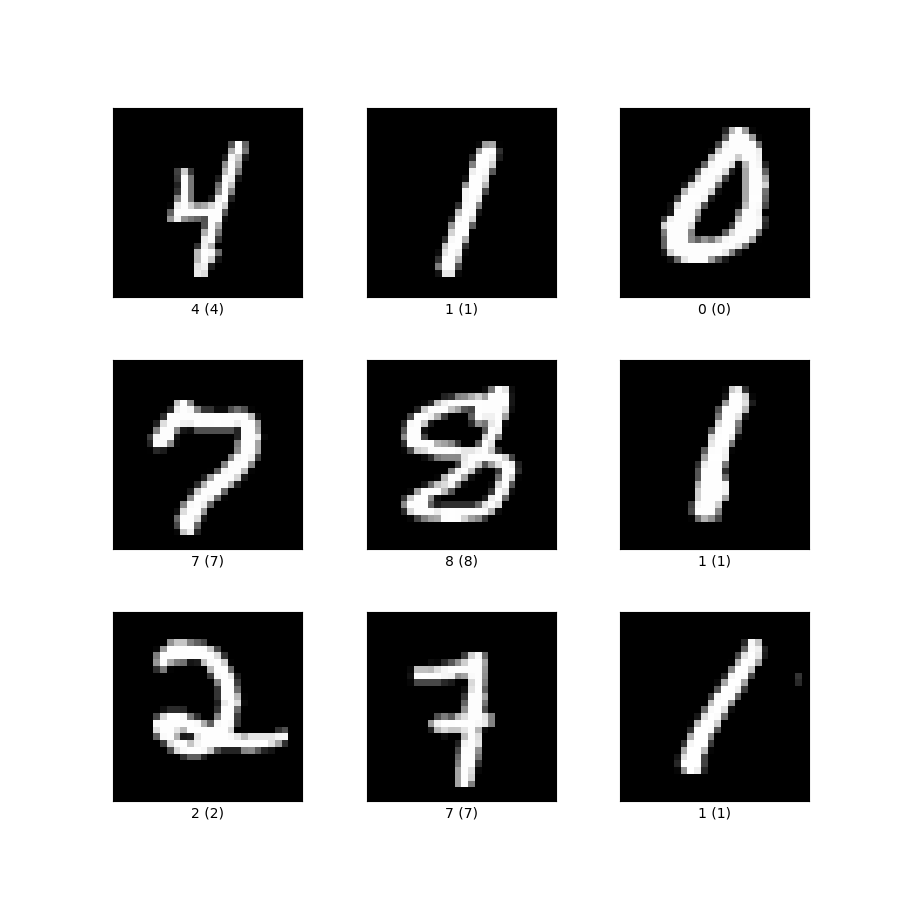
44 | 图1:MNIST样例图
45 |
46 | NIST原始的Special Database 3 数据集和Special Database 1数据集均是二值图像,MNIST从这两个数据集中取出图像后,通过图像处理方法使得每张图像都变成28×28大小的灰度图像,且手写数字在图像中居中显示。
47 |
48 | ## 三、数据集任务定义及介绍
49 | ### 1. 图像分类
50 | **定义**
51 | 图像分类是计算机视觉领域中,基于语义信息对不同图像进行分类的一种模式识别方法。
52 |
53 | **评价指标**
54 |
55 | - **Accuracy**:n_correct / n_total,标签预测正确的样本占所有样本的比例。
56 |
57 | - **某个类别的Precision**:TP/(TP+FP),被预测为该类别的样本中,有多少样本是预测正确的。
58 |
59 | - **某个类别的Recall**:TP/(TP+FN),在该类别的样本中,有多少样本是预测正确的。
60 |
61 | 注:在上面的评价指标中,TP代表True Positive,FP代表False Positive,FN代表False Negative,n_correct代表所有预测正确的样本数量,n_total代表所有的样本数量。
62 |
63 |
64 | ## 四、数据集文件结构解读
65 | ### 1. 目录结构
66 | **解压前**
67 | ```
68 | dataset_compressed/
69 | ├── t10k-images-idx3-ubyte.gz #测试集图像压缩包(1648877 bytes)
70 | ├── t10k-labels-idx1-ubyte.gz #测试集标签压缩包(4542 bytes)
71 | ├── train-images-idx3-ubyte.gz #训练集图像压缩包(9912422 bytes)
72 | └── train-labels-idx1-ubyte.gz #训练集标签压缩包(28881 bytes)
73 | ```
74 | **解压后**
75 | ```
76 | dataset_uncompressed/
77 | ├── t10k-images-idx3-ubyte #测试集图像数据
78 | ├── t10k-labels-idx1-ubyte #测试集标签数据
79 | ├── train-images-idx3-ubyte #训练集图像数据
80 | └── train-labels-idx1-ubyte #训练集标签数据
81 | ```
82 |
83 | ### 2. 文件结构
84 | 该数据集将图像和标签都以矩阵的形式存储于一种称为idx格式的二进制文件中。该数据集的4个二进制文件的存储格式分别如下:
85 |
86 | **训练集标签数据 (train-labels-idx1-ubyte):**
87 |
88 | | 偏移量(bytes) | 值类型 | 数值 | 含义 |
89 | |------ |------|-----|----|
90 | |0 |32位整型 | 0x00000801(2049)|magic number|
91 | |4 |32位整型 |60000| 有效数值的数量(即标签的数量)|
92 | |8 |8位无符号整型|不定(0~9之间)|标签|
93 | |...| ...| ...| ...|
94 | |xxxx |8位无符号整型| 不定(0~9之间)|标签|
95 |
96 | **训练集图像数据(train-images-idx3-ubyte):**
97 | | 偏移量(bytes) | 值类型| 数值 | 含义|
98 | |----|-----|----|---|
99 | |0 |32位整型| 0x00000803(2051)|magic number|
100 | |4 |32位整型| 60000| 有效数值的数量(即图像的数量)|
101 | |8 |32位整型| 28 |图像的高(rows)|
102 | 12 |32位整型| 28| 图像的宽(columns)|
103 | |16 |8位无符号整型| 不定(0~255之间)|图像内容|
104 | |...| ...| ...| ...|
105 | |xxxx| 8位无符号整型| 不定(0~255之间)|图像内容
106 |
107 | **测试集标签数据(t10k-labels-idx1-ubyte):**
108 | |偏移量(bytes) |值类型 |数值 | 含义|
109 | |--- |---- |----|----|
110 | |0 |32位整型| 0x00000801(2049)|magic number|
111 | |4 |32位整型| 10000| 有效数值的数量(即标签的数量)|
112 | 8 |8位无符号整型| 不定(0~9之间)|标签|
113 | |...| ...| ...| ...|
114 | |xxxx| 8位无符号整型| 不定(0~9之间)|标签|
115 |
116 | **测试集图像数据 (t10k-images-idx3-ubyte):**
117 | |偏移量(bytes) |值类型 |数值 |含义|
118 | |--- |---- | ---|---|
119 | |0 |32位整型| 0x00000803(2051)|magic number|
120 | |4 |32位整型| 10000| 有效数值的数量(即图像的数量)|
121 | |8 |32位整型| 28 |图像的高 (rows)|
122 | |12 |32位整型| 28 |图像的宽(columns)|
123 | |16 |8位无符号整型| 不定(0~255之间)|图像内容|
124 | |...| ...| ...| ...|
125 | |xxxx| 8位无符号整型| 不定(0~255之间)|图像内容|
126 |
127 |
128 | 对于idx格式的二进制文件,其基本格式如下:
129 | ```
130 | magic number
131 | size in dimension 0
132 | size in dimension 1
133 | size in dimension 2
134 | .....
135 | size in dimension N
136 | data
137 | ```
138 |
139 | 每个idx文件都以magic number开头,magic number是一个4个字节,32位的整数,用于说明该idx文件的data字段存储的数据类型。
140 |
141 | 其中前两个字节总是0,第3个字节不同的取值代表了idx文件中data部分不同的数值类型,对应关系如下:
142 |
143 | |取值 |含义|
144 | |----|----|
145 | |0x08| 8位无符号整型(unsigned char, 1 byte)|
146 | |0x09 |8位有符号整型(char, 1 byte)|
147 | |0x0B |短整型(short, 2 bytes)|
148 | |0x0C| 整型 (int, 4 bytes)|
149 | |0x0D| 浮点型 (float, 4 bytes)|
150 | |0x0E| 双精度浮点型 (double, 8 bytes)|
151 |
152 | 在MNIST数据集的4个二进制文件中,data部分的数值类型都是“8位无符号整型”,所以magic number的第3个字节总是0x08。
153 |
154 | magic number的第4个字节代表其存储的向量或矩阵的维度。比如存储的是一维向量,那么magic number的第4个字节是0x01,如果存储的是二维矩阵,那么magic number的第4个字节就是0x02。
155 |
156 | 所以在MNIST数据集的4个二进制文件中,标签文件的magic number第4个字节都是0x01,而在图像文件中,因为一张图像的维度是2,而多张图像拼成的矩阵维度是3,所以图像文件magic number第4个字节都是0x03。
157 |
158 | 该数据集的官网说明了4个二进制文件中的整型数据是以大端方式 (MSB first) 存储的,所以在读取这4个二进制文件的前面几个32位整型数据时,需要注意声明数据存储格式是大端还是小端。
159 |
160 | ## 五、数据集下载链接
161 | ### 1. 数据集下载
162 | OpenDataLab平台为大家提供了完整的数据集信息、直观的数据分布统计、流畅的下载速度、便捷的可视化脚本,欢迎体验。点击原文链接查看。
163 |
164 | https://opendatalab.com/MNIST
165 |
166 |
167 | 参考资料
168 |
169 | [1]Y LeCun,L Bottou,Y Bengio,etal.Gradient-based learning applied to document recognition[J].Proceedings of the IEEE,1998,86(11):2278-2324.
170 |
171 | [2]http://yann.lecun.com/exdb/mnist/
172 |
173 |
174 |
175 | 还有哪些你关心的话题?
176 |
177 | 扫码入群,欢迎交流
178 | 
179 | 添加小助手微信,发送“入群”,等待邀请
180 |
--------------------------------------------------------------------------------
/数据集分类汇总/遥感场景/遥感场景识别数据集合辑.md:
--------------------------------------------------------------------------------
1 | # 最全遥感样本数据集分享:场景识别数据集
2 |
3 | 之前给大家介绍了基础的遥感数据知识和智能遥感任务,本期就来盘点一下在遥感模型训练中常用的数据集。
4 |
5 | 从应用领域出发,遥感影像样本数据集可分为8个类型:遥感场景识别、土地覆被/利用分类、专题要素提取、变化检测、目标检测、语义分割、定量遥感、其他。[1]
6 |
7 | ### 本期主要分享7个可用于遥感场景识别/分类的数据集:
8 |
9 | | 序号| 数据集名称 | 发布时间 | 数据集大小 |
10 | | ----| --------- | ------- |----------|
11 | | 1| UC Merced Land Use | 2010 | 317MB |
12 | | 2| WHU-RS19 | 2011 | 99.45MB |
13 | | 3| RSSCN7 | 2015| 348MB |
14 | | 4| AID | 2017 | 2.47GB |
15 | | 5-1| SIRI-WHU的Google图像数据 | 2015 | 320MB |
16 | | 5-2| SIRI-WHU的USGS图像数据 | 2016 | 386MB |
17 | | 6| NWPU-RESISC45 | 2017 | 403MB |
18 | | 7| TG1HRSSC | 2017 | 490MB |
19 |
20 |
21 | ## No.1 UC Merced Land Use
22 |
23 | ● 发布方:University of California, Merced
24 |
25 | ● 下载地址:
26 | http://weegee.vision.ucmerced.edu/datasets/land use.html
27 |
28 | ● 论文地址:
29 | https://dl.acm.org/doi/abs/10.1145/1869790.1869829
30 |
31 | ● 发布时间:2010
32 |
33 | ● 简介:
34 | UC Merced 是加州大学默塞德分校 Newsam等于2010年提出的经典遥感场景识别数据集,用于对城市地区的土地利用场景进行分类。图像均提取自 USGS National Map。
35 |
36 | 该数据集的空间分辨率约为0.3m,图像尺度为256像素×256像素,包含21类场景,每类100张,共计2100张影像。
37 |
38 | 
39 |
40 |
41 | ## No.2 WHU-RS19
42 |
43 | ● 发布方:武汉大学
44 |
45 | ● 下载地址
46 | https://captain-whu.github.io/BED4RS/#
47 |
48 | ● 论文地址:
49 | https://ieeexplore.ieee.org/abstract/document/5545358
50 |
51 | ● 发布时间:2011
52 |
53 | ● 简介:
54 | WHU-RS19 是从 Google Earth 导出的一组卫星图像,可提供高达0.5m的高分辨率卫星图像。可用于场景分类和检索。
55 |
56 | 包含19类高分辨率卫星图像有意义的场景,包括机场、海滩、桥梁、商业、沙漠、农田、足球场、森林、工业、草地、山、公园、停车处、池塘、港口、火车站、住宅、河流, 和高架桥。每个类大约有50个样本。值得注意的是,同一类别的图像样本是从不同分辨率的卫星图像中的不同区域采集的,因此可能具有不同的尺度、方向和光照。
57 |
58 | 图像尺度为600像素×600 像素,包含19类场景,每类50张,共计1005张影像。数据集样本预览见下图。
59 |
60 | 
61 |
62 |
63 | ## No.3 RSSCN7
64 |
65 | ● 发布方:武汉大学
66 |
67 | ● 下载地址:
68 | https://pan.baidu.com/s/1slSn6Vz
69 |
70 | ● 论文地址:
71 | https://www.researchgate.net/publication/283200405_Deep_Learning_Based_Feature_Selection_for_Remote_Sensing_Scene_Classification
72 |
73 | ● 发布时间:2015
74 |
75 | ● 简介:
76 | RSSCN7 Dataset 包含2800幅遥感图像,这些图像来自于7个典型的场景类别 —— 草地、森林、农田、停车场、住宅区、工业区和河湖,其中每个类别包含400张图像,分别基于4个不同的尺度进行采样。
77 |
78 | 该数据集中每张图像的像素大小为400*400,场景图像的多样性导致其具有较大的挑战性,这些图像来源于不同季节和天气变化,并以不同的比例进行采样。
79 |
80 | 
81 |
82 |
83 | ## No.4 AID
84 |
85 | ● 发布方:武汉大学、华中科技大学
86 |
87 | ● 下载地址:
88 | https://captain-whu.github.io/BED4RS/#
89 |
90 | ● 论文地址:
91 | https://captain-whu.github.io/AID/
92 |
93 | ● 发布时间:2017
94 |
95 | ● 简介:
96 | AID是一个大型航空图像数据集,它从Google Earth图像中收集样本图像。尽管Google Earth图像是使用原始光学航空图像的RGB渲染进行后处理的,但事实证明,即使在像素级土地利用/覆盖图中,Google Earth图像与实际光学航空图像之间也没有显著差异。因此,Google Earth图像也可以用作评估场景分类算法的航空图像。
97 |
98 | 10000张含标签场景影像,包含30类场景,每类约200—420张,影像大小为600像素×600像素。
99 |
100 | 
101 |
102 |
103 | ## No.5 SIRI-WHU
104 |
105 | ● 发布方:武汉大学
106 |
107 | ● 下载地址:
108 | 谷歌影像数据集:
109 | http://www.lmars.whu.edu.cn/prof_web/zhongyanfei/Num/Google.html
110 |
111 | USGS标注影像:
112 | http://www.lmars.whu.edu.cn/prof_web/zhongyanfei/Num/USGS.html
113 |
114 | ● 论文地址:
115 | https://www.researchgate.net/publication/283301635_Dirichlet-derived_multiple_topic_scene_classification_model_fusing_heterogeneous_features_for_high_resolution_remote_sensing_imagery
116 |
117 | ● 发布时间:2015
118 |
119 | ● 简介:
120 | SIRI-WHU数据集,包括 Google image、USGS image2个数据子集。分别包含12种、4种土地利用类型的遥感影像,分别提取自Google Earth、USGS。
121 |
122 | #### 谷歌影像数据集
123 | 包括12个类别,主要用于科研用途。以下各个类别中均包含200幅影像:每一幅影像大小为200*200,空间分辨率为2米。该数据集的获取来自于谷歌地球,主要覆盖了中国的城市地区。
124 |
125 | | 农场 | 商业区 | 港口 |
126 | | --- | --- | --- |
127 | | 工业区 | 草地 | 立交桥 |
128 | | 池塘 | 停车场 | 闲置用地 |
129 | | 居民区 | 河流 | 水体 |
130 |
131 | #### USGS标注影像
132 | The USGS image dataset of SIRI-WHU标注影像包括4个类别,主要用于科研用途。彩色航空正射影像USGS image dataset of SIRI-WHU主要包括以下四个场景类别:
133 |
134 | | 农场 | 森林 | 停车场|居民区|
135 |
136 | 大幅影像的大小为10000*9000,空间分辨率为2英尺。影像获取自USGS,覆盖了美国俄亥俄州蒙哥马利。
137 |
138 | ## No.6 NWPU-RESISC45
139 |
140 | ● 发布方:西北工业大学
141 |
142 | ● 下载地址:
143 | https://gcheng-nwpu.github.io/#Datasets
144 |
145 | ● 论文地址:
146 | https://arxiv.org/ftp/arxiv/papers/1703/1703.00121.pdf
147 |
148 | ● 发布时间:2017
149 |
150 | ● 简介:
151 | 此数据集包含像素大小为256*256的图像共计31500张,涵盖45个场景类,每个类中有700张图像。
152 |
153 | 该数据集涵盖了全球100多个具有发展中、转型中和高度发达经济体的国家和地区,是目前属于较大规模的数据集,同时场景影像在平移、空间分辨率、视点、物体姿势、照明、背景和遮挡方面存在很大差异,具有很大的组内差异性和组间相似性。
154 |
155 | 
156 |
157 |
158 | ## No.7 TG1HRSSC
159 |
160 | ● 发布方:中国科学院空间应用工程与技术中心
161 |
162 | ● 下载地址:
163 | http://www.msadc.cn/main/setsubDetail?id=1369487569196158978
164 |
165 | ● 论文地址:
166 | https://www.ygxb.ac.cn/thesisDetails#10.11834/jrs.20209323&lang=zh
167 |
168 | ● 发布时间:2017
169 |
170 | ● 简介:
171 | 该数据集包括天宫一号高光谱成像仪获取的城镇、农田、林地、养殖塘、荒漠、湖泊、河流、港口、机场等9个典型地物场景的204个高光谱影像数据,其中5m分辨率全色谱段1个波段、10m分辨率可见近红外谱段54个有效波段以及20m分辨率短波红外谱段52个有效波段。
172 |
173 | 数据获取时段:7:00 —19:00;数据量490MB。
174 |
175 | 
176 |
177 |
178 |
179 | #### 参考资料
180 |
181 | [1]冯权泷,陈泊安,李国庆,姚晓闯,高秉博,张连翀. 遥感影像样本数据集研究综述[J]. 遥感学报,2022,26(04):589-605.
182 |
183 |
184 | 最新数据集上架动态
185 | 最全数据集内容解读
186 | 最牛大佬在线答疑
187 | 最活跃的同行圈子
188 | ……
189 | 
190 | 添加小助手微信,发送“入群”,等待邀请
191 |
--------------------------------------------------------------------------------
/数据集分类汇总/OCR/中文OCR数据集合辑.md:
--------------------------------------------------------------------------------
1 | # 收藏丨8个常用中文OCR数据集,附下载链接
2 |
3 | 随着深度学习技术的发展,智能OCR算法与应用也越来越丰富,对相关数据的需求也增加。
4 |
5 | 许多小伙伴反馈中文OCR数据集不好找,今天我们贴心地帮大家整理了8个常用的中文OCR数据集资源,记得收藏。
6 |
7 | ## No.1 MSRA-TD500 (MSRA Text Detection 500 Database)
8 |
9 | 下载链接:
10 | https://opendatalab.com/MSRA-TD500
11 |
12 |
13 | MSRA-TD500由华中科技大学于 2012 年在 CVPR 发布,是一个用于测试和评估多方向、多语言文字检测算法的自然图像数据集,包含500幅拍摄于室内(办公室和商场)和室外(街道)场景的自然图像。室内的图像主要包括标识、门牌和标牌等,室外的图像主要是路牌和广告牌等。图像的分辨率较高,介于1294*864和1920*1280之间。
14 |
15 | 该数据集由两部分构成:训练集、测试集。训练集中一共有300幅图像,通过随机抽样的形式从原始数据集中抽取出来。余下的200幅图像构成测试集。
16 |
17 | 数据集中的所有图像都经过完整标注。数据集的基本单元是文本行而非单词。
18 |
19 | 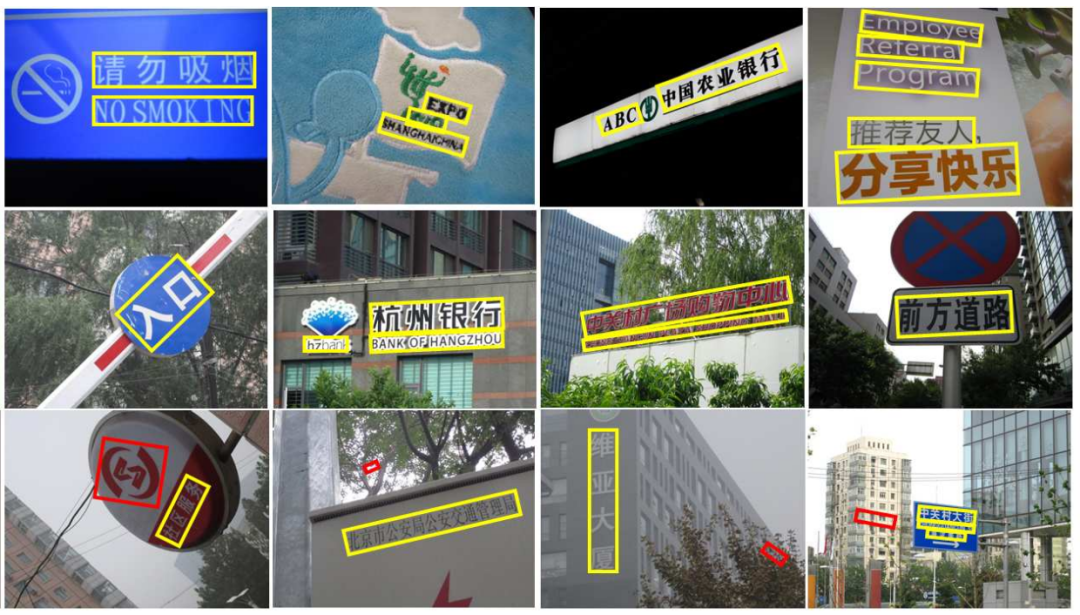
20 | MSRA-TD500数据集样例(图源:参考资料[1])
21 |
22 | MSRA-TD500数据集中的典型图像以及文字的标准矩形框 每一个矩形框对应一个文本行。红色的矩形框表示其中的文字被标记为“困难”。在MSRA-TD500数据集中,难以检测的文字(一般由低分辨率、模糊和遮挡等因素造成)会被标记为“困难”。
23 |
24 |
25 | ## No.2 Chinses Text in the Wild(CTW)
26 |
27 | 下载链接:
28 | https://ctwdataset.github.io/
29 |
30 |
31 | 由清华大学与腾讯共同推出的一个大型中文自然文本数据集(Chinese Text in the Wild,CTW)。该数据集包含 32,285 张图像和 1,018,402 个中文字符。
32 |
33 | 每张图像尺寸为2048*2048,数据集大小为31GB。CTW以(8:1:1)的比例将数据集分为:
34 |
35 | 训练集(25887张图像,812872个中文字符);
36 | 测试集(3269张图像,103519个中文字符);
37 | 验证集(3129张图像,103519个中文字符);
38 |
39 | 这些图像源于腾讯街景,从中国的几十个不同城市中捕捉得到。数据多样、复杂,它包含了平面文本、凸出文本、城市街景文本、乡镇街景文本、弱照明条件下的文本、远距离文本、部分显示文本等。
40 |
41 | 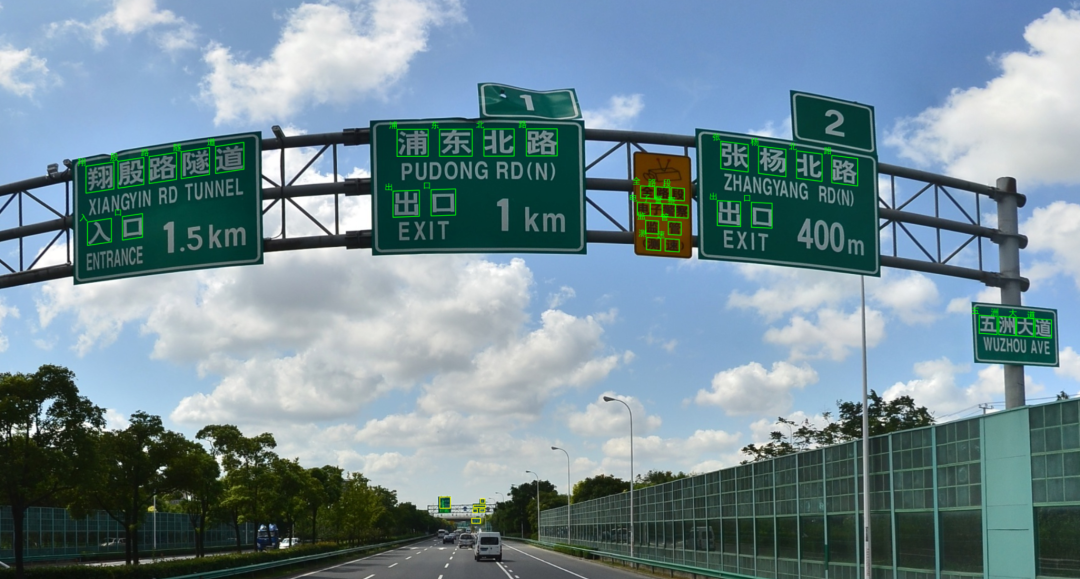
42 | CTW数据集样例示意(图源:参考资料[2])
43 |
44 | 对于每张图像,数据集中都标注了所有中文字符。对每个中文字符,数据集都标注了其真实字符、边界框和 6 个属性以指出其是否被遮挡、有复杂的背景、被扭曲、3D 凸出、艺术化,和手写体等。
45 |
46 |
47 | ## No.3 Reading Chinses Text in the Wild(RCTW-17)
48 |
49 | 下载链接:
50 | https://rctw.vlrlab.net/dataset.html
51 |
52 | ICDAR(国际文档分析和识别大会)在2017年发起了一项专注于中文检测和识别比赛项目(RCTW),RCTW-17为竞赛数据集,它由12263张包含中文的自然场景图片组成,其中大部分是直接由摄像头或手机拍摄,少部分为生成图像,并且每张图像至少包含一行中文。图像尺寸不规则,数据集大小为11.4GB。
53 |
54 | 数据的标注均通过标注工具手工标注完成,通过绘制四边形来标注一个文本行,而不是以单词为单位进行标注,每个文本行的内容以UTF-8字符串进行标注。在数据集中存在字体、布局和语言等多样性。
55 |
56 | 数据集划分为两部分:训练集和验证集。训练集包含8034张图片,测试集包含4229张图片。
57 |
58 | 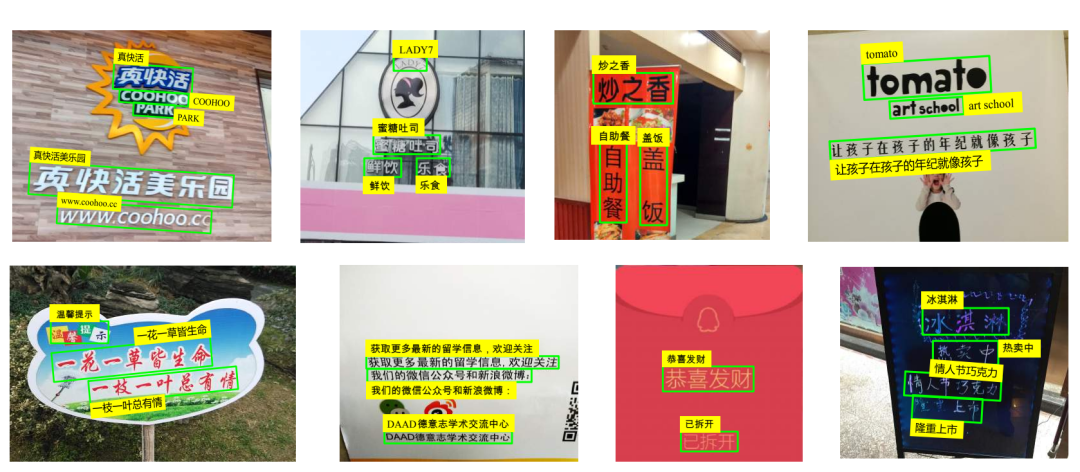
59 | RCTW-17数据集样例示意(图源:参考资料[3])
60 |
61 |
62 | ## No.4 ICPR MWI 2018挑战赛
63 |
64 | 下载链接:
65 | https://tianchi.aliyun.com/competition/entrance/231685/information
66 |
67 | ICPR MWI 大赛提供的包含2000张图像的官方数据集,主要由合成图像,产品描述,网络广告构成。该数据集数据量充分,中英文混合,涵盖数十种字体,字体大小不一,多种版式,背景复杂。数据集大小为2GB。其中训练集10000张,测试集10000张。
68 |
69 | 
70 | ICPR MWI 2018数据集标注样例,红框代表标注的文本框(图源:参考资料[4])
71 |
72 |
73 | ## No.5 ShopSign
74 |
75 | 下载链接:
76 | https://github.com/chongshengzhang/shopsign
77 |
78 | 该数据由河南大学科研团队发布的,是一个大规模中英文自然场景文本数据集,其包含25770张街景中文招牌图像,196010条文本行。
79 |
80 | ShopSign中的图像是在不同的场景(市中心到偏远地区)中使用50多种不同的手机拍摄。相比于CTW,其包含了4000张夜间图像,同时也包含了2516对图像来对一个sign获取水平和多视角的图片。其包含多种分辨率,包括3024*4032、1920*1080、2180*720等。
81 |
82 | CMT主要包含了几个主要发达城市,而ShopSign包含的地理范围广(北京、上海、厦门、新疆、蒙古、牡丹江、葫芦岛和河南省的一些城市和小城镇),包括许多街景车辆无法到达的郊区或小城镇。CMT使用了固定的拍摄角度,而ShopSign使用了多种角度进行拍摄。[5]
83 |
84 | 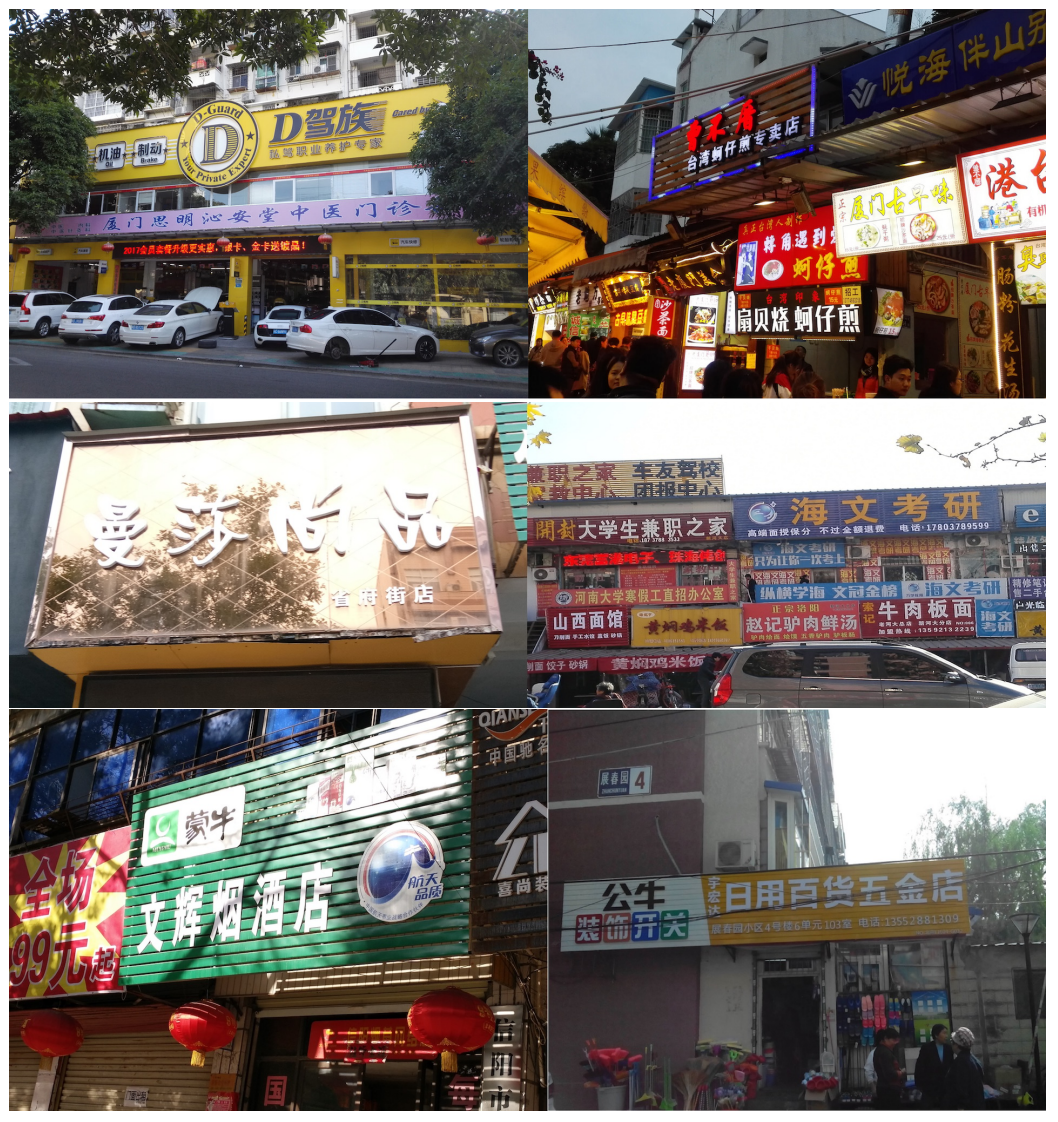
85 | ShopSign数据集中广告牌样例示意(图源:参考资料[5])
86 |
87 | 
88 | ShopSign数据集中广告牌分类示意(图源:参考资料[5])
89 |
90 | 注释包括了每个文本行的四边形边界框的坐标(顺序:左上、右上、右下、左下)以及相对应的文本行的相应文本。ShopSign仅仅处理广告牌上的文本。
91 |
92 | ## No.6 ICDAR2019-LSVT
93 |
94 | 下载链接:
95 | https://github.com/chongshengzhang/shopsign
96 |
97 | ICDAR 2019-LSVT(Large-scale Street View Text with Partial Labeling,弱标注大规模街景文字识别)国际学术竞赛公开的大规模弱标注场景文字数据集。
98 |
99 | 数据集采自中国街景,并由街景图片中的文字行区域(例如店铺标牌、地标等等)截取出来而形成。是首个提出弱标注数据的场景文字数据集,其中包括5万张精标注街景图像、40万张弱标注街景图像,总计45万张。
100 |
101 | 所有图像都经过一些预处理,将文字区域利用仿射变化,等比映射为一张高为48像素的图片。
102 |
103 | 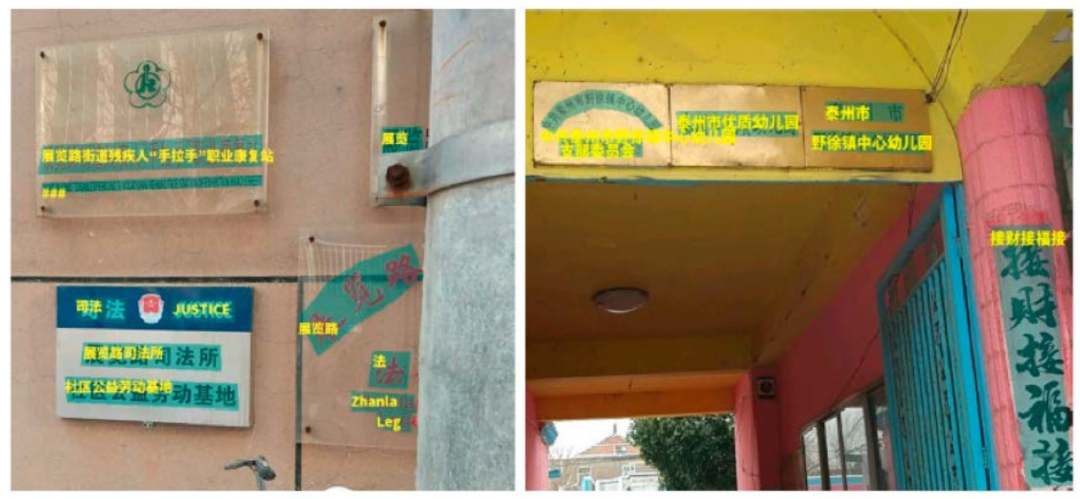
104 | LSVT数据集精标注示意(图源:参考资料[6])
105 |
106 | 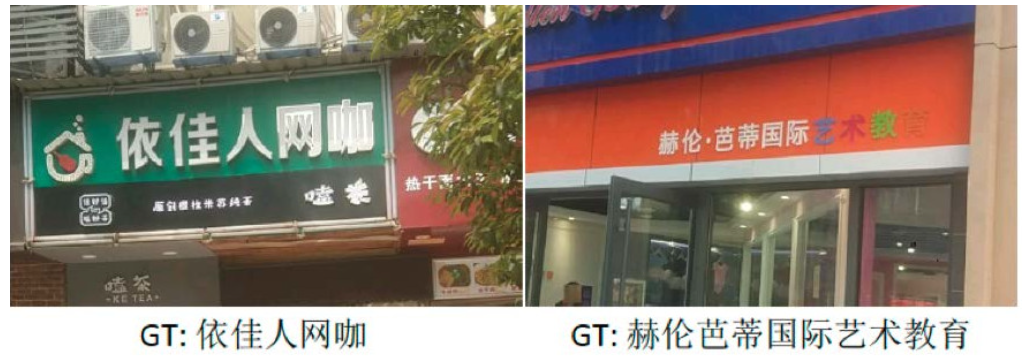
107 | LSVT数据集弱标注示意(图源:参考资料[6])
108 |
109 | ## No.7 TotalText
110 |
111 | 下载链接:
112 | https://opendatalab.com/TotalText
113 |
114 | Total-Text是最大弯曲文本数据集之一-ArT(任意形状文本数据集)训练集中的一部分。该数据集共1555张图像,11459文本行,包含水平文本,倾斜文本,弯曲文本。文件大小441MB。大部分为英文文本,少量中文文本。其中训练集有1255张图像,测试集有300张图像。
115 |
116 | 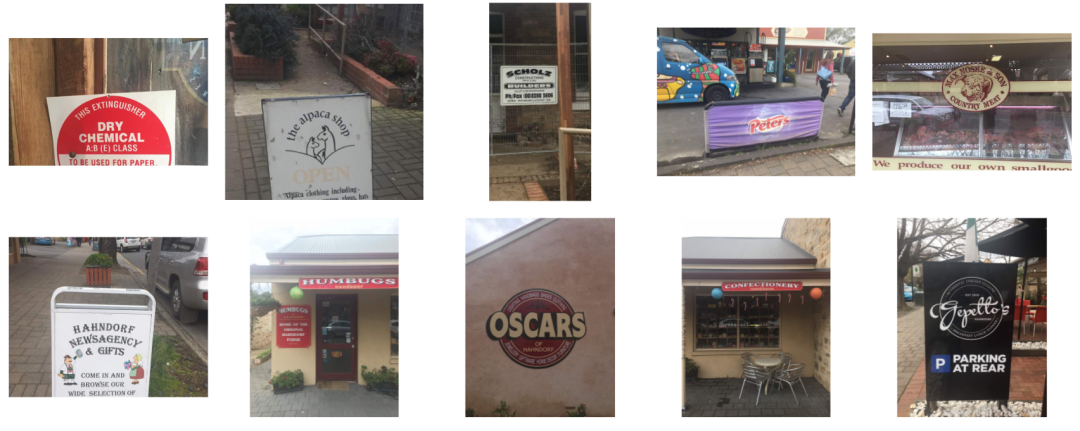
117 | TotalText数据集样例示意(图源:OpenDataLab)
118 |
119 | ## No.8 Caffe-ocr中文合成数据
120 |
121 | 下载链接:
122 | https://github.com/senlinuc/caffe_ocr
123 |
124 | 共360万张图片,图像分辨率为280*32,文件大小约为8.6GB。数据利用中文语料库(新闻+文言文),通过字体、大小、灰度、模糊、透视、拉伸等变化随机生成,字典中包含汉字、标点、英文、数字共5990个字符(语料字频统计,全角半角合并)。
125 |
126 | 每个样本固定10个字符,字符随机截取自语料库中的句子。按9:1分成训练集、验证集,测试集约6万张。
127 |
128 | 
129 | Caffe-ocr数据集样例示意(图源:参考资料[7])
130 |
131 |
132 | ##### 参考资料
133 |
134 | [1]http://www.iapr-tc11.org/dataset/MSRA-TD500/Detecting_Texts_of_Arbitrary_Orientations_in_Natural_Images.pdf
135 |
136 | [2]https://ctwdataset.github.io/
137 |
138 | [3]https://arxiv.org/pdf/1708.09585v2.pdf
139 |
140 | [4]https://tianchi.aliyun.com/competition/entrance/231685/information
141 |
142 | [5]https://arxiv.org/pdf/1903.10412v1.pdf
143 |
144 | [6]https://rrc.cvc.uab.es/?ch=16
145 |
146 | [7]https://github.com/senlinuc/caffe_ocr
147 |
148 |
149 |
150 | 还有哪些你关心的话题?扫码入群,欢迎交流
151 | 
152 |
--------------------------------------------------------------------------------
/单篇数据集解读/CV/CityScapes解读.md:
--------------------------------------------------------------------------------
1 | # CityScapes数据集
2 |
3 | ## 1. 数据集简介
4 | **发布方**:
5 | Daimler AG R&D, TU Darmstadt, MPI Informatics
6 |
7 | **发布时间**:2015
8 |
9 | **背景**:聚焦于城市街道场景的语义理解。
10 |
11 | **简介**:CityScapes数据集有以下特点:
12 | - 标注多样,包含实例分割、语义分割、多边形框等三种标注
13 | - 类别复杂,30+类别,同时包含group和class两个维度描述
14 | - 场景差异,涵盖50个城市、不同季节、不同时段(白天)
15 | - 体量庞大,拥有5000精标注图片和20000粗标注图片
16 |
17 | ## 2. 数据集详细信息
18 | ### 2.1 标注数据量(以精标注为例)
19 | - 训练集:2975张图像
20 | - 验证集:500张图像
21 | - 测试集:1525张图像
22 |
23 | 这里每一张图片都同时拥有三个标注文件(实例分割、语义分割、多边形框标注)
24 |
25 | ### 2.2 标注类别
26 | 标注的30+类别及其所在的组如下所示:
27 | |Group|Class|
28 | |-- |-- |
29 | |flat|road · sidewalk · parking+ · rail track+|
30 | |human|person* · rider*|
31 | |vehicle|car* · truck* · bus* · on rails* · motorcycle* · bicycle* · caravan*+ · trailer*+|
32 | |construction|building · wall · fence · guard rail+ · bridge+ · tunnel+|
33 | |object|pole · pole group+ · traffic sign · traffic light|
34 | |nature|vegetation · terrain|
35 | |sky|sky|
36 | |void|ground+ · dynamic+ · static+|
37 |
38 | 其中,*表示部分区域连在一起的实例,会作为一个整体来标注,比如"car group";+表示该类别不包含在验证集中,并被视为无效的。
39 |
40 | ### 2.3. 可视化
41 | 精标注的可视化效果如下所示:
42 | 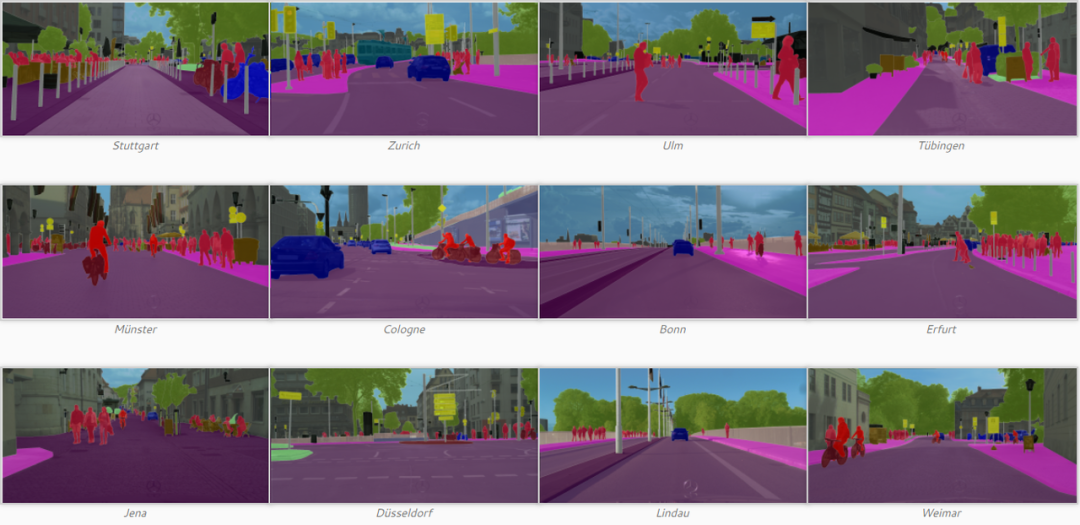
43 |
44 | ## 3. 数据集任务定义及介绍
45 | ### 3.1 语义分割
46 | **场景解析定义**
47 | 场景解析是将整个图像密集地分割成语义类,其中每个像素都被分配一个类标签,例如树的区域和建筑物的区域。
48 |
49 | -**场景解析评价指标**
50 | 通常用于语义分割的四个指标指标:
51 | - Pixel Accuracy(像素准确度,PA)表示正确分类的像素的比例;
52 | - Mean Pixel Accuracy(平均像素准确度,MPA)表示所有类别中正确分类的像素比例的平均。
53 | - Mean Intersection over Union(平均交并比,MIoU)表示预测像素和真实像素之间的交并比,在所有类上平均。
54 | - Weighted IoU(加权交并比,WIoU)表示按每个类的总像素比加权的交并比。
55 |
56 | ### 3.2 实例分割
57 | **实例分割定义**
58 | 实例分割是检测图像中的对象实例,并进一步生成对象的精确分割掩码。 它与场景解析任务的不同之处在于,场景解析中没有分割区域的实例概念,而在实例分割中,如果场景中有三个人,则需要网络对每个人区域进行分割。
59 |
60 | **实例分割评价指标**
61 | 实例分割一般有以下几个评价指标:
62 | - Average Precision(平均精度,AP)准确率的平均值,其中准确率P = TP/(TP+FP);
63 | - Pixel Accuracy(像素准确度,PA)表示正确分类的像素的比例;
64 | - Mean Pixel Accuracy(平均像素准确度,MPA)表示所有类别中正确分类的像素比例的平均。
65 | - Mean Intersection over Union(平均交并比,MIoU)表示预测像素和真实像素之间的交并比,在所有类上平均。
66 | - Weighted IoU(加权交并比,WIoU)表示按每个类的总像素比加权的交并比。
67 |
68 | ## 4. 数据集文件结构解读
69 | ### 4.1 目录结构
70 | 目录结构(这里以精标注的为例):
71 | ```
72 | dataset_root/
73 | ├── gtFine/
74 | | ├── test/ # 测试集
75 | | | ├── berlin/ # 城市名称
76 | | | | ├── berlin_000543_000019_gtFine_color.png # 可视化的分割图
77 | | | | ├── berlin_000543_000019_gtFine_instanceIds.png # 实例标注文件
78 | | | | ├── berlin_000543_000019_gtFine_labelIds.png # 语义分割标注文件
79 | | | | ├── berlin_000543_000019_gtFine_polygons.json # 存储各个类的名称和相应的区域边界
80 | | | | └── ...
81 | | | ├── bielefeld/ # 城市名称
82 | | | | ├── bielefeld_000000_066495_gtFine_color.png # 可视化的分割图
83 | | | | ├── bielefeld_000000_066495_gtFine_instanceIds.png # 实例标注文件
84 | | | | ├── bielefeld_000000_066495_gtFine_labelIds.png # 语义分割标注文件
85 | | | | ├── bielefeld_000000_066495_gtFine_polygons.json # 存储各个类的名称和相应的区域边界
86 | | | | └── ...
87 | | | └── ...
88 | | ├── train/ # 训练集
89 | | | ├── aachen/ # 城市名称
90 | | | | ├── aachen_000000_000019_gtFine_color.png # 可视化的分割图
91 | | | | ├── aachen_000000_000019_gtFine_instanceIds.png # 实例标注文件
92 | | | | ├── aachen_000000_000019_gtFine_labelIds.png # 语义分割标注文件
93 | | | | ├── aachen_000000_000019_gtFine_polygons.json # 存储各个类的名称和相应的区域边界
94 | | | | └── ...
95 | | | └── ...
96 | | └── val/
97 | | ├── frankfurt/ # 城市名称
98 | | | ├── frankfurt_000000_000294_gtFine_color.png # 可视化的分割图
99 | | | ├── frankfurt_000000_000294_gtFine_instanceIds.png # 实例标注文件
100 | | | ├── frankfurt_000000_000294_gtFine_labelIds.png # 语义分割标注文件
101 | | | ├── frankfurt_000000_000294_gtFine_polygons.json # 存储各个类的名称和相应的区域边界
102 | | | └── ...
103 | | └── ...
104 | └── leftImg8bit/
105 | ├── test/
106 | | ├── berlin/ # 城市名称
107 | | | ├── berlin_000543_000019_leftImg8bit.png # 测试集图片
108 | | | └── ...
109 | | ├── bielefeld/ # 城市名称
110 | | | ├── bielefeld_000000_066495_leftImg8bit.png # 测试集图片
111 | | | └── ...
112 | | └── ...
113 | ├── train/
114 | | ├── aachen/ # 城市名称
115 | | | ├── aachen_000000_000019_leftImg8bit.png # 测试集图片
116 | | | └── ...
117 | | └── ...
118 | └── val/
119 | ├── frankfurt/ # 城市名称
120 | | ├── frankfurt_000000_000294_leftImg8bit.png # 测试集图片
121 | | └── ...
122 | └── ...
123 | ```
124 | ### 4.2 标注格式
125 | Cityscapes数据共有两种标注格式,分别是实例分割及语义分割所采用的分割图格式(.png文件),以及多边形边框的json格式(.json文件)。其中,png文件为灰度图片,尺寸和原始图片尺寸相同,其像素上的灰度值对应原始图片对应像素的类别id(或实例id),实例分割图中实例id对应的类别id则需要同时结合语义分割图中相同像素坐标的类别id来获取。分割图的可视化效果图可参考前文1.3的可视化部分。
126 |
127 | json标注的文件格式如下所示:
128 | ```
129 | {
130 | "imgHeight": 1024,
131 | "imgWidth": 2048,
132 | "objects": [
133 | {
134 | "label": "ego vehicle",
135 | "polygon": [
136 | [
137 | 271,
138 | 1023
139 | ],
140 | [
141 | 387,
142 | 1009
143 | ],
144 | ...
145 | ]
146 | },
147 | ...
148 | ]
149 | }
150 | ```
151 | 其中包含的字段如下:
152 | |属性名称|含义|数据类型|
153 | |---|---|---|
154 | |imgHeight|图像高度|int|
155 | |imgWidth|图像宽度|int|
156 | |objects|实例列表|list|
157 | |label|类别名称|str|
158 | |polygon|边界点坐标|list|
159 |
160 |
161 | ## 5. 数据集标准化
162 | OpenDataLab平台为大家提供了CityScapes数据集完整的数据集信息、直观的数据分布统计、流畅的下载速度、便捷的可视化脚本,欢迎体验。
163 |
164 | CityScapes
165 | https://opendatalab.com/CityScapes
166 |
167 |
168 | *参考资料*
169 |
170 | [1]官网:https://www.cityscapes-dataset.com/
171 |
172 | [2]论文:M. Cordts, M. Omran, S. Ramos, T. Rehfeld, M. Enzweiler, R. Benenson, U. Franke, S. Roth, and B. Schiele, The Cityscapes Dataset for Semantic Urban Scene Understanding, in CVPR, 2016.
173 |
174 | (论文下载链接:https://www.cityscapes-dataset.com/wordpress/wp-content/papercite-data/pdf/cordts2016cityscapes.pdf)
175 |
176 | [3]Github:https://github.com/mcordts/cityscapesScripts
--------------------------------------------------------------------------------
/单篇数据集解读/CV/ADE20K 解读.md:
--------------------------------------------------------------------------------
1 | # 详细解读:MIT经典的语义分割数据集ADE20K,附下载链接
2 |
3 | 小伙伴们,乐于分享的OpenDataLab来啦!这次,给大家带来一份ADE20K 数据集的详细使用“攻略”,助大家模型训练一臂之力。
4 |
5 | 这个由MIT 发布的大型数据集,可用于场景感知、解析、分割、多物体识别和语义理解,不容错过图片
6 |
7 | ## 一、数据集简介
8 | **发布方:** MIT CSAIL Computer Vision Group
9 |
10 | **发布时间:** 2016
11 |
12 | **背景:**
13 | 视觉场景的语义理解是计算机视觉的关键问题。尽管社区在数据收集方面做出了努力,但仍然很少有图像数据集涵盖广泛的场景和对象类别,而且缺乏具有用于场景理解的逐像素注释。
14 |
15 | **简介:**
16 | ADE20K涵盖了场景、对象、对象部分的各种注释,在某些情况下甚至是部分的部分。有25k张复杂日常场景的图像,其中包含自然空间环境中的各种对象。每个图像平均有19.5个实例和10.5个对象类。
17 |
18 | ## 二、数据集详细信息
19 |
20 | ### 1. 标注数据量
21 |
22 | ● 训练集:20210张图像
23 |
24 | ● 验证集:2000张图像
25 |
26 | ● 测试集:3000张图像
27 |
28 | ### 2. 标注类别
29 |
30 | 数据集的标注包含三种视觉概念:
31 |
32 | ● 离散对象(discrete object),它是具有明确定义的形状的事物,例如汽车、人;
33 |
34 | ● 包含无定形背景区域的东西(stuff),例如草、天空;
35 |
36 | ● 对象部分(object part),它是某些具有功能意义的现有对象实例的组件,例如头部或腿部。
37 |
38 | 三种视觉概念共标注类别3169类,其中离散对象和无定形背景区域的东西有2693类。对象部分有476类。
39 |
40 | ### 3. 可视化
41 | 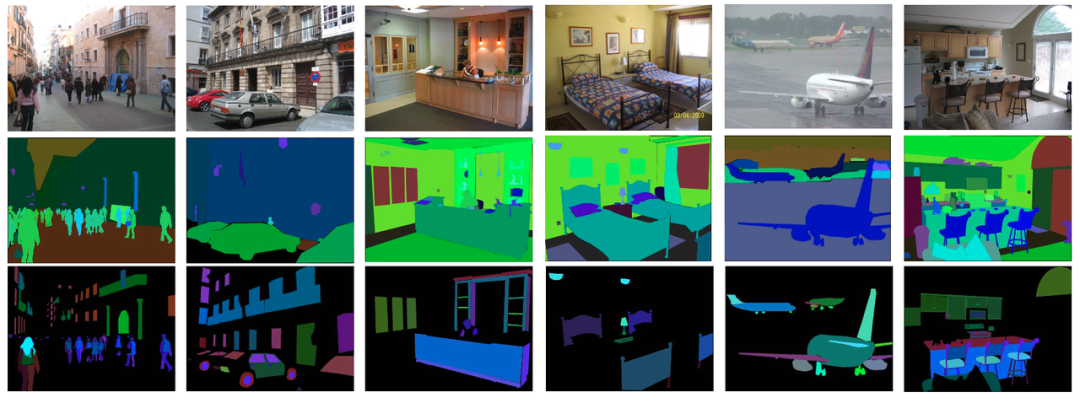
42 |
43 | 图1:第一行显示样本图像,第二行显示对象的标注,第三行显示对象部分的标注。颜色方案同时编码对象类别和对象实例,即不同的对象类别具有较大的色差,而来自同一对象类别的不同实例具有较小的色差(例如,第一张图像中的不同人实例具有略微不同的颜色)。
44 |
45 |
46 | ## 三、数据集任务定义及介绍
47 | ### 1. 场景解析
48 | **● 定义**
49 | 场景解析是将整个图像密集地分割成语义类,其中每个像素都被分配一个类标签,例如树的区域和建筑物的区域。
50 |
51 | **● 基准**
52 | 作者选择 ADE20K 数据集中按其总像素比排名的前150个类别,并构建 ADE20K 的场景解析基准,称为 SceneParse150。
53 |
54 | 在150个类别中,有35个东西类(即墙壁、天空、道路)和115个离散对象类(即汽车、人、桌子)。150个类的标注像素占数据集所有像素的92.75%,其中无定形背景区域的东西类占60.92%,离散对象类占31.83%。
55 |
56 | 结果以通常用于语义分割的四个指标报告:
57 |
58 | - Pixel accuracy(像素精度):表示正确分类的像素的比例;
59 | - Mean accuracy(平均准确度):表示在所有类别中平均正确分类的像素的比例;
60 | - Mean IoU(平均 IoU):表示预测像素和真实像素之间的交并比,在所有类上平均;
61 | - Weighted IoU(加权IoU):表示按每个类的总像素比加权的 IoU。
62 |
63 |
64 | ### 2. 实例分割
65 | **● 定义**
66 | 实例分割是检测图像中的对象实例,并进一步生成对象的精确分割掩码。它与场景解析任务的不同之处在于,场景解析中没有分割区域的实例概念,而在实例分割中,如果场景中有三个人,则需要网络对每个人区域进行分割。
67 |
68 | **● 基准**
69 | 为了对实例分割的性能进行基准测试,作者从完整数据集中选择了100个前景对象类别,将其称为 InstSeg100。InstSeg100 中对象实例总数为 218K,平均每个对象类别有2.2K个实例,每个图像有10个实例;除船舶外的所有对象都有超过100个实例。
70 |
71 | 结果以如下指标报告:
72 | 一个总体度量平均精度 mAP,以及不同对象尺度上的度量,用mAP_S(小于32×32像素的对象)、mAP_M(在32×32和96×96像素之间)和 mAP_L(大于96×96像素)。
73 |
74 | ## 四、数据集文件结构解读
75 | 目录结构:(语言:Python)
76 | ```ADE20K_2021_17_01/
77 | images/
78 | training/
79 | cultural/
80 | apse__indoor/
81 | .jpg # 原图像
82 | _seg.png # 分割图,通道R和G编码对象类别ID,
83 | # 通道B编码实例ID
84 | _parts_{i}.png
85 | # 部件分割图,i表示第i层部件,如car
86 | # 属于第一层部件,wheel属于第二层部件
87 | .json # 存储图像中所有实例的多边形,属性等信息
88 | / # 存储图像中所有实例mask的目录
89 | instance_000_.png
90 | instance_001_.png
91 | ...
92 | ...
93 | ...
94 | validation/
95 | cultural/
96 | apse__indoor/
97 | .jpg
98 | _seg.png
99 | _aprts_{i}.png
100 | .json
101 | /
102 | instance_000_.png
103 | instance_001_.png
104 | ...
105 | ...
106 | ...
107 | ...
108 | index_ade20k.pkl # 数据和存储图像的文件夹的统计信息
109 | ```
110 |
111 | .json文件格式:
112 | ```
113 | {
114 | "annotation": {
115 | "filename": ".jpg", # 图像名称
116 | "folder": "ADE20K_2021_17_01/images/ADE/training/urban/street",
117 | # 图像存储的相对路径
118 | "imsize": [ # 图像高、宽、通道数
119 | 1536,
120 | 2048,
121 | 3
122 | ],
123 | "source": { # 图像来源信息
124 | "folder": "static_sun_database/s/street",
125 | "filename": "labelme_acyknxirsfolpon.jpg",
126 | "origin": ""
127 | },
128 | "scene": [ # 图像场景信息
129 | "outdoor",
130 | "urban",
131 | "street"
132 | ],
133 | "object": [ # 标注实例列表
134 | {
135 | "id":0, # 实例ID
136 | "name":"traffic light, traffic signal, stoplight",
137 | # 实例标签
138 | "name_ndx": 2836, # 实例标签
139 | "hypernym": [ # 上位词
140 | "traffic light, traffic signal, stoplight",
141 | "light",
142 | "visual signal",
143 | "signal, signaling, sign",
144 | "communication",
145 | "abstraction, abstract entity",
146 | "entity"
147 | ],
148 | "raw_name": "traffic light",
149 | "attributes": [], # 属性
150 | "depth_ordering_rank": 1,
151 | # 深度顺序
152 | "occluded": "no", # 遮挡情况
153 | "crop": "0",
154 | "parts": { # 部件信息
155 | "hasparts": [],
156 | "ispartof": [],
157 | "part_level": 0
158 | },
159 | "instance_mask": "/instance_000_.png",
160 | # 对应的实例mask
161 | "polygon": { # 多边形坐标
162 | "x": [346, ...],
163 | "y": [781, ...]
164 | },
165 | "saved_date": "18-Dec-2005 06:56:48"
166 | },
167 | ...
168 | ]
169 | ```
170 |
171 | 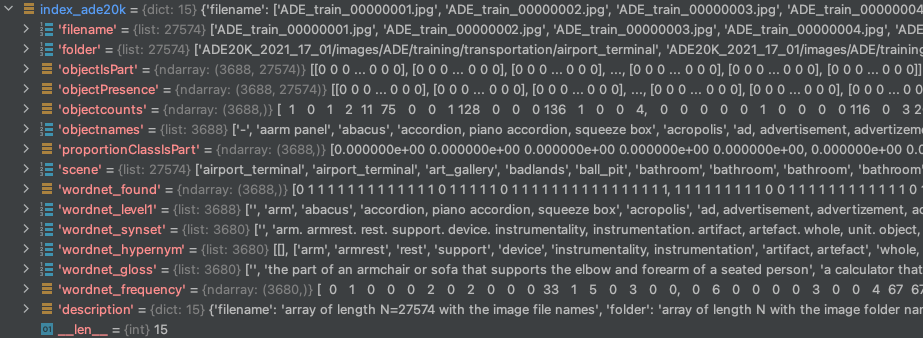
172 | 图2: index_ade20k.pkl 文件用Python打开后的格式
173 |
174 |
175 | **index_ade20k.pkl 里各个字段含义:**
176 | - **filename**:长度为 N=27574 的数组,带有图像文件名。
177 | - **folder**:包含图像文件夹名称的长度为 N 的数组。
178 | - **objectIsPart**:是对象部分的对象类别. 大小为 [C, N] 的数组,计算一个对象在每个图像中成为一部分的次数。objectIsPart[c,i]=m 如果在图像 i 中对象类 c 是另一个对象的一部分 m 次。
179 | - **objectPresence**:大小为 [C, N] 的数组,每个图像的对象计数。objectPresence(c,i)=n 如果在图像 i 中有 n 个对象类 c 的实例。
180 | - **objectcounts**:长度为 C 的数组,每个对象类的实例数。
181 | - **objectnames**:带有对象类名的长度为 C 的数组。
182 | - **proportionClassIsPart**:长度为 C 的数组,其中 c 类作为一部分的次数比例。如果 ratioClassIsPart[c]=0 则意味着这是一个主要对象(例如,汽车、椅子……)。
183 | - **scene**:长度为 N 的数组,为每个图像提供场景名称(与 Places 数据库相同的类)
184 | - **wordnet_found**:长度为 C 的数组。它表示是否在 Wordnet 中找到了对象名。
185 | - **wordnet_level1**:长度为C 的列表。WordNet 关联的列表。
186 | - **wordnet_synset**:长度为 C 的列表。每个对象名称的 WordNet 同义词集。
187 | - **wordnet_hypernym**:长度为 C 的列表。每个对象名称的 WordNet 上位词列表。
188 | - **wordnet_gloss**:长度为 C 的列表。存的是WordNet同义词集合对应的定义。
189 | - **wordnet_frequency**:长度为 C 的数组。每个WordNet同义词集合出现的次数。
190 | - **description**:对index ade20k.pkl中每个字段的描述。
191 |
192 | ## 五、数据集资源
193 | OpenDataLab平台已经上架了ADE20K数据集,为大家提供了完整的数据集信息、流畅的下载速度,快来体验吧!
194 |
195 | ADE20K 2021数据集
196 | https://opendatalab.com/120
197 |
198 |
199 |
200 | #### 参考资料:
201 |
202 | [1]官网:https://groups.csail.mit.edu/vision/datasets/ADE20K/
203 |
204 | [2]论文:Semantic Understanding of Scenes through ADE20K Dataset. Bolei Zhou, Hang Zhao, Xavier Puig, Tete Xiao, Sanja Fidler, Adela Barriuso and Antonio Torralba. International Journal on Computer Vision (IJCV).[PDF]
205 |
206 | [3]Github:https://github.com/CSAILVision/ADE20K
207 |
208 |
209 | 还有哪些你关心的话题?
210 |
211 | 扫码入群,欢迎交流
212 | 
213 | 添加小助手微信,发送“入群”,等待邀请
214 |
--------------------------------------------------------------------------------
/帮助文档.md:
--------------------------------------------------------------------------------
1 | [English](https://github.com/opendatalab/opendatalab-datasets/blob/main/help%20doc.md)🌎|**简体中文**🀄
2 |
3 | 数据集中心介绍
4 | 数据集中心支持多元数据管理,数据中心提供公开数据集的展示、检索和下载等,同时提供私有数据集的上传、管理和发布功能,支持用户自建数据集的开放共享。数据集中心为人工智能研究者提供免费开源的数据集,通过数据集中心,研究者可以获得格式统一的各领域经典数据集。通过平台的搜索功能,研究者可以迅速便捷地找到自己所需数据集;通过平台的统一格式,研究者可以便捷地对跨数据集任务进行开发。创建入口:https://opendatalab.com/create
5 |
6 | # 目录
7 | - [数据集创建流程](#数据集创建流程)
8 | - [鉴权管理](#鉴权管理)
9 | - [数据集CLI(命令行工具)](#数据集CLI命令行工具)
10 | - [数据集Python_SDK](#数据集Python-SDK)
11 |
12 | # 数据集创建流程
13 | ## 概述
14 | ### 创建数据集
15 | 步骤1:进入数据集创建页
16 | 进入内容平台-数据集中心首页,点击创建,创建数据集,进入数据集创建页。
17 |
18 | 步骤2:填写数据集基础信息
19 | 填写数据集的基础信息,包括数据集仓库的名称(唯一索引)、数据集展示名称、数据集封面、数据集描述、数据类型、任务类型、标注类型,点击立即创建,即可完成数据集创建。
20 |
21 | ### 上传数据
22 | 步骤1:进入数据上传页 在数据集文件tab页,点击上传,进入数据上传页。
23 |
24 | 步骤2:选择上传的数据类型 选择上传的数据类型(文件、文件夹、压缩包),其中选择压缩包上传可以对压缩包进行自动解压。
25 |
26 | 步骤3:开始数据上传任务 选择文件后,展示读取的文件列表,点击立即上传,即可开始数据上传任务。
27 |
28 | 步骤4:查看上传/解压任务 数据上传/解压任务开始后,可在任务列表中查看上传/解压任务。
29 |
30 | ### 完善数据集介绍并提交公开
31 | 步骤1:编辑数据集介绍
32 | 在数据集介绍tab点击编辑数据集介绍,进入数据集元信息编辑(metafile)和数据集介绍(README)编辑。
33 |
34 | 步骤2:编辑数据集元信息
35 | 编辑数据集元信息,支持通过可视化表单对metafile.yml进行编辑;编辑数据集介绍,通过对 README.md 文件进行编辑,完善数据集介绍信息。
36 |
37 | 步骤3:保存并提交修改
38 | 保存并提交修改(commit)。
39 |
40 | 步骤4:设置数据集可见度
41 | 在设置tab中,可以将数据集进行公开,公开数据集需具备license信息。
42 |
43 |
44 | ## 上传数据集
45 | 本文档将指导您如何在数据集中心上传数据。
46 |
47 | ### 1. 通过用户界面上传数据
48 | 步骤1:进入数据上传页
49 | 在数据集中心的主页面,找到并点击"数据集文件"tab页,在此页面,您将看到一个名为"上传"的按钮,点击它,您将进入数据上传页。
50 |
51 | 步骤2:选择数据类型
52 | 在数据上传页,您需要选择您想上传的数据类型。数据类型有三种选择:
53 |
54 | - 文件
55 | - 文件夹
56 | - 压缩包
57 |
58 | **如果您选择"压缩包",系统将会在上传后自动解压您的文件。**
59 |
60 | 步骤3:上传文件
61 | 在选择了数据类型后,选择您想上传的文件。您将看到选定文件的列表。确认无误后,点击"立即上传",即可开始数据上传任务。
62 |
63 | 步骤4:查看上传/解压任务
64 | 一旦数据上传/解压任务开始,您可以在"任务列表"中查看任务进度。这样,您可以轻松跟踪您的上传和解压任务。
65 |
66 | ### 2. 通过CLI、PythonSDK上传数据
67 | 除了通过界面上传数据外,我们还支持通过CLI、PythonSDK上传数据。使用CLI、PythonSDK上传数据需先安装,安装代码如下:`pip install openxlab` 以下是一些基本的CLI、SDK使用示例、详情请见开发者文档:
68 |
69 | **上传文件**
70 | 在CLI命令行上传文件、使用`upload-file`参数上传文件、使用`upload-folder`参数上传文件夹
71 | ```
72 | openxlab dataset upload-file --dataset-repo --source-path --target-path
73 |
74 | openxlab dataset upload-file -r -s -t
75 | ```
76 |
77 | ```
78 | openxlab dataset upload-folder --dataset-repo --source-path --target-path
79 |
80 | openxlab dataset upload-folder -r -s -t
81 | ```
82 |
83 | 在Python SDK上传文件、使用`upload_file`函数上传文件、使用`upload_folder`函数上传文件夹
84 | ```
85 | from openxlab.dataset import upload_file
86 | upload_file(dataset_repo='username/repo_name',
87 | source_path='/path/to/local/file', target_path='/train')
88 | ```
89 | ```
90 | from openxlab.dataset import upload_folder
91 | upload_folder(dataset_repo='username/repo_name',
92 | source_path='/path/to/local/folder', target_path='/train')
93 | ```
94 |
95 | ## 下载数据集
96 | 本文档将指导您如何在数据集中心下载数据。
97 |
98 | ### 1. 通过用户界面下载数据
99 | 步骤1:进入数据集列表页
100 | 在数据集中心的主页面中,您将看到您有权限访问的所有数据集。
101 |
102 | 步骤2:选择数据集
103 | 在数据集列表中,找到您想下载的数据集,并点击数据集名称,进入数据集详情页。
104 |
105 | 步骤3:下载数据集
106 | 在数据集详情页,点击数据集文件tab页,即可查看此数据集中所有的文件列表,点击每个文件右侧的"下载"按钮,即可实现对单个文件的下载。
107 |
108 | ### 2. 通过CLI、PythonSDK下载数据
109 | 除了通过界面下载数据外,我们还支持通过CLI、PythonSDK下载数据。使用CLI、PythonSDK上传数据需先安装,安装代码如下:`pip install openxlab` 以下是一些基本的CLI、SDK使用示例、详情请见开发者文档
110 |
111 | **下载数据集**
112 | 使用CLI下载数据集整个仓库
113 | ```
114 | openxlab dataset get --dataset-repo username/repo-name
115 | --target-path /path/to/local/folder
116 |
117 | openxlab dataset get -r username/repo-name
118 | -t /path/to/local/folder
119 | ```
120 |
121 | **使用CLI下载数据集文件**
122 | ```
123 | openxlab dataset download --dataset-repo username/repo-name
124 | --source-path /train/file
125 | --target-path /path/to/local/folder
126 |
127 | openxlab dataset download -r username/repo-name
128 | -s /train/file
129 | -t /path/to/local/folder
130 | ```
131 |
132 | 其中:
133 | |参数|缩写|是否必填|参数类型|参数说明|示例|
134 | |---|---|---|---|---|---|
135 | |dataset-repo|-r|是|String|数据集仓库的地址,由 username/repo_name 组成|zhangsan/repo-name|
136 | |source-path|-s|是|String|对应数据集仓库下文件的相对路径|-s /train/file|
137 | |target-path|-t|否|String|下载仓库指定的本地路径|--target-path /path/to/local/folder|
138 |
139 | **使用SDK下载数据集仓库**
140 | ```
141 | from openxlab.dataset import get
142 | get(dataset_repo='username/repo_name', target_path='/path/to/local/folder')
143 | ```
144 |
145 | **使用SDK下载数据集文件**
146 | ```
147 | from openxlab.dataset import download
148 | download(dataset_repo='username/repo_name', source_path='/train/file', target_path='/path/to/local/folder')
149 | ```
150 |
151 | 其中:
152 | |参数|缩写|是否必填|参数类型|参数说明|示例|
153 | |---|---|---|---|---|---|
154 | |dataset_repo|-r|是|String|数据集仓库的地址,由 username/repo_name 组成|zhangsan/repo-name|
155 | |source_path|-s|是|String|对应数据集仓库下文件的相对路径|-s /path/to/local/folder|
156 | |target_path|-t|否|String|下载仓库指定的本地路径| --target-path /path/to/local/folder|
157 |
158 | ---
159 |
160 | ## 数据集卡片
161 | 在数据集中心的主页面,找到并点击"数据集介绍"tab页,点击"编辑数据集介绍",即可对数据集的介绍信息和元信息进行编辑:
162 |
163 | - 通过编辑README文件进行数据集介绍页编辑。
164 | - 通过编辑metafile进行数据集元信息编辑,元信息包括:数据类型、任务类型、标注类型、license等,采用可视化表单方式编辑。
165 |
166 | ### 数据集介绍(README)
167 | 上半部分为README编辑区域,支持编辑和预览两种视图,README也可由用户自行上传,入口为“数据集文件”的文件上传。
168 |
169 | **README示例**
170 | ```
171 | # 数据集名称
172 |
173 | ## 简介
174 |
175 | - **数据来源:** 这部分简单描述数据的来源,例如是公开数据集、公司内部数据集、爬虫数据等。
176 |
177 | - **数据量和格式:** 这部分描述数据集的大小,包括数据量(例如多少行、多少个实例)、特征数量等,并简要描述数据的格式,例如csv文件,每行一个json等。
178 |
179 | - **特征描述:** 这部分详细描述每个特征的含义,类型,以及如果有的话,特征的可能取值范围。
180 |
181 | ## 数据集任务
182 |
183 | 描述数据集主要用于什么任务,例如文本分类、目标检测、语音识别等。
184 |
185 | ## 数据预处理
186 |
187 | 如果有的话,描述数据预处理的过程,例如缺失值处理、特征选择、特征提取、数据清洗等。
188 |
189 | ## 引文
190 | ```
191 |
192 | ### 数据集元信息(metafile)
193 | 下半部分为metafile编辑区域,通过可视化表单进行编辑。metafile在创建数据集时自动生成,若创建时填写了数据类型、任务类型、标注类型、名称等信息,则会自动填入metafile对应字段。可视化配置中选择中英文标签,在yaml中自动填入英文标签。
194 |
195 | #### metafile字段说明
196 | |英文名称|中文名称|填写方式|说明|
197 | |---|---|---|---|
198 | |displayName|名称|输入|仅支持中英文、数字、-和_|
199 | |license|开源协议|下拉|公开数据集必填|
200 | |taskTypes|任务类型|下拉|-|
201 | |mediaTypes|数据类型|下拉|-|
202 | |labelTypes|标注类型|下拉|-|
203 | |tags|标签|输入|自定义标签|
204 | |publisher|发布机构|下拉|-|
205 | |publishDate|发布时间|输入|按规范格式输入,示例:2023-06-15|
206 | |publishUrl|发布首页|输入|-|
207 | |paperUrl|发布论文|输入|-|
208 |
209 | ### 数据集维护
210 | 在"设置"tab下,可以对数据集的基本信息进行维护,包括:更换封面、更改数据集描述、更改数据集状态、删除数据集仓库。
211 |
212 | #### 数据集基本信息
213 | 可编辑的数据集信息包括:
214 |
215 | 数据集封面,支持点击重新上传封面。
216 | 数据集描述,支持对数据集描述进行修改。
217 |
218 | #### 数据集可见度
219 | 支持数据集公开/私有状态切换。
220 |
221 | #### 删除数据集仓库
222 | 属于高危操作,需要谨慎操作。
223 |
224 | ---
225 |
226 | # 鉴权管理
227 |
228 | OpenXLab 的 OpenAPI 使用 Accesss Key & Secret Key 进行身份认证。所有注册账户将默认分配一对 AK、SK,你可以进入个人中心 (https://sso.openxlab.org.cn/login) 管理。登录浦源内容平台-个人-账号与安全的【密钥管理】查看当前账号的 AK / SK。若为空,则点击添加密钥,增加一对密钥。
229 |
230 | 注意你的 AK、SK 是私有的,请不要将它分享给他人或者在任何客户端/APP 上保存,也不要使用任何的版本管理工具,将他 push 到公网上。对于生产场景,所有的 OpenAPI 调用都需要通过后端服务进行路由,API Key 能够通过环境变量或者其他的密钥管理服务读取。
231 |
232 | 如果AK、SK泄露,可进入个人中心 (https://sso.openxlab.org.cn/login) 删除此凭证,并重新生成。注意此操作会让所有使用该 AK、SK 生成的 API_KEY 失效。
233 |
234 | ## AK和SK的设置
235 | 在正式使用 SDK / CLI 之前需要先完成浦源内容平台账号的 AK / SK 的本地配置,否则在使用 SDK / CL 访问浦源内容平台时无法通过身份校验。
236 |
237 | **配置方式1:通过 CLI 命令配置**
238 |
239 | 1. 配置 AK / SK推荐使用浦源 openxlab 命令行工具。可通过 `pip install openxlab`安装该命令行工具,完成命令行工具的安装后,通过 login 命令进行配置。
240 | ```
241 | openxlab login
242 |
243 | OpenXLab Access Key ID : xxxxxxxxxxxxxxxxxxxx
244 | OpenXLab Secret Access Key : xxxxxxxxxxxxxxxxxxx
245 | ```
246 |
247 | 通过openxlab login命令按照提示输入对应的 `Access key` 和 `Secret key`。完成后会在 `~/.openxlab` 目录下生成 `config.json` 文件,格式如下:
248 | ```
249 | {
250 | "ak": "vmb1akg9w1xwdrxnyxlr",
251 | "sk": "9gvpqrel6jez23ywerzvbz2dbpq4y8b1aow5nngx"
252 | }
253 | ```
254 | **配置方式2:通过创建 config.json 文件方式配置**
255 |
256 | 直接在 `~/.openxlab` 目录下创建对应的 `config.json` 文件,填入对应的 `Access key` 和 `Secret key`,格式如下:
257 | ```
258 | {
259 | "ak": "vmb1akg9w1xwdrxnyxlr",
260 | "sk": "9gvpqrel6jez23ywerzvbz2dbpq4y8b1aow5nngx"
261 | }
262 | ```
263 |
264 | ## SDK的鉴权
265 | 配置方式1:通过 `openxlab.login()`函数进行配置 AK / SK 进行鉴权
266 |
267 | 通过提供的 `login()` 函数实现鉴权,在函数内填入对应的 `Access key` 和 `Secret key`,使用方式如下:
268 | ```
269 | import openxlab
270 | openxlab.login(ak=, sk=)
271 | ```
272 |
273 | 配置方式2:应用设置中配置环境变量方式,配置 AK / SK 进行鉴权
274 |
275 | 可以在个人创建的应用的设置页面,找到【应用配置】设置环境变量。可以将 `Access key` 设置到名为 `OPENXLAB_AK` 的环境变量下,`Secret key`设置到名为 `OPENXLAB_SK`的环境变量下。
276 |
277 |
278 |
279 | ---
280 |
281 | # 数据集CLI(命令行工具)
282 | ## 概述
283 | 浦源内容平台命令行工具(openxlab Command Line Interface),为在数据集中心的发布者提供命令行工具。您可以通过此工具管理数据集中心、数据集中心贡献的内容资源。
284 |
285 | 浦源内容平台 CLI 工具命令行结构规范如下:
286 | ```
287 | openxlab [options and parameters]
288 | ```
289 | - openxlab:openxlab 浦源内容平台的CLI工具的名称
290 | - command:指定一个顶级命令(不区分大小写,默认小写)
291 | - 通常表示命令行工具中支持的子模块或产品名称,例如dataset, data, app等。
292 | - 或者表示命令行工具本身的功能命令,例如help、config等。
293 | - subcommand:指定要执行操作的附加子命令,即具体的某一项操作。
294 | - options and parameters:指定用于控制CLI行为的选项或者API参数选项,其选项值可以是数字、字符串和 JSON 结构字符串等。
295 |
296 | ## 安装指南
297 | **使用 pip 安装**
298 | ```
299 | pip install openxlab
300 | ```
301 | 发布地址:https://pypi.org/project/openxlab/
302 |
303 | **卸载**
304 | ```
305 | pip uninstall openxlab
306 | ```
307 |
308 | ## 配置指南
309 | **AK和SK的设置**
310 | 在正式使用 SDK / CLI 之前需要先完成浦源内容平台账号的 AK / SK 的本地配置,否则在使用 SDK / CL 访问浦源内容平台时无法通过身份校验。 配置方式请见:[鉴权管理](#鉴权管理)
311 |
312 | 数据集中心CLI功能
313 | 功能概述
314 | 数据集信息查看 dataset info
315 | 数据集文件列表查看 dataset ls
316 | 数据集创建 dataset create
317 | 数据集上传文件 dataset upload-file
318 | 数据集上传文件夹 dataset upload-folder
319 | 数据集下载 dataset get
320 | 数据集文件下载 dataset download
321 | 数据集提交修改 dataset commit
322 | 数据集仓库删除 dataset remove
323 |
324 | ## 数据集信息查看 dataset info
325 | ```
326 | openxlab dataset info --dataset-repo
327 | ```
328 | |参数|缩写|是否必填|参数类型|参数说明|示例|
329 | |---|---|---|---|---|---|
330 | |--dataset-repo|-r|是|String|数据集仓库的地址,由 username/repo_name 组成 |zhangsan/repo-name|
331 |
332 | 示例:
333 | ```
334 | openxlab dataset info --dataset-repo my_dataset_name
335 | openxlab dataset info -r my_dataset_name
336 | ```
337 |
338 | ## 数据集文件列表查看 dataset ls
339 | ```
340 | openxlab dataset ls --dataset-repo
341 | ```
342 | |参数|缩写|是否必填|参数类型|参数说明|示例|
343 | |---|---|---|---|---|---|
344 | |--dataset-repo -r|是|String|数据集仓库的地址,由 username/repo_name 组成 |zhangsan/repo-name|
345 |
346 | 示例:
347 | ```
348 | openxlab dataset ls --dataset-repo my_dataset_name
349 | openxlab dataset ls -r my_dataset_name
350 | ```
351 |
352 | ## 数据集创建 dataset create
353 | ```
354 | openxlab dataset create --repo-name
355 | ```
356 | |参数|缩写|是否必填|参数类型|参数说明|示例|
357 | |---|---|---|---|---|---|
358 | |--repo-name|无|是|String|数据集仓库的名称,与用户名共同组成数据集仓库地址|dataset_name|
359 |
360 | 示例如下,创建仓库需要填入数据集仓库的名称,数据集的可见度默认为私有
361 | ```
362 | openxlab dataset create --repo-name dataset_name
363 | ```
364 |
365 | ## 数据集上传文件 dataset upload-file
366 | ```
367 | openxlab dataset upload-file --dataset-repo
368 | ```
369 | |参数|缩写|是否必填|参数类型|参数说明|示例|
370 | |---|---|---|---|---|---|
371 | |--dataset-repo|-r|是|String|数据集仓库的地址,由 username/repo_name 组成 |zhangsan/repo-name|
372 | |--source-path|-s|是|String|上传本地文件的所在的路径|-s /path/to/local/folder/1.jpg|
373 | |--target-path|-t|否|String|对应数据集仓库下的相对路径,不加则上传至仓库根目录|-t /raw/train|
374 |
375 | 示例:
376 | ```
377 | openxlab dataset upload-file --dataset-repo username/repo-name
378 | --source-path /path/to/local/folder/1.jpg
379 | --target-path /raw/train
380 |
381 | openxlab dataset upload-file -r username/repo-name
382 | -s /path/to/local/folder/1.jpg
383 | -t /raw/train
384 | ```
385 |
386 | ## 数据集上传文件夹 dataset upload-folder
387 | ```
388 | openxlab dataset upload-folder --dataset-repo
389 | ```
390 | |参数|缩写|是否必填|参数类型|参数说明|示例|
391 | |---|---|---|---|---|---|
392 | |--dataset-repo|-r|是|String|数据集仓库的地址,由 username/repo_name 组成 |zhangsan/repo-name|
393 | |--source-path|-s|是|String|上传本地文件夹的所在的路径|-s /path/to/local/folder|
394 | |--target-path|-t|否|String|对应数据集仓库下的相对路径,不加则上传至仓库根目录|-t /raw/train|
395 |
396 | 示例:
397 | ```
398 | openxlab dataset upload-folder --dataset-repo username/repo-name
399 | --source-path /path/to/local/folder
400 | --target-path /raw/train
401 |
402 | openxlab dataset upload-folder -r username/repo-name
403 | -s /path/to/local/folder
404 | -t /raw/train
405 | ```
406 |
407 | ## 数据集下载 dataset get
408 | ```
409 | openxlab dataset get --dataset-repo
410 | ```
411 | |参数|缩写|是否必填|参数类型|参数说明|示例|
412 | |---|---|---|---|---|---|
413 | |--dataset-repo|-r|是|String|数据集仓库的地址,由 username/repo_name 组成| zhangsan/dataset-repo-name|
414 | |--target-path|-t|否|String|下载仓库指定的本地路径|--target-path /path/to/local/folder|
415 |
416 | 示例:
417 | ```
418 | openxlab dataset get --dataset-repo username/repo-name
419 | --target-path /path/to/local/folder
420 |
421 | openxlab dataset get -r username/repo-name
422 | -t /path/to/local/folder
423 | ```
424 |
425 | ## 数据集文件下载 dataset download
426 | ```
427 | openxlab dataset download --dataset-repo
428 | ```
429 | |参数|缩写|是否必填|参数类型|参数说明|示例|
430 | |---|---|---|---|---|---|
431 | |--dataset-repo|-r|是|String|数据集仓库的地址,由 username/repo_name 组成 |zhangsan/repo-name|
432 | |--source-path|-s|是|String|对应数据集仓库下文件的相对路径|-s /train/file|
433 | |--target-path|-t|否|String|下载仓库指定的本地路径|--target-path /path/to/local/folder|
434 |
435 | 示例:
436 | ```
437 | openxlab dataset download --dataset-repo username/repo-name
438 | --source-path /train/file
439 | --target-path /path/to/local/folder
440 |
441 | openxlab dataset download -r username/repo-name
442 | -s /train/file
443 | -t /path/to/local/folder
444 | ```
445 | ## 数据集提交修改 dataset commit
446 | ```
447 | openxlab dataset commit --dataset-repo
448 | ```
449 | |参数|缩写|是否必填|参数类型|参数说明|示例|
450 | |---|---|---|---|---|---|
451 | |--dataset-repo|-r|是|String|数据集仓库的地址,由 username/repo-name 组成| --dataset-repo='/zhangsan/repo-name'|
452 | |--commit-message|-m|是|String|提交信息|--commit-message 'uploading'|
453 |
454 | 示例:
455 | ```
456 | openxlab dataset commit --dataset-repo username/repo-name --commit-message 'my first commit'
457 |
458 | openxlab dataset commit -r username/repo-name -m 'my first commit'
459 | ```
460 |
461 | ## 数据集仓库删除 dataset remove
462 | ```
463 | openxlab dataset remove --dataset-repo
464 | ```
465 | |参数|缩写|是否必填|参数类型|参数说明|示例|
466 | |---|---|---|---|---|---|
467 | |--dataset-repo|-r|是|String|数据集仓库的地址,由 username/repo-name 组成|zhangsan/repo-name|
468 |
469 | 示例如下,删除仓库需要填入数据集仓库的名称,删除操作不可逆
470 | ```
471 | openxlab dataset remove --dataset-repo my_dataset_name
472 | openxlab dataset remove -r my_dataset_name
473 | ```
474 |
475 |
476 | # 数据集Python SDK
477 |
478 | ## 概述
479 | 浦源内容平台-数据集中心的Python SDK旨在为开发人员提供编程方式来管理和操作数据集中心平台的功能,以便他们可以轻松地与数据集中心进行交互和数据集管理,开发人员可以通过编程方式执行以下任务:
480 |
481 | 查看数据集元信息及文件列表
482 | 创建并修改数据集:创建数据集、上传文件、上传文件夹
483 | 下载数据集:下载整个数据集仓库、数据集文件
484 | 浦源内容平台-模型中心的Python SDK旨在为开发人员提供编程方式来管理和操作模型中心平台的功能,以便他们可以轻松地与模型中心进行交互和模型管理。通过Python SDK提供的推理接口,开发人员能够高效地调用不同的模型,实现模型应用的开发。通过Python SDK,开发人员可以通过编程方式执行以下任务:
485 |
486 | 数据集的查看:查看数据集元信息及文件列表
487 | 创建并修改数据集:创建数据集、上传文件、上传文件夹
488 | 下载数据集:下载整个数据集仓库、数据集文件
489 | 使用数据集平台的Python SDK,开发人员可以更轻松地管理使用数据集,并提高开发人员的工作效率。
490 |
491 | ## 安装指南
492 | 使用 pip 安装 SDK
493 | ```
494 | pip install openxlab
495 | ```
496 | 发布地址:https://pypi.org/project/openxlab/
497 |
498 | 卸载 SDK
499 | ```
500 | pip uninstall openxlab
501 | ```
502 |
503 | ## SDK的鉴权
504 | 配置方式1:通过 openxlab.login() 函数进行配置 AK / SK 进行鉴权
505 |
506 | 通过提供的 login() 函数实现鉴权,在函数内填入对应的 Access key 和 Secret key,使用方式如下:
507 | ```
508 | import openxlab
509 | openxlab.login(ak=, sk=)
510 | ```
511 |
512 | 配置方式2:应用设置中配置环境变量方式,配置 AK / SK 进行鉴权
513 |
514 | 可以在个人创建的应用的设置页面,找到【应用配置】设置环境变量。可以将 Access key 设置到名为 OPENXLAB_AK 的环境变量下,Secret key 设置到名为 OPENXLAB_SK 的环境变量下。
515 |
516 |
517 | 功能概述
518 | 数据集元信息查看 info
519 | 数据集文件列表查看 query
520 | 数据集创建 create_repo
521 | 数据集上传文件 upload_file
522 | 数据集上传文件夹 upload_folder
523 | 数据集仓库下载 get
524 | 数据集文件下载 download
525 | 数据集提交修改 commit
526 | 数据集仓库删除 remove_repo
527 |
528 | 数据集元信息查看info
529 | ```
530 | from openxlab.dataset import info
531 | info(dataset_repo='username/repo_name')
532 | ```
533 | |参数|缩写|是否必填|参数类型|参数说明|示例|
534 | |---|---|---|---|---|---|
535 | |dataset_repo|-r|是|String|数据集仓库的地址,由 username/repo_name 组成|zhangsan/ceshi
536 |
537 | ## 数据集文件列表查看query
538 | ```
539 | from openxlab.dataset import query
540 | query(dataset_repo='username/repo_name')
541 | ```
542 | |参数|缩写|是否必填|参数类型|参数说明|示例|
543 | |---|---|---|---|---|---|
544 | |dataset_repo|-r|是|String|数据集仓库的地址,由 username/repo_name 组成|zhangsan/ceshi|
545 |
546 | ## 数据集创建create_repo
547 | ```
548 | from openxlab.dataset import create_repo
549 | create_repo(repo_name='repo_name')
550 | ```
551 | |参数|缩写|是否必填|参数类型|参数说明|示例|
552 | |---|---|---|---|---|---|
553 | |repo_name|无|是|String|数据集仓库的名称,与用户名共同组成数据集仓库地址|ceshi|
554 |
555 | ## 数据集上传文件upload_file
556 | ```
557 | from openxlab.dataset import upload_file
558 | upload_file(dataset_repo='username/repo_name')
559 | source_path='/path/to/local/file', target_path='/train')
560 | ```
561 | |参数|缩写|是否必填|参数类型|参数说明|示例|
562 | |---|---|---|---|---|---|
563 | |dataset_repo|-r|是|String|数据集仓库的地址,由 username/repo_name 组成|zhangsan/repo-name|
564 | |source_path|-s|是|String|上传本地文件的所在的路径|source_path='/path/to/local/folder/1.jpg'|
565 | |target_path|-t|否|String|对应数据集仓库下的相对路径,不加则上传至仓库根目录|target_path='/train'|
566 |
567 | ## 数据集上传文件夹upload_folder
568 | ```
569 | from openxlab.dataset import upload_folder
570 | upload_folder(dataset_repo='username/repo_name')
571 | source_path='/path/to/local/folder', target_path='/train')
572 | ```
573 | |参数|缩写|是否必填|参数类型|参数说明|示例|
574 | |---|---|---|---|---|---|
575 | |dataset_repo|-r|是|String|数据集仓库的地址,由 username/repo_name 组成|zhangsan/repo-name|
576 | |source_path|-s|是|String|上传本地文件的所在的路径|source_path='/path/to/local/folder'|
577 | |target_path|-t|否|String|对应数据集仓库下的相对路径,不加则上传至仓库根目录|target_path='/train'|
578 |
579 | ## 数据集仓库下载get
580 | ```
581 | from openxlab.dataset import get
582 | get(dataset_repo='username/repo_name', target_path='/path/to/local/folder')
583 | ```
584 | |参数|缩写|是否必填|参数类型|参数说明|示例|
585 | |---|---|---|---|---|---|
586 | |dataset_repo|-r|是|String|数据集仓库的地址,由 username/repo_name 组成|zhangsan/repo_name|
587 | |target_path|-t|否|String|下载仓库指定的本地路径|target_path='/path/to/local/folder'|
588 |
589 | ## 数据集文件下载download
590 | ```
591 | from openxlab.dataset import download
592 | download(dataset_repo='username/repo_name')
593 | source_path='/train/file', target_path='/path/to/local/folder')
594 | ```
595 | |参数|缩写|是否必填|参数类型|参数说明|示例|
596 | |---|---|---|---|---|---|
597 | |dataset_repo|-r|是|String|数据集仓库的地址,由 username/repo_name 组成|zhangsan/repo-name|
598 | |source_path|-s|是|String|对应数据集仓库下文件的相对路径|source_path='/train/file'|
599 | |target_path|-t|否|String|下载仓库指定的本地路径|target_path='/path/to/local/folder'|
600 |
601 | ## 数据集提交修改commit
602 | ```
603 | from openxlab.dataset import commit
604 | commit(dataset_repo='username/repo_name', commit_message='my first commit.')
605 | ```
606 | ```
607 | from openxlab.dataset import commit
608 | commit(dataset_repo='username/repo_name',commit_message='my first commit.')
609 | ```
610 | |参数|缩写|是否必填|参数类型|参数说明|示例|
611 | |---|---|---|---|---|---|
612 | |dataset_repo|-r|是|String|数据集仓库的地址,由 username/repo_name 组成|dataset_repo='/zhangsan/ceshi'|
613 | |commit_message|-m|是|String|提交信息|commit_message='my first commit.'|
614 |
615 | ## 数据集仓库删除remove_repo
616 | ```
617 | from openxlab.dataset import remove_repo
618 | remove_repo(dataset_repo='username/repo_name')
619 | ```
620 | |参数|缩写|是否必填|参数类型|参数说明|示例|
621 | |---|---|---|---|---|---|
622 | |dataset_repo|无|是|String|数据集仓库的地址,由 username/repo_name 组成|zhangsan/ceshi|
623 |
--------------------------------------------------------------------------------
/数据集分类汇总/人体/手部识别数据集合辑.md:
--------------------------------------------------------------------------------
1 | # 手部数据太难找?最全手部开源数据集分享
2 |
3 | 本期将给大家介绍22个与手部检测、手势识别、手部图像分割等任务相关的公开数据集,包含第一人称、第三人称视角,可用于人机交互、手语翻译、3D建模等场景。
4 |
5 | ## 手部数据集清单一览:
6 |
7 | | 序号 | 数据集 | 发布时间 | 关键词 |
8 | | -------- | ----- | -----: | :----: |
9 | | 1| NVGesture| 2016| 驾驶场景手势识别|
10 | | 2| HaGRID|2022| 大型图像数据集(18类手势)|
11 | | 3-1| Chalearn IsoGD|2016 |大规模独立手势数据集 |
12 | | 3-2| Chalearn ConGD | 2016 | 大规模连续手势识别数据集 |
13 | | 4| HandNet| 2015 | 深度图像、指尖识别 |
14 | | 5| RHD| 2017 | 深度图像、分割掩码 |
15 | | 6| FreiHAND | 2019 | 3D手部姿态 |
16 | | 7| InterHand2.6M| 2020| 大规模3D 交互手部姿势|
17 | | 8| MSRA Hand | 2014 | 手部跟踪 |
18 | | 9| MSRC-12 | 2012 | 手臂关节、身体姿势 |
19 | | 10| MuViHand | 2021 | 合成手部姿势、多视图 |
20 | | 11| 3D Hand Pose | 2017 | 边界框、手部关节位置 |
21 | | 12| Jester| 2019| 前置摄像头、手势交互 |
22 | | 13| IPN Hand| 2020| 前置摄像头、手势交互 |
23 | | 14| EgoGesture| 2017| 第一人称视角、多模态手势识别 |
24 | | 15| FPHA| 2018| 第一人称视角、3D手势估计 |
25 | | 16| EYTH| 2018| 第一人称视角、手部分割 |
26 | | 17| EgoHOS| 2022| 第一人称视角、手与物图像分割 |
27 | | 18| HO-3D| 2020| 手与物的3D姿势 |
28 | | 19| CSL| 2015| 中国手语数据集 |
29 | | 20| MFH| 2021| 洗手姿势、多视角 |
30 | | 21| 11k Hands| 2019| 手掌图像 |
31 | | 22| LD-ConGR| 2022| 中远距离、会议手势识别 |
32 |
33 |
34 | ## NO.1 NVGesture
35 |
36 | ● 发布方:英伟达
37 |
38 | ● 发布时间:2016
39 |
40 | ● 简介:
41 | NVGesture 数据集专注于非接触式驾驶员控制。它包含 1532 个动态手势,分为 25 个类别。它包括 1050 个用于训练的样本和 482 个用于测试的样本。视频以三种模式(RGB、深度和红外)录制。主要为第三人称视角。
42 |
43 | 
44 |
45 | 
46 |
47 | ● 下载地址:
48 | https://opendatalab.com/NVGesture
49 |
50 | ● 论文地址:
51 | https://dl.acm.org/doi/abs/10.1145/1869790.1869829
52 |
53 |
54 | ## No.2 HaGRID
55 |
56 | ● 发布方:SberDevices
57 |
58 | ● 发布时间:2022
59 |
60 | ● 简介:
61 | HaGRID (Hand Gesture Recognition Image Dataset)是一个大型图像数据集。可用于图像分类或图像检测任务,适用于视频会议、智能家居、智慧驾驶等场景。
62 |
63 | HaGRID 大小为716GB,数据集包含552,992 个FullHD (1920 × 1080) RGB 图像,分为18类手势。数据分为 92% 的训练集和 8% 的测试集user_id,其中 509,323 幅图像用于训练,43,669 幅图像用于测试。
64 |
65 | 该数据集包含34,730个独特的人以及至少这个数量的独特场景。受试者为 18 至 65 岁的人。该数据集主要是在室内收集的,光照变化很大,包括人造光和自然光。该数据集还包括在极端条件下拍摄的图像,例如面对和背靠窗户。此外,受试者必须在距相机 0.5 到 4 米的距离处显示手势。
66 |
67 |
68 | 
69 |
70 | 
71 |
72 | ● 下载地址:
73 | https://github.com/hukenovs/hagrid
74 |
75 | ● 论文地址:
76 | https://arxiv.org/pdf/2206.08219v1.pdf
77 |
78 |
79 | ## No.3 Chalearn IsoGD 、Chalearn ConGD
80 |
81 | ● 发布方:中国科学院自动化研究所
82 |
83 | ● 发布时间:2016
84 |
85 | ● 简介:
86 | 这两个数据集都是从CGD 2011 数据集创建的。
87 |
88 | 
89 |
90 | Chalearn IsoGD(Chalearn LAP RGB-D Isolated Gesture Dataset)是一个大规模的独立手势数据集。每类手势是 200 多个 RGB 和深度视频,并且来自同一个人的训练样本不会出现在验证和测试集中。
91 |
92 | 该数据集包括 47933 个 RGB-D 手势视频(约 9G)。每个 RGB-D 视频仅代表一个手势,共有 21 个不同的人执行的 249 个手势标签。
93 |
94 | 为了使用方便,被分成了三个子数据集,这三个子集是互斥的。
95 |
96 | 
97 |
98 |
99 | Chalearn ConGD(the Continuous Gesture Dataset)是一个大规模的连续手势识别数据集。该数据库包含 22535 个 RGB-D 手势视频(约 4G)中的 47933 个 RGB-D 手势。每个 RGB-D 视频可能代表一个或多个手势,共有 249 个手势标签,由 21 个不同的人执行。
100 |
101 | 为了使用方便,数据库被分成了三个子数据集,这三个子集是互斥的。
102 |
103 | 
104 |
105 | ● 下载地址:
106 | https://gesture.chalearn.org/2016-looking-at-people-cvpr-challenge/isogd-and-congd-datasets
107 |
108 |
109 | ● 论文地址:
110 | http://www.cbsr.ia.ac.cn/users/jwan/papers/CVPRW2016_JunWan.pdf
111 |
112 |
113 | ## No.4 HandNet
114 |
115 | ● 发布方:以色列理工学院计算机科学学院GIP实验室
116 |
117 | ● 发布时间:2015
118 |
119 | ● 简介:
120 | HandNet 数据集,包含了 10 名参与者在RealSense RGB-D 相机前拍摄的非刚性变形的手部深度图像。其中还包含了 6D 数据,用于描述手的中心及指尖的位置方向信息。
121 |
122 | 此数据集包含训练集:202198;测试集:10000;验证集:2773。
123 |
124 | 
125 |
126 | 
127 |
128 | HandNet 测试集检测示例。颜色代表正确定位和识别的指尖。白框表示错误检测,错误阈值选择为 1cm
129 |
130 | ● 下载地址:
131 | https://opendatalab.com/HandNet
132 |
133 | ● 论文地址:
134 |
135 | https://arxiv.org/pdf/1507.05726v1.pdf
136 |
137 |
138 | ## No.5 RHD (Rendered Hand Pose)
139 |
140 | ● 发布方:弗莱堡大学
141 |
142 | ● 发布时间:2017
143 |
144 | ● 简介:
145 | Rendered Handpose Dataset 包含 41258 个训练样本和 2728 个测试样本。每个样本提供:
146 | RGB 图像(320x320 像素);
147 | 深度图(320x320 像素) ;
148 | 类别的分割掩码(320x320 像素):背景、人物、每个手指三个类别和每个手掌一个类别;
149 | 每只手的21个关键点,其uv 坐标位于图像框架、世界框架中的 xyz 坐标和可见性指示器;
150 | 相机内参矩阵 K。
151 |
152 | 
153 |
154 |
155 | ● 下载地址:
156 | https://opendatalab.com/Rendered_Handpose_Dataset
157 |
158 | ● 论文地址:
159 | https://arxiv.org/pdf/1705.01389v3.pdf
160 |
161 |
162 | ## No.6 FreiHAND
163 |
164 | ● 发布方:弗莱堡大学、Adobe 研究院
165 |
166 | ● 发布时间:2019
167 |
168 | ● 简介:
169 | FreiHand是一个3D手部姿态数据集,记录了32个人进行的不同手部动作。对于每个手图像,提供基于Mano的3D手姿态标注。它目前包含32560个不同训练样本和3960个用于评估的不同样本。训练样本被记录在允许背景移除的绿屏背景下。
170 |
171 | 此外,它还采用了三种不同的后处理策略对训练样本进行数据增强。但这些后处理策略并没有应用于评估样本。
172 |
173 | 
174 | 
175 |
176 | 数据集示例,显示图像(顶行)和手形注释(底行)。这个训练集包含来自绿屏记录的合成图像,而评价数据集包含记录的室内和室外图像
177 |
178 | ● 下载地址:
179 | https://opendatalab.com/FreiHAND
180 |
181 | ● 论文地址:
182 | https://arxiv.org/pdf/1909.04349v3.pdf
183 |
184 | ## No.7 InterHand2.6M
185 |
186 | ● 发布方:Facebook Reality Lab
187 |
188 | ● 发布时间:2020
189 |
190 | ● 简介:第一个具有准确 GT 3D 交互手部姿势的大规模实拍数据集。
191 |
192 | InterHand2.6M 数据集是一个大规模实拍数据集,具有准确的 GT 3D 交互手部姿势,用于 3D 手部姿势估计该数据集包含 2.6M 标记的单个和交互手部框架。InterHand2.6M 最初是在 4096×2668 分辨率下拍摄的,但为了保护指纹隐私,发布的数据集分辨率为512×334。
193 |
194 | 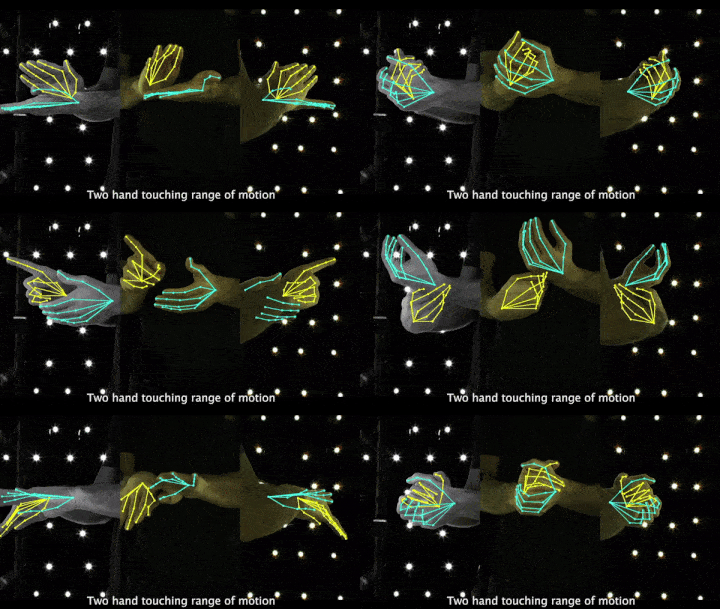 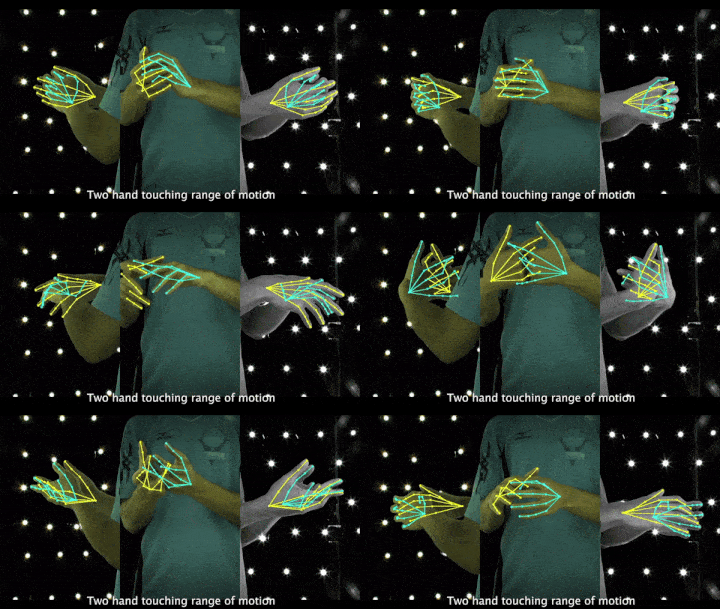
195 |
196 | 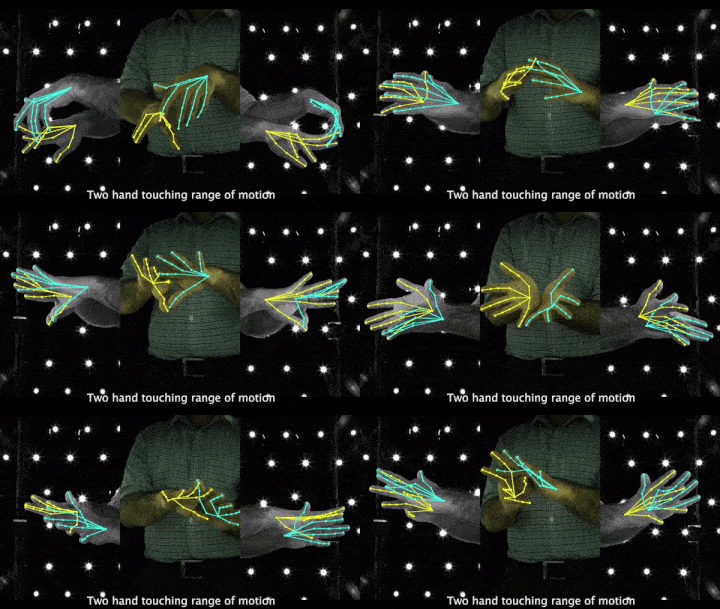
197 |
198 | 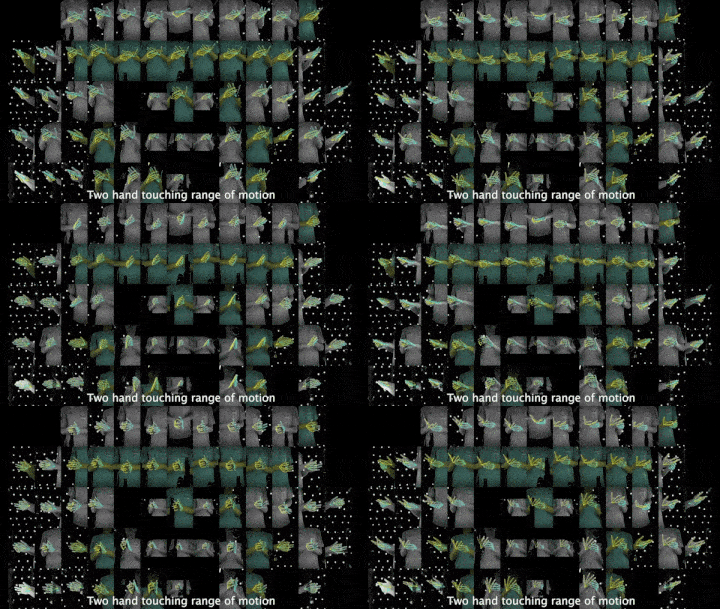
199 |
200 | 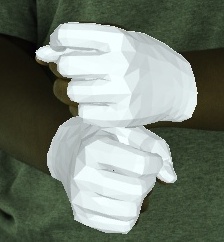
201 |
202 | ● 下载地址:
203 | https://mks0601.github.io/InterHand2.6M/
204 |
205 | ● 论文地址:
206 | https://arxiv.org/pdf/2008.09309.pdf
207 |
208 |
209 | ## No.8 MSRA Hand
210 |
211 | ● 发布方:微软研究院、香港中文大学
212 |
213 | ● 发布时间:2014
214 |
215 | ● 简介:
216 | MSRA Hands 是用于手部跟踪的数据集。使用英特尔的创意交互式手势相机总共捕获了 6 个受试者的右手。每个受试者被要求在 400 帧的视频序列中做出各种快速手势。
217 |
218 | 为了考虑不同的手尺寸,为每个主题指定了全局手模型比例:主题 1~6 分别为 1.1、1.0、0.9、0.95、1.1、1.0。相机内在参数为:主点=图像中心(160,120),焦距=241.42。深度图像为 320x240,每个 .bin 文件按行扫描顺序存储深度像素值,即 320240 个浮点数。单位是毫米。
219 |
220 | bin 文件是二进制文件,需要使用 std::ios::binary 标志打开。 joint.txt 文件存储 400 帧 x 每帧 21 个手关节。每条线有 3 * 21 = 63 个浮点数,用于 (x, y, z) 坐标中的 21 个 3D 点。
221 |
222 | 21 个手关节是:手腕、index_mcp、index_pip、index_dip、index_tip、middle_mcp、middle_pip、middle_dip、middle_tip、ring_mcp、ring_pip、ring_dip、ring_tip、little_mcp、little_pip、little_dip、little_tip、thumb_mcp、thumb_pip、thumb_dip、thumb_tip。对应的 *.jpg 文件仅用于深度和地面实况关节的可视化。
223 |
224 | 
225 |
226 | 第一个对象的示例跟踪结果。带有红框的那些包含明显的错误。颜色编码
227 |
228 | 为了更好地可视化,还显示了每个结果的对应图
229 |
230 | ● 下载地址:
231 | https://opendatalab.com/MSRA_Hand
232 |
233 | ● 论文地址:
234 | https://www.cv-foundation.org/openaccess/content_cvpr_2014/papers/Qian_Realtime_and_Robust_2014_CVPR_paper.pdf
235 |
236 |
237 | ## No.9 MSRC-12 (MSRC-12 Kinect Gesture Dataset)
238 |
239 | ● 发布方:亚历山大大学、微软
240 |
241 | ● 发布时间:2012
242 |
243 | ● 简介:
244 | Microsoft Research Cambridge-12 Kinect 手势数据集由人体运动序列组成,表示为身体部位位置,以及系统识别的相关手势。该数据集包括 594 个序列和 719,359 帧 - 大约 6 小时 40 分钟 - 从 30 个人执行 12 个手势收集。总共有 6,244 个手势实例。运动文件包含使用 Kinect 姿势估计管道估计的 20 个关节的轨迹。身体姿势以 30Hz 的采样率捕获,关节位置的精度约为 2 厘米。
245 |
246 | 
247 |
248 | ● 下载地址:
249 | https://opendatalab.com/MSRC-12
250 |
251 | ● 论文地址:
252 | http://www.nowozin.net/sebastian/papers/fothergill2012gestures.pdf
253 |
254 |
255 | ## No.10 MuViHand
256 |
257 | ● 发布方:皇后大学
258 |
259 | ● 发布时间:2021
260 |
261 | ● 简介:
262 | MuViHand 是在 Mixamo 的帮助下创建的合成手部姿势数据集,由手的多视图视频和真实 3D 姿势标签组成。
263 |
264 | 包括 4,560 个视频中提供的超过 402,000 张合成手部图像。这些视频是从六个不同角度同时拍摄的,具有复杂的背景和随机的动态照明水平。数据是从 10 个不同的动画对象中捕获的,使用 12 个摄像头在半圆形拓扑中,其中六个跟踪摄像头只聚焦在手上,其他六个固定摄像头捕获整个身体。
265 |
266 | 
267 | MuViHand 数据集的多视图相机取景示意
268 |
269 | ● 下载地址:
270 | https://opendatalab.com/MuViHand
271 |
272 | ● 论文地址:
273 | https://arxiv.org/pdf/2109.11747v1.pdf
274 |
275 |
276 | ## No.11 3D Hand Pose
277 |
278 | ● 发布方:阿利坎特大学
279 |
280 | ● 发布时间:2017
281 |
282 | ● 简介:
283 | 3D Hand Pose 是一个多视图手部姿势数据集,由手部的彩色图像和不同类型的注释组成:边界框以及手部关节上的 2D 和 3D 位置。
284 |
285 | 
286 | 相关模型检测流程
287 |
288 | 
289 | 
290 | 样例示意
291 |
292 | ● 下载地址:
293 | https://opendatalab.com/3D_Hand_Pose
294 |
295 | ● 论文地址:
296 | https://arxiv.org/pdf/1707.03742v3.pdf
297 |
298 |
299 | ## No.12 Jester
300 |
301 | ● 发布方:高通
302 |
303 | ● 发布时间:2019
304 |
305 | ● 简介:
306 | Jester 手势识别数据集包括 148,092 个带标签的人类在笔记本电脑摄像头或网络摄像头前执行基本的、预定义的手势的视频剪辑。它旨在训练机器学习模型以识别人类手势,例如向下滑动两根手指、向左或向右滑动以及敲击手指。
307 |
308 | 这些剪辑涵盖了 27 种不同类别的人类手势,按照 8:1:1 的比例进行了训练、开发和测试。该数据集还包括两个“无手势”类,以帮助网络区分特定手势和未知手部动作。
309 |
310 | 
311 | 数据集样例示意
312 |
313 | ● 下载地址:
314 | https://developer.qualcomm.com/software/ai-datasets/jester
315 |
316 | ● 论文地址:
317 | https://openaccess.thecvf.com/content_ICCVW_2019/papers/HANDS/Materzynska_The_Jester_Dataset_A_Large-Scale_Video_Dataset_of_Human_Gestures_ICCVW_2019_paper.pdf
318 |
319 |
320 | ## No.13 IPN Hand
321 |
322 | ● 发布方:电气通信大学
323 |
324 | ● 发布时间:2020
325 |
326 | ● 简介:
327 | IPN Hand 数据集包含来自50 个主题的4,000 多个手势实例和 800,000 个帧。包含13 种静态和动态手势,用于与非触摸屏交互。与其他公开可用的手势数据集相比,IPN Hand 包含每个视频最多的连续手势,以及最大的类内变化速度。除了RGB 帧外,还提供实时光流和手部分割结果。
328 |
329 |
330 | 数据收集的设计考虑了连续 HGR 的现实世界问题,包括在没有过渡状态的情况下执行的连续手势、作为非手势片段的自然运动、包括杂乱背景、极端光照条件以及静态和动态环境的场景。
331 |
332 | 没有过渡状态的连续手势示例:
333 |
334 | 
335 |
336 | 
337 | 数据集中包含的 13 个手势类别的示例。语义分割掩码被混合到 RGB 图像中便于可视化
338 |
339 | ● 下载地址:
340 | https://gibranbenitez.github.io/IPN_Hand/
341 |
342 | ● 论文地址:
343 | https://gibranbenitez.github.io/2021_ICPR_IpnHand.pdf
344 |
345 |
346 | ## No.14 EgoGesture
347 |
348 | ● 发布方:中国科学院自动化研究所
349 |
350 | ● 发布时间:2017
351 |
352 | ● 简介:
353 | EgoGesture 是一个第一人称视角的手势识别的多模态大规模数据集,包含来自 50 个不同主题的 2,081 个 RGB-D 视频、24,161 个手势样本和 2,953,224 帧。包含了83 类静态或动态手势,专注于与可穿戴设备的交互,
354 |
355 | 这些视频是从 6 个不同的室内和室外场景中收集的。还考虑了人们在走路时做手势的场景。
356 |
357 | 4 个室内场景:
358 |
359 | ● 对象处于静止状态,具有静态杂波背景;
360 |
361 | ● 主体处于动态背景的静止状态;
362 |
363 | ● 对象处于静止状态,面对阳光剧烈变化的窗户;
364 |
365 | ● 处于行走状态的主体;
366 |
367 | 2个户外场景:
368 |
369 | ● 主体处于动态背景的静止状态;
370 |
371 | ● 动态背景下处于行走状态的主体。
372 |
373 | 
374 | 6类场景示意
375 |
376 | 
377 | 数据集中包含的 83 种手势类别的示例
378 |
379 | ● 下载地址:
380 | http://www.nlpr.ia.ac.cn/iva/yfzhang/datasets/egogesture.html
381 |
382 | ● 论文地址:
383 | http://www.nlpr.ia.ac.cn/iva/yfzhang/datasets/EgoGesture.pdf
384 |
385 | ## No.15 FPHA
386 |
387 | ● 发布方:伦敦帝国理工学院
388 |
389 | ● 发布时间:2018
390 |
391 | ● 简介:
392 | First-Person Hand Action Benchmark是 RGB-D 视频序列的集合,由 45 个日常手部动作类别的 100K 帧组成,涉及多种手部配置中的 26 个不同对象。可用于 3D 手势估计、6D 物体姿势、机器人以及动作识别等任务。第一人称视角。
393 |
394 | 
395 | 数据集中包含的 83 种手势类别的示例
396 | 第一人称“倒果汁”动作示意。使用了磁性传感器和逆运动学模型来捕捉手的姿势。
397 | 在右侧是深度图像和手部姿势。也为手部动作的子集捕获 6D 姿态
398 |
399 | 
400 | 数据集中包含的 83 种手势类别的示例
401 | 涉及物体的手部动作分类。一些对象与多个动作相关联(例如,勺子、海绵、液体肥皂),而其他一些有只有一个链接动作(例如,计算器、笔、电池充电器)
402 |
403 | ● 下载地址:
404 | https://guiggh.github.io/publications/first-person-hands/
405 |
406 | ● 论文地址:
407 | https://arxiv.org/pdf/1704.02463.pdf
408 |
409 |
410 | ## No.16 EYTH (EgoYouTubeHands)
411 |
412 | ● 发布方:中佛罗里达大学
413 |
414 | ● 发布时间:2018
415 |
416 | ● 简介:
417 | EYTH是一个以自我为中心的手分割数据集,由1290个来自YouTube视频的注释帧组成,这些视频记录在无约束的现实世界中。这些视频在环境、参与者数量和动作方面都有所不同。该数据集有助于研究无约束环境下的手分割问题。
418 |
419 | 
420 |
421 | ● 下载地址:
422 | https://opendatalab.com/EYTH
423 |
424 | ● 论文地址:
425 | https://arxiv.org/pdf/1803.03317v2.pdf
426 |
427 |
428 | ## No.17 EgoHOS
429 |
430 | ● 发布方:宾夕法尼亚大学 · 丰田研究所(TRI)
431 |
432 | ● 发布时间:2022
433 |
434 | ● 简介:
435 | EgoHOS(Egocentric Hand-Object Segmentation)是一个由 11,243 个以自我为中心的图像组成的标记数据集,其中包含在各种日常活动中交互的手和物体的每像素分割标签。是目前最早的标记详细的手对象接触边界的数据集。
436 |
437 | 作者引入了一种上下文感知的组合数据增强技术,以适应分发外的 YouTube 以自我为中心的视频。展示其手部对象分割模型和数据集可以作为基础工具来增强或启用多种下游视觉应用,包括手部状态分类、视频活动识别、手对象交互的 3D 网格重建,以及以自我为中心的视频中手对象前景的视频修复。
438 |
439 | 
440 | 标记示意
441 |
442 | ● 下载地址:
443 | https://github.com/owenzlz/EgoHOS
444 |
445 | ● 论文地址:
446 | https://arxiv.org/pdf/2208.03826.pdf
447 |
448 |
449 | ## No.18 HO-3D
450 |
451 | ● 发布方:格拉茨技术大学、古斯塔夫·埃菲尔大学
452 |
453 | ● 发布时间:2020
454 |
455 | ● 简介:
456 | HO-3D是一个具有手和对象的 3D 姿势注释的手对象交互数据集。该数据集包含来自总共 68 个序列的 66,034 个训练图像和 11,524 个测试图像。这些序列在多摄像头和单摄像头设置中捕获,包含 10 个不同的主体,从 YCB 数据集中操纵 10 个不同的对象。
457 |
458 | 注释是使用优化算法自动获得的。测试集的手势注释被保留,测试集上算法的准确性可以使用 CodaLab 挑战提交通过标准指标进行评估。测试集和训练集的对象姿态注释与数据集一起提供。
459 |
460 | 
461 |
462 | ● 下载地址:
463 | https://opendatalab.com/HO-3D
464 |
465 | ● 论文地址:
466 | https://www.cv-foundation.org/openaccess/content_cvpr_2014/papers/Qian_Realtime_and_Robust_2014_CVPR_paper.pdf
467 |
468 | ## No.19 CSL
469 |
470 | ● 发布方:中国科学技术大学
471 |
472 | ● 发布时间:2015
473 |
474 | ● 简介:
475 | 中国手语数据集(CSL)是由中国科学技术大学自2015年起利用Kinect采集的中国手语数据集,包含25K标记的视频实例,共有超过100个时长的视频,50个操作者拍摄,每个操作者重复5次,包含RGB、深度以及骨架关节点数据,分为孤立词和连续语句,其中单词有500类,每类含250个样例, 包含21个骨架关节点坐标序列;句子有100个,共 有5000个视频,每一个句子平均包含4~8个单词。
476 |
477 | 每一个视频实例都由专业的中国手语老师进行标注。
478 |
479 | 
480 | CSL数据集参数
481 |
482 | 
483 | CSL中国手语数据样例
484 |
485 | ● 下载地址:
486 | http://home.ustc.edu.cn/~pjh/openresources/cslr-dataset-2015/index.html
487 |
488 | ● 论文地址:
489 | Isolated SLR:
490 | http://home.ustc.edu.cn/~pjh/publications/ICME2016Chinese/paper.pdf
491 |
492 | Continuous SLR:
493 | https://ieeexplore.ieee.org/document/8954236
494 |
495 |
496 | ## No.20 MFH
497 |
498 | ● 发布方:Willogy、AIOZ · Blood Transfusion Hematology Hospital
499 |
500 | ● 发布时间:2021
501 |
502 | ● 简介:
503 | MFH 数据集是一个多视点细粒度的手部卫生数据集。它总共包含 73,1147 个样本,这些样本由 6 个不同位置的 6 个摄像机视图收集。所有样本总共分为 7 个类别。MFH 数据集与现有数据集的区别在于三个方面:大的类内差异、细微的类间差异以及训练阶段和推理阶段之间的数据分布不匹配。因此,该数据集提供了更现实的基准。
504 |
505 | 
506 | MFH数据集中7个手部卫生步骤的6个不同视角的样例总览
507 |
508 | 
509 | 数据集样例
510 |
511 | ● 下载地址:
512 | https://opendatalab.com/MFH
513 |
514 | ● 论文地址:
515 | https://arxiv.org/pdf/2109.02917.pdf
516 |
517 |
518 | ## No.21 11k Hands
519 |
520 | ● 发布方:约克大学、阿斯尤特大学
521 |
522 | ● 发布时间:2019
523 |
524 | ● 简介:
525 | 11k Hands是一个用于性别识别和生物特征识别的详细真实信息的人类手部图像(背侧和手掌侧)的大型数据集。包含 190 位参与者的人手图片数据集,年龄在 18-75 岁之间。所有背景色均为白色,且拍照距离一致。
526 |
527 | 对应的元数据包含:
528 | ● 主题 ID
529 | ● 性别
530 | ● 年龄
531 | ● 肤色
532 | ● 手的信息,即右手或左手,手侧(背侧或手掌)和逻辑指示符,用于指示手部图像是否包含附件,指甲油或不规则物。
533 |
534 | 
535 | 数据集样例示意,每行显示的是同一对象的8个手部图像
536 |
537 | ● 下载地址:
538 | https://opendatalab.com/11k_Hands
539 |
540 | ● 论文地址:
541 | https://arxiv.org/pdf/1711.04322v9.pdf
542 |
543 |
544 | ## No.22 LD-ConGR
545 |
546 | ● 发布方:中国科学院软件研究所
547 |
548 | ● 发布时间:2022
549 |
550 | ● 简介:
551 | LD ConGR中总共收集了542个视频和44887个手势实例。视频从5个不同场景中的30名受试者收集,并用Kinect V4以第三视角拍摄。每个视频包含一个颜色流和一个深度流。这两个流以30fps同步记录,分辨率分别为1280 x 720和640 x 576。
552 |
553 | 数据集按受试者随机分为训练集和测试集(23名受试者用于训练,7名受试人用于测试)。手势实例的数量和手势持续时间的统计(以帧为单位测量)如下:
554 |
555 | 
556 | 手势实例数和手势持续时间统计
557 |
558 | 
559 | LD ConGR数据集的十类手势,包括三个静态手势和七个动态手势手势。每列显示了同一类。红色箭头指示手的动作。
560 |
561 | 
562 | 会议场景手势识别示意
563 |
564 | ● 下载地址:
565 | https://github.com/Diananini/LD-ConGR-CVPR2022
566 |
567 | ● 论文地址:
568 | https://openaccess.thecvf.com/content/CVPR2022/papers/Liu_LD-ConGR_A_Large_RGB-D_Video_Dataset_for_Long-Distance_Continuous_Gesture_CVPR_2022_paper.pdf
569 |
570 |
571 |
572 | 以上就是本次分享,更多精彩的数据集干货,不容错过。还有哪些想看的内容,快来告诉小助手吧。更多数据集上架动态、更全面的数据集内容解读、最牛大佬在线答疑、最活跃的同行圈子……欢迎添加微信opendatalab_yunying加入OpenDataLab官方交流群。
573 |
574 | 
575 |
576 | - End -
577 |
--------------------------------------------------------------------------------
/help doc.md:
--------------------------------------------------------------------------------
1 | **English**🌎|[简体中文](https://github.com/opendatalab/opendatalab-datasets/blob/main/%E5%B8%AE%E5%8A%A9%E6%96%87%E6%A1%A3.md)🀄
2 |
3 | OpenDataLab supports multivariate data management. The data center provides the display, retrieval and download of public data sets, as well as the upload, management and publishing of private data sets, and supports the open sharing of user-built data sets. The data set center provides free and open source data sets for AI researchers. Through the data set center, researchers can obtain classic data sets in various fields in a unified format. Through the search function of the platform, researchers can quickly and conveniently find the data sets they need; through the unified format of the platform, researchers can easily develop tasks across data sets. Create dataset: https://opendatalab.com/create
4 |
5 | # Contents
6 | - [Dataset creation process](#Dataset-creation-process)
7 | - [Authentication management](#Authentication-management)
8 | - [Dataset CLI (Command Line Utility)](#Dataset-CLI-Command-Line-Utility)
9 | - [Dataset Python SDK](#Dataset-Python-SDK)
10 |
11 | # Dataset creation process
12 | ## Overview
13 | ### Create a dataset
14 | **Step 1: Enter the dataset creation page,**
15 | enter the content platform-data set center homepage, click Create to create a data set, and enter the data set creation page.
16 |
17 | **Step 2: Fill in the basic information of the dataset.**
18 | Fill in the basic information of the data set, including the name of the database (unique index), data set display name, cover, description, data type, task type and annotation type. Click Create Now to complete the creation of a data set.
19 |
20 | ### Upload data
21 | **Step 1: Enter the data upload page.**
22 | On the data set file tab page, click Upload to enter the data upload page.
23 |
24 | **Step 2: Select the type of data to be uploaded.**
25 | Select the type of data to be uploaded (file, folder, compressed package). Select to upload the compressed package to automatically decompress the compressed package.
26 |
27 | **Step 3: Start the data upload task.**
28 | After selecting the file, display the read file list. Click Upload Now to start the data upload task.
29 |
30 | **Step 4: View Upload/Unzip Task Data**
31 | After the upload/unzip task starts, you can view the upload/unzip task in the task list.
32 |
33 | ### Improve the introduction of data sets and submit them to the public
34 | **Step 1: Edit Data Set Introduction**
35 | Click Edit Data Set Introduction in the Data Set Introduction tab to enter Data Set Meta Information Edit (metafile) and Data Set Description (README) Edit.
36 |
37 | **Step 2: Edit the metadata of the dataset**
38 | Edit the metadata of the data set, which supports editing the metafile. Yml through a visual form; Edit the introduction of the dataset, which improves the introduction information of the dataset by editing the README. MD file.
39 |
40 | **Step 3: Save and commit changes**
41 | Save and commit changes (commit).
42 |
43 | **Step 4: Set the visibility of the dataset.**
44 | In the setting tab, the data set can be made public. The public data set requires license information.
45 |
46 | ---
47 |
48 | ## Upload the dataset
49 | This document will guide you on how to upload data in the Dataset Center. There are 2 ways:
50 |
51 | ### 1. Uploading data through the user interface
52 | **Step 1: Go to the data upload page.**
53 | On the main page of the Dataset Center, find and click the "Dataset File" tab page. On this page, you will see a button called "Upload". Click it, and you will go to the data upload page.
54 |
55 | **Step 2: Select Data Type**
56 | On the Data Upload page, you need to select the data type you want to upload. There are three choices for the data type:
57 |
58 | - File
59 | - Folder
60 | - Compression Package
61 |
62 | If you select "zip", the system will automatically unzip your files after uploading.
63 |
64 | **Step 3: Upload the file**
65 | After selecting the data type, select the file you want to upload. You will see a list of the selected files. After confirmation, click "Upload Now" to start the data upload task.
66 |
67 | **Step 4: View the upload/unzip task**
68 | Once the data upload/unzip task starts, you can view the task progress in the "Task List". This way, you can easily keep track of your upload and unzip tasks.
69 |
70 | ### 2. Data upload through CLI and Python SDK
71 |
72 | In addition to data upload through the interface, we also support data upload through CLI and Python SDK. To upload data using the CLI and Python SDK, you need to install them first. The installation codes are as follows: `pip install openxlab` The following are some basic examples of using the CLI and SDK. For details, please refer to the developer documentation:
73 |
74 | **Uploading files**
75 |
76 | on the CLI command line, uploading files with the `upload-file` parameter, uploading folders with the `upload-folder` parameter
77 |
78 | ```
79 | openxlab dataset upload-file --dataset-repo --source-path --target-path
80 |
81 | openxlab dataset upload-file -r -s -t
82 | ```
83 |
84 |
85 | ```
86 | openxlab dataset upload-folder --dataset-repo --source-path --target-path
87 |
88 | openxlab dataset upload-folder -r -s -t
89 | ```
90 |
91 | Upload files in the Python SDK, upload files using the `upload _ file` function, and upload folders using the `upload _ folder` function
92 |
93 | ```
94 | from openxlab.dataset import upload_file
95 | upload_file(dataset_repo='username/repo_name',
96 | source_path='/path/to/local/file', target_path='/train')
97 | ```
98 |
99 | ```
100 | from openxlab.dataset import upload_folder
101 | upload_folder(dataset_repo='username/repo_name',
102 | source_path='/path/to/local/folder', target_path='/train')
103 | ```
104 |
105 | ---
106 |
107 | ## Download the dataset
108 | This document will guide you on how to download the data in the Dataset Center. There are 2 ways:
109 |
110 | ### 1. Downloading data through the user interface
111 | **Step 1: Enter the Dataset List Page**
112 | In the main page of the Dataset Center, you will see all the datasets that you have access to.
113 |
114 | **Step 2: Select the dataset**
115 | In the dataset list, find the dataset you want to download, and click the name of the dataset to enter the dataset details page.
116 |
117 | **Step 3: Download dataset**
118 | On the dataset details page, click the data set file tab page to view the list of all files in this data set. Click the "Download" button on the right side of each file to download a single file.
119 |
120 | ### 2. Download data via CLI, Python SDK
121 | In addition to downloading data through the interface, we also support downloading data through the CLI, Python SDK. To upload data using the CLI and Python SDK, you need to install them first. The installation code is as follows: `pip install openxlab` The following are some basic examples of using the CLI and SDK. For details, please see the developer documentation
122 |
123 | **Download Dataset**
124 | Use the CLI to download the entire repository for the dataset
125 |
126 | ```
127 | openxlab dataset get --dataset-repo username/repo-name
128 | --target-path /path/to/local/folder
129 |
130 | openxlab dataset get -r username/repo-name
131 | -t /path/to/local/folder
132 | ```
133 |
134 | Using the CLI to Download a Dataset File
135 |
136 | ```
137 | openxlab dataset download --dataset-repo username/repo-name
138 | --source-path /train/file
139 | --target-path /path/to/local/folder
140 |
141 | openxlab dataset download -r username/repo-name
142 | -s /train/file
143 | -t /path/to/local/folder
144 | ```
145 |
146 | Among:
147 | | Parameter | Abbreviation | Required | Parameter Type | Parameter Description | Example |
148 | |---|---|---|---|---|---|
149 | |dataset_repo|-r|yes|String|Address of the dataset repository, consisting of `username/repo_name`|zhangsan/repo-name|
150 | |source_path|-s|yes|String|Relative path of the file under the corresponding data set warehouse|-s /train/file|
151 | |target_path|-t|no|String|Download the local path specified by the warehouse|--target-path /path/to/local/folder|
152 |
153 | Download Dataset repository using SDK
154 |
155 | ```
156 | from openxlab.dataset import get
157 | get(dataset_repo='username/repo_name', target_path='/path/to/local/folder')
158 | ```
159 |
160 | Using the SDK to Download Dataset Files
161 |
162 | ```
163 | from openxlab.dataset import download
164 | download(dataset_repo='username/repo_name', source_path='/train/file', target_path='/path/to/local/folder')
165 | ```
166 |
167 | Among:
168 |
169 | | Parameter | Abbreviation | Required | Parameter Type | Parameter Description | Example |
170 | |---|---|---|---|---|---|
171 | |dataset_repo|-r|yes|String|Address of the data set repository, consisting of `username/repo_name`|zhangsan/repo-name|
172 | |source_path|-s|yes|String|Relative path to the file in the corresponding data set warehouse|-s /path/to/local/folder|
173 | |target_path|-t|no|String|Download the local path specified by the warehouse|--target-path /path/to/local/folder|
174 |
175 | ---
176 |
177 | ## Dataset card
178 | On the main page of the data set center, find and click the tab page of "Data Set Introduction", and click "Edit Data Set Introduction" to edit the introduction information and meta information of the dataset:
179 |
180 | - Edit the dataset introduction page by editing the README file.
181 | - Edit the metadata of the data set by editing metafile. The metadata includes data type, task type, annotation type, license, etc., and is edited in a visual form.
182 |
183 | ### Dataset introduction (README)
184 | The upper part of the dataset introduction (README) is the README editing area, which supports both editing and preview views. README can also be uploaded by the user. The entry is the file upload of "data set file".
185 |
186 | **Example**
187 |
188 | ```
189 | # Dataset name
190 |
191 | ## Introdution
192 |
193 | - **Data source:** This section briefly describes the source of the data, such as public data sets, company internal data sets, crawler data, etc.
194 |
195 | - **Data volume and format:** This part describes the size of the data set, including data volume (such as how many rows, how many instances), number of features, etc., and briefly describes the format of the data, such as a csv file, one json per line wait.
196 |
197 | - **Feature Description:** This section describes in detail the meaning, type, and, if any, possible value range of the feature for each feature.
198 |
199 | ## Dataset tasks
200 |
201 | Describe what tasks the data set is mainly used for, such as text classification, object detection, speech recognition, etc.
202 |
203 | ## Data preprocessing
204 |
205 | If any, describe the data preprocessing process, such as missing value processing, feature selection, feature extraction, data cleaning, etc.
206 |
207 | ## Citation
208 | ```
209 |
210 | ### Dataset meta information (metafile)
211 | The lower part is the metafile editing area, which is edited through the visual form. The metafile is automatically generated when the data set is created. If the data type, task type, annotation type, name and other information are filled in during creation, the corresponding field of the metafile will be automatically filled. Select the Chinese and English labels in the visual configuration, and automatically fill in the English labels in yaml.
212 |
213 | ### Description of the metafile field
214 | |English name|Chinese name|Filling method|Instructions|
215 | |---|---|---|---|
216 | |displayName|Name|Input|Only Chinese and English, numbers,-, and _ are supported|
217 | |license|Open Source Agreement|Drop-down|Required for public datasets|
218 | |taskTypes|Task type|Drop-down|-|
219 | |mediaTypes|Data types|Drop-down|-|
220 | |labelTypes|Label type|Drop-down|-|
221 | |tags|Tags|Input|Custom labels|
222 | |publisher|Publishing agency|Drop-down|-|
223 | |publishDate|Publish time|Input|Input in standard format, example: 2023-06-15|
224 | |publishUrl|Publish homepage|Input|-|
225 | |paperUrl|Publish paper|Input|-|
226 |
227 | ---
228 |
229 | ## Dataset maintenance
230 | In the "Settings" tab, you can maintain the basic information of the dataset, including changing the cover, changing the description of the dataset, changing the status of the dataset and deleting the dataset warehouse.
231 |
232 | ### Dataset basic information
233 | Editable dataset information includes:
234 |
235 | ● Dataset cover, support clicking to upload the cover again.
236 | ● Dataset description, which supports the modification of data set description.
237 |
238 | ### Dataset visibility
239 | Support data set public/private state switching.
240 |
241 | ### Delete Dataset Warehouse
242 | It is a high-risk operation and requires careful operation.
243 |
244 | ---
245 |
246 | # Authentication management
247 |
248 | OpenXLab's OpenAPI uses Access Key & Secret Key for authentication. All registered accounts will be assigned a pair of AK and SK by default, which you can manage by entering the [personal center](https://sso.openxlab.org.cn/login). Login to OpenXLab Content Platform-Personal-Account and Security [Key Management] to view the AK/SK of the current account. If it is empty, click Add Key to add a pair of keys.
249 |
250 | Please note that your AK and SK are private. Please do not share it with others or save it on any client/APP, nor use any version management tools to push it to the public network. For production scenarios, all OpenAPI calls need to be routed through the backend service, and the API Key can be read through environment variables or other key management services.
251 |
252 | If AK and SK are leaked, you can enter the [personal center](https://sso.openxlab.org.cn/login) to delete this certificate and regenerate it. Note that this operation will invalidate all API_KEY generated using the AK and SK.
253 |
254 | ## AK and SK settings
255 | Before officially using the SDK/CLI, you need to complete the local configuration of the AK/SK of the Puyuan Content Platform account, otherwise the identity verification cannot be passed when using the SDK/CL to access the Puyuan Content Platform.
256 |
257 | **Configuration method 1:**
258 | Configure through CLI commands
259 |
260 | 1. It is recommended to use Puyuan openxlab command line tool to configure AK/SK. The command line tool can be installed through `pip install openxlab`. After completing the installation of the command line tool, configure it through the login command.
261 | ```
262 | openxlab login
263 |
264 | OpenXLab Access Key ID: xxxxxxxxxxxxxxxxxxxx
265 | OpenXLab Secret Access Key: xxxxxxxxxxxxxxxxxxx
266 | ```
267 |
268 | 2. Use the openxlab login command to enter the corresponding `Access key`and `Secret key` as prompted. After completion, the `config.json` file will be generated in the `~/.openxlab` directory with the following format:
269 | ```
270 | {
271 | "ak": "vmb1akg9w1xwdrxnyxlr",
272 | "sk": "9gvpqrel6jez23ywerzvbz2dbpq4y8b1aow5nngx"
273 | }
274 | ```
275 |
276 | **Configuration method 2:**
277 | Configure by creating a `config.json` file
278 |
279 | Create the corresponding `config.json file` directly in the `~/.openxlab` directory, fill in the corresponding `Access key` and `Secret key`, the format is as follows:
280 | ```
281 | {
282 | "ak": "vmb1akg9w1xwdrxnyxlr",
283 | "sk": "9gvpqrel6jez23ywerzvbz2dbpq4y8b1aow5nngx"
284 | }
285 | ```
286 |
287 | ### SDK authentication
288 | **Configuration method 1:**
289 | Configure through the `openxlab.login()` function AK / SK for authentication
290 |
291 | Authentication is implemented through the provided `login() `function, and the corresponding `Access key` and `Secret key` are filled in the function. The usage method is as follows:
292 | ```
293 | import openxlab
294 | openxlab.login(ak=, sk=)
295 | ```
296 |
297 | **Configuration method 2:**
298 | Configure environment variables in application settings and configure AK / SK for authentication
299 |
300 | You can find [Application Configuration] on the settings page of a personally created application to set environment variables. You can set the `Access key` to the environment variable named `OPENXLAB_AK` and the `Secret key` to the environment variable named `OPENXLAB_SK`.
301 |
302 | ---
303 |
304 | # Dataset CLI (Command Line Utility)
305 | ## Overview
306 | OpenXLab Command Line Interface provides command line tools for publishers in the data set center. This tool enables you to manage Dataset Center, and the content resources contributed by Dataset Center.
307 |
308 | **The command line structure specification of Puyuan Content Platform CLI tool is as follows:**
309 |
310 | ```
311 | openxlab [options and parameters]
312 | ```
313 | ● `Openxlab`: The name of the CLI tool of the openxlab Puyuan Content Platform
314 | ● `command`: Specifies a top-level command (case-insensitive, default lowercase)
315 | - that typically indicates the name of a submodule or product supported in the command-line tool, such as dataset, data, app, etc.
316 | - Or functional commands that represent the command-line tool itself, such as help, config, and so on.
317 | ● `Subcommand`: Specifies an additional subcommand to perform an action, that is, a specific action.
318 | ● `Options and parameters`: Specifies options or API parameter options that control CLI behavior. The option values can be numbers, strings, JSON structure strings, and so on.
319 |
320 | ## Installation guide
321 | **Install using pip**
322 |
323 | ```
324 | pip install openxlab
325 | ```
326 | Release address: https://pypi.org/project/openxlab
327 |
328 | **Unload**
329 |
330 | ```
331 | pip uninstall openxlab
332 | ```
333 |
334 | ## Configuration guide
335 |
336 | **AK and SK settings**
337 | Before formally using **Setting of AK and SK** the SDK/CLI, it is necessary to complete the local configuration of AK/SK of the Puyuan content platform account, otherwise the identity verification cannot be passed when using the SDK/CL to access the Puyuan content platform. Please refer to the configuration method: [Authentication management](#Authentication-management)
338 |
339 | ## Dataset Center CLI Features
340 |
341 | ### Dataset information viewing (dataset info)
342 |
343 | ```
344 | openxlab dataset info --dataset-repo
345 | ```
346 | |Parameter|Abbreviation|Required or not|Parameter type|Parameter description|Example|
347 | |---|---|---|---|---|---|
348 | |--dataset-repo|-r|yes|String|Address of the data set repository, consisting of `username/repo_name`|zhangsan/repo-name|
349 |
350 | Example:
351 |
352 | ```
353 | openxlab dataset info --dataset-repo my_dataset_name
354 | openxlab dataset info -r my_dataset_name
355 | ```
356 |
357 | ### Dataset file list viewing (dataset ls)
358 |
359 | ```
360 | openxlab dataset ls --dataset-repo
361 | ```
362 | |Parameter|Abbreviation|Required or not|Parameter type|Parameter description|Example|
363 | |---|---|---|---|---|---|
364 | |--dataset-repo -r|yes|String|Address of the data set repository, consisting of `username/repo_name`|zhangsan/repo-name|
365 |
366 | Example:
367 |
368 | ```
369 | openxlab dataset ls --dataset-repo my_dataset_name
370 | openxlab dataset ls -r my_dataset_name
371 | ```
372 |
373 | ### Dataset create (dataset create)
374 |
375 | ```
376 | openxlab dataset create --repo-name
377 | ```
378 | |Parameter|Abbreviation|Required or not|Parameter type|Parameter description|Example|
379 | |---|---|---|---|---|---|
380 | |--repo-name|-|yes|String|The name of the data set warehouse, which, together with the user name, forms the data set warehouse address|dataset_name|
381 |
382 | For example, when creating a warehouse, you need to fill in the name of the dataset warehouse, and the visibility of the dataset is private by default
383 |
384 | ```
385 | openxlab dataset create --repo-name dataset_name
386 | ```
387 |
388 | ### Dataset upload file (dataset upload-file)
389 |
390 | ```
391 | openxlab dataset upload-file --dataset-repo
392 | ```
393 | |Parameter|Abbreviation|Required or not|Parameter type|Parameter description|Example|
394 | |---|---|---|---|---|---|
395 | |--dataset-repo|-r|yes|String|Address of the data set repository, consisting of `username/repo_name`|zhangsan/repo-name|
396 | |--source-path|-s|yes|String|The path where the local file is uploaded|-s /path/to/local/folder/1.jpg|
397 | |--target-path|-t|no|String|Corresponding to the relative path under the data set warehouse. If not added, it will be uploaded to the root directory of the warehouse.|-t /raw/train|
398 |
399 | Example:
400 |
401 | ```
402 | openxlab dataset upload-file --dataset-repo username/repo-name
403 | --source-path /path/to/local/folder/1.jpg
404 | --target-path /raw/train
405 |
406 | openxlab dataset upload-file -r username/repo-name
407 | -s /path/to/local/folder/1.jpg
408 | -t /raw/train
409 | ```
410 |
411 | ### Dataset upload folder (dataset upload-folder)
412 |
413 | ```
414 | openxlab dataset upload-folder --dataset-repo
415 | ```
416 | |Parameter|Abbreviation|Required or not|Parameter type|Parameter description|Example|
417 | |---|---|---|---|---|---|
418 | |--dataset-repo|-r|yes|String|Address of the data set repository, consisting of `username/repo_name`|zhangsan/repo-name|
419 | |--source-path|-s|yes|String|The path to upload the local folder|-s /path/to/local/folder|
420 | |--target-path|-t|no|String|Corresponding to the relative path under the data set warehouse. If not added, it will be uploaded to the root directory of the warehouse.|-t /raw/train|
421 |
422 | Example:
423 |
424 | ```
425 | openxlab dataset upload-folder --dataset-repo username/repo-name
426 | --source-path /path/to/local/folder
427 | --target-path /raw/train
428 |
429 | openxlab dataset upload-folder -r username/repo-name
430 | -s /path/to/local/folder
431 | -t /raw/train
432 | ```
433 |
434 | ### Dataset download `dataset get`
435 |
436 | ```
437 | openxlab dataset get --dataset-repo
438 | ```
439 | |Parameter|Abbreviation|Required or not|Parameter type|Parameter description|Example|
440 | |---|---|---|---|---|---|
441 | |--dataset-repo|-r|yes|String|Address of the data set repository, consisting of `username/repo_name`| zhangsan/dataset-repo-name|
442 | |--target-path|-t|no|String|Download the local path specified by the warehouse|--target-path /path/to/local/folder|
443 |
444 | Example:
445 |
446 | ```
447 | openxlab dataset get --dataset-repo username/repo-name
448 | --target-path /path/to/local/folder
449 |
450 | openxlab dataset get -r username/repo-name
451 | -t /path/to/local/folder
452 | ```
453 |
454 | ### Dataset file download (dataset download)
455 |
456 | ```
457 | openxlab dataset download --dataset-repo
458 | ```
459 | |Parameter|Abbreviation|Required or not|Parameter type|Parameter description|Example|
460 | |---|---|---|---|---|---|
461 | |--dataset-repo|-r|yes|String|Address of the data set repository, consisting of `username/repo_name`|zhangsan/repo-name|
462 | |--source-path|-s|yes|String|Relative path of the file under the corresponding data set warehouse|-s /train/file|
463 | |--target-path|-t|no|String|Download the local path specified by the warehouse|--target-path /path/to/local/folder|
464 |
465 | Example:
466 |
467 | ```
468 | openxlab dataset download --dataset-repo username/repo-name
469 | --source-path /train/file
470 | --target-path /path/to/local/folder
471 |
472 | openxlab dataset download -r username/repo-name
473 | -s /train/file
474 | -t /path/to/local/folder
475 | ```
476 | ### Dataset commit modify (dataset commit)
477 |
478 | ```
479 | openxlab dataset commit --dataset-repo
480 | ```
481 |
482 | |Parameter|Abbreviation|Required or not|Parameter type|Parameter description|Example|
483 | |---|---|---|---|---|---|
484 | |--dataset-repo|-r|yes|String|The address of the data set warehouse, consisting of `username/repo_name`|--dataset-repo='/zhangsan/repo-name'|
485 | |--commit-message|-m|yes|String|Submit Information|--commit-message 'uploading'|
486 |
487 | Example:
488 |
489 | ```
490 | openxlab dataset commit --dataset-repo username/repo-name --commit-message 'my first commit'
491 |
492 | openxlab dataset commit -r username/repo-name -m 'my first commit'
493 | ```
494 |
495 | ### Dataset warehouse removing (dataset remove)
496 |
497 | ```
498 | openxlab dataset remove --dataset-repo
499 | ```
500 | |Parameter|Abbreviation|Required or not|Parameter type|Parameter description|Example|
501 | |---|---|---|---|---|---|
502 | |--dataset-repo|-r|yes|String|Address of the data set repository, consisting of `username/repo_name`|zhangsan/repo-name|
503 |
504 | For example, if you want to delete a warehouse, you need to fill in the name of the data set warehouse, and the deletion operation is irreversible
505 |
506 | ```
507 | openxlab dataset remove --dataset-repo my_dataset_name
508 | openxlab dataset remove -r my_dataset_name
509 | ```
510 |
511 | ---
512 |
513 | # Dataset Python SDK
514 |
515 | ## Overview
516 | The Python SDK for Puyuan Content Platform-Dataset Center is designed to provide developers with a programmatic way to manage and operate the functions of the Dataset Center Platform so that they can easily interact with the Datasets Center and manage datasets. Developers can programmatically perform the following tasks:
517 |
518 | ● View dataset meta information and file list
519 | ● Create and modify datasets: Create datasets, upload files, upload folders
520 | ● Download datasets: Download the entire dataset repository, dataset files
521 |
522 | The Python SDK of OpenXLab Content Platform-Model Center is designed to provide developers with programmatic ways to manage and operate the functions of the Model Center Platform. So that they can easily interact with the Model Center and model management. Through the inference interface provided by Python SDK, developers can call different models efficiently and realize the development of model applications. The Python SDK enables developers to programmatically perform the following tasks:
523 |
524 | ● **View the dataset:** View the metadata and file list of the dataset
525 | ● **Create and modify the dataset:** Create the dataset, upload the file, and upload the folder
526 | ● **Download the dataset:** Download the entire dataset warehouse and dataset files Using the Python SDK of the dataset platform, developers can manage and use datasets more easily and improve their work efficiency.
527 |
528 | ## Installation guide
529 | **Install the SDK using pip**
530 |
531 | ```
532 | pip install openxlab
533 | ```
534 | Release address: https://pypi.org/project/openxlab/.
535 |
536 | **Uninstall the SDK**
537 |
538 | ```
539 | pip uninstall openxlab
540 | ```
541 |
542 | ## Authentication of SDK
543 | **Configuration method 1:**
544 | configure AK/SK for authentication through the `openxlab. Login ()` function
545 |
546 | Implement authentication through the provided `login ()` function, and fill in the corresponding `Access key` and `Secret key` in the function. The usage method is as follows:
547 |
548 | ```
549 | import openxlab
550 | openxlab.login(ak=, sk=)
551 | ```
552 |
553 | **Configuration mode 2:**
554 | Configure environment variables in application settings, and configure AK/SK for authentication
555 |
556 | You can find [Application Configuration] to set environment variables on the settings page of the application created by individuals. You can set the `Access key` to an environment variable named `OPENXLAB_AK` and the `Secret key` to an environment variable named `OPENXLAB_SK`.
557 |
558 | ## Function overview
559 |
560 | ### Dataset Meta Info View (info)
561 |
562 | ```
563 | from openxlab.dataset import info
564 | info(dataset_repo='username/repo_name')
565 | ```
566 | |Parameter|Abbreviation|Required or not|Parameter type|Parameter description|Example|
567 | |---|---|---|---|---|---|
568 | | | dataset _ repo | -r | yes | String | the address of the data set repository, consisting of `username/repo_name`| zhangsan/ceshi |
569 |
570 | ### Dataset file list viewing (query)
571 |
572 | ```
573 | from openxlab.dataset import query
574 | query(dataset_repo='username/repo_name')
575 | ```
576 | |Parameter|Abbreviation|Required or not|Parameter type|Parameter description|Example|
577 | |---|---|---|---|---|---|
578 | |dataset_repo|-r|yes|String|Address of the data set repository, consisting of `username/repo_name`|zhangsan/ceshi|
579 |
580 | ### Dataset creation (create_repo)
581 |
582 | ```
583 | from openxlab.dataset import create_repo
584 | create_repo(repo_name='repo_name')
585 | ```
586 | |Parameter|Abbreviation|Required or not|Parameter type|Parameter description|Example|
587 | |---|---|---|---|---|---|
588 | |repo_name|-|yes|String|The name of the data set warehouse, which, together with the user name, forms the data set warehouse address|ceshi|
589 |
590 | ### Dataset upload file (upload_file)
591 |
592 | ```
593 | from openxlab.dataset import upload_file
594 | upload_file(dataset_repo='username/repo_name')
595 | source_path='/path/to/local/file', target_path='/train')
596 | ```
597 | |Parameter|Abbreviation|Required or not|Parameter type|Parameter description|Example|
598 | |---|---|---|---|---|---|
599 | |dataset_repo|-r|yes|String|Address of the data set repository, consisting of `username/repo_name`|zhangsan/repo-name|
600 | |source_path|-s|yes|String|The path where the local file is uploaded|source_path='/path/to/local/folder/1.jpg'|
601 | |target_path|-t|no|String|Corresponding to the relative path under the data set warehouse. If not added, it will be uploaded to the root directory of the warehouse.|target_path='/train'|
602 |
603 | ### Dataset upload folder (upload_folder)
604 |
605 | ```
606 | from openxlab.dataset import upload_folder
607 | upload_folder(dataset_repo='username/repo_name')
608 | source_path='/path/to/local/folder', target_path='/train')
609 | ```
610 | |Parameter|Abbreviation|Required or not|Parameter type|Parameter description|Example|
611 | |---|---|---|---|---|---|
612 | |dataset_repo|-r|yes|String|Address of the data set repository, consisting of `username/repo_name`|zhangsan/repo-name|
613 | |source_path|-s|yes|String|The path where the local file is uploaded|source_path='/path/to/local/folder'|
614 | |target_path|-t|no|String|Corresponding to the relative path under the data set warehouse. If not added, it will be uploaded to the root directory of the warehouse.|target_path='/train'|
615 |
616 | ### Dataset warehouse download (get)
617 |
618 | ```
619 | from openxlab.dataset import get
620 | get(dataset_repo='username/repo_name', target_path='/path/to/local/folder')
621 | ```
622 | |Parameter|Abbreviation|Required or not|Parameter type|Parameter description|Example|
623 | |---|---|---|---|---|---|
624 | |dataset_repo|-r|yes|String|Address of the data set repository, consisting of `username/repo_name`|zhangsan/repo_name|
625 | |target_path|-t|no|String|Download the local path specified by the warehouse|target_path='/path/to/local/folder'|
626 |
627 | ### Data set file (download)
628 |
629 | ```
630 | from openxlab.dataset import download
631 | download(dataset_repo='username/repo_name')
632 | source_path='/train/file', target_path='/path/to/local/folder')
633 | ```
634 | |Parameter|Abbreviation|Required or not|Parameter type|Parameter description|Example|
635 | |---|---|---|---|---|---|
636 | |dataset_repo|-r|yes|String|Address of the data set repository, consisting of `username/repo_name`|zhangsan/repo-name|
637 | |source_path|-s|yes|String|Relative path to the file in the corresponding data set warehouse|source_path='/train/file'|
638 | |target_path|-t|no|String|Download the local path specified by the warehouse|target_path='/path/to/local/folder'|
639 |
640 | ### Dataset commit modify (commit)
641 |
642 | ```
643 | from openxlab.dataset import commit
644 | commit(dataset_repo='username/repo_name', commit_message='my first commit.')
645 | ```
646 |
647 | ```
648 | from openxlab.dataset import commit
649 | commit(dataset_repo='username/repo_name',commit_message='my first commit.')
650 | ```
651 | |Parameter|Abbreviation|Required or not|Parameter type|Parameter description|Example|
652 | |---|---|---|---|---|---|
653 | |dataset_repo|-r|yes|String|Address of the data set repository, consisting of `username/repo_name`|dataset_repo='/zhangsan/ceshi'|
654 | |commit_message|-m|yes|String|Submit Information|commit_message='my first commit.'|
655 |
656 | ### Dataset Warehouse Delete (remove_repo)
657 |
658 | ```
659 | from openxlab.dataset import remove_repo
660 | remove_repo(dataset_repo='username/repo_name')
661 | ```
662 | |Parameter|Abbreviation|Required or not|Parameter type|Parameter description|Example|
663 | |---|---|---|---|---|---|
664 | |dataset_repo|-|yes|String|Address of the data set repository, consisting of `username/repo_name`|zhangsan/ceshi|
665 |
--------------------------------------------------------------------------------
/顶会顶刊数据集/ECCV/ECCV2022数据集.md:
--------------------------------------------------------------------------------
1 | # ECCV2022数据集合辑
2 |
3 | 两年一度的ECCV2022终于在万众瞩目下召开啦,相信有不少小伙伴们对今年ECCV发布的新方向、新算法和新数据集十分感兴趣。今天小编从数据集的角度入手,给大家精选了ECCV2022发布的8个数据集,囊括了庞大的标注数据和新奇又有趣的任务,欢迎大家速速来围观!
4 |
5 | 本文还有一个超大福利:ECCV 2022数据集下载链接合辑。小编们呕心沥血地对ECCV2022的1600多篇接收文章进行了筛选,最终获取了107个数据集的下载链接,并按照任务类型进行了整理,小伙伴们快来看看有没有你们中意的数据集吧!
6 |
7 | __本文由两部分组成:__
8 | - ECCV2022精选数据集简介:包含了8个数据集的详细介绍。从任务类型和引用率的角度考虑,挑选了8个数据集进行简单的介绍(包括标注类型、应用场景、论文中的关键结果图等)。
9 | - ECCV2022数据集合辑:包含107个数据集的下载链接。对107个数据集进行了粗粒度和细粒度的任务类型划分,提供了数据集的下载链接和相应的文章链接,并辅以简单说明。
10 |
11 |
12 | ## 一、精选数据集简介
13 | 该部分包括多个任务领域的8个数据集的详细介绍:
14 | - HuMMan (4D人体感知和建模)
15 | - OpenLane/Waymo (自动驾驶)
16 | - PartImageNet (零部件分割)
17 | - Sherlock (溯因推理)
18 | - MovieCuts (视频剪辑类型识别)
19 | - DexMV (机器人模仿学习)
20 | - ViCo (视频生成-倾听者反馈)
21 |
22 | ### 1. HuMMan
23 | 4D人体感知和建模是视觉和图形领域的基本任务,具有多种应用。随着新传感器和算法的进步,对更通用数据集的需求越来越大。HuMMan[1]是一个大型多模态4D人体数据集,包含1000个人体对象、400k序列和60M帧。
24 |
25 | HuMMan的特点在于:
26 | 1)多模态数据和注释,包括彩色图像、点云、关键点、SMPL参数和纹理网格;
27 | 2)传感器套件中包括主流的移动设备;
28 | 3)囊括了500个动作,涵盖了人体活动的基本动作;
29 | 4) 支持和评估多种任务,如动作识别、姿势估计、参数化人体恢复和纹理网格重建。
30 |
31 |
32 |
33 | 
34 | >图1. HuMMan具有多种数据格式和注释形式:a)彩色图像,b)点云,c)关键点,d)SMPL参数,e)网格,f)纹理。每个序列还带有来自500个动作的动作标签注释。每个受试者都有两个额外的高分辨率扫描,对自然和衣着最少的身体进行扫描[1]
35 |
36 | 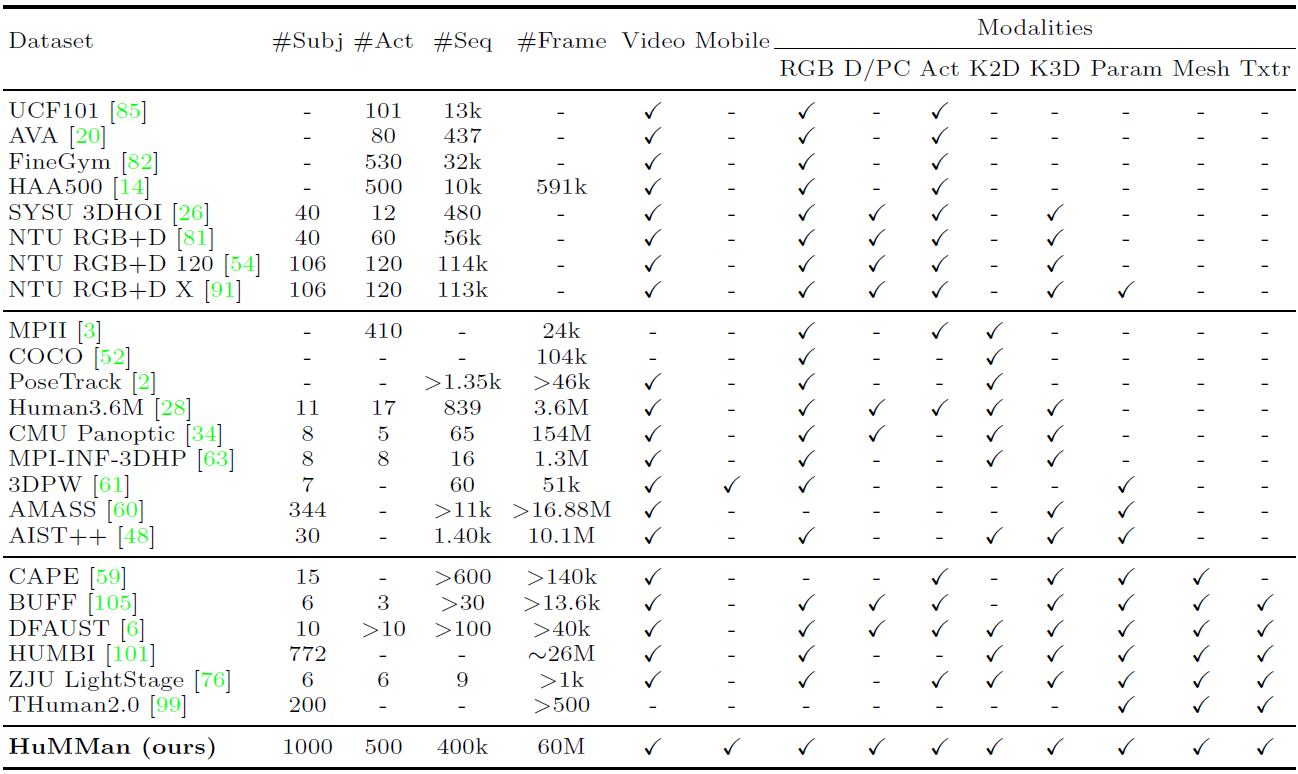
37 | >表1. HuMMan与已发布数据集的比较[1]
38 |
39 | HuMMan在受试者数量(#Subj)、动作(#Act)、序列(#Seq)和帧(#Frame)方面具有竞争力。数据来源分为:视频,即连续数据,不限于RGB序列;移动,即传感器套件中的移动设备。
40 |
41 | 此外,HuMMan具有多种模式标注用于支持多种任务,包括:RGB,即三波段图像;D/PC,即深度图像或点云,仅考虑从深度传感器采集的真实点云;Act,即动作标签;K2D,即二维关键点;K3D,即3D关键点;Param,即统计模型(如SMPL)参数;Mesh,即网格,Txtr,即纹理。
42 |
43 | HuMMan的大量实验表明,在多个诸如细粒度动作识别、动态人体网格重建、基于点云的参数化人体恢复和跨设备域间隙等等研究领域,仍存在较多挑战,具有很大的研究空间。
44 |
45 | 数据集链接:https://caizhongang.github.io/projects/HuMMan/
46 |
47 | 为方便AI研究员们,OpenDataLab 已收录[HuMMan](https://opendatalab.org.cn/OpenXD-HuMMan) 数据集资源,点击数据集名称可免费、高速下载。
48 |
49 | ### 2&3 OpenLane/Waymo
50 | OpenLane[2]是迄今为止第一个真实世界3D车道数据集,也是目前为止最大规模的,拥有200K帧和880K条经过仔细注释的车道。该数据集从公众感知数据集Waymo Open dataset[3]收集有价值的内容,并为1000个segment提供车道和最近路径对象(closest-in-path object, CIPO)注释。
51 |
52 | __车道注释包括(具体可见:[Lane Anno Criterion](https://github.com/OpenPerceptionX/OpenLane/blob/main/anno_criterion/Lane/README.md)):__
53 | - 车道形状。每个2D/3D车道都显示为一组2D/3D点。
54 | - 车道类别。每条车道都有一个类别,例如双黄线或路缘。
55 | - Lane属性。有些车道具有右车道、左车道等特性。
56 | - 车道跟踪ID。除路缘外,每条车道都有唯一的ID。
57 | - 停车线和路缘石。
58 |
59 | __CIPO/场景注释包括(具体可见:[Lane Anno Criterion](https://github.com/OpenPerceptionX/OpenLane/blob/main/anno_criterion/Lane/README.md))__
60 | - 二维边界框,其类别表示对象的重要性级别。
61 | - 场景标记。它描述了在哪个场景中收集此帧。
62 | - 天气标签。它描述了这个框架是在什么天气下收集的。
63 | - 小时标签。它会注释收集此帧的时间。
64 |
65 | 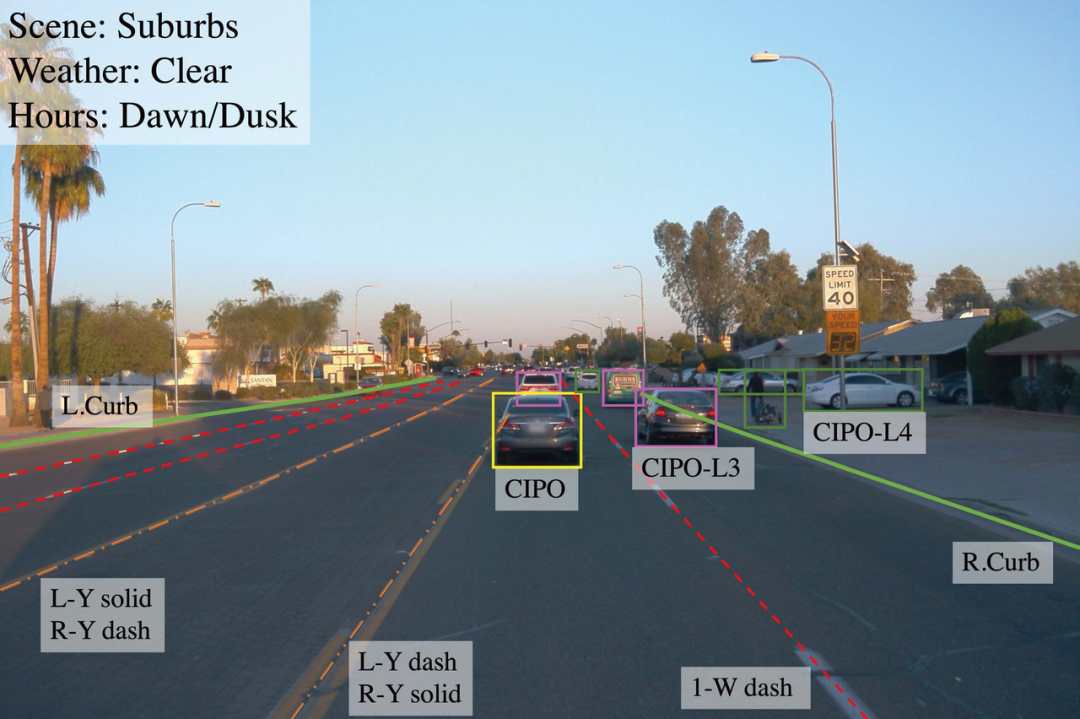
66 | >图2. OpenLane的标注示例[2]
67 |
68 | Waymo Open dataset[3]也是ECCV 2022接收文章中公开的数据集,提供了激光雷达和相机这两种传感器上的独立标注,标注类型包括:车辆和行人的3D Lidar检测和分割、2D相机检测和分割(包括图片和视频)、2D-to-3D correspondence,以及人体关键点标注等。
69 | 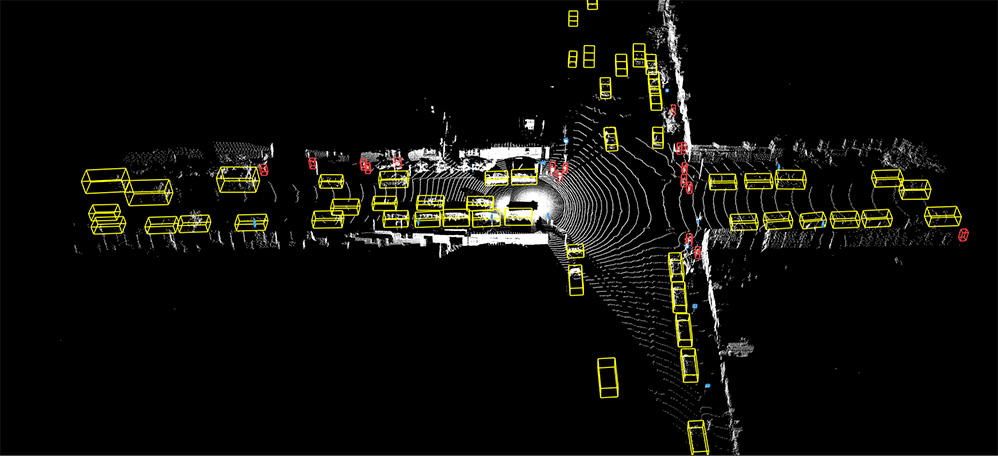
70 | 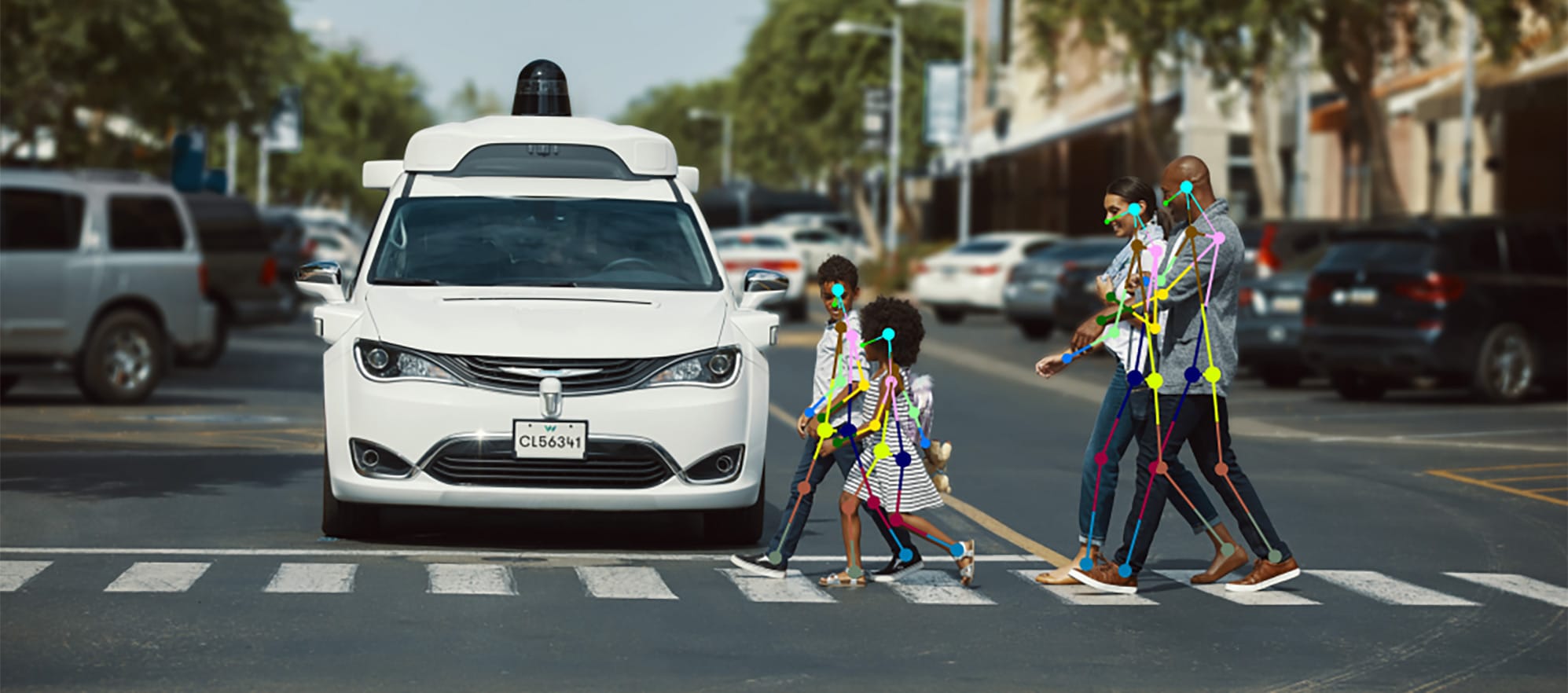
71 | >图3. Waymo的标注示例(https://waymo.com/open/data/perception/)
72 |
73 | OpenLane数据集链接:https://github.com/OpenPerceptionX/OpenLane
74 | Waymo数据集链接:https://waymo.com/open/
75 |
76 | 为方便AI研究员们, OpenDataLab 已收录[OpenLane](https://opendatalab.org.cn/OpenLane)数据集资源,点击数据集名称可免费、高速下载。
77 |
78 | ### 4. PartImageNet
79 | PartImageNet[4]是一个具有零部件分段注释的大型高质量数据集。它由ImageNet[5]中的158个类组成,大约有24000个图像。
80 |
81 | 这些类别被分为11个super-categories,零件分割是根据super-categories设计的,如下所示(类别名称后面括号中的数字表示该super-categories下包含的子类别总数):
82 |
83 | |Category |Annotated Parts|
84 | |---|---|
85 | |Quadruped (46) |Head, Body, Foot, Tail
86 | |Biped (17) |Head, Body, Hand, Foot, Tail
87 | |Fish (10) |Head, Body, Fin, Tail
88 | |Bird (14) |Head, Body, Wing, Foot, Tail
89 | |Snake (15) |Head, Body
90 | |Reptile (20)| Head, Body, Foot, Tail
91 | |Car (23) |Body, Tier, Side Mirror
92 | |Bicycle (6)| Head, Body, Seat, Tier
93 | |Boat (4) |Body, Sail
94 | |Aeroplane (2)| Head, Body, Wing, Engine, Tail
95 | |Bottle (5) |Body, Mouth
96 |
97 | PartImageNet在众多研究领域具有广泛的潜力,包括零件发现、少样本学习和语义分割中的应用等。以下是该数据集中一些测试图像在不同模型下获得的效果:
98 |
99 | 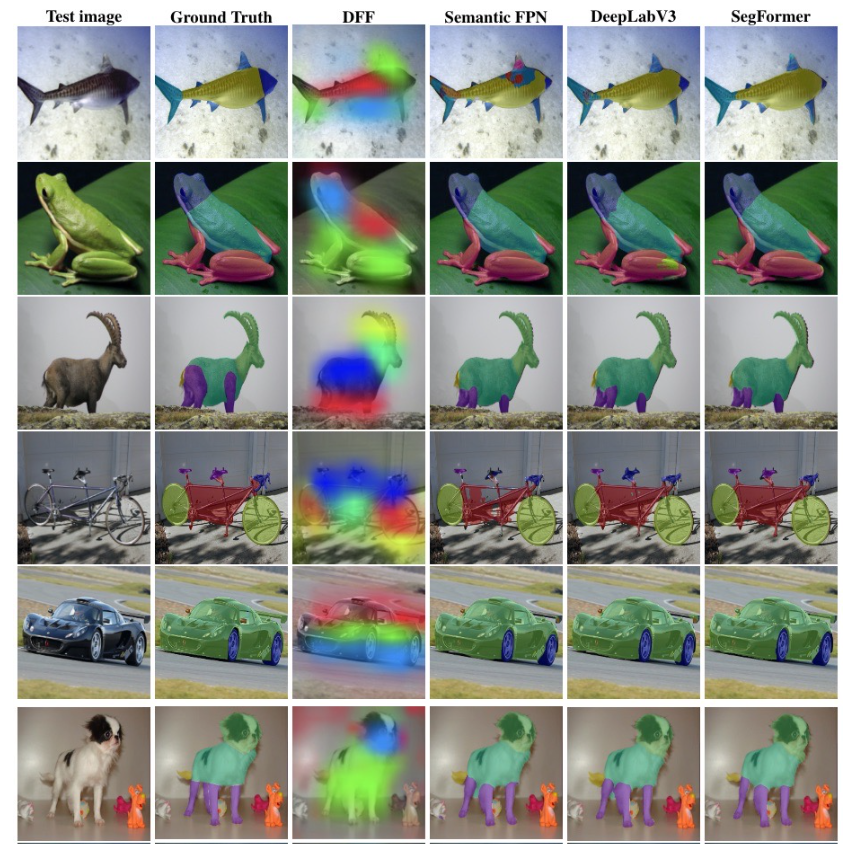
100 | >图4. PartImageNet标注示例和模型测试结果示例(来源为数据集官网)
101 |
102 | 数据集链接:https://github.com/TACJu/PartImageNet
103 |
104 | ### 5. Sherlock
105 | Sherlock[6]是一个结合图片实例级框标注和文字标注的的数据集,任务的目标是给定图像中的某部分内容,以及一段指引性的线索,让机器去推断这部分内容包含的一些信息或者正在发生的事件,即溯因推理。
106 |
107 | 语料库中包括103K幅图像中的363K个推理。每个图像包含多个边界框,每个边界框中包含文字线索和推理文本标注,总共收集了363K(线索、推理)对,形成了第一个此类外展性视觉推理数据集。
108 |
109 | 下面给出了其中一个性能最好的模型的预测示例,以及人类注释:
110 |
111 | 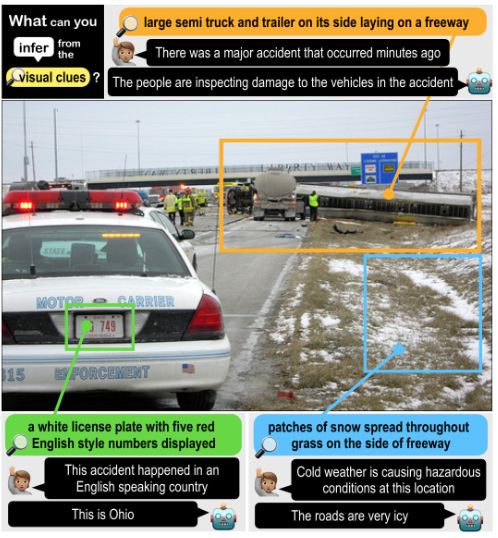
112 | >图5. Sherlock数据集标注示例和模型预测示例(来源为数据集官网)
113 |
114 | 数据集链接:http://visualabduction.com/
115 |
116 | ### 6. MovieCuts
117 | MovieCuts[7]是一个视频及剪辑标注的大型数据集,包含173967个视频剪辑,这些视频剪辑被标记q为10种不同的剪辑类型。数据集中的每个样本都由两个视频片段(将一段视频从中剪辑拆分开)及其附带的音频组成。
118 |
119 | 该数据集主要针对一种新的任务:视频剪辑类型识别。视频剪辑指的是将两段视频拼接在一起,并且拼接之后的视频看起来具有连续性,不会太突兀。视频剪辑类型识别则是要识别出两段视频是通过何种方式拼接在一起的。
120 |
121 | 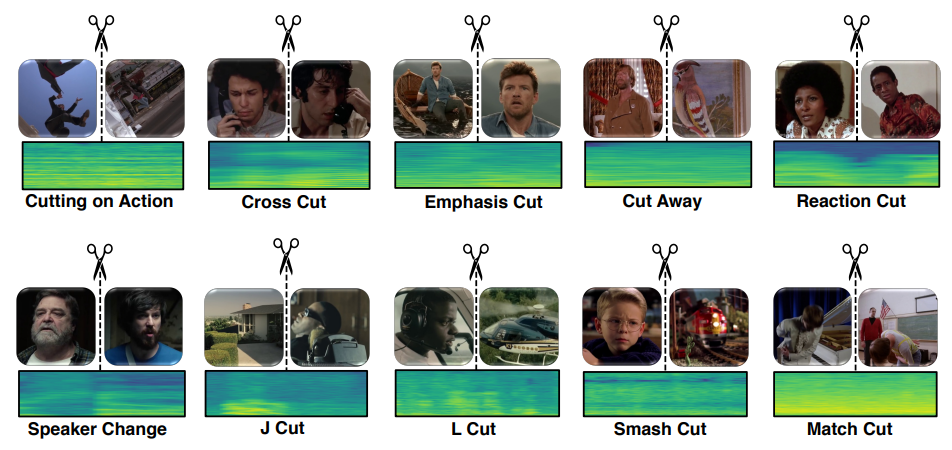
122 | >图6. MovieCuts数据集中的剪辑类型[7]:剪辑类型分为两个大类:视觉驱动(第一行)和视听驱动(第二行)
123 |
124 | 该文章对一系列视听方法进行了基准测试,包括一些处理问题的多模式和多标签性质的方法。最佳模型仅达到45.7%mAP,这表明实现高精度的剪辑类型识别是一个开放且有挑战性的问题。
125 |
126 | 数据集链接:https://www.alejandropardo.net/publication/moviecuts/
127 |
128 | ### 7. DexMV
129 | 虽然在计算机视觉中理解手-物体相互作用方面取得了重大进展,但机器人执行复杂的灵巧操作仍然是一项非常具有挑战性的任务。DexMV[8]就是为了人体视频中灵巧操作的模仿学习任务而创建的数据集,用于改善机器人执行复杂的灵巧操作。
130 |
131 | DexMV包含了一个平台和pipline,包括:
132 | (a)一个多指机器人手复杂灵巧操作任务的仿真系统;
133 | (b)一个计算机视觉系统,用于记录执行相同任务的人手的大规模演示。并从视频中进行3D手和物体的姿态估计,最后将人体运动转换为机器人演示。
134 |
135 | 文章应用并比较了多种模拟学习算法和演示。结果表明,演示确实可以大幅度改进机器人学习,并解决强化学习单独无法解决的复杂任务。
136 |
137 | 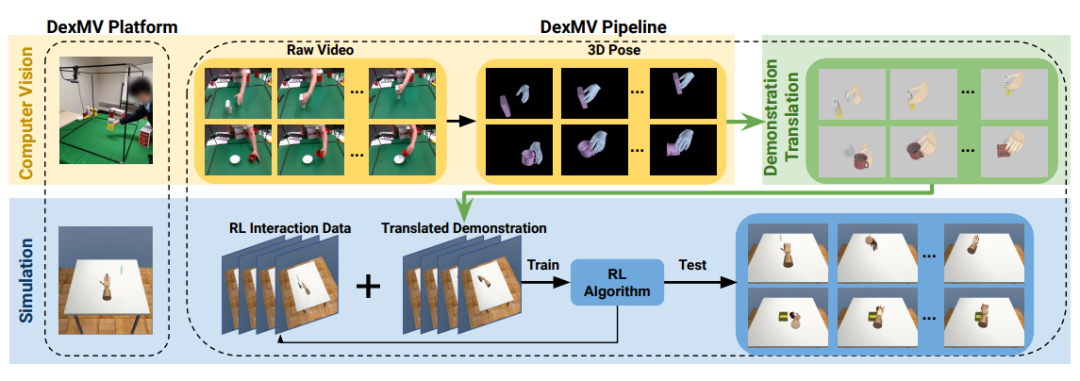
138 |
139 | >图7.DexMV平台和pipline[8]: 平台由计算机视觉系统(黄色)、仿真模拟系统(蓝色)和演示翻译模块(绿色)组成。计算机视觉系统收集人类操纵视频。在仿真模拟系统中为机器人手设计了相同的任务。应用视频中的3D手对象姿势估计,然后通过演示翻译模块生成机器人演示,用于模拟学习
140 |
141 | 数据集链接:https://yzqin.github.io/dexmv/
142 |
143 | ### 8. ViCo
144 | ViCo[9]数据集主要是用于上下文理解的视觉面部表情生成,应用场景为在面对面交谈中生成听众的反应反馈(例如点头、微笑)。ViCo共涉及92种身份(67位发言者和76位听众)和483个视频音频片段,采用配对“说-听”模式,听众(listener)根据说话者(speaker)的语音以及视频实时生成态度不同的反应反馈(积极、中立、消极)。
145 |
146 | 与传统的语音到手势或说话头部生成不同,倾听者头部生成利用来自说话者的音频和视频信号作为输入,并实时提供非语言的反馈(例如头部运动、面部表情)。该数据集支持广泛的应用,例如人与人的交互、视频与视频的转换、跨模式理解和生成。
147 |
148 | 
149 | >图8.真实标注和模型生成的听众反馈(来源为数据集官网)
150 |
151 | __数据集由三部分组成:__
152 | - __videos/*.mp4__: 所有的视频(不包含音频)
153 | - __audios/*.wav__: 所有的音频
154 | - __*.csv__: 返回的元数据(具体字段见表3)
155 |
156 |
157 | |Name |Type| Description|
158 | |---|---|---|
159 | |attitude| str |Attitude of video, possible values: [positive, negative, neutral]
160 | |audio |str |Audio filename, can be located by /audios/{audio}.wav|
161 | |listener| str |Listener video filename, can be located by /videos/{listener}.mp4|
162 | |speaker |str |Speaker video filename, can be located by /videos/{speaker}.mp4|
163 | |listener_id |int |ID of listener, value ranges in [0, 91]|
164 | |speaker_id |int| ID of speaker, value ranges in [0, 91]|
165 | |data_split |str| The data split of current record, possible values: [train, test, ood]|
166 |
167 | >表3.元数据包含的字段(来源为数据集官网)
168 |
169 | 数据集链接:https://project.mhzhou.com/vico
170 |
171 | ## 二、ECCV2022数据集合辑
172 | 根据本次ECCV2022的107个数据集涉及到的任务类型,从几个大方向对数据集进行了粗分类:
173 | - 分类、检测、跟踪、分割、关键点和识别(40个)
174 | - 图像处理和生成(21个)
175 | - 多模态(20个)
176 | - 其他(26个)
177 |
178 | 以下表格分别列出了各个数据集的名称、链接以及对应文章的名字和链接,另外还包含了细粒度任务类型和数据集的简介,需要的朋友自取~
179 | OpenDataLab后续也将陆续上线这些数据集的国内高速下载链接和详细介绍,欢迎大家持续关注!如果有感兴趣的内容,也欢迎联系我们,加入社区共同交流(小助手微信号:opendatalab_yunying)
180 |
181 | ### 1. 分类、检测、跟踪、分割、关键点和识别
182 | |Paper Title|URL|数据集名称|数据集链接|任务类型|数据集简介(包括使用场景、标注类型等)|
183 | |---|---|---|---|---|---|
184 | |TO-Scene: A Large-scale Dataset for Understanding 3D Tabletop Scenes| https://arxiv.org/pdf/2203.09440 |TO-Scene| https://github.com/GAP-LAB-CUHK-SZ/TO-Scene | 语义分割和物体检测 |3D数据集,主要是桌上场景。|
185 | |PersFormer: 3D Lane Detection via Perspective Transformer and the OpenLane Benchmark| https://arxiv.org/pdf/2203.11089 |OpenLane |https://github.com/OpenPerceptionX/OpenLane| 物体检测(车道检测)| 真实场景的车道3D数据集,用于车道检测。|
186 | |Toward Understanding WordArt: Corner-Guided Transformer for Scene Text Recognition |https://arxiv.org/pdf/2208.00438 |-| https://github.com/xdxie/WordArt |场景文本识别 |
187 | |OPD: Single-view 3D Openable Part Detection| https://arxiv.org/pdf/2203.16421 |1. OPDSynth
2. OPDReal| https://3dlg-hcvc.github.io/OPD/ |对象移动预测 |包含了两个3D数据集,其中OPDSynth是合成的数据 , OPDReal是真实对象。|
188 | |ROBIN: A Benchmark for Robustness to Individual Nuisances in Real-World Out-of-Distribution Shifts| https://arxiv.org/pdf/2111.14341 |OOD-CV |http://www.ood-cv.org/ |图片分类、目标识别、3D姿态估计 |基准数据集,包含10个目标类别,涉及姿势、形状、纹理、背景和天气条件。|
189 | |A Dense Material Segmentation Dataset for Indoor and Outdoor Scene Parsing |https://arxiv.org/pdf/2207.10614 |DMS| https://github.com/apple/ml-dms-dataset |语义分割| 稠密材料分割数据集(DMS)由44000个RGB图像的300万个材料类别(金属、木材、玻璃等)多边形标签组成。|
190 | |Pose for Everything: Towards Category-Agnostic Pose Estimation |https://arxiv.org/pdf/2207.10387| MP-100 |https://github.com/luminxu/Pose-for-Everything |类别不确定性姿态估计(CAPE) |数据集的媒体文件来自于已有的数据集existing datasets (COCO, 300W, AFLW, OneHand10K, DeepFashion, AP-10K, MacaquePose, Vinegar Fly, Desert Locust, CUB-200, CarFusion, AnimalWeb, Keypoint-5),标注文件是新生成的,是一个2D的姿态估计数据集,类别是不确定的。|
191 | |Benchmarking Omni-Vision Representation through the Lens of Visual Realms |https://arxiv.org/pdf/2207.07106 |OmniBenchmark |https://github.com/ZhangYuanhan-AI/OmniBenchmark |图像分类 |全领域数据集,包括21个领域级数据集,包括7372个类别和1074346个图像,且没有语义重叠。这些数据集可以全面、高效地覆盖大多数视觉领域。|
192 | |Online Segmentation of LiDAR Sequences: Dataset and Algorithm| https://arxiv.org/pdf/2206.08194 |HelixNet| https://github.com/romainloiseau/HelixNet |语义分割 |大规模开放访问的LiDAR数据集,用于评估实时语义分割算法。与其他大规模数据集不同,HelixNet包含关于传感器旋转和位置以及点释放时间的细粒度数据。|
193 | |3D Compositional Zero-shot Learning with DeCompositional Consensus |https://arxiv.org/pdf/2111.14673 |Compositional PartNet | -|3D部件分割,零样本学习 |-|
194 | |Video Mask Transfiner for High-Quality Video Instance Segmentation |https://arxiv.org/pdf/2207.14012 |HQ-YTVIS| https://www.vis.xyz/data/hqvis/ |视频实例分割 |-|
195 | |CODA: A Real-World Road Corner Case Dataset for Object Detection in Autonomous Driving| https://arxiv.org/pdf/2203.07724 |CODA |https://coda-dataset.github.io/ |(自动驾驶场景下的)目标检测 |-|
196 | |Unitail: Detecting, Reading, and Matching in Retail Scene| https://arxiv.org/pdf/2204.00298| United Retail Datasets(Unitail) |https://unitedretail.github.io/| 目标检测、文本检测、文本识别、图像匹配 |-|
197 | |Waymo Open Dataset: Panoramic Video Panoptic Segmentation| https://arxiv.org/pdf/2206.07704| Waymo |https://waymo.com/open |全景分割|-|
198 | |Domain Randomization-Enhanced Depth Simulation and Restoration for Perceiving and Grasping Specular and Transparent Objects |https://arxiv.org/pdf/2208.03792 |STD |https://github.com/PKU-EPIC/DREDS |深度估计 |-|
199 | |COO: Comic Onomatopoeia Dataset for Recognizing Arbitrary or Truncated Texts |https://arxiv.org/pdf/2207.04675 |COO| https://github.com/ku21fan/COO-Comic-Onomatopoeia |不规则文本识别 |-|
200 | |MOTCOM: The Multi-Object Tracking Dataset Complexity Metric |https://arxiv.org/pdf/2207.10031 |MOTCOM| https://vap.aau.dk/motcom |多目标跟踪 |-|
201 | |GIPSO: Geometrically Informed Propagation for Online Adaptation in 3D LiDAR Segmentation| https://arxiv.org/pdf/2207.09763 |Synth4D| https://github.com/saltoricristiano/gipso-sfouda |3D语义分割 |-|
202 | |Fine-grained Egocentric Hand-Object Segmentation: Dataset, Model, and Applications| https://arxiv.org/pdf/2208.03826| EgoHOS |https://github.com/owenzlz/EgoHOS |语义分割(手-目标交互)|-|
203 | |Few-Shot Video Object Detection |https://arxiv.org/pdf/2104.14805| FSVOD-500 |https://github.com/fanq15/FewX |few-shot 视频目标检测 |-|
204 | |Gen6D: Generalizable Model-Free 6-DoF Object Pose Estimation from RGB Images |https://arxiv.org/pdf/2204.10776 |GenMOP|[Gen6D - OneDrive (sharepoint.com)](https://connecthkuhk-my.sharepoint.com/personal/yuanly_connect_hku_hk/_layouts/15/onedrive.aspx?id=%2Fpersonal%2Fyuanly%5Fconnect%5Fhku%5Fhk%2FDocuments%2FGen6D&ga=1 ) |姿态估计| "应用场景为:六自由度物体姿态估计 数据集中提供了多个场景/光照条件下的视频片段以及对应的对象姿态标注"|
205 | |PartImageNet: A Large, High-Quality Dataset of Parts |https://arxiv.org/pdf/2112.00933 |PartImageNet |[PartImageNet - Google 云端硬盘](https://drive.google.com/drive/folders/1_sKq9g34dsKwfsgLo6j7WCe8Nfceq0Zo) |语义分割,图像分类 |提供了多个类别的图像,同时提供了每张图像中的目标的身体的各个部分的分割标注|
206 | |Multi-Domain Multi-Definition Landmark Localization for Small Datasets |https://arxiv.org/pdf/2203.10358 |PARE |[GitHub - davidcferman/pareidolia-landmarks](https://github.com/davidcferman/pareidolia-landmarks) |人脸关键点检测| 小数据集虚拟人脸关键点检测 内容包含人脸图像,box2d,关键点|
207 | |UnrealEgo: A New Dataset for Robust Egocentric 3D Human Motion Capture| https://arxiv.org/pdf/2208.01633 |UnrealEgo |https://4dqv.mpi-inf.mpg.de/UnrealEgo/ |姿态估计 |自我中心的三维人体姿态估计|
208 | |Neural-Sim: Learning to Generate Training Data with NeRF |https://arxiv.org/pdf/2207.11368 |YCB-in-the-Wild| https://github.com/gyhandy/Neural-Sim-NeRF |目标检测| 该数据集由大约1300个测试图像组成,每个对象有超过200个图像。所有的图像都是使用智能手机相机在一个常见的室内环境中拍摄的:客厅、厨房、卧室和浴室,在自然姿势和照明下。|
209 | |Invariant Feature Learning for Generalized Long-Tailed Classification| https://arxiv.org/pdf/2207.09504 |1.ImageNet-GLT
2.MSCOCO-GLT| https://github.com/KaihuaTang/Generalized-Long-Tailed-Benchmarks.pytorch| 图像分类(广义长尾分类(GLT))| 从原有的数据集重新构建的适合长尾分类的数据集|
210 | |Quasi-Balanced Self-Training on Noise-Aware Synthesis of Object Point Clouds for Closing Domain Gap |https://arxiv.org/pdf/2203.03833| SpeckleNet| https://drive.google.com/drive/folders/1wcERGIKvJRlCbSndM_DCSfcvjiGvv_5g |对象点云的语义分析| 使用 Mesh2Point 管道扫描ModelNet并生成新的数据集SpeckleNet|
211 | |Facial Depth and Normal Estimation using Single Dual-Pixel Camera| https://arxiv.org/pdf/2111.12928 |-| https://github.com/MinJunKang/DualPixelFace#dataset |人脸识别 |用多相机结构光系统收集了101个人的超过135K的DP面部数据|
212 | |Few-shot Object Counting and Detection |https://arxiv.org/pdf/2207.10988| 1. FSCD-147
2. FSCD-LVIS |https://drive.google.com/drive/folders/14qzZaV4S8EBUj3yEkgrDQC7iErHxSPjl?usp=sharing 或 https://drive.google.com/drive/folders/1tlHZIg6X3jp6qARTxKh0kMsNvuIQop9P?usp=sharing| 小样本目标计数和检测|
213 | |Salient Object Detection for Point Clouds |https://arxiv.org/pdf/2207.11889 |PCSOD |https://git.openi.org.cn/OpenDatasets/PCSOD-Dataset/datasets| 点云显著性检测|
214 | |ClearPose: Large-scale Transparent Object Dataset and Benchmark| https://arxiv.org/pdf/2203.03890| ClearPose |https://drive.google.com/drive/folders/1Cp2cwwQmntE0aUkmHOLKIlG4Jiz9PQH8 |深度补全,对象姿态估计 |-|
215 | |3D Interacting Hand Pose Estimation by Hand De-occlusion and Removal| https://arxiv.org/pdf/2207.11061 |Amodal InterHand Dataset| https://connecthkuhk-my.sharepoint.com/personal/js20_connect_hku_hk/_layouts/15/onedrive.aspx?id=%2Fpersonal%2Fjs20%5Fconnect%5Fhku%5Fhk%2FDocuments%2FAIH%5Fdataset&ga=1 |3D 交互手部姿势估计 |-|
216 | |D2-TPred: Discontinuous Dependency for Trajectory Prediction under Traffic Lights| https://arxiv.org/pdf/2207.10398 |VTP-TL |https://github.com/VTP-TL/D2-TPred |车辆轨迹预测(vehicle trajectory prediction) |用于自动驾驶场景,类似于waymo,标注包括车辆的轨迹、标注框,以及信号灯的位置、状态、持续时长等|
217 | |On Label Granularity and Object Localization |https://arxiv.org/pdf/2207.10225 |iNatLoc500 |-|弱监督目标定位(weakly-supervised object localization)| iNatLoc500包含500个类别,针对于弱监督目标定位提出。和现有数据集相比,具有数据量大,多样性强的特点。|
218 | |VizWiz-FewShot: Locating Objects in Images Taken by People With Visual Impairments| https://arxiv.org/pdf/2207.11810 |-| https://vizwiz.org |少样本目标定位(few-shot localization) |这个新数据集针对于少样本目标定位提出,包含了100个类别,同时还有实例分割的标注,同时在分割中还要求定位目标中的空洞|
219 | |ESS: Learning Event-based Semantic Segmentation from Still Images| https://arxiv.org/pdf/2203.10016 |DSEC-Semantic |https://dsec.ifi.uzh.ch/dsec-semantic/ |语义分割| DSEC-Semantic是一个基于事件的(event-based)实例分割数据集,文章提出在常规的实例分割数据集上使用了N/A监督域泛化的迁移方法,将语义分割标注转换成N/A标注的事件类型|
220 | |Towards Generic 3D Tracking in RGBD Videos: Benchmark and Baseline |https://www.ecva.net/papers/eccv_2022/papers_ECCV/papers/136820108.pdf |Track-it-in-3D| https://github.com/yjybuaa/Track-it-in-3D |3D物体跟踪 |通用3D对象跟踪的标准基准数据集,其中包含300个RGBD视频序列,带有密集的3D注释和相应的评估工具。|
221 | |Tackling Long-Tailed Category Distribution Under Domain Shifts| https://arxiv.org/pdf/2207.10150 |1. AWA2-LTS
2. ImageNet-LTS |https://github.com/guxiao0822/LT-DS/tree/main/dataset| 图像分类中的长尾分布| 从原始的 AWA2 和 ImageNet转换而来。|
222 | |SPot-the-Difference Self-Supervised Pre-training for Anomaly Detection and Segmentation| https://arxiv.org/pdf/2207.14315| VisA| http://github.com/amazon-research/spot-diff |视觉异常检测 |-|
223 | |Contextual Text Block Detection towards Scene Text Understanding| https://arxiv.org/pdf/2207.12955 |1.SCUT-CTW-Context
2.ReCTS-Context| https://drive.google.com/drive/folders/1jmtSOHgufN-m-OT28zoxVvRYDqegNSXv |上下文文本检测 |文本检测数据集|
224 |
225 | ### 2. 图像处理和生成
226 | |Paper Title|URL|数据集名称|数据集链接|任务类型|数据集简介(包括使用场景、标注类型等)|
227 | |---|---|---|---|---|---|
228 | |Perceptual Artifacts Localization for Inpainting |https://arxiv.org/pdf/2208.03357 |PAL4Inpaint| https://github.com/owenzlz/PAL4Inpaint |图像修复 |-|
229 | |Fine-Grained Scene Graph Generation with Data Transfer |https://arxiv.org/pdf/2203.11654 |-| https://github.com/waxnkw/IETrans-SGG.pytorch/blob/master/DATASET.md |场景图生成(SGG) |-|
230 | |Event-Based Fusion for Motion Deblurring with Cross-modal Attention |https://arxiv.org/pdf/2112.00167 |REBlur |-| 图像去模糊 |真实事件模糊数据集,该数据集由照明控制光学实验室中的事件相机捕获。|
231 | |RealFlow: EM-based Realistic Optical Flow Datasets Generation from Videos |https://arxiv.org/pdf/2207.11075 |-| https://github.com/megvii-research/RealFlow |图像和标签生成 |从视频中生成的图片数据集|
232 | |CelebV-HQ: A Large-Scale Video Facial Attributes Dataset |https://arxiv.org/pdf/2207.12393 |CelebV-HQ |https://celebv-hq.github.io/ |(视频)人脸生成,(视频)人脸编辑 |-|
233 | |Highly Accurate Dichotomous Image Segmentation |https://arxiv.org/pdf/2203.03041 |DIS5K| https://xuebinqin.github.io/dis/index.html| "二分式图像分割~dichotomous image segmentation 含义是将图像的前景中的显著物体和背景分割开来,分割图中只区分前景和背景,所以称为二分(dichotomous )" |-|
234 | |LEDNet: Joint Low-light Enhancement and Deblurring in the Dark |https://arxiv.org/pdf/2202.03373 |LOL-Blur |https://shangchenzhou.com/projects/LEDNet/ |图像低光增强和去模糊 |
235 | |Detecting and Recovering Sequential DeepFake Manipulation |https://arxiv.org/pdf/2207.02204 |Seq-Deepfake| https://rshaojimmy.github.io/Projects/SeqDeepFake |"任务类型:Detecting Sequential DeepFake Manipulation 含义:检测人脸伪造的一系列操作。一张原始人脸图经过多步伪造可以生成一张新的人脸图,而这个任务是要输入生成的人脸图,检测出其是由那几步伪造操作生成的。" |-|
236 | |Not Just Streaks: Towards Ground Truth for Single Image Deraining| https://arxiv.org/pdf/2206.10779 |GT-RAIN| https://visual.ee.ucla.edu/gt_rain.htm/ |图像去雨 |-|
237 | |Housekeep: Tidying Virtual Households using Commonsense Reasoning |https://arxiv.org/pdf/2205.10712 |Housekeep |https://yashkant.github.io/housekeep/ |室内三维重建|-|
238 | |Transform your Smartphone into a DSLR Camera: Learning the ISP in the Wild| https://arxiv.org/pdf/2203.10636 |ISPW |-|图像处理(图像增强) |-|
239 | |A Real World Dataset for Multi-view 3D Reconstruction |https://arxiv.org/pdf/2203.11397 |A Real World Dataset for Multi-view 3D Reconstruction| http://www.ocrtoc.org/#/3D-Reconstruction |3D重建 |"桌面物体3D重建, 标注包含:对象的3D模型、RGB图像、深度图"|
240 | |REALY: Rethinking the Evaluation of 3D Face Reconstruction| https://arxiv.org/pdf/2203.09729 |REALY| https://www.realy3dface.com/| 3D人脸重建 |"单视图3D人脸重建 标注包含100个人的高清人脸扫描网格与对应的低分辨率扫描网格"|
241 | |Capturing, Reconstructing, and Simulating: the UrbanScene3D Dataset| https://arxiv.org/pdf/2107.04286 |UrbanScene3D |[UrbanScene3D-Dataset - Google 云端硬盘](https://drive.google.com/drive/folders/1e91lEw56DUBbQgRTo48T3lVjo53SzEOd)| 场景重建 "数据集用于城市场景感知与重建, 包含了128k张高分辨率图像,以及高精度的LiDAR扫描结果"|
242 | |StyleGAN-Human: A Data-Centric Odyssey of Human Generation |https://arxiv.org/pdf/2204.11823 |Stylish-Humans-HQ Dataset(SHHQ)| [StyleGAN-Human: A Data-Centric Odyssey of Human Generation](https://stylegan-human.github.io/data.html) |人体图像生成 |数据集中收集了230K的高清人体图象|
243 | |D2HNet: Joint Denoising and Deblurring with Hierarchical Network for Robust Night Image Restoration |https://arxiv.org/pdf/2207.03294 |D2-Dataset |[D2-Dataset-release - OneDrive](https://portland-my.sharepoint.com/personal/yzzhao2-c_my_cityu_edu_hk/_layouts/15/onedrive.aspx?id=%2Fpersonal%2Fyzzhao2%2Dc%5Fmy%5Fcityu%5Fedu%5Fhk%2FDocuments%2FSubmitted%20papers%2FD2HNet%2FD2%2DDataset%2Drelease&ga=1) |图像增强| 包含了6853组的高清图像以及其相应的各种程度的模糊图像|
244 | |Towards Efficient and Scale-Robust Ultra-High-Definition Image Demoiréing| https://arxiv.org/pdf/2207.09935 |UHDM |https://xinyu-andy.github.io/uhdm-page/| 图像增强| 探索超高清图像的莫尔条纹去除。提出了第一个超高清 demoiréing 数据集 (UHDM),其中包含 5,000 个真实世界的 4K 分辨率图像对|
245 | |NeRF for Outdoor Scene Relighting| https://arxiv.org/pdf/2112.05140 |NeRF-OSR Dataset| https://nextcloud.mpi-klsb.mpg.de/index.php/s/mGXYKpD8raQ8nMk?path=%2FData |户外场景编辑~Photorealistic editing of outdoor scenes |通过照片进行场景重建|
246 | |Towards Racially Unbiased Skin Tone Estimation via Scene Disambiguation |https://arxiv.org/pdf/2205.03962 |FAIR| https://trust.is.tue.mpg.de/ |虚拟面部头像~Virtual facial avatars |-|
247 | |D2C-SR: A Divergence to Convergence Approach for Real-World Image Super-Resolution |https://arxiv.org/pdf/2103.14373 |D2CRealSR| https://drive.google.com/file/d/1ZTjB6q94ge2h9ixf1osEGXXnfuLTYVzO/view |真实场景超分辨率~real-world image resolution|
248 | |Realistic Blur Synthesis for Learning Image Deblurring |https://arxiv.org/pdf/2202.08771 |RSBlur |https://drive.google.com/drive/folders/1sS8_qXvF4KstJtyYN1DDHsqKke8qwgnT |图像去模糊 |-|
249 |
250 | ### 3. 多模态
251 | |Paper Title|URL|数据集名称|数据集链接|任务类型|数据集简介(包括使用场景、标注类型等)|
252 | |---|---|---|---|---|---|
253 | |HuMMan: Multi-Modal 4D Human Dataset for Versatile Sensing and Modeling |https://arxiv.org/pdf/2204.13686 |HuMMan| https://caizhongang.github.io/projects/HuMMan/ |动作识别、姿势估计、参数化人体恢复和纹理网格重建 |是一个人类姿态的4D数据集,包括了图像、点云、关键点、SMPL参数和纹理网络。|
254 | |The Abduction of Sherlock Holmes: A Dataset for Visual Abductive Reasoning |https://arxiv.org/pdf/2202.04800 |Sherlock |http://visualabduction.com/ |视觉推理| 包含103K个图像的注释语料库,用于测试机器在文字图像内容之外进行诱因推理的能力。总共收集了363K(线索、推理)对,形成了第一个此类外展性视觉推理数据集。|
255 | |BEAT: A Large-Scale Semantic and Emotional Multi-Modal Dataset for Conversational Gestures Synthesis |https://arxiv.org/pdf/2203.05297 |BEAT |https://pantomatrix.github.io/BEAT/#download |可控手势合成、跨模态分析和情感手势识别| 包含76小时的高质量多模态数据,这些数据是从30个说话者用八种不同的情感和四种不同的语言交谈中获取的,具有3200万帧级情感和语义相关注释|
256 | |Making the Most of Text Semantics to Improve Biomedical Vision-Language Processing| https://arxiv.org/pdf/2204.09817 |MS-CXR |https://aka.ms/ms-cxr |多模态 |-|
257 | |Contrastive Vision-Language Pre-training with Limited Resources |https://arxiv.org/pdf/2112.09331 |- |-| 多模态预训练 包含了100M从互联网上爬取的图像-文本对|
258 | |A-OKVQA: A Benchmark for Visual Question Answering using World Knowledge| https://arxiv.org/pdf/2206.01718 |A-OKVQA| https://allenai.org/project/a-okvqa/home |多模态:视觉问答(VQA) A-OKVQA是一种新的基于知识的视觉问答基准。|A -OKVQA 是OK-VQA的升级后继者,包含一组多样化的 25K 问题,需要广泛的常识和世界知识才能回答|
259 | |Learning Visual Styles from Audio-Visual Associations| https://arxiv.org/pdf/2205.05072 |-| https://tinglok.netlify.app/files/avstyle |声音驱动的图像程式化 |从视听学习视觉风格|
260 | |Exploring Fine-grained Audiovisual Categorization with the SSW60 Dataset| https://arxiv.org/pdf/2207.10664 |Sapsucker Woods 60 (SSW60) |https://ml-inat-competition-datasets.s3.amazonaws.com/ssw60/ssw60.tar.gz| 视听细粒度分类~audiovisual fine-grained categorization| -|
261 | |A Dataset for Interactive Vision-Language Navigation with Unknown Command Feasibility |https://arxiv.org/pdf/2202.02312 |MoTIF |https://github.com/aburns4/MoTIF |视觉语言导航~Vision-language navigation |-|
262 | |BRACE: The Breakdancing Competition Dataset for Dance Motion Synthesis| https://arxiv.org/pdf/2207.10120 |BRACE |https://github.com/dmoltisanti/brace |音乐生成舞蹈~audio-conditioned dance motion |-|
263 | |Sound-guided Semantic Video Generation |https://arxiv.org/pdf/2204.09273 |High Fidelity Audio-Video Landscape Dataset| https://kr.object.ncloudstorage.com/eccv2022/dataset/DATASET.csv |音频驱动的图像生成~sound-guided video generation|-|
264 | |Responsive Listening Head Generation: A Benchmark Dataset and Baseline |https://arxiv.org/pdf/2112.13548 |ViCo| https://onedrive.live.com/?authkey=%21AAg50go2z9lM5f4&id=6C455EA73DD2B60D%218877&cid=6C455EA73DD2B60D |人与人之间的交互、视频到视频的翻译、跨模态理解和生成 |
265 | NewsStories: Illustrating articles with visual summaries |https://arxiv.org/pdf/2207.13061 |NewsStories |https://storage.googleapis.com/gresearch/news-stories/full_newsstories_filtered_split.json |用视觉摘要说明文章 |
266 | |MUGEN: A Playground for Video-Audio-Text Multimodal Understanding and GENeration |https://arxiv.org/pdf/2204.08058 |MUGEN| https://mugen-org.github.io/download |多模态任务 |-|
267 | |PIP: Physical Interaction Prediction via Mental Simulation with Span Selection| https://arxiv.org/pdf/2109.04683| SPACE+ |-| 物理相互作用预测(physical interaction prediction) |SPACE+是一个为物理相互作用预测而提出的数据集,这个数据集包含了20亿+的视频帧,同事提供了RGB图像、分割图、光流等多种模态的标注|
268 | |AudioScopeV2: Audio-Visual Attention Architectures for Calibrated Open-Domain On-Screen Sound Separation| https://arxiv.org/pdf/2207.10141 |-| https://google-research.github.io/sound-separation/papers/audioscope-v2/ |Audio-visual sound separation |这个数据集在YFCC100M的基础上提出,新加入了屏幕上的物体声音标注,针对的任务是音频-视觉分离任务|
269 | |Sports Video Analysis on Large-Scale Data |https://arxiv.org/pdf/2208.04897 |NSVA| https://github.com/jackwu502/NSVA |基于体育视频的自动文本描述| 这个数据集包含了NBA的视频,并且使用文本描述进行标注,任务目标是根据视频自动生成文本标注|
270 | |A Sketch Is Worth a Thousand Words:Image Retrieval with Text and Sketch| https://arxiv.org/pdf/2208.03354 |-| https://janesjanes.github.io/tsbir/ |基于语句和草图的图像检索 |这个数据集包含了5000张对COCO测试集图像的草图和语句描述,任务的目标是根据草图和图像描述进行图像检索|
271 | |StoryDALL-E: Adapting Pretrained Text-to-image Transformers for Story Continuation |https://arxiv.org/pdf/2209.06192 |DR DiDeMoSV| https://github.com/adymaharana/storydalle |故事续编(story continuation)| 这个数据集针对的任务是故事可视化(story visualization),即给定一个句子,输出一张图片。在这个任务的基础上,这个数据集支持了故事续编(story continuation)任务,即给定一张源图片,在这张源图片的基础上续编故事|
272 | |OCR-free Document Understanding Transformer| https://arxiv.org/pdf/2111.15664 |-| https://github.com/clovaai/donut |文本图像理解(understanding document images) |这个工作提出了一种人工图像生成方法,通过生成不同语言和不同域的图像,来帮助文本图像理解模型的预训练|
273 |
274 | ### 4. 其他
275 | |Paper Title|URL|数据集名称|数据集链接|任务类型|数据集简介(包括使用场景、标注类型等)|
276 | |---|---|---|---|---|---|
277 | |MovieCuts: A New Dataset and Benchmark forCut Type Recognition |https://arxiv.org/pdf/2109.05569 |MovieCuts| https://www.alejandropardo.net/publication/moviecuts/ |视频剪辑类型识别~Video Cut Types Recognition |本文提出了一种新的任务:视频剪辑类型识别,视频剪辑指的是将两段视频拼接在一起,并且拼接之后的视频看起来具有连续性,不会太突兀。视频剪辑类型识别则是要识别出两段视频是通过何种方式拼接在一起的。 |
278 | |GEB+: A Benchmark for Generic Event Boundary Captioning, Grounding and Retrieval| https://arxiv.org/pdf/2204.00486| Kinetic-GEB+ |https://github.com/showlab/GEB-Plus| 通用事件边界描述,通用事件边界定位 ,基于通用事件边界描述的视频检索。说明:事件边界指的是视频中某一事物状态发生变化的时间边界,比如某个事物在视频里的0:11时刻发生了变化,那么0:11就是一个事件边界。1、事件边界描述指的是根据视频的事件边界的前后帧的内容生成的文字描述,主要是描述这个时刻存在哪些事物,这些事物处于什么状态;2、事件边界定位指的是根据输入的事件边界描述,在视频中寻找该事件在视频中对应的边界(即发生的时刻)。 3、基于通用事件边界描述的视频检索指的是根据输入的事件边界描述,在若干个视频中寻找出包含了该事件的视频。 |
279 | |Learning to Drive by Watching YouTube Videos: Action-Conditioned Contrastive Policy Pretraining| https://arxiv.org/pdf/2204.02393|-| https://github.com/metadriverse/ACO#dataset |基于视觉的运动策略学习~ visuomotor policy learning|
280 | |GAMa: Cross-view Video Geo-localization| https://arxiv.org/pdf/2207.02431 |GAMa| https://github.com/svyas23/GAMa |地理定位 |
281 | |My View is the Best View: Procedure Learning from Egocentric Videos| https://arxiv.org/pdf/2207.10883| EgoProceL |https://sid2697.github.io/egoprocel/ |流程学习(某项任务的逻辑流程图)|-|
282 | |GIMO: Gaze-Informed Human Motion Prediction in Context |https://arxiv.org/pdf/2204.09443 |GIMO |https://github.com/y-zheng18/GIMO |行为预测(机器人,ar/vr)|-|
283 | |HDR-Plenoxels: Self-Calibrating High Dynamic Range Radiance Fields| https://arxiv.org/pdf/2208.06787 |-|-| 高动态范围(HDR)成像| 包含了用多种相机参数拍摄的多角度的图像数据|
284 | |Fine-Grained Visual Entailment |https://arxiv.org/pdf/2203.15704 |-| https://github.com/SkrighYZ/FGVE| 视觉蕴涵 |重新标注了Flickr30K|
285 | |TIDEE: Tidying Up Novel Rooms using Visuo-Semantic Commonsense Priors |https://arxiv.org/pdf/2207.10761 |-|https://drive.google.com/file/d/1KFUxxL8KU4H8dxBpjhp1SGAf3qnTtEBM/view |整理房间| 根据AI2THOR数据集修改创建|
286 | |The Anatomy of Video Editing: A Dataset and Benchmark Suite for AI-Assisted Video Editing |https://arxiv.org/pdf/2207.09812 |Anatomy of Video Editing |https://github.com/dawitmureja/AVE |视频编辑任务| 从196176个电影场景中采样的镜头中注释了超过1.5万个标签,与电影摄影相关的概念|
287 | |EgoBody: Human Body Shape and Motion of Interacting People from Head-Mounted Devices| https://arxiv.org/pdf/2112.07642 |EgoBody |https://egobody.ethz.ch/ |推理交互~interactions reasoning |机器人交互过程中以自我为中心进行人体姿态估计、运动估计等|
288 | |StyleBabel: Artistic Style Tagging and Captioning| https://arxiv.org/pdf/2203.05321 |StyleBabel |-| 细粒度的艺术风格属性描述~fine-grained artistic style attribute description|-|
289 | |AssistQ: Affordance-centric Question-driven Task Completion for Egocentric Assistant| https://arxiv.org/pdf/2203.04203 |AssistQ| https://docs.google.com/forms/d/e/1FAIpQLSf6dtWUpzwAj0xId05UybQmQ7KVsltqpjCt-oMOVpWT4ybGNw/viewform?usp=send_form| 以供给为中心的问题驱动的任务完成~Affordance-centric Question-driven Task Completion| 新提出的task|
290 | |Towards Accurate Active Camera Localization| https://arxiv.org/pdf/2012.04263| 1. The ACL-Synthetic
2. ACL-Real datasets" |https://drive.google.com/file/d/1OIKUeQDfdNuxwyTlXP3KpJyk4p-Nsyjn/view?usp=sharing |主动相机定位~active camera localization |
291 | |FS-COCO: Towards Understanding of Freehand Sketches of Common Objects in Context |https://arxiv.org/pdf/2203.02113 |FS-COCO| https://github.com/pinakinathc/fscoco |写意场景素描理解~freehand scene sketch understanding|
292 | |DexMV: Imitation Learning for Dexterous Manipulation from Human Videos |https://arxiv.org/pdf/2108.05877 |DexMV |https://yzqin.github.io/dexmv/ |模仿学习~understanding hand-object interactions| DexMV是平台和pipeline,改善机器人执行复杂的灵巧操作|
293 | |PACS: A Dataset for Physical Audiovisual Commonsense Reasoning| https://arxiv.org/pdf/2203.11130 |PACS| https://drive.google.com/drive/folders/1TjOKBTU9dsytHJIb919V4wXFR1Zm5TsJ?usp=sharing |物理常识推理~real-world physical commonsense reasoning |-|
294 | |POP: Mining POtential Performance of new fashion products via webly cross-modal query expansion| https://arxiv.org/pdf/2207.11001 |Visuelle 2.0 dataset| https://github.com/HumaticsLAB/POP-Mining-POtential-Performance |新时尚产品性能预测~New Fashion Product Performance Forecasting |-|
295 | |Dress Code: High-Resolution Multi-Category Virtual Try-On| https://arxiv.org/pdf/2204.08532 |Dress Code| https://github.com/aimagelab/dress-code |虚拟试衣~Image-based virtual try-on strives|-|
296 | |Domain Knowledge-Informed Self-Supervised Representations for Workout Form Assessment |https://arxiv.org/pdf/2202.14019 |Fitness-AQA| https://docs.google.com/forms/d/e/1FAIpQLScMR4LQ0uGatjrbuiMCCpYrQxGv1Lsq4XxIWJ_632c0mlpxow/viewform |自监督表示 |-|
297 | |AnimeCeleb: Large-Scale Animation CelebHeads Dataset for Head Reenactment |https://arxiv.org/pdf/2111.07640 |AnimeCeleb| https://docs.google.com/forms/d/e/1FAIpQLSecwndYXhzBbwXhpZRguZxMTqrrJwEI3Az7USsUkpQtx05q8Q/viewform |动画头部重演 |-|
298 | |Geometric Features Informed Multi-person Human-object Interaction Recognition in Videos| https://arxiv.org/pdf/2207.09425 |MPHOI-72 |-| 人-物体交互检测(human-object interaction recognition)| MPHOI-72是一个针对HOI任务提出的数据集,这个数据集的特点是提供了多人-多物体的交互场景以及标注|
299 | |Break and Make: Interactive Structural Understanding Using LEGO Bricks |https://arxiv.org/pdf/2207.13738 |-|https://github.com/shubham1810/trove_toolkit |Break and Make(对积木进行拆散和重组) |这篇文章提出了两个由乐高积木组成的数据集,一个由乐高爱好者开发完成,一个由作者团队用模拟器模拟生成,用于提出的break and make任务|
300 | |TRoVE: Transforming Road Scene Datasets into Photorealistic Virtual Environments |https://arxiv.org/pdf/2208.07943 |-| https://github.com/shubham1810/trove_toolkit |synthetic data generation(新数据生成) |这篇工作提出了一种生成新的人工生成数据的pipeline,在cityspaces和KITTI-STEP上生成的人工数据有更高的质量|
301 | |AutoTransition: Learning to Recommend Video Transition Effects| https://arxiv.org/pdf/2207.13479 |-| https://github.com/acherstyx/AutoTransition |video transitions recommendation (VTR,视频转换推荐)|-|
302 | |Grounding Visual Representations with Texts for Domain Generalization| https://arxiv.org/pdf/2207.10285| CUB-DG |https://github.com/mswzeus/GVRT |域泛化(domain generalization)| 这个数据是基于CUB提出的一个在域泛化场景下,和语句标注场景下的数据集,每个图片包含了十句语言描述|
303 |
304 |
305 |
306 | >参考文献
307 | [1] Cai Z, Ren D, Zeng A, et al. HuMMan: Multi-Modal 4D Human Dataset for Versatile Sensing and Modeling[J]. arXiv preprint arXiv:2204.13686, 2022.
308 | [2] Chen L, Sima C, Li Y, et al. PersFormer: 3D Lane Detection via Perspective Transformer and the OpenLane Benchmark[J]. arXiv preprint arXiv:2203.11089, 2022.
309 | [3] Mei J, Zhu A Z, Yan X, et al. Waymo open dataset: Panoramic video panoptic segmentation[J]. arXiv preprint arXiv:2206.07704, 2022.
310 | [4] He J, Yang S, Yang S, et al. Partimagenet: A large, high-quality dataset of parts[J]. arXiv preprint arXiv:2112.00933, 2021.
311 | [5] Deng J, Dong W, Socher R, et al. Imagenet: A large-scale hierarchical image database[C]//2009 IEEE conference on computer vision and pattern recognition. Ieee, 2009: 248-255.
312 | [6] Hessel J, Hwang J D, Park J S, et al. The abduction of sherlock holmes: A dataset for visual abductive reasoning[J]. arXiv preprint arXiv:2202.04800, 2022.
313 | [7] Pardo A, Heilbron F C, Alcázar J L, et al. Moviecuts: A new dataset and benchmark for cut type recognition[J]. arXiv preprint arXiv:2109.05569, 2021.
314 | [8] Qin Y, Wu Y H, Liu S, et al. Dexmv: Imitation learning for dexterous manipulation from human videos[J]. arXiv preprint arXiv:2108.05877, 2021.
315 | [9] Zhou M, Bai Y, Zhang W, et al. Responsive Listening Head Generation: A Benchmark Dataset and Baseline[J]. arXiv preprint arXiv:2112.13548, 2021.
316 |
--------------------------------------------------------------------------------
 4 |
4 | 
 9 |
9 |