{{ object.name }}
5 |
6 |  8 |
8 |
10 | R${{ object.price }}
9 |
11 | {{ object.description }}
12 |
13 | {% endblock content %}
14 |
15 |
--------------------------------------------------------------------------------
/03-django/ecommerce/ecom/templates/login.html:
--------------------------------------------------------------------------------
1 | {% extends 'base.html' %}
2 |
3 | {% block content %}
4 |
5 |
18 |
19 | {% endblock content %}
20 |
--------------------------------------------------------------------------------
/03-django/ecommerce/ecom/carrinho/migrations/0003_auto_20160715_0057.py:
--------------------------------------------------------------------------------
1 | # -*- coding: utf-8 -*-
2 | # Generated by Django 1.9.5 on 2016-07-15 00:57
3 | from __future__ import unicode_literals
4 |
5 | from django.db import migrations, models
6 |
7 |
8 | class Migration(migrations.Migration):
9 |
10 | dependencies = [
11 | ('carrinho', '0002_purchase'),
12 | ]
13 |
14 | operations = [
15 | migrations.AlterField(
16 | model_name='product',
17 | name='photo',
18 | field=models.ImageField(blank=True, upload_to='media'),
19 | ),
20 | ]
21 |
--------------------------------------------------------------------------------
/03-django/ecommerce/ecom/templates/carrinho/product_list.html:
--------------------------------------------------------------------------------
1 | {% extends 'base.html' %}
2 |
3 | {% block content %}
4 |
5 | {% for product in object_list %}
6 |
7 |
17 | {% endblock content %}
18 |
--------------------------------------------------------------------------------
/01-python-intro/aula-06/exemplos/test_vetor.py:
--------------------------------------------------------------------------------
1 | from unittest import TestCase
2 |
3 | from vetor import Vetor, soma_vetor, subtrai_vetor
4 |
5 |
6 | class TestaVetor(TestCase):
7 | def testa_vetor(self):
8 | v = Vetor(x=1, y=-1)
9 | self.assertEqual(v.x, 1)
10 | self.assertEqual(v.y, -1)
11 |
12 | def testa_soma(self):
13 | v1 = Vetor(5, 1)
14 | v2 = Vetor(0, 3)
15 | v = soma_vetor(v1, v2)
16 | self.assertEqual(v, Vetor(5, 4))
17 |
18 | def testa_subtrai(self):
19 | v1 = Vetor(5, 1)
20 | v2 = Vetor(2, 3)
21 | v = subtrai_vetor(v1, v2)
22 | self.assertEqual(v, Vetor(3, -2))
23 |
--------------------------------------------------------------------------------
/02-python-oo/aula-03/exemplos/baralho.py:
--------------------------------------------------------------------------------
1 | from collections import namedtuple
2 | from collections.abc import MutableSequence
3 |
4 |
5 | Carta = namedtuple('Carta', ['valor', 'naipe'])
6 |
7 |
8 | class Baralho:
9 | valores = [str(n) for n in range(2, 11)] + list('AJQK')
10 | naipes = 'copas ouros paus espadas'.split()
11 |
12 | def __init__(self):
13 | self.cartas = [Carta(v, n) for v in self.valores for n in self.naipes]
14 |
15 | def __len__(self):
16 | return len(self.cartas)
17 |
18 | def __getitem__(self, pos):
19 | return self.cartas[pos]
20 |
21 | def __setitem__(self, pos, carta):
22 | self.cartas[pos] = carta
23 |
--------------------------------------------------------------------------------
/02-python-oo/aula-05/exemplos/async.py:
--------------------------------------------------------------------------------
1 | import aiohttp
2 | import asyncio
3 |
4 |
5 | async def request(url, verbose=False):
6 | with aiohttp.ClientSession() as session:
7 | async with session.get(url) as response:
8 | print(response.status)
9 |
10 | if verbose:
11 | print(await response.text())
12 |
13 |
14 | if __name__ == '__main__':
15 | import sys
16 | verbose = '-v' in sys.argv
17 |
18 | loop = asyncio.get_event_loop()
19 | requests = [asyncio.ensure_future(request('http://httpbin.org/get', verbose))
20 | for _ in range(25)]
21 | loop.run_until_complete(asyncio.wait(requests))
22 | loop.close()
23 |
--------------------------------------------------------------------------------
/02-python-oo/aula-06/exemplos/baralho/test2_baralho.py:
--------------------------------------------------------------------------------
1 | import pytest
2 |
3 | from baralho import Baralho, Carta
4 |
5 |
6 | @pytest.fixture(scope='module')
7 | def baralho():
8 | return Baralho()
9 |
10 |
11 | def testa_acesso_por_indice(baralho):
12 | assert baralho[0] == Carta('2', 'copas')
13 |
14 |
15 | @pytest.mark.teste_lento
16 | def testa_acesso_invalido(baralho):
17 | with pytest.raises(IndexError):
18 | baralho[52]
19 |
20 |
21 | @pytest.mark.teste_legado
22 | def testa_fatiamento(baralho):
23 | assert baralho[:2] == [Carta('2', 'copas'), Carta('2', 'ouros')]
24 |
25 |
26 | def testa_fatiamento_vazio(baralho):
27 | assert baralho[52:100] == []
28 |
--------------------------------------------------------------------------------
/01-python-intro/aula-04/img/foo.py:
--------------------------------------------------------------------------------
1 | def inverte_numero(n, pot=None):
2 | if pot is None:
3 | num = n
4 | pot = -1
5 | while num > 0:
6 | num = num // 10
7 | pot += 1
8 | div, mod = divmod(n, 10)
9 | num = mod * (10 ** pot)
10 | if div == 0:
11 | return num
12 | return inverte_numero(div, pot - 1) + num
13 |
14 |
15 | def inverte(s):
16 | char = s[0]
17 | if len(s) == 1:
18 | return char
19 | return inverte(s[1:]) + char
20 |
21 |
22 | def imprime_ate(n):
23 | if n == 0:
24 | return
25 | imprime_ate(n - 1)
26 | print(n)
27 |
28 |
29 | print(inverte_numero(123456))
30 | print(inverte("alo"))
31 | imprime_ate(20)
32 |
--------------------------------------------------------------------------------
/02-python-oo/aula-06/exemplos/gerenciador_de_contexto/redirect_stdout.py:
--------------------------------------------------------------------------------
1 | import sys
2 |
3 |
4 | class redirect_stdout:
5 | def __init__(self, stream):
6 | self.stream = stream
7 | self.original_stdout = sys.stdout
8 |
9 | def __enter__(self):
10 | sys.stdout = self.stream
11 |
12 | def __exit__(self, exc_type, exc_value, traceback):
13 | sys.stdout = self.original_stdout
14 |
15 |
16 | if __name__ == '__main__':
17 | print('antes do redirect')
18 |
19 | with open('stdout.txt', 'w') as stream:
20 | with redirect_stdout(stream):
21 | print('estou dentro do gerenciador de contexto')
22 | print('espero que de certo')
23 |
24 | print('estou fora do redirect')
25 |
--------------------------------------------------------------------------------
/04-python-prat/data_science/sales2.csv:
--------------------------------------------------------------------------------
1 | Title,Units sold,List price,Royalty
2 | ,
3 | Sales report for Q4
4 | E-Book Reader US Store
5 | Pining for the Fisheries of Yore,80,3.50,14.98
6 | Swimrand,1,2.99,0.14
7 | The Bricklayer's Bible,17,3.50,5.15
8 | The Duck Goes Here,34,2.99,5.78
9 | The Tower Commission Report,4,9.50,6.20
10 | US royalties (USD),,,32.25
11 | ,
12 | ,
13 | Sales report for Q4
14 | E-Book Reader UK Store
15 | Pining for the Fisheries of Yore,47,2.99,11.98
16 | The Bricklayer's Bible,17,2.99,3.50
17 | The Tower Commission Report,4,6.50,4.80
18 | UK royalties (GBP),,,20.28
19 | ,
20 | ,
21 | Sales report for Q4
22 | E-Book Reader France Store
23 | Swimrand,8,1.99,0.88
24 | The Duck Goes Here,12,1.99,1.50
25 | France royalties (EUR),,,2.38
26 |
--------------------------------------------------------------------------------
/04-python-prat/data_science/style-table.css:
--------------------------------------------------------------------------------
1 | body {
2 | margin: 0;
3 | font-family: Helvetica;
4 | }
5 | table.dataframe {
6 | border-collapse: collapse;
7 | border: none;
8 | }
9 | table.dataframe tr {
10 | border: none;
11 | }
12 | table.dataframe td, table.dataframe th {
13 | margin: 0;
14 | border: 1px solid white;
15 | padding-left: 0.25em;
16 | padding-right: 0.25em;
17 | }
18 | table.dataframe th:not(:empty) {
19 | background-color: #fec;
20 | text-align: left;
21 | font-weight: normal;
22 | }
23 | table.dataframe tr:nth-child(2) th:empty {
24 | border-left: none;
25 | border-right: 1px dashed #888;
26 | }
27 | table.dataframe td {
28 | border: 2px solid #ccf;
29 | background-color: #f4f4ff;
30 | }
31 |
--------------------------------------------------------------------------------
/03-django/ecommerce/ecom/carrinho/forms.py:
--------------------------------------------------------------------------------
1 | from django import forms
2 |
3 | from carrinho.models import Person
4 |
5 |
6 | class LoginForm(forms.Form):
7 | username = forms.CharField()
8 | password = forms.CharField(widget=forms.PasswordInput)
9 |
10 |
11 | class PersonCreateForm(forms.ModelForm):
12 | class Meta:
13 | model = Person
14 | fields = ('address_street', 'address_number', 'address_cep',
15 | 'address_city', 'address_state')
16 |
17 | username = forms.CharField()
18 | password = forms.CharField(widget=forms.PasswordInput)
19 | password_check = forms.CharField(widget=forms.PasswordInput)
20 | first_name = forms.CharField()
21 | last_name = forms.CharField()
22 | email = forms.EmailField()
23 |
--------------------------------------------------------------------------------
/04-python-prat/data_science/images/tmp.dot:
--------------------------------------------------------------------------------
1 | digraph {
2 | # graph [rankdir=LR]
3 | node [label=""]
4 | edge [fontname="Ubuntu Light"; fontsize=12.0]
5 |
6 | u__tyd [shape=none image="u__tyd.png"];
7 | u_d_ty [shape=none image="u_d_ty.png"];
8 | s_d_ty [shape=none image="s_d_ty.png"];
9 | u_dt_y [shape=none image="u_dt_y.png"];
10 | s_dt_y [shape=none image="s_dt_y.png"];
11 |
12 | u__tyd -> u_d_ty [label=" .set_index('director')"];
13 | u_d_ty -> u_dt_y [label=" .set_index('title', append=True)"];
14 | u__tyd -> u_dt_y [label=" .set_index(['director', 'title'])"];
15 |
16 | s_d_ty -> s_dt_y [label=" .set_index('title', append=True)"];
17 |
18 | u_d_ty -> s_d_ty [label=" .sort_index()"];
19 | u_dt_y -> s_dt_y [label=" .sort_index()"];
20 |
21 | {rank=same; u_d_ty s_d_ty}
22 | {rank=same; u_dt_y s_dt_y}
23 |
24 | }
--------------------------------------------------------------------------------
/02-python-oo/aula-06/exemplos/baralho/test_baralho.py:
--------------------------------------------------------------------------------
1 | import unittest
2 |
3 | from baralho import Baralho, Carta
4 |
5 |
6 | class TestaBaralho(unittest.TestCase):
7 | def setUp(self):
8 | self.baralho = Baralho()
9 |
10 | def testa_acesso_por_indice(self):
11 | self.assertEqual(self.baralho[0], Carta('2', 'copas'))
12 | self.assertEqual(self.baralho[-1], Carta('K', 'espadas'))
13 |
14 | def testa_acesso_invalido(self):
15 | with self.assertRaises(IndexError):
16 | self.baralho[52]
17 |
18 | def testa_fatiamento(self):
19 | cartas = [Carta('2', 'copas'), Carta('2', 'ouros'), Carta('2', 'paus')]
20 | self.assertEqual(self.baralho[:3], cartas)
21 |
22 | def testa_fatiamento_vazio(self):
23 | self.assertEqual(self.baralho[52:100], [])
24 |
--------------------------------------------------------------------------------
/01-python-intro/aula-06/fibonacci.py:
--------------------------------------------------------------------------------
1 | """ Módulo de números da sequência de Fibonacci """
2 |
3 |
4 | def fib(n):
5 | """
6 | Exibe na tela a sequência de Fibonacci até n
7 |
8 | >>> fib(10)
9 | 1 1 2 3 5 8
10 | >>> fib(-1)
11 |
8 |  11 |
11 |
14 |
15 | {% endfor %}
16 | {{ product.name }}
12 | R${{ product.price }} 13 |
33 | {% block content %}
34 | {% endblock content %}
35 |
36 |
37 | {% block footer %}
38 | {% endblock footer %}
39 |
40 |
41 |
43 | {% block js %}
44 | {% endblock js %}
45 |
46 |
47 |
48 |
--------------------------------------------------------------------------------
/02-python-oo/aula-02/exemplos/cao.py:
--------------------------------------------------------------------------------
1 | class Cão:
2 | qtd_patas = 4
3 | carnívoro = True
4 | nervoso = False
5 |
6 | def __init__(self, nome, data_nascimento=None):
7 | self.nome = nome
8 | self.data_nascimento = data_nascimento
9 |
10 | def latir(self, vezes=1):
11 | """ Latir do cão. Quanto mais nervoso mais late. """
12 |
13 | vezes += self.nervoso * vezes
14 | latido = 'Au! ' * vezes
15 | print('{}: {}'.format(self.nome, latido))
16 |
17 |
18 | class GoldenRetriever(Cão):
19 | def __init__(self, *args, **kwargs):
20 | super().__init__(*args, **kwargs)
21 | self.itens = []
22 |
23 | def pega(self, item):
24 | """ busca/pega um item quando ordenado """
25 | self.itens.append(item)
26 | print('{} pegou {}'.format(self.nome, item))
27 |
28 | def devolve(self, item):
29 | """ devolve um item, caso o item não seja especificado retorna o último que pegou """
30 | if not self.itens:
31 | raise ValueError('{} não está segurando item algum!'.format(self.nome))
32 |
33 | if item not in self.itens:
34 | raise ValueError('{} não está segurando {}!'.format(self.nome, item))
35 |
36 | self.itens.remove(item)
37 | print('{} devolve {}'.format(self.nome, item))
38 | return item
39 |
40 | def devolve_ultimo(self):
41 | if not self.itens:
42 | raise ValueError('{} não está segurando item algum!'.format(self.nome))
43 |
44 | return self.itens.pop()
45 |
46 |
47 | class Pinscher(Cão):
48 | nervoso = True
49 |
50 | def latir(self, vezes=1):
51 | vezes *= 2
52 | super().latir(vezes)
53 |
54 |
55 | class SãoBernardo(Cão):
56 | def __init__(self, *args, **kwargs):
57 | super().__init__(*args, **kwargs)
58 | self.doses = 10
59 |
60 | def servir(self):
61 | if self.doses == 0:
62 | raise ValueError('Cabô a cachaça!')
63 |
64 | self.doses -= 1
65 | print('Alguém está começando a ficar bebado (restam {} doses)'.format(self.doses))
66 |
--------------------------------------------------------------------------------
/04-python-prat/data_science/build/split.py:
--------------------------------------------------------------------------------
1 | #!/usr/bin/env python2.7
2 |
3 | import glob
4 | import json
5 | import os
6 | import re
7 |
8 | def blank_code_cell():
9 | return {
10 | "cell_type": "code",
11 | "execution_count": None,
12 | "metadata": {
13 | "collapsed": True
14 | },
15 | "outputs": [],
16 | "source": [],
17 | }
18 |
19 | def question_cell(text):
20 | return {
21 | "cell_type": "markdown",
22 | "metadata": {
23 | "collapsed": True
24 | },
25 | "source": '### ' + text.strip(),
26 | }
27 |
28 | def main():
29 | session_cells = {n: [] for n in range(1, 6+1)}
30 | f = open(os.path.dirname(os.path.abspath(__file__)) + '/../All.ipynb')
31 | j = json.load(f)
32 | cells = j['cells']
33 | for cell in cells:
34 | source = u''.join(cell['source'])
35 | m = re.search(r'# +(\d+)\. ', source.strip())
36 | if not m:
37 | continue
38 | n = int(m.group(1))
39 | session_cells[n].append(cell)
40 | for n, cells in sorted(session_cells.items()):
41 | print 'Session {}: {} cells'.format(n, len(cells))
42 |
43 | def convert(filename):
44 | f = open(filename)
45 | j = json.load(f)
46 | j['cells'] = list(filter_cells(filename, j['cells']))
47 | assert 'Solutions' in filename
48 | with open(filename.replace('Solutions', 'Exercises'), 'w') as f:
49 | f.write(json.dumps(j, indent=2))
50 |
51 | def filter_cells(filename, cells):
52 | n = 0
53 | starting = True
54 | for cell in cells:
55 | if cell['cell_type'] != 'code':
56 | continue
57 | source = u''.join(cell['source'])
58 |
59 | if starting:
60 | if not source.startswith('# '):
61 | yield cell
62 | else:
63 | starting = False
64 |
65 | if not source.startswith('# '):
66 | continue
67 |
68 | question = []
69 |
70 | for line in cell['source']:
71 | if not line.startswith('# '):
72 | break
73 | question.append(line[2:].strip())
74 |
75 | question = ' '.join(question)
76 |
77 | yield question_cell(question)
78 |
79 | yield blank_code_cell()
80 | yield blank_code_cell()
81 |
82 | n += 1
83 | print '{:6} {}'.format(n, filename)
84 |
85 | def main2():
86 | for filename in sorted(glob.glob('Solutions-*.ipynb')):
87 | convert(filename)
88 |
89 | if __name__ == '__main__':
90 | main2()
91 |
--------------------------------------------------------------------------------
/01-python-intro/aula-04/conta_palavras.py:
--------------------------------------------------------------------------------
1 | """
2 | Este arquivo apresenta diferentes formas de contar as palavras de uma frase
3 | usando dicts e o módulo collections (https://docs.python.org/2/library/collections.html)
4 | """
5 |
6 | from collections import Counter, defaultdict
7 |
8 |
9 | def conta_palavras(frase):
10 | """
11 | Recebe uma palavra e retorna um dicionário em que a chave é uma palavra
12 | e seu valor a quantidade de vezes que essa palavra está presente na frase
13 | """
14 |
15 | d = {}
16 | for palavra in frase.lower().split():
17 | if palavra in d:
18 | d[palavra] += 1
19 | else:
20 | d[palavra] = 1
21 | return d
22 |
23 |
24 | def conta_palavras(frase):
25 | d = defaultdict(int)
26 | for palavra in frase.lower().split():
27 | d[palavra] += 1
28 | return d
29 |
30 |
31 | def conta_palavras(frase):
32 | return Counter(frase.lower().split())
33 |
34 |
35 | # seu código estará correto se nenhuma das linhas abaixo levantar exceção
36 | assert conta_palavras("quod dolore dolore dolore modi sapiente quod ullam nostrum ullam") == {'ullam': 2, 'sapiente': 1, 'quod': 2, 'nostrum': 1, 'dolore': 3, 'modi': 1}
37 | assert conta_palavras("soluta Soluta sapiente sapiente nostrum Sapiente dolore nostrum modi ullam") == {'ullam': 1, 'sapiente': 3, 'nostrum': 2, 'dolore': 1, 'soluta': 2, 'modi': 1}
38 | assert conta_palavras("quod dolore dolore soluta sapiente sapiente dolore quod sapiente modi") == {'dolore': 3, 'quod': 2, 'soluta': 1, 'modi': 1, 'sapiente': 3}
39 | assert conta_palavras("dolore Dolore quis quod dolore nostrum quod Nostrum sapiente soluta") == {'sapiente': 1, 'quod': 2, 'nostrum': 2, 'soluta': 1, 'dolore': 3, 'quis': 1}
40 | assert conta_palavras("sapiente sapiente quod soluta quis ullam nostrum soluta ullam ullam") == {'ullam': 3, 'sapiente': 2, 'quod': 1, 'nostrum': 1, 'soluta': 2, 'quis': 1}
41 | assert conta_palavras("modi Sapiente dolore Soluta sapiente quis soluta modi dolore ullam") == {'ullam': 1, 'sapiente': 2, 'quis': 1, 'dolore': 2, 'soluta': 2, 'modi': 2}
42 | assert conta_palavras("quis quis nostrum nostrum sapiente quis nostrum quod quis dolore") == {'sapiente': 1, 'quod': 1, 'quis': 4, 'nostrum': 3, 'dolore': 1}
43 | assert conta_palavras("nostrum sapiente quis ullam ullam quod ullam nostrum ullam soluta") == {'ullam': 4, 'sapiente': 1, 'quod': 1, 'nostrum': 2, 'soluta': 1, 'quis': 1}
44 | assert conta_palavras("sapiente ullam quod quis dolore modi Quis quod dolore nostrum") == {'ullam': 1, 'sapiente': 1, 'quod': 2, 'quis': 2, 'nostrum': 1, 'dolore': 2, 'modi': 1}
45 | assert conta_palavras("modi nostrum ullam Quis Soluta modi quis ullam modi ullam") == {'ullam': 3, 'soluta': 1, 'modi': 3, 'nostrum': 1, 'quis': 2}
46 |
--------------------------------------------------------------------------------
/ementa.md:
--------------------------------------------------------------------------------
1 | ## Ementa - Trilha Python | Opensanca Developer
2 |
3 | #### Módulo 1 - Introdução à linguagem (6 aulas / 18h)
4 |
5 | Neste curso será ensinado tudo o que você precisa saber para começar a programar em Python.
6 | Conteúdo: expressões, atribuição, estruturas básicas de controle (if, while, for), funções, tipos de dados básicos (números, str, sequências e dicionários), arquivos, virtualenv e pip.
7 |
8 | * Aula 1: instalação do python, ambiente virtual, instalação e uso de bibliotecas e introdução a estruturas de dados do Python
9 | * Aula 2: tipos básicos: números, string, sequências (strings, listas e tuplas) e estruturas de controle de fluxo
10 | * Aula 3: conjuntos e mapeamento
11 | * Aula 4: funções e arquivos
12 | * Aula 5: módulos e testes automáticos
13 |
14 | #### Módulo 2 - Orientação a objetos e frameworks (6 aulas / 18h)
15 |
16 | Neste curso serão abordados os conceitos de orientação a objetos no Python usando exemplos práticos da biblioteca padrão e do framework web Django. Conteúdo deste móduo aborda sobre a terminologia de orientação a objetos em Python, duck typing, herança, herança múltipla, sobrecarga de métodos e operadores, encapsulamento, polimorfismo, classes abstratas e protocolos (interfaces informais), testes automáticos.
17 |
18 | * Aula 1: conceito de objetos, tipagem, mutabilidade, como funciona variáveis e atribuição, classes
19 | * Aula 2: herança, herança múltipla no Django e mixins
20 | * Aula 3: encapsulamento e polimorfismo
21 | * Aula 4: python data model: sobrecarga de operadores, sequências, iteráveis, geradores
22 | * Aula 5: gerenciadores de contexto, geradores, módulo functools e operator, decoradores
23 | * Aula 6: testes automáticos: conceito, tipos de testes, asserções, mock
24 |
25 | #### Módulo 3 - Desenvolvimento web com Django (6 aulas / 18h)
26 |
27 | Neste curso será ensinado como criar aplicações web utilizando o framework full-stack Django e como fazer deploy no Heroku.
28 |
29 | * Aula 1: Instalação do python e django, explicação do funcionamento do framework e hello world
30 | * Aula 2: herança, herança múltipla no Django e mixins
31 | * Aula 3: encapsulamento e polimorfismo
32 | * Aula 4: python data model: sobrecarga de operadores, sequências, iteráveis, geradores
33 | * Aula 5: gerenciadores de contexto, geradores, módulo functools e operator, decoradores
34 | * Aula 6: testes automáticos: conceito, tipos de testes, asserções, mock
35 | * Aula 7: deploy no heroku, requirements
36 |
37 | #### Módulo 4 - Python na prática (4 aulas / 12h)
38 |
39 | Neste curso será ensinado como criar aplicações web utilizando o framework full-stack Django e como fazer deploy no Heroku.
40 |
41 | * Aula 1: introdução à aprendizado de máquina com Python
42 | * Aula 2: NoSQL com MongoDB e Python
43 | * Aula 3: Webscraping com scrapy
44 | * Aula 4: Programação para desktop com tkinter
45 |
--------------------------------------------------------------------------------
/02-python-oo/aula-03/exemplos/vetor2.py:
--------------------------------------------------------------------------------
1 | """
2 | Implementa um vetor bidimensional (versão 2 - mais completa)
3 | """
4 | from numbers import Real
5 | import math
6 |
7 |
8 | class Vetor:
9 | """
10 | Vetor bidimensional que implementa soma, subtração, multiplicação por escalar etc.
11 |
12 | >>> v1 = Vetor(3, -2)
13 | >>> v1
14 | Vetor(3, -2)
15 | >>> v2 = Vetor(1, 1)
16 | >>> v2
17 | Vetor(1, 1)
18 | >>> v1 + v2
19 | Vetor(4, 1)
20 | >>> v1 - v2
21 | Vetor(2, -3)
22 | >>> v1 * 3
23 | Vetor(9, -6)
24 | >>> 5 * v2
25 | Vetor(5, 5)
26 | """
27 |
28 | def __init__(self, x=0, y=0):
29 | self.x = x
30 | self.y = y
31 |
32 | def __repr__(self): return 'Vetor({!r}, {!r})'.format(self.x, self.y)
33 |
34 | def __abs__(self):
35 | return math.hypot(self.x, self.y)
36 |
37 | def __add__(self, outro):
38 | if isinstance(outro, Vetor):
39 | return Vetor(self.x + outro.x, self.y + outro.y)
40 | else:
41 | return NotImplemented
42 |
43 | def __bool__(self):
44 | return bool(self.x or self.y)
45 |
46 | def __eq__(self, outro):
47 | if isinstance(outro, Vetor):
48 | return self.x == outro.x and self.y == outro.y
49 | else:
50 | return NotImplemented
51 |
52 | def __iter__(self):
53 | yield self.x
54 | yield self.y
55 |
56 | def __matmul__(self, outro):
57 | return self.x * outro.x + self.y * outro.y
58 |
59 | def __mul__(self, escalar):
60 | if isinstance(escalar, Real):
61 | return Vetor(self.x * escalar, self.y * escalar)
62 | else:
63 | return NotImplemented
64 |
65 | def __rmul__(self, outro):
66 | return self * outro
67 |
68 | def __neg__(self):
69 | return self * -1
70 |
71 | def __pos__(self):
72 | return self
73 |
74 | def __sub__(self, outro):
75 | return Vetor(self.x - outro.x, self.y - outro.y)
76 |
77 |
78 | class VetorMutavel(Vetor):
79 | """
80 | Versão mutável do Vetor bidimensional. Não tem muita utilidade no mundo real, serve
81 | mais para demonstrar como funciona `__iadd__` e `__imul__`
82 | """
83 |
84 | def __repr__(self):
85 | return 'VetorMutavel({!r}, {!r})'.format(self.x, self.y)
86 |
87 | def __iadd__(self, outro):
88 | if isinstance(outro, Vetor):
89 | self.x += outro.x
90 | self.y += outro.y
91 | return self
92 | return NotImplemented
93 |
94 | def __imul__(self, outro):
95 | if isinstance(outro, Real):
96 | self.x *= outro
97 | self.y *= outro
98 | return self
99 | return NotImplemented
100 |
--------------------------------------------------------------------------------
/04-python-prat/data_science/README.md:
--------------------------------------------------------------------------------
1 |
2 | # Welcome to Brandon’s Pandas Tutorial
3 |
4 | The first instance of this tutorial was delivered at PyCon 2015 in
5 | Montréal, but I hope that many other people will be able to benefit from
6 | it over the next few years — both on occasions on which I myself get to
7 | deliver it, and also when other instructors are able to do so.
8 |
9 | If you want to follow along with the tutorial at home, here is the
10 | YouTube recording of the 3-hour tutorial at PyCon itself:
11 |
12 | [](http://www.youtube.com/watch?v=5JnMutdy6Fw "Pandas From The Ground Up - PyCon 2015")
13 |
14 | https://www.youtube.com/watch?v=5JnMutdy6Fw
15 |
16 | To make it useful to as many people as possible, I hereby release it
17 | under the MIT license (see the accompanying `LICENSE.txt` file) and I
18 | have tried to make sure that this repository contains all of the scripts
19 | needed to download and set up the data set that we used.
20 |
21 | ## Quick Start
22 |
23 | If you have both `conda` and `git` on your system (otherwise, read the
24 | next section for more detailed instructions):
25 |
26 | $ conda install --yes ipython-notebook matplotlib pandas
27 | $ git clone https://github.com/brandon-rhodes/pycon-pandas-tutorial.git
28 | $ cd pycon-pandas-tutorial
29 | $ build/BUILD.sh
30 | $ ipython notebook
31 |
32 | ## Detailed Instructions
33 |
34 | You will need Pandas, the IPython Notebook, and Matplotlib installed
35 | before you can successfully run the tutorial notebooks. The [Anaconda
36 | Distribution](http://continuum.io/downloads) is a great way to get up
37 | and running quickly without having to install them each separately —
38 | running the `conda` command shown above will install all three.
39 |
40 | Note that having `git` is not necessary for getting the materials.
41 | Simply click the “Download ZIP” button over on the right-hand side of
42 | this repository’s front page at the following link, and its files will
43 | be delivered to you as a ZIP archive:
44 |
45 | https://github.com/brandon-rhodes/pycon-pandas-tutorial
46 |
47 | Once you have unpacked the ZIP file, download the following four
48 | [IMDB](https://www.imdb.com/) data files and place them in the
49 | tutorial’s `build` directory:
50 |
51 | * ftp://ftp.fu-berlin.de/pub/misc/movies/database/actors.list.gz
52 | * ftp://ftp.fu-berlin.de/pub/misc/movies/database/actresses.list.gz
53 | * ftp://ftp.fu-berlin.de/pub/misc/movies/database/genres.list.gz
54 | * ftp://ftp.fu-berlin.de/pub/misc/movies/database/release-dates.list.gz
55 |
56 | To convert these into the CSV files that the tutorial needs, run the
57 | `BUILD.py` script with either Python 2 or Python 3. It will create the
58 | three CSV files in the `data` directory that you need to run all of the
59 | tutorial examples. It should take about 5 minutes to run on a fast
60 | modern machine:
61 |
62 | $ python build/BUILD.py
63 |
64 | You can then start up the IPython Notebook and start looking at the
65 | notebooks:
66 |
67 | $ ipython notebook
68 |
69 | I hope that the recording and the exercises in this repository prove
70 | useful if you are interested in learning more about Python and its data
71 | analysis capabilities!
72 |
73 | — [Brandon Rhodes](http://rhodesmill.org/brandon/)
74 |
--------------------------------------------------------------------------------
/01-python-intro/aula-04/img/uniao.svg:
--------------------------------------------------------------------------------
1 |
2 |
3 |
88 |
--------------------------------------------------------------------------------
/01-python-intro/aula-04/img/diferenca.svg:
--------------------------------------------------------------------------------
1 |
2 |
3 |
88 |
--------------------------------------------------------------------------------
/01-python-intro/aula-04/img/interseccao.svg:
--------------------------------------------------------------------------------
1 |
2 |
3 |
88 |
--------------------------------------------------------------------------------
/01-python-intro/aula-04/img/diferenca-simetrica.svg:
--------------------------------------------------------------------------------
1 |
2 |
3 |
88 |
--------------------------------------------------------------------------------
/99-treinamento-git/README.md:
--------------------------------------------------------------------------------
1 | 
2 |
3 | # Treinamento Git | Trilha Python Developer
4 |
5 | Aqui fica todo o material e treinamento prático referente ao Git e Github, sintam-se a vontade para subir material e postar dúvidas por aqui.
6 |
7 | ## Documentação e Links [pt-br]:
8 | * [Pro Git](https://git-scm.com/book/pt-br/v1)
9 | * [Guia itexto - Essencial Usando Git](https://s3-sa-east-1.amazonaws.com/guiasitexto/guia-itexto-git-v01.pdf)
10 | * [Git Flow](http://danielkummer.github.io/git-flow-cheatsheet/index.pt_BR.html)
11 |
12 | ## Como instalar e usar Git no Windows - Referencias
13 | * [Utilizando o GIT via command line Windows](http://imasters.com.br/desenvolvimento/utilizando-o-git-via-command-line-windows/?trace=1519021197&source=single)
14 | * [Usando Git para Windows](http://blog.dmatoso.com/2011/09/git-no-windows-github/)
15 | * [Como usar Git no Windows](http://mauriciodeamorim.com.br/2009/01/06/como-usar-git-no-windows/)
16 | * [Github: descomplicando o git no windows](http://lorindo.com/github-descomplicando-o-git-no-windows/)
17 | * [Instalando o Git e configurando Github no Windows.](http://gabsferreira.com/instalando-o-git-e-configurando-github/)
18 |
19 | ### Videos e Cursos [pt-br]
20 | * [Palestra - Git Github e o mercado de trabalho para Iniciantes com Loiane Groner](https://www.youtube.com/watch?v=UMhskLXJuq4)
21 | * [Video - Curso de Git e Github para Iniciantes via RBTech](https://www.youtube.com/watch?v=WVLhm1AMeYE&list=PLInBAd9OZCzzHBJjLFZzRl6DgUmOeG3H0)
22 | * [Video - Curso de Git e Github para Iniciantes via Willian Justen](http://willianjusten.teachable.com/courses/git-e-github-para-iniciantes)
23 | * [Curso de Git e Github para Iniciantes via WebSchool.io](https://www.youtube.com/watch?v=TReVFOxhh7E&index=1&list=PL77JVjKTJT2h4aACrIx1ECmr8h9esjh16)
24 | * [Palestra - Danilo Bellini aborda sobre Introdução ao Git e Github](https://www.youtube.com/watch?v=Fc_UC5SywuU)
25 | * [Video - Introdução ao Git com Rodrigo Branas](https://www.youtube.com/watch?v=C18qzn7j4SM&list=PLQCmSnNFVYnRdgxOC_ufH58NxlmM6VYd1)
26 |
27 | ## Documents and Links [en-us]:
28 | * [Pro Git](https://git-scm.com/book/en/v2)
29 | * [Git Succintly](http://files2.syncfusion.com/Downloads/Ebooks/GIT_Succinctly.pdf)
30 | * [Git CheatSheet](https://www.atlassian.com/dms/wac/images/landing/git/atlassian_git_cheatsheet.pdf)
31 |
32 | ## Guide MarkDown [en-us]:
33 | * [Markdown](https://guides.github.com/features/mastering-markdown/)
34 | * [Cheatsheet](https://github.com/adam-p/markdown-here/wiki/Markdown-Cheatsheet)
35 |
36 | ## Ferramentas / Tools
37 | * [Git for Windows - Terminal no Windows para Git](https://git-for-windows.github.io/)
38 | * [Source Tree - Interface gráfica para usar o Git](https://www.atlassian.com/software/sourcetree)
39 | * [Desktop for Github - Inerface gráfica para usar o Github](https://desktop.github.com/)
40 | * [Tortoise Git - Interface gráfica para usar o git](https://tortoisegit.org/docs/tortoisegit/tgit-dug.html)
41 | * [Markable - Editor de Markdown online](https://markable.in/)
42 | * [Dillinger - Editor de Markdown online](http://dillinger.io/)
43 | * [StackEdit - Editor de Markdown online](https://stackedit.io/)
44 | * [Haroopad - Editor de Markdown online](http://woliveiras.com.br/posts/haroopad-um-editor-markdown-maneiro/)
45 |
46 | ## Dúvidas & Questions
47 | Caso tenha alguma dúvida, sugestão ou reclamação, favor abrir uma [issue](https://github.com/opensanca/python-intro/issues/new) e enviar seu feedback.
48 |
49 | If you have any questions, suggestions or complaints, please open a [issue](https://github.com/opensanca/python-intro/issues/new) and send your feedback.
50 |
51 | ##License
52 | MIT © [Opensanca](http://www.opensanca.com.br)
53 |
--------------------------------------------------------------------------------
/01-python-intro/lista.md:
--------------------------------------------------------------------------------
1 | 1) Escreva uma função encontra_maior_palavra() que recebe uma string contendo uma frase ou texto e retorne a maior palavra e seu tamanho.
2 |
3 | 2) Um pangrama é uma frase que contém todas as palavras do alfabeto pelo menos uma vez, por exemplo: "Juiz faz com que whisky de malte baixe logo preço de venda". Você deve escreve uma função que receba uma frase e verifica se ela é ou não um pangramas.
4 |
5 | 3) Em criptografia uma Cifra de César é uma técnica simples de encriptação em que cada palavra de um texto é trocado por uma letra algumas posições distante seguindo o alfabeto. Por exemplo, com uma troca de 3, A seria trocado por D, B se tornaria E e assim adiante. ROT-13 ("rotacione por 13 casas") é um exemplo comum de cifra de César onde a troca é de 13. Em Python a chave do ROT-13 pode ser representada pelo seguinte dicionário:
6 |
7 | key = {'a':'n', 'b':'o', 'c':'p', 'd':'q', 'e':'r', 'f':'s', 'g':'t', 'h':'u',
8 | 'i':'v', 'j':'w', 'k':'x', 'l':'y', 'm':'z', 'n':'a', 'o':'b', 'p':'c',
9 | 'q':'d', 'r':'e', 's':'f', 't':'g', 'u':'h', 'v':'i', 'w':'j', 'x':'k',
10 | 'y':'l', 'z':'m', 'A':'N', 'B':'O', 'C':'P', 'D':'Q', 'E':'R', 'F':'S',
11 | 'G':'T', 'H':'U', 'I':'V', 'J':'W', 'K':'X', 'L':'Y', 'M':'Z', 'N':'A',
12 | 'O':'B', 'P':'C', 'Q':'D', 'R':'E', 'S':'F', 'T':'G', 'U':'H', 'V':'I',
13 | 'W':'J', 'X':'K', 'Y':'L', 'Z':'M'}
14 |
15 | Sua tarefa é implementar funções que encriptem e decriptem mensagens ROT-13. Quando terminar você poderá ler a seguinte frase secreta:
16 |
17 | 'Ubwr ru srfgn yn ab zrh NC, cbqr ncnerpre... inv ebyne ohaqn n yryr.'
18 |
19 | 4) Escreva uma função que mapeie uma lista de palavras em uma lista de inteiros o contendo o tamanho das palavras correspondentes. Bônus: escreva duas versões da função, uma usando o loop for e outra usando list comprehension.
20 |
21 | 5) O alfabeto fonético da OTAN define palavras-chave para letras do alfabeto por meio de um princípio acrofônico (Alfa para A, Bravo para B etc.) para que combinações de letras e números sejam fáceis de entender em transmissões de voz por rádio ou telefone independente de seu idioma. A seguir consta um dicionário Python com uma versão do alfabeto fonético:
22 |
23 | d = {'a':'alfa', 'b':'bravo', 'c':'charlie', 'd':'delta', 'e':'echo', 'f':'foxtrot',
24 | 'g':'golf', 'h':'hotel', 'i':'india', 'j':'juliett', 'k':'kilo', 'l':'lima',
25 | 'm':'mike', 'n':'november', 'o':'oscar', 'p':'papa', 'q':'quebec', 'r':'romeo',
26 | 's':'sierra', 't':'tango', 'u':'uniform', 'v':'victor', 'w':'whiskey',
27 | 'x':'x-ray', 'y':'yankee', 'z':'zulu'}
28 |
29 | Escreva uma função que receba uma função que traduza uma string em palavras do alfabeto fonético da OTAN.
30 |
31 |
32 | 6) Crie uma função `troll(frase)` que, dado uma frase, altere a ordem dos caracteres de algumas palavras aleatórias (use a biblioteca `random`). Por exemplo a frase "Hoje é festa lá no meu AP" poderia ficar "Hoje é tsafe lá no eum PA".
33 |
34 |
35 | 7) Escreva uma função que, dado um texto, adicione pontos nos finais de linhas caso necessário. Por exemplo o seguinte texto:
36 |
37 | Estou sem criatividade para criar textos
38 | Portanto vou encher linguiça
39 | Puts... deveria ter usado o gerador de lero-lero
40 |
41 | Ficaria:
42 |
43 | Estou sem criatividade para criar textos.
44 | Vou encher um pouco de linguiça.
45 | Puts... deveria ter usado o gerador de lero-lero.
46 |
47 | 8) Um hapáx legómenon (abreviado para hapáx) é uma palevra que aparece somente uma vez em um contexto, seja no trabalho de um autor ou em um único texto. Crie uma função que dado o nome de um arquivo de texto retorna todos seus "hapáxes". Não esqueça de fazer com que seu programa ignore caixa alta.
48 |
49 | 9) Crie uma função que receba uma lista e encontre o n-ésimo elemento fornecido: def find(lista, elem, n). Bônus: faça que funcione tanto para lista quanto para string.
50 |
--------------------------------------------------------------------------------
/03-django/ecommerce/ecom/ecom/settings.py:
--------------------------------------------------------------------------------
1 | """
2 | Django settings for ecom project.
3 |
4 | Generated by 'django-admin startproject' using Django 1.9.7.
5 |
6 | For more information on this file, see
7 | https://docs.djangoproject.com/en/1.9/topics/settings/
8 |
9 | For the full list of settings and their values, see
10 | https://docs.djangoproject.com/en/1.9/ref/settings/
11 | """
12 |
13 | import os
14 |
15 | # Build paths inside the project like this: os.path.join(BASE_DIR, ...)
16 | BASE_DIR = os.path.dirname(os.path.dirname(os.path.abspath(__file__)))
17 |
18 |
19 | # Quick-start development settings - unsuitable for production
20 | # See https://docs.djangoproject.com/en/1.9/howto/deployment/checklist/
21 |
22 | # SECURITY WARNING: keep the secret key used in production secret!
23 | SECRET_KEY = 'f_v-93tu5lihn!-0%m9nf%o#bw+rj-nhrp$4hbc19k_-d5b02$'
24 |
25 | # SECURITY WARNING: don't run with debug turned on in production!
26 | DEBUG = True
27 |
28 | ALLOWED_HOSTS = []
29 |
30 |
31 | # Application definition
32 |
33 | INSTALLED_APPS = [
34 | 'django.contrib.admin',
35 | 'django.contrib.auth',
36 | 'django.contrib.contenttypes',
37 | 'django.contrib.sessions',
38 | 'django.contrib.messages',
39 | 'django.contrib.staticfiles',
40 | 'carrinho',
41 | ]
42 |
43 | MIDDLEWARE_CLASSES = [
44 | 'django.middleware.security.SecurityMiddleware',
45 | 'django.contrib.sessions.middleware.SessionMiddleware',
46 | 'django.middleware.common.CommonMiddleware',
47 | 'django.middleware.csrf.CsrfViewMiddleware',
48 | 'django.contrib.auth.middleware.AuthenticationMiddleware',
49 | 'django.contrib.auth.middleware.SessionAuthenticationMiddleware',
50 | 'django.contrib.messages.middleware.MessageMiddleware',
51 | 'django.middleware.clickjacking.XFrameOptionsMiddleware',
52 | ]
53 |
54 | ROOT_URLCONF = 'ecom.urls'
55 |
56 | TEMPLATES = [
57 | {
58 | 'BACKEND': 'django.template.backends.django.DjangoTemplates',
59 | 'DIRS': [
60 | os.path.join(BASE_DIR, 'templates'),
61 | ],
62 | 'APP_DIRS': True,
63 | 'OPTIONS': {
64 | 'context_processors': [
65 | 'django.template.context_processors.debug',
66 | 'django.template.context_processors.request',
67 | 'django.contrib.auth.context_processors.auth',
68 | 'django.contrib.messages.context_processors.messages',
69 | ],
70 | },
71 | },
72 | ]
73 |
74 | WSGI_APPLICATION = 'ecom.wsgi.application'
75 |
76 |
77 | # Database
78 | # https://docs.djangoproject.com/en/1.9/ref/settings/#databases
79 |
80 | DATABASES = {
81 | 'default': {
82 | 'ENGINE': 'django.db.backends.postgresql_psycopg2',
83 | 'HOST': 'localhost',
84 | 'PORT': 5432,
85 | 'NAME': 'ecom',
86 | 'USER': 'ecom',
87 | 'PASSWORD': 'ecom'
88 | }
89 | }
90 |
91 |
92 | # Password validation
93 | # https://docs.djangoproject.com/en/1.9/ref/settings/#auth-password-validators
94 |
95 | AUTH_PASSWORD_VALIDATORS = [
96 | {
97 | 'NAME': 'django.contrib.auth.password_validation.UserAttributeSimilarityValidator',
98 | },
99 | {
100 | 'NAME': 'django.contrib.auth.password_validation.MinimumLengthValidator',
101 | },
102 | {
103 | 'NAME': 'django.contrib.auth.password_validation.CommonPasswordValidator',
104 | },
105 | {
106 | 'NAME': 'django.contrib.auth.password_validation.NumericPasswordValidator',
107 | },
108 | ]
109 |
110 |
111 | # Internationalization
112 | # https://docs.djangoproject.com/en/1.9/topics/i18n/
113 |
114 | LANGUAGE_CODE = 'en-us'
115 |
116 | TIME_ZONE = 'UTC'
117 |
118 | USE_I18N = True
119 |
120 | USE_L10N = True
121 |
122 | USE_TZ = True
123 |
124 |
125 | # Static files (CSS, JavaScript, Images)
126 | # https://docs.djangoproject.com/en/1.9/howto/static-files/
127 |
128 | STATIC_URL = '/static/'
129 | STATIC_ROOT = os.path.join(BASE_DIR, 'static')
130 |
131 | # Media files
132 | MEDIA_URL = 'media/'
133 | MEDIA_ROOT = os.path.join(BASE_DIR, 'media')
134 |
--------------------------------------------------------------------------------
/02-python-oo/README.md:
--------------------------------------------------------------------------------
1 | 
2 |
3 | # Trilha Python | Opensanca Developer
4 |
5 | ### Objetivo:
6 | Apresentar a linguagem Python e suas ferramentas em quatro cursos que ensinam desde a sintaxe básica da linguagem até orientação a objetos na prática com frameworks de interface gráfica e web.
7 |
8 | ### Público-alvo:
9 | Programadores iniciantes de Python que conhecem os conceitos de orientação a objetos
10 |
11 | ### Grade:
12 | * Introdução à Python (6 aulas / 16h)
13 | * Orientação a objetos em Python (6 aulas / 16h)
14 | * Desenvolvimento web com Django (6 aulas / 16h)
15 | * Python na prática (4 aulas / aprox. 11h)
16 | * [Ver Ementa completa](https://github.com/opensanca/trilha-python/blob/master/ementa.md)
17 |
18 | ### Carga horária total:
19 | Aproximadamente 60hrs (22 aulas de 2 horas e 40 minutos)
20 |
21 | ### Data de realização da Trilha:
22 | * Toda terça e quinta das 19h30 ás 22h30 com 20min de intervalo.
23 | * Inicio: 17 de maio
24 | * Término: 28 de Julho
25 |
26 | ### Pré-requisitos
27 |
28 | Para aproveitar todo o potencial deste curso é preciso saber programar em qualquer linguagem como C, Java, PHP e etc...
29 |
30 | ### Como tirar dúvidas?
31 | * Acesse a página/aba com menção á [issues](https://github.com/opensanca/trilha-python/issues);
32 | * Pesquise nas issues abertas e fechadas, se a mesma dúvida já foi postada;
33 | * Se não foi, [crie uma nova issue](https://github.com/opensanca/trilha-python/issues/new), coloque um título que tenha a ver com a sua dúvida, e descreva-a com o maior nível de detalhes possíveis, para que possamos te ajudar :)
34 |
35 | ### Chat [](https://gitter.im/opensanca/trilha-python?utm_source=badge&utm_medium=badge&utm_campaign=pr-badge)
36 | Você pode trocar uma ideia com a galera em tempo real, para isso adicionmos o Gitter que tem essa função por aqui, caso queira tirar uma dúvida na madrugada enroscou em algo mas ainda não teve retorno lá pelo nosso canal da [issues](https://github.com/opensanca/trilha-python/issues) pode recorrer ao Gitter também, só pedimos para manter uma issue registrada pois assim outras pessoas podem ver ou até complementar o que você está enfrentando, oka? Para entrar no nosso chat, basta clicar na imagem do Gitter e mandar ver no lero lero... :stuck_out_tongue_winking_eye:
37 |
38 |
39 | ### Agenda:
40 |
41 | ##### Doing (17/05 á 02/06) | Módulo I [ver aulas](https://github.com/opensanca/trilha-python/tree/master/python-intro)
42 |
43 | - *Instalação de pacotes*: criação de ambientes virtuais, instalação de bibliotecas através do pip
44 | - *Tipos de dados básicos*: números, strings, sequências (listas, tuplas e conjuntos) e dicionários
45 | - *Sintaxe básica*: expressões aritmética, estruturas básicas de controle de fluxo, iteração e definição de funções.
46 | - *Arquivos*: leitura e escrita de arquivos e encoding.
47 | - *Testes*: testes unitários com o módulo unittest, asserções e mock
48 |
49 | ##### Wipi (07/06 á 23/06) | Módulo II
50 | - Aula 1: conceito de objetos, tipagem, mutabilidade, como funciona variáveis e atribuição, classes
51 | - Aula 2: herança, herança múltipla no Django e mixins
52 | - Aula 3: encapsulamento e polimorfismo
53 | - Aula 4: python data model: sobrecarga de operadores, sequências, iteráveis, geradores
54 | - Aula 5: gerenciadores de contexto, geradores, módulo functools e operator, decoradores
55 | - Aula 6: testes automáticos: conceito, tipos de testes, asserções, mock
56 |
57 | ##### Wipi (28/06 á 14/07) | Módulo III
58 | - Aula 1: Instalação do python e django, explicação do funcionamento do framework e hello world
59 | - Aula 2: modelos e integração com banco de dados, administração do django
60 | - Aula 3: function-based views, URLs e templates
61 | - Aula 4: class-based views e formulários
62 | - Aula 5: testes automáticos: conceitos, tipos de testes, asserções e mock
63 | - Aula 6: desenvolvimento do projeto e dúvidas
64 | - Aula 7: deploy no heroku, requirements
65 |
66 |
67 | ##### Wipi (19/07 á 28/07) | Módulo IV
68 | - Aula 1: introdução à aprendizado de máquina com Python
69 | - Aula 2: NoSQL com MongoDB e Python
70 | - Aula 3: Webscraping com scrapy
71 | - Aula 4: Programação para desktop com tkinter
72 |
73 |
74 | ## License
75 |
76 | [MIT | Attribution-NonCommercial-ShareAlike 4.0] (https://github.com/opensanca/trilha-python/blob/master/LICENSE.md) © Opensanca 2016
77 |
78 |
--------------------------------------------------------------------------------
/04-python-prat/data_science/iris.csv:
--------------------------------------------------------------------------------
1 | sepal_length,sepal_width,petal_length,petal_width,species
2 | 5.1,3.5,1.4,0.2,setosa
3 | 4.9,3,1.4,0.2,setosa
4 | 4.7,3.2,1.3,0.2,setosa
5 | 4.6,3.1,1.5,0.2,setosa
6 | 5,3.6,1.4,0.2,setosa
7 | 5.4,3.9,1.7,0.4,setosa
8 | 4.6,3.4,1.4,0.3,setosa
9 | 5,3.4,1.5,0.2,setosa
10 | 4.4,2.9,1.4,0.2,setosa
11 | 4.9,3.1,1.5,0.1,setosa
12 | 5.4,3.7,1.5,0.2,setosa
13 | 4.8,3.4,1.6,0.2,setosa
14 | 4.8,3,1.4,0.1,setosa
15 | 4.3,3,1.1,0.1,setosa
16 | 5.8,4,1.2,0.2,setosa
17 | 5.7,4.4,1.5,0.4,setosa
18 | 5.4,3.9,1.3,0.4,setosa
19 | 5.1,3.5,1.4,0.3,setosa
20 | 5.7,3.8,1.7,0.3,setosa
21 | 5.1,3.8,1.5,0.3,setosa
22 | 5.4,3.4,1.7,0.2,setosa
23 | 5.1,3.7,1.5,0.4,setosa
24 | 4.6,3.6,1,0.2,setosa
25 | 5.1,3.3,1.7,0.5,setosa
26 | 4.8,3.4,1.9,0.2,setosa
27 | 5,3,1.6,0.2,setosa
28 | 5,3.4,1.6,0.4,setosa
29 | 5.2,3.5,1.5,0.2,setosa
30 | 5.2,3.4,1.4,0.2,setosa
31 | 4.7,3.2,1.6,0.2,setosa
32 | 4.8,3.1,1.6,0.2,setosa
33 | 5.4,3.4,1.5,0.4,setosa
34 | 5.2,4.1,1.5,0.1,setosa
35 | 5.5,4.2,1.4,0.2,setosa
36 | 4.9,3.1,1.5,0.1,setosa
37 | 5,3.2,1.2,0.2,setosa
38 | 5.5,3.5,1.3,0.2,setosa
39 | 4.9,3.1,1.5,0.1,setosa
40 | 4.4,3,1.3,0.2,setosa
41 | 5.1,3.4,1.5,0.2,setosa
42 | 5,3.5,1.3,0.3,setosa
43 | 4.5,2.3,1.3,0.3,setosa
44 | 4.4,3.2,1.3,0.2,setosa
45 | 5,3.5,1.6,0.6,setosa
46 | 5.1,3.8,1.9,0.4,setosa
47 | 4.8,3,1.4,0.3,setosa
48 | 5.1,3.8,1.6,0.2,setosa
49 | 4.6,3.2,1.4,0.2,setosa
50 | 5.3,3.7,1.5,0.2,setosa
51 | 5,3.3,1.4,0.2,setosa
52 | 7,3.2,4.7,1.4,versicolor
53 | 6.4,3.2,4.5,1.5,versicolor
54 | 6.9,3.1,4.9,1.5,versicolor
55 | 5.5,2.3,4,1.3,versicolor
56 | 6.5,2.8,4.6,1.5,versicolor
57 | 5.7,2.8,4.5,1.3,versicolor
58 | 6.3,3.3,4.7,1.6,versicolor
59 | 4.9,2.4,3.3,1,versicolor
60 | 6.6,2.9,4.6,1.3,versicolor
61 | 5.2,2.7,3.9,1.4,versicolor
62 | 5,2,3.5,1,versicolor
63 | 5.9,3,4.2,1.5,versicolor
64 | 6,2.2,4,1,versicolor
65 | 6.1,2.9,4.7,1.4,versicolor
66 | 5.6,2.9,3.6,1.3,versicolor
67 | 6.7,3.1,4.4,1.4,versicolor
68 | 5.6,3,4.5,1.5,versicolor
69 | 5.8,2.7,4.1,1,versicolor
70 | 6.2,2.2,4.5,1.5,versicolor
71 | 5.6,2.5,3.9,1.1,versicolor
72 | 5.9,3.2,4.8,1.8,versicolor
73 | 6.1,2.8,4,1.3,versicolor
74 | 6.3,2.5,4.9,1.5,versicolor
75 | 6.1,2.8,4.7,1.2,versicolor
76 | 6.4,2.9,4.3,1.3,versicolor
77 | 6.6,3,4.4,1.4,versicolor
78 | 6.8,2.8,4.8,1.4,versicolor
79 | 6.7,3,5,1.7,versicolor
80 | 6,2.9,4.5,1.5,versicolor
81 | 5.7,2.6,3.5,1,versicolor
82 | 5.5,2.4,3.8,1.1,versicolor
83 | 5.5,2.4,3.7,1,versicolor
84 | 5.8,2.7,3.9,1.2,versicolor
85 | 6,2.7,5.1,1.6,versicolor
86 | 5.4,3,4.5,1.5,versicolor
87 | 6,3.4,4.5,1.6,versicolor
88 | 6.7,3.1,4.7,1.5,versicolor
89 | 6.3,2.3,4.4,1.3,versicolor
90 | 5.6,3,4.1,1.3,versicolor
91 | 5.5,2.5,4,1.3,versicolor
92 | 5.5,2.6,4.4,1.2,versicolor
93 | 6.1,3,4.6,1.4,versicolor
94 | 5.8,2.6,4,1.2,versicolor
95 | 5,2.3,3.3,1,versicolor
96 | 5.6,2.7,4.2,1.3,versicolor
97 | 5.7,3,4.2,1.2,versicolor
98 | 5.7,2.9,4.2,1.3,versicolor
99 | 6.2,2.9,4.3,1.3,versicolor
100 | 5.1,2.5,3,1.1,versicolor
101 | 5.7,2.8,4.1,1.3,versicolor
102 | 6.3,3.3,6,2.5,virginica
103 | 5.8,2.7,5.1,1.9,virginica
104 | 7.1,3,5.9,2.1,virginica
105 | 6.3,2.9,5.6,1.8,virginica
106 | 6.5,3,5.8,2.2,virginica
107 | 7.6,3,6.6,2.1,virginica
108 | 4.9,2.5,4.5,1.7,virginica
109 | 7.3,2.9,6.3,1.8,virginica
110 | 6.7,2.5,5.8,1.8,virginica
111 | 7.2,3.6,6.1,2.5,virginica
112 | 6.5,3.2,5.1,2,virginica
113 | 6.4,2.7,5.3,1.9,virginica
114 | 6.8,3,5.5,2.1,virginica
115 | 5.7,2.5,5,2,virginica
116 | 5.8,2.8,5.1,2.4,virginica
117 | 6.4,3.2,5.3,2.3,virginica
118 | 6.5,3,5.5,1.8,virginica
119 | 7.7,3.8,6.7,2.2,virginica
120 | 7.7,2.6,6.9,2.3,virginica
121 | 6,2.2,5,1.5,virginica
122 | 6.9,3.2,5.7,2.3,virginica
123 | 5.6,2.8,4.9,2,virginica
124 | 7.7,2.8,6.7,2,virginica
125 | 6.3,2.7,4.9,1.8,virginica
126 | 6.7,3.3,5.7,2.1,virginica
127 | 7.2,3.2,6,1.8,virginica
128 | 6.2,2.8,4.8,1.8,virginica
129 | 6.1,3,4.9,1.8,virginica
130 | 6.4,2.8,5.6,2.1,virginica
131 | 7.2,3,5.8,1.6,virginica
132 | 7.4,2.8,6.1,1.9,virginica
133 | 7.9,3.8,6.4,2,virginica
134 | 6.4,2.8,5.6,2.2,virginica
135 | 6.3,2.8,5.1,1.5,virginica
136 | 6.1,2.6,5.6,1.4,virginica
137 | 7.7,3,6.1,2.3,virginica
138 | 6.3,3.4,5.6,2.4,virginica
139 | 6.4,3.1,5.5,1.8,virginica
140 | 6,3,4.8,1.8,virginica
141 | 6.9,3.1,5.4,2.1,virginica
142 | 6.7,3.1,5.6,2.4,virginica
143 | 6.9,3.1,5.1,2.3,virginica
144 | 5.8,2.7,5.1,1.9,virginica
145 | 6.8,3.2,5.9,2.3,virginica
146 | 6.7,3.3,5.7,2.5,virginica
147 | 6.7,3,5.2,2.3,virginica
148 | 6.3,2.5,5,1.9,virginica
149 | 6.5,3,5.2,2,virginica
150 | 6.2,3.4,5.4,2.3,virginica
151 | 5.9,3,5.1,1.8,virginica
152 |
--------------------------------------------------------------------------------
/README.md:
--------------------------------------------------------------------------------
1 | 
2 |
3 | # Trilha Python | Opensanca Developer
4 |
5 | ### Objetivo:
6 | Apresentar a linguagem Python e suas ferramentas em quatro cursos que ensinam desde a sintaxe básica da linguagem até orientação a objetos na prática com frameworks de interface gráfica e web.
7 |
8 | ### Público-alvo:
9 | Programadores iniciantes de Python que saibam programar e conheçam os conceitos de orientação a objetos
10 |
11 | ### Grade:
12 | * Introdução à Python (6 aulas / 16h)
13 | * Orientação a objetos em Python (6 aulas / 16h)
14 | * Desenvolvimento web com Django (6 aulas / 16h)
15 | * Python na prática (3 aulas / 8h)
16 |
17 | ### Carga horária total:
18 | Aproximadamente 60hrs (22 aulas de 2 horas e 40 minutos)
19 |
20 | ### Pré-requisitos
21 | Para aproveitar todo o potencial deste curso é preciso saber programar em qualquer linguagem como C, Java, PHP etc.
22 |
23 | ### Como tirar dúvidas?
24 | * Acesse a página/aba com menção á [issues](https://github.com/opensanca/trilha-python/issues);
25 | * Pesquise nas issues abertas e fechadas, se a mesma dúvida já foi postada;
26 | * Se não foi, [crie uma nova issue](https://github.com/opensanca/trilha-python/issues/new), coloque um título que tenha a ver com a sua dúvida, e descreva-a com o maior nível de detalhes possíveis, para que possamos te ajudar :)
27 |
28 | ### Agenda:
29 |
30 | ##### ~Done~ (17/05 á 07/06) | Módulo I [ver aulas](https://github.com/opensanca/trilha-python/tree/master/python-intro)
31 |
32 | - [X] [Aula 1](https://github.com/opensanca/trilha-python/blob/master/01-python-intro/aula-01/Aula%2001.ipynb): *Instalação de pacotes*: criação de ambientes virtuais, instalação de bibliotecas através do pip
33 | - [X] [Aula 2](https://github.com/opensanca/trilha-python/blob/master/01-python-intro/aula-02/Aula%2002.ipynb): *Tipos de dados básicos e estruturas de controle*: números, strings, for, if, else e while
34 | - [X] [Aula 3](https://github.com/opensanca/trilha-python/blob/master/01-python-intro/aula-03/Aula%2003.ipynb): *Estruturas de dados*: listas e tuplas
35 | - [X] [Aula 4](https://github.com/opensanca/trilha-python/blob/master/01-python-intro/aula-04/Aula%2004.ipynb): *Tipos de dados e formatação de strings*: `format()`, conjuntos, mapeamentos
36 | - [X] [Aula 5](https://github.com/opensanca/trilha-python/tree/master/01-python-intro/aula-05): *Funções e Arquivos*: definição de funções, argumentos, leitura e escrita de arquivos e encoding.
37 | - [X] [Aula 6](https://github.com/opensanca/trilha-python/tree/master/01-python-intro/aula-05): *Módulos, scripts e testes*: como criar módulos e scripts em python, testes unitários com o módulo unittest
38 |
39 | ##### Doing (09/06 á 23/06) | Módulo II
40 | - [X] [Aula 1](https://github.com/opensanca/trilha-python/blob/master/02-python-oo/aula-01/Aula%2001.ipynb): conceito de objetos, tipagem, mutabilidade, como funciona variáveis e atribuição, classes
41 | - [X] [Aula 2](https://github.com/opensanca/trilha-python/blob/master/02-python-oo/aula-02/Aula%2002.ipynb): herança, herança múltipla no Django e tratamento de exceções
42 | - [X] [Aula 3](https://github.com/opensanca/trilha-python/blob/master/02-python-oo/aula-03/Aula%2003.ipynb): modelo de dados do python, protocolos, métodos especiais, sobrecarga de operadores
43 | - [X] Aula 4: python data model: sobrecarga de operadores, sequências, iteráveis, geradores
44 | - [X] Aula 5: gerenciadores de contexto, geradores, módulo functools e operator, decoradores
45 | - [X] Aula 6: testes automáticos: conceito, tipos de testes, asserções, mock
46 |
47 | ##### Wipi (28/06 á 14/07) | Módulo III
48 | - [X] Aula 1: Instalação do python e django, explicação do funcionamento do framework e hello world
49 | - [ ] Aula 2: modelos e integração com banco de dados, administração do django
50 | - [ ] Aula 3: function-based views, URLs e templates
51 | - [ ] Aula 4: class-based views e formulários
52 | - [ ] Aula 5: testes automáticos: conceitos, tipos de testes, asserções e mock
53 | - [ ] Aula 6: desenvolvimento do projeto e dúvidas
54 | - [ ] Aula 7: deploy no heroku, requirements
55 |
56 |
57 | ##### Wipi (19/07 á 28/07) | Módulo IV
58 | - [ ] Aula 1: introdução à aprendizado de máquina com Python
59 | - [ ] Aula 2: NoSQL com MongoDB e Python
60 | - [ ] Aula 3: Webscraping com scrapy
61 | - [ ] Aula 4: Programação para desktop com tkinter
62 |
63 |
64 | ## License
65 |
66 | [MIT | Creative Commons Attribution-NonCommercial-ShareAlike 4.0] (https://github.com/opensanca/trilha-python/blob/master/LICENSE.md) Opensanca 2016
67 |
68 |
--------------------------------------------------------------------------------
/03-django/ecommerce/ecom/carrinho/views.py:
--------------------------------------------------------------------------------
1 | from django.contrib.auth import authenticate, login, logout
2 | from django.contrib.auth.hashers import make_password
3 | from django.contrib.auth.models import User
4 | from django.core.urlresolvers import reverse
5 | from django.http import HttpResponse, HttpResponseRedirect
6 | from django.shortcuts import get_object_or_404, render
7 | from django.views.generic import CreateView, DetailView, ListView
8 |
9 | from carrinho.forms import LoginForm, PersonCreateForm
10 | from carrinho.models import Person, Product
11 |
12 |
13 | def hello_world_view(request):
14 | return HttpResponse('Olá, mundo!')
15 |
16 |
17 | def login_view(request):
18 | if request.method == "GET":
19 | form = LoginForm()
20 | return render(request, 'login.html', {'form': form})
21 | elif request.method == "POST":
22 | form = LoginForm(request.POST)
23 | if not form.is_valid():
24 | return HttpResponse('Invalid data')
25 |
26 | username = form.cleaned_data['username']
27 | password = form.cleaned_data['password']
28 | user = authenticate(username=username,
29 | password=password)
30 | if not user:
31 | return HttpResponse('Invalid username and/or password')
32 |
33 | login(request, user)
34 | return HttpResponseRedirect(reverse('home'))
35 |
36 |
37 | def logout_view(request):
38 | logout(request)
39 | return HttpResponseRedirect(reverse('login'))
40 |
41 |
42 | class PersonCreateView(CreateView):
43 | model = Person
44 | template_name = 'carrinho/person_create.html'
45 | form_class = PersonCreateForm
46 |
47 | def form_valid(self, form):
48 | person = form.save(commit=False)
49 |
50 | username = form.cleaned_data['username']
51 | password = form.cleaned_data['password']
52 | password_check = form.cleaned_data['password_check']
53 | first_name = form.cleaned_data['first_name']
54 | last_name = form.cleaned_data['last_name']
55 | email = form.cleaned_data['email']
56 |
57 | if password != password_check:
58 | return HttpResponse('Confirmação de senha inválida')
59 |
60 | user = User.objects.create(username=username, password=password,
61 | email=email, first_name=first_name,
62 | last_name=last_name)
63 |
64 | person.user = user
65 | person.save()
66 | return HttpResponseRedirect(reverse('login'))
67 |
68 |
69 | def person_create_view(request):
70 | if request.method == "GET":
71 | form = PersonCreateForm()
72 | return render(request, 'carrinho/person_create.html', {'form': form})
73 | elif request.method == "POST":
74 | form = PersonCreateForm(request.POST)
75 | if not form.is_valid():
76 | return HttpResponse('Invalid data')
77 |
78 | username = form.cleaned_data['username']
79 | password = form.cleaned_data['password']
80 | password_check = form.cleaned_data['password_check']
81 | first_name = form.cleaned_data['first_name']
82 | last_name = form.cleaned_data['last_name']
83 | email = form.cleaned_data['email']
84 | street = form.cleaned_data['address_street']
85 | number = form.cleaned_data['address_number']
86 | cep = form.cleaned_data['address_cep']
87 | city = form.cleaned_data['address_city']
88 | state = form.cleaned_data['address_state']
89 |
90 | if password != password_check:
91 | return HttpResponse('Confirmação de senha inválida')
92 |
93 | password = make_password(password)
94 | user = User(username=username, password=password, email=email,
95 | first_name=first_name, last_name=last_name)
96 | user.save()
97 |
98 | Person.objects.create(user=user, address_street=street,
99 | address_number=number, address_cep=cep,
100 | address_state=state, address_city=city)
101 |
102 | return HttpResponseRedirect(reverse('login'))
103 |
104 |
105 | class ProductListView(ListView):
106 | model = Product
107 | template_name = 'carrinho/product_list.html'
108 | queryset = Product.objects.filter(active=True)
109 |
110 |
111 | def product_list_view(request):
112 | products = Product.objects.filter(active=True)
113 | return render(request, 'carrinho/product_list.html',
114 | {'products': products})
115 |
116 |
117 | class ProductDetailView(DetailView):
118 | product = Product
119 | template_name = 'carrinho/product_detail.html'
120 | queryset = Product.objects.filter(active=True)
121 |
122 |
123 | def product_detail_view(request, key):
124 | product = get_object_or_404(Product, pk=key, active=True)
125 | return render(request, 'carrinho/product_detail.html',
126 | {'product': product})
127 |
--------------------------------------------------------------------------------
/04-python-prat/data_science/script.txt:
--------------------------------------------------------------------------------
1 |
2 | Session 1
3 | =========
4 |
5 | You should do install if you have not already.
6 | We have Internet! But, I have USB keys too.
7 | Format: lesson, exercises, solutions.
8 |
9 | Open Exercise-1
10 | Point out .from_csv functions
11 |
12 | VIEWING
13 |
14 | len(titles)
15 | titles.head() and .head(20)
16 | titles.tail() and .tail(10)
17 | titles
18 |
19 | FILTERING
20 |
21 | h = titles.head()
22 | h['year'] or h.year
23 |
24 | h.year + 1000
25 | h.year - 2000
26 |
27 | h.year > 1960
28 | h[h.year > 1960]
29 | h[h.year > 1960 & h.year < 1970]
30 | h[(h.year > 1960) & (h.year < 1970)]
31 | t.year // 10 * 10
32 | h[h.title == '...']
33 |
34 | SORTING
35 |
36 | titles.sort(['title'])
37 | titles.sort(['year'])
38 | titles.sort(['year', 'title'])
39 |
40 | Session 2
41 | =========
42 |
43 | STRING METHODS
44 |
45 | h.str.len()
46 | h.str.startswith(s)
47 | h.str.extract(RE)
48 |
49 | AGGREGATION
50 |
51 | titles.year.value_counts()
52 | titles.year.value_counts().plot() whoops!
53 | titles.year.index
54 | titles.year.value_counts().sort_index().plot()
55 | titles.year.value_counts().sort_index().plot(kind='bar')
56 |
57 | c = cast
58 | c = c[c.character == 'Kermit the Frog]
59 | c.plot(x='year', y='n', kind='scatter')
60 |
61 | COLUMNS
62 |
63 | Can be hard to see data
64 |
65 | c = cast
66 | c = c[c.character == 'Kermit the Frog']
67 | c = c[['year', 'n']]
68 | c
69 |
70 | Can also:
71 |
72 | c[['year']]
73 |
74 | Session 3
75 | =========
76 |
77 | INDEXES - SPEED
78 |
79 | %%time cast[cast.title == 'Sleuth']
80 | c = cast.set_index(['title'])
81 | %%time c.loc['Sleuth']
82 | c = cast.set_index(['title']).sort_index()
83 | %%time c.loc['Sleuth']
84 |
85 | c = cast.set_index(['title', 'year']).sort_index()
86 | c.loc['Sleuth']
87 | c.loc['Sleuth',1996]
88 | c.loc[('Sleuth',1996),'character']
89 | c.loc[('Sleuth',1996),('character','n')]
90 |
91 | .reset_index('title')
92 | .reset_index('year')
93 | .reset_index(['title', 'year'])
94 | .reset_index()
95 |
96 | INDEXES - GROUP BY
97 |
98 | c = cast
99 | c = c[c.name == 'George Clooney']
100 | c.groupby(['title', 'year', 'character']).size()
101 |
102 | c = cast
103 | c = c[c.name == 'George Clooney']
104 | c.groupby(['character', 'title', 'year']).size()
105 |
106 | c = cast
107 | c = c[c.name == 'George Clooney']
108 | c.groupby(['character']).size()
109 |
110 | # How many times has he had two roles in the same film?
111 |
112 | c = cast
113 | c = c[c.name == 'George Clooney']
114 | c = c.groupby(['year', 'title']).size()
115 | c[c > 1]
116 |
117 | c = cast
118 | c = c[c.name == 'George Clooney']
119 | c.groupby([c.year // 10 * 10, 'character']).size()
120 |
121 | c = cast
122 | c = c[c.name == 'George Clooney']
123 | c.groupby(['character', c.year // 10 * 10]).size()
124 |
125 | TODO: mean min max!
126 |
127 | Session 4
128 | =========
129 |
130 | UNSTACK
131 |
132 | c = cast
133 | c = c[(c.character == 'Kermit the Frog') | (c.character == 'Oscar the Grouch')]
134 | g = c.groupby(['character', c.year // 10 * 10]).size()
135 | g
136 |
137 | How can we compare years? Unstack!
138 |
139 | g.unstack('year')
140 | g.unstack('character')
141 |
142 | u = g.unstack('character')
143 | u['difference'] = u['Kermit the Frog'] - u['Oscar the Grouch']
144 | u
145 |
146 | But, NaN.
147 |
148 | u = g.unstack('character').fillna(0)
149 | u['difference'] = u['Kermit the Frog'] - u['Oscar the Grouch']
150 | u
151 |
152 | THE DANGERS OF UNSTACK
153 |
154 | Do it again? Oh no, we get a series!
155 |
156 | .stack() again to repair damage, BUT can devolve to series again.
157 |
158 | PLOTTING
159 |
160 | Ratio?
161 |
162 | u = g.unstack('character')
163 | total = u['Oscar the Grouch'] + u['Kermit the Frog']
164 | u['difference'] = u['Oscar the Grouch'] / total
165 | u.difference.plot(ylim=[0,1])
166 |
167 | Indexing and grouping has been moving our data LEFT.
168 | "Unstacking" moves it UP, to columns! Stacking, DOWN.
169 |
170 | Session 5
171 | =========
172 |
173 | r = release_dates
174 | r = r[r.title == 'Inception']
175 | r.date.dt.year
176 |
177 | year month date dayofweek dayofyear
178 |
179 | MERGE
180 |
181 | What if we were interested in fetching release dates,
182 | NOT by information in that table itself,
183 | but by information over in "cast"?
184 |
185 | c = cast
186 | c = c[c.name == 'Ellen Page']
187 | c = c.merge(release_dates)
188 | c
189 |
190 | Session 6
191 | =========
192 |
193 | c = cast
194 | c = c[c.n <= 2]
195 | c = c[c.name == 'Cary Grant']
196 |
197 | c = c.merge(cast, on=['title', 'year'])
198 | c = c[c.n_y <= 2]
199 | c = c[c.name_y != 'Cary Grant']
200 | c = c[['title', 'year', 'name_x', 'name_y']]
201 | c
202 |
203 | c.groupby('name_y').size().order(ascending=False)
204 |
205 | reindex? or what? yeah.
206 | .dropna()
207 | .info()
208 |
209 | Pivot
210 |
211 | r = release_dates
212 | r = r[r.title.str.startswith('Star Wars: Episode')]
213 | r = r[r.country.str.startswith('U')]
214 | r.pivot('title', 'country', 'date')
215 |
216 | which is the same as
217 |
218 | r.set_index(['title', 'country'])[['date']].unstack()
219 |
220 | .rename(columns={...})
221 | .concat(df)
222 |
223 | Thoughts for later
224 | ==================
225 |
226 | (who had which co-stars how often)
227 | (what pairs of co-stars have appeared the most often together)
228 | Can you use merge to find who was in movies with each other?
229 |
230 | Fix later: second exercise s/hamlet/batman/
231 |
--------------------------------------------------------------------------------
/04-python-prat/data_science/cheat-sheet.txt:
--------------------------------------------------------------------------------
1 |
2 |
3 |
4 | Welcome!
5 |
6 |
7 | 1. Install Pandas and the IPython Notebook
8 |
9 | The Anaconda distribution includes Pandas built-in:
10 | http://continuum.io/downloads
11 |
12 |
13 | 2. Download and unzip "Pandas-Tutorial.zip" from
14 |
15 | https://github.com/brandon-rhodes/pycon-pandas-tutorial/releases
16 |
17 |
18 | 3. Start the IPython Notebook and visit the "pandas-tutorial"
19 | folder from inside the .zip
20 |
21 |
22 |
23 | len(df) series + value df[df.c == value]
24 | df.head() series + series2 df[(df.c >= value) & (df.d < value)]
25 | df.tail() series.notnull() df[(df.c < value) | (df.d != value)]
26 | df.COLUMN series.isnull() df.sort('column')
27 | df['COLUMN'] series.order() df.sort(['column1', 'column2'])
28 |
29 |
30 |
31 |
32 | import sys
33 | reload(sys)
34 | sys.setdefaultencoding('utf-8')
35 |
36 |
37 |
38 |
39 |
40 |
41 | http://continuum.io/downloads
42 |
43 | https://github.com/brandon-rhodes/pycon-pandas-tutorial/releases
44 |
45 |
46 |
47 | len(df) series + value df[df.c == value]
48 | df.head() series + series2 df[(df.c >= value) & (df.d < value)]
49 | df.tail() series.notnull() df[(df.c < value) | (df.d != value)]
50 | df.COLUMN series.isnull() df.sort('column')
51 | df['COLUMN'] series.order() df.sort(['column1', 'column2'])
52 |
53 | s.str.len() s.value_counts() df[['column1', 'column2']]
54 | s.str.contains() s.sort_index() df.plot(x='a', y='b', kind='scatter')
55 | s.str.startswith() s.plot(...) df.plot(x='a', y='b', kind='bar')
56 |
57 |
58 | import sys
59 | reload(sys)
60 | sys.setdefaultencoding('utf-8')
61 |
62 |
63 |
64 | len(df) series + value df[df.c == value]
65 | df.head() series + series2 df[(df.c >= value) & (df.d < value)]
66 | df.tail() series.notnull() df[(df.c < value) | (df.d != value)]
67 | df.COLUMN series.isnull() df.sort('column')
68 | df['COLUMN'] series.order() df.sort(['column1', 'column2'])
69 |
70 | s.str.len() s.value_counts()
71 | s.str.contains() s.sort_index() df[['column1', 'column2']]
72 | s.str.startswith() s.plot(...) df.plot(x='a', y='b', kind='bar')
73 |
74 | df.set_index('a').sort_index() df.loc['value']
75 | df.set_index(['a', 'b']).sort_index() df.loc[('v','u')]
76 | df.groupby('column') .size() .mean() .min() .max()
77 | df.groupby(['column1', 'column2']) .agg(['min', 'max'])
78 |
79 |
80 |
81 | "The Pink Panther"
82 |
83 |
84 | brandon@rhodesmill.org
85 |
86 |
87 | len(df) series + value df[df.c == value]
88 | df.head() series + series2 df[(df.c >= value) & (df.d < value)]
89 | df.tail() series.notnull() df[(df.c < value) | (df.d != value)]
90 | df.COLUMN series.isnull() df.sort('column')
91 | df['COLUMN'] series.order() df.sort(['column1', 'column2'])
92 |
93 | s.str.len() s.value_counts()
94 | s.str.contains() s.sort_index() df[['column1', 'column2']]
95 | s.str.startswith() s.plot(...) df.plot(x='a', y='b', kind='bar')
96 |
97 | df.set_index('a').sort_index() df.loc['value']
98 | df.set_index(['a', 'b']).sort_index() df.loc[('v','u')]
99 | df.groupby('column') .size() .mean() .min() .max()
100 | df.groupby(['column1', 'column2']) .agg(['min', 'max'])
101 |
102 | df.unstack()
103 | df.stack()
104 | df.fillna(value)
105 | s.fillna(value)
106 |
107 |
108 |
109 | len(df) series + value df[df.c == value]
110 | df.head() series + series2 df[(df.c >= value) & (df.d < value)]
111 | df.tail() series.notnull() df[(df.c < value) | (df.d != value)]
112 | df.COLUMN series.isnull() df.sort('column')
113 | df['COLUMN'] series.order() df.sort(['column1', 'column2'])
114 |
115 | s.str.len() s.value_counts()
116 | s.str.contains() s.sort_index() df[['column1', 'column2']]
117 | s.str.startswith() s.plot(...) df.plot(x='a', y='b', kind='bar')
118 |
119 | df.set_index('a').sort_index() df.loc['value']
120 | df.set_index(['a', 'b']).sort_index() df.loc[('v','u')]
121 | df.groupby('column') .size() .mean() .min() .max()
122 | df.groupby(['column1', 'column2']) .agg(['min', 'max'])
123 |
124 | df.unstack() s.dt.year
125 | df.stack() s.dt.month
126 | df.fillna(value) s.dt.day
127 | s.fillna(value) s.dt.dayofweek
128 |
129 |
130 |
131 | len(df) series + value df[df.c == value]
132 | df.head() series + series2 df[(df.c >= value) & (df.d < value)]
133 | df.tail() series.notnull() df[(df.c < value) | (df.d != value)]
134 | df.COLUMN series.isnull() df.sort('column')
135 | df['COLUMN'] series.order() df.sort(['column1', 'column2'])
136 |
137 | s.str.len() s.value_counts()
138 | s.str.contains() s.sort_index() df[['column1', 'column2']]
139 | s.str.startswith() s.plot(...) df.plot(x='a', y='b', kind='bar')
140 |
141 | df.set_index('a').sort_index() df.loc['value']
142 | df.set_index(['a', 'b']).sort_index() df.loc[('v','u')]
143 | df.groupby('column') .size() .mean() .min() .max()
144 | df.groupby(['column1', 'column2']) .agg(['min', 'max'])
145 |
146 | df.unstack() s.dt.year df.merge(df2, how='outer', ...)
147 | df.stack() s.dt.month df.rename(columns={'a': 'y', 'b': 'z'})
148 | df.fillna(value) s.dt.day pd.concat([df1, df2])
149 | s.fillna(value) s.dt.dayofweek
150 |
151 |
152 |
153 |
154 |
155 |
156 | Thanks!
157 |
158 | Any questions?
159 |
160 | Local variables:
161 | mode:text
162 | mode:page
163 | End:
164 |
--------------------------------------------------------------------------------
/04-python-prat/data_science/build/BUILD.py:
--------------------------------------------------------------------------------
1 | """Build the tutorial data files from the IMDB *.list.gz files."""
2 |
3 | import csv
4 | import gzip
5 | import os
6 | import re
7 | from datetime import datetime
8 |
9 | split_on_tabs = re.compile(b'\t+').split
10 |
11 | def main():
12 | os.chdir(os.path.dirname(os.path.abspath(__file__)))
13 | if not os.path.isdir('../data'):
14 | os.makedirs('../data')
15 |
16 | # Load movie titles.
17 |
18 | titles = set()
19 | uninteresting_titles = set()
20 |
21 | lines = iter(gzip.open('genres.list.gz'))
22 | line = next(lines)
23 | while line != b'8: THE GENRES LIST\n':
24 | line = next(lines)
25 | assert next(lines) == b'==================\n'
26 | assert next(lines) == b'\n'
27 |
28 | print('Reading "genres.list.gz" to find interesting movies')
29 |
30 | for line in lines:
31 | if not_a_real_movie(line):
32 | continue
33 |
34 | fields = split_on_tabs(line.strip(b'\n'))
35 | raw_title = fields[0]
36 | genre = fields[1]
37 |
38 | try:
39 | raw_title.decode('ascii')
40 | except UnicodeDecodeError:
41 | continue
42 |
43 | if genre in (b'Adult', b'Documentary', b'Short'):
44 | uninteresting_titles.add(raw_title)
45 | else:
46 | titles.add(raw_title)
47 |
48 | interesting_titles = titles - uninteresting_titles
49 | del titles
50 | del uninteresting_titles
51 |
52 | print('Found {0} titles'.format(len(interesting_titles)))
53 |
54 | print('Writing "titles.csv"')
55 |
56 | with open('../data/titles.csv', 'w') as f:
57 | output = csv.writer(f)
58 | output.writerow(('title', 'year'))
59 | for raw_title in interesting_titles:
60 | title_and_year = parse_title(raw_title)
61 | output.writerow(title_and_year)
62 |
63 | print('Finished writing "titles.csv"')
64 | print('Reading release dates from "release-dates.list.gz"')
65 |
66 | lines = iter(gzip.open('release-dates.list.gz'))
67 | line = next(lines)
68 | while line != b'RELEASE DATES LIST\n':
69 | line = next(lines)
70 | assert next(lines) == b'==================\n'
71 |
72 | output = csv.writer(open('../data/release_dates.csv', 'w'))
73 | output.writerow(('title', 'year', 'country', 'date'))
74 |
75 | for line in lines:
76 | if not_a_real_movie(line):
77 | continue
78 |
79 | if line.startswith(b'----'):
80 | continue
81 |
82 | fields = split_on_tabs(line.strip(b'\n'))
83 | if len(fields) > 2: # ignore "DVD premier" lines and so forth
84 | continue
85 |
86 | raw_title = fields[0]
87 | if raw_title not in interesting_titles:
88 | continue
89 |
90 | title, year = parse_title(raw_title)
91 | if title is None:
92 | continue
93 |
94 | country, datestr = fields[1].decode('ascii').split(':')
95 | try:
96 | date = datetime.strptime(datestr, '%d %B %Y').date()
97 | except ValueError:
98 | continue # incomplete dates like "April 2014"
99 | output.writerow((title, year, country, date))
100 |
101 | print('Finished writing "release_dates.csv"')
102 |
103 | output = csv.writer(open('../data/cast.csv', 'w'))
104 | output.writerow(('title', 'year', 'name', 'type', 'character', 'n'))
105 |
106 | for role_type, filename in (
107 | ('actor', 'actors.list.gz'),
108 | ('actress', 'actresses.list.gz'),
109 | ):
110 | print('Reading {0!r}'.format(filename))
111 | lines = iter(gzip.open(filename))
112 |
113 | line = next(lines)
114 | while (b'Name' not in line) or (b'Titles' not in line):
115 | line = next(lines)
116 |
117 | assert b'----' in next(lines)
118 |
119 | for line in lines:
120 | if line.startswith(b'----------------------'):
121 | break
122 |
123 | line = line.rstrip()
124 | if not line:
125 | continue
126 |
127 | fields = split_on_tabs(line.strip(b'\n'))
128 | if fields[0]:
129 | name = decode_ascii(fields[0])
130 | name = swap_names(name)
131 |
132 | if len(fields) < 2:
133 | raise ValueError('broken line: {!r}'.format(line))
134 |
135 | if not_a_real_movie(fields[1]):
136 | continue
137 |
138 | fields = fields[1].split(b' ')
139 | raw_title = fields[0]
140 | if raw_title not in interesting_titles:
141 | continue
142 |
143 | if len(fields) < 2:
144 | continue
145 |
146 | if fields[1].startswith(b'('): # uncredited, archive footage, etc
147 | del fields[1]
148 | if len(fields) < 2:
149 | continue
150 |
151 | if not fields[1].startswith(b'['):
152 | continue
153 |
154 | character = decode_ascii(fields[1].strip(b'[]'))
155 |
156 | if len(fields) > 2 and fields[2].startswith(b'<'):
157 | n = int(fields[2].strip(b'<>'))
158 | else:
159 | n = ''
160 |
161 | title, year = parse_title(raw_title)
162 | if title is None:
163 | continue
164 |
165 | if character == 'N/A':
166 | clist = ['(N/A)']
167 | else:
168 | clist = character.split('/')
169 |
170 | for character in clist:
171 | if not character:
172 | continue
173 | output.writerow((title, year, name, role_type, character, n))
174 |
175 | print('Finished writing "cast.csv"')
176 |
177 |
178 | def not_a_real_movie(line):
179 | return (
180 | line.startswith(b'"') # TV show
181 | or b'{' in line # TV episode
182 | or b' (????' in line # Unknown year
183 | or b' (TV)' in line # TV Movie
184 | or b' (V)' in line # Video
185 | or b' (VG)' in line # Video game
186 | )
187 |
188 |
189 | match_title = re.compile(r'^(.*) \((\d+)(/[IVXL]+)?\)$').match
190 |
191 | def parse_title(raw_title):
192 | try:
193 | title = raw_title.decode('ascii')
194 | except UnicodeDecodeError:
195 | return None, None
196 |
197 | m = match_title(title)
198 | title = m.group(1)
199 | year = int(m.group(2))
200 | numeral = m.group(3)
201 |
202 | if numeral is not None:
203 | numeral = numeral.strip('/')
204 | if numeral != 'I':
205 | title = '{0} ({1})'.format(title, numeral)
206 |
207 | return title, year
208 |
209 |
210 | def swap_names(name):
211 | if name.endswith(' (I)'):
212 | name = name[:-4]
213 | if ',' in name:
214 | last, first = name.split(',', 1)
215 | name = first.strip() + ' ' + last.strip()
216 | return name
217 |
218 |
219 | def decode_ascii(s):
220 | return s.decode('ascii', 'replace').replace(u'\ufffd', u'?')
221 |
222 |
223 | if __name__ == '__main__':
224 | main()
225 |
--------------------------------------------------------------------------------
/01-python-intro/aula-01/apresentacao/apresentacao-aula-01.ipynb:
--------------------------------------------------------------------------------
1 | {
2 | "cells": [
3 | {
4 | "cell_type": "markdown",
5 | "metadata": {
6 | "slideshow": {
7 | "slide_type": "slide"
8 | }
9 | },
10 | "source": [
11 | "# [Py-Intro] Aula 01: Introdução\n",
12 | "\n",
13 | "### O que você vai aprender nesta aula?\n",
14 | "\n",
15 | "- Informações úteis sobre Python\n",
16 | "- Instalar o python\n",
17 | "- O que é o Jupyter Notebook, como instalá-lo e rodá-lo\n",
18 | "- Usar o ambiente virtual\n",
19 | "- Instalar bibliotecas com pip\n",
20 | "- Acessar páginas web usando Python\n",
21 | "- Estruturas de dados do Python\n",
22 | " - listas\n",
23 | " - dicionários\n"
24 | ]
25 | },
26 | {
27 | "cell_type": "markdown",
28 | "metadata": {
29 | "slideshow": {
30 | "slide_type": "slide"
31 | }
32 | },
33 | "source": [
34 | "# Python\n",
35 | "\n",
36 | "- Python é simples, enxuta e poderosa\n",
37 | "- Pilhas inclusas\n",
38 | "- Interpretada e dinâmica\n",
39 | "- Criada em 1991\n",
40 | " - Antes de Java, Ruby, PHP, Javascript, C#, HTML e CSS\n",
41 | "- **Comunidade ativa e amigável**"
42 | ]
43 | },
44 | {
45 | "cell_type": "code",
46 | "execution_count": 1,
47 | "metadata": {
48 | "collapsed": false,
49 | "scrolled": false,
50 | "slideshow": {
51 | "slide_type": "slide"
52 | }
53 | },
54 | "outputs": [
55 | {
56 | "name": "stdout",
57 | "output_type": "stream",
58 | "text": [
59 | "The Zen of Python, by Tim Peters\n",
60 | "\n",
61 | "Beautiful is better than ugly.\n",
62 | "Explicit is better than implicit.\n",
63 | "Simple is better than complex.\n",
64 | "Complex is better than complicated.\n",
65 | "Flat is better than nested.\n",
66 | "Sparse is better than dense.\n",
67 | "Readability counts.\n",
68 | "Special cases aren't special enough to break the rules.\n",
69 | "Although practicality beats purity.\n",
70 | "Errors should never pass silently.\n",
71 | "Unless explicitly silenced.\n",
72 | "In the face of ambiguity, refuse the temptation to guess.\n",
73 | "There should be one-- and preferably only one --obvious way to do it.\n",
74 | "Although that way may not be obvious at first unless you're Dutch.\n",
75 | "Now is better than never.\n",
76 | "Although never is often better than *right* now.\n",
77 | "If the implementation is hard to explain, it's a bad idea.\n",
78 | "If the implementation is easy to explain, it may be a good idea.\n",
79 | "Namespaces are one honking great idea -- let's do more of those!\n"
80 | ]
81 | }
82 | ],
83 | "source": [
84 | "import this"
85 | ]
86 | },
87 | {
88 | "cell_type": "markdown",
89 | "metadata": {
90 | "slideshow": {
91 | "slide_type": "slide"
92 | }
93 | },
94 | "source": [
95 | "# Aplicações do Python\n",
96 | "\n",
97 | "## Web\n",
98 | "- Django, Flask, Bottle, web2py, Pyramid, twisted, tornado\n",
99 | "\n",
100 | "## Programação científica\n",
101 | "- Numpy, Scipy, scikit-learn, Juyter Notebook, matplotlib\n",
102 | "\n",
103 | "## Desktop\n",
104 | "- PyQT, PyGTK, WxPython, kivy, tkinter\n",
105 | "\n",
106 | "## Cinema\n",
107 | "- Autodesk Maya, Blender, Nuke, ILM"
108 | ]
109 | },
110 | {
111 | "cell_type": "markdown",
112 | "metadata": {
113 | "slideshow": {
114 | "slide_type": "slide"
115 | }
116 | },
117 | "source": [
118 | "# Aplicações do Python\n",
119 | "\n",
120 | "## InfoSec (Information Security)\n",
121 | "- Scapy\n",
122 | "\n",
123 | "## Interet of Things\n",
124 | "- MicroPython\n",
125 | "\n",
126 | "## Educação\n",
127 | "- \"Python is Now the Most Popular Introductory Teaching Language at Top U.S. Universities\" [(ACM, 2014)]()\n",
128 | "- \"BBC begins to delivery 1 millions small programmable devices [...] called BBC micro:bit and [...] runs MicroPython.\" [(PSF, 2014)](http://pyfound.blogspot.com.br/2016/03/a-million-children.html)"
129 | ]
130 | },
131 | {
132 | "cell_type": "markdown",
133 | "metadata": {
134 | "slideshow": {
135 | "slide_type": "slide"
136 | }
137 | },
138 | "source": [
139 | "# PyCon 2015\n",
140 | "\n",
141 | ""
142 | ]
143 | },
144 | {
145 | "cell_type": "markdown",
146 | "metadata": {
147 | "slideshow": {
148 | "slide_type": "slide"
149 | }
150 | },
151 | "source": [
152 | "# PyCon 2015\n",
153 | "\n",
154 | ""
155 | ]
156 | },
157 | {
158 | "cell_type": "markdown",
159 | "metadata": {
160 | "slideshow": {
161 | "slide_type": "slide"
162 | }
163 | },
164 | "source": [
165 | "# Instalando o Python 3.5\n",
166 | "\n",
167 | "### Debian e derivados (ubuntu, mint etc.)\n",
168 | " $ sudo apt-get install python3.5\n",
169 | "### Windows e OS X\n",
170 | "\n",
171 | "- https://www.python.org/downloads/"
172 | ]
173 | },
174 | {
175 | "cell_type": "markdown",
176 | "metadata": {
177 | "slideshow": {
178 | "slide_type": "slide"
179 | }
180 | },
181 | "source": [
182 | "# Instalando o Python 3.5\n",
183 | "\n",
184 | "### Windows\n",
185 | "\n",
186 | "Não esqueça de marcar a opção **\"Add Python.exe to Path\"**\n",
187 | "\n",
188 | "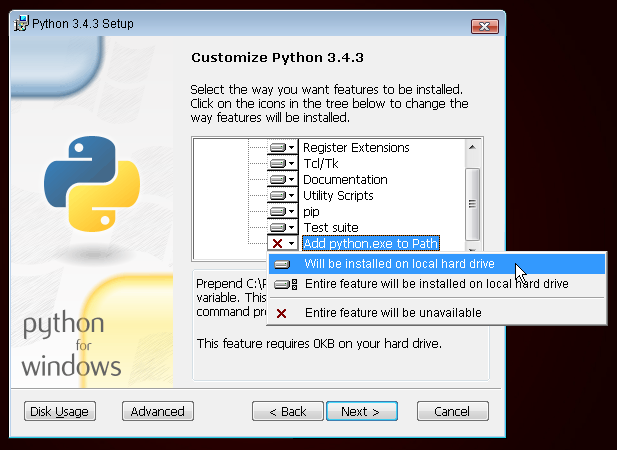\n",
189 | "\n",
101 | "\n",
102 | " \n",
103 | "
\n",
137 | "
"
138 | ]
139 | },
140 | "metadata": {}
141 | }
142 | ],
143 | "metadata": {
144 | "collapsed": false
145 | }
146 | },
147 | {
148 | "execution_count": 4,
149 | "cell_type": "code",
150 | "source": [
151 | "cast = pd.DataFrame.from_csv('data/cast.csv', index_col=None)\n",
152 | "cast.head()"
153 | ],
154 | "outputs": [
155 | {
156 | "execution_count": 4,
157 | "output_type": "execute_result",
158 | "data": {
159 | "text/plain": [
160 | " title year name type \\\n",
161 | "0 The Core 2003 Alejandro Abellan actor \n",
162 | "1 Il momento di uccidere 1968 Remo De Angelis actor \n",
163 | "2 Across the Divide 1921 Thomas Delmar actor \n",
164 | "3 Revan 2012 Diego James actor \n",
165 | "4 Un homme marche dans la ville 1950 Fabien Loris actor \n",
166 | "\n",
167 | " character n \n",
168 | "0 U.S.S. Soldier NaN \n",
169 | "1 Dago 9 \n",
170 | "2 Dago 4 \n",
171 | "3 Dago NaN \n",
172 | "4 Dago 12 "
173 | ],
174 | "text/html": [
175 | "| \n", 105 | " | title | \n", 106 | "year | \n", 107 | "
|---|---|---|
| 0 | \n", 112 | "A L\u00e9lek \u00f3r\u00e1sa | \n", 113 | "1923 | \n", 114 | "
| 1 | \n", 117 | "Aizaugusa gravi viegli krist | \n", 118 | "1986 | \n", 119 | "
| 2 | \n", 122 | "Agliyorum | \n", 123 | "1988 | \n", 124 | "
| 3 | \n", 127 | "0_1_0 | \n", 128 | "2008 | \n", 129 | "
| 4 | \n", 132 | "97 fung lau mung | \n", 133 | "1994 | \n", 134 | "
\n",
176 | "\n",
177 | " \n",
178 | "
\n",
236 | "
"
237 | ]
238 | },
239 | "metadata": {}
240 | }
241 | ],
242 | "metadata": {
243 | "collapsed": false
244 | }
245 | },
246 | {
247 | "execution_count": null,
248 | "cell_type": "code",
249 | "source": [],
250 | "outputs": [],
251 | "metadata": {
252 | "collapsed": false
253 | }
254 | },
255 | {
256 | "source": "### Using groupby(), plot the number of films that have been released each decade in the history of cinema.",
257 | "cell_type": "markdown",
258 | "metadata": {
259 | "collapsed": true
260 | }
261 | },
262 | {
263 | "execution_count": null,
264 | "cell_type": "code",
265 | "source": [],
266 | "outputs": [],
267 | "metadata": {
268 | "collapsed": true
269 | }
270 | },
271 | {
272 | "execution_count": null,
273 | "cell_type": "code",
274 | "source": [],
275 | "outputs": [],
276 | "metadata": {
277 | "collapsed": true
278 | }
279 | },
280 | {
281 | "source": "### Use groupby() to plot the number of \"Hamlet\" films made each decade.",
282 | "cell_type": "markdown",
283 | "metadata": {
284 | "collapsed": true
285 | }
286 | },
287 | {
288 | "execution_count": null,
289 | "cell_type": "code",
290 | "source": [],
291 | "outputs": [],
292 | "metadata": {
293 | "collapsed": true
294 | }
295 | },
296 | {
297 | "execution_count": null,
298 | "cell_type": "code",
299 | "source": [],
300 | "outputs": [],
301 | "metadata": {
302 | "collapsed": true
303 | }
304 | },
305 | {
306 | "source": "### How many leading (n=1) roles were available to actors, and how many to actresses, in each year of the 1950s?",
307 | "cell_type": "markdown",
308 | "metadata": {
309 | "collapsed": true
310 | }
311 | },
312 | {
313 | "execution_count": null,
314 | "cell_type": "code",
315 | "source": [],
316 | "outputs": [],
317 | "metadata": {
318 | "collapsed": true
319 | }
320 | },
321 | {
322 | "execution_count": null,
323 | "cell_type": "code",
324 | "source": [],
325 | "outputs": [],
326 | "metadata": {
327 | "collapsed": true
328 | }
329 | },
330 | {
331 | "source": "### In the 1950s decade taken as a whole, how many total roles were available to actors, and how many to actresses, for each \"n\" number 1 through 5?",
332 | "cell_type": "markdown",
333 | "metadata": {
334 | "collapsed": true
335 | }
336 | },
337 | {
338 | "execution_count": null,
339 | "cell_type": "code",
340 | "source": [],
341 | "outputs": [],
342 | "metadata": {
343 | "collapsed": true
344 | }
345 | },
346 | {
347 | "execution_count": null,
348 | "cell_type": "code",
349 | "source": [],
350 | "outputs": [],
351 | "metadata": {
352 | "collapsed": true
353 | }
354 | },
355 | {
356 | "source": "### Use groupby() to determine how many roles are listed for each of the Pink Panther movies.",
357 | "cell_type": "markdown",
358 | "metadata": {
359 | "collapsed": true
360 | }
361 | },
362 | {
363 | "execution_count": null,
364 | "cell_type": "code",
365 | "source": [],
366 | "outputs": [],
367 | "metadata": {
368 | "collapsed": true
369 | }
370 | },
371 | {
372 | "execution_count": null,
373 | "cell_type": "code",
374 | "source": [],
375 | "outputs": [],
376 | "metadata": {
377 | "collapsed": true
378 | }
379 | },
380 | {
381 | "source": "### List, in order by year, each of the films in which Frank Oz has played more than 1 role.",
382 | "cell_type": "markdown",
383 | "metadata": {
384 | "collapsed": true
385 | }
386 | },
387 | {
388 | "execution_count": null,
389 | "cell_type": "code",
390 | "source": [],
391 | "outputs": [],
392 | "metadata": {
393 | "collapsed": true
394 | }
395 | },
396 | {
397 | "execution_count": null,
398 | "cell_type": "code",
399 | "source": [],
400 | "outputs": [],
401 | "metadata": {
402 | "collapsed": true
403 | }
404 | },
405 | {
406 | "source": "### List each of the characters that Frank Oz has portrayed at least twice.",
407 | "cell_type": "markdown",
408 | "metadata": {
409 | "collapsed": true
410 | }
411 | },
412 | {
413 | "execution_count": null,
414 | "cell_type": "code",
415 | "source": [],
416 | "outputs": [],
417 | "metadata": {
418 | "collapsed": true
419 | }
420 | },
421 | {
422 | "execution_count": null,
423 | "cell_type": "code",
424 | "source": [],
425 | "outputs": [],
426 | "metadata": {
427 | "collapsed": true
428 | }
429 | }
430 | ],
431 | "metadata": {
432 | "kernelspec": {
433 | "display_name": "Python 3",
434 | "name": "python3",
435 | "language": "python"
436 | },
437 | "language_info": {
438 | "mimetype": "text/x-python",
439 | "nbconvert_exporter": "python",
440 | "name": "python",
441 | "file_extension": ".py",
442 | "version": "3.4.3",
443 | "pygments_lexer": "ipython3",
444 | "codemirror_mode": {
445 | "version": 3,
446 | "name": "ipython"
447 | }
448 | }
449 | }
450 | }
--------------------------------------------------------------------------------
/04-python-prat/data_science/Exercises-5.ipynb:
--------------------------------------------------------------------------------
1 | {
2 | "nbformat_minor": 0,
3 | "nbformat": 4,
4 | "cells": [
5 | {
6 | "execution_count": 1,
7 | "cell_type": "code",
8 | "source": [
9 | "%matplotlib inline\n",
10 | "import pandas as pd"
11 | ],
12 | "outputs": [],
13 | "metadata": {
14 | "collapsed": false
15 | }
16 | },
17 | {
18 | "execution_count": 2,
19 | "cell_type": "code",
20 | "source": [
21 | "from IPython.core.display import HTML\n",
22 | "css = open('style-table.css').read() + open('style-notebook.css').read()\n",
23 | "HTML(''.format(css))"
24 | ],
25 | "outputs": [
26 | {
27 | "execution_count": 2,
28 | "output_type": "execute_result",
29 | "data": {
30 | "text/plain": [
31 | "| \n", 180 | " | title | \n", 181 | "year | \n", 182 | "name | \n", 183 | "type | \n", 184 | "character | \n", 185 | "n | \n", 186 | "
|---|---|---|---|---|---|---|
| 0 | \n", 191 | "The Core | \n", 192 | "2003 | \n", 193 | "Alejandro Abellan | \n", 194 | "actor | \n", 195 | "U.S.S. Soldier | \n", 196 | "NaN | \n", 197 | "
| 1 | \n", 200 | "Il momento di uccidere | \n", 201 | "1968 | \n", 202 | "Remo De Angelis | \n", 203 | "actor | \n", 204 | "Dago | \n", 205 | "9 | \n", 206 | "
| 2 | \n", 209 | "Across the Divide | \n", 210 | "1921 | \n", 211 | "Thomas Delmar | \n", 212 | "actor | \n", 213 | "Dago | \n", 214 | "4 | \n", 215 | "
| 3 | \n", 218 | "Revan | \n", 219 | "2012 | \n", 220 | "Diego James | \n", 221 | "actor | \n", 222 | "Dago | \n", 223 | "NaN | \n", 224 | "
| 4 | \n", 227 | "Un homme marche dans la ville | \n", 228 | "1950 | \n", 229 | "Fabien Loris | \n", 230 | "actor | \n", 231 | "Dago | \n", 232 | "12 | \n", 233 | "
\n",
108 | "\n",
109 | " \n",
110 | "
\n",
168 | "
"
169 | ]
170 | },
171 | "metadata": {}
172 | }
173 | ],
174 | "metadata": {
175 | "collapsed": false
176 | }
177 | },
178 | {
179 | "execution_count": 4,
180 | "cell_type": "code",
181 | "source": [
182 | "release_dates = pd.DataFrame.from_csv('data/release_dates.csv', index_col=None,\n",
183 | " parse_dates=['date'], infer_datetime_format=True)\n",
184 | "release_dates.head()"
185 | ],
186 | "outputs": [
187 | {
188 | "execution_count": 4,
189 | "output_type": "execute_result",
190 | "data": {
191 | "text/plain": [
192 | " title year country date\n",
193 | "0 0_1_0 2008 Poland 2008-11-14\n",
194 | "1 Ai no Sanka 1967 Japan 1967-01-01\n",
195 | "2 A Thousand to One 1920 USA 1920-12-07\n",
196 | "3 A Prince of a King 1923 USA 1923-10-13\n",
197 | "4 A Prince of a King 1923 Netherlands 1924-08-08"
198 | ],
199 | "text/html": [
200 | "| \n", 112 | " | title | \n", 113 | "year | \n", 114 | "name | \n", 115 | "type | \n", 116 | "character | \n", 117 | "n | \n", 118 | "
|---|---|---|---|---|---|---|
| 0 | \n", 123 | "The Core | \n", 124 | "2003 | \n", 125 | "Alejandro Abellan | \n", 126 | "actor | \n", 127 | "U.S.S. Soldier | \n", 128 | "NaN | \n", 129 | "
| 1 | \n", 132 | "Il momento di uccidere | \n", 133 | "1968 | \n", 134 | "Remo De Angelis | \n", 135 | "actor | \n", 136 | "Dago | \n", 137 | "9 | \n", 138 | "
| 2 | \n", 141 | "Across the Divide | \n", 142 | "1921 | \n", 143 | "Thomas Delmar | \n", 144 | "actor | \n", 145 | "Dago | \n", 146 | "4 | \n", 147 | "
| 3 | \n", 150 | "Revan | \n", 151 | "2012 | \n", 152 | "Diego James | \n", 153 | "actor | \n", 154 | "Dago | \n", 155 | "NaN | \n", 156 | "
| 4 | \n", 159 | "Un homme marche dans la ville | \n", 160 | "1950 | \n", 161 | "Fabien Loris | \n", 162 | "actor | \n", 163 | "Dago | \n", 164 | "12 | \n", 165 | "
\n",
201 | "\n",
202 | " \n",
203 | "
\n",
249 | "
"
250 | ]
251 | },
252 | "metadata": {}
253 | }
254 | ],
255 | "metadata": {
256 | "collapsed": false
257 | }
258 | },
259 | {
260 | "execution_count": null,
261 | "cell_type": "code",
262 | "source": [],
263 | "outputs": [],
264 | "metadata": {
265 | "collapsed": true
266 | }
267 | },
268 | {
269 | "source": "### Make a bar plot of the months in which movies with \"Christmas\" in their title tend to be released in the USA.",
270 | "cell_type": "markdown",
271 | "metadata": {
272 | "collapsed": true
273 | }
274 | },
275 | {
276 | "execution_count": null,
277 | "cell_type": "code",
278 | "source": [],
279 | "outputs": [],
280 | "metadata": {
281 | "collapsed": true
282 | }
283 | },
284 | {
285 | "execution_count": null,
286 | "cell_type": "code",
287 | "source": [],
288 | "outputs": [],
289 | "metadata": {
290 | "collapsed": true
291 | }
292 | },
293 | {
294 | "source": "### Make a bar plot of the months in which movies whose titles start with \"The Hobbit\" are released in the USA.",
295 | "cell_type": "markdown",
296 | "metadata": {
297 | "collapsed": true
298 | }
299 | },
300 | {
301 | "execution_count": null,
302 | "cell_type": "code",
303 | "source": [],
304 | "outputs": [],
305 | "metadata": {
306 | "collapsed": true
307 | }
308 | },
309 | {
310 | "execution_count": null,
311 | "cell_type": "code",
312 | "source": [],
313 | "outputs": [],
314 | "metadata": {
315 | "collapsed": true
316 | }
317 | },
318 | {
319 | "source": "### Make a bar plot of the day of the week on which movies with \"Romance\" in their title tend to be released in the USA.",
320 | "cell_type": "markdown",
321 | "metadata": {
322 | "collapsed": true
323 | }
324 | },
325 | {
326 | "execution_count": null,
327 | "cell_type": "code",
328 | "source": [],
329 | "outputs": [],
330 | "metadata": {
331 | "collapsed": true
332 | }
333 | },
334 | {
335 | "execution_count": null,
336 | "cell_type": "code",
337 | "source": [],
338 | "outputs": [],
339 | "metadata": {
340 | "collapsed": true
341 | }
342 | },
343 | {
344 | "source": "### Make a bar plot of the day of the week on which movies with \"Action\" in their title tend to be released in the USA.",
345 | "cell_type": "markdown",
346 | "metadata": {
347 | "collapsed": true
348 | }
349 | },
350 | {
351 | "execution_count": null,
352 | "cell_type": "code",
353 | "source": [],
354 | "outputs": [],
355 | "metadata": {
356 | "collapsed": true
357 | }
358 | },
359 | {
360 | "execution_count": null,
361 | "cell_type": "code",
362 | "source": [],
363 | "outputs": [],
364 | "metadata": {
365 | "collapsed": true
366 | }
367 | },
368 | {
369 | "source": "### On which date was each Judi Dench movie from the 1990s released in the USA?",
370 | "cell_type": "markdown",
371 | "metadata": {
372 | "collapsed": true
373 | }
374 | },
375 | {
376 | "execution_count": null,
377 | "cell_type": "code",
378 | "source": [],
379 | "outputs": [],
380 | "metadata": {
381 | "collapsed": true
382 | }
383 | },
384 | {
385 | "execution_count": null,
386 | "cell_type": "code",
387 | "source": [],
388 | "outputs": [],
389 | "metadata": {
390 | "collapsed": true
391 | }
392 | },
393 | {
394 | "source": "### In which months do films with Judi Dench tend to be released in the USA?",
395 | "cell_type": "markdown",
396 | "metadata": {
397 | "collapsed": true
398 | }
399 | },
400 | {
401 | "execution_count": null,
402 | "cell_type": "code",
403 | "source": [],
404 | "outputs": [],
405 | "metadata": {
406 | "collapsed": true
407 | }
408 | },
409 | {
410 | "execution_count": null,
411 | "cell_type": "code",
412 | "source": [],
413 | "outputs": [],
414 | "metadata": {
415 | "collapsed": true
416 | }
417 | },
418 | {
419 | "source": "### In which months do films with Tom Cruise tend to be released in the USA?",
420 | "cell_type": "markdown",
421 | "metadata": {
422 | "collapsed": true
423 | }
424 | },
425 | {
426 | "execution_count": null,
427 | "cell_type": "code",
428 | "source": [],
429 | "outputs": [],
430 | "metadata": {
431 | "collapsed": true
432 | }
433 | },
434 | {
435 | "execution_count": null,
436 | "cell_type": "code",
437 | "source": [],
438 | "outputs": [],
439 | "metadata": {
440 | "collapsed": true
441 | }
442 | }
443 | ],
444 | "metadata": {
445 | "kernelspec": {
446 | "display_name": "Python 3",
447 | "name": "python3",
448 | "language": "python"
449 | },
450 | "language_info": {
451 | "mimetype": "text/x-python",
452 | "nbconvert_exporter": "python",
453 | "name": "python",
454 | "file_extension": ".py",
455 | "version": "3.4.3",
456 | "pygments_lexer": "ipython3",
457 | "codemirror_mode": {
458 | "version": 3,
459 | "name": "ipython"
460 | }
461 | }
462 | }
463 | }
--------------------------------------------------------------------------------
/04-python-prat/data_science/Exercises-4.ipynb:
--------------------------------------------------------------------------------
1 | {
2 | "nbformat_minor": 0,
3 | "nbformat": 4,
4 | "cells": [
5 | {
6 | "execution_count": 1,
7 | "cell_type": "code",
8 | "source": [
9 | "%matplotlib inline\n",
10 | "import pandas as pd"
11 | ],
12 | "outputs": [],
13 | "metadata": {
14 | "collapsed": false
15 | }
16 | },
17 | {
18 | "execution_count": 2,
19 | "cell_type": "code",
20 | "source": [
21 | "from IPython.core.display import HTML\n",
22 | "css = open('style-table.css').read() + open('style-notebook.css').read()\n",
23 | "HTML(''.format(css))"
24 | ],
25 | "outputs": [
26 | {
27 | "execution_count": 2,
28 | "output_type": "execute_result",
29 | "data": {
30 | "text/plain": [
31 | "| \n", 205 | " | title | \n", 206 | "year | \n", 207 | "country | \n", 208 | "date | \n", 209 | "
|---|---|---|---|---|
| 0 | \n", 214 | "0_1_0 | \n", 215 | "2008 | \n", 216 | "Poland | \n", 217 | "2008-11-14 | \n", 218 | "
| 1 | \n", 221 | "Ai no Sanka | \n", 222 | "1967 | \n", 223 | "Japan | \n", 224 | "1967-01-01 | \n", 225 | "
| 2 | \n", 228 | "A Thousand to One | \n", 229 | "1920 | \n", 230 | "USA | \n", 231 | "1920-12-07 | \n", 232 | "
| 3 | \n", 235 | "A Prince of a King | \n", 236 | "1923 | \n", 237 | "USA | \n", 238 | "1923-10-13 | \n", 239 | "
| 4 | \n", 242 | "A Prince of a King | \n", 243 | "1923 | \n", 244 | "Netherlands | \n", 245 | "1924-08-08 | \n", 246 | "
\n",
101 | "\n",
102 | " \n",
103 | "
\n",
137 | "
"
138 | ]
139 | },
140 | "metadata": {}
141 | }
142 | ],
143 | "metadata": {
144 | "collapsed": false
145 | }
146 | },
147 | {
148 | "execution_count": 4,
149 | "cell_type": "code",
150 | "source": [
151 | "cast = pd.DataFrame.from_csv('data/cast.csv', index_col=None)\n",
152 | "cast.head()"
153 | ],
154 | "outputs": [
155 | {
156 | "execution_count": 4,
157 | "output_type": "execute_result",
158 | "data": {
159 | "text/plain": [
160 | " title year name type \\\n",
161 | "0 The Core 2003 Alejandro Abellan actor \n",
162 | "1 Il momento di uccidere 1968 Remo De Angelis actor \n",
163 | "2 Across the Divide 1921 Thomas Delmar actor \n",
164 | "3 Revan 2012 Diego James actor \n",
165 | "4 Un homme marche dans la ville 1950 Fabien Loris actor \n",
166 | "\n",
167 | " character n \n",
168 | "0 U.S.S. Soldier NaN \n",
169 | "1 Dago 9 \n",
170 | "2 Dago 4 \n",
171 | "3 Dago NaN \n",
172 | "4 Dago 12 "
173 | ],
174 | "text/html": [
175 | "| \n", 105 | " | title | \n", 106 | "year | \n", 107 | "
|---|---|---|
| 0 | \n", 112 | "A L\u00e9lek \u00f3r\u00e1sa | \n", 113 | "1923 | \n", 114 | "
| 1 | \n", 117 | "Aizaugusa gravi viegli krist | \n", 118 | "1986 | \n", 119 | "
| 2 | \n", 122 | "Agliyorum | \n", 123 | "1988 | \n", 124 | "
| 3 | \n", 127 | "0_1_0 | \n", 128 | "2008 | \n", 129 | "
| 4 | \n", 132 | "97 fung lau mung | \n", 133 | "1994 | \n", 134 | "
\n",
176 | "\n",
177 | " \n",
178 | "
\n",
236 | "
"
237 | ]
238 | },
239 | "metadata": {}
240 | }
241 | ],
242 | "metadata": {
243 | "collapsed": false
244 | }
245 | },
246 | {
247 | "execution_count": null,
248 | "cell_type": "code",
249 | "source": [],
250 | "outputs": [],
251 | "metadata": {
252 | "collapsed": false
253 | }
254 | },
255 | {
256 | "source": "### Define a year as a \"Superman year\" whose films feature more Superman characters than Batman. How many years in film history have been Superman years?",
257 | "cell_type": "markdown",
258 | "metadata": {
259 | "collapsed": true
260 | }
261 | },
262 | {
263 | "execution_count": null,
264 | "cell_type": "code",
265 | "source": [],
266 | "outputs": [],
267 | "metadata": {
268 | "collapsed": true
269 | }
270 | },
271 | {
272 | "execution_count": null,
273 | "cell_type": "code",
274 | "source": [],
275 | "outputs": [],
276 | "metadata": {
277 | "collapsed": true
278 | }
279 | },
280 | {
281 | "source": "### How many years have been \"Batman years\", with more Batman characters than Superman characters?",
282 | "cell_type": "markdown",
283 | "metadata": {
284 | "collapsed": true
285 | }
286 | },
287 | {
288 | "execution_count": null,
289 | "cell_type": "code",
290 | "source": [],
291 | "outputs": [],
292 | "metadata": {
293 | "collapsed": true
294 | }
295 | },
296 | {
297 | "execution_count": null,
298 | "cell_type": "code",
299 | "source": [],
300 | "outputs": [],
301 | "metadata": {
302 | "collapsed": true
303 | }
304 | },
305 | {
306 | "source": "### Plot the number of actor roles each year and the number of actress roles each year over the history of film.",
307 | "cell_type": "markdown",
308 | "metadata": {
309 | "collapsed": true
310 | }
311 | },
312 | {
313 | "execution_count": null,
314 | "cell_type": "code",
315 | "source": [],
316 | "outputs": [],
317 | "metadata": {
318 | "collapsed": true
319 | }
320 | },
321 | {
322 | "execution_count": null,
323 | "cell_type": "code",
324 | "source": [],
325 | "outputs": [],
326 | "metadata": {
327 | "collapsed": true
328 | }
329 | },
330 | {
331 | "source": "### Plot the number of actor roles each year and the number of actress roles each year, but this time as a kind='area' plot.",
332 | "cell_type": "markdown",
333 | "metadata": {
334 | "collapsed": true
335 | }
336 | },
337 | {
338 | "execution_count": null,
339 | "cell_type": "code",
340 | "source": [],
341 | "outputs": [],
342 | "metadata": {
343 | "collapsed": true
344 | }
345 | },
346 | {
347 | "execution_count": null,
348 | "cell_type": "code",
349 | "source": [],
350 | "outputs": [],
351 | "metadata": {
352 | "collapsed": true
353 | }
354 | },
355 | {
356 | "source": "### Plot the difference between the number of actor roles each year and the number of actress roles each year over the history of film.",
357 | "cell_type": "markdown",
358 | "metadata": {
359 | "collapsed": true
360 | }
361 | },
362 | {
363 | "execution_count": null,
364 | "cell_type": "code",
365 | "source": [],
366 | "outputs": [],
367 | "metadata": {
368 | "collapsed": true
369 | }
370 | },
371 | {
372 | "execution_count": null,
373 | "cell_type": "code",
374 | "source": [],
375 | "outputs": [],
376 | "metadata": {
377 | "collapsed": true
378 | }
379 | },
380 | {
381 | "source": "### Plot the fraction of roles that have been 'actor' roles each year in the hitsory of film.",
382 | "cell_type": "markdown",
383 | "metadata": {
384 | "collapsed": true
385 | }
386 | },
387 | {
388 | "execution_count": null,
389 | "cell_type": "code",
390 | "source": [],
391 | "outputs": [],
392 | "metadata": {
393 | "collapsed": true
394 | }
395 | },
396 | {
397 | "execution_count": null,
398 | "cell_type": "code",
399 | "source": [],
400 | "outputs": [],
401 | "metadata": {
402 | "collapsed": true
403 | }
404 | },
405 | {
406 | "source": "### Plot the fraction of supporting (n=2) roles that have been 'actor' roles each year in the history of film.",
407 | "cell_type": "markdown",
408 | "metadata": {
409 | "collapsed": true
410 | }
411 | },
412 | {
413 | "execution_count": null,
414 | "cell_type": "code",
415 | "source": [],
416 | "outputs": [],
417 | "metadata": {
418 | "collapsed": true
419 | }
420 | },
421 | {
422 | "execution_count": null,
423 | "cell_type": "code",
424 | "source": [],
425 | "outputs": [],
426 | "metadata": {
427 | "collapsed": true
428 | }
429 | },
430 | {
431 | "source": "### Build a plot with a line for each rank n=1 through n=3, where the line shows what fraction of that rank's roles were 'actor' roles for each year in the history of film.",
432 | "cell_type": "markdown",
433 | "metadata": {
434 | "collapsed": true
435 | }
436 | },
437 | {
438 | "execution_count": null,
439 | "cell_type": "code",
440 | "source": [],
441 | "outputs": [],
442 | "metadata": {
443 | "collapsed": true
444 | }
445 | },
446 | {
447 | "execution_count": null,
448 | "cell_type": "code",
449 | "source": [],
450 | "outputs": [],
451 | "metadata": {
452 | "collapsed": true
453 | }
454 | }
455 | ],
456 | "metadata": {
457 | "kernelspec": {
458 | "display_name": "Python 3",
459 | "name": "python3",
460 | "language": "python"
461 | },
462 | "language_info": {
463 | "mimetype": "text/x-python",
464 | "nbconvert_exporter": "python",
465 | "name": "python",
466 | "file_extension": ".py",
467 | "version": "3.4.3",
468 | "pygments_lexer": "ipython3",
469 | "codemirror_mode": {
470 | "version": 3,
471 | "name": "ipython"
472 | }
473 | }
474 | }
475 | }
--------------------------------------------------------------------------------
/04-python-prat/data_science/Exercises-6.ipynb:
--------------------------------------------------------------------------------
1 | {
2 | "nbformat_minor": 0,
3 | "nbformat": 4,
4 | "cells": [
5 | {
6 | "execution_count": 1,
7 | "cell_type": "code",
8 | "source": [
9 | "%matplotlib inline\n",
10 | "import pandas as pd"
11 | ],
12 | "outputs": [],
13 | "metadata": {
14 | "collapsed": true
15 | }
16 | },
17 | {
18 | "execution_count": 2,
19 | "cell_type": "code",
20 | "source": [
21 | "from IPython.core.display import HTML\n",
22 | "css = open('style-table.css').read() + open('style-notebook.css').read()\n",
23 | "HTML(''.format(css))"
24 | ],
25 | "outputs": [
26 | {
27 | "execution_count": 2,
28 | "output_type": "execute_result",
29 | "data": {
30 | "text/plain": [
31 | "| \n", 180 | " | title | \n", 181 | "year | \n", 182 | "name | \n", 183 | "type | \n", 184 | "character | \n", 185 | "n | \n", 186 | "
|---|---|---|---|---|---|---|
| 0 | \n", 191 | "The Core | \n", 192 | "2003 | \n", 193 | "Alejandro Abellan | \n", 194 | "actor | \n", 195 | "U.S.S. Soldier | \n", 196 | "NaN | \n", 197 | "
| 1 | \n", 200 | "Il momento di uccidere | \n", 201 | "1968 | \n", 202 | "Remo De Angelis | \n", 203 | "actor | \n", 204 | "Dago | \n", 205 | "9 | \n", 206 | "
| 2 | \n", 209 | "Across the Divide | \n", 210 | "1921 | \n", 211 | "Thomas Delmar | \n", 212 | "actor | \n", 213 | "Dago | \n", 214 | "4 | \n", 215 | "
| 3 | \n", 218 | "Revan | \n", 219 | "2012 | \n", 220 | "Diego James | \n", 221 | "actor | \n", 222 | "Dago | \n", 223 | "NaN | \n", 224 | "
| 4 | \n", 227 | "Un homme marche dans la ville | \n", 228 | "1950 | \n", 229 | "Fabien Loris | \n", 230 | "actor | \n", 231 | "Dago | \n", 232 | "12 | \n", 233 | "
\n",
101 | "\n",
102 | " \n",
103 | "
\n",
149 | "
"
150 | ]
151 | },
152 | "metadata": {}
153 | }
154 | ],
155 | "metadata": {
156 | "collapsed": false
157 | }
158 | },
159 | {
160 | "execution_count": 4,
161 | "cell_type": "code",
162 | "source": [
163 | "sales2 = pd.read_csv('sales2.csv')\n",
164 | "sales2.fillna('')"
165 | ],
166 | "outputs": [
167 | {
168 | "execution_count": 4,
169 | "output_type": "execute_result",
170 | "data": {
171 | "text/plain": [
172 | " Title Units sold List price Royalty\n",
173 | "0 \n",
174 | "1 Sales report for Q4 \n",
175 | "2 E-Book Reader US Store \n",
176 | "3 Pining for the Fisheries of Yore 80 3.5 14.98\n",
177 | "4 Swimrand 1 2.99 0.14\n",
178 | "5 The Bricklayer's Bible 17 3.5 5.15\n",
179 | "6 The Duck Goes Here 34 2.99 5.78\n",
180 | "7 The Tower Commission Report 4 9.5 6.2\n",
181 | "8 US royalties (USD) 32.25\n",
182 | "9 \n",
183 | "10 \n",
184 | "11 Sales report for Q4 \n",
185 | "12 E-Book Reader UK Store \n",
186 | "13 Pining for the Fisheries of Yore 47 2.99 11.98\n",
187 | "14 The Bricklayer's Bible 17 2.99 3.5\n",
188 | "15 The Tower Commission Report 4 6.5 4.8\n",
189 | "16 UK royalties (GBP) 20.28\n",
190 | "17 \n",
191 | "18 \n",
192 | "19 Sales report for Q4 \n",
193 | "20 E-Book Reader France Store \n",
194 | "21 Swimrand 8 1.99 0.88\n",
195 | "22 The Duck Goes Here 12 1.99 1.5\n",
196 | "23 France royalties (EUR) 2.38"
197 | ],
198 | "text/html": [
199 | "| \n", 105 | " | Book title | \n", 106 | "Number sold | \n", 107 | "Sales price | \n", 108 | "Royalty paid | \n", 109 | "
|---|---|---|---|---|
| 0 | \n", 114 | "The Bricklayer\u2019s Bible | \n", 115 | "8 | \n", 116 | "2.99 | \n", 117 | "0.55 | \n", 118 | "
| 1 | \n", 121 | "Swimrand | \n", 122 | "2 | \n", 123 | "1.99 | \n", 124 | "0.35 | \n", 125 | "
| 2 | \n", 128 | "Pining For The Fisheries of Yore | \n", 129 | "28 | \n", 130 | "2.99 | \n", 131 | "0.55 | \n", 132 | "
| 3 | \n", 135 | "The Duck Goes Here | \n", 136 | "34 | \n", 137 | "2.99 | \n", 138 | "0.55 | \n", 139 | "
| 4 | \n", 142 | "The Tower Commission Report | \n", 143 | "4 | \n", 144 | "11.50 | \n", 145 | "4.25 | \n", 146 | "
\n",
200 | "\n",
201 | " \n",
202 | "
\n",
381 | "
"
382 | ]
383 | },
384 | "metadata": {}
385 | }
386 | ],
387 | "metadata": {
388 | "collapsed": false
389 | }
390 | },
391 | {
392 | "source": "### Challenge: first combine these sales together into a single dataframe, then compute how much money consumers spent on each book in each currency.",
393 | "cell_type": "markdown",
394 | "metadata": {
395 | "collapsed": true
396 | }
397 | },
398 | {
399 | "execution_count": null,
400 | "cell_type": "code",
401 | "source": [],
402 | "outputs": [],
403 | "metadata": {
404 | "collapsed": true
405 | }
406 | },
407 | {
408 | "execution_count": null,
409 | "cell_type": "code",
410 | "source": [],
411 | "outputs": [],
412 | "metadata": {
413 | "collapsed": true
414 | }
415 | }
416 | ],
417 | "metadata": {
418 | "kernelspec": {
419 | "display_name": "Python 3",
420 | "name": "python3",
421 | "language": "python"
422 | },
423 | "language_info": {
424 | "mimetype": "text/x-python",
425 | "nbconvert_exporter": "python",
426 | "name": "python",
427 | "file_extension": ".py",
428 | "version": "3.4.3",
429 | "pygments_lexer": "ipython3",
430 | "codemirror_mode": {
431 | "version": 3,
432 | "name": "ipython"
433 | }
434 | }
435 | }
436 | }
--------------------------------------------------------------------------------
| \n", 204 | " | Title | \n", 205 | "Units sold | \n", 206 | "List price | \n", 207 | "Royalty | \n", 208 | "
|---|---|---|---|---|
| 0 | \n", 213 | "\n", 214 | " | \n", 215 | " | \n", 216 | " | \n", 217 | " |
| 1 | \n", 220 | "Sales report for Q4 | \n", 221 | "\n", 222 | " | \n", 223 | " | \n", 224 | " |
| 2 | \n", 227 | "E-Book Reader US Store | \n", 228 | "\n", 229 | " | \n", 230 | " | \n", 231 | " |
| 3 | \n", 234 | "Pining for the Fisheries of Yore | \n", 235 | "80 | \n", 236 | "3.5 | \n", 237 | "14.98 | \n", 238 | "
| 4 | \n", 241 | "Swimrand | \n", 242 | "1 | \n", 243 | "2.99 | \n", 244 | "0.14 | \n", 245 | "
| 5 | \n", 248 | "The Bricklayer's Bible | \n", 249 | "17 | \n", 250 | "3.5 | \n", 251 | "5.15 | \n", 252 | "
| 6 | \n", 255 | "The Duck Goes Here | \n", 256 | "34 | \n", 257 | "2.99 | \n", 258 | "5.78 | \n", 259 | "
| 7 | \n", 262 | "The Tower Commission Report | \n", 263 | "4 | \n", 264 | "9.5 | \n", 265 | "6.2 | \n", 266 | "
| 8 | \n", 269 | "US royalties (USD) | \n", 270 | "\n", 271 | " | \n", 272 | " | 32.25 | \n", 273 | "
| 9 | \n", 276 | "\n", 277 | " | \n", 278 | " | \n", 279 | " | \n", 280 | " |
| 10 | \n", 283 | "\n", 284 | " | \n", 285 | " | \n", 286 | " | \n", 287 | " |
| 11 | \n", 290 | "Sales report for Q4 | \n", 291 | "\n", 292 | " | \n", 293 | " | \n", 294 | " |
| 12 | \n", 297 | "E-Book Reader UK Store | \n", 298 | "\n", 299 | " | \n", 300 | " | \n", 301 | " |
| 13 | \n", 304 | "Pining for the Fisheries of Yore | \n", 305 | "47 | \n", 306 | "2.99 | \n", 307 | "11.98 | \n", 308 | "
| 14 | \n", 311 | "The Bricklayer's Bible | \n", 312 | "17 | \n", 313 | "2.99 | \n", 314 | "3.5 | \n", 315 | "
| 15 | \n", 318 | "The Tower Commission Report | \n", 319 | "4 | \n", 320 | "6.5 | \n", 321 | "4.8 | \n", 322 | "
| 16 | \n", 325 | "UK royalties (GBP) | \n", 326 | "\n", 327 | " | \n", 328 | " | 20.28 | \n", 329 | "
| 17 | \n", 332 | "\n", 333 | " | \n", 334 | " | \n", 335 | " | \n", 336 | " |
| 18 | \n", 339 | "\n", 340 | " | \n", 341 | " | \n", 342 | " | \n", 343 | " |
| 19 | \n", 346 | "Sales report for Q4 | \n", 347 | "\n", 348 | " | \n", 349 | " | \n", 350 | " |
| 20 | \n", 353 | "E-Book Reader France Store | \n", 354 | "\n", 355 | " | \n", 356 | " | \n", 357 | " |
| 21 | \n", 360 | "Swimrand | \n", 361 | "8 | \n", 362 | "1.99 | \n", 363 | "0.88 | \n", 364 | "
| 22 | \n", 367 | "The Duck Goes Here | \n", 368 | "12 | \n", 369 | "1.99 | \n", 370 | "1.5 | \n", 371 | "
| 23 | \n", 374 | "France royalties (EUR) | \n", 375 | "\n", 376 | " | \n", 377 | " | 2.38 | \n", 378 | "