├── images
└── discover_01.png
├── elasticsearch
├── config
│ └── elasticsearch.yml
└── Dockerfile
├── fluentd
├── Dockerfile
└── conf
│ └── fluent.conf
├── logstash
├── terminal-listener.conf
└── port-listener.conf
├── filebeat
└── fielbeat.yml
├── docker-compose.yml
├── docker-compose-crud.yml
├── docker-compose-apm.yml
├── docker-compose-port.yml
├── docker-compose-fluentd.yml
├── docker-compose-filebeat.yml
└── Readme.md
/images/discover_01.png:
--------------------------------------------------------------------------------
https://raw.githubusercontent.com/pooya-mohammadi/elk-projects/HEAD/images/discover_01.png
--------------------------------------------------------------------------------
/elasticsearch/config/elasticsearch.yml:
--------------------------------------------------------------------------------
1 |
2 | cluster.name: "elastic_projects"
3 | network.host: 0.0.0.0
4 | node.name: "curd_node"
--------------------------------------------------------------------------------
/fluentd/Dockerfile:
--------------------------------------------------------------------------------
1 | # fluentd/Dockerfile
2 | FROM fluent/fluentd:v1.14-debian
3 |
4 | USER root
5 |
6 | RUN ["gem", "install", "fluent-plugin-elasticsearch"]
--------------------------------------------------------------------------------
/logstash/terminal-listener.conf:
--------------------------------------------------------------------------------
1 | input {
2 | stdin {} # takes the input
3 | }
4 |
5 | output {
6 | elasticsearch { hosts => ["elasticsearch:9200"] } # dump it to elasticsearch
7 | }
--------------------------------------------------------------------------------
/filebeat/fielbeat.yml:
--------------------------------------------------------------------------------
1 | input:
2 | - paths:
3 | - /var/lib/docker/containers/*/*.log
4 | document_type: syslog
5 | output:
6 | logstash:
7 | enabled: true
8 | hosts:
9 | - elk:5044
--------------------------------------------------------------------------------
/logstash/port-listener.conf:
--------------------------------------------------------------------------------
1 | input {
2 | tcp {
3 | port => 9300 # read tcp port
4 | }
5 | }
6 |
7 | output {
8 | elasticsearch { hosts => ["elasticsearch:9200"] } # dump it to elasticsearch
9 | }
--------------------------------------------------------------------------------
/elasticsearch/Dockerfile:
--------------------------------------------------------------------------------
1 | FROM elasticsearch:7.16.3
2 |
3 | RUN rm /usr/share/elasticsearch/config/elasticsearch.yml
4 | COPY ./config/elasticsearch.yml /usr/share/elasticsearch/config/
5 |
6 | Entrypoint ["/bin/tini", "--", "/usr/local/bin/docker-entrypoint.sh" ]
--------------------------------------------------------------------------------
/fluentd/conf/fluent.conf:
--------------------------------------------------------------------------------
1 | # fluentd/conf/fluent.conf
2 |
3 | @type forward
4 | port 24224
5 | bind 0.0.0.0
6 |
7 |
8 | @type grep
9 | regexpl message INFO
10 | regexpl message ERROR
11 |
12 |
13 | @type copy
14 |
15 | @type elasticsearch
16 | host elasticsearch
17 | port 9200
18 | logstash_format true
19 | logstash_prefix fluentd
20 | logstash_dateformat %Y%m%d
21 | include_tag_key true
22 | type_name access_log
23 | tag_key @log_name
24 | flush_interval 1s
25 |
26 |
27 | @type stdout
28 |
29 |
--------------------------------------------------------------------------------
/docker-compose.yml:
--------------------------------------------------------------------------------
1 | version: "3.7"
2 |
3 | services:
4 | elasticsearch:
5 | image: elasticsearch:7.16.3
6 | container_name: elasticsearch
7 | hostname: elasticsearch
8 | # restart: always
9 | environment:
10 | - xpack.security.enabled=false
11 | - discovery.type=single-node
12 | ulimits:
13 | memlock:
14 | soft: -1
15 | hard: -1
16 | nofile:
17 | soft: 65536
18 | hard: 65536
19 | cap_add:
20 | - IPC_LOCK
21 | volumes:
22 | - elasticsearch_data:/usr/share/elasticsearch/data
23 | ports:
24 | - "9200:9200"
25 |
26 | kibana:
27 | container_name: kibana
28 | image: kibana:7.16.3
29 | # restart: always
30 | hostname: kibana
31 | environment:
32 | SERVER_NAME: kibana
33 | ELASTICSEARCH_HOSTS: http://elasticsearch:9200
34 | ports:
35 | - "5601:5601"
36 | links:
37 | - elasticsearch:elasticsearch
38 | depends_on:
39 | - elasticsearch
40 |
41 |
42 | volumes:
43 | elasticsearch_data:
44 |
--------------------------------------------------------------------------------
/docker-compose-crud.yml:
--------------------------------------------------------------------------------
1 | version: "3.7"
2 |
3 | services:
4 | elasticsearch:
5 | build: ./elasticsearch
6 | container_name: elasticsearch
7 | hostname: elasticsearch
8 | # restart: always
9 | environment:
10 | - xpack.security.enabled=false
11 | - discovery.type=single-node
12 | ulimits:
13 | memlock:
14 | soft: -1
15 | hard: -1
16 | nofile:
17 | soft: 65536
18 | hard: 65536
19 | cap_add:
20 | - IPC_LOCK
21 | volumes:
22 | - elasticsearch_data:/usr/share/elasticsearch/data
23 | ports:
24 | - "9200:9200"
25 | entrypoint: /usr/local/bin/docker-entrypoint.sh
26 |
27 | kibana:
28 | container_name: kibana
29 | image: kibana:7.16.3
30 | # restart: always
31 | hostname: kibana
32 | environment:
33 | SERVER_NAME: kibana
34 | ELASTICSEARCH_HOSTS: http://elasticsearch:9200
35 | ports:
36 | - "5601:5601"
37 | links:
38 | - elasticsearch:elasticsearch
39 | depends_on:
40 | - elasticsearch
41 |
42 |
43 | volumes:
44 | elasticsearch_data:
45 |
--------------------------------------------------------------------------------
/docker-compose-apm.yml:
--------------------------------------------------------------------------------
1 | version: "3.7"
2 |
3 | services:
4 | elasticsearch:
5 | image: elasticsearch:7.16.3
6 | container_name: elasticsearch
7 | hostname: elasticsearch
8 | # restart: always
9 | environment:
10 | - xpack.security.enabled=false
11 | - discovery.type=single-node
12 | ulimits:
13 | memlock:
14 | soft: -1
15 | hard: -1
16 | nofile:
17 | soft: 65536
18 | hard: 65536
19 | cap_add:
20 | - IPC_LOCK
21 | volumes:
22 | - elasticsearch_data:/usr/share/elasticsearch/data
23 | ports:
24 | - "9200:9200"
25 |
26 | kibana:
27 | container_name: kibana
28 | image: kibana:7.16.3
29 | # restart: always
30 | hostname: kibana
31 | environment:
32 | SERVER_NAME: kibana
33 | ELASTICSEARCH_HOSTS: http://elasticsearch:9200
34 | ports:
35 | - "5601:5601"
36 | depends_on:
37 | - elasticsearch
38 |
39 | apm_server:
40 | image: elastic/apm-server:7.16.3
41 | hostname: apm_server
42 | container_name: apm_server
43 | ports:
44 | - 8200:8200
45 | depends_on:
46 | - elasticsearch
47 | volumes:
48 | elasticsearch_data:
49 |
--------------------------------------------------------------------------------
/docker-compose-port.yml:
--------------------------------------------------------------------------------
1 | version: "3.7"
2 |
3 | services:
4 | elasticsearch:
5 | image: elasticsearch:7.16.3
6 | container_name: elasticsearch
7 | hostname: elasticsearch
8 | restart: always
9 | environment:
10 | - xpack.security.enabled=false
11 | - discovery.type=single-node
12 | - vm_max_map_count=262144
13 | ulimits:
14 | memlock:
15 | soft: -1
16 | hard: -1
17 | nofile:
18 | soft: 65536
19 | hard: 65536
20 | cap_add:
21 | - IPC_LOCK
22 | volumes:
23 | - elasticsearch-data-volume:/usr/share/elasticsearch/data
24 | ports:
25 | - "9200:9200"
26 |
27 | kibana:
28 | container_name: kibana
29 | image: kibana:7.16.3
30 | restart: always
31 | hostname: kibana
32 | environment:
33 | SERVER_NAME: kibana
34 | ELASTICSEARCH_HOSTS: http://elasticsearch:9200
35 | ports:
36 | - "5601:5601"
37 | links:
38 | - elasticsearch:elasticsearch
39 | depends_on:
40 | - elasticsearch
41 |
42 | logstash:
43 | container_name: logstash
44 | image: logstash:7.16.3
45 | restart: always
46 | hostname: logstash
47 | links:
48 | - elasticsearch:elasticsearch
49 | volumes:
50 | - ./logstash:/config-dir
51 | ports:
52 | - 9300:9300
53 | command: -f /config-dir/port-listener.conf
54 |
55 |
56 | volumes:
57 | elasticsearch-data-volume:
58 | driver: local
59 |
--------------------------------------------------------------------------------
/docker-compose-fluentd.yml:
--------------------------------------------------------------------------------
1 | version: '3.7'
2 |
3 | services:
4 | web:
5 | image: httpd
6 | ports:
7 | - "8085:80"
8 | links:
9 | - fluentd
10 | logging:
11 | driver: "fluentd"
12 | options:
13 | fluentd-address: localhost:24224
14 | tag: httpd.access
15 |
16 | fluentd:
17 | build: ./fluentd
18 | volumes:
19 | - ./fluentd/conf:/fluentd/etc
20 | links:
21 | - "elasticsearch"
22 | ports:
23 | - "24224:24224"
24 | - "24224:24224/udp"
25 |
26 | elasticsearch:
27 | image: elasticsearch:7.16.3
28 | container_name: elasticsearch
29 | hostname: elasticsearch
30 | restart: always
31 | environment:
32 | - xpack.security.enabled=false
33 | - discovery.type=single-node
34 | - vm_max_map_count=262144
35 | - ES_JAVA_OPTS="-Xms750m -Xmx750m"
36 | ulimits:
37 | memlock:
38 | soft: -1
39 | hard: -1
40 | nofile:
41 | soft: 65536
42 | hard: 65536
43 | cap_add:
44 | - IPC_LOCK
45 | volumes:
46 | - elasticsearch-data-volume:/usr/share/elasticsearch/data
47 | ports:
48 | - "9200:9200"
49 |
50 | kibana:
51 | container_name: kibana
52 | image: kibana:7.16.3
53 | restart: always
54 | hostname: kibana
55 | environment:
56 | SERVER_NAME: kibana
57 | ELASTICSEARCH_HOSTS: http://elasticsearch:9200
58 | ports:
59 | - "5601:5601"
60 | links:
61 | - elasticsearch:elasticsearch
62 | depends_on:
63 | - elasticsearch
64 |
65 | volumes:
66 | elasticsearch-data-volume:
67 | driver: local
--------------------------------------------------------------------------------
/docker-compose-filebeat.yml:
--------------------------------------------------------------------------------
1 | version: "3.7"
2 |
3 | services:
4 | elasticsearch:
5 | image: elasticsearch:7.16.3
6 | container_name: elasticsearch
7 | hostname: elasticsearch
8 | restart: always
9 | environment:
10 | - xpack.security.enabled=false
11 | - discovery.type=single-node
12 | - vm_max_map_count=262144
13 | ulimits:
14 | memlock:
15 | soft: -1
16 | hard: -1
17 | nofile:
18 | soft: 65536
19 | hard: 65536
20 | cap_add:
21 | - IPC_LOCK
22 | volumes:
23 | - elasticsearch-data-volume:/usr/share/elasticsearch/data
24 | ports:
25 | - "9200:9200"
26 |
27 | kibana:
28 | container_name: kibana
29 | image: kibana:7.16.3
30 | restart: always
31 | hostname: kibana
32 | environment:
33 | SERVER_NAME: kibana
34 | ELASTICSEARCH_HOSTS: http://elasticsearch:9200
35 | ports:
36 | - "5601:5601"
37 | links:
38 | - elasticsearch:elasticsearch
39 | depends_on:
40 | - elasticsearch
41 |
42 | logstash:
43 | container_name: logstash
44 | image: logstash:7.16.3
45 | restart: always
46 | hostname: logstash
47 | links:
48 | - elasticsearch:elasticsearch
49 | volumes:
50 | - ./logstash:/config-dir
51 | ports:
52 | - 9300:9300
53 | command: -f /config-dir/port-listener.conf
54 |
55 | filebeat:
56 | image: elastic/filebeat:7.16.3
57 | restart: unless-stopped
58 | volumes:
59 | - /var/run/docker.sock:/tmp/docker.sock
60 | environment:
61 | - LOGSTASH_HOST=logstash.localdomain
62 | - LOGSTASH_PORT=5044
63 | - SHIPPER_NAME=aWonderfulName
64 |
65 | volumes:
66 | elasticsearch-data-volume:
67 | driver: local
68 |
69 |
--------------------------------------------------------------------------------
/Readme.md:
--------------------------------------------------------------------------------
1 | # ELK Stack
2 |
3 | This is a simple implementation of ELK stack using docker-compose
4 |
5 | ## Run
6 |
7 | ```commandline
8 | sudo docker-compose up --build
9 | ```
10 |
11 | ## Check elasticsearch
12 | ```commandline
13 | curl localhost:9200
14 | ```
15 |
16 | ## Check kibana
17 | Browse to `localhost:5601`
18 |
19 | ## Run logstash for terminal
20 | ```
21 | sudo docker run -d -h logstash --name logstash --link elasticsearch:elasticsearch --net elk_default -it --rm -v "$PWD"/logstash:/config-dir logstash:7.16.3 -f /config-dir/terminal-listener.conf
22 | ```
23 |
24 | Then pass in some input at the same terminal
25 | ```commandline
26 | a
27 | test1
28 | b
29 | c
30 | ```
31 |
32 | Then follow the steps below:
33 | 1. browse to `localhost:5601`
34 | 2. then go to `http://localhost:5601/app/management/kibana/indexPatterns`
35 | 3. create an index pattern for kibana
36 | 1. Note: Your index should have common characters of the inputs unless kibana does not create an index without any inputs.
37 | 4. Then browse to `http://localhost:5601/app/discover`
38 | 5. And you will see your first index by using the upper left dropdown you can change between your indices.
39 |
40 | 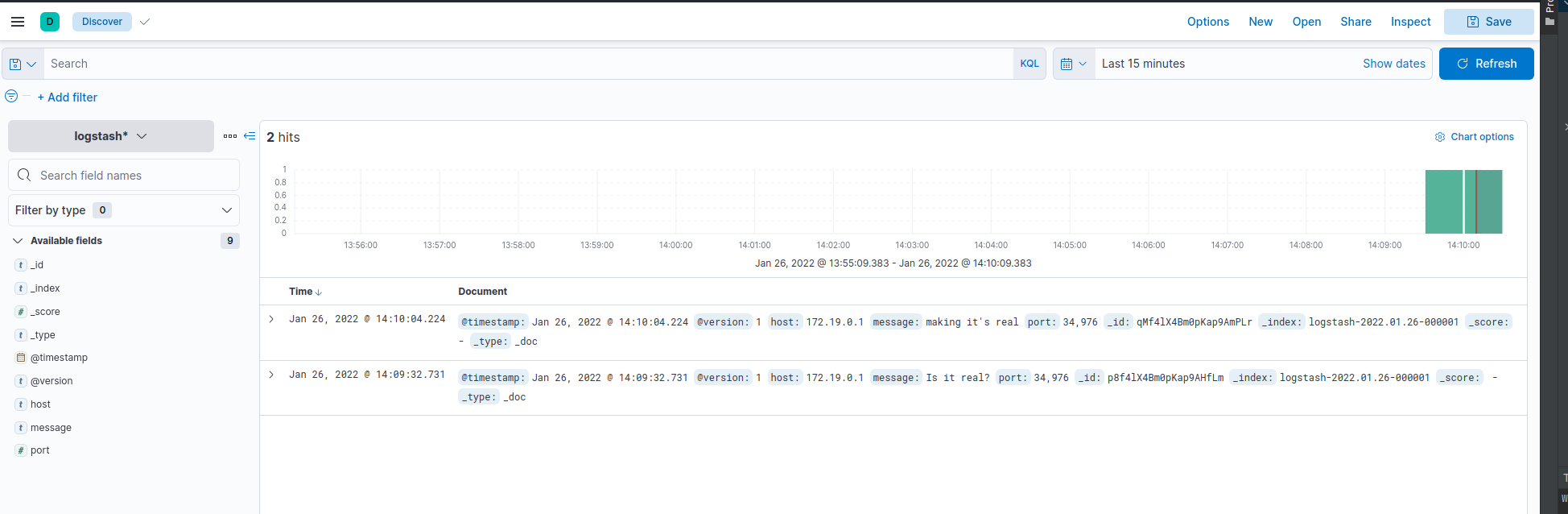 41 |
42 | # Docker Run for elastic and kibana:
43 | ```commandline
44 | sudo docker run -d -p 9200:9200 -p 9300:9300 --rm -h elasticsearch --name elasticsearch -e xpack.security.enabled=false -e discovery.type=single-node elasticsearch:7.16.3
45 | sudo docker run -d -p 5601:5601 --rm -h kibana --name kibana --link elasticsearch:elasticsearch kibana:7.16.3
46 | ```
47 |
48 | # logstash listening to a port:
49 | ```commandline
50 | sudo docker-compose -f docker-compose.yml up --build
51 | sudo docker run -d -h logstash --name logstash -p 9300:9300 --link elasticsearch:http://localhost:9200 -it --rm -v "$PWD"/logstash:/config-dir logstash:7.16.3 -f /config-dir/port-listener.conf
52 | ```
53 |
54 | ## Or packing all containers in a single docker-compose
55 |
56 | ```
57 | sudo docker-compose -f docker-compose-port.yml up
58 | ```
59 |
60 | Send logs to defined port on logstash container using `telnet`:
61 | ```commandline
62 | telnet localhost 9300
63 | ```
64 | Append your messages and you will find your request appending on `http://localhost:5601/app/discover` as well
65 |
66 | # How to log containers using fluentd
67 | 1. First off, create `fluentd/Dockerfile` & `fluentd/conf/fluent.conf`
68 | 2. Then, add the following section to all the container that needs to be logged.
69 | ```commandline
70 | logging:
71 | driver: "fluentd"
72 | options:
73 | fluentd-address: localhost:24224
74 | tag: httpd.access
75 | ```
76 | 3. Finally, run the following command
77 |
78 | ```
79 | sudo docker-compose -f docker-compose-fluentd.yml up --build
80 | ```
81 |
82 | # Run APM
83 | ```commandline
84 | sudo docker-compose -f docker-compose-apm.yml up
85 | ```
86 |
87 | # References:
88 | 1. https://www.youtube.com/watch?v=6bXSfjwQVIc
89 | 2. https://medium.com/analytics-vidhya/installing-elk-stack-in-docker-828df335e421
90 | 3. https://logz.io/blog/docker-logging/
91 | 4. https://docs.fluentd.org/v/0.12/container-deployment/docker-compose
92 |
--------------------------------------------------------------------------------
41 |
42 | # Docker Run for elastic and kibana:
43 | ```commandline
44 | sudo docker run -d -p 9200:9200 -p 9300:9300 --rm -h elasticsearch --name elasticsearch -e xpack.security.enabled=false -e discovery.type=single-node elasticsearch:7.16.3
45 | sudo docker run -d -p 5601:5601 --rm -h kibana --name kibana --link elasticsearch:elasticsearch kibana:7.16.3
46 | ```
47 |
48 | # logstash listening to a port:
49 | ```commandline
50 | sudo docker-compose -f docker-compose.yml up --build
51 | sudo docker run -d -h logstash --name logstash -p 9300:9300 --link elasticsearch:http://localhost:9200 -it --rm -v "$PWD"/logstash:/config-dir logstash:7.16.3 -f /config-dir/port-listener.conf
52 | ```
53 |
54 | ## Or packing all containers in a single docker-compose
55 |
56 | ```
57 | sudo docker-compose -f docker-compose-port.yml up
58 | ```
59 |
60 | Send logs to defined port on logstash container using `telnet`:
61 | ```commandline
62 | telnet localhost 9300
63 | ```
64 | Append your messages and you will find your request appending on `http://localhost:5601/app/discover` as well
65 |
66 | # How to log containers using fluentd
67 | 1. First off, create `fluentd/Dockerfile` & `fluentd/conf/fluent.conf`
68 | 2. Then, add the following section to all the container that needs to be logged.
69 | ```commandline
70 | logging:
71 | driver: "fluentd"
72 | options:
73 | fluentd-address: localhost:24224
74 | tag: httpd.access
75 | ```
76 | 3. Finally, run the following command
77 |
78 | ```
79 | sudo docker-compose -f docker-compose-fluentd.yml up --build
80 | ```
81 |
82 | # Run APM
83 | ```commandline
84 | sudo docker-compose -f docker-compose-apm.yml up
85 | ```
86 |
87 | # References:
88 | 1. https://www.youtube.com/watch?v=6bXSfjwQVIc
89 | 2. https://medium.com/analytics-vidhya/installing-elk-stack-in-docker-828df335e421
90 | 3. https://logz.io/blog/docker-logging/
91 | 4. https://docs.fluentd.org/v/0.12/container-deployment/docker-compose
92 |
--------------------------------------------------------------------------------