7 | {{ config.repo_name }}
8 |
9 |
10 |
--------------------------------------------------------------------------------
/.gitignore:
--------------------------------------------------------------------------------
1 | # Exclude all files from root directory
2 | /*
3 |
4 | # ------------------------
5 | # Common project files
6 | !CHANGELOG.md
7 | !README.md
8 | !LICENSE
9 |
10 | # ------------------------
11 | # Include MkDocs files
12 | !docs/
13 | !includes/
14 | !overrides/
15 | !mkdocs.yml
16 |
17 | # ------------------------
18 | # Project automation
19 | !Makefile
20 |
21 | # ------------------------
22 | # Version Control
23 | !.gitignore
24 | !.gitattributes
25 | !.github/
26 |
27 |
--------------------------------------------------------------------------------
/.github/config/markdown-link-check.json:
--------------------------------------------------------------------------------
1 | {
2 | "ignorePatterns": [
3 | {
4 | "pattern": "^http://localhost"
5 | },
6 | {
7 | "pattern": "^mailto:*"
8 | },
9 | {
10 | "pattern": "^#*"
11 | },
12 | {
13 | "pattern": "^https://127.0.0.0/"
14 | }
15 | ],
16 | "timeout": "20s",
17 | "retryOn429": true,
18 | "retryCount": 5,
19 | "fallbackRetryDelay": "30s",
20 | "aliveStatusCodes": [
21 | 200,
22 | 206
23 | ]
24 | }
25 |
--------------------------------------------------------------------------------
/.github/config/gitleaks.toml:
--------------------------------------------------------------------------------
1 | title = "gitleaks config"
2 |
3 | [allowlist]
4 | description = "global allow lists"
5 | paths = [
6 | '''gitleaks.toml''',
7 | '''(.*?)(jpg|gif|doc|docx|zip|xls|pdf|bin|svg|socket)$''',
8 | '''(go.mod|go.sum)$''',
9 | '''gradle.lockfile''',
10 | '''node_modules''',
11 | '''package-lock.json''',
12 | '''pnpm-lock.yaml''',
13 | '''Database.refactorlog''',
14 | '''vendor''',
15 | ]
16 |
17 | [[rules]]
18 | description = "AWS Example API Key"
19 | id = "aws-example-api-key"
20 | regex = '''AKIAIOSFODNN7EXAMPLE'''
21 | keywords = [
22 | "awstoken",
23 | ]
24 |
--------------------------------------------------------------------------------
/docs/introduction/five-steps-to-clojure.md:
--------------------------------------------------------------------------------
1 | # 5 Steps to Clojure
2 |
3 | ## Set up your environment
4 |
5 | Install Clojure and a build tool
6 |
7 | Setup a Clojure aware editor
8 |
9 | * Emacs & CIDER - Spacemacs, Doom, Prelude
10 | * Neovim & Conjure
11 | * VSCode & Clover or Calva
12 | * Sublime Text & SublimedClojure
13 |
14 | ## Learn the syntax
15 |
16 | ## Practice the core functions
17 |
18 | * 4clojure.org
19 | * Exercism.io
20 |
21 | ### def / defn / let
22 |
23 | ### map / reduce / apply
24 |
25 | ### for / while / loop / recur
26 |
27 | ## Adopt functional programming practices
28 |
29 | ## Learn the commonly used libraries
30 |
31 | ### Server-side websites
32 |
33 | #### Ring / Compojure / Reitit / Hiccup | Selma
34 |
35 | ### React client-side single page apps
36 |
37 | #### React.js / Om-next / Reagent / Re-frame
38 |
39 | #### core.async
40 |
41 | ### Full Stack apps
42 |
43 | #### Kit Framework
44 |
--------------------------------------------------------------------------------
/.github/config/lychee.toml:
--------------------------------------------------------------------------------
1 |
2 | # ----------------------------------------
3 | # Base URL or website root directory to check relative URLs.
4 | base = "https://practical.li/clojure/"
5 |
6 | # Only test links with the given schemes (e.g. https).
7 | # Omit to check links with any other scheme.
8 | # At the moment, we support http, https, file, and mailto.
9 | scheme = ["https"]
10 |
11 | # ----------------------------------------
12 | # Exclusions
13 |
14 | # Exclude URLs and mail addresses from checking (supports regex).
15 | exclude = ['^https://127.0.0.0', '^https://www\.linkedin\.com', '^https://web\.archive\.org/web/']
16 |
17 | # Exclude these filesystem paths from getting checked.
18 | exclude_path = ["mkdocs.yml", "overrides", "includes", ".github", ".git"]
19 |
20 | # Exclude all private IPs from checking.
21 | # Equivalent to setting `exclude_private`, `exclude_link_local`, and
22 | # `exclude_loopback` to true.
23 | exclude_all_private = true
24 |
25 | # Check mail addresses
26 | include_mail = false
27 | # ----------------------------------------
28 |
--------------------------------------------------------------------------------
/overrides/404.html:
--------------------------------------------------------------------------------
1 |
4 |
5 |
6 | {% extends "main.html" %}
7 |
8 |
9 | {% block content %}
10 | This is not the page you are looking for
11 | 12 |13 | Sorry we have arrived at a page that does not exist... 14 |
15 | 16 |17 | Practicalli website are published using Material for MkDocs 18 |
19 | 20 |21 | Use the Search bar at the top of the page or left navigation to find the relevant content. 22 |
23 | 24 |
25 |
26 |  28 |
29 |
28 |
29 |
32 |
33 |  35 |
36 |
35 |
36 |
35 | 36 |
37 | 38 | * 2013 [RuPy slides](https://github.com/stuarthalloway/presentations/blob/master/Barnstorming_2013/ClojureInTenBigIdeas.pdf?raw=true){target=_blank} 39 | * 2017 [Chicago JUG slides](https://github.com/stuarthalloway/presentations/blob/master/ClojureInTenBigIdeas-Jun-2017.pdf?raw=true){target=_blank} 40 | 41 | ## Antithesis of Clojure and simple software design 42 | 43 | In Narcissistic Design by Stuart Halloway, the antithesis of the Clojure view of software development is presented as a description of how unproductive and valueless much of the software industry has been in the past. 44 | 45 | Its essentially a guide on what to avoid if you are a responsible and professional software developer. 46 | 47 |48 | 49 |
50 | -------------------------------------------------------------------------------- /docs/index.md: -------------------------------------------------------------------------------- 1 | # Practicalli Clojure AI Tools 2 | 3 | A hands-on guide to using using Artificial Intelligence tools that support software engineering with Clojure 4 | 5 | !!! QUOTE - "John Stevenson, Practical.li" 6 | Future engineering teams will use highly effective Artificial Intelligence tools to make software development more effecive and rewarding. How much of that future has already arrived? 7 | 8 | [:fontawesome-solid-book-open: Why Clojure - Concepts of the Clojure Language](introduction/concepts/index.md){.md-button} 9 | 10 | 11 | ## Clojure REPL Driven Development 12 | 13 | {loading=lazy} 14 | 15 | Adopting AI tools should complement the highly effective feedback from a REPL connected editor. 16 | 17 | ### Clojure Language 18 | 19 | Clojure programming language has a strong dynamic type system and a [:fontawesome-solid-book-open: simple syntax](introduction/clojure-in-15-minutes/) that is a joy to work with. Immutable values and a pragmatic approach to pure functional programming makes it easier to create simple and highly maintainable systems. A [:fontawesome-solid-book-open: specification library](clojure-spec/) ensures values are of the correct shape, especially valuable when receiving data from outside of Clojure. 20 | 21 | Clojure has an open source license and a large number of open source libraries and tools. Simple host interoperability allows a even more libraries to be leveraged. 22 | 23 | !!! QUOTE "Adrian Cockcroft - as Cloud Architect at Netflix" 24 | The most productive programmers I know are writing everything in Clojure ... producing ridiculously sophisticated things in a very short time. And that programmer productivity matters. 25 | 26 | [:fontawesome-solid-book-open: Clojure REPL Workflow overview](introduction/repl-workflow.md){.md-button} 27 | [:fontawesome-solid-book-open: Clojure REPL](/clojure/clojure-cli/repl/){.md-button} 28 | 29 | 30 | ## Practicalli Resources 31 | 32 | [:fontawesome-solid-book-open: Practicalli Clojure CLI Config - additional tools via aliases](/clojure/clojure-cli/practicalli-config/){target=_blank .md-button} 33 | 34 | [:fontawesome-solid-book-open: Clojure Aware Editors](/clojure/clojure-editors){target=_blank .md-button} 35 | [:fontawesome-brands-youtube: Practicalli YouTube channel](https://youtube.co/practicalli){target=_blank .md-button} 36 | 37 | 38 | ## Navigate the book 39 | 40 | Use the mouse or built-in key bindings to navigate the pages of the book 41 | 42 | - ++p++ , ++comma++ : go to previous page 43 | - ++n++ , ++period++ : go to next page 44 | 45 | Use the search box to quickly find a specific topic 46 | 47 | - ++f++ , ++s++ , ++slash++ : open search dialog 48 | - ++arrow-down++ , ++arrow-up++ : select next / previous result 49 | - ++esc++ , ++tab++ : close search dialog 50 | - ++enter++ : follow selected result 51 | 52 | 53 | ## Sponsor Practicalli 54 | 55 | [{ align=left loading=lazy }](https://github.com/sponsors/practicalli-johnny/) 56 | 57 | All sponsorship funds are used to support the continued development of [:fontawesome-solid-book-open: Practicalli series of books and videos](https://practical.li/){target=_blank}, although most work is done at personal cost and time. 58 | 59 | Thanks to [:globe_with_meridians: Cognitect](https://www.cognitect.com/){target=_blank}, [:globe_with_meridians: Nubank](https://nubank.com.br/){target=_blank} and a wide range of other [:fontawesome-brands-github: sponsors](https://github.com/sponsors/practicalli-johnny#sponsors){target=_blank} from the Clojure community for your continued support 60 | 61 | 62 | ## Creative commons license 63 | 64 |
65 |  66 | This work is licensed under a Creative Commons Attribution 4.0 ShareAlike License (including images & stylesheets).
67 |
66 | This work is licensed under a Creative Commons Attribution 4.0 ShareAlike License (including images & stylesheets).
67 |
68 |
--------------------------------------------------------------------------------
/docs/assets/favicon.svg:
--------------------------------------------------------------------------------
1 |
2 |
3 |
--------------------------------------------------------------------------------
/docs/assets/stylesheets/practicalli-light.css:
--------------------------------------------------------------------------------
1 | // ----------------------------------------------------------------------------
2 | // Rules
3 | // ----------------------------------------------------------------------------
4 |
5 | // Color variables
6 | :root {
7 | @extend %root;
8 |
9 | // Primary color shades
10 | --md-primary-fg-color: hsla(#{hex2hsl($clr-indigo-500)}, 1);
11 | --md-primary-fg-color--light: hsla(#{hex2hsl($clr-indigo-400)}, 1);
12 | --md-primary-fg-color--dark: hsla(#{hex2hsl($clr-indigo-700)}, 1);
13 | --md-primary-bg-color: hsla(0, 0%, 100%, 1);
14 | --md-primary-bg-color--light: hsla(0, 0%, 100%, 0.7);
15 |
16 | // Accent color shades
17 | --md-accent-fg-color: hsla(#{hex2hsl($clr-indigo-a200)}, 1);
18 | --md-accent-fg-color--transparent: hsla(#{hex2hsl($clr-indigo-a200)}, 0.1);
19 | --md-accent-bg-color: hsla(0, 0%, 100%, 1);
20 | --md-accent-bg-color--light: hsla(0, 0%, 100%, 0.7);
21 | }
22 |
23 | // ----------------------------------------------------------------------------
24 |
25 | // Allow to explicitly use color schemes in nested content
26 | [data-md-color-scheme="practicalli"] {
27 | @extend %root;
28 | }
29 |
30 | // ----------------------------------------------------------------------------
31 | // Placeholders
32 | // ----------------------------------------------------------------------------
33 |
34 | // Default theme, i.e. light mode
35 | %root {
36 |
37 | // Default color shades
38 | --md-default-fg-color: hsla(0, 0%, 0%, 0.87);
39 | --md-default-fg-color--light: hsla(0, 0%, 0%, 0.54);
40 | --md-default-fg-color--lighter: hsla(0, 0%, 0%, 0.32);
41 | --md-default-fg-color--lightest: hsla(0, 0%, 0%, 0.07);
42 | --md-default-bg-color: hsla(53, 90%, 90%, 1);
43 | --md-default-bg-color--light: hsla(53, 90%, 90%, 0.7);
44 | --md-default-bg-color--lighter: hsla(53, 90%, 90%, 0.3);
45 | --md-default-bg-color--lightest: hsla(53, 90%, 90%, 0.12);
46 |
47 | // Code color shades
48 | --md-code-fg-color: hsla(200, 18%, 26%, 1);
49 | --md-code-bg-color: hsla(0, 0%, 96%, 1);
50 |
51 | // Code highlighting color shades
52 | --md-code-hl-color: hsla(#{hex2hsl($clr-yellow-a200)}, 0.5);
53 | --md-code-hl-number-color: hsla(0, 67%, 50%, 1);
54 | --md-code-hl-special-color: hsla(340, 83%, 47%, 1);
55 | --md-code-hl-function-color: hsla(291, 45%, 50%, 1);
56 | --md-code-hl-constant-color: hsla(250, 63%, 60%, 1);
57 | --md-code-hl-keyword-color: hsla(219, 54%, 51%, 1);
58 | --md-code-hl-string-color: hsla(150, 63%, 30%, 1);
59 | --md-code-hl-name-color: var(--md-code-fg-color);
60 | --md-code-hl-operator-color: var(--md-default-fg-color--light);
61 | --md-code-hl-punctuation-color: var(--md-default-fg-color--light);
62 | --md-code-hl-comment-color: var(--md-default-fg-color--light);
63 | --md-code-hl-generic-color: var(--md-default-fg-color--light);
64 | --md-code-hl-variable-color: var(--md-default-fg-color--light);
65 |
66 | // Typeset color shades
67 | --md-typeset-color: var(--md-default-fg-color);
68 |
69 | // Typeset `a` color shades
70 | --md-typeset-a-color: var(--md-primary-fg-color);
71 |
72 | // Typeset `mark` color shades
73 | --md-typeset-mark-color: hsla(#{hex2hsl($clr-yellow-a200)}, 0.5);
74 |
75 | // Typeset `del` and `ins` color shades
76 | --md-typeset-del-color: hsla(6, 90%, 60%, 0.15);
77 | --md-typeset-ins-color: hsla(150, 90%, 44%, 0.15);
78 |
79 | // Typeset `kbd` color shades
80 | --md-typeset-kbd-color: hsla(0, 0%, 98%, 1);
81 | --md-typeset-kbd-accent-color: hsla(0, 100%, 100%, 1);
82 | --md-typeset-kbd-border-color: hsla(0, 0%, 72%, 1);
83 |
84 | // Typeset `table` color shades
85 | --md-typeset-table-color: hsla(0, 0%, 0%, 0.12);
86 |
87 | // Admonition color shades
88 | --md-admonition-fg-color: var(--md-default-fg-color);
89 | --md-admonition-bg-color: var(--md-default-bg-color);
90 |
91 | // Footer color shades
92 | --md-footer-fg-color: hsla(0, 0%, 100%, 1);
93 | --md-footer-fg-color--light: hsla(0, 0%, 100%, 0.7);
94 | --md-footer-fg-color--lighter: hsla(0, 0%, 100%, 0.3);
95 | --md-footer-bg-color: hsla(0, 0%, 0%, 0.87);
96 | --md-footer-bg-color--dark: hsla(0, 0%, 0%, 0.32);
97 |
98 | // Shadow depth 1
99 | --md-shadow-z1:
100 | 0 #{px2rem(4px)} #{px2rem(10px)} hsla(0, 0%, 0%, 0.05),
101 | 0 0 #{px2rem(1px)} hsla(0, 0%, 0%, 0.1);
102 |
103 | // Shadow depth 2
104 | --md-shadow-z2:
105 | 0 #{px2rem(4px)} #{px2rem(10px)} hsla(0, 0%, 0%, 0.1),
106 | 0 0 #{px2rem(1px)} hsla(0, 0%, 0%, 0.25);
107 |
108 | // Shadow depth 3
109 | --md-shadow-z3:
110 | 0 #{px2rem(4px)} #{px2rem(10px)} hsla(0, 0%, 0%, 0.2),
111 | 0 0 #{px2rem(1px)} hsla(0, 0%, 0%, 0.35);
112 | }
113 |
--------------------------------------------------------------------------------
/mkdocs.yml:
--------------------------------------------------------------------------------
1 | ---
2 | # Practicalli Clojure AI Tools
3 | site_name: Practicalli Clojure AI Tools
4 | site_url: https://practical.li/clojure-ai-tools
5 | site_description: Practical guide to applying AI tools to support the Clojure programming language and Clojure REPL driven development
6 | site_author: Practicalli
7 | site_org: https://practical.li/
8 | copyright: Copyright © 2023 Practicali CC BY-SA 4.0
9 | repo_url: https://github.com/practicalli/clojure-ai-tools/
10 | edit_uri: https://github.com/practicalli/clojure-ai-tools/edit/main/docs/
11 |
12 | # Deployment
13 | # remote_name: origin
14 | remote_branch: gh-pages # deployment branch
15 |
16 | # Theme and styling
17 | theme:
18 | name: material
19 | logo: assets/images/practicalli-logo.png
20 | favicon: assets/favicon.svg
21 | features:
22 | - announce.dismiss
23 | - content.action.edit
24 | - content.action.view
25 | - content.code.annotate
26 | - content.code.copy
27 | - content.tabs.link
28 | - navigation.footer
29 | - navigation.indexes # Nav sections can have files
30 | - navigation.instant # Avoid page reloading for internal links
31 | - navigation.top
32 | - navigation.tracking # Update URL with sub-heading anchor names
33 | palette:
34 | # Palette toggle for automatic mode
35 | - media: "(prefers-color-scheme)"
36 | toggle:
37 | icon: material/brightness-auto
38 | name: Switch to light mode
39 | # Palette toggle for light mode
40 | - media: "(prefers-color-scheme: light)"
41 | scheme: default
42 | primary: blue
43 | accent: teal
44 | toggle:
45 | icon: material/brightness-7
46 | name: Switch to dark mode
47 | # Palette toggle for dark mode
48 | - media: "(prefers-color-scheme: dark)"
49 | scheme: slate
50 | primary: blue
51 | accent: teal
52 | toggle:
53 | icon: material/brightness-4
54 | name: Switch to light mode
55 | # Override theme
56 | custom_dir: overrides
57 |
58 | extra_css:
59 | - assets/stylesheets/extra.css
60 |
61 | ## Additional styling
62 | markdown_extensions:
63 | - admonition
64 | - pymdownx.details
65 | - pymdownx.superfences
66 | - attr_list
67 | - md_in_html # Grids
68 | - footnotes # footnotes and abbreviations
69 | - pymdownx.emoji:
70 | emoji_index: !!python/name:material.extensions.emoji.twemoji
71 | emoji_generator: !!python/name:material.extensions.emoji.to_svg
72 | - pymdownx.highlight:
73 | anchor_linenums: true
74 | - pymdownx.inlinehilite
75 | - pymdownx.snippets:
76 | url_download: true
77 | - pymdownx.superfences:
78 | custom_fences:
79 | - name: mermaid
80 | class: mermaid
81 | format: !!python/name:pymdownx.superfences.fence_code_format
82 | - pymdownx.tabbed:
83 | alternate_style: true
84 | - pymdownx.keys # keyboard keys
85 | - pymdownx.magiclink
86 | - def_list # lists
87 | - pymdownx.tasklist:
88 | custom_checkbox: true # checkboxes
89 | - toc:
90 | permalink: λ︎
91 |
92 | ## Plugins
93 | plugins:
94 | # Explicitly add search plugin when defining plugins in this configuration file
95 | - search
96 | - callouts
97 | - glightbox # Image aligning
98 | - git-revision-date-localized: # Update and Creation date of each page
99 | # enable_creation_date: true
100 | fallback_to_build_date: true
101 |
102 | # Generate Social Cards via CI only
103 | # in assets/images/social
104 | - social:
105 | cards: !ENV [MKDOCS_SOCIAL_CARDS_GENERATE, true]
106 |
107 | # Redirect pages when moved or changed
108 | # - redirects:
109 | # redirect_maps:
110 | # repl-driven-development.md: introduction/repl-workflow.md
111 |
112 | # Footer / Social Media
113 | extra:
114 | analytics:
115 | provider: google
116 | property: G-N2Y85K2YMM
117 | social:
118 | - icon: material/web
119 | link: https://practical.li/
120 | - icon: fontawesome/brands/linkedin
121 | link: https://www.linkedin.com/in/jr0cket/
122 | - icon: fontawesome/brands/slack
123 | link: https://clojurians.slack.com/messages/practicalli
124 | - icon: fontawesome/brands/twitter
125 | link: https://twitter.com/practical_li
126 | - icon: fontawesome/brands/github
127 | link: https://github.com/practicalli
128 | - icon: fontawesome/brands/docker
129 | link: https://hub.docker.com/u/practicalli
130 |
131 | # Navigation
132 | nav:
133 | - Introduction:
134 | - index.md
135 | - Clojure in Fifteen Mins: introduction/clojure-in-15-minutes.md
136 | - REPL Workflow: introduction/repl-workflow.md
137 | - Concepts:
138 | - introduction/concepts/index.md
139 | - introduction/concepts/model-context-protocol.md
140 | - Contributing: https://practical.li/contributing/
141 | - Writing Tips: https://practical.li/writing-tips/
142 | - Install:
143 | - install/index.md
144 | - Java Host: install/java.md
145 | - Clojure CLI: install/clojure-cli.md
146 | - Clojure Editors:
147 | - clojure-editors/index.md
148 | - Reference:
149 | - reference/index.md
150 |
--------------------------------------------------------------------------------
/docs/introduction/learning-clojure.md:
--------------------------------------------------------------------------------
1 | # Learning Clojure
2 |
3 | Learning the syntax of Clojure is really quick (its very small and simple). Learning to think functionally and discovering the 700+ functions in the Clojure API can take a little longer. I recommend you find someone with a bit of Clojure experience to guide you.
4 |
5 | Here is my suggested path to learning Clojure and thinking functionally. Many of the tasks can be done in parallel.
6 |
7 | ## Simple rather than complex - the foundation of Clojure
8 |
9 | Gaining an appreciation that systems should be simple is a crucial step truly understanding Clojure. So early in your journey into Clojure, spend an hour watching [Rich Hickey talk about Simple made Easy](https://www.infoq.com/presentations/Simple-Made-Easy) - ([transcript of talk](https://github.com/matthiasn/talk-transcripts/blob/master/Hickey_Rich/SimpleMadeEasy.md)).
10 |
11 | ## Experience the Clojure syntax
12 |
13 | Take a quick look at the Syntax of Clojure. The syntax is very small, so this will take about 15 minutes to 1 hour (dependent on your own experiences with coding). Don't try to remember all the syntax, it will come through practise.
14 |
15 | - eg. [Clojure in 15 minutes](https://adambard.com/blog/clojure-in-15-minutes/)
16 |
17 | ## Set up an enjoyable environment to work in
18 |
19 | Find how to use Clojure with your favourite editor or IDE. Configure this tool so you can easily run a REPL and evaluate some expressions.
20 |
21 | - [repl.it](https://repl.it) - web based repl you can share / fork
22 | - [Spacemacs](https://spacemacs.org) - for the ultimate Emacs & Vim experience
23 | - [IntelliJ](https://www.jetbrains.com/idea/) and [Cursive](https://cursive-ide.com/)
24 | - [Leiningen](https://leiningen.org) & any editor you like
25 |
26 | ## Building a frame of reference for functional programming
27 |
28 | Find an introductory book that you like which provides lots of example code to help you feel more comfortable with the syntax and more importantly the major concepts of functional programming with Clojure. Type in the exercises as you read and don't be afraid to play around with code examples
29 |
30 | - [Clojure for the Brave and the True](https://www.braveclojure.com/)
31 | - [Living Clojure](http://shop.oreilly.com/product/0636920034292.do) - includes a training guide
32 | - [Practicalli Clojure](/) - you are already here :)
33 | - [ClojureBridge London workshop](https://clojurebridgelondon.github.io/workshop/) - aimed at those new to coding
34 | - [PurelyFunctional - Introduction to Clojure](https://purelyfunctional.tv/courses/introduction-to-clojure-v2/)
35 |
36 | ## Practice Clojure standard library (clojure.core)
37 |
38 | Practice Clojure. Write lots of small and relatively simple examples in Clojure and experiment with the code in the REPL and try break things. This will start helping you learn the [Clojure API](https://clojure.github.io/clojure/)
39 |
40 | You should become comfortable in your understanding of:
41 |
42 | - basic values (strings, numbers, etc) and persistent collections (list, vector, map, set)
43 | - binding names to values and their scope (def, defn, let)
44 | - calling functions, defining functions, arity options for functions
45 | - Higher order functions and basics of functional composition (map, reduce, filter, etc)
46 | - Designing with data, Extensible Data Notation (EDN), data manipulation
47 |
48 | Activities to help practice Clojure include:
49 |
50 | - [4Clojure.org](https://4clojure.org) - aim to complete the first 50 exercises, the first 10 are relatively easy
51 | - Coding Kata exercises
52 | - [Awesome Kata collection](https://github.com/gamontal/awesome-katas)
53 | - [Alice In Wonderland inspired Katas](https://github.com/gigasquid/wonderland-clojure-katas)
54 | - Attend coding dojo events - e.g. [London Clojurians](https://meetup.com/london-clojurians)
55 |
56 | ## Solidify some of the basics you have learned so far
57 |
58 | Work on a relatively small project that you care about enough to work on
59 |
60 | - eg. a tool to help you at work
61 |
62 | ## Learn more tools to help you think functionally
63 |
64 | - mostly using immutable values and pure functions
65 | - functional composition, sequences and transducers
66 | - atoms for managing mutable state changes (with immutable values)
67 |
68 | ## Get a broader view of Clojure and learn some common practices
69 |
70 | Start reading a book which is aimed at intermediate
71 |
72 | - [Clojure CookBook](http://clojure-cookbook.com/)
73 |
74 | Watch Video's about Clojure on subjects that are relevant to work or projects you want to work on.
75 |
76 | - [ClojureTV on YouTube](https://www.youtube.com/user/ClojureTV)
77 |
78 | Follow tutorials on Clojure, especially those that introduce the amazing libraries available in Clojure
79 |
80 | - [Lambda Island](https://lambdaisland.com/)
81 | - [PurelyFunctional.tv](https://purelyfunctional.tv/)
82 | - [Practical.li](https://practicalli,github.io)
83 |
84 | Work with some of the most common libraries in Clojure
85 |
86 | - [Ring]() / [Compojure]() for web development (server side)
87 | - [ClojureScript](https://clojurescript.org/) for web UI or native mobile apps (client side)
88 | - [Reagent](https://reagent-project.github.io/) - reactjs style single page apps
89 | - [Reagent deep dive](http://timothypratley.blogspot.co.uk/2017/01/reagent-deep-dive-part-1.html) - excellent tutorial
90 | - [core.async]() - for asynchronous programming
91 | - [clojure.string]() - specific functions for string manipulation
92 | - [tools.logging](https://clojure.github.io/tools.logging/)
93 | - [java.jdbc](https://clojure.github.io/java.jdbc/) - database access
94 | - [data.zip](https://clojure.github.io/data.zip/) - manipulating trees of data, e.g. XML
95 |
--------------------------------------------------------------------------------
/docs/introduction/who-uses-clojure.md:
--------------------------------------------------------------------------------
1 | # Who uses Clojure
2 |
3 | [Hundreds of companies](http://clojure.org/community/companies) actively advertised their Clojure adoption. Given the broad participation in user groups there are clearly many more organizations using Clojure at some level in their technology stack.
4 |
5 | A quick scan of various job sites shows Clojure positions at companies like Walmart, Facebook, Staples, Consumer Reports, Salesforce, and Amazon. It doesn't get much more mainstream than that.
6 |
7 | If you are looking for a new role using Clojure or other functional programming languages, visit [Functional Works](http://functionalworks.com), the only Functional Recruiters in the world.
8 |
9 | Here is just a small and diverse set of example companies that I am aware of that use Clojure for development.
10 |
11 | | Company | Type of applications |
12 | |----------------------------|-----------------------------------------------------------------------------------------------------------------------------------------------------------------------------|
13 | | Boeing | [Boeing 737 MAX - onboard maintenance](https://www.youtube.com/watch?v=iUC7noGU1mQ) |
14 | | Puppet Labs | DevOps apps & services e.g. trapperkeeper |
15 | | Cisco | Malware analysis & threat intelligence platform (expert system with core.logic) |
16 | | Deuche Bank (UK) | [Processing event streams](http://blog.malcolmsparks.com/) from [Apache Storm](https://storm.apache.org/) |
17 | | Atlassian | Collaborative editing platform for all their products |
18 | | Netflix | Map-Reduce languages for writing apps for Hadoop / Pig |
19 | | USwitch (UK) | Creating meaningful data from multiple sources |
20 | | Daily Mail Online (UK) | Publishing pipeline |
21 | | Circle CI (USA) | [Front-end of CI server](https://github.com/circleci/frontend) in ClojureScript & [test suite](https://circleci.com/blog/rewriting-your-test-suite-in-clojure-in-24-hours/) |
22 | | CitiGroup | Financial Trading |
23 | | Student Loans company (UK) | Loans management system written in Clojure |
24 | | LinkedIn | Powers the LinkedIn social graph |
25 | | Walmart (USA) | eReceipts project to process every purchase from 5,000+ stores |
26 | | SwiftKey (UK) | Predictive intelligence platform (possibly used with Microsoft Cortana) |
27 | | Roomkey.co.uk | [Hotel booking system to rival Expedia](http://www.colinsteele.org/post/23103789647/against-the-grain-aws-clojure-startup) (with a tiny development team) |
28 | | Funding Circle (UK & USA) | Adopting Clojure as their main language (from Ruby, etc) |
29 | | Braintree | [Payment processing pipeline with Kafka](https://www.youtube.com/watch?v=0D3jev1E5ks) |
30 | | Mastodon C | Data centre analysis (Incanta, Storm) |
31 | | Thoughtworks | Agile development for Client projects world wide |
32 | | Vero Insurance (AUS) | Rebuilt policy management system in Clojure with Thoughworks |
33 | | Meta-X | Performance art (Overtone, Quil) |
34 | | Salesforce (USA) | Build & deployment with [Puppet](https://github.com/puppetlabs/puppetserver) & Application Routing with [nginx-clojure](https://nginx-clojure.github.io) |
35 |
36 | There are many more examples of projects on the HackerNews thread: [Ask HN: Who's using Clojure in Production](https://news.ycombinator.com/item?id=8549823)
37 |
38 | ## Tech Radar
39 |
40 | Clojure is also defined as a technology that can be adopted since 2014, according to the Thoughtworks technology radar.
41 |
42 | 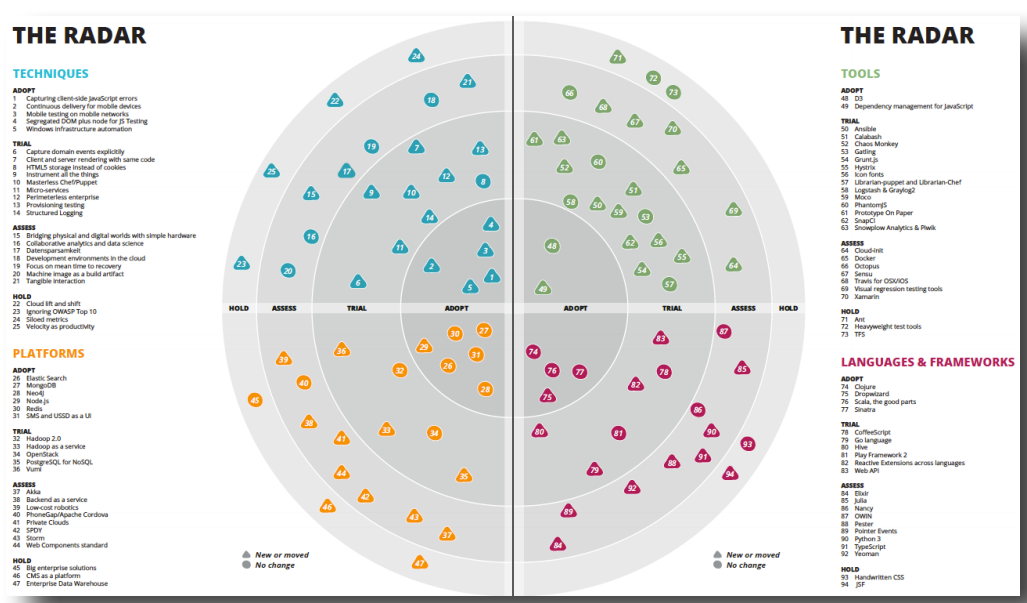
43 |
44 | JUXT also created its own [Clojure specific technology radar](https://juxt.pro/radar.html) as there is such an encompassing ecosystem of libraries and services.
45 |
--------------------------------------------------------------------------------
/docs/assets/practicalli-logo.svg:
--------------------------------------------------------------------------------
1 |
2 |
3 |
--------------------------------------------------------------------------------
/docs/install/java.md:
--------------------------------------------------------------------------------
1 | 
2 |
3 | Java is a host platform for Clojure, on which Clojure projects and tools run. Java provides a virtual machine which runs the bytecode generated when Clojure code is compiled.
4 |
5 | Java virtual machine includes a Just In Time (JIT) compiler that optimises running of bytecode.
6 |
7 | !!! INFO "Practicalli recommends OpenJDK version 21"
8 |
9 |
10 | ## Install Java
11 |
12 | Check to see if there is an appropriate version of Java already installed.
13 |
14 | Open a terminal and run the command
15 |
16 | ```shell
17 | java --version
18 | ```
19 |
20 | If Java is installed and on the execution path, the version infomation is returned
21 |
22 | 
23 | 
24 |
25 |
26 | === "Debian Packages"
27 | Install Java development kit (JDK) using the `apt` package manager (login as `su -` or prefix the command with `sudo`)
28 |
29 | ```shell
30 | apt install openjdk-21-jdk
31 | ```
32 |
33 | ??? HINT "Check available versions of OpenJDK"
34 | Long terms support versions should include OpenJDK 17 and may include OpenJDK 21. Check versions available via the `apt` package management tool.
35 |
36 | ```shell
37 | apt search --names-only openjdk
38 | ```
39 |
40 | ??? HINT "Optionally include Java docs and sources"
41 | Install the `openjdk-21-doc` locally to provide Javadocs to support Java Interop code.
42 |
43 | Install the `openjdk-21-source` package to support navigation of Java Object and Method source code, especially useful when using Java Interoperability from within Clojure code.
44 |
45 | ```shell
46 | sudo apt install openjdk-21-doc openjdk-21-source
47 | ```
48 |
49 | [:fontawesome-solid-book-open: Practicalli Clojure CLI Config](/clojure/clojure-cli/practicalli-config/) provides the `:src/java17` alias to include the Java sources in the classpath when running a REPL.
50 |
51 | If `openjdk-21-jdk` package is not available, add the [Ubuntu OpenJDK personal package archive](https://launchpad.net/~openjdk-r/+archive/ubuntu/ppa){target=_blank}
52 |
53 | !!! NOTE ""
54 | ```shell
55 | sudo add-apt-repository ppa:openjdk-r/ppa
56 | sudo apt-get update
57 | ```
58 | When multiple versions of Java are installed, set the version using the `update-alternatives` command in a terminal
59 |
60 | !!! NOTE ""
61 | ```shell
62 | sudo update-alternatives --config java
63 | ```
64 | Available java versions will be listed. Enter the list number for the version you wish to use.
65 |
66 | === "Homebrew"
67 | Using [Homebrew](https://brew.sh/){target=_blank}, run the following command in a terminal to install Java 17:
68 |
69 | !!! NOTE ""
70 | ```shell
71 | brew install openjdk@21
72 | ```
73 |
74 | ??? HINT "Switching between Java versions"
75 | More than one version of Java can be installed on MacOSX. Set the Java version by opening a terminal and using one of the following commands
76 |
77 | Show the Java versions installed
78 | ```shell
79 | /usr/libexec/java_home -V
80 | ```
81 |
82 | Switch to Java version 21
83 | ```shell
84 | export JAVA_HOME=$(/usr/libexec/java_home -v 21)
85 | ```
86 |
87 | Alternatively, install [JEnv Java version manager](https://www.jenv.be/)
88 |
89 | === "Windows"
90 | For Windows 10 use [Windows Subsystem for Linux and Windows Terminal are recommended](https://conan.is/blogging/clojure-on-windows.html){target=_blank} if you have administrative privileges and are happy to use a Unix system on the command line.
91 |
92 | Alternatively use [scoop.sh](https://scoop.sh/){target=_blank}, a command line installer for windows. [Powershell 5](https://aka.ms/wmf5download){target=_blank} or greater is required.
93 |
94 | Follow the [scoop-clojure install instructions](https://github.com/littleli/scoop-clojure){target=_blank}, summarized here:
95 |
96 | ```shell
97 | scoop bucket add java
98 | scoop install temurin-lts-jdk
99 | ```
100 |
101 | scoop can also be used to [install clojure](clojure-cli.md)
102 |
103 | If neither Scoop or Windows Subsystem for Linux work, try the [Chocolatey](https://chocolatey.org/){target=_blank} package manager. Install the [Java Runtime (JRE)](https://chocolatey.org/packages/javaruntime){target=_blank} using the following command in a command line window
104 |
105 | ```shell
106 | choco install javaruntime
107 | ```
108 |
109 | If Chocolatey does not work, then try the [manual Java install](install-java.html#manual).
110 |
111 | === "Manual"
112 | [Download OpenJDK from Adoptium](https://adoptium.net/){target=_blank} - pre-build OpenJDK binaries freely available for multiple operating systems.
113 |
114 | Run the file once downloaded and follow the install instructions.
115 |
116 | 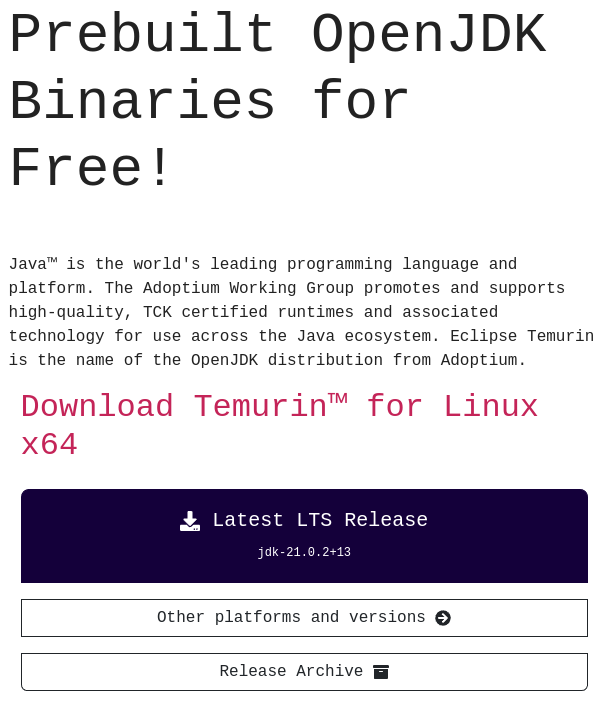
117 |
118 |
119 | ## Multiple versions of Java
120 |
121 | [:globe_with_meridians: jenv](https://www.jenv.be/){target=_blank} provides a simple way to switch between multiple installed versions of Java. jenv can be used to set the java version globally, for the current shell or for a specific project by adding `.java-version` file containing the Java version number in the root of the project.
122 |
123 |
124 | ## A little Java Knowledge
125 |
126 | Very little knowledge of the Java language or the Java Virtual Machine is required.
127 |
128 | It is quite simple to call Java methods from Clojure, although there are a wealth of functions and libraries provided by Clojure and its community to minimise the need for Java Interoperability.
129 |
130 | [Reading stack traces](https://8thlight.com/blog/connor-mendenhall/2014/09/12/clojure-stacktraces.html){target=_blank} may benefit from some Java experience, although its usually the first couple of lines in a stack trace that describe the issue.
131 |
132 | Clojure uses its own build tools (Leiningen, Clojure CLI tools) and so Java build tool knowledge is not required.
133 |
134 | When libraries are added to a project, they are downloaded to the `$HOME/.m2` directory. This is the default Maven cache used by all JVM libraries.
135 |
136 | `clojure -Spom` will generate a Maven pom.xml file used for deployment. Understanding of a [minimal Maven POM (pom.xml) file](https://maven.apache.org/guides/introduction/introduction-to-the-pom.html#minimal-pom){target=_blank} is useful when managing issues with packaging and deployment.
137 |
138 | [Maven in 5 minutes](https://maven.apache.org/guides/getting-started/maven-in-five-minutes.html){target=_blank .md-button}
139 |
140 | The Java Virtual Machine is highly optimised and does not usually require any options to enhance its performance. The most likely configuration to supply to the JVM are to manage the amount of memory assigned, specifically for resource constrained environments.
141 |
--------------------------------------------------------------------------------
/README.md:
--------------------------------------------------------------------------------
1 | # Practicalli Clojure AI Tools
2 |
3 | ```none
4 | ██████╗ ██████╗ █████╗ ██████╗████████╗██╗ ██████╗ █████╗ ██╗ ██╗ ██╗
5 | ██╔══██╗██╔══██╗██╔══██╗██╔════╝╚══██╔══╝██║██╔════╝██╔══██╗██║ ██║ ██║
6 | ██████╔╝██████╔╝███████║██║ ██║ ██║██║ ███████║██║ ██║ ██║
7 | ██╔═══╝ ██╔══██╗██╔══██║██║ ██║ ██║██║ ██╔══██║██║ ██║ ██║
8 | ██║ ██║ ██║██║ ██║╚██████╗ ██║ ██║╚██████╗██║ ██║███████╗███████╗██║
9 | ╚═╝ ╚═╝ ╚═╝╚═╝ ╚═╝ ╚═════╝ ╚═╝ ╚═╝ ╚═════╝╚═╝ ╚═╝╚══════╝╚══════╝╚═╝
10 |
11 | ██████╗██╗ ██████╗ ██╗██╗ ██╗██████╗ ███████╗
12 | ██╔════╝██║ ██╔═══██╗ ██║██║ ██║██╔══██╗██╔════╝
13 | ██║ ██║ ██║ ██║ ██║██║ ██║██████╔╝█████╗
14 | ██║ ██║ ██║ ██║██ ██║██║ ██║██╔══██╗██╔══╝
15 | ╚██████╗███████╗╚██████╔╝╚█████╔╝╚██████╔╝██║ ██║███████╗
16 | ╚═════╝╚══════╝ ╚═════╝ ╚════╝ ╚═════╝ ╚═╝ ╚═╝╚══════╝
17 |
18 | █████╗ ██╗ ████████╗ ██████╗ ██████╗ ██╗ ███████╗
19 | ██╔══██╗██║ ╚══██╔══╝██╔═══██╗██╔═══██╗██║ ██╔════╝
20 | ███████║██║ ██║ ██║ ██║██║ ██║██║ ███████╗
21 | ██╔══██║██║ ██║ ██║ ██║██║ ██║██║ ╚════██║
22 | ██║ ██║██║ ██║ ╚██████╔╝╚██████╔╝███████╗███████║
23 | ╚═╝ ╚═╝╚═╝ ╚═╝ ╚═════╝ ╚═════╝ ╚══════╝╚══════╝
24 | ```
25 |
26 | > NOTE: Ascii Art Generator: https://patorjk.com/software/taag/#p=display&f=ANSI%20Shadow&t=Astro%205
27 |
28 | ## Book Overview
29 |
30 | A guide to software Artificial Intelligence tools to support development with the Clojure programming language, using Clojure CLI and a wide range of community tools for a REPL focused workflow.
31 |
32 | The guide uses Practicalli Clojure CLI Config to provide aliases to run over 30 community tools that complement the workflow, including a REPL Reloaded workflow for a highly interactive and effective development experience.
33 |
34 | Learning Clojure syntax and how to think in a functional design is also covered with code examples and challenge that help embed these concepts.
35 |
36 |
37 | ## Book status
38 |
39 | [](https://github.com/practicalli/clojure/actions/workflows/megalinter.yaml)[](https://github.com/practicalli/clojure/actions/workflows/publish-book.yaml)
40 | [](https://github.com/practicalli/clojure/actions/workflows/publish-book.yaml)
41 | [](https://github.com/practicalli/clojure/actions/workflows/pages/pages-build-deployment)
42 |
43 | [](https://github.com/practicalli/clojure/issues)
44 | [](https://github.com/practicalli/clojure/pulls)
45 |
46 | 
47 | 
48 |
49 | ## Creative commons license
50 |
51 |
66 | This work is licensed under a Creative Commons Attribution 4.0 ShareAlike License (including images & stylesheets).
67 |
52 |
53 | This work is licensed under a Creative Commons Attribution 4.0 ShareAlike License (including images & stylesheets).
54 |
55 |
56 | ## Contributing
57 |
58 | Issues and pull requests are most welcome although it is the maintainers discression as to if they are applicable. Please detail issues as much as you can. Pull requests are simpler to work with when they are specific to a page or at most a section. The smaller the change the quicker it is to review and merge.
59 |
60 | Please read the [detailed Practicalli contributing page](https://practical.li/contributing/) before raising an issue or pull request to avoid disapointment.
61 |
62 | * [Current Issues](https://github.com/practicalli/clojure/issues)
63 | * [Current pull requests](https://github.com/practicalli/clojure/pulls)
64 |
65 | [Practicalli Clojure CLI Config](clojure/clojure-cli/practicalli-config.md) provides a user level configuration providing aliases for community tools used throughout this guide. Issues and pull requests can also be made via its GitHub repository.
66 |
67 | By submitting content ideas and corrections you are agreeing they can be used in any work by Practicalli under the [Creative Commons Attribution ShareAlike 4.0 International license](https://creativecommons.org/licenses/by-sa/4.0/). Attribution will be detailed via [GitHub contributors](https://github.com/practicalli/clojure/graphs/contributors).
68 |
69 | ## Sponsor Practicalli
70 |
71 | [](https://github.com/sponsors/practicalli-johnny/)
72 |
73 | All sponsorship funds are used to support the continued development of [Practicalli series of books and videos](https://practical.li/), although most work is done at personal cost and time.
74 |
75 | Thanks to [Cognitect](https://www.cognitect.com/), [Nubank](https://nubank.com.br/) and a wide range of other [sponsors](https://github.com/sponsors/practicalli-johnny#sponsors) for your continued support
76 |
77 |
78 | ## Star History
79 |
80 | [](https://star-history.com/#practicalli/clojure&Date)
81 |
82 |
83 | ## GitHub Actions
84 |
85 | The megalinter GitHub actions will run when a pull request is created,checking basic markdown syntax.
86 |
87 | A review of the change will be carried out by the Practicalli team and the PR merged if the change is acceptable.
88 |
89 | The Publish Book GitHub action will run when PR's are merged into main (or the Practicalli team pushes changes to the default branch).
90 |
91 | Publish book workflow installs Material for MkDocs version 9
92 |
93 |
94 | ## Local development
95 |
96 | Install mkdocs version 9 using the Python pip package manager
97 |
98 | ```shell
99 | pip install mkdocs-material=="9.5"
100 | ```
101 |
102 | Install the plugins used by the Practicalli site using Pip (these are also installed in the GitHub Action workflow)
103 |
104 | ```shell
105 | pip3 install mkdocs-material mkdocs-callouts mkdocs-glightbox mkdocs-git-revision-date-localized-plugin mkdocs-redirects pillow cairosvg
106 | ```
107 |
108 | > pillow and cairosvg python packages are required for [Social Cards](https://squidfunk.github.io/mkdocs-material/setup/setting-up-social-cards/)
109 |
110 | Fork the GitHub repository and clone that fork to your computer,
111 |
112 | ```shell
113 | git clone https://github.com/
53 | This work is licensed under a Creative Commons Attribution 4.0 ShareAlike License (including images & stylesheets).
54 | 35 | 36 |
37 | 38 | ??? HINT "Evaluate Clojure in a Terminal UI REPL" 39 | Entering expressions at the REPL prompt evaluates the expression immediately, returning the result directly underneath 40 | {loading=lazy} 41 | {loading=lazy} 42 | 43 | ## Rich Comment blocks - living documentation 44 | 45 | The `(comment ,,,)` function wraps code that is only run directly by the developer using a [Clojure aware editor](https://practical.li/clojure/clojure-editors/){target=_blank}. 46 | 47 | Expressions in rich comment blocks can represent how to use the functions that make up the namespace API. For example, starting/restarting the system, updating the database, etc. Expressions provide examples of calling functions with typical arguments and make a project more accessible and easier to work with. 48 | 49 | !!! EXAMPLE "Clojure Rich Comment to manage a service" 50 | ```clojure 51 | (ns practicalli.gameboard.service) 52 | 53 | (defn app-server-start [port] ,,,) 54 | (defn app-server-start [] ,,,) 55 | (defn app-server-restart [] ,,,) 56 | 57 | (defn -main 58 | "Start the service using system components" 59 | [& options] ,,,) 60 | 61 | (comment 62 | (-main) 63 | (app-server-start 8888) 64 | (app-server-stop) 65 | (app-server-restart 8888) 66 | 67 | (System/getenv "PORT") 68 | (def environment (System/getenv)) 69 | (def system-properties (System/getProperties)) 70 | ) ; End of rich comment block 71 | ``` 72 | 73 | Rich comment blocks are very useful for rapidly iterating over different design decisions by including the same function but with different implementations. Hide [clj-kondo linter](https://practical.li/clojure/clojure-cli/install/code-analysis.html){target=_blank} warnings for redefined vars (`def`, `defn`) when using this approach. 74 | 75 | ```clojure 76 | ;; Rich comment block with redefined vars ignored 77 | #_{:clj-kondo/ignore [:redefined-var]} 78 | (comment 79 | (defn value-added-tax [] 80 | ;; algorithm design - first idea) 81 | 82 | (defn value-added-tax [] 83 | ;; algorithm design - second idea) 84 | 85 | ) ;; End of rich comment block 86 | ``` 87 | 88 | The "Rich" in the name is an honourary mention to Rich Hickey, the author and benevolent dictator of Clojure design. 89 | 90 | ## Design Journal 91 | 92 | A journal of design decisions makes the code easier to understand and maintain. Code examples of design decisions and alternative design discussions are captured, reducing the time spent revisiting those discussions. 93 | 94 | Journals simplify the developer on-boarding processes as the journey through design decisions are already documented. 95 | 96 | A Design Journal is usually created in a separate namespace, although it may start as a rich comment at the bottom of a namespace. 97 | 98 | A journal should cover the following aspects 99 | 100 | * Relevant expressions use to test assumptions about design options. 101 | * Examples of design choices not taken and discussions why (saves repeating the same design discussions) 102 | * Expressions that can be evaluated to explain how a function or parts of a function work 103 | 104 | The design journal can be used to create meaningful documentation for the project very easily and should prevent time spent on repeating the same conversations. 105 | 106 | !!! HINT "Example design journal" 107 | [Design journal for TicTacToe game using Reagent, ClojureScript and Scalable Vector Graphics](https://github.com/practicalli-john/tictactoe-reagent/blob/master/src/tictactoe_reagent/core.cljs#L124){target=_blank} 108 | 109 | ## Viewing data structures 110 | 111 | Pretty print shows the structure of results from function calls in a human-friendly form, making it easier for a developer to parse and more likely to notice incorrect results. 112 | 113 | Tools to view and navigate code 114 | 115 | * [:fontawesome-solid-book-open: Cider inspector](https://practical.li/spacemacs/evaluating-clojure/inspect/){target=_blank} is an effective way to navigate nested data and page through large data sets. 116 | * [:fontawesome-solid-book-open: Portal Inspector](https://practical.li/clojure/clojure-tools/data-inspector/portal){target=_blank} to visualise many kinds of data in many different forms. 117 | 118 | 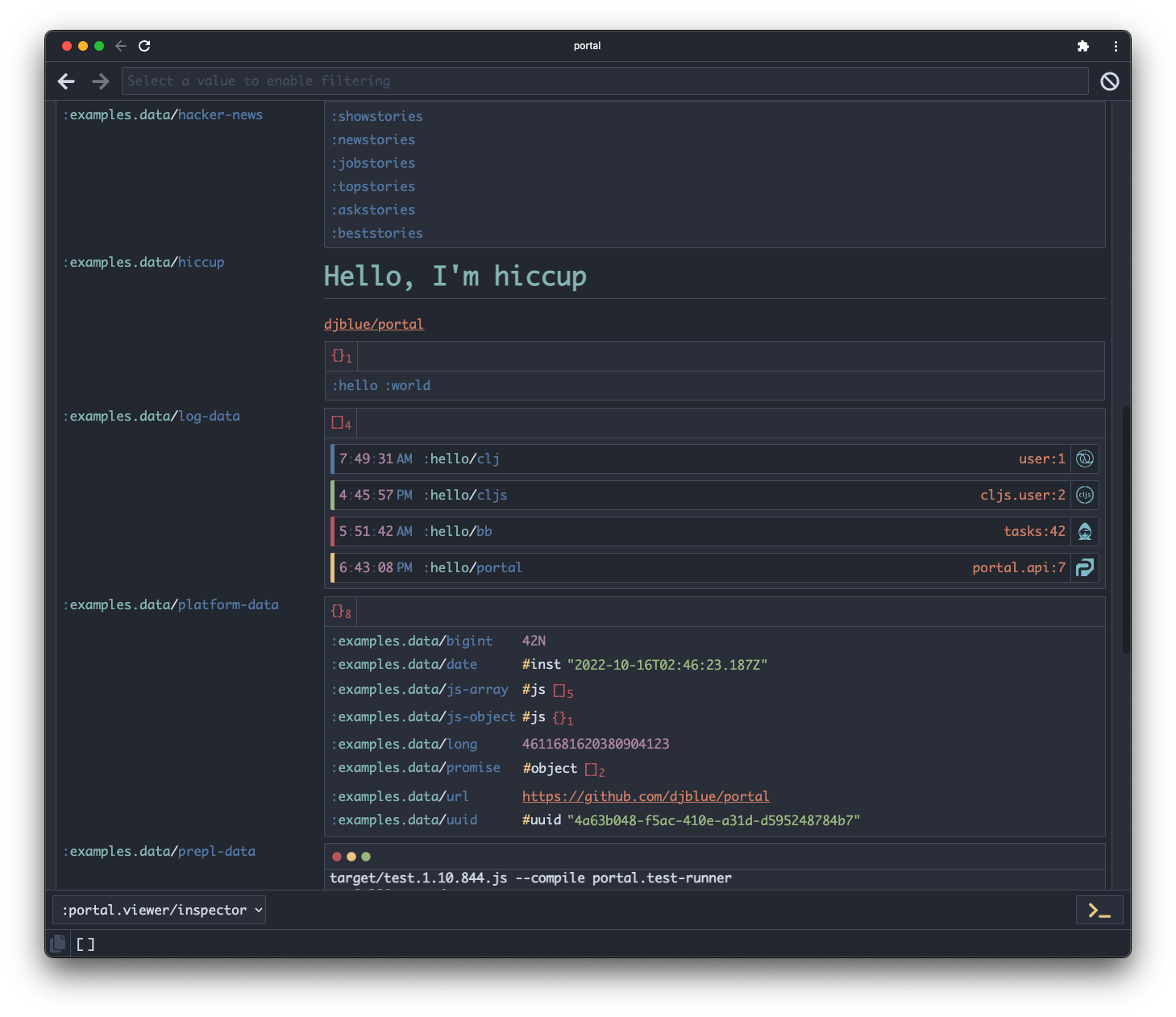 119 | 120 | ## Code Style and idiomatic Clojure 121 | 122 | Clojure aware editors should automatically apply formatting that follows the [:globe_with_meridians: Clojure Style guide](https://github.com/bbatsov/clojure-style-guide){target=_blank}. 123 | 124 | Live linting with [:fontawesome-brands-github: clj-kondo](https://github.com/borkdude/clj-kondo){target=_blank} suggests common idioms and highlights a wide range of syntax errors as code is written, minimizing bugs and therefore speeding up the development process. 125 | 126 |  127 |  128 | 129 | !!! INFO "Clojure LSP is build on top of clj-kondo" 130 | [:fontawesome-solid-book-open: Clojure LSP](https://practical.li/clojure/clojure-editors/clojure-lsp/){target=_blank} uses clj-kondo static analysis to provide a standard set of development tools (format, refactor, auto-complete, syntax highlighting, syntax & idiom warnings, code navigation, etc). 131 | 132 | Clojure LSP can be used with any Clojure aware editor that provides an LSP client, e.g. [:fontawesome-solid-book-open: Spacemacs](https://practical.li/spacemacs/install-spacemacs/clojure-lsp/){target=_blank}, [:fontawesome-solid-book-open: Doom Emacs](https://practical.li/doom-emacs/install/clojure-configuration/#clojure-cli){target=_blank}, [:fontawesome-solid-book-open: Neovim](https://practical.li/neovim/repl-driven-development/){target=_blank}, VSCode. 133 | 134 | !!! INFO "Clojure Style Guide" 135 | The [:globe_with_meridians: Clojure Style guide](https://github.com/bbatsov/clojure-style-guide){target=_blank} provides examples of common formatting approaches, although the development team should decide which of these to adopt. Emacs `clojure-mode` will automatically format code and so will Clojure LSP (via cljfmt). These tools are configurable and should be tailored to the teams standard. 136 | 137 | ## Data and Function specifications 138 | 139 | [:fontawesome-solid-book-open: Clojure spec](https://practical.li/clojure/clojure-spec/){target=_blank} is used to define a contract on incoming and outgoing data, to ensure it is of the correct form. 140 | 141 | As data structures are identified in REPL experiments, create data specification to validate the keys and value types of that data. 142 | 143 | ```clojure 144 | ;; --------------------------------------------------- 145 | ;; Address specifications 146 | (spec/def ::house-number string?) 147 | (spec/def ::street string?) 148 | (spec/def ::postal-code string?) 149 | (spec/def ::city string?) 150 | (spec/def ::country string?) 151 | (spec/def ::additional string?) 152 | 153 | (spec/def ::address ; Composite data specification 154 | (spec/keys 155 | :req-un [::street ::postal-code ::city ::country] 156 | :opt-un [::house-number ::additional])) 157 | ;; --------------------------------------------------- 158 | ``` 159 | 160 | As the public API is designed, specifications for each functions arguments are added to validate the correct data is used when calling those functions. 161 | 162 | [:fontawesome-solid-book-open: Generative testing](https://practical.li/clojure/clojure-spec/generative-testing/){target=_blank} provides a far greater scope of test values used incorporated into unit tests. Data uses clojure.spec to randomly generate data for testing on each test run. 163 | 164 | ## Test Driven Development and REPL Driven Development 165 | 166 | {align=right loading=lazy} 167 | 168 | Test Driven Development (TDD) and REPL Driven Development (RDD) complement each other as they both encourage incremental changes and continuous feedback. 169 | 170 | > Test Driven Development fits well with Hammock Time, as good design comes from deep thought 171 | 172 | * RDD enables rapid design experiments so different approaches can easily and quickly be evaluated . 173 | * TDD focuses the results of the REPL experiments into design decisions, codified as unit tests. These tests guide the correctness of specific implementations and provide critical feedback when changes break that design. 174 | 175 | [:fontawesome-solid-book-open: Unit tests](https://practical.li/clojure/testing/unit-testing/){target=_blank} should support the public API of each namespace in a project to help prevent regressions in the code. Its far more efficient in terms of thinking time to define unit tests as the design starts to stabilize than as an after thought. 176 | 177 | `clojure.test` library is part of the Clojure standard library that provides a simple way to start writing unit tests. 178 | 179 | [:fontawesome-solid-book-open: Clojure spec](https://practical.li/clojure/clojure-spec/){target=_blank} can also be used for generative testing, providing far greater scope in values used when running unit tests. Specifications can be defined for values and functions. 180 | 181 | Clojure has a number of [:fontawesome-solid-book-open: test runners](https://practical.li/clojure/testing/test-runners/){target=_blank} available. Kaocha is a test runner that will run unit tests and function specification checks. 182 | 183 | !!! Hint "Automate local test runner" 184 | Use [:fontawesome-solid-book-open: kaocha test runner](https://practical.li/clojure/testing/test-runners/kaocha-test-runner/){target=_blank} in watch mode to run tests and specification check automatically (when changes are saved) 185 | ```shell 186 | clojure -X:test/watch 187 | ``` 188 | 189 | ## Continuous Integration and Deployment 190 | 191 | Add a [:fontawesome-solid-book-open: continuous integration service](https://practical.li/clojure/continuous-integration/){target=_blank} to run tests and builds code on every shared commit. Spin up testable review deployments when commits pushed to a pull request branch, before pushing commits to the main deployment branch, creating an effective pipeline to gain further feedback. 192 | 193 | - [:globe_with_meridians: CircleCI](https://practical.li/clojure/continuous-integration/circle-ci/){target=_blank} provides a simple to use service that supports Clojure projects. 194 | - [:globe_with_meridians: GitHub Workflows](https://docs.github.com/en/actions/using-workflows){target=_blank} and [GitHub actions marketplace](https://github.com/marketplace?type=actions){target=_blank} to quickly build a tailored continuous integration service, e.g. [Setup Clojure GitHub Action](https://github.com/marketplace/actions/setup-clojure){target=_blank}. 195 | - [:globe_with_meridians: GitLab CI](https://docs.gitlab.com/ee/ci/introduction/index.html){target=_blank} 196 | 197 | 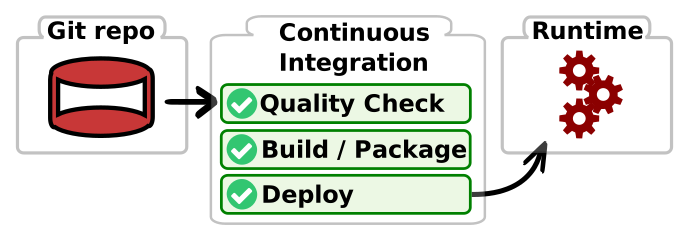 198 | 199 | ## Live Coding with Data - Stuart Halloway 200 | 201 | There are few novel features of programming languages, but each combination has different properties. The combination of dynamic, hosted, functional and extended Lisp in Clojure gives developers the tools for making effective programs. The ways in which Clojure's unique combination of features can yield a highly effective development process. 202 | 203 | Over more than a decade we have developed an effective approach to writing code in Clojure whose power comes from composing many of its key features. As different as Clojure programs are from e.g. Java programs, so to can and should be the development experience. You are not in Kansas anymore! 204 | 205 | This talk presents a demonstration of the leverage you can get when writing programs in Clojure, with examples, based on my experiences as a core developer of Clojure and Datomic. 206 | 207 |208 | 209 |
210 | -------------------------------------------------------------------------------- /LICENSE: -------------------------------------------------------------------------------- 1 | Attribution-ShareAlike 4.0 International 2 | 3 | ======================================================================= 4 | 5 | Creative Commons Corporation ("Creative Commons") is not a law firm and 6 | does not provide legal services or legal advice. Distribution of 7 | Creative Commons public licenses does not create a lawyer-client or 8 | other relationship. Creative Commons makes its licenses and related 9 | information available on an "as-is" basis. Creative Commons gives no 10 | warranties regarding its licenses, any material licensed under their 11 | terms and conditions, or any related information. Creative Commons 12 | disclaims all liability for damages resulting from their use to the 13 | fullest extent possible. 14 | 15 | Using Creative Commons Public Licenses 16 | 17 | Creative Commons public licenses provide a standard set of terms and 18 | conditions that creators and other rights holders may use to share 19 | original works of authorship and other material subject to copyright 20 | and certain other rights specified in the public license below. The 21 | following considerations are for informational purposes only, are not 22 | exhaustive, and do not form part of our licenses. 23 | 24 | Considerations for licensors: Our public licenses are 25 | intended for use by those authorized to give the public 26 | permission to use material in ways otherwise restricted by 27 | copyright and certain other rights. Our licenses are 28 | irrevocable. Licensors should read and understand the terms 29 | and conditions of the license they choose before applying it. 30 | Licensors should also secure all rights necessary before 31 | applying our licenses so that the public can reuse the 32 | material as expected. Licensors should clearly mark any 33 | material not subject to the license. This includes other CC- 34 | licensed material, or material used under an exception or 35 | limitation to copyright. More considerations for licensors: 36 | wiki.creativecommons.org/Considerations_for_licensors 37 | 38 | Considerations for the public: By using one of our public 39 | licenses, a licensor grants the public permission to use the 40 | licensed material under specified terms and conditions. If 41 | the licensor's permission is not necessary for any reason--for 42 | example, because of any applicable exception or limitation to 43 | copyright--then that use is not regulated by the license. Our 44 | licenses grant only permissions under copyright and certain 45 | other rights that a licensor has authority to grant. Use of 46 | the licensed material may still be restricted for other 47 | reasons, including because others have copyright or other 48 | rights in the material. A licensor may make special requests, 49 | such as asking that all changes be marked or described. 50 | Although not required by our licenses, you are encouraged to 51 | respect those requests where reasonable. More_considerations 52 | for the public: 53 | wiki.creativecommons.org/Considerations_for_licensees 54 | 55 | ======================================================================= 56 | 57 | Creative Commons Attribution-ShareAlike 4.0 International Public 58 | License 59 | 60 | By exercising the Licensed Rights (defined below), You accept and agree 61 | to be bound by the terms and conditions of this Creative Commons 62 | Attribution-ShareAlike 4.0 International Public License ("Public 63 | License"). To the extent this Public License may be interpreted as a 64 | contract, You are granted the Licensed Rights in consideration of Your 65 | acceptance of these terms and conditions, and the Licensor grants You 66 | such rights in consideration of benefits the Licensor receives from 67 | making the Licensed Material available under these terms and 68 | conditions. 69 | 70 | 71 | Section 1 -- Definitions. 72 | 73 | a. Adapted Material means material subject to Copyright and Similar 74 | Rights that is derived from or based upon the Licensed Material 75 | and in which the Licensed Material is translated, altered, 76 | arranged, transformed, or otherwise modified in a manner requiring 77 | permission under the Copyright and Similar Rights held by the 78 | Licensor. For purposes of this Public License, where the Licensed 79 | Material is a musical work, performance, or sound recording, 80 | Adapted Material is always produced where the Licensed Material is 81 | synched in timed relation with a moving image. 82 | 83 | b. Adapter's License means the license You apply to Your Copyright 84 | and Similar Rights in Your contributions to Adapted Material in 85 | accordance with the terms and conditions of this Public License. 86 | 87 | c. BY-SA Compatible License means a license listed at 88 | creativecommons.org/compatiblelicenses, approved by Creative 89 | Commons as essentially the equivalent of this Public License. 90 | 91 | d. Copyright and Similar Rights means copyright and/or similar rights 92 | closely related to copyright including, without limitation, 93 | performance, broadcast, sound recording, and Sui Generis Database 94 | Rights, without regard to how the rights are labeled or 95 | categorized. For purposes of this Public License, the rights 96 | specified in Section 2(b)(1)-(2) are not Copyright and Similar 97 | Rights. 98 | 99 | e. Effective Technological Measures means those measures that, in the 100 | absence of proper authority, may not be circumvented under laws 101 | fulfilling obligations under Article 11 of the WIPO Copyright 102 | Treaty adopted on December 20, 1996, and/or similar international 103 | agreements. 104 | 105 | f. Exceptions and Limitations means fair use, fair dealing, and/or 106 | any other exception or limitation to Copyright and Similar Rights 107 | that applies to Your use of the Licensed Material. 108 | 109 | g. License Elements means the license attributes listed in the name 110 | of a Creative Commons Public License. The License Elements of this 111 | Public License are Attribution and ShareAlike. 112 | 113 | h. Licensed Material means the artistic or literary work, database, 114 | or other material to which the Licensor applied this Public 115 | License. 116 | 117 | i. Licensed Rights means the rights granted to You subject to the 118 | terms and conditions of this Public License, which are limited to 119 | all Copyright and Similar Rights that apply to Your use of the 120 | Licensed Material and that the Licensor has authority to license. 121 | 122 | j. Licensor means the individual(s) or entity(ies) granting rights 123 | under this Public License. 124 | 125 | k. Share means to provide material to the public by any means or 126 | process that requires permission under the Licensed Rights, such 127 | as reproduction, public display, public performance, distribution, 128 | dissemination, communication, or importation, and to make material 129 | available to the public including in ways that members of the 130 | public may access the material from a place and at a time 131 | individually chosen by them. 132 | 133 | l. Sui Generis Database Rights means rights other than copyright 134 | resulting from Directive 96/9/EC of the European Parliament and of 135 | the Council of 11 March 1996 on the legal protection of databases, 136 | as amended and/or succeeded, as well as other essentially 137 | equivalent rights anywhere in the world. 138 | 139 | m. You means the individual or entity exercising the Licensed Rights 140 | under this Public License. Your has a corresponding meaning. 141 | 142 | 143 | Section 2 -- Scope. 144 | 145 | a. License grant. 146 | 147 | 1. Subject to the terms and conditions of this Public License, 148 | the Licensor hereby grants You a worldwide, royalty-free, 149 | non-sublicensable, non-exclusive, irrevocable license to 150 | exercise the Licensed Rights in the Licensed Material to: 151 | 152 | a. reproduce and Share the Licensed Material, in whole or 153 | in part; and 154 | 155 | b. produce, reproduce, and Share Adapted Material. 156 | 157 | 2. Exceptions and Limitations. For the avoidance of doubt, where 158 | Exceptions and Limitations apply to Your use, this Public 159 | License does not apply, and You do not need to comply with 160 | its terms and conditions. 161 | 162 | 3. Term. The term of this Public License is specified in Section 163 | 6(a). 164 | 165 | 4. Media and formats; technical modifications allowed. The 166 | Licensor authorizes You to exercise the Licensed Rights in 167 | all media and formats whether now known or hereafter created, 168 | and to make technical modifications necessary to do so. The 169 | Licensor waives and/or agrees not to assert any right or 170 | authority to forbid You from making technical modifications 171 | necessary to exercise the Licensed Rights, including 172 | technical modifications necessary to circumvent Effective 173 | Technological Measures. For purposes of this Public License, 174 | simply making modifications authorized by this Section 2(a) 175 | (4) never produces Adapted Material. 176 | 177 | 5. Downstream recipients. 178 | 179 | a. Offer from the Licensor -- Licensed Material. Every 180 | recipient of the Licensed Material automatically 181 | receives an offer from the Licensor to exercise the 182 | Licensed Rights under the terms and conditions of this 183 | Public License. 184 | 185 | b. Additional offer from the Licensor -- Adapted Material. 186 | Every recipient of Adapted Material from You 187 | automatically receives an offer from the Licensor to 188 | exercise the Licensed Rights in the Adapted Material 189 | under the conditions of the Adapter's License You apply. 190 | 191 | c. No downstream restrictions. You may not offer or impose 192 | any additional or different terms or conditions on, or 193 | apply any Effective Technological Measures to, the 194 | Licensed Material if doing so restricts exercise of the 195 | Licensed Rights by any recipient of the Licensed 196 | Material. 197 | 198 | 6. No endorsement. Nothing in this Public License constitutes or 199 | may be construed as permission to assert or imply that You 200 | are, or that Your use of the Licensed Material is, connected 201 | with, or sponsored, endorsed, or granted official status by, 202 | the Licensor or others designated to receive attribution as 203 | provided in Section 3(a)(1)(A)(i). 204 | 205 | b. Other rights. 206 | 207 | 1. Moral rights, such as the right of integrity, are not 208 | licensed under this Public License, nor are publicity, 209 | privacy, and/or other similar personality rights; however, to 210 | the extent possible, the Licensor waives and/or agrees not to 211 | assert any such rights held by the Licensor to the limited 212 | extent necessary to allow You to exercise the Licensed 213 | Rights, but not otherwise. 214 | 215 | 2. Patent and trademark rights are not licensed under this 216 | Public License. 217 | 218 | 3. To the extent possible, the Licensor waives any right to 219 | collect royalties from You for the exercise of the Licensed 220 | Rights, whether directly or through a collecting society 221 | under any voluntary or waivable statutory or compulsory 222 | licensing scheme. In all other cases the Licensor expressly 223 | reserves any right to collect such royalties. 224 | 225 | 226 | Section 3 -- License Conditions. 227 | 228 | Your exercise of the Licensed Rights is expressly made subject to the 229 | following conditions. 230 | 231 | a. Attribution. 232 | 233 | 1. If You Share the Licensed Material (including in modified 234 | form), You must: 235 | 236 | a. retain the following if it is supplied by the Licensor 237 | with the Licensed Material: 238 | 239 | i. identification of the creator(s) of the Licensed 240 | Material and any others designated to receive 241 | attribution, in any reasonable manner requested by 242 | the Licensor (including by pseudonym if 243 | designated); 244 | 245 | ii. a copyright notice; 246 | 247 | iii. a notice that refers to this Public License; 248 | 249 | iv. a notice that refers to the disclaimer of 250 | warranties; 251 | 252 | v. a URI or hyperlink to the Licensed Material to the 253 | extent reasonably practicable; 254 | 255 | b. indicate if You modified the Licensed Material and 256 | retain an indication of any previous modifications; and 257 | 258 | c. indicate the Licensed Material is licensed under this 259 | Public License, and include the text of, or the URI or 260 | hyperlink to, this Public License. 261 | 262 | 2. You may satisfy the conditions in Section 3(a)(1) in any 263 | reasonable manner based on the medium, means, and context in 264 | which You Share the Licensed Material. For example, it may be 265 | reasonable to satisfy the conditions by providing a URI or 266 | hyperlink to a resource that includes the required 267 | information. 268 | 269 | 3. If requested by the Licensor, You must remove any of the 270 | information required by Section 3(a)(1)(A) to the extent 271 | reasonably practicable. 272 | 273 | b. ShareAlike. 274 | 275 | In addition to the conditions in Section 3(a), if You Share 276 | Adapted Material You produce, the following conditions also apply. 277 | 278 | 1. The Adapter's License You apply must be a Creative Commons 279 | license with the same License Elements, this version or 280 | later, or a BY-SA Compatible License. 281 | 282 | 2. You must include the text of, or the URI or hyperlink to, the 283 | Adapter's License You apply. You may satisfy this condition 284 | in any reasonable manner based on the medium, means, and 285 | context in which You Share Adapted Material. 286 | 287 | 3. You may not offer or impose any additional or different terms 288 | or conditions on, or apply any Effective Technological 289 | Measures to, Adapted Material that restrict exercise of the 290 | rights granted under the Adapter's License You apply. 291 | 292 | 293 | Section 4 -- Sui Generis Database Rights. 294 | 295 | Where the Licensed Rights include Sui Generis Database Rights that 296 | apply to Your use of the Licensed Material: 297 | 298 | a. for the avoidance of doubt, Section 2(a)(1) grants You the right 299 | to extract, reuse, reproduce, and Share all or a substantial 300 | portion of the contents of the database; 301 | 302 | b. if You include all or a substantial portion of the database 303 | contents in a database in which You have Sui Generis Database 304 | Rights, then the database in which You have Sui Generis Database 305 | Rights (but not its individual contents) is Adapted Material, 306 | 307 | including for purposes of Section 3(b); and 308 | c. You must comply with the conditions in Section 3(a) if You Share 309 | all or a substantial portion of the contents of the database. 310 | 311 | For the avoidance of doubt, this Section 4 supplements and does not 312 | replace Your obligations under this Public License where the Licensed 313 | Rights include other Copyright and Similar Rights. 314 | 315 | 316 | Section 5 -- Disclaimer of Warranties and Limitation of Liability. 317 | 318 | a. UNLESS OTHERWISE SEPARATELY UNDERTAKEN BY THE LICENSOR, TO THE 319 | EXTENT POSSIBLE, THE LICENSOR OFFERS THE LICENSED MATERIAL AS-IS 320 | AND AS-AVAILABLE, AND MAKES NO REPRESENTATIONS OR WARRANTIES OF 321 | ANY KIND CONCERNING THE LICENSED MATERIAL, WHETHER EXPRESS, 322 | IMPLIED, STATUTORY, OR OTHER. THIS INCLUDES, WITHOUT LIMITATION, 323 | WARRANTIES OF TITLE, MERCHANTABILITY, FITNESS FOR A PARTICULAR 324 | PURPOSE, NON-INFRINGEMENT, ABSENCE OF LATENT OR OTHER DEFECTS, 325 | ACCURACY, OR THE PRESENCE OR ABSENCE OF ERRORS, WHETHER OR NOT 326 | KNOWN OR DISCOVERABLE. WHERE DISCLAIMERS OF WARRANTIES ARE NOT 327 | ALLOWED IN FULL OR IN PART, THIS DISCLAIMER MAY NOT APPLY TO YOU. 328 | 329 | b. TO THE EXTENT POSSIBLE, IN NO EVENT WILL THE LICENSOR BE LIABLE 330 | TO YOU ON ANY LEGAL THEORY (INCLUDING, WITHOUT LIMITATION, 331 | NEGLIGENCE) OR OTHERWISE FOR ANY DIRECT, SPECIAL, INDIRECT, 332 | INCIDENTAL, CONSEQUENTIAL, PUNITIVE, EXEMPLARY, OR OTHER LOSSES, 333 | COSTS, EXPENSES, OR DAMAGES ARISING OUT OF THIS PUBLIC LICENSE OR 334 | USE OF THE LICENSED MATERIAL, EVEN IF THE LICENSOR HAS BEEN 335 | ADVISED OF THE POSSIBILITY OF SUCH LOSSES, COSTS, EXPENSES, OR 336 | DAMAGES. WHERE A LIMITATION OF LIABILITY IS NOT ALLOWED IN FULL OR 337 | IN PART, THIS LIMITATION MAY NOT APPLY TO YOU. 338 | 339 | c. The disclaimer of warranties and limitation of liability provided 340 | above shall be interpreted in a manner that, to the extent 341 | possible, most closely approximates an absolute disclaimer and 342 | waiver of all liability. 343 | 344 | 345 | Section 6 -- Term and Termination. 346 | 347 | a. This Public License applies for the term of the Copyright and 348 | Similar Rights licensed here. However, if You fail to comply with 349 | this Public License, then Your rights under this Public License 350 | terminate automatically. 351 | 352 | b. Where Your right to use the Licensed Material has terminated under 353 | Section 6(a), it reinstates: 354 | 355 | 1. automatically as of the date the violation is cured, provided 356 | it is cured within 30 days of Your discovery of the 357 | violation; or 358 | 359 | 2. upon express reinstatement by the Licensor. 360 | 361 | For the avoidance of doubt, this Section 6(b) does not affect any 362 | right the Licensor may have to seek remedies for Your violations 363 | of this Public License. 364 | 365 | c. For the avoidance of doubt, the Licensor may also offer the 366 | Licensed Material under separate terms or conditions or stop 367 | distributing the Licensed Material at any time; however, doing so 368 | will not terminate this Public License. 369 | 370 | d. Sections 1, 5, 6, 7, and 8 survive termination of this Public 371 | License. 372 | 373 | 374 | Section 7 -- Other Terms and Conditions. 375 | 376 | a. The Licensor shall not be bound by any additional or different 377 | terms or conditions communicated by You unless expressly agreed. 378 | 379 | b. Any arrangements, understandings, or agreements regarding the 380 | Licensed Material not stated herein are separate from and 381 | independent of the terms and conditions of this Public License. 382 | 383 | 384 | Section 8 -- Interpretation. 385 | 386 | a. For the avoidance of doubt, this Public License does not, and 387 | shall not be interpreted to, reduce, limit, restrict, or impose 388 | conditions on any use of the Licensed Material that could lawfully 389 | be made without permission under this Public License. 390 | 391 | b. To the extent possible, if any provision of this Public License is 392 | deemed unenforceable, it shall be automatically reformed to the 393 | minimum extent necessary to make it enforceable. If the provision 394 | cannot be reformed, it shall be severed from this Public License 395 | without affecting the enforceability of the remaining terms and 396 | conditions. 397 | 398 | c. No term or condition of this Public License will be waived and no 399 | failure to comply consented to unless expressly agreed to by the 400 | Licensor. 401 | 402 | d. Nothing in this Public License constitutes or may be interpreted 403 | as a limitation upon, or waiver of, any privileges and immunities 404 | that apply to the Licensor or You, including from the legal 405 | processes of any jurisdiction or authority. 406 | 407 | 408 | ======================================================================= 409 | 410 | Creative Commons is not a party to its public 411 | licenses. Notwithstanding, Creative Commons may elect to apply one of 412 | its public licenses to material it publishes and in those instances 413 | will be considered the “Licensor.” The text of the Creative Commons 414 | public licenses is dedicated to the public domain under the CC0 Public 415 | Domain Dedication. Except for the limited purpose of indicating that 416 | material is shared under a Creative Commons public license or as 417 | otherwise permitted by the Creative Commons policies published at 418 | creativecommons.org/policies, Creative Commons does not authorize the 419 | use of the trademark "Creative Commons" or any other trademark or logo 420 | of Creative Commons without its prior written consent including, 421 | without limitation, in connection with any unauthorized modifications 422 | to any of its public licenses or any other arrangements, 423 | understandings, or agreements concerning use of licensed material. For 424 | the avoidance of doubt, this paragraph does not form part of the 425 | public licenses. 426 | 427 | Creative Commons may be contacted at creativecommons.org. 428 | -------------------------------------------------------------------------------- /docs/introduction/clojure-in-15-minutes.md: -------------------------------------------------------------------------------- 1 | # Clojure in 15 minutes 2 | 3 | A quick tour of the Clojure syntax and common functions. The syntax is quite minimal so this should take around 15 minutest to read through (it may take longer to get comfortable with). 4 | 5 | !!! HINT "Try the code out in the REPL" 6 | [:fontawesome-solid-book-open: Start a Clojure REPL](/clojure/clojure-cli/repl/) or use a [:fontawesome-solid-book-open: Clojure aware editor](/clojure/clojure-editors/) connected to a REPL and experiment with these code examples. 7 | 8 | Using the REPL provides instant feedback on each expression as they are evaluated, greatly increasing your understanding. 9 | 10 | 11 | ## Clojure expressions 12 | 13 | Clojure is written with "expressions", a lists of elements inside parentheses, `()`, separated by space characters. 14 | 15 | An expression is made of one or more forms, a form is a general term for anything that legally evaluates in Clojure, e.g. a number, string function definition, etc. 16 | 17 | Clojure evaluates the first element in an expression as a function call. Additional elements in the expression are passed as value arguments to the called function. 18 | 19 | !!! EXAMPLE "Function call with value and expression as arguments" 20 | ```clojure 21 | (+ 2007 (* 1 16)) 22 | ``` 23 | 24 | !!! EXAMPLE "Functions can be passed as an argument" 25 | ```clojure 26 | (map inc (range 0 99)) 27 | ``` 28 | 29 | 30 | ## Comment 31 | 32 | `;;` two semi-colons for a line comment, `;` single semi-colon to comment the rest of the line 33 | 34 | `#_` comment reader macro to skip specific parts of code, e.g. `(+ 1 2 #_(* 3 4))` is read as `(+ 1 2)` 35 | 36 | `(comment ,,,)` form to comment all the containing forms, useful to [:fontawesome-solid-book-open: separate experimental and established code](/clojure/introduction/repl-workflow/#rich-comment-blocks-living-documentation) in a namespace. Note that `(comment )` returns `nil` when evaluated so shouldn't be used inside other code. 37 | 38 | 39 | ## Organising Clojure 40 | 41 | Clojure code is organised into one or more namespaces. The namespace represents the directory path and file name that contains the code of the particular namespace. 42 | 43 | A company name or community repository name is often used making the namespace unique and easier to share & reuse. 44 | 45 | ??? INFO "ns form returns nil value" 46 | The `(ns namespace.,,,)` expression returns a `nil` value, as its work is done behind the scenes. 47 | 48 | All Clojure functions must return a value and `nil` is a value that means 'no value'. 49 | 50 | !!! EXAMPLE "Define a namespace" 51 | ```clojure title="src/practicalli/game_board.clj" 52 | (ns practicalli.game-board) 53 | ``` 54 | 55 | !!! EXAMPLE "Define a longer namespace" 56 | ```clojure title="src/com/company/product/component_name.clj" 57 | (ns com.company.product.component-name) 58 | ``` 59 | 60 | ??? WARNING "Namespaces use dash, directory and file names use underscore" 61 | Clojure uses `kebab-case` for names (common in Lisp dialects) 62 | 63 | Unfortunately the Java Virtual Machine that hosts Clojure does not support dash, `-`, in file and directory names, so an underscore, `-`, character is used 64 | 65 | 66 | ## String manipulation 67 | 68 | The `str` function creates a new string from all the arguments passed 69 | 70 | !!! EXAMPLE "Combine strings into a single string value" 71 | ```clojure 72 | (str "Hello" " " "World") 73 | ``` 74 | 75 | `"Hello World"` is returned from evaluating the expression. 76 | 77 | !!! HINT "clojure.string library for manipulating strings" 78 | `clojure.string` library functions manipulate values and return string values (other clojure.core functions my return characters as results, e.g. `map`) 79 | 80 | 81 | ## Math, Truth & prefix notation 82 | 83 | Functions use prefix notation, so you can do math with multiple values very easily 84 | 85 | !!! EXAMPLE "Prefix syntax takes multiple arguments" 86 | ```clojure 87 | (+ 1 2 3 5 7 9 12) ; => 40 88 | ``` 89 | 90 | Math in Clojure is very precise, no need for operator precedence rules (as there are no operators) 91 | 92 | Nesting forms defined a very precise calculation 93 | 94 | !!! EXAMPLE "Parentheses used instead of operator preceedence rules" 95 | ```clojure 96 | (* 1 2 (- 24 (* 7 3))) 97 | ``` 98 | 99 | `6` is returned as the value. Nested expressions are typically read inside out. `(* 7 3)` is `21`, giving `(- 24 21)` expression resulting in `3`. Finally the expression becomes `(* 1 2 3)`, resulting in a value of `6` 100 | 101 | 102 | Maintain precision for calculations using a Ratio type in Clojure 103 | 104 | !!! EXAMPLE "Clojure Ratio value" 105 | ```clojure 106 | (/ 27 7) ; => 27/7 107 | ``` 108 | 109 | `22/7` is returned as the value, rather than a floating point value (double) which may loose some precision due to rounding. 110 | 111 | 112 | ### Equality 113 | 114 | `=` function provides a test for equality 115 | 116 | !!! EXAMPLE "Equal values return a boolean true" 117 | ```clojure 118 | (= 1 1) ; => true 119 | ``` 120 | 121 | !!! EXAMPLE "Unequals values return a boolean false" 122 | ```clojure 123 | (= 2 1) ; => false 124 | ``` 125 | 126 | `true` and `false` are Boolean values and can be used literally in Clojure. 127 | 128 | 129 | ### Predicates 130 | 131 | A predicate is a function that returns a boolean `true` or `false` value and by convention the function name ends in `?`, e.g. `true?`, `false?`, `seq?`, `even?`, `uuid?`. 132 | 133 | `and` & `or` functions can be used to chain the results of predicates together for more interesting conditional tests. 134 | 135 | !!! EXAMPLE "All predicates are true, returning true" 136 | ```clojure 137 | (and (true? true) (not false)) ; => true 138 | ``` 139 | 140 | !!! EXAMPLE "One of the predicates or values is true" 141 | ```clojure 142 | (or nil (not= true false) (true? (complement true?)) ) ; => true 143 | ``` 144 | 145 | !!! HINT "Truthy and Falsy values in Clojure" 146 | `false` boolean value and `nil` value are considered false in Clojure. 147 | 148 | All other values are consider true. 149 | 150 | 151 | [:fontawesome-solid-book-open: Clojure Standard Library Predicate Functions](https://practical.li/clojure/reference/standard-library/predicate-functions/){.md-button} 152 | 153 | 154 | ## Collections & Sequences 155 | 156 | The most common data collections in Clojure: 157 | 158 | * List literal `(1 2 "three")` or function call `(list 1 2 "three")` - a list of values read from start to end (sequential access) 159 | * Vector literal `[1 2 "three"]` or function call `(vector 1 2 "three")` - a vector of values with index (random access) 160 | * Hash-map literal `{:key "value"}` or function call `(hash-map :key "value")` - a hash-map with zero or more key value pairs (associative relation) 161 | * Set literal `#{1 2 "three"}` or function call `(set 1 2 "three")` - a unique set of values 162 | 163 | A literal list `()` expression is evaluated as a function call. The first element in the list is the name of the function to call and additional values are arguments to the function (assuming the function takes arguments). 164 | 165 | The `'` is syntax short-cut for the `quote` function which informs the Clojure reader to treat a list as data only. A quoted list is not evaluated as a function. 166 | 167 | !!! EXAMPLE "Evaluating a quoted list returns that list as data" 168 | ```clojure 169 | '(1 2 3) ; => (1 2 3) 170 | ``` 171 | 172 | !!! EXAMPLE "Lists and vectors are collections" 173 | ```clojure 174 | (and (coll? '(1 2 3)) (coll? [1 2 3])) ; => true 175 | ``` 176 | 177 | Only lists are sequences 178 | 179 | ```clojure 180 | (seq? '(1 2 3)) ; => true 181 | (seq? [1 2 3]) ; => false 182 | ``` 183 | 184 | Sequences are an interface for logical lists, which can be lazy. "Lazy" means that a sequence of values are not evaluated until accessed. 185 | 186 | The `range` function generates an 'infinite' series of numbers, e.g. `(range) ; => (0 1 2 3 4 ...)` 187 | 188 | Lazily evaluating a sequence enables the use of large or even an infinite series without consuming all the computer memory, like so: 189 | 190 | !!! EXAMPLE "Lazy sequences" 191 | ```clojure 192 | (take 4 (range)) ; (0 1 2 3) - lazyily evaluate range and stop when enough values are taken 193 | ``` 194 | 195 | Use cons to add an item to the beginning of a list or vector 196 | 197 | ```clojure 198 | (cons 4 [1 2 3]) ; => (4 1 2 3) 199 | (cons 4 '(1 2 3)) ; => (4 1 2 3) 200 | ``` 201 | 202 | Use conj to add an item relative to the type of collection, to the beginning of a list or the end of a vector 203 | 204 | ```clojure 205 | (conj [1 2 3] 4) ; => [1 2 3 4] 206 | (conj '(1 2 3) 4) ; => (4 1 2 3) 207 | ``` 208 | 209 | Use `concat` (concatenate) to add sequences (lists or vectors) together 210 | 211 | ```clojure 212 | (concat [1 2] '(3 4)) ; => (1 2 3 4) 213 | ``` 214 | 215 | `filter` maps another function over a collection of values, returning the values that returned true from the function used by filter 216 | 217 | ```clojure 218 | (map inc [1 2 3]) ; => (2 3 4) 219 | (filter even? [1 2 3]) ; => (2) 220 | ``` 221 | 222 | `reduce` uses a function over a collection of values to return a combined result 223 | 224 | ```clojure 225 | (reduce + [1 2 3 4]) 226 | ; = (+ (+ (+ 1 2) 3) 4) 227 | ; => 10 228 | ``` 229 | 230 | Reduce can take an initial-value argument too 231 | 232 | ```clojure 233 | (reduce conj [] '(3 2 1)) 234 | ; => [3 2 1] 235 | ``` 236 | 237 | The above is the equivalent of `(conj (conj (conj [] 3) 2) 1)` 238 | 239 | 240 | ## Anonymous Functions 241 | 242 | Use `fn` to create new functions that defines some behaviour. `fn` is referred to as an anonymous function as it has no external name to be referenced by and must be called within a list form. 243 | 244 | ```clojure 245 | (fn hello [] "Hello World") 246 | ``` 247 | 248 | Wrap an anonymous function `(fn ,,,)` expression in another list to call it and return the result. 249 | 250 | !!! EXAMPLE "Call an anonymous function" 251 | ```clojure 252 | ((fn hello [] "Hello World")) ; => "Hello World" 253 | ``` 254 | 255 | Normally the anonymous function is used inline with other code 256 | 257 | !!! EXAMPLE "Use anonymous function within other code" 258 | ```clojure 259 | (map (fn [x] (* x 2)) [1 2 3 4 [1 2 3 4 5]5]) 260 | ``` 261 | 262 | Make the anonymous function reusable by binding it to a shared name (`var`) using `def`. 263 | 264 | The `var` name bound to the function can now be called anywhere in the namespace. 265 | 266 | > As `def` creates a `var` (variable) name, the developer can changed the expression the name is bound to and re-evaluated to use the changed behaviour. 267 | 268 | !!! EXAMPLE "Bind a name to the anonymous function" 269 | ```clojure 270 | (def hello-world 271 | (fn hello [] "Hello World")) 272 | ``` 273 | 274 | !!! EXAMPLE "Evaluate anonymous function by evaluating its name" 275 | ```clojure 276 | hello-world 277 | ``` 278 | 279 | > NOTE: `hello-world` is a name and not a function call, so parentheses are not required. 280 | 281 | 282 | ## Shared Functions 283 | 284 | It is more common to use the `defn` macro to define a function. This is the same as defining the `fn` function and the `def` name within the same expression 285 | 286 | !!! EXAMPLE "Define a function with defn macro" 287 | ```clojure 288 | (defn hello-world 289 | "I am a humble doc-string, please describe the function purpose" 290 | [] 291 | "Hello World") 292 | ``` 293 | 294 | `#'user/hello-world` is the value returned from evaluating the expression, showing the fully qualified name of the function. Note: the fully qualified name will be different when defined in a different namespace than `user`. 295 | 296 | 297 | > A `defn` function has the scope of the current namespace, so can be called anywhere in the namespace or in a namepace that has used `require` to include this namespace. 298 | 299 | !!! EXAMPLE "Call a function" 300 | ```clojure 301 | (hello-world) 302 | ``` 303 | 304 | The `[]` vector is used to define the argument names for the function. There can be zero or more arguments. 305 | 306 | !!! EXAMPLE "Call function with arguments" 307 | ```clojure 308 | (defn hello [name] 309 | (str "Hello " name)) 310 | ``` 311 | 312 | The correct number of arguments must be used when calling a function, or an error will be returned. 313 | 314 | !!! EXAMPLE "Call function with arguments" 315 | ```clojure 316 | (hello "Steve") ; => "Hello Steve" 317 | ``` 318 | 319 | ??? HINT "Pass a hash-map as an argument" 320 | Simplify the design of a function signature by passing all arguments as a hash-map. 321 | ```clojure 322 | (defn data-processing 323 | [data] 324 | (let [body (get data :body)]) 325 | (transform body)) 326 | ``` 327 | [:globe_with_meridians: Associative Destructuring](https://clojure.org/guides/destructuring#_associative_destructuring){target=_blank} can be used to automatically create local variables from the desired keys contained in the map, giving access to the value of each key. 328 | ```clojure 329 | (defn data-processing 330 | [{:keys [body]}] 331 | (transform body)) 332 | ``` 333 | 334 | 335 | Clojure supports multi-variadic functions, allowing one function definition to respond to a function call with different number of arguments. This provides a simple form of polymorphism based on the number of arguments. 336 | 337 | ```clojure 338 | (defn hello-polly 339 | ([] "Hello World") ; (1)! 340 | ([name] (str "Hello " name))) ; (2)! 341 | ``` 342 | 343 | 1. Call `hello-polly` with one argument 344 | ```clojure 345 | (hello-polly "Jake") ; => "Hello Jake" 346 | ``` 347 | 348 | 2. Call `hello-polly` with zero arguments 349 | ```clojure 350 | (hello-polly) ; => "Hello World" 351 | ``` 352 | 353 | Functions can pack extra arguments up in a seq for you 354 | 355 | ```clojure 356 | (defn count-args [& args] 357 | (str "You passed " (count args) " args: " args)) 358 | (count-args 1 2 3) ; => "You passed 3 args: (1 2 3)" 359 | ``` 360 | 361 | You can mix regular and packed arguments 362 | 363 | ```clojure 364 | (defn hello-count [name & args] 365 | (str "Hello " name ", you passed " (count args) " extra args")) 366 | (hello-count "Finn" 1 2 3) 367 | ; => "Hello Finn, you passed 3 extra args" 368 | ``` 369 | 370 | ## Hash-map collections 371 | 372 | ```clojure 373 | (class {:a 1 :b 2 :c 3}) ; => clojure.lang.PersistentArrayMap 374 | ``` 375 | 376 | Keywords are like strings with some efficiency bonuses 377 | 378 | ```clojure 379 | (class :a) ; => clojure.lang.Keyword 380 | ``` 381 | 382 | Maps can use any type as a key, but usually keywords are best 383 | 384 | ```clojure 385 | (def stringmap (hash-map "a" 1, "b" 2, "c" 3)) 386 | stringmap ; => {"a" 1, "b" 2, "c" 3} 387 | 388 | (def keymap (hash-map :a 1 :b 2 :c 3)) 389 | keymap ; => {:a 1, :c 3, :b 2} (order is not guaranteed) 390 | ``` 391 | 392 | ??? INFO "Commas are whitespace" 393 | commas are always treated as whitespace and are ignored by the Clojure reader 394 | 395 | Retrieve a value from a map by calling it as a function 396 | 397 | ```clojure 398 | (stringmap "a") ; => 1 399 | (keymap :a) ; => 1 400 | ``` 401 | 402 | Keywords can be used to retrieve their value from a map. Strings cannot be used. 403 | 404 | ```clojure 405 | (:b keymap) ; => 2 406 | 407 | ("a" stringmap) 408 | ; => Exception: java.lang.String cannot be cast to clojure.lang.IFn 409 | ``` 410 | 411 | Retrieving a non-present value returns nil 412 | 413 | ```clojure 414 | (stringmap "d") ; => nil 415 | ``` 416 | 417 | Use assoc to add new keys to hash-maps 418 | 419 | ```clojure 420 | (assoc keymap :d 4) ; => {:a 1, :b 2, :c 3, :d 4} 421 | ``` 422 | 423 | But remember, Clojure types are immutable! 424 | 425 | ```clojure 426 | keymap ; => {:a 1, :b 2, :c 3} 427 | ``` 428 | 429 | Use `dissoc` function to remove keys from a hash-map 430 | 431 | ```clojure 432 | (dissoc keymap :a :b) ; => {:c 3} 433 | ``` 434 | 435 | ## Sets 436 | 437 | ```clojure 438 | (class #{1 2 3}) ; => clojure.lang.PersistentHashSet 439 | (set [1 2 3 1 2 3 3 2 1 3 2 1]) ; => #{1 2 3} 440 | ``` 441 | 442 | Add a value to a set with `conj` (conjoin) 443 | 444 | ```clojure 445 | (conj #{1 2 3} 4) ; => #{1 2 3 4} 446 | ``` 447 | 448 | Remove one value from a set with `disj` (disjoin) 449 | 450 | ```clojure 451 | (disj #{1 2 3} 1) ; => #{2 3} 452 | ```` 453 | 454 | Test for existence by using the set as a function: 455 | 456 | ```clojure 457 | (#{1 2 3} 1) ; => 1 458 | (#{1 2 3} 4) ; => nil 459 | ``` 460 | 461 | There are more functions in the [clojure.sets namespace](https://clojure.github.io/clojure/clojure.set-api.html). 462 | 463 | ## Useful forms 464 | 465 | Logic constructs in clojure are just macros, and look like everything else 466 | 467 | ```clojure 468 | (if false "a" "b") ; => "b" 469 | (if false "a") ; => nil 470 | ``` 471 | 472 | Use let to create temporary bindings 473 | 474 | ```clojure 475 | (let [a 1 b 2] 476 | (> a b)) ; => false 477 | ``` 478 | 479 | Group statements together with do 480 | 481 | ```clojure 482 | (do 483 | (print "Hello") 484 | "World") ; => "World" (prints "Hello") 485 | ``` 486 | 487 | Functions have an implicit `do` function that will call every expression within a function definition. 488 | 489 | ```clojure 490 | (defn print-and-say-hello [name] 491 | (print "Saying hello to " name) 492 | (str "Hello " name)) 493 | (print-and-say-hello "Jeff") ;=> "Hello Jeff" (prints "Saying hello to Jeff") 494 | ``` 495 | 496 | The `let` function also has an implicit `do` function. 497 | 498 | ```clojure 499 | (let [name "Urkel"] 500 | (print "Saying hello to " name) 501 | (str "Hello " name)) ; => "Hello Urkel" (prints "Saying hello to Urkel") 502 | ``` 503 | 504 | ## Namespaces and Libraries 505 | 506 | Namespaces are used to organise code into logical groups. The top of each Clojure file has an `ns` form that defines the namespace name. The domain part of the namespace name is typically the organisation or community name (e.g. GitHub organisation or user account name) 507 | 508 | ```clojure 509 | (ns domain.namespace-name) 510 | ``` 511 | 512 | Practicalli projects use a namespace domain of `practicalli` followed by the project name 513 | 514 | ```clojure 515 | (ns practicalli.service-name) 516 | ``` 517 | 518 | `require` allows code from one namespace to be accessed from another namespace, either from a the same Clojure project or from a library added to the project classpath. 519 | 520 | The `:as` directive with `require` is used to specify an alias name, a short-hand for the full library name 521 | 522 | Or `:refer [function-name var-name]` can be used to specify specific functions and data (vars) that are available directly 523 | 524 | A required directive is typically added to a namespace form 525 | 526 | ```clojure 527 | (ns practicalli.service-name 528 | (require [clojure.set :as set])) 529 | ``` 530 | 531 | Functions from `clojure.set` can be used via the alias name, `set/intersection`, rather than the fully qualified name, `clojure.set/intersection` 532 | 533 | ```clojure 534 | (set/intersection #{1 2 3} #{2 3 4}) ; => #{2 3} 535 | (set/difference #{1 2 3} #{2 3 4}) ; => #{1} 536 | ``` 537 | 538 | `:require` directive can be used to include multiple library namespaces 539 | 540 | ```clojure 541 | (ns test 542 | (:require 543 | [clojure.string :as string] 544 | [clojure.set :as set])) 545 | ``` 546 | 547 | `require` can be used as a top level expression (not in an `ns` expression). Requires are often used within a rich code block for experimenting with code. 548 | 549 | ```clojure 550 | (comment 551 | (require 'clojure.set :as set)) 552 | ``` 553 | 554 | 555 | ## Strong Dynamic Types 556 | 557 | Clojure is strongly typed, so everything is a type in Clojure. 558 | 559 | Clojure is dynamically typed, so Clojure infers the type. An explicit type name does not need to be specified in the code, making the code simpler and more concise. 560 | 561 | Clojure is a hosted language and uses the type system of the platform it runs upon. For example, Clojure uses Java object types for booleans, strings and numbers under the covers. 562 | 563 | Use `class` or `type` function to inspect the type of some code in Clojure. 564 | 565 | ```clojure 566 | (type 1) ; Integer literals are java.lang.Long by default 567 | (type 1.); Float literals are java.lang.Double 568 | (type ""); Strings always double-quoted, and are java.lang.String 569 | (type false) ; Booleans are java.lang.Boolean 570 | (type nil); The "null" value is called nil 571 | ``` 572 | 573 | Collections in Clojure have their own type too. 574 | 575 | ``` 576 | (type [1 2 3]); => clojure.lang.PersistentVector 577 | (type '(1 2 3)); => clojure.lang.PersistentList 578 | ``` 579 | 580 | !!! INFO "Type hints" 581 | Type hints can be used to avoid reflection look-ups where performace critical issues have been identified. Type hints are not required in general. 582 | [Clojure Type Hints](https://clojure.org/reference/java_interop#typehints){target=_blank .md-button} 583 | 584 | 585 | ## Java Interop 586 | 587 | Java has a large and very useful standard library which is easily accessible from Clojure. The `java.lang` library is available by default. 588 | 589 | Use import to load a java package 590 | 591 | ```clojure 592 | (import java.util.*) 593 | ``` 594 | 595 | Import specific Java classes 596 | 597 | ```clojure 598 | (ns test 599 | (:import 600 | java.util.Date 601 | java.util.Calendar)) 602 | ``` 603 | 604 | Use the class name with a "." at the end to make a new instance 605 | 606 | ```clojure 607 | (Date.) ; 608 | ``` 609 | 610 | Use `.` to call methods. Or, use the ".method" shortcut 611 | 612 | ```clojure 613 | (. (Date.) getTime) ; 614 | (.getTime (Date.)) ; exactly the same thing. 615 | ``` 616 | 617 | Use / to call static methods 618 | 619 | ```clojure 620 | (System/currentTimeMillis) ; (system is always present) 621 | ``` 622 | 623 | Use doto to make dealing with (mutable) classes more tolerable 624 | 625 | ```clojure 626 | (import java.util.Calendar) 627 | (doto (Calendar/getInstance) 628 | (.set 2000 1 1 0 0 0) 629 | .getTime) ; => A Date. set to 2000-01-01 00:00:00 630 | ``` 631 | --------------------------------------------------------------------------------