7 | {{ config.repo_name }}
8 |
9 |
10 |
--------------------------------------------------------------------------------
/docs/defining-behaviour-with-functions/index.md:
--------------------------------------------------------------------------------
1 | # Defining behaviours with functions
2 |
3 | Clojure has functions, rather than methods for defining behaviour / "algorithms"
4 |
5 | Clojure design at its most basic comprises:
6 |
7 | - one or more data structures
8 | - functions that process those data-structures
9 |
10 | There is a common saying in Clojure: "Its better to have one data structure and many functions, than many data structures and many functions"
11 |
--------------------------------------------------------------------------------
/.gitignore:
--------------------------------------------------------------------------------
1 | # Exclude all files from root directory
2 | /*
3 |
4 | # ------------------------
5 | # Common project files
6 | !CHANGELOG.md
7 | !README.md
8 | !LICENSE
9 |
10 | # ------------------------
11 | # Include MkDocs files
12 | !docs/
13 | !includes/
14 | !overrides/
15 | !mkdocs.yml
16 |
17 | # ------------------------
18 | # Project automation
19 | !Makefile
20 |
21 | # ------------------------
22 | # Version Control
23 | !.gitignore
24 | !.gitattributes
25 | !.github/
26 |
27 |
--------------------------------------------------------------------------------
/docs/libraries/clojure-core.md:
--------------------------------------------------------------------------------
1 | # Understanding Clojure Libraries: `clojure.core`
2 |
3 | > #### Warning::Very rough draft of an idea
4 | >
5 | > Experimenting with the value of grouping functions in clojure.core to help ensure you are exposed to most of the concepts in Clojure
6 |
7 | # Families of functions
8 |
9 | * List Comprehension (for, while, )
10 | * used to process multiple collections
11 |
12 | * Transformations (map, filter, apply, reduce )
13 | * transform the contents of a collection
14 |
--------------------------------------------------------------------------------
/docs/introduction/concepts/all-bytecode-in-the-end.md:
--------------------------------------------------------------------------------
1 | # Its all Bytecode in the end
2 |
3 | > The REPL is your compiler
4 |
5 | 
6 |
7 | As soon as you evaluate your code in the REPL it is also being compiled in the background into Java Bytecode. So there is no need for a separate build and run phase.
8 |
9 | Injecting code into the running environment provides the means for fast iterative development of code.
10 |
--------------------------------------------------------------------------------
/docs/testing/unit-testing/clojure-test-expectations.md:
--------------------------------------------------------------------------------
1 | # Clojure test Expectations
2 |
3 |
4 |
5 | `clojure.test.expectations` uses the same tooling as `clojure.test` and only depends on that library.
6 |
7 | ## Using a deps.edn alias
8 |
9 | [:fontawesome-solid-book-open: Practicalli Clojure CLI Config](/clojure/clojure-cli/practicalli-config/)
10 |
11 | ## Add dependency
12 |
13 | Edit the deps.edn file for the current project
14 |
--------------------------------------------------------------------------------
/docs/iterate-over-data/filter-remove.md:
--------------------------------------------------------------------------------
1 | # filter and remove
2 |
3 | Use filter and remove with predicate functions, those returning true or false, to create a sub-set of the data.
4 |
5 | filter creates a new collection that contains all the matching values from the predicate function (true).
6 |
7 | `remove` creates a new collection with contains all the values that didn't match the predicate function (false).
8 |
9 | > #### TODO::work in progress, sorry
10 |
11 | ```clojure
12 | (filter odd? [1 2 3 4 5 6 7 8 9])
13 | ```
14 |
--------------------------------------------------------------------------------
/docs/designing-data-structures/with-vectors-of-vectors.md:
--------------------------------------------------------------------------------
1 | # With Vectors of Vectors
2 |
3 | The most frequent use of you will see is in the `project.clj` file, where a vector of vectors is used to model the library dependencies for a project
4 |
5 | ```clojure
6 | [[org.clojure/clojure "1.8.0"]
7 | [org.clojure/core.match "0.3.0-alpha4"]]
8 |
9 | [[org.clojure/clojure "1.6.0"]
10 | [ring "1.4.0-beta2"]
11 | [compojure "1.3.4"]
12 | [hiccup "1.0.5"]]
13 | ```
14 |
15 | > **Fixme** Think of an exercise to create a vector of vectors as a data model
16 |
--------------------------------------------------------------------------------
/.github/config/markdown-link-check.json:
--------------------------------------------------------------------------------
1 | {
2 | "ignorePatterns": [
3 | {
4 | "pattern": "^http://localhost"
5 | },
6 | {
7 | "pattern": "^mailto:*"
8 | },
9 | {
10 | "pattern": "^#*"
11 | },
12 | {
13 | "pattern": "^https://127.0.0.0/"
14 | }
15 | ],
16 | "timeout": "20s",
17 | "retryOn429": true,
18 | "retryCount": 5,
19 | "fallbackRetryDelay": "30s",
20 | "aliveStatusCodes": [
21 | 200,
22 | 206
23 | ]
24 | }
25 |
--------------------------------------------------------------------------------
/docs/puzzles/random-seat-assignment.md:
--------------------------------------------------------------------------------
1 | # Random Seat assignment
2 |
3 | This is not the page you are looking for
11 | 12 |13 | Sorry we have arrived at a page that does not exist... 14 |
15 | 16 |17 | Practicalli website are published using Material for MkDocs 18 |
19 | 20 |21 | Use the Search bar at the top of the page or left navigation to find the relevant content. 22 |
23 | 24 |
25 |
26 |  28 |
29 |
28 |
29 |
32 |
33 |  35 |
36 |
35 |
36 |
 7 |
13 |
14 |
15 |
16 | ## Predicate generators
17 |
18 | ```clojure
19 | (spec-gen/generate (spec/gen int?))
20 | ```
21 |
22 | ```clojure
23 | (spec-gen/generate (spec/gen nil?))
24 | ```
25 |
26 | ```clojure
27 | (spec-gen/sample (spec/gen string?))
28 | ```
29 |
30 | ```clojure
31 | (spec-gen/generate (spec/gen #{:club :diamond :heart :spade}))
32 | ```
33 |
34 | ```clojure
35 | (spec-gen/sample (spec/gen #{:club :diamond :heart :spade}))
36 | ```
37 |
38 |
39 |
40 |
41 |
42 |
--------------------------------------------------------------------------------
/docs/thinking-functionally/first-class-functions.md:
--------------------------------------------------------------------------------
1 | # First Class functions
2 |
3 | Idempotent - given the same input you get the same output
4 |
5 | > ####Note::
6 | > Write an expression to add up the numbers from 1 to 10 and return the overall total.
7 |
8 | ```clojure
9 | (+ 1 2 3 4 5 6 7 8 9 10)
10 | ```
11 |
12 | > ####Note::
13 | > Create an expression to do the same calculation, but without having to write all the numbers. Hint: consider the functions called range and reduce.
14 |
15 | The `range` function generates a sequence of numbers and when given arguments it does so from a specific range. The second number is exclusive, so for 1 to 10 the second argument should be 11.
16 |
17 | ```clojure
18 | (range 1 11)
19 | ```
20 |
21 | Unfortunately we cant just add the result of a range, because it returns a [lazy sequence](lazy-evaluation.html) So `(range)` by itself will create an error
22 |
23 | ```clojure
24 | (+ 1 (range 1 11))
25 | ```
26 |
27 | Using a function called `reduce` we can calculate a single total value from all the numbers in the collection.
28 |
29 | The reduce function take 2 arguments, the first is the function to apply to a data structure, the second is the data structure.
30 |
31 | ```clojure
32 | (reduce + (range 1 11))
33 |
34 | (reduce + (1 2 3 4 5 6 7 8 9 10))
35 | ```
36 |
--------------------------------------------------------------------------------
/docs/coding-challenges/palindrome/index.md:
--------------------------------------------------------------------------------
1 | # Project Palindrome
2 |
3 | In this section we will create a simple Clojure project using Leiningen and build up a palindrome checker step by step.
4 |
5 | We will start with the simplest possible thing we can create and steadily add
6 |
7 | ## What is a Palindrome
8 |
9 | For this project it is assumed that a palindrome is a string of characters from the English alphabet and not any other language or an alphanumeric sequence.
10 |
11 | It is assumed that a palindrome is at least 3 characters long, meaning a single character cannot be a palindrome. If a single character was a palindrome, then any valid sequence would contain at least as many palindromes as characters in that sequence.
12 |
13 | ## Challenge
14 |
15 | Write an algorithm to find the 3 longest unique palindromes in a string. For the 3 longest palindromes, report the palindrome, start index and length in descending order of length. Any tests should be included with the submission.
16 |
17 | For example, the output for string, `"sqrrqabccbatudefggfedvwhijkllkjihxymnnmzpop"` should be:
18 |
19 | ```text
20 | Text: hijkllkjih, Index: 23, Length: 10
21 | Text: defggfed, Index: 13, Length: 8
22 | Text: abccba, Index: 5 Length: 6
23 | ```
24 |
25 | * Check for a palindrome
26 | * Generate a series of palindromes
27 |
--------------------------------------------------------------------------------
/docs/reference/standard-library/regular-expressions/matching-sub-sequences.md:
--------------------------------------------------------------------------------
1 | ## Matching sub-sequences
2 |
3 | `re-seq` returns a lazy seq of all of the matches. The elements of the seq are the results that `re-find` would return.
4 |
5 | ```clojure
6 | (re-seq #"s+" "Helloween")
7 | ```
8 |
9 |
10 | ## Most common word
11 |
12 | `re-seq` is used in the most common word challenge to split a string into individual words.
13 |
14 | Extract from Project Guttenburg the text of The importance of being Earnest by Oscar Wilde. This returns a string of the whole book.
15 |
16 | The book is broken down into a collection of individual words using `re-seq` and a regular expression pattern.
17 |
18 | The collection of words is converted to lower case, so that `The` and `the` are not counted as separate words. `frequencies` returns a collection of tuples, each tuple being a word and a value representing how often it occurs. This collection is sorted by the value in descending order to show the word with the most occurrences at the top.
19 |
20 | ```clojure
21 | (->> (slurp "http://www.gutenberg.org/cache/epub/844/pg844.txt")
22 | (re-seq #"[a-zA-Z0-9|']+")
23 | (map #(clojure.string/lower-case %))
24 | frequencies
25 | (sort-by val dec))
26 | ```
27 |
28 | TODO: add link to complete example.
29 |
--------------------------------------------------------------------------------
/docs/clojure-cli/projects/templates/practicalli/landing-page.md:
--------------------------------------------------------------------------------
1 | # Practicalli Landing Page
2 |
3 | Build simple websites and landing pages using ClojureScript and figwheel-main.
4 |
5 | ```shell
6 | clojure -T:project/create :template landing-page :name practicalli/website-name
7 | ```
8 |
9 |
10 | ## Using the project
11 |
12 | Run the REPL
13 |
14 | ```shell
15 | make repl
16 | ```
17 |
18 | Run tests (stopping on first failing test)
19 |
20 | ```shell
21 | make test
22 | ```
23 |
24 |
25 |
26 | ## Template design
27 |
28 | Configuration files
29 |
30 | - `deps.edn` project dependencies and aliases defining figwheel builds
31 | - `dev.cljs.edn` development build configuration
32 | - `live.cljs.edn` live build configuration (GitHub pages deployment by default)
33 | - `figwheel-main.edn` general figwheel configuration
34 |
35 | Clojure code
36 |
37 | - `src/project/landing-page.clj` compose components to render the website
38 | - `src/project/components.clj` functions that define component and associated helper functions
39 | - `src/project/data.clj` data structure passed in part or whole to each component, via the `landing-page`.
40 |
41 | > `project.data` namespace defines an example data structure as a static value (def). Use an atom to contain the data structure if the data should be updated by components in the project.
42 |
--------------------------------------------------------------------------------
/docs/reference/clojure-syntax/ratios.md:
--------------------------------------------------------------------------------
1 | # Ratios
2 |
3 | In mathematics you need to ensure that you manage precision of your calculations when you are dividing numbers. Once you create a decimal number then everything it touches had a greater potential to becoming a decimal.
4 |
5 | > **Note** Calculate a rough approximation to Pi by dividing 22 by 7
6 |
7 | ```
8 | (/ 22 7)
9 | (class (/ 22 7))
10 | (/ (* 22/7 3) 3)
11 | ```
12 |
13 | 
14 |
15 | If the result of an integer calculation would be a decimal number, then Clojure holds the value as a Ratio. This is one example of lazy evaluation. Rather than calculate the decimal value at some particular precision (number of decimal points). Clojure is saving the calculation until its needed, at which time the specific precision required should be known.
16 |
17 | > **Note** Explore the ratio type further and see how to get a decimal value as the result
18 |
19 | ```clojure
20 | (/ 14 4)
21 | (/ 16 12)
22 | (/ 2)
23 | (/ 22 7.0)
24 | (type (/ 22 7.0))
25 | (float (/ 22 7))
26 | (double (/ 22 7))
27 | ```
28 |
29 | 
30 |
31 | When one or more of the numbers in the division is a decimal, then Clojure will return a decimal value. Or you can coerce a value to a specific decimal type, eg. float or double.
32 |
--------------------------------------------------------------------------------
/overrides/partials/palette.html:
--------------------------------------------------------------------------------
1 |
2 |
3 |
4 |
5 |
37 |
--------------------------------------------------------------------------------
/docs/reference/clojure-syntax/assigning-names.md:
--------------------------------------------------------------------------------
1 | # Assigning Names
2 |
3 | If we have to type the same values over and over, it would be very hard to write a program. What we need are names for values, so we can refer to them in a way we can remember. We do that using `def`.
4 |
5 | ```clojure
6 | (def mangoes 3)
7 | (def oranges 5)
8 | (+ mangoes oranges)
9 | ```
10 |
11 | When you assign a name to a value, that name is called a _symbol_. You can assign more than simple values to symbols. Try the following:
12 |
13 | ```clojure
14 | (def fruit (+ mangoes oranges))
15 | (def average-fruit-amount (/ fruit 2))
16 | average-fruit-amount
17 | ```
18 |
19 | Look at the last line, and see how we can use symbols by themselves to refer to a value.
20 |
21 | > **Note** Take the Clojure syntax you have learnt to far and write a metric/imperial converter
22 |
23 | Take your height in feet and inches and convert it to inches using arithmetic in Clojure.
24 |
25 | Then convert that to centimeters. There are 2.54 centimeters in an inch.
26 |
27 | Lastly, ask two people near you for their height in centimeters. Find the average of your heights.
28 |
29 | > **Note** Bonus: Convert that average back to feet and inches. The feet and the inches will be separate numbers. `(quot x y)` will give you the whole number part when dividing two numbers. `(mod x y)` will give you the remainder when dividing two numbers.
30 |
--------------------------------------------------------------------------------
/docs/clojure-spec/data/predicate-functions.md:
--------------------------------------------------------------------------------
1 | # Spec - Predicate functions
2 |
3 | A predicate is a function that returns a true or false value and their names end with `?` by convention.
4 |
5 | ```clojure
6 | (odd? 1)
7 | ```
8 |
9 | ```clojure
10 | (string? "am i a string")
11 | ```
12 |
13 | ```clojure
14 | (int? 2.3)
15 | ```
16 |
17 | ```clojure
18 | (int? 2.3)
19 | ```
20 |
21 | !!! HINT "`clojure.core` predicate functions"
22 | [`clojure.core` defines 80+ predicate functions](/reference/standard-library/predicate-functions.md)
23 |
24 | ## Predicate functions in specs
25 |
26 | Predicate functions can be used as un-named specifications to test values conform.
27 |
28 | Include the `clojure.spec.alpha` namespace to access the spec functions.
29 |
30 | ```clojure
31 | (require '[clojure.spec.alpha :as spec])
32 | ```
33 |
34 | ```clojure
35 | (spec/conform int? 42)
36 | ```
37 |
38 | ```clojure
39 | (spec/conform seq? (range 4))
40 | ```
41 |
42 | ## Custom predicate functions
43 |
44 | Define custom predicate functions with `defn` or `fn` or the short form `#()`
45 |
46 | Using an anonymous function
47 |
48 | ```clojure
49 | (spec/conform (fn [value] (= value 42)) 42)
50 | ```
51 |
52 | When the expression is quite terse, then the short form of an anonymous function is typically used. The `%` represents the value passed as an argument.
53 |
54 | ```clojure
55 | (spec/conform #(= % 42) 42)
56 | ```
57 |
--------------------------------------------------------------------------------
/docs/defining-behaviour-with-functions/calling-functions.md:
--------------------------------------------------------------------------------
1 | # Calling Functions
2 |
3 | To call a function in Clojure you use the name of the function as the first element of a list.
4 |
5 | In this simple example, a function is defined that takes no arguments, then that function is called.
6 |
7 | ```clojure
8 | (defn my-function []
9 | (str "I only return this string"))
10 |
11 | (my-function)
12 | ```
13 |
14 | Functions can be defined to take arguments.
15 |
16 | ## Arity
17 |
18 | This is the term to describe the number of arguments a function takes. This can be a fixed number or variable number of arguments.
19 |
20 | Simple polymorphism can also be used to have one function take different numbers of arguments, as with the `multi-arity` function in the examples below.
21 |
22 | ```clojure
23 | (defn single-arity []
24 | (str "I do not take any arguments"))
25 |
26 | (defn single-arity [argument]
27 | (str "I take 1 argument only"))
28 |
29 | (defn triple-arity [argument1 argument2 argument3]
30 | (str "I take 3 arguments only"))
31 |
32 | (defn multi-arity
33 | ([argument]
34 | (str "I match 1 argument only"))
35 | ([argument1 argument2]
36 | (str "I match when 2 arguments are used")))
37 |
38 | (defn variable-arity [argument & more-arguments]
39 | (str "I assign the first argument to argument,
40 | all other arguments to more-arguments"))
41 | ```
42 |
43 | ---
44 |
--------------------------------------------------------------------------------
/docs/reference/threading-macros.md:
--------------------------------------------------------------------------------
1 | # Reference: Threading macros
2 |
3 | Using the threading macro, the result of every function is passed onto the next function in the list. This can be seen very clearly using ,,, to denote where the value is passed to the next function
4 |
5 | ```clojure
6 | (->
7 | "project.clj"
8 | slurp ,,,
9 | read-string ,,,
10 | (nth ,,, 2))
11 | ```
12 |
13 | > #### Hint::Commas in clojure are whitespace
14 | >
15 | > Commas are simply ignored when the Clojure Reader parses code. Commas are rarely used and only to help human readability of the code
16 |
17 | To make this really simple lets create a contrived example of the threading macro. Here we use the `str` function to join strings together. Each individual `str` function joins its own strings together, passing the resulting string as the first argument to the next function.
18 |
19 | ```clojure
20 | (->
21 | (str "This" " " "is" " ")
22 | (str "the" " " "threading" " " "macro")
23 | (str "in" " " "action."))
24 | ```
25 |
26 | Output
27 |
28 | ```
29 | ;; => "This is the threading macro in action"
30 | ```
31 |
32 | ## Thread-last macro
33 |
34 | Using the thread-last macro, **->>**, the result of a function is passed as the last argument of the next function call. So in another simple series of str function calls, our text comes out backwards.
35 |
36 | ```clojure
37 | (->> " this"
38 | (str " is")
39 | (str " backwards"))
40 | ```
41 |
--------------------------------------------------------------------------------
/.github/pull_request_template.md:
--------------------------------------------------------------------------------
1 | :memo: Description
2 |
3 |
4 | :white_check_mark: Checklist
5 |
6 | - [ ] Commits should be cryptographically signed (SSH or GPG)
7 |
8 |
9 | ## Practicalli Guidelines
10 |
11 | Please follow these guidelines when submitting a pull request
12 |
13 | - refer to all relevant issues, using `#` followed by the issue number (or paste full link to the issue)
14 | - PR should contain the smallest possible change
15 | - PR should contain a very specific change
16 | - PR should contain only a single commit (squash your commits locally if required)
17 | - Avoid multiple changes across multiple files (raise an issue so we can discuss)
18 | - Avoid a long list of spelling or grammar corrections. These take too long to review and cherry pick.
19 |
20 | ## Submitting articles
21 |
22 | [Create an issue using the article template](https://github.com/practicalli/blog-content/issues/new?assignees=&labels=article&template=article.md&title=Suggested+article+title),
23 | providing as much detail as possible.
24 |
25 | ## Website design
26 |
27 | Suggestions about website design changes are most welcome, especially in terms of usability and accessibility.
28 |
29 | Please raise an issue so we can discuss changes first, especially changes related to aesthetics.
30 |
31 | ## Review process
32 |
33 | All pull requests are reviewed by @practicalli-johnny and feedback provided, usually the same day but please be patient.
34 |
--------------------------------------------------------------------------------
/.github/workflows/changelog-check.yaml:
--------------------------------------------------------------------------------
1 | ---
2 | # Check CHANGELOG.md file updated for every pull request
3 |
4 | name: Changelog Check
5 | on:
6 | pull_request:
7 | paths-ignore:
8 | - "README.md"
9 | types: [opened, synchronize, reopened, ready_for_review, labeled, unlabeled]
10 |
11 | jobs:
12 | changelog:
13 | name: Changelog Update Check
14 | runs-on: ubuntu-latest
15 | steps:
16 | - run: echo "🚀 Job automatically triggered by ${{ github.event_name }}"
17 | - run: echo "🐧 Job running on ${{ runner.os }} server"
18 | - run: echo "🐙 Using ${{ github.ref }} branch from ${{ github.repository }} repository"
19 |
20 | # Git Checkout
21 | - name: Checkout Code
22 | uses: actions/checkout@v5
23 | with:
24 | fetch-depth: 0
25 | sparse-checkout: |
26 | docs
27 | overrides
28 | .github
29 | CHANGELOG.md
30 | - run: echo "🐙 Sparse Checkout of ${{ github.repository }} repository to the CI runner."
31 |
32 | # Changelog Enforcer
33 | - name: Changelog Enforcer
34 | uses: dangoslen/changelog-enforcer@v3
35 | with:
36 | changeLogPath: "CHANGELOG.md"
37 | skipLabels: "skip-changelog-check"
38 |
39 | # Summary and status
40 | - run: echo "🎨 Changelog Enforcer quality checks completed"
41 | - run: echo "🍏 Job status is ${{ job.status }}."
42 |
--------------------------------------------------------------------------------
/docs/alternative-tools/clojure-cli/basic-repl.md:
--------------------------------------------------------------------------------
1 | # Basic Terminal REPL UI
2 |
3 | The `clojure` command will start a REPL by default or if given the `--repl` or `-r` argument. The basic repl does not provide history of commands.
4 |
5 | `clj` is a script that wraps the `clojure` command and requires `rlwrap`, an external readline command, to navigate REPL history via the ++arrow-up++ and ++arrow-down++ keys.
6 |
7 | Use `clj` when you want to run a repl (or preferably use [rebel readline](rebel-readline/) instead) and `clojure` for everything else.
8 |
9 | !!! HINT "Rebel Rich Terminal UI"
10 | [rebel readline](/clojure/clojure-cli/repl/) is a terminal REPL UI that provides interactive help, function autocomplete, signature prompts and many other features to provide a very rich REPL experience.
11 |
12 | [:fontawesome-solid-book-open: Practicalli Clojure CLI Config](/clojure/clojure-cli/practicalli-config/) includes the `-M:repl/rebel` alias to run rebel readline REPL.
13 |
14 |
15 | `clj` command in a terminal window starts a Clojure REPL and shows the version of Clojure used. The command does not need to be in a directory containing a Clojure project.
16 |
17 | ```shell
18 | clj
19 | ```
20 |
21 | Type in a Clojure expression at the `=> user` REPL prompt and press ++enter++ to see the result
22 |
23 | ++ctrl+"d"++ to exit the REPL
24 |
25 | 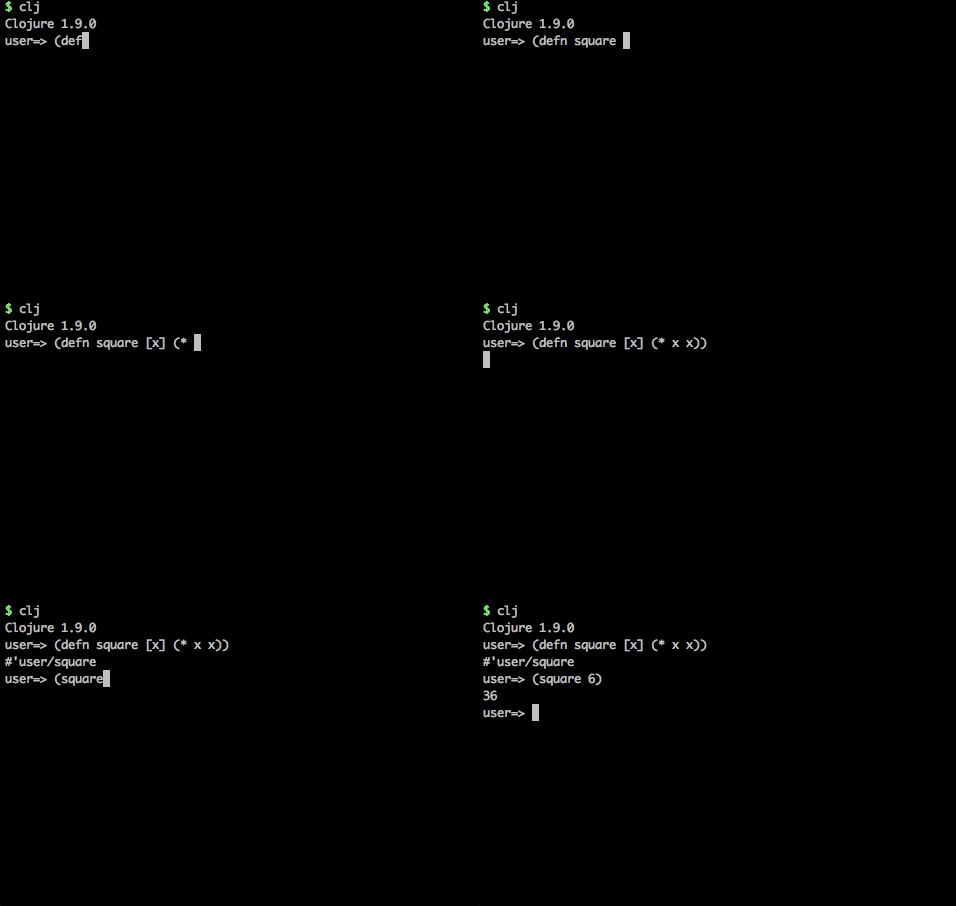
26 |
--------------------------------------------------------------------------------
/docs/reference/clojure-syntax/naming.md:
--------------------------------------------------------------------------------
1 | # Naming
2 |
3 | ## Naming when requiring other namespaces
4 |
5 | `(require [cheshire.core :refer :all])` is an example of self-inflicted errors, as this library included a `contains?` function that will over-write the `clojure.core/contains?` function when using `:refer :all` or the `(use )` expression.
6 |
7 | This situation is one example of why `:refer :all` and `use` are not recommended and can cause lots of debugging headaches.
8 |
9 | If a namespace is predominantly about using a specific library, then refer specific functions as they are used within the current namespace
10 |
11 | ```clojure
12 | (ns current.namespace
13 | (:require
14 | [cheshire.core :refer [function-name another-function etc]))
15 | ```
16 |
17 | > #### Hint::clj-kondo lint tool shows unused functions
18 | >
19 | > Using clj-kondo
20 |
21 | A classic example is a test namespace that uses clojure core
22 | (ns practicalli.random-function-test
23 | (:require [clojure.test :refer [deftest is testing]]
24 | [practicalli.random-function :as sut]))
25 | Otherwise use a meaningful alias, ideally referring to what that library is doing (which makes it easer to swap out with a different library later on if required). As Cheshire is a JSON related library, then
26 | (ns my.ns
27 | (:require [cheshire.core :as json]))
28 | This gives a context to all the functions called from that library and makes code easier for humans to understand.
29 |
--------------------------------------------------------------------------------
/docs/introduction/concepts/naming-local.md:
--------------------------------------------------------------------------------
1 | # Naming - local scope
2 |
3 | ## Local names in functions
4 |
5 | You can define names for things within the scope of a function using the `let` function.
6 |
7 | ### Example
8 |
9 | You can use the let function to define a simple expression, for which everything will go out of scope once it has been evaluated
10 |
11 | ```
12 | (let [local-name "some value"])
13 | (let [minutes-in-a-day (* 60 60 24)])
14 | ```
15 |
16 | You can also use `let` inside a function to do something with the arguments passed to that function. Here we calculate the hourly-rate from a yearly salary, returning the calculated-rate.
17 |
18 | (defn hourly-rate [yearly-salary weeks-in-year days-in-week]
19 | (let [calculated-rate (/ yearly-salary weeks-in-year days-in-week)]
20 | calculated-rate))
21 |
22 | (hourly-rate 60000 48 5)
23 |
24 | ```
25 |
26 |
27 |
28 | ## Local names in data structures
29 |
30 | When defining a map you are creating a series of key value pairs. The key is essentially a name that represents the value it is paired with. Keys are often defined using a `:keyword`.
31 |
32 | ```clojure
33 | {:radius 10, :pi 22/7 :colour purple}
34 |
35 | (def my-circle {:radius 10, :pi 22/7 :colour purple})
36 | ```
37 |
38 | > **Fixme** This is incorrect, as a Clojure keyword type (a name starting with :) have global scope within a namespace. If the keys were strings, then they would have the scope of just the collection.
39 |
--------------------------------------------------------------------------------
/docs/thinking-functionally/function-composition.md:
--------------------------------------------------------------------------------
1 | # Function Composition
2 |
3 | We have discussed how functional programs are essentially a number of functions that work together, this is called composition (functional composition).
4 |
5 | ```
6 | (let [calculated-value (* 10 (reduce + (map inc (range 5))))]
7 | calculated-value)
8 | ```
9 |
10 | This expression is common in the Lisp & Clojure languages. Occasionally the created expressions can becomes challenging to read. To overcome this parsing complexity, developers often break down a more complex expression into its parts, extracting code into its own function.
11 |
12 | > **Note** Brake down the above example into each expression that gives a value
13 |
14 |
15 |
16 | ```
17 | (range 5)
18 |
19 | (map inc (range 5))
20 |
21 | (reduce + (map inc (range 5)))
22 |
23 | (* 10 (reduce + (map inc (range 5))))
24 |
25 |
26 | ;; Additional examples
27 |
28 | ;; Use a let expression for code that is used more than once in a function
29 |
30 | (let [calculated-value (* 10 (reduce + (map inc (range 5))))]
31 | calculated-value)
32 |
33 | ;; Use defn to define a function for code that multiple functions will call
34 | ;; and generalise the function with arguments
35 |
36 | (defn common-data-calculation
37 | [certainty-factor scope]
38 | (* certainty-factor (reduce + (map inc (range scope)))))
39 | ```
40 |
41 |
42 |
--------------------------------------------------------------------------------
/docs/clojure-spec/data/defining-specifications.md:
--------------------------------------------------------------------------------
1 | # Defining specifications
2 |
3 | `clojure.spec.alpha/def` binds a name to a specification, just like `clojure.core/def` binds a name to a value.
4 |
5 | Binding a name means specifications are available throughout the code and in other projects if the project is included as a library.
6 |
7 |
8 | ## Naming - fully qualified keywords
9 |
10 | Specification names should use fully qualified keywords, typically using the namespace in which the specification is defined in.
11 |
12 | Define a namespace for the page and require Clojure Spec
13 |
14 | ```clojure
15 | (ns practicalli.clojure.specifications
16 | (:require [clojure.spec.alpha :as spec]))
17 | ```
18 |
19 |
20 | ```clojure
21 | (spec/def :practicalli.clojure.specifications/number number?)
22 | ```
23 |
24 |
25 | ## auto-resolve macro
26 |
27 | `::` double colon is the auto-resolve macro, which will pre-pend the current namespace to the specification keyword. The `::` notation removes the need to edit fully qualified names should a specification be moved to a different namespace.
28 |
29 | ```clojure
30 | (spec/def ::number number?)
31 | ```
32 |
33 | !!! HINT "Fully Qualified keywords"
34 | Using fully qualified keywords ensures they are unique and therefore can be used across all projects.
35 |
36 | Namespaces are usually unique as they include the name of the company or organization behind the code and any project or component names used to organize the code.
37 |
--------------------------------------------------------------------------------
/docs/thinking-functionally/polymorphism.md:
--------------------------------------------------------------------------------
1 | # Polymorphic function definitions
2 |
3 | Polymorphic means many forms.
4 |
5 | The simplest example of polymorphism in Clojure is a function definition that acts differently based on the number of arguments passed.
6 |
7 | Usually you define a function with one set of arguments, either none `[]`, one `[one]` or many `[any number of args]`, using the basic syntax
8 |
9 | ```clojure
10 | (defn name
11 | "I am the doc string to describe the function"
12 | [args]
13 | (str "define your behaviour here"))
14 | ```
15 |
16 | Instead of writing multiple functions with the same name that each take different numbers of arguments, you can use the following polymorphic syntax in Clojure
17 |
18 | ```clojure
19 | (defn name
20 | "I am the doc string to describe the function"
21 | ([]
22 | (str "behaviour with no args"))
23 | ([one]
24 | (str "behaviour with one arg"))
25 | ([one two & args]
26 | (str "behaviour with multiple args")))
27 | ```
28 |
29 | > **Note** Write a simple function called `i-am-polly` that returns a default message when given no arguments and a custom message when given a custom string as an argument
30 |
31 |
32 |
33 | ```clojure
34 | (defn i-am-polly
35 | ([] (i-am-polly "My name is polly"))
36 | ([message] (str message)))
37 |
38 | (i-am-polly)
39 | (i-am-polly "I call different behaviour depending on arguments sent")
40 | ```
41 |
42 |
43 |
--------------------------------------------------------------------------------
/docs/thinking-functionally/index.md:
--------------------------------------------------------------------------------
1 | # Thinking Functionally
2 |
3 | In this section I cover some simple examples of Clojure code to help you think about the concepts involved in functional programming.
4 |
5 | An overview of thinking functionally is also covered in the presentation entitled [Getting into Functional Programming with Clojure](http://www.slideshare.net/jr0cket/cebit-get-into-functional-programming-with-clojure) on slideshare and its accompanying [youtube video](https://www.youtube.com/watch?v=mEfqULqChZs)
6 |
7 |
8 |
9 | 10 | 11 | 12 | 13 | [](https://clojurians.slack.com/messages/practicalli) 14 | 15 | Get a [free Clojurians slack community account](https://clojurians.net/) 16 | -------------------------------------------------------------------------------- /docs/using-data-structures/destructuring.md: -------------------------------------------------------------------------------- 1 | # Destructuring 2 | 3 | Destructuring is a form of pattern matching that is common in Clojure. Destructuring allow you to pull out the specific elements from a collection. 4 | 5 | Destructuring is commonly used with the `let` method for creating local bindings (locally scoped names). 6 | 7 | ```clojure 8 | (let [[a b c & d :as e] [1 2 3 4 5 6 7]] 9 | [a b c d e]) 10 | 11 | (let [[[x1 y1][x2 y2]] [[1 2] [3 4]]] 12 | [x1 y1 x2 y2]) 13 | 14 | ;; with strings 15 | (let [[a b & c :as str] "asdjhhfdas"] 16 | [a b c str]) 17 | 18 | ;; with maps 19 | (let [{a :a, b :b, c :c, :as m :or {a 2 b 3}} {:a 5 :c 6}] 20 | [a b c m]) 21 | ``` 22 | 23 | It is often the case that you will want to bind same-named symbols to the map keys. The :keys directive allows you to avoid the redundancy: 24 | 25 | ```clojure 26 | (let [{fred :fred ethel :ethel lucy :lucy} m] ) 27 | ``` 28 | 29 | This can be written in a shorter form as follows: 30 | 31 | ```clojure 32 | (let [{:keys [fred ethel lucy]} m] ) 33 | ``` 34 | 35 | As of Clojure 1.6, you can also use prefixed map keys in the map destructuring form: 36 | 37 | ```clojure 38 | (let [m {:x/a 1, :y/b 2} 39 | {:keys [x/a y/b]} m] 40 | (+ a b)) 41 | ``` 42 | 43 | As shown above, in the case of using prefixed keys, the bound symbol name will be the same as the right-hand side of the prefixed key. You can also use auto-resolved keyword forms in the :keys directive: 44 | 45 | ```clojure 46 | (let [m {::x 42} 47 | {:keys [::x]} m] 48 | x) 49 | ``` 50 | -------------------------------------------------------------------------------- /docs/data-inspector/index.md: -------------------------------------------------------------------------------- 1 | # Clojure Data Inspector tools 2 | 3 | Clojure has a strong focus on built in data structures (list, vector, hash-map, set) to represent information in the system. Tools to inspect data and browse through nested or large data sets are invaluable in understanding what the system is doing. 4 | 5 | There are many `clojure.core` functions that can be used to explore data structures and transform them to produce specific views on data. 6 | 7 | `tap>` and `datafy` provide an elegant way of exploring data, rather than a classic `println` expression. 8 | 9 | Data Inspector tools capture and visualize results from evaluated expressions as well as tools to specifically visualize `tap>` expressions (Reveal, Portal). 10 | 11 | ## Common approaches 12 | 13 | * [:fontawesome-solid-book-open: Portal](portal.md) tool to navigate and visualise data via `tap>` for use with any editor or directly with a REPL prompt 14 | * [:fontawesome-solid-book-open: Clojure inspector](clojure-inspector.md) built-in Java Swing based inspector 15 | * [:fontawesome-solid-book-open: CIDER inspect](https://practical.li/spacemacs/evaluating-clojure/inspect/){target=_blank} Emacs specific tool (Practicalli Spacemacs) 16 | 17 | 18 | !!! TIP "Practicalli recommends Portal" 19 | [:fontawesome-solid-book-open: Portal](portal.md) works with any Clojure connected editor and can inspect `tap>` expressions and automatically inspect all evaluation results over nREPL for a complete REPL history. 20 | 21 | Practicalli sends all log events to Portal using a custom mulog publisher. 22 | -------------------------------------------------------------------------------- /docs/thinking-functionally/side-effects.md: -------------------------------------------------------------------------------- 1 | # Side effects 2 | 3 | A side effect is something that creates a change outside of the current code scope, or something external that affects the behaviour or result of executing the code in the current scope. 4 | 5 | ## Nondeterministic - the complexity iceberg 6 | 7 | When you have side effects, you cannot reason accurately about a piece of the code. 8 | 9 | In order to understand a piece of code you must look at all possible side effects created in all lines of code to ensure you fully understand the result of executing your code. 10 | 11 | With side effects in your system, complexity is hidden, causing a far greater risk of a dangerous situation. 12 | 13 | ## Side causes - side effects 14 | 15 | You can think about these effects is in two specific areas, **Side Causes** and **Side Effects** 16 | 17 | * **Side Causes** - are where other pieces of code (function) or state change affects the behaviour of a function. 18 | 19 | * **Side Effects** - are where the current code (function) affects the rest of the system 20 | 21 | [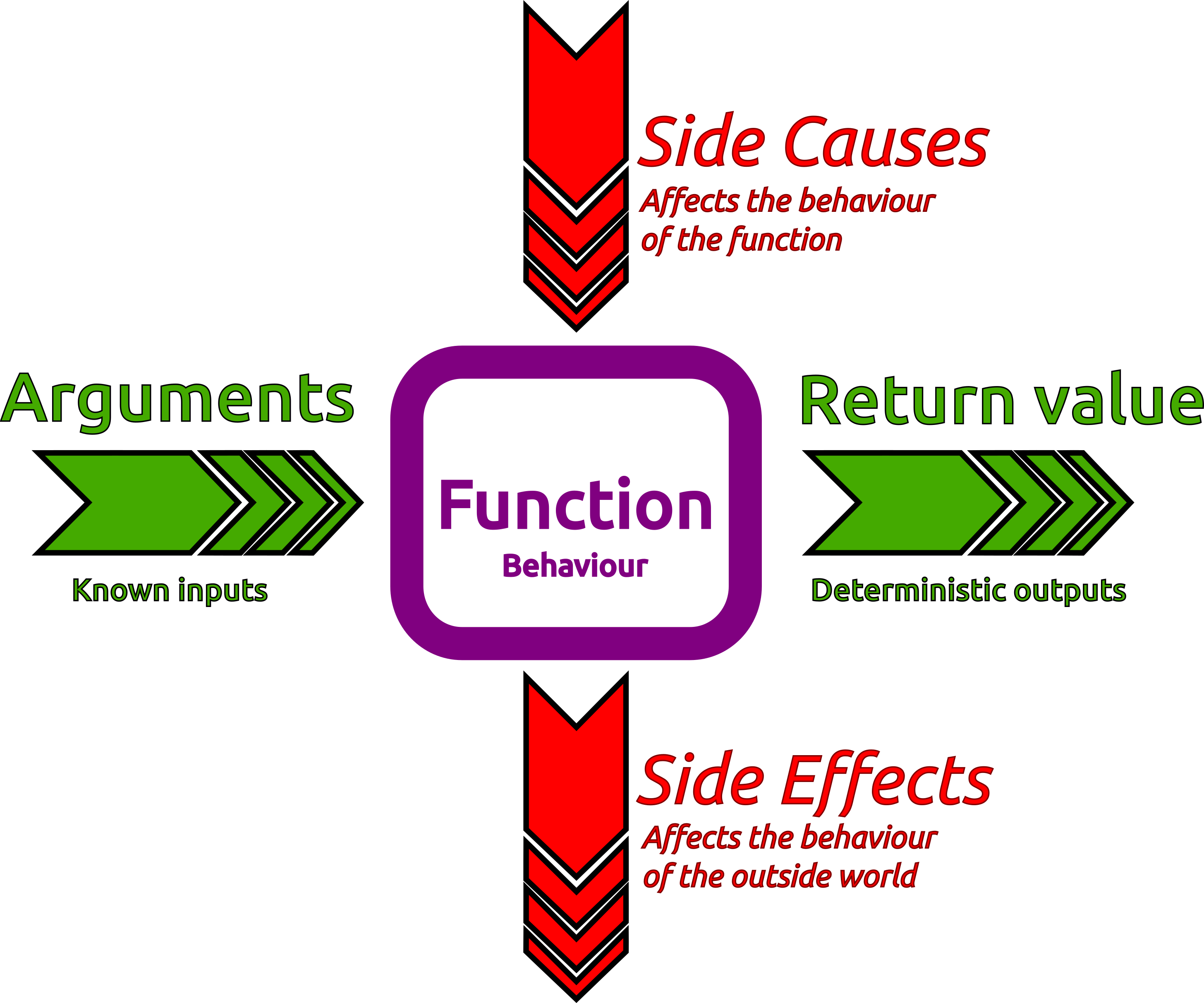](https://raw.githubusercontent.com/practicalli/graphic-design/live/clojure/theory/side-causes-side-effects.png) 22 | 23 | > #### Hint::Side Causes term 24 | > 25 | > The term of side causes was coined by [Kris Jenkins](https://twitter.com/krisajenkins) in the superb article [What is Functional Programming?](http://blog.jenkster.com/2015/12/what-is-functional-programming.html) 26 | -------------------------------------------------------------------------------- /docs/clojure-spec/projects/bank-account/rebel-readline.md: -------------------------------------------------------------------------------- 1 | # Using the project in rebel readline 2 | 3 | > #### Hint::TODO: add screenshots using Rebel readline REPL 4 | 5 | Start the rebel REPL 6 | 7 | ```shell 8 | clojure -M:repl/rebel 9 | ``` 10 | 11 | Once rebel has started a prompt will be displayed. 12 | 13 | First required the main namespace, containing the functions of the application. This loads the code in that namespace into the REPL. 14 | 15 | ```clojure 16 | (require 'practicalli.banking-on-clojure) 17 | ``` 18 | 19 | Now add the specifications for the project 20 | 21 | ```clojure 22 | (require 'practicalli.banking-on-clojure) 23 | ``` 24 | 25 | ? When does the TAB completion start to work ? 26 | 27 | Testing the specifications 28 | 29 | First change into the specifications namespace so the fully qualified names of the specs are not required. 30 | 31 | ```clojure 32 | (in-ns 'practicalli.banking-specifications) 33 | ``` 34 | 35 | Generate sample data from the specifications 36 | 37 | ``` 38 | (spec-gen/sample (spec/gen ::account-id)) 39 | ``` 40 | 41 | The function specifications and the instrument functions are loaded from the requires, so test by calling the instrumented functions, first with bad data and then with correct data. 42 | 43 | ```clojure 44 | (register-account-holder {}) 45 | ``` 46 | 47 | Use the specifications to generate good data 48 | 49 | ```clojure 50 | (register-account-holder ::customer-details) 51 | ``` 52 | 53 | Run generative tests on functions to check the return and fn values 54 | 55 | ```clojure 56 | (spec-test/check `register-account-holder) 57 | ``` 58 | -------------------------------------------------------------------------------- /docs/modifying-data-structures/lists.md: -------------------------------------------------------------------------------- 1 | # Lists 2 | 3 | You can change lists with the `cons` function, see `(doc cons)` for details 4 | 5 | (cons 5 '(1 2 3 4)) 6 | 7 | You will see that `cons` does not change the existing list, it create a new list that contains the number 5 and a link to all the elements of the existing list. 8 | 9 | You can also use cons on vectors `(cons 5 [1 2 3 4])` 10 | 11 | ``` 12 | (cons "fish" '("and" "chips")) 13 | 14 | (conj '(1 2 3 4) 5) 15 | 16 | (conj [1 2 3 4] 5) 17 | 18 | 19 | ;; Lets define a simple list and give it a name 20 | (def list-one '(1 2 3)) 21 | 22 | ;; the name evaluates to what we expect 23 | list-one 24 | 25 | ;; If we add the number 4 using the cons function, then we 26 | ;; get a new list in return, with 4 added to the front (because thats how lists work with cons) 27 | (cons 4 list-one) 28 | 29 | ;; If we want to keep the result of adding to the list, we can assign it a different name 30 | (def list-two (cons 4 list-one)) 31 | ;; and we get the result we want 32 | list-two 33 | 34 | ;; we can also pass the original name we used for the list to the new list 35 | (def list-one (cons 4 list-one)) 36 | 37 | ;; If we re-evaluate the definition above, then each time we will get an extra 38 | ;; number 4 added to the list. 39 | 40 | list-one 41 | 42 | ;; Again, this is not changing the original list, we have just moved the name 43 | ;; of the list to point to the new list. 44 | ;; Any other function working with this data structure before reassigning the name 45 | ;; will not be affected by the re-assignment and will use the unchanged list. 46 | 47 | ``` 48 | -------------------------------------------------------------------------------- /docs/clojure-spec/data/conform.md: -------------------------------------------------------------------------------- 1 | ## Does a value conform to a specification? 2 | 3 | `clojure.spec.alpha/conform` takes two arguments 4 | 5 | - a specification 6 | - a value to test against the specification 7 | 8 | `:clojure.spec.alpha/invalid` is returned when a value does not conform to a specification. 9 | 10 | If the value does conform to the specification, then the value is returned. This value is referred to as a conformed value. 11 | 12 | ## Require the Clojure spec library 13 | 14 | Set the namespace for the page and require clojure.spec.alpha library, setting the alias to `spec` 15 | 16 | ```clojure 17 | (ns practicalli.clojure.specifications 18 | (:require [clojure.spec.alpha :as spec])) 19 | ``` 20 | 21 | ## Using conform 22 | 23 | If the value conforms to the spec, a conformed value is returned 24 | 25 | ```clojure 26 | (spec/conform odd? 101) 27 | ``` 28 | 29 | 30 | 31 | When a value does not conform to a spec, the value `:clojure.spec.alpha/invalid` is returned 32 | 33 | ```clojure 34 | (spec/conform even? 101) 35 | ``` 36 | 37 | 38 | 39 | ```clojure 40 | (spec/conform integer? 1) 41 | ``` 42 | 43 | 44 | 45 | ```clojure 46 | (spec/conform seq? [1 2 3]) 47 | ``` 48 | 49 | 50 | 51 | ```clojure 52 | (spec/conform seq? (range 10)) 53 | ``` 54 | 55 | 56 | 57 | ```clojure 58 | (spec/conform map? {}) 59 | ``` 60 | 61 | 62 | 63 | ```clojure 64 | (spec/conform map? (hash-map :a 1 :b 2)) 65 | ``` 66 | 67 | -------------------------------------------------------------------------------- /docs/development-environments/leiningen.md: -------------------------------------------------------------------------------- 1 | # Leiningen Build tool 2 | 3 | [](http://leiningen.org/) 4 | 5 | [leiningen.org](http://leiningen.org/) (pronounced line-ing-en) is a very powerful build automation tool for automating Clojure projects. With Leiningen you can: 6 | 7 | * Create Clojure Projects with templates 8 | * Define and manage dependencies 9 | * Run an interactive Clojure environment (REPL) 10 | * Run unit tests using Clojure.test 11 | * Run your Clojure application 12 | * Create a deployable Clojure application, as Java Jar file 13 | * Deploy a Clojure library to a remote repository 14 | 15 |  16 | 17 | ## Install Leiningen 18 | 19 | Download the install script from [leiningen.org](http://leiningen.org/) and run the Leiningen script in a terminal 20 | 21 | On Linux and MacOSX, make the script executable first 22 | 23 | chmod a+x lein 24 | ./lein 25 | 26 | > **Hint** I put the `lein` script in `~/bin` directory which is part of my operating system execution path ($PATH). To include the `~/bin` directory in the system path, I add the following code to the `~/.profile` file 27 | 28 | 29 | 30 | ## Testing Leiningen is working 31 | 32 | Test that Leiningen is installed with the following command 33 | 34 | lein version 35 | 36 | Output should look similar to: 37 | 38 | Leiningen 2.6.1 on Java 9-internal OpenJDK 64-Bit Server VM 39 | -------------------------------------------------------------------------------- /docs/reference/tagged-literals/uuid.md: -------------------------------------------------------------------------------- 1 | # uuid tag literal 2 | 3 | A universally unique identifier (UUID). 4 | 5 | #uuid "8-4-4-4-12" - numbers represent the number of hex digits 6 | #uuid "97bda55b-6175-4c39-9e04-7c0205c709dc" - actual example 7 | 8 | Representing UUIDs with #uuid rather than just a plain string has the following benefits: 9 | 10 | the reader will throw an exception on malformed UUIDs 11 | its UUID type is preserved and shown when serialized to edn. 12 | 13 | ## Creating UUIDs - Clojure 14 | 15 | In Clojure, call the randomUUID method of the java.util.UUID class 16 | 17 | ``` 18 | (java.util.UUID/randomUUID) 19 | ``` 20 | 21 | This returns a UUID tagged literal. 22 | 23 | ```clojure 24 | (java.util.UUID/randomUUID) 25 | ;; => #uuid "44f3ffd7-6702-4b8a-af25-11bee4b5ec4f" 26 | ``` 27 | 28 | Looking at the type we can see its a Java object from the java.util.UUID class: 29 | 30 | ```clojure 31 | (type (java.util.UUID/randomUUID)) 32 | ;; => java.util.UUID 33 | ``` 34 | 35 | ## Creating UUIDs - ClojureScript 36 | 37 | Randomly generate a UUID in ClojureScript: 38 | 39 | `cljs.core/random-uuid` 40 | 41 | To label a value as a UUID: 42 | 43 | `cljs.core/uuid` 44 | 45 | > #### Hint::uuid does not validate the value 46 | > 47 | > The [ClojureScript documentation](https://github.com/cljs/api/blob/master/docfiles/cljs.core/uuid.md) states that uuid? does not perform validation. 48 | 49 | ## Testing for a uuid 50 | 51 | `uuid?` tests a given value and returns true if it is a uuid tagged literal value. 52 | 53 | `tagged-literal?` is the more general function for any tagged values. 54 | -------------------------------------------------------------------------------- /docs/clojure-spec/functions/documentation.md: -------------------------------------------------------------------------------- 1 | # Documentation 2 | 3 | The Clojure `doc` function shows the doc string included in a function definition, eg. `defn` expressions. 4 | 5 | When a specification is defined for a function using `fdef` the specification is included in the output of the Clojure `doc` function. 6 | 7 | Including specification details clarifies the precise way to use the function and the information it expects. When a function has a specification the doc string for that function can focus on the purpose of the function rather than the specific types of data used, as that is covered by the function specification. 8 | 9 | ## Example 10 | 11 | ```clojure 12 | (clojure.repl/doc ::rank) 13 | 14 | ;; :practicalli.card-game-specifications/rank 15 | ;; Spec 16 | ;; (into #{:king :queen :ace :jack} (range 2 11)) 17 | ``` 18 | 19 | When adding a specification to a function definition, `doc` will also show the specification details along with the function doc-string. 20 | 21 | ## Live example 22 | 23 | Define the namespace and include clojure spec and clojure.repl (which contains the doc function) 24 | 25 | ```clojure 26 | (ns practicalli.clojure 27 | (:require [clojure.repl :as repl] 28 | [clojure.spec.alpha :as spec])) 29 | ``` 30 | 31 | Print the documentation for the `map` function 32 | 33 | ```clojure 34 | (repl/doc map) 35 | ``` 36 | 37 | Print the documentation for the `:playing-card/suit` 38 | 39 | ```clojure 40 | (clojure.repl/doc :playing-card/suit) 41 | ``` 42 | 43 | ```clojure 44 | #{:spade :heart :diamond :club} 45 | ``` 46 | 47 | ```clojure 48 | (repl/doc :cat-show:cat-bread) 49 | ``` 50 | -------------------------------------------------------------------------------- /docs/coding-challenges/exercism/space-age.md: -------------------------------------------------------------------------------- 1 | # Space Age 2 | 3 |  4 | 5 | ## Topics covered 6 | 7 | 8 | !!! HINT "Code for this solution on GitHub" 9 | [practicalli/exercism-clojure-guides](https://github.com/practicalli/exercism-clojure-guides/) contains the design journal and solution to this exercise and many others. 10 | 11 | ## Create the project 12 | 13 | Download the RNA transcription exercise using the exercism CLI tool 14 | 15 | !!! NOTE "" 16 | ```shell 17 | exercism download --exercise=rna-transcription --track=clojure 18 | ``` 19 | 20 | !!! HINT "Use the REPL workflow to explore solutions locally" 21 | Open the project in a [Clojure aware editor](/clojure/clojure-editors) and [start a REPL](/clojure/coding-challenges/exercism/#repl-workflow), using a rich comment form to experiment with code to solve the challenge. 22 | 23 | 24 | ## Challenge introduction 25 | 26 | Given an age in seconds, calculate how old someone would be on: 27 | 28 | - Earth: orbital period 365.25 Earth days, or 31557600 seconds 29 | - Mercury: orbital period 0.2408467 Earth years 30 | - Venus: orbital period 0.61519726 Earth years 31 | - Mars: orbital period 1.8808158 Earth years 32 | - Jupiter: orbital period 11.862615 Earth years 33 | - Saturn: orbital period 29.447498 Earth years 34 | - Uranus: orbital period 84.016846 Earth years 35 | - Neptune: orbital period 164.79132 Earth years 36 | 37 | So if you were told someone were 1,000,000,000 seconds old, you should be able to say that they're 31.69 Earth-years old. 38 | -------------------------------------------------------------------------------- /docs/introduction/concepts/purpose.md: -------------------------------------------------------------------------------- 1 | # When to use Clojure 2 | 3 | Clojure is a general purpose language suitable for any kind of application or service. As Clojure implementations run across multiple technology platforms and operating systems, there are very few barriers to its use. 4 | 5 | So Clojure is great for webapps, data science, big data, finance industry (banking, trading, insurance, etc), devops tools (log analysis, etc) and anything else really. 6 | 7 | There are areas where Clojure obviously excels. 8 | 9 | ## Effective Data Manipulation 10 | 11 | Fundamentally all software systems take in data (in the form of values or events), process or react to that data and return as a result. 12 | 13 | The persistent data structures in Clojure (list, vector, hash-map and set) provide an efficient way to use immutable collections of data. 14 | 15 | The `clojure.core` library contains a vast number of data processing functions in Clojure so data is easily transformed 16 | 17 | ## Highly Scalable 18 | 19 | Clojure code is encouraged to be immutable and functions to be pure, you can run millions of parallel instances of your application or service for massive processing power. These features also vastly simplify concurrent programming. 20 | 21 | ## Reducing Complexity 22 | 23 | Clojure encourages a component design through functional composition, breaking down problems into components 24 | 25 | Clojure and its libraries are all great examples of well designed components and the community strongly encourages this approach. 26 | 27 | > #### Hint::Functional Reactive Programming 28 | > 29 | > You can also use ClojureScript for Functional Reactive programming of client-side apps for browsers and mobile device. 30 | -------------------------------------------------------------------------------- /docs/clojure-spec/data/hierarchical-specifications.md: -------------------------------------------------------------------------------- 1 | # Hierarchical Specifications 2 | 3 | Defining specifications for data that is hierarchical or nested in nature. 4 | 5 | ```clojure 6 | (ns practicalli.clojure 7 | (:require [clojure.spec.alpha :as spec])) 8 | ``` 9 | 10 | ## Example hierarchical data 11 | 12 | ```clojure 13 | {:top-level-key {:nested-key "value"}} 14 | ``` 15 | 16 | ## Individual specifications 17 | 18 | ```clojure 19 | (spec/def ::first-name string?) 20 | ``` 21 | 22 | ```clojure 23 | (spec/def ::last-name string?) 24 | ``` 25 | 26 | ```clojure 27 | (spec/def ::residential-address string?) 28 | ``` 29 | 30 | ## Composite Specification 31 | 32 | `keys` function combines specifications to form a composite specification in the form of a Clojure hash-map. 33 | 34 | ```clojure 35 | (spec/def ::customer-details 36 | (spec/keys 37 | :req [::first-name ::last-name ::residential-address])) 38 | ``` 39 | 40 | ## Hierarchical Specification 41 | 42 | A user account is composed of a user-id and customer details. Rather than include the individual customer details, the composite customer-details specification. 43 | 44 | The `::user-id` specification is as follows 45 | 46 | ```clojure 47 | (spec/def ::user-id uuid?) 48 | ``` 49 | 50 | The `::user-account` specification 51 | 52 | ```clojure 53 | (spec/def ::user-account 54 | (spec/keys 55 | :req [::user-id ::customer-details])) 56 | ``` 57 | 58 | The following data structure will conform to the specification 59 | 60 | ```clojure 61 | {::user-id #uuid "97bda55b-6175-4c39-9e04-7c0205c709dc" 62 | ::customer-details {::first-name "Jenny" 63 | ::last-name "Jetpack" 64 | ::residential-address "Earth"}} 65 | ``` 66 | -------------------------------------------------------------------------------- /docs/clojure-spec/functions/index.md: -------------------------------------------------------------------------------- 1 | # Specification for function definitions 2 | 3 | Define specifications for your custom functions 4 | 5 | * Additional documentation - argument and return values and the relationship between them. 6 | * Instrumenting functions - checking for correct argument values 7 | * Generative testing - using argument specifications to generate comprehensive test data. 8 | 9 | Many of the functions in `clojure.core` have [specifications](https://github.com/clojure/core.specs.alpha) in the latest version of Clojure. The specifications for clojure.core functions can be found in the [clojure/core.specs.alpha](https://github.com/clojure/core.specs.alpha) repository on GitHub. 10 | 11 | ## clojure.core examples 12 | 13 | Specifications used for the `defn`, `defn-`, `fn` functions in `clojure.core` 14 | 15 | !!! EXAMPLE "clojure.core specification examples" 16 | ```clojure 17 | (s/def ::param-list 18 | (s/and 19 | vector? 20 | (s/cat :params (s/* ::binding-form) 21 | :var-params (s/? (s/cat :ampersand #{'&} :var-form ::binding-form))))) 22 | 23 | (s/def ::params+body 24 | (s/cat :params ::param-list 25 | :body (s/alt :prepost+body (s/cat :prepost map? 26 | :body (s/+ any?)) 27 | :body (s/* any?)))) 28 | 29 | (s/def ::defn-args 30 | (s/cat :fn-name simple-symbol? 31 | :docstring (s/? string?) 32 | :meta (s/? map?) 33 | :fn-tail (s/alt :arity-1 ::params+body 34 | :arity-n (s/cat :bodies (s/+ (s/spec ::params+body)) 35 | :attr-map (s/? map?))))) 36 | ``` 37 | -------------------------------------------------------------------------------- /docs/simple-projects/encode-decode/index.md: -------------------------------------------------------------------------------- 1 | # Encoding and Decoding with Clojure 2 | 3 |  4 | 5 | Projects that use a range of ciphers, from simple to more complex, to encode and decode text. 6 | 7 | A common approach to encoding and decoding text is to use a dictionary lookup, defined in Clojure as a hash-map. Each key-value pair provides a mapping for encoding and decoding. Looking up a a character as a key in the map provides a value that is the encrypted character. 8 | 9 | These projects show several ways to transform data in Clojure. 10 | 11 | | Project | Topics | Description | 12 | |------------------------------------------------------|------------------|-------------------------------------------------| 13 | | [Boolean names to 0 or 1](convert-boolean-values.md) | hash-map get | Convert boolean values to classic 1 or 0 values | 14 | | [Caesar cipher - ROT13](caesar-cipher rot13.md) | seq cycle zipmap | A simple alphabet rotation cipher | 15 | | [RNA / DNA converter](rna-dna.md) | | Convert between DNA and RNA | 16 | | [Clacks telegram](clacks.md) | | Encoding and decoding messages with Clacks | 17 | 18 | ## Examples of Encoding 19 | 20 | * [Portable Network Graphics for image compression](https://en.wikipedia.org/wiki/Portable_Network_Graphics) 21 | * [Vorbis for music and video compression](https://en.wikipedia.org/wiki/Vorbis) plus several commercial compression encoders 22 | * [Enigma machine - encrypted communications](https://www.google.com/search?q=clojure+enigma+machine) 23 | -------------------------------------------------------------------------------- /docs/reference/kebab-case.md: -------------------------------------------------------------------------------- 1 | # Clojure names use kebab-case 2 | 3 |  4 | 5 | kebab-case is a clean, human-readable way to combine the words that would otherwise have spaces. 6 | 7 | Cloure uses kebab-case to combines words with a dash, `-`, rather than a space. e.g. `rock-paper-scissors`, `tic-tac-toe` or `(def db-spec-development {:db-type "h2" :db-name "banking-on-clojure"})` 8 | 9 | kebab-case is used throughout Clojure, including 10 | 11 | * Var names with `def` and function names with `defn` 12 | * Local names with `let` 13 | * Clojure spec names 14 | 15 | kebab-case is used in lisp languages including Clojure. The style is also used in website URLs, e.g. [practicalli.github.io/clojure-webapps](https://practical.li/clojure-web-services/) 16 | 17 | ## Using meaningful names 18 | 19 | To provide greater clarity to human developers, words may be combined for the names used when writing the code. Using multiple words can give greater context in to the purpose of that code. 20 | 21 | Using a combination of meaningful names makes understanding and debugging code far easier. 22 | 23 | ## Spaces characters have special meaning 24 | 25 | Programming languages remove spaces between words because the space character is used as a separator when parsing the code. 26 | 27 | If spaces were not used as a separator for the some other character would be required, adding complexity to the language syntax. 28 | 29 | ## Other Styles 30 | 31 | * camelCase - used in Java and C-style programming languages 32 | * PascalCase - used in the [Pascal programming language][1] 33 | * snake_case - used for `ENVIRONMENT_VARIABLES` and `database_table_names_and_columns` 34 | 35 | [1]: https://en.wikipedia.org/wiki/Pascal_(programming_language) 36 | -------------------------------------------------------------------------------- /docs/clojure-spec/data/and-or-specifications.md: -------------------------------------------------------------------------------- 1 | # Combining specifications with and and or 2 | 3 | `clojure.core/and` function and `clojure.core/or` function can be used to define a specification with multiple parts. 4 | 5 | ## Conform to One or more specifications 6 | 7 | A specification for residential address included either a house number or name. The `clojure.core/or` function allows either type of value to be used and conform to the specification. 8 | 9 | ```clojure 10 | (spec/def ::house-name-number (or string? int?)) 11 | ``` 12 | 13 | Using `spec/or` then unique keys are required for each possible type of value. Keys are used to explain where a failure occurred if values do not conform to the specification. 14 | 15 | ```clojure 16 | (spec/def ::house-name-number (spec/or :string string? 17 | :number int?)) 18 | ``` 19 | 20 | If specifications are uses as the options in the `clojure.spec.alpha/or` then those specification names are used as the keys to explain where failure to conform to the specification happened. 21 | 22 | ```clojure 23 | 24 | (spec/def ::social-security-id (spec/or ::social-security-id-uk 25 | ::social-security-id-usa)) 26 | ``` 27 | 28 | 29 | ## Conform to all specifications 30 | 31 | Create a composite specification using `clojure.spec.alpha/and` when all specifications should be conformed by the values 32 | 33 | 34 | For an arranged banking overdraft limit, the value should be a positive number, that is an integer type and is less than 1000. 35 | 36 | ```clojure 37 | (spec/def ::arranged-overdraft-limit (spec/and pos? int? #(> 1000 %))) 38 | ``` 39 | 40 | If a value does not conform to any of the three specifications then the value fails the `::arranged-overdraft-limit` specification. 41 | -------------------------------------------------------------------------------- /docs/simple-projects/mutating-state/index.md: -------------------------------------------------------------------------------- 1 | # Mutating State in a Controlled way 2 | 3 | Mutating state should be used carefully and sparingly in Clojure (and all other programming languages). 4 | 5 | `atom` is a mutable container that can manage any value. The atom ensures that only one call at a time can affect the value it manages. This is part of the [software transactions memory system](https://clojure.org/reference/refs) in Clojure. 6 | 7 | As the atom is mutable in that the value it manages can be changed, however, this must be done with special commands (swap!, reset!, compare-and-set!, swap-vals!). 8 | 9 | Even though the atom is mutable, the values it manages are not. They are normal immutable (unchangeable) Clojure values. 10 | 11 | `ref` is similar to `atom` and can manage transactions, ensuring that all changes happen or no changes happen. 12 | 13 | | Project | Topics | Overview | 14 | |------------------|-----------------------|-----------------------------------------------------------------------------------------------| 15 | | Mutants assemble | atom swap! reset! | Using an atom to manage state changes | 16 | | Undo/Redo | atom add-watch | Traversing the history of an atom | 17 | | Poker game | atom swap! reset! ref | Simple transaction management using atom and ref in a card game, using constraints on an atom | 18 | 19 | ## References 20 | 21 | * [Atoms](https://clojure.org/reference/atoms) - clojure.org 22 | * [Refs and Transactions](https://clojure.org/reference/refs) - clojure.org 23 | * [Agents](https://clojure.org/reference/agents) - clojure.org 24 | -------------------------------------------------------------------------------- /.github/workflows/scheduled-version-check.yaml: -------------------------------------------------------------------------------- 1 | --- 2 | # ------------------------------------------ 3 | # Scheduled check of versions 4 | # - use as non-urgent report on versions 5 | # - Uses POSIX Cron syntax 6 | # - Minute [0,59] 7 | # - Hour [0,23] 8 | # - Day of the month [1,31] 9 | # - Month of the year [1,12] 10 | # - Day of the week ([0,6] with 0=Sunday) 11 | # 12 | # Using liquidz/anta to check: 13 | # - GitHub workflows 14 | # - deps.edn 15 | # ------------------------------------------ 16 | 17 | name: "Scheduled Version Check" 18 | on: 19 | schedule: 20 | # - cron: "0 4 * * *" # at 04:04:04 ever day 21 | # - cron: "0 4 * * 5" # at 04:04:04 ever Friday 22 | - cron: "0 4 1 * *" # at 04:04:04 on first day of month 23 | workflow_dispatch: # Run manually via GitHub Actions Workflow page 24 | 25 | jobs: 26 | scheduled-version-check: 27 | name: "Scheduled Version Check" 28 | runs-on: ubuntu-latest 29 | steps: 30 | - run: echo "🚀 Job automatically triggered by ${{ github.event_name }}" 31 | - run: echo "🐧 Job running on ${{ runner.os }} server" 32 | - run: echo "🐙 Using ${{ github.ref }} branch from ${{ github.repository }} repository" 33 | 34 | - name: Checkout Code 35 | uses: actions/checkout@v5 36 | with: 37 | fetch-depth: 0 38 | sparse-checkout: | 39 | .github 40 | - run: echo "🐙 ${{ github.repository }} repository sparse-checkout to the CI runner." 41 | - name: "Antq Check versions" 42 | uses: liquidz/antq-action@main 43 | with: 44 | excludes: "" 45 | skips: "boot clojure-cli pom shadow-cljs leiningen" 46 | 47 | # Summary 48 | - run: echo "🎨 library versions checked with liquidz/antq" 49 | - run: echo "🍏 Job status is ${{ job.status }}." 50 | -------------------------------------------------------------------------------- /docs/clojure-spec/testing/index.md: -------------------------------------------------------------------------------- 1 | # Testing with Specifications 2 | 3 | > #### TODO::work in progress, sorry 4 | 5 | ## During development 6 | 7 | Create specifications for data and functions 8 | 9 | Selectively instrument function definitions to check function call arguments against the function specification. 10 | 11 | * clojure.spec.test.alpha/instrument - check fdef :args 12 | 13 | ## Unit and integration testing 14 | 15 | Add specification checks along with unit testing and integration testing to provide a very wide range of data values to be tested (with a minimal amount of code). 16 | 17 | * clojure.spec.test.alpha/check - use :args to generate tests to check fdef :ret and :fn 18 | 19 | run a suite of spec-generative tests on an entire ns with `check`. Just one namespace per `check` expression? 20 | 21 | control the number of values check creates for each check expression. As the default is 1000 the checks can take a noticeable time to run (see [practicalli/spec-generative-testing](https://github.com/practicalli/spec-generative-testing)) 22 | 23 | Many built-in generators for `clojure.core` data predicates 24 | 25 | composite specifications can build generators upon predicate generators. 26 | 27 | Pass generator-returning functions to spec, supplying generators for things spec does not know about. 28 | Pass an override map to `gen` in order to supply alternative generators for one or more sub-paths of a spec. 29 | 30 | Define your own generators 31 | 32 | ## At run time 33 | 34 | Use specifications for run time checking, typically using `conform` and `valid?` functions. 35 | 36 | Specification are typically the minimal checks required for the system, compared to more extensive checks during test and system integration. 37 | 38 | Create lightweight private specifications for tests that run in the production environment. 39 | -------------------------------------------------------------------------------- /docs/clojure-spec/data/registry.md: -------------------------------------------------------------------------------- 1 | # Registry for unique and re-usable specifications 2 | 3 | So far we have just use predicate functions directly in the code examples. 4 | 5 | Using a registry, specs can be uniquely defined across the whole project. Defining a spec gives that spec a name that has a fully qualified namespace 6 | 7 | Use the spec specific `def` function to bind a new spec name and fully qualified namespace and place it in the registry 8 | 9 | ```clojure 10 | (spec/def :playing-card/suit #{:club :diamond :heart :spade} ) 11 | ``` 12 | 13 | ```clojure 14 | (spec/conform :playing-card/suit :diamond) 15 | ``` 16 | 17 | ```clojure 18 | (spec/def :show-cats/cat-bread #{:abyssinian :birman :chartreau :devon-rex 19 | :domestic-short-hair :domestic-long-hair}) 20 | ``` 21 | 22 | ## Removing specs from the registry 23 | 24 | Named specifications can be removed from the registry by binding the name to `nil`. 25 | 26 | If specification names are to be refactored, then the original name should be set to `nil` and evaluated, before changing the name. This will ensure stale specifications are not residing in the REPL. 27 | 28 | Here is a named specification as an example 29 | 30 | ```clojure 31 | (spec/def ::unwanted #{:abandoned}) 32 | ``` 33 | 34 | The specification is evaluated in the REPL (above) and currently works. 35 | 36 | ```clojure 37 | (spec/conform ::unwanted :abandoned) 38 | ``` 39 | 40 | Remove this specification from the registry by binding it to nil 41 | 42 | ```clojure 43 | (spec/def ::unwanted nil) 44 | ``` 45 | 46 | Now the specification is unavailable 47 | 48 | ```clojure 49 | (spec/conform ::unwanted :abandoned) 50 | ``` 51 | 52 | !!! HINT "Registry not persistent" 53 | Restarting the REPL will loose all specification names in the registry as it is not persistent across REPL sessions. 54 | -------------------------------------------------------------------------------- /.github/workflows/publish-book.yaml: -------------------------------------------------------------------------------- 1 | --- 2 | name: Publish Book 3 | on: 4 | # Manually trigger workflow 5 | workflow_dispatch: 6 | 7 | # Run work flow conditional on linter workflow success 8 | workflow_run: 9 | workflows: 10 | - "MegaLinter" 11 | paths: 12 | - "docs/**" 13 | - "includes/**" 14 | - "overrides/**" 15 | - "mkdocs.yaml" 16 | branches: 17 | - main 18 | types: 19 | - completed 20 | 21 | permissions: 22 | contents: write 23 | 24 | jobs: 25 | publish-book: 26 | name: MkDocs Publish 27 | runs-on: ubuntu-latest 28 | steps: 29 | - run: echo "🚀 Job automatically triggered by ${{ github.event_name }}" 30 | - run: echo "🐧 Job running on ${{ runner.os }} server" 31 | - run: echo "🐙 Using ${{ github.ref }} branch from ${{ github.repository }} repository" 32 | 33 | - name: Checkout Code 34 | uses: actions/checkout@v5 35 | with: 36 | fetch-depth: 0 37 | sparse-checkout: | 38 | docs 39 | includes 40 | overrides 41 | - run: echo "🐙 ${{ github.repository }} repository sparse-checkout to the CI runner." 42 | 43 | - name: Setup Python 44 | uses: actions/setup-python@v6 45 | with: 46 | python-version: 3.x 47 | 48 | - name: Cache 49 | uses: actions/cache@v4 50 | with: 51 | key: ${{ github.ref }} 52 | path: .cache 53 | 54 | - run: pip install mkdocs-material mkdocs-callouts mkdocs-glightbox mkdocs-git-revision-date-localized-plugin mkdocs-redirects pillow cairosvg 55 | - run: mkdocs gh-deploy --force 56 | - run: echo "🐙 ." 57 | 58 | # Summary and status 59 | - run: echo "🎨 MkDocs Publish Book workflow completed" 60 | - run: echo "🍏 Job status is ${{ job.status }}." 61 | -------------------------------------------------------------------------------- /docs/designing-data-structures/with-maps.md: -------------------------------------------------------------------------------- 1 | # Design with Maps 2 | 3 | Maps allow you to model data with its contextual meaning. The keys of a map can give the context and the values are the specific data. 4 | 5 | !!! NOTE "" 6 | Define a shopping list of items you want, including how many of each item you want to buy 7 | 8 | ??? EXAMPLE "" 9 | ```clojure 10 | (def shopping-list 11 | {"cat food" 10 12 | "soya milk" 4 13 | "bread" 1 14 | "cheese" 2}) 15 | ``` 16 | 17 | !!! NOTE "" 18 | Define a star-wars characters, eg. luke skywalker, jarjar binks. The star-wars character should include a name and a skill (it doesn't matter what these are). 19 | 20 | > Use the 'get' function to return the value of a given key, eg. name. Use keywords to return a given value if you used keywords for the map keys. 21 | 22 | ??? EXAMPLE "" 23 | In this answer we have defined three different star-wars characters, all using the same map keys. 24 | 25 | ```clojure 26 | (def luke {:name "Luke Skywalker" :skill "Targeting Swamp Rats"}) 27 | (def darth {:name "Darth Vader" :skill "Crank phone calls"}) 28 | (def jarjar {:name "JarJar Binks" :skill "Upsetting a generation of fans"}) 29 | ``` 30 | 31 | Lets see what the specific skill luke has 32 | 33 | ```clojure 34 | (get luke :skill) 35 | ``` 36 | 37 | When you use a keyword, eg. :name, as the key in a map, then that keyword can be used as a function call on the map to return its associated value. Maps can also act as functions too. 38 | 39 | ```clojure 40 | (:name luke) 41 | (luke :name) 42 | ``` 43 | 44 | There are also specific functions that work on maps that give all the `keys` of a map and all the `values` of that map 45 | 46 | ```clojure 47 | (keys luke) 48 | (vals luke) 49 | ``` 50 | -------------------------------------------------------------------------------- /docs/development-environments/java.md: -------------------------------------------------------------------------------- 1 | ## Java - a host platform for Clojure 2 | 3 | [](https://www.java.com) 4 | 5 | You will need to have a Java Runtime Edition (usually installed on most computers by default) to run any Clojure applications. Version 8 is recommended (although version 6 & 7 should work). 6 | 7 | To test if you have Java on your computer, open a command line window and run the command 8 | 9 | java -version 10 | 11 | ## Installing the Java Runtime Edition 12 | 13 | Download and install the latest [Oracle Java SDK](https://www.java.com) (version 1.8 at time of writing). 14 | 15 | Alternatively, install [OpenJDK](http://openjdk.java.net/install/index.html) or [Zulu build of OpenJDK](http://zulu.org/) 16 | 17 | ## Ubuntu 18 | 19 | The OpenJDK is available as a package on Ubuntu and can be installed via the Ubuntu software center or via the command line: 20 | 21 | sudo apt-get install openjdk-8-jre 22 | 23 | ## Why is Java Required 24 | 25 | Clojure was designed as a hosted language, which means it is developed and run on top of Java's Virtual Machine (JVM). However, _its not necessary to learn the Java language to use Clojure_. 26 | 27 | Clojure is compiled into Java bytecode when you evaluate the code. This compilation happens in the background so you dont usually see it happening. For example, if you are using the Clojure REPL then each time you evaluate an expression it is compiled into Java bytecode and then injected into the running REPL and the results are then returned. This all happens pretty instantaneously. 28 | 29 | Most of the current Clojure tooling was developed for Clojure on the JVM, for example Leiningen. 30 | 31 | As Clojure runs on Java you can also use all the other libraries that run on the Java Virtual machine, regardless of whether those libraries were written in Java, Clojure, Scala, JRuby, jython, Groovy, etc. 32 | -------------------------------------------------------------------------------- /docs/clojure-spec/projects/bank-account/test-functions-against-spec.md: -------------------------------------------------------------------------------- 1 | ## Generative testing with `check` 2 | 3 | `clojure.spec.test.alpha/check` generates 1000 values from the argument section of a function definition specification. 4 | 5 | Pass the name of the function definition that has a specification to the `check` function. 6 | 7 | ```clojure 8 | (spec-test/check ``register-account-holder`) 9 | ``` 10 | 11 | ## Limiting the generated data 12 | 13 | 1000 tests can take a noticeable time to run, so check is not as often used during active development, as it would slow down the normal fast feedback cycle with Clojure. 14 | 15 | `check` takes an optional second argument which configures how the function operates. Passing a hash-map as a second argument will set the number of data values generated `{:clojure.spec.test.check/opts {:num-tests 100}}` 16 | 17 | ```clojure 18 | (spec-test/check 19 | `register-account-holder 20 | {:clojure.spec.test.check/opts {:num-tests 100}}) 21 | ``` 22 | 23 | Configuring `check` to run fewer tests provides a simple way to test multiple values without slowing down the development workflow. 24 | 25 | ## Reporting on Generative testing 26 | 27 | `clojure.spec.test.alpha/summarize-results` will return a brief summary including the total number of results and a count for how many results passed and failed. 28 | 29 | ```clojure 30 | (spec-test/summarize-results 31 | (spec-test/check `register-customer 32 | {:clojure.spec.test.check/opts {:num-tests 10}})) 33 | ``` 34 | 35 | Use the threading macro to summarize the results of multiple check operations 36 | 37 | ```clojure 38 | (->> (spec-test/check `register-account-holder) 39 | (spec-test/check `open-current-bank-account) 40 | (spec-test/summarize-results)) 41 | ``` 42 | 43 | If this expression is bound to a name then it can be called when ever the full suite of `check` generative testing is required. 44 | -------------------------------------------------------------------------------- /docs/simple-projects/index.md: -------------------------------------------------------------------------------- 1 | # Small Projects 2 | 3 |  4 | 5 | An effective way to get comfortable with Clojure is to start writing small projects. In this section several small projects are used to walk the audience through how to create and develop a project, as well as learn some Clojure functions and functional programming techniques along the way. 6 | 7 | | Project | Topics | Description | 8 | |-------------------------------------------------------|-----------------------|----------------------------------------------------------------| 9 | | [Random Clojure Function](random-clojure-function.md) | namespace vars | print a random function from the Clojure standard library | 10 | | [Encoding and decoding](encode-decode/) | hash-map dictionaries | transforming messages between one form and another | 11 | | [Data Transformation](data-transformation/) | | transforming larger and larger data sets | 12 | | [Test Driven Development and Kata](tdd-kata/) | Unit testing | Unit testing and solving challenges using different approaches | 13 | 14 | !!! HINT "Create a Clojure project" 15 | [Clojure CLI tools and clj-new](/clojure/clojure-cli/projects/create-from-template/) to create a new Clojure project. 16 | 17 | 18 | 19 | 20 | 21 | 22 | 23 | 27 | -------------------------------------------------------------------------------- /docs/clojure-spec/data/valid-q.md: -------------------------------------------------------------------------------- 1 | # Is the value valid? 2 | 3 | `clojure.spec.alpha/valid?` takes two arguments 4 | 5 | - a specification 6 | - a value to test against the specification 7 | 8 | `clojure.spec.alpha/valid?` is a predicate function. 9 | 10 | `true` is returned if the value meets the specification, otherwise `false` is returned. 11 | 12 | ## Require the Clojure spec library 13 | 14 | Set the namespace for the page and require clojure.spec.alpha library, setting the alias to `spec` 15 | 16 | ```clojure 17 | (ns practicalli.clojure.specifications 18 | (:require [clojure.spec.alpha :as spec])) 19 | ``` 20 | 21 | ## Using valid? 22 | 23 | If the value is valid then a boolean true is returned. Experiment with different values and [predicate functions](/reference/clojure/predicate-functions.md). 24 | 25 | ```clojure 26 | (spec/valid? even? 180) 27 | ``` 28 | 29 | 30 | ```clojure 31 | (spec/valid? string? "Am I a valid string") 32 | ``` 33 | 34 | 35 | # using custom predicate functions 36 | 37 | Create `fn` definitions to use as predicate functions. Any function that returns true or false can be used. 38 | 39 | ```clojure 40 | (spec/valid? (fn [value] (> value 1024)) 8080) 41 | ``` 42 | 43 | The custom predicate function may also be written in the shorter form of a `fn` definition 44 | 45 | ```clojure 46 | (spec/valid? #(> % 1024) 8080) 47 | ``` 48 | 49 | Use `def` to bind names to custom predicate functions if they are used more than once in the code base. 50 | 51 | In this example a name is bound to a function that checks if a port is within the [range of IANA registered networking ports][1]. 52 | 53 | ```clojure 54 | (def registered-port-range? 55 | "Network port number within IANA registered port range" 56 | #(and (> % 1024) #(< % 49151) ) 57 | 58 | (spec/valid? registered-port-range? 8080) 59 | ``` 60 | 61 | [1]: https://en.wikipedia.org/wiki/Port_(computer_networking)#Common_port_numbers 62 | -------------------------------------------------------------------------------- /docs/games/tictactoe-cli/create-project.md: -------------------------------------------------------------------------------- 1 | # Create a Clojure project 2 | > 3 | > #### TODO::work in progress, sorry 4 | 5 | Create a project for our game. 6 | 7 | {% tabs deps="deps.edn projects", lein="Leiningnen projects" %} 8 | 9 | {% content "deps" %} 10 | Create a new project using `clj-new` alias, found in [:fontawesome-solid-book-open: Practicalli Clojure CLI Config]({{ book.P9IClojureDepsEdn }}) 11 | 12 | ```shell 13 | clojure -M:new practicalli/tictactoe-cli 14 | ``` 15 | 16 | Open the project in [a Clojure aware editor](/clojure-editors/) or run a rebel REPL 17 | 18 | ```shell 19 | clojure -M:repl/rebel 20 | ``` 21 | 22 | Once the rebel REPL is running, load the project and change to the main namespace 23 | 24 | ```clojure 25 | (require 'practicalli/tictactoe-cli) 26 | 27 | (in-ns 'practicalli/tictactoe-cli) 28 | ``` 29 | 30 | {% content "lein" %} 31 | The default Leiningen template is suitable fine for the project as no additional libraries are used. 32 | 33 | ``` 34 | lein new tictactoe-cli 35 | ``` 36 | 37 | > #### Hint::Alternatively clone the github repository 38 | > 39 | > You can also clone the tictactoe-cli game from GitHub 40 | 41 | ```shell 42 | git clone https://github.com/practicalli/tictactoe-cli.git 43 | ``` 44 | 45 | ## Updating Clojure version and licence 46 | 47 | In the `project.clj` file I have updated Clojure to version 1.10.0 and changed the licence to be the more open Creative Commons license. 48 | 49 | ```clojure 50 | (defproject tictactoe-cli "0.1.0-SNAPSHOT" 51 | :description "TicTacToe game played on the command line" 52 | :url "https://github.com/practicalli/tictactoe-cli" 53 | :license {:name "Creative Commons Attribution Share-Alike 4.0 International" 54 | :url "https://creativecommons.org"} 55 | :dependencies [[org.clojure/clojure "1.10.0"]]) 56 | ``` 57 | 58 | I also removed the `license` file and added a brief description of the project to the `README.md` file 59 | 60 | {% endtabs %} 61 | -------------------------------------------------------------------------------- /docs/reference/naming-conventions.md: -------------------------------------------------------------------------------- 1 | # Naming Conventions 2 | 3 | ## Kebab-case 4 | 5 | Kebab-case is the naming convention for all Clojure function names than contain more than one word. Its name comes from the Shish Kebab style of cooking, where the words are the tofu and vegetables and the dashes are the skewers. 6 | 7 | ``` 8 | clj-time 9 | string-parser 10 | display-name 11 | ``` 12 | 13 | ## Predicates 14 | 15 | Examples of predicate naming conventions from `clojure.core` 16 | 17 | ``` 18 | contains? 19 | empty? 20 | every? 21 | not-empty? 22 | null? 23 | ``` 24 | 25 | ## Namespace requires and aliases 26 | 27 | Required libraries should be given a contextually meaningful name as an alias, helping to identify the purpose of functions defined outside of the namespace. 28 | 29 | Giving meaningful context helps code to be understood by any person reading the code. It is also easier to search for usage of functions from that context in the current project. 30 | 31 | Aliases are rarely typed more than once in full as Clojure editors have auto-complete, so there is no benefit to short of single character aliases. 32 | 33 | ```clojure 34 | (ns status-monitor.handler 35 | (:require [hiccup.page :refer :as web-page] 36 | [hiccup.form :refer :as web-form])) 37 | ``` 38 | 39 | In very commonly used libraries or very highly used functions through out the code, refer those functions explicitly 40 | 41 | ```clojure 42 | (ns naming.is.hard 43 | (:require [compojure.core :refer [defroutes GET POST]] 44 | [ring.middleware.defaults :refer [wrap-defaults site-defaults]])) 45 | ``` 46 | 47 | ## Converting functions 48 | 49 | When a function takes values in one format or type and converts them to another 50 | 51 | Examples 52 | 53 | ``` 54 | md->html 55 | 56 | map->Record-name ; map factory function of a record -- creates a new record from a map 57 | ->Record-name ; positional factory function of a record -- creates a new record from a list of values 58 | ``` 59 | -------------------------------------------------------------------------------- /docs/reference/standard-library/index.md: -------------------------------------------------------------------------------- 1 | # Clojure Standard Library 2 | 3 | Examples of using the functions from the `clojure.core` namespace and other important functions, macros and special forms that are part of the `org.clojure/clojure` library. 4 | 5 | There are approximately 700 functions and macros available in the `clojure.core` namespace. These are referred to as the Clojure Standard Library. 6 | 7 | !!! HINT "Counting functions in `clojure.core`" 8 | To get an accurate number of functions, call the `ns-publics` function with a namespace name 9 | ```clojure 10 | (count (ns-publics 'clojure.core)) 11 | ``` 12 | [Random Function](/clojure/simple-projects/random-clojure-function/) is a simple project that prints out a random function from the given namespace, or from clojure.core by default. 13 | 14 | 15 | 16 | 17 | 18 | 19 | 20 | ## Functions, Macros and Special forms 21 | 22 | The majority of times macros and special forms act just like any other defined function (i.e. `fn`, `defn`) 23 | 24 | A macro is a piece of code that evaluates into a function when read by the macro reader, or by the developer using `macroexpand` function. An expanded macro may also contain macros, so expansion could take place several levels (`macroexpand-all`). 25 | 26 | macros are not composable like functions, so functions like `apply` `reduce` `map` cannot use a macro (use a function instead). 27 | 28 | Special forms are built into the Clojure runtime, so will not be found in clojure.core 29 | 30 | - Special forms: `if` `do` `let` `quote` `var` `fn` `loop` `recur` `throw` `try` 31 | - Special forms for Java interop: `.` `new` `set!` 32 | -------------------------------------------------------------------------------- /docs/clojure-spec/projects/index.md: -------------------------------------------------------------------------------- 1 | # Clojure Spec Projects 2 | 3 | A series of projects showing approaches to using specifications and generating data for testing. 4 | 5 | | Project | Description | 6 | |----------------------------------------------------------------------------------------------------------------------------------|-----------------------------------------------------------------------------------------------------| 7 | | [card game](card-game/) | writing specifications and generating data from those specifications | 8 | | banking-on-clojure | simplified online bank account using TDD, data and functional specifications and generative testing | 9 | | [Bonbon card game](https://github.com/katox/bonbon) | A flavorful card game with clojure spec | 10 | | [Genetic Programming With clojure.spec](http://gigasquidsoftware.com/blog/2016/07/18/genetic-programming-with-clojure-dot-spec/) |
14 | 15 |
16 | 17 | 18 | ## Example: card game 19 | 20 | [practicalli/spec-generative-testing](https://github.com/practicalli/spec-generative-testing) is a simple card game with specifications that are used for basic generative testing. 21 | 22 |23 | 24 |
25 | 26 | 27 | ## References 28 | 29 | * [Clojure.org guides: Spec - Generators](https://clojure.org/guides/spec#_generators) 30 | * [API reference: clojure.spec.gen.alpha](https://clojure.github.io/spec.alpha/clojure.spec.gen.alpha-api.html) 31 | * [API reference: clojure.spec.test.alpha](https://clojure.github.io/spec.alpha/clojure.spec.test.alpha-api.html) 32 | * [Video: How to do Stateful Property Testing in Clojure?](https://www.youtube.com/watch?v=xw8ZFU8CGdA) 33 | 34 | 45 | -------------------------------------------------------------------------------- /docs/introduction/concepts/what-is-functional-programming.md: -------------------------------------------------------------------------------- 1 | # What is Functional Programming 2 | 3 | Functional programming can seem quite different from imperative programming used in languages like C, C++ and Java. 4 | 5 | Imperative languages may seem easier initially, as defining one step after another is familiar approach to many things in live. As the scale of a system grows, so does complexity. Imperative languages applied object oriented design to manage complexity with varied rates of success. 6 | 7 | When shared mutable state is common in an OO design, then a system quickly becomes complex and very difficult to reason about. 8 | 9 | Functional programming is actually simpler that the OO approach, although initially it may be unfamiliar and not considered as easy. As systems grow in complexity, the building blocks are still simple and deterministic, creating a system that is far easier to reason about. 10 | 11 | ## Imperative programming languages 12 | 13 | In Imperative languages code is written that specifies a **sequential of instructions** that complete a task. These instructions typically **modifies program state** until the desired result is achieved. 14 | 15 | Variables typically represent **memory addresses that are mutable** (can be changed) by default. 16 | 17 | 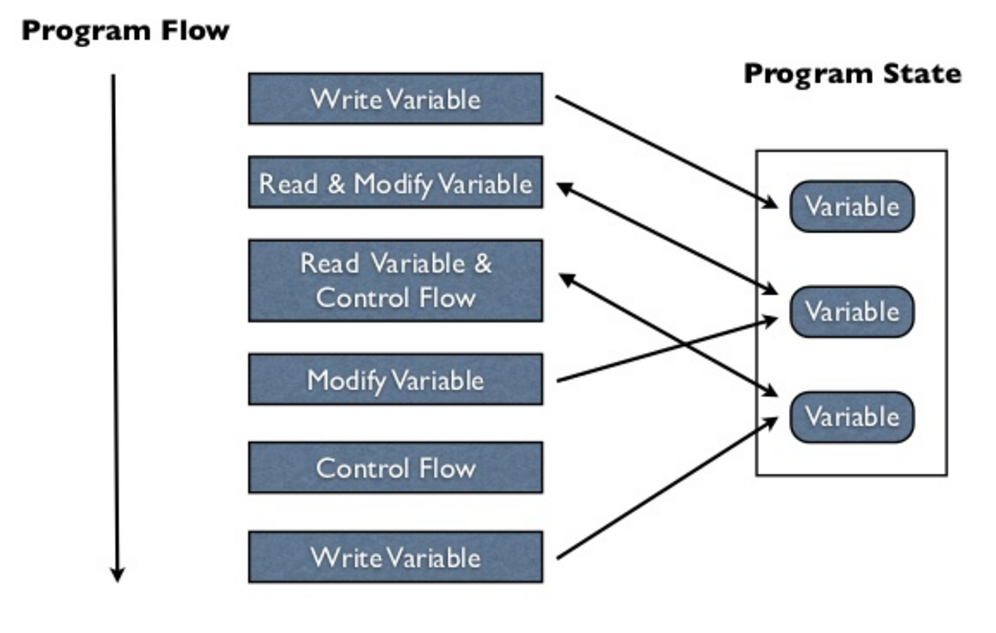 18 | 19 | ## Functional programming languages 20 | 21 | Individual tasks are small and achieved by passing data to a function which returns a result. 22 | 23 | Functions are **composed** together to form more complex tasks and satisfy larger business logic. These composed functions pass the result of their evaluation to the next function, until all functions in the composition have been evaluated. 24 | 25 | The entire functional program can be thought of as a single function defined in terms of smaller ones. 26 | 27 | Program execution is an **evaluation of expressions**, with the nesting structure of function composition determining program flow. 28 | 29 | Data is **immutable** and cannot be change once created. Changes are expressed as new values, with complex values [sharing common values](/data-structures/shared-memory.md) for efficiency. 30 | 31 | 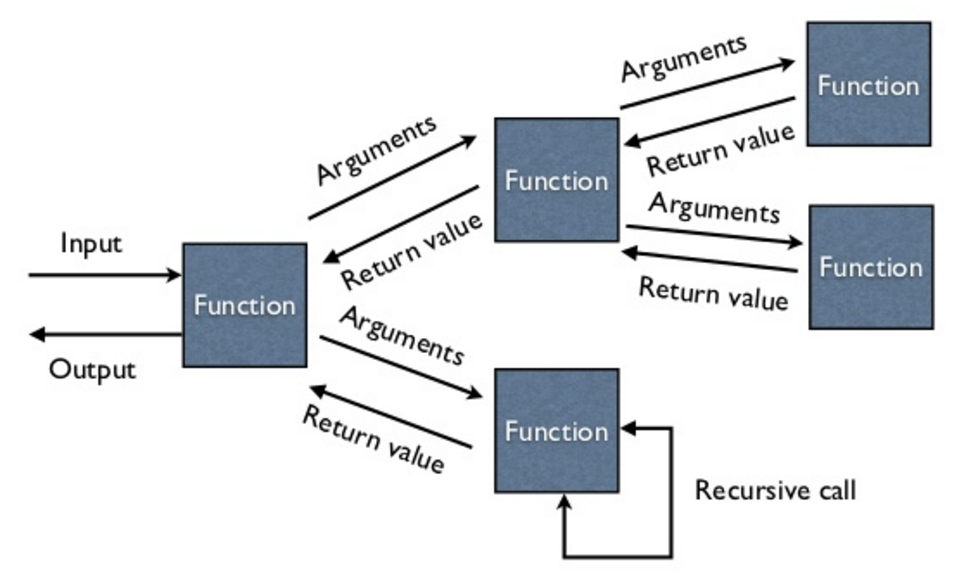 32 | -------------------------------------------------------------------------------- /docs/continuous-integration/index.md: -------------------------------------------------------------------------------- 1 | # Continuous Integration 2 | 3 |  4 | 5 | Topics to be covered in this section include: 6 | 7 | - [ ] Continuous Integration services 8 | - [X] [Circle CI](circle-ci/) 9 | - [X] [GitHub Workflow](github-workflow/) 10 | - [ ] GitLab CI 11 | - [ ] Configure deployment pipelines 12 | - [ ] Manage environment variables 13 | - [ ] Security & Secrets 14 | - [ ] Deployment 15 | - [X] Amazon AWS 16 | - [X] Render.com 17 | 18 | !!! Hint "CircleCI example in Practicalli Clojure Web Services" 19 | [Banking on Clojure](https://practical.li/clojure-web-services/projects/banking-on-clojure/continuous-integration/){target=_blank} is an example of Continuous Integration using CircleCI, with LambdaIsland/Kaocha as the test runner and Heroku as the deployment pipeline. 20 | 21 | ## 12 Factor approach 22 | 23 | Following the [12 factor principles](https://12factor.net/){target=_blank}, the deployment is driven by source code to multiple environments. 24 | 25 | ## CircleCI service 26 | 27 | Use Yaml language to write CI workflows and tasks, using Docker images as a consistent run-time environment 28 | 29 | A commercial service with [a generous free Cloud plan](https://circleci.com/pricing/){target=_blank} - (6,000 minutes), providing highly optomises container images to run tasks efficiently. The CircleCI Clojure images contain Clojure CLI, Leiningen and Babashka pre-installed. 30 | 31 | [CircleCI Orbs](https://circleci.com/orbs/){target=_blank} package up common configuration and tools, greatly simplifying the configuration and maintenance required. 32 | 33 | [CircleCI Clojure language guide](https://circleci.com/docs/2.0/language-clojure/){target=_blank .md-button} 34 | 35 | ## GitHub Workflow 36 | 37 | Use Yaml language to write CI workflows and tasks. 38 | 39 | A commercial service with a modest free plan (2,000 minutes) for open source projects. GitHub Marketplace contains a wide range of Actions, including [Clojure related actions](https://github.com/marketplace?type=actions&query=clojure+){target=_blank}, simplifying the configuration of CI. 40 | 41 | [Setup Clojure](https://github.com/marketplace/actions/setup-clojure){target=_blank} provides Clojure CLI, Leinigen and boot tools for use within the CI workflow 42 | 43 | [GitHub Actions overview](https://github.com/features/actions){target=_blank .md-button} 44 | -------------------------------------------------------------------------------- /docs/automation/index.md: -------------------------------------------------------------------------------- 1 | # Automation 2 | 3 | Automation tools can provide a consistent command line interface across a wide range of projects. 4 | 5 | Whilst the Clojure CLI is a very extensible tool that flexibility can also add some complexity to its command line interface. 6 | 7 | Automation tools abstract the command line to provide a consistent and simple user experience whilst keeping underlying flexibility. 8 | 9 | !!! HINT "Practicalli recommends make" 10 | A Makefile is not reliant on programming language knowledge so has no barrier to those who are unfamiliar with the Clojure language. 11 | 12 | Make is useful when working with mixed language teams to create a unified tool and command line across a wide range of projects. 13 | 14 | 15 | ## Automation tooling 16 | 17 | * [Make](make.md) - ubiquitous task automation tool, programming language agnostic 18 | * Shell Scripts 19 | * Babashka - create task automation tool with Clojure 20 | 21 | 22 | ## Make 23 | 24 | Make is very simple to use and has a long history as a build tool and wider task automation tool. 25 | 26 | Task are defined in a `Makefile` and task can depend on each other. Any commands or combination of commands that run on the command line can be used as make tasks. 27 | 28 | make provides tab completion of tasks defined in the Makefile without additional configuration. 29 | 30 | `make` is available for all operating systems. 31 | 32 | !!! HINT "Practicalli Project Templates include Makefile" 33 | Creating new projects with `:project/create` and [Practicalli Project Templates](/clojure/clojure-cli/projects/templates/) provide a Makefile with a wide range of common tasks for Clojure development. 34 | 35 | 36 | ### Shell Scripts 37 | 38 | Shell scripts provide a very common way to create a relatively ubiquitous approach to running tools, even across multiple Shell implementations (Bash, Zsh, fish, etc.) and operating systems. 39 | 40 | Shell scripting language is very powerful especially for manipulation of the operating system, although scripts require development and maintenance. 41 | 42 | 43 | ## Babashka 44 | 45 | Write automation scripts with Clojure code using the [Babashka task runner](https://book.babashka.org/#tasks){target=_blank} 46 | 47 | Babashka can use a wide range of Clojure functions and libraries, although as a general script tool then additional coding and maintenance may be reqiured compared to a dedicated tool. 48 | 49 | [Babashka task runner](https://book.babashka.org/#tasks){target=_blank .md-button} 50 | -------------------------------------------------------------------------------- /docs/clojure-spec/data/explain.md: -------------------------------------------------------------------------------- 1 | # Explaining non-conforming values 2 | 3 | `clojure.spec.alpha/explain` describes why a value does not satisfy a specification. 4 | 5 | `clojure.spec.alpha/explain` takes two arguments 6 | 7 | - a specification 8 | - a value to test against the specification 9 | 10 | `Success` string is sent to standard out if the value meets the specification 11 | 12 | A string explaining where the value deviates from the specification is sent to standard out if the value does not meet the specification. 13 | 14 | There are several variations on the explain function for different situations 15 | 16 | - `explain` - sends the return value to the standard out / REPL 17 | - `explain-str` - returns a human readable result. 18 | - `explain-data` - returns a data structure of the error to be processed by other code 19 | 20 | ## Example of a failing value 21 | 22 | First define a namespace and require the Clojure Spec namespace 23 | 24 | ```clojure 25 | (ns practicalli.clojure.specifications 26 | (:require [clojure.spec.alpha :as spec])) 27 | 28 | (spec/def ::meaning-of-life #(= 42 %)) 29 | ``` 30 | 31 | Given the following specification 32 | 33 | ```clojure 34 | (spec/explain ::meaning-of-life 24) 35 | ``` 36 | 37 | Using the value `24` with that specification will fail. Using explain we can see why 38 | 39 | ```clojure 40 | (spec/def ::meaning-of-life-int-or-string 41 | (spec/or :integer #(= 42 %) 42 | :string #(= "forty two" %))) 43 | ``` 44 | 45 | In this case explain returned the 46 | 47 | - value being checked against the spec 48 | - result of that check (failed) 49 | - predicate used to check the value 50 | - spec name used to check the value 51 | 52 | Notice that the value failed on the first condition, `:integer`, then stopped without checking the second, `:string`. The `spec/and` macro works the same as `clojure.core/and` in that is stops as soon as something fails. 53 | 54 | ```clojure 55 | (spec/explain ::meaning-of-life-int-or-string 24) 56 | ``` 57 | 58 | In this case we still have the value checked, the result and the predicate 59 | More information is provided as to where in the spec the value failed 60 | `:at` shows the path in the spec where the failure occurred, very useful for nested structures 61 | This shows the value of naming your specs descriptively 62 | 63 | 64 | ## Explain with a string 65 | 66 | rather than send information to the system out 67 | 68 | ```clojure 69 | (spec/explain-str ::meaning-of-life 24) 70 | ``` 71 | 72 | 73 | ```clojure 74 | (spec/explain-data ::meaning-of-life 24) 75 | ``` 76 | -------------------------------------------------------------------------------- /docs/clojure-spec/organising-specs.md: -------------------------------------------------------------------------------- 1 | # Organizing Specifications 2 | 3 | Data and function definition specifications are typically placed in a dedicated `specification` namespaces, e.g `src/domain/project/specification.clj`. 4 | 5 | Add the data specifications (`spec/def`), custom predicate functions and function specifications (`spec/fdef`) to the `specifications` namespace. 6 | 7 | Specifications for an architecture layer can be organised next to the namespaces managing the layer, e.g. database. 8 | 9 | Migrate specifications to a library once they are applicable to multiple projects. 10 | 11 | 12 | 13 | 14 | ## Instrumenting functions 15 | 16 | Add `spec-test/instrument` expressions to the `specifications` file, after the `spec/fdef` expressions. 17 | 18 | Rather than create individual expressions, create a `clojure.core/def` to contain a collection of all the `spec/fdef` expressions. This list can then be used to `instrument` and `unstrument` all the `spec/fdef` specifications. 19 | 20 | ```clojure 21 | (def ^:private function-specifications 22 | [`card-game/deal-cards 23 | `card-game/winning-player]) 24 | ``` 25 | 26 | Write simple helper functions to wrap the instrumenting of function specifications 27 | 28 | ```clojure 29 | (defn instrument-all-functions 30 | [] 31 | (spec-test/instrument function-specifications)) 32 | 33 | (defn unstrument-all-functions 34 | [] 35 | (spec-test/unstrument function-specifications)) 36 | ``` 37 | 38 | ## Unit testing 39 | 40 | Specifications can be incorporated into the existing unit tests, so it is sensible to keep them under the corresponding `test` directory files. 41 | 42 | ## Generative testing 43 | 44 | Using `spec-test/check` will generate 1000 data values for each expression, so by default these tests will take far longer that other tests. 45 | 46 | Configuring generative tests to only generate a small number of values will make `spec-test/check` expressions return almost instantaneously. In this example, only 10 data values are generated 47 | 48 | ```clojure 49 | (spec-test/check `deal-cards 50 | {:clojure.spec.test.check/opts {:num-tests 10}}) 51 | ``` 52 | 53 | Generative testing with small generators can be run regularly during development without impacting fast feedback. 54 | 55 | [:fontawesome-solid-book-open: Testing with Clojure Spec](/clojure/clojure-spec/testing/){.md-button} 56 | -------------------------------------------------------------------------------- /docs/reference/creative-coding/index.md: -------------------------------------------------------------------------------- 1 | # Creative coding with Clojure 2 | 3 | Clojure is a very versatile language and can generate data visualizations and graphics from data. 4 | 5 | * [Quil](http://quil.info/){target=_blank} - generate 2D graphics and animations 6 | * [Thi.ng](http://thi.ng/){target=_blank} - computational design tools 7 | * [play.cljc](https://github.com/oakes/play-cljc){target=_blank} - making games (OpenGL and WebGL) 8 | * [Oz](https://github.com/metasoarous/oz){target=_blank} - data visualization and scientific document processing library (see [practicalli/oz-visualisations](https://github.com/practicalli/oz-visualisations){target=_blank} for examples) 9 | 10 | ## Scalable Vector Graphics 11 | 12 | Clojure can generate [Scalable Vector Graphics (SVG)](https://en.wikipedia.org/wiki/Scalable_Vector_Graphics) as they are represented as data. SVG images are _drawn_ from a collection of points and paths. SVG images keep their quality when made larger or smaller. Using SVG images for the web and responsive design is highly recommended. 13 | 14 | This example of an SVG image is made from: 15 | 16 | * a green circle and a smaller blue circle 17 | * a white curvy path 18 | 19 | ```clojure 20 | (defn concentric-circles [] 21 | [:svg {:style {:border "1px solid" 22 | :background "white" 23 | :width "150px" 24 | :height "150px"}} 25 | [:circle {:r 50, :cx 75, :cy 75, :fill "green"}] 26 | [:circle {:r 30, :cx 75, :cy 75, :fill "blue"}] 27 | [:path {:stroke-width 12 28 | :stroke "white" 29 | :fill "none" 30 | :d "M 30,40 C 100,40 50,110 120,110"}]]) 31 | ``` 32 | 33 | Add the following path to the above code to make a curvy lambda symbol 34 | 35 | ```clojure 36 | [:path {:stroke-width 12 37 | :stroke "white" 38 | :fill "none" 39 | :d "M 75,75 C 50,90 50,110 35,110"}] 40 | ``` 41 | 42 | The complete solution: 43 | 44 | ```clojure 45 | (defn concentric-circles [] 46 | [:svg {:style {:border "1px solid" 47 | :background "white" 48 | :width "150px" 49 | :height "150px"}} 50 | [:circle {:r 50, :cx 75, :cy 75, :fill "green"}] 51 | [:circle {:r 30, :cx 75, :cy 75, :fill "blue"}] 52 | [:path {:stroke-width 12 53 | :stroke "white" 54 | :fill "none" 55 | :d "M 30,40 C 100,40 50,110 120,110"}] 56 | [:path {:stroke-width 12 57 | :stroke "white" 58 | :fill "none" 59 | :d "M 75,75 C 50,90 50,110 35,110"}]]) 60 | ``` 61 | -------------------------------------------------------------------------------- /docs/clojure-spec/data/composite-specifications.md: -------------------------------------------------------------------------------- 1 | # Composing Specifications 2 | 3 | No spec is an island 4 | 5 | Composing individual specifications is an effective way to build larger abstractions in specifications without creating fixed hierarchical structures that are harder to refactor. 6 | 7 | Require specification namespace to the page 8 | 9 | ```clojure 10 | (ns practicalli.clojure 11 | (:require [clojure.spec.alpha :as spec])) 12 | ``` 13 | 14 | 15 | `spec/and` is used when all specifications should be true. 16 | 17 | ```clojure 18 | (spec/def ::meaning-of-life 19 | (spec/and int? 20 | even? 21 | #(= 42 %))) 22 | ``` 23 | 24 | `spec/or` is use when one or more specifications should be true 25 | 26 | ```clojure 27 | (spec/def ::meaning-of-life-int-or-string 28 | (spec/or :integer #(= 42 %) 29 | :string #(= "forty two" %))) 30 | ``` 31 | 32 | Each condition in the spec is annotated with a label for each conditional branches. 33 | 34 | Labels are included in the return result from `spec/explain` when values do not conform to a specification, providing context as to why a value failed the specification. 35 | 36 | When an or is conformed, it returns a vector with the condition name and conformed value. 37 | 38 | 39 | ```clojure 40 | (spec/conform ::meaning-of-life-int-or-string 42) 41 | ``` 42 | 43 | ```clojure 44 | (spec/conform ::meaning-of-life-int-or-string "forty two") 45 | ``` 46 | 47 | 48 | ```clojure 49 | (spec/conform ::meaning-of-life-int-or-string :entropy) 50 | ``` 51 | 52 | 53 | ```clojure 54 | (spec/explain ::meaning-of-life-int-or-string :entropy) 55 | ``` 56 | 57 | 58 | ## Individual specifications 59 | 60 | Before composing a more abstract specification, first define individual specifications 61 | 62 | ```clojure 63 | (spec/def ::first-name string?) 64 | ``` 65 | 66 | ```clojure 67 | (spec/def ::last-name string?) 68 | ``` 69 | 70 | ```clojure 71 | (spec/def ::residential-address string?) 72 | ``` 73 | 74 | 75 | ## Composing hash-map specification 76 | 77 | The individual specifications can now be composed into a single specification. 78 | 79 | `keys` function combines specifications to form a composite specification in the form of a Clojure hash-map. 80 | 81 | ```clojure 82 | (spec/def ::customer-details 83 | (spec/keys 84 | :req [::first-name ::last-name ::residential-address])) 85 | ``` 86 | 87 | Use the composite specification with a value 88 | 89 | ```clojure 90 | (spec/conform ::customer-details 91 | {::first-name "Jenny" 92 | ::last-name "Jetpack" 93 | ::residential-address "42 meaning of life street, Earth"}) 94 | ``` 95 | -------------------------------------------------------------------------------- /docs/testing/test-runners/example-projects.md: -------------------------------------------------------------------------------- 1 | # Example projects 2 | 3 | * [TDD Kata: Recent Song-list](/simple-projects/tdd-kata/recent-song-list.md) - simple tests examples 4 | * [Codewars: Rock Paper Scissors (lizard spock) solution](https://github.com/practicalli/codewars-guides/tree/develop/rock-paper-scissors) - `and` examples 5 | * [practicalli/numbers-to-words](https://github.com/practicalli/numbers-to-words) - overly verbose example, ripe for refactor 6 | * [practicalli/codewars-guides](https://github.com/practicalli/codewars-guides) - deps.edn projects 7 | * [practicalli/exercism-clojure-guides](https://github.com/practicalli/exercism-clojure-guides) - Leiningen projects 8 | 9 | ## Sean Corfield - user manager 10 | 11 | [User manager](https://github.com/seancorfield/usermanager-example) has unit tests that also include an embedded database. Tests can run with the Cognitect Labs test runner. 12 | 13 | `:test` alias includes the test path and a dependency for the H2 database 14 | 15 | Cognitect Labs test runner included in the project `deps.edn` file as `:runner` 16 | 17 | `clojure -M:test:runner` will run the Cognitect Labs runner and include the dependency to run the in-memory database used for the tests. 18 | 19 | ### Using koacha with Sean Corfield user manager 20 | 21 | Adding a `test.edn` file is not sufficient for testing this project with lambdaisland/kaocha, as the H2 dependency is also needed. 22 | 23 | Create a `bin/koacha` script and add the extra alias 24 | 25 | ```shell 26 | #!/usr/bin/env bash 27 | clojure -M:test:test-runner-kaocha "$@" 28 | ``` 29 | 30 | 31 | 32 | 33 | ## Status Monitor 34 | 35 | [Status monitor](https://github.com/jr0cket/webapp-status-monitor) is a Leiningen project. 36 | 37 | Include a `:kaocha` profile in the `project.clj` file, adding the koacha dependency. The `:kaocha` alias sets the main namespace and uses the kaocha profile. 38 | 39 | ```clojure 40 | {:dev {:dependencies [[javax.servlet/servlet-api "2.5"] 41 | [ring/ring-mock "0.3.2"]]} 42 | :kaocha {:dependencies [[lambdaisland/kaocha "1.0.632"]]}} 43 | :aliases {"kaocha" ["with-profile" "+kaocha" "run" "-m" "kaocha.runner"]} 44 | ``` 45 | 46 | `lein kaocha` will run all the tests 47 | 48 | 49 | 50 | --------------------------------------------------------------------------------