7 | {{ config.repo_name }}
8 |
9 |
10 |
--------------------------------------------------------------------------------
/.gitignore:
--------------------------------------------------------------------------------
1 | # Exclude all files from root directory
2 | /*
3 |
4 | # ------------------------
5 | # Common project files
6 | !CHANGELOG.md
7 | !README.md
8 | !LICENSE
9 |
10 | # ------------------------
11 | # Include MkDocs files
12 | !docs/
13 | !includes/
14 | !overrides/
15 | !mkdocs.yml
16 |
17 | # ------------------------
18 | # Project automation
19 | !Makefile
20 |
21 | # ------------------------
22 | # Version Control
23 | !.gitignore
24 | !.github/
25 |
26 |
--------------------------------------------------------------------------------
/docs/version-control/index.md:
--------------------------------------------------------------------------------
1 | # Version Control
2 |
3 |
4 | ++spc++ ++"g"++ ++"s"++ to open Magit Status, providing a buffer to stage changes, create commits, add remotes, push changes.
5 |
6 | `@` Forge menu in Magit Status manages images and pull requests
7 |
8 |
9 | ## Setup Git Client
10 |
11 |
12 | ## Authenticated API access
13 |
14 |
15 |
16 | ## references
17 |
18 | * [Magit Forge configuration for Gitlab](https://gist.github.com/Azeirah/542f1db12e3ef904abfc7e9c2e83310e)
19 |
--------------------------------------------------------------------------------
/.github/config/markdown-link-check.json:
--------------------------------------------------------------------------------
1 | {
2 | "ignorePatterns": [
3 | {
4 | "pattern": "^http://localhost"
5 | },
6 | {
7 | "pattern": "^mailto:*"
8 | },
9 | {
10 | "pattern": "^#*"
11 | },
12 | {
13 | "pattern": "^https://127.0.0.0/"
14 | }
15 | ],
16 | "timeout": "20s",
17 | "retryOn429": true,
18 | "retryCount": 5,
19 | "fallbackRetryDelay": "30s",
20 | "aliveStatusCodes": [
21 | 200,
22 | 206
23 | ]
24 | }
25 |
--------------------------------------------------------------------------------
/docs/install/evil-configuration.md:
--------------------------------------------------------------------------------
1 | # Evil configuration
2 |
3 |
4 |
5 | ## Map Evil keys
6 |
7 | Key bindings to surround text with parens and other pairs
8 |
9 | ```emacs
10 | (after! evil-surround
11 | (let ((pairs '((?g "$" . "$")
12 | (?h "(" . ")")
13 | (?j "[" . "]")
14 | (?k "{" . "}")
15 | (?l "<" . ">")
16 | (?ø "'" . "'")
17 | (?æ "\"" . "\""))))
18 | (prependq! evil-surround-pairs-alist pairs)
19 | (prependq! evil-embrace-evil-surround-keys (mapcar #'car pairs))))
20 | ```
21 |
22 |
--------------------------------------------------------------------------------
/.github/config/gitleaks.toml:
--------------------------------------------------------------------------------
1 | title = "gitleaks config"
2 |
3 | [allowlist]
4 | description = "global allow lists"
5 | paths = [
6 | '''gitleaks.toml''',
7 | '''(.*?)(jpg|gif|doc|docx|zip|xls|pdf|bin|svg|socket)$''',
8 | '''(go.mod|go.sum)$''',
9 | '''gradle.lockfile''',
10 | '''node_modules''',
11 | '''package-lock.json''',
12 | '''pnpm-lock.yaml''',
13 | '''Database.refactorlog''',
14 | '''vendor''',
15 | ]
16 |
17 | [[rules]]
18 | description = "AWS Example API Key"
19 | id = "aws-example-api-key"
20 | regex = '''AKIAIOSFODNN7EXAMPLE'''
21 | keywords = [
22 | "awstoken",
23 | ]
24 |
--------------------------------------------------------------------------------
/overrides/404.html:
--------------------------------------------------------------------------------
1 |
4 |
5 |
6 | {% extends "main.html" %}
7 |
8 |
9 | {% block content %}
10 | This is not the page you are looking for
11 | 12 |13 | Sorry we have arrived at a page that does not exist... 14 |
15 | 16 |17 | Practicalli Doom Emacs website is published using Material for MkDocs 18 |
19 | 20 |21 | Try use the Search bar at the top of the page 22 |
23 | 24 | 31 | 32 | {% endblock %} 33 | -------------------------------------------------------------------------------- /.github/config/lychee.toml: -------------------------------------------------------------------------------- 1 | 2 | # ---------------------------------------- 3 | # Base URL or website root directory to check relative URLs. 4 | base = "https://practical.li/" 5 | 6 | # Only test links with the given schemes (e.g. https). 7 | # Omit to check links with any other scheme. 8 | # At the moment, we support http, https, file, and mailto. 9 | scheme = ["https"] 10 | 11 | # ---------------------------------------- 12 | # Exclusions 13 | 14 | # Exclude URLs and mail addresses from checking (supports regex). 15 | # exclude = ['^https://www\.linkedin\.com', '^https://web\.archive\.org/web/'] 16 | 17 | # Exclude all private IPs from checking. 18 | # Equivalent to setting `exclude_private`, `exclude_link_local`, and 19 | # `exclude_loopback` to true. 20 | exclude_all_private = false 21 | 22 | # Check mail addresses 23 | include_mail = false 24 | # ---------------------------------------- 25 | -------------------------------------------------------------------------------- /overrides/partials/palette.html: -------------------------------------------------------------------------------- 1 | 2 | 3 | 4 | 5 | 37 | -------------------------------------------------------------------------------- /.github/pull_request_template.md: -------------------------------------------------------------------------------- 1 | :memo: Description 2 | 3 | 4 | :white_check_mark: Checklist 5 | 6 | - [ ] Commits should be cryptographically signed (SSH or GPG) 7 | 8 | 9 | ## Practicalli Guidelines 10 | 11 | Please follow these guidelines when submitting a pull request 12 | 13 | - refer to all relevant issues, using `#` followed by the issue number (or paste full link to the issue) 14 | - PR should contain the smallest possible change 15 | - PR should contain a very specific change 16 | - PR should contain only a single commit (squash your commits locally if required) 17 | - Avoid multiple changes across multiple files (raise an issue so we can discuss) 18 | - Avoid a long list of spelling or grammar corrections. These take too long to review and cherry pick. 19 | 20 | ## Submitting articles 21 | 22 | [Create an issue using the article template](https://github.com/practicalli/blog-content/issues/new?assignees=&labels=article&template=article.md&title=Suggested+article+title), 23 | providing as much detail as possible. 24 | 25 | ## Website design 26 | 27 | Suggestions about website design changes are most welcome, especially in terms of usability and accessibility. 28 | 29 | Please raise an issue so we can discuss changes first, especially changes related to aesthetics. 30 | 31 | ## Review process 32 | 33 | All pull requests are reviewed by @practicalli-johnny and feedback provided, usually the same day but please be patient. 34 | -------------------------------------------------------------------------------- /.github/workflows/changelog-check.yaml: -------------------------------------------------------------------------------- 1 | --- 2 | # Check CHANGELOG.md file updated for every pull request 3 | 4 | name: Changelog Check 5 | on: 6 | pull_request: 7 | paths-ignore: 8 | - "README.md" 9 | types: [opened, synchronize, reopened, ready_for_review, labeled, unlabeled] 10 | 11 | jobs: 12 | changelog: 13 | name: Changelog Update Check 14 | runs-on: ubuntu-latest 15 | steps: 16 | - run: echo "🚀 Job automatically triggered by ${{ github.event_name }}" 17 | - run: echo "🐧 Job running on ${{ runner.os }} server" 18 | - run: echo "🐙 Using ${{ github.ref }} branch from ${{ github.repository }} repository" 19 | 20 | # Git Checkout 21 | - name: Checkout Code 22 | uses: actions/checkout@v4 23 | with: 24 | fetch-depth: 0 25 | sparse-checkout: | 26 | docs 27 | overrides 28 | .github 29 | CHANGELOG.md 30 | - run: echo "🐙 Sparse Checkout of ${{ github.repository }} repository to the CI runner." 31 | 32 | # Changelog Enforcer 33 | - name: Changelog Enforcer 34 | uses: dangoslen/changelog-enforcer@v3 35 | with: 36 | changeLogPath: "CHANGELOG.md" 37 | skipLabels: "skip-changelog-check" 38 | 39 | # Summary and status 40 | - run: echo "🎨 Changelog Enforcer quality checks completed" 41 | - run: echo "🍏 Job status is ${{ job.status }}." 42 | -------------------------------------------------------------------------------- /docs/basics/evil-tools.md: -------------------------------------------------------------------------------- 1 | # Evil Editing tools 2 | 3 | 4 | * Multiedit - multiple match and replace 5 | * Multiple cursors - add cursors and edit in paralell 6 | 7 | 8 | ## Multiedit 9 | 10 | 11 | 12 | 13 | ## Multiple cursors 14 | 15 | Multiple cursors is most useful where the same changes are required in multiple lines, especially where those lines may be similar in structure but not idential. 16 | 17 | Line based Evil commands work with multiple cursors, e.g. ++dollar++ to move to end of line, ++"f"++ / ++"F"++ to move forward / backward to a character, 18 | 19 | ++"g"++ ++"z"++ menu for mutliple cursor menu 20 | 21 | When changes are vertically aligined, create multiple cursors with vim-style movements: 22 | 23 | ++2++ ++4++ ++"g"++ ++"z"++ ++i++ adds a cursor to the next 24 lines 24 | 25 | Changes in more random positions benefit from creating 'frozen' cursors in any position that only take key input once switched to mirroring or activated by Evil Insert mode 26 | 27 | ++"g"++ ++"z"++ ++"z"++ toggle new (frozen) cursors at point. Frozen cursors stay in position until mirroring switched on or switching to insert mode 28 | 29 | ++"g"++ ++"z"++ ++"t"++ toggle mirroring on and off 30 | 31 | With visual select: 32 | 33 | ++"g"++ ++"z"++ ++i++ to create curors at start of visual selection region 34 | 35 | ++"g"++ ++"z"++ ++a++ to create curors at end (append) of visual selection region 36 | 37 | Remove multiple cursors: 38 | 39 | ++"g"++ ++"z"++ ++"q"++ to cancel all cursors 40 | -------------------------------------------------------------------------------- /.github/workflows/scheduled-version-check.yaml: -------------------------------------------------------------------------------- 1 | --- 2 | # ------------------------------------------ 3 | # Scheduled check of versions 4 | # - use as non-urgent report on versions 5 | # - Uses POSIX Cron syntax 6 | # - Minute [0,59] 7 | # - Hour [0,23] 8 | # - Day of the month [1,31] 9 | # - Month of the year [1,12] 10 | # - Day of the week ([0,6] with 0=Sunday) 11 | # 12 | # Using liquidz/anta to check: 13 | # - GitHub workflows 14 | # - deps.edn 15 | # ------------------------------------------ 16 | 17 | name: "Scheduled Version Check" 18 | on: 19 | schedule: 20 | # - cron: "0 4 * * *" # at 04:04:04 ever day 21 | # - cron: "0 4 * * 5" # at 04:04:04 ever Friday 22 | - cron: "0 4 1 * *" # at 04:04:04 on first day of month 23 | workflow_dispatch: # Run manually via GitHub Actions Workflow page 24 | 25 | jobs: 26 | scheduled-version-check: 27 | name: "Scheduled Version Check" 28 | runs-on: ubuntu-latest 29 | steps: 30 | - run: echo "🚀 Job automatically triggered by ${{ github.event_name }}" 31 | - run: echo "🐧 Job running on ${{ runner.os }} server" 32 | - run: echo "🐙 Using ${{ github.ref }} branch from ${{ github.repository }} repository" 33 | 34 | - name: Checkout Code 35 | uses: actions/checkout@v4 36 | with: 37 | fetch-depth: 0 38 | sparse-checkout: | 39 | .github 40 | - run: echo "🐙 ${{ github.repository }} repository sparse-checkout to the CI runner." 41 | - name: "Antq Check versions" 42 | uses: liquidz/antq-action@main 43 | with: 44 | excludes: "" 45 | skips: "boot clojure-cli pom shadow-cljs leiningen" 46 | 47 | # Summary 48 | - run: echo "🎨 library versions checked with liquidz/antq" 49 | - run: echo "🍏 Job status is ${{ job.status }}." 50 | -------------------------------------------------------------------------------- /.github/workflows/publish-book.yaml: -------------------------------------------------------------------------------- 1 | --- 2 | name: Publish Book 3 | on: 4 | # Manually trigger workflow 5 | workflow_dispatch: 6 | 7 | # Run work flow conditional on linter workflow success 8 | workflow_run: 9 | workflows: 10 | - "MegaLinter" 11 | paths: 12 | - "docs/**" 13 | - "includes/**" 14 | - "overrides/**" 15 | - "mkdocs.yaml" 16 | branches: 17 | - main 18 | types: 19 | - completed 20 | 21 | permissions: 22 | contents: write 23 | 24 | jobs: 25 | publish-book: 26 | name: MkDocs Publish 27 | runs-on: ubuntu-latest 28 | steps: 29 | - run: echo "🚀 Job automatically triggered by ${{ github.event_name }}" 30 | - run: echo "🐧 Job running on ${{ runner.os }} server" 31 | - run: echo "🐙 Using ${{ github.ref }} branch from ${{ github.repository }} repository" 32 | 33 | - name: Checkout Code 34 | uses: actions/checkout@v4 35 | with: 36 | fetch-depth: 0 37 | sparse-checkout: | 38 | docs 39 | overrides 40 | - run: echo "🐙 ${{ github.repository }} repository sparse-checkout to the CI runner." 41 | 42 | - name: Setup Python 43 | uses: actions/setup-python@v5 44 | with: 45 | python-version: 3.x 46 | 47 | - name: Cache 48 | uses: actions/cache@v4 49 | with: 50 | key: ${{ github.ref }} 51 | path: .cache 52 | 53 | - run: pip install mkdocs-material mkdocs-callouts mkdocs-glightbox mkdocs-git-revision-date-localized-plugin mkdocs-redirects pillow cairosvg 54 | - run: mkdocs gh-deploy --force 55 | - run: echo "🐙 ." 56 | 57 | # Summary and status 58 | - run: echo "🎨 MkDocs Publish Book workflow completed" 59 | - run: echo "🍏 Job status is ${{ job.status }}." 60 | -------------------------------------------------------------------------------- /.github/workflows/scheduled-stale-check.yaml: -------------------------------------------------------------------------------- 1 | # ---------------------------------------- 2 | # Scheduled stale issue & pull request check 3 | # 4 | # Adds 'stale' label after a set piece of time, 5 | # then closes stale issues & pull requests a short period after 6 | # 7 | # Using "Close Stale Issues" action 8 | # https://github.com/marketplace/actions/close-stale-issues 9 | # ---------------------------------------- 10 | 11 | name: 'Scheduled stale check' 12 | on: 13 | workflow_dispatch: 14 | schedule: 15 | - cron: "0 1 1 * *" # at 01:00 on first day of month 16 | 17 | jobs: 18 | stale: 19 | runs-on: ubuntu-latest 20 | steps: 21 | - run: echo "🚀 Job automatically triggered by ${{ github.event_name }}" 22 | - run: echo "🐧 Job running on ${{ runner.os }} server" 23 | - run: echo "🐙 Using ${{ github.ref }} branch from ${{ github.repository }} repository" 24 | 25 | - uses: actions/stale@v9 26 | with: 27 | stale-issue-message: 'After 30 days with no activity, the issue was automatically marked stale. Remove stale label or add a comment to prevent the issue being closed in 5 days.' 28 | stale-pr-message: 'After 45 days with no activity, the Pull Request was automatically marked stale. Remove stale label or comment to prevent the PR being closed in 10 days.' 29 | close-issue-message: 'This issue was closed because it has been stalled for 5 days with no activity.' 30 | close-pr-message: 'This PR was closed because it has been stalled for 10 days with no activity.' 31 | days-before-issue-stale: 30 32 | days-before-pr-stale: 45 33 | days-before-issue-close: 5 34 | days-before-pr-close: 10 35 | start-date: '2025-04-05T00:00:00Z' # only affect issues/PRs from date created (ISO 8601 or RFC 2822 format) 36 | any-of-labels: 'future,keep' # labels to keep 37 | exempt-issue-assignees: 'practicalli-johnny' 38 | exempt-pr-assignees: 'practicalli-johnny' 39 | 40 | # Summary 41 | - run: echo "🎨 Issues & Pull Request checked with actions/stale" 42 | - run: echo "🍏 Job status is ${{ job.status }}." 43 | -------------------------------------------------------------------------------- /docs/clojure-workflow/index.md: -------------------------------------------------------------------------------- 1 | # Clojure Developmement Workflow 2 | 3 | ??? INFO "Aliases used in examples are defined in practicalli/clojure-deps-edn" 4 | [practicalli/clojure-deps-edn](https://github.com/practicalli/clojure-deps-edn) contains a wide range of aliases and community tools for Clojure CLI projects. 5 | 6 | `:env/dev` adds `dev` directory to the class path, used to load `dev/user.clj` file and run development tools on REPL startup 7 | 8 | `:env/test` adds `test` directory to include unit tests and common testing libraries 9 | 10 | `:repl/rebel` runs a rich terminal UI and an nREPL server to allow connection from [Clojure aware editors](https://practical.li/clojure/clojure-editors/) 11 | 12 | 13 | ## Start Clojure REPL 14 | 15 | === "Command Line" 16 | 17 | Start a REPL in a terminal window with a rich REPL UI prompt, with auto-completion, syntax highlighting, multi-line editing and documentation. 18 | ```shell 19 | clojure -M:env/dev:env/test:repl/rebel 20 | ``` 21 | 22 | Or start a headless REPL if only using the REPL via the editor 23 | ```shell 24 | clojure -M:env/dev:env/test:repl/headless 25 | ``` 26 | 27 | ++comma++ ++"c"++ to connect to an existing Clojure REPL and follow the prompts to connect to `localhost` 28 | 29 | 30 | === "Doom Emacs" 31 | Doom Emacs can launch a REPL process and connect to that process without leaving Emacs. External tools (Clojure CLI, Leiningen) are used to actually start the REPL process and CIDER manages the connection and communication with the REPL process from within Doom Emacs. 32 | 33 | ++comma++ ++single-quote++ to start a Clojure REPL using `cider-jack-in` 34 | 35 | Include a `.dir-locals.el` file in the root of the Clojure project to include Clojure CLI aliases 36 | ```elisp 37 | ((clojure-mode . ((cider-preferred-build-tool . clojure-cli) 38 | (cider-clojure-cli-aliases . ":env/dev:env/test")))) 39 | ``` 40 | 41 | 42 | ## Evaluate code 43 | 44 | ++comma++ ++"e"++ opens the evaluation menu 45 | 46 | 47 | ## Snippets 48 | 49 | Snippets from Yasnippets appear when typing matches the name of the snippet defined in the major mode. 50 | 51 | Clojure also has snippets defined from Clojure LSP. 52 | 53 | -------------------------------------------------------------------------------- /docs/basics/getting-help.md: -------------------------------------------------------------------------------- 1 | # Getting Help with Doom Emacs 2 | 3 | The main places to get help with Doom Emacs seem to be: 4 | 5 | * Doom Emacs built-in docs - sparse but useful when present 6 | * Discorse - community frequently asked questions - search for previous discussions 7 | * Discord - chat based help from the community 8 | 9 | 10 | ## Doom Emacs Built-in docs 11 | 12 | ++spc++ ++"h"++ ++"d"++ ++"h"++ opens a list of available documentation, ++ctrl++ ++"j"++ / ++"k"++ to scroll through the list or type a pattern to narrow the list. 13 | 14 | ++enter++ opens the highlighted documentation in a new buffer 15 | 16 | > Not everything is documentation in detail in Doom, but the built-in documentation is a good starting place. 17 | 18 | 19 | ## Doom Discourse 20 | 21 | [Doom Discourse website](https://discourse.doomemacs.org/) provides guides and tutorials for using Doom Emacs. 22 | 23 | Questions can also be asked on Discourse in the `#doom-help` channel, althought Practicalli had more success using Discord for questions. 24 | 25 | !!! TIP "Use Discourse as Extended Docs" 26 | Search discourse for previous discussions which can often fill in for missing Doom documentation. If the topic is not covered in Doom Discourse then ask questions in Discord. 27 | 28 | 29 | ## Discord 30 | 31 | [Doom Discord community](https://discord.com/channels/406534637242810369/1019657860361224202) is a chat website that can also be accessed via the Discord application. 32 | 33 | Discord was found to be most useful for asking questions once the built-in docs and Doom Discourse had been searched. 34 | 35 | 36 | ## Clojurians Slack 37 | 38 | The `#doom-emacs` channel on the Clojurians Slack is similar to Discord, although with far fewer members. Unless its a Clojure & Doom specific question then probably better to ask on Discord. 39 | 40 | 41 | ## Stack Overflow 42 | 43 | Stack Overflow has an `emacs` tag, and a more specific [`doom` tag with far fewer questions](https://stackoverflow.com/questions/tagged/emacs) (but perhaps more relevant) nothing specific for Doom Emacs. 44 | 45 | Search using the emacs tag including Doom in the patter to help find relevant articles 46 | 47 | There are a [large number of general Emacs questions under the emacs tag](https://stackoverflow.com/questions/tagged/emacs). 48 | -------------------------------------------------------------------------------- /.github/workflows/megalinter.yaml: -------------------------------------------------------------------------------- 1 | --- 2 | # MegaLinter GitHub Action configuration file 3 | # More info at https://megalinter.github.io 4 | # All variables described in https://megalinter.github.io/configuration/ 5 | 6 | name: MegaLinter 7 | on: 8 | workflow_dispatch: 9 | pull_request: 10 | branches: [main] 11 | push: 12 | branches: [main] 13 | 14 | # Run Linters in parallel 15 | # Cancel running job if new job is triggered 16 | concurrency: 17 | group: "${{ github.ref }}-${{ github.workflow }}" 18 | cancel-in-progress: true 19 | 20 | jobs: 21 | megalinter: 22 | name: MegaLinter 23 | runs-on: ubuntu-latest 24 | steps: 25 | - run: echo "🚀 Job automatically triggered by ${{ github.event_name }}" 26 | - run: echo "🐧 Job running on ${{ runner.os }} server" 27 | - run: echo "🐙 Using ${{ github.ref }} branch from ${{ github.repository }} repository" 28 | 29 | # Git Checkout 30 | - name: Checkout Code 31 | uses: actions/checkout@v4 32 | with: 33 | fetch-depth: 0 34 | sparse-checkout: | 35 | docs 36 | overrides 37 | .github 38 | - run: echo "🐙 Sparse Checkout of ${{ github.repository }} repository to the CI runner." 39 | 40 | # MegaLinter Configuration 41 | - name: MegaLinter Run 42 | id: ml 43 | ## latest release of major version 44 | uses: oxsecurity/megalinter/flavors/documentation@v7 45 | env: 46 | # ADD CUSTOM ENV VARIABLES OR DEFINE IN MEGALINTER_CONFIG file 47 | MEGALINTER_CONFIG: .github/config/megalinter.yaml 48 | 49 | GITHUB_TOKEN: "${{ secrets.GITHUB_TOKEN }}" # report individual linter status 50 | # Validate all source when push on main, else just the git diff with live. 51 | VALIDATE_ALL_CODEBASE: >- 52 | ${{ github.event_name == 'push' && github.ref == 'refs/heads/main'}} 53 | 54 | # Upload MegaLinter artifacts 55 | - name: Archive production artifacts 56 | if: ${{ success() }} || ${{ failure() }} 57 | uses: actions/upload-artifact@v4 58 | with: 59 | name: MegaLinter reports 60 | path: | 61 | megalinter-reports 62 | mega-linter.log 63 | 64 | # Summary and status 65 | - run: echo "🎨 MegaLinter quality checks completed" 66 | - run: echo "🍏 Job status is ${{ job.status }}." 67 | -------------------------------------------------------------------------------- /Makefile: -------------------------------------------------------------------------------- 1 | # ------------------------------------------ 2 | # Practicalli: Makefile 3 | # 4 | # Consistent set of targets to support local book development 5 | # ------------------------------------------ 6 | 7 | # .PHONY: ensures target used rather than matching file name 8 | # https://makefiletutorial.com/#phony 9 | .PHONY: all clean docs lint pre-commit-check test 10 | 11 | # ------- Makefile Variables --------- # 12 | # run help if no target specified 13 | .DEFAULT_GOAL := help 14 | 15 | # Column the target description is printed from 16 | HELP-DESCRIPTION-SPACING := 24 17 | 18 | # Tool Commands 19 | MEGALINTER_RUNNER := npx mega-linter-runner --flavor documentation --env "'MEGALINTER_CONFIG=.github/config/megalinter.yaml'" --env "'VALIDATE_ALL_CODEBASE=true'" --remove-container 20 | MKDOCS_SERVER := mkdocs serve --dev-addr localhost:7777 21 | 22 | # Makefile file and directory name wildcard 23 | EDN-FILES := $(wildcard *.edn) 24 | # ------------------------------------ # 25 | 26 | # ------ Quality Checks ------------ # 27 | pre-commit-check: lint 28 | 29 | lint: ## Run MegaLinter with custom configuration (node.js required) 30 | $(info --------- MegaLinter Runner ---------) 31 | $(MEGALINTER_RUNNER) 32 | 33 | lint-fix: ## Run MegaLinter with custom configuration (node.js required) 34 | $(info --------- MegaLinter Runner ---------) 35 | $(MEGALINTER_RUNNER) --fix 36 | 37 | lint-clean: ## Clean MegaLinter report information 38 | $(info --------- MegaLinter Clean Reports ---------) 39 | - rm -rf ./megalinter-reports 40 | # ------------------------------------ # 41 | 42 | # --- Documentation Generation ------ # 43 | docs: ## Build and run mkdocs in local server 44 | $(info --------- Mkdocs Local Server ---------) 45 | $(MKDOCS_SERVER) 46 | 47 | docs-changed: ## Build only changed files and run mkdocs in local server 48 | $(info --------- Mkdocs Local Server ---------) 49 | $(MKDOCS_SERVER) --dirtyreload 50 | 51 | docs-build: ## Build mkdocs 52 | $(info --------- Mkdocs Local Server ---------) 53 | mkdocs build 54 | # ------------------------------------ # 55 | 56 | # ------------ Help ------------------ # 57 | # Source: https://nedbatchelder.com/blog/201804/makefile_help_target.html 58 | 59 | help: ## Describe available tasks in Makefile 60 | @grep '^[a-zA-Z]' $(MAKEFILE_LIST) | \ 61 | sort | \ 62 | awk -F ':.*?## ' 'NF==2 {printf "\033[36m %-$(HELP-DESCRIPTION-SPACING)s\033[0m %s\n", $$1, $$2}' 63 | # ------------------------------------ # 64 | -------------------------------------------------------------------------------- /docs/basics/snippets.md: -------------------------------------------------------------------------------- 1 | # snippets 2 | 3 | Yasnippets is provided by the `snippets` module 4 | 5 | Add snippets to the `.config/doom/snippets` directory, under a directory named after the major mode in which the snippet should be available, e.g. clojure snippets should be saved in the `.config/doom/clojure-mode/` directory. 6 | 7 | ## Creating snippets 8 | 9 | ++ctrl+"c"++ ++ctrl+"n"++ to create a new snippet in the current major mode (although that can be changed when saving the snippet) 10 | 11 | Visually select text before creating the snippet to create a snippet from that text. 12 | 13 | Edit the snippet using tab stops and place holders 14 | 15 | ++ctrl+"c"++ ++ctrl+"c"++ to commit the snippet, prompting for comfirmation of the major mode and if the snippet file should be saved. 16 | 17 | !!! HINT "Creating custom yasnippets" 18 | A Practicalli [detailed guide to writing snippets with yasnippet](https://practical.li/blog/posts/writing-custom-snippets-for-yasnippets/) 19 | 20 | 21 | ## Clojure LSP snippets 22 | 23 | Enable the `lsp` and `clojure` adding lsp as an option 24 | 25 | ```emacs 26 | lsp 27 | (clojure +lsp) 28 | ``` 29 | 30 | Clojure LSP contains its own snippets. 31 | 32 | [practicalli/clojure-lsp-config](https://github.com/practicalli/clojure-lsp-config) containes a range of snippets designed by Practicalli and used regularly. Add this configuration to `.config/clojure-lsp` or copy specific snippets to your clojure LSP configuration in the `:additionaal-snippets` key. 33 | 34 | ### Adding custom snippets 35 | 36 | !!! HINT "Custom snippets for Clojure LSP" 37 | A Practicalli [detailed guide for writing custom snippets for Clojure LSP](https://practical.li/blog/posts/code-snippets-for-clojure-lsp/) 38 | 39 | Edit the `config.edn` file. 40 | 41 | The `:additional-snippets` key has a collection of hash-maps, with each hash-map representing a snippet. 42 | 43 | `$n` represents a tab-stop, where the `TAB` key will jump throughout the snippet. `n` is an integer number to define the order of the tab-stops, e.g. `$1`, `$2`, $3. 44 | 45 | `$0` is a special tab-stop that denotes the end of the tab-stops, ending the snippet interaction. 46 | 47 | `${n:placeholder text}` allows text to be placed at the tab-stop to give an indication as to the value to be completed. The placeholder text is automatically highlighted when tabbing into the tab-stop, so typing a new value replaces the placeholder text. 48 | 49 | Highlighting and replacing the text does not work for the `$0` tab-stop, so placeholder text should not be used with this specific tab-stop. 50 | -------------------------------------------------------------------------------- /docs/basics/speaking-evil.md: -------------------------------------------------------------------------------- 1 | # Speaking Evil 2 | 3 | Evil is easier to learn if you learn to speak commands as sentences. 4 | 5 | First learn some verbs: 6 | 7 | `c` (change), `d` (delete), `g` go, `v` visual (select), `y` yank (copy) 8 | 9 | Then use those verbs with some modifiers (motions) 10 | 11 | `'` mark, `{ }` beginning/end of paragraph, `a` around, `f` find (includes character), `i` inside, `s` surround, `t` till (just before a character) 12 | 13 | Then learn the text objects you can apply verbs and modifiers too 14 | 15 | `b` block/parentheses, `p` paragraph, `s` sentence `t` tag - html/xml, `w` word 16 | 17 | 18 | ## Examples of speaking Evil 19 | 20 | Practice speaking evil with these examples 21 | 22 | | Keybinding | Description | 23 | |-------------|-----------------------------------------------------------------------| 24 | | `c i s` | change inside current sentence (change the whole sentence) | 25 | | `c i "` | change inside double quotes | 26 | | `c f )` | change from cursor to next `)` character | 27 | | `c s ' "` | change by the surrounding single quotes with double quotes | 28 | | `c t X` | change till the character `X` (not including `X`) | 29 | | `c /foo` | change until the first search result of ‘foo’ | 30 | | `d d` | delete current line | 31 | | `d i w` | delete inside the current word (delete word) | 32 | | `v t SPC` | visual select till the next `Space` character | 33 | | `v s ]` | visually select and surround with `[]` without spaces | 34 | | `v s [` | as above with `[ ]` with spaces between parens and content | 35 | | `g v` | go to last visual selection (select last visual selection) | 36 | | `v a p` | visually select around current paragraph | 37 | | `SPC v s "` | visually select current work and surround with `""` | 38 | | `v i w s "` | visually select, insert around current word, and surround with quotes | 39 | | `y y` | yank (copy) current line | 40 | | `y w` | yank (copy) current word | 41 | | `y @ a` | yank (copy) to mark `a` (`m a` creates a mark called `a`) | 42 | 43 | 44 | !!! HINT "Evil Reference and Tips" 45 | [Evil quick reference guide](vim-quick-reference.md) 46 | [Evil tips for developers](vim-tips-for-developers.md) 47 | [Speaking Vim](https://stackoverflow.com/questions/1218390/what-is-your-most-productive-shortcut-with-vim/1220118#1220118){target=_blank} 48 | -------------------------------------------------------------------------------- /overrides/partials/header.html: -------------------------------------------------------------------------------- 1 | 2 | {% set class = "md-header" %} {% if "navigation.tabs.sticky" in features %} {% 3 | set class = class ~ " md-header--shadow md-header--lifted" %} {% elif 4 | "navigation.tabs" not in features %} {% set class = class ~ " md-header--shadow" 5 | %} {% endif %} 6 | 7 | 8 |75 | 76 |
77 | -------------------------------------------------------------------------------- /docs/basics/projects.md: -------------------------------------------------------------------------------- 1 | # Working with Projects 2 | 3 | ++spc++ ++"p"++ ++"a"++ to add a new project to Doom, selecting the directory path for the root of the project. 4 | 5 | ++spc++ ++"p"++ ++"p"++ to switch to a project other than the current, list shows all other projects except current project. 6 | 7 | A project is automatically assigned a [workspace](workspaces.md) when opened. ++spc++ ++tab++ ++"r"++ to rename the workspace 8 | 9 | ++spc++ ++"l"++ ++"l"++ to list all current workspaces and select a different workspace. 10 | 11 | ++spc++ ++back-tick++ to switch to previous buffer 12 | 13 | ++spc++ ++tab++ ++back-tick++ to switch to previous workspace 14 | 15 | > TODO: paste kill ring cycle - paste transient state in spacemacs 16 | 17 | ## Discover projects 18 | 19 | ++spc++ ++"p"++ ++d++ to discover projects withing the directories specified in `projectile-project-search-path` 20 | 21 | ```emacs 22 | (setq projectile-project-search-path '(("~/projects" . 2) ("~/.config" . 1))) 23 | ``` 24 | 25 | ## Files 26 | 27 | ++spc++ ++"u"++ ++spc++ ++"f"++ ++"f"++ 28 | 29 | ++spc++ ++"f"++ ++"f"++ to open or create a new file. If a file is open in the current buffer, its path is used as the starting point. To create a file (and intermediate directories), type any additional path and file name. 30 | 31 | ++spc++ ++"p"++ ++"f"++ to list all files in the current project / workspace. Use this when you know the name of the project but not the path or to avoid navigating to the correct path. 32 | 33 | ??? WARNING "Project Cache Outdated" 34 | ++spc++ ++"p"++ ++"i"++ to udate the project cache moving directories and files, otherwise Doom will open a buffer for the old location 35 | 36 | ++spc++ ++"u"++ before a file command will also clear the cache and allow correct selection of files, e.g. 37 | 38 | ++spc++ ++"u"++ ++spc++ ++"f"++ ++"f"++ 39 | 40 | ### File diffs 41 | 42 | ++spc++ ++"f"++ ++"e"++ runs ediff to compare 2 files, prompting to select each file in turn. ++"j"++ ++"k"++ to navigate the differences between each file. ++"a"++ to copy change from first file to second. ++"b"++ to copy change from second file to first. 43 | 44 | ++spc++ ++"f"++ ++"3"++ runs ediff to compare 3 files. 45 | 46 | 47 | ## Windows 48 | 49 | ++spc++ ++"w"++ and one of ++"h"++ ++"j"++ ++"k"++ ++"l"++ for vim-style navigation of windows 50 | 51 | ++spc++ ++"w"++ ++"v"++ to create a new vertical window, ++spc++ ++"w"++ ++"h"++ for a new horizontal window 52 | 53 | # Sessions 54 | 55 | spc q s to save the current session, which should load when (re)starting Emacs 56 | 57 | ## Searching across a project 58 | 59 | ++spc++ ++slash++ to search across all files in a project, using ripgrep (if installed on OS execution path) 60 | 61 | ++ctrl+"c"+ctrl+"e"++ opens search results in a separate buffer for editing results. 62 | 63 | ++ctrl+"c"+ctrl+"c"++ or ++z++ ++z++ to commit changes 64 | 65 | 66 | !!! HINT "Narrow search results with Ripgrep switches" 67 | Use ripgrep switches before or after a search pattern, E.g. #-t clojure -- test or #test -- -t clojure. 68 | 69 | `rg --type-list` for comprehensive list of types supported by Ripgrep. Types can represent one or more file extensions. 70 | 71 | `#test -- -t clojure` only search for Clojure files (*.clj, *.cljc, *.cljs, *.cljx file extension ) 72 | 73 | `#test -- -g*.tar.gz` - search any file that matches a glob, i.e. file extension .tar.gz 74 | 75 | `#test#!cd` - search for test and filter results containing `cd` using consult sub-search feature 76 | 77 | Everything before the second # is filtered by ripgrep. 78 | 79 | Everything after the second # is filtered by Vertico using Orderless 23, where ! (negatation), = (literal), ~ (fuzzy), % (case insensitive) prefixes are supported. 80 | 81 | ++"#"++ delimiter can be replaced with any arbitrary character. E.g. %test%!cd or *test*!cd, useful when the search pattern starts with a `#` character 82 | -------------------------------------------------------------------------------- /docs/introduction/spacemacs-to-doom.md: -------------------------------------------------------------------------------- 1 | # Migrate from Spacemacs to Doom Emacs 2 | 3 | The major differences between Spacemacs and Doom Emacs 4 | 5 | * Key bindings 6 | * Completion framework (vertico rather than helm) 7 | * Spacemacs added touches (Doom has a minimal approach) 8 | 9 | 10 | ## Key bindings 11 | 12 | [practicalli/doom-emacs-config](https://github.com/practicalli/doom-emacs-config){target=_blank .md-button} 13 | 14 | [practicalli/doom-emacs-config](https://github.com/practicalli/doom-emacs-config){target=_blank} changes many Doom Emacs key bindings to Spacemacs bindings to easy usability of Doom Emacs. The more familiar the key binding experience, the simpler it is to adopt Doom Emacs. 15 | 16 | Not all key bindings have been changed and some of the Doom Emacs defaults are adopted (either because they feel easy to adopt or it is not clear how to change them effectively) 17 | 18 | ## Doom Vim-style bindings 19 | 20 | Doom key bindings tend to follow vim-style movement for the basic operation of Emacs 21 | 22 | ++spc++ ++colon++ for `M-x` to show a list of alll Emacs commands 23 | 24 | ++spc++ ++"w"++ ++"s"++ / ++"v"++ to split a window horizontally / vertical split 25 | 26 | ++spc++ ++"w"++ ++"h"++ / ++"j"++ / ++"k"++ / ++"l"++ to move cursor to window left, down, up right (with captial versions moving the window rather than cursor) 27 | 28 | 29 | ### Major changes 30 | 31 | The [+bindings.el configuration file](https://github.com/practicalli/doom-emacs-config/blob/main/%2Bbindings.el) makes changes to the general use of Doom Emacs 32 | 33 | ++comma++ is mapped as the local leader, ++spc++ remains the leader key (common to both Doom and Spacemacs) 34 | 35 | ++spc++ ++tab++ bound to toggle to last buffer 36 | 37 | ++spc++ ++"l"++ replaces ++spc++ ++tab++ as the workspace menu, ++spc++ ++"l"++ ++tab++ added to toggle to last workspace 38 | 39 | ++spc++ ++"b"++ ++"h"++ added to jump to home buffer 40 | 41 | ++spc++ ++spc++ used as ++meta+"x"++ although the default ++spc++ ++colon++ Doom Emacs binding is kept 42 | 43 | ### File diff 44 | 45 | `SPC D` is the Spacemacs diff menu 46 | 47 | Doom has no menu for diff that I can find, although there are a few Emacs key bindings 48 | 49 | `SPC d` menu provides key bindings for diff, ediff, ediff3, vc-root-diff and vc-diff. Menu included in [practicalli/doom-emacs-config](https://github.com/practicalli/doom-emacs-config){target=_blank} 50 | 51 | 52 | ### Magit Status 53 | 54 | ++spc++ ++"g"++ ++"s"++ remaped to Magit Status buffer, although Doom default binding ++spc++ ++"g"++ ++"s"++ is kept 55 | 56 | Doom bindings that are different to Spacemacs and have not been changed in [practicalli/doom-emacs-config](https://github.com/practicalli/doom-emacs-config){target=_blank} 57 | 58 | `ZZ` to close and commit message and create a commit (Spaceamcs `,,`) 59 | 60 | `ZQ` to cancel the commit message (Spaceamcs `,k`) 61 | 62 | 63 | ## Spacemacs added touches 64 | 65 | Things added in Spacemacs not available (or not the same) in Doom Emacs 66 | 67 | 68 | ### Visual select 69 | 70 | Spacemacs: 71 | 72 | `SPC v` to select and additional `v` to grow selection, `V` to shrink selection 73 | 74 | Doom: 75 | Use `o` to toggle between ends of selection and grow using vim motions 76 | 77 | > TODO: discover other options and identify if there is a similar approach to Spacemacs `SPC v` 78 | 79 | 80 | ## Paste 81 | 82 | Spacemacs: 83 | 84 | `p` shows the paste transient state menu, allowing for cycling the kill ring and pasting different values 85 | 86 | 87 | Doom: 88 | `p M-y` will paste the current value and use yank-pop to cycle through the kill ring 89 | 90 | `SPC i y` inserts a value from the kill ring, showing a popup list of the history 91 | 92 | 93 | ## Whitespace clean up 94 | 95 | Spacemacs can be configured to automattically remove extra whitespace when saving a file. 96 | 97 | Doom: ++spc++ ++"c"++ ++"w"++ key binding removes extra whitespace 98 | 99 | > TODO: automate whitespace removal on file save 100 | -------------------------------------------------------------------------------- /docs/introduction/why-doom-emacs.md: -------------------------------------------------------------------------------- 1 | # Why Doom Emacs 2 | 3 | Practicalli is evaluating Doom Emacs after many years of using Spacemacs (which is still the main Emacs configuration used) 4 | 5 | Reasons to select doom to date: 6 | 7 | - Experience feels closer to using Neovim, so may be more of a bridge between Emacs and Neovim (help with adoption of Conjure) 8 | - Vertico completion seems comparible to the features regularly used in other tools (Helm, Ivy) 9 | - Package mangager pins specific versions of packages, so potentially more stability. Managing versions of packages seems a litle simpler in Doom, although its only a small difference 10 | - Minimal set of features and an optomised dashboard (similar to Neovim), so perception of faster start up, although saved session needs to be restored after startup. 11 | - Startup speed - a few seconds to start up Emacs is perfectly fine for the Practicalli workflow, where Emacs typically stays running for weeks or months 12 | 13 | 14 | ## Spacemacs or Emacs Doom Configuations 15 | 16 | Spacemacs and Doom Emacs are both open source projects that provide a large amount of common configuration in an easy to use way (typically with little or no Emacs Lisp knowledge required). 17 | 18 | Spacemacs includes far greater number of commands in its default install (via Emacs packages) and has far greater depth to its documentation. 19 | 20 | Doom Emacs contains only the essentials and documentation can be quite sparse in many places, so more searching and help from the community may be required. Additional Emacs Lisp seems to be more prevelant in Doom Emacs. 21 | 22 | There are a nuber of common features between the two configurations: 23 | 24 | - completion frameworks: Spacemacs uses Helm and Doom Emacs uses Vertico to achieve a common set of features (Helm has a greater number of feactures although they share common core) 25 | - projectile project management 26 | - Package abstraction: Spacemacs layers and Doom modules are used over individual Emacs packages 27 | - package manager (Spacemacs: packages.el, Doom: straight.el) 28 | - modelines and themes: Practicalli uses the same modeline and theme for Spacemacs and Doom Emacs 29 | 30 | 31 | ## Migrating from Spacemacs 32 | 33 | Challenging areas when adopting Doom Emacs initially 34 | 35 | 1. key bindings (mnemonic and consistent key bindings used in Spacemacs are not consistent in Doom, although [practicalli/doom-emacs-config](https://github.com/practicalli/doom-emacs-config) adds back many of the most common Spacemacs key bindings. 36 | 2. minimla features by default - Doom Emacs is minimal by design although contains modules (comparable to Spacemacs layers) that are easily added to greatly increase features 37 | 3. learning the different tools that come with Doom (vertico, multiedit, etc) - similar features are provided by different modules and therefore different Emacs packages 38 | 4. Documentation is sparse - built-in docs are good where they have been added, although many modules are undocumented and require investigation of the underlying package documentation 39 | 40 | 41 | ## Is Doom faster than other Emacs configurations 42 | 43 | Startup time was specifically optomised in Doom Emacs and it only opens a minimal dashboard buffer, giving an experience comparable to Neovim. Session state is not loaded by default when starting Emacs, although there is a command on the dashboard to restore the session. 44 | 45 | Factor in the restor of state in startup time, there is very little difference between a default install of Doom Emacs or Spacemacs. 46 | 47 | Practicalli hasnt experienced a noticable performance difference with Doom, as the vast majority of code is in the shared packages that are used by Doom and other projects. 48 | 49 | Any configuration that is adopted will be slow to use initially, especially if it is unfamiliar. Before changing the key bindings I found Doom slower to use as it does not provide a full set of mnemonic key bindings I was used to and was therefore less intuitive to used compared to Spacemacs. 50 | 51 | The [Doom Emacs Clojure module key bindings](https://github.com/hlissner/doom-emacs/blob/develop/modules/lang/clojure/README.org) have been reboud in by Practicalli to extend the commands available. 52 | 53 | !!! QUOTE 54 | The slowest part of the workflow is the person operating the tool. When interation with a tool doesnt flow smoothly, the speed of the tool becomes largely irrelevant - John Stevenson 55 | -------------------------------------------------------------------------------- /docs/version-control/magit.md: -------------------------------------------------------------------------------- 1 | # Magit Git client 2 | 3 | ++spc++ ++"g"++ ++"s"++ to open magit status 4 | 5 | Magit Status buffer shows the status of the local and remote repository (when a remote is added) 6 | 7 | ++question++ to show the Magit Status help 8 | 9 | 10 | ## Navigating Magit Status buffer 11 | 12 | ++"j"++ / ++"k"++ to navigate line by line 13 | 14 | ++bracket-left++ / ++bracket-right++ to navigate by section, depending on the type of section the cursor is located (hunk, file, status) 15 | 16 | ++tab++ to toggle the expantion of the current sections. ++shift++ ++tab++ to toggle the expansion of all sections 17 | 18 | 19 | ## Stage Changes 20 | 21 | ++"s"++ to stage a file, hunk or visual selection, ++"S"++ to stage all unstaged changes. 22 | 23 | ++"u"++ to unstage a file, hunk or visual selection, ++"U"++ to unstage all staged changes. 24 | 25 | ++"v"++ ++"j"++ / ++"k"++ to select one or more lines within a hunk 26 | 27 | 28 | ## Stash changes 29 | 30 | ++"Z"++ to open the stash menu 31 | 32 | ??? WARNING "Evil key binding shadows Magit z stash menu" 33 | `z` in magit status buffer shows the Evil `z` menu rather than Magit stash menu, although there are some magit relevant commands in that menu. 34 | 35 | ++question++ to open magit-dispatch, showing the Magit top level menu. ++"z"++ now calls the Magit stash menu. Or use ++"Z"++ 36 | 37 | ++"Z"++ ++"z"++ to stash all the staged and unstaged changes, prompting for a meaningful name for the stash (to help remember what is inside the stash) 38 | 39 | ++"Z"++ ++"a"++ applies (copies) the contents of the stash into the working directory, adding back staged and unstaged changes. If the working copy has been modified since the stash, merge conflicts may occur and be highlighted in the magit status buffer. 40 | 41 | ++"Z"++ ++"a"++ as with apply but deletes the slash (unless there is a merge conflict and the stash is kept) 42 | 43 | ++"Z"++ ++"a"++ delected the current stash (under the cursor) 44 | 45 | 46 | ## Commits 47 | 48 | ++"c"++ opens the commit menu 49 | 50 | * ++"c"++ to create a new commit from the staged changes 51 | * ++"a"++ to amend an existing commit with the staged changes 52 | * ++"e"++ to extend a existing commit with the staged changes (skip editing the commit message) 53 | 54 | ++"c"++ opens the commit message buffer, using a commit message template if configured 55 | 56 | ++"a"++ opens the commit message buffer with the message from the current commit 57 | 58 | ++"Z"++ ++"Z"++ to create a new commit, including any changes maded to the commit message 59 | 60 | ++"Z"++ ++"Q"++ to abort the commit message 61 | 62 | ++enter++ on a commit, e.g. in recent commit section, opens the commit details that shows the commit message, meta data and the changes (diff) 63 | 64 | 65 | ## Changing History 66 | 67 | The latest commit can be ammended, extended, squashed from the ++c++ commit menu. 68 | 69 | ++"O"++ on a commit (in recent commits or log view) 70 | 71 | ++"r"++ rebase menu to change any part of the commit history 72 | 73 | 74 | ## Remote Repositories 75 | 76 | ++"M"++ opens the remote menu 77 | 78 | ++"a"++ to add a remote, specifying the name for the remote, e.g. `practicalli` 79 | 80 | ++"r"++ to rename an existing remote name, prompting to select the remote to rename 81 | 82 | ++"C"++ to configure an existing remote, i.e. to update the URL of the remote 83 | 84 | ++"P"++ opens the push menu, ++"p"++ to push all local changes to the remote repository (origin or what ever remote is set as the push default) 85 | 86 | ++"F"++ opens the pull menu, ++"p"++ to pull remote changes to the local repository, or ++"u"++ to pull from upstream, ++"e"++ to select the remote from those currently added. 87 | 88 | 89 | ## Merge Conflicts 90 | 91 | ++"e"++ on a conflicted file opens an ediff view, showing the original file on the left and the changes on the right, with a 3rd window at the bottom that contains the ediff commands. 92 | 93 | ++"j"++ / ++"k"++ to navigate by diff, moving the two main views in unison. 94 | 95 | ++"a"++ to retain the original text and update the change, or ++"b"++ to accept the new change into the original file 96 | 97 | > Pushing changes regularly minimises the risk of merge conflicts 98 | 99 | 100 | 101 | ## TODO list 102 | 103 | > TODO: is the magit-todo list included in doom or does it need to be added as a package? 104 | 105 | 106 | ## reference 107 | 108 | * [Magit key binding reference sheet](https://discourse.doomemacs.org/t/magit-keybind-reference-sheet/473) - Doom discourse 109 | -------------------------------------------------------------------------------- /docs/assets/favicon.svg: -------------------------------------------------------------------------------- 1 | 2 | 3 | -------------------------------------------------------------------------------- /docs/basics/index.md: -------------------------------------------------------------------------------- 1 | # Basic usage 2 | 3 | [Projects](projects.md){.md-button} 4 | [Workspaces](workspaces.md){.md-button} 5 | [Evil Tools](evil-tools.md){.md-button} 6 | 7 | 8 | ## Command Menu 9 | 10 | ++spc++ is the leader key that opens the main Doom Emacs command menu 11 | 12 | ++comma++ is the localleader key that opens a context specific menu, with commands for the current major mode (clojure, markdown, yaml, etc.) 13 | 14 | !!! HINT "Keycast shows key bindings and commands" 15 | ++spc++ ++"t"++ ++"k"++ toggles keycast mode which displays the key bindings and associated command in the mode-line 16 | 17 | 18 | ## Line numbers 19 | 20 | ++spc++ ++"t"++ ++"l"++ toggles consecutive line numbers 21 | 22 | 23 | ## Theme 24 | 25 | ++spc++ ++"h"++ ++"t"++ lists the theme names available, select a theme name to change the theme instantly. 26 | 27 | !!! NOTE "Confirm Theme should run elisp code" 28 | Doom prompts to confirm if elisp should be run if included in a theme. A theme can be marked as safe, so further confirmation is not required. 29 | 30 | 31 | ## Zoom Frame and text 32 | 33 | ++spc++ ++"t"++ ++"b"++ to toggle Doom Big mode which applies `doom-big-font` to text across all buffers, essentailly scaling the Emacs frame. 34 | 35 | Leaving Doom Big mode resets the text size to `doom-font`. This is the recommended approach to scaling Doom Emacs. 36 | 37 | ??? INFO "Set Doom font sizes in config.el" 38 | Set a standard size font for general use and a big font for demos, screencasts, pairing, etc. The following configuration is used in [practicalli/doom-emacs-config](https://github.com/practicalli/doom-emacs-config){target=_blank} 39 | 40 | ```emacs title="~/.config/doom/config.el" 41 | ;; See 'C-h v doom-font' for documentation and more examples of what they accept. For example: 42 | ;;(setq doom-font (font-spec :family "Fira Code" :size 12 :weight 'semi-light) 43 | ;; doom-variable-pitch-font (font-spec :family "Fira Sans" :size 13)) 44 | 45 | (setq doom-font (font-spec :family "Fira Code" :size 14) 46 | doom-big-font (font-spec :family "Fira Code" :size 24) 47 | doom-variable-pitch-font (font-spec :family "Ubuntu" :size 16)) 48 | ``` 49 | 50 | Alternatively the text in a specific buffer can be scalled, although this does not scale the mini-buffer and its affects are not applied to any other buffer. 51 | 52 | ++ctrl+"x"++ ++ctrl+plus++ to increase the size of text in the current buffer 53 | 54 | ++ctrl+"x"++ ++ctrl+minus++ to decrease the size of text in the current buffer 55 | 56 | ++ctrl+"x"++ ++ctrl+0++ to reest the size of text in the current buffer to the default `doom-font` size 57 | 58 | 59 | ## Files 60 | 61 | ++spc++ ++"f"++ ++"f"++ to list files in current directory or create relative files and directories 62 | 63 | ++spc++ ++"p"++ ++"f"++ to list files in current project, providing a quick way to open any file in the project by filtering the list 64 | 65 | !!! HINT "Create files and directories" 66 | ++spc++ ++"f"++ ++"f"++ and typing a path and file will create the file and intermediate directories if they do not exist 67 | 68 | 69 | ## Format tools 70 | 71 | ++comma++ ++double-quote++ is typically the default format menu if available for a language major mode, calling tools specific to each language. 72 | 73 | Automatic formatting whilst typing is supported when a language module includes the `+lsp` feature and a suitable LSP language server has been installed. 74 | 75 | [LSP Language Server install](/doom-emacs/install/#language-servers){ .md-button } 76 | 77 | ??? INFO "Doom format module to be redeveloped" 78 | LSP language servers are the most effective way to support formatting in Doom Emacs, as the Doom Emacs Format module is to be rewritten. 79 | 80 | 81 | ## Whitespace cleanup 82 | 83 | ++spc++ ++"c"++ ++"w"++ to remove whitespace from end of lines and additional blank lines from the end of the file. 84 | 85 | `ws-buttler-mode` is enabled by default and removes additional whitespace from changed lines. 86 | 87 | ??? HINT "Markdown exclued from ws-buttler" 88 | ws-buttler excludes markdow mode from ws-buttler mode (there is a rare case where additional whitespace at the end of lines are used as a visual break) 89 | 90 | [practicalli/doom-emacs-config](https://github.com/practicalli/doom-emacs-config){target=_blank} includes Markdown mode in ws-buttler 91 | ```emacs title=".config/doom/config.el" 92 | ;; Delete whitespace on save, including in markdow-mode 93 | (setq ws-butler-global-exempt-modes '(special-mode comint-mode term-mode eshell-mode diff-mode)) 94 | ``` 95 | 96 | ## Format Source Code 97 | 98 | Formats source code according to the programming language format: 99 | 100 | ++equal++ ++equal++ formats the current line 101 | 102 | ++equal++ formats a selected region 103 | 104 | ++greater-than++ ++greater-than++ indents the current line 105 | 106 | ++greater-than++ indents the selected region 107 | 108 | 109 | ## References 110 | 111 | * [Keybind reference sheet](https://discourse.doomemacs.org/t/keybind-reference-sheet/49) - doom discourse 112 | * [Doom Getting Started Guide](https://github.com/doomemacs/doomemacs/blob/master/docs/getting_started.org) 113 | -------------------------------------------------------------------------------- /docs/install/bindings.md: -------------------------------------------------------------------------------- 1 | # Key Bindings 2 | 3 | [practicalli/doom-emacs-config](https://github.com/practicalli/doom-emacs-config){target=_blank} replaces many of the default Doom key bindings as well as adding more key bindings 4 | 5 | `map!` Doom macro is used to define new key bindings. Existing Doom key bindings are replaced by first setting the binding to `nil` then adding a new definition. 6 | 7 | Most Practicalli key bindings are defined in the `~/.config/doom/+bindings.el` configuration file, or in a major mode specific file e.g. `~/.config/doom/+clojure.el` 8 | 9 | ??? INFO "Doom - basic guide to rebinding keys" 10 | [How to rebind keys](https://discourse.doomemacs.org/t/how-to-re-bind-keys/) - Doom Emacs discord 11 | 12 | 13 | ## Leader / Local leader 14 | 15 | ++spc++ is the leader key that opens the which-key menu, driving many of the menu based commands. 16 | 17 | ++comma++ replaces the Doom local leader, `SPC m` which is considered a major mode menu entry under the leader key so not really a shortcut to access the major mode context specific menu. 18 | 19 | ```emacs title=".config/doom/+bindings.el" 20 | (setq doom-localleader-key ",") 21 | ``` 22 | 23 | 24 | ## M-x Emacs command list 25 | 26 | ++spc++ ++colon++ is the Doom default to list Emacs commands (`M-x`), aligning with the `:` character used to issue vim commands 27 | 28 | ++spc++ ++spc++ is `M-x` in Spacemacs, so [practicalli/doom-emacs-config](https://github.com/practicalli/doom-emacs-config){target=_blank} replaces the existing key binding that Doom defines to open a file (provided by `SPC f f`) 29 | 30 | 31 | ```emacs title=".config/doom/+bindings.el" 32 | (map! :leader 33 | "SPC" nil 34 | :desc "M-x" "SPC" #'execute-extended-command) 35 | ``` 36 | 37 | > `SPC :` key binding is kept to allow for migration to the Doom key binding. 38 | 39 | 40 | ## Evil escape 41 | 42 | `fd` is used for Evil Escape to provide an alternative to the ++esc++ key that keeps fingers on the home row of the keyboard 43 | 44 | ```emacs title=".config/doom/+bindings.el" 45 | (after! evil-escape 46 | (setq evil-escape-key-sequence "fd")) 47 | ``` 48 | 49 | 50 | # Buffers 51 | 52 | ++spc++ ++tab++ switches to last open buffer, providing a convenient way to toggle between two buffers. 53 | 54 | ++spc++ ++"b"++ ++tab++ added to help discovery of this toggle approach 55 | 56 | ```emacs title=".config/doom/+bindings.el" 57 | (map! :leader 58 | "TAB" nil 59 | :desc "Last Buffer" "TAB" #'evil-switch-to-windows-last-buffer) 60 | 61 | (map! :leader 62 | (:prefix "b" 63 | :desc "Dashboard" "h" #'+doom-dashboard/open 64 | :desc "Toggle Last" "TAB" #'evil-switch-to-windows-last-buffer)) 65 | ``` 66 | 67 | > Replaces Doom `SPC TAB` used for the workspaces menu, which is also replaced by `SPC l` 68 | 69 | 70 | ## Workspaces 71 | 72 | ++spc++ ++"l"++ replaces Doom `SPC TAB` to open the workspaces menu to align with Spacemacs (layout) approach. This frees `SPC TAB` to jump to the last open buffer, as in Spacemacs. 73 | 74 | 75 | ```emacs title=".config/doom/+bindings.el" 76 | (map! :leader 77 | (:prefix-map ("TAB" . nil)) 78 | (:prefix ("l". "Layouts") 79 | :desc "Last Layout" "
91 |  92 | This work is licensed under a Creative Commons Attribution 4.0 ShareAlike License (including images & stylesheets).
93 |
92 | This work is licensed under a Creative Commons Attribution 4.0 ShareAlike License (including images & stylesheets).
93 |
94 |
--------------------------------------------------------------------------------
/docs/assets/practicalli-logo.svg:
--------------------------------------------------------------------------------
1 |
2 |
3 |
--------------------------------------------------------------------------------
/docs/install/clojure-configuration.md:
--------------------------------------------------------------------------------
1 | # Clojure configuration
2 |
3 | Enable the Clojure module with LSP support in the `~/.config/doom/init.el` configuration file
4 |
5 | ```emacs
6 | (clojure +lsp)
7 | lsp
8 | ```
9 |
10 | Use the doom command to load the modules
11 |
12 | ```shell
13 | doom sync
14 | ```
15 |
16 | ## Cider configuration
17 |
18 | Define variables to configure CIDER
19 |
20 | ```emacs title="~/.config/doom/config.el"
21 | (use-package! cider
22 | :after clojure-mode
23 | :config
24 | (setq cider-show-error-buffer t ;'only-in-repl
25 | cider-font-lock-dynamically nil ; use lsp semantic tokens
26 | cider-eldoc-display-for-symbol-at-point nil ; use lsp
27 | cider-prompt-for-symbol nil
28 | cider-use-xref nil ; use lsp
29 |
30 | cider-repl-pop-to-buffer-on-connect nil ; REPL buffer shown at starup
31 | clojure-enable-kaocha-runner t ; enable Kaocha test runner
32 | cider-repl-display-help-banner nil ; disable help banner
33 | cider-print-fn 'puget ; pretty printing with sorted keys / set values
34 | cider-result-overlay-position 'at-point ; results shown right after expression
35 | cider-overlays-use-font-lock t
36 | cider-repl-buffer-size-limit 100 ; limit lines shown in REPL buffer
37 | cider-repl-history-size 42
38 | )
39 | (set-lookup-handlers! '(cider-mode cider-repl-mode) nil) ; use lsp
40 | (set-popup-rule! "*cider-test-report*" :side 'right :width 0.4)
41 | (set-popup-rule! "^\\*cider-repl" :side 'bottom :quit nil)
42 | ;; use lsp completion
43 | (add-hook 'cider-mode-hook (lambda () (remove-hook 'completion-at-point-functions #'cider-complete-at-point))))
44 |
45 | (use-package! clojure-mode
46 | :config
47 | (setq clojure-indent-style 'align-arguments
48 | clojure-align-forms-automatically t
49 | clojure-toplevel-inside-comment-form t ;; evaluate expressions in comment as top level
50 | ))
51 | ```
52 |
53 | !!! Hint "Restart Doom Emacs after larger changes"
54 | ++spc++ ++"q"++ ++"r"++ to restart Doom Emacs when significant changes are made or something is not working correctly
55 |
56 |
57 | ## Clojure CLI
58 |
59 | [Practicalli Clojure install guide](https://practical.li/clojure/clojure-cli/install/){target=_blank .md-button}
60 |
61 | [Clojure CLI](https://clojure.org/guides/deps_and_cli){target=_blank} provides a way to run Clojure code, packaged Clojure (jar) and of course run a Clojure REPL.
62 |
63 | [Practicalli Clojure install guide](https://practical.li/clojure/clojure-cli/install/){target=_blank} details prerequisites, Clojure install options and supporting tools for an enhanced developer workflow. Or visit the [Clojure Getting Started guide](https://clojure.org/guides/getting_started){target=_blank} for just the Clojure CLI.
64 |
65 | [practicalli/clojure-deps-edn provides a wide range of community tools](https://practical.li/clojure/clojure-cli/install/community-tools.html){target=_blank} that can easily be added to the development environment and used across all projects.
66 |
67 | !!! WARNING "Aliases are required for many command examples"
68 | Without [installing practicalli/clojure-deps-edn](https://practical.li/clojure/clojure-cli/install/community-tools.html){target=_blank} many commands provided in this book will not work, unless the same alias configuration is added to a either a project or user level `deps.edn` configuration.
69 |
70 |
71 | ## Clojure LSP
72 |
73 | [Clojure LSP installation guide](https://clojure-lsp.io/){target=_blank .md-button }
74 | [Practicalli Clojure LSP configuration](http://github.com/practicalli/clojure-lsp-config){target=_blank .md-button}
75 |
76 | 
77 |
78 | Clojure LSP provides a [standard set of features](https://emacs-lsp.github.io/lsp-mode/){target=_blank} for editing and manipulating source code, e.g. autocompletion, code navigation, refactor code, inline syntax errors and idiom warnings.
79 |
80 | !!! INFO "LSP and the REPL"
81 | The REPL is used to design Clojure effectively by providing instant feedback on code expressions as they are written and evaluated. A REPL based workflow supports the most effective approach to development of Clojure apps and services.
82 | Clojure LSP supports the editing activities to write Clojure code effectively, providing a static analysis of the code base that drives advance editing, navigation and refactor tasks.
83 |
84 | [Install the Clojure LSP command line tool](https://clojure-lsp.io/){target=_blank} and configure `~./config/clojure-lsp/config.edn` or use [Practicalli Clojure LSP configuration](http://github.com/practicalli/clojure-lsp-config){target=_blank} which provides a complete configuration for clojure-lsp (`config.edn`), including a wide range of snippets and less restrictive formatting rules (`cljfmt.edn`).
85 |
86 |
87 | === "Free Desktop XDG Config"
88 |
89 | Clone via SSH
90 | ```shell
91 | git clone -o practicalli git@github.com:practicalli/clojure-lsp-config.git $XDG_CONFIG_HOME/clojure-lsp
92 | ```
93 |
94 | Clone via HTTPS
95 | ```shell
96 | git clone -o practicalli https://github.com/practicalli/clojure-lsp-config.git $XDG_CONFIG_HOME/clojure-lsp
97 | ```
98 |
99 | === "Classic Config"
100 | Clone via SSH
101 | ```shell
102 | git clone -o practicalli git@github.com:practicalli/clojure-lsp-config.git $HOME/.clojure-lsp
103 | ```
104 |
105 | Clone via HTTPS
106 | ```shell
107 | git clone -o practicalli https://github.com/practicalli/clojure-lsp-config.git $HOME/.clojure-lsp
108 | ```
109 |
110 | Run the clojure-lsp command in a terminal to ensure the install was successful.
111 |
112 | ```shell
113 | clojure-lsp -v
114 | ```
115 |
116 | ??? INFO "Clojure LSP and clj-kondo"
117 | Clojure LSP includes clj-kondo to provide [an implementation of the Language Server Protocol for the Clojure Language](https://clojure-lsp.io/){target=_blank}. clj-kondo provides static analysis of source code files, providing subtle warnings as Clojure code is written to help the developer follow idioms and avoid syntatic errors.
118 |
119 |
120 |
121 | ## References
122 |
123 | - [Configure Emacs as a Clojure IDE guide](https://emacs-lsp.github.io/lsp-mode/tutorials/clojure-guide/)
124 | - [A guide on disabling/enabling lsp-mode features](https://emacs-lsp.github.io/lsp-mode/tutorials/how-to-turn-off/)
125 | - [Emacs LSP UI website](https://emacs-lsp.github.io/lsp-ui/) and [emacs-lsp/lsp-ui repository](https://github.com/emacs-lsp/lsp-ui)
126 |
--------------------------------------------------------------------------------
/README.md:
--------------------------------------------------------------------------------
1 | # Practicalli Doom Emacs
2 |
3 | ```none
4 | ██████╗ ██████╗ █████╗ ██████╗████████╗██╗ ██████╗ █████╗ ██╗ ██╗ ██╗
5 | ██╔══██╗██╔══██╗██╔══██╗██╔════╝╚══██╔══╝██║██╔════╝██╔══██╗██║ ██║ ██║
6 | ██████╔╝██████╔╝███████║██║ ██║ ██║██║ ███████║██║ ██║ ██║
7 | ██╔═══╝ ██╔══██╗██╔══██║██║ ██║ ██║██║ ██╔══██║██║ ██║ ██║
8 | ██║ ██║ ██║██║ ██║╚██████╗ ██║ ██║╚██████╗██║ ██║███████╗███████╗██║
9 | ╚═╝ ╚═╝ ╚═╝╚═╝ ╚═╝ ╚═════╝ ╚═╝ ╚═╝ ╚═════╝╚═╝ ╚═╝╚══════╝╚══════╝╚═╝
10 | ```
11 |
12 | ## Project on hold
13 |
14 | Practicalli is not actively developing this configuration, although it should be useable with current versions of Doom Emacs and Emacs 28 onward.
15 |
16 |
17 | ## Book status
18 |
19 | [](https://github.com/practicalli/doom-emacs/actions/workflows/megalinter.yml)
20 | [](https://github.com/practicalli/doom-emacs/actions/workflows/publish-book.yaml)
21 | [](https://github.com/practicalli/doom-emacs/actions/workflows/pages/pages-build-deployment)
22 |
23 | 
24 | 
25 |
26 | 
27 |
28 |
29 | ## Creative commons license
30 |
31 |
92 | This work is licensed under a Creative Commons Attribution 4.0 ShareAlike License (including images & stylesheets).
93 |
32 |
33 | This work is licensed under a Creative Commons Attribution 4.0 ShareAlike License (including images & stylesheets).
34 |
35 |
36 | ## Overview
37 |
38 | The Practicalli Doom Emacs provides practical guides to software development tasks, using predominantly the Clojure and ClojureScript languages. Most of the editing techniques and tools are applicable to any editing tasks.
39 |
40 | Doom Emacs is an open source project to provide configuration to add 150+ packages to Emacs, without having to writing a lot of common configuration code.
41 |
42 | [](https://clojurians.slack.com/messages/practicalli).
43 |
44 | [Create a free Clojurians Slack community account](http://clojurians.net/).
45 |
46 | This book will cover the following topics:
47 | * Emacs basics, common commands and tools
48 | * Powerful editing and refactor tools (iedt, narrowing, helm-ag, multiple cursors, visual undo)
49 | * Adding and enhancing the Clojure layer
50 | * Running the REPL, evaluating code, inspecting data, debug, reloaded workflow
51 | * Running tests & test reports
52 | * Structural editing (smartparens/evil-cleverparens)
53 | * Clojure docs, auto-completion, snippets
54 | * Clojurescript development, figwheel-main and reagent
55 | * Org-mode for project documentation, literate programming & presentations
56 |
57 | ## Contributing
58 |
59 | Issues and pull requests are most welcome. Please detail issues as much as you can. Pull requests are simpler to work with when they are specific to a page or at most a section. The smaller the change the quicker it is to review and merge.
60 |
61 | Please [see the detailed contributing section of the book](contributing.html) before raising an issue or pull request
62 |
63 |
64 | * [Current Issues](https://github.com/practicalli/doom-emacs/issues)
65 | * [Current pull requests](https://github.com/practicalli/doom-emacs/pulls)
66 |
67 | [practicalli/doom-emacs-config](https://github.com/practicalli/doom-emacs-config/) GitHub repository contains the Practicalli Doom Emacs configuration used in this guide and issues and pull requests can also be made there.
68 |
69 | ## Contributing
70 |
71 | Please [read the contributing section of the book](https://practical.li/doom-emacs/introduction/contributing/) page before raising an issue or pull request
72 |
73 | By submitting content ideas and corrections you are agreeing they can be used in this workshop under the [Creative Commons Attribution ShareAlike 4.0 International license](https://creativecommons.org/licenses/by-sa/4.0/). Attribution will be detailed via [GitHub contributors](https://github.com/practicalli/neovim/graphs/contributors).
74 |
75 |
76 | ## Sponsor Practicalli
77 |
78 | [](https://github.com/sponsors/practicalli-johnny/)
79 |
80 | All sponsorship funds are used to support the continued development of [Practicalli series of books and videos](https://practical.li/), although most work is done at personal cost and time.
81 |
82 | Thanks to [Cognitect](https://www.cognitect.com/), [Nubank](https://nubank.com.br/) and a wide range of other [sponsors](https://github.com/sponsors/practicalli-johnny#sponsors) for your continued support
83 |
84 |
85 | ## GitHub Actions
86 |
87 | The megalinter GitHub actions will run when a pull request is created,checking basic markdown syntax.
88 |
89 | A review of the change will be carried out by the Practicalli team and the PR merged if the change is acceptable.
90 |
91 | The Publish Book GitHub action will run when PR's are merged into main (or the Practicalli team pushes changes to the default branch).
92 |
93 | Publish book workflow installs Material for MkDocs version 9
94 |
95 |
96 | ## Local development
97 |
98 | Install mkdocs version 9 using the Python pip package manager
99 |
100 | ```bash
101 | pip install mkdocs-material=="9.*"
102 | ```
103 |
104 | Install the plugins used by the Practicalli site using Pip (these are also installed in the GitHub Action workflow)
105 |
106 | ```bash
107 | pip3 install mkdocs-material mkdocs-callouts mkdocs-glightbox mkdocs-git-revision-date-localized-plugin mkdocs-redirects pillow cairosvg
108 | ```
109 |
110 | > pillow and cairosvg python packages are required for [Social Cards](https://squidfunk.github.io/mkdocs-material/setup/setting-up-social-cards/)
111 |
112 | Fork the GitHub repository and clone that fork to your computer,
113 |
114 | ```bash
115 | git clone https://github.com/
33 | This work is licensed under a Creative Commons Attribution 4.0 ShareAlike License (including images & stylesheets).
34 | 43 | 44 |
45 | 46 | 47 | !!! Hint Evaluate to Comment for results history 48 | `, e ;` (`cider-eval-defun-to-comment`) evaluates the current form and prints the result under the expression as a comment 49 | 50 | Adding result comment is an effective way to show the expected results of the code design, especially as a journal. 51 | 52 | 53 | ??? HINT "Evaluate Clojure in a Terminal UI REPL" 54 | Entering expressions at the REPL prompt evaluates the expression immediately, returning the result directly underneath 55 | {loading=lazy} 56 | {loading=lazy} 57 | 58 | ## Rich Comment blocks - living documentation 59 | 60 | The `(comment ,,,)` function wraps code that is only run directly by the developer using a [Clojure aware editor](https://practical.li/clojure/clojure-editors/){target=_blank}. 61 | 62 | Expressions in rich comment blocks can represent how to use the functions that make up the namespace API. For example, starting/restarting the system, updating the database, etc. Expressions provide examples of calling functions with typical arguments and make a project more accessible and easier to work with. 63 | 64 | !!! EXAMPLE "Clojure Rich Comment to manage a service" 65 | ```clojure 66 | (ns practicalli.gameboard.service) 67 | 68 | (defn app-server-start [port] ,,,) 69 | (defn app-server-start [] ,,,) 70 | (defn app-server-restart [] ,,,) 71 | 72 | (defn -main 73 | "Start the service using system components" 74 | [& options] ,,,) 75 | 76 | (comment 77 | (-main) 78 | (app-server-start 8888) 79 | (app-server-stop) 80 | (app-server-restart 8888) 81 | 82 | (System/getenv "PORT") 83 | (def environment (System/getenv)) 84 | (def system-properties (System/getProperties)) 85 | ) ; End of rich comment block 86 | ``` 87 | 88 | Rich comment blocks are very useful for rapidly iterating over different design decisions by including the same function but with different implementations. Hide [clj-kondo linter](https://practical.li/clojure/clojure-cli/install/code-analysis.html){target=_blank} warnings for redefined vars (`def`, `defn`) when using this approach. 89 | 90 | ```clojure 91 | ;; Rich comment block with redefined vars ignored 92 | #_{:clj-kondo/ignore [:redefined-var]} 93 | (comment 94 | (defn value-added-tax [] 95 | ;; algorithm design - first idea) 96 | 97 | (defn value-added-tax [] 98 | ;; algorithm design - second idea) 99 | 100 | ) ;; End of rich comment block 101 | ``` 102 | 103 | The "Rich" in the name is an honourary mention to Rich Hickey, the author and benevolent dictator of Clojure design. 104 | 105 | ## Design Journal 106 | 107 | A journal of design decisions makes the code easier to understand and maintain. Code examples of design decisions and alternative design discussions are captured, reducing the time spent revisiting those discussions. 108 | 109 | Journals simplify the developer on-boarding processes as the journey through design decisions are already documented. 110 | 111 | A Design Journal is usually created in a separate namespace, although it may start as a rich comment at the bottom of a namespace. 112 | 113 | A journal should cover the following aspects 114 | 115 | * Relevant expressions use to test assumptions about design options. 116 | * Examples of design choices not taken and discussions why (saves repeating the same design discussions) 117 | * Expressions that can be evaluated to explain how a function or parts of a function work 118 | 119 | The design journal can be used to create meaningful documentation for the project very easily and should prevent time spent on repeating the same conversations. 120 | 121 | !!! HINT "Example design journal" 122 | [Design journal for TicTacToe game using Reagent, ClojureScript and Scalable Vector Graphics](https://github.com/practicalli-john/tictactoe-reagent/blob/master/src/tictactoe_reagent/core.cljs#L124){target=_blank} 123 | 124 | ## Viewing data structures 125 | 126 | Pretty print shows the structure of results from function calls in a human-friendly form, making it easier for a developer to parse and more likely to notice incorrect results. 127 | 128 | ++comma++ ++"e"++ ++"p"++ on the Clojure menu has several commands to Pretty Print data structure results when evaluating code. 129 | 130 | ++comma++ ++"d"++ ++"v"++ is the Cider Inspect menu for paging through very large data sets and navigate nested data structures in detail. 131 | 132 | 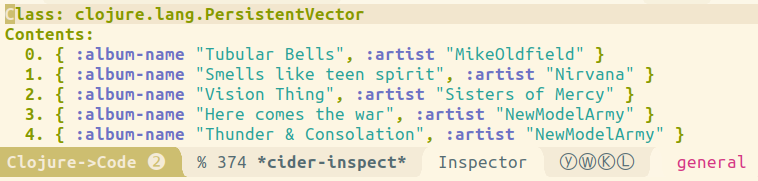 133 | 134 | ++comma++ ++"d"++ is the Cider debug menu which can inspect view intermediate values and data structures during the debugging of Clojure function calls. 135 | 136 | 137 | 138 | Tools to view and navigate code 139 | 140 | * [:fontawesome-solid-book-open: Cider inspector](https://practical.li/spacemacs/evaluating-clojure/inspect/){target=_blank} is an effective way to navigate nested data and page through large data sets. 141 | * [:fontawesome-solid-book-open: Portal Inspector](https://practical.li/clojure/clojure-tools/data-inspector/portal){target=_blank} to visualise many kinds of data in many different forms. 142 | 143 | 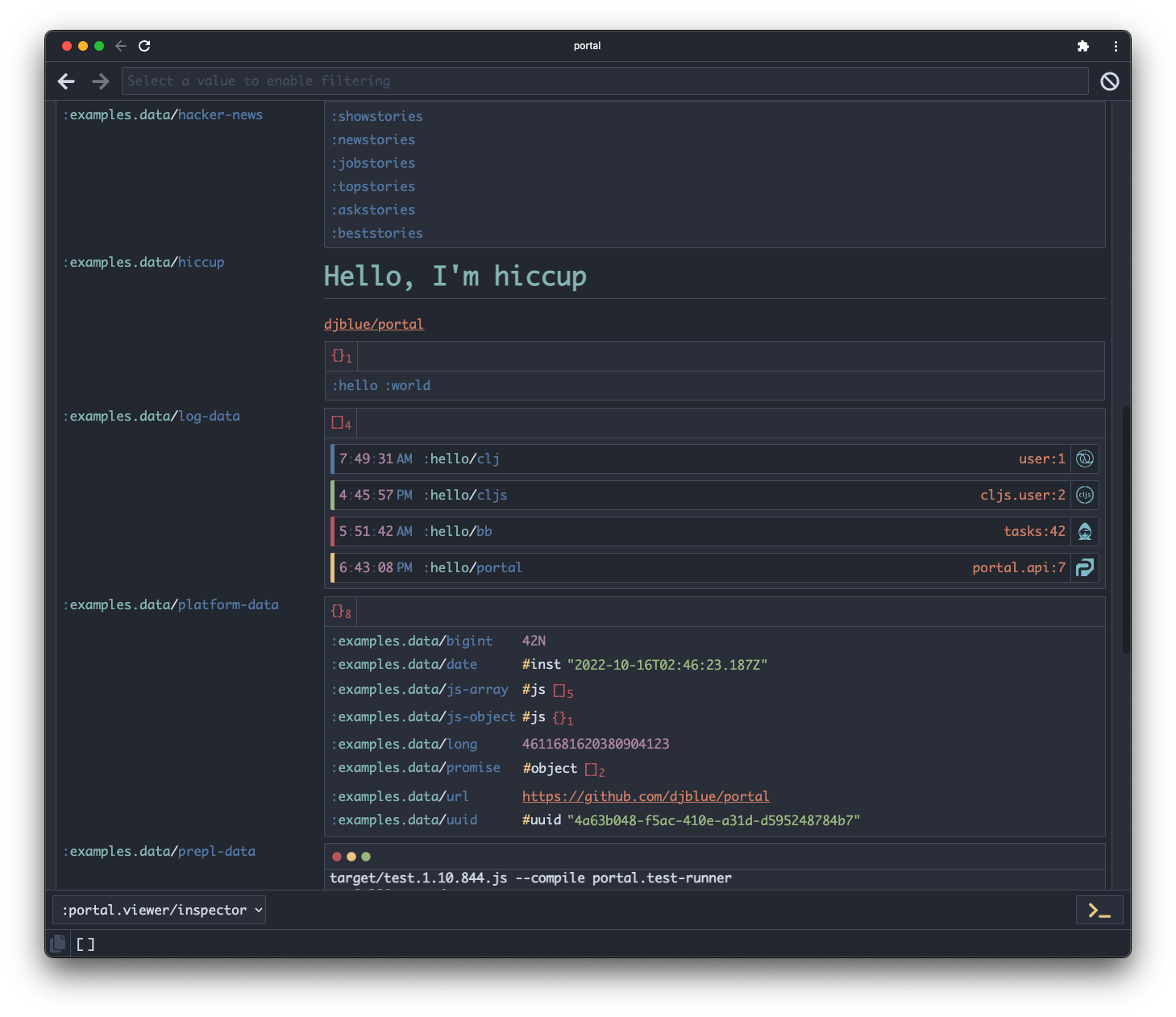 144 | 145 | ## Code Style and idiomatic Clojure 146 | 147 | Clojure aware editors should automatically apply formatting that follows the [:globe_with_meridians: Clojure Style guide](https://github.com/bbatsov/clojure-style-guide){target=_blank}. 148 | 149 | Live linting with [clj-kondo](:fontawesome-brands-github:233 | 234 |
235 | -------------------------------------------------------------------------------- /docs/introduction/writing-tips.md: -------------------------------------------------------------------------------- 1 | # Writing tips for MkDocs 2 | 3 | Making the docs more engaging using the [mkdocs-material theme reference guide](https://squidfunk.github.io/mkdocs-material/reference/){target=_blank} 4 | 5 | ??? INFO "Configuring Colors" 6 | [Material for MkDocs - Changing the colors](https://squidfunk.github.io/mkdocs-material/setup/changing-the-colors/){target=_blank} lists the primary and accent colors available. 7 | 8 | [HSL Color Picker](https://hslpicker.com/) for codes to modify the theme style, overriding colors in `docs/assets/stylesheets/extra.css` 9 | 10 | ## Hypertext links 11 | 12 | Links open in the same browser window/tab by default. 13 | 14 | Add `{target=_blank}` to the end of a link to configure opening in a new tab 15 | 16 | ```markdown 17 | [link text](url){target=_blank} 18 | ``` 19 | 20 | ## Buttons 21 | 22 | Convert any link into a button by adding `{.md-button}` class names to end of the markdown for a link, which uses `.md-button-primary` by default. Include `target=_blank` for buttons with links to external sites. 23 | 24 | ``` 25 | [link text](http://practical.li/blog){.md-button target=_blank} 26 | ``` 27 | 28 | Or specify a different class 29 | 30 | ``` 31 | [link text](http://practical.li/blog){.md-button .md-button-primary} 32 | ``` 33 | 34 | Add an icon to the button 35 | 36 | [:fontawesome-brands-github: Practicalli Issues](http://practical.li/blog){ .md-button .md-button-primary } 37 | [:octicons-heart-fill-24: Practicalli Blog](http://practical.li/blog){ .md-button .md-button-primary } 38 | 39 | ```markdown 40 | [:fontawesome-brands-github: Practicalli Issues](http://practical.li/blog){ .md-button .md-button-primary } 41 | [:octicons-heart-fill-24: Practicalli Blog](http://practical.li/blog){ .md-button .md-button-primary } 42 | ``` 43 | 44 | [Search all supported icons](https://squidfunk.github.io/mkdocs-material/reference/icons-emojis/){target=_blank .md-button} 45 | 46 | ## YouTube video 47 | 48 | Use an iframe element to include a YouTube video, wrapping in a paragraph tag with center alignment to place the video in a centered horizontal position 49 | 50 | ```html 51 |52 | 53 |
54 | ``` 55 | 56 | > mkdocs material does not have direct support for adding a YouTube video via markdown. 57 | 58 | ## Admonitions 59 | 60 | [Supported admonition types](https://squidfunk.github.io/mkdocs-material/reference/admonitions/#supported-types) 61 | 62 | !!! NOTE 63 | Use `!!!` followed by `NOTE` 64 | 65 | !!! NOTE "Adding a title" 66 | Use `!!!` followed by `NOTE` and a `"title in double quotes"` 67 | 68 | !!! NOTE "" 69 | Shh, no title bar just the text... 70 | Use `!!!` followed by `NOTE` and a `""` empty double quotes 71 | 72 | !!! ABSTRACT 73 | Use `!!!` followed by `ABSTRACT` 74 | 75 | !!! INFO 76 | Use `!!!` followed by `INFO` 77 | 78 | !!! TIP 79 | Use `!!!` followed by `TIP` 80 | 81 | !!! SUCCESS 82 | Use `!!!` followed by `SUCCESS` 83 | 84 | !!! QUESTION 85 | Use `!!!` followed by `QUESTION` 86 | 87 | !!! WARNING 88 | Use `!!!` followed by `WARNING` 89 | 90 | !!! FAILURE 91 | Use `!!!` followed by `FAILURE` 92 | 93 | !!! DANGER 94 | Use `!!!` followed by `DANGER` 95 | 96 | !!! BUG 97 | Use `!!!` followed by `BUG` 98 | 99 | !!! EXAMPLE 100 | Use `!!!` followed by `EXAMPLE` 101 | 102 | !!! QUOTE 103 | Use `!!!` followed by `QUOTE` 104 | 105 | ### Collapsing admonitions 106 | 107 | ??? NOTE 108 | Collapse those admonitions using `???` instead of `!!!` 109 | 110 | ??? NOTE "Replace with a title" 111 | Use `???` followed by `NOTE` and a `"title in double quotes"` 112 | 113 | ???+ NOTE "Expanded by default" 114 | Use `???+`, note the `+` character, followed by `NOTE` and a `"title in double quotes"` 115 | 116 | ### Inline blocks 117 | 118 | Inline blocks of text to make a very specific callout within text 119 | 120 | !!! info inline 121 | 122 | Lorem ipsum dolor sit amet, consectetur 123 | adipiscing elit. Nulla et euismod nulla. 124 | Curabitur feugiat, tortor non consequat 125 | finibus, justo purus auctor massa, nec 126 | semper lorem quam in massa. 127 | 128 | Lorem ipsum dolor sit amet, consectetur adipiscing elit. Nulla et euismod nulla. Curabitur feugiat, tortor non consequat finibus, justo purus auctor massa, nec semper lorem quam in massa. 129 | 130 | Lorem ipsum dolor sit amet, consectetur adipiscing elit. Nulla et euismod nulla. Curabitur feugiat, tortor non consequat finibus, justo purus auctor massa, nec semper lorem quam in massa. 131 | 132 | Adding something to then end of text is probably my favourite 133 | 134 | !!! info inline end 135 | 136 | Lorem ipsum dolor sit amet, consectetur 137 | adipiscing elit. Nulla et euismod nulla. 138 | Curabitur feugiat, tortor non consequat 139 | finibus, justo purus auctor massa, nec 140 | semper lorem quam in massa. 141 | 142 | Lorem ipsum dolor sit amet, consectetur adipiscing elit. Nulla et euismod nulla. Curabitur feugiat, tortor non consequat finibus, justo purus auctor massa, nec semper lorem quam in massa. 143 | 144 | Lorem ipsum dolor sit amet, consectetur adipiscing elit. Nulla et euismod nulla. Curabitur feugiat, tortor non consequat finibus, justo purus auctor massa, nec semper lorem quam in massa. 145 | 146 | ## Code blocks 147 | 148 | Code blocks include a copy icon automatically 149 | 150 | Syntax highlighting in code blocks 151 | 152 | ```clojure 153 | (defn my-function ; Write a simple function 154 | "With a lovely doc-string" 155 | [arguments] 156 | (map inc [1 2 3])) 157 | ``` 158 | 159 | Give the code block a title using `title=""` after the backtics and language name 160 | 161 | ```clojure title="src/practicalli/gameboard.clj" 162 | (defn my-function 163 | "With a lovely doc-string" 164 | [arguments] 165 | (map inc [1 2 3])) 166 | ``` 167 | 168 | We all like line numbers, especially when you can set the starting line 169 | 170 | ```clojure linenums="42" title="src/practicalli/gameboard.clj" 171 | (defn my-function 172 | "With a lovely doc-string" 173 | [arguments] 174 | (map inc [1 2 3])) 175 | ``` 176 | 177 | Add `linenums=42` to start line numbers from 42 onward 178 | 179 | ``` 180 | clojure linenums="42" title="src/practicalli/gameboard.clj" 181 | ``` 182 | 183 | ### Annotations 184 | 185 | Annotations in a code block help to highlight important aspects. Use the comment character for the language followed by a space and a number in brackets 186 | 187 | For example, in a shell code block, use `# (1)` where 1 is the number of the annotation 188 | 189 | Use a number after the code block to add the text for the annotation, e.g. `1.`. Ensure there is a space between the code block and the annotation text. 190 | 191 | ```shell 192 | ls -la $HOME/Downloads # (1) 193 | ``` 194 | 195 | 1. :woman_raising_hand: I'm a code annotation! I can contain `code`, __formatted text__, images, ... basically anything that can be written in Markdown. 196 | 197 | 198 | Code blocks with annotation, add `!` after the annotation number to suppress the `#` character 199 | 200 | ```clojure 201 | (defn helper-function 202 | "Doc-string with description of function purpose" ; (1)! 203 | [data] 204 | (merge {:fish 1} data) 205 | ) 206 | ``` 207 | 208 | 1. Always include a doc-string in every function to describe the purpose of that function, identifying why it was added and what its value is. 209 | 210 | GitHub action example with multiple annotations 211 | 212 | ``` yaml 213 | name: ci # (1)! 214 | on: 215 | push: 216 | branches: 217 | - master # (2)! 218 | - main 219 | permissions: 220 | contents: write 221 | jobs: 222 | deploy: 223 | runs-on: ubuntu-latest 224 | steps: 225 | - uses: actions/checkout@v3 226 | - uses: actions/setup-python@v4 227 | with: 228 | python-version: 3.x 229 | - run: pip install mkdocs-material # (3)! 230 | - run: mkdocs gh-deploy --force 231 | ``` 232 | 233 | 1. You can change the name to your liking. 234 | 235 | 2. At some point, GitHub renamed `master` to `main`. If your default branch 236 | is named `master`, you can safely remove `main`, vice versa. 237 | 238 | 3. This is the place to install further [MkDocs plugins] or Markdown 239 | extensions with `pip` to be used during the build: 240 | 241 | ``` sh 242 | pip install \ 243 | mkdocs-material \ 244 | mkdocs-awesome-pages-plugin \ 245 | ... 246 | ``` 247 | 248 | ### Highlight lines in code blocks 249 | 250 | Add highlight line meta data to a code block after the opening backticks and code block language. 251 | 252 | `hl_lines="2"` highlights line 2 in the codeblock 253 | 254 | ```clojure hl_lines="4 5 6" 255 | (defn my-function 256 | "With a lovely doc-string" 257 | [arguments] 258 | (map 259 | inc 260 | [1 2 3])) 261 | ``` 262 | 263 | ### Embed external files 264 | 265 | `--8<--` in a code block inserts code from a source code file or other text file 266 | 267 | Specify a local file from the root of the book project (the directory containing mkdocs.yml) 268 | 269 | ??? EXAMPLE "Scheduled Version Check GitHub Workflow from source code file" 270 | ```yaml title="scheduled version check" 271 | --8<-- ".github/workflows/scheduled-version-check.yaml" 272 | ``` 273 | 274 | ??? EXAMPLE "Practicalli Project Templates" 275 | ```markdown title="Emacs project configuration - .dir-locals.el" 276 | --8<-- "https://raw.githubusercontent.com/practicalli/project-templates/main/.dir-locals.el" 277 | ``` 278 | 279 | !!! HINT "Code example reuse" 280 | Use an embedded local or external file (URL) when the same content is required in more than one place in the book. 281 | 282 | An effective way of sharing code and configuration mutliple times in a book or across multiple books. 283 | 284 | ## Content tabs 285 | 286 | Create in page tabs that can also be 287 | 288 | Setting up a project 289 | 290 | === "Clojure CLI" 291 | ```shell 292 | clojure -T:project/new :template app :name practicalli/gameboard 293 | ``` 294 | 295 | === "Leiningen" 296 | ```shell 297 | lein new app practicalli/gameboard 298 | ``` 299 | 300 | Or nest the content tabs in an admonition 301 | 302 | !!! INFO "Run a terminal REPL" 303 | 304 | === "Clojure CLI" 305 | ```shell 306 | clojure -T:repl/rebel 307 | ``` 308 | 309 | 310 | === "Leiningen" 311 | ```shell 312 | lein repl 313 | ``` 314 | 315 | ## Diagrams 316 | 317 | Neat flow diagrams 318 | 319 | [Diagrams - Material for MkDocs](https://squidfunk.github.io/mkdocs-material/reference/diagrams/){target=_blank .md-button} 320 | 321 | ``` mermaid 322 | graph LR 323 | A[Start] --> B{Error?}; 324 | B -->|Yes| C[Hmm...]; 325 | C --> D[Debug]; 326 | D --> B; 327 | B ---->|No| E[Yay!]; 328 | ``` 329 | 330 | UML Sequence Diagrams 331 | 332 | ``` mermaid 333 | sequenceDiagram 334 | Alice->>John: Hello John, how are you? 335 | loop Healthcheck 336 | John->>John: Fight against hypochondria 337 | end 338 | Note right of John: Rational thoughts! 339 | John-->>Alice: Great! 340 | John->>Bob: How about you? 341 | Bob-->>John: Jolly good! 342 | ``` 343 | 344 | state transition diagrams 345 | 346 | ``` mermaid 347 | stateDiagram-v2 348 | state fork_state <