9 |
10 |
--------------------------------------------------------------------------------
/docs/build-tool/babashka-task-runner.md:
--------------------------------------------------------------------------------
1 | # Babashka Task Runner
2 |
3 | [Babashka](https://book.babashka.org/#tasks) is a scripting tool that runs Clojure code.
4 |
5 | Babashka provides a [task runner](https://book.babashka.org/#tasks) which can be used as a basis for creating a build tool
6 |
7 | [:fontawesome-solid-book-open: Babashka Task Runner](https://book.babashka.org/#tasks)
8 |
9 |
10 |
--------------------------------------------------------------------------------
/docs/os/command-line/commands/managing-software.md:
--------------------------------------------------------------------------------
1 | # Managing Software
2 |
3 | Operating systems provide commands to manage software and there are general tools to manually install software and diagnose issues.
4 |
5 |
6 | ## Package Managers
7 |
8 |
9 | === "Debian Linux"
10 |
11 | `apt`
12 |
13 |
14 | == "Arch Linux"
15 |
16 | `pacman`
17 |
18 |
19 | ## General tools
20 |
21 | `which` shows the full path to a command's executable file
22 |
23 |
24 | `top`
25 |
--------------------------------------------------------------------------------
/.gitignore:
--------------------------------------------------------------------------------
1 | # Exclude all files from root directory
2 | /*
3 |
4 | # ------------------------
5 | # Common project files
6 | !CHANGELOG.md
7 | !README.md
8 | !LICENSE
9 |
10 | # ------------------------
11 | # Include MkDocs files
12 | !docs/
13 | !includes/
14 | !overrides/
15 | !mkdocs.yml
16 |
17 | # ------------------------
18 | # Project automation
19 | !Makefile
20 |
21 | # ------------------------
22 | # Version Control
23 | !.gitignore
24 | !.gitattributes
25 | !.github/
26 |
27 |
--------------------------------------------------------------------------------
/docs/persistence/index.md:
--------------------------------------------------------------------------------
1 | # Persistence
2 |
3 | Storing data on long term storage
4 |
5 | ## Relational Databases
6 |
7 | Relational Database (RDBMS) and tools
8 |
9 | - Postgresql
10 | - H2
11 | - MariaDB
12 |
13 | ## Document databases
14 |
15 | - MongoDB
16 | - XTDB (although this seems to be more of an SQL store now)
17 |
18 | ## Key Value Stores
19 |
20 | Key Value stores are often used for caches or data that has relatively simple structure.
21 |
22 | - Redis
23 | - AWS DynamoDB
24 |
--------------------------------------------------------------------------------
/docs/persistence/rdbms/server/h2.md:
--------------------------------------------------------------------------------
1 | # H2
2 |
3 | H2 is a very useful tool for rapid development as there is very little setup required. H2 can be run in memory and data can also be saved to the local file space.
4 |
5 | [:fontawesome-solid-book-open: Practicalli Clojure Web Services](https://practical.li/clojure-web-services/relational-databases-and-sql/h2-database/){target=_blank} uses H2 to support a simple local development workflow.
6 |
7 | !!! INFO "H2 is not recommended for production usage"
8 |
--------------------------------------------------------------------------------
/docs/persistence/rdbms/client/pgadmin.md:
--------------------------------------------------------------------------------
1 | # pgAdmin PostgreSQL Tools
2 |
3 | [:globe_with_meridians: pgAdmin](https://www.pgadmin.org/){target=_blank .md-button}
4 |
5 | pgAdmin is a feature rich Open Source administration and development platform for PostgreSQL
6 |
7 | [:globe_with_meridians: pgAdmin Documentation](https://www.pgadmin.org/){target=_blank .md-button}
8 |
9 | ## References
10 |
11 | [PostgreSQL Tutorial - Administration](https://www.postgresqltutorial.com/postgresql-administration/)
12 |
--------------------------------------------------------------------------------
/docs/continuous-integration/github/index.md:
--------------------------------------------------------------------------------
1 | # GitHub Workflows and Actions
2 |
3 | A [GitHub workflow](workflows/) defines one or more jobs to carry out as part of a continuous integration run.
4 |
5 | Workflows are [triggered by events](trigger-events.md), usually bit Git related actions (commit, PR, etc.) or by schedule or human interaction with the GitHub website.
6 |
7 | [GitHub Actions](actions.md) provide common jobs that can be used within a workflow, greatly reducing the configuration required to get tasks done.
8 |
--------------------------------------------------------------------------------
/.github/config/markdown-link-check.json:
--------------------------------------------------------------------------------
1 | {
2 | "ignorePatterns": [
3 | {
4 | "pattern": "^http://localhost"
5 | },
6 | {
7 | "pattern": "^mailto:*"
8 | },
9 | {
10 | "pattern": "^#*"
11 | },
12 | {
13 | "pattern": "^https://127.0.0.0/"
14 | }
15 | ],
16 | "timeout": "20s",
17 | "retryOn429": true,
18 | "retryCount": 5,
19 | "fallbackRetryDelay": "30s",
20 | "aliveStatusCodes": [
21 | 200,
22 | 206
23 | ]
24 | }
25 |
--------------------------------------------------------------------------------
/.github/config/gitleaks.toml:
--------------------------------------------------------------------------------
1 | title = "gitleaks config"
2 |
3 | [allowlist]
4 | description = "global allow lists"
5 | paths = [
6 | '''gitleaks.toml''',
7 | '''(.*?)(jpg|gif|doc|docx|zip|xls|pdf|bin|svg|socket)$''',
8 | '''(go.mod|go.sum)$''',
9 | '''gradle.lockfile''',
10 | '''node_modules''',
11 | '''package-lock.json''',
12 | '''pnpm-lock.yaml''',
13 | '''Database.refactorlog''',
14 | '''vendor''',
15 | ]
16 |
17 | [[rules]]
18 | description = "AWS Example API Key"
19 | id = "aws-example-api-key"
20 | regex = '''AKIAIOSFODNN7EXAMPLE'''
21 | keywords = [
22 | "awstoken",
23 | ]
24 |
--------------------------------------------------------------------------------
/docs/os/ubuntu-linux.md:
--------------------------------------------------------------------------------
1 | # Ubuntu Linux
2 |
3 | Ubuntu Linux is a Debian Linux based distribution providing additional Kernel patches, Desktop management and themes and a wider range of packages provided in the distribution ISO (including non-free software).
4 |
5 | Ubuntu Desktop is aimed at a rich user experience.
6 |
7 | Server ISO provides additional options when installing Ubuntu, especially RAID support.
8 |
9 | ## Post Install steps
10 |
11 | - XDG Environment Variables
12 | - Git
13 | - Practicalli Dotfiles
14 | - Kitty Terminal
15 | - Zsh and power10k themes
16 | - OpenJDK
17 | - Clojure CLI
18 | - Emacs
19 | - Neovim
20 |
--------------------------------------------------------------------------------
/docs/os/command-line/ghostty.md:
--------------------------------------------------------------------------------
1 | # Ghostty Terminal Emulator
2 |
3 | [Ghostty](https://ghostty.org/) is a fast, feature-rich, and cross-platform terminal emulator that uses platform-native UI and GPU acceleration.
4 |
5 |
6 | !!! WARNING "Ghostty is built on Zig"
7 | Zig is described by Ghostty as a fast moving project and specifies it can only be built agains Zig 0.14
8 |
9 |
10 |
11 | ## Install
12 |
13 | == "Debian package"
14 | No official packages for Ghostty. [debian-ghostty](https://github.com/clayrisser/debian-ghostty/) is a community package for Debian and Ubuntu.
15 |
16 | A snap package is avaialbe for Ghostty.
17 |
--------------------------------------------------------------------------------
/docs/continuous-integration/index.md:
--------------------------------------------------------------------------------
1 | # Continuous integration
2 |
3 | [:fontawesome-solid-book-open: Docker Containers & tools](docker/){.md-button}
4 |
5 | ## Hosted CI Services
6 |
7 | - CircleCI
8 | - [:fontawesome-solid-book-open: GitHub Workflows and Actions](github/)
9 | - GitLab CI
10 | - [Render.com](https://render.com/)
11 | - [fly.io](https://fly.io)
12 | - [Vercel](https://vercel.com/) - front-end focus
13 | - [Heroku](https://heroku.com) - commercial only
14 |
15 | Practicalli uses [Vercel](https://vercel.com/) to host scripts to update GitHub profiles, i.e. [:fontawesome-brands-github: practicalli-johnny](https://github.com/practicalli-johnny)
16 |
--------------------------------------------------------------------------------
/docs/os/command-line/index.md:
--------------------------------------------------------------------------------
1 | # Command Line
2 |
3 | Terminal Emulator apps, shells, configuration tips, etc.
4 |
5 | [Terminal Emulators](https://en.wikipedia.org/wiki/Terminal_emulator) provide a text-based terminal that runs a [shell](shell/index.md) in which [commands](commands/index.md) can be run.
6 |
7 | !!! INFO "Graphics support for Terminal Emulators"
8 | Kitty and other terminal emulator apps also support graphics using the [:globe_with_meridians: Kitty Terminal Graphics Protocol](https://sw.kovidgoyal.net/kitty/graphics-protocol/){target=_blank}.
9 |
10 | ## Terminal Emulator Apps
11 |
12 |
13 | - Kitty
14 | - Warp - also provides AI support
15 | - Ghostty
16 |
--------------------------------------------------------------------------------
/docs/software-design/design-patterns/cqrs.md:
--------------------------------------------------------------------------------
1 | # Command Query Resposibility Segregation
2 |
3 | system architecture that extends the idea behind command–query separation to the level of services.[1][2] Such a system will have separate interfaces to send queries and to send commands. As in CQS, fulfilling a query request will only retrieve data and will not modify the state of the system (with some exceptions like logging access), while fulfilling a command request will modify the state of the system.
4 |
5 | Many systems push the segregation to the data models used by the system. The models used to process queries are usually called read models and the models used to process commands write models.
6 |
--------------------------------------------------------------------------------
/docs/software-design/anti-patterns/index.md:
--------------------------------------------------------------------------------
1 | # Anti-Patterns
2 |
3 | Anti-patterns arise as people translate business needs into software solutions, especially where the human process requires a clear and well communicated shared vision.
4 |
5 | Anti-patterns take a similar documentation style to the definition of Design Patterns, although anti-patterns can also cover behaviour so cover a far wider scope than the (mostly OO) software design covered by Design Patterns.
6 |
7 | Anti-patterns are often inadvertently applied, so awareness allow those situations be avoided before they occur.
8 |
9 | Categories of anti-patterns
10 |
11 | - Software Development
12 | - Software Architecture
13 | - Software Project Management
14 |
--------------------------------------------------------------------------------
/docs/persistence/rdbms/sql/examples.md:
--------------------------------------------------------------------------------
1 | # SQL Examples
2 |
3 | Useful SQL queries for doing interesting things.
4 | Each query should be accompanied by an explanation of its purpose
5 | Viewing the latest data
6 | View the last 100 rows in the database (assuming id is an ascending (or auto-incremental) value
7 |
8 | ## Database management
9 |
10 | ## Schema management
11 |
12 | ## Query data
13 |
14 | ```sql
15 | SELECT * FROM table ORDER BY id DESC LIMIT 100
16 | ```
17 |
18 | Select the last 100 rows in a table (assuming id is an auto-incremental index) and order the results in ascending order
19 |
20 | ```sql
21 | SELECT * FROM (
22 | SELECT * FROM table ORDER BY id DESC LIMIT 100
23 | ) sub
24 | ORDER BY id ASC
25 | ```
26 |
--------------------------------------------------------------------------------
/docs/practices/discussions/standup.md:
--------------------------------------------------------------------------------
1 | # Standup meetings
2 |
3 | Aim
4 |
5 | - a brief meeting, preferably with a hard time limit (e.g. max 10 minutes)
6 | - share only essential and important information
7 |
8 | !!! WARNING "Anti-pattern: using standups for status updates"
9 | There are many far more effective approaches to track the status of a team.
10 |
11 | It is a waste of everyones time at a standup to talk about what was done and what will be done next.
12 |
13 | Topics
14 |
15 | - identify experiences that are useful to share
16 | -
17 |
18 | ## Tips
19 |
20 | - stand up at the standup, encourages brevity
21 | - its okay not to have anything to share on any given day (never sharing should be addressed though)
22 |
--------------------------------------------------------------------------------
/overrides/404.html:
--------------------------------------------------------------------------------
1 |
4 |
5 |
6 | {% extends "main.html" %}
7 |
8 |
9 | {% block content %}
10 |
This is not the page you are looking for
11 |
12 |
13 | Sorry we have arrived at a page that does not exist...
14 |
15 |
16 |
17 | Practicalli Engineering Playbook is a very new book and actively being updated
18 |
19 |
20 |
21 | Try use the Search bar at the top of the page
22 |
29 |
30 |
31 | {% endblock %}
32 |
--------------------------------------------------------------------------------
/docs/persistence/rdbms/index.md:
--------------------------------------------------------------------------------
1 | # Relational Database Management Systems
2 |
3 | ## Servers
4 |
5 | An
6 |
7 | ## Clients
8 |
9 | An RDMS client is anything that connects to an RDMS server, e.g. Database tool, command line, programming languaguage code.
10 |
11 | [:fontawesome-solid-book-open: RDMS CLient](client/index.md){.md-button}
12 |
13 | ## Languages
14 |
15 | [:globe_with_meridians: Structured Query Language (SQL)](https://en.wikipedia.org/wiki/SQL) overview
16 |
17 | [:fontawesome-solid-book-open: SQL](sql/index.md){.md-button}
18 |
19 | ### SQL Guides
20 |
21 | - [:globe_with_meridians: W3 Schools - SQL Introduction](https://www.w3schools.com/sql/sql_intro.asp)
22 | - [:globe_with_meridians: AWS - What Is SQL](https://aws.amazon.com/what-is/sql/)
23 | - [:globe_with_meridians: Codecademy - Learn SQL](https://www.codecademy.com/learn/learn-sql)
24 |
--------------------------------------------------------------------------------
/docs/os/linux/arch-linux.md:
--------------------------------------------------------------------------------
1 | # Arch Linux
2 |
3 | - Rolling Release
4 | - pacman package manager
5 | - Highly detail docs and options
6 | - Arch User Repository for community package (often from Git repo)
7 |
8 |
9 | ## Notable Features
10 |
11 | - Hyprland
12 |
13 |
14 | ## Install
15 |
16 |
17 | ## Packages
18 |
19 |
20 | ### Split Packages
21 |
22 | "split packages" are multiple packages built from a single source with a shared build process. Each package is defined in the PKGBUILD file
23 |
24 | VLC is an example of a split package, where the media player is one package and the codecs for each media file type are in their own package. Using a split package avoids installing many codecs that would not be used.
25 |
26 |
27 | ## Media players
28 |
29 | [VLC]()
30 |
31 | [Mpv]()
32 |
33 |
34 | ## Video Editing
35 |
36 | [Blender]()
37 |
38 | [Kdenlive]()
39 |
--------------------------------------------------------------------------------
/docs/continuous-integration/github/workflows/luarocks.md:
--------------------------------------------------------------------------------
1 | # Lua Rocks
2 |
3 | Publish package to Lua Rocks
4 |
5 | ??? INFO "Lua Rocks API key required"
6 | Add Lua Rocks API to GitHub repository (or organisation) secrets
7 |
8 | !!! EXAMPLE "GitHub Workflow to Publish package to Lua Rocks"
9 | ```yaml
10 | name: "release"
11 | on:
12 | push:
13 | tags:
14 | - 'v*'
15 | jobs:
16 | luarocks-upload:
17 | runs-on: ubuntu-22.04
18 | steps:
19 | - uses: actions/checkout@v3
20 | - name: LuaRocks Upload
21 | uses: nvim-neorocks/luarocks-tag-release@v4
22 | env:
23 | LUAROCKS_API_KEY: ${{ secrets.LUAROCKS_API_KEY }}
24 | with:
25 | detailed_description: |
26 | A meaingful description of the package that should show on Lua Rocks.
27 | dependencies: |
28 | plenary.nvim
29 | ```
30 |
--------------------------------------------------------------------------------
/docs/change-management/index.md:
--------------------------------------------------------------------------------
1 | # Change Management
2 |
3 | Change in any organization is very challenging and usually takes a lot of time or a lot of pain, i.e. evolution = time, revolution = pain (redundancies, people leaving, etc)
4 |
5 | Consider change in others as a potential side-effect of the work I do, rather than a specific goal I want to achieve. Having change in others as a goal can contain much frustration and disappointment.
6 |
7 | Discovering what really motivates people is an interesting challenge in itself but a useful tool to create a meaningful basis for communication.
8 |
9 | For an example, if introducing Clojure into a company you first need to identify what is painful or highly valuable to people. Then talk about removing that pain or adding extra value when referring to Clojure.
10 |
11 | I see a lot of people get excited about a technology for themselves, but they forget they have to help other people see how it benefits them if they want their adoption.
12 |
--------------------------------------------------------------------------------
/docs/practices/organising-work/index.md:
--------------------------------------------------------------------------------
1 | # Organising Work
2 |
3 | Organising work is important as it ensures the right work is done at the right time for a valuable outcome.
4 |
5 | Organising (usually referred to as planning) is not valued by engineers when the focus is predominantly "how long will it take to do x". Unless an engineer has done 'X' many times before with the same constraints, then the answer can only be a rough guess. Worse still is when a non-engineering role says with seeming confidence that it will only take a couple of weeks to do "X".
6 |
7 | Organising work priorities can be very complex and have many stakeholders with different opinions about what is important. It is vital that stakeholders resolve their own differences of opinions without taking valuable time away from engineering teams.
8 |
9 | Time is also a major stakeholder in every engineering project.
10 |
11 | - [Rolling Wave Planning](rolling-wave-planning.md) iterative approach to planning, also referred to as 30/60/90 planning.
12 |
--------------------------------------------------------------------------------
/.github/config/lychee.toml:
--------------------------------------------------------------------------------
1 |
2 | # ----------------------------------------
3 | # Base URL or website root directory to check relative URLs.
4 | base = "https://practical.li/"
5 |
6 | # Only test links with the given schemes (e.g. https).
7 | # Omit to check links with any other scheme.
8 | # At the moment, we support http, https, file, and mailto.
9 | scheme = ["https"]
10 |
11 | # ----------------------------------------
12 | # Exclusions
13 |
14 | # Exclude URLs and mail addresses from checking (supports regex).
15 | exclude = ['^https://www\.linkedin\.com', '^https://127.0.0.0']
16 |
17 | # Exclude these filesystem paths from getting checked.
18 | exclude_path = ["mkdocs.yml", "overrides", "includes", ".github", ".git"]
19 |
20 | # Exclude all private IPs from checking.
21 | # Equivalent to setting `exclude_private`, `exclude_link_local`, and
22 | # `exclude_loopback` to true.
23 | exclude_all_private = true
24 |
25 | # Check mail addresses
26 | include_mail = false
27 | # ----------------------------------------
28 |
--------------------------------------------------------------------------------
/docs/software-design/domain-driven-design/index.md:
--------------------------------------------------------------------------------
1 | # Domain Driven Design
2 |
3 | - Ubiquitous Language, applicable withing a single bounded context
4 |
5 | A Bounded Context is a conceptual boundary where a domain model is applicable. It provides a context for the Ubiquitous Language that is spoken by the team and expressed in its carefully designed software model, as shown in Figure G.1.
6 |
7 | ## Terminology
8 |
9 | ### Domain
10 |
11 | A sphere of knowledge, influence or activity. The subject area to which the user applies a program is the domain of the software
12 |
13 | ### Model
14 |
15 | A syste of abstractions that describes selected aspects of a domain and can be used to solve problems related to that domain
16 |
17 | ### Ubiquitous Language
18 |
19 | A language structred around the domain model and used by all team members to connect all the activities of the team with the software
20 |
21 | - Data Dictionary
22 |
23 | ## Context
24 |
25 | The setting in which a workd or statement appears that detemines its meaning
26 |
--------------------------------------------------------------------------------
/docs/practices/personal-journal.md:
--------------------------------------------------------------------------------
1 | # Personal Journal
2 |
3 | A simple way to quickly capturing things you are learning as you are learning them. It can become a central place for capturing important information, without the need to consider how to structure that information effectively.
4 |
5 | A regular journal becomes a tool to reinforcing things you have learned in a language that you understand them (your own).
6 |
7 | Creating a journal within a searchable tool provides an essential reference, reducing the need to "re-learn" things you have learnt.
8 |
9 | - on-boarding
10 | - new programming language
11 | - new technical or business concepts
12 |
13 |
14 | !!! INFO "Practicalli Personal Journal"
15 | [Practicalli Personal Journal](https://practical.li/journal){target=_blank} is a journal organised by week, capturing important information from work, open source projects, hobbies and health.
16 |
17 | [Material for MkDocs](https://squidfunk.github.io/mkdocs-material/){target=_blank} is used to generate a blog website of the journal, published via GitHub pages.
18 |
--------------------------------------------------------------------------------
/docs/code-quality/index.md:
--------------------------------------------------------------------------------
1 | # Code Quality
2 |
3 | Tools can provide a base level of code quality and consistency when developing locally.
4 |
5 | Those same tools can check important quality rules when sharing code via continuous integration workflows, focusing the scope of code reviews on the more valuable aspect of design decisions
6 |
7 | - **Lint tools** identify syntax and formatting issues for a specific programming language or configuration file
8 | - **Format tools** ensures code follows a common set of format and indent rules
9 |
10 | The development team should agree on the rules that are valueable for these tools to apply, including those recommended by the community around the programming language or configuration file specification.
11 |
12 | ## Recommended Tools
13 |
14 | MegaLinter provides an extensive range of lint tools all in one, using docker images to remove tool installation requirements.
15 |
16 | [MegaLinter - extensive collection of lint tools](megalinter.md){target=_blank .md-button}
17 |
18 | [Clojure Quality Tools](clojure.md){target=_blank .md-button}
19 |
--------------------------------------------------------------------------------
/docs/practices/reports.md:
--------------------------------------------------------------------------------
1 | # Reports
2 |
3 | When a report it required then the person creating that report should know what its value is and who is the audience.
4 |
5 |
6 |
7 |
8 | ## Identify reports
9 |
10 | If repeating reports are required to be delivered, they should be identified as early as possible.
11 |
12 | Capture the value the report provides and the stakeholders that will consume the report.
13 |
14 | Ask those consuming each report what they really want to see and how often.
15 |
16 | Also consult as to the presentation of the information to ensure that the information can be consumed effectively.
17 |
18 | ## Identify source data
19 |
20 | What information is used to generate the report.
21 |
22 | Identify related information that could be useful to the stakeholders and provide examples to stakeholders for feedback.
23 |
24 | ## Optomise Creation
25 |
26 | Ensure that data capture and transformation for the report is as automated as possible, minimising the time it takes to generate each report.
27 |
28 | Optomise the report format to best suit the methods of consumption by the stakeholders.
29 |
--------------------------------------------------------------------------------
/docs/os/linux/index.md:
--------------------------------------------------------------------------------
1 | # Linux Operating System
2 |
3 | Linux is an open source kernel with a very large collection of software tools.
4 |
5 | Linux is typically installed via a distribution, a community or commercial effort to package that large collection of software so that it is easy to install and maintain.
6 |
7 | Most commonly used Linux operating system
8 |
9 | - Debian Linux & Ubuntu
10 | - Red Hat & CentOS
11 | - Arch Linux
12 | - OpenSUSE
13 | - Slackware Linux
14 |
15 | There are 100s of Linux distribution, typically based on one of the above.
16 |
17 |
18 | ## Packaging Standards
19 |
20 | Deb package is a well defined standard that helps avoid conflicts between software and its package dependencies. The standard ensures consistency across all packages.
21 |
22 | RPM is a simpler package design and has less strictness for managing dependencies.
23 |
24 | Arch is described as a rolling release, although occasionally the install ISO is updated. Packages are continually updated in the Arch repository. Arch User Repository contains community managed packages, each package is built from Git repositories.
25 |
--------------------------------------------------------------------------------
/docs/continuous-integration/github/workflows/system-catalog.md:
--------------------------------------------------------------------------------
1 | # System catalog
2 |
3 | ## Backstage.io
4 |
5 | [Backstage](https://github.com/backstage/backstage#what-is-backstage) is an open platform for building developer portals, using a centralised software catalog.
6 |
7 | The Backstage Validator workflow checks the Backstage configuration of the current project.
8 |
9 | !!! EXAMPLE "Validate Backstage.io configuration files"
10 | ```yaml
11 | ---
12 | # --- Validate Backstage.io configuration files ---#
13 | # https://github.com/marketplace/actions/backstage-entity-validator
14 |
15 | # trigger workflow if yaml files `.backstage/` directory updated
16 | name: Backstage Validator
17 | on:
18 | pull_request:
19 | paths:
20 | - ".backstage/"
21 | jobs:
22 | # Validate backstage configuration
23 | backstage-validator:
24 | runs-on: ubuntu-latest
25 | steps:
26 | - uses: actions/checkout@v3
27 | - uses: RoadieHQ/backstage-entity-validator@v0.3.2
28 | with:
29 | path: ".backstage/*.yaml"
30 | ```
31 |
--------------------------------------------------------------------------------
/docs/careers/index.md:
--------------------------------------------------------------------------------
1 | # Engineering Career Development
2 |
3 | Practicalli general view of career development includes the following roles
4 |
5 | - New engineer
6 | - Experienced Engineer
7 | - Seasoned Engineer
8 | - Engineer team lead
9 | - Architect
10 | - [:fontawesome-solid-book-open: Engineering Manager](engineering-manager.md)
11 |
12 | !!! WARNING "Draft section: sharing initial thoughts"
13 | The Career development section is very new and the thoughs shared and structure of this section may greatly change.
14 |
15 |
16 |
17 | !!! INFO "Ownership verses Responsibility"
18 |
19 | Engineers have collective ownership of all source code and should feel encouraged to contribute to any aspect of the code (e.g. creating and reviewing Pull Requests)
20 |
21 | A team may have responsibility for specific components and services, ensuring their design goals are realised and maintained. The team should guide other engineers in their use and contributions to the parts of source code they are responsible for.
22 |
23 | NOTE: From a legal perspective, the company you work for usually owns the code you write (explicitly defined in employment contracts).
24 |
--------------------------------------------------------------------------------
/docs/practices/deliberate-practice/code-kata.md:
--------------------------------------------------------------------------------
1 | # Code Kata
2 |
3 | A code kata is a small coding exercise that you repeat over and over again, helping you improve your coding skills.
4 |
5 | The kata is not about producing a usable solution as this detracts from the learning experience.
6 |
7 | A coding kata for a developer is like an athlete doing warming up exercises before a run.
8 |
9 | A coding kata is often used to warm up your skills before you start work each day. Working on a kata problem that is not related to any of your work allows you to think about how you write code rather than thinking of delivery and meeting estimates.
10 |
11 | Coding kata often uses a test first approach, as in TDD.
12 |
13 | [:fontawesome-solid-book-open: Kata Challenges - Practicalli Clojure](https://practical.li/clojure/simple-projects/tdd-kata/){target=_blank .md-button}
14 |
15 | [Coding Dojo website](https://codingdojo.org/kata/){target=_blank .md-button}
16 |
17 | [Randori - Wikipedia](https://en.wikipedia.org/wiki/Randori){target=_blank .md-button}
18 |
19 | ### Prepared Kata
20 |
21 | A presenter shows how to solve a challenge using TDD using baby steps
22 |
23 | Each step must make sense to everyone present
24 |
25 | Audience only interrupts if something is not understood.
26 |
27 | ### Group Kata
28 |
--------------------------------------------------------------------------------
/docs/practices/index.md:
--------------------------------------------------------------------------------
1 | # Engineering Practices
2 |
3 | Engineering has many practices and principles defined over it many decades.
4 |
5 | ??? WARNING "Section is work in progress"
6 |
7 | ## Agile software Development
8 |
9 | - [:globe_with_meridians: Agile Manifesto](https://agilemanifesto.org/){target=_blank} (essentail reading)
10 | - Extreme Programming
11 | - Test Driven Development
12 | - [Technical Debt](technical-debt/)
13 |
14 | ## Discussions
15 |
16 | - [:fontawesome-solid-book-open: Standup](discussions/standup.md)
17 | - [:fontawesome-solid-book-open: Retrospective](discussions/retrospective.md)
18 | - [:fontawesome-solid-book-open: one-to-one meetings](discussions/one-to-one-meeting.md)
19 | - [:globe_with_meridians: Six Thinking Hats](https://en.wikipedia.org/wiki/Six_Thinking_Hats){target=_blank}
20 |
21 | ## Lean software development
22 |
23 | - [:fontawesome-solid-book-open: Kanban](kanban/) - optomising work & evolving change
24 | - [:fontawesome-solid-book-open: Behaviour Driven Development](behaviour-driven-development/)
25 |
26 | ## General development
27 |
28 | - Root Cause Analysis
29 | - Five whys
30 |
31 | ## General Project Management
32 |
33 | - Rolling Wave Planning
34 | - MoSCoW rules - Must have, Should have, Could have, Wont have
35 | - [Managing Bias](managing-bias.md)
36 |
--------------------------------------------------------------------------------
/docs/continuous-integration/docker/desktop/extensions.md:
--------------------------------------------------------------------------------
1 | # Docker Desktop Extensions
2 |
3 | Docker Marketplace contains many useful and freely available extensions to manage the docker environment and services running within containers.
4 |
5 | [Docker Desktop Extensions overview](https://docs.docker.com/desktop/extensions/){target=_blank .md-button}
6 |
7 | ## Resources
8 |
9 | [:globe_with_meridians: Resource usage](https://hub.docker.com/extensions/docker/resource-usage-extension){target=_blank .md-button}
10 |
11 | [:globe_with_meridians: Disk usage](https://hub.docker.com/extensions/docker/disk-usage-extension){target=_blank .md-button}
12 |
13 | ## Logging
14 |
15 | [:globe_with_meridians: Logs Explorer](https://hub.docker.com/extensions/docker/logs-explorer-extension){target=_blank .md-button}
16 |
17 | ## Backup
18 |
19 | [:globe_with_meridians: Volumes backup & Share](https://hub.docker.com/extensions/docker/volumes-backup-extension){target=_blank .md-button}
20 |
21 | ## Security
22 |
23 | [:globe_with_meridians: Snyk security vulnerability scanner](https://hub.docker.com/extensions/snyk/snyk-docker-desktop-extension){target=_blank .md-button}
24 |
25 | ## Database
26 |
27 | [:globe_with_meridians: PostgreSQL database monitoring](https://hub.docker.com/extensions/mochoa/pgadmin4-docker-extension){target=_blank .md-button}
28 |
--------------------------------------------------------------------------------
/docs/technical-writing/index.md:
--------------------------------------------------------------------------------
1 | # Technical writing
2 |
3 | ## A Practical approach
4 |
5 | Write what you want to say, then rewrite the way you wish to say it, e.g brain-dump thoughts at first without concern for the prose, refactor to make thoughts intelligable and easily consumable.
6 |
7 | The hardest part of writing can be getting over the blank page.
8 |
9 | A focus on capturing thoughts first ... a wider or deeper coverage of what is to be said. Once extensive thoughs are captured, apply refinement to how thoughts are express (without risk of loosing thoughts).
10 |
11 | ## Website generators
12 |
13 | Static web sites are fast to serve and low maintenance, providing an excellent approach to serving up technical documentation.
14 |
15 | Using Markdown or Asciidoc minimises the learning curve for creating documentation, allowing thoughts to be captured quickly without distracting concerns on visual presentation.
16 |
17 | ## Clojure tech docs
18 |
19 | [cljdoc](https://cljdoc.org/){target=_blank .md-button}
20 |
21 | [cljdoc](https://cljdoc.org/) is a website building & hosting documentation for Clojure/Script libraries
22 |
23 | ## Tips
24 |
25 | - learn [English grammar](https://en.wikipedia.org/wiki/English_grammar)
26 | - avoid [English pronouns](https://en.wikipedia.org/wiki/English_pronouns), pronouns are often an indicator of verbosity
27 |
--------------------------------------------------------------------------------
/docs/practices/managing-bias.md:
--------------------------------------------------------------------------------
1 | # Managing Bias
2 |
3 | Bais - judgements are systematically in a particular direction
4 |
5 | Noise - people with similar views arrive at very different conclusions
6 |
7 | noise must be considered a significant factor to fully understand when bias is being exerted.
8 |
9 | ## Noise
10 |
11 | Noise can be recognised and measured without knowing anything about the subject or potential bias.
12 |
13 | Noise is important factor when considering bias as many of our conclusions are drawn from judgements whos answer is not fully known or even unknowable at that point in time.
14 |
15 | Movie studio exectutives make judgements about about a potential market without knowing the gross amout the film will actually make. Analysing statitics can give a rough guide from past experiences, although that is not the same as actually knowing.
16 |
17 | Weather forcasts are very noisy as they try predict the future state of the highly complex global weather system that drives all local weather reporting.
18 |
19 | ## Cognitive Bias Song
20 |
21 |
22 |
23 |
24 |
--------------------------------------------------------------------------------
/docs/source-control/git-status.md:
--------------------------------------------------------------------------------
1 | # Git Status
2 |
3 | Show the status of the files in the source controlled project, comparing the working copy with the latest commit on the current branch.
4 |
5 | A file can have one of the following status values
6 |
7 | - untracked
8 | - modified
9 | - staged
10 |
11 | > A file can have both modified and staged statuses if only specific lines or hunks were staged.
12 |
13 | ## Git Alias
14 |
15 | Define a command line alias for Git, e.g. `git sr` or `git sitrep` that includes status command flags to show a short-format report that also includes the branch name
16 |
17 | !!! EXAMPLE "Define Git alias for status"
18 | ```config title=".config/git/config"
19 | [alias]
20 | sitrep = status --short --branch
21 | sr = status --short --branch
22 | ```
23 |
24 | ## Report across repositories
25 |
26 | Use the `mgitstatus` command line tool to show the status of all the repositories under a give directory
27 |
28 | ```shell
29 | cd ~/projects/practicalli && mgitstatus
30 | ```
31 |
32 | The status includes the following types:
33 |
34 | - ok - no changes
35 | - untracked files
36 | - uncommitted changes
37 | - needs push (branchs)
38 | - needs pull (branches)
39 |
40 | 
41 |
--------------------------------------------------------------------------------
/overrides/partials/palette.html:
--------------------------------------------------------------------------------
1 |
2 |
3 |
4 |
5 |
37 |
--------------------------------------------------------------------------------
/.github/pull_request_template.md:
--------------------------------------------------------------------------------
1 | :memo: Description
2 |
3 |
4 | :white_check_mark: Checklist
5 |
6 | - [ ] Commits should be cryptographically signed (SSH or GPG)
7 |
8 |
9 | ## Practicalli Guidelines
10 |
11 | Please follow these guidelines when submitting a pull request
12 |
13 | - refer to all relevant issues, using `#` followed by the issue number (or paste full link to the issue)
14 | - PR should contain the smallest possible change
15 | - PR should contain a very specific change
16 | - PR should contain only a single commit (squash your commits locally if required)
17 | - Avoid multiple changes across multiple files (raise an issue so we can discuss)
18 | - Avoid a long list of spelling or grammar corrections. These take too long to review and cherry pick.
19 |
20 | ## Submitting articles
21 |
22 | [Create an issue using the article template](https://github.com/practicalli/blog-content/issues/new?assignees=&labels=article&template=article.md&title=Suggested+article+title),
23 | providing as much detail as possible.
24 |
25 | ## Website design
26 |
27 | Suggestions about website design changes are most welcome, especially in terms of usability and accessibility.
28 |
29 | Please raise an issue so we can discuss changes first, especially changes related to aesthetics.
30 |
31 | ## Review process
32 |
33 | All pull requests are reviewed by @practicalli-johnny and feedback provided, usually the same day but please be patient.
34 |
--------------------------------------------------------------------------------
/.github/workflows/changelog-check.yaml:
--------------------------------------------------------------------------------
1 | ---
2 | # Check CHANGELOG.md file updated for every pull request
3 |
4 | name: Changelog Check
5 | on:
6 | pull_request:
7 | paths-ignore:
8 | - "README.md"
9 | types: [opened, synchronize, reopened, ready_for_review, labeled, unlabeled]
10 |
11 | jobs:
12 | changelog:
13 | name: Changelog Update Check
14 | runs-on: ubuntu-latest
15 | steps:
16 | - run: echo "🚀 Job automatically triggered by ${{ github.event_name }}"
17 | - run: echo "🐧 Job running on ${{ runner.os }} server"
18 | - run: echo "🐙 Using ${{ github.ref }} branch from ${{ github.repository }} repository"
19 |
20 | # Git Checkout
21 | - name: Checkout Code
22 | uses: actions/checkout@v5
23 | with:
24 | fetch-depth: 0
25 | sparse-checkout: |
26 | docs
27 | overrides
28 | .github
29 | CHANGELOG.md
30 | - run: echo "🐙 Sparse Checkout of ${{ github.repository }} repository to the CI runner."
31 |
32 | # Changelog Enforcer
33 | - name: Changelog Enforcer
34 | uses: dangoslen/changelog-enforcer@v3
35 | with:
36 | changeLogPath: "CHANGELOG.md"
37 | skipLabels: "skip-changelog-check"
38 |
39 | # Summary and status
40 | - run: echo "🎨 Changelog Enforcer quality checks completed"
41 | - run: echo "🍏 Job status is ${{ job.status }}."
42 |
--------------------------------------------------------------------------------
/docs/practices/discussions/retrospective.md:
--------------------------------------------------------------------------------
1 | # Retrospective
2 |
3 | ??? WARNING "Work in progress"
4 |
5 | A regular group discussion to share experiences about a previous period of work.
6 |
7 | A Retrospective is carried out at the conclusion of a significant piece of work, e.g. major feature delivered or project delivered.
8 |
9 | Feedback should be captured during a retropective and action points identified, along with a person responsible to ensure that action is completed.
10 |
11 | ??? HINT "Shared Drawing tool for Retrospectives"
12 | Many online drawing tools provide features to support an online interactive tool for retrospectives, e.g
13 |
14 | [:globe_with_meridians: Atlassian Confluence retrospective template](https://www.atlassian.com/software/confluence/templates/retrospective){target=_blank .md-button}
15 |
16 | [:globe_with_meridians: Miro retrospective templates](https://miro.com/templates/retrospective/){target=_blank .md-button}
17 |
18 | ??? HINT "Mini-retrospective"
19 | A Mini-retrospective can be useful to look at a specific issue as a group or as an individual.
20 |
21 | Feedback can be captured in an individual journal when reviewing their own work and practices.
22 |
23 | ## References
24 |
25 | [:globe_with_meridians: Retrospective - Wikipedia](https://en.wikipedia.org/wiki/Retrospective){target=_blank .md-button}
26 |
27 | [:globe_with_meridians: Agile Retrospective Resource Wiki](https://retrospectivewiki.org/index.php?title=Agile_Retrospective_Resource_Wiki){target=_blank .md-button}
28 |
--------------------------------------------------------------------------------
/docs/software-design/design-patterns/command-query-separation.md:
--------------------------------------------------------------------------------
1 | # Command–query separation
2 |
3 | every method should either be a command that performs an action, or a query that returns data to the caller, but not both. In other words, asking a question should not change the answer.[1] More formally, methods should return a value only if they are referentially transparent and hence possess no side effects.
4 |
5 | [Bertrand Meyer - Wikipedia](https://en.wikipedia.org/wiki/Bertrand_Meyer){target=_blank .md-button}
6 |
7 | Command-query separation is particularly well suited to a design by contract (DbC) methodology, in which the design of a program is expressed as assertions embedded in the source code, describing the state of the program at certain critical times.
8 |
9 | In DbC, assertions are considered design annotations—not program logic—and as such, their execution should not affect the program state. CQS is beneficial to DbC because any value-returning method (any query) can be called by any assertion without fear of modifying program state.
10 |
11 | In theoretical terms, this establishes a measure of sanity, whereby one can reason about a program's state without simultaneously modifying that state. In practical terms, CQS allows all assertion checks to be bypassed in a working system to improve its performance without inadvertently modifying its behaviour. CQS may also prevent the occurrence of certain kinds of heisenbugs.
12 |
13 | [Design By Contract](https://en.wikipedia.org/wiki/Design_by_contract){target=_blank .md-button}
14 |
--------------------------------------------------------------------------------
/docs/software-design/architecture/index.md:
--------------------------------------------------------------------------------
1 | # Architecture tools and techniques
2 |
3 | Tools and techniques to support design and communication of archiectural decisions and techniques to elicit archiectural designs
4 |
5 | - Domain Driven Design
6 | - Architecture Patterns
7 | - [:fontawesome-solid-book-open: Architectural Katas](/engineering-playbook/practices/deliberate-practice/architecture-kata/)
8 | - Composition (Aggregation)
9 | - [:fontawesome-solid-book-open: Command Query Separation](command-query-separation.md)
10 | - [:fontawesome-solid-book-open: Command Query Resposibility Segregation (CQRS)](cqrs.md)
11 |
12 | !!! HINT "Architectural Kata - Deliberate Practice"
13 | [:fontawesome-solid-book-open: Architecture Kata](/engineering-playbook/practices/deliberate-practice/architecture-kata/) is a group activity for deliberate practice, providing a rich environment to stretch architecture design skills.
14 |
15 | ## Organising
16 |
17 | - [:fontawesome-solid-book-open: Architectural Decision Records](/docs/architecture/adr.md)
18 |
19 | ## Visual tools
20 |
21 | - [:globe_with_meridians: ExcaliDraw](https://excalidraw.com/) - online tool to sketch designs and export to SVG or PNG format
22 | - [:globe_with_meridians: Miro](https://miro.com/) - comprehensive online diagram tool with numerous templates
23 | - [:globe_with_meridians: Inkscape](https://inkscape.org/) - open desktop diagram tool using SVG
24 |
25 | ## Diagram as Code
26 |
27 | - [:fontawesome-solid-book-open: Structurizr](structurizr.md) architeture tool using the C4 model approach
28 |
--------------------------------------------------------------------------------
/docs/os/command-line/warp.md:
--------------------------------------------------------------------------------
1 | # Warp terminal
2 |
3 | !!! INFO "Section just starting - Warp terminal being evaluated"
4 | Practicalli uses [kitty terminal](kitty-terminal.md) currently, but has started to evaluate Warp terminal. Any feedback on content recommendations most welcome.
5 |
6 | A terminal app with a focus on an enhanced programming experience, connecting to Warp AI for convenient help right within the command line.
7 |
8 | Warp supports graphics via the [:globe_with_meridians: Kitty Terminal Graphics Protocol](https://sw.kovidgoyal.net/kitty/graphics-protocol/){target=_blank}.
9 |
10 | [Warp Terminal](https://www.warp.dev){target=_blank .md-button}
11 |
12 | [Warp Terminal Docs](https://docs.warp.dev){target=_blank .md-button}
13 |
14 |
15 |
16 |
17 |
18 | ## Customisation
19 |
20 | Warp offers customisation options when first starting.
21 |
22 | - terminal theme
23 | - prompt theme (warp or any detected theme, e.g. powerline10k)
24 |
25 | - [:globe_with_meridians: Vim key bindings](https://docs.warp.dev/features/editor/vim)
26 |
27 | ## Notebooks
28 |
29 | !!! WARNING "Code blocks do not support Clojure syntax"
30 | Code blocks do not support Clojure code syntax highlighting.
31 |
32 | Languages currently supported are: `shell`, `JSON`, `C++`, `Go`, `Java`, `JavaScript`
33 |
--------------------------------------------------------------------------------
/docs/careers/engineer.md:
--------------------------------------------------------------------------------
1 | # Engineer role
2 |
3 | !!! WARNING "Work in progress"
4 |
5 | Most of the fundamental engineering skills are centered around communication and analysis (problem solving)
6 |
7 | analysis:
8 |
9 | - thinking
10 | - problem solving
11 | - learning (and relearning) concepts
12 | - understanding the concepts & constraints of the chosen technology (programming language, architectural design, )
13 | - balancing concerns to make the most appropriate recommendations and decisions
14 |
15 | communication:
16 |
17 | - Touch typing (effective source code and documentation)
18 | - visualising concepts (a picture quickly conveys higher level concepts)
19 | - explaining constraints (engineering is predominantly managing trade-offs and working in and around them)
20 | - mentoring (sharing and relating your experiences to the current situation)
21 | - leadership - bringing people long on a journey
22 |
23 |
24 | !!! QUOTE
25 | An effective engineer brings people along the journey they have already taken in their mind - Practicalli Johnny
26 |
27 |
28 | !!! QUOTE
29 | Writing code is just one end-product of the engineering workflow - Practicalli Johnny
30 |
31 |
32 |
33 | ## First Steps as an Engineer
34 |
35 | - what am I trying to achieve
36 | - what skills do I need to be productive
37 | - what support and information to I have available
38 | - what constraints are preventing productivity (and how could they be alleviated?)
39 |
40 |
41 |
42 | ## Becoming Senior Engineer
43 |
44 |
45 |
46 | ## Becoming Lead Engineer
47 |
48 |
49 | ## Becoming Staff Engineer
50 |
--------------------------------------------------------------------------------
/docs/source-control/github.md:
--------------------------------------------------------------------------------
1 | # GitHub
2 |
3 | An online service for sharing Git repositories for open source projects and commercial work.
4 |
5 | A GitHub account provides an unlimited amount of public repositories.
6 |
7 | ## Accounts
8 |
9 | User account
10 |
11 | Organisation
12 |
13 | ## SSH access
14 |
15 | Set up a public private key on each computer to be used as a GitHub client, to push commits over an SSH connection.
16 |
17 | 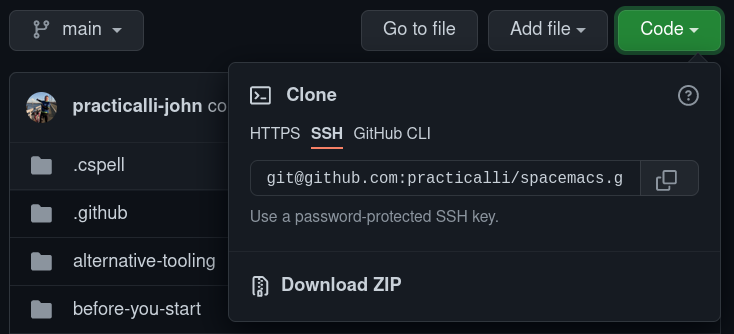
18 |
19 |
20 | ### Check SSH Key on GitHub
21 |
22 | The [GitHub keys page](https://github.com/settings/keys) for an account lists all the authorisation and signing keys registered.
23 |
24 | Each key shows its unique SHA, rather than the key value, for security reasons.
25 |
26 | To identify if an SSH key is registered with GitHub, use the `ssh-keygen` command to show the SHA for public key file, `*.pub`.
27 |
28 | !!! EXAMPLE "Show SHA of public key with ssh-keygen"
29 | ```shell
30 | ssh-keygen -lf ~/.ssh/key-name.pub
31 | ```
32 |
33 | Copy the SHA value generated by the `ssh-keygen` command and search for that value on the [GitHub keys page](https://github.com/settings/keys).
34 |
35 |
36 |
37 |
38 | ## GitHub tips
39 |
40 | !!! TIP "Collapsible section in readme, issue or pull request"
41 |
42 | ```html
43 |
44 | Click to expand
45 |
46 | Leave a blank space after the closing summary tag so that the markdown content renders correctly.
47 |
48 | ```
49 |
--------------------------------------------------------------------------------
/docs/os/linux/garuda-linux.md:
--------------------------------------------------------------------------------
1 | # Garuda Linux
2 |
3 | A professionally assembled operating system based on Arch Linux, with variants including Hyprland.
4 |
5 |
6 | ## Thunar file manager
7 |
8 | Thunar is the default file manager in Garuda Linux Hyprland.
9 |
10 | Thunar can be used to access shared filespace across the network using SFTP.
11 |
12 | ```shell
13 | sftp://practicalli@rangerone/home/practicalli
14 | ```
15 |
16 | A prompt appears to enter the user's password.
17 |
18 |
19 | ### Window rules
20 |
21 | Thunar dialogs show as a full size tiled window, taking up a disproportionate amount of space.
22 |
23 | A cleaner desktop is achived by setting window rules to show dialogs as a floating windows. Optionally moving the windows to the mouse cursor position or to a suitable position on the current screen.
24 |
25 | The Rename dialog should keep focus even if the mouse is not hovering over the dialog. The focus will change if the mouse is moved to another window though.
26 |
27 | Center the Rename dialog on the mouse will minimise focus being lost if the mouse is moved slightly.
28 |
29 |
30 | !!! NOTE "Thunar Rename dialog: Center on mouse cursor"
31 | ```Configure
32 | windowrule = float,stayfocused,move cursor -50% -50%,class:^(thunar)$,title:(Rename.*)$
33 | ```
34 |
35 | The File Operations Progress
36 |
37 | !!! NOTE "Thunar File Operations: float and move to bottom left corner"
38 | ```Configure
39 | windowrule = float,class:^(thunar)$,title:(File Operation Progress.*)$
40 | windowrule = move onscreen 100%-24 100%-24,class:^(thunar)$,title:(File Operation Progress.*)$
41 | ```
42 | ```
43 |
44 |
--------------------------------------------------------------------------------
/docs/os/debian-linux/install.md:
--------------------------------------------------------------------------------
1 | # Debian Linux Install
2 |
3 | Debian provides ISO images which can be burned onto USB memory sticks (or other removable media, e.g. compact disks).
4 |
5 | The net install image is small and quick to download, containing only the essential packages to run an operating system.
6 |
7 | [Debian Linux NetInstall ISO image - AMD64](https://cdimage.debian.org/debian-cd/current/amd64/iso-cd/debian-13.1.0-amd64-netinst.iso){.md-button}
8 |
9 |
10 | ## Create USB startup disk
11 |
12 | Copy the Debian Linux ISO image to a USB of 1GB size or larger, using one of the following tools.
13 |
14 | !!! NOTE "Create USB install disk using Caligula TUI"
15 | Install the [Caligula disk image TUI](https://practical.li/engineering-playbook/os/tui/#caligula).
16 |
17 | Run `calibula` with the burn command and the path to the downloaded Debian ISO image. Follow the prompts of the Caligular TUI.
18 |
19 | ```shell
20 | Caligula burn debian.iso
21 | ```
22 |
23 | !!! NOTE "Create USB install disk using the cp command"
24 |
25 | Find the name of the USB stick
26 |
27 | ```shell
28 | ls -l /dev/disk/by-id/usb-*
29 | ```
30 |
31 | Copy the ISO image to the USB disk (not a partition)
32 |
33 | ```shell
34 | cp debian.iso /dev/sda
35 | ```
36 |
37 | ??? NOTE "Creating USB install disks with dd"
38 |
39 | Copy the image using the name of the USB Stick
40 | ```shell
41 | dd bs=4M if=path/to/filename.iso of=/dev/disk/by-id/usb-My_flash_drive conv=fsync oflag=direct status=progress
42 | ```
43 | [Arch Linux: ISO image command line utilities](https://wiki.archlinux.org/title/USB_flash_installation_medium)
44 |
--------------------------------------------------------------------------------
/docs/practices/kanban/index.md:
--------------------------------------------------------------------------------
1 | # Kanban
2 |
3 | {align=right loading=lazy}
4 |
5 | A lean approach to organising tasks and continually improving ways of working
6 |
7 | Kanban encourages teams to
8 |
9 | - visualise the work of the team (kanban board)
10 | - review and optomise they way the work
11 | - limit work in progress & task switching (stop starting and start finishing)
12 | - flow
13 | - define work in consistent sizes (a day to a week)
14 | - think of work as a value driven system
15 | - pull system from the end of the workflow to the start
16 |
17 | !!! INFO "Theory of Constraints"
18 | The theory of constraints is a management paradigm that views any manageable system as being limited in achieving more of its goals by a very small number of constraints
19 |
20 | [Theory Of Constraints website](https://www.tocinstitute.org/){target=_blank .md-button}
21 |
22 | [Wikipedia: Theory Of Constraints](https://en.wikipedia.org/wiki/Theory_of_constraints){target=_blank .md-button}
23 |
24 | [Wikipedia: The Goal(novel) - Goldratt](https://en.wikipedia.org/wiki/The_Goal_(novel)){target=_blank .md-button}
25 |
26 | ## Visualising work
27 |
28 | A kanban board visualises the flow of tickets through a workflow, highlighting any number of factors
29 |
30 | - status of work (todo, doing, done or more involved steps)
31 | - who is working on the ticket
32 | - history of the ticket (moving backward and forward between states shows churn)
33 | - limits for work in progress (limited WIP), limits on particular workflow steps (e.g. doing) or limits on type of tickets
34 |
--------------------------------------------------------------------------------
/docs/source-control/git-personal-access-token.md:
--------------------------------------------------------------------------------
1 | # Git Personal Access Token
2 |
3 | A personal access token is required when accessing a remote repository over HTTPS.
4 |
5 | !!! TIP "GitHub CLI simplify access via token"
6 | [GitHub CLI](https://cli.github.com/) for the entire GitHub workflow within the terminal.
7 |
8 | `gh auth login` generates a token to access GitHub.
9 |
10 |
11 | ## Generate a token
12 |
13 | Visit the remote repository service and generate a personal access token with at least `repo` permission.
14 |
15 | * [GitHub personal access token documentation](https://docs.github.com/en/authentication/keeping-your-account-and-data-secure/creating-a-personal-access-token)
16 | * [GitLab personal access token documentation](https://docs.gitlab.com/ee/user/profile/personal_access_tokens.html#create-a-personal-access-token)
17 |
18 | Whilst the token could be added to the `~/.gitconfig`, as this file is plain text it is not particularly secure (especially if committed into a dotfiles repository and shared).
19 |
20 | ```shell
21 | git config --global oauth.token "tokens-in-plain-text-files-are-not-very-secure"
22 | ```
23 |
24 | To provide greater security when using the token, consider using the [Git Credential Manager](https://github.com/GitCredentialManager/git-credential-manager).
25 |
26 | ??? HINT "Magit Forge uses personal access token"
27 | [Magit Forge also requires a personal access token](forge-configuration.md), although this can be saved in the encrypted file `~/.authinfo.gpg` for greater security. The Magit Forge token includes permissions required to access remote repositories over HTTPS
28 |
29 | ??? HINT "Octo plugin for Neovim uses token from GitHub CLI"
30 |
--------------------------------------------------------------------------------
/.github/workflows/scheduled-version-check.yaml:
--------------------------------------------------------------------------------
1 | ---
2 | # ------------------------------------------
3 | # Scheduled check of versions
4 | # - use as non-urgent report on versions
5 | # - Uses POSIX Cron syntax
6 | # - Minute [0,59]
7 | # - Hour [0,23]
8 | # - Day of the month [1,31]
9 | # - Month of the year [1,12]
10 | # - Day of the week ([0,6] with 0=Sunday)
11 | #
12 | # Using liquidz/anta to check:
13 | # - GitHub workflows
14 | # - deps.edn
15 | # ------------------------------------------
16 |
17 | name: "Scheduled Version Check"
18 | on:
19 | schedule:
20 | # - cron: "0 4 * * *" # at 04:04:04 ever day
21 | # - cron: "0 4 * * 5" # at 04:04:04 ever Friday
22 | - cron: "0 4 1 * *" # at 04:04:04 on first day of month
23 | workflow_dispatch: # Run manually via GitHub Actions Workflow page
24 |
25 | jobs:
26 | scheduled-version-check:
27 | name: "Scheduled Version Check"
28 | runs-on: ubuntu-latest
29 | steps:
30 | - run: echo "🚀 Job automatically triggered by ${{ github.event_name }}"
31 | - run: echo "🐧 Job running on ${{ runner.os }} server"
32 | - run: echo "🐙 Using ${{ github.ref }} branch from ${{ github.repository }} repository"
33 |
34 | - name: Checkout Code
35 | uses: actions/checkout@v5
36 | with:
37 | fetch-depth: 0
38 | sparse-checkout: |
39 | .github
40 | - run: echo "🐙 ${{ github.repository }} repository sparse-checkout to the CI runner."
41 | - name: "Antq Check versions"
42 | uses: liquidz/antq-action@main
43 | with:
44 | excludes: ""
45 | skips: "boot clojure-cli pom shadow-cljs leiningen"
46 |
47 | # Summary
48 | - run: echo "🎨 library versions checked with liquidz/antq"
49 | - run: echo "🍏 Job status is ${{ job.status }}."
50 |
--------------------------------------------------------------------------------
/.github/workflows/publish-book.yaml:
--------------------------------------------------------------------------------
1 | ---
2 | name: Publish Book
3 | on:
4 | # Manually trigger workflow
5 | workflow_dispatch:
6 |
7 | # Run work flow conditional on linter workflow success
8 | workflow_run:
9 | workflows:
10 | - "MegaLinter"
11 | paths:
12 | - "docs/**"
13 | - "includes/**"
14 | - "overrides/**"
15 | - "mkdocs.yaml"
16 | branches:
17 | - main
18 | types:
19 | - completed
20 |
21 | permissions:
22 | contents: write
23 |
24 | jobs:
25 | publish-book:
26 | name: MkDocs Publish
27 | runs-on: ubuntu-latest
28 | steps:
29 | - run: echo "🚀 Job automatically triggered by ${{ github.event_name }}"
30 | - run: echo "🐧 Job running on ${{ runner.os }} server"
31 | - run: echo "🐙 Using ${{ github.ref }} branch from ${{ github.repository }} repository"
32 |
33 | - name: Checkout Code
34 | uses: actions/checkout@v5
35 | with:
36 | fetch-depth: 0
37 | sparse-checkout: |
38 | docs
39 | includes
40 | overrides
41 | - run: echo "🐙 ${{ github.repository }} repository sparse-checkout to the CI runner."
42 |
43 | # setup-python only required to use non-default python version
44 | # - name: Setup Python
45 | # uses: actions/setup-python@v5
46 | # with:
47 | # python-version: 3.x
48 |
49 | - name: Cache
50 | uses: actions/cache@v4
51 | with:
52 | key: ${{ github.ref }}
53 | path: .cache
54 |
55 | - run: pip install mkdocs-material mkdocs-callouts mkdocs-glightbox mkdocs-git-revision-date-localized-plugin mkdocs-redirects pillow cairosvg
56 | - run: mkdocs gh-deploy --force
57 | - run: echo "🐙 ."
58 |
59 | # Summary and status
60 | - run: echo "🎨 MkDocs Publish Book workflow completed"
61 | - run: echo "🍏 Job status is ${{ job.status }}."
62 |
--------------------------------------------------------------------------------
/docs/practices/deliberate-practice/architecture-kata.md:
--------------------------------------------------------------------------------
1 | # Architectural Katas
2 |
3 | An architectural kata is a deliberate practice technique to grow experience and skills with respect to architectural design.
4 |
5 | A challenge is selected (or assigned), discussed and a solution presented - usually in a group setting.
6 |
7 | The Architectural Katas website generates kata challenges to solve as well as the recommended rules to maximise the value of the activity.
8 |
9 | [Architectural Katas website](https://www.architecturalkatas.com/){target=_blank .md-button}
10 |
11 | ??? EXAMPLE "Kata: Mock Internet UN"
12 | Organization running "Mock UN" events wants to take its events online, permitting students to participate online
13 |
14 | Requirements: student-diplomats must be able to video-chat with one another; student-diplomats must be able to "give speeches" to the "assembly" (video-chat to the entire group); (mocked) world events (created by moderators) distributed via (mock) "news sites"; moderators must be able to monitor any video chat for appropriateness
15 |
16 | Users: 500 or so "diplomats" per "mock UN" gathering; dozens of moderators per "mock UN"; many "mock UN"s simultaneously; no new hardware requirements on students
17 |
18 | > A kata is a technique from martial arts training, encouraging repetition of actions to increase skill.
19 |
20 | !!! INFO "Related: Code kata"
21 | Code kata encourages the same challenge to be solved in several different ways, to grow experience with solving a solution with a programming language.
22 |
23 | ### Group practice
24 |
25 | The architectural kata technique can be used within a group setting, with one or more groups.
26 |
27 | Groups of 3 to 5 people tend to be the most effective, especially where there are a good mixture of experiences.
28 |
29 | > Architectural kata workshops are commonly run at technical conferences and Ted Neward has run many of these workshops
30 |
--------------------------------------------------------------------------------
/docs/practices/discussions/five-whys.md:
--------------------------------------------------------------------------------
1 | # Five Whys
2 |
3 | Five whys is a simplistic technique to explore cause-and-effect relationships underlying a particular problem.
4 |
5 | The primary goal is to quickly determine the root cause of an issue by repeating the question "Why?" five times. The answer to the fifth why should reveal the root cause of the problem.
6 |
7 | !!! WARNING "5 Whys may not be enough"
8 | More questions or a deeper analysis may be required to find the actual root cause, especially for more intricate challenges
9 |
10 | Process or systemic issues can often generate responses about lack of time, resources or understanding. Whilst these may be an effect, they are not specific enough to be the root cause.
11 |
12 | The troubleshooter should avoid assumptions and logic traps and focus on tracing the chain of causality in increments to a root cause which has connection to the original problem.
13 |
14 | > The technique was described by Taiichi Ohno at Toyota Motor Corporation.
15 |
16 | ## Example
17 |
18 | Challenge: The web service is not responding
19 |
20 | 1. Why? - the service monitor displays an error
21 | 2. Why? - pinging the heartbeat of the service returns a 404
22 | 3. Why? - the request is not recognised by the server
23 | 4. Why? - the heartbeat url has changed
24 | 5. Why? - a change was made to the code but monitor configuration not updated
25 |
26 | This example shows a disconnect between development and operations
27 |
28 | !!! WARNING "Five Whys can feel negative to the reciever"
29 | Practice the technique on yourself to understand how the tone of questions can be percieved as annoying (negative) or curious (constructive)
30 |
31 | [:globe_with_meridians: Five Whys - Wikipedia](https://en.wikipedia.org/wiki/Five_whys
32 | ){target=_blank .md-button}
33 |
34 | [:globe_with_meridians: Root Cause Analysis - Wikipedia](https://en.wikipedia.org/wiki/Root_cause_analysis){target=_blank .md-button}
35 |
--------------------------------------------------------------------------------
/docs/practices/root-cause-analysis.md:
--------------------------------------------------------------------------------
1 | # Root Cause Analysis
2 |
3 | When there is a problem at work it can be difficult to get beyond immediate symptoms and neglect addressing the underlying causes. Tackling the symptoms rather than the cause results in fixing the same kinds of problems time and time again. This is often referred to as “fire-fighting”.
4 |
5 | Root Cause Analysis (RCA) is a widely used technique that helps people get beyond the symptoms of a problem and reveal the, often hidden, and multiple root causes.
6 |
7 | RCA is built on the principle that causal relationships exist for all events. By understanding these we can move beyond the symptoms and address the root causes at source.
8 |
9 | !!! HINT "Causes can be complex"
10 | When multiple causes are contributing to the issue, consider which of those issues would make the most significant impact if addressed.
11 |
12 |
13 | ## RCA Processes
14 |
15 | There are a variety of Root Cause Analysis processes to choose from, some are quick and easy, such as 5 Whys, others are longer and more complex such as FMEA and Ishikawa. The Sologic RCA methodology is quick to learn, logical and scalable. It is also universal in that it can be applied to any problem, in any sector.
16 |
17 | - [Root Cause Analysis - Sologic](https://www.sologic.com/en-gb/about/root-cause-analysis)
18 | - [Root Cause Analysis: A quick guide - ProjectManager](https://www.projectmanager.com/blog/root-cause-analysis-guide)
19 | - [What is a root cause analysis? - IBM](https://www.ibm.com/topics/root-cause-analysis)
20 |
21 | [Root Cause Analysis - Wikipedia](https://en.wikipedia.org/wiki/Root_cause_analysis){target=_blank .md-button}
22 |
23 | - [Root Cause Analysis Explained: Definition, Examples, and Methods - Tableau](https://www.tableau.com/learn/articles/root-cause-analysis)
24 |
25 | ## Organisation Leadership
26 |
27 | [Root cause analysis: What it is & how to perform one](https://online.hbs.edu/blog/post/root-cause-analysis)
28 |
--------------------------------------------------------------------------------
/docs/source-control/git-overview.md:
--------------------------------------------------------------------------------
1 | # Git Overview
2 |
3 | Git provides a decentralised approach to version control.
4 |
5 | Versions are manage via a `.git` repository (clone) as well as central (master)
6 |
7 |
8 |
9 | Can clone a clone
10 | Can work disconnected from the central repository
11 | Designed for branching and merging and long lived branches
12 | Each change is a delta, strung together so merging can be done step by step (change sets)
13 | Easy to take a repository, clone it to experiment with the code and then request to the original repository owner to merge your changes if they like what they see
14 | Adopted by a very large number of open source projects, most new open source projects use git now.
15 | Well supported by main developer IDEs (Netbeans built in, Eclipse)
16 |
17 | Decentralised model
18 | When ever you work with a project in a git repository, you take a clone copy. A clone is a fully fledged Git repository in itself, with complete history and full revision tracking capabilities.
19 |
20 | Having your own local git repository allows you to commit code as and when you like without affecting anyone else working on the project. You are creating your own local changes which can be pushed back to the orignial project repository at a convenient opportunity (eg. when all your tests are passing)
21 |
22 | Limitations?
23 | Whole repository needs to be checked out - usually results in separating out code bases into their own repositories - aligns well with Maven modular project approach - change deltas stored very efficiently keeping size to minimum
24 |
25 | Several new commands to learn if coming from a central repository approach, a small learning curve to understand the concepts.
26 |
27 | Getting started with Git
28 |
29 | Create git repository
30 |
31 | Local repository and central repository (master)
32 |
33 | Local Commit
34 |
35 | Pushing to central repository
36 |
37 | Merging (pulling in? ) changes from other repositories
38 |
39 | Advanced code management
40 |
41 | Operational Concerns
42 | Backups
43 | Security
44 |
--------------------------------------------------------------------------------
/docs/persistence/rdbms/server/mariadb.md:
--------------------------------------------------------------------------------
1 | # Maria DB
2 |
3 | {align=right loading=lazy style="height:150px;width:150px"}
4 |
5 | MariaDB is a community-developed, commercially supported fork of the MySQL relational database management system, intended to remain free and open-source software under the GNU General Public License.
6 |
7 | Development is led by some of the original developers of MySQL, who forked it due to concerns over its acquisition by Oracle Corporation in 2009.
8 |
9 | [MariaDB Foundation](https://mariadb.org/){target=_blank .md-button}
10 |
11 | [MariaDB - Wikipedia](https://en.wikipedia.org/wiki/MariaDB){target=_blank .md-button}
12 |
13 | [MariaDB Primer](https://mariadb.com/kb/en/a-mariadb-primer/){target=_blank .md-button}
14 |
15 | ## Docker
16 |
17 | !!! EXAMPLE "Docker Compose for MariaDB"
18 | ```Docker title="compose.yaml"
19 |
20 | services:
21 | db:
22 | image: mariadb
23 | restart: always
24 | environment:
25 | # MARIADB_RANDOM_ROOT_PASSWORD: yes
26 | MARIADB_ROOT_PASSWORD: practicalli
27 | MARIADB_MYSQL_LOCALHOST_USER: clojure
28 | MARIADB_DATABASE: service-db
29 | healthcheck:
30 | test: [ "CMD", "healtcheck.sh --su-mysql --connect --innodb_initialized" ]
31 | timeout: 45s
32 | interval: 10s
33 | retries: 10
34 |
35 | adminer:
36 | image: adminer
37 | restart: always
38 | ports:
39 | - 8080:8080
40 | ```
41 |
42 | [MariaDB Official Docker Image](https://hub.docker.com/_/mariadb){target=_blank .md-button}
43 |
44 | [Install & Use MariaDB via Docker](https://mariadb.com/kb/en/installing-and-using-mariadb-via-docker/){target=_blank .md-button}
45 |
46 | [MariaDB healthcheck script](https://mariadb.com/kb/en/using-healthcheck-sh-script/){target=_blank .md-button}
47 | [MariaDB healthcheck script - source](https://github.com/MariaDB/mariadb-docker/blob/master/10.10/healthcheck.sh){target=_blank .md-button}
48 |
--------------------------------------------------------------------------------
/.github/workflows/scheduled-stale-check.yaml:
--------------------------------------------------------------------------------
1 | # ----------------------------------------
2 | # Scheduled stale issue & pull request check
3 | #
4 | # Adds 'stale' label after a set piece of time,
5 | # then closes stale issues & pull requests a short period after
6 | #
7 | # Using "Close Stale Issues" action
8 | # https://github.com/marketplace/actions/close-stale-issues
9 | # ----------------------------------------
10 |
11 | name: 'Scheduled stale check'
12 | on:
13 | workflow_dispatch:
14 | schedule:
15 | - cron: "0 1 1 * *" # at 01:00 on first day of month
16 |
17 | jobs:
18 | stale:
19 | runs-on: ubuntu-latest
20 | steps:
21 | - run: echo "🚀 Job automatically triggered by ${{ github.event_name }}"
22 | - run: echo "🐧 Job running on ${{ runner.os }} server"
23 | - run: echo "🐙 Using ${{ github.ref }} branch from ${{ github.repository }} repository"
24 |
25 | - uses: actions/stale@v10
26 | with:
27 | stale-issue-message: 'After 30 days with no activity, the issue was automatically marked stale. Remove stale label or add a comment to prevent the issue being closed in 5 days.'
28 | stale-pr-message: 'After 45 days with no activity, the Pull Request was automatically marked stale. Remove stale label or comment to prevent the PR being closed in 10 days.'
29 | close-issue-message: 'This issue was closed because it has been stalled for 5 days with no activity.'
30 | close-pr-message: 'This PR was closed because it has been stalled for 10 days with no activity.'
31 | days-before-issue-stale: 30
32 | days-before-pr-stale: 45
33 | days-before-issue-close: 5
34 | days-before-pr-close: 10
35 | start-date: '2025-04-05T00:00:00Z' # only affect issues/PRs from date created (ISO 8601 or RFC 2822 format)
36 | any-of-labels: 'future,keep' # labels to keep
37 | exempt-issue-assignees: 'practicalli-johnny'
38 | exempt-pr-assignees: 'practicalli-johnny'
39 |
40 | # Summary
41 | - run: echo "🎨 Issues & Pull Request checked with actions/stale"
42 | - run: echo "🍏 Job status is ${{ job.status }}."
43 |
--------------------------------------------------------------------------------
/docs/software-design/domain-driven-design/ubquitous-language.md:
--------------------------------------------------------------------------------
1 | # Ubiquitous Language
2 |
3 | A Ubiquitous language is built on the model, making that model integral to all communication between domain experts and engineering.
4 |
5 | Many project challenges arise when the language used is fractured.
6 |
7 | Domain experts often use their own very familiar terms that may have great nuaunce and abstraction.
8 |
9 | Engineering team members tune their language to solving design and coding challenges within the domain.
10 |
11 | Communication limitations and time pressures constrain understanding, driving a gap between domain experts and engineering languages.
12 |
13 | The terminonlogy of day-to-day discussions is disconnected from the terminology embedded in the code.
14 |
15 | Language can often differ between informal speech and more formal writing of documents, even when communicated from the same person.
16 |
17 | Defining a versatile language that is universally defined and understood builds a solid foundation to build and evolve solutions effectively.
18 |
19 | ## Defining language
20 |
21 | Use the model as the backbone of a language
22 |
23 | Commit the team to exercising that language relentlessly in all communication within and across teams, especially the resulting source code and design documentation.
24 |
25 | Use the same language in diagrams, writing and speech.
26 |
27 | ## Enhance language
28 |
29 | Experiment with alternative ways to express the language, reflecting alternative models.
30 |
31 | Conversations should seek to resolve all confusion of terms used, as society has always sought to do.
32 |
33 | Accept that a change in the language constitutes a change to the model.
34 |
35 | Domain experts should block to terms that inadequately convey domain understanding.
36 |
37 | Engineers should be observant for ambiguity or inconsistency which drives complexity in the design.
38 |
39 | Experiment with the model during disussions of the model.
40 |
41 | Describe scenarios out loud uisng the elements and interactions of the model, combining concepts in ways allowed by the model. Find easier ways to say what you need to say, then take thouse new ideas back down to the diagrams and code.
42 |
--------------------------------------------------------------------------------
/docs/culture/documentation.md:
--------------------------------------------------------------------------------
1 | # Documentation Culture
2 |
3 | The written word is a very effective way to communicate and has been for many thousands of years of human culture.
4 |
5 | Writing documentation is a skill and therefore benefits with practice and regular use.
6 |
7 | Writing should be a natural activity that is highly valued as a perminant record of communication.
8 |
9 | ## Personal Journal
10 |
11 | For the writer of the journal, there is a feeling of accomplishment as well as a record of challenges they have been facing.
12 |
13 | For the rest of the organisations journals highlight
14 |
15 | !!! HINT "Share Daily Journal"
16 | Use the organisation documentation tool to share a daily journal, sharing challenges, lessons learned.
17 |
18 | ??? HINT "Personal Journal as practice"
19 | Writing every day in a journal provides lots of practice in the art of writing and a
20 |
21 | ## Design Journal
22 |
23 | Capture design decisions as they are made, indicating all the options considered and why a particular choice was made.
24 |
25 | !!! "Clojure Code journal"
26 | In expressive languages like Clojure, it is common to capture evolving designs and alternative options in souce code.
27 |
28 | Clojure uses the `(comment ,,,)` expression to contain experimental code and keep it separate from production code. Short design journals may appear at the end of the namespace they belong too. Longer design journals are defined in their own namespace, often under the `dev` directory.
29 |
30 | [:fontawesome-solid-book-open: Practicalli Clojure REPL workflow - Design Journal](https://practical.li/clojure/introduction/repl-workflow/#design-journal){target=_blank .md-button}
31 |
32 | !!! HINT "Architecture Decison Record"
33 | [:globe_with_meridians: Architecture Decison Record (ADR)](https://adr.github.io/){target=_blank} captures all the information around a single decision and complements a more general design journal for an engineering team.
34 |
35 | ## Technical writing
36 |
37 | Sharing how to write engaging documents that cover the relevant technical detail required for understanding.
38 |
39 | !!! HINT "Playbooks"
40 | Create specific guides to common tasks for the team, to share collective knowledge and greatly increase effectiveness across the organisation.
41 |
--------------------------------------------------------------------------------
/docs/persistence/rdbms/sql/index.md:
--------------------------------------------------------------------------------
1 | # Structured Query Language (SQL)
2 |
3 | SQL is a domain-specific language designed for managing data held in a relational database management system (RDBMS), or for stream processing in a relational data stream management system (RDSMS).
4 |
5 | SQL data incorporates relations among entities and variables.
6 |
7 | Originally based upon [relational algebra](https://en.wikipedia.org/wiki/Relational_algebra) and [tuple relational calculus](https://en.wikipedia.org/wiki/Tuple_relational_calculus), SQL consists of many types of statements,[6] which may be informally classed as sublanguages, commonly:
8 |
9 | - [data query language (DQL)](https://en.wikipedia.org/wiki/Data_query_language)
10 | - [data definition language (DDL)](https://en.wikipedia.org/wiki/Data_query_language) (schema creation and modification)
11 | - [data control language (DCL)](https://en.wikipedia.org/wiki/Data_control_language)
12 | - [data manipulation language (DML)](https://en.wikipedia.org/wiki/Data_manipulation_language) (insert, update, and delete)
13 |
14 | SQL is a declarative language (4GL) which also includes procedural elements.
15 |
16 | [SQL - wikipedia](https://en.wikipedia.org/wiki/SQL){target=_blank .md-button}
17 |
18 | ## SQL Syntax
19 |
20 | The SQL language is subdivided into several language elements, including:
21 |
22 | - Clauses, which are constituent components of statements and queries.
23 | - Expressions, which can produce either scalar values, or tables consisting of columns and rows of data
24 | - Predicates, which specify conditions that can be evaluated to SQL three-valued logic (3VL) (true/false/unknown) or Boolean truth values and are used to limit the effects of statements and queries, or to change program flow.
25 | - Queries, which retrieve the data based on specific criteria. This is an important element of SQL.
26 | - Statements, which may have a persistent effect on schemata and data, or may control transactions, program flow, connections, sessions, or diagnostics.
27 | - SQL statements also include the semicolon (";") statement terminator. Though not required on every platform, it is defined as a standard part of the SQL grammar.
28 | - Insignificant whitespace is generally ignored in SQL statements and queries, making it easier to format SQL code for readability.
29 |
--------------------------------------------------------------------------------
/docs/os/macos.md:
--------------------------------------------------------------------------------
1 | # Mac OS
2 |
3 | A BSD based Unix system with commercial Graphic Desktop shell created by Apple.
4 |
5 | This section relies on commercial experiences when Practicalli was supplied with MacOSX and supporting hardware.
6 |
7 | Otherwise, testing relies on the community for confirmation and corrections.
8 |
9 | !!! HINT "Use International English keyboard for sensible key locations"
10 | Practicalli highly recommends the 'International English' keyboard on Macbook laptops as this has sensible locations for keys, especially the `#` key.
11 | Or use the [:globe_with_meridians: Model 100 or Atreus keyboards from Keyboard.io](https://shop.keyboard.io/){target=_blank}
12 |
13 | !!! INFO "Practicalli has limited access to MacOS"
14 | Practicalli only has occasional access to Mac hardware and macOS, typically during some commercial engagements. Any updates or corrections to this section are most welcome
15 |
16 | ## Window Tiling manager
17 |
18 | [Amethyst](https://ianyh.com/amethyst/){target=_blank} provides an automatic tiling window manager for MacOS.
19 |
20 | Enable ++ctrl++ ++1++ ... ++5++ in the MacOS keybinding settings to control switching between the first 5 workspaces. Place the most commonly used apps on each of these workspaces to quickly switch between them.
21 |
22 | [:fontawesome-brands-github: Amethyst Tiling window management - MacOSX](https://github.com/ianyh/Amethyst){target=_blank .md-button}
23 |
24 | ## Homebrew
25 |
26 | Open Source development tools are available via homebrew, a community managed distribution of a wide range of tools.
27 |
28 | !!! EXAMPLE "Install Homebrew"
29 | ```shell
30 | /bin/bash -c "$(curl -fsSL https://raw.githubusercontent.com/Homebrew/install/HEAD/install.sh)"
31 | ```
32 |
33 | ### Clojure
34 |
35 | !!! INFO "OpenJDK required for Clojure"
36 | Install [OpenJDK from Adoptium](https://adoptium.net/) or search for `openjdk@21` on Homebrew
37 |
38 | The Clojure maintainers provide a [Homebrew Tap for Clojure](https://github.com/clojure/homebrew-tools) which is recommeded over that provide by the Homebrew maintainers
39 |
40 | !!! EXAMPLE "Install Clojure environment"
41 | ```shell
42 | brew install clojure/tools/clojure
43 | ```
44 | > `bash` and `curl` are required, as is `rlwrap` if using the `clj` wrapper.
45 |
--------------------------------------------------------------------------------
/docs/practices/discussions/asking-questions.md:
--------------------------------------------------------------------------------
1 | # Asking Questions
2 |
3 | The way to get useful answers is to ask effective questions.
4 |
5 | The act of creating an effective question can often produce the answer without even needing to share the question with others (although it is valuable to still ask for a wider scope of answers).
6 |
7 | The act of creating a question allows for a clear analysis of what the problem is, what has been tried already.
8 |
9 |
10 | !!! HINT "No need to apologies for asking"
11 | People enjoy answering other peoples questions as it provides a sense of satisfaction that they could help. There is never a need to apologies that your are asking a question, especially if you think the answer should be obvious
12 |
13 | !!! HINT "There are no silly questions"
14 | People are not born omnicient, they spend their lifetime learning on a unique path. No two people will understand all the same things in the same way, even when working in the same area.
15 |
16 |
17 |
18 | ## Ask an Engineering question
19 |
20 | The more detailed an engineering question is, the more likely that an appropriate answer will be given.
21 |
22 | 1. Convey the goal of your question (what are you trying to achieve)
23 | 2. Establish the facts as clearly as possible
24 | - What steps did you try
25 | - How does someone else reproduce this issue (create the simplest possible example)
26 | 3. Convey assumptions made
27 | 4. Examples, examples, examples
28 | 5. Review and refactor (remove unnecessary words and information, reread and rewrite to ensure the question is easy to understand)
29 |
30 | !!! WARNING "Fast questions take more time"
31 | Asking questions with little or no thought leads to much more time spent explaining the question once its out there.
32 |
33 |
34 | ### Example questions
35 |
36 | Some example engineering questions (TODO: review questions in slack / stack exchange for useful, not so useful examples)
37 |
38 |
39 |
40 | ## The Art of Asking Questions
41 |
42 | 1. Demonstrate preparedness for the conversation
43 | 2. Illustrate your expertise without showing off
44 | 3. Invite others to deepen or broaden their thinking and challenge held beliefs
45 |
46 | [Article from the Harvard Business School](https://hbr.org/2022/05/the-art-of-asking-great-questions){target=_blank .md-button}
47 |
--------------------------------------------------------------------------------
/docs/os/index.md:
--------------------------------------------------------------------------------
1 | # Operating Systems
2 |
3 | !!! QUOTE
4 | Without an operating system, the computer is an expensive piece of electronics.
5 |
6 | Guides to install and configure operating systems to support software development, graphic design and video editing.
7 |
8 | ## Linux Distributions
9 |
10 | A Linux distribution is an assembly of software packaged to work together seemlessly (or atleast avoid conflicts).
11 |
12 | There are a wide range of Linux distributions to choose from, although Practicalli recommends Ubuntu or Debian Linux distributions.
13 |
14 | Arch Linux has solid community support should a more involved operating system experience be desirable.
15 |
16 | [Regolith Desktop](linux/regolith/){.md-button}
17 | [Debian Linux](linux/debian/){.md-button}
18 | [Ubuntu Desktop](linux/ubuntu/){.md-button}
19 |
20 | !!! HINT "Practicalli recommends Linux"
21 | Practicalli recommends use of a Linux distribution to provide a stable and developer focused environment to work in. The vast majority is freely available without cost and typically of high quality thanks to so many collaborators and users.
22 |
23 | Linux also has a quite minimal hardware resource use and has very widespread support for new and classic hardware.
24 |
25 | Unix/BSD based systems can also offer a good developer experience, e.g. MacOSX.
26 |
27 | ??? INFO "MacOS"
28 | MacOS is a BSD based operating system so has similar command line experience. Coupled with Homebrew, a wide selection of developer focused packages are freely available.
29 |
30 | MacOS is often used by commercial companies (especially FinTech) as commercial software is used to administrate the operting system, usually by a remote System Adminstration team.
31 |
32 | ## Command Line Shell
33 |
34 | - bash
35 | - zsh
36 | - fish
37 | - [Kitty Terminal](command-line/kitty-terminal.md)
38 |
39 | ## Linux Desktop
40 |
41 | - i3 tiling window manager
42 | - [:fontawesome-solid-book-open: Hyprland](linux/hyprland.md) Wayland compositor and nwg-shell desktop for wayland and sway
43 |
44 | ## Software development tools
45 |
46 | - Clojure CLI
47 | - node.js and npm
48 | - Python
49 |
50 | ## Creative tools
51 |
52 | - Inkscape 2D vector graphics (SVG)
53 | - Blender 3D modelling, animation and video editing
54 | - Audacity sound editing
55 | - FFMpeg audio-video command line tools
56 | - Opus audio codec
57 |
--------------------------------------------------------------------------------
/docs/os/linux/which-linux-distribution.md:
--------------------------------------------------------------------------------
1 | # Chosing a Linux Distribution
2 |
3 |
4 | - Ubuntu
5 | - Debian
6 | - Arch Linux
7 |
8 |
9 | ## The essential differences
10 |
11 |
12 | - package manager and package format
13 | - default packages
14 |
15 |
16 |
17 | ## Ubuntu
18 |
19 | Release schedule: 6 months + LTS 18 months
20 |
21 | Uses the excellent `.deb` package format
22 | Easy for those new to Linux as many choices are pre-made
23 |
24 |
25 | Shifting to use snaps
26 |
27 |
28 | > NOTE: why I am weary of snaps: multiple versions installed using up more space, self-contained app can duplicate libraries already on the system
29 |
30 |
31 | ## Debian Linux
32 |
33 | Release schedule: Annually-ish + Rolling (testing)
34 |
35 | Uses the excellent `.deb` package format
36 |
37 | Easy for those new to Linux with a few extra choices to be made during install.
38 |
39 |
40 | ## Arch Linux
41 |
42 | Release schedule: Rolling + Git
43 |
44 | A good distribution if you want to learn how lots of things in Linux work. Or if you want to create a very tailored experience.
45 |
46 | There is good documentation, although it covers a wide range of options that can be overwhelming (even if you know what you want to do and what packages you want to use).
47 |
48 | A significant time investment is required to learn all the important aspects of Arch Linux.
49 |
50 | pacman is the default package manager.
51 |
52 |
53 | There are several other package managers if packages from the Arch User? Repository (AUR) are wanted (TODO: why three and which is the most appropriate). These package managers essentially create a package from source code and then install.
54 |
55 |
56 | ## Fedora / Centos
57 |
58 | Uses the basic .rpm package format with very limited dependency management (a pale imitation of the `deb` format)
59 |
60 |
61 | ## Packaging methods
62 |
63 |
64 | ### Snaps
65 |
66 | Packages are self-contained, so should work on a wider variety of distributions.
67 |
68 | Sacrificing file space, memory use, startup time and efficient use of libraries (avoiding bloat) for the sake of convenience.
69 |
70 |
71 | A well managed distribution that shares libraries effectively across packages is more efficient than
72 |
73 |
74 | If a distribution did become mostly snaps then it would take over any other packaging manager.
75 |
76 |
77 | > NOTE: I switched back to Debian when Ubuntu started only making key software available as snaps.
78 |
--------------------------------------------------------------------------------
/docs/continuous-integration/github/trigger-events.md:
--------------------------------------------------------------------------------
1 | # Trigger Workflows
2 |
3 | [GitHub workflows are triggered by events](https://docs.github.com/en/actions/using-workflows/events-that-trigger-workflows).
4 |
5 | Events related to a GitHub workflow include
6 |
7 | - pull request
8 | - push
9 | - workflow_dispatch (Manual run)
10 | - [Schedule (Cron)](#cron-schedule)
11 |
12 | !!! EXAMPLE "Scheduled Version Check"
13 | [Scheduled Version Check](/continuous-integration/github-workflow/#scheduled-version-check) GitHub workflow uses the cron schedule to check for newer versions of Clojure libraries and GitHub actions
14 |
15 | ## Cron schedule
16 |
17 | GitHub workflows can use `cron:` to define a schedule as to when a workflow should run.
18 |
19 | A POSIX Cron pattern is used to define the schedule
20 |
21 | - Minute [0,59]
22 | - Hour [0,23]
23 | - Day of the month [1,31]
24 | - Month of the year [1,12]
25 | - Day of the week ([0,6] with 0=Sunday)
26 |
27 | ```yaml
28 | name: "Scheduled Version Check"
29 | on:
30 | schedule:
31 | - cron: "0 4 * * *" # at 04:04:04 ever day
32 | # - cron: "0 4 * * 5" # at 04:04:04 ever Friday
33 | # - cron: "0 4 1 * *" # at 04:04:04 on first day of month
34 | ```
35 |
36 | !!! INFO "Scheduled version check uses cron schedule"
37 |
38 | ??? INFO "Cron references"
39 | - [`on.schedule` - GitHub workflow syntax](https://docs.github.com/en/actions/using-workflows/workflow-syntax-for-github-actions#onschedule)
40 | - [Cron Expression Syntax Cheatsheet](https://cronstatus.com/docs/cron/)
41 |
42 | ## Workflow Dispatch
43 |
44 | Add `workflow_dispatch:` without arguments to the `on:` directive in a workflow configuration file to manually trigger the running of the workflow.
45 |
46 | Visit GitHub.com > Actions > Workflow Name in the repository and select `Run`
47 |
48 | ## Conditional on other workeflow
49 |
50 | Run a workflow based on the outcome of running another GitHub workflow
51 |
52 | !!! EXAMPLE "Run workflow if MegaLinter workflow returns success"
53 | ```yaml
54 | name: "Publish Documentation"
55 | on:
56 | # Run work flow conditional on linter workflow success
57 | workflow_run:
58 | workflows:
59 | - "MegaLinter"
60 | paths-ignore:
61 | - README.md
62 | - CHANGELOG.md
63 | - .gitignore
64 | branches:
65 | - main
66 | types:
67 | - completed
68 | ```
69 |
--------------------------------------------------------------------------------
/CHANGELOG.md:
--------------------------------------------------------------------------------
1 | # Changelog
2 |
3 | ## Unreleased
4 |
5 | ### Added
6 |
7 | - github: sparse-checkout action example workflow
8 | - architecture: kata page first release
9 | - careers: new section and engineering manager
10 | - os: shell-aliases examples
11 | - os: zsh history and editing command history
12 | - source-control: git concepts
13 | - source-control: git status & multi-repo status
14 | - persistence: new section with structure and basic content
15 | - dev: set git attributes to correctly identify languages used
16 | - practices: asking questions
17 | - linux: link to sudo setup page on Debian Linux wiki
18 | - dev: add scheduled stale issue & pull request check (monthly)
19 | - os: install sudo & add user to sudo group
20 | - os: starship prompt in command-line shell
21 | - os: command-line commands section
22 | - source-control: add rationale for signing commits
23 | - os: debian linux trixie archive resolves xorg change
24 | - os: archive commands in file systems page
25 | - os: network commands page and examples
26 | - ci: github release from tag in practicalli workflows
27 | - os: accounts and privileges commands
28 | - os: system resources commands
29 | - dev: `dependencies-update` make task to update all GitHub actions to newest version
30 | - os: recommending tui apps
31 |
32 |
33 | ### Changed
34 |
35 | - dev: spell lychee & repository trufflehog linters warn only (false positives)
36 | - mkdocs: update emoji extension for Material 9.4 version
37 | - kitty: install script and configuration
38 | - source-control: refactor and simplify introduciton
39 | - practices: deliberate practice and code kata
40 | - dev: checkout v4 changelog checkout action & sparce checkout
41 | - dev: upload-artefact v4 in megalinter workflow
42 | - dev: ignore readme changes for changelog checker workflow
43 | - dev: paths, action versions and feedback for publish book workflow
44 | - trigger workflow on specific paths, rather than paths-ignore
45 | - checkout v4 with sparse checkout
46 | - setup python v5 action
47 | - cache v4 action
48 | - echo status feedback at each stage
49 | - dev: update to standard repo healthcheck files
50 | - dev: signed commits required for PR contributions
51 | - dev: checkout v4 action with sparse checkout scheduled version workflow
52 | - ci: optional setup-python for publish book workflow
53 | - dev: optional setup-python for publish book workflow
54 | - os: move shell section under command-line
55 | - ci: update clojure quality check github workflow
56 | - dev: rename `outdated` to `dependencies-outdated`
57 | - dev: actions/checkout@5 in all GitHub workflows
58 |
--------------------------------------------------------------------------------
/docs/culture/index.md:
--------------------------------------------------------------------------------
1 | # Culture
2 |
3 | Open, honest and transparent communication is the foundation to developing and maintaining a culture for engineering teams and the wider organisation.
4 |
5 | The culture of an organisation comes from the sum of its parts, the people and their actions.
6 |
7 | !!! QUOTE "This is the way - Mandolorian Culture, Star Wars"
8 | A thriving culture is demonstrated by the way things are naturally done by the engineering team.
9 |
10 | Unconstructive actions would also naturally feel the incorrect way.
11 |
12 | ??? INFO "Code of Conduct"
13 | Establishing a code of conduct sets the environment in which people interact with each other.
14 |
15 | The code should define expectations of positive and constructive behaviour an guide people away from innappropriate and offensive behaviour.
16 |
17 | The code often aludes to the type of language that should be used when interacting with others, either verbal, written or body language.
18 |
19 | ## Create a culture
20 |
21 | A culture should be deliberately designed and cultivated.
22 |
23 | !!! QUOTE "Culture as a Strategy - too important to leave to chance. - Maria Campbell"
24 |
25 | Create an environment for culture to grow and encourage collaboration so that culture becomes part of everyones daily flow.
26 |
27 | - discuss the concept of culture and why its valuable
28 | - identify important cultural aspects (individual, team, organisation)
29 | - share & ingrain cultural aspects throughout work and interaction
30 | - continually encourage cultural discussions and feedback to reinforce adoption
31 |
32 | !!! QUOTE "Inception of a Culture - John Stevenson, Practicalli"
33 | Inception of a Culture to everyone in an organisation would make adoption simpler (but not like it works in the movie)
34 |
35 | ??? HINT "Culture alignment over carbon copy"
36 | Culture can be viewed as a living entity and as with biological species a culture must be open to growing and adapting to changing circumstances whist still remaining true to its core values and ideals.
37 |
38 | When people are only hired with carbon copies of existing culture there is no room for growth and culture can become stifling and too much of a constraint. When significant change has to be managed by this carbon copy culture, there is a far greater risk of failure.
39 |
40 | ## Be the change you seek
41 |
42 | When a person believes a benefitial change can be made to culture then they should feel able to drive that change.
43 |
44 | Initial feedback on the the value and context of a change should be gained, helping form how that change can be effectively adopted.
45 |
--------------------------------------------------------------------------------
/docs/os/command-line/commands/accounts-permissions.md:
--------------------------------------------------------------------------------
1 | # Accounts and Permissions
2 |
3 | Linux file system access is based on user account and group account membership.
4 |
5 | Read, Write and eXecute authorisation is defined with respect to the user (u), group (g) and all accounts (a)
6 |
7 | `whoami` shows the currently-logged in user account name.
8 |
9 |
10 | ## Elevated privileges
11 |
12 | su switch to another user account, allowing different access permissions for the file system. `su` is most commonly used to switch to the root user account.
13 |
14 | ```shell
15 | su -
16 | ```
17 |
18 | The operating system prompts for the account password that is being accessed.
19 |
20 | `sudo` temporarily elevates privileges to that of the root account, allowing access to files and commands that would otherwise be declined.
21 |
22 | For example, run the Debian Linux apt tool to update software versions.
23 |
24 | ```shell
25 | sudo apt upgrade
26 | ```
27 |
28 |
29 | ## Change access permissions
30 |
31 | `chmod` changes access permissions of files or directories: chmod [options] [permission] [file-or-directory]
32 |
33 | Set owner access to read, write and access directories.
34 |
35 | ```shell
36 | chmod u+rwX ~/projects
37 | ```
38 |
39 | Set permissions literally:
40 |
41 | ```shell
42 | chmod -rwx---r-– file.txt
43 | ```
44 |
45 | The second, third and fourth position sets permission for the owner. The next three the group and last three any other user.
46 |
47 | !!! INFO "Directory and file permissions"
48 | read (r), write (w), and execute (x)
49 |
50 | owner (u), a group (g), or other (o) accounts
51 |
52 |
53 |
54 | ## Change ownership
55 |
56 | `chown` changes ownership of files, directories or symbolic links: chown [options] newowner:newgroup file1 file2
57 |
58 | Assign a user as the new owner of an item. Leave the group name empty to set the same as the user account.
59 |
60 | ```shell
61 | chown practicalli ~/projects
62 | ```
63 |
64 | Omit user account name to make all group members the owner
65 |
66 |
67 | ```shell
68 | chown :hackers ~/projects
69 | ```
70 |
71 |
72 | ## Account management
73 |
74 | useradd creates a new account or update groups assigned to a user: useradd [options] new_username
75 |
76 | By default, the useradd command doesn’t prompt you to give the new user a password. You can add or change it manually later with the passwd command:
77 |
78 | passwd new_username
79 |
80 | userdel deletes a given account name and requires [elevated privileges](#elevated-privileges)
81 |
82 | To set up a password and other details during the account creation process, use the adduser command instead.
83 |
--------------------------------------------------------------------------------
/docs/os/command-line/shell/zsh.md:
--------------------------------------------------------------------------------
1 | # Z Shell
2 |
3 | Z Shell (zsh) is an advanced shell environment and shell scripting language for Linux/Unix systems.
4 |
5 | [Wikipedia - Z Shell](https://en.wikipedia.org/wiki/Z_shell){target=_blank .md-button}
6 |
7 |
8 | ## Community Configurations
9 |
10 | Zsh is a very rich shell and a community configuration provides a quick way to use all those features.
11 |
12 | - [Prezto](https://github.com/sorin-ionescu/prezto) with sane defaults, aliases, functions, auto completion and prompt themes
13 | - [OhmyZsh](https://ohmyz.sh/) framework for managing your Zsh configuration with over 300 plugins
14 |
15 | If writing your own configuration, consider [Zinit plugin manager](https://github.com/zdharma-continuum/zinit) which installs plugins from their GitHub repository.
16 |
17 | Arch Linux has a [guide to configuring Zsh](https://wiki.archlinux.org/title/Zsh).
18 |
19 |
20 | ## Command History
21 |
22 | ++arrow-up++ and ++arrow-down++ navigate through the history of commands.
23 |
24 | ### Edit last command
25 |
26 | Edit the previous command in the history if you know what it should be, e.g. if you typed got status instead of git statusthe you could run the command
27 |
28 | !!! NOTE "Edit last command"
29 | ```shell
30 | fc -e astro -1
31 | ```
32 |
33 | > Replace `astro` with either `emacsclient`, `nvim`, `vim`, nano or any preferred text editor.
34 |
35 | ??? EXAMPLE "Edit last command"
36 | Edit the `got status`to `git status` and save & exit. Now the previous command is `git status`.
37 |
38 | Change the `-1` to if the command is further back in history (a known location)
39 |
40 | ### Edit command history
41 |
42 | Edit the whole command history as a file, allowing easy removal of unwanted or duplicate commands using search and replace and other editing tools.
43 |
44 | !!! NOTE "Edit entire history"
45 | ```shell
46 | fc -W; astro "$HISTFILE"; fc -R
47 | ````
48 |
49 | > Replace `astro` with either `emacsclient`, `nvim`, `vim`, `nano` or any preferred text editor.
50 |
51 | ## Shell aliases for commands
52 |
53 | Add aliases to `$XDG_CONFIG_HOME/shell-aliases` or your preferred location of shell alias definitions.
54 |
55 | !!! EXAMPLE "Shell Alias"
56 | ```shell
57 | # Shell history
58 | # edit entire history
59 | alias zsh-edit-history="fc -W; astro \"$HISTFILE\"; fc -R"
60 |
61 | # edit previous command in history
62 | alias zsh-edit-last-command="fc -e astro -1"
63 | ```
64 |
65 | ## Alternatives
66 |
67 | - [zsh-hist plugin](https://github.com/marlonrichert/zsh-hist)
68 |
69 | ## References
70 |
71 | - [Edit Zsh history - Stack Exchange](https://superuser.com/a/1399768)
72 | - [zsh history setup](https://jdhao.github.io/2021/03/24/zsh_history_setup/)
73 |
--------------------------------------------------------------------------------
/docs/index.md:
--------------------------------------------------------------------------------
1 | # Practicalli Engineering Playbook
2 |
3 | !!! QUOTE
4 | **Effective Communication** is the fundamental challenge for all software engineering projects
5 |
6 | John Stevenson, Practicalli
7 |
8 | The Engineering Playbook presents a collection of practical guides which effectively address common software engineering tasks.
9 |
10 | - A Play is a guide that details practices and an approach for a specific task
11 | - A Playbook is a collection of Plays that are related by topic, e.g. practices for deployment, accessing databases, system integration testing, optimising builds in docker, etc.
12 |
13 | {align=right loading=lazy style="width:320px"}
14 |
15 | !!! HINT "Engineering Playbook Initiative"
16 | Establishing a playbook within an organisation encourages information sharing, providing an effective way for disparate teams to learn from each other.
17 |
18 | ## Discussions and feedback
19 |
20 | [Contributing to Practical.li](https://practical.li/contributing){target=_blank .md-button}
21 |
22 | ## Navigate the book
23 |
24 | Use the mouse or built-in key bindings to navigate the pages of the book
25 |
26 | - ++p++ , ++comma++ : go to previous page
27 | - ++n++ , ++period++ : go to next page
28 |
29 | Use the search box to quickly find a specific topic
30 |
31 | - ++f++ , ++s++ , ++slash++ : open search dialog
32 | - ++arrow-down++ , ++arrow-up++ : select next / previous result
33 | - ++esc++ , ++tab++ : close search dialog
34 | - ++enter++ : follow selected result
35 |
36 | ## Sponsor Practicalli
37 |
38 | [{ align=left loading=lazy }](https://github.com/sponsors/practicalli-johnny/)
39 |
40 | All sponsorship funds are used to support the continued development of [Practicalli series of books and videos](https://practical.li/){target=_blank}, although most work is done at personal cost and time.
41 |
42 | Thanks to [Cognitect](https://www.cognitect.com/){target=_blank}, [Nubank](https://nubank.com.br/){target=_blank} and a wide range of other [sponsors](https://github.com/sponsors/practicalli-johnny#sponsors){target=_blank} from the Clojure community for your continued support
43 |
44 | ## Creative commons license
45 |
46 |
47 |
48 | This work is licensed under a Creative Commons Attribution 4.0 ShareAlike License (including images & stylesheets).
49 |
50 |
--------------------------------------------------------------------------------
/docs/continuous-integration/github/workflows/index.md:
--------------------------------------------------------------------------------
1 | # GitHub workflows
2 |
3 | The marketplace page for a GitHub action should specify how it is used within a GitHub workflow.
4 |
5 | ## Event Triggers
6 |
7 | Workflows can be triggered by
8 |
9 | - commit to branch
10 | - `pull_request`
11 | - `cron` scheduled event
12 | - `workflow_dispatch` manual trigger
13 |
14 | ## Include Exclude patterns
15 |
16 | Files and directories to include or exclude within the scope of a trigger.
17 |
18 | e.g. ingnore a pull request when changes are only in the `README.md` file
19 |
20 | ```yaml
21 | name: Workflow name
22 | on:
23 | pull_request:
24 | paths-ignore:
25 | - "README.md"
26 | ```
27 |
28 | ## GitHub Action version
29 |
30 | GitHub actions typically use semantic versioning for their releases
31 |
32 | ??? INFO "Semantic versioning"
33 | Given a version number MAJOR.MINOR.PATCH, increment the:
34 |
35 | - MAJOR version for incompatible API changes
36 | - MINOR version to add functionality in a backward compatible manner
37 | - PATCH version for backward compatible bug fixes
38 | - Additional labels for pre-release and build metadata are available as extensions to the MAJOR.MINOR.PATCH format.
39 |
40 | [Semantic Versioning 2.0.0 Specification](https://semver.org/){target=_blank .md-button}
41 |
42 | Specify the major release the major version will use the latest version within that scope, e.g. `action/checkout@v3` will use `v3.5.2`, the latest version within that major version
43 |
44 | ```yaml
45 | steps:
46 | - uses: actions/checkout@v3
47 | ```
48 |
49 | ??? HINT "Use major version of Action in workflow configuration"
50 | Use the major version of a GitHub action within a GitHub workflows to minimise maintenance of the workflow configuration.
51 |
52 | Use a specific patch release tag when a specific version is reqiured, providing a consistent version that is used each time.
53 |
54 | ```yaml
55 | steps:
56 | - uses: actions/checkout@v1.0.1
57 | ```
58 |
59 | Use a branch name, commonly used for release management
60 |
61 | ```yaml
62 | steps:
63 | - uses: actions/checkout@v1-beta
64 | ```
65 |
66 | Using a commit's SHA for release management
67 | Every Git commit has a unique and immutable SHA value, calculated in part from the contents of the commit.
68 |
69 | A SHA value can be more reliable than specifying a tag value which could be deleted or moved.
70 |
71 | Using a SHA value does means only that specific commit is used, so a new SHA value must be used if a newer version is required. The full SHA value of the commit must be used, not the abbreviated value.
72 |
73 | ```yaml
74 | steps:
75 | - uses: actions/checkout@172239021f7ba04fe7327647b213799853a9eb89
76 | ```
77 |
78 | [:fontawesome-brands-github: GitHub: creating actions reference](https://docs.github.com/en/actions/creating-actions/about-custom-actions){target=_blank .md-button}
79 |
--------------------------------------------------------------------------------
/docs/programming-languages/javascript/nodejs.md:
--------------------------------------------------------------------------------
1 | # Node.js
2 |
3 | Node.js is an environment to run JavaScript on the operating system, without the need for a browser.
4 |
5 | Node.js is useful for running JavaScript tools and server-side services.
6 |
7 | ## Install
8 |
9 | === "Debian/Ubuntu"
10 | The nodejs package available in Ubuntu required a scary amount of dependencies, so it may be preferable to install nodejs locally, in your own account. This does mean node is only available to this specific user account.
11 |
12 | ??? WARNING "Avoid nodejs debian packages when using Neovim Mason"
13 | Mason is a Neovim plugin to manage installation of LSP servers, format and lint tools.
14 |
15 | The debian packages potentially cause issues with Mason updates for specific format and lint tools.
16 |
17 | Install Node.js via the Linux archive available from the [Nodejs Website - Download](https://nodejs.org/){target=_blank}
18 |
19 | [Nodejs Website - Download](https://nodejs.org/){target=_blank .md-button}
20 |
21 | [Download the relevant version of nodejs from the website](https://nodejs.org/), either the Long Term Support version (recommended) or the latest release
22 |
23 | Create a suitable directory path to extract the downloaded nodejs archive to
24 |
25 | ```shell
26 | $HOME/.local/apps/nodejs/
27 | ```
28 |
29 | Extract the downloaded nodejs archive into this path
30 |
31 | ```shell
32 | tar -Jvxf node-v20.7.0-linux-x64.tar.xz -C $HOME/.local/apps/nodejs/
33 | ```
34 | > The `tar` flag `-J` uses the XZ compression algorithm, `v` for verbose list of extracted files, `x` to extract all files, `f` to specify file (or remote file, tape drive)
35 |
36 |
37 | Create a symbolic link called current that points to the top level directory of the nodejs archive just unpacked, e.g. node-v
38 | ```
39 | ln -s node-v20.7.0-linux-x64 current
40 | ```
41 |
42 | Add nodejs directory to the execution path, so that any additional node executables will automatically be included
43 |
44 | Edit the `~/.zshenv` file, adding a conditional path entry on the nodejs directory existing
45 |
46 | ```shell
47 | ## Nodejs local install
48 | if [[ -d $HOME/.local/apps/nodejs/current ]]; then
49 | path=($HOME/.local/apps/nodejs/current/bin(/N) $path)
50 | fi
51 | ```
52 | This example adds the nodejs bin directory at the start of the current executable path.
53 |
54 | Use `path+=($HOME/.local/apps/nodejs/current/bin(/N))` instead to append the nodejs bin directory to the end of the PATH.
55 |
56 | Open a new terminal to pick up the change or source the `.zshenv` file in an existing terminal
57 |
58 | ```shell
59 | source ~/.zshenv
60 | ```
61 |
62 | === "MacOSX Homebrew"
63 |
64 | Install using brew.sh and the [Homebrew Formulae for node](https://formulae.brew.sh/formula/node)
65 |
66 | ```shell
67 | brew install node
68 | ```
69 |
--------------------------------------------------------------------------------
/docs/os/command-line/commands/cron.md:
--------------------------------------------------------------------------------
1 | # Cron scheduled tasks
2 |
3 | `cron` is daemon that automatically runs a script or command at predefined time. cron is started automatically from /etc/init.d on entering multi-user runlevels.
4 |
5 | `crontab` is used to create and update the schedule of tasks.
6 |
7 | ??? INFO "Linux Daemon"
8 | Daemon is a Linux background system process
9 |
10 | ??? INFO "Scheduled GitHub workflow"
11 | Use a `schedule:` directive to add `cron:` events that automatically run on the scheduled time
12 |
13 | [GitHub Docs - Schedule](https://docs.github.com/en/actions/using-workflows/events-that-trigger-workflows#schedule){target=_blank .md-button}
14 |
15 | ## Crontab
16 |
17 | The crontab is used to automate all types of tasks on Linux systems.
18 |
19 | - Cron Concepts
20 | - Setup Crontab Access for a User Account
21 | - Handle errors with cronjobs
22 | - Creating cronjobs
23 |
24 | Difference between Cron, Crontab and Cron Job
25 |
26 | Element Linux Name Meaning
27 |
28 | - crontab: rows in a table for each cron job, each ‘*’ asterisk represents a segment of time and a corresponding column in each row.
29 | - Cron Job: specific task to be performed described in a row, paired with its designated time id
30 |
31 | ```shell
32 | ps aux | grep crond
33 | ```
34 |
35 | This command will search current processes for all users and return any instances of ‘crond’.
36 |
37 | ```shell
38 | ps ux | grep crond
39 | practicalli 8942 0.0 0.0 18612 840 pts/0 S+ 02:16 0:00 grep --color=auto crond
40 | ```
41 |
42 | The daemon is running for the practicalli user account.
43 |
44 | ## Crontab syntax
45 |
46 | crontab [options]
47 |
48 | - - - - - updatedb
49 | OR
50 | - - - - -
51 |
52 | * * * * *
53 | | | | | |
54 | | | | | |-> Day of the week (0-6)
55 | | | | |---> Month of the year (1-12)
56 | | | |-----> Day of the month (1-31)
57 | | |-------> Hour (0-23)
58 | |---------> Minute (0-59)
59 |
60 | List the crontab entries for the current user account.
61 |
62 | ```shell
63 | crontab -l
64 | ```
65 |
66 | Edit entries in the crontab
67 |
68 | ```shell
69 | crontab -e
70 | ```
71 |
72 | Select a tool to edit the crontab for the first time
73 |
74 | ```shell
75 | no crontab for practicalli - using an empty one
76 |
77 | Select an editor. To change later, run 'select-editor'.
78 | 1. /bin/nano <---- easiest
79 | 2. /usr/bin/vim.basic
80 | 3. /usr/bin/kak
81 | 4. /usr/bin/vim.tiny
82 | 5. /usr/bin/code
83 | 6. /bin/ed
84 |
85 | Choose 1-6 [1]:
86 | ```
87 |
88 | ## Examples
89 |
90 | Redirect cron output to a file
91 |
92 | ```shell
93 | * * * * * sh /path/to/script.sh &> log_file.log
94 | ```
95 |
96 | log errors
97 |
98 | ```shell
99 | * * * * * sh /path/to/script.sh >> /tmp/cron.txt 2>&1
100 | ```
101 |
102 | drop out debug logs
103 |
104 | ```shell
105 | * * * * * /bin/bash -x /path/to/script.sh >> /tmp/cron.txt 2>&1
106 | ```
107 |
108 | ## Tips
109 |
110 | - echo the date and time at start of script
111 |
--------------------------------------------------------------------------------
/overrides/partials/header.html:
--------------------------------------------------------------------------------
1 |
2 | {% set class = "md-header" %} {% if "navigation.tabs.sticky" in features %} {%
3 | set class = class ~ " md-header--shadow md-header--lifted" %} {% elif
4 | "navigation.tabs" not in features %} {% set class = class ~ " md-header--shadow"
5 | %} {% endif %}
6 |
7 |
8 |
9 |
74 |
75 |
76 | {% if "navigation.tabs.sticky" in features %} {% if "navigation.tabs" in
77 | features %} {% include "partials/tabs.html" %} {% endif %} {% endif %}
78 |
79 |
--------------------------------------------------------------------------------
/.github/workflows/megalinter.yaml:
--------------------------------------------------------------------------------
1 | ---
2 | # MegaLinter GitHub Action configuration file
3 | # More info at https://megalinter.io
4 | # All variables described in https://megalinter.io/latest/configuration/
5 |
6 | name: MegaLinter
7 | on:
8 | workflow_dispatch:
9 | pull_request:
10 | branches: [main]
11 | push:
12 | branches: [main]
13 |
14 | # Run Linters in parallel
15 | # Cancel running job if new job is triggered
16 | concurrency:
17 | group: "${{ github.ref }}-${{ github.workflow }}"
18 | cancel-in-progress: true
19 |
20 | jobs:
21 | megalinter:
22 | name: MegaLinter
23 | runs-on: ubuntu-latest
24 | steps:
25 | - run: echo "🚀 Job automatically triggered by ${{ github.event_name }}"
26 | - run: echo "🐧 Job running on ${{ runner.os }} server"
27 | - run: echo "🐙 Using ${{ github.ref }} branch from ${{ github.repository }} repository"
28 |
29 | # Git Checkout
30 | - name: Checkout Code
31 | uses: actions/checkout@v5
32 | with:
33 | fetch-depth: 0
34 | sparse-checkout: |
35 | docs
36 | overrides
37 | .github
38 | - run: echo "🐙 Sparse Checkout of ${{ github.repository }} repository to the CI runner."
39 |
40 | # MegaLinter Configuration
41 | - name: MegaLinter Run
42 | id: ml
43 | ## latest release of major version
44 | uses: oxsecurity/megalinter/flavors/documentation@v9
45 | env:
46 |
47 | # Validate the git diff against default branch.
48 | VALIDATE_ALL_CODEBASE: >-
49 | ${{ github.event_name == 'push' && github.ref == 'refs/heads/main'}}
50 |
51 | GITHUB_TOKEN: "${{ secrets.GITHUB_TOKEN }}" # report individual linter status
52 |
53 | # ADD CUSTOM ENV VARIABLES OR DEFINE IN MEGALINTER_CONFIG file
54 | MEGALINTER_CONFIG: .github/config/megalinter.yaml
55 |
56 | # Grafana Dashboard Connections - GitHub Organization secrets
57 | API_REPORTER: true
58 | API_REPORTER_URL: ${{ secrets.API_REPORTER_URL }}
59 | API_REPORTER_BASIC_AUTH_USERNAME: ${{ secrets.API_REPORTER_BASIC_AUTH_USERNAME }}
60 | API_REPORTER_BASIC_AUTH_PASSWORD: ${{ secrets.API_REPORTER_BASIC_AUTH_PASSWORD }}
61 | API_REPORTER_BEARER_TOKEN: ${{ secrets.API_REPORTER_BEARER_PASSWORD }}
62 | API_REPORTER_METRICS_URL: ${{ secrets.API_REPORTER_METRICS_URL }}
63 | API_REPORTER_METRICS_BASIC_AUTH_USERNAME: ${{ secrets.API_REPORTER_METRICS_BASIC_AUTH_USERNAME }}
64 | API_REPORTER_METRICS_BASIC_AUTH_PASSWORD: ${{ secrets.API_REPORTER_METRICS_BASIC_AUTH_PASSWORD }}
65 | API_REPORTER_METRICS_BEARER_TOKEN: ${{ secrets.API_REPORTER_METRICS_BEARER_PASSWORD }}
66 | API_REPORTER_DEBUG: false
67 |
68 | # Logging
69 | # LOG_LEVEL: DEBUG
70 |
71 | # Upload MegaLinter artifacts
72 | - name: Archive production artifacts
73 | if: success() || failure()
74 | uses: actions/upload-artifact@v4
75 | with:
76 | name: MegaLinter reports
77 | path: |
78 | megalinter-reports
79 | mega-linter.log
80 |
81 | # Summary and status
82 | - run: echo "🎨 MegaLinter quality checks completed"
83 | - run: echo "🍏 Job status is ${{ job.status }}."
84 |
--------------------------------------------------------------------------------
/docs/os/command-line/shell/index.md:
--------------------------------------------------------------------------------
1 | # Operating System Shell
2 |
3 | A shell is a computer program that exposes an operating system's services to a human user or other programs.
4 |
5 | Operating system shells use either a command-line interface (CLI) or graphical user interface (GUI), depending on a computer's role and particular operation. It is named a shell because it is the outermost layer around the operating system.
6 |
7 | Command-line shells require the user to be familiar with commands and their calling syntax, and to understand concepts about the shell-specific scripting language (for example, bash), while graphical shells place a low burden on beginning computer users and are characterized as being easy to use, yet most GUI-enabled operating systems also provide CLI shells, normally for performing advanced tasks.
8 |
9 | [Wikipedia: Shell - Computing](https://en.wikipedia.org/wiki/Shell_(computing)){target=_blank .md-button}
10 |
11 | ## Command Line Shell
12 |
13 | - [bash](bash.md) Bourne Again Shell created as a free version of the Bourne Shell (`sh`)
14 | - [zsh](zsh.md) is an advanced shell with programable command-line completion, extended file globbing, improved variable & array handling and themeable prompts
15 |
16 | ## Rich prompt
17 |
18 | The default shell prompt shows minimal information, e.g. an idicator if a user account is root (`#`) or regular user account (`$`).
19 |
20 | A richer and more informative experience by adding a prompt theme.
21 |
22 | [:fontawesome-solid-book-open: Starship](starship-prompt.md) provides a cross-shell prompt that conveys more information about the current shell (path, time, execution time of commands, etc.).
23 |
24 | {loading=lazy}
25 |
26 |
27 | ## Aliases
28 |
29 | Define aliases to optimise commands and create useful default flags when calling commands
30 |
31 | Use a `shell-aliases` file to define aliases to be used with any command line shell.
32 |
33 | !!! EXAMPLE "Shell Aliases"
34 | ```shell
35 | # Shell aliases shared across all shells (zsh, bash)
36 |
37 | # Neovim Aliases for multiple configurations
38 | alias astro="NVIM_APPNAME=astronvim nvim"
39 |
40 | # Neovide alias with AstroNvim configuration
41 | alias neovide="NVIM_APPNAME=astronvim neovide"
42 |
43 | # Shell history
44 | # edit entire history
45 | alias edit-shell-history="fc -W; astro \"$HISTFILE\"; fc -R"
46 |
47 | # edit previous command in history
48 | alias edit-last-command="fc -e astro -1"
49 | ```
50 |
51 | Source the shell aliases from the shell configuration files
52 |
53 | === "Zsh"
54 |
55 | !!! EXAMPLE "Source Shell Aliases for Zsh"
56 | ```shell title=".config/zsh/.zshrc"
57 |
58 | # Source Shell Aliases
59 | [[ ! -f ~/.config/shell-aliases ]] || source ~/.config/shell-aliases
60 | ```
61 |
62 | === "Bash"
63 |
64 | !!! EXAMPLE "Source Shell Aliases for bash"
65 | ```shell title=".bashrc"
66 | # Source Shell Aliases
67 | if [ -f $HOME/.config/shell-aliases ]; then
68 | source $HOME/.config/shell-aliases
69 | fi
70 | ```
71 |
72 | ## GUI Shell
73 |
74 | Gnome, KDE, Regolith are examples of desktop shells.
75 |
--------------------------------------------------------------------------------
/docs/os/command-line/commands/index.md:
--------------------------------------------------------------------------------
1 | # Common CLI Commands
2 |
3 | Console and output management:
4 | cat - Display file contents on the terminal.
5 | clear - Clear the terminal display.
6 | echo - Print text or variables in the terminal.
7 | top - Get information about running processes.
8 | Creating and exporting environment variables:
9 | env - Display all environment variables running on the system.
10 | export - Export environment variables.
11 | printenv - Print a particular environment variable to the console.
12 | source - Execute commands stored in a file from within the current shell, or refresh environment variables.
13 | Working with files and directories:
14 | cd - Change to another directory.
15 | cp - Copy the contents of the source directory or file to a target directory or file.
16 | find - Locate a file or directory by name.
17 | grep - Search for a string within an output.
18 | ls - List the contents of a directory.
19 | mkdir - Create directories.
20 | more - View and traverse the content of a file or stdout.
21 | mv - Move or rename files.
22 | pwd - Get the name of the present working directory.
23 | rm - Delete files or directories.
24 | tar - Extract and compress files.
25 | Accessing command-line help documentation:
26 | man - Access manual pages for all Linux commands.
27 | Working with networks on and from a Linux computer:
28 | curl - Get or post a file to or from the Internet according to a URL.
29 | ip - Gets the IP information for the physical or virtual machine.
30 | netstat - Get information about network connections and more.
31 | ssh - Establish a secure encrypted connection between two hosts over an insecure network.
32 | wget - Direct download files from the Internet.
33 | Process management:
34 | && - Execute commands in a sequence.
35 | kill - Removes a running process from memory.
36 | ps - Display active processes.
37 | System control:
38 | poweroff - Shut down a computer.
39 | restart - Restart a computer.
40 | User management:
41 | whoami - Display the user ID.
42 |
43 | Red Hat Developer cheat sheets give you essential information right at your fingertips so you can work faster and smarter. Easily learn new technologies and coding concepts and quickly find the answers you need.
44 | Excerpt
45 | find
46 |
47 | sudo find -name
48 |
49 | Copy snippet
50 |
51 | Finds a file or directory by name.
52 |
53 | Example:
54 |
55 | The following command finds a file named hostname starting from the root (/) directory of the computer’s filesystem. Note that the command starts with sudo in order to access files restricted to the root user:
56 |
57 | $ sudo find / -name hostname
58 |
59 | /proc/sys/kernel/hostname
60 |
61 | /etc/hostname
62 |
63 | /var/lib/selinux/targeted/active/modules/100/hostname
64 |
65 | /usr/bin/hostname
66 |
67 | /usr/lib64/gettext/hostname
68 |
69 | /usr/share/licenses/hostname
70 |
71 | /usr/share/doc/hostname
72 |
73 | /usr/share/bash-completion/completions/hostname
74 |
75 | /usr/share/selinux/targeted/default/active/modules/100/hostname
76 |
77 | /usr/libexec/hostname
78 |
79 | Copy snippet
80 | grep
81 |
82 | grep
83 |
84 | $ less -N ~/.bashrc
85 |
--------------------------------------------------------------------------------
/docs/continuous-integration/docker/index.md:
--------------------------------------------------------------------------------
1 | # Docker
2 |
3 | {align=right loading=lazy style="width:240px"}
4 |
5 | Docker containers an isolated environment for repeatable build & runtime systems.
6 |
7 | [:fontawesome-solid-book-open: Dockerfile](dockerfile.md) configuration defines a consistent approach to building the source code of project locally, or within a continuous integration (CI) system.
8 |
9 | Designing a [:fontawesome-solid-book-open: `Dockerfile` configuration](dockerfile.md) to maximise use of image overlays (layers) greatly enhances the speed of the build, as libraries and other unchanged assets are cached on first run.
10 |
11 | [:fontawesome-solid-book-open: Docker compose](compose.md) orchestrates multiple services locally. Heath checks and conditions can be set to ensure dependant services start in the correct order.
12 |
13 | Docker compose can use a [:fontawesome-solid-book-open: `Dockerfile` configuration](dockerfile.md) to build a project when starting services. An `on-watch` feature can rebuild the project from sourcw when code changes are written to file.
14 |
15 | ??? HINT "Recommended Docker Images"
16 |
17 | - [:globe_with_meridians: alpine linux](https://hub.docker.com/_/alpine){target=_blank} or [:globe_with_meridians: debian linux](https://hub.docker.com/_/debian){target=_blank} as the base operating system
18 | - [Clojure](https://hub.docker.com/_/clojure){target=_blank} - official Docker Clojure image
19 | - [Eclipse Temurin](https://hub.docker.com/_/eclipse-temurin/){target=_blank} - Offical Docker image for OpenJDK
20 |
21 | [:fontawesome-solid-book-open: Detailed Docker Image Descriptions](images.md){.md-button}
22 |
23 | ??? HINT "Docker and Clojure projects"
24 | A Docker Compose workflow complements the [Clojure REPL Driven Development workflow](https://practical.li/clojure/introduction/repl-workflow/).
25 |
26 | A REPL connected editor provides instant feedback on the code as it is written, with Docker Compose providing a consistent build and orchestration of services.
27 |
28 | [:globe_with_meridians: Practicalli REPL Reloaded Workflow](https://practical.li/clojure/clojure-cli/repl-reloaded/){target=_blank .md-button}
29 |
30 | ## General Workflow
31 |
32 | - [:fontawesome-solid-book-open: Install Docker Desktop](install.md) & [:fontawesome-solid-book-open: Extensions](desktop/extensions.md)
33 | - [:fontawesome-solid-book-open: Select a Docker image](images.md) as a base or builder stage
34 | - [:fontawesome-solid-book-open: Create a Dockerfile](dockerfile.md), e.g [:fontawesome-solid-book-open: a multi-stage build and run-time Dockerfile](clojure-multi-stage-dockerfile.md)
35 | - [:fontawesome-solid-book-open: Compose services together](compose.md), adding health checks and conditional starts
36 | - (optional) Automatic rebuild of Clojure project when [:fontawesome-solid-book-open: watching for code changes](compose.md#build-on-change) (experimental feature)
37 |
38 | !!! HINT "Try the Docker getting started tutorial"
39 | Follow the Docker Getting Started tutorial from within Docker Desktop or via the command line.
40 | ```shell
41 | docker run -d -p 80:80 docker/getting-started
42 | ```
43 |
44 | ??? INFO "Practicalli Project Templates includes docker configuration"
45 | [Practicalli Project Templates](https://practical.li/clojure/clojure-cli/projects/templates/practicalli/) create projects that include a multi-stage `Dockerfile`, `.dockerignore` and `compose.yaml` configurations for Clojure development.
46 |
--------------------------------------------------------------------------------
/docs/practices/discussions/thinking-hats.md:
--------------------------------------------------------------------------------
1 | # Six Thinking Hats
2 |
3 | An effective group discussion technique where everyone thinks with certain focus (hat) at the same time, avoiding conflicting disussion and inefficient arguments.
4 |
5 | The techniquie is most effective when tackling a specific challenge and achieving consensus on an appropriate solution.
6 |
7 | | HAT | OVERVIEW | TECHNIQUE |
8 | |--------|------------------------------|--------------------------------------------------------------|
9 | | BLUE | "The Big Picture" & Managing | CAF (Consider All Factors); FIP (First Important Priorities) |
10 | | WHITE | "Facts & Information" | Information |
11 | | RED | "Feelings & Emotions" | Emotions and Ego |
12 | | BLACK | "Negative" | PMI (Plus, Minus, Interesting); Evaluation, dot voting |
13 | | YELLOW | "Positive" | PMI |
14 | | GREEN | "New Ideas" | Concept Challenge; Yes, No, Po |
15 |
16 | !!! WARNING "Unstructured discussions"
17 | Discusisons without structure can become confrontational or supress ideas without due consideration.
18 |
19 | ## Run a discussion
20 |
21 | A facilitator runs the discussion and explains
22 |
23 | - the concept of six thinking hats and the purpose of each hat
24 | - agree the default time to be spend thinking with each hat
25 | - the topic to be discussed (can be done as the white hat)
26 |
27 | The facilitator manages an appropriate time to spend discussing with a specific hat, consulting with the group to ensure there is consensus.
28 |
29 | The facilitator ensures disussions stay within the focus of the currently selected hat.
30 |
31 | ## Hat sequences
32 |
33 | Common activities are supported by specific hat sequences to support an effective thinking process.
34 |
35 | | ACTIVITY | HAT SEQUENCE |
36 | |-------------------------------|----------------------------------------------------------------------------|
37 | | Initial Ideas | Blue, White, Green, Blue |
38 | | Choosing between alternatives | Blue, White, (Green), Yellow, Black, Red, Blue |
39 | | Identifying Solutions | Blue, White, Black, Green, Blue |
40 | | Quick Feedback | Blue, Black, Green, Blue |
41 | | Strategic Planning | Blue, Yellow, Black, White, Blue, Green, Blue |
42 | | Process Improvement | Blue, White, White (Other People's Views), Yellow, Black, Green, Red, Blue |
43 | | Solving Problems | Blue, White, Green, Red, Yellow, Black, Green, Blue |
44 | | Performance Review | Blue, Red, White, Yellow, Black, Green, Blue |
45 |
46 | ## Tips
47 |
48 | Display the summary of the topic being discussed throughout the meeting.
49 |
50 | Display a summary of a hats purpose whilst that hat is active.
51 |
52 | Capture disussions as they happen on a whiteboard or shared document, ensuring information is catagorised under the appropriate hat.
53 |
54 | [:globe_with_meridians: Six Thinking Hats - De Bono Group](https://www.debonogroup.com/services/core-programs/six-thinking-hats/)
55 |
--------------------------------------------------------------------------------
/docs/continuous-integration/github/common-jobs.md:
--------------------------------------------------------------------------------
1 | # Common GitHub Workflow Jobs
2 |
3 | Common job configuration snippets taken from GitHub workflows, showing options typically used with GitHub actions.
4 |
5 | ## Basic workflow information
6 |
7 | Echo information regarding the triggering of the workflow, to help diagnose issues should they arise
8 |
9 | !!! EXAMPLE "Git Checkout Action"
10 | ```yaml
11 | jobs:
12 | workflow:
13 | name: workflow-name
14 | runs-on: ubuntu-latest
15 | steps:
16 | - run: echo "🚀 Job automatically triggered by ${{ github.event_name }}"
17 | - run: echo "🐧 Job running on ${{ runner.os }} server"
18 | - run: echo "🐙 Using ${{ github.ref }} branch from ${{ github.repository }} repository"
19 | ```
20 |
21 | Add a summary of the workflow at the end of the configuration.
22 |
23 | ```yaml
24 | # Summary and status
25 | - run: echo "🎨 Workflow name completed"
26 | - run: echo "🍏 Job status is ${{ job.status }}."
27 | ```
28 |
29 | ## Git Checkout
30 |
31 | Check-out the project from version control, fetching the whole history with `fetch-depth: 0`. Set `fetch-depth:` to 1 (or remove the option) to checkout the single commit for the ref/SHA that triggered the workflow
32 |
33 | Echo the GitHub Repository that was cloned to the workflow log, to support debugging efforts.
34 |
35 | !!! EXAMPLE "Git Checkout Action"
36 | ```yaml
37 | # Git Checkout
38 | - name: Checkout Code
39 | uses: actions/checkout@v3
40 | with:
41 | token: "${{ secrets.PAT || secrets.GITHUB_TOKEN }}"
42 | fetch-depth: 0 # fetch all history
43 | - run: echo "🐙 ${{ github.repository }} repository was cloned to the runner."
44 | ```
45 |
46 | ### Sparse Checkout
47 |
48 | Using `git sparse-checkout` can save signficant time by checking out a sub-set of files, especially from a large repository with thousands of commits.
49 |
50 | `git sparse-checkout` always checks out all files in the root of the repository, so specify only the additional files and directories required.
51 |
52 | !!! EXAMPLE "Git Sparse Checkout Action"
53 | ```yaml
54 | # Git Checkout
55 | - name: Checkout Code
56 | uses: actions/checkout@v3
57 | with:
58 | token: "${{ secrets.PAT || secrets.GITHUB_TOKEN }}"
59 | fetch-depth: 0 # fetch all history
60 | sparse-checkout: |
61 | docs
62 | overrides
63 | - run: echo "🐙 ${{ github.repository }} repository was cloned to the runner."
64 | ```
65 |
66 | ## Pull Request first interaction
67 |
68 | !!! WARNING "first-interaction returning Bad Credentials error"
69 |
70 | Add messages to a contributor's first issue or pull request to a repository.
71 |
72 | In this example, the contributing guide is added as a comment to the issue or pull request.
73 |
74 | !!! EXAMPLE "First Interaction Action"
75 | ```yaml
76 | # Message on first interaction
77 | - name: First interaction
78 | uses: actions/first-interaction@v1.1.1
79 | with:
80 | # Token for the repository
81 | repo-token: "{{ secrets.GITHUB_TOKEN }}"
82 | # Comment to post on an individual's first issue
83 | issue-message: "[Practicalli Contributing Guide](https://practical.li/spacemacs/introduction/contributing/)"
84 | # Comment to post on an individual's first pull request
85 | pr-message: "[Practicalli Contributing Guide](https://practical.li/spacemacs/introduction/contributing/)"
86 | ```
87 |
--------------------------------------------------------------------------------
/.github/config/megalinter.yaml:
--------------------------------------------------------------------------------
1 | ---
2 | # Configuration file for MegaLinter
3 | #
4 | # General configuration:
5 | # https://megalinter.io/latest/configuration/
6 | #
7 | # Specific Linters:
8 | # https://megalinter.io/latest/supported-linters/
9 |
10 | # ------------------------
11 | # Validate all files if true
12 | # or new / edited files if false
13 | VALIDATE_ALL_CODEBASE: false
14 |
15 | # ------------------------
16 | # Linters
17 |
18 | # Run linters in parallel
19 | PARALLEL: true
20 |
21 | # ENABLE specific linters, all other linters automatically disabled
22 | ENABLE:
23 | # - CLOJURE
24 | - CREDENTIALS
25 | - DOCKERFILE
26 | - MAKEFILE
27 | - MARKDOWN
28 | - GIT
29 | - SPELL
30 | - YAML
31 | - REPOSITORY
32 |
33 | # Linter specific configuration
34 |
35 | # CLOJURE_CLJ_KONDO_CONFIG_FILE: ".github/config/clj-kondo-ci-config.edn"
36 | # CLOJURE_CLJ_KONDO_ARGUMENTS: "--lint deps.edn"
37 | # CLOJURE_CLJ_KONDO_FILTER_REGEX_EXCLUDE: "dev|develop"
38 | # CLOJURE_CLJ_KONDO_FILTER_REGEX_EXCLUDE: "resources"
39 |
40 | # CREDENTIALS_SECRETLINT_DISABLE_ERRORS: true
41 | CREDENTIALS_SECRETLINT_CONFIG_FILE: ".github/config/secretlintrc.json"
42 |
43 | MARKDOWN_MARKDOWNLINT_CONFIG_FILE: ".github/config/markdown-lint.jsonc"
44 | MARKDOWN_MARKDOWNLINT_FILTER_REGEX_EXCLUDE: ".github/pull_request_template.md|CHANGELOG.md|README.md|GLOSSARY.md|java-17-flags.md|abbreviations.md"
45 | # MARKDOWN_MARKDOWNLINT_DISABLE_ERRORS: true
46 | MARKDOWN_MARKDOWN_LINK_CHECK_CONFIG_FILE: ".github/config/markdown-link-check.json"
47 | # MARKDOWN_MARKDOWN_LINK_CHECK_CLI_LINT_MODE: "project"
48 | # MARKDOWN_MARKDOWN_LINK_CHECK_DISABLE_ERRORS: false
49 | MARKDOWN_REMARK_LINT_DISABLE_ERRORS: true
50 | # MARKDOWN_MARKDOWN_TABLE_FORMATTER_DISABLE_ERRORS: false
51 |
52 | REPOSITORY_GITLEAKS_CONFIG_FILE: ".github/config/gitleaks.toml"
53 | REPOSITORY_TRUFFLEHOG_DISABLE_ERRORS: true # Errors only as warnings
54 |
55 | # SPELL_CSPELL_DISABLE_ERRORS: true
56 | SPELL_MISSPELL_DISABLE_ERRORS: true
57 | SPELL_LYCHEE_CONFIG_FILE: ".github/config/lychee.toml"
58 | SPELL_LYCHEE_DISABLE_ERRORS: true # Errors are only warnings
59 |
60 | # YAML_PRETTIER_FILTER_REGEX_EXCLUDE: (docs/)
61 | # YAML_YAMLLINT_FILTER_REGEX_EXCLUDE: (docs/)
62 |
63 | # Explicitly disable linters to ensure they are never run
64 | # DISABLE:
65 | # - COPYPASTE # checks for excessive copy-pastes
66 | # - SPELL # spell checking - often creates many false positives
67 | # - CSS #
68 |
69 | # Disable linter features
70 | DISABLE_LINTERS:
71 | - YAML_PRETTIER # draconian format rules
72 | - SPELL_CSPELL # many clojure references causing false positives
73 | - YAML_YAMLLINT # vague error mesages, investigation required
74 | - REPOSITORY_GIT_DIFF # warnings about LF to CRLF
75 | - REPOSITORY_SECRETLINT # reporting errors in its own config file
76 | # - REPOSITORY_DEVSKIM # unnecessary URL TLS checks
77 | - REPOSITORY_CHECKOV # fails on root user in Dockerfile
78 | - REPOSITORY_SECRETLINT
79 |
80 | # Ignore all errors and return without error status
81 | # DISABLE_ERRORS: true
82 |
83 | # ------------------------
84 |
85 | # ------------------------
86 | # Reporting
87 |
88 | # Activate sources reporter
89 | UPDATED_SOURCES_REPORTER: false
90 |
91 | # Show Linter timings in summary table at end of run
92 | SHOW_ELAPSED_TIME: true
93 |
94 | # Upload reports to file.io
95 | FILEIO_REPORTER: false
96 |
97 | # Grafana Dashboard Connections - GitHub Organization secrets
98 | # API_REPORTER_DEBUG: true
99 |
100 | # ------------------------
101 |
102 | # ------------------------
103 | # Over-ride errors
104 |
105 | # detect errors but do not block CI passing
106 | # DISABLE_ERRORS: true
107 | # ------------------------
108 |
--------------------------------------------------------------------------------
/docs/continuous-integration/docker/desktop/index.md:
--------------------------------------------------------------------------------
1 | # Docker Desktop Overview
2 |
3 | {align=right loading=lazy style="width:240px"}
4 |
5 | [Docker desktop](https://docs.docker.com/desktop/) provides an easy way to manage Docker images, containers and volumes. Sign in to Docker Desktop to manage your images on DockerHub.
6 |
7 | 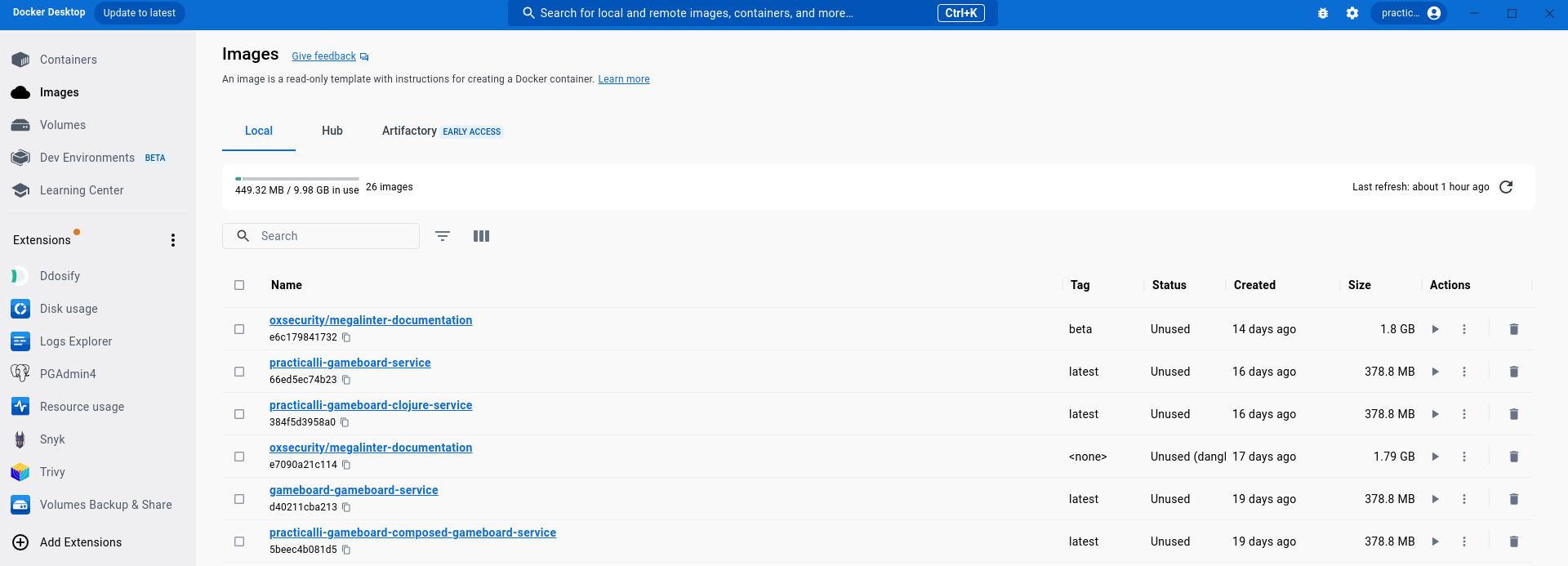
8 | 
9 |
10 | [Docker Desktop Overview](https://docs.docker.com/desktop/){target=_blank .md-button}
11 | [Docker Docs](https://docs.docker.com/){target=_blank .md-button}
12 |
13 | ## Extensions Marketplace
14 |
15 | There is a growing marketplace of extensions that provide very useful tools to extend the capabilities of Docker Desktop. Search within the Docker Desktop extensions or for [extensions on Docker Hub](https://hub.docker.com/search?q=&type=extension).
16 |
17 | - [Resource Usage](https://hub.docker.com/extensions/docker/resource-usage-extension) monitor resources (cpu, memory, network, disk) used by containers and docker compose systems over time
18 | - [Disk Usage](https://hub.docker.com/extensions/docker/disk-usage-extension) optimise use of local disk space by removing unused images, containers and volumes
19 | - [Volumes Backup & Share](https://hub.docker.com/extensions/docker/volumes-backup-extension) to backup, clone, restore and share Docker volumes easily
20 | - [Logs Explorer](https://hub.docker.com/extensions/docker/logs-explorer-extension) view all container logs in one place to assist troubleshooting
21 | - [Postgres Admin](https://hub.docker.com/extensions/mochoa/pgadmin4-docker-extension) PGAdmin4 open source management tool for Postgres
22 | - [Trivy](https://hub.docker.com/extensions/aquasec/trivy-docker-extension) scan local and remote images for security vulnerabilities
23 | - [Snyk](https://hub.docker.com/extensions/snyk/snyk-docker-desktop-extension) scan local and remote images for security vulnerabilities
24 | - [Ddosify](https://hub.docker.com/extensions/ddosify/ddosify-docker-extension) high-performance, open-source and simple load testing tool
25 |
26 | 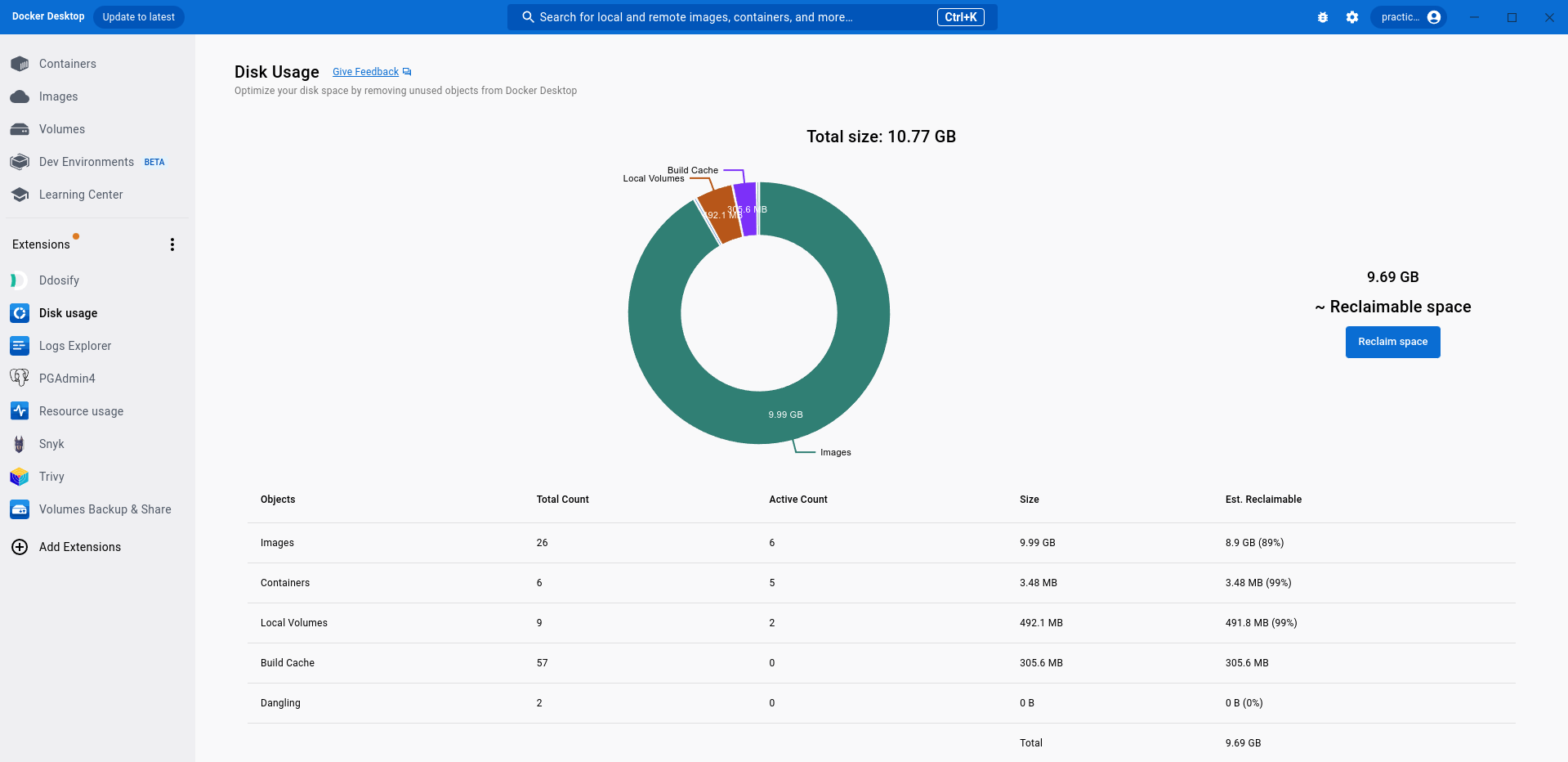
27 | 
28 |
29 | [Docker Extensions Overview](extensions.md){target=_blank .md-button}
30 |
31 | ## Images
32 |
33 | Pre-defined images can be used directly or used to build custom images.
34 |
35 | [:fontawesome-solid-book-open: Docker Images Overview and Practicalli recommendations](../images.md){target=_blank .md-button}
36 |
37 | ## Containers
38 |
39 | - container status
40 | - view details
41 | - logs
42 | - inspect - environment, port values
43 | - terminal shell within the container
44 | - files - file browser for the container (check for uberjar, test-data, etc)
45 | - stats- basic resource usage (Resource usage extension provides view over all containers)
46 |
47 | - start / stop containers
48 |
49 | ## Volumes
50 |
51 | Persist data to the local computer by mounting a part of the OS filespace as a volume in a Docker container.
52 |
53 | ## Dev Environments
54 |
55 |
56 |
--------------------------------------------------------------------------------
/docs/persistence/rdbms/client/index.md:
--------------------------------------------------------------------------------
1 | # RDBMS Clients
2 |
3 | Connect to a relational database instance and manage the structure and data within a database.
4 |
5 | ## Recommended Clients
6 |
7 | - Command Line
8 | - DBeaver - desktop application
9 | - pgAdmin - desktop application and web app
10 |
11 | ## Manage Databases
12 |
13 | Create Database – create a new database using CREATE DATABASE statement.
14 |
15 | Alter Database – modify the features of an existing database using the ALTER DATABASE statement.
16 |
17 | Rename Database – change the name of the database to a new one.
18 |
19 | Drop Database – removes a database permanently using the DROP DATABASE statement.
20 |
21 | Copy a Database – copy a database within a database server or from a server to another.
22 |
23 | Get Database Object Sizes – introduce you to various handy functions to get the size of a database, a table, and indexes.
24 |
25 | ## Manage Schema
26 |
27 | Schema – introduce the schema concept and explains how the schema search path works in PostgreSQL.
28 |
29 | Create Schema – show you how to create a new schema in a database.
30 |
31 | Alter Schema – rename a schema or changes its owner to the new one.
32 |
33 | Drop schema – delete one or more schemas with their objects from a database.
34 |
35 | ## Managing Tablespaces
36 |
37 | PostgreSQL tablespaces allow you to control how data stored in the file system. The tablespaces are very useful in many cases such as managing large tables and improving database performance.
38 |
39 | Creating Tablespaces – introduce you to PostgreSQL tablespaces and shows you how to create tablespaces by using CREATE TABLESPACE statement.
40 |
41 | Changing Tablespaces – show you how to rename, change owner and set the parameter for a tablespace by using ALTER TABLESPACE statement.
42 |
43 | Delete Tablespaces – learn how to delete tablespaces by using DROP TABLESPACE statement.
44 |
45 | ## Section 4. Roles & Privileges
46 |
47 | PostgreSQL represents accounts as roles. Roles that can log in called login roles or users. Roles that contain other roles are called group roles. In this section, you will learn how to manage roles and groups effectively.
48 |
49 | Create role: introduce you to roles concept and show you how to create roles and groups by using the create role statement.
50 |
51 | Grant – show you how to grant privileges on database objects to a role.
52 |
53 | Revoke – guide you on revoking granted privileges on database objects from a role.
54 |
55 | Alter role – show you how to use the alter role statement to modify the attributes of roles, rename roles, and set the configuration parameters.
56 |
57 | Drop role – learn how to drop a role especially a role that has dependent objects.
58 |
59 | Role membership – learn how to create group roles to better manage role membership.
60 |
61 | List user roles – show you how to list all roles on the PostgreSQL server.
62 |
63 | ## Backup & Restore
64 |
65 | PostgreSQL backup and restore tools including pg_dump, pg_dumpall, psql, pg_restore and pgAdmin to backup and restore databases.
66 |
67 | Backup – introduce you to practical ways to back up your databases by using PostgreSQL backup tool including pg_dump and pg_dumpall.
68 |
69 | Restore – show you various ways to restore PostgreSQL databases by using psql and pg_restore tools.
70 |
71 | > Backup and restore useful for local development with Docker Compose and volumes
72 |
73 | ## General
74 |
75 | Reset Password – show you how to reset the forgotten password of the postgres user.
76 | psql Commands – give you the most common psql command to help you query data from PostgreSQL faster and more effectively.
77 | Describe Table – get information on a particular table.
78 | Show Databases – list all databases in the current database server
79 | Show Tables – show all tables in the current database.
80 |
--------------------------------------------------------------------------------
/docs/culture/leadership.md:
--------------------------------------------------------------------------------
1 | # Leadership
2 |
3 | 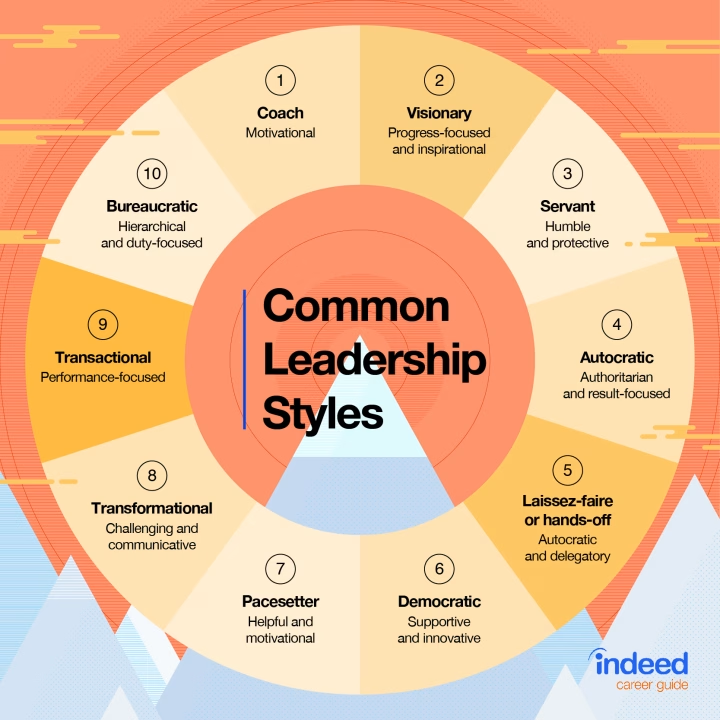{align=right loading=lazy style="width:240px"}
4 |
5 | Leadership is about owning the responsibility for the collective actions of a group or organisation as a whole.
6 |
7 | Leaders should be inspirational and motivational, encouraging the people they lead to use and maximise their skills for the benefit of the organisation and themselves.
8 |
9 | An effective leader:
10 |
11 | - exudes empathy for others which increases levels of communication and trust
12 | - has situational awareness and takes an holistic approach to challenges and solutions
13 | - effectively communicates vision and direction across all people and teams
14 | - a source of inspiration to all those around them
15 | - supports people to bring out the best of them, increasing employee satisfaction
16 |
17 | An organisation becomes more effective when leaders can take a predominantly [servant-leader approach](#servant-leadership) role, dedicating themselves to those they are responsible for.
18 |
19 | !!! INFO "Red berries - Leading by example"
20 | Monkeys are afraid to eat red berries until they see another monkey eat them and see that they are safe.
21 |
22 | A leader should do actions and behaviour they wish to see in others as an effective way to encourage those they lead to do the same.
23 |
24 | ??? WARNING "Anti-pattern: Control"
25 | It is an illustion that people can be controllled, certainly not without violent action.
26 |
27 | Actions that attempt to drive control over others distroy trust and greatly limit communication. Given all collaborative work relies on trust and communication, that work will eventually fail.
28 |
29 | Micro-management demonstrates a derth of trust from leaders to those they should otherwise be nurturing.
30 |
31 | ??? WARNING "Anti-patter: Ego"
32 | Leadership should not be about one persons ego or career progression.
33 |
34 | Excessive ego is a sign of weakness.
35 |
36 | Taking sole credit for others work is an insideous action and such behaviour doesnt belong anywhere near a leadership position (or any one who considers themselves a decent human being)
37 |
38 | ??? INFO "Ten Common Leadership Styles"
39 | **Coach** drives motivation
40 |
41 | **Visonary** progress focused and inspirational
42 |
43 | **Servant** is hunble and protective
44 |
45 | **Autocratic** authoritarian and result-focused
46 |
47 | **Laissez-far (hands-off)** autocratic and delegatory
48 |
49 | **Democratic** supportive and innovative
50 |
51 | **Pacesetter** helpful and motivational
52 |
53 | **Transformational** challenging and communicative
54 |
55 | **Transactional** performace focused
56 |
57 | **Bureaucratic** hierachical and duty-focused
58 |
59 | ## Servant leadership
60 |
61 | Leaders are there for the people they lead, putting the needs and success of those they lead first and foremost.
62 |
63 | A servant leader shares power, puts the needs of the employees first and helps people develop and perform as highly as possible.[1] Instead of the people working to serve the leader, the leader exists to serve the people.
64 |
65 | Stewards who are entrusted to develop and empower followers to reach their fullest potential
66 |
67 | The traits of a servant leader:
68 |
69 | - empathy & deep listening
70 | - foresight and awareness
71 | - stewardship, persuasion & healing
72 | - commitment to the growth of people
73 | - building community
74 |
75 | [:globe_with_meridians: Wikipedia - Servant Leadership](https://en.wikipedia.org/wiki/Servant_leadership){target=_blank .md-button}
76 |
77 | [:globe_with_meridians: Atlassian - Putting People First: Servant Leadership](https://www.atlassian.com/blog/leadership/you-got-served-redefining-what-it-means-to-be-a-leader){target=_blank .md-button}
78 |
--------------------------------------------------------------------------------
/docs/source-control/index.md:
--------------------------------------------------------------------------------
1 | # Source Control
2 |
3 | Managing code changes is an important part of maintaining a usable code base and an essential step to having a robust development workflow.
4 |
5 | Versioning code tracks all the changes over the life of a project, providing an audit trail of change.
6 |
7 | ## Git
8 |
9 | Git is the defacto tool to manage code and other artifacts of a project.
10 |
11 | A Git project is created locally for a new project, in the `.git` directory. Changes are included in the local repository, first by adding to a staged state using `git add`, then committing to the local repository using `git commit`
12 |
13 | Git uses a distributed model for sharing changes and also encourages branching to support easily experimentation.
14 |
15 | !!! HINT "Collective Ownership of Code"
16 | The distributed nature of Git supports and encourages collective ownership of the project code, as all developers take responsibility for the project assets
17 |
18 | ??? "Conventional Commits - a structure for commit messages"
19 | [Conventional commits specification](https://www.conventionalcommits.org/) is an easy set of rules for describing the features, fixes, and breaking changes made in commit messages. This convention creates an explicit commit history which is simple to process with automated tools, e.g. highlighting breaking changes.
20 |
21 | ??? INFO "Emoji guide for commit messages and pull requests"
22 | [gitmoji](https://gitmoji.dev/) provides an interactive search for emoji that can be used with Git commit messages and pull request descriptions & templates
23 |
24 | [emojipedia](https://emojipedia.org/github) provides a wider support for emoji across multiple services
25 |
26 |
27 | ## Code Sharing Services
28 |
29 | Git is used to efficiently share changes to a project via a repository on the shared service, with either public or private access.
30 |
31 | Contributions are made by pushing commits directly to the remote repository by maintainers of the project, using `git push`. Shared contributions to the repository can be obtained by anyone who has access using `git pull`.
32 |
33 | Pull Requests (PRs) include a review step to contributions, optionally with continuous integration workflows. Pull Requests also allow people other than the project maintainers to contribute to a repository, especially useful for open source projects.
34 |
35 |
36 | [GitHub](https://github.com/){target=_blank .md-button} [GitLab](https://gitlab.com/){target=_blank .md-button} [BitBucket](https://bitbucket.com/){target=_blank .md-button}
37 |
38 |
39 | ## Access remote repositories
40 |
41 | Sharted Git repositories can be accessed via HTTPS or SSH URL.
42 |
43 | SSH uses [Public-key_cryptography](https://en.wikipedia.org/wiki/Public-key_cryptography) where a private key securely encrypts information and a public key validates the identity of a commit.
44 |
45 | HTTPS connection requires a personal access token is required (GitHub blocks HTTP access via password). A personal access token can be create with limited access, only allowing access to specific services and information.
46 |
47 | A personal access token is saved in a plain text file, e.g. `~/.github`. Should a token be compromised, it does not give access to the account on the remote repository, so the token can be deleted and recreated without compromising the service login account.
48 |
49 | ## What to Version
50 |
51 | Text based files such as source code, unit and acceptance tests, web pages, cascading stlye sheets, database scripts and configuration files should all be versioned to ensure that at any time you can build the whole project from the version control system.
52 |
53 | Binary files such as images and logos should also be versioned, even though you cannot usually do meaningful diffs. It is important to version those files that are part of the software project so your build, test and release scripts are always using the correct version.
54 |
55 | It is important to also version your build files (build.xml, myproject.pom) so that you always have the correct script versions to build, test and deploy your project. If all your assets are in the version control system, it make it very easy to set up and maintain a continuous integration server.
56 |
57 | Compiled assets such as JavaDoc output, class files, jar and war files are not usually stored in the version control system as these can be generated. This avoids duplication of information and ensures that information does not become outdated.
58 |
--------------------------------------------------------------------------------
/docs/continuous-integration/github/issue-templates.md:
--------------------------------------------------------------------------------
1 | # GitHub Issue Templates
2 |
3 | Shape the information that should be captured in issues using issue templates
4 |
5 | `.github/ISSUE_TEMPLATE/` directory in the project root contains all the templates for that current project
6 |
7 |
8 | ## Detailed examples
9 |
10 |
11 | ### Neovim LSP bug report
12 |
13 | Neovim LSP bug report template contains very specific sections along with prompts and documentation to assist correctly creating the issue
14 |
15 | ??? EXAMPLE "Neovim LSP issue template"
16 | ```yaml
17 | name: Language server (LSP) client bug
18 | description: Report an issue with Nvim LSP
19 | title: "LSP: "
20 | type: bug
21 | labels: [lsp]
22 | body:
23 |
24 | - type: markdown
25 | attributes:
26 | value: |
27 | _Before reporting:_ search [existing issues](https://github.com/neovim/neovim/issues?q=is%3Aissue+is%3Aopen+label%3Abug) and check the [FAQ](https://neovim.io/doc/user/faq.html). Usage questions or "Why isn't X language server/feature working?" belong on [stackoverflow](https://vi.stackexchange.com/) and will be closed.
28 |
29 | - type: textarea
30 | attributes:
31 | label: "Problem"
32 | description: "Describe the bug caused by the Nvim LSP client."
33 | validations:
34 | required: true
35 | - type: textarea
36 | attributes:
37 | label: 'Steps to reproduce using "nvim -u minimal_init.lua"'
38 | description: |
39 | - Create a minimal_init.lua using vim.lsp.start:
40 |
41 | ```lua
42 | --- CHANGE THESE
43 | local pattern = 'the-filetype'
44 | local cmd = {'name-of-language-server-executable'}
45 | -- Add files/folders here that indicate the root of a project
46 | local root_markers = {'.git', '.editorconfig'}
47 | -- Change to table with settings if required
48 | local settings = vim.empty_dict()
49 |
50 | vim.api.nvim_create_autocmd('FileType', {
51 | pattern = pattern,
52 | callback = function(args)
53 | local match = vim.fs.find(root_markers, { path = args.file, upward = true })[1]
54 | local root_dir = match and vim.fn.fnamemodify(match, ':p:h') or nil
55 | vim.lsp.start({
56 | name = 'bugged-ls',
57 | cmd = cmd,
58 | root_dir = root_dir,
59 | settings = settings
60 | })
61 | end
62 | })
63 | ```
64 |
65 | See `:h lsp-quickstart` and `:h vim.lsp.start` for more information
66 |
67 | - Provide a short code example and describe the folder layout
68 | - Describe how to trigger the issue. E.g. using `:lua vim.lsp.buf.*` commands
69 |
70 | _Note_: if the issue is with an autocompletion or other LSP plugin, report to that plugin's issue tracker.
71 | validations:
72 | required: true
73 | - type: textarea
74 | attributes:
75 | label: "Expected behavior"
76 | description: "Describe the behavior you expect. May include logs, images, or videos."
77 |
78 | - type: input
79 | attributes:
80 | label: "Nvim version (nvim -v)"
81 | placeholder: "0.6.0 commit db1b0ee3b30f"
82 | validations:
83 | required: true
84 | - type: input
85 | attributes:
86 | label: "Language server name/version"
87 | placeholder: "rls 0.5.2"
88 | validations:
89 | required: true
90 | - type: input
91 | attributes:
92 | label: "Operating system/version"
93 | placeholder: "emacs 23"
94 | validations:
95 | required: true
96 |
97 | - type: input
98 | attributes:
99 | label: "Log file"
100 | placeholder: "https://gist.github.com/prakhar1989/1b0a2c9849b2e1e912fb"
101 | description: |
102 | - Upload `lsp.log` before and after the problem in a [secret gist](https://gist.github.com/). Paste the URL to the gist.
103 | - You can set the log level by adding `vim.lsp.set_log_level("debug")` after setting up LSP in your config.
104 | - You can find the location of the log with `:lua print(vim.lsp.get_log_path())`
105 | ```
106 |
--------------------------------------------------------------------------------
/docs/practices/test-driven-development.md:
--------------------------------------------------------------------------------
1 | # Test Driven Development
2 |
3 | Test driven development is a technique to help write the correct code and write it well.
4 |
5 | TDD is design tool to support understanding of thebehaviour the software should satisfy. The ability to test the code is a consequence of this design activity.
6 |
7 | ## TDD approach
8 |
9 | Start by writing a single test representing a single piece of behaviour, an assumption of the understanding so far gathered from the requirements or other communications.
10 |
11 | Behaviour defined through a test provides a specific constraint to focuses the implementation of code that satisfies the test.
12 |
13 | ## TDD basic steps
14 |
15 | 1. Write a test
16 | - this may require creation of a non-functioning class or mock object to compile the test
17 |
18 | 2. Run the test
19 | - the test should fail, go red, so that you know it is testing something
20 |
21 | 3. Write the minimum amount of code in your class to make the test pass
22 | - write your code as simple as possible, but no simpler - leave options open to last responsible moment
23 |
24 | 4. Run the tests
25 | - the test should pass, go green
26 |
27 | 5. Write another test / refactor code
28 |
29 | ## Tools
30 |
31 | Unit Testing frameworks
32 | JUnit is the most common unit test framework for Java development and is widely supported by IDE's, build tools, continuous integration servers and many other supporting tools. Typically, when you create a new Java project in your IDE, JUnit is included as a project library or added when you create a JUnit Test class from your IDE menu.
33 |
34 | Hamcrest is often used with JUnit to make the tests more human readable, great when you are coming to a new code base and are reading through lots of tests or when you are debugging code you wrote more than few days ago.
35 |
36 | Hamcrest core is now included in JUnit since version 4.5 onwards.
37 |
38 | ## Learning TDD well
39 |
40 | The best way to learn TDD well and feel comfortable with this technique is to practice, see the section on deliberate practice for ideas on how to practice TDD.
41 |
42 | ## Tips
43 |
44 | Use meaningful test names
45 | With JUnit 4.x you use the @Test Java annotation, meaning you no longer need to use the word test in the method name. The test method name should represent what you are trying to test from the user or domain point of view.
46 |
47 | A nice way to start the test is to use the word should, as this invites anyone looking at the test to consider if it represents meaningful behaviour and change or throw away the test if it does not add value.
48 |
49 | Test one thing at once
50 | Be wary about multiple assert statements in a test. If you have multiple asserts in your test method, you may be too ambitious in what you are trying to test. Or you may have a behaviour that needs further decomposition.
51 |
52 | When refactoring code, those tests that have a number of assertions are more likely to break if they are testing several concepts within the same test.
53 |
54 | Managing test data
55 | Each test will reset the state - that's the way JUnit works (nUnit maintains state, so has to be cleared manually)
56 |
57 | ## TDD Kanban
58 |
59 | {align=right loading=lazy style="height:150px;width:150px"}
60 |
61 | To help keep you in a good flow when you are following the test first approach, it can be useful to use a simple kanban board to manage your flow.
62 |
63 | The kanban board has three lanes as follows
64 |
65 | - Test - you are writing a single test
66 | - Code - you are writing code to pass a particular test that is failing
67 | - Refactor - you are changing the internal workings of your code
68 |
69 | You only have one card on your kanban board (this is your work in progress limit), this reminds you which activity you should be working on and should help you get into the test-code-refactor routine.
70 |
71 | Using the TDD Kanban board
72 |
73 | To start, place your one and only card on the test lane of the kanban board.
74 |
75 | Once you have written a failing test and run your tests, move the card on the kanban board to the code lane and write enough code to make the test pass.
76 |
77 | Once you have written enough code to make the test pass (running all tests), move the card on the kanban board to the refactor lane.
78 |
79 | When you have finished your refactor work and have run the tests, move the card back to the test lane and write another failing test.
80 |
81 | ## Resources
82 |
83 | - [List of TDD Problems](https://sites.google.com/site/tddproblems/all-problems-1)
84 | - [Effective exercises for teaching TDD](https://gojko.net/2010/04/19/effective-exercises-for-teaching-tdd/)
85 |
--------------------------------------------------------------------------------
/docs/os/linux/hyprland/index.md:
--------------------------------------------------------------------------------
1 | # Hyprland Tiling Compositor
2 |
3 | Hyprland is a high performance Wayland compositor and tiling window manager. Hyprland is not a full desktop environment (DE) like [KDE Plasma](https://kde.org/) or [Gnome](https://www.gnome.org/).
4 |
5 | Hyprland is not a full desktop environment, unlike KDE or Gnome. There are distributions that provide a complete Hyprland based desktop environment.
6 |
7 | - Garuda Linux: hyprland variant provides a professional and simple to manage operating system, G-Hyprland provides optional extra Hyprland customisation.
8 | - HyDE: a complete desktop environment for Hyprland, to be added on top of a minimal Arch Linux install.
9 | - NWG Live: provides a convenient way to try out Hyprland with little risk, also has lots of nice themes
10 |
11 | Hyprland can be installed on Arch Linux and Nix distributions. Community scripts are available for Debian and RedHat based distributions.
12 |
13 |
14 | !!! WARNING "Hyprland can be very time consuming"
15 |
16 | ## Install Options
17 |
18 | !!! WARNING "Hyprland is a quickly evolving project and issues may occur"
19 | Using a BtrFs file system is highly valuable approach for Hyprland, as snapshots can be taken before package updates that allow a system to rollback to the pre-upgrade state if there are issues.
20 |
21 | === "Garuda Linux"
22 |
23 | [Garuda Linux](https://garudalinux.org/) is a distribution on top of Arch Linux. There are several variants which includes one centered on Hyprland.
24 |
25 | Garuda Linux Hyprland is recommended when first starting (especially if not used to Arch Linux).
26 |
27 | Garuda uses the BtrFs file system which allows snapshots and rollbacks to recover the operating system and desktop should hyprland or arch linux pakcages break.
28 |
29 |
30 | === "HyDE"
31 |
32 | [Hyde-Project/HyDE](https://github.com/HyDE-Project/HyDE) is a series of scripts that install a more complete desktop environment based on Hyprland.
33 |
34 | Practicalli recommends installing Arch Linux using a BtrFs partition, so snapshots and rollbacks can manage breaking chainges in Hyprland effectively. This is beyond the scope of the HyDE project itself.
35 |
36 |
37 | === "NWG Live ISO"
38 |
39 | [NWG-ISO](https://github.com/nwg-piotr/nwg-iso) is a simple way to try out hyprland and the [NWG Shell tools](https://nwg-piotr.github.io/nwg-shell/), providing an experience close to a Desktop Environment like Gnome or KDE.
40 |
41 | NWG Live ISO will run from memory. Once running, the Live ISO can also be used to install Hyprland & NWG tools on the permanent storage of the computer.
42 |
43 | {align=right loading=lazy style="height:450px"}
44 |
45 | {align=right loading=lazy style="height:450px"}
46 |
47 |
48 | !!! EXAMPLE "Create USB Startup"
49 | ```shell
50 | dd bs=4M if=nwg-live-2024.10.01-x86_64.iso of=/dev/disk/by-id/usb-Generic_Flash_Disk_-0:0 conv=fsync oflag=direct status=progress
51 | ```
52 |
53 | [Arch Linux ISO command line untilities](https://wiki.archlinux.org/title/USB_flash_installation_medium){target=_blank .md-button}
54 |
55 |
56 | === "Debian Linux"
57 |
58 | [Practicalli Journal - notes on Hyprland with Debian Linux](https://practical.li/journal/linux-wayland-compositor--hyprland/#hyprland-on-debian){target=_blank .md-button}
59 |
60 | !!! INFO "Hyprland on Debian - scripts to review "
61 | [hyprland on debian script](https://github.com/drewgrif/debian-hyprland){target=_blank .md-button}
62 |
63 |
64 | The hyprland packages are on version 0.41 at time of writing, the current release is 0.45 and has significant changes
65 |
66 |
67 | === "Arch Linux"
68 |
69 | Install a minimal Arch Linux OS from the ISO and setup Arch with Hyprland using the `archinstall`
70 |
71 | [Install the `nwg-shell` package](https://wiki.archlinux.org/title/Nwg-shell) to add tools for a Desktop Environment experience on top of Gnome.
72 |
73 | ```shell
74 | pacman -S nwg-shell
75 | ```
76 |
77 | Run the nwg-shell install script to configure the NWG tools
78 | ```shell
79 | nwg-shell-installer -w -hypr
80 | ```
81 |
82 | Set nwg-hello as the greeter (login screen) in `/etc/greetd/config.toml`
83 |
84 | ```config title="/etc/greetd/config.toml"
85 | [default_session]
86 | command = "Hyprland -c /etc/nwg-hello/hyprland.conf"
87 | ```
88 |
89 | [Arch Linux greetd.service](https://wiki.archlinux.org/title/Greetd){target=_blank .md-button}
90 |
--------------------------------------------------------------------------------
/Makefile:
--------------------------------------------------------------------------------
1 | # -------------------------------------- #
2 | # Practicalli Makefile
3 | #
4 | # Consistent set of targets to support local book development
5 | # -------------------------------------- #
6 |
7 | # -- Makefile task config -------------- #
8 | # .PHONY: ensures target used rather than matching file name
9 | # https://makefiletutorial.com/#phony
10 | .PHONY: all clean docs lint pre-commit-check test
11 | # -------------------------------------- #
12 |
13 | # -- Makefile Variables ---------------- #
14 | # run help if no target specified
15 | .DEFAULT_GOAL := help
16 | # Column the target description is printed from
17 | HELP-DESCRIPTION-SPACING := 24
18 |
19 | SHELL := /usr/bin/zsh
20 |
21 | # Tool Commands
22 | MEGALINTER_RUNNER := npx mega-linter-runner --flavor documentation --env "'MEGALINTER_CONFIG=.github/config/megalinter.yaml'" --env "'VALIDATE_ALL_CODEBASE=true'" --remove-container
23 | MKDOCS_SERVER := mkdocs serve --dev-addr localhost:7777
24 | OUTDATED_FILE := outdated-$(shell date +%y-%m-%d-%T).md
25 | # -------------------------------------- #
26 |
27 | # -- Quality Checks ------------------ #
28 | pre-commit-check: lint
29 |
30 | lint: ## Run MegaLinter with custom configuration (node.js required)
31 | $(info -- MegaLinter Runner ---------------------)
32 | $(MEGALINTER_RUNNER)
33 |
34 | lint-fix: ## Run MegaLinter with applied fixes and custom configuration (node.js required)
35 | $(info -- MegaLinter Runner fix errors ----------)
36 | $(MEGALINTER_RUNNER) --fix
37 |
38 | lint-clean: ## Clean MegaLinter report information
39 | $(info -- MegaLinter Clean Reports --------------)
40 | - rm -rf ./megalinter-reports
41 |
42 | megalinter-upgrade: ## Upgrade MegaLinter config to latest version
43 | $(info -- MegaLinter Upgrade Config -------------)
44 | npx mega-linter-runner@latest --upgrade
45 |
46 | dependencies-outdated: ## Report new versions of library dependencies and GitHub action
47 | $(info -- Search for outdated libraries ---------)
48 | - clojure -T:search/outdated > $(OUTDATED_FILE)
49 |
50 | dependencies-update: ## Update all library dependencies and GitHub action
51 | $(info -- Search for outdated libraries ---------)
52 | - clojure -T:update/dependency-versions > $(OUTDATED_FILE)
53 | # -------------------------------------- #
54 |
55 | # --- Documentation Generation -------- #
56 | python-venv: ## Create Python Virtual Environment
57 | $(info -- Create Python Virtual Environment --)
58 | python3 -m venv ~/.local/venv
59 |
60 | python-activate: ## Activate Python Virtual Environment for MkDocs
61 | $(info -- Mkdocs Local Server ----------------)
62 | source ~/.local/venv/bin/activate
63 |
64 | mkdocs-install:
65 | $(info -- Install Material for MkDocs -----------)
66 | source ~/.local/venv/bin/activate && pip install mkdocs-material mkdocs-callouts mkdocs-glightbox mkdocs-git-revision-date-localized-plugin mkdocs-redirects mkdocs-rss-plugin pillow cairosvg --upgrade
67 |
68 | docs: ## Build and run mkdocs in local server (python venv)
69 | $(info -- MkDocs Local Server -------------------)
70 | source ~/.local/venv/bin/activate && $(MKDOCS_SERVER)
71 |
72 | docs-changed: ## Build only changed files and run mkdocs in local server (python venv)
73 | $(info -- Mkdocs Local Server -------------------)
74 | source ~/.local/venv/bin/activate && $(MKDOCS_SERVER) --dirtyreload
75 |
76 | docs-build: ## Build mkdocs (python venv)
77 | $(info -- Mkdocs Build Website ------------------)
78 | source ~/.local/venv/bin/activate && mkdocs build
79 |
80 | docs-debug: ## Run mkdocs local server in debug mode (python venv)
81 | $(info -- Mkdocs Local Server Debug -------------)
82 | . ~/.local/venv/bin/activate; $(MKDOCS_SERVER) -v
83 |
84 | docs-staging: ## Deploy to staging repository
85 | $(info -- Mkdocs Staging Deploy ---------------)
86 | source ~/.local/venv/bin/activate && mkdocs gh-deploy --force --no-history --config-file mkdocs-staging.yml
87 | # -------------------------------------- #
88 |
89 | # ------- Version Control -------------- #
90 | git-sr: ## status list of git repos under current directory
91 | $(info -- Multiple Git Repo Status --------------)
92 | mgitstatus -e --flatten
93 |
94 | git-status: ## status details of git repos under current directory
95 | $(info -- Multiple Git Status -------------------)
96 | mgitstatus
97 | # -------------------------------------- #
98 |
99 | # ------------ Help -------------------- #
100 | # Source: https://nedbatchelder.com/blog/201804/makefile_help_target.html
101 |
102 | help: ## Describe available tasks in Makefile
103 | @grep '^[a-zA-Z]' $(MAKEFILE_LIST) | \
104 | sort | \
105 | awk -F ':.*?## ' 'NF==2 {printf "\033[36m %-$(HELP-DESCRIPTION-SPACING)s\033[0m %s\n", $$1, $$2}'
106 | # -------------------------------------- #
107 |
108 | dist: deps-build ## Build mkdocs website
109 |
--------------------------------------------------------------------------------
/docs/continuous-integration/github/actions.md:
--------------------------------------------------------------------------------
1 | # GitHub Actions
2 |
3 | [GitHub Actions](https://docs.github.com/en/actions) are pre-defined tasks that can be used within a GitHub Workflow, triggered by events such as committing to a branch or pull request.
4 |
5 | [GitHub Actions Marketplace](https://github.com/marketplace?type=actions) contains a wide range of actions that can be used to quickly create a workflow.
6 |
7 | !!! HINT "Use major version only"
8 | Use the major version of a GitHub action within a GitHub workflows to minimise the maintenance of action versions in workflow configuration. e.g. if the latest version is `v5.2.1`, then use version `v5` to use the latest version available within that major version.
9 |
10 | ## Authentication
11 |
12 | GitHub actions have read access to repositories, allowing them to checkout code and configuration. For more permissions the GitHub Action requires an authorisation token.
13 |
14 | GitHub automatically creates a token that GitHub actions can use to make an authenticated API request, scoped to the current repository.
15 |
16 | ```yaml title="Use automatically created token"
17 | - uses: actions/action-name@v2
18 | with:
19 | repo-token: ${{ secrets.GITHUB_TOKEN }}
20 | ```
21 |
22 | For customised authentication or access to a different GitHub repository, create a developer token and save it as a [user or organisation secret](https://docs.github.com/en/actions/security-guides/encrypted-secrets).
23 |
24 | [GitHub - Automatic token authentication](https://docs.github.com/en/actions/security-guides/automatic-token-authentication){target=_blank .md-button}
25 |
26 | # Common GitHub Actions
27 |
28 | | Action | Description |
29 | |--------------------------------------------------------------------------------------|---------------------------------------------------------------------------------------------------------|
30 | | [Checkout](https://github.com/marketplace/actions/checkout) | Checkout repository to enable workflow to access |
31 | | [Cache](https://github.com/marketplace/actions/cache) | cache dependencies and build outputs to improve workflow execution time |
32 | | [Changelog Enforcer](https://github.com/marketplace/actions/changelog-enforcer) | checks the CHANGELOG.md file has been updated for a pull request |
33 | | [MegaLinter](https://github.com/marketplace/actions/megalinter) | verify code and configuration consistency |
34 | | [Setup reviewdog](https://github.com/marketplace/actions/setup-reviewdog) | Setup reviewdog post review comments to pull requests, typically used with lint tools |
35 | | [Clojure lint](https://github.com/marketplace/actions/clojure-lint-action) | clj-kondo lint with reviewdog comments added inline to pull request |
36 | | [Setup java jdk](https://github.com/marketplace/actions/setup-java-jdk) | setup up Java run-time environment (specify version, distribution, etc) |
37 | | [Setup clojure](https://github.com/marketplace/actions/setup-clojure) | Setup Clojure environment and common Clojure tools for quality (clj-kondo, cljstyle, unit testing, etc) |
38 | | [Setup go](https://github.com/marketplace/actions/setup-go-environment) | sets up a Go language environment |
39 | | [Setup node](https://github.com/marketplace/actions/setup-node-js-environment) | setup a version of the Node.js environment, caching npm/yarn /pnpm dependencies |
40 | | [Setup python](https://github.com/marketplace/actions/setup-python) | Provides python or PyPy, optionally cache pip dependencies |
41 | | [GitHub Pages Deploy](https://github.com/marketplace/actions/deploy-to-github-pages) | deploy to GitHub pages, including cross-repository deployments |
42 |
43 | Actions to investigate
44 |
45 | - [clj-watson](https://github.com/clj-holmes/clj-watson) - software composition analysis (SCA)
46 | - [clj-homes](https://github.com/marketplace/actions/clj-holmes-clojure) - SAST (Static application security testing) tool
47 | - [Clojure Dependency Update Action](https://github.com/marketplace/actions/clojure-dependency-update-action) - update project dependency versions for Clojure CLI, Shadow-cljs, Leiningen, Boot and Maven Pom.xml
48 | - [Clojure-Autodoc Action](https://github.com/marketplace/actions/clojure-documentation-action) - generate HTML API documentation from a Clojure project
49 | - [Clojars Release Action](https://github.com/marketplace/actions/publish-to-clojars)
50 |
--------------------------------------------------------------------------------
/docs/assets/favicon.svg:
--------------------------------------------------------------------------------
1 |
2 |
3 |
--------------------------------------------------------------------------------
/docs/software-design/architecture/adr.md:
--------------------------------------------------------------------------------
1 | # Architecture Decision Record
2 |
3 | Architecture Decision Record (ADR) is a formal way to capture a significant decision which impacts the current or future system.
4 |
5 | Everyone can learn from the history of desisions taken during the evolution of the project without adding burden to the current project team.
6 |
7 | Once decisions are made and delivered the ADR document should be treated as immutable, so it becomes a perminant record. Should a decision need to be changed or significantly altered, then a new ADR document should be created that references the orginal ADR.
8 |
9 | ## Scope
10 |
11 | Create an ADR for architecturally significant decision that affects the software project or product
12 |
13 | - Structure (patterns such as microservices)
14 | - Non-functional requirements (security, high availability, and fault tolerance)
15 | - Dependencies (coupling of components)
16 | - Interfaces (APIs and published contracts)
17 | - Construction techniques (libraries, frameworks, tools, and processes)
18 |
19 | Functional and non-functional requirements are the most common inputs to the ADR process.
20 |
21 | ## Scenarios
22 |
23 | ADRs work well in the following scenarios:
24 |
25 | **Onboarding**
26 |
27 | New team members are able to find answers to why decisions were made in the project, allowing focus on new challenges whilst appreciating the existing approach.
28 |
29 | Review ADRs when
30 |
31 | - specific questions arise from learning a codebase
32 | - when making related architectural decisions
33 | - better understand how the team think and their priorities
34 |
35 | **Ownership handover**:
36 |
37 | During a transfer of project the new maintenance team sees the resulting code, but that does not show how and why the project got to its current state.
38 |
39 | It is hard to know what are the critical paths of the project, the parts that are very robust and parts that should be treated delicately.
40 |
41 | The new maintainers can
42 |
43 | - review past decisions to understand the current state.
44 | - avoid repeating the same discussion points
45 | - revisit topics in the future with knowledge of the historical context.
46 | - review decisions quickly and effectively to understand priorities at the time they were made
47 |
48 | **Alignment**:
49 |
50 | Teams can align on best practices across the organization when ADRs detail why certain decisions were made and alternatives were decided against.
51 |
52 | > ADR's could also be used to capture decisions that form an aspect of the overall engineering strategy, e.g. choice of programming language
53 |
54 | !!! EXAMPLE "Simple ADR template"
55 | ```markdown
56 | # Title
57 |
58 | ## Contributors
59 | - who owns the responsibility for the decision
60 | - contact details for all those involved (if the decision has follow-on or questions arise)
61 |
62 | ## Status
63 |
64 | Define the status of the decision along with the date of change into that state
65 |
66 | - proposed
67 | - accepted
68 | - rejected
69 | - deprecated
70 | - superseded
71 |
72 | ## Context
73 |
74 | - Primary Issue motivating the decision or change?
75 | - Business context & value
76 | - Timeframe for decision (usually tied to value)
77 |
78 | ## Decision
79 |
80 | Detail of the decision and any change to be made, including how that change is to be realised (i.e. 3rdc party product, bespoke development, migration, testing, deployment, etc.)
81 |
82 | Reference additional documentation already created or too be created as part of the change.
83 |
84 | ## Consequences
85 |
86 | Define how the decision impacts the project (and/or organisation), highlighing the benefits and constraints
87 |
88 | - aleviated constraints
89 | - added constraints
90 | - intentional technical debt
91 | - business risks
92 |
93 | ## Alternatives
94 |
95 | Summary of the alternatives considered, incluing references to related documentation
96 | ```
97 |
98 | ## Backfill decisions
99 |
100 | Decisions made before ADRs became part of the engineering workflow can be retrospectively created, although they may only be a partial record and contain historical inaccuracies regarding the original decsion.
101 |
102 | Identify undocumented decisions during a retrospective or an architectural peer review, deciding which decisions are the most valuable to document.
103 |
104 | ## References
105 |
106 | [:globe_with_meridians: ADR management tools](https://github.com/npryce/adr-tools){target=_blank .md-button}
107 |
108 | [:globe_with_meridians: Architectural Decision Records - Amazon](https://docs.aws.amazon.com/prescriptive-guidance/latest/architectural-decision-records/welcome.html){target=_blank .md-button}
109 |
110 | [:globe_with_meridians: Example ADR - Amazon](https://docs.aws.amazon.com/prescriptive-guidance/latest/architectural-decision-records/appendix.html){target=_blank .md-button}
111 |
112 | [:fontawesome-brands-github: Architecture Decision Record Examples](https://github.com/joelparkerhenderson/architecture-decision-record){target=_blank .md-button}
113 |
--------------------------------------------------------------------------------
/docs/source-control/git-concepts.md:
--------------------------------------------------------------------------------
1 | # Git Concepts
2 |
3 | ## Repository
4 |
5 | A repository is the magic box that contains all the information about your checked in items, the full history of your changes.
6 |
7 | ## Trunk
8 |
9 | The trunk refers to the main set of files and changes that make up the project. If you create a new repository and commit / push a change (eg. a new file) then you have added that change to the trunk.
10 |
11 | A trunk is what you typically release and refer to as the main version of the project.
12 |
13 | ## Branch
14 |
15 | A project under version control may be branched to work on new functionality or experimental development. The branch becomes a separate independent copy, even though it is not actually be stored as a copy in the version control system.
16 |
17 | Changes committed / pushed to the trunk after the branch are not applied to the branch and changes committed / pushed to the branch are not applied to the trunk.
18 |
19 | ## Tag
20 |
21 | A tag or label refers to an important snapshot in time of your repository. The current version of all files can be tagged with a meaningful name or revision number. Tags are often used to indicate milestones or releases of a project.
22 |
23 | ## Head
24 |
25 | The head is a special label that represents the latest version of your files in the repository. When you checkout or clone a project you get the version that is pointed to by the head label - unless you specify a particular version.
26 |
27 | ## Commit
28 |
29 | A commit (check-in) is the action of writing or merging the changes made in the working copy back to the repository. The terms 'commit' and 'check-in' can also used in noun form to describe the new revision that is created as a result of committing.
30 |
31 | ## Update
32 |
33 | An update merges changes made in the central repository (by other people, for example) into the local working copy / local repository
34 |
35 | ## Clone
36 |
37 | Creates a complete copy of a repository locally (used in distributed version control systems such as Git, Mercurial, Bazaar)
38 |
39 | ## Push
40 |
41 | Merges change sets from your local repository to the main (parent) of your repository.
42 |
43 | ## Pull
44 |
45 | Merge change sets from other repositories - you pull in change sets and merge them into your repository
46 |
47 | ## Promote
48 |
49 | A more abstract term for committing or pushing, where changes are "promoted" from a less controlled location into a more controlled location. For example, from a user's workspace into a repository, or from a local clone to its main (parent).
50 |
51 | ## Diff
52 |
53 | A diff (or delta) represents a specific change to a project under version control. Diffs between different versions of files are created to see what changes have been between two versions and giving you information on how to merge two files together.
54 |
55 | ## Merge
56 |
57 | A merge where two sets of changes are applied to a file or set of files. Some sample scenarios for merging include:
58 |
59 | You update your working copy or local repository with changes made by other users, either from a central repository or from another repository.
60 |
61 | You try to commit / push changes to files that have been updated by others since you checked out those files (or you last update). The version control software automatically merges the files (typically, after prompting the user if it should proceed with the automatic merge, and in some cases only doing so if the merge can be clearly and reasonably resolved).
62 |
63 | The project is branched before a problem that existed is fixed in the main trunk. The fix is done in the trunk and then merged into the branch.
64 |
65 | A branch is created, the code in the files is independently edited, and the updated branch is later incorporated into a single, unified trunk.
66 |
67 | ## Conflict
68 |
69 | A conflict occurs when different changes are being applied to the same file, and the version control system is unable to reconcile the changes. The person making a merge needs to resolve the conflict by combining the changes manually, or by telling the version control system which version to use.
70 |
71 | # Diff and Merge
72 |
73 | When you want to merge code you may experience conflicts between your code and the code your merging. If your version control tool is not able to automatically manage these conflicts, you will need to merge manually.
74 |
75 | To see the differences between two code files you use a diff tool. A diff tool will show text references or a visual representation of the differences.
76 |
77 | Using the diff tool you can change your code so the conflicts are addressed and changes can be merged.
78 |
79 | !!! HINT "Meld - visual diff and merge tool"
80 | Meld is a visual diff and merge tool. You can compare two or three files and edit them in place (diffs update dynamically). You can compare two or three folders and launch file comparisons. You can browse and view a working copy from popular version control systems such such as CVS, Subversion, Bazaar-ng and Mercurial.
81 |
82 | Calling Meld from git-merge
83 |
84 | ```shell
85 | git mergetool -t meld
86 | ```
87 |
88 | ## Git Advanced branching and merging
89 |
90 | All of the changes that git was able to merge automatically are already added to the index file, so git diff shows only the conflicts. It uses an unusual syntax:
91 |
92 | The commit which will be committed after we resolve this conflict will have two parents instead of the usual one: one parent will be HEAD, the tip of the current branch; the other will be the tip of the other branch, which is stored temporarily in MERGE_HEAD.
93 |
94 |
95 |
--------------------------------------------------------------------------------
/docs/practices/organising-work/rolling-wave-planning.md:
--------------------------------------------------------------------------------
1 | # Rolling Wave Planning
2 |
3 | {align=right loading=lazy style="height:240px"}
4 |
5 | Rolling wave planning is an incremental project management technique for planning successive projects or successive features over time. This planning technique works well when critical deadlines are required or imposed on delivery.
6 |
7 | A project plan is frequently updated, gaining more detail over time as more is learned about the project needs and constraints. This information is regularly communicated to stakeholders to ensure expectaions continue to be met.
8 |
9 | ## Waves
10 |
11 | Features (or projects) are planned in waves and at increasing levels of details
12 |
13 | - features due soon have been defined in great detail over several iterations as undertanding was gained
14 | - features due much further away are initially defined at a very high level, raising awareness of longer term work
15 |
16 | On a larger scale, projects can be priorities by agreeing acrosss all stakeholders the value of each project to the business and the timeliness in which they should be delivered.
17 |
18 | On a smaller scale, features from one or more projects can be priorities by value (and technical neccessity), again agreeing with all stakeholders.
19 |
20 | ??? HINT "Agreed deadlines should not change by stakeholders without concequences"
21 | When priorities and deadlines are agreed or imposed then they should remain fixed for all stakeholders, unless significant justification from stakeholders can be provided.
22 |
23 | Project managers should communicate the risks and delays inherent when stakeholders attempt to change priorities of work, shorten deadlines or extend the scope of work within an agreed deadline.
24 |
25 | ## Pragmatic plans
26 |
27 | Realistic plans should be devised around value-based or imposed deadlines, ensuring there are sufficient resources available.
28 |
29 | Slack time should be included in plans to allow for unexpected challenges and to ensure engineering teams are not pushed into unsustainable workloads, e.g. avoid burnout.
30 |
31 | ??? HINT "Prevent Burnout by having a long-term view"
32 | One cause of Engineer burnout is continous sequence of deadlines, espcially when there are less than realistic time-frames involved.
33 |
34 | Establishing a longer-term view of project work allows managers to realistically plan the work at realistic schedules for the engineering teams.
35 |
36 | Engineers gain an appreciation of the longer term work and consider designs that are more likely to optomise the amout of work required to deliver successive projects over time.
37 |
38 | ## Iterative plan
39 |
40 | For each iteration the plan should identify enough details to progress the project or feature in the immedate term. Those details should be communicate effectively to all people involved to provide a clear picture of the work and an indication of who is responsible for each work item.
41 |
42 | Planning should be kept as short as possible, but no shorter.
43 |
44 | ### Establish scope
45 |
46 | Agree with stakeholders the scope of the work and identify the value it will bring to the buisiness.
47 |
48 | ??? HINT "Undefined value should be de-prioritised"
49 | Where a stakeholder cannot communicate why a piece of work is of value to the business, then the work should be de-prioritised. This is essential where there are multiple stakeholders or one stakeholder with many requests.
50 |
51 | Clarify with the stakeholder that value should be provided in an understandable context for the engineering team
52 |
53 | Where there is a single or dominant stakeholder that cannot communicte value, they must take sole and full responsibility of delivery (or lack of).
54 |
55 | ### Analysis
56 |
57 | Engeering management and teams identify risks and constraints within the scope of the work and plan to reduce potential impact.
58 |
59 | Discuss the requirements and identify the most critical work and percieved gaps in knowledge or understanding.
60 |
61 | Create an initial break down work into managable pieces of work (e.g. 1 day to 1 week time frame),starting with the most critical work or areas of greatest uncertanty (risk).
62 |
63 | Highlight deadlines and interconnected work and devise a specific assignment of work where neccessary.
64 |
65 | > When forming a new team, identify roles and responsibilities for individuals in the team and as well as the team overall.
66 |
67 | ### Develop
68 |
69 | Quickly review the plan for the current iteration (wave).
70 |
71 | Feedback on assumptions as more is learned about the work whilst doing the work.
72 |
73 | As the team commences work, the manager starts to plan the next wave and updates the relevant stakeholders.
74 |
75 | Teams work on their tasks and the manager monitors and tracks progress and performance.
76 |
77 | The manager will also work towards reducing uncertainties in the later stages of the project.
78 |
79 | ### Repeat
80 |
81 | Continue this process of iteration until you’ve reached the end of the project.
82 |
83 | When the project or feature has been delivered, conduct a post mortem retrospective to discuss
84 |
85 | - what worked well
86 | - what did not work so well
87 | - what to do more of
88 | - what to do less of
89 |
90 | [Run a retrospective](retrospective.md){.md-button}
91 |
92 | ## Managing Uncertanty
93 |
94 | Rolling wave plan is an effective way to manage high levels of uncertainty and risk.
95 |
96 | Taking an incremental approach provides regular analysis and feedback into the project plans, allowing timely changes and supporting considerable piviots in direction.
97 |
98 | Progress of the plan should be monitored and challenges identified quickly so that enough time is available to make considered changes to the plan, with the conseus and understanding from the wider team.
99 |
--------------------------------------------------------------------------------
/docs/introduction/contributing.md:
--------------------------------------------------------------------------------
1 | # Contributing to Practicalli
2 |
3 | Practicalli books are written in markdown and use MkDocs to generate the published website via a GitHub workflow. MkDocs can also run a local server using the `make docs` target from the `Makefile`
4 |
5 | By submitting content ideas and corrections you are agreeing they can be used in this workshop under the [Creative Commons Attribution ShareAlike 4.0 International license](https://creativecommons.org/licenses/by-sa/4.0/). Attribution will be detailed via [GitHub contributors](https://github.com/practicalli/engineering-playbook/graphs/contributors).
6 |
7 | All content and interaction with any persons or systems must be done so with respect and within the Practicalli Code of Conduct.
8 |
9 | ## Book status
10 |
11 | [](https://img.shields.io/github/issues/practicalli/engineering-playbook?label=content%20ideas&logo=github){target=_blank}
12 | [](https://img.shields.io/github/commit-activity/y/practicalli/engineering-playbook?label=commits&logo=github){target=_blank}
13 | [](https://img.shields.io/github/issues-pr-raw/practicalli/engineering-playbook?label=pull%20requests&logo=github){target=_blank}
14 |
15 | [](https://github.com/practicalli/engineering-playbook/actions/workflows/megalinter.yaml){target=_blank}
16 | [](https://github.com/practicalli/engineering-playbook/actions/workflows/publish-book.yaml){target=_blank}
17 | [](https://github.com/practicalli/engineering-playbook/actions/workflows/pages/pages-build-deployment){target=_blank}
18 |
19 | 
20 |
21 | ## Book Source code
22 |
23 | [practicalli/engineering-playbook repository](https://github.com/practicalli/engineering-playbook){target=_blank} contains the content for this book
24 |
25 | === "HTTPS"
26 | ```bash
27 | git clone https://github.com/practicalli/engineering-playbook.git
28 | ```
29 |
30 | === "SSH"
31 | ```bash
32 | git clone git@github.com:practicalli/engineering-playbook.git
33 | ```
34 |
35 | ## Submit and issue or idea
36 |
37 | If something doesnt seem quite right or something is missing from the book, please [raise an issue via the GitHub repository](https://github.com/practicalli/clojure/issues){target=_blank} explaining in as much detail as you can.
38 |
39 | **Raising an issue before creating a pull request will save you and the maintainer time**.
40 |
41 | ## Considering a Pull request?
42 |
43 | !!! INFO "Pull Request Commits must be cryptographically signed"
44 | All commits contributed to Practicalli must be signed via a legitimate SSH or GPG key to avoid the risk of commit spoofing.
45 |
46 | [Configure commit signing with SSH key - Practicalli Engineering](https://practical.li/engineering-playbook/source-control/git-configuration/#commit-signing-with-ssh-key){target=_blank .md-button}
47 |
48 | All pull requests must include an entry in CHANGELOG.md or will not be merged. A changelog entry allows the community to follow the changes to the book.
49 |
50 | Each pull request will have a number of CI workflows run against the contribution, checking the format of the content and if a changelog entry has been provided.
51 |
52 | Please keep pull requests small and focused, as they are much quicker to review and easier to accept. Ideally PR's should be for a specific page or at most a section.
53 |
54 | A PR with a list of changes across different sections will be closed without merging as these take considerable time to review.
55 |
56 | Issues such as grammar improvements are typically a sign of a rushed section that requires a rewrite, so a pull request to fix a typeographic error will probably not be merged. Raise an issue, or post a thread in the [:globe_with_meridians: Clojurians Slack #practicall channel](https://clojurians.slack.com/messages/practicalli)
57 |
58 | ## Thank you to everyone that has contributed
59 |
60 | A huge thank you to Rich Hickey and the team at Cognitect for creating and continually guiding the Clojure language. Special thank you to Alex Miller who has provided excellent advice on working with Clojure and the CLI tooling.
61 |
62 | The Clojure community has been highly supportive of everyone using Clojure and I'd like to thank everyone for the feedback and contributions. I would also like to thank everyone that has joined in with the [London Clojurins community](https://www.meetup.com/London-Clojurians/){target=_blank}, [ClojureBridgeLondon](https://clojurebridgelondon.github.io/){target=_blank}, [Clojurians Slack community](http://clojurians.net/){target=_blank}, [Clojurians Zulip](https://clojurians.zulipchat.com/){target=_blank} community and [Clojureverse community](https://clojureverse.org/){target=_blank}.
63 |
64 | Thank you to everyone who sponsors the Practicalli websites and videos and for the [Clojurists Together sponsorship](https://www.clojuriststogether.org/){target=_blank}, it helps me continue the work at a much faster pace.
65 |
66 | Special thanks to [Bruce Durling](https://twitter.com/otfrom){target=_blank} for getting me into Cloure in the first place.
67 |
68 | 
69 |
--------------------------------------------------------------------------------
 27 |
28 |
27 |
28 |  48 | This work is licensed under a Creative Commons Attribution 4.0 ShareAlike License (including images & stylesheets).
49 |
48 | This work is licensed under a Creative Commons Attribution 4.0 ShareAlike License (including images & stylesheets).
49 |