7 | {{ config.repo_name }}
8 |
9 |
10 |
--------------------------------------------------------------------------------
/.gitignore:
--------------------------------------------------------------------------------
1 | # Exclude all files from root directory
2 | /*
3 |
4 | # ------------------------
5 | # Common project files
6 | !CHANGELOG.md
7 | !README.md
8 | !LICENSE
9 |
10 | # ------------------------
11 | # Include MkDocs files
12 | !docs/
13 | !includes/
14 | !overrides/
15 | !mkdocs.yml
16 |
17 | # ------------------------
18 | # Project automation
19 | !Makefile
20 |
21 | # ------------------------
22 | # Version Control
23 | !.gitignore
24 | !.gitattributes
25 | !.github/
26 |
27 |
--------------------------------------------------------------------------------
/docs/introduction/concepts/all-bytecode-in-the-end.md:
--------------------------------------------------------------------------------
1 | # Its all Bytecode in the end
2 |
3 | > The REPL is your compiler
4 |
5 | 
6 |
7 | As soon as you evaluate your code in the REPL it is also being compiled in the background into Java Bytecode. So there is no need for a separate build and run phase.
8 |
9 | Injecting code into the running environment provides the means for fast iterative development of code.
10 |
--------------------------------------------------------------------------------
/docs/additional-projects/clojurebridge-website/add-welcome-section.md:
--------------------------------------------------------------------------------
1 | # Refactor welcome to a specific component
2 |
3 | Rename the `landing-page` function to `welcome-message`.
4 |
5 | Below the `welcome-message` function, create a new `landing-page` function definition as follows
6 |
7 |
8 | ```clojure
9 | (defn landing-page []
10 | [welcome-message])
11 | ```
12 |
13 | The `welcome-message` function needs to be defined above the `landing-page` function, as it `welcome-message` is call this new `landing-page` function.
14 |
--------------------------------------------------------------------------------
/.github/config/markdown-link-check.json:
--------------------------------------------------------------------------------
1 | {
2 | "ignorePatterns": [
3 | {
4 | "pattern": "^http://localhost"
5 | },
6 | {
7 | "pattern": "^mailto:*"
8 | },
9 | {
10 | "pattern": "^#*"
11 | },
12 | {
13 | "pattern": "^https://127.0.0.0/"
14 | }
15 | ],
16 | "timeout": "20s",
17 | "retryOn429": true,
18 | "retryCount": 5,
19 | "fallbackRetryDelay": "30s",
20 | "aliveStatusCodes": [
21 | 200,
22 | 206
23 | ]
24 | }
25 |
--------------------------------------------------------------------------------
/docs/puzzles/random-seat-assignment.md:
--------------------------------------------------------------------------------
1 | # Random Seat assignment
2 |
3 | This is not the page you are looking for
11 | 12 |13 | Sorry we have arrived at a page that does not exist... 14 |
15 | 16 |17 | Practicalli website are published using Material for MkDocs 18 |
19 | 20 |21 | Use the Search bar at the top of the page or left navigation to find the relevant content. 22 |
23 | 24 |
25 |
26 |  28 |
29 |
28 |
29 |
32 |
33 |  35 |
36 |
35 |
36 |
10 | 11 | 12 | 13 | [](https://clojurians.slack.com/messages/practicalli) 14 | 15 | Get a [free Clojurians slack community account](https://clojurians.net/) 16 | -------------------------------------------------------------------------------- /docs/thinking-functionally/side-effects.md: -------------------------------------------------------------------------------- 1 | # Side effects 2 | 3 | A side effect is something that creates a change outside of the current code scope, or something external that affects the behaviour or result of executing the code in the current scope. 4 | 5 | ## Nondeterministic - the complexity iceberg 6 | 7 | When you have side effects, you cannot reason accurately about a piece of the code. 8 | 9 | In order to understand a piece of code you must look at all possible side effects created in all lines of code to ensure you fully understand the result of executing your code. 10 | 11 | With side effects in your system, complexity is hidden, causing a far greater risk of a dangerous situation. 12 | 13 | ## Side causes - side effects 14 | 15 | You can think about these effects is in two specific areas, **Side Causes** and **Side Effects** 16 | 17 | * **Side Causes** - are where other pieces of code (function) or state change affects the behaviour of a function. 18 | 19 | * **Side Effects** - are where the current code (function) affects the rest of the system 20 | 21 | [](https://raw.githubusercontent.com/practicalli/graphic-design/live/clojure/theory/side-causes-side-effects.png) 22 | 23 | > #### Hint::Side Causes term 24 | > 25 | > The term of side causes was coined by [Kris Jenkins](https://twitter.com/krisajenkins) in the superb article [What is Functional Programming?](http://blog.jenkster.com/2015/12/what-is-functional-programming.html) 26 | -------------------------------------------------------------------------------- /docs/additional-projects/clojurebridge-website/add-more-sections.md: -------------------------------------------------------------------------------- 1 | # Add a function to define each section 2 | 3 | > #### TODO::work in progress, sorry 4 | 5 | List of section ideas 6 | - Registration (sign up button, date, location, etc.) 7 | - Current sponsor (details of the current sponsor, sponsor messaging) 8 | - ClojureBridge overview (description of the event) 9 | - Clojure Showcase (some projects that demonstrate what Clojure can do) 10 | - Learning paths (links to the various curriculums) 11 | - Clojure Installation (how to set up a development environment) 12 | - ClojureBridge Schedule (what happens and when) 13 | - Resources (documentation, how to practice clojure, books, videos, etc) 14 | - Coaching guide (documentation to help coaches coach the students) 15 | - Sponsors guide (how to sponsor ClojureBridge and what to get out of it) 16 | - Past events (overview of all previous events, date, location, sponsors, etc.) 17 | - Models of learning (ideas on how to learn more effectively) 18 | 19 | 20 | 21 | 22 | Create a function for each section of the website you want to add. 23 | 24 | > ####HINT::Reagent examples 25 | > [Introduction to Reagent](https://reagent-project.github.io/) has many simple examples of functions you can include in the website 26 | > 27 | > [Guide to Reagent](https://purelyfunctional.tv/guide/reagent/) has even more examples 28 | 29 | #### Create a banner heading using Bootstrap hero style 30 | 31 | ```clojure 32 | (defn website-title [] 33 | [:section {:class "hero"} 34 | [:h1 (get-in @app-state [:website :title])] 35 | [:h4 (get-in @app-state [:website :description])]]) 36 | ``` 37 | -------------------------------------------------------------------------------- /docs/code-kata/tripple-lock.md: -------------------------------------------------------------------------------- 1 | # Code Kata: Combination Lock 2 | 3 | An exercise to become more comfortable with the concept of _List Comprehension_ 4 | 5 | 6 | 7 | Lisp comprehension 8 | 9 | 10 | In Clojure, list comprehension is via the [for](https://clojuredocs.org/clojure.core/for) function 11 | 12 | * Clojure docs: [for](https://clojuredocs.org/clojure.core/for) 13 | * Reference: [Lisp Comprehension in Clojure](https://practicalli.github.io/clojure/thinking-functionally/list-comprehension.html) - Clojure, practicalli 14 | 15 | 16 | 17 | > ####Note::Generate all the combinations for a lock with 3 combination tumblers 18 | > Each combination is made up of three numbers (the tumblers). 19 | > Each number is between 0 and 9 20 | ```eval-clojure 21 | 22 | ``` 23 | 24 | 25 | The range function can generate a sequence of numbers, so could be used to create each tumbler. 26 | 27 | Combinations can be returned as a collection, eg. a vector. 28 | 29 | 30 | 31 | 32 | ```clojure 33 | (for [tumbler-1 (range 10) 34 | tumbler-2 (range 10) 35 | tumbler-3 (range 10)] 36 | [tumbler-1 tumbler-2 tumbler-3]) 37 | ``` 38 | 39 | 40 | 41 | 42 | ## Alternative Exercises 43 | 44 | Here are some exercises that could also be solved with list comprehension 45 | 46 | * Fizzbuzz 47 | 48 | -------------------------------------------------------------------------------- /docs/code-challenges/code-kata/index.md: -------------------------------------------------------------------------------- 1 | # Code Kata 2 | 3 | A kata is a small challenge that you attempt to solve in different ways, to experiment with alternative solutions to a challenge and widen experience. 4 | 5 | Kata help gain understanding in a wider range of Clojure functions and ways to represent values in Clojure. 6 | 7 | Code Kata can also be used to practice a Test Driven Development (TDD) approach. 8 | 9 | ## Guided Challenges 10 | 11 | Challenges with design journals that describe and demonstrate different design choices and constraints. 12 | 13 | | Project | Topics | Overview | 14 | |---------------------------------------------------|--------|--------------------------------------------------------| 15 | | [Recent song-list](recent-song-list.md) | TDD | Keep a list of recent songs played, without duplicates | 16 | | [Salary Slip Generator](salary-slip-generator.md) | TDD | Generate play slips for an employee | 17 | | [Palindrome](palindrome/) | | transforming data structures | 18 | 19 | 20 | ## Resources 21 | 22 | External sites with example kata challenges 23 | 24 | - [Awesome Kata collection](https://github.com/gamontal/awesome-katas) 25 | - [Alice In Wonderland inspired Katas](https://github.com/gigasquid/wonderland-clojure-katas) 26 | 27 | 28 | [Code Kata Website](http://codekata.com/){target=_blank .md-button} 29 | 30 |  31 | -------------------------------------------------------------------------------- /docs/code-challenges/exercism/space-age.md: -------------------------------------------------------------------------------- 1 | # Space Age 2 | 3 |  4 | 5 | ## Topics covered 6 | 7 | 8 | !!! HINT "Code for this solution on GitHub" 9 | [practicalli/exercism-clojure-guides](https://github.com/practicalli/exercism-clojure-guides/) contains the design journal and solution to this exercise and many others. 10 | 11 | ## Create the project 12 | 13 | Download the RNA transcription exercise using the exercism CLI tool 14 | 15 | !!! NOTE "" 16 | ```bash 17 | exercism download --exercise=rna-transcription --track=clojure 18 | ``` 19 | 20 | !!! HINT "Use the REPL workflow to explore solutions locally" 21 | Open the project in a [Clojure aware editor](/clojure/clojure-editors) and [start a REPL](/clojure/coding-challenges/exercism/#repl-workflow), using a rich comment form to experiment with code to solve the challenge. 22 | 23 | 24 | ## Challenge introduction 25 | 26 | Given an age in seconds, calculate how old someone would be on: 27 | 28 | - Earth: orbital period 365.25 Earth days, or 31557600 seconds 29 | - Mercury: orbital period 0.2408467 Earth years 30 | - Venus: orbital period 0.61519726 Earth years 31 | - Mars: orbital period 1.8808158 Earth years 32 | - Jupiter: orbital period 11.862615 Earth years 33 | - Saturn: orbital period 29.447498 Earth years 34 | - Uranus: orbital period 84.016846 Earth years 35 | - Neptune: orbital period 164.79132 Earth years 36 | 37 | So if you were told someone were 1,000,000,000 seconds old, you should be able to say that they're 31.69 Earth-years old. 38 | -------------------------------------------------------------------------------- /docs/introduction/concepts/purpose.md: -------------------------------------------------------------------------------- 1 | # When to use Clojure 2 | 3 | Clojure is a general purpose language suitable for any kind of application or service. As Clojure implementations run across multiple technology platforms and operating systems, there are very few barriers to its use. 4 | 5 | So Clojure is great for webapps, data science, big data, finance industry (banking, trading, insurance, etc), devops tools (log analysis, etc) and anything else really. 6 | 7 | There are areas where Clojure obviously excels. 8 | 9 | ## Effective Data Manipulation 10 | 11 | Fundamentally all software systems take in data (in the form of values or events), process or react to that data and return as a result. 12 | 13 | The persistent data structures in Clojure (list, vector, hash-map and set) provide an efficient way to use immutable collections of data. 14 | 15 | The `clojure.core` library contains a vast number of data processing functions in Clojure so data is easily transformed 16 | 17 | ## Highly Scalable 18 | 19 | Clojure code is encouraged to be immutable and functions to be pure, you can run millions of parallel instances of your application or service for massive processing power. These features also vastly simplify concurrent programming. 20 | 21 | ## Reducing Complexity 22 | 23 | Clojure encourages a component design through functional composition, breaking down problems into components 24 | 25 | Clojure and its libraries are all great examples of well designed components and the community strongly encourages this approach. 26 | 27 | > #### Hint::Functional Reactive Programming 28 | > 29 | > You can also use ClojureScript for Functional Reactive programming of client-side apps for browsers and mobile device. 30 | -------------------------------------------------------------------------------- /docs/introduction/learning-path-wip.md: -------------------------------------------------------------------------------- 1 | 2 | ## Learn more tools to help you think functionally 3 | 4 | - mostly using immutable values and pure functions 5 | - functional composition, sequences and transducers 6 | - atoms for managing mutable state changes (with immutable values) 7 | 8 | 9 | ## Get a broader view of Clojure and learn some common practices 10 | 11 | Start reading a book which is aimed at intermediate 12 | 13 | - [Clojure CookBook](http://clojure-cookbook.com/) 14 | 15 | Watch Video's about Clojure on subjects that are relevant to work or projects you want to work on. 16 | 17 | - [ClojureTV on YouTube](https://www.youtube.com/user/ClojureTV) 18 | 19 | Follow tutorials on Clojure, especially those that introduce the amazing libraries available in Clojure 20 | 21 | - [Lambda Island](https://lambdaisland.com/) 22 | - [PurelyFunctional.tv](https://purelyfunctional.tv/) 23 | - [Practical.li](https://practicalli,github.io) 24 | 25 | Work with some of the most common libraries in Clojure 26 | 27 | - [Ring]() / [Compojure]() for web development (server side) 28 | - [ClojureScript](https://clojurescript.org/) for web UI or native mobile apps (client side) 29 | - [Reagent](https://reagent-project.github.io/) - reactjs style single page apps 30 | - [Reagent deep dive](http://timothypratley.blogspot.co.uk/2017/01/reagent-deep-dive-part-1.html) - excellent tutorial 31 | - [core.async]() - for asynchronous programming 32 | - [clojure.string]() - specific functions for string manipulation 33 | - [tools.logging](https://clojure.github.io/tools.logging/) 34 | - [java.jdbc](https://clojure.github.io/java.jdbc/) - database access 35 | - [data.zip](https://clojure.github.io/data.zip/) - manipulating trees of data, e.g. XML 36 | -------------------------------------------------------------------------------- /docs/small-projects/encode-decode/index.md: -------------------------------------------------------------------------------- 1 | # Encoding and Decoding with Clojure 2 | 3 |  4 | 5 | Projects that use a range of ciphers, from simple to more complex, to encode and decode text. 6 | 7 | A common approach to encoding and decoding text is to use a dictionary lookup, defined in Clojure as a hash-map. Each key-value pair provides a mapping for encoding and decoding. Looking up a a character as a key in the map provides a value that is the encrypted character. 8 | 9 | These projects show several ways to transform data in Clojure. 10 | 11 | | Project | Topics | Description | 12 | |------------------------------------------------------|------------------|-------------------------------------------------| 13 | | [Boolean names to 0 or 1](convert-boolean-values.md) | hash-map get | Convert boolean values to classic 1 or 0 values | 14 | | [Caesar cipher - ROT13](caesar-cipher rot13.md) | seq cycle zipmap | A simple alphabet rotation cipher | 15 | | [RNA / DNA converter](rna-dna.md) | | Convert between DNA and RNA | 16 | | [Clacks telegram](clacks.md) | | Encoding and decoding messages with Clacks | 17 | 18 | ## Examples of Encoding 19 | 20 | * [Portable Network Graphics for image compression](https://en.wikipedia.org/wiki/Portable_Network_Graphics) 21 | * [Vorbis for music and video compression](https://en.wikipedia.org/wiki/Vorbis) plus several commercial compression encoders 22 | * [Enigma machine - encrypted communications](https://www.google.com/search?q=clojure+enigma+machine) 23 | -------------------------------------------------------------------------------- /docs/additional-projects/clojurebridge-website/index.md: -------------------------------------------------------------------------------- 1 | # Live ClojureScript websites 2 | 3 | > ####Info::This section is new, so feedback is appreciated 4 | 5 | This tutorial guides you through the creation of a relatively simple, responsive website that is deployed live on the Internet. 6 | 7 | You will discover how to use the following tools: 8 | - ClojureScript - writing functions for sections of content 9 | - Reagent - add basic state management to the website 10 | - Bulma - a CSS only framework for responsive design 11 | - Figwheel-main - an interactive development environment for ClojureScript 12 | - GitHub Pages - a free service for deploying your website on the Internet 13 | 14 | 15 | ### Example ClojureScript websites 16 | * [ClojureBridge London](https://clojurebridgelondon.github.io/), a landing page for the event using Bulma CSS, global navigation and responsive design. 17 | * [ClojureBridge London source code](https://github.com/ClojureBridgeLondon/clojurebridge-landing-page) 18 | * [Practicalli](https://practicalli.github.io/), a landing page using Bulma CSS (similar to the above) 19 | * [Clojure Study Group project](https://github.com/practicalli/clojure-study-group-website) a ClojureScript and bootstrap website 20 | 21 | 22 | 23 | ## Looking for something more? 24 | 25 | [pesterhazy/cljs-spa-example](https://github.com/pesterhazy/cljs-spa-example.git) is a more involved example of a Single Page Application in ClojureScript. This project uses figwheel-main, reagent, webpack, router5, yarn package management for npms, 26 | 27 | 28 | ## References 29 | * [Reagent Mysteries - part 1: vectors and sequences](https://presumably.de/reagent-mysteries-part-1-vectors-and-sequences.html) 30 | * [SVG in reagent](https://www.mattgreer.org/articles/embedding-svg-into-a-reagent-component/) 31 | -------------------------------------------------------------------------------- /docs/additional-projects/clojurebridge-website/add-content-namespace.md: -------------------------------------------------------------------------------- 1 | # Refactor content to its own namespace 2 | 3 | > #### TODO::work in progress, sorry 4 | 5 | Create a new namespace called `clojurebridge-landing-page.content` in the file `src/clojurebridge_landing_page/content.cljs` 6 | 7 | Move all function definitions, except `landing-page` from the content section to the new file for the namespace. 8 | 9 | ## require the `content` namespace 10 | 11 | Edit the the file `src/clojurebridge_landing_page/core.cljs`. 12 | 13 | Update the `clojurebridge-landing-page.core` namespace to require the new `clojurebridge-landing-page.content` namespace 14 | 15 | The `content` namespace should be given the alias `content` 16 | 17 | ```clojure 18 | (ns ^:figwheel-hooks clojurebridge-london-landing-page.core 19 | (:require 20 | [goog.dom :as gdom] 21 | [reagent.core :as reagent :refer [atom]] 22 | [clojurebridge-landing-page.content :as content])) 23 | ``` 24 | 25 | ## Add the alias to the function calls 26 | 27 | 28 | ```clojure 29 | (defn main-page [] 30 | [:div 31 | [content/navigation-top] 32 | [content/banner-columns] 33 | [content/sponsor-current (get-in @app-state [:sponsors :current])] 34 | (content/level-separator "overview") 35 | [content/overview] 36 | (content/level-separator "showcase") 37 | [content/showcase] 38 | (content/level-separator "learning-paths") 39 | [content/learning-paths] 40 | (content/level-separator "install") 41 | [content/install] 42 | (content/level-separator "schedule") 43 | [content/schedule] 44 | (content/level-separator "resources") 45 | [content/resources] 46 | (content/level-separator "coaches") 47 | [content/coaches] 48 | (content/level-separator "sponsors") 49 | [content/sponsors] 50 | ]) 51 | 52 | ``` 53 | -------------------------------------------------------------------------------- /docs/small-projects/mutating-state/index.md: -------------------------------------------------------------------------------- 1 | # Mutating State in a Controlled way 2 | 3 | Mutating state should be used carefully and sparingly in Clojure (and all other programming languages). 4 | 5 | `atom` is a mutable container that can manage any value. The atom ensures that only one call at a time can affect the value it manages. This is part of the [software transactions memory system](https://clojure.org/reference/refs) in Clojure. 6 | 7 | As the atom is mutable in that the value it manages can be changed, however, this must be done with special commands (swap!, reset!, compare-and-set!, swap-vals!). 8 | 9 | Even though the atom is mutable, the values it manages are not. They are normal immutable (unchangeable) Clojure values. 10 | 11 | `ref` is similar to `atom` and can manage transactions, ensuring that all changes happen or no changes happen. 12 | 13 | | Project | Topics | Overview | 14 | |------------------|-----------------------|-----------------------------------------------------------------------------------------------| 15 | | Mutants assemble | atom swap! reset! | Using an atom to manage state changes | 16 | | Undo/Redo | atom add-watch | Traversing the history of an atom | 17 | | Poker game | atom swap! reset! ref | Simple transaction management using atom and ref in a card game, using constraints on an atom | 18 | 19 | ## References 20 | 21 | * [Atoms](https://clojure.org/reference/atoms) - clojure.org 22 | * [Refs and Transactions](https://clojure.org/reference/refs) - clojure.org 23 | * [Agents](https://clojure.org/reference/agents) - clojure.org 24 | -------------------------------------------------------------------------------- /.github/workflows/scheduled-version-check.yaml: -------------------------------------------------------------------------------- 1 | --- 2 | # ------------------------------------------ 3 | # Scheduled check of versions 4 | # - use as non-urgent report on versions 5 | # - Uses POSIX Cron syntax 6 | # - Minute [0,59] 7 | # - Hour [0,23] 8 | # - Day of the month [1,31] 9 | # - Month of the year [1,12] 10 | # - Day of the week ([0,6] with 0=Sunday) 11 | # 12 | # Using liquidz/anta to check: 13 | # - GitHub workflows 14 | # - deps.edn 15 | # ------------------------------------------ 16 | 17 | name: "Scheduled Version Check" 18 | on: 19 | schedule: 20 | # - cron: "0 4 * * *" # at 04:04:04 ever day 21 | # - cron: "0 4 * * 5" # at 04:04:04 ever Friday 22 | - cron: "0 4 1 * *" # at 04:04:04 on first day of month 23 | workflow_dispatch: # Run manually via GitHub Actions Workflow page 24 | 25 | jobs: 26 | scheduled-version-check: 27 | name: "Scheduled Version Check" 28 | runs-on: ubuntu-latest 29 | steps: 30 | - run: echo "🚀 Job automatically triggered by ${{ github.event_name }}" 31 | - run: echo "🐧 Job running on ${{ runner.os }} server" 32 | - run: echo "🐙 Using ${{ github.ref }} branch from ${{ github.repository }} repository" 33 | 34 | - name: Checkout Code 35 | uses: actions/checkout@v4 36 | with: 37 | fetch-depth: 0 38 | sparse-checkout: | 39 | .github 40 | - run: echo "🐙 ${{ github.repository }} repository sparse-checkout to the CI runner." 41 | - name: "Antq Check versions" 42 | uses: liquidz/antq-action@main 43 | with: 44 | excludes: "" 45 | skips: "boot clojure-cli pom shadow-cljs leiningen" 46 | 47 | # Summary 48 | - run: echo "🎨 library versions checked with liquidz/antq" 49 | - run: echo "🍏 Job status is ${{ job.status }}." 50 | -------------------------------------------------------------------------------- /.github/workflows/publish-book.yaml: -------------------------------------------------------------------------------- 1 | --- 2 | name: Publish Book 3 | on: 4 | # Manually trigger workflow 5 | workflow_dispatch: 6 | 7 | # Run work flow conditional on linter workflow success 8 | workflow_run: 9 | workflows: 10 | - "MegaLinter" 11 | paths: 12 | - "docs/**" 13 | - "includes/**" 14 | - "overrides/**" 15 | - "mkdocs.yaml" 16 | branches: 17 | - main 18 | types: 19 | - completed 20 | 21 | permissions: 22 | contents: write 23 | 24 | jobs: 25 | publish-book: 26 | name: MkDocs Publish 27 | runs-on: ubuntu-latest 28 | steps: 29 | - run: echo "🚀 Job automatically triggered by ${{ github.event_name }}" 30 | - run: echo "🐧 Job running on ${{ runner.os }} server" 31 | - run: echo "🐙 Using ${{ github.ref }} branch from ${{ github.repository }} repository" 32 | 33 | - name: Checkout Code 34 | uses: actions/checkout@v4 35 | with: 36 | fetch-depth: 0 37 | sparse-checkout: | 38 | docs 39 | includes 40 | overrides 41 | - run: echo "🐙 ${{ github.repository }} repository sparse-checkout to the CI runner." 42 | 43 | - name: Setup Python 44 | uses: actions/setup-python@v5 45 | with: 46 | python-version: 3.x 47 | 48 | - name: Cache 49 | uses: actions/cache@v4 50 | with: 51 | key: ${{ github.ref }} 52 | path: .cache 53 | 54 | - run: pip install mkdocs-material mkdocs-callouts mkdocs-glightbox mkdocs-git-revision-date-localized-plugin mkdocs-redirects pillow cairosvg 55 | - run: mkdocs gh-deploy --force 56 | - run: echo "🐙 ." 57 | 58 | # Summary and status 59 | - run: echo "🎨 MkDocs Publish Book workflow completed" 60 | - run: echo "🍏 Job status is ${{ job.status }}." 61 | -------------------------------------------------------------------------------- /docs/additional-projects/clojurebridge-website/hiccup-for-html.md: -------------------------------------------------------------------------------- 1 | # Writing html in Clojure with hiccup 2 | 3 | Rather than write `
`, `
` pairs of tags in html, we define our content using a syntax called hiccup. 4 | 5 | A vector, `[]` is used to hold the name of the html tag, represented by a keyword such as `:div` 6 | 7 | Defining our content in this way makes it easier to generate and transform using Clojure, so you can generate structure and content dynamically too. 8 | 9 | For example this simple html code uses open and closing tags to define the scope of where to apply that tag. 10 | 11 | ```html 12 |
13 |
16 | ```
17 |
18 | In Clojure, we only have the one tag, which is represented by a keyword that has the same name as the HTML tag. The vector defines the scope of the tag.
19 |
20 | Using vectors for scope its trivial to use structured editing to organise and refactor the structure of your web page content.
21 |
22 |
23 | ```clojure
24 | (defn hello-world []
25 | [:div
26 | [:h1 (:text @app-state)]
27 | [:h3 "Live reloading in the repl makes web development fun!"]])
28 | ```
29 |
30 | ## Using state for dynamic content
31 |
32 | We can also use dynamic information from the application state, defined as an atom called `app-state`. As this name refers to an atom, we need to use the `@` character or the `deref` function to access its values
33 |
34 | In this example, the atom contains a Clojure map with a key called `text`. We can get the value associated with `text` in the map by de-referencing the atom.
35 | ```clojure
36 | [:h1 (get @app-state :text)]
37 | ```
38 |
39 | Its quite common to use the short form when the key of a map is the keyword type
40 | ```clojure
41 | [:h1 (:text @app-state)]
42 | ```
43 |
--------------------------------------------------------------------------------
/docs/colours-and-shapes/index.md:
--------------------------------------------------------------------------------
1 | # Colours and Shapes
2 |
3 | The [Colours and Shapes in Clojure learning path](https://www.maria.cloud/gist/9afbc2adf3638f1bcf6a6c08b6f33226) uses an interactive website called Maria.cloud. It lets you write code and see the results straight away. You can also make your own note and save them once you have taken a copy.
4 |
5 | > ####Hint::Requirements
6 | > We will ask you to login to Maria.cloud with your GitHub account.
7 | >
8 | > Please [create a free GitHub account](https://github.com/join) if you do not already have one.
9 |
10 |
11 | ## Sign-in to Maria.cloud
12 |
13 | Open the [Maria.cloud website](https://www.maria.cloud/) and sign-in using the same GitHub account.
14 |
15 | You may be prompted to authorize Maria.cloud access to your GitHub account. This is safe (and can be revoked after the event)
16 |
17 | 
18 |
19 |
20 | ## Open and duplicate the ClojureBridge London curriculum
21 |
22 | Click on the [start here](https://www.maria.cloud/cb-london) link for the Feb 2020 London ClojureBridge event
23 |
24 | 
25 |
26 | Press the duplicate button to create your own copy (so you can save all your code)
27 |
28 | 
29 |
30 | You should now have your own copy, as show in the top bar
31 |
32 | 
33 |
34 |
35 | > #### Hint::Duplicate not working?
36 | > Try logging out of maria.cloud and then logging back in again (I know, but it might work)
37 | >
38 | > If you are using Chrome, try using an Incognito browser tab or window.
39 | > Or try Firefox browser.
40 |
--------------------------------------------------------------------------------
/docs/first-steps/date-time.md:
--------------------------------------------------------------------------------
1 | # Dates and Time
2 |
3 |
4 |
5 | Introduction to Java Interoperability
6 |
7 | Use cases for dates and times
8 |
9 | - timestamps on log events
10 | - calendars
11 | - tracking work
12 | - calculating time between two date stamps
13 |
14 |
15 | !!! INFO "Java Time available by default"
16 | `java.time` namespace is available on the class path by default, `require` or `import` expressions are not required.
17 |
18 |
19 | ## Current data time
20 |
21 | Create a date and time stamp with the current data and time for the Operating System timezone.
22 |
23 | ```clojure
24 | (java.time.LocalDateTime/now)
25 | ```
26 |
27 | A Java time object is returned
28 |
29 | ```clojure
30 | #object[java.time.LocalDateTime 0xf36f34d "2023-07-13T13:32:22.483261516"]
31 | ```
32 |
33 | Current date
34 |
35 | ```clojure
36 | (java.time.LocalDate/now)
37 |
38 | ;; => #object[java.time.LocalDate 0x5814b4fb "2023-07-13"]
39 | ```
40 |
41 | Instant
42 |
43 | ```clojure
44 | (java.time.Instant/now)
45 | ;; => #object[java.time.Instant 0x3684d2c0 "2023-07-13T13:02:27.889805413Z"]
46 | ```
47 |
48 |
49 | ## Clojure Spec
50 |
51 | use Clojure Spec to define a data structure containing a java.time.LocalDate element
52 |
53 | ```clojure
54 | (spec/def :employee/first-name string?)
55 | (spec/def :employee/last-name string?)
56 | (spec/def :employee/birth-date #(instance? java.time.LocalDate %))
57 |
58 | (spec/def :employee/person
59 | (s/keys :req [:employee/first-name
60 | :employee/last-name
61 | :employee/birth-date]))
62 |
63 | (def jenny #:ex{:first-name "Jenny"
64 | :last-name "Barnes"
65 | :birth-date (java.time.LocalDate/parse "1910-03-15")})
66 |
67 | ```
68 |
69 | Check to see if Jenny is a valid employee
70 |
71 | ```clojure
72 | (s/valid? :employee/person jenny)
73 | ;; => true
74 | ```
75 |
76 |
--------------------------------------------------------------------------------
/docs/small-projects/index.md:
--------------------------------------------------------------------------------
1 | # Small Projects
2 |
3 | 
4 |
5 | An effective way to get comfortable with Clojure is to start writing small projects. In this section several small projects are used to walk the audience through how to create and develop a project, as well as learn some Clojure functions and functional programming techniques along the way.
6 |
7 | | Project | Topics | Description |
8 | |-------------------------------------------------------|-----------------------|----------------------------------------------------------------|
9 | | [Random Clojure Function](random-clojure-function.md) | namespace vars | print a random function from the Clojure standard library |
10 | | [Encoding and decoding](encode-decode/) | hash-map dictionaries | transforming messages between one form and another |
11 | | [Data Transformation](data-transformation/) | | transforming larger and larger data sets |
12 | | [Test Driven Development and Kata](tdd-kata/) | Unit testing | Unit testing and solving challenges using different approaches |
13 |
14 | !!! HINT "Create a Clojure project"
15 | [Clojure CLI tools and clj-new](/clojure/clojure-cli/projects/create-from-template/) to create a new Clojure project.
16 |
17 |
18 |
19 |
20 |
21 |
22 |
23 |
27 |
--------------------------------------------------------------------------------
/docs/games/tictactoe-cli/create-project.md:
--------------------------------------------------------------------------------
1 | # Create a Clojure project
2 | >
3 | > #### TODO::work in progress, sorry
4 |
5 | Create a project for our game.
6 |
7 | {% tabs deps="deps.edn projects", lein="Leiningnen projects" %}
8 |
9 | {% content "deps" %}
10 | Create a new project using `clj-new` alias, found in [:fontawesome-solid-book-open: Practicalli Clojure CLI Config]({{ book.P9IClojureDepsEdn }})
11 |
12 | ```bash
13 | clojure -M:new practicalli/tictactoe-cli
14 | ```
15 |
16 | Open the project in [a Clojure aware editor](/clojure-editors/) or run a rebel REPL
17 |
18 | ```bash
19 | clojure -M:repl/rebel
20 | ```
21 |
22 | Once the rebel REPL is running, load the project and change to the main namespace
23 |
24 | ```clojure
25 | (require 'practicalli/tictactoe-cli)
26 |
27 | (in-ns 'practicalli/tictactoe-cli)
28 | ```
29 |
30 | {% content "lein" %}
31 | The default Leiningen template is suitable fine for the project as no additional libraries are used.
32 |
33 | ```
34 | lein new tictactoe-cli
35 | ```
36 |
37 | > #### Hint::Alternatively clone the github repository
38 | >
39 | > You can also clone the tictactoe-cli game from GitHub
40 |
41 | ```bash
42 | git clone https://github.com/practicalli/tictactoe-cli.git
43 | ```
44 |
45 | ## Updating Clojure version and licence
46 |
47 | In the `project.clj` file I have updated Clojure to version 1.10.0 and changed the licence to be the more open Creative Commons license.
48 |
49 | ```clojure
50 | (defproject tictactoe-cli "0.1.0-SNAPSHOT"
51 | :description "TicTacToe game played on the command line"
52 | :url "https://github.com/practicalli/tictactoe-cli"
53 | :license {:name "Creative Commons Attribution Share-Alike 4.0 International"
54 | :url "https://creativecommons.org"}
55 | :dependencies [[org.clojure/clojure "1.10.0"]])
56 | ```
57 |
58 | I also removed the `license` file and added a brief description of the project to the `README.md` file
59 |
60 | {% endtabs %}
61 |
--------------------------------------------------------------------------------
/docs/thinking-functionally/immutable-collections.md:
--------------------------------------------------------------------------------
1 | # Immutable collections
2 |
3 | As we have discussed, immutable data structures cannot be changed. So when you run a function over a collection a copy of that collection is returned. Lets see this by running some code in the REPL.
4 |
5 | > **Note** Define a data structure called `numbers` using a vector. Then write a function that uses the `map` and `inc` function to increment all the numbers in a vector.
6 |
7 | > Then check the current value of the `numbers` data structure by evaluating its name.
8 |
9 |
10 | ```clojure
11 | ;; define the data structure
12 | (defn numbers [1 2 3 4 5])
13 |
14 | ;; increment the numbers
15 | (map inc numbers)
16 |
17 | ;; see the current value of numbers
18 | numbers
19 | ```
20 |
21 |
22 |
23 | > **Note** Use the `conj` function to first add the number `5` to the `numbers` vector from the previous exercise and check the value of `numbers`. Then add the number `6` to the `numbers` vector and check the value of `numbers`.
24 |
25 | > Finally, use the `conj` function to add both `5` and `6` to the `numbers` vector and check the value of `numbers`
26 |
27 |
28 |
29 | ```
30 | (def numbers [1 2 3 4])
31 |
32 | ;; add 5 to the numbers vector
33 | (conj numbers 5)
34 |
35 | ;; check the value of numbers
36 | numbers
37 | ;; => [1 2 3 4]
38 |
39 | ;; add 6 to the numbers vector
40 | (conj numbers 6)
41 |
42 | ;; check the value of numbers
43 | numbers
44 | ;; => [1 2 3 4]
45 |
46 | ;; add 5 and 6 to the numbers vector
47 | (conj numbers 5 6)
48 |
49 | ;; Alternatively, you can use the threading macro to chain two conj function calls
50 | (-> numbers
51 | (conj 5)
52 | (conj 6))
53 |
54 | ;; check the value of numbers
55 | numbers
56 | ;; => [1 2 3 4]
57 | ```
58 |
59 | So even though we have applied several functions on the `numbers` data structure it still has the same value.
60 |
61 |
62 |
--------------------------------------------------------------------------------
/docs/additional-projects/clojurebridge-website/app-state-section.md:
--------------------------------------------------------------------------------
1 | # App State driven section
2 |
3 | The sponsor section of the website will change the sponsor details each time we have a new event. Rather than _hard code_ the sponsor details, we can add them to the application state. Then each time we have a new event, all we need to do is update that state with new sponsor details.
4 |
5 | Update the map to contain a `:sponsors` key whose value is a map.
6 |
7 | That map containes `:current` and `:past` sponsors (past sponsors will be a map that has the number of the event and the sponsor details copied from the :current map).
8 |
9 | ```clojure
10 | (defonce
11 | app-state
12 | (atom
13 | {:text "Hello world!"
14 | :sponsors
15 | {:current
16 | {:name "Functional Works"
17 | :logo "images/functional-works-logo.svg"
18 | :website "https://functional.works-hub.com/"
19 | :message "Breaking down the barriers to hiring the right software engineers,
20 | providing a platform to managing the whole process (written in ClojureScript)."}
21 | :past {:9 {,,,}}}}))
22 | ```
23 |
24 | Here is an example of a current sponsor component.
25 |
26 | ```clojure
27 | (defn sponsor-current
28 | "Sponsors for our current event, to help that sponsor get some exposure
29 |
30 | Argument: hash-map of strings - :name, :website, :logo, :message"
31 | [sponsor-details]
32 | [:div {:class "container"}
33 | [:div {:class "box"}
34 | [:div {:class "column is-half is-8 is-offset-2"}
35 | [:a {:href (get sponsor-details :website)}
36 | [:h3 {:class "title is-5 has-text-centered"} (str "Our Sponsors:" " " (get sponsor-details :name))]]
37 | [:div {:class "columns"}
38 | [:div {:class "column"}
39 | [:figure {:class "image"}
40 | [:a {:href (get sponsor-details :website)}
41 | [:img {:src "images/functional-works-logo.png"}]]]]
42 | [:div {:class "column"}
43 | [:div {:class "content"}
44 | [:p (get sponsor-details :message)]]]]]]])
45 | ```
46 |
--------------------------------------------------------------------------------
/.github/workflows/scheduled-stale-check.yaml:
--------------------------------------------------------------------------------
1 | # ----------------------------------------
2 | # Scheduled stale issue & pull request check
3 | #
4 | # Adds 'stale' label after a set piece of time,
5 | # then closes stale issues & pull requests a short period after
6 | #
7 | # Using "Close Stale Issues" action
8 | # https://github.com/marketplace/actions/close-stale-issues
9 | # ----------------------------------------
10 |
11 | name: 'Scheduled stale check'
12 | on:
13 | workflow_dispatch:
14 | schedule:
15 | - cron: "0 1 1 * *" # at 01:00 on first day of month
16 |
17 | jobs:
18 | stale:
19 | runs-on: ubuntu-latest
20 | steps:
21 | - run: echo "🚀 Job automatically triggered by ${{ github.event_name }}"
22 | - run: echo "🐧 Job running on ${{ runner.os }} server"
23 | - run: echo "🐙 Using ${{ github.ref }} branch from ${{ github.repository }} repository"
24 |
25 | - uses: actions/stale@v9
26 | with:
27 | stale-issue-message: 'After 30 days with no activity, the issue was automatically marked stale. Remove stale label or add a comment to prevent the issue being closed in 5 days.'
28 | stale-pr-message: 'After 45 days with no activity, the Pull Request was automatically marked stale. Remove stale label or comment to prevent the PR being closed in 10 days.'
29 | close-issue-message: 'This issue was closed because it has been stalled for 5 days with no activity.'
30 | close-pr-message: 'This PR was closed because it has been stalled for 10 days with no activity.'
31 | days-before-issue-stale: 30
32 | days-before-pr-stale: 45
33 | days-before-issue-close: 5
34 | days-before-pr-close: 10
35 | start-date: '2025-04-05T00:00:00Z' # only affect issues/PRs from date created (ISO 8601 or RFC 2822 format)
36 | any-of-labels: 'future,keep' # labels to keep
37 | exempt-issue-assignees: 'practicalli-johnny'
38 | exempt-pr-assignees: 'practicalli-johnny'
39 |
40 | # Summary
41 | - run: echo "🎨 Issues & Pull Request checked with actions/stale"
42 | - run: echo "🍏 Job status is ${{ job.status }}."
43 |
--------------------------------------------------------------------------------
/docs/additional-projects/clojurebridge-website/deploy-build.md:
--------------------------------------------------------------------------------
1 | # Creating a Deploy build configuration
2 |
3 | Create a build configuration for deployment, to remove the need to copy the `.js` file to the deploy location.
4 |
5 | These instructions assume the `/docs` directory is used by GitHub pages for deploying the website.
6 |
7 | ## Create a deploy build configuration file
8 |
9 | Copy the `dev.cljs.edn` to `deploy.cljs.edn`.
10 |
11 | Edit `deploy.cljs.edn` and add the `ouptput-to:` configuration option
12 |
13 | ```clojure
14 | ^{:watch-dirs ["test" "src"]
15 | :css-dirs ["resources/public/css"]
16 | :auto-testing true}
17 | {:main clojurebridge-landing-page.core
18 | :output-to "docs/cljs-out/dev-main.js"}
19 | ```
20 |
21 | > #### Hint::Adjust file and path if required
22 | > This configuration assumes GitHub pages has been configured to use the `/docs` directory in the master branch to serve the website.
23 |
24 |
25 | ## Create a new alias
26 |
27 | Edit the `project.clj` file.
28 |
29 | Add a new `:aliases` line, the same as the `fig:min` line, except using `deploy` at the end.
30 |
31 | ```clojure
32 | :aliases {"fig" ["trampoline" "run" "-m" "figwheel.main"]
33 | "fig:build" ["trampoline" "run" "-m" "figwheel.main" "-b" "dev" "-r"]
34 | "fig:min" ["run" "-m" "figwheel.main" "-O" "advanced" "-bo" "dev"]
35 | "fig:deploy" ["run" "-m" "figwheel.main" "-O" "advanced" "-bo" "deploy"]
36 | "fig:test" ["run" "-m" "figwheel.main" "-co" "test.cljs.edn" "-m" juxt-edge.test-runner]}
37 | ```
38 |
39 | ## Deploying updates
40 |
41 | `lein fig:deploy` will now deploy any changes to your ClojureScript app without the need to copy any files.
42 |
43 | In a terminal window open in the root of your project, run the commands:
44 |
45 | ```shell
46 | lein clean
47 | lein fig:deploy
48 | ```
49 |
50 | Then commit the new file and push to GitHub
51 |
52 | ```shell
53 | git commit -a "Deploy version 4.2"
54 | git push origin master
55 | ```
56 |
57 | If you make any changes to the index.html or css/styles.css files, then still need to copy them into `/docs` directory manually, then commit those changes too.
58 |
--------------------------------------------------------------------------------
/docs/small-projects/split-the-bill.md:
--------------------------------------------------------------------------------
1 | # Split the bill
2 |
3 |
4 |
5 | In a restaurant a group of friends and relatives are having a reunion dinner after a year of not seeing each other.
6 |
7 | Once the meal comes to an end, its time to pay the bill. So how would you write code to split the bill?
8 |
9 | Start with the simplest possible approach, with everyone paying the same.
10 |
11 | ## Create a new Clojure project
12 |
13 | [:fontawesome-solid-book-open: Pracitcalli Clojure CLI Config](/clojure/clojure-cli/practicalli-config/) provides the `:project/create` alias to create projects using deps-new project.
14 |
15 | ```bash
16 | clojure -T:project/create :template app :name practicalli/split-the-bill
17 | ```
18 |
19 | ```clojure
20 | (str "Create code to calculate the bill, including what each person should pay")
21 | ```
22 |
23 | Tke a look at the [Who am I](/community-docs/docs/curriculum/who-am-i) section for ideas on how to model the bill. Also look at [More Than Average](/community-docs/docs/curriculum/more-than-average) for ideas on how to write code to work out how to pay the bill.
24 |
25 | ### Paying what was ordered
26 |
27 | As not everyone had eaten the same amount of food or arrived at the same time, then there was an ask for everyone to pay just what they ordered.
28 |
29 | So create a collection to capture what each person ordered and create an itemised bill so each person knows what they should pay.
30 |
31 | Define a detailed bill based on what each person ordered, then create an itemised bill based on each persons order
32 |
33 | Now it was realised that what everyone ordered is not what everyone ate. So now we need to take the order and create an itemised bill based on what everyone actually ate (lets suspend believe here a little and assume everyone knows exactly what they ate, and is honest about it).
34 |
35 | Define a detailed bill based on what each person ordered, then create an itemised bill based on each person actually ate
36 |
37 | ## Spliting the bill with a Social Group
38 |
39 | Extend the exercise by splitting bills over multiple events and activities with multiple people.
40 |
--------------------------------------------------------------------------------
/docs/introduction/concepts/naming-things.md:
--------------------------------------------------------------------------------
1 | # Naming things - data structures and functions
2 |
3 | The `def` function is used to name data structures in Clojure.
4 |
5 | You can also use `def` to name functions, however it is more common to use `defn` (which is a macro around def) to give a function a name.
6 |
7 | ## Keeping things private
8 |
9 | There is less emphasis on keeping functions and data structures private (compared to Java, C++, C#). If you want to define a function name so that it is only accessible by other functions of the same namespace, you can use the `defn-` function.
10 |
11 | There is no private equivalent for `def` (as of Clojure 1.6) however you can use metadata to specify this
12 |
13 | (def ^:private name data)
14 |
15 | > TODO: check if there is anything new around this or other common practices
16 |
17 | ## Misc - writing a private def macro
18 |
19 | You could write your own macro to create a private `def` called `def-`
20 |
21 | ```clojure
22 | (defmacro def- [item value]
23 | `(def ^{:private true} ~item ~value)
24 | )
25 | ```
26 |
27 | > There are no naming conventions for a private symbol name. As its defined an used within the scope of that one namespace (file), then there is no real need to make a special convention. Private functions will just be called as normal within the namespace and it will be quite clear from the function definition that it is private.
28 |
29 | [Clojure community style guide](https://github.com/bbatsov/clojure-style-guide)
30 |
31 | ## example
32 |
33 | Learning Clojure #4: private functions
34 | Hello World
14 |Live reloading in the repl makes web development fun!
15 |8 | 9 |
10 | 11 | 12 | The code for this section is published on GitHub at: [practicalli/tictactoe-cli](https://github.com/practicalli/tictactoe-cli/tree/solution-no-tests) 13 | 14 | A [TicTacToe game](https://en.wikipedia.org/wiki/Tic-tac-toe) that you run on the command line. The game takes input from a human player and the program is the second player. 15 | 16 |  17 | 18 | Output from the game appears in the REPL 19 | 20 | ```clojure 21 | Current board: 22 | 1 | 2 | 3 23 | --------- 24 | 4 | 5 | 6 25 | --------- 26 | 7 | 8 | 9 27 | X: Select your move (press a number between 1 and 9 then press enter) 28 | Current board: 29 | X | 2 | 3 30 | --------- 31 | 4 | 5 | 6 32 | --------- 33 | 7 | 8 | 9 34 | O: Select your move (press a number between 1 and 9 then press enter) 35 | Current board: 36 | X | O | 3 37 | --------- 38 | 4 | 5 | 6 39 | --------- 40 | 7 | 8 | 9 41 | X: Select your move (press a number between 1 and 9 then press enter) 42 | Current board: 43 | X | O | X 44 | --------- 45 | 4 | 5 | 6 46 | --------- 47 | 7 | 8 | 9 48 | O: Select your move (press a number between 1 and 9 then press enter) 49 | Current board: 50 | X | O | X 51 | --------- 52 | O | 5 | 6 53 | --------- 54 | 7 | 8 | 9 55 | X: Select your move (press a number between 1 and 9 then press enter) 56 | Current board: 57 | X | O | X 58 | --------- 59 | O | X | 6 60 | --------- 61 | 7 | 8 | 9 62 | O: Select your move (press a number between 1 and 9 then press enter) 63 | Current board: 64 | X | O | X 65 | --------- 66 | O | X | O 67 | --------- 68 | 7 | 8 | 9 69 | X: Select your move (press a number between 1 and 9 then press enter) 70 | Current board: 71 | X | O | X 72 | --------- 73 | O | X | O 74 | --------- 75 | X | 8 | 9 76 | Player X wins! 77 | ``` 78 | 79 | ## References 80 | 81 | * [TicTacToe game created by Brian Will](https://www.youtube.com/watch?v=vWSBGD96BHU). 82 | -------------------------------------------------------------------------------- /docs/thinking-functionally/lazy-evaluation.md: -------------------------------------------------------------------------------- 1 | # Lazy Evaluation 2 | 3 | > **Fixme** work in progress 4 | 5 | In the most basic way possible, laziness is the ability to evaluate an expression only when it's actually needed. Taken further, laziness is also evaluating an expression only to the extent required. 6 | 7 | # Laziness in definition 8 | 9 | # Laziness in evaluation 10 | 11 | # Laziness in partial evaluation 12 | 13 | Clojure is not entirely lazy, only the majority of sequence operations like map, reduce, filter or repeatedly are lazy evaluated. 14 | 15 | The most common use of laziness are infinite lists or streams. For example, we could define a list of all prime numbers. In case you didn't know, that's a lot of prime numbers (infinitely many). 16 | 17 | If we would define such list in a language like C++ or Python then the language would try to calculate all prime numbers immediately, which would run literally forever. 18 | 19 | If we define such list in Haskell or Clojure, then nothing is calculated just yet. As a matter of fact we could happily print out the first 1000 prime numbers from that list without running into a problem. Again, because lazy evaluation only calculates what is really needed, and nothing more. 20 | 21 | # Laziness in number calculation - Ratio type 22 | 23 | Dividing an integer value by another results in a Ratio type if the result would otherwise result in a decimal number. Clojure only partially evaluates this expression. 24 | 25 | ```clojure 26 | (/ 22 7) 27 | ``` 28 | 29 | We can also just express a value as a ratio. This works because of the prefix notation of Clojure 30 | 31 | ```clojure 32 | 22/7 33 | ``` 34 | 35 | The laziness can be overridden by specifying a precision, eg coercing the result into a specific type 36 | 37 | ```clojure 38 | (/ 22 7.0) 39 | (double (/ 22 7)) 40 | (float (/ 22 7)) 41 | ``` 42 | 43 | # Making something lazy 44 | 45 | The `range` function returns a sequence of numbers limited by any arguments given when calling the range function. 46 | 47 | Calling the range function without arguments will force an infinite sequence of numbers to be generated, quickly resulting in an out of memory error in the heap. 48 | 49 | Instead, we can either pass arguments to the range function that limit the sequence size or wrap the range function in another function 50 | 51 | ```clojure 52 | (take 7 (range)) 53 | ``` 54 | 55 | The `take` function defines how much of a sequence that `range` should generate. So we can call range without arguments and it will generate only those numbers in the sequence as specified by `take`. 56 | 57 | # References 58 | 59 | * [Being lazy in Clojure](http://noobtuts.com/clojure/being-lazy-in-clojure) - lazily generating monsters 60 | -------------------------------------------------------------------------------- /docs/index.md: -------------------------------------------------------------------------------- 1 | # Learning Clojure 2 | 3 | Clojure is an elegant programming language for a more civilized development experience. 4 | 5 | Clojure encourages the creation of simple software systems using immutable values and a pragmatic approach to pure functional design. 6 | 7 | The aim of Learning Clojure is to cover the essentials required to start a journey into the Clojure programming language. 8 | 9 | !!! QUOTE "Patients, Practice and Time" 10 | Learning any programming language takes a lot of patients, practice and time to feel comfortable. 11 | 12 | [:fontawesome-solid-book-open: Practicalli recommended Clojure Learning Path](/learn-clojure/introduction/learning-path/){.md-button} 13 | 14 | [Clojure Concepts](/learn-clojure/introduction/concepts/) 15 | 16 | ## Navigate the book 17 | 18 | Use the mouse or built-in key bindings to navigate the pages of the book 19 | 20 | - ++p++ , ++comma++ : go to previous page 21 | - ++n++ , ++period++ : go to next page 22 | 23 | Use the search box to quickly find a specific topic 24 | 25 | - ++f++ , ++s++ , ++slash++ : open search dialog 26 | - ++arrow-down++ , ++arrow-up++ : select next / previous result 27 | - ++esc++ , ++tab++ : close search dialog 28 | - ++enter++ : follow selected result 29 | 30 | 31 | ## Resources 32 | 33 | [:fontawesome-solid-book-open: Practicalli Clojure CLI Config - additional tools via aliases](/clojure/clojure-cli/practicalli-config/){target=_blank .md-button} 34 | [Clojure Aware Editors](/clojure/clojure-editors){target=_blank .md-button} 35 | [Practicalli YouTube channel](https://youtube.com/practicalli){target=_blank .md-button} 36 | 37 | 38 | ## Sponsor Practicalli 39 | 40 | [{ align=left loading=lazy }](https://github.com/sponsors/practicalli-johnny/) 41 | 42 | All sponsorship funds are used to support the continued development of [Practicalli series of books and videos](https://practical.li/){target=_blank}, although most work is done at personal cost and time. 43 | 44 | Thanks to [Cognitect](https://www.cognitect.com/){target=_blank}, [Nubank](https://nubank.com.br/){target=_blank} and a wide range of other [sponsors](https://github.com/sponsors/practicalli-johnny#sponsors){target=_blank} from the Clojure community for your continued support 45 | 46 | 47 | ## Creative commons license 48 | 49 |
50 |  51 | This work is licensed under a Creative Commons Attribution 4.0 ShareAlike License (including images & stylesheets).
52 |
51 | This work is licensed under a Creative Commons Attribution 4.0 ShareAlike License (including images & stylesheets).
52 |
53 |
54 | ## External Resources
55 |
56 | - Clojure Cookbook
57 | - Clojure Standard Reference
58 | - Getting Clojure
59 |
--------------------------------------------------------------------------------
/Makefile:
--------------------------------------------------------------------------------
1 | # ------------------------------------------
2 | # Practicalli: Makefile
3 | #
4 | # Consistent set of targets to support local book development
5 | # ------------------------------------------
6 |
7 | # .PHONY: ensures target used rather than matching file name
8 | # https://makefiletutorial.com/#phony
9 | .PHONY: all clean docs lint pre-commit-check test
10 |
11 | # ------- Makefile Variables --------- #
12 | # run help if no target specified
13 | .DEFAULT_GOAL := help
14 | SHELL := /usr/bin/zsh
15 |
16 | # Column the target description is printed from
17 | HELP-DESCRIPTION-SPACING := 24
18 |
19 | # Tool Commands
20 | MEGALINTER_RUNNER := npx mega-linter-runner --flavor documentation --env "'MEGALINTER_CONFIG=.github/config/megalinter.yaml'" --env "'VALIDATE_ALL_CODEBASE=true'" --remove-container
21 | MKDOCS_SERVER := mkdocs serve --dev-addr localhost:7777
22 |
23 | # Makefile file and directory name wildcard
24 | EDN-FILES := $(wildcard *.edn)
25 | # ------------------------------------ #
26 |
27 | # ------ Quality Checks ------------ #
28 | pre-commit-check: lint
29 |
30 | lint: ## Run MegaLinter with custom configuration (node.js required)
31 | $(info --------- MegaLinter Runner ---------)
32 | $(MEGALINTER_RUNNER)
33 |
34 | lint-fix: ## Run MegaLinter with custom configuration (node.js required)
35 | $(info --------- MegaLinter Runner ---------)
36 | $(MEGALINTER_RUNNER) --fix
37 |
38 | lint-clean: ## Clean MegaLinter report information
39 | $(info --------- MegaLinter Clean Reports ---------)
40 | - rm -rf ./megalinter-reports
41 |
42 | megalinter-upgrade: ## Upgrade MegaLinter config to latest version
43 | $(info --------- MegaLinter Upgrade Config ---------)
44 | npx mega-linter-runner@latest --upgrade
45 | # ------------------------------------ #
46 |
47 | # --- Documentation Generation ------ #
48 | python-venv: ## Enable Python Virtual Environment for MkDocs
49 | $(info --------- Mkdocs Local Server ---------)
50 | source ~/.local/venv/bin/activate
51 |
52 | docs: ## Build and run mkdocs in local server (python venv)
53 | $(info --------- Mkdocs Local Server ---------)
54 | source ~/.local/venv/bin/activate && $(MKDOCS_SERVER)
55 |
56 | docs-changed: ## Build only changed files and run mkdocs in local server (python venv)
57 | $(info --------- Mkdocs Local Server ---------)
58 | source ~/.local/venv/bin/activate && $(MKDOCS_SERVER) --dirtyreload
59 |
60 | docs-build: ## Build mkdocs (python venv)
61 | $(info --------- Mkdocs Local Server ---------)
62 | source ~/.local/venv/bin/activate && mkdocs build
63 | # ------------------------------------ #
64 |
65 | # ------------ Help ------------------ #
66 | # Source: https://nedbatchelder.com/blog/201804/makefile_help_target.html
67 |
68 | help: ## Describe available tasks in Makefile
69 | @grep '^[a-zA-Z]' $(MAKEFILE_LIST) | \
70 | sort | \
71 | awk -F ':.*?## ' 'NF==2 {printf "\033[36m %-$(HELP-DESCRIPTION-SPACING)s\033[0m %s\n", $$1, $$2}'
72 | # ------------------------------------ #
73 |
--------------------------------------------------------------------------------
/overrides/partials/header.html:
--------------------------------------------------------------------------------
1 |
2 | {% set class = "md-header" %} {% if "navigation.tabs.sticky" in features %} {%
3 | set class = class ~ " md-header--shadow md-header--lifted" %} {% elif
4 | "navigation.tabs" not in features %} {% set class = class ~ " md-header--shadow"
5 | %} {% endif %}
6 |
7 |
8 |
51 | This work is licensed under a Creative Commons Attribution 4.0 ShareAlike License (including images & stylesheets).
52 | `, `
` pairs of tags in html, we define our content using a syntax called hiccup. 62 | 63 | A vector, `[]` is used to hold the name of the html tag, represented by a keyword such as `:div` 64 | 65 | Defining our content in this way makes it easier to generate and transform using Clojure, so you can generate structure and content dynamically too. 66 | 67 | 68 | ## References 69 | * [Reagent Mysteries - part 1: vectors and sequences](https://presumably.de/reagent-mysteries-part-1-vectors-and-sequences.html) 70 | * [SVG in reagent](https://www.mattgreer.org/articles/embedding-svg-into-a-reagent-component/) 71 | -------------------------------------------------------------------------------- /docs/introduction/concepts/functional-reactive-programming.md: -------------------------------------------------------------------------------- 1 | # Functional Reactive Programming 2 | 3 | Functional Reactive programming is used in ClojureScript with libraries including reagent, re-frame, rum, etc. 4 | 5 | Functional Reactive Programming is an elegant means of modeling state over time in an easily composable way. Approaching the problem conceptually and developing a formal semantics first can lead to better optimization potential and simpler implementation. 6 | 7 | Taking a functional reactive programming approach results in systems that are: 8 | 9 | * Easier to reason about 10 | * Simpler to implement 11 | * Easier to optimize 12 | 13 | Functional Reactive Programming (FRP) is a specific formalism of a model of behaviors that change in response to events, created by Conal Elliot. That's a pretty abstract statement, but FRP is abstract itself. It does not denote a particular implementation, but rather a formal semantics. It is not a style of programming or a paradigm. It's simply a formalism. 14 | 15 | Functional Reactive Programming (and Denotational Design, also by Conal Elliott) has a lot to teach us about how to design functional programs. 16 | 17 | ## [Conal Elliott on FRP](http://www.haskellcast.com/episode/009-conal-elliott-on-frp-and-denotational-design/) Audio Interview 18 | 19 | If you're looking for an explanation of the Functional Reactive Programming from the man who invented it, along with an idea of the intriguing process he used to invent it, this HaskellCast episode is for you. 20 | 21 | ## [Functional Reactive Animation](http://conal.net/papers/icfp97/) 22 | 23 | A great paper from 1997 that spells out an early form of Functional Reactive Programming. It specifies behaviors (functions of time to a value) that change when events occur. 24 | 25 | ## [Conal Elliot's home page](http://conal.net/) 26 | 27 | Conal Elliot created FRP while he was researching graphics and animation. Be sure to check out his [FRP papers](http://conal.net/papers/frp.html) section. 28 | 29 | ## [Push-pull functional reactive programming](http://conal.net/papers/push-pull-frp/) 30 | 31 | A more advanced formulation of Functional Reactive Programming that formalizes the types and operations using Haskell's common type classes (Functor, ApplicativeFunctor, Monoid, etc). This one also includes a video of the paper presentation given at ICFP. 32 | 33 | The main breakthrough of this paper is to model the notion of a future value for events that have not yet happened. But if they have not happened, how can future values be compared? For instance, how does one ask if event a happens before event b if neither of them has happened yet? The paper develops a cool and inspiring formalism which resolves this problem. And one is left with a value that represents the entire behavior of a system past, present, and future. 34 | 35 | ## [Elm Thesis](https://www.seas.harvard.edu/sites/default/files/files/archived/Czaplicki.pdf) - PDF 36 | 37 | Elm is a different take on FRP (and it is potentially not FRP, according to some). Instead of behaviors (functions of time to a value), Elm uses discreet signals which are transformed to other signals using functional map-like operations. It also solves a real issue with computationally expensive operations blocking the propagation of signals by making some signals asynchronous. 38 | 39 | All-in-all, the thesis is a pleasure to read. It is very clear and a decent introduction to the myriad implementations of FRP out there. See the bibliography. 40 | -------------------------------------------------------------------------------- /docs/clojure-repl/index.md: -------------------------------------------------------------------------------- 1 | # Clojure REPL 2 | 3 | Use the Clojure repl to 4 | 5 | - call functions from clojure core 6 | - create symbol names (def) that represent a value 7 | - write custom functions (defn) and call them with data 8 | - see immediate results when evaluating code 9 | 10 | ## Getting Started 11 | 12 | [:fontawesome-solid-book-open: Install Clojure CLI and Practicalli Clojure CLI Config](https://practical.li/clojure/install/){target=_blank} for a comprehensive set of developmet tools. 13 | 14 | Use a [:fontawesome-solid-book-open: terminal UI REPL](#terminal-ui-repl) as a quick way to get started, or set up a preferred [:fontawesome-solid-book-open: Clojure editor](#clojure-editors). 15 | 16 | ??? HINT "Editor Connected REPL" 17 | An [:fontawesome-solid-book-open: Editor connected REPL](https://practical.li/clojure/clojure-editors/) is recommended once working with Clojure projects 18 | 19 | !!! HINT "Create a Clojure project from a template" 20 | `:project/create` alias from [:fontawesome-solid-book-open: Practicalli Clojure CLI Config](https://practical.li/clojure/clojure-cli/practicalli-config/) will create a Clojure project structure 21 | ```clojure 22 | clojure -T:project/create :name github-name/project-name 23 | ``` 24 | 25 | ## Terminal UI REPL 26 | 27 | Rebel Readline provides a rich REPL experience, providing syntax highlighting, function signatures and documentation. 28 | 29 | The REPL can be used with or without a Clojure project. 30 | 31 | Start Rebel Readline REPL using the `:repl/rebel` alias provided by [:fontawesome-solid-book-open: Practicalli Clojure CLI Config](https://practical.li/clojure/clojure-cli/practicalli-config/) 32 | 33 | ```shell 34 | clojure -M:repl/rebel 35 | ``` 36 | 37 | [:fontawesome-solid-book-open: Rebel REPL Terminal UI](https://practical.li/clojure/clojure-cli/repl/){target=_blank .md-button} 38 | 39 |
40 | 41 |
42 | 43 | 44 | ## Clojure Editors 45 | 46 | Clojure editors are the preferred way to write code and evaluating source code. Working with source files is more effective than entering all expressions directly at a REPL prompt. 47 | 48 | Use an editor to **jack-in** (start) a Clojure REPL process and connect to the running REPL. 49 | 50 | Or **connect** to a running REPL process, e.g. Rebel Terminal UI (over a network repl, nREPL). 51 | 52 | Use an editor that is most familiar or comfortable to minimise the learning curve. 53 | 54 | Clojure editors should provide 55 | 56 | - running / connecting to a REPL process 57 | - evaluation results inline (instant feedback on code behaviour) 58 | - syntax highlighting, including parens matching 59 | - Structural editing, balancing parens (paredit / parinfer) 60 | - data inspector to navigate large & nested data, or connection to external [:fontawesome-solid-book-open: data inpector tools](https://practical.li/clojure/data-inspector/) 61 | 62 | [:fontawesome-solid-book-open: Clojure aware editors](https://practical.li/clojure/clojure-editors/){target=_blank .md-button} 63 | 64 | 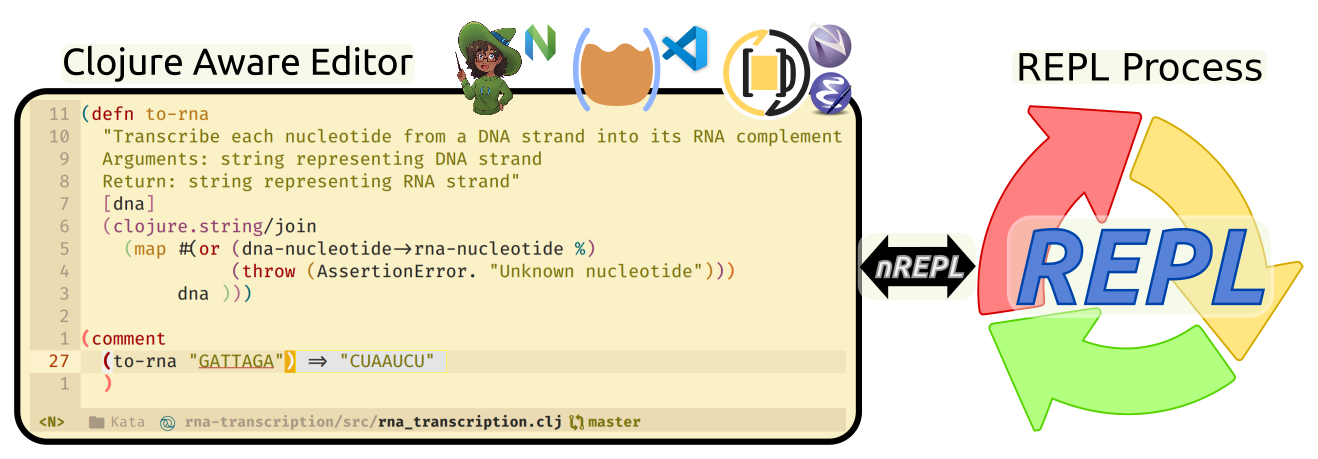{loading=lazy} 65 | -------------------------------------------------------------------------------- /docs/small-projects/mutating-state/mutants-assemble.md: -------------------------------------------------------------------------------- 1 | # Mutants Assemble 2 | 3 | 4 | 5 | In this section you will apply changes to values, how to define your own simple functions. 6 | 7 | We will also introduce the following functions for the first time: 8 | 9 | | function | Description | 10 | |--------------|--------------------------------------------------| 11 | | `atom` | create an anonymous function, one without a name | 12 | | `deref`, `@` | assign a name to a function | 13 | 14 | ## Create a new Clojure project 15 | 16 | [:fontawesome-solid-book-open: Pracitcalli Clojure CLI Config](/clojure/clojure-cli/practicalli-config/) provides the `:project/create` alias to create projects using deps-new project. 17 | 18 | ```bash 19 | clojure -T:project/create :template app :name practicalli/mutants-assemble 20 | ``` 21 | 22 | Open the `src/practicalli/mutants_assemble.clj` file in a Clojure aware editor and start the REPL. 23 | 24 | ## Define an atom 25 | 26 | Use the `def` function to bind a name to an atom. 27 | 28 | The atom wraps data, initially an empty vector. 29 | 30 | ```clojure 31 | (def mutants (atom [])) 32 | ``` 33 | 34 | > The vector remains an immutable value, even though it is contained within a mutable atom container 35 | 36 | Define a function using `defn` which takes a mutant as an argument and updates the value managed by the atom. The reference to the atom is also an argument, making this a pure function and more generic as any given atom can be updated with this function. 37 | 38 | ```clojure 39 | 40 | (defn add-mutant [mutants mutant] 41 | (swap! mutants conj mutant)) 42 | ``` 43 | 44 | [`swap!`](https://clojuredocs.org/clojure.core/swap!) uses a function to create a new value for the atom to manage. In this case the `conj` function is used to join the value of mutant with the existing mutants atom value, creating a new vector. 45 | 46 | [`swap!`](https://clojuredocs.org/clojure.core/swap!) is a macro so the syntax is a little different. Essentially this is the same as an expression `(conj mutants mutant)`, with the value this returns swapped into the atom. 47 | 48 | Call the function with the `mutants` atom and a mutant to add, which is a string containing the name of a mutant character. 49 | 50 | ```clojure 51 | (add-mutant mutants "Black Widow") 52 | ``` 53 | 54 | The value the atom is managing has been swapped for a new value. The original value was not modified (vectors are immutable) so the atom now points to a new value, a vector containing a string. 55 | 56 | ## Viewing the value managed by the atom 57 | 58 | Use the `deref` function to see the value the atom is managing. 59 | 60 | ```clojure 61 | (deref mutants) 62 | ``` 63 | 64 | It is idiomatic to use `@` which is a syntax alias for the `deref` function, rather than explicitly using `deref`. 65 | 66 | ```clojure 67 | @mutants 68 | ``` 69 | 70 | ## Reset the atom value 71 | 72 | `reset!` will change the value managed by the atom by providing the new value. This is simpler than using `swap!` as it does not use the existing value in the atom. 73 | 74 | ``` 75 | (reset! mutants []) 76 | ``` 77 | 78 | Now all the mutants are gone (and we can start looking for new ones to add). 79 | 80 | 81 | 82 | 94 | -------------------------------------------------------------------------------- /docs/first-steps/hello-world.md: -------------------------------------------------------------------------------- 1 | # Hello World 2 | 3 | Writing code to print out hello world is a common first step with any new language. 4 | 5 | Use the `println` function from clojure.core to accomplish this task. 6 | 7 | Enter the following code at the REPL prompt: 8 | 9 | !!! NOTE "" 10 | ```clojure 11 | (println "Hello World") 12 | ``` 13 | 14 | Expected result 15 | 16 | ```clojure 17 | Hello World 18 | nil 19 | ``` 20 | 21 | `Hello World` is printed, followed by a `nil` value. 22 | 23 | !!! HINT "println is a side-effect function" 24 | `println` is considered a function that creates a side-effect, as it sends information to the standard out process rather than returning a value. 25 | 26 | `nil` is the default return value if an expression does not return a value. 27 | 28 | 29 | ## A Clojure Expression 30 | 31 | `()` are used to define a Clojure expression. 32 | 33 | `()` means a list of elements, the first element is a call to a function and all other elements are passed as arguments to the function. 34 | 35 | ??? INFO "Homoiconicity - one represent for code and data" 36 | Clojure is homoiconic as code and data share the same representation, i.e. use the same iconography. 37 | 38 | A `()` list is a data structure, a collection of data values. 39 | 40 | A `()` list is also used to represent code behaviour (algorithms), e.g calling built-in or custom functions. 41 | 42 | A function call returns a data value (nil is also a value). 43 | 44 | 45 | ## Return a value 46 | 47 | Expressions and Function calls always return a value, the `nil` value being returned by default. 48 | 49 | An explicit return form is not required, the result of the last expression is returned. 50 | 51 | Enter the following code at the REPL prompt: 52 | 53 | !!! NOTE "" 54 | ```clojure 55 | (str "Hello World") 56 | ``` 57 | 58 | Expected result 59 | 60 | ```clojure 61 | "Hello World" 62 | ``` 63 | 64 | `Hello World` is returned as a data value, instead of the default `nil` return value. 65 | 66 | The example is a single expression, so the value created by evaluating the expresion is returned. 67 | 68 | `clojure.core/str` is a function that takes one or more values and return a string. The values do not need to be strings as Clojure will dynamically convert them. 69 | 70 | !!! NOTE "Join strings and a numeric value" 71 | ```clojure 72 | (str "hello world" " " 2) 73 | ``` 74 | 75 | Expected result 76 | 77 | ```clojure 78 | "hello world 2" 79 | ``` 80 | 81 | !!! NOTE "Join strings and the result of a function call" 82 | ```clojure 83 | (str "hello world" " " (+ 1 2)) 84 | ``` 85 | 86 | Expected result 87 | 88 | ```clojure 89 | "hello world 3" 90 | ``` 91 | 92 | `+` is the name of a function, its qualified name is `clojure.core/+`. `+` takes zero or more arguments, adds the values together and returns the result. 93 | 94 | A function call always returns a value so can be used as an argument to another funciton, or anywhere a value would be used. 95 | 96 | 97 | !!! INFO "Implicit types" 98 | Clojure uses types underneath and infers the type of something by its literal shape 99 | 100 | `"string"` is a string type, `java.lang.String` 101 | 102 | `123` is an Integer value, `java.lang.Long` 103 | 104 | `3.14` is a Decimal value, `java.lang.Double` 105 | 106 | `22/7` is a Ratio value, `clojure.lang.Ratio` (used to preserve accuracy of data) 107 | -------------------------------------------------------------------------------- /docs/additional-projects/clojurebridge-website/organising-the-code.md: -------------------------------------------------------------------------------- 1 | # Re-organising the code a little 2 | 3 | Create comments to make it easier to identify the specific parts of the code 4 | 5 | > #### Hint::Good structure helps refactor later 6 | > Having an organised structure to your code helps you maintain the code and help you refactor code into multiple namespaces. 7 | 8 | 9 | ## Rename main component to landing-page 10 | 11 | To make our code clearer, rename `hello-world` function to `landing-page` 12 | 13 | ```clojure 14 | (defn landing-page [] 15 | [:div 16 | [:h1 (:text @app-state)] 17 | [:h3 "Live reloading in the REPL makes web development fun!"]]) 18 | ``` 19 | 20 | And update the `mount` function to use this new function name as the main component 21 | 22 | ```clojure 23 | (defn mount [el] 24 | (reagent/render-component [landing-page] el)) 25 | 26 | ``` 27 | 28 | ## Create a system section 29 | 30 | Move the `get-app-element` to the other mount / reagent functions and call that section System 31 | 32 | ```clojure 33 | ;; System 34 | ;;;;;;;;;;;;;;;;;;;;;;;;;;;;;;;;;;;;;;;;;; 35 | 36 | (defn get-app-element [] 37 | (gdom/getElement "app")) 38 | 39 | (defn mount [el] 40 | (reagent/render-component [landing-page] el)) 41 | 42 | ``` 43 | 44 | ## Add a date/time stamped reload message 45 | 46 | As a quick sanity check, add a date / time stamp to the println message at the top of the file, so you can see the time figwheel reloads the page in the REPL output. 47 | 48 | ```clojure 49 | ;; simple debug statement for each build 50 | ;;;;;;;;;;;;;;;;;;;;;;;;;;;;;;;;;;;;;;;;;; 51 | 52 | (println (js/Date.) "Reloading: src/clojurebridge_landing_page/core.cljs") 53 | ``` 54 | 55 | 56 | ## Final result 57 | 58 | After all the changes the file should look as follows 59 | 60 | ```clojure 61 | (ns ^:figwheel-hooks clojurebridge-landing-page.core 62 | (:require 63 | [goog.dom :as gdom] 64 | [reagent.core :as reagent :refer [atom]])) 65 | 66 | ;; simple debug statement for each build 67 | ;;;;;;;;;;;;;;;;;;;;;;;;;;;;;;;;;;;;;;;;;; 68 | 69 | (println (js/Date.) "Reloading: src/clojurebridge_landing_page/core.cljs") 70 | 71 | 72 | ;; Application state 73 | ;;;;;;;;;;;;;;;;;;;;;;;;;;;;;;;;;;;;;;;;;; 74 | 75 | ;; define your app data so that it doesn't get over-written on reload 76 | (defonce app-state (atom {:text "Hello world!"})) 77 | 78 | 79 | ;; Helper functions 80 | ;;;;;;;;;;;;;;;;;;;;;;;;;;;;;;;;;;;;;;;;;; 81 | 82 | (defn multiply [a b] (* a b)) 83 | 84 | 85 | ;; Content components 86 | ;;;;;;;;;;;;;;;;;;;;;;;;;;;;;;;;;;;;;;;;;; 87 | 88 | (defn landing-page [] 89 | [:div 90 | [:h1 (:text @app-state)] 91 | [:h3 "Live reloading in the REPL makes web development fun!"]]) 92 | 93 | 94 | ;; System 95 | ;;;;;;;;;;;;;;;;;;;;;;;;;;;;;;;;;;;;;;;;;; 96 | 97 | (defn get-app-element [] 98 | (gdom/getElement "app")) 99 | 100 | (defn mount [el] 101 | (reagent/render-component [landing-page] el)) 102 | 103 | (defn mount-app-element [] 104 | (when-let [el (get-app-element)] 105 | (mount el))) 106 | 107 | ;; conditionally start your application based on the presence of an "app" element 108 | ;; this is particularly helpful for testing this ns without launching the app 109 | (mount-app-element) 110 | 111 | ;; specify reload hook with ^;after-load metadata 112 | (defn ^:after-load on-reload [] 113 | (mount-app-element) 114 | ;; optionally touch your app-state to force rerendering depending on 115 | ;; your application 116 | ;; (swap! app-state update-in [:__figwheel_counter] inc) 117 | ) 118 | ``` 119 | -------------------------------------------------------------------------------- /.github/config/megalinter.yaml: -------------------------------------------------------------------------------- 1 | --- 2 | # Configuration file for MegaLinter 3 | # 4 | # General configuration: 5 | # https://megalinter.io/latest/configuration/ 6 | # 7 | # Specific Linters: 8 | # https://megalinter.io/latest/supported-linters/ 9 | 10 | # ------------------------ 11 | # Validate all files if true 12 | # or new / edited files if false 13 | VALIDATE_ALL_CODEBASE: false 14 | 15 | # ------------------------ 16 | # Linters 17 | 18 | # Run linters in parallel 19 | PARALLEL: true 20 | 21 | # ENABLE specific linters, all other linters automatically disabled 22 | ENABLE: 23 | # - CLOJURE 24 | - CREDENTIALS 25 | - DOCKERFILE 26 | - MAKEFILE 27 | - MARKDOWN 28 | - GIT 29 | - SPELL 30 | - YAML 31 | - REPOSITORY 32 | 33 | # Linter specific configuration 34 | 35 | # CLOJURE_CLJ_KONDO_CONFIG_FILE: ".github/config/clj-kondo-ci-config.edn" 36 | # CLOJURE_CLJ_KONDO_ARGUMENTS: "--lint deps.edn" 37 | # CLOJURE_CLJ_KONDO_FILTER_REGEX_EXCLUDE: "dev|develop" 38 | # CLOJURE_CLJ_KONDO_FILTER_REGEX_EXCLUDE: "resources" 39 | 40 | # CREDENTIALS_SECRETLINT_DISABLE_ERRORS: true 41 | CREDENTIALS_SECRETLINT_CONFIG_FILE: ".github/config/secretlintrc.json" 42 | 43 | MARKDOWN_MARKDOWNLINT_CONFIG_FILE: ".github/config/markdown-lint.jsonc" 44 | MARKDOWN_MARKDOWNLINT_FILTER_REGEX_EXCLUDE: ".github/pull_request_template.md|CHANGELOG.md|README.md|GLOSSARY.md|java-17-flags.md|abbreviations.md" 45 | # MARKDOWN_MARKDOWNLINT_DISABLE_ERRORS: true 46 | MARKDOWN_MARKDOWN_LINK_CHECK_CONFIG_FILE: ".github/config/markdown-link-check.json" 47 | # MARKDOWN_MARKDOWN_LINK_CHECK_CLI_LINT_MODE: "project" 48 | # MARKDOWN_MARKDOWN_LINK_CHECK_DISABLE_ERRORS: false 49 | MARKDOWN_REMARK_LINT_DISABLE_ERRORS: true 50 | # MARKDOWN_MARKDOWN_TABLE_FORMATTER_DISABLE_ERRORS: false 51 | 52 | REPOSITORY_GITLEAKS_CONFIG_FILE: ".github/config/gitleaks.toml" 53 | REPOSITORY_TRUFFLEHOG_DISABLE_ERRORS: true # Errors only as warnings 54 | 55 | # SPELL_CSPELL_DISABLE_ERRORS: true 56 | SPELL_MISSPELL_DISABLE_ERRORS: true 57 | SPELL_LYCHEE_CONFIG_FILE: ".github/config/lychee.toml" 58 | SPELL_LYCHEE_DISABLE_ERRORS: true # Errors are only warnings 59 | 60 | # YAML_PRETTIER_FILTER_REGEX_EXCLUDE: (docs/) 61 | # YAML_YAMLLINT_FILTER_REGEX_EXCLUDE: (docs/) 62 | 63 | # Explicitly disable linters to ensure they are never run 64 | # DISABLE: 65 | # - COPYPASTE # checks for excessive copy-pastes 66 | # - SPELL # spell checking - often creates many false positives 67 | # - CSS # 68 | 69 | # Disable linter features 70 | DISABLE_LINTERS: 71 | - YAML_PRETTIER # draconian format rules 72 | - SPELL_CSPELL # many clojure references causing false positives 73 | - YAML_YAMLLINT # vague error mesages, investigation required 74 | - REPOSITORY_GIT_DIFF # warnings about LF to CRLF 75 | - REPOSITORY_SECRETLINT # reporting errors in its own config file 76 | # - REPOSITORY_DEVSKIM # unnecessary URL TLS checks 77 | - REPOSITORY_CHECKOV # fails on root user in Dockerfile 78 | - REPOSITORY_SECRETLINT 79 | 80 | # Ignore all errors and return without error status 81 | # DISABLE_ERRORS: true 82 | 83 | # ------------------------ 84 | 85 | # ------------------------ 86 | # Reporting 87 | 88 | # Activate sources reporter 89 | UPDATED_SOURCES_REPORTER: false 90 | 91 | # Show Linter timings in summary table at end of run 92 | SHOW_ELAPSED_TIME: true 93 | 94 | # Upload reports to file.io 95 | FILEIO_REPORTER: false 96 | # ------------------------ 97 | 98 | # ------------------------ 99 | # Over-ride errors 100 | 101 | # detect errors but do not block CI passing 102 | # DISABLE_ERRORS: true 103 | # ------------------------ 104 | -------------------------------------------------------------------------------- /docs/thinking-functionally/list-comprehension.md: -------------------------------------------------------------------------------- 1 | # List Comprehension 2 | 3 | In general terms, list comprehensions should: 4 | 5 | * be distinct from (nested) for loops and the use of map & filter functions within the syntax of the language. 6 | * return either a list or an iterator (an iterating being something that returns successive members of a collection, in order), 7 | 8 | In Clojure, list comprehension is via the `for` function. This is different to the for in other languages as you will see. 9 | 10 | ``` 11 | (for [number [1 2 3]] (* number 2)) 12 | ``` 13 | 14 | The `for` function should be read as follows: 15 | 16 | "for each number in the collection [1 2 3], apply the function (* number 2)" 17 | 18 | Couldn't we just do this with map? Yes, we could. 19 | 20 | ``` 21 | (map #(* % 2) [1 2 3]) 22 | ``` 23 | 24 | So why do we need `for` function? It really shows its value when you are working with multiple collections 25 | 26 | ``` 27 | (for [number [1 2 3] 28 | letter [:a :b :c]] 29 | (str number letter)) 30 | ``` 31 | 32 | Again we could use `map` function for this as follows 33 | 34 | ``` 35 | (mapcat (fn [number] (map (fn [letter] (str number letter))))) 36 | ``` 37 | 38 | So with the `for` function we can do the same calculation with much easier code to reason about. 39 | 40 | ## Filtering results with predicates 41 | 42 | With the `for` function we can add a filter on the results by using a predicate, to test if a condition is true or false. Any values that meet the condition as true are returned, values that are false are omitted. 43 | 44 | ``` 45 | (for [x (range 10) :when (odd? x)] x) 46 | 47 | (for [x (range 10) :while (even? x)] x) 48 | ``` 49 | 50 | To do this kind of filtering with maps would be possible, however the code would be harder for humans to parse and understand. 51 | 52 | > **Note** Create a 3-tumbler combination padlock, with each tumbler having a range of 0 to 9. Count the number of possible combinations. Then add a predicate that filters out some of the combinations 53 | 54 | 55 | 56 | Lets just model all the possible combinations 57 | 58 | ``` 59 | (for [tumbler-1 (range 10) 60 | tumbler-2 (range 10) 61 | tumbler-3 (range 10)] 62 | [tumbler-1 tumbler-2 tumbler-3]) 63 | ``` 64 | 65 | Now lets count the combinations 66 | 67 | ``` 68 | (count (for [tumbler-1 (range 10) 69 | tumbler-2 (range 10) 70 | tumbler-3 (range 10)] 71 | [tumbler-1 tumbler-2 tumbler-3])) 72 | ``` 73 | 74 | Now add a predicate using `:when` to filter out the combinations that do not match. 75 | 76 | ``` 77 | (count (for [tumbler-1 (range 10) 78 | tumbler-2 (range 10) 79 | tumbler-3 (range 10) 80 | :when (or (= tumbler-1 tumbler-2) 81 | (= tumbler-2 tumbler-3) 82 | (= tumbler-3 tumbler-1))] 83 | [tumbler-1 tumbler-2 tumbler-3])) 84 | ``` 85 | 86 | 87 | 88 | > **Note** Create a 2 character prefix for tickets, using capital letters from the English alphabet. However, exclude I and O as they can be mistaken for numbers 89 | 90 | 91 | 92 | Lets just model all the possible combinations 93 | 94 | ``` 95 | (for [letter-1 capital-letters 96 | letter-2 capital-letters 97 | :when (and (not (blacklisted letter-1)) 98 | (not (blacklisted letter-2)))] 99 | (str letter-1 letter-2)) 100 | ``` 101 | 102 | 103 | -------------------------------------------------------------------------------- /docs/assets/stylesheets/extra.css: -------------------------------------------------------------------------------- 1 | [data-md-color-scheme="default"] { 2 | --md-default-bg-color: hsla(208, 100%, 96%, 0.94); 3 | --md-code-bg-color: hsla(208, 80%, 88%, 0.64); 4 | --md-code-hl-color: hsla(208, 88%, 80%, 0.92); 5 | --md-admonition-bg-color: hsla(208, 80%, 92%, 0.92); 6 | --md-typeset-kbd-color: hsla(208, 100%, 98%, 0.98); 7 | } 8 | 9 | /* Custom Admonitions */ 10 | 11 | 12 | :root { 13 | /* Clojure Idiom*/ 14 | --md-admonition-icon--clojure-idiom: url(https://raw.githubusercontent.com/practicalli/graphic-design/c40cc063cc5bb07525b524d8a3d638e2f42bc38a/logos/clojure-logo-bullet.svg); 15 | 16 | /* Round corners */ 17 | --base-border-radius: 0.5rem; 18 | } 19 | 20 | /*Admonitions colors*/ 21 | .md-typeset .admonition.clojure-idiom, 22 | .md-typeset details.clojure-idiom { 23 | border-color: rgb(43, 155, 70); 24 | } 25 | .md-typeset .clojure-idiom > .admonition-title, 26 | .md-typeset .clojure-idiom > summary { 27 | background-color: rgba(43, 155, 70, 0.1); 28 | } 29 | .md-typeset .clojure-idiom > .admonition-title::before, 30 | .md-typeset .clojure-idiom > summary::before { 31 | background-color: rgb(250, 250, 250); 32 | background-image: var(--md-admonition-icon--clojure-idiom); 33 | -webkit-mask-image: var(--md-admonition-icon--clojure-idiom); 34 | mask-image: var(--md-admonition-icon--clojure-idiom); 35 | } 36 | 37 | 38 | /* Change font family of filename present on top of code block. */ 39 | .highlight span.filename { 40 | border-bottom: none; 41 | border-radius: var(--base-border-radius); 42 | display: inline; 43 | font-family: var(--md-code-font-family); 44 | border-bottom-left-radius: 0; 45 | border-bottom-right-radius: 0; 46 | margin-bottom: 5px; 47 | text-align: center; 48 | } 49 | .highlight span.filename + pre > code { 50 | border-radius: var(--base-border-radius); 51 | border-top-left-radius: 0; 52 | } 53 | .md-typeset pre > code { 54 | border-radius: var(--base-border-radius); 55 | } 56 | 57 | /* Grid Cards */ 58 | .md-typeset .grid.cards > ul > li { 59 | border-radius: var(--base-border-radius); 60 | } 61 | .md-typeset .grid.cards > ul > li:hover { 62 | box-shadow: 0 0 0.2rem #ffffff40; 63 | } 64 | 65 | /* Markdown Button */ 66 | .md-typeset .md-button { 67 | border-radius: var(--base-border-radius); 68 | } 69 | 70 | /* Critic, Mark */ 71 | ins.critic, 72 | del.critic { 73 | text-decoration: none; 74 | } 75 | 76 | .md-typeset .critic, 77 | .md-typeset mark { 78 | border-radius: 0.2rem; 79 | padding: 0 0.2rem; 80 | } 81 | 82 | .md-typeset mark { 83 | box-shadow: 0 0 0 0.1rem var(--md-typeset-mark-color); 84 | } 85 | 86 | .md-typeset ins.critic { 87 | box-shadow: 0 0 0 0.1rem var(--md-typeset-ins-color); 88 | } 89 | 90 | .md-typeset del.critic { 91 | box-shadow: 0 0 0 0.1rem var(--md-typeset-del-color); 92 | } 93 | 94 | /* Forms */ 95 | .md-search__form { 96 | border-radius: var(--base-border-radius); 97 | } 98 | 99 | [data-md-toggle="search"]:checked ~ .md-header .md-search__form { 100 | border-top-right-radius: var(--base-border-radius); 101 | border-top-left-radius: var(--base-border-radius); 102 | } 103 | 104 | [dir="ltr"] .md-search__output { 105 | border-bottom-right-radius: var(--base-border-radius); 106 | border-bottom-left-radius: var(--base-border-radius); 107 | } 108 | 109 | /* Blog - index.md */ 110 | .md-post--excerpt { 111 | background-color: var(--md-accent-fg-color--transparent); 112 | box-shadow: 0 0 0 1rem var(--md-accent-fg-color--transparent); 113 | border-radius: var(--base-border-radius); 114 | } 115 | 116 | /* Table */ 117 | .md-typeset table:not([class]) { 118 | border-radius: var(--base-border-radius); 119 | } 120 | -------------------------------------------------------------------------------- /docs/thinking-functionally/threading-macros.md: -------------------------------------------------------------------------------- 1 | # Threading macros 2 | 3 | The thread-first `->` and thread-last `->>` macros allow Clojure code to be written in a more sequential style and with a more terse syntax. This can sometimes make code easier to understand by humans. 4 | 5 | Using the thread-first macro, `->`, the result of the first evaluation is passed as the **first argument** to the next function and so on. 6 | 7 | ```clojure 8 | (-> 9 | (clojure.string/lower-case "HELLO") 10 | (str ", Clojure world")) 11 | ``` 12 | 13 | The value hello is converted to lower case and that result is passed as the first argument to the next function. The string function is then evaluated with this new argument and the final "hello, Clojure world" string is returned as the result. 14 | 15 | The thread-last macro `->>` passes the result of the first evaluation as the **last argument** to the next expression. 16 | 17 | ```clojure 18 | (->> " this" 19 | (str " is") 20 | (str " backwards")) 21 | ``` 22 | 23 | > #### Hint::Parens optional 24 | > 25 | > function calls that only take one argument, the one passed by earlier expressions, can be included in the threading macro code without the surrounding `()` parens. 26 | 27 | ## Reading Clojure code 28 | 29 | To read Clojure it is common to start from the inside out, as this is how the Clojure reader also works. This style is inherited from Lisp of which Clojure is an implementation. 30 | 31 | The following code is written in classic Lisp style. 32 | 33 | ```clojure 34 | (reverse 35 | (sort-by val (frequencies 36 | (remove common-english-words 37 | (map #(clojure.string/lower-case %) 38 | (re-seq #"[a-zA-Z0-9|']+" 39 | (slurp book.txt))))))) 40 | ``` 41 | 42 | Reading inside out: 43 | 44 | 1. slurp in the contents of the book.txt file, converting it to a string. 45 | 2. use a regular expression to create a new sequence where the book is a sequence of individual strings for each word. 46 | 3. convert each string in the sequence by mapping the lower-case function over each element of the sequence. 47 | 4. remove common english words such as the and and from the sequence. 48 | 5. count how many times each word occurs and pair the string with its frequency in the book. 49 | 6. reverse the order of the sequence by the value of frequency, so the most used word is at the start of the sequence. 50 | 51 | This function uses the var `common-english-words` which is defined as: 52 | 53 | ```clojure 54 | (def (set 55 | (clojure.string/split (slurp "common-english-words.txt") #"," ))) 56 | ``` 57 | 58 | This takes a comma separated file of words and splits them. The words are put into a set so only one instance of each word is included. 59 | 60 | ## Rewriting the code with threading macros 61 | 62 | ```clojure 63 | (->> (slurp book.txt) 64 | (re-seq #"[a-zA-Z0-9|']+" ,,,) 65 | (map #(clojure.string/lower-case %)) 66 | (remove common-english-words) 67 | frequencies 68 | (sort-by val) 69 | reverse) 70 | ``` 71 | 72 | `frequencies` and `reverse` only take one argument, so they do not require surrounding `()` inside the threading macro. 73 | 74 | The common-english-words var is fairly easy to read, so probably doesn't need to be written using a threading macro, however, for completeness here is a thread-first example. 75 | 76 | ```clojure 77 | (def common-english-words 78 | (-> (slurp "common-english-words.txt") 79 | (clojure.string/split #",") 80 | set)) 81 | ``` 82 | 83 | > #### Hint::Macroexpand 84 | > 85 | > use `macroexpand-1` around the threading macro code to show resulting lisp style Clojure code. Clojure editors also provide evaluation functions that will macroexpand. 86 | -------------------------------------------------------------------------------- /docs/additional-projects/clojurebridge-website/github-pages-deploy.md: -------------------------------------------------------------------------------- 1 | # Deploy to GitHub pages 2 | 3 | GitHub pages is a free service for serving up content in static files, its ideal for websites that do not require their own database or other services (or simply plugs into purely online services and API's). 4 | 5 | Create a repository on GitHub for this ClojureScript project 6 | 7 | Add that repository as a remote repository to the local Git repository for this project 8 | 9 | ```shell 10 | git remote add origin35 | 36 |
37 | 38 | * 2013 [RuPy slides](https://github.com/stuarthalloway/presentations/blob/master/Barnstorming_2013/ClojureInTenBigIdeas.pdf?raw=true){target=_blank} 39 | * 2017 [Chicago JUG slides](https://github.com/stuarthalloway/presentations/blob/master/ClojureInTenBigIdeas-Jun-2017.pdf?raw=true){target=_blank} 40 | 41 | ## Antithesis of Clojure and simple software design 42 | 43 | In Narcissistic Design by Stuart Halloway, the antithesis of the Clojure view of software development is presented as a description of how unproductive and valueless much of the software industry has been in the past. 44 | 45 | Its essentially a guide on what to avoid if you are a responsible and professional software developer. 46 | 47 |48 | 49 |
50 | -------------------------------------------------------------------------------- /docs/additional-projects/clojurebridge-website/add-navigation.md: -------------------------------------------------------------------------------- 1 | # Add Navigation bar 2 | 3 | To jump to specific content, we will add a navigation bar at the top of the page. 4 | 5 | The navigation will be fixed in place, so it will not move as the page is scrolled. 6 | 7 | The navigation will be responsive, so when the website is viewed on smaller screens, the navigation will show as a drop-down button (referred to as a burger as that is the rough shape of the icon typically used). 8 | 9 | 10 | 11 | ## Navigation section 12 | 13 | Create a function to define the navigation, using the `navbar` class from Bulma. 14 | 15 | 16 | ```clojure 17 | (defn navigation-top 18 | "A responsive navigation that is fixed to the top of the page" 19 | [] 20 | 21 | [:nav {:class "navbar is-fixed-top is-dark" 22 | :role "navigation" 23 | :aria-label "main navigation"} 24 | [:div {:class "container"} 25 | [:div {:class "navbar-brand"} 26 | [:a {:class "navbar-item" 27 | :href "/"} 28 | [:img {:src "images/clojurebridge-logo.png"}]] 29 | [:span {:class "navbar-burger burger" 30 | :data-target "navbarClojureBridge"} 31 | ;; Empty spans needed for navbar burger 32 | [:span][:span][:span]]] 33 | 34 | [:div {:id "navbarClojureBridge" 35 | :class "navbar-menu"} 36 | [:div {:class "navbar-start"} 37 | [:a {:class "navbar-item" 38 | :href "#overview"} "Overview"] 39 | [:a {:class "navbar-item" 40 | :href "#showcase"} "Showcase"] 41 | [:a {:class "navbar-item" 42 | :href "#learning-paths"} "Learning Paths"] 43 | [:a {:class "navbar-item" 44 | :href "#schedule"} "Schedule"] 45 | [:a {:class "navbar-item" 46 | :href "#install"} "Install"] 47 | [:a {:class "navbar-item" 48 | :href "#resources"} "Resources"] 49 | [:a {:class "navbar-item" 50 | :href "#resources"} "Coaches"] 51 | [:a {:class "navbar-item" 52 | :href "#sponsors"} "Sponsors"] 53 | 54 | [:span {:class "navbar-item"} 55 | [:a {:class "button is-inverted" 56 | :target "_blank" 57 | :href "https://github.com/ClojureBridgeLondon/landing-page-draft"} 58 | [:span {:class "icon"} 59 | [:i {:class "fab fa-github"}]] 60 | [:span "Issues/PRs"]]]]]]] 61 | ) 62 | ``` 63 | 64 | 65 | ## Fixing spacing under navbar 66 | 67 | To prevent hiding content under the navigation bar, we add the `has-navbar-fixed-top` class to the body of the `index.html` file 68 | 69 | ```html 70 | 71 | ``` 72 | 73 | 74 | ## Script to populate the drop-down menu 75 | 76 | As Bulma does not have any JavaScript functionality, we need to add a script to dynamically populate the navigation bar drop-down menu when on smaller devices. 77 | 78 | ```html 79 | 80 | 81 | 92 | ``` 93 | 94 | > #### TODO:: 95 | > The script is the approach that Bulma suggests. However, it should be possible to write ClojureScript to do this work. This JavaScript would then be removed. 96 | > 97 | > One approach is to make the navigation data part of the application state, then it can be easily used and updated. Using the application state helps make the webpage layout more dynamic, as changes to the application state will cause parts of the website to be re-drawn (re-rendered). 98 | -------------------------------------------------------------------------------- /docs/introduction/concepts/design.md: -------------------------------------------------------------------------------- 1 | # Clojure Design 2 | 3 | Clojure leads to a very component based approach to development. There are no huge and bloated frameworks in Clojure. The core is very small. Hundreds of focused libraries to use in collaboration. 4 | 5 | Boiled down to the most simplest structure, Clojure applications you write typically look like this: 6 | 7 | ```clojure 8 | ;; define a namespace 9 | (ns name-space.name) 10 | 11 | ;; define one or more immutable data structures - the fewer the better typically 12 | (def my-data-structure [[{}{}]]) 13 | 14 | ;; define behaviour that acts on data structures inside one or more functions 15 | (defn my-function [parameter] 16 | (my-behaviour parameter)) 17 | 18 | ;; Call those functions to make your application do something 19 | (my-behaviour data) 20 | ``` 21 | 22 | > **Hint** As functions always evaluate to a value, a function can be used as an argument to another function (or itself if you get recursive !!) 23 | 24 | ## Data focused design - Maps & Vectors 25 | 26 | Maps (hash-map) and vectors are two more built-in persistent data structures that are more commonly used to represent data within a Clojure application. 27 | 28 | A vector is similar to an array in that its an indexed collection and so has fast random access. Vectors are a catch all data structure that can hold any type of information, including other data structures and function calls. 29 | 30 | A hash-map is an associative data structure with key value pairs. The keys are most commonly represented with Clojure keywords, although keys can be strings, numbers, collections or functions so long as all the keys are unique. 31 | 32 | Hash-maps are a collection of key / value pairs that provide an easy way to reference data by keys. Its common to use a Clojure `keyword` type as the keys as keywords are self-referential (they point to themselves). Using keywords in a map means you can use a specific keyword as a function call on the map that returns its associated value. 33 | 34 | Some examples of using these data structures this are: 35 | 36 | ```clojure 37 | 38 | ;; A map of maps of maps with occasional vectors 39 | 40 | {:star-wars { 41 | :characters { 42 | :jedi ["Luke Skywalker" 43 | "Obiwan Kenobi"] 44 | :sith ["Darth Vader" 45 | "Darth Sideous"] 46 | :droids ["C3P0" 47 | "R2D2"]} 48 | :ships { 49 | :rebel-alliance ["Millennium Falcon" 50 | "X-wing fighter"] 51 | :imperial-empire ["Intergalactic Cruiser" 52 | "Destroyer" 53 | "Im just making these up now"]}}} 54 | ``` 55 | 56 | > #### Hint::Basic design principle 57 | > 58 | > “It is better to have 100 functions operate on one data structure than 10 functions on 10 data structures.” —Alan Perlis 59 | 60 | ## Extensibility via Macros 61 | 62 | You can extend the language and define your own constructs using Macros. 63 | 64 | The first example of this you see is from Leiningen. The `defproject` function is a macro that helps you easily define the configuration of a Clojure project. 65 | 66 | An example of a macro that is part of the core Clojure language is `defn`. When you define a function with `defn` it is syntactic sugar for defining a thing that is a function. 67 | 68 | ```clojure 69 | (defn my-function [argument] (my-behaviour argument) ) 70 | 71 | (def my-function 72 | (fn [argument] (my-behaviour argument))) 73 | ``` 74 | 75 | ## Special forms - the building blocks of Clojure 76 | 77 | The following are the building blocks of Clojure, everything else is either a macro or a function 78 | 79 | The Clojure / LISP special forms 80 | 81 | ``` 82 | def, do, if, let, loop, fn, quote, recur, set!, var 83 | ``` 84 | 85 | The forms added for Interoperability with the host platform (mainly Java / JVM) 86 | 87 | ``` 88 | monitor-enter, monitor-exit, 89 | catch, dot ('.'), finally, new, throw, try 90 | ``` 91 | -------------------------------------------------------------------------------- /docs/thinking-functionally/homoiconicity.md: -------------------------------------------------------------------------------- 1 | # Homoiconicity 2 | 3 | Clojure is a homoiconic language, which is a term describing the fact that Clojure programs are represented by Clojure data structures. 4 | 5 | In Clojure you write your business logic as functions. A function is defined using a list structure. A function is called using a list structure, as the first element of a list is evaluated as a function call. 6 | 7 | > **Hint** Everything in Clojure is a _List_ (or vector, map, set). 8 | 9 | This is a very important difference between Clojure (and Common Lisp) and most other programming languages - Clojure is defined in terms of the evaluation of data structures and not in terms of the syntax of character streams/files. 10 | 11 | It is quite easy for Clojure programs to manipulate, transform and produce other Clojure programs. This is essentially what macros do in Clojure, they re-write Clojure for you. 12 | 13 | > **Hint** If you were going to create Skynet, it would be so much easier to do in Clojure 14 | 15 |  16 | 17 | ## An example 18 | 19 | Consider the following expression: 20 | 21 | ``` 22 | (let [x 1] 23 | (inc x)) 24 | ``` 25 | 26 | Evaluating the above code in the REPL returns `2` because the repl compiles and executes any code entered into it. But `[x 1]` is also a literal vector data structure when it appears in a different context. 27 | 28 | All Clojure code can be interpreted as data in this way. In fact, Clojure is a superset of EDN – Extensible Data Notation, a data transfer format similar to JSON. EDN supports numbers, strings, lists (1 2 3), vectors [1 2 3], maps {"key" "value"}. 29 | 30 | If this sounds and looks a lot like Clojure syntax, it’s because it is. The relationship between Clojure and EDN is similar to that of Javascript and JSON, but much more powerful. 31 | 32 | In Clojure, unlike JavaScript, all code is written in this data format. We can look at our let statement not as Clojure code, but an EDN data structure. Let’s take a closer look: 33 | 34 | ``` 35 | (let [x 1] 36 | (inc x)) 37 | ``` 38 | 39 | In this data structure, there are four different types of data. 40 | 41 | * 1 is a literal integer. 42 | * let, x, and inc are symbols. A symbol is an object representing a name – think a string, but as an atomic object and not a sequence of characters. 43 | * [x 1] is a vector containing two elements: symbol, x, and an integer, 1. Square brackets always signify vectors when talking about EDN data structures. 44 | * (inc x) is a list (a linked list data structure) containing two symbols, inc and x. 45 | 46 | When thinking about a piece of Clojure code as a data structure, we say we are talking about the form. Clojure programmers don’t normally talk about EDN, there are just two ways to think about any bit of Clojure: 1) as code that will execute or 2) as a form, a data structure composed of numbers, symbols, keywords, strings, vectors, lists, maps, etc. 47 | 48 | Symbols are particularly important. They are first class names. In Clojure, we distinguish between a variable and the name of that variable. When our code is executing, x refers to the variable established by our let binding. But when we deal with that code as a form, x is just a piece of data, it’s a name, which in Clojure is called a symbol. 49 | 50 | This is why Clojure is homoiconic. Code forms are data structures and data structures can be thought of as forms and executed as code. This transformation is quite literal, and two core operations, quote and eval are key ingredients to this potion. 51 | 52 | ## References 53 | 54 | * [The Reader - Clojure. org](http://clojure.org/reference/reader) 55 | * [Homoiconicity - Wikipedia](https://en.wikipedia.org/wiki/Homoiconicity) 56 | * [Is Clojure Homoiconic - muhuk.com](http://blog.muhuk.com/2014/09/28/is_clojure_homoiconic.html) 57 | * [Understanding Homoiconicity in Clojure - Drew Colthorp](https://spin.atomicobject.com/2013/07/23/homoiconicity-clojure-macros/) 58 | -------------------------------------------------------------------------------- /docs/code-challenges/advent-of-code.md: -------------------------------------------------------------------------------- 1 | ## Advent Of Code 2 | 3 |  4 | 5 | [Advent of Code](https://adventofcode.com/) is the annual coding challenge with a festive theme. Each day there is a new challenge in two parts, the first fairly easy the second a little more involved. The challenges are an investment of your time to complete them all, although even trying just a few is enough to help you think in different ways. 6 | 7 | Every programming language requires regular practice to maintain your skills. A full time developer role gives lots of opportunities to practice every day, however, its often focused in around solving problems within a specific business domain, with little time to explore others. The Advent of Code puts you in a different domain, so its great for extending your coding experiences. 8 | 9 | Solving challenges in a different language is another great way to extend your experiences, so here are some tips and examples for solving the advent of code in Clojure. 10 | 11 | ## Solving challenges 12 | 13 | * Keep the solution as simple as possible. Its very easy to over-complicate the solution and end up simply confusing yourself. 14 | * Don't try and make the perfect solution. Write something that works, this will give you a nice ego boost. Then you can experiment with the code and see if you can improve your approach. 15 | * Break down the problem into the simplest thing you can solve first. Trying to solve a problem all at once will quickly have you going around in circles. 16 | * Keep all the code and make notes. I use a a design journal in my projects to document my thinking process, capture decisions that worked and those that didn't work for this project. The journal is a great way to cement learning from solving the challenge. 17 | * Challenges are only accessible from their day of the month onwards. There is a count-down clock displayed on the next challenge to open, so you know when it will be available. Don't feel pressured to keep up with the challenges though, enjoy the experience and have fun, you will learn more that way. 18 | 19 |  20 | 21 | ## Coding video 22 | 23 | A video guide to solving the first challenge of Advent of Code from 2018, trying out different solutions at increasing levels of abstraction. With each level of abstraction it helps to think in a more functional way. 24 | 25 |26 | 27 |
28 | 29 | ## Creating a project for the challenge 30 | 31 | ```bash 32 | clojure -T:project/create :template lib practicalli.advent-of-clojure-code/2019 33 | ``` 34 | 35 | Create a new Clojure file for each of the daily challenges. It makes sense to keep both parts of each day in the same file. 36 | 37 | !!! EXAMPLE "Practicalli Advent Of Code solutions repository" 38 | [practicalli/advent-of-clojure-code-2019](https://github.com/practicalli/advent-of-clojure-code-2019) 39 | 40 | ## Useful Resources And Examples 41 | 42 | Videos and code solutions to many challenges from 2019 and past years. 43 | 44 | * [fdlk/advent-2019](https://github.com/fdlk/advent-2019) - example Clojure solutions to the advent of code 45 | * [Awesome Advent Of Code](https://github.com/Bogdanp/awesome-advent-of-code) - a collection of solutions in various languages 46 | * [Advent of Code 2018 video walk-through of Clojure solutions by Tim Pote](https://potetm.com/videos.html) and [GitHub repository](https://github.com/potetm/advent-of-code) 47 | 48 | [#adventofcode channel in the Clojurians slack channel](https://clojurians.slack.com/messages/adventofcode) discusses challenges and solutions, especially during December when the challenge takes place. 49 | -------------------------------------------------------------------------------- /docs/thinking-functionally/partial-functions.md: -------------------------------------------------------------------------------- 1 | # Currying & Partial Functions 2 | 3 | Clojure does not support automatic currying, (+3) would result in applying + to 3, resulting with number 3 instead of a function that adds 3 as in Haskell. Therefore, in Clojure we use partial that enables the equivalent behavior. 4 | 5 | ```clojure 6 | (defn sum 7 | "Sum two numbers together" 8 | [number1 number2] 9 | (+ number1 number2)) 10 | 11 | (sum 1 2) 12 | ;; => 3 13 | ``` 14 | 15 | If you try and evaluate `sum` with a single value then you get an arity exception 16 | 17 | ```clojure 18 | (sum 1) 19 | ;; => clojure.lang.ArityException 20 | ;; => Wrong number of args (1) passed to: functional-concepts/sum 21 | 22 | ``` 23 | 24 | If we did need to call sum with fewer than the required arguments, for example if we are mapping sum over a vector, then we can use partial to help us call the sum function with the right number of arguments. 25 | 26 | Lets add the value 2 to each element in our collection 27 | 28 | ```clojure 29 | (map (partial sum 2) [1 3 5 7 9]) 30 | ``` 31 | 32 | ## Using functions on more arguments than they can normally take 33 | 34 | The `reduce` function can only work on a single collection as an argument (or a value and a collection), so an error occurs if you wish to reduce over multiple collections. 35 | 36 | ```clojure 37 | (reduce + [1 2 3 4]) 38 | ;; => 10 39 | 40 | (reduce + [1 2 3 4] [5 6 7 8]) 41 | ;; returns an error due to invalid arguments 42 | ``` 43 | 44 | However, by using partial we can take one collection at once and return the result of reduce on each of those collections. 45 | 46 | ```clojure 47 | (map (partial reduce +) [[1 2 3 4] [5 6 7 8]]) 48 | ``` 49 | 50 | In the above example we map the partial reduce function over each element of the vector, each element being a collection. 51 | 52 | # Using partial to set a default value 53 | 54 | We can use the partial function to create a default message that can be just given just the custom part. For example, if we want to have a default welcome message but include a custom part to the message at the end. 55 | 56 | First we would define a function that combines parts of the message together. 57 | 58 | ```clojure 59 | (defn join-strings 60 | "join one or more strings" 61 | [& args] 62 | (apply str args)) 63 | ``` 64 | 65 | The [& args] argument string says take all the arguments passed and refer to them by the name args. Its the & character that has the semantic meaning, so any name after the & can be used, although args is common if there is no domain specific context involved. 66 | 67 | We can simply call this function with all the words of the message. 68 | 69 | ```clojure 70 | (join-strings "Hello" " " "Clojure" " " "world") 71 | ;; ⇒ "Hello Clojure world" 72 | ``` 73 | 74 | Now we define a name called `wrap-message` that can be used to wrap the start of our message. This name binds to a partial function call to `join-strings` which send that function the default message and any custom message you add when evaluate `wrap-message` 75 | 76 | ```clojure 77 | (def wrap-message (partial join-strings "Hello Clojurians in ")) 78 | 79 | (wrap-message) 80 | ;; ⇒ "Hello Clojurians in " 81 | 82 | (wrap-message "London") 83 | ;; => "Hello Clojurians in London" 84 | ``` 85 | 86 | ## Currying in clojure 87 | 88 | Currying is the process of taking some function that accepts multiple arguments, and turning it into a sequence of functions, each accepting a single argument. Or put another way, to transform a function with multiple arguments into a chain of single-argument functions. 89 | 90 | Currying relies on having fixed argument sizes, whereas Clojure gets a lot of flexibility from variable argument lengths (variable arity). 91 | 92 | Clojure therefore has the partial function gives results similar to currying, however the `partial` function also works with variable functions. 93 | 94 | `partial` refers to supplying some number of arguments to a function, and getting back a new function that takes the rest of the arguments and returns the final result 95 | 96 | One advantage of `partial` is to avoid having to write your own anonymous functions 97 | 98 | # Useful references 99 | 100 | * [Partial function applications for humans](http://andrewberls.com/blog/post/partial-function-application-for-humans) 101 | -------------------------------------------------------------------------------- /docs/introduction/concepts/clojure-from-the-author.md: -------------------------------------------------------------------------------- 1 | # Clojure from the Author 2 | 3 | A series of important videos from Rich Hickey, the author of Clojure who spent over 2 years designing core of Clojure around the concept of simplicity. Since then Rich has stewarded the continued design and development of Clojure, along with the Cognitect team, ensuring Clojure stays true to is founding principles. 4 | 5 | !!! HINT "Try Clojure in the REPL" 6 | The videos can be watched at any time during the journey into Clojure. 7 | 8 | An effective way to learn and become comfortable with Clojure is to write code and evaluate it in the REPL. 9 | 10 | Presentations by Rich Hickey are an excellent way understand the design philosophy behind Clojure and support adoption of Clojure as a highly effective language for software development. 11 | 12 | ## Expert to Expert: Rich Hickey and Brian Beckman - Inside Clojure 13 | 14 | Discussing some of the key characteristics of the Clojure language and why those decisions were taken 15 | 16 |17 | 18 |
19 | 20 | ## Clojure made simple 21 | 22 | Covers the major problems with software development and the challenges most programming languages fail to tackle completely. 23 | 24 | Discusses a simple approach to software development and the big picture view of how Clojure solves these problems 25 | 26 |27 | 28 |
29 | 30 | ## Simplicity Matters 31 | 32 | !!! QUOTE Rich Hickey, Clojure Benevolent Dictator for Life 33 | As we move forward we have to take what we already have and make that [software] do more, make it do things differently, make it do things better, 34 | 35 | ... as we try to take on manipulating software we are ... challenged to understand it in order to make that happen. 36 | 37 | ... I'll contend that you will completely be dominated by complexity. I don't care what processes you are using, I don't care how well you test or anything else. 38 | 39 | Complexity will dominate what you do. 40 | 41 |42 | 43 |
44 | 45 | ## Discussing Design 46 | 47 |48 | 49 |
50 | 51 | ## The value of values 52 | 53 | Rich Hickey provides analysis of the changing way we think about values (not the philosophical kind) in light of the increasing complexity of information technology and the advent of Big Data 54 | 55 |56 | 57 |
58 | 59 | Also see the related video: [Database as a value by Rich Hickey](https://youtu.be/EKdV1IgAaFc){target=_blank} 60 | 61 |62 | 63 |
64 | 65 | ## Understanding Clojure as a programming language 66 | 67 |68 | 69 |
70 | -------------------------------------------------------------------------------- /docs/code-challenges/exercism/bob/index.md: -------------------------------------------------------------------------------- 1 | ## Bob 2 | 3 |  4 | 5 | The Bob challenge involves writing a very basics example of a text parser, something that would be used for [a text based adventure game](https://en.wikipedia.org/wiki/Text-based_game). 6 | 7 | Bob is described as a [lackadaisical](https://en.wiktionary.org/wiki/lackadaisical) teenager, so responses are very limited. To create the Bob text parser we need to identify the rules that determine Bob's response. 8 | 9 | The instructions provide some basic rules: 10 | 11 | * Bob answers 'Sure.' if you ask him a question. 12 | * He answers 'Whoa, chill out!' if you yell at him. 13 | * He answers 'Calm down, I know what I'm doing!' if you yell a question at him. 14 | * He says 'Fine. Be that way!' if you address him without actually saying anything. 15 | * He answers 'Whatever.' to anything else. 16 | 17 | It is important to also read through the supplied unit tests to elaborate on these rules. 18 | 19 | ## Create the project 20 | 21 | Download the Bob transcription exercise using the exercism CLI tool 22 | 23 | ```bash 24 | exercism download --exercise=bob --track=clojure 25 | ``` 26 | 27 | > To use the Clojure CLI tool instead of Leiningen, create a `deps.edn` file containing an empty hash-map, `{}` and clone [:fontawesome-solid-book-open: Practicalli Clojure CLI Config](clojure/clojure-cli/practicalli-config.md) to `~/.clojure/`. 28 | 29 | ## Rules derived from the Unit tests 30 | 31 | Reviewing all the examples from the unit tests, there are 5 rules for the Bob parser 32 | 33 | These rules were discovered by searching through the unit test code for each reply that Bob should return, showing the tests for each reply. 34 | 35 | Each rule also had to ensure it did not create any false positives by being true for any other reply that Bob could make, especially the whatever reply. 36 | 37 | | Name | Rule description | 38 | |-------------------|-----------------------------------------------------------------------------------------| 39 | | question | The phrase has a ? as the last alphanumeric character, not including whitespace | 40 | | shouting | The phrase has uppercase alphabetic characters, but no lower case alphabetic characters | 41 | | shouting question | A combination of question and shouting | 42 | | silence | The phrase is empty or contains characters that are not alphanumeric | 43 | | whatever | Any phrase that does not match any of the other rules | 44 | 45 | ## Design approach 46 | 47 | There are two main approaches to solving this challenge. The first is to use the [`clojure.string`](https://clojure.github.io/clojure/clojure.string-api.html) functions to check or transform the phrase given to Bob. The second approach is to use [regular expressions](/reference/standard-library/regular-expressions) with functions such as [`re-seq`](https://clojuredocs.org/clojure.core/re-seq), [`re-find`](https://clojuredocs.org/clojure.core/re-find) and [`re-matches`](https://clojuredocs.org/clojure.core/re-matches). 48 | 49 | Start by defining the rules as an expression that returns either true or false, using some of the example strings from the unit tests. 50 | 51 | Use a `let` expression to bind a name to each rule, e.g. `shouting?`, `question?`, `silence?`. Then these names can be used in a simple `cond` expression to return the appropriate phrase. Regardless of if using `clojure.string` or regular expressions, the `cond` code should be similar 52 | 53 | Once you have tried this challenge for yourself, take a look at the design journal for the [clojure.string approach](bob-string-approach.md) and the [regular expression approach](bob-regular-expression-approach.md). 54 | 55 | [Bob - clojure.string approach](bob-string-approach.md){.md-button} 56 | [Bob - regular expression approach](bob-regular-expression-approach.md){.md-button} 57 | 58 | 59 | 60 | 61 | 62 | 63 | 64 | 65 | --------------------------------------------------------------------------------