
app.py and add the following code:")
12 |
13 | page.add_code("""from flask import Flask
14 | import pyvibe as pv
15 |
16 | app = Flask(__name__)
17 |
18 | @app.route('/')
19 | def index():
20 | page = pv.Page('Home')
21 | page.add_header('Hello World')
22 | return page.to_html()
23 |
24 | if __name__ == '__main__':
25 | app.run(debug=True)
26 | """, prefix="")
27 |
28 | page.add_text("Then, run the following command in your terminal:")
29 | page.add_code("python app.py", prefix="%")
30 |
31 | page.add_section("extended-example", "Extended Example")
32 | page.add_header("Extended Example", size=4)
33 |
34 | page.add_image("https://storage.googleapis.com/img.pycob.com/screenshot/pypi-analytics.png", "PyPi Analytics", classes="shadow-lg w-full md:w-2/5")
35 | page.add_link("Live App", "https://pypi-analytics.pycob.app")
36 | page.add_link("Source Code on GitHub", "https://github.com/pycob/pyvibe/blob/main/sample-apps/pypi-analytics/main.py")
37 |
38 | page.add_emgithub("https://github.com/pycob/pyvibe/blob/main/sample-apps/pypi-analytics/main.py")
39 |
40 | page.add_html(marketing_banner)
--------------------------------------------------------------------------------
/CONTRIBUTING.md:
--------------------------------------------------------------------------------
1 | # Contributing to PyVibe
2 |
3 | ## Architecture
4 | The [`generator`](generator) directory contains the source assets. Everything else is generated from there.
5 |
6 | ```mermaid
7 | ---
8 | title: Code Generation Flow
9 | ---
10 | flowchart TD
11 | advanced(generator/includes/advanced.py.txt) --> generate.swift[[generator/generate.swift]]
12 | generate.swift --> spec(spec/spec.json)
13 | generate.swift --> init(src/__init__.py)
14 | spec --> generate.py[[generator/generate.py]]
15 | generate.py --> docs_html(docs/*.html)
16 | generate.py --> gallery_html(docs/gallery/*.html)
17 | gallery_html --> screenshot.py[[screenshot.py]]
18 | screenshot.py --> img(img/*.png)
19 | ```
20 |
21 | Due to the architecture above, pull requests should be submitted only to files in the `/generator` subdirectory since everything else is generated from those files
22 |
23 | ## Why Code Generation?
24 | We want to minimize the need to have to search through documentation. Our goal is to be able to rely on autocomplete. To that end, we want to be able to attach `.add_*` methods to all appropriate components so that the list of available components in the current context is available. In order to minimize copy/paste, it's easiest to just generate the library code from a central definition.
25 |
26 | ## Why Swift?
27 | Very strongly typed languages with exhaustive enum checking makes code generation a lot more robust. Of the languages that would suit this criteria, Swift is probably the most readable for Python developers.
--------------------------------------------------------------------------------
/generator/generate.py:
--------------------------------------------------------------------------------
1 | print("Generating from Python...")
2 | import pyvibe as pv
3 | from os.path import dirname, basename, isfile, join
4 | import glob
5 | from docs.common.components import navbar, footer
6 |
7 | modules = glob.glob(join(dirname(__file__)+"/docs", "*.py"))
8 | files = [ basename(f)[:-3] for f in modules if isfile(f) and not f.endswith('__init__.py')]
9 |
10 | for file in files:
11 | print("Importing file: " + file)
12 | exec(f"from docs import {file}")
13 |
14 | # exec(f"{file}.page.add_header('Python Source')")
15 | # exec(f"{file}.page.add_text('This is the source code for the current page.')")
16 | # exec(f"{file}.page.add_emgithub('https://github.com/pycob/pyvibe/blob/main/generator/docs/{file}.py')")
17 | # exec(f"{file}.page.add_link('View Source', 'https://github.com/pycob/pyvibe/blob/main/generator/docs/{file}.py')")
18 |
19 | print(f"Writing to {file}.html")
20 | exec(f"with open('docs/{file}.html', 'w') as f: f.write({file}.page.to_html())")
21 |
22 | gallery_modules = glob.glob(join(dirname(__file__)+"/gallery", "*.py"))
23 | gallery_files = [ basename(f)[:-3] for f in gallery_modules if isfile(f) and not f.endswith('__init__.py')]
24 |
25 | for file in gallery_files:
26 | print("Importing file: " + file)
27 | exec(f"from gallery import {file}")
28 |
29 | exec(f"{file}.page.add_header('Python Source')")
30 | exec(f"{file}.page.add_text('This is the source code for the current page.')")
31 | exec(f"{file}.page.add_emgithub('https://github.com/pycob/pyvibe/blob/main/generator/gallery/{file}.py')")
32 | exec(f"{file}.page.add_link('View Source', 'https://github.com/pycob/pyvibe/blob/main/generator/gallery/{file}.py')")
33 |
34 | exec(f'pg = pv.Page({file}.page.title, navbar=navbar, components={file}.page.components)')
35 |
36 | print(f"Writing to {file}.html")
37 | exec(f"with open('docs/gallery/{file}.html', 'w') as f: f.write(pg.to_html())")
--------------------------------------------------------------------------------
/.gitignore:
--------------------------------------------------------------------------------
1 | # Byte-compiled / optimized / DLL files
2 | __pycache__/
3 | *.py[cod]
4 | *$py.class
5 |
6 | # C extensions
7 | *.so
8 |
9 | # Distribution / packaging
10 | .Python
11 | build/
12 | develop-eggs/
13 | dist/
14 | downloads/
15 | eggs/
16 | .eggs/
17 | lib/
18 | lib64/
19 | parts/
20 | sdist/
21 | var/
22 | wheels/
23 | pip-wheel-metadata/
24 | share/python-wheels/
25 | *.egg-info/
26 | .installed.cfg
27 | *.egg
28 | MANIFEST
29 |
30 | # PyInstaller
31 | # Usually these files are written by a python script from a template
32 | # before PyInstaller builds the exe, so as to inject date/other infos into it.
33 | *.manifest
34 | *.spec
35 |
36 | # Installer logs
37 | pip-log.txt
38 | pip-delete-this-directory.txt
39 |
40 | # Unit test / coverage reports
41 | htmlcov/
42 | .tox/
43 | .nox/
44 | .coverage
45 | .coverage.*
46 | .cache
47 | nosetests.xml
48 | coverage.xml
49 | *.cover
50 | *.py,cover
51 | .hypothesis/
52 | .pytest_cache/
53 |
54 | # Translations
55 | *.mo
56 | *.pot
57 |
58 | # Django stuff:
59 | *.log
60 | local_settings.py
61 | db.sqlite3
62 | db.sqlite3-journal
63 |
64 | # Flask stuff:
65 | instance/
66 | .webassets-cache
67 |
68 | # Scrapy stuff:
69 | .scrapy
70 |
71 | # Sphinx documentation
72 | docs/_build/
73 |
74 | # PyBuilder
75 | target/
76 |
77 | # Jupyter Notebook
78 | .ipynb_checkpoints
79 |
80 | # IPython
81 | profile_default/
82 | ipython_config.py
83 |
84 | # pyenv
85 | .python-version
86 |
87 | # pipenv
88 | # According to pypa/pipenv#598, it is recommended to include Pipfile.lock in version control.
89 | # However, in case of collaboration, if having platform-specific dependencies or dependencies
90 | # having no cross-platform support, pipenv may install dependencies that don't work, or not
91 | # install all needed dependencies.
92 | #Pipfile.lock
93 |
94 | # PEP 582; used by e.g. github.com/David-OConnor/pyflow
95 | __pypackages__/
96 |
97 | # Celery stuff
98 | celerybeat-schedule
99 | celerybeat.pid
100 |
101 | # SageMath parsed files
102 | *.sage.py
103 |
104 | # Environments
105 | .env
106 | .venv
107 | env/
108 | venv/
109 | ENV/
110 | env.bak/
111 | venv.bak/
112 |
113 | # Spyder project settings
114 | .spyderproject
115 | .spyproject
116 |
117 | # Rope project settings
118 | .ropeproject
119 |
120 | # mkdocs documentation
121 | /site
122 |
123 | # mypy
124 | .mypy_cache/
125 | .dmypy.json
126 | dmypy.json
127 |
128 | # Pyre type checker
129 | .pyre/
130 | .DS_Store
131 | **/*api_key*
132 | **/venv
133 | **/tmp
134 |
--------------------------------------------------------------------------------
/generator/docs/about.py:
--------------------------------------------------------------------------------
1 | import pyvibe as pv
2 | from .common.components import navbar, footer, marketing_banner, gallery_grid, featured_layouts
3 |
4 | page = pv.Page("PyVibe", navbar=navbar, footer=footer, image="./img/social.png")
5 |
6 | page.add_header("Easily create styled web pages with Python")
7 |
8 | page.add_code("""import pyvibe as pv
9 |
10 | page = pv.Page()
11 |
12 | page.add_header("Welcome to PyVibe!")
13 |
14 | page.add_text("PyVibe is an open source Python library for creating UI components for web apps without the need to write HTML code.")
15 | """, prefix="", header="Example")
16 |
17 | with page.add_card() as card:
18 | card.add_header("Welcome to PyVibe!")
19 | card.add_text("PyVibe is an open source Python library for creating UI components for web apps without the need to write HTML code.")
20 |
21 | page.add_link("See All Components", "component_reference.html")
22 | page.add_link("Interactive Playground", "playground.html")
23 | page.add_text("")
24 |
25 | page.add_header("What is PyVibe?", 3)
26 | page.add_text("PyVibe is a Python library for creating web pages. It is designed to be a quick way for Python developers to build front-ends.")
27 | page.add_text("PyVibe uses a component-based approach to building web pages. This means that you can create a page by combining components together.")
28 |
29 | page.add_header("How do I use PyVibe?", 3)
30 | page.add_text("PyVibe is a Python library that simplifies UI development for web apps by providing semantic Python components that compile into HTML and can be used with any web framework.")
31 | page.add_text("Fundamentally, PyVibe returns an HTML string that can be used with:")
32 |
33 | with page.add_list() as list:
34 | list.add_listitem("Static Pages: Like the one you're viewing now", is_checked=True)
35 | list.add_listitem("Flask: Inside a Flask function", is_checked=True)
36 | list.add_listitem("Pyodide: For dynamic client-side rendered pages", is_checked=True)
37 |
38 | page.add_text("")
39 |
40 | page.add_header("What can you build with PyVibe?", 3)
41 | page.add_component(gallery_grid(featured_layouts))
42 | page.add_link("See more examples", "/gallery.html")
43 |
44 | page.add_header("Designed for Autocomplete", 3)
45 | page.add_text("PyVibe is designed to be used with autocomplete. This means that you can type page.add_ and autocomplete will show you all the components that you can add to your page along with documentation about the component.")
46 | page.add_html(' ')
47 |
48 | page.add_header("Themes", 3)
49 | page.add_text('PyVibe is meant to be a generic framework. While the default theme uses Flowbite, which are components that use TailwindCSS, we envision including many themes and CSS frameworks in the future.')
50 |
51 | page.add_header("How does PyVibe compare to Streamlit, Plotly Dash, Pynecone, Anvil, NiceGUI, etc?", 3)
52 | page.add_text("PyVibe is not a web server -- it produces styled HTML that can be used with any web server.")
53 |
54 | page.add_html(marketing_banner)
--------------------------------------------------------------------------------
/sample-apps/websockets/main.py:
--------------------------------------------------------------------------------
1 | import pyvibe as pv
2 | from flask import Flask, render_template
3 | from flask_sock import Sock
4 |
5 | app = Flask(__name__)
6 | sock = Sock(app)
7 |
8 | class WebSocketReceiverComponent(pv.Component):
9 | def __init__(self, path_to_websocket: str):
10 | self.path_to_websocket = path_to_websocket
11 |
12 | def to_html(self):
13 | return """
14 |
15 |
32 | """
33 |
34 | class WebSocketSenderComponent(pv.Component):
35 | def __init__(self, path_to_websocket: str):
36 | self.path_to_websocket = path_to_websocket
37 |
38 | def to_html(self):
39 | return """
40 |
47 |
55 | """
56 |
57 | @app.route('/')
58 | def index():
59 | page = pv.Page('Websocket Test', description='WebSocket proof of concept using Flask-Sock and PyVibe')
60 |
61 | page.add_header("Websocket Test")
62 |
63 | with page.add_container(grid_columns=2) as container:
64 | with container.add_card() as card:
65 | card.add_header('Send')
66 | card.add_component(WebSocketSenderComponent('/echo'))
67 |
68 | with container.add_card() as card:
69 | card.add_header('Receive')
70 | card.add_component(WebSocketReceiverComponent('/echo'))
71 |
72 | page.add_header("Source Code")
73 | page.add_emgithub("https://github.com/pycob/pyvibe/blob/main/sample-apps/websockets/main.py")
74 |
75 | return page.to_html()
76 |
77 | from threading import Timer
78 |
79 | @sock.route('/echo')
80 | def echo(sock):
81 | while True:
82 | data = sock.receive()
83 |
84 | alert_component = pv.AlertComponent(data, 'Received')
85 |
86 | sock.send(alert_component.to_html())
87 |
88 | if __name__ == '__main__':
89 | app.run(debug=True)
--------------------------------------------------------------------------------
/sample-apps/pypi-analytics/main.py:
--------------------------------------------------------------------------------
1 | # INITIALIZATION
2 | from flask import Flask, request
3 | import pyvibe as pv
4 |
5 | import pycob as cob
6 | import plotly.express as px
7 |
8 | app = Flask(__name__)
9 | pypi_projects_by_month = cob.fetch_pickle('pypi_projects_by_month.pkl')
10 |
11 | # PAGE FUNCTIONS
12 | @app.route('/')
13 | def home() -> str:
14 | page = pv.Page("PyPi Analytics")
15 | page.add_header("PyPi Analytics")
16 | page.add_text("PyPi analytics enables Python engineers to identify usage trends with Python packages as an input for picking the right package")
17 | page.add_link("See the source code for this app", "/view_source")
18 | page.add_text("")
19 |
20 | top_projects = pypi_projects_by_month.groupby('pypi_project').sum().sort_values('avg_downloads_per_day', ascending=False).reset_index().head(50)
21 |
22 | action_buttons = [
23 | cob.Rowaction(label="Analytics", url="/project_detail?project_name={pypi_project}", open_in_new_window=True),
24 | cob.Rowaction(label="Project", url="https://pypi.org/project/{pypi_project}", open_in_new_window=True),
25 | ]
26 |
27 | with page.add_card() as card:
28 | card.add_header("Analyze a Project")
29 | with card.add_form(action="/project_detail") as form:
30 | form.add_formtext(name="project_name", label="Project Name", placeholder="Enter a project name")
31 | form.add_formsubmit("Analyze")
32 |
33 | page.add_text("")
34 |
35 | page.add_header("Top 50 Projects by Downloads", size=4)
36 | page.add_pandastable(top_projects, action_buttons=action_buttons)
37 |
38 | return page.to_html()
39 |
40 | @app.route('/project_detail')
41 | def project_detail() -> str:
42 | page = pv.Page("PyPi Analytics")
43 |
44 | project_name = request.args['project_name']
45 | if 'compare_to' in request.args:
46 | compare_to = request.args['compare_to']
47 | subtitle = request.args['compare_to']
48 | else:
49 | compare_to = None
50 | subtitle = None
51 |
52 | page.add_header(f"PyPi Analytics for
')
47 |
48 | page.add_header("Themes", 3)
49 | page.add_text('PyVibe is meant to be a generic framework. While the default theme uses Flowbite, which are components that use TailwindCSS, we envision including many themes and CSS frameworks in the future.')
50 |
51 | page.add_header("How does PyVibe compare to Streamlit, Plotly Dash, Pynecone, Anvil, NiceGUI, etc?", 3)
52 | page.add_text("PyVibe is not a web server -- it produces styled HTML that can be used with any web server.")
53 |
54 | page.add_html(marketing_banner)
--------------------------------------------------------------------------------
/sample-apps/websockets/main.py:
--------------------------------------------------------------------------------
1 | import pyvibe as pv
2 | from flask import Flask, render_template
3 | from flask_sock import Sock
4 |
5 | app = Flask(__name__)
6 | sock = Sock(app)
7 |
8 | class WebSocketReceiverComponent(pv.Component):
9 | def __init__(self, path_to_websocket: str):
10 | self.path_to_websocket = path_to_websocket
11 |
12 | def to_html(self):
13 | return """
14 |
15 |
32 | """
33 |
34 | class WebSocketSenderComponent(pv.Component):
35 | def __init__(self, path_to_websocket: str):
36 | self.path_to_websocket = path_to_websocket
37 |
38 | def to_html(self):
39 | return """
40 |
47 |
55 | """
56 |
57 | @app.route('/')
58 | def index():
59 | page = pv.Page('Websocket Test', description='WebSocket proof of concept using Flask-Sock and PyVibe')
60 |
61 | page.add_header("Websocket Test")
62 |
63 | with page.add_container(grid_columns=2) as container:
64 | with container.add_card() as card:
65 | card.add_header('Send')
66 | card.add_component(WebSocketSenderComponent('/echo'))
67 |
68 | with container.add_card() as card:
69 | card.add_header('Receive')
70 | card.add_component(WebSocketReceiverComponent('/echo'))
71 |
72 | page.add_header("Source Code")
73 | page.add_emgithub("https://github.com/pycob/pyvibe/blob/main/sample-apps/websockets/main.py")
74 |
75 | return page.to_html()
76 |
77 | from threading import Timer
78 |
79 | @sock.route('/echo')
80 | def echo(sock):
81 | while True:
82 | data = sock.receive()
83 |
84 | alert_component = pv.AlertComponent(data, 'Received')
85 |
86 | sock.send(alert_component.to_html())
87 |
88 | if __name__ == '__main__':
89 | app.run(debug=True)
--------------------------------------------------------------------------------
/sample-apps/pypi-analytics/main.py:
--------------------------------------------------------------------------------
1 | # INITIALIZATION
2 | from flask import Flask, request
3 | import pyvibe as pv
4 |
5 | import pycob as cob
6 | import plotly.express as px
7 |
8 | app = Flask(__name__)
9 | pypi_projects_by_month = cob.fetch_pickle('pypi_projects_by_month.pkl')
10 |
11 | # PAGE FUNCTIONS
12 | @app.route('/')
13 | def home() -> str:
14 | page = pv.Page("PyPi Analytics")
15 | page.add_header("PyPi Analytics")
16 | page.add_text("PyPi analytics enables Python engineers to identify usage trends with Python packages as an input for picking the right package")
17 | page.add_link("See the source code for this app", "/view_source")
18 | page.add_text("")
19 |
20 | top_projects = pypi_projects_by_month.groupby('pypi_project').sum().sort_values('avg_downloads_per_day', ascending=False).reset_index().head(50)
21 |
22 | action_buttons = [
23 | cob.Rowaction(label="Analytics", url="/project_detail?project_name={pypi_project}", open_in_new_window=True),
24 | cob.Rowaction(label="Project", url="https://pypi.org/project/{pypi_project}", open_in_new_window=True),
25 | ]
26 |
27 | with page.add_card() as card:
28 | card.add_header("Analyze a Project")
29 | with card.add_form(action="/project_detail") as form:
30 | form.add_formtext(name="project_name", label="Project Name", placeholder="Enter a project name")
31 | form.add_formsubmit("Analyze")
32 |
33 | page.add_text("")
34 |
35 | page.add_header("Top 50 Projects by Downloads", size=4)
36 | page.add_pandastable(top_projects, action_buttons=action_buttons)
37 |
38 | return page.to_html()
39 |
40 | @app.route('/project_detail')
41 | def project_detail() -> str:
42 | page = pv.Page("PyPi Analytics")
43 |
44 | project_name = request.args['project_name']
45 | if 'compare_to' in request.args:
46 | compare_to = request.args['compare_to']
47 | subtitle = request.args['compare_to']
48 | else:
49 | compare_to = None
50 | subtitle = None
51 |
52 | page.add_header(f"PyPi Analytics for {project_name}")
53 |
54 | if not subtitle:
55 | with page.add_form(action="/project_detail") as form:
56 | form.add_formhidden(name="project_name", value=project_name)
57 | form.add_formhidden(name="compare_to", value=compare_to if compare_to else "")
58 | form.add_formtext(name="subtitle", label="Subtitle", placeholder="Enter a subtitle")
59 | form.add_formsubmit("Update Subtitle")
60 | else:
61 | page.add_header(f"{subtitle}", size=4)
62 |
63 | if compare_to:
64 | project_detail = pypi_projects_by_month[pypi_projects_by_month['pypi_project'].isin([project_name, compare_to])]
65 | else:
66 | project_detail = pypi_projects_by_month[pypi_projects_by_month['pypi_project'] == project_name]
67 |
68 | fig = px.line(project_detail.sort_values(["month", "pypi_project"]), x="month", y="avg_downloads_per_day", line_group="pypi_project", color="pypi_project")
69 |
70 | page.add_plotlyfigure(fig)
71 |
72 | if not compare_to:
73 | with page.add_card() as card:
74 | with card.add_form(action="/project_detail") as form:
75 | form.add_formhidden(name="project_name", value=project_name)
76 | form.add_formtext(label="Compare To", name="compare_to", placeholder="Enter a project name")
77 | form.add_formsubmit("Analyze")
78 |
79 | return page.to_html()
80 |
81 | @app.route('/view_source')
82 | def view_source() -> str:
83 | page = pv.Page("View Source")
84 | page.add_header("View Source")
85 |
86 | # Read the source code
87 | with open(__file__, 'r') as f:
88 | source = f.read()
89 |
90 | # Add the source code to the page
91 | page.add_codeeditor(source, language="python")
92 |
93 | return page.to_html()
94 |
95 | # RUN APP
96 | if __name__ == '__main__':
97 | app.run(debug=True)
98 |
--------------------------------------------------------------------------------
/README.md:
--------------------------------------------------------------------------------
1 | # PyVibe
2 |
3 | https://www.pyvibe.com/ | [Examples](https://www.pyvibe.com/gallery.html) | [Use With Flask](https://www.pyvibe.com/flask.html) | [Live Playground](https://www.pyvibe.com/playground.html) | [Component Reference](https://www.pyvibe.com/component_reference.html) |
4 |
5 | 
6 |
7 | ## Easily create styled web pages with Python
8 |
9 |
10 | ```python
11 | import pyvibe as pv
12 |
13 | page = pv.Page()
14 |
15 | page.add_header("Welcome to PyVibe!")
16 |
17 | page.add_text("PyVibe is an open source Python library for creating UI components for web apps without the need to write HTML code.")
18 | ```
19 |
20 | [See all components](https://www.pyvibe.com/component_reference.html)
21 |
22 | [Interactive playground](https://www.pyvibe.com/playground.html)
23 |
24 | ## What is PyVibe?
25 |
26 | PyVibe is a Python library for creating web pages. It is designed to be a quick way for Python developers to build front-ends.
27 |
28 | PyVibe uses a component-based approach to building web pages. This means that you can create a page by combining components together.
29 |
30 | ## How do I use PyVibe?
31 |
32 | PyVibe is a Python library that simplifies UI development for web apps by providing semantic Python components that compile into HTML and can be used with any web framework.
33 |
34 | Fundamentally, PyVibe returns an HTML string that can be used with:
35 |
36 | - [Static Pages](https://github.com/pycob/pyvibe/blob/main/generator/docs/about.py): Using `.to_html()`
37 | - [Flask](https://www.pyvibe.com/flask.html): Inside a Flask function
38 | - [Pyodide](https://github.com/pycob/pyvibe/blob/main/generator/docs/playground.py#L124-L151): For dynamic client-side rendered pages (experimental)
39 |
40 | ## What can you build with PyVibe?
41 |
42 |  43 |
43 |  44 |
44 |  45 |
46 | [More Examples](https://www.pyvibe.com/gallery.html)
47 |
48 | ## Designed for Autocomplete
49 | PyVibe is designed to be used with autocomplete. This means that you can type `page.add_` and autocomplete will show you all the components that you can add to your page along with documentation about the component.
50 |
51 | 
52 |
53 | ## Themes
54 | PyVibe is meant to be a generic framework. While the default theme uses [Flowbite](https://flowbite.com/), which are components that use [TailwindCSS](https://tailwindcss.com/), we envision including many themes and CSS frameworks in the future.
55 |
56 | ## How does PyVibe compare to Streamlit, Plotly Dash, Pynecone, Anvil, NiceGUI, etc?
57 | PyVibe is not a web server -- it produces styled HTML that can be used with any web server.
58 |
59 | ## Getting Started
60 | - To get started with PyVibe, simply install the library using pip:
61 |
62 | ```bash
63 | pip install pyvibe
64 | ```
65 | Once installed, you can begin creating UI components by creating a new Page object and adding components to it using the `.add_*` methods. You can then return the page as HTML by calling `page.to_html()`.
66 |
67 | For example, to create a new page with a header and a paragraph of text, you could use the following code:
68 |
69 | ```python
70 | import pyvibe as pv
71 |
72 | page = pv.Page()
73 | page.add_header("Welcome to PyVibe!")
74 | page.add_text("PyVibe is a Python library for creating UI components for web apps without the need to write HTML code.")
75 | print(page.to_html())
76 | ```
77 |
78 | This will output the following HTML (simplified for readability but it also includes the rest of the HTML document including a navbar, footer, head tag, etc):
79 |
80 | ```html
81 |
45 |
46 | [More Examples](https://www.pyvibe.com/gallery.html)
47 |
48 | ## Designed for Autocomplete
49 | PyVibe is designed to be used with autocomplete. This means that you can type `page.add_` and autocomplete will show you all the components that you can add to your page along with documentation about the component.
50 |
51 | 
52 |
53 | ## Themes
54 | PyVibe is meant to be a generic framework. While the default theme uses [Flowbite](https://flowbite.com/), which are components that use [TailwindCSS](https://tailwindcss.com/), we envision including many themes and CSS frameworks in the future.
55 |
56 | ## How does PyVibe compare to Streamlit, Plotly Dash, Pynecone, Anvil, NiceGUI, etc?
57 | PyVibe is not a web server -- it produces styled HTML that can be used with any web server.
58 |
59 | ## Getting Started
60 | - To get started with PyVibe, simply install the library using pip:
61 |
62 | ```bash
63 | pip install pyvibe
64 | ```
65 | Once installed, you can begin creating UI components by creating a new Page object and adding components to it using the `.add_*` methods. You can then return the page as HTML by calling `page.to_html()`.
66 |
67 | For example, to create a new page with a header and a paragraph of text, you could use the following code:
68 |
69 | ```python
70 | import pyvibe as pv
71 |
72 | page = pv.Page()
73 | page.add_header("Welcome to PyVibe!")
74 | page.add_text("PyVibe is a Python library for creating UI components for web apps without the need to write HTML code.")
75 | print(page.to_html())
76 | ```
77 |
78 | This will output the following HTML (simplified for readability but it also includes the rest of the HTML document including a navbar, footer, head tag, etc):
79 |
80 | ```html
81 | Welcome to PyVibe!
83 |PyVibe is a Python library for creating UI components for web apps without the need to write HTML code.
84 |.add_{element['elementType']})", 4)
77 | else:
78 | page.add_header(element['name'] + f" ({element['elementType']} = {element['name']}(...))", 4)
79 | else:
80 | page.add_header(element['name'], 4)
81 | page.add_text(element['description'])
82 |
83 | if len(element['attachableTo']) > 0:
84 | page.add_header("Use With", 3)
85 |
86 | for attachableTo in element['attachableTo']:
87 | page.add_link(attachableTo + f".add_{element['elementType']}", "#"+attachableTo)
88 |
89 | page.add_text("")
90 | page.add_header('Input', 2)
91 |
92 | table = pv.RawtableComponent()
93 |
94 | tablehead = pv.TableheadComponent()
95 | tablehead.add_tablecellheader("Name")
96 | tablehead.add_tablecellheader("Type")
97 | tablehead.add_tablecellheader("Default Value")
98 | tablehead.add_tablecellheader("Description")
99 |
100 | table.add_component(tablehead)
101 |
102 | tablebody = pv.TablebodyComponent()
103 |
104 | for argument in element['arguments']:
105 | row = pv.TablerowComponent()
106 |
107 | row.add_tablecellheader(argument['name'])
108 | row.add_tablecell(argument['type'])
109 | if 'defaultValue' in argument:
110 | if argument['type'] == "String":
111 | row.add_tablecell("'" + argument['defaultValue'] + "'")
112 | else:
113 | row.add_tablecell(argument['defaultValue'])
114 | else:
115 | row.add_tablecell("")
116 | row.add_tablecell(argument['description'])
117 |
118 | tablebody.add_component(row)
119 |
120 | table.add_component(tablebody)
121 |
122 | if len(element['arguments']) > 0:
123 | page.add_component(table)
124 | else:
125 | page.add_text("No Inputs")
126 | # for argument in element['arguments']:
127 | # if 'defaultValue' in argument:
128 | # page.add_html('' + argument['name'] +': ' + argument['type'] + '. Default: ' + argument['defaultValue'] + '. ' + argument['description'] + '
' + argument['name'] +': ' + argument['type'] + '. ' + argument['description'] + '
 32 | PyVibe
33 |
34 |
32 | PyVibe
33 |
34 | Easily create styled web pages with Python
35 |PyVibe
108 |
109 | Easily create styled web pages with Python
110 |111 | 112 | Learn more 113 | 114 | 115 |
116 |Example
124 | import pyvibe as pv
128 |
129 | page = pv.Page()
130 |
131 | page.add_header("Welcome to PyVibe!")
132 |
133 | page.add_text("PyVibe is an open source Python library for creating UI components for web apps without the need to write HTML code.")
134 |
135 | Welcome to PyVibe!
140 |PyVibe is an open source Python library for creating UI components for web apps without the need to write HTML code.
141 |Login
142 |You can create your own login forms or link to third-party auth providers
143 || ''' + df.index.name + " | " 34 | 35 | if show_actions: 36 | html += '''Actions | ''' 37 | 38 | for column in df.columns: 39 | if column in cols_to_show: 40 | html += '''''' + column + " | " 41 | 42 | html += "|
|---|---|---|---|
| ''' 59 | 60 | action_buttons_to_add = __get_action_buttons_to_add(action_buttons) 61 | 62 | for button_to_add in action_buttons_to_add: 63 | hydrated_label = button_to_add.label.format(**record) 64 | hydrated_url = button_to_add.url.format(**record) 65 | 66 | if button_to_add.open_in_new_window: 67 | html += """""" + hydrated_label + """""" 68 | else: 69 | html += """""" + hydrated_label + """""" 70 | 71 | 72 | html += ''' | ''' 73 | 74 | for column in df.columns: 75 | key = column 76 | if column in cols_to_show: 77 | action_button = __find_key_in_action_buttons(key, action_buttons) 78 | 79 | value = __format_python_object_for_json(record[key]) 80 | 81 | if action_button is not None: 82 | hydrated_label = action_button.label.format(**record) 83 | hydrated_url = action_button.url.format(**record) 84 | if action_button.open_in_new_window: 85 | html += """""" + hydrated_label + """ | """ 86 | else: 87 | html += """""" + hydrated_label + """ | """ 88 | else: 89 | html += '''''' + format_input(row[column]) + " | " 90 | 91 | html += "
Card Example
142 |Card Header
145 |This is a card. You can put most types of content in a card.
146 |147 | 148 | Learn more 149 | 150 | 151 |
152 |Python Source
155 |This is the source code for the current page.
156 | 157 | 158 | 159 |160 | 161 | View Source 162 | 163 | 164 |
165 |Form Example
144 | 163 |Python Source
166 |This is the source code for the current page.
167 | 168 | 169 | 170 |171 | 172 | View Source 173 | 174 | 175 |
176 |Gallery
142 |Here are some examples of what you can create with PyVibe.
143 |PyVibe was spun out of Pycob. We are in the process of transitioning Pycob apps to PyVibe.
206 |207 | 208 | See additional examples on Pycob 209 | 210 | 211 |
212 |Note: Some of the examples on Pycob are not yet compatible with PyVibe but should give you some examples of the layout possibilities.
213 |PyVibe
108 |
109 | Easily create styled web pages with Python
110 |111 | 112 | Learn more 113 | 114 | 115 |
116 |Example
124 | import pyvibe as pv
128 |
129 | page = pv.Page()
130 |
131 | page.add_header("Welcome to PyVibe!")
132 |
133 | page.add_text("PyVibe is an open source Python library for creating UI components for web apps without the need to write HTML code.")
134 |
135 | Welcome to PyVibe!
140 |PyVibe is an open source Python library for creating UI components for web apps without the need to write HTML code.
141 |Examples
146 |
206 | PyVibe
207 |
208 | Easily create styled web pages with Python
209 |Chart Example
142 | 143 | 147 |Python Source
148 |This is the source code for the current page.
149 | 150 | 151 | 152 |153 | 154 | View Source 155 | 156 | 157 |
158 |Flask
142 |Simple Example
143 |PyVibe can be used with Flask. This is a simple example of how to use PyVibe with Flask.
144 |First, create a new file called app.py and add the following code:
from flask import Flask
155 | import pyvibe as pv
156 |
157 | app = Flask(__name__)
158 |
159 | @app.route('/')
160 | def index():
161 |     page = pv.Page('Home')
162 |     page.add_header('Hello World')
163 |     return page.to_html()
164 |
165 | if __name__ == '__main__':
166 |     app.run(debug=True)
167 |
168 | Then, run the following command in your terminal:
171 |%
180 | python app.py
181 | Extended Example
185 |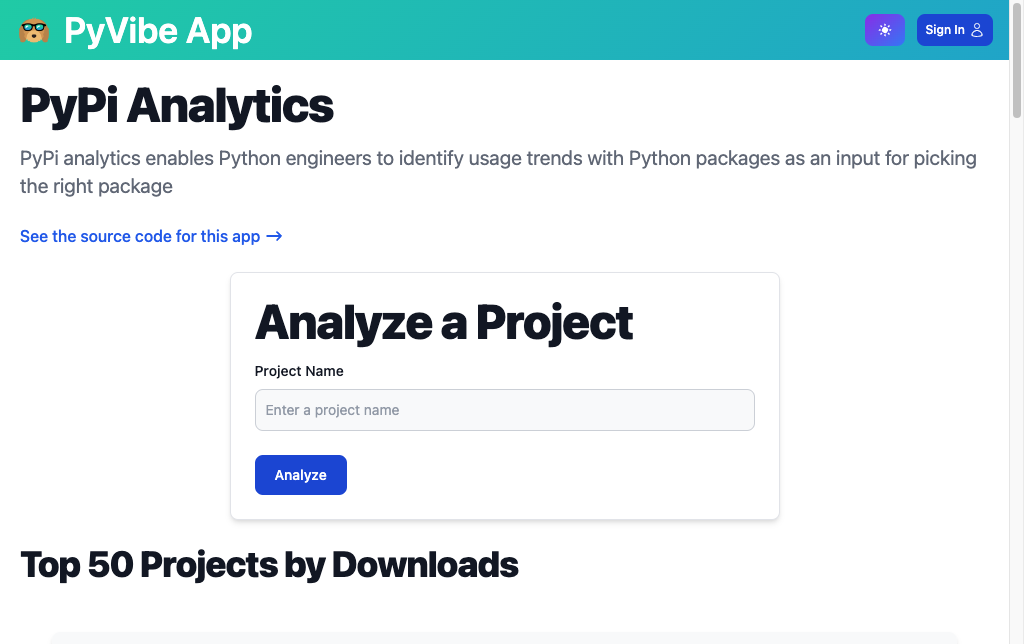 186 |
186 | 187 | 188 | Live App 189 | 190 | 191 |
192 |193 | 194 | Source Code on GitHub 195 | 196 | 197 |
198 | 199 | 200 | 201 | 202 | 207 |
211 | PyVibe
212 |
213 | Easily create styled web pages with Python
214 | 147 |
147 |  159 |
159 |  171 |
171 |  183 |
183 |  195 |
195 |