├── assets ├── move.gif ├── close.gif ├── resize.gif ├── computer.png └── screenshot.png ├── example-style.css ├── LICENSE ├── example.html ├── draggable.js ├── style.css ├── README.md └── index.html /assets/move.gif: -------------------------------------------------------------------------------- https://raw.githubusercontent.com/qjack001/Web-Based-Windows/HEAD/assets/move.gif -------------------------------------------------------------------------------- /assets/close.gif: -------------------------------------------------------------------------------- https://raw.githubusercontent.com/qjack001/Web-Based-Windows/HEAD/assets/close.gif -------------------------------------------------------------------------------- /assets/resize.gif: -------------------------------------------------------------------------------- https://raw.githubusercontent.com/qjack001/Web-Based-Windows/HEAD/assets/resize.gif -------------------------------------------------------------------------------- /assets/computer.png: -------------------------------------------------------------------------------- https://raw.githubusercontent.com/qjack001/Web-Based-Windows/HEAD/assets/computer.png -------------------------------------------------------------------------------- /assets/screenshot.png: -------------------------------------------------------------------------------- https://raw.githubusercontent.com/qjack001/Web-Based-Windows/HEAD/assets/screenshot.png -------------------------------------------------------------------------------- /example-style.css: -------------------------------------------------------------------------------- 1 | /* 2 | * Additional styling for the website (index.html). 3 | * 4 | * Jack Guinane 5 | * 2018-07-31 6 | */ 7 | 8 | html 9 | { 10 | background-color: cadetblue; 11 | } 12 | 13 | .install-page 14 | { 15 | background-color: #000; 16 | text-align: left; 17 | overflow-y: scroll; 18 | } 19 | 20 | .install-page p 21 | { 22 | font-size: 1rem; 23 | color: limegreen; 24 | } 25 | 26 | .install-page a 27 | { 28 | font-size: 1rem; 29 | color: aqua; 30 | } 31 | 32 | .baby-image 33 | { 34 | background-image: url(http://www.oldest.org/wp-content/uploads/2017/10/Dancing-Baby.jpg); 35 | background-repeat: no-repeat; 36 | background-size: 100% 100%; 37 | } 38 | 39 | .alert-page 40 | { 41 | background-color: #c0c0c0; 42 | padding-bottom: 20px; 43 | } -------------------------------------------------------------------------------- /LICENSE: -------------------------------------------------------------------------------- 1 | MIT License 2 | 3 | Copyright (c) 2018 Jack Guinane 4 | 5 | Permission is hereby granted, free of charge, to any person obtaining a copy 6 | of this software and associated documentation files (the "Software"), to deal 7 | in the Software without restriction, including without limitation the rights 8 | to use, copy, modify, merge, publish, distribute, sublicense, and/or sell 9 | copies of the Software, and to permit persons to whom the Software is 10 | furnished to do so, subject to the following conditions: 11 | 12 | The above copyright notice and this permission notice shall be included in all 13 | copies or substantial portions of the Software. 14 | 15 | THE SOFTWARE IS PROVIDED "AS IS", WITHOUT WARRANTY OF ANY KIND, EXPRESS OR 16 | IMPLIED, INCLUDING BUT NOT LIMITED TO THE WARRANTIES OF MERCHANTABILITY, 17 | FITNESS FOR A PARTICULAR PURPOSE AND NONINFRINGEMENT. IN NO EVENT SHALL THE 18 | AUTHORS OR COPYRIGHT HOLDERS BE LIABLE FOR ANY CLAIM, DAMAGES OR OTHER 19 | LIABILITY, WHETHER IN AN ACTION OF CONTRACT, TORT OR OTHERWISE, ARISING FROM, 20 | OUT OF OR IN CONNECTION WITH THE SOFTWARE OR THE USE OR OTHER DEALINGS IN THE 21 | SOFTWARE. 22 | -------------------------------------------------------------------------------- /example.html: -------------------------------------------------------------------------------- 1 | 2 | 10 | 11 | 12 | 13 | 14 | Example 15 | 16 | 17 | 18 | 19 | 20 | 21 | 22 | 23 | 24 | 25 | 26 | 27 |
28 | 29 |
30 | 31 | Title 32 | 33 | 34 | 35 |
36 | 37 |

Text

38 |
39 | 40 | 41 | 42 | 43 | -------------------------------------------------------------------------------- /draggable.js: -------------------------------------------------------------------------------- 1 | //from w3schools 2 | 3 | function dragElement(elmnt) 4 | { 5 | var pos1 = 0, pos2 = 0, pos3 = 0, pos4 = 0; 6 | if (document.getElementById(elmnt.id + "header")) 7 | { 8 | /* if present, the header is where you move the DIV from:*/ 9 | document.getElementById(elmnt.id + "header").onmousedown = dragMouseDown; 10 | } 11 | else 12 | { 13 | /* otherwise, move the DIV from anywhere inside the DIV:*/ 14 | elmnt.onmousedown = dragMouseDown; 15 | } 16 | 17 | function dragMouseDown(e) 18 | { 19 | e = e || window.event; 20 | e.preventDefault(); 21 | // get the mouse cursor position at startup: 22 | pos3 = e.clientX; 23 | pos4 = e.clientY; 24 | document.onmouseup = closeDragElement; 25 | // call a function whenever the cursor moves: 26 | document.onmousemove = elementDrag; 27 | } 28 | 29 | function elementDrag(e) 30 | { 31 | e = e || window.event; 32 | e.preventDefault(); 33 | // calculate the new cursor position: 34 | pos1 = pos3 - e.clientX; 35 | pos2 = pos4 - e.clientY; 36 | pos3 = e.clientX; 37 | pos4 = e.clientY; 38 | // set the element's new position: 39 | elmnt.style.top = (elmnt.offsetTop - pos2) + "px"; 40 | elmnt.style.left = (elmnt.offsetLeft - pos1) + "px"; 41 | } 42 | 43 | function closeDragElement() 44 | { 45 | /* stop moving when mouse button is released:*/ 46 | document.onmouseup = null; 47 | document.onmousemove = null; 48 | } 49 | } -------------------------------------------------------------------------------- /style.css: -------------------------------------------------------------------------------- 1 | /* 2 | * Stylesheet for Web-Based-Windows 3 | * 4 | * Jack Guinane 5 | * 2018-07-31 6 | */ 7 | 8 | html 9 | { 10 | overflow: hidden; 11 | } 12 | 13 | button 14 | { 15 | border-right: solid 2px #87888E; 16 | border-bottom: solid 2px #87888E; 17 | box-shadow: 0px 0px 0px 2px rgba(0,0,0,1); 18 | background-color: #C1C7C8; 19 | cursor: pointer; 20 | float: right; 21 | font-family: 'VT323', monospace; 22 | font-size: 1.0rem; 23 | font-weight: 900; 24 | margin-left: 2px; 25 | user-select: none; 26 | height: 22px; 27 | } 28 | 29 | button:active 30 | { 31 | background-color: #87888E; 32 | } 33 | 34 | .window 35 | { 36 | position: absolute; 37 | z-index: 9; 38 | background-color: #fff; 39 | border: 3px solid #C1C7C8; 40 | text-align: center; 41 | padding: 2px; 42 | resize: both; 43 | overflow: auto; 44 | font-family: 'VT323', monospace; 45 | font-size: 1.4rem; 46 | box-shadow: inset 0px 0px 0px 2px rgba(0,0,0,1), 0px 0px 0px 2px rgba(0,0,0,1); 47 | border-bottom-color: #5f6064; 48 | border-right-color: #5f6064; 49 | min-width: 280px; 50 | min-height: 50px; 51 | overflow-y: hidden; 52 | } 53 | 54 | .window-header 55 | { 56 | position: sticky; 57 | text-align: center; 58 | cursor: move; 59 | z-index: 10; 60 | padding-left: 3rem; 61 | background-color: #0200A1; 62 | color: #fff; 63 | font-family: 'VT323', monospace; 64 | border-bottom: 2px solid #000; 65 | user-select: none; 66 | } 67 | 68 | .classic-button 69 | { 70 | box-shadow: 71 | -1px -1px 0px 1px rgba(255,255,255,1), 72 | 0px 0px 0px 2px rgba(0,0,0,1); 73 | background-color: #C0C0C0; 74 | float: none; 75 | font-size: 1.2rem; 76 | padding: 0 20px; 77 | margin: 0; 78 | height: auto; 79 | font-weight: 100; 80 | 81 | border-right: solid 2px #808080; 82 | border-bottom: solid 2px #808080; 83 | border-top: solid 2px #E0E0E0; 84 | border-left: solid 2px #E0E0E0; 85 | } 86 | 87 | .classic-button:active 88 | { 89 | border-bottom: solid 2px #C0C0C0; 90 | border-right: solid 2px #C0C0C0; 91 | border-left: solid 2px #000; 92 | border-top: solid 2px #000; 93 | background-color: #808080; 94 | box-shadow: 95 | -1px -1px 0px 1px #000, 96 | 0px 0px 0px 2px #000; 97 | } 98 | 99 | .classic-button:focus 100 | { 101 | outline: 0; 102 | } -------------------------------------------------------------------------------- /README.md: -------------------------------------------------------------------------------- 1 |

2 |
3 | Computer Logo 4 |
5 | Web Based Windows 6 |

7 | 8 |

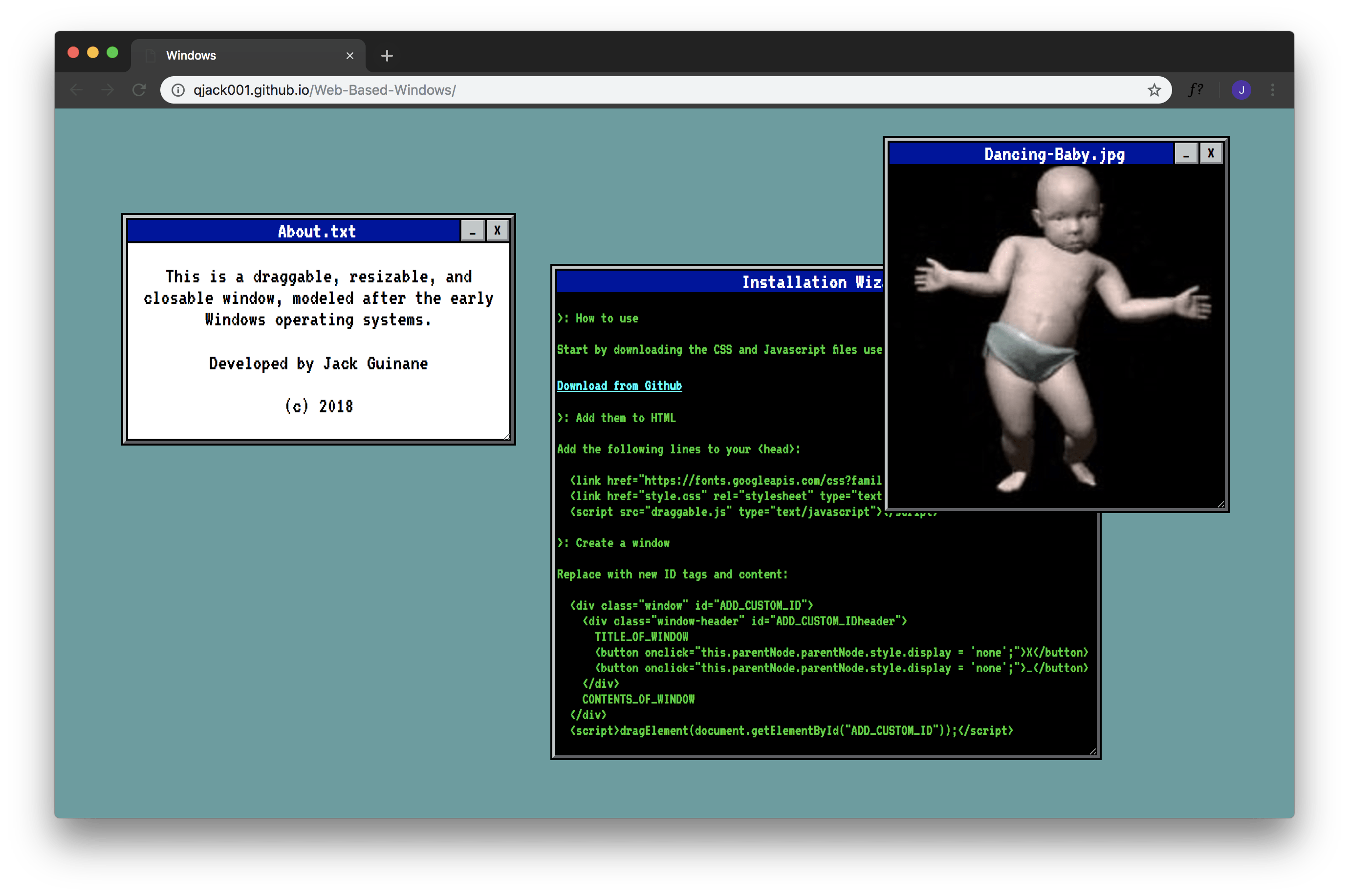
Web-Based-Windows is a stupid website that imitates the look and feel of early Windows operating systems.
It was created to experiment with draggable and resizable divs, as well as brutalist website design.

9 | 10 |

11 | 12 | 13 | 14 | 15 | 16 |

17 | 18 |

19 | Key Features • 20 | How to Use • 21 | Contributing • 22 | Credits • 23 | Authors • 24 | License 25 |

26 | 27 | ![screenshot](https://raw.githubusercontent.com/qjack001/Web-Based-Windows/master/assets/screenshot.png) 28 | 29 | ## Key Features 30 | 31 | For a live preview, visit [qjack001.github.io/Web-Based-Windows/](https://qjack001.github.io/Web-Based-Windows/). 32 | 33 | #### Resize windows: 34 | 35 | ![screenshot](https://raw.githubusercontent.com/qjack001/Web-Based-Windows/master/assets/resize.gif) 36 | 37 | #### Move windows: 38 | 39 | ![screenshot](https://raw.githubusercontent.com/qjack001/Web-Based-Windows/master/assets/move.gif) 40 | 41 | #### Close and hide windows: 42 | 43 | ![screenshot](https://raw.githubusercontent.com/qjack001/Web-Based-Windows/master/assets/close.gif) 44 | 45 | 46 | ## How to Use 47 | 48 | To use these windows in your own project, either [fork this repository](https://github.com/qjack001/Web-Based-Windows/fork), or download the required files ([draggable.js](https://github.com/qjack001/Web-Based-Windows/blob/master/draggable.js) and [style.css](https://github.com/qjack001/Web-Based-Windows/blob/master/style.css)) individually. 49 | 50 | Add the required files to the `` element of the HTML file, and place any additional scripts or style sheets below: 51 | 52 | ```html 53 | 54 | ... 55 | 56 | 57 | 58 | 59 | ``` 60 | 61 | To create a window, set up a new div in the ``. Replace `ADD_CUSTOM_ID` with a new unique ID, and make sure that the div below it has the exact same ID, with `header` added to the end. 62 | 63 | ```html 64 |
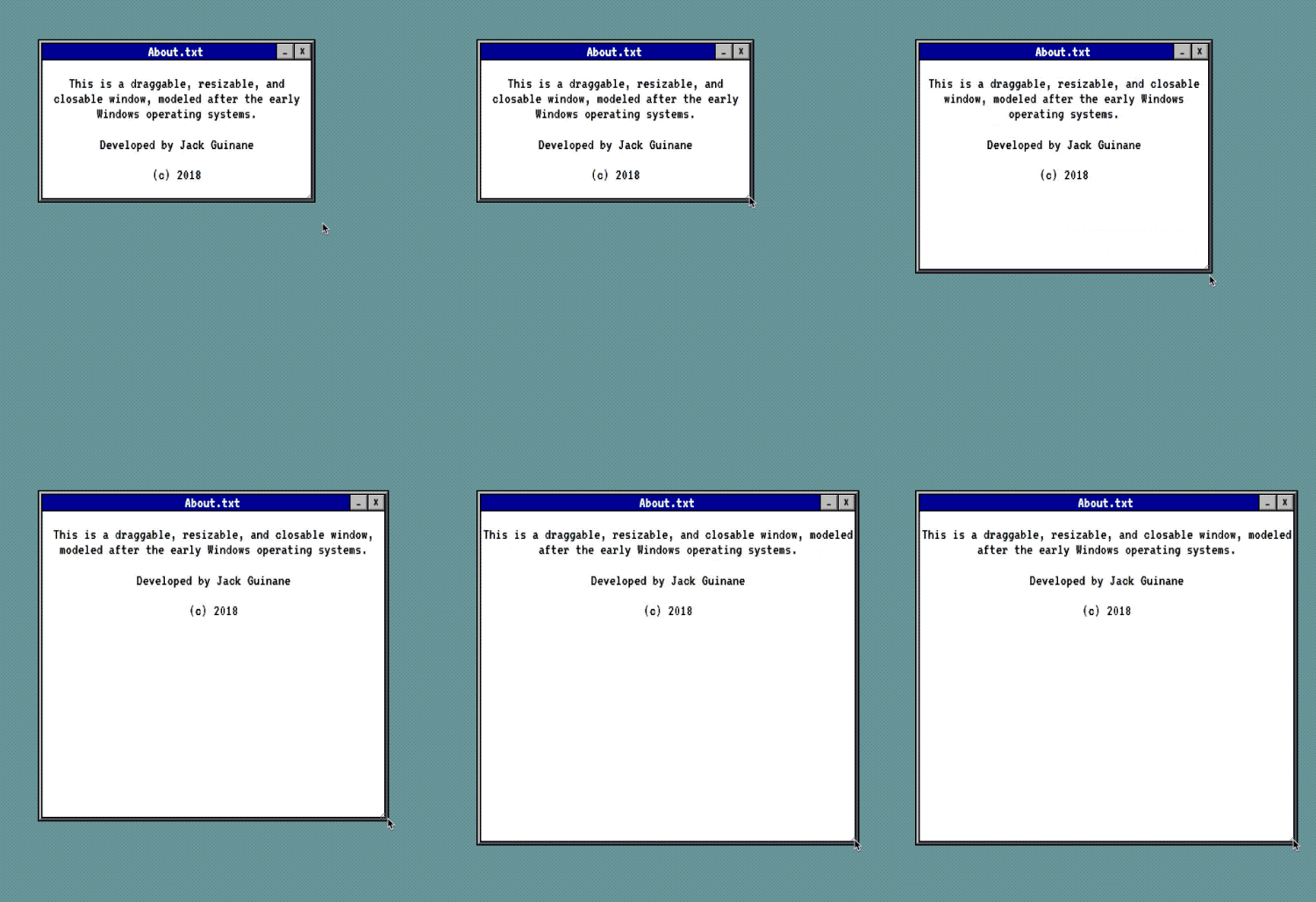
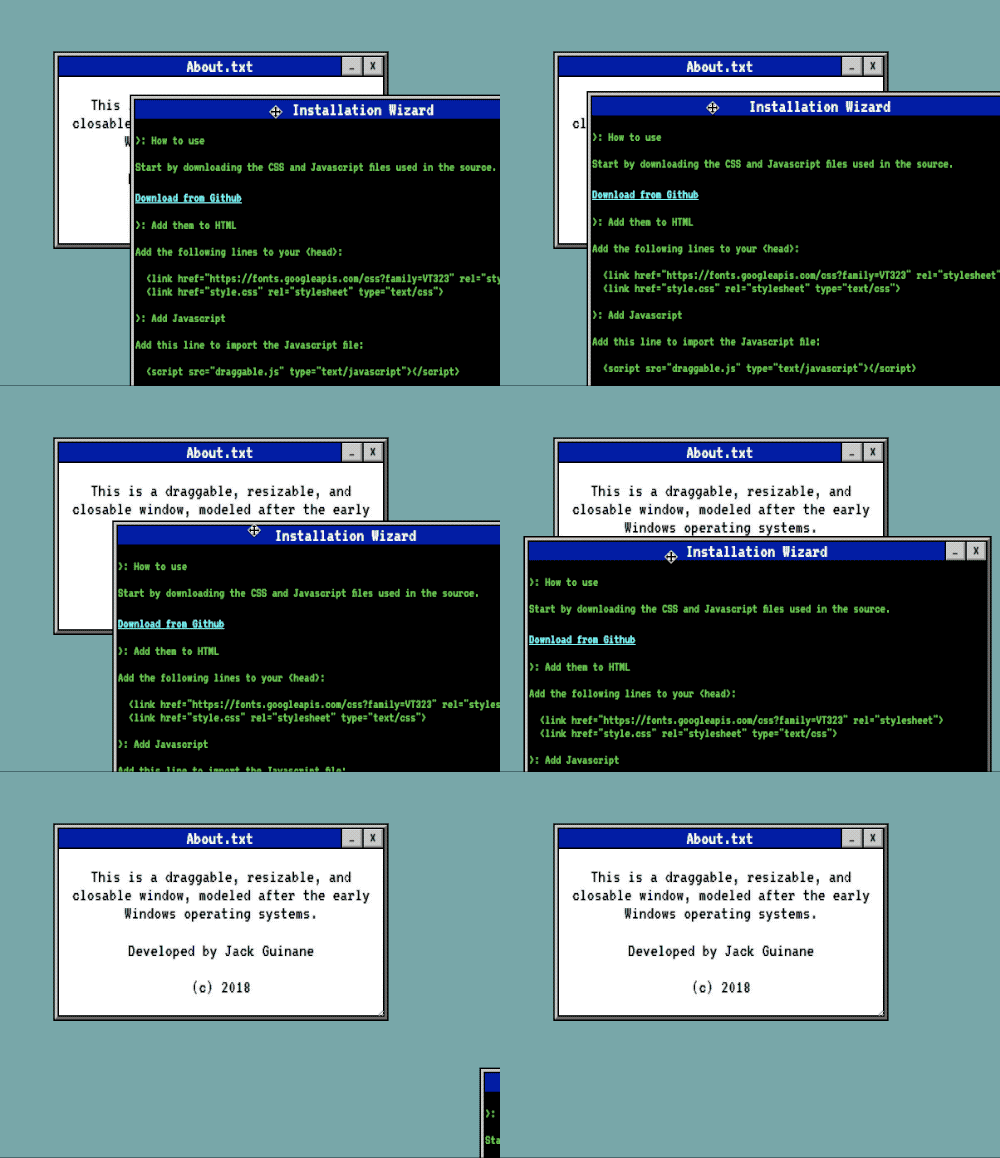
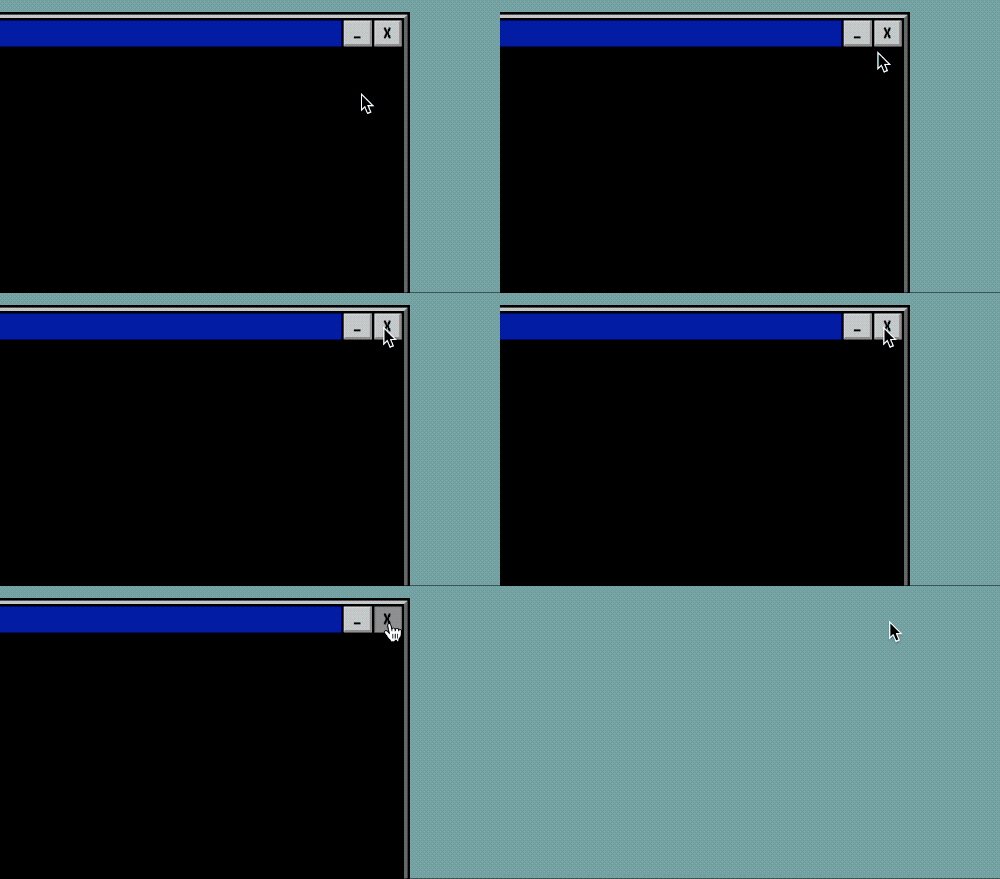
65 |
66 | TITLE_OF_WINDOW 67 | 68 | 69 |
70 | CONTENTS_OF_WINDOW 71 |
72 | 73 | ``` 74 | 75 | Custom window styles can be achieved by importing a separate stylesheet, below the required ones, and appending a newly styled class to the main window's classes. For reference, an [example.html file](https://github.com/qjack001/Web-Based-Windows/blob/master/example.html) has been included in the project. 76 | 77 | ## Contributing 78 | 79 | If you notice a bug or have a feature request, please [submit an issue](https://github.com/qjack001/Web-Based-Windows/issues). 80 | If you would like to contribute to the development of the project, please [create a new pull request](https://github.com/qjack001/Web-Based-Windows/pulls). 81 | 82 | 83 | ## Credits 84 | 85 | - [w3schools](https://www.w3schools.com/) - Provided the template for the window's dragging capabilities 86 | - [Peter Hull](https://github.com/phoikoi) - Provided the free font [VT323](https://fonts.google.com/specimen/VT323) 87 | 88 | 89 | ## Authors 90 | 91 | [**Jack Guinane**](https://github.com/qjack001) - Programming, designing, and maintaining. 92 | 93 | 94 | ## License 95 | 96 | This project is licensed under the MIT License - see the [LICENSE](https://github.com/qjack001/Web-Based-Windows/blob/master/LICENSE) file for details. 97 | -------------------------------------------------------------------------------- /index.html: -------------------------------------------------------------------------------- 1 | 2 | 10 | 11 | 12 | 13 | 14 | Windows 15 | 16 | 17 | 18 | 19 | 20 | 21 | 22 | 23 | 24 | 25 | 26 | 27 |
28 |
29 | About.txt 30 | 31 | 32 |
33 | 34 |

This is a draggable, resizable, and closable window, modeled after the early Windows operating systems.

35 |

Developed by Jack Guinane

36 |

(c) 2018

37 | 38 |
39 | 40 | 41 |
42 |
43 | Installation Wizard 44 | 45 | 46 |
47 | 48 |

>: How to use

49 |

Start by downloading the CSS and Javascript files used in the source.

50 | Download from Github 51 |

>: Add them to HTML

52 |

Add the following lines to your <head>:

53 |

  <link href="https://fonts.googleapis.com/css?family=VT323" rel="stylesheet">
  <link href="style.css" rel="stylesheet" type="text/css">
  <script src="draggable.js" type="text/javascript"></script>

54 |

>: Create a window

55 |

Replace with new ID tags and content:

56 |

  <div class="window" id="ADD_CUSTOM_ID"> 57 |
    <div class="window-header" id="ADD_CUSTOM_IDheader"> 58 |
      TITLE_OF_WINDOW 59 |
      <button onclick="this.parentNode.parentNode.style.display = 'none';">X</button> 60 |
      <button onclick="this.parentNode.parentNode.style.display = 'none';">_</button> 61 |
    </div> 62 |
    CONTENTS_OF_WINDOW 63 |
  </div> 64 |
  <script>dragElement(document.getElementById("ADD_CUSTOM_ID"));</script>

65 | 66 |
67 | 68 | 69 |
70 |
71 | Dancing-Baby.jpg 72 | 73 | 74 |
75 |
76 | 77 | 78 |
79 |
80 | Alert 81 | 82 | 83 |
84 | 85 |

Windows encountered an error.

86 | 87 | 88 |
89 | 90 | 91 | 92 | --------------------------------------------------------------------------------

