├── docs
├── .nojekyll
├── CNAME
├── _navbar.md
├── img
│ ├── nodejs_eventlop.jpg
│ ├── node-hello-world.png
│ ├── javascript_eventloop.jpg
│ └── test_pyramid_for_node_js_unit_testing-1465216863453.png
├── zh
│ ├── test.md
│ ├── module.md
│ ├── README.md
│ ├── common.md
│ ├── event-async.md
│ └── process-threads.md
├── en
│ ├── test.md
│ ├── README.md
│ ├── event-async.md
│ ├── process-threads.md
│ └── common.md
└── index.html
├── _config.yml
├── LICENSE
├── .gitignore
└── README.md
/docs/.nojekyll:
--------------------------------------------------------------------------------
1 |
--------------------------------------------------------------------------------
/docs/CNAME:
--------------------------------------------------------------------------------
1 | interview.nodejs.red
--------------------------------------------------------------------------------
/_config.yml:
--------------------------------------------------------------------------------
1 | theme: jekyll-theme-cayman
--------------------------------------------------------------------------------
/docs/_navbar.md:
--------------------------------------------------------------------------------
1 | - Translations
2 | - [:uk: English](/)
3 | - [:cn: 中文](/zh/)
4 |
--------------------------------------------------------------------------------
/docs/img/nodejs_eventlop.jpg:
--------------------------------------------------------------------------------
https://raw.githubusercontent.com/qufei1993/Nodejs-Interview-Questions/HEAD/docs/img/nodejs_eventlop.jpg
--------------------------------------------------------------------------------
/docs/img/node-hello-world.png:
--------------------------------------------------------------------------------
https://raw.githubusercontent.com/qufei1993/Nodejs-Interview-Questions/HEAD/docs/img/node-hello-world.png
--------------------------------------------------------------------------------
/docs/img/javascript_eventloop.jpg:
--------------------------------------------------------------------------------
https://raw.githubusercontent.com/qufei1993/Nodejs-Interview-Questions/HEAD/docs/img/javascript_eventloop.jpg
--------------------------------------------------------------------------------
/docs/img/test_pyramid_for_node_js_unit_testing-1465216863453.png:
--------------------------------------------------------------------------------
https://raw.githubusercontent.com/qufei1993/Nodejs-Interview-Questions/HEAD/docs/img/test_pyramid_for_node_js_unit_testing-1465216863453.png
--------------------------------------------------------------------------------
/docs/zh/test.md:
--------------------------------------------------------------------------------
1 | # 测试
2 |
3 | ## Q1: 什么是测试金字塔? 请给一个例子!
4 |
5 | 测试金字塔描述了你应该编写的单元测试、集成测试和端到端测试所占用的比例。
6 |
7 | 
8 |
9 | 一个测试 HTTP API 的示例,如下所示:
10 |
11 | * 金字塔的最底端所展示的有很多单元测试,用于分别测试各个模块(依赖项是 stub)。
12 |
13 | * 较少的集成测试,可以让你检查各模块之间的交互 (依赖项不是 stub)。
14 | * 更少的端到端测试,去调用你的实际接口(依赖项不是 stub)。
15 |
16 | ## Q2: 什么是 Stub?用一个例子说明
17 |
18 | Stubs 是模拟组件或模块的行为。在一个测试用例期间 Stub 可以用来模拟函数调用的返回值,还可以配合断言来使用。
19 |
20 | 例如,我们有一个读取文件的程序,在做测试时我们并不需要真正的去读,可以通过 Stub 进行模式。示例如下:
21 |
22 | ```js
23 | var fs = require('fs');
24 |
25 | var readFileStub = sinon.stub(fs, 'readFile', function (path, cb) {
26 | return cb(null, 'filecontent');
27 | });
28 |
29 | expect(readFileStub).to.be.called;
30 | readFileStub.restore();
31 | ```
--------------------------------------------------------------------------------
/LICENSE:
--------------------------------------------------------------------------------
1 | MIT License
2 |
3 | Copyright (c) 2019 五月君
4 |
5 | Permission is hereby granted, free of charge, to any person obtaining a copy
6 | of this software and associated documentation files (the "Software"), to deal
7 | in the Software without restriction, including without limitation the rights
8 | to use, copy, modify, merge, publish, distribute, sublicense, and/or sell
9 | copies of the Software, and to permit persons to whom the Software is
10 | furnished to do so, subject to the following conditions:
11 |
12 | The above copyright notice and this permission notice shall be included in all
13 | copies or substantial portions of the Software.
14 |
15 | THE SOFTWARE IS PROVIDED "AS IS", WITHOUT WARRANTY OF ANY KIND, EXPRESS OR
16 | IMPLIED, INCLUDING BUT NOT LIMITED TO THE WARRANTIES OF MERCHANTABILITY,
17 | FITNESS FOR A PARTICULAR PURPOSE AND NONINFRINGEMENT. IN NO EVENT SHALL THE
18 | AUTHORS OR COPYRIGHT HOLDERS BE LIABLE FOR ANY CLAIM, DAMAGES OR OTHER
19 | LIABILITY, WHETHER IN AN ACTION OF CONTRACT, TORT OR OTHERWISE, ARISING FROM,
20 | OUT OF OR IN CONNECTION WITH THE SOFTWARE OR THE USE OR OTHER DEALINGS IN THE
21 | SOFTWARE.
22 |
--------------------------------------------------------------------------------
/.gitignore:
--------------------------------------------------------------------------------
1 | # Logs
2 | logs
3 | *.log
4 | npm-debug.log*
5 | yarn-debug.log*
6 | yarn-error.log*
7 |
8 | # Runtime data
9 | pids
10 | *.pid
11 | *.seed
12 | *.pid.lock
13 |
14 | # Directory for instrumented libs generated by jscoverage/JSCover
15 | lib-cov
16 |
17 | # Coverage directory used by tools like istanbul
18 | coverage
19 |
20 | # nyc test coverage
21 | .nyc_output
22 |
23 | # Grunt intermediate storage (http://gruntjs.com/creating-plugins#storing-task-files)
24 | .grunt
25 |
26 | # Bower dependency directory (https://bower.io/)
27 | bower_components
28 |
29 | # node-waf configuration
30 | .lock-wscript
31 |
32 | # Compiled binary addons (https://nodejs.org/api/addons.html)
33 | build/Release
34 |
35 | # Dependency directories
36 | node_modules/
37 | jspm_packages/
38 |
39 | # TypeScript v1 declaration files
40 | typings/
41 |
42 | # Optional npm cache directory
43 | .npm
44 |
45 | # Optional eslint cache
46 | .eslintcache
47 |
48 | # Optional REPL history
49 | .node_repl_history
50 |
51 | # Output of 'npm pack'
52 | *.tgz
53 |
54 | # Yarn Integrity file
55 | .yarn-integrity
56 |
57 | # dotenv environment variables file
58 | .env
59 |
60 | # next.js build output
61 | .next
62 |
--------------------------------------------------------------------------------
/docs/en/test.md:
--------------------------------------------------------------------------------
1 | # Test
2 |
3 | ## Q1: What's a test pyramid? Give an example!
4 |
5 | A test pyramid describes the ratio of how many unit tests, integration tests and end-to-end test you should write.
6 |
7 | 
8 |
9 | An example for an HTTP API may look like this:
10 |
11 | lots of low-level unit tests for models (dependencies are stubbed),
12 | fewer integration tests, where you check how your models interact with each other (dependencies are not stubbed),
13 | less end-to-end tests, where you call your actual endpoints (dependencies are not stubbed).
14 |
15 | Source: [https://blog.risingstack.com/node-js-interview-questions/](https://blog.risingstack.com/node-js-interview-questions/)
16 |
17 | ## Q2: What's a stub? Name a use case.
18 |
19 | Stubs are functions/programs that simulate the behaviours of components/modules. Stubs provide canned answers to function calls made during test cases. Also, you can assert on with what these stubs were called.
20 |
21 | A use-case can be a file read, when you do not want to read an actual file:
22 |
23 | ```js
24 | var fs = require('fs');
25 |
26 | var readFileStub = sinon.stub(fs, 'readFile', function (path, cb) {
27 | return cb(null, 'filecontent');
28 | });
29 |
30 | expect(readFileStub).to.be.called;
31 | readFileStub.restore();
32 | ```
33 |
34 | Source: [https://blog.risingstack.com/node-js-interview-questions/](https://blog.risingstack.com/node-js-interview-questions/)
35 |
--------------------------------------------------------------------------------
/docs/zh/module.md:
--------------------------------------------------------------------------------
1 | # 模块
2 |
3 | ## Q1:require 的加载机制?
4 |
5 | 在 Nodejs 中模块加载一般会经历3个步骤,路径分析、文件定位、编译执行。初次加载之后会进行缓存,下次直接从系统缓存加载。更多内容参考 [Node.js 模块加载机制](https://www.nodejs.red/#/nodejs/module?id=%e6%a8%a1%e5%9d%97%e5%8a%a0%e8%bd%bd%e6%9c%ba%e5%88%b6)
6 |
7 | ## Q2:module.exports 与 exports 的区别?
8 |
9 | exports 相当于 module.exports 的快捷方式如下所示:
10 |
11 | ```js
12 | const exports = modules.exports;
13 | ```
14 |
15 | 但是要注意不能改变 exports 的指向,我们可以通过 exports.test = 'a' 这样来导出一个对象, 但是不能向下面示例直接赋值,这样会改变 exports 的指向,相当于修改了其引用关系。
16 |
17 | ```js
18 | // 错误的写法 将会得到 undefined
19 | exports = {
20 | 'a': 1,
21 | 'b': 2
22 | }
23 |
24 | // 正确的写法
25 | modules.exports = {
26 | 'a': 1,
27 | 'b': 2
28 | }
29 | ```
30 |
31 | ## Q3:假设有 a.js、b.js 两个模块相互引用,会有什么问题?是否为陷入死循环?
32 |
33 | 两个模块相互引用,假设 a、b 两个模块,在 a 模块中应用了 b 模块,之后 b 模块又引用了 a 模块,那么后一个模块引用的是前一个模块未完成的副本,并不会导致死循环,看一下示例:
34 |
35 | ```js
36 | // a.js
37 | console.log('a模块start');
38 |
39 | exports.test = 1;
40 |
41 | undeclaredVariable = 'a模块未声明变量'
42 |
43 | const b = require('./b');
44 |
45 | console.log('a模块加载完毕: b.test值:',b.test);
46 | ```
47 |
48 | ```js
49 | // b.js
50 | console.log('b模块start');
51 |
52 | exports.test = 2;
53 |
54 | const a = require('./a');
55 |
56 | console.log('undeclaredVariable: ', undeclaredVariable);
57 |
58 | console.log('b模块加载完毕: a.test值:', a.test);
59 | ```
60 |
61 | 控制台执行 ```node a.js``` 查看输出结果:
62 |
63 | ```bash
64 | a模块start
65 | b模块start
66 | undeclaredVariable: a模块未声明变量
67 | b模块加载完毕: a.test值: 1
68 | a模块加载完毕: b.test值: 2
69 | ```
70 |
71 | 启动 ```a.js``` 的时候,会加载 ```b.js```,那么在 ```b.js``` 中又加载了 ```a.js```,但是此时 ```a.js``` 模块还没有执行完,返回的是一个 ```a.js``` 模块的 ```exports``` 对象 ```未完成的副本``` 给到 ```b.js``` 模块。然后 ```b.js``` 完成加载之后将 ```exports``` 对象提供给了 ```a.js``` 模块
--------------------------------------------------------------------------------
/docs/zh/README.md:
--------------------------------------------------------------------------------
1 | # Nodejs-Interview-Questions
2 |
3 | 这是一份包含 Node.js 学习与面试的问题列表,我会定期的更新本仓库,也欢迎您提交一些 PR 或者一些好的建议!希望能对您的学习与工作有所帮助,Good luck ❤️
4 |
5 | 如果您想更全面的学习 Node.js 技术栈,为您推荐开源项目 [Nodejs-Roadmap](https://www.nodejs.red)
6 |
7 | * 语言: [:cn: 中文](/zh/) | [:uk: English](/en/)
8 | * 预览: [https://interview.nodejs.red](https://interview.nodejs.red)
9 |
10 | > 作者: 五月君,Node.js Developer,[慕课网认证作者](https://www.imooc.com/u/2667395)。
11 |
12 | ## [基础](/zh/common.md)
13 |
14 | > 这个模块将会描述一些基础的或者通用的问题。
15 |
16 | * ```[Question1]``` 什么是 Node.js?
17 | * ```[Question2]``` 如何安装 Node.js?
18 | * ```[Question3]``` 如何用 Node.js 监听 80 端口?
19 | * ```[Question4]``` 什么是错误优先的回调函数?
20 | * ```[Question5]``` 你可以在 Node.js 中创建 Http 服务吗?通过代码来展示
21 | * ```[Question6]``` Node.js 的核心组件有哪些?
22 | * ```[Question7]``` 什么是“回调地狱”及如何避免它?
23 | * ```[Question8]``` 什么是 Node.js 的事件驱动编程?
24 | * ```[Question9]``` 什么是 NPM? 在 Node.js 中什么时候需要 NPM?
25 | * ```[Question10]``` Node.js 可以做什么? 10 个 Node.js 的应用场景?
26 |
27 | [阅读更多](/zh/common.md)
28 |
29 | ## [模块](/zh/module.md)
30 |
31 | * ```[Question1]``` require 的加载机制?
32 | * ```[Question2]``` module.exports 与 exports 的区别
33 | * ```[Question3]``` 假设有 a.js、b.js 两个模块相互引用,会有什么问题?是否为陷入死循环?
34 |
35 | [阅读更多](/zh/module.md)
36 |
37 | ## [事件/异步](/zh/event-async.md)
38 |
39 | * ```[Question1]``` Node.js 中定时功能的顺序是怎样的?
40 | * ```[Question2]``` process.nextTick 与 setTimeout 递归调用区别?
41 | * ```[Question3]``` 解释下 JavaScript 中的 EventLoop(事件循环)?
42 | * ```[Question4]``` 解释下 NodeJS 中的 EventLoop(事件循环)?
43 | * ```[Question5]``` 什么是 Event Loop 和 Event Emitter ?
44 |
45 | [阅读更多](/zh/event-async.md)
46 |
47 | ## [进程/线程](/zh/process-threads.md)
48 |
49 | * ```[Question1]``` Node.js 什么是进程和线程?之间的区别?
50 | * ```[Question2]``` 什么是孤儿进程?
51 | * ```[Question3]``` 创建多进程时,代码里有 app.listen(port) 在进行 fork 时,为什么没有报端口被占用?
52 | * ```[Question4]``` 什么是 IPC 通信,如何建立 IPC 通信?什么场景下需要用到 IPC 通信?
53 | * ```[Question5]``` Node.js 是单线程还是多线程?进一步会提问为什么是单线程?
54 | * ```[Question6]``` 关于守护进程,是什么、为什么、怎么编写?
55 | * ```[Question7]``` 实现一个简单的命令行交互程序?
56 | * ```[Question8]``` 如何让一个 js 文件在 Linux 下成为一个可执行命令程序?
57 | * ```[Question9]``` 进程的当前工作目录是什么? 有什么作用?
58 | * ```[Question10]``` 多进程或多个 Web 服务之间的状态共享问题?
59 |
60 | [阅读更多](/zh/process-threads.md)
61 |
62 | ## [测试](/zh/test.md)
63 |
64 | * ```[Question1]``` 什么是测试金字塔? 请给一个例子!
65 | * ```[Question2]``` 什么是 Stub?用一个例子说明
66 |
67 | [阅读更多](/zh/test.md)
--------------------------------------------------------------------------------
/README.md:
--------------------------------------------------------------------------------
1 | # Nodejs-Interview-Questions
2 |
3 | 这是一份包含 Node.js 学习与面试的问题列表,我会定期的更新本仓库,也欢迎您提交一些 PR 或者一些好的建议!希望能对您的学习与工作有所帮助,Good luck ❤️
4 |
5 | 如果您想更全面的学习 Node.js 技术栈,为您推荐开源项目 [Nodejs-Roadmap](https://www.nodejs.red)
6 |
7 | * 语言: [:cn: 中文](/docs/zh/README.md) | [:uk: English](/docs/en/README.md)
8 | * 预览: [https://interview.nodejs.red](https://interview.nodejs.red)
9 |
10 | > 作者: 五月君,Node.js Developer,[慕课网认证作者](https://www.imooc.com/u/2667395)。
11 |
12 | ## [基础](/docs/zh/common.md)
13 |
14 | > 这个模块将会描述一些基础的或者通用的问题。
15 |
16 | * ```[Question1]``` 什么是 Node.js?
17 | * ```[Question2]``` 如何安装 Node.js?
18 | * ```[Question3]``` 如何用 Node.js 监听 80 端口?
19 | * ```[Question4]``` 什么是错误优先的回调函数?
20 | * ```[Question5]``` 你可以在 Node.js 中创建 Http 服务吗?通过代码来展示
21 | * ```[Question6]``` Node.js 的核心组件有哪些?
22 | * ```[Question7]``` 什么是“回调地狱”及如何避免它?
23 | * ```[Question8]``` 什么是 Node.js 的事件驱动编程?
24 | * ```[Question9]``` 什么是 NPM? 在 Node.js 中什么时候需要 NPM?
25 | * ```[Question10]``` Node.js 可以做什么? 10 个 Node.js 的应用场景?
26 |
27 | [阅读更多](/docs/zh/common.md)
28 |
29 | ## [模块](/zh/module.md)
30 |
31 | * ```[Question1]``` require 的加载机制?
32 | * ```[Question2]``` module.exports 与 exports 的区别
33 | * ```[Question3]``` 假设有 a.js、b.js 两个模块相互引用,会有什么问题?是否为陷入死循环?
34 |
35 | [阅读更多](/zh/module.md)
36 |
37 | ## [事件/异步](/docs/zh/event-async.md)
38 |
39 | * ```[Question1]``` Node.js 中定时功能的顺序是怎样的?
40 | * ```[Question2]``` process.nextTick 与 setTimeout 递归调用区别?
41 | * ```[Question3]``` 解释下 JavaScript 中的 EventLoop(事件循环)?
42 | * ```[Question4]``` 解释下 NodeJS 中的 EventLoop(事件循环)?
43 | * ```[Question5]``` 什么是 Event Loop 和 Event Emitter ?
44 |
45 | [阅读更多](/docs/zh/event-async.md)
46 |
47 | ## [进程/线程](/docs/zh/process-threads.md)
48 |
49 | * ```[Question1]``` Node.js 什么是进程和线程?之间的区别?
50 | * ```[Question2]``` 什么是孤儿进程?
51 | * ```[Question3]``` 创建多进程时,代码里有 app.listen(port) 在进行 fork 时,为什么没有报端口被占用?
52 | * ```[Question4]``` 什么是 IPC 通信,如何建立 IPC 通信?什么场景下需要用到 IPC 通信?
53 | * ```[Question5]``` Node.js 是单线程还是多线程?进一步会提问为什么是单线程?
54 | * ```[Question6]``` 关于守护进程,是什么、为什么、怎么编写?
55 | * ```[Question7]``` 实现一个简单的命令行交互程序?
56 | * ```[Question8]``` 如何让一个 js 文件在 Linux 下成为一个可执行命令程序?
57 | * ```[Question9]``` 进程的当前工作目录是什么? 有什么作用?
58 | * ```[Question10]``` 多进程或多个 Web 服务之间的状态共享问题?
59 |
60 | [阅读更多](/docs/zh/process-threads.md)
61 |
62 | ## [测试](/docs/zh/test.md)
63 |
64 | * ```[Question1]``` 什么是测试金字塔? 请给一个例子!
65 | * ```[Question2]``` 什么是 Stub?用一个例子说明
66 |
67 | [阅读更多](/docs/zh/test.md)
--------------------------------------------------------------------------------
/docs/en/README.md:
--------------------------------------------------------------------------------
1 | # Nodejs-Interview-Questions
2 |
3 | This is a list of questions including Node.js learning and interviews. I will update this repository on a regular basis. You are also welcome to submit some PR or some good suggestions! I hope to help you with your study and work. Good luck ❤️
4 |
5 | If you want to learn more about the **Node.js technology stack**, recommend the open source project [Nodejs-Roadmap](https://www.nodejs.red). But it is only available in Chinese, and you can translate it if you are interested.
6 |
7 | * Languages: [:cn: 中文](/zh/) | [:uk: English](/)
8 | * Preview: [https://interview.nodejs.red](https://interview.nodejs.red)
9 |
10 | ## [Common](/en/common.md)
11 |
12 | > Describe some basic or general issues here.
13 |
14 | * ```[Question1]``` What is Node.js?
15 | * ```[Question2]``` How can I install Node.js?
16 | * ```[Question3]``` How can you listen on port 80 with Node?
17 | * ```[Question4]``` What is an error-first callback?
18 | * ```[Question5]``` Can you create Http Server in Node.js, explain with code?
19 | * ```[Question6]``` What are the main components of Node.js?
20 | * ```[Question7]``` What is “callback hell” and how can it be avoided?
21 | * ```[Question8]``` What are the event-Driven Programming of Node.js?
22 | * ```[Question9]``` What is NPM? What is the need of NPM in Node.js?
23 | * ```[Question10]``` What does Node.js do? 10 application scenarios for Node.js?
24 | * ```[Question11]``` What is LTS releases of Node.js why should you care?
25 |
26 | [View more](/en/common.md)
27 |
28 | ## [Event/Async](/en/event-async.md)
29 |
30 | * ```[Question1]``` What are the timing features of Node.js?
31 | * ```[Question2]``` What is the difference between process.nextTick and setTimeout recursive calls?
32 | * ```[Question3]``` Explain event loop architecture of JavaScript.
33 | * ```[Question4]``` Explain event loop architecture of NodeJS.
34 | * ```[Question5]``` What is Event Loop and Event Emitter ?
35 |
36 | [View more](/en/event-async.md)
37 |
38 | ## [Process/Threads](/en/process-threads.md)
39 |
40 | * ```[Question1]``` What are processes and threads? difference between?
41 | * ```[Question2]``` What is an orphan process?
42 | * ```[Question3]``` creates multiple processes, there is ```app.listen(port)``` in the code. Why is it not reported that the port is occupied when forking?
43 | * ```[Question4]``` What is IPC communication, how to establish IPC communication? What scenarios need to use IPC communication?
44 | * ```[Question5]``` Node.js single-threaded or multi-threaded? Further questioning why is it single threaded?
45 | * ```[Question6]``` about the daemon, what, why, how to write?
46 | * ```[Question7]``` implements a simple command line interaction program?
47 | * ```[Question8]``` make a js file an executable command program under Linux?
48 | * ```[Question9]``` What is the current working directory of the process? What is the role?
49 | * ```[Question10]``` State sharing issues between multiple processes or multiple web services?
50 |
51 | [View more](/en/process-threads.md)
52 |
53 | ## [Test](/en/test.md)
54 |
55 | * ```[Question1]``` What's a test pyramid? Give an example!
56 | * ```[Question2]``` What's a stub? Name a use case.
57 |
58 | [View more](/en/test.md)
--------------------------------------------------------------------------------
/docs/index.html:
--------------------------------------------------------------------------------
1 |
2 |
3 |
4 | Nodejs-Interview-Questions
6 |
23 |
78 |
79 |
80 |
81 |
82 |
83 |
84 |
85 |
86 |
87 |
88 |
--------------------------------------------------------------------------------
/docs/en/event-async.md:
--------------------------------------------------------------------------------
1 | # Event/Async
2 |
3 | ## Q1: What are the timing features of Node.js?
4 |
5 | The Timers module in Node.js contains functions that execute code after a set period of time.
6 |
7 | - **setTimeout/clearTimeout** - can be used to schedule code execution after a designated amount of milliseconds
8 |
9 | - **setInterval/clearInterval** - can be used to execute a block of code multiple times
10 |
11 | - **setImmediate/clearImmediate** - will execute code at the end of the current event loop cycle
12 |
13 | - **process.nextTick** - used to schedule a callback function to be invoked in the next iteration of the Event Loop
14 |
15 | **Order of execution for timer**
16 |
17 | ```
18 | process.nextTick > setImmidate > setTimeout / SetInterval
19 | ```
20 |
21 | **Example**
22 |
23 | ```js
24 | function cb(msg){
25 | return function() {
26 | console.log(msg);
27 | }
28 | }
29 |
30 | setTimeout(cb('setTimeout'), 1000);
31 | setImmediate(cb('setImmediate'))
32 | process.nextTick(cb('process.nextTick'));
33 | cb('Main process')();
34 | ```
35 |
36 | Output:
37 |
38 | ```bash
39 | Main process
40 | process.nextTick
41 | setImmediate
42 | setTimeout
43 | ```
44 |
45 | Source: [https://dev.to/aershov24/7-hardest-nodejs-interview-questions--answers-3lje](https://dev.to/aershov24/7-hardest-nodejs-interview-questions--answers-3lje)
46 |
47 | ## Q2: What is the difference between process.nextTick and setTimeout recursive calls?
48 |
49 | process.nextTick belongs to the micro-task, which is triggered at the end of the current execution stack, before EventLoop. The following two are recursive calls. The process.nextTick in test1 is called in the current execution stack, which is one-time execution, equivalent to ```while(true ){}``` , the main thread is stuck in an infinite loop, blocking IO operations.
50 |
51 | In the test2 method, setTimeout is a macro task, and it is also recursive in the task queue, but it is not a one-time execution but multiple Event Loops, which will not block IO operations. Also note that setTimeout has a minimum time of 4ms.
52 |
53 | ```js
54 | function test1() {
55 | process.nextTick(() => test()); // Infinite loop
56 | }
57 |
58 | function test2() {
59 | setTimeout(() => test(), 0); // Timing execution does not fall into an infinite loop
60 | }
61 | ```
62 |
63 | process.nextTick will block IO, setImmediate will not output
64 |
65 | ```js
66 | function test() {
67 | return process.nextTick(() => test());
68 | }
69 |
70 | test();
71 |
72 | setImmediate(() => {
73 | console.log('setImmediate');
74 | })
75 | ```
76 |
77 | The following use setTimeout will not cause IO blocking, will output setImmediate
78 |
79 | ```js
80 | function test() {
81 | setTimeout(() => test(), 0);
82 | }
83 |
84 | test()
85 |
86 | setImmediate(() => {
87 | console.log('setImmediate');
88 | })
89 |
90 | // setImmediate
91 | ```
92 |
93 |
94 |
95 | ## Q3: Explain event loop architecture of JavaScript.
96 |
97 | As we know, JavaScript runs in a single thread. When the user requests an operation, the runtime provides a callback (to the operation that will be executed once the operation is done) and moves on to the next step to do some other operation.
98 |
99 | 
100 |
101 | When an event occurs, the corresponding event message is queued into the EventLoop
102 | The Event Loop is checked for the message existence, if an event message exists then the corresponding callback is fired.
103 | Once the callback is done with the job, control is returned to the event loop that continues from Step 2.
104 | Note: if the JavaScript runtime is engaged with the event message, then the other messages must wait until the current message is done with the job. Sometimes you might get the browser saying something like “Browser is not responding”. This is because of the long-running event message. So try to keep the event messages as short as possible.
105 |
106 | For example:
107 |
108 | var msg = document.getElementById("msg");
109 | msg.addEventListener("click", function () {
110 | this.style.color = "blue";
111 | });
112 | In this example above, we have attached the click event to the anonymous function as the event handler. When we clicked on that msg element, an event message is queued into the Event Queue.
113 |
114 | If there are messages in the queue, then the click event message waits for the other messages to be done. All the other messages are processed, the over click event message is processed and the result is rendered into the DOM.
115 |
116 | So we are somewhat clear about the JavaScript's Event Loop. Let us move onto the NodeJS EventLoop.
117 |
118 | Source: [Introduction to NodeJS, A SSJS: Part II - EventLoop Explained](https://www.c-sharpcorner.com/article/node-js-interview-questions-and-answers/)
119 |
120 | ## Q4: Explain event loop architecture of NodeJS.
121 | As stated by Unknown, “Everything runs in parallel; except your code”. Yes, your code runs synchronously but the operations given by the code run by Node is asynchronous.
122 |
123 | 
124 |
125 | The preceding figure shows the event loop architecture of NodeJS.
126 |
127 | * When a request arrives, it is queued up into the EventLoop with a JavaScript Closure that includes the event (request, response) and corresponding callback.
128 | * The event is then given to the one worker thread if the job seems to take a long time to complete that is from a C++ Thread Pool, handled by the libuv library.
129 | * Once the job is done, the corresponding callback is fired to return back the response to the Main thread.
130 | * The Event Loop returns the response to the client.
131 |
132 | For example:
133 |
134 | ```js
135 | var fs = require('fs');
136 | fs.readFile('avator.png', function(avator) {
137 | console.log(‘image is loaded…’);
138 | });
139 | fs.writeFile('log.txt', 'Done', function() {
140 | console.log(‘Done !..’);
141 | });
142 | ```
143 |
144 | The execution flow goes as in the following:
145 |
146 | * Our code tells the node to do the two tasks read() and write() and then takes a rest.
147 | * The read() and write() operations are enqueued into the Event Loop and distributed the job to the worker thread.
148 | * Once the worker threads are done with the job, it will fire the callbacks to return the response to the Event Loop.
149 | * Then the Event Loop returns the response to the client.
150 |
151 | The callbacks of read() and write() will be executed in order to which one completes first. But note that only one of the callbacks would be executed at a time. So that the Node environment ensures that there won't be a deadlock or race condition. So it makes sure that the NodeJS provides Non-blocking IO.
152 |
153 | We could consider the Post Office environment for the NodeJS.
154 |
155 | When we post (request) something, the Post Master (Node) asks Post Men to deliver (get the job done) the post to the corresponding address.
156 |
157 | Once the post men deliver the posts, they are reporting to the Post Master that it's completed, one by one.
158 |
159 | Even the Post Master may assign some work to the post man at the time of reporting if he is free.
160 |
161 | Source: [Introduction to NodeJS, A SSJS: Part II - EventLoop Explained](https://www.c-sharpcorner.com/article/node-js-interview-questions-and-answers/)
162 |
163 | ## Q5: What is Event Loop and Event Emitter ?
164 |
165 | Node.js supports concurrency with the help of events and callbacks even if it is single threaded application. Node thread keeps an event loop and whenever any task gets completed, that thread fires the corresponding event.
166 |
167 | EventEmitter fires an event whenever any tasks gets completed, any error occurred, any new listener is added or any listener is removed. It provides properties like on and emit, where on is used to bind the function and emit is used to fire an event.
168 |
169 | Source: [top-20-interview-questions-on-nodejs](https://www.codingdefined.com/2017/04/top-20-interview-questions-on-nodejs.html)
170 |
--------------------------------------------------------------------------------
/docs/zh/common.md:
--------------------------------------------------------------------------------
1 |
2 | # 基础
3 |
4 | 这里记录一些 Node.js 入门需要知道的一些问题或者一些常见的面试问题。
5 |
6 | ## Q1: 什么是 Node.js?
7 |
8 | Node.js 是一个基于 Chrome V8 引擎的 JavaScript 运行环境。它是一个开源和跨平台的服务端应用程序。任何人都可以编写 JavaScript 代码来开发 Node.js 应用程序。它可以运行于 Microsoft Windows,Linux, or OS 系统。
9 |
10 | Node.js 不是一个新的语言,也不仅仅是一个基于 JavaScript 的框架,它基于 Chrome 的 JavaScript 运行时,因此代码的编写和执行与浏览器非常相似。
11 |
12 | **Node.js 功能**
13 |
14 | 以下是 Node.js 的一些重要功能
15 |
16 | - **高度可扩展**
17 |
18 | Node.js 使用的单线程模型且采用了事件循环架构,使得编写可扩展性高的服务器变得既容易又安全。一些传统的服务端语言会创建多线程来处理请求,通常创建线程都是有系统资源开销的,因此也会有一些限制,而 Node.js 只创建一个线程来处理更多的请求。
19 |
20 | - **事件驱动和异步**
21 |
22 | Node.js 的所有 API 都是异步的。这意味着下一个请求来临时可以直接处理而不用等待上一次的请求结果先返回。
23 |
24 | - **No Buffering**
25 |
26 | Node.js 从不缓冲任何任何数据,参见[What is No-Buffering feature of Node.js](https://stackoverflow.com/questions/42596571/what-is-no-buffering-feature-of-node-js)
27 |
28 | 我们许多人可能会对 Node.js 感到困惑。它不是像 Apache 这样的 Web 服务器。Node.js 提供了一种新方法来执行我们的代码。它是 JavaScript 的运行时。Node.js 提供了创建 HTTP 服务器的方法,我们可以在这之上托管我们的应用程序。
29 |
30 | Source: [Introduction To Node.js](https://www.c-sharpcorner.com/article/introduction-to-node-js/)
31 |
32 | ## Q2: 如何安装 Node.js?
33 |
34 | 我们可以从 Node.js 官方网站 [https://nodejs.org/en/](https://nodejs.org/en/) 下载安装软件。
35 |
36 | **nvm 安装**
37 |
38 | 这里推荐您使用 nvm 工具安装,方便后期的升级进行 Node.js 版本管理,以下为安装步骤:
39 |
40 | * 安装 nvm:wget -qO- https://raw.githubusercontent.com/creationix/nvm/v0.33.2/install.sh | bash
41 | * 查看所有 Node.js 版本:nvm ls-remote
42 | * 查看本地 Node.js 版本:nvm ls
43 | * 安装 Node.js:nvm install v6.9.5
44 | * 设置系统的默认 Node.js 版本:nvm alias default v6.9.5
45 |
46 | **验证安装结果**
47 |
48 | 在 Node.js 安装成功之后,我们可以检查它是否正常工作。
49 |
50 | 打开命令终端,输入以下命令
51 |
52 | ```node
53 | $ node
54 | ```
55 |
56 | 之后将出现 Node 提示符,我们写入以下命令,运行查看
57 |
58 | ```js
59 | console.log("hello world!");
60 | ```
61 |
62 | 按 Enter 键
63 |
64 | 
65 |
66 |
67 | ## Q3: 如何用 Node.js 监听 80 端口?
68 |
69 | 这是有陷阱的,在类似一些 Unix 系统中你不应该尝试监听 80 端口,这么做你需要拥有超级用户权限,因此,不推荐你这么做。
70 |
71 | 尽管如此,如果你一定要让应用监听 80 端口,可以使用 Nginx 来实现,在应用前方加上一层反向代理。还是建议你监听大于 1024 的端口。
72 |
73 | ## Q4: 什么是错误优先的回调函数?
74 |
75 | 错误优先回调函数用于同时返回错误(error)和数据信息(data),返回值的第一个参数做为错误信息描述,并且验证它是否出错(非错 error 为 null),其它参数用于返回数据。
76 |
77 | ```js
78 | fs.readFile(filePath, function(err, data) {
79 | if (err) {
80 | // 错误信息处理
81 | return console.log(err)
82 | }
83 |
84 | // return the data object
85 | return data;
86 | })
87 | ```
88 |
89 | ## Q5: 你可以在 Node.js 中创建 Http 服务吗?通过代码来展示
90 |
91 | 在 Node.js 中创建一个 Http 服务是很简单的一件事情,我们可以通过 HTTP 模块来完成这些操作。
92 |
93 | ```js
94 | const http = require('http');
95 | const server = http.createServer((request, response) => {
96 | if (request.url === '/hello') {
97 | response.writeHead(200, {
98 | 'Content-Type': 'text/plain',
99 | });
100 | response.end('hello world!');
101 | } else {
102 | response.end('OK!');
103 | }
104 | });
105 |
106 | server.listen(3000, '127.0.0.1', () => {
107 | console.log('service is listening at http://127.0.0.1:3000');
108 | });
109 | ```
110 |
111 | ## Q6: Node.js 的核心组件有哪些?
112 |
113 | Node.js 的核心组建是系统 API、V8 引擎和 Libuv。
114 |
115 | **Libuv 库**
116 |
117 | libuv 库是一个跨平台的支持事件驱动的 I/O 库。它是使用 C 和 C++ 语言为 Node.js 所开发的。但是它也被应用于 Mozilla's 的 Rust、Luvit、Julia、pyuv 等其它的语言。
118 |
119 | libuv 库是 I/O 操作的核心部分,例如读取文件和 OS 交互。
120 |
121 | 关于 Libuv 的学习,可以参考 [libuv中文教程](https://github.com/luohaha/Chinese-uvbook/)
122 |
123 | **V8 引擎**
124 |
125 | 来自于谷歌:“V8 是谷歌开源的高性能 JavaScript 引擎”,使用 C++ 开发,并在谷歌浏览器中使用。V8 中实现的 ECMAScript 中指定 ECMA - 262 ,第 3版运行在 Windows XP 和 Vista、Mac OS X 的 10.5 和 Linux 系统使用 IA - 32 或 ARM/MIPS 处理器。V8 可以独立运行,也可以嵌入到任何 C++ 应用程序。
126 |
127 | 如果你感兴趣想学习更多的 V8 引擎,请访问 [What is V8?](https://v8.dev/)
128 |
129 | **APIs (NodeJS Core Libs)**
130 |
131 | Node.js APIs 是根据您的请求去调用一些函数执行一些业务操作。默认情况下 Node.js 的 APIs 都是异步的,但是你想同步使用也是可以的(**同步方式是不推荐的**)。
132 |
133 | 例如,这个 fs 模块可以使用同步方式也可以使用异步方式。
134 |
135 | ```js
136 | var fs = require('fs');
137 | fs.readFile('/files/help.txt', function(err, buf) {
138 | // use fs.readFileSync() for sync operation. console.log(buf.toString());
139 | });
140 | ```
141 |
142 | Source: [Introduction to NodeJS, A SSJS: Part I - Components Explained](https://www.c-sharpcorner.com/UploadFile/dbd951/introduction-to-nodejs-a-ssjs-part-i/)
143 |
144 | ## Q7: 什么是“回调地狱”及如何避免它?
145 |
146 | “回调地狱”是指严重的回调嵌套,这些回调嵌套使得代码变得难以阅读和维护。
147 |
148 | 以下是回调嵌套的示例:
149 |
150 | ```js
151 | query("SELECT clientId FROM clients WHERE clientName='picanteverde';", function(id){
152 | query(`SELECT * FROM transactions WHERE clientId=${id}`, function(transactions){
153 | transactions.each((transac) => {
154 | query(`UPDATE transactions SET value = ${transac.value*0.1} WHERE id=${transac.id}`, (error) => {
155 | if(!error){
156 | console.log("success!!");
157 | }else{
158 | console.log("error");
159 | }
160 | });
161 | });
162 | });
163 | });
164 | ```
165 |
166 | 在某种程度上,修复“回调地狱”的方式是模块化。回调被分解为独立的函数,这些函数可以通过参数进行传递。所以,针对以上代码的第一个改进如下所示:
167 |
168 | ```js
169 | const logError = (error) => {
170 | if(!error){
171 | console.log("success!!");
172 | }else{
173 | console.log("error");
174 | }
175 | },
176 | updateTransaction = (t) => {
177 | query(`UPDATE transactions SET value = ${t.value*0.1} WHERE id=${t.id}`, logError);
178 | },
179 | handleTransactions = (transactions) => {
180 | transactions.each(updateTransaction);
181 | },
182 | handleClient = (id) => {
183 | query(`SELECT * FROM transactions WHERE clientId=${id}`, handleTransactions);
184 | };
185 |
186 | query("SELECT clientId FROM clients WHERE clientName='picanteverde';",handleClient);
187 | ```
188 |
189 | 尽管这个代码相比第一个示例更容易阅读,而且我们创建的的函数还可以得到复用。但是在某些情况下,我们想要使程序更健壮可通过 Promise 来解决。
190 |
191 | 此外,generators 也提供了强大的回调地狱解决方案,使用它可以解决不同回调之间的依赖关系。然而 generators 会更高级一些使用起来会复杂一些。关于 Generators 更多信息可以阅读这篇文章 [Generators in Node.js](http://strongloop.com/strongblog/how-to-generators-node-js-yield-use-cases/)
192 |
193 | 然而,以上的虽然能很好解决回调地狱问题,但是目前有了更好的方案 Async/Await。使用 Async/Await 需要注意 Node.js 版本要在 v7.5 版本之上。
194 |
195 | Source: [8 Essential Node.js Interview Questions](https://www.toptal.com/nodejs/interview-questions)
196 |
197 | ## Q8: 什么是 Node.js 的事件驱动编程?
198 |
199 | 事件驱动程序是由事件(click、load 等)决定的代码流程术语。它是当今流行编程语言(例如 C#、Java)里一个最基本的里程碑,在这里不会详细讲述。在Node.js 中或者一些其它类型的 JavaScript 项目中,我们都在使用事件驱动编程。也许你并不知道事件驱动编程,但是在一些页面加载或按钮单击事件中,你已经在使用了。
200 |
201 | 举一个典型的事件驱动流程的例子,看下它是如何在 Node.js 中完成中:
202 |
203 | ```js
204 | result = getJSONfromDestination();
205 | binddata(result);
206 | ```
207 |
208 | 上述操作是一个阻塞 I/O(单线程模式下将会等待这个阻塞 I/O 完成之后才会进行下一步)
209 |
210 | 现在让我们看看异步方式该如何进行(非阻塞 I/O 进程)
211 | ```js
212 | json_finished = function(result){
213 | binddata(result);
214 | }
215 |
216 | getJSONfromDestination(jsonfinished);
217 | ```
218 |
219 | 如上所示,这是一个非阻塞的例子,因为 json_finished 不是你所想向的那样会直接工作。当您调用 getJSONfromDestination 函数并将 jsonfinished 做为参数传递时,它才开始工作。
220 |
221 | Source: [NodeJS Series #6: Event - Driven Programming](https://www.c-sharpcorner.com/UploadFile/iersoy/nodejs-series-sharp6-event-driven-programming/)
222 |
223 | ## Q9: 什么是 NPM? 在 Node.js 中什么时候需要 NPM?
224 |
225 | NPM 是 Node.js 中的包管理器。允许我们为 Node.js 安装各种模块,这个包管理器为我们提供了安装、删除等其它命令来管理模块。这里有一点我们需要注意,我们必须要有一个 package.json 文件或 node_modules 目录安装模块到本地。
226 |
227 | NPM 最好的一点是它会在本地存储我们所安装的依赖项,存在于 package.json 的 dependencies 对象里。例如,如果一个模块 X 使用了模块 A 版本为 1.0,模块 Y 使用了模块 A 版本为 1.5,那么模块 X 或 Y 都将在本地拥有自己对应的模块 A 的副本。
228 |
229 | ```js
230 | // 模块 X
231 | {
232 | "name": "X",
233 | "dependencies": {
234 | "A": "^1.0"
235 | }
236 | }
237 | ```
238 |
239 | ```js
240 | // 模块 Y
241 | {
242 | "name": "Y",
243 | "dependencies": {
244 | "A": "^1.5"
245 | }
246 | }
247 | ```
248 |
249 | **需要 NPM 包**
250 |
251 | 当我们在开发一些 Node.js 项目时,可能会遇到一些地方需要 NPM,例如链接 Redis、MongoDB 或者发送请求 Request 等,有了这些模块可以使我们更专注于业务开发,当然有时你会有些特别的需求,这时可能需要自己去封装一个 NPM 模块,实现复用。
252 |
253 | 点击下面 Source 阅读更多关于 NPM 的相关内容
254 |
255 | Source: [How to Create Nodejs Module and Publish Over to Npm](https://www.c-sharpcorner.com/UploadFile/g_arora/how-to-create-nodejs-module-and-publish-over-to-npm/)
256 |
257 | ## Q10: Node.js 可以做什么? 10 个 Node.js 的应用场景?
258 |
259 | Node.js 可以做 Web 服务端、命令行工具 (Java, PHP 可以做的 JS 也可以做),现在让我们看下 Node.js 的 10 个应用场景:
260 |
261 | 1. Web 开发: Express + EJS + MongoDB(mongoose)/Mysql
262 | 2. REST 开发: Restify
263 | 3. IM 即时聊天: Express + Socket.io
264 | 4. 网络爬虫: Cheerio/request
265 | 5. 博客系统: Hexo
266 | 6. 网络论坛: Nodeclub
267 | 7. Web 幻灯片: Cleaver
268 | 8. 前端构建工具: bower.js
269 | 9. OAuth 认证: Passport
270 | 10. 定时任务工具: Later
271 |
272 | Source: [What does node. js do? 10 application scenarios for node. js](https://topic.alibabacloud.com/a/what-does-node-js-do-10-application-scenarios-for-node-js_4_87_30002440.html)
273 |
--------------------------------------------------------------------------------
/docs/zh/event-async.md:
--------------------------------------------------------------------------------
1 | # Event/Async
2 |
3 | ## Q1:Node.js 中定时功能的顺序是怎样的?
4 |
5 | Node.js 的定时器模块提供了在一段时间之后执行一些函数的功能。
6 |
7 | - **setTimeout/clearTimeout** - 用于在指定的毫秒数后执行代码块(仅执行一次)
8 |
9 | - **setInterval/clearInterval** - 用于在指定的毫秒数后循环执行代码块(循环执行)
10 |
11 | - **setImmediate/clearImmediate** - 在当前事件循环周期结束后执行代码块
12 |
13 | - **process.nextTick** - 在当前执行栈尾部,Event-Loop 之前触发
14 |
15 | **timer 的执行顺序**
16 |
17 | ```
18 | process.nextTick > setImmidate > setTimeout / SetInterval
19 | ```
20 |
21 | **示例**
22 |
23 | ```js
24 | function cb(msg){
25 | return function() {
26 | console.log(msg);
27 | }
28 | }
29 |
30 | setTimeout(cb('setTimeout'), 1000);
31 | setImmediate(cb('setImmediate'))
32 | process.nextTick(cb('process.nextTick'));
33 | cb('Main process')();
34 | ```
35 |
36 | Output:
37 |
38 | ```bash
39 | Main process
40 | process.nextTick
41 | setImmediate
42 | setTimeout
43 | ```
44 |
45 | Source: [https://dev.to/aershov24/7-hardest-nodejs-interview-questions--answers-3lje](https://dev.to/aershov24/7-hardest-nodejs-interview-questions--answers-3lje)
46 |
47 | ## Q2:process.nextTick 与 setTimeout 递归调用区别?
48 |
49 | process.nextTick 属于微任务,是在当前执行栈的尾部,Event Loop 之前触发,下面两个都是递归调用,test1 中 process.nextTick 是在当前执行栈调用,是一次性执行完,相当于 while(true){},主线程陷入了死循环,阻断 IO 操作。
50 |
51 | test2 方法中,setTimeout 属于宏任务,在任务队列中同样也是递归,但是它并不是一次性的执行而是会多次 Event Loop,不会阻断 IO 操作,另外注意 setTimeout 有一个最小的时间 4ms。
52 |
53 | ```javascript
54 | function test1() {
55 | process.nextTick(() => test());
56 | }
57 |
58 | function test2() {
59 | setTimeout(() => test(), 0);
60 | }
61 | ```
62 |
63 | process.nextTick 将会阻塞 IO,setImmediate 不会输出
64 |
65 | ```js
66 | function test() {
67 | return process.nextTick(() => test());
68 | }
69 |
70 | test();
71 |
72 | setImmediate(() => {
73 | console.log('setImmediate');
74 | })
75 | ```
76 |
77 | 下面使用 setTimeout 不会造成 IO 阻塞,会输出 setImmediate
78 |
79 | ```js
80 | function test() {
81 | setTimeout(() => test(), 0);
82 | }
83 |
84 | test()
85 |
86 | setImmediate(() => {
87 | console.log('setImmediate');
88 | })
89 |
90 | // setImmediate
91 | ```
92 |
93 | ## Q3:什么是 EventLoop(事件循环)?
94 |
95 | 总结起来一句话概括,事件轮询是 JS 实现异步的具体解决方案,同步代码直接执行,异步函数或代码块先放在异步队列中,待同步函数执行完毕,轮循执行异步队列的函数。
96 |
97 | ## Q4:解释下 JavaScript 中的 EventLoop(事件循环)?
98 |
99 | 众所周知,JavaScript 是单线程的,当发起一个请求时会通过回调函数来接收后续的事件响应,不会造成阻塞,继续接收下一次请求操作。
100 |
101 | 
102 |
103 | 1. 当触发一个事件时,相应的这个事件会进入到一个 EventLoop 队列中
104 | 2. 检查 EventLoop 中是否存在事件消息,如果消息存在则会触发相应的回调
105 | 3. 处理完成回调中的操作,就会返回到步骤 2 进行下一次 EventLoop
106 |
107 | 注意:如果 JavaScript 运行时同其它的事件消息一起被使用,则其它的事件消息必须等到当前消息处理完成。当时在浏览器上预览时一些东西时,有时你可能会看到 “浏览器没有响应”,这是因为有太耗时的事件消息,因此,尽可能的保证你的事件消息不要太耗时。
108 |
109 | 例如:
110 |
111 | ```js
112 | var msg = document.getElementById("msg");
113 | msg.addEventListener("click", function () {
114 | this.style.color = "blue";
115 | });
116 | ```
117 |
118 | 在上面例子中我们单击 msg 元素,将会触发一次事件消息,该事件消息会入一个“事件队列”中。
119 |
120 | 如果此时事件队列中有消息,则会等待其它的消息完成之后,在去处理我们的 msg 事件消息并将完成结果渲染到 DOM 中。
121 |
122 | ## Q5: 解释下 NodeJS 中的 EventLoop(事件循环)?
123 |
124 | * 当收到一个请求时,它将使用一个 JavaScript 闭包排队进入 EventLoop,该闭包包括这个事件(request 和 response)和相应的回调。
125 |
126 | * 如果这个工作需要很长时间才能完成,将会分配一个工作线程给予这个事件来处理,这个工作线程来自 C++ 线程池,由 Libuv 库处理。
127 |
128 | * 一旦这个工作完成,将会触发相应的回调将响应结果返回给主线程
129 |
130 | * Event Loop 将响应返回给客户端
131 |
132 | 下图展示了 Node.js EventLoop 的体系结构
133 |
134 | 
135 |
136 | 例如:
137 |
138 | ```js
139 | var fs = require('fs');
140 | fs.readFile('avator.png', function(avator) {
141 | console.log(‘image is loaded…’);
142 | });
143 | fs.writeFile('log.txt', 'Done', function() {
144 | console.log(‘Done !..’);
145 | });
146 | ```
147 |
148 | 执行流程如下所示:
149 |
150 | * 以上我们的代码会告诉这个节点有两个任务 read() and write() 需要执行,之后会休息一下。
151 |
152 | * read() and write() 这两个操作将会进入 Event Loop 事件队列并将这个 job 分发到工作线程。
153 |
154 | * 一旦工作线程完成这个 job,它将触发回调返回响应到 Event Loop。
155 |
156 | * 之后 Event Loop 返回响应到客户端.
157 |
158 | 将会按照第一个先完成这样顺序执行 read() and write() 的回调。但是请注意,一次仅能执行一个回调,所以在 Node.js 环境中不会出现死锁和资源竞争的问题。因此,它可以确保 Node.js 能够提供非阻塞 I/O 模型。
159 |
160 | 对这个 Node.js Event Loop 的理解我们举一个邮局场景说明。
161 |
162 | 当我们想要发布或请求一些事情时,这个邮政领导可以要求邮递员发送邮件到相应的地址。
163 |
164 | 一旦这个邮递员完成邮件投递,他们将会一个一个(这里想要表明是顺序的)向邮政领导报告邮件已经完成。
165 |
166 | 如果这个邮递员在有时间的情况下,邮政领导也可以派发一些工作给他。
167 |
168 | Source: [Introduction to NodeJS, A SSJS: Part II - EventLoop Explained](https://www.c-sharpcorner.com/article/node-js-interview-questions-and-answers/)
169 |
170 | ## Q6: Node.js 中的 Event Loop 有哪几个阶段,且每个阶段进行一下描述?
171 |
172 | 以下为 Node.js 官网提供的说明,这是一次事件循环所经历的六个阶段,这些阶段也是按照顺序依次执行的,在以下阶段中,每个阶段都会有一个先进先出的回调函数队列,只有当前阶段的回调函数队列清空了,才会进入到下一个阶段。
173 |
174 | ```js
175 | ┌───────────────────────────┐
176 | ┌─>│ timers │
177 | │ └─────────────┬─────────────┘
178 | │ ┌─────────────┴─────────────┐
179 | │ │ pending callbacks │
180 | │ └─────────────┬─────────────┘
181 | │ ┌─────────────┴─────────────┐
182 | │ │ idle, prepare │
183 | │ └─────────────┬─────────────┘ ┌───────────────┐
184 | │ ┌─────────────┴─────────────┐ │ incoming: │
185 | │ │ poll │<─────┤ connections, │
186 | │ └─────────────┬─────────────┘ │ data, etc. │
187 | │ ┌─────────────┴─────────────┐ └───────────────┘
188 | │ │ check │
189 | │ └─────────────┬─────────────┘
190 | │ ┌─────────────┴─────────────┐
191 | └──┤ close callbacks │
192 | └───────────────────────────┘
193 | ```
194 |
195 | 下面对每个阶段做一个解释,同官网一样,你也可以参考官网说明 [https://nodejs.org/en/docs/guides/event-loop-timers-and-nexttick/](https://nodejs.org/en/docs/guides/event-loop-timers-and-nexttick/)
196 |
197 | **阶段一:timers 定时器**
198 |
199 | 定时器阶段会执行 setTimeout() 和 setInterval() 两个回调函数,在这个阶段主线程会检查当前时间是否满足定时器的条件,如果满足就执行,不满足会跳过进入下一个阶段,如果在下一个阶段阻塞了,那么再进入定时器执行时,时间可能就不那么准确了。
200 |
201 | **阶段二:pending callbacks**
202 |
203 | pending callbacks 意为挂起的回调函数,此阶段对某些系统操作(如 TCP 错误类型)执行回调。例如,如果 TCP 套接字在尝试连接时接收到 ECONNREFUSED,则某些 *nix 的系统希望等待报告错误。这将被排队以在 挂起的回调阶段执行。
204 |
205 | 以下回调函数排除
206 |
207 | * setTimeout()和setInterval()的回调函数
208 | * setImmediate()的回调函数
209 | * 用于关闭请求的回调函数,比如socket.on('close', ...)
210 |
211 | **阶段三:idle, prepare**
212 |
213 | 该阶段仅系统内部(libuv)调用
214 |
215 | **阶段四:poll**
216 |
217 | 检索新的 I/O 事件;执行与 I/O 相关的回调(几乎所有情况下,除了关闭的回调函数,它们由计时器和 setImmediate() 排定的之外),其余情况 node 将在此处阻塞。
218 |
219 | **阶段五:check**
220 |
221 | setImmediate() 回调函数在这里执行。
222 |
223 | **阶段六:close callbacks**
224 |
225 | 一些准备关闭的回调函数,如:socket.on('close', ...)。
226 |
227 | ## Q7:什么是 Event Loop 和 Event Emitter ?
228 |
229 | **Event Loop**
230 | Node.js 虽是单线程应用程序,但是其基于 events and callbacks 机制,可以很好的完成并发操作。Node thread 会保持一个 EventLoop(事件循环)当任何任务完成时该节点都会触发相应的回调。
231 |
232 | **Event Emitter**
233 | 每当完成任何任务、发生任何错误、添加一个 listener 或删除一个 listener 时,EventEmitter 都会触发一个事件。它提供了 on 和 emit 等属性,on 用于绑定函数,emit 用于触发事件。
234 |
235 | Source: [top-20-interview-questions-on-nodejs](https://www.codingdefined.com/2017/04/top-20-interview-questions-on-nodejs.html)
236 |
237 | ## Q8: 描述下 Linux/Unix 中的几种 I/O 模型?
238 |
239 | I/O 模型的演进:同步阻塞IO -> 同步非阻塞IO -> IO多路复用 -> 信号驱动IO -> 异步IO模型,更多可参考 [操作系统的轮询技术演进](https://mp.weixin.qq.com/s/t8pH3xqPS5CiuyaUx-8wcA)
240 |
241 | ## Q9: I/O 多路复用模式下 select 和 epoll 的区别?
242 |
243 | 在操作方式上 select 采用了线性遍历来查找,链接多了之后可以想象一下在一个诺大的数组中每次通过遍历来锁定一个链接,是多么的消耗性能。epoll 则不需要遍历,采用的是回调机制,可以看作一个H ashTable,锁定一个对象是很快的。对于文件描述符(最大连接数)select 限制为 1024,epoll 则没有这个限制,通常在 1G 内存的机器上所能支持的连接数为 10W 左右 (cat /proc/sys/fs/file-max)。
244 |
245 | 从操作系统支持上来看,目前流行的高性能 Web 服务器 Nginx 是基于 epoll 来实现高并发,当然如果你的链接很小的情况下区别还是不大的 select 也能满足,如果是大流量、高并发情况 epoll 目前还是首选模型。
246 |
247 | ## Q10: setTimeout/setInterval 定时器时间是否精确?
248 |
249 | 当实现一些定时任务的时候可能会想到使用 setTimeout/setInterval,但是它们的时间是精确的吗?其实不然,例如代码块 ```setTimeout(function(){}, 5)```,虽然设置为 5,但并不能保证会在这个时间立即执行,在 JavaScript 代码执行时会在合适的时间将代码插入任务队列,真正执行是要进到事件循环以后才开始的,在 Node.js 中每次事件循环都会经过六个阶段,当进入 timers 阶段时,开始处理 setTimeout/setInterval 这两个函数,在这个阶段主线程会检查当前时间是否满足定时器的条件,如果满足就执行,不满足会跳过进入下一个阶段,如果在下一个阶段阻塞了,那么再进入定时器执行时,时间可能就不那么准确了。
250 |
251 | 在官网介绍中也有这样一段话描述 **```however, Operating System scheduling or the running of other callbacks may delay them.```** 因此,setTimeout/setInterval 定时器时间并不是完全精确的(其实也在容忍范围,大部分业务是可以的),假如真的需要做一个精确的定时任务该怎么做呢?可以借助 MQ 实现,之前介绍过一篇文章 [Node.js 结合 RabbitMQ 延迟队列实现定时任务](https://mp.weixin.qq.com/s/d-mEZQdY4ZFrNxqbH_Wj7A) 可以用于订单超时自动取消、定时重试等业务系统。
252 |
253 | ## Q11: Promise的基本使用和原理?
254 |
255 | * 如何异常捕获(Error、reject)通过catch捕获
256 | * 多个串联-链式执行的好处
257 | * Promise.all(并发执行) 和 Promise.race(随机执行)
258 | * Promise 标准-状态变化(Pending —— Fulfilled/Rejected)状态之间是不可逆的
259 | * then 函数,不明文指定返回实例,返回本身的 promise 实例,否则返回指定的 promise 实例
260 |
261 | ## Q12: 介绍一下 async/await(和Promise的区别、联系)?
262 |
263 | * await后面必须是一个promise实例,函数外层需要加上async修饰
264 | * 使用了Promise,并没有和Promise冲突,完全是同步的写法,没有了回调函数
265 |
266 | ## Q13: 如何实现一个 Promise?
267 |
268 | ```js
269 | // todo:
270 | ```
271 |
272 | ## Q14: 介绍下 Jquery 中的 Deferred 解决方案?
273 |
274 | Jquery1.5 之后出现了 Deferred,是最早提出解决异步的方式。Promise 也是从 Deferred 演变过来的,最后逐渐一套标准,独立出来了。重点还是回归到问题本身,Deferred 是 Jquery1.5 版本对 Ajax 的改变衍生出来的一个东西,其遵循**对扩展开放修改封闭**原则,看下以下封装示例:
275 |
276 | ```html
277 |
305 | ```
306 |
307 | **Deferred 与promise 的区别**
308 |
309 | Deferred 这种对象有主动触发 resolve、reject 这种函数,也有 done、fail、then 这种被动监听函数,这些函数混在一块很容易被外部篡改,通过生成promise 对象进行隔离,promise 只有被动监听,没有主动修改。
--------------------------------------------------------------------------------
/docs/zh/process-threads.md:
--------------------------------------------------------------------------------
1 | # 进程/线程
2 |
3 | 通过对以下面试题的分享,助您更好的理解 Node.js 的进程和线程相关知识,关于进程和线程详细介绍,参考另一篇文章 [Node.js 线程和进程](https://www.nodejs.red/#/nodejs/process-threads)
4 |
5 |
6 | ## Q1:什么是进程和线程?之间的区别?
7 |
8 | 关于线程和进程是服务端一个很基础的概念,在文章 [Node.js进阶之进程与线程](https://www.imooc.com/article/288006) 中介绍了进程与线程的概念之后又给出了在 Node.js 中的进程和线程的实际应用,对于这块不是很理解的建议先看下。
9 |
10 | ## Q2:什么是孤儿进程?
11 |
12 | 父进程创建子进程之后,父进程退出了,但是父进程对应的一个或多个子进程还在运行,这些子进程会被系统的 init 进程收养,对应的进程 ppid 为 1,这就是孤儿进程。通过以下代码示例说明。
13 |
14 | ```js
15 | // master.js
16 | const fork = require('child_process').fork;
17 | const server = require('net').createServer();
18 | server.listen(3000);
19 | const worker = fork('worker.js');
20 |
21 | worker.send('server', server);
22 | console.log('worker process created, pid: %s ppid: %s', worker.pid, process.pid);
23 | process.exit(0); // 创建子进程之后,主进程退出,此时创建的 worker 进程会成为孤儿进程
24 | ```
25 |
26 | ```js
27 | // worker.js
28 | const http = require('http');
29 | const server = http.createServer((req, res) => {
30 | res.end('I am worker, pid: ' + process.pid + ', ppid: ' + process.ppid); // 记录当前工作进程 pid 及父进程 ppid
31 | });
32 |
33 | let worker;
34 | process.on('message', function (message, sendHandle) {
35 | if (message === 'server') {
36 | worker = sendHandle;
37 | worker.on('connection', function(socket) {
38 | server.emit('connection', socket);
39 | });
40 | }
41 | });
42 | ```
43 |
44 | [孤儿进程 示例源码](https://github.com/Q-Angelo/project-training/tree/master/nodejs/orphan-process)
45 |
46 | 控制台进行测试,输出当前工作进程 pid 和 父进程 ppid
47 |
48 | ```bash
49 | $ node master
50 | worker process created, pid: 32971 ppid: 32970
51 | ```
52 |
53 | 由于在 master.js 里退出了父进程,活动监视器所显示的也就只有工作进程。
54 |
55 | 
56 |
57 | 再次验证,打开控制台调用接口,可以看到工作进程 32971 对应的 ppid 为 1(为 init 进程),此时已经成为了孤儿进程
58 |
59 | ```bash
60 | $ curl http://127.0.0.1:3000
61 | I am worker, pid: 32971, ppid: 1
62 | ```
63 |
64 | ## Q3:创建多进程时,代码里有 ```app.listen(port)``` 在进行 fork 时,为什么没有报端口被占用?
65 |
66 | 先看下端口被占用的情况
67 |
68 | ```js
69 | // master.js
70 | const fork = require('child_process').fork;
71 | const cpus = require('os').cpus();
72 |
73 | for (let i=0; i {
83 | res.end('I am worker, pid: ' + process.pid + ', ppid: ' + process.ppid);
84 | }).listen(3000);
85 | ```
86 |
87 | [多进程端口占用冲突 示例源码](https://github.com/Q-Angelo/project-training/tree/master/nodejs/port-conflict)
88 |
89 | 以上代码示例,控制台执行 ```node master.js``` 只有一个 worker 可以监听到 3000 端口,其余将会抛出 ``` Error: listen EADDRINUSE :::3000 ``` 错误
90 |
91 | 那么多进程模式下怎么实现多端口监听呢?答案还是有的,通过句柄传递 Node.js v0.5.9 版本之后支持进程间可发送句柄功能,怎么发送?如下所示:
92 |
93 | ```js
94 | /**
95 | * http://nodejs.cn/api/child_process.html#child_process_subprocess_send_message_sendhandle_options_callback
96 | * message
97 | * sendHandle
98 | */
99 | subprocess.send(message, sendHandle)
100 | ```
101 |
102 | 当父子进程之间建立 IPC 通道之后,通过子进程对象的 send 方法发送消息,第二个参数 sendHandle 就是句柄,可以是 TCP套接字、TCP服务器、UDP套接字等,为了解决上面多进程端口占用问题,我们将主进程的 socket 传递到子进程,修改代码,如下所示:
103 |
104 | ```js
105 | //master.js
106 | const fork = require('child_process').fork;
107 | const cpus = require('os').cpus();
108 | const server = require('net').createServer();
109 | server.listen(3000);
110 | process.title = 'node-master'
111 |
112 | for (let i=0; i {
123 | res.end('I am worker, pid: ' + process.pid + ', ppid: ' + process.ppid);
124 | })
125 |
126 | let worker;
127 | process.title = 'node-worker'
128 | process.on('message', function (message, sendHandle) {
129 | if (message === 'server') {
130 | worker = sendHandle;
131 | worker.on('connection', function(socket) {
132 | server.emit('connection', socket);
133 | });
134 | }
135 | });
136 | ```
137 |
138 | [句柄传递解决多进程端口占用冲突问题 示例源码](https://github.com/Q-Angelo/project-training/tree/master/nodejs/handle-pass)
139 |
140 | 验证一番,控制台执行 ```node master.js``` 以下结果是我们预期的,多进程端口占用问题已经被解决了。
141 |
142 | ```bash
143 | $ node master.js
144 | worker process created, pid: 34512 ppid: 34511
145 | worker process created, pid: 34513 ppid: 34511
146 | worker process created, pid: 34514 ppid: 34511
147 | worker process created, pid: 34515 ppid: 34511
148 | ```
149 |
150 | 关于多进程端口占用问题,cnode 上有篇文章也可以看下 [通过源码解析 Node.js 中 cluster 模块的主要功能实现](https://cnodejs.org/topic/56e84480833b7c8a0492e20c)
151 |
152 | ## Q4:什么是 IPC 通信,如何建立 IPC 通信?什么场景下需要用到 IPC 通信?
153 |
154 | IPC (Inter-process communication) ,即进程间通信技术,由于每个进程创建之后都有自己的独立地址空间,实现 IPC 的目的就是为了进程之间资源共享访问,实现 IPC 的方式有多种:管道、消息队列、信号量、Domain Socket,Node.js 通过 pipe 来实现。
155 |
156 | **看一下 Demo,未使用 IPC 的情况**
157 |
158 | ```js
159 | // pipe.js
160 | const spawn = require('child_process').spawn;
161 | const child = spawn('node', ['worker.js'])
162 | console.log(process.pid, child.pid); // 主进程id3243 子进程3244
163 | ```
164 |
165 | ```js
166 | // worker.js
167 | console.log('I am worker, PID: ', process.pid);
168 | ```
169 |
170 | 控制台执行 ```node pipe.js```,输出主进程id、子进程id,但是子进程 ```worker.js``` 的信息并没有在控制台打印,原因是新创建的子进程有自己的stdio 流。
171 |
172 | ```bash
173 | $ node pipe.js
174 | 41948 41949
175 | ```
176 |
177 | **创建一个父进程和子进程之间传递消息的 IPC 通道实现输出信息**
178 |
179 | 修改 pipe.js 让子进程的 stdio 和当前进程的 stdio 之间建立管道链接,还可以通过 spawn() 方法的 stdio 选项建立 IPC 机制,参考 [options.stdio](http://nodejs.cn/api/child_process.html#child_process_options_stdio)
180 |
181 | ```js
182 | // pipe.js
183 | const spawn = require('child_process').spawn;
184 | const child = spawn('node', ['worker.js'])
185 | child.stdout.pipe(process.stdout);
186 | console.log(process.pid, child.pid);
187 | ```
188 |
189 | [父子进程 IPC 通信 源码示例](https://github.com/Q-Angelo/project-training/tree/master/nodejs/master-worker-ipc)
190 |
191 | 再次验证,控制台执行 ```node pipe.js```,worker.js 的信息也打印了出来
192 |
193 | ```bash
194 | $ 42473 42474
195 | I am worker, PID: 42474
196 | ```
197 |
198 | **关于父进程与子进程是如何通信的?**
199 |
200 | 参考了深入浅出 Node.js 一书,父进程在创建子进程之前会先去创建 IPC 通道并一直监听该通道,之后开始创建子进程并通过环境变量(NODE_CHANNEL_FD)的方式将 IPC 频道的文件描述符传递给子进程,子进程启动时根据传递的文件描述符去链接 IPC 通道,从而建立父子进程之间的通信机制。
201 |
202 |
203 | 
204 |
205 |
206 | 父子进程 IPC 通信交互图
207 |
208 | ## Q5:Node.js 是单线程还是多线程?进一步会提问为什么是单线程?
209 |
210 | 第一个问题,Node.js 是单线程还是多线程?这个问题是个基本的问题,在以往面试中偶尔提到还是有不知道的,Javascript 是单线程的,但是做为其在服务端运行环境的 Node.js 并非是单线程的。
211 |
212 | 第二个问题,Javascript 为什么是单线程?这个问题需要从浏览器说起,在浏览器环境中对于 DOM 的操作,试想如果多个线程来对同一个 DOM 操作是不是就乱了呢,那也就意味着对于DOM的操作只能是单线程,避免 DOM 渲染冲突。在浏览器环境中 UI 渲染线程和 JS 执行引擎是互斥的,一方在执行时都会导致另一方被挂起,这是由 JS 引擎所决定的。
213 |
214 | ## Q6:关于守护进程,是什么、为什么、怎么编写?
215 |
216 | 守护进程运行在后台不受终端的影响,什么意思呢?Node.js 开发的同学们可能熟悉,当我们打开终端执行 ```node app.js``` 开启一个服务进程之后,这个终端就会一直被占用,如果关掉终端,服务就会断掉,即前台运行模式。如果采用守护进程进程方式,这个终端我执行 ```node app.js``` 开启一个服务进程之后,我还可以在这个终端上做些别的事情,且不会相互影响。
217 |
218 | **创建步骤**
219 | 1. 创建子进程
220 | 2. 在子进程中创建新会话(调用系统函数 setsid)
221 | 3. 改变子进程工作目录(如:“/” 或 “/usr/ 等)
222 | 4. 父进程终止
223 |
224 | **Node.js 编写守护进程 Demo 展示**
225 |
226 | index.js 文件里的处理逻辑使用 spawn 创建子进程完成了上面的第一步操作。设置 options.detached 为 true 可以使子进程在父进程退出后继续运行(系统层会调用 setsid 方法),参考 [options_detached](http://nodejs.cn/api/child_process.html#child_process_options_detached),这是第二步操作。options.cwd 指定当前子进程工作目录若不做设置默认继承当前工作目录,这是第三步操作。运行 daemon.unref() 退出父进程,参考 [options.stdio](http://nodejs.cn/api/child_process.html#child_process_options_stdio),这是第四步操作。
227 |
228 | ```js
229 | // index.js
230 | const spawn = require('child_process').spawn;
231 |
232 | function startDaemon() {
233 | const daemon = spawn('node', ['daemon.js'], {
234 | cwd: '/usr',
235 | detached : true,
236 | stdio: 'ignore',
237 | });
238 |
239 | console.log('守护进程开启 父进程 pid: %s, 守护进程 pid: %s', process.pid, daemon.pid);
240 | daemon.unref();
241 | }
242 |
243 | startDaemon()
244 | ```
245 |
246 | daemon.js 文件里处理逻辑开启一个定时器每 10 秒执行一次,使得这个资源不会退出,同时写入日志到子进程当前工作目录下
247 |
248 | ```js
249 | // /usr/daemon.js
250 | const fs = require('fs');
251 | const { Console } = require('console');
252 |
253 | // custom simple logger
254 | const logger = new Console(fs.createWriteStream('./stdout.log'), fs.createWriteStream('./stderr.log'));
255 |
256 | setInterval(function() {
257 | logger.log('daemon pid: ', process.pid, ', ppid: ', process.ppid);
258 | }, 1000 * 10);
259 | ```
260 |
261 | [守护进程实现 Node.js 版本 源码地址](https://github.com/Q-Angelo/project-training/tree/master/nodejs/simple-daemon)
262 |
263 | **运行测试**
264 |
265 | ```bash
266 | $ node index.js
267 | 守护进程开启 父进程 pid: 47608, 守护进程 pid: 47609
268 | ```
269 |
270 | 打开活动监视器查看,目前只有一个进程 47609,这就是我们需要进行守护的进程
271 |
272 | 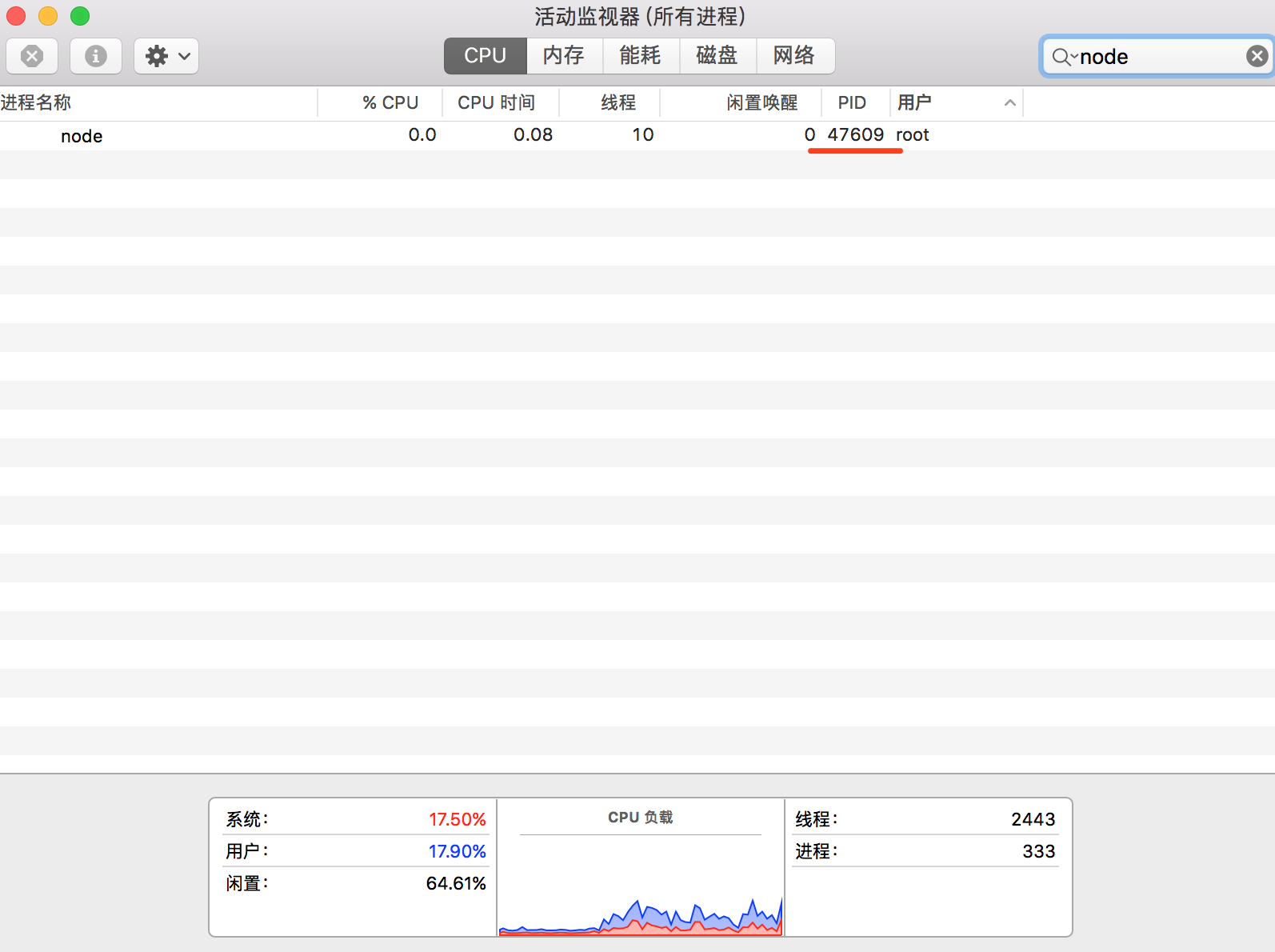
273 |
274 | **守护进程阅读推荐**
275 |
276 | - [守护进程实现 (Node.js版本)](https://cnodejs.org/topic/57adfadf476898b472247eac)
277 | - [守护进程实现 (C语言版本)](https://github.com/ElemeFE/node-interview/blob/master/sections/zh-cn/process.md#%E5%AE%88%E6%8A%A4%E8%BF%9B%E7%A8%8B)
278 |
279 | **守护进程总结**
280 |
281 | 在实际工作中对于守护进程并不陌生,例如 PM2、Egg-Cluster 等,以上只是一个简单的 Demo 对守护进程做了一个说明,在实际工作中对守护进程的健壮性要求还是很高的,例如:进程的异常监听、工作进程管理调度、进程挂掉之后重启等等,这些还需要我们去不断思考。
282 |
283 | ## Q7:实现一个简单的命令行交互程序?
284 |
285 | 采用子进程 child_process 的 spawn 方法,如下所示:
286 |
287 | ```js
288 | const spawn = require('child_process').spawn;
289 | const child = spawn('echo', ["简单的命令行交互"]);
290 | child.stdout.pipe(process.stdout); // 将子进程的输出做为当前进程的输入,打印在控制台
291 | ```
292 |
293 | ```
294 | $ node execfile
295 | 简单的命令行交互
296 | ```
297 |
298 | ## Q8:如何让一个 js 文件在 Linux 下成为一个可执行命令程序?
299 |
300 | 1. 新建 hello.js 文件,头部须加上 ```#!/usr/bin/env node```,表示当前脚本使用 Node.js 进行解析
301 | 2. 赋予文件可执行权限 chmod +x chmod +x /${dir}/hello.js,目录自定义
302 | 3. 在 /usr/local/bin 目录下创建一个软链文件 ```sudo ln -s /${dir}/hello.js /usr/local/bin/hello```,文件名就是我们在终端使用的名字
303 | 4. 终端执行 hello 相当于输入 node hello.js
304 |
305 | ```js
306 | #!/usr/bin/env node
307 |
308 | console.log('hello world!');
309 | ```
310 |
311 | 终端测试
312 |
313 | ```bash
314 | $ hello
315 | hello world!
316 | ```
317 |
318 | ## Q9:进程的当前工作目录是什么? 有什么作用?
319 |
320 | 进程的当前工作目录可以通过 process.cwd() 命令获取,默认为当前启动的目录,如果是创建子进程则继承于父进程的目录,可通过 process.chdir() 命令重置,例如通过 spawn 命令创建的子进程可以指定 cwd 选项设置子进程的工作目录。
321 |
322 | 有什么作用?例如,通过 fs 读取文件,如果设置为相对路径则相对于当前进程启动的目录进行查找,所以,启动目录设置有误的情况下将无法得到正确的结果。还有一种情况程序里引用第三方模块也是根据当前进程启动的目录来进行查找的。
323 |
324 | ```js
325 | // 示例
326 | process.chdir('/Users/may/Documents/test/') // 设置当前进程目录
327 |
328 | console.log(process.cwd()); // 获取当前进程目录
329 | ```
330 |
331 | ## Q10:多进程或多个 Web 服务之间的状态共享问题?
332 |
333 | 多进程模式下各个进程之间是相互独立的,例如用户登陆之后 session 的保存,如果保存在服务进程里,那么如果我有 4 个工作进程,每个进程都要保存一份这是没必要的,假设服务重启了数据也会丢失。多个 Web 服务也是一样的,还会出现我在 A 机器上创建了 Session,当负载均衡分发到 B 机器上之后还需要在创建一份。一般的做法是通过 Redis 或者 数据库来做数据共享。
334 |
--------------------------------------------------------------------------------
/docs/en/process-threads.md:
--------------------------------------------------------------------------------
1 | # Process/Threads
2 |
3 | 通过对以下面试题的分享,助您更好的理解 Node.js 的进程和线程相关知识,关于进程和线程详细介绍,参考另一篇文章 [Node.js 线程和进程](https://www.nodejs.red/#/nodejs/process-threads)
4 |
5 |
6 | ## Q1: What are processes and threads? difference between?
7 |
8 | Threads and processes are a very basic concept of the server. After the concept of processes and threads is introduced in the article [Node.js Advanced Processes and Threads](https://www.imooc.com/article/288006) The actual application of the process and thread in Node.js is given. For this piece of advice that is not very understandable, look at it first.
9 |
10 | ## Q2: What is an orphan process?
11 |
12 | After the parent process creates the child process, the parent process exits, but one or more child processes corresponding to the parent process are still running. These child processes are adopted by the system's init process, and the corresponding process ppid is 1. This is the orphan process
13 |
14 | **For example**
15 |
16 | ```js
17 | // master.js
18 | const fork = require('child_process').fork;
19 | const server = require('net').createServer();
20 | server.listen(3000);
21 | const worker = fork('worker.js');
22 |
23 | worker.send('server', server);
24 | console.log('worker process created, pid: %s ppid: %s', worker.pid, process.pid);
25 | process.exit(0);
26 | ```
27 |
28 | ```js
29 | // worker.js
30 | const http = require('http');
31 | const server = http.createServer((req, res) => {
32 | res.end('I am worker, pid: ' + process.pid + ', ppid: ' + process.ppid);
33 | });
34 |
35 | let worker;
36 | process.on('message', function (message, sendHandle) {
37 | if (message === 'server') {
38 | worker = sendHandle;
39 | worker.on('connection', function(socket) {
40 | server.emit('connection', socket);
41 | });
42 | }
43 | });
44 | ```
45 |
46 | The console tests to output the current worker process pid and the parent process ppid:
47 |
48 | ```bash
49 | $ node master
50 | worker process created, pid: 32971 ppid: 32970
51 | ```
52 |
53 | Since the parent process is exited in master.js, the activity monitor shows only the worker process.
54 |
55 | 
56 |
57 | Verify again, open the console call interface, you can see that the ppid corresponding to the work process 32971 is 1 (for the init process), which has become an orphan process.
58 |
59 | ```bash
60 | $ curl http://127.0.0.1:3000
61 | I am worker, pid: 32971, ppid: 1
62 | ```
63 |
64 | [Source code](https://github.com/Q-Angelo/project-training/tree/master/nodejs/orphan-process)
65 |
66 | ## Q3:creates multiple processes, there is ```app.listen(port)``` in the code. Why is it not reported that the port is occupied when forking?
67 |
68 | 先看下端口被占用的情况
69 |
70 | ```js
71 | // master.js
72 | const fork = require('child_process').fork;
73 | const cpus = require('os').cpus();
74 |
75 | for (let i=0; i {
85 | res.end('I am worker, pid: ' + process.pid + ', ppid: ' + process.ppid);
86 | }).listen(3000);
87 | ```
88 |
89 | [多进程端口占用冲突 示例源码](https://github.com/Q-Angelo/project-training/tree/master/nodejs/port-conflict)
90 |
91 | 以上代码示例,控制台执行 ```node master.js``` 只有一个 worker 可以监听到 3000 端口,其余将会抛出 ``` Error: listen EADDRINUSE :::3000 ``` 错误
92 |
93 | 那么多进程模式下怎么实现多端口监听呢?答案还是有的,通过句柄传递。Node.js v0.5.9 版本之后支持进程间可发送句柄功能,怎么发送?如下所示:
94 |
95 | ```js
96 | /**
97 | * http://nodejs.cn/api/child_process.html#child_process_subprocess_send_message_sendhandle_options_callback
98 | * message
99 | * sendHandle
100 | */
101 | subprocess.send(message, sendHandle)
102 | ```
103 |
104 | 当父子进程之间建立 IPC 通道之后,通过子进程对象的 send 方法发送消息,第二个参数 sendHandle 就是句柄,可以是 TCP套接字、TCP服务器、UDP套接字等,为了解决上面多进程端口占用问题,我们将主进程的 socket 传递到子进程,修改代码,如下所示:
105 |
106 | ```js
107 | //master.js
108 | const fork = require('child_process').fork;
109 | const cpus = require('os').cpus();
110 | const server = require('net').createServer();
111 | server.listen(3000);
112 | process.title = 'node-master'
113 |
114 | for (let i=0; i {
125 | res.end('I am worker, pid: ' + process.pid + ', ppid: ' + process.ppid);
126 | })
127 |
128 | let worker;
129 | process.title = 'node-worker'
130 | process.on('message', function (message, sendHandle) {
131 | if (message === 'server') {
132 | worker = sendHandle;
133 | worker.on('connection', function(socket) {
134 | server.emit('connection', socket);
135 | });
136 | }
137 | });
138 | ```
139 |
140 | [句柄传递解决多进程端口占用冲突问题 示例源码](https://github.com/Q-Angelo/project-training/tree/master/nodejs/handle-pass)
141 |
142 | 验证一番,控制台执行 ```node master.js``` 以下结果是我们预期的,多进程端口占用问题已经被解决了。
143 |
144 | ```bash
145 | $ node master.js
146 | worker process created, pid: 34512 ppid: 34511
147 | worker process created, pid: 34513 ppid: 34511
148 | worker process created, pid: 34514 ppid: 34511
149 | worker process created, pid: 34515 ppid: 34511
150 | ```
151 |
152 | 关于多进程端口占用问题,cnode 上有篇文章也可以看下 [通过源码解析 Node.js 中 cluster 模块的主要功能实现](https://cnodejs.org/topic/56e84480833b7c8a0492e20c)
153 |
154 | ## Q4:What is IPC communication, how to establish IPC communication? What scenarios need to use IPC communication?
155 |
156 | IPC (Inter-process communication) ,即进程间通信技术,由于每个进程创建之后都有自己的独立地址空间,实现 IPC 的目的就是为了进程之间资源共享访问,实现 IPC 的方式有多种:管道、消息队列、信号量、Domain Socket,Node.js 通过 pipe 来实现。
157 |
158 | **看一下 Demo,未使用 IPC 的情况**
159 |
160 | ```js
161 | // pipe.js
162 | const spawn = require('child_process').spawn;
163 | const child = spawn('node', ['worker.js'])
164 | console.log(process.pid, child.pid); // 主进程id3243 子进程3244
165 | ```
166 |
167 | ```js
168 | // worker.js
169 | console.log('I am worker, PID: ', process.pid);
170 | ```
171 |
172 | 控制台执行 ```node pipe.js```,输出主进程id、子进程id,但是子进程 ```worker.js``` 的信息并没有在控制台打印,原因是新创建的子进程有自己的stdio 流。
173 |
174 | ```bash
175 | $ node pipe.js
176 | 41948 41949
177 | ```
178 |
179 | **创建一个父进程和子进程之间传递消息的 IPC 通道实现输出信息**
180 |
181 | 修改 pipe.js 让子进程的 stdio 和当前进程的 stdio 之间建立管道链接,还可以通过 spawn() 方法的 stdio 选项建立 IPC 机制,参考 [options.stdio](http://nodejs.cn/api/child_process.html#child_process_options_stdio)
182 |
183 | ```js
184 | // pipe.js
185 | const spawn = require('child_process').spawn;
186 | const child = spawn('node', ['worker.js'])
187 | child.stdout.pipe(process.stdout);
188 | console.log(process.pid, child.pid);
189 | ```
190 |
191 | [父子进程 IPC 通信 源码示例](https://github.com/Q-Angelo/project-training/tree/master/nodejs/master-worker-ipc)
192 |
193 | 再次验证,控制台执行 ```node pipe.js```,worker.js 的信息也打印了出来
194 |
195 | ```bash
196 | $ 42473 42474
197 | I am worker, PID: 42474
198 | ```
199 |
200 | **关于父进程与子进程是如何通信的?**
201 |
202 | 参考了深入浅出 Node.js 一书,父进程在创建子进程之前会先去创建 IPC 通道并一直监听该通道,之后开始创建子进程并通过环境变量(NODE_CHANNEL_FD)的方式将 IPC 频道的文件描述符传递给子进程,子进程启动时根据传递的文件描述符去链接 IPC 通道,从而建立父子进程之间的通信机制。
203 |
204 |
205 | 
206 |
207 |
208 | 父子进程 IPC 通信交互图
209 |
210 | ## Q5:Node.js single-threaded or multi-threaded? Further questioning why is it single threaded?
211 |
212 | 第一个问题,Node.js 是单线程还是多线程?这个问题是个基本的问题,在以往面试中偶尔提到还是有不知道的,Javascript 是单线程的,但是做为其在服务端运行环境的 Node.js 并非是单线程的。
213 |
214 | 第二个问题,Javascript 为什么是单线程?这个问题需要从浏览器说起,在浏览器环境中对于 DOM 的操作,试想如果多个线程来对同一个 DOM 操作是不是就乱了呢,那也就意味着对于DOM的操作只能是单线程,避免 DOM 渲染冲突。在浏览器环境中 UI 渲染线程和 JS 执行引擎是互斥的,一方在执行时都会导致另一方被挂起,这是由 JS 引擎所决定的。
215 |
216 | ## Q6:about the daemon, what, why, how to write?
217 |
218 | 守护进程运行在后台不受终端的影响,什么意思呢?Node.js 开发的同学们可能熟悉,当我们打开终端执行 ```node app.js``` 开启一个服务进程之后,这个终端就会一直被占用,如果关掉终端,服务就会断掉,即前台运行模式。如果采用守护进程进程方式,这个终端我执行 ```node app.js``` 开启一个服务进程之后,我还可以在这个终端上做些别的事情,且不会相互影响。
219 |
220 | **创建步骤**
221 | 1. 创建子进程
222 | 2. 在子进程中创建新会话(调用系统函数 setsid)
223 | 3. 改变子进程工作目录(如:“/” 或 “/usr/ 等)
224 | 4. 父进程终止
225 |
226 | **Node.js 编写守护进程 Demo 展示**
227 |
228 | index.js 文件里的处理逻辑使用 spawn 创建子进程完成了上面的第一步操作。设置 options.detached 为 true 可以使子进程在父进程退出后继续运行(系统层会调用 setsid 方法),参考 [options_detached](http://nodejs.cn/api/child_process.html#child_process_options_detached),这是第二步操作。options.cwd 指定当前子进程工作目录若不做设置默认继承当前工作目录,这是第三步操作。运行 daemon.unref() 退出父进程,参考 [options.stdio](http://nodejs.cn/api/child_process.html#child_process_options_stdio),这是第四步操作。
229 |
230 | ```js
231 | // index.js
232 | const spawn = require('child_process').spawn;
233 |
234 | function startDaemon() {
235 | const daemon = spawn('node', ['daemon.js'], {
236 | cwd: '/usr',
237 | detached : true,
238 | stdio: 'ignore',
239 | });
240 |
241 | console.log('守护进程开启 父进程 pid: %s, 守护进程 pid: %s', process.pid, daemon.pid);
242 | daemon.unref();
243 | }
244 |
245 | startDaemon()
246 | ```
247 |
248 | daemon.js 文件里处理逻辑开启一个定时器每 10 秒执行一次,使得这个资源不会退出,同时写入日志到子进程当前工作目录下
249 |
250 | ```js
251 | // /usr/daemon.js
252 | const fs = require('fs');
253 | const { Console } = require('console');
254 |
255 | // custom simple logger
256 | const logger = new Console(fs.createWriteStream('./stdout.log'), fs.createWriteStream('./stderr.log'));
257 |
258 | setInterval(function() {
259 | logger.log('daemon pid: ', process.pid, ', ppid: ', process.ppid);
260 | }, 1000 * 10);
261 | ```
262 |
263 | [守护进程实现 Node.js 版本 源码地址](https://github.com/Q-Angelo/project-training/tree/master/nodejs/simple-daemon)
264 |
265 | **运行测试**
266 |
267 | ```bash
268 | $ node index.js
269 | 守护进程开启 父进程 pid: 47608, 守护进程 pid: 47609
270 | ```
271 |
272 | 打开活动监视器查看,目前只有一个进程 47609,这就是我们需要进行守护的进程
273 |
274 | 
275 |
276 | **守护进程阅读推荐**
277 |
278 | - [守护进程实现 (Node.js版本)](https://cnodejs.org/topic/57adfadf476898b472247eac)
279 | - [守护进程实现 (C语言版本)](https://github.com/ElemeFE/node-interview/blob/master/sections/zh-cn/process.md#%E5%AE%88%E6%8A%A4%E8%BF%9B%E7%A8%8B)
280 |
281 | **守护进程总结**
282 |
283 | 在实际工作中对于守护进程并不陌生,例如 PM2、Egg-Cluster 等,以上只是一个简单的 Demo 对守护进程做了一个说明,在实际工作中对守护进程的健壮性要求还是很高的,例如:进程的异常监听、工作进程管理调度、进程挂掉之后重启等等,这些还需要我们去不断思考。
284 |
285 | ## Q7:implements a simple command line interaction program?
286 |
287 | 采用子进程 child_process 的 spawn 方法,如下所示:
288 |
289 | ```js
290 | const spawn = require('child_process').spawn;
291 | const child = spawn('echo', ["简单的命令行交互"]);
292 | child.stdout.pipe(process.stdout); // 将子进程的输出做为当前进程的输入,打印在控制台
293 | ```
294 |
295 | ```
296 | $ node execfile
297 | 简单的命令行交互
298 | ```
299 |
300 | ## Q8:make a js file an executable command program under Linux?
301 |
302 | 1. 新建 hello.js 文件,头部须加上 ```#!/usr/bin/env node```,表示当前脚本使用 Node.js 进行解析
303 | 2. 赋予文件可执行权限 chmod +x chmod +x /${dir}/hello.js,目录自定义
304 | 3. 在 /usr/local/bin 目录下创建一个软链文件 ```sudo ln -s /${dir}/hello.js /usr/local/bin/hello```,文件名就是我们在终端使用的名字
305 | 4. 终端执行 hello 相当于输入 node hello.js
306 |
307 | ```js
308 | #!/usr/bin/env node
309 |
310 | console.log('hello world!');
311 | ```
312 |
313 | 终端测试
314 |
315 | ```bash
316 | $ hello
317 | hello world!
318 | ```
319 |
320 | ## Q9:What is the current working directory of the process? What is the role?
321 |
322 | 进程的当前工作目录可以通过 process.cwd() 命令获取,默认为当前启动的目录,如果是创建子进程则继承于父进程的目录,可通过 process.chdir() 命令重置,例如通过 spawn 命令创建的子进程可以指定 cwd 选项设置子进程的工作目录。
323 |
324 | 有什么作用?例如,通过 fs 读取文件,如果设置为相对路径则相对于当前进程启动的目录进行查找,所以,启动目录设置有误的情况下将无法得到正确的结果。还有一种情况程序里引用第三方模块也是根据当前进程启动的目录来进行查找的。
325 |
326 | ```js
327 | // 示例
328 | process.chdir('/Users/may/Documents/test/') // 设置当前进程目录
329 |
330 | console.log(process.cwd()); // 获取当前进程目录
331 | ```
332 |
333 | ## Q10:State sharing issues between multiple processes or multiple web services?
334 |
335 | 多进程模式下各个进程之间是相互独立的,例如用户登陆之后 session 的保存,如果保存在服务进程里,那么如果我有 4 个工作进程,每个进程都要保存一份这是没必要的,假设服务重启了数据也会丢失。多个 Web 服务也是一样的,还会出现我在 A 机器上创建了 Session,当负载均衡分发到 B 机器上之后还需要在创建一份。一般的做法是通过 Redis 或者 数据库来做数据共享。
336 |
--------------------------------------------------------------------------------
/docs/en/common.md:
--------------------------------------------------------------------------------
1 |
2 | # Common
3 |
4 | ## Q1: What is Node.js?
5 |
6 | Node.js is a server side JavaScript platform which is built on Google Chrome’s JavaScript V8 engine. It is an open source and cross platform application to develop server side and networking application. Anyone can develop the Node.js application by written code in JavaScript and it can be run on Microsoft Windows, Linux or OS X.
7 |
8 | Node.js is not a new language and also it is not just framework built on JavaScript. It is built on Chrome's JavaScript Runtime, so the code is written, execute very similarly to browser.
9 |
10 | **Features of Node.js**
11 |
12 | Following are some important feature of Node.js
13 |
14 | - **Fast in Code execution**: It is very fast in code execution.
15 |
16 | - **Highly scalable**: Node.js uses single thread model for event looping. Events are responded to the server without blocking other operation. This makes the Node.js highly scalable. Traditional servers Create limited threads to handle request and Node.js Creates single thread that provide service to much larger number of requests.
17 |
18 | - **Event Driven and Asynchronous**: All API of Node.js is asynchronous. It means that server is moving the next API call without wait for returning data of previous request.
19 |
20 | - **No Buffering**: Node.js is never buffering any data.
21 |
22 | Many of us are confused about Node.js. It is not a web server like Apache. Node.js is providing new way to execute our code. It is JavaScript runtime. Node.js is provides facility to create HTTP server and we can host our application on same.
23 |
24 | Source: [Introduction To Node.js](https://www.c-sharpcorner.com/article/introduction-to-node-js/)
25 |
26 | ## Q2: How can I install Node.js?
27 |
28 | We can download Node.js software from the website [https://nodejs.org/en/](https://nodejs.org/en/).
29 |
30 | **nvm install**
31 |
32 | It is recommended that you use the nvm tool to install, which is convenient for later upgrade management. Here are the installation steps:
33 |
34 | * nvm installation:wget -qO- https://raw.githubusercontent.com/creationix/nvm/v0.33.2/install.sh | bash
35 | * view all Node.js versions:nvm ls-remote
36 | * view local Node.js versions:nvm ls
37 | * Node.js installation:nvm install v6.9.5
38 | * set the system default Node.js version:nvm alias default v6.9.5
39 |
40 | **Verifying Node.js Installation**
41 |
42 | After successful installation of Node.js, you can check it’s working.
43 |
44 | Open Command Prompt and write the following command:
45 |
46 | ```node
47 | $ node
48 | ```
49 |
50 | Next, at the Node.js prompt will appear. After the prompt is visible, write the following command:
51 |
52 | console.log(“NeErAj KuMaR”);
53 |
54 | Press Enter
55 |
56 | 
57 |
58 | ## Q3: How can you listen on port 80 with Node?
59 |
60 | Trick question! You should not try to listen with Node on port 80 (in Unix-like systems) - to do so you would need superuser rights, but it is not a good idea to run your application with it.
61 |
62 | Still, if you want to have your Node.js application listen on port 80, here is what you can do. Run the application on any port above 1024, then put a reverse proxy like nginx in front of it.
63 |
64 | ## Q4: What is an error-first callback?
65 |
66 | Error-first callbacks are used to pass errors and data as well. You have to pass the error as the first parameter, and it has to be checked to see if something went wrong. Additional arguments are used to pass data.
67 |
68 | ```js
69 | fs.readFile(filePath, function(err, data) {
70 | if (err) {
71 | // handle the error
72 | return console.log(err)
73 | }
74 |
75 | // return the data object
76 | return data;
77 | })
78 | ```
79 |
80 | ## Q5: Can you create Http Server in Node.js, explain with code?
81 |
82 | Yes, creating an Http Server in Node.js is very simple, we can do it through the HTTP module.
83 |
84 | ```js
85 | const http = require('http');
86 | const server = http.createServer((request, response) => {
87 | if (request.url === '/hello') {
88 | response.writeHead(200, {
89 | 'Content-Type': 'text/plain',
90 | });
91 | response.end('hello world!');
92 | } else {
93 | response.end('OK!');
94 | }
95 | });
96 |
97 | server.listen(3000, '127.0.0.1', () => {
98 | console.log('service is listening at http://127.0.0.1:3000');
99 | });
100 | ```
101 |
102 | ## Q6: What are the main components of Node.js?
103 |
104 | The main components of NodeJs are APIs, a V8 Engine and Libuv.
105 |
106 | **Libuv Library**
107 |
108 | Libuv is a multi-platform support library for asynchronous I/O. It was developed for Node.js using C and C++. But it's also used by Mozilla's Rust language, Luvit, Julia, pyuv and others.
109 |
110 | This libuv library is the main part for I/O related operations like reading files and interacting with the OS.
111 |
112 | You can check it out on GitHub for more information about [the libuv library](https://github.com/nikhilm/uvbook).
113 |
114 | **V8 Engine**
115 |
116 | From Google: “V8 is Google's open-source high-performance JavaScript engine, written in C++ and used in Google Chrome, the open source browser from Google. It implements ECMAScript as specified in ECMA-262, 3rd edition and runs on Windows XP and Vista, Mac OS X 10.5+, and Linux systems that use IA-32, ARM or MIPS processors. V8 can run standalone, or can be embedded into any C++ application”.
117 |
118 | If you are interested in learning more about the V8 engine, please visit [here](https://v8.dev/).
119 |
120 | **APIs (NodeJS Core Libs)**
121 |
122 | The NodeJs APIs are nothing but functions to do something upon your request. By default the NodeJS apis are asynchronous in nature but still you can use NodeJS APIs synchronously.
123 |
124 | For example, the fs module could be used either synchronously or asynchronously.
125 |
126 | ```js
127 | var fs = require('fs');
128 | fs.readFile('/files/help.txt', function(err, buf) {
129 | // use fs.readFileSync() for sync operation. console.log(buf.toString());
130 | });
131 | ```
132 |
133 | Source: [Introduction to NodeJS, A SSJS: Part I - Components Explained](https://www.c-sharpcorner.com/UploadFile/dbd951/introduction-to-nodejs-a-ssjs-part-i/)
134 |
135 | ## Q7: What is “callback hell” and how can it be avoided?
136 |
137 | “Callback hell” refers to heavily nested callbacks that have become unweildy or unreadable.
138 |
139 | An example of heavily nested code is below:
140 |
141 | ```js
142 | query("SELECT clientId FROM clients WHERE clientName='picanteverde';", function(id){
143 | query(`SELECT * FROM transactions WHERE clientId=${id}`, function(transactions){
144 | transactions.each((transac) => {
145 | query(`UPDATE transactions SET value = ${transac.value*0.1} WHERE id=${transac.id}`, (error) => {
146 | if(!error){
147 | console.log("success!!");
148 | }else{
149 | console.log("error");
150 | }
151 | });
152 | });
153 | });
154 | });
155 | ```
156 |
157 | At one point, the primary method to fix callback hell was modularization. The callbacks are broken out into independent functions which can be called with some parameters. So the first level of improvement might be:
158 |
159 | ```js
160 | const logError = (error) => {
161 | if(!error){
162 | console.log("success!!");
163 | }else{
164 | console.log("error");
165 | }
166 | },
167 | updateTransaction = (t) => {
168 | query(`UPDATE transactions SET value = ${t.value*0.1} WHERE id=${t.id}`, logError);
169 | },
170 | handleTransactions = (transactions) => {
171 | transactions.each(updateTransaction);
172 | },
173 | handleClient = (id) => {
174 | query(`SELECT * FROM transactions WHERE clientId=${id}`, handleTransactions);
175 | };
176 |
177 | query("SELECT clientId FROM clients WHERE clientName='picanteverde';",handleClient);
178 | ```
179 |
180 | Even though this code is much easier to read, and we created some functions that we can even reuse later, in some cases it may be appropriate to use a more robust solution in the form of promises. Promises allow additional desirable behavior such as error propagation and chaining. Node.js includes native support for them.
181 |
182 | Additionally, a more supercharged solution to callback hell was provided by generators, as these can resolve execution dependency between different callbacks. However, generators are much more advanced and it might be overkill to use them for this purpose. To read more about generators you can start with [this post]((http://strongloop.com/strongblog/how-to-generators-node-js-yield-use-cases/)).
183 |
184 | However, these approaches are pretty dated at this point. The current solution is to use async/await—an approach that leverages Promises and finally makes it easy to flatten the so-called “pyramid of doom” shown above.
185 |
186 | Source: [8 Essential Node.js Interview Questions](https://www.toptal.com/nodejs/interview-questions)
187 |
188 | ## Q8: What are the event-Driven Programming of Node.js?
189 |
190 | Event-Driven Programming is the term where the flow of the code is determined by events (click, load and so on). It's one of the basic milestones of today's popular programming languages, such as C#, Java and many more; I won't dwell on all of them here. In Node.js and moreover in any kind of JavaScript project, you'll be using or have used event-driven processes. Whether it's a page onload or a button click event, this is something you have done, whether you knew it or not.
191 |
192 | Let's make an example to the classic event-driven process and how its done in NodeJS:
193 |
194 | result = getJSONfromDestination();
195 | binddata(result);
196 | The operation above requires a blocking I/O process (single-threaded operation that waits for the previously working synchronous code).
197 |
198 | Now let's have a look at how we do the asynchronous way (a non-blocking I/O process).
199 |
200 | json_finished = function(result){
201 | binddata(result);
202 | }
203 |
204 | getJSONfromDestination(jsonfinished);
205 | As you can see, this is a non-blocking sample, because json_finished does not work first as you can imagine.
206 | It starts working when you call the getJSONfromDestination method and send param as the function to json_finished.
207 |
208 | Source: [NodeJS Series #6: Event - Driven Programming](https://www.c-sharpcorner.com/UploadFile/iersoy/nodejs-series-sharp6-event-driven-programming/)
209 |
210 | ## Q9: What is NPM? What is the need of NPM in Node.js?
211 |
212 | NPM stands for Node.js Package Management. It comes with Node.js platform and allows us to install various packages for Node.js. This package manages and supports various commands to install and remove the modules. Here one important note is we require either package.json file or the node_modules folder to install modules locally.
213 |
214 | One of the best things about npm is that it locally stores all dependencies. For example, if module X uses module A version 1.0, and module Y uses module A version 1.5, then both X and Y will have their own local copies of module A.
215 |
216 | ```js
217 | // Module X
218 | {
219 | "name": "X",
220 | "dependencies": {
221 | "A": "^1.0"
222 | }
223 | }
224 | ```
225 |
226 | ```js
227 | // Module Y
228 | {
229 | "name": "Y",
230 | "dependencies": {
231 | "A": "^1.5"
232 | }
233 | }
234 | ```
235 |
236 | **Need of npm package**
237 |
238 | When we are developing some Node.js projects, we may encounter some places that need NPM, such as linking Redis, MongoDB, or sending a request Request. These modules can make us more focused on business development, of course, sometimes you will have something special. The need, at this time, may need to encapsulate an NPM module to achieve reuse.
239 |
240 | Source: [How to Create Nodejs Module and Publish Over to Npm](https://www.c-sharpcorner.com/UploadFile/g_arora/how-to-create-nodejs-module-and-publish-over-to-npm/)
241 |
242 | ## Q10: What does Node.js do? 10 application scenarios for Node.js?
243 |
244 | Web Server Backend (Java, PHP do node. JS can Do)、Command-line tools,Now count the 10 scenarios of Node.js:
245 |
246 | 1. Web Development: Express + EJS + MongoDB(mongoose)/Mysql
247 | 2. REST Development: Restify
248 | 3. Web chat Room (IM): Express + Socket.io
249 | 4. Web Crawler: Cheerio/request
250 | 5. Web Blog: Hexo
251 | 6. Web Forum: Nodeclub
252 | 7. Web Slideshow: Cleaver
253 | 8. Front-end package management platform: bower.js
254 | 9. OAuth Certification: Passport
255 | 10. Timer Task Tool: Later
256 |
257 | Source: [What does node. js do? 10 application scenarios for node. js](https://topic.alibabacloud.com/a/what-does-node-js-do-10-application-scenarios-for-node-js_4_87_30002440.html)
258 |
259 |
260 | ## Q11: What is LTS releases of Node.js why should you care?
261 |
262 | An LTS(Long Term Support) version of Node.js receives all the critical bug fixes, security updates and performance improvements.
263 |
264 | LTS versions of Node.js are supported for at least 18 months and are indicated by even version numbers (e.g. 4, 6, 8). They’re best for production since the LTS release line is focussed on stability and security, whereas the Current release line has a shorter lifespan and more frequent updates to the code. Changes to LTS versions are limited to bug fixes for stability, security updates, possible npm updates, documentation updates and certain performance improvements that can be demonstrated to not break existing applications.
265 |
266 | Source: [github.com/i0natan/nodebestpractices](github.com/i0natan/nodebestpractices)
--------------------------------------------------------------------------------