├── scripts
├── bin
│ ├── test-perf
│ ├── pass-list
│ ├── root_clean
│ ├── clean
│ ├── benchmark-zsh
│ ├── export-gpg
│ ├── clean_docker
│ ├── command_exists
│ ├── gpg-remove-cache
│ ├── import-gpg
│ ├── gpg-restart
│ ├── clean_nodejs
│ ├── toggle-nvim-lua
│ ├── curltime
│ ├── export-brew
│ ├── media-convert
│ ├── corstest
│ ├── sp-lyrics
│ └── npmsearch
├── logs
│ └── my-arch-pkg
├── docs
│ └── commit-types
└── README.md
├── docs
├── demo.gif
├── current.png
├── sample-linux.png
├── sample-mac.png
├── login.txt
├── password-manager.png
├── sample-linux-menu.png
├── sample-mac-fetch.png
├── sample-mac-tmux.png
└── sample-linux-clipboard.png
├── .config
├── polybar##os.Linux
│ ├── fonts
│ ├── panel
│ ├── scripts
│ ├── wallpaper
│ ├── launch.sh
│ └── config.ini
├── yadm
│ ├── config
│ ├── encrypt
│ └── bootstrap
├── zsh
│ ├── Linux.zsh
│ ├── golang.zsh
│ ├── Darwin.zsh
│ └── zshrc.zsh
├── rofi##os.Linux
│ ├── config.rasi
│ ├── slate.rasi
│ └── onedark.rasi
├── kitty
│ └── kitty.conf
└── i3##os.Linux
│ ├── spotify_blocklet
│ ├── config.bak
│ └── config
├── Pictures
└── bg0.jpeg
├── .local
└── share
│ └── yadm
│ └── archive
├── .ssh
└── config
├── .teamocil
└── evil.yml
├── .gitmodules
├── .github
└── workflows
│ └── ci.yml
├── README.ENGLISH.md
└── README.md
/scripts/bin/test-perf:
--------------------------------------------------------------------------------
1 | #!/usr/bin/env sh
2 |
--------------------------------------------------------------------------------
/scripts/bin/pass-list:
--------------------------------------------------------------------------------
1 | #!/bin/env bash
2 |
3 |
4 | pass list
5 |
--------------------------------------------------------------------------------
/docs/demo.gif:
--------------------------------------------------------------------------------
https://raw.githubusercontent.com/r17x/.dotifiles/HEAD/docs/demo.gif
--------------------------------------------------------------------------------
/.config/polybar##os.Linux/fonts:
--------------------------------------------------------------------------------
1 | /home/r177/.config/polybar-themes/polybar-10/fonts
--------------------------------------------------------------------------------
/.config/polybar##os.Linux/panel:
--------------------------------------------------------------------------------
1 | /home/r177/.config/polybar-themes/polybar-10/panel
--------------------------------------------------------------------------------
/docs/current.png:
--------------------------------------------------------------------------------
https://raw.githubusercontent.com/r17x/.dotifiles/HEAD/docs/current.png
--------------------------------------------------------------------------------
/.config/polybar##os.Linux/scripts:
--------------------------------------------------------------------------------
1 | /home/r177/.config/polybar-themes/polybar-10/scripts
--------------------------------------------------------------------------------
/Pictures/bg0.jpeg:
--------------------------------------------------------------------------------
https://raw.githubusercontent.com/r17x/.dotifiles/HEAD/Pictures/bg0.jpeg
--------------------------------------------------------------------------------
/.config/polybar##os.Linux/wallpaper:
--------------------------------------------------------------------------------
1 | /home/r177/.config/polybar-themes/polybar-10/wallpaper
--------------------------------------------------------------------------------
/.config/yadm/config:
--------------------------------------------------------------------------------
1 | [yadm]
2 | gpg-recipient = B0B63B776767DFAA669D06715CA1E57AFBF76F90
3 |
--------------------------------------------------------------------------------
/docs/sample-linux.png:
--------------------------------------------------------------------------------
https://raw.githubusercontent.com/r17x/.dotifiles/HEAD/docs/sample-linux.png
--------------------------------------------------------------------------------
/docs/sample-mac.png:
--------------------------------------------------------------------------------
https://raw.githubusercontent.com/r17x/.dotifiles/HEAD/docs/sample-mac.png
--------------------------------------------------------------------------------
/.local/share/yadm/archive:
--------------------------------------------------------------------------------
https://raw.githubusercontent.com/r17x/.dotifiles/HEAD/.local/share/yadm/archive
--------------------------------------------------------------------------------
/docs/login.txt:
--------------------------------------------------------------------------------
1 | @startuml:
2 |
3 | Rin -> (web/app):login (with/out OTP or 2FA)
4 |
5 | @enduml
6 |
--------------------------------------------------------------------------------
/docs/password-manager.png:
--------------------------------------------------------------------------------
https://raw.githubusercontent.com/r17x/.dotifiles/HEAD/docs/password-manager.png
--------------------------------------------------------------------------------
/docs/sample-linux-menu.png:
--------------------------------------------------------------------------------
https://raw.githubusercontent.com/r17x/.dotifiles/HEAD/docs/sample-linux-menu.png
--------------------------------------------------------------------------------
/docs/sample-mac-fetch.png:
--------------------------------------------------------------------------------
https://raw.githubusercontent.com/r17x/.dotifiles/HEAD/docs/sample-mac-fetch.png
--------------------------------------------------------------------------------
/docs/sample-mac-tmux.png:
--------------------------------------------------------------------------------
https://raw.githubusercontent.com/r17x/.dotifiles/HEAD/docs/sample-mac-tmux.png
--------------------------------------------------------------------------------
/.ssh/config:
--------------------------------------------------------------------------------
1 | Host github.com
2 | Hostname ssh.github.com
3 | Port 443
4 |
5 | IdentityFile ~/.ssh/id_rsa
6 |
--------------------------------------------------------------------------------
/docs/sample-linux-clipboard.png:
--------------------------------------------------------------------------------
https://raw.githubusercontent.com/r17x/.dotifiles/HEAD/docs/sample-linux-clipboard.png
--------------------------------------------------------------------------------
/.config/zsh/Linux.zsh:
--------------------------------------------------------------------------------
1 | ### FLAG ###
2 | # define ARCHFLAGS when using `Linux`
3 | export ARCHFLAGS="-arch x86_64"
4 | ### FLAG ###
5 |
--------------------------------------------------------------------------------
/scripts/bin/root_clean:
--------------------------------------------------------------------------------
1 | #!/bin/env bash
2 |
3 | ./command_exists notify-send \
4 | "[START]... docker clean"
5 | ./clean_docker
6 |
--------------------------------------------------------------------------------
/.config/yadm/encrypt:
--------------------------------------------------------------------------------
1 | Documents/*
2 | .rogu/gcs-key.json
3 | .ssh/id_rsa*
4 | .wakatime.cfg
5 | .zsh_history
6 | .config/glab-cli/config.yml
7 |
--------------------------------------------------------------------------------
/.teamocil/evil.yml:
--------------------------------------------------------------------------------
1 | windows:
2 | - name: evil
3 | root: ~/evl
4 | layout: even-horizontal
5 | panes:
6 | - vim
7 | - ls -l
8 |
--------------------------------------------------------------------------------
/scripts/bin/clean:
--------------------------------------------------------------------------------
1 | #!/bin/env bash
2 |
3 | ./command_exists notify-send \
4 | "[START]... clean nodejs (include node_modules)"
5 | ./clean_nodejs
6 |
--------------------------------------------------------------------------------
/.config/zsh/golang.zsh:
--------------------------------------------------------------------------------
1 | # golang
2 | export GOPATH=$HOME/go
3 | export GOROOT=/usr/local/opt/go/libexec
4 | export PATH="$PATH:${GOPATH}/bin:${GOROOT}/bin"
5 |
--------------------------------------------------------------------------------
/scripts/bin/benchmark-zsh:
--------------------------------------------------------------------------------
1 | #!/bin/bash
2 |
3 | echo "Benchmark your zsh configuration ~/.zshrc"
4 |
5 | for i in $(seq 1 10); do /usr/bin/time zsh -i -c exit; done
6 |
--------------------------------------------------------------------------------
/scripts/bin/export-gpg:
--------------------------------------------------------------------------------
1 | #!/bin/bash
2 |
3 | rm -f $(pwd)/$1.{pub,sec}
4 | gpg --output $(pwd)/$1.pub --export $1
5 | gpg --export-secret-key $1 | paperkey --output $(pwd)/$1.sec
6 |
--------------------------------------------------------------------------------
/scripts/bin/clean_docker:
--------------------------------------------------------------------------------
1 | #!/bin/env bash
2 |
3 | sudo systemctl start docker
4 | echo "y" | docker system prune
5 | ./command_exists "[Finish] clean docker"
6 | sudo systemctl stop docker
7 |
--------------------------------------------------------------------------------
/scripts/bin/command_exists:
--------------------------------------------------------------------------------
1 | #!/bin/env bash
2 |
3 | # ref {command_exists} {https://stackoverflow.com/a/592635}
4 | __command_exists () {
5 | hash "$1" &> /dev/null ;
6 | }
7 |
8 | __command_exists $1
9 |
--------------------------------------------------------------------------------
/scripts/bin/gpg-remove-cache:
--------------------------------------------------------------------------------
1 | #!/bin/bash
2 |
3 | rm ~/.gnupg/S.* # remove cache
4 | gpg-connect-agent reloadagent /bye # restart gpg agent
5 | export GPG_TTY=$(tty) # prompt for password
6 |
--------------------------------------------------------------------------------
/scripts/bin/import-gpg:
--------------------------------------------------------------------------------
1 | #!/bin/bash
2 |
3 | test paperkey \
4 | && test -f $(pwd)/"$1.pub" \
5 | && test -f $(pwd)/"$1.sec" \
6 | && paperkey --pubring $(pwd)/$1.pub --secrets $(pwd)/$1.sec | gpg --batch --import
7 |
--------------------------------------------------------------------------------
/.config/rofi##os.Linux/config.rasi:
--------------------------------------------------------------------------------
1 | configuration {
2 | modi: "window,drun,ssh,combi";
3 | theme: "onedark";
4 | font: "hack 10";
5 | icon-theme: "slate";
6 | show-icons: true;
7 | combi-modi: "window,drun,ssh";
8 | }
9 |
--------------------------------------------------------------------------------
/.config/zsh/Darwin.zsh:
--------------------------------------------------------------------------------
1 | eval $(/opt/homebrew/bin/brew shellenv)
2 | test -e "${HOME}/.iterm2_shell_integration.zsh" \
3 | && source "${HOME}/.iterm2_shell_integration.zsh"
4 | export PATH="/opt/homebrew/opt/luajit-openresty/bin:$PATH"
5 |
--------------------------------------------------------------------------------
/scripts/bin/gpg-restart:
--------------------------------------------------------------------------------
1 | #!/bin/bash
2 |
3 | gpgconf --kill gpg-agent
4 | killall gpg-agent
5 | gpg-agent --homedir "${GNUPGHOME:-$HOME/.gnupg}" \
6 | --daemon \
7 | --pinentry-program /Users/r17/.nix-profile/Applications/pinentry-mac.app/Contents/MacOS/pinentry-mac
8 |
--------------------------------------------------------------------------------
/.config/kitty/kitty.conf:
--------------------------------------------------------------------------------
1 | font_family Fira Code
2 | bold_font Fira Code
3 | italic_font Menlo
4 | bold_italic_font Menlo
5 | font_size 7.5
6 | tab_bar_style hidden
7 | background_opacity 0.95
8 | background #121212
9 | border 0
10 |
--------------------------------------------------------------------------------
/.gitmodules:
--------------------------------------------------------------------------------
1 | [submodule "fzf-scripts"]
2 | path = fzf-scripts
3 | url = git@github.com:DanielFGray/fzf-scripts.git
4 | [submodule ".tmux"]
5 | path = .tmux
6 | url = git@github.com:gpakosz/.tmux.git
7 | [submodule ".config/tmux-plugins"]
8 | path = .config/tmux-plugins
9 | url = git@github.com:tmux-plugins/tpm.git
10 |
--------------------------------------------------------------------------------
/scripts/bin/clean_nodejs:
--------------------------------------------------------------------------------
1 | #!/usr/bin/env bash
2 |
3 | `rm -rf $HOME/{w0,me,evl}/**/node_modules`
4 | command_exists notify-send && notify-send \
5 | "[CLEAN]: remove ALL node_modules in {w0,me,evl}"
6 | command_exists osascript && osascript -e \
7 | 'display notification "hello world!" with title "Clean" subtitle "clean node_modules in ~/{w0,me,evl}"'
8 |
--------------------------------------------------------------------------------
/.config/polybar##os.Linux/launch.sh:
--------------------------------------------------------------------------------
1 | #!/usr/bin/zsh
2 |
3 | ## Add this to your wm startup file.
4 |
5 | # Terminate already running bar instances
6 | killall -q polybar
7 |
8 | # Wait until the processes have been shut down
9 | while pgrep -u $UID -x polybar >/dev/null; do sleep 1; done
10 |
11 | # Launch bar1 and bar2
12 | polybar main -c ~/.config/polybar/config.ini &
13 |
--------------------------------------------------------------------------------
/scripts/logs/my-arch-pkg:
--------------------------------------------------------------------------------
1 | #!/bin/env bash
2 |
3 | ALL_ARCH_PKG_LOG=$HOME/.all-my-arch-packages.log
4 | pacman -Qe > $ALL_ARCH_PKG_LOG
5 | yadm add $ALL_ARCH_PKG_LOG
6 | yadm commit -m "chore(arch): update all pkg log \n\nNote: task powered by fcron"
7 | yadm push origin master
8 | ./command_exists notify-send && notify-send \
9 | "[PUSHED]: ALL Arch Package installed in this machine"
10 |
--------------------------------------------------------------------------------
/scripts/bin/toggle-nvim-lua:
--------------------------------------------------------------------------------
1 | #!/usr/bin/env bash
2 |
3 |
4 | FILE="~/.config/nvim/init.lua"
5 |
6 | if [[ -f ~/.config/nvim/init.lua ]]; then
7 | mv ~/.config/nvim/__init.vim ~/.config/nvim/init.vim
8 | mv ~/.config/nvim/init.lua ~/.config/nvim/__init.lua
9 | else
10 | echo 11
11 | mv ~/.config/nvim/init.vim ~/.config/nvim/__init.vim
12 | mv ~/.config/nvim/__init.lua ~/.config/nvim/init.lua
13 | fi
14 |
--------------------------------------------------------------------------------
/.config/i3##os.Linux/spotify_blocklet:
--------------------------------------------------------------------------------
1 | #!/bin/bash
2 | # see https://pavelmakhov.com/2018/01/spotify-i3/
3 | case $BLOCK_BUTTON in
4 | 1) sp play ;; # left click
5 | 4) sp next ;; # scroll up
6 | 5) sp prev ;; # scroll down
7 | esac
8 |
9 | if sp status | grep 'Paused' > /dev/null; then
10 | printf '\xef\x81\x8c ' # fa-pause
11 | else
12 | printf '\xef\x81\x8b ' # fa-play
13 | fi
14 | sp current-oneline
15 |
--------------------------------------------------------------------------------
/scripts/bin/curltime:
--------------------------------------------------------------------------------
1 | #!/bin/bash
2 | # see: https://stackoverflow.com/a/22625150
3 | curl -w @- -o /dev/null -s "$@" <<'EOF'
4 | time_namelookup: %{time_namelookup}\n
5 | time_connect: %{time_connect}\n
6 | time_appconnect: %{time_appconnect}\n
7 | time_pretransfer: %{time_pretransfer}\n
8 | time_redirect: %{time_redirect}\n
9 | time_starttransfer: %{time_starttransfer}\n
10 | ----------\n
11 | time_total: %{time_total}\n
12 | EOF
13 |
--------------------------------------------------------------------------------
/scripts/bin/export-brew:
--------------------------------------------------------------------------------
1 | #!/usr/bin/env bash
2 |
3 | command -v brew &>/dev/null || {
4 | echo "Error [1]: brew not installed in your sysyem"
5 | exit 1
6 | }
7 |
8 | BREW_DUMP="$HOME/.Brewfile"
9 | BREW_DUMP_BACKUPS="$HOME/.Brewfile_bak"
10 | BREW_DUMP_BACKUP="$BREW_DUMP_BACKUPS/$(date +%F).Brewfile"
11 |
12 | if [[ -f "$BREW_DUMP" ]]; then
13 | command mkdir -p "$BREW_DUMP_BACKUPS" && cp "$BREW_DUMP" "$BREW_DUMP_BACKUP"
14 | if [[ -f "$BREW_DUMP_BACKUP" ]]; then
15 | rm -f "$BREW_DUMP" && brew bundle dump --file="$BREW_DUMP"
16 | fi
17 | fi
18 |
19 | # sync with git
20 |
21 | yadm add $BREW_DUMP &&
22 | yadm commit -m "chore(OSX): update brewfile" &&
23 | yadm push origin master
24 |
--------------------------------------------------------------------------------
/scripts/docs/commit-types:
--------------------------------------------------------------------------------
1 | feat - A new feature
2 | fix - A bug fix
3 | docs - Documentation only changes
4 | style - Changes that do not affect the meaning of the code (white-space, formatting, missing semi-colons, etc)
5 | refactor - A code change that neither fixes a bug nor adds a feature
6 | perf - A code change that improves performance
7 | test - Adding missing tests or correcting existing tests
8 | build - Changes that affect the build system or external dependencies (example scopes: gulp, broccoli, npm)
9 | ci - Changes to our CI configuration files and scripts (example scopes: Travis, Circle, BrowserStack, SauceLabs)
10 | chore - Other changes that don't modify src or test files
11 | revert - Reverts a previous commit
12 |
--------------------------------------------------------------------------------
/.config/rofi##os.Linux/slate.rasi:
--------------------------------------------------------------------------------
1 | * {
2 | background-color: #282C33;
3 | border-color: #2e343f;
4 | text-color: #8ca0aa;
5 | spacing: 0;
6 | width: 512px;
7 | }
8 |
9 | inputbar {
10 | border: 0 0 1px 0;
11 | children: [prompt,entry];
12 | }
13 |
14 | prompt {
15 | padding: 16px;
16 | border: 0 1px 0 0;
17 | }
18 |
19 | textbox {
20 | background-color: #2e343f;
21 | border: 0 0 1px 0;
22 | border-color: #282C33;
23 | padding: 8px 16px;
24 | }
25 |
26 | entry {
27 | padding: 16px;
28 | }
29 |
30 | listview {
31 | cycle: false;
32 | margin: 0 0 -1px 0;
33 | scrollbar: false;
34 | }
35 |
36 | element {
37 | border: 0 0 1px 0;
38 | padding: 16px;
39 | }
40 |
41 | element selected {
42 | background-color: #2e343f;
43 | }
--------------------------------------------------------------------------------
/.github/workflows/ci.yml:
--------------------------------------------------------------------------------
1 | name: CI
2 |
3 | on: [pull_request]
4 |
5 | jobs:
6 | linux:
7 | name: bootstrap test linux
8 | runs-on: ubuntu-latest
9 | steps:
10 | - name: Git checkout
11 | uses: actions/checkout@v2
12 | - run: sudo apt-get install yadm
13 | - run: yadm clone https://github.com/ri7nz/.dotifiles
14 | - run: yadm checkout ${{ github.head_ref }}
15 | - run: yadm bootstrap
16 | mac:
17 | name: bootstrap test mac
18 | runs-on: macos-latest
19 | steps:
20 | - name: Git checkout
21 | uses: actions/checkout@v2
22 | - run: brew install yadm
23 | - run: yadm clone https://github.com/ri7nz/.dotifiles
24 | - run: yadm checkout ${{ github.head_ref }}
25 | - run: yadm bootstrap
26 |
--------------------------------------------------------------------------------
/scripts/bin/media-convert:
--------------------------------------------------------------------------------
1 | #!/bin/bash
2 |
3 | # MP4 - 1080p
4 | # ffmpeg -i input.mov -preset slow -codec:a libfdk_aac -b:a 128k -codec:v libx264 -pix_fmt yuv420p -b:v 4500k -minrate 4500k -maxrate 9000k -bufsize 9000k -vf scale=-1:1080 output.mp4
5 |
6 | # MP4 - 720p
7 | # ffmpeg -i input.mov -preset slow -codec:a libfdk_aac -b:a 128k -codec:v libx264 -pix_fmt yuv420p -b:v 2500k -minrate 1500k -maxrate 4000k -bufsize 5000k -vf scale=-1:720 output.mp4
8 |
9 | # MP4 - 480p
10 | # ffmpeg -i input.mov -preset slow -codec:a libfdk_aac -b:a 128k -codec:v libx264 -pix_fmt yuv420p -b:v 1000k -minrate 500k -maxrate 2000k -bufsize 2000k -vf scale=854:480 output.mp4
11 |
12 | # MP4 - 360p
13 | # ffmpeg -i input.mov -preset slow -codec:a libfdk_aac -b:a 128k -codec:v libx264 -pix_fmt yuv420p -b:v 750k -minrate 400k -maxrate 1000k -bufsize 1500k -vf scale=-1:360 output.mp4
14 |
--------------------------------------------------------------------------------
/scripts/bin/corstest:
--------------------------------------------------------------------------------
1 | #!/bin/bash
2 | # WF 2018-09-20
3 | # https://stackoverflow.com/a/47609921/1497139
4 |
5 | #ansi colors
6 | #http://www.csc.uvic.ca/~sae/seng265/fall04/tips/s265s047-tips/bash-using-colors.html
7 | blue='\033[0;34m'
8 | red='\033[0;31m'
9 | green='\033[0;32m' # '\e[1;32m' is too bright for white bg.
10 | endColor='\033[0m'
11 |
12 | #
13 | # a colored message
14 | # params:
15 | # 1: l_color - the color of the message
16 | # 2: l_msg - the message to display
17 | #
18 | color_msg() {
19 | local l_color="$1"
20 | local l_msg="$2"
21 | echo -e "${l_color}$l_msg${endColor}"
22 | }
23 |
24 |
25 | #
26 | # show the usage
27 | #
28 | usage() {
29 | echo "usage: [-v] $0 url"
30 | echo " -v |--verbose: show curl result"
31 | exit 1
32 | }
33 |
34 | if [ $# -lt 1 ]
35 | then
36 | usage
37 | fi
38 |
39 | # commandline option
40 | while [ "$1" != "" ]
41 | do
42 | url=$1
43 | shift
44 |
45 | # optionally show usage
46 | case $url in
47 | -v|--verbose)
48 | verbose=true;
49 | ;;
50 | esac
51 | done
52 |
53 |
54 | if [ "$verbose" = "true" ]
55 | then
56 | curl -s -X GET $url -H 'Cache-Control: no-cache' --head
57 | fi
58 | origin=$(curl -s -X GET $url -H 'Cache-Control: no-cache' --head | grep -i access-control)
59 |
60 |
61 | if [ $? -eq 0 ]
62 | then
63 | color_msg $green "$url $origin"
64 | else
65 | color_msg $red "$url does not support CORS"
66 | color_msg $blue "you might want to visit https://enable-cors.org/ to find out how to enable CORS"
67 | fi
68 |
--------------------------------------------------------------------------------
/scripts/README.md:
--------------------------------------------------------------------------------
1 | # Development and Build Scripts
2 |
3 | ## Updating Icons
4 |
5 | The `src/svg` directory is the single source of truth for svgs. They should not already be optimized and can be the original svg export straight out of an svg editor. A build step before releasing will optimize the source svgs (remove comments, reduce the size, etc) and ensure they'll work within `ion-icon`.
6 |
7 |
8 | ## Build Locally
9 |
10 | After an svg has been updated, added or deleted from the `src/svg` directory, run:
11 |
12 | npm run build
13 |
14 | The build command will optimize all of the icons and generate the files to be distributed. After the build command, all of the optimized svgs are saved in `dist/ionicons/svg`. Additionally the `dist` directory contains the distribution files for the `ion-icon` web component.
15 |
16 |
17 | ## Svg Symbols Cheatsheet
18 |
19 | After a build, a new `www/cheatsheet.html` file will be created. This version uses svg symbols rather than `ion-icon`.
20 |
21 |
22 | ## ion-icon Component Preview
23 |
24 | To see the `ion-icon` component in action, run:
25 |
26 | npm start
27 |
28 |
29 | ## Release Steps
30 |
31 | npm run release.prepare
32 |
33 | The release script will ask what version to use. After the script completes, double check the `www/cheatsheet.html` to ensure everything is good to go.
34 |
35 | Next, update `CHANGELOG.md`, then commit and push your changes Github.
36 |
37 | Next run:
38 |
39 | npm run release
40 |
41 | Triple check the version number is correct, and choose which tag this should be released as. If it's a pre-release, it should be `dev`.
42 |
--------------------------------------------------------------------------------
/scripts/bin/sp-lyrics:
--------------------------------------------------------------------------------
1 | #!/bin/bash
2 |
3 | SP_DEST="org.mpris.MediaPlayer2.spotify"
4 | SP_PATH="/org/mpris/MediaPlayer2"
5 | SP_MEMB="org.mpris.MediaPlayer2.Player"
6 |
7 | LyricsAPI="https://makeitpersonal.co/lyrics/"
8 |
9 | SPOTIFY_METADATA="$(dbus-send \
10 | --print-reply `# We need the reply.` \
11 | --dest=$SP_DEST \
12 | $SP_PATH \
13 | org.freedesktop.DBus.Properties.Get \
14 | string:"$SP_MEMB" string:'Metadata' \
15 | | grep -Ev "^method" `# Ignore the first line.` \
16 | | grep -Eo '("(.*)")|(\b[0-9][a-zA-Z0-9.]*\b)' `# Filter interesting fiels.`\
17 | | sed -E '2~2 a|' `# Mark odd fields.` \
18 | | tr -d '\n' `# Remove all newlines.` \
19 | | sed -E 's/\|/\n/g' `# Restore newlines.` \
20 | | sed -E 's/(xesam:)|(mpris:)//' `# Remove ns prefixes.` \
21 | | sed -E 's/^"//' `# Strip leading...` \
22 | | sed -E 's/"$//' `# ...and trailing quotes.` \
23 | | sed -E 's/\"+/|/' `# Regard "" as seperator.` \
24 | | sed -E 's/ +/ /g' `# Merge consecutive spaces.`\
25 | )"
26 |
27 | TrackArtist=$(echo "$SPOTIFY_METADATA" | sed -n 's/artist|//p')
28 | TrackTitle=$(echo "$SPOTIFY_METADATA" | sed -n 's/title|//p')
29 |
30 | curl -s --get "$LyricsAPI" --data-urlencode "artist=${TrackArtist}" --data-urlencode "title=${TrackTitle}"
31 |
--------------------------------------------------------------------------------
/.config/rofi##os.Linux/onedark.rasi:
--------------------------------------------------------------------------------
1 | /*
2 | * ROFI One Dark
3 | *
4 | * Based on OneDark.vim (https://github.com/joshdick/onedark.vim)
5 | *
6 | * Author: Benjamin Stauss
7 | * User: me-benni
8 | *
9 | */
10 |
11 |
12 | * {
13 | black: #000000;
14 | red: #eb6e67;
15 | green: #95ee8f;
16 | yellow: #f8c456;
17 | blue: #6eaafb;
18 | mangenta: #d886f3;
19 | cyan: #6cdcf7;
20 | emphasis: #50536b;
21 | text: #dfdfdf;
22 | text-alt: #b2b2b2;
23 | fg: #abb2bf;
24 | bg: #282c34;
25 |
26 | spacing: 0;
27 | background-color: transparent;
28 |
29 | font: "Knack Nerd Font 14";
30 | text-color: @text;
31 | }
32 |
33 | window {
34 | transparency: "real";
35 | fullscreen: true;
36 | background-color: #282c34dd;
37 | }
38 |
39 | mainbox {
40 | padding: 30% 30%;
41 | }
42 |
43 | inputbar {
44 | margin: 0px 0px 20px 0px;
45 | children: [prompt, textbox-prompt-colon, entry, case-indicator];
46 | }
47 |
48 | prompt {
49 | text-color: @blue;
50 | }
51 |
52 | textbox-prompt-colon {
53 | expand: false;
54 | str: ":";
55 | text-color: @text-alt;
56 | }
57 |
58 | entry {
59 | margin: 0px 10px;
60 | }
61 |
62 | listview {
63 | spacing: 5px;
64 | dynamic: true;
65 | scrollbar: false;
66 | }
67 |
68 | element {
69 | padding: 5px;
70 | text-color: @text-alt;
71 | highlight: bold #95ee8f; /* green */
72 | border-radius: 3px;
73 | }
74 |
75 | element selected {
76 | background-color: @emphasis;
77 | text-color: @text;
78 | }
79 |
80 | element urgent, element selected urgent {
81 | text-color: @red;
82 | }
83 |
84 | element active, element selected active {
85 | text-color: @purple;
86 | }
87 |
88 | message {
89 | padding: 5px;
90 | border-radius: 3px;
91 | background-color: @emphasis;
92 | border: 1px;
93 | border-color: @cyan;
94 | }
95 |
96 | button selected {
97 | padding: 5px;
98 | border-radius: 3px;
99 | background-color: @emphasis;
100 | }
101 |
--------------------------------------------------------------------------------
/.config/yadm/bootstrap:
--------------------------------------------------------------------------------
1 | #!/bin/sh
2 |
3 | cd $HOME
4 |
5 | ### Machine portable detect ###
6 | getMachine () {
7 | local unameOut="$(uname -s)"
8 | case "${unameOut}" in
9 | Linux*) local machine=linux;;
10 | Darwin*) local machine=darwin;;
11 | CYGWIN*) local machine=cygwin;;
12 | MINGW*) local machine=minGw;;
13 | *) local machine="UNKNOWN:${unameOut}"
14 | esac
15 | echo "$machine"
16 | }
17 | isMachine () {
18 | if [ $(getMachine) = $1 ];then
19 | return 0;
20 | fi
21 | return 1;
22 | }
23 | ### Machine portable detect ###
24 | wantTo () {
25 | read -p "Do you want to bootstrap $1? [Y/n] " response
26 | case $response in [yY][eE][sS]|[yY]|[jJ]|'')
27 | return 0;
28 | ;;
29 | *)
30 | echo "cancelled"
31 | return 1;
32 | ;;
33 | esac
34 | }
35 | ### Tools ###
36 | bootstrap_essentials () {
37 | local deps="bat tmux neofetch ripgrep fzf"
38 |
39 | isMachine "linux" && \
40 | sudo pacman -Sy $deps
41 |
42 | isMachine "darwin" && {
43 | brew tap homebrew/cask
44 | brew tap homebrew/cask-fonts
45 | brew install \
46 | $deps \
47 | gpg \
48 | nvim \
49 | coreutils \
50 | pinentry-mac \
51 | iterm2 \
52 | authy \
53 | discord \
54 | slack \
55 | font-fira-code-nerd-font \
56 | font-jetbrains-mono-nerd-font
57 | }
58 | }
59 | bootstrap_VIM () {
60 | if command -v vim >/dev/null 2>&1; then
61 | echo "Bootstraping Vim"
62 | vim '+PlugUpdate' '+PlugClean!' '+PlugUpdate' '+qall'
63 | fi
64 | }
65 | bootstrap_AUR () {
66 | if command -v pacaur >/dev/null 2>&1; then
67 | echo "Bootstraping Pacaur"
68 | local AUR=/tmp/pacaur
69 | git clone https://aur.archlinux.org/pacaur.git $AUR
70 | cd $AUR
71 | makepkg -si
72 | fi
73 | }
74 | bootstrap_Homebrew () {
75 | if ! command -v brew >/dev/null 2>&1; then
76 | echo "Installing homebrew"
77 | curl -fsSL https://raw.githubusercontent.com/Homebrew/install/master/install.sh | bash
78 | fi
79 |
80 | if [ -f "$HOME/.Brewfile" ]; then
81 | echo "Updating homebrew bundle"
82 | brew bundle --global
83 | fi
84 | }
85 | ### Tools ###
86 | ### When is Linux based ###
87 | if isMachine "linux"; then
88 | wantTo "AUR" && bootstrap_AUR
89 | wantTo "Essentials Install" && bootstrap_essentials
90 | wantTo "VIM" && bootstrap_VIM
91 | fi
92 | ### When is Darwin based ###
93 | if isMachine "darwin"; then
94 | wantTo "HOMEBREW" && bootstrap_Homebrew
95 | wantTo "Essentials Install" && bootstrap_essentials
96 | wantTo "VIM" && bootstrap_VIM
97 | fi
98 |
--------------------------------------------------------------------------------
/scripts/bin/npmsearch:
--------------------------------------------------------------------------------
1 | #!/usr/bin/env zsh
2 |
3 | declare -a args
4 | declare -a packages
5 | declare savedev=0
6 | declare global=0
7 |
8 | declare -a colors
9 | colors[red]=$(tput setaf 1)
10 | colors[green]=$(tput setaf 2)
11 | colors[reset]=$(tput sgr0)
12 |
13 | usage() {
14 | LESS=-FEXR less <<-HELP
15 | npmsearch [options] [packages]
16 | searches npm for packages
17 |
18 | -r, --remove
19 | list and remove packages from package.json
20 |
21 | to increase the amount of packages shown when searching, try:
22 | npm config set searchlimit 40
23 |
24 | HELP
25 | }
26 |
27 | color() {
28 | local color="$1"; shift
29 | printf '%s' "${colors[$color]}"
30 | printf '%s\n' "$@"
31 | printf '%s' "${colors[reset]}"
32 | }
33 |
34 | err() { color red "$@" >&2; return 1; }
35 |
36 | die() {
37 | (( $# > 0 )) && err "$@"
38 | exit 1
39 | }
40 |
41 | has() {
42 | local v c
43 | if [[ $1 = '-v' ]]; then
44 | v=1
45 | shift
46 | fi
47 | for c; do c="${c%% *}"
48 | if ! command -v "$c" &> /dev/null; then
49 | (( v > 0 )) && err "$c not found"
50 | return 1
51 | fi
52 | done
53 | }
54 |
55 | select_from() {
56 | local cmd='command -v'
57 | for a; do
58 | case "$a" in
59 | -c) cmd="$2"; shift 2 ;;
60 | esac
61 | done
62 | for c; do
63 | if $cmd "${c%% *}" &> /dev/null; then
64 | echo "$c"
65 | return 0
66 | fi
67 | done
68 | return 1
69 | }
70 |
71 | has -v fzf npm || die
72 |
73 | fzf() {
74 | command fzf --inline-info --ansi --reverse +s --no-hscroll "$@"
75 | }
76 |
77 | if [[ $1 = '-h' || $1 = '--help' ]]; then
78 | usage
79 | exit
80 | fi
81 |
82 | if [[ $1 = '-r' || $1 = '--remove' ]]; then
83 | shift
84 | mapfile -t rm < <(
85 | jq -r '{dependencies, devDependencies} | .[] | keys | .[]' package.json |
86 | fzf -m --cycle -e --reverse --query="$*")
87 | (( ${#rm} > 0 )) && $(select_from 'yarn remove' 'npm uninstall') "${rm[@]}"
88 | die
89 | fi
90 |
91 | printf '%ssearching...%s\r' "${colors[green]}" "${colors[reset]}"
92 | search=$(npm search --json "$*") || exit
93 |
94 | search=$(jq -r '.[] | "\(.name)|\(.version)|\(.description)"' <<< "$search" | column -t -s'|')
95 |
96 | mapfile -t packages < <(fzf --multi \
97 | --bind='ctrl-x:toggle-preview' \
98 | --expect='ctrl-g,ctrl-d,enter,ctrl-v,esc' \
99 | --preview-window='hidden:down' \
100 | --preview="npm -s --json view {1} | jq -C \"del(.users, .time, .versions)\"" \
101 | --header='C-d saves as devDependency, C-g installs globally, C-v for specific version, C-x for more info, ' \
102 | <<< "$search")
103 |
104 | key="${packages[0]}"
105 | case "${key,,}" in
106 | esc) die ;;
107 | ctrl-d) savedev=1 ;;
108 | ctrl-g) global=1 ;;
109 | ctrl-v)
110 | package="${packages[1]%% *}"
111 | mapfile -t version < <(
112 | npm -s --json view "$package" |
113 | jq -r '.versions[]' | # label with .dist-tags?
114 | fzf --header="choose version for $package | C-d saves as devDependency" --tac --expect='ctrl-d,esc')
115 | key="${version[0]}"
116 | case "${key,,}" in
117 | esc) die ;;
118 | ctrl-d) savedev=1 ;;
119 | esac
120 | packages=( "${package}@${version[1]}" )
121 | ;;
122 | esac
123 |
124 | (( ${#packages[@]} > 0 )) || die 'no packages to install'
125 |
126 | if (( ${#packages[@]} > 1 )); then
127 | packages=( "${packages[@]:1}" )
128 | packages=( "${packages[@]%% *}" )
129 | fi
130 |
131 | printf '%sinstalling...%s\r' "${colors[green]}" "${colors[reset]}"
132 | if (( global > 0 )); then
133 | npm install -g "${args[@]}" "${packages[@]}"
134 | elif has yarn; then
135 | (( savedev > 0 )) && args+=( -D )
136 | yarn add "${args[@]}" "${packages[@]}"
137 | else
138 | if (( savedev > 0 )); then
139 | args+=( -D )
140 | else
141 | args+=( -S )
142 | fi
143 | npm i "${args[@]}" "${packages[@]}"
144 | fi
145 |
--------------------------------------------------------------------------------
/README.ENGLISH.md:
--------------------------------------------------------------------------------
1 |
2 |
3 |
4 | HeLL0 w0Rld \_(ツ)_/¯
5 |
6 |
7 |
8 | System Information
9 |
10 |
11 |
12 | My personal setup `dotfiles`
13 |
14 | > manage with **[yadm](https://yadm.io/)** and take screenshot with **[KDE - spectacle](https://github.com/KDE/spectacle)**.
15 |
16 |
17 | ## Table of contents
18 |
19 |
20 |
21 |
22 | * [Motivation](#motivation)
23 | * [Developer Tools](#developer-tools)
24 | * [General](#general)
25 | * [Package Manager](#package-manager)
26 | * [Homebrew (OSX)](#homebrew-osx)
27 | * [Credentials](#credentials)
28 | * [**Terminal**](#terminal)
29 | * [**Shell (ZSH)**](#shell-zsh)
30 | * [Benchmark](#benchmark)
31 | * [**Editor (VIM)**](#editor-vim)
32 | * [Preview](#preview)
33 | * [Linux](#linux)
34 |
35 |
36 |
37 |
38 | ## Motivation
39 | `(DRY) - Don't repeat yourself` a principle in software development. We should use this principle to reduce repetitive and time-consuming work. Personally I just try to apply these principles at work. The most basic example is making these `dotfiles`, well the point is that I don't have to provide the equipment or tools I use in my daily life. So, from this [motivation](#motivation) you can see the main goal (Goal).
40 |
41 | The job of a software developer, software engineer, or software worker requires tools to be used on top of a running system (usually we call an operating system or 'OS'). I am familiar with using operating systems such as `OSX` which is based on `Darwin/unix` made by Apple and `ArchLinux` which is based on `Linux`. Well my goal is to become a ~~human~~ user agnostic (not ~~religious~~ bound to a system but still loyal to ~~creator~~ users, except for the operating system made by Mikocok). These tools are collected in one place to store everything about tools, configurations, settings, credentials, and others that support the needs of working or just operating a computer. Where is my container? on [this github](https://github.com/ri7nz/.dotifiles), then we need **_git_** or other tools, which obviously we keep in sync between every machine we use so we don't do things over and over again.
42 |
43 | > The bottom line: with dotfiles we reduce setup time or prepare needs before we work on new or existing machines
44 |
45 | > reference [Dotfiles](https://wiki.archlinux.org/index.php/Dotfiles#User_repositories) from [ArchWiki](https://wiki.archlinux.org)
46 |
47 | ## Developer Tools
48 | The tools I use are as follows:
49 |
50 | ### General
51 |
52 | > common, don't use
53 |
54 | | * | Name | OSX | Linux |
55 | |---------------------|--------------|-------|--- -----|
56 | | Dotfiles Manager | yadm | | |
57 | | Shell | zsh | | |
58 | | Multiplexer | tmux | | |
59 | | Editor | vim/neovim | | |
60 | | Monitors | polybar | | |
61 | | Window Manager (WM) | I3 | | |
62 | | Terminals | Alacritty | | |
63 | | | iTerm2 | | |
64 | | Mail | Mail | | |
65 | | Browsers | Chrome | | |
66 | | | Firefox | | |
67 | | | Safaris | | |
68 |
69 | ### Package Manager
70 |
71 | #### Homebrew (OSX)
72 | Homebrew is a package manager used in the operating system (OXS). When I use a Macbook, `Homebrew` will be my loyal friend.
73 | Here's the command I often use to `dump` every package I have installed on the device I use
74 | ```shell
75 |
76 | # backup
77 | brew bundle dump --file=~/.Brewfile
78 |
79 | # restore / install
80 | brew bundle --file=~/.Brewfile
81 |
82 | ```
83 |
84 | ### Credentials
85 | > why should it be plain-text when it can be automatic
86 |
87 | 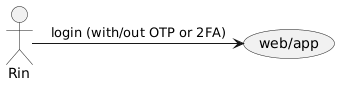
88 |
89 | * Login
90 | * **Password** : my password is not stored in memory, but I store it in an application called `pass`
91 | * **2FA/OTP** : I use `authy` (most often) and `bitwarden`. and I strongly avoid using 2FA/OTP on short message services (SMS) for reasons that are not really clear.
92 |
93 |
94 | Password manager
95 |
96 |
97 | Here's a list of tools used for "Secret" or credential needs in a platform or web browser
98 |
99 |
100 | | * | Name | OSX | Linux |
101 | |--------------------------|------------------------------ ----------------------------|-----|-------|
102 | | Privacy | gnugpg | | |
103 | | Password Manager | pass (require gpg and version control such git or host) | | |
104 | | 2fa / OTP / TOTP | Authy | | |
105 | | | Bitwarden | | |
106 |
107 | Reference:
108 | - https://en.wikipedia.org/wiki/Multi-factor_authentication
109 | - https://en.wikipedia.org/wiki/Time-based_One-Time_Password
110 | - https://en.wikipedia.org/wiki/GNU_Privacy_Guard
111 | - https://en.wikipedia.org/wiki/Pretty_Good_Privacy
112 |
113 |
114 | ### **Terminal**
115 |
116 | > [tmux](https://github.com/tmux/tmux), alacritty, iTerm2
117 |
118 |
119 |
120 | current - MacbookPro13 M1
121 |
122 | System Information
123 |
124 |
125 |
126 |
127 |
128 |
129 | iTerm2 with Tmux
130 |
131 |
132 | Alacritty with Tmux
133 |
134 |
135 |
136 |
137 | #### **Shell (ZSH)**
138 |
139 | > zsh with zinit for better performance
140 |
141 | ##### Benchmarks
142 |
143 | * Macbook Pro17.1 Memory 8GB (arm64 M1)
144 |
145 | ```zsh
146 | 0.23 real 0.12 user 0.08 sys
147 | 0.15 real 0.10 user 0.04 sys
148 | 0.15 real 0.10 user 0.04 sys
149 | 0.15 real 0.10 user 0.04 sys
150 | 0.15 real 0.10 user 0.04 sys
151 | 0.15 real 0.10 user 0.04 sys
152 | 0.16 real 0.11 user 0.04 sys
153 | 0.17 real 0.10 user 0.04 sys
154 | 0.15 real 0.10 user 0.04 sys
155 | 0.15 real 0.10 user 0.04 sys
156 | ```
157 |
158 | * Macbook Pro2019 Memory 8GB (intel)
159 |
160 | ```zsh
161 | 0.28 real 0.19 user 0.08 sys
162 | 0.28 real 0.19 user 0.07 sys
163 | 0.29 real 0.19 user 0.08 sys
164 | 0.27 real 0.19 user 0.07 sys
165 | 0.27 real 0.19 user 0.07 sys
166 | 0.27 real 0.19 user 0.07 sys
167 | 0.29 real 0.19 user 0.07 sys
168 | 0.28 real 0.19 user 0.07 sys
169 | 0.28 real 0.19 user 0.07 sys
170 | 0.27 real 0.19 user 0.07 sys
171 | ```
172 |
173 | * Thinkpad T430 (old-configuration)
174 |
175 | ```zsh
176 | 0.46 real 0.31 user 0.13 sys
177 | 0.45 real 0.31 user 0.12 sys
178 | 0.43 real 0.30 users 0.12 sys
179 | 0.44 real 0.31 user 0.12 sys
180 | 0.44 real 0.30 users 0.12 sys
181 | 0.43 real 0.30 user 0.11 sys
182 | 0.43 real 0.30 user 0.11 sys
183 | 0.43 real 0.30 users 0.12 sys
184 | 0.43 real 0.30 users 0.12 sys
185 | 0.44 real 0.30 users 0.12 sys
186 | ```
187 |
188 |
189 | #### **Editor (VIM)**
190 | > vim-plug (vim plugin manager), intelisense (COC)
191 |
192 |
193 | Editor - Vim
194 |
195 |
196 |
197 | ## Preview
198 |
199 | ### Linux
200 |
201 |
202 |
203 |
204 |
205 | Click Me
206 |
207 |
208 |
209 |
210 |
211 |
212 |
213 |
214 |
215 |
216 |
217 |
218 |
219 |
220 |
221 |
222 |
223 |
224 |
225 |
--------------------------------------------------------------------------------
/.config/zsh/zshrc.zsh:
--------------------------------------------------------------------------------
1 | ##################
2 | # zinit #
3 | ##################
4 | ##################
5 | # Aloxaf/fzf-tab #
6 | # style config #
7 | ##################
8 |
9 | # fix: issue fork/exec /bin/zsh invalid argument
10 | # see: https://github.com/Aloxaf/fzf-tab/issues/77#issuecomment-620626544
11 | # disable sort when completing options of any command
12 | zstyle ':completion:complete:*:options' sort false
13 |
14 | # use input as query string when completing zlua
15 | zstyle ':fzf-tab:complete:_zlua:*' query-string input
16 |
17 | # (experimental, may change in the future)
18 | # some boilerplate code to define the variable `extract` which will be used later
19 | # please remember to copy them
20 | local extract="
21 | # trim input(what you select)
22 | local in=\${\${\"\$(<{f})\"%\$'\0'*}#*\$'\0'}
23 | # get ctxt for current completion(some thing before or after the current word)
24 | local -A ctxt=(\"\${(@ps:\2:)CTXT}\")
25 | # real path
26 | local realpath=\${ctxt[IPREFIX]}\${ctxt[hpre]}\$in
27 | realpath=\${(Qe)~realpath}
28 | "
29 |
30 | # give a preview of commandline arguments when completing `kill`
31 | zstyle ':completion:*:*:*:*:processes' command "ps -u $USER -o pid,user,comm,cmd -w -w"
32 | zstyle ':fzf-tab:complete:kill:argument-rest' extra-opts --preview=$extract'ps --pid=$in[(w)1] -o cmd --no-headers -w -w' --preview-window=down:3:wrap
33 |
34 | # give a preview of directory by exa when completing cd
35 | zstyle ':fzf-tab:complete:cd:*' extra-opts --preview=$extract'exa -1 --color=always $realpath'
36 |
37 | eval "$(fasd --init auto)"
38 | ### Added by Zinit's installer
39 | if [[ ! -f $HOME/.zinit/bin/zinit.zsh ]]; then
40 | print -P "%F{33}▓▒░ %F{220}Installing %F{33}DHARMA%F{220} Initiative Plugin Manager (%F{33}zdharma/zinit%F{220})…%f"
41 | command mkdir -p "$HOME/.zinit" && command chmod g-rwX "$HOME/.zinit"
42 | command git clone https://github.com/zdharma/zinit "$HOME/.zinit/bin" && \
43 | print -P "%F{33}▓▒░ %F{34}Installation successful.%f%b" || \
44 | print -P "%F{160}▓▒░ The clone has failed.%f%b"
45 | fi
46 |
47 | source "$HOME/.zinit/bin/zinit.zsh"
48 |
49 | autoload -Uz _zinit
50 |
51 | (( ${+_comps} )) && _comps[zinit]=_zinit
52 | ### End of Zinit installer's chunk
53 |
54 |
55 | # Functions to make configuration less verbose
56 | # zt() : First argument is a wait time and suffix, ie "0a". Anything that doesn't match will be passed as if it were an ice mod. Default ices depth'3' and lucid
57 | # zct(): First argument provides $MYPROMPT value used in load'' and unload'' ices. Sources a config file with tracking for easy unloading using $MYPROMPT value. Small hack to function in for-syntax
58 | zt() { zinit depth'3' lucid ${1/#[0-9][a-c]/wait"$1"} "${@:2}"; }
59 | zct() { .zinit-ice load"[[ \${MYPROMPT} = ${1} ]]" unload"[[ \${MYPROMPT} != ${1} ]]" \
60 | atinit'![ -f "${thmf}/${MYPROMPT}-pre" ] && source "${thmf}/${MYPROMPT}-pre"' \
61 | atload'![ -f "${thmf}/${MYPROMPT}-post" ] && source "${thmf}/${MYPROMPT}-post"'; \
62 | ZINIT_ICE+=("${(kv)ZINIT_ICES[@]}"); ___turbo=1;}
63 |
64 | ##################
65 | # Initial Prompt #
66 | # Config source #
67 | ##################
68 | zt for \
69 | pick'async.zsh' light-mode \
70 | mafredri/zsh-async \
71 | atload'!source "$HOME/.p10k.zsh"' silent \
72 | romkatv/powerlevel10k
73 |
74 | ###########
75 | # Annexes #
76 | ###########
77 |
78 | zt light-mode compile'*handler' for \
79 | zinit-zsh/z-a-as-monitor \
80 | zinit-zsh/z-a-patch-dl \
81 | zinit-zsh/z-a-bin-gem-node \
82 | zinit-zsh/z-a-submods \
83 | zinit-zsh/z-a-test
84 |
85 | # Plugins
86 | zt for \
87 | OMZL::git.zsh \
88 | OMZL::history.zsh \
89 | OMZP::fasd \
90 | dominik-schwabe/zsh-fnm \
91 | Aloxaf/fzf-tab \
92 | g-plane/icd \
93 | ri7nz/zsh-yarn \
94 | ~/evl/zsh-android
95 |
96 | ######################
97 | # Trigger-load block #
98 | ######################
99 |
100 | zt light-mode for \
101 | trigger-load'!man' \
102 | ael-code/zsh-colored-man-pages \
103 | trigger-load'!ga;!gcf;!gclean;!gd;!glo;!grh;!gss' \
104 | wfxr/forgit
105 |
106 | ##################
107 | # Wait'0a' block #
108 | ##################
109 |
110 | zt 0a light-mode for \
111 | OMZL::completion.zsh \
112 | as'completion' mv'*.zsh -> _git' \
113 | felipec/git-completion \
114 | has'systemctl' \
115 | OMZP::systemd \
116 | OMZP::sudo \
117 | blockf atpull'zinit creinstall -q .' \
118 | zsh-users/zsh-completions \
119 | compile'{src/*.zsh,src/strategies/*}' pick'zsh-autosuggestions.zsh' \
120 | atload'_zsh_autosuggest_start' \
121 | zsh-users/zsh-autosuggestions
122 |
123 | ##################
124 | # Wait'0b' block #
125 | ##################
126 |
127 | zt 0b light-mode for \
128 | pick'autoenv.zsh' nocompletions \
129 | Tarrasch/zsh-autoenv \
130 | atinit'zicompinit; zicdreplay' atload'FAST_HIGHLIGHT[chroma-man]=' \
131 | zdharma/fast-syntax-highlighting
132 |
133 | ##################
134 | # Wait'0c' block #
135 | ##################
136 |
137 | zt 0c light-mode pick'/dev/null' for \
138 | sbin'fd*/fd;fd*/fd -> fdfind' from"gh-r" \
139 | @sharkdp/fd \
140 | sbin'bin/git-ignore' atload'export GI_TEMPLATE="$PWD/.git-ignore"; alias gi="git-ignore"' \
141 | laggardkernel/git-ignore
142 |
143 |
144 | zt 0c light-mode as'null' for \
145 | sbin"bin/git-dsf;bin/diff-so-fancy" \
146 | zdharma/zsh-diff-so-fancy \
147 | sbin \
148 | paulirish/git-open \
149 |
150 | zct light-mode from'gh-r' for \
151 | as'program' sei40kr/fast-alias-tips-bin \
152 | sei40kr/zsh-fast-alias-tips \
153 | zdharma/zui \
154 | zdharma/zplugin-crasis
155 |
156 | typeset -g POWERLEVEL9K_RIGHT_PROMPT_ELEMENTS=(
157 | taskwarrior
158 | time
159 | newline
160 | )
161 |
162 | # example:
163 | # $ ls
164 | # - dir1
165 | # $ dir1 // cd dir1
166 | setopt autocd autopushd
167 | #####################
168 | # FZF Configuration #
169 | #####################
170 |
171 | bindkey -e
172 |
173 | [ -f ~/.fzf.zsh ] && \
174 | source ~/.fzf.zsh
175 |
176 | [ -f /usr/share/fzf/key-bindings.zsh ] && \
177 | source /usr/share/fzf/key-bindings.zsh && \
178 | source /usr/share/fzf/completion.zsh ]
179 | # Feed the output of fd into fzf
180 | # fd --type f | fzf
181 |
182 | # Setting fd as the default source for fzf
183 | export FZF_DEFAULT_COMMAND='fd --type f --hidden --follow --exclude .git'
184 |
185 | # To apply the command to CTRL-T as well
186 | export FZF_CTRL_T_COMMAND="$FZF_DEFAULT_COMMAND"
187 |
188 | export FZF_DEFAULT_OPTS="
189 | --layout=reverse
190 | --info=inline
191 | --height=80%
192 | --multi
193 | --preview-window=:hidden
194 | --preview '([[ -f {} ]] && (bat --style=numbers --color=always {} || cat {})) || ([[ -d {} ]] && (tree -C {} | less)) || echo {} 2> /dev/null | head -200'
195 | --color='hl:148,hl+:154,pointer:032,marker:010,bg+:237,gutter:008'
196 | --prompt='∼ ' --pointer='▶' --marker='✓'
197 | --bind '?:toggle-preview'
198 | --bind 'ctrl-a:select-all'
199 | --bind 'ctrl-y:execute-silent(echo {+} | pbcopy)'
200 | --bind 'ctrl-e:execute(echo {+} | xargs -o vim)'
201 | --bind 'ctrl-v:execute(code {+})'
202 | "
203 |
204 | # auto cd when selected directory in FZF preview
205 | # fd() {
206 | # local dir
207 | # dir=$(find ${1:-.} -path '*/\.*' -prune -o -type d \
208 | # -print 2> /dev/null | fzf +m) &&
209 | # cd "$dir"
210 | # }
211 | # glab completion
212 | command -v glab &>/dev/null && eval "$(glab completion -s zsh)"
213 | # read https://github.com/sorin-ionescu/prezto/blob/b01f02aa5c6714430647a4ee854149e9a336270a/modules/completion/init.zsh#L31-L41
214 | autoload -Uz compinit
215 | _comp_files=(${ZDOTDIR:-$HOME}/.zcompdump(Nm-20))
216 | if (( $#_comp_files )); then
217 | compinit -i -C
218 | else
219 | compinit -i
220 | fi
221 | unset _comp_files
222 |
223 | # ctrl-z for foreground / suspend current job
224 | fancy-ctrl-z () {
225 | if [[ $#BUFFER -eq 0 ]]; then
226 | BUFFER="fg"
227 | zle accept-line
228 | else
229 | zle push-input
230 | zle clear-screen
231 | fi
232 | }
233 | zle -N fancy-ctrl-z
234 | bindkey '^Z' fancy-ctrl-z
235 |
236 |
237 | #### LOG ####
238 | export NVIM_COC_LOG_FILE="$HOME/log/nvim.coc.log"
239 | export NVIM_PYTHON_LOG_FILE="$HOME/log/nvim.python.log"
240 | export XDG_RUNTIME_DIR="$HOME/log/xdg"
241 | #### LOG ####
242 |
243 |
244 |
--------------------------------------------------------------------------------
/README.md:
--------------------------------------------------------------------------------
1 |
4 |
5 | HeLL0 w0Rld ¯\_(ツ)_/¯
6 |
7 |
8 |
9 |
11 |
12 |
13 | My personal setup `dotfiles`
14 |
15 | > manage with **[yadm](https://yadm.io/)** and take screenshot with **[KDE - spectacle](https://github.com/KDE/spectacle)**.
16 |
17 |
18 | ## Daftar Isi
19 |
20 |
21 |
22 | * [Motivasi](#motivasi)
23 | * [Alat Pengembang](#alat-pengembang)
24 | * [Umum](#umum)
25 | * [Package Manager](#package-manager)
26 | * [Homebrew (OSX)](#homebrew-osx)
27 | * [Kredensial](#kredensial)
28 | * [**Terminal**](#terminal)
29 | * [**Shell (ZSH)**](#shell-zsh)
30 | * [Benchmark](#benchmark)
31 | * [**Editor (VIM)**](#editor-vim)
32 | * [Preview](#preview)
33 | * [Linux](#linux)
34 |
35 |
36 |
37 | ## Motivasi
38 | `(DRY) - Don't repeat yourself` sebuah prinsip dalam pengembangan perangkat lunak (software development). Prinsip tersebut harusnya kita gunakan untuk mengurangi pekerjaan yang berulang-ulang dan menghabiskan waktu. Secara pribadi saya hanya mencoba menerapkan prinsip tersebut dalam bekerja. Contoh paling dasar yakni membuat `dotfiles` ini, yah gunannya agar saya tak perlu menyediakan kebutuhan perangkat atau alat yang digunakan dalam sehari - hari. Maka, dari [motivasi](#motivasi) ini kamu dapat melihat tujuan utamanya (Goal).
39 |
40 | Pekerjaan seorang pengembang perangkat lunak, perekayasa perangkat lunak, atau buruh perangkat lunak membutuhkan alat yang digunakan diatas sebuah sistem yang berjalan (biasanya kita sebut sistem operasi atau `OS`). Saya familiar dalam menggunakan sistem operasi seperti `OSX` yang berbasis `Darwin/unix` besutan si buah apple dan `ArchLinux` yang berbasis `Linux`. Yah tujuan saya untuk menjadi seorang ~~manusia~~ pengguna yang agnostik (tidak ~~beragama~~ terikat pada sebuah sistem tetapi tetap setia kepada ~~pencipta~~ pengguna, kecuali sistem operasi buatan Mikocok). Alat - alat tersebut dikumpulkan dalam satu tempat untuk menyimpan segala hal mengenai alat - alat, konfigurasi, pengaturan, kredensial, dan lain - lain yang menunjang kebutuhan bekerja atau sekedar mengoperasikan komputer. Wadah saya dimana ? di [github ini](https://github.com/ri7nz/.dotifiles), maka kita memerlukan **_git_** atau alat lain, yang jelas kita tetap sinkron diantara setiap mesin yang kita gunakan sehingga kita tidak melakukan hal yang berulang-ulang.
41 |
42 | > Inti: dengan adanya dotfiles kita mengurangi waktu (setup) atau menyiapkan kebutuhan sebelum kita bekerja pada mesin baru atau yang sudah kita gunakan
43 |
44 | > referensi [Dotfiles](https://wiki.archlinux.org/index.php/Dotfiles#User_repositories) dari [ArchWiki](https://wiki.archlinux.org)
45 |
46 | ## Alat Pengembang
47 | Alat - alat yang saya gunakan seperti apa, berikut:
48 |
49 | ### Umum
50 |
51 | > umum yah, tidak pakai 🐷
52 |
53 | | * | Nama | OSX | Linux |
54 | |---------------------|---------------|-------|--------|
55 | | Dotfiles Manager | yadm | ✅ | ✅ |
56 | | Shell | zsh | ✅ | ✅ |
57 | | Multiplexer | tmux | ✅ | ✅ |
58 | | Editor | vim/neovim | ✅ | ✅ |
59 | | Monitor | polybar | ❌ | ✅ |
60 | | Window Manager (WM) | I3 | ❌ | ✅ |
61 | | Terminal | Alacritty | ✅ | ✅ |
62 | | | iTerm2 | ✅ | ❌ |
63 | | Mail | Mail | ✅ | ❌ |
64 | | Browser | Chrome | ✅ | ✅ |
65 | | | Firefox | ✅ | ✅ |
66 | | | Safari | ✅ | ❌ |
67 |
68 | ### Package Manager
69 |
70 | #### Homebrew (OSX)
71 | Homebrew merupakan paket menejer yang digunakan pada sistem operasi (OXS). Ketika saya menggunakan perangkat Macbook maka `Homebrew` yang bakalan jadi teman setia.
72 | Berikut perintah yang sering saya gunakan untuk `dump` setiap paket yang sudah saya pasang pada perangkat yang saya gunakan
73 | ```shell
74 |
75 | # backup
76 | ❯ brew bundle dump --file=~/.Brewfile
77 |
78 | # restore / install
79 | ❯ brew bundle --file=~/.Brewfile
80 |
81 | ```
82 |
83 | ### Kredensial
84 | > kenapa harus plain-text kalau bisa otomatis
85 |
86 | 
87 |
88 | * Login
89 | * **Password** : kata-sandi (password) saya tidak menyimpan diingatan, melainkan saya menyimpan pada sebuah aplikasi bernama `pass`
90 | * **2FA/OTP** : saya menggunakan `authy` (paling sering) dan `bitwarden`. dan saya sangat menghindari menggunakan 2FA/OTP pada layanan pesan singkat (SMS) karena alasan pribadi yang sebenarnya tidak jelas.
91 |
92 |
93 |
96 |
97 | Berikut daftar alat yang digunakan untuk kebutuhan "Rahasia" atau kredensial dalam sebuah platform atau peramban web
98 |
99 |
100 | | * | Nama | OSX | Linux |
101 | |------------------|---------------------------------------------------------|-----|-------|
102 | | Privacy | gnugpg | ✅ | ✅ |
103 | | Password Manager | pass (require gpg and version control such git or host) | ✅ | ✅ |
104 | | 2fa / OTP / TOTP | Authy | ✅ | ✅ |
105 | | | Bitwarden | ✅ | ✅ |
106 |
107 | Referensi:
108 | - https://en.wikipedia.org/wiki/Multi-factor_authentication
109 | - https://en.wikipedia.org/wiki/Time-based_One-Time_Password
110 | - https://en.wikipedia.org/wiki/GNU_Privacy_Guard
111 | - https://en.wikipedia.org/wiki/Pretty_Good_Privacy
112 |
113 |
114 | ### **Terminal**
115 |
116 | > [tmux](https://github.com/tmux/tmux), alacritty, iTerm2
117 |
118 |
119 |
120 |
126 |
127 |
128 |
129 |
130 |
132 |
133 |
134 |
135 |
137 |
138 |
139 |
140 |
141 | #### **Shell (ZSH)**
142 |
143 | > zsh with zinit for better performance
144 |
145 | ##### Benchmark
146 |
147 | * MacbookPro17,1 Memory 8GB (arm64 M1)
148 |
149 | ```zsh
150 | 0.23 real 0.12 user 0.08 sys
151 | 0.15 real 0.10 user 0.04 sys
152 | 0.15 real 0.10 user 0.04 sys
153 | 0.15 real 0.10 user 0.04 sys
154 | 0.15 real 0.10 user 0.04 sys
155 | 0.15 real 0.10 user 0.04 sys
156 | 0.16 real 0.11 user 0.04 sys
157 | 0.17 real 0.10 user 0.04 sys
158 | 0.15 real 0.10 user 0.04 sys
159 | 0.15 real 0.10 user 0.04 sys
160 | ```
161 |
162 | * MacbookPro2019 Memory 8GB (intel)
163 |
164 | ```zsh
165 | 0.28 real 0.19 user 0.08 sys
166 | 0.28 real 0.19 user 0.07 sys
167 | 0.29 real 0.19 user 0.08 sys
168 | 0.27 real 0.19 user 0.07 sys
169 | 0.27 real 0.19 user 0.07 sys
170 | 0.27 real 0.19 user 0.07 sys
171 | 0.29 real 0.19 user 0.07 sys
172 | 0.28 real 0.19 user 0.07 sys
173 | 0.28 real 0.19 user 0.07 sys
174 | 0.27 real 0.19 user 0.07 sys
175 | ```
176 |
177 | * Thinkpad T430 (old-configuration)
178 |
179 | ```zsh
180 | 0.46 real 0.31 user 0.13 sys
181 | 0.45 real 0.31 user 0.12 sys
182 | 0.43 real 0.30 user 0.12 sys
183 | 0.44 real 0.31 user 0.12 sys
184 | 0.44 real 0.30 user 0.12 sys
185 | 0.43 real 0.30 user 0.11 sys
186 | 0.43 real 0.30 user 0.11 sys
187 | 0.43 real 0.30 user 0.12 sys
188 | 0.43 real 0.30 user 0.12 sys
189 | 0.44 real 0.30 user 0.12 sys
190 | ```
191 |
192 |
193 | #### **Editor (VIM)**
194 | > vim-plug (vim plugin manager), intelisense (COC)
195 |
196 |
197 |
200 |
201 |
202 | ## Preview
203 |
204 | ### Linux
205 |
206 | Click Me
207 |
208 |
Linux - Menu with Rofi
209 |
210 |
212 |
213 |
214 |
215 |
Linux - Clipboard Manager with Rofi + greenclip
216 |
217 |
219 |
220 |
221 |
--------------------------------------------------------------------------------
/.config/i3##os.Linux/config.bak:
--------------------------------------------------------------------------------
1 | set_from_resource $GITHUB_POLYBAR echo "$GITHUB_POLYBAR"
2 | set_from_resource $GITHUB_USER echo "$GITHUB_USER"
3 |
4 | set $mod Mod1
5 |
6 | new_window pixel 1
7 | new_float normal
8 |
9 | hide_edge_borders none
10 |
11 | bindsym $mod+u border none
12 | bindsym $mod+y border pixel 1
13 | bindsym $mod+n border normal
14 |
15 | font FontAwesome:style=Regular 11
16 |
17 | floating_modifier $mod
18 |
19 | # bindsym $mod+Return exec i3-sensible-terminal
20 | bindsym $mod+Return exec --no-startup-id alacritty
21 |
22 | # Window kill command
23 | bindsym $mod+Shift+q kill
24 |
25 | # start program launcher
26 | bindsym $mod+d exec --no-startup-id rofi -show drun
27 |
28 | # change focus
29 | bindsym $mod+j focus left
30 | bindsym $mod+k focus down
31 | bindsym $mod+l focus up
32 | bindsym $mod+semicolon focus right
33 |
34 | bindsym $mod+Left focus left
35 | bindsym $mod+Down focus down
36 | bindsym $mod+Up focus up
37 | bindsym $mod+Right focus right
38 |
39 | # move focused window
40 | bindsym $mod+Shift+j move left
41 | bindsym $mod+Shift+k move down
42 | bindsym $mod+Shift+l move up
43 | bindsym $mod+Shift+semicolon move right
44 |
45 | bindsym $mod+Shift+Left move left
46 | bindsym $mod+Shift+Down move down
47 | bindsym $mod+Shift+Up move up
48 | bindsym $mod+Shift+Right move right
49 |
50 | # workspace back and forth (with/without active container)
51 | workspace_auto_back_and_forth yes
52 | bindsym $mod+b workspace back_and_forth
53 | bindsym $mod+Shift+b move container to workspace back_and_forth; workspace back_and_forth
54 |
55 | # split orientation
56 | bindsym $mod+h split h;
57 | # exec notify-send 'tile horizontally'
58 | bindsym $mod+v split v;
59 | # exec notify-send 'tile vertically'
60 | bindsym $mod+q split toggle
61 |
62 | # toggle fullscreen mode for the focused container
63 | bindsym $mod+f fullscreen toggle
64 |
65 | # change container layout (stacked, tabbed, toggle split)
66 | bindsym $mod+s layout stacking
67 | bindsym $mod+w layout tabbed
68 | bindsym $mod+e layout toggle split
69 |
70 | # toggle tiling / floating
71 | bindsym $mod+Shift+space floating toggle
72 |
73 | # change focus between tiling / floating windows
74 | bindsym $mod+space focus mode_toggle
75 |
76 | # toggle sticky
77 | bindsym $mod+Shift+s sticky toggle
78 |
79 | # focus the parent container
80 | bindsym $mod+a focus parent
81 |
82 | # move the currently focused window to the scratchpad
83 | bindsym $mod+Shift+minus move scratchpad
84 |
85 | # Show the next scratchpad window or hide the focused scratchpad window.
86 | # If there are multiple scratchpad windows, this command cycles through them.
87 | bindsym $mod+minus scratchpad show
88 |
89 | # navigate workspaces next / previous
90 | bindsym $mod+Ctrl+Right workspace next
91 | bindsym $mod+Ctrl+Left workspace prev
92 |
93 | # workspaces
94 | set $ws1 1
95 | set $ws2 2
96 | set $ws3 3
97 | set $ws4 4
98 | set $ws5 5
99 | set $ws6 6
100 | set $ws7 7
101 | set $ws8 8
102 |
103 | # switch to workspace
104 | bindsym $mod+1 workspace $ws1 w0
105 | bindsym $mod+2 workspace $ws2 web
106 | bindsym $mod+3 workspace $ws3
107 | bindsym $mod+4 workspace $ws4 Telegram
108 | bindsym $mod+5 workspace $ws5
109 | bindsym $mod+6 workspace $ws6
110 | bindsym $mod+7 workspace $ws7 Discord
111 | bindsym $mod+8 workspace $ws8 Musick
112 |
113 | # Move focused container to workspace
114 | bindsym $mod+Ctrl+1 move container to workspace $ws1
115 | bindsym $mod+Ctrl+2 move container to workspace $ws2
116 | bindsym $mod+Ctrl+3 move container to workspace $ws3
117 | bindsym $mod+Ctrl+4 move container to workspace $ws4
118 | bindsym $mod+Ctrl+5 move container to workspace $ws5
119 | bindsym $mod+Ctrl+6 move container to workspace $ws6
120 | bindsym $mod+Ctrl+7 move container to workspace $ws7
121 | bindsym $mod+Ctrl+8 move container to workspace $ws8
122 |
123 | # Move to workspace with focused container
124 | bindsym $mod+Shift+1 move container to workspace $ws1; workspace $ws1
125 | bindsym $mod+Shift+2 move container to workspace $ws2; workspace $ws2
126 | bindsym $mod+Shift+3 move container to workspace $ws3; workspace $ws3
127 | bindsym $mod+Shift+4 move container to workspace $ws4; workspace $ws4
128 | bindsym $mod+Shift+5 move container to workspace $ws5; workspace $ws5
129 | bindsym $mod+Shift+6 move container to workspace $ws6; workspace $ws6
130 | bindsym $mod+Shift+7 move container to workspace $ws7; workspace $ws7
131 | bindsym $mod+Shift+8 move container to workspace $ws8; workspace $ws8
132 |
133 | # Open specific applications in floating mode
134 | for_window [title="alsamixer"] floating enable border pixel 1
135 | for_window [class="Calamares"] floating enable border normal
136 | for_window [class="Clipgrab"] floating enable
137 | for_window [title="File Transfer*"] floating enable
138 | for_window [class="Galculator"] floating enable border pixel 1
139 | for_window [class="GParted"] floating enable border normal
140 | for_window [title="i3_help"] floating enable sticky enable border normal
141 | for_window [class="Lightdm-gtk-greeter-settings"] floating enable
142 | for_window [class="Lxappearance"] floating enable sticky enable border normal
143 | for_window [class="Manjaro-hello"] floating enable
144 | for_window [class="Manjaro Settings Manager"] floating enable border normal
145 | for_window [title="MuseScore: Play Panel"] floating enable
146 | for_window [class="Nitrogen"] floating enable sticky enable border normal
147 | for_window [class="Oblogout"] fullscreen enable
148 | for_window [class="octopi"] floating enable
149 | for_window [title="About Pale Moon"] floating enable
150 | for_window [class="Pamac-manager"] floating enable
151 | for_window [class="Pavucontrol"] floating enable
152 | for_window [class="qt5ct"] floating enable sticky enable border normal
153 | for_window [class="Qtconfig-qt4"] floating enable sticky enable border normal
154 | for_window [class="Simple-scan"] floating enable border normal
155 | for_window [class="(?i)System-config-printer.py"] floating enable border normal
156 | for_window [class="Skype"] floating enable border normal
157 | for_window [class="Thus"] floating enable border normal
158 | for_window [class="Timeset-gui"] floating enable border normal
159 | for_window [class="(?i)virtualbox"] floating enable border normal
160 | for_window [class="Xfburn"] floating enable
161 | for_window [class="Spotify"] floating enable focus move to workspace $ws8
162 | for_window [class="discord"] move to workspace $ws7
163 | for_window [class="TelegramDesktop"] move to workspace $ws4
164 | for_window [class="TelegramDesktop"] floating enable focus
165 |
166 | # switch to workspace with urgent window automatically
167 | for_window [urgent=latest] focus
168 |
169 | # reload the configuration file
170 | bindsym $mod+Shift+c reload
171 |
172 | # restart i3 inplace (preserves your layout/session, can be used to upgrade i3)
173 | bindsym $mod+Shift+r restart
174 |
175 | # exit i3 (logs you out of your X session)
176 | bindsym $mod+Shift+e exec "i3-nagbar -t warning -m 'You pressed the exit shortcut. Do you really want to exit i3? This will end your X session.' -b 'Yes, exit i3' 'i3-msg exit'"
177 |
178 | # Set shut down, restart and locking features
179 | bindsym $mod+0 mode "$mode_system"
180 | set $mode_system (l)ock, (e)xit, switch_(u)ser, (s)uspend, (h)ibernate, (r)eboot, (Shift+s)hutdown
181 | mode "$mode_system" {
182 | bindsym l exec --no-startup-id i3exit lock, mode "default"
183 | bindsym s exec --no-startup-id i3exit suspend, mode "default"
184 | bindsym u exec --no-startup-id i3exit switch_user, mode "default"
185 | bindsym e exec --no-startup-id i3exit logout, mode "default"
186 | bindsym h exec --no-startup-id i3exit hibernate, mode "default"
187 | bindsym r exec --no-startup-id i3exit reboot, mode "default"
188 | bindsym Shift+s exec --no-startup-id i3exit shutdown, mode "default"
189 |
190 | # exit system mode: "Enter" or "Escape"
191 | bindsym Return mode "default"
192 | bindsym Escape mode "default"
193 | }
194 |
195 | # Resize window (you can also use the mouse for that)
196 | bindsym $mod+r mode "resize"
197 | mode "resize" {
198 | # These bindings trigger as soon as you enter the resize mode
199 | # Pressing left will shrink the window’s width.
200 | # Pressing right will grow the window’s width.
201 | # Pressing up will shrink the window’s height.
202 | # Pressing down will grow the window’s height.
203 | bindsym j resize shrink width 5 px or 5 ppt
204 | bindsym k resize grow height 5 px or 5 ppt
205 | bindsym l resize shrink height 5 px or 5 ppt
206 | bindsym semicolon resize grow width 5 px or 5 ppt
207 |
208 | # same bindings, but for the arrow keys
209 | bindsym Left resize shrink width 10 px or 10 ppt
210 | bindsym Down resize grow height 10 px or 10 ppt
211 | bindsym Up resize shrink height 10 px or 10 ppt
212 | bindsym Right resize grow width 10 px or 10 ppt
213 |
214 | # exit resize mode: Enter or Escape
215 | bindsym Return mode "default"
216 | bindsym Escape mode "default"
217 | }
218 |
219 | # Autostart applications
220 | exec --no-startup-id nitrogen --restore; sleep 1; compton -b
221 | exec --no-startup-id nm-applet
222 | # exec --no-startup-id xfce4-power-manager
223 | exec --no-startup-id pamac-tray
224 |
225 | exec_always --no-startup-id ff-theme-util
226 | exec_always --no-startup-id fix_xcursor
227 | exec_always --no-startup-id $HOME/.config/polybar/launch.sh
228 |
229 | # Theme colors
230 | client.focused #707880 #1d1f21 #707880 #8c9440 #8c9440
231 | client.focused_inactive #707880 #1d1f21 #707880 #5f819d #5f819d
232 | client.unfocused #707880 #1d1f21 #707880 #5f819d #5f819d
233 | client.urgent #707880 #1d1f21 #707880 #5f819d #5f819d
234 | client.placeholder #707880 #1d1f21 #707880 #5f819d #5f819d
235 |
236 | client.background #1d1f21
237 |
238 | # Gaps
239 | gaps inner 5
240 | gaps outer 1
241 |
242 | smart_gaps on
243 |
244 | # Press $mod+Shift+g to enter the gap mode. Choose o or i for modifying outer/inner gaps. Press one of + / - (in-/decrement for current workspace) or 0 (remove gaps for current workspace). If you also press Shift with these keys, the change will be global for all workspaces.
245 | set $mode_gaps Gaps: (o) outer, (i) inner
246 | set $mode_gaps_outer Outer Gaps: +|-|0 (local), Shift + +|-|0 (global)
247 | set $mode_gaps_inner Inner Gaps: +|-|0 (local), Shift + +|-|0 (global)
248 | bindsym $mod+Shift+g mode "$mode_gaps"
249 |
250 | mode "$mode_gaps" {
251 | bindsym o mode "$mode_gaps_outer"
252 | bindsym i mode "$mode_gaps_inner"
253 | bindsym Return mode "default"
254 | bindsym Escape mode "default"
255 | }
256 | mode "$mode_gaps_inner" {
257 | bindsym plus gaps inner current plus 5
258 | bindsym minus gaps inner current minus 5
259 | bindsym 0 gaps inner current set 0
260 |
261 | bindsym Shift+plus gaps inner all plus 5
262 | bindsym Shift+minus gaps inner all minus 5
263 | bindsym Shift+0 gaps inner all set 0
264 |
265 | bindsym Return mode "default"
266 | bindsym Escape mode "default"
267 | }
268 | mode "$mode_gaps_outer" {
269 | bindsym plus gaps outer current plus 5
270 | bindsym minus gaps outer current minus 5
271 | bindsym 0 gaps outer current set 0
272 |
273 | bindsym Shift+plus gaps outer all plus 5
274 | bindsym Shift+minus gaps outer all minus 5
275 | bindsym Shift+0 gaps outer all set 0
276 |
277 | bindsym Return mode "default"
278 | bindsym Escape mode "default"
279 | }
280 |
281 | # set power-manager and volume control
282 | exec --no-startup-id mate-power-manager
283 |
284 | bindsym XF86AudioRaiseVolume exec --no-startup-id amixer -c 0 -q set Master 2dB+ unmute
285 | bindsym XF86AudioLowerVolume exec --no-startup-id amixer -c 0 -q set Master 2db- unmute
286 | bindsym XF86AudioMute exec --no-startup-id amixer -q set Master toggle
287 |
288 | # touchpad on and off controller on laptop with Fn+
289 | bindsym XF86TouchpadOn exec --no-startup-id synclient Touchpadoff=0
290 | bindsym XF86TouchpadOff exec --no-startup-id synclient Touchpadoff=1
291 |
292 | # scrout
293 | bindsym --release Print exec spectacle -f --desktopfile '%Y%m%d_%H%M%S.png' -o '~/Desktop/screenshoots'
294 | bindsym --release Shift+Print exec spectacle -ubc
295 | bindsym --release Control+Print exec spectacle -rbc
296 |
297 | # spotify
298 | # see https://pavelmakhov.com/2018/01/spotify-i3/
299 | bindsym $mod+greater exec "sp next"; exec notify-send "Spotify ->"
300 | bindsym $mod+less exec "sp prev"; exec notify-send "Spotify <-"
301 | bindsym $mod+slash exec "sp play"; exec notify-send "Spotify |>"
302 |
303 | # Clipboard manager
304 | # shortcut to selection widget (primary)
305 | bindsym $mod+c exec rofi --no-startup-id -modi "clipboard:greenclip print" -show clipboard -run-command '{cmd}';
306 | # show window
307 | bindsym $mod+Shift+w exec rofi --no-startup-id -show window
308 |
309 | # emoji
310 | # map: alt+shift+.
311 | bindsym $mod+Shift+greater exec rofi --no-startup-id -show emoji -modi emoji
312 |
313 | # password-store rofi
314 | bindsym $mod+Shift+p exec rofi-pass --no-startup-id
315 |
--------------------------------------------------------------------------------
/.config/i3##os.Linux/config:
--------------------------------------------------------------------------------
1 | set_from_resource $GITHUB_POLYBAR echo "$GITHUB_POLYBAR"
2 | set_from_resource $GITHUB_USER echo "$GITHUB_USER"
3 |
4 | set $mod Mod1
5 |
6 | new_window pixel 1
7 | new_float normal
8 |
9 | hide_edge_borders none
10 | # border none
11 |
12 | bindsym $mod+u border none
13 | bindsym $mod+y border pixel 1
14 | bindsym $mod+i border normal
15 |
16 | font FontAwesome:style=Regular 11
17 |
18 | floating_modifier $mod
19 |
20 | # bindsym $mod+Return exec i3-sensible-terminal
21 | bindsym $mod+Return exec --no-startup-id alacritty
22 |
23 | # Window kill command
24 | bindsym $mod+Shift+q kill
25 |
26 | # start program launcher
27 | bindsym $mod+d exec --no-startup-id rofi -show drun
28 |
29 | # change focus
30 | bindsym $mod+j focus left
31 | bindsym $mod+k focus down
32 | bindsym $mod+l focus up
33 | bindsym $mod+semicolon focus right
34 |
35 | bindsym $mod+Left focus left
36 | bindsym $mod+Down focus down
37 | bindsym $mod+Up focus up
38 | bindsym $mod+Right focus right
39 |
40 | # move focused window
41 | bindsym $mod+Shift+j move left
42 | bindsym $mod+Shift+k move down
43 | bindsym $mod+Shift+l move up
44 | bindsym $mod+Shift+semicolon move right
45 |
46 | bindsym $mod+Shift+Left move left
47 | bindsym $mod+Shift+Down move down
48 | bindsym $mod+Shift+Up move up
49 | bindsym $mod+Shift+Right move right
50 |
51 | # workspace back and forth (with/without active container)
52 | workspace_auto_back_and_forth yes
53 | bindsym $mod+b workspace back_and_forth
54 | bindsym $mod+Shift+b move container to workspace back_and_forth; workspace back_and_forth
55 |
56 | # split orientation
57 | bindsym $mod+h split h;exec notify-send 'tile horizontally'
58 | bindsym $mod+v split v; exec notify-send 'tile vertically'
59 | bindsym $mod+q split toggle
60 |
61 | # toggle fullscreen mode for the focused container
62 | bindsym $mod+f fullscreen toggle
63 |
64 | # change container layout (stacked, tabbed, toggle split)
65 | bindsym $mod+s layout stacking
66 | bindsym $mod+w layout tabbed
67 | bindsym $mod+e layout toggle split
68 |
69 | # toggle tiling / floating
70 | bindsym $mod+Shift+space floating toggle
71 |
72 | # change focus between tiling / floating windows
73 | bindsym $mod+space focus mode_toggle
74 |
75 | # toggle sticky
76 | bindsym $mod+Shift+s sticky toggle
77 |
78 | # focus the parent container
79 | bindsym $mod+a focus parent
80 |
81 | # move the currently focused window to the scratchpad
82 | bindsym $mod+Shift+minus move scratchpad
83 |
84 | # Show the next scratchpad window or hide the focused scratchpad window.
85 | # If there are multiple scratchpad windows, this command cycles through them.
86 | bindsym $mod+minus scratchpad show
87 |
88 | # navigate workspaces next / previous
89 | bindsym $mod+Ctrl+l workspace next
90 | bindsym $mod+Ctrl+h workspace prev
91 |
92 | # workspaces
93 | set $ws1 1
94 | set $ws2 2
95 | set $ws3 3
96 | set $ws4 4
97 | set $ws5 5
98 | set $ws6 6
99 | set $ws7 7
100 | set $ws8 8
101 |
102 | # switch to workspace
103 | bindsym $mod+1 workspace $ws1
104 | bindsym $mod+2 workspace $ws2
105 | bindsym $mod+3 workspace $ws3
106 | bindsym $mod+4 workspace $ws4
107 | bindsym $mod+5 workspace $ws5
108 | bindsym $mod+6 workspace $ws6
109 | bindsym $mod+7 workspace $ws7
110 | bindsym $mod+8 workspace $ws8
111 |
112 | # Move focused container to workspace
113 | bindsym $mod+Ctrl+1 move container to workspace $ws1
114 | bindsym $mod+Ctrl+2 move container to workspace $ws2
115 | bindsym $mod+Ctrl+3 move container to workspace $ws3
116 | bindsym $mod+Ctrl+4 move container to workspace $ws4
117 | bindsym $mod+Ctrl+5 move container to workspace $ws5
118 | bindsym $mod+Ctrl+6 move container to workspace $ws6
119 | bindsym $mod+Ctrl+7 move container to workspace $ws7
120 | bindsym $mod+Ctrl+8 move container to workspace $ws8
121 |
122 | # Move to workspace with focused container
123 | bindsym $mod+Shift+1 move container to workspace $ws1; workspace $ws1
124 | bindsym $mod+Shift+2 move container to workspace $ws2; workspace $ws2
125 | bindsym $mod+Shift+3 move container to workspace $ws3; workspace $ws3
126 | bindsym $mod+Shift+4 move container to workspace $ws4; workspace $ws4
127 | bindsym $mod+Shift+5 move container to workspace $ws5; workspace $ws5
128 | bindsym $mod+Shift+6 move container to workspace $ws6; workspace $ws6
129 | bindsym $mod+Shift+7 move container to workspace $ws7; workspace $ws7
130 | bindsym $mod+Shift+8 move container to workspace $ws8; workspace $ws8
131 |
132 | # Open specific applications in floating mode
133 | for_window [title="alsamixer"] floating enable border pixel 1
134 | for_window [class="Calamares"] floating enable border normal
135 | for_window [class="Clipgrab"] floating enable
136 | for_window [title="File Transfer*"] floating enable
137 | for_window [class="Galculator"] floating enable border pixel 1
138 | for_window [class="GParted"] floating enable border normal
139 | for_window [title="i3_help"] floating enable sticky enable border normal
140 | for_window [class="Lightdm-gtk-greeter-settings"] floating enable
141 | for_window [class="Lxappearance"] floating enable sticky enable border normal
142 | for_window [class="Manjaro-hello"] floating enable
143 | for_window [class="Manjaro Settings Manager"] floating enable border normal
144 | for_window [title="MuseScore: Play Panel"] floating enable
145 | for_window [class="Nitrogen"] floating enable sticky enable border normal
146 | for_window [class="Oblogout"] fullscreen enable
147 | for_window [class="octopi"] floating enable
148 | for_window [title="About Pale Moon"] floating enable
149 | for_window [class="Pamac-manager"] floating enable
150 | for_window [class="Pavucontrol"] floating enable
151 | for_window [class="qt5ct"] floating enable sticky enable border normal
152 | for_window [class="Qtconfig-qt4"] floating enable sticky enable border normal
153 | for_window [class="Simple-scan"] floating enable border normal
154 | for_window [class="(?i)System-config-printer.py"] floating enable border normal
155 | for_window [class="Skype"] floating enable border normal
156 | for_window [class="Thus"] floating enable border normal
157 | for_window [class="Timeset-gui"] floating enable border normal
158 | for_window [class="(?i)virtualbox"] floating enable border normal
159 | for_window [class="Xfburn"] floating enable
160 |
161 | # Move Open specific applications
162 | for_window [title="Telegram"] move to workspace $ws6
163 | for_window [class="Spotify"] move to workspace $ws8
164 | for_window [class="discord"] move to workspace $ws7
165 |
166 | # switch to workspace with urgent window automatically
167 | for_window [urgent=latest] focus
168 |
169 | # reload the configuration file
170 | bindsym $mod+Shift+c reload
171 |
172 | # restart i3 inplace (preserves your layout/session, can be used to upgrade i3)
173 | bindsym $mod+Shift+r restart
174 |
175 | # exit i3 (logs you out of your X session)
176 | bindsym $mod+Shift+e exec "i3-nagbar -t warning -m 'You pressed the exit shortcut. Do you really want to exit i3? This will end your X session.' -b 'Yes, exit i3' 'i3-msg exit'"
177 |
178 | # Set shut down, restart and locking features
179 | bindsym $mod+0 mode "$mode_system"
180 | set $mode_system (l)ock, (e)xit, switch_(u)ser, (s)uspend, (h)ibernate, (r)eboot, (Shift+s)hutdown
181 | mode "$mode_system" {
182 | bindsym l exec --no-startup-id i3exit lock, mode "default"
183 | bindsym s exec --no-startup-id i3exit suspend, mode "default"
184 | bindsym u exec --no-startup-id i3exit switch_user, mode "default"
185 | bindsym e exec --no-startup-id i3exit logout, mode "default"
186 | bindsym h exec --no-startup-id i3exit hibernate, mode "default"
187 | bindsym r exec --no-startup-id i3exit reboot, mode "default"
188 | bindsym Shift+s exec --no-startup-id i3exit shutdown, mode "default"
189 |
190 | # exit system mode: "Enter" or "Escape"
191 | bindsym Return mode "default"
192 | bindsym Escape mode "default"
193 | }
194 |
195 | # Resize window (you can also use the mouse for that)
196 | bindsym $mod+r mode "resize"
197 | mode "resize" {
198 | # These bindings trigger as soon as you enter the resize mode
199 | # Pressing left will shrink the window’s width.
200 | # Pressing right will grow the window’s width.
201 | # Pressing up will shrink the window’s height.
202 | # Pressing down will grow the window’s height.
203 | bindsym j resize shrink width 5 px or 5 ppt
204 | bindsym k resize grow height 5 px or 5 ppt
205 | bindsym l resize shrink height 5 px or 5 ppt
206 | bindsym semicolon resize grow width 5 px or 5 ppt
207 |
208 | # same bindings, but for the arrow keys
209 | bindsym Left resize shrink width 10 px or 10 ppt
210 | bindsym Down resize grow height 10 px or 10 ppt
211 | bindsym Up resize shrink height 10 px or 10 ppt
212 | bindsym Right resize grow width 10 px or 10 ppt
213 |
214 | # exit resize mode: Enter or Escape
215 | bindsym Return mode "default"
216 | bindsym Escape mode "default"
217 | }
218 |
219 | # Autostart applications
220 | exec --no-startup-id nitrogen --restore; sleep 1; compton -b
221 | exec --no-startup-id nm-applet
222 | # exec --no-startup-id xfce4-power-manager
223 | exec --no-startup-id pasystray
224 | # exec --no-startup-id pa-applet
225 | exec --no-startup-id mictray
226 | exec --no-startup-id pamac-tray-appindicator
227 | # custom autostart
228 | # exec --no-startup-id $HOME/.autostart
229 | exec --no-startup-id "greenclip daemon > /dev/null 2>&1) &"
230 | exec --no-startup-id "systemctl --user restart greenclip"
231 |
232 | # exec_always --no-startup-id ff-theme-util
233 | # exec_always --no-startup-id fix_xcursor
234 | exec_always --no-startup-id $HOME/.config/polybar/launch.sh
235 |
236 | # Theme colors
237 | client.focused #707880 #1d1f21 #707880 #8c9440 #8c9440
238 | client.focused_inactive #707880 #1d1f21 #707880 #5f819d #5f819d
239 | client.unfocused #707880 #1d1f21 #707880 #5f819d #5f819d
240 | client.urgent #707880 #1d1f21 #707880 #5f819d #5f819d
241 | client.placeholder #707880 #1d1f21 #707880 #5f819d #5f819d
242 |
243 | client.background #1d1f21
244 |
245 | # Gaps
246 | gaps inner 5
247 | gaps outer 1
248 |
249 | smart_gaps on
250 |
251 | # Press $mod+Shift+g to enter the gap mode. Choose o or i for modifying outer/inner gaps. Press one of + / - (in-/decrement for current workspace) or 0 (remove gaps for current workspace). If you also press Shift with these keys, the change will be global for all workspaces.
252 | set $mode_gaps Gaps: (o) outer, (i) inner
253 | set $mode_gaps_outer Outer Gaps: +|-|0 (local), Shift + +|-|0 (global)
254 | set $mode_gaps_inner Inner Gaps: +|-|0 (local), Shift + +|-|0 (global)
255 | bindsym $mod+Shift+g mode "$mode_gaps"
256 |
257 | mode "$mode_gaps" {
258 | bindsym o mode "$mode_gaps_outer"
259 | bindsym i mode "$mode_gaps_inner"
260 | bindsym Return mode "default"
261 | bindsym Escape mode "default"
262 | }
263 | mode "$mode_gaps_inner" {
264 | bindsym plus gaps inner current plus 5
265 | bindsym minus gaps inner current minus 5
266 | bindsym 0 gaps inner current set 0
267 |
268 | bindsym Shift+plus gaps inner all plus 5
269 | bindsym Shift+minus gaps inner all minus 5
270 | bindsym Shift+0 gaps inner all set 0
271 |
272 | bindsym Return mode "default"
273 | bindsym Escape mode "default"
274 | }
275 | mode "$mode_gaps_outer" {
276 | bindsym plus gaps outer current plus 5
277 | bindsym minus gaps outer current minus 5
278 | bindsym 0 gaps outer current set 0
279 |
280 | bindsym Shift+plus gaps outer all plus 5
281 | bindsym Shift+minus gaps outer all minus 5
282 | bindsym Shift+0 gaps outer all set 0
283 |
284 | bindsym Return mode "default"
285 | bindsym Escape mode "default"
286 | }
287 |
288 | # set power-manager and volume control
289 | exec --no-startup-id mate-power-manager
290 | # KDEConnect
291 | exec --no-startup-id /usr/lib/kdeconnectd
292 |
293 | bindsym XF86AudioRaiseVolume exec --no-startup-id amixer -c 0 -q set Master 2dB+ unmute
294 | bindsym XF86AudioLowerVolume exec --no-startup-id amixer -c 0 -q set Master 2db- unmute
295 | bindsym XF86AudioMute exec --no-startup-id amixer -q set Master toggle
296 |
297 | # touchpad on and off controller on laptop with Fn+
298 | # bindsym XF86TouchpadOn exec --no-startup-id synclient Touchpadoff=0
299 | # bindsym XF86TouchpadOff exec --no-startup-id synclient Touchpadoff=1
300 |
301 | # scrout
302 | bindsym --release Print exec spectacle -f --desktopfile '%Y%m%d_%H%M%S.png' -o '~/Desktop/screenshoots'
303 | bindsym --release Shift+Print exec spectacle -ubc
304 | bindsym --release Control+Print exec spectacle -rbc
305 |
306 | # spotify
307 | # see https://pavelmakhov.com/2018/01/spotify-i3/
308 | bindsym $mod+greater exec "sp next"; exec notify-send "Spotify ->"
309 | bindsym $mod+less exec "sp prev"; exec notify-send "Spotify <-"
310 | bindsym $mod+slash exec "sp play"; exec notify-send "Spotify |>"
311 |
312 | # Clipboard manager
313 | # shortcut to selection widget (primary)
314 | bindsym $mod+c exec rofi --no-startup-id -modi "clipboard:greenclip print" -show clipboard -run-command '{cmd}';
315 | # show window
316 | bindsym $mod+Shift+w exec rofi --no-startup-id -show window
317 |
318 | # emoji
319 | # map: alt+shift+.
320 | bindsym $mod+Shift+greater exec rofi --no-startup-id -show emoji -modi emoji
321 |
322 | # password-store rofi
323 | bindsym $mod+Shift+p exec rofi-pass --no-startup-id
324 |
325 | bindsym $mod+z exec --no-startup-id ~/.config/polypomo/polypomo toggle
326 | bindsym $mod+Shift+z exec --no-startup-id ~/.config/polypomo/polypomo end
327 | bindsym $mod+x exec --no-startup-id ~/.config/polypomo/polypomo lock
328 | # TODO
329 | bindsym $mod+Shift+m exec dunstctl set-paused toggle
330 | bindsym $mod+m exec dunstctl close-all
331 |
332 | # switch esc to capslock
333 | # swithc esc -> capslock
334 | exec "setxkbmap -option caps:swapescape"
335 |
--------------------------------------------------------------------------------
/.config/polybar##os.Linux/config.ini:
--------------------------------------------------------------------------------
1 | ;; _-_-_-_-_-_-_-_-_-_-_-_-_-_-_-_-_-_-_-_-_-_
2 | ;;
3 | ;; ____ __ __
4 | ;; / __ \____ / /_ __/ /_ ____ ______
5 | ;; / /_/ / __ \/ / / / / __ \/ __ `/ ___/
6 | ;; / ____/ /_/ / / /_/ / /_/ / /_/ / /
7 | ;; /_/ \____/_/\__, /_.___/\__,_/_/
8 | ;; /____/
9 | ;;
10 | ;; Created By Aditya Shakya @adi1090x
11 | ;;
12 | ;; _-_-_-_-_-_-_-_-_-_-_-_-_-_-_-_-_-_-_-_-_-_
13 |
14 | ;; Global WM Settings
15 | [module/i3]
16 | type = internal/i3
17 | format =
18 | index-sort = true
19 | wrapping-scroll = false
20 |
21 | label-mode-padding = 2
22 | label-mode-foreground = #c5c8c6
23 | label-mode-background = #282a2e
24 |
25 | label-focused = %icon% %name%
26 | label-focused-background = #373b41
27 | label-focused-foreground = #6b7443
28 | label-focused-padding = 2
29 |
30 | label-unfocused = %icon% %name%
31 | label-unfocused-background = ${color.bg}
32 | label-unfocused-foreground = #c5c8c6
33 | label-unfocused-padding = 2
34 |
35 | label-visible = %icon% %name%
36 | label-visible-background = #282a2e
37 | label-visible-foreground = #c5c8c6
38 | label-visible-padding = 2
39 |
40 | label-urgent = %icon% %name%
41 | label-urgent-background = #BA2922
42 | label-urgent-padding = 2
43 |
44 | ws-icon-0 = 1;λ
45 | ws-icon-1 = 2;Λ
46 | ws-icon-6 = 7;Φ
47 | ws-icon-7 = 8;φ
48 | ws-icon-default =
49 |
50 | fuzzy-match = true
51 |
52 |
53 | [global/wm]
54 | ; Adjust the _NET_WM_STRUT_PARTIAL top value
55 | ; Used for top aligned bars
56 | margin-bottom = 0
57 |
58 | ; Adjust the _NET_WM_STRUT_PARTIAL bottom value
59 | ; Used for bottom aligned bars
60 | margin-top = 0
61 |
62 | ;; Bar Settings
63 |
64 | [bar/main]
65 | ; Use either of the following command to list available outputs:
66 | ; If unspecified, the application will pick the first one it finds.
67 | ; $ polybar -m | cut -d ':' -f 1
68 | ; $ xrandr -q | grep " connected" | cut -d ' ' -f1
69 | monitor =
70 |
71 | ; Use the specified monitor as a fallback if the main one is not found.
72 | monitor-fallback =
73 |
74 | ; Require the monitor to be in connected state
75 | ; XRandR sometimes reports my monitor as being disconnected (when in use)
76 | monitor-strict = false
77 |
78 | ; Tell the Window Manager not to configure the window.
79 | ; Use this to detach the bar if your WM is locking its size/position.
80 | override-redirect = false
81 |
82 | ; Put the bar at the bottom of the screen
83 | bottom = false
84 |
85 | ; Prefer fixed center position for the `modules-center` block
86 | ; When false, the center position will be based on the size of the other blocks.
87 | fixed-center = true
88 |
89 | ; Dimension defined as pixel value (e.g. 35) or percentage (e.g. 50%),
90 | ; the percentage can optionally be extended with a pixel offset like so:
91 | ; 50%:-10, this will result in a width or height of 50% minus 10 pixels
92 | width = 100%
93 | height = 28
94 |
95 | ; Offset defined as pixel value (e.g. 35) or percentage (e.g. 50%)
96 | ; the percentage can optionally be extended with a pixel offset like so:
97 | ; 50%:-10, this will result in an offset in the x or y direction
98 | ; of 50% minus 10 pixels
99 | offset-x = 0
100 | offset-y = 0
101 |
102 | ; Background ARGB color (e.g. #f00, #ff992a, #ddff1023)
103 | background = ${color.bg}
104 |
105 | ; Foreground ARGB color (e.g. #f00, #ff992a, #ddff1023)
106 | foreground = ${color.fg}
107 |
108 | ; Background gradient (vertical steps)
109 | ; background-[0-9]+ = #aarrggbb
110 | ;;background-0 =
111 |
112 | ; Value used for drawing rounded corners
113 | ; Note: This shouldn't be used together with border-size because the border
114 | ; doesn't get rounded
115 | ; Individual top/bottom values can be defined using:
116 | ; radius-{top,bottom}
117 | radius-top = 0
118 | radius-bottom = 0
119 |
120 | ; Under-/overline pixel size and argb color
121 | ; Individual values can be defined using:
122 | ; {overline,underline}-size
123 | ; {overline,underline}-color
124 | ;;overline-size = 0
125 | ;;overline-color = ${color.ac}
126 |
127 | ; Values applied to all borders
128 | ; Individual side values can be defined using:
129 | ; border-{left,top,right,bottom}-size
130 | ; border-{left,top,right,bottom}-color
131 | ; The top and bottom borders are added to the bar height, so the effective
132 | ; window height is:
133 | ; height + border-top-size + border-bottom-size
134 | ; Meanwhile the effective window width is defined entirely by the width key and
135 | ; the border is placed withing this area. So you effectively only have the
136 | ; following horizontal space on the bar:
137 | ; width - border-right-size - border-left-size
138 | ;;border-size = 2
139 | ;;border-color = ${color.ac}
140 |
141 | ; Number of spaces to add at the beginning/end of the bar
142 | ; Individual side values can be defined using:
143 | ; padding-{left,right}
144 | padding = 0
145 | padding-bottom = 13
146 |
147 | ; Number of spaces to add before/after each module
148 | ; Individual side values can be defined using:
149 | ; module-margin-{left,right}
150 | module-margin-left = 0
151 | module-margin-right = 0
152 |
153 | ; Fonts are defined using ;
154 | ; Font names are specified using a fontconfig pattern.
155 | ; font-0 = NotoSans-Regular:size=8;2
156 | ; font-1 = MaterialIcons:size=10
157 | ; font-2 = Termsynu:size=8;-1
158 | ; font-3 = FontAwesome:size=10
159 | ; See the Fonts wiki page for more details
160 |
161 | font-0 = "Noto Sans:size=9;2"
162 | font-1 = "Iosevka Nerd Font:size=12;2"
163 | font-2 = "Iosevka Nerd Font:size=16;3"
164 | font-3 = FontAwesome:pixelsize=10;1
165 |
166 | ; Modules are added to one of the available blocks
167 | ; modules-left = cpu ram
168 | ; modules-center = xwindow xbacklight
169 | ; modules-right = ipc clock
170 |
171 | modules-left = menu chrome0 chrome1 chrome2 firefox files sep memory sep cpu sep filesystem
172 | modules-center = spotify
173 | modules-right = i3 sep date alsa battery polypomo
174 |
175 | ; The separator will be inserted between the output of each module
176 | separator =
177 | ; Opacity value between 0.0 and 1.0 used on fade in/out
178 | dim-value = 1.0
179 |
180 | ; Value to be used to set the WM_NAME atom
181 | ; If the value is empty or undefined, the atom value
182 | ; will be created from the following template: polybar-[BAR]_[MONITOR]
183 | ; NOTE: The placeholders are not available for custom values
184 | ; wm-name =
185 |
186 | ; Locale used to localize various module data (e.g. date)
187 | ; Expects a valid libc locale, for example: sv_SE.UTF-8
188 | ; locale =
189 |
190 | ; Position of the system tray window
191 | ; If empty or undefined, tray support will be disabled
192 | ; NOTE: A center aligned tray will cover center aligned modules
193 | ;
194 | ; Available positions:
195 | ; left
196 | ; center
197 | ; right
198 | ; none
199 | tray-position = right
200 |
201 | ; If true, the bar will not shift its
202 | ; contents when the tray changes
203 | tray-detached = false
204 |
205 | ; Tray icon max size
206 | tray-maxsize = 16
207 |
208 | ; DEPRECATED! Since 3.3.0 the tray always uses pseudo-transparency
209 | ; Enable pseudo transparency
210 | ; Will automatically be enabled if a fully transparent
211 | ; background color is defined using `tray-background`
212 | ; tray-transparent = false
213 |
214 | ; Background color for the tray container
215 | ; ARGB color (e.g. #f00, #ff992a, #ddff1023)
216 | ; By default the tray container will use the bar
217 | ; background color.
218 | tray-background = ${root.background}
219 |
220 | ; Tray offset defined as pixel value (e.g. 35) or percentage (e.g. 50%)
221 | tray-offset-x = 0
222 | tray-offset-y = 0
223 |
224 | ; Pad the sides of each tray icon
225 | tray-padding = 0
226 |
227 | ; Scale factor for tray clients
228 | tray-scale = 1.0
229 |
230 | ; Restack the bar window and put it above the
231 | ; selected window manager's root
232 | ;
233 | ; Fixes the issue where the bar is being drawn
234 | ; on top of fullscreen window's
235 | ;
236 | ; Currently supported WM's:
237 | ; bspwm
238 | ; i3 (requires: `override-redirect = true`)
239 | ; wm-restack = i3
240 |
241 | ; Set a DPI values used when rendering text
242 | ; This only affects scalable fonts
243 | ; dpi =
244 |
245 | ; Enable support for inter-process messaging
246 | ; See the Messaging wiki page for more details.
247 | enable-ipc = true
248 |
249 | ; Fallback click handlers that will be called if
250 | ; there's no matching module handler found.
251 | click-left =
252 | click-middle =
253 | click-right =
254 | scroll-up =
255 | scroll-down =
256 | double-click-left =
257 | double-click-middle =
258 | double-click-right =
259 |
260 | ; Requires polybar to be built with xcursor support (xcb-util-cursor)
261 | ; Possible values are:
262 | ; - default : The default pointer as before, can also be an empty string (default)
263 | ; - pointer : Typically in the form of a hand
264 | ; - ns-resize : Up and down arrows, can be used to indicate scrolling
265 | cursor-click =
266 | cursor-scroll =
267 |
268 | ;; WM Workspace Specific
269 |
270 | ; bspwm
271 | ;;scroll-up = bspwm-desknext
272 | ;;scroll-down = bspwm-deskprev
273 | ;;scroll-up = bspc desktop -f prev.local
274 | ;;scroll-down = bspc desktop -f next.local
275 |
276 | ;i3
277 | ;;scroll-up = i3wm-wsnext
278 | ;;scroll-down = i3wm-wsprev
279 | ;;scroll-up = i3-msg workspace next_on_output
280 | ;;scroll-down = i3-msg workspace prev_on_output
281 |
282 | ;openbox
283 | ;awesome
284 | ;etc
285 |
286 | ;; _-_-_-_-_-_-_-_-_-_-_-_-_-_-_-_-_-_-_-_-_-_
287 |
288 | ;; Application Settings
289 |
290 | [settings]
291 | ; The throttle settings lets the eventloop swallow up til X events
292 | ; if they happen within Y millisecond after first event was received.
293 | ; This is done to prevent flood of update event.
294 | ;
295 | ; For example if 5 modules emit an update event at the same time, we really
296 | ; just care about the last one. But if we wait too long for events to swallow
297 | ; the bar would appear sluggish so we continue if timeout
298 | ; expires or limit is reached.
299 | throttle-output = 5
300 | throttle-output-for = 10
301 |
302 | ; Time in milliseconds that the input handler will wait between processing events
303 | throttle-input-for = 30
304 |
305 | ; Reload upon receiving XCB_RANDR_SCREEN_CHANGE_NOTIFY events
306 | screenchange-reload = false
307 |
308 | ; Compositing operators
309 | ; @see: https://www.cairographics.org/manual/cairo-cairo-t.html#cairo-operator-t
310 | ; compositing-background = source
311 | ; compositing-foreground = over
312 | ; compositing-overline = over
313 | ; compositing-underline = over
314 | ; compositing-border = over
315 |
316 | ; Define fallback values used by all module formats
317 | format-foreground =
318 | format-background =
319 | format-underline =
320 | format-overline =
321 | format-spacing =
322 | format-padding =
323 | format-margin =
324 | format-offset =
325 |
326 | ; Enables pseudo-transparency for the bar
327 | ; If set to true the bar can be transparent without a compositor.
328 | pseudo-transparency = true
329 |
330 | ;; _-_-_-_-_-_-_-_-_-_-_-_-_-_-_-_-_-_-_-_-_-_
331 | ;;
332 | ;; ______ __
333 | ;; / ____/___ / /___ __________
334 | ;; / / / __ \/ / __ \/ ___/ ___/
335 | ;; / /___/ /_/ / / /_/ / / (__ )
336 | ;; \____/\____/_/\____/_/ /____/
337 | ;;
338 | ;; Created By Aditya Shakya @adi1090x
339 | ;;
340 | ;; _-_-_-_-_-_-_-_-_-_-_-_-_-_-_-_-_-_-_-_-_-_
341 |
342 | [color]
343 |
344 | ;; Active Colors
345 | bg = #232832
346 | bg-alt = #1C2028
347 | fg = #EAEAEA
348 | fg-alt = #9C9C9C
349 |
350 | trans = #00000000
351 | white = #FFFFFF
352 | black = #000000
353 |
354 | ;; Material Colors
355 |
356 | red = #e53935
357 | pink = #d81b60
358 | purple = #8e24aa
359 | deep-purple = #5e35b1
360 | indigo = #3949ab
361 | blue = #1e88e5
362 | light-blue = #039be5
363 | cyan = #00acc1
364 | teal = #00897b
365 | green = #43a047
366 | light-green = #7cb342
367 | lime = #c0ca33
368 | yellow = #fdd835
369 | amber = #ffb300
370 | orange = #fb8c00
371 | deep-orange = #f4511e
372 | brown = #6d4c41
373 | grey = #757575
374 | blue-gray = #546e7a
375 |
376 | ;; _-_-_-_-_-_-_-_-_-_-_-_-_-_-_-_-_-_-_-_-_-_
377 | ;;
378 | ;; __ ___ __ __
379 | ;; / |/ /___ ____/ /_ __/ /__ _____
380 | ;; / /|_/ / __ \/ __ / / / / / _ \/ ___/
381 | ;; / / / / /_/ / /_/ / /_/ / / __(__ )
382 | ;; /_/ /_/\____/\__,_/\__,_/_/\___/____/
383 | ;;
384 | ;; Created By Aditya Shakya @adi1090x
385 | ;;
386 | ;; _-_-_-_-_-_-_-_-_-_-_-_-_-_-_-_-_-_-_-_-_-_
387 |
388 | [module/alsa]
389 | type = internal/alsa
390 |
391 | ; You can find the different card numbers in `/proc/asound/cards`
392 | ;;master-soundcard = default
393 | ;;speaker-soundcard = default
394 | ;;headphone-soundcard = default
395 |
396 | ; Default: Master
397 | ;;master-mixer = Master
398 |
399 | ; Optionally define speaker and headphone mixers
400 | ; Default: none
401 | ;;speaker-mixer = Speaker
402 | ; Default: none
403 | ;;headphone-mixer = Headphone
404 |
405 | ; Default: 5
406 | ;;interval = 5
407 |
408 | ; Available tags:
409 | ; (default)
410 | ;
411 | ;
412 | format-volume =
413 | format-volume-background = ${root.background}
414 | format-volume-padding = 2
415 |
416 | ; Available tags:
417 | ; (default)
418 | ;
419 | ;
420 | format-muted =
421 | format-muted-background = ${color.bg-alt}
422 | format-muted-padding = 2
423 |
424 | ; Available tokens:
425 | ; %percentage% (default)
426 | label-volume = %percentage%%
427 |
428 | ; Available tokens:
429 | ; %percentage% (default
430 | label-muted = ﱝ
431 | label-muted-foreground = ${color.fg-alt}
432 |
433 | ramp-volume-0 =
434 | ramp-volume-1 =
435 | ramp-volume-2 =
436 | ramp-volume-3 =
437 | ;; _-_-_-_-_-_-_-_-_-_-_-_-_-_-_-_-_-_-_-_-_-_
438 | ; https://github.com/unode/polypomo/polypomo
439 | [module/polypomo]
440 | type = custom/script
441 |
442 | exec = ~/.config/polypomo/polypomo
443 | tail = true
444 |
445 | label = %output%
446 | format-background=${color.light-blue}
447 |
448 | click-left = ~/.config/polypomo/polypomo toggle
449 | click-right = ~/.config/polypomo/polypomo end
450 | click-middle = ~/.config/polypomo/polypomo lock
451 | scroll-up = ~/.config/polypomo/polypomo time +60
452 | scroll-down = ~/.config/polypomo/polypomo time -60
453 |
454 | ;; _-_-_-_-_-_-_-_-_-_-_-_-_-_-_-_-_-_-_-_-_-_
455 | ; https://github.com/mihirlad55/polybar-spotify-module
456 | [module/previous]
457 | type = custom/ipc
458 | format-font = 4
459 | ; Default
460 | hook-0 = echo ""
461 | ; When spotify active
462 | hook-1 = echo "Previous"
463 | click-left = "spotifyctl -q previous"
464 |
465 |
466 | [module/next]
467 | type = custom/ipc
468 | format-font = 4
469 | ; Default
470 | hook-0 = echo ""
471 | ; When spotify active
472 | hook-1 = echo "Next"
473 | click-left = "spotifyctl -q next"
474 |
475 |
476 | [module/playpause]
477 | type = custom/ipc
478 | format-font = 4
479 | ; Default
480 | hook-0 = echo ""
481 | ; Playing
482 | hook-1 = echo "Pause"
483 | ; Paused
484 | hook-2 = echo "Play"
485 | click-left = "spotifyctl -q playpause"
486 |
487 |
488 | [module/spotify]
489 | type = custom/ipc
490 | ; Default
491 | hook-0 = echo ""
492 | ; Playing/paused show song name and artist
493 | hook-1 = spotifyctl -q status --format '%artist%: %title%'
494 |
495 | ;; _-_-_-_-_-_-_-_-_-_-_-_-_-_-_-_-_-_-_-_-_-_
496 |
497 | [module/battery]
498 | type = internal/battery
499 |
500 | full-at = 99
501 |
502 | ; $ ls -1 /sys/class/power_supply/
503 | battery = BAT0
504 | adapter = AC
505 |
506 | poll-interval = 2
507 | time-format = %H:%M
508 |
509 | ; Available tags:
510 | ; (default)
511 | ;
512 | ;
513 | ;
514 | format-charging =
515 | format-charging-background = ${color.bg-alt}
516 | format-charging-padding = 2
517 |
518 | ; Available tags:
519 | ; (default)
520 | ;
521 | ;
522 | ;
523 | format-discharging =
524 | format-discharging-background = ${root.background}
525 | format-discharging-padding = 2
526 |
527 | ; Available tags:
528 | ; (default)
529 | ;
530 | ;
531 | format-full =
532 | format-full-background = ${color.bg-alt}
533 | format-full-padding = 2
534 |
535 | ; Available tokens:
536 | ; %percentage% (default)
537 | ; %time%
538 | ; %consumption% (shows current charge rate in watts)
539 | label-charging = %percentage%%
540 |
541 | ; Available tokens:
542 | ; %percentage% (default)
543 | ; %time%
544 | ; %consumption% (shows current discharge rate in watts)
545 | label-discharging = %percentage%%
546 |
547 | ; Available tokens:
548 | ; %percentage% (default)
549 | ;label-full = Fully Charged
550 | label-full =
551 | label-full-foreground = ${color.green}
552 |
553 | ramp-capacity-0 =
554 | ramp-capacity-1 =
555 | ramp-capacity-2 =
556 | ramp-capacity-3 =
557 | ramp-capacity-4 =
558 | ramp-capacity-5 =
559 | ramp-capacity-6 =
560 | ramp-capacity-7 =
561 | ramp-capacity-8 =
562 | ramp-capacity-9 =
563 |
564 | animation-charging-0 =
565 | animation-charging-1 =
566 | animation-charging-2 =
567 | animation-charging-3 =
568 | animation-charging-4 =
569 | animation-charging-5 =
570 | animation-charging-6 =
571 |
572 | ; Framerate in milliseconds
573 | animation-charging-framerate = 750
574 |
575 | ;; _-_-_-_-_-_-_-_-_-_-_-_-_-_-_-_-_-_-_-_-_-_
576 |
577 | [module/date]
578 | type = internal/date
579 |
580 | interval = 1.0
581 |
582 | time = %I:%M %p
583 | ;;time-alt = %B %d, %Y
584 |
585 | format =
586 | format-background = ${root.background}
587 | format-padding = 2
588 |
589 | label = %time%
590 |
591 | ;; _-_-_-_-_-_-_-_-_-_-_-_-_-_-_-_-_-_-_-_-_-_
592 |
593 | [module/network]
594 | type = internal/network
595 |
596 | interface = wlp3s0
597 | interval = 1.0
598 |
599 | ;ping-interval = 3
600 | ;;udspeed-minwidth = 5
601 | accumulate-stats = true
602 | unknown-as-up = true
603 |
604 | ; Available tags:
605 | ; (default)
606 | ;
607 | format-connected =
608 | format-connected-background = ${color.bg-alt}
609 | format-connected-padding = 2
610 |
611 | ; Available tags:
612 | ; (default)
613 | format-disconnected =
614 | format-disconnected-background = ${color.bg-alt}
615 | format-disconnected-padding = 2
616 |
617 | ; Available tags:
618 | ; (default)
619 | ;
620 | ;
621 | ;;format-packetloss =
622 |
623 | ; Available tokens:
624 | ; %ifname% [wireless+wired]
625 | ; %local_ip% [wireless+wired]
626 | ; %local_ip6% [wireless+wired]
627 | ; %essid% [wireless]
628 | ; %signal% [wireless]
629 | ; %upspeed% [wireless+wired]
630 | ; %downspeed% [wireless+wired]
631 | ; %linkspeed% [wired]
632 | ; Default: %ifname% %local_ip%
633 | label-connected = 說
634 |
635 | ; Available tokens:
636 | ; %ifname% [wireless+wired]
637 | ; Default: (none)
638 | label-disconnected = ﲁ
639 | label-disconnected-foreground = ${color.fg-alt}
640 |
641 | ; Available tokens:
642 | ; %ifname% [wireless+wired]
643 | ; %local_ip% [wireless+wired]
644 | ; %local_ip6% [wireless+wired]
645 | ; %essid% [wireless]
646 | ; %signal% [wireless]
647 | ; %upspeed% [wireless+wired]
648 | ; %downspeed% [wireless+wired]
649 | ; %linkspeed% [wired]
650 | ; Default: (none)
651 | ;label-packetloss = %essid%
652 | ;label-packetloss-foreground = #eefafafa
653 |
654 | ramp-signal-0 = 說
655 | ramp-signal-1 = 說
656 | ramp-signal-2 = 說
657 | ramp-signal-3 = 說
658 | ramp-signal-4 = 說
659 |
660 | ;; _-_-_-_-_-_-_-_-_-_-_-_-_-_-_-_-_-_-_-_-_-_
661 |
662 | [module/menu]
663 | type = custom/text
664 |
665 | content =
666 | content-background = ${color.light-blue}
667 | content-foreground = ${color.fg}
668 | content-padding = 3
669 |
670 | click-left = ~/.config/polybar/scripts/budgie-menu
671 | click-right = ~/.config/polybar/scripts/budgie-menu
672 |
673 | ;; _-_-_-_-_-_-_-_-_-_-_-_-_-_-_-_-_-_-_-_-_-_
674 |
675 | [module/sysmenu]
676 | type = custom/text
677 |
678 | content = 襤
679 | content-background = ${color.bg-alt}
680 | content-foreground = ${color.fg}
681 | content-padding = 3
682 |
683 | click-left = ~/.config/polybar/scripts/budgie-sysmenu
684 | click-right = ~/.config/polybar/scripts/budgie-sysmenu
685 |
686 | ;; _-_-_-_-_-_-_-_-_-_-_-_-_-_-_-_-_-_-_-_-_-_
687 |
688 | [module/style]
689 | type = custom/text
690 | content = פֿ
691 | content-background = ${color.bg-alt}
692 | content-foreground = ${color.fg}
693 | content-padding = 2
694 |
695 | click-left = ~/.config/polybar/scripts/budgie-style &
696 | click-right = ~/.config/polybar/scripts/budgie-style &
697 |
698 | ;; _-_-_-_-_-_-_-_-_-_-_-_-_-_-_-_-_-_-_-_-_-_
699 |
700 | [module/sep]
701 | type = custom/text
702 |
703 | content = |
704 | content-foreground = ${color.grey}
705 | content-background = ${root.background}
706 | content-padding = 1
707 |
708 | [module/sep2]
709 | type = custom/text
710 |
711 | content = |
712 | content-foreground = ${color.grey}
713 | content-background = ${root.background}
714 | content-padding = 2
715 |
716 | ;; _-_-_-_-_-_-_-_-_-_-_-_-_-_-_-_-_-_-_-_-_-_
717 | ;; Apps
718 |
719 | [module/term]
720 | type = custom/text
721 |
722 | content = "%{T3}%{T-}"
723 | content-foreground = ${color.green}
724 | content-background = ${color.bg}
725 | content-padding = 3
726 |
727 | click-left = kitty &
728 |
729 | [module/firefox]
730 | type = custom/text
731 |
732 | content = "%{T3}%{T-}"
733 | content-foreground = ${color.orange}
734 | content-background = ${color.bg}
735 | content-padding = 3
736 |
737 | click-left = firefox &
738 |
739 |
740 | [module/chrome0]
741 | type = custom/text
742 |
743 | content = "%{T3}%{T-}"
744 | content-foreground = ${color.green}
745 | content-background = ${color.bg}
746 | content-padding = 3
747 |
748 | click-left = google-chrome-stable --profile-directory=Default &
749 |
750 | [module/chrome1]
751 | type = custom/text
752 |
753 | content = "%{T3}%{T-}"
754 | content-foreground = ${color.red}
755 | content-background = ${color.bg}
756 | content-padding = 3
757 |
758 | click-left = google-chrome-stable --profile-directory="Profile 1" &
759 |
760 |
761 | [module/chrome2]
762 | type = custom/text
763 |
764 | content = "%{T3}%{T-}"
765 | content-foreground = ${color.blue}
766 | content-background = ${color.bg}
767 | content-padding = 3
768 |
769 | click-left = chromium &
770 |
771 | [module/files]
772 | type = custom/text
773 |
774 | content = "%{T3}%{T-}"
775 | content-foreground = ${color.blue}
776 | content-background = ${color.bg}
777 | content-padding = 3
778 |
779 | click-left = thunar &
780 |
781 | [module/settings]
782 | type = custom/text
783 |
784 | content = "%{T3}煉%{T-}"
785 | content-foreground = ${color.red}
786 | content-background = ${color.bg}
787 | content-padding = 3
788 |
789 | click-left = xfce4-settings-manager &
790 |
791 | [module/cpu]
792 | type = internal/cpu
793 |
794 | ; Seconds to sleep between updates
795 | ; Default: 1
796 | interval = 0.5
797 |
798 | ; Available tags:
799 | ; (default)
800 | ;
801 | ;
802 | ;
803 | format =
804 |
805 | ; Available tokens:
806 | ; %percentage% (default) - total cpu load averaged over all cores
807 | ; %percentage-sum% - Cumulative load on all cores
808 | ; %percentage-cores% - load percentage for each core
809 | ; %percentage-core[1-9]% - load percentage for specific core
810 | label = C %percentage%%
811 |
812 | [module/memory]
813 | type = internal/memory
814 |
815 | ; Seconds to sleep between updates
816 | ; Default: 1
817 | interval = 3
818 | ; Available tags:
819 | ; (default)
820 | ;
821 | ;
822 | ;
823 | ;
824 | ;
825 | ;
826 | ;
827 | ;
828 | format =
829 | ; Available tags:
830 | ; (default)
831 | ;
832 | ;
833 | ;
834 | ;
835 | ;
836 | ;
837 | ;
838 | ;
839 | label = R %percentage_used%
840 |
841 | [module/filesystem]
842 | type = internal/fs
843 |
844 | ; Mountpoints to display
845 | mount-0 = /
846 |
847 | ; Seconds to sleep between updates
848 | ; Default: 30
849 | interval = 10
850 |
851 | ; Display fixed precision values
852 | ; Default: false
853 | fixed-values = true
854 |
855 | ; Available tags:
856 | ; (default)
857 | ;
858 | ;
859 | ;
860 | format-mounted =
861 |
862 | ; Available tokens:
863 | ; %mountpoint%
864 | ; %type%
865 | ; %fsname%
866 | ; %percentage_free%
867 | ; %percentage_used%
868 | ; %total%
869 | ; %free%
870 | ; %used%
871 | ; Default: %mountpoint% %percentage_free%%
872 | label-mounted = F %free%%
873 |
874 |
875 | ;; _-_-_-_-_-_-_-_-_-_-_-_-_-_-_-_-_-_-_-_-_-_
876 | ;; __________ ______
877 | ;; / ____/ __ \/ ____/
878 | ;; / __/ / / / / /_
879 | ;; / /___/ /_/ / __/
880 | ;; /_____/\____/_/
881 | ;;
882 | ;; _-_-_-_-_-_-_-_-_-_-_-_-_-_-_-_-_-_-_-_-_-_
883 |
884 |
--------------------------------------------------------------------------------
 10 |
10 |  95 |
95 |  121 |
122 |
121 |
122 |  123 |
124 |
125 |
123 |
124 |
125 |  131 |
132 |
133 |
134 |
135 |
131 |
132 |
133 |
134 |
135 |  136 |
137 |
138 |
136 |
137 |
138 |  199 |
199 |  211 |
212 |
213 |
214 |
211 |
212 |
213 |
214 |  218 |
219 |
220 |
218 |
219 |
220 |