├── .gitattributes
├── README.md
├── .gitignore
├── Remediations
├── FixSynconLogin
│ ├── image.png
│ ├── image-1.png
│ ├── Detect_SyncOnLogin.ps1
│ ├── Remediate_SyncOnLoginScheduledTask.ps1
│ └── README.md
├── UpdateBeforeInitialUserSignin
│ ├── detect_updatebeforeinitialusersignin.ps1
│ └── remediate_updatebeforeinitialusersignin.ps1
└── RemoveBuiltInApps
│ ├── RemoveAppsV2_Remediate.ps1
│ └── RemoveAppsV2_Detect.ps1
├── RemoveDevices
├── image
│ └── Readme
│ │ └── Permissions.png
├── DeletedManagedDevicesScriptDocs.docx
├── Readme.md
└── RemoveManagedDevices.ps1
├── ConfigurationProfileSettings
├── image
│ ├── Readme
│ │ ├── 1701123664566.png
│ │ ├── 1701123935010.png
│ │ ├── 1701123971923.png
│ │ ├── 1701124016851.png
│ │ ├── 1701124046249.png
│ │ ├── 1701126049086.png
│ │ ├── 1701126075532.png
│ │ ├── 1701126101178.png
│ │ ├── 1701126133169.png
│ │ ├── 1701126154709.png
│ │ ├── 1701131182054.png
│ │ ├── 1701132998774.png
│ │ ├── 1701133444095.png
│ │ ├── 1701134150560.png
│ │ ├── 1701134527163.png
│ │ ├── 1701134661956.png
│ │ ├── 1701134758666.png
│ │ ├── 1701134847333.png
│ │ ├── 1701134913164.png
│ │ ├── 1701135065609.png
│ │ ├── 1701135768410.png
│ │ ├── 1706147130943.png
│ │ ├── 1706147132814.png
│ │ ├── 1706147209707.png
│ │ └── 1706147342620.png
│ └── SettingReference
│ │ ├── 1706138484863.png
│ │ ├── 1706138485206.png
│ │ ├── 1706138494115.png
│ │ ├── 1706138544741.png
│ │ ├── 1706138584999.png
│ │ ├── 1706138928589.png
│ │ └── 1706641162506.png
├── MSFT - EDU Recommended Intune Configurationv3.zip
└── Readme.md
├── ExtractSurfaceDrivers
└── ExtractSurfaceDrivers.ps1
├── LICENSE
├── BlockAdminApps
├── BlockAdminAppsAppx.xml
└── BlockAdminAppsEXE.xml
├── BulkRenameDevices
├── readme.md
├── BulkRenameDevices.ps1
└── BulkRenameDevicesIPAddress.ps1
└── ChangeIntunePrimaryUser
├── readme.md
└── ChangeIntunePrimaryUser.ps1
/.gitattributes:
--------------------------------------------------------------------------------
1 | # Auto detect text files and perform LF normalization
2 | * text=auto
3 |
--------------------------------------------------------------------------------
/README.md:
--------------------------------------------------------------------------------
1 | # Intune Script Repo
2 | Scripts to help do stuff in Intune/AzureAD
3 |
4 |
--------------------------------------------------------------------------------
/.gitignore:
--------------------------------------------------------------------------------
1 |
2 | ConfigurationProfileSettings/All_Device_Config.md
3 | ImportExport/ImportExport.ps1
4 | ImportExport/logFile.log
5 |
--------------------------------------------------------------------------------
/Remediations/FixSynconLogin/image.png:
--------------------------------------------------------------------------------
https://raw.githubusercontent.com/rbalsleyMSFT/IntuneScripts/HEAD/Remediations/FixSynconLogin/image.png
--------------------------------------------------------------------------------
/Remediations/FixSynconLogin/image-1.png:
--------------------------------------------------------------------------------
https://raw.githubusercontent.com/rbalsleyMSFT/IntuneScripts/HEAD/Remediations/FixSynconLogin/image-1.png
--------------------------------------------------------------------------------
/RemoveDevices/image/Readme/Permissions.png:
--------------------------------------------------------------------------------
https://raw.githubusercontent.com/rbalsleyMSFT/IntuneScripts/HEAD/RemoveDevices/image/Readme/Permissions.png
--------------------------------------------------------------------------------
/RemoveDevices/DeletedManagedDevicesScriptDocs.docx:
--------------------------------------------------------------------------------
https://raw.githubusercontent.com/rbalsleyMSFT/IntuneScripts/HEAD/RemoveDevices/DeletedManagedDevicesScriptDocs.docx
--------------------------------------------------------------------------------
/ConfigurationProfileSettings/image/Readme/1701123664566.png:
--------------------------------------------------------------------------------
https://raw.githubusercontent.com/rbalsleyMSFT/IntuneScripts/HEAD/ConfigurationProfileSettings/image/Readme/1701123664566.png
--------------------------------------------------------------------------------
/ConfigurationProfileSettings/image/Readme/1701123935010.png:
--------------------------------------------------------------------------------
https://raw.githubusercontent.com/rbalsleyMSFT/IntuneScripts/HEAD/ConfigurationProfileSettings/image/Readme/1701123935010.png
--------------------------------------------------------------------------------
/ConfigurationProfileSettings/image/Readme/1701123971923.png:
--------------------------------------------------------------------------------
https://raw.githubusercontent.com/rbalsleyMSFT/IntuneScripts/HEAD/ConfigurationProfileSettings/image/Readme/1701123971923.png
--------------------------------------------------------------------------------
/ConfigurationProfileSettings/image/Readme/1701124016851.png:
--------------------------------------------------------------------------------
https://raw.githubusercontent.com/rbalsleyMSFT/IntuneScripts/HEAD/ConfigurationProfileSettings/image/Readme/1701124016851.png
--------------------------------------------------------------------------------
/ConfigurationProfileSettings/image/Readme/1701124046249.png:
--------------------------------------------------------------------------------
https://raw.githubusercontent.com/rbalsleyMSFT/IntuneScripts/HEAD/ConfigurationProfileSettings/image/Readme/1701124046249.png
--------------------------------------------------------------------------------
/ConfigurationProfileSettings/image/Readme/1701126049086.png:
--------------------------------------------------------------------------------
https://raw.githubusercontent.com/rbalsleyMSFT/IntuneScripts/HEAD/ConfigurationProfileSettings/image/Readme/1701126049086.png
--------------------------------------------------------------------------------
/ConfigurationProfileSettings/image/Readme/1701126075532.png:
--------------------------------------------------------------------------------
https://raw.githubusercontent.com/rbalsleyMSFT/IntuneScripts/HEAD/ConfigurationProfileSettings/image/Readme/1701126075532.png
--------------------------------------------------------------------------------
/ConfigurationProfileSettings/image/Readme/1701126101178.png:
--------------------------------------------------------------------------------
https://raw.githubusercontent.com/rbalsleyMSFT/IntuneScripts/HEAD/ConfigurationProfileSettings/image/Readme/1701126101178.png
--------------------------------------------------------------------------------
/ConfigurationProfileSettings/image/Readme/1701126133169.png:
--------------------------------------------------------------------------------
https://raw.githubusercontent.com/rbalsleyMSFT/IntuneScripts/HEAD/ConfigurationProfileSettings/image/Readme/1701126133169.png
--------------------------------------------------------------------------------
/ConfigurationProfileSettings/image/Readme/1701126154709.png:
--------------------------------------------------------------------------------
https://raw.githubusercontent.com/rbalsleyMSFT/IntuneScripts/HEAD/ConfigurationProfileSettings/image/Readme/1701126154709.png
--------------------------------------------------------------------------------
/ConfigurationProfileSettings/image/Readme/1701131182054.png:
--------------------------------------------------------------------------------
https://raw.githubusercontent.com/rbalsleyMSFT/IntuneScripts/HEAD/ConfigurationProfileSettings/image/Readme/1701131182054.png
--------------------------------------------------------------------------------
/ConfigurationProfileSettings/image/Readme/1701132998774.png:
--------------------------------------------------------------------------------
https://raw.githubusercontent.com/rbalsleyMSFT/IntuneScripts/HEAD/ConfigurationProfileSettings/image/Readme/1701132998774.png
--------------------------------------------------------------------------------
/ConfigurationProfileSettings/image/Readme/1701133444095.png:
--------------------------------------------------------------------------------
https://raw.githubusercontent.com/rbalsleyMSFT/IntuneScripts/HEAD/ConfigurationProfileSettings/image/Readme/1701133444095.png
--------------------------------------------------------------------------------
/ConfigurationProfileSettings/image/Readme/1701134150560.png:
--------------------------------------------------------------------------------
https://raw.githubusercontent.com/rbalsleyMSFT/IntuneScripts/HEAD/ConfigurationProfileSettings/image/Readme/1701134150560.png
--------------------------------------------------------------------------------
/ConfigurationProfileSettings/image/Readme/1701134527163.png:
--------------------------------------------------------------------------------
https://raw.githubusercontent.com/rbalsleyMSFT/IntuneScripts/HEAD/ConfigurationProfileSettings/image/Readme/1701134527163.png
--------------------------------------------------------------------------------
/ConfigurationProfileSettings/image/Readme/1701134661956.png:
--------------------------------------------------------------------------------
https://raw.githubusercontent.com/rbalsleyMSFT/IntuneScripts/HEAD/ConfigurationProfileSettings/image/Readme/1701134661956.png
--------------------------------------------------------------------------------
/ConfigurationProfileSettings/image/Readme/1701134758666.png:
--------------------------------------------------------------------------------
https://raw.githubusercontent.com/rbalsleyMSFT/IntuneScripts/HEAD/ConfigurationProfileSettings/image/Readme/1701134758666.png
--------------------------------------------------------------------------------
/ConfigurationProfileSettings/image/Readme/1701134847333.png:
--------------------------------------------------------------------------------
https://raw.githubusercontent.com/rbalsleyMSFT/IntuneScripts/HEAD/ConfigurationProfileSettings/image/Readme/1701134847333.png
--------------------------------------------------------------------------------
/ConfigurationProfileSettings/image/Readme/1701134913164.png:
--------------------------------------------------------------------------------
https://raw.githubusercontent.com/rbalsleyMSFT/IntuneScripts/HEAD/ConfigurationProfileSettings/image/Readme/1701134913164.png
--------------------------------------------------------------------------------
/ConfigurationProfileSettings/image/Readme/1701135065609.png:
--------------------------------------------------------------------------------
https://raw.githubusercontent.com/rbalsleyMSFT/IntuneScripts/HEAD/ConfigurationProfileSettings/image/Readme/1701135065609.png
--------------------------------------------------------------------------------
/ConfigurationProfileSettings/image/Readme/1701135768410.png:
--------------------------------------------------------------------------------
https://raw.githubusercontent.com/rbalsleyMSFT/IntuneScripts/HEAD/ConfigurationProfileSettings/image/Readme/1701135768410.png
--------------------------------------------------------------------------------
/ConfigurationProfileSettings/image/Readme/1706147130943.png:
--------------------------------------------------------------------------------
https://raw.githubusercontent.com/rbalsleyMSFT/IntuneScripts/HEAD/ConfigurationProfileSettings/image/Readme/1706147130943.png
--------------------------------------------------------------------------------
/ConfigurationProfileSettings/image/Readme/1706147132814.png:
--------------------------------------------------------------------------------
https://raw.githubusercontent.com/rbalsleyMSFT/IntuneScripts/HEAD/ConfigurationProfileSettings/image/Readme/1706147132814.png
--------------------------------------------------------------------------------
/ConfigurationProfileSettings/image/Readme/1706147209707.png:
--------------------------------------------------------------------------------
https://raw.githubusercontent.com/rbalsleyMSFT/IntuneScripts/HEAD/ConfigurationProfileSettings/image/Readme/1706147209707.png
--------------------------------------------------------------------------------
/ConfigurationProfileSettings/image/Readme/1706147342620.png:
--------------------------------------------------------------------------------
https://raw.githubusercontent.com/rbalsleyMSFT/IntuneScripts/HEAD/ConfigurationProfileSettings/image/Readme/1706147342620.png
--------------------------------------------------------------------------------
/ConfigurationProfileSettings/image/SettingReference/1706138484863.png:
--------------------------------------------------------------------------------
https://raw.githubusercontent.com/rbalsleyMSFT/IntuneScripts/HEAD/ConfigurationProfileSettings/image/SettingReference/1706138484863.png
--------------------------------------------------------------------------------
/ConfigurationProfileSettings/image/SettingReference/1706138485206.png:
--------------------------------------------------------------------------------
https://raw.githubusercontent.com/rbalsleyMSFT/IntuneScripts/HEAD/ConfigurationProfileSettings/image/SettingReference/1706138485206.png
--------------------------------------------------------------------------------
/ConfigurationProfileSettings/image/SettingReference/1706138494115.png:
--------------------------------------------------------------------------------
https://raw.githubusercontent.com/rbalsleyMSFT/IntuneScripts/HEAD/ConfigurationProfileSettings/image/SettingReference/1706138494115.png
--------------------------------------------------------------------------------
/ConfigurationProfileSettings/image/SettingReference/1706138544741.png:
--------------------------------------------------------------------------------
https://raw.githubusercontent.com/rbalsleyMSFT/IntuneScripts/HEAD/ConfigurationProfileSettings/image/SettingReference/1706138544741.png
--------------------------------------------------------------------------------
/ConfigurationProfileSettings/image/SettingReference/1706138584999.png:
--------------------------------------------------------------------------------
https://raw.githubusercontent.com/rbalsleyMSFT/IntuneScripts/HEAD/ConfigurationProfileSettings/image/SettingReference/1706138584999.png
--------------------------------------------------------------------------------
/ConfigurationProfileSettings/image/SettingReference/1706138928589.png:
--------------------------------------------------------------------------------
https://raw.githubusercontent.com/rbalsleyMSFT/IntuneScripts/HEAD/ConfigurationProfileSettings/image/SettingReference/1706138928589.png
--------------------------------------------------------------------------------
/ConfigurationProfileSettings/image/SettingReference/1706641162506.png:
--------------------------------------------------------------------------------
https://raw.githubusercontent.com/rbalsleyMSFT/IntuneScripts/HEAD/ConfigurationProfileSettings/image/SettingReference/1706641162506.png
--------------------------------------------------------------------------------
/ConfigurationProfileSettings/MSFT - EDU Recommended Intune Configurationv3.zip:
--------------------------------------------------------------------------------
https://raw.githubusercontent.com/rbalsleyMSFT/IntuneScripts/HEAD/ConfigurationProfileSettings/MSFT - EDU Recommended Intune Configurationv3.zip
--------------------------------------------------------------------------------
/ExtractSurfaceDrivers/ExtractSurfaceDrivers.ps1:
--------------------------------------------------------------------------------
1 | # Get the current directory path
2 | $currentDirectory = (Get-Location).Path
3 |
4 | # Find all .msi files in the current directory
5 | $msiFiles = Get-ChildItem -Path $currentDirectory -Filter *.msi
6 |
7 | # Loop through each MSI file and perform administrative install
8 | foreach ($msiFile in $msiFiles) {
9 | # Get the MSI file name without extension
10 | $folderName = [System.IO.Path]::GetFileNameWithoutExtension($msiFile.FullName)
11 |
12 | # Create a new directory with the folder name
13 | $destinationDirectory = New-Item -Path (Join-Path -Path $currentDirectory -ChildPath $folderName) -ItemType Directory
14 |
15 | # Perform MSI administrative install to extract the contents
16 | Start-Process -FilePath "msiexec.exe" -ArgumentList "/a `"$($msiFile.FullName)`" /qn TARGETDIR=`"$($destinationDirectory.FullName)`"" -Wait -NoNewWindow
17 | }
18 |
--------------------------------------------------------------------------------
/LICENSE:
--------------------------------------------------------------------------------
1 | MIT License
2 |
3 | Copyright (c) 2023 rbalsleyMSFT
4 |
5 | Permission is hereby granted, free of charge, to any person obtaining a copy
6 | of this software and associated documentation files (the "Software"), to deal
7 | in the Software without restriction, including without limitation the rights
8 | to use, copy, modify, merge, publish, distribute, sublicense, and/or sell
9 | copies of the Software, and to permit persons to whom the Software is
10 | furnished to do so, subject to the following conditions:
11 |
12 | The above copyright notice and this permission notice shall be included in all
13 | copies or substantial portions of the Software.
14 |
15 | THE SOFTWARE IS PROVIDED "AS IS", WITHOUT WARRANTY OF ANY KIND, EXPRESS OR
16 | IMPLIED, INCLUDING BUT NOT LIMITED TO THE WARRANTIES OF MERCHANTABILITY,
17 | FITNESS FOR A PARTICULAR PURPOSE AND NONINFRINGEMENT. IN NO EVENT SHALL THE
18 | AUTHORS OR COPYRIGHT HOLDERS BE LIABLE FOR ANY CLAIM, DAMAGES OR OTHER
19 | LIABILITY, WHETHER IN AN ACTION OF CONTRACT, TORT OR OTHERWISE, ARISING FROM,
20 | OUT OF OR IN CONNECTION WITH THE SOFTWARE OR THE USE OR OTHER DEALINGS IN THE
21 | SOFTWARE.
22 |
--------------------------------------------------------------------------------
/BlockAdminApps/BlockAdminAppsAppx.xml:
--------------------------------------------------------------------------------
1 |
2 |
3 |
4 |
5 |
6 |
7 |
8 |
9 |
10 |
11 |
12 |
13 |
14 |
15 |
16 |
17 |
18 |
19 |
20 |
21 |
22 |
23 |
24 |
25 |
--------------------------------------------------------------------------------
/Remediations/UpdateBeforeInitialUserSignin/detect_updatebeforeinitialusersignin.ps1:
--------------------------------------------------------------------------------
1 | # Detection Script
2 | $LogFile = 'C:\Windows\temp\ScanBeforeInitialLogonAllowed.txt'
3 | function WriteLog($LogText) {
4 | #Check if log file exists and if it does, check if the file size is larger than 1MB. If it is, delete it.
5 | if (Test-Path $LogFile) {
6 | $FileSize = (Get-Item $LogFile).length
7 | if ($FileSize -gt 1MB) {
8 | Remove-Item $LogFile -Force
9 | }
10 | }
11 | Add-Content -path $LogFile -value "$((Get-Date).ToString()) $LogText" -Force -ErrorAction SilentlyContinue
12 | Write-Verbose $LogText
13 | }
14 | $registryPath = "HKLM:\SOFTWARE\Microsoft\Windows\CurrentVersion\WindowsUpdate\Orchestrator"
15 | $valueName = "ScanBeforeInitialLogonAllowed"
16 | $expectedValue = 1
17 |
18 | try {
19 | WriteLog "Running detection script"
20 | WriteLog "Processor Architecture is: $env:Processor_Architecture"
21 | WriteLog "Checking $valueName in $registryPath"
22 | $valueData = Get-ItemProperty -Path $registryPath -Name $valueName -ErrorAction SilentlyContinue
23 | WriteLog "Value is set to $valueData.$valueName"
24 |
25 | if ($valueData.$valueName -eq $expectedValue) {
26 | Write-Host "Registry value is set correctly."
27 | WriteLog "Registry value is set correctly."
28 | Exit 0
29 | } else {
30 | Write-Host "Registry value is not set correctly."
31 | WriteLog "Registry value is not set correctly."
32 | Exit 1
33 | }
34 | } catch {
35 | $errMsg = $_.Exception.Message
36 | Write-Host $errMsg
37 | exit 1
38 | }
39 |
--------------------------------------------------------------------------------
/Remediations/FixSynconLogin/Detect_SyncOnLogin.ps1:
--------------------------------------------------------------------------------
1 | #Detect if Login Schedule created by enrollment client exists. This is necessary for machines that were imaged with Windows 2004 and are missing this scheduled task. Upgrades to Windows 20H2+ do not restore the task.
2 | try {
3 | #Find EnrollmentID
4 | # Define the directory path
5 | $directoryPath = "C:\Windows\System32\Tasks\Microsoft\Windows\EnterpriseMgmt"
6 |
7 | # Get the list of subdirectories
8 | $subDirectories = Get-ChildItem -Path $directoryPath -Directory
9 |
10 | # Initialize the enrollment variable
11 | $enrollment = $null
12 |
13 | # Regex pattern to match a GUID
14 | $guidPattern = "^[{(]?[0-9A-Fa-f]{8}-([0-9A-Fa-f]{4}-){3}[0-9A-Fa-f]{12}[)}]?$"
15 |
16 | # Loop through each subdirectory
17 | foreach ($dir in $subDirectories) {
18 | if ($dir.Name -match $guidPattern) {
19 | $enrollment = $dir.Name
20 | break
21 | }
22 | }
23 |
24 | # Output the variable to the console
25 | if ($null -ne $enrollment) {
26 | Write-Output "Enrollment: $enrollment"
27 | }
28 | else {
29 | Write-Output "No GUID formatted directory found."
30 | }
31 | $task = Get-ScheduledTask -TaskName 'Login Schedule created by enrollment client' -ErrorAction SilentlyContinue -TaskPath "\Microsoft\Windows\EnterpriseMgmt\$enrollment\"
32 | If ($null -eq $task) {
33 | Write-Host 'No task'
34 | exit 1
35 | }
36 | else {
37 | Write-Host 'Found task'
38 | exit 0
39 | }
40 | }
41 | catch {
42 | $errMsg = $_.Exception.Message
43 | Write-Error $errMsg
44 | exit 1
45 | }
46 |
47 |
48 |
49 |
--------------------------------------------------------------------------------
/Remediations/UpdateBeforeInitialUserSignin/remediate_updatebeforeinitialusersignin.ps1:
--------------------------------------------------------------------------------
1 | # Remediation Script
2 | $LogFile = 'C:\Windows\temp\ScanBeforeInitialLogonAllowed.txt'
3 | function WriteLog($LogText) {
4 | #Check if log file exists and if it does, check if the file size is larger than 1MB. If it is, delete it.
5 | if (Test-Path $LogFile) {
6 | $FileSize = (Get-Item $LogFile).length
7 | if ($FileSize -gt 1MB) {
8 | Remove-Item $LogFile -Force
9 | }
10 | }
11 | Add-Content -path $LogFile -value "$((Get-Date).ToString()) $LogText" -Force -ErrorAction SilentlyContinue
12 | Write-Verbose $LogText
13 | }
14 |
15 | $registryPath = "HKLM\SOFTWARE\Microsoft\Windows\CurrentVersion\WindowsUpdate\Orchestrator"
16 | $valueName = "ScanBeforeInitialLogonAllowed"
17 | $valueData = 1
18 |
19 | try{
20 | Writelog "Running remediation script"
21 | Writelog "Processor Architecture is: $env:Processor_Architecture"
22 | Writelog "Setting $valueName to $valueData in $registryPath"
23 | #using reg instead of New-itemproperty because IME runs in 32 bit context
24 | reg add $registryPath /v $valueName /t REG_DWORD /d $valueData /f /reg:64
25 | WriteLog "Checking $valueName in $registryPath"
26 | $regQuery = reg query $registryPath /v $valueName /reg:64
27 | if ($LASTEXITCODE -eq 0) {
28 | WriteLog "Value is set to $regQuery"
29 | Write-Host 'Registry value set'
30 | exit 0
31 | }
32 | else {
33 | Write-Host 'Registry value not set'
34 | exit 1
35 | }
36 |
37 |
38 | WriteLog "Value is set to $regQuery"
39 | Write-Host 'Registry value set'
40 | exit 0
41 | } catch {
42 | $errMsg = $_.Exception.Message
43 | WriteLog $errMsg
44 | Write-Host $errMsg
45 | exit 1
46 | }
47 |
--------------------------------------------------------------------------------
/Remediations/FixSynconLogin/Remediate_SyncOnLoginScheduledTask.ps1:
--------------------------------------------------------------------------------
1 | try {
2 | #Find EnrollmentID
3 |
4 | # Define the directory path
5 | $directoryPath = "C:\Windows\System32\Tasks\Microsoft\Windows\EnterpriseMgmt"
6 |
7 | # Get the list of subdirectories
8 | $subDirectories = Get-ChildItem -Path $directoryPath -Directory
9 |
10 | # Initialize the enrollment variable
11 | $enrollment = $null
12 |
13 | # Regex pattern to match a GUID
14 | $guidPattern = "^[{(]?[0-9A-Fa-f]{8}-([0-9A-Fa-f]{4}-){3}[0-9A-Fa-f]{12}[)}]?$"
15 |
16 | # Loop through each subdirectory
17 | foreach ($dir in $subDirectories) {
18 | if ($dir.Name -match $guidPattern) {
19 | $enrollment = $dir.Name
20 | break
21 | }
22 | }
23 |
24 | # Output the variable to the console
25 | if ($null -ne $enrollment) {
26 | Write-Output "Enrollment: $enrollment"
27 | }
28 | else {
29 | Write-Output "No GUID formatted directory found."
30 | }
31 | #21H1 builds have /c /lf switches - 2004 fails when using /lf. /c seems to work fine
32 | $ST_A = New-ScheduledTaskAction -Execute "%windir%\system32\deviceenroller.exe" -Argument "/o $enrollment /c"
33 | $ST_T = New-ScheduledTaskTrigger -AtLogOn
34 | $ST_S = New-ScheduledTaskSettingsSet -ExecutionTimeLimit 01:00:00 -AllowStartIfOnBatteries -DontStopIfGoingOnBatteries -DontStopOnIdleEnd
35 | $ST_P = New-ScheduledTaskPrincipal -GroupId "BUILTIN\Users" -RunLevel Highest
36 | Register-ScheduledTask -TaskName "Login Schedule created by enrollment client" -Action $ST_A -Trigger $ST_T -Settings $ST_S -Principal $ST_P -TaskPath "\Microsoft\Windows\EnterpriseMgmt\$enrollment\"
37 | exit 0
38 | }
39 | catch {
40 | $errMsg = $_.Exception.Message
41 | Write-Error $errMsg
42 | exit 1
43 | }
44 |
--------------------------------------------------------------------------------
/BlockAdminApps/BlockAdminAppsEXE.xml:
--------------------------------------------------------------------------------
1 |
2 |
3 |
4 |
5 |
6 |
7 |
8 |
9 |
10 |
11 |
12 |
13 |
14 |
15 |
16 |
17 |
18 |
19 |
20 |
21 |
22 |
23 |
24 |
25 |
26 |
27 |
28 |
29 |
30 |
31 |
32 |
33 |
--------------------------------------------------------------------------------
/Remediations/FixSynconLogin/README.md:
--------------------------------------------------------------------------------
1 | # Fix Intune Sync on Logon
2 |
3 | This remediation fixes an issue where the Login Schedule created by enrollment client scheduled task is missing from Windows 10 machines that were imaged with 2004 media.
4 |
5 | # Problem
6 |
7 | Windows 2004 media had an issue where the Login Schedule created by enrollment client scheduled task was missing. This cause any user that signed in to not do an immediate sync. This gave the appearence that Intune was "slow". It can definitely be slow for certain things, but for existing policies that have been targeted for days/weeks/months to a user/device, there shouldn't be any slowness of those policies applying.
8 |
9 | Where we would primarily see an issue is with user switching. For example, a student may be using a device all day and at the end of the day the student signs out and goes home. An IT admin may need to perform some maintenance (student complained about something not working right). The student may have policies applied to them to restrict access to things like cmd, powershell, etc. however the IT admin doesn't have those restrictions applied to them in Intune. When the IT admin signs in, the expected behavior is that the student policies are removed and the IT admin can access cmd, powershell, etc almost immediately upon getting to the desktop (the scheduled task has to run and the policies need to remove, so there can be a bit of delay, but it should be a few minutes at most, most likely seconds).
10 |
11 | Machines that are upgraded to future builds still end up missing this task. This means that for machines that started with 2004 and have taken in-place upgrades up until today, this task is likely missing. I haven't had a chance to validate this going back to 2004 media and doing IPUs through Windows 11 22H2, but it's possible the issue still exists (if you test it, let me know).
12 |
13 | # Resolution
14 |
15 | If you're complaining that Intune is slow and not syncing when you sign on, check if this task exists.
16 |
17 | Sign in to your device as an administrator (or run Task Scheduler as an Admin) and navigate to **Microsoft\Windows\EnterpriseMgmt\GUID**
18 |
19 | Look for the task **Login Schedule created by enrollment client**
20 |
21 | 
22 |
23 | If the task is missing, create a Remediation in Intune and use the Detection and Remediation scripts from this repository. Use the below settings and target the remediation to your devices.
24 |
25 | 
26 |
27 |
--------------------------------------------------------------------------------
/Remediations/RemoveBuiltInApps/RemoveAppsV2_Remediate.ps1:
--------------------------------------------------------------------------------
1 | $LogFile = 'C:\Windows\temp\Apps.txt'
2 | function WriteLog($LogText) {
3 | #Check if log file exists and if it does, check if the file size is larger than 1MB. If it is, delete it.
4 | if (Test-Path $LogFile) {
5 | $FileSize = (Get-Item $LogFile).length
6 | if ($FileSize -gt 1MB) {
7 | Remove-Item $LogFile -Force
8 | }
9 | }
10 | Add-Content -path $LogFile -value "$((Get-Date).ToString()) $LogText" -Force -ErrorAction SilentlyContinue
11 | Write-Verbose $LogText
12 | }
13 | try {
14 | #If you need to add additional apps to this list, get the Provisioned App Display name by running (Get-AppXProvisionedPackage -Online).DisplayName via Powershell
15 | #Minecraft requires the XboxGame(ing)overlay apps in order to take screenshots. If removed, you will get an error when opening Minecraft. Minecraft still works, but the error might be annoying for end users.
16 | $ProvisionedAppPackageNames = @(
17 | #MS Stuff
18 | "Microsoft.YourPhone"
19 | "Microsoft.SkypeApp"
20 | "Microsoft.XboxGameOverlay"
21 | "Microsoft.Messaging"
22 | "Microsoft.XboxGamingOverlay"
23 | "Microsoft.People"
24 | "Microsoft.MicrosoftOfficeHub"
25 | "Microsoft.BingWeather"
26 | "Microsoft.Microsoft3DViewer"
27 | "Microsoft.MicrosoftSolitaireCollection"
28 | "Microsoft.MixedReality.Portal"
29 | "microsoft.windowscommunicationsapps"
30 | "Microsoft.XboxApp"
31 | "MicrosoftTeams"
32 | "Microsoft.BingNews"
33 | "Microsoft.SurfaceHub"
34 | "Microsoft.GamingApp"
35 | "Microsoft.ZuneVideo"
36 | "Microsoft.OutlookForWindows"
37 | "Microsoft.549981C3F5F10"
38 | "Microsoft.Windows.DevHome"
39 | )
40 | WriteLog "Removing Apps"
41 |
42 | WriteLog "Checking for the following apps $ProvisionedAppPackageNames"
43 | $ProvisionedStoreApps = (Get-AppXProvisionedPackage -Online).DisplayName
44 | WriteLog "Provisioned apps: $ProvisionedStoreApps"
45 |
46 | foreach ($ProvisionedAppName in $ProvisionedAppPackageNames) {
47 | If($ProvisionedAppName -in $ProvisionedStoreApps) {
48 | WriteLog "Removing $ProvisionedAppName"
49 | Get-AppxPackage -Name $ProvisionedAppName -AllUsers | Remove-AppxPackage
50 | Get-AppXProvisionedPackage -Online | Where-Object DisplayName -EQ $ProvisionedAppName | Remove-AppxProvisionedPackage -Online -AllUsers
51 | WriteLog "$ProvisionedAppName removed"
52 | }
53 | }
54 | exit 0
55 | }
56 | catch {
57 | $errMsg = $_.Exception.Message
58 | Write-Error $errMsg
59 | exit 1
60 | }
--------------------------------------------------------------------------------
/Remediations/RemoveBuiltInApps/RemoveAppsV2_Detect.ps1:
--------------------------------------------------------------------------------
1 | $LogFile = 'C:\Windows\temp\Apps.txt'
2 | function WriteLog($LogText) {
3 | #Check if log file exists and if it does, check if the file size is larger than 1MB. If it is, delete it.
4 | if (Test-Path $LogFile) {
5 | $FileSize = (Get-Item $LogFile).length
6 | if ($FileSize -gt 1MB) {
7 | Remove-Item $LogFile -Force
8 | }
9 | }
10 | Add-Content -path $LogFile -value "$((Get-Date).ToString()) $LogText" -Force -ErrorAction SilentlyContinue
11 | Write-Verbose $LogText
12 | }
13 | try {
14 | #If you need to add additional apps to this list, get the Provisioned App Display name by running (Get-AppXProvisionedPackage -Online).DisplayName via Powershell
15 | #Minecraft requires the XboxGame(ing)overlay apps in order to take screenshots. If removed, you will get an error when opening Minecraft. Minecraft still works, but the error might be annoying for end users.
16 | $ProvisionedAppPackageNames = @(
17 | #MS Stuff
18 | "Microsoft.YourPhone"
19 | "Microsoft.SkypeApp"
20 | "Microsoft.XboxGameOverlay"
21 | "Microsoft.Messaging"
22 | "Microsoft.XboxGamingOverlay"
23 | "Microsoft.People"
24 | "Microsoft.MicrosoftOfficeHub"
25 | "Microsoft.BingWeather"
26 | "Microsoft.Microsoft3DViewer"
27 | "Microsoft.MicrosoftSolitaireCollection"
28 | "Microsoft.MixedReality.Portal"
29 | "microsoft.windowscommunicationsapps"
30 | "Microsoft.XboxApp"
31 | "MicrosoftTeams"
32 | "Microsoft.BingNews"
33 | "Microsoft.SurfaceHub"
34 | "Microsoft.GamingApp"
35 | "Microsoft.ZuneVideo"
36 | "Microsoft.OutlookForWindows"
37 | "Microsoft.549981C3F5F10"
38 | "Microsoft.Windows.DevHome"
39 | )
40 | WriteLog "Checking for the following apps $ProvisionedAppPackageNames"
41 |
42 | $ProvisionedStoreApps = (Get-AppXProvisionedPackage -Online).DisplayName
43 | WriteLog "Provisioned apps: $ProvisionedStoreApps"
44 |
45 | foreach ($ProvisionedAppName in $ProvisionedAppPackageNames) {
46 | WriteLog "Checking for $ProvisionedAppName"
47 | If($ProvisionedAppName -in $ProvisionedStoreApps) {
48 | WriteLog "$ProvisionedAppName detected and should be removed. Exiting script."
49 | Write-Host "$ProvisionedAppName detected and should be removed. Exiting script."
50 | exit 1
51 | }
52 | else {
53 | WriteLog "$ProvisionedAppName not detected"
54 | Write-Host "$ProvisionedAppName not detected"
55 | }
56 | }
57 | WriteLog "No provisioned apps detected"
58 | exit 0
59 | }
60 | catch {
61 | $errMsg = $_.Exception.Message
62 | Write-Error $errMsg
63 | exit 1
64 | }
--------------------------------------------------------------------------------
/BulkRenameDevices/readme.md:
--------------------------------------------------------------------------------
1 | # Bulk Rename Large Numbers of Intune Devices
2 | This script will bulk rename devices based on an Azure AD security group.
3 |
4 | # Problem
5 | By default, Intune's in-console bulk actions support 100 devices at a time and also requires you to individually select the devices you wish to rename. This makes it impossible to use this feature in a large organization where you might have devices that were enrolled with the wrong names.
6 |
7 | # Authentication
8 | You'll need an Azure AD Application Registration in order to securely run this script. It's not designed to use delegated permissions (e.g. your Azure AD account).
9 |
10 | If you've never registered an application before to authenticate to Azure AD, this [Microsoft Quickstart Guide on App Registration](https://learn.microsoft.com/en-us/azure/active-directory/develop/quickstart-register-app) is a good starting point.
11 |
12 | Below are some screenshots on how your application should be configured
13 |
14 | 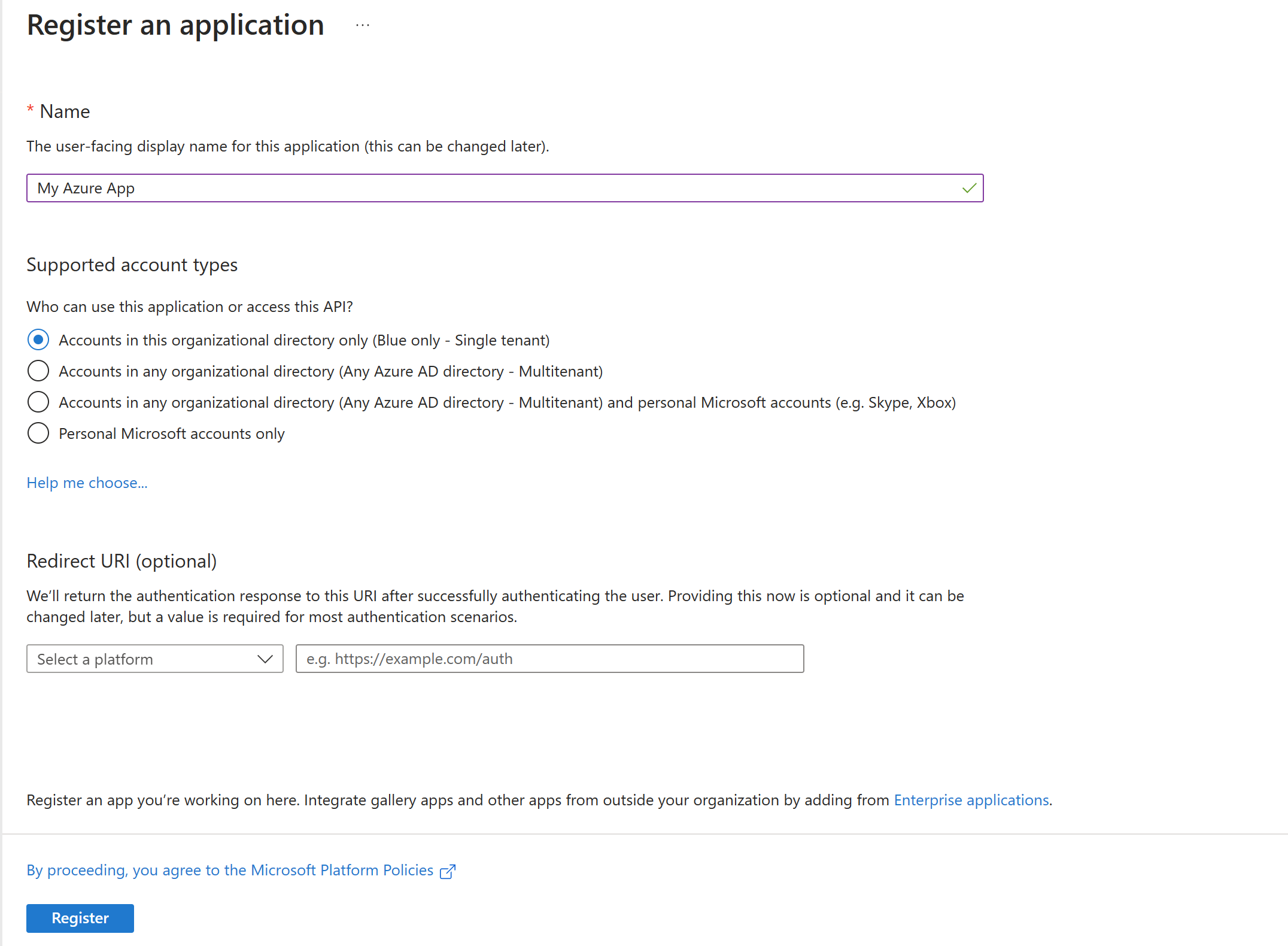
15 |
16 | Once registered, select **Certificates & secrets**
17 |
18 | 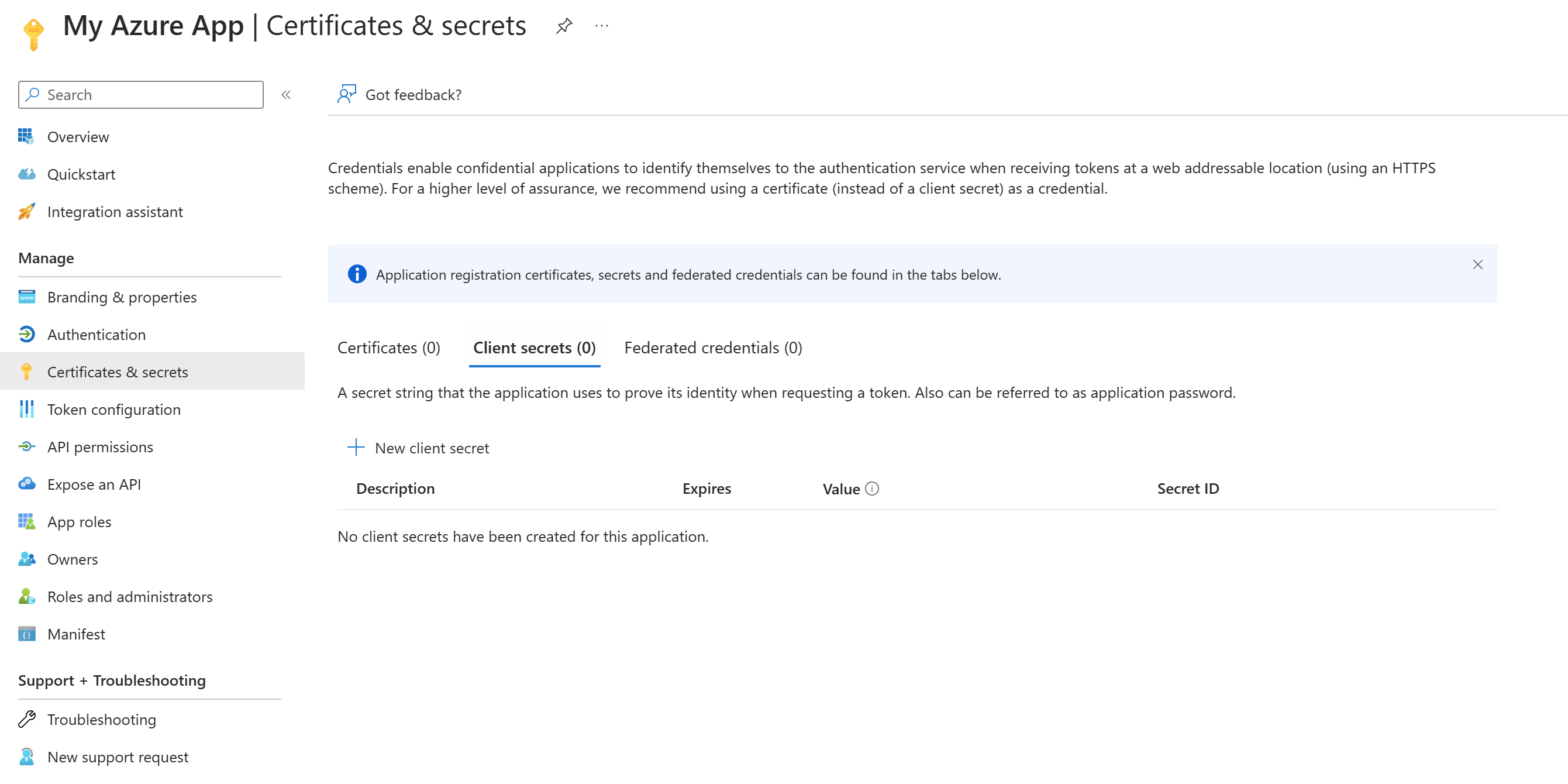
19 |
20 | Select either **Certificates** to upload a certificate (most secure) or click **New client secret** (in this guide will use a new client secret since it's easier)
21 |
22 | 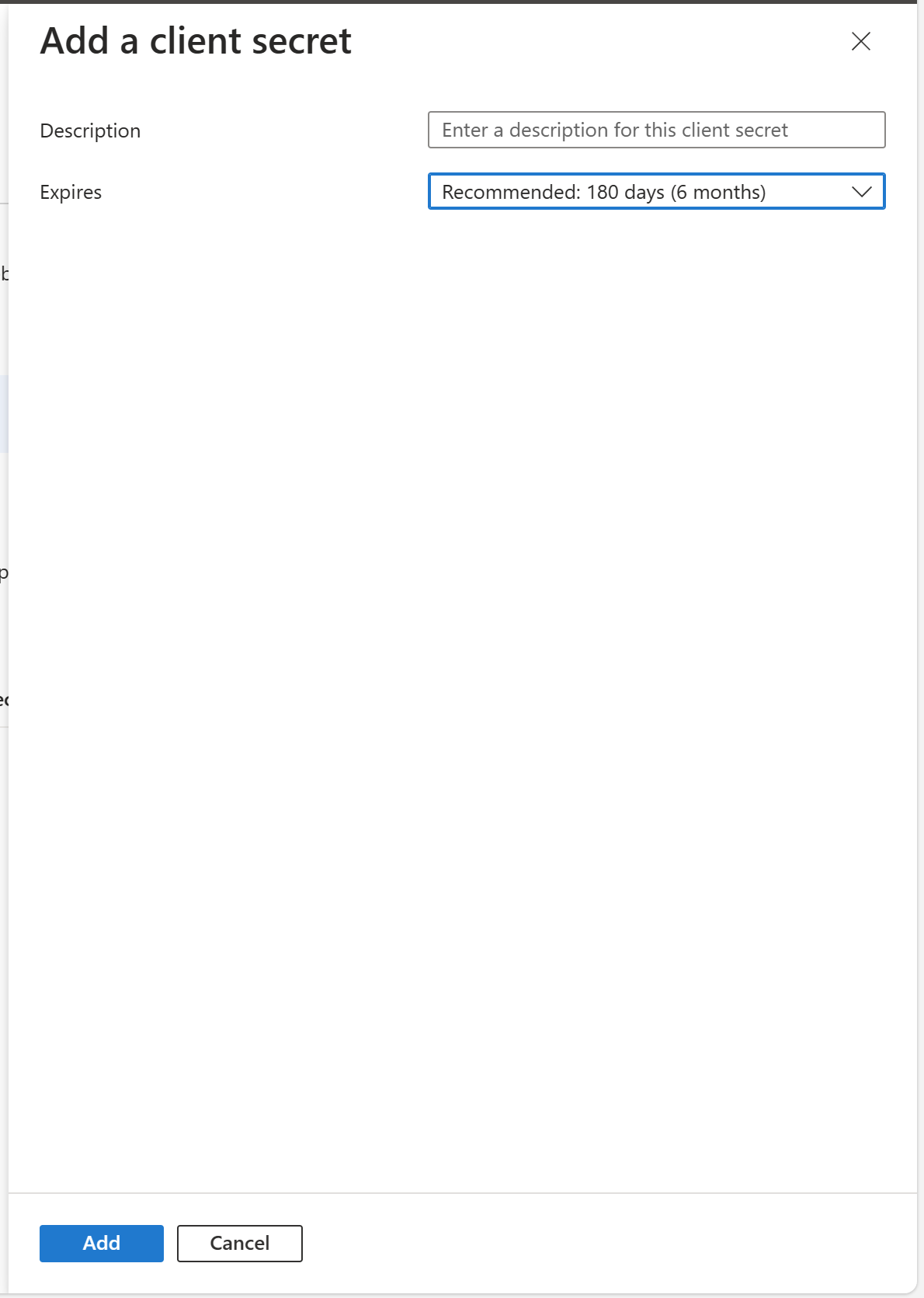
23 |
24 | Either keep the defaults, or change the **Expires** value to a value you're comfortable with. **Microsoft recommends a value of 12 months or less.**
25 |
26 | 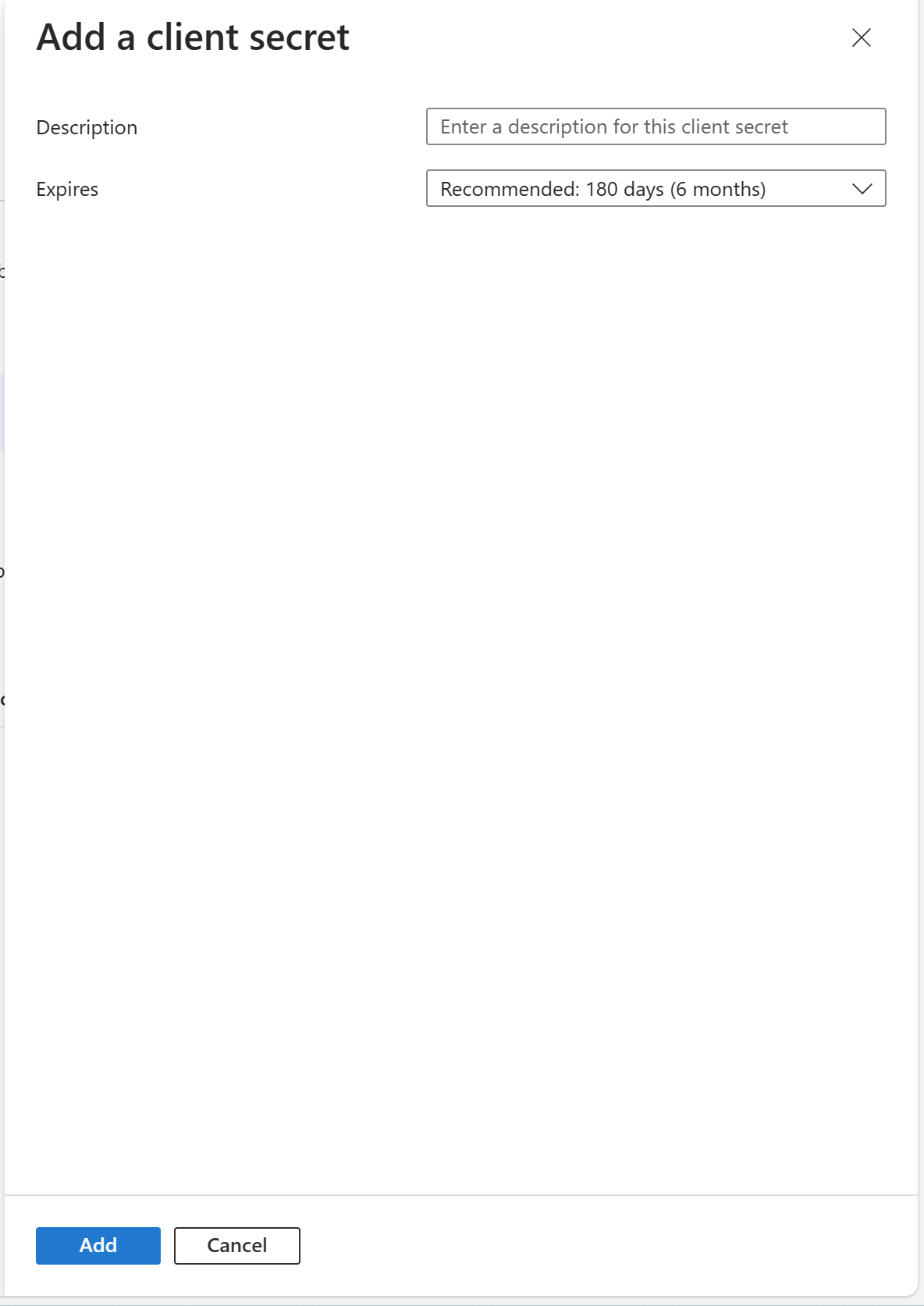
27 |
28 | After you click **Add**, ***copy the value of the secret***. It's important to copy this value now as when you leave this screen, the value column will not show the full value when you return. This value is what you'll use in the script to authenticate. Also make sure to note when this application expires. You'll need to generate a new client secret on or before that date.
29 |
30 | Click on **API permissions**. You'll need the following permissions and Admin consent is required for them.
31 |
32 | To add the permissions, click **Add a permission** and select **Microsoft Graph** in the fly out, then select **Application permissions**. In the select permissions area, search for the below permissions and add them.
33 |
34 | - Device.Read.All
35 | - Group.Read.All
36 | - GroupMember.Read.All
37 | - DeviceManagementManagedDevices.PrivilegedOperations.All
38 |
39 | Once you've selected the permissions, click **Grant admin consent for "your tenant name"**. Your permissions should look like this.
40 |
41 | 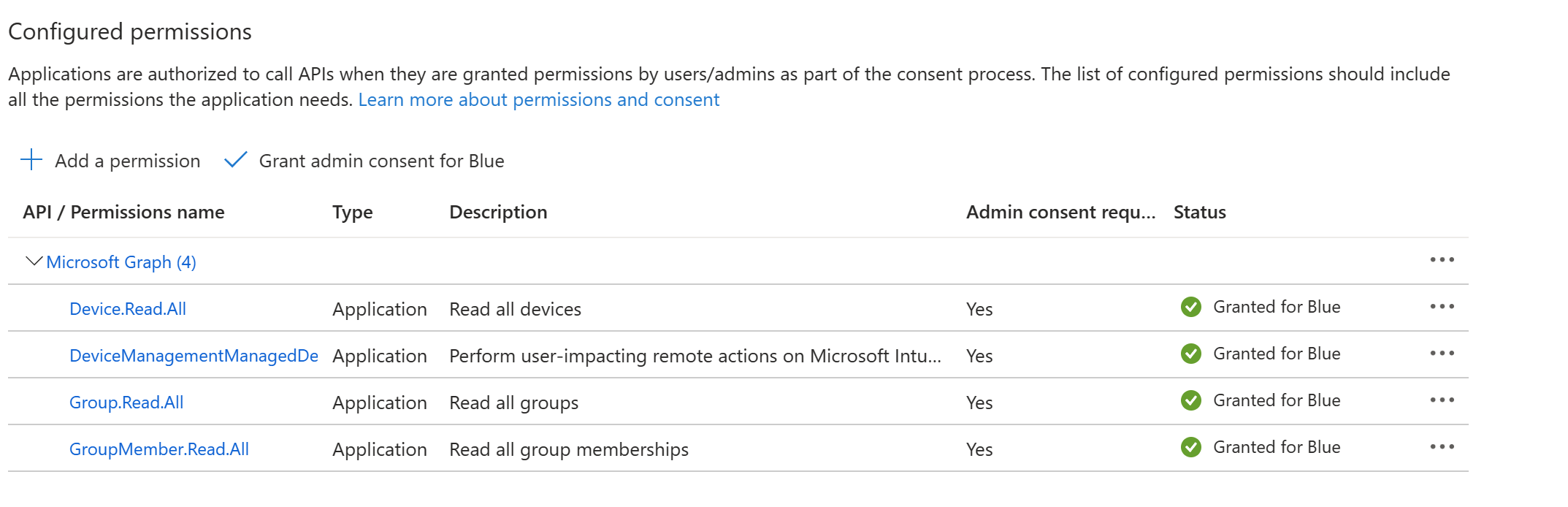
42 |
43 | Now you're ready to customize the script
44 |
45 | # Customize the script
46 |
47 | There are three variables you'll need to customize
48 |
49 | - $clientId
50 | - $clientSecret
51 | - $tenantId
52 |
53 | $clientId and $tenantID are what you get from the app you just made (go to the Overview tab within the app in the Azure portal to get those values). The $clientSecret is the value you copied from the app when you made the client secret earlier (you did remember to copy that, right?)
54 |
55 | # Run the script
56 | There are 3 parameters you'll need to provide
57 |
58 | - GroupName - This is the name of your Azure AD security group
59 | - Prefix - This is the device name prefix you wish to use. Do not include a dash after the prefix. The script will add a dash to separate the prefix and suffix.
60 | - Suffix - This is the suffix you wish to use. This can either be {{serialnumber}} or {{rand:x}} where x is the number of random digits you wish to have after the device prefix.
61 |
62 | By default, the script will not output anything. If you want console output, use the -verbose parameter. There is a log that gets created in the root folder of where the script is being run from.
63 |
64 | The script will throttle after 100 devices. The API docs don't indicate how many requests can be done within a specific amount of time. So the script will default to doing 100 devices every 20 seconds.
65 |
66 | Once the script has renamed a device, the device will need to be rebooted in order for the name to change to take. Intune can take a little while before it issues the command to the device. If you check a device object in the Intune console and it says the rename has completed, that means the rename command has made it to the device, not that the device's name has been changed. The device will still need to be rebooted. It's probably best to assume that after monthly patches have been installed that all of the devices should have their names changed (or ask your users to reboot).
67 |
68 | ## Examples
69 | .\BulkRenameDevices.ps1 -GroupName 'MyGroup' -Prefix 'MSFT' -Suffix '{{rand:6}}'
70 |
71 | .\BulkRenameDevices.ps1 -GroupName 'MyGroup' -Prefix 'MSFT' -Suffix '{{serialnumber}}'
72 |
73 | And yes, you need those weird curly brackets.
74 |
75 |
76 |
77 |
78 |
79 |
80 |
81 |
82 |
83 |
84 |
85 |
86 |
87 |
88 |
89 |
90 |
91 |
92 |
93 |
94 |
95 |
--------------------------------------------------------------------------------
/RemoveDevices/Readme.md:
--------------------------------------------------------------------------------
1 | # Remove devices from Intune, Entra ID and Autopilot
2 |
3 | The RemoveManagedDevices.ps1 script is designed to remove devices from Microsoft Intune, Entra ID, and Autopilot based on provided serial numbers. This script can process single serial numbers or bulk removal from a CSV file. The script utilizes Microsoft Graph API to perform these operations.This script will either change the Intune primary user to the last logged on user, or remove the primary user altogether to devices in a specified Entra ID security group
4 |
5 | # Problem
6 |
7 | This script addresses the need to efficiently remove managed devices from Intune, Entra ID, and Autopilot in an automated and scalable manner, either individually or in bulk.
8 |
9 | # Authentication
10 |
11 | You'll need an Entra ID Application Registration in order to securely run this script. It's not designed to use delegated permissions (e.g. your Entra ID account).
12 |
13 | If you've never registered an application before to authenticate to Entra ID, this [Microsoft Quickstart Guide on App Registration](https://learn.microsoft.com/en-us/azure/active-directory/develop/quickstart-register-app) is a good starting point.
14 |
15 | Below are some screenshots on how your application should be configured
16 |
17 | 
18 |
19 | Once registered, select **Certificates & secrets**
20 |
21 | 
22 |
23 | Select either **Certificates** to upload a certificate (most secure) or click **New client secret** (in this guide will use a new client secret since it's easier)
24 |
25 | 
26 |
27 | Either keep the defaults, or change the **Expires** value to a value you're comfortable with. **Microsoft recommends a value of 12 months or less.**
28 |
29 | 
30 |
31 | After you click **Add**, ***copy the value of the secret***. It's important to copy this value now as when you leave this screen, the value column will not show the full value when you return. This value is what you'll use in the script to authenticate. Also make sure to note when this application expires. You'll need to generate a new client secret on or before that date.
32 |
33 | Click on **API permissions**. You'll need the following permissions and Admin consent is required for them.
34 |
35 | To add the permissions, click **Add a permission** and select **Microsoft Graph** in the fly out, then select **Application permissions**. In the select permissions area, search for the below permissions and add them.
36 |
37 | * DeviceManagementManagedDevices.ReadWrite.All
38 | * Directory.ReadWrite.All
39 | * DeviceManagementServiceConfig.ReadWrite.All
40 | * Device.ReadWrite.Al
41 |
42 | Once you've selected the permissions, click **Grant admin consent for "your tenant name"**. Your permissions should look like this.
43 |
44 | 
45 |
46 | Now you're ready to customize the script.
47 |
48 | # Customize the script
49 |
50 | There are three variables you'll need to customize
51 |
52 | - $clientId
53 | - $clientSecret
54 | - $tenantId
55 |
56 | $clientId and $tenantID are what you get from the app you just made (go to the Overview tab within the app in the Azure portal to get those values). The $clientSecret is the value you copied from the app when you made the client secret earlier (you did remember to copy that, right?)
57 |
58 | # Run the script
59 |
60 | The script has an action variable that accepts five commands:
61 |
62 | - **SerialNumber** : The serial number of the device to be removed.
63 | - **CsvFile** : The path to the CSV file containing a list of serial numbers for bulk removal.
64 | - **RemoveFromIntune** : Switch to remove the device from Intune.
65 | - **RemoveFromEntraID** : Switch to remove the device from Entra ID.
66 | - **RemoveFromAutopilot** : Switch to remove the device from Autopilot.
67 |
68 | **Single Device Removal**:
69 |
70 | * Provide the serial number of the device.
71 | * Specify the platforms from which the device should be removed using the appropriate switches.
72 |
73 | **Bulk Device Removal**:
74 |
75 | * Provide the path to the CSV file containing the list of serial numbers.
76 | * Specify the platforms from which the devices should be removed using the appropriate switches.
77 |
78 | ## Examples
79 |
80 | .\RemoveManagedDevices.ps1 -SerialNumber "ABC123456" -RemoveFromIntune -RemoveFromEntraID
81 |
82 | .\RemoveManagedDevices.ps1 -CsvFile "devices.csv" -RemoveFromIntune -RemoveFromAutopilot
83 |
84 | ## **Expected Outcomes**
85 |
86 | **Log Files** : The script generates log files to track the removal process:
87 |
88 | * RemovedDevices.log: Logs of successfully removed devices.
89 | * NotFoundDevices.txt: Logs of devices not found.
90 |
91 | **Device Removal** : Devices specified by the serial number or in the CSV file will be removed from the selected platforms (Intune, Entra ID, Autopilot).
92 |
93 | ## **Additional Notes**
94 |
95 | * **CSV File Format**: Ensure the CSV file contains a column named SerialNumber.
96 | * **Error Handling**: The script logs errors and devices not found for troubleshooting.
97 | * **Entra ID Object deletion**: The Intune object of the associated Entra ID object must be present in order to successfully delete the Entra ID object. This is because we gather the Entra ID object from the associated Intune object, since the Entra ID object does not contain the serial number property. If the Intune object is missing, and the -RemovefromEntraID parameter is included, the script reports that no Entra object is found which may not be the case.
98 |
--------------------------------------------------------------------------------
/ChangeIntunePrimaryUser/readme.md:
--------------------------------------------------------------------------------
1 | # Change or Remove Intune Primary User
2 | This script will either change the Intune primary user to the last logged on user, or remove the primary user altogether to devices in a specified Azure AD security group.
3 |
4 | ### Updates
5 | 5/12/2023 - Added better error and throttling handling
6 |
7 | 5/5/2023 - Added token renewal if token is about to expire.
8 |
9 | 5/4/2023 - Updated pagination handling so it'll now grab all devices if the group is larger than 100 devices. Also fixed an issue where the script would fail if no Intune deviceId was found.
10 |
11 | # Problem
12 | Users are unable to use the Company Portal application to self-service install applications on their own. Users can install apps via the Company Portal in one of two ways:
13 |
14 | 1. User is the primary user as indicated by the device object in Intune
15 | 2. There is no primary user assigned to the device object in Intune. The primary user in the Intune console on the device object will show up as None. This type of configuration is considered a shared device configuration. A device is typically in this state if it's enrolled via a Provisioning Package or an Autopilot Self Deploying profile.
16 |
17 | # Primary User benefits
18 | Having a primary user has the following benefits
19 | 1. Admins can identify who the primary user is. This can make it easy to know who to contact in the event of an issue with the device (lost/stolen, etc)
20 | 2. Primary users can self-service Bitlocker recovery keys using the myaccount.microsoft.com portal.
21 |
22 | If these benefits don't matter to you, removing the primary user will allow for any user to be able to self-service install applications that have been made available to users. Just know that if a user needs their bitlocker recovery key for any reason, they will need to contact the help desk and have someone get it for them.
23 |
24 | # Authentication
25 | You'll need an Azure AD Application Registration in order to securely run this script. It's not designed to use delegated permissions (e.g. your Azure AD account).
26 |
27 | If you've never registered an application before to authenticate to Azure AD, this [Microsoft Quickstart Guide on App Registration](https://learn.microsoft.com/en-us/azure/active-directory/develop/quickstart-register-app) is a good starting point.
28 |
29 | Below are some screenshots on how your application should be configured
30 |
31 | 
32 |
33 | Once registered, select **Certificates & secrets**
34 |
35 | 
36 |
37 | Select either **Certificates** to upload a certificate (most secure) or click **New client secret** (in this guide will use a new client secret since it's easier)
38 |
39 | 
40 |
41 | Either keep the defaults, or change the **Expires** value to a value you're comfortable with. **Microsoft recommends a value of 12 months or less.**
42 |
43 | 
44 |
45 | After you click **Add**, ***copy the value of the secret***. It's important to copy this value now as when you leave this screen, the value column will not show the full value when you return. This value is what you'll use in the script to authenticate. Also make sure to note when this application expires. You'll need to generate a new client secret on or before that date.
46 |
47 | Click on **API permissions**. You'll need the following permissions and Admin consent is required for them.
48 |
49 | To add the permissions, click **Add a permission** and select **Microsoft Graph** in the fly out, then select **Application permissions**. In the select permissions area, search for the below permissions and add them.
50 |
51 | - Device.Read.All
52 | - DeviceManagementConfiguration.Read.All
53 | - DeviceManagementManagedDevices.ReadWrite.All
54 | - Group.Read.All
55 | - GroupMember.Read.All
56 | - User.Read.All
57 |
58 | Once you've selected the permissions, click **Grant admin consent for "your tenant name"**. Your permissions should look like this.
59 |
60 | 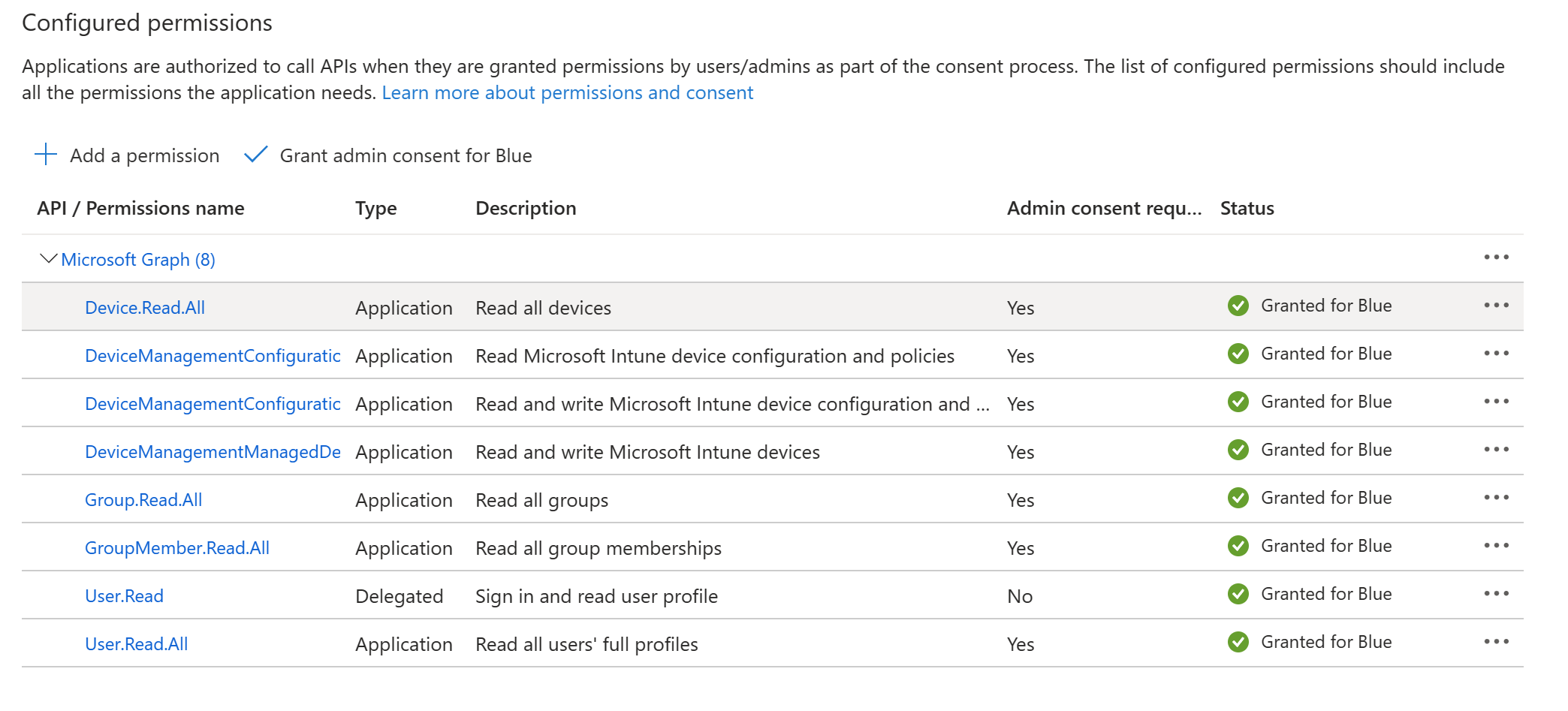
61 |
62 | Now you're ready to customize the script
63 |
64 | # Customize the script
65 |
66 | There are three variables you'll need to customize
67 |
68 | - $clientId
69 | - $clientSecret
70 | - $tenantId
71 |
72 | $clientId and $tenantID are what you get from the app you just made (go to the Overview tab within the app in the Azure portal to get those values). The $clientSecret is the value you copied from the app when you made the client secret earlier (you did remember to copy that, right?)
73 |
74 | # Run the script
75 | The script has an action variable that accepts two commands:
76 |
77 | - Remove: remove will remove the primary user. The device will show up with a primary user of None
78 | - Change: change will change the primary user to the last logged on user of the device
79 |
80 | There is also a variable named GroupName which is the display name of the Azure AD security group that contains the devices you want to change the primary user of.
81 |
82 | By default, the script will not output anything. If you want console output, use the -verbose parameter. There is a log that gets created in the root folder of where the script is being run from.
83 |
84 | ## Examples
85 | .\ChangeIntunePrimaryUser.ps1 -GroupName 'MyGroup' -action remove
86 |
87 | .\ChangeIntunePrimaryUser.ps1 -GroupName 'MyGroup' -action change
88 |
89 |
90 |
91 |
92 |
93 |
94 |
95 |
96 |
97 |
98 |
99 |
100 |
101 |
102 |
103 |
104 |
105 |
106 |
107 |
108 |
109 |
--------------------------------------------------------------------------------
/BulkRenameDevices/BulkRenameDevices.ps1:
--------------------------------------------------------------------------------
1 | param (
2 | [Parameter(Mandatory = $true)]
3 | [string]$GroupName,
4 | [Parameter(Mandatory = $true)]
5 | [string]$prefix,
6 | [Parameter(Mandatory = $true)]
7 | [string]$suffix
8 | )
9 | # Replace these with your app registration values
10 | $clientId = ''
11 | $clientSecret =''
12 | $tenantId = ''
13 |
14 | $Logfile = "$PSScriptRoot\BulkRenameDevices.log"
15 | function WriteLog($LogText) {
16 | Add-Content -path $LogFile -value "$((Get-Date).ToString()) $LogText" -Force -ErrorAction SilentlyContinue
17 | Write-Verbose $LogText
18 | }
19 | function Get-AccessToken {
20 | WriteLog 'Getting Access token'
21 | $tokenUrl = "https://login.microsoftonline.com/$tenantId/oauth2/v2.0/token"
22 | $body = @{
23 | grant_type = "client_credentials"
24 | client_id = $clientId
25 | client_secret = $clientSecret
26 | scope = "https://graph.microsoft.com/.default"
27 | }
28 |
29 | $response = Invoke-WebRequest -Method Post -Uri $tokenUrl -ContentType "application/x-www-form-urlencoded" -Body $body
30 | $accessToken = (ConvertFrom-Json $response.Content).access_token
31 | $expiresIn = (ConvertFrom-Json $response.Content).expires_in
32 | $expirationTime = (Get-Date).AddSeconds($expiresIn)
33 | WriteLog 'Successfully obtained access token'
34 | WriteLog "Access token expiration date and time: $expirationTime"
35 | return $accessToken, $expirationTime
36 | }
37 |
38 | function Get-AADGroupId ($accessToken, $groupName) {
39 | WriteLog "Getting Azure AD Group ID for group $groupName"
40 | $url = "https://graph.microsoft.com/beta/groups?`$filter=displayName eq '$groupName'"
41 | $response = Invoke-WebRequest -Method Get -Uri $url -ContentType "application/json" -Headers @{Authorization = "Bearer $accessToken" }
42 | $groupID = (ConvertFrom-Json $response.Content).value[0].id
43 | Writelog "$groupName groupID is $groupID"
44 | return $groupID
45 | }
46 |
47 | function Get-DeviceObjects ($accessToken, $groupId) {
48 | WriteLog "Getting members of $groupName"
49 | $url = "https://graph.microsoft.com/beta/groups/$groupId/members"
50 | $groupMembers = @()
51 |
52 | do {
53 | $response = Invoke-WebRequest -Method Get -Uri $url -ContentType "application/json" -Headers @{Authorization = "Bearer $accessToken" }
54 | $pagedResults = (ConvertFrom-Json $response.Content).value
55 | $groupMembers += $pagedResults
56 | $url = (ConvertFrom-Json $response.Content).'@odata.nextLink'
57 | } while ($null -ne $url)
58 |
59 | WriteLog "Getting members of $groupName successful. $groupName contains $($groupMembers.count) members"
60 | return $groupMembers
61 | }
62 |
63 | #setDeviceName requires DeviceManagementManagedDevices.PrivilegedOperations.All permission for the application
64 | function Set-DeviceName($accessToken, $deviceID, $newDeviceName) {
65 | $uri = "https://graph.microsoft.com/beta/deviceManagement/managedDevices/$deviceID/setDeviceName"
66 | $headers = @{
67 | Authorization = "Bearer $accessToken"
68 | "Content-Type" = "application/json"
69 | }
70 | $body = @{
71 | "deviceName" = $newDeviceName
72 | } | ConvertTo-Json
73 | Writelog "Renaming $oldDeviceName to $newDeviceName"
74 | Invoke-RestMethod -Uri $uri -Headers $headers -Method Post -Body $body
75 | WriteLog "Name changed successfully"
76 | }
77 |
78 | function Invoke-ThrottledRequest ($accessToken, $deviceID, $newDeviceName) {
79 | if ($script:RequestCounter -eq 100) {
80 | WriteLog "Graph API limit of 100 requests hit. Sleeping for 20 seconds before resuming"
81 | Start-Sleep -Seconds 20
82 | $script:RequestCounter = 0
83 | }
84 |
85 | Set-DeviceName $accessToken $deviceID $newDeviceName
86 |
87 | $script:RequestCounter++
88 | WriteLog "Incrementing API request count to: $script:RequestCounter"
89 | }
90 | function Get-IntuneDeviceId ($accessToken, $aadDeviceId) {
91 | WriteLog "Getting Intune deviceID for device $oldDeviceName with AzureAD deviceID $aadDeviceID"
92 | $url = "https://graph.microsoft.com/beta/deviceManagement/managedDevices?`$filter=azureADDeviceId eq '$aadDeviceId'"
93 | $response = Invoke-WebRequest -Method Get -Uri $url -ContentType "application/json" -Headers @{Authorization = "Bearer $accessToken" }
94 | $intuneDeviceId = (ConvertFrom-Json $response.Content).value[0].id
95 | WriteLog "Intune deviceID for device $oldDeviceName`: $intuneDeviceID"
96 | return $intuneDeviceId
97 | }
98 | try{
99 | $script:RequestCounter = 0
100 | if (Test-Path -Path $Logfile) {
101 | Remove-item -Path $LogFile -Force
102 | }
103 |
104 | if ($suffix -match "{{rand:\d+}}") {
105 | # Get the integer from {{rand:x}} and store this in $randLength. X is an integer that the user will pass in the $suffix parameter
106 | $randLength = [int]($suffix -replace "[^\d]")
107 | $prefixLength = $prefix.Length
108 | $nameLength = $prefixLength + $randLength + 1
109 | if ($nameLength -gt 15) {
110 | throw "Generated device name is too long. Name should be 15 characters or less. Please change the device name prefix or suffix."
111 | }
112 | }
113 |
114 | $accessToken, $tokenExpirationTime = Get-AccessToken
115 | $groupID = Get-AADGroupID -accessToken $accessToken -groupName $groupName
116 | $deviceObjects = Get-DeviceObjects -accessToken $accessToken -groupId $groupID
117 |
118 | foreach ($device in $deviceObjects) {
119 | if ((Get-Date) -ge $tokenExpirationTime.AddMinutes(-5)) {
120 | WriteLog 'Access token is about to expire. Refreshing token...'
121 | $accessToken, $tokenExpirationTime = Get-AccessToken
122 | }
123 | $intuneDeviceId = Get-IntuneDeviceId -accessToken $accessToken -aadDeviceId $device.deviceID
124 | $oldDeviceName = $device.displayName
125 | $newDeviceName = "$prefix-$suffix"
126 | Invoke-ThrottledRequest $accessToken $intuneDeviceId $newDeviceName
127 | }
128 | }
129 | catch{
130 | throw $_
131 | }
132 |
133 |
--------------------------------------------------------------------------------
/RemoveDevices/RemoveManagedDevices.ps1:
--------------------------------------------------------------------------------
1 | param (
2 | [string]$SerialNumber,
3 | [string]$CsvFile,
4 | [switch]$RemoveFromIntune,
5 | [switch]$RemoveFromEntraID,
6 | [switch]$RemoveFromAutopilot
7 | )
8 |
9 | # Replace these with your app registration values
10 | $clientId = 'YOUR CLIENT ID HERE'
11 | $clientSecret ='YOUR CLIENT SECRET HERE'
12 | $tenantId = 'YOUR TENANT ID HERE'
13 |
14 | # Log files
15 | $Logfile = "$PSScriptRoot\RemovedDevices.log"
16 | $NotFoundFile = "$PSScriptRoot\NotFoundDevices.txt"
17 |
18 | function WriteLog {
19 | param ([string]$LogText)
20 | Add-Content -Path $Logfile -Value "$((Get-Date).ToString()) $LogText" -Force -ErrorAction SilentlyContinue
21 | Write-Verbose $LogText
22 | }
23 |
24 | function Write-NotFoundLog {
25 | param ([string]$SerialNumber)
26 | Add-Content -Path $NotFoundFile -Value "$((Get-Date).ToString()) Device not found: $SerialNumber" -Force -ErrorAction SilentlyContinue
27 | }
28 |
29 | function Get-AccessToken {
30 | WriteLog 'Getting Access token'
31 | $tokenUrl = "https://login.microsoftonline.com/$tenantId/oauth2/v2.0/token"
32 | $body = @{
33 | grant_type = "client_credentials"
34 | client_id = $clientId
35 | client_secret = $clientSecret
36 | scope = "https://graph.microsoft.com/.default"
37 | }
38 |
39 | $response = Invoke-WebRequest -Method Post -Uri $tokenUrl -ContentType "application/x-www-form-urlencoded" -Body $body
40 | $accessToken = (ConvertFrom-Json $response.Content).access_token
41 | $expiresIn = (ConvertFrom-Json $response.Content).expires_in
42 | $expirationTime = (Get-Date).AddSeconds($expiresIn)
43 | WriteLog 'Successfully obtained access token'
44 | WriteLog "Access token expiration date and time: $expirationTime"
45 | return $accessToken
46 | }
47 |
48 | function Get-DeviceId {
49 | param (
50 | [string]$SerialNumber,
51 | [string]$AccessToken
52 | )
53 | WriteLog "Getting Intune device ID for Serial Number: $SerialNumber"
54 | $url = "https://graph.microsoft.com/beta/deviceManagement/managedDevices?`$filter=serialNumber eq '$SerialNumber'"
55 | $headers = @{
56 | Authorization = "Bearer $AccessToken"
57 | }
58 |
59 | try {
60 | $response = Invoke-RestMethod -Method Get -Uri $url -Headers $headers
61 | if ($response.value.Count -gt 0) {
62 | $device = $response.value[0]
63 | $deviceId = $device.id
64 | $azureADDeviceId = $device.azureADDeviceId
65 | WriteLog "Found Intune device ID: $deviceId and Entra ID device ID: $azureADDeviceId for Serial Number: $SerialNumber"
66 | return @{
67 | "DeviceId" = $deviceId
68 | "AzureADDeviceId" = $azureADDeviceId
69 | }
70 | } else {
71 | WriteLog "Device not found for Serial Number: $SerialNumber"
72 | Write-NotFoundLog -SerialNumber $SerialNumber
73 | return $null
74 | }
75 | } catch {
76 | WriteLog "Error retrieving Intune device ID for Serial Number: $SerialNumber. Error: $_"
77 | return $null
78 | }
79 | }
80 |
81 | function Get-AutopilotDeviceId {
82 | param (
83 | [string]$SerialNumber,
84 | [string]$AccessToken
85 | )
86 | WriteLog "Getting Autopilot Device ID for Serial Number: $SerialNumber"
87 | $url = "https://graph.microsoft.com/beta/deviceManagement/windowsAutopilotDeviceIdentities?`$filter=contains(serialNumber,'$SerialNumber')"
88 | $headers = @{
89 | Authorization = "Bearer $AccessToken"
90 | }
91 |
92 | try {
93 | $response = Invoke-RestMethod -Method Get -Uri $url -Headers $headers
94 | if ($response.value.Count -gt 0) {
95 | $autopilotDeviceId = $response.value[0].id
96 | WriteLog "Found Autopilot Device ID: $autopilotDeviceId for Serial Number: $SerialNumber"
97 | return $autopilotDeviceId
98 | } else {
99 | WriteLog "Autopilot device not found for Serial Number: $SerialNumber"
100 | Write-NotFoundLog -SerialNumber $SerialNumber
101 | return $null
102 | }
103 | } catch {
104 | WriteLog "Error retrieving Autopilot Device ID for Serial Number: $SerialNumber. Error: $_"
105 | return $null
106 | }
107 | }
108 |
109 | function Remove-Device {
110 | param (
111 | [string]$DeviceId,
112 | [string]$Platform,
113 | [string]$AccessToken
114 | )
115 | $url = switch ($Platform) {
116 | "Intune" { "https://graph.microsoft.com/beta/deviceManagement/managedDevices/$DeviceId" }
117 | "EntraID" { "https://graph.microsoft.com/beta/devices?`$filter=deviceId eq '$DeviceId'" }
118 | "Autopilot" { "https://graph.microsoft.com/beta/deviceManagement/windowsAutopilotDeviceIdentities/$autopilotDeviceId" }
119 | default { $null }
120 | }
121 |
122 | if ($url -ne $null) {
123 | WriteLog "Removing Device ID: $DeviceId from $Platform"
124 | $headers = @{
125 | Authorization = "Bearer $AccessToken"
126 | }
127 | try {
128 | Invoke-RestMethod -Method Delete -Uri $url -Headers $headers
129 | WriteLog "Successfully removed Device ID: $DeviceId from $Platform"
130 | } catch {
131 | WriteLog "Failed to remove Device ID: $DeviceId from $Platform. Error: $_"
132 | }
133 | } else {
134 | WriteLog "Invalid platform specified: $Platform"
135 | }
136 | }
137 |
138 | function Invoke-SingleDeviceRemoval {
139 | param (
140 | [string]$SerialNumber
141 | )
142 | WriteLog "Processing single device removal for Serial Number: $SerialNumber"
143 | $AccessToken = Get-AccessToken
144 | $deviceIds = Get-DeviceId -SerialNumber $SerialNumber -AccessToken $AccessToken
145 | if ($deviceIds -ne $null) {
146 | if ($RemoveFromIntune) {
147 | Remove-Device -DeviceId $deviceIds.DeviceId -Platform "Intune" -AccessToken $AccessToken
148 | }
149 | if ($RemoveFromEntraID) {
150 | Remove-Device -DeviceId $deviceIds.AzureADDeviceId -Platform "EntraID" -AccessToken $AccessToken
151 | }
152 | }
153 |
154 | if ($RemoveFromAutopilot) {
155 | $autopilotDeviceId = Get-AutopilotDeviceId -SerialNumber $SerialNumber -AccessToken $AccessToken
156 | if ($autopilotDeviceId -ne $null) {
157 | Remove-Device -DeviceId $autopilotDeviceId -Platform "Autopilot" -AccessToken $AccessToken
158 | }
159 | }
160 | }
161 |
162 | function Invoke-BulkDeviceRemoval {
163 | param (
164 | [string]$CsvFile
165 | )
166 | WriteLog "Processing bulk device removal from CSV file: $CsvFile"
167 | $AccessToken = Get-AccessToken
168 | $devices = Import-Csv -Path $CsvFile
169 | foreach ($device in $devices) {
170 | $SerialNumber = $device.SerialNumber
171 | WriteLog "Processing device with Serial Number: $SerialNumber"
172 | $deviceIds = Get-DeviceId -SerialNumber $SerialNumber -AccessToken $AccessToken
173 | if ($deviceIds -ne $null) {
174 | if ($RemoveFromIntune) {
175 | Remove-Device -DeviceId $deviceIds.DeviceId -Platform "Intune" -AccessToken $AccessToken
176 | }
177 | if ($RemoveFromEntraID) {
178 | Remove-Device -DeviceId $deviceIds.AzureADDeviceId -Platform "EntraID" -AccessToken $AccessToken
179 | }
180 | }
181 |
182 | if ($RemoveFromAutopilot) {
183 | $autopilotDeviceId = Get-AutopilotDeviceId -SerialNumber $SerialNumber -AccessToken $AccessToken
184 | if ($autopilotDeviceId -ne $null) {
185 | Remove-Device -DeviceId $autopilotDeviceId -Platform "Autopilot" -AccessToken $AccessToken
186 | }
187 | }
188 | }
189 | }
190 |
191 | # Main script logic
192 |
193 | WriteLog "Begin Script"
194 | if ($CsvFile) {
195 | WriteLog "CSV File Found: $CsvFile"
196 | Invoke-BulkDeviceRemoval -CsvFile $CsvFile
197 | } elseif ($SerialNumber) {
198 | WriteLog "Single serial number found: $SerialNumber"
199 | Invoke-SingleDeviceRemoval -SerialNumber $SerialNumber
200 | } else {
201 | Write-Host "Please provide either a SerialNumber or a CsvFile."
202 | WriteLog "No SerialNumber or CsvFile provided. Exiting script."
203 | }
204 | WriteLog "End Script"
--------------------------------------------------------------------------------
/BulkRenameDevices/BulkRenameDevicesIPAddress.ps1:
--------------------------------------------------------------------------------
1 | param (
2 | [Parameter(Mandatory = $true)]
3 | [string]$GroupName,
4 | [Parameter(Mandatory = $true)]
5 | [string]$prefix,
6 | [Parameter(Mandatory = $true)]
7 | [string]$suffix,
8 | [Parameter(Mandatory = $false)]
9 | [string]$ipPrefix
10 |
11 | )
12 | # Replace these with your app registration values
13 | $clientId = ''
14 | $clientSecret =''
15 | $tenantId = ''
16 |
17 | $Logfile = "$PSScriptRoot\BulkRenameDevices.log"
18 | function WriteLog($LogText) {
19 | Add-Content -path $LogFile -value "$((Get-Date).ToString()) $LogText" -Force -ErrorAction SilentlyContinue
20 | Write-Verbose $LogText
21 | }
22 | function Get-AccessToken {
23 | WriteLog 'Getting Access token'
24 | $tokenuri = "https://login.microsoftonline.com/$tenantId/oauth2/v2.0/token"
25 | $body = @{
26 | grant_type = "client_credentials"
27 | client_id = $clientId
28 | client_secret = $clientSecret
29 | scope = "https://graph.microsoft.com/.default"
30 | }
31 |
32 | $response = Invoke-WebRequest -Method Post -Uri $tokenuri -ContentType "application/x-www-form-urlencoded" -Body $body
33 | $accessToken = (ConvertFrom-Json $response.Content).access_token
34 | $expiresIn = (ConvertFrom-Json $response.Content).expires_in
35 | $expirationTime = (Get-Date).AddSeconds($expiresIn)
36 | WriteLog 'Successfully obtained access token'
37 | WriteLog "Access token expiration date and time: $expirationTime"
38 | return $accessToken, $expirationTime
39 | }
40 |
41 | function Get-AADGroupId ($accessToken, $groupName) {
42 | WriteLog "Getting Azure AD Group ID for group $groupName"
43 | $uri = "https://graph.microsoft.com/beta/groups?`$filter=displayName eq '$groupName'"
44 | $response = Invoke-WebRequestWithRetry -Method Get -Uri $uri -ContentType "application/json" -Headers @{Authorization = "Bearer $accessToken" }
45 | $groupID = (ConvertFrom-Json $response.Content).value[0].id
46 | Writelog "$groupName groupID is $groupID"
47 | return $groupID
48 | }
49 |
50 | function Get-DeviceObjects ($accessToken, $groupId) {
51 | WriteLog "Getting members of $groupName"
52 | $uri = "https://graph.microsoft.com/beta/groups/$groupId/members"
53 | $groupMembers = @()
54 |
55 | do {
56 | $response = Invoke-WebRequestWithRetry -Method Get -Uri $uri -ContentType "application/json" -Headers @{Authorization = "Bearer $accessToken" }
57 | $pagedResults = (ConvertFrom-Json $response.Content).value
58 | $groupMembers += $pagedResults
59 | $uri = (ConvertFrom-Json $response.Content).'@odata.nextLink'
60 | } while ($null -ne $uri)
61 |
62 | WriteLog "Getting members of $groupName successful. $groupName contains $($groupMembers.count) members"
63 | return $groupMembers
64 | }
65 |
66 | #setDeviceName requires DeviceManagementManagedDevices.PrivilegedOperations.All permission for the application
67 | function Set-DeviceName($accessToken, $intuneDeviceID, $newDeviceName) {
68 | $uri = "https://graph.microsoft.com/beta/deviceManagement/managedDevices/$intuneDeviceID/setDeviceName"
69 | $headers = @{
70 | Authorization = "Bearer $accessToken"
71 | }
72 | $body = @{
73 | "deviceName" = $newDeviceName
74 | } | ConvertTo-Json
75 | Writelog "Renaming $oldDeviceName to $newDeviceName"
76 | $response = Invoke-WebRequestWithRetry -Method Post -Uri $uri -ContentType "application/json" -Headers $headers -Body $body
77 | WriteLog "Name changed successfully"
78 | }
79 | function Get-IntuneDeviceId ($accessToken, $aadDeviceId) {
80 | WriteLog "Getting Intune deviceID for device $oldDeviceName with AzureAD deviceID $aadDeviceID"
81 | $uri = "https://graph.microsoft.com/beta/deviceManagement/managedDevices?`$filter=azureADDeviceId eq '$aadDeviceId'"
82 | $response = Invoke-WebRequestWithRetry -Method Get -Uri $uri -ContentType "application/json" -Headers @{Authorization = "Bearer $accessToken" }
83 | $intuneDeviceId = (ConvertFrom-Json $response.Content).value[0].id
84 | WriteLog "Intune deviceID for device $oldDeviceName`: $intuneDeviceID"
85 | return $intuneDeviceId
86 | }
87 |
88 | function Get-DeviceHardwareInformation ($accessToken, $intuneDeviceID) {
89 | WriteLog "Getting Intune hardware information for device with ID $intuneDeviceID"
90 | $uri = "https://graph.microsoft.com/beta/deviceManagement/managedDevices/$($intuneDeviceID)?`$select=id,deviceName,hardwareInformation"
91 | $response = Invoke-WebRequestWithRetry -Method Get -Uri $uri -ContentType "application/json" -Headers @{Authorization = "Bearer $accessToken" }
92 | $deviceHardwareInformation = (ConvertFrom-Json $response.Content)
93 | WriteLog "Successfully retrieved hardware information for $($deviceHardwareInformation.deviceName)"
94 | return $deviceHardwareInformation
95 | }
96 |
97 | function Invoke-WebRequestWithRetry ($Method, $Uri, $ContentType, $Headers, $Body) {
98 | $maxRetries = 5
99 | $retryCount = 0
100 | $delay = 60 # Initial delay in seconds, used for exponential backoff
101 |
102 | do {
103 | try {
104 |
105 | if($Body){
106 | $response = Invoke-WebRequest -Method $Method -Uri $Uri -ContentType $ContentType -Headers $Headers -Body $Body
107 | }
108 | else{
109 | $response = Invoke-WebRequest -Method $Method -Uri $Uri -ContentType $ContentType -Headers $Headers
110 | }
111 | return $response
112 | }
113 | catch {
114 |
115 | $retryCount++
116 | $statusCode = $_.Exception.Response.StatusCode.Value__
117 | if ($statusCode -eq 429){
118 | $delay = $_.Exception.Response.Headers['Retry-After']
119 | }
120 |
121 | if ($statusCode -eq 404){
122 | WriteLog "Script returned 404 not found"
123 | break
124 | }
125 |
126 | WriteLog "Script failed with error $_"
127 | WriteLog "Retrying in $delay seconds. Retry attempt $retryCount of $maxRetries."
128 | Start-Sleep -Seconds $delay
129 | $delay = $delay * 2
130 | }
131 | } while ($retryCount -lt $maxRetries)
132 | }
133 |
134 | try{
135 | $script:RequestCounter = 0
136 | if (Test-Path -Path $Logfile) {
137 | Remove-item -Path $LogFile -Force
138 | }
139 |
140 | if ($suffix -match "{{rand:\d+}}") {
141 | # Get the integer from {{rand:x}} and store this in $randLength. X is an integer that the user will pass in the $suffix parameter
142 | $randLength = [int]($suffix -replace "[^\d]")
143 | $prefixLength = $prefix.Length
144 | $nameLength = $prefixLength + $randLength + 1
145 | if ($nameLength -gt 15) {
146 | throw "Generated device name is too long. Name should be 15 characters or less. Please change the device name prefix or suffix."
147 | }
148 | }
149 |
150 | $accessToken, $tokenExpirationTime = Get-AccessToken
151 | $groupID = Get-AADGroupID -accessToken $accessToken -groupName $groupName
152 | $deviceObjects = Get-DeviceObjects -accessToken $accessToken -groupId $groupID
153 |
154 | foreach ($device in $deviceObjects) {
155 | if ((Get-Date) -ge $tokenExpirationTime.AddMinutes(-5)) {
156 | WriteLog 'Access token is about to expire. Refreshing token...'
157 | $accessToken, $tokenExpirationTime = Get-AccessToken
158 | }
159 | $oldDeviceName = $device.displayName
160 | $intuneDeviceId = Get-IntuneDeviceId -accessToken $accessToken -aadDeviceId $device.deviceID
161 | #If $intuneDeviceID is null, skip this device and continue with the next device
162 | if (!$intuneDeviceId) {
163 | WriteLog "Intune deviceID for device $oldDeviceName is null. Skipping this device and continuing with the next device"
164 | continue
165 | }
166 | $deviceHardwareInformation = Get-DeviceHardwareInformation -accessToken $accessToken -intuneDeviceID $intuneDeviceId
167 | #If IP address starts with $ipPrefix rename to A-{{serialnumber}}. If IP address starts with anything else, rename to S-{{serialnumber}}.
168 | if ($ipPrefix) {
169 | if ($deviceHardwareInformation.hardwareInformation.ipAddressV4 -like $ipPrefix -or $deviceHardwareInformation.hardwareInformation.wiredIPv4Address -like $ipPrefix) {
170 | $prefix = 'A'
171 | }
172 | else {
173 | $prefix = 'S'
174 | }
175 | }
176 | $newDeviceName = "$prefix-$suffix"
177 | Set-DeviceName $accessToken $intuneDeviceID $newDeviceName
178 | }
179 | }
180 | catch{
181 | throw $_
182 | }
183 |
184 |
--------------------------------------------------------------------------------
/ConfigurationProfileSettings/Readme.md:
--------------------------------------------------------------------------------
1 | # Recommended EDU Device Configuration Settings for Windows 10/11 Devices
2 |
3 | Configuring Windows devices in an education environment is challenging due to the different use-cases across the organization. 1 to 1 device configurations are different than shared carts or labs. Students have to be protected from being able to download and run applications that are inappropriate. Shared carts and lab devices need to be configured for specific use cases.
4 |
5 | # Goal
6 |
7 | The goal of this resource is to provide an easy way for EDU IT administrators to import a set of Microsoft recommended best practice settings for the following device use-cases in EDU
8 |
9 | * 1 to 1 Device (faculty and student)
10 | * Student User
11 | * Shared Cart/Lab/Kiosk
12 |
13 | These settings are not all-inclusive. There will be additional settings that should be added. If you have feedback, please [open an issue](https://github.com/rbalsleyMSFT/IntuneScripts/issues) or [pull request](https://github.com/rbalsleyMSFT/IntuneScripts/pulls).
14 |
15 | # Outcome
16 |
17 | When importing the Microsoft EDU device configuration settings from this repository, the following items are created. Each item that's imported is prefixed with _MSFT - EDU - *Device/Student* where *Device/Student* is the group that item should be targeted to. Most of these items will be targeted to device groups, while a few will go to student user groups to restrict students from doing certain things (e.g. installing apps that they shouldn't be installing).
18 |
19 | Below you will find a screenshot of each configuration type that is imported. If you want a detailed list of what policies are included in each item, please refer to the [settings reference](https://github.com/rbalsleyMSFT/IntuneScripts/blob/main/ConfigurationProfileSettings/SettingReference.md).
20 |
21 | ## Configuration Profiles
22 |
23 | 
24 |
25 | ## Win32 Applications
26 |
27 | 
28 |
29 | ## Update rings
30 |
31 | 
32 |
33 | ## Endpoint Security\Antivirus
34 |
35 | 
36 |
37 | ## Endpoint Security\Disk encryption
38 |
39 | 
40 |
41 | ## Autopilot Profiles
42 |
43 | 
44 |
45 | # Instructions
46 |
47 | ## YouTube Detailed Walkthrough
48 |
49 | [](https://www.youtube.com/watch?v=1HT_xdUBKZk "Windows Device Best Practice Settings for Education with Microsoft Intune")
50 |
51 |
52 | To import these settings, you will need to download the [IntuneManagement PowerShell script](https://github.com/Micke-K/IntuneManagement/archive/refs/heads/master.zip) from [Micke-K](https://github.com/Micke-K). This script will allow for easy import of these settings. This tool isn't supported by Microsoft. - [Read the documentation](https://github.com/Micke-K/IntuneManagement#readme) if you have any questions.
53 |
54 | 1. Download [IntuneManagement PowerShell script](https://github.com/Micke-K/IntuneManagement/archive/refs/heads/master.zip) and extract its contents.
55 | 2. Download [MSFT - EDU Recommended Intune Configuration.zip](https://github.com/rbalsleyMSFT/IntuneScripts/raw/main/ConfigurationProfileSettings/MSFT%20-%20EDU%20Recommended%20Intune%20Configurationv3.zip) and extract its contents
56 | 3. In the folder that you extracted the IntuneManagement PowerShell script to, double-click the start.cmd file. You may need to Unblock the start.cmd file before running (right-click the start.cmd file, select properties, then click the Unblock check box)
57 | 4. Sign-in with Global Admin or Intune Administrator permissions by clicking on the profile icon in the top right. It will ask you to consent permissions to the Intune Powershell App. Make sure to consent for your account and not on behalf of the tenant.
58 | 5. You may need to close and re-run start.cmd once permissions have been granted and/or sign out/sign in.
59 | 6. After reopening the script (if necessary), click Bulk - Import
60 | 7. In the Bulk Import window, change the Import root to the folder where you extracted the MSFT - EDU Recommended Intune Configuration.zip file. Make sure to also uncheck the Assign Scope (Tags) and Import Assignments check boxes. Your Bulk Import window should look like the following
61 |
62 | 
63 | 8. Click Import
64 | 9. In your Intune console, you should see items that have been imported just like the screenshots above for Device configuration profiles, Remediations, Update rings, Endpoint Security\Antivirus, and Endpoint Security\Disk encryption as well as two device Filters.
65 | 10. In each of the _MSFT - EDU imported items, target them to the appropriate device or user group. For each item that starts with **_MSFT - EDU - Device**, target to a device group. For each item that starts with **_MSFT - EDU - Student**, target to a student user group.
66 | 11. For the _MSFT - EDU - Device - Remove Widgets (Windows 11), this removes the Widgets feature in Windows 11. You can either target this to a group of Windows 11 devices, or target it to a group of Windows 10 and Windows 11 devices and use the MSFT - EDU - All Windows 11 Devices filter when targeting.
67 | 12. For the _MSFT - EDU - Device - Remove News and Interests (Windows 10), this removes the News and Interests feature in Windows 10. You can either target this to a group of Windows 10 devices, or target it to a group of Windows 10 and Windows 11 devices and use the MSFT - EDU - All Windows 10 Devices filter when targeting.
68 |
69 | # Additional items to configure manually
70 |
71 | There are some things that cannot be automated via this script that will need to be manually configured by the IT administrator.
72 |
73 | ## _MSFT - EDU - Device - General Configuration Settings (Customize)
74 |
75 | This configuration profile item has a number of settings that you will need to customize for your environment
76 |
77 | ### Authentication
78 |
79 | Set the UPN suffix of your school email address. This will make it so users don't have to type their full UPN when signing in
80 |
81 | 
82 |
83 | ### Delivery Optimization
84 |
85 | These settings leverage Microsoft Connected Cache, a standalone server that can store locally Windows Updates, Microsoft store apps, Intune apps, Office updates, etc. Think of it as an Intune distribution point that stores content within your environment. This can greatly improve the speed at which devices are provisioned since the devices don't have to go across the WAN to find content.
86 |
87 | [Microsoft Connected Cache](https://learn.microsoft.com/en-us/windows/deployment/do/mcc-ent-edu-overview) (standalone) is currently in preview. [Sign up here](https://forms.office.com/Pages/ResponsePage.aspx?id=v4j5cvGGr0GRqy180BHbR-xPBiLHqBNHo7fpJB_69upUN0s5WVMzMUpaVFVNTTg1WjNMVldHVk05Qy4u) if you're interested in getting it set up in your environment.
88 |
89 | If you have Configuration Manager distribution points, you can enable Connected Cache today. Go to your Configuration Manager console and under **Administration** select **Distribution Points**. **Right click** the **Distribution Point** you want to enable Microsoft Connected Cache on and select **Properties**. Check the **Enable this distribution point to be used as a Microsoft Connected Cache server** box.
90 |
91 | Once setup, you'll want to adjust the DO Cache Host field to either be the FQDN of the Connected Cache server you set up, or the IP address.
92 |
93 | The DO Min RAM allowed to peer setting at 100000 GB is intentional. It's to prevent clients from sharing content with one another and forcing clients to use the Connected Cache server.
94 |
95 | 
96 |
97 | ### OneDrive
98 |
99 | Enter your [tenantID](https://portal.azure.com/#blade/Microsoft_AAD_IAM/ActiveDirectoryMenuBlade/Properties) in order for OneDrive Known folder move to silently configure OneDrive for your end users.
100 |
101 | 
102 |
103 | ### Personalization
104 |
105 | Enter a URL for the Desktop and Lock screen images on your Windows devices. The URL must go to a web server that houses a .png, .jpg, .jpeg. Sharepoint and other file sharing services are unlikely to work.
106 |
107 | 
108 |
109 | ### Time Language Settings
110 |
111 | Set the time zone using the Windows standard naming format. You can get the standard naming format by running tzutil /l
112 |
113 | 
114 |
115 | 
116 |
117 | ## Feature Updates
118 |
119 | Go to **Devices - Feature updates for Windows 10 and later** and create a feature update policy to lock devices to a specific Windows release for the school year/term. If you don't do this and you target the Software Update rings that are imported via this method, the latest release of Windows will be deployed ASAP. Highly recommended that you create a feature update in Intune and target it ASAP.
120 |
121 | ## Windows Hello for Business
122 |
123 | If you're in K12 and have students who don't have MFA (lack of cell phone), then you'll want to disable Windows Hello for Business. When setting up Windows for the first time, Hello for Business will prompt for MFA.
124 |
125 | Disable this by going to Devices - Enroll devices - Windows enrollment - Windows Hello for Business and for Configure Windows Hello for Business, select Disabled.
126 |
127 | For new EDU tenants, this is disabled by default. It's best to double check this, however.
128 |
129 | 
130 |
131 | ## Windows Data and Windows Licensing verification
132 |
133 | For Remediations to work, you need to enable Windows licensing verification. While doing that, you should also enable Windows Data. Windows Data is needed for Windows feature update device readiness and compatability risk reports as well as Windows driver updates report.
134 |
135 | Go to **Tenant Administration - Connectors and Tokens - Windows data** and under **Windows data** turn on **Enable features that require Windows diagnostic data in processor configuration**.
136 |
137 | Under **Windows license verification**, turn on **I confirm that my tenant owns one of these licenses** if you do own one of the licenses in the list
138 |
139 | ## Windows Update for Business Reports
140 |
141 | It's recommended that you also configure [Windows Update for Busines reports](https://learn.microsoft.com/en-us/windows/deployment/update/wufb-reports-prerequisites), which includes enhanced reporting information about your Windows Update posture compared to just what Intune provides
142 |
143 | 
144 |
--------------------------------------------------------------------------------
/ChangeIntunePrimaryUser/ChangeIntunePrimaryUser.ps1:
--------------------------------------------------------------------------------
1 | param(
2 | [Parameter(Mandatory=$true)]
3 | [string]$GroupName,
4 | [Parameter(Mandatory=$true)]
5 | [ValidateSet("change", "remove")]
6 | [string]$Action
7 | )
8 | # Replace these with your app registration values
9 | $clientId = ''
10 | $clientSecret =''
11 | $tenantId = ''
12 |
13 | $Logfile = "$PSScriptRoot\ChangePrimaryUser.log"
14 | function WriteLog($LogText) {
15 | Add-Content -path $LogFile -value "$((Get-Date).ToString()) $LogText" -Force -ErrorAction SilentlyContinue -Encoding UTF8
16 | Write-Verbose $LogText
17 | }
18 | function Get-AccessToken {
19 | WriteLog 'Getting Access token'
20 | $tokenUrl = "https://login.microsoftonline.com/$tenantId/oauth2/v2.0/token"
21 | $body = @{
22 | grant_type = "client_credentials"
23 | client_id = $clientId
24 | client_secret = $clientSecret
25 | scope = "https://graph.microsoft.com/.default"
26 | }
27 |
28 | $response = Invoke-WebRequest -Method Post -Uri $tokenUrl -ContentType "application/x-www-form-urlencoded" -Body $body
29 | $accessToken = (ConvertFrom-Json $response.Content).access_token
30 | $expiresIn = (ConvertFrom-Json $response.Content).expires_in
31 | $expirationTime = (Get-Date).AddSeconds($expiresIn)
32 | WriteLog 'Successfully obtained access token'
33 | WriteLog "Access token expiration date and time: $expirationTime"
34 | return $accessToken, $expirationTime
35 | }
36 |
37 |
38 | function Get-AADGroupId ($accessToken, $groupName) {
39 | WriteLog "Getting Azure AD Group ID for group $groupName"
40 | $url = "https://graph.microsoft.com/beta/groups?`$filter=displayName eq '$groupName'"
41 | $response = Invoke-WebRequestWithRetry -Method Get -Uri $url -ContentType "application/json" -Headers @{Authorization = "Bearer $accessToken"}
42 | $groupID = (ConvertFrom-Json $response.Content).value[0].id
43 | Writelog "$groupName ID is $groupID"
44 | return $groupID
45 | }
46 |
47 | function Get-DeviceObjects ($accessToken, $groupId) {
48 | WriteLog "Getting members of $groupName"
49 | $url = "https://graph.microsoft.com/beta/groups/$groupId/members"
50 | $groupMembers = @()
51 |
52 | do {
53 | $response = Invoke-WebRequestWithRetry -Method Get -Uri $url -ContentType "application/json" -Headers @{Authorization = "Bearer $accessToken" }
54 | $pagedResults = (ConvertFrom-Json $response.Content).value
55 | $groupMembers += $pagedResults
56 | $url = (ConvertFrom-Json $response.Content).'@odata.nextLink'
57 | } while ($null -ne $url)
58 |
59 | WriteLog "Getting members of $groupName successful. $groupName contains $($groupMembers.count) members"
60 | return $groupMembers
61 | }
62 |
63 | function Get-LastLoggedOnUser ($accessToken, $intuneDeviceId) {
64 | WriteLog "Getting last logged on user for device $deviceName with Intune deviceID $intuneDeviceID"
65 | $url = "https://graph.microsoft.com/beta/deviceManagement/managedDevices/${intuneDeviceId}?`$select=usersLoggedOn"
66 | $response = Invoke-WebRequestWithRetry -Method Get -Uri $url -ContentType "application/json" -Headers @{Authorization = "Bearer $accessToken"}
67 | $lastLoggedOnUserID = (ConvertFrom-Json $response.Content).usersLoggedOn[-1].userId
68 | if ($null -eq $lastLoggedOnUserID){
69 | Writelog 'Last logged on userID not found. Skipping'
70 | return
71 | }
72 | WriteLog "Last logged on userID for device $deviceName`: $lastLoggedOnUserID"
73 | return $lastLoggedOnUserID
74 | }
75 |
76 | function Get-PrimaryUser ($accessToken, $intuneDeviceId) {
77 | WriteLog "Getting primary user for device $deviceName with Intune deviceID $intuneDeviceID"
78 | $url = "https://graph.microsoft.com/beta/deviceManagement/managedDevices/$intuneDeviceId/users"
79 | $response = Invoke-WebRequestWithRetry -Method Get -Uri $url -ContentType "application/json" -Headers @{Authorization = "Bearer $accessToken" }
80 | $primaryUserID = (ConvertFrom-Json $response.Content).value.id
81 | if ($primaryUserID) {
82 | $primaryUserDisplayName = (ConvertFrom-Json $response.Content).value.displayName
83 | WriteLog "Primary user for device $deviceName`: $primaryUserDisplayName (UserID: $primaryUserID)"
84 | return $primaryUserID
85 | }
86 | else{
87 | WriteLog 'Primary user not found'
88 | return
89 | }
90 |
91 | }
92 | function Test-UserExists ($accessToken, $userId) {
93 | WriteLog "Checking if last logged on user exists in Azure AD"
94 | $url = "https://graph.microsoft.com/beta/users?`$filter=ID eq '$userID'"
95 | try {
96 | $response = Invoke-WebRequestWithRetry -Method Get -Uri $url -ContentType "application/json" -Headers @{Authorization = "Bearer $accessToken" }
97 | $userDisplayName = (ConvertFrom-Json $response.Content).value.displayName
98 | WriteLog "User displayname for userID $userID is: $userDisplayName"
99 | return $true
100 | }
101 | catch {
102 | WriteLog "User not found in Azure AD. Will not change primary user on $deviceName"
103 | return
104 | }
105 |
106 | }
107 |
108 | function Update-PrimaryUser ($accessToken, $deviceId, $userId) {
109 | WriteLog "Updating primary user for device $deviceName with Intune deviceID $intuneDeviceID with userID $userID"
110 | $url = "https://graph.microsoft.com/beta/deviceManagement/managedDevices/$deviceId/users/`$ref"
111 | $userURI = "https://graph.microsoft.com/beta/users/$userId"
112 | $body = @{ '@odata.id'="$userURI" } | ConvertTo-Json -Compress
113 | Invoke-WebRequestWithRetry -Method Post -Uri $url -ContentType "application/json" -Headers @{Authorization = "Bearer $accessToken"} -Body $body | Out-Null
114 | WriteLog "Update Complete"
115 | }
116 |
117 | function Remove-PrimaryUser ($accessToken, $deviceId) {
118 | WriteLog "Removing Primary User from device $deviceName with Intune deviceID $intuneDeviceID"
119 | $url = "https://graph.microsoft.com/beta/deviceManagement/managedDevices/$deviceId/users/`$ref"
120 | Invoke-WebRequestWithRetry -Method Delete -Uri $url -ContentType "application/json" -Headers @{Authorization = "Bearer $accessToken"} | Out-Null
121 | WriteLog "Removal Complete"
122 | }
123 |
124 | function Get-IntuneDeviceId ($accessToken, $aadDeviceId) {
125 | WriteLog "Getting Intune deviceID for device $deviceName with AzureAD deviceID $aadDeviceID"
126 | $url = "https://graph.microsoft.com/beta/deviceManagement/managedDevices?`$filter=azureADDeviceId eq '$aadDeviceId'"
127 | $response = Invoke-WebRequestWithRetry -Method Get -Uri $url -ContentType "application/json" -Headers @{Authorization = "Bearer $accessToken"}
128 | $intuneDeviceId = (ConvertFrom-Json $response.Content).value[0].id
129 | if ($null -eq $intuneDeviceID){
130 | Writelog "Intune deviceID for AAD device $deviceName not found. Skipping."
131 | return
132 | }
133 | WriteLog "Intune deviceID for device $deviceName`: $intuneDeviceID"
134 | return $intuneDeviceId
135 | }
136 |
137 | function Invoke-WebRequestWithRetry ($Method, $Uri, $ContentType, $Headers, $Body) {
138 | $maxRetries = 5
139 | $retryCount = 0
140 | $delay = 60 # Initial delay in seconds, used for exponential backoff
141 |
142 | do {
143 | try {
144 |
145 | if($Body){
146 | $response = Invoke-WebRequest -Method $Method -Uri $Uri -ContentType $ContentType -Headers $Headers -Body $Body
147 | }
148 | else{
149 | $response = Invoke-WebRequest -Method $Method -Uri $Uri -ContentType $ContentType -Headers $Headers
150 | }
151 | return $response
152 | }
153 | catch {
154 |
155 | $retryCount++
156 | $statusCode = $_.Exception.Response.StatusCode.Value__
157 | if ($statusCode -eq 429){
158 | $delay = $_.Exception.Response.Headers['Retry-After']
159 | }
160 |
161 | if ($statusCode -eq 404){
162 | WriteLog "Script returned 404 not found"
163 | break
164 | }
165 |
166 | WriteLog "Script failed with error $_"
167 | WriteLog "Retrying in $delay seconds. Retry attempt $retryCount of $maxRetries."
168 | Start-Sleep -Seconds $delay
169 | $delay = $delay * 2
170 | }
171 | } while ($retryCount -lt $maxRetries)
172 | }
173 |
174 |
175 | # Main script execution
176 | $script:RequestCounter = 0
177 | $counter = 0
178 | try{
179 | if (Test-Path -Path $Logfile) {
180 | Remove-item -Path $LogFile -Force
181 | }
182 | Writelog 'Starting script'
183 | WriteLog "Script action set to: $action"
184 | $accessToken, $tokenExpirationTime = Get-AccessToken
185 | $groupId = Get-AADGroupId -accessToken $accessToken -groupName $GroupName
186 | $deviceObjects = Get-DeviceObjects -accessToken $accessToken -groupId $groupId
187 | foreach ($device in $deviceObjects) {
188 | if ((Get-Date) -ge $tokenExpirationTime.AddMinutes(-5)) {
189 | WriteLog 'Access token is about to expire. Refreshing token...'
190 | $accessToken, $tokenExpirationTime = Get-AccessToken
191 | }
192 | $deviceName = $device.displayName
193 | WriteLog "====="
194 | $counter++
195 | WriteLog "Processing device number $counter"
196 | $intuneDeviceId = Get-IntuneDeviceId -accessToken $accessToken -aadDeviceId $device.deviceId
197 | if($null -eq $intuneDeviceId){
198 | Continue
199 | }
200 | $primaryUser = Get-PrimaryUser -accessToken $accessToken -intuneDeviceId $intuneDeviceId
201 | if ($Action -eq "change") {
202 | $lastLoggedOnUser = Get-LastLoggedOnUser -accessToken $accessToken -intuneDeviceId $intuneDeviceId
203 | if ($null -eq $lastLoggedOnUser){
204 | Continue
205 | }
206 | if (-not (Test-UserExists -accessToken $accessToken -userId $lastLoggedOnUser)){
207 | Continue
208 | }
209 | if ($primaryUser -ne $lastLoggedOnUser) {
210 | WriteLog "Primary user and last logged on user do not match. Changing primary user to last logged on user."
211 | Update-PrimaryUser -accessToken $accessToken -deviceId $intuneDeviceId -userId $lastLoggedOnUser
212 | }
213 | else{
214 | WriteLog "Primary user and last logged on user the same. Skipping change"
215 | }
216 | } elseif ($Action -eq "remove") {
217 | if ($primaryUser){
218 | Remove-PrimaryUser -accessToken $accessToken -deviceId $intuneDeviceId
219 | }
220 | else{
221 | WriteLog "No primary user. Skipping removal."
222 | }
223 |
224 | }
225 | }
226 | }
227 | catch{
228 | throw $_
229 | WriteLog "Script failed with error $_"
230 | }
231 |
--------------------------------------------------------------------------------