├── README.md
└── etc
└── sd_cl
/README.md:
--------------------------------------------------------------------------------
1 | # sd_cl (Save Directory and Change to the Last directly)
2 |
3 | Make change directory easy and save your time.
4 |
5 |
6 |
7 | Table of Content
8 |
9 |
10 |
11 | * [Demo](#demo)
12 | * [Installation](#installation)
13 | * [Get sd_cL](#get-sd_cl)
14 | * [cURL](#curl)
15 | * [Homebrew at OS X](#homebrew-at-os-x)
16 | * [Download](#download)
17 | * [Set up sd_cl](#set-up-sd_cl)
18 | * [Main commands](#main-commands)
19 | * [sd (Save Directory)](#sd-save-directory)
20 | * [cl (Change to the Last directory)](#cl-change-to-the-last-directory)
21 | * [Usage](#usage)
22 | * [Main functions: sd/cl](#main-functions-sdcl)
23 | * [Use selection mode to select from the list](#use-selection-mode-to-select-from-the-list)
24 | * [Filtering](#filtering)
25 | * [Tab completion](#tab-completion)
26 | * [Jump to N-th directory](#jump-to-n-th-directory)
27 | * [Directory lists](#directory-lists)
28 | * [Last directory list](#last-directory-list)
29 | * [Pre-defined directory list](#pre-defined-directory-list)
30 | * [Window directory list](#window-directory-list)
31 | * [Ranking directory list](#ranking-directory-list)
32 | * [History list (Move Back/Forward in the history)](#history-list-move-backforward-in-the-history)
33 | * [Vim like file explorer](#vim-like-file-explorer)
34 | * [Selection tool](#selection-tool)
35 | * [Bonus functions](#bonus-functions)
36 | * [Options](#options)
37 | * [References](#references)
38 |
39 |
40 |
41 |
42 | ## Demo
43 |
44 | * [Main commands](#main-commands)
45 |
46 | 
47 |
48 | * [Selection tool](#selection-tool)
49 |
50 | 
51 |
52 | * [Pre-defined directory list](#pre-defined-directory-list)
53 |
54 | 
55 |
56 | * [Tab completion](#tab-completion)
57 |
58 | 
59 |
60 | * [Window directory list](#window-directory-list)
61 |
62 | 
63 |
64 | * [Ranking directory list](#ranking-directory-list)
65 |
66 | 
67 |
68 | * [History list (Move Back/Forward in the history)](#history-list-move-backforward-in-the-history)
69 |
70 | bd/fd commands
71 |
72 | 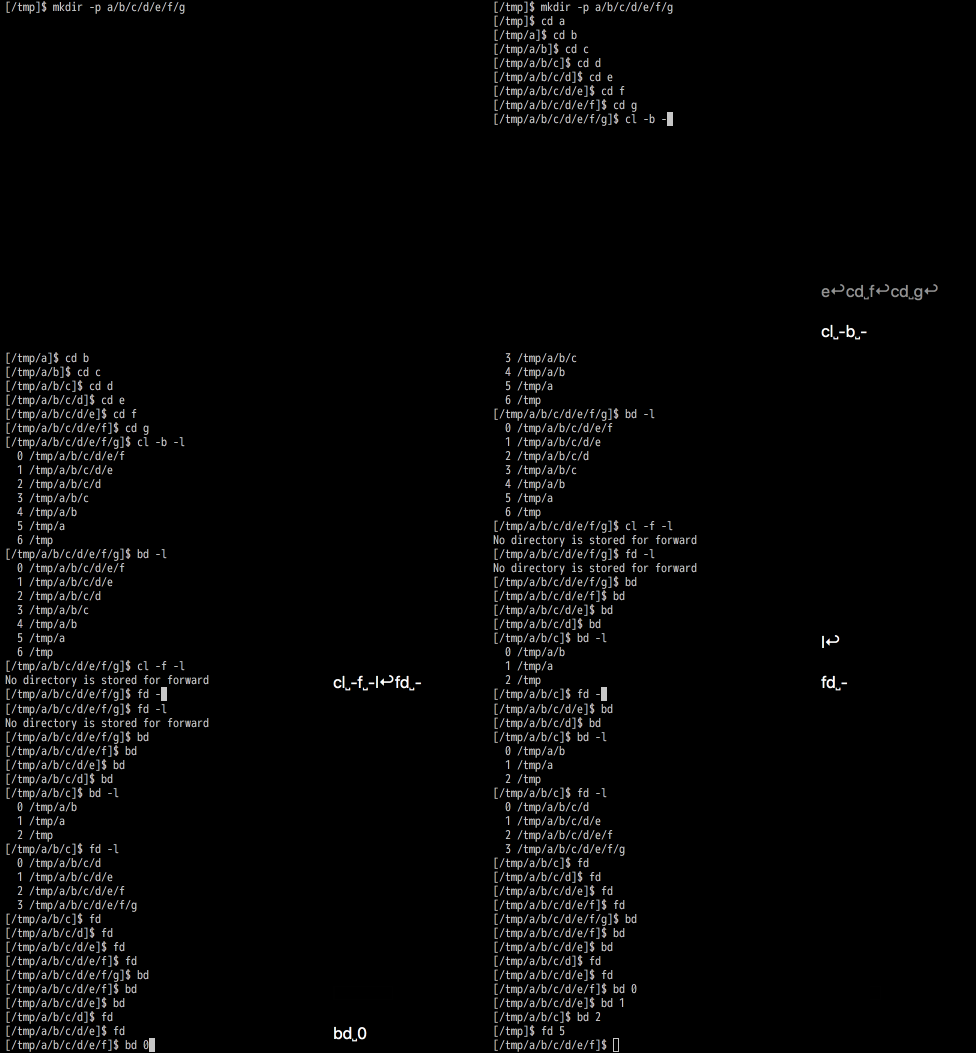
73 |
74 | Use keybindings at Bash
75 |
76 | 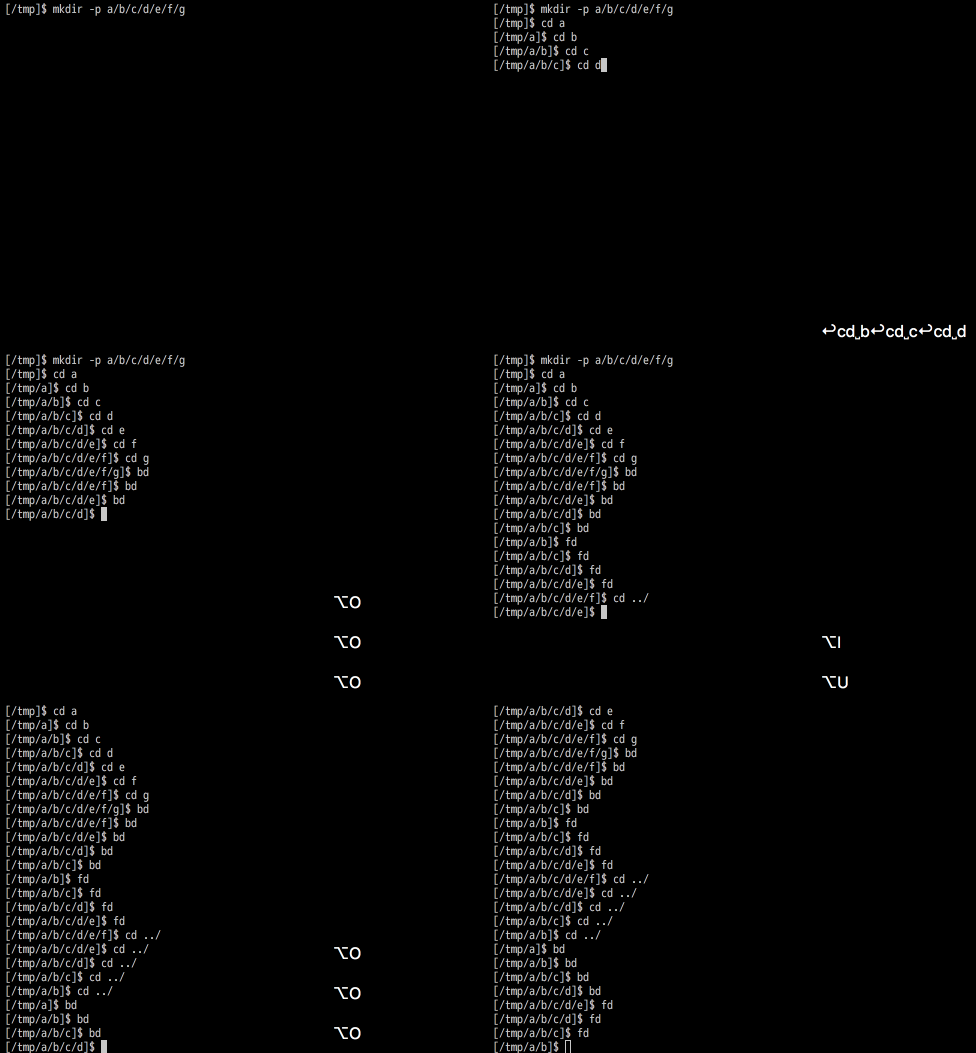
77 |
78 | Note: Gif shows keys of Opt in Mac, but it is same as Cmd/Alt (iTerm's setting).
79 |
80 | Use keybindings at Zsh
81 |
82 | 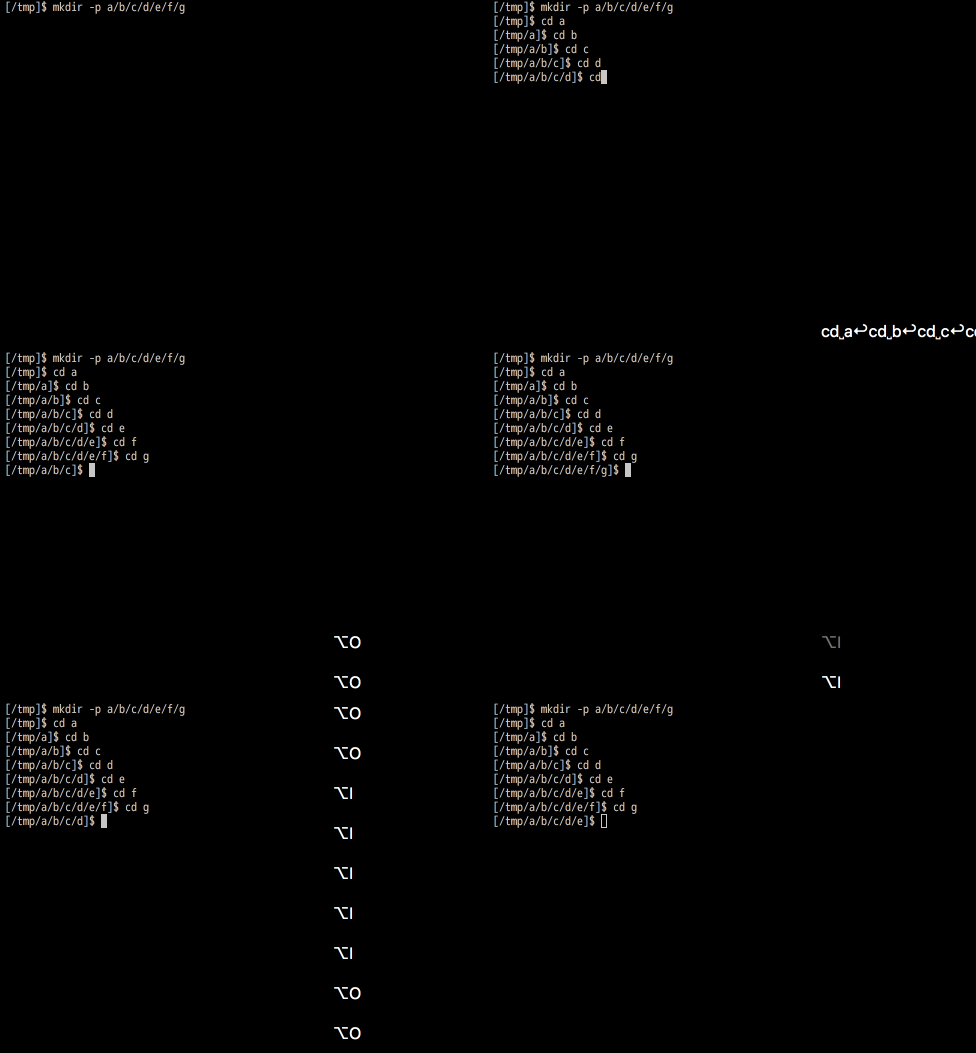
83 |
84 | Note: Gif shows keys of Opt in Mac, but it is same as Cmd/Alt (iTerm's setting).
85 |
86 | * [Vim like file explorer](#vim-like-file-explorer)
87 |
88 | 
89 |
90 | ## Installation
91 |
92 | ### Get sd_cL
93 |
94 | You can get sd_cl by following methods.
95 |
96 | #### cURL
97 |
98 | You can use an install script on the web like:
99 |
100 | $ curl -fsSL https://raw.github.com/rcmdnk/sd_cl/install/install.sh| sh
101 |
102 | This will install scripts to `/usr/etc`
103 | and you may be asked root password.
104 |
105 | If you want to install other directory, do like:
106 |
107 | $ curl -fsSL https://raw.github.com/rcmdnk/sd_cl/install/install.sh| prefix=~/usr/local/ sh
108 |
109 | #### Homebrew at OS X
110 |
111 | On Mac, you can install scripts by [Homebrew](https://github.com/mxcl/homebrew):
112 |
113 | $ brew install rcmdnk/rcmdnkpac/sd_cl
114 |
115 | If you have [brew file](https://github.com/rcmdnk/homebrew-file), add following lines to Brewfile:
116 |
117 | tap 'rcmdnk/rcmdnkpac'
118 | brew 'sd_cl'
119 |
120 | then, do:
121 |
122 | $ brew file install
123 |
124 | Or if you write like:
125 |
126 | tapall 'rcmdnk/rcmdnkpac'
127 |
128 | and do `brew file install`, you will have all useful scripts in
129 | [rcmdnkpac](https://github.com/rcmdnk/homebrew-rcmdnkpac).
130 |
131 | This installs `sd_cl` to `${HOMEBREW_PREFIX}/etc` (default: `/usr/local/etc/`).
132 |
133 | #### Download
134 |
135 | Or, simply download scripts and set where you like.
136 |
137 | $ wget https://raw.githubusercontent.com/rcmdnk/sd_cl/master/etc/sd_cl
138 |
139 | or you can get it from GitHub directly.
140 |
141 | ### Set up sd_cl
142 |
143 | Get `sd_cl` and set to where you like,
144 | then, source it in your `.bashrc` or `.zshrc` like
145 |
146 | ```bash
147 | source /path/to/sd_cl
148 | ```
149 |
150 | ## Main commands
151 |
152 | ### sd (Save Directory)
153 |
154 | Commands to manage stored directories.
155 |
156 | `sd` w/o arguments saves current directory to **the last directory** (default) list.
157 |
158 | Usage: sd [-ecpwrCLh] [directory]
159 |
160 | If neither '-e' nor '-C' is specified, 'directory' (or current directory if 'directory' is not given)
161 | is stored in the list.
162 |
163 | Arguments:
164 | -e Edit directory list file
165 | -C Clear directories
166 | -H Use the directory history file (~/.config/sd_cl/history)
167 | -c Use the last directory file (~/.config/sd_cl/lastdir)
168 | -p Use the pre-defiend dirctory file (~/.config/sd_cl/predef)
169 | -L Print license and quit
170 | -h Print this HELP and quit
171 |
172 | ### cl (Change to the Last directory)
173 |
174 | Commands to change the directory to the stored one.
175 |
176 | `cl` w/o arguments change the directory to the last saved directory.
177 |
178 | Usage: cl [-lecCpwrbvLh] [-n ] [] []
179 | If there are no arguments, you will move to the last saved directory by sd command.
180 | If you give any directory name, it searches for it in saved directories
181 | and cd to there if only one is found.
182 | If more than one directories are found, go to the selection mode.
183 |
184 | Arguments:
185 | -l Show saved directories
186 | -e Edit directory list file
187 | -c Show saved directories and choose a directory
188 | -C Clear directories
189 | Move to -th last directory
190 | -n Move to -th last directory
191 | -H Move to the directory in history (~/.config/sd_cl/history)
192 | -p Move to pre-defiend dirctory in ~/.config/sd_cl/predef
193 | -w Move to other window's (screen/tmux) dirctory in ~/.config/sd_cl/window
194 | -r Move to ranking directory in ~/.config/sd_cl/ranking
195 | -b Move back in moving histories
196 | -f Move forward in moving histories
197 | -v Move from current directory, like Vim
198 | -s Set selection tool (multi tools can be set by comma separated array, default=sentaku,peco,percol,fzf,fzy,selecta,gof,picka)
199 | -L Print license and quit
200 | -h Print this HELP and quit
201 |
202 | `-l`, `-c`, `-C` and `-n` (``) are used exclusively.
203 |
204 | `-p` (pre-defined directory list), `-w` (window directory list),
205 | `-r` (ranking directory), `-b` (back in moving history), `-f` (forward in moving history), or `-v` (vim mode)
206 | change the list file.
207 |
208 | e.x.) `cl -p 3` moves to the 3rd directory stored in pre-defined directory list.
209 |
210 | ## Usage
211 |
212 | ### Main functions: sd/cl
213 |
214 | `sd_cl` will load new functions:
215 |
216 | * `sd` (Save Directory)
217 | * `cl` (Change to the Last directory)
218 |
219 | `sd` saves current directory to the directory history list.
220 |
221 | If you give a directory name, it saves the given directory.
222 |
223 | `cl` is used to change the directory to saved directories.
224 |
225 | If it is called w/o arguments, you will move to the last saved directory by `sd`.
226 |
227 | ### Use selection mode to select from the list
228 |
229 | By the default, 20 directories are kept as a history.
230 |
231 | You can choose from the history by using
232 |
233 | $ cl -c
234 |
235 | This command invokes a selection tool defined by `SD_CL_TOOL`,
236 | one of installed selection tools or shell interactive selection.
237 | (See below for more details.)
238 |
239 | If you give `-p`, `-w`, `-r`, `-b`, `-f` or `-v` instead of `-c`,
240 | then each list is used for the selection instead of the last directory list.
241 | (see [Directory lists](#directory-lists).)
242 |
243 | ### Filtering
244 |
245 | If you give a part of the directory name like:
246 |
247 | $ cl foo
248 |
249 | then it starts a selection mode with directories including `foo`.
250 |
251 | If it is only 1, it directly changes a directory to there.
252 |
253 | ### Tab completion
254 |
255 | Tab completion is available for both Bash and Zsh.
256 |
257 | $ cl [Tab] # Completion with saved directory list.
258 | $ cl foo [Tab] # Completion with directory names including 'foo'.
259 |
260 | If you give a part of directory name to `cl`,
261 | you will just move to the directory like normal `cd`.
262 |
263 | After tab completion, if there are still some candidates,
264 | `cl` starts the selection mode.
265 |
266 | ### Jump to N-th directory
267 |
268 | If you give a number, N, to `cl`,
269 | you will jump into N-th direcoty on the list.
270 |
271 | $ cl 3
272 |
273 | ### Directory lists
274 |
275 | #### Last directory list
276 |
277 | This is default list.
278 |
279 | The list is stored in `SD_CL_LASTDIR_FILE`.
280 |
281 | `sd` w/o any arguments stores current directory to this list.
282 |
283 | `cl` calls this list by default.
284 |
285 | The number of directories stored in the list is defined by `SD_CL_N`.
286 |
287 | #### Directory history list
288 |
289 | If you use `-H` for `sd` or `cl`, it uses directory history,
290 | stored in `SD_CL_HISTORY_FILE`.
291 |
292 | It is updated every `cd`.
293 |
294 | Set `SD_CL_HISTORY=0` to disable to update the history.
295 |
296 |
297 | Set `SD_CL_HISTORY_EXCLUDE=/a/b/c,/d/e/f` to exclude directories from hte list.
298 | The default value is `$HOME`.
299 |
300 | Set `SD_CL_HISTORY_MAX` to set max number of directories in the history.
301 | The default is 1000.
302 |
303 | #### Pre-defined directory list
304 |
305 | If you use `-p` for `sd` or `cl`, it uses pre-defined directory list,
306 | stored in `SD_CL_PREDEF_FILE`.
307 |
308 | This list is similar to the last directory list
309 | but you can store some dedicated directories which should not be modified by `sd`.
310 |
311 | You can edit the pre-defined list by `sd -e -p`.
312 |
313 | #### Window directory list
314 |
315 | If you are working in GNU screen or tmux,
316 | each window's directory is saved automatically.
317 |
318 | The list is stored in `SD_CL_WINDOW_FILE`.
319 |
320 | You can call this list by `cl -w`.
321 |
322 | By using `cl -w -l`, you can see the list with
323 | `window_number` and `pane_number` (always 0 for GNU screen).
324 |
325 | If you want to see these numbers even in the selection mode,
326 | set `SD_CL_SHOW_MORE_INFO=1`
327 |
328 | #### Ranking directory list
329 |
330 | `sd_cl` makes a directory ranking by your usage of directories.
331 |
332 | The list is stored in `SD_CL_RANKING_FILE`.
333 |
334 | The list can be called by `cl -r`.
335 |
336 | `cl -r -l` shows the ranking point, too.
337 |
338 | As same as window directory list,
339 | if `SD_CL_SHOW_MORE_INFO=1`, then the ranking point is shown in the selection mode, too.
340 |
341 | The default ranking method (`SD_CL_RANKING_METHOD=2`) depends on how much you execute command in the directory.
342 | After any commands, the ranking point is added to the current directory.
343 |
344 | If you set `SD_CL_RANKING_METHOD=1`,
345 | the point is added only when `cd` is executed.
346 |
347 | If you don't want to make the ranking list, set `SD_CL_RANKING_METHOD=0`.
348 |
349 | To exclude directories from the ranking,
350 | set `SD_CL_RANKING_EXCLUDE`.
351 | It can be comma separated list if you want to more than one directories, like:
352 |
353 | SD_CL_RANKING_EXCLUDE=/tmp,~/tmp,/home/user/Desktop
354 |
355 | The default value is `SD_CL_RANKING_EXCLUDE=$HOME`.
356 |
357 | The ranking behavior can be changed by
358 | `SD_CL_RANKING_N_CD` (default: 100) or `SD_CL_RANKING_N_CMD` (default: 1000)
359 | for `SD_CL_RANKING_METHOD=1` case or `SD_CL_RANKING_METHOD=2` case, respectively.
360 |
361 | The smaller the value is set, the more the ranking is changable.
362 |
363 | #### History list (Move Back/Forward in the history)
364 |
365 | With `cl -b`/`cl -f`, you can go back/foward the directories in your cd history.
366 |
367 | #### Vim like file explorer
368 |
369 | Option `-v` will give you the continuous selection mode to change the directory,
370 | like vim file explorer.
371 |
372 | ## Selection tool
373 |
374 | For the selection mode, you can use your favorite selection tool.
375 |
376 | The selection tool must accept pipe line input list,
377 | be able to select a line, and return the line.
378 |
379 | Following tools are searched for and one of which is used if exists.
380 |
381 | * [rcmdnk/sentaku: Utility to make sentaku (selection, 選択(sentaku)) window with shell command.](https://github.com/rcmdnk/sentaku) (use `sentaku -s line` option)
382 | * [peco/peco: Simplistic interactive filtering tool](https://github.com/peco/peco)
383 | * [mooz/percol: adds flavor of interactive filtering to the traditional pipe concept of UNIX shell](https://github.com/mooz/percol)
384 | * [junegunn/fzf: A command-line fuzzy finder](https://github.com/junegunn/fzf)
385 | * [jhawthorn/fzy: A better fuzzy finder](https://github.com/jhawthorn/fzy)
386 | * [garybernhardt/selecta: A fuzzy text selector for files and anything else you need to select. Use it from vim, from the command line, or anywhere you can run a shell command.](https://github.com/garybernhardt/selecta)
387 | * [mattn/gof](https://github.com/mattn/gof)
388 | * [mptre/pick: A fuzzy search tool for the command-line](https://github.com/mptre/pick)
389 |
390 | You can decide a selection tool as you like by setting `SD_CL_TOOL`, like
391 |
392 | SD_CL_TOOL=sentaku,peco,percol,fzf,fzy,selecta,gof,picka
393 |
394 | in your **.bashrc** or **.zshrc**.
395 |
396 | One or more tools can be set by comma separated array.
397 |
398 | If any of tools is not available,
399 | simple shell selection tool is launched.
400 |
401 | If you want to use simple shell selection as top priority, set `SD_CL_TOOL=NONE` or `SD_CL_TOOL=shell` (or SD_CL_TOOL="").
402 |
403 | ## Bonus functions
404 |
405 | * bd (back Directory): Wrap function for `cl -b`.
406 | * fd (Forward Directory): Wrap function for `cl -f`.
407 | * up : Move up one directory.
408 | * cdpwd : works as `cd -P .` or `cd $(pwd -P)`, i.e. resolves symbolic links of the current path.
409 | * cdlink : works as `cd -P `, i.e. resolves symbolic links in .
410 | * cd : `cd` is wrapped to manage history, ranking, etc...
411 |
412 | If you don't want to wrap `cd`, set `SD_CL_ISCDWRAP=0`.
413 |
414 | For Bash/Zsh, `Meta`(`Alt`)-`o` and `Meta`(`Alt`)-`i`
415 | are bounden to `bd` and `fd`, respectively.
416 | In addition, `Meta`(`Alt`)-`u` is bounden to `up` (move up one directory).
417 |
418 | set `SD_CL_BIND=0` to disable these binds.
419 |
420 | If you want to assign different keys, set `SD_CL_BIND=0`.
421 | Then, for Zsh, add bindings in **.zshrc** something like:
422 |
423 | SD_CL_ZSH_BIND=0
424 |
425 | source /path/to/sd_cl
426 |
427 | bindkey '^[a' bd
428 | bindkey '^[b' fd
429 | bindkey '^[c' up
430 |
431 | For Bash, add bindings in **.bashrc** something like:
432 |
433 | SD_CL_ZSH_BIND=0
434 |
435 | source /path/to/sd_cl
436 |
437 | bind '"\ea": "\C-ubd\C-m"'
438 | bind '"\eb": "\C-ufd\C-m"'
439 | bind '"\ec": "\C-uup\C-m"'
440 |
441 |
442 | ## Options
443 |
444 | Following options can be set before sourcing `sd_cl` in `.bashrc` or `.zshrc`.
445 |
446 | # Selection tool
447 | SD_CL_TOOL=${SD_CL_TOOL:-sentaku,peco,percol,fzf,fzy,selecta,gof,picka}
448 |
449 | # Number of kept last directories
450 | SD_CL_N=${SD_CL_N:-20}
451 |
452 | # Show window/pane or ranking information at selection
453 | SD_CL_SHOW_MORE_INFO=${SD_CL_SHOW_MORE_INFO:-0}
454 |
455 | # Directory store file
456 | SD_CL_CONFIG_DIR=${SD_CL_CONFIG_DIR:-$HOME/.config/sd_cl}
457 | SD_CL_LASTDIR_FILE=${SD_CL_LASTDIR_FILE:-${SD_CL_CONFIG_DIR}/lastdir}
458 | SD_CL_PREDEF_FILE=${SD_CL_PREDEF_FILE:-${SD_CL_CONFIG_DIR}/predef}
459 | SD_CL_WINDOW_FILE=${SD_CL_WINDOW_FILE:-${SD_CL_CONFIG_DIR}/window}
460 | SD_CL_RANKING_FILE=${SD_CL_RANKING_FILE:-${SD_CL_CONFIG_DIR}/ranking}
461 |
462 | # Ranking method
463 | SD_CL_RANKING_METHOD=${SD_CL_RANKING_METHOD:-2}
464 | SD_CL_RANKING_TRIAL_FILE=${SD_CL_RANKING_TRIAL_FILE:-${SD_CL_CONFIG_DIR}/ranking_trial}
465 | SD_CL_RANKING_N_CD=${SD_CL_RANKING_N_CD:-100}
466 | SD_CL_RANKING_N_CMD=${SD_CL_RANKING_N_CMD:-1000}
467 | SD_CL_RANKING_EXCLUDE=${SD_CL_RANKING_EXCLUDE:-"$HOME"}
468 |
469 | # post cd (overwrite cd (Bash) or chpwd (Zsh))
470 | SD_CL_ISPOSTCD=${SD_CL_ISPOSTCD:-1}
471 |
472 | # COMPLETION
473 | SD_CL_NOCOMPLETION=${SD_CL_NOCOMPLETION:-0}
474 | SD_CL_NOCOMPINIT=${SD_CL_NOCOMPINIT:-0}
475 |
476 | # keybind
477 | SD_CL_KEYBIND=1
478 |
479 | # cd wrap to pushd/popd
480 | SD_CL_ISCDWRAP=${SD_CL_ISCDWRAP:-1}
481 |
482 |
483 | You can decide a selection tool as you like by setting `SD_CL_TOOL`, like
484 |
485 | SD_CL_TOOL=sentaku,peco,percol,fzf,fzy,selecta,gof,picka
486 |
487 | One or more tools can be set by comma separated array.
488 |
489 | If any of tools is not available,
490 | simple shell selection tool is launched.
491 |
492 | If you want to use simple shell selection as top priority, set `SD_CL_TOOL=NONE` or `SD_CL_TOOL=shell` (or SD_CL_TOOL="").
493 |
494 | `SD_CL_N` defines how many directories are kept in the last directory file.
495 |
496 | At selection mode, only directory names are shown by default.
497 | If `SD_CL_SHOW_MORE_INFO=1`, additional information of window/pane (for window list)
498 | or ranking information are shown.
499 | Such information are always shown in the list command (`-l`).
500 |
501 | `SD_CL_CONFIG_DIR` is the directory for the configuration files.
502 | Next four file names are file names for the last directories (default),
503 | predefined directories, window directories, and ranking directories, respectively.
504 |
505 | `SD_CL_RANKING_METHOD` sets the method to make a ranking list.
506 |
507 | * 0: Do not make a ranking list.
508 | * 1: Add a directory when cd is executed.
509 | * 2: Add a directory at any commands.
510 |
511 | `SD_CL_RANKING_N_CD` and `SD_CL_RANKING_N_CMD` are parameters of the ranking
512 | for `SD_CL_RANKING_METHOD` is 1 and 2 cases, respectively.
513 |
514 | If you set the parameter smaller, the ranking becomes more changeable.
515 |
516 | If you want to exclude some directories from the ranking,
517 | set `SD_CL_RANKING_EXCLUDE`.
518 | Default value is `$HOME`. If you want to exclude several directories,
519 | give comma separated directories like:
520 |
521 | SD_CL_RANKING_EXCLUDE=/tmp,~/tmp,/home/user/Desktop
522 |
523 | If you set `SD_CL_ISPOSTCD` to 0, it doesn't save window's directory
524 | in GNU screen or tmux.
525 |
526 | If you set `SD_CL_NOCOMPLETION` to 1, completion will be disabled.
527 |
528 | For Zsh user, if you already initialized completions with `compinit`,
529 | please set `SD_CL_NOCOMPINIT=1`.
530 | Otherwise `sd_cl` execute:
531 |
532 | autoload -Uz compinit
533 | compinit
534 |
535 | If you don't want to bind keys to bd/fd/up,
536 | set `SD_CL_KEYBIND=0`.
537 |
538 | If you don't want to wrap `cd` with `pushd`, set `SD_CL_ISCDWRAP` to 0.
539 |
540 | If you already have wrapper function for `cd` or the setting for `chpwd` at Zsh,
541 | you should be better to set:
542 |
543 | SD_CL_ISPOSTCD=0 # Don't do automatic save
544 | SD_CL_ISCDWRAP=0 # Don't wrap cd
545 |
546 | Otherwise `sd_cl` overwrites these functions.
547 |
548 | If you want to have automatic save in GNU screen/tmux with your `cd`/`chpwd`,
549 | first, set above SD_CL_ISPOSTCD and SD_CL_ISCDWRAP as 0 to disable to wrap in `sd_cl`,
550 | then call `_sd_cl_post_cd` in your `cd` function for Bash like:
551 |
552 | builtin cd "$@"
553 | local ret=$?
554 | if [ $ret -eq 0 ];then
555 | _sd_cl_post_cd
556 | fi
557 | return $ret
558 |
559 | or simply call `post_cd` in `chpwd` for Zsh case.
560 |
561 | If you want to enable pushd wrap in your `cd` function,
562 | replace your `builtin(command) cd` command with
563 |
564 | _wrap_cd "$@"
565 |
566 | i.e., if you want to enable both in Bash, you should replace above `builtin cd "$@"`
567 | with `_wrap_cd "$@"`.
568 |
569 | ## Other similar tools
570 |
571 | * `pushd`/`popd`/`dirs`
572 |
573 | Builtin commands of the shell.
574 |
575 | `pushd ` stores current directory and then move to given one.
576 |
577 | `popd` takes out the directory from the list and move to there.
578 |
579 | `dirs` shows the list.
580 |
581 | Their functions are very useful and they are always available.
582 |
583 | But they are not used so much because (I think) `p` `u` `s` `h` `d` are too many to put
584 | as frequent commands like `cd`.
585 |
586 | A lot of attempts to make wrapper functions for these commands can be found.
587 |
588 | The simplest one is something like:
589 |
590 | ```bash
591 | alias cd="pushd"
592 | alias bd="popd"
593 | ```
594 |
595 | * [cdhist.sh](http://www.unixuser.org/~euske/doc/bashtips/cdhist.sh)
596 |
597 | > [Bash の小枝集](http://www.unixuser.org/~euske/doc/bashtips/index.html)
598 |
599 | `chdhist.sh` wraps `cd` to store a directory history.
600 |
601 | It loads following commands, too:
602 |
603 | $ - # Move back
604 | $ + # Move forward
605 | $ = # Show the list
606 |
607 | * [wting/autojump: A cd command that learns - easily navigate directories from the command line](https://github.com/wting/autojump)
608 |
609 | Command selection tool, `autojump`, written in Python.
610 |
611 | To use it, users load a function `j` by sourcing **/usr/local/etc/autojump.sh**,
612 | and `j` calls `autojump` to select a directory.
613 |
614 | **/usr/local/etc/autojump.sh** also add `autojump_add_to_database` to
615 | `PROMPT_COMMAND`.
616 | `autojump_add_to_database` updates the directory history list after every command.
617 |
618 | Each directory has **key weight**, which is defined by how much user spends in a directory.
619 |
620 | Users can go the directory contains a word `foo` by
621 |
622 | $ j foo
623 |
624 | if it is in the list.
625 |
626 | If there are more than one corresponding directories,
627 | the highest weight directory is chosen.
628 |
629 | $ jc foo
630 |
631 | searches for directories only under the current directory.
632 |
633 | It also loads command `jo` which opens the directory by an explorer.
634 |
635 | * [rupa/z: z - jump around](https://github.com/rupa/z)
636 |
637 | `z` is similar tool to autojump, but written in Shell Script.
638 | So it is almost no dependency on external commands (though it uses such awk, grep).
639 |
640 | Sourcing **z.sh** loads `z` command.
641 | In addition, it adds `_z --add...` to `PROMPT_COMMAND`.
642 | `_z --add...` updates the directory list with current directory,
643 | and adds **frecency**(=frequency+recency), which is defined by how frequently and recently user works in there.
644 |
645 | $ z foo
646 |
647 | This select the directory contains foo.
648 |
649 | If there are more than one corresponding directories,
650 | the highest frecency directory is chosen.
651 |
652 | `z` has also some selection mode like `z -r foo` (most highest frequency) or `z -t -foo` (most highest recency).
653 |
654 | * [b4b4r07/enhancd: A next-generation cd command with an interactive filter](https://github.com/b4b4r07/enhancd)
655 |
656 | `cd` wrap tool written in Shell Script.
657 |
658 | By sourcing `init.sh`, `cd` will work as history register and directory searcher.
659 |
660 | After every `cd`, it adds the current directly,
661 | all directoies in the path to the current directory,
662 | and child directories of the current directory.
663 | **enhancd** doesn't add a weight.
664 |
665 | $ source ./init.sh
666 |
667 | Then,
668 |
669 | $ cd foo
670 |
671 | searches for a directory including `foo` from the list.
672 |
673 | If there are more than one directories,
674 | it launches a selection mode.
675 | You need one of selection tools like fzy, fjf, peco, sentaku, etc...
676 |
677 | **enhanced** wraps such `cd ..` and `cd -`, too,
678 | to launches a selection mode for upper directories or past directories, respectively.
679 |
680 | ## References
681 |
682 | * [sd_cl: pecoやfzfなどにも対応したディレクトリ移動効率化ツール](https://rcmdnk.com/blog/2018/08/18/computer-shell/)
683 | * [ターミナルでのディレクトリ移動を保存、取り出しする](http://rcmdnk.github.io/blog/2013/12/27/computer-bash-zsh-sd-cl/)
684 | * [ターミナルでのディレクトリ移動](https://rcmdnk.com/blog/2013/04/10/computer-bash/)
685 |
--------------------------------------------------------------------------------
/etc/sd_cl:
--------------------------------------------------------------------------------
1 | #!/bin/bash
2 |
3 | # License {{
4 | _SD_CL_LICENSE='The MIT License (MIT)
5 |
6 | Copyright (c) 2018 rcmdnk
7 |
8 | Permission is hereby granted, free of charge, to any person obtaining a copy of
9 | this software and associated documentation files (the "Software"), to deal in
10 | the Software without restriction, including without limitation the rights to
11 | use, copy, modify, merge, publish, distribute, sublicense, and/or sell copies of
12 | the Software, and to permit persons to whom the Software is furnished to do so,
13 | subject to the following conditions:
14 |
15 | The above copyright notice and this permission notice shall be included in all
16 | copies or substantial portions of the Software.
17 |
18 | THE SOFTWARE IS PROVIDED "AS IS", WITHOUT WARRANTY OF ANY KIND, EXPRESS OR
19 | IMPLIED, INCLUDING BUT NOT LIMITED TO THE WARRANTIES OF MERCHANTABILITY, FITNESS
20 | FOR A PARTICULAR PURPOSE AND NONINFRINGEMENT. IN NO EVENT SHALL THE AUTHORS OR
21 | COPYRIGHT HOLDERS BE LIABLE FOR ANY CLAIM, DAMAGES OR OTHER LIABILITY, WHETHER
22 | IN AN ACTION OF CONTRACT, TORT OR OTHERWISE, ARISING FROM, OUT OF OR IN
23 | CONNECTION WITH THE SOFTWARE OR THE USE OR OTHER DEALINGS IN THE SOFTWARE.'
24 | # }}}
25 |
26 | # Fixed Parameters {{{
27 | _SD_CL_ERROR_INVALID_ARGUMENT=100
28 | _SD_CL_ERROR_IS_A_FILE=10
29 | _SD_CL_ERROR_NO_SUCH_DIRECTORY=11
30 | _SD_CL_ERROR_NO_SAVED_DIRECTORY=12
31 | _SD_CL_ERROR_NOT_STORED=13
32 | _SD_CL_ERROR_INVALID_N=14
33 | _SD_CL_ERROR_INVALID_INPUT=15
34 | # }}}
35 |
36 | # Parameters {{{
37 | # Selection tool
38 | SD_CL_TOOL=${SD_CL_TOOL:-sentaku,peco,percol,fzf,fzy,selecta,gof,picka}
39 |
40 | # Number of kept last directories (for SD_CL_LASTDIR_FILE)
41 | SD_CL_N=${SD_CL_N:-20}
42 |
43 | # Show window/pane or ranking information at selection
44 | SD_CL_SHOW_MORE_INFO=${SD_CL_SHOW_MORE_INFO:-0}
45 |
46 | # Directory store file
47 | SD_CL_CONFIG_DIR=${SD_CL_CONFIG_DIR:-$HOME/.config/sd_cl}
48 | SD_CL_LASTDIR_FILE=${SD_CL_LASTDIR_FILE:-${SD_CL_CONFIG_DIR}/lastdir}
49 | SD_CL_HISTORY_FILE=${SD_CL_HISTORY_FILE:-${SD_CL_CONFIG_DIR}/history}
50 | SD_CL_PREDEF_FILE=${SD_CL_PREDEF_FILE:-${SD_CL_CONFIG_DIR}/predef}
51 | SD_CL_WINDOW_FILE=${SD_CL_WINDOW_FILE:-${SD_CL_CONFIG_DIR}/window}
52 | SD_CL_RANKING_FILE=${SD_CL_RANKING_FILE:-${SD_CL_CONFIG_DIR}/ranking}
53 |
54 | # Simple history
55 | SD_CL_HISTORY=${SD_CL_HISTORY:-1}
56 | SD_CL_HISTORY_EXCLUDE=${SD_CL_HISTORY_EXCLUDE:-"$HOME"}
57 | SD_CL_HISTORY_MAX=${SD_CL_HISTORY_MAX:-10000}
58 |
59 | # Ranking method
60 | SD_CL_RANKING_METHOD=${SD_CL_RANKING_METHOD:-2}
61 | SD_CL_RANKING_TRIAL_FILE=${SD_CL_RANKING_TRIAL_FILE:-${SD_CL_CONFIG_DIR}/ranking_trial}
62 | SD_CL_RANKING_N_CD=${SD_CL_RANKING_N_CD:-100}
63 | SD_CL_RANKING_N_CMD=${SD_CL_RANKING_N_CMD:-1000}
64 | SD_CL_RANKING_EXCLUDE=${SD_CL_RANKING_EXCLUDE:-"$HOME"}
65 |
66 | # post cd (overwrite cd (Bash) or chpwd (Zsh))
67 | SD_CL_ISPOSTCD=${SD_CL_ISPOSTCD:-1}
68 |
69 | # COMPLETION
70 | SD_CL_NOCOMPLETION=${SD_CL_NOCOMPLETION:-0}
71 | SD_CL_NOCOMPINIT=${SD_CL_NOCOMPINIT:-0}
72 |
73 | # keybind
74 | SD_CL_KEYBIND=1
75 |
76 | # cd wrap
77 | SD_CL_ISCDWRAP=${SD_CL_ISCDWRAP:-1}
78 | # }}}
79 |
80 | # Other variables {{{
81 | _SD_CL_BD_LIST=()
82 | _SD_CL_FD_LIST=()
83 | _SD_CL_DIRS=()
84 | # }}}
85 |
86 | # support functions {{{
87 | _sd_cl_pre_cd () {
88 | local curdir=$PWD
89 | [ -z "$ZSH_VERSION" ] || emulate -L ksh
90 | if [[ "$curdir" != "${_SD_CL_BD_LIST[0]}" ]];then
91 | _SD_CL_FD_LIST=()
92 | _SD_CL_BD_LIST=("$PWD" "${_SD_CL_BD_LIST[@]}")
93 | fi
94 | }
95 |
96 | _sd_cl_cd () {
97 | _sd_cl_pre_cd
98 | _sd_cl_cd_core "$@"
99 | }
100 |
101 | _sd_cl_cd_core () {
102 | local opt=()
103 | local o
104 | for o in "$@";do
105 | if [[ "$o" =~ ~* ]];then
106 | opt=("${opt[@]}" "${o/\~/$HOME}")
107 | else
108 | opt=("${opt[@]}" "$o")
109 | fi
110 | done
111 | eval builtin "cd \"${opt[@]}\""
112 | local ret=$?
113 | if [[ $ret -eq 0 ]];then
114 | if type sed >& /dev/null && type grep >& /dev/null;then
115 | _sd_cl_post_cd >&/dev/null
116 | fi
117 | fi
118 | return $ret
119 | }
120 |
121 | _sd_cl_post_cd () {
122 | if [[ "$SD_CL_RANKING_METHOD" -eq 1 ]];then
123 | _sd_cl_ranking
124 | fi
125 | if [[ "$SD_CL_HISTORY" -eq 1 ]];then
126 | _sd_cl_history
127 | fi
128 | if [[ -z "$STY" && -z "$TMUX" ]];then
129 | return
130 | fi
131 | if [[ -n "$STY" ]];then
132 | local win="$WINDOW"
133 | local pane=0
134 | else
135 | local win="$(tmux display -p '#I')"
136 | local pane="$(tmux display -p '#P')"
137 | fi
138 | local wdf=${SD_CL_WINDOW_FILE}
139 | _sd_cl_check_file "$wdf"
140 | local dir=$(_sd_cl_get_dir)
141 | if grep -q "^$win $pane " "$wdf";then
142 | local wd=$(sed "s|^$win $pane .*$|$win $pane $dir|" "$wdf"|sort -n)
143 | else
144 | local wd=$(cat "$wdf" && echo "$win $pane $dir"|sort -n)
145 | fi
146 | echo "$wd" > "${wdf}"
147 | }
148 |
149 | _sd_cl_check_file () {
150 | mkdir -p "$(dirname "${1}")"
151 | touch "$1"
152 | }
153 |
154 | _sd_cl_reset_file () {
155 | mkdir -p "$(dirname "${1}")"
156 | : > "$file"
157 | }
158 |
159 | _sd_cl_edit_file () {
160 | if [[ -n "$1" ]];then
161 | _sd_cl_check_file "$1"
162 | ${EDITOR:-"vi"} "$1"
163 | fi
164 | }
165 |
166 | _sd_cl_get_dir () {
167 | if [[ $# -ge 1 ]];then
168 | local dir="$1"
169 | else
170 | local dir="$PWD"
171 | fi
172 | echo "$(echo "$dir"|sed "s|^$HOME|~|")"
173 | }
174 |
175 | _sd_cl_check_dir () {
176 | eval test -d "$1" && return
177 | if eval test -f "$1";then
178 | echo "$1 is a file"
179 | return $_SD_CL_ERROR_IS_A_FILE
180 | else
181 | echo "$1: No such a directory"
182 | return $_SD_CL_ERROR_NO_SUCH_DIRECTORY
183 | fi
184 | }
185 |
186 | _sd_cl_read_dirs () {
187 | local file="$1"
188 | _sd_cl_check_file "$file"
189 | local orig_ifs=$IFS
190 | IFS=$'\n'
191 | _SD_CL_DIRS=($(cat "$file"))
192 | IFS=$orig_ifs
193 | }
194 | # }}}
195 |
196 | # main functions {{{
197 | sd () {
198 | # Help
199 | local help="
200 | Usage: sd [-ecpwrCLh] [directory]
201 |
202 | If neither '-e' nor '-C' is specified, 'directory' (or current directory if 'directory' is not given)
203 | is stored in the list.
204 |
205 | Arguments:
206 | -e Edit directory list file
207 | -C Clear directories
208 | -c Use the last directory file ($SD_CL_LASTDIR_FILE, default)
209 | -H Use the directory history file ($SD_CL_HISTORY_FILE)
210 | -p Use the pre-defiend dirctory file ($SD_CL_PREDEF_FILE)
211 | -w Use the window dirctory file ($SD_CL_WINDOW_FILE)
212 | -r Use the ranking directory file ($SD_CL_RANKING_FILE)
213 | -L Print license and quit
214 | -h Print this HELP and quit
215 | "
216 |
217 | # Variables
218 | local edit=0
219 | local cleardir=0
220 | local file=${SD_CL_LASTDIR_FILE}
221 | local dir=""
222 |
223 | # Get arguments
224 | while [[ $# -gt 0 ]];do
225 | case $1 in
226 | "-e" ) edit=1;;
227 | "-C" ) cleardir=1;;
228 | "-c" ) file=${SD_CL_LASTDIR_FILE};;
229 | "-H" ) file=${SD_CL_HISTORY_FILE};;
230 | "-p" ) file=${SD_CL_PREDEF_FILE};;
231 | "-w" ) file=${SD_CL_WINDOW_FILE};;
232 | "-r" ) file=${SD_CL_RANKING_FILE};;
233 | "-L" ) echo "$_SD_CL_LICENSE"; return;;
234 | "-h" )
235 | echo "$help"
236 | return
237 | ;;
238 | "--" ) shift; dir="$*"; break;;
239 | -* )
240 | echo "Invalid argument: $1"
241 | return $_SD_CL_ERROR_INVALID_ARGUMENT
242 | ;;
243 | * ) dir="$*" ;;
244 | esac
245 | shift
246 | done
247 |
248 | # Edit predefined dir
249 | if [[ "$edit" -eq 1 ]];then
250 | _sd_cl_edit_file "$file"
251 | return
252 | fi
253 |
254 | # Clear
255 | if [[ "$cleardir" -eq 1 ]];then
256 | _sd_cl_reset_file "$file"
257 | return
258 | fi
259 |
260 | # Set Save Dir
261 | if [[ -z "$dir" ]];then
262 | # Current directory
263 | dir=$(_sd_cl_get_dir)
264 | fi
265 |
266 | if ! _sd_cl_check_dir "$dir";then
267 | return $?
268 | else
269 | _sd_cl_check_file "$file"
270 | local pre_list="$(grep -v "^${dir}$" "$file"|grep -v '^\s*$'|head -n"$((SD_CL_N-1))")"
271 | echo "$dir" > "$file"
272 | if [[ -n "$pre_list" ]];then
273 | echo "$pre_list" >> "$file"
274 | fi
275 | fi
276 | }
277 |
278 | cl () {
279 | # Zsh array fix
280 | [[ -z "$ZSH_VERSION" ]] || emulate -L ksh
281 |
282 | # Set default file
283 | local file="${SD_CL_LASTDIR_FILE}"
284 |
285 | # Change to the last dir
286 | if [[ $# -eq 0 ]];then
287 | _sd_cl_check_file "$file"
288 | local ld="$(head -n1 "${SD_CL_LASTDIR_FILE}")"
289 | if [[ -n "$ld" ]];then
290 | _sd_cl_cd "$ld"
291 | return
292 | else
293 | echo "There is no saved directory."
294 | return $_SD_CL_ERROR_NO_SAVED_DIRECTORY
295 | fi
296 | fi
297 |
298 | # Help
299 | local help="
300 | Usage: cl [-lecCpwrbvLh] [-n ] [] []
301 | If there are no arguments, you will move to the last saved directory by sd command.
302 | If you give any directory name, it searches for it in saved directories
303 | and cd to there if only one is found.
304 | If more than one directories are found, go to the selection mode.
305 |
306 | Arguments:
307 | -l Show saved directories
308 | -e Edit directory list file
309 | -c Show saved directories and choose a directory
310 | -C Clear directories
311 | Move to -th last directory
312 | -n Move to -th last directory
313 | -H Move to the directory in history ($SD_CL_HISTORY_FILE)
314 | -p Move to pre-defiend dirctory in $SD_CL_PREDEF_FILE
315 | -w Move to other window's (screen/tmux) dirctory in $SD_CL_WINDOW_FILE
316 | -r Move to ranking directory in $SD_CL_RANKING_FILE
317 | -b Move back in moving histories
318 | -f Move forward in moving histories
319 | -v Move from current directory, like Vim
320 | -s Set selection tool (multi tools can be set by comma separated array, default=$SD_CL_TOOL)
321 | -L Print license and quit
322 | -h Print this HELP and quit
323 | "
324 |
325 | # Variables
326 | local list=0
327 | local edit=0
328 | local mode="lastdir"
329 | local cleardir=0
330 | local n=""
331 | local dir_search=""
332 | local selection_tools="$SD_CL_TOOL"
333 |
334 | # Get arguments
335 | while [[ $# -gt 0 ]];do
336 | case $1 in
337 | "-l" ) list=1;;
338 | "-e" ) edit=1;;
339 | "-c" ) file=${SD_CL_LASTDIR_FILE};mode="lastdir";;
340 | "-n" ) n="$2"; shift;;
341 | "-H" ) file=${SD_CL_HISTORY_FILE};mode="history";;
342 | "-p" ) file=${SD_CL_PREDEF_FILE};mode="predef";;
343 | "-w" ) file=${SD_CL_WINDOW_FILE};mode="window";;
344 | "-r" ) file=${SD_CL_RANKING_FILE};mode="ranking";;
345 | "-v" ) file="";mode="vim";;
346 | "-b" ) file="";mode="back";;
347 | "-f" ) file="";mode="forward";;
348 | "-C" ) cleardir=1;;
349 | "-s" ) selection_tools="$2"; shift;;
350 | "-L" ) echo "$_SD_CL_LICENSE"; return;;
351 | "-h" )
352 | echo "$help"
353 | return
354 | ;;
355 | "--" ) shift; dir_search="$*"; break;;
356 | -* )
357 | echo "Invalid argument: $1"
358 | return $_SD_CL_ERROR_INVALID_ARGUMENT
359 | ;;
360 | * )
361 | if [[ "$1" =~ ^[0-9]+$ ]] >&/dev/null;then
362 | n=$1
363 | else
364 | dir_search="$*"
365 | break
366 | fi
367 | ;;
368 | esac
369 | shift
370 | done
371 |
372 | # Clear
373 | if [[ "$cleardir" -eq 1 ]];then
374 | if [[ -n "$file" ]];then
375 | : > "$file"
376 | elif [[ "$mode" = "back" ]];then
377 | _SD_CL_BD_LIST=()
378 | elif [[ "$mode" = "forward" ]];then
379 | _SD_CL_FD_LIST=()
380 | fi
381 | return
382 | fi
383 |
384 | # Edit
385 | if [[ "$edit" -eq 1 ]];then
386 | if [[ -n "$file" ]];then
387 | _sd_cl_edit_file "$file"
388 | else
389 | echo "$mode mode doesn't have a file"
390 | fi
391 | return
392 | fi
393 |
394 | # Set get_dirs function
395 | if [[ -n "$file" ]];then
396 | if [[ "$mode" = ranking ]];then
397 | _sd_cl_ranking_update
398 | fi
399 | if [[ "$mode" = window && -n "$STY" ]];then
400 | _cl_get_dirs () {
401 | local windows=$(screen -Q windows '%n|'|sed 's/|/ /g')
402 | local ret=$?
403 | if [[ $ret -eq 0 ]];then
404 | local wininfo
405 | local d
406 | _SD_CL_DIRS=()
407 | _sd_cl_check_file "$file"
408 | for wininfo in $windows;do
409 | d=$(grep "^${wininfo} 0 " "$file")
410 | if [[ -n "$d" ]];then
411 | _SD_CL_DIRS=("${_SD_CL_DIRS[@]}" "$d")
412 | fi
413 | done
414 | for d in "${_SD_CL_DIRS[@]}";do
415 | echo "$d"
416 | done > "$file"
417 | else
418 | # simply read file if screen command failed
419 | _sd_cl_read_dirs "$file"
420 | fi
421 | }
422 | elif [[ "$mode" = window && -n "$TMUX" ]];then
423 | _cl_get_dirs () {
424 | local windows=$(tmux lsp -s -F '#I.#P')
425 | local ret=$?
426 | if [[ $ret -eq 0 ]];then
427 | local wininfo
428 | local i=0
429 | local d
430 | _sd_cl_check_file "$file"
431 | for wininfo in $windows;do
432 | d=$(grep "^${wininfo/,/ } " "$file")
433 | if [[ -n "$d" ]];then
434 | _SD_CL_DIRS=("${_SD_CL_DIRS[@]}" "$d")
435 | fi
436 | done
437 | for d in "${_SD_CL_DIRS[@]}";do
438 | echo "$d"
439 | done > "$file"
440 | else
441 | # simply read file if tmux command failed
442 | _sd_cl_read_dirs "$file"
443 | fi
444 | }
445 | else
446 | _cl_get_dirs () {
447 | _sd_cl_read_dirs "$file"
448 | }
449 | fi
450 | elif [[ "$mode" = vim ]];then
451 | _cl_get_dirs () {
452 | _SD_CL_DIRS=()
453 | local d
454 | for d in *;do
455 | if [[ ! -d "$d" ]];then
456 | continue
457 | fi
458 | _SD_CL_DIRS=("${_SD_CL_DIRS[@]}" "$d")
459 | done
460 | _SD_CL_DIRS=(".." "${_SD_CL_DIRS[@]}")
461 | }
462 | elif [[ "$mode" = back ]];then
463 | _cl_get_dirs () {
464 | _SD_CL_DIRS=("${_SD_CL_BD_LIST[@]}")
465 | }
466 | elif [[ "$mode" = forward ]];then
467 | _cl_get_dirs () {
468 | _SD_CL_DIRS=("${_SD_CL_FD_LIST[@]}")
469 | }
470 | fi
471 | _cl_get_dirs
472 | local ret=$?
473 | if [ $ret -ne 0 ];then
474 | return $ret
475 | fi
476 |
477 | # Search dirs
478 | local dirs_tmp=()
479 | local d
480 | for d in "${_SD_CL_DIRS[@]}";do
481 | [[ -n "$dir_search" && ! "$d" =~ $dir_search ]] && continue
482 | dirs_tmp=("${dirs_tmp[@]}" "$d")
483 | done
484 | _SD_CL_DIRS=("${dirs_tmp[@]}")
485 |
486 | # Check dirs
487 | if [[ "${#_SD_CL_DIRS[@]}" -eq 0 ]];then
488 | echo "No directory is found"
489 | return
490 | fi
491 |
492 | # List up
493 | if [[ "$list" -eq 1 ]];then
494 | local head="Number|Directory"
495 | local line="======|========="
496 | if [[ "$mode" = window ]];then
497 | local head="Number|Window|Pane|Directory"
498 | local line="======|======|====|========="
499 | elif [[ "$mode" = ranking ]];then
500 | local head="Number|RankingPoint|Directory"
501 | local line="======|============|========="
502 | fi
503 | local out_cmd="${PAGER:-less}"
504 | if [[ -t 1 ]];then
505 | local out_cmd=${PAGER:-less}
506 | else
507 | local out_cmd=cat
508 | fi
509 | {
510 | echo "$head"
511 | echo "$line"
512 | i=0
513 | local d
514 | for d in "${_SD_CL_DIRS[@]}";do
515 | if [[ "$mode" = window ]];then
516 | local info=($d)
517 | local window=${info[0]}
518 | local pane=${info[1]}
519 | d=$(_sd_cl_get_dir ${info[*]:2})
520 | printf "%6d|%6d|%4d|%s\\n" "$i" "$window" "$pane" "$d"
521 | elif [[ "$mode" = ranking ]];then
522 | local info=($d)
523 | local rp=${info[0]}
524 | d=$(_sd_cl_get_dir ${info[*]:1})
525 | printf "%6d|%12d|%s\\n" "$i" "$rp" "$d"
526 | else
527 | printf "%6d|%s\\n" $i "$(_sd_cl_get_dir "$d")"
528 | fi
529 | ((i++))
530 | done
531 | } | $out_cmd
532 | return 0
533 | fi
534 |
535 | # Get n-th dir
536 | if [[ -n "$n" ]];then
537 | if ! ((n+1)) >&/dev/null || [[ "$n" -ge "${#_SD_CL_DIRS[@]}" ]];then
538 | echo "$n is not valid number."
539 | echo "Enter [0-$((${#_SD_CL_DIRS[@]}-1))]"
540 | return $_SD_CL_ERROR_INVALID_N
541 | fi
542 | _SD_CL_DIRS=("${_SD_CL_DIRS[$n]}")
543 | fi
544 |
545 | # Get dir
546 | if [[ "${#_SD_CL_DIRS[@]}" -eq 1 && "$mode" != vim ]];then
547 | dir=${_SD_CL_DIRS[0]}
548 | else
549 | # Set selection tool
550 | local selection=""
551 | local s
552 | for s in ${selection_tools//,/ };do
553 | if [[ -z "$s" ]];then
554 | continue
555 | fi
556 | if [[ "$s" = "NONE" || "$s" = "shell" ]];then
557 | break
558 | fi
559 | if type "$s" >& /dev/null ;then
560 | selection=$s
561 | break
562 | fi
563 | done
564 | if [[ "$selection" = "sentaku" ]];then
565 | selection="sentaku -s line"
566 | fi
567 |
568 | while :;do
569 | if [[ -n "$selection" ]];then
570 | local dirs="$(for d in "${_SD_CL_DIRS[@]}";do echo "$d";done)"
571 | if [[ "$SD_CL_SHOW_MORE_INFO" -eq 0 && ( "$mode" = window || "$mode" = ranking ) ]];then
572 | if [[ "$mode" = window ]];then
573 | dirs=$(echo "$dirs"|awk '{for(i=3;i&/dev/null || [[ "$i" -ge "${#_SD_CL_DIRS[@]}" ]];then
592 | echo "$i is not valid."
593 | echo "Enter [0-$((${#_SD_CL_DIRS[@]}-1))]"
594 | return $_SD_CL_ERROR_INVALID_INPUT
595 | fi
596 | dir="${_SD_CL_DIRS[$i]}"
597 | fi
598 | if [[ -z "$dir" ]];then
599 | return
600 | fi
601 |
602 | if [[ "$mode" = vim ]];then
603 | _sd_cl_cd "$dir"
604 | _cl_get_dirs
605 | else
606 | break
607 | fi
608 | done
609 | fi
610 |
611 | if [[ "$mode" = back ]];then
612 | local dirs_tmp=("${_SD_CL_BD_LIST[@]}")
613 | _SD_CL_BD_LIST=()
614 | _SD_CL_FD_LIST=("$PWD" "${_SD_CL_FD_LIST[@]}")
615 | local store=0
616 | for d in "${dirs_tmp[@]}";do
617 | if [[ "$store" -eq 1 ]];then
618 | _SD_CL_BD_LIST=("${_SD_CL_BD_LIST[@]}" "$d")
619 | fi
620 | if [[ "$d" = "$dir" ]];then
621 | store=1
622 | fi
623 | if [[ "$store" -eq 0 ]];then
624 | _SD_CL_FD_LIST=("$d" "${_SD_CL_FD_LIST[@]}")
625 | fi
626 | done
627 | _sd_cl_cd_core "$dir"
628 | return
629 | fi
630 |
631 | if [[ "$mode" = forward ]];then
632 | local dirs_tmp=("${_SD_CL_FD_LIST[@]}")
633 | _SD_CL_FD_LIST=()
634 | _SD_CL_BD_LIST=("$PWD" "${_SD_CL_BD_LIST[@]}")
635 | local store=0
636 | for d in "${dirs_tmp[@]}";do
637 | if [[ "$store" -eq 1 ]];then
638 | _SD_CL_FD_LIST=("${_SD_CL_FD_LIST[@]}" "$d")
639 | fi
640 | if [[ "$d" = "$dir" ]];then
641 | store=1
642 | fi
643 | if [[ "$store" -eq 0 ]];then
644 | _SD_CL_BD_LIST=("$d" "${_SD_CL_BD_LIST[@]}")
645 | fi
646 | done
647 | _sd_cl_cd_core "$dir"
648 | return
649 | fi
650 |
651 | if [[ "$SD_CL_SHOW_MORE_INFO" -ne 0 ]];then
652 | if [[ "$mode" = window ]];then
653 | dir=$(echo "$dir"|awk '{for(i=3;i&/dev/null;then
662 | _sd_cl_post_cd
663 | fi
664 | return $ret
665 | } # }}}
666 |
667 | # Completion {{{
668 | if [[ "$SD_CL_NOCOMPLETION" -eq 0 ]];then
669 | if [[ -n "$ZSH_VERSION" ]];then
670 | if [[ "$SD_CL_NOCOMPINIT" -eq 0 ]];then
671 | autoload -Uz compinit
672 | compinit
673 | fi
674 |
675 | _cl () { # {{{
676 | typeset -A opt_args
677 | local state line
678 | _arguments \
679 | '-l:: :->non'\
680 | '-c:: :->lastdir'\
681 | '-C:: :->non'\
682 | '-n:: :->xxx'\
683 | '-N:: :->xxx'\
684 | '-H:: :->history'\
685 | '-p:: :->predef'\
686 | '-w:: :->window'\
687 | '-r:: :->ranking'\
688 | '-b:: :->back'\
689 | '-f:: :->forward'\
690 | '-v:: :->non'\
691 | '-h:: :->non'
692 | local ldf=""
693 | case "$state" in
694 | *non*)return;;
695 | *predef* )ldf=${SD_CL_PREDEF_FILE};;
696 | *window* )ldf=${SD_CL_WINDOW_FILE};;
697 | *ranking*)ldf=${SD_CL_RANKING_FILE};;
698 | *back* )ldf=back;;
699 | *forward*)ldf=forward;;
700 | *lastdir*)ldf=${SD_CL_LASTDIR_FILE};;
701 | *history*)ldf=${SD_CL_HISTORY_FILE};;
702 | *)ldf=all;;
703 | esac
704 | local orig_ifs=$IFS
705 | IFS=$'\n'
706 | if [[ "$ldf" = "all" ]];then
707 | ldf=${SD_CL_LASTDIR_FILE}
708 | local pdf=${SD_CL_PREDEF_FILE}
709 | _sd_cl_check_file "$ldf"
710 | _sd_cl_check_file "$pdf"
711 | compadd $(cat "$ldf")
712 | compadd $(cat "$pdf")
713 | compadd "${_SD_CL_BD_LIST[@]}"
714 | compadd "${_SD_CL_FD_LIST[@]}"
715 | elif [[ "$ldf" = back ]];then
716 | compadd "${_SD_CL_BD_LIST[@]}"
717 | elif [[ "$ldf" = forward ]];then
718 | compadd "${_SD_CL_FD_LIST[@]}"
719 | elif [[ -n "$ldf" ]];then
720 | if [[ "$state" = *window* ]];then
721 | compadd $(cat $ldf|cut -d' ' -f 3-)
722 | elif echo "$state"|grep -q ranking;then
723 | compadd $(cat $ldf|cut -d' ' -f 2-)
724 | else
725 | compadd $(cat $ldf)
726 | fi
727 | fi
728 | IFS=$orig_ifs
729 | }
730 | compdef _cl cl
731 | # }}}
732 | _bd () { # {{{
733 | compadd "${_SD_CL_BD_LIST[@]}"
734 | }
735 | compdef _bd bd
736 | # }}}
737 | _fd () { # {{{
738 | compadd "${_SD_CL_FD_LIST[@]}"
739 | }
740 | compdef _fd fd
741 | # }}}
742 | elif [[ -n "$BASH_VERSION" ]];then
743 | _cl () { # {{{
744 | COMPREPLY=()
745 | local cur=${COMP_WORDS[COMP_CWORD]}
746 | local prev=${COMP_WORDS[COMP_CWORD-1]}
747 | local -a opts
748 | local -a opts_nocomp
749 | opts=(-l -c -C -n -N -p -w -b -v -h)
750 | opts_nocomp=(-l -C -v -h)
751 | local nocomp=0
752 | local i
753 | for i in $(seq 1 $((COMP_CWORD)));do
754 | if [[ -z "${COMP_WORDS[$i]}" || "${COMP_WORDS[$i]}" = "-" ]];then
755 | continue
756 | fi
757 | if echo "${opts[@]}"|grep -q -- "${COMP_WORDS[$i]}";then
758 | opts=($(echo "${opts[@]}"|sed "s/${COMP_WORDS[$i]}//"))
759 | if echo "${opts_nocomp[@]}"|grep -q -- "${COMP_WORDS[$i]}";then
760 | nocomp=1
761 | fi
762 | fi
763 | done
764 |
765 | if [[ "$cur" == -* ]];then
766 | COMPREPLY=($( compgen -W "${opts[*]}" -- "$cur"))
767 | return
768 | elif [[ -n "${COMP_WORDS[$i]}" ]] && echo "${opts[@]}"|grep -q -- "$cur";then
769 | COMPREPLY=("$cur")
770 | return
771 | elif [[ $nocomp -eq 1 ]];then
772 | return
773 | elif [[ "$prev" != -* && $COMP_CWORD -ne 1 ]];then
774 | return
775 | fi
776 |
777 | local ldf=${SD_CL_LASTDIR_FILE}
778 | local hdf=${SD_CL_HISTORY_FILE}
779 | local pdf=${SD_CL_PREDEF_FILE}
780 | local wdf=${SD_CL_WINDOW_FILE}
781 | local rdf=${SD_CL_RANKING_FILE}
782 | local dd=""
783 | local d=""
784 |
785 | local orig_ifs=$IFS
786 | IFS=$'\n'
787 | case $prev in
788 | -c)_sd_cl_check_file "$ldf" && d=$(cat "$ldf");;
789 | -H)_sd_cl_check_file "$hdf" && d=$(cat "$hdf");;
790 | -p)_sd_cl_check_file "$pdf" && d=$(cat "$pdf");;
791 | -w)_sd_cl_check_file "$ldf" && d=$(cut -d' ' -f3- <"$wdf");;
792 | -r)_sd_cl_check_file "$rdf" && d=$(cut -d' ' -f2- <"$rdf");;
793 | -b)d=$(for dd in "${_SD_CL_BD_LIST[@]}";do echo "$dd";done);;
794 | -f)d=$(for dd in "${_SD_CL_FD_LIST[@]}";do echo "$dd";done);;
795 | *)
796 | _sd_cl_check_file "$ldf" && _sd_cl_check_file "$pdf" && d=$(cat "$ldf")$'\n'$(cat "$pdf")$'\n'$(for dd in "${_SD_CL_BD_LIST[@]}";do echo "$dd";done)$(for dd in "${_SD_CL_BD_LIST[@]}";do echo "$dd";done)
797 | ;;
798 | esac
799 | COMPREPLY=($(echo "$d"|grep -- "$cur"))
800 | IFS=$orig_ifs
801 | }
802 | complete -F _cl cl
803 | # }}}
804 | _bd () { # {{{
805 | COMPREPLY=($( compgen -W "${_SD_CL_BD_LIST[@]}" -- "$cur"))
806 | }
807 | complete -F _bd bd
808 | # }}}
809 | _fd () { # {{{
810 | COMPREPLY=($( compgen -W "${_SD_CL_FD_LIST[@]}" -- "$cur"))
811 | }
812 | complete -F _fd fd
813 | # }}}
814 | fi
815 | fi
816 | # }}}
817 |
818 | # Zsh keybind {{{
819 | if [[ -n "$ZSH_VERSION" ]];then
820 | _zsh_bd () {
821 | bd >/dev/null
822 | zle reset-prompt
823 | }
824 | _zsh_fd () {
825 | fd >/dev/null
826 | zle reset-prompt
827 | }
828 | _zsh_up () {
829 | up >/dev/null
830 | zle reset-prompt
831 | }
832 | zle -N bd _zsh_bd
833 | zle -N fd _zsh_fd
834 | zle -N up _zsh_up
835 |
836 | if [[ "$SD_CL_KEYBIND" = 1 ]];then
837 | bindkey '^[o' bd
838 | bindkey '^[i' fd
839 | bindkey '^[u' up
840 | fi
841 | elif [[ -n "$BASH_VERSION" ]];then
842 | if [[ "$SD_CL_KEYBIND" = 1 && "${-#*i}" != "$-" ]]; then
843 | bind '"\eo": "\C-ubd\C-m"'
844 | bind '"\ei": "\C-ufd\C-m"'
845 | bind '"\eu": "\C-uup\C-m"'
846 | fi
847 | fi
848 | # }}}
849 |
850 | # history {{{
851 | _sd_cl_history () {
852 | if [[ -n "$SD_CL_HISTORY_EXCLUDE" ]];then
853 | local orig_ifs=$IFS
854 | IFS=","
855 | local exclude=($(echo "$SD_CL_HISTORY_EXCLUDE"))
856 | IFS=$orig_ifs
857 | local dir
858 | local curdir="$PWD"
859 | for dir in "${exclude[@]}";do
860 | if [[ "$curdir" = "$(eval echo "$dir")" ]];then
861 | return
862 | fi
863 | done
864 | fi
865 | local curdir=$(_sd_cl_get_dir)
866 | _sd_cl_check_file "${SD_CL_HISTORY_FILE}"
867 | mv "${SD_CL_HISTORY_FILE}" "${SD_CL_HISTORY_FILE}.tmp"
868 | echo "$curdir" > "${SD_CL_HISTORY_FILE}"
869 | grep -v "^$curdir$" ${SD_CL_HISTORY_FILE}.tmp | head -n $((SD_CL_HISTORY_MAX-1)) >> "${SD_CL_HISTORY_FILE}"
870 | rm -f "${SD_CL_HISTORY_FILE}.tmp"
871 | }
872 |
873 | if [[ "$SD_CL_RANKING_METHOD" -eq 2 ]];then
874 | if ! echo "$PROMPT_COMMAND"|grep -q _sd_cl_ranking;then
875 | PROMPT_COMMAND="${PROMPT_COMMAND:+${PROMPT_COMMAND};}_sd_cl_ranking"
876 | fi
877 | fi
878 | # }}}
879 |
880 | # ranking {{{
881 | _sd_cl_ranking_update () {
882 | _sd_cl_check_file "${SD_CL_RANKING_FILE}"
883 | _sd_cl_check_file "${SD_CL_RANKING_TRIAL_FILE}"
884 | local trial="$(cat "${SD_CL_RANKING_TRIAL_FILE}")"
885 | ((trial+1)) >&/dev/null || trial=0
886 | local dirs=()
887 | local line
888 | while read -r rank dir;do
889 | ((rank+1)) >&/dev/null || continue
890 | rank=$((rank-trial))
891 | if [[ "$rank" -le 0 ]];then
892 | continue
893 | fi
894 | dirs=("${dirs[@]}" "$rank $dir")
895 | done < "${SD_CL_RANKING_FILE}"
896 | for line in "${dirs[@]}";do
897 | echo "$line"
898 | done |sort -rn > "${SD_CL_RANKING_FILE}"
899 |
900 | echo 0 > "${SD_CL_RANKING_TRIAL_FILE}"
901 | }
902 |
903 | _sd_cl_ranking () {
904 | if [[ -n "$SD_CL_RANKING_EXCLUDE" ]];then
905 | local orig_ifs=$IFS
906 | IFS=","
907 | local exclude=($(echo "$SD_CL_RANKING_EXCLUDE"))
908 | IFS=$orig_ifs
909 | local dir
910 | local curdir="$PWD"
911 | for dir in "${exclude[@]}";do
912 | if [[ "$curdir" = "$(eval echo "$dir")" ]];then
913 | return
914 | fi
915 | done
916 | fi
917 | local curdir=$(_sd_cl_get_dir)
918 | if [[ "$SD_CL_RANKING_METHOD" -eq 2 ]];then
919 | local n=${SD_CL_RANKING_N_CMD}
920 | else
921 | local n=${SD_CL_RANKING_N_CD}
922 | fi
923 | _sd_cl_check_file "${SD_CL_RANKING_FILE}"
924 | local rank=$(grep -- " ${curdir}$" "${SD_CL_RANKING_FILE}"|cut -d" " -f1)
925 | if [[ -z "$rank" ]];then
926 | echo "$n $curdir" >> "${SD_CL_RANKING_FILE}"
927 | else
928 | local rd=$(sed "s|${rank} ${curdir}$|$((rank+n)) ${curdir}|" "${SD_CL_RANKING_FILE}"|sort -rn)
929 | echo "$rd" > "${SD_CL_RANKING_FILE}"
930 | fi
931 |
932 | _sd_cl_check_file "${SD_CL_RANKING_TRIAL_FILE}"
933 | local trial="$(cat "${SD_CL_RANKING_TRIAL_FILE}")"
934 | if ! ((trial+1)) >&/dev/null;then
935 | trial=1
936 | else
937 | ((trial++))
938 | fi
939 | echo $trial > "${SD_CL_RANKING_TRIAL_FILE}"
940 | }
941 |
942 | if [[ "$SD_CL_RANKING_METHOD" -eq 2 ]];then
943 | if ! echo "$PROMPT_COMMAND"|grep -q _sd_cl_ranking;then
944 | PROMPT_COMMAND="${PROMPT_COMMAND:+${PROMPT_COMMAND};}_sd_cl_ranking"
945 | fi
946 | fi
947 | # }}}
948 |
949 | # function for cd wrap {{{
950 | _wrap_cd () {
951 | local opt=()
952 | while :;do
953 | if [[ "$1" = "-L" || "$1" = "-P" || "$1" = "-e" || "$1" = "-@" ]];then
954 | opt=("${opt[@]}" "$1")
955 | shift
956 | else
957 | break
958 | fi
959 | done
960 | local dir="$*"
961 | if [[ -z "$dir" ]];then
962 | if [[ "$PWD" = "$HOME" ]];then
963 | return
964 | else
965 | dir="$HOME"
966 | fi
967 | elif [[ "$dir" = "-" ]];then
968 | cl -b 0
969 | return
970 | else
971 | if [[ -f "$dir" ]];then
972 | dir=$(dirname "$dir")
973 | fi
974 | fi
975 | _sd_cl_cd "${opt[@]}" "$dir"
976 | }
977 |
978 | # go back/forward
979 | bd () {
980 | if [[ "$#" -eq 0 ]];then
981 | cl -b 0
982 | else
983 | cl -b "$@"
984 | fi
985 | }
986 |
987 | fd () {
988 | if [[ "$#" -eq 0 ]];then
989 | cl -f 0
990 | else
991 | cl -f "$@"
992 | fi
993 | }
994 |
995 | up () {
996 | cd ../
997 | }
998 | # }}}
999 |
1000 | # Set cd {{{
1001 | if [[ -n "$ZSH_VERSION" ]];then
1002 | if [[ "$SD_CL_ISCDWRAP" -eq 1 ]];then
1003 | cd () {
1004 | _wrap_cd "$@"
1005 | }
1006 | elif [[ "$SD_CL_ISPOSTCD" -eq 1 ]];then
1007 | chpwd () {
1008 | _sd_cl_post_cd
1009 | }
1010 | fi
1011 | else
1012 | if [[ "$SD_CL_ISCDWRAP" -eq 1 ]];then
1013 | cd () {
1014 | _wrap_cd "$@"
1015 | }
1016 | elif [[ "$SD_CL_ISPOSTCD" -eq 1 ]];then
1017 | cd () {
1018 | _sd_cl_cd_core "$@"
1019 | }
1020 | fi
1021 | fi
1022 | # }}}
1023 |
1024 | # Move to actual pwd {{{
1025 | cdpwd () {
1026 | _wrap_cd -P .
1027 | }
1028 | # }}}
1029 |
1030 | # Move to the directory where the link is {{{
1031 | cdlink () {
1032 | local dir="$*"
1033 | local link=$(readlink -n "$dir")
1034 | if [[ -n "$link" ]];then
1035 | dir="$link"
1036 | fi
1037 | _wrap_cd -P "$dir"
1038 | }
1039 | # }}}
1040 |
--------------------------------------------------------------------------------