_token`.
176 |
177 | Let's get out of this donkey business.
178 |
179 | After this reasonable token placement, we get the response back.
180 |
181 | This token can now, always be accessed in reasonable places, reasonably.
182 |
183 |
184 | ```py
185 | client = YourScraperSession()
186 |
187 | bypassed_response = client.get("https://kwik.cx/f/2oHQioeCvHtx")
188 | print(bypassed_response.hcaptcha_token)
189 | ```
190 |
191 | Keep in mind that if there is no ribbon/token, there is no way of reasonably accessing it.
192 |
193 | In any case, this is how you, as a decent developer, handle the response properly.
--------------------------------------------------------------------------------
/devs/scraping/starting.md:
--------------------------------------------------------------------------------
1 | ---
2 | label: Starting
3 | order: 999
4 | icon: rocket
5 | ---
6 | Scraping is just downloading a webpage and getting the wanted information from it.
7 | As a start, you can scrape the README.md
8 |
9 |
10 | I'll use khttp for the Kotlin implementation because of the ease of use, if you want something company-tier I'd recommend OkHttp.
11 |
12 | **Update**: I have made an okhttp wrapper **for android apps**, check out [NiceHttp](https://github.com/Blatzar/NiceHttp)
13 |
14 |
15 | # **1. Scraping the Readme**
16 |
17 | **Python**
18 | ```python
19 | import requests
20 | url = "https://recloudstream.github.io/devs/scraping/"
21 | response = requests.get(url)
22 | print(response.text) # Prints the readme
23 | ```
24 |
25 | **Kotlin**
26 |
27 | In build.gradle:
28 | ```gradle
29 | repositories {
30 | mavenCentral()
31 | jcenter()
32 | maven { url 'https://jitpack.io' }
33 | }
34 |
35 | dependencies {
36 | // Other dependencies above
37 | compile group: 'khttp', name: 'khttp', version: '1.0.0'
38 | }
39 | ```
40 | In main.kt
41 | ```kotlin
42 | fun main() {
43 | val url = "https://recloudstream.github.io/devs/scraping/"
44 | val response = khttp.get(url)
45 | println(response.text)
46 | }
47 | ```
48 |
49 |
50 | # **2. Getting the GitHub project description**
51 | Scraping is all about getting what you want in a good format you can use to automate stuff.
52 |
53 | Start by opening up the developer tools, using
54 |
55 | Ctrl + Shift + I
56 |
57 | or
58 |
59 | f12
60 |
61 | or
62 |
63 | Right-click and press *Inspect*
64 |
65 | Here you can look at all the network requests the browser is making and much more, but the important part currently is the HTML displayed. You need to find the HTML responsible for showing the project description, but how?
66 |
67 | Either click the small mouse in the top left of the developer tools or press
68 |
69 | Ctrl + Shift + C
70 |
71 | This makes your mouse highlight any element you hover over. Press the description to highlight the element responsible for showing it.
72 |
73 | Your HTML will now be focused on something like:
74 |
75 |
76 | ```HTML
77 |
78 | Work in progress tutorial for scraping streaming sites
79 |
80 | ```
81 |
82 | Now there are multiple ways to get the text, but the 2 methods I always use are Regex and CSS selectors. Regex is a ctrl+f on steroids, you can search for anything. CSS selectors are a way to parse the HTML like a browser and select an element in it.
83 |
84 | ## CSS Selectors
85 |
86 | The element is a paragraph tag, eg ``, which can be found using the CSS selector: "p".
87 |
88 | classes help to narrow down the CSS selector search, in this case: `class="f4 mt-3"`
89 |
90 | This can be represented with
91 | ```css
92 | p.f4.mt-3
93 | ```
94 | a dot for every class [full list of CSS selectors found here](https://www.w3schools.com/cssref/css_selectors.asp)
95 |
96 | You can test if this CSS selector works by opening the console tab and typing:
97 |
98 | ```js
99 | document.querySelectorAll("p.f4.mt-3");
100 | ```
101 |
102 | This prints:
103 | ```java
104 | NodeList [p.f4.mt-3]
105 | ```
106 |
107 | ### **NOTE**: You may not get the same results when scraping from the command line, classes and elements are sometimes created by javascript on the site.
108 |
109 |
110 | **Python**
111 |
112 | ```Python
113 | import requests
114 | from bs4 import BeautifulSoup # Full documentation at https://www.crummy.com/software/BeautifulSoup/bs4/doc/
115 |
116 | url = "https://github.com/Blatzar/scraping-tutorial"
117 | response = requests.get(url)
118 | soup = BeautifulSoup(response.text, 'lxml')
119 | element = soup.select("p.f4.mt-3") # Using the CSS selector
120 | print(element[0].text.strip()) # Selects the first element, gets the text and strips it (removes starting and ending spaces)
121 | ```
122 |
123 | **Kotlin**
124 |
125 | In build.gradle:
126 | ```gradle
127 | repositories {
128 | mavenCentral()
129 | jcenter()
130 | maven { url 'https://jitpack.io' }
131 | }
132 |
133 | dependencies {
134 | // Other dependencies above
135 | implementation "org.jsoup:jsoup:1.11.3"
136 | compile group: 'khttp', name: 'khttp', version: '1.0.0'
137 | }
138 | ```
139 | In main.kt
140 | ```kotlin
141 | fun main() {
142 | val url = "https://github.com/Blatzar/scraping-tutorial"
143 | val response = khttp.get(url)
144 | val soup = Jsoup.parse(response.text)
145 | val element = soup.select("p.f4.mt-3") // Using the CSS selector
146 | println(element.text().trim()) // Gets the text and strips it (removes starting and ending spaces)
147 | }
148 | ```
149 |
150 |
151 | ## **Regex:**
152 |
153 | When working with Regex I highly recommend using [regex101.com](https://regex101.com/) (using the python flavor)
154 |
155 | Press Ctrl + U
156 |
157 | to get the whole site document as text and copy everything
158 |
159 | Paste it in the test string in regex101 and try to write an expression to only capture the text you want.
160 |
161 | In this case, the elements are
162 |
163 | ```HTML
164 |
165 | Work in progress tutorial for scraping streaming sites
166 |
167 | ```
168 |
169 | Maybe we can search for `` (backslashes for ")
170 |
171 | ```regex
172 |
173 | ```
174 |
175 | Gives a match, so let's expand the match to all characters between the two brackets ( p>....\s*(.*)?\s*<
186 | ```
187 |
188 | **Explained**:
189 |
190 | Any text exactly matching `
`
191 | then any number of whitespaces
192 | then any number of any characters (which will be stored in group 1)
193 | then any number of whitespaces
194 | then the text `<`
195 |
196 |
197 | In code:
198 |
199 | **Python**
200 |
201 | ```python
202 | import requests
203 | import re # regex
204 |
205 | url = "https://github.com/Blatzar/scraping-tutorial"
206 | response = requests.get(url)
207 | description_regex = r"
\s*(.*)?\s*<" # r"" stands for raw, which makes backslashes work better, used for regexes
208 | description = re.search(description_regex, response.text).groups()[0]
209 | print(description)
210 | ```
211 |
212 | **Kotlin**
213 | In main.kt
214 | ```kotlin
215 | fun main() {
216 | val url = "https://github.com/Blatzar/scraping-tutorial"
217 | val response = khttp.get(url)
218 | val descriptionRegex = Regex("""
Ctrl + Shift + I
273 |
274 | or
275 |
276 | f12
277 |
278 | or
279 |
280 | Right-click and press *Inspect*
281 |
282 | Here you can look at all the network requests the browser is making and much more, but the important part currently is the HTML displayed. You need to find the HTML responsible for showing the project description, but how?
283 |
284 | Either click the small mouse in the top left of the developer tools or press
285 |
286 | Ctrl + Shift + C
287 |
288 | This makes your mouse highlight any element you hover over. Press the description to highlight the element responsible for showing it.
289 |
290 | Your HTML will now be focused on something like:
291 |
292 |
293 | ```HTML
294 |
295 | Work in progress tutorial for scraping streaming sites
296 |
297 | ```
298 |
299 | Now there are multiple ways to get the text, but the 2 methods I always use are Regex and CSS selectors. Regex is a ctrl+f on steroids, you can search for anything. CSS selectors are a way to parse the HTML like a browser and select an element in it.
300 |
301 | ## CSS Selectors
302 |
303 | The element is a paragraph tag, eg ``, which can be found using the CSS selector: "p".
304 |
305 | classes help to narrow down the CSS selector search, in this case: `class="f4 mt-3"`
306 |
307 | This can be represented with
308 | ```css
309 | p.f4.mt-3
310 | ```
311 | a dot for every class [full list of CSS selectors found here](https://www.w3schools.com/cssref/css_selectors.asp)
312 |
313 | You can test if this CSS selector works by opening the console tab and typing:
314 |
315 | ```js
316 | document.querySelectorAll("p.f4.mt-3");
317 | ```
318 |
319 | This prints:
320 | ```java
321 | NodeList [p.f4.mt-3]
322 | ```
323 |
324 | ### **NOTE**: You may not get the same results when scraping from the command line, classes and elements are sometimes created by javascript on the site.
325 |
326 |
327 | **Python**
328 |
329 | ```Python
330 | import requests
331 | from bs4 import BeautifulSoup # Full documentation at https://www.crummy.com/software/BeautifulSoup/bs4/doc/
332 |
333 | url = "https://github.com/Blatzar/scraping-tutorial"
334 | response = requests.get(url)
335 | soup = BeautifulSoup(response.text, 'lxml')
336 | element = soup.select("p.f4.mt-3") # Using the CSS selector
337 | print(element[0].text.strip()) # Selects the first element, gets the text and strips it (removes starting and ending spaces)
338 | ```
339 |
340 | **Kotlin**
341 |
342 | In build.gradle:
343 | ```gradle
344 | repositories {
345 | mavenCentral()
346 | jcenter()
347 | maven { url 'https://jitpack.io' }
348 | }
349 |
350 | dependencies {
351 | // Other dependencies above
352 | implementation "org.jsoup:jsoup:1.11.3"
353 | compile group: 'khttp', name: 'khttp', version: '1.0.0'
354 | }
355 | ```
356 | In main.kt
357 | ```kotlin
358 | fun main() {
359 | val url = "https://github.com/Blatzar/scraping-tutorial"
360 | val response = khttp.get(url)
361 | val soup = Jsoup.parse(response.text)
362 | val element = soup.select("p.f4.mt-3") // Using the CSS selector
363 | println(element.text().trim()) // Gets the text and strips it (removes starting and ending spaces)
364 | }
365 | ```
366 |
367 |
368 | ## **Regex:**
369 |
370 | When working with Regex I highly recommend using [regex101.com](https://regex101.com/) (using the python flavor)
371 |
372 | Press Ctrl + U
373 |
374 | to get the whole site document as text and copy everything
375 |
376 | Paste it in the test string in regex101 and try to write an expression to only capture the text you want.
377 |
378 | In this case, the elements are
379 |
380 | ```HTML
381 |
382 | Work in progress tutorial for scraping streaming sites
383 |
384 | ```
385 |
386 | Maybe we can search for `` (backslashes for ")
387 |
388 | ```regex
389 |
390 | ```
391 |
392 | Gives a match, so let's expand the match to all characters between the two brackets ( p>....\s*(.*)?\s*<
403 | ```
404 |
405 | **Explained**:
406 |
407 | Any text exactly matching `
`
408 | then any number of whitespaces
409 | then any number of any characters (which will be stored in group 1)
410 | then any number of whitespaces
411 | then the text `<`
412 |
413 |
414 | In code:
415 |
416 | **Python**
417 |
418 | ```python
419 | import requests
420 | import re # regex
421 |
422 | url = "https://github.com/Blatzar/scraping-tutorial"
423 | response = requests.get(url)
424 | description_regex = r"
\s*(.*)?\s*<" # r"" stands for raw, which makes backslashes work better, used for regexes
425 | description = re.search(description_regex, response.text).groups()[0]
426 | print(description)
427 | ```
428 |
429 | **Kotlin**
430 | In main.kt
431 | ```kotlin
432 | fun main() {
433 | val url = "https://github.com/Blatzar/scraping-tutorial"
434 | val response = khttp.get(url)
435 | val descriptionRegex = Regex("""
\s*(.*)?\s*<""")
436 | val description = descriptionRegex.find(response.text)?.groups?.get(1)?.value
437 | println(description)
438 | }
439 | ```
440 |
--------------------------------------------------------------------------------
/devs/create-your-own-providers.md:
--------------------------------------------------------------------------------
1 | ---
2 | label: Creating your own providers
3 | order: 998
4 | icon: repo
5 | ---
6 |
7 | # Creating your own Providers
8 |
9 | Providers in CloudStream consists primarily of 4 different parts:
10 |
11 | - [Searching](https://recloudstream.github.io/dokka/library/com.lagradost.cloudstream3/-main-a-p-i/index.html#498495168%2FFunctions%2F-449184558)
12 | - [Loading the home page](https://recloudstream.github.io/dokka/library/com.lagradost.cloudstream3/-main-a-p-i/index.html#1356482668%2FFunctions%2F-449184558)
13 | - [Loading the result page](https://recloudstream.github.io/dokka/library/com.lagradost.cloudstream3/-main-a-p-i/index.html#1671784382%2FFunctions%2F-449184558)
14 | - [Loading the video links](https://recloudstream.github.io/dokka/library/com.lagradost.cloudstream3/-main-a-p-i/index.html#-930139416%2FFunctions%2F-449184558)
15 |
16 | When making a provider it is important that you are confident you can scrape the video links first!
17 | Video links are often the most protected part of the website and if you cannot scrape them then the provider is useless.
18 |
19 | ## 0. Scraping
20 |
21 | If you are unfamiliar with the concept of scraping, you should probably start by reading [this guide](scraping/gettingstarted/) which should hopefuly familiarize you with this technique.
22 |
23 | Looking at how some extensions work alongside reading this will likely help a lot. See what common patterns you can spot in multiple extensions.
24 |
25 | ## 1. Searching
26 |
27 | This one is probably the easiest, based on a query you should return a list of [SearchResponse](https://recloudstream.github.io/dokka/library/com.lagradost.cloudstream3/-search-response/index.html)
28 |
29 | Scraping the search results is essentially just finding the search item elements on the site (red box) and looking in them to find name, url and poster url and put the data in a SearchResponse.
30 |
31 | 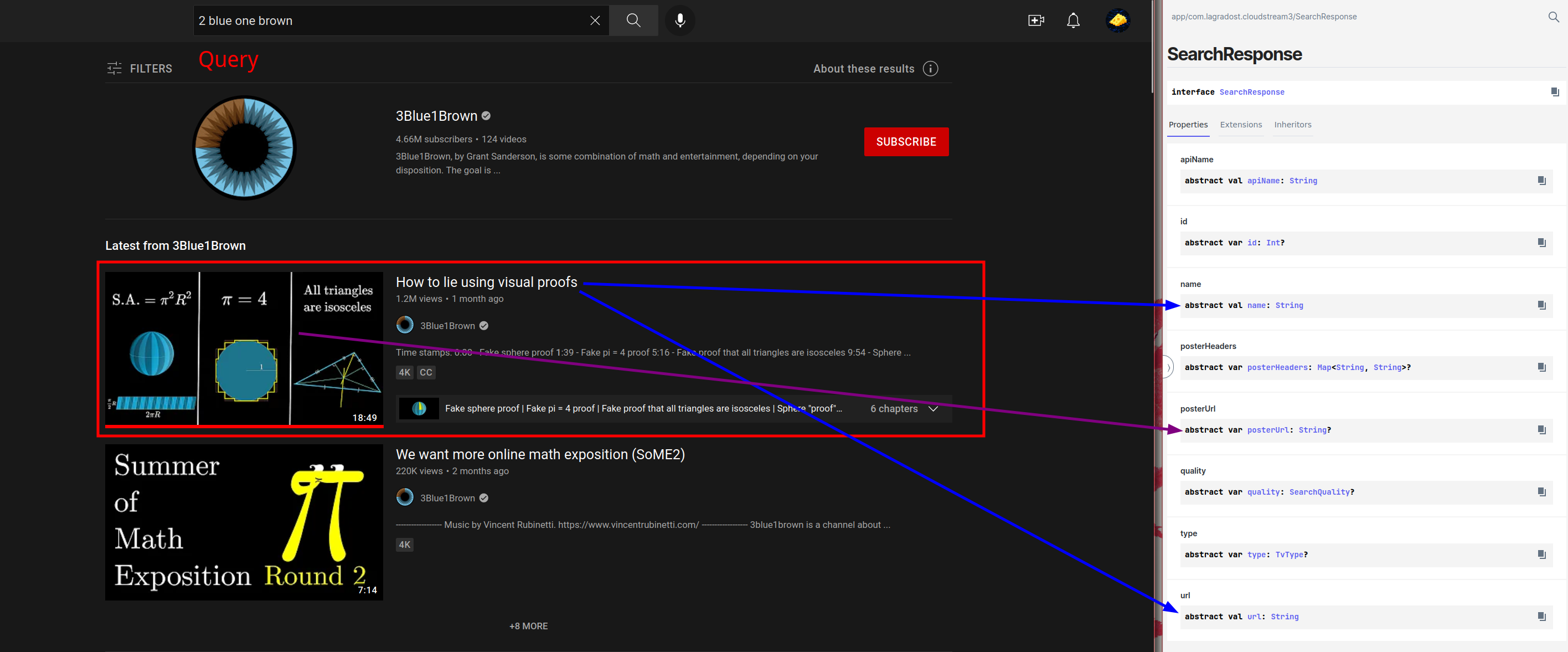
32 |
33 | The code for the search then ideally looks something like
34 |
35 | ```kotlin
36 | // (code for Eja.tv)
37 |
38 | override suspend fun search(query: String): List {
39 | return app.post(
40 | mainUrl, data = mapOf("search" to query) // Fetch the search data
41 | ).document // Convert the response to a searchable document
42 | .select("div.card-body") // Only select the search items using a CSS selector
43 | .mapNotNull { // Convert all html elements to SearchResponses and filter out the null search results
44 | it.toSearchResponse()
45 | }
46 | }
47 |
48 | // Converts a html element to a useable search response
49 | // Basically just look in the element for sub-elements with the data you want
50 | private fun Element.toSearchResponse(): LiveSearchResponse? {
51 | // If no link element then it's no a valid search response
52 | val link = this.select("div.alternative a").last() ?: return null
53 | // fixUrl is a built in function to convert urls like /watch?v=..... to https://www.youtube.com/watch?v=.....
54 | val href = link.attr("href")
55 | val img = this.selectFirst("div.thumb img")
56 | // Optional parameter, scraping languages are not required but might be nice on some sites
57 | val lang = this.selectFirst(".card-title > a")?.attr("href")?.removePrefix("?country=")
58 | ?.replace("int", "eu") //international -> European Union 🇪🇺
59 |
60 | // There are many types of searchresponses but mostly you will be using AnimeSearchResponse, MovieSearchResponse
61 | // and TvSeriesSearchResponse, all with different parameters (like episode count)
62 | return newLiveSearchResponse(
63 | // Kinda hack way to get the title
64 | img?.attr("alt")?.replaceFirst("Watch ", "") ?: return null,
65 | href,
66 | TvType.Live
67 | ) {
68 | this.posterUrl = fixUrl(img.attr("src"))
69 | this.lang = lang
70 | }
71 | }
72 | ```
73 |
74 | In this code snippet I have separated the Element to SearchResult conversion to a separate function because that function can often be used when scraping the home page later. No need to parse the same type of element twice.
75 |
76 | ## 2. Loading the home page
77 |
78 | Getting the homepage is essentially the same as getting search results but with a twist: you define the queries in a variable like this:
79 |
80 | ```kotlin
81 |
82 | override val mainPage = mainPageOf(
83 | Pair("1", "Recent Release - Sub"),
84 | Pair("2", "Recent Release - Dub"),
85 | Pair("3", "Recent Release - Chinese"),
86 | )
87 | ```
88 |
89 | This dictates what the getMainPage function will be receiving as function arguments.
90 | Basically when the recent dubbed media should be loaded the getMainPage gets called with a page number and the request you defined above.
91 |
92 | ```kotlin
93 |
94 | override suspend fun getMainPage(
95 | page: Int,
96 | request : MainPageRequest
97 | ): HomePageResponse {
98 |
99 | // page: An integer > 0, starts on 1 and counts up, Depends on how much the user has scrolled.
100 | // request.data == "2"
101 | // request.name == "Recent Release - Dub"
102 |
103 | ```
104 |
105 | With these variables you should fetch the appropriate list of Search Response like this:
106 |
107 | ```kotlin
108 |
109 | // Gogoanime
110 | override suspend fun getMainPage(
111 | page: Int,
112 | request : MainPageRequest
113 | ): HomePageResponse {
114 | // Use the data you defined earlier in the pair to send the request you want.
115 | val params = mapOf("page" to page.toString(), "type" to request.data)
116 | val html = app.get(
117 | "https://ajax.gogo-load.com/ajax/page-recent-release.html",
118 | headers = headers,
119 | params = params
120 | )
121 | val isSub = listOf(1, 3).contains(request.data.toInt())
122 |
123 | // In this case a regex is used to get all the correct variables
124 | // But if you defined the Element.toSearchResponse() earlier you can often times use it on the homepage
125 | val home = parseRegex.findAll(html.text).map {
126 | val (link, epNum, title, poster) = it.destructured
127 | newAnimeSearchResponse(title, link) {
128 | this.posterUrl = poster
129 | addDubStatus(!isSub, epNum.toIntOrNull())
130 | }
131 | }.toList()
132 |
133 | // Return a list of search responses mapped to the request name defined earlier.
134 | return newHomePageResponse(request.name, home)
135 | }
136 | ```
137 |
138 | This might seem needlessly convoluted, but this system is to allow "infinite" loading, e.g loading the next page of search
139 | responses when the user has scrolled to the end.
140 |
141 | TLDR: Exactly like searching but you defined your own queries.
142 |
143 |
144 | ## 3. Loading the result page
145 |
146 | The media result page is a bit more complex than search results, but it uses the same logic used to get search results: using CSS selectors and regex to parse html into a kotlin object. With the amount of info being parsed this function can get quite big, but the fundamentals are still pretty simple.
147 | The only difficultuy is getting the episodes, they are not always not part of the html. Check if any extra requests are sent in your browser when visiting the episodes page.
148 |
149 | **NOTE**: Episodes in CloudStream are not paginated, meaning that if you have a show with 21 seasons, all on different website pages you will need to parse them all.
150 |
151 | A function can look something like this:
152 |
153 |
154 | ```kotlin
155 | // The url argument is the same as what you put in the Search Response from search() and getMainPage()
156 | override suspend fun load(url: String): LoadResponse {
157 | val document = app.get(url).document
158 |
159 | // A lot of metadata is nessecary for a pretty page
160 | // Usually this is simply doing a lot of selects
161 | val details = document.select("div.detail_page-watch")
162 | val img = details.select("img.film-poster-img")
163 | val posterUrl = img.attr("src")
164 | // It's safe to throw errors here, they will be shown to the user and can help debugging.
165 | val title = img.attr("title") ?: throw ErrorLoadingException("No Title")
166 |
167 | var duration = document.selectFirst(".fs-item > .duration")?.text()?.trim()
168 | var year: Int? = null
169 | var tags: List? = null
170 | var cast: List? = null
171 | val youtubeTrailer = document.selectFirst("iframe#iframe-trailer")?.attr("data-src")
172 |
173 | // The rating system goes is in the range 0 - 10 000
174 | // which allows the greatest flexibility app wise, but you will often need to
175 | // multiply your values
176 | val rating = document.selectFirst(".fs-item > .imdb")?.text()?.trim()
177 | ?.removePrefix("IMDB:")?.toRatingInt()
178 |
179 | // Sometimes is is not quite possible to selct specific information
180 | // as it is presented as text with to specific selectors to differentiate it.
181 | // In this case you can iterate over the rows til you find what you want.
182 | // It is a bit dirty but it works.
183 | document.select("div.elements > .row > div > .row-line").forEach { element ->
184 | val type = element?.select(".type")?.text() ?: return@forEach
185 | when {
186 | type.contains("Released") -> {
187 | year = Regex("\\d+").find(
188 | element.ownText() ?: return@forEach
189 | // Remember to always use OrNull functions
190 | // otherwise stuff will throw exceptions on unexpected values.
191 | // We would not want a page to fail because the rating was incorrectly formatted
192 | )?.groupValues?.firstOrNull()?.toIntOrNull()
193 | }
194 | type.contains("Genre") -> {
195 | tags = element.select("a").mapNotNull { it.text() }
196 | }
197 | type.contains("Cast") -> {
198 | cast = element.select("a").mapNotNull { it.text() }
199 | }
200 | type.contains("Duration") -> {
201 | duration = duration ?: element.ownText().trim()
202 | }
203 | }
204 | }
205 | val plot = details.select("div.description").text().replace("Overview:", "").trim()
206 |
207 | // This is required to know which sort of LoadResponse to return.
208 | // If the page is a movie it needs different metadata and will be displayed differently
209 | val isMovie = url.contains("/movie/")
210 |
211 | // This is just for fetching the episodes later
212 | // https://sflix.to/movie/free-never-say-never-again-hd-18317 -> 18317
213 | val idRegex = Regex(""".*-(\d+)""")
214 | val dataId = details.attr("data-id")
215 | val id = if (dataId.isNullOrEmpty())
216 | idRegex.find(url)?.groupValues?.get(1)
217 | ?: throw ErrorLoadingException("Unable to get id from '$url'")
218 | else dataId
219 |
220 | val recommendations =
221 | document.select("div.film_list-wrap > div.flw-item").mapNotNull { element ->
222 | val titleHeader =
223 | element.select("div.film-detail > .film-name > a") ?: return@mapNotNull null
224 | val recUrl = fixUrlNull(titleHeader.attr("href")) ?: return@mapNotNull null
225 | val recTitle = titleHeader.text() ?: return@mapNotNull null
226 | val poster = element.select("div.film-poster > img").attr("data-src")
227 | newMovieSearchResponse(
228 | recTitle,
229 | recUrl,
230 | if (recUrl.contains("/movie/")) TvType.Movie else TvType.TvSeries,
231 | false
232 | ) {
233 | this.posterUrl = poster
234 | }
235 | }
236 |
237 | if (isMovie) {
238 | // Movies
239 | val episodesUrl = "$mainUrl/ajax/movie/episodes/$id"
240 | // Episodes are often retrieved using a separate request.
241 | // This is usually the most tricky part, but not that hard.
242 | // The episodes are seldom protected by any encryption or similar.
243 | val episodes = app.get(episodesUrl).text
244 |
245 | // Supported streams, they're identical
246 | val sourceIds = Jsoup.parse(episodes).select("a").mapNotNull { element ->
247 | var sourceId = element.attr("data-id")
248 | if (sourceId.isNullOrEmpty())
249 | sourceId = element.attr("data-linkid")
250 |
251 | if (element.select("span").text().trim().isValidServer()) {
252 | if (sourceId.isNullOrEmpty()) {
253 | fixUrlNull(element.attr("href"))
254 | } else {
255 | "$url.$sourceId".replace("/movie/", "/watch-movie/")
256 | }
257 | } else {
258 | null
259 | }
260 | }
261 |
262 | val comingSoon = sourceIds.isEmpty()
263 |
264 | return newMovieLoadResponse(title, url, TvType.Movie, sourceIds) {
265 | this.year = year
266 | this.posterUrl = posterUrl
267 | this.plot = plot
268 | addDuration(duration)
269 | addActors(cast)
270 | this.tags = tags
271 | this.recommendations = recommendations
272 | this.comingSoon = comingSoon
273 | addTrailer(youtubeTrailer)
274 | this.rating = rating
275 | }
276 | } else {
277 | val seasonsDocument = app.get("$mainUrl/ajax/v2/tv/seasons/$id").document
278 | val episodes = arrayListOf()
279 | var seasonItems = seasonsDocument.select("div.dropdown-menu.dropdown-menu-model > a")
280 | if (seasonItems.isNullOrEmpty())
281 | seasonItems = seasonsDocument.select("div.dropdown-menu > a.dropdown-item")
282 | seasonItems.apmapIndexed { season, element ->
283 | val seasonId = element.attr("data-id")
284 | if (seasonId.isNullOrBlank()) return@apmapIndexed
285 |
286 | var episode = 0
287 | val seasonEpisodes = app.get("$mainUrl/ajax/v2/season/episodes/$seasonId").document
288 | var seasonEpisodesItems =
289 | seasonEpisodes.select("div.flw-item.film_single-item.episode-item.eps-item")
290 | if (seasonEpisodesItems.isNullOrEmpty()) {
291 | seasonEpisodesItems =
292 | seasonEpisodes.select("ul > li > a")
293 | }
294 |
295 | seasonEpisodesItems.forEach {
296 | val episodeImg = it?.select("img")
297 | val episodeTitle = episodeImg?.attr("title") ?: it.ownText()
298 | val episodePosterUrl = episodeImg?.attr("src")
299 | val episodeData = it.attr("data-id") ?: return@forEach
300 |
301 | episode++
302 |
303 | val episodeNum =
304 | (it.select("div.episode-number").text()
305 | ?: episodeTitle).let { str ->
306 | Regex("""\d+""").find(str)?.groupValues?.firstOrNull()
307 | ?.toIntOrNull()
308 | } ?: episode
309 |
310 | // Episodes themselves can contain quite a bit of metadata, but only data to load links is required.
311 | episodes.add(
312 | newEpisode(Pair(url, episodeData)) {
313 | this.posterUrl = fixUrlNull(episodePosterUrl)
314 | this.name = episodeTitle?.removePrefix("Episode $episodeNum: ")
315 | this.season = season + 1
316 | this.episode = episodeNum
317 | }
318 | )
319 | }
320 | }
321 | ```
322 |
323 | ## 4. Loading links
324 |
325 | This is usually the hardest part when it comes to scraping video sites, because it costs a lot to host videos.
326 | As bandwidth is expensive video hosts need to recuperate their expenses using ads, but when scraping we bypass all ads.
327 | This means that video hosts have a big monetary incentive to make it as hard as possible to get the video links.
328 |
329 | This means that you cannot write just one piece of skeleton code to scrape all video hosts, they are all unique.
330 | You will need to customized scrapers for each video host. There are some common obfuscation techniques you should know about and how to detect them.
331 |
332 | ### Obfuscation techniques to know about:
333 |
334 | **Base64**:
335 | This is one of the most common obfuscation techniques, and you need to be able to spot it inside documents. It is used to hide important text in plain view.
336 | It looks something like this: `VGhpcyBpcyBiYXNlNjQgZW5jb2RlIHRleHQuIA==`
337 | A dead giveaway that it is base64 or something similar is that the string ends with `==`, something to watch out for, but not required. If you see any suspicious string using A-z in both uppercase and lowercase combined with some numbers then immediately check if it is base64.
338 |
339 | **AES encryption:**
340 | This is the more annoying variant of Base64 for our purposes, but less common. Some responses may be encrypted using AES and it is not too hard to spot.
341 | Usually encrypted content is encoded in Base64 (which decodes to garbage), which makes it easier to spot. Usually sites are not too covert in the use of AES, and you should be alerted if any site contains references to `enc`, `iv` or `CryptoJS`. The name of the game here is to find the decryption key, which is easiest done with a debugger. If you can find where the decryption takes place in the code, usually with some library like `CryptoJS` then you can place a breakpoint there to find the key.
342 |
343 |
344 | More to come later!
345 |
346 |
347 |
348 |
349 |
350 | # TODO: REST
351 |
--------------------------------------------------------------------------------