├── tests
├── inventory
└── test.yml
├── files
├── nfs-exports
├── restart.conf
├── start-tftp.sh
├── nfs-provisioner-sc.yaml
├── registry-pvc.yaml
├── helper-tftp.service
├── set-dns-serial.sh
├── nfs-provisioner-rbac.yaml
└── nfs-provisioner-setup.sh
├── inventory
├── docs
├── images
│ ├── hn.png
│ ├── pxe.png
│ ├── rhcos.png
│ └── rhcos-iso-maker.png
├── yt-twitch.md
├── contribute.md
├── examples
│ ├── virt-net.xml
│ ├── install-config-example.yaml
│ ├── vars-compact-static.yaml
│ ├── vars-static.yaml
│ ├── vars-nfs.yaml
│ ├── vars-compact.yaml
│ ├── install-config-local-registry-example.yaml
│ ├── vars.yaml
│ ├── vars-chrony.yaml
│ ├── vars-ha.yaml
│ ├── helper-ks8-ppc64le.cfg
│ ├── vars-local-registry.yaml
│ ├── vars-static-nightlies.yaml
│ ├── helper-ks-ppc64le.cfg
│ ├── helper-ks8.cfg
│ ├── helper-ks.cfg
│ ├── vars-ppc64le.yaml
│ ├── vars-nightlies.yaml
│ ├── vars-ha-ppc64le.yaml
│ └── vars-local-registry-ppc64le.yaml
├── inventory-ha-doc.md
├── iso-maker.md
├── bmquickstart.md
├── bmquickstart-static.md
├── quickstart.md
├── quickstart-ppc64le.md
├── quickstart-static.md
└── quickstart-powervm.md
├── ansible.cfg
├── templates
├── chrony.conf.j2
├── resolv.conf.j2
├── nfs-exports.j2
├── chrony-machineconfig.j2
├── keepalived.conf.j2
├── grub2-master.j2
├── grub2-worker.j2
├── grub2-bootstrap.j2
├── pxe-master.j2
├── pxe-worker.j2
├── pxe-bootstrap.j2
├── local-registry.service.j2
├── nfs-provisioner-deployment.yaml.j2
├── default.j2
├── reverse.j2
├── dhcpd.conf.j2
├── dhcpd-uefi.conf.j2
├── zonefile.j2
├── named.conf.j2
├── haproxy.cfg.j2
├── checker.sh.j2
└── httpd.conf.j2
├── vars
├── ports.yml
└── main.yml
├── tasks
├── validate_host_names.yaml
├── restart_config.yaml
├── generate_grub.yml
├── remove_old_config_files.yaml
├── setup_keepalived.yaml
├── generate_ssh_keys.yaml
├── set_facts_.yaml
├── setup_registry.yaml
└── main.yml
├── handlers
└── main.yml
├── meta
└── main.yml
└── README.md
/tests/inventory:
--------------------------------------------------------------------------------
1 | localhost
2 |
3 |
--------------------------------------------------------------------------------
/files/nfs-exports:
--------------------------------------------------------------------------------
1 | /export *(rw,sync,root_squash)
2 |
--------------------------------------------------------------------------------
/files/restart.conf:
--------------------------------------------------------------------------------
1 | [Service]
2 | Restart=always
3 |
--------------------------------------------------------------------------------
/inventory:
--------------------------------------------------------------------------------
1 | [vmhost]
2 | localhost ansible_connection=local
3 |
--------------------------------------------------------------------------------
/docs/images/hn.png:
--------------------------------------------------------------------------------
https://raw.githubusercontent.com/redhat-cop/ocp4-helpernode/HEAD/docs/images/hn.png
--------------------------------------------------------------------------------
/tests/test.yml:
--------------------------------------------------------------------------------
1 | ---
2 | - hosts: localhost
3 | remote_user: root
4 | roles:
5 | - tester
--------------------------------------------------------------------------------
/docs/images/pxe.png:
--------------------------------------------------------------------------------
https://raw.githubusercontent.com/redhat-cop/ocp4-helpernode/HEAD/docs/images/pxe.png
--------------------------------------------------------------------------------
/files/start-tftp.sh:
--------------------------------------------------------------------------------
1 | #!/bin/bash
2 | /usr/bin/systemctl start tftp > /dev/null 2>&1
3 | ##
4 | ##
5 |
--------------------------------------------------------------------------------
/docs/images/rhcos.png:
--------------------------------------------------------------------------------
https://raw.githubusercontent.com/redhat-cop/ocp4-helpernode/HEAD/docs/images/rhcos.png
--------------------------------------------------------------------------------
/docs/images/rhcos-iso-maker.png:
--------------------------------------------------------------------------------
https://raw.githubusercontent.com/redhat-cop/ocp4-helpernode/HEAD/docs/images/rhcos-iso-maker.png
--------------------------------------------------------------------------------
/ansible.cfg:
--------------------------------------------------------------------------------
1 | [defaults]
2 | inventory = inventory
3 | command_warnings = False
4 | filter_plugins = filter_plugins
5 | host_key_checking = False
6 | deprecation_warnings=False
7 | retry_files = false
8 |
--------------------------------------------------------------------------------
/files/nfs-provisioner-sc.yaml:
--------------------------------------------------------------------------------
1 | apiVersion: storage.k8s.io/v1
2 | kind: StorageClass
3 | metadata:
4 | name: nfs-storage-provisioner
5 | provisioner: nfs-storage
6 | parameters:
7 | archiveOnDelete: "false"
8 |
--------------------------------------------------------------------------------
/templates/chrony.conf.j2:
--------------------------------------------------------------------------------
1 | {% for item in chronyconfig.content %}
2 | server {{ item.server }} {{ item.options }}
3 | {% endfor %}
4 | driftfile /var/lib/chrony/drift
5 | makestep 1.0 3
6 | rtcsync
7 | logdir /var/log/chrony
--------------------------------------------------------------------------------
/files/registry-pvc.yaml:
--------------------------------------------------------------------------------
1 | apiVersion: v1
2 | kind: PersistentVolumeClaim
3 | metadata:
4 | name: registry-pvc
5 | spec:
6 | accessModes:
7 | - ReadWriteMany
8 | resources:
9 | requests:
10 | storage: 20Gi
11 |
--------------------------------------------------------------------------------
/templates/resolv.conf.j2:
--------------------------------------------------------------------------------
1 | # Generated by Ansible
2 | search {{ dns.clusterid }}.{{ dns.domain | lower }}
3 | {% if dhcp.dns is defined and dhcp.dns != "" %}
4 | nameserver {{ dhcp.dns }}
5 | {% else %}
6 | nameserver 127.0.0.1
7 | {% endif %}
8 |
--------------------------------------------------------------------------------
/vars/ports.yml:
--------------------------------------------------------------------------------
1 | ports:
2 | - 67/udp
3 | - 53/tcp
4 | - 53/udp
5 | - 443/tcp
6 | - 80/tcp
7 | - 8080/tcp
8 | - 6443/tcp
9 | - 6443/udp
10 | - 22623/tcp
11 | - 22623/udp
12 | - 9000/tcp
13 | - 69/udp
14 | - 111/tcp
15 | - 2049/tcp
16 | - 20048/tcp
17 | - 50825/tcp
18 | - 53248/tcp
19 |
20 |
--------------------------------------------------------------------------------
/docs/yt-twitch.md:
--------------------------------------------------------------------------------
1 | # Video
2 |
3 | Here is a video I did for [http://OpenShift.tv](OpenShift.tv)'s Twitch stream about the HelperNode. This, functionally, serves as a "How To Video"
4 |
5 | [](https://www.youtube.com/watch?v=wZYx4_xBSUQ)
6 |
--------------------------------------------------------------------------------
/files/helper-tftp.service:
--------------------------------------------------------------------------------
1 | [Unit]
2 | Description=Starts TFTP on boot because of reasons
3 | After=network.target
4 |
5 | [Service]
6 | Type=simple
7 | ExecStart=/usr/local/bin/start-tftp.sh
8 | TimeoutStartSec=0
9 | Restart=always
10 | RestartSec=30
11 |
12 | [Install]
13 | WantedBy=default.target
14 |
--------------------------------------------------------------------------------
/docs/contribute.md:
--------------------------------------------------------------------------------
1 | # Contributing
2 |
3 | To contribute please checkout/fork the `devel` branch and PR against that repo. Also, we are now standardizing on `ansible 2.9` (which can be found in [EPEL](https://fedoraproject.org/wiki/EPEL) for EL 7 and 8)
4 |
5 | Currently, testing is done manually. So please be patient as we get to your PRs.
6 |
--------------------------------------------------------------------------------
/docs/examples/virt-net.xml:
--------------------------------------------------------------------------------
1 |
2 | openshift4
3 |
4 |
5 |
6 |
7 |
8 |
9 |
10 |
11 |
12 |
13 |
14 |
--------------------------------------------------------------------------------
/tasks/validate_host_names.yaml:
--------------------------------------------------------------------------------
1 | - name: Validate values for DNS compatibility
2 | fail:
3 | msg: "Please revise your vars.yaml file. Invalid characters found in hostnames"
4 | when: item is search('{{ chars }}')
5 | with_items:
6 | - "{{ dns.domain }}"
7 | - "{{ helper.name }}"
8 | - "{{ bootstrap.name | default('') }}"
9 | - "{{ masters }}"
10 | - "{{ workers | default('') }}"
11 |
--------------------------------------------------------------------------------
/templates/nfs-exports.j2:
--------------------------------------------------------------------------------
1 | {% if bootstrap is defined %}
2 | /export {{ bootstrap.ipaddr }}(rw,sync,no_wdelay,no_root_squash,insecure)
3 | {% endif %}
4 | {% for m in masters %}
5 | /export {{ m.ipaddr }}(rw,sync,no_wdelay,no_root_squash,insecure)
6 | {% endfor %}
7 | {% for w in workers %}
8 | /export {{ w.ipaddr }}(rw,sync,no_wdelay,no_root_squash,insecure)
9 | {% endfor %}
10 |
--------------------------------------------------------------------------------
/files/set-dns-serial.sh:
--------------------------------------------------------------------------------
1 | #!/bin/bash
2 | dnsserialfile=/usr/local/src/dnsserial-DO_NOT_DELETE_BEFORE_ASKING_CHRISTIAN.txt
3 | zonefile=/var/named/zonefile.db
4 | if [ -f zonefile ] ; then
5 | echo $[ $(grep serial ${zonefile} | tr -d "\t"" ""\n" | cut -d';' -f 1) + 1 ] | tee ${dnsserialfile}
6 | else
7 | if [ ! -f ${dnsserialfile} ] || [ ! -s ${dnsserialfile} ]; then
8 | echo $(date +%Y%m%d00) | tee ${dnsserialfile}
9 | else
10 | echo $[ $(< ${dnsserialfile}) + 1 ] | tee ${dnsserialfile}
11 | fi
12 | fi
13 | ##
14 | ##-30-
15 |
--------------------------------------------------------------------------------
/docs/examples/install-config-example.yaml:
--------------------------------------------------------------------------------
1 | apiVersion: v1
2 | baseDomain: example.com
3 | compute:
4 | - hyperthreading: Enabled
5 | name: worker
6 | replicas: 0
7 | controlPlane:
8 | hyperthreading: Enabled
9 | name: master
10 | replicas: 3
11 | metadata:
12 | name: ocp4
13 | networking:
14 | clusterNetworks:
15 | - cidr: 10.254.0.0/16
16 | hostPrefix: 24
17 | networkType: OpenShiftSDN
18 | serviceNetwork:
19 | - 172.30.0.0/16
20 | platform:
21 | none: {}
22 | pullSecret: '{"auths": ...}'
23 | sshKey: 'ssh-ed25519 AAAA...'
24 |
--------------------------------------------------------------------------------
/docs/examples/vars-compact-static.yaml:
--------------------------------------------------------------------------------
1 | ---
2 | staticips: true
3 | helper:
4 | name: "helper"
5 | ipaddr: "192.168.7.77"
6 | dns:
7 | domain: "example.com"
8 | clusterid: "ocp4"
9 | forwarder1: "8.8.8.8"
10 | forwarder2: "8.8.4.4"
11 | bootstrap:
12 | name: "bootstrap"
13 | ipaddr: "192.168.7.20"
14 | masters:
15 | - name: "master0"
16 | ipaddr: "192.168.7.21"
17 | - name: "master1"
18 | ipaddr: "192.168.7.22"
19 | - name: "master2"
20 | ipaddr: "192.168.7.23"
21 | other:
22 | - name: "non-cluster-vm"
23 | ipaddr: "192.168.7.31"
24 |
--------------------------------------------------------------------------------
/tasks/restart_config.yaml:
--------------------------------------------------------------------------------
1 | ---
2 | # Add restart always configurations to the services
3 | - name: Create dropin directory for services
4 | file:
5 | path: /etc/systemd/system/{{item}}.service.d
6 | state: directory
7 | mode: 0755
8 |
9 | - name: Copy restart conf file to the services dropin directory
10 | copy:
11 | src: ../files/restart.conf
12 | dest: /etc/systemd/system/{{item}}.service.d/restart.conf
13 |
14 | - name: restart services
15 | service:
16 | name: "{{ item }}"
17 | state: restarted
18 | daemon_reload: yes
19 |
20 |
--------------------------------------------------------------------------------
/handlers/main.yml:
--------------------------------------------------------------------------------
1 | ---
2 | # handlers file for tester
3 | - name: restart bind
4 | service:
5 | name: named
6 | state: restarted
7 |
8 | - name: restart haproxy
9 | service:
10 | name: haproxy
11 | state: restarted
12 |
13 | - name: restart httpd
14 | service:
15 | name: httpd
16 | state: restarted
17 |
18 | - name: restart dhcpd
19 | service:
20 | name: dhcpd
21 | state: restarted
22 |
23 | - name: restart tftp
24 | service:
25 | name: tftp
26 | state: restarted
27 |
28 | - name: restart nfs
29 | service:
30 | name: nfs-server
31 | state: restarted
32 |
33 |
--------------------------------------------------------------------------------
/templates/chrony-machineconfig.j2:
--------------------------------------------------------------------------------
1 | apiVersion: machineconfiguration.openshift.io/v1
2 | kind: MachineConfig
3 | metadata:
4 | labels:
5 | machineconfiguration.openshift.io/role: {{item}}
6 | name: 99-{{item}}-chrony-configuration
7 | spec:
8 | config:
9 | ignition:
10 | config: {}
11 | security:
12 | tls: {}
13 | timeouts: {}
14 | version: 2.2.0
15 | networkd: {}
16 | passwd: {}
17 | storage:
18 | files:
19 | - contents:
20 | source: data:text/plain;charset=utf-8;base64,{{ chronybase64.content }}
21 | verification: {}
22 | filesystem: root
23 | mode: 420
24 | path: /etc/chrony.conf
25 | osImageURL: ""
26 |
--------------------------------------------------------------------------------
/docs/examples/vars-static.yaml:
--------------------------------------------------------------------------------
1 | ---
2 | staticips: true
3 | helper:
4 | name: "helper"
5 | ipaddr: "192.168.7.77"
6 | dns:
7 | domain: "example.com"
8 | clusterid: "ocp4"
9 | forwarder1: "8.8.8.8"
10 | forwarder2: "8.8.4.4"
11 | bootstrap:
12 | name: "bootstrap"
13 | ipaddr: "192.168.7.20"
14 | masters:
15 | - name: "master0"
16 | ipaddr: "192.168.7.21"
17 | - name: "master1"
18 | ipaddr: "192.168.7.22"
19 | - name: "master2"
20 | ipaddr: "192.168.7.23"
21 | workers:
22 | - name: "worker0"
23 | ipaddr: "192.168.7.11"
24 | - name: "worker1"
25 | ipaddr: "192.168.7.12"
26 | - name: "worker2"
27 | ipaddr: "192.168.7.13"
28 | other:
29 | - name: "non-cluster-vm"
30 | ipaddr: "192.168.7.31"
31 |
--------------------------------------------------------------------------------
/docs/inventory-ha-doc.md:
--------------------------------------------------------------------------------
1 | # How to configure inventory for high availability environment
2 |
3 | In case while running helpernode playbook from one of the helpernode servers, ensure the rest of the helpernodes are added to the inventory file.
4 |
5 | ```
6 | [vmhost]
7 | localhost ansible_connection=local
8 | 192.168.67.3 ansible_connection=ssh ansible_user=root
9 | ```
10 |
11 | In case while running helpernode playbook from a remote server, ensure all helpernodes are added to the inventory file.
12 |
13 | ```
14 | [vmhost]
15 | 192.168.67.2 ansible_connection=ssh ansible_user=root
16 | 192.168.67.3 ansible_connection=ssh ansible_user=root
17 | ```
18 |
19 | **NOTE**: Ensure SSH connectivity between all the helpernodes is working fine.
20 |
--------------------------------------------------------------------------------
/templates/keepalived.conf.j2:
--------------------------------------------------------------------------------
1 | {% for h in high_availability.helpernodes %}
2 | {%if h.name == ansible_hostname %}
3 | global_defs {
4 | router_id ovp_vrrp
5 | }
6 |
7 | vrrp_script haproxy_check {
8 | script "killall -0 haproxy"
9 | interval 2
10 | weight {{ calibrated_priority }}
11 | }
12 |
13 | vrrp_instance OCP_LB {
14 | state {{ h.state }}
15 | interface {{ networkifacename }}
16 | virtual_router_id {{ helper.ipaddr.split('.')[3] }}
17 | priority {{ h.priority }}
18 | virtual_ipaddress {
19 | {{ helper.ipaddr }}
20 | }
21 | track_script {
22 | haproxy_check
23 | }
24 | authentication {
25 | auth_type PASS
26 | auth_pass {{ password.stdout }}
27 | }
28 | }
29 | {% endif %}
30 | {% endfor %}
31 |
32 |
--------------------------------------------------------------------------------
/tasks/generate_grub.yml:
--------------------------------------------------------------------------------
1 | ---
2 | - name: create grub2 block
3 | blockinfile:
4 | marker: ""
5 | content: |
6 | if [ ${net_default_mac} == {{ mac }} ]; then
7 | default=0
8 | fallback=1
9 | timeout=1
10 | menuentry "CoreOS (BIOS)" {
11 | echo "Loading kernel"
12 | linux "/rhcos/kernel" ip=dhcp console=tty0 console=ttyS0 console=hvc0,115200n8 rd.neednet=1 coreos.inst=yes coreos.inst.install_dev={{ disk }} {{ coreos_inst_url }} coreos.inst.ignition_url=http://{{ helper.ipaddr }}:8080/ignition/{{ role }}.ign
13 |
14 | echo "Loading initrd"
15 | initrd "/rhcos/initramfs.img"
16 | }
17 | fi
18 | dest: /var/lib/tftpboot/boot/grub2/grub.cfg
19 | notify:
20 | - restart tftp
21 |
--------------------------------------------------------------------------------
/docs/examples/vars-nfs.yaml:
--------------------------------------------------------------------------------
1 | ---
2 | staticips: true
3 | helper:
4 | name: "helper"
5 | ipaddr: "192.168.7.77"
6 | dns:
7 | domain: "example.com"
8 | clusterid: "ocp4"
9 | forwarder1: "8.8.8.8"
10 | forwarder2: "8.8.4.4"
11 | bootstrap:
12 | name: "bootstrap"
13 | ipaddr: "192.168.7.20"
14 | masters:
15 | - name: "master0"
16 | ipaddr: "192.168.7.21"
17 | - name: "master1"
18 | ipaddr: "192.168.7.22"
19 | - name: "master2"
20 | ipaddr: "192.168.7.23"
21 | workers:
22 | - name: "worker0"
23 | ipaddr: "192.168.7.11"
24 | - name: "worker1"
25 | ipaddr: "192.168.7.12"
26 | - name: "worker2"
27 | ipaddr: "192.168.7.13"
28 | other:
29 | - name: "non-cluster-vm"
30 | ipaddr: "192.168.7.31"
31 | nfs:
32 | server: "192.168.1.100"
33 | path: "/exports/helper"
34 |
--------------------------------------------------------------------------------
/tasks/remove_old_config_files.yaml:
--------------------------------------------------------------------------------
1 | - name: Remove existing dhcp config
2 | file:
3 | path: /etc/dhcp/dhcpd.conf
4 | state: absent
5 |
6 | - name: Remove existing named config
7 | file:
8 | path: /etc/named.conf
9 | state: absent
10 |
11 | - name: Remove existing DNS zone files
12 | file:
13 | path: "/var/named/{{ item }}"
14 | state: absent
15 | with_items:
16 | - "zonefile.db"
17 | - "reverse.db"
18 |
19 | - name: Remove existing haproxy config
20 | file:
21 | path: /etc/haproxy/haproxy.cfg
22 | state: absent
23 |
24 | - name: Remove existing TFTP config
25 | file:
26 | path: /var/lib/tftpboot/pxelinux.cfg
27 | state: absent
28 |
29 | - name: Remove existing grub.cfg
30 | file:
31 | path: /var/lib/tftpboot/boot/grub2/grub.cfg
32 | state: absent
--------------------------------------------------------------------------------
/docs/examples/vars-compact.yaml:
--------------------------------------------------------------------------------
1 | ---
2 | disk: vda
3 | helper:
4 | name: "helper"
5 | ipaddr: "192.168.7.77"
6 | dns:
7 | domain: "example.com"
8 | clusterid: "ocp4"
9 | forwarder1: "8.8.8.8"
10 | forwarder2: "8.8.4.4"
11 | dhcp:
12 | router: "192.168.7.1"
13 | bcast: "192.168.7.255"
14 | netmask: "255.255.255.0"
15 | poolstart: "192.168.7.10"
16 | poolend: "192.168.7.30"
17 | ipid: "192.168.7.0"
18 | netmaskid: "255.255.255.0"
19 | bootstrap:
20 | name: "bootstrap"
21 | ipaddr: "192.168.7.20"
22 | macaddr: "52:54:00:60:72:67"
23 | masters:
24 | - name: "master0"
25 | ipaddr: "192.168.7.21"
26 | macaddr: "52:54:00:e7:9d:67"
27 | - name: "master1"
28 | ipaddr: "192.168.7.22"
29 | macaddr: "52:54:00:80:16:23"
30 | - name: "master2"
31 | ipaddr: "192.168.7.23"
32 | macaddr: "52:54:00:d5:1c:39"
33 | other:
34 | - name: "non-cluster-vm"
35 | ipaddr: "192.168.7.31"
36 | macaddr: "52:54:00:f4:2e:2e"
37 |
--------------------------------------------------------------------------------
/templates/grub2-master.j2:
--------------------------------------------------------------------------------
1 | {% if item.ipaddr is defined and item.networkifacename is defined %}
2 | {% set ipconfig = item.ipaddr + "::" + dhcp.router + ":" + dhcp.netmask + ":" + item.name + ":" + item.networkifacename + ":none" %}
3 | {% set ipconfig = ipconfig + " nameserver=" + dns.forwarder1 %}
4 | {% if dns.forwarder2 is defined %}
5 | {% set ipconfig = ipconfig + " nameserver=" + dns.forwarder2 %}
6 | {% endif %}
7 | {% else %}
8 | {% set ipconfig = "dhcp" %}
9 | {% endif %}
10 |
11 | set default=0
12 | set timeout=10
13 |
14 | menuentry 'Install Master Node' {
15 | linuxefi rhcos/kernel initrd=rhcos/initramfs.img nomodeset rd.neednet=1 ip={{ ipconfig }} coreos.inst=yes coreos.inst.install_dev={{ disk }} {% if "metal" in ocp_bios %} coreos.inst.image_url=http://{{ helper.ipaddr }}:8080/install/bios.raw.gz {% elif "rootfs" in ocp_bios %} coreos.live.rootfs_url=http://{{ helper.ipaddr }}:8080/install/rootfs.img {% else %} coreos.UNKNOWN.CONFIG=you_messed_up {% endif %} coreos.inst.ignition_url=http://{{ helper.ipaddr }}:8080/ignition/master.ign
16 | initrdefi rhcos/initramfs.img
17 | }
18 |
--------------------------------------------------------------------------------
/templates/grub2-worker.j2:
--------------------------------------------------------------------------------
1 | {% if item.ipaddr is defined and item.networkifacename is defined %}
2 | {% set ipconfig = item.ipaddr + "::" + dhcp.router + ":" + dhcp.netmask + ":" + item.name + ":" + item.networkifacename + ":none" %}
3 | {% set ipconfig = ipconfig + " nameserver=" + dns.forwarder1 %}
4 | {% if dns.forwarder2 is defined %}
5 | {% set ipconfig = ipconfig + " nameserver=" + dns.forwarder2 %}
6 | {% endif %}
7 | {% else %}
8 | {% set ipconfig = "dhcp" %}
9 | {% endif %}
10 |
11 | set default=0
12 | set timeout=10
13 |
14 | menuentry 'Install Worker Node' {
15 | linuxefi rhcos/kernel initrd=rhcos/initramfs.img nomodeset rd.neednet=1 ip={{ ipconfig }} coreos.inst=yes coreos.inst.install_dev={{ disk }} {% if "metal" in ocp_bios %} coreos.inst.image_url=http://{{ helper.ipaddr }}:8080/install/bios.raw.gz {% elif "rootfs" in ocp_bios %} coreos.live.rootfs_url=http://{{ helper.ipaddr }}:8080/install/rootfs.img {% else %} coreos.UNKNOWN.CONFIG=you_messed_up {% endif %} coreos.inst.ignition_url=http://{{ helper.ipaddr }}:8080/ignition/worker.ign
16 | initrdefi rhcos/initramfs.img
17 | }
18 |
--------------------------------------------------------------------------------
/docs/examples/install-config-local-registry-example.yaml:
--------------------------------------------------------------------------------
1 | apiVersion: v1
2 | baseDomain: example.com
3 | compute:
4 | - hyperthreading: Enabled
5 | name: worker
6 | replicas: 0
7 | controlPlane:
8 | hyperthreading: Enabled
9 | name: master
10 | replicas: 3
11 | metadata:
12 | name: ocp4
13 | networking:
14 | clusterNetworks:
15 | - cidr: 10.254.0.0/16
16 | hostPrefix: 24
17 | networkType: OpenShiftSDN
18 | serviceNetwork:
19 | - 172.30.0.0/16
20 | platform:
21 | none: {}
22 | pullSecret: '{"auths":{"registry.ocp4.example.com:5000": {"auth": "ZHVtbXk6ZHVtbXk=","email": "noemail@localhost"}},{...}}'
23 | sshKey: 'ssh-rsa AAAA...'
24 | additionalTrustBundle: |
25 | -----BEGIN CERTIFICATE-----
26 | ZZZZZZZZZZZZZZZZZZZZZZZZZZZZZZZZZZZZZZZZZZZZZZZZZZZZZZZZZZZZZZZZ
27 | -----END CERTIFICATE-----
28 | imageContentSources:
29 | - mirrors:
30 | - registry.ocp4.example.com:5000/ocp4/openshift4
31 | source: quay.io/openshift-release-dev/ocp-release-nightly
32 | - mirrors:
33 | - registry.ocp4.example.com:5000/ocp4/openshift4
34 | source: quay.io/openshift-release-dev/ocp-v4.0-art-dev
35 |
36 |
--------------------------------------------------------------------------------
/templates/grub2-bootstrap.j2:
--------------------------------------------------------------------------------
1 | {% if bootstrap.ipaddr is defined and bootstrap.networkifacename is defined %}
2 | {% set ipconfig = bootstrap.ipaddr + "::" + dhcp.router + ":" + dhcp.netmask + ":" + bootstrap.name + ":" + bootstrap.networkifacename + ":none" %}
3 | {% set ipconfig = ipconfig + " nameserver=" + dns.forwarder1 %}
4 | {% if dns.forwarder2 is defined %}
5 | {% set ipconfig = ipconfig + " nameserver=" + dns.forwarder2 %}
6 | {% endif %}
7 | {% else %}
8 | {% set ipconfig = "dhcp" %}
9 | {% endif %}
10 |
11 | set default=0
12 | set timeout=10
13 |
14 | menuentry 'Install Bootstrap Node' {
15 | linuxefi rhcos/kernel initrd=rhcos/initramfs.img nomodeset rd.neednet=1 ip={{ ipconfig }} coreos.inst=yes coreos.inst.install_dev={{ disk }} {% if "metal" in ocp_bios %} coreos.inst.image_url=http://{{ helper.ipaddr }}:8080/install/bios.raw.gz {% elif "rootfs" in ocp_bios %} coreos.live.rootfs_url=http://{{ helper.ipaddr }}:8080/install/rootfs.img {% else %} coreos.UNKNOWN.CONFIG=you_messed_up {% endif %} coreos.inst.ignition_url=http://{{ helper.ipaddr }}:8080/ignition/bootstrap.ign
16 | initrdefi rhcos/initramfs.img
17 | }
18 |
--------------------------------------------------------------------------------
/templates/pxe-master.j2:
--------------------------------------------------------------------------------
1 | {% if item.ipaddr is defined and item.networkifacename is defined %}
2 | {% set ipconfig = item.ipaddr + "::" + dhcp.router + ":" + dhcp.netmask + ":" + item.name + ":" + item.networkifacename + ":none" %}
3 | {% set ipconfig = ipconfig + " nameserver=" + dns.forwarder1 %}
4 | {% if dns.forwarder2 is defined %}
5 | {% set ipconfig = ipconfig + " nameserver=" + dns.forwarder2 %}
6 | {% endif %}
7 | {% else %}
8 | {% set ipconfig = "dhcp" %}
9 | {% endif %}
10 |
11 | default menu.c32
12 | prompt 1
13 | timeout 9
14 | ONTIMEOUT 1
15 | menu title ######## PXE Boot Menu ########
16 | label 1
17 | menu label ^1) Install Master Node
18 | menu default
19 | kernel rhcos/kernel
20 | append initrd=rhcos/initramfs.img nomodeset rd.neednet=1 ip={{ ipconfig }} coreos.inst=yes coreos.inst.install_dev={{ disk }} {% if "metal" in ocp_bios %} coreos.inst.image_url=http://{{ helper.ipaddr }}:8080/install/bios.raw.gz {% elif "rootfs" in ocp_bios %} coreos.live.rootfs_url=http://{{ helper.ipaddr }}:8080/install/rootfs.img {% else %} coreos.UNKNOWN.CONFIG=you_messed_up {% endif %} coreos.inst.ignition_url=http://{{ helper.ipaddr }}:8080/ignition/master.ign
21 |
--------------------------------------------------------------------------------
/templates/pxe-worker.j2:
--------------------------------------------------------------------------------
1 | {% if item.ipaddr is defined and item.networkifacename is defined %}
2 | {% set ipconfig = item.ipaddr + "::" + dhcp.router + ":" + dhcp.netmask + ":" + item.name + ":" + item.networkifacename + ":none" %}
3 | {% set ipconfig = ipconfig + " nameserver=" + dns.forwarder1 %}
4 | {% if dns.forwarder2 is defined %}
5 | {% set ipconfig = ipconfig + " nameserver=" + dns.forwarder2 %}
6 | {% endif %}
7 | {% else %}
8 | {% set ipconfig = "dhcp" %}
9 | {% endif %}
10 |
11 | default menu.c32
12 | prompt 1
13 | timeout 9
14 | ONTIMEOUT 1
15 | menu title ######## PXE Boot Menu ########
16 | label 1
17 | menu label ^1) Install Worker Node
18 | menu default
19 | kernel rhcos/kernel
20 | append initrd=rhcos/initramfs.img nomodeset rd.neednet=1 ip={{ ipconfig }} coreos.inst=yes coreos.inst.install_dev={{ disk }} {% if "metal" in ocp_bios %} coreos.inst.image_url=http://{{ helper.ipaddr }}:8080/install/bios.raw.gz {% elif "rootfs" in ocp_bios %} coreos.live.rootfs_url=http://{{ helper.ipaddr }}:8080/install/rootfs.img {% else %} coreos.UNKNOWN.CONFIG=you_messed_up {% endif %} coreos.inst.ignition_url=http://{{ helper.ipaddr }}:8080/ignition/worker.ign
21 |
--------------------------------------------------------------------------------
/templates/pxe-bootstrap.j2:
--------------------------------------------------------------------------------
1 | {% if bootstrap.ipaddr is defined and bootstrap.networkifacename is defined %}
2 | {% set ipconfig = bootstrap.ipaddr + "::" + dhcp.router + ":" + dhcp.netmask + ":" + bootstrap.name + ":" + bootstrap.networkifacename + ":none" %}
3 | {% set ipconfig = ipconfig + " nameserver=" + dns.forwarder1 %}
4 | {% if dns.forwarder2 is defined %}
5 | {% set ipconfig = ipconfig + " nameserver=" + dns.forwarder2 %}
6 | {% endif %}
7 | {% else %}
8 | {% set ipconfig = "dhcp" %}
9 | {% endif %}
10 |
11 | default menu.c32
12 | prompt 1
13 | timeout 9
14 | ONTIMEOUT 1
15 | menu title ######## PXE Boot Menu ########
16 | label 1
17 | menu label ^1) Install Bootstrap Node
18 | menu default
19 | kernel rhcos/kernel
20 | append initrd=rhcos/initramfs.img nomodeset rd.neednet=1 ip={{ ipconfig }} coreos.inst=yes coreos.inst.install_dev={{ disk }} {% if "metal" in ocp_bios %} coreos.inst.image_url=http://{{ helper.ipaddr }}:8080/install/bios.raw.gz {% elif "rootfs" in ocp_bios %} coreos.live.rootfs_url=http://{{ helper.ipaddr }}:8080/install/rootfs.img {% else %} coreos.UNKNOWN.CONFIG=you_messed_up {% endif %} coreos.inst.ignition_url=http://{{ helper.ipaddr }}:8080/ignition/bootstrap.ign
21 |
22 |
--------------------------------------------------------------------------------
/docs/examples/vars.yaml:
--------------------------------------------------------------------------------
1 | ---
2 | disk: vda
3 | helper:
4 | name: "helper"
5 | ipaddr: "192.168.7.77"
6 | dns:
7 | domain: "example.com"
8 | clusterid: "ocp4"
9 | forwarder1: "8.8.8.8"
10 | forwarder2: "8.8.4.4"
11 | dhcp:
12 | router: "192.168.7.1"
13 | bcast: "192.168.7.255"
14 | netmask: "255.255.255.0"
15 | poolstart: "192.168.7.10"
16 | poolend: "192.168.7.30"
17 | ipid: "192.168.7.0"
18 | netmaskid: "255.255.255.0"
19 | bootstrap:
20 | name: "bootstrap"
21 | ipaddr: "192.168.7.20"
22 | macaddr: "52:54:00:60:72:67"
23 | masters:
24 | - name: "master0"
25 | ipaddr: "192.168.7.21"
26 | macaddr: "52:54:00:e7:9d:67"
27 | - name: "master1"
28 | ipaddr: "192.168.7.22"
29 | macaddr: "52:54:00:80:16:23"
30 | - name: "master2"
31 | ipaddr: "192.168.7.23"
32 | macaddr: "52:54:00:d5:1c:39"
33 | workers:
34 | - name: "worker0"
35 | ipaddr: "192.168.7.11"
36 | macaddr: "52:54:00:f4:26:a1"
37 | - name: "worker1"
38 | ipaddr: "192.168.7.12"
39 | macaddr: "52:54:00:82:90:00"
40 | - name: "worker2"
41 | ipaddr: "192.168.7.13"
42 | macaddr: "52:54:00:8e:10:34"
43 | other:
44 | - name: "non-cluster-vm"
45 | ipaddr: "192.168.7.31"
46 | macaddr: "52:54:00:f4:2e:2e"
47 |
--------------------------------------------------------------------------------
/templates/local-registry.service.j2:
--------------------------------------------------------------------------------
1 | [Unit]
2 | Description=OpenShift Registry for HelperNode
3 | After=network.target syslog.target
4 |
5 | [Service]
6 | Type=simple
7 | TimeoutStartSec=5m
8 | ExecStartPre=-/usr/bin/podman rm "local-registry"
9 |
10 | ExecStart=/usr/bin/podman run --name local-registry -p 5000:5000 \
11 | -v /opt/registry/data:/var/lib/registry:z \
12 | -v /opt/registry/auth:/auth:z \
13 | -e "REGISTRY_AUTH=htpasswd" \
14 | -e "REGISTRY_AUTH_HTPASSWD_REALM=Realm" \
15 | -e REGISTRY_AUTH_HTPASSWD_PATH=/auth/htpasswd \
16 | -v /opt/registry/certs:/certs:z \
17 | -e REGISTRY_HTTP_TLS_CERTIFICATE=/certs/domain.crt \
18 | -e REGISTRY_HTTP_TLS_KEY=/certs/domain.pem \
19 | {{ setup_registry.registry_image }}
20 |
21 | ExecReload=-/usr/bin/podman stop "local-registry"
22 | ExecReload=-/usr/bin/podman rm "local-registry"
23 | ExecStop=-/usr/bin/podman stop "local-registry"
24 | Restart=always
25 | RestartSec=30
26 |
27 | [Install]
28 | WantedBy=multi-user.target
29 |
30 |
--------------------------------------------------------------------------------
/templates/nfs-provisioner-deployment.yaml.j2:
--------------------------------------------------------------------------------
1 | kind: Deployment
2 | apiVersion: apps/v1
3 | metadata:
4 | name: nfs-client-provisioner
5 | spec:
6 | replicas: 1
7 | selector:
8 | matchLabels:
9 | app: nfs-client-provisioner
10 | strategy:
11 | type: Recreate
12 | template:
13 | metadata:
14 | labels:
15 | app: nfs-client-provisioner
16 | spec:
17 | serviceAccountName: nfs-client-provisioner
18 | containers:
19 | - name: nfs-client-provisioner
20 | {% if setup_registry.deploy and setup_registry.autosync_registry %}
21 | image: registry.{{ dns.clusterid }}.{{ dns.domain }}:5000/nfs-client-provisioner:latest
22 | {% else %}
23 | image: registry.k8s.io/sig-storage/nfs-subdir-external-provisioner:v4.0.2
24 | {% endif %}
25 | volumeMounts:
26 | - name: nfs-client-root
27 | mountPath: /persistentvolumes
28 | env:
29 | - name: PROVISIONER_NAME
30 | value: nfs-storage
31 | - name: NFS_SERVER
32 | value: {{ nfs.server | default(helper.ipaddr) }}
33 | - name: NFS_PATH
34 | value: {{ nfs.path | default('/export') }}
35 | volumes:
36 | - name: nfs-client-root
37 | nfs:
38 | server: {{ nfs.server | default(helper.ipaddr) }}
39 | path: {{ nfs.path | default('/export') }}
40 |
--------------------------------------------------------------------------------
/docs/examples/vars-chrony.yaml:
--------------------------------------------------------------------------------
1 | ---
2 | disk: vda
3 | helper:
4 | name: "helper"
5 | ipaddr: "192.168.7.77"
6 | dns:
7 | domain: "example.com"
8 | clusterid: "ocp4"
9 | forwarder1: "8.8.8.8"
10 | forwarder2: "8.8.4.4"
11 | dhcp:
12 | router: "192.168.7.1"
13 | bcast: "192.168.7.255"
14 | netmask: "255.255.255.0"
15 | poolstart: "192.168.7.10"
16 | poolend: "192.168.7.30"
17 | ipid: "192.168.7.0"
18 | netmaskid: "255.255.255.0"
19 | bootstrap:
20 | name: "bootstrap"
21 | ipaddr: "192.168.7.20"
22 | macaddr: "52:54:00:60:72:67"
23 | masters:
24 | - name: "master0"
25 | ipaddr: "192.168.7.21"
26 | macaddr: "52:54:00:e7:9d:67"
27 | - name: "master1"
28 | ipaddr: "192.168.7.22"
29 | macaddr: "52:54:00:80:16:23"
30 | - name: "master2"
31 | ipaddr: "192.168.7.23"
32 | macaddr: "52:54:00:d5:1c:39"
33 | workers:
34 | - name: "worker0"
35 | ipaddr: "192.168.7.11"
36 | macaddr: "52:54:00:f4:26:a1"
37 | - name: "worker1"
38 | ipaddr: "192.168.7.12"
39 | macaddr: "52:54:00:82:90:00"
40 | - name: "worker2"
41 | ipaddr: "192.168.7.13"
42 | macaddr: "52:54:00:8e:10:34"
43 | other:
44 | - name: "non-cluster-vm"
45 | ipaddr: "192.168.7.31"
46 | macaddr: "52:54:00:f4:2e:2e"
47 | chronyconfig:
48 | enabled: true
49 | content:
50 | - server: 0.centos.pool.ntp.org
51 | options: iburst
52 | - server: 1.centos.pool.ntp.org
53 | options: iburst
54 |
--------------------------------------------------------------------------------
/tasks/setup_keepalived.yaml:
--------------------------------------------------------------------------------
1 | ---
2 | # tasks file for setup-keepalived
3 |
4 | - name: Install keepalived packages
5 | package:
6 | name: keepalived
7 | state: present
8 |
9 | - name: Generate a random external password for Keepalived’s AUTH_PASS
10 | shell: uuidgen
11 | register: password
12 | run_once: true
13 |
14 | - name: Set high_priority fact
15 | set_fact:
16 | high_priority: "{{ item.priority }}"
17 | with_items:
18 | - "{{ high_availability.helpernodes }}"
19 | when: item.state == "MASTER"
20 |
21 | - name: Set low_priority fact
22 | set_fact:
23 | low_priority: "{{ low_priority | default([]) + [ item.priority ] }}"
24 | with_items:
25 | - "{{ high_availability.helpernodes }}"
26 | when: item.state == "BACKUP"
27 |
28 | - name: Set calibrated_priority fact
29 | set_fact:
30 | calibrated_priority: "{{ high_priority|int - low_priority|min + 10 }}"
31 |
32 | - name: Generate keepalived configuration file
33 | template:
34 | src: ../templates/keepalived.conf.j2
35 | dest: /etc/keepalived/keepalived.conf
36 | mode: 0644
37 |
38 | - firewalld:
39 | rich_rule: rule protocol value="vrrp" accept
40 | permanent: yes
41 | state: enabled
42 |
43 | - name: Reload service firewalld
44 | service:
45 | name: firewalld
46 | state: reloaded
47 |
48 | - name: Enable and start service keepalived
49 | service:
50 | name: keepalived
51 | enabled: yes
52 | state: restarted
53 |
54 |
--------------------------------------------------------------------------------
/docs/examples/vars-ha.yaml:
--------------------------------------------------------------------------------
1 | ---
2 | disk: vda
3 | helper:
4 | name: "vip"
5 | ipaddr: "192.168.7.77"
6 | dns:
7 | domain: "example.com"
8 | clusterid: "ocp4"
9 | forwarder1: "8.8.8.8"
10 | forwarder2: "8.8.4.4"
11 | dhcp:
12 | router: "192.168.7.1"
13 | bcast: "192.168.7.255"
14 | netmask: "255.255.255.0"
15 | poolstart: "192.168.7.10"
16 | poolend: "192.168.7.30"
17 | ipid: "192.168.7.0"
18 | netmaskid: "255.255.255.0"
19 | bootstrap:
20 | name: "bootstrap"
21 | ipaddr: "192.168.7.20"
22 | macaddr: "52:54:00:60:72:67"
23 | masters:
24 | - name: "master0"
25 | ipaddr: "192.168.7.21"
26 | macaddr: "52:54:00:e7:9d:67"
27 | - name: "master1"
28 | ipaddr: "192.168.7.22"
29 | macaddr: "52:54:00:80:16:23"
30 | - name: "master2"
31 | ipaddr: "192.168.7.23"
32 | macaddr: "52:54:00:d5:1c:39"
33 | workers:
34 | - name: "worker0"
35 | ipaddr: "192.168.7.11"
36 | macaddr: "52:54:00:f4:26:a1"
37 | - name: "worker1"
38 | ipaddr: "192.168.7.12"
39 | macaddr: "52:54:00:82:90:00"
40 | - name: "worker2"
41 | ipaddr: "192.168.7.13"
42 | macaddr: "52:54:00:8e:10:34"
43 | other:
44 | - name: "non-cluster-vm"
45 | ipaddr: "192.168.7.31"
46 | macaddr: "52:54:00:f4:2e:2e"
47 |
48 | high_availability:
49 | helpernodes:
50 | - name: "helper-1"
51 | ipaddr: "192.168.7.2"
52 | state: MASTER
53 | priority: 100
54 | - name: "helper-2"
55 | ipaddr: "192.168.7.3"
56 | state: BACKUP
57 | priority: 90
58 |
59 |
--------------------------------------------------------------------------------
/docs/examples/helper-ks8-ppc64le.cfg:
--------------------------------------------------------------------------------
1 | #version=EL8
2 | repo --name="AppStream" --baseurl=file:///run/install/repo/AppStream
3 | # Use CDROM installation media
4 | cdrom
5 | # Use graphical install
6 | text
7 | # Run the Setup Agent on first boot
8 | firstboot --enable
9 | ignoredisk --only-use=vda
10 | # Keyboard layouts
11 | keyboard --vckeymap=us --xlayouts='us'
12 | # System language
13 | lang en_US.UTF-8
14 |
15 | # Network information
16 | network --bootproto=static --device=enp1s0 --gateway=192.168.7.1 --ip=192.168.7.77 --nameserver=8.8.8.8 --netmask=255.255.255.0 --ipv6=auto --activate
17 | network --hostname=helper
18 |
19 | # Root password
20 | rootpw --plaintext changeme
21 | # System services
22 | services --enabled="chronyd"
23 | # System timezone
24 | timezone America/Los_Angeles --isUtc --ntpservers=0.centos.pool.ntp.org,1.centos.pool.ntp.org,2.centos.pool.ntp.org,3.centos.pool.ntp.org
25 | # Do not configure the X Window System
26 | skipx
27 | # Disk partitioning information
28 | bootloader --location=mbr --append="console=hvc0"
29 | clearpart --all --initlabel
30 | autopart
31 | reboot
32 |
33 | %packages
34 | @^minimal-environment
35 | kexec-tools
36 |
37 | %end
38 |
39 | %addon com_redhat_kdump --enable --reserve-mb='auto'
40 |
41 | %end
42 |
43 | %anaconda
44 | pwpolicy root --minlen=6 --minquality=1 --notstrict --nochanges --notempty
45 | pwpolicy user --minlen=6 --minquality=1 --notstrict --nochanges --emptyok
46 | pwpolicy luks --minlen=6 --minquality=1 --notstrict --nochanges --notempty
47 | %end
48 |
--------------------------------------------------------------------------------
/docs/examples/vars-local-registry.yaml:
--------------------------------------------------------------------------------
1 | ---
2 | disk: vda
3 | helper:
4 | name: "helper"
5 | ipaddr: "192.168.7.77"
6 | dns:
7 | domain: "example.com"
8 | clusterid: "ocp4"
9 | forwarder1: "8.8.8.8"
10 | forwarder2: "8.8.4.4"
11 | dhcp:
12 | router: "192.168.7.1"
13 | bcast: "192.168.7.255"
14 | netmask: "255.255.255.0"
15 | poolstart: "192.168.7.10"
16 | poolend: "192.168.7.30"
17 | ipid: "192.168.7.0"
18 | netmaskid: "255.255.255.0"
19 | bootstrap:
20 | name: "bootstrap"
21 | ipaddr: "192.168.7.20"
22 | macaddr: "52:54:00:60:72:67"
23 | masters:
24 | - name: "master0"
25 | ipaddr: "192.168.7.21"
26 | macaddr: "52:54:00:e7:9d:67"
27 | - name: "master1"
28 | ipaddr: "192.168.7.22"
29 | macaddr: "52:54:00:80:16:23"
30 | - name: "master2"
31 | ipaddr: "192.168.7.23"
32 | macaddr: "52:54:00:d5:1c:39"
33 | workers:
34 | - name: "worker0"
35 | ipaddr: "192.168.7.11"
36 | macaddr: "52:54:00:f4:26:a1"
37 | - name: "worker1"
38 | ipaddr: "192.168.7.12"
39 | macaddr: "52:54:00:82:90:00"
40 | - name: "worker2"
41 | ipaddr: "192.168.7.13"
42 | macaddr: "52:54:00:8e:10:34"
43 | other:
44 | - name: "non-cluster-vm"
45 | ipaddr: "192.168.7.31"
46 | macaddr: "52:54:00:f4:2e:2e"
47 |
48 | setup_registry:
49 | deploy: true
50 | autosync_registry: true
51 | registry_image: docker.io/library/registry:2
52 | local_repo: "ocp4/openshift4"
53 | product_repo: "openshift-release-dev"
54 | release_name: "ocp-release"
55 | release_tag: "4.4.9-x86_64"
56 |
--------------------------------------------------------------------------------
/docs/examples/vars-static-nightlies.yaml:
--------------------------------------------------------------------------------
1 | ---
2 | staticips: true
3 | helper:
4 | name: "helper"
5 | ipaddr: "192.168.7.77"
6 | dns:
7 | domain: "example.com"
8 | clusterid: "ocp4"
9 | forwarder1: "8.8.8.8"
10 | forwarder2: "8.8.4.4"
11 | bootstrap:
12 | name: "bootstrap"
13 | ipaddr: "192.168.7.20"
14 | masters:
15 | - name: "master0"
16 | ipaddr: "192.168.7.21"
17 | - name: "master1"
18 | ipaddr: "192.168.7.22"
19 | - name: "master2"
20 | ipaddr: "192.168.7.23"
21 | workers:
22 | - name: "worker0"
23 | ipaddr: "192.168.7.11"
24 | - name: "worker1"
25 | ipaddr: "192.168.7.12"
26 | - name: "worker2"
27 | ipaddr: "192.168.7.13"
28 | other:
29 | - name: "non-cluster-vm"
30 | ipaddr: "192.168.7.31"
31 | macaddr: "52:54:00:f4:2e:2e"
32 | ocp_bios: "https://mirror.openshift.com/pub/openshift-v4/dependencies/rhcos/pre-release/latest/rhcos-42.80.20190828.2-metal-bios.raw.gz"
33 | ocp_initramfs: "https://mirror.openshift.com/pub/openshift-v4/dependencies/rhcos/pre-release/latest/rhcos-42.80.20190828.2-installer-initramfs.img"
34 | ocp_install_kernel: "https://mirror.openshift.com/pub/openshift-v4/dependencies/rhcos/pre-release/latest/rhcos-42.80.20190828.2-installer-kernel"
35 | ocp_client: "https://mirror.openshift.com/pub/openshift-v4/clients/ocp-dev-preview/latest/openshift-client-linux-4.2.0-0.nightly-2019-09-16-114316.tar.gz"
36 | ocp_installer: "https://mirror.openshift.com/pub/openshift-v4/clients/ocp-dev-preview/latest/openshift-install-linux-4.2.0-0.nightly-2019-09-16-114316.tar.gz"
37 |
--------------------------------------------------------------------------------
/vars/main.yml:
--------------------------------------------------------------------------------
1 | ---
2 | ssh_gen_key: true
3 | ipi: false
4 | baremetal: true
5 | staticips: false
6 | force_ocp_download: false
7 | remove_old_config_files: false
8 | ocp_bios: "https://mirror.openshift.com/pub/openshift-v4/dependencies/rhcos/4.9/4.9.0/rhcos-4.9.0-x86_64-live-rootfs.x86_64.img"
9 | ocp_initramfs: "https://mirror.openshift.com/pub/openshift-v4/dependencies/rhcos/4.9/4.9.0/rhcos-4.9.0-x86_64-live-initramfs.x86_64.img"
10 | ocp_install_kernel: "https://mirror.openshift.com/pub/openshift-v4/dependencies/rhcos/4.9/4.9.0/rhcos-4.9.0-x86_64-live-kernel-x86_64"
11 | ocp_client: "https://mirror.openshift.com/pub/openshift-v4/clients/ocp/4.9.18/openshift-client-linux-4.9.18.tar.gz"
12 | ocp_installer: "https://mirror.openshift.com/pub/openshift-v4/clients/ocp/4.9.18/openshift-install-linux-4.9.18.tar.gz"
13 | helm_source: "https://get.helm.sh/helm-v3.6.3-linux-amd64.tar.gz"
14 | download_imgs: true
15 | chars: (\\_|\\$|\\\|\\/|\\=|\\)|\\(|\\&|\\^|\\%|\\$|\\#|\\@|\\!|\\*)
16 | ppc64le: false
17 | uefi: false
18 | chronyconfig:
19 | enabled: false
20 | setup_registry:
21 | deploy: false
22 | autosync_registry: false
23 | registry_image: docker.io/library/registry:2
24 | local_repo: "ocp4/openshift4"
25 | product_repo: "openshift-release-dev"
26 | release_name: "ocp-release"
27 | release_tag: "4.9.18-x86_64"
28 | registry_user: "admin"
29 | registry_password: "admin"
30 | machineconfig_path: ../machineconfig
31 | fips: false
32 | secure_named: false
33 | secure_http: false
34 | secure_nfs: false
35 | haproxy_apiserver_healthcheck: false
36 |
--------------------------------------------------------------------------------
/docs/examples/helper-ks-ppc64le.cfg:
--------------------------------------------------------------------------------
1 | # System authorization information
2 | auth --enableshadow --passalgo=sha512
3 | # Use CDROM installation media
4 | cdrom
5 | # Use graphical install
6 | text
7 | # Run the Setup Agent on first boot
8 | firstboot --enable
9 | ignoredisk --only-use=vda
10 | # Keyboard layouts
11 | keyboard --vckeymap=us --xlayouts='us'
12 | # System language
13 | lang en_US.UTF-8
14 |
15 | # Network information
16 | network --bootproto=static --device=eth0 --gateway=192.168.7.1 --ip=192.168.7.77 --nameserver=8.8.8.8 --netmask=255.255.255.0 --ipv6=auto --activate
17 | network --hostname=helper
18 |
19 | # Root password
20 | rootpw --plaintext changeme
21 | # System services
22 | services --enabled="chronyd"
23 | # System timezone
24 | timezone America/Los_Angeles --isUtc --ntpservers=0.centos.pool.ntp.org,1.centos.pool.ntp.org,2.centos.pool.ntp.org,3.centos.pool.ntp.org
25 | # System bootloader configuration
26 | bootloader --append=" crashkernel=auto" --location=mbr --boot-drive=vda
27 | # Partition clearing information
28 | clearpart --none --initlabel
29 | # Disk partitioning information
30 | bootloader --location=mbr --append="console=hvc0"
31 | clearpart --all --initlabel
32 | autopart
33 | reboot
34 |
35 | %packages
36 | @^minimal
37 | @core
38 | chrony
39 | kexec-tools
40 |
41 | %end
42 |
43 | %addon com_redhat_kdump --enable --reserve-mb='auto'
44 |
45 | %end
46 |
47 | %anaconda
48 | pwpolicy root --minlen=6 --minquality=1 --notstrict --nochanges --notempty
49 | pwpolicy user --minlen=6 --minquality=1 --notstrict --nochanges --emptyok
50 | pwpolicy luks --minlen=6 --minquality=1 --notstrict --nochanges --notempty
51 | %end
52 |
--------------------------------------------------------------------------------
/templates/default.j2:
--------------------------------------------------------------------------------
1 | default menu.c32
2 | prompt 0
3 | timeout 900
4 | ONTIMEOUT
5 | menu title ######## PXE Boot Menu ########
6 | label 1
7 | menu label ^1) Install Bootstrap Node
8 | kernel rhcos/kernel
9 | append initrd=rhcos/initramfs.img nomodeset rd.neednet=1 ip=dhcp coreos.inst=yes coreos.inst.install_dev={{ disk }} {% if "metal" in ocp_bios %} coreos.inst.image_url=http://{{ helper.ipaddr }}:8080/install/bios.raw.gz {% elif "rootfs" in ocp_bios %} coreos.live.rootfs_url=http://{{ helper.ipaddr }}:8080/install/rootfs.img {% else %} coreos.UNKNOWN.CONFIG=you_messed_up {% endif %} coreos.inst.ignition_url=http://{{ helper.ipaddr }}:8080/ignition/bootstrap.ign
10 | label 2
11 | menu label ^2) Install Master Node
12 | kernel rhcos/kernel
13 | append initrd=rhcos/initramfs.img nomodeset rd.neednet=1 ip=dhcp coreos.inst=yes coreos.inst.install_dev={{ disk }} {% if "metal" in ocp_bios %} coreos.inst.image_url=http://{{ helper.ipaddr }}:8080/install/bios.raw.gz {% elif "rootfs" in ocp_bios %} coreos.live.rootfs_url=http://{{ helper.ipaddr }}:8080/install/rootfs.img {% else %} coreos.UNKNOWN.CONFIG=you_messed_up {% endif %} coreos.inst.ignition_url=http://{{ helper.ipaddr }}:8080/ignition/master.ign
14 | label 3
15 | menu label ^3) Install Worker Node
16 | kernel rhcos/kernel
17 | append initrd=rhcos/initramfs.img nomodeset rd.neednet=1 ip=dhcp coreos.inst=yes coreos.inst.install_dev={{ disk }} {% if "metal" in ocp_bios %} coreos.inst.image_url=http://{{ helper.ipaddr }}:8080/install/bios.raw.gz {% elif "rootfs" in ocp_bios %} coreos.live.rootfs_url=http://{{ helper.ipaddr }}:8080/install/rootfs.img {% else %} coreos.UNKNOWN.CONFIG=you_messed_up {% endif %} coreos.inst.ignition_url=http://{{ helper.ipaddr }}:8080/ignition/worker.ign
18 |
19 |
--------------------------------------------------------------------------------
/docs/examples/helper-ks8.cfg:
--------------------------------------------------------------------------------
1 | #version=EL8
2 | repo --name="AppStream" --baseurl=file:///run/install/repo/AppStream
3 | # Use CDROM installation media
4 | cdrom
5 | # Use graphical install
6 | text
7 | # Run the Setup Agent on first boot
8 | firstboot --enable
9 | ignoredisk --only-use=vda
10 | # Keyboard layouts
11 | keyboard --vckeymap=us --xlayouts='us'
12 | # System language
13 | lang en_US.UTF-8
14 |
15 | # Network information
16 | network --bootproto=static --device=enp1s0 --gateway=192.168.7.1 --ip=192.168.7.77 --nameserver=8.8.8.8 --netmask=255.255.255.0 --ipv6=auto --activate
17 | network --hostname=helper
18 |
19 | # Partition clearing information
20 | clearpart --none --initlabel
21 |
22 | # Root password
23 | rootpw --plaintext changeme
24 | # System services
25 | services --enabled="chronyd"
26 | # System timezone
27 | timezone America/Los_Angeles --isUtc --ntpservers=0.centos.pool.ntp.org,1.centos.pool.ntp.org,2.centos.pool.ntp.org,3.centos.pool.ntp.org
28 | # Do not configure the X Window System
29 | skipx
30 | # Disk partitioning information
31 | part /boot --fstype="ext4" --ondisk=vda --size=1024
32 | part pv.221 --fstype="lvmpv" --ondisk=vda --size=50175
33 | volgroup vg0 --pesize=4096 pv.221
34 | logvol swap --fstype="swap" --size=256 --name=swap --vgname=vg0
35 | logvol / --fstype="xfs" --size=49916 --name=root --vgname=vg0
36 | reboot
37 |
38 | %packages
39 | @^minimal-environment
40 | kexec-tools
41 |
42 | %end
43 |
44 | %addon com_redhat_kdump --enable --reserve-mb='auto'
45 |
46 | %end
47 |
48 | %anaconda
49 | pwpolicy root --minlen=6 --minquality=1 --notstrict --nochanges --notempty
50 | pwpolicy user --minlen=6 --minquality=1 --notstrict --nochanges --emptyok
51 | pwpolicy luks --minlen=6 --minquality=1 --notstrict --nochanges --notempty
52 | %end
53 |
--------------------------------------------------------------------------------
/templates/reverse.j2:
--------------------------------------------------------------------------------
1 | $TTL 1W
2 | @ IN SOA ns1.{{ dns.clusterid }}.{{ dns.domain | lower }}. root (
3 | {{ serialnumber }} ; serial
4 | 3H ; refresh (3 hours)
5 | 30M ; retry (30 minutes)
6 | 2W ; expiry (2 weeks)
7 | 1W ) ; minimum (1 week)
8 | IN NS ns1.{{ dns.clusterid }}.{{ dns.domain | lower }}.
9 | ;
10 | ; syntax is "last octet" and the host must have fqdn with trailing dot
11 | {{ helper.ipaddr.split('.')[3] }} IN PTR helper.{{ dns.clusterid }}.{{ dns.domain }}.
12 |
13 | {% if not ipi %}
14 | {% for m in masters %}
15 | {{ m.ipaddr.split('.')[3] }} IN PTR {{ m.name | lower }}.{{ dns.clusterid }}.{{ dns.domain | lower }}.
16 | {% endfor %}
17 | ;
18 | {% if bootstrap is defined %}
19 | {{ bootstrap.ipaddr.split('.')[3] }} IN PTR {{ bootstrap.name | lower }}.{{ dns.clusterid }}.{{ dns.domain | lower }}.
20 | ;
21 | {% endif %}
22 | {% if dns.lb_ipaddr is not defined or dns.lb_ipaddr == helper.ipaddr %}
23 | {{ helper.ipaddr.split('.')[3] }} IN PTR api.{{ dns.clusterid }}.{{ dns.domain | lower }}.
24 | {{ helper.ipaddr.split('.')[3] }} IN PTR api-int.{{ dns.clusterid }}.{{ dns.domain | lower }}.
25 | {% endif %}
26 | ;
27 | {% if workers is defined %}
28 | {% for w in workers %}
29 | {{ w.ipaddr.split('.')[3] }} IN PTR {{ w.name | lower }}.{{ dns.clusterid }}.{{ dns.domain | lower }}.
30 | {% endfor %}
31 | {% endif %}
32 | ;
33 | {% endif %}
34 | {% if other is defined %}
35 | {% for o in other %}
36 | {{ o.ipaddr.split('.')[3] }} IN PTR {{ o.name }}.{{ dns.clusterid }}.{{ dns.domain }}.
37 | {% endfor %}
38 | ;
39 | {% endif %}
40 | {{ helper.ipaddr.split('.')[3] }} IN PTR api.{{ dns.clusterid }}.{{ dns.domain | lower }}.
41 | {{ helper.ipaddr.split('.')[3] }} IN PTR api-int.{{ dns.clusterid }}.{{ dns.domain | lower }}.
42 | ;
43 | ;EOF
44 |
--------------------------------------------------------------------------------
/files/nfs-provisioner-rbac.yaml:
--------------------------------------------------------------------------------
1 | kind: ServiceAccount
2 | apiVersion: v1
3 | metadata:
4 | name: nfs-client-provisioner
5 | ---
6 | kind: ClusterRole
7 | apiVersion: rbac.authorization.k8s.io/v1
8 | metadata:
9 | name: nfs-client-provisioner-runner
10 | rules:
11 | - apiGroups: [""]
12 | resources: ["persistentvolumes"]
13 | verbs: ["get", "list", "watch", "create", "delete"]
14 | - apiGroups: [""]
15 | resources: ["persistentvolumeclaims"]
16 | verbs: ["get", "list", "watch", "update"]
17 | - apiGroups: ["storage.k8s.io"]
18 | resources: ["storageclasses"]
19 | verbs: ["get", "list", "watch"]
20 | - apiGroups: [""]
21 | resources: ["events"]
22 | verbs: ["create", "update", "patch"]
23 | ---
24 | kind: ClusterRoleBinding
25 | apiVersion: rbac.authorization.k8s.io/v1
26 | metadata:
27 | name: run-nfs-client-provisioner
28 | subjects:
29 | - kind: ServiceAccount
30 | name: nfs-client-provisioner
31 | namespace: nfs-provisioner
32 | roleRef:
33 | kind: ClusterRole
34 | name: nfs-client-provisioner-runner
35 | apiGroup: rbac.authorization.k8s.io
36 | ---
37 | kind: Role
38 | apiVersion: rbac.authorization.k8s.io/v1
39 | metadata:
40 | name: leader-locking-nfs-client-provisioner
41 | rules:
42 | - apiGroups: [""]
43 | resources: ["endpoints"]
44 | verbs: ["get", "list", "watch", "create", "update", "patch"]
45 | ---
46 | kind: RoleBinding
47 | apiVersion: rbac.authorization.k8s.io/v1
48 | metadata:
49 | name: leader-locking-nfs-client-provisioner
50 | subjects:
51 | - kind: ServiceAccount
52 | name: nfs-client-provisioner
53 | # replace with namespace where provisioner is deployed
54 | namespace: nfs-provisioner
55 | roleRef:
56 | kind: Role
57 | name: leader-locking-nfs-client-provisioner
58 | apiGroup: rbac.authorization.k8s.io
59 |
--------------------------------------------------------------------------------
/docs/examples/helper-ks.cfg:
--------------------------------------------------------------------------------
1 | # System authorization information
2 | auth --enableshadow --passalgo=sha512
3 | # Use CDROM installation media
4 | cdrom
5 | # Use graphical install
6 | text
7 | # Run the Setup Agent on first boot
8 | firstboot --enable
9 | ignoredisk --only-use=vda
10 | # Keyboard layouts
11 | keyboard --vckeymap=us --xlayouts='us'
12 | # System language
13 | lang en_US.UTF-8
14 |
15 | # Network information
16 | network --bootproto=static --device=eth0 --gateway=192.168.7.1 --ip=192.168.7.77 --nameserver=8.8.8.8 --netmask=255.255.255.0 --ipv6=auto --activate
17 | network --hostname=helper
18 |
19 | # Root password
20 | rootpw --plaintext changeme
21 | # System services
22 | services --enabled="chronyd"
23 | # System timezone
24 | timezone America/Los_Angeles --isUtc --ntpservers=0.centos.pool.ntp.org,1.centos.pool.ntp.org,2.centos.pool.ntp.org,3.centos.pool.ntp.org
25 | # System bootloader configuration
26 | bootloader --append=" crashkernel=auto" --location=mbr --boot-drive=vda
27 | # Partition clearing information
28 | clearpart --none --initlabel
29 | # Disk partitioning information
30 | part pv.156 --fstype="lvmpv" --ondisk=vda --size=29695
31 | part /boot --fstype="xfs" --ondisk=vda --size=1024
32 | volgroup vg0 --pesize=4096 pv.156
33 | logvol / --fstype="xfs" --size=29184 --name=root --vgname=vg0
34 | logvol swap --fstype="swap" --size=508 --name=swap --vgname=vg0
35 | reboot
36 |
37 | %packages
38 | @^minimal
39 | @core
40 | chrony
41 | kexec-tools
42 |
43 | %end
44 |
45 | %addon com_redhat_kdump --enable --reserve-mb='auto'
46 |
47 | %end
48 |
49 | %anaconda
50 | pwpolicy root --minlen=6 --minquality=1 --notstrict --nochanges --notempty
51 | pwpolicy user --minlen=6 --minquality=1 --notstrict --nochanges --emptyok
52 | pwpolicy luks --minlen=6 --minquality=1 --notstrict --nochanges --notempty
53 | %end
54 |
--------------------------------------------------------------------------------
/meta/main.yml:
--------------------------------------------------------------------------------
1 | galaxy_info:
2 | author: your name
3 | description: your description
4 | company: your company (optional)
5 |
6 | # If the issue tracker for your role is not on github, uncomment the
7 | # next line and provide a value
8 | # issue_tracker_url: http://example.com/issue/tracker
9 |
10 | # Choose a valid license ID from https://spdx.org - some suggested licenses:
11 | # - BSD-3-Clause (default)
12 | # - MIT
13 | # - GPL-2.0-or-later
14 | # - GPL-3.0-only
15 | # - Apache-2.0
16 | # - CC-BY-4.0
17 | license: license (GPL-2.0-or-later, MIT, etc)
18 |
19 | min_ansible_version: 2.4
20 |
21 | # If this a Container Enabled role, provide the minimum Ansible Container version.
22 | # min_ansible_container_version:
23 |
24 | #
25 | # Provide a list of supported platforms, and for each platform a list of versions.
26 | # If you don't wish to enumerate all versions for a particular platform, use 'all'.
27 | # To view available platforms and versions (or releases), visit:
28 | # https://galaxy.ansible.com/api/v1/platforms/
29 | #
30 | # platforms:
31 | # - name: Fedora
32 | # versions:
33 | # - all
34 | # - 25
35 | # - name: SomePlatform
36 | # versions:
37 | # - all
38 | # - 1.0
39 | # - 7
40 | # - 99.99
41 |
42 | galaxy_tags: []
43 | # List tags for your role here, one per line. A tag is a keyword that describes
44 | # and categorizes the role. Users find roles by searching for tags. Be sure to
45 | # remove the '[]' above, if you add tags to this list.
46 | #
47 | # NOTE: A tag is limited to a single word comprised of alphanumeric characters.
48 | # Maximum 20 tags per role.
49 |
50 | dependencies: []
51 | # List your role dependencies here, one per line. Be sure to remove the '[]' above,
52 | # if you add dependencies to this list.
53 |
--------------------------------------------------------------------------------
/files/nfs-provisioner-setup.sh:
--------------------------------------------------------------------------------
1 | #!/bin/bash
2 | nfsnamespace=nfs-provisioner
3 | rbac=/usr/local/src/nfs-provisioner-rbac.yaml
4 | deploy=/usr/local/src/nfs-provisioner-deployment.yaml
5 | sc=/usr/local/src/nfs-provisioner-sc.yaml
6 | #
7 | export PATH=/usr/local/bin:$PATH
8 | #
9 | ## Check openshift connection
10 | if ! oc get project default -o jsonpath={.metadata.name} > /dev/null 2>&1 ; then
11 | echo "ERROR: Cannot connect to OpenShift. Are you sure you exported your KUBECONFIG path and are admin?"
12 | echo ""
13 | echo "...remember this is a POST INSTALL step."
14 | exit 254
15 | fi
16 | #
17 | ## Check to see if the namespace exists
18 | if [ "$(oc get project default -o jsonpath={.metadata.name})" = "${nfsnamespace}" ]; then
19 | echo "ERROR: Seems like NFS provisioner is already deployed"
20 | exit 254
21 | fi
22 | #
23 | ## Check to see if important files are there
24 | for file in ${rbac} ${deploy} ${sc}
25 | do
26 | [[ ! -f ${file} ]] && echo "FATAL: File ${file} does not exist" && exit 254
27 | done
28 | #
29 | ## Check if the project is already there
30 | if oc get project ${nfsnamespace} -o jsonpath={.metadata.name} > /dev/null 2>&1 ; then
31 | echo "ERROR: Looks like you've already deployed the nfs-provisioner"
32 | exit 254
33 | fi
34 | #
35 | ## If we are here; I can try and deploy
36 | oc new-project ${nfsnamespace}
37 | oc project ${nfsnamespace}
38 | oc create -f ${rbac}
39 | oc adm policy add-scc-to-user hostmount-anyuid system:serviceaccount:${nfsnamespace}:nfs-client-provisioner
40 | oc create -f ${deploy} -n ${nfsnamespace}
41 | oc create -f ${sc}
42 | oc annotate storageclass nfs-storage-provisioner storageclass.kubernetes.io/is-default-class="true"
43 | oc project default
44 | oc rollout status deployment nfs-client-provisioner -n ${nfsnamespace}
45 | #
46 | ## Show some info
47 | cat < 0
47 |
48 | - blockinfile:
49 | path: "{{ ansible_env.HOME }}/.ssh/config"
50 | state: present
51 | backup: yes
52 | create: yes
53 | marker: "# {mark} {{ item.name }} MANAGED BLOCK"
54 | block: |
55 | Host {{ item.name }}
56 | HostName %h.{{ dns.clusterid }}.{{ dns.domain }}
57 | User core
58 | IdentityFile {{ ansible_env.HOME }}/.ssh/helper_rsa
59 | Host {{ item.name }}.{{ dns.clusterid }}.{{ dns.domain }}
60 | User core
61 | IdentityFile {{ ansible_env.HOME }}/.ssh/helper_rsa
62 | loop:
63 | - name: "{{ bootstrap.name }}"
64 | when:
65 | - bootstrap is defined
66 |
--------------------------------------------------------------------------------
/docs/examples/vars-nightlies.yaml:
--------------------------------------------------------------------------------
1 | ---
2 | disk: vda
3 | helper:
4 | name: "helper"
5 | ipaddr: "192.168.7.77"
6 | dns:
7 | domain: "example.com"
8 | clusterid: "ocp4"
9 | forwarder1: "8.8.8.8"
10 | forwarder2: "8.8.4.4"
11 | dhcp:
12 | router: "192.168.7.1"
13 | bcast: "192.168.7.255"
14 | netmask: "255.255.255.0"
15 | poolstart: "192.168.7.10"
16 | poolend: "192.168.7.30"
17 | ipid: "192.168.7.0"
18 | netmaskid: "255.255.255.0"
19 | bootstrap:
20 | name: "bootstrap"
21 | ipaddr: "192.168.7.20"
22 | macaddr: "52:54:00:60:72:67"
23 | masters:
24 | - name: "master0"
25 | ipaddr: "192.168.7.21"
26 | macaddr: "52:54:00:e7:9d:67"
27 | - name: "master1"
28 | ipaddr: "192.168.7.22"
29 | macaddr: "52:54:00:80:16:23"
30 | - name: "master2"
31 | ipaddr: "192.168.7.23"
32 | macaddr: "52:54:00:d5:1c:39"
33 | workers:
34 | - name: "worker0"
35 | ipaddr: "192.168.7.11"
36 | macaddr: "52:54:00:f4:26:a1"
37 | - name: "worker1"
38 | ipaddr: "192.168.7.12"
39 | macaddr: "52:54:00:82:90:00"
40 | - name: "worker2"
41 | ipaddr: "192.168.7.13"
42 | macaddr: "52:54:00:8e:10:34"
43 | other:
44 | - name: "non-cluster-vm"
45 | ipaddr: "192.168.7.31"
46 | macaddr: "52:54:00:f4:2e:2e"
47 | ocp_bios: "https://mirror.openshift.com/pub/openshift-v4/dependencies/rhcos/pre-release/4.6.0-0.nightly-2020-09-29-013537/rhcos-4.6.0-0.nightly-2020-09-29-013537-x86_64-live-rootfs.x86_64.img"
48 | ocp_initramfs: "https://mirror.openshift.com/pub/openshift-v4/dependencies/rhcos/pre-release/4.6.0-0.nightly-2020-09-29-013537/rhcos-4.6.0-0.nightly-2020-09-29-013537-x86_64-live-initramfs.x86_64.img"
49 | ocp_install_kernel: "https://mirror.openshift.com/pub/openshift-v4/dependencies/rhcos/pre-release/4.6.0-0.nightly-2020-09-29-013537/rhcos-4.6.0-0.nightly-2020-09-29-013537-x86_64-live-kernel-x86_64"
50 | ocp_client: "https://mirror.openshift.com/pub/openshift-v4/clients/ocp-dev-preview/4.6.0-0.nightly-2020-09-29-013537/openshift-client-linux-4.6.0-0.nightly-2020-09-29-013537.tar.gz"
51 | ocp_installer: "https://mirror.openshift.com/pub/openshift-v4/clients/ocp-dev-preview/4.6.0-0.nightly-2020-09-29-013537/openshift-install-linux-4.6.0-0.nightly-2020-09-29-013537.tar.gz"
52 |
--------------------------------------------------------------------------------
/docs/examples/vars-ha-ppc64le.yaml:
--------------------------------------------------------------------------------
1 | ---
2 | disk: vda
3 | helper:
4 | name: "vip"
5 | ipaddr: "192.168.7.77"
6 | dns:
7 | domain: "example.com"
8 | clusterid: "ocp4"
9 | forwarder1: "8.8.8.8"
10 | forwarder2: "8.8.4.4"
11 | dhcp:
12 | router: "192.168.7.1"
13 | bcast: "192.168.7.255"
14 | netmask: "255.255.255.0"
15 | poolstart: "192.168.7.10"
16 | poolend: "192.168.7.30"
17 | ipid: "192.168.7.0"
18 | netmaskid: "255.255.255.0"
19 | bootstrap:
20 | name: "bootstrap"
21 | ipaddr: "192.168.7.20"
22 | macaddr: "52:54:00:60:72:67"
23 | masters:
24 | - name: "master0"
25 | ipaddr: "192.168.7.21"
26 | macaddr: "52:54:00:e7:9d:67"
27 | - name: "master1"
28 | ipaddr: "192.168.7.22"
29 | macaddr: "52:54:00:80:16:23"
30 | - name: "master2"
31 | ipaddr: "192.168.7.23"
32 | macaddr: "52:54:00:d5:1c:39"
33 | workers:
34 | - name: "worker0"
35 | ipaddr: "192.168.7.11"
36 | macaddr: "52:54:00:f4:26:a1"
37 | - name: "worker1"
38 | ipaddr: "192.168.7.12"
39 | macaddr: "52:54:00:82:90:00"
40 | - name: "worker2"
41 | ipaddr: "192.168.7.13"
42 | macaddr: "52:54:00:8e:10:34"
43 | other:
44 | - name: "non-cluster-vm"
45 | ipaddr: "192.168.7.31"
46 | macaddr: "52:54:00:f4:2e:2e"
47 |
48 | high_availability:
49 | helpernodes:
50 | - name: "helper-1"
51 | ipaddr: "192.168.7.2"
52 | state: MASTER
53 | priority: 100
54 | - name: "helper-2"
55 | ipaddr: "192.168.7.3"
56 | state: BACKUP
57 | priority: 90
58 |
59 | ppc64le: true
60 | ocp_bios: "https://mirror.openshift.com/pub/openshift-v4/ppc64le/dependencies/rhcos/4.3/4.3.18/rhcos-4.3.18-ppc64le-metal.ppc64le.raw.gz"
61 | ocp_initramfs: "https://mirror.openshift.com/pub/openshift-v4/ppc64le/dependencies/rhcos/4.3/4.3.18/rhcos-4.3.18-ppc64le-installer-initramfs.ppc64le.img"
62 | ocp_install_kernel: "https://mirror.openshift.com/pub/openshift-v4/ppc64le/dependencies/rhcos/4.3/4.3.18/rhcos-4.3.18-ppc64le-installer-kernel-ppc64le"
63 | ocp_client: "https://mirror.openshift.com/pub/openshift-v4/ppc64le/clients/ocp/4.3.18/openshift-client-linux-4.3.18.tar.gz"
64 | ocp_installer: "https://mirror.openshift.com/pub/openshift-v4/ppc64le/clients/ocp/4.3.18/openshift-install-linux-4.3.18.tar.gz"
65 | helm_source: "https://get.helm.sh/helm-v3.2.4-linux-ppc64le.tar.gz"
66 |
--------------------------------------------------------------------------------
/docs/examples/vars-local-registry-ppc64le.yaml:
--------------------------------------------------------------------------------
1 | ---
2 | disk: vda
3 | helper:
4 | name: "helper"
5 | ipaddr: "192.168.7.77"
6 | dns:
7 | domain: "example.com"
8 | clusterid: "ocp4"
9 | forwarder1: "8.8.8.8"
10 | forwarder2: "8.8.4.4"
11 | dhcp:
12 | router: "192.168.7.1"
13 | bcast: "192.168.7.255"
14 | netmask: "255.255.255.0"
15 | poolstart: "192.168.7.10"
16 | poolend: "192.168.7.30"
17 | ipid: "192.168.7.0"
18 | netmaskid: "255.255.255.0"
19 | bootstrap:
20 | name: "bootstrap"
21 | ipaddr: "192.168.7.20"
22 | macaddr: "52:54:00:60:72:67"
23 | masters:
24 | - name: "master0"
25 | ipaddr: "192.168.7.21"
26 | macaddr: "52:54:00:e7:9d:67"
27 | - name: "master1"
28 | ipaddr: "192.168.7.22"
29 | macaddr: "52:54:00:80:16:23"
30 | - name: "master2"
31 | ipaddr: "192.168.7.23"
32 | macaddr: "52:54:00:d5:1c:39"
33 | workers:
34 | - name: "worker0"
35 | ipaddr: "192.168.7.11"
36 | macaddr: "52:54:00:f4:26:a1"
37 | - name: "worker1"
38 | ipaddr: "192.168.7.12"
39 | macaddr: "52:54:00:82:90:00"
40 | - name: "worker2"
41 | ipaddr: "192.168.7.13"
42 | macaddr: "52:54:00:8e:10:34"
43 | other:
44 | - name: "non-cluster-vm"
45 | ipaddr: "192.168.7.31"
46 | macaddr: "52:54:00:f4:2e:2e"
47 |
48 | ppc64le: true
49 | setup_registry:
50 | deploy: true
51 | autosync_registry: true
52 | registry_image: docker.io/ibmcom/registry-ppc64le:2.6.2.5
53 | local_repo: "ocp4/openshift4"
54 | product_repo: "openshift-release-dev"
55 | release_name: "ocp-release"
56 | release_tag: "4.4.9-ppc64le"
57 |
58 | ocp_bios: "https://mirror.openshift.com/pub/openshift-v4/ppc64le/dependencies/rhcos/4.3/4.3.18/rhcos-4.3.18-ppc64le-metal.ppc64le.raw.gz"
59 | ocp_initramfs: "https://mirror.openshift.com/pub/openshift-v4/ppc64le/dependencies/rhcos/4.3/4.3.18/rhcos-4.3.18-ppc64le-installer-initramfs.ppc64le.img"
60 | ocp_install_kernel: "https://mirror.openshift.com/pub/openshift-v4/ppc64le/dependencies/rhcos/4.3/4.3.18/rhcos-4.3.18-ppc64le-installer-kernel-ppc64le"
61 | ocp_client: "https://mirror.openshift.com/pub/openshift-v4/ppc64le/clients/ocp/4.3.18/openshift-client-linux-4.3.18.tar.gz"
62 | ocp_installer: "https://mirror.openshift.com/pub/openshift-v4/ppc64le/clients/ocp/4.3.18/openshift-install-linux-4.3.18.tar.gz"
63 | helm_source: "https://get.helm.sh/helm-v3.2.4-linux-ppc64le.tar.gz"
64 |
--------------------------------------------------------------------------------
/templates/dhcpd-uefi.conf.j2:
--------------------------------------------------------------------------------
1 | authoritative;
2 | ddns-update-style interim;
3 | default-lease-time 14400;
4 | max-lease-time 14400;
5 |
6 | option routers {{ dhcp.router }};
7 | option broadcast-address {{ dhcp.bcast }};
8 | option subnet-mask {{ dhcp.netmask }};
9 | {% if dhcp.dns is defined and dhcp.dns != "" %}
10 | option domain-name-servers {{ dhcp.dns }};
11 | {% else %}
12 | option domain-name-servers {{ helper.ipaddr }};
13 | {% endif %}
14 | option domain-name "{{ dns.clusterid }}.{{ dns.domain | lower }}";
15 | option domain-search "{{ dns.clusterid }}.{{ dns.domain | lower }}", "{{ dns.domain | lower }}";
16 |
17 | # required for UEFI support
18 | option space pxelinux;
19 | option pxelinux.magic code 208 = string;
20 | option pxelinux.configfile code 209 = text;
21 | option pxelinux.pathprefix code 210 = text;
22 | option pxelinux.reboottime code 211 = unsigned integer 32;
23 | option architecture-type code 93 = unsigned integer 16;
24 |
25 | subnet {{ dhcp.ipid }} netmask {{ dhcp.netmaskid }} {
26 | interface {{ networkifacename }};
27 |
28 | class "pxeclients" {
29 | match if substring (option vendor-class-identifier, 0, 9) = "PXEClient";
30 | next-server {{ helper.ipaddr }};
31 |
32 | if option architecture-type = 00:07 {
33 | filename "grub2/shimx64.efi";
34 | } else {
35 | # this is PXE specific
36 | {% if ppc64le is sameas true %}
37 | filename "boot/grub2/powerpc-ieee1275/core.elf";
38 | {% else %}
39 | filename "pxelinux.0";
40 | {% endif %}
41 | }
42 | }
43 |
44 | pool {
45 | range {{ dhcp.poolstart }} {{ dhcp.poolend }};
46 | # Static entries
47 | {% if bootstrap is defined %}
48 | host {{ bootstrap.name | lower }} { hardware ethernet {{ bootstrap.macaddr }}; fixed-address {{ bootstrap.ipaddr }}; }
49 | {% endif %}
50 | {% for m in masters %}
51 | host {{ m.name | lower }} { hardware ethernet {{ m.macaddr }}; fixed-address {{ m.ipaddr }}; }
52 | {% endfor %}
53 | {% if workers is defined %}
54 | {% for w in workers %}
55 | host {{ w.name | lower }} { hardware ethernet {{ w.macaddr }}; fixed-address {{ w.ipaddr }}; }
56 | {% endfor %}
57 | {% endif %}
58 | {% if other is defined %}
59 | {% for o in other %}
60 | host {{ o.name }} { hardware ethernet {{ o.macaddr }}; fixed-address {{ o.ipaddr }}; }
61 | {% endfor %}
62 | {% endif %}
63 |
64 | # this will not give out addresses to hosts not listed above
65 | deny unknown-clients;
66 | }
67 | }
68 |
--------------------------------------------------------------------------------
/templates/zonefile.j2:
--------------------------------------------------------------------------------
1 | $TTL 1W
2 | @ IN SOA ns1.{{ dns.clusterid }}.{{ dns.domain | lower }}. root (
3 | {{ serialnumber }} ; serial
4 | 3H ; refresh (3 hours)
5 | 30M ; retry (30 minutes)
6 | 2W ; expiry (2 weeks)
7 | 1W ) ; minimum (1 week)
8 | IN NS ns1.{{ dns.clusterid }}.{{ dns.domain | lower }}.
9 | IN MX 10 smtp.{{ dns.clusterid }}.{{ dns.domain | lower }}.
10 | ;
11 | ;
12 | ns1 IN A {{ helper.ipaddr }}
13 | smtp IN A {{ helper.ipaddr }}
14 | ;
15 | {{ helper.name | lower }} IN A {{ helper.ipaddr }}
16 | ;
17 | {%if high_availability is defined %}
18 | ; Create entry for the bastion hosts
19 | {% for h in high_availability.helpernodes %}
20 | {{ h.name | lower }} IN A {{ h.ipaddr }}
21 | {% endfor %}
22 | {% endif %}
23 | ;
24 | ; The api points to the IP of your load balancer
25 | {% if dns.lb_ipaddr is defined %}
26 | api IN A {{ dns.lb_ipaddr }}
27 | api-int IN A {{ dns.lb_ipaddr }}
28 | ;
29 | ; The wildcard also points to the load balancer
30 | *.apps IN A {{ dns.lb_ipaddr }}
31 | {% else %}
32 | api IN A {{ helper.ipaddr }}
33 | api-int IN A {{ helper.ipaddr }}
34 | ;
35 | ; The wildcard also points to the load balancer
36 | *.apps IN A {{ helper.ipaddr }}
37 | {% endif %}
38 | ;
39 | {%if setup_registry %}
40 | ; Create entry for the local registry
41 | registry IN A {{ helper.ipaddr }}
42 | ;
43 | {% endif %}
44 | {% if not ipi %}
45 | {% if bootstrap is defined %}
46 | ; Create entry for the bootstrap host
47 | {{ bootstrap.name | lower }} IN A {{ bootstrap.ipaddr }}
48 | ;
49 | {% endif %}
50 | ; Create entries for the master hosts
51 | {% for m in masters %}
52 | {{ m.name | lower }} IN A {{ m.ipaddr }}
53 | {% endfor %}
54 | ;
55 | ; Create entries for the worker hosts
56 | {% if workers is defined %}
57 | {% for w in workers %}
58 | {{ w.name | lower }} IN A {{ w.ipaddr }}
59 | {% endfor %}
60 | {% endif %}
61 | ;
62 | ; The ETCd cluster lives on the masters...so point these to the IP of the masters
63 | {% for m in masters %}
64 | etcd-{{ loop.index0 }} IN A {{ m.ipaddr }}
65 | {% endfor %}
66 | ;
67 | ; The SRV records are IMPORTANT....make sure you get these right...note the trailing dot at the end...
68 | {% for m in masters %}
69 | _etcd-server-ssl._tcp IN SRV 0 10 2380 etcd-{{ loop.index0 }}.{{ dns.clusterid }}.{{ dns.domain | lower }}.
70 | {% endfor %}
71 | {% endif %}
72 | {% if other is defined %}
73 | ; Create entries for the other hosts
74 | {% for o in other %}
75 | {{ o.name }} IN A {{ o.ipaddr }}
76 | {% endfor %}
77 | ;
78 | {% endif %}
79 | ;
80 | ;EOF
81 |
--------------------------------------------------------------------------------
/templates/named.conf.j2:
--------------------------------------------------------------------------------
1 | //
2 | // named.conf
3 | //
4 | // Provided by Red Hat bind package to configure the ISC BIND named(8) DNS
5 | // server as a caching only nameserver (as a localhost DNS resolver only).
6 | //
7 | // See /usr/share/doc/bind*/sample/ for example named configuration files.
8 | //
9 |
10 | options {
11 | listen-on port 53 { any; };
12 | listen-on-v6 port 53 { ::1; };
13 | directory "/var/named";
14 | dump-file "/var/named/data/cache_dump.db";
15 | statistics-file "/var/named/data/named_stats.txt";
16 | memstatistics-file "/var/named/data/named_mem_stats.txt";
17 | allow-query { any; };
18 |
19 | /*
20 | - If you are building an AUTHORITATIVE DNS server, do NOT enable recursion.
21 | - If you are building a RECURSIVE (caching) DNS server, you need to enable
22 | recursion.
23 | - If your recursive DNS server has a public IP address, you MUST enable access
24 | control to limit queries to your legitimate users. Failing to do so will
25 | cause your server to become part of large scale DNS amplification
26 | attacks. Implementing BCP38 within your network would greatly
27 | reduce such attack surface
28 | */
29 | recursion yes;
30 | {% if secure_named %}
31 | allow-recursion { trusted; };
32 | allow-query-cache { trusted; };
33 | {% endif %}
34 |
35 | /* Fowarders */
36 | forward only;
37 | forwarders { {{ dns.forwarder1 | default("8.8.8.8") }}; {{ dns.forwarder2 | default("8.8.4.4") }}; };
38 |
39 | dnssec-enable yes;
40 | dnssec-validation no;
41 |
42 | managed-keys-directory "/var/named/dynamic";
43 |
44 | pid-file "/run/named/named.pid";
45 | session-keyfile "/run/named/session.key";
46 |
47 | {% if secure_named %}
48 | request-ixfr no;
49 | allow-transfer { 1.1.1.1;};
50 | {% endif %}
51 |
52 | /* https://fedoraproject.org/wiki/Changes/CryptoPolicy */
53 | /* include "/etc/crypto-policies/back-ends/bind.config"; */
54 | };
55 |
56 | logging {
57 | channel default_debug {
58 | file "data/named.run";
59 | severity dynamic;
60 | };
61 | };
62 |
63 | zone "." IN {
64 | type hint;
65 | file "named.ca";
66 | };
67 |
68 | ########### Add what's between these comments ###########
69 | zone "{{ dns.clusterid }}.{{ dns.domain }}" IN {
70 | type master;
71 | file "zonefile.db";
72 | };
73 |
74 | zone "{{ helper.ipaddr.split('.')[2] }}.{{ helper.ipaddr.split('.')[1] }}.{{ helper.ipaddr.split('.')[0] }}.in-addr.arpa" IN {
75 | type master;
76 | file "reverse.db";
77 | };
78 | ########################################################
79 |
80 | include "/etc/named.rfc1912.zones";
81 | include "/etc/named.root.key";
82 |
83 | {% if secure_named %}
84 | acl "trusted" {
85 | {% if bootstrap is defined %}
86 | {{ bootstrap.ipaddr }}/32;
87 | {% endif %}
88 | {% for m in masters %}
89 | {{ m.ipaddr }}/32;
90 | {% endfor %}
91 | {% for w in workers %}
92 | {{ w.ipaddr }}/32;
93 | {% endfor %}
94 | localhost;
95 | localnets;
96 | };
97 | {% endif %}
--------------------------------------------------------------------------------
/tasks/set_facts_.yaml:
--------------------------------------------------------------------------------
1 | ---
2 | - block:
3 | - assert:
4 | that: "{{ helper.networkifacename is defined }}"
5 | - set_fact:
6 | networkifacename: "{{ helper.networkifacename }}"
7 | rescue:
8 | - set_fact:
9 | networkifacename: "{{ ansible_default_ipv4.interface }}"
10 |
11 | - block:
12 | - set_fact:
13 | critical_services:
14 | - httpd
15 | - named
16 | - haproxy
17 |
18 | - block:
19 | - set_fact:
20 | critical_services: "{{ critical_services + [ 'dhcpd' ] }}"
21 | when: not staticips
22 |
23 | - block:
24 | - set_fact:
25 | critical_services: "{{ critical_services + [ 'keepalived' ] }}"
26 | when: high_availability is defined
27 |
28 | - block:
29 | - set_fact:
30 | registry:
31 | - podman
32 | - httpd-tools
33 | - jq
34 |
35 | - set_fact:
36 | registry_services:
37 | - named
38 | - firewalld
39 | - local-registry
40 |
41 | - set_fact:
42 | registry_host: "registry.{{ dns.clusterid }}.{{ dns.domain | lower }}"
43 | local_registry: "registry.{{ dns.clusterid }}.{{ dns.domain | lower }}:5000"
44 | release_image: "{{ setup_registry.remote_registry | default('quay.io') }}/{{ setup_registry.product_repo }}/{{ setup_registry.release_name }}:{{ setup_registry.release_tag }}"
45 |
46 | - block:
47 | - set_fact:
48 | packages:
49 | - bind
50 | - bind-utils
51 | - firewalld
52 | - haproxy
53 | - httpd
54 | - vim
55 | - bash-completion
56 | - libselinux-python
57 | - podman
58 | - nfs-utils
59 |
60 | - set_fact:
61 | dhcppkgs:
62 | - dhcp
63 | - tftp-server
64 |
65 | - set_fact:
66 | syslinuxpkgs:
67 | - syslinux
68 |
69 | - set_fact:
70 | uefipkgs:
71 | - shim-x64
72 | - grub2-efi-x64
73 |
74 | - set_fact:
75 | owner: nfsnobody
76 | group: nfsnobody
77 |
78 | - set_fact:
79 | services:
80 | - named
81 | - haproxy
82 | - httpd
83 | - rpcbind
84 | - nfs-server
85 | - nfs-lock
86 | - nfs-idmap
87 | when: ansible_distribution_major_version == "7"
88 |
89 | - block:
90 | - set_fact:
91 | packages:
92 | - bind
93 | - bind-utils
94 | - firewalld
95 | - haproxy
96 | - httpd
97 | - vim
98 | - bash-completion
99 | - python3-libselinux
100 | - podman
101 | - nfs-utils
102 | - grub2-tools
103 | - grub2-tools-extra
104 |
105 | - set_fact:
106 | dhcppkgs:
107 | - dhcp-server
108 | - tftp-server
109 |
110 | - set_fact:
111 | syslinuxpkgs:
112 | - syslinux
113 |
114 | - set_fact:
115 | uefipkgs:
116 | - shim-x64
117 | - grub2-efi-x64
118 |
119 | # See Fedora Wiki for changes:
120 | # https://fedoraproject.org/wiki/Changes/RenameNobodyUser
121 | - set_fact:
122 | owner: nobody
123 | group: nobody
124 |
125 | - set_fact:
126 | services:
127 | - named
128 | - haproxy
129 | - httpd
130 | - rpcbind
131 | - nfs-server
132 | when: ansible_distribution_major_version >= "8"
133 |
--------------------------------------------------------------------------------
/docs/iso-maker.md:
--------------------------------------------------------------------------------
1 | # RHCOS ISO Maker
2 |
3 | You can create a custom ISO using [Chuckers' ISO Maker repo](https://github.com/chuckersjp/coreos-iso-maker). This playbook will create a single ISO that has a menu entry for each component (bootstrap/masters/workers).
4 |
5 | Although very useful, with my opinionated playbook and his opinionated playbook; it makes it difficult to incorporate it within my playbook. Therefore, I've created this little "how to use the ISO maker with the helpernode".
6 |
7 | > :rotating_light: Although this should work with a "compact cluster", CoreOS-ISO-Maker was built with a "full cluster" in mind. YMMV
8 |
9 | ## Cloning The Repo
10 |
11 | I assume you've done all the steps up to (and including) [creating the ignition files](https://github.com/redhat-cop/ocp4-helpernode/blob/main/docs/quickstart-static.md#create-ignition-configs). After the ignition files have been created and copied over to your webserver, clone the ISO maker repo.
12 |
13 | ```
14 | cd ~
15 | git clone https://github.com/chuckersjp/coreos-iso-maker
16 | cd coreos-iso-maker
17 | ```
18 |
19 | ## Configuring ISO Maker
20 |
21 | Once cloned, you'll need to modify the `group_vars/all.yml` file to match your environment.
22 |
23 | ```yaml
24 | ---
25 | gateway: 192.168.7.1
26 | netmask: 255.255.255.0
27 | interface: ens3
28 | dns:
29 | - 192.168.7.77
30 | - 192.168.7.1
31 | webserver_url: 192.168.7.77
32 | webserver_port: 8080
33 | install_drive: vda
34 |
35 | ocp_version: 4.5.2
36 | iso_checksum: 48e3cbbb632795f1cb4a5713d72c30b438a763468495db69c0a2ca7c7152856a
37 | iso_name: rhcos-{{ ocp_version }}-x86_64-installer.x86_64.iso
38 | rhcos_bios: bios.raw.gz
39 | ...
40 | ```
41 |
42 | Few things to note:
43 |
44 | * `iso_name` is found on the [mirror site](https://mirror.openshift.com/pub/openshift-v4/dependencies/rhcos/)
45 | * `iso_checksum` is another thing you need to change that can also be found on the [OpenShift Mirror](https://mirror.openshift.com/pub/openshift-v4/dependencies/rhcos/) in the `sha256sum.txt` file.
46 | * `rhcos_bios` is the name of your bios file on the helpernode.
47 |
48 | You also need to edit the `inventory.yml` file based on your environment.
49 |
50 | ```
51 | ---
52 | all:
53 | children:
54 | bootstrap:
55 | hosts:
56 | bootstrap.ocp4.example.com:
57 | ipv4: 192.168.7.20
58 |
59 | masters:
60 | hosts:
61 | master0.ocp4.example.com:
62 | ipv4: 192.168.7.21
63 |
64 | master1.ocp4.example.com:
65 | ipv4: 192.168.7.22
66 |
67 | master2.ocp4.example.com:
68 | ipv4: 192.168.7.23
69 |
70 | workers:
71 | hosts:
72 | worker0.ocp4.example.com:
73 | ipv4: 192.168.7.11
74 |
75 | worker1.ocp4.example.com:
76 | ipv4: 192.168.7.12
77 | ...
78 | ```
79 |
80 | ## HelperNode Hacking Required
81 |
82 | You'll need to move some stuff around where the ISO maker expects them to find them.
83 |
84 | ```
85 | cp /var/www/html/install/bios.raw.gz /var/www/html/
86 | cp /var/www/html/ignition/*.ign /var/www/html/
87 | ln -s /var/www/html/worker.ign /var/www/html/workers.ign
88 | ln -s /var/www/html/master.ign /var/www/html/masters.ign
89 | chmod o+r /var/www/html/*
90 | restorecon -vR /var/www/html
91 | ```
92 |
93 | ## Run The Playbook
94 |
95 | Now run the playbook.
96 |
97 | ```
98 | ansible-playbook playbook-single.yml
99 | ```
100 |
101 | The playbook will create the ISO file `/tmp/rhcos_install-cluster.iso`. You can use this to boot all your nodes.
102 |
103 | ## Booting Into ISO
104 |
105 | When you boot into this ISO, you'll be greeted with the following menu.
106 |
107 | 
108 |
109 | Choose the correct option for the server you're installing. I would boot them in the following order: bootstrap, masters, and then workers.
110 |
111 | ## Success
112 |
113 | Once you've booted into the right option, RHCOS will install with the right IP address.
114 |
115 | You're now ready to continue with [the next step](https://github.com/redhat-cop/ocp4-helpernode/blob/main/docs/quickstart-static.md#wait-for-install) of the install.
116 |
--------------------------------------------------------------------------------
/README.md:
--------------------------------------------------------------------------------
1 | # OCP4 Helper Node
2 |
3 | > :heavy_exclamation_mark: *Red Hat support cannot assist with problems with this Repo*. For issues please open a GitHub issue
4 |
5 | This playbook helps set up an "all-in-one" node, that has all the infrastructure/services in order to install OpenShift 4. After you run the playbook, you'll be ready to begin the installation process.
6 |
7 | A lot of OpenShift 4 specific jargon is used throughout this doc, so please visit the [official documentation page](https://docs.openshift.com/container-platform/latest) to get familiar with OpenShift 4.
8 |
9 | > :warning: This playbook originally was written with BareMetal UPI install in mind
10 |
11 | This playbook assumes the following:
12 |
13 | 1. You're on a Network that has access to the internet.
14 | 2. The network you're on does NOT have DHCP (you can disable installing DHCP on the helper).
15 | 3. The ocp4-helpernode will be your LB/DHCP/PXE/DNS and HTTP server.
16 | 4. You still have to do the OpenShift Install steps by hand.
17 | 5. I used CentOS 7/8, but RHEL 7/8 will work as well.
18 | 6. You will be running the `openshift-install` command from the ocp4-helpernode.
19 |
20 | Below is a highlevel diagram how the ocp4-helpernode fits into your network.
21 |
22 | 
23 |
24 |
25 | It's important to note that you can delegate DNS to this ocp4-helpernode if you don't want to use it as your main DNS server. You will have to delegate `$CLUSTERID.$DOMAIN` to this helper node.
26 |
27 | For example; if you want a `$CLUSTERID` of **ocp4**, and you have a `$DOMAIN` of **example.com**. Then you will delegate `ocp4.example.com` to this ocp4-helpernode.
28 |
29 | # Using this playbook
30 |
31 | The following are highlevel steps on how to use this playbook. There are more detailed instructions in the ["quickstarts"](#quickstarts) section.
32 |
33 | ## Prereqs
34 |
35 | > :warning: **NOTE** If using RHEL 7, you will need to enable the `rhel-7-server-rpms` and the `rhel-7-server-extras-rpms` repos. If you're using RHEL 8, you will need to enable `rhel-8-for-x86_64-baseos-rpms`, `rhel-8-for-x86_64-appstream-rpms`, and `ansible-2.9-for-rhel-8-x86_64-rpms`.
36 |
37 |
38 | Install a CentOS 7 or CentOS 8 server with this recommended setup:
39 |
40 | * 4 vCPUs
41 | * 4 GB of RAM
42 | * 30GB HD
43 | * Static IP
44 |
45 | There is a sample kickstart file for [EL 7](docs/examples/helper-ks.cfg) and [EL 8](docs/examples/helper-ks8.cfg) that is used during testing, if you'd like to automate the initial install of the OS.
46 |
47 | Once the base OS is installed, install [EPEL](https://fedoraproject.org/wiki/EPEL)
48 |
49 | ```
50 | yum -y install https://dl.fedoraproject.org/pub/epel/epel-release-latest-$(rpm -E %rhel).noarch.rpm
51 | ```
52 |
53 | Next install `ansible` and `git`, then clone this repo.
54 |
55 | ```
56 | yum -y install ansible git
57 | git clone https://github.com/redhat-cop/ocp4-helpernode
58 | cd ocp4-helpernode
59 | ```
60 |
61 | ## Setup your Environment Vars
62 |
63 | Inside that dir there is a [vars.yaml](docs/examples/vars.yaml) file under `docs/examples/var.yaml` ... **__modify it__** to match your network and the environment. (the example one assumes a `/24`)
64 |
65 | ```
66 | cp docs/examples/vars.yaml .
67 | ```
68 |
69 | > :warning: **NOTE**, currently this playbook assumes/is limited to a `/24` network
70 |
71 | See the `vars.yaml` [documentation page](docs/vars-doc.md) for more info about what you can define. There are different options, depending on what you're doing. For example, if you're doing a static ip install vs a dhcp install.
72 |
73 |
74 | ## Run the playbook
75 |
76 | Once you edited your `vars.yaml` file; run the playbook
77 |
78 | ```
79 | ansible-playbook -e @vars.yaml tasks/main.yml
80 | ```
81 |
82 | ## Helper Script
83 |
84 | You can run this script and it's options to display helpful information about the install and other post-install goodies.
85 |
86 | ```
87 | /usr/local/bin/helpernodecheck
88 | ```
89 |
90 | ## Install OpenShift 4 UPI
91 |
92 | Now you're ready to follow the [OCP4 UPI install doc](https://docs.openshift.com/container-platform/latest/installing/installing_bare_metal/installing-bare-metal.html#ssh-agent-using_installing-bare-metal)
93 |
94 |
95 | # Quickstarts
96 |
97 | The following are quickstarts. These are written using libvirt, but are generic enough to be used in BareMetal or other Virtualized Environments.
98 |
99 |
100 | * Bare Metal DHCP install [quickstart](docs/bmquickstart.md)
101 | * Bare Metal Static IPs install [quickstart](docs/bmquickstart-static.md)
102 | * Libvirt DHCP install [quickstart](docs/quickstart.md)
103 | * Libvirt Static IPs install [quickstart](docs/quickstart-static.md)
104 | * DHCP install on KVM/Power [quickstart](docs/quickstart-ppc64le.md)
105 | * DHCP install on PowerVM [quickstart](docs/quickstart-powervm.md)
106 | * OCP4 on VMware vSphere UPI Automation [quickstart](https://github.com/RedHatOfficial/ocp4-vsphere-upi-automation)
107 | * A Video "how-to" done on a [Twitch Stream](docs/yt-twitch.md)
108 |
109 | # Contributing
110 |
111 | Please see the [contributing doc](docs/contribute.md) for more details.
112 |
--------------------------------------------------------------------------------
/tasks/setup_registry.yaml:
--------------------------------------------------------------------------------
1 | ---
2 | # tasks file for configure-local-registry
3 |
4 | - name: Create registry directories
5 | file:
6 | path: /opt/registry/{{ item }}
7 | state: directory
8 | with_items:
9 | - auth
10 | - certs
11 | - data
12 |
13 | - name: Generate an OpenSSL private key with the default values (4096 bits, RSA)
14 | run_once: true
15 | openssl_privatekey:
16 | path: /opt/registry/certs/domain.pem
17 |
18 | - name: Generate an OpenSSL Certificate Signing Request
19 | run_once: true
20 | openssl_csr:
21 | path: /opt/registry/certs/domain.csr
22 | privatekey_path: /opt/registry/certs/domain.pem
23 | basic_constraints:
24 | - CA:TRUE
25 | basic_constraints_critical: yes
26 | common_name: "{{ registry_host }}"
27 |
28 | - name: Generate a Self Signed OpenSSL certificate
29 | run_once: true
30 | openssl_certificate:
31 | path: /opt/registry/certs/domain.crt
32 | privatekey_path: /opt/registry/certs/domain.pem
33 | csr_path: /opt/registry/certs/domain.csr
34 | provider: selfsigned
35 |
36 | - name: Create the user and password for local registry
37 | run_once: true
38 | shell: htpasswd -bBc /opt/registry/auth/htpasswd {{ setup_registry.registry_user | default('admin') }} {{ setup_registry.registry_password | default('admin') }}
39 | args:
40 | creates: /opt/registry/auth/htpasswd
41 |
42 | - name: Synchronize directories across all hosts
43 | synchronize:
44 | src: "{{ item }}"
45 | dest: "{{ item }}"
46 | recursive: yes
47 | delegate_to: "{{ ansible_play_batch[0] }}"
48 | with_items:
49 | - /opt/registry/
50 | - ~/.openshift/
51 | when: high_availability is defined
52 |
53 | - name: Copy Self Signed OpenSSL certificate
54 | copy:
55 | src: /opt/registry/certs/domain.crt
56 | dest: /etc/pki/ca-trust/source/anchors/domain.crt
57 | remote_src: yes
58 | force: yes
59 |
60 | - name: Add the Self Signed OpenSSL certificate to your list of trusted certificates
61 | shell: |
62 | update-ca-trust || true
63 | cat /etc/pki/tls/certs/ca-bundle.trust.crt | grep {{ registry_host }} | wc -l
64 | register: cert_trust
65 | until: cert_trust.stdout|int == 1
66 | retries: 3
67 | delay: 10
68 |
69 | - name: Generate local-registry service file
70 | template:
71 | src: ../templates/local-registry.service.j2
72 | dest: /etc/systemd/system/local-registry.service
73 | mode: 0655
74 |
75 | - name: Start local-registry
76 | systemd:
77 | name: local-registry
78 | state: started
79 | enabled: yes
80 | daemon_reload: yes
81 |
82 | - name: Ensure registry pod is up
83 | shell: podman ps | grep local-registry
84 | register: pod_state
85 | until: pod_state.stdout != ""
86 | retries: 4
87 | delay: 15
88 |
89 | - name: Allow traffic at local registry port
90 | firewalld:
91 | port: 5000/tcp
92 | permanent: yes
93 | zone: "{{ item }}"
94 | state: enabled
95 | with_items:
96 | - internal
97 | - public
98 |
99 | - name: Restarting registry services
100 | service:
101 | name: "{{ item }}"
102 | state: restarted
103 | with_items:
104 | - "{{ registry_services }}"
105 |
106 | - name: Get local registry pod
107 | shell: curl -u {{ setup_registry.registry_user | default('admin') }}:{{ setup_registry.registry_password | default('admin') }} -k https://{{ local_registry }}/v2/_catalog | grep repositories
108 | register: pod_state
109 | until: pod_state.stdout != ""
110 | retries: 3
111 | delay: 30
112 |
113 | - name: Mirror the registry
114 | when: pod_state.stdout != ""
115 | block:
116 | - name: Generate the base64-encoded user name and password or token for your mirror registry
117 | shell: |
118 | registry_token=`echo -n "{{ setup_registry.registry_user | default('admin') }}:{{ setup_registry.registry_password | default('admin') }}" | base64 -w0`
119 | jq '.auths += {"{{ local_registry }}": {"auth": "'$registry_token'","email": "noemail@localhost"}}' < ~/.openshift/pull-secret > ~/.openshift/pull-secret-updated
120 | args:
121 | creates: ~/.openshift/pull-secret-updated
122 |
123 | - name: Mirror the registry
124 | when: setup_registry.autosync_registry
125 | shell: oc adm -a ~/.openshift/pull-secret-updated release mirror \
126 | --from={{ release_image }} \
127 | --to={{ local_registry }}/{{ setup_registry.local_repo }} \
128 | --to-release-image={{ local_registry }}/{{ setup_registry.local_repo }}:{{ setup_registry.release_tag }}
129 | register: registry
130 |
131 | - name: Generate Local Registry information
132 | when: setup_registry.autosync_registry
133 | copy:
134 | content: "{{ registry.stdout }}"
135 | dest: ../postrun-local-registry-info
136 |
137 | - name: Process Local Registry information
138 | when: setup_registry.autosync_registry
139 | shell: "sed -i '1,/Success/d' ../postrun-local-registry-info"
140 |
141 | - name: Mirror NFS image (x86_64)
142 | when: setup_registry.autosync_registry and not ppc64le
143 | shell: |
144 | oc image mirror quay.io/external_storage/nfs-client-provisioner:latest registry.{{ dns.clusterid }}.{{ dns.domain }}:5000/nfs-client-provisioner:latest -a ~/.openshift/pull-secret-updated
145 |
146 | - name: Mirror NFS image (ppc64le)
147 | when: setup_registry.autosync_registry and ppc64le
148 | shell: "oc image mirror registry.k8s.io/sig-storage/nfs-subdir-external-provisioner:v4.0.2 registry.{{ dns.clusterid }}.{{ dns.domain }}:5000/nfs-client-provisioner:latest -a ~/.openshift/pull-secret-updated"
149 |
--------------------------------------------------------------------------------
/templates/haproxy.cfg.j2:
--------------------------------------------------------------------------------
1 | #---------------------------------------------------------------------
2 | # Example configuration for a possible web application. See the
3 | # full configuration options online.
4 | #
5 | # http://haproxy.1wt.eu/download/1.4/doc/configuration.txt
6 | #
7 | #---------------------------------------------------------------------
8 |
9 | #---------------------------------------------------------------------
10 | # Global settings
11 | #---------------------------------------------------------------------
12 | global
13 | # to have these messages end up in /var/log/haproxy.log you will
14 | # need to:
15 | #
16 | # 1) configure syslog to accept network log events. This is done
17 | # by adding the '-r' option to the SYSLOGD_OPTIONS in
18 | # /etc/sysconfig/syslog
19 | #
20 | # 2) configure local2 events to go to the /var/log/haproxy.log
21 | # file. A line like the following can be added to
22 | # /etc/sysconfig/syslog
23 | #
24 | # local2.* /var/log/haproxy.log
25 | #
26 | log 127.0.0.1 local2
27 |
28 | chroot /var/lib/haproxy
29 | pidfile /var/run/haproxy.pid
30 | maxconn 4000
31 | user haproxy
32 | group haproxy
33 | daemon
34 |
35 | # turn on stats unix socket
36 | stats socket /var/lib/haproxy/stats
37 |
38 | #---------------------------------------------------------------------
39 | # common defaults that all the 'listen' and 'backend' sections will
40 | # use if not designated in their block
41 | #---------------------------------------------------------------------
42 | defaults
43 | mode tcp
44 | log global
45 | option httplog
46 | option dontlognull
47 | option http-server-close
48 | option forwardfor except 127.0.0.0/8
49 | option redispatch
50 | retries 3
51 | timeout http-request 10s
52 | timeout queue 1m
53 | timeout connect 10s
54 | timeout client 4h
55 | timeout server 4h
56 | timeout http-keep-alive 10s
57 | timeout check 10s
58 | maxconn 3000
59 |
60 | #---------------------------------------------------------------------
61 |
62 | listen stats
63 | bind :9000
64 | mode http
65 | stats enable
66 | stats uri /
67 | stats refresh 15s
68 | monitor-uri /healthz
69 |
70 | frontend openshift-api-server
71 | bind *:6443
72 | {% if ipi %}
73 | acl sni-api req_ssl_sni -i api.{{ dns.clusterid }}.{{ dns.domain | lower }}
74 | use_backend openshift-api-server if sni-api
75 | {% else %}
76 | default_backend openshift-api-server
77 | option tcplog
78 | {% endif %}
79 |
80 | backend openshift-api-server
81 | {% if haproxy_apiserver_healthcheck %}
82 | mode tcp
83 | option log-health-checks
84 | option httpchk GET /readyz HTTP/1.0
85 | http-check expect status 200
86 | default-server check check-ssl inter 3s fall 2 rise 3 verify none
87 | {% endif %}
88 | {% if ipi %}
89 | balance roundrobin
90 | server backend-api {{ helper.api_ipaddr }}:6443 check
91 | {% else %}
92 | balance source
93 | {% if bootstrap is defined %}
94 | server {{ bootstrap.name | lower }} {{ bootstrap.ipaddr }}:6443 check
95 | {% endif %}
96 | {% for m in masters %}
97 | server {{ m.name | lower }} {{ m.ipaddr }}:6443 check
98 | {% endfor %}
99 | {% endif %}
100 |
101 | {% if not ipi %}
102 | frontend machine-config-server
103 | bind *:22623
104 | default_backend machine-config-server
105 | option tcplog
106 |
107 | backend machine-config-server
108 | balance source
109 | {% if bootstrap is defined %}
110 | server {{ bootstrap.name | lower }} {{ bootstrap.ipaddr }}:22623 check
111 | {% endif %}
112 | {% for m in masters %}
113 | server {{ m.name | lower }} {{ m.ipaddr }}:22623 check
114 | {% endfor %}
115 | {% endif %}
116 |
117 | frontend ingress-http
118 | bind *:80
119 | {% if ipi %}
120 | acl sni-ingress req_ssl_sni -i apps.{{ dns.clusterid }}.{{ dns.domain | lower }}
121 | use_backend ingress-http if sni-ingress
122 | {% else %}
123 | default_backend ingress-http
124 | option tcplog
125 | {% endif %}
126 |
127 | backend ingress-http
128 | {% if ipi %}
129 | balance roundrobin
130 | server backend-ingress {{ helper.ingress_ipaddr }}:80 check
131 | {% else %}
132 | balance source
133 | {% if workers is defined %}
134 | {% for w in workers %}
135 | server {{ w.name | lower }}-http-router{{ loop.index0 }} {{ w.ipaddr }}:80 check
136 | {% endfor %}
137 | {% else %}
138 | {% for m in masters %}
139 | server {{ m.name | lower }}-http-router{{ loop.index0 }} {{ m.ipaddr }}:80 check
140 | {% endfor %}
141 | {% endif %}
142 | {% endif %}
143 |
144 | frontend ingress-https
145 | bind *:443
146 | {% if ipi %}
147 | acl sni-https req_ssl_sni -i apps.{{ dns.clusterid }}.{{ dns.domain | lower }}
148 | use_backend ingress-https if sni-https
149 | {% else %}
150 | default_backend ingress-https
151 | option tcplog
152 | {% endif %}
153 |
154 | backend ingress-https
155 | {% if ipi %}
156 | balance roundrobin
157 | server backend-https {{ helper.ingress_ipaddr }}:443 check
158 | {% else %}
159 | balance source
160 | {% if workers is defined %}
161 | {% for w in workers %}
162 | server {{ w.name | lower }}-https-router{{ loop.index0 }} {{ w.ipaddr }}:443 check
163 | {% endfor %}
164 | {% else %}
165 | {% for m in masters %}
166 | server {{ m.name | lower }}-https-router{{ loop.index0 }} {{ m.ipaddr }}:443 check
167 | {% endfor %}
168 | {% endif %}
169 | {% endif %}
170 |
171 | #---------------------------------------------------------------------
172 |
--------------------------------------------------------------------------------
/templates/checker.sh.j2:
--------------------------------------------------------------------------------
1 | #!/bin/bash
2 |
3 | ##################################################
4 | # FUNCTIONS
5 | ##################################################
6 |
7 | ##
8 | show_help () {
9 | echo "Usage:"
10 | echo "$(basename $0) {dns-masters|dns-workers|dns-etcd|dns-other|local-registry-info|install-info|haproxy|services|nfs-info}"
11 | echo ""
12 | }
13 | ##
14 | dns-masters () {
15 | echo "======================"
16 | echo "DNS Config for Masters"
17 | echo "======================"
18 | echo ""
19 | egrep --color=none -A {{ (masters | length) + 1 }} '^; Create entries for the master hosts' /var/named/zonefile.db
20 | echo ""
21 | echo "======================"
22 | echo "DNS Lookup for Masters"
23 | echo "======================"
24 | {% for m in masters %}
25 | echo ""
26 | echo "{{ m.name | lower }}.{{ dns.clusterid }}.{{ dns.domain | lower }}"
27 | echo "-------------------------------------------------"
28 | echo "IP: $(dig @localhost {{ m.name | lower }}.{{ dns.clusterid }}.{{ dns.domain | lower }} +short)"
29 | echo "Reverse: $(dig @localhost -x $(dig @localhost {{ m.name | lower }}.{{ dns.clusterid }}.{{ dns.domain | lower }} +short) +short)"
30 | {% endfor %}
31 | }
32 | ###
33 | dns-workers () {
34 | {% if workers is defined %}
35 | echo "======================"
36 | echo "DNS Config for Workers"
37 | echo "======================"
38 | echo ""
39 | egrep --color=none -A {{ (workers | length) + 1 }} '^; Create entries for the worker' /var/named/zonefile.db
40 | echo ""
41 | echo "======================"
42 | echo "DNS Lookup for Workers"
43 | echo "======================"
44 | {% for w in workers %}
45 | echo ""
46 | echo "{{ w.name | lower }}.{{ dns.clusterid }}.{{ dns.domain | lower }}"
47 | echo "-------------------------------------------------"
48 | echo "IP: $(dig @localhost {{ w.name | lower }}.{{ dns.clusterid }}.{{ dns.domain | lower }} +short)"
49 | echo "Reverse: $(dig @localhost -x $(dig @localhost {{ w.name | lower }}.{{ dns.clusterid }}.{{ dns.domain | lower }} +short) +short)"
50 | {% endfor %}
51 | {% else %}
52 | echo "========================"
53 | echo "WORKERS WERE NOT DEFINED"
54 | echo "========================"
55 | {% endif %}
56 | }
57 | ###
58 | dns-etcd () {
59 | echo "==================="
60 | echo "DNS Config for ETCD"
61 | echo "==================="
62 | echo ""
63 | egrep --color=none -A 4 '^; The ETCd cluster lives' /var/named/zonefile.db
64 | echo ""
65 | echo "==================="
66 | echo "DNS lookup for ETCD"
67 | echo "==================="
68 | for i in etcd-{0..2}
69 | do
70 | dig @localhost ${i}.{{ dns.clusterid }}.{{ dns.domain | lower }} +short
71 | done
72 | echo ""
73 | echo "==================="
74 | echo "SRV config for ETCD"
75 | echo "==================="
76 | echo ""
77 | egrep --color=none -A 4 '^; The SRV' /var/named/zonefile.db
78 | echo ""
79 | echo "==================="
80 | echo "SRV lookup for ETCD"
81 | echo "==================="
82 | dig @localhost _etcd-server-ssl._tcp.{{ dns.clusterid }}.{{ dns.domain | lower }} SRV +short
83 | echo ""
84 | }
85 | ###
86 | dns-other () {
87 | echo "======================"
88 | echo "DNS Config for Others"
89 | echo "======================"
90 | echo ""
91 | egrep --color=none -A {{ (other | default([]) | length) + 1 }} '^; Create entries for the other' /var/named/zonefile.db
92 | echo ""
93 | echo "======================"
94 | echo "DNS Lookup for Others"
95 | echo "======================"
96 | {% if other is defined %}
97 | {% for o in other %}
98 | echo ""
99 | echo "{{ o.name }}.{{ dns.clusterid }}.{{ dns.domain }}"
100 | echo "-------------------------------------------------"
101 | echo "IP: $(dig @localhost {{ o.name }}.{{ dns.clusterid }}.{{ dns.domain }} +short)"
102 | echo "Reverse: $(dig @localhost -x $(dig @localhost {{ o.name }}.{{ dns.clusterid }}.{{ dns.domain }} +short) +short)"
103 | {% endfor %}
104 | {% endif %}
105 | }
106 | ###
107 | local-registry-info () {
108 | cat < $(systemctl status --no-pager $i | grep --color Active)"; done
155 | }
156 | ###
157 | nfs-info () {
158 | availablesize=$(df -BM --output=avail /export | tail -1 | tr -d " ""\t""[:alpha:]")
159 | warningsize=50
160 | #
161 | cat < **NOTE** If using RHEL 7 - you need to enable the `rhel-7-server-rpms` and the `rhel-7-server-extras-rpms` repos. If you're using RHEL 8 you will need to enable `rhel-8-for-x86_64-baseos-rpms`, `rhel-8-for-x86_64-appstream-rpms`, and `ansible-2.9-for-rhel-8-x86_64-rpms`
35 |
36 | Install EPEL
37 |
38 | ```
39 | yum -y install https://dl.fedoraproject.org/pub/epel/epel-release-latest-$(rpm -E %rhel).noarch.rpm
40 | ```
41 |
42 | Install `ansible` and `git` and clone this repo
43 |
44 | ```
45 | yum -y install ansible git
46 | git clone https://github.com/redhat-cop/ocp4-helpernode
47 | cd ocp4-helpernode
48 | ```
49 |
50 | Get the mac address of the instances/vms/servers that are going to be your OpenShift 4 cluster. At a minimum you need 1 bootstrap, 3 masters, and 2 workers. So you'll need to have 6 Mac Addresses
51 |
52 | Edit the [vars.yaml](examples/vars.yaml) file with the mac addresses of your instances.
53 |
54 | ```
55 | cp docs/examples/vars.yaml .
56 | vi vars.yaml
57 | ```
58 |
59 | > **NOTE** See the `vars.yaml` [documentation page](vars-doc.md) for more info about what it does.
60 |
61 | ## Run the playbook
62 |
63 | Run the playbook to setup your helper node
64 |
65 | ```
66 | ansible-playbook -e @vars.yaml tasks/main.yml
67 | ```
68 |
69 | After it is done run the following to get info about your environment and some install help
70 |
71 | ```
72 | /usr/local/bin/helpernodecheck
73 | ```
74 |
75 | ## Create Ignition Configs
76 |
77 | Now you can start the installation process. Create an install dir.
78 |
79 | ```
80 | mkdir ~/ocp4
81 | cd ~/ocp4
82 | ```
83 |
84 | Create a place to store your pull-secret
85 |
86 | ```
87 | mkdir -p ~/.openshift
88 | ```
89 |
90 | Visit [try.openshift.com](https://cloud.redhat.com/openshift/install) and select "Bare Metal". Download your pull secret and save it under `~/.openshift/pull-secret`
91 |
92 | ```shell
93 | # ls -1 ~/.openshift/pull-secret
94 | /root/.openshift/pull-secret
95 | ```
96 |
97 | This playbook creates an sshkey for you; it's under `~/.ssh/helper_rsa`. You can use this key or create/user another one if you wish.
98 |
99 | ```shell
100 | # ls -1 ~/.ssh/helper_rsa
101 | /root/.ssh/helper_rsa
102 | ```
103 |
104 | > :warning: If you want you use your own sshkey, please modify `~/.ssh/config` to reference your key instead of the one deployed by the playbook
105 |
106 | Next, create an `install-config.yaml` file.
107 |
108 | > :warning: Make sure you update if your filenames or paths are different.
109 |
110 | ```
111 | cat < install-config.yaml
112 | apiVersion: v1
113 | baseDomain: example.com
114 | compute:
115 | - hyperthreading: Enabled
116 | name: worker
117 | replicas: 0
118 | controlPlane:
119 | hyperthreading: Enabled
120 | name: master
121 | replicas: 3
122 | metadata:
123 | name: ocp4
124 | networking:
125 | clusterNetworks:
126 | - cidr: 10.254.0.0/16
127 | hostPrefix: 24
128 | networkType: OpenShiftSDN
129 | serviceNetwork:
130 | - 172.30.0.0/16
131 | platform:
132 | none: {}
133 | pullSecret: '$(< ~/.openshift/pull-secret)'
134 | sshKey: '$(< ~/.ssh/helper_rsa.pub)'
135 | EOF
136 | ```
137 |
138 | Create the installation manifests
139 |
140 | ```
141 | openshift-install create manifests
142 | ```
143 |
144 | Edit the `manifests/cluster-scheduler-02-config.yml` Kubernetes manifest file to prevent Pods from being scheduled on the control plane machines by setting `mastersSchedulable` to `false`.
145 |
146 | > :rotating_light: Skip this step if you're installing a compact cluster
147 |
148 | ```shell
149 | $ sed -i 's/mastersSchedulable: true/mastersSchedulable: false/g' manifests/cluster-scheduler-02-config.yml
150 | ```
151 |
152 | It should look something like this after you edit it.
153 |
154 | ```shell
155 | $ cat manifests/cluster-scheduler-02-config.yml
156 | apiVersion: config.openshift.io/v1
157 | kind: Scheduler
158 | metadata:
159 | creationTimestamp: null
160 | name: cluster
161 | spec:
162 | mastersSchedulable: false
163 | policy:
164 | name: ""
165 | status: {}
166 | ```
167 |
168 | Next, generate the ignition configs
169 |
170 | ```
171 | openshift-install create ignition-configs
172 | ```
173 |
174 | Finally, copy the ignition files in the `ignition` directory for the websever
175 |
176 | ```
177 | cp ~/ocp4/*.ign /var/www/html/ignition/
178 | restorecon -vR /var/www/html/
179 | chmod o+r /var/www/html/ignition/*.ign
180 | ```
181 |
182 | ## Install Instances
183 |
184 | PXE boot into your Instances and they should load up the right configuration based on the MAC address. The DHCP server is set up with MAC address filtering and the PXE service is configured to load the right config to the right machine (based on mac address).
185 |
186 | Boot/install the VMs/Instances in the following order
187 |
188 | * Bootstrap
189 | * Masters
190 | * Workers
191 |
192 | On your laptop/workstation visit the status page
193 |
194 | ```
195 | firefox http://192.168.7.77:9000
196 | ```
197 | > :warning: Make sure you don't expose this port in public cloud environments!
198 |
199 | You'll see the bootstrap turn "green" and then the masters turn "green", then the bootstrap turn "red". This is your indication that you can continue.
200 |
201 | ## Wait for install
202 |
203 | The boostrap VM actually does the install for you; you can track it with the following command.
204 |
205 | ```
206 | openshift-install wait-for bootstrap-complete --log-level debug
207 | ```
208 |
209 | Once you see this message below...
210 |
211 | ```
212 | DEBUG OpenShift Installer v4.2.0-201905212232-dirty
213 | DEBUG Built from commit 71d8978039726046929729ad15302973e3da18ce
214 | INFO Waiting up to 30m0s for the Kubernetes API at https://api.ocp4.example.com:6443...
215 | INFO API v1.13.4+838b4fa up
216 | INFO Waiting up to 30m0s for bootstrapping to complete...
217 | DEBUG Bootstrap status: complete
218 | INFO It is now safe to remove the bootstrap resources
219 | ```
220 |
221 | ...you can continue...at this point you can delete/poweroff the bootstrap server.
222 |
223 | > :warning: you can repourpose this machine as another node!
224 |
225 |
226 | ## Finish Install
227 |
228 | First, login to your cluster
229 |
230 | ```
231 | export KUBECONFIG=/root/ocp4/auth/kubeconfig
232 | ```
233 |
234 | Your install may be waiting for worker nodes to get approved. Normally the `machineconfig node approval operator` takes care of this for you. However, sometimes this needs to be done manually. Check pending CSRs with the following command.
235 |
236 | ```
237 | oc get csr
238 | ```
239 |
240 | You can approve all pending CSRs in "one shot" with the following
241 |
242 | ```
243 | oc get csr -o go-template='{{range .items}}{{if not .status}}{{.metadata.name}}{{"\n"}}{{end}}{{end}}' | xargs oc adm certificate approve
244 | ```
245 |
246 | You may have to run this multiple times depending on how many workers you have and in what order they come in. Keep a `watch` on these CSRs
247 |
248 | ```
249 | watch oc get csr
250 | ```
251 |
252 | In order to setup your registry, you first have to set the `managementState` to `Managed` for your cluster
253 |
254 | ```
255 | oc patch configs.imageregistry.operator.openshift.io cluster --type merge --patch '{"spec":{"managementState":"Managed"}}'
256 | ```
257 |
258 | For PoCs, using `emptyDir` is okay (to use PVs follow [this](https://docs.openshift.com/container-platform/latest/installing/installing_bare_metal/installing-bare-metal.html#registry-configuring-storage-baremetal_installing-bare-metal) doc)
259 |
260 | ```
261 | oc patch configs.imageregistry.operator.openshift.io cluster --type merge --patch '{"spec":{"storage":{"emptyDir":{}}}}'
262 | ```
263 |
264 | If you need to expose the registry, run this command
265 |
266 | ```
267 | oc patch configs.imageregistry.operator.openshift.io/cluster --type merge -p '{"spec":{"defaultRoute":true}}'
268 | ```
269 |
270 | To finish the install process, run the following
271 |
272 | ```
273 | openshift-install wait-for install-complete
274 | ```
275 |
276 | > Note: You can watch the operators running with `oc get clusteroperators` in another window with a `watch` to see it progress
277 |
278 | ## Login to the web console
279 |
280 | The OpenShift 4 web console will be running at `https://console-openshift-console.apps.{{ dns.clusterid }}.{{ dns.domain }}` (e.g. `https://console-openshift-console.apps.ocp4.example.com`)
281 |
282 | * Username: kubeadmin
283 | * Password: the output of `cat /root/ocp4/auth/kubeadmin-password`
284 |
285 | ## Upgrade
286 |
287 | If you didn't install the latest release, then just run the following to upgrade.
288 |
289 | ```
290 | oc adm upgrade --to-latest
291 | ```
292 |
293 | Scale the router if you need to
294 |
295 | ```
296 | oc patch --namespace=openshift-ingress-operator --patch='{"spec": {"replicas": 3}}' --type=merge ingresscontroller/default
297 | ```
298 |
299 | ## DONE
300 |
301 | Your install should be done! You're a UPI master!
302 |
--------------------------------------------------------------------------------
/docs/bmquickstart-static.md:
--------------------------------------------------------------------------------
1 | # Helper Node Quickstart Install - Static IPs
2 |
3 | This quickstart will get you up and running using Static IPs. This is assuming you're on bare metal or in another environment without cloud integration.
4 |
5 | ## Create Instance
6 |
7 | Create a machine/vm with the following minimum configuration.
8 |
9 | * CentOS/RHEL 7 or 8
10 | * 50GB HD
11 | * 4 CPUs
12 | * 8 GB of RAM
13 |
14 | In this example, I'll be using the following.
15 |
16 | * CentOS 8
17 | * 50GB HD
18 | * 4CPUs
19 | * 8 GB of RAM
20 | * IP - 192.168.7.77
21 | * NetMask - 255.255.255.0
22 | * Default Gateway - 192.168.7.1
23 | * DNS Server - 8.8.8.8
24 |
25 | ## Setup your Instance to be the HelperNode
26 |
27 | After the helper node is installed; login to it
28 |
29 | ```
30 | ssh root@192.168.7.77
31 | ```
32 |
33 | > **NOTE** If using RHEL 7 - you need to enable the `rhel-7-server-rpms` and the `rhel-7-server-extras-rpms` repos. If you're using RHEL 8 you will need to enable `rhel-8-for-x86_64-baseos-rpms`, `rhel-8-for-x86_64-appstream-rpms`, and `ansible-2.9-for-rhel-8-x86_64-rpms`
34 |
35 | Install EPEL
36 |
37 | ```
38 | yum -y install https://dl.fedoraproject.org/pub/epel/epel-release-latest-$(rpm -E %rhel).noarch.rpm
39 | ```
40 |
41 | Install `ansible` and `git` and clone this repo
42 |
43 | ```
44 | yum -y install ansible git
45 | git clone https://github.com/redhat-cop/ocp4-helpernode
46 | cd ocp4-helpernode
47 | ```
48 |
49 | Create the [vars-static.yaml](examples/vars-static.yaml) file with the IP addresss that will be assigned to the masters/workers/boostrap. The IP addresses need to be right since they will be used to create your DNS server.
50 |
51 | ```
52 | cp docs/examples/vars-static.yaml .
53 | vi vars-static.yaml
54 | ```
55 |
56 | > **NOTE** See the `vars.yaml` [documentaion page](vars-doc.md) for more info about what it does.
57 |
58 |
59 | ## Run the playbook
60 |
61 | Run the playbook to setup your helper node (using `-e staticips=true` to flag to ansible that you won't be installing dhcp/tftp)
62 |
63 | ```
64 | ansible-playbook -e @vars-static.yaml -e staticips=true tasks/main.yml
65 | ```
66 |
67 | After it is done run the following to get info about your environment and some install help
68 |
69 | ```
70 | /usr/local/bin/helpernodecheck
71 | ```
72 |
73 | ## Create Ignition Configs
74 |
75 | Now you can start the installation process. Create an install dir.
76 |
77 | ```
78 | mkdir ~/ocp4
79 | cd ~/ocp4
80 | ```
81 |
82 | Create a place to store your pull-secret
83 |
84 | ```
85 | mkdir -p ~/.openshift
86 | ```
87 |
88 | Visit [try.openshift.com](https://cloud.redhat.com/openshift/install) and select "Bare Metal". Download your pull secret and save it under `~/.openshift/pull-secret`
89 |
90 | ```shell
91 | # ls -1 ~/.openshift/pull-secret
92 | /root/.openshift/pull-secret
93 | ```
94 |
95 | This playbook creates an sshkey for you; it's under `~/.ssh/helper_rsa`. You can use this key or create/user another one if you wish.
96 |
97 | ```shell
98 | # ls -1 ~/.ssh/helper_rsa
99 | /root/.ssh/helper_rsa
100 | ```
101 |
102 | > :warning: If you want you use your own sshkey, please modify `~/.ssh/config` to reference your key instead of the one deployed by the playbook
103 |
104 | Next, create an `install-config.yaml` file.
105 |
106 | > :warning: Make sure you update if your filenames or paths are different.
107 |
108 | ```
109 | cat < install-config.yaml
110 | apiVersion: v1
111 | baseDomain: example.com
112 | compute:
113 | - hyperthreading: Enabled
114 | name: worker
115 | replicas: 0
116 | controlPlane:
117 | hyperthreading: Enabled
118 | name: master
119 | replicas: 3
120 | metadata:
121 | name: ocp4
122 | networking:
123 | clusterNetworks:
124 | - cidr: 10.254.0.0/16
125 | hostPrefix: 24
126 | networkType: OpenShiftSDN
127 | serviceNetwork:
128 | - 172.30.0.0/16
129 | platform:
130 | none: {}
131 | pullSecret: '$(< ~/.openshift/pull-secret)'
132 | sshKey: '$(< ~/.ssh/helper_rsa.pub)'
133 | EOF
134 | ```
135 |
136 | Create the installation manifests
137 |
138 | ```
139 | openshift-install create manifests
140 | ```
141 |
142 | Edit the `manifests/cluster-scheduler-02-config.yml` Kubernetes manifest file to prevent Pods from being scheduled on the control plane machines by setting `mastersSchedulable` to `false`.
143 |
144 | > :rotating_light: Skip this step if you're installing a compact cluster
145 |
146 | ```shell
147 | $ sed -i 's/mastersSchedulable: true/mastersSchedulable: false/g' manifests/cluster-scheduler-02-config.yml
148 | ```
149 |
150 | It should look something like this after you edit it.
151 |
152 | ```shell
153 | $ cat manifests/cluster-scheduler-02-config.yml
154 | apiVersion: config.openshift.io/v1
155 | kind: Scheduler
156 | metadata:
157 | creationTimestamp: null
158 | name: cluster
159 | spec:
160 | mastersSchedulable: false
161 | policy:
162 | name: ""
163 | status: {}
164 | ```
165 |
166 | Next, generate the ignition configs
167 |
168 | ```
169 | openshift-install create ignition-configs
170 | ```
171 |
172 | Finally, copy the ignition files in the `ignition` directory for the websever
173 |
174 | ```
175 | cp ~/ocp4/*.ign /var/www/html/ignition/
176 | restorecon -vR /var/www/html/
177 | chmod o+r /var/www/html/ignition/*.ign
178 | ```
179 |
180 | ## Install Instances
181 |
182 | > :warning: Read all the instructions before attempting to install RHCOS!
183 |
184 | Boot into your instance using the [RHCOS ISO Installer](https://mirror.openshift.com/pub/openshift-v4/dependencies/rhcos/latest/4.4.3/)
185 |
186 | Once booted; press `tab` on the boot menu
187 |
188 | 
189 |
190 | Add your staticips and coreos options. Here is an example of what I used for my bootstrap node. (type this **ALL IN ONE LINE** ...I only used linebreaks here for ease of readability...but type it all in one line)
191 |
192 | > If installing 4.5 and earlier, you need `coreos.inst.image_url=http://192.168.7.77:8080/install/bios.raw.gz`
193 |
194 | ```
195 | ip=192.168.7.20::192.168.7.1:255.255.255.0:bootstrap.ocp4.example.com:enp1s0:none
196 | nameserver=192.168.7.77
197 | coreos.inst.install_dev=vda
198 | coreos.live.rootfs_url=http://192.168.7.77:8080/install/rootfs.img
199 | coreos.inst.ignition_url=http://192.168.7.77:8080/ignition/bootstrap.ign
200 | ```
201 |
202 | ^ Do this for **ALL** of your VMs!!!
203 |
204 | > **NOTE** Using `ip=...` syntax will set the host with a static IP you provided persistently across reboots. The syntax is `ip=::::::none`. To set the DNS server use `nameserver=`. You can use `nameserver=` multiple times.
205 |
206 | Boot/install the VMs in the following order
207 |
208 | * Bootstrap
209 | * Masters
210 | * Workers
211 |
212 | On your laptop/workstation visit the status page
213 |
214 | ```
215 | firefox http://192.168.7.77:9000
216 | ```
217 |
218 | You'll see the bootstrap turn "green" and then the masters turn "green", then the bootstrap turn "red". This is your indication that you can continue.
219 |
220 | ### ISO Maker
221 |
222 | Manually booting into the ISO and typing in the kernel parameters for ALL nodes can be cumbersome. You **MAY** want to opt to use [Chuckers' ISO maker](https://github.com/chuckersjp/coreos-iso-maker). I've written a little [how to](iso-maker.md) for the HelperNode.
223 |
224 | ## Wait for install
225 |
226 | The boostrap VM actually does the install for you; you can track it with the following command.
227 |
228 | ```
229 | openshift-install wait-for bootstrap-complete --log-level debug
230 | ```
231 |
232 | Once you see this message below...
233 |
234 | ```
235 | DEBUG OpenShift Installer v4.2.0-201905212232-dirty
236 | DEBUG Built from commit 71d8978039726046929729ad15302973e3da18ce
237 | INFO Waiting up to 30m0s for the Kubernetes API at https://api.ocp4.example.com:6443...
238 | INFO API v1.13.4+838b4fa up
239 | INFO Waiting up to 30m0s for bootstrapping to complete...
240 | DEBUG Bootstrap status: complete
241 | INFO It is now safe to remove the bootstrap resources
242 | ```
243 |
244 | ...you can continue....at this point you can delete the bootstrap server.
245 |
246 | ## Finish Install
247 |
248 | First, login to your cluster
249 |
250 | ```
251 | export KUBECONFIG=/root/ocp4/auth/kubeconfig
252 | ```
253 |
254 | Your install may be waiting for worker nodes to get approved. Normally the `machineconfig node approval operator` takes care of this for you. However, sometimes this needs to be done manually. Check pending CSRs with the following command.
255 |
256 | ```
257 | oc get csr
258 | ```
259 |
260 | You can approve all pending CSRs in "one shot" with the following
261 |
262 | ```
263 | oc get csr -o go-template='{{range .items}}{{if not .status}}{{.metadata.name}}{{"\n"}}{{end}}{{end}}' | xargs oc adm certificate approve
264 | ```
265 |
266 | You may have to run this multiple times depending on how many workers you have and in what order they come in. Keep a `watch` on these CSRs
267 |
268 | ```
269 | watch oc get csr
270 | ```
271 |
272 | In order to setup your registry, you first have to set the `managementState` to `Managed` for your cluster
273 |
274 | ```
275 | oc patch configs.imageregistry.operator.openshift.io cluster --type merge --patch '{"spec":{"managementState":"Managed"}}'
276 | ```
277 |
278 | For PoCs, using `emptyDir` is okay (to use PVs follow [this](https://docs.openshift.com/container-platform/latest/installing/installing_bare_metal/installing-bare-metal.html#registry-configuring-storage-baremetal_installing-bare-metal) doc)
279 |
280 | ```
281 | oc patch configs.imageregistry.operator.openshift.io cluster --type merge --patch '{"spec":{"storage":{"emptyDir":{}}}}'
282 | ```
283 |
284 | If you need to expose the registry, run this command
285 |
286 | ```
287 | oc patch configs.imageregistry.operator.openshift.io/cluster --type merge -p '{"spec":{"defaultRoute":true}}'
288 | ```
289 |
290 | To finish the install process, run the following
291 |
292 | ```
293 | openshift-install wait-for install-complete
294 | ```
295 |
296 | > Note: You can watch the operators running with `oc get clusteroperators` in another window with a `watch` to see it progress
297 |
298 | ## Login to the web console
299 |
300 | The OpenShift 4 web console will be running at `https://console-openshift-console.apps.{{ dns.clusterid }}.{{ dns.domain }}` (e.g. `https://console-openshift-console.apps.ocp4.example.com`)
301 |
302 | * Username: kubeadmin
303 | * Password: the output of `cat /root/ocp4/auth/kubeadmin-password`
304 |
305 | ## Upgrade
306 |
307 | If you didn't install the latest release, then just run the following to upgrade.
308 |
309 | ```
310 | oc adm upgrade --to-latest
311 | ```
312 |
313 | Scale the router if you need to
314 |
315 | ```
316 | oc patch --namespace=openshift-ingress-operator --patch='{"spec": {"replicas": 3}}' --type=merge ingresscontroller/default
317 | ```
318 |
319 | ## DONE
320 |
321 | Your install should be done! You're a UPI master!
322 |
--------------------------------------------------------------------------------
/templates/httpd.conf.j2:
--------------------------------------------------------------------------------
1 | #
2 | # This is the main Apache HTTP server configuration file. It contains the
3 | # configuration directives that give the server its instructions.
4 | # See for detailed information.
5 | # In particular, see
6 | #
7 | # for a discussion of each configuration directive.
8 | #
9 | # Do NOT simply read the instructions in here without understanding
10 | # what they do. They're here only as hints or reminders. If you are unsure
11 | # consult the online docs. You have been warned.
12 | #
13 | # Configuration and logfile names: If the filenames you specify for many
14 | # of the server's control files begin with "/" (or "drive:/" for Win32), the
15 | # server will use that explicit path. If the filenames do *not* begin
16 | # with "/", the value of ServerRoot is prepended -- so 'log/access_log'
17 | # with ServerRoot set to '/www' will be interpreted by the
18 | # server as '/www/log/access_log', where as '/log/access_log' will be
19 | # interpreted as '/log/access_log'.
20 |
21 | #
22 | # ServerRoot: The top of the directory tree under which the server's
23 | # configuration, error, and log files are kept.
24 | #
25 | # Do not add a slash at the end of the directory path. If you point
26 | # ServerRoot at a non-local disk, be sure to specify a local disk on the
27 | # Mutex directive, if file-based mutexes are used. If you wish to share the
28 | # same ServerRoot for multiple httpd daemons, you will need to change at
29 | # least PidFile.
30 | #
31 | ServerRoot "/etc/httpd"
32 |
33 | #
34 | # Listen: Allows you to bind Apache to specific IP addresses and/or
35 | # ports, instead of the default. See also the
36 | # directive.
37 | #
38 | # Change this to Listen on specific IP addresses as shown below to
39 | # prevent Apache from glomming onto all bound IP addresses.
40 | #
41 | #Listen 12.34.56.78:80
42 | Listen 8080
43 |
44 | #
45 | # Dynamic Shared Object (DSO) Support
46 | #
47 | # To be able to use the functionality of a module which was built as a DSO you
48 | # have to place corresponding `LoadModule' lines at this location so the
49 | # directives contained in it are actually available _before_ they are used.
50 | # Statically compiled modules (those listed by `httpd -l') do not need
51 | # to be loaded here.
52 | #
53 | # Example:
54 | # LoadModule foo_module modules/mod_foo.so
55 | #
56 | Include conf.modules.d/*.conf
57 |
58 | #
59 | # If you wish httpd to run as a different user or group, you must run
60 | # httpd as root initially and it will switch.
61 | #
62 | # User/Group: The name (or #number) of the user/group to run httpd as.
63 | # It is usually good practice to create a dedicated user and group for
64 | # running httpd, as with most system services.
65 | #
66 | User apache
67 | Group apache
68 |
69 | # 'Main' server configuration
70 | #
71 | # The directives in this section set up the values used by the 'main'
72 | # server, which responds to any requests that aren't handled by a
73 | # definition. These values also provide defaults for
74 | # any containers you may define later in the file.
75 | #
76 | # All of these directives may appear inside containers,
77 | # in which case these default settings will be overridden for the
78 | # virtual host being defined.
79 | #
80 |
81 | #
82 | # ServerAdmin: Your address, where problems with the server should be
83 | # e-mailed. This address appears on some server-generated pages, such
84 | # as error documents. e.g. admin@your-domain.com
85 | #
86 | ServerAdmin root@localhost
87 |
88 | #
89 | # ServerName gives the name and port that the server uses to identify itself.
90 | # This can often be determined automatically, but we recommend you specify
91 | # it explicitly to prevent problems during startup.
92 | #
93 | # If your host doesn't have a registered DNS name, enter its IP address here.
94 | #
95 | #ServerName www.example.com:80
96 |
97 | #
98 | # Deny access to the entirety of your server's filesystem. You must
99 | # explicitly permit access to web content directories in other
100 | # blocks below.
101 | #
102 |
103 | AllowOverride none
104 | Require all denied
105 |
106 |
107 | #
108 | # Note that from this point forward you must specifically allow
109 | # particular features to be enabled - so if something's not working as
110 | # you might expect, make sure that you have specifically enabled it
111 | # below.
112 | #
113 |
114 | #
115 | # DocumentRoot: The directory out of which you will serve your
116 | # documents. By default, all requests are taken from this directory, but
117 | # symbolic links and aliases may be used to point to other locations.
118 | #
119 | DocumentRoot "/var/www/html"
120 |
121 | #
122 | # Relax access to content within /var/www.
123 | #
124 |
125 | AllowOverride None
126 | # Allow open access:
127 | Require all granted
128 |
129 |
130 | # Further relax access to the default document root:
131 |
132 | #
133 | # Possible values for the Options directive are "None", "All",
134 | # or any combination of:
135 | # Indexes Includes FollowSymLinks SymLinksifOwnerMatch ExecCGI MultiViews
136 | #
137 | # Note that "MultiViews" must be named *explicitly* --- "Options All"
138 | # doesn't give it to you.
139 | #
140 | # The Options directive is both complicated and important. Please see
141 | # http://httpd.apache.org/docs/2.4/mod/core.html#options
142 | # for more information.
143 | #
144 | Options Indexes FollowSymLinks
145 |
146 | #
147 | # AllowOverride controls what directives may be placed in .htaccess files.
148 | # It can be "All", "None", or any combination of the keywords:
149 | # Options FileInfo AuthConfig Limit
150 | #
151 | AllowOverride None
152 |
153 | #
154 | # Controls who can get stuff from this server.
155 | #
156 | Require all granted
157 |
158 |
159 | #
160 | # DirectoryIndex: sets the file that Apache will serve if a directory
161 | # is requested.
162 | #
163 |
164 | DirectoryIndex index.html
165 |
166 |
167 | #
168 | # The following lines prevent .htaccess and .htpasswd files from being
169 | # viewed by Web clients.
170 | #
171 |
172 | Require all denied
173 |
174 |
175 | #
176 | # ErrorLog: The location of the error log file.
177 | # If you do not specify an ErrorLog directive within a
178 | # container, error messages relating to that virtual host will be
179 | # logged here. If you *do* define an error logfile for a
180 | # container, that host's errors will be logged there and not here.
181 | #
182 | ErrorLog "logs/error_log"
183 |
184 | #
185 | # LogLevel: Control the number of messages logged to the error_log.
186 | # Possible values include: debug, info, notice, warn, error, crit,
187 | # alert, emerg.
188 | #
189 | LogLevel warn
190 |
191 |
192 | #
193 | # The following directives define some format nicknames for use with
194 | # a CustomLog directive (see below).
195 | #
196 | LogFormat "%h %l %u %t \"%r\" %>s %b \"%{Referer}i\" \"%{User-Agent}i\"" combined
197 | LogFormat "%h %l %u %t \"%r\" %>s %b" common
198 |
199 |
200 | # You need to enable mod_logio.c to use %I and %O
201 | LogFormat "%h %l %u %t \"%r\" %>s %b \"%{Referer}i\" \"%{User-Agent}i\" %I %O" combinedio
202 |
203 |
204 | #
205 | # The location and format of the access logfile (Common Logfile Format).
206 | # If you do not define any access logfiles within a
207 | # container, they will be logged here. Contrariwise, if you *do*
208 | # define per- access logfiles, transactions will be
209 | # logged therein and *not* in this file.
210 | #
211 | #CustomLog "logs/access_log" common
212 |
213 | #
214 | # If you prefer a logfile with access, agent, and referer information
215 | # (Combined Logfile Format) you can use the following directive.
216 | #
217 | CustomLog "logs/access_log" combined
218 |
219 |
220 |
221 | #
222 | # Redirect: Allows you to tell clients about documents that used to
223 | # exist in your server's namespace, but do not anymore. The client
224 | # will make a new request for the document at its new location.
225 | # Example:
226 | # Redirect permanent /foo http://www.example.com/bar
227 |
228 | #
229 | # Alias: Maps web paths into filesystem paths and is used to
230 | # access content that does not live under the DocumentRoot.
231 | # Example:
232 | # Alias /webpath /full/filesystem/path
233 | #
234 | # If you include a trailing / on /webpath then the server will
235 | # require it to be present in the URL. You will also likely
236 | # need to provide a section to allow access to
237 | # the filesystem path.
238 |
239 | #
240 | # ScriptAlias: This controls which directories contain server scripts.
241 | # ScriptAliases are essentially the same as Aliases, except that
242 | # documents in the target directory are treated as applications and
243 | # run by the server when requested rather than as documents sent to the
244 | # client. The same rules about trailing "/" apply to ScriptAlias
245 | # directives as to Alias.
246 | #
247 | ScriptAlias /cgi-bin/ "/var/www/cgi-bin/"
248 |
249 |
250 |
251 | #
252 | # "/var/www/cgi-bin" should be changed to whatever your ScriptAliased
253 | # CGI directory exists, if you have that configured.
254 | #
255 |
256 | AllowOverride None
257 | Options None
258 | Require all granted
259 |
260 |
261 |
262 | #
263 | # TypesConfig points to the file containing the list of mappings from
264 | # filename extension to MIME-type.
265 | #
266 | TypesConfig /etc/mime.types
267 |
268 | #
269 | # AddType allows you to add to or override the MIME configuration
270 | # file specified in TypesConfig for specific file types.
271 | #
272 | #AddType application/x-gzip .tgz
273 | #
274 | # AddEncoding allows you to have certain browsers uncompress
275 | # information on the fly. Note: Not all browsers support this.
276 | #
277 | #AddEncoding x-compress .Z
278 | #AddEncoding x-gzip .gz .tgz
279 | #
280 | # If the AddEncoding directives above are commented-out, then you
281 | # probably should define those extensions to indicate media types:
282 | #
283 | AddType application/x-compress .Z
284 | AddType application/x-gzip .gz .tgz
285 |
286 | #
287 | # AddHandler allows you to map certain file extensions to "handlers":
288 | # actions unrelated to filetype. These can be either built into the server
289 | # or added with the Action directive (see below)
290 | #
291 | # To use CGI scripts outside of ScriptAliased directories:
292 | # (You will also need to add "ExecCGI" to the "Options" directive.)
293 | #
294 | #AddHandler cgi-script .cgi
295 |
296 | # For type maps (negotiated resources):
297 | #AddHandler type-map var
298 |
299 | #
300 | # Filters allow you to process content before it is sent to the client.
301 | #
302 | # To parse .shtml files for server-side includes (SSI):
303 | # (You will also need to add "Includes" to the "Options" directive.)
304 | #
305 | AddType text/html .shtml
306 | AddOutputFilter INCLUDES .shtml
307 |
308 |
309 | #
310 | # Specify a default charset for all content served; this enables
311 | # interpretation of all content as UTF-8 by default. To use the
312 | # default browser choice (ISO-8859-1), or to allow the META tags
313 | # in HTML content to override this choice, comment out this
314 | # directive:
315 | #
316 | AddDefaultCharset UTF-8
317 |
318 |
319 | #
320 | # The mod_mime_magic module allows the server to use various hints from the
321 | # contents of the file itself to determine its type. The MIMEMagicFile
322 | # directive tells the module where the hint definitions are located.
323 | #
324 | MIMEMagicFile conf/magic
325 |
326 |
327 | #
328 | # Customizable error responses come in three flavors:
329 | # 1) plain text 2) local redirects 3) external redirects
330 | #
331 | # Some examples:
332 | #ErrorDocument 500 "The server made a boo boo."
333 | #ErrorDocument 404 /missing.html
334 | #ErrorDocument 404 "/cgi-bin/missing_handler.pl"
335 | #ErrorDocument 402 http://www.example.com/subscription_info.html
336 | #
337 |
338 | #
339 | # EnableMMAP and EnableSendfile: On systems that support it,
340 | # memory-mapping or the sendfile syscall may be used to deliver
341 | # files. This usually improves server performance, but must
342 | # be turned off when serving from networked-mounted
343 | # filesystems or if support for these functions is otherwise
344 | # broken on your system.
345 | # Defaults if commented: EnableMMAP On, EnableSendfile Off
346 | #
347 | #EnableMMAP off
348 | EnableSendfile on
349 |
350 | {% if secure_http %}
351 | # Track and Trace are disabled
352 | RewriteEngine on
353 | RewriteCond %{REQUEST_METHOD} ^(TRACE|TRACK)
354 | RewriteRule .* - [F]
355 | {% endif %}
356 |
357 | # Supplemental configuration
358 | #
359 | # Load config files in the "/etc/httpd/conf.d" directory, if any.
360 | IncludeOptional conf.d/*.conf
361 |
--------------------------------------------------------------------------------
/docs/quickstart.md:
--------------------------------------------------------------------------------
1 | # Helper Node Quickstart Install
2 |
3 | This quickstart will get you up and running on `libvirt`. This should work on other environments (i.e. Virtualbox); you just have to figure out how to do the virtual network on your own.
4 |
5 | > **NOTE** If you want to use static ips follow [this guide](quickstart-static.md)
6 |
7 | To start login to your virtualization server / hypervisor
8 |
9 | ```
10 | ssh virt0.example.com
11 | ```
12 |
13 | And create a working directory
14 |
15 | ```
16 | mkdir ~/ocp4-workingdir
17 | cd ~/ocp4-workingdir
18 | ```
19 |
20 | ## Create Virtual Network
21 |
22 | Download the virtual network configuration file, [virt-net.xml](examples/virt-net.xml)
23 |
24 | ```
25 | wget https://raw.githubusercontent.com/redhat-cop/ocp4-helpernode/main/docs/examples/virt-net.xml
26 | ```
27 |
28 | Create a virtual network using this file provided in this repo (modify if you need to).
29 |
30 | ```
31 | virsh net-define --file virt-net.xml
32 | ```
33 |
34 | Make sure you set it to autostart on boot
35 |
36 | ```
37 | virsh net-autostart openshift4
38 | virsh net-start openshift4
39 | ```
40 |
41 | ## Create a CentOS 7/8 VM
42 |
43 | Download the Kickstart file for either [EL 7](examples/helper-ks.cfg) or [EL 8](docs/examples/helper-ks8.cfg) for the helper node.
44 |
45 | __EL 7__
46 | ```
47 | wget https://raw.githubusercontent.com/redhat-cop/ocp4-helpernode/main/docs/examples/helper-ks.cfg -O helper-ks.cfg
48 | ```
49 |
50 | __EL 8__
51 | ```
52 | wget https://raw.githubusercontent.com/redhat-cop/ocp4-helpernode/main/docs/examples/helper-ks8.cfg -O helper-ks.cfg
53 | ```
54 |
55 | Edit `helper-ks.cfg` for your environment and use it to install the helper. The following command installs it "unattended".
56 |
57 | > **NOTE** Change the path to the ISO for your environment
58 |
59 | __EL 7__
60 | ```
61 | virt-install --name="ocp4-aHelper" --vcpus=2 --ram=4096 \
62 | --disk path=/var/lib/libvirt/images/ocp4-aHelper.qcow2,bus=virtio,size=30 \
63 | --os-variant centos7.0 --network network=openshift4,model=virtio \
64 | --boot hd,menu=on --location /var/lib/libvirt/ISO/CentOS-7-x86_64-Minimal-1810.iso \
65 | --initrd-inject helper-ks.cfg --extra-args "inst.ks=file:/helper-ks.cfg" --noautoconsole
66 | ```
67 |
68 | __EL 8__
69 | ```
70 | virt-install --name="ocp4-aHelper" --vcpus=2 --ram=4096 \
71 | --disk path=/var/lib/libvirt/images/ocp4-aHelper.qcow2,bus=virtio,size=50 \
72 | --os-variant centos8 --network network=openshift4,model=virtio \
73 | --boot hd,menu=on --location /var/lib/libvirt/ISO/CentOS-8-x86_64-1905-dvd1.iso \
74 | --initrd-inject helper-ks.cfg --extra-args "inst.ks=file:/helper-ks.cfg" --noautoconsole
75 | ```
76 |
77 | The provided Kickstart file installs the helper with the following settings (which is based on the [virt-net.xml](examples/virt-net.xml) file that was used before).
78 |
79 | * IP - 192.168.7.77
80 | * NetMask - 255.255.255.0
81 | * Default Gateway - 192.168.7.1
82 | * DNS Server - 8.8.8.8
83 |
84 | You can watch the progress by launching the viewer
85 |
86 | ```
87 | virt-viewer --domain-name ocp4-aHelper
88 | ```
89 |
90 | Once it's done, it'll shut off...turn it on with the following command
91 |
92 | ```
93 | virsh start ocp4-aHelper
94 | ```
95 |
96 | ## Create "empty" VMs
97 |
98 | Create (but do NOT install) 6 empty VMs. Please follow the [min requirements](https://docs.openshift.com/container-platform/4.2/installing/installing_bare_metal/installing-bare-metal.html#minimum-resource-requirements_installing-bare-metal) for these VMs.
99 |
100 | > Make sure you attached these to the `openshift4` network!
101 |
102 | __Masters__
103 |
104 | Create the master VMs
105 |
106 | ```
107 | for i in master{0..2}
108 | do
109 | virt-install --name="ocp4-${i}" --vcpus=4 --ram=12288 \
110 | --disk path=/var/lib/libvirt/images/ocp4-${i}.qcow2,bus=virtio,size=120 \
111 | --os-variant rhel8.0 --network network=openshift4,model=virtio \
112 | --boot menu=on --print-xml > ocp4-$i.xml
113 | virsh define --file ocp4-$i.xml
114 | done
115 | ```
116 |
117 | __Workers and Bootstrap__
118 |
119 | Create the bootstrap and worker VMs
120 |
121 | ```
122 | for i in worker{0..1} bootstrap
123 | do
124 | virt-install --name="ocp4-${i}" --vcpus=4 --ram=8192 \
125 | --disk path=/var/lib/libvirt/images/ocp4-${i}.qcow2,bus=virtio,size=120 \
126 | --os-variant rhel8.0 --network network=openshift4,model=virtio \
127 | --boot menu=on --print-xml > ocp4-$i.xml
128 | virsh define --file ocp4-$i.xml
129 | done
130 | ```
131 |
132 | ## Prepare the Helper Node
133 |
134 | After the helper node is installed; login to it
135 |
136 | ```
137 | ssh root@192.168.7.77
138 | ```
139 |
140 | > **NOTE** If using RHEL 7 - you need to enable the `rhel-7-server-rpms` and the `rhel-7-server-extras-rpms` repos. If you're using RHEL 8 you will need to enable `rhel-8-for-x86_64-baseos-rpms`, `rhel-8-for-x86_64-appstream-rpms`, and `ansible-2.9-for-rhel-8-x86_64-rpms`
141 |
142 | Install EPEL
143 |
144 | ```
145 | yum -y install https://dl.fedoraproject.org/pub/epel/epel-release-latest-$(rpm -E %rhel).noarch.rpm
146 | ```
147 |
148 | Install `ansible` and `git` and clone this repo
149 |
150 | ```
151 | yum -y install ansible git
152 | git clone https://github.com/redhat-cop/ocp4-helpernode
153 | cd ocp4-helpernode
154 | ```
155 |
156 | Get the Mac addresses with this command running from your hypervisor host:
157 |
158 | ```
159 | for i in bootstrap master{0..2} worker{0..1}
160 | do
161 | echo -ne "${i}\t" ; virsh dumpxml ocp4-${i} | grep "mac address" | cut -d\' -f2
162 | done
163 | ```
164 |
165 | Edit the [vars.yaml](examples/vars.yaml) file with the mac addresses of the "blank" VMs.
166 |
167 | ```
168 | cp docs/examples/vars.yaml .
169 | ```
170 |
171 | > **NOTE** See the `vars.yaml` [documentation page](vars-doc.md) for more info about what it does.
172 |
173 | ## Run the playbook
174 |
175 | Run the playbook to setup your helper node
176 |
177 | ```
178 | ansible-playbook -e @vars.yaml tasks/main.yml
179 | ```
180 |
181 | After it is done run the following to get info about your environment and some install help
182 |
183 |
184 | ```
185 | /usr/local/bin/helpernodecheck
186 | ```
187 |
188 | ## Create Ignition Configs
189 |
190 | Now you can start the installation process. Create an install dir.
191 |
192 | ```
193 | mkdir ~/ocp4
194 | cd ~/ocp4
195 | ```
196 |
197 | Create a place to store your pull-secret
198 |
199 | ```
200 | mkdir -p ~/.openshift
201 | ```
202 |
203 | Visit [try.openshift.com](https://cloud.redhat.com/openshift/install) and select "Bare Metal". Download your pull secret and save it under `~/.openshift/pull-secret`
204 |
205 | ```shell
206 | # ls -1 ~/.openshift/pull-secret
207 | /root/.openshift/pull-secret
208 | ```
209 |
210 | This playbook creates an sshkey for you; it's under `~/.ssh/helper_rsa`. You can use this key or create/user another one if you wish.
211 |
212 | ```shell
213 | # ls -1 ~/.ssh/helper_rsa
214 | /root/.ssh/helper_rsa
215 | ```
216 |
217 | > :warning: If you want you use your own sshkey, please modify `~/.ssh/config` to reference your key instead of the one deployed by the playbook
218 |
219 | Next, create an `install-config.yaml` file.
220 |
221 | > :warning: Make sure you update if your filenames or paths are different.
222 |
223 | ```
224 | cat < install-config.yaml
225 | apiVersion: v1
226 | baseDomain: example.com
227 | compute:
228 | - hyperthreading: Enabled
229 | name: worker
230 | replicas: 0
231 | controlPlane:
232 | hyperthreading: Enabled
233 | name: master
234 | replicas: 3
235 | metadata:
236 | name: ocp4
237 | networking:
238 | clusterNetworks:
239 | - cidr: 10.254.0.0/16
240 | hostPrefix: 24
241 | networkType: OpenShiftSDN
242 | serviceNetwork:
243 | - 172.30.0.0/16
244 | platform:
245 | none: {}
246 | pullSecret: '$(< ~/.openshift/pull-secret)'
247 | sshKey: '$(< ~/.ssh/helper_rsa.pub)'
248 | EOF
249 | ```
250 |
251 | Create the installation manifests
252 |
253 | ```
254 | openshift-install create manifests
255 | ```
256 |
257 | Edit the `manifests/cluster-scheduler-02-config.yml` Kubernetes manifest file to prevent Pods from being scheduled on the control plane machines by setting `mastersSchedulable` to `false`.
258 |
259 | > :rotating_light: Skip this step if you're installing a compact cluster
260 |
261 | ```shell
262 | $ sed -i 's/mastersSchedulable: true/mastersSchedulable: false/g' manifests/cluster-scheduler-02-config.yml
263 | ```
264 |
265 | It should look something like this after you edit it.
266 |
267 | ```shell
268 | $ cat manifests/cluster-scheduler-02-config.yml
269 | apiVersion: config.openshift.io/v1
270 | kind: Scheduler
271 | metadata:
272 | creationTimestamp: null
273 | name: cluster
274 | spec:
275 | mastersSchedulable: false
276 | policy:
277 | name: ""
278 | status: {}
279 | ```
280 |
281 | Next, generate the ignition configs
282 |
283 | ```
284 | openshift-install create ignition-configs
285 | ```
286 |
287 | Finally, copy the ignition files in the `ignition` directory for the websever
288 |
289 | ```
290 | cp ~/ocp4/*.ign /var/www/html/ignition/
291 | restorecon -vR /var/www/html/
292 | chmod o+r /var/www/html/ignition/*.ign
293 | ```
294 |
295 | ## Install VMs
296 |
297 | Launch `virt-manager`, and boot the VMs into the boot menu; and select PXE. The vms should boot into the proper PXE profile, based on their IP address.
298 |
299 |
300 | Boot/install the VMs in the following order
301 |
302 | * Bootstrap
303 | * Masters
304 | * Workers
305 |
306 | On your laptop/workstation visit the status page
307 |
308 | ```
309 | firefox http://192.168.7.77:9000
310 | ```
311 | > :warning: Make sure you don't expose this port in public cloud environments!
312 |
313 | You'll see the bootstrap turn "green" and then the masters turn "green", then the bootstrap turn "red". This is your indication that you can continue.
314 |
315 | ## Wait for install
316 |
317 | The boostrap VM actually does the install for you; you can track it with the following command.
318 |
319 | ```
320 | openshift-install wait-for bootstrap-complete --log-level debug
321 | ```
322 |
323 | Once you see this message below...
324 |
325 | ```
326 | DEBUG OpenShift Installer v4.2.0-201905212232-dirty
327 | DEBUG Built from commit 71d8978039726046929729ad15302973e3da18ce
328 | INFO Waiting up to 30m0s for the Kubernetes API at https://api.ocp4.example.com:6443...
329 | INFO API v1.13.4+838b4fa up
330 | INFO Waiting up to 30m0s for bootstrapping to complete...
331 | DEBUG Bootstrap status: complete
332 | INFO It is now safe to remove the bootstrap resources
333 | ```
334 |
335 | ...you can continue....at this point you can delete the bootstrap server.
336 |
337 |
338 | ## Finish Install
339 |
340 | First, login to your cluster
341 |
342 | ```
343 | export KUBECONFIG=/root/ocp4/auth/kubeconfig
344 | ```
345 |
346 | Your install may be waiting for worker nodes to get approved. Normally the `machineconfig node approval operator` takes care of this for you. However, sometimes this needs to be done manually. Check pending CSRs with the following command.
347 |
348 | ```
349 | oc get csr
350 | ```
351 |
352 | You can approve all pending CSRs in "one shot" with the following
353 |
354 | ```
355 | oc get csr -o go-template='{{range .items}}{{if not .status}}{{.metadata.name}}{{"\n"}}{{end}}{{end}}' | xargs oc adm certificate approve
356 | ```
357 |
358 | You may have to run this multiple times depending on how many workers you have and in what order they come in. Keep a `watch` on these CSRs
359 |
360 | ```
361 | watch oc get csr
362 | ```
363 |
364 | In order to setup your registry, you first have to set the `managementState` to `Managed` for your cluster
365 |
366 | ```
367 | oc patch configs.imageregistry.operator.openshift.io cluster --type merge --patch '{"spec":{"managementState":"Managed"}}'
368 | ```
369 |
370 | For PoCs, using `emptyDir` is okay (to use PVs follow [this](https://docs.openshift.com/container-platform/latest/installing/installing_bare_metal/installing-bare-metal.html#registry-configuring-storage-baremetal_installing-bare-metal) doc)
371 |
372 | ```
373 | oc patch configs.imageregistry.operator.openshift.io cluster --type merge --patch '{"spec":{"storage":{"emptyDir":{}}}}'
374 | ```
375 |
376 | If you need to expose the registry, run this command
377 |
378 | ```
379 | oc patch configs.imageregistry.operator.openshift.io/cluster --type merge -p '{"spec":{"defaultRoute":true}}'
380 | ```
381 |
382 | To finish the install process, run the following
383 |
384 | ```
385 | openshift-install wait-for install-complete
386 | ```
387 |
388 | > Note: You can watch the operators running with `oc get clusteroperators` in another window with a `watch` to see it progress
389 |
390 | ## Login to the web console
391 |
392 | The OpenShift 4 web console will be running at `https://console-openshift-console.apps.{{ dns.clusterid }}.{{ dns.domain }}` (e.g. `https://console-openshift-console.apps.ocp4.example.com`)
393 |
394 | * Username: kubeadmin
395 | * Password: the output of `cat /root/ocp4/auth/kubeadmin-password`
396 |
397 | ## Upgrade
398 |
399 | If you didn't install the latest release, then just run the following to upgrade.
400 |
401 | ```
402 | oc adm upgrade --to-latest
403 | ```
404 |
405 | If you're having issues upgrading you can try adding `--force` to the upgrade command.
406 |
407 | ```
408 | oc adm upgrade --to-latest --force
409 | ```
410 |
411 | See [issue #46](https://github.com/redhat-cop/ocp4-helpernode/issues/46) to understand why the `--force` is necessary and an alternative to using it.
412 |
413 |
414 | Scale the router if you need to
415 |
416 | ```
417 | oc patch --namespace=openshift-ingress-operator --patch='{"spec": {"replicas": 3}}' --type=merge ingresscontroller/default
418 | ```
419 |
420 | ## DONE
421 |
422 | Your install should be done! You're a UPI master!
423 |
--------------------------------------------------------------------------------
/docs/quickstart-ppc64le.md:
--------------------------------------------------------------------------------
1 | # Helper Node Quickstart Install
2 |
3 | This quickstart will get you up and running on `libvirt`. This should work on other environments (i.e. Virtualbox); you just have to figure out how to do the virtual network on your own.
4 |
5 | > **NOTE** If you want to use static ips follow [this guide](quickstart-static.md)
6 |
7 | To start login to your virtualization server / hypervisor
8 |
9 | ```
10 | ssh virt0.example.com
11 | ```
12 |
13 | And create a working directory
14 |
15 | ```
16 | mkdir ~/ocp4-workingdir
17 | cd ~/ocp4-workingdir
18 | ```
19 |
20 | ## Create Virtual Network
21 |
22 | Download the virtual network configuration file, [virt-net.xml](examples/virt-net.xml)
23 |
24 | ```
25 | wget https://raw.githubusercontent.com/redhat-cop/ocp4-helpernode/main/docs/examples/virt-net.xml
26 | ```
27 |
28 | Create a virtual network using this file file provided in this repo (modify if you need to).
29 |
30 | ```
31 | virsh net-define --file virt-net.xml
32 | ```
33 |
34 | Make sure you set it to autostart on boot
35 |
36 | ```
37 | virsh net-autostart openshift4
38 | virsh net-start openshift4
39 | ```
40 |
41 | ## Create a CentOS 7/8 VM
42 |
43 | Download the Kickstart file for either [EL 7](examples/helper-ks-ppc64le.cfg) or [EL 8](docs/examples/helper-ks8-ppc64le.cfg) for the helper node.
44 |
45 | __EL 7__
46 | ```
47 | wget https://raw.githubusercontent.com/redhat-cop/ocp4-helpernode/main/docs/examples/helper-ks-ppc64le.cfg -O helper-ks.cfg
48 | ```
49 |
50 | __EL 8__
51 | ```
52 | wget https://raw.githubusercontent.com/redhat-cop/ocp4-helpernode/main/docs/examples/helper-ks8-ppc64le.cfg -O helper-ks.cfg
53 | ```
54 |
55 | Edit `helper-ks.cfg` for your environment and use it to install the helper. The following command installs it "unattended".
56 |
57 | > **NOTE** Change the path to the ISO for your environment
58 |
59 | __EL 7__
60 | ```
61 | virt-install --machine pseries --name="ocp4-aHelper" --vcpus=2 --ram=4096 \
62 | --disk path=/var/lib/libvirt/images/ocp4-aHelper.qcow2,bus=virtio,size=50 \
63 | --os-variant centos7.0 --network network=openshift4,model=virtio \
64 | --boot hd,menu=on --location /var/lib/libvirt/ISO/CentOS-7-ppc64le-Minimal-2003.iso \
65 | --initrd-inject helper-ks7.cfg --controller type=scsi,model=virtio-scsi --serial pty \
66 | --nographics --console pty,target_type=virtio --extra-args "console=hvc0 inst.text inst.ks=file:/helper-ks.cfg"
67 | ```
68 |
69 | __EL 8__
70 | ```
71 | virt-install --machine pseries --name="ocp4-aHelper" --vcpus=2 --ram=4096 \
72 | --disk path=/home/libvirt/image_store/ocp4-aHelper.qcow2,bus=virtio,size=50 \
73 | --os-variant centos8 --network network=openshift4,model=virtio \
74 | --boot hd,menu=on --location /var/lib/libvirt/ISO/CentOS-8.1.1911-ppc64le-dvd1.iso \
75 | --initrd-inject helper-ks.cfg --controller type=scsi,model=virtio-scsi --serial pty \
76 | --nographics --console pty,target_type=virtio --extra-args "console=hvc0 xive=off inst.text inst.ks=file:/helper-ks.cfg"
77 | ```
78 |
79 | The provided Kickstart file installs the helper with the following settings (which is based on the [virt-net.xml](examples/virt-net.xml) file that was used before).
80 |
81 | * IP - 192.168.7.77
82 | * NetMask - 255.255.255.0
83 | * Default Gateway - 192.168.7.1
84 | * DNS Server - 8.8.8.8
85 |
86 | You can watch the progress by launching the viewer
87 |
88 | ```
89 | virt-viewer --domain-name ocp4-aHelper
90 | ```
91 |
92 | Once it's done, it'll shut off...turn it on with the following command
93 |
94 | ```
95 | virsh start ocp4-aHelper
96 | ```
97 |
98 | ## Create "empty" VMs
99 |
100 | Create (but do NOT install) 6 empty VMs. Please follow the [min requirements](https://docs.openshift.com/container-platform/4.3/installing/installing_ibm_power/installing-ibm-power.html#minimum-resource-requirements_installing-ibm-power) for these VMs.
101 |
102 | > Make sure you attached these to the `openshift4` network!
103 |
104 | __Bootstrap__
105 |
106 | Create bootstrap VM
107 |
108 | ```
109 | virt-install --name="ocp4-bootstrap" --vcpus=4 --ram=16384 \
110 | --disk path=/var/lib/libvirt/images/ocp4-bootstrap.qcow2,bus=virtio,size=120 \
111 | --os-variant rhel8.0 --network network=openshift4,model=virtio \
112 | --boot menu=on --print-xml > ocp4-bootstrap.xml
113 | virsh define --file ocp4-bootstrap.xml
114 | ```
115 |
116 | __Masters__
117 |
118 | Create the master VMs
119 |
120 | ```
121 | for i in master{0..2}
122 | do
123 | virt-install --name="ocp4-${i}" --vcpus=4 --ram=16384 \
124 | --disk path=/var/lib/libvirt/images/ocp4-${i}.qcow2,bus=virtio,size=120 \
125 | --os-variant rhel8.0 --network network=openshift4,model=virtio \
126 | --boot menu=on --print-xml > ocp4-$i.xml
127 | virsh define --file ocp4-$i.xml
128 | done
129 | ```
130 |
131 | __Workers__
132 |
133 | Create the worker VMs
134 |
135 | ```
136 | for i in worker{0..1}
137 | do
138 | virt-install --name="ocp4-${i}" --vcpus=4 --ram=8192 \
139 | --disk path=/var/lib/libvirt/images/ocp4-${i}.qcow2,bus=virtio,size=120 \
140 | --os-variant rhel8.0 --network network=openshift4,model=virtio \
141 | --boot menu=on --print-xml > ocp4-$i.xml
142 | virsh define --file ocp4-$i.xml
143 | done
144 | ```
145 |
146 | ## Prepare the Helper Node
147 |
148 | After the helper node is installed; login to it
149 |
150 | ```
151 | ssh root@192.168.7.77
152 | ```
153 |
154 | > **NOTE** If using RHEL 7 - you need to enable the `rhel-7-server-rpms` and the `rhel-7-server-extras-rpms` repos. If you're using RHEL 8 you will need to enable `rhel-8-for-ppc64le-baseos-rpms`, `rhel-8-for-ppc64le-appstream-rpms`, and `ansible-2.9-for-rhel-8-ppc64le-rpms`
155 |
156 | Install EPEL
157 |
158 | ```
159 | yum -y install https://dl.fedoraproject.org/pub/epel/epel-release-latest-$(rpm -E %rhel).noarch.rpm
160 | ```
161 |
162 | Install `ansible` and `git` and clone this repo
163 |
164 | ```
165 | yum -y install ansible git
166 | git clone https://github.com/redhat-cop/ocp4-helpernode
167 | cd ocp4-helpernode
168 | ```
169 |
170 | Get the Mac addresses with this command running from your hypervisor host:
171 |
172 | ```
173 | for i in bootstrap master{0..2} worker{0..1}
174 | do
175 | echo -ne "${i}\t" ; virsh dumpxml ocp4-${i} | grep "mac address" | cut -d\' -f2
176 | done
177 | ```
178 |
179 | Edit the [vars.yaml](examples/vars-ppc64le.yaml) file with the mac addresses of the "blank" VMs.
180 |
181 | ```
182 | cp docs/examples/vars-ppc64le.yaml vars.yaml
183 | ```
184 |
185 | > **NOTE** See the `vars.yaml` [documentation page](vars-doc.md) for more info about what it does.
186 |
187 | ## Run the playbook
188 |
189 | Run the playbook to setup your helper node
190 |
191 | ```
192 | ansible-playbook -e @vars.yaml tasks/main.yml
193 | ```
194 |
195 | After it is done run the following to get info about your environment and some install help
196 |
197 |
198 | ```
199 | /usr/local/bin/helpernodecheck
200 | ```
201 |
202 | ## Create Ignition Configs
203 |
204 | Now you can start the installation process. Create an install dir.
205 |
206 | ```
207 | mkdir ~/ocp4
208 | cd ~/ocp4
209 | ```
210 |
211 | Create a place to store your pull-secret
212 |
213 | ```
214 | mkdir -p ~/.openshift
215 | ```
216 |
217 | Visit [try.openshift.com](https://cloud.redhat.com/openshift/install) and select "Bare Metal". Download your pull secret and save it under `~/.openshift/pull-secret`
218 |
219 | ```shell
220 | # ls -1 ~/.openshift/pull-secret
221 | /root/.openshift/pull-secret
222 | ```
223 |
224 | This playbook creates an sshkey for you; it's under `~/.ssh/helper_rsa`. You can use this key or create/user another one if you wish.
225 |
226 | ```shell
227 | # ls -1 ~/.ssh/helper_rsa
228 | /root/.ssh/helper_rsa
229 | ```
230 |
231 | > :warning: If you want you use your own sshkey, please modify `~/.ssh/config` to reference your key instead of the one deployed by the playbook
232 |
233 | Next, create an `install-config.yaml` file.
234 |
235 | > :warning: Make sure you update if your filenames or paths are different.
236 |
237 | ```
238 | cat < install-config.yaml
239 | apiVersion: v1
240 | baseDomain: example.com
241 | compute:
242 | - hyperthreading: Enabled
243 | name: worker
244 | replicas: 0
245 | controlPlane:
246 | hyperthreading: Enabled
247 | name: master
248 | replicas: 3
249 | metadata:
250 | name: ocp4
251 | networking:
252 | clusterNetworks:
253 | - cidr: 10.254.0.0/16
254 | hostPrefix: 24
255 | networkType: OpenShiftSDN
256 | serviceNetwork:
257 | - 172.30.0.0/16
258 | platform:
259 | none: {}
260 | pullSecret: '$(< ~/.openshift/pull-secret)'
261 | sshKey: '$(< ~/.ssh/helper_rsa.pub)'
262 | EOF
263 | ```
264 |
265 | Create the installation manifests
266 |
267 | ```
268 | openshift-install create manifests
269 | ```
270 |
271 | Edit the `manifests/cluster-scheduler-02-config.yml` Kubernetes manifest file to prevent Pods from being scheduled on the control plane machines by setting `mastersSchedulable` to `false`.
272 |
273 | > :rotating_light: Skip this step if you're installing a compact cluster
274 |
275 | ```shell
276 | $ sed -i 's/mastersSchedulable: true/mastersSchedulable: false/g' manifests/cluster-scheduler-02-config.yml
277 | ```
278 |
279 | It should look something like this after you edit it.
280 |
281 | ```shell
282 | $ cat manifests/cluster-scheduler-02-config.yml
283 | apiVersion: config.openshift.io/v1
284 | kind: Scheduler
285 | metadata:
286 | creationTimestamp: null
287 | name: cluster
288 | spec:
289 | mastersSchedulable: false
290 | policy:
291 | name: ""
292 | status: {}
293 | ```
294 |
295 | Next, generate the ignition configs
296 |
297 | ```
298 | openshift-install create ignition-configs
299 | ```
300 |
301 | Finally, copy the ignition files in the `ignition` directory for the websever
302 |
303 | ```
304 | cp ~/ocp4/*.ign /var/www/html/ignition/
305 | restorecon -vR /var/www/html/
306 | chmod o+r /var/www/html/ignition/*.ign
307 | ```
308 |
309 | ## Install VMs
310 |
311 | Launch `virt-manager`, and boot the VMs into the boot menu; and select PXE. The vms should boot into the proper PXE profile, based on their IP address.
312 |
313 |
314 | Boot/install the VMs in the following order
315 |
316 | * Bootstrap
317 | * Masters
318 | * Workers
319 |
320 | On your laptop/workstation visit the status page
321 |
322 | ```
323 | firefox http://192.168.7.77:9000
324 | ```
325 |
326 | You'll see the bootstrap turn "green" and then the masters turn "green", then the bootstrap turn "red". This is your indication that you can continue.
327 |
328 | ## Wait for install
329 |
330 | The boostrap VM actually does the install for you; you can track it with the following command.
331 |
332 | ```
333 | openshift-install wait-for bootstrap-complete --log-level debug
334 | ```
335 |
336 | Once you see this message below...
337 |
338 | ```
339 | DEBUG OpenShift Installer v4.2.0-201905212232-dirty
340 | DEBUG Built from commit 71d8978039726046929729ad15302973e3da18ce
341 | INFO Waiting up to 30m0s for the Kubernetes API at https://api.ocp4.example.com:6443...
342 | INFO API v1.13.4+838b4fa up
343 | INFO Waiting up to 30m0s for bootstrapping to complete...
344 | DEBUG Bootstrap status: complete
345 | INFO It is now safe to remove the bootstrap resources
346 | ```
347 |
348 | ...you can continue....at this point you can delete the bootstrap server.
349 |
350 |
351 | ## Finish Install
352 |
353 | First, login to your cluster
354 |
355 | ```
356 | export KUBECONFIG=/root/ocp4/auth/kubeconfig
357 | ```
358 |
359 | Set the registry for your cluster
360 |
361 | First, you have to set the `managementState` to `Managed` for your cluster
362 |
363 | ```
364 | oc patch configs.imageregistry.operator.openshift.io cluster --type merge --patch '{"spec":{"managementState":"Managed"}}'
365 | ```
366 |
367 | For PoCs, using `emptyDir` is ok (to use PVs follow [this](https://docs.openshift.com/container-platform/latest/installing/installing_bare_metal/installing-bare-metal.html#registry-configuring-storage-baremetal_installing-bare-metal) doc)
368 |
369 | ```
370 | oc patch configs.imageregistry.operator.openshift.io cluster --type merge --patch '{"spec":{"storage":{"emptyDir":{}}}}'
371 | ```
372 |
373 | If you need to expose the registry, run this command
374 |
375 | ```
376 | oc patch configs.imageregistry.operator.openshift.io/cluster --type merge -p '{"spec":{"defaultRoute":true}}'
377 | ```
378 |
379 | > Note: You can watch the operators running with `oc get clusteroperators`
380 |
381 | Watch your CSRs. These can take some time; go get come coffee or grab some lunch. You'll see your nodes' CSRs in "Pending" (unless they were "auto approved", if so, you can jump to the `wait-for install-complete` step)
382 |
383 | ```
384 | watch oc get csr
385 | ```
386 |
387 | To approve them all in one shot...
388 |
389 | ```
390 | oc get csr --no-headers | awk '{print $1}' | xargs oc adm certificate approve
391 | ```
392 |
393 | Check for the approval status (it should say "Approved,Issued")
394 |
395 | ```
396 | oc get csr | grep 'system:node'
397 | ```
398 |
399 | Once Approved; finish up the install process
400 |
401 | ```
402 | openshift-install wait-for install-complete
403 | ```
404 |
405 | ## Login to the web console
406 |
407 | The OpenShift 4 web console will be running at `https://console-openshift-console.apps.{{ dns.clusterid }}.{{ dns.domain }}` (e.g. `https://console-openshift-console.apps.ocp4.example.com`)
408 |
409 | * Username: kubeadmin
410 | * Password: the output of `cat /root/ocp4/auth/kubeadmin-password`
411 |
412 | ## Upgrade
413 |
414 | If you didn't install the latest release, then just run the following to upgrade.
415 |
416 | ```
417 | oc adm upgrade --to-latest
418 | ```
419 |
420 | If you're having issues upgrading you can try adding `--force` to the upgrade command.
421 |
422 | ```
423 | oc adm upgrade --to-latest --force
424 | ```
425 |
426 | See [issue #46](https://github.com/redhat-cop/ocp4-helpernode/issues/46) to understand why the `--force` is necessary and an alternative to using it.
427 |
428 |
429 | Scale the router if you need to
430 |
431 | ```
432 | oc patch --namespace=openshift-ingress-operator --patch='{"spec": {"replicas": 3}}' --type=merge ingresscontroller/default
433 | ```
434 |
435 | ## DONE
436 |
437 | Your install should be done! You're a UPI master!
438 |
--------------------------------------------------------------------------------
/docs/quickstart-static.md:
--------------------------------------------------------------------------------
1 | # Helper Node Quickstart Install - Static IPs
2 |
3 | This quickstart will get you up and running on `libvirt`. This should work on other environments (i.e. Virtualbox or Enterprise networks); you just have to substitute where applicable
4 |
5 | To start login to your virtualization server / hypervisor
6 |
7 | ```
8 | ssh virt0.example.com
9 | ```
10 |
11 | And create a working directory
12 |
13 | ```
14 | mkdir ~/ocp4-workingdir
15 | cd ~/ocp4-workingdir
16 | ```
17 |
18 | ## Create Virtual Network
19 |
20 | Download the virtual network configuration file, [virt-net.xml](examples/virt-net.xml)
21 |
22 | ```
23 | wget https://raw.githubusercontent.com/redhat-cop/ocp4-helpernode/main/docs/examples/virt-net.xml
24 | ```
25 |
26 | Create a virtual network using this file file provided in this repo (modify if you need to).
27 |
28 |
29 | ```
30 | virsh net-define --file virt-net.xml
31 | ```
32 |
33 | Make sure you set it to autostart on boot
34 |
35 | ```
36 | virsh net-autostart openshift4
37 | virsh net-start openshift4
38 | ```
39 |
40 | ## Create a CentOS 7/8 VM
41 |
42 | Download the Kickstart file for either [EL 7](examples/helper-ks.cfg) or [EL 8](examples/helper-ks8.cfg) for the helper node.
43 |
44 | __EL 7__
45 | ```
46 | wget https://raw.githubusercontent.com/redhat-cop/ocp4-helpernode/main/docs/examples/helper-ks.cfg -O helper-ks.cfg
47 | ```
48 |
49 | __EL 8__
50 | ```
51 | wget https://raw.githubusercontent.com/redhat-cop/ocp4-helpernode/main/docs/examples/helper-ks8.cfg -O helper-ks.cfg
52 | ```
53 |
54 | Edit `helper-ks.cfg` for your environment and use it to install the helper. The following command installs it "unattended".
55 |
56 | > **NOTE** Change the path to the ISO for your environment
57 |
58 | __EL 7__
59 | ```
60 | virt-install --name="ocp4-aHelper" --vcpus=2 --ram=4096 \
61 | --disk path=/var/lib/libvirt/images/ocp4-aHelper.qcow2,bus=virtio,size=30 \
62 | --os-variant centos7.0 --network network=openshift4,model=virtio \
63 | --boot hd,menu=on --location /var/lib/libvirt/ISO/CentOS-7-x86_64-Minimal-1810.iso \
64 | --initrd-inject helper-ks.cfg --extra-args "inst.ks=file:/helper-ks.cfg" --noautoconsole
65 | ```
66 |
67 | __EL 8__
68 | ```
69 | virt-install --name="ocp4-aHelper" --vcpus=2 --ram=4096 \
70 | --disk path=/var/lib/libvirt/images/ocp4-aHelper.qcow2,bus=virtio,size=50 \
71 | --os-variant centos8 --network network=openshift4,model=virtio \
72 | --boot hd,menu=on --location /var/lib/libvirt/ISO/CentOS-8-x86_64-1905-dvd1.iso \
73 | --initrd-inject helper-ks.cfg --extra-args "inst.ks=file:/helper-ks.cfg" --noautoconsole
74 | ```
75 |
76 | The provided Kickstart file installs the helper with the following settings (which is based on the [virt-net.xml](examples/virt-net.xml) file that was used before).
77 |
78 | * IP - 192.168.7.77
79 | * NetMask - 255.255.255.0
80 | * Default Gateway - 192.168.7.1
81 | * DNS Server - 8.8.8.8
82 |
83 | > **NOTE** If you want to use macvtap (i.e. have the VM "be on your network"); you can use `--network type=direct,source=enp0s31f6,source_mode=bridge,model=virtio` ; replace the interface where applicable
84 |
85 | You can watch the progress by launching the viewer
86 |
87 | ```
88 | virt-viewer --domain-name ocp4-aHelper
89 | ```
90 |
91 | Once it's done, it'll shut off...turn it on with the following command
92 |
93 | ```
94 | virsh start ocp4-aHelper
95 | ```
96 |
97 | ## Prepare the Helper Node
98 |
99 | After the helper node is installed; login to it
100 |
101 | ```
102 | ssh root@192.168.7.77
103 | ```
104 |
105 | > **NOTE** If using RHEL 7 - you need to enable the `rhel-7-server-rpms` and the `rhel-7-server-extras-rpms` repos. If you're using RHEL 8 you will need to enable `rhel-8-for-x86_64-baseos-rpms`, `rhel-8-for-x86_64-appstream-rpms`, and `ansible-2.9-for-rhel-8-x86_64-rpms`
106 |
107 | Install EPEL
108 |
109 | ```
110 | yum -y install https://dl.fedoraproject.org/pub/epel/epel-release-latest-$(rpm -E %rhel).noarch.rpm
111 | ```
112 |
113 | Install `ansible` and `git` and clone this repo
114 |
115 | ```
116 | yum -y install ansible git
117 | git clone https://github.com/redhat-cop/ocp4-helpernode
118 | cd ocp4-helpernode
119 | ```
120 |
121 | Create the [vars-static.yaml](examples/vars-static.yaml) file with the IP addresss that will be assigned to the masters/workers/boostrap. The IP addresses need to be right since they will be used to create your DNS server.
122 |
123 | > **NOTE** See the `vars.yaml` [documentaion page](vars-doc.md) for more info about what it does.
124 |
125 |
126 | ## Run the playbook
127 |
128 | Run the playbook to setup your helper node (using `-e staticips=true` to flag to ansible that you won't be installing dhcp/tftp)
129 |
130 | ```
131 | ansible-playbook -e @vars-static.yaml -e staticips=true tasks/main.yml
132 | ```
133 |
134 | After it is done run the following to get info about your environment and some install help
135 |
136 | ```
137 | /usr/local/bin/helpernodecheck
138 | ```
139 |
140 | ## Create Ignition Configs
141 |
142 | Now you can start the installation process. Create an install dir.
143 |
144 | ```
145 | mkdir ~/ocp4
146 | cd ~/ocp4
147 | ```
148 |
149 | Create a place to store your pull-secret
150 |
151 | ```
152 | mkdir -p ~/.openshift
153 | ```
154 |
155 | Visit [try.openshift.com](https://cloud.redhat.com/openshift/install) and select "Bare Metal". Download your pull secret and save it under `~/.openshift/pull-secret`
156 |
157 | ```shell
158 | # ls -1 ~/.openshift/pull-secret
159 | /root/.openshift/pull-secret
160 | ```
161 |
162 | This playbook creates an sshkey for you; it's under `~/.ssh/helper_rsa`. You can use this key or create/user another one if you wish.
163 |
164 | ```
165 | # ls -1 ~/.ssh/helper_rsa
166 | /root/.ssh/helper_rsa
167 | ```
168 |
169 | > :warning: If you want you use your own sshkey, please modify `~/.ssh/config` to reference your key instead of the one deployed by the playbook
170 |
171 | Next, create an `install-config.yaml` file.
172 |
173 | > :warning: Make sure you update if your filenames or paths are different.
174 |
175 | ```
176 | cat < install-config.yaml
177 | apiVersion: v1
178 | baseDomain: example.com
179 | compute:
180 | - hyperthreading: Enabled
181 | name: worker
182 | replicas: 0
183 | controlPlane:
184 | hyperthreading: Enabled
185 | name: master
186 | replicas: 3
187 | metadata:
188 | name: ocp4
189 | networking:
190 | clusterNetworks:
191 | - cidr: 10.254.0.0/16
192 | hostPrefix: 24
193 | networkType: OpenShiftSDN
194 | serviceNetwork:
195 | - 172.30.0.0/16
196 | platform:
197 | none: {}
198 | pullSecret: '$(< ~/.openshift/pull-secret)'
199 | sshKey: '$(< ~/.ssh/helper_rsa.pub)'
200 | EOF
201 | ```
202 |
203 | Create the installation manifests
204 |
205 | ```
206 | openshift-install create manifests
207 | ```
208 |
209 | Edit the `manifests/cluster-scheduler-02-config.yml` Kubernetes manifest file to prevent Pods from being scheduled on the control plane machines by setting `mastersSchedulable` to `false`.
210 |
211 | > :rotating_light: Skip this step if you're installing a compact cluster
212 |
213 | ```shell
214 | $ sed -i 's/mastersSchedulable: true/mastersSchedulable: false/g' manifests/cluster-scheduler-02-config.yml
215 | ```
216 |
217 | It should look something like this after you edit it.
218 |
219 | ```shell
220 | $ cat manifests/cluster-scheduler-02-config.yml
221 | apiVersion: config.openshift.io/v1
222 | kind: Scheduler
223 | metadata:
224 | creationTimestamp: null
225 | name: cluster
226 | spec:
227 | mastersSchedulable: false
228 | policy:
229 | name: ""
230 | status: {}
231 | ```
232 |
233 | Next, generate the ignition configs
234 |
235 | ```
236 | openshift-install create ignition-configs
237 | ```
238 |
239 | Finally, copy the ignition files in the `ignition` directory for the websever
240 |
241 | ```
242 | cp ~/ocp4/*.ign /var/www/html/ignition/
243 | restorecon -vR /var/www/html/
244 | chmod o+r /var/www/html/ignition/*.ign
245 | ```
246 |
247 | ## Install VMs
248 |
249 | > :warning: Read all the instructions before attempting to install RHCOS!
250 |
251 | Install each VM one by one; here's an example for my boostrap node
252 |
253 | > **NOTE** If you want to use macvtap (i.e. have the VM "be on your network"); you can use `--network type=direct,source=enp0s31f6,source_mode=bridge,model=virtio` ; replace the interface where applicable
254 |
255 | ```
256 | virt-install --name=ocp4-bootstrap --vcpus=4 --ram=8192 \
257 | --disk path=/var/lib/libvirt/images/ocp4-bootstrap.qcow2,bus=virtio,size=120 \
258 | --os-variant rhel8.0 --network network=openshift4,model=virtio \
259 | --boot menu=on --cdrom /exports/ISO/rhcos-4.2.0-x86_64-installer.iso
260 | ```
261 |
262 | > **NOTE** If the console doesn't launch you can open it via `virt-manager`
263 |
264 | Once booted; press `tab` on the boot menu
265 |
266 | 
267 |
268 | Add your staticips and coreos options. Here is an example of what I used for my bootstrap node. (type this **ALL IN ONE LINE** ...I only used linebreaks here for ease of readability...but type it all in one line)
269 |
270 | > If installing 4.5 and earlier, you need `coreos.inst.image_url=http://192.168.7.77:8080/install/bios.raw.gz`
271 |
272 | ```
273 | ip=192.168.7.20::192.168.7.1:255.255.255.0:bootstrap.ocp4.example.com:enp1s0:none
274 | nameserver=192.168.7.77
275 | coreos.inst.install_dev=vda
276 | coreos.live.rootfs_url=http://192.168.7.77:8080/install/rootfs.img
277 | coreos.inst.ignition_url=http://192.168.7.77:8080/ignition/bootstrap.ign
278 | ```
279 |
280 | ^ Do this for **ALL** of your VMs!!!
281 |
282 | > **NOTE** Using `ip=...` syntax will set the host with a static IP you provided persistantly accross reboots. The syntax is `ip=::::::none`. To set the DNS server use `nameserver=`. You can use `nameserver=` multiple times.
283 |
284 | Boot/install the VMs in the following order
285 |
286 | * Bootstrap
287 | * Masters
288 | * Workers
289 |
290 | On your laptop/workstation visit the status page
291 |
292 | ```
293 | firefox http://192.168.7.77:9000
294 | ```
295 |
296 | You'll see the bootstrap turn "green" and then the masters turn "green", then the bootstrap turn "red". This is your indication that you can continue.
297 |
298 | ### ISO Maker
299 |
300 | Manually booting into the ISO and typing in the kernel parameters for ALL nodes can be cumbersome. You **MAY** want to opt to use [Chuckers' ISO maker](https://github.com/chuckersjp/coreos-iso-maker). I've written a little [how to](iso-maker.md) for the HelperNode.
301 |
302 | ## Wait for install
303 |
304 | The boostrap VM actually does the install for you; you can track it with the following command.
305 |
306 | ```
307 | openshift-install wait-for bootstrap-complete --log-level debug
308 | ```
309 |
310 | Once you see this message below...
311 |
312 | ```
313 | DEBUG OpenShift Installer v4.2.0-201905212232-dirty
314 | DEBUG Built from commit 71d8978039726046929729ad15302973e3da18ce
315 | INFO Waiting up to 30m0s for the Kubernetes API at https://api.ocp4.example.com:6443...
316 | INFO API v1.13.4+838b4fa up
317 | INFO Waiting up to 30m0s for bootstrapping to complete...
318 | DEBUG Bootstrap status: complete
319 | INFO It is now safe to remove the bootstrap resources
320 | ```
321 |
322 | ...you can continue....at this point you can delete the bootstrap server.
323 |
324 | ## Finish Install
325 |
326 | First, login to your cluster
327 |
328 | ```
329 | export KUBECONFIG=/root/ocp4/auth/kubeconfig
330 | ```
331 |
332 | Your install may be waiting for worker nodes to get approved. Normally the `machineconfig node approval operator` takes care of this for you. However, sometimes this needs to be done manually. Check pending CSRs with the following command.
333 |
334 | ```
335 | oc get csr
336 | ```
337 |
338 | You can approve all pending CSRs in "one shot" with the following
339 |
340 | ```
341 | oc get csr -o go-template='{{range .items}}{{if not .status}}{{.metadata.name}}{{"\n"}}{{end}}{{end}}' | xargs oc adm certificate approve
342 | ```
343 |
344 | You may have to run this multiple times depending on how many workers you have and in what order they come in. Keep a `watch` on these CSRs
345 |
346 | ```
347 | watch oc get csr
348 | ```
349 |
350 | In order to setup your registry, you first have to set the `managementState` to `Managed` for your cluster
351 |
352 | ```
353 | oc patch configs.imageregistry.operator.openshift.io cluster --type merge --patch '{"spec":{"managementState":"Managed"}}'
354 | ```
355 |
356 | For PoCs, using `emptyDir` is okay (to use PVs follow [this](https://docs.openshift.com/container-platform/latest/installing/installing_bare_metal/installing-bare-metal.html#registry-configuring-storage-baremetal_installing-bare-metal) doc)
357 |
358 | ```
359 | oc patch configs.imageregistry.operator.openshift.io cluster --type merge --patch '{"spec":{"storage":{"emptyDir":{}}}}'
360 | ```
361 |
362 | If you need to expose the registry, run this command
363 |
364 | ```
365 | oc patch configs.imageregistry.operator.openshift.io/cluster --type merge -p '{"spec":{"defaultRoute":true}}'
366 | ```
367 |
368 | To finish the install process, run the following
369 |
370 | ```
371 | openshift-install wait-for install-complete
372 | ```
373 |
374 | > Note: You can watch the operators running with `oc get clusteroperators` in another window with a `watch` to see it progress
375 |
376 | ## Login to the web console
377 |
378 | The OpenShift 4 web console will be running at `https://console-openshift-console.apps.{{ dns.clusterid }}.{{ dns.domain }}` (e.g. `https://console-openshift-console.apps.ocp4.example.com`)
379 |
380 | * Username: kubeadmin
381 | * Password: the output of `cat /root/ocp4/auth/kubeadmin-password`
382 |
383 | ## Upgrade
384 |
385 | If you didn't install the latest release, then just run the following to upgrade.
386 |
387 | ```
388 | oc adm upgrade --to-latest
389 | ```
390 |
391 | If you're having issues upgrading you can try adding `--force` to the upgrade command.
392 |
393 | ```
394 | oc adm upgrade --to-latest --force
395 | ```
396 |
397 | See [issue #46](https://github.com/redhat-cop/ocp4-helpernode/issues/46) to understand why the `--force` is necessary and an alternative to using it.
398 |
399 | Scale the router if you need to
400 |
401 | ```
402 | oc patch --namespace=openshift-ingress-operator --patch='{"spec": {"replicas": 3}}' --type=merge ingresscontroller/default
403 | ```
404 |
405 | ## DONE
406 |
407 | Your install should be done! You're a UPI master!
408 |
--------------------------------------------------------------------------------
/docs/quickstart-powervm.md:
--------------------------------------------------------------------------------
1 | # Helper Node Quickstart Install
2 |
3 | This quickstart will get you up and running on PowerVM server managed using [HMC](https://www.ibm.com/support/knowledgecenter/en/9009-22A/p9eh6/p9eh6_kickoff.htm).
4 |
5 | This playbook will set up an "all-in-one" node (called ocp4-helpernode), that has all the infrastructure/services in order to install OpenShift 4.
6 | This playbook will also install an OpenShift 4 cluster with 3 master nodes and 2 worker nodes.
7 | After you run the playbook, you'll be ready to logon to the OpenShift cluster.
8 |
9 | A lot of OpenShift 4 specific jargon is used throughout this doc, so please visit the [official documentation page](https://docs.openshift.com/container-platform/latest) to get familiar with OpenShift 4.
10 |
11 | This playbook assumes the following:
12 |
13 | 1. You're on a Network that has access to the internet.
14 | 2. The network you're on does NOT have DHCP (or you can block your existing DHCP from responding to the MAC addresses used for the OpenShift LPARs).
15 | 3. The ocp4-helpernode will be your Load Balancer/DHCP/TFTP/DNS/HTTP and NFS server for the OpenShift cluster.
16 |
17 | 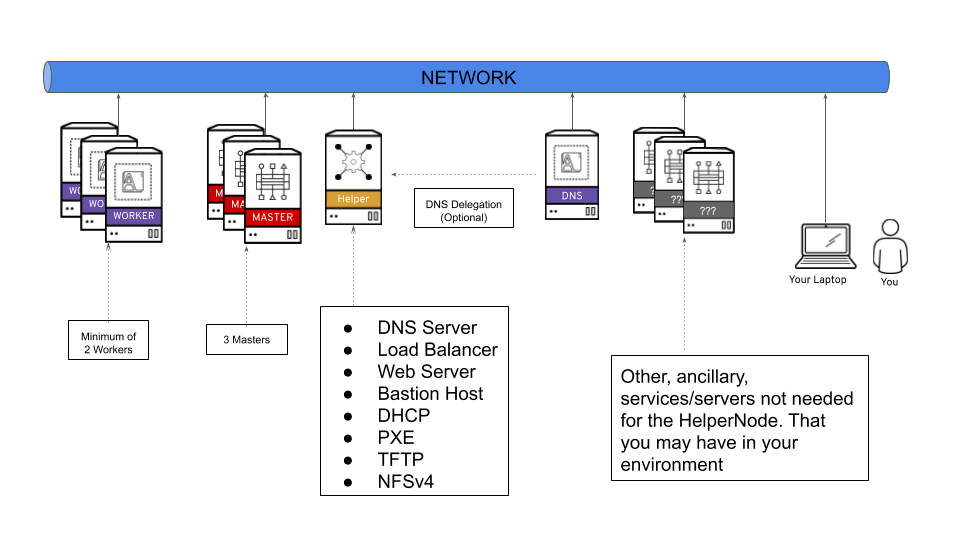
18 |
19 | It's important to note that you can delegate DNS to the ocp4-helpernode if you don't want to use it as your main DNS server. You will have to delegate `$CLUSTERID.$DOMAIN` to this helper node.
20 |
21 | For example; if you want a `$CLUSTERID` of **ocp4**, and you have a `$DOMAIN` of **example.com**. Then you will delegate `ocp4.example.com` to this ocp4-helpernode.
22 |
23 | ## Create the Helper Node (ocp4-helpernode)
24 |
25 | Create helper LPAR using the HMC GUI or HMC mksyscfg command.
26 | To start, ssh to your HMC host to use the CLI. You can also use the HMC GUI. The steps in these guide are specific to CLI.
27 |
28 | * 2 vCPUs (desired_procs)
29 | * 32 GB of RAM (desired_mem)
30 | * 120 GB HD (OS) + 880 GB HD (NFS)
31 |
32 | ```
33 | $ mksyscfg -r lpar -m -i name=ocp4-helper, profile_name=default_profile, lpar_env=aixlinux, shared_proc_pool_util_auth=1, min_mem=8192, desired_mem=32768, max_mem=32768, proc_mode=shared, min_proc_units=0.2, desired_proc_units=0.4, max_proc_units=4.0, min_procs=1, desired_procs=2, max_procs=2, sharing_mode=uncap, uncap_weight=128, max_virtual_slots=64, boot_mode=norm, conn_monitoring=1
34 | ```
35 |
36 | > **NOTE** Make sure you attach the LPAR to the appropriate network and add storage (HMC GUI or chsyscfg command) after successful LPAR creation.
37 |
38 | Install [RHEL 8 in this PowerVM LPAR](https://access.redhat.com/documentation/en-us/red_hat_enterprise_linux/8/html/performing_a_standard_rhel_installation).
39 |
40 | After helper is up and running, configure it with correct network configurations based on your network:
41 | * IP -
42 | * NetMask - 255.255.255.0
43 | * Default Gateway -
44 | * DNS Server -
45 |
46 |
47 | ## Create Cluster Nodes
48 |
49 | Create 6 LPARs using the HMC GUI or HMC mksyscfg command.
50 |
51 | __Bootstrap__
52 |
53 | Create one bootstrap LPAR.
54 |
55 | * 2 vCPUs (desired_procs)
56 | * 32 GB of RAM (desired_mem)
57 | * 120 GB HD (OS)
58 |
59 | ```
60 | $ mksyscfg -r lpar -m -i name=ocp4-bootstrap, profile_name=default_profile, lpar_env=aixlinux, shared_proc_pool_util_auth=1, min_mem=8192, desired_mem=32768, max_mem=32768, proc_mode=shared, min_proc_units=0.2, desired_proc_units=0.4, max_proc_units=4.0, min_procs=1, desired_procs=2, max_procs=4, sharing_mode=uncap, uncap_weight=128, max_virtual_slots=64, boot_mode=norm, conn_monitoring=1
61 | ```
62 |
63 | > **NOTE** Make sure you attach the LPAR to the appropriate network and add storage (HMC GUI or HMC chsyscfg command) after successful LPAR creation.
64 | > **NOTE** No OS installation is needed at this point.
65 |
66 | __Masters__
67 |
68 | Create the three master LPARs.
69 |
70 | * 2 vCPUs (desired_procs)
71 | * 32 GB of RAM (desired_mem)
72 | * 120 GB HD (OS)
73 |
74 | ```
75 | $ for i in master{0..2}
76 | do
77 | mksyscfg -r lpar -m -i name="ocp4-${i}", profile_name=default_profile, lpar_env=aixlinux, shared_proc_pool_util_auth=1, min_mem=32768, desired_mem=32768, max_mem=16384, proc_mode=shared, min_proc_units=0.2, desired_proc_units=0.2, max_proc_units=4.0, min_procs=2, desired_procs=2, max_procs=2, sharing_mode=uncap, uncap_weight=128, max_virtual_slots=64, boot_mode=norm, conn_monitoring=1
78 | done
79 | ```
80 |
81 | > **NOTE** Make sure you attach the LPARs to the appropriate network and add storage (HMC GUI or HMC chsyscfg command) after successful LPAR creation.
82 | > **NOTE** No OS installation is needed at this point.
83 |
84 | __Workers__
85 |
86 | Create the two worker LPARs.
87 |
88 | * 4 vCPUs (desired_procs), more depending on the workload
89 | * 32 GB of RAM (desired_mem), more depending on the workload
90 | * 120 GB HD (OS), more depending on the workload
91 |
92 | ```
93 | $ for i in worker{0..1}
94 | do
95 | mksyscfg -r lpar -m -i name="ocp4-${i}", profile_name=default_profile, lpar_env=aixlinux, shared_proc_pool_util_auth=1, min_mem=16384, desired_mem=32768, max_mem=262144, proc_mode=shared, min_proc_units=0.2, desired_proc_units=0.8, max_proc_units=4.0, min_procs=1, desired_procs=4, max_procs=16, sharing_mode=uncap, uncap_weight=128, max_virtual_slots=64, boot_mode=norm, conn_monitoring=1
96 | done
97 | ```
98 |
99 | > **NOTE** Make sure you attach the LPARs to the appropriate network and add storage (HMC GUI or HMC chsyscfg command) after successful LPAR creation.
100 | > **NOTE** No OS installation is needed at this point.
101 |
102 |
103 | ## Get the Mac addresses of the LPAR from the HMC by running the following command:
104 |
105 | ```
106 | $ for i in
107 | do
108 | lshwres -m $i -r virtualio --rsubtype eth --level lpar -F lpar_name,mac_addr
109 | done
110 | ```
111 |
112 | Or if using SRIOV's then run the following command:
113 | ```
114 | $ for i in
115 | do
116 | lshwres -m $i -r sriov --rsubtype logport --level eth -F lpar_name,mac_addr
117 | done
118 | ```
119 |
120 | ## Prepare the Helper Node
121 |
122 | After the helper node OS is installed; login to it
123 |
124 | ```
125 | $ ssh root@
126 | ```
127 |
128 | > **NOTE** For RHEL 8 you will need to enable `rhel-8-for-ppc64le-baseos-rpms`, `rhel-8-for-ppc64le-appstream-rpms`, and `ansible-2.9-for-rhel-8-ppc64le-rpms`
129 |
130 | Install EPEL
131 |
132 | ```
133 | $ yum -y install https://dl.fedoraproject.org/pub/epel/epel-release-latest-$(rpm -E %rhel).noarch.rpm
134 | ```
135 |
136 | Install `ansible` and `git`
137 |
138 | ```
139 | $ yum -y install ansible git
140 | ```
141 |
142 | Install `firefox` and X11 forwarding libs
143 |
144 | ```
145 | $ yum -y install firefox xorg-x11-xauth dbus-x11
146 | ```
147 |
148 | ## Set SELinux to permissive (If SELinux=disabled)
149 |
150 | Change SELinux to permissive. The OpenShift installation fails if SELinux is disabled.
151 |
152 | ```shell
153 | $ vi /etc/selinux/config # change "SELINUX=disabled" to "SELINUX=permissive"
154 | $ setenforce Permissive
155 | $ vi /etc/default/grub # change "selinux=0" to "selinux=1"
156 | $ grub2-mkconfig
157 | $ reboot
158 | $ getenforce
159 | ```
160 |
161 | ## Download OpenShift pull secret
162 |
163 | Create a place to store your pull-secret
164 |
165 | ```
166 | $ mkdir -p ~/.openshift
167 | ```
168 |
169 | Visit [try.openshift.com](https://cloud.redhat.com/openshift/install) and select "Run on Power". Download your pull secret and save it under `~/.openshift/pull-secret`
170 |
171 | ```shell
172 | $ ls -1 ~/.openshift/pull-secret
173 | /root/.openshift/pull-secret
174 | ```
175 | > **NOTE** Do not manual download the OpenShift client or installer packages from this Web Page, The required packages are downloaded automatically later by the playbook.
176 |
177 | ## Create helper node user ssh public key
178 |
179 | You can use ssh-keygen to create the users ssh public key (change "user@sample.com" to the users eMail address).
180 |
181 | ```shell
182 | $ ssh-keygen -t rsa -b 4096 -N '' -C ""
183 | $ eval "$(ssh-agent -s)"
184 | $ ssh-add ~/.ssh/id_rsa
185 | $ ls -1 ~/.ssh/id_rsa
186 | /root/.ssh/id_rsa
187 | ```
188 |
189 | ## Download ocp4-helpernode playbook
190 |
191 | ```shell
192 | git clone https://github.com/redhat-cop/ocp4-helpernode
193 | cd ocp4-helpernode
194 | ```
195 |
196 | ## Create installation variable file `vars.yaml` in `ocp4-helpernode` directory
197 |
198 | ```shell
199 | cp docs/examples/vars-ppc64le.yaml vars.yaml
200 | ```
201 | Edit the `vars.yaml`:
202 | - Update `helper` section for your helper node info
203 | - Update `dns` and `dhcp` based on your network setup
204 | - Update `bootstrap`, `masters` and `workers` with IP and MAC address of the LPARs.
205 |
206 | > **NOTE** See the `vars.yaml` [documentation page](vars-doc.md) for more info about what it does.
207 |
208 | ## Run the playbook
209 |
210 | Run the playbook to setup your helper node
211 |
212 | ```
213 | ansible-playbook -e @vars.yaml tasks/main.yml
214 | ```
215 |
216 | After it is done run the following to get info about your environment and some install help
217 |
218 |
219 | ```
220 | /usr/local/bin/helpernodecheck
221 | ```
222 |
223 | ## Create Ignition Configs
224 |
225 | Now you can start the installation process. Create an install dir.
226 |
227 | ```
228 | mkdir ~/ocp4
229 | cd ~/ocp4
230 | ```
231 |
232 | ### Create an `install-config.yaml` file
233 |
234 | > :warning: Make sure you update if your filenames or paths are different.
235 |
236 | ```
237 | cat < install-config.yaml
238 | apiVersion: v1
239 | baseDomain: example.com
240 | compute:
241 | - hyperthreading: Enabled
242 | name: worker
243 | replicas: 0
244 | controlPlane:
245 | hyperthreading: Enabled
246 | name: master
247 | replicas: 3
248 | metadata:
249 | name: ocp4
250 | networking:
251 | clusterNetworks:
252 | - cidr: 10.254.0.0/16
253 | hostPrefix: 24
254 | networkType: OpenShiftSDN
255 | serviceNetwork:
256 | - 172.30.0.0/16
257 | platform:
258 | none: {}
259 | pullSecret: '$(< ~/.openshift/pull-secret)'
260 | sshKey: '$(< ~/.ssh/helper_rsa.pub)'
261 | EOF
262 | ```
263 | > **NOTE** The baseDomain and metadata.name have to be the same as defined in `dns` section of `vars.yaml`.
264 |
265 | ### Create the installation manifests
266 |
267 | ```
268 | openshift-install create manifests
269 | ```
270 |
271 | Edit the `manifests/cluster-scheduler-02-config.yml` Kubernetes manifest file to prevent Pods from being scheduled on the control plane machines by setting `mastersSchedulable` to `false`.
272 |
273 | > :rotating_light: Skip this step if you're installing a compact cluster
274 |
275 | ```shell
276 | $ sed -i 's/mastersSchedulable: true/mastersSchedulable: false/g' manifests/cluster-scheduler-02-config.yml
277 | ```
278 |
279 | It should look something like this after you edit it.
280 |
281 | ```shell
282 | $ cat manifests/cluster-scheduler-02-config.yml
283 | apiVersion: config.openshift.io/v1
284 | kind: Scheduler
285 | metadata:
286 | creationTimestamp: null
287 | name: cluster
288 | spec:
289 | mastersSchedulable: false
290 | policy:
291 | name: ""
292 | status: {}
293 | ```
294 | > **NOTE** This is only apply to the cluster with worker nodes, don't make above change if the cluster setup is the minimum 3 nodes.
295 |
296 | ### Generate the ignition files
297 |
298 | ```
299 | openshift-install create ignition-configs
300 | ```
301 |
302 | Finally, copy the ignition files in the `ignition` directory for the websever
303 |
304 | ```
305 | cp ~/ocp4/*.ign /var/www/html/ignition/
306 | restorecon -vR /var/www/html/
307 | chmod o+r /var/www/html/ignition/*.ign
308 | ```
309 |
310 | ## Install RHCOS to all LPARs
311 |
312 | After helper node is setup with all the services for OCP, now it is time to boot it up to install RHCOS on to LPAR's disk and complete the OCP installation. The following command HMC CLI can be used to boot the LPAR with bootp, it need to be run on HMC system:
313 |
314 | ```
315 | lpar_netboot -f -t ent -m -s auto -d auto
316 | ```
317 |
318 | > **NOTE** The format is fad38e3ca520, which does not contain `:`.
319 |
320 |
321 | Boot the LPARs in the following order
322 |
323 | * Bootstrap
324 | * Masters
325 | * Workers
326 |
327 | On your laptop/workstation visit the status page
328 |
329 | ```
330 | firefox http://:9000
331 | ```
332 |
333 | You'll see the bootstrap turn "green" and then the masters turn "green", then the bootstrap turn "red". This is your indication that you can continue.
334 |
335 | Also you can check all cluster node LPAR status in HMC's partition list view.
336 |
337 | ## Wait for install
338 |
339 | The boostrap LPAR actually does the install for you; you can track it with the following command.
340 |
341 | ```
342 | openshift-install wait-for bootstrap-complete --log-level debug
343 | ```
344 |
345 | Once you see this message below...
346 |
347 | ```
348 | DEBUG OpenShift Installer v4.2.0-201905212232-dirty
349 | DEBUG Built from commit 71d8978039726046929729ad15302973e3da18ce
350 | INFO Waiting up to 30m0s for the Kubernetes API at https://api.ocp4.example.com:6443...
351 | INFO API v1.13.4+838b4fa up
352 | INFO Waiting up to 30m0s for bootstrapping to complete...
353 | DEBUG Bootstrap status: complete
354 | INFO It is now safe to remove the bootstrap resources
355 | ```
356 |
357 | ...you can continue....at this point you can delete the bootstrap server.
358 |
359 | **Note:**
360 | If the LPARs are using SEA (ibmveth driver), then the following settings need to be applied to all the OCP nodes
361 | to avoid install failures due to packet drop issues. SSH to the OCP nodes from helpernode and apply the settings.
362 | ```
363 | sudo sysctl -w net.ipv4.route.min_pmtu=1450
364 | sudo sysctl -w net.ipv4.ip_no_pmtu_disc=1
365 | echo 'net.ipv4.route.min_pmtu = 1450' | sudo tee --append /etc/sysctl.d/88-sysctl.conf > /dev/null
366 | echo 'net.ipv4.ip_no_pmtu_disc = 1' | sudo tee --append /etc/sysctl.d/88-sysctl.conf > /dev/null
367 | ```
368 |
369 | ## Finish Install
370 |
371 | First, login to your cluster
372 |
373 | ```
374 | export KUBECONFIG=/root/ocp4/auth/kubeconfig
375 | ```
376 |
377 | Set the registry for your cluster
378 |
379 | First, you have to set the `managementState` to `Managed` for your cluster
380 |
381 | ```
382 | oc patch configs.imageregistry.operator.openshift.io cluster --type merge --patch '{"spec":{"managementState":"Managed"}}'
383 | ```
384 |
385 | For PoCs, using `emptyDir` is ok (to use PVs follow [this](https://docs.openshift.com/container-platform/latest/installing/installing_bare_metal/installing-bare-metal.html#registry-configuring-storage-baremetal_installing-bare-metal) doc)
386 |
387 | ```
388 | oc patch configs.imageregistry.operator.openshift.io cluster --type merge --patch '{"spec":{"storage":{"emptyDir":{}}}}'
389 | ```
390 |
391 | If you need to expose the registry, run this command
392 |
393 | ```
394 | oc patch configs.imageregistry.operator.openshift.io/cluster --type merge -p '{"spec":{"defaultRoute":true}}'
395 | ```
396 |
397 | > Note: You can watch the operators running with `oc get clusteroperators`
398 |
399 | Watch your CSRs. These can take some time; go get come coffee or grab some lunch. You'll see your nodes' CSRs in "Pending" (unless they were "auto approved", if so, you can jump to the `wait-for install-complete` step)
400 |
401 | ```
402 | watch oc get csr
403 | ```
404 |
405 | To approve them all in one shot...
406 |
407 | ```
408 | oc get csr --no-headers | awk '{print $1}' | xargs oc adm certificate approve
409 | ```
410 |
411 | Check for the approval status (it should say "Approved,Issued")
412 |
413 | ```
414 | oc get csr | grep 'system:node'
415 | ```
416 |
417 | Once Approved; finish up the install process
418 |
419 | ```
420 | openshift-install wait-for install-complete
421 | ```
422 |
423 | ## Login to the web console
424 |
425 | The OpenShift 4 web console will be running at `https://console-openshift-console.apps.{{ dns.clusterid }}.{{ dns.domain }}` (e.g. `https://console-openshift-console.apps.ocp4.example.com`)
426 |
427 | * Username: kubeadmin
428 | * Password: the output of `cat /root/ocp4/auth/kubeadmin-password`
429 |
430 | ## Upgrade
431 |
432 | If you didn't install the latest release, then just run the following to upgrade.
433 |
434 | ```
435 | oc adm upgrade --to-latest
436 | ```
437 |
438 | If you're having issues upgrading you can try adding `--force` to the upgrade command.
439 |
440 | ```
441 | oc adm upgrade --to-latest --force
442 | ```
443 |
444 | See [issue #46](https://github.com/redhat-cop/ocp4-helpernode/issues/46) to understand why the `--force` is necessary and an alternative to using it.
445 |
446 |
447 | Scale the router if you need to
448 |
449 | ```
450 | oc patch --namespace=openshift-ingress-operator --patch='{"spec": {"replicas": 3}}' --type=merge ingresscontroller/default
451 | ```
452 |
453 | ## DONE
454 |
455 | Your install should be done! You're a OCP master!
456 |
--------------------------------------------------------------------------------
/tasks/main.yml:
--------------------------------------------------------------------------------
1 | ---
2 | # Setup OCP4 Helper Node
3 |
4 | - hosts: all
5 | vars_files:
6 | - ../vars/main.yml
7 | - ../vars/ports.yml
8 | handlers:
9 | - import_tasks: ../handlers/main.yml
10 |
11 | # Running Pretasks like checking hostnames and verifying the version of ansible
12 | pre_tasks:
13 | - name: Verify Ansible version.
14 | assert:
15 | that: "ansible_version.full is version_compare('2.9', '>=')"
16 | msg: >
17 | "You must update Ansible to at least 2.9"
18 | - name: validate hostnames
19 | import_tasks: validate_host_names.yaml
20 |
21 | tasks:
22 | - name: generate ssh keys
23 | import_tasks: generate_ssh_keys.yaml
24 | when: ssh_gen_key
25 |
26 | - name: set setup facts
27 | import_tasks: set_facts_.yaml
28 |
29 | - name: Install needed packages
30 | package:
31 | name: "{{ packages }}"
32 | state: present
33 |
34 | - name: Install packages for DHCP/PXE install
35 | package:
36 | name: "{{ dhcppkgs }}"
37 | state: present
38 | when: not staticips
39 |
40 | - name: Install additional package for Intel platforms
41 | package:
42 | name: "{{ syslinuxpkgs }}"
43 | state: present
44 | when: not staticips and not ppc64le
45 |
46 | - name: Remove existing config files
47 | import_tasks: remove_old_config_files.yaml
48 | when: remove_old_config_files
49 |
50 | - name: Write out dhcp file
51 | template:
52 | src: ../templates/dhcpd.conf.j2
53 | dest: /etc/dhcp/dhcpd.conf
54 | notify:
55 | - restart dhcpd
56 | when: not staticips and not uefi
57 |
58 | - name: Write out dhcp file (UEFI)
59 | template:
60 | src: ../templates/dhcpd-uefi.conf.j2
61 | dest: /etc/dhcp/dhcpd.conf
62 | notify:
63 | - restart dhcpd
64 | when: not staticips and uefi
65 |
66 | - name: Setup named configuration files
67 | block:
68 | - name: Write out named file
69 | template:
70 | src: ../templates/named.conf.j2
71 | dest: /etc/named.conf
72 | notify:
73 | - restart bind
74 |
75 | - name: Installing DNS Serialnumber generator
76 | copy:
77 | src: ../files/set-dns-serial.sh
78 | dest: /usr/local/bin/set-dns-serial.sh
79 | mode: '0555'
80 |
81 | - name: Set zone serial number
82 | shell: "/usr/local/bin/set-dns-serial.sh"
83 | register: dymanicserialnumber
84 |
85 | - name: Setting serial number as a fact
86 | set_fact:
87 | serialnumber: "{{ dymanicserialnumber.stdout }}"
88 |
89 | - name: Write out "{{ dns.domain | lower }}" zone file
90 | template:
91 | src: ../templates/zonefile.j2
92 | dest: /var/named/zonefile.db
93 | mode: '0644'
94 | notify:
95 | - restart bind
96 |
97 | - name: Write out reverse zone file
98 | template:
99 | src: ../templates/reverse.j2
100 | dest: /var/named/reverse.db
101 | mode: '0644'
102 | notify:
103 | - restart bind
104 |
105 | - name: Write out haproxy config file
106 | template:
107 | src: ../templates/haproxy.cfg.j2
108 | dest: /etc/haproxy/haproxy.cfg
109 | notify:
110 | - restart haproxy
111 | when: dns.lb_ipaddr is not defined or dns.lb_ipaddr == helper.ipaddr
112 | when: dhcp.dns is not defined or dhcp.dns == helper.ipaddr
113 |
114 | - name: Set HTTP server and prepare OCP4 bios
115 | block:
116 | - name: Copy httpd conf file
117 | template:
118 | src: ../templates/httpd.conf.j2
119 | dest: /etc/httpd/conf/httpd.conf
120 | notify:
121 | - restart httpd
122 |
123 | - name: Create apache directories for installing
124 | file:
125 | path: "{{ item }}"
126 | state: directory
127 | mode: 0755
128 | with_items:
129 | - /var/www/html/install
130 | - /var/www/html/ignition
131 |
132 | - name: Delete OCP4 files, if requested, to download again
133 | file:
134 | state: absent
135 | path: "{{ item }}"
136 | with_items:
137 | - "/usr/local/src/openshift-client-linux.tar.gz"
138 | - "/usr/local/src/openshift-install-linux.tar.gz"
139 | - "/var/www/html/install/bios.raw.gz"
140 | - "/var/www/html/install/rootfs.img"
141 | - "/var/lib/tftpboot/rhcos/initramfs.img"
142 | - "/var/lib/tftpboot/rhcos/kernel"
143 | when: force_ocp_download
144 |
145 | - name: Downloading OCP4 installer Bios
146 | get_url:
147 | url: "{{ ocp_bios }}"
148 | dest: /var/www/html/install/bios.raw.gz
149 | mode: 0555
150 | when: ("metal" in ocp_bios) and (download_imgs or force_ocp_download)
151 |
152 | - name: Downloading OCP4 installer rootfs
153 | get_url:
154 | url: "{{ ocp_bios }}"
155 | dest: /var/www/html/install/rootfs.img
156 | mode: 0555
157 | when: ("rootfs" in ocp_bios) and (download_imgs or force_ocp_download)
158 |
159 | - name: Start firewalld service
160 | systemd:
161 | name: firewalld
162 | state: started
163 | enabled: yes
164 |
165 | - name: Open up firewall ports
166 | firewalld:
167 | permanent: yes
168 | immediate: yes
169 | state: enabled
170 | port: "{{ item[0] }}"
171 | delegate_to: "{{ item[1] }}"
172 | run_once: true
173 | with_nested:
174 | - "{{ ports }}"
175 | - "{{ ansible_play_batch }}"
176 |
177 | - name: Best effort SELinux repair - DNS
178 | shell: "restorecon -vR /var/named || true"
179 |
180 | - name: Best effort SELinux repair - Apache
181 | shell: "restorecon -vR /var/www/html || true"
182 |
183 | - name: Create NFS export directory
184 | file:
185 | path: /export
186 | state: directory
187 | mode: 0777
188 | owner: "{{ owner }}"
189 | group: "{{ group }}"
190 | notify:
191 | - restart nfs
192 |
193 | - name: Copy NFS export conf file
194 | copy:
195 | src: ../files/nfs-exports
196 | dest: /etc/exports
197 | notify:
198 | - restart nfs
199 | when: not secure_nfs
200 |
201 | - name: Copy NFS export conf file with secure_nfs
202 | template:
203 | src: ../templates/nfs-exports.j2
204 | dest: /etc/exports
205 | notify:
206 | - restart nfs
207 | when: secure_nfs
208 |
209 | - name: Create TFTP config
210 | file:
211 | path: /var/lib/tftpboot/pxelinux.cfg
212 | state: directory
213 | mode: 0755
214 | notify:
215 | - restart tftp
216 | when: not staticips and not ppc64le
217 |
218 | - name: generate netboot entry for grub2
219 | shell: grub2-mknetdir --net-directory=/var/lib/tftpboot
220 | when: not staticips and ppc64le
221 |
222 | - name: Create TFTP RHCOS dir
223 | file:
224 | path: /var/lib/tftpboot/rhcos
225 | state: directory
226 | mode: 0755
227 | when: not staticips
228 |
229 | - name: SEBool allow haproxy connect any port
230 | seboolean:
231 | name: haproxy_connect_any
232 | state: yes
233 | persistent: yes
234 | notify:
235 | - restart haproxy
236 | when: dns.lb_ipaddr is not defined or dns.lb_ipaddr == helper.ipaddr
237 |
238 | - name: Setting TFTP server
239 | when: not ipi and baremetal
240 | block:
241 | - name: Copy over files needed for TFTP
242 | shell: "cp -a /usr/share/syslinux/* /var/lib/tftpboot"
243 | when: not staticips and not ppc64le
244 |
245 | - name: Downloading OCP4 installer initramfs
246 | get_url:
247 | url: "{{ ocp_initramfs }}"
248 | dest: /var/lib/tftpboot/rhcos/initramfs.img
249 | mode: 0555
250 | when: not staticips
251 |
252 | - name: Downloading OCP4 installer kernel
253 | get_url:
254 | url: "{{ ocp_install_kernel }}"
255 | dest: /var/lib/tftpboot/rhcos/kernel
256 | mode: 0555
257 | when: not staticips
258 |
259 | - name: Generate pxe config files
260 | block:
261 | - name: Set the default tftp file
262 | template:
263 | src: ../templates/default.j2
264 | dest: /var/lib/tftpboot/pxelinux.cfg/default
265 | mode: 0555
266 | when: "{{ pxe.generate_default | default(false) }}"
267 | notify:
268 | - restart tftp
269 |
270 | - name: Set the bootstrap specific tftp file
271 | template:
272 | src: ../templates/pxe-bootstrap.j2
273 | dest: "/var/lib/tftpboot/pxelinux.cfg/01-{{ bootstrap.macaddr | lower | regex_replace (':', '-')}}"
274 | mode: 0555
275 | notify:
276 | - restart tftp
277 | when: bootstrap is defined
278 |
279 | - name: Set the master specific tftp files
280 | template:
281 | src: ../templates/pxe-master.j2
282 | dest: "/var/lib/tftpboot/pxelinux.cfg/01-{{ item.macaddr | regex_replace (':', '-')}}"
283 | mode: 0555
284 | with_items: "{{ masters | lower }}"
285 | notify:
286 | - restart tftp
287 |
288 | - name: Set the worker specific tftp files
289 | template:
290 | src: ../templates/pxe-worker.j2
291 | dest: "/var/lib/tftpboot/pxelinux.cfg/01-{{ item.macaddr | regex_replace (':', '-')}}"
292 | mode: 0555
293 | with_items: "{{ workers | lower }}"
294 | notify:
295 | - restart tftp
296 | when:
297 | - workers is defined
298 | - workers | length > 0
299 | when: not staticips and not ppc64le
300 |
301 | - name: Prepare UEFI netboot configuration
302 | block:
303 | - name: Install packages for UEFI install
304 | package:
305 | name: "{{ uefipkgs }}"
306 | state: present
307 |
308 | - name: Create tftp grub2 directory
309 | file:
310 | path: /var/lib/tftpboot/grub2
311 | state: directory
312 | mode: '0755'
313 |
314 | - name: copy UEFI shim to grub2 tftpboot/grub2 directory
315 | copy:
316 | src: /boot/efi/EFI/redhat/shimx64.efi
317 | dest: /var/lib/tftpboot/grub2/shimx64.efi
318 | mode: '0555'
319 | remote_src: yes
320 |
321 | - name: copy grub2 EFI file to tftpboot/grub2 directory
322 | copy:
323 | src: /boot/efi/EFI/redhat/grubx64.efi
324 | dest: /var/lib/tftpboot/grub2/grubx64.efi
325 | mode: '0555'
326 | remote_src: yes
327 |
328 | - name: Create the bootstrap specific grub2 file
329 | template:
330 | src: ../templates/grub2-bootstrap.j2
331 | dest: "/var/lib/tftpboot/grub2/grub.cfg-01-{{ bootstrap.macaddr | lower | regex_replace (':', '-')}}"
332 | mode: 0555
333 | notify:
334 | - restart tftp
335 |
336 | - name: Set the master specific tftp files
337 | template:
338 | src: ../templates/grub2-master.j2
339 | dest: "/var/lib/tftpboot/grub2/grub.cfg-01-{{ item.macaddr | regex_replace (':', '-')}}"
340 | mode: 0555
341 | with_items: "{{ masters | lower }}"
342 | notify:
343 | - restart tftp
344 |
345 | - name: Set the worker specific tftp files
346 | template:
347 | src: ../templates/grub2-worker.j2
348 | dest: "/var/lib/tftpboot/grub2/grub.cfg-01-{{ item.macaddr | regex_replace (':', '-')}}"
349 | mode: 0555
350 | with_items: "{{ workers | lower }}"
351 | notify:
352 | - restart tftp
353 | when:
354 | - workers is defined
355 | - workers | length > 0
356 | when: not staticips and not ppc64le and uefi
357 |
358 | - name: Generate grub2 config files
359 | block:
360 | - set_fact:
361 | coreos_inst_url: "coreos.inst.image_url=http://{{ helper.ipaddr }}:8080/install/bios.raw.gz"
362 | when: ("metal" in ocp_bios)
363 |
364 | - set_fact:
365 | coreos_inst_url: "coreos.live.rootfs_url=http://{{ helper.ipaddr }}:8080/install/rootfs.img"
366 | when: ("rootfs" in ocp_bios)
367 |
368 | - name: create grub.cfg
369 | copy:
370 | dest: /var/lib/tftpboot/boot/grub2/grub.cfg
371 | content: |
372 | default=0
373 | fallback=1
374 | timeout=1
375 |
376 | - name: generate grub entry (bootstrap)
377 | vars:
378 | role: bootstrap
379 | mac: "{{ bootstrap.macaddr }}"
380 | include_tasks: generate_grub.yml
381 | when: bootstrap is defined
382 |
383 | - name: generate grub entry (masters)
384 | vars:
385 | role: master
386 | mac: "{{ item.macaddr }}"
387 | include_tasks: generate_grub.yml
388 | with_items: "{{ masters }}"
389 |
390 | - name: generate grub entry (workers)
391 | vars:
392 | role: worker
393 | mac: "{{ item.macaddr }}"
394 | include_tasks: generate_grub.yml
395 | with_items: "{{ workers }}"
396 | when:
397 | - workers is defined
398 | - workers | length > 0
399 | when: not staticips and ppc64le and (("metal" in ocp_bios) or ("rootfs" in ocp_bios))
400 |
401 | - name: Installing TFTP Systemd helper
402 | copy:
403 | src: ../files/start-tftp.sh
404 | dest: /usr/local/bin/start-tftp.sh
405 | mode: '0555'
406 | when: not staticips
407 |
408 | - name: Installing TFTP Systemd unit file
409 | copy:
410 | src: ../files/helper-tftp.service
411 | dest: /etc/systemd/system/helper-tftp.service
412 | mode: '0655'
413 | when: not staticips
414 |
415 | - name: Systemd daemon reload
416 | systemd:
417 | daemon_reload: yes
418 | when: not staticips
419 |
420 | - name: Starting services
421 | service:
422 | name: "{{ item }}"
423 | enabled: yes
424 | state: started
425 | with_items:
426 | - "{{ services }}"
427 |
428 | - name: Starting DHCP/PXE services for baremetal
429 | service:
430 | name: "{{ item }}"
431 | enabled: yes
432 | state: started
433 | with_items:
434 | - dhcpd
435 | - tftp
436 | - helper-tftp
437 | when: not staticips and baremetal
438 |
439 | - name: Starting DHCP/PXE services
440 | service:
441 | name: "{{ item }}"
442 | enabled: yes
443 | state: started
444 | with_items:
445 | - dhcpd
446 | when: not staticips and not baremetal
447 |
448 | - name: Unmasking Services
449 | systemd:
450 | name: "{{ item }}"
451 | enabled: yes
452 | masked: no
453 | with_items:
454 | - tftp
455 | when: not staticips and not ipi
456 |
457 | - name: Copy info script over
458 | template:
459 | src: ../templates/checker.sh.j2
460 | dest: /usr/local/bin/helpernodecheck
461 | owner: root
462 | group: root
463 | mode: 0555
464 |
465 | - name: Copying over nfs-provisioner rbac
466 | copy:
467 | src: ../files/nfs-provisioner-rbac.yaml
468 | dest: /usr/local/src/nfs-provisioner-rbac.yaml
469 | owner: root
470 | group: root
471 | mode: 0666
472 |
473 | - name: Copying over nfs-provisioner deployment
474 | template:
475 | src: ../templates/nfs-provisioner-deployment.yaml.j2
476 | dest: /usr/local/src/nfs-provisioner-deployment.yaml
477 | owner: root
478 | group: root
479 | mode: 0666
480 |
481 | - name: Copying over nfs-provisioner storageclass
482 | copy:
483 | src: ../files/nfs-provisioner-sc.yaml
484 | dest: /usr/local/src/nfs-provisioner-sc.yaml
485 | owner: root
486 | group: root
487 | mode: 0666
488 |
489 | - name: Copying over nfs-provisioner setup script
490 | copy:
491 | src: ../files/nfs-provisioner-setup.sh
492 | dest: /usr/local/bin/nfs-provisioner-setup.sh
493 | owner: root
494 | group: root
495 | mode: 0555
496 |
497 | - name: Copying over a sample PVC file for NFS
498 | copy:
499 | src: ../files/registry-pvc.yaml
500 | dest: /usr/local/src/registry-pvc.yaml
501 | mode: '0555'
502 |
503 | - name: Chrony configuration
504 | block:
505 | - name: Create folder for additional machineconfig
506 | file:
507 | path: "{{ machineconfig_path }}"
508 | state: directory
509 |
510 | - name: Create temporary chrony.conf file
511 | template:
512 | src: ../templates/chrony.conf.j2
513 | dest: /tmp/chrony.conf.tmp
514 |
515 | - name: slurp contents of temporary chrony.conf file
516 | slurp:
517 | src: /tmp/chrony.conf.tmp
518 | register: chronybase64
519 |
520 | - name: Generate Chrony machineconfig
521 | template:
522 | src: ../templates/chrony-machineconfig.j2
523 | dest: "{{ machineconfig_path }}/99-{{item}}-chrony-configuration.yaml"
524 | loop:
525 | - master
526 | - name: Generate Chrony machineconfig
527 | template:
528 | src: ../templates/chrony-machineconfig.j2
529 | dest: "{{ machineconfig_path }}/99-{{item}}-chrony-configuration.yaml"
530 | loop:
531 | - worker
532 | when:
533 | - workers is defined
534 | - workers | length > 0
535 | when: chronyconfig.enabled
536 |
537 | - name: Preparing OCP client
538 | when: ocp_client is defined
539 | block:
540 | - name: Downloading OCP4 client
541 | get_url:
542 | url: "{{ ocp_client }}"
543 | dest: /usr/local/src/openshift-client-linux.tar.gz
544 |
545 | - name: Unarchiving OCP4 client
546 | unarchive:
547 | src: /usr/local/src/openshift-client-linux.tar.gz
548 | dest: /usr/local/bin
549 | remote_src: yes
550 |
551 | - name: Preparing OCP installer
552 | when: ocp_installer is defined
553 | block:
554 | - name: Downloading OCP4 Installer
555 | get_url:
556 | url: "{{ ocp_installer }}"
557 | dest: /usr/local/src/openshift-install-linux.tar.gz
558 |
559 | - name: Unarchiving OCP4 Installer
560 | unarchive:
561 | src: /usr/local/src/openshift-install-linux.tar.gz
562 | dest: /usr/local/bin
563 | remote_src: yes
564 |
565 | - name: Link openshift-install-fips to openshift-install
566 | file:
567 | src: "/usr/local/bin/openshift-install-fips"
568 | dest: "/usr/local/bin/openshift-install"
569 | state: link
570 | when: fips
571 |
572 | - name: Removing files that are not needed
573 | file:
574 | path: /usr/local/bin/README.md
575 | state: absent
576 |
577 | - name: Install and configure helm
578 | when: helm_source is defined
579 | block:
580 | - name: Create helm source directory
581 | file:
582 | path: "{{ item }}"
583 | state: directory
584 | mode: 0755
585 | with_items:
586 | - /usr/local/src/helm
587 |
588 | - name: Downloading helm source binary tarball
589 | get_url:
590 | url: "{{ helm_source }}"
591 | dest: /usr/local/src/helm/helm-client.tar.gz
592 |
593 | - name: Unarchiving helm tarball
594 | unarchive:
595 | src: /usr/local/src/helm/helm-client.tar.gz
596 | dest: /usr/local/src/helm
597 | remote_src: yes
598 |
599 | - name: Copy helm cli to bin directory for amd64
600 | copy:
601 | src: /usr/local/src/helm/linux-amd64/helm
602 | dest: /usr/local/bin/helm
603 | owner: root
604 | group: root
605 | mode: '0755'
606 | remote_src: true
607 | when: not ppc64le
608 |
609 | - name: Copy helm cli to bin directory for ppc64le
610 | copy:
611 | src: /usr/local/src/helm/linux-ppc64le/helm
612 | dest: /usr/local/bin/helm
613 | owner: root
614 | group: root
615 | mode: '0755'
616 | remote_src: true
617 | when: ppc64le
618 |
619 | - name: Set the local resolv.conf file
620 | template:
621 | src: ../templates/resolv.conf.j2
622 | dest: /etc/resolv.conf
623 |
624 | - name: Get network device system name
625 | shell: "nmcli -t dev show {{ networkifacename }} | grep GENERAL.CONNECTION | cut -d: -f2"
626 | register: devicesystemname
627 |
628 | - name: Setting network device system name as a fact
629 | set_fact:
630 | dsname: "{{ devicesystemname.stdout }}"
631 |
632 | - name: Setting DNS server ip on network interface "{{ dsname }}" to 127.0.0.1
633 | shell: 'nmcli con mod "{{ dsname }}" ipv4.dns 127.0.0.1'
634 |
635 | - name: Setting DNS search path on network interface "{{ dsname }}" to "{{ dns.clusterid }}.{{ dns.domain | lower }}"
636 | shell: 'nmcli con mod "{{ dsname }}" ipv4.dns-search {{ dns.clusterid }}.{{ dns.domain | lower }}'
637 |
638 | - name: Restarting NetworkManager
639 | service:
640 | name: "{{ item }}"
641 | state: restarted
642 | with_items:
643 | - NetworkManager
644 |
645 | - name: Setup keepalived service
646 | when: high_availability is defined
647 | import_tasks: setup_keepalived.yaml
648 |
649 | - name: Setup Local Registry
650 | when: setup_registry.deploy
651 | block:
652 | - name: Install registry packages
653 | package:
654 | name: "{{ registry }}"
655 | state: present
656 |
657 | - name: Setup Registry
658 | import_tasks: setup_registry.yaml
659 |
660 | - name: Enable restart always for critical services
661 | include_tasks: restart_config.yaml
662 | loop: "{{ critical_services }}"
663 |
664 | - name: Disable named service
665 | service:
666 | name: named
667 | state: stopped
668 | when: dhcp.dns is defined and dhcp.dns != helper.ipaddr
669 |
670 | - name: Disable haproxy service
671 | service:
672 | name: haproxy
673 | state: stopped
674 | when: (dhcp.dns is defined and dhcp.dns != helper.ipaddr) or (dns.lb_ipaddr is defined and dns.lb_ipaddr != helper.ipaddr)
675 |
676 | - name: Information about this install
677 | debug:
678 | msg:
679 | - "Please run /usr/local/bin/helpernodecheck for information"
680 |
681 |
--------------------------------------------------------------------------------