30 |
31 |
32 |
33 |
34 |
35 |
36 | ## About The Project
37 |
38 | 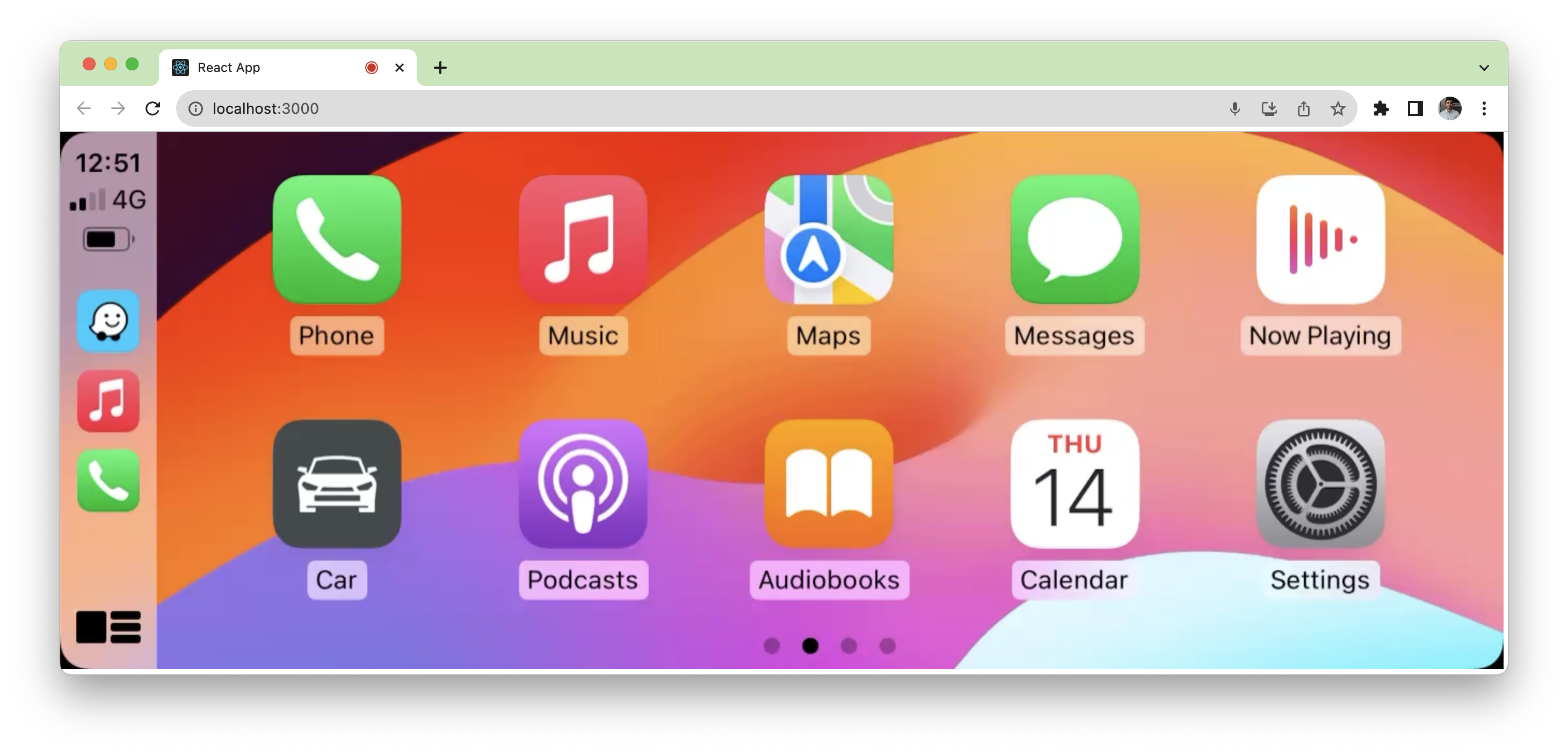
39 |
40 | [Example Video (outdated)](https://youtu.be/mBeYd7RNw1w)
41 |
42 | This repository contains the npm package `node-carplay` that can be used on the Web or in Node.js. It allows interfacing with the [Carlinkit USB adapter](https://amzn.to/3X6OaF9) and stream audio/video on your computer. The package can be used in the Node.js environment using native USB bindings ([`libudev-dev` required](https://github.com/node-usb/node-usb#prerequisites)), or in Chrome (or equivalent browsers) using [`WebUSB` API](https://developer.mozilla.org/en-US/docs/Web/API/WebUSB_API).
43 |
44 | There are multiple Carplay dongles on the market, the ones that convert wired to wireless carplay WILL NOT WORK. You need one that converts android/factory infotainment systems into Carplay (CPC200-Autokit or CPC200-CCPA etc). The package forwards video feed in h264, and PCM audio coming in from the USB dongle.
45 |
46 | There's an included example `carplay-web-app` that runs in the browser and renders the Carplay environment. It supports mic input and audio output through Chrome audio stack as well as touch / mouse input.
47 |
48 | ### Acknowledgements
49 |
50 | This project is inspired by the work of @electric-monk on the Python version.
51 |
52 | * [PyCarplay](https://github.com/electric-monk/pycarplay) by @electric-monk
53 | * [Node-USB](https://github.com/node-usb/node-usb)
54 | * [jMuxer](https://github.com/samirkumardas/jmuxer)
55 |
56 |
57 | ## Getting Started
58 |
59 | ### Prerequisites
60 |
61 | If you are on macOS and want to use the microphone in `node` environment, you need `sox`
62 |
63 | ```shell
64 | brew install sox
65 | ```
66 |
67 | If you are on Linux, you need `libudev-dev` for USB support in `node` environment
68 |
69 | ```shell
70 | sudo apt install -y libudev-dev
71 | ```
72 |
73 | ### Installation
74 |
75 | ```javascript
76 | npm install node-carplay
77 | ```
78 |
79 | ## Usage
80 |
81 | There is an included example (not in the NPM package, but in the [Git repository](https://github.com/rhysmorgan134/node-CarPlay)). It is recommended to take the example and modify your way out of it.
82 |
83 |
84 | ## Contributing
85 |
86 | Contributions are what make the open source community such an amazing place to be learn, inspire, and create. Any contributions you make are **greatly appreciated**.
87 |
88 | 1. Fork the Project
89 | 2. Create your Feature Branch (`git checkout -b feature/AmazingFeature`)
90 | 3. Commit your Changes (`git commit -m 'Add some AmazingFeature'`)
91 | 4. Push to the Branch (`git push origin feature/AmazingFeature`)
92 | 5. Open a Pull Request
93 |
94 |
95 | ## License
96 |
97 | The contents of this repository are licensed under the terms of the MIT License.
98 | See the `LICENSE` file for more info.
99 |
--------------------------------------------------------------------------------
/examples/carplay-node-without-audio/client/App.tsx:
--------------------------------------------------------------------------------
1 | import { useCallback, useEffect, useState, useRef } from 'react'
2 | import JMuxer from 'jmuxer'
3 | import { TouchAction } from 'node-carplay/web'
4 |
5 | import { config } from './config.js'
6 |
7 | const RETRY_DELAY_MS = 6000
8 | // ^ Note: This retry delay is lower than carplay-web-app
9 | // because the dongle is handled on server side, and it is
10 | // higher than 5 seconds because that's the default "frame"
11 | // time.
12 |
13 | function App() {
14 | const [pointerdown, setPointerDown] = useState(false)
15 |
16 | const connectionRef = useRef(null)
17 | const retryTimeoutRef = useRef(null)
18 |
19 | const clearRetryTimeout = useCallback(() => {
20 | if (retryTimeoutRef.current) {
21 | clearTimeout(retryTimeoutRef.current)
22 | retryTimeoutRef.current = null
23 | }
24 | }, [])
25 |
26 | useEffect(() => {
27 | if (connectionRef.current) {
28 | return
29 | }
30 | const jmuxer = new JMuxer({
31 | node: 'video',
32 | mode: 'video',
33 | fps: config.fps,
34 | flushingTime: 0,
35 | debug: false,
36 | })
37 |
38 | const connectionUrl = new URL('/', window.location.href)
39 | connectionUrl.protocol = connectionUrl.protocol.replace('http', 'ws')
40 |
41 | const connection = new WebSocket(connectionUrl.href)
42 | connectionRef.current = connection
43 |
44 | fetch(`/stream/video`)
45 | .then(async response => {
46 | const reader = response.body!.getReader()
47 |
48 | // eslint-disable-next-line no-constant-condition
49 | while (true) {
50 | const { value, done } = await reader.read()
51 | if (done) break
52 | jmuxer.feed({
53 | video: value,
54 | duration: 0,
55 | })
56 | clearRetryTimeout()
57 | }
58 | })
59 | .catch(err => {
60 | console.error('Error in video stream', err)
61 | if (retryTimeoutRef.current == null) {
62 | console.error(`Reloading page in ${RETRY_DELAY_MS}ms`)
63 | retryTimeoutRef.current = setTimeout(() => {
64 | window.location.reload()
65 | }, RETRY_DELAY_MS)
66 | }
67 | })
68 | }, [])
69 |
70 | const sendTouchEvent: React.PointerEventHandler = useCallback(
71 | e => {
72 | let action = TouchAction.Up
73 | if (e.type === 'pointerdown') {
74 | action = TouchAction.Down
75 | setPointerDown(true)
76 | } else if (pointerdown) {
77 | switch (e.type) {
78 | case 'pointermove':
79 | action = TouchAction.Move
80 | break
81 | case 'pointerup':
82 | case 'pointercancel':
83 | case 'pointerout':
84 | setPointerDown(false)
85 | action = TouchAction.Up
86 | break
87 | }
88 | } else {
89 | return
90 | }
91 |
92 | const { offsetX: x, offsetY: y } = e.nativeEvent
93 |
94 | connectionRef.current?.send(
95 | JSON.stringify({
96 | type: 'touch',
97 | x,
98 | y,
99 | action,
100 | }),
101 | )
102 | },
103 | [pointerdown],
104 | )
105 |
106 | return (
107 |